GETTING TO KNOW
AMAZON SMART THERMOSTAT
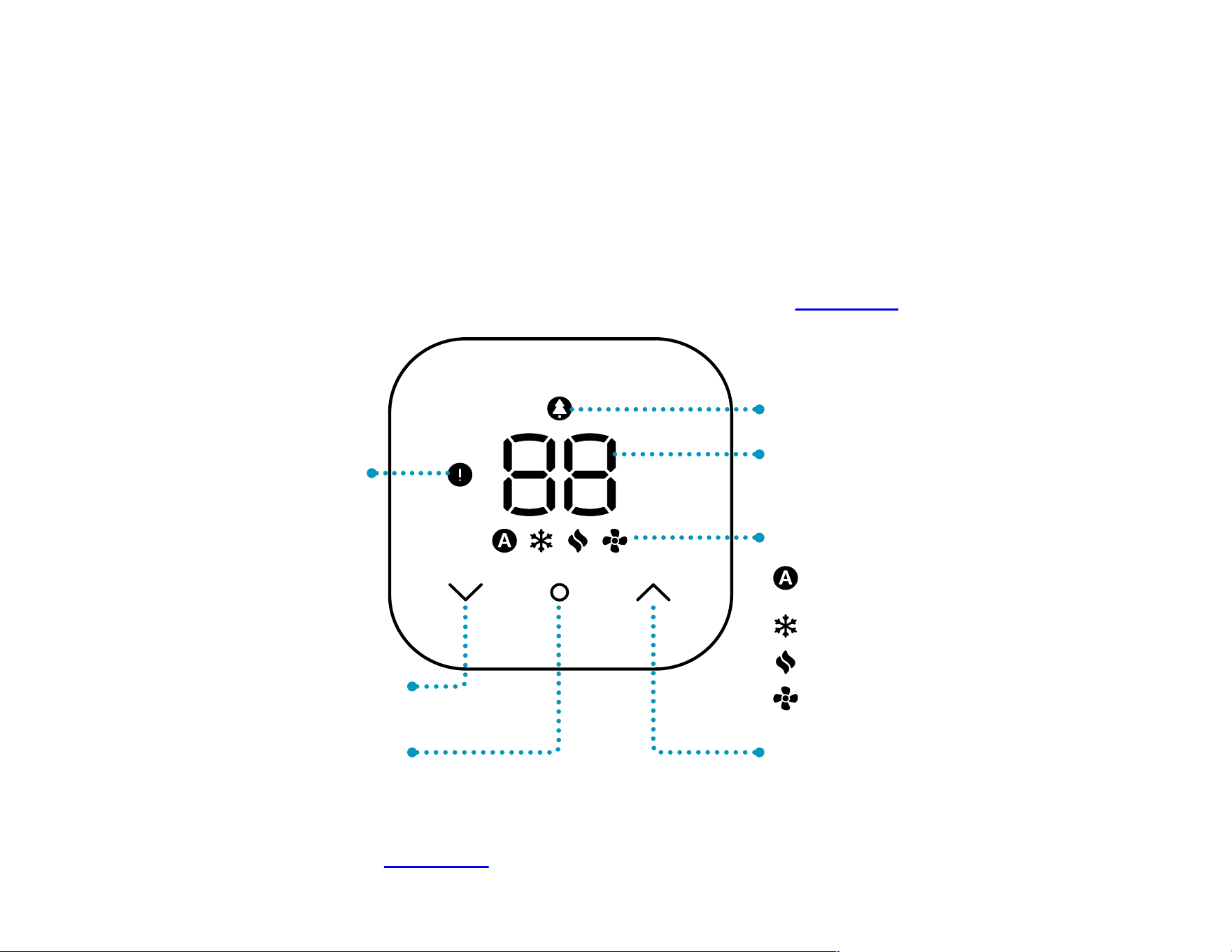
The following indicators appear when a function is engaged.
You won’t see them all at once or when your thermostat is inactive.
You can also change the display settings later in the Alexa app.
CURRENT
TEMPERATURE
ENERGY SAVER
MODES
TEMPER ATURE UP
Auto, heating/cooling
thresholds defined
Cooling mode (blue)
Heating mode (red)
Fan mode
INFO ICON
appears when
you have a
notification
TEMPERATURE
DOWN
MODE BUTTON
IMPORTANT: Amazon Smart Thermostat doesn’t have a built-in
microphone. To control it by voice, use a compatible Alexa-enabled
device or the Alexa app.
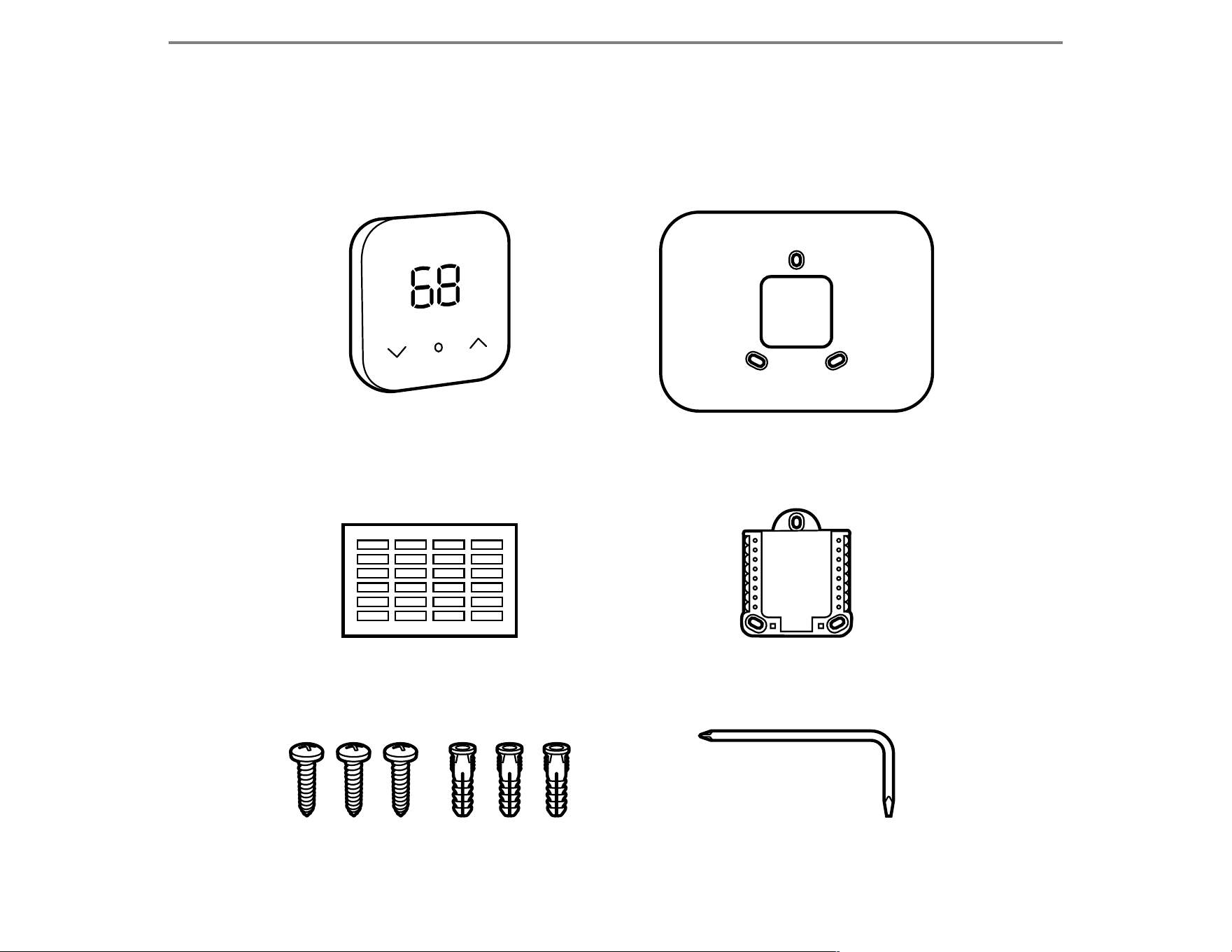
WHAT’S IN THE BOX?
Amazon Smart
Thermostat
Cosmetic plate
(optional)
Wire-labeling stickers Wall plate
Screws with anchors
Installation tool
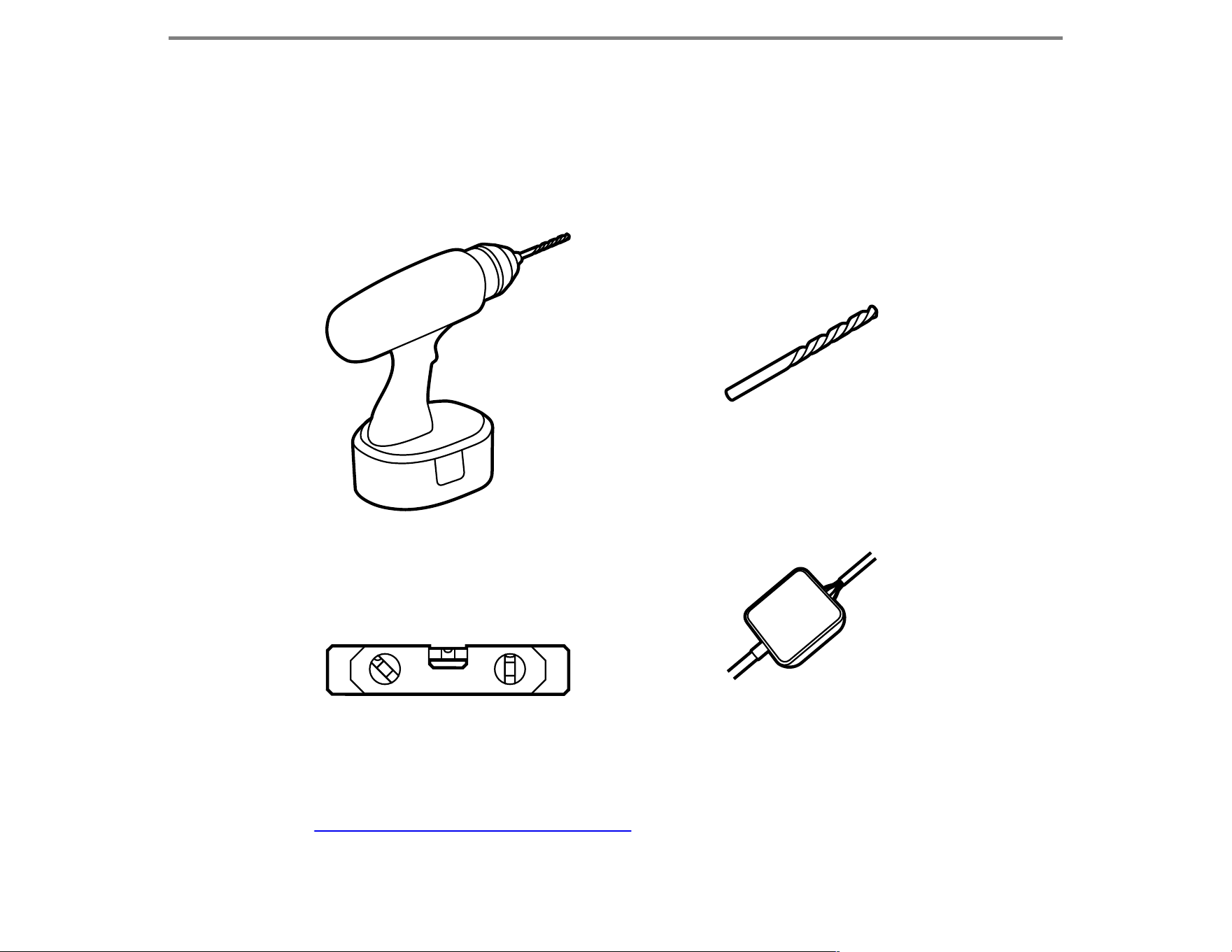
THINGS YOU MAY NEED
*Amazon Smart Thermostat requires a C-wire or C-wire power adapter.
Go to amazon.com/smartthermostat to see if you need one. The in-app
installation process will also let you know.
Power drill
Level
3/16" drill bit
C-wire power adapter*
THINGS TO KNOW BEFORE YOU BEGIN
Before installing your thermostat, you should be comfortable
handling the electrical wiring in your home. If not, hire a professional
to take care of the installation for you. For more information, go to
amazon.com/amazonsmartthermostat/help.
This system is intended to replace an existing 24V thermostat
(common wire or “C” wire required) and is compatible with most
heating, cooling, and heat pump systems. It does not work with
electric baseboard heat (120 –240V) or millivolt systems. It does not
replace a thermostat that is wired for line voltage (Terminals L1/L2).
It does not support input (S terminals) for indoor and outdoor sensors.
It does not support relay (U terminals) for ventilation. Please check
amazon.com/smartthermostat for compatibility.
You must turn off power to your heating and cooling system at your
circuit breaker or fuse box before installing your thermostat.
For more information about circuit breakers and panels, visit
amazon.com/amazonsmartthermostat/help.
Amazon Smart Thermostat requires 2.4GHz wifi. Make sure you have
your wifi password handy before you begin the installation.
You may want to heat or cool your home to a comfortable temperature
before beginning the installation, since your system won’t be operating
during that time.
WARNING: ELECTRICAL HAZARD
Failure to follow these safety instructions could result in fire,
electric shock, or other injury or damage.
Before installing your thermostat, turn off power to your
heating and cooling system at your circuit breaker or fuse
box. Verify that the power is off.
Be aware that all electrical wires, regardless of function, can
carry an electrical current. Treat all wires with equal caution.
PREVENT EQUIPMENT DAMAGE
Make sure your thermostat wiring does not contain any
120/240V wires.
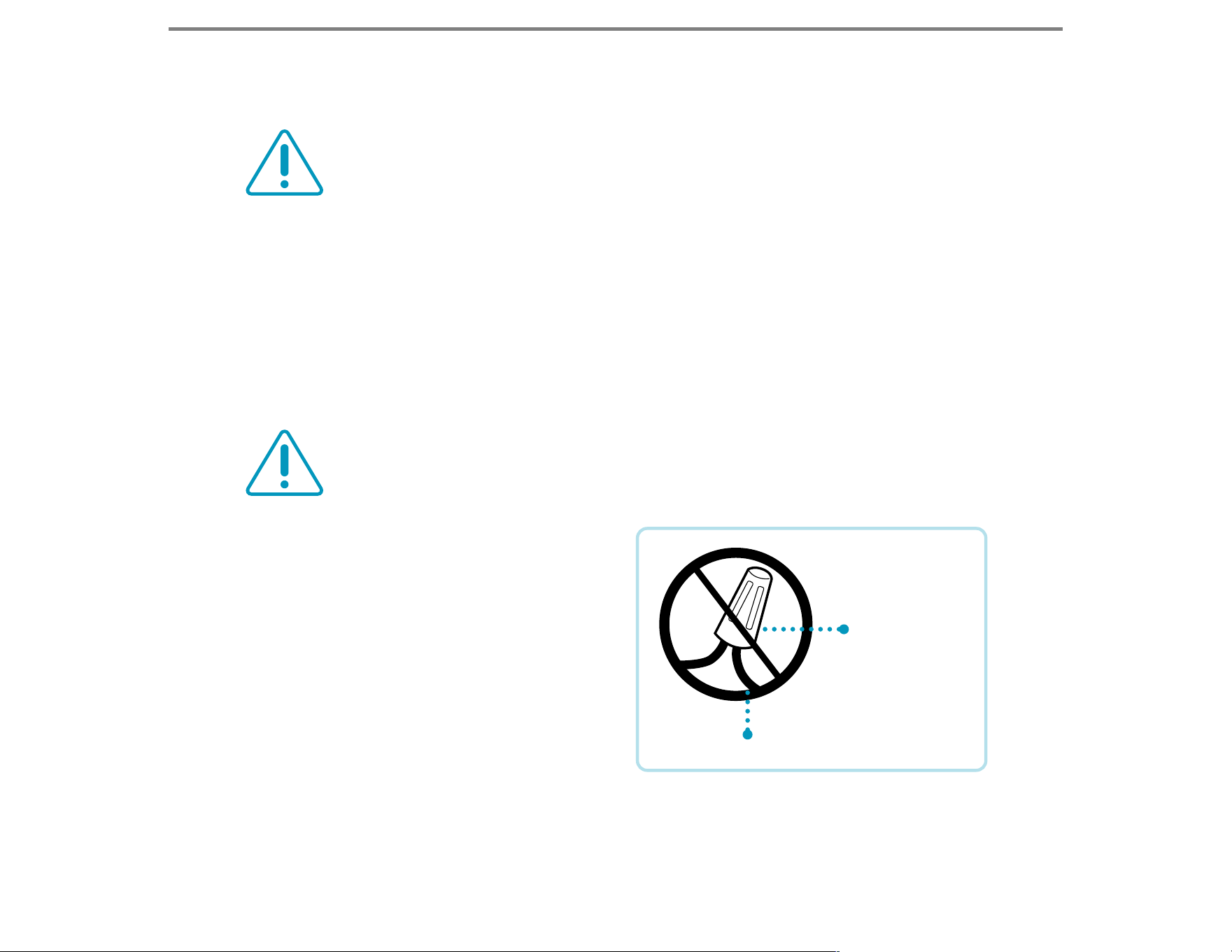
• Do you have electrical wires
bigger than 18 gauge?
• Do any of your wires have
wire nuts?
• Did your old thermostat have
a rating of 120V or higher?
If you answered yes to any of
the questions above, you may
have an electrical line that is not compatible with the Amazon Smart
Thermostat. If still unsure about line voltage system, contact a local
HVAC contractor.
WIRE NUT
THICK BLACK WIRE
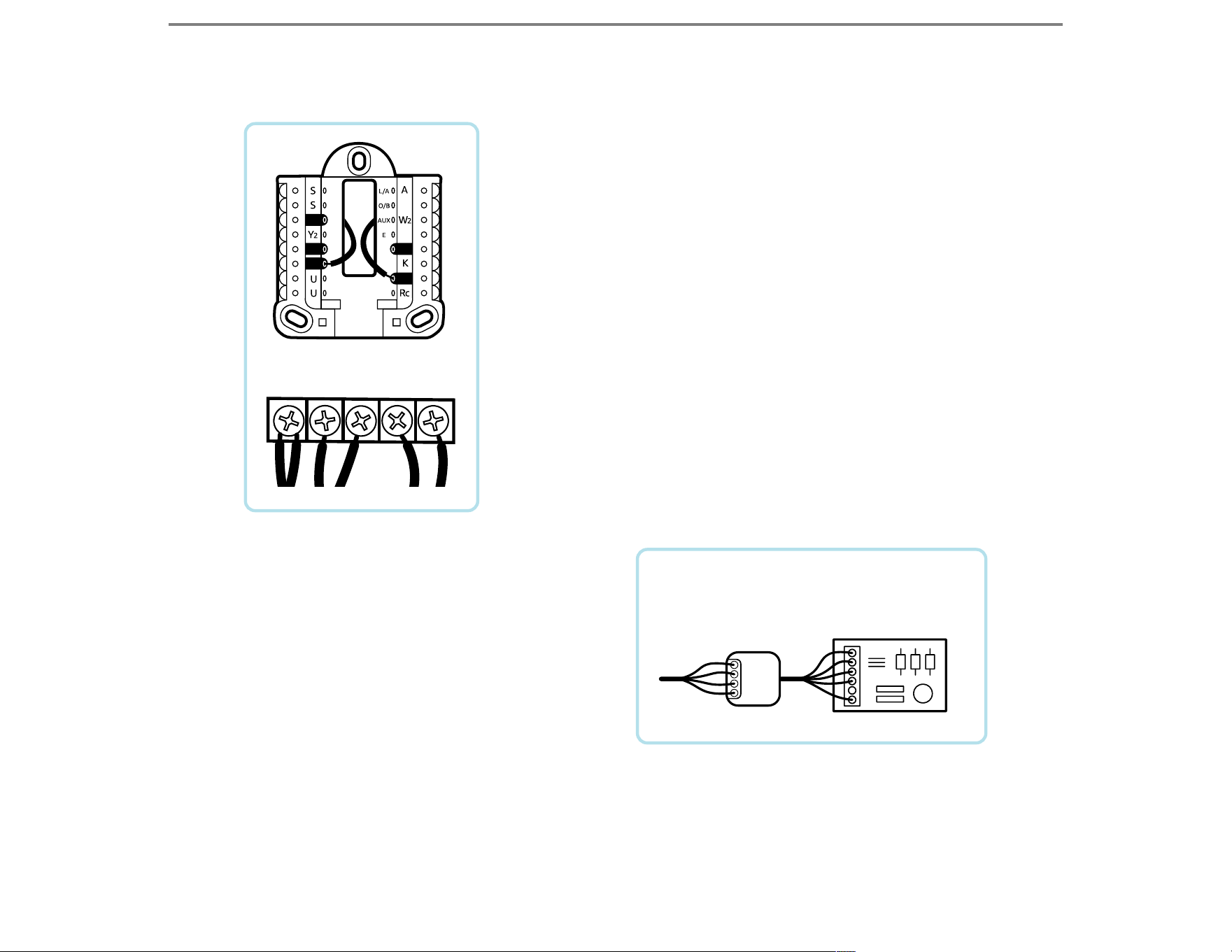
C Wire
Adapter
HVAC
Control Board
G
C
Y
W
R
If the stripped ends of the wires were longer
than 3/8", verify they are not shorted to
another wire. If you changed any wiring at the
HVAC, also verify the ends of those wires are
not shorted.
If you used one of the extra unused wires
in the bundle for the C wire (common wire)
on the new thermostat or added a C-wire
adapter, verify connections on the furnace
board. The C wire should be on the same
terminal block that the other thermostat
wires attach to. It will usually be labeled C,
but could be labeled B on Trane or American
Standard equipment.
If a C-wire adapter was installed
with the new thermostat, verify
the included instructions were
followed carefully.
The C and K terminals should be
connected at the thermostat and
neither Y nor G terminals should
be used if the C-wire adapter has
been used.
CW R G
Y
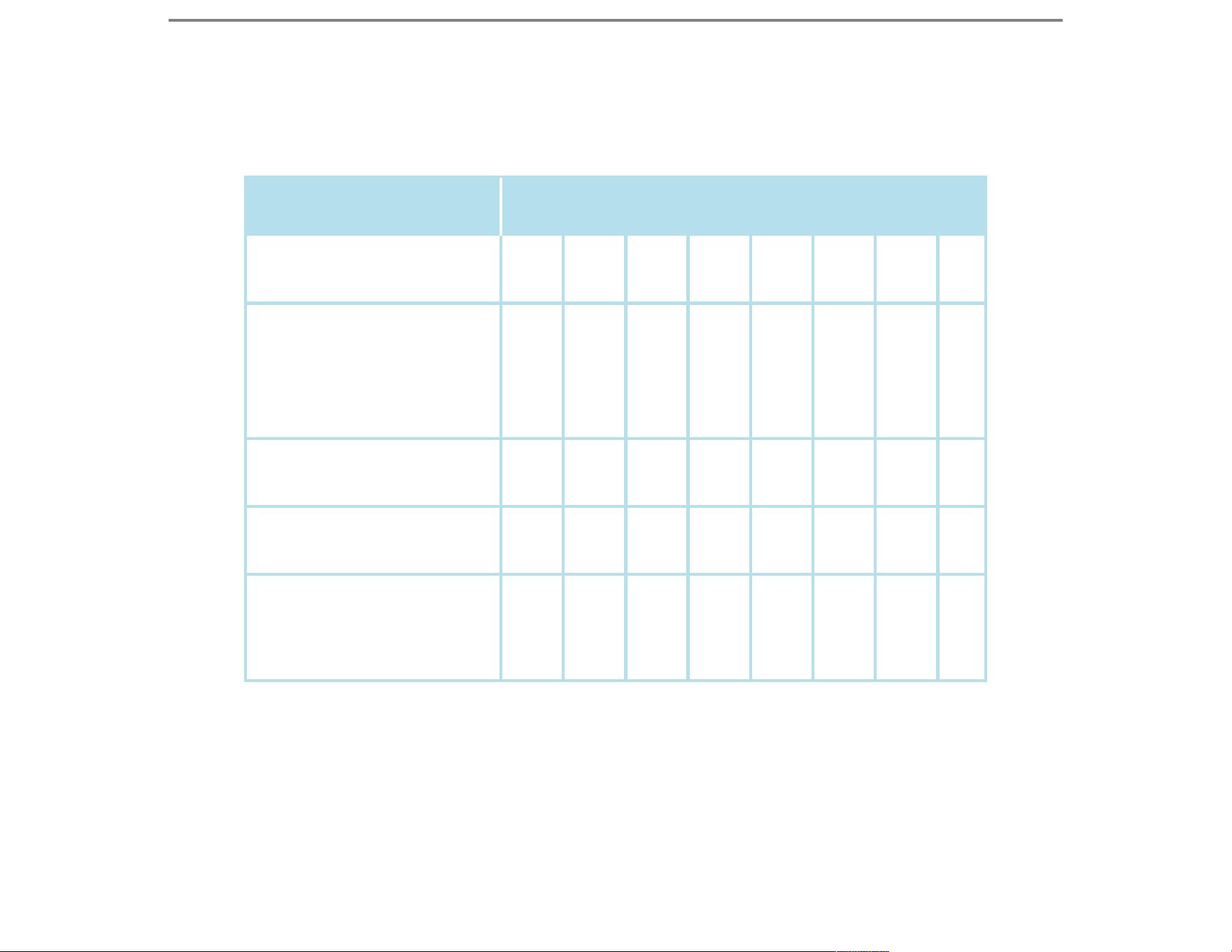
MOST COMMON HVAC SYSTEM TYPES
SYSTEM TYPE
Heat Only
(Radiant Heat)
Conventional System
(single-stage gas/
oil/electric furnace
with compressor)
Heat Pump
Heat Pump with
backup electric heat
Heat Pump with
backup electric heat
and emergency heat
R
R
R
R
R
W
W Y
Y
Y
Y
G
G
G
G
O/B
O/B
O/B
W2
W2 E
C
C
C
C
C
MOST COMMON WIRING
TIP: When removing your old thermostat, make sure to document
the wiring before removal for reference when installing your new
thermostat. Either use the wiring labels provided to mark the wires,
use your smartphone to take a picture of your wiring (with thermostat
faceplate removed), or draw a diagram to note which terminal each
wire connects to.
If your system uses a heat pump, try switching the reversing
valve’s O/B setting in the Alexa app.
SEE FAQ:
My Heat Pump Isn’t Blowing the Correct Air Tempreture with My
Thermostat on amazon.com/amazonsmartthermostat/help
GUIDED INSTALLATION IN THE ALEXA APP
Download the Amazon Alexa app. We’ve created a guided installation
experience within the app to take you step by step. To get started:
1. Download the latest version of the Alexa app
from the app store.
2. Tap the “More” icon in the lower right of the app.
3. Select “Add a device” and then follow the
on-screen instructions to install the device.
4. If prompted by the app to scan a barcode, scan
the 2D barcode on the back of this guide.
GET THE MOST FROM YOUR
AMAZON SMART THERMOSTAT
The Alexa app will help you get the best experience
from your smart thermostat. You can use it to
control the temperature remotely and set a
schedule. Or let Alexa automatically manage the
temperature with Routines and Hunches.
Get the best voice experience in your home
by controlling your smart thermostat with an
Echo device.
To learn more about these features and how to set
them up, follow the instructions in the Alexa app
once you’ve installed your thermostat on the wall.
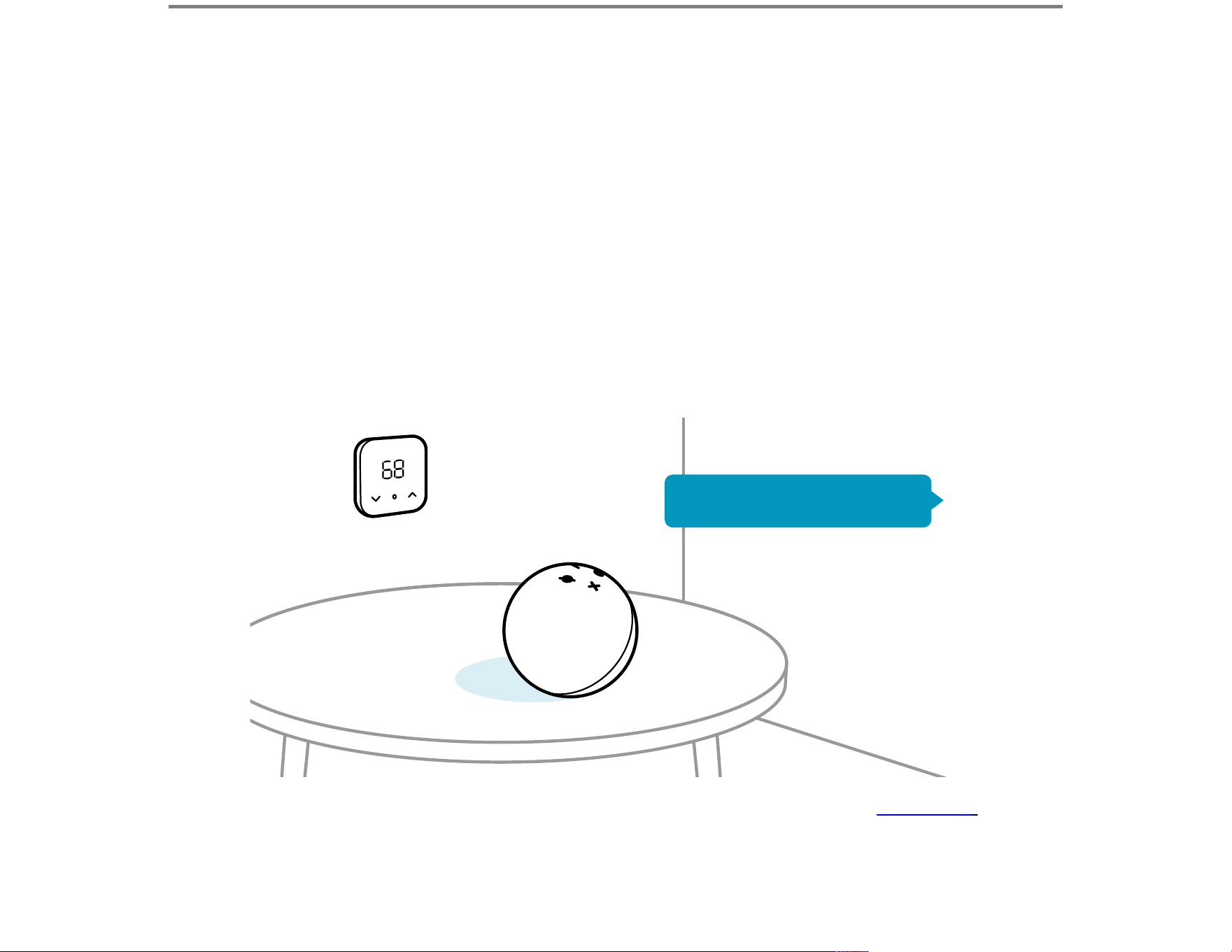
*This is what your device will be called until you rename it in the Alexa app.
“Alexa, I’m home.”
THINGS TO TRY WITH YOUR
AMAZON SMART THERMOSTAT
“Alexa, set the temperature to 68 degrees.”
“Alexa, what’s the temperature on the Thermostat*?”
“Alexa, set the Thermostat* to heating.”
“Alexa, how can you help me save energy?”
“Alexa, can you change the temperature when nobody’s home?”
REBATES
Check for energy efficiency and demand response rebates with
your local utility company.
RECYCLING
If your old thermostat doesn’t contain mercury, recycle it through
Amazon Recycling at amazon.com/recycle-amazon-devices.
CAUTION: MERCURY NOTICE
If this product is replacing a control that contains mercury
in a sealed tube, do not place the old control in the trash.
Contact your local waste management authority for
instructions regarding recycling and proper disposal.

TROUBLESHOOTING TIPS
If you’ve installed your thermostat and the display is blank:
• The display will naturally dim when not in use. To restore full
brightness, touch the center mode button.
• The touch-sensitive buttons may not work properly if you are
wearing gloves.
• Confirm all wires have been connected properly.
• Check the circuit breaker, and any switches that control power
to your heating and cooling system, and reset.
• Confirm that the heating/cooling power has been turned back on.
• Check that your furnace door is securely closed.
• If the thermostat you are replacing has stopped working, please
verify the voltage going to the thermostat does not exceed 30 VAC
or below 18 VAC. If you do not have a volt meter or are not familiar
with measuring voltage, consult a local HVAC contractor.
• A common wire (C wire) is required for thermostat power. If the C wire
is not present, the thermostat display will remain blank/unpowered.
If the C wire is present AND connected at both the thermostat and
HVAC system, there may be a possible power issue (check breakers,
furnace power switch, furnace board fuse (3–5A), and furnace
cover/door).
Measured AC voltage should be between 18–30 VAC. If reading
is outside this range, please contact a local HVAC contractor.
For more troubleshooting help, visit
amazon.com/amazonsmartthermostat/help
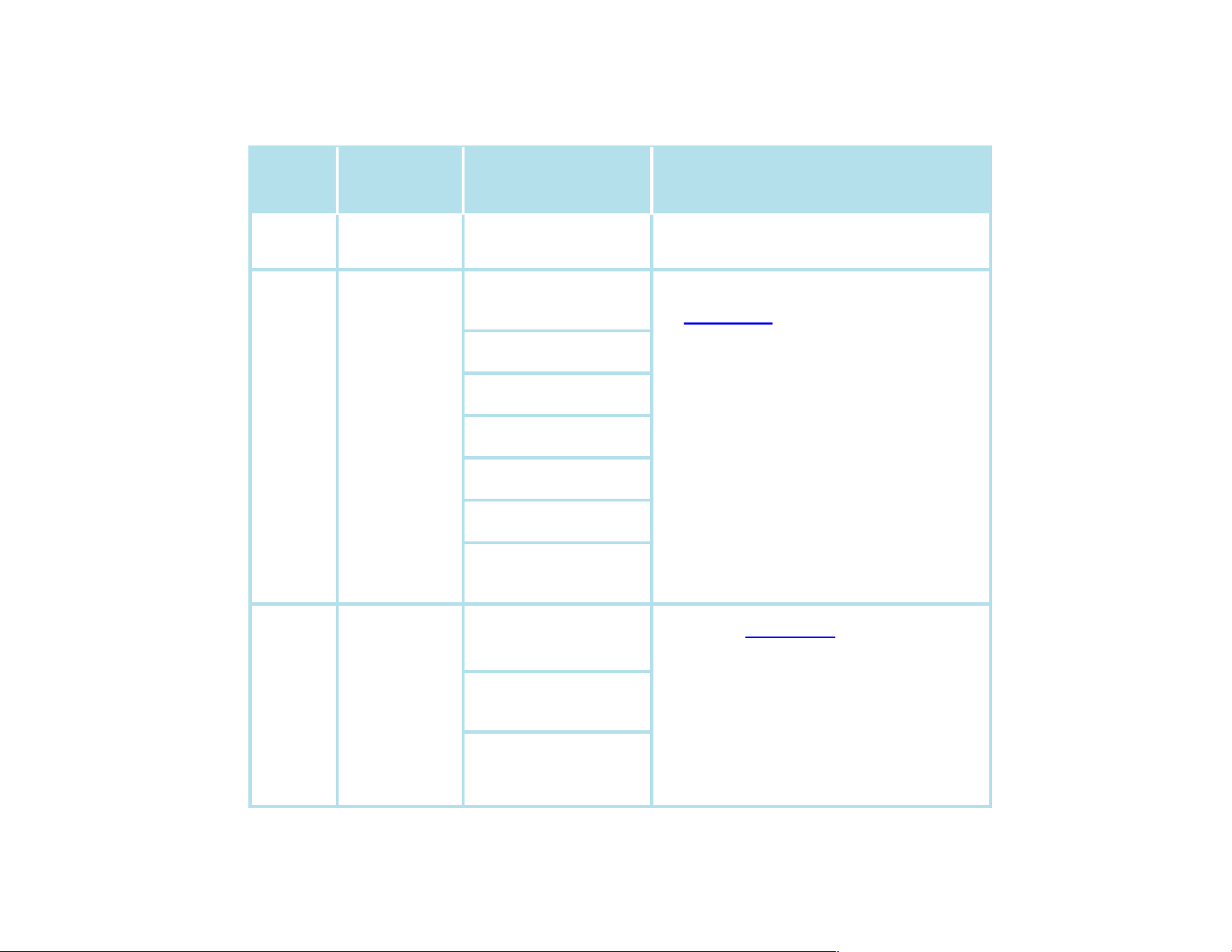
LED COLOR AND DEVICE STATUS
LIGHT
COLOR
LIGHT
BEHAVIOR
DEVICE STATUS
EXPLANATION/
TROUBLESHOOTING
Green Solid on
Demand Response
(DR) Event Active
No action, contact utility provider
for more information
Red Flashing
Internal Sensor
Fault
Heat Pump
Failure
Memory Error
Lost Time
Setup Failure
Wifi Issue
Wifi Not Setup
1. Verify thermostat appears in the
Alexa app. If not, perform
setup/configuration
2. Check app for error messages.
If wifi or time related, reset wifi.
If heat pump error, contact an
HVAC professional
3. Verify thermostat is online and
respond to temperature changes.
If not, reset wifi
4. If previous steps fail, power cycle
the thermostat.
Yellow Flashing
Emergency Heat
Aux Heat Active
Compressor
Protection
1. Check Alexa app for errors/
notifications
2. Is Em Heat or Aux Heat on?
(normal)
3. Allow 5–7 minutes for compressor
protection-does the LED go off ?
Power cycle/contact support