Copyright© 2025 WYBOTICS Co., Ltd. All Rights Reserved.
User Manual
Read through the entire manual before running your new
robotic pool cleaner, and keep this manual handy
for your reference.
WYBOT S3
Robotic Pool Cleaner

Dear Valued Customer,
Thank you for choosing WYBOT! Your trust and support mean the world to us. We are committed to
providing innovative and intelligent pool cleaning solutions, allowing you to enjoy a pristine pool with
minimal effort and more quality time with your family.
WYBOT Robotic Pool Cleaners are designed for high efficiency, low power consumption, and ease of
use. Featuring underwater automatical charging, underwater communication, AI-assisted dirt detec-
tion, smart navigation, powerful suction, effective scrubbing, fine filtration, remote control, and seam-
less adaptability to various pool shapes and materials, WYBOT ensures a thorough and intelligent
cleaning experience.
At WYBOT, we continuously strive to enhance your pool care with smart, energy-efficient, and reliable
solutions. If you have any questions or feedback, please feel free to contact us via email or visit our
website. Your insights are invaluable in helping us improve.
Enjoy effortless pool cleaning with WYBOT—where technology meets convenience.

Safety Instructions
Please read this manual carefully before using the cleaner. Your safety is our top priority. Operate the device
strictly according to the instructions provided. WYBOTICS Co., Ltd. shall not be held liable for any loss or injury
resulting from improper use.
Failure to follow the safety instructions may lead to serious injury, electric shock, or even death.
1. Install and assemble all components of the WYBOT S3 — including the above-ground dirt collector, connection
cords, and docking station — strictly according to the installation instructions.
2. Use only accessories that are recommended or sold by WYBOTICS Co., Ltd.
3. Do not modify the robotic pool cleaner. Unauthorized modifications may impair the operation of the cleaner,
cause injury or damage, and void the limited warranty.
4. Use only the original and authorized charger and docking station. Do not use them to charge other devices.
Improper use may result in overheating or leakage of corrosive battery fluid.
5. Do not use a charger with a damaged cord. Avoid using unauthorized extension cords to connect the charger.
6. The product includes a long extension cord. Please organize it properly to avoid entanglement or damage.
7. Ensure the electrical outlet is protected by a Ground Fault Circuit Interrupter (GFCI) and an Earth Leakage
Interrupter (ELI).
Before cleaning and maintenance
1) Regularly inspect the robotic pool cleaner to ensure all parts are functioning properly.
2) The cleaner is designed for daily pool maintenance. It is not recommended for the first cleaning after open-
ing the pool for the season.
3) Do not allow children to ride or play with the robot or docking station.
4) Do not expose or charge the device in flammable environments.
When cleaning and maintenance
1) Do not enter the pool while the robot is operating.
2) Do not operate the cleaner when the pool filtration system is running.
3) Be cautious of your balance when installing or maintaining the robot at the poolside.
4) Do not lift or remove the robot from the pool during a cleaning cycle.
5) This device contains Bluetooth and Wi-Fi modules operating at 2.4 GHz. It complies with applicable RF
exposure standards. To reduce exposure, follow operating instructions and avoid prolonged close contact
with the communication modules.
After cleaning
1) Regularly empty the above-ground dirt collector.
2) Perform at least one self-cleaning cycle before removing the robot from the docking station.
Do not allow children, individuals with reduced physical, sensory, or mental capabilities, or persons unfamiliar
with these instructions to operate the robotic pool cleaner.
WARNING
Do not operate the cleaner with damaged covers or if the power cord is frayed or worn.
WARNING
If the dirt collector or docking station emits unusual noise or alarm signals, stop the cleaning process immediate-
ly.
Do not touch any moving parts until they have come to a complete stop.
WARNING
The dirt collector may contain water treated with pool sanitation chemicals. Keep children away from
the collector.
WARNING

Daily Maintenance
1. The robotic pool cleaner is equipped with a solar panel for power supply. Do not place objects on the solar
panel.
2. To maintain optimal solar charging performance, keep the surface of the solar panel clean and free from dust,
water, or shadow.
3. Routine maintenance of the robot and docking station is recommended.
4. If the extension cable of the power supply or the docking station cord becomes damaged, immediately discon
nect the power. Contact after-sales support and have the component repaired or replaced by a qualified
technician.
4.
Use only the pool cleaner in the following water conditions:
Chlorine
pH
Temperature
NaCl
Max 4 mg/L
7.0 - 7.8
41 - 95 ℉ (5 - 35 ℃)
Maximum 5000 PPM
Safety Instructions
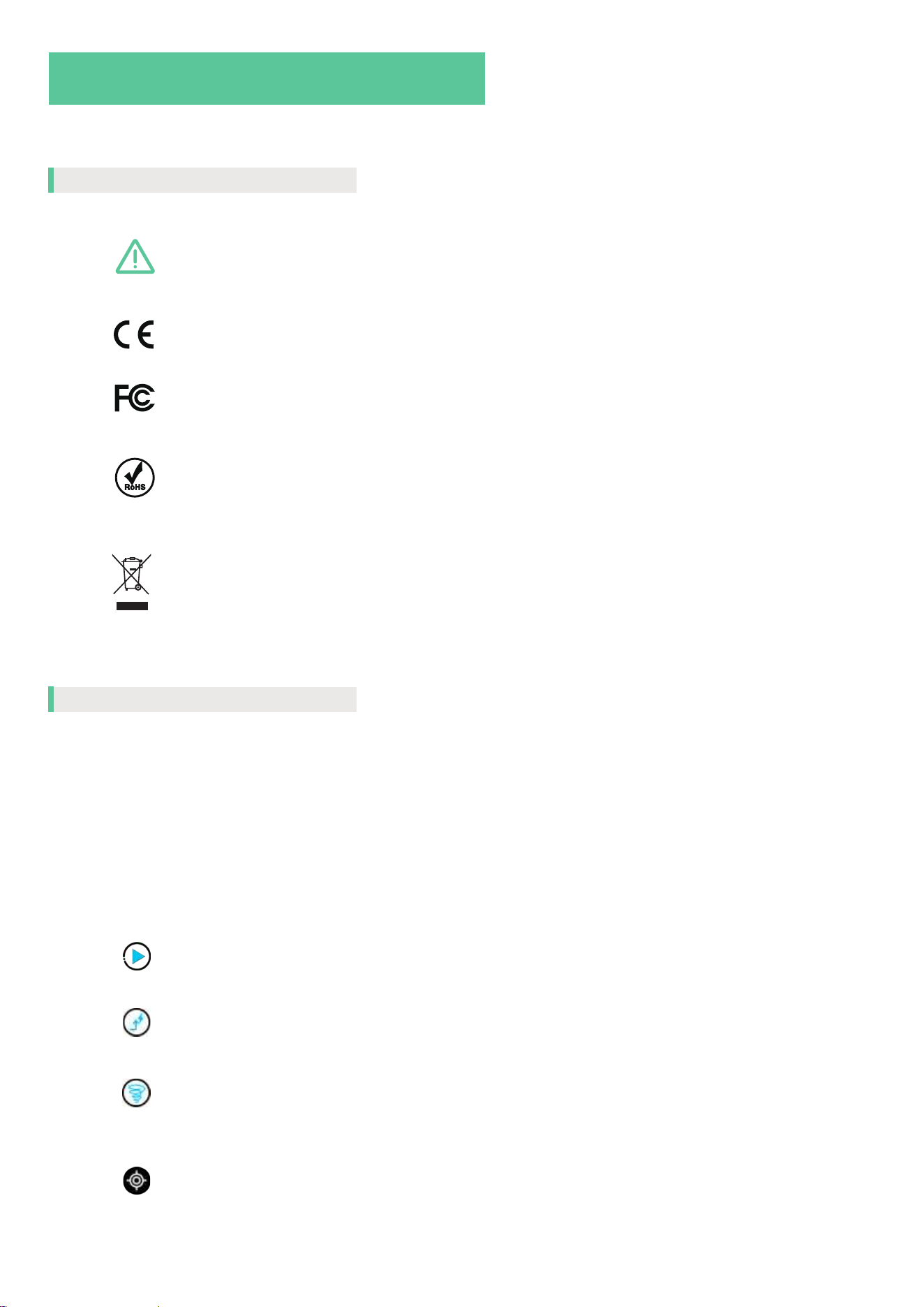
Symbols illustration
In this manual, product interface, and mobile app, you will encounter the following symbols. Please review them
carefully to ensure safe and efficient use of your robotic pool cleaner.
Failure to operate the product as per the safety instructions can
result in serious injury, electrocution or death.
The robot comforms to the applicable EC directives.
The robot comforms to the applicable FCC rules.
The robot comforms to the regulations of Restriction of Hazardous
Substances.
It is not permitted to dispose of the product as normal household
waste. Please recycle the product in accordance with local legal
requirements.
Robot Connected to Solar Kit
Indicates a successful connection between the robot and the solar
kit. Users can send commands through the mobile app.
Robot Disconnected from Solar Kit
Indicates a communication failure between the robot and the solar
kit. Some product functions may be limited.
Tap to begin a pool cleaning cycle.
Tap to command the robot to return to the docking station for charging.
Online
Offline
Tap to initiate the robot’s self-cleaning function while it is docked.
Enables the robot’s Vision AI functionality. Once enabled, available
cleaning modes will update automatically based on the environ-
ment.
In the manual
In the app
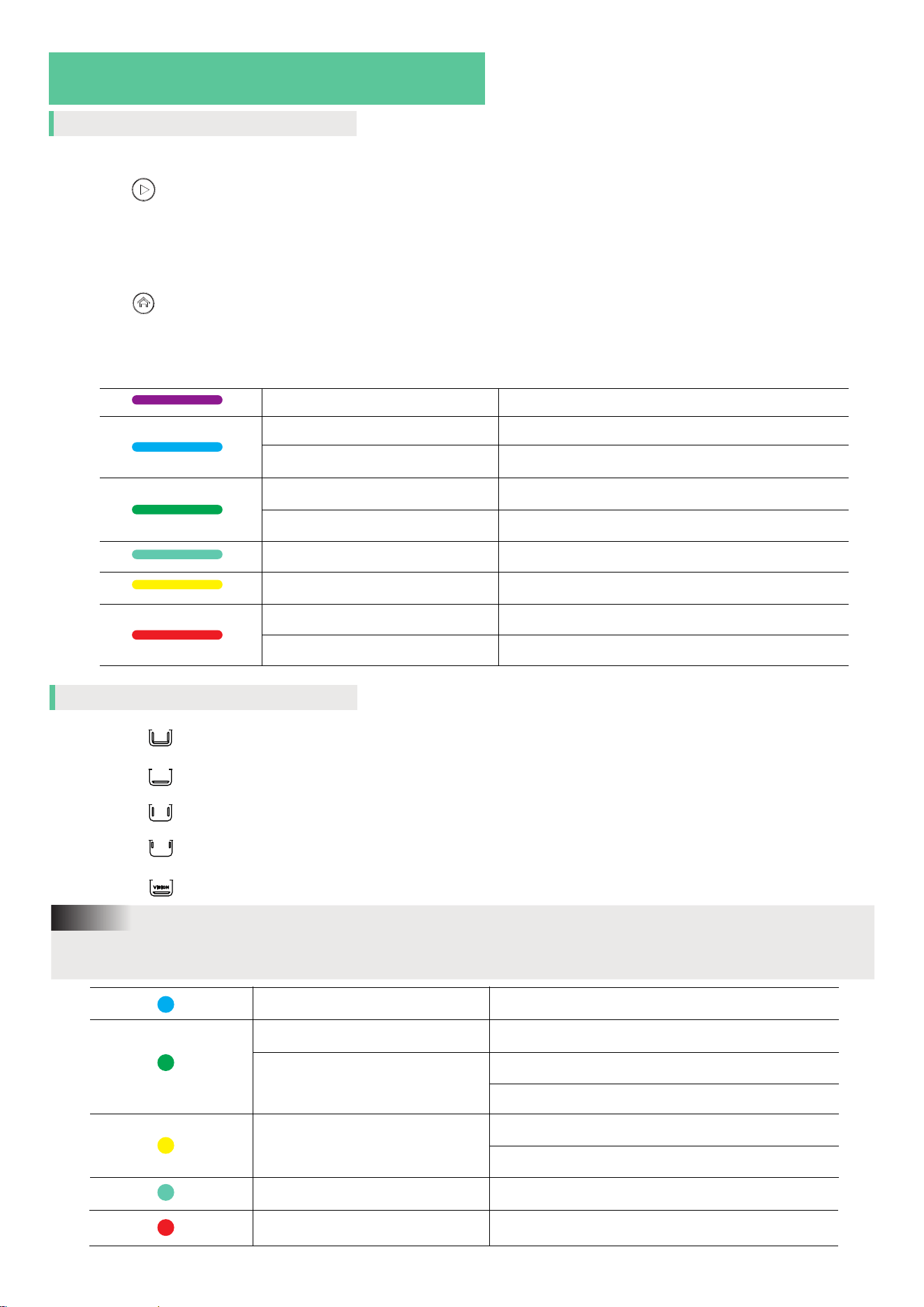
Symbols illustration
On the solar kit
Start Cleaning Button
Used to start a cleaning cycle when the robot is docked or in standby
mode underwater.
Home button
1. While the robot is underwater and cleaning, press to send it back to the
docking station.
2. While the robot is charging on the dock, press and hold the button for one
minute to initiate or cancel a self-cleaning cycle.
LED Light
Solid blue light
Running purple light Solar kit is on.
The robot is returning to the station
Solid purple light Good connection with the robot underwater
Solid green light Charging the robot
Flashing green light Self-cleaning of the robot
Flashing cyan light Under upgrading
On the robot
VISION
Flashing yellow light Collector drawer not properly installed
Solid red light
Flashing red light
Solat kit error
Robot error
Full pool mode/ Floor then wall mode (Default)
Floor mode (including standard floor (Default) / Turbo floor/ Eco floor)
Wall mode
Waterline mode
Vision AI indicator
Press power button to switch between different cleaning modes. Vision AI mode can only be activated
through the mobile app.
Note:
Solid blue light Robot is on
Solid green light
Under charging
Flashing green light
Current battery level
Flashing cyan light
Under vision cleaning mode
Flashing yellow light
Returning to the docking station
Flashing red light
Robot error
Low battery
Under upgrading

Content
01 / WYBOT S3 AT A GLANCE
02 / PACKING LIST
03 / ASSEMBLE WYBOT S3
04 / ACTIVATE WYBOT S3
05 / MAP OUT THE POOL
06 / START CLEANING
07 / DEVICE SPECIFICATION
08 / MAINTAIN WYBOT S3
09 / FAQ
10 / LIMITED WARRANTY
11 / CERTIFICATION
12 / CUSTOMER CARE
01
03
04
07
09
10
12
14
15
16
16
16
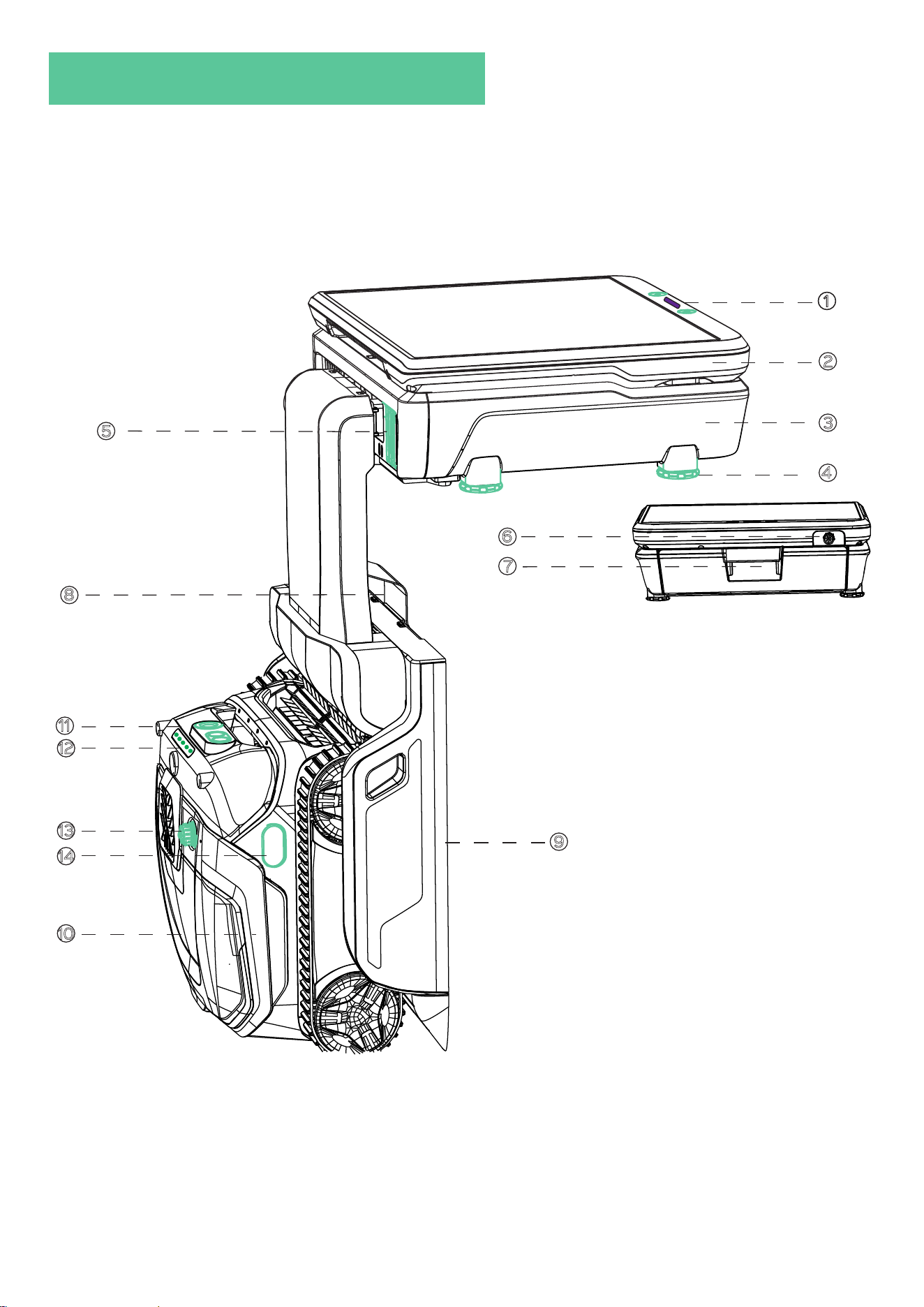
01 / WYBOT S3 AT A GLANCE
1
2
3
4
5
11
12
1
13
14
9
10
8
6
7
01

01 / WYBOT S3 AT A GLANCE
Solar Kit
11
Control Panel
2
Calls the robot back to the docking station while underwater. Once docked, the robot will begin charging
and perform a self-cleaning cycle.
Releases the robot from the docking station to begin an automatic cleaning cycle.
Displays the robot’s operational status, including power supply, communication connection, and charging
state.
Dirt Collector
3
4
Level-Adjustment Screws * 4
Use these screws to adjust the height and keep the dirt collector level with the pool deck.
5
Dirt Collector Water Outlet
Releases filtered water after an ultra-fine filtration cycle within the dirt collector.
Robot status and cleaning mode indicator
6 Charging Port
Connects the extended charger cord to a power outlet for charging the robot.
7
Dirt Collector Handle
Hold the handle to draw the collector out.
Docking station
9
8
Station neck
Secures the docking station to the dirt collector and stabilizes the station against the pool wall.
Robot
10
11
Front sensors
Includes camera and ultrasonic sensors for dirt detection and navigation.
12
13
Robot charging port
14
Infrared sensor
02
Displays the current operating status and selected cleaning mode of the robot.
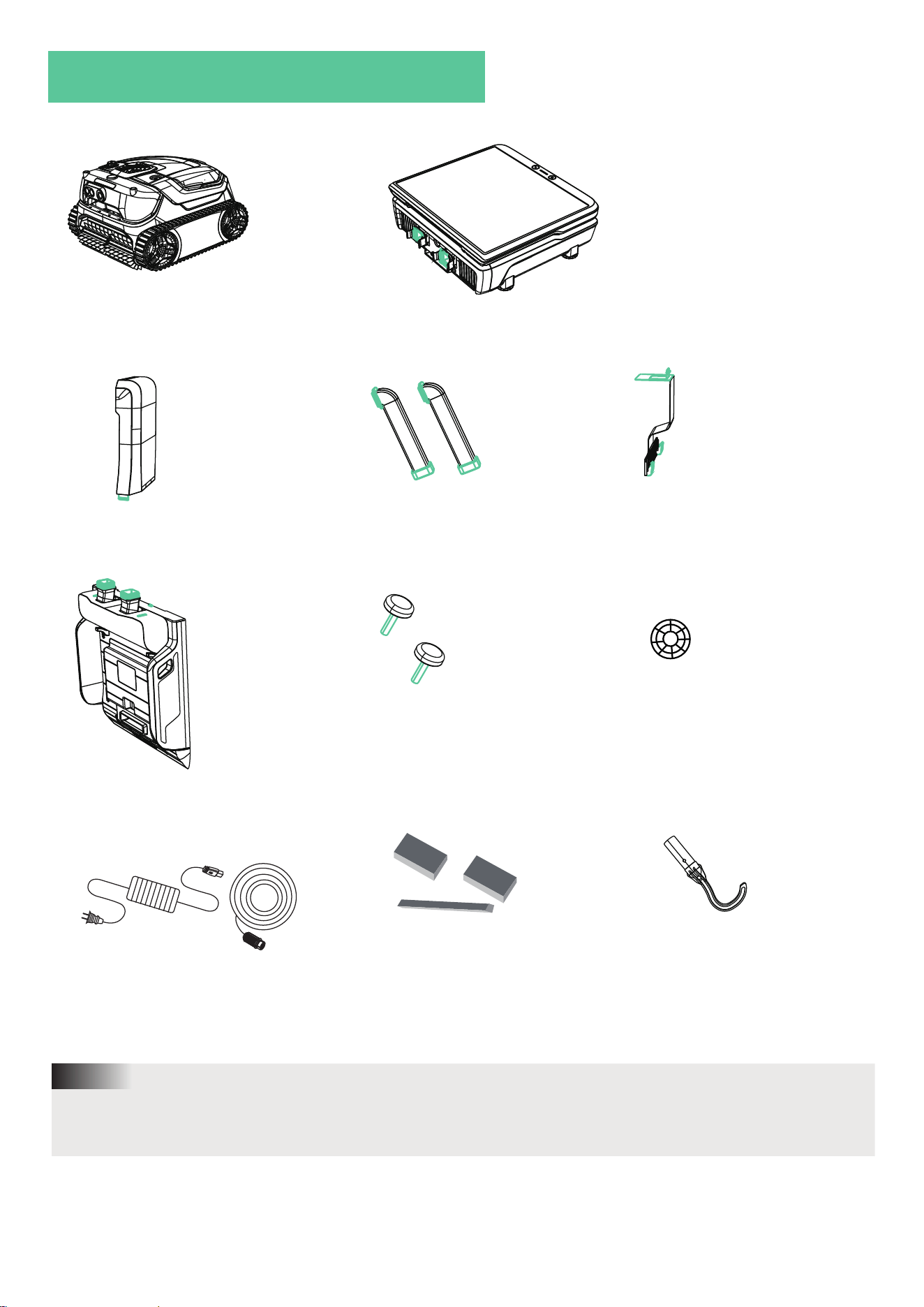
02 / PACKING LIST
Robot * 1
(Including filter basket and ultra-fine filter)
Solar kit & Dirt collector * 1
(Including filter bag and sanitation ball)
Decoractive cover * 1
Pipe * 2
Station neck * 1
Doking station * 1
Screws * 2 Chlorine ball * 1
Dule-head DC charger * 1
Floating parts
Hook * 1
The green-highlighted section in the diagram indicates the connection area, which must be manually
assembled for the WYBOT S3 to function properly.
Note:
03
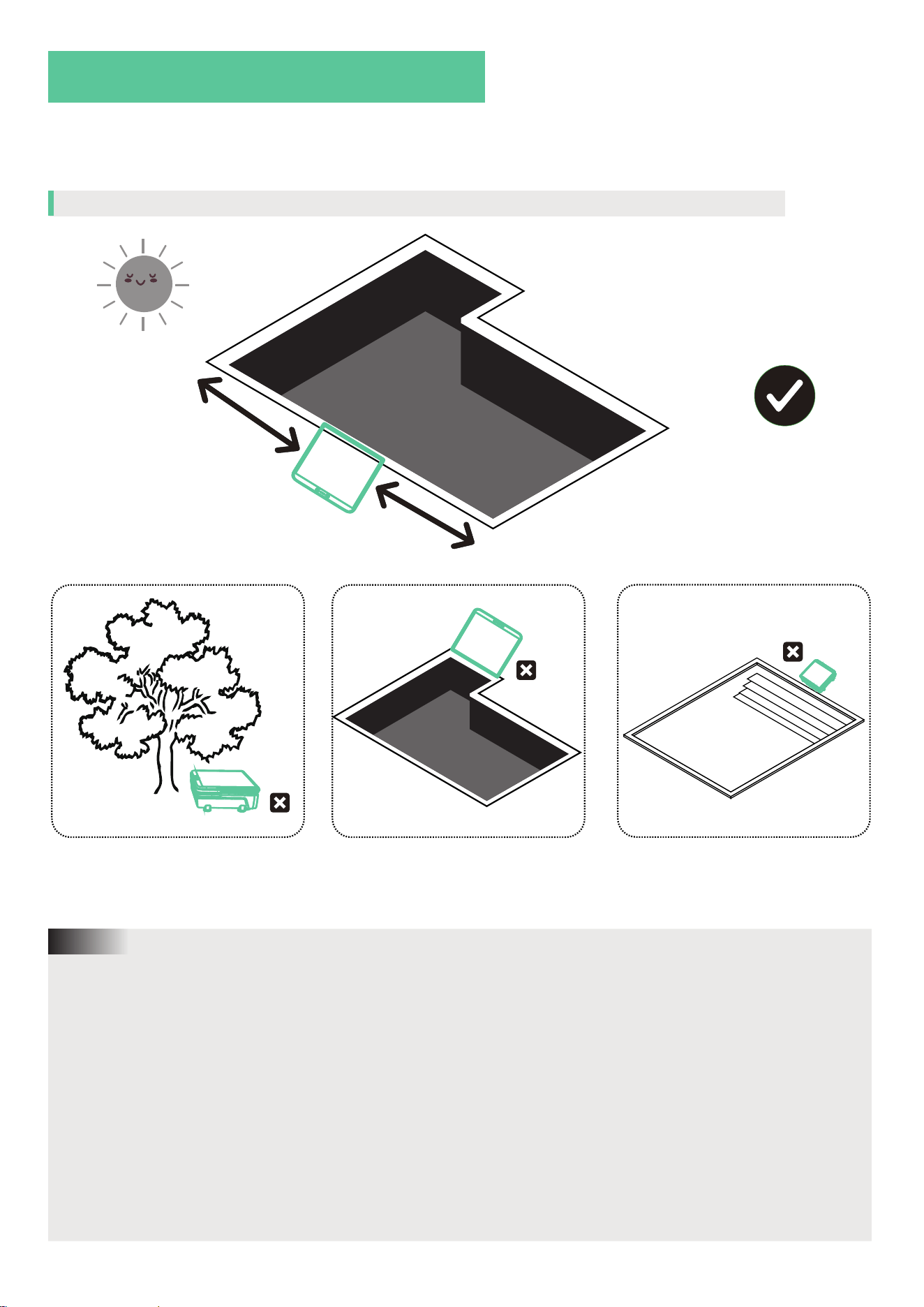
03 / ASSEMBLE WYBOT S3
WYBOT S3 consists four main parts, and will function well when all are set up correctly. Please assemble
all the parts in accordance with the instructions below.
Find a proper place for the solar kit (including dirt collector) and docking station
>1.2m
1. The solar panel serves as a supplemental power source for your device. In sunny weather with suffi
cient sunlight, it provides continuous energy for efficient and eco-friendly cleaning. In the event of an
unexpected power outage, it can also function as an emergency backup power supply to ensure uninter
rupted operation.
2. The solar panel works best under direct sunlight. Shadows from clouds, buildings, trees, or even a
glass pool enclosure can significantly reduce charging performance. We highly recommend placing the
solar panel in a location with continuous exposure to direct sunlight.
3. The docking station sends commands to the robot. For better underwater communication, we recom
mend placing the docking station in an open area with a full view of the entire pool.
4. The wall where the docking station is installed should be flat, undamaged, and free of steps, tanning
ledges, or other obstructions.This ensures reliable communication and allows the robot to return to the
station correctly.
5. Newly added pool water may contain excess oxygen, which can affect underwater communication and
docking. Please wait at least two days before using the robot.
Note:
>1.2m
Water depth>1.2m
04
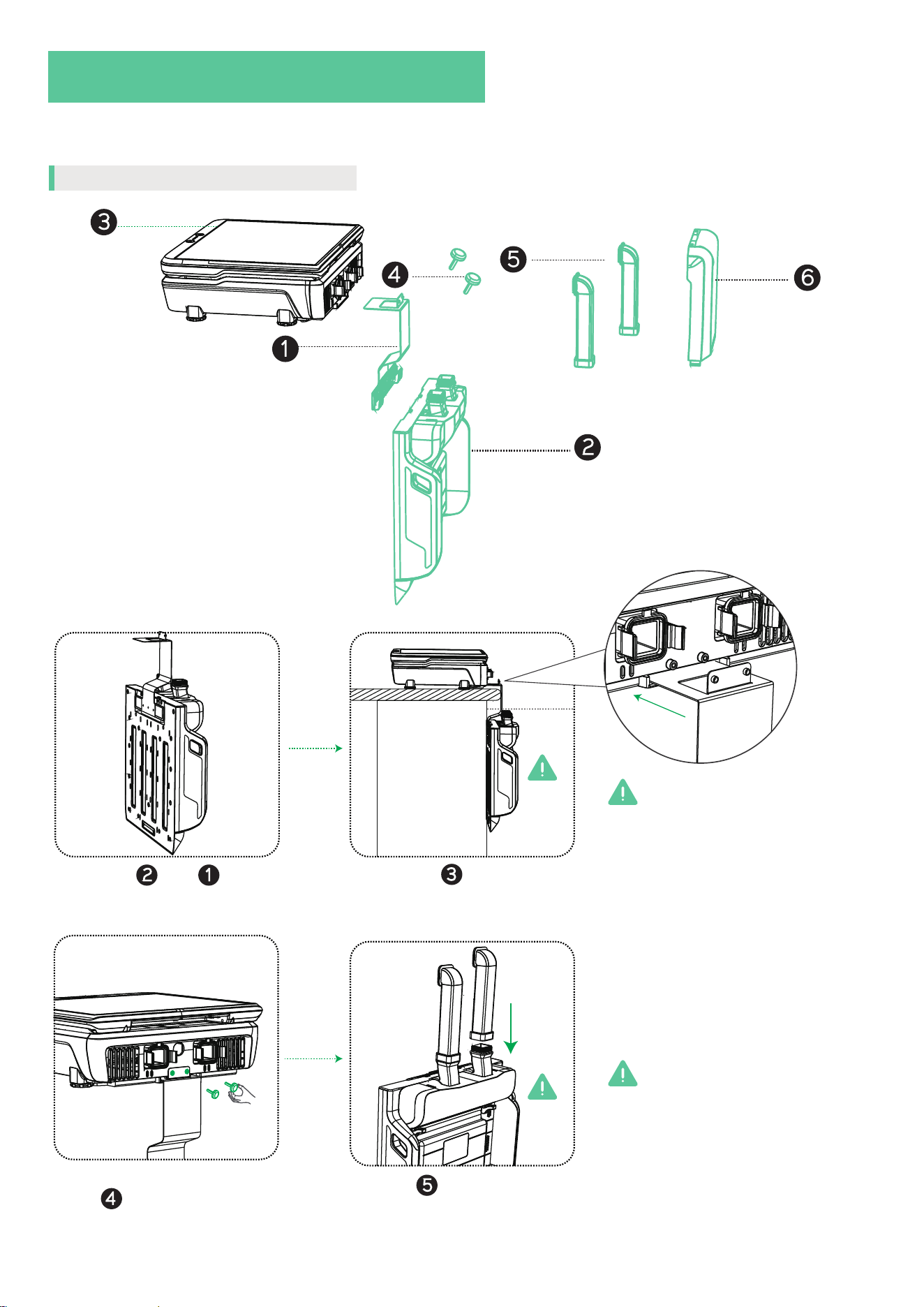
03 / ASSEMBLE WYBOT S3
After placing the solar kit in the recommended location, proceed with assembling the docking station.
Assemble the docking station
1
2
3
4
5
Hook with .
2 1
6
Insert into that has been
placed on the deck.
3
The docking station must be fully
submerged in the pool water to
function correctly.
Waterline
Screw them together tightly
with .
4
Insert into the docking
station.
5
Be cautious of your balance when
installing components on the pool
deck to avoid accidents or injury.
05
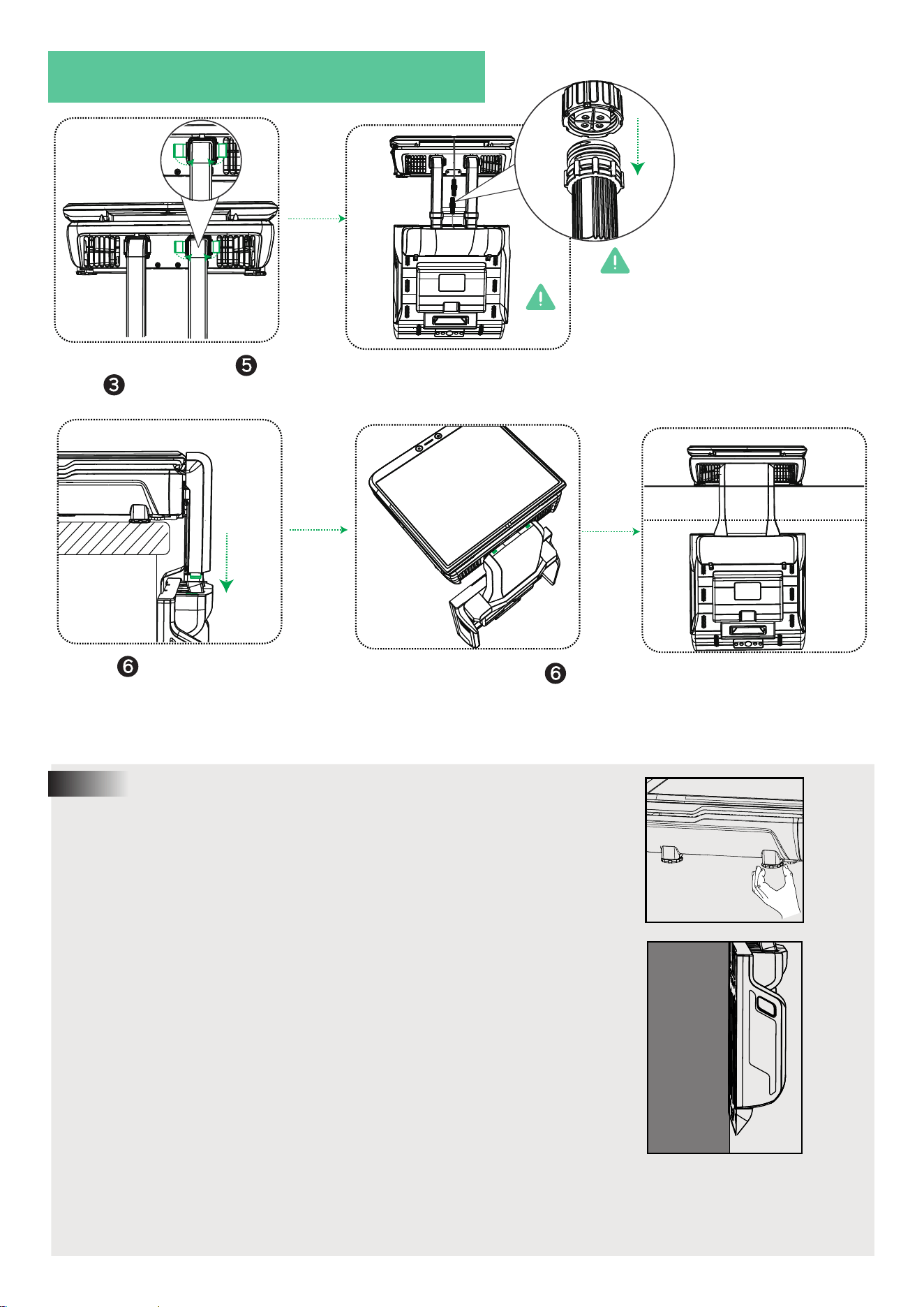
Fasten the upper part of
with .
5
3
03 / ASSEMBLE WYBOT S3
Insert into the docking
station.
6
Ensure the upper part of
be fastened well.
6
Finish assembling the docking
station.
Waterline
1. Ensure the dirt collector remains level after the docking station is
installed. You may adjust the leveling using the level-adjustment
screws located at the bottom of the collector.
Note:
2. The docking station must remain securely attached to the pool wall
after installation to ensure stable operation and accurate robot
docking.
Wall
3. Avoid placing any weight on the solar panel during the assembly
of the docking station, as this may damage the panel or affect its
charging efficiency.
When connecting the cables
between the solar kit and the
docking station, ensure the cable
connectors remain dry. Water
ingress may cause damage to
internal components and compro-
mise robot performance.
06
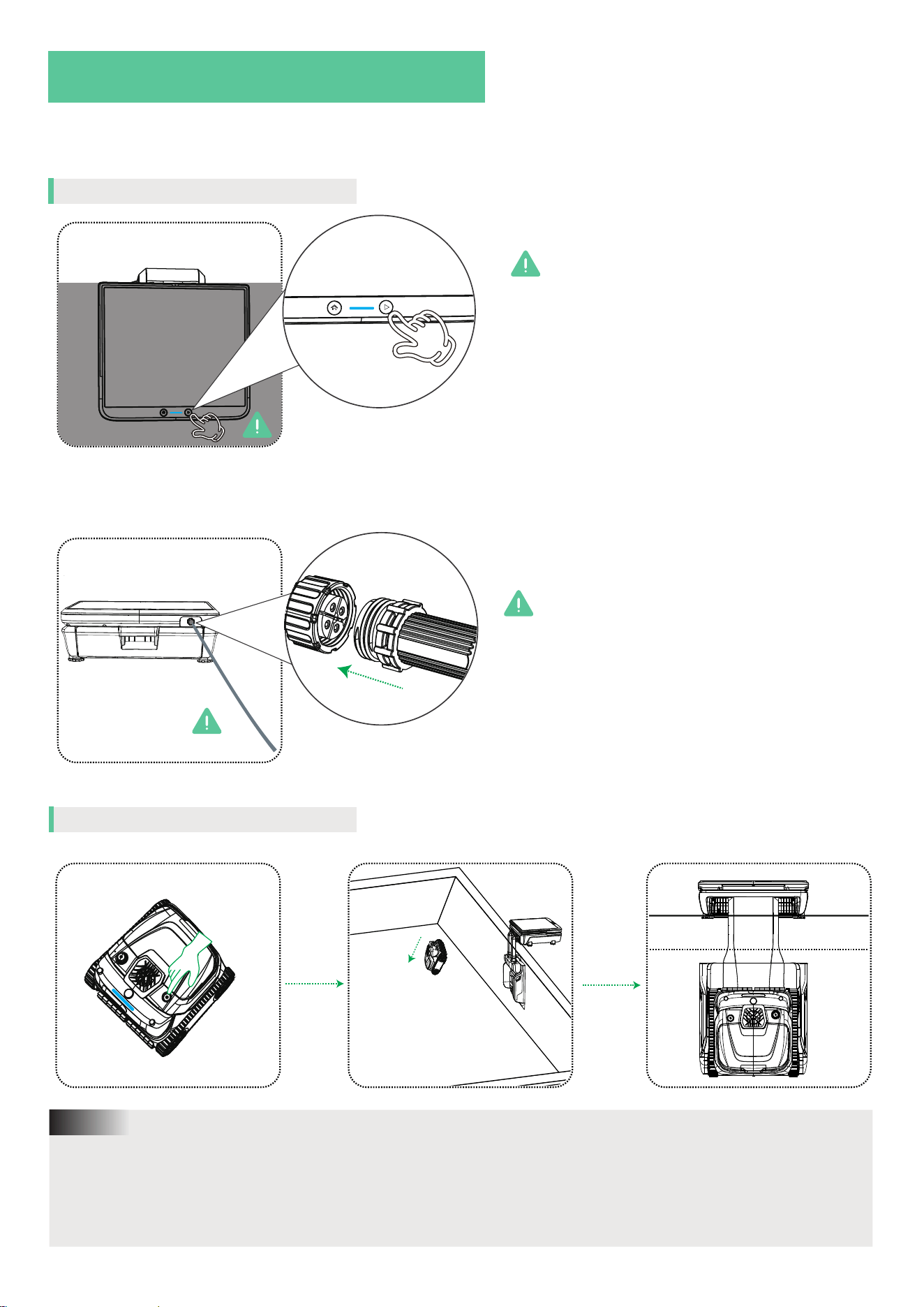
04 / ACTIVE WYBOT S3
After installing the dirt collector and docking station, please follow the steps below to activate the
system:
Long-press the start button to
active the solar kit.
If no blue indicator light appears on the solar
kit after pressing the power button, the
docking station may have a low battery.
1. Place the assembled system under direct
sunlight for at least two hours to recharge
(Ensure docking station battery > 80%).
2. Alternatively, you may connect the
long-cable DC charger to the solar kit for
faster charging.
When charging via the DC charger, ensure
the docking station is positioned at least 3
meters (approximately 10 feet) away from the
pool edge to avoid electrical hazards.
Stretch the cable neatly along the poolside
to prevent tripping hazards.
Active the docking station
Active the robot
1. When the robot is powered on, the blue indicator light will illuminate.
2. You can or Place the robot in the pool first, then press the Home button on the solar kit to summon the
robot back to the docking station, or place the robot directly onto the docking station.
3. When the robot returns to the docking station and begins charging, the indicator light will turn green,
signaling a successful connection.
Note:
07
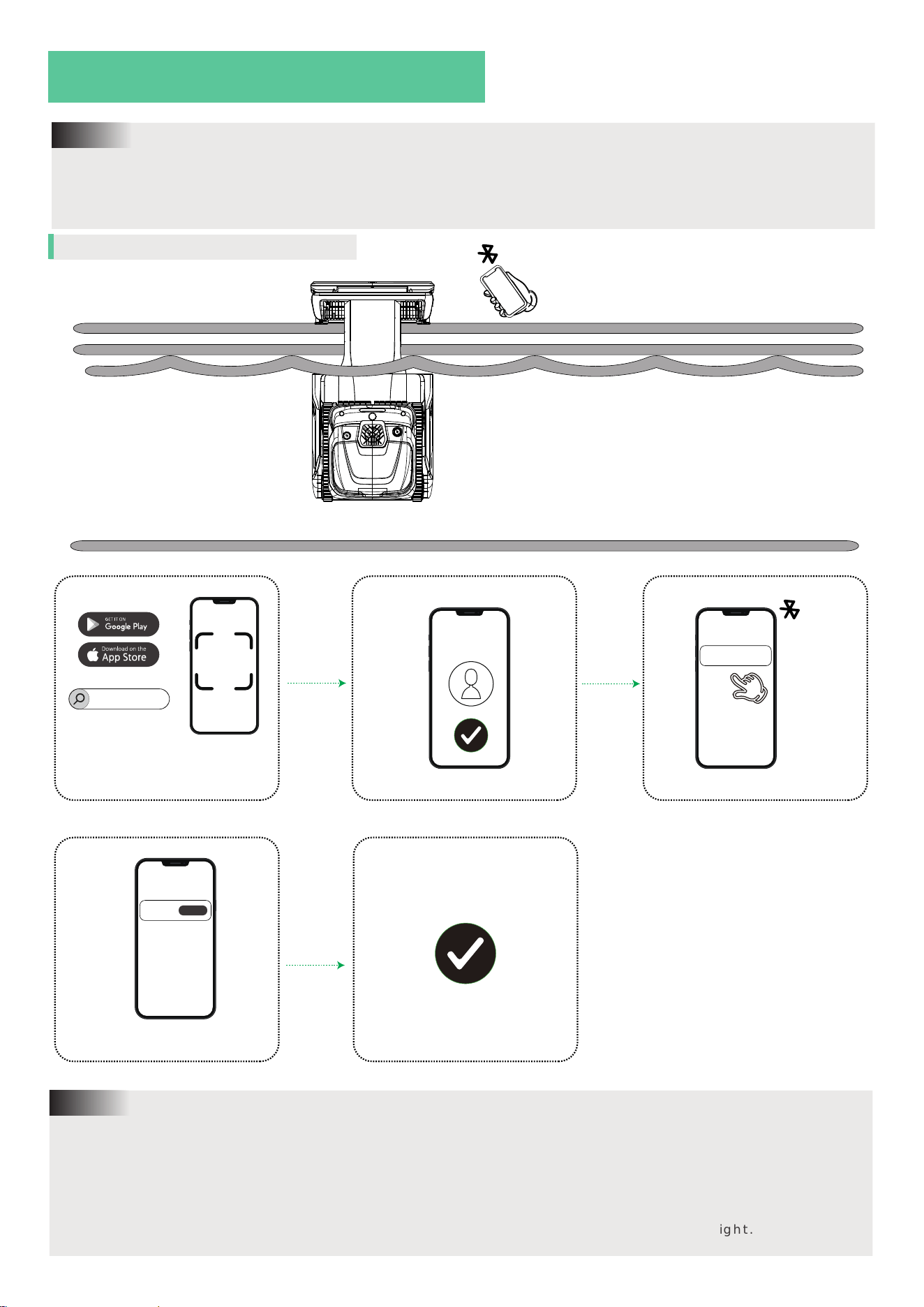
04 / ACTIVE WYBOT S3
4. If no long-cable charger is connected to the solar kit, the docking station will begin solar charging to
store sufficient internal power. During this period, the robot will not display a green indicator light.
5. It is recommended to fully charge the robot using the long-cable charger before the first use for opti
mal performance.
Note:
Connect to the APP
iOS 15.0 or later
Android 8.0 or later
Mobile System version
WYBOT S3
1. Ensure the docking station is powered on, and that the robot is actively charging on the docking
station, when attempting to connect to the WYBOT App.
2. Enable Bluetooth on your mobile device before searching for WYBOT S3 in the app.
3. For detailed instructions on using the WYBOT App, please scan the QR code on the right.
Note:
Online
08
Register & Log in
Search for WYBOT S3
Robot is online Complete connection
WYBOT