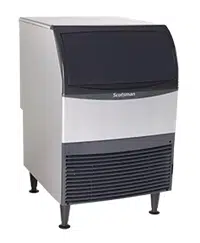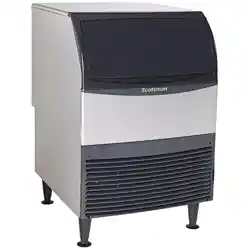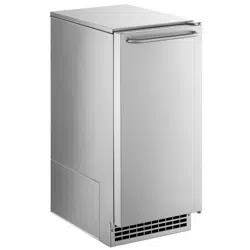

CU50
Service Manual
March 2010
Page 1
Introduction:
This ice machine is the result of Scotsman’s
decades of experience as an industry leader in the
design and manufacture of both commercial and
residential ice machines.
This manual includes the information needed to
install, start up, maintain and service the ice
machine. Note any Caution or Warning indicators,
as they provide notice of potential hazards. Keep
this manual for future reference.
Table of Contents
Specications . . . . . . . . . . . . . . . . . . . . . . . . . . . . . . . . . . . . . . . . . . . Page 2
Cabinet Layout . . . . . . . . . . . . . . . . . . . . . . . . . . . . . . . . . . . . . . . . . .Page 3
Air ow . . . . . . . . . . . . . . . . . . . . . . . . . . . . . . . . . . . . . . . . . . . . . . . Page 4
Water Quality . . . . . . . . . . . . . . . . . . . . . . . . . . . . . . . . . . . . . . . . . . .Page 5
Door swing change . . . . . . . . . . . . . . . . . . . . . . . . . . . . . . . . . . . . . . . .Page 6
Installation Notes . . . . . . . . . . . . . . . . . . . . . . . . . . . . . . . . . . . . . . . . .Page 7
Installation: Water & Drain . . . . . . . . . . . . . . . . . . . . . . . . . . . . . . . . . . . . . Page 8
Gravity Drain. . . . . . . . . . . . . . . . . . . . . . . . . . . . . . . . . . . . . . . . . . . . Page 9
Electrical . . . . . . . . . . . . . . . . . . . . . . . . . . . . . . . . . . . . . . . . . . . . . . Page 10
Cube Size Adjustment . . . . . . . . . . . . . . . . . . . . . . . . . . . . . . . . . . . . . . . Page 11
Harvest Time Adjustment . . . . . . . . . . . . . . . . . . . . . . . . . . . . . . . . . . . . .Page 12
Control Settings . . . . . . . . . . . . . . . . . . . . . . . . . . . . . . . . . . . . . . . . . . Page 13
Use . . . . . . . . . . . . . . . . . . . . . . . . . . . . . . . . . . . . . . . . . . . . . . . .Page 14
How to clean the condenser and winterize. . . . . . . . . . . . . . . . . . . . . . . . . . . . . Page 15
How to remove scale from the ice making system. . . . . . . . . . . . . . . . . . . . . . . . . Page 16
System Information . . . . . . . . . . . . . . . . . . . . . . . . . . . . . . . . . . . . . . . .Page 17
Water System . . . . . . . . . . . . . . . . . . . . . . . . . . . . . . . . . . . . . . . . . . . Page 18
Components . . . . . . . . . . . . . . . . . . . . . . . . . . . . . . . . . . . . . . . . . . . . Page 19
Controller . . . . . . . . . . . . . . . . . . . . . . . . . . . . . . . . . . . . . . . . . . . . .Page 20
Performance Information . . . . . . . . . . . . . . . . . . . . . . . . . . . . . . . . . . . . .Page 21
Refrigeration System . . . . . . . . . . . . . . . . . . . . . . . . . . . . . . . . . . . . . . .Page 22
Thermistor Values . . . . . . . . . . . . . . . . . . . . . . . . . . . . . . . . . . . . . . . . . Page 23
Service Diagnosis . . . . . . . . . . . . . . . . . . . . . . . . . . . . . . . . . . . . . . . . . Page 24
Service Diagnosis . . . . . . . . . . . . . . . . . . . . . . . . . . . . . . . . . . . . . . . . . Page 25
Removal and Repair . . . . . . . . . . . . . . . . . . . . . . . . . . . . . . . . . . . . . . . . Page 26
Removal and Repair . . . . . . . . . . . . . . . . . . . . . . . . . . . . . . . . . . . . . . . . Page 27
Removal and Repair - Cabinet Removal . . . . . . . . . . . . . . . . . . . . . . . . . . . . .Page 28
Refrigeration Service . . . . . . . . . . . . . . . . . . . . . . . . . . . . . . . . . . . . . . .Page 30

CU50
Service Manual
March 2010
Page 2
Specications
This ice machine is designed to be used in a
controlled environment. It can be used in a wide
variety of environmental conditions and under
limited conditions (see user manual), outdoors, but
there are limits. Use outside of the listed limitations
is misuse and will void the warranty.
Air temperature limits:
The ice machine will operate adequately within the
limits, but functions best in temperatures between
70 and 80 degrees F.
• Minimum – 50 degrees F. (10°C)
• Maximum – 100 degrees F. (38°C)
Water temperature limits:
• Minimum – 40 degrees F. (4.5°C)
• Maximum – 100 degrees F. (38°C)
Water pressure limits:
• Minimum – 20 psi (1.4 bar)
• Maximum – 80 psi (5.5 bar)
Because the ice machine is making a food product,
the water supply to the ice machine must be
potable, or t for human consumption.
Electrical
• 115 volt, 60 Hz. Plug into dedicated 15 amp
circuit.
• Power consumption: 275 - 400 Watts. Varies
during Freeze and Harvest cycles.
Voltage limits:
• Minimum - 104 volts
• Maximum – 126 volts
Models: There are two models, all air cooled:
• CU50PA-1 – Pump model
• CU50GA-1 – Gravity drain model
Options:
Kickplate Extension: In some situations the leg
levelers will be extended enough to become visible.
A kit to extend the kickplate over the legs is KKPF.
Cabinet Stability: In some free standing
installations it may be prudent to add a bracket that
secures the back of the cabinet to a wall. That kit
number is KATB.
Drain Conversion:
A gravity drain model can be converted to a drain
pump model by installing a drain pump kit. The
drain pump kit consists of a drain pump, wiring
harness and associated tubing. The kit number is
A39462-021.
Warranty Information
Warranty information is supplied separately from
this manual. Refer to it for coverage. In general, the
warranty covers defects in materials or workmanship
and does not cover corrections of installation errors
or maintenance.
CU50
Service Manual
March 2010
Page 3
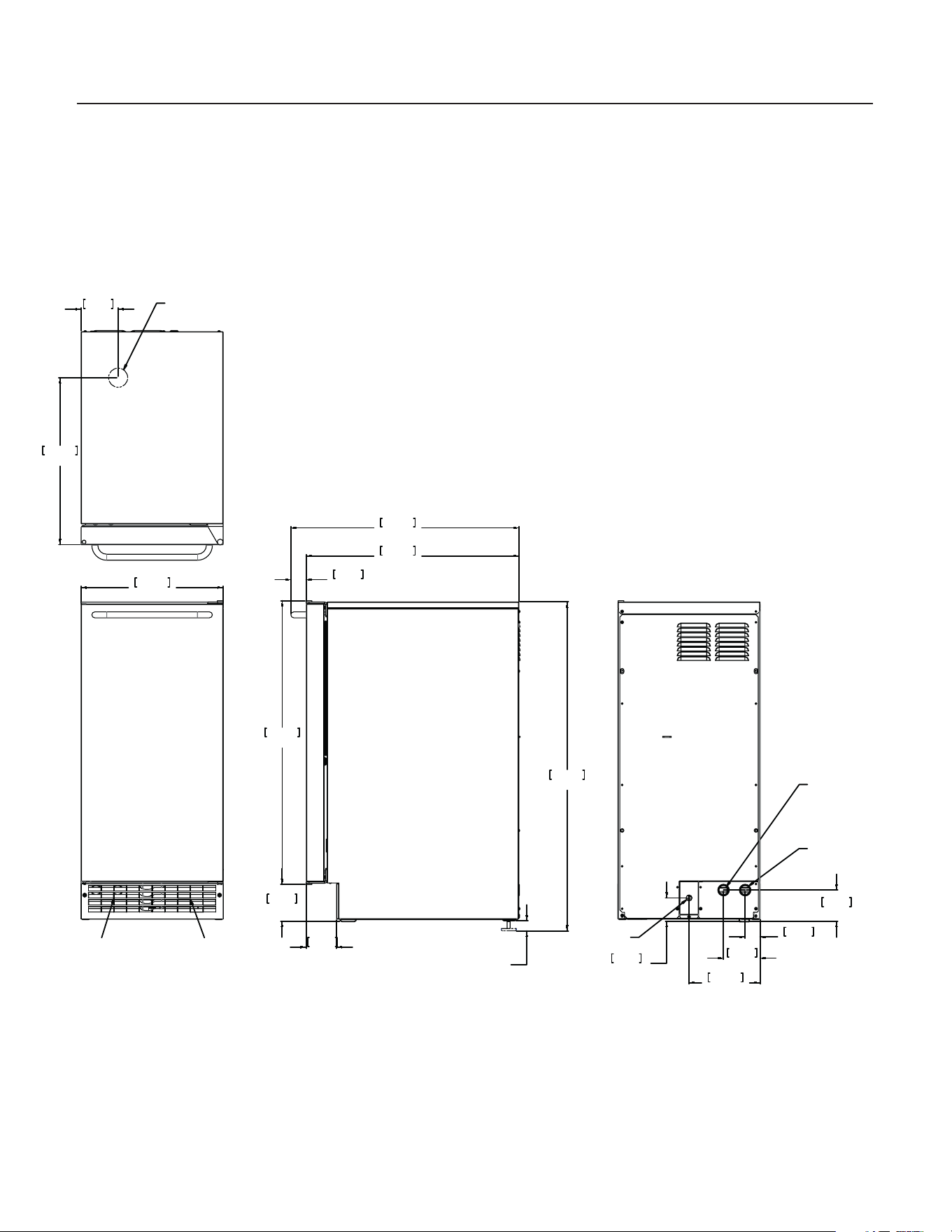
Cabinet Layout
1.00
LEG
ADJUSTMENT
[25.40]
14.88
377.95
AIR OUT
AIR IN
3.88
98.55
17.45
443.23
FLOOR DRAIN
ACCESS HOLE
34.38
873.25
3.85
97.79
29.66
753.24
22.29
566.17
23.89
606.68
1.60
40.51
3.20
81.28
3.27
82.99
2.44
62.04
1.57
39.75
7.44
188.98
3.83
97.16
115 V
POWER CORD
POTABLE WATER INLET
4/1" COMPRESSION FITTING
DRAIN
FLEXIBLE TUBING
8/3 I.D. PUMP MODEL (INCLUDED)
8/5 I.D. GRAVITY MODEL (NOT INCLUDED)
CU50
Service Manual
March 2010
Page 4
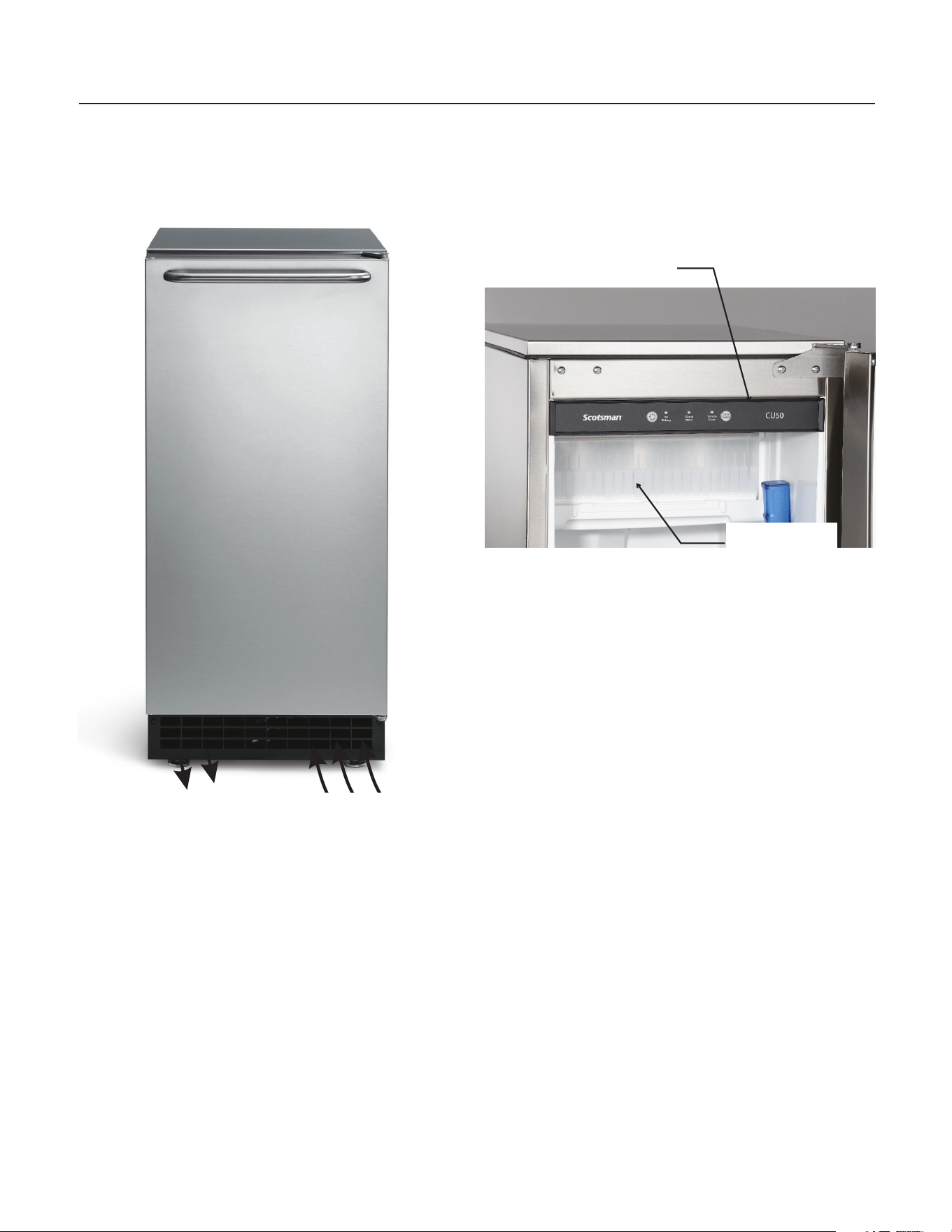
Air ow
The machine takes in room temperature air at the
lower right front and forces warm air out the lower
left front. Restricting the airow will adversely affect
the ability of the ice machine to make ice.
Scotsman Ice Systems are designed and
manufactured with the highest regard for safety
and performance. They meet or exceed the
standards of agencies like U.L.
Scotsman assumes no liability or responsibility of
any kind for products manufactured by Scotsman
that have been altered in any way, including the
use of any parts and/or other components not
specically approved by Scotsman.
Scotsman reserves the right to make design
changes and/or improvements at any time.
Specications and designs are subject to change
without notice.
Warm Air Out
Air Intake
Ice Making
Area
Control Panel

CU50
Service Manual
March 2010
Page 5
Water Quality
All water, including potable water supplied by
municipalities, contains some impurities or
minerals. Water absorbs impurities from the air as
rain and/or as it ows through the ground. Some of
the impurities are solid particles, these are known
as suspended solids, and a ne particle lter will
remove them. Other impurities are chemically
bonded to the water molecules, and cannot be
ltered out, these are called dissolved solids.
Ice made by this machine will have a lower
mineral content than the water it was made from.
This is due to the method of making ice. Purer
water will freeze rst in the ice making molds.
The reason for this is that anything dissolved in
water lowers the water’s freezing temperature.
This concentrates most of the impurities in the
ice machine water reservoir where they may
form hard deposits known as scale. The machine
dilutes the concentration of minerals by over-lling
the reservoir during the harvest cycle (with the
excess water owing down the drain). Between
2 and 4 pints of water ow into the unit each cycle.
Between 1 and 3.5 pints of that rinses the reservoir
and goes down the drain.
Some impurities will inevitably remain, and will
stick to the parts in the machine, and will cause
malformed ice cubes. Eventually, built up mineral
scale can shorten machine life.
To keep the machine operating properly, these
impurities or minerals will have to be regularly
dissolved by an acid cleaning, using Scotsman Ice
Machine Scale Remover. Directions for this may be
found in the section under cleaning.
Filters and Treatment
In general, it is always a good idea to lter the
water. A water lter, if it is of the proper type, can
remove taste and odors as well as particles. Some
methods of water treatment for dissolved solids
include reverse osmosis, and polyphosphate
feeders.
RO Water
This machine can be supplied with Reverse
Osmosis water, but the water conductivity must
be no less than 10 microSiemens/cm. A reverse
osmosis system should include post treatment to
satisfy the R.O. water’s potential aggressiveness.
Deionized water is not recommended and is too
clean to allow the machine to function.
Because water softeners exchange one mineral
for another, softened water may not improve water
conditions when used with ice machines. Where
water is very hard, softened water could result in
white, mushy cubes that stick together.
If in doubt about the water, contact a local point of
use water specialist for recommendations on water
treatment.
Installation Overview
The ice machine must:
• be connected to cold, potable water
• be connected to a drain
• be connected to the proper power supply
• be able circulate air through the vents at
the front.
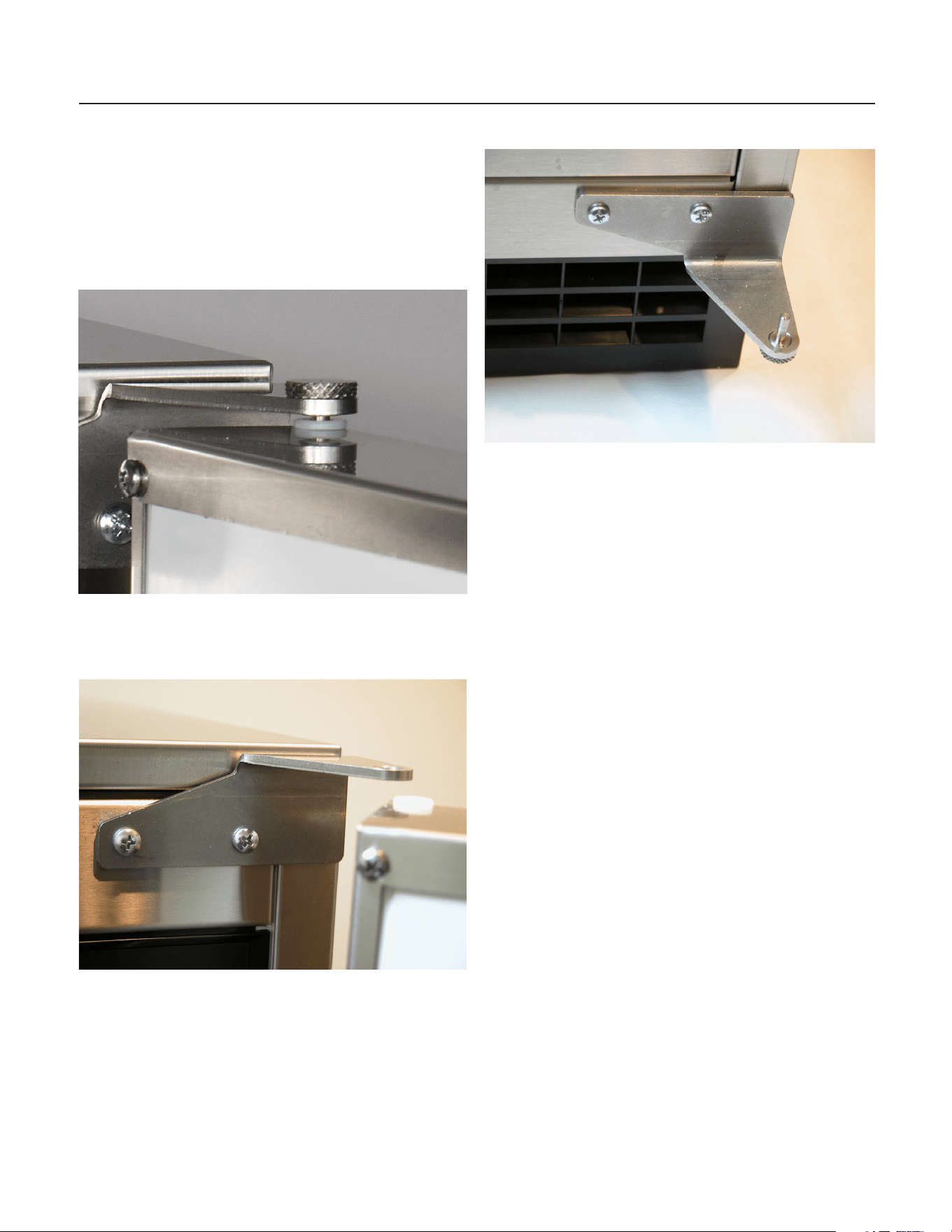
Note: Do not build in so that the door is recessed.
CU50
Service Manual
March 2010
Page 6
Door swing change
The door can be attached to open with hinges on
the left or right. Retain all screws for re-use.
To change:
1. Remove top hinge pin from hinge.
2. Tilt top of door away from cabinet and lift door
off bottom hinge.
3. Remove two screws and top hinge.
4. Remove plugs or screws from lower cabinet
bracket
5. Attach top hinge to lower cabinet bracket using
original screws.
6. Remove original bottom hinge.
7. Remove two plugs or screws from upper
cabinet bracket.
8. Attach bottom hinge to upper cabinet bracket
using the original screws.
9. Place the door on bottom hinge, tip up to slide
under top hinge.
10. Insert hinge pin into top hinge and door.
11. Tighten hinge pin.
12. Replace screws or plugs into holes left by
hinges.
13. Check action and swing of door.

CU50
Service Manual
March 2010
Page 7
Installation Notes
Sealing to oor: In some cases the base of the ice
machine must be sealed to the oor to meet local
code. Food grade silastic sealant such as
Scotsman part number 19-0529-01 is
recommended.
Place the machine in the intended location. Turn
the leg levelers in until the bottom of the unit is as
close to the oor as possible. Be sure the unit is
level and all four levelers are in contact with the
oor.
Place a bead of the sealant between the oor and
the outside edge of the cabinet. The bead must ll
the space between the cabinet bottom edges and
the oor.
Built In Situations: If a nished oor is to be
installed in the area after the ice machine has
been built in, shims the expected thickness of the
oor should be installed under the unit to keep the
machine level with the planned oor level.
Installations on a slab: Use a pump model and
pump the water to the point of drainage. Pump
models will pump 1 story (10 feet) high.
Installations over a crawl space or basement:
Either gravity drain or pump model units may
be used, if there is not enough room behind the
machine for a drain/waste receptacle, the drain will
have to be below the oor.
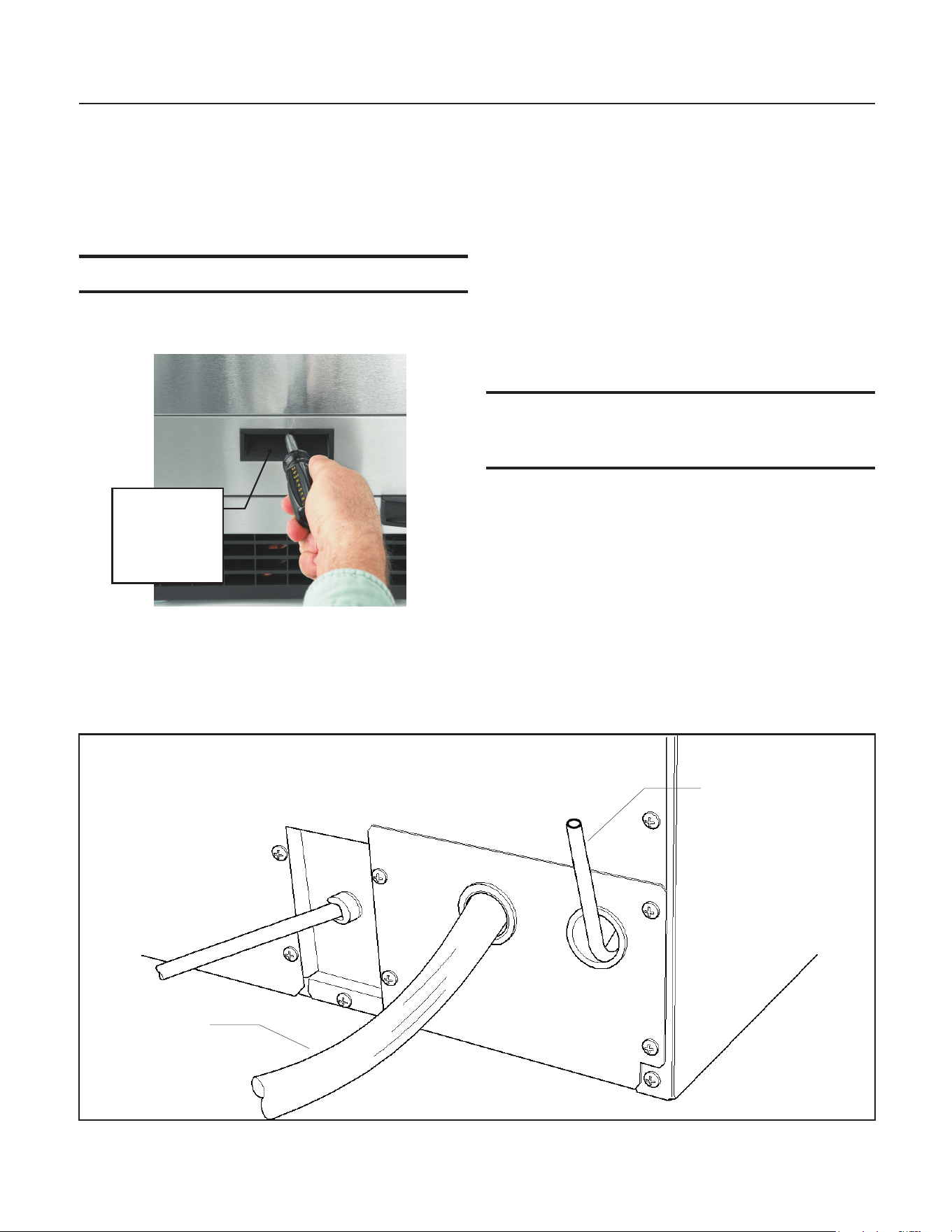
Note: When installed in a corner, the door swing
may be limited due to handle contact with the wall
or cabinet face.
CU50
Service Manual
March 2010
Page 8
Installation: Water & Drain
The recommended water supply tubing is ¼ inch
OD copper. Stainless steel ex or reinforced PVC
tube may also be used. Install an easily accessible
shut-off valve between the supply and the unit.
This shut-off valve should not be installed behind
the unit.
Note: Do not use self-piercing type valves.
1. Remove the front service panel.
2. Route the tubing through the right hole in the
back to the inlet water solenoid valve inlet.
3. Install a compression tting on the tubing and
connect to the inlet of the solenoid.
Drains
There are two types of ice machine models, one
that drains by gravity and one that has an internal
drain pump.
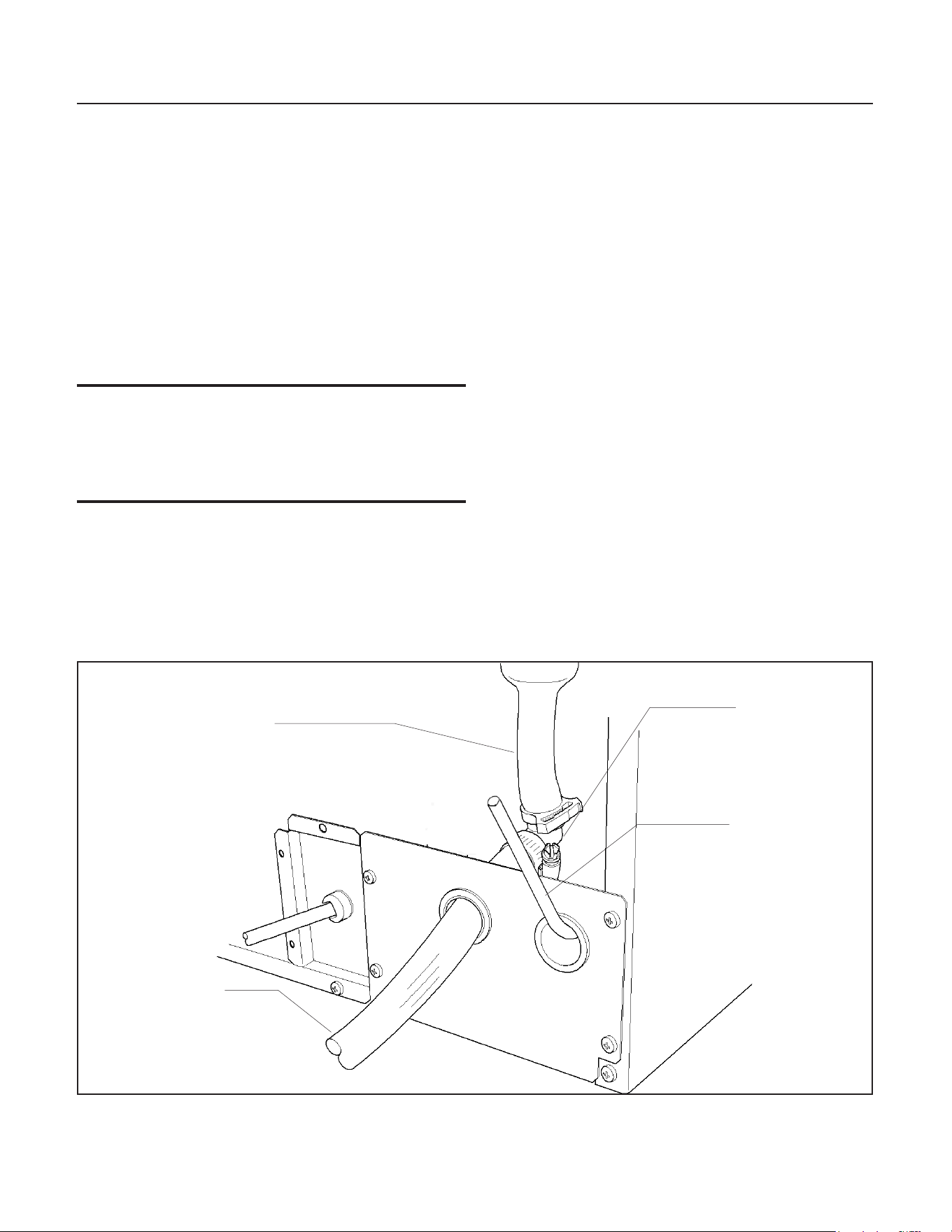
Drain Pump Model drain installation
1. Locate the coil of 3/8” ID plastic drain tubing
secured to the back of the unit.
2. Route the plastic drain tube from the back of
the unit to the drain connection point.
IMPORTANT NOTE: Often an air gap is required
by local codes between the ice maker drain tube
and the drain receptacle.
Screw
Securing
Front Service
Panel
Back View, Drain Pump Model
Drain Tube,
Route to
building drain
Water Inlet
Tube (eld
supplied)
CU50
Service Manual
March 2010
Page 9
Gravity Drain
Caution: Restrictions in the drain system to the
machine will cause water to back up into the ice
storage bin and melt the ice. Gravity drain tubing
must be vented, have no kinks and slope to the
building drain. Air gaps are typically required by
local code.
1. Place the ice machine in front of the installation
opening. Adjust leveling legs to the approximate
height.
2. Remove the front service access panel and the
upper back panel.
Note: If you are connecting a gravity drain model
and the drain opening has been located in the oor
under the base pan according to the pre install
specications, follow steps 3 through 5 to drain the
unit through the base. If not, proceed to step 6b.
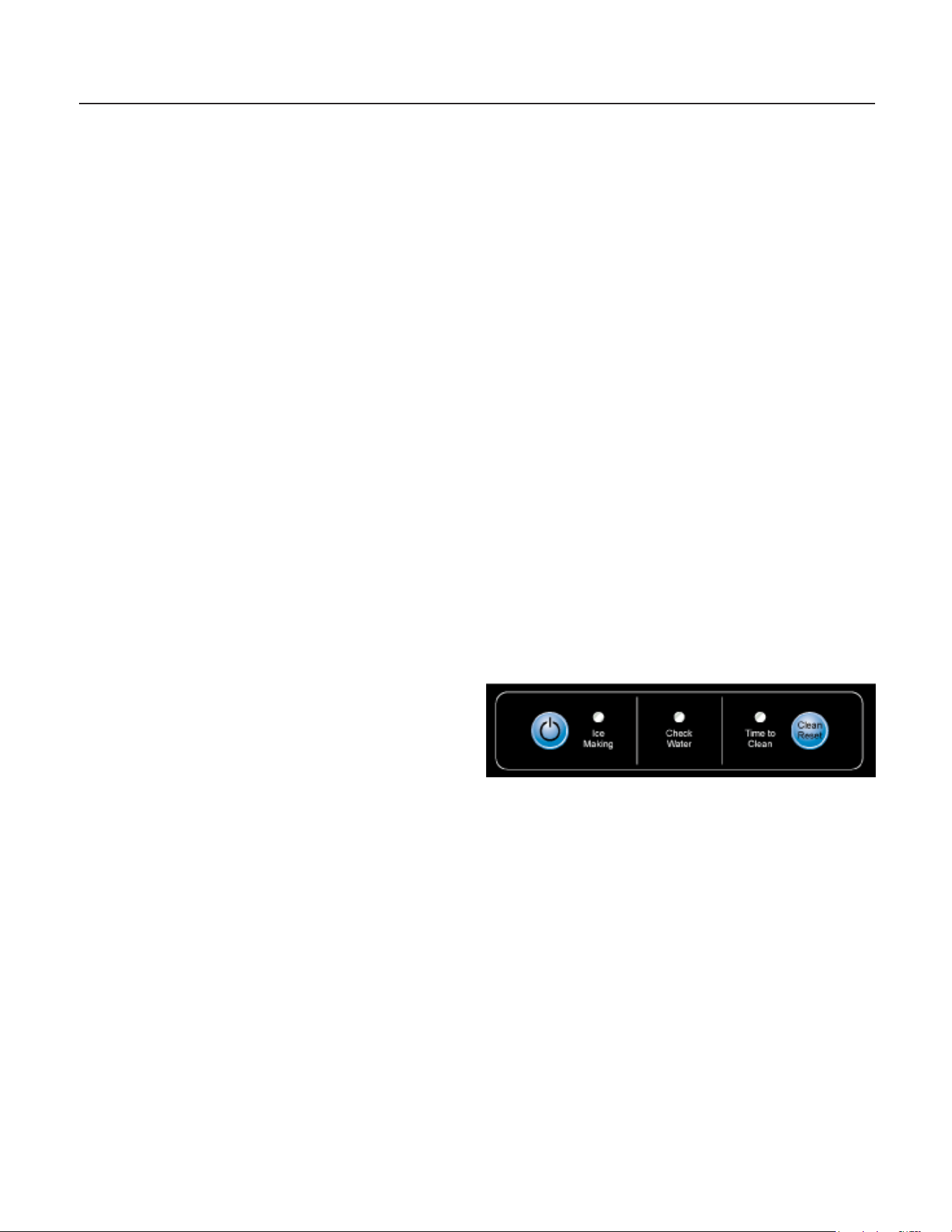
3. Remove the clamp and barbed elbow and take
off the plastic cover in the base pan below the
drain hose.
4. Connect a straight 5/8” barbed connector to
the drain hose, securing with the clamp removed in
step 4.
5. Cut an 8” piece of 5/8” ID X 7/8” OD tygon
(clear plastic) tubing. Slide one end of the tube
onto the outlet of the barbed connector and secure
with a clamp. Leave the other end of the tube
lying on the oor of the base pan until the unit is
positioned over the oor drain.
6. Route the drain tube. Either a) Insert the drain
tube through the base pan into the oor drain or
b) Route the drain tube through the left hole in the
lower back panel and connect to barbed elbow and
secure with a clamp.
7. Reinstall the upper back panel.
8. Reinstall the service access panel. Level the
unit.
Back View, Gravity Drain Model
Drain Hose
Barbed Elbow
Drain Hose,
Route to
building drain
Water Inlet
Tube (eld
supplied)
CU50
Service Manual
March 2010
Page 10
Electrical
The ice machine is supplied with a power cord.
Do not remove the grounding pin from the cord’s
plug. Do not use extension cords. Follow all codes.
Connect the machine to its own 115 volt, 15 amp
circuit.
1. If the electrical outlet for the ice maker is
behind the unit, plug in the unit.
2. Position the unit in the installation opening.
3. Turn on the water supply. Make sure that the
ice maker is plugged in and the power is on.
4. Slide unit into installation opening, paying
careful attention to water supply and drain
connections. Do not kink!
5. Pour a couple of quarts of water into the ice
storage bin; on drain pump equipped machines the
drain pump should start and water should pump
out. Check for leaks.
6. Replace the service access panel.
7. Level the unit as needed.
Installation check list:
1. Has the unit been connected to the proper
water supply?
2. Has the water supply be checked for leaks?
3. Has the unit been connected to a drain?
4. Has the drain been tested for ow and leaks?
5. Has the unit been connected to the proper
electrical supply?
6. Has the unit been leveled?
7. Have all packing materials been removed from
the machine?
8. Has the door covering been installed?
Initial Start Up
1. Turn on the water supply.
2. Switch on the electrical power.
3. Push and release the On/Off switch to start
the machine. The Ice Making light next to the
On/Off switch will glow Green.
4. Water will begin to ow into the unit. When
the reservoir is full, water will start to drain from
the machine. After a few minutes the compressor,
water pump and fan motor will begin to operate
and the rst ice making cycle will have begun.
No adjustments are needed.
After about a half hour, ice will fall into the ice
storage bin. The machine makes 24 cubes per
batch. It is normal for the rst batches of ice to
melt, that continues until the bin has cooled. It will
take 8 to 10 hours of continuous run time to ll the
ice bin. When the bin is full of ice, the ice machine
will shut off. It will automatically restart when the
ice level falls, either from use or normal meltage.
CU50
Service Manual
June 2010
Page 11
Cube Size Adjustment
The cube size can be adjusted by changing the
amount of freeze cycle time. This is done by a
button press sequence.
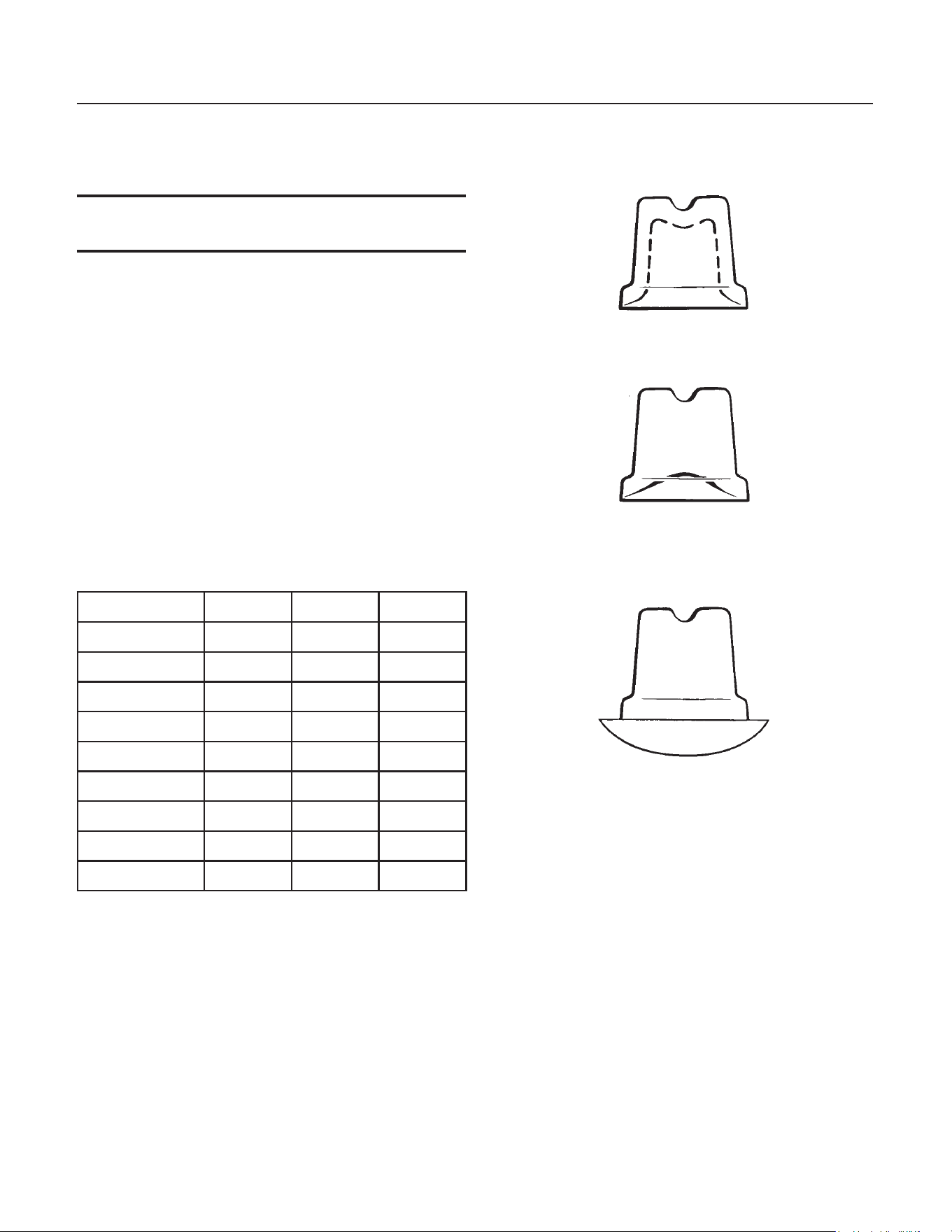
Note: There is only one correct cube size. See the
illustrations.
To adjust cube size:
1. Shut the machine off: If it’s off on bin full press
and release the On/Off button once, switching the
Ice Making light off. If the machine is making ice
hold the On/Off button in until the Ice Making light
is off.
2. Press and hold the Clean button for 5 seconds
(light on), then release (light out)
3. Push and release the On/Off button.
4. View the lights. Compare to the table below.
Cube Size Change Table
On/Off Water Clean
Default off off off
Add 1 minute on off off
Add 2 minutes off on off
Add 3 minutes off off on
Add 4 minutes on on on
- 1 minute ash off off
- 2 minutes off ash off
- 3 minutes off off ash
- 4 minutes ash ash ash
5. Select the amount of change.
6. Push and release the On/Off button until the
correct light pattern is displayed.
7. Push and release the Clean button to select
that setting.
8. Push and release On/Off to return to ice making.
Side Views of Cubes
Too Small, Adjust Cycle Longer
Just Right
Too Large, Adjust Cycle Shorter
CU50
Service Manual
March 2010
Page 12
Harvest Time Adjustment
The harvest time can be adjusted so that all the
ice harvests during the cycle, plus a few seconds
extra. This is done by a button press sequence.
Note: Do not set harvest time shorter than the
actual time it takes to release all the cubes.
To adjust Harvest Time:
1. Shut the machine off by holding the On/Off
button in until it shuts off (Ice Making light off).
2. Press and hold the On button again for 5
seconds, then release (Ice Making light will switch
off).
3. View the lights. Compare to the table below.
Harvest Time Table
On/Off Water Clean
Default off off off
Add 10 seconds on off off
Add 20 seconds off on off
Add 30 seconds off off on
Add 40 seconds on on on
- 10 seconds ash off off
- 20 seconds off ash off
- 30 seconds off off ash
- 40 seconds ash ash ash
4. Select the amount of change.
5. Push and release the Clean button until the
correct light pattern is displayed.
6. Push and release the On button to select that
setting.
7. Push and release On/Off to return to ice making.
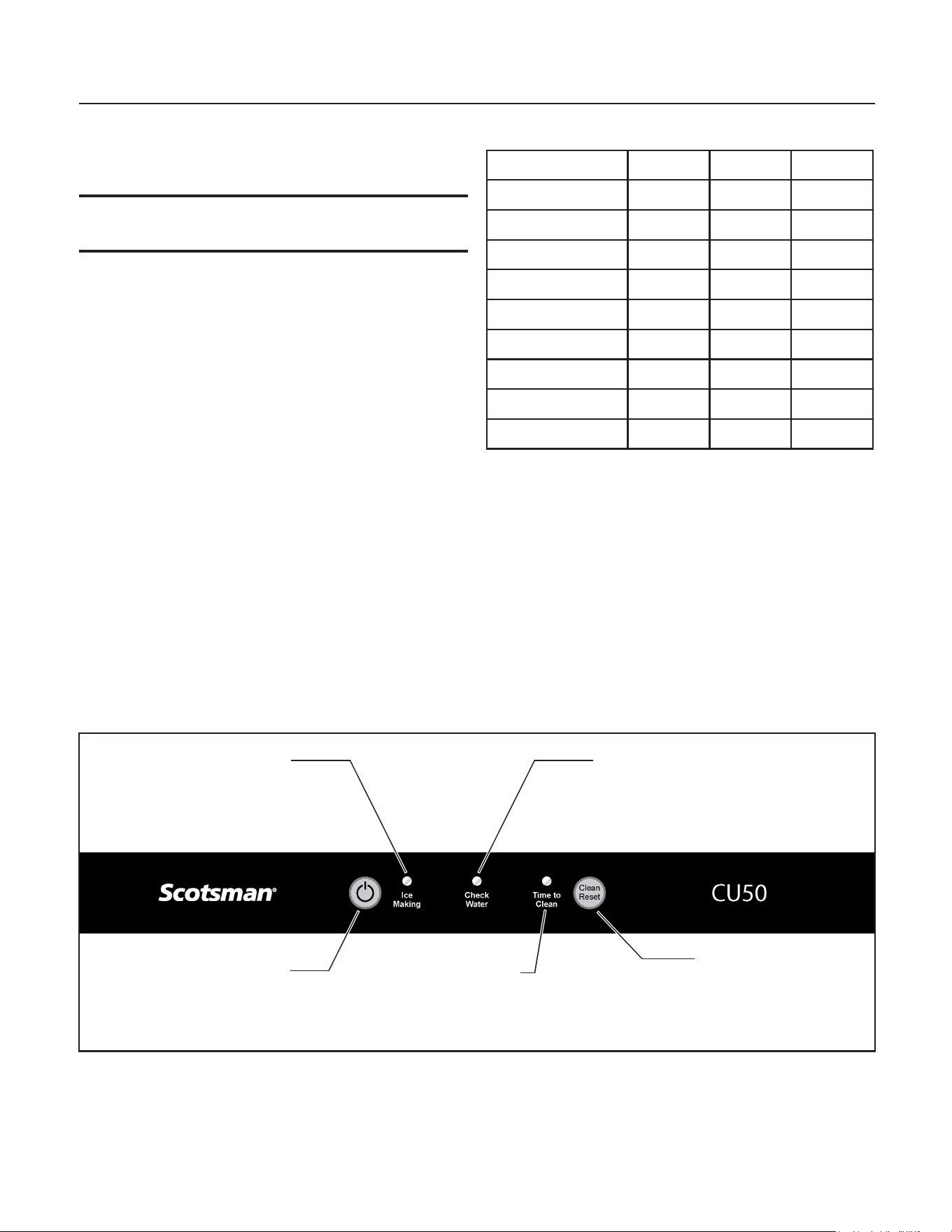
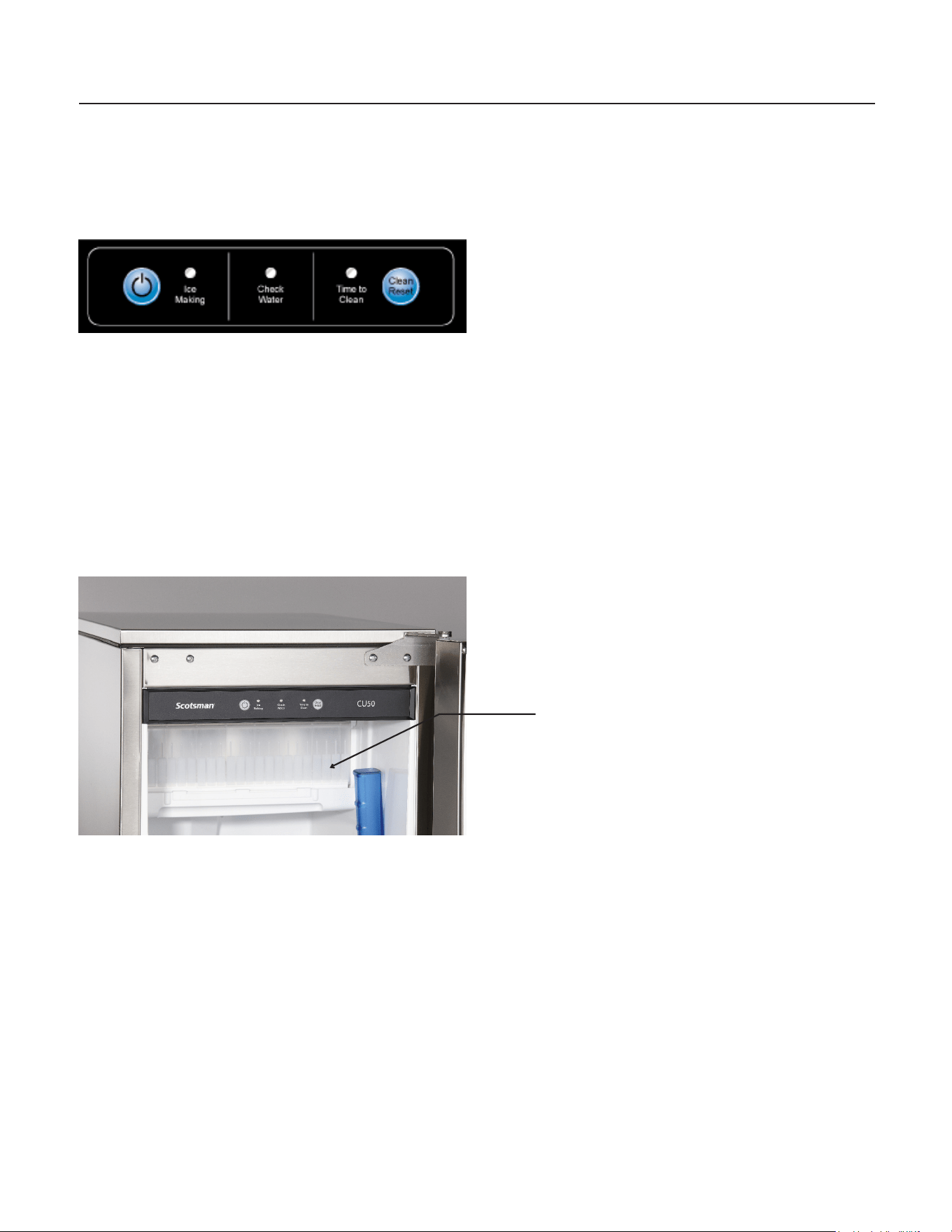
Control Panel
Ice Making
Indicator Light
On - Off
Button
Clean - Reset
Button
Check Water
Indicator Light
Time To
Clean Unit
Indicator Light

CU50
Service Manual
March 2010
Page 13
Control Settings
Automatic water purge enable / disable
The control is set at the factory to automatically
select the proper amount of water purge. If desired,
that can be disabled, and a typical purge amount
used.
To disable Automatic purge selection:
1. Press and hold the On/Off button until the unit
shuts off. No lights should be on.
2. Press and hold the ON button for 5 seconds,
then release.
3. Wait between 5 and 20 seconds, then repeat
step 1. All lights will ash once.
To return to Automatic purge selection:
1. Press and hold the ON button for 5 seconds,
then release.
2. Wait between 5 and 20 seconds, then repeat
step 1. All lights will ash twice.
Manual Harvest - from the OFF or Standby Mode
(powered but no lights are on)
1. Press and hold the Clean-Reset button for 5
seconds and release.
2. Wait between 5 and 20 seconds, then repeat
step 1. All lights will ash once. The On/Off light will
be on until harvest has timed out.
Reset time to clean indicator light
Press and hold the Clean-Reset button for 3
seconds.
CU50
Service Manual
March 2010
Page 14
Use
No special instructions are needed for use. Just
take as much ice as you need, the machine will
replace it. A scoop is provided, and it can be stored
in the machine using the loop of tubing on the right
side as a holder.
The machine can be shut off anytime by just
pushing and releasing the On/Off button. The
machine will shut off at the end of the next cycle.
To shut off immediately, push and hold the On/Off
button in until the machine stops.
What shouldn’t be done?
Never keep anything in the ice storage bin that is
not ice. Objects like wine or beer bottles are not
only unsanitary, but the labels can slip off and plug
up the drain.
Never allow the machine to operate without regular
cleaning. The machine will last longer if it is kept
clean. Regular cleaning should happen at least
once per year, and preferably twice. Some water
conditions will dictate even more frequent cleaning
of the ice making section, and some carpets or
pets will dictate more frequent cleaning of the
condenser.
Note: The Time to Clean light will switch ON after
6 months of use. It will remain ON until the ice
making system is cleaned using the process on
page 13.
Noise:
The ice machine is designed for quiet operation,
but will make some noise during the ice making
cycle. During a freezing cycle, it is normal to hear
the fan moving air and the water pump circulating
water. Ice hitting the bin or ice in the bin can be
heard during harvest.
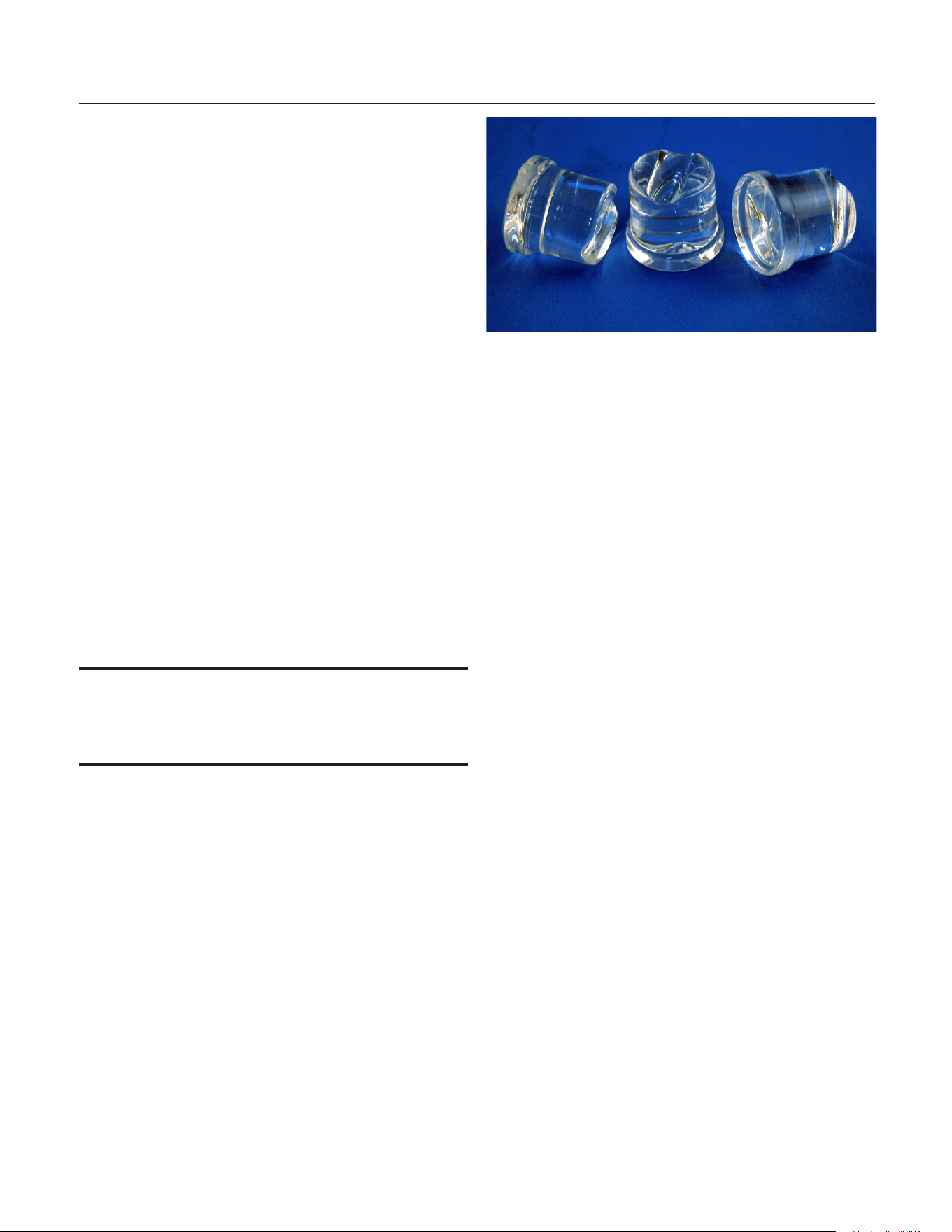
Normal cubes are tapered cylinders. If the cubes
are ragged and mis-shaped, mineral scale must be
removed from the ice making system
Maintenance
There are 5 things to keep clean:
1. The outside cabinet & door.
2. The ice storage bin.
3. The condenser.
4. The ice making system.
5. The ice scoop.
How to clean the cabinet.
Wipe off any spills on the surface of the door and
handle as they occur. If anything spilled on the
door or gasket dries onto the surface, wash with
soap and warm water to remove.
How to clean the ice storage bin.
The ice storage bin should be sanitized
occasionally. It is usually convenient to sanitize the
bin after the ice making system has been cleaned,
and the storage bin is empty.
A sanitizing solution can be made of 1 ounce of
household bleach and two gallons of hot (95°F. –
115°F.) water. Use a clean cloth and wipe the
interior of the ice storage bin with the sanitizing
solution, pour some of the solution down the drain.
Allow to air dry.
CU50
Service Manual
March 2010
Page 15
How to clean the condenser and winterize
Condenser cleaning
The condenser is like the radiator on a car, it has
ns and tubes that can become clogged with dirt
and lint. To clean:
1. Remove the kickplate and front service panel.
2. Locate the condenser surface.
3. Vacuum the surface, removing all dust and lint.
Caution: Do not dent the ns.
4. Return the kickplate and front service panel to
their original positions. Fasten them to the cabinet
using the original screws.
Winterizing
1. Clean the ice making system.
2. Open the door and push and release the
On/Off switch to turn the machine off.
3. Turn off the water supply.
4. Drain the water reservoir by removing the
rubber plug under the reservoir - it’s near the back
wall of the ice storage bin.
5. Disconnect the incoming water line at the inlet
water valve.
6. Open the door, push and release the on/off
switch to turn the machine on.
7. Blow air through the inlet water valve; a tire
pump could do the job.
8. Drain pump models should have about 1/2
gallon of RV antifreeze (propylene glycol) poured
into the ice storage bin drain.
Note: Automotive antifreeze must NOT be used.
9. Switch off and unplug the machine.
CU50
Service Manual
March 2010
Page 16
How to remove scale from the ice making system
1. Scoop out all of the ice, either discard it or save
it in an ice chest or cooler.
2. Press and HOLD the On/off button in for
3 seconds until the Green light goes out.
3. Press and HOLD the both the Clean-Reset and
On/Off buttons for 5 seconds. The Time to Clean
light will blink on and off.
4. Pour 8 ounces of Scotsman Ice Machine
Scale Remover (available from a local Scotsman
Distributor or Dealer) into the ice machine
reservoir.
5. Operate the machine for about ½ hour.
6. Push and release the On/Off switch. The
machine will begin to ush out the cleaning
solution.
7. Operate the machine for another ½ hour.
8. Push and release the On/Off switch. The
machine will stop the cleaning process.
9. Pour a gallon of hot (95°F. – 115°F.) water into
the bin to ush out the drain.
10. Clean the bin liner of mineral scale by mixing
some ice machine scale remover and hot water,
and using that solution to scrub the scale off of the
liner.
11. Rinse the liner with hot water.
12. Sanitize the bin interior.
13. Replace the ice removed in step 1.
14. Push and release the On/Off button to restart
ice making.
The ice scoop should be washed regularly, wash it
just like any other food container.
Pour Scale
Remover Here

CU50
Service Manual
Dec. 2019
Page 17
System Information
Overall:
• Refrigerant: 8 oz R-134a
• Compressor: Hermetic, 1300 BTUH,
• Condenser: Forced draft
• Fan blade: 5 blade, 7 inch
• Evaporator: Inverted, 24 cube cells. Copper
cups attached to continuous serpentine
• Metering device: Cap tube
• Defrost method: Hot gas bypass with water
assist
• Spray method: 6 water jets
• Water charge: 40 ounces
• Water valve: 115 volt solenoid, .19 GPM
• Water ll time: Varies with harvest time &
purge setting
• Spray pump: Pedestal type.
• Drain pump: Magnetic drive, controlled by
pressure switch
• Purge method: Overow standpipe
• Control method: Electronic
• Cycle control: Thermistor + timers
• Freeze cycle timer A model:10 minutes, + - 4
• Freeze cycle timer B model :11 minutes, + - 4
• Harvest cycle timer: 20 seconds, + - 40
• Cube size adjustment: Freeze timer change.
• Harvest cycle adjustment: Harvest timer
change
• Bin control: Thermostat. Opens on
temperature fall, Cut Out: 35 degrees F. Cut
In 45 degrees F. Range is adjustable.
Electrical Components:
• Compressor
• Fan motor
• Spray pump motor
• Drain pump motor
• Drain pump switch
• Inlet water solenoid valve
• Hot gas valve
• Transformer
• Controller
• Water sensor
• Thermistor
• Bin thermostat
Electrical Sequence:
A closed bin thermostat signals to the controller
a need for ice. The controller checks for water,
if water is needed , the controller opens the inlet
water solenoid valve to ll the reservoir. The hot
gas valve is open to equalize the system. When
the reservoir is full, the compressor, fan motor,
water pump are switched on. After 5 seconds the
hot gas valve shuts and ice making begins.
Water is sprayed up into the inverted cup mold. As
the water is cooled and ice begins to form in the
cups, the temperature of the evaporator will fall.
The freeze cycle continues until the temperature
of the thermistor attached to the evaporator outlet
tube falls to about 0°F A model and 3°F B model. At
that point the controller starts a freeze cycle timer,
whose default time is 10 minutes for A model and
11 minutes for B model. At the end of the freeze
cycle’s timed portion the controller switches to the
harvest cycle.
The harvest cycle begins with the controller
stopping the water pump and fan motor. At the
same time it opens the hot gas valve and the
inlet water solenoid valve. The ice is released
by the combination of discharge refrigerant gas
entering the evaporator serpentine and warming
up the copper, plus the inlet water that ows to
the evaporator, oods across the plastic platen to
warm it up and be pre-chilled for the next cycle. Ice
cubes drop individually and harvest continues until
the thermistor attached to the suction line warms
up to about 50 degrees F. At that point a harvest
timer starts, whose default time is 20 seconds. At
the end of that time the harvest cycle ends and the
freeze cycle restarts.
Bin control.
The machine’s on and off modes are regulated by a
bin thermostat. The cap tube for the bin thermostat
is in the tube that holds the scoop. The machine
will only begin ice making when the thermostat’s
contacts close. If the contacts re-open before the
temperature of the evaporator drops below a preset
point, the machine will stop. If the temperature
is below that point when the contact s open, the
machine will continue through a complete cycle
and stop at the end of the harvest cycle.
CU50
Service Manual
March 2010
Page 18
Water System
The controller uses a Water Sensor to check
for the presence of water in the reservoir and to
measure the conductivity of the water.
The water sensor consists of two stainless steel
probes located in a holder next to the water pump.
The probes sense the conductivity of the water.
The higher the mineral content of the water,
the better it can conduct electricity. The control
system is capable of sensing water as clean as
10 microSiemens/cm.
If the controller cannot sense water and the bin
thermostat is closed the controller will power the
inlet water solenoid valve to ll the reservoir. The
water ll is timed. There is a maximum amount of
time allowed from the time the controller turned on
the inlet water valve until the water sensor signals
to the controller. That time is 2 1/2 minutes. If water
is not sensed within 2 1/2 minutes, the controller
will not proceed with an ice making cycle. Instead it
will blink the Water light and try lling the reservoir
in 20 minutes.
Reservoir water dilution
The process of making ice from circulating water
causes the pure water to freeze rst, because it
freezes at the warmest temperature. The remaining
water will develop an increasing concentration
of minerals. If that mineral concentration were
allowed to continue, eventually the ice machine
would become coated with mineral scale.
To combat the mineral build up, the reservoir
water is diluted with fresh water every cycle. The
controller adds enough water to ll the reservoir
and extra water to overll it. The extra water drains
out through the standpipe in the reservoir.
The controller keeps the inlet water solenoid valve
open until the evaporator temperature set point is
reached, plus some extra time. The extra time is
either pre-set or automatically determined by the
controller.
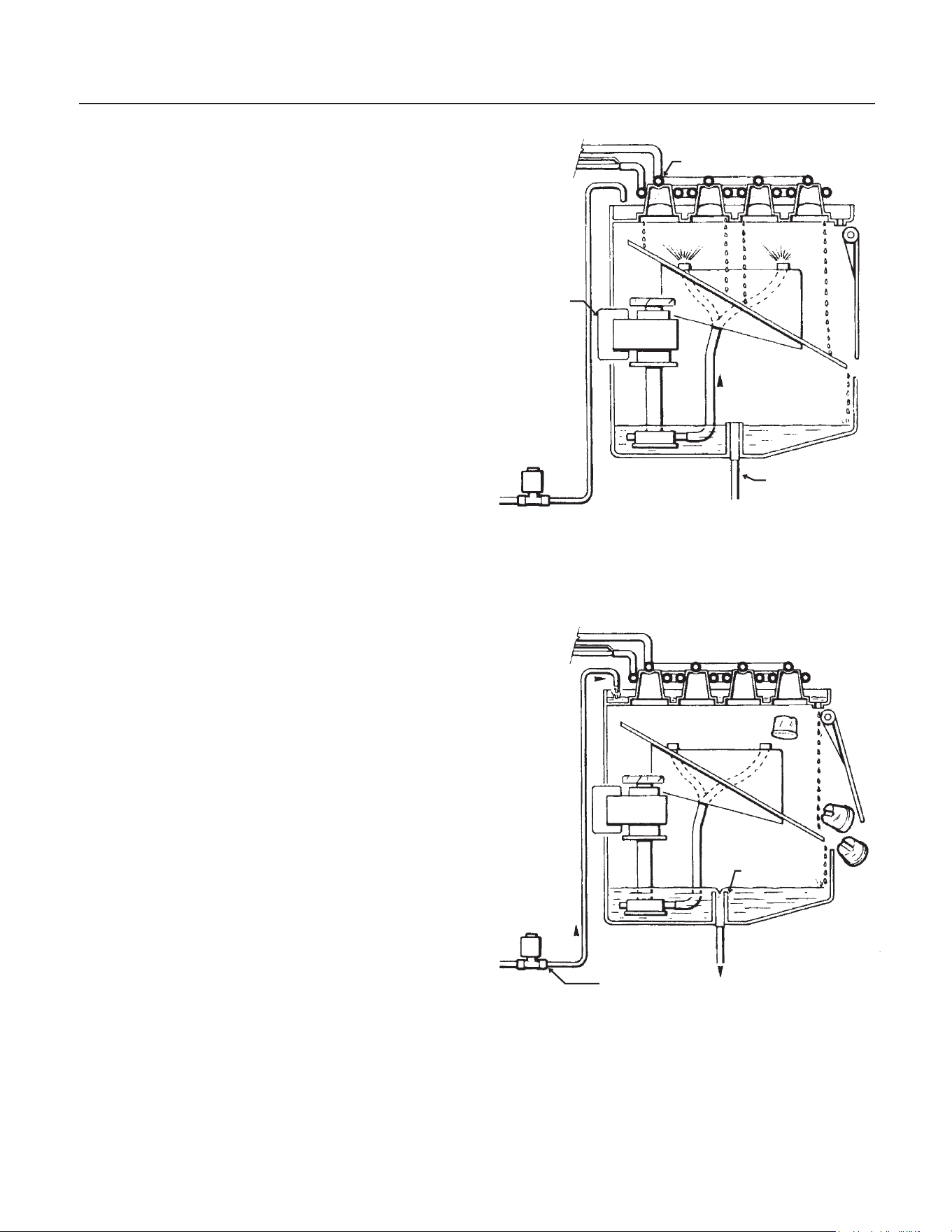
Evaporator
Pump
Reservoir
Drain
Freeze Cycle Water Schematic
Harvest Cycle Water Schematic
Standpipe
Inlet Water Solenoid Valve
CU50
Service Manual
March 2010
Page 19
Components
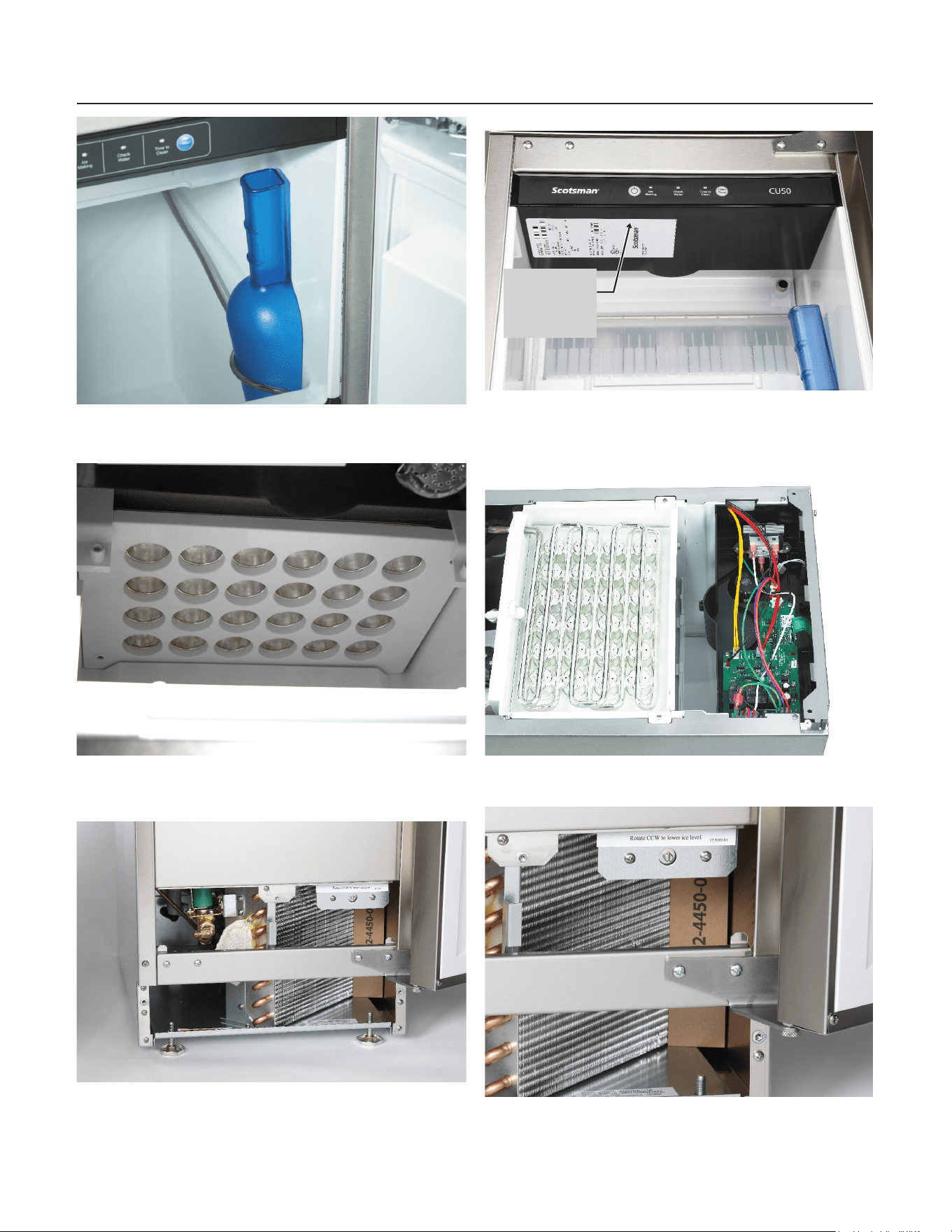
Scoop and Thermostat Bracket
Evaporator Platen
Inlet Water Solenoid Valve
Control Panel, Bin Light and Curtain
Evaporator and Controller
Condenser and Bin Thermostat
Model and
Serial Tag
Location
CU50
Service Manual
March 2010
Page 20
Controller
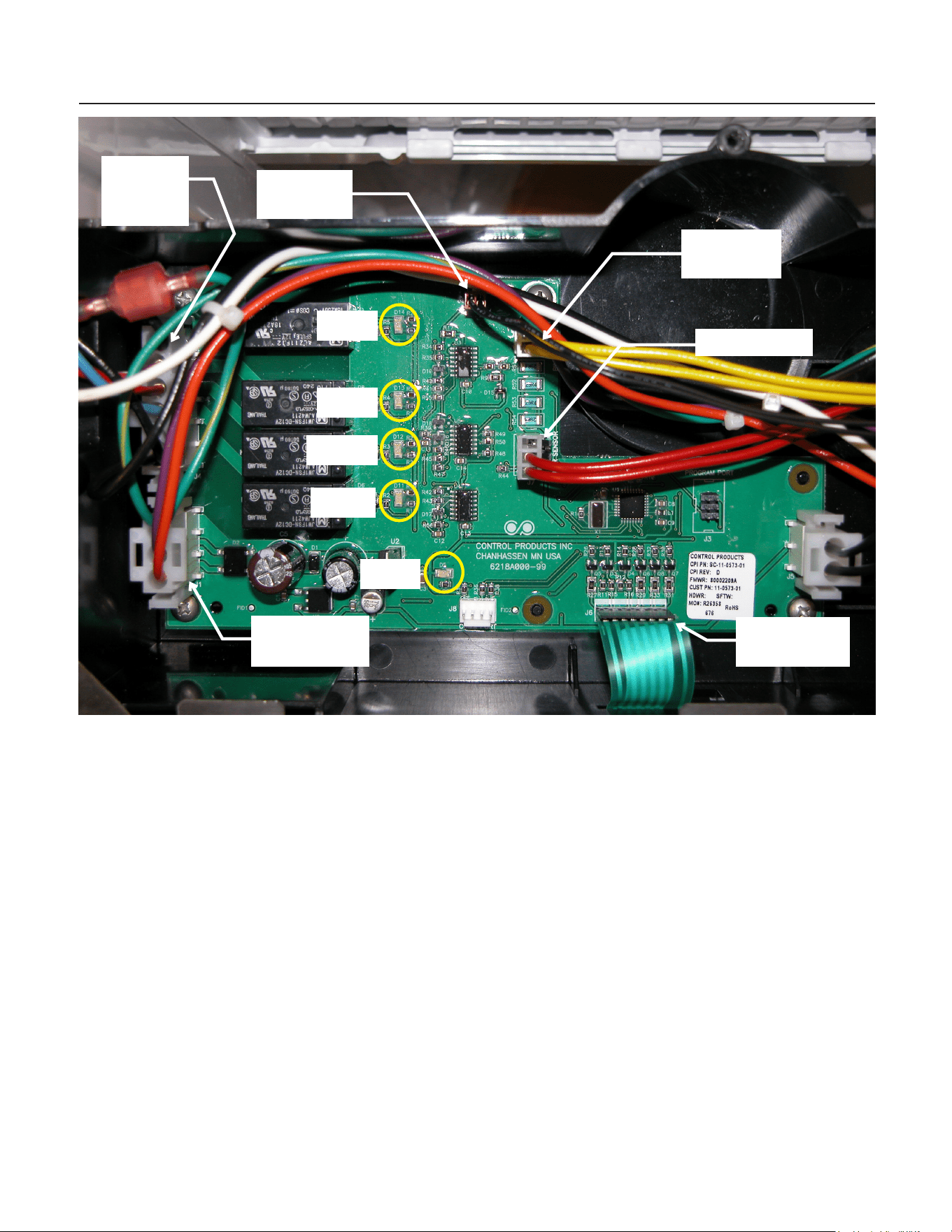
The controller is located at the front of the unit,
under the top panel.
It is powered by a 12 volt transformer. It has
5 indicator lights:
• Compressor - Light is ON if compressor is
powered
• Water - Light is ON if inlet water solenoid
valve is powered
• Hot Gas - Light is ON when Hot Gas Valve
is powered
• Fan - Light is ON when Fan motor is
powered
• Power - Light is ON when power is
connected to controller
Control Safeties:
No Water. If the Water Sensor cannot detect
water, and the inlet water solenoid valve has been
on for the maximum ll time, the controller will
stop all action and wait 20 minutes to re-try water
ll. During this time the Check Water light on the
control panel will be blinking.
Maximum Freeze Time. If the freeze cycle
should extend to 60 minutes, the controller will
automatically put the machine into a Harvest cycle.
Maximum Harvest Time. 6 minutes.
Time between restarts. After the machine has
operated and then turned off, the controller will not
restart the machine for four minutes.
Bin
Thermostat
Water Sensor
Control Panel
Ribbon
Power Supply
Connector
Evaporator
Thermistor
Comp
Water
Hot Gas
Fan
Power
High
Voltage
Connector
CU50
Service Manual
March 2010
Page 21
Performance Information
Freeze Cycle, Minutes
Air Temperature
100 90 80 70 60 50
Water
Temperature
100 37-38 36-37 34-35 32-33 31-32 29-30
90 36-37 35-36 33-34 31-32 30-31 28-29
80 36-35 32-33 30-31 28-29 27-28 26-27
70 32-33 28-29 27-28 25-26 23-24 22-23
60 27-28 25-26 24-25 22-23 20-21 19-20
50 20-21 19-20 18-19 17-18 16-17 15-16
40 18-19 17-18 16-17 15-16 15-16 15-16
Harvest Cycle, Seconds
Air Temperature
100 90 80 70 60 50
Water
Temperature
80 - 100 55-60 60-70 70-80 80-90 90-100 110-115
70 - 80 65-75 70-80 75-85 85-95 95-105 115-120
50 - 70 70-80 75-85 85-95 125-135 140-150 160-170
40 - 50 100-120 115-125 130-140 150-170 180-200 210-230
Total Cycle, Minutes
Air Temperature
100 90 80 70 60 50
Water
Temperature
100 38-39 37-38 36-37 34-35 33-34 31-32
90 38-39 36-37 35-36 33-34 32-33 30-31
80 37-38 33-34 31-32 30-31 29-30 27-28
70 33-34 29-31 28-29 26-27 25-26 24-25
60 29-30 27-28 25-26 24-25 22-23 21-22
50 21-22 20-21 19-20 19-20 19 18-19
40 20-21 19-20 19 18-19 19 19-21
Ice per cycle: 1 lb
Water drained / cycle: Varies by harvest cycle
length and purge setting. Typical amounts are @
70/50 = 52 oz. @ 90/70 = 13 oz
Compressor amps: 2.6 - 3.2
CU50
Service Manual
March 2010
Page 22
Refrigeration System
SuctionPressure
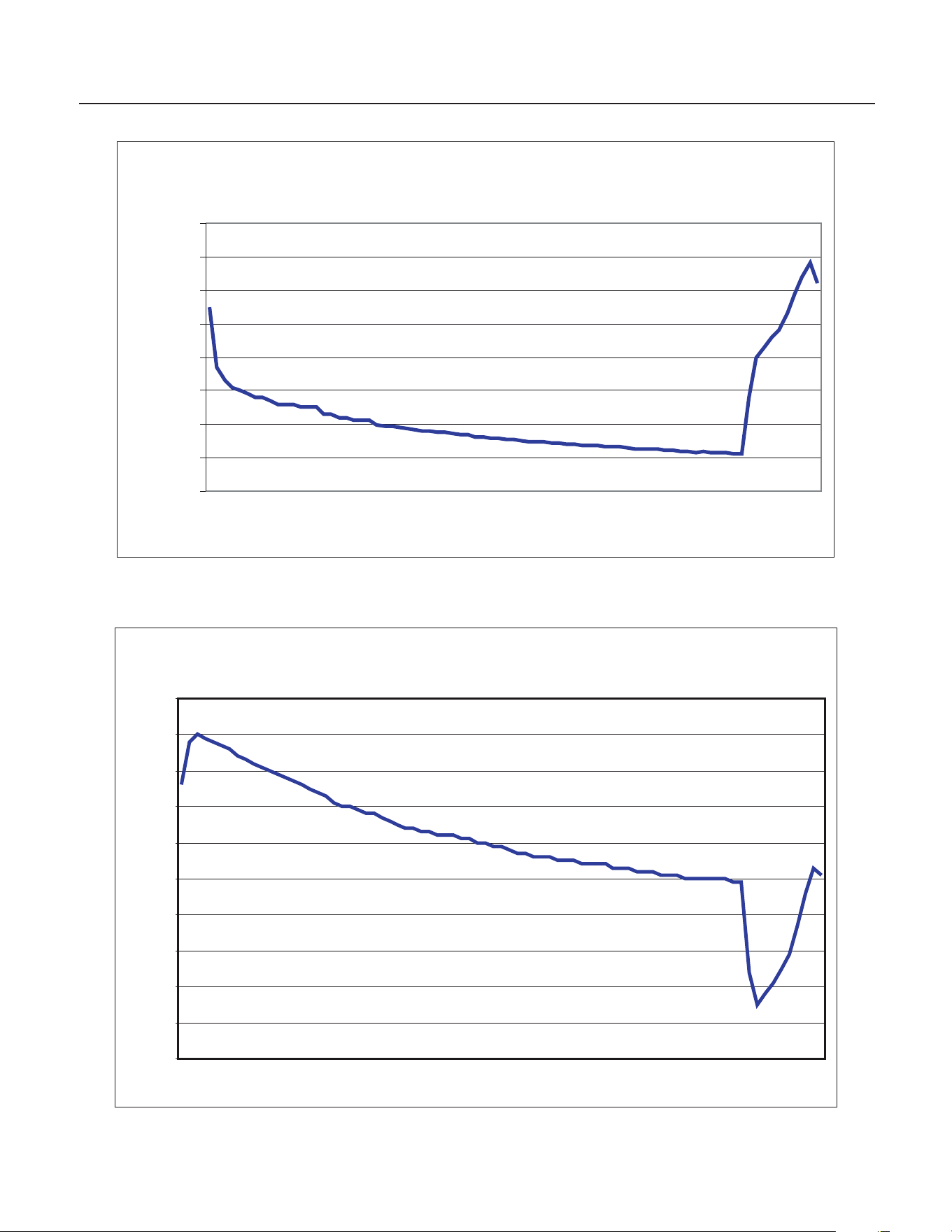
-10
0
10
20
30
40
50
60
70
Time
PSIG
DischargePressure
50
60
70
80
90
10 0
110
12 0
13 0
14 0
15 0
Time
PSIG

CU50
Service Manual
March 2010
Page 23
Thermistor Values
Deg. F · Ohms Deg. F · Ohms Deg. F · Ohms Deg. F · Ohms Deg. F · Ohms
0
85325 52
18873 104
5325 156
1819 208
724
1
82661 S3
18381 105
5208 157
1785 209
713
2
80090 54
17903 106
5093 158
1752 210
701
3
77607 55
17439 107
4981 159
1719 211
690
4
75210 56
16988 108
4872 160
1687 212
679
5
72896 57
16551 109
4766 161
1655 213
668
6
70660 58
16126 110
4663 162
1624 214
657
7
68501 59
15714 111
4562 163
1594 215
646
8
66415 60
15313 112
4463 164
1565 216
636
9
64400 61
14924 113
4367 165
1536 217
626
10
62453 62
14546 114
4273 166
1508 218
616
11
60571 63
14179 115
4182 167
1480 219
606
12
58752 64
13823 116
4093 168
1453. 220
597
13
56995 65
13476 117
4006 169
1427 221
587
14
55296 66
13139 118
3921 170
1401 222
578
15
53653 67
12812 119
3838 171
1375 223
569
16
52065 68
12494 120
3757 172
1350 224
560
17
50529 69
12185 121
3678 173
1326 225
551
18
49043 70
11884 122
3601 174
1302 226
543
19
47607 71
11592 123
3526 175
1279 227
534
20
46217 72
11308 124
3452 176
1256 228
526
21
44872 73
11031 125
3381 177
1234 229
518
22
43571 74
10763 126
3311 178
1212 230
510
23
42313 75
10502 127
3243 179
1190 231
502
24
41094 76
10247 128
3176 180
1169 232
495
25
39915 77
10000 129
3111 181
1149 233
487
26
38774 78
9760 130
3047 182
1129 234
480
27
37669 79
9526 131
2985 183
1109 235
472
28
36600 80
9299 132
2924 184
1090 236
465
29
35564 81
9077 133
2865 185
1071 237
458
30
34561 82
8862 134
2807 186
1052 238
451
31
33590 83
8652 135
2751 187
1034 239
444
32
32649 84
8448 136
2696 188
1016 240
438
33
31738 85
8250 137
2642 189
998 241
431
34
30855 86
8056 138
2589 190
981 242
425
35
30000 87
7868 139
2537 191
965 243
419
36
29171 88
7685 140
2487 192
948 244
412
37
28368 89
7507 141
2438 193
932 245
406
38
27589 90
7333 142
2390 194
916 246
400
39
26835 91
7164 143
2343 195
901 247
394
40
26104 92
6999 144
2297 196
885 246
389
41
25395 93
6839 145
2252 197
871 249
383
42
24707 94
6683 146
2208 198
856 250
377
43
24041 95
6530 147
2165 199
842
44
23394 96
6382 148
2123 200
828
45
22767 97
6238 149
2082 201
814
46
22159 98
6097 150
2042 202
800
47
21569 99
5960 151
2003 203
787
48
20997 100
5826 152
1965 204
774
49
20442 101
5696 153
1927 205
761
50
19903 102
5569 154
1890 206
749
51
19381 103
5446 155
1855 207
737
CU50
Service Manual
August 2011
Page 24
Service Diagnosis
No Ice
Problem Likely Cause Probable Solution
No power to unit Power disconnected
Check breaker or fuse. Reset or
replace, restart and check
No power to controller Transformer open Replace transformer
Control panel failure Switch open Check membrane, see page 25.
Shut down on maximum
water ll time - water light
ashing
Water shut off Restore water supply
Very long freeze cycle
Water leak Check curtain, sump
Dirty condenser Clean condenser
Restricted location, intake air too hot
or blocked
Eliminate restriction, have machine
moved
Evaporator thermistor not sensing
properly
Check thermistor
Spray jets dirty
Remove spray platform and clean
spray jets
Inlet water valve leaks through
during freeze
Check inlet water valve
Low on refrigerant Check cube formation,
Connected to hot water
Check for bleed thru from / missing
check valve in building water
supply
Cannot make ice
Spray pump not pumping Check pump motor
Fan motor not turning
Check fan motor, check fan blade,
check controller for voltage output
Pump hose disconnected Check hose
Very low on refrigerant
Add access valve, add refrigerant
as a test. If unit makes ice, nd and
correct leak.
Compressor not operating
Check compressor start
components, check PTCR
resistance and temperature
Check compressor voltage
Check compressor windings
Hot gas valve leaks through during
freeze
Check hot gas valve for hot outlet
during freeze
Compressor inefcient
Check compressor amp draw, if
low and all else is correct, change
compressor
CU50
Service Manual
August 2010
Page 25
Service Diagnosis
Makes excessive noise
Problem Likely Cause Probable Solution
Fan blade vibrates
Blade is bent Replace fan blade
Fan motor mount is broken Replace motor mount
Compressor vibrates
Water pump vibrates
Mounting loose
Pump bearings worn
Check mounting
Replace pump
Panels vibrate Mounting screws loose Tighten screws
Makes ice, does not harvest
Problem Likely Cause Probable Solution
Ice wrong size Environment changed Adjust cube size
Little heat to evaporator
Hot gas valve does not open
Check voltage to coil when unit is
in harvest, check controller
indicator light.
Water temperature very low Adjust harvest time
Fan motor does not stop Check voltage, replace controller
Makes poor quality ice
Problem Likely Cause Probable Solution
Spray pattern poor Spray jets dirty Clean jets
Runs out of water Water leaking from reservoir Correct leak
High TDS water supply Groundwater supply Treat water
Makes ice, but melts rapidly
Problem Likely Cause Probable Solution
Restricted drain Gravity drain hose has air block Check for kinks or traps
Pooled water in bin
Pump model switch not starting
pump
Check / replace switch
Membrane Switch Diagnostics
Unplug and check connector pins (left side is pin 1),
read about 10 ohms when activating the button,
and OL when not pressing the button: Pin 2-3
On/Off Switch; 4-3 Clean Reset Switch
CU50
Service Manual
March 2010
Page 26
Removal and Repair
Bin Thermostat
1. Disconnect electrical power.
Electrical Shock
Hazard.
Disconnect electrical
power before
beginning removal
2. Remove service panel.
3. Remove back panel.
Note: If unit is built in it must be pulled out to
change the bin thermostat.
4. Pull cap tube out from the back of the ice
storage bin and cap tube holder.
5. Remove two screws and the bin thermostat
contact section from its mounting bracket.
6. Disconnect two wires from the bin thermostat
contact section and remove the thermostat from
the ice machine.
7. Reverse to reinstall.
Inlet Water Solenoid Valve
1. Disconnect electrical power.
2. Remove service panel.
3. Shut water supply OFF.
4. Disconnect inlet water supply tube from inlet
water solenoid valve.
5. Unplug wire harness from valve coil.
6. Remove two screws holding valve to chassis.
7. Squeeze hose clamp larger and push away
from solenoid valve outlet.
8. Pull hose from outlet of valve.
9. Reverse to reassemble.
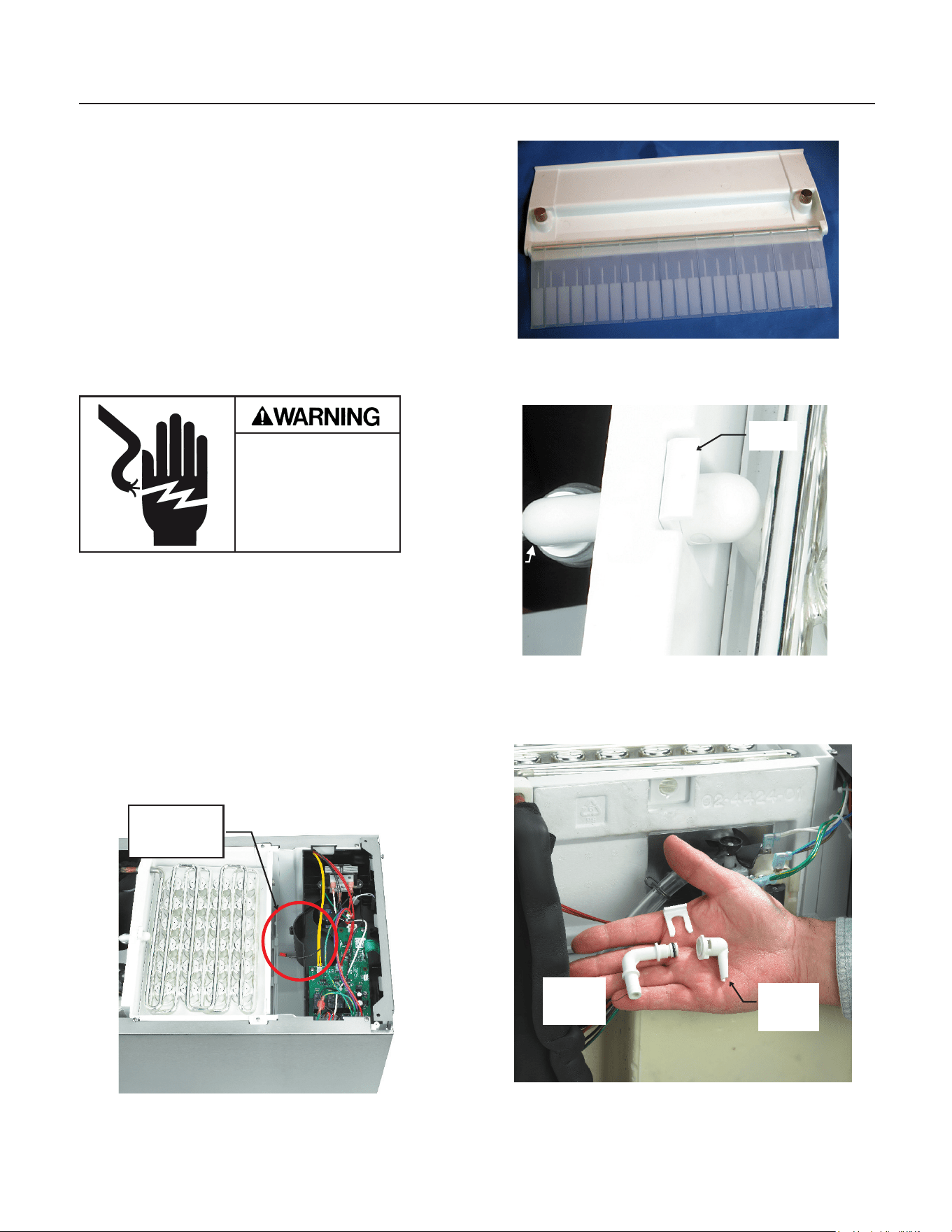
Curtain
1. Shut unit off.
2. Loosen both thumbscrews holding curtain
bracket to freezing chamber.
3. Pull out and remove curtain with bracket from
ice machine.
4. Reverse to reassemble.
Spray Platform
1. Remove curtain.
2. Lift spray platform up until it disconnects from
its tting.
3. Pull forward and remove from the ice machine.
4. Reverse to reassemble.
Water Pump
1. Remove spray platform
2. Remove back panel.
Note: If unit is built in it must be pulled out to
change the water pump.
3. Disconnect power and ground wires from pump
motor.
4. Rotate pump body CW and lift up to remove it.
5. Reverse to reassemble.
CU50
Service Manual
March 2010
Page 27
Removal and Repair
Evaporator Thermistor
Note: If unit is built in it must be pulled out to
change the evaporator thermistor.
Electrical Shock
Hazard.
Disconnect electrical
power before
beginning removal
1. Shut machine off. If unit was making ice,
manually harvest the ice.
2. Disconnect electrical power.
3. Remove top panel.
4. Remove cover from controller box.
5. Disconnect thermistor wire from controller.
6. Locate thermistor sensor, it is attached to
the suction line, just above the accumulator and
is covered with insulation tape. Remove the
insulation.
7. Disconnect sensor bulb from suction line
(it’s held on with a metal clip).
8. Remove thermistor from ice machine.
9. Reverse to reassemble. It is very important
that the bulb be re-insulated.
Transformer
Note: If unit is built in it must be pulled out to
change the transformer.
1. Disconnect electrical power.
2. Remove top panel.
3. Remove controller cover.
4. Unplug leads from transformer.
5. Remove screws holding transformer to
controller box and pull transformer up and out of
the ice machine.
6. Reverse to reassemble.
Controller
Note: If unit is built in it must be pulled out to
change the controller.
1. Disconnect electrical power.
2. Remove top panel
3. Remove controller box cover.
4. Unplug all connections.
5. Remove screws holding controller to housing,
and lift controller from unit.
Note: To avoid damaging the controller, touch
the metal chassis of the unit prior to touching the
replacement controller.
6. Reverse to reassemble.
Control Panel
1. Disconnect electrical power.
2. Remove top panel
3. Remove controller box cover.
4. Unplug ribbon cable connection.
5. Push control panel away from the front of the
machine. Begin at the ribbon cable attachment
point.
Note: Control panel is held on by adhesive and the
adhesive is thinnest at the cable point.
6. Separate control panel from controller box and
remove from the ice machine.
7. Reverse to reassemble.
CU50
Service Manual
March 2010
Page 28
Removal and Repair - Cabinet Removal
Certain components require the removal of the
cabinet for repair access.
1. If the machine is in a freeze mode, perform a
manual harvest.
2. Remove all ice.
3. Drain reservoir.
4. Remove service panel and kick plate.
5. Remove back panel.
6. Disconnect electrical power.
Electrical Shock
Hazard.
Disconnect electrical
power before
beginning removal
7. Disconnect water and drain tubing.
8. Remove door.
9. Remove top panel.
10. Remove controller box cover.
11. Disconnect thermistor from controller, pull wire
back to suction line.
12. Remove curtain & hanger.
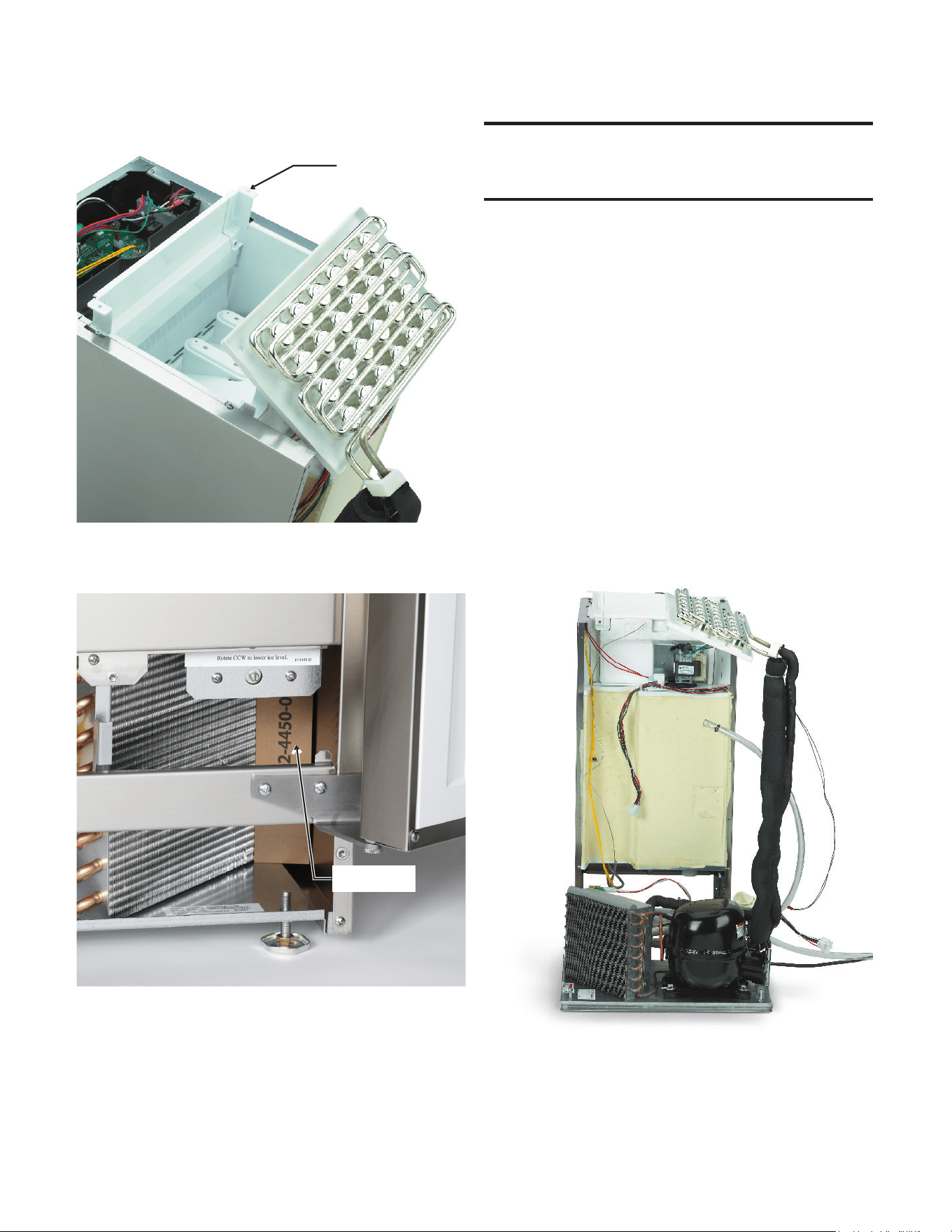
13. Locate elbows where water ows onto the
evaporator platen.
14. Pull clip up. Push inner elbow back and rotate it
until it points straight up, then push it back through
the hole in the back of the freezing compartment.
15. Pull water inlet elbow out of inner elbow.
Thermistor
Connector
Inlet
Elbow
Clip
Inner
Elbow
Inlet
Elbow
CU50
Service Manual
March 2010
Page 29
16. Remove two screws holding freezing
compartment brace to cabinet, lift brace up.
17. Lift evaporator platen up and tilt back enough
for bin assembly to clear the base.
18. Remove air bafe.
19. Unplug 7 wire harness connector (at back of
bin).
20. Remove 1 screw at each corner of the base.
21. Lift bin assembly off the base.
Note: Prop evaporator assembly up. A 3’ length of
3/4” PVC tubing with one end inserted into the cup
mold and the other against the base will hold it up.
The hot gas valve, fan motor, condenser and
compressor are now exposed for service.
Brace
Air Bafe
CU50
Service Manual
February 2012
Page 30
Refrigeration Service
This ice machine use R-134a type refrigerant.
There are specic rules for handling that
refrigerant.
To check for system pressures, add a eld supplied
clamp-on type service valve as a temporary means
of system access. After diagnosis and before nal
repair, replace the clamp-on type valve with valves
that are brazed onto the process tubes of the
system.
Use a low ow of dry nitrogen when brazing on the
system.
Install a new lter drier when replacing a
refrigeration component or after a refrigerant leak
repair.
Evacuate the system to at least 300 microns and
use a micron gauge to measure the evacuation
level.
Weigh in the nameplate charge. The machine is
critically charged and a partial ounce mis-charge
will affect performance.
Bin Thermostat Altitude Adjustment Screw
Altitude
Degrees Rotation to
Turn Adjustment Screw
1000 11 cw
2000 31 cw
3000 52 cw
4000 72 cw
5000 92 cw
600 111 cw
7000 128 cw