Imagine the possibilities
Thank you for purchasing this Samsung product.
To receive more complete service, please register your product at
www.samsung.com/register
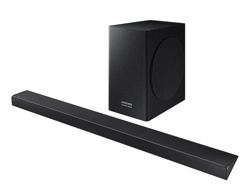
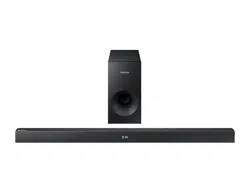
HW-K335
User manual
©2016 Samsung Electronics Co.,Ltd. All rights reserved
2
GETTING STARTED
SAFETY INFORMATION
SAFETY WARNINGS
TO REDUCE THE RISK OF ELECTRIC SHOCK, DO NOT REMOVE THE COVER (OR BACK).
NO USER-SERVICEABLE PARTS ARE INSIDE. REFER SERVICING TO QUALIFIED SERVICE PERSONNEL.
CAUTION
RISK OF ELECTRIC SHOCK.
DO NOT OPEN.
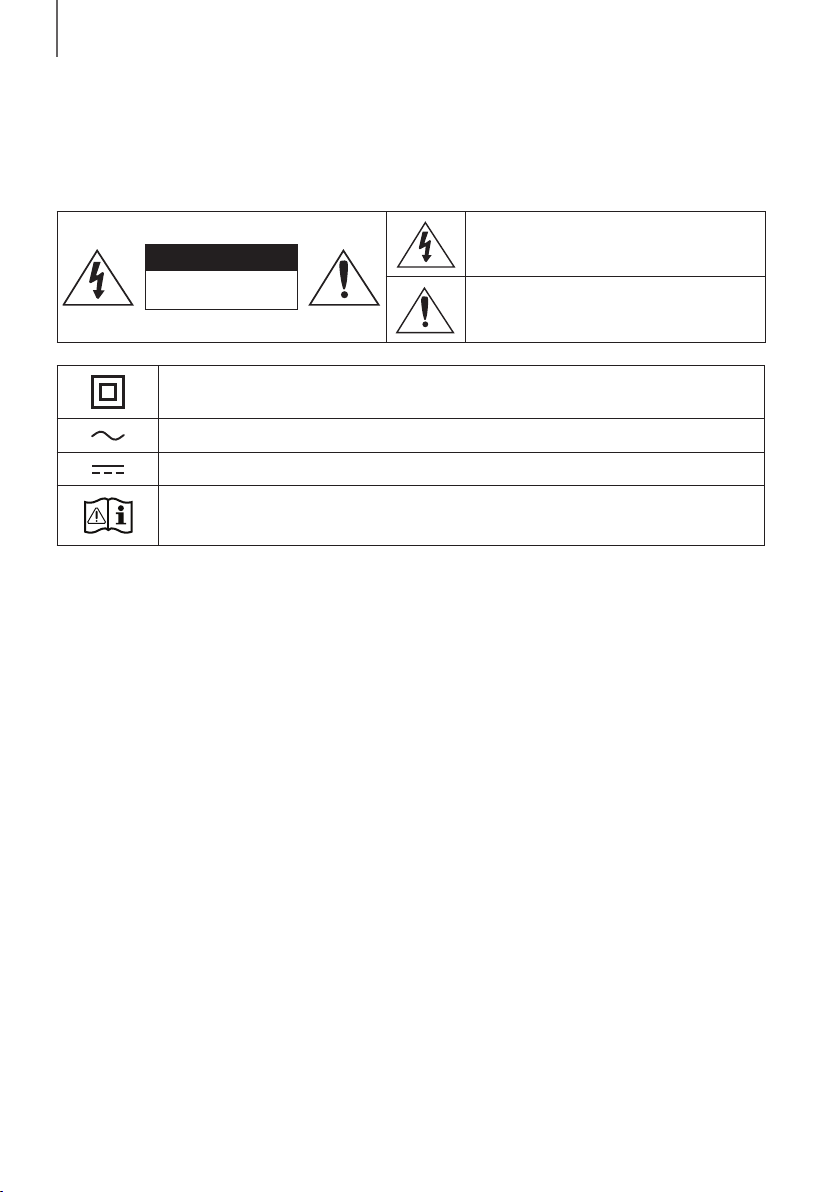
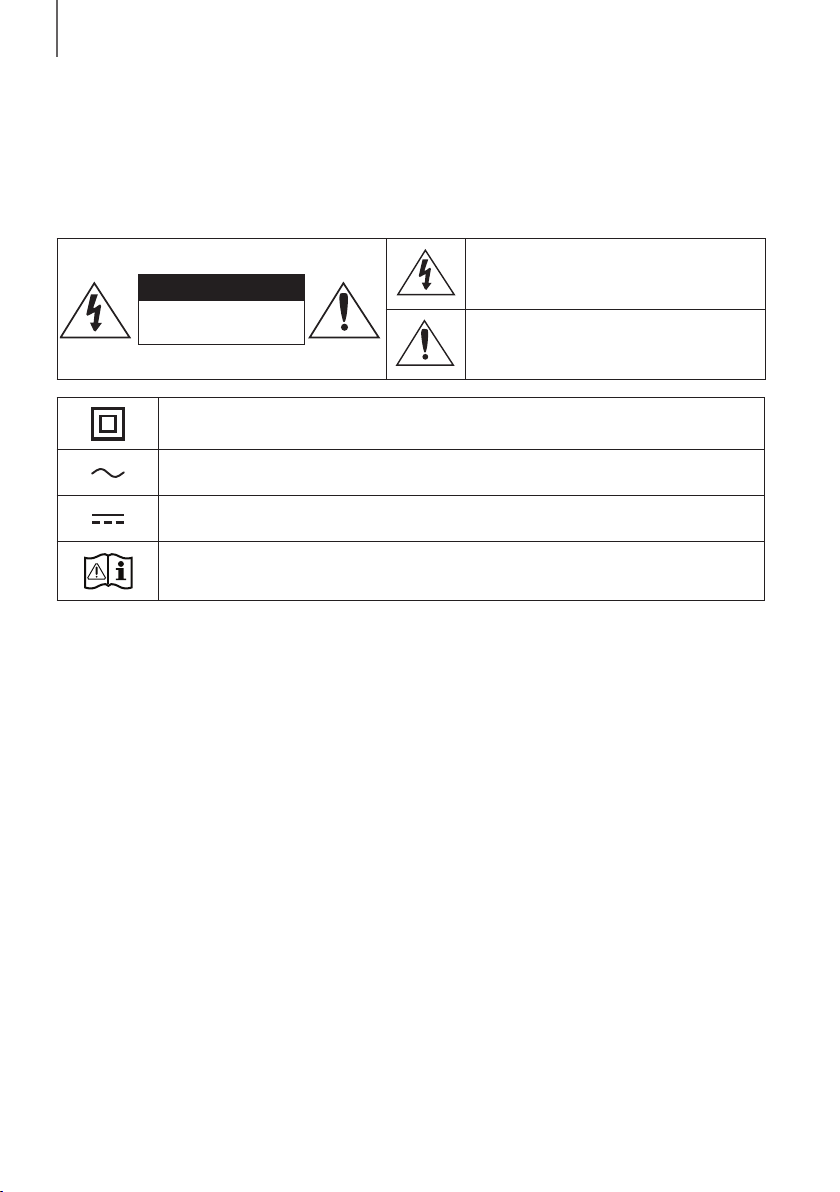
This symbol indicates that high voltage is present
inside. It is dangerous to make any kind of contact
with any internal part of this product.
This symbol indicates that this product has included
important literature concerning operation and
maintenance.
Class II product : This symbol indicates that it does not require a safety connection to electrical
earth (ground).
AC voltage : This symbol indicates that the rated voltage marked with the symbol is AC voltage.
DC voltage : This symbol indicates that the rated voltage marked with the symbol is DC voltage.
Caution, Consult instructions for use : This symbol instructs the user to consult the user manual for
further safety related information.
WARNING : To reduce the risk of fire or electric shock, do not expose this appliance to rain or moisture.
CAUTION : TO PREVENT ELECTRIC SHOCK, MATCH WIDE BLADE OF PLUG TO WIDE SLOT, FULLY INSERT.
• This apparatus shall always be connected to a AC outlet with a protective grounding connection.
• To disconnect the apparatus from the mains, the plug must be pulled out from the mains socket, therefore the
mains plug shall be readily operable.
CAUTION
• Do not expose this apparatus to dripping or splashing. Do not put objects filled with liquids, such as vases on the
apparatus.
• To turn this apparatus off completely, you must pull the power plug out of the wall socket. Consequently, the power
plug must be easily and readily accessible at all times.
GETTING STARTED
ENG
3
GETTING STARTED
PRECAUTIONS
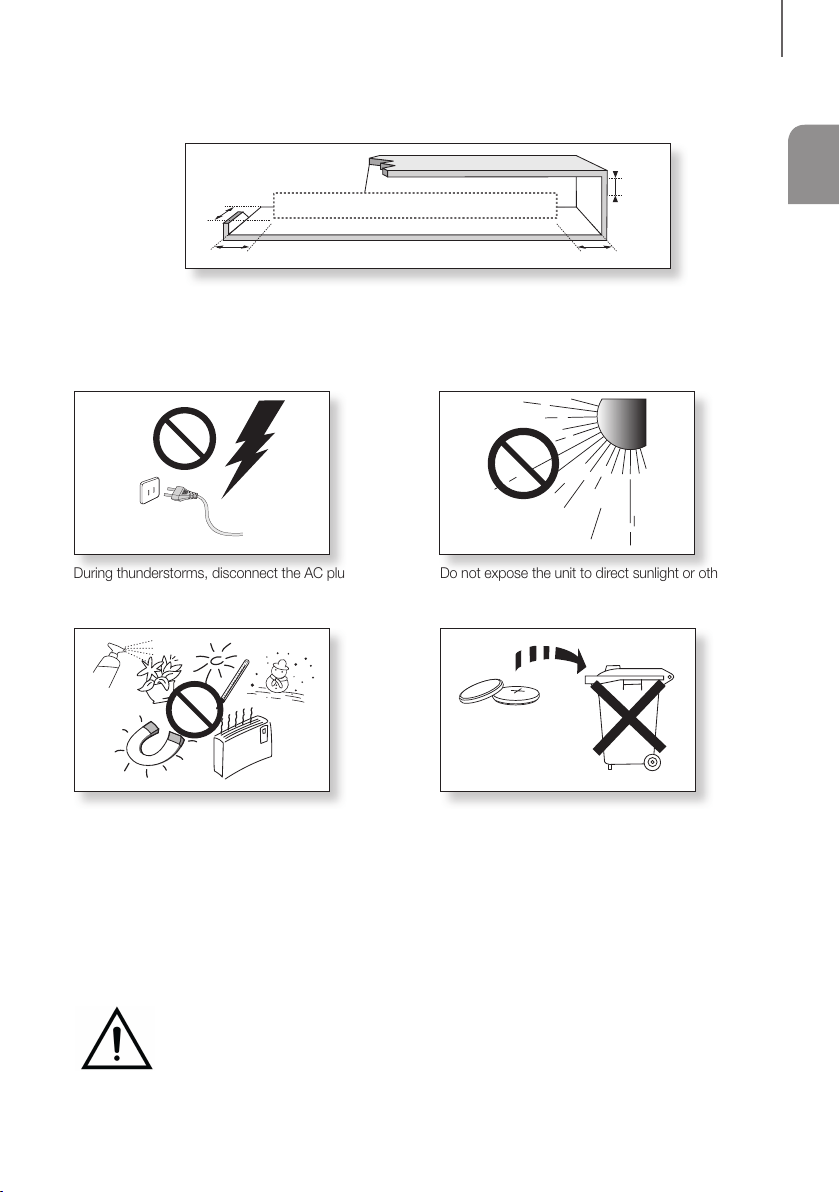
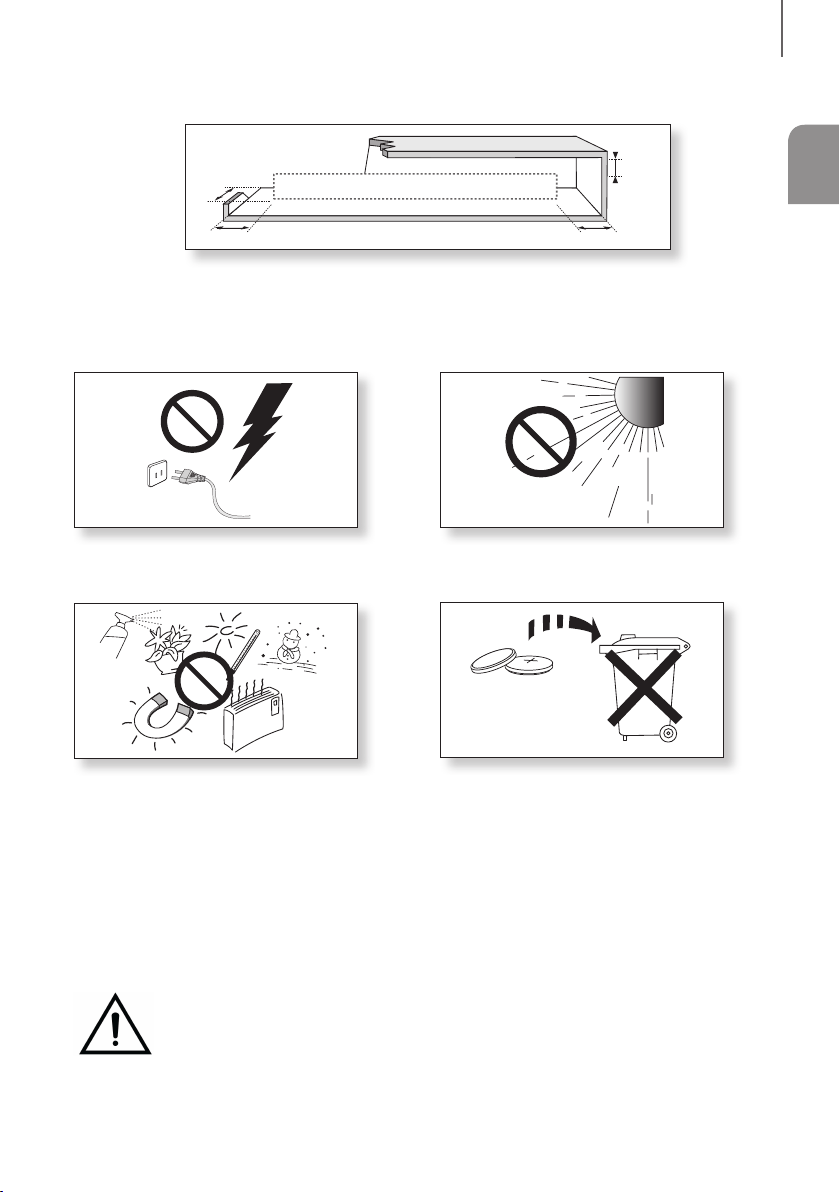
99.1mm 99.1mm
68.6
mm
99.1mm
Ensure that the AC power supply in your house complies with the power requirements listed on the identification sticker
located on the back of your product. Install your product horizontally, on a suitable base (furniture), with enough space
around it for ventilation (7~10 cm). Make sure the ventilation slots are not covered. Do not place the unit on amplifiers or
other equipment which may become hot. This unit is designed for continuous use. To fully turn off the unit, disconnect
the AC plug from the wall outlet. Unplug the unit if you intend to leave it unused for a long period of time.
During thunderstorms, disconnect the AC plug from the
wall outlet. Voltage peaks due to lightning could damage
the unit.
Protect the product from moisture (i.e. vases), and
excess heat (e.g. a fireplace) or equipment creating
strong magnetic or electric fields. Disconnect the power
cable from the AC supply if the unit malfunctions. Your
product is not intended for industrial use. It is for
personal use only. Condensation may occur if your
product has been stored in cold temperatures. If
transporting the unit during the winter, wait approximately
2 hours until the unit has reached room temperature
before using.
Do not expose the unit to direct sunlight or other heat
sources. This could lead to overheating and cause the
unit to malfunction.
The batteries used with this product contain chemicals
that are harmful to the environment. Do not dispose of
batteries in the general household trash. Do not dispose
of batteries in a fire. Do not short circuit, disassemble, or
overheat the batteries. There is a danger of explosion if
the battery is incorrectly replaced. Replace only with the
same or equivalent type.
WARNING: DO NOT INGEST BATTERY. CHEMICAL BURN HAZARD. The remote control supplied
withthis product contains a coin/button cell battery. If the coin/button cell battery is swallowed, it can
cause severe internal burns in just 2 hours and can lead to death. Keep new and used batteries away
from children. If the battery compartment does not close securely, stop using the product and keep it
away from children. If you think batteries might have been swallowed or placed inside any part of the body, seek
immediate medical attention.

4
GETTING STARTED
CONTENTS
2 GETTING STARTED
2 Safety Information
5 What’s Included
6 DESCRIPTIONS
6 Front / Right Side Panel
7 Bottom Panel
8 Remote Control
11 INSTALLATION
11 Installing the Soundbar
11 Installing the Wall Mount
15 Detaching the Soundbar from the Wall
16 CONNECTIONS
16 Connecting to a TV
16 Connecting to a TV Using a Digital Optical
Cable
17 TV SoundConnect
18 Connecting to External Devices
18 Optical or Analogue Audio Cable
19 USB
21 FUNCTIONS
21 Input Mode
22 Bluetooth
26 Software Update
28 TROUBLESHOOTING
28 Troubleshooting
29 APPENDIX
29 Specifications
● Figures and illustrations in this User Manual are
provided for reference only and may differ from
actual product appearance.
● An administration fee may be charged if either
(a) an engineer is called out at your request and
there is no defect with the product (i.e. where
the user manual has not been read).
(b) you bring the unit to a repair centre and there is
no defect with the product (i.e. where the user
manual has not been read).
● You will be informed of the administration fee
amount before a technician visits.
ENG
5
GETTING STARTED
WHAT’S INCLUDED
BEFORE READING THE USER’S MANUAL
Note the following terms before reading the user manual.
+ Icons used in this manual
Icon Term Definition
Caution
Indicates a situation where a function does not operate or settings may be cancelled.
Note
Indicates tips or instructions on the page that help you operate a function.
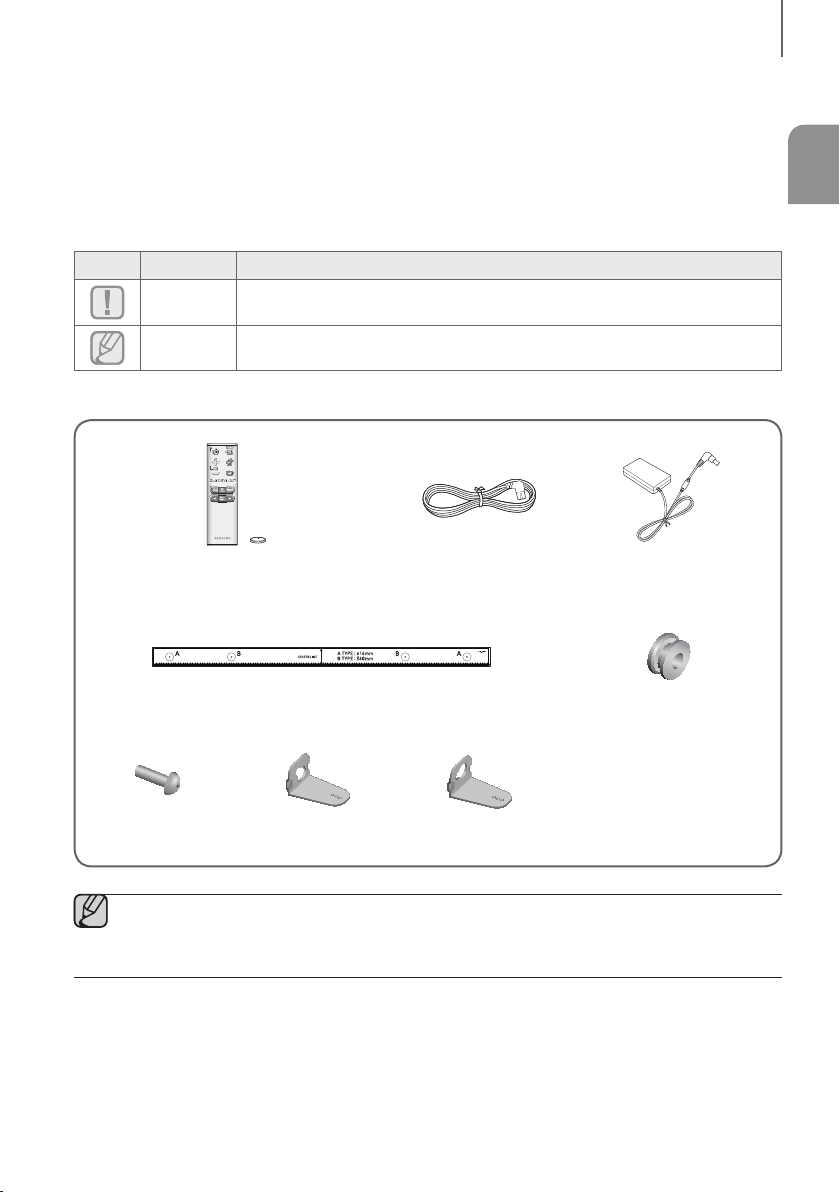
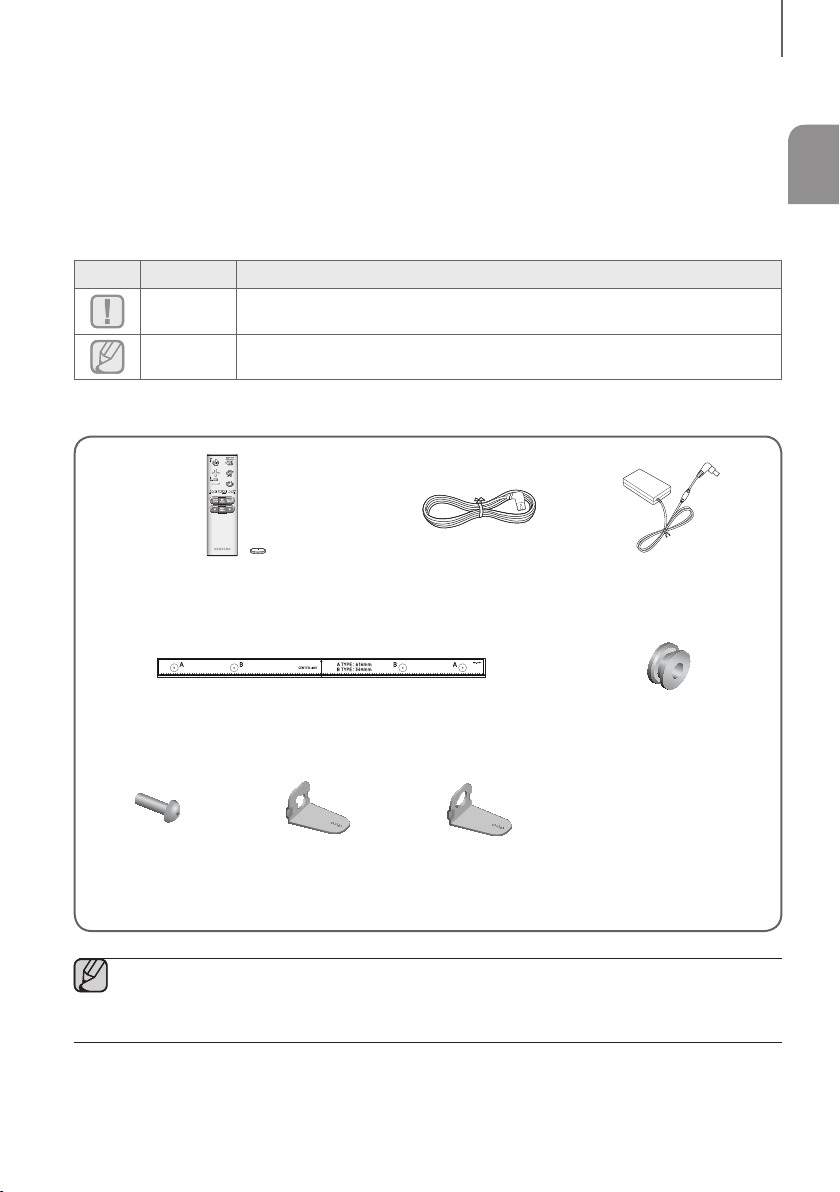
Check for the supplied accessories shown below.
Remote Control / Lithium Battery
(3V : CR2032)
Power Cord AC/DC Adapter
Wall Mount Guide Holder-Screw : 2 EA
Screw : 2 EA Bracket-Wall Mount L Bracket-Wall Mount R
● The appearance of the accessories may differ slightly from the illustrations above.
● Micro USB to USB adapter cable is sold separately. To purchase, contact a Samsung Service Centre or
Samsung Customer Care.
6
DESCRIPTIONS
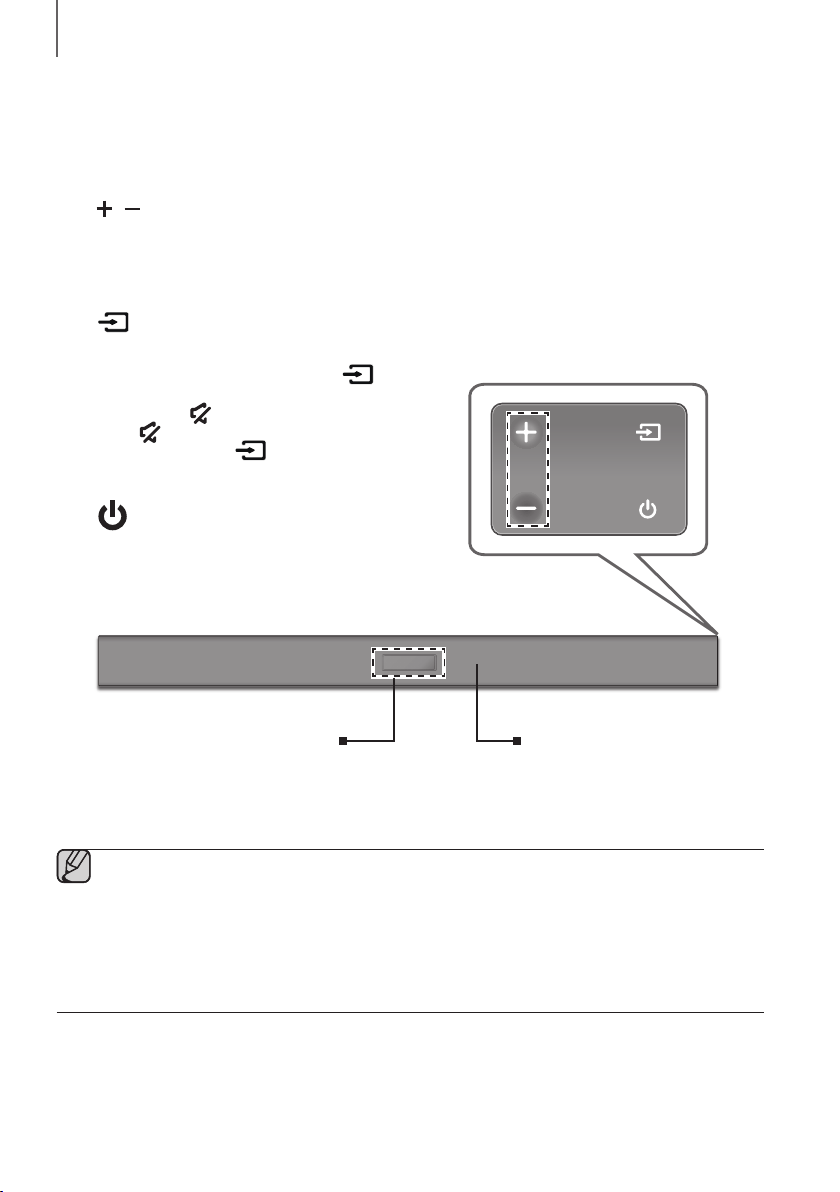
FRONT / RIGHT SIDE PANEL
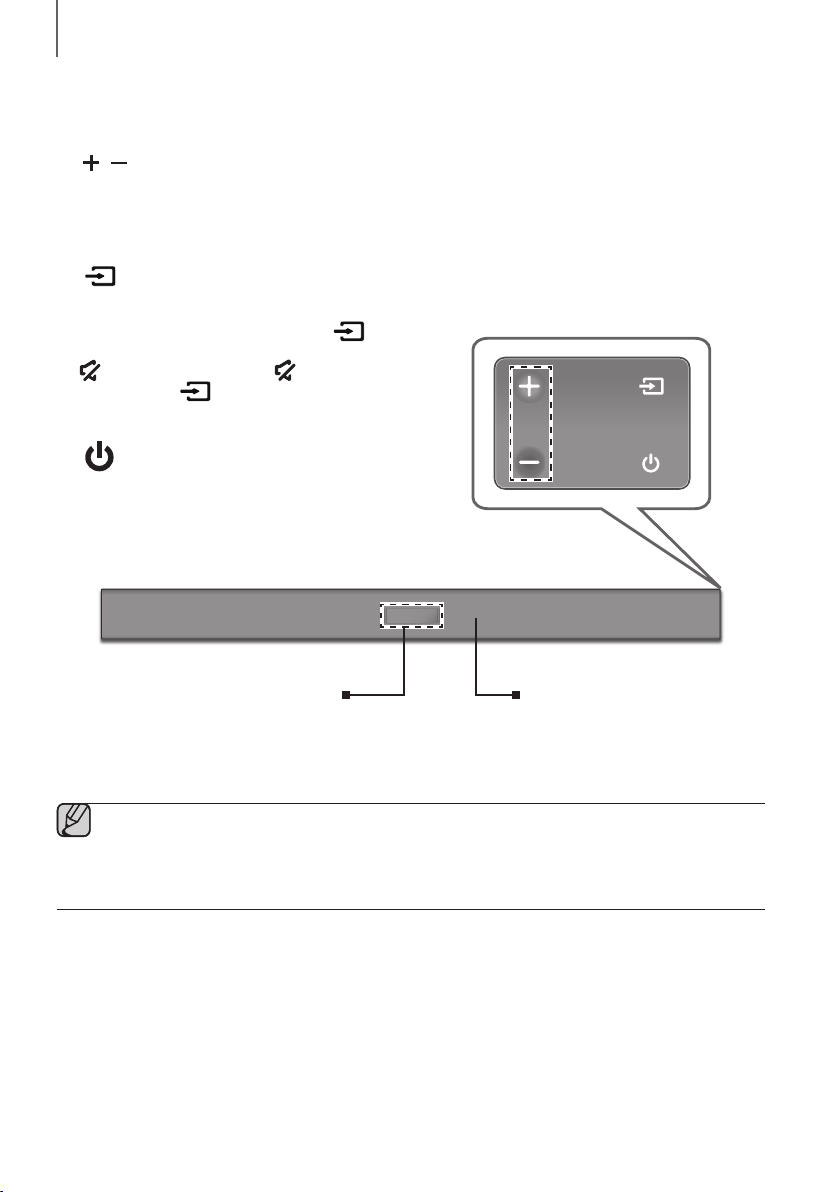
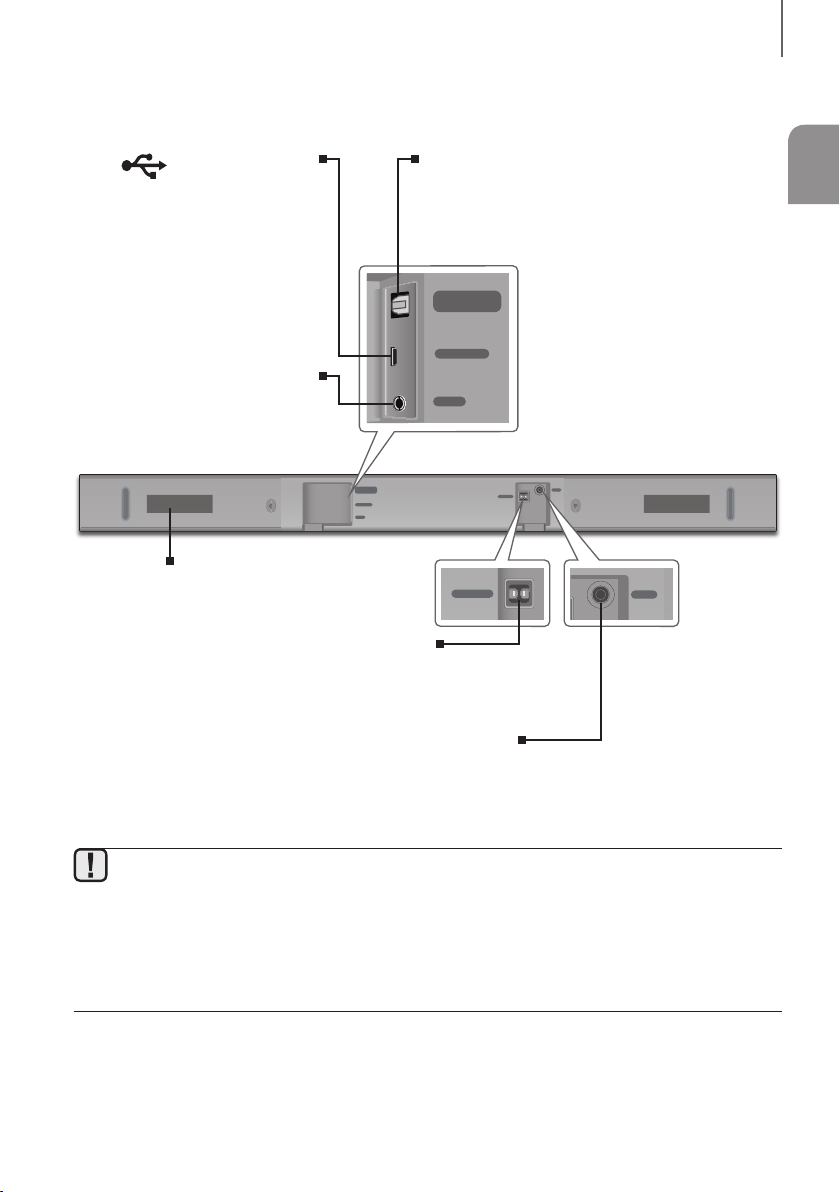
1
/
(Volume) Button
Controls the volume level.
The numeric value of the volume level appears in the front
panel display.
2 (Source) Button
Selects the D.IN, AUX, BT, TV, or USB input.
● While the unit is powered on, pressing the
button
for more than 3 seconds sets the button to act as the
(Mute) button. To cancel the (Mute) button
setup, press the
button for more than 3 seconds
again.
3 (Power) Button
Turns the power on and off.
2
3
Right Side of the Soundbar
1
Display
Displays the current mode.
Remote Control Sensor
● When you plug in the AC cord, the power button will begin working in 4 to 6 seconds.
● When you turn on this unit, there will be a 4 to 5 second delay before it produces sound.
● If you want to enjoy sound only from the Soundbar, you must turn off the TV's speakers in the Audio Setup
menu of your TV. Refer to the owner's manual supplied with your TV.
DESCRIPTIONS
ENG
7
DESCRIPTIONS
BOTTOM PANEL
DIGITAL AUDIO IN
(OPTICAL)
USB (5V 0.5A)
AUX IN
SUBWOOFER
DC 24V
DIGITAL AUDIO IN
(OPTICAL)
USB (5V 0.5A)
AUX IN
DIGITAL AUDIO IN
(OPTICAL)
USB (5V 0.5A)
SUBWOOFER
DC 24V
DIGITAL AUDIO IN
(OPTICAL)
SUBWOOFER
DC 24V
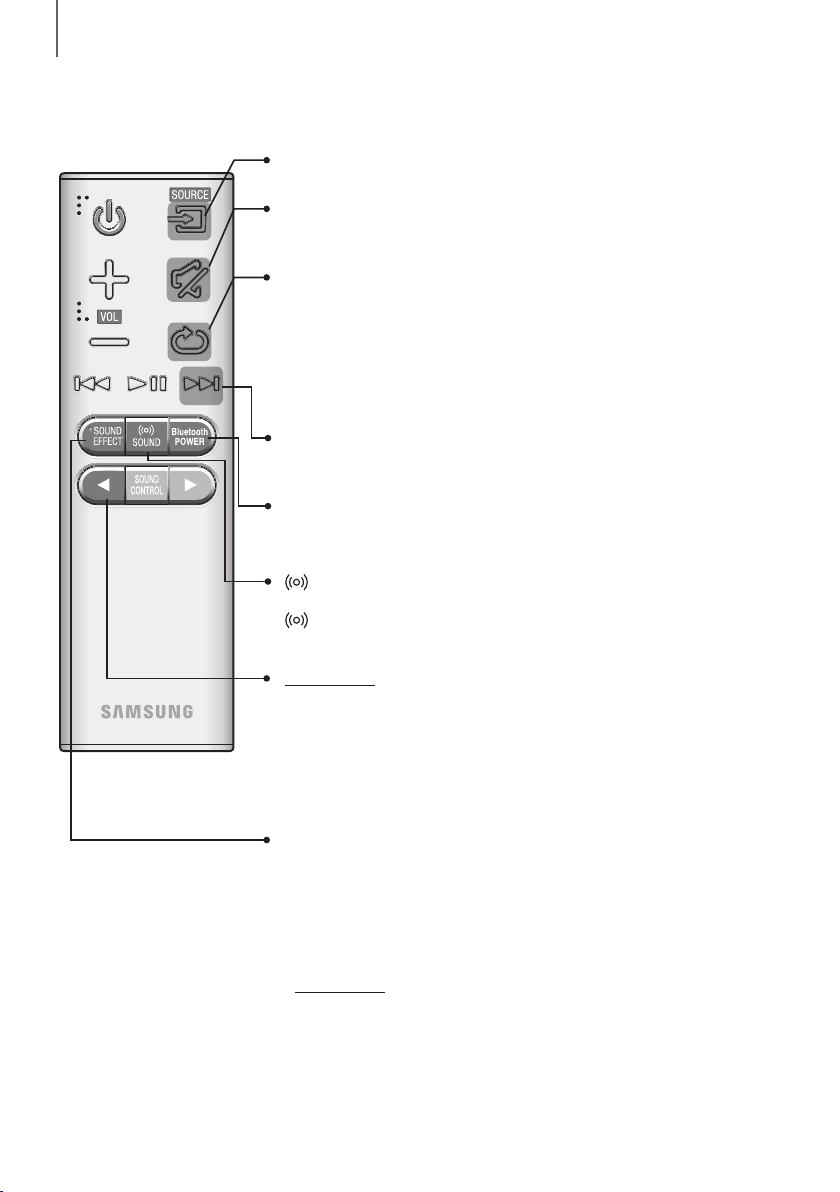
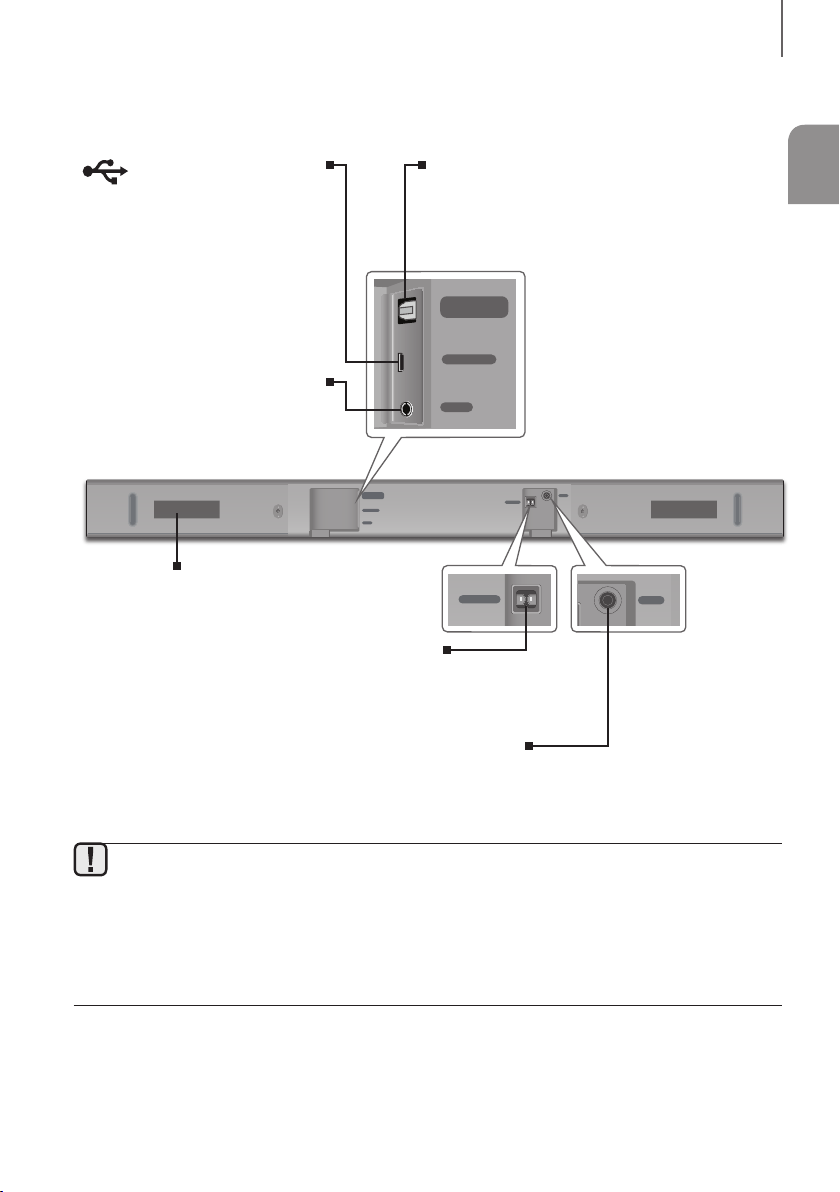
DC 24V (Power Supply In)
Connect the DC power adaptor to the power supply jack, and then
connect the AC power adaptor plug to a wall outlet.
SUBWOOFER
Connect the speaker cable on the subwoofer.
(Micro USB Port)
You can play the music from USB
memory device if connecting Micro
USB memory device or Micro USB to
USB adapter cable (not supplied).
Refer to Micro USB to USB adapter
cable specification on page 19.
DIGITAL AUDIO IN (OPTICAL)
Connect to the digital (optical) output of an external
device.
AUX IN
Connect to the Analogue output of an
external device.
LABEL
● When disconnecting the power cable of the AC power adaptor from a wall outlet, pull the plug.
Do not pull the cable.
● Do not connect this unit or other components to an AC outlet until all connections between components
are complete.
● Make sure to rest the AC/DC Adapter flat on a table or the floor. If you place the AC/DC Adapter so that it
is hanging with the AC cord input facing upwards, water or other foreign substances could enter the
Adapter and cause the Adapter to malfunction.
8
DESCRIPTIONS
REMOTE CONTROL
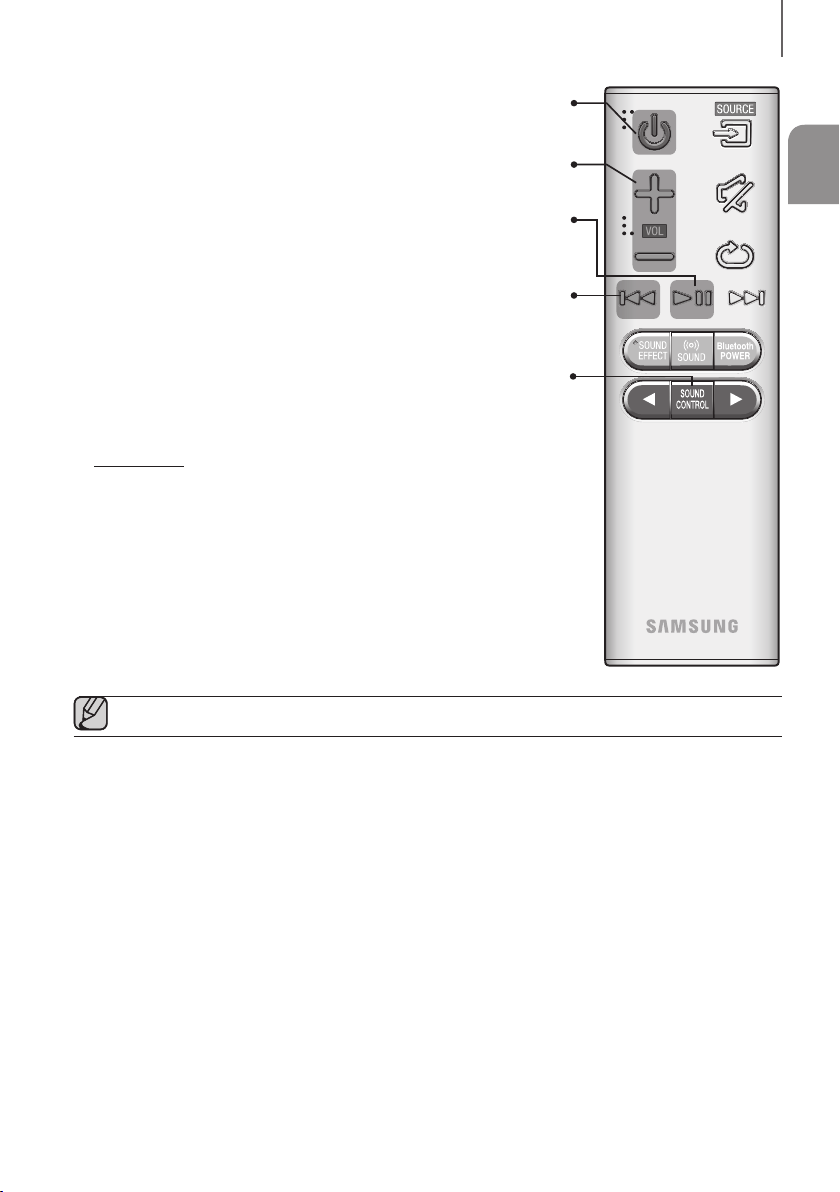
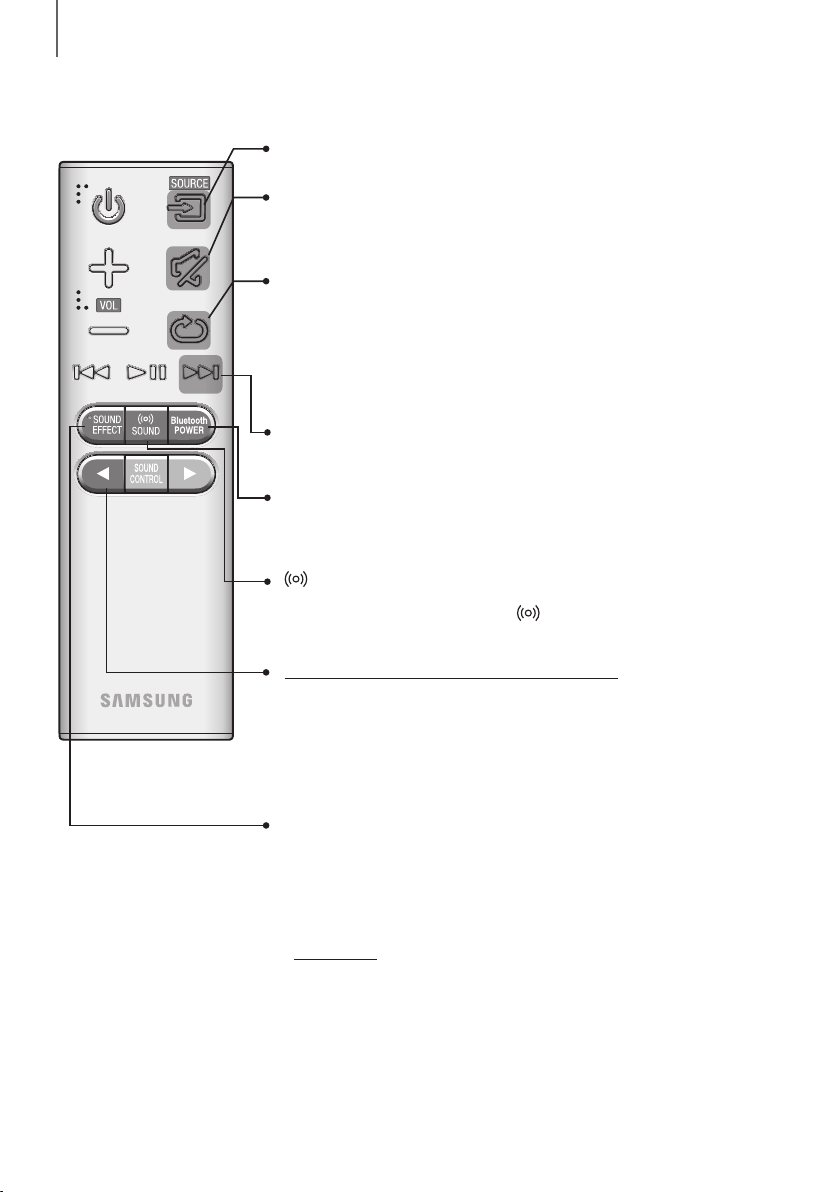
Repeat
Press to set the Repeat function during music playback from a storage device.
OFF - REPEAT : Cancells Repeat Playback.
TRACK - REPEAT : Plays a track repeatedly.
ALL - REPEAT : Plays all tracks repeatedly.
RANDOM - REPEAT : Plays tracks in random order.
(A track that has already been played may be played again.)
Mute
You can turn the volume down to 0 with the push of a button.
Press again to restore the sound to the previous volume level.
SOURCE
Press to select a source connected to the Soundbar.
Skip Forward
If there is more than one file on the device you are playing, and you press
the ] button, the next file is selected.
Bluetooth POWER
Press the Bluetooth POWER button on the remote to turn the Bluetooth
POWER On function on and off. See pages 18 and 23 for details.
SOUND
Surround Sound adds depth and spaciousness to the sound. Pressing the
SOUND button repeatedly cycles through the Surround Sound settings :
ON - SURROUND SOUND, OFF - SURROUND SOUND
SOUND EFFECT
You can select from 6 sound modes - STANDARD (Original Sound), MUSIC,
CLEAR VOICE, SPORTS, MOVIE, and NIGHT - depending on the content
you want to listen to.
Select the STANDARD mode if you want to enjoy the original sound.
* DRC (Dynamic Range Control)
Lets you apply dynamic range control to Dolby Digital.
Press and hold the SOUND EFFECT button for about 5 seconds in
STANDBY mode to turn the DRC (Dynamic Range Control) function on or off.
Press and hold the
button for about 5 seconds to turn the Auto Power Link
function on or off.
OFF - POWER LINK, ON - POWER LINK
* Auto Power Link
Synchronizes the Soundbar to a connected Optical source via the Optical jack
so it turns on automatically when you turn on your TV. (See page 16)
Auto Power Link function is only available in the D.IN mode.
ENG
9
DESCRIPTIONS
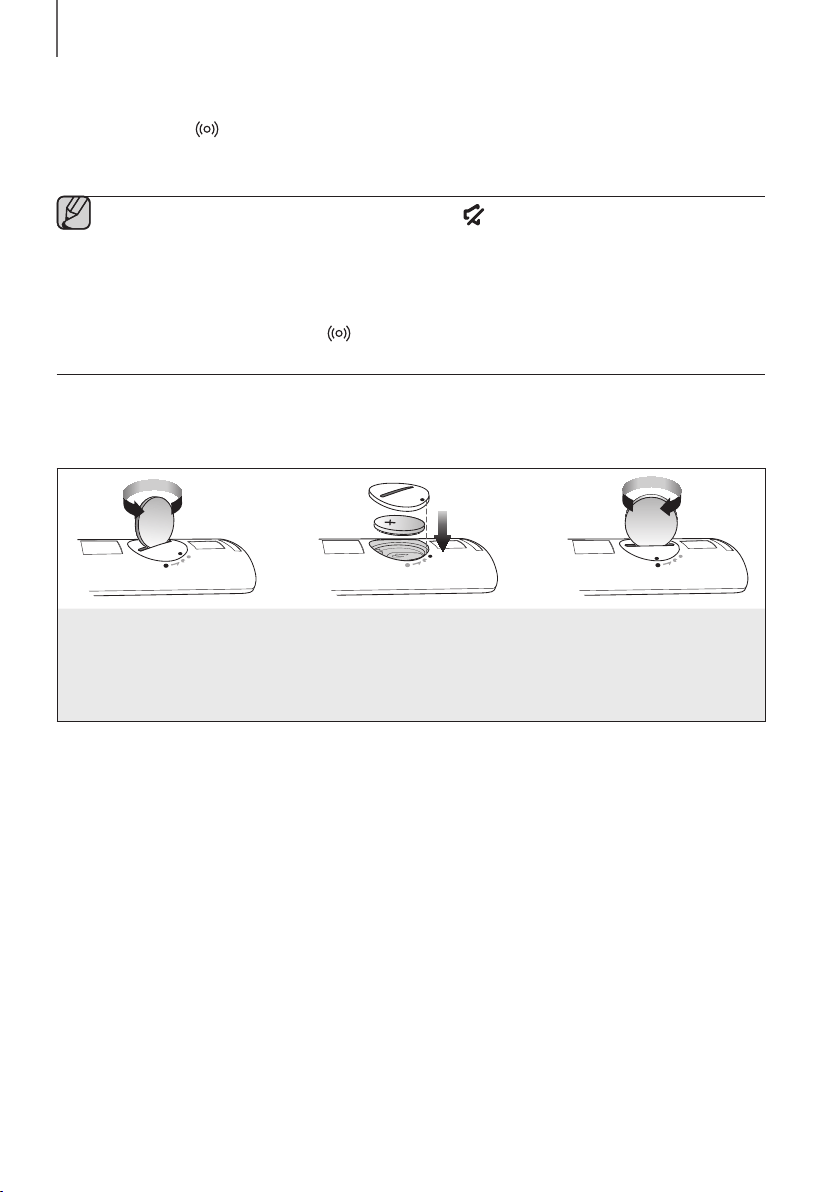
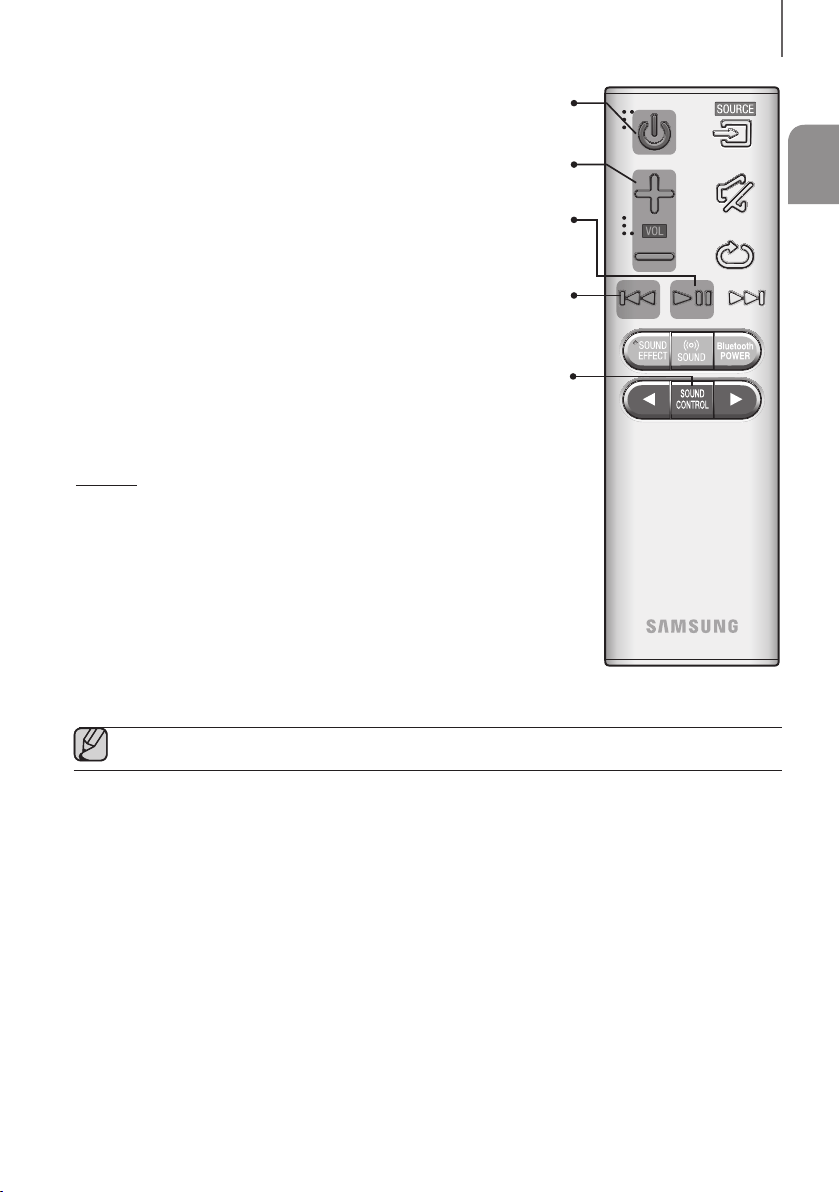
Volume
Adjusts the volume level of the unit.
Power
Turns the Soundbar on and off.
SOUND CONTROL
Press to select TREBLE, BASS, SUBWOOFER LEVEL, or AUDIO SYNC.
Then, use the
,
buttons to adjust the TREBLE or BASS volume from
-6 ~ +6, SUBWOOFER LEVEL volume from -12, -6 ~ +6.
Press and hold the SOUND CONTROL button for about 5 seconds to adjust
the sound for each frequency band. 150Hz, 300Hz, 600Hz, 1.2KHz, 2.5KHz,
5KHz and 10KHz are selectable and each can be adjusted to a setting between
-6 ~ +6.
If the Soundbar is connected to a digital TV and the video appears out of sync
with the audio, press the SOUND CONTROL button to sync the audio with the
video. Use the
,
buttons to set the audio delay between
0 ms ~ 300 ms. In USB mode, TV mode, and BT mode, the Audio Sync function
may not available.
Play / Pause
Press the
p
button to pause a file temporarily.
Press the
p
button again to play the selected file.
Skip Back
If there is more than one file on the device you are playing, and you press
the
[
button, the previous file is selected.
● Operate the TV using the TV's remote control.
10
DESCRIPTIONS
+ Controlling the Soundbar using Your TV Remote Control
1. Press and hold the SOUND button for more than 5 seconds while the Soundbar is turned on.
2. "ON - TV REMOTE" appears on the Soundbar's display.
3. In the TV's menu, set the TV speaker to external speaker.
● All buttons are not available except the VOL +/- and the (Mute) buttons in this function.
● TV menus differ by manufacturer and model. Refer to the TV's user manual for further information.
● This function is not available when the Soundbar is in the TV SoundConnect mode.
● Manufacturers supporting this function:
- VIZIO, LG, Sony, Sharp, PHILIPS, PANASONIC, TOSHIBA, GRUNDIG, Hisense, RCA
-
This function may not be compatible with your TV's remote depending on the remote control's manufacturer.
● To turn off this function, press the SOUND button for 5 seconds.
"OFF - TV REMOTE" appears on the Soundbar's display.
INSTALLING THE BATTERY IN THE REMOTE CONTROL
1. Use a suitable coin to turn the
remote control's battery cover
counterclockwise to remove it
as shown in the figure above.
2. Insert a 3V lithium battery. Keep the
positive (+) pole facing up when inserting
the battery. Put the battery cover on and
align the '●' marks side by side as
shown in the figure above.
3. Use a suitable coin to
turn the remote control
battery cover clockwise
as far as it will go to fix it
in place.
ENG
11
INSTALLATION
INSTALLING THE SOUNDBAR
INSTALLING THE WALL MOUNT
+ Installation Precautions
● Install on a vertical wall only.
● For the installation, avoid a location with high temperature or humidity, or a wall that cannot sustain the weight of
the set.
● Check the strength of the wall. If the wall is not strong enough to support the unit, reinforce the wall or install the
unit on a different wall that can support the unit's weight.
● Purchase and use the fixing screws or anchors appropriate for the kind of wall you have (plaster board, iron board,
wood, etc.). If possible, fix the support screws into wall studs.
● Purchase wall mounting screws according to the type and thickness of the wall you will mount the Soundbar on.
- Diameter: M5
- Length: 35 mm or longer recommended.
● Connect cables from the unit to external devices before you install it on the wall.
● Make sure the unit is turned off and unplugged before you install it. Otherwise, it may cause an electric shock.
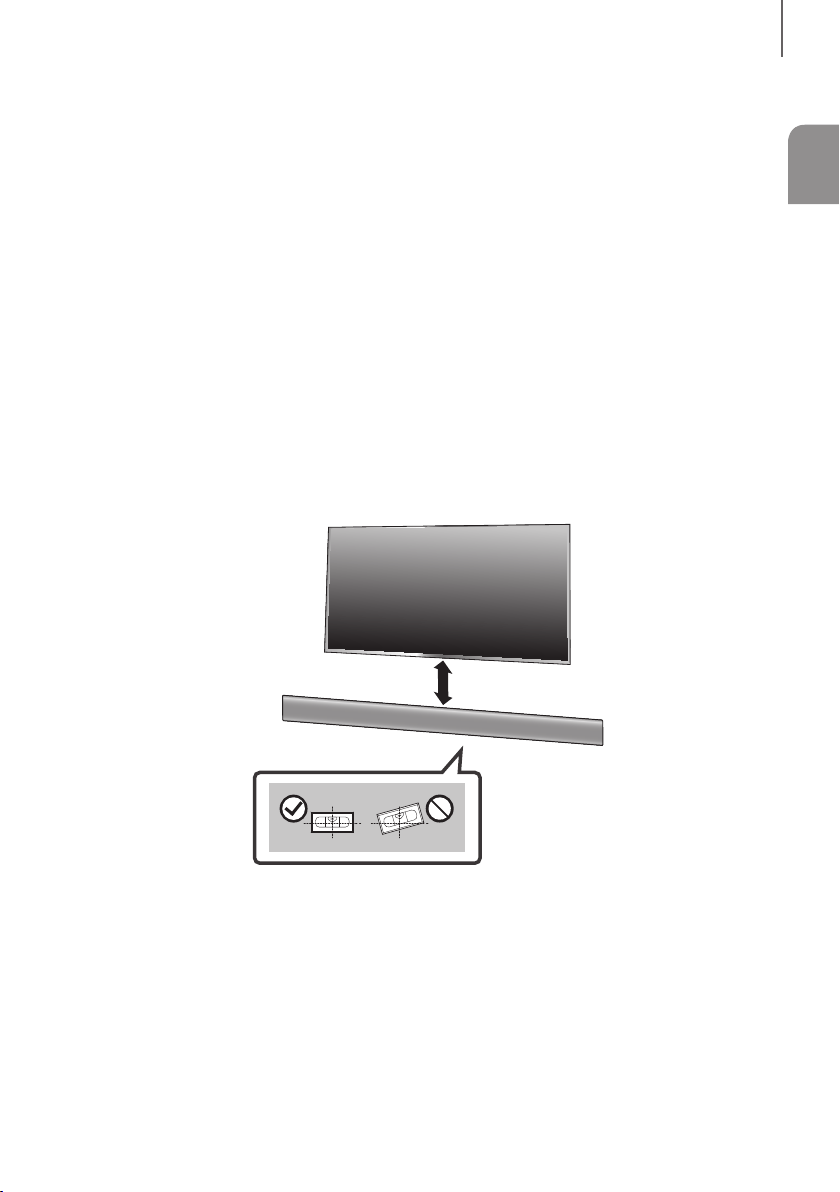
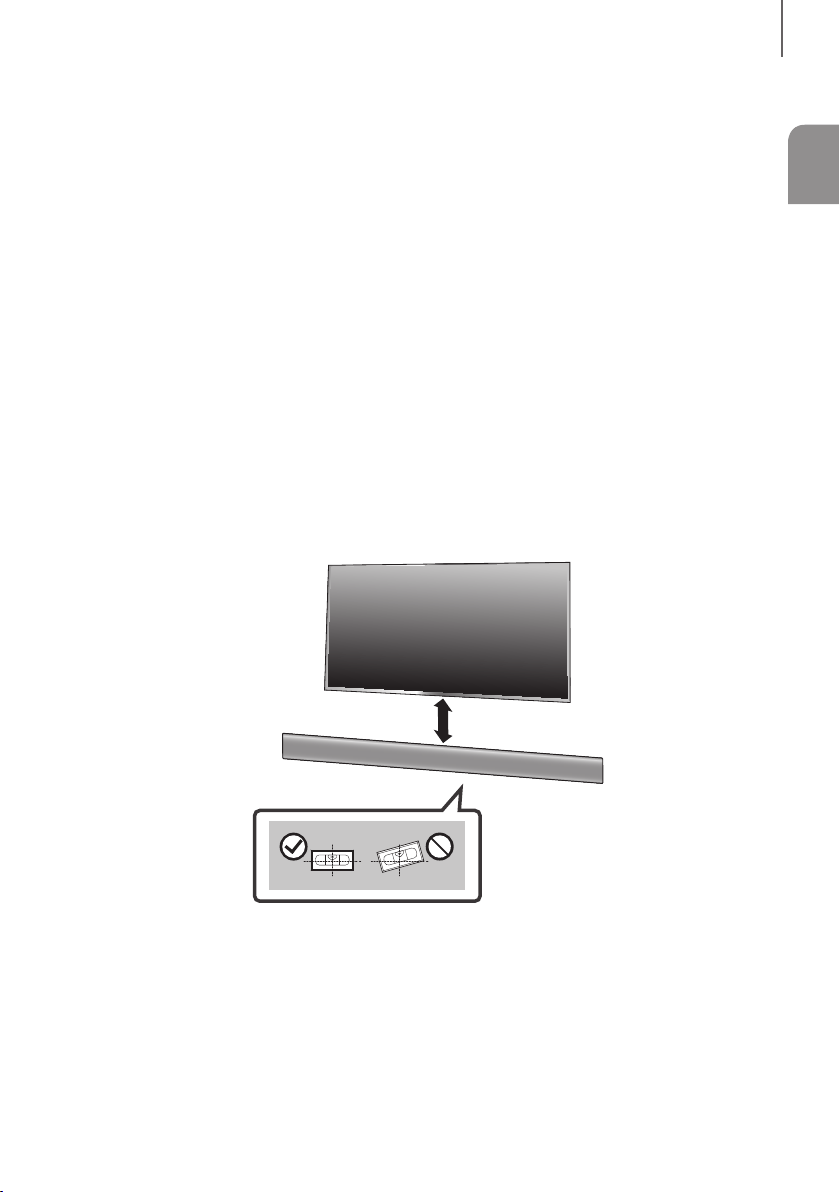
5 cm or more
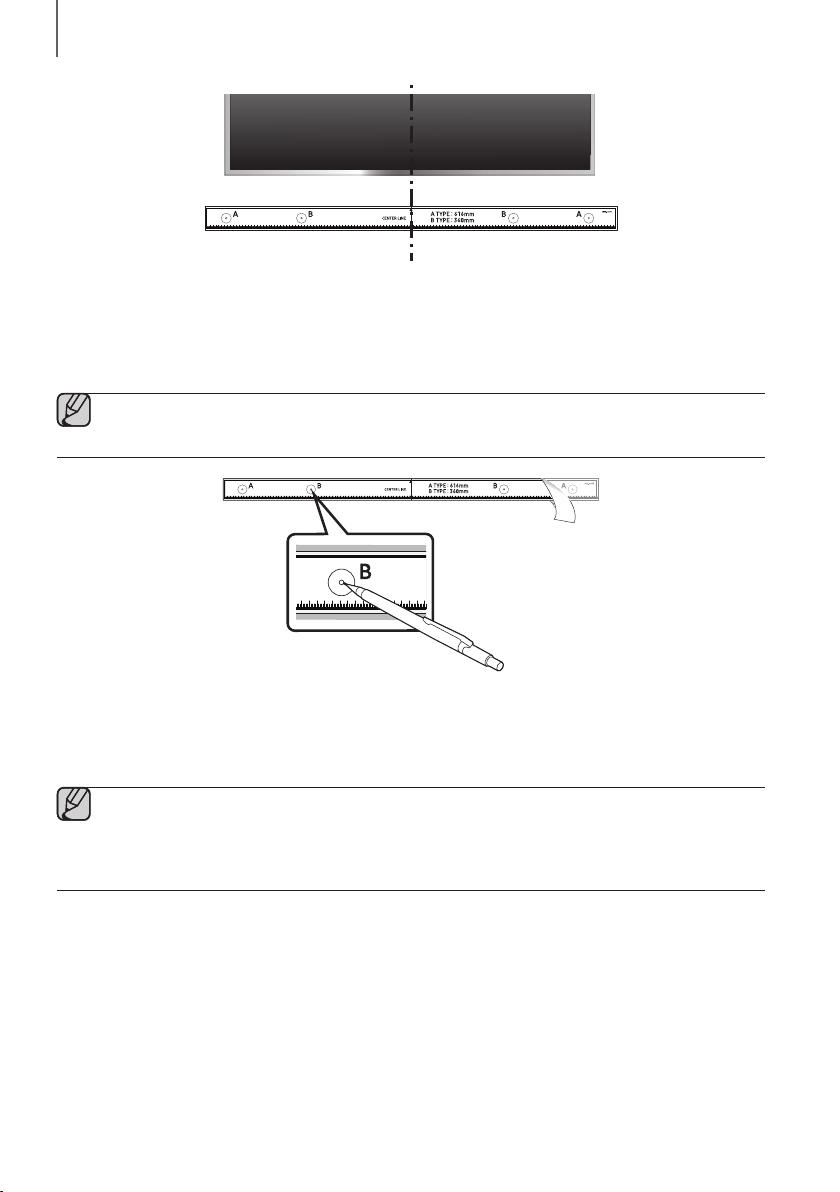
1. Place the Wall Mount Guide against the wall surface.
• The Wall Mount Guide must be level.
• If the TV is mounted on the wall, install the Soundbar at least 5 cm below the TV.
INSTALLATION
12
INSTALLATION
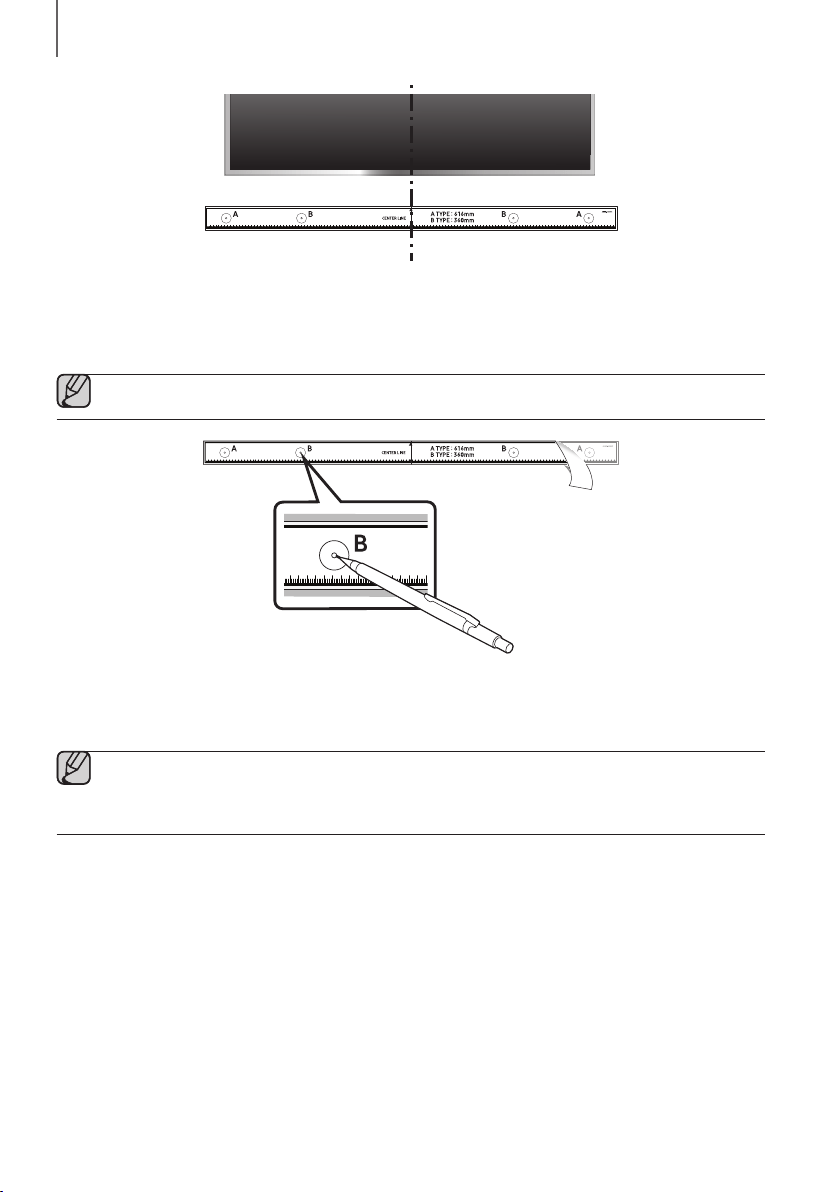
Centre Line
2. Align the Paper Template's Centre Line with the centre of your TV (if you are mounting the Soundbar below your
TV), and then fix the Wall Mount Guide to the wall using tape.
● If you are not mounting below a TV, place the Centre Line in the centre of the installation area.
3. Push a pen tip or sharpened pencil tip through the centre of the B-TYPE images on each end of the Guide to
mark the holes for the supporting screws, and then remove the Wall Mount Guide.
4. Using an appropriately sized drill bit, drill a hole in the wall at each marking.
● If the markings do not correspond to the positions of studs, make sure you insert appropriate anchors or
mollies into the holes before you insert the support screws. If you use anchors or mollies, make sure the
holes you drill are large enough for the anchors or mollies you use.
ENG
13
INSTALLATION
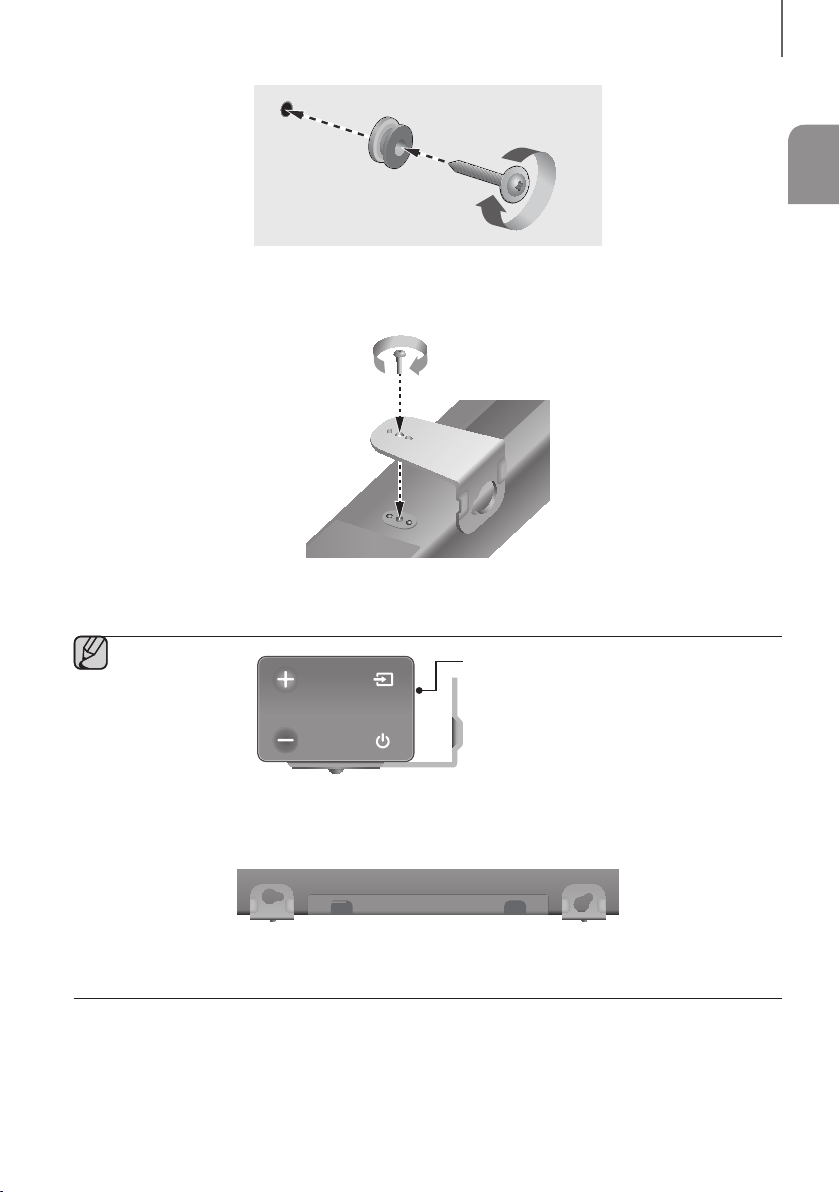
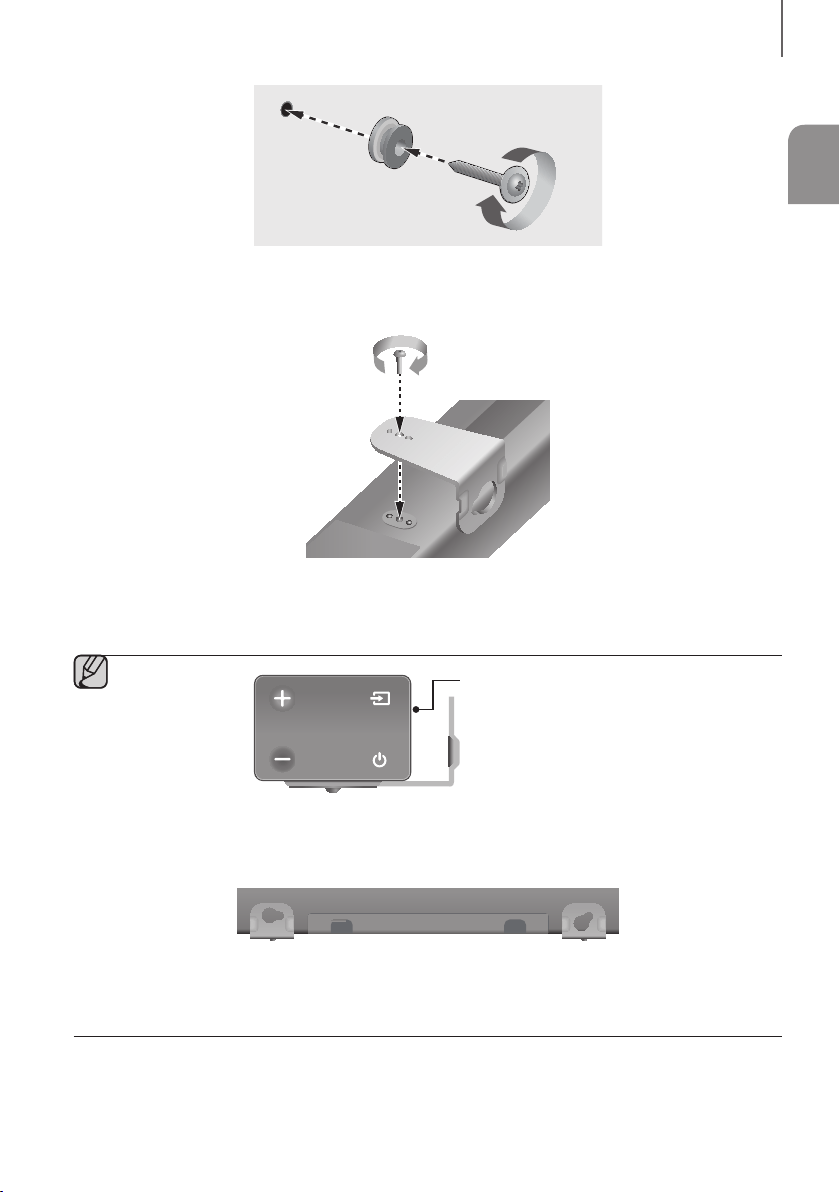
5. Push a screw (not supplied) through each Holder-Screw, and then screw each screw firmly into a support
screw hole.
6. Use the two Screws (M4 x L12) to attach both Bracket-Wall Mount L and R to the Soundbar's bottom. For a
proper fit, make sure to align the bumps on the Soundbar to the holes on the brackets.
Rear side of Soundbar
Right end of Soundbar
● When assembling, make sure the hanger part of Bracket-Wall Mounts faces backwards.
Wall Mount LWall Mount R
● The left and right mounts are different shapes. Make sure to position them correctly.
14
INSTALLATION
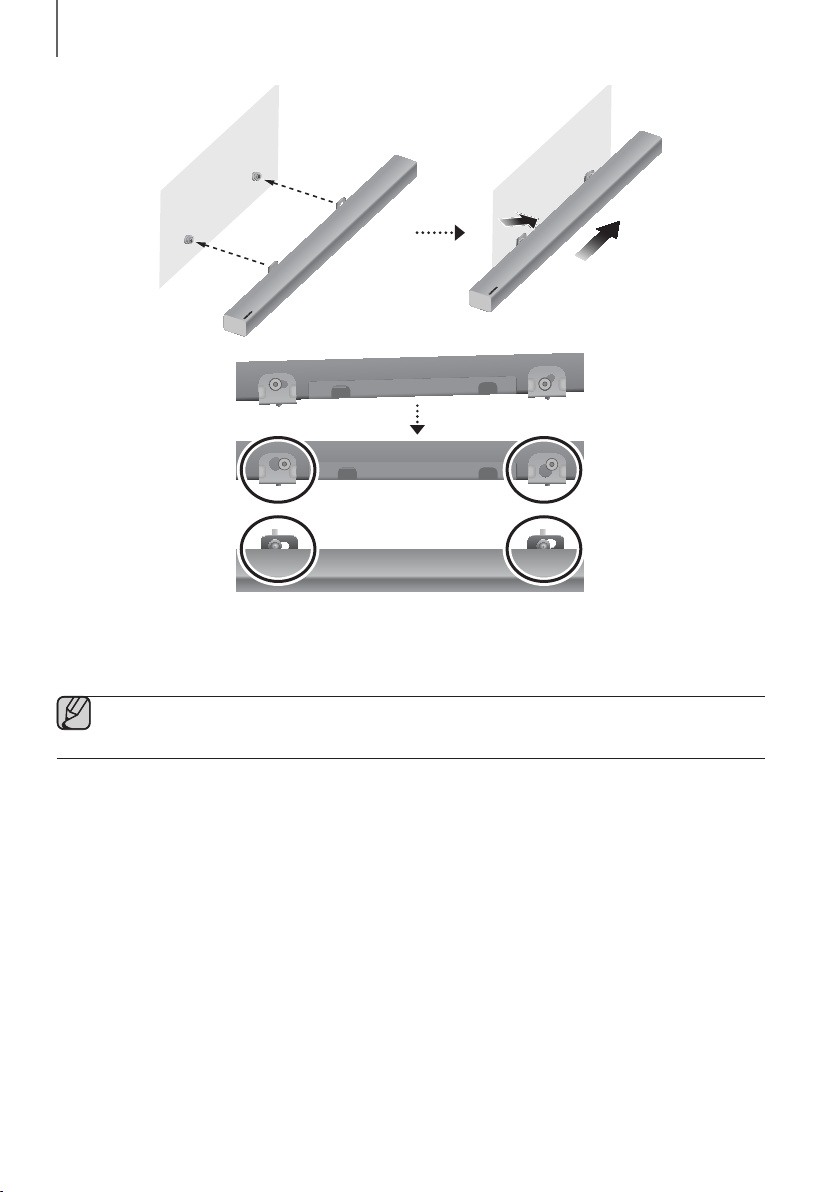
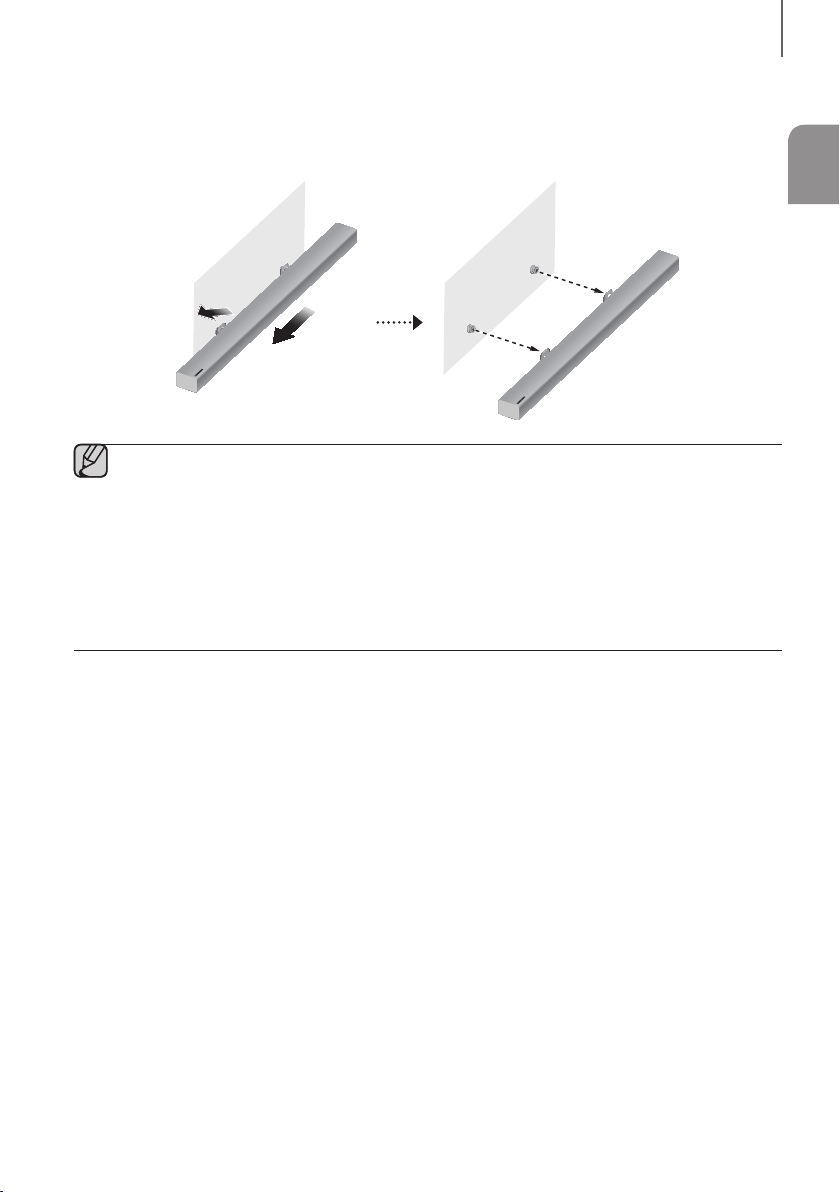
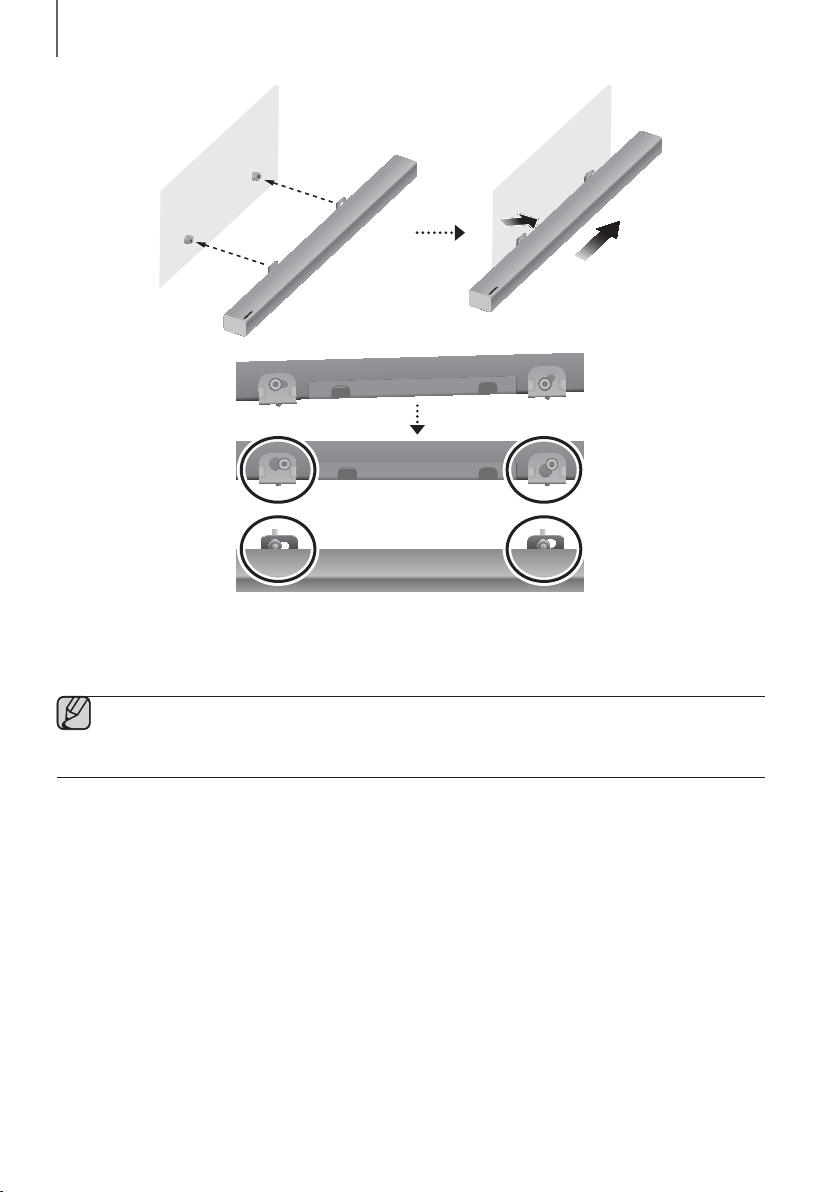
7. Install the Soundbar with the attached Bracket-Wall Mounts by hanging the Bracket-Wall Mounts on the
Holder-Screws on the wall.
● Slightly tilt the Soundbar to insert both Holder-Screw heads into Bracket-Wall Mount holes. Push the
Soundbar in the direction of the arrow to make sure both sides are firmly fixed.
ENG
15
INSTALLATION
DETACHING THE SOUNDBAR FROM THE WALL
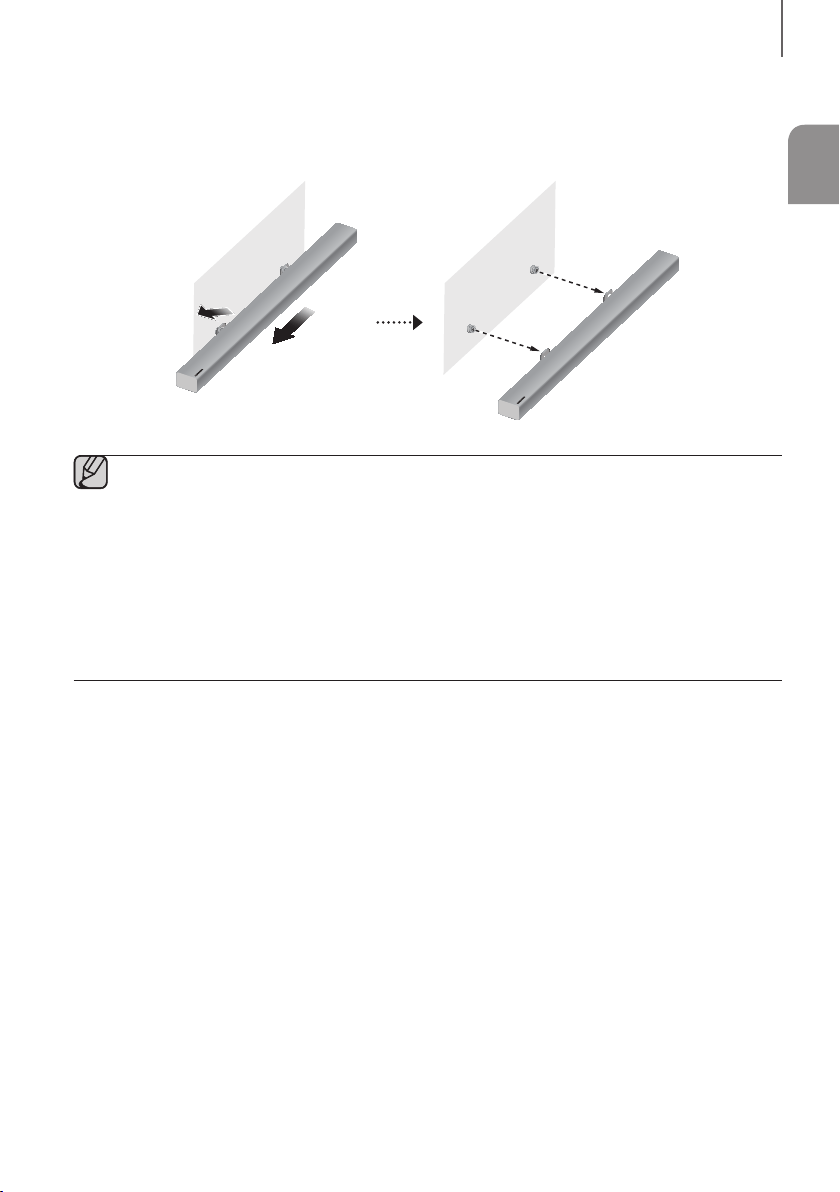
1. To separate the Soundbar from the wall mount, push it in the direction of the arrow, and then pull it away from the
wall as shown.
● Do not hang onto the installed unit and avoid striking or dropping the unit.
● Secure the unit firmly to the wall so that it does not fall off. If the unit falls off, it may cause an injury or
damage the product.
● When the unit is installed on a wall, please make sure that children do not pull any of the connecting
cables, as this may cause it to fall.
● For the optimal performance of a wall mount installation, install the speaker system at least
5 cm below the TV, if the TV is mounted on the wall.
● For your safety, if you do not mount the unit on the wall, install it on a secure, flat surface where it is unlikely
to fall.
16
CONNECTIONS
● Do not connect the power cord of this product or your TV to a wall outlet until all connections between
components are complete.
● Before moving or installing this product, be sure to turn off the power and disconnect the power cord.
CONNECTING TO A TV
● Important: Before you begin, put the battery into the remote. See page 10 for instructions.
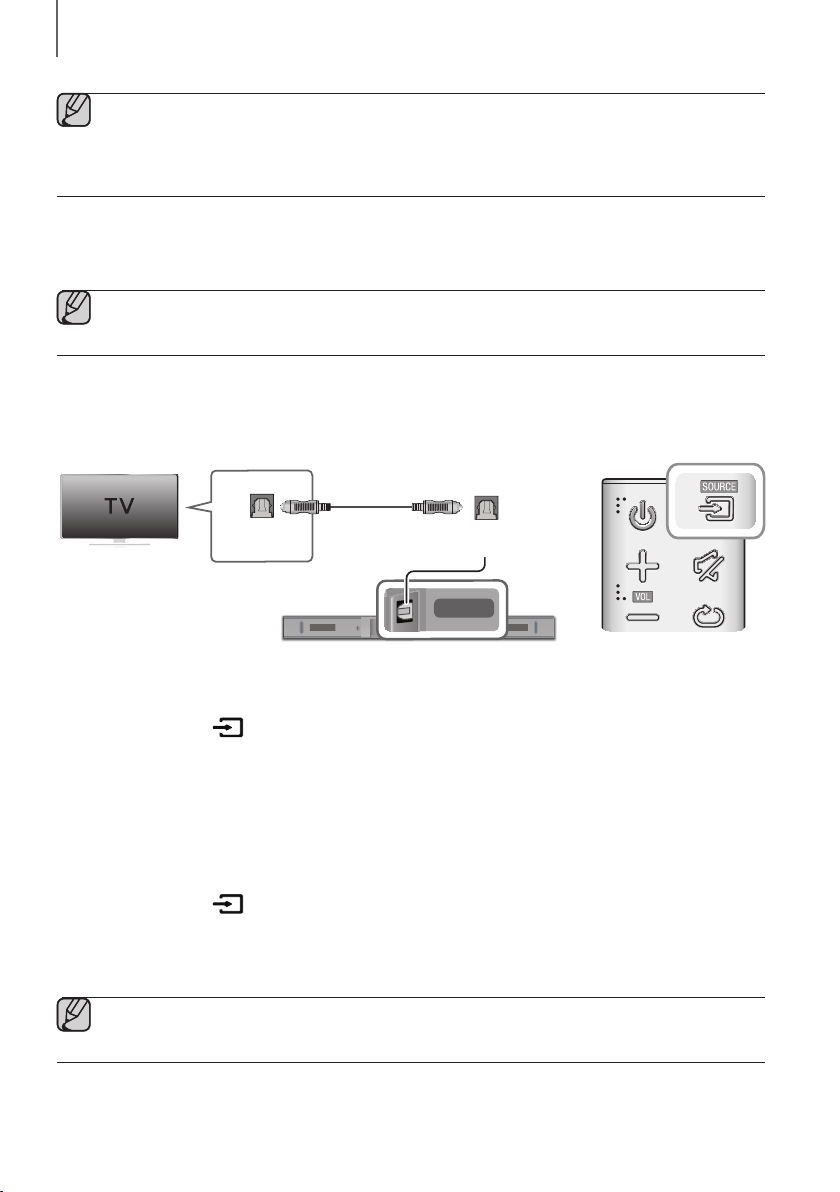
CONNECTING TO A TV USING A DIGITAL OPTICAL CABLE
DIGITAL AUDIO IN
(OPTICAL)
USB (5V 0.5A)
AUX IN
SUBWOOFER
DC 24V
DIGITAL AUDIO IN
(OPTICAL)
DIGITAL AUDIO IN
(OPTICAL)
OPTICAL OUT
Optical Cable
(not supplied)
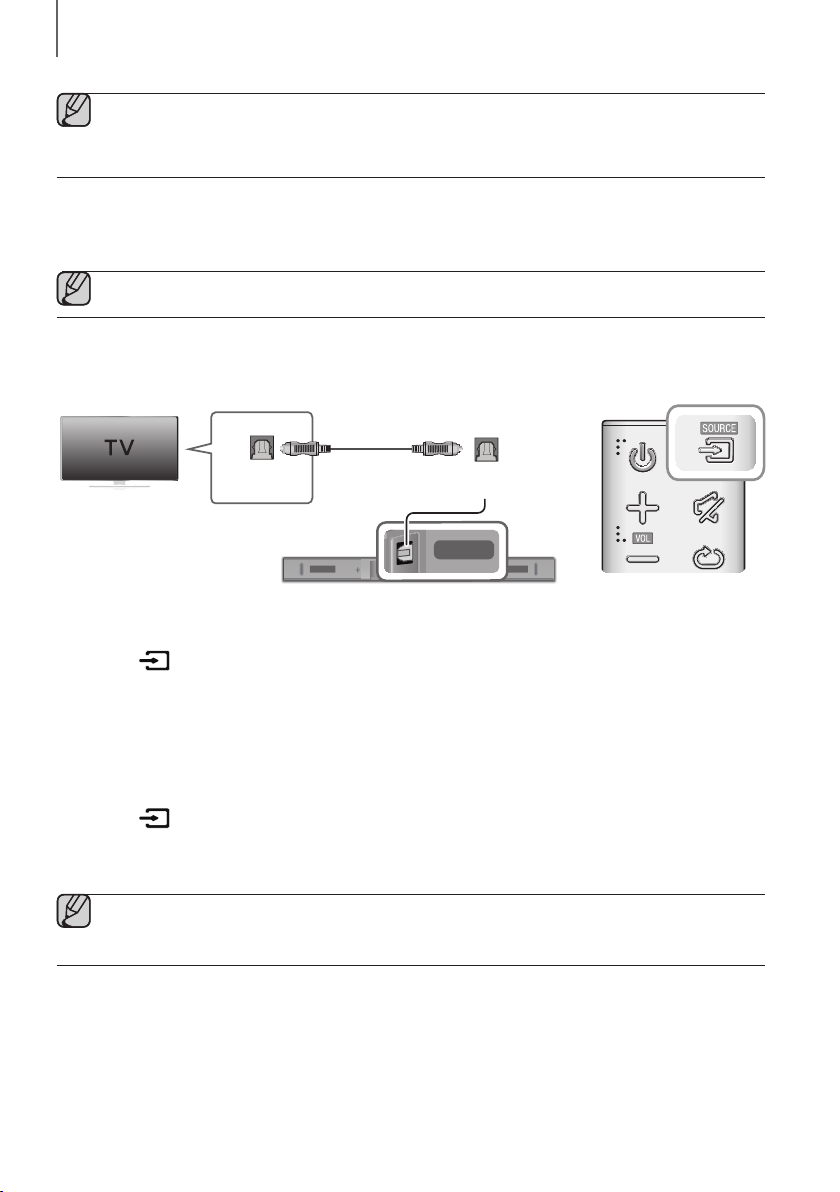
1. Connect the DIGITAL AUDIO IN (OPTICAL) jack on the Soundbar to the OPTICAL OUT jack of the TV with a
digital optical cable (not supplied).
2. Press the button on the right side of the Soundbar or the SOURCE button on the remote control to select
the D.IN mode.
+ Auto Power Link
If you have connected the main unit to a TV with a digital optical cable (not supplied), you can set the Auto
Power function ON to have the Soundbar turn on automatically when you turn the TV on.
1. Connect the Soundbar and
a TV
with a digital optical cable (not supplied).
2. Press the button on the main unit’s right side or the SOURCE button on the remote control to select the
D.IN
mode.
3. Press the
button on the remote control for 5 seconds to turn Auto Power Link on or off.
● Auto Power Link is set to ON by default.
● Depending on the connected device, Auto Power Link may not function.
ENG
17
CONNECTIONS
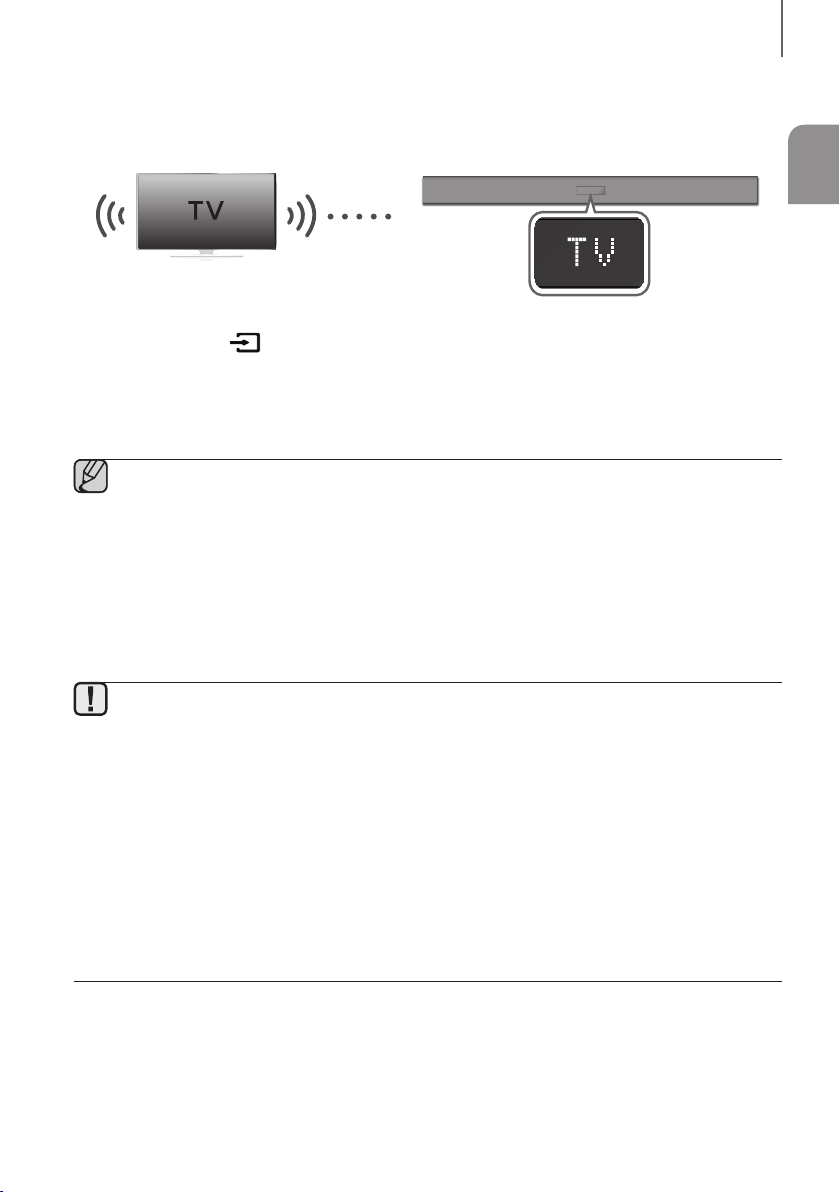
TV SOUNDCONNECT
You can enjoy TV sound through your Soundbar when it is connected to a Samsung TV that supports the
TV SoundConnect function.
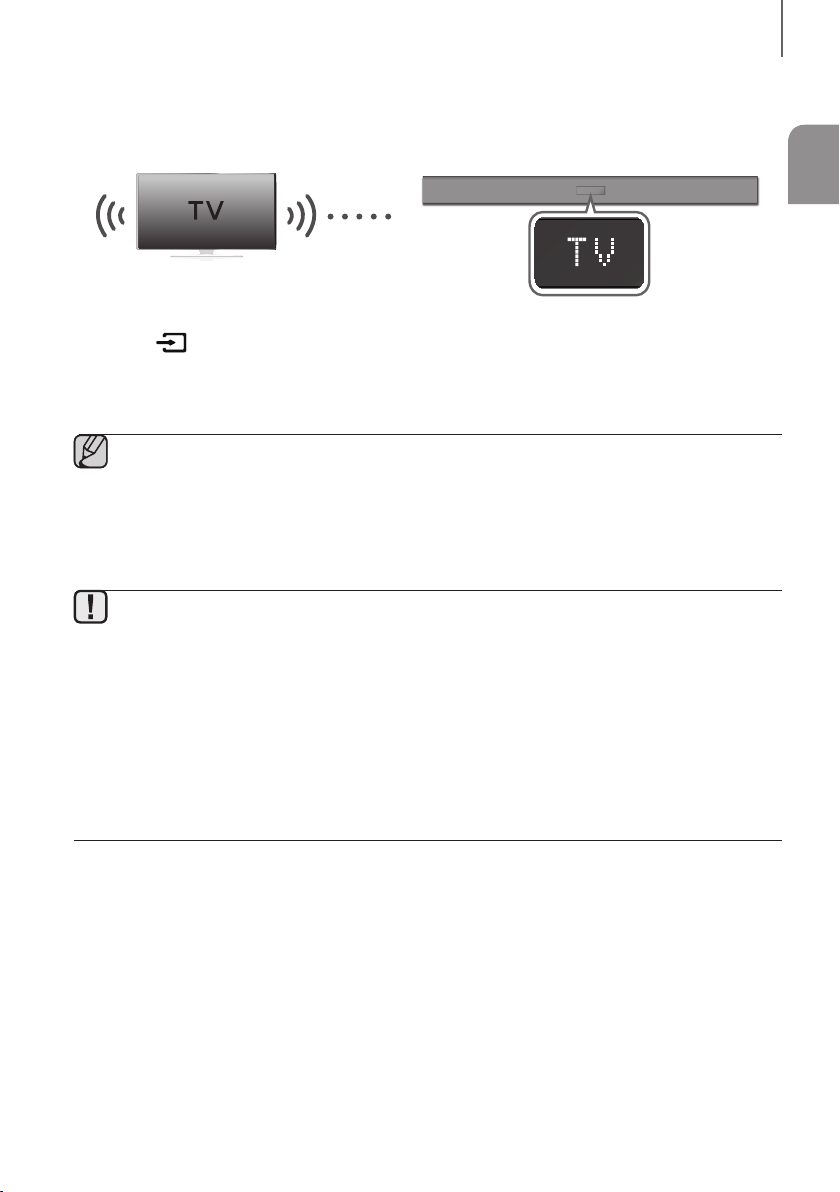
Connect
1. Turn on the TV and Soundbar.
2. Press the button on the main unit’s right side or the SOURCE button on the remote control to select the TV
mode.
3. On the TV, a message asking whether to enable the TV SoundConnect function appears.
4. Select <Yes> using the TV's remote control to finish connecting the TV and Soundbar.
● If the TV SoundConnect linking process fails, navigate to SoundConnect in the TV's Sound menu, select
Add New Device, and set Add New Device to ON. Then, try again.
● Switching the Soundbar’s mode from TV to another mode automatically terminates TV SoundConnect.
● To connect the Soundbar to another TV, the existing connection must be terminated.
● To terminate the existing connection, press and hold the
p
button on the remote for 5 seconds or switch
to another mode. To connect to the other TV, follow Steps 1 through 4 above.
● The TV SoundConnect (SoundShare) function is supported by some Samsung TVs released from 2012 on.
Check whether your TV supports the TV SoundConnect (SoundShare) function before you begin.
(For further information, refer to the TV’s user manual.).
● If your Samsung TV was released before 2014, check the SoundShare setting menu.
● If the distance between the TV and Soundbar exceeds 10 meters the connection may not be stable or the
audio may stutter. If this occurs, relocate the TV or Soundbar so that they are within operational range, and
then re-establish the TV SoundConnect connection.
● TV SoundConnect Operational Ranges:
- Recommended pairing range: within 2 meters.
- Recommended operational range: within 10 meters.
● The Play/Pause, Next, and Prev buttons on the Soundbar or Soundbar's remote do not control the TV.
18
CONNECTIONS
+ Using the Bluetooth POWER On function
The Bluetooth POWER On function is available after you have successfully connected the Soundbar to a Bluetooth
compatible TV using TV SoundConnect. When the Bluetooth POWER On function is ON, turning the connected TV on
or off will turn the Soundbar's power on and off as well.
1. Connect the TV to your Soundbar using the TV SoundConnect function.
2. Press the Bluetooth POWER button on the Soundbar remote. ON - BLUETOOTH POWER appears on the
Soundbar's display.
• ON - BLUETOOTH POWER : The Soundbar turns on and off when you turn the TV on or off.
• OFF - BLUETOOTH POWER : The Soundbar only turns off when you turn the TV off.
● This function is supported by some Samsung TVs released from 2013 on.
CONNECTING TO EXTERNAL DEVICES
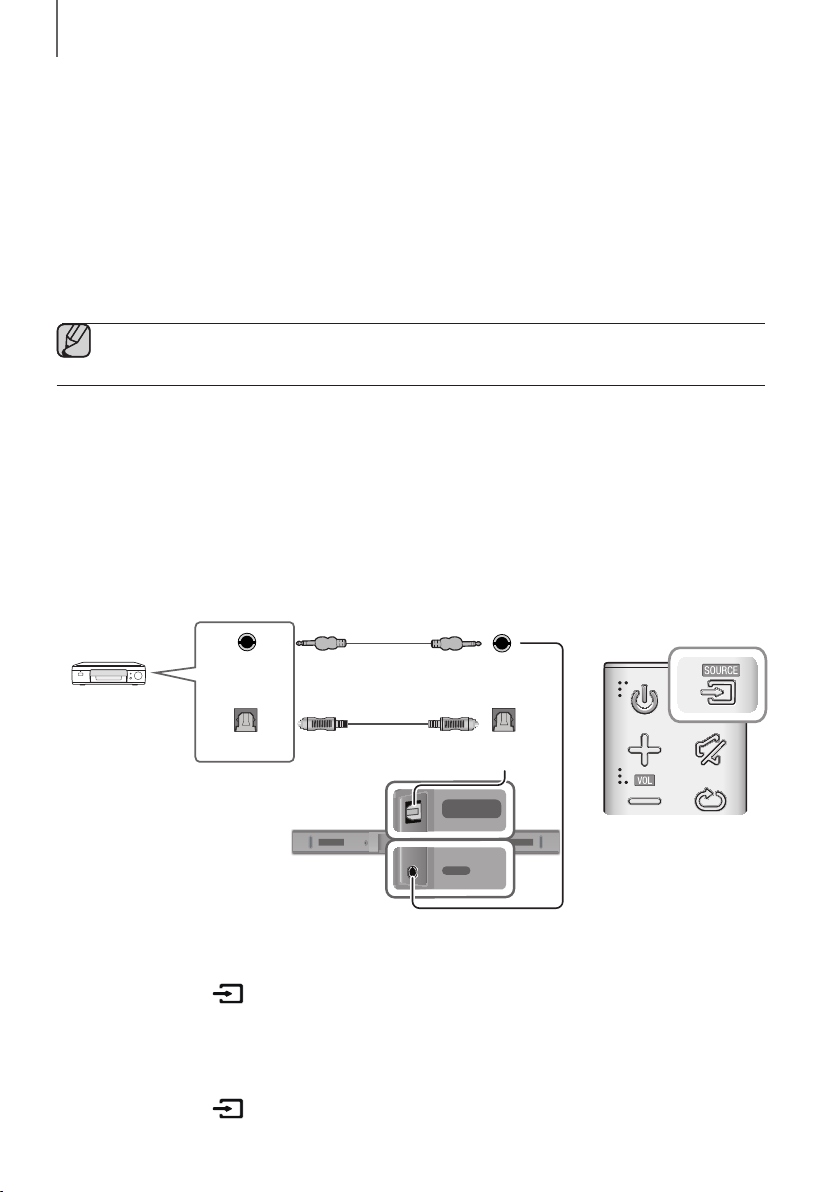
OPTICAL OR ANALOGUE AUDIO CABLE
This unit comes equipped with one digital optical in jack and one analogue audio (AUX) in jack, giving you two
ways to connect it to external devices.
DIGITAL AUDIO IN
(OPTICAL)
USB (5V 0.5A)
AUX IN
SUBWOOFER
DC 24V
DIGITAL AUDIO IN
(OPTICAL)
USB (5V 0.5A)
AUX IN
DIGITAL AUDIO IN
(OPTICAL)
USB (5V 0.5A)
AUX IN
DIGITAL AUDIO IN
(OPTICAL)
OPTICAL OUT
AUX IN
AUX OUT
BD / DVD player /
Set-top box /
Game console
Audio Cable
(not supplied)
Optical Cable
(not supplied)
+ AUX Cable
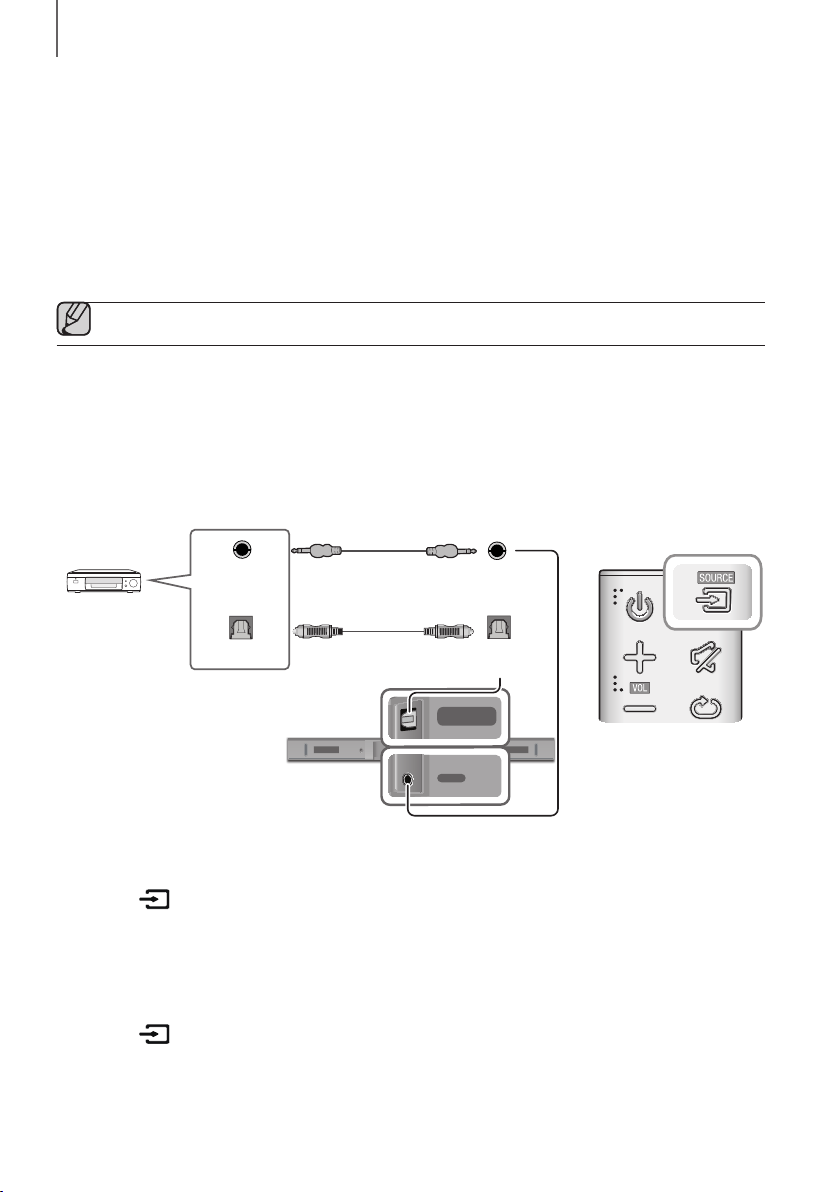
1. Connect AUX IN (Audio) on the main unit to the AUDIO OUT jack of the Source Device using an audio cable.
2. Press the button on the right side of the Soundbar or the SOURCE button on the remote control to select
the AUX mode.
+ Optical Cable
1. Connect DIGITAL AUDIO IN (OPTICAL) on the main unit to the OPTICAL OUT jack of the Source Device using a
digital optical cable (not supplied).
2. Press the button on the right side of the Soundbar or the SOURCE button on the remote control to select
the D.IN mode.
ENG
19
CONNECTIONS
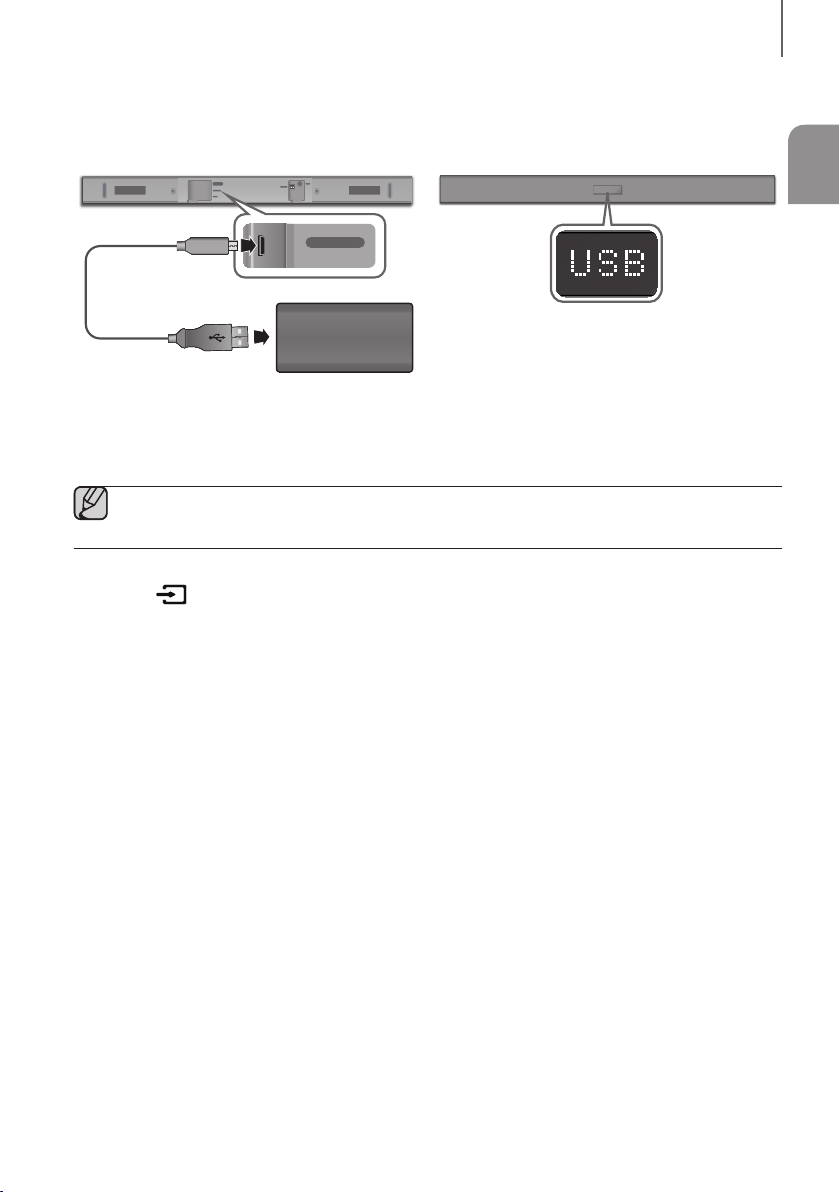
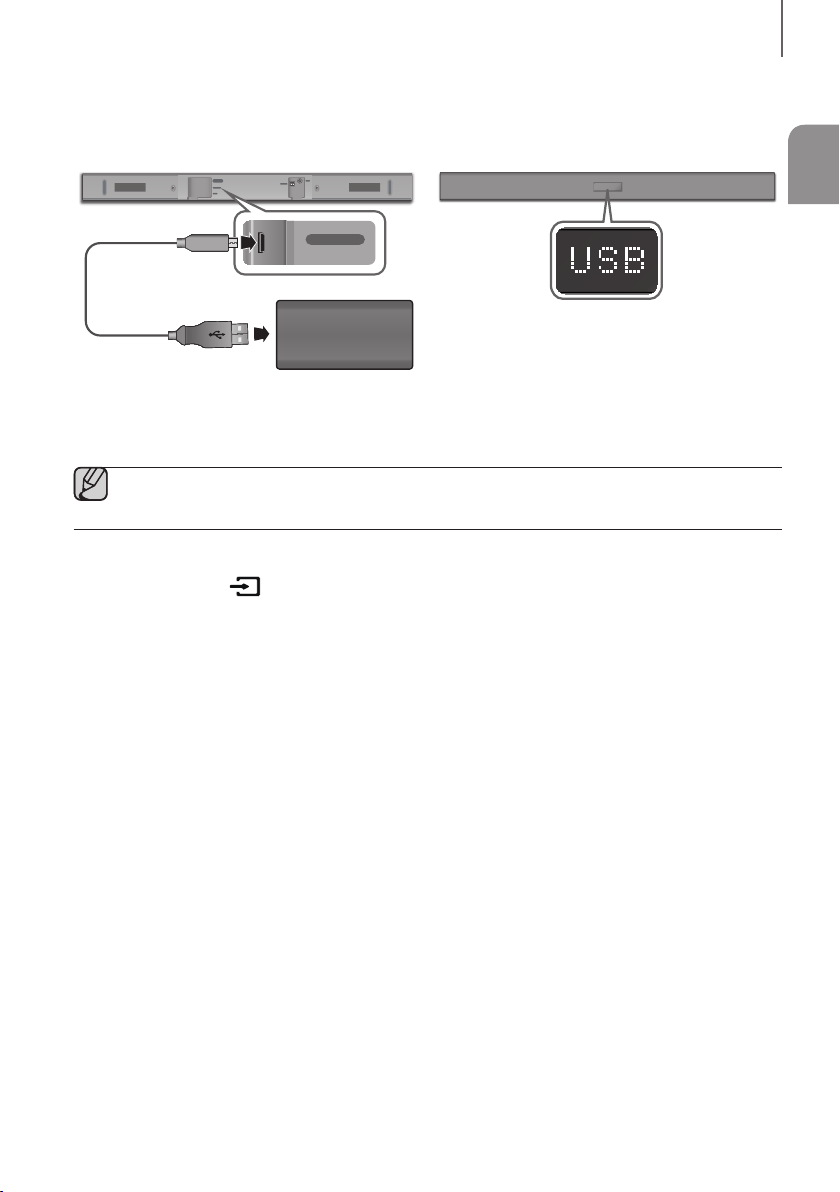
USB
You can play music files located on storage devices through the Soundbar.
DIGITAL AUDIO IN
(OPTICAL)
USB (5V 0.5A)
AUX IN
SUBWOOFER
DC 24V
DIGITAL AUDIO IN
(OPTICAL)
USB (5V 0.5A)
AUX IN
Display
Micro USB to
USB adapter Cable
(not supplied)
USB port
Storage Device
1. Connect a Micro USB to USB adapter cable with a male USB 2.0 Micro USB plug (Type B) on one end and a
standard female 2.0 USB jack (Type A) on the other end to the micro USB jack on your Soundbar.
● The Micro USB to USB adapter cable is sold separately. To purchase, contact a Samsung Service Centre
or Samsung Customer Care.
2. Connect your storage device to the female end of the adapter cable.
3. Press the button on the main unit’s right side or the SOURCE button on the remote control to select the
USB mode.
4. USB appears on the display screen.
• The Soundbar connection to the storage device is complete.
• The Soundbar automatically turns off (Auto Power Off) if no storage device has been connected for more than
5 minutes.
+ Before you connect a storage device
Be aware of the following:
● If the file name of a file on a storage device exceeds 10 characters, it is not displayed on the Soundbar's display.
● This product may not be compatible with certain types of storage media.
● The Soundbar supports the FAT16 and FAT32 file systems.
- The NTFS file system is not supported.
● Connect storage devices to the USB port of the product using a USB 2.0 Micro USB plug to standard female 2.0
USB jack adapter cable. Otherwise, you may encounter a USB compatibility problem.
● Do not connect multiple storage devices to the product via a multi-card reader. It may not operate properly.
● Digital camera PTP protocols are not supported.
● Do not remove the storage device while it is transferring files.
● DRM-protected music files (MP3, WMA) from commercial web sites cannot be played.
● External HDDs are not supported.
● Mobile phone devices are not supported.
20
CONNECTIONS
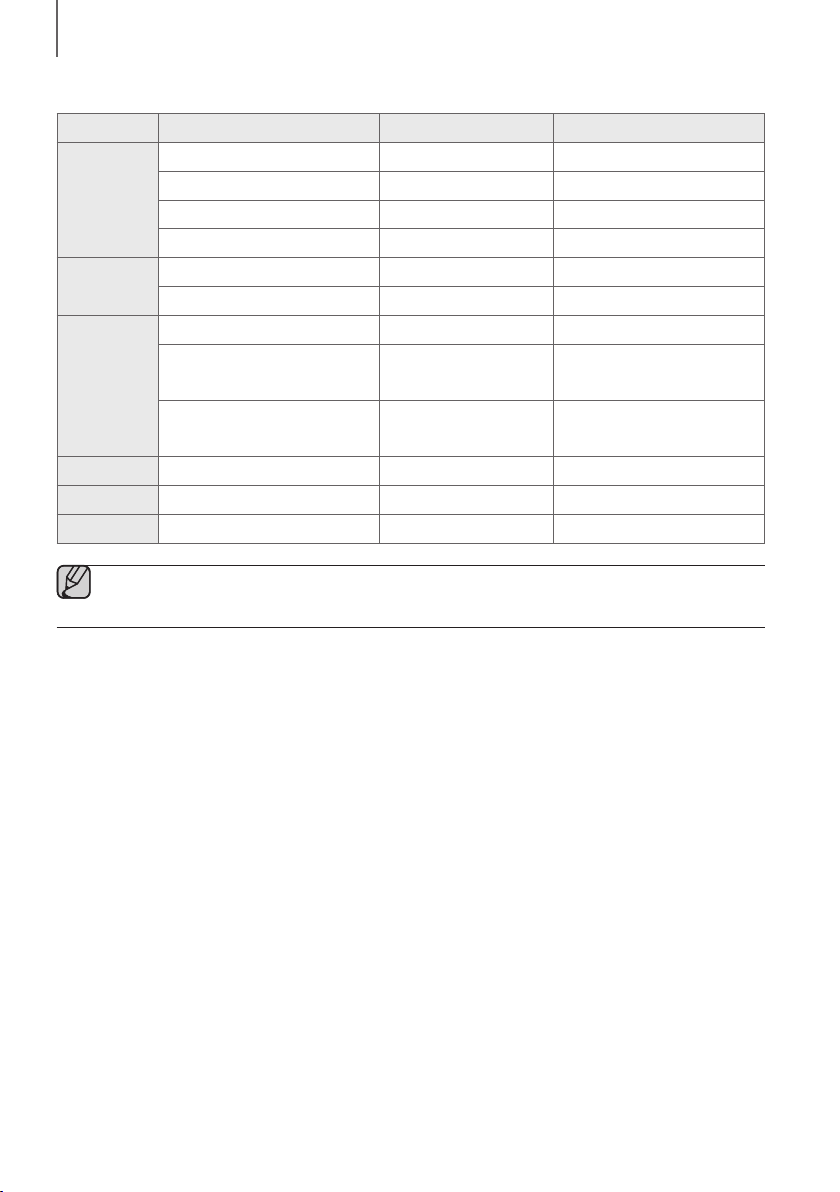
● File Format Type Compatibility list:
Extension Codec Sampling Rate Bit Rate
*.mp3
MPEG 1 Layer2 16KHz ~ 48KHz 80kbps~320kbps
MPEG 1 Layer3 16KHz ~ 48KHz 80kbps~320kbps
MPEG 2 Layer3 16KHz ~ 48KHz 80kbps~320kbps
MPEG 2.5 Layer3 16KHz ~ 48KHz 80kbps~320kbps
*.wma
Wave_Format_MSAudio1 16KHz ~ 48KHz 56kbps~128kbps
Wave_Format_MSAudio2 16KHz ~ 48KHz 56kbps~128kbps
*.aac
AAC 16KHz ~ 96KHz 48kbps~320kbps
AAC-LC 16KHz ~ 96KHz
128kbps~192kbps
5.1ch 320kbps
HE-AAC 24KHz ~ 96KHz
48kbps~64kbps
5.1ch 160kbps
*.wav
- 16KHz ~ 48KHz up to 3000kbps
*.ogg
OGG 1.1.0 16KHz ~ 48KHz 50kbps~500kbps
*.flac
FLAC 1.1.0, FLAC 1.2.1 16KHz ~ 96KHz up to 3000kbps
● If there are too many folders and files stored on the storage device, it may take the Soundbar some time to
access and play files.
ENG
21
FUNCTIONS
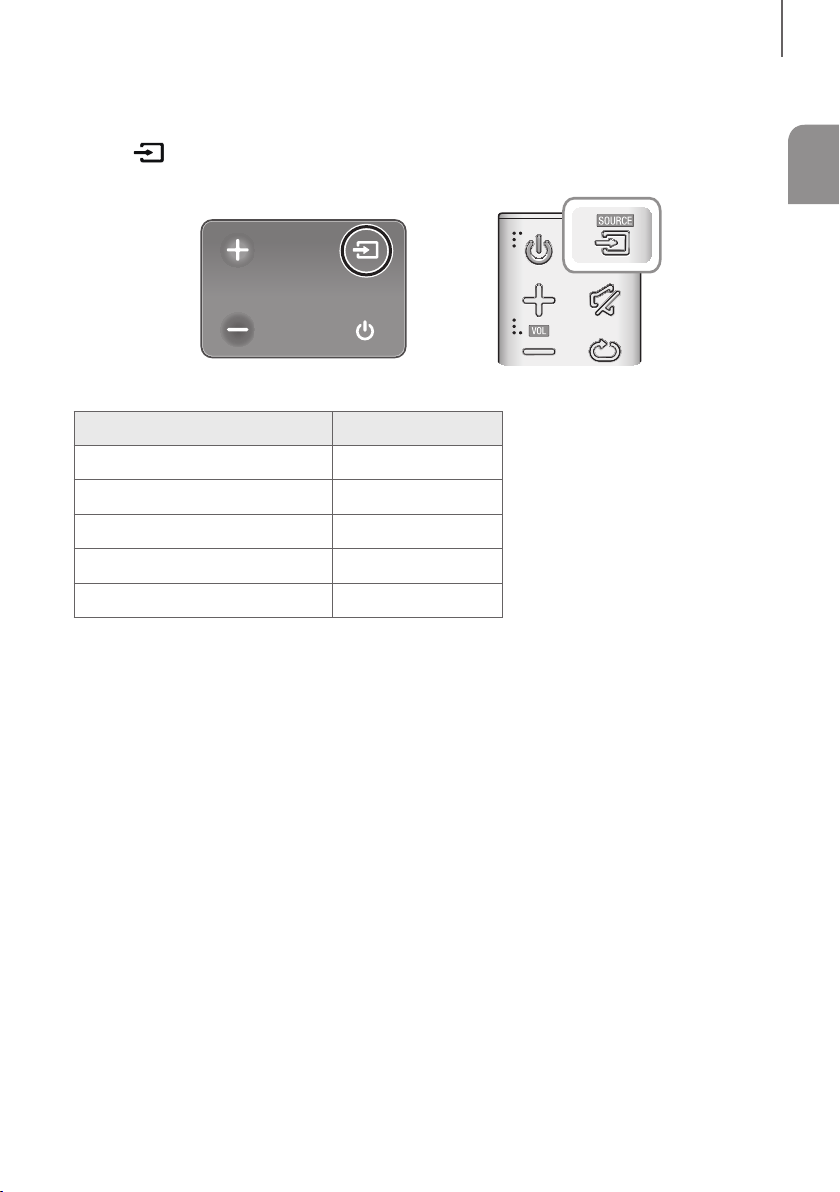
INPUT MODE
Press the button on the main unit’s
rig
ht
side or the
SOURCE button on the remote control to select the mode
you want.
Right Side of the Soundbar
Input mode Display
Optical Digital input
D.IN
AUX input
AUX
BLUETOOTH mode
BT
TV SoundConnect
TV
USB mode
USB
AUTO POWER DOWN FUNCTION
The unit turns off automatically in the following situations.
● D.IN / BT / TV / USB Mode
- If there is no audio signal for 5 minutes.
● AUX Mode
- If the AUX cable is disconnected for 5 minutes.
- If there is no KEY input for 8 hours when the AUX cable is connected. (Auto Power Down function can be
turned off only in that case.)
To turn off Auto Power Down function, while in AUX mode, press and hold the
p
button for 5 seconds.
ON - AUTO POWER DOWN / OFF - AUTO POWER DOWN appears on the display.
FUNCTIONS
22
FUNCTIONS
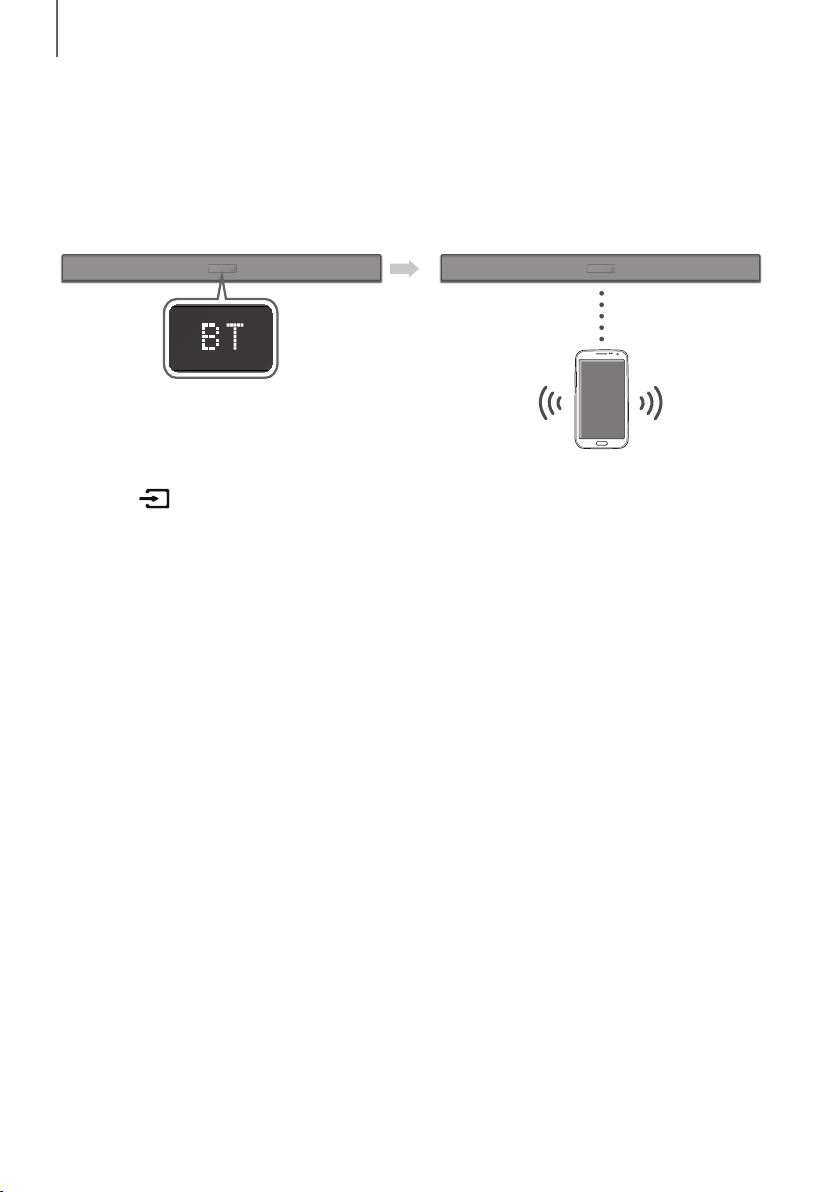
BLUETOOTH
You can connect a Bluetooth device to the Soundbar and enjoy music with stereo sound, all without wires!
TO CONNECT THE SOUNDBAR TO A BLUETOOTH DEVICE
Check if the Bluetooth device supports the Bluetooth compliant stereo headset function.
Bluetooth device
Connect
1. Press the button on the main unit’s right side or the
SOURCE button on the remote control to select the BT
mode.
• You will see BT READY on the front display of the Soundbar.
2. Select the Bluetooth menu on the Bluetooth device you want to connect. (Refer to the Bluetooth device's user
manual.)
3. Select "[AV] Samsung Soundbar Kxxx K-Series" from the list.
• When the Soundbar is connected to the Bluetooth device, it will display [Bluetooth device name]
BT on
the front display.
• The device name can only be displayed in English. An underline " _ " will be displayed if the name is not in
English.
• If the Bluetooth device has failed to pair with the Soundbar, delete the previous "[AV] Samsung Soundbar
Kxxx K-Series" found by the Bluetooth device and have it search for the Soundbar again.
4. Play music on the connected device.
• You can listen to the music playing on the connected Bluetooth device over the Soundbar.
• In BT mode, the Play / Pause / Next / Prev functions are not available. However, these functions are available
on Bluetooth devices supporting AVRCP.
ENG
23
FUNCTIONS
● If asked for a PIN code when connecting a Bluetooth device, enter <0000>.
● Only one Bluetooth device can be paired at a time.
● The Bluetooth connection will be terminated when you turn the Soundbar off.
● The Soundbar may not perform Bluetooth search or connection correctly under the following
circumstances:
- If there is a strong electrical field around the Soundbar.
- If several Bluetooth devices are simultaneously paired with the Soundbar.
- If the Bluetooth device is turned off, not in place, or malfunctions.
● Note that such devices as microwave ovens, wireless LAN adaptors, fluorescent lights, and gas stoves use
the same frequency range as the Bluetooth device, which can cause electric interference.
● The Soundbar supports SBC data (44.1kHz, 48kHz).
● Connect only to a Bluetooth device that supports the A2DP (AV) function.
● You cannot connect the Soundbar to a Bluetooth device that supports only the HF (Hands Free) function.
● Once you have paired the Soundbar to a Bluetooth device, selecting "[AV] Samsung Soundbar Kxxx
K-Series" from the device's scanned devices list will automatically change the Soundbar to BT mode.
- Available only if the Soundbar is listed among the Bluetooth device’s paired devices. (The Bluetooth
device and the Soundbar must have been previously paired at least once.)
● Soundbar will appear in the Bluetooth device’s searched devices list only when the Soundbar is displaying
BT READY.
● In the TV SoundConnect mode, the Soundbar cannot be paired to another Bluetooth device.
BLUETOOTH POWER ON (BLUETOOTH POWER)
If a previously paired Bluetooth device tries to pair with the Soundbar when the Bluetooth POWER On function is on
and the Soundbar is turned off, the Soundbar turns on automatically.
1. Press the Bluetooth POWER button on the remote while the Soundbar is turned on.
2. ON - BLUETOOTH POWER appears on the Soundbar's display.
TO DISCONNECT THE BLUETOOTH DEVICE FROM A
SOUNDBAR
You can disconnect a Bluetooth device from the Soundbar. For instructions, see the Bluetooth device's user manual.
● The Soundbar will be disconnected.
● When the Soundbar is disconnected from the Bluetooth device, the Soundbar will display
BT DISCONNECTED on the front display.
TO DISCONNECT THE SOUNDBAR FROM A BLUETOOTH
DEVICE
Press the SOURCE button on the remote control or the button on the product's
rig
ht side to switch from BT to
another mode or turn off the Soundbar.
● The connected Bluetooth device will wait a certain amount of time for a response from the Soundbar before
terminating the connection. (Disconnection time may differ, depending on the Bluetooth device)

24
FUNCTIONS
● In Bluetooth connection mode, the Bluetooth connection will be lost if the distance between the Soundbar
and the Bluetooth device exceeds 10 meters.
● The Soundbar automatically turns off after 5 minutes in the Ready state.
+ More About Bluetooth
Bluetooth is a technology that enables Bluetooth-compliant devices to interconnect easily with each other using a
short wireless connection.
● A Bluetooth device may cause noise or malfunction, depending on usage, if:
- A part of your body is in contact with the receiving/transmitting system of the Bluetooth device or the
Soundbar.
- It is subject to electrical variation from obstructions caused by a wall, corner, or office partition.
- It is exposed to electrical interference from same frequency-band devices including medical equipment,
microwave ovens, and wireless LANs.
● Pair the Soundbar with the Bluetooth device while they are close together.
● The further the distance between the Soundbar and Bluetooth device, the worse the quality is.
If the distance exceeds the Bluetooth operational range, the connection is lost.
● In poor reception areas, the Bluetooth connection may not work properly.
● The Bluetooth connection only works when it is close to the unit. The connection will be automatically cut off if the
Bluetooth device is out of range. Even within range, the sound quality may be degraded by obstacles such as
walls or doors.
● This wireless device may cause electric interference during its operation.
ENG
25
FUNCTIONS
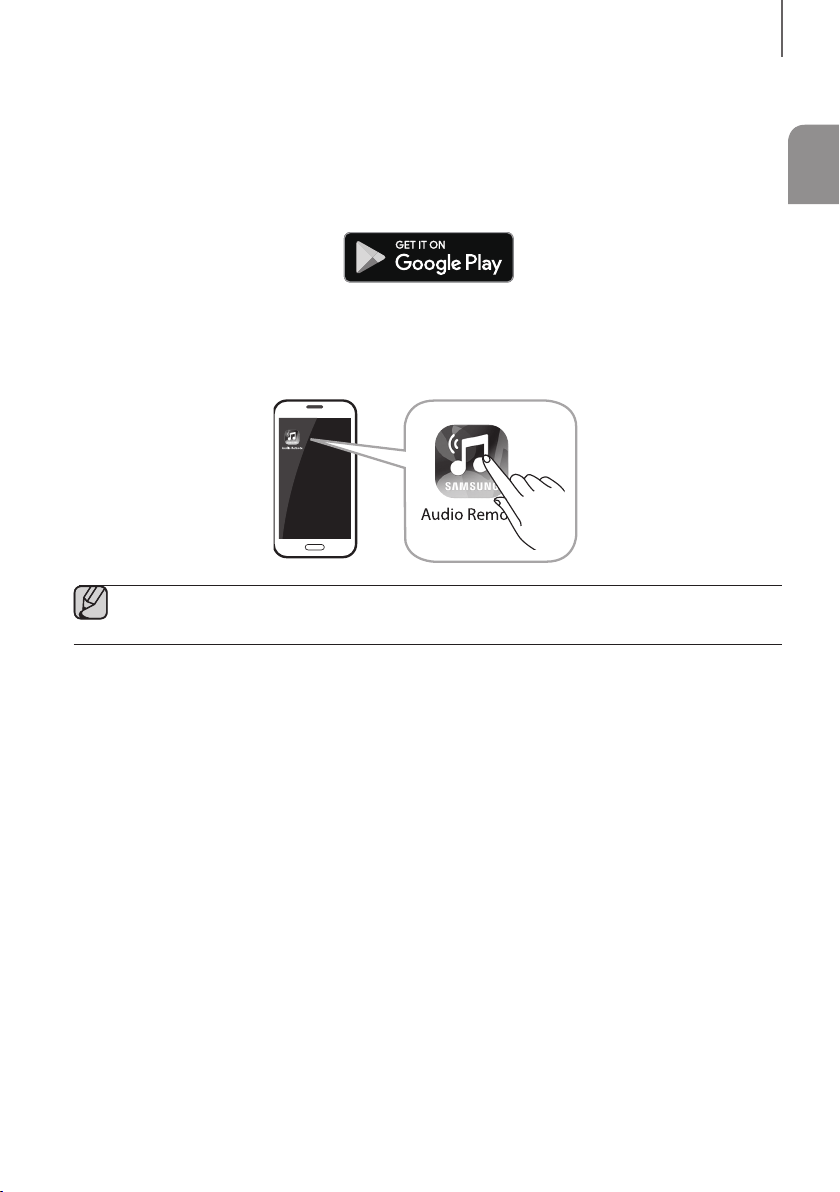
USING THE SAMSUNG AUDIO REMOTE APP
+ Installing the Samsung Audio Remote App
To control the Soundbar with your smart device and the Samsung Audio Remote app, download the Samsung Audio
Remote app from the Google Play store.
Market search : Samsung Audio Remote
+ Launching the Samsung Audio Remote App
To launch and use the Samsung Audio Remote app, touch the Audio Remote icon on your smart device, and then
follow the directions on the screen.
● The Samsung Audio Remote app is only compatible with Android mobile phones and mobile devices
running Android OS 3.0 or later.
26
FUNCTIONS
SOFTWARE UPDATE
DIGITAL AUDIO IN
(OPTICAL)
USB (5V 0.5A)
AUX IN
SUBWOOFER
DC 24V
DIGITAL AUDIO IN
(OPTICAL)
USB (5V 0.5A)
AUX IN
Micro USB to
USB adapter Cable
(not supplied)
Storage Device
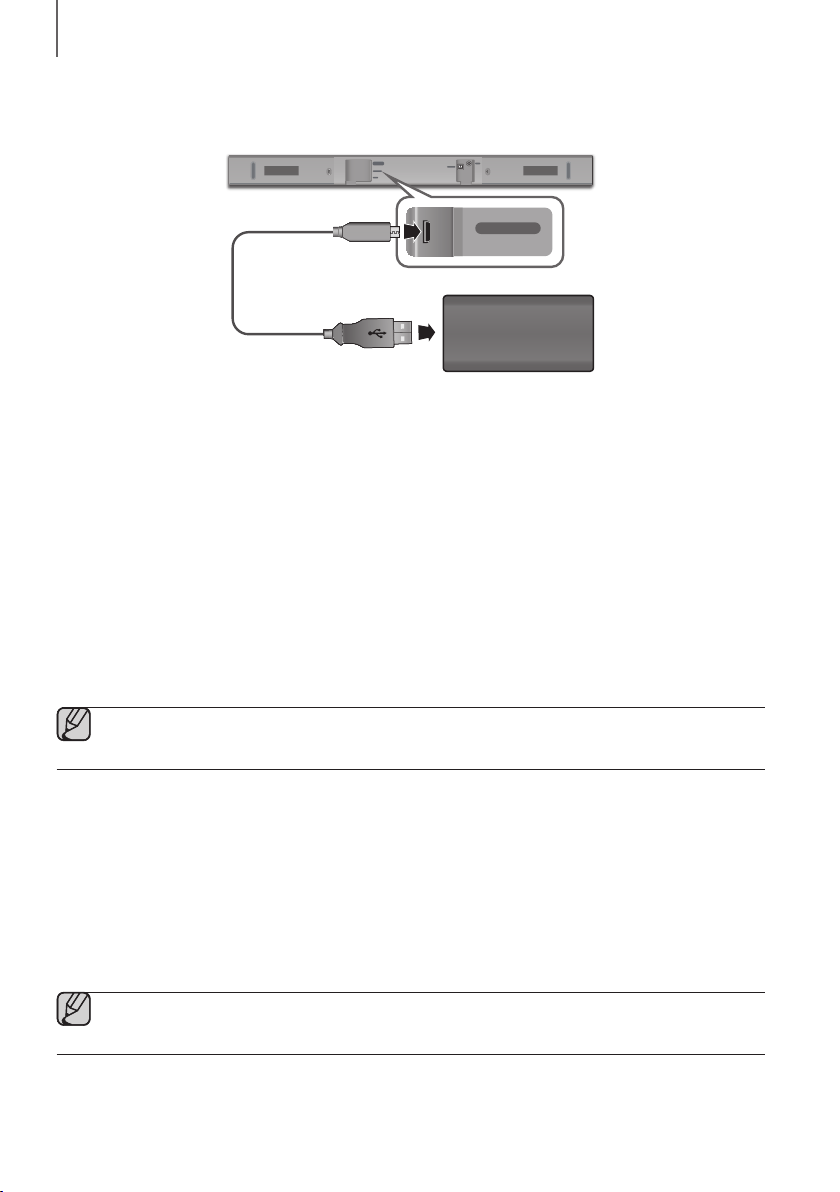
Samsung may offer updates for the Soundbar's system firmware in the future.
If an update is offered, you can update the firmware by connecting a storage device with the firmware update stored
on it to the USB port on your Soundbar.
Note that if there are multiple update files, you must load them onto the storage device singly and use them to update
the firmware one file at a time.
Please visit samsung.com or contact the Samsung call centre to receive more information about downloading update
files.
UPDATING PROCEDURE
1. Connect a Micro USB to USB adapter cable with a male USB 2.0 Micro USB plug (Type B) on one end and a
standard female 2.0 USB jack (Type A) on the other end to the micro USB jack on your Soundbar.
● The Micro USB to USB adapter cable is sold separately. To purchase, contact a Samsung Service Centre
or Samsung Customer Care.
2. Follow the steps below to download the product software:
Go to the Samsung website at (samsung.com/sec) search for the model name - select the customer support
option (the option name is subject to change)
3. Save the downloaded software to a storage device and select "Extract Here" to unzip the folder.
4. Turn off the Soundbar and connect the storage device containing the software update to the female port on a
Micro USB adapter cable.
5. Turn on the Soundbar. Within 3 minutes, UPDATE is displayed and updating begins.
6. After completion, the power of Soundbar turns off. In this state, press the
p
button on the remote control for
5 seconds.
● This product has a DUAL BOOT function. If the firmware fails to update, you can update the firmware
again.
ENG
27
FUNCTIONS
IF UPDATE IS NOT DISPLAYED
1. Turn off the Soundbar, connect the storage device that contains update files to the Soundbar’s USB port.
2. Disconnect the power cord, reconnect it, and then turn on the Soundbar.
● Insert a storage device containing the firmware update into the USB port on the main unit.
● Updating firmware may not work properly if audio files supported by the Soundbar are stored in the storage
device.
● Do not disconnect the power or remove the storage device while updates are being applied. The main unit
will turn off automatically after completing the firmware update.
● After update is completed, the user setup in Soundbar is initialised. We recommend you write down your
settings so that you can easily reset them after the update.
If the software update fails, check that the storage device is not defective.
● Mac OS users should use MS-DOS (FAT) as the USB format.
● Depending on the manufacturer, some storage devices may not be supported.
28
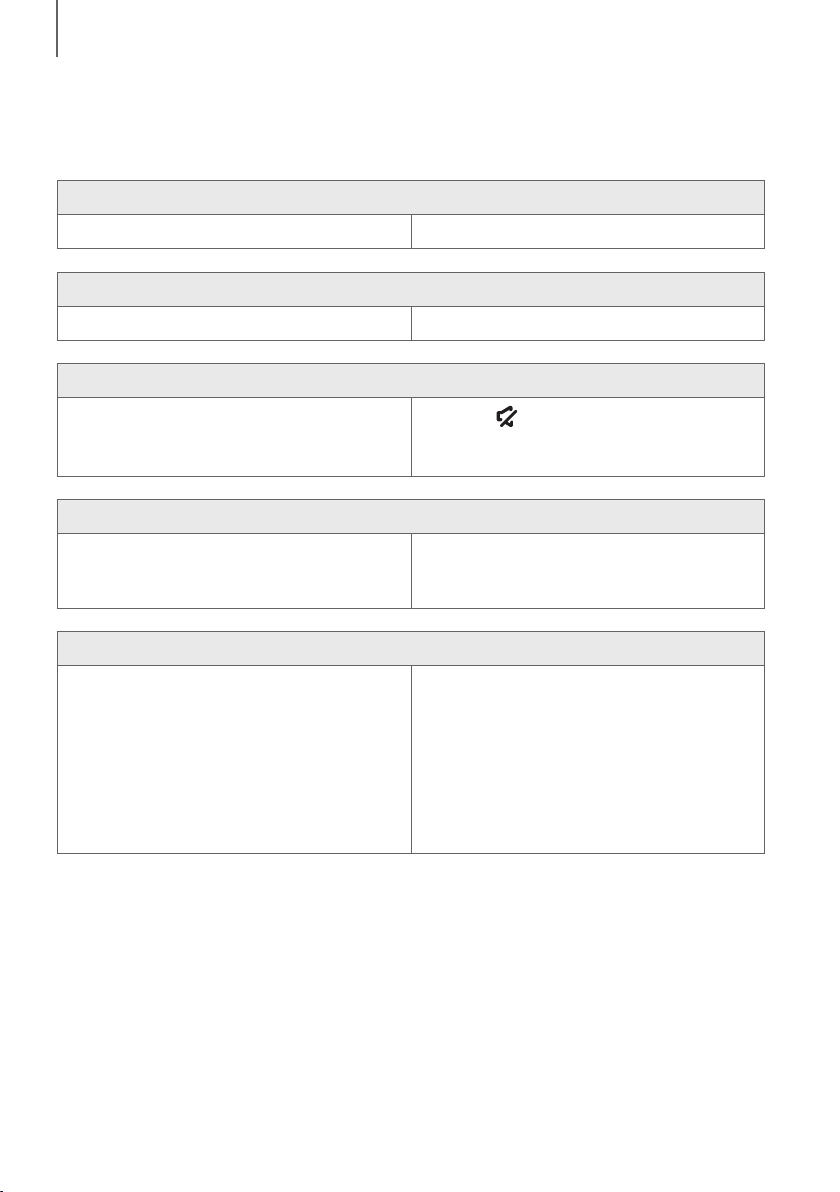
TROUBLESHOOTING
TROUBLESHOOTING
Before requesting service, please check the following.
The unit will not turn on.
• Is the power cord plugged into the outlet? ¼ Connect the power plug to the outlet.
A function does not work when the button is pressed.
• Is there static electricity in the air? ¼ Disconnect the power plug and connect it again.
Sound is not produced.
• Is the Mute function on?
• Is the volume set to minimum?
¼ Press the (Mute) button to cancel the Mute
function.
¼ Adjust the volume.
The remote control does not work.
• Is the battery drained?
• Is the distance between the remote control and main
unit too far?
¼ Replace with new battery.
¼ Move closer to the unit.
The TV SoundConnect (TV pairing) failed.
• Does your TV support TV SoundConnect?
• Is your TV firmware the latest version?
• Does an error occur when connecting?
¼ TV SoundConnect is supported by some Samsung
TVs released from 2012 on. Check your TV to see if it
supports TV SoundConnect.
¼ Update your TV with the latest firmware.
¼ Contact the Samsung Call Centre.
¼ Reset TV SoundConnect and connect again.
To reset the TV SoundConnect connection, press
and hold the
p
button for 5 seconds.
TROUBLESHOOTING
ENG
29
APPENDIX
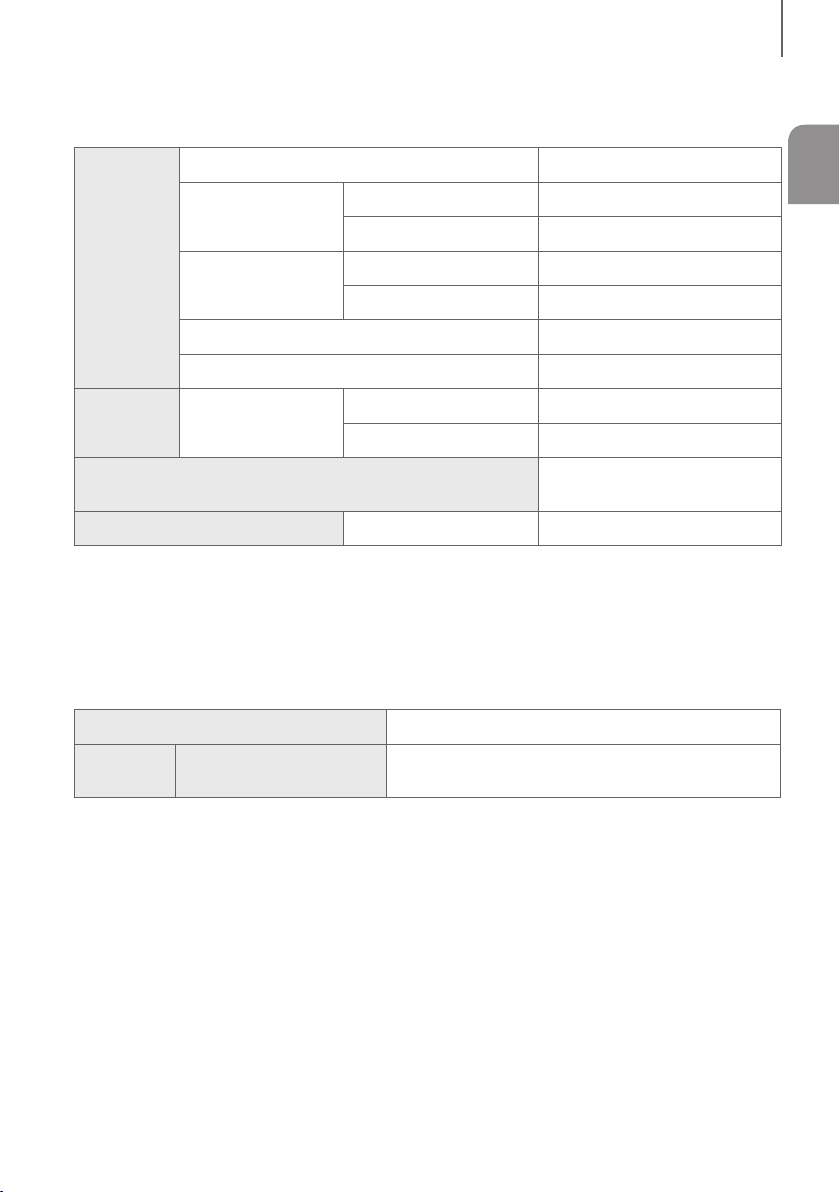
SPECIFICATIONS
GENERAL
USB
5V / 0.5A
Weight
Main Unit
1.5 kg
Subwoofer (PS-WM10)
2.8 kg
Dimensions
(W x H x D)
Main Unit
907.5 x 53.5 x 70.5 mm
Subwoofer (PS-WM10)
155.0 x 300.0 x 285.0 mm
Operating Temperature Range
+5°C to +35°C
Operating Humidity Range
10 % to 75 %
AMPLIFIER Rated Output Power
Main Unit
35W x 2, 6 ohm
Subwoofer (PS-WM10)
60W, 3 ohm
Supported play formats
(DTS 2.0 sound is played in DTS format.)
LPCM 2ch, Dolby Audio™
(supporting Dolby® Digital), DTS
WIRELESS DEVICE OUTPUT POWER
BT max transmitter power
100mW at 2.4GHz – 2.4835GHz
* Design and specifications are subject to change without prior notice.
* Nominal specification
- Samsung Electronics Co., Ltd reserves the right to change the specifications without notice.
- Weight and dimensions are approximate.
- For more information about the power supply and power consumption, refer to the label attached to the product.
(Label : Bottom of the Soundbar Main Unit)
Overall Standby Power Consumption (W)
2.9W
Bluetooth Port deactivation method
Press the “Bluetooth POWER” button on the remote control
when “BT” mode.
a Open Source Licence Notice
- To send inquiries and requests regarding open sources, contact Samsung via Email
APPENDIX

30
APPENDIX
LICENCES
Manufactured under license from Dolby Laboratories. Dolby, Dolby Audio, Pro Logic, and the double-D symbol are
trademarks of Dolby Laboratories.
For DTS patents, see http://patents.dts.com. Manufactured under license from DTS Licensing Limited. DTS, the
Symbol, DTS in combination with the Symbol, and DTS 2.0 Channel are registered trademarks or trademarks of DTS,
Inc. in the United States and/or other countries. © DTS, Inc. All Rights Reserved.
Hereby, Samsung Electronics, declares that this equipment is in compliance with Directive
2014/53/EU.
The full text of the EU declaration of conformity is available at the following internet address:
http://www.samsung.com go to Support > Search Product Support and enter the model
name. This equipment may be operated in all EU countries.
Contact SAMSUNG WORLD WIDE
If you have any questions or comments relating to Samsung products, please contact the SAMSUNG customer care
Centre.
[Correct disposal of batteries in this product]
(Applicable in countries with separate collection systems)
This marking on the battery, manual or packaging indicates that the
batteries in this product should not be disposed of with other household
waste at the end of their working life. Where marked, the chemical
symbols Hg, Cd or Pb indicate that the battery contains mercury,
cadmium or lead above the reference levels in EC Directive 2006/66.
If batteries are not properly disposed of, these substances can cause
harm to human health or the environment.
To protect natural resources and to promote material reuse, please
separate batteries from other types of waste and recycle them through
your local, free battery return system.
Correct Disposal of This Product
(Waste Electrical & Electronic Equipment)
(Applicable in countries with separate collection systems)
This marking on the product, accessories or literature indicates that
the product and its electronic accessories (e.g. charger, headset,
USB cable) should not be disposed of with other household waste at
the end of their working life. To prevent possible harm to the
environment or human health from uncontrolled waste disposal,
please separate these items from other types of waste and recycle
them responsibly to promote the sustainable reuse of material
resources.
Household users should contact either the retailer where they
purchased this product, or their local government office, for details of
where and how they can take these items for environmentally safe
recycling.
Business users should contact their supplier and check the terms and
conditions of the purchase contract. This product and its electronic
accessories should not be mixed with other commercial wastes for
disposal.
For information on Samsung’s environmental commitments and product specific regulatory obligations e.g. REACH,
WEEE, Batteries, visit:
http://www.samsung.com/uk/aboutsamsung/samsungelectronics/corporatecitizenship/data_corner.html
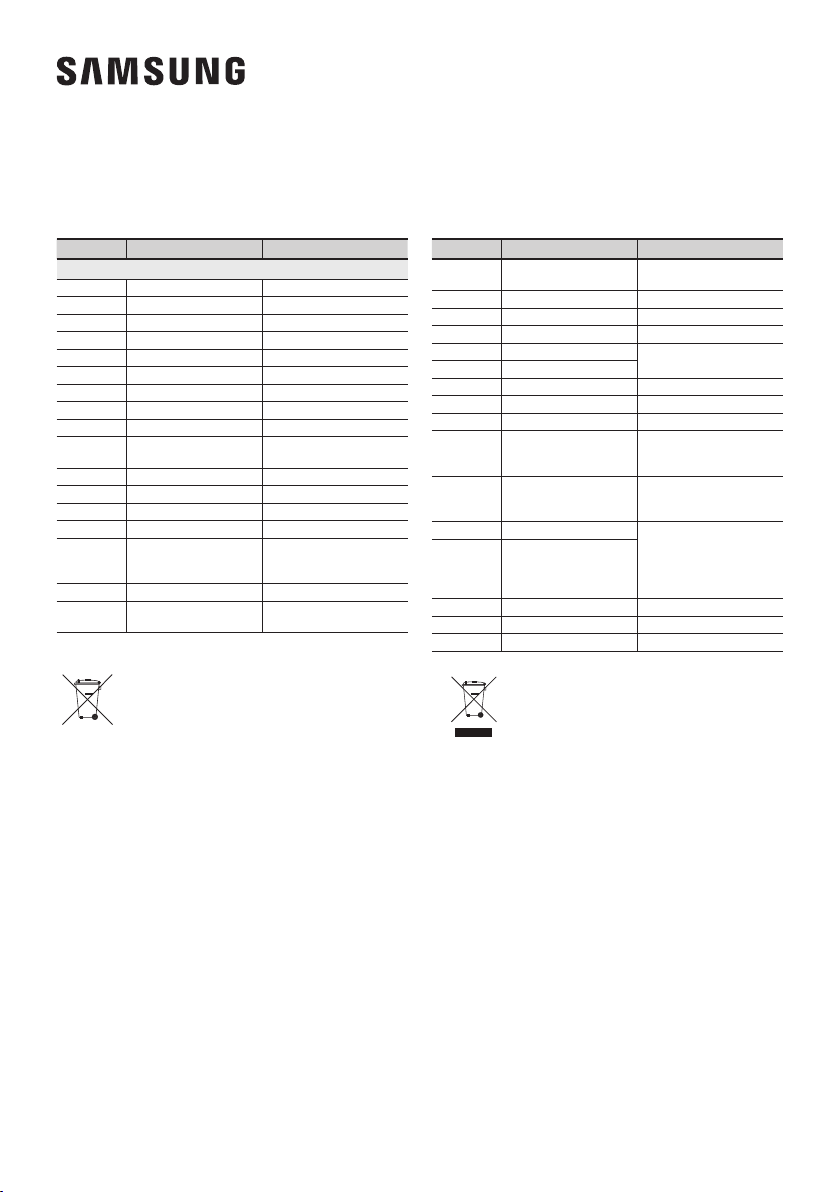
Country Contact Centre
Web Site
`
Europe
UK 0330 SAMSUNG (7267864) www.samsung.com/uk/support
IRELAND (EIRE) 0818 717100 www.samsung.com/ie/support
GERMANY 06196 77 555 77 www.samsung.com/de/support
FRANCE 01 48 63 00 00 www.samsung.com/fr/support
ITALIA 800-SAMSUNG (800.7267864) www.samsung.com/it/support
SPAIN 0034902172678 www.samsung.com/es/support
PORTUGAL 808 207 267 www.samsung.com/pt/support
LUXEMBURG 261 03 710 www.samsung.com/be_fr/support
NETHERLANDS 088 90 90 100 www.samsung.com/nl/support
BELGIUM 02-201-24-18
www.samsung.com/be/support (Dutch)
www.samsung.com/be_fr/support (French)
NORWAY 815 56480 www.samsung.com/no/support
DENMARK 707 019 70 www.samsung.com/dk/support
FINLAND 030-6227 515 www.samsung.com/fi/support
SWEDEN 0771 726 786 www.samsung.com/se/support
POLAND
801-172-678* lub +48 22 607-93-33*
* (koszt połączenia według taryfy
operatora)
http://www.samsung.com/pl/support/
HUNGARY 0680SAMSUNG (0680-726-7864) www.samsung.com/hu/support
AUSTRIA
0800-SAMSUNG (0800-7267864)
[Only for Dealers] 0810-112233
www.samsung.com/at/support
Country Contact Centre
Web Site
SWITZERLAND 0800 726 78 64 (0800-SAMSUNG)
www.samsung.com/ch/support (German)
www.samsung.com/ch_fr/support (French)
CZECH 800 - SAMSUNG (800-726786) www.samsung.com/cz/support
SLOVAKIA 0800 - SAMSUNG (0800-726 786) www.samsung.com/sk/support
CROATIA 072 726 786 www.samsung.com/hr/support
BOSNIA 055 233 999
www.samsung.com/support
MONTENEGRO 020 405 888
SLOVENIA 080 697 267 (brezplačna številka) www.samsung.com/si/support
SERBIA 011 321 6899 www.samsung.com/rs/support
ALBANIA 045 620 202 www.samsung.com/al/support
BULGARIA
*3000 Цена в мрежата
0800 111 31 , Безплатна телефонна
линия
www.samsung.com/bg/support
ROMANIA
*8000 (apel in retea)
08008-726-78-64 (08008-SAMSUNG)
Apel GRATUIT
www.samsung.com/ro/support
CYPRUS 8009 4000 only from landline, toll free
www.samsung.com/gr/support
GREECE
80111-SAMSUNG (80111 726 7864)
only from land line
(+30) 210 6897691 from mobile
and land line
LITHUANIA 8-800-77777 www.samsung.com/lt/support
LATVIA 8000-7267 www.samsung.com/lv/support
ESTONIA 800-7267 www.samsung.com/ee/support
Bedienungsanleitung
Erleben Sie die Möglichkeiten
Vielen Dank, dass Sie sich für ein Produkt von Samsung entschieden haben.
Registrieren Sie Ihr Produkt unter
www.samsung.com/register
© 2016 Samsung Electronics Co., Ltd. Alle Rechte vorbehalten.
HW-K335
32
ERSTE SCHRITTE
SICHERHEITSINFORMATIONEN
HINWEISE ZUR SICHERHEIT
ZUR VERMEIDUNG VON STROMSCHLÄGEN DARF DIESES GERÄT NICHT GEÖFFNET WERDEN.
ES ENTHÄLT KEINE BAUTEILE, DIE VOM BENUTZER GEWARTET ODER REPARIERT WERDEN KÖNNEN.
WARTUNGS- UND REPARATURARBEITEN DÜRFEN NUR VON FACHPERSONAL AUSGEFÜHRT WERDEN.
ACHTUNG
GEFAHR ELEKTRISCHER
SCHLÄGE! GERÄT NICHT
ÖFFNEN!
Dieses Symbol zeigt an, dass im Inneren
Hochspannung vorhanden ist. Es ist gefährlich,
Teile im Inneren dieses Bildschirms zu berühren.
Dieses Symbol weist darauf hin, dass diesem
Gerät wichtige Anweisungen zum Betrieb und
zur Wartung beigefügt sind.
Produkt der Klasse-II: Dieses Symbol zeigt an, dass das Gerät keinen elektrischen
Erdungsanschluss (Masse) benötigt.
Wechselspannung: Dieses Symbol zeigt an, dass es sich bei der mit diesem Symbol
gekennzeichneten Nennspannung um eine Wechselspannung handelt.
Gleichspannung: Dieses Symbol zeigt an, dass es sich bei der mit diesem Symbol
gekennzeichneten Nennspannung um eine Gleichspannung handelt.
Achtung! Gebrauchsanweisung beachten: Dieses Symbol weist den Benutzer an, weitere
sicherheitsrelevante Informationen der Gebrauchsanweisung zu entnehmen.
WARNUNG : Setzen Sie das Gerät nicht Nässe oder Feuchtigkeit aus, um die Gefahr eines Brandes bzw. eines
elektrischen Schlags zu vermeiden.
ACHTUNG : UM ELEKTRISCHE SCHLÄGE ZU VERMEIDEN, RICHTEN SIE DEN BREITEN KONTAKTSTIFT DES
STECKERS AN DEM BREITEN STECKPLATZ AUS, UND STECKEN SIE DEN STECKER VOLL EIN.
• Dieses Gerät darf nur an eine Netzsteckdose mit Schutzerdung angeschlossen werden.
• Um das Gerät vom Netzbetrieb zu trennen, muss der Stecker aus der Netzsteckdose gezogen werden. Deshalb
sollte der Netzstecker jederzeit zugänglich und leicht trennbar sein.
ACHTUNG
• Das Gerät keinem Spritz- oder Tropfwasser aussetzen. Keine mit Flüssigkeit gefüllten Behälter, wie Vasen auf das
Gerät stellen.
• Um das Gerät vollständig auszuschalten, muss der Netzstecker aus der Steckdose gezogen werden. Somit muss
der Netzstecker immer bequem erreichbar sein.
ERSTE SCHRITTE
3
DEU
ERSTE SCHRITTE
HINWEISE
99.1mm 99.1mm
68.6
mm
99.1mm
Stellen Sie sicher, dass die Stromversorgung in Ihrem Haus den auf der Rückseite Ihres Produkts angegebenen
Anforderungen entspricht. Stellen Sie Ihr Produkt horizontal auf einer geeigneten Unterlage (Möbel) auf, so dass
rundherum ausreichend Platz 7~10 cm zur Belüftung bleibt. Achten Sie darauf, dass die Belüftungsöffnungen nicht
abgedeckt sind. Stellen Sie das Gerät nicht auf Verstärker oder andere Geräte, die heiß werden können. Das Gerät
ist für Dauerbetrieb eingerichtet. Um das Gerät vollständig auszuschalten, den Stecker aus der Steckdose ziehen.
Ziehen Sie den Netzstecker des Geräts wenn Sie beabsichtigen, es für längere Zeit nicht zu nutzen.
Ziehen Sie bei Gewittern das Stromkabel aus der
Steckdose. Durch Blitze verursachte Spannungsspitzen
können zur Beschädigung des Geräts führen.
Schützen Sie das Produkt vor Feuchtigkeit (z. B. Vasen),
übermäßiger Hitze (z. B. Kamine) oder Geräten, die
starke magnetische oder ele trische Felder erzeugen.
Trennen Sie das Netzkabel bei Fehlfunktionen des
Geräts von der Stromversorgung. Ihr Produkt ist nicht
für den gewerblichen Einsatz vorgesehen. Verwenden
Sie dieses Produkt nur für den privaten Bereich. Wenn
Ihr Produkt oder die CD bei kalten Temperaturen
aufbewahrt wurden, kann Kondensation auftreten. Wenn
Sie das Gerät bei kaltenTemperaturen transportiert
haben, warten Sie mit der Inbetriebnahme circa 2
Stunden, bis das Gerät Raumtemperatur erreicht hat.
Halten Sie das Gerät von direkter Sonneneinstrahlung oder
anderen Wärmequellen fern. Dies kann zu einer Überhitzung
führen und zu einer Fehlfunktion des Geräts führen.
Die in diesem Produkt verwendeten Batterien enthalten
umweltschädliche Chemikalien. Entsorgen Sie die
Batterien nicht im Hausmüll. Entsorgen Sie Batterien
niemals in einem Feuer. Schließen Sie die Batterien
nicht kurz, zerlegen und überhitzen Sie sie nicht.
Bei unsachgemäßem Austausch von Batterien besteht
Explosionsgefahr. Setzen Sie nur Batterien des gleichen
oder eines gleichwertigen Typs ein.
WARNUNG, DIE BATTERIE NICHT VERSCHLUCKEN, VERÄTZUNGSGEFAHR,
[Die mitgelieferte Fernbedienung] Dieses Gerät verfügt über eine Knopfzellen-Batterie.
Bei Verschlucken der Knopfzellen-Batterie kann es innerhalb von nur 2 Stunden zu ernsthaften inneren
Verätzungen kommen, die zum Tod führen können. Halten Sie neue und verbrauchte Batterien von
Kindern fern. Wenn das Batteriefach nicht sicher geschlossen werden kann, stellen Sie die Verwendung des Produkts
ein und bewahren Sie es fern von Kindern auf. Wenn Sie den Verdacht haben, dass die Batterien verschluckt oder in
irgendeine Körperöffnung eingeführt wurden, sofort ärztliche Hilfe aufsuchen.

54
ERSTE SCHRITTE
● Die Abbildungen in dieser Anleitung dienen nur
als Referenz und können sich vom aktuellen
Produkt unterscheiden.
● Es kann eine Gebühr erhoben werden, wenn:
(a) Ein Techniker auf Ihre Anfrage bestellt wird
und am Gerät kein Defekt vorliegt (z. B.
weil Sie diese Bedienungsanleitung nicht
gelesen haben).
(b) Sie das Gerät in einer Reparaturwerkstatt
abgegeben haben und am Gerät kein
Defekt vorliegt (z. B. weil Sie diese
Bedienungsanleitung nicht gelesen haben).
● Die Höhe dieser Gebühr wird Ihnen mitgeteilt,
bevor irgendwelche Arbeiten durchgeführt
werden oder der Hausbesuch erfolgt.
2 ERSTE SCHRITTE
2 Sicherheitsinformationen
5 Lieferumfang
6 BESCHREIBUNGEN
6 Bedienfeld auf der Vorder-/Rückseite
7 Anschlussfeld auf der rückseite
8 Fernbedienung
11 MONTAGE
11 Installieren der Soundbar
11 Montageder wandhalterung
15 Soundbar von der Wand abnehmen
16 ANSCHLÜSSE
16 Anschluss an ein Fernsehgerät
16 Über ein optisches Digitalkabel mit einem
Fernseher verbinden
17 TV SoundConnect
18 Verbindung mit externen Geräten
herstellen
18 Optisches oder analoges Audiokabel
19 USB
21 FUNKTIONEN
21 Eingangsmodus
22 Bluetooth
26 Software aktualisierung
28 FEHLERSUCHE
28 Fehlersuche
29 ANHANG
29 Technische daten
INHALT
5
DEU
ERSTE SCHRITTE
LIEFERUMFANG
WICHTIGE INFORMATIONEN ZUM GEBRAUCH DER
BEDIENUNGSANLEITUNG
Achten Sie beim Lesen der Bedienungsanleitung auf die folgenden Hinweise.
+ Symbole in dieser Bedienungsanleitung
Symbol Begriff Definition
Achtung
Zeigt eine Situation an, in der eine Funktion nicht funktioniert oder Einstellungen
abgebrochen werden können.
Hinweis
Hierbei handelt es sich um Tipps oder Anweisungen zu den jeweiligen Funktionen.
Überprüfen Sie, ob das im Folgenden aufgeführte Zubehör mitgeliefert wurde.
Fernbedienung / Lithium Batterie
(3V : CR2032)
Netzkabel Netzadapter
Montagehilfe für die Wandhalterung
Aufhängungsschraube :
2 Stck.
Schraube :
2 Stck.
Wandhalterung L
Wandhalterung R
● Das Aussehen des Zubehörs kann etwas von den Abbildungen oben abweichen.
● Das Micro-USB-auf-USB-Adapterkabel ist separat erhältlich. Wenden Sie sich hierzu an ein Servicezentrum
oder den Kundendienst von Samsung.
76
BESCHREIBUNGEN
BEDIENFELD AUF DER VORDER-/
RÜCKSEITE
1
/
(Lautstärke)-Taste
Zum Einstellen der Lautstärke.
Auf dem vorderen anzeige erscheint der numerische Wert
der Lautstärkestufe.
2 (Quelle)-Taste
Des D.IN, AUX, BT, TV, USB Eingangs.
● Wenn das Gerät eingeschaltet ist und die
taste
länger als 3 Sekunden gedrückt wird, wird die Funktion
dieser Taste auf
(Stummschalten) umgestellt.
Um die
(Stummschalten) Funktion dieser taste
wieder aufzuheben, die
Taste erneut für mehr als
3 Sekunden gedrückt halten.
3 (Ein-/Aus)-Taste
Schaltet das Gerät ein und aus.
2
3
Rechte Seite der Soundbar
1
Anzeige
Aktuellen Modus anzeigen.
Fernbedienungssensor
● Nach dem Anschluss des Netzkabels muss 4 bis 6 Sekunden gewartet werden, bis der Netzschalter
bedient werden kann.
● Wenn Sie dieses Gerät einschalten, vergeht eine Verzögerungszeit von 4 bis 5 Sekunden, bevor eine
Tonausgabe erfolgt.
● Wenn Sie den Ton nur über den Soundbar hören wollen, müssen Sie die Lautsprecher des Fernsehgeräts
im Audio Setup Menü Ihres Fernsehgeräts ausschalten. Weitere Informationen über Ihr Fernsehgerät finden
Sie im Benutzerhandbuch, das im Lieferumfang Ihres TVs enthalten war.
BESCHREIBUNGEN
7
DEU
BESCHREIBUNGEN
ANSCHLUSSFELD AUF DER RÜCKSEITE
DIGITAL AUDIO IN
(OPTICAL)
USB (5V 0.5A)
AUX IN
SUBWOOFER
DC 24V
DIGITAL AUDIO IN
(OPTICAL)
USB (5V 0.5A)
AUX IN
DIGITAL AUDIO IN
(OPTICAL)
USB (5V 0.5A)
SUBWOOFER
DC 24V
DIGITAL AUDIO IN
(OPTICAL)
SUBWOOFER
DC 24V
DC 24V
(Stromversorgungsanschluss)
Schließen Sie das Netzteil an die Anschlussbuchse des Geräts an und
stecken Sie anschließend den Stecker des Netzteils in die Steckdose.
SUBWOOFER
Schließen Sie das Lautsprecherkabel am Subwoofer an.
(Micro-USB-Anschluss)
Sie können Musik von einem USB-
Speichergerät wiedergeben, wenn Sie ein
Micro-USB-Speichergerät oder ein
Micro-USB-auf-USB-Adapterkabel (nicht
im Lieferumfang enthalten) anschließen.
Weitere Informationen zu den Micro-USB-
auf-USB-Adapterkabel-Spezifikationen
finden Sie auf Seite 19.
DIGITAL AUDIO IN (OPTICAL)
Zum Anschließen des digitalen (optischen) Ausgangs
eines externen Geräts.
AUX IN
Für den Anschluss an den
Analogausgang eines externen Geräts.
BESCHRIFTUNG
● Beim Herausziehen des Netzteilkabels aus der Steckdose das Kabel am Stecker anfassen.
Ziehen Sie nicht am Kabel.
● Schließen Sie dieses Gerät oder andere Komponenten erst dann an die Steckdose an, wenn alle
Verbindungen zwischen den Komponenten hergestellt wurden.
● Achten Sie darauf, dass der Netzadapter flach auf einem Tisch oder dem Fußboden liegt. Wenn Sie den
Netzadapter in hängender Position mit dem Netzkabeleingang nach oben platzieren, könnten Wasser oder
sonstige Fremdstoffe in den Adapter gelangen und zu Fehlfunktionen führen.
98
BESCHREIBUNGEN
FERNBEDIENUNG
Wiederholen
Drücken, um die Funktion „Wiederholen“ während der Musikwiedergabe
von einem Speichergerät auszuwählen.
OFF - REPEAT : Bricht die wiederholte Wiedergabe ab.
TRACK - REPEAT : Wiederholt einen Titel.
ALL - REPEAT : Titel werden wiederholt.
RANDOM - REPEAT : Gibt die Titel in zufälliger Reihenfolge wieder.
(Ein Titel der bereits wiedergegeben wurde, kann erneut abgespielt werden.)
Stummschalten
Sie können die Lautstärke mit nur einem Knopfdruck auf 0 herunterregeln.
Um den Ton wieder in der vorherigen Lautstärke zu hören, drücken Sie diese
Taste erneut.
SOURCE
Zum Auswählen einer am Soundbar angeschlossenen Klangquelle.
Springen Vorwärts
Wenn sich mehrere Dateien auf dem Gerät befinden, von dem die Wiedergabe
erfolgt und Sie die ] Taste drücken, wird die nächste Datei ausgewählt.
Bluetooth POWER
Drücken Sie die Bluetooth POWER Taste auf der Fernbedienung,
um diese Funktion ein- und auszuschalten.
Nähere Informationen finden Sie auf den Seiten 18 und 23.
SOUND
Surround-Sound sorgt für Klangtiefe und Räumlichkeit beim Sound.
Durch wiederholtes Drücken der Taste
SOUND werden nacheinander
die Surround-Sound-Einstellungen aktiviert:
ON - SURROUND SOUND, OFF - SURROUND SOUND
SOUND EFFECT
Sie haben die Wahl zwischen sechs Soundmodi
- STANDARD (Original Ton),
MUSIC, CLEAR VOICE, SPORTS, MOVIE und NIGHT.
Stellen Sie den STANDARD Modus ein, wenn Sie den Originalklang
wiedergeben möchten.
* DRC (Dynamikbereichskontrolle)
DRC-Funktion (Dynamic Range Control) auf Dolby Digital anwenden.
Halten Sie die Taste SOUND EFFECT im STANDBY-Modus etwa 5 Sekunden
lang gedrückt, um die DRC-Funktion (Dynamic Range Control) zu aktivieren
bzw. zu deaktivieren.
Halten Sie die Taste
etwa 5 Sekunden lang gedrückt, um die Auto Power
Link-Funktion zu aktivieren bzw. zu deaktivieren.
OFF - POWER LINK, ON - POWER LINK
* Auto Power Link
Synchronisiert die Soundbar über den Optical Anschluss mit einer optischen
Quelle, sodass die Soundbar automatisch eingeschaltet wird, wenn Sie Ihr
Fernsehgerät einschalten. (Siehe Seite 16)
Die Auto Power Link-Funktion ist nur im Modus D.IN verfügbar.
9
DEU
BESCHREIBUNGEN
Lautstärke
Stellt die Lautstärke des Gerätes ein.
Ein-/Aus
Schaltet das Gerät ein und aus.
SOUND CONTROL
Drücken, um TREBLE, BASS, SUBWOOFER LEVEL oder AUDIO SYNC
auszuwählen.
Verwenden Sie dann die Tasten , , um die TREBLE oder BASS-Lautstärke
von -6 bis +6 und die SUBWOOFER LEVEL von -12, -6 bis +6 anzupassen.
Halten Sie die SOUND CONTROL Taste für ungefähr 5 Sekunden gedrückt, um
den Klang für jedes Frequenzband einzustellen. Es können die Frequenzen
150Hz, 300Hz, 600Hz, 1,2KHz, 2,5KHz, 5KHz und 10KHz ausgewählt und
jeweils zwischen -6 ~ +6 eingestellt werden.
Wenn der Soundbar an ein digitales Fernsehgerät angeschlossen ist und das
Bild nicht mit dem Ton synchron wiedergeben wird, müssen Sie die SOUND
CONTROL Tasten drücken, um den Ton mit dem Bild zu synchronisieren. Stellen
Sie mithilfe der , Tasten die Tonverzögerung zwischen 0 ms ~
300 ms ein. Im USB-Modus, TV-Modus und BT-Modus steht die Audio Sync
Funktion nicht zur Verfügung.
Wiedergabe / Pause
Drücken Sie die
p
Taste, um die Wiedergabe der Datei vorübergehend zu
unterbrechen.
Drücken Sie die
p
Taste erneut, um die ausgewählte Datei abzuspielen.
Rückwärts Springen
Wenn sich mehrere Dateien auf dem Gerät befinden, von dem die
Wiedergabe erfolgt und Sie die
[
Taste drücken, wird die vorherige Datei
ausgewählt.
● Bedienen Sie das Fernsehgerät mithilfe der Fernbedienung des Fernsehgeräts.

1110
BESCHREIBUNGEN
+ Soundbar mit der Fernbedienung des Fernsehers steuern
1. Halten Sie die Taste
SOUND
mindestens 5 Sekunden gedrückt, während die Soundbar eingeschaltet ist.
2. Im Soundbar-Display wird „ON - TV REMOTE" angezeigt.
3. Stellen Sie im Menü des Fernsehers den Lautsprecher des Fernsehers auf einen externen Lautsprecher ein.
● Mit Ausnahme der Tasten VOL +/- und der Tasten (Stummschalten) sind bei dieser Funktion keine
Tasten verfügbar.
● Fernsehermenüs unterscheiden sich je nach Hersteller und Modell. Weitere Informationen finden Sie im
Benutzerhandbuch des Fernsehers.
● Diese Funktion ist nicht verfügbar, wenn sich die Soundbar im TV SoundConnect Modus befindet.
● Diese Funktion wird von den folgenden Herstellern unterstützt:
- VIZIO, LG, Sony, Sharp, PHILIPS, PANASONIC, TOSHIBA, GRUNDIG, Hisense, RCA
- Je nach Hersteller der Fernbedienung ist diese Funktion möglicherweise nicht mit der Fernbedienung
Ihres Fernsehers kompatibel.
● Drücken Sie zum Ausschalten dieser Funktion die Taste SOUND für 5 Sekunden.
Im Soundbar-Display wird „OFF - TV REMOTE" angezeigt.
BATTERIEN IN DIE FERNBEDIENUNG EINSETZEN
1. Verwenden Sie eine
passende Münze, um die
Batterieabdeckung wie in der
Abbildung oben dargestellt im
entgegengesetzten
Uhrzeigersinn zu drehen und
zu entfernen.
2. Legen Sie eine 3V Lithium-Batterie
ein. Beim Einlegen der Batterie muss
der Pluspol (+) nach oben zeigen.
Setzen Sie den Verschluss wieder ein
und richten Sie die '●' Markierungen
wie in der obigen Abbildung
dargestellt aufeinander aus.
3. Verwenden Sie eine passende
Münze, um die
Batterieabdeckung der
Fernbedienung soweit wie
möglich im Uhrzeigersinn zu
drehen, um den Verschluss zu
schließen.
11
DEU
MONTAGE
INSTALLIEREN DER SOUNDBAR
MONTAGEDER WANDHALTERUNG
+ Montagehinweise
● Nur an einer senkrechten Wand montieren.
● Achten Sie darauf, dass das Gerät nicht in einer feuchten oder heißen Umgebung angebracht wird und die Wand
das Gewicht der Anlage aushält.
● Überprüfen Sie die Stabilität der Wand. Wenn die Wand nicht stabil genug ist, um dieses Gerät zu halten,
verstärken Sie die Wand oder installieren Sie das Gerät an einer anderen Wand, die das Gewicht des Geräts tragen
kann.
● Verwenden Sie die für Ihre Wand geeigneten Befestigungsschrauben oder Dübel (Gipskartonplatte, Stahlplatte,
Holz, usw.). Wenn möglich die Schrauben in den Wandträgern befestigen.
● Besorgen Sie sich für die Wand, an der Sie die Soundbar befestigen wollen, geeignete Befestigungsschrauben.
- Durchmesser : M5
- Länge : 35 mm oder länger wird empfohlen.
● Schließen Sie die externen Geräte an dieses Gerät an, bevor Sie es an der Wand installieren.
● Achten Sie darauf, dass das Gerät ausgeschaltet ist, und trennen Sie das Gerät vor der Montage vom Netzstecker.
Ansonsten besteht das Risiko elektrischer Schläge.
5 cm oder mehr.
1. Platzieren Sie die Montagehilfe für die Wandhalterung an der Wand.
• Die Montagehilfe für die Wandhalterung muss waagerecht positioniert sein.
• Wenn das Fernsehgerät an der Wand befestigt ist, installieren Sie die Soundbar mindestens
5 cm unterhalb des Fernsehgeräts.
MONTAGE
1312
MONTAGE
Mittellinie
2. Achten Sie darauf, dass sich die Mittellinie der Papierschablone in der Mitte des Fernsehers befindet (wenn Sie
die Soundbar unter dem Fernseher montieren). Befestigen Sie die Montagehilfe für die Wandhalterung dann
mit Klebeband an der Wand.
● Wenn Sie die Soundbar nicht unter einem Fernseher montieren, stellen Sie sicher, dass sich die Mittellinie
in der Mitte des Montagebereichs befindet.
3. Drücken Sie die Spitze eines Stifts oder einen spitzen Bleistift durch die Mitte der B-TYPE-Bilder an beiden Enden
der Montagehilfe, um die Löcher für die Aufhängungsschrauben zu markieren. Entfernen Sie dann die
Montagehilfe für die Wandhalterung.
4. Bohren Sie mit einem geeigneten Bohrer an jeder Markierung ein Loch in die Wand.
● Wenn die Markierungen nicht den Positionen der Halterungsbolzen entsprechen, achten Sie darauf,
geeignete Dübel oder Molly-Dübel in die Löcher einzuführen, bevor Sie die Aufhängungsschrauben
einführen. Wenn Sie Dübel oder Molly-Dübel verwenden, achten Sie darauf, dass die gebohrten Löcher für
die verwendeten Dübel oder Molly-Dübel groß genug sind.
13
DEU
MONTAGE
5. Stecken Sie eine Schraube (nicht im Lieferumfang enthalten) durch jede Aufhängungsschraube und
drehen Sie dann jede Schraube in einem Aufhängungsschraubenloch.
6. Verwenden Sie die beiden Schraube (M4 x L12) um die Wandhalterung L und R an der Unterseite der Soundbar
zu befestigen. Achten Sie für sicheren Halt darauf, dass die „Dellen“ auf der Soundbar in die Hervorhebungen in den
Halterungen eingepasst sind.
Rückseite der Soundbar
Rechtes Ende der Soundbar
● Achten Sie bei der Montage darauf, dass die Aufhängung der Wandhalterung nach hinten zeigt.
Wandhalterung LWandhalterung R
● Die linke und rechte Halterung haben eine unterschiedliche Form. Achten Sie darauf, sie korrekt zu
positionieren.
1514
MONTAGE
7. Montieren Sie die Soundbar mithilfe der befestigten Wandhalterung, indem Sie die Wandhalterung an die
Aufhängungsschraube an der Wand hängen.
● Kippen Sie die Soundbar leicht, um beide Aufhängungsschraube-Köpfe in die Löcher der
Wandhalterung einzuführen. Schieben Sie die Soundbar in Richtung des Pfeils, um sicherzustellen, dass
beide Seiten fest montiert sind.
15
DEU
MONTAGE
SOUNDBAR VON DER WAND ABNEHMEN
1. Um die Soundbar von der Wandhalterung zu entfernen, schieben Sie sie in Richtung des Pfeils und nehmen Sie
sie dann wie dargestellt von der Wand ab.
● Halten Sie sich nicht an dem angebrachten Gerät fest und vermeiden Sie Stöße und das das Gerät
herunterfällt.
● Befestigen Sie die Einheit sicher an der Wand, so dass sie nicht herunterfallen kann. Andernfalls kann es zu
Verletzungen oder Schäden am Gerät führen.
● Stellen Sie nach der Wandmontage der Einheit sicher, dass Kinder die Verbindungskabel nicht
herausziehen können, da das Gerät sonst möglicherweise herunterfallen kann.
● Um bei Wandmontage die optimale Leistung zu erzielen, muss das Lautsprechersystem wenigstens 5 cm
unter dem Fernsehgerät installiert werden, wenn das Fernsehgerät an der Wand befestigt ist.
● Wenn Sie das Gerät nicht an der Wand befestigen, stellen Sie es zu Ihrer Sicherheit auf einem ebenen
Untergrund auf, von dem es nicht herunterfallen kann.
1716
ANSCHLÜSSE
● Schließen Sie das Stromkabel dieses Geräts erst dann an die Steckdose an, wenn alle Verbindungen
zwischen den Komponenten hergestellt sind.
● Bevor Sie dieses Gerät installieren oder an einer anderen Stelle aufstellen, müssen Sie es ausschalten und
den Netzstecker ziehen.
ANSCHLUSS AN EIN FERNSEHGERÄT
● Wichtig: Setzen Sie die Batterie in die Fernbedienung ein, bevor Sie loslegen. Eine Anleitung finden Sie auf
Seite 10.
ÜBER EIN OPTISCHES DIGITALKABEL MIT EINEM
FERNSEHER VERBINDEN
DIGITAL AUDIO IN
(OPTICAL)
USB (5V 0.5A)
AUX IN
SUBWOOFER
DC 24V
DIGITAL AUDIO IN
(OPTICAL)
DIGITAL AUDIO IN
(OPTICAL)
OPTICAL OUT
Optisches Kabel
(nicht mitgeliefert)
1. Verbinden Sie den Anschluss DIGITAL AUDIO IN (OPTICAL) der Soundbar über ein optisches Digitalkabel (nicht
mitgeliefert) mit dem Anschluss OPTICAL OUT des Fernsehers.
2. Drücken Sie die Taste auf der rechten Seite der Soundbar oder die Taste SOURCE auf der Fernbedienung,
um den Modus D.IN auszuwählen.
+ Auto Power Link
Wenn Sie das Hauptgerät über ein optisches Kabel
(nicht mitgeliefert)
an ein Fernsehgerät angeschlossen haben,
die Auto Power Funktion einschalten, damit die Soundbar automatisch eingeschaltet wird, wenn Sie das
Fernsehgerät einschalten.
1. Verbinden Sie die Soundbar über ein optisches Digitalkabel (nicht mitgeliefert) mit einem Fernseher.
2. Drücken Sie die Taste auf der rechten Seite der Soundbar oder die Taste SOURCE auf der Fernbedienung,
um den Modus D.IN auszuwählen.
3. Halten Sie die Taste auf der Fernbedienung 5 Sekunden lang gedrückt, um die Auto Power Link-Funktion
zu aktivieren bzw. zu deaktivieren.
● Die Auto Power Link-Funktion ist automatisch auf EIN eingestellt.
● Je nach angeschlossenem Gerät kann die Auto Power Link Funktion nicht funktionieren.
ANSCHLÜSSE
17
DEU
ANSCHLÜSSE
TV SOUNDCONNECT
Sie können den Ton Ihres Fernsehgeräts über den Soundbar wiedergeben, wenn der Soundbar an ein Samsung
Fernsehgerät angeschlossen ist, das die TV SoundConnect Funktion unterstützt.
Verbinden
1. Schalten Sie das Fernsehgerät und den Soundbar ein.
2. Drücken Sie die Taste auf der rechten Seite der Soundbar oder die Taste SOURCE auf der Fernbedienung,
um den Modus TV auszuwählen.
3. Auf dem Fernsehgerät erscheint die Meldung mit der Frage, ob die TV SoundConnect Funktion aktiviert werden soll.
4. Wählen Sie mit der Fernbedienung des Fernsehgeräts <Ja>, um den Verbindungsaufbau zwischen der Soundbar
und dem Fernsehgerät abzuschließen.
● Wenn die TV SoundConnect-Verbindung nicht hergestellt werden kann, navigieren Sie im Menü „Sound“
des Fernsehers zu „SoundConnect“, wählen Sie Neues Gerät hinzufügen aus und legen Sie für Neues
Gerät hinzufügen die Option EIN fest. Versuchen Sie es anschließend erneut.
● Wenn der Betriebsmodus des Soundbar von TV auf einen anderen Modus umgeschaltet wird, wird
TV SoundConnect unterbrochen.
● Um den Soundbar mit einem anderen Fernsehgerät zu verbinden, muss die bestehende Verbindung
getrennt werden.
● Um die bestehende Verbindung zu beenden, halten Sie die Taste
p
auf der Fernbedienung 5 Sekunden
lang gedrückt oder wechseln Sie in einen anderen Modus. Um eine Verbindung mit einem anderen
Fernseher herzustellen, führen Sie oben die Schritte 1 bis 4 aus.
● Die TV SoundConnect (SoundShare) Funktion wird von einigen Samsung Fernsehgeräten unterstützt, die
ab 2012 erschienen sind. Prüfen Sie, bevor Sie beginnen, ob die TV SoundConnect (SoundShare) Funktion
von Ihrem Fernsehgerät unterstützt wird. (Weitere Informationen finden Sie in der Bedienungsanleitung des
Fernsehgerätes.)
● Wenn Ihr Fernsehgerät vor dem Jahr 2014 erschienen ist, prüfen Sie das SoundShare Einstellungen Menü.
● Wenn der Abstand zwischen dem Fernsehgerät und dem Soundbar 10 m überschreitet, kann die
Verbindung instabil werden und es kann zu Tonaussetzern kommen. Wenn diese Situation eintritt, das
Fernsehgerät oder den Soundbar so aufstellen, dass sich die Geräte wieder in Reichweite befinden, und
stellen Sie die TV SoundConnect Verbindung erneut her.
● TV SoundConnect Reichweite
- Empfohlener Abstand für den Verbindungsaufbau: max. 2 m
- Empfohlener Abstand beim Betrieb: max. 10 m
● Die Tasten Wiedergabe / Pause, Weiter und Zurück an der Soundbar oder der Fernbedienung der
Soundbar haben keine Bedienungsfunktion für das Fernsehgerät.
1918
ANSCHLÜSSE
+ Verwenden der Bluetooth POWER On Funktion
Die Bluetooth POWER On Funktion steht zur Verfügung, nachdem Sie die Soundbar an ein Bluetooth fähiges
Fernsehgerät mithilfe von TV SoundConnect angeschlossen haben. Wenn die Bluetooth POWER On Funktion
eingeschaltet ist, wird die Soundbar zusammen mit dem Fernsehgerät ein- und ausgeschaltet.
1. Verbinden Sie Ihr Fernsehgerät mithilfe der TV SoundConnect Funktion mit der Soundbar.
2. Drücken Sie die Bluetooth POWER Tasten des Soundbar und der Fernbedienung. ON - BLUETOOTH POWER
erscheint auf dem Soundbar Display.
• ON - BLUETOOTH POWER : Der Soundbar wird ein- und ausgeschaltet, wenn Sie das Fernsehgerät ein-
oder abschalten.
• OFF - BLUETOOTH POWER : Der Soundbar wird nur ausgeschaltet, wenn Sie das Fernsehgerät abschalten.
● Diese Funktion wird nur von bestimmten Samsung Fernsehgeräten unterstützt, die ab 2013 auf den Markt
gekommen sind.
VERBINDUNG MIT EXTERNEN
GERÄTEN HERSTELLEN
OPTISCHES ODER ANALOGES AUDIOKABEL
Dieses Gerät verfügt über einen optischen Digitaleingang und einen analogen Audioeingang (AUX). Sie haben
also zwei Möglichkeiten zum Herstellen einer Verbindung mit externen Geräten.
DIGITAL AUDIO IN
(OPTICAL)
USB (5V 0.5A)
AUX IN
SUBWOOFER
DC 24V
DIGITAL AUDIO IN
(OPTICAL)
USB (5V 0.5A)
AUX IN
DIGITAL AUDIO IN
(OPTICAL)
USB (5V 0.5A)
AUX IN
DIGITAL AUDIO IN
(OPTICAL)
OPTICAL OUT
AUX IN
AUX OUT
BD /
DVD-Spieler /
Set-Top- Box /
Game konsole
Audio Kabel
(nicht mitgeliefert)
Optisches Kabel
(nicht mitgeliefert)
+ AUX-Kabel
1. Verbinden Sie den Anschluss AUX IN (Audio) am Hauptgerät über ein Audiokabel mit dem Anschluss AUDIO OUT
des Quellgeräts.
2. Drücken Sie die Taste auf der rechten Seite der Soundbar oder die Taste SOURCE auf der Fernbedienung,
um den Modus AUX auszuwählen.
+ Optisches Kabel
1. Verbinden Sie den Anschluss DIGITAL AUDIO IN (OPTICAL) am Hauptgerät über ein optisches Digitalkabel
(nicht mitgeliefert) mit dem Anschluss OPTICAL OUT des Quellgeräts.
2. Drücken Sie die Taste auf der rechten Seite der Soundbar oder die Taste SOURCE auf der Fernbedienung,
um den Modus D.IN auszuwählen.
19
DEU
ANSCHLÜSSE
USB
Sie können Musikdateien auf Speichergeräten über die Soundbar abspielen.
DIGITAL AUDIO IN
(OPTICAL)
USB (5V 0.5A)
AUX IN
SUBWOOFER
DC 24V
DIGITAL AUDIO IN
(OPTICAL)
USB (5V 0.5A)
AUX IN
Anzeige
Micro-USB-auf-USB-
Adapterkabel
(nicht im Lieferumfang
enthalten)
USB-eingang
1. Verbinden Sie ein Micro-USB-auf-USB-Adapterkabel mit einem Micro-USB-2.0-Stecker (Typ B) an einem Ende
und einer Standard-USB-2.0-Buchse (Typ A) am anderen Ende mit dem Micro-USB-Anschluss der Soundbar.
● Das Micro-USB-auf-USB-Adapterkabel ist separat erhältlich. Wenden Sie sich hierzu an ein Servicezentrum
oder den Kundendienst von Samsung.
2. Verbinden Sie das Speichergerät mit der Buchse des Kabels.
3. Drücken Sie die Taste auf der rechten Seite der Soundbar oder die Taste SOURCE auf der Fernbedienung,
um den Modus USB auszuwählen.
4. Auf dem Bildschirm wird USB angezeigt.
• Die Soundbar-Verbindung mit dem Speichergerät ist abgeschlossen.
• Die Soundbar schaltet sich automatisch aus (Automatisches Ausschalten), wenn innerhalb von 5 Minuten kein
Speichergerät verbunden wurde.
+
Bevor Sie ein Speichermedium anschließen
Beachten Sie das Folgende:
● Wenn der Dateiname einer Datei auf dem Speichermedium 10 Zeichen überschreitet, wird diese Datei nicht auf
dem Display der Soundbar angezeigt.
● Dieses Gerät kann unter Umständen nicht mit allen USB-Speichergeräten kompatibel sein.
● Die Dateisysteme FAT16 und FAT32 werden unterstützt.
- Das NTFS-Dateisystem wird nicht unterstützt.
● Verbinden Sie Speichermedien mit dem USB-Anschluss des Geräts. Verwenden Sie hierzu einen Micro-USB-2.0-
Stecker an einem Adapterkabel mit Standard-USB-2.0-Buchse. Anderenfalls kann es zu USB-
Kompatibilitätsproblemen kommen.
● Schließen Sie nicht mehrere Speichergeräte über einen Mehrfach-Kartenleser an das Gerät an. Dies kann zu
Fehlfunktionen führen.
● PTP-Protokolle für Digitalkameras werden nicht unterstützt.
● Entfernen Sie das Speichermedium während der Übertragung der Dateien nicht.
● DRM-geschützte Musikdateien (MP3, WMA) von kommerziellen Webseiten können nicht wiedergegeben werden.
● Externe Festplatten werden nicht unterstützt.
● Mobiltelefone werden nicht unterstützt.
Speichergerät
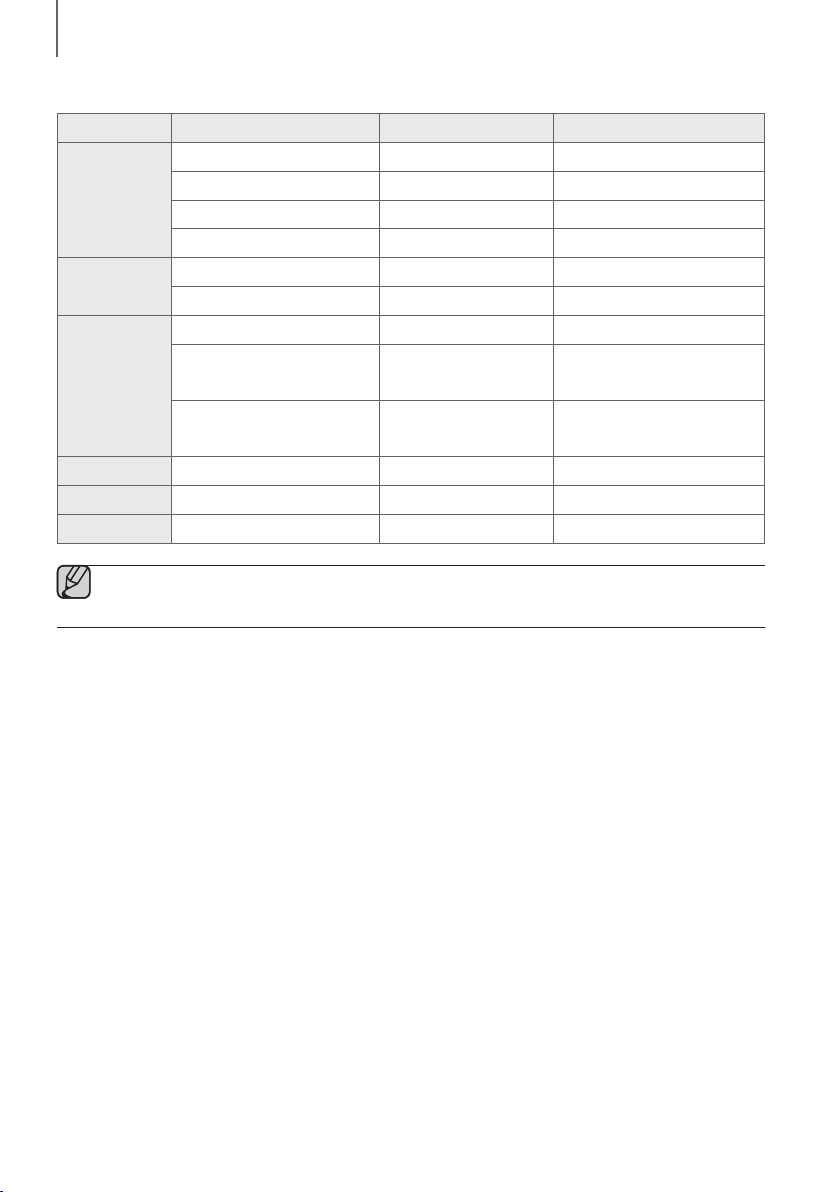
2120
ANSCHLÜSSE
● Kompatibilitätsliste:
Verlängerung Codec Samplingrate Bitrate
*.mp3
MPEG 1 Layer2 16KHz ~ 48KHz 80 ~ 320kbps
MPEG 1 Layer3 16KHz ~ 48KHz 80 ~ 320kbps
MPEG 2 Layer3 16KHz ~ 48KHz 80 ~ 320kbps
MPEG 2,5 Layer3 16KHz ~ 48KHz 80 ~ 320kbps
*.wma
Wave_Format_MSAudio1 16KHz ~ 48KHz 56 ~ 128kbps
Wave_Format_MSAudio2 16KHz ~ 48KHz 56 ~ 128kbps
*.aac
AAC 16KHz ~ 96KHz 48 ~ 320kbps
AAC-LC 16KHz ~ 96KHz
128 ~ 192kbps
5.1-Kanal 320kbps
HE-AAC 24KHz ~ 96KHz
48 ~ 64kbps
5.1-Kanal 160kbps
*.wav
- 16KHz ~ 48KHz Bis zu 3000kbps
*.ogg
OGG 1.1.0 16KHz ~ 48KHz 50kbps~500kbps
*.flac
FLAC 1.1.0, FLAC 1.2.1 16KHz ~ 96KHz Bis zu 3000kbps
● Sind zu viele Ordner und Dateien auf dem Speichermedium gespeichert, kann es einige Zeit dauern, bis die
Soundbar auf die Dateien zugreifen und sie abspielen kann.
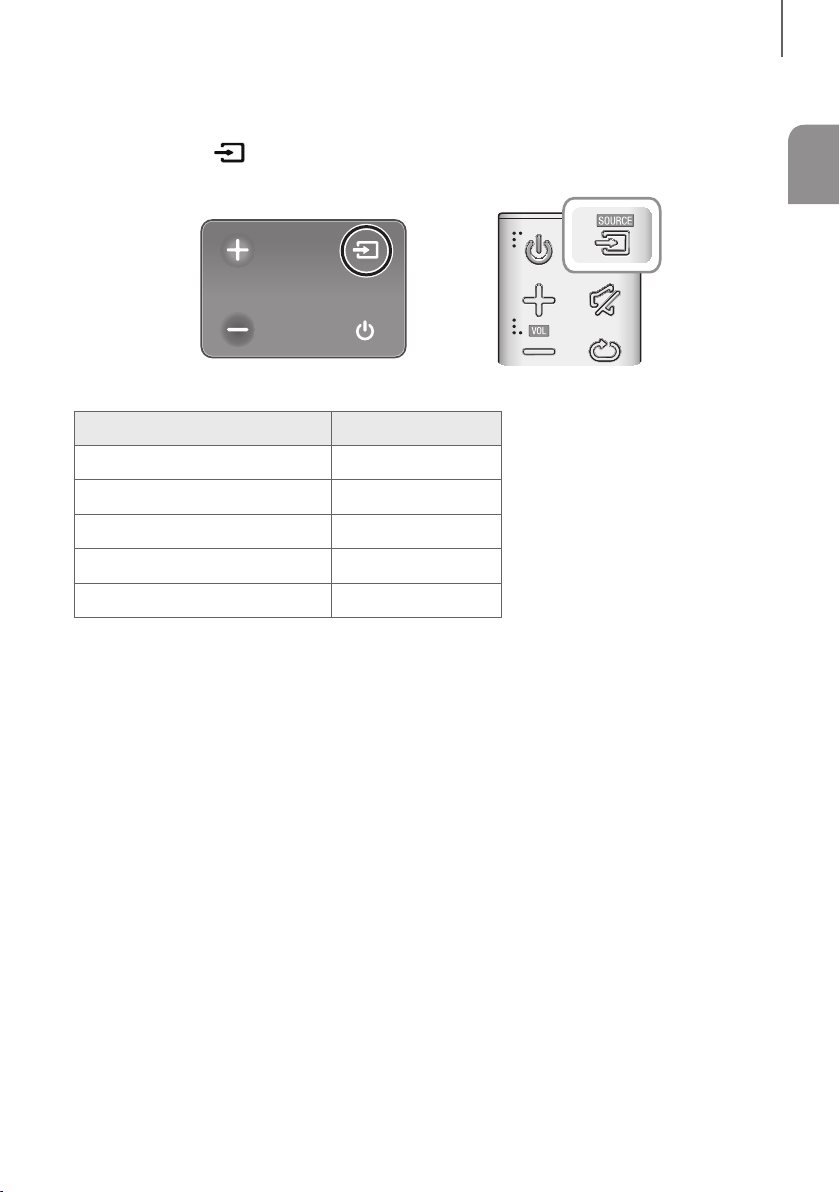
21
DEU
FUNKTIONEN
EINGANGSMODUS
Drücken Sie die Taste auf der rechten Seite des Hauptgeräts oder die Taste SOURCE auf der
Fernbedienung, um den gewünschten Modus auszuwählen.
Rechtes Ende der Soundbar
Eingangsmodus Anzeige
Optischer Digital Eingang
D.IN
AUX-Eingang
AUX
BLUETOOTH Modus
BT
TV SoundConnect
TV
USB Modus
USB
AUTO POWER DOWN-FUNKTION
Das Gerät schaltet sich unter den folgenden Bedingungen automatisch ab:
● D.IN / BT / TV / USB Modus
- Wenn seit 5 Minuten kein Audiosignal empfangen wurde.
● AUX Modus
- Wenn seit 5 Minuten kein AUX-Kabel angeschlossen ist.
- Wenn bei angeschlossenem AUX-Kabel für 8 Stunden keine Taste betätigt wird. (Auto Power Down-Funktion
kann nur in diesem Fall ausgeschaltet werden.)
Um die Auto Power Down-Funktion während des AUX-Modus auszuschalten, drücken und halten Sie die
p
-Taste für 5 Sekunden gedrückt. Auf dem anzeige erscheint ON - AUTO POWER DOWN / OFF - AUTO
POWER DOWN.
FUNKTIONEN
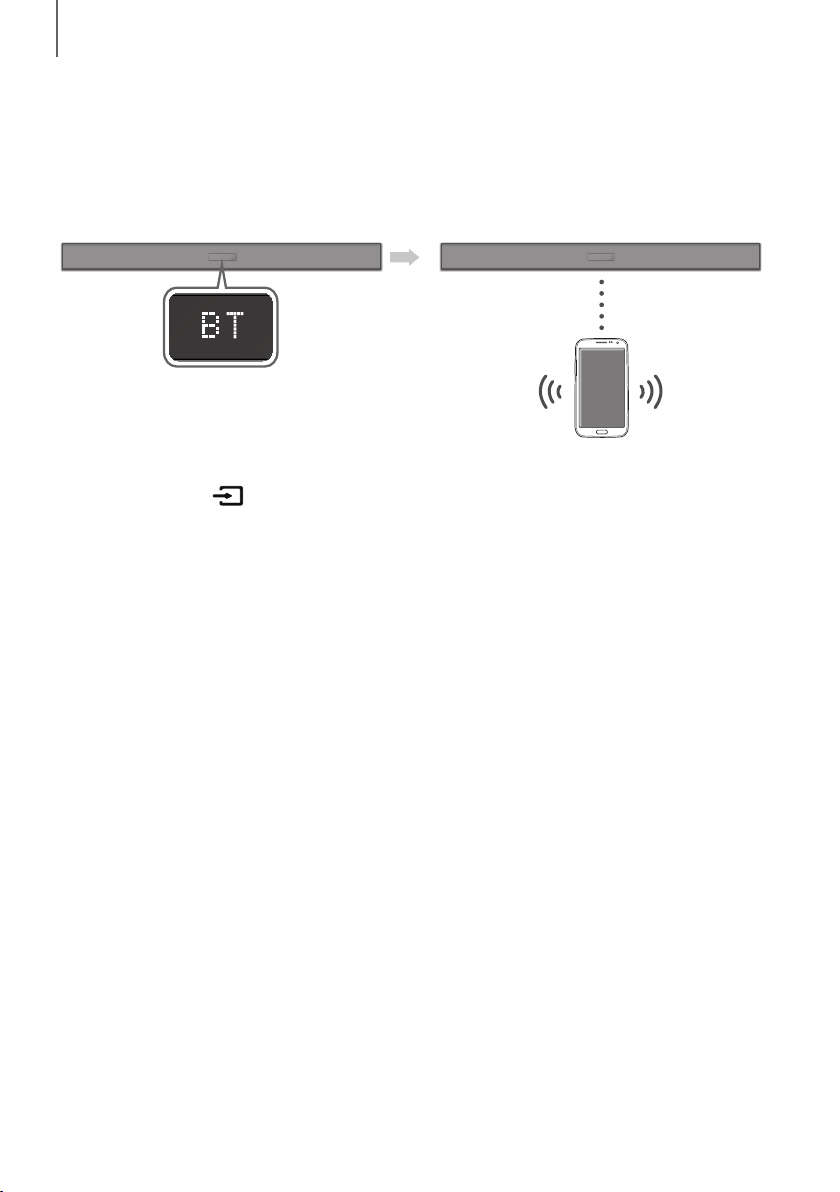
2322
FUNKTIONEN
BLUETOOTH
Sie können an der Soundbar ein Bluetooth-Gerät anschließen und Musik mit Stereoton genießen – ohne Kabelsalat!
ANSCHLIESSEN VON SOUNDBAR AN EIN BLUETOOTH-GERÄT
Vergewissern Sie sich, dass das Bluetooth-Gerät die Stereo-Headsets Funktion unterstützt.
Bluetooth-Gerät
Verbinden
1. Drücken Sie die Taste auf der rechten Seite der Soundbar oder die Taste SOURCE auf der Fernbedienung,
um den Modus BT auszuwählen.
• Auf dem Frontdisplay der Soundbar wird BT READY angezeigt.
2. Wählen Sie auf dem Bluetooth-Gerät, mit dem Sie eine Verbindung herstellen möchten, das Bluetooth-Menü aus.
(Weitere Informationen dazu finden Sie der Bedienungsanleitung des Bluetooth- Geräts.)
3. Wählen Sie "[AV] Samsung Soundbar Kxxx K-Series" aus der Liste.
• Wenn der Soundbar an das Bluetooth-Gerät angeschlossen ist, wird [Bluetooth Gerätename]
BT auf dem
Frontdisplay angezeigt.
• Der Gerätename kann nur auf Englisch angezeigt werden. Ein Unterstrich " _ " wird angezeigt, wenn der Name
nicht auf Englisch ist.
• Wenn der Verbindungsaufbau zwischen dem Bluetooth-Gerät und Soundbar fehlgeschlagen ist, entfernen Sie
das vom Bluetooth-Gerät gefundene "[AV] Samsung Soundbar Kxxx K-Series" und führen Sie die Suche
erneut durch.
4. Starten sie auf dem verbundenen Gerät die Musikwiedergabe.
• Sie können nun die vom Bluetooth-Gerät wiedergegebenen Musiktitel über das Soundbar System hören.
• Im BT-Modus sind die Funktionen Wiedergabe / Pause / Weiter / Zurück nicht verfügbar. Diese Funktionen
stehen jedoch auf Bluetooth-Geräten zur Verfügung, die AVRCP unterstützen.
23
DEU
FUNKTIONEN
● Wenn Sie bei der Verbindung eines Bluetooth-Geräts nach der PIN-Nummer gefragt werden, geben Sie
<0000> ein.
● Es kann nur eine Verbindung zu einem Bluetooth-Gerät hergestellt werden.
● Die Bluetooth-Verbindung wird unterbrochen, wenn der Soundbar ausgeschaltet wird.
● Der Soundbar führt unter den folgenden Umständen eventuell die Suche nach Bluetooth-Geräten oder den
Verbindungsaufbau nicht fehlerfrei durch:
- Wenn sich Soundbar in einem starken elektrischen Feld befindet.
- Wenn mit mehreren Bluetooth-Geräten gleichzeitig eine Verbindung zum Soundbar hergestellt wurde.
- Wenn das Bluetooth-Gerät ausgeschaltet oder nicht angeschlossen ist oder nicht richtig funktioniert.
● Beachten Sie, dass Geräte, wie Mikrowellenherde, WLAN-Geräte, Leuchtstoffröhren und Gasöfen
denselben Frequenzbereich wie Bluetooth-Geräte verwenden, wodurch es zu Interferenzen kommen kann.
● Der Soundbar unterstützt SBC data (44,1kHz, 48kHz).
● Nur an ein Bluetooth-Gerät anschließen, das die A2DP (AV) Funktion unterstützt.
● Es kann keine Verbindungen zwischen dem Soundbar und Bluetooth-Geräten hergestellt werden, die nur
die HF (Freisprech) Funktion unterstützen.
● Nachdem Sie eine Verbindung zwischen der Soundbar und einem Bluetooth-Gerät hergestellt haben, wird
durch Auswahl von "[AV] Samsung Soundbar Kxxx K-Series" aus der Liste der gefundenen Geräte die
Soundbar automatisch in den BT-Modus umgeschaltet.
- Ist nur verfügbar, wenn der Soundbar in der Liste der verbundenen Geräte des Bluetooth-Geräts
aufgelistet ist. (Es muss zuvor mindestens einmal eine Verbindung zwischen dem Soundbar und dem
Bluetooth-Gerät hergestellt worden sein.)
● Der Soundbar erscheint nur in der Liste der vom Bluetooth-Gerät gefundenen Geräte, wenn der Soundbar
BT READY anzeigt.
● Im TV SoundConnect Modus kann der Soundbar keine Verbindung zu einem anderen Bluetooth-Gerät
aufbauen.
BLUETOOTH POWER ON (BLUETOOTH POWER)
Wenn die Funktion das Gerät über Bluetooth einzuschalten aktiviert und der Soundbar ausgeschaltet ist und ein
Bluetooth-Gerät, mit dem bereits zuvor eine Verbindung mit dem Soundbar hergestellt wurde, versucht, eine
Verbindung mit dem Soundbar herzustellen, schaltet sich der Soundbar automatisch ein.
1.
Bei eingeschalteter Soundbar die Bluetooth POWER Taste auf der Fernbedienung drücken.
2. Auf dem Display der Soundbar erscheint ON - BLUETOOTH POWER.
ABTRENNEN DES BLUETOOTH-GERÄTS VOM SOUNDBAR
Sie können die Verbindung zwischen dem Bluetooth-Gerät und Soundbar trennen. Die Anleitung hierzu finden Sie in
der Bedienungsanleitung des Bluetooth-Geräts.
● Verbindung zum Soundbar wird getrennt.
● Wenn Soundbar vom Bluetooth-Gerät getrennt ist, wird auf der Soundbar Anzeige BT DISCONNECTED angezeigt.
ABTRENNEN DES SOUNDBAR VOM BLUETOOTH-GERÄT
Drücken Sie die Taste SOURCE auf der Fernbedienung oder die Taste auf der rechten Seite des Geräts, um
vom Modus BT in einen anderen Modus zu wechseln oder die Soundbar auszuschalten.
● Das angeschlossene Bluetooth-Gerät wartet eine gewisse Zeit auf die Antwort des Soundbar, bevor es die
Verbindung unterbricht. (Je nach Bluetooth-Gerät kann der Zeitraum bis zur Trennung der Verbindung variieren)

2524
FUNKTIONEN
● Bei einer Bluetooth Verbindung geht die Bluetooth Verbindung verloren, wenn der Abstand zwischen dem
Soundbar und dem Bluetooth Gerät 10 m überschreitet.
● Wenn sich der Soundbar für mehr als 5 Minuten im Bereitschaftszustand befindet, schaltet er sich
automatisch aus.
+ Mehr über Bluetooth
Bluetooth ist eine neue Technologie, mit der es möglich ist, Bluetooth-fähige Geräte über eine kurze Funkverbindung
miteinander zu verbinden.
● Ein Bluetooth Gerät kann Störungen erzeugen oder falsch funktionieren, wenn:
- Das Empfangs-/Sendesystem eines Bluetooth-Geräts oder der Haupteinheit mit einem Körperteil berührt wird.
- Die Funkübertragung durch Wände, Ecken oder Bürotrennwände behindert wird.
- Interferenzen mit Geräten auftreten, welche dasselbe Frequenzband verwenden, wie medizinische Geräte,
Mikrowellenherde oder Funknetzwerke.
● Wenn Sie Soundbar über das Bluetooth Gerät betreiben möchten, stellen Sie sicher, dass der Abstand kurz
gehalten wird.
● Mit zunehmender Entfernung zwischen Soundbar und Bluetooth-Gerät nimmt die Qualität der Bluetooth-
Verbindung ab. Wenn die Distanz den Bluetooth-Betriebsbereich übersteigt, geht die Verbindung verloren.
● In Gebieten mit geringer Empfangssensibilität ist die Funktion der Bluetooth-Verbindung möglicherweise
eingeschränkt.
● Die Bluetooth-Verbindung funktioniert nur mit Geräten in unmittelbarer Nähe. Die Verbindung wird automatisch
unterbrochen, wenn dieser Radius überschritten wird. Selbst innerhalb dieses Radius kann die Klangqualität durch
Hindernisse wie Mauern oder Türen beeinträchtigt werden.
● Dieses Drahtlosgerät kann während des Betriebs elektrische Störungen verursachen.
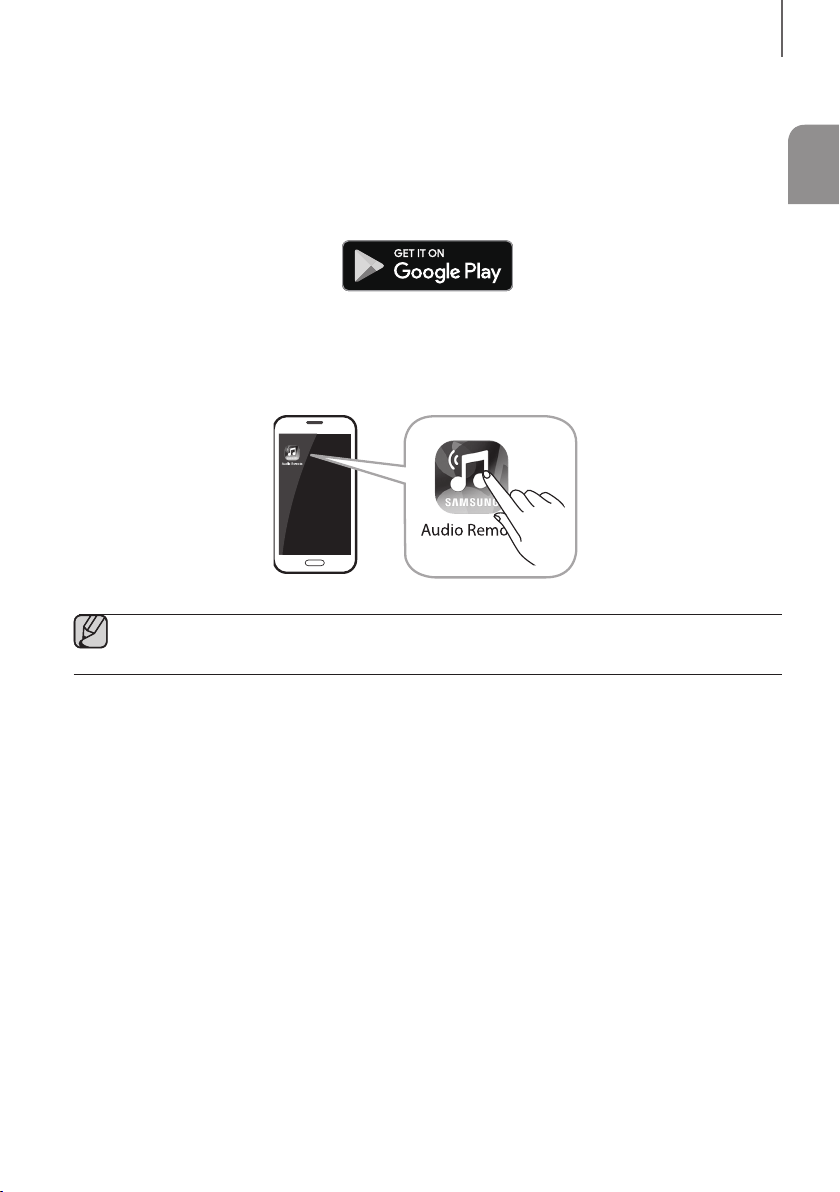
25
DEU
FUNKTIONEN
VERWENDEN DER SAMSUNG AUDIO REMOTE APP
+ Installieren der Samsung Audio Remote App
Um die Soundbar mit Ihrem Smartphone oder Tablet sowie der Samsung Audio Remote App zu steuern, laden Sie die
App aus dem Google Play Store herunter.
Im Play Store suchen nach : Samsung Audio Remote
+ Starten der Samsung Audio Remote App
Tippen Sie zum Starten und Verwenden der Samsung Audio Remote App auf dem Smartphone oder Tablet auf das
Audio Remote-Symbol und folgen Sie der Bildschirmanleitung.
● Die Samsung Audio Remote App ist nur kompatibel mit Android-Mobiltelefonen und Mobilgeräten mit
Android OS 3.0 oder höher.
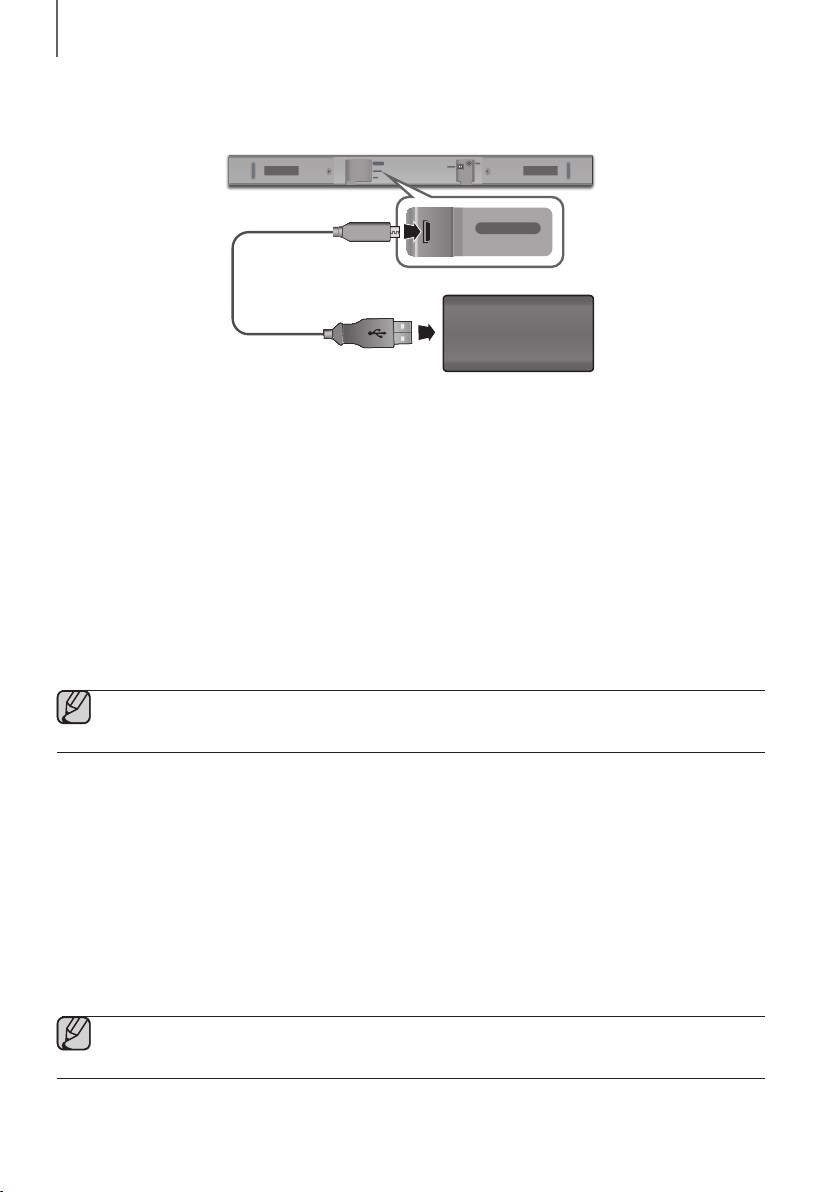
2726
FUNKTIONEN
SOFTWARE AKTUALISIERUNG
DIGITAL AUDIO IN
(OPTICAL)
USB (5V 0.5A)
AUX IN
SUBWOOFER
DC 24V
DIGITAL AUDIO IN
(OPTICAL)
USB (5V 0.5A)
AUX IN
Micro-USB-auf-USB-
Adapterkabel
(nicht im Lieferumfang
enthalten)
Speichergerät
Es ist möglich, dass Samsung in der Zukunft Firmware-Updates für die Soundbar anbietet.
Wenn eine Aktualisierung angeboten wird, können Sie die Firmware aktualisieren, indem Sie ein Speichergerät mit der
darauf gespeicherten Firmware-Aktualisierung an den USB-Anschluss Ihrer Soundbar anschließen.
Beachten Sie, dass, wenn mehrere Update-Dateien vorhanden sind, Sie diese einzeln auf das Speichermedium laden
müssen und diese nacheinander zur Aktualisierung der Firmware verwenden müssen.
Besuchen Sie bitte Samsung.com oder setzen Sie sich mit Samsung Kundendienst in Verbindung, um weitere
Informationen über das Herunterladen von Aktualisierungen zu erhalten.
UPDATEVERFAHREN
1. Verbinden Sie ein Micro-USB-auf-USB-Adapterkabel mit einem Micro-USB-2.0-Stecker (Typ B) an einem Ende
und einer Standard-USB-2.0-Buchse (Typ A) am anderen Ende mit dem Micro-USB-Anschluss der Soundbar.
● Das Micro-USB-auf-USB-Adapterkabel ist separat erhältlich. Wenden Sie sich hierzu an ein Servicezentrum
oder den Kundendienst von Samsung.
2. Führen Sie die untenstehenden Schritte zum Herunterladen der Produktsoftware aus:
Gehen Sie zur Samsung-Webseite unter (samsung.com/sec) suchen Sie nach dem Modellnamen - wählen Sie
die Option Kundensupport aus (der Name der Option ist vorbehaltlich etwaiger Änderungen)
3. Speichern Sie die heruntergeladene Software auf einem USB-Stick und wählen Sie „hier extrahieren“, um den
Ordner zu entzippen.
4. Schalten Sie die Soundbar aus und verbinden Sie das Speichermedium, dass die Softwareaktualisierung enthält,
mit dem Micro-USB-Adapterkabel.
5. Schalten Sie die Soundbar ein. Innerhalb von 3 Minuten wird UPDATE angezeigt und die Aktualisierung beginnt.
6. Nachdem der Vorgang abgeschlossen ist, wird die Stromversorgung der Soundbar ausgeschaltet. Drücken Sie in
diesem Zustand für 5 Sekunden die
p
-Taste auf der Fernbedienung.
● Dieses Gerät verfügt über die DUAL BOOT Funktion. Falls die Aktualisierung der Firmware fehlschlägt,
können Sie die Firmware erneut aktualisieren.
27
DEU
FUNKTIONEN
WENN DAS UPDATE NICHT ANGEZEIGT WIRD
1. Schalten Sie die Soundbar aus und schließen Sie das USB Speichergerät mit den Update-Dateien an den
USB-Anschluss der Soundbar an.
2. Ziehen Sie den Netzstecker und stecken Sie ihn wieder in die Steckdose.
● Verbinden Sie das Speichermedium, dass die Firmware-Aktualisierung enthält, mit dem USB-Anschluss
des Hauptgerätes.
● Die Firmware Aktualisierung funktioniert eventuell nicht fehlerfrei, wenn von der Soundbar unterstützte
Audio-Dateien auf dem Gerät gespeichert sind.
● Während der Aktualisierung nicht die Stromzufuhr unterbrechen oder das Speichermedium entfernen.
● Nachdem die Aktualisierung abgeschlossen ist, wird die Benutzereinrichtung in der Soundbar initialisiert.
Sie sollten sich Ihre Einstellungen notieren, um sie nach dem Update wieder herstellen zu können.
Wenn die Softwareaktualisierung fehlschlägt, überprüfen Sie, dass kein Defekt beim Speichermedium
vorliegt.
● Mac OS-Benutzer sollten MS-DOS (FAT) als USB-Format verwenden.
● Es werden, abhängig vom Hersteller, möglicherweise nicht alle Speichermedien unterstützt.
2928
FEHLERSUCHE
FEHLERSUCHE
Bevor Sie sich an den Kundendienst wenden, überprüfen Sie bitte die folgenden Punkte.
Das Gerät lässt sich nicht einschalten.
• Ist der Netzstecker an eine Steckdose
angeschlossen?
¼ Schließen Sie den Netzstecker an die Steckdose an.
Das Gerät reagiert nicht auf das Drücken von Tasten.
• Ist die Luft elektrostatisch aufgeladen? ¼ Ziehen Sie den Netzstecker, und schließen Sie ihn
wieder an die Steckdose an.
Es wird kein Ton wiedergegeben.
• Wurde das Gerät auf stumm geschalten?
• Ist die Lautstärke auf minimal eingestellt?
¼ Drücken Sie die (Stummschalten) Taste, um die
Funktion zu deaktivieren.
¼ Erhöhen Sie die Lautstärke.
Die Fernbedienung funktioniert nicht.
• Sind die Batterien leer?
• Ist die Entfernung zwischen Fernbedienung und
Gerät zu groß?
¼ Legen Sie neue Batterien ein.
¼ Näher an das Gerät heranrücken.
Die Herstellung der TV SoundConnect Verbindung ist fehlgeschlagen.
• Wird TV SoundConnect von Ihrem Fernsehgerät
unterstützt?
• Verfügen Sie über die neueste Firmware Version?
• Tritt ein Fehler beim Verbindungsaufbau auf?
¼ TV SoundConnect wird von bestimmten Samsung
Fernsehgeräten unterstützt, die nach 2012 auf den
Markt gekommen sind. Prüfen Sie, ob Ihr
Fernsehgerät TV SoundConnect unterstützt.
¼ Aktualisieren Sie die Firmware Ihres Fernsehgeräts
auf die neueste Version.
¼ Setzen Sie sich mit dem Samsung Kundendienst in
Verbindung.
¼ Setzen Sie die TV SoundConnect-Verbindung zurück
und stellen Sie erneut eine Verbindung her. Um die
TV SoundConnect-Verbindung zurückzusetzen,
halten Sie die Taste
p
5 Sekunden lang gedrückt.
FEHLERSUCHE
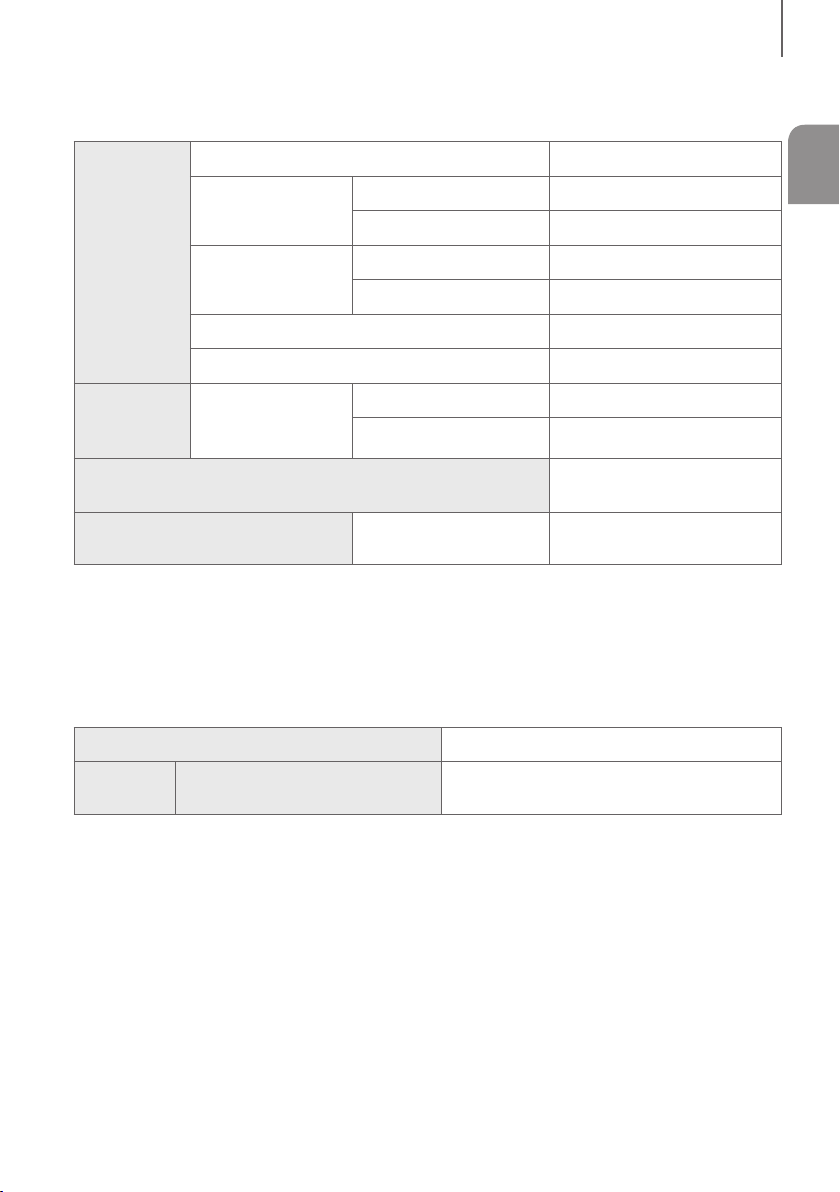
29
DEU
ANHANG
TECHNISCHE DATEN
ALLGEMEIN
USB
5V / 0,5A
Gewicht
Haupteinheit
1,5 kg
Subwoofer (PS-WM10)
2,8 kg
Abmessungen
(B × H × T)
Haupteinheit
907,5 x 53,5 x 70,5 mm
Subwoofer (PS-WM10)
155,0 x 300,0 x 285,0 mm
Betriebstemperatur
+5 °C bis +35 °C
Zulässige Luftfeuchtigkeit
10 % bis 75 %
VERSTÄRKER
Nennausgangsleistung
Haupteinheit
35W x 2, 6 OHM
Subwoofer (PS-WM10)
60W, 3 OHM
Unterstützte Wiedergabeformate
(DTS 2.0-Ton wird im DTS-Format wiedergegeben.)
LPCM 2ch, Dolby Audio™
(unterstützt Dolby® Digital), DTS
AUSGANGSLEISTUNG DES
DRAHTLOSGERÄTS
BT max. Transmitterleistung
100mW bei 2,4GHz – 2,4835GHz
* Design und technische Daten können sich ohne vorherige Ankündigung ändern.
* Nominelle Spezifikation
- Samsung Electronics Co., Ltd behält sich das Recht auf unangekündigte Änderungen vor.
- Gewicht und Abmessungen können von den Angaben abweichen.
- Weitere Informationen zur Stromversorgung und zum Stromverbrauch finden Sie auf dem Etikett am Gerät.
(Beschriftung : Unterer Teil des Soundbar-Hauptgeräts)
Gesamtstromverbrauch im Bereitschaftszustand (W)
2,9W
Bluetooth Anschlussdeaktivierungsmethode
Drücken Sie die „Bluetooth POWER“-Taste auf der
Fernbedienung im „BT“ -Modus.
a Bekanntmachung zu Open Source Lizenzen
- Wenn Sie Fragen bezüglich des Themas Open Source haben, wenden Sie sich bitte per E-Mail unter der
Adresse an Samsung. (oss.r[email protected]).
ANHANG

30
ANHANG
LIZENZ
Manufactured under license from Dolby Laboratories. Dolby, Dolby Audio, Pro Logic, and the double-D symbol are
trademarks of Dolby Laboratories.
For DTS patents, see http://patents.dts.com. Manufactured under license from DTS Licensing Limited. DTS, the
Symbol, DTS in combination with the Symbol, and DTS 2.0 Channel are registered trademarks or trademarks of DTS,
Inc. in the United States and/or other countries. © DTS, Inc. All Rights Reserved.
Samsung Electronics erklärt hiermit, dass dieses Gerät der Richtlinie 2014/53/EU entspricht.
Der vollständige Text der EU-Konformitätserklärung ist unter folgender Internetadresse
abrufbar: http://www.samsung.com. Geben Sie unter Support > Produktsupport suchen den
Modellnamen ein.
Dieses Gerät kann in allen EU-Ländern betrieben werden.

Kontakt zu SAMSUNG WORLD WIDE
Falls Sie Fragen oder Anregungen zu Samsung-Produkten haben, freuen wir uns über Ihre Kontaktaufnahme mit der
Samsung-Kundenbetreuung.
[Korrekte Entsorgung der Batterien dieses
Produkts]
(Gilt für Länder mit Abfalltrennsystemen)
Die Kennzeichnung auf der Batterie bzw. auf der dazugehörigen
Dokumentation oder Verpackung gibt an, dass die Batterie zu diesem
Produkt nach seiner Lebensdauer nicht zusammen mit dem normalen
Haushaltsmüll entsorgt werden darf. Wenn die Batterie mit den
chemischen Symbolen Hg, Cd oder Pb gekennzeichnet ist, liegt der
Quecksilber-, Cadmium- oder Blei-Gehalt der Batterie über den in der
EG-Richtlinie 2006/66 festgelegten Referenzwerten. Wenn Batterien
nicht ordnungsgemäß entsorgt werden, können sie der menschlichen
Gesundheit bzw. der Umwelt schaden.
Bitte helfen Sie, die natürlichen Ressourcen zu schützen und die
nachhaltige Wiederverwertung von stofflichen Ressourcen zu fördern,
indem Sie die Batterien von anderen Abfällen getrennt über Ihr örtliches
kostenloses Altbatterie- Rücknahmesystem entsorgen.
Korrekte Entsorgung von Altgeräten
(Elektroschrott)
(Gilt für Länder mit Abfalltrennsystemen)
Die Kennzeichnung auf dem Produkt, Zubehörteilen bzw. auf der
dazugehörigen Dokumentation gibt an, dass das Produkt und
Zubehörteile (z. B. Ladegerät,Kopfhörer, USB-Kabel) nach ihrer
Lebensdauer nicht zusammen mit dem normalen Haushaltsmüll entsorgt
werden dürfen. Entsorgen Sie dieses Gerät und Zubehörteile bitte
getrennt von anderen Abfällen, um der Umwelt bzw. der menschlichen
Gesundheit nicht durch unkontrollierte Müllbeseitigung zu schaden.
Helfen Sie mit, das Altgerät und Zubehörteile fachgerecht zu entsorgen,
um die nachhaltige Wiederverwertung von stofflichen Ressourcen zu
fördern.
Private Nutzer wenden sich an den Händler, bei dem das Produkt
gekauft wurde, oder kontaktieren die zuständigen Behörden, um in
Erfahrung zu bringen, wo Sie das Altgerät bzw. Zubehörteile für eine
umweltfreundliche Entsorgung abgeben können.
Gewerbliche Nutzer wenden sich an ihren Lieferanten und gehen nach
den Bedingungen des Verkaufsvertrags vor. Dieses Produkt und
elektronische Zubehörteile dürfen nicht zusammen mit anderem
Gewerbemüll entsorgt werden.
Für Informationen über die Umweltverpflichtungen und produktspezifischen regulatorischen Verpflichtungen von Samsung wie z. B. REACH, WEEE,
Batterien, besuchen Sie: http://www.samsung.com/uk/aboutsamsung/samsungelectronics/corporatecitizenship/data_corner.html
Country Contact Centre
Web Site
`
Europe
UK 0330 SAMSUNG (7267864) www.samsung.com/uk/support
IRELAND (EIRE) 0818 717100 www.samsung.com/ie/support
GERMANY 06196 77 555 77 www.samsung.com/de/support
FRANCE 01 48 63 00 00 www.samsung.com/fr/support
ITALIA 800-SAMSUNG (800.7267864) www.samsung.com/it/support
SPAIN 0034902172678 www.samsung.com/es/support
PORTUGAL 808 207 267 www.samsung.com/pt/support
LUXEMBURG 261 03 710 www.samsung.com/be_fr/support
NETHERLANDS 088 90 90 100 www.samsung.com/nl/support
BELGIUM 02-201-24-18
www.samsung.com/be/support (Dutch)
www.samsung.com/be_fr/support (French)
NORWAY 815 56480 www.samsung.com/no/support
DENMARK 707 019 70 www.samsung.com/dk/support
FINLAND 030-6227 515 www.samsung.com/fi/support
SWEDEN 0771 726 786 www.samsung.com/se/support
POLAND
801-172-678* lub +48 22 607-93-33*
* (koszt połączenia według taryfy
operatora)
http://www.samsung.com/pl/support/
HUNGARY 0680SAMSUNG (0680-726-7864) www.samsung.com/hu/support
AUSTRIA
0800-SAMSUNG (0800-7267864)
[Only for Dealers] 0810-112233
www.samsung.com/at/support
Country Contact Centre
Web Site
SWITZERLAND 0800 726 78 64 (0800-SAMSUNG)
www.samsung.com/ch/support (German)
www.samsung.com/ch_fr/support (French)
CZECH 800 - SAMSUNG (800-726786) www.samsung.com/cz/support
SLOVAKIA 0800 - SAMSUNG (0800-726 786) www.samsung.com/sk/support
CROATIA 072 726 786 www.samsung.com/hr/support
BOSNIA 055 233 999
www.samsung.com/support
MONTENEGRO 020 405 888
SLOVENIA 080 697 267 (brezplačna številka) www.samsung.com/si/support
SERBIA 011 321 6899 www.samsung.com/rs/support
ALBANIA 045 620 202 www.samsung.com/al/support
BULGARIA
*3000 Цена в мрежата
0800 111 31 , Безплатна телефонна
линия
www.samsung.com/bg/support
ROMANIA
*8000 (apel in retea)
08008-726-78-64 (08008-SAMSUNG)
Apel GRATUIT
www.samsung.com/ro/support
CYPRUS 8009 4000 only from landline, toll free
www.samsung.com/gr/support
GREECE
80111-SAMSUNG (80111 726 7864)
only from land line
(+30) 210 6897691 from mobile
and land line
LITHUANIA 8-800-77777 www.samsung.com/lt/support
LATVIA 8000-7267 www.samsung.com/lv/support
ESTONIA 800-7267 www.samsung.com/ee/support
Manuel d'utilisation
Imaginez les possibilités
Merci d’avoir choisi un appareil Samsung.
Pour recevoir une assistance plus complète, veuillez enregistrer votre produit sur
www.samsung.com/register
© 2016 Samsung Electronics Co., Ltd. Tous droits réservés.
HW-K335
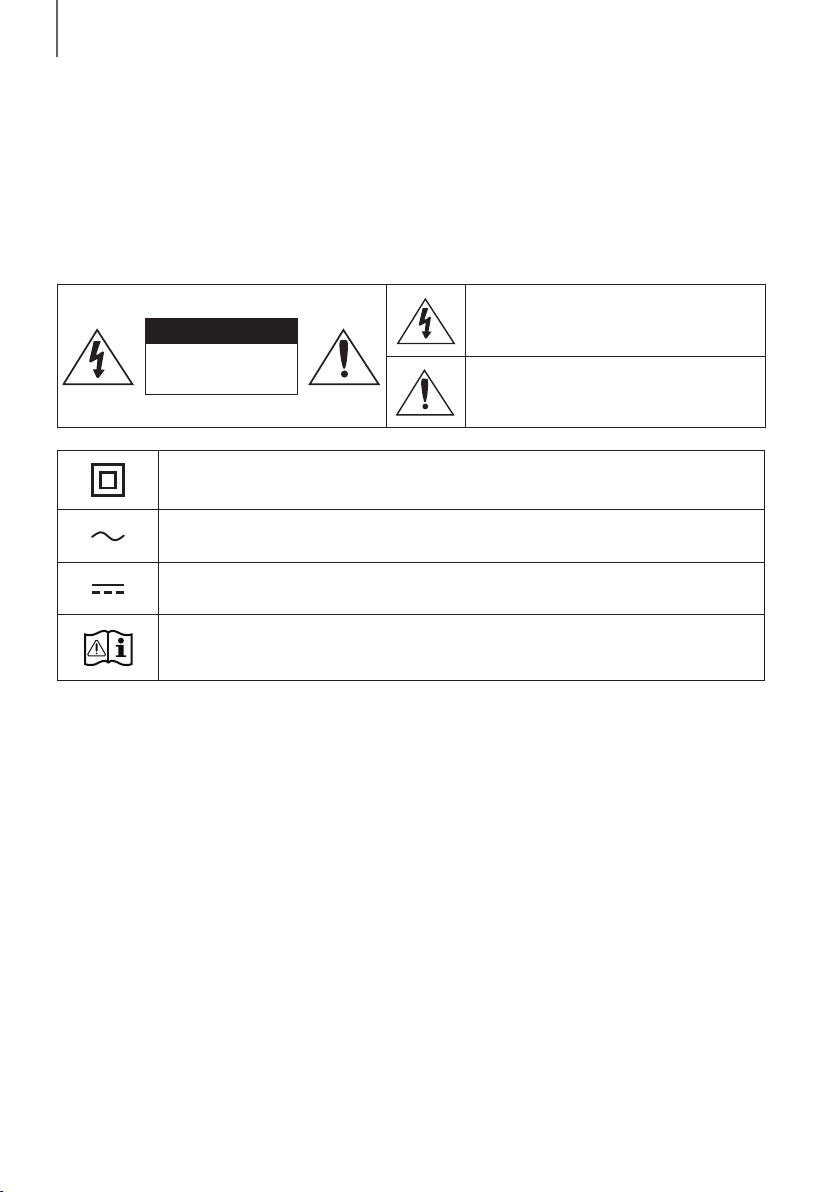
32
DÉMARRAGE
INFORMATIONS RELATIVES À LA
SÉCURITÉ
AVERTISSEMENTS
POUR ÉVITER LES RISQUES DE CHOC ÉLECTRIQUE, NE DÉMONTEZ PAS LE CAPOT.
L’APPAREIL NE CONTIENT PAS DE PIÈCES RÉPARABLES PAR L’UTILISATEUR ; S’ADRESSER À UN SERVICE
APRÈS-VENTE QUALIFIÉ.
ATTENTION
RISQUE DE CHOC
ÉLECTRIQUE. NE PAS
OUVRIR
Ce symbole indique que ce produit est alimenté
par haute tension. Il est dangereux de toucher la
moindre pièce située à l'intérieur de ce produit.
Ce symbole indique qu'une documentation
importante relative au fonctionnement et à
l'entretien est fournie avec le produit.
Produit de classe II : ce symbole indique qu'aucun branchement de sécurité à la terre (prise de
terre) n'est requis.
Tension CA : ce symbole indique que la tension nominale indiquée par le symbole est une tension
CA.
Tension CC : ce symbole indique que la tension nominale indiquée par le symbole est une tension
CC.
Mise en garde, Consulter le mode d'emploi : ce symbole avertit l'utilisateur qu'il doit consulter le
manuel d'utilisation pour en savoir plus sur les informations relatives à la sécurité.
AVERTISSEMENT: Afin de diminuer les risques d’incendie ou de choc électrique, n’exposez pas cet appareil à la
pluie ou à l’ humidité.
ATTENTION : Pour prévenir les chocs électriques, branchez la fiche au fond, en prenant soin d'insérer la tige large
dans la fente large.
• Cet appareil doit toujours être branché à une prise terre.
• Pour déconnecter l’appareil du circuit principal, la prise doit être débranchée de la prise principale ; il est de ce fait
nécessaire que la prise principale soit facile d'accès.
ATTENTION
• Évitez toute projection d’eau sur l’appareil. Ne posez jamais d’objet contenant un liquide (ex : un vase) dessus.
• Pour éteindre complètement l'appareil, vous devez retirer le cordon d'alimentation de la prise murale. Par
conséquent, le cordon d'alimentation doit être facilement accessible à tout moment.
DÉMARRAGE
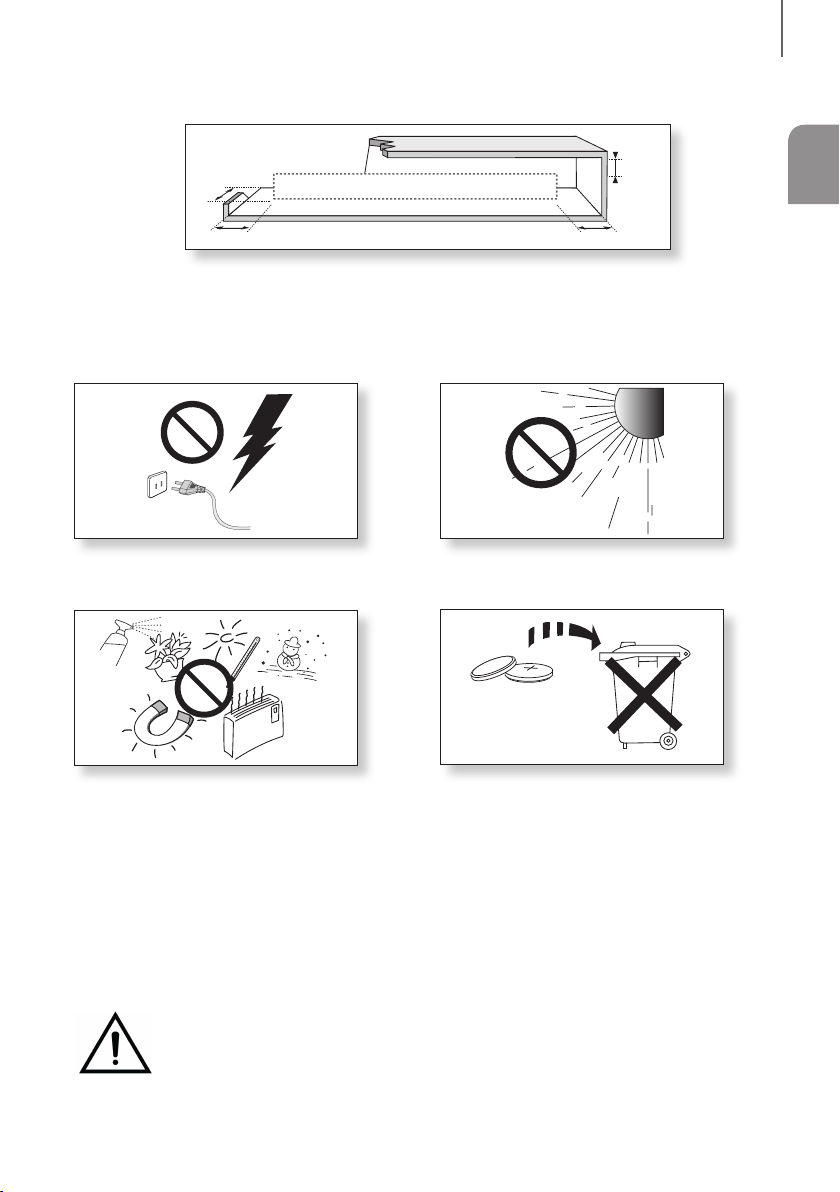
3
FRA
DÉMARRAGE
PRÉCAUTIONS
99.1mm 99.1mm
68.6
mm
99.1mm
Assurez-vous que l'alimentation électrique de votre maison est conforme à la plaque d'identification située au dos
de votre produit. Posez votre produit à plat sur un meuble stable en veillant à laisser un espace de 7 à 10 cm
autour de l'appareil afin d’assurer une ventilation correcte de celui-ci. Faites attention à ne pas obstruer les orifices
de ventilation. Ne posez pas l'ensemble sur un amplificateur ou un autre appareil susceptible de chauffer. Cet
ensemble est conçu pour une utilisation en continu. Pour entièrement éteindre l'appareil, débranchez la fiche CA
de la prise murale. Débranchez l'appareil si vous envisagez de ne pas l'utiliser durant une longue période.
En cas d'orage, débranchez la fiche de l'appareil de la
prise murale. Les surtensions occasionnées par l'orage
pourraient endommager votre appareil.
Protégez le produit de l'humidité (comme les vases) et
d'une chaleur excessive (comme une cheminée) ou de
tout équipement capable de créer des champs
magnétiques ou électriques. Débranchez le câble
d'alimentation en cas de dysfonctionnement. Votre
produit n'est pas prévu pour un usage industriel. Ce
produit ne peut être utilisé qu'à des fins personnelles.
Une condensation peut se former si le produit ou un
disque a été stocké à basse température. Si vous devez
transporter l'ensemble pendant l'hiver, attendez environ
2 heures que l'appareil ait atteint la température de la
pièce avant de l'utiliser.
N'exposez pas l'ensemble aux rayons directs du soleil ou
à toute autre source de chaleur. Ceci pourrait entraîner une
surchauffe et un dysfonctionnement de l’appareil.
Les piles utilisées dans ce produit peuvent contenir des
produits ch miques dangereux pour l'environnement. Ne
jetez pas les piles dans votre poubelle habituelle. Ne
vous débarrassez pas des piles en les faisant brûler. Ne
court-circuitez pas, ne désassemblez pas ni ne faites pas
surchauffer les batteries. Le remplacement incorrect de
la batterie entraîne un risque d'explosion. Ne la
remplacez que par une batterie du même type.
ATTENTION, NE PAS INGÉRER LA BATTERIE, RISQUE DE BRÛLURE CHIMIQUE,
[Télécommande fournie avec] Ce produit contient une pile par pièce/bouton.
Si vous avalez la pile par pièce/bouton, cela peut entraîner des brûlures internes graves en seulement
2 heures et vous pouvez mourir. Maintenez les piles neuves et usagées hors de portée des enfants. Si
le compartiment de la pile ne se ferme pas correctement, arrêter d'utiliser l'appareil et maintenez-le hors de portée
des enfants. Si vous pensez qu'il est possible que les piles aient été avalées ou placées à l'intérieur d'une partie du
corps, consultez immédiatement un médecin.

54
DÉMARRAGE
SOMMAIRE
2 DÉMARRAGE
2 Informations relatives à la sécurité
5 Contenu
6 DESCRIPTIONS
6 Panneau frontal/de droite
7 Panneau inférieur
8 Télécommande
11 INSTALLATION
11 Installation de la Soundbar
11 Installation de la fixation murale
15 Retrait de la Soundbar du mur
16 BRANCHEMENTS
16 Connexion de l'appareil à un téléviseur
16 Raccordement de la Soundbar à un téléviseur
à l'aide d'un câble optique numérique
17 TV SoundConnect
18 Raccordement à des appareils
externes
18 Câble audio analogique ou optique
19 USB
21 FONCTIONS
21 Mode D’entrée
22 Bluetooth
26 Mise à jour logicielle
28 TÉPANNAGE
28 Tépannage
29 ANNEXE
29 Spécifications
● Les figures et les illustrations du présent Manuel
d'utilisation sont fournies à titre de référence
uniquement et peuvent différer de l'apparence du
produit réel.
● Des frais supplémentaires pourront vous être
facturés dans les cas suivants :
(a) Vous demandez l'intervention d'un ingénieur,
mais il s'avère que l'appareil ne présente
aucune anomalie (par ex. vous n'avez pas lu ce
Manuel d'utilisation).
(b) Vous portez l'unité à un centre de réparation,
mais il s'avère que celle-ci ne présente aucune
défaillance (par ex. vous n'avez pas lu ce
Manuel d'utilisation).
● Le montant de ces frais administratifs vous sera
notifié avant que tout travail ou toute visite à votre
domicile ne soit effectuée).
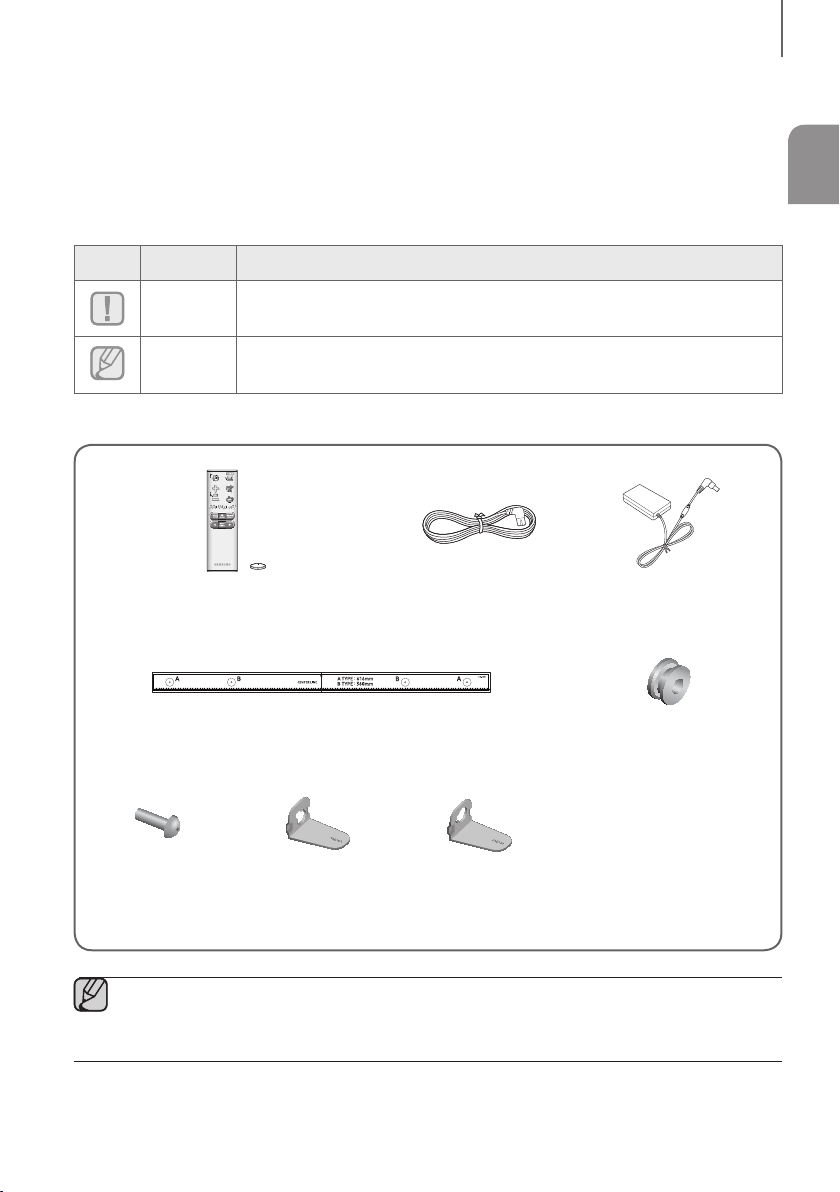
5
FRA
DÉMARRAGE
CONTENU
AVANT DE LIRE LE MANUEL D'UTILISATION
Prenez connaissance des termes suivants avant de lire le manuel d'utilisation.
+ Icônes utilisées dans le présent manuel
Icône Terme Définition
Attention
Indique une situation pour laquelle une fonction ne fonctionne pas ou que des
paramètres peuvent être annulés.
Remarque
Donne des conseils ou des instructions permettant d'améliorer l'utilisation de chaque
fonction.
Vérifiez la présence des accessoires fournis présentés ci-dessous.
Télécommande / Batterie Lithium
(3V : CR2032)
Cordon d'alimentation Adaptateur CA/CC
Guide de fixation murale
Vis de fixation :
2 pièces
Vis : 2 pièces
Support de fixation
murale G
Support de fixation
murale D
● L'aspect des accessoires peut légèrement différer des illustrations ci-dessus.
● Le câble adaptateur Micro USB à USB est vendu séparément. Pour les acheter, contactez un Centre de
service Samsung ou le Service client de Samsung.
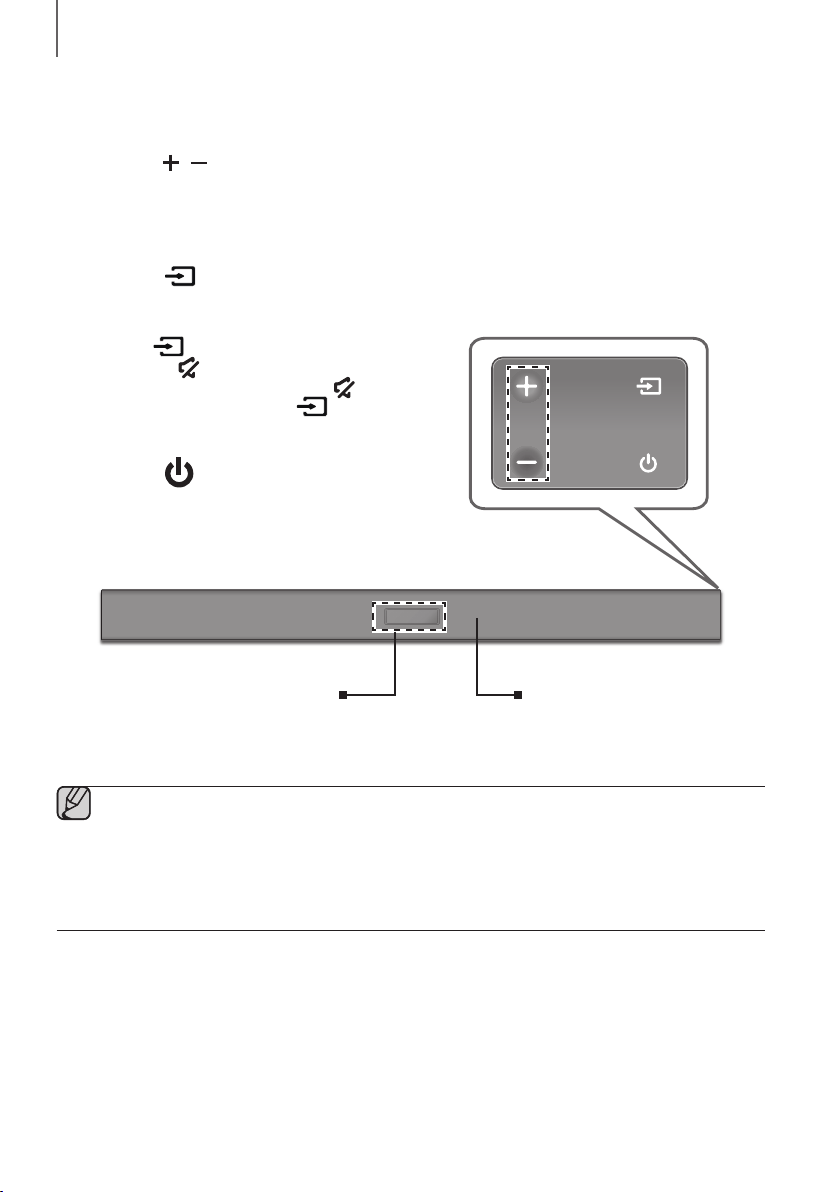
76
DESCRIPTIONS
PANNEAU FRONTAL/DE DROITE
1
Touche
/
(Volume)
Permet de régler le volume.
La valeur numérique du niveau du volume apparaît à l'écran
de la façade.
2 Bouton (Source)
Permet de sélectionner les entrées D.IN, AUX, BT, TV, USB.
● Lorsque l’appareil est sous tension, si vous appuyez sur
le bouton
pendant plus de 3 secondes, le bouton
fonctionne en
(Muet).
Pour annuler la configuration du bouton
(Muet),
appuyez à nouveau sur le bouton
pendant plus de
3 secondes.
3 Bouton (Alimentation)
Permet d’allumer et d’éteindre l’alimentation.
2
3
Arrière de la Soundbar
1
Affichage
Affiche le mode actuellement sélectionné.
Capteur de la
Télécommande
● Lorsque vous branchez le cordon CA, la touche Marche/Arrêt fonctionne pendant 4 à 6 secondes.
● Lorsque vous mettez l'unité sous tension, il faut compter 4 ou 5 secondes de retard avant le
déclenchement du son.
● Si vous souhaitez bénéficier du son du Soundbar uniquement, vous devrez éteindre les enceintes du
téléviseur depuis le menu Audio Setup de votre téléviseur. Reportezvous au manuel fourni avec votre
téléviseur.
DESCRIPTIONS

7
FRA
DESCRIPTIONS
PANNEAU INFÉRIEUR
DIGITAL AUDIO IN
(OPTICAL)
USB (5V 0.5A)
AUX IN
SUBWOOFER
DC 24V
DIGITAL AUDIO IN
(OPTICAL)
USB (5V 0.5A)
AUX IN
DIGITAL AUDIO IN
(OPTICAL)
USB (5V 0.5A)
SUBWOOFER
DC 24V
DIGITAL AUDIO IN
(OPTICAL)
SUBWOOFER
DC 24V
DC 24V (Entrée de l'alimentation)
Branchez la prise de l'adaptateur CC à la prise d’alimentation (jack),
puis branchez la fiche de l'adaptateur CA dans une prise murale.
SUBWOOFER
Connectez le câble d'enceinte au caisson de basse.
(Port micro USB)
Vous pouvez lire la musique à partir du
périphérique de mémoire USB en
raccordant le câble du périphérique de
mémoire Micro USB ou le câble
adaptateur Micro USB à USB (non
fourni).
Reportez-vous aux spécifications
relatives au câble adaptateur Micro USB
à USB à la page 19.
DIGITAL AUDIO IN (OPTICAL)
Permet la connexion à la sortie (optique) numérique d’un
appareil externe.
AUX IN
Permet la connexion à la sortie
analogique d’un périphérique externe.
ÉTIQUETTE
● Lorsque vous débranchez le câble d’alimentation de l'adaptateur CA de la prise murale, veillez à maintenir
la fiche. Ne tirez pas sur le câble.
● Ne branchez pas cette unité ou d'autres composants sur une prise CA jusqu'à ce que tous ces
branchements entre les composants sont terminés.
● Veillez à poser l'adaptateur CA/CC à plat sur une table ou sur le sol. Si l'adaptateur CA/CC pend et que
l'entrée du cordon CA est située face vers le haut, de l'eau ou d'autres substances étrangères risquent de
pénétrer dans l'adaptateur et d'entraîner des dysfonctionnements.
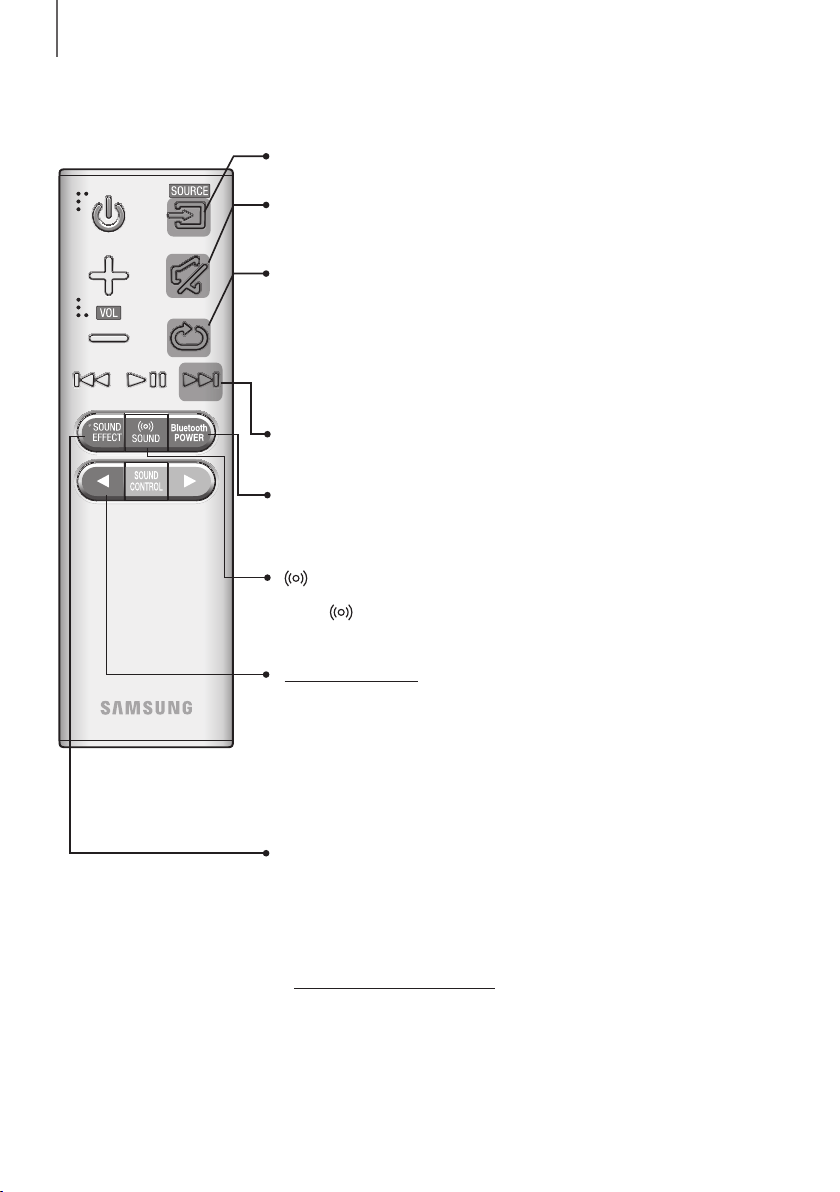
98
DESCRIPTIONS
TÉLÉCOMMANDE
Répéter
Appuyez pour activer la fonction Répétition pendant la lecture de musique à
partir d'un périphérique de stockage.
OFF - REPEAT : Permet d'annuler la lecture répétée.
TRACK - REPEAT : Permet de répéter la lecture d'une piste.
ALL - REPEAT : Permet de répéter la lecture de toutes les pistes.
RANDOM - REPEAT : Permet de lire les plages dans un ordre aléatoire.
(Une plage qui a déjà été lue peut être lue à nouveau.)
Muet
Vous pouvez baisser le volume sur 0 en appuyant sur un bouton.
Appuyez à nouveau pour rétablir le son à son niveau de volume précédent.
SOURCE
Permet de sélectionner une source connectée au Soundbar.
Saut en avant
Lorsque le périphérique que vous êtes en train de lire contient deux fichiers ou
plus et lorsque vous appuyez sur le bouton ], le fichier suivant est sélectionné.
Bluetooth POWER
Maintenez enfoncé le bouton Bluetooth POWER de la télécommande pour
activer et désactiver la fonction Bluetooth POWER On.
Pour plus de détails, reportez-vous aux pages 18 et 23.
SOUND
Son surround ajoute de la profondeur et de l'ampleur au son. Appuyer sur la
touche
SOUND plusieurs fois permet de naviguer dans les paramètres du
Son surround :
ON - SURROUND SOUND, OFF - SURROUND SOUND
SOUND EFFECT
Vous pouvez choisir entre 6 modes sonores : STANDARD (Son Original),
MUSIC, CLEAR VOICE, SPORTS, MOVIE et NIGHT selon le type de source
dont vous souhaitez profiter.
Sélectionnez le mode STANDARD si vous souhaitez apprécier le son d’origine.
* DRC (Contrôle de plage dynamique)
Vous permet d'appliquer un contrôle de plage dynamique au Dolby Digital.
Appuyez et maintenez la pression sur le bouton SOUND EFFECT pendant
5 secondes environ en mode STANDBY pour activer ou désactiver la fonction
DRC (Contrôle de plage dynamique).
Appuyez sur la touche
et maintenez-la enfoncée pendant environ 5 secondes
pour activer ou désactiver la fonction Auto Power Link (Lien de mise sous
tension automatique).
OFF - POWER LINK, ON - POWER LINK
* Auto Power Link
Permet de synchroniser la Soundbar à une source optique connectée via la
prise optique pour que le produit s'allume automatiquement lorsque vous
allumez votre télévision. (Reportez-vous à la page 16)
La fonction Auto Power Link est disponible uniquement en mode D.IN.
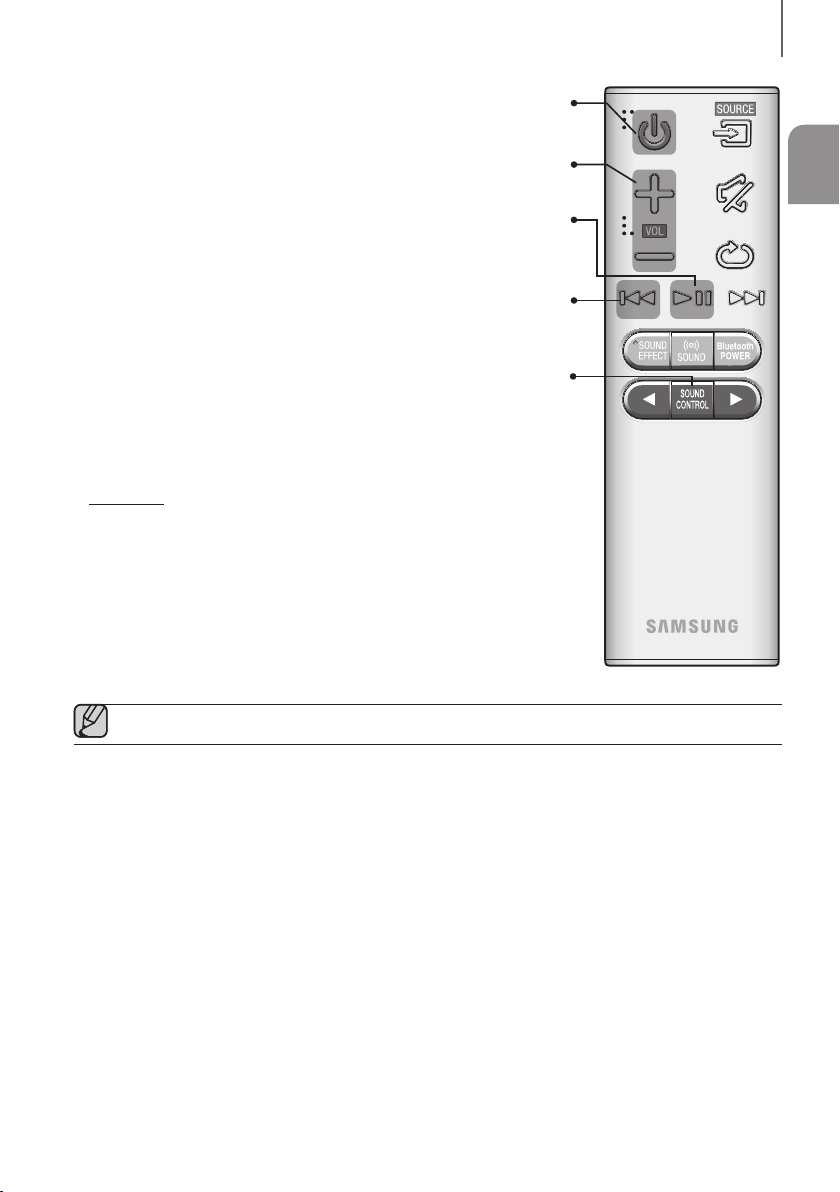
9
FRA
DESCRIPTIONS
Volume
Règle le niveau de volume de l’unité.
Marche/Arrêt
Permet d’allumer et d’éteindre l’alimentation.
SOUND CONTROL
Appuyez pour sélectionner TREBLE, BASS, SUBWOOFER LEVEL,
ou AUDIO SYNC.
Utilisez ensuite les touches , pour ajuster le volume TREBLE ou BASS entre
-6 et +6, ainsi que le volume SUBWOOFER LEVEL qui peut être réglé de -12,
-6 à +6.
Appuyez sur le bouton SOUND CONTROL pendant environ 5 secondes pour
régler le son pour chaque bande de fréquences. Vous pouvez sélectionner
150 Hz, 300 Hz, 600 Hz, 1,2 KHz, 2,5 KHz, 5 KHz et 10 KHz et régler chacune
de ces options de -6 ~ +6.
Si le Soundbar est connecté à un téléviseur numérique et que la vidéo et l'audio
ne sont pas synchronisés, appuyez sur les boutons SOUND CONTROL pour
corriger le problème. Utilisez les boutons , pour régler le temps de retard
audio entre 0 ms ~ 300 ms. En mode USB, en mode TV et en mode BT, la
fonction Audio Sync peut ne pas fonctionner.
Lecture/Pause
Appuyez sur le bouton p pour mettre en pause la lecture du fichier
temporairement. Appuyez à nouveau sur le bouton p pour lire le fichier
sélectionné.
Saut en arrière
Si le périphérique que vous êtes en train de lire contient plus d'un fichier et
que vous appuyez sur le bouton [, le fichier précédent est sélectionné.
● Faire fonctionner le téléviseur en utilisant sa télécommande.
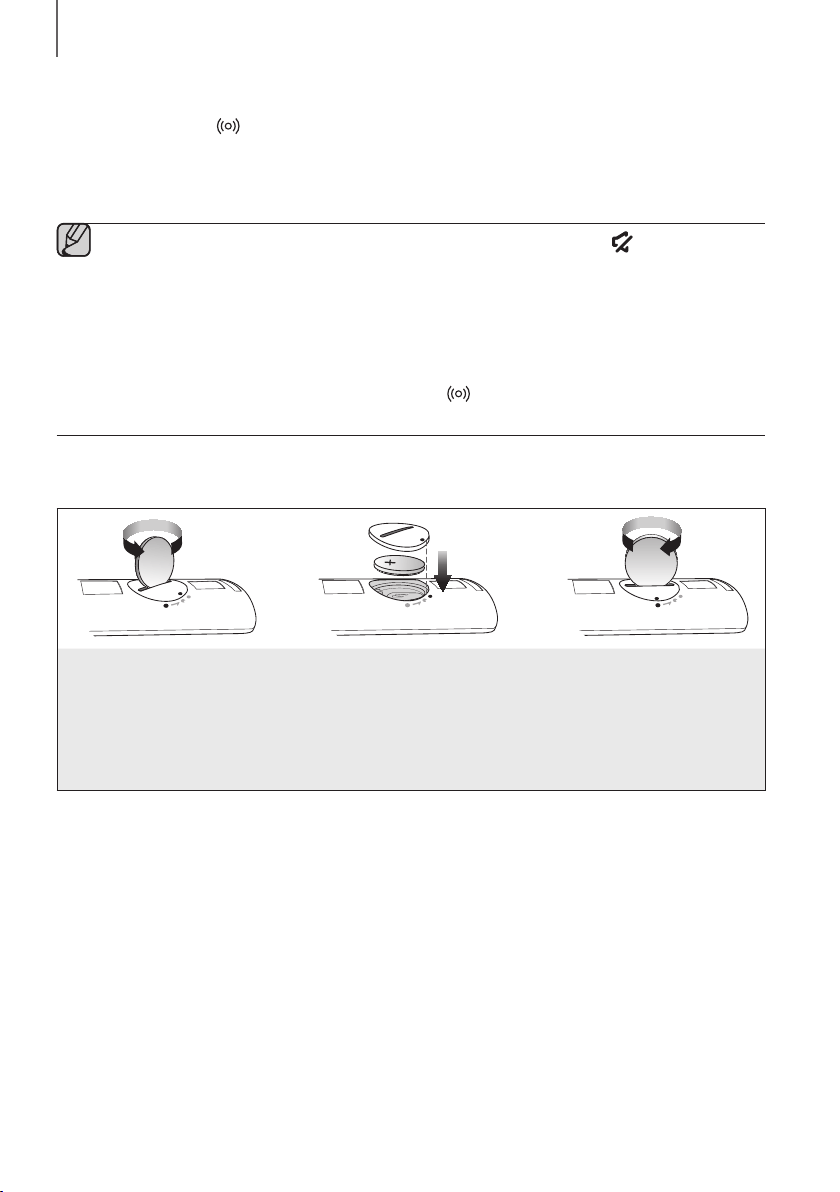
1110
DESCRIPTIONS
+ Commande de la Soundbar avec la télécommande de votre téléviseur
1. Appuyez sur la touche SOUND et maintenez-la enfoncée pendant au moins 5 secondes pendant que la
Soundbar est sous tension.
2. Le message « ON - TV REMOTE » s'affiche sur l'écran de votre Soundbar.
3. Dans le menu de votre téléviseur, réglez le haut-parleur du téléviseur sur le mode externe.
● Avec cette fonction, toutes les touches sont grisées, sauf VOL +/- et les touches (Muet).
● Les menus des téléviseurs varient en fonction du fabricant et du modèle de téléviseur. Reportez-vous au
manuel d'utilisation de votre téléviseur pour obtenir de plus amples informations.
● Cette fonction n'est pas disponible lorsque le Soundbar est en mode TV SoundConnect.
● Fabricants prenant en charge cette fonction :
- VIZIO, LG, Sony, Sharp, PHILIPS, PANASONIC, TOSHIBA, GRUNDIG, Hisense, RCA
- Cette fonction peut ne pas être compatible avec la télécommande de votre téléviseur, selon le fabricant.
● Pour désactiver cette fonction, appuyez sur la touche SOUND pendant 5 secondes.
Le message « OFF - TV REMOTE » s'affiche sur l'écran de votre Soundbar.
INSTALLATION DES PILES DANS LA TÉLÉCOMMANDE
1. Utilisez une pièce de monnaie
adaptée pour tourner le
couvercle de la batterie de la
télécommande dans le sens
inverse des aiguilles d’une
montre pour le retirer comme
indiqué sur la figure ci-dessus.
2. Insérez une pile au lithium de 3V. Veillez
à ce que le pôle positif (+) soit orienté
vers le haut lors de l’insertion de la pile
dans son logement Mettez le couvercle
sur la batterie et alignez le repère '●' l’un
en face de l’autre comme indiqué sur la
figure ci-dessus.
3. Utilisez une pièce de monnaie
adaptée pour tourner le
couvercle de la batterie de la
télécommande dans le sens
des aiguilles d’une montre
jusqu’en butée pour le
remettre en place.
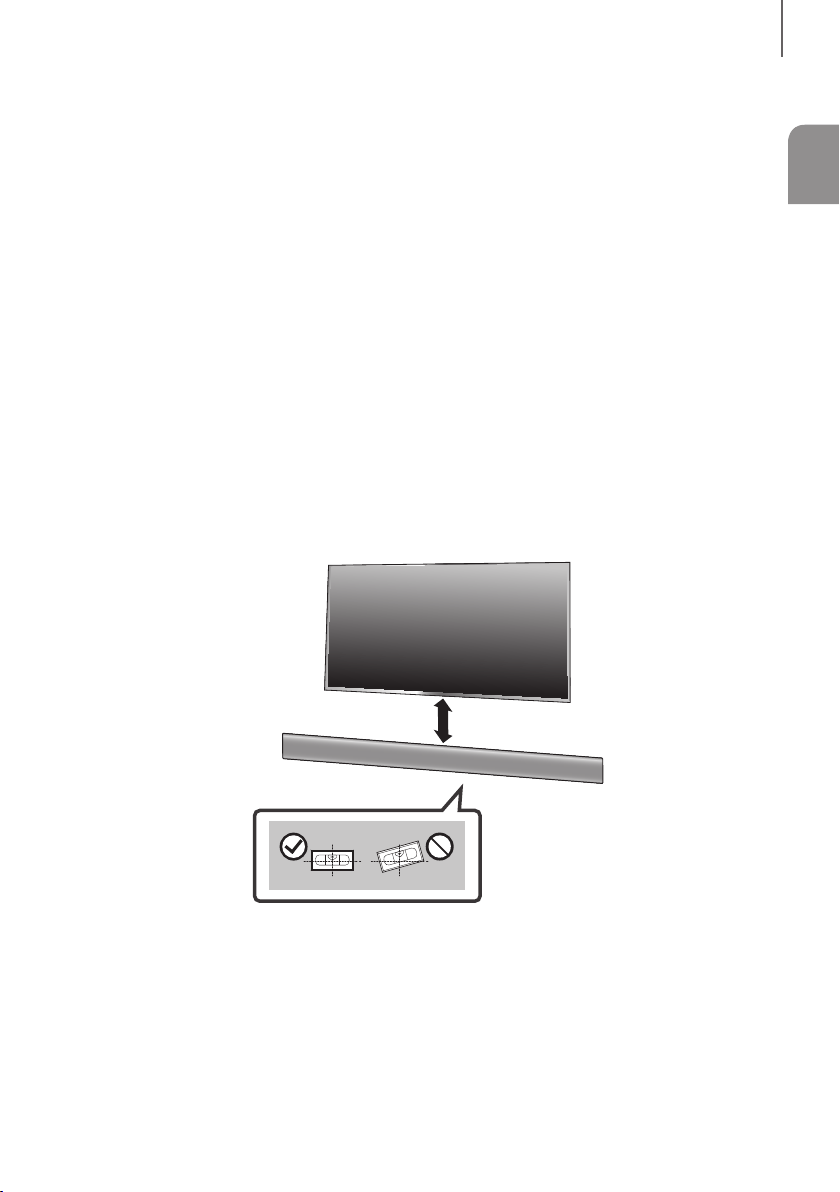
11
FRA
INSTALLATION
INSTALLATION DE LA SOUNDBAR
INSTALLATION DE LA FIXATION MURALE
+ Précautions d’installation
● Procédez à l'installation sur un mur vertical uniquement.
● Pour l’installation, évitez les températures extrêmes et l’humidité ou encore un mur pas assez solide pour
supporter le poids de l’appareil.
● Vérifiez la solidité du mur. Si le mur n'est pas assez solide pour supporter l'appareil, renforcez le mur ou installez
l'appareil sur un autre mur pouvant supporter son poids.
● Achetez et utilisez les vis de fixation ou l’ancrage appropriés au type de mur dont vous disposez (plaque de plâtre,
fer forgé, bois, etc.). Si possible, fixez les vis de fixation dans les poteaux du mur.
● Achetez des vis pour fixation murale en fonction du type et de l'épaisseur du mur sur lequel vous souhaitez
installer la Soundbar.
- Diamètre : M5
- Longueur : 35 mm ou plus recommandée
● Branchez les câbles entre l'appareil et les périphériques externes avant de l'installer sur le mur.
● Veillez à éteindre et débrancher l’unité avant installation. Autrement, vous vous exposeriez à un risque de décharge
électrique.
5 cm minimum
1. Placez le Guide de fixation murale contre le mur.
• Le Guide de fixation murale doit être de niveau.
• Si le téléviseur est monté sur le mur, installez la Soundbar à au moins 5 cm en dessous du téléviseur.
INSTALLATION

1312
INSTALLATION
Ligne centrale
2. Alignez la Ligne centrale du modèle papier et le centre de votre téléviseur (si vous fixez la Soundbar sous votre
téléviseur), puis fixez le Guide de fixation murale au mur avec du ruban adhésif.
● Si vous ne fixez pas la Soundbar sous un téléviseur, placez la Ligne centrale au centre de la zone
d'installation.
3. Appuyez avec la pointe d'un stylo ou d'un crayon bien taillé au centre des images B-TYPE à chaque extrémité du
guide pour marquer les trous des vis portantes, puis retirez le Guide de fixation murale.
4. À l'aide d'une mèche appropriée, faites un trou dans le mur au niveau de chaque marque.
● Si les marques ne correspondent pas aux positions des poteaux muraux, veillez à insérer les ancrages ou
les chevilles Molly appropriées dans les trous avant d'insérer les vis portantes.
Si vous utilisez des ancrages ou des chevilles Molly, pensez à percer des trous suffisamment larges pour
les accueillir.
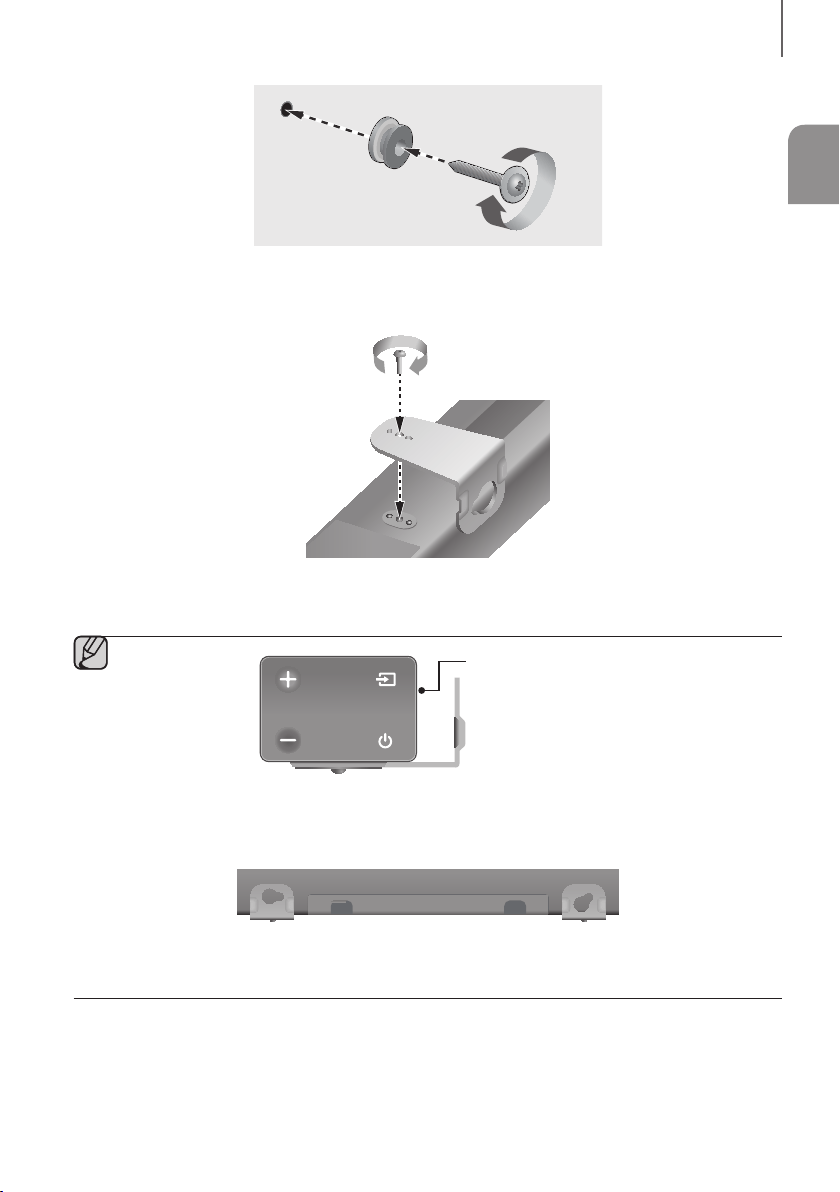
13
FRA
INSTALLATION
5. Enfoncez une vis (non fournie) dans chaque Vis de fixation, puis vissez fermement chaque vis dans un trou
pour vis portante.
6. Utilisez les deux Vis (M4 x L12) pour fixer le Support de fixation murale G et D à l'arrière de la Soundbar. Pour
une bonne fixation, veillez à aligner les excroissances de la Soundbar et les trous des supports.
Arrière de la Soundbar
Extrémité droite de la Soundbar
● Lors du montage, vérifiez que le crochet du Support de fixation murale est positionné vers le bas.
Fixation murale GFixation murale D
● Les fixations droite et gauche ont des formes différentes. Veillez à bien les positionner.
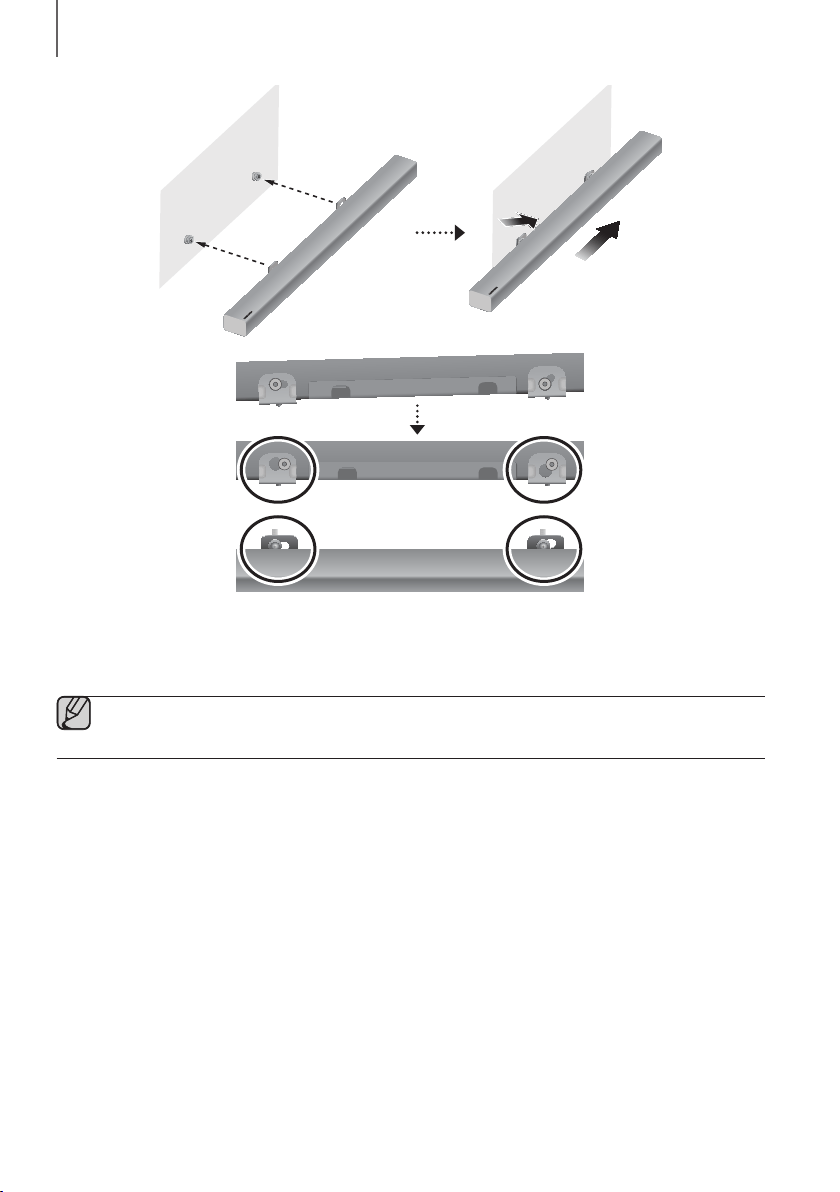
1514
INSTALLATION
7. Installez la Soundbar, sur laquelle est fixé le Support de fixation murale, en accrochant le Support de fixation
murale sur les Vis de fixation sur le mur.
● Inclinez légèrement la Soundbar pour insérer les deux têtes de Vis de fixation dans les trous du Support
de fixation murale. Poussez la Soundbar dans la direction de la flèche pour bien fixer les deux côtés.
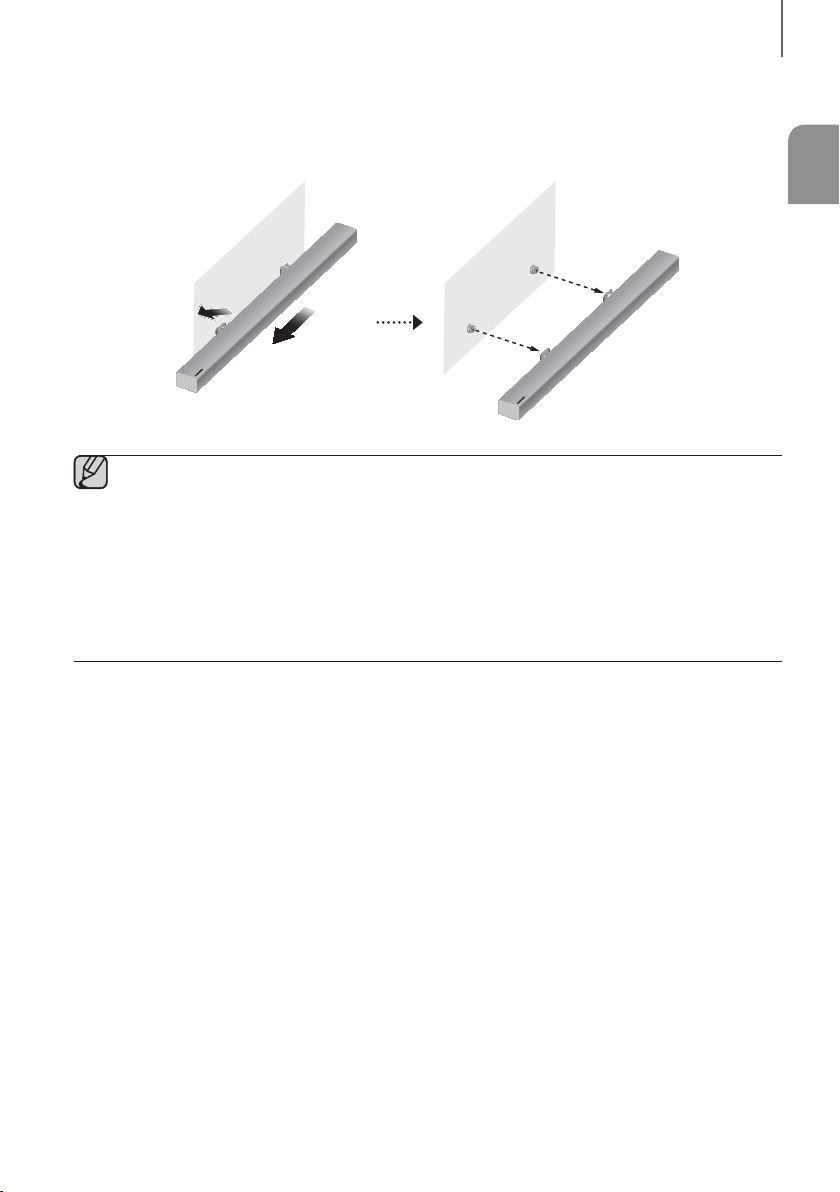
15
FRA
INSTALLATION
RETRAIT DE LA SOUNDBAR DU MUR
1. Pour retirer la Soundbar du support mural, poussez-la dans la direction de la flèche, puis retirez-la comme indiqué
sur l'image.
● Ne vous appuyez pas sur l’unité montée et évitez de la soumettre à des chocs ou des chutes.
● Fixez fermement l’unité au mur afin qu’elle ne tombe pas. La chute de l’appareil peut provoquer des
blessures ou endommager le produit.
● Lorsque l’unité est fixée au mur, veillez à ce qu’un enfant ne tire pas sur les câbles de connexion au risque
de faire tomber l’appareil.
● Pour optimiser l'installation d'une fixation murale, installez les enceintes à au moins 5 cm sous le téléviseur,
si le téléviseur est monté sur le mur.
● Pour votre sécurité, dans le cas où vous ne l’utilisez pas en montage mural, veuillez installer l’unité sur une
surface plane sécurisée où elle ne risque pas de tomber.
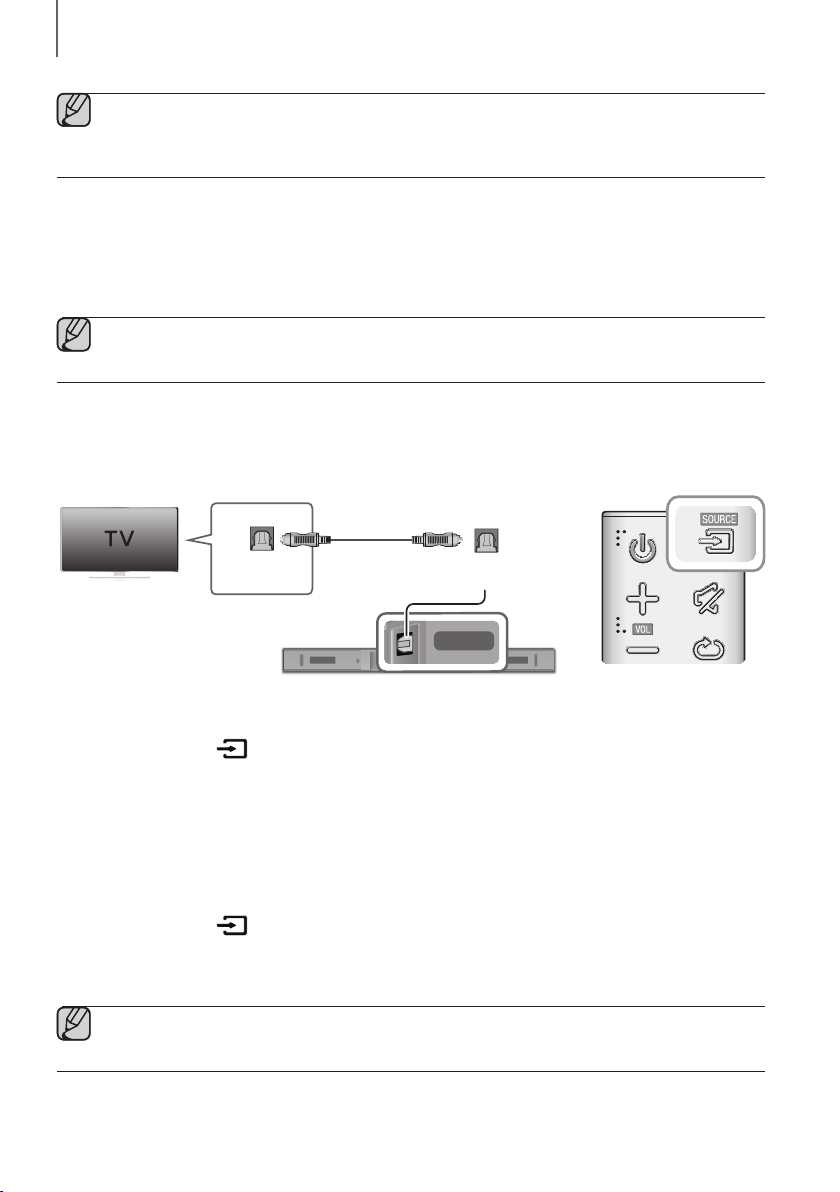
1716
BRANCHEMENTS
● Ne branchez pas le cordon d’alimentation de ce produit ou de votre téléviseur dans la prise murale avant
que toutes les connexions entre les différents composants n’aient été effectuées.
● Avant de déplacer ou d’installer l’appareil, mettez-le hors tension et débranchez le cordon d’alimentation.
CONNEXION DE L'APPAREIL À UN
TÉLÉVISEUR
● Important : Avant de commencer, insérez la pile dans la télécommande. Reportez-vous à la page 10
pour prendre connaissance des instructions.
RACCORDEMENT DE LA SOUNDBAR À UN TÉLÉVISEUR À
L'AIDE D'UN CÂBLE OPTIQUE NUMÉRIQUE
DIGITAL AUDIO IN
(OPTICAL)
USB (5V 0.5A)
AUX IN
SUBWOOFER
DC 24V
DIGITAL AUDIO IN
(OPTICAL)
DIGITAL AUDIO IN
(OPTICAL)
OPTICAL OUT
Câble Optique
(non fourni)
1. Raccordez la prise DIGITAL AUDIO IN (OPTICAL) de la Soundbar à la prise OPTICAL OUT du téléviseur à l'aide
d'un câble optique (non fourni) numérique.
2. Appuyez sur la touche à droite de la Soundbar ou sur la touche SOURCE de la télécommande pour passer
en mode D.IN.
+ Auto Power Link
Si vous avez connecté l'unité principale à un téléviseur à l'aide d'un câble optique
(non fourni)
numérique, activez
la fonction Auto Power de sorte que la barre audio s'allume automatiquement lorsque vous allumez votre
téléviseur.
1. Raccordez la Soundbar au téléviseur à l'aide d'un câble optique (non fourni) numérique.
2. Appuyez sur la touche à droite de la Soundbar ou sur la touche SOURCE de la télécommande pour passer
en mode D.IN.
3. Appuyez sur la touche
de la télécommande pendant 5 secondes pour activer ou désactiver Auto Power Link.
● Par défaut, Auto Power Link est réglé sur ON.
● Selon le périphérique connecté, la fonction Auto Power Link peut ne pas fonctionner.
BRANCHEMENTS
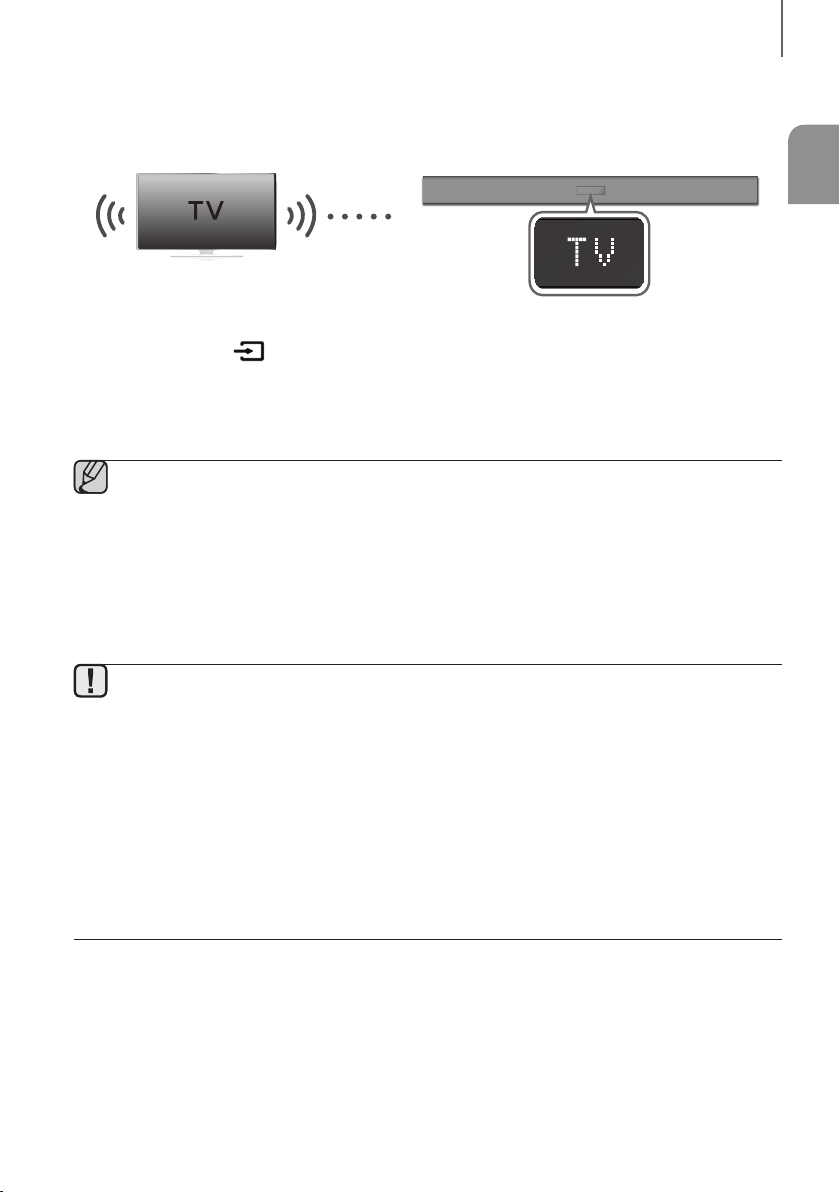
17
FRA
BRANCHEMENTS
TV SOUNDCONNECT
Vous pouvez apprécier le son du téléviseur à travers le Soundbar connecté à un Téléviseur Samsung qui prend en
charge la fonction TV SoundConnect.
Connexion
1. Allumez le téléviseur et le Soundbar.
2. Appuyez sur la touche à droite de la Soundbar ou sur la touche SOURCE de la télécommande pour passer
en mode TV.
3. Sur le téléviseur, un message demandant si vous souhaitez activer la fonction TV SoundConnect apparaît.
4. Sélectionnez <Oui> pour terminer la connexion du téléviseur à la Soundbar via la télécommande du téléviseur.
● Si le processus d'appariement TV SoundConnect échoue, accédez à SoundConnect dans le menu Son
du téléviseur, sélectionnez Ajouter un nouvel appareil et mettez Ajouter un nouvel appareil sur
ACTIVÉ, puis réessayez.
● Commutez le mode du Soundbar de TV à un autre mode met fin automatiquement à la fonction
TV SoundConnect.
● Pour connecter le Soundbar à un autre téléviseur, la connexion existante doit être fermée.
● Pour interrompre la connexion existante, appuyez sur la touche
p
de la télécommande et maintenez-la
enfoncée pendant 5 secondes ou passez à un autre mode. Pour raccorder la Soundbar à l'autre téléviseur,
suivez les Étapes 1 à 4 ci-dessus.
● La fonction TV SoundConnect (SoundShare) est prise en charge par certains téléviseurs Samsung disponibles
depuis 2012. Vérifiez si votre téléviseur prend en charge la fonction TV SoundConnect (SoundShare) avant de
commencer. (Pour plus d’informations, reportez-vous au manuel d’utilisation du téléviseur.)
● Si votre téléviseur Samsung est sorti avant 2014, vérifiez le menu de réglages SoundShare.
● Si la distance entre le téléviseur et le Soundbar dépasse 10 m, la connexion peut ne pas être stable ou
l'audio peut être discontinu. Si tel est le cas, déplacez le téléviseur ou le Soundbar afin qu’il soit dans la
plage opérationnelle et rétablissez ensuite la connexion TV SoundConnect.
● Portée pour la plage de fonctionnement de TV SoundConnect:
- Portée recommandée pour l'appariement : 2 m maxi.
- Portée de fonctionnement recommandée : 10 m maxi.
● Les boutons Lecture/Pause, Suivant et Précédent situés sur la barre audio ou la télécommande de la barre
audio ne commandent pas le téléviseur.
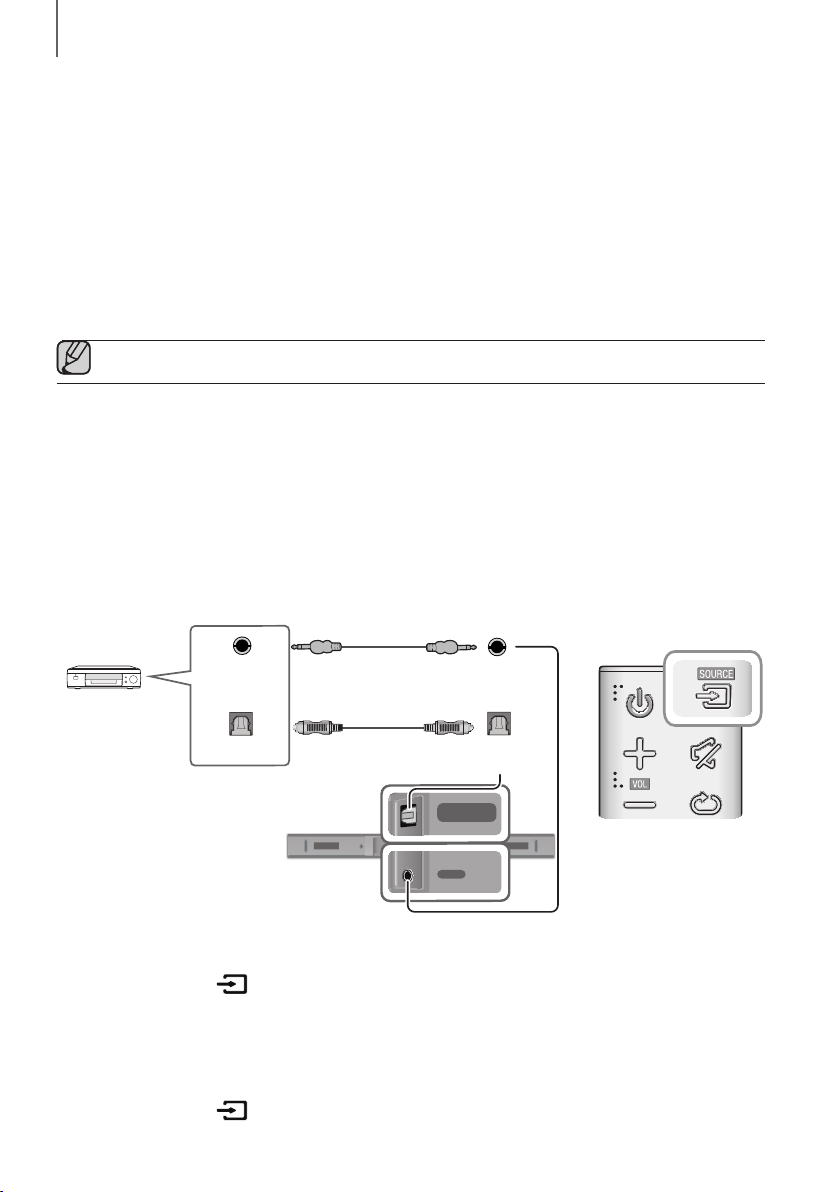
1918
BRANCHEMENTS
+ Utiliser la fonction Bluetooth POWER On
La fonction Bluetooth POWER On est disponible une fois la Soundbar connectée avec succès à un téléviseur
compatible Bluetooth à l’aide de TV SoundConnect. Lorsque la fonction Bluetooth POWER On est activée, si vous
allumez ou éteignez le téléviseur connecté, la Soundbar s’allume ou s’éteint également.
1. Connectez votre téléviseur à la Soundbar à l’aide de la fonction TV SoundConnect.
2. Appuyez sur les boutons Bluetooth POWER du Soundbar et de la télécommande. ON - BLUETOOTH POWER
s’affiche sur l’écran du Soundbar.
• ON - BLUETOOTH POWER
: Le Soundbar s’active et se désactive lorsque vous allumez ou éteignez le
téléviseur.
• OFF - BLUETOOTH POWER : Le Soundbar s’éteint uniquement lorsque vous éteignez le téléviseur.
● Cette fonction est prise en charge uniquement par les téléviseurs Samsung sortis à partir de 2013.
RACCORDEMENT À DES APPAREILS
EXTERNES
CÂBLE AUDIO ANALOGIQUE OU OPTIQUE
Cette unité est équipée d'une prise d'entrée optique numérique et d'une prise d'entrée audio analogique (AUX),
ce qui vous permet de la raccorder à des appareils externes de deux manières différentes.
DIGITAL AUDIO IN
(OPTICAL)
USB (5V 0.5A)
AUX IN
SUBWOOFER
DC 24V
DIGITAL AUDIO IN
(OPTICAL)
USB (5V 0.5A)
AUX IN
DIGITAL AUDIO IN
(OPTICAL)
USB (5V 0.5A)
AUX IN
DIGITAL AUDIO IN
(OPTICAL)
OPTICAL OUT
AUX IN
AUX OUT
Lecteur BD/ DVD/
Décodeur/
Console de jeux
Câble Audio
(non fourni)
Câble Optique
(non fourni)
+ Câble AUX
1. Raccordez AUX IN (Audio) de l'unité principale à la prise AUDIO OUT de l'appareil source à l'aide d'un câble audio.
2. Appuyez sur la touche à droite de la Soundbar ou sur la touche SOURCE de la télécommande pour passer
en mode AUX.
+ Câble Optique
1. Raccorder DIGITAL AUDIO IN (OPTICAL) de l'unité principale à la prise OPTICAL OUT de l'appareil source à
l'aide d'un câble optique (non fourni) numérique.
2. Appuyez sur la touche à droite de la Soundbar ou sur la touche SOURCE de la télécommande pour passer
en mode D.IN.
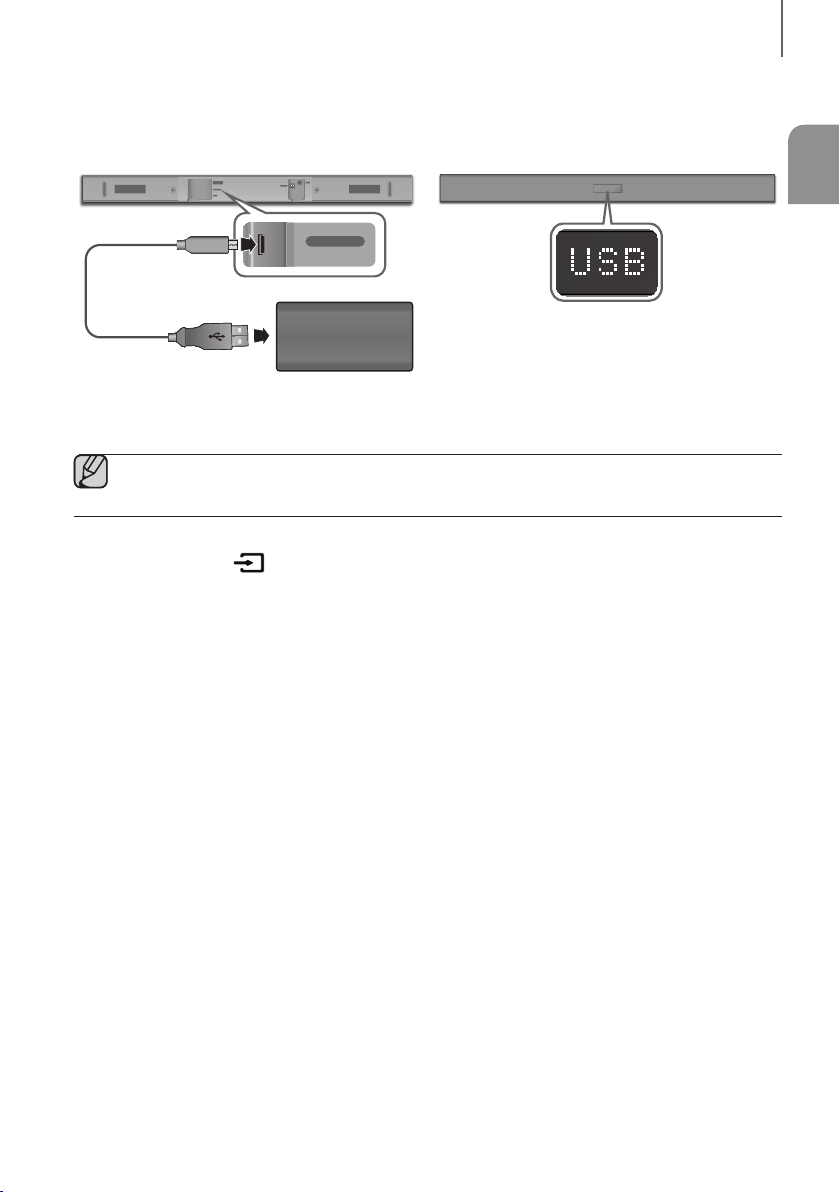
19
FRA
BRANCHEMENTS
USB
Vous pouvez lire des fichiers musicaux situés sur les périphériques de stockage via la Soundbar.
DIGITAL AUDIO IN
(OPTICAL)
USB (5V 0.5A)
AUX IN
SUBWOOFER
DC 24V
DIGITAL AUDIO IN
(OPTICAL)
USB (5V 0.5A)
AUX IN
Affichage
Câble adaptateur
Micro USB à USB
(non fourni)
USB port
1. Raccordez un câble adaptateur Micro USB à USB à un câble USB 2.0 vers Micro USB (Type B) à une extrémité et
une prise USB 2.0 femelle standard (Type A) à l'autre extrémité du câble Micro USB de la Soundbar.
● Le câble adaptateur Micro USB à USB est vendu séparément. Pour l'acheter, contactez un Centre de
service Samsung ou le Service client de Samsung.
2. Connectez votre périphérique de stockage à l'extrémité femelle du câble.
3. Appuyez sur la touche à droite de la Soundbar ou sur la touche SOURCE de la télécommande pour passer
en mode USB.
4. USB apparaît sur l’écran d’affichage.
• La connexion de la Soundbar au périphérique de stockage est terminée.
• La Soundbar s'éteint automatiquement (Mise hors tension automatique) si aucun périphérique de stockage n'a
été connecté pendant plus de 5 minutes.
+ Avant de connecter un périphérique de stockage
L'utilisateur doit connaître les points suivants :
● Si le nom de fichier d'un fichier sur un périphérique de stockage dépasse 10 caractères, il ne s'affichera pas sur
l'écran de la Soundbar.
● Ce produit peut ne pas être compatible avec certains types de support de stockage USB.
● Les systèmes de fichiers FAT16 et FAT32 sont pris en charge.
- Le système de fichiers NTFS n’est pas pris en charge.
● Raccordez les périphériques de stockage au port USB du produit à l'aide d'un câble USB 2.0 vers Micro USB et
d'un câble adaptateur USB 2.0 femelle standard. pour éviter tout problème de compatibilité USB.
● Ne connectez pas plusieurs périphériques de stockage au produit via un lecteur à cartes multiples. Il peut ne pas
fonctionner correctement.
● Les protocoles PTP des caméras numériques ne sont pas pris en charge.
● Ne retirez pas le périphérique de stockage pendant le transfert des fichiers.
● Les fichiers musicaux protégés par la technologie DRM (MP3, WMA) d'un site Web commercial ne peuvent pas
être lus.
● Les disques durs externes ne sont pas pris en charge.
● Les téléphones mobiles ne sont pas pris en charge.
Périphérique de stockage
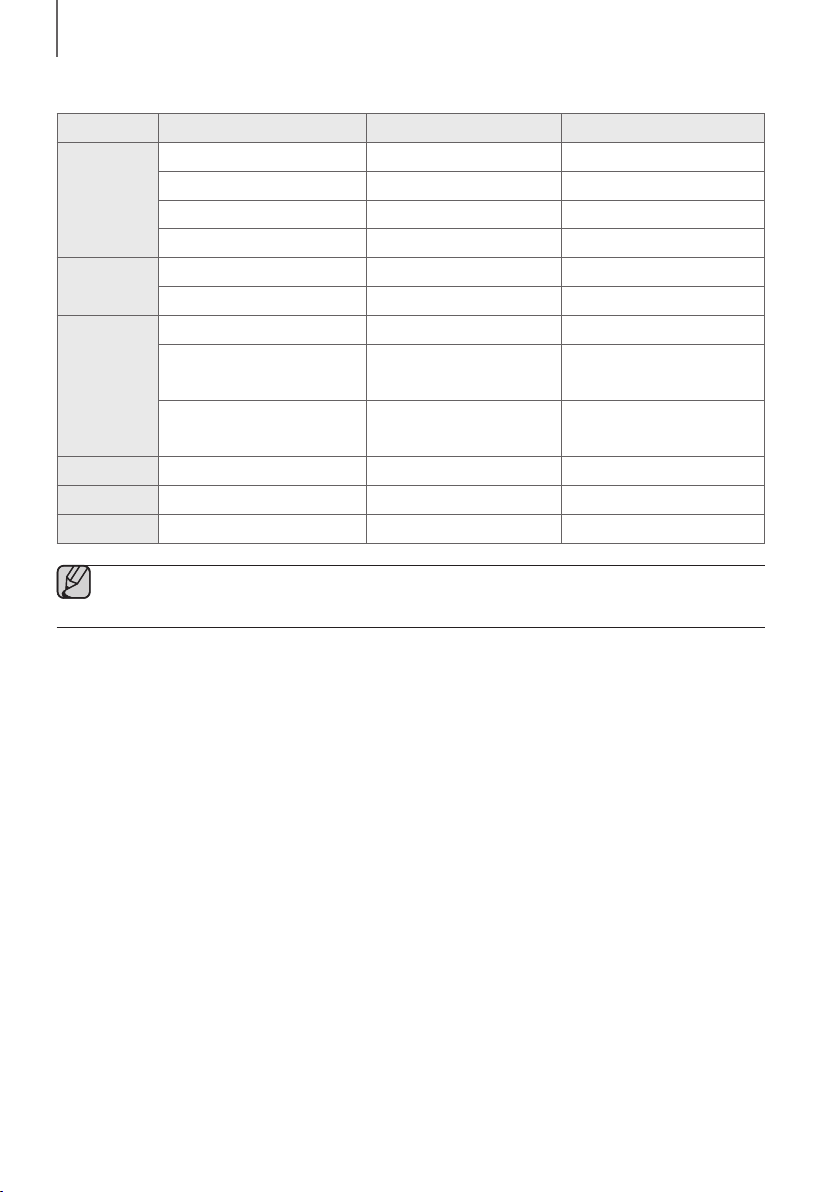
2120
BRANCHEMENTS
● Liste de compatibilités:
Extension Codec Débit d'échantillonnage Débit binaire
*.mp3
MPEG 1 Layer2 16 ~ 48 KHz 80 ~ 320 kbps
MPEG 1 Layer3 16 ~ 48 KHz 80 ~ 320 kbps
MPEG 2 Layer3 16 ~ 48 KHz 80 ~ 320 kbps
MPEG 2,5 Layer3 16 ~ 48 KHz 80 ~ 320 kbps
*.wma
Wave_Format_MSAudio1 16 ~ 48 KHz 56 ~128 kbps
Wave_Format_MSAudio2 16 ~ 48 KHz 56 ~ 128 kbps
*.aac
AAC 16 ~ 96 KHz 48 ~ 320 kbps
AAC-LC 16 ~ 96 KHz
128 ~ 192 kbps
5,1 canaux 320 kbps
HE-AAC 24 ~ 96 KHz
48 ~ 64 kbps
5,1 canaux 160 kbps
*.wav
- 16 ~ 48 KHz jusqu'à 3000 kbps
*.ogg
OGG 1.1.0 16 ~ 48 KHz 50 ~ 500 kbps
*.flac
FLAC 1.1.0, FLAC 1.2.1 16 ~ 96 KHz jusqu'à 3000 kbps
● Si votre périphérique de stockage contient trop de dossiers et de fichiers, la Soundbar mettra peut-être du
temps à accéder à vos fichiers et à les lancer.
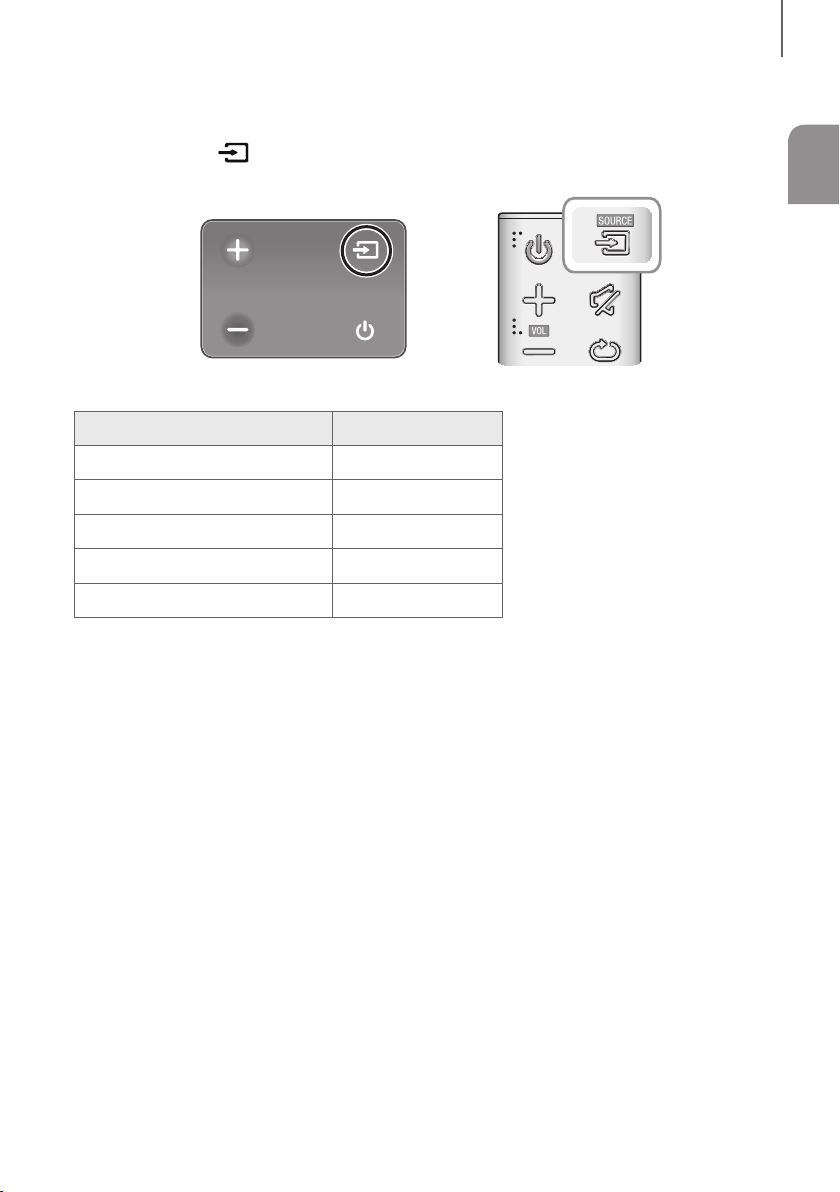
21
FRA
FONCTIONS
MODE D’ENTRÉE
Appuyez sur la touche à droite de l'unité principale ou sur la touche SOURCE de la télécommande pour
sélectionner le mode de votre choix.
Extrémité droite de la Soundbar
Mode d'entrée Affichage
Entrée Optique numérique
D.IN
Entrée AUX
AUX
Mode BLUETOOTH
BT
TV SoundConnect
TV
Mode USB
USB
FONCTION AUTO POWER DOWN
L'appareil s'éteint automatiquement sous les conditions suivantes:
● Mode D.IN/BT/TV/USB
- S'il n'y a aucun signal audio pendant 5 minutes.
● Mode AUX
- Si le câble AUX n'est pas connecté pendant 5 minutes.
- Si aucune entrée de TOUCHE n'est reçue durant 8 heures lorsque le câble AUX est branché.
(La fonction Auto Power Down peut être désactivée uniquement dans ce cas.)
Pour désactiver la fonction Auto Power Down, en mode AUX, appuyez sur la touche
p
et maintenez-la enfoncée
pendant 5 secondes. ON - AUTO POWER DOWN / OFF - AUTO POWER DOWN apparaît sur l’écran.
FONCTIONS
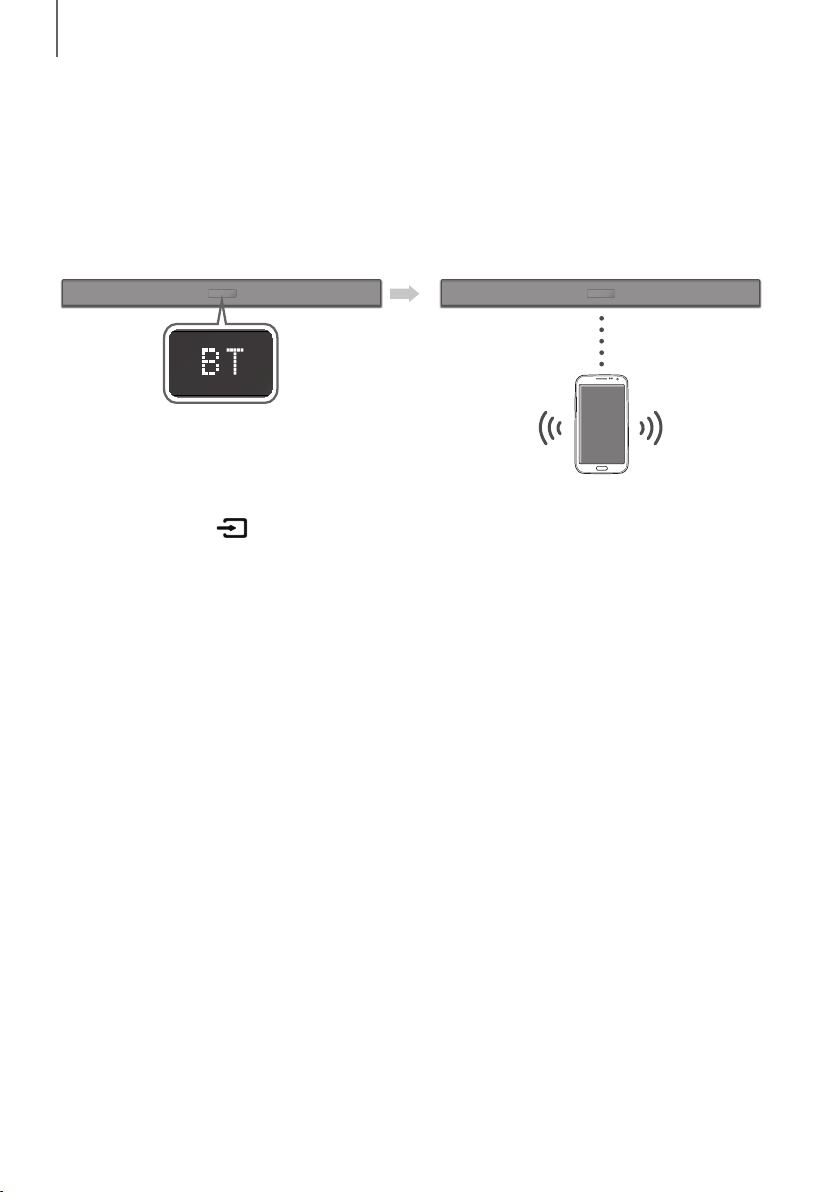
2322
FONCTIONS
BLUETOOTH
Vous pouvez connecter un appareil Bluetooth à la Soundbar et profiter du son stéréo sans aucun câble !
POUR CONNECTER LE SYSTÈME SOUNDBAR À UN
PÉRIPHÉRIQUE BLUETOOTH
Vérifiez si le périphérique Bluetooth prend en charge la fonction des écouteurs stéréo compatible Bluetooth.
Périphérique Bluetooth
Connexion
1. Appuyez sur la touche à droite de la Soundbar ou sur la touche SOURCE de la télécommande pour passer
en mode BT.
• Le message BT READY apparaît sur la façade de la Soundbar.
2. Sélectionnez le menu Bluetooth sur le périphérique Bluetooth que vous désirez connecter. (Reportezvous pour
cela au manuel d'utilisation de ce périphérique.)
3. Sélectionnez « [AV] Samsung Soundbar Kxxx K-Series » dans la liste.
• Lorsque le Soundbar est connecté à l’appareil Bluetooth, [Nom du périphérique Bluetooth] BT s'affiche
à l’écran.
• Le nom du périphérique peut uniquement être affiché en anglais. Un soulignage " _ " sera affiché si le nom
n’est pas en anglais.
• Si le fait d'associer le périphérique Bluetooth et le système Soundbar a échoué, supprimez le précédent
« [AV] Samsung Soundbar Kxxx K-Series » identifié par le périphérique Bluetooth et faites-lui rechercher le
système Soundbar à nouveau.
4. Lisez de la musique sur le périphérique connecté.
• Vous pouvez écouter de la musique lue sur le périphérique Bluetooth connecté via le système Soundbar.
• En mode BT, les fonctions Lecture/Pause/Suivant/Précédent ne sont pas disponibles.
Cependant, ces fonctions sont disponibles dans les périphériques Bluetooth qui prennent en charge la
fonctionnalité AVRCP.
23
FRA
FONCTIONS
● Si le code PIN de sécurité est demandé lors de la connexion d’un périphérique Bluetooth, entrez <0000>.
● Un seul périphérique Bluetooth peut être associé à la fois.
● La connexion Bluetooth sera terminée lorsque le Soundbar sera éteint.
● Le Soundbar peut ne pas effectuer la recherche ou la connexion Bluetooth correctement dans les cas
suivants:
- En présence d'un champ électrique puissant autour du système Soundbar.
- Si plusieurs périphériques Bluetooth sont associés simultanément au système Soundbar.
- Si le périphérique Bluetooth est éteint, mal positionné ou s'il connaît des dysfonctionnements.
● Notez que des appareils tels que des fours à micro-ondes, des adaptateurs LAN sans fil, des lampes
fluorescentes et des fours à gaz pour chauffage des locaux utilisent la même plage de fréquences que le
périphérique Bluetooth, ce qui peut provoquer des interférences électriques.
● Le Soundbar prend en charge les données SBC (44,1 kHz, 48 kHz).
● Effectuez uniquement la connexion à un périphérique Bluetooth qui prend en charge la fonction A2DP (AV).
● Vous ne pouvez pas connecter le Soundbar à un périphérique Bluetooth qui prend en charge uniquement
la fonction HF (Mains libres).
● Lorsque vous avez apparié la barre audio à un périphérique Bluetooth, sélectionner « [AV] Samsung
Soundbar Kxxx K-Series » parmi la liste des périphériques connectés à ce périphérique placera
automatiquement la barre audio en mode BT.
- Disponible uniquement si le Soundbar est listé dans les périphériques appariés du périphérique Bluetooth.
(Le périphérique Bluetooth et le Soundbar doivent être appariés au préalable au moins une fois)
● Le Soundbar apparaîtra dans la liste des périphériques recherchés du périphérique Bluetooth uniquement
lorsque le Soundbar affiche BT READY.
● En mode TV SoundConnect, le Soundbar ne peut pas être apparié à un autre périphérique Bluetooth.
BLUETOOTH POWER ON (BLUETOOTH POWER)
Lorsque la fonction Bluetooth Power On est activée et que le Soundbar est désactivé, si un périphérique Bluetooth
précédemment associé essaye de se connecter au Soundbar, le Soundbar s'active automatiquement.
1. Appuyez sur Bluetooth POWER situé sur la télécommande lorsque la Soundbar est activée.
2. ON - BLUETOOTH POWER s'affiche sur l'écran de la Soundbar.
POUR DÉCONNECTER LE PÉRIPHÉRIQUE BLUETOOTH DU
SYSTÈME SOUNDBAR
Vous pouvez déconnecter le périphérique Bluetooth du système Soundbar. Pour les instructions, reportez-vous au
manuel d'utilisation de ce périphérique.
● Le système Soundbar sera déconnecté.
● Lorsque le système Soundbar est déconnecté du périphérique Bluetooth, le système Soundbar affiche
BT DISCONNECTED en façade.
POUR DÉCONNECTER LE SYSTÈME SOUNDBAR DU
PÉRIPHÉRIQUE BLUETOOTH
Appuyez sur la touche SOURCE de la télécommande ou sur la touche à droite du produit pour passer du mode
BT à un autre mode ou éteignez la Soundbar.
● Le périphérique Bluetooth attend un certain temps la réponse du système Soundbar avant de mettre fin à la
connexion. (Le temps de déconnexion peut varier en fonction du périphérique Bluetooth.)

2524
FONCTIONS
● En mode Bluetooth, la connexion sera perdue si la distance entre le système Soundbar et le périphérique
Bluetooth dépasse 10 m.
● Le système Soundbar s'éteint après 5 minutes en état Prêt.
+ À propos du Bluetooth
Le système Bluetooth est une technologie qui permet de connecter facilement entre eux des périphériques
compatibles Bluetooth à l'aide d'une liaison sans fil courte distance.
● Ce périphérique Bluetooth peut générer du bruit ou créer des dysfonctionnements en fonction des conditions
d'utilisation lorsque:
- Une partie du corps de l’appareil est en contact avec le système de réception/transmission du périphérique
Bluetooth ou du système Soundbar.
- Il est soumis à des variations électriques provenant d'obstructions provoquées par un mur, un coin ou des
cloisonnements de bureaux.
- Il est exposé à des interférences électriques provenant d'appareils utilisant la même bande de fréquences
(exemple : équipements médicaux, fours à micro-ondes et réseaux LAN sans fil).
● Associer le système Soundbar et le périphérique Bluetooth tout en maintenant une faible distance.
● Plus la distance est grande entre l'Soundbar et le périphérique Bluetooth, plus la qualité de la transmission se
dégrade. Si la distance excède la plage opérationnelle Bluetooth, la connexion est perdue.
● Dans les zones où la réception est faible, la connexion Bluetooth peut ne pas fonctionner correctement.
● La connexion Bluetooth ne fonctionne que lorsqu'elle est proche de l'appareil. La connexion s’interrompt
automatiquement lorsque cette plage est dépassée. Même si la distance est respectée, il est possible que la
qualité sonore soit détériorée par des obstacles (ex. : murs, portes).
● Cet appareil sans fil peut causer des interférences électriques lors de son fonctionnement.
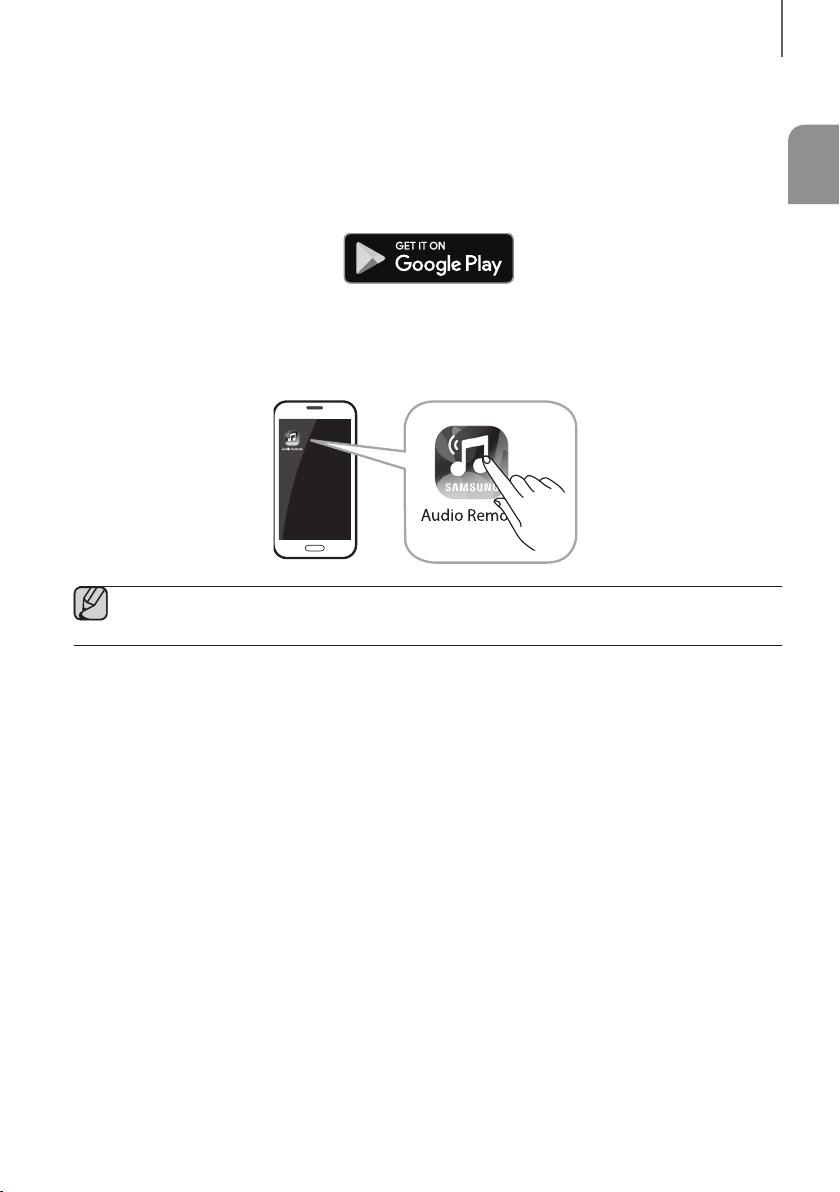
25
FRA
FONCTIONS
UTILISATION DE L'APPLICATION SAMSUNG AUDIO REMOTE
+ Installation de l'application Samsung Audio Remote
Pour contrôler la Soundbar depuis votre smartphone et l'application Samsung Audio Remote, téléchargez cette
application sur Google Play.
Recherchez : Samsung Audio Remote
+ Lancement de l'application Samsung Audio Remote
Pour lancer et utiliser l'application Samsung Audio Remote, appuyez sur l'icône Audio Remote sur votre téléphone,
puis suivez les instructions affichées à l'écran.
● L'application Samsung Audio Remote n'est compatible qu'avec les téléphones portables Android qui
exécutent la version 3.0 d'Android ou une version ultérieure.
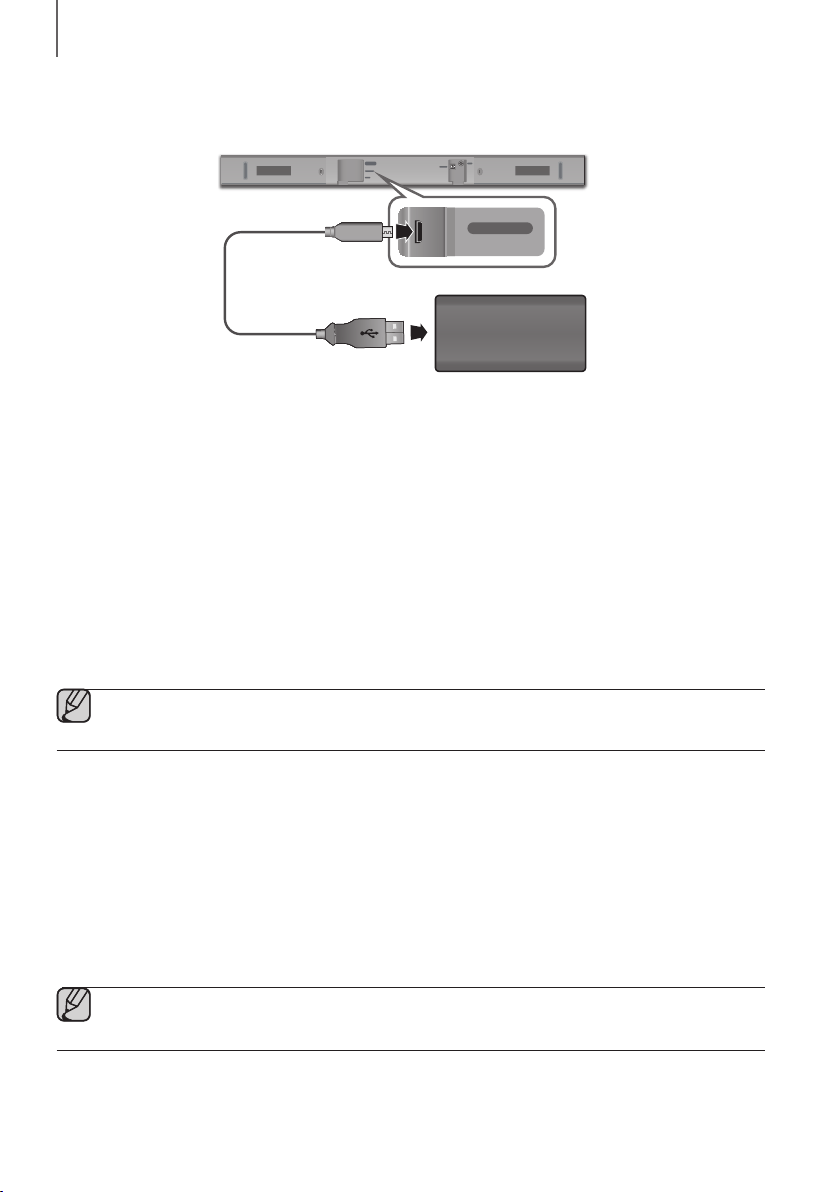
2726
FONCTIONS
MISE À JOUR LOGICIELLE
DIGITAL AUDIO IN
(OPTICAL)
USB (5V 0.5A)
AUX IN
SUBWOOFER
DC 24V
DIGITAL AUDIO IN
(OPTICAL)
USB (5V 0.5A)
AUX IN
Câble adaptateur
Micro USB à USB
(non fourni)
Périphérique de stockage
Samsung peut proposer à l’avenir des mises à jour pour le micrologiciel du système de la Soundbar.
Si une mise à jour est proposée, vous pouvez mettre à jour le microprogramme en connectant le périphérique de
stockage contenant la mise à jour du microprogramme enregistré au port USB de votre Soundbar.
Notez qu'en présence de plusieurs fichiers de mise à jour, vous devez les charger séparément sur le périphérique de
stockage et les utiliser un à la fois pour mettre à jour le micrologiciel.
Veuillez visiter le site Web Samsung.com ou contacter le centre d’assistance téléphonique de Samsung pour recevoir
de plus amples informations concernant le téléchargement des fichiers de mise à jour.
PROCÉDURE DE MISE À JOUR
1. Raccordez un câble adaptateur Micro USB à USB à un câble USB 2.0 vers Micro USB (Type B) à une extrémité et
une prise USB 2.0 femelle standard (Type A) à l'autre extrémité du câble Micro USB de la Soundbar.
● Le câble adaptateur Micro USB à USB est vendu séparément. Pour l'acheter, contactez un Centre de
service Samsung ou le Service client de Samsung.
2. Suivez les étapes ci-dessous pour télécharger le logiciel du produit :
Rendez-vous sur le site Web Samsung sur (samsung.com/sec) recherchez le nom du modèle - sélectionnez
l’option de menu d’assistance client (le nom de l’option est sujet à modifications)
3. Sauvegardez le logiciel téléchargé sur une clé USB et sélectionnez « Extraire ici » pour dé-ziper le dossier.
4. Éteignez la Soundbar et connectez le périphérique de stockage contenant la mise à jour du logiciel au port femelle
sur un câble adaptateur Micro USB.
5. Allumez la Soundbar. Dans les 3 minutes, UPDATE s’affiche et la mise à jour commence.
6. Après que cela est terminé, l'alimentation de la Soundbar s'éteint. Dans cet état, appuyez sur la touche
p
de la
télécommande pendant 5 secondes.
● Cet appareil comporte la fonction DUAL BOOT. Si la mise à jour du micrologiciel échoue, vous pouvez
relancer sa mise à jour.

27
FRA
FONCTIONS
SI UPDATE N’EST PAS AFFICHÉ
1. Éteignez la Soundbar, branchez le périphérique de stockage USB contenant les fichiers de mise à jour sur le port
USB de la Soundbar.
2. Débranchez le cordon d’alimentation, puis branchez-le à nouveau et allumez l’appareil.
● Insérez un périphérique de stockage contenant la mise à jour du micrologiciel dans le port USB situé sur
l'unité principale.
● La mise à jour du micrologiciel peut ne pas fonctionner correctement si les fichiers audio pris en charge par
la barre audio dans le périphérique de stockage.
● N'éteignez pas l'appareil et ne retirez pas le périphérique de stockage lorsque les mises à jour sont en train
d'être appliquées. L’unité principale s’éteint automatiquement une fois que la mise à jour du micrologiciel
est terminée.
● Une fois la mise à jour terminée, la configuration d'utilisateur est initialisée dans la Soundbar. Nous vous
recommandons de noter vos réglages, vous pourrez ainsi aisément les réinitialiser après la mise à jour.
Si la mise à jour du logiciel échoue, vérifiez que le périphérique de stockage n'est pas défectueux.
● Les utilisateurs de Mac OS doivent utiliser MS-DOS (FAT) comme format USB.
● Selon le fabricant, certains périphériques de stockage pourraient ne pas être pris en charge.
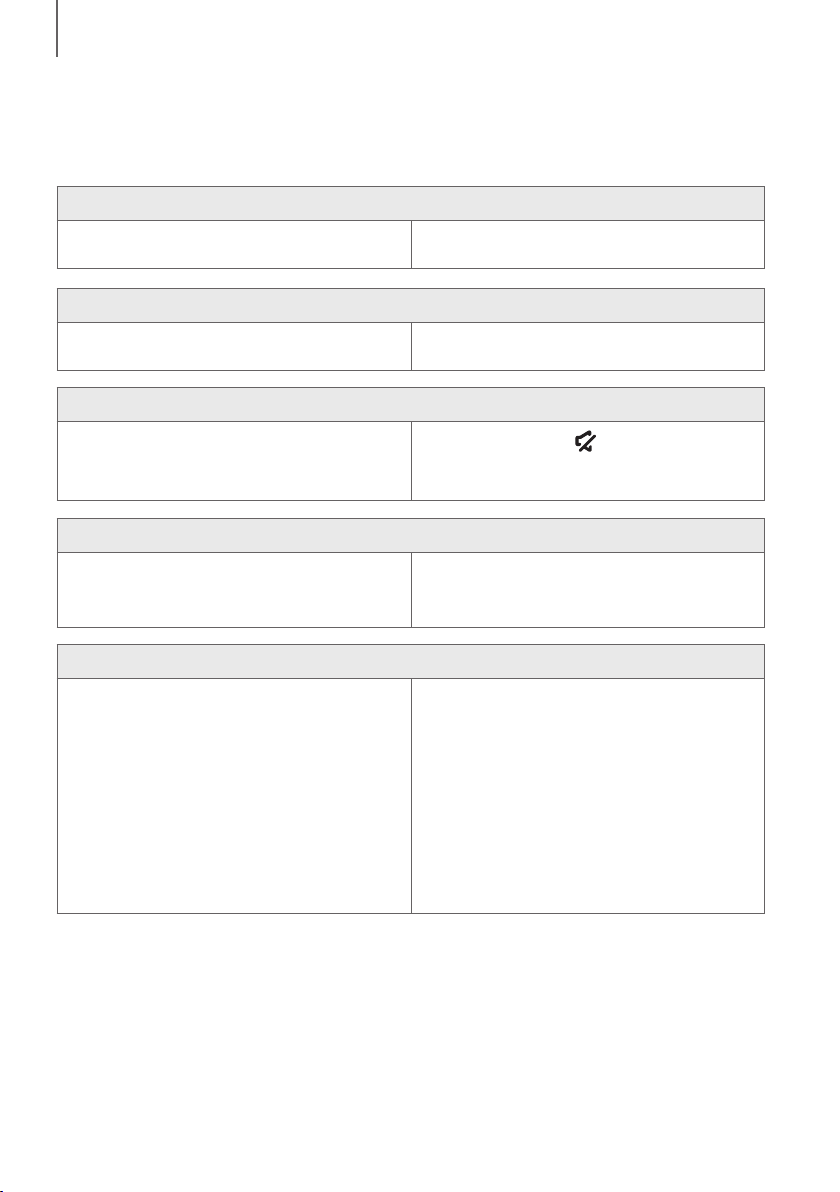
2928
TÉPANNAGE
TÉPANNAGE
Avant de contacter l'assistance, veuillez lire ce qui suit.
L'ensemble ne s'allume pas.
• Le cordon d'alimentation est-il branché dans la
prise?
¼ Branchez la fiche d'alimentation électrique dans la
prise murale.
La fonction ne s'active pas lorsque vous appuyez sur le bouton correspondant.
• L'air est-il chargé en électricité statique? ¼ Débranchez la fiche d'alimentation électrique et
rebranchez-la.
Aucun son n'est émis.
• La fonction Muet est-elle activée?
• Le volume est-il réglé au minimum?
¼ Appuyez sur le bouton (Muet) pour annuler la
fonction.
¼ Permet de régler le Volume.
La télécommande ne fonctionne pas.
• Les piles sont-elles usées?
• La distance entre la télécommande et l'unité
principale est-elle trop importante ?
¼ Remplacez-les.
¼ Rapprochez-vous de l’appareil.
La fonction TV SoundConnect (appariement du téléviseur) a échoué.
• Votre téléviseur prend-il en charge
TV SoundConnect?
• La version du micrologiciel du téléviseur est-elle la
plus récente?
• Une erreur s’est-elle produite lors de la connexion?
¼ TV SoundConnect est pris en charge par certains
téléviseurs Samsung commercialisés après 2012.
Vérifiez si votre téléviseur prend en charge
TV SoundConnect.
¼ Mettez votre téléviseur à jour avec la version du
micrologiciel la plus récente.
¼ Contactez le centre d'appels Samsung.
¼ Réinitialisez TV SoundConnect et connectez-le à
nouveau. Pour réinitialiser la connexion
TV SoundConnect, appuyez sur la touche
p
et
maintenez-la enfoncée pendant 5 secondes.
TÉPANNAGE
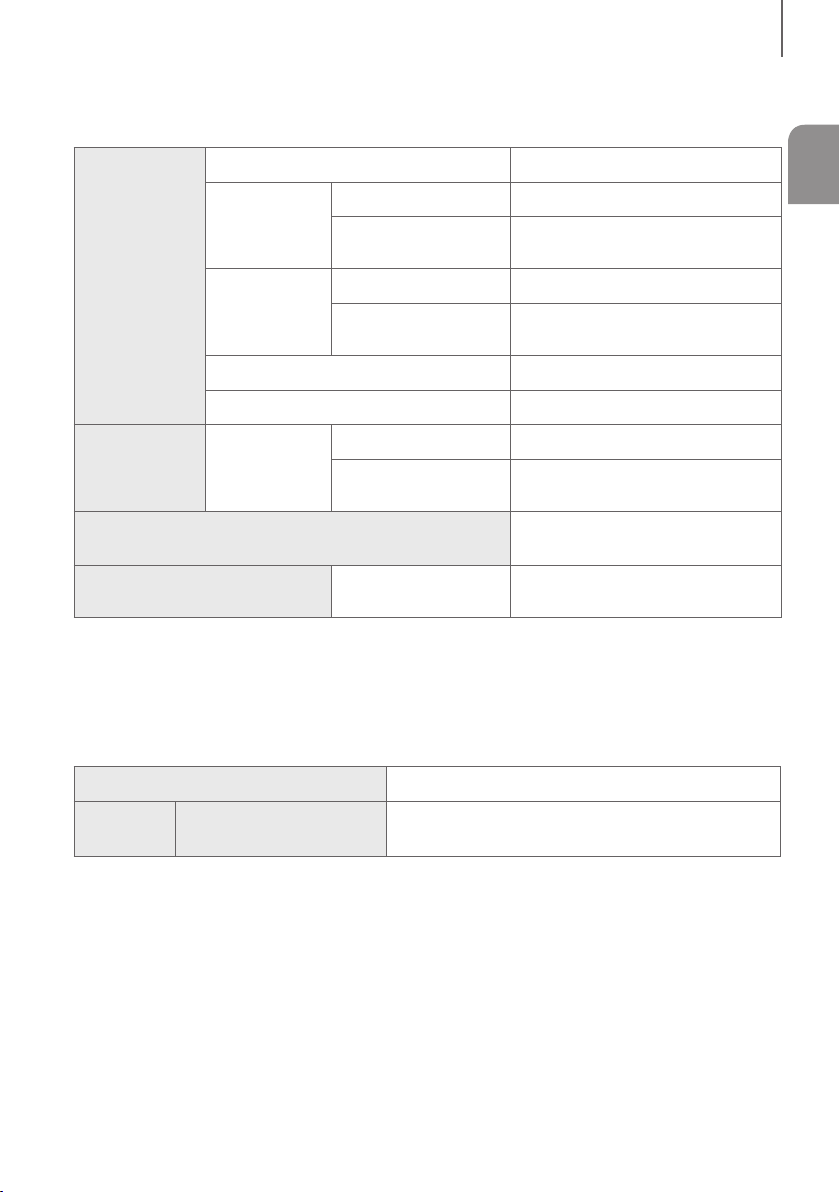
29
FRA
ANNEXE
SPÉCIFICATIONS
GÉNÉRAL
USB
5V / 0,5A
Poids
Unité principale
1,5 kg
Caisson de basses
(PS-WM10)
2,8 kg
Dimensions
(L x H x P)
Unité principale
907,5 x 53,5 x 70,5 mm
Caisson de basses
(PS-WM10)
155,0 x 300,0 x 285,0 mm
Plage de températures en fonctionnement
de +5 à +35 °C
Plage d'humidité en fonctionnement
de 10 à 75 %
AMPLIFICATEUR
Puissance de
sortie nominale
Unité principale
35W x 2, 6 OHM
Caisson de basses
(PS-WM10)
60W, 3 OHM
Formats de lecture pris en charge
(Le son DTS 2.0 est lu au format DTS.)
LPCM 2ch, Dolby Audio™
(prise en charge de Dolby® Digital), DTS
PUISSANCE DE SORTIE DE
L’APPAREIL SANS FIL
Puissance de
transmission BT max.
100 mW à 2,4 GHz – 2,4835 GHz
* La présentation et les spécifications peuvent faire l'objet de modifications sans préavis.
* Caractéristiques nominales
- Samsung Electronics Co., Ltd se réserve le droit de modifier les caractéristiques sans préavis.
- Le poids et les dimensions sont approximatifs.
- Pour plus d'informations sur l'alimentation et la consommation électriques, reportez-vous à l'étiquette collée
sur le produit. (Étiquette: Bas de l’Unité Principale Soundbar)
Consommation électrique totale en veille (W)
2,9W
Bluetooth
Méthode de désactivation du
port
Appuyez sur la touche «Bluetooth POWER» sur la
télécommande en mode «BT».
a Avis de licence libre
- Pour toute requête et demande concernant les sources ouvertes, contactez Samsung via e-mail à l’adresse
ANNEXE

30
ANNEXE
LICENCE
Manufactured under license from Dolby Laboratories. Dolby, Dolby Audio, Pro Logic, and the double-D symbol are
trademarks of Dolby Laboratories.
For DTS patents, see http://patents.dts.com. Manufactured under license from DTS Licensing Limited. DTS, the
Symbol, DTS in combination with the Symbol, and DTS 2.0 Channel are registered trademarks or trademarks of DTS,
Inc. in the United States and/or other countries. © DTS, Inc. All Rights Reserved.
Samsung Electronics déclare par la présente que cet équipement est conforme à la directive
2014/53/UE.
Le texte complet de la déclaration de conformité de l’UE est disponible à l’adresse Internet
suivante : http://www.samsung.fr, puis allez dans Assistance > Sélectionner un produit et
saisissez le nom de modèle.
Cet équipement peut fonctionner dans tous les pays de l’Union européenne.
Comment contacter Samsung dans le monde
Si vous avez des suggestions ou des questions concernant les produits Samsung, veuillez contacter le Service
Consommateurs Samsung.
[Elimination des batteries de ce produit]
(Applicable aux pays disposant de systèmes de collecte séparés)
Le symbole sur la batterie, le manuel ou l'emballage indique que les
batteries de ce produit ne doivent pas être éliminées en fin de vie avec
les autres déchets ménagers. L'indication éventuelle des symboles
chimiques Hg, Cd ou Pb signifie que la batterie contient des quantités de
mercure, de cadmium ou de plomb supérieures aux niveaux de référence
stipulés dans la directive CE 2006/66.
Si les batteries ne sont pas correctement éliminées, ces substances
peuvent porter préjudice à la santé humaine ou à l'environnement.
Afin de protéger les ressources naturelles et d'encourager la réutilisation
du matériel, veillez à séparer les batteries des autres types de déchets et
à les recycler via votre système local de collecte gratuite des batteries.
Les bons gestes de mise au rebut de ce produit
(Déchets d’équipements électriques &
électroniques)
(Applicable aux pays disposant de systèmes de collecte
séparés)
Ce symbole sur le produit, ses accessoires ou sa documentation
indique que ni le produit, ni ses accessoires électroniques usagés
(chargeur, casque audio, câble USB, etc.) ne peuvent être jetés avec
les autres déchets ménagers. La mise au rebut incontrôlée des
déchets présentant des risques environnementaux et de santé
publique, veuillez séparer vos produits et accessoires usagés des
autres déchets. Vous favoriserez ainsi le recyclage de la matière qui
les compose dans le cadre d’un développement durable.
Les particuliers sont invités à contacter le magasin leur ayant vendu le
produit ou à se renseigner auprès des autorités locales pour connaître
les procédures et les points de collecte de ces produits en vue de leur
recyclage.
Les entreprises et particuliers sont invités à contacter leurs
fournisseurs et à consulter les conditions de leur contrat de vente. Ce
produit et ses accessoires ne peuvent être jetés avec les autres
déchets.
Country Contact Centre
Web Site
`
Europe
UK 0330 SAMSUNG (7267864) www.samsung.com/uk/support
IRELAND (EIRE) 0818 717100 www.samsung.com/ie/support
GERMANY 06196 77 555 77 www.samsung.com/de/support
FRANCE 01 48 63 00 00 www.samsung.com/fr/support
ITALIA 800-SAMSUNG (800.7267864) www.samsung.com/it/support
SPAIN 0034902172678 www.samsung.com/es/support
PORTUGAL 808 207 267 www.samsung.com/pt/support
LUXEMBURG 261 03 710 www.samsung.com/be_fr/support
NETHERLANDS 088 90 90 100 www.samsung.com/nl/support
BELGIUM 02-201-24-18
www.samsung.com/be/support (Dutch)
www.samsung.com/be_fr/support (French)
NORWAY 815 56480 www.samsung.com/no/support
DENMARK 707 019 70 www.samsung.com/dk/support
FINLAND 030-6227 515 www.samsung.com/fi/support
SWEDEN 0771 726 786 www.samsung.com/se/support
POLAND
801-172-678* lub +48 22 607-93-33*
* (koszt połączenia według taryfy
operatora)
http://www.samsung.com/pl/support/
HUNGARY 0680SAMSUNG (0680-726-7864) www.samsung.com/hu/support
AUSTRIA
0800-SAMSUNG (0800-7267864)
[Only for Dealers] 0810-112233
www.samsung.com/at/support
Country Contact Centre
Web Site
SWITZERLAND 0800 726 78 64 (0800-SAMSUNG)
www.samsung.com/ch/support (German)
www.samsung.com/ch_fr/support (French)
CZECH 800 - SAMSUNG (800-726786) www.samsung.com/cz/support
SLOVAKIA 0800 - SAMSUNG (0800-726 786) www.samsung.com/sk/support
CROATIA 072 726 786 www.samsung.com/hr/support
BOSNIA 055 233 999
www.samsung.com/support
MONTENEGRO 020 405 888
SLOVENIA 080 697 267 (brezplačna številka) www.samsung.com/si/support
SERBIA 011 321 6899 www.samsung.com/rs/support
ALBANIA 045 620 202 www.samsung.com/al/support
BULGARIA
*3000 Цена в мрежата
0800 111 31 , Безплатна телефонна
линия
www.samsung.com/bg/support
ROMANIA
*8000 (apel in retea)
08008-726-78-64 (08008-SAMSUNG)
Apel GRATUIT
www.samsung.com/ro/support
CYPRUS 8009 4000 only from landline, toll free
www.samsung.com/gr/support
GREECE
80111-SAMSUNG (80111 726 7864)
only from land line
(+30) 210 6897691 from mobile
and land line
LITHUANIA 8-800-77777 www.samsung.com/lt/support
LATVIA 8000-7267 www.samsung.com/lv/support
ESTONIA 800-7267 www.samsung.com/ee/support
Pour obtenir des informations sur les engagements environnementaux de Samsung et sur les obligations réglementaires spécifiques à l’appareil, par ex.
la réglementation REACH WEEE, rendez-vous sur :
http://www.samsung.com/uk/aboutsamsung/samsungelectronics/corporatecitizenship/data_corner.html
Manuale utente
Immagina le possibilità
Grazie per aver acquistato un prodotto Samsung.
Per ricevere un servizio più completo, registrare il prodotto all'indirizzo
www.samsung.com/register
© 2016 Samsung Electronics Co., Ltd. Tutti i diritti riservati.
HW-K335
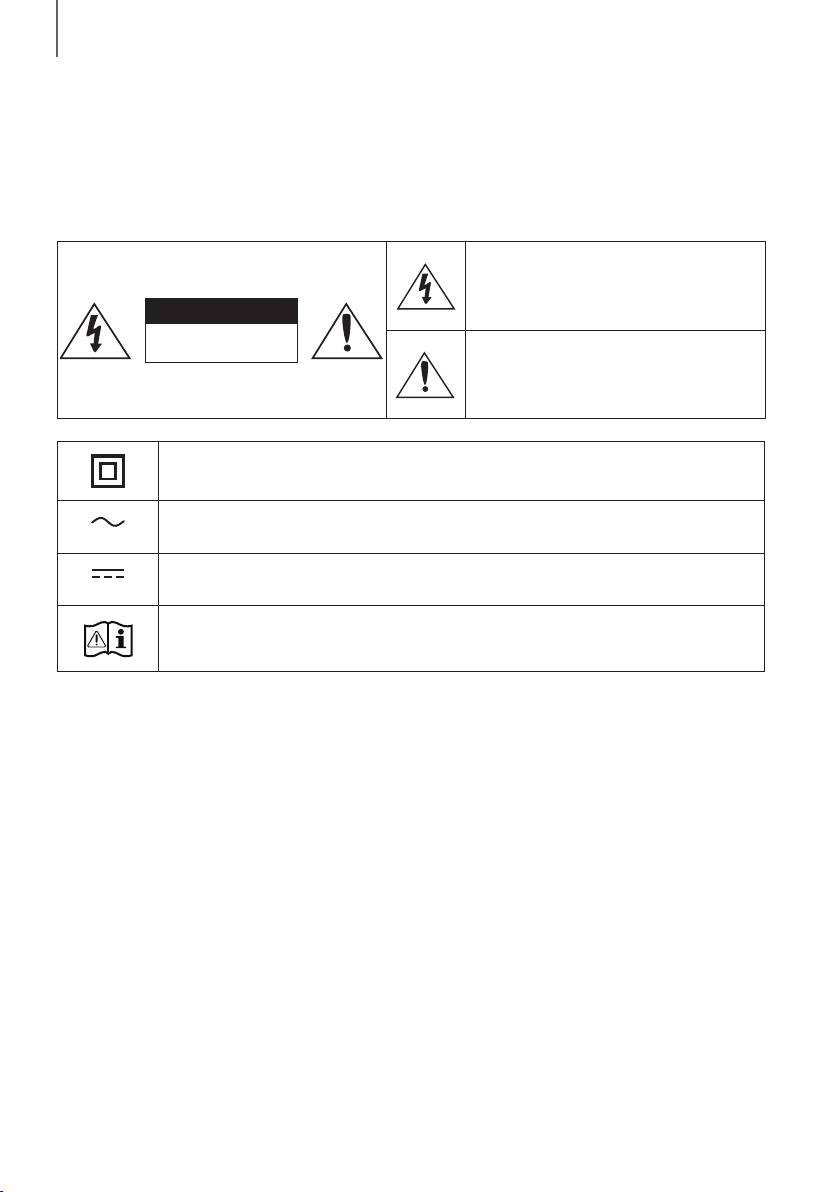
32
PER COMINCIARE
INFORMAZIONI SULLA SICUREZZA
NORME PER LA SICUREZZA
PER RIDURRE I RISCHI DI FOLGORAZIONE, NON RIMUOVERE IL COPERCHIO (O IL RETRO),
ALL'INTERNO NON VI SONO PARTI RIPARABILI DALL'UTENTE. PER L'ASSISTENZA TECNICA FARE RIFERIMENTO
A PERSONALE QUALIFICATO.
ATTENZIONE
RISCHIO DIFOLGORAZIONE.
NON APRIRE.
Questo simbolo indica che all'interno sono
presenti tensioni pericolose. E' pericoloso
toccare in qualsiasi modo le parti interne di
questo prodotto.
Questo simbolo indica la disponibilità di
informazioni importanti nella letteratura del
prodotto relative al funzionamento e alla
manutenzione del dispositivo.
Prodotto di Classe II: Questo simbolo indica che il prodotto non necessita di una connessione di
sicurezza alla terra.
Tensione CA: Questo simbolo indica che la tensione contrassegnata con questo simbolo è di tipo
CA.
Tensione CC : Questo simbolo indica che la tensione contrassegnata con questo simbolo è di tipo
CC.
Attenzione, consultare le Istruzioni per l’uso: Questo simbolo indica all’utente la necessità di
consultare il manuale dell’utente per ottenere ulteriori informazioni sulla sicurezza.
AVVERTENZA: Per ridurre i rischi d’incendio e di scosse elettriche non esporre l’ apparecchio a pioggia o umidità.
ATTENZIONE : PER EVITARE SCOSSE ELETTRICHE, INSERIRE CORRETTAMENTE E COMPLETAMENTE LA
SPINA.
• Questo dispositivo deve essere sempre collegato ad una presa elettrica dotata di messa a terra di protezione.
• Per scollegare il dispositivo dalla rete elettrica, lo spinotto deve essere estratto dalla presa, pertanto esso deve
essere facilmente raggiungibile.
ATTENZIONE
• Non schizzare o sgocciolare liquidi sull'apparecchio. Non sistemare oggetti pieni di liquidi, come dei vasi,
sull'apparecchio.
• Per spegnere completamente l'apparecchio, estrarre la spina di alimentazione dalla presa di rete. Di conseguenza,
la spina di alimentazione deve essere facilmente e prontamente accessibile in qualsiasi momento.
PER COMINCIARE
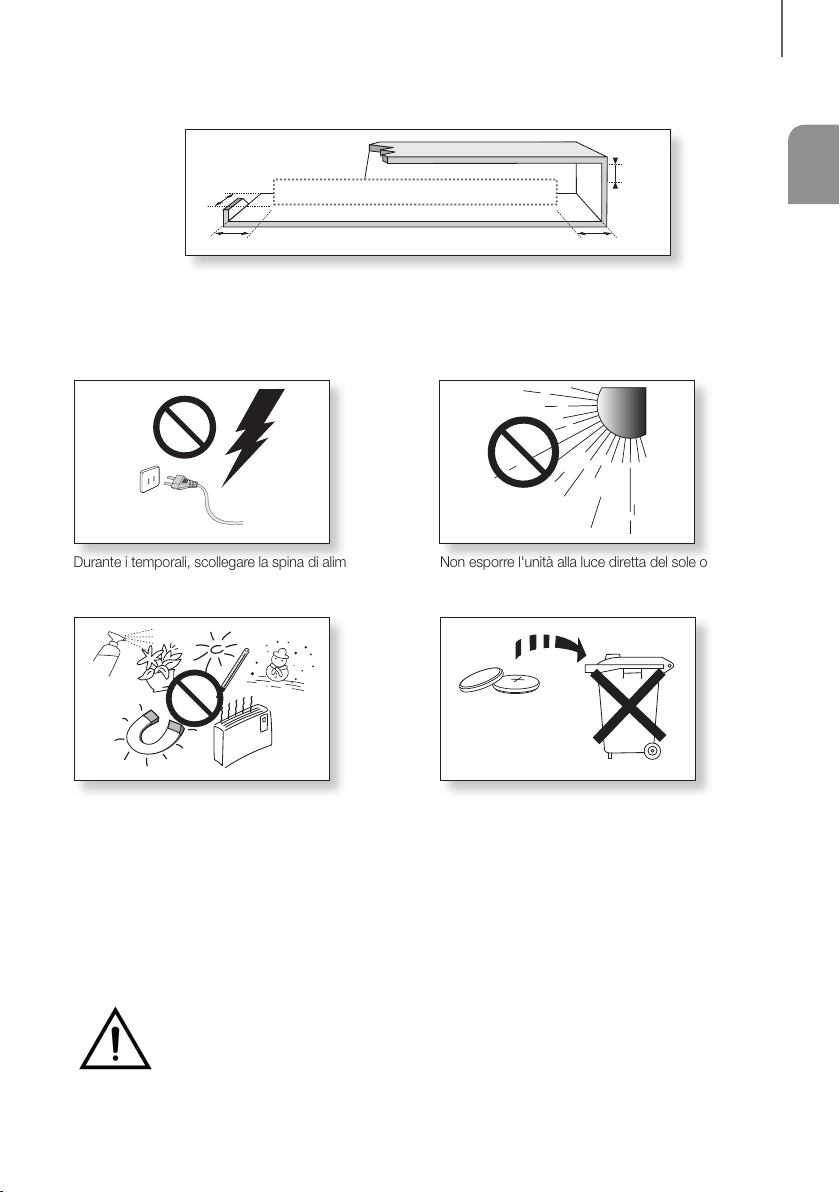
3
ITA
PER COMINCIARE
PRECAUZIONI
99.1mm 99.1mm
68.6
mm
99.1mm
Verificare che le caratteristiche degli alimentatori CA presenti in casa corrispondano all'etichetta di identificazione
posta sul retro del prodotto. Installare il prodotto orizzontalmente, su un supporto adeguato (mobile), verificando
che vi sia spazio sufficiente per una corretta ventilazione 7 - 10 cm. Assicurarsi che le aperture di ventilazione non
siano coperte. Non sistemare l'unità su amplificatori o altri dispositivi che possono diventare caldi. Questa unità
è progettata per un uso continuo. Per spegnere completamente l'unità, scollegare il connettore CA dalla presa di
rete. Scollegare l'unità dalla presa se si prevede di non utilizzarla per un periodo prolungato.
Durante i temporali, scollegare la spina di alimentazione
dalla presa. I picchi di alta tensione provocati dai fulmini
potrebbero danneggiare l'unità.
Tenere il prodotto lontano da fonti di umidità (ad es. vasi)
e calore eccessivo (ad es. fuoco) o da apparecchi che
generano un forte campo magnetico o elettrico. In caso
di malfunzionamento dell'unità, scollegare il cavo di
alimentazione dalla presa di corrente. Il prodotto non è
destinato all'uso industriale. Questo prodotto è destinato
esclusivamente all'uso personale. Se il prodotto o il disco
vengono conservati a basse temperature, potrebbe
formarsi della condensa. Trasportando l'unità in inverno,
attendere circa 2 ore prima di utilizzarla, in modo che
ritorni a temperatura ambiente.
Non esporre l'unità alla luce diretta del sole o ad altre
fonti di calore. Questo potrebbe causare il
surriscaldamento e il malfunzionamento dell'unità.
Le batterie utilizzate con questo prodotto contengono
sostanze chimiche dannose per l'ambiente. Non smaltirle
con i comuni rifiuti domestici. Non gettare le batterie nel
fuoco. Non cortocircuitare, smontare o surriscaldare le
batterie. Una installazione scorretta delle batterie può
causarne l'esplosione. Sostituire solo con batterie dello
stesso tipo o equivalenti.
AVVERTENZA: NON INGERIRE LA BATTERIA, PERICOLO DI USTIONE CHIMICA,
[Il telecomando fornito con] Il prodotto contiene una batteria a celle a bottone/moneta.
L'ingestione della batteria a celle a bottone/moneta può causare gravi ustioni interne nell'arco di
appena 2 ore e può portare alla morte. Tenere le batterie nuove e quelle utilizzate lontano dalla portata
dei bambini. Se il vano della batteria non si chiude in modo sicuro, smettere di utilizzare il prodotto e tenerlo lontano
dalla portata dei bambini. Se si pensa che le batterie siano state ingerite o introdotte in una parte del corpo, consultare
immediatamente un medico.

54
PER COMINCIARE
● Le figure e le illustrazioni del presente manuale
utente sono fornite soltanto come riferimento.
Possono differire rispetto all'aspetto effettivo del
prodotto.
● È possibile che vengano addebitate delle spese
amministrative nei seguenti casi:
(a) l'uscita del tecnico in seguito a una chiamata
non rileva difetti nel prodotto (ad es. nel caso
l'utente abbia omesso di leggere questo
manuale utente).
(b) utente ha portato l'unità presso un centro di
riparazione che non rileva difetti nel prodotto
(ad es. nel caso l'utente abbia omesso di
leggere questo manuale utente).
● L'importo di tali spese amministrative verrà
comunicato all'utente prima di eseguire una visita a
domicilio o un eventuale intervento di manutenzione.
SOMMARIO
2 PER COMINCIARE
2 Informazioni sulla sicurezza
5 Accessori forniti
6 DESCRIZIONI
6 Pannello anteriore / laterale destro
7 Pannello Inferiore
8 Telecomando
11 INSTALLAZIONE
11 Installazione della Soundbar
11 Instalazione del suporto per montaggio a
parete
15 Rimozione della Soundbar dalla parete
16 COLLEGAMENTI
16 Collegamento ad una TV
16 Collegamento a una TV utilizzando un cavo
ottico digitale
17 TV SoundConnect
18 Collegamento a dispositivi esterni
18 Cavo audio ottico o analogico
19 USB
21 FUNZIONI
21 Modo di ingresso
22 Bluetooth
26 Aggiornamento del Software
28 RISOLUZIONE DEI
PROBLEMI
28 Risoluzione dei problemi
29 APPENDICE
29 Specifiche
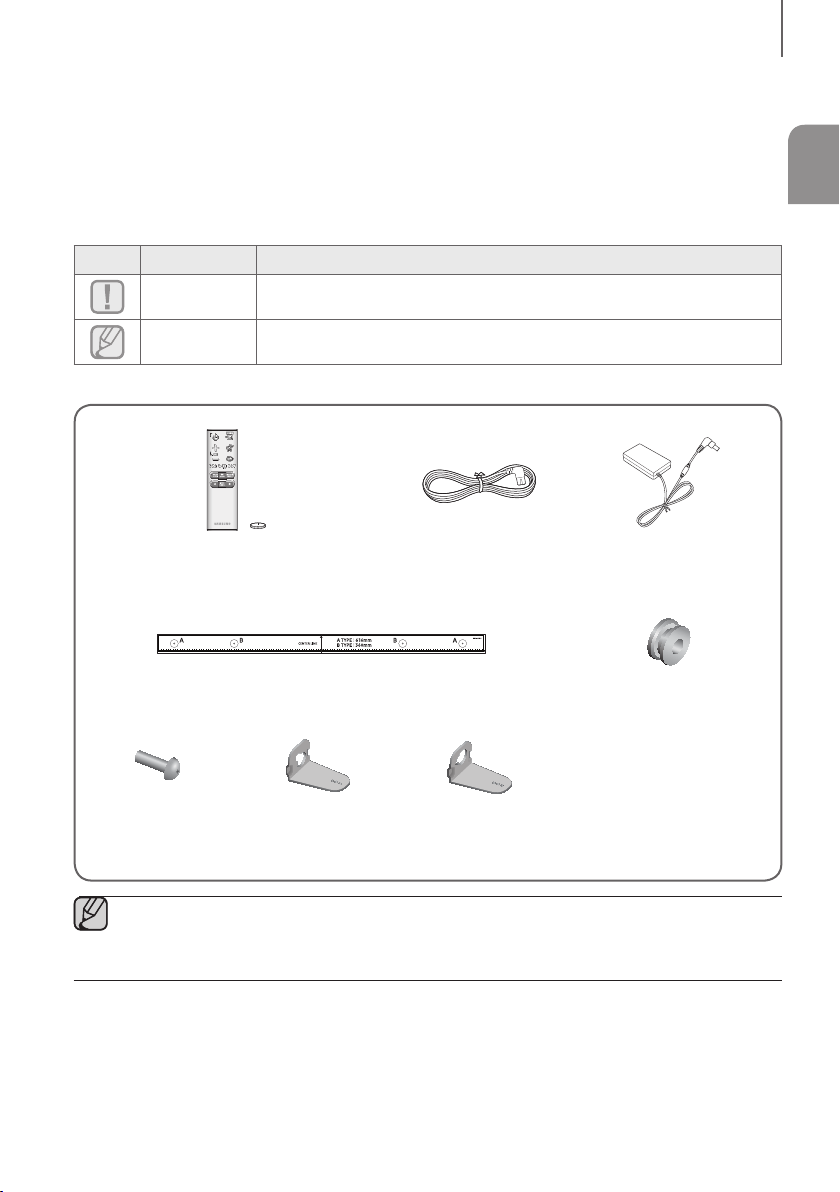
5
ITA
PER COMINCIARE
ACCESSORI FORNITI
PRIMA DI LEGGERE IL MANUALE UTENTE
Osservare le seguenti indicazioni prima di leggere il manuale utente.
+ Icone utilizzate nel manuale
Icona Indicazione Definizione
Attenzione
Indica una situazione in cui una funzione non è attiva o in cui è possibile che le
impostazioni vengano cancellate.
Nota
Indica un suggerimento o un'istruzione nella pagina che aiutano a comprendere il
funzionamento dell'unità.
Controllare gli accessori forniti indicati di seguito.
Telecomando / Batteria al litio
(3V : CR2032)
Cavo di alimentazione Adattatore CA/CC
Guida per il montaggio a parete Rondella di fissaggio : 2x
Vite : 2x
Supporto per
montaggio a parete S
Supporto per
montaggio a parete D
● L'aspetto degli accessori può variare leggermente dalle illustrazioni riportate sopra.
● Il cavo adattatore da micro USB a USB è venduto separatamente. Per effettuarne l’acquisto, contattare un
Centro servizi Samsung o l’Assistenza clienti Samsung.
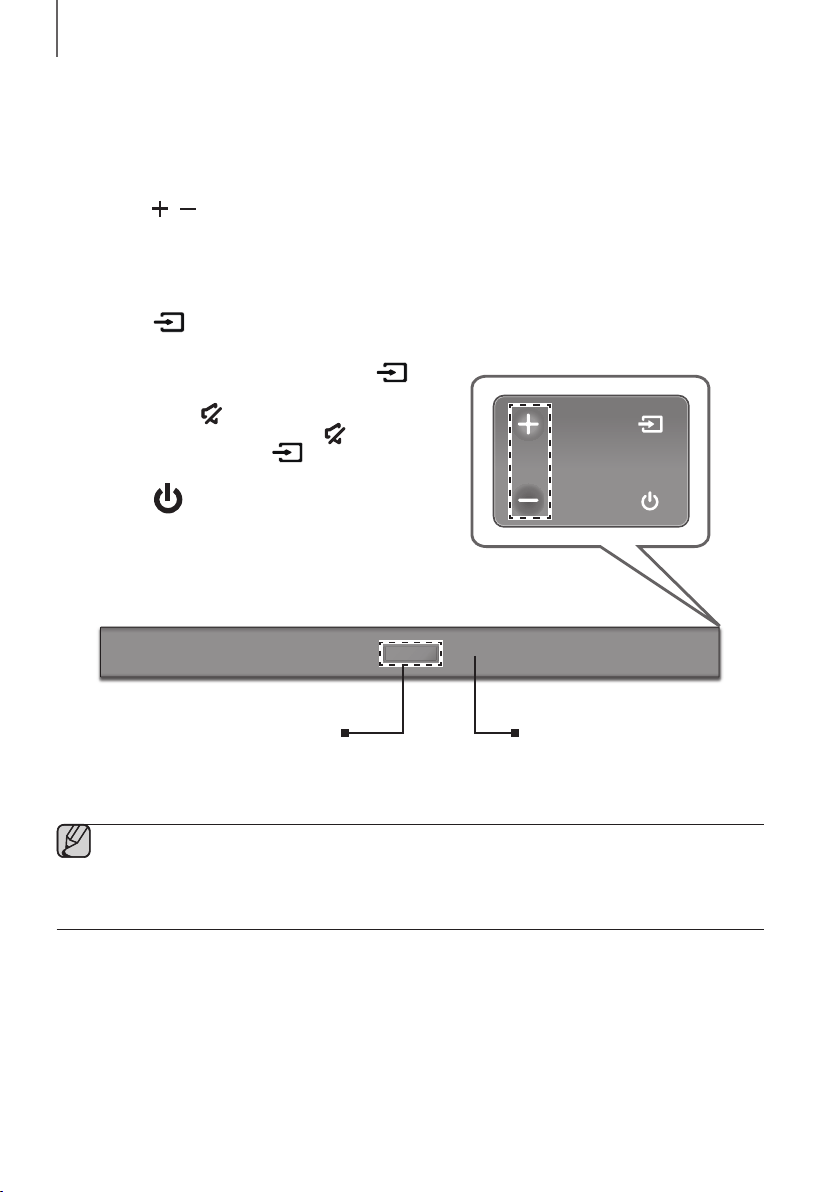
76
DESCRIZIONI
PANNELLO ANTERIORE / LATERALE
DESTRO
1
Tasto
/
(Volume)
Regola il volume.
Sul display del pannello anteriore viene visualizzato il valore
numerico del volume.
2 Tasto (Sorgente)
Seleziona l'ingresso D.IN, AUX, BT, TV, USB.
● Con l'unità accesa, se si tiene premuto il tasto
per più di 3 secondi, il tasto viene impostato per
funzionare come
(Muto).
Per annullare l'impostazione del tasto
(Muto),
premere nuovamente il tasto
per più di 3 secondi.
3 Tasto (Alimentazione)
Accende e spegne l'unità Soundbar.
2
3
Lato destro della Soundbar
1
Visualizzazione
Visualizza il modo corrente.
Sensore Telecomando
● Quando si inserisce il cavo CA, il tasto di accensione diventa operativo in 4 - 6 secondi.
● Quando si accende l'unità vi è un ritardo di 4 - 5 secondi prima che venga riprodotto il suono.
● Per attivare solo l'audio del Soundbar, disattivare i diffusori della TV nel menu di configurazione audio della
TV. Vedere il manuale fornito con il televisore.
DESCRIZIONI
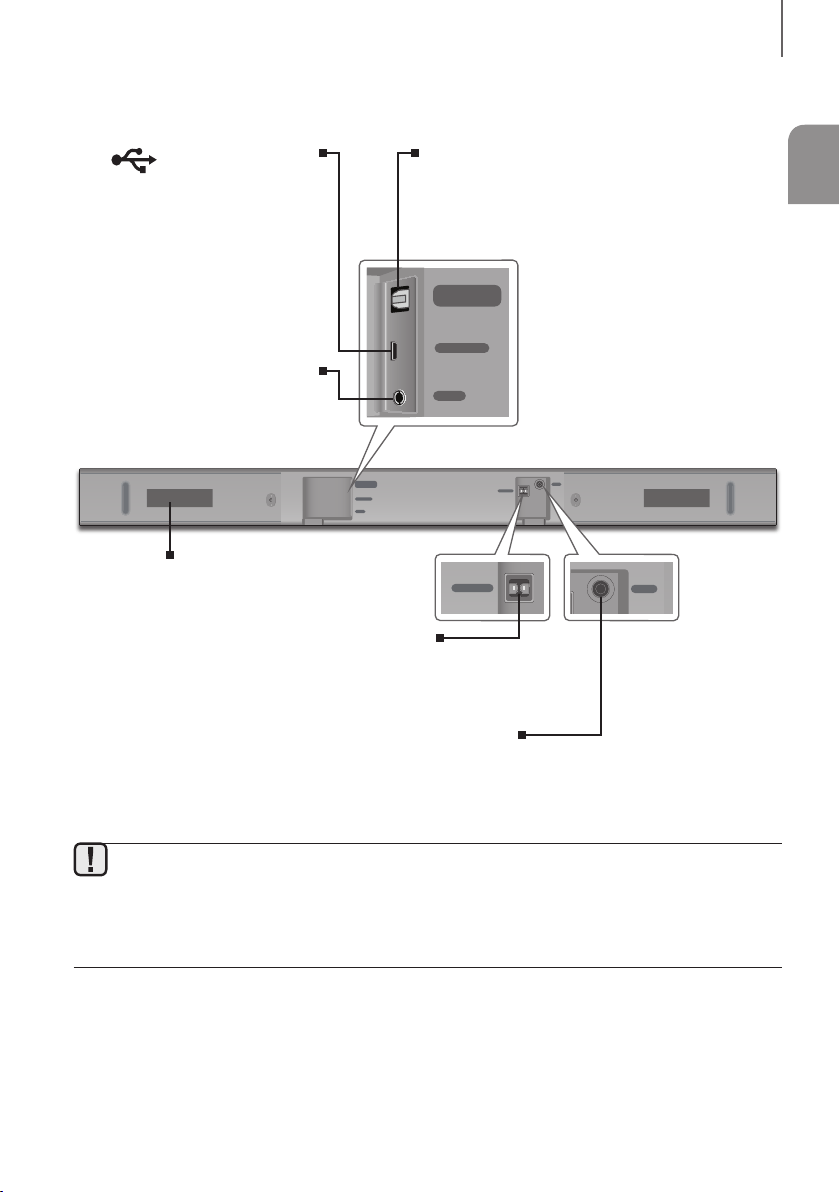
7
ITA
DESCRIZIONI
PANNELLO INFERIORE
DIGITAL AUDIO IN
(OPTICAL)
USB (5V 0.5A)
AUX IN
SUBWOOFER
DC 24V
DIGITAL AUDIO IN
(OPTICAL)
USB (5V 0.5A)
AUX IN
DIGITAL AUDIO IN
(OPTICAL)
USB (5V 0.5A)
SUBWOOFER
DC 24V
DIGITAL AUDIO IN
(OPTICAL)
SUBWOOFER
DC 24V
DC 24V (Ingresso dell'alimentazione)
Collegare l'alimentatore CC al connettore di alimentazione, quindi
collegare la spina dell'alimentatore CA a una presa di rete.
SUBWOOFER
Collegare il cavo dell'altoparlante al subwoofer.
(Porta micro USB)
È possibile riprodurre la musica da un
dispositivo di memoria USB se si
collega un dispositivo di memoria micro
USB o un cavo adattatore da micro
USB a USB (non fornito in dotazione).
Consultare le specifiche del cavo
adattatore da micro USB a USB a
pagina 19.
DIGITAL AUDIO IN (OPTICAL)
Collegare all'uscita digitale (ottica) di un dispositivo
esterno.
AUX IN
Per il collegamento all'uscita analogica
di un dispositivo esterno.
ETICHETTA
● Tenere l'alimentatore CA dalla spina quando lo si scollega dalla presa di rete. Non tirare il cavo.
● Non collegare questa unità o altri componenti all'uscita CA finché non sono stati collegati tutti i componenti.
● Assicurarsi di poggiare l'adattatore CA/CC orizzontalmente su un tavolo o sul pavimento. Se si posiziona
l'adattatore CA/CC in modo che penda con l'ingresso del cavo CA rivolto verso l'alto, acqua o altre
sostanze estranee potrebbero penetrare nell'adattatore e causarne il malfunzionamento.
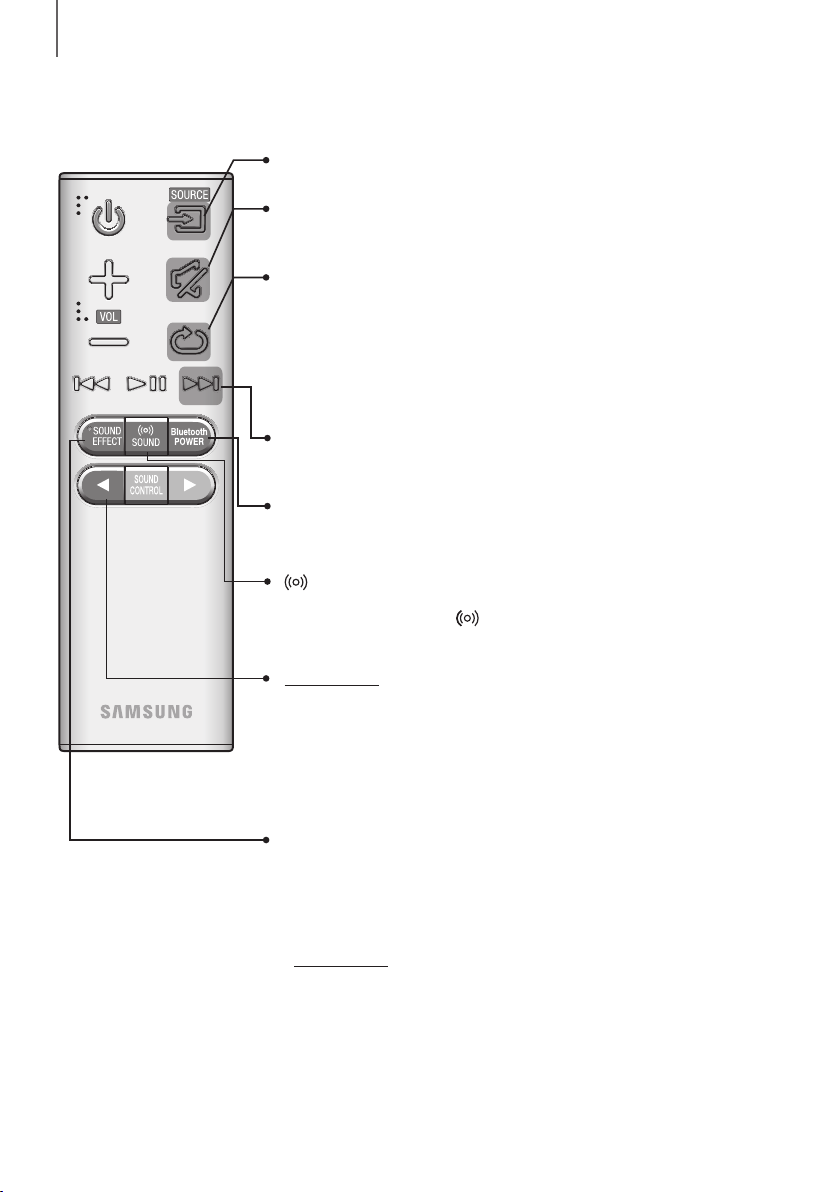
98
DESCRIZIONI
TELECOMANDO
Ripeti
Premere per impostare la funzione di ripetizione durante la riproduzione musicale
da un dispositivo di archiviazione.
OFF - REPEAT : Annulla la riproduzione ripetuta.
TRACK - REPEAT : Per riprodurre ripetutamente una traccia.
ALL - REPEAT : Per riprodurre ripetutamente tutte le tracce.
RANDOM - REPEAT : Riproduce le tracce in ordine casuale.
(Una traccia già riprodotta può essere riprodotta nuovamente).
Muto
Premendo questo tasto è possibile azzerare il volume.
Premerlo di nuovo per riportare l'audio al livello precedente.
SOURCE
Per selezionare una sorgente collegata al Soundbar.
Avanzamento
Se sul dispositivo che si sta riproducendo sono presenti più file, premendo il
tasto ] viene selezionato il file successivo.
Bluetooth POWER
Premere il tasto Bluetooth POWER sul telecomando per attivare e disattivare la
funzione Bluetooth POWER On. Per i dettagli, vedere le pagine 18 e 23.
SOUND
Audio surround consente di aggiungere profondità e spazialità all'audio. Se si
preme ripetutamente il tasto SOUND, le impostazioni di Audio surround
scorrono in sequenza :
ON - SURROUND SOUND, OFF - SURROUND SOUND
SOUND EFFECT
È possibile scegliere tra 6 modi audio: STANDARD (Suono Originale), MUSIC,
CLEAR VOICE, SPORTS, MOVIE, e NIGHT a seconda del tipo di sorgente da
riprodurre. Selezionare il modo STANDARD per ascoltare l'audio originale.
* DRC (Controllo della gamma dinamica)
Consente di applicare il controllo della gamma dinamica al Dolby Digital.
Tenere premuto il tasto SOUND EFFECT per circa 5 secondi in modalità
STANDBY per accendere e spegnere la funzione DRC (Controllo della gamma
dinamica).
Tenere premuto il tasto
per circa 5 secondi per attivare o disattivare la
funzione Auto Power Link.
OFF - POWER LINK, ON - POWER LINK
* Auto Power Link
Sincronizza la Soundbar con una sorgente ottica collegata attraverso il jack
ottico in modo che si accenda automaticamente quando si accende la TV.
(Vedere a pagina 16)
La funzione Auto Power Link è disponibile solamente nel modo D.IN.
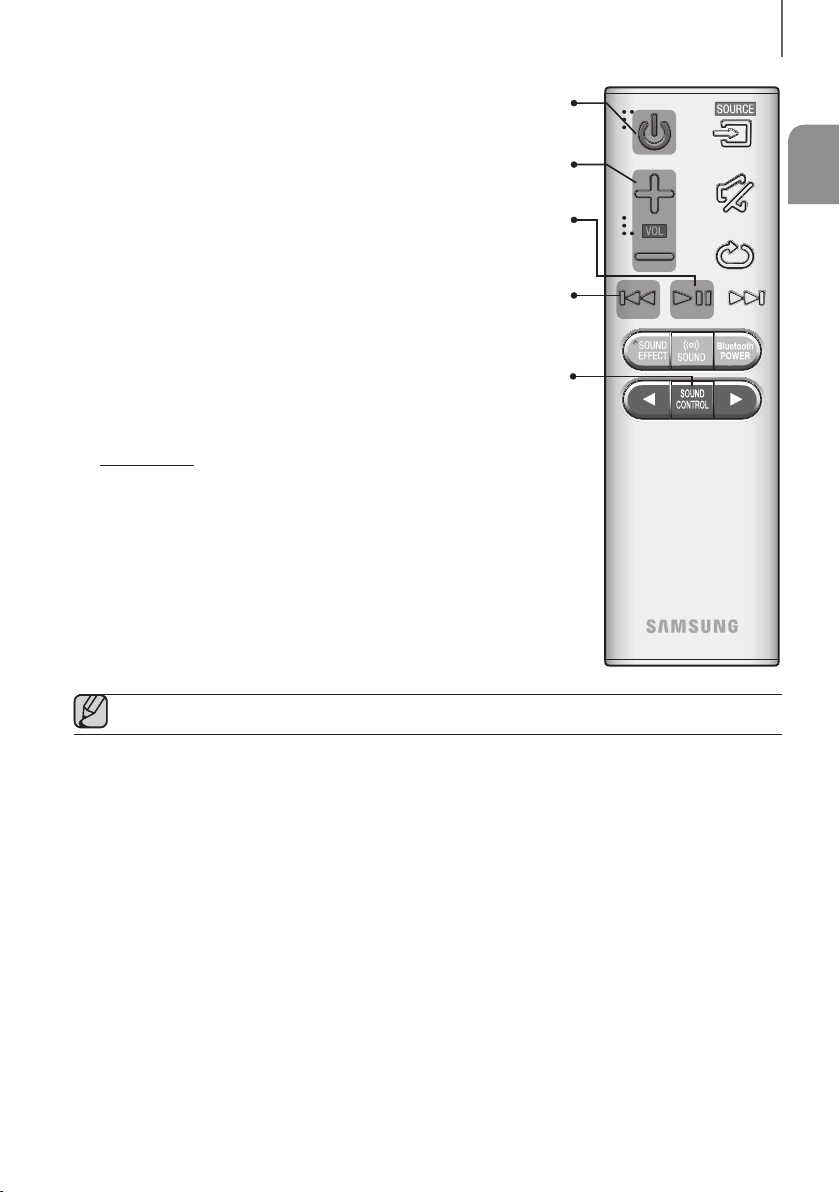
9
ITA
DESCRIZIONI
Volume
Regola il volume dell'unità.
Alimentazione
Accende e spegne l'unità Soundbar.
SOUND CONTROL
È possibile scegliere tra TREBLE, BASS, SUBWOOFER LEVEL o AUDIO SYNC.
Quindi utilizzare i tasti , per regolare il volume di
TREBLE
o
BASS
tra
-6 ~ +6 e il volume SUBWOOFER LEVEL tra -12, -6 ~ +6.
Tenere premuto il tasto SOUND CONTROL per circa 5 secondi per regolare
l'audio per ogni banda di frequenza. È possibile selezionare 150Hz, 300Hz,
600Hz, 1,2KHz, 2,5KHz, 5KHz e 10KHz e ogni opzione può essere regolata su
un'impostazione compresa tra -6 ~ +6.
Se il Soundbar viene collegato a una TV digitale e le immagini non sono
sincronizzate con l'audio, premere i tasti di SOUND CONTROL per
sincronizzare l'audio con le immagini. Utilizzare i tasti , per impostare il
ritardo audio tra 0 ms ~ 300 ms. In modo USB, modo TV e modo BT, la funzione
Audio Sync potrebbe non funzionare.
Riproduzione/Pausa
Premere il tasto p per mettere in pausa temporaneamente la riproduzione
del file. Premere nuovamente il tasto p per riprodurre il file selezionato.
Riavvolgimento
Se sul dispositivo che si sta riproducendo sono presenti più file, premendo il
tasto [ viene selezionato il file precedente.
● Accendere la TV utilizzando il telecomando.
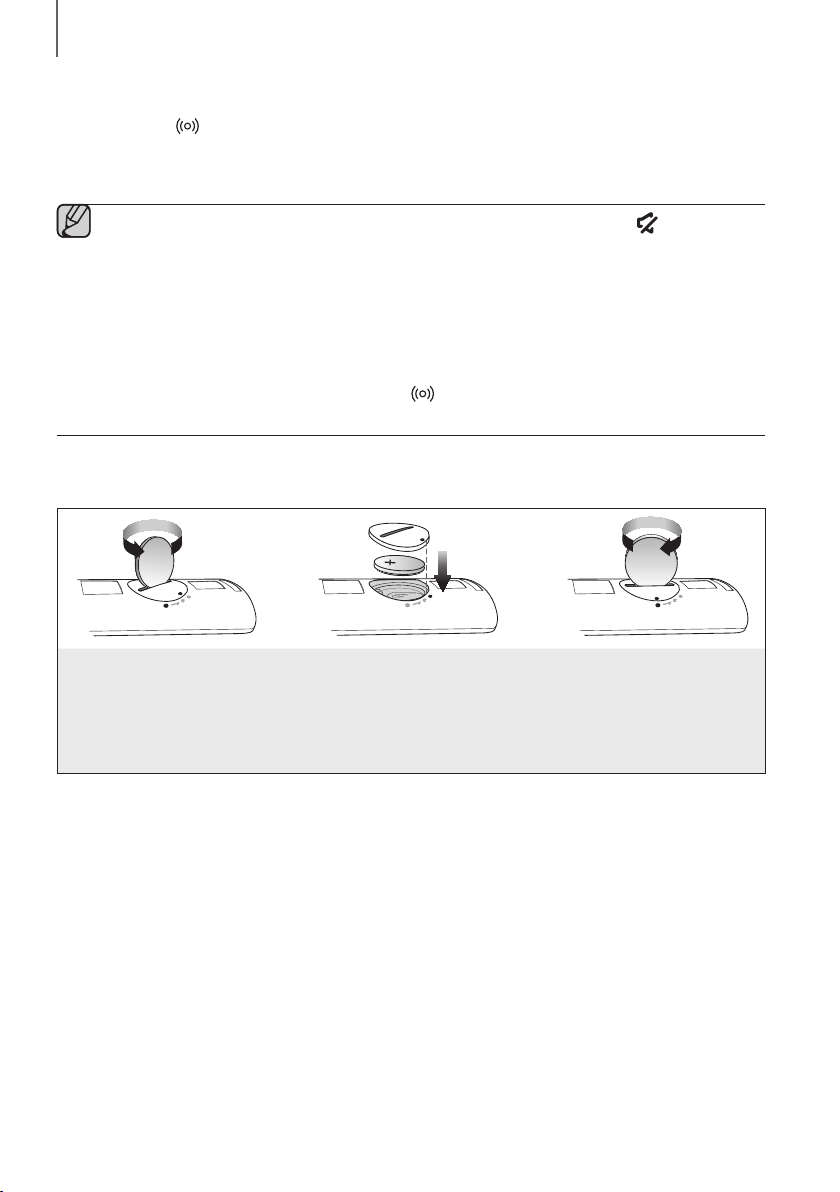
1110
DESCRIZIONI
+ Controllo della Soundbar utilizzando il telecomando della TV
1. Premere il tasto
SOUND
per più di 5 secondi mentre si accende la Soundbar.
2. Sul display della Soundbar viene visualizzato "ON - TV REMOTE".
3. Nel menu della TV, impostare il diffusore TV come diffusore esterno.
● In questa funzione non è disponibile nessun tasto ad eccezione di VOL +/- e dei tasti (Muto).
● I menu delle TV variano in base al produttore e al modello. Per ulteriori informazioni, consultare il manuale
utente della TV.
● Questa funzione non è disponibile quando la soundbar è in modo TV SoundConnect.
● Produttori che supportano questa funzione:
- VIZIO, LG, Sony, Sharp, PHILIPS, PANASONIC, TOSHIBA, GRUNDIG, Hisense, RCA
- Questa funzione potrebbe non essere compatibile con il telecomando della TV, in base al produttore del
telecomando.
● Per disattivare questa funzione, premere il tasto SOUND per 5 secondi.
Sul display della Soundbar viene visualizzato "OFF - TV REMOTE".
INSERIMENTO DELLE BATTERIE NEL TELECOMANDO
1. Utilizzare una moneta adatta
per girare il coperchio della
batteria del telecomando in
senso antiorario e rimuoverlo
come indicato nella figura in
alto.
2. Inserire una batteria al litio da 3V.
Inserire la batteria tenendo il polo
positivo (+) rivolto verso l'alto Rimettere
il coperchio alla batteria e allineare i
segni '●' l'uno accanto all'altro come
indicato nella figura in alto.
3. Utilizzare una moneta
adatta per girare il
coperchio della batteria del
telecomando in senso
orario fino a battuta e
fissarlo in sede.
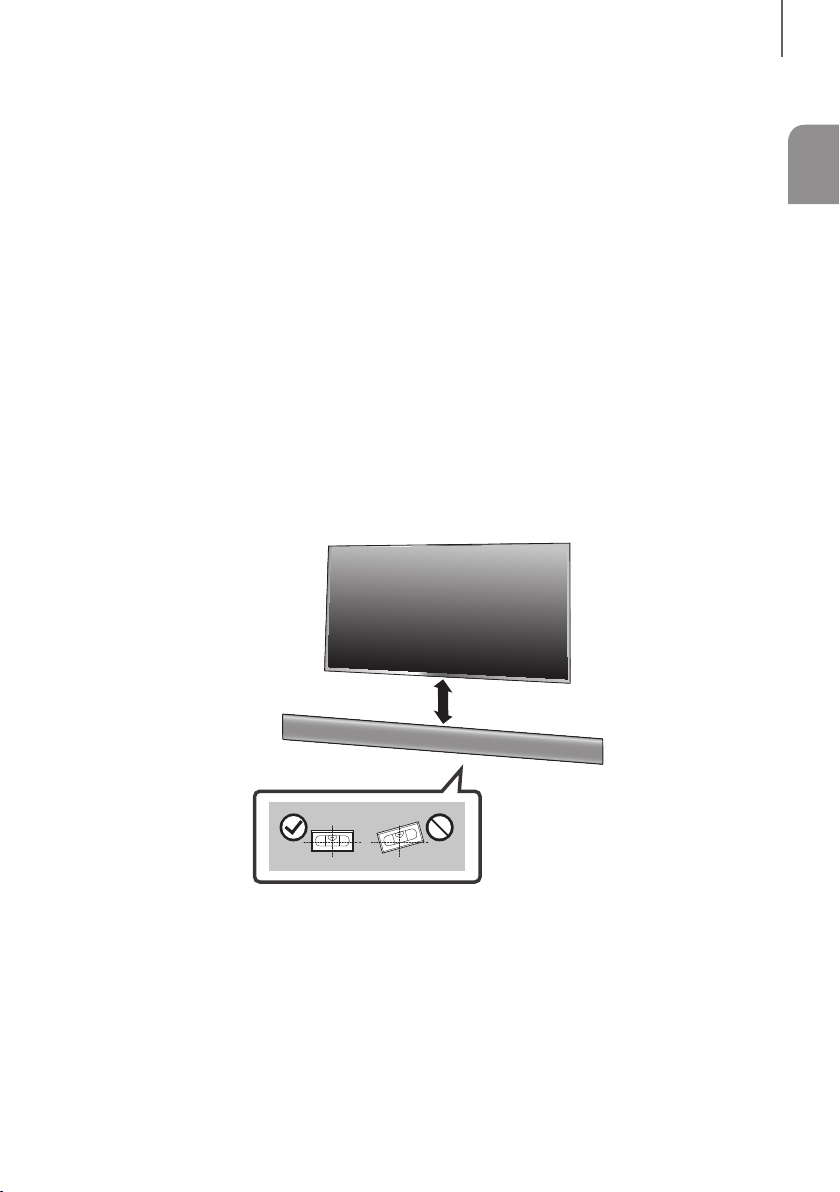
11
ITA
INSTALLAZIONE
INSTALLAZIONE DELLA SOUNDBAR
INSTALAZIONE DEL SUPORTO PER MONTAGGIO A PARETE
+ Precauzioni per l'installazione
● Installare esclusivamente su una parete verticale.
● Per l'installazione, evitare luoghi con temperature o tassi di umidità elevati; in caso contrario la parete non può
sostenere il peso dell'unità.
● Verificare la resistenza della parete. Se la parete non è sufficientemente robusta per sostenere l'unità, rinforzarla o
installare l'unità su un'altra parete in grado di sopportarne il peso.
● Acquistare e utilizzare viti di fissaggio o sistemi di ancoraggio adeguati al tipo di parete (cartongesso, acciaio,
legno, ecc.). Se possibile, fissare le viti di supporto al telaio della parete.
● Acquistare le viti di fissaggio a parete in base al tipo e allo spessore della parete su cui si intende installare la
Soundbar.
- Diametro : M5
- Lunghezza : 35 mm o superiore.
● Collegare i cavi tra l'unità e i dispositivi esterni prima di installarla a parete.
● Assicurarsi che l'unità sia spenta e scollegata prima di effettuare l'installazione. Vi è il rischio di scosse elettriche.
5 cm o più
1. Posizionare la Guida per il montaggio a parete contro la superficie della parete.
• La Guida per il montaggio a parete deve essere livellata.
• Se la TV è montata a parete, installare la Soundbar almeno 5 cm al di sotto.
INSTALLAZIONE
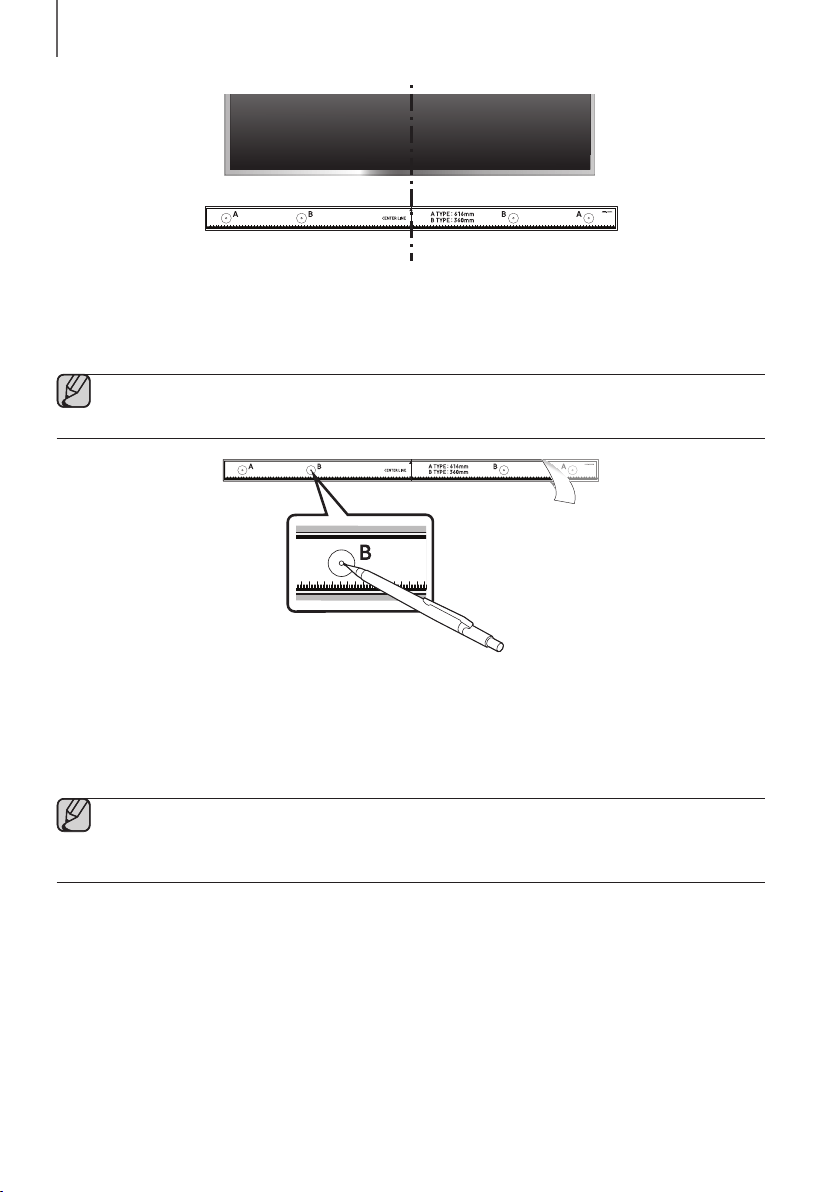
1312
INSTALLAZIONE
Linea centrale
2. Allineare la Linea centrale della dima in carta con il centro della TV (in caso di montaggio della Soundbar sotto la
TV), quindi fissare la Guida per il montaggio a parete alla parete con del nastro adesivo.
● Se non si intende montare la Soundbar sotto una TV, posizionare la Linea centrale al centro dell’area di
installazione.
3. Con la punta di una penna o di una matita temperata forare il centro delle immagini B-TYPE su ciascuna estremità
della guida per contrassegnare i punti destinati ai fori delle viti di supporto, quindi rimuovere la Guida per il
montaggio a parete.
4. Utilizzando una punta da trapano delle giuste dimensioni, praticare un foro nella parete in corrispondenza di
ciascun segno.
● Se i segni non corrispondono alle posizioni di prigionieri, assicurarsi di inserire ancoraggi o tasselli
appropriati nei fori prima di inserire le viti di supporto. Se si utilizzano ancoraggi o tasselli, assicurarsi che i
fori praticati siano sufficientemente grandi da accogliere gli ancoraggi o i tasselli utilizzati.
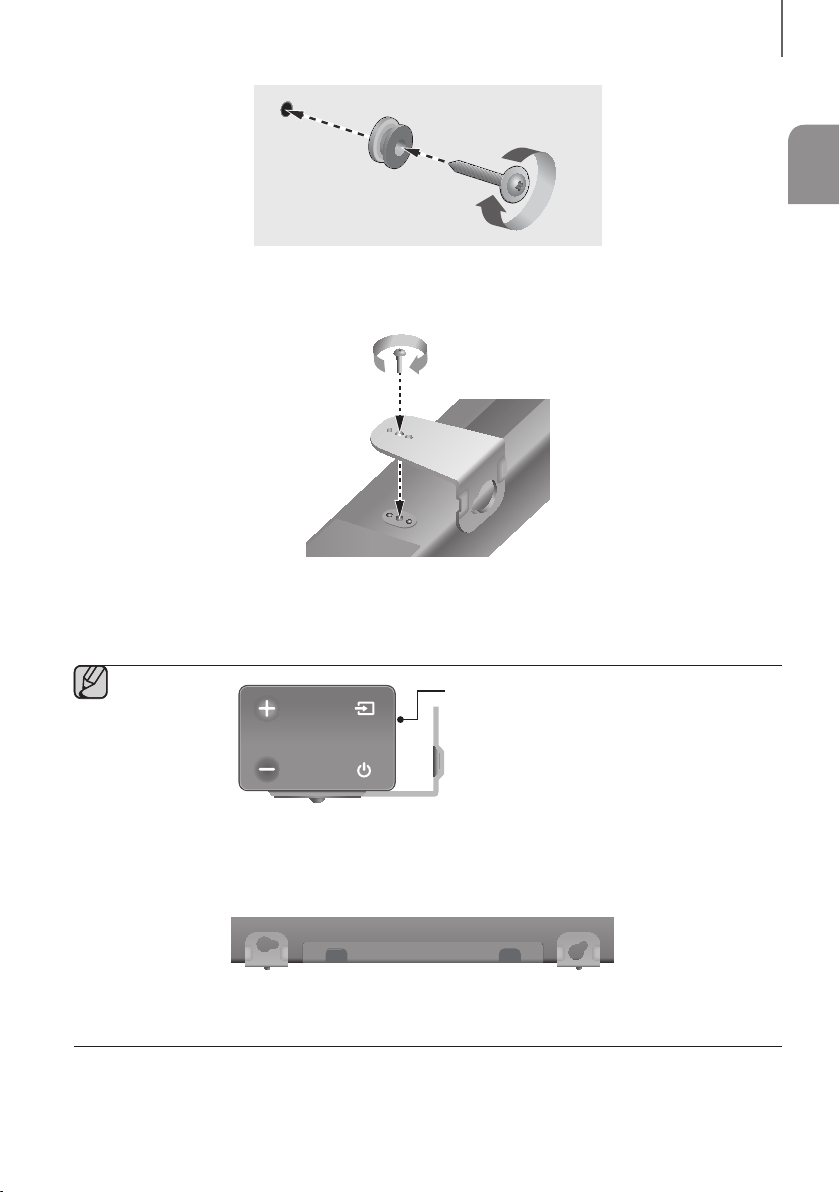
13
ITA
INSTALLAZIONE
5. Far passare una vite (non fornita in dotazione) attraverso ciascuna
Rondella di fissaggio
, quindi avvitare
saldamente ciascuna vite in un apposito foro.
6. Utilizzare le due Vite (M4 x L12) per fissare sia il Supporto per montaggio a parete S che D alla parte inferiore
della Soundbar. Per la massima precisione, assicurarsi di allineare le protuberanze della Soundbar ai fori dei
supporti.
Retro della Soundbar
Estremità destra della Soundbar
● In fase di assemblaggio, assicurarsi che la parte destinata ad essere appesa del Supporto per
montaggio a parete sia rivolta indietro.
Supporto a parete SSupporto a parete D
● I supporti di sinistra e di destra hanno forme diverse. Assicurarsi di posizionarli correttamente.
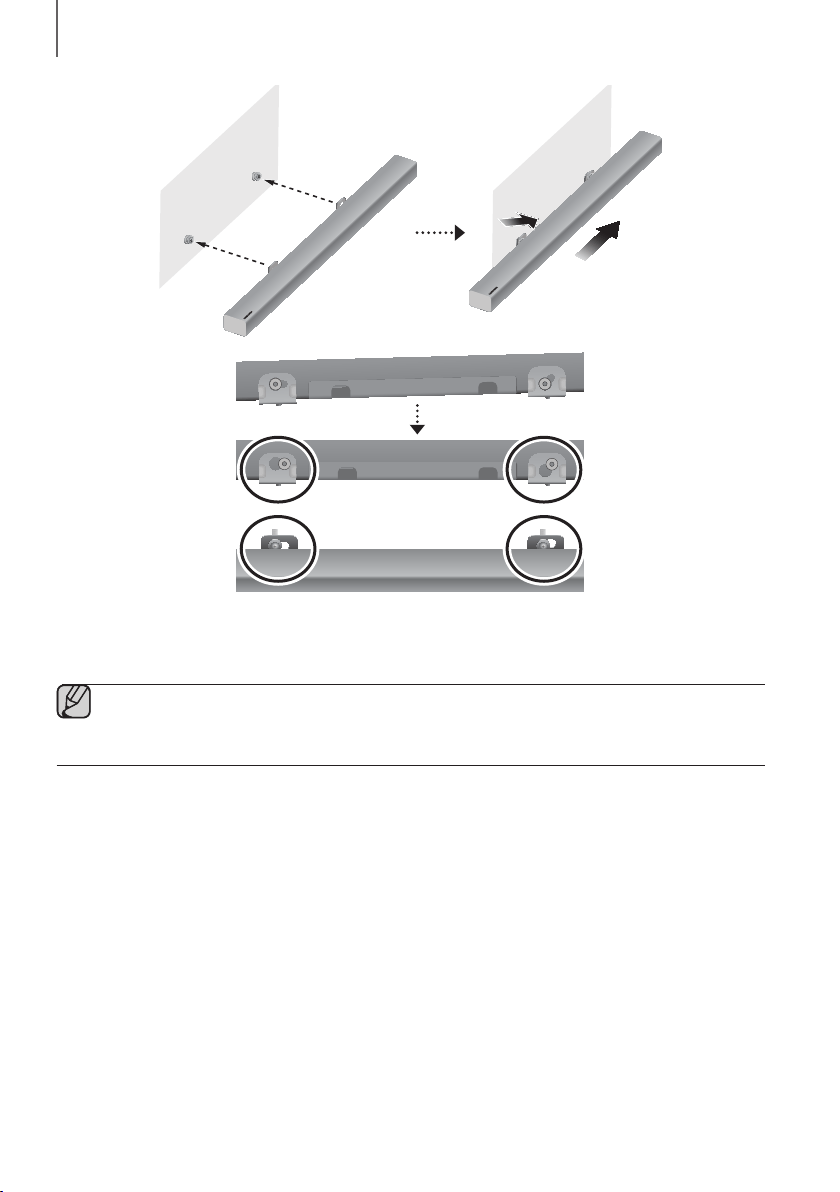
1514
INSTALLAZIONE
7. Installare la Soundbar con l’annesso Supporto per montaggio a parete appendendo il Supporto per
montaggio a parete alle Rondella di fissaggio sulla parete.
● Inclinare leggermente la Soundbar per inserire le teste di entrambe le Rondella di fissaggio nei fori dei
Supporto per montaggio a parete. Spingere la Soundbar nella direzione indicata dalla freccia per
assicurarsi che entrambi i lati siano saldamente fissati.
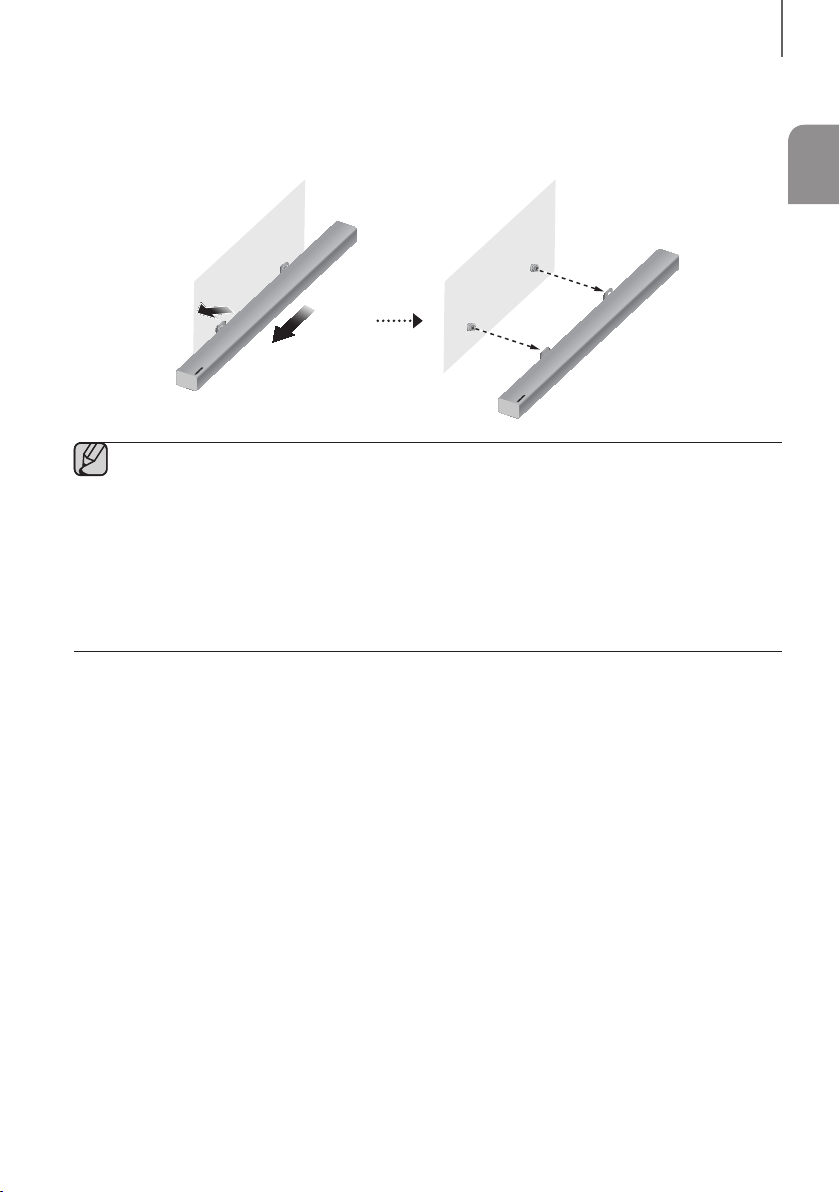
15
ITA
INSTALLAZIONE
RIMOZIONE DELLA SOUNDBAR DALLA PARETE
1. Per separare la Soundbar dal supporto a parete, spingerla nella direzione indicata dalla freccia, quindi allontanarla
dalla parete come illustrato nell’immagine.
● Non aggrapparsi all'unità installata ed evitare di sottoporla ad urti o di farla cadere.
● Fissare saldamente l'unità alla parete in modo che non cada. Cadendo, potrebbe provocare lesioni o
danneggiarsi.
● Quando l'unità viene installata su una parete, assicurarsi che i cavi di connessione non possano essere
tirati da bambini, rischiando di farla cadere.
● Per garantire prestazioni ottimali nell'installazione a parete, installare il sistema di diffusori almeno 5 cm
sotto la TV, se la TV è montato sulla parete.
● Per motivi di sicurezza, se si non monta l'unità a parete, installarla su una superficie stabile e in piano da cui
sia improbabile che cada.
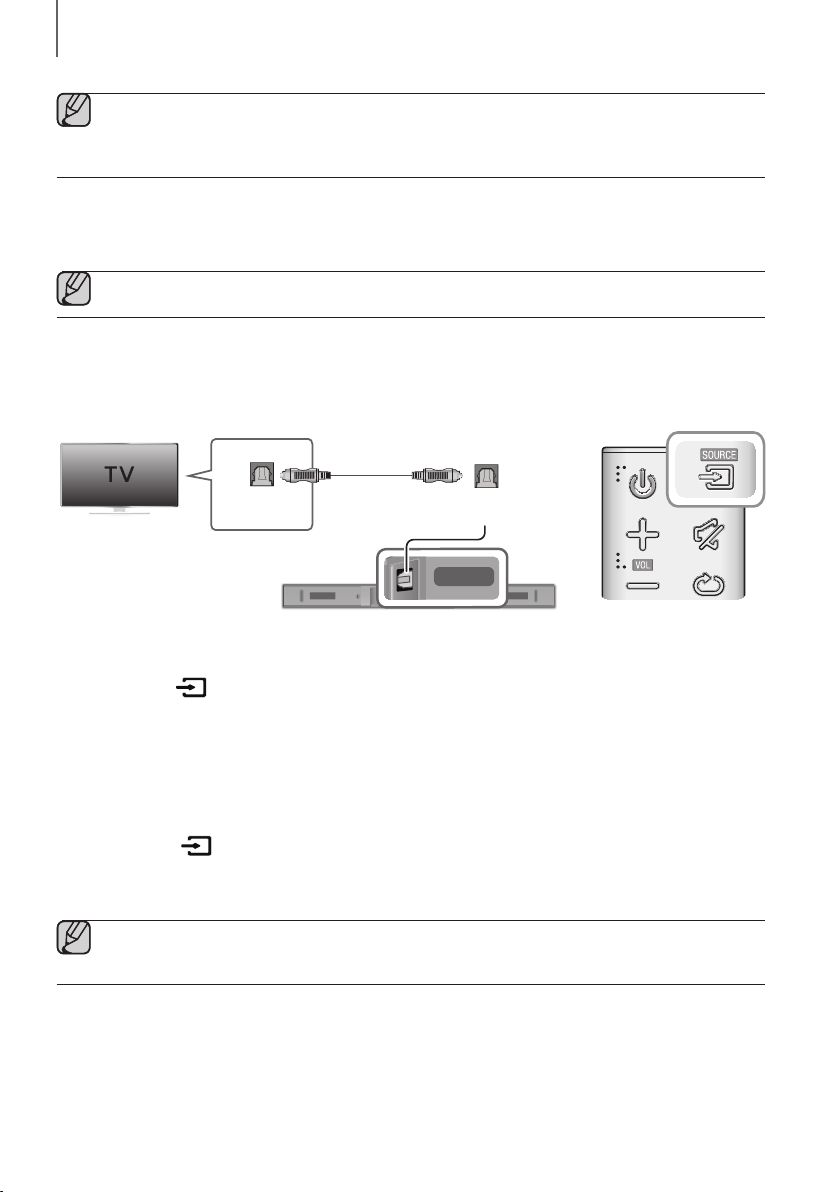
1716
COLLEGAMENTI
● Non collegare il cavo di alimentazione di questo prodotto o del televisore alla presa di corrente finché non
sono stati collegati tutti i componenti.
● Prima di spostare o installare il prodotto, spegnere l'apparecchio e staccare il cavo di alimentazione.
COLLEGAMENTO AD UNA TV
● Importante: prima di iniziare, inserire la batteria nel telecomando. Per istruzioni, consultare la pagina 10.
COLLEGAMENTO A UNA TV UTILIZZANDO UN CAVO OTTICO
DIGITALE
DIGITAL AUDIO IN
(OPTICAL)
USB (5V 0.5A)
AUX IN
SUBWOOFER
DC 24V
DIGITAL AUDIO IN
(OPTICAL)
DIGITAL AUDIO IN
(OPTICAL)
OPTICAL OUT
Cavo Ottico
(non fornito in
dotazione)
1. Collegare la presa jack DIGITAL AUDIO IN (OPTICAL) della Soundbar alla presa jack OPTICAL OUT della TV
con un cavo ottico (non fornito in dotazione) digitale.
2. Premere il tasto sul lato destro della Soundbar o il tasto SOURCE sul telecomando per selezionare il modo
D.IN.
+ Auto Power Link
Se l'unità principale è stata collegata a una TV con un cavo ottico
(non fornito in dotazione)
digitale, attivare la
funzione di accensione automatica affinché la Soundbar si accenda automaticamente quando si accende la TV.
1. Collegare la Soundbar e una TV con un cavo ottico (non fornito in dotazione) digitale.
2. Premere il tasto sul lato destro dell’unità principale o il tasto SOURCE sul telecomando per selezionare
il modo D.IN.
3. Premere il tasto sul telecomando per 5 secondi per attivare o disattivare Auto Power Link.
● Per impostazione predefinita, Auto Power Link è impostato su ON.
● A seconda del dispositivo collegato, la funzione Auto Power Link potrebbe non essere attiva.
COLLEGAMENTI
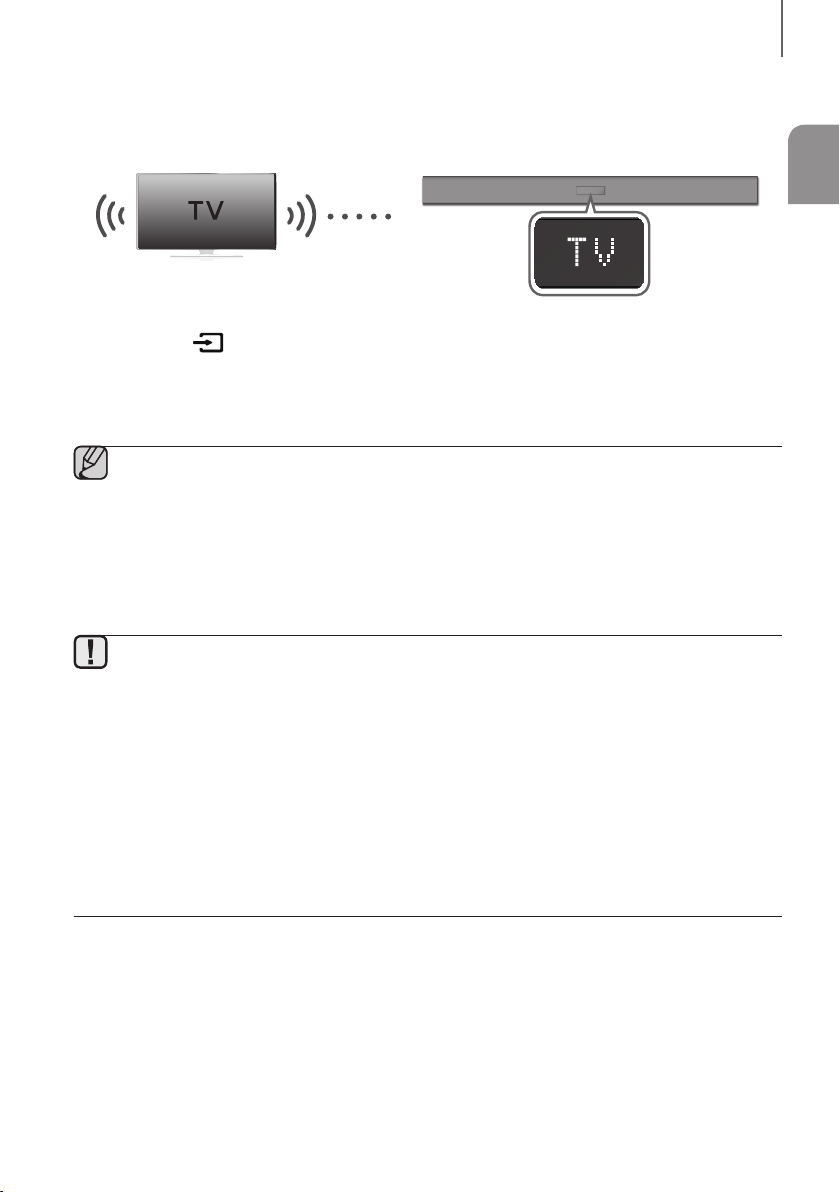
17
ITA
COLLEGAMENTI
TV SOUNDCONNECT
È possibile ascoltare l'audio della TV attraverso il Soundbar collegandolo a una TV Samsung che supporta la funzione
TV SoundConnect.
Collegare
1. Accendere la TV e il Soundbar.
2. Premere il tasto sul lato destro dell’unità principale o il tasto SOURCE sul telecomando per selezionare il
modo TV.
3. Sulla TV viene visualizzato un messaggio in cui si chiede se attivare la funzione TV SoundConnect.
4. Selezionare <Sì> per collegare la TV e la Soundbar utilizzando il telecomando della TV.
● Se il processo di collegamento mediante la funzione TV SoundConnect ha esito negativo, spostarsi su
SoundConnect nel menu Audio della TV, selezionare Aggiungi nuovo dispositivo e impostare Aggiungi
nuovo dispositivo su ATTIVO. Quindi, riprovare.
● Se sul Soundbar si passa dal modo TV a un altro modo, TV SoundConnect viene terminato
automaticamente.
● Per collegare il Soundbar a un'altra TV, la connessione esistente deve essere terminata.
● Per chiudere la connessione esistente, tenere premuto il tasto
p
sul telecomando per 5 secondi o
passare a un altro modo. Per connettersi all’altra TV, attenersi ai passaggi da 1 a 4 riportati sopra.
● La funzione TV SoundConnect (SoundShare) è supportata da alcune TV Samsung commercializzate a
partire dal 2012. Controllare se la TV supporta la funzione TV SoundConnect (SoundShare) prima di
cominciare. (Per ulteriori informazioni, vedere il manuale utente della TV).
● Se la TV Samsung è stata commercializzata prima del 2014, controllare il menu delle impostazioni
SoundShare.
● Se la distanza tra la TV e il Soundbar supera 10 m, è possibile che la connessione non sia stabile o che
l'audio proceda a scatti. In questo caso, riposizionare la TV o il Soundbar in modo che si trovino entro il
raggio d'azione, quindi ristabilire la connessione TV SoundConnect.
● Raggio d’azione di TV SoundConnect
- Raggio di connessione raccomandato: entro 2 m
- Raggio d'azione raccomandato: entro 10 m
● I tasti di riproduzione / pausa, avanti e indietro sulla Soundbar o sul telecomando della Soundbar non
comandano la TV.
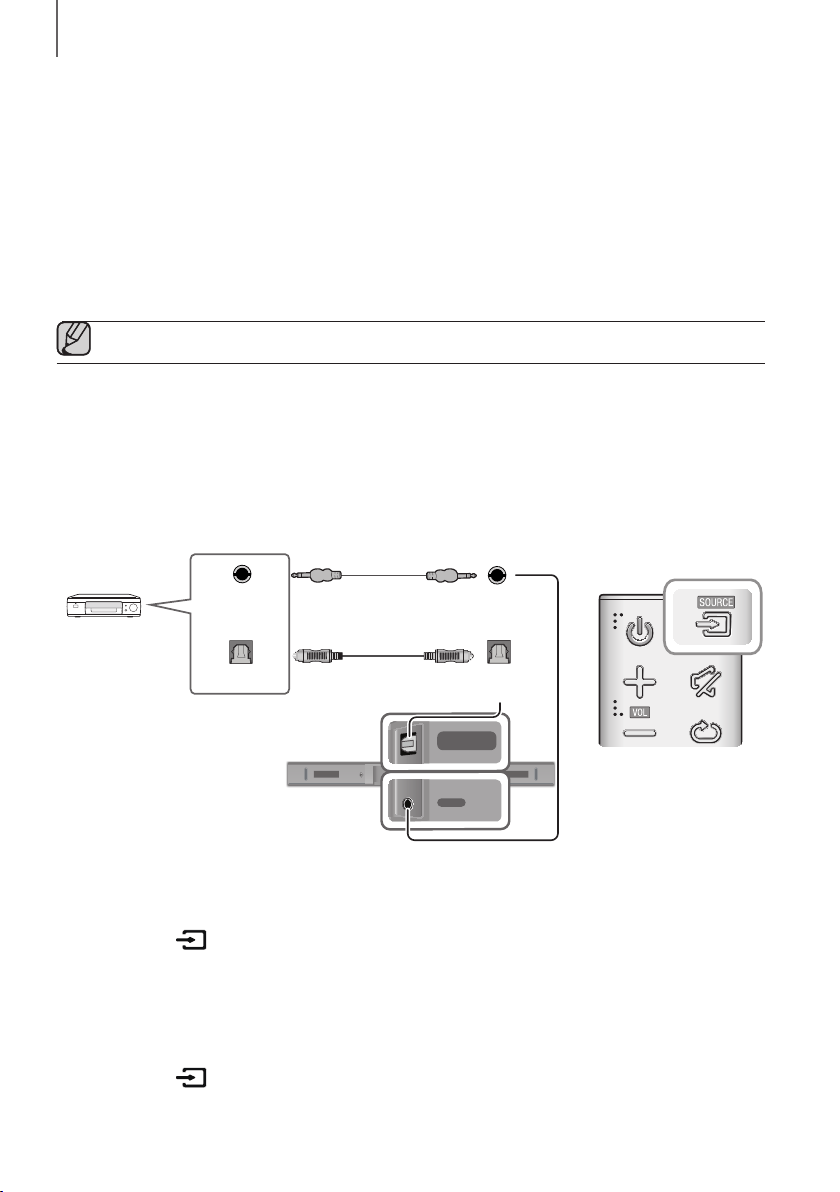
1918
COLLEGAMENTI
+ Utilizzo della funzione Bluetooth POWER On
La funzione Bluetooth POWER On è disponibile dopo aver collegato correttamente la Soundbar a una TV compatibile
con Bluetooth tramite TV SoundConnect. Quando la funzione Bluetooth POWER On è attivata, accendendo o
spegnendo la TV collegata, si accende o si spegne anche la Soundbar.
1. Collegare la TV alla Soundbar utilizzando la funzione TV SoundConnect.
2. Premere i tasti Bluetooth POWER del Soundbar e del telecomando. Sul display del Soundbar viene visualizzato
"ON - BLUETOOTH POWER".
• ON - BLUETOOTH POWER
: Il Soundbar si accende e si spegne quando si accende o si spegne la TV.
• OFF - BLUETOOTH POWER : Il Soundbar si spegne soltanto quando si spegne la TV.
● Questa funzione è supportata solo da alcune TV Samsung commercializzate a partire dal 2013.
COLLEGAMENTO A DISPOSITIVI ESTERNI
CAVO AUDIO OTTICO O ANALOGICO
Questa unità è provvista di una presa jack di ingresso ottico digitale e una presa jack di ingresso audio analogico
(AUX), offrendo quindi due possibili modalità di collegamento a dispositivi esterni.
DIGITAL AUDIO IN
(OPTICAL)
USB (5V 0.5A)
AUX IN
SUBWOOFER
DC 24V
DIGITAL AUDIO IN
(OPTICAL)
USB (5V 0.5A)
AUX IN
DIGITAL AUDIO IN
(OPTICAL)
USB (5V 0.5A)
AUX IN
DIGITAL AUDIO IN
(OPTICAL)
OPTICAL OUT
AUX IN
AUX OUT
Lettore BD/DVD/
Set-top box/
Console giochi
Cavo Audio
(non fornito in dotazione)
Cavo Ottico
(non fornito in dotazione)
+ Cavo AUX
1. Collegare l’AUX IN (Audio) dell’unità principale alla presa jack AUDIO OUT del dispositivo sorgente utilizzando un
cavo audio.
2. Premere il tasto sul lato destro della Soundbar o il tasto SOURCE sul telecomando per selezionare il modo
AUX.
+ Cavo Ottico
1. Collegare il DIGITAL AUDIO IN (OPTICAL) dell’unità principale alla presa jack OPTICAL OUT del dispositivo
sorgente utilizzando un cavo ottico (non fornito in dotazione) digitale.
2. Premere il tasto sul lato destro della Soundbar o il tasto SOURCE sul telecomando per selezionare il modo
D.IN.
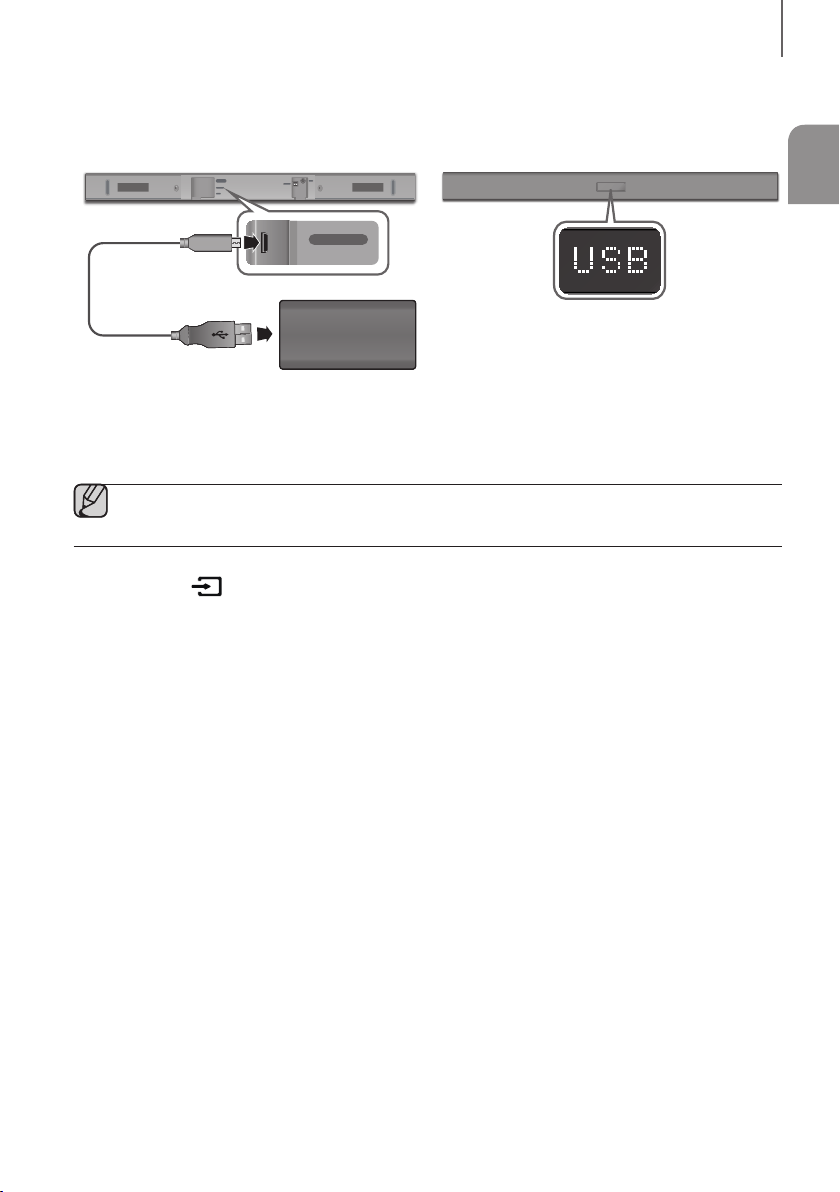
19
ITA
COLLEGAMENTI
USB
È possibile riprodurre file musicali da dispositivi di archiviazione tramite la Soundbar.
DIGITAL AUDIO IN
(OPTICAL)
USB (5V 0.5A)
AUX IN
SUBWOOFER
DC 24V
DIGITAL AUDIO IN
(OPTICAL)
USB (5V 0.5A)
AUX IN
Visualizzazione
Cavo adattatore
da micro USB a USB
(non fornito in dotazione)
Porta USB
Dispositivo di archiviazione
1. Collegare un cavo adattatore da micro USB a USB dotato di un connettore USB 2.0 Micro USB maschio (tipo B)
da un lato e di un jack standard 2.0 USB femmina (tipo A) dall’altro lato alla presa jack micro USB della Soundbar.
● Il cavo adattatore da micro USB a USB è venduto separatamente. Per effettuarne l’acquisto, contattare un
Centro servizi Samsung o l’Assistenza clienti Samsung.
2. Collegare il dispositivo di archiviazione all’estremità femmina del cavo.
3. Premere il tasto sul lato destro dell’unità principale o il tasto SOURCE sul telecomando per selezionare il modo
USB.
4. Sul display viene visualizzato USB.
• La connessione della Soundbar al dispositivo di archiviazione è completata.
• La Soundbar si spegne automaticamente (Spegnimento automatico disattivato) se non viene connesso nessun
dispositivo di archiviazione per più di 5 minuti.
+ Prima di collegare in dispositivo di archiviazione
Tenere presente quanto segue:
● Se il nome di un file contenuto in un dispositivo di archiviazione supera i 10 caratteri, non verrà visualizzato sul
display della Soundbar.
● Questo prodotto può non essere compatibile con alcuni tipi di supporto di memorizzazione USB.
● Sono supportatiI file system FAT16 e FAT32.
- Il file system NTFS non è supportato.
● Collegare i dispositivi di archiviazione alla porta USB del prodotto utilizzando un cavo adattatore da connettore USB
2.0 Micro USB a jack standard 2.0 USB femmina. In caso contrario, è possibile che si verifichi un problema di
compatibilità USB.
● Non collegare più dispositivi di memorizzazione al prodotto attraverso un lettore multischede. Potrebbe non
funzionare correttamente.
● I protocolli PTP per videocamere digitali non sono supportati.
● Non rimuovere il dispositivo di archiviazione durante il trasferimento di file.
● I file musicali protetti da DRM (MP3, WMA) provenienti da un sito Web commerciale non possono essere riprodotti.
● Gli HDD esterni non sono supportati.
● I telefoni cellulari non sono supportati.
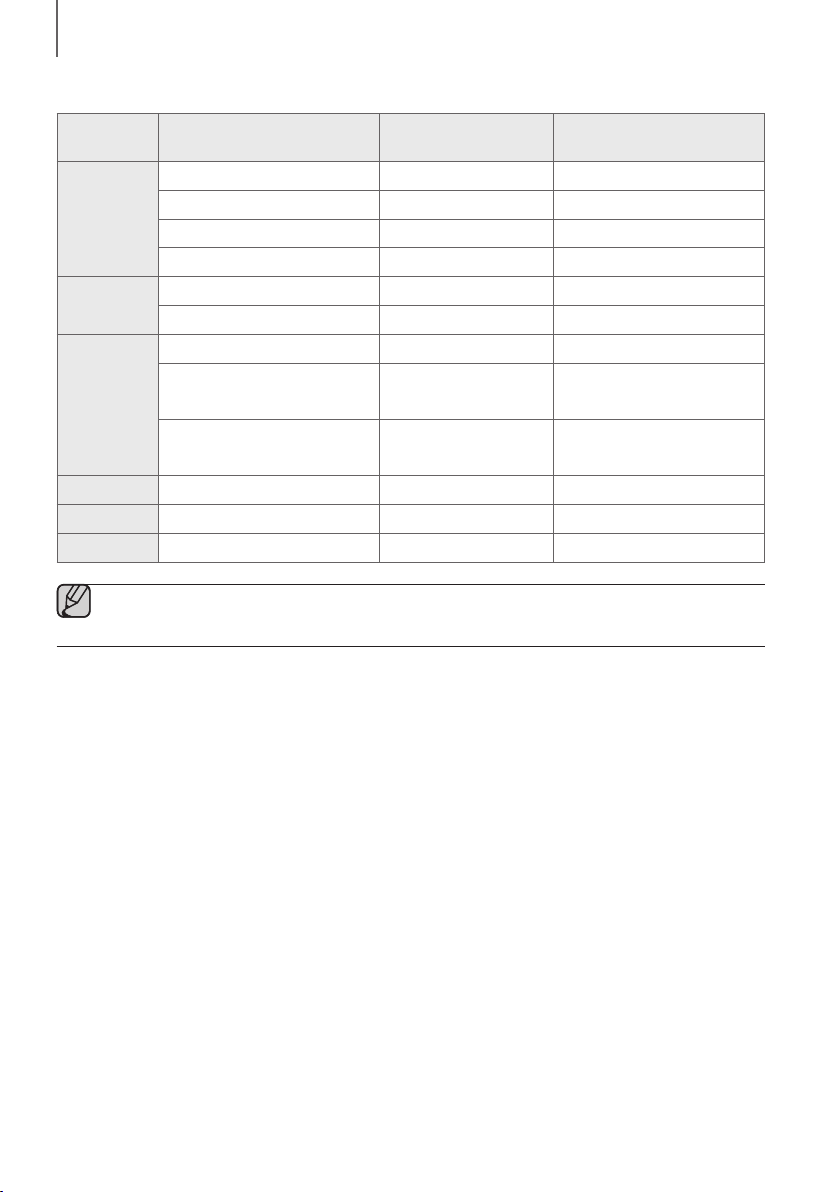
2120
COLLEGAMENTI
● Elenco della compatibilità:
Estensione Codec
Frequenza di
campionamento
Velocità di trasmissione
*.mp3
MPEG 1 Layer2 16KHz ~ 48KHz 80 ~ 320 kbps
MPEG 1 Layer3 16KHz ~ 48KHz 80 ~ 320 kbps
MPEG 2 Layer3 16KHz ~ 48KHz 80 ~ 320 kbps
MPEG 2,5 Layer3 16KHz ~ 48KHz 80 ~ 320 kbps
*.wma
Wave_Format_MSAudio1 16KHz ~ 48KHz 56 ~ 128 kbps
Wave_Format_MSAudio2 16KHz ~ 48KHz 56 ~ 128 kbps
*.aac
AAC 16KHz ~ 96KHz 48 ~ 320 kbps
AAC-LC 16KHz ~ 96KHz
128 ~ 192 kbps
5,1 canali 320 kbps
HE-AAC 24KHz ~ 96KHz
48 ~ 64 kbps
5,1 canali 160 kbps
*.wav
- 16KHz ~ 48KHz fino a 3000 kbps
*.ogg
OGG 1.1.0 16KHz ~ 48KHz 50 ~ 500 kbps
*.flac
FLAC 1.1.0, FLAC 1.2.1 16KHz ~ 96KHz fino a 3000 kbps
● Se nel dispositivo di archiviazione sono presenti troppi file e cartelle, la Soundbar potrebbe impiegare
qualche istante per l'accesso a e la riproduzione dei file.
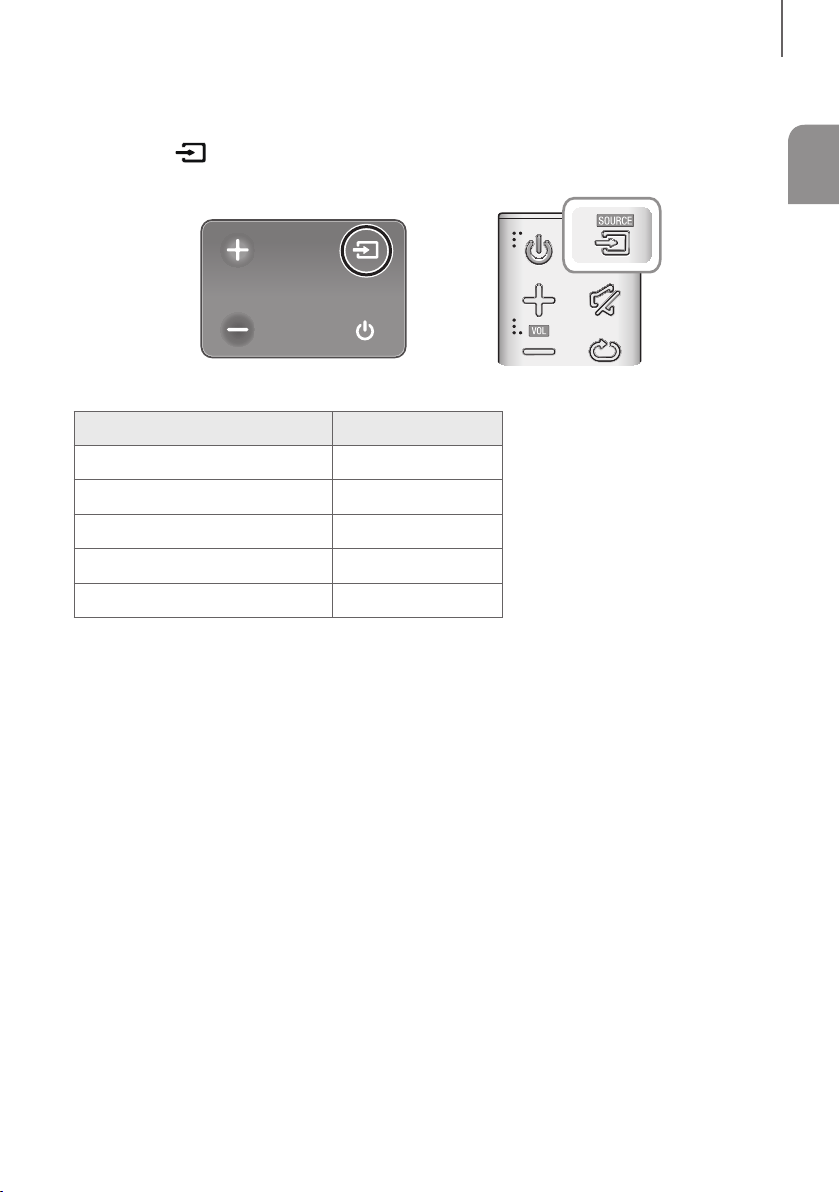
21
ITA
FUNZIONI
MODO DI INGRESSO
Premere il tasto
sul lato destro dell’unità principale o il tasto SOURCE sul telecomando per selezionare il
modo desiderato.
Estremità destra della Soundbar
Modo di ingresso Visualizzazione
Ingresso ottico digitale
D.IN
Ingresso AUX
AUX
Modo BLUETOOTH
BT
TV SoundConnect
TV
Modo USB
USB
FUNZIONE AUTO POWER DOWN
L'unità si spegne automaticamente nei seguenti casi:
● Modo D.IN / BT / TV / USB
- In assenza di segnale audio per 5 minuti.
● Modo AUX
- Se il cavo Aux non è collegato per 5 minuti.
- Se non vengono azionati dei TASTI per 8 ore con cavo AUX collegato. (La funzione Auto Power Down può
essere disattivata soltanto in quel caso.)
Per disattivare la funzione Auto Power Down, in modalità AUX tenere premuto il pulsante
p
per 5 secondi.
Sul display viene visualizzato ON - AUTO POWER DOWN / OFF - AUTO POWER DOWN.
FUNZIONI
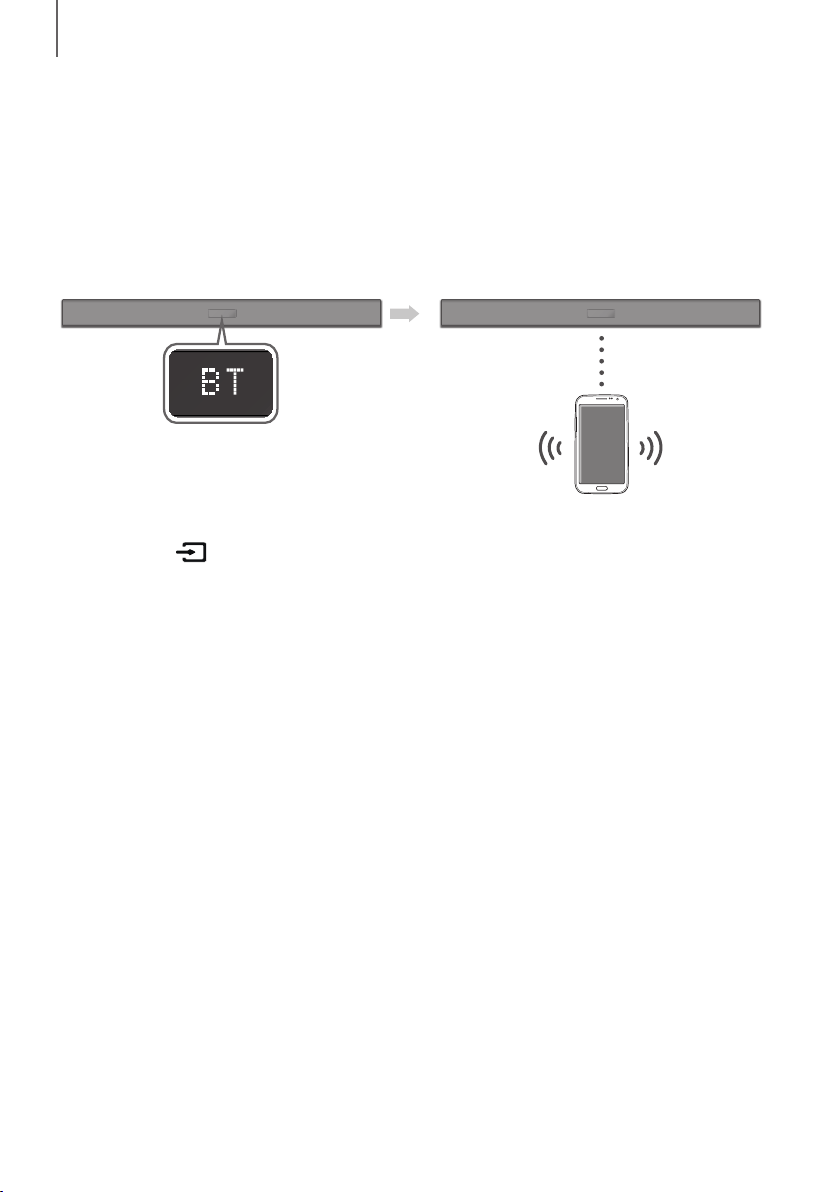
2322
FUNZIONI
BLUETOOTH
È possibile collegare un dispositivo Bluetooth a una Soundbar e riprodurre la musica con audio stereo, il tutto senza
l'ingombro dei fili.
PER COLLEGARE L'SOUNDBAR A UN DISPOSITIVO
BLUETOOTH
Verificare che il dispositivo Bluetooth supporti la funzione di auricolare stereo compatibile con Bluetooth.
Dispositivo Bluetooth
Collegare
1. Premere il tasto sul lato destro dell’unità principale o il tasto SOURCE sul telecomando per selezionare il
modo BT.
• Sul display anteriore della Soundbar viene visualizzato BT READY.
2. Selezionare il menu Bluetooth sul dispositivo Bluetooth da collegare. (Vedere il manuale utente del dispositivo
Bluetooth)
3. Selezionare "[AV] Samsung Soundbar Kxxx K-Series" dall'elenco.
• Quando il Soundbar è collegato al dispositivo, sul display frontale viene visualizzato
[Nome del dispositivo Bluetooth]
BT.
• Il nome del dispositivo può essere visualizzato soltanto in inglese. Se il nome non è in inglese viene visualizzato
un underscore " _ ".
• Se il dispositivo Bluetooth non riesce a stabilire il collegamento con l'Soundbar, eliminare il precedente
"[AV] Samsung Soundbar Kxxx K-Series" trovato dal dispositivo Bluetooth e cercare nuovamente
l'Soundbar.
4. Riprodurre la musica sul dispositivo collegato.
• È possibile ascoltare la musica riprodotta sul dispositivo Bluetooth collegato attraverso il sistema Soundbar.
• Nel modo BT, le funzioni Riproduzione / Pausa / Avanti / Indietro non sono disponibili. Queste funzioni sono
tuttavia disponibili nei dispositivi Bluetooth che supportano AVRCP.
23
ITA
FUNZIONI
● Se, al collegamento di un dispositivo Bluetooth, viene richiesto il codice PIN, inserire <0000>.
● È possibile collegare un solo dispositivo Bluetooth per volta.
● La connessione Bluetooth viene terminata quando il Soundbar viene disattivato.
●
È possibile che il Soundbar non sia in grado di eseguire la ricerca Bluetooth o di effettuare la connessione
correttamente nei seguenti casi:
- In presenza di un forte campo elettrico attorno all'Soundbar.
-
Se vi sono più dispositivi Bluetooth collegati contemporaneamente all'Soundbar.
- Se il dispositivo Bluetooth è spento, non è presente o è difettoso.
● Tenere presente che tutti i dispositivi come forni a microonde, adattatori LAN wireless, luci a fluorescenza e
fornelli a gas utilizzano la stessa gamma di frequenza del dispositivo Bluetooth, con possibili interferenze
elettriche.
● Il Soundbar supporta i dati SBC (44,1kHz, 48kHz).
● Effettuare il collegamento esclusivamente a un dispositivo Bluetooth che supporti la funzione A2DP (AV).
● Non è possibile collegare il Soundbar a un dispositivo Bluetooth che supporta soltanto la funzione HF (Hands
Free).
● Una volta stabilito il collegamento tra la Soundbar e un dispositivo Bluetooth, selezionando
"[AV] Samsung Soundbar Kxxx K-Series" dall'elenco dei dispositivi trovati, la Soundbar passa
automaticamente al modo BT.
- Disponibile solo se il Soundbar è elencato tra i dispositivi collegati al dispositivo Bluetooth. (Il dispositivo
Bluetooth e il Soundbar devono essere stati collegati in precedenza almeno una volta).
● Il Soundbar appare nell'elenco dei dispositivi cercati del dispositivo Bluetooth solo se il Soundbar visualizza
BT READY.
● In modo TV SoundConnect, il Soundbar non può essere collegato a un altro dispositivo Bluetooth.
BLUETOOTH POWER ON (BLUETOOTH POWER)
Quando la funzione Bluetooth Power On è attivata e il Soundbar è spento, se un dispositivo Bluetooth collegato in
precedenza prova a collegarsi al Soundbar, il Soundbar si accende automaticamente.
1. Premere il tasto Bluetooth POWER sul telecomando con la Soundbar accesa.
2. ON - BLUETOOTH POWER viene visualizzato sul display della Soundbar.
PER SCOLLEGARE IL DISPOSITIVO BLUETOOTH DAL
L'SOUNDBAR
È possibile scollegare il dispositivo Bluetooth dall'Soundbar. Per le istruzioni, vedere il manuale utente del dispositivo
Bluetooth.
● L'Soundbar viene scollegato.
● Quando l'Soundbar è scollegato dal dispositivo Bluetooth, l'Soundbar visualizza BT DISCONNECTED sul display
frontale.
PER SCOLLEGARE L'SOUNDBAR DAL DISPOSITIVO
BLUETOOTH
Premere il tasto SOURCE sul telecomando o il tasto sul lato destro del prodotto per passare da BT a un altro
modo o spegnere la Soundbar.
● Il dispositivo Bluetooth collegato deve attendere un certo tempo for ottenere una risposta dall'Soundbar prima di
terminare la connessione. (Il tempo necessario a scollegarsi può differire a seconda del dispositivo Bluetooth)

2524
FUNZIONI
● In modo di connessione Bluetooth, la connessione cade se la distanza tra l’Soundbar e il dispositivo
Bluetooth supera 10 m.
● L'Soundbar si spegne automaticamente dopo 5 minuti in modo Ready.
+ Ulteriori informazioni sul Bluetooth
Bluetooth è una tecnologia che permette di collegare facilmente tra di loro dispositivi compatibili con Bluetooth
attraverso una connessione wireless a breve raggio.
● Il dispositivo Bluetooth può provocare rumorosità o malfunzionamenti, a seconda delle condizioni di utilizzo, se:
- Una parte del corpo è a contatto con il sistema di ricezione / di trasmissione del dispositivo Bluetooth o
dell'Soundbar.
- È soggetto a variazioni elettriche dovute a interferenze derivanti da riflessioni dei segnali su pareti, spigoli o
tramezzature d'ufficio.
- È esposto a interferenze elettriche derivanti da dispositivi della stessa banda di frequenza, incluse
apparecchiature mediche, forni a microonde e LAN wireless.
● Collegare l'Soundbar al dispositivo Bluetooth mantenendo una distanza ravvicinata.
● Maggiore è la distanza tra l'Soundbar e il dispositivo Bluetooth, peggiore è la qualità.
Se la distanza supera il raggio d'azione del Bluetooth, la connessione si interrompe.
● In aree a bassa sensibilità di ricezione, la connessione Bluetooth potrebbe non funzionare correttamente.
● Il collegamento Bluetooth funziona solo nelle vicinanze del dispositivo. La connessione viene automaticamente
interrotta se la distanza è superiore a questo limite. La qualità del suono si riduce in presenza di ostacoli quali pareti
o porte, anche entro il limite indicato.
● Questo dispositivo wireless potrebbe causare interferenze elettriche durante il suo funzionamento.
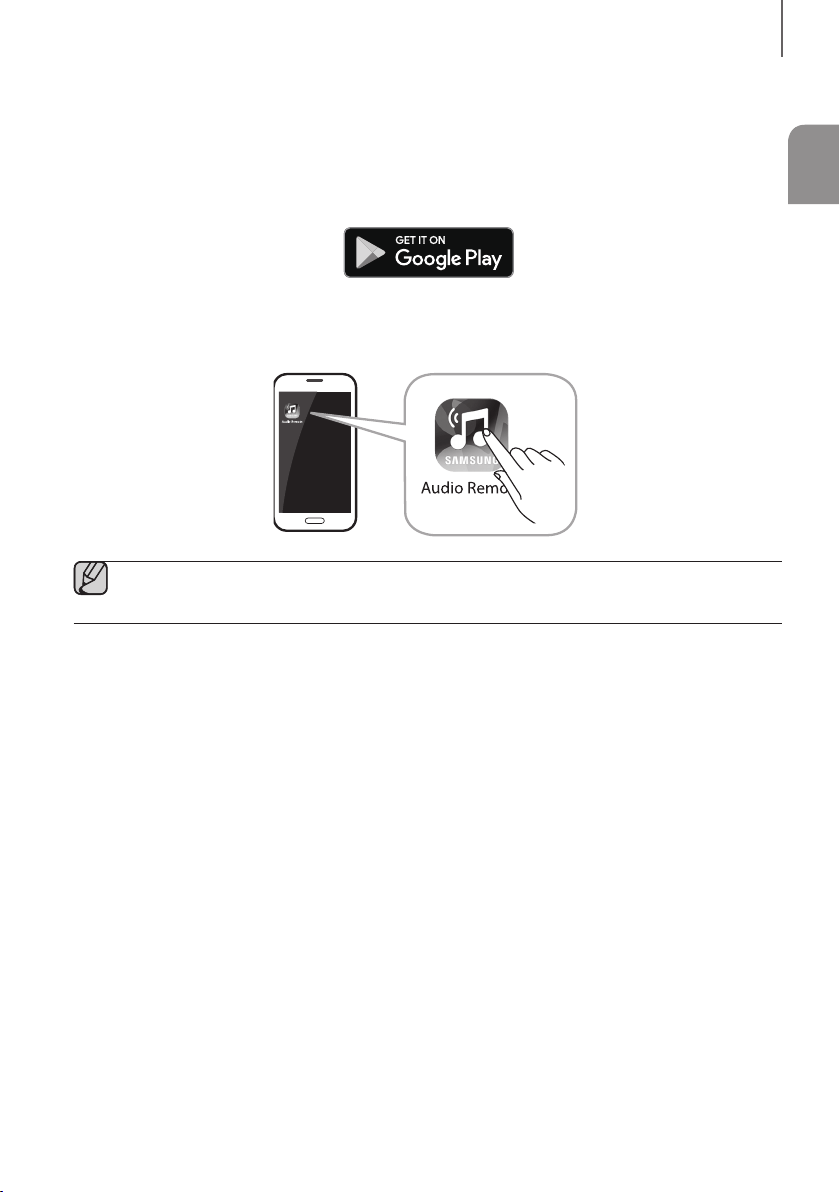
25
ITA
FUNZIONI
USO DELLA APP SAMSUNG AUDIO REMOTE
+ Installazione dell'app Samsung Audio Remote
Per controllare la Soundbar con il dispositivo smart e l'app Samsung Audio Remote, scaricare l'app Samsung Audio
Remote da Google Play.
Ricerca di mercato : Samsung Audio Remote
+ Avvio dell'app Samsung Audio Remote
Per avviare e utilizzare l'app Samsung Audio Remote, toccare l'icona Audio Remote sul dispositivo smart e seguire le
istruzioni su schermo.
● L'app Samsung Audio Remote è compatibile solo con telefoni cellulari Android e dispositivi mobili con
Android OS 3.0 o versioni successive.
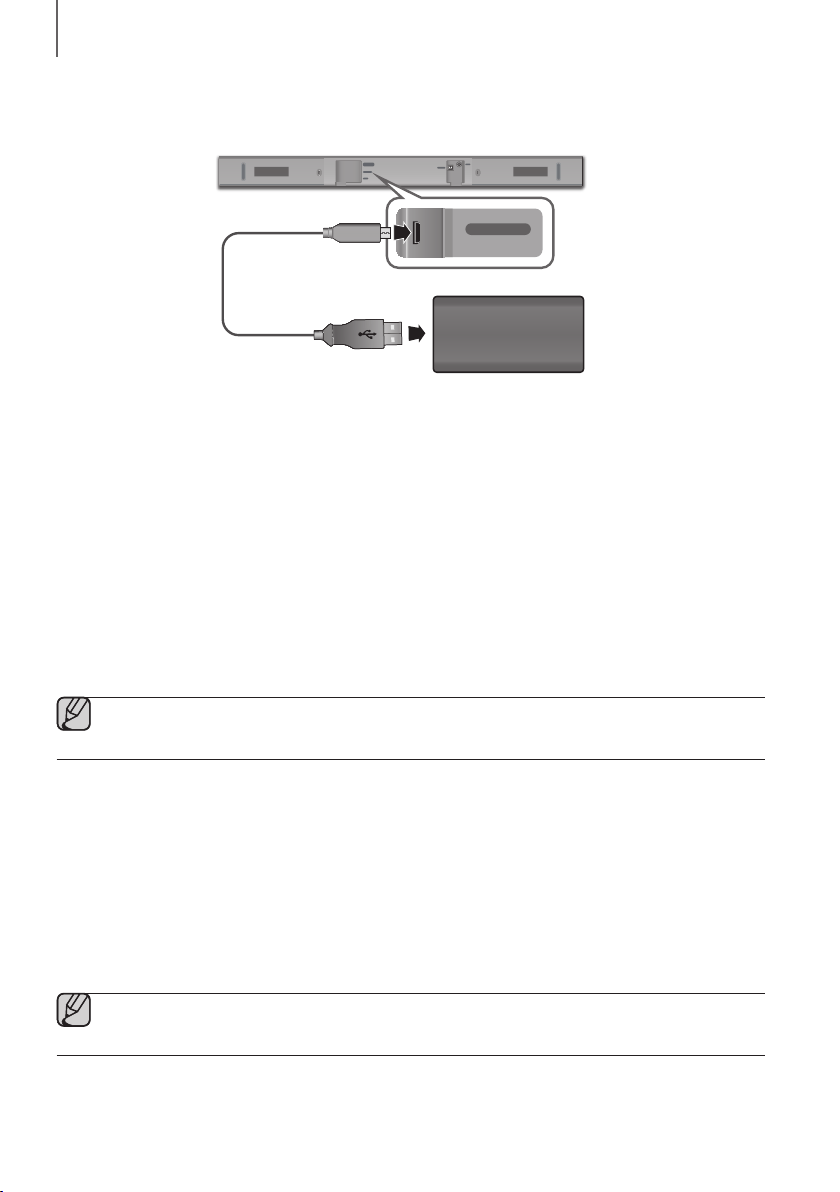
2726
FUNZIONI
AGGIORNAMENTO DEL SOFTWARE
DIGITAL AUDIO IN
(OPTICAL)
USB (5V 0.5A)
AUX IN
SUBWOOFER
DC 24V
DIGITAL AUDIO IN
(OPTICAL)
USB (5V 0.5A)
AUX IN
Cavo adattatore
da micro USB a USB
(non fornito in dotazione)
Dispositivo di archiviazione
È possibile che Samsung offra gli aggiornamenti per la versione del firmware del sistema Soundbar.
Se è disponibile un aggiornamento, è possibile aggiornare il firmware collegando un dispositivo di archiviazione
contenente l’aggiornamento stesso alla porta USB della Soundbar.
Notare che, se sono disponibili più file di aggiornamento, è necessario caricarli singolarmente nel dispositivo di
archiviazione e utilizzarli uno alla volta per aggiornare il firmware.
Per ulteriori informazioni sullo scaricamento dei file di aggiornamento, visitare il sito Samsung.com o contattare il
call center Samsung.
PROCEDURA PER L’AGGIORNAMENTO
1. Collegare un cavo adattatore da micro USB a USB dotato di un connettore USB 2.0 Micro USB maschio (tipo B)
da un lato e di un jack standard 2.0 USB femmina (tipo A) dall’altro lato alla presa jack micro USB della Soundbar.
● Il cavo adattatore da micro USB a USB è venduto separatamente. Per effettuarne l’acquisto, contattare un
Centro servizi Samsung o l’Assistenza clienti Samsung.
2. Attenersi ai seguenti passaggi per scaricare il software del prodotto:
Accedere al sito Web Samsung all'indirizzo (samsung.com/sec) cercare il nome del modello - selezionare
l'opzione di assistenza clienti (il nome dell'opzione è soggetto a modifica)
3. Salvare il software scaricato in una pennetta USB e selezionare "Estrai qui" per decomprimere la cartella.
4. Spegnere la Soundbar e collegare il dispositivo di archiviazione contenente l'aggiornamento del software alla porta
femmina di un cavo adattatore Micro USB.
5. Accendere la Soundbar. Entro 3 minuti, viene visualizzato UPDATE e l'aggiornamento inizia.
6. Dopo il completamento, l'alimentazione della Soundbar viene spenta. In questo stato, premere il tasto
p
del
telecomando per 5 secondi.
● Questo prodotto ha una funzione di DUAL BOOT. Se non si riesce ad effettuare l'aggiornamento del
firmware, è possibile ripetere l'aggiornamento.

27
ITA
FUNZIONI
SE UPDATE NON È STATO VISUALIZZATO
1. Spegnere la Soundbar e collegare il dispositivo di memorizzazione USB che contiene i file di aggiornamento alla
porta USB della Soundbar.
2. Scollegare il cavo di alimentazione, ricollegarlo e accendere la Soundbar.
● Inserire il dispositivo di archiviazione contenente l'aggiornamento del firmware nella porta USB dell'unità
principale.
● L'aggiornamento del firmware potrebbe non funzionare correttamente se i file audio supportati dalla
Soundbar sono memorizzati nel dispositivo di memorizzazione.
● Non scollegare l'alimentazione né rimuovere il dispositivo di archiviazione durante l'esecuzione degli
aggiornamenti. L'unità principale si spegne automaticamente al termine dell'aggiornamento del firmware.
● Dopo il completamento dell'aggiornamento, viene inizializzata la configurazione utente nella Soundbar.
Si consiglia di prendere nota delle impostazioni effettuate in modo da poterle reimpostare facilmente dopo
l'aggiornamento. Se l'aggiornamento del software non riesce, verificare che il dispositivo di archiviazione
non presenti un problema.
● Gli utenti con sistema operativo Mac devono utilizzare MS-DOS (FAT) come formato USB.
● A seconda del produttore, alcuni dispositivi di archiviazione potrebbero non essere supportati.
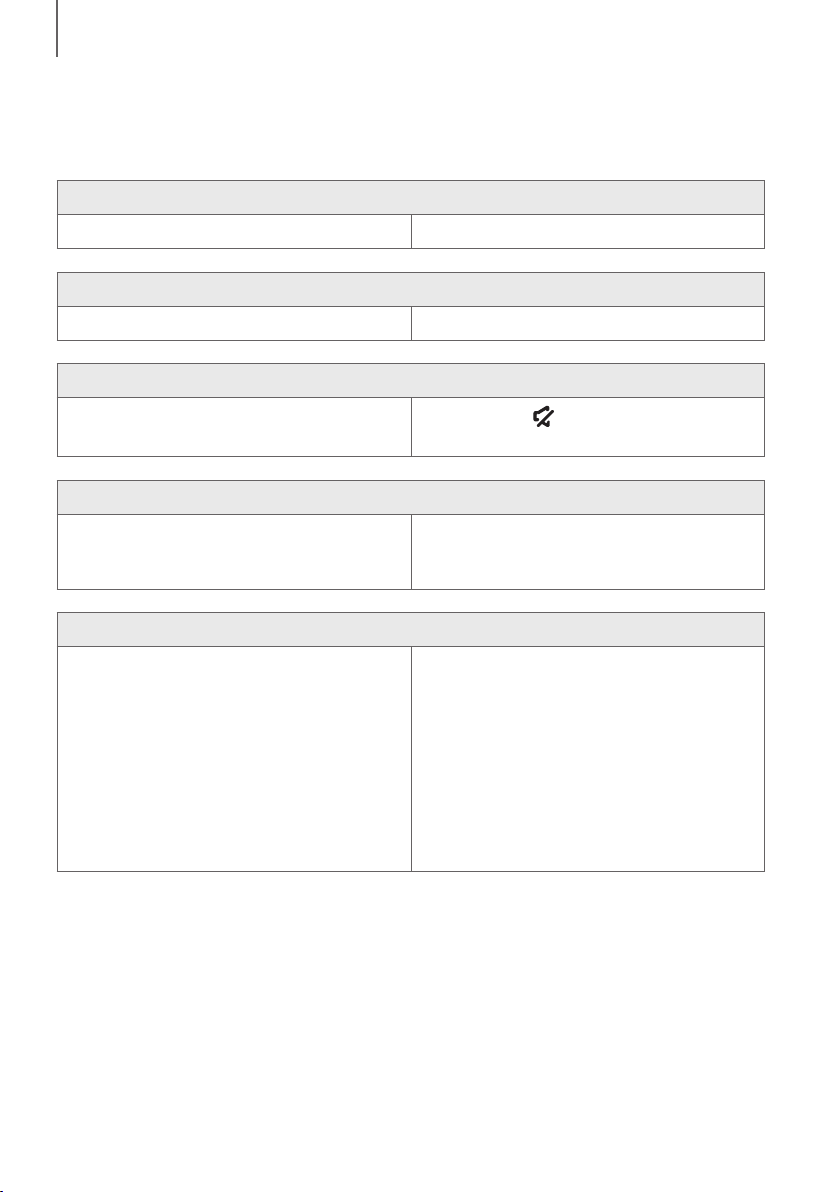
2928
RISOLUZIONE DEI PROBLEMI
RISOLUZIONE DEI PROBLEMI
Prima di rivolgersi all'assistenza, eseguire i controlli indicati di seguito.
L'unità non si accende.
• Il cavo di alimentazione è collegato alla presa? ¼ Collegare la spina alla presa.
Una funzione non si attiva quando viene premuto il tasto.
• Nell'aria è presente elettricità statica? ¼ Scollegare e ricollegare la spina.
L’audio non viene riprodotto.
• La funzione di disattivazione dell'audio è attivata?
• Il volume è regolato sul minimo?
¼ Premere il tasto (Muto) per annullare l'operazione.
¼ Regolare il volume.
Il telecomando non funziona.
• Le batterie sono scariche?
• La distanza tra il telecomando e l'unità principale è
troppo elevata?
¼ Sostituire le batterie.
¼ Avvicinarsi all'unità.
La connessione alla TV tramite TV SoundConnect non è riuscita.
• La TV supporta TV SoundConnect?
• Il firmware della TV è aggiornato?
• Si è verificato un errore durante la connessione?
¼ La funzione TV SoundConnect è supportata da
alcune TV Samsung commercializzate dopo il 2012.
Verificare che la TV supporti la funzione
TV SoundConnect.
¼ Aggiornare la TV all'ultimo firmware.
¼ Contattare il call center Samsung.
¼ Ripristinare TV SoundConnect ed effettuare
nuovamente la connessione. Per ripristinare la
connessione TV SoundConnect, tenere premuto il
tasto
p
per 5 secondi.
RISOLUZIONE DEI PROBLEMI
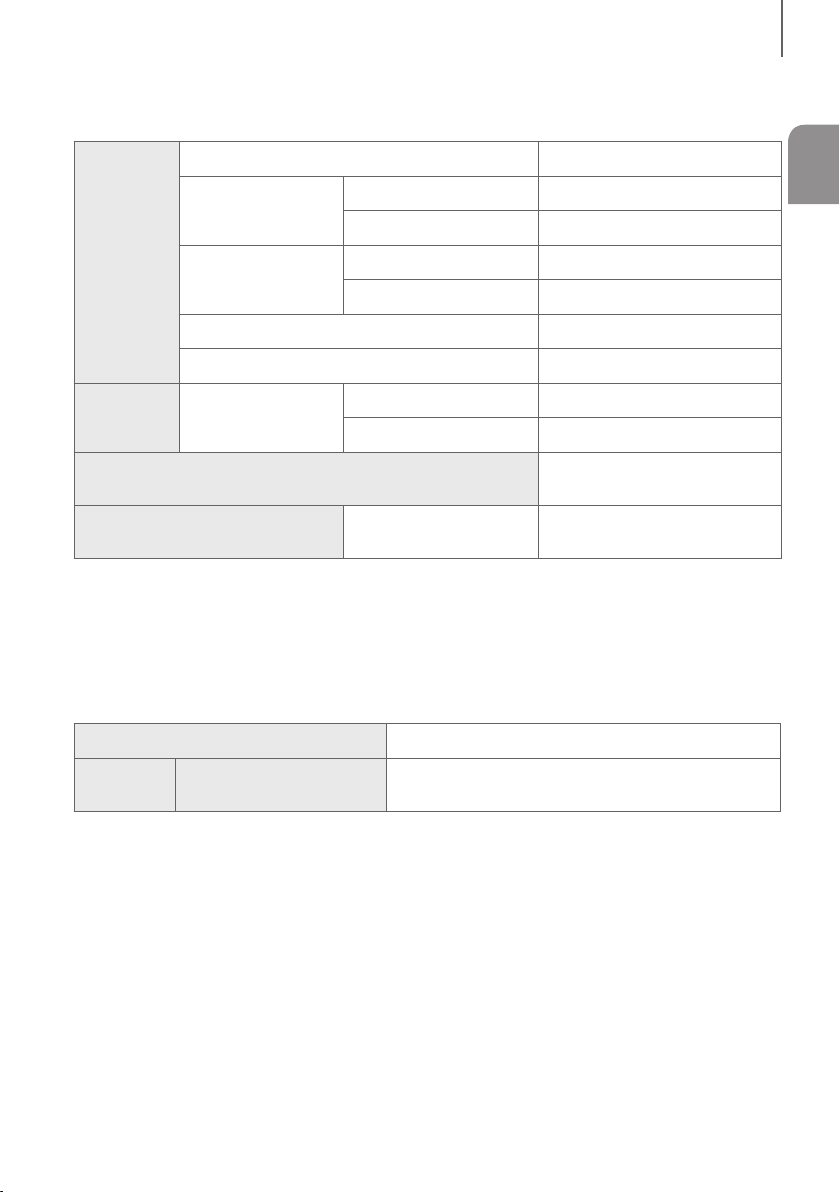
29
ITA
APPENDICE
SPECIFICHE
GENERALE
USB
5V / 0,5A
Peso
Unità principale
1,5 kg
Subwoofer
(PS-WM10)
2,8 kg
Dimensioni
(L x A x P)
Unita principale
907,5 x 53,5 x 70,5 mm
Subwoofer
(PS-WM10)
155,0 x 300,0 x 285,0 mm
Temperatura di esercizio
+5°C e +35°C
Umidità di esercizio
10 % e 75 %
AMPLIFICA
TORE
Potenza di uscita
nominale
Unità principale
35W x 2, 6 ohm
Subwoofer
(PS-WM10)
60W, 3 ohm
Formati di riproduzione supportati
(L’audio DTS 2.0 viene riprodotto in formato DTS.)
LPCM 2ch, Dolby Audio™
(che supporta Dolby® Digital), DTS
POTENZA IN USCITA DEL
DISPOSITIVO WIRELESS
Potenza max. trasmettitore BT
100 mW a 2,4 GHz – 2,4835 GHz
* Le caratteristiche e le specifiche sono soggette a modifiche senza preavviso.
* Specifica nominale
- Samsung Electronics Co., Ltd si riserva il diritto di modificare le specifiche senza preavviso.
- Peso e dimensioni sono approssimativi.
- Per ulteriori informazioni sull'alimentazione e il consumo di energia, vedere l'etichetta applicata al prodotto.
(Etichetta : Fondo dell'Unità Principale della Soundbar)
Consumo energetico complessivo in standby (W)
2,9W
Bluetooth
Metodo di disattivazione porta
Premere il pulsante “Bluetooth POWER” del telecomando
quando è selezionata la modalità “BT”.
a Avviso di licenza Open Source
- Per inviare richieste e domande sulle open source, contattare Samsung tramite e-mail
APPENDICE

30
APPENDICE
LICENZA
Manufactured under license from Dolby Laboratories. Dolby, Dolby Audio, Pro Logic, and the double-D symbol are
trademarks of Dolby Laboratories.
For DTS patents, see http://patents.dts.com. Manufactured under license from DTS Licensing Limited. DTS, the
Symbol, DTS in combination with the Symbol, and DTS 2.0 Channel are registered trademarks or trademarks of DTS,
Inc. in the United States and/or other countries. © DTS, Inc. All Rights Reserved.
Samsung Electronics dichiara che questa apparecchiatura è conforme alla Direttiva 2014/53/
UE.
Il testo completo della Dichiarazione di conformità UE è disponibile al seguente indirizzo
Internet: http://www.samsung.com > Supporto > Chiedi Supporto > Inserire il nome del
modello. Questa apparecchiatura può essere utilizzata in tutte le nazioni dell’UE.
Contatta SAMSUNG WORLD WIDE
Se avete commenti o domande sui prodotti Samsung, contattate il Servizio Clienti Samsung.
[Corretto smaltimento delle batterie del prodotto]
(Applicabile nei Paesi con sistemi di raccolta differenziata)
Il simbolo riportato sulla batteria o sulla sua documentazione o
confezione indica che le batterie di questo prodotto non devono essere
smaltite con altri rifiuti al termine del ciclo di vita. Dove raffigurati, i
simboli chimici Hg, Cd o Pb indicano che la batteria contiene mercurio,
cadmio o piombo in quantità superiori ai livelli di riferimento della direttiva
CE 2006/66. Se le batterie non vengono smaltite correttamente, queste
sostanze possono causare danni alla salute umana o all'ambiente.
Per proteggere le risorse naturali e favorire il riutilizzo dei materiali,
separare le batterie dagli altri tipi di rifiuti e utilizzare il sistema di
conferimento gratuito previsto nella propria area di residenza.
Corretto smaltimento del prodotto
(rifiuti elettrici ed elettronici)
(Applicabile nei Paesi con sistemi di raccolta differenziata)
Il simbolo riportato sul prodotto, sugli accessori o sulla documentazione
indica che il prodotto e i relativi accessori elettronici (quali caricabatterie,
cuffia e cavo USB) non devono essere smaltiti con altri rifiuti al termine
del ciclo di vita. Per evitare eventuali danni all'ambiente o alla salute
causati dallo smaltimento dei rifiuti non corretto, si invita l'utente a
separare il prodotto e i suddetti accessori da altri tipi di rifiuti,
conferendoli ai soggetti autorizzati secondo le normative locali.
Gli utenti domestici, in alternativa alla gestione autonoma di cui sopra,
potranno consegnare l’apparecchiatura che si desidera smaltire al
rivenditore, al momento dell’acquisto di una nuova apparecchiatura di
tipo equivalente. Presso i rivenditori di prodotti elettronici con superficie
di vendita di almeno 400 m2 è inoltre possibile consegnare
gratuitamente, senza obbligo di acquisto, i prodotti elettronici da
smaltire con dimensioni inferiori a 25 cm.
Gli utenti professionali (imprese e professionisti) sono invitati a contattare
il proprio fornitore e verificare i termini e le condizioni del contratto di
acquisto. Questo prodotto e i relativi accessori elettronici non devono
essere smaltiti unitamente ad altri rifiuti commerciali.
Per informazioni sugli impegni ambientali assunti da Samsung e gli obblighi normativi specifici del prodotto, ad es. REACH, WEEE, batterie, visitare la
pagina http://www.samsung.com/it/aboutsamsung/sustainability/environment/our-commitment/data/
Country Contact Centre
Web Site
`
Europe
UK 0330 SAMSUNG (7267864) www.samsung.com/uk/support
IRELAND (EIRE) 0818 717100 www.samsung.com/ie/support
GERMANY 06196 77 555 77 www.samsung.com/de/support
FRANCE 01 48 63 00 00 www.samsung.com/fr/support
ITALIA 800-SAMSUNG (800.7267864) www.samsung.com/it/support
SPAIN 0034902172678 www.samsung.com/es/support
PORTUGAL 808 207 267 www.samsung.com/pt/support
LUXEMBURG 261 03 710 www.samsung.com/be_fr/support
NETHERLANDS 088 90 90 100 www.samsung.com/nl/support
BELGIUM 02-201-24-18
www.samsung.com/be/support (Dutch)
www.samsung.com/be_fr/support (French)
NORWAY 815 56480 www.samsung.com/no/support
DENMARK 707 019 70 www.samsung.com/dk/support
FINLAND 030-6227 515 www.samsung.com/fi/support
SWEDEN 0771 726 786 www.samsung.com/se/support
POLAND
801-172-678* lub +48 22 607-93-33*
* (koszt połączenia według taryfy
operatora)
http://www.samsung.com/pl/support/
HUNGARY 0680SAMSUNG (0680-726-7864) www.samsung.com/hu/support
AUSTRIA
0800-SAMSUNG (0800-7267864)
[Only for Dealers] 0810-112233
www.samsung.com/at/support
Country Contact Centre
Web Site
SWITZERLAND 0800 726 78 64 (0800-SAMSUNG)
www.samsung.com/ch/support (German)
www.samsung.com/ch_fr/support (French)
CZECH 800 - SAMSUNG (800-726786) www.samsung.com/cz/support
SLOVAKIA 0800 - SAMSUNG (0800-726 786) www.samsung.com/sk/support
CROATIA 072 726 786 www.samsung.com/hr/support
BOSNIA 055 233 999
www.samsung.com/support
MONTENEGRO 020 405 888
SLOVENIA 080 697 267 (brezplačna številka) www.samsung.com/si/support
SERBIA 011 321 6899 www.samsung.com/rs/support
ALBANIA 045 620 202 www.samsung.com/al/support
BULGARIA
*3000 Цена в мрежата
0800 111 31 , Безплатна телефонна
линия
www.samsung.com/bg/support
ROMANIA
*8000 (apel in retea)
08008-726-78-64 (08008-SAMSUNG)
Apel GRATUIT
www.samsung.com/ro/support
CYPRUS 8009 4000 only from landline, toll free
www.samsung.com/gr/support
GREECE
80111-SAMSUNG (80111 726 7864)
only from land line
(+30) 210 6897691 from mobile
and land line
LITHUANIA 8-800-77777 www.samsung.com/lt/support
LATVIA 8000-7267 www.samsung.com/lv/support
ESTONIA 800-7267 www.samsung.com/ee/support