
FR
EN
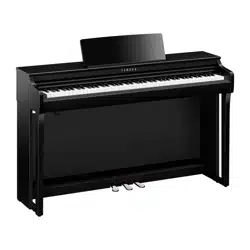
Owner’s Manual
Mode d’emploi
CLP
-
825
EnglishFrançais
Before using the instrument, be sure to read “PRECAUTIONS” on pages 3–4.
For information on assembling the instrument, refer to the instructions on page 34.
Avant d’utiliser l’instrument, lisez attentivement la section « PRÉCAUTIONS D’USAGE »
aux pages 3 et 4.
Pour plus d’informations sur l’assemblage de l’instrument, reportez-vous aux instructions
figurant en page 34.
1. IMPORTANT NOTICE: DO NOT MODIFY THIS
UNIT!
This product, when installed as indicated in the instruc-
tions contained in this manual, meets FCC requirements.
Modifications not expressly approved by Yamaha may
void your authority, granted by the FCC, to use the prod-
uct.
2. IMPORTANT: When connecting this product to accesso-
ries and/or another product use only high quality shielded
cables. Cable/s supplied with this product MUST be used.
Follow all installation instructions. Failure to follow instruc-
tions could void your FCC authorization to use this prod-
uct in the USA.
3. NOTE: This product has been tested and found to com-
ply with the requirements listed in FCC Regulations, Part
15 for Class “B” digital devices. Compliance with these
requirements provides a reasonable level of assurance
that your use of this product in a residential environment
will not result in harmful interference with other electronic
devices. This equipment generates/uses radio frequen-
cies and, if not installed and used according to the instruc-
tions found in the users manual, may cause interference
harmful to the operation of other electronic devices. Com-
pliance with FCC regulations does not guarantee that
interference will not occur in all installations. If this product
is found to be the source of interference, which can be
determined by turning the unit “OFF” and “ON”, please try
to eliminate the problem by using one of the following
measures:
- Relocate either this product or the device that is being
affected by the interference.
- Utilize power outlets that are on different branch (circuit
breaker or fuse) circuits or install AC line filter/s.
- In the case of radio or TV interference, relocate/reorient
the antenna. If the antenna lead-in is 300 ohm ribbon
lead, change the lead-in to co-axial type cable.
If these corrective measures do not produce satisfactory
results, please contact the local retailer authorized to dis-
tribute this type of product. If you cannot locate the appro-
priate retailer, please contact Yamaha Corporation of
America, 6600 Orangethorpe Avenue, Buena Park,
CA90620, USA.
The above statements apply ONLY to those products dis-
tributed by Yamaha Corporation of America or its subsid-
iaries.
(529-M04 FCC class B YCA 02)
FCC INFORMATION (U.S.A.)
(529-M02 FCC sdoc YCA 02)
COMPLIANCE INFORMATION STATEMENT
(Supplierʼs declaration of conformity procedure)
Responsible Party: Yamaha Corporation of America
Address: 6600 Orangethorpe Ave. Buena Park, CA 90620
Telephone: 714-522-9011
Type of Equipment: Digital Piano
Model Name: CLP-825
This device complies with Part 15 of the FCC Rules.
Operation is subject to the following two conditions:
1) this device may not cause harmful interference, and
2) this device must accept any interference received including interference that may cause undesired operation.
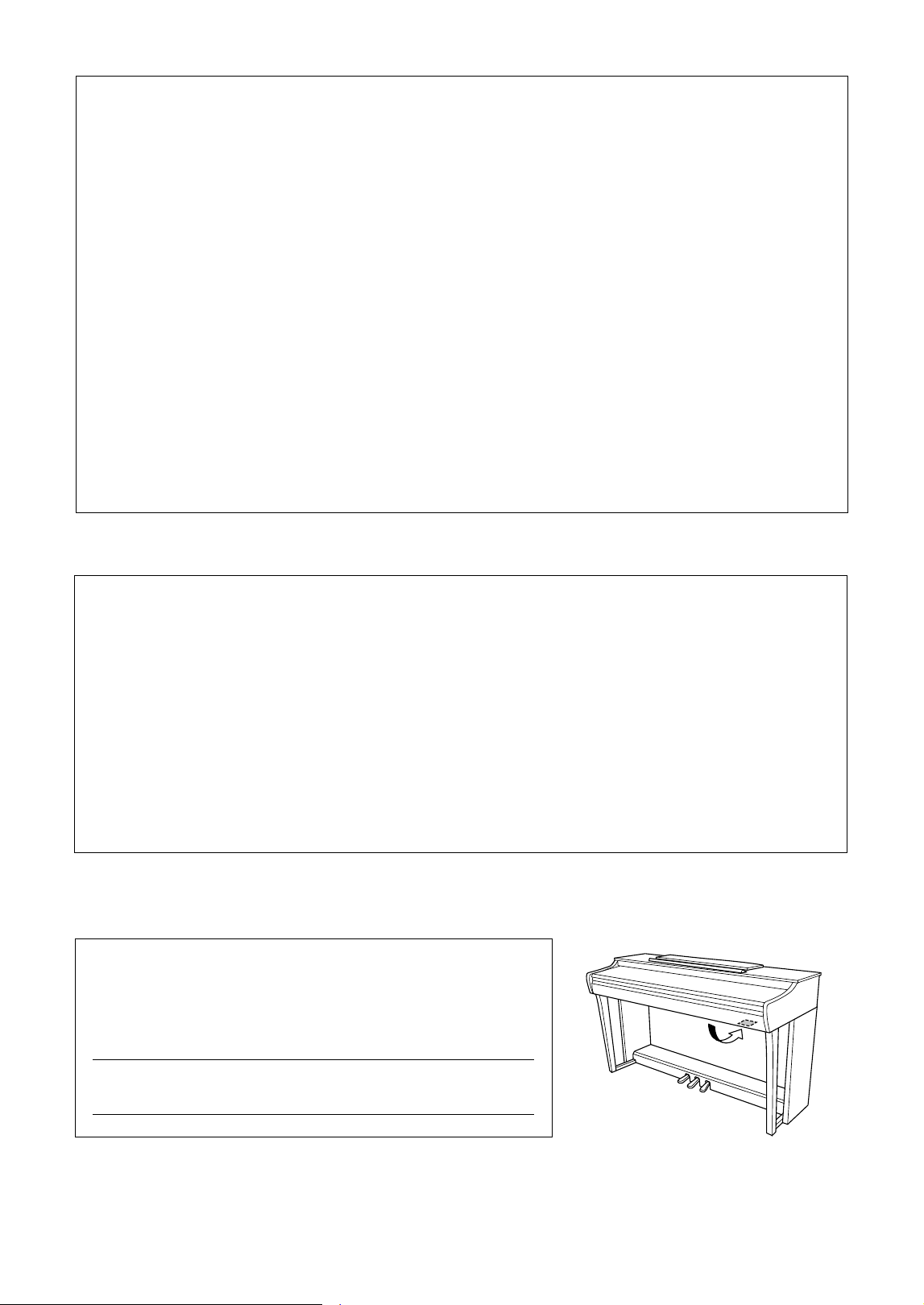
The model number, serial number, power requirements, etc., may be found on or
near the name plate, which is at the bottom of the unit. You should note this
serial number in the space provided below and retain this manual as a perma-
nent record of your purchase to aid identification in the event of theft.
Model No.
Serial No.
(1003-M06 plate bottom en 01)
The name plate is located on the bottom of the unit.

3
CLP-825 Owner’s Manual
PLEASE READ CAREFULLY
BEFORE PROCEEDING
Especially in the case of children, a guardian should
provide guidance on how to properly use and
handle the product before actual use.
Please keep this manual in a safe and handy place
for future reference.
WARNING
Always follow the basic precautions listed below to
avoid the possibility of serious injury or even death
from electrical shock, short-circuiting, damages, fire
or other hazards. These precautions include, but are
not limited to, the following:
Power supply
• Do not place the power cord near heat sources such as
heaters or radiators. Also, do not excessively bend or
otherwise damage the cord, or place heavy objects on it.
• Do not touch the product or the power plug during an
electrical storm.
• Use only the correct voltage specified for the product.
The required voltage is printed on the name plate of the
product.
• Use only the supplied or the specified AC adaptor
(page 38)/power cord. Do not use the AC adaptor/power
cord for other devices.
• Check the power plug periodically and remove any dirt
or dust which may have accumulated on it.
• Insert the power plug firmly all the way into the AC
outlet. Using the product when it is not plugged in
sufficiently can cause dust to accumulate on the plug,
possibly resulting in fire or skin burns.
• When setting up the product, make sure that the AC
outlet you are using is easily accessible. If some trouble
or malfunction occurs, immediately turn off the power
switch and disconnect the plug from the outlet. Even
when the power switch is turned off, as long as the
power cord is not unplugged from the wall AC outlet, the
product will not be disconnected from the power source.
• Do not connect the product to an electrical outlet using a
multi-plug outlet extender. Doing so can result in lower
sound quality, or possibly cause overheating in the
outlet.
• When disconnecting the power plug, always hold the
plug itself and not the cord. Pulling by the cord can
damage it and cause electric shocks or a fire.
• If not using the product for long periods of time, be sure
to pull the power plug from the AC outlet.
Do not disassemble
• This product contains no user-serviceable parts. Do not
attempt to disassemble the internal parts or modify them
in any way.
Water warning
• Do not expose the product to rain, use it near water or in
damp or wet conditions, or place on it any containers
(such as vases, bottles or glasses) containing liquids
which might spill into any openings or places where
water may drop. A liquid such as water getting into the
product may cause a fire, electric shocks, or
malfunctions.
• Use the AC adaptor indoors only. Do not use in any wet
environments.
• Never insert or remove a power plug with wet hands.
Fire warning
• Do not place any burning items or open flames near the
product, since they may cause a fire.
Wireless unit
• Radio waves from this product may affect electro-
medical devices, such as a heart pacemaker implant or
defibrillator implant.
- Do not use the product near medical devices or inside
medical facilities. Radio waves from this product may
affect electro-medical devices.
- Do not use the product within 15 cm (6 in.) of persons
with a heart pacemaker implant or a defibrillator
implant.
Using the bench (if included)
• Do not place the bench in an unstable position where it
might accidentally fall over.
• Do not play carelessly with or stand on the bench. Using
it as a tool or stepladder or for any other purpose might
result in accident or injury.
• Only one person should sit on the bench at a time, in
order to prevent the possibility of accident or injury.
• If the bench screws become loose due to extensive long-
term use, tighten them periodically using the specified
tool in order to prevent the possibility of accident or
injury.
• Keep special watch over any small children so that they
don’t fall off the rear of the bench. Since the bench does
not have a backrest, unsupervised use may result in
accident or injury.
PRECAUTIONS
4
CLP-825 Owner’s Manual
If you notice any abnormality
• If any of the following problems occur, immediately turn
off the power switch and disconnect the power plug from
the outlet. Finally have the device inspected by Yamaha
service personnel.
- The power cord or plug becomes frayed or damaged.
- Unusual smells or smoke are emitted.
- Some object, or water has been dropped into the
product.
- There is a sudden loss of sound during use of the
product.
- Cracks or other visible damage appear on the product.
CAUTION
Always follow the basic precautions listed below
to avoid the possibility of physical injury to you or
others, or damage to the product or other property.
These precautions include, but are not limited to,
the following:
Assembly
• Assemble the product in the proper sequence by
following the assembly instructions in this manual. Also,
make sure to tighten the screws or bolts regularly.
Failure to do so might result in damage to the product or
even injury.
Location
• Do not place the product in an unstable position or a
location with excessive vibration, where it might
accidentally fall over and cause injury.
• Do not go near the product during an earthquake.
Strong shaking during an earthquake could cause the
product to move or tip over, resulting in damage to the
product or its parts, and possibly causing injury.
• When transporting or moving the product, always use
two or more people. Attempting to lift the product by
yourself may result in injuries, such as back injuries, or
cause the product to be dropped and broken, which
could lead to other injuries.
• Before moving the product, remove all connected
cables, to prevent damage to the cables or injury to
anyone who might trip over them.
Connections
• Before connecting the product to other devices, turn off
the power for all devices. Before turning the power on or
off for all devices, set all volume levels to minimum.
• Be sure to set the volumes of all devices at their
minimum levels and gradually raise the volume controls
while playing the product to set the desired listening
level.
Handling
• Do not insert your finger or hand in any gaps on the key
cover or product. Also take care that the key cover does
not pinch your finger.
• Do not insert foreign materials such as metal or paper
into any openings or gaps of the product. Failure to
observe this may cause a fire, electric shocks, or
malfunctions.
• Do not rest your weight on, or place heavy objects on
the product, and do not use excessive force on the
buttons, switches or connectors.
• Keep small parts out of the reach of infants. Your
children may accidentally swallow them.
• Do not use the product or headphones for a long period
of time at a high or uncomfortable volume level, since
this can cause permanent hearing loss. If you
experience any hearing loss or ringing in the ears,
consult a physician.
• Remove the power plug from the AC outlet before
cleaning the unit. Failure to observe this may cause
electric shocks.
Always turn the power off when the instrument is not in
use.
Even when the [ ] (Standby/On) switch is in standby
status (power lamp is off), electricity is still flowing to the
instrument at the minimum level.
When you are not using the instrument for a long time,
make sure you unplug the power cord from the wall AC
outlet.
(DMI-11)
Yamaha cannot be held responsible for damage
caused by improper use or modifications to the
product, or data that is lost or destroyed.
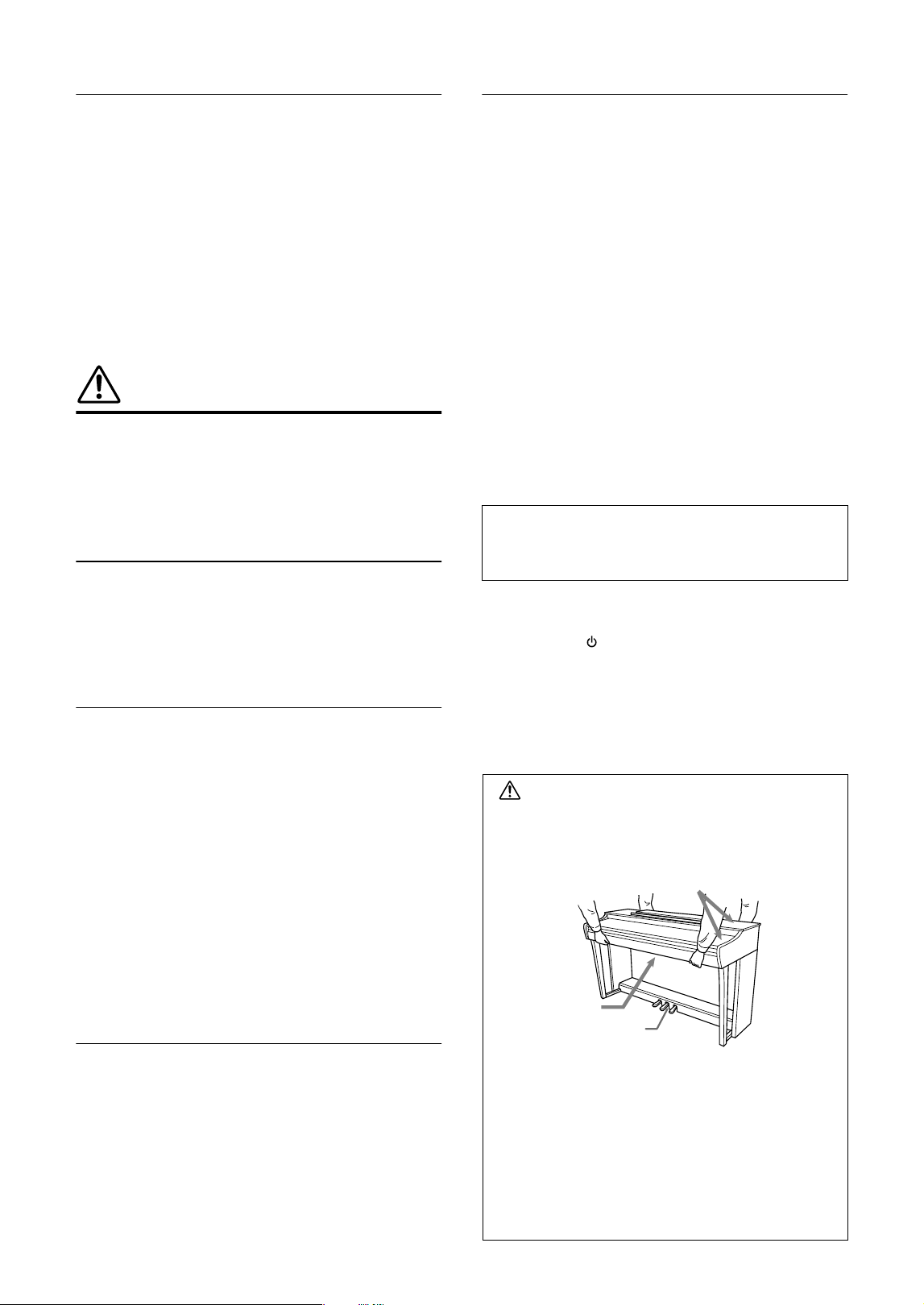
CAUTION
When moving the instrument, always hold the bottom of
the main unit. Do not hold the key cover or top portion.
Improper handling can result in damage to the
instrument or personal injury.
Transporting
If you move to another location, you can transport the
instrument along with other belongings. You can move the
unit as it is (assembled), or you can disassemble the unit
down to the condition it was in when you first took it out of the
box. Transport the keyboard horizontally. Do not lean it up
against a wall or stand it up on its side. Do not subject the
instrument to excessive vibration or shock. When
transporting the assembled instrument, make sure all screws
are properly tightened and have not been loosened by
moving the instrument.
Do not hold here.
Hold here.
Separate the adjuster
from the floor surface.

5
CLP-825 Owner’s Manual
NOTICE
To avoid the possibility of malfunction/ damage to the
product, damage to data, or damage to other property,
follow the notices below.
Handling
• Do not use this product in the vicinity of a TV, radio,
stereo equipment, mobile phone, or other electric
devices. Otherwise, this product, or the other device may
generate noise.
• When you use the product along with an app on your
smart device, such as a smartphone or tablet, we
recommend that you enable “Airplane Mode” on the
device to avoid noise caused by communication. When
turning on airplane mode, Wi-Fi or Bluetooth
®
settings
may be turned off. Make sure that the setting is turned
on before use.
• Do not expose the product to excessive dust or
vibrations, or extreme cold or heat (such as in direct
sunlight, near a heater, or in a car during the day) to
prevent the possibility of disfiguration, damage to the
internal components or unstable operation. (Verified
operating temperature range: 5°–40°C, or 41°–104°F.)
• Do not place vinyl, plastic or rubber objects on the
product, since this might discolor the product.
• In the case of a model with a polished finish, bumping
the surface of the product with metal, porcelain, or other
hard objects can cause the finish to crack or peel. Use
caution.
Maintenance
• When cleaning the product, use a soft and dry (or
slightly damp) cloth. Do not use paint thinners, solvents,
alcohol, cleaning fluids, or chemical-impregnated wiping
cloths.
• In the case of a model with a polished finish, gently
remove dust and dirt with a soft cloth. Do not wipe too
hard since small particles of dirt can scratch the
instrument's finish.
• During extreme changes in temperature or humidity,
condensation may occur and water may collect on the
surface of the product. If water is left, the wooden parts
may absorb the water and be damaged. Make sure to
wipe any water off immediately with a soft cloth.
Saving data
• Some of the data of this product (page 31) are retained
when the power is turned off. However, the saved data
may be lost due to some failure, an operational mistake,
etc.
Information
About copyrights
• The copyright of the “content”
*1
installed in this product
belongs to Yamaha Corporation or its copyright holder.
Except as permitted by copyright laws and other relevant
laws, such as copying for personal use, it is prohibited to
“reproduce or divert”
*2
without the permission of the
copyright holder. When using the content, consult with a
copyright expert.
If you create music or perform with the contents through
the original use of the product, and then record and
distribute them, the permission of Yamaha Corporation
is not required regardless of whether the distribution
method is paid or free of charge.
*1: The word “content” includes a computer program, audio data,
Accompaniment Style data, MIDI data, waveform data, voice
recording data, music score, and score data, etc.
*2: The phrase “reproduce or divert” includes taking out the
content itself in this product, or recording and distributing it
without changes in a similar manner.
About functions/data bundled with the
product
• Some of the preset Songs have been edited for length or
arrangement, and may not be exactly the same as the
original.
About open source software
• The firmware of this product contains open source
software. For copyright information and terms of use for
each open source software, access the Yamaha website
below:
Yamaha Downloads: https://download.yamaha.com/
About this manual
• The illustrations as shown in this manual are for
instructional purposes only.
• Windows is a registered trademark of Microsoft
®
Corporation in the United States and other countries.
• The Bluetooth
®
word mark and logos are registered
trademarks owned by Bluetooth SIG, Inc. and any use of
such marks by Yamaha Corporation is under license.
• The company names and product names in this manual
are the trademarks or registered trademarks of their
respective companies.
Tuning
• Unlike an acoustic piano, this instrument does not need
to be tuned by an expert (although the pitch can be user-
adjusted to match other instruments). This is because
the pitch of digital instruments is always maintained
perfectly.
About disposal
• When disposing of this product, please contact the
appropriate local authorities.

6
CLP-825 Owner’s Manual
Table of Contents
PRECAUTIONS ..................................... 3
About the Manuals ............................... 7
Included Accessories........................... 7
Panel Controls and Terminals ............ 8
Basic Operations
Setting Up.............................................. 9
Key Cover.............................................................. 9
Music Rest............................................................. 9
Turning the Power On ......................................... 10
Auto Power Off Function ..................................... 10
Volume Limiter Function...................................... 11
Using Headphones.............................................. 11
Playing the Piano................................ 13
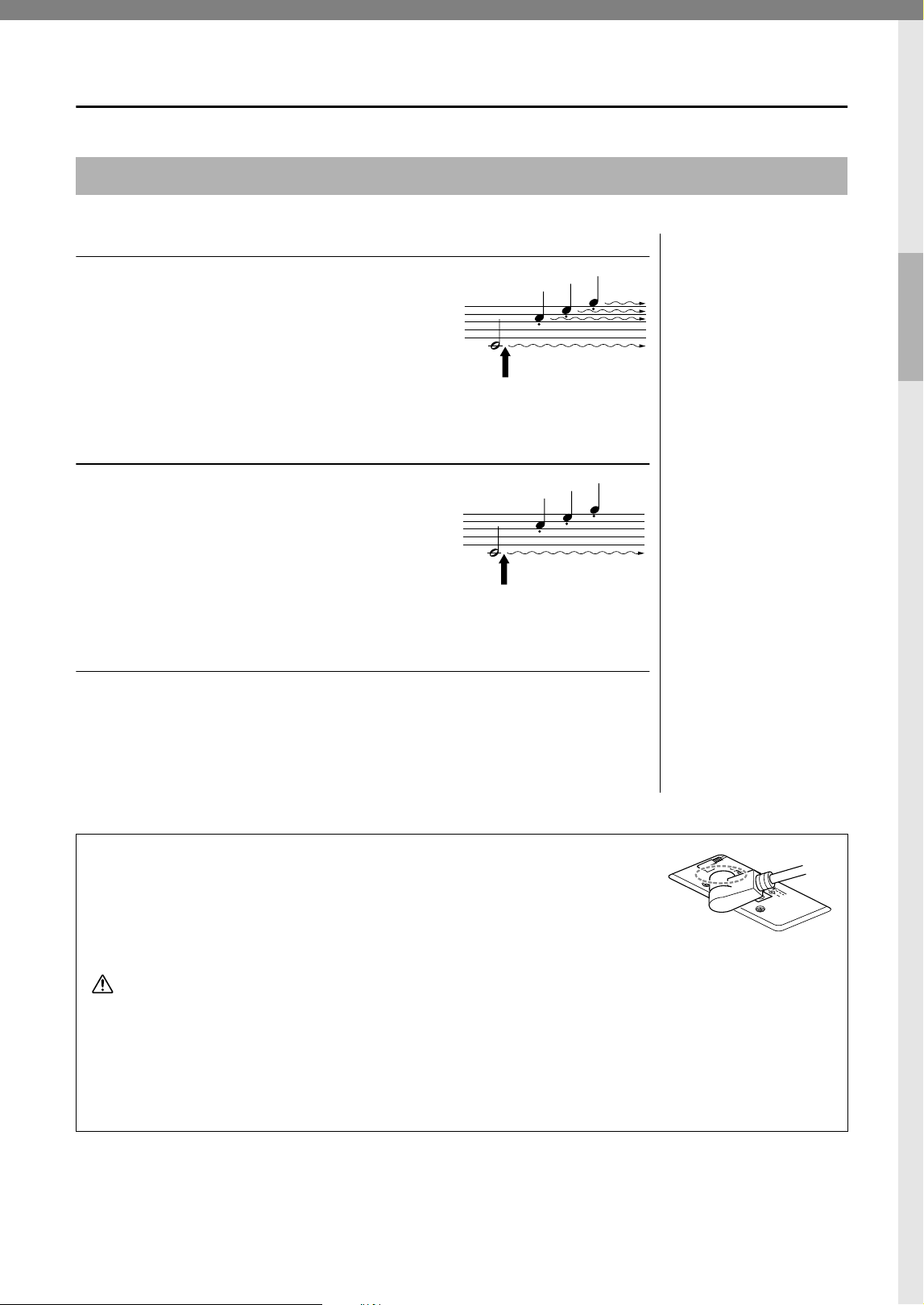
Using the Pedals ................................................. 13
Turning the VRM Effect On/Off ........................... 14
Intelligent Acoustic Control (IAC)......................... 14
Grand Expression Modeling ................................ 15
Turning the Operation Confirmation Sounds On/Off
............................................................................ 15
Changing the Touch Sensitivity ........................... 15
Using the Metronome .......................................... 16
Advanced Operations
Playing Various Musical Instrument
Sounds (Voices) ................................. 17
Selecting a Voice................................................. 17
Listening to the Demo Songs .............................. 18
Adding Variations to the Sound (Reverb)............ 19
Transposing the Pitch in Semitones .................... 20
Fine-tuning the Pitch ........................................... 20
Layering Two Voices (Dual mode) ...................... 21
Playing Duo ......................................................... 22
Song Playback and Practice.............. 23
Listening to Preset Songs ................................... 23
Practicing a One-Hand Part ................................ 24
Playing Back Immediately from the First Note
(Quick Play)......................................................... 24
Recording Your Performance ........... 25
Recording Your Performance .............................. 25
Changing the Initial Settings of the Recorded Song
............................................................................. 26
Deleting Recorded Data ...................................... 26
Using with a Smart Device or a
Computer ............................................ 27
Playback/Recording of Audio Data
(USB Audio Interface).......................................... 27
Listening to Audio via Bluetooth on this Instrument
(Bluetooth Audio)................................................. 28
Using the convenient Smart Pianist app.............. 29
Backing up Data and Initializing the
Settings ............................................... 31
Data Maintained When Power is Turned Off ....... 31
Initializing the Settings......................................... 31
Confirming the firmware version of this instrument
............................................................................. 31
Appendix
Troubleshooting................................. 32
Glossary of Terms.............................. 33
Keyboard Stand Assembly................ 34
Specifications..................................... 37
Index.................................................... 39
Song List............................................. 40
Quick Operation Guide ..........at the end
7
CLP-825 Owner’s Manual
Thank you for choosing this Yamaha digital piano.
This instrument provides exceptionally high-quality sound and expressive control for your playing enjoyment.
In order to make the most of the performance potential and features of the instrument, please read the
manuals thoroughly, and keep them in a handy place for later reference.
About the Manuals
This instrument has the following documents and instructional materials.
Supplied with the instrument
• Owner’s Manual (this book)
Explains the basic operations and functions of this instrument. Please read this manual first.
Available on the website
• Quick Operation Guide
Shows in chart form the functions assigned to the buttons and the keyboard for quick understanding.
https://manual.yamaha.com/mi/kb-ekb/clp825/
• MIDI Reference
Contains the MIDI Data Format and MIDI Implementation chart, as well as descriptions on MIDI functions such as
MIDI channel and Local Control settings.
• Smart Pianist User Guide
Explains how to set up and use the smart device app “Smart Pianist” (page 29) for controlling this instrument.
Included Accessories
Owner’s Manual (this book)
“50 Classical Music Masterpieces” (music book)
Online Member Product Registration
Bench*
Power cord*, AC adaptor*
* May not be included depending on your area. Check with your Yamaha dealer.
To obtain these manuals, access the website below:
Yamaha Downloads
https://download.yamaha.com/
* Enter the model name for searching the desired manuals.
8
CLP-825 Owner’s Manual
Panel Controls and Terminals
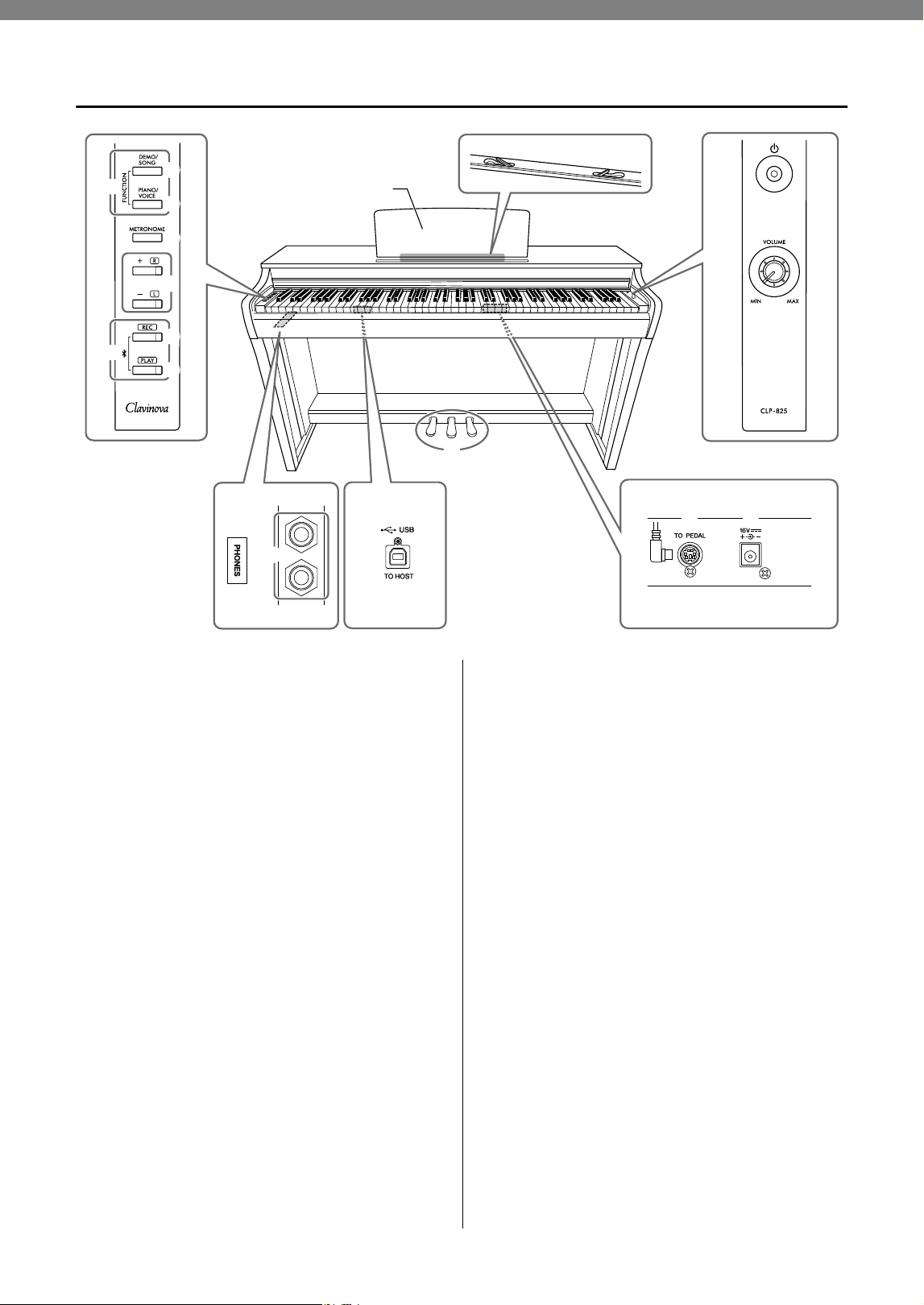
1 [P] (Standby/On) switch.............. page 10
For turning the power on or setting to standby.
2 [VOLUME] knob............................ page 10
For adjusting the volume of the entire sound.
Turning it to the right increases the volume, and
turning it to the left decreases the volume.
3 [DEMO/SONG] button .......... pages 18, 23
For playing the Demo Songs and the Preset Songs.
4 [PIANO/VOICE] button ... pages 17, 19, 21
For selecting a single Voice, two Voices for layering
or a Reverb Type.
5 [METRONOME] button ................. page 16
For starting or stopping the metronome.
6 [+R], [−L] buttons ..... pages 16, 17, 23, 24
• These are for increase or decrease Song
numbers, tempo values, etc.
• During Song playback, turning on/off the right-
hand and left-hand Parts individually.
7 [REC] button .................................page 25
For recording your keyboard performance.
8 [PLAY] button................................ page 25
For playing back the recorded performance.
9 [FUNCTION] ..........................pages 10, 20
Simultaneously holding both [DEMO/SONG] and
[PIANO/VOICE] and pressing a specified key
allows you to change various settings, including
Auto Power off function, Transpose parameters, etc.
) Bluetooth...................................... page 28
For connecting to a Bluetooth-equipped device
such as a smartphone.
* Bluetooth function may not be available depending on the country
in which you purchased the product (page 28).
! [PHONES] jacks ............................page 11
For connecting a set of standard stereo
headphones.
@ [USB TO HOST] terminal............. page 27
For connecting to a computer or a smart device
such as a smartphone or tablet.
# [TO PEDAL] jack ......................... page 36
For connecting the pedal cord of the pre-installed
pedal or the separately sold FC35 pedal unit.
$ DC IN jack......................................page 10
For connecting the AC adaptor.
% Pedals ............................................page 13
For controlling expression and sustain, just as on
an acoustic piano.
1
2
3
4
5
6
7
8
9
)
! @
%
#
$
Bottom BottomBottom
Music braces
Music rest
9
CLP-825 Owner’s Manual
Basic Operations
Setting Up
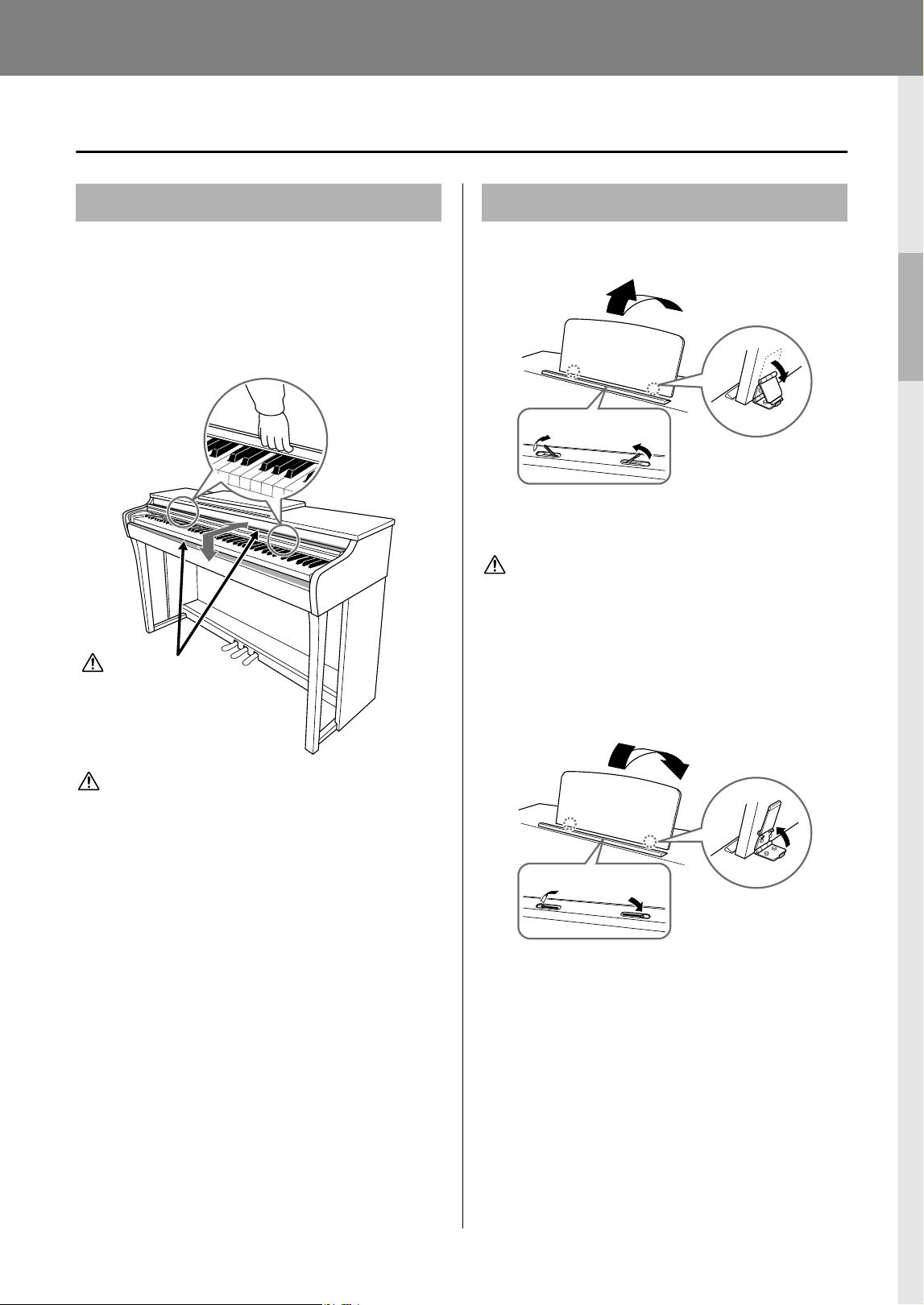
To open the key cover:
Lift the cover slightly, then push and slide it to the end.
To close the key cover:
Slide the cover toward you and gently lower the cover
over the keys.
CAUTION
• Hold the cover with both hands when opening or closing it.
Do not release it until it is fully opened or closed. Be careful
to avoid catching fingers (yours or others, especially
children’s) between the cover and main unit.
• Do not place objects, such as a piece of metal or paper, on
top of the key cover. Small objects placed on the key cover
may fall inside the unit when the cover is opened and may
be nearly impossible to remove. This could cause electric
shock, short circuit, fire or other serious damage to the
instrument.
To raise the music rest:
Music braces allow you to hold the pages of music
books in place.
CAUTION
Do not try to use the music rest in a half-raised position.
When lowering the music rest, do not release your hands
from the music rest until it is all the way down.
To lower the music rest:
Close the Music braces if they are open, and then
lower the music rest by following the instructions
below.
Key Cover
CAUTION
Be careful to avoid catching
your fingers when opening or
closing the cover.
Music Rest
1
3
2
Music braces
3
1
2
Music braces
10
CLP-825 Owner’s Manual
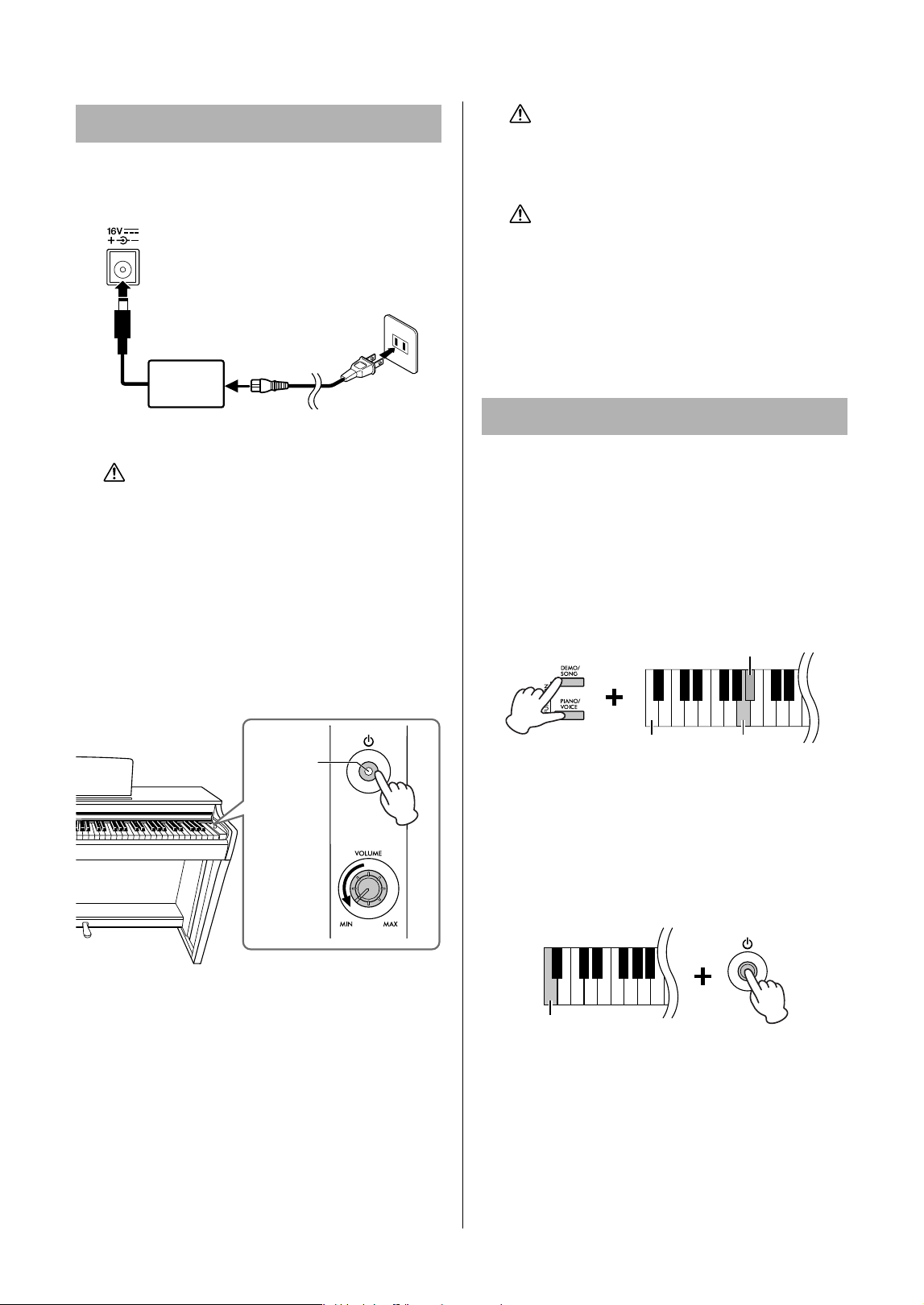
1. Connect the plugs of the AC adaptor in
the order shown in the illustration.
WARNING
• Use the specified adaptor (page 38) only. The use of
other adaptors may result in irreparable damage to both
the adaptor and the instrument.
• When setting up the product, make sure that the AC
outlet you are using is easily accessible. If some
trouble or malfunction occurs, immediately turn the
power off and disconnect the plug from the outlet.
NOTE
Follow this procedure in reverse order when disconnecting the
AC adaptor.
2. Turn down the [VOLUME] knob to “MIN.”
3. Press the [P] (Standby/On) switch to
turn the power on.
The power indicator on the button lights up to
indicate the power is on.
To adjust the volume of the entire keyboard sound,
use the [VOLUME] knob while playing the
keyboard.
When you’re ready to turn the power to standby,
press the [P] (Standby/On) switch again for a
second. The power indicator turns off.
WARNING
Even when the [P] (Standby/On) switch is in the standby
status, electricity is still flowing to the instrument at a
minimum level. When not using the instrument for an
extended period of time, be sure to unplug the power
cord from the wall AC outlet.
CAUTION
Do not use this instrument at a high volume level for a
long period of time, to avoid damaging your hearing.
NOTICE
Press only the [P] (Standby/On) switch when turning the
power on. Any other operations, such as pressing the
keys, buttons or pedals may cause the instrument to
malfunction.
To prevent unnecessary power consumption, this
instrument features an Auto Power Off function that
automatically turns the power off if the instrument is
not operated for approximately 15 minutes.
While holding down [DEMO/SONG] and [PIANO/
VOICE] simultaneously, press the A#0 key to enable
the Auto Power Off function or the A0 key to disable it.
Default setting: Enabled
You can also disable the function when turning on the
power to the instrument.
While holding down the A−1 key (the lowest key),
press the [P] (Standby/On) switch to turn the
instrument on. The [REC] indicator flashes three
times, indicating the Auto Power Off function has been
disabled.
Turning the Power On
1
2
3
AC outlet
AC adaptor
DC IN jack (page 8)
DC plug
Power cord
AC plug
The shape of the plug and outlet differ depending on the
locale.
2
3
Power
indicator
Auto Power Off Function
A#0 (Enable)
Lowest key
A0 (Disable)
Lowest key
11
CLP-825 Owner’s Manual
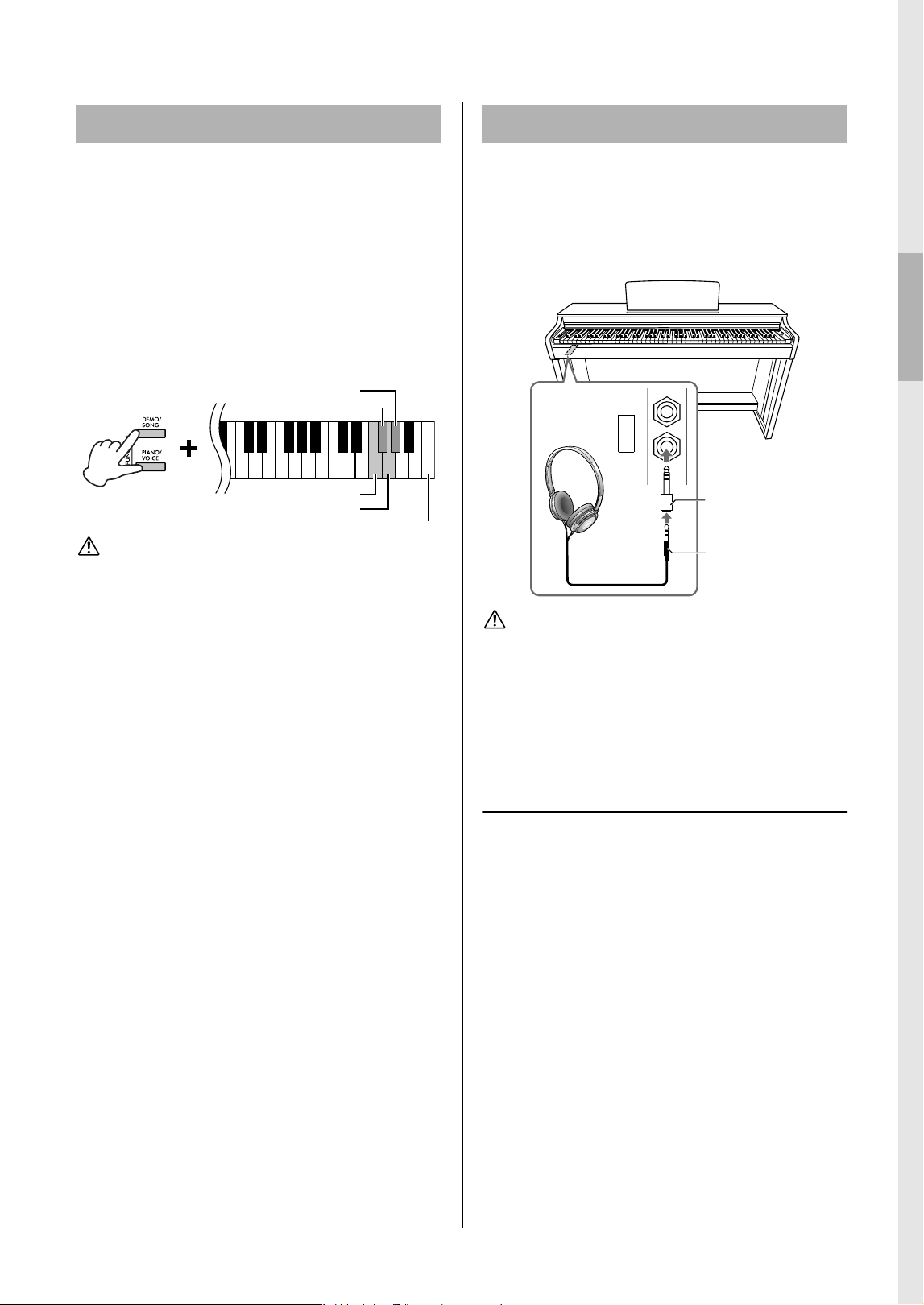
To prevent excessively loud volume, the Volume
Limiter function can be used to limit the maximum
volume. When the function is set to 20%, 50% or 80%,
the volume will not increase beyond that point even if
you turn the [VOLUME] knob to the right.
While simultaneously pressing [DEMO/SONG] and
[PIANO/VOICE], press one of the keys F#6 (20%), G6
(50%), or G#6 (80%) as shown below to turn the
function on, or press F6 to turn it off.
Default setting: Off
CAUTION
When you change the volume limit function setting, the
sound may be output at a high volume depending on the
position of the [VOLUME] knob. Be sure to set the [VOLUME]
knob to the minimum (MIN) before changing the setting.
Since this instrument is equipped with two [PHONES]
jacks, you can connect two sets of standard stereo
headphones. If you are using only one set of
headphones, insert a plug into either jack, which
automatically shuts off the speakers according to the
default setting.
CAUTION
Do not use headphones at a high volume for an extended
period of time; doing so may cause hearing loss.
NOTE
When a plug is connected to the [PHONES] jack, no sound will
come out from the instrument’s speakers. If you are using an
adaptor plug, be sure to remove this as well when unplugging the
headphones.
Using the headphone hanger
You can hang the headphones on this instrument.
For instructions on installing the headphone hanger,
refer to “Keyboard Stand Assembly” on page 34.
NOTICE
Do not hang anything other than the headphones on the
hanger. Doing so may damage this instrument or the hanger.
Volume Limiter Function
F#6 (20%)
Highest key
F6 (Off)
G#6 (80%)
G6 (50%)
Using Headphones
PHONES
Bottom surface
Adaptor plug
(3.5 mm 6.3 mm)
Stereo mini plug
(3.5 mm)
12
CLP-825 Owner’s Manual
Speaker On/Off setting
You can set whether the sound of this instrument is
always output from its built-in speaker or not. While
holding down [DEMO/SONG] and [PIANO/VOICE]
simultaneously, press one of the F5–G5 key.
• Off (F5): The speaker will not sound.
• On (F#5): The speaker will always sound regardless
of whether a set of headphones is connected or not.
• Normal (G5): The speaker will sound only if
headphones are not connected. (This is the default
setting.)
NOTE
When this is set to “On,” Binaural Sampling and Stereophonic
Optimizer at right are not effective.
Reproducing the Natural Sensation of
Sound Distance—Binaural Sampling
and Stereophonic Optimizer
This instrument features two advanced technologies
that allow you to enjoy exceptionally realistic, natural
sound, even when listening on headphones.
Binaural Sampling (“CFX Grand” Voice
only)
Binaural Sampling is a method that uses two special
microphones set at the ear position of a performer and
records the sound from a piano as it would actually be
heard. Listening to the sound with this effect through
headphones gives the impression of being immersed
in the sound, as if it was actually emanating from the
piano. Moreover, you can enjoy the sound naturally for
a long time without ear fatigue. When the default Voice
“CFX Grand” (page 17) is selected, connecting the
headphones automatically enables the binaural
sampling sound.
Stereophonic Optimizer (Piano Voices
other than “CFX Grand”)
Stereophonic Optimizer is an effect which reproduces
the natural sound distance, like with the sound of
Binaural Sampling, even though you are listening to it
on headphones. When a piano Voice other than “CFX
Grand” is selected, connecting the headphones
automatically enables the Stereophonic Optimizer.
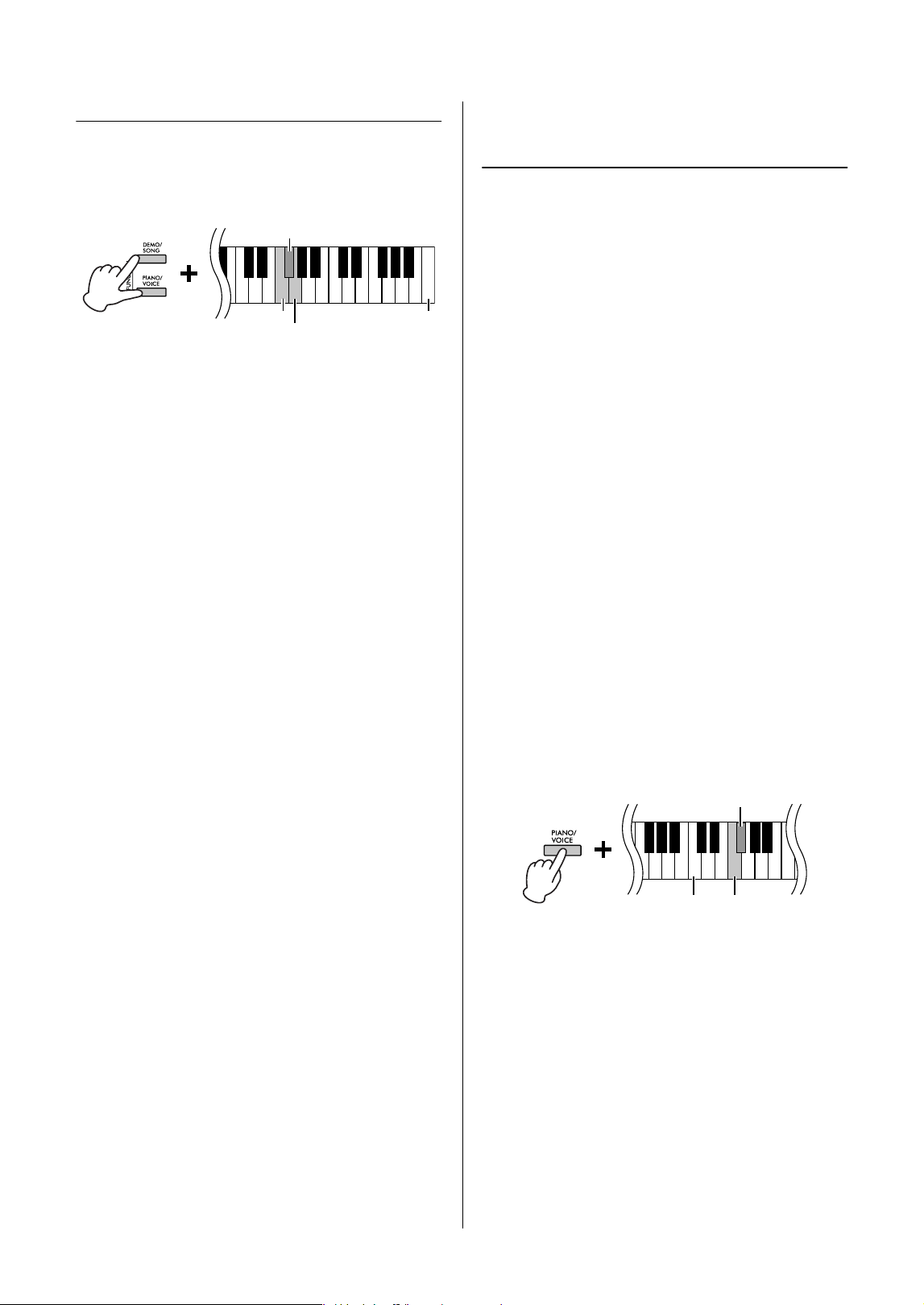
While holding down [PIANO/VOICE], press the F#3
key to turn the function on or the F3 key to turn the
function off.
Default setting: On
NOTE
The Stereophonic Optimizer affects only Piano Voices (page 17).
F#5 (On)
Highest key
F5 (Off)
G5 (Normal)
F3 (Off)
C3
F#3 (On)
13
CLP-825 Owner’s Manual
Playing the Piano
Damper Pedal (Right)
Pressing this pedal will sustain notes longer.
Releasing this pedal immediately stops (damps) any
sustained notes. This pedal also features a “half-
pedal” function that creates partial sustain effects,
depending on how far down you press the pedal.
Sostenuto Pedal (Center)
Pressing this pedal while holding the notes will
sustain the pressed notes (as if the Damper Pedal
had been pressed), but all subsequently played notes
will not be sustained. This makes it possible to sustain
a chord or single low note, for example, while the
other notes are played “staccato.”
Soft Pedal (Left)
Pressing this pedal will reduce the volume and slightly change the timbre of the notes.
The notes played before this pedal is pressed are not affected.
Using the Pedals
NOTE
If the damper pedal doesn’t
work, make sure that the pedal
cord is properly plugged into the
main unit (page 36).
Half-pedal function
This function allows you to vary
the sustain length depending on
how far the pedal is pressed.
The farther down you press the
pedal, the more the sound
sustains. For example, if you
press the damper pedal and all
notes you are playing sound a
bit murky and loud with too
much sustain, you can release
the pedal half way or higher to
decrease the sustain
(murkiness).
NOTE
While the sostenuto pedal is
held, the organ and strings
Voices sound continuously
without decay after the notes
have been released.
NOTE
When Jazz Organ Voice
(page 17) is selected, pressing
the left pedal switches between
fast/slow rotation of the rotary
speaker. When the Vibraphone
Voice (page 17) is selected, the
left pedal switches Vibrato on
and off.
When you press the damper
pedal here, this note and the
notes you play before you release
the pedal sustain longer.
When you press the sostenuto
pedal here while holding the
note, the note will sustain as
long as you hold the pedal.
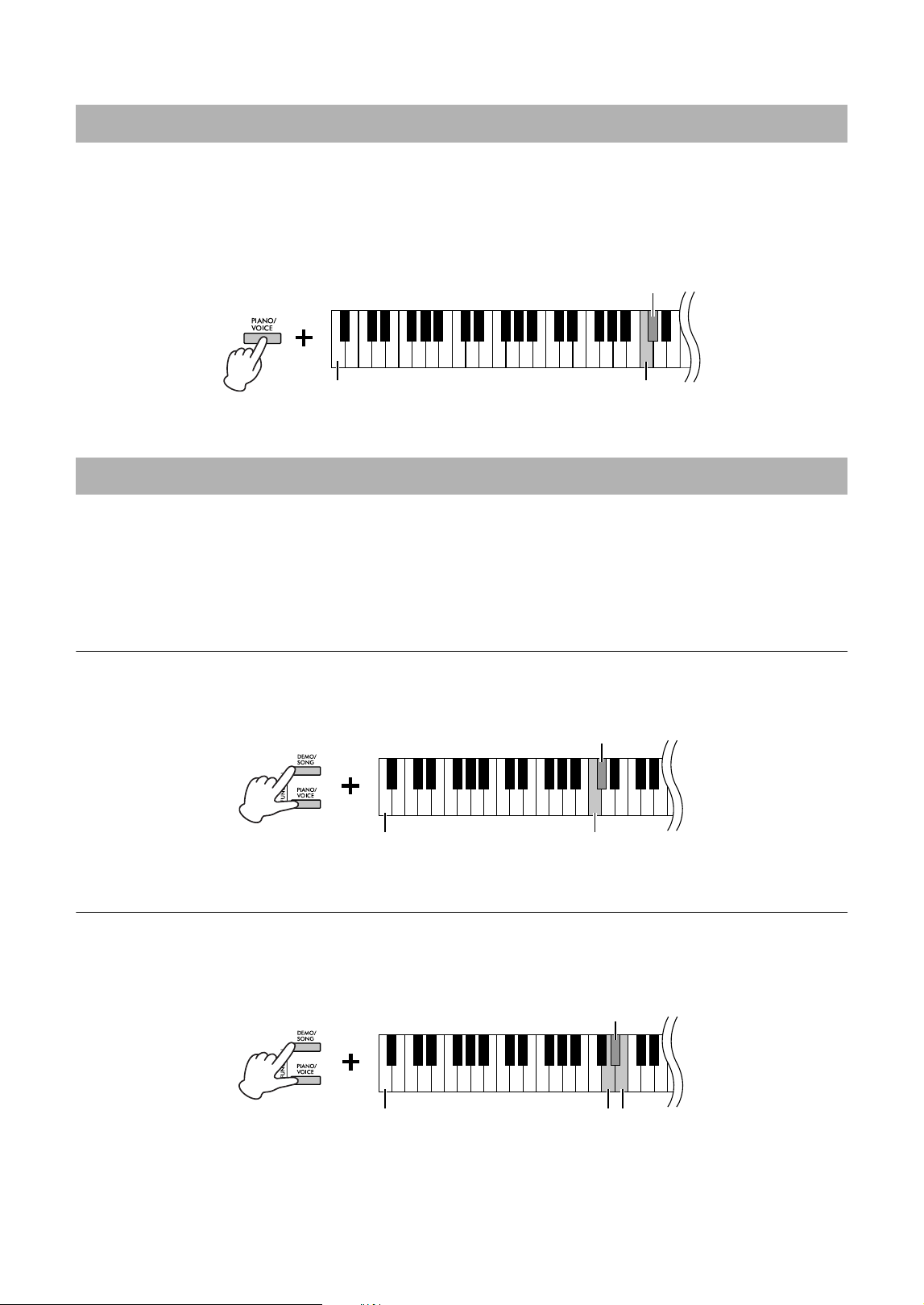
[TO PEDAL] jack
Make sure to connect the plug of the pedal cord securely into the [TO PEDAL] jack
in the proper direction. Otherwise, the pedal may not function properly. The FC35
Pedal Unit (sold separately) can also be connected to this terminal. You can
substitute the FC35 for the pedals of the instrument, and use the pedals at a
suitable height for you by placing the unit on a stand.
CAUTION
When placing the FC35 on a stand, make sure that the stand is sufficiently large, flat and stable to prevent the pedals from
wobbling or falling when they are pressed.
NOTICE
Be careful to connect the plug in the proper direction. Connecting in the wrong direction can result in damage to the
instrument.
NOTE
Make sure that power is off when connecting or disconnecting the plug of the pedal.
Insert the plug securely until
the metal part of the plug
disappears from view.
14
CLP-825 Owner’s Manual
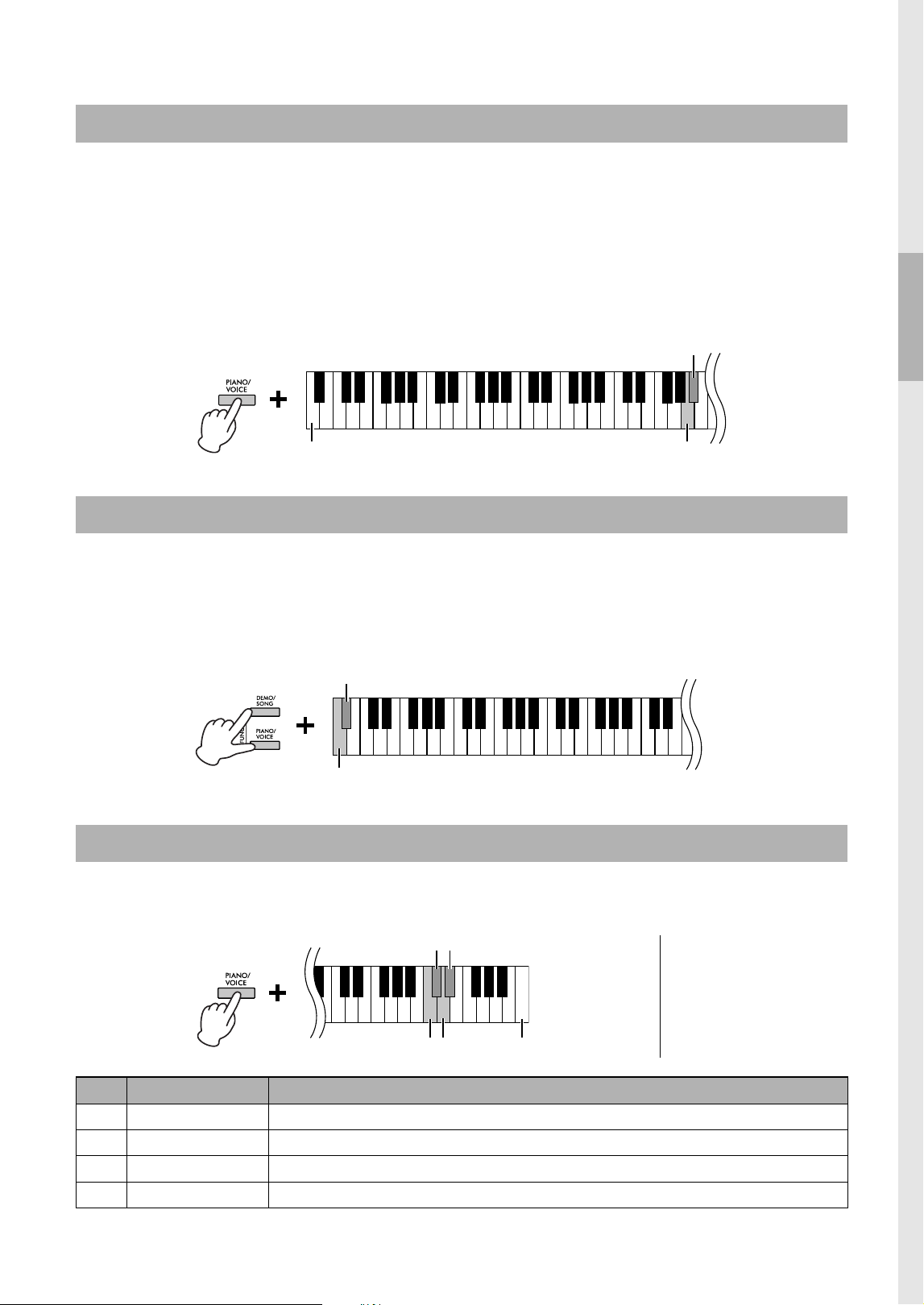
VRM (Virtual Resonance Modeling) technology accurately recreates the unique resonance of an acoustic grand
piano’s soundboard and strings. When you select a CFX Grand, Bösendorfer or Pop Grand Voice (page 17),
pressing the damper pedal activates the VRM effect. For details on VRM, see page 33.
While holding down [PIANO/VOICE], press the C#3 key to turn the function on or the C3 key to turn the function off.
Default setting: On
IAC is a function which automatically adjusts and controls the sound quality according to the overall volume of the
instrument. IAC Control is effective only on the sound output of the instrument speakers or headphones. Even when
the volume is low, this lets you hear both low sounds and high sounds clearly. Especially when using the
headphones, the burden on the ears is reduced without raising the overall volume excessively.
To turn on/off IAC:
While holding down [DEMO/SONG] and [PIANO/VOICE] simultaneously, press the C#2 key to turn the function on
or the C2 key to turn the function off.
Default setting: On
To adjust IAC Depth:
While holding down [DEMO/SONG] and [PIANO/VOICE] simultaneously, press the D2 key to decrease the value, or
the E2 key to increase.
Setting range: −3 – +3
Default setting: 0
The higher the value, the more clearly that low and high sounds are heard at lower volume levels.
Turning the VRM Effect On/Off
Intelligent Acoustic Control (IAC)
Lowest key C3 (Off)
C#3 (On)
C2 (Off)Lowest key
C#2 (On)
Lowest key
D2 (Depth −1) E2 (Depth +1)
D#2 (Default)
15
CLP-825 Owner’s Manual
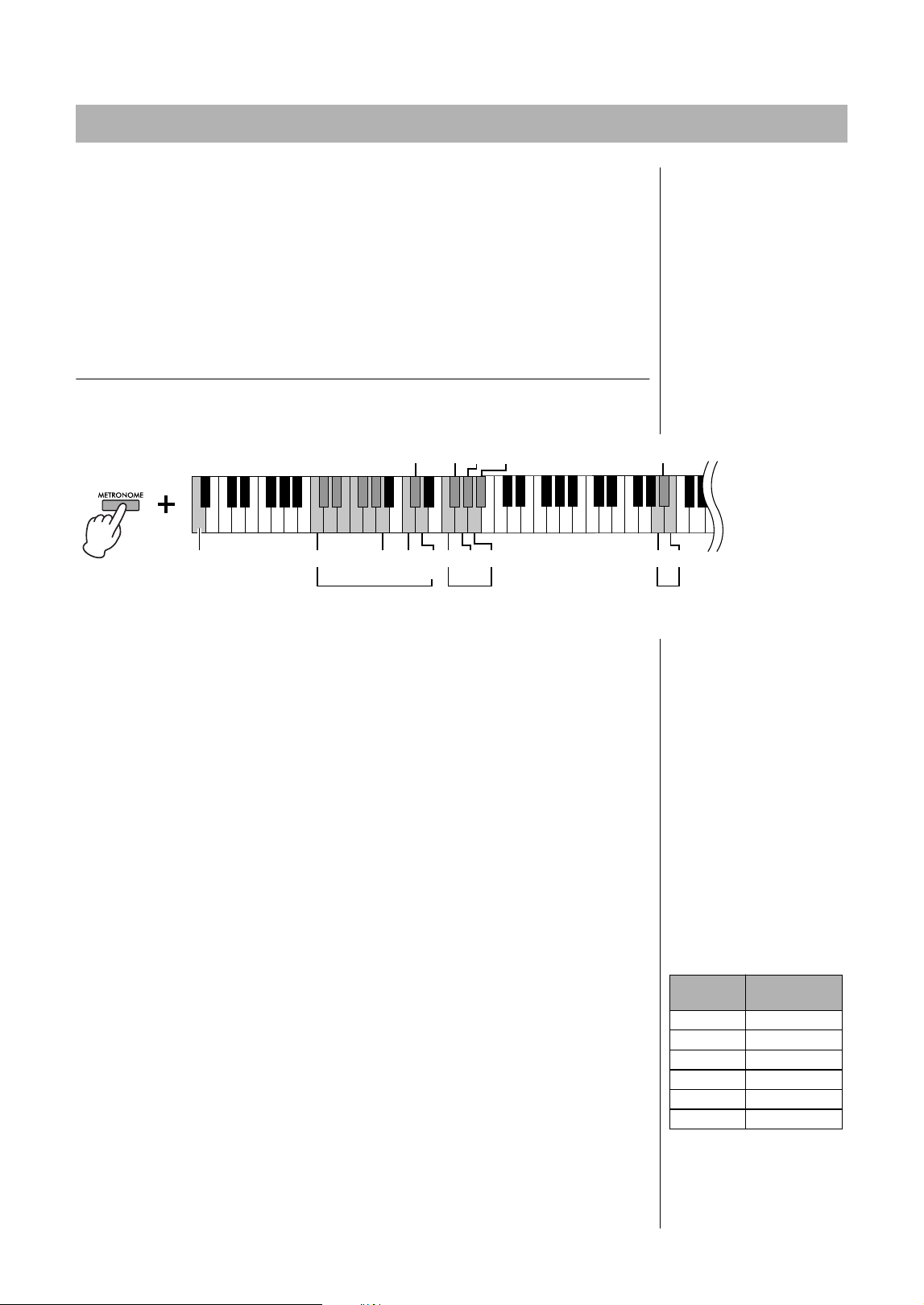
When you select a CFX Grand, Bösendorfer or Pop Grand Voice (page 17), you can add Grand Expression
Modeling effects, which simulate the physical sound transitions of an actual piano. For details on Grand Expression
Modeling, see page 33.
While holding down [PIANO/VOICE], press the A3 or A#3 key to select the Grand Expression Modeling effect type.
• Dynamic (A#3): You can control extremely subtle nuances in the sound like on an actual acoustic piano by
changing your playing strength or touch.
• Static (A3): The nuances are generally fixed even when you change your playing strength or touch.
Default setting: Dynamic
When a setup is changed using a button and key combination, an operation sound (on, off, click, tempo value input)
is sounded. This confirmation sound can be enabled (on) or disabled (off) as desired.
While holding down [DEMO/SONG] and [PIANO/VOICE] simultaneously, press the A#−1 key to turn the sounds on
or the A−1 key to turn the sounds off.
Default setting: On
You can specify the Touch Sensitivity (how the sound responds to the way you play the keys).
While holding down [PIANO/VOICE], press one of the C6–D#6 keys.
Grand Expression Modeling
Turning the Operation Confirmation Sounds On/Off
Changing the Touch Sensitivity
A3 (Static)
A#3 (Dynamic)
Lowest key
Lowest key A−1 (Off)
A#−1 (On)
NOTE
This setting is disabled with
some Voices, such as an organ
sound.
Default setting:
Medium
C6
Highest key (C7)
D6
C#6 D#6
Key Touch Sensitivity Description
C6 Soft Produces relatively high volume even with light playing strength.
C#6 Medium Standard Touch Sensitivity.
D6 Hard Requires strong playing to produce high volume.
D#6 Fixed
The volume level does not change at all regardless of whether you play the keyboard soft or hard.
16
CLP-825 Owner’s Manual
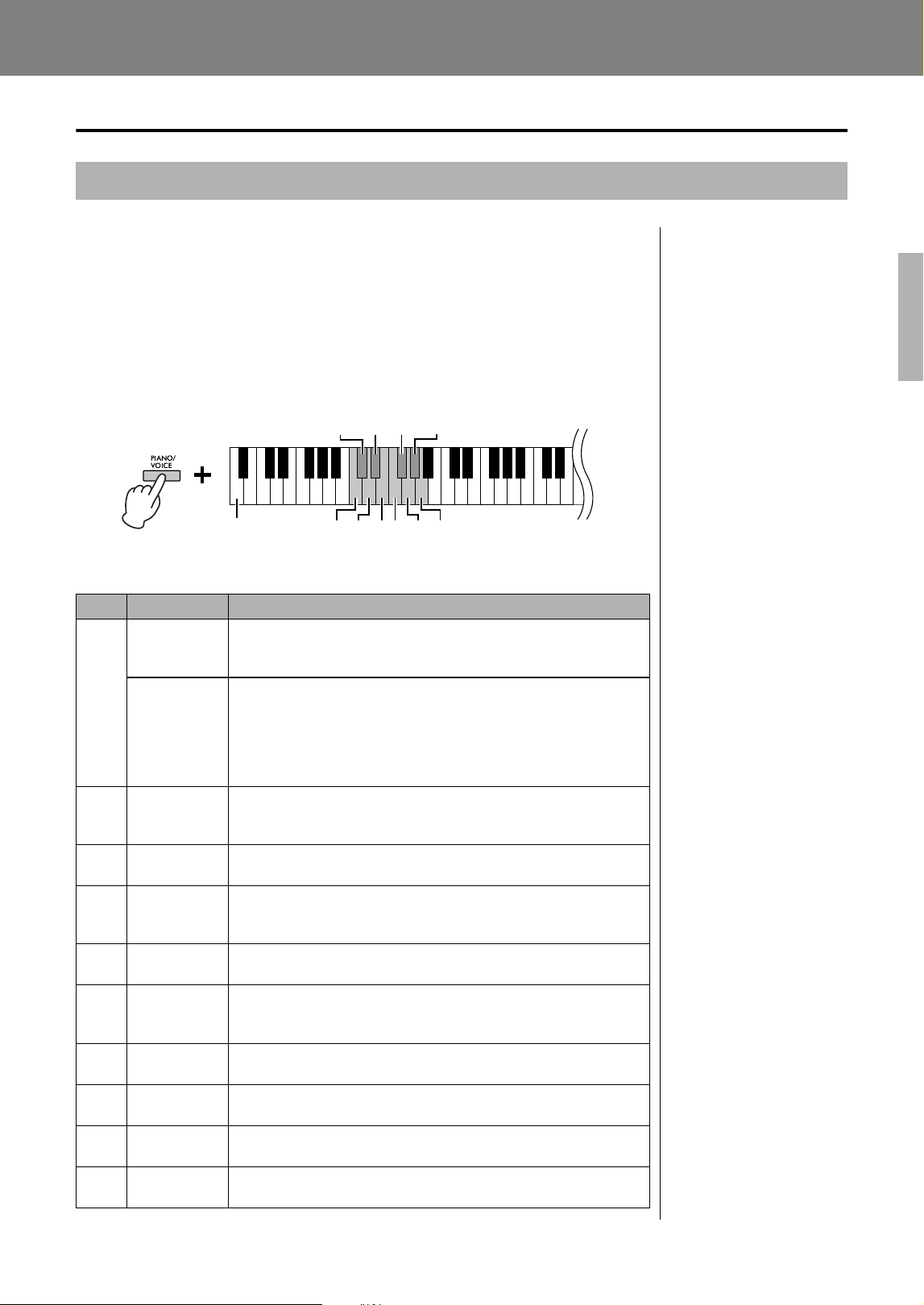
The metronome feature is convenient for practicing with an accurate tempo.
1. Press [METRONOME] to start the Metronome.
To adjust the Metronome tempo, use [+R] or [−L].
While the Metronome is playing, press [+R] to increase the tempo by 1 or [−L] to
decrease it.
2. Press [METRONOME] to stop the Metronome.
Metronome setting
While holding down the [METRONOME], press one of the highlighted keys (shown
below) or [+R]/[−L] to set the Metronome parameter.
Voice confirmation of current Tempo value (in English)
While holding down [METRONOME], press the A−1 key (lowest key).
Adjusting the Tempo
The Metronome tempo can be set from 5 to 280 beats per minute.
• To increase or decrease the value by 10:
While holding down [METRONOME], press the D2 key to increase or the C2 key
to decrease.
• To specify a numeric value:
While holding down [METRONOME], press the relevant C1–A1 keys one by one
in order. Specifying three digits or releasing [METRONOME] after specifying
one or two digits will enter the value.
• Resetting the value to the default (120)
While holding down [METRONOME], press [+R] and [−L] simultaneously, or
press the C#2 key. While the metronome is playing, press [+R] and [−L]
simultaneously.
Selecting the Beat (time signature)
While holding down [METRONOME], press one of the F2–A#2 keys.
The first beat is accented with a bell sound and the rest with clicks. Default setting is 0
(F2). In this setting, clicks sound in all beats.
Adjusting the Volume
While holding down [METRONOME], press the B4 key to increase the volume or the
A4 key to decrease. To reset to the default setting, press the A#4 key while holding
down [METRONOME].
Using the Metronome
22447
13 3056 5
6
9
80
C1 A1
C2
(−10)
D2
(+10)
F2 G2 A2 A4 B4
G#2 A#2
Lowest key A−1
C#2 (Default: 120)
Adjusting
the Volume
Selecting the Beat
(time signature)
Adjusting
the Tempo
Confirming the
current Tempo
F#2
A#4 (Default: 7)
NOTE
Press the corresponding key
and the number will be read out
in English.
If the entered value is outside
the setting range, it will be
ignored.
Setting range:
1–10
Default setting:
7 (A#4)
Key
Beat (time
signature)
F2 0 (no accent)
F#2 2
G2 3
G#2 4
A2 5
A#2 6
17
CLP-825 Owner’s Manual
Advanced Operations
Playing Various Musical Instrument Sounds (Voices)
To select “CFX Grand”:
Simply press [PIANO/VOICE].
To select another Voice:
After pressing [PIANO/VOICE], press [+R] or [−L] to select the next or previous Voice.
To select a specific Voice:
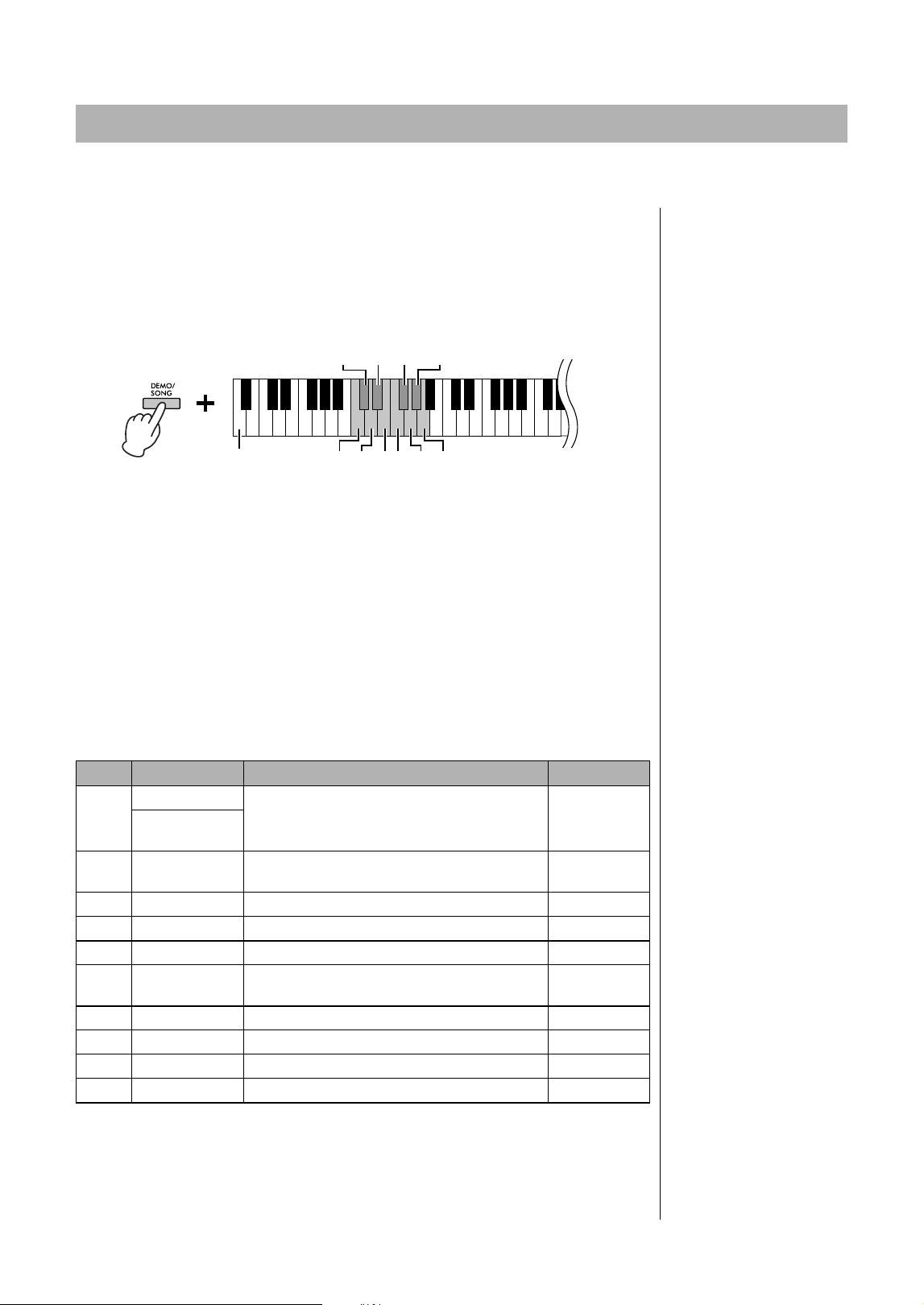
While holding down [PIANO/VOICE], press one of the C1–A1 keys. For details on
which Voice is assigned to each key, see the list below.
Voice List
Selecting a Voice
NOTE
To hear the characteristics of
the Voices, play back the Demo
Songs (page 18).
Key Voice Name Voice description
C1
CFX Grand
Yamaha’s CFX flagship concert grand piano sound with a wide
dynamic range for maximum expressive control. Suitable for playing
in any music genre and style.
Binaural
CFX Grand
Yamaha’s CFX flagship concert grand piano sound sampled by
Binaural Sampling, the method optimized for headphone use.
Listening to this through headphones gives the impression of being
immersed in the sound, as if it was actually emanating from the
piano. This Voice is selected automatically when headphones are
connected.
C#1 Bösendorfer
The famed sound of the Vienna-made Bösendorfer full concert grand
piano. Its spacious sound evokes the size of the instrument, and is
ideal for expressing tenderness in compositions.
D1 Pop Grand
Bright piano sound. Good for clear expression and “cutting through”
other instruments in an ensemble.
D#1 Stage E.Piano
The sound of an electric piano using hammer-struck metallic “tines.”
Soft tone when played lightly, and an aggressive tone when played
hard.
E1 DX E.Piano
An electronic piano sound created by FM synthesis. Good for
standard popular music.
F1 Harpsichord
The definitive instrument for baroque music. Since harpsichord uses
plucked strings, there is no touch response. There is, however, a
characteristic additional sound when the keys are released.
F#1 Vibraphone
Vibraphone played with relatively soft mallets. The tone becomes
more metallic the harder you play.
G1 Pipe Organ
This is a typical pipe organ sound (8 feet + 4 feet + 2 feet). Good for
sacred music from the Baroque period.
G#1 Jazz Organ
The sound of a “tonewheel” type electric organ. Often heard in jazz
and rock music.
A1 Strings
Stereo-sampled, large-scale strings ensemble with realistic reverb.
Try combining this Voice with piano in the Dual mode.
C#1 D#1 F#1 G#1
C1
D1 E1 F1 G1 A1Lowest key
18
CLP-825 Owner’s Manual
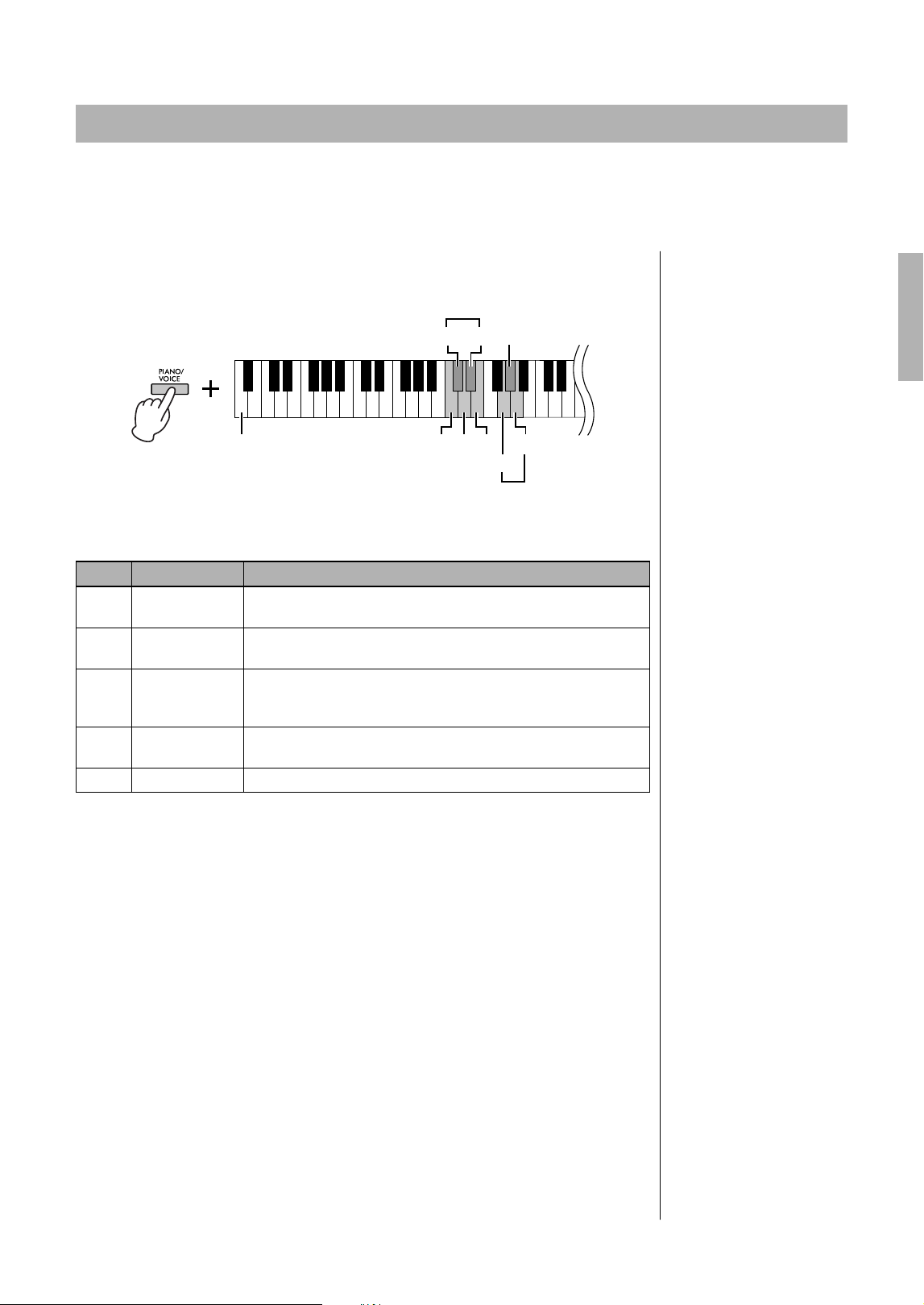
Special individual Demo Songs are provided for all of the instrument Voices.
1. Press [DEMO/SONG] to start playback.
The Demo Song for the current Voice starts. During playback, the [PLAY] lamp
flashes at the current tempo.
Starting with the selected Song, the playback of the Demo Songs will continue.
After the last Demo Song, the sequence then returns to the first Demo Song and
repeats until you stop it. To change to a specific Demo Song, simultaneously hold
down [DEMO/SONG], and then press one of the C1–A1 keys.
To play back the selected Demo Song repeatedly:
While holding down the [DEMO/SONG], press and hold one of the C1–A1 keys.
The operation sound (page 15) sounds twice and the Demo Song can be played
back repeatedly.
To change the Demo Song during playback:
Press [+R] or [−L] to change to the next or previous Demo Song.
If you change to the next or previous Demo Song during repeated playback, that
Demo song will also play back repeatedly.
2. Press [DEMO/SONG] or [PLAY] to stop playback.
The [PLAY] lamp turns off.
Demo Song List
The Demo Songs excluding original Songs are short rearranged excerpts from the original
compositions. The original Demo Songs are Yamaha originals (© Yamaha Corporation).
Listening to the Demo Songs
NOTE
If you want to change the
playback tempo, see page 16.
Key Voice Name Title Composer
C1
CFX Grand
Ungarische rhapsodie “Preludio” E-Dur F. Liszt
Binaural
CFX Grand
C#1 Bösendorfer Widmung S.566 R.253
F. Liszt /
R. Schumann
D1 Pop Grand Original —
D#1 Stage E.Piano Original —
E1 DX E.Piano Original —
F1 Harpsichord
Concerto a cembalo obbligato, 2 violini, viola e
continuo No.7, BWV 1058
J. S. Bach
F#1 Vibraphone Original —
G1 Pipe Organ Herr Christ, der ein'ge Gottes-Sohn, BWV 601 J. S. Bach
G#1 Jazz Organ Original —
A1 Strings Original —
C#1 D#1 F#1 G#1
C1
D1 E1 F1 G1 A1Lowest key
19
CLP-825 Owner’s Manual
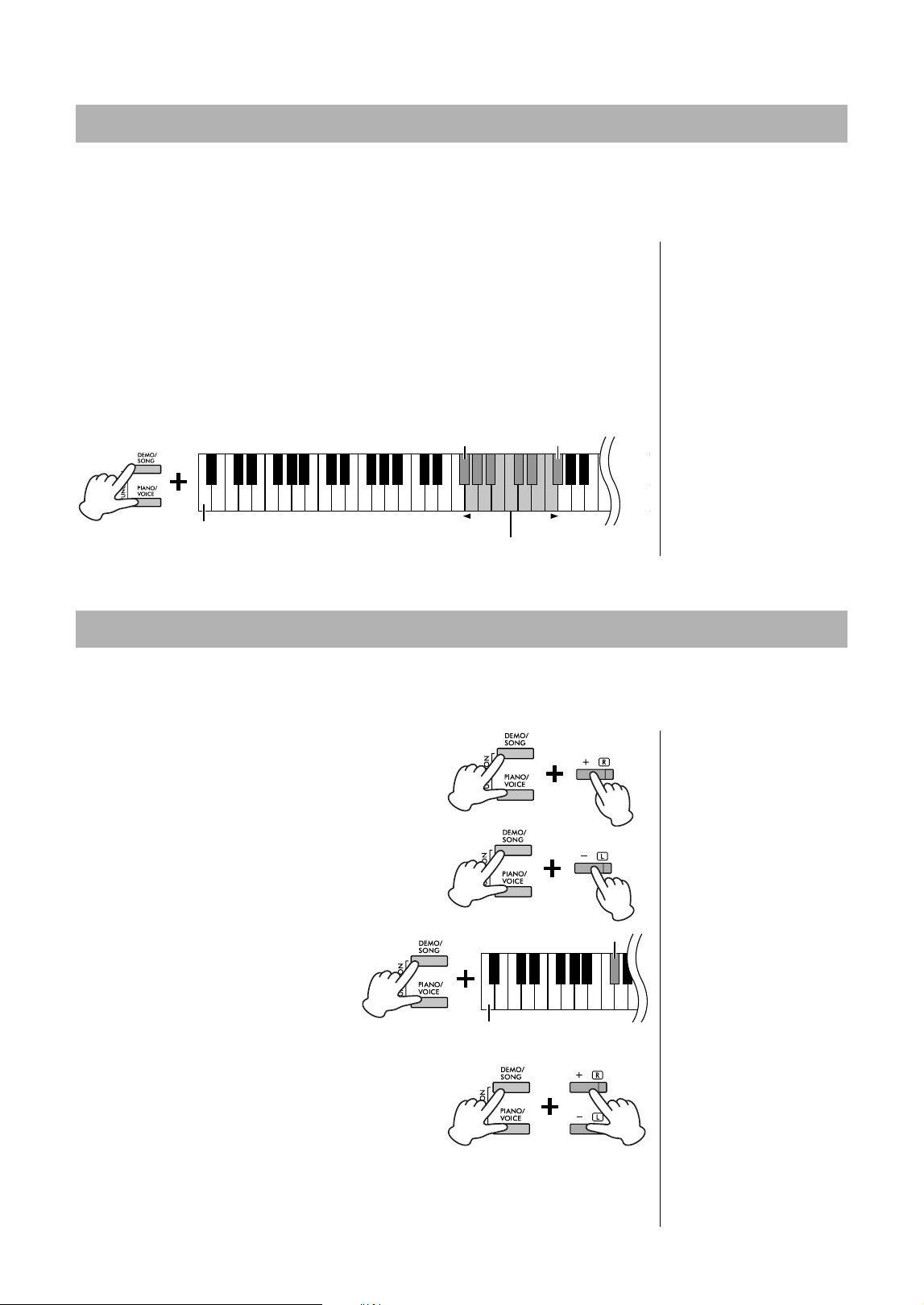
This instrument features several Reverb Types that add extra depth and expression to the sound to create a realistic
acoustic ambience. The appropriate Reverb Type and Depth are called up automatically when you select each of
the Voices and Songs. This is why the Reverb Type need not be selected; however, you can change it if desired.
To select a Reverb Type:
While holding down [PIANO/VOICE], press one of the C2 – E2 keys.
Reverb Type List
To adjust Reverb Depth:
The higher the value, the greater the depth, and the lower the value, the lesser the
depth.
While holding down [PIANO/VOICE], press the G2 key to decrease the value by 1 or
the A2 key to increase the value by 1.
While holding down [PIANO/VOICE], press the G#2 key to reset the Reverb Depth to
the default setting, which is the most suitable value for the current Voice.
Adding Variations to the Sound (Reverb)
NOTE
In Dual Mode (page 21), an
optimum reverb type for the
combination of Voices is
assigned automatically.
Key Reverb Type Description
C2 Recital Hall
Simulates the clear reverb sound you would hear in a medium-
sized concert hall for piano recitals.
C#2 Concert Hall
Simulates the gorgeous reverb sound you would hear in a large
concert hall for orchestral performances.
D2 Chamber
Suitable for playing chamber music; simulates the intimate reverb
sound you would hear in a spacious room, such as for classical
music recitals.
D#2 Club
Simulates the vivid reverb sound you would hear in a live music
venue or a jazz club.
E2 Off No effect is applied.
Lowest key
A2 (Depth +1)
G#2 (Default)
G2 (Depth -1)
C#2 D#2
C2 D2 E2
Selecting a Reverb Type
Adjusting Reverb Depth
Setting range:
0 (no effect) – 20 (maximum
depth)
20
CLP-825 Owner’s Manual
You can shift the pitch of the entire keyboard up or down in semitones in order to facilitate playing in difficult key
signatures, or to easily match the pitch of the keyboard to the range of a singer or other instruments. For example, if
“+5” is selected, playing key C produces pitch F, letting you play a song of F major as though it were in C major.
To transpose the pitch down:
While holding down [DEMO/SONG] and [PIANO/VOICE], press a key between
F#2 (−6) and B2 (−1).
To transpose the pitch up:
While holding down [DEMO/SONG] and [PIANO/VOICE], press a key between
C#3 (+1) and F#3 (+6).
To restore the normal pitch:
While holding down [DEMO/SONG] and [PIANO/VOICE], press the C3 key.
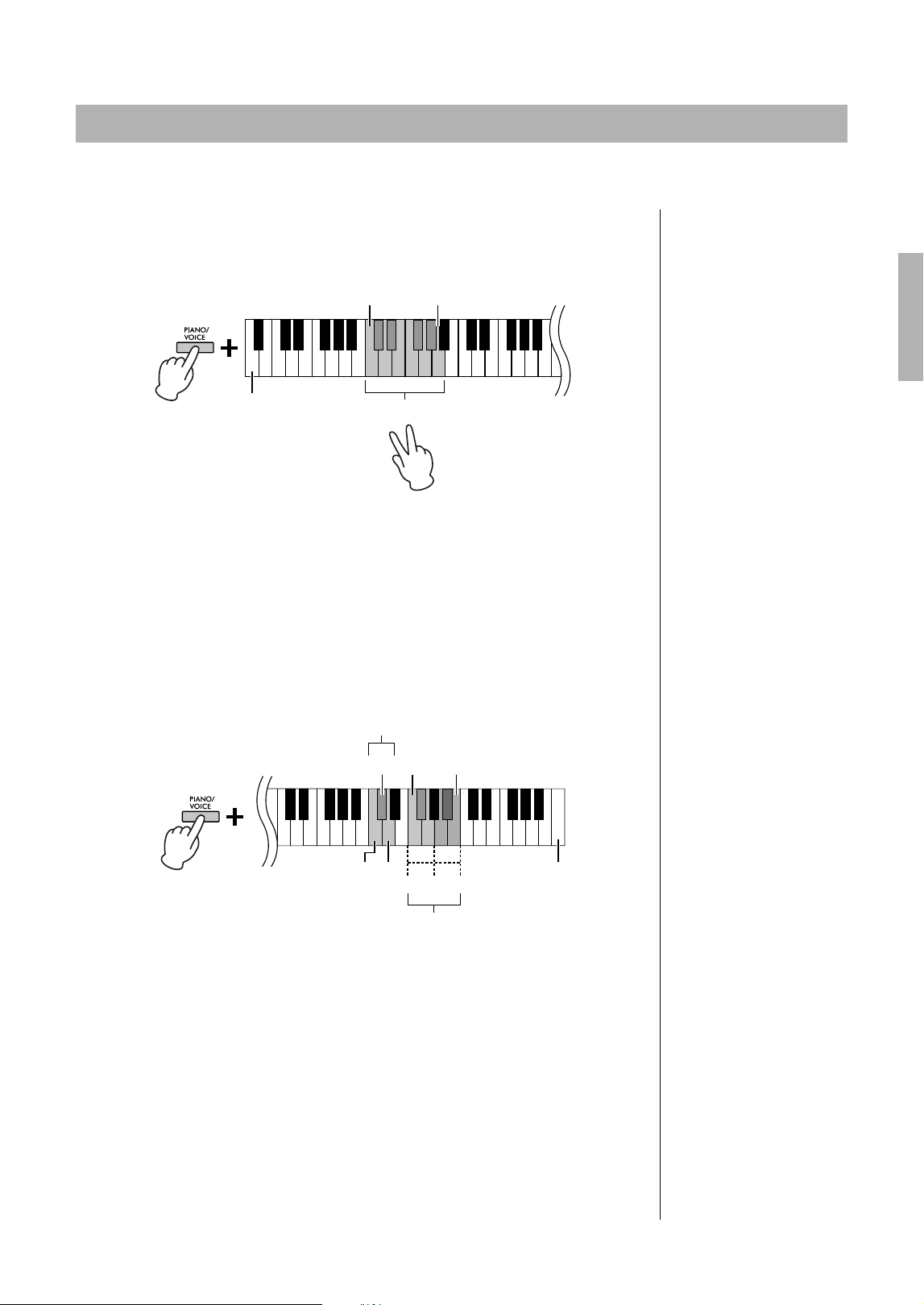
You can fine-tune the pitch of the entire instrument in about 0.2 Hz steps. This lets you accurately match the
keyboard pitch to that of other instruments or ensembles.
To tune up (in about 0.2 Hz steps):
Press and hold down [DEMO/SONG] and [PIANO/
VOICE] simultaneously, and press [+R].
To tune down (in about 0.2 Hz steps):
Press and hold down [DEMO/SONG] and [PIANO/
VOICE] simultaneously, and press [−L].
To set the pitch to 442.0 Hz:
Press and hold down [DEMO/SONG]
and [PIANO/VOICE] simultaneously, and
press the C#1 key.
To restore default pitch (440.0 Hz):
While simultaneously holding down [DEMO/
SONG] and [PIANO/VOICE], press [+R] and [−L]
simultaneously. Alternately, you can press the C1
key while holding down [DEMO/SONG] and
[PIANO/VOICE] simultaneously.
Transposing the Pitch in Semitones
NOTE
The transposition setting affects
not only the pitch of the
keyboard but also the pitch of
Song playback (page 23).
The transposition setting of the
Transposition for the Keyboard
and the Song cannot be set
independently.
Setting range:
−6 – 0 – +6
Default setting:
0
-5 -3 -1 0 +2 +4 +5
-6 -4 -2 +1
+3 +6
F#2
Lowest key
F#3
Transpose down Transpose up
C3 (Normal pitch)
Fine-tuning the Pitch
Hz (Hertz)
This unit of measurement refers
to the frequency of a sound and
represents the number of times
a sound wave vibrates in a
second.
Setting range:
414.8 – 466.8 Hz
Default setting:
A3 = 440.0 Hz
C#1
Lowest key
21
CLP-825 Owner’s Manual
You can layer two Voices and play them simultaneously to create a more richly textured sound.
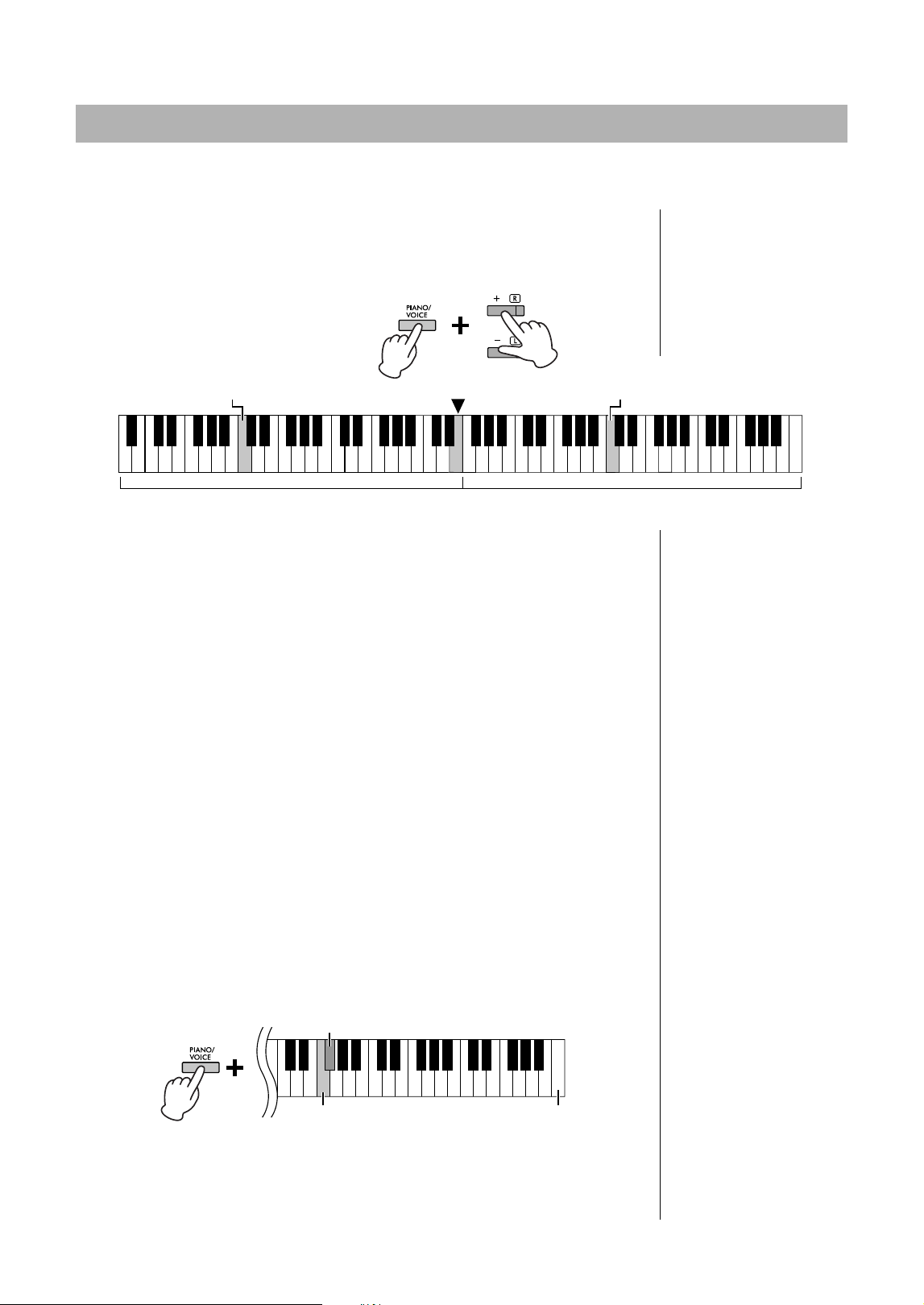
1. Engage the Dual mode.
While holding down [PIANO/VOICE], simultaneously hold down two keys between
C1 and A1 to select the two desired Voices. For information on which Voices are
assigned to the keys, refer to “Voice List” (page 17).
The Voice assigned to the lower key will be designated as Voice 1, and the Voice
assigned to the higher key will be designated as Voice 2. You cannot assign the
same Voice to both Voice 1 and Voice 2 simultaneously in Dual mode.
To shift the Octave for each Voice:
While holding down [PIANO/VOICE], press one of the keys F5–G5 or A5–B5 as
shown in the illustration below. For example, pressing the B5 key twice while
holding down [PIANO/VOICE] shifts Voice 1 up by two octaves. To restore the
default setting, simultaneously hold down [PIANO/VOICE] and press the A#5 key
for Voice 1 or the F#5 key for Voice 2.
To adjust the Balance between two Voices:
While holding down [PIANO/VOICE], press the C5 key to decrease the value or
the D5 key to increase. When the value is set to “0,” the volume levels of the two
Voices reset to their respective default settings. Settings below “0” increase the
volume of Voice 2, while settings above “0” increase the volume of Voice 1, in
relation to the other.
2. To exit from Dual mode, press [PIANO/VOICE].
Layering Two Voices (Dual mode)
C1 A1
Lowest key
Engaging Dual mode
NOTE
The Dual and Duo modes
(page 22) cannot be engaged at
the same time.
Setting range:
−2 – 0 – +2
-1
00
+1-1 +1 -1 +1
C5
Highest key
C#5 (Default setting) F5 B5
Shifting the octave
Adjusting the balance
Voice 2
Voice 1
D5
Setting range:
−6 – (Default Setting) – +6
Default setting:
Differs depending on the Voice
combination.
22
CLP-825 Owner’s Manual
This function allows two different players to play the instrument, one on the left and the other on the right, over the
same octave range.
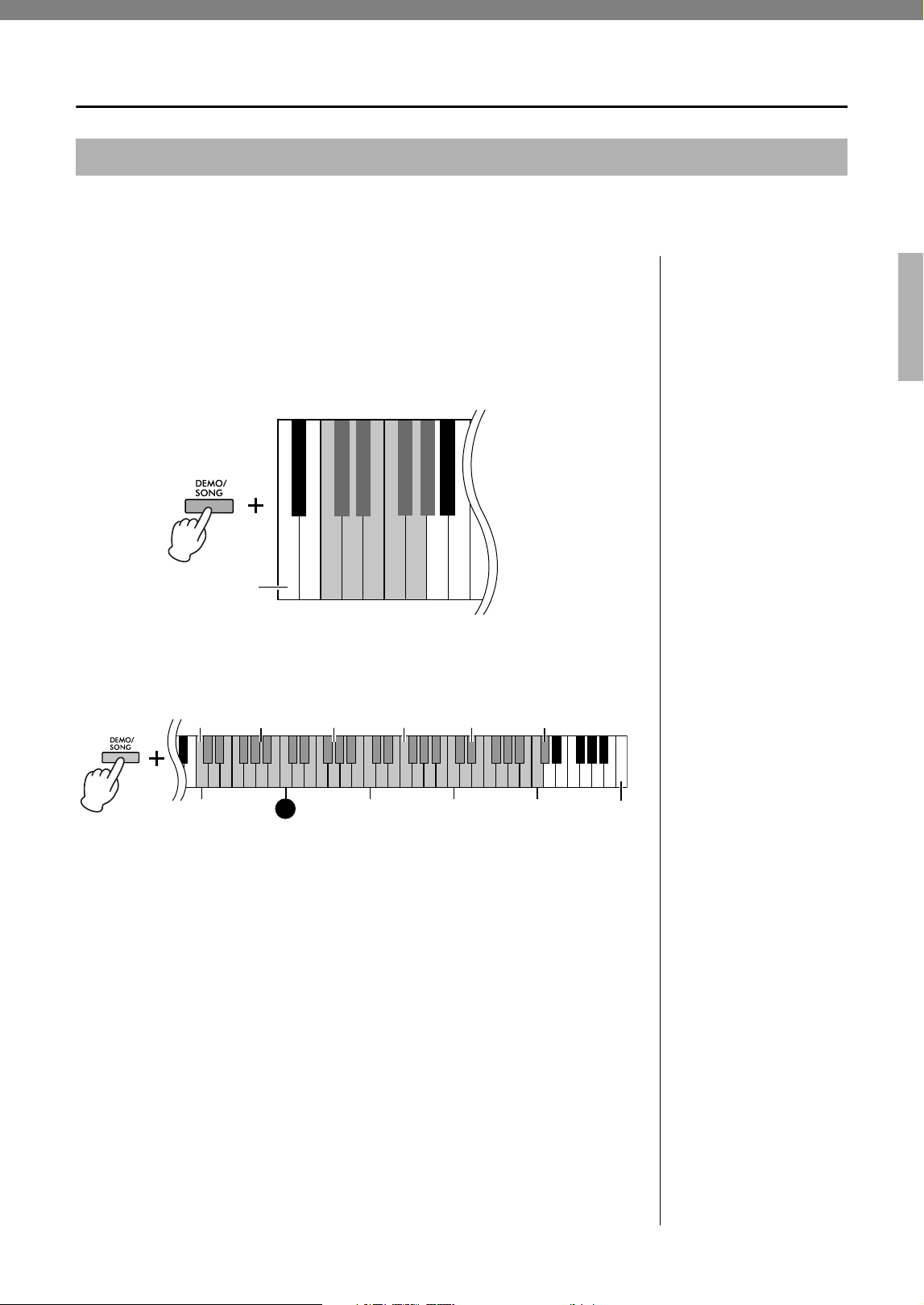
1. While holding down [PIANO/VOICE], press [+R] and [−L]
simultaneously to engage Duo.
The keyboard is divided into two sections, with the E3 key as the Split Point.
2. One person can play the left section of the keyboard while the
other plays the right.
To shift the Octave for each section:
Same operation as in Dual (page 21).
In Duo, the left section is assigned to Voice 2, while the right section is assigned to
Voice 1.
To adjust the volume balance between two keyboard sections:
Same operation as in Dual (page 21).
Settings below “0” increase the volume of Left Voice (Voice 2), while settings
above “0” increase the volume of Right Voice, in relation to the other.
Pedal function in Duo
• Damper Pedal: Applies Sustain to the right section.
• Sostenuto Pedal: Applies Sustain to both sections.
• Soft Pedal: Applies Sustain to the left section.
To select the Duo Type:
You can set how the sound is emitted from the speakers.
• Separated: The sound of the left section is emitted from the left speaker, and the
sound of the right section is emitted from the right speaker.
• Balanced: The sound of both parts are emitted from both speakers in a natural
balance.
While holding down [PIANO/VOICE], press the F4 key or the F#4 key to change
the setting.
3. To exit from Duo, while holding down [PIANO/VOICE], press [+R]
and [−L] simultaneously.
Playing Duo
NOTE
• Different Voices cannot be
assigned to the Right Voice
and Left Voice.
• The Split Point cannot be
changed from E3.
Split Point E3Equivalent to C3 (middle C) Equivalent to C3 (middle C)
Left section (Voice 2) Right section (Voice 1)
Setting range:
−2 – 0 – +2
Setting range:
−6 – 0 – +6
NOTE
The way the sound is output
from the headphones is the
same as the selected Duo
Type.
NOTE
• If the keyboard is in Dual,
engaging Duo will exit from
Dual. Voice 1 is used as the
Voice of the entire keyboard.
• In Duo, VRM is not effective.
When the Type of Duo is set
to “Separated,” Reverb and
Stereophonic Optimizer are
not effective.
Default Setting:
Separated
F#4 (Separated)
F4 (Balanced) Highest key
23
CLP-825 Owner’s Manual
Song Playback and Practice
In addition to the Demo Songs, Preset Songs (50 Classical Music Masterpieces [50 Classics] and Lesson Songs)
are provided for your listening pleasure.
1. Find the Music book and Song number that you want to play
back.
For the details on the Music book and Song number, refer to the Song List
(page 40) or Quick Operation Guide (page 50.)
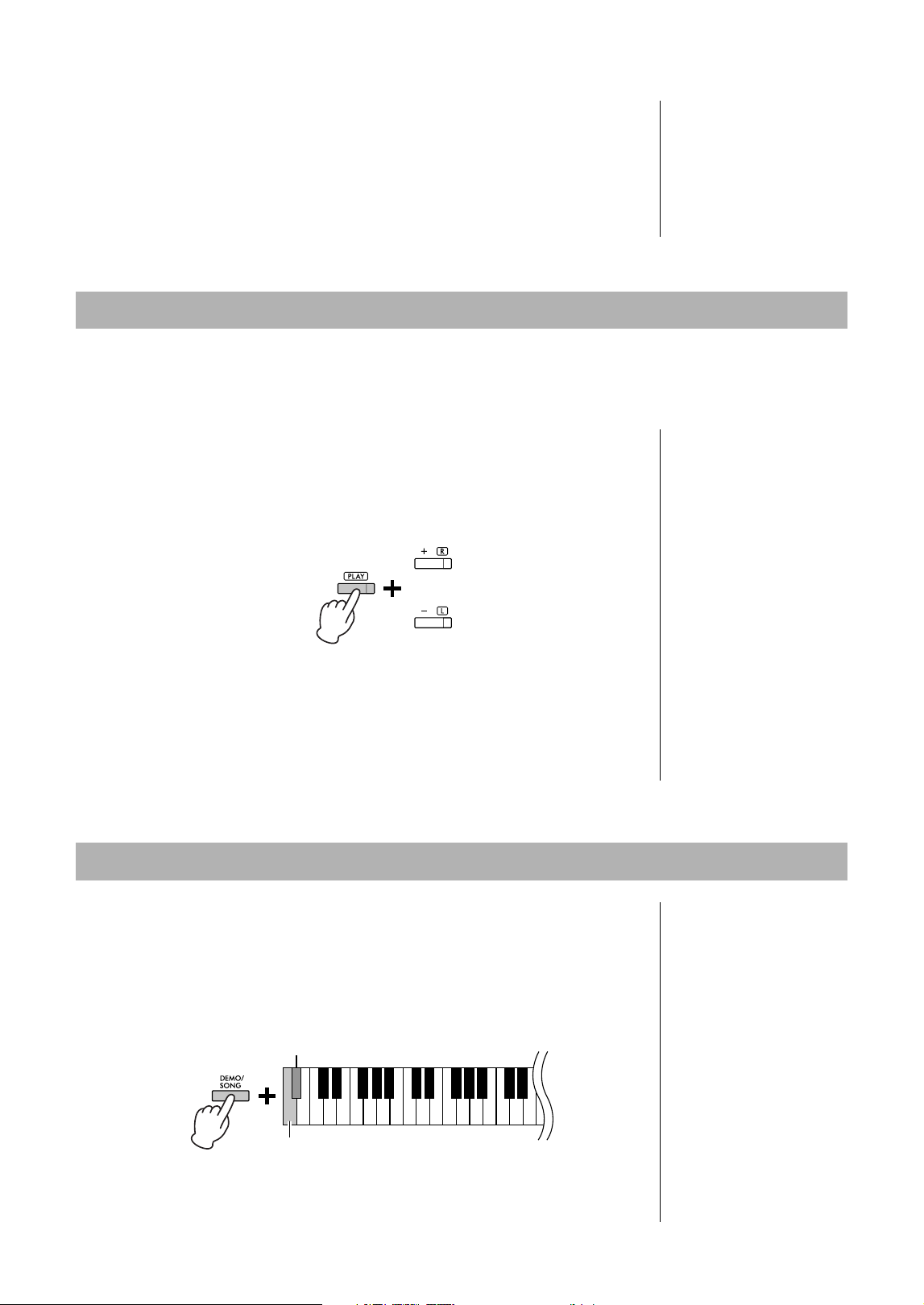
2. While holding down [DEMO/SONG], press one of the C0–G#0
keys to select a Music book.
3. While holding down [DEMO/SONG], press one of the C2–C#6
keys to start playback.
The number of each piano Preset Song is assigned to the C2–C#6 keys.
During playback, the [+R] and [−L] lamps light, and the [PLAY] lamp flashes at the
current tempo. Playback of the Preset Songs continues in sequence, starting with
the selected Song. After the last Preset Song, the sequence then returns to the
first Preset Song and repeats until you stop it.
To play back the selected Song repeatedly:
While holding down the [DEMO/SONG], press and hold one of the C2–C#6 keys.
The operation sound (page 15) sounds twice and the selected Song can be
played back repeatedly.
To change the Preset Song during playback:
Press [+R] or [−L] to change to the next or previous Preset Song.
If you change to the next or previous Preset Song during repeated playback, that
Preset song will also play back repeatedly.
To change the tempo during playback:
While holding down [METRONOME], press [+R] or [−L] to increase or decrease
the Tempo value by 1. Other instructions are the same as those of the Metronome
Tempo (page 16).
Listening to Preset Songs
Default Setting (Music
book):
50 Classical Music
Masterpieces (50 Classics)
NOTE
Even if you perform other
operations after changing the
Music book, the book will not be
reset to the default setting, 50
Classical Music Masterpieces. It
will be reset to the default
setting when the power is
turned off.
$%
C0
'()*$%
$ᅊ&ᅊ'ᅊ)ᅊ*ᅊ$ᅊ
50 Classics
Bayer 51–100
Burgmüller 1–25
Czerny 100, 1–50
Czerny 30, 1–30
Bayer 1–50
Bayer 101–106
Czerny 100, 51–100
Hanon
Lowest key
NOTE
• You can play the keyboard
along with the playback of the
Preset Song as well as
change the Voice played from
the keyboard.
• Depending on the selected
Music book, there are some
keys to which the Song are
not applied. When pressing
such keys, no Songs are
played back.
C3
Highest key (C7)
Song 1 Song 10 Song 20 Song 30 Song 40
C4 C5
C2
Song 50 (C#6)
C6
24
CLP-825 Owner’s Manual
To play back from the beginning of the Song
During playback, press [+R] and [−L] simultaneously to jump to the playback
position at the beginning of the Song then continue playback at the last specified
tempo.
4. Press [DEMO/SONG] or [PLAY] to stop playback.
The [PLAY], [+R] and [−L] lamps turn off.
All the Songs except for the Demo (page 18) let you turn on or off the left-hand and right-hand Parts individually. By
turning off [+R], for example, you can practice the right-hand Part while the left-hand Part is playing back, and vice
versa.
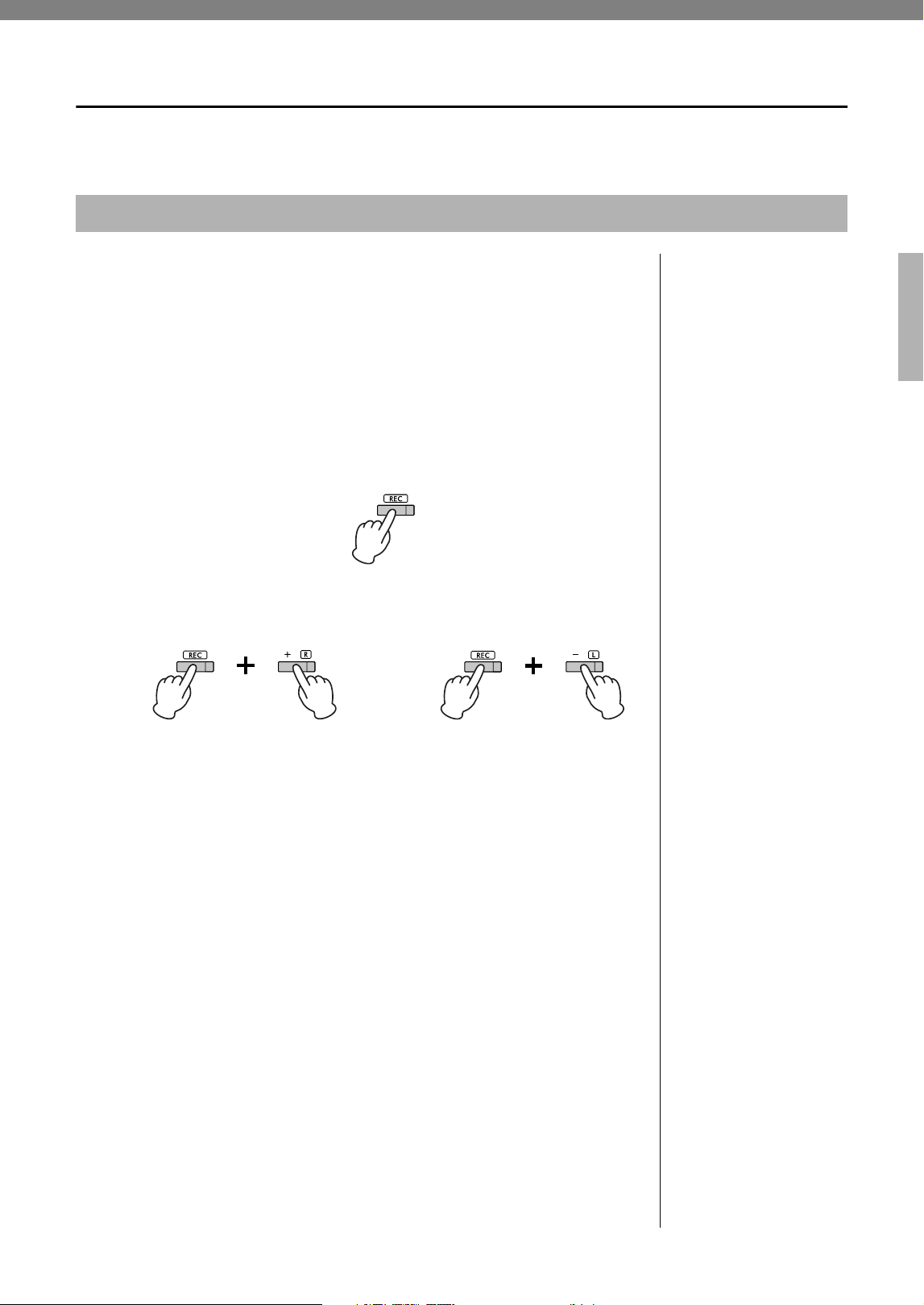
1. Start playback of the Preset Songs (page 23; 50 Classical Music
Masterpieces and Lesson Songs) or the User Song (page 25).
2. While holding down [PLAY], press [+R] or [−L] to turn the Part off.
Pressing the same button repeatedly while holding down [PLAY] toggles playback
on and off.
3. Practice the Part which is turned off.
To change the Tempo:
If desired, you can change the tempo for your practice convenience. For details,
refer to page 16.
4. Press [PLAY] to stop playback.
This Quick Play feature enables you to specify whether a Song should play back
immediately from the very first note (On), or play back any silence or rests that exist
before the first note (Off).
To turn on/off Quick Play:
While holding down [DEMO/SONG], press the A#−1 to turn the function on or A−1 key
to turn the function off.
Practicing a One-Hand Part
NOTE
• Selecting another Song will
reset the on/off status.
• For the details on the Parts of
the duet Songs, refer to
page 40.
• For the User Song, Parts can
only be independently turned
on or off when recording the
right or left part independently
(step 2, page 25).
or
The lamp of the button lights
when the corresponding Part
is on.
Playing Back Immediately from the First Note (Quick Play)
Default setting:
On
A#−1 (On)
A−1(Off)
Lowest key
25
CLP-825 Owner’s Manual
Recording Your Performance
Not only can you simply record your keyboard performance (Quick Recording), but you can record two parts (left-
hand and right-hand) separately. The recorded data is saved to the instrument as a single User Song.
1. Select the desired Voice and other parameters, such as beat
(time signature), for recording.
For instructions on selecting a Voice, refer to page 17. If necessary, set other
parameters, such as beat (time signature) and effects, in this step.
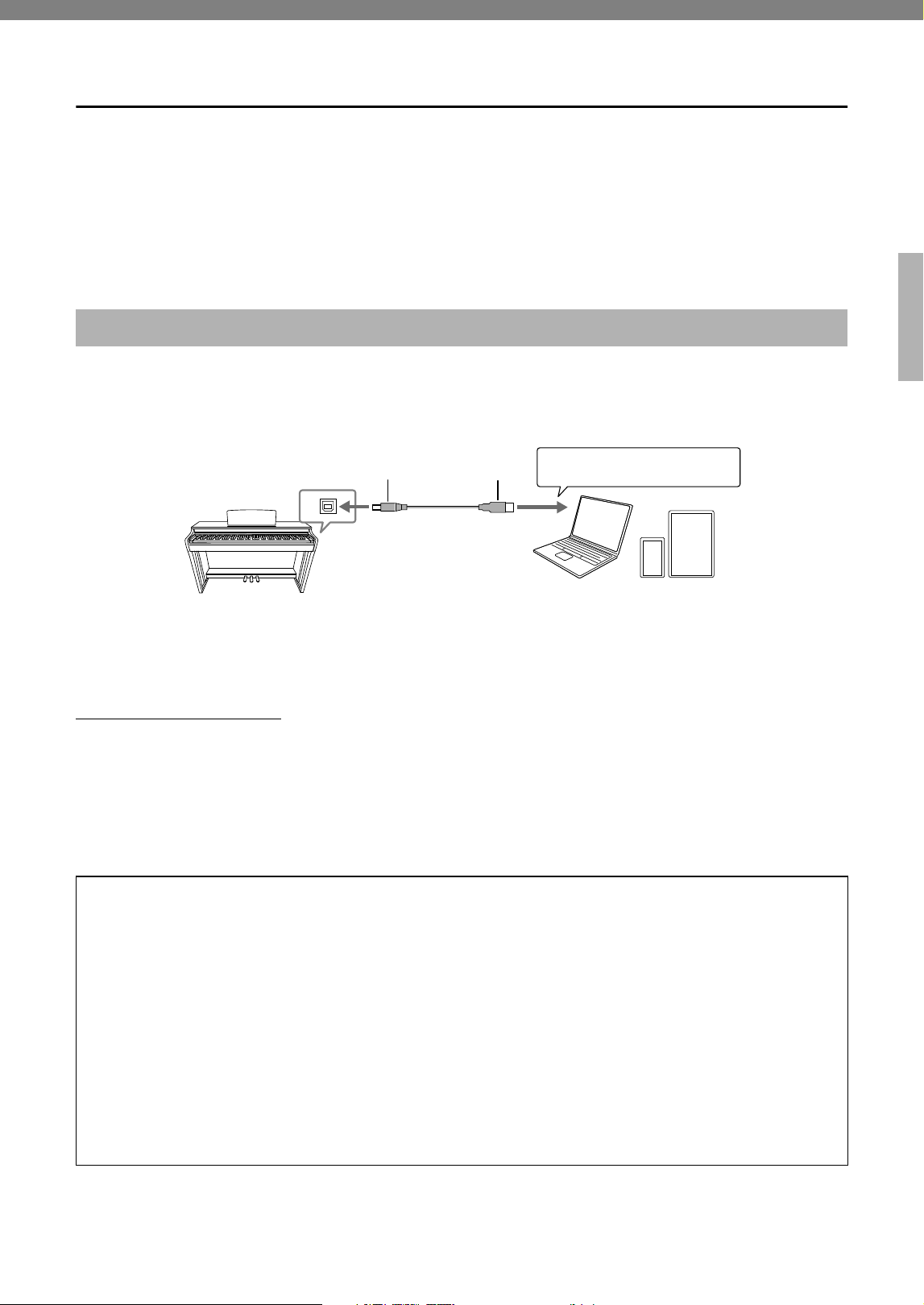
2. Engage the Record Ready mode.
Quick Recording
Press [REC] to engage the Record Ready mode. Your keyboard performance will
be automatically recorded to the right-hand Part even if you play with both your
right and left hands. Note that the already-recorded data of the right- and left-hand
parts will be erased by Quick Recording.
Recording to individual parts
While holding down [REC], press [+R] or [−L] to engage the Record Ready mode
for the Part you want to record.
If data has already been recorded to the other Part, the data in this Part will be
played back while recording.
To turn the Part off or on, press the appropriate part button ([+R] or [−L]) while
holding down [PLAY].
To exit from Record Ready mode:
Simply press [REC].
3. Play the keyboard or press [PLAY] to start recording.
The [REC] lamp lights up while the Recording Part lamp flashes at the current
tempo.
4. Press either [REC] or [PLAY] to stop recording.
The [REC], [PLAY], [+R] and [−L] lamps flash, indicating that the recorded data is
being stored. After the Save operation is completed, the lamps will turn off,
indicating that the Record operation has been completed.
5. To hear the recorded Song, press [PLAY] to start playback.
Press [PLAY] again to stop playback.
To record to the other part
Repeat the steps above. In step 2, follow the instructions of “Recording individual
parts.”
Recording Your Performance
NOTICE
Only one Song can be
recorded to the instrument.
Note that recording another
Song will replace already-
recorded data with the new
data.
NOTE
• The “Smart Pianist” app
(page 29) enables you to
record your keyboard
performance as MIDI/audio
data and save it on your smart
device.
• You can use the Metronome
while recording; however, the
Metronome sound will not be
recorded.
• If the keyboard is in the Duo
mode (page 22), the data will
be recorded to each Part. The
Part for recording cannot be
specified.
• If the data capacity of the
instrument approaches full
when you engage Record
Ready mode, the [REC] and
[PLAY] lamps flash quickly for
about three seconds.
NOTICE
Note that recording your
performance to a part
containing data will replace
already-recorded data with
the new data.
To record the right-hand Part ([+R]) To record the left-hand Part ([−L])
NOTICE
Never turn off the power while
the recorded data is being
stored (while the lamps are
flashing). Otherwise, all
recorded data will be lost.
Recording Capacity
This instrument can record up to
250 KB (approximately 11,000
notes).

26
CLP-825 Owner’s Manual
The settings of the following parameters can be changed after the Record operation is completed.
• For individual Parts: Voice, Volume balance (Dual), Reverb Depth
• For the entire Song: Tempo, Reverb Type
1. Make settings for the above parameters as desired.
2. While holding down [REC], press the desired Part ([+R] or [−L])
to engage Record Ready mode.
The [REC], [PLAY] and selected Part lamps flash.
In this status, do not press [PLAY] again or any key. Otherwise, the originally
recorded performance data will be deleted.
3. While holding down [REC], press [PLAY] to exit from Record
Ready mode.
The [REC], [PLAY], [+R] and [−L] lamps flash. After the Save operation is
completed, the lamps will turn off, indicating that the operation has been
completed.
Confirm the setting by pressing [PLAY] to play the Song.
To delete the entire Song:
1. While holding down [REC], press [DEMO/SONG].
The [REC] and [PLAY] lamps flash alternately.
To cancel the operation, press [REC].
2. Press [PLAY] to delete the data of the entire Song.
The [REC], [PLAY], [+R] and [−L] lamps flash.
After the operation is completed, all lamps turn off.
To delete a specific Part:
1. While holding down [REC], press [+R] or [−L] (depending on the
Part you want to delete) to engage Record Ready mode.
The [REC], [PLAY] and selected Part ([+R] or [−L]) lamps flash.
2. Press [PLAY] to start recording without playing the keyboard.
The selected Part ([+R] or [−L]) lamp flashes.
3. Press [REC] or [PLAY] to stop recording.
All data recorded for the selected Part will be deleted, and the lamp turns off.
Changing the Initial Settings of the Recorded Song
Deleting Recorded Data
NOTE
If a User Song has not been
recorded to the instrument, the
[REC] and [PLAY] lamps flash
quickly for about three seconds.
27
CLP-825 Owner’s Manual
Using with a Smart Device or a Computer
Connecting this instrument to a computer or a smart device allows you to transmit/receive performance data to/from
the smart device or computer. You can connect the instrument to a computer or a smart device via a USB cable or
Bluetooth.
NOTICE
Do not place any devices in an unstable position. Doing so may cause the device to fall and result in damage.
NOTE
For instructions on using MIDI, refer to “MIDI Reference” (page 7).
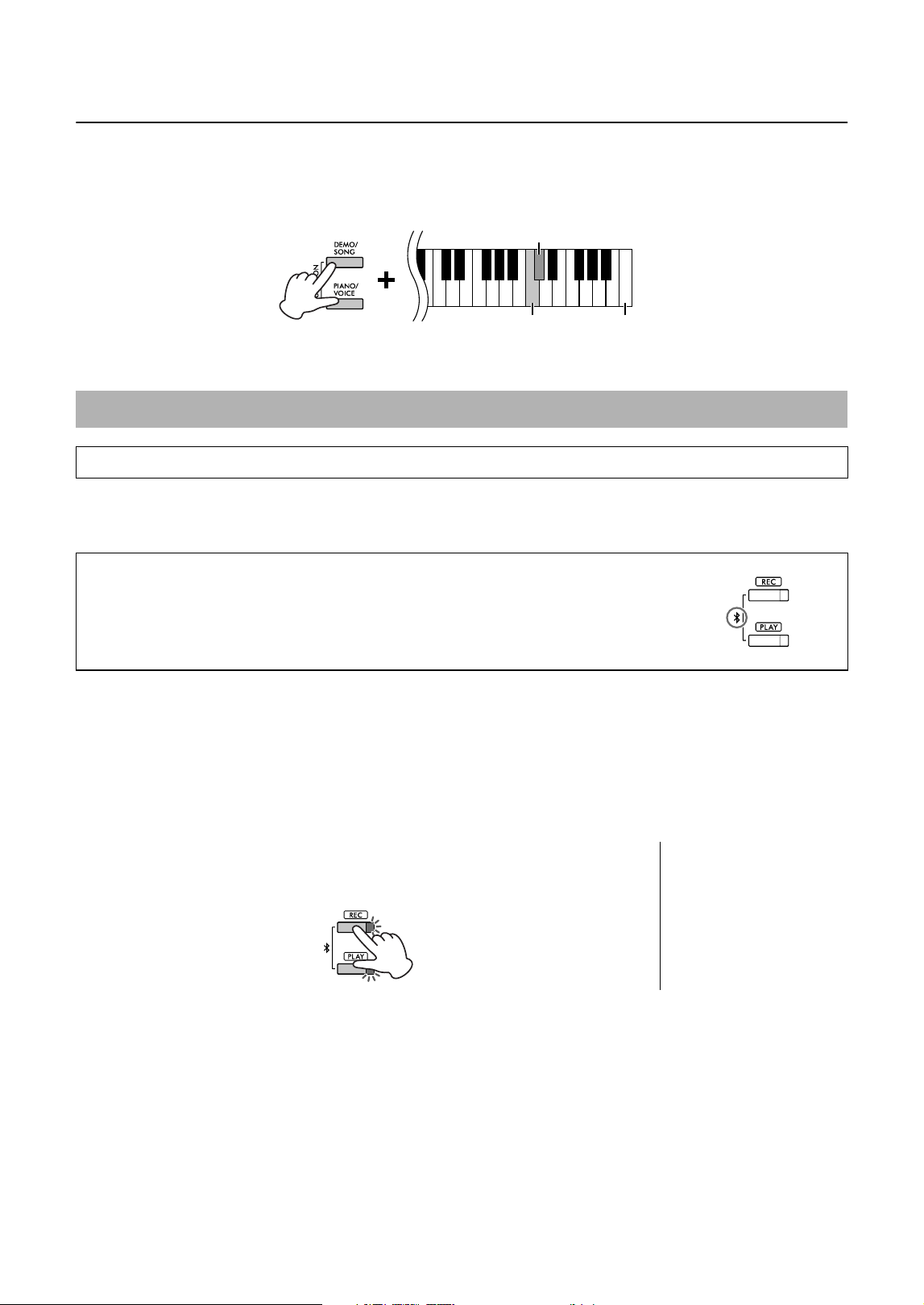
By connecting a smart device or a computer to the [USB TO HOST] terminal via a USB cable, digital audio data can
be received/transmitted. You can listen to audio data played on the connected device through the instrument
speaker, or you can record your performance on the instrument as audio data by using a music production software
or app.
When transmitting or receiving audio signals by using a computer running Windows, if operation is unstable or
delays occur, use the “Yamaha Steinberg USB Driver.” On the website below, search for “Yamaha Steinberg USB
Driver” and install it on the computer. For instructions on installing the driver, refer to the Installation Guide included
with the download file.
https://download.yamaha.com/
NOTICE
If you are using a DAW (digital audio workstation) application with this instrument, set the Audio Loopback function to off
(page 28). Otherwise, a loud sound may occur, depending on the settings of the computer.
NOTE
• Depending on the model or OS of the computer and smart device, noise may occur, or this function may not be available.
• Unexpected sounds may occur if you edit MIDI data related to the Grand Expression Modeling effect (page 33) on a computer.
Playback/Recording of Audio Data (USB Audio Interface)
Precautions when using the [USB TO HOST] terminal
When connecting a smart device or a computer to the [USB TO HOST] terminal, make sure to observe the
following points to avoid freezing the smart device, computer or instrument, and corrupting or losing the data.
NOTICE
• Use a AB type USB cable of less than 3 meters. USB 3.0 cables cannot be used.
• Execute the following before turning the power to the instrument on/off or plugging/unplugging the USB cable to/from the
[USB TO HOST] terminal.
- Quit any open app on the smart device/computer.
- Make sure that data is not being transmitted from the instrument. (Data is transmitted even when the notes on the keyboard
are played or a Song is played back.)
• While the smart device/computer is connected to the instrument, you should wait for six seconds or more between these
operations: (1) when turning the power of the instrument off then on again, or (2) when alternately connecting/disconnecting
the USB cable.
If the smart device, computer or instrument freezes, restart the app or the computer/smart device, or turn the
power to the instrument off then on again.
Computer or Smart device
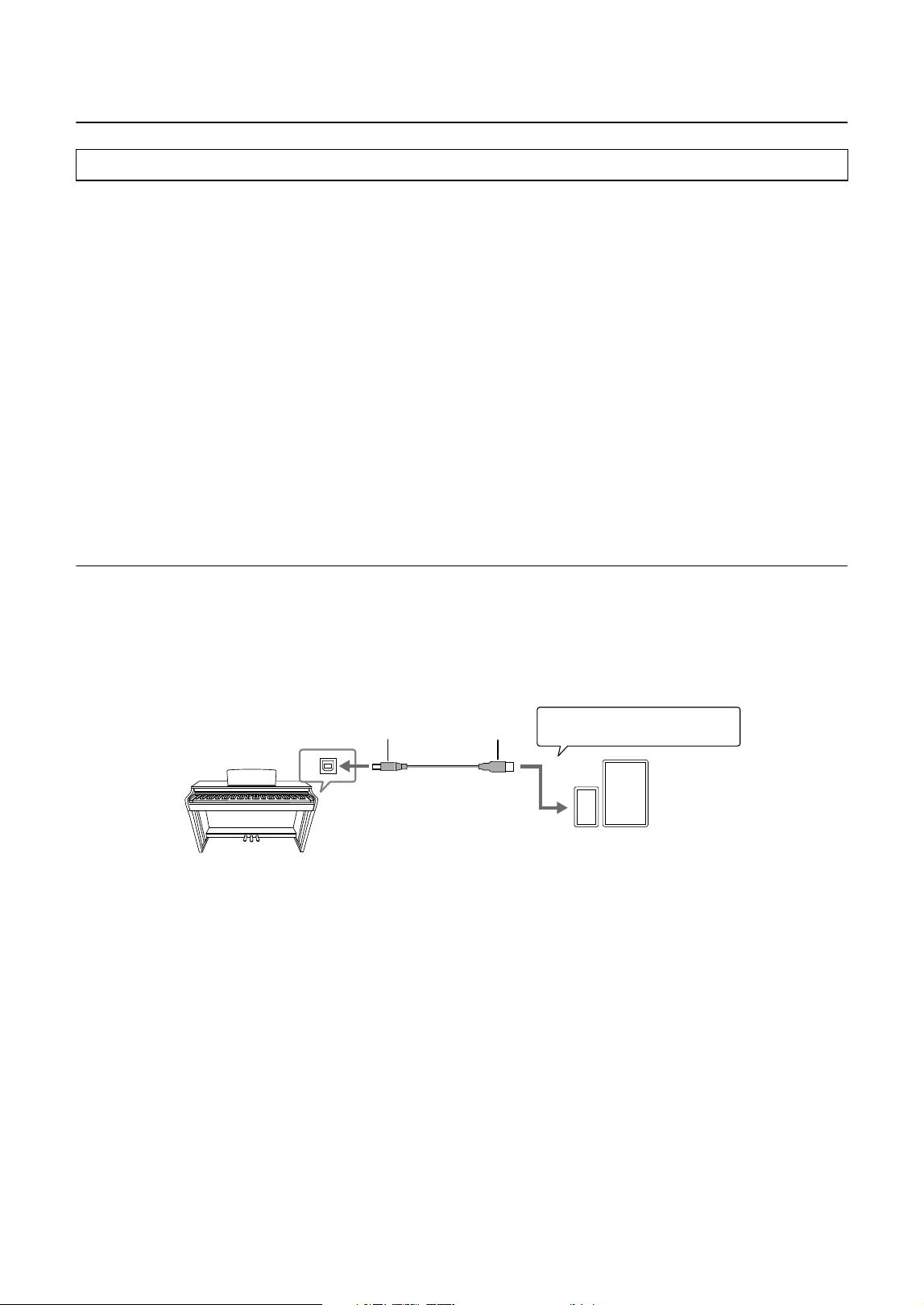
[USB TO HOST]
terminal (page 8)
USB cable
Instrument
Type AType B
Example
(If necessary)
+ USB Conversion adaptor
28
CLP-825 Owner’s Manual
Turning Audio Loopback On/Off
You can set whether audio sound input from the [USB TO HOST] terminal is returned to the computer/smart device
or not along with the performance played on the instrument.
While holding down [DEMO/SONG] and [PIANO/VOICE] simultaneously, press the C6 key to turn this parameter
“Off” or the C#6 key to turn it “On.”
Default setting: On
A Bluetooth-equipped audio player such as a smart device or a computer can be connected by using the Bluetooth
Audio function. Audio playback on the connected device is output from the built-in speakers of this instrument.
NOTE
• In order to use the Bluetooth function via wireless communication, the audio player must be equipped for transmitting audio data. For
proper operation, the device must be compatible with A2DP (Advanced Audio Distribution Profile).
• Since this instrument cannot transmit audio data to external devices via Bluetooth, Bluetooth headphones or speakers cannot be
connected.
To connect via Bluetooth, the Bluetooth function of this instrument should be turned on. By default, the Bluetooth
function is set to on, however you can turn it on/off (page 29).
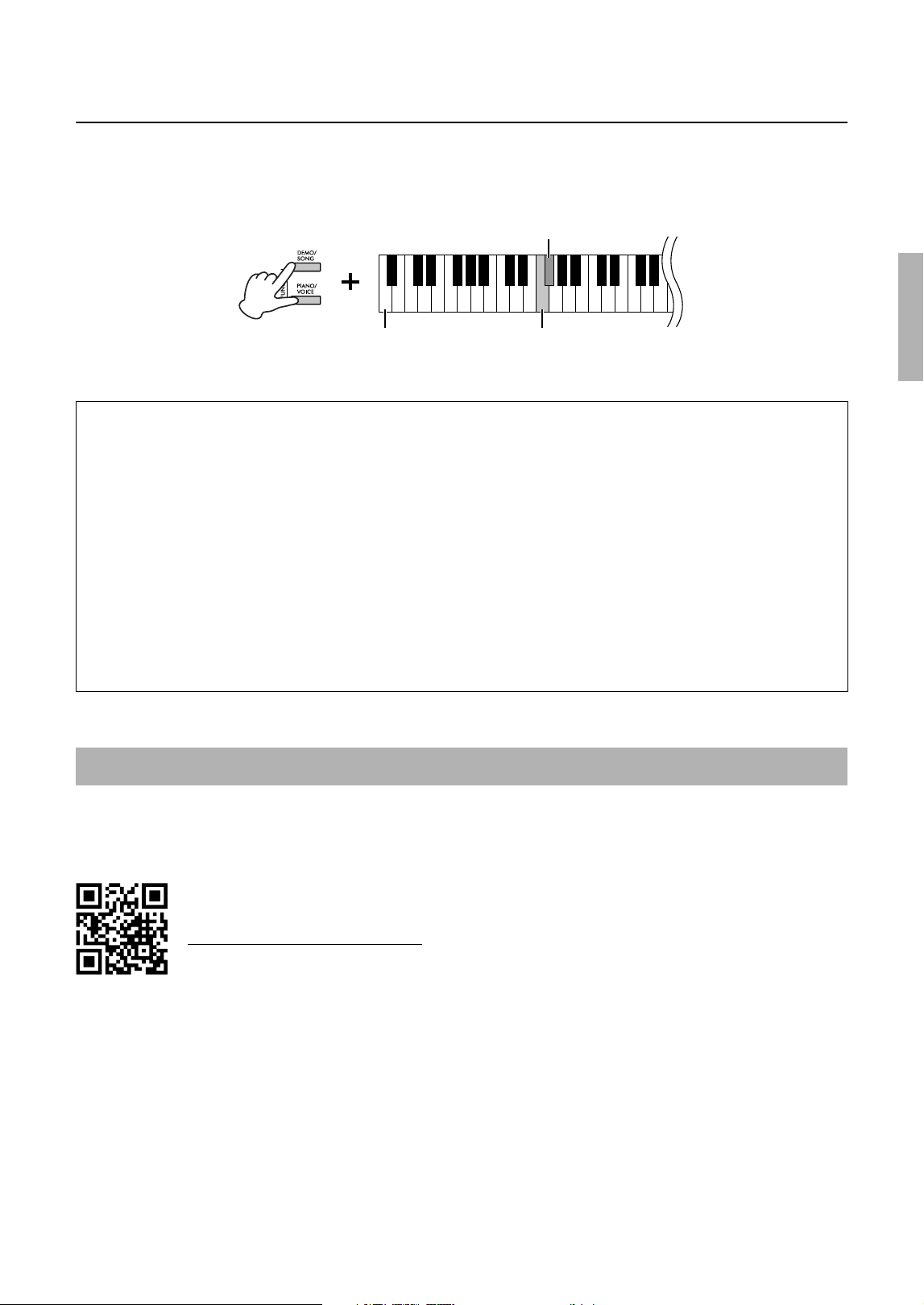
1. Hold down the [REC] and [PLAY] buttons simultaneously for
three second or longer to pair with a Bluetooth-equipped device
(Pairing*).
To cancel the paring, press any button.
2. On the audio player, set the Bluetooth function to on and select the instrument “CLP-825
AUDIO” from the connection list.
Make sure to complete this operation while the [REC] and [PLAY] buttons are flashing.
3. Play back audio data on the Bluetooth-equipped device to confirm that the built-in
speakers of the instrument can output the audio sound.
Listening to Audio via Bluetooth on this Instrument (Bluetooth Audio)
Before using the Bluetooth function, be sure to read “About Bluetooth” on page 29.
Bluetooth capability
Depending on the country in which you purchased the product, the instrument may not
have Bluetooth capability.
If the Bluetooth logo is printed on the control panel, this means that the product is
equipped with Bluetooth functionality.
C#6 (On)
C6 (Off)
Highest key
* Pairing:
To register this instrument with a
Bluetooth-equipped device and
establish mutual recognition for
wireless communication
between the two.
29
CLP-825 Owner’s Manual
Turning Bluetooth On/Off
To connect the instrument with a Bluetooth-equipped device via Bluetooth Audio or Bluetooth MIDI, you need to turn
Bluetooth on.
While holding down [DEMO/SONG] and [PIANO/VOICE] simultaneously, press the F1 key to turn this parameter
“Off” or the F#1 key to turn it “On.”
Default setting: On
By connecting to a smart device such as a smartphone or tablet and using Smart Pianist, you have access to a
variety of exceptionally convenient functions, such as viewing music scores and recording your performances to the
device. The intuitive visual interface also helps you confirm the current settings of the instrument.
For details on the app and compatible devices, access the website below and check the “Smart
Pianist” page.
https://www.yamaha.com/kbdapps/
After installing the Smart Pianist app on your smart device, connect this instrument to the device via USB cables or
Bluetooth. For instructions on how to connect the device and use the app, refer to “Smart Pianist User Guide”
(page 7).
NOTICE
All settings on the instrument are replaced by the settings on Smart Pianist when the instrument is connected with Smart Pianist.
NOTE
While Smart Pianist is connected, you cannot use the control panel on the instrument. Use Smart Pianist to control the instrument. To
disconnect Smart Pianist, close Smart Pianist on the smart device or press the [DEMO/SONG] and [PIANO/VOICE] buttons simultaneously
on the instrument. You can also disconnect from the Smart Pianist by turning off the power using the [P] (Standby/On) switch.
About Bluetooth
®
Bluetooth is a technology for wireless communication between devices within an area of about 10 meters (33 ft.)
employing the 2.4 GHz frequency band.
Handling Bluetooth communications
• The 2.4 GHz band used by Bluetooth compatible devices is a radio band shared by many types of equipment.
While Bluetooth compatible devices use a technology minimizing the influence of other components using the
same radio band, such influence may reduce the speed or distance of communications and in some cases
interrupt communications.
• The speed of signal transfer and the distance at which communication is possible differs according to the
distance between the communicating devices, the presence of obstacles, radio wave conditions and the type of
equipment.
• Yamaha does not guarantee all wireless connections between this unit and devices compatible with Bluetooth
function.
Using the convenient Smart Pianist app
F1 (Off)Lowest key
F#1 (On)
30
CLP-825 Owner’s Manual
Connecting via Bluetooth
To connect the instrument and a smart device via Bluetooth, you need to make Bluetooth MIDI and Bluetooth Audio
settings individually. In order to use Smart Pianist, Bluetooth MIDI connection is necessary. For listening to audio
data on the smart device from the instrument, Bluetooth Audio connection is required as well.
NOTE
• Depending on the country in which you purchased the product, the instrument may not have Bluetooth capability (page 28).
• When the device is connected by Bluetooth, you cannot record in audio format by using Smart Pianist. To enable audio recording, connect
via USB cable (see below).
1. Connect the instrument and the smart device by Bluetooth Audio (page 28).
When the connection is successful, audio data can be transmitted from the smart device to the instrument.
2. By using the Smart Pianist app, connect the instrument and the smart device via
Bluetooth MIDI.
For details on connection, refer to “Smart Pianist User Guide” (page 7). Make sure to select “CLP-825 MIDI” for
pairing. When the connection is successful, MIDI data can be transmitted/received between the instrument and
the smart device.
Connecting with a USB cable ([USB TO HOST] terminal)
By using a USB cable, you can connect a smart device to the [USB TO HOST] terminal on the instrument. For
instructions on connection, refer to “Smart Pianist User Guide” (page 7). Before using the [USB TO HOST] terminal,
refer to “Precautions when using the [USB TO HOST] terminal” on page 27.
NOTICE
Use an AB type USB cable of less than 3 meters. The cable must be a communication cable compliant with USB standards, and not
a charging-only cable.
Before using the Bluetooth function, be sure to read “About Bluetooth” on page 29.
Smart device
[USB TO HOST]
terminal (page 8)
USB cable
Instrument
Type AType B
Example
+ USB Conversion adaptor
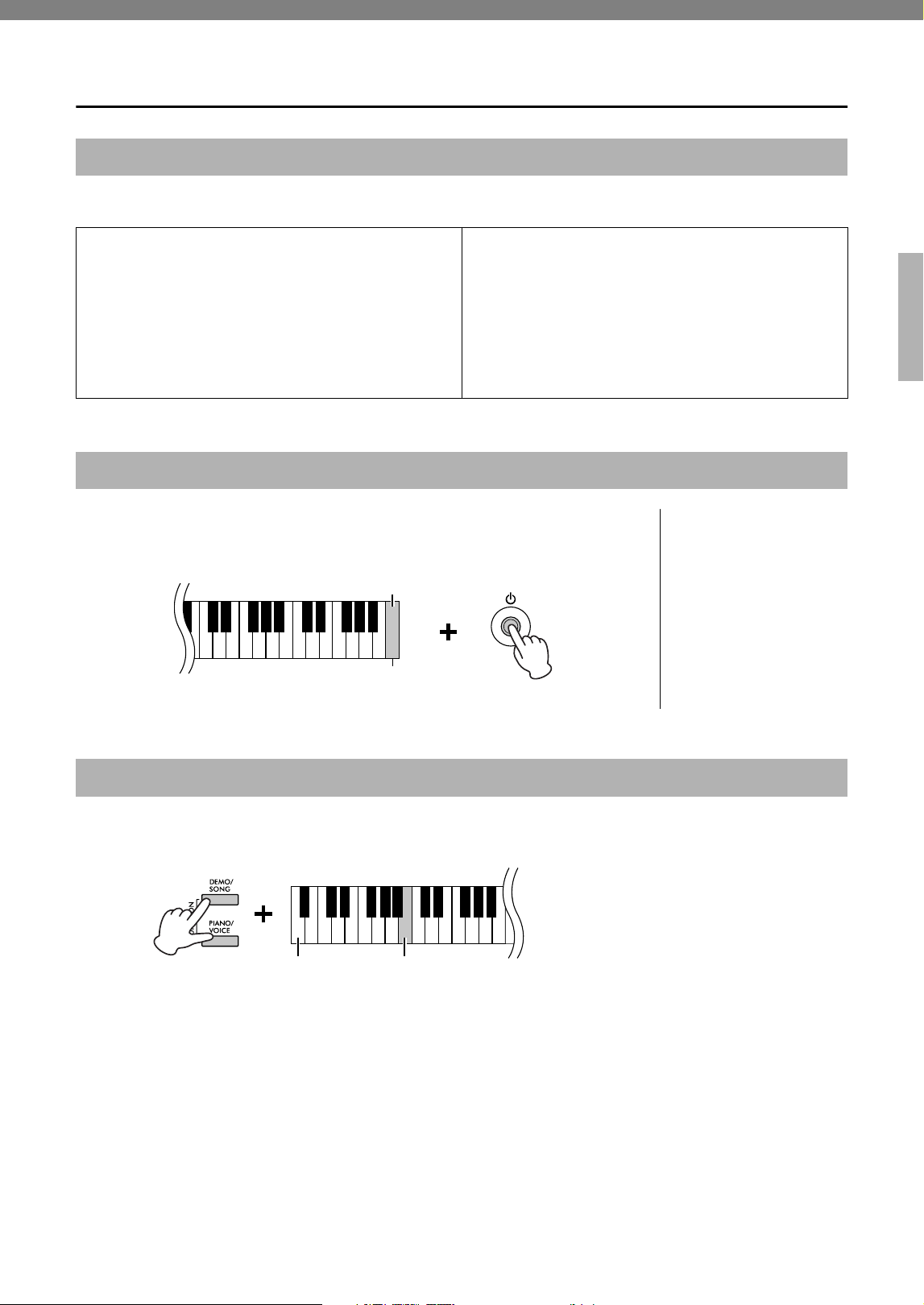
31
CLP-825 Owner’s Manual
Backing up Data and Initializing the Settings
The following settings and data are maintained even if you turn the power off.
With this operation, all data (with the exception of the User Song and Bluetooth pairing
information) will be reset to the factory default settings.
To do this, simultaneously hold down the C7 (the highest) key and turn on the power.
You can confirm the firmware version of your instrument by audible voice in English.
While holding down [DEMO/SONG] and [PIANO/VOICE] simultaneously, press the B0 key.
About the latest Firmware Version
Yamaha may from time to time update firmware of the product without notice for improvement. Make sure to check
our website for information of the latest release and upgrade the firmware for your instrument.
https://download.yamaha.com/
Data Maintained When Power is Turned Off
• Metronome Volume
• Metronome Beat (time signature)
• Touch Sensitivity
• Tuning
• Intelligent Acoustic Control Depth
• Intelligent Acoustic Control On/Off
• Volume Limiter
• Binaural Sampling/Stereophonic Optimizer On/Off
• Operation Confirmation Sounds On/Off
• Auto Power Off Enable/Disable
• Speaker On/Off
• User Song data
• Duo Type Separated/Balanced
• Bluetooth On/Off
Initializing the Settings
NOTICE
Never turn off the power
while the Initialize operation
is being executed (that is,
while the [REC], [PLAY], [+R]
and [−L] lamps are flashing).
NOTE
If this instrument somehow
becomes disabled or
malfunctions, turn off the power
then execute Initialization.
C7
Highest key
Confirming the firmware version of this instrument
Lowest key
B0
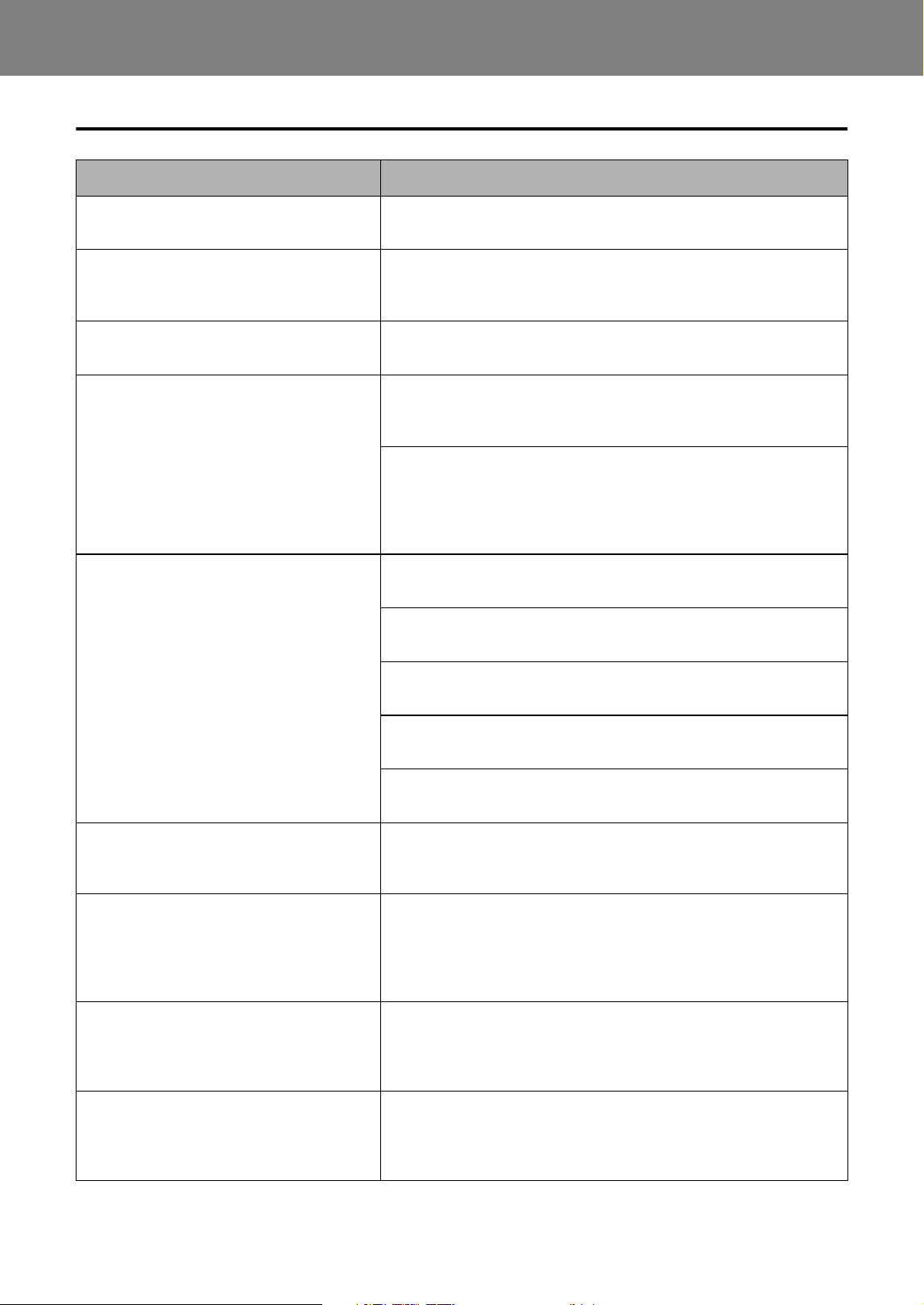
32
CLP-825 Owner’s Manual
Appendix
Troubleshooting
Problem Possible Cause and Solution
Power suddenly and unexpectedly turns off.
This is normal and the Auto Power Off function may have been
activated (page 10). If desired, disable the Auto Power Off function.
The power of the instrument does not turn
on.
The plugs are not properly connected. Make sure that the DC plug is
securely inserted into the DC IN jack on the instrument, and that the AC
plug is securely inserted to the AC outlet (page 10).
A click or pop is heard when the power is
turned on or off.
This is normal when electrical current is being applied to the
instrument.
Noise is heard from the speakers or
headphones.
The noise may be due to interference caused by the use of a mobile
phone in close proximity to this instrument. Turn off the mobile phone,
or move it further away from this instrument.
When you use the instrument along with the app on your smart device,
we recommend that you enable “Airplane Mode” on the device to avoid
noise caused by communication.
When wirelessly connecting a smart device with this product, make
sure that the Bluetooth setting on the device is turned on.
The overall volume is low, or no sound is
heard.
The master volume is set too low. Set it to an appropriate level using the
[VOLUME] knob (page 10).
Make sure a pair of headphones or conversion adaptor is not
connected to the [PHONES] jack (page 11).
The Speaker setting is “Off.” Set the Speaker to “Normal” or “On”
(page 12).
The Volume Limiter function is turned on. Set the Volume Limiter to
“Off” (page 11).
Make sure that Local Control is On. For details, refer to the “MIDI
Reference” (page 7).
Pedals do not function.
The pedal cord may not be securely connected to the [TO PEDAL] jack.
Be sure to insert the pedal cord all the way until the metal part of the
cord plug disappears from view (page 13).
The pitch and sound quality of the Piano
Voice is wrong in a specific key range.
This is no problem.
Yamaha develops the Piano Voices so that the original piano sound is
reproduced as faithfully as possible. This is why you may hear
overtones emphasized in a certain key range, or you may feel that the
sound pitch or quality is different from another key range.
Playing the keys produces a rattling noise.
This is no problem.
The keyboard mechanism of this product is designed to simulate the
actual noises of an acoustic piano. Such noises are produced even if
you play an acoustic piano.
The [+R] and [−L] lamps flash when this
product is started, when a Song is selected,
or when recording is finished.
This is no problem.
It is because the [+R] and [−L] lamps may flash when the internal
processing of this product is taking a long time. Note that no operations
are available while these are flashing.
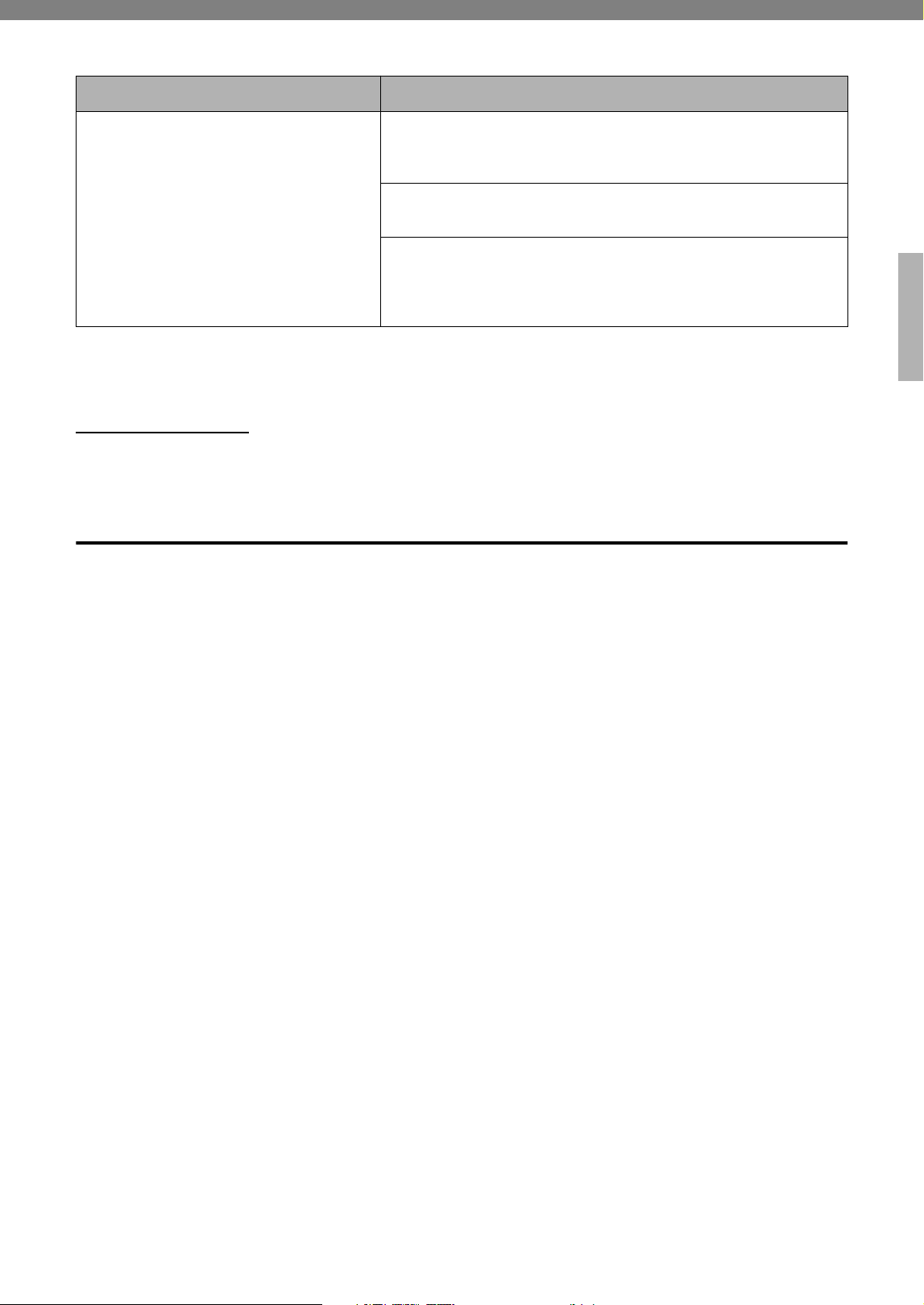
33
CLP-825 Owner’s Manual
* Depending on the country in which you purchased the product, the instrument may not have Bluetooth capability. For
information on whether Bluetooth functionality is included or not, refer to page 28.
For more information, check the “Frequently Asked Questions (FAQ)” on the following website:
https://faq.yamaha.com/s/
* Available in English, German, French, Spanish and some other languages.
Glossary of Terms
VRM (Virtual Resonance Modeling)
On an actual acoustic piano, if you press the damper pedal and play a key, not only does the string of the pressed
key vibrate, it also causes other strings and the soundboard to vibrate, with each influencing the rest, creating a rich
and brilliant resonance that sustains and expands. The VRM technology featured in this instrument reproduces the
complicated interaction between both string and soundboard resonance, and make the sound more like that of a
real acoustic piano. Since resonance instantaneously occurs depending on the action of the keys and pedal, you
can expressively vary the sound by changing the timing of your pressing the keys, and the timing and depth of your
pressing the pedal.
Grand Expression Modeling
On an actual acoustic piano, subtle changes in the sound can be produced by changing your playing touch from
when you press a key to when you release it. For example, when you press a key all the way to its bottom, the key
hits the keybed underneath and the noise reaches the strings, changing the sound slightly. Furthermore, the tone
when the damper is lowered onto strings to mute the sound is changed by how quickly you release the key. The
Grand Expression Modeling technology recreates these subtle changes in the sound that respond to your touch.
This allows you to add accents by playing strongly or add resonance by playing softly to produce superbly
expressive sound. A crisp tone can be heard when playing staccato as well as a lingering sound produced when
releasing the keys slowly.
The Bluetooth-equipped audio player cannot
be paired with nor connected to the
instrument.
Check that the Bluetooth function of the audio player is activated. To
connect the audio player and the instrument via Bluetooth, both devices
need to be functional.
The audio player and the instrument need to be paired to connect with
each other via Bluetooth (page 28).
In case there is a device (microwave oven, wireless LAN device, etc.)
that outputs signals in the 2.4 GHz frequency band nearby, move this
instrument away from the device that is emitting radio-frequency
signals.
Problem Possible Cause and Solution
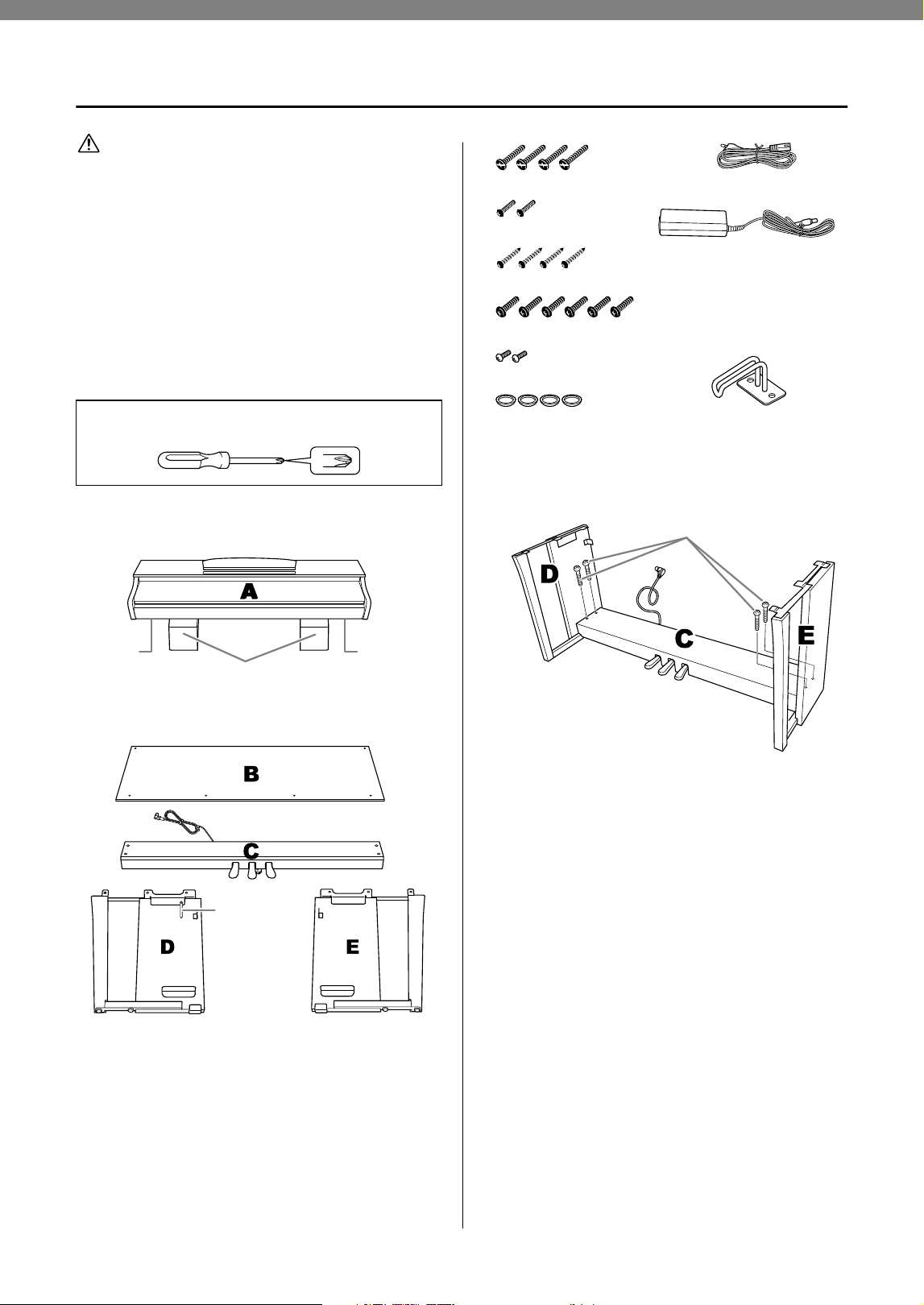
34
CLP-825 Owner’s Manual
Keyboard Stand Assembly
CAUTION
• Assemble the unit on a hard and flat floor with ample space.
• Be careful not to confuse parts, and be sure to install all
parts in the correct orientation. Please assemble the unit in
accordance with the sequence given below.
• Assembly should be carried out by at least two persons.
• Be sure to use only the included screws of the specified
sizes. Do not use any other screws. Use of incorrect screws
can cause damage or malfunction of the product.
• Keep small parts (such as screws) out of the reach of
infants. Children may accidentally swallow them.
• Be sure to tighten all screws upon completing assembly of
the unit.
• To disassemble the unit, reverse the assembly sequence
given below.
Remove all parts from the package and make sure you
have all of the items.
1. Attach (finger-tighten) C to D and E.
1-1 Untie and straighten out the bundled pedal
cord.
1-2 Align D and E with each end of C.
1-3 Attach D and E to C by finger-tightening
the long screws (6 × 20 mm).
Have a Phillips-head (+) screwdriver of the appropriate
size ready.
Foamed styrol pads
Remove foamed styrol pads from the package, position them
on the floor, then place A on top of them. Position the pads so
that they will not hide the connectors on the bottom of A.
Cord holder
Speaker
cover
Speaker
cover
6 x 20 mm long screws × 4
4 x 12 mm thin screws × 2
4 x 20 mm tapping screws × 4
6 x 16 mm short screws × 6
Power cord × 1
AC adaptor × 1
The power cord and adaptor
may not be included, or may
look different from the illustration
above, depending on your
particular area. Please check
with your Yamaha dealer.
4 x 10 mm thin screws × 2
Headphone hanger × 1Caps × 4
1-3
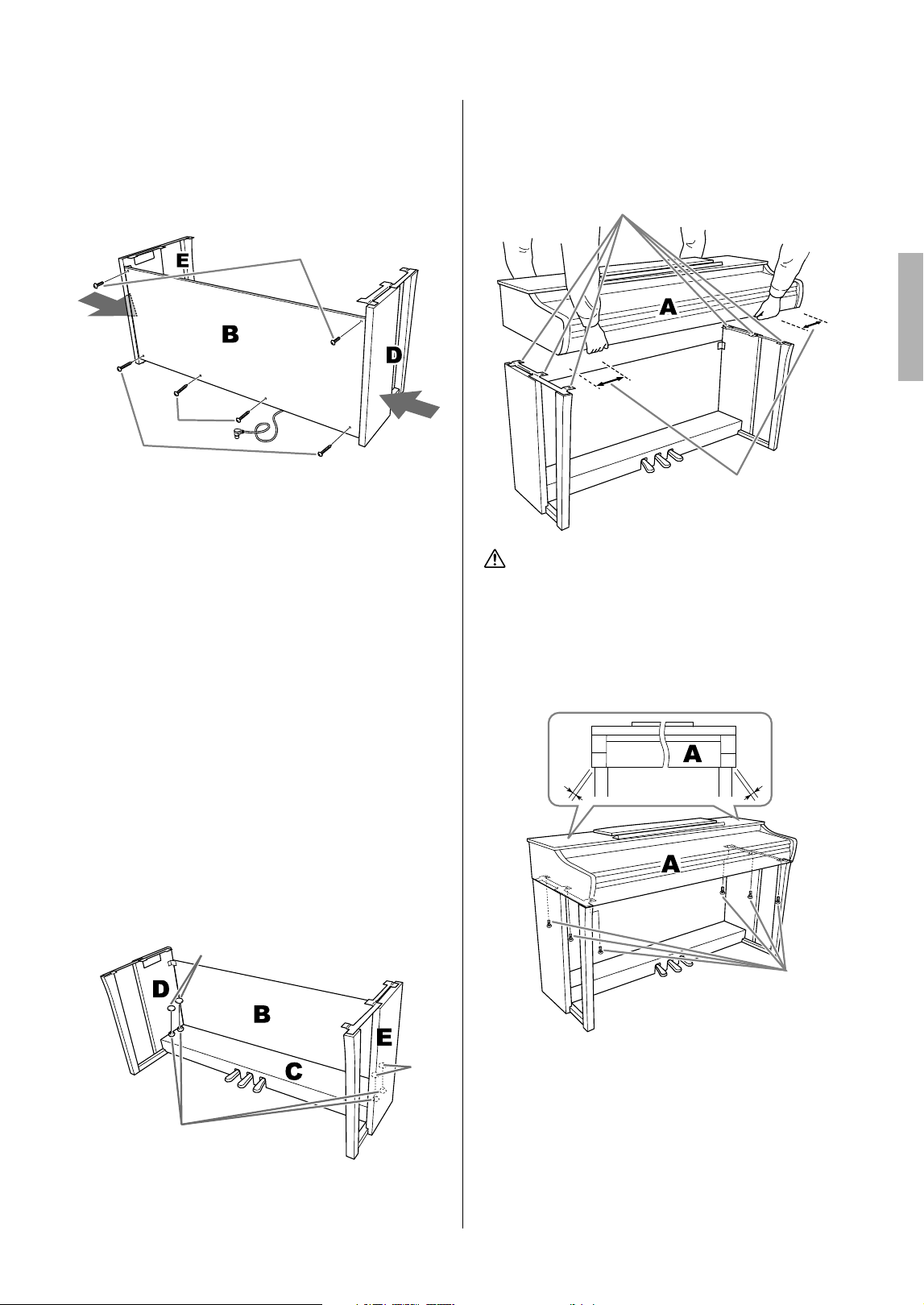
35
CLP-825 Owner’s Manual
2. Attach B.
Depending on the model of digital piano you
purchased, the surface color of one side of B
may be different from the other side. In this case,
position B so that the side of the surface color
similar to D and E faces the player.
2-1 Align the screw holes on the upper side of
B with the bracket holes on D and E, then
attach the upper corners of B to D and E
by finger-tightening two thin screws (4 ×
12 mm).
2-2 While pushing the lower part of D and E
from outside, secure the bottom ends of B
using two tapping screws (4 × 20 mm).
2-3 Insert the other two tapping screws (4 ×
20 mm) into the other two screw holes to
secure B.
2-4 Securely tighten the screws on the top of
B that were attached in Step 2-1.
3. Secure C.
3-1 Securely tighten the screws on C that were
attached in Step 1-3.
3-2 Attach the caps to the head of the screws.
4. Mount A.
Be sure to place your hands at least 15 cm away
from either end of the main unit when positioning
it.
CAUTION
• Be extra careful not to drop the main unit or let your fingers
be pinched by it.
• Do not hold the main unit in any position other than the
position specified above.
5. Secure A.
5-1 Adjust the position of A so that the left and
right ends of A will project beyond D and E
equally when seen from the front.
5-2 Secure A by tightening the short screws
(6 × 16 mm) from the front.
2-1
2-2
2-2
2-3
2-2
3-1
3-2
3-2
Align the screw holes.
At least 15 cm
5-1
5-2
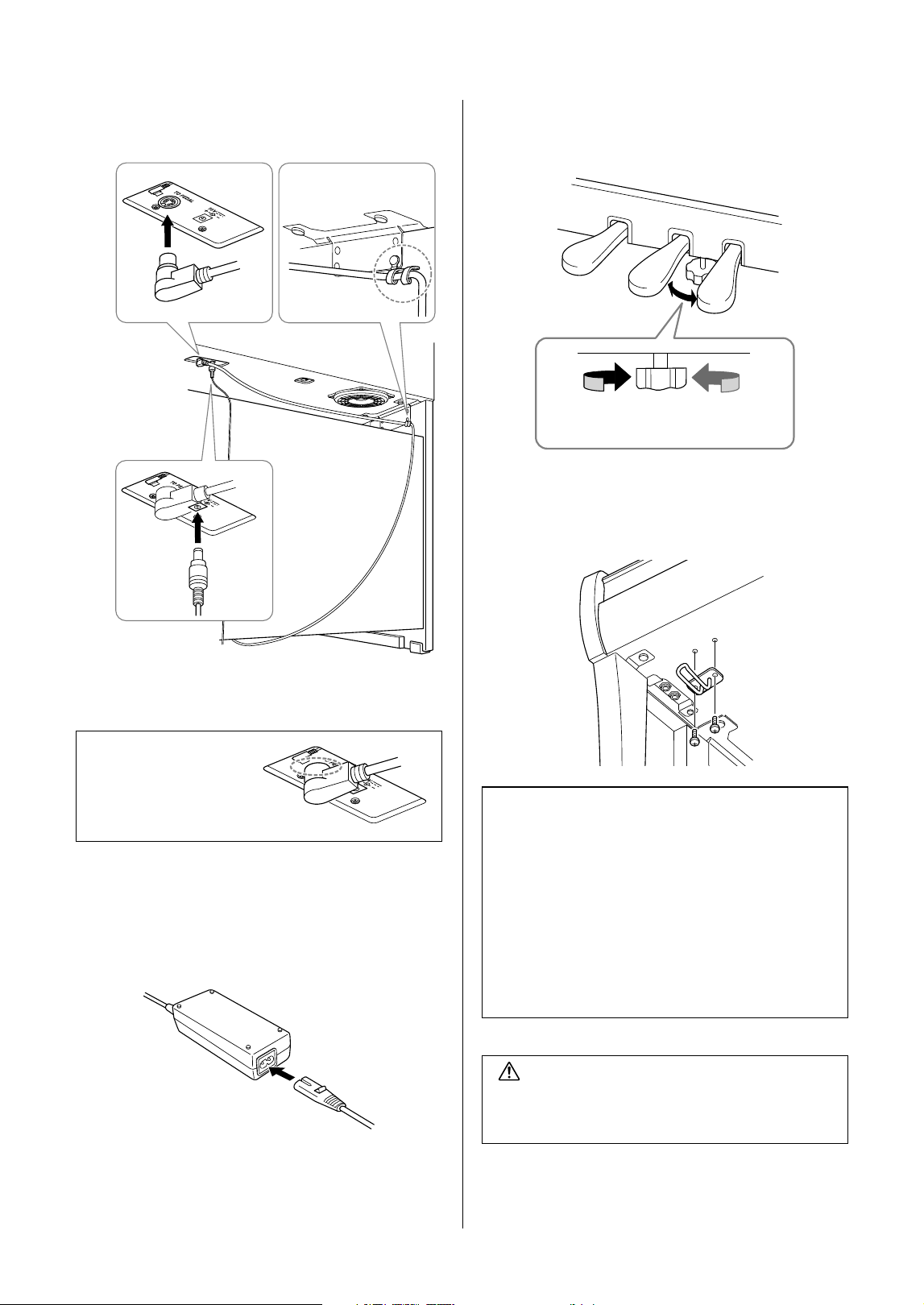
36
CLP-825 Owner’s Manual
6. Connect the pedal cord and the AC
adaptor.
6-1 Insert the pedal cord plug to the pedal
connector from the rear.
6-2 Securely wind the cord holder around the
pedal cord.
The cord holder is attached to D.
6-3 Connect one end of the power cord to the
AC adaptor.
6-4 Insert the DC plug of the AC adaptor into
the DC IN jack.
7. Set the adjuster.
Rotate the adjuster until it comes in firm contact
with the floor surface.
8. Attach the headphone hanger.
Use two thin screws (4 × 10 mm) to attach the
hanger as shown in the illustration.
When connecting the
pedal cord, insert the
plug securely until the
metal part disappears
from view.
6
-
2
6
-
1
6
-
4
Post-assembly checklist
There are no unused parts.
The instrument is stable even if you shake it.
The pedal adjuster is firmly pressed against to the
floor surface.
Both the pedal cord and power cord are plugged
securely into the correct jacks.
If there are any items above you haven’t
confirmed, review the assembly procedure and
correct any errors.
CAUTION
If the main unit creaks or is otherwise unsteady when
you play on the keyboard, refer to the assembly
diagrams and re-tighten all screws.
Presses against
the floor
Lifts from the floor
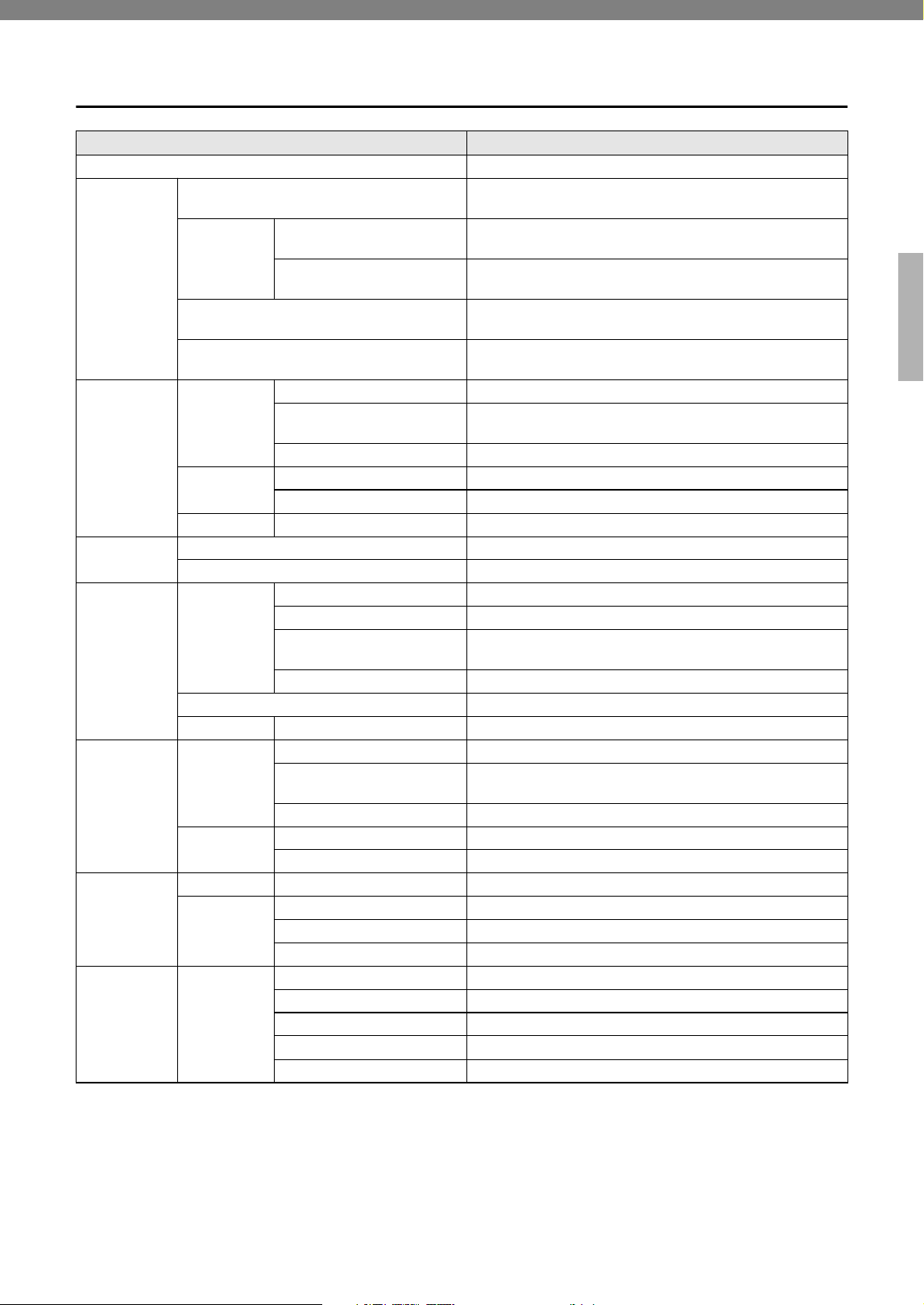
37
CLP-825 Owner’s Manual
Specifications
CLP-825
Product Name Digital Piano
Size/Weight
Width
[For models with polished finish]
1,350 mm (53-1/8")
[1,353 mm (53-1/4")]
Height
[For models
with polished
finish]
With music rest closed
849 mm (33-7/16")
[851 mm (33-1/2")]
With music rest raised
1,003 mm (39-1/2")
[1,005 mm (39-9/16")]
Depth
[For models with polished finish]
411 mm (16-3/16")
[411 mm (16-3/16")]
Weight
[For models with polished finish]
45 kg (99 lb, 3 oz)
[47 kg (103 lb, 10 oz)]
Control
Interface
Keyboard
Number of Keys 88
Type
GrandTouch-S Keyboard: synthetic ebony and ivory key tops,
escapement
Touch Sensitivity Hard, Medium, Soft, Fixed
Pedal
Number of Pedals 3: Damper (with Half-pedal function), Sostenuto, Soft
GrandTouch Pedals Yes
Panel Language English
Cabinet
Key Cover Style Sliding
Music Rest Yes (with music braces)
Voices
Tone
Generator
Piano Sound Yamaha CFX, Bösendorfer Imperial
Binaural Sampling Yes (“CFX Grand” only)
VRM (Virtual Resonance
Modeling)
Yes
Grand Expression Modeling Yes
Polyphony (max.) 256
Preset Number of Voices 10
Effects
Types
Reverb 4 types
Intelligent Acoustic Control
(IAC)
Yes
Stereophonic Optimizer
Yes
Functions
Dual Yes
Duo Yes
Songs
Preset Number of Preset Songs 10 Voice Demo Songs, 50 Classics + 303 Lesson Songs
MIDI
Recording
Number of Songs 1
Number of Tracks 2
Data Capacity Approx. 250 KB/Song (approx. 11,000 notes)
Functions
Overall
Controls
Metronome Yes
Tempo Range 5 – 280
Transpose −6 – 0 – +6
Tuning 414.8 – 440.0 – 466.8 Hz (approx. 0.2 Hz increments)
USB Audio Interface 44.1 kHz, 24 bit, stereo
38
CLP-825 Owner’s Manual
* The contents of this manual apply to the latest specifications as of the publishing date. To obtain the latest manual, access the
Yamaha website then download the manual file. Since specifications, equipment or separately sold accessories may not be the
same in every locale, please check with your Yamaha dealer.
Functions
Bluetooth
(May not have
this functionality
depending on
the country in
which you
purchased the
product.)
Audio Supported profile: A2DP, Compatible codec: SBC
MIDI Comply with Bluetooth Low Energy MIDI Specification
Bluetooth version 5.0
Wireless output Bluetooth Class 2
Maximum communication
distance
Approx. 10 m
Radio Frequency 2,401 – 2,481 MHz
Maximum output power (EIRP) 4 dBm
Type of modulation GFSK
Storage and
Connectivity
Connectivity
Headphones Standard stereo phone jack (× 2)
USB TO HOST Type B
DC IN 16 V
Amplifiers and
Speakers
Amplifiers 20 W × 2
Speakers 12 cm with diffuser × 2
Power Supply
AC Adaptor PA-300C (Output: DC 16 V, 2.4 A)
Power Consumption 12 W
Standby Power Consumption 0.3 W
Auto Power Off Yes
Included Accessories
• Owner’s Manual
• “50 Classical Music Masterpieces” music book
• Online Member Product Registration
• Bench*
• Power cord*/AC adaptor*: PA-300C
* May not be included depending on your area. Check with your Yamaha
dealer.
Separately Sold Accessories
(May not be available depending on your area.)
• Headphones: HPH-150, HPH-100, HPH-50
• Pedal unit: FC35
• AC adaptor: PA-300C
Information for users on collection and disposal of old equipment:
This symbol on the products, packaging, and/or accompanying documents means that used electrical
and electronic products should not be mixed with general household waste.
For proper treatment, recovery and recycling of old products, please take them to applicable
collection points, in accordance with your national legislation.
By disposing of these products correctly, you will help to save valuable resources and prevent any
potential negative effects on human health and the environment which could otherwise arise from
inappropriate waste handling.
For more information about collection and recycling of old products, please contact your local
municipality, your waste disposal service or the point of sale where you purchased the items.
For business users in the European Union:
If you wish to discard electrical and electronic equipment, please contact your dealer or supplier for
further information.
Information on Disposal in other Countries outside the European Union:
This symbol is only valid in the European Union. If you wish to discard these items, please contact
your local authorities or dealer and ask for the correct method of disposal.
(58-M02 WEEE en 01)
CLP-825

39
CLP-825 Owner’s Manual
Index
Numerics
50 Classical Music Masterpieces ......................23, 40
A
AC adaptor ..............................................................10
Audio Loopback .......................................................28
Auto Power Off ........................................................10
B
Backing up Data ......................................................31
Beat .........................................................................16
Binaural Sampling ...................................................12
Bluetooth .................................................................28
C
Computer .................................................................27
D
Damper Pedal ..........................................................13
Delete ......................................................................26
Demo Song List .......................................................18
Demo Songs ............................................................ 18
Dual mode ...............................................................21
Duo ..........................................................................22
F
Firmware version .....................................................31
G
Grand Expression Modeling ..............................15, 33
H
Half-pedal ................................................................13
Headphones ............................................................11
Hz (Hertz) ................................................................20
I
Initializing .................................................................31
Intelligent Acoustic Control (IAC) .............................14
K
Key Cover ..................................................................9
L
Left-hand Part ..........................................................24
Lesson Songs ..........................................................40
M
Metronome ..............................................................16
Music Rest .................................................................9
O
Octave .....................................................................21
Operation Confirmation Sounds ..............................15
P
Pairing .....................................................................28
Panel Controls and Terminals ...................................8
Pedals ......................................................................13
Pitch .........................................................................20
Playback .................................................................. 23
Power ......................................................................10
Q
Quick Play ...............................................................24
R
Recording ................................................................25
Reverb .....................................................................19
Reverb Depth ..........................................................19
Reverb Type ............................................................19
Right-hand Part .......................................................24
S
Smart Device ........................................................... 27
Smart Pianist ...........................................................29
Smart Pianist User Guide ..........................................7
Soft Pedal ................................................................13
Song ........................................................................23
Song List ..................................................................40
Sostenuto Pedal ......................................................13
Speaker ...................................................................12
Stereophonic Optimizer ...........................................12
T
Tempo .....................................................................16
Time signature .........................................................16
Touch Sensitivity .....................................................15
Transpose ................................................................20
Tuning ......................................................................20
U
USB Audio Interface ................................................27
USB TO HOST ..............................................8, 27, 30
User Song ................................................................25
V
Voice ........................................................................17
Voice List .................................................................17
Volume ................................................................8, 16
Volume Limiter .........................................................11
VRM (Virtual Resonance Modeling) ..................14, 33
40
CLP-825 Owner’s Manual
Song List / Liste des morceaux
50 Classical Music Masterpieces
(50 Classics)
Lesson Songs
No. Song Title Composer
Arrangements
1 Canon D dur J. Pachelbel
2 Air On the G String J. S. Bach
3 Jesus, Joy of Man’s Desiring J. S. Bach
4 Twinkle, Twinkle, Little Star Traditional
5 Piano Sonate op.31-2 “Tempest” 3rd mov. L. v. Beethoven
6 Ode to Joy L. v. Beethoven
7 Wiegenlied op.98-2 F. P. Schubert
8 Grande Valse Brillante F. F. Chopin
9 Polonaise op.53 “Héroïque” F. F. Chopin
10 La Campanella F. Liszt
11 Salut d’amour op.12 E. Elgar
12 From the New World A. Dvořák
13 Sicilienne G. U. Fauré
14 Clair de lune C. A. Debussy
15 Jupiter (The Planets) G. Holst
Duets
16 Menuett (Eine kleine Nachtmusik K.525) W. A. Mozart
17 Menuett G dur L. v. Beethoven
18 Marcia alla Turca L. v. Beethoven
19 Piano Concerto No.1 op.11 2nd mov. F. F. Chopin
20 The Nutcracker Medley P. I. Tchaikovsky
Original Compositions
21 Prelude (Wohltemperierte Klavier I No.1) J. S. Bach
22 Menuett G dur BWV Anh.114 J. S. Bach
23 Piano Sonate No.15 K.545 1st mov. W. A. Mozart
24 Turkish March W. A. Mozart
25 Piano Sonate op.13 “Pathétique” 2nd mov. L. v. Beethoven
26 Für Elise L. v. Beethoven
27 Piano Sonate op.27-2 “Mondschein” 1st mov. L. v. Beethoven
28 Impromptu op.90-2 F. P. Schubert
29 Frühlingslied op.62-6 J. L. F.
Mendelssohn
30 Fantaisie-Impromptu F. F. Chopin
31 Etude op.10-3 “Chanson de l’adieu” F. F. Chopin
32 Etude op.10-12 “Revolutionary” F. F. Chopin
33 Valse op.64-1 “Petit chien” F. F. Chopin
34 Nocturne op.9-2 F. F. Chopin
35 Nocturne KK4a-16/BI 49 [Posth.] F. F. Chopin
36 Träumerei R. Schumann
37 Barcarolle P. I. Tchaikovsky
38 La prière d’une Vierge T. Badarzewska
39 Liebesträume No.3 F. Liszt
40 Blumenlied G. Lange
41 Humoresque A. Dvořák
42 Arietta E. H. Grieg
43 Tango (España) I. Albéniz
44 The Entertainer S. Joplin
45 Maple Leaf Rag S. Joplin
46 La Fille aux Cheveux de Lin C. A. Debussy
47 Arabesque No.1 C. A. Debussy
48 Cakewalk C. A. Debussy
49 Je te veux E. Satie
50 Gymnopédies No.1 E. Satie
No. Book Title Title No. /Song Title Composer
1-50 Vorschule im
Klavierspiel op.101
1–50 F. Beyer
1-50 51-100
1-6 101-106
1-25 25 Etudes faciles
et progressives
op.100
1 La candeur J. F.
Burgmüller
2 Arabesque
3 Pastorale
4 Petite réunion
5 Innocence
6 Progrès
7 Courant limpide
8 La gracieuse
9 La chasse
10 Tendre fleur
11 La bergeronnette
12 Adieu
13 Consolation
14 La styrienne
15 Ballade
16 Douce plainte
17 Babillarde
18 Inquiétude
19 Ave Maria
20 Tarentelle
21 Harmonie des anges
22 Barcarolle
23 Retour
24 L'hirondelle
25 La chevaleresque
1-50 100 Übungsstücke
op.139
1–50 C. Czerny
1-50 51–100
1-30 30 Etudes de
mécanisme op.849
1–30 C. Czerny
1-20
21-42
The Virtuoso
Pianist
1–20
1-Variation. 1–22
C-L. Hanon
Duet Songs
• Nos. 16–20 of “50 Classical Music Masterpieces”
• Nos. 1–11 of the Vorschule im Klavierspiel op.101 of
“Lesson Songs” as well as 32–34, 41–44, 63–64, and
86–87
The songs listed above are duet songs.
The right-hand part ([+R]) is for the right hand of the first
player, and the left-hand part ([–L]) is for the left hand of
the first player. The second player’s parts cannot be
turned off.
Les morceaux ci-dessus sont des duos.
La partie droite ([+R]) correspond à la main droite du
premier interprète et la partie gauche ([–L]), à sa main
gauche. Les parties du second interprète ne peuvent pas
être désactivées.
41
For U.S.A.
For Canada
This transmitter must not be co-located or operated in conjunction with any other antenna or transmitter.
(554-M01 FCC transmitter 01)
This equipment complies with FCC radiation exposure limits set forth for an uncontrolled environment and meets the
FCC radio frequency (RF) Exposure Guidelines. This equipment has very low levels of RF energy that is deemed to
comply without testing of specific absorption rate (SAR).
(554-M04 FCC portable 01)
Important Notice:
U.S. LIMITED WARRANTY for Customers in the United States
For detailed information about this Yamaha product and warranty service, please either visit the following
website address (printable file is available at our website) or contact Customer Service at the address or
telephone number identified below.
Website Address:
Yamaha.io/ClavinovaWarranty
Customer Service:
Yamaha Corporation of America
6600 Orangethorpe Avenue, Buena Park, CA 90620
Telephone: 800-854-1569
This equipment complies with ISED radiation exposure limits set forth for an uncontrolled environment and meets
RSS-102 of the ISED radio frequency (RF) Exposure rules as this equipment has very low levels of RF energy.
Cet équipement est conforme aux limites d’exposition aux rayonnements énoncées pour un environnement non
contrôlé et respecte les règles d’exposition aux fréquences radioélectriques (RF) CNR-102 de l’ISDE puisque cet
appareil a une niveau tres bas d’energie RF.
(0555-M05_ised_portable_01)
This device contains licence-exempt transmitter(s)/receiver(s) that comply with Innovation, Science and Economic
Development Canada’s licence-exempt RSS(s). Operation is subject to the following two conditions:
1. This device may not cause interference.
2. This device must accept any interference, including interference that may cause undesired operation of the device.
L’émetteur/récepteur exempt de licence contenu dans le présent appareil est conforme aux CNR d’Innovation,
Sciences et Développement économique Canada applicables aux appareils radio exempts de licence. L’exploitation
est autorisée aux deux conditions suivantes :
1. L’appareil ne doit pas produire de brouillage ;
2. L’appareil doit accepter tout brouillage radioélectrique subi, même si le brouillage est susceptible d’en
compromettre le fonctionnement.
(555-M13 ISED RSS 01)

42
For United Kingdom
SIMPLIFIED UK DECLARATION OF CONFORMITY
Hereby, Yamaha Corporation declares that the [CLP-825] is in compliance with the Product Security and
Telecommunications Infrastructure Regulations. The full text of the UK declaration of conformity is available at the
following internet address:
https://europe.yamaha.com/en/support/compliance/doc.html
43
For European Union and United Kingdom
(559-M01 RED DoC URL 03)
EN SIMPLIFIED EU DECLARATION OF CONFORMITY /
SIMPLIFIED UK DECLARATION OF CONFORMITY
Hereby, Yamaha Corporation declares that the radio equipment type [CLP-
825] is in compliance with Directive 2014/53/EU and the radio equipment
regulations of UK. The full texts of the EU declaration of conformity and the
UK declaration of conformity are available at the following internet address:
https://europe.yamaha.com/en/support/compliance/doc.html
FR DECLARATION UE DE CONFORMITE SIMPLIFIEE
Le soussigné, Yamaha Corporation, déclare que l'équipement radioélectrique du
type [CLP-825] est conforme à la directive 2014/53/UE. Le texte complet de la
déclaration UE de conformité est disponible à l'adresse internet suivante :
https://europe.yamaha.com/en/support/compliance/doc.html
DE VEREINFACHTE EU-KONFORMITÄTSERKLÄRUNG
Hiermit erklärt Yamaha Corporation, dass der Funkanlagentyp [CLP-825]
der Richtlinie 2014/53/EU entspricht. Der vollständige Text der EU-
Konformitätserklärung ist unter der folgenden Internetadresse verfügbar:
https://europe.yamaha.com/en/support/compliance/doc.html
SV
FÖRENKLAD EU-FÖRSÄKRAN OM ÖVERENSSTÄMMELSE
Härmed försäkrar Yamaha Corporation att denna typ av radioutrustning
[CLP-825] överensstämmer med direktiv 2014/53/EU. Den fullständiga
texten till EU-försäkran om överensstämmelse finns på följande
webbadress:
https://europe.yamaha.com/en/support/compliance/doc.html
IT DICHIARAZIONE DI CONFORMITÀ UE SEMPLIFICATA
Il fabbricante, Yamaha Corporation, dichiara che il tipo di apparecchiatura
radio [CLP-825] è conforme alla direttiva 2014/53/UE. Il testo completo della
dichiarazione di conformità UE è disponibile al seguente indirizzo Internet:
https://europe.yamaha.com/en/support/compliance/doc.html
ES
DECLARACIÓN UE DE CONFORMIDAD SIMPLIFICADA
Por la presente, Yamaha Corporation declara que el tipo de equipo
radioeléctrico [CLP-825] es conforme con la Directiva 2014/53/UE. El texto
completo de la declaración UE de conformidad está disponible en la
dirección Internet siguiente:
https://europe.yamaha.com/en/support/compliance/doc.html
PT
DECLARAÇÃO UE DE CONFORMIDADE SIMPLIFICADA
O(a) abaixo assinado(a) Yamaha Corporation declara que o presente tipo
de equipamento de rádio [CLP-825] está em conformidade com a Diretiva
2014/53/UE. O texto integral da declaração de conformidade está disponível
no seguinte endereço de Internet:
https://europe.yamaha.com/en/support/compliance/doc.html
NL
VEREENVOUDIGDE EU-CONFORMITEITSVERKLARING
Hierbij verklaar ik, Yamaha Corporation, dat het type radioapparatuur [CLP-
825] conform is met Richtlijn 2014/53/EU. De volledige tekst van de EU-
conformiteitsverklaring kan worden geraadpleegd op het volgende
internetadres:
https://europe.yamaha.com/en/support/compliance/doc.html
BG ОПРОСТЕНА ЕС ДЕКЛАРАЦИЯ ЗА СЪОТВЕТСТВИЕ
С настоящото Yamaha Corporation декларира, че този тип
радиосъоръжение [CLP-825] е в съответствие с Директива 2014/53/ЕС.
Цялостният текст на ЕС декларацията за съответствие може да се
намери на следния интернет адрес:
https://europe.yamaha.com/en/support/compliance/doc.html
CS ZJEDNODUŠENÉ EU PROHLÁŠENÍ O SHODĚ
Tímto Yamaha Corporation prohlašuje, že typ rádiového zařízení [CLP-825]
je v souladu se směrnicí 2014/53/EU. Úplné znění EU prohlášení o shodě je
k dispozici na této internetové adrese:
https://europe.yamaha.com/en/support/compliance/doc.html
DA
FORENKLET EU-OVERENSSTEMMELSESERKLÆRING
Hermed erklærer Yamaha Corporation, at radioudstyrstypen [CLP-825] er i
overensstemmelse med direktiv 2014/53/EU. EU-
overensstemmelseserklæringens fulde tekst kan findes på følgende
internetadresse:
https://europe.yamaha.com/en/support/compliance/doc.html
ET LIHTSUSTATUD ELI VASTAVUSDEKLARATSIOON
Käesolevaga deklareerib Yamaha Corporation, et käesolev raadioseadme
tüüp [CLP-825] vastab direktiivi 2014/53/EL nõuetele. ELi
vastavusdeklaratsiooni täielik tekst on kättesaadav järgmisel
internetiaadressil:
https://europe.yamaha.com/en/support/compliance/doc.html
EL ΑΠΛΟΥΣΤΕΥΜΕΝΗ ΔΗΛΩΣΗ ΣΥΜΜΟΡΦΩΣΗΣ ΕΕ
Με την παρούσα ο/η Yamaha Corporation, δηλώνει ότι ο ραδιοεξοπλισμός
[CLP-825] πληροί την οδηγία 2014/53/ΕΕ. Το πλήρες κείμενο της δήλωσης
συμμόρφωσης ΕΕ διατίθεται στην ακόλουθη ιστοσελίδα στο διαδίκτυο:
https://europe.yamaha.com/en/support/compliance/doc.html
HR POJEDNOSTAVLJENA EU IZJAVA O SUKLADNOSTI
Yamaha Corporation ovime izjavljuje da je radijska oprema tipa [CLP-825] u
skladu s Direktivom 2014/53/EU. Cjeloviti tekst EU izjave o sukladnosti
dostupan je na sljedećoj internetskoj adresi:
https://europe.yamaha.com/en/support/compliance/doc.html
LV VIENKĀRŠOTA ES ATBILSTĪBAS DEKLARĀCIJA
Ar šo Yamaha Corporation deklarē, ka radioiekārta [CLP-825] atbilst
Direktīvai 2014/53/ES. Pilns ES atbilstības deklarācijas teksts ir pieejams
šādā interneta vietnē:
https://europe.yamaha.com/en/support/compliance/doc.html
LT SUPAPRASTINTA ES ATITIKTIES DEKLARACIJA
Aš, Yamaha Corporation, patvirtinu, kad radijo įrenginių tipas [CLP-825] atitinka
Direktyvą 2014/53/ES. Visas ES atitikties deklaracijos tekstas prieinamas šiuo
interneto adresu:
https://europe.yamaha.com/en/support/compliance/doc.html
HU
EGYSZERŰSÍTETT EU-MEGFELELŐSÉGI NYILATKOZAT
Yamaha Corporation igazolja, hogy a [CLP-825] típusú rádióberendezés
megfelel a 2014/53/EU irányelvnek. Az EU-megfelelőségi nyilatkozat teljes
szövege elérhető a következő internetes címen:
https://europe.yamaha.com/en/support/compliance/doc.html
PL UPROSZCZONA DEKLARACJA ZGODNOŚCI UE
Yamaha Corporation niniejszym oświadcza, że typ urządzenia radiowego
[CLP-825] jest zgodny z dyrektywą 2014/53/UE. Pełny tekst deklaracji
zgodności UE jest dostępny pod następującym adresem internetowym:
https://europe.yamaha.com/en/support/compliance/doc.html
RO DECLARAȚIA UE DE CONFORMITATE SIMPLIFICATĂ
Prin prezenta, Yamaha Corporation declară că tipul de echipamente radio
[CLP-825] este în conformitate cu Directiva 2014/53/UE. Textul integral al
declarației UE de conformitate este disponibil la următoarea adresă internet:
https://europe.yamaha.com/en/support/compliance/doc.html
SK ZJEDNODUŠENÉ EÚ VYHLÁSENIE O ZHODE
Yamaha Corporation týmto vyhlasuje, že rádiové zariadenie typu [CLP-825]
je v súlade so smernicou 2014/53/EÚ. Úplné EÚ vyhlásenie o zhode je k
dispozícii na tejto internetovej adrese:
https://europe.yamaha.com/en/support/compliance/doc.html
SL POENOSTAVLJENA IZJAVA EU O SKLADNOSTI
Yamaha Corporation potrjuje, da je tip radijske opreme [CLP-825] skladen z
Direktivo 2014/53/EU. Celotno besedilo izjave EU o skladnosti je na voljo na
naslednjem spletnem naslovu:
https://europe.yamaha.com/en/support/compliance/doc.html
FI
YKSINKERTAISTETTU EU-VAATIMUSTENMUKAISUUSVAKUUTUS
Yamaha Corporation vakuuttaa, että radiolaitetyyppi [CLP-825] on direktiivin
2014/53/EU mukainen. EU-vaatimustenmukaisuusvakuutuksen
täysimittainen teksti on saatavilla seuraavassa internetosoitteessa:
https://europe.yamaha.com/en/support/compliance/doc.html
TR
BASİTLEŞTİRİLMİŞ AVRUPA BİRLİĞİ UYGUNLUK BİLDİRİMİ
İşbu belge ile, Yamaha Corporation, radyo cihaz tipinin [CLP-825], Direktif
2014/53/ AB'ye uygunluğunu beyan eder. AB uyumu beyanının tam metni
aşağıdaki internet adresinden edinilebilir:
https://europe.yamaha.com/en/support/compliance/doc.html
44
Deutsch
Français
Nederlands
Español
Italiano
Português
ǼȜȜȘȞȚțȐ
Svenska
Norsk
Dansk
Suomi
Polski
ýHãWLQD
Magyar
Eesti
/DWYLHãX
/LHWXYLǐ
6ORYHQþLQD
6ORYHQãþLQD
Ȼɴɥɝɚɪɫɤɢ
5RPkQă
English
Hrvatski
Türkçe
Important Notice: Power management information for customers in European Economic Area (EEA),
Switzerland and Turkey
Remarque importante : Informations sur la gestion de l'alimentation pour les clients de l'Espace
économique européen (EEE), de Suisse et de Turquie
Yamaha-Produkte sind mit einer Power-Management-Funktion ausgestattet. Bei einigen Produkten können Sie diese Funktion ausschalten oder
die Zeitdauer, die verstreicht, bis das Instrument ausgeschaltet oder in Bereitschaft versetzt wird, verlängern. In diesen Fällen erhöht sich der
Energieverbrauch.
Les produits Yamaha sont équipés d’une fonction de gestion de l’alimentation. Certains produits vous permettent de désactiver cette fonction ou
d'allonger le délai avant la mise hors tension ou la mise en veille. Dans ces cas, la consommation d’énergie augmente.
Yamaha-producten zijn uitgerust met een energiebeheerfunctie. Bij sommige producten kunt u die functie uitschakelen of de tijd verlengen die
verstrijkt voordat de stroom wordt uitgeschakeld of in stand-by wordt gezet. In deze gevallen zal het energieverbruik toenemen.
Los productos Yamaha están equipados con una función de administración de energía. Algunos productos permiten desactivar esa función o
ampliar el tiempo que transcurre antes de apagar la alimentación o poner el producto en modo de espera. En estos casos, el consumo de energía
aumentará.
I prodotti Yamaha sono dotati di una funzione di gestione dell'alimentazione. Alcuni prodotti consentono di disattivare tale funzione o di
estendere il periodo di tempo che trascorre prima che l'alimentazione venga spenta o impostata in standby. In questi casi, il consumo energetico
aumenterà.
Yamaha products are equipped with a power management function. Some products allow you to disable that function, or to extend the amount of
time that elapses before the power is turned off or set to standby. In these cases, energy consumption will increase.
Os produtos Yamaha são equipados com uma função de gerenciamento de energia. Alguns produtos permitem desativar essa função ou
estender o tempo decorrido antes de se desligar ou entrar em standby. Nesses casos, o consumo de energia aumentará.
ȉĮʌȡȠȧȩȞIJĮIJȘȢ<DPDKDİȓȞĮȚİȟȠʌȜȚıȝȑȞĮȝİȝȚĮȜİȚIJȠȣȡȖȓĮįȚĮȤİȓȡȚıȘȢȚıȤȪȠȢȅȡȚıȝȑȞĮʌȡȠȧȩȞIJĮıȐȢįȓȞȠȣȞIJȘįȣȞĮIJȩIJȘIJĮȞĮ
ĮʌİȞİȡȖȠʌȠȚİȓIJİĮȣIJȒIJȘȜİȚIJȠȣȡȖȓĮȒȞĮİʌİțIJİȓȞİIJİIJȠȤȡȠȞȚțȩįȚȐıIJȘȝĮȝȑȤȡȚIJȘȞĮʌİȞİȡȖȠʌȠȓȘıȘȒIJȘșȑıȘıİțĮIJȐıIJĮıȘĮȞĮȝȠȞȒȢȈİ
ĮȣIJȑȢIJȚȢʌİȡȚʌIJȫıİȚȢȘțĮIJĮȞȐȜȦıȘİȞȑȡȖİȚĮȢșĮĮȣȟȘșİȓ
Yamaha-produkterna är utrustade med en energihanteringsfunktion. För vissa produkter kan du inaktivera den funktionen eller för att förlänga
tiden som förflutit innan strömmen stängs av eller ställs i vänteläge. I dessa fall ökar energiförbrukningen.
Yamahas produkter har en strømstyringsfunktion. På nogle produkter er det muligt at deaktivere denne funktion eller at forlænge den tid, der går,
før der slukkes for strømmen, eller sættes på standby. I disse tilfælde vil strømforbruget stige.
Yamaha-tuotteet on varustettu virranhallintatoiminnolla. Joissakin tuotteissa voit poistaa toiminnon käytöstä tai pidentää aikaa, joka kuluu ennen
virran katkaisemista tai valmiustilaan asettamista. Näissä tapauksissa energiankulutus kasvaa.
3URGXNW\<DPDKDVąZ\SRVDĪRQHZIXQNFMĊ]DU]ąG]DQLDHQHUJLą1LHNWyUHSURGXNW\XPRĪOLZLDMąZ\áąF]HQLHWHMIXQNFMLOXEZ\GáXĪHQLHF]DVX
MDNLXSá\ZDGRZ\áąF]HQLD]DVLODQLDOXESU]HMĞFLDZWU\EJRWRZRĞFL:WDNLFKSU]\SDGNDFK]XĪ\FLHHQHUJLLZ]URĞQLH
3URGXNW\<DPDKDMVRXY\EDYHQ\IXQNFtVSUiY\QDSiMHQt1ČNWHUpSURGXNW\XPRåĖXMtWXWRIXQNFL]DNi]DWQHERSURGORXåLWGREXNWHUiPi
XEČKQRXWSĜHGY\SQXWtPQDSiMHQtQHERSRKRWRYRVWQtPUHåLPHP9WČFKWRSĜtSDGHFKVH]YêãtVSRWĜHEDHOHNWĜLQ\
$<DPDKDWHUPpNHNHQHUJLDPHQHG]VPHQWIXQNFLyYDOYDQQDNHOOiWYD(J\HVWHUPpNHNOHKHWĘYpWHV]LNKRJ\OHWLOWVDH]WDIXQNFLyWYDJ\
PHJKRVV]DEEtWVDDNLNDSFVROiVYDJ\NpV]HQOpWLiOODSRWEDKHO\H]pVHOĘWWHOWHOWLGĘW(]HNEHQD]HVHWHNEHQD]HQHUJLDIRJ\DV]WiVQ|YHNHGQLIRJ
Yamaha tooted on varustatud toitehalduse funktsiooniga. Mõned tooted võimaldavad teil selle funktsiooni keelata või pikendada aega, mis
P||GXEHQQHWRLWHYlOMDOOLWDPLVWY}LRRWHUHåLLPLVHDGPLVW6HOOLVWHOMXKWXGHOVXXUHQHEHQHUJLDWWDUELPLQH
<DPDKDL]VWUƗGƗMXPLLUDSUƯNRWLDUEDURãDQDVSƗUYDOGƯEDVIXQNFLMX'DåLHPL]VWUƗGƗMXPLHPãRIXQNFLMXYDUDWVSƝMRWYDLSDLOG]LQƗWODLNXNDP
MƗSDLHWSLUPVEDURãDQDVDWVOƝJãDQDVYDLSƗULHãDQDVJDLGVWƗYHVUHåƯPƗâƗGƗJDGƯMXPƗSDOLHOLQƗVLHVHQHUƧLMDVSDWƝULƼã
Ä<DPDKD³JDPLQLXRVH\UDHQHUJLMRVVąQDXGǐYDOG\PRIXQNFLMD.DLNXULHJDPLQLDLOHLGåLDLãMXQJWLãLąIXQNFLMąDUEDSUDWĊVWLODLNąSUDơMXVƳSULHã
LãMXQJLDQWPDLWLQLPąDUEDƳMXQJLDQWEXGơMLPRUHåLPą7RNLDLVDWYHMDLVHQHUJLMRVVXYDUWRMLPDVSDGLGơV
3URGXNW\VSRORþQRVWL<DPDKDV~Y\EDYHQpIXQNFLRXVSUiY\QDSiMDQLD1LHNWRUpSURGXNW\YiPXPRåĖXM~W~WRIXQNFLXY\SQ~ĢDOHERSUHGĎåLĢþDV
SRXSO\QXWtNWRUêFKVDQDSiMDQLHY\SQHDOHERQDVWDYtGRSRKRWRYRVWQpKRUHåLPX9WDNêFKWRSUtSDGRFKVD]YêãLVSRWUHEDHQHUJLH
<DPDKLQLL]GHONLLPDMRIXQNFLMRXSUDYOMDQMD]QDSDMDQMHP1HNDWHULL]GHONLYDPRPRJRþDMRGDRQHPRJRþLWHWRIXQNFLMRDOLSRGDOMãDWHþDVNLPRUD
SUHWHþLSUHGHQVHQDSDMDQMHL]NORSLDOLQDVWDYLYVWDQMHSULSUDYOMHQRVWL9WHKSULPHULKVHERSRUDEDHQHUJLMHSRYHþDOD
ɉɪɨɞɭɤɬɢɬɟɧɚ<DPDKDɫɚɫɧɚɛɞɟɧɢɫɮɭɧɤɰɢɹɡɚɭɩɪɚɜɥɟɧɢɟɧɚɡɚɯɪɚɧɜɚɧɟɬɨɇɹɤɨɢɩɪɨɞɭɤɬɢɜɢɩɨɡɜɨɥɹɜɚɬɞɚɡɚɛɪɚɧɢɬɟɬɚɡɢ
ɮɭɧɤɰɢɹɢɥɢɞɚɭɞɴɥɠɢɬɟɜɪɟɦɟɬɨɤɨɟɬɨɳɟɢɡɬɟɱɟɩɪɟɞɢɡɚɯɪɚɧɜɚɧɟɬɨɞɚɫɟɢɡɤɥɸɱɢɢɥɢɞɚɫɟɧɚɫɬɪɨɢɜɪɟɠɢɦɧɚɝɨɬɨɜɧɨɫɬ
ȼɬɟɡɢɫɥɭɱɚɢɤɨɧɫɭɦɚɰɢɹɬɚɧɚɟɧɟɪɝɢɹɳɟɫɟɭɜɟɥɢɱɢ
3URGXVHOH<DPDKDVXQWHFKLSDWHFXRIXQF܊LHGHJHVWLRQDUHDHQHUJLHL8QHOHSURGXVHYăSHUPLWVăGH]DFWLYD܊LDFHDVWăIXQF܊LHVDXVăSUHOXQJL܊L
SHULRDGDGHWLPSFDUHWUHFHvQDLQWHFDDOLPHQWDUHDVăILHRSULWăVDXVHWDWăvQVWDQGE\ÌQDFHVWHFD]XULFRQVXPXOGHHQHUJLHYDFUH܈WH
<DPDKDSURL]YRGLRSUHPOMHQLVXIXQNFLMRPXSUDYOMDQMDSRWURãQMRPHQHUJLMH1HNLYDPSURL]YRGLRPRJXüXMXRQHPRJXüDYDQMHWHIXQNFLMHLOL
SURGXOMHQMHYUHPHQDNRMHSURWHNQHSULMHLVNOMXþLYDQMDQDSDMDQMDLOLSRVWDYOMDQMDXVWDQMHSULSUDYQRVWL8WLPüHVHVOXþDMHYLPDSRYHü
DWLSRWURãQMD
energije.
<DPDKDUQOHULQGHJo\|QHWLPLLúOHYLYDUGÕU%D]ÕUQOHUEXLúOHYLGHYUHGÕúÕEÕUDNPDQÕ]DYH\DJoNDSDWÕOPDGDQ\DGDEHNOHPHPRGXQD
DOÕQPDGDQ|QFHJHoHQVUH\LX]DWPDQÕ]DRODQDNWDQÕU%XJLELGXUXPODUGDHQHUMLWNHWLPLDUWDFDNWÕU
45
46
Yamaha Worldwide Representative Offices
For details on the product(s), contact your nearest Yamaha representative or the authorized distributor,
found by accessing the 2D barcode below.
English
Wenden Sie sich für nähere Informationen zu Produkten an eine Yamaha-Vertretung oder einen
autorisierten Händler in Ihrer Nähe. Diese finden Sie mithilfe des unten abgebildeten 2D-Strichodes.
Deutsch
Pour obtenir des informations sur le ou les produits, contactez votre représentant ou revendeur agréé
Yamaha le plus proche. Vous le trouverez à l'aide du code-barres 2D ci-dessous.
Français
Para ver información detallada sobre el producto, contacte con su representante o distribuidor autorizado
Yamaha más cercano. Lo encontrará escaneando el siguiente código de barras 2D.
Español
Untuk detail produk, hubungi perwakilan Yamaha terdekat atau distributor resmi Anda dengan
mengakses barcode 2D di bawah ini.
Bahasa indonesia
Para mais informações sobre o(s) produto(s), fale com seu representante da Yamaha mais próximo ou com
o distribuidor autorizado acessando o código de barras 2D abaixo.
Português
ɑɬɨɛɵɭɡɧɚɬɶɩɨɞɪɨɛɧɟɟɨɩɪɨɞɭɤɬɟɩɪɨɞɭɤɬɚɯɫɜɹɠɢɬɟɫɶɫɛɥɢɠɚɣɲɢɦɩɪɟɞɫɬɚɜɢɬɟɥɟɦɢɥɢ
ɚɜɬɨɪɢɡɨɜɚɧɧɵɦɞɢɫɬɪɢɛɶɸɬɨɪɨɦ<DPDKDɜɨɫɩɨɥɶɡɨɜɚɜɲɢɫɶɞɜɭɯɦɟɪɧɵɦɲɬɪɢɯɤɨɞɨɦɧɢɠɟ
Ɋɭɫɫɤɢɣ
㞝僗⪩◲⿁氳陣篱⟔䕜陴纭硍饄䖻僄鲤氳 :BNBIB ♏辑䡝䪧儹篺ꛖら⺎鵠鲋阼ꠋ┖亡氳◅簟溞䤓⮽鲹◙
♏辑䡝篺ꛖら氳⟔䕜ն
甏⛮╈乄
㞞ꧏ榣⿁氳鎌碸鞴銻鑃绤礙艃䖼ꦗ鲥氳:BNBIBꊸす♏辑䡝䪧垷祺ꊸり䖼⺎♓䬟┖亡氳◅禵半澰刨
洇注绤礙鞴乣
竵냉╈乄
혗폋샻햋켳혐쫯삏팿얓%쨏싗폋폌켳킟폧맻뱇풯:BNBIB샯샴쟟혋쐋삏뫰탘샻잧혋폋
줳핓탨탗퐟
뭨펯
https://manual.yamaha.com/dmi/address_list/
Head Office/Manufacturer: Yamaha Corporation 10-1, Nakazawa-cho, Chuo-ku, Hamamatsu, 430-8650, Japan
Importer (European Union): Yamaha Music Europe GmbH Siemensstrasse 22-34, 25462 Rellingen, Germany
Importer (United Kingdom): Yamaha Music Europe GmbH (UK) Sherbourne Drive, Tilbrook, Milton Keynes, MK7 8BL, United Kingdom
DMI36_10m
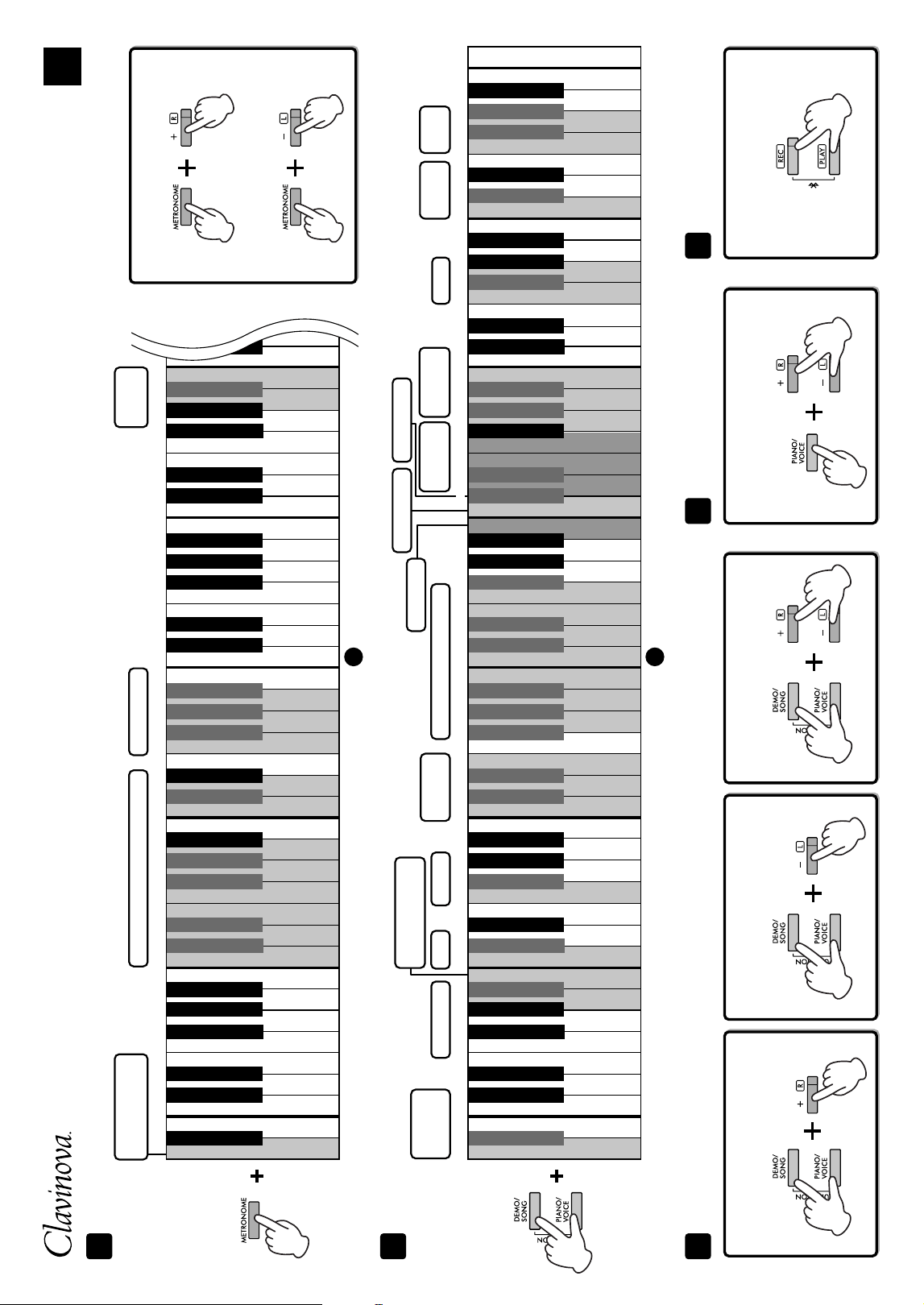
3
4
5 6 7
Voice confirmation of
current Tempo value
Operation
Confirmation
Sounds
Default tempo
2
4
6
0
3
5
Default volume
1 step down
1 step up
10 steps down
10 steps up
Tempo (Metronome, Songs, etc.)
Metronome
Volume
Metronome Beat
Default setting
440.0 Hz
1 step down
1 step up
1 step down
1 step up
Off
Ch 1+2
On/Off
On/Off
Enable
On
Off
On
Off
Off
1 step down
1 step up
ALL
On
Off
Off
Normal
On
20%
50%
80%
On/Off
Ch 1
Ch 1
Disable
Tuning
Transpose
MIDI Transmit
Channel
MIDI Receive
Channel
Audio
Loopback
Speaker
Volume
Limiter
Auto Power Off
IAC ON/OFF
and Depth
Bluetooth
$ᅊ&ᅊ'ᅊ)ᅊ*ᅊ$ᅊ&ᅊ'ᅊ)ᅊ*ᅊ$ᅊ&ᅊ'ᅊ)ᅊ*ᅊ$ᅊ&ᅊ'ᅊ)ᅊ*ᅊ$ᅊ&ᅊ'ᅊ)ᅊ*ᅊ$ᅊ
442.0 Hz
$%
C0
'()*$%
C1
'()*$%
C2
'()*$%
C3
'()*$%
C4
'()*$%
C5
$%
C0
'()*$%
C1
'()*$%
C2
'()*$%
C3
'()*$%
C4
'()*$%
C5
'()*$%
C6
'( )*$%
C7
Local Control
Control ChangeProgram Change
Metronome settings
2
4
7
9
1
3
5
6
8
0
To turn Duo on or off:
Tuning settings Duo setting
Start pairling
(press and hold):
Bluetooth (Audio) Pairling
To tune up
(in about 0.2 Hz steps):
To tune down
(in about 0.2 Hz steps):
Default pitch: 440.0 Hz
On
Off
−6
−4
−2
+1
+3
+6
−5
−3
−1
0
(normal pitch)
+2
+4
+5
Voice confirmation of
current system version
EN
$ᅊ&ᅊ'ᅊ)ᅊ*ᅊ$ᅊ&ᅊ'ᅊ)ᅊ*ᅊ$ᅊ&ᅊ'ᅊ)ᅊ*ᅊ$ᅊ&ᅊ'ᅊ)ᅊ*ᅊ$ᅊ&ᅊ'ᅊ)ᅊ*ᅊ$ᅊ&ᅊ'ᅊ)ᅊ*ᅊ$ᅊ&ᅊ'ᅊ)ᅊ*ᅊ$ᅊ
To increase the value by 1:
To decrease the value by 1:
Other settings
CLP
-
825 Quick Operation Guide
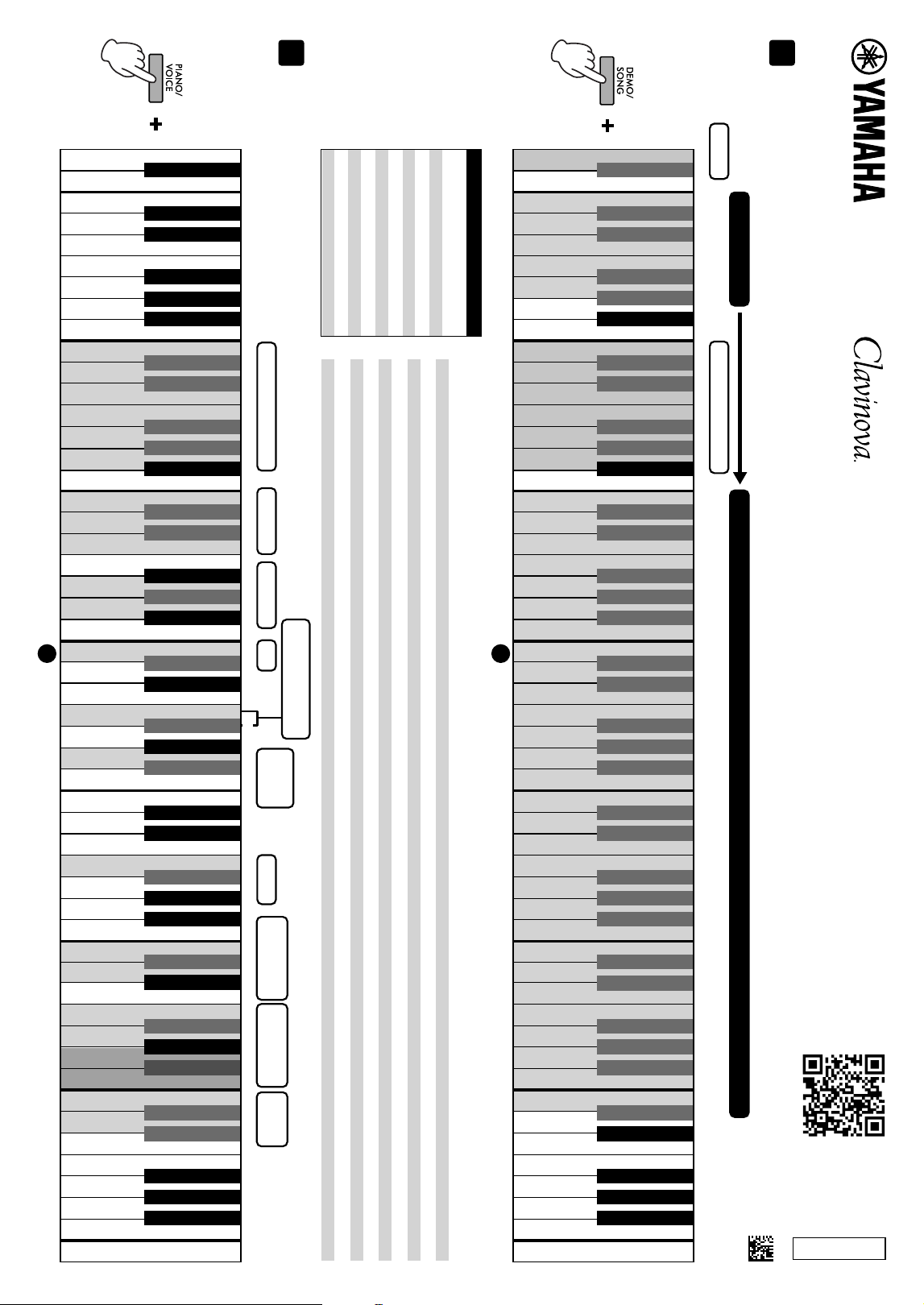
2
1
Reverb Types Reverb Depth VRM Duo Type
Grand
Expression
Modeling
Volume Balance
(Dual/Duo mode)
Octave Shift
(Dual/Duo mode)
Touch
Sensitivity
Concert Hall
Club
Soft
2
4
7
9
11
14
16
19
21
23
26
28
31
33
35
38
40
43
45
47
50
Recital Hall
Chamber
Off
Default setting
1 step down
1 step up
Default setting
1 step down
1 step up
Off
0 (Voice 2)
−1 (Voice 2)
+1 (Voice 2)
0 (Voice 1)
−1 (Voice 1)
+1 (Voice 1)
Fixed
Medium
Hard
$%
C0
'()*$%
C1
'()*$%
C2
'()*$%
C3
'()*$%
C4
'()*$%
C5
'()*$%
C6
'( )*$%
C7
$%
C0
'()*$%
C1
'()*$%
C2
'()*$%
C3
'()*$%
C4
'()*$%
C5
'()*$%
C6
'( )*$%
C7
1
3
5
6
8
10
12
13
15
17
18
20
22
24
25
27
29
30
32
34
36
37
39
41
42
44
46
48
49
$ᅊ&ᅊ'ᅊ)ᅊ*ᅊ$ᅊ&ᅊ'ᅊ)ᅊ*ᅊ$ᅊ&ᅊ'ᅊ)ᅊ*ᅊ$ᅊ&ᅊ'ᅊ)ᅊ*ᅊ$ᅊ&ᅊ'ᅊ)ᅊ*ᅊ$ᅊ&ᅊ'ᅊ)ᅊ*ᅊ$ᅊ&ᅊ'ᅊ)ᅊ*ᅊ$ᅊ
$ᅊ&ᅊ'ᅊ)ᅊ*ᅊ$ᅊ&ᅊ'ᅊ)ᅊ*ᅊ$ᅊ&ᅊ'ᅊ)ᅊ*ᅊ$ᅊ&ᅊ'ᅊ)ᅊ*ᅊ$ᅊ&ᅊ'ᅊ)ᅊ*ᅊ$ᅊ&ᅊ'ᅊ)ᅊ*ᅊ$ᅊ&ᅊ'ᅊ)ᅊ*ᅊ$ᅊ
On
Off
On
Static
Dynamic
Balanced
Separated
While holding down the applicable button, press one of the highlighted keys or buttons shown below to select a Song or set a parameter.
To select a Song, follow step 1 (Book Select), and then step 2 (Song No. Select).
Song playback
On
Off
Bösendorfer
Stage E.Piano
Vibraphone
Jazz Organ
CFX Grand
Pop Grand
DX E.Piano
Harpsichord
Pipe Organ
Strings
Bösendorfer
Stage E.Piano
Vibraphone
Jazz Organ
CFX Grand
Pop Grand
DX E.Piano
Harpsichord
Pipe Organ
Strings
Quick Play
1 Book Select
Demo Songs
2 Song No. Select
Beyer 1–50
Beyer 101–106
Czerny 100, 51–100
Hanon
50 Classics
Beyer 51–100
Burgmüller 1–25
Czerny 100, 1–50
Czerny 30, 1–30
50 Classical Music Masterpieces (Number/Song)
1 Canon D dur
2 Air On the G String
3 Jesus, Joy of Man’s Desiring
4 Twinkle, Twinkle, Little Star
5 Piano Sonate op.31-2 “Tempest” 3rd mov.
6 Ode to Joy
7 Wiegenlied op.98-2
8 Grande Valse Brillante
9 Polonaise op.53 “Héroïque”
10 La Campanella
11 Salut d’amour op.12
12 From the New World
13 Sicilienne
14 Clair de lune
15 Jupiter (The Planets)
16 Menuett (Eine kleine Nachtmusik K.525)
17 Menuett G dur
18 Marcia alla Turca
19 Piano Concerto No.1 op.11 2nd mov.
20 The Nutcracker Medley
21 Prelude (Wohltemperierte Klavier I No.1)
22 Menuett G dur BWV Anh.114
23 Piano Sonate No.15 K.545 1st mov.
24 Turkish March
25 Piano Sonate op.13 “Pathétique” 2nd mov.
26 Für Elise
27 Piano Sonate op.27-2 “Mondschein” 1st mov.
28 Impromptu op.90-2
29 Frühlingslied op.62-6
30 Fantaisie-Impromptu
31 Etude op.10-3 “Chanson de l’adieu”
32 Etude op.10-12 “Revolutionary”
33 Valse op.64-1 “Petit chien”
34 Nocturne op.9-2
35 Nocturne KK4a-16/BI 49 [Posth.]
36 Träumerei
37 Barcarolle
38 La prière d’une Vierge
39 Liebesträume No.3
40 Blumenlied
41 Humoresque
42 Arietta
43 Tango (España)
44 The Entertainer
45 Maple Leaf Rag
46 La Fille aux Cheveux de Lin
47 Arabesque No.1
48 Cakewalk
49 Je te veux
50 Gymnopédies No.1
Voice settings
Voices
© 2024 Yamaha Corporation
Published 11/2024
MWMA-B0
VGR3380
2 Song No.
1–50
1–50
1–50
1–6
1–25
1–50
1–50
1–30
1–20
21–42
1 Book
50 Classical Music Masterpieces
(50 Classics)
Beyer 1–50
Beyer 51–100
Beyer 101–106
Burgmüller 1–25
Czerny 100, 1–50
Czerny 100, 51–100
Czerny 30, 1–30
Hanon 1–20
Hanon 1-Variation 1–22
CLP
-
825 Quick Operation Guide
Binaural/
Stereophonic Optimizer
x