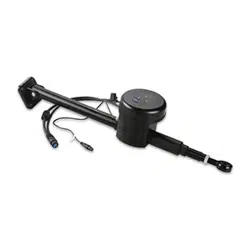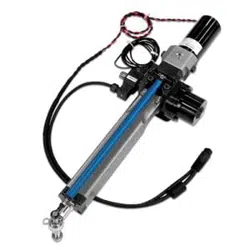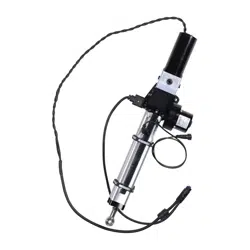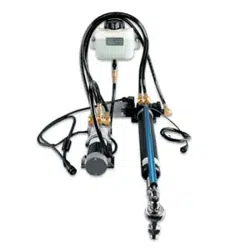

Class B Drive Unit Installation Instructions
To obtain the best performance and to avoid damage to your boat, install
the Garmin
®
Class B Drive Unit according to the following instructions.
Professional installation of the drive unit is highly recommended, because
specic knowledge of rudder operation is required to properly install the
drive unit.
Read all installation instructions before proceeding with the installation.
If you experience difculty during the installation, contact Garmin Product
Support.
About the Class B Drive Unit
The Class B drive unit is a self-contained hydraulic drive unit that uses a
solenoid clutch to extend and retract the rod that steers the tiller. Combined
with the included rudder feedback sensor, the Garmin Class B Drive unit
will provide the steering necessary for a Garmin autopilot when installed
correctly.
Because the drive unit is self-contained, you do not need to connect or
disconnect any of the hydraulic hoses. The system was lled and tested at the
factory.
Registering Your Device
Help us better support you by completing our online registration today.
• Go to http://my.garmin.com.
• Keep the original sales receipt, or a photocopy, in a safe place.
Contacting Garmin Product Support
Contact Garmin Product Support if you have any questions about this
product.
• In the USA, go to www.garmin.com/support, or contact Garmin USA by
phone at (913) 397.8200 or (800) 800.1020.
• In the UK, contact Garmin (Europe) Ltd. by phone at 0808 2380000.
• In Europe, go to www.garmin.com/support and click Contact Support
for in-country support.
Important Safety Information
WARnInG
You are responsible for the safe and prudent operation of your vessel.
The Autopilot is a tool that will enhance your capability to operate your boat.
It does not relieve you from the responsibility of safely operating your boat.
Avoid navigational hazards and never leave the helm unattended.
See the Important Safety and Product Information guide in the autopilot
product box for product warnings and other important information.
CAUtIon
Failure to install and maintain this equipment in accordance with these
instructions could result in damage or injury.
When in use, beware of hot motor and solenoid components, as well as the
risk of entrapment from moving parts
Always wear safety goggles, ear protection, and a dust mask when drilling,
cutting, or sanding.
Notice
This equipment should be installed by a qualied marine installer.
This equipment is only for use with Garmin autopilots.
The system was lled and tested at the factory, so you should not disconnect
the hydraulic hoses to install the system.
When drilling or cutting, always check the opposite side of the surface. Be
aware of fuel tanks, electrical cables, and hydraulic hoses.
March 2011 190-01289-06 Rev. B Printed in the UK
2 ClassBDriveUnitInstallationInstructions
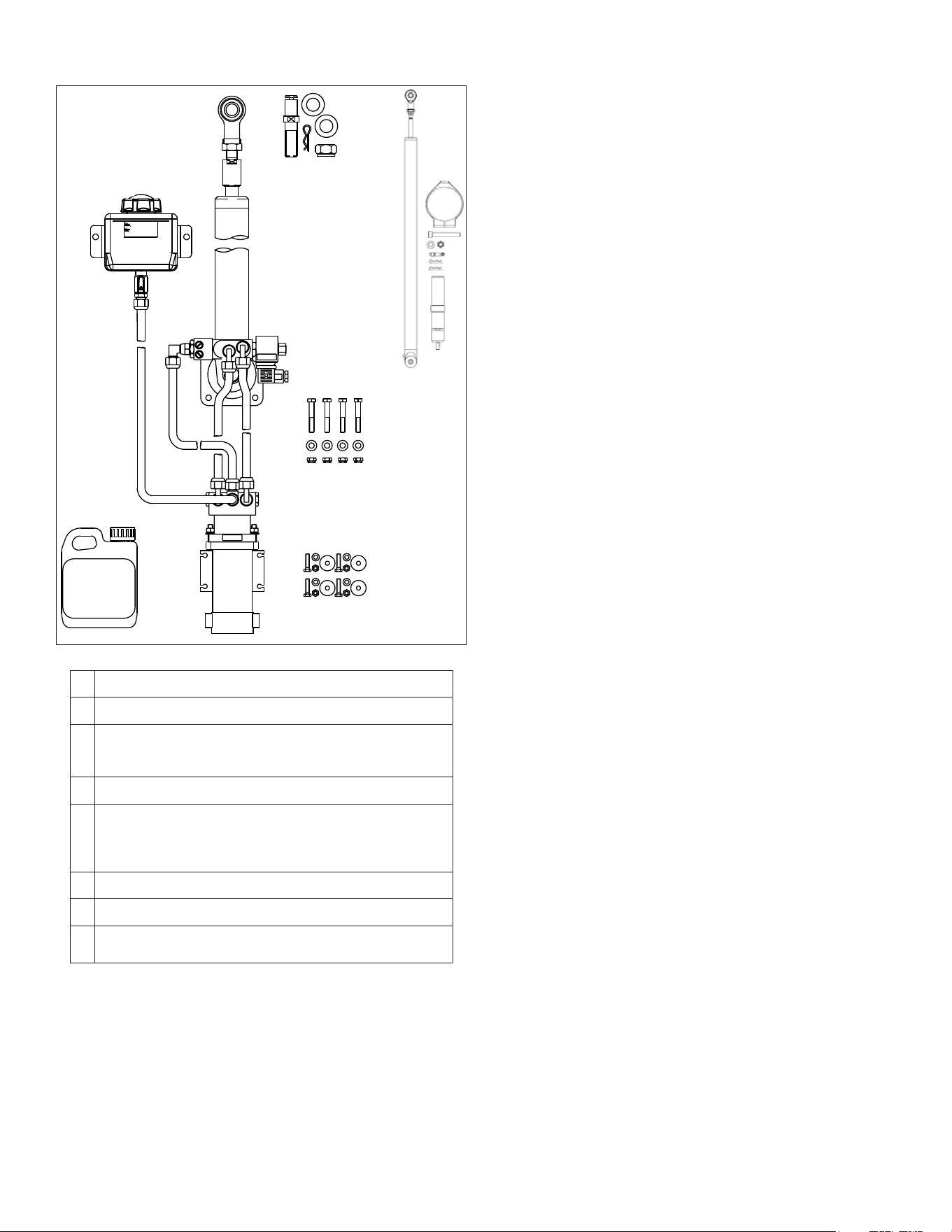
Package Contents
➊ ➋
➌
➍
➎
➏
➐
➑
➊
Reservoir
➋
Cylinder/ram
➌
Tiller bolt and ttings
Suitable for a quadrant or tiller arm thickness of .79 in. (20 mm) to
.98 in. (25 mm)
➍
Rudder feedback kit
➎
Cylinder fasteners
• M8 bolts, washers, and nuts
• Suitable for mounting the cylinder on a surface between .47 in.
(12 mm) and .95 in. (24 mm) thick
➏
Hydraulic oil
➐
Pump
➑
Pump fasteners
M8 bolts, washers, and nuts
Note: The fasteners listed above are used to secure the components to the
packaging. Do not discard the hardware when unpacking the drive unit.
Hardware needed
• Tiller arm (if needed, page 2)
• End stops (page 2)
• Screws to mount the reservoir (page 3)
tools needed
• Safety glasses
• Drill and drill bits
• Wrenches
• Torque wrench
• Loctite
®
638
™
or equivalent (recommended, page 4)
tiller Arm and End Stops
You can connect the drive unit to either an existing quadrant or to a tiller arm
(not included).
If you do not have a quadrant or can not install the drive unit at your
quadrant location, choose a tiller arm that ts the diameter of your rudder
post and is the correct length for the installation location.
The supplied tiller bolt is suitable for a quadrant or tiller arm thickness of
.79 in. (20 mm) to .98 in. (25 mm).
The cylinder must not act as a drive limiter. Physical end stops (not included)
must be in place to limit the cylinder-rod travel to 12 in. (305 mm) from fully
retracted to fully extended, or damage to the cylinder will occur.
Location Considerations
When selecting a location to mount the cylinder, the pump, and the
reservoir, consider these guidelines:
• The system was lled and tested at the factory, so none of the
hydraulic hoses should be disconnected to install the system.
• The components must all be installed under deck.
• The motor should not be installed in a location where it is exposed to
excessive temperature (page 6), vibration, or fumes.
Any of these extremes can reduce the life of the motor.
• Avoid contact with water and excessive humidity.
• Motor-brush holders are located on both sides of the motor, and the
motor should be installed so that the motor brushes are accessible for
service (page 3).
• The cylinder must be mounted securely on a surface that is able to
withstand the high thrusts generated by the rudder.
• The cylinder must be installed within specic extension and angle
limitations (page 8).
◦ The cylinder-rod movement must be limited by physical stops to
12 in. (305 mm) from fully retracted to fully extended, or damage
to the cylinder will occur.
◦ No part of the cylinder or rod should contact the vessel, quadrant,
or tiller arm throughout the full range of movement.
◦ The 5° angle at the extremes of the stroke (page 8) must not be
exceeded, or damage the cylinder bearings and the rod will occur.
An example illustration is available in the appendix (page 9).
ClassBDriveUnitInstallationInstructions 3
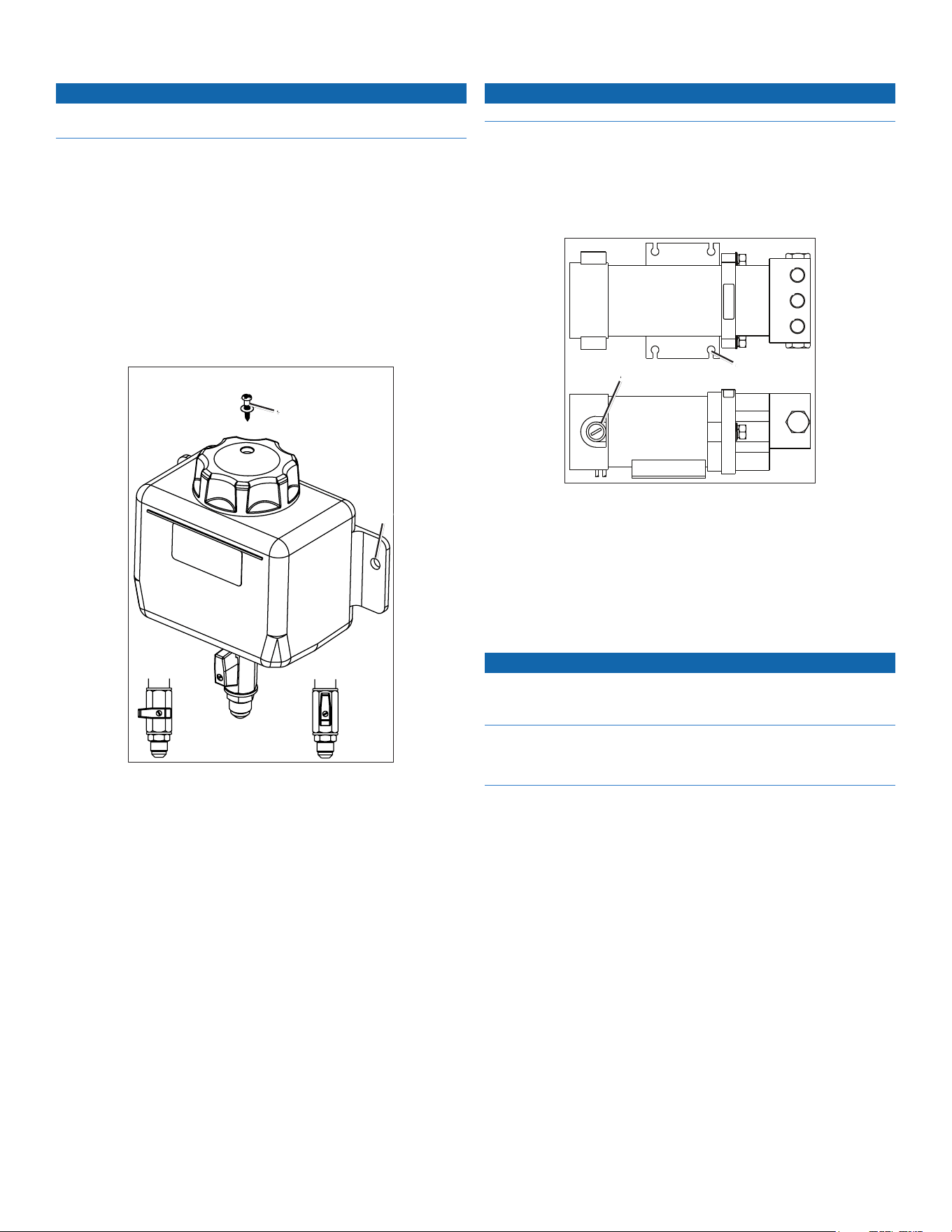
Installing the Reservoir
Notice
The reservoir is tted with a special cap that contains a breather hole. The
breather hole is sealed for transit and must be opened before operation.
The reservoir contains the hydraulic uid necessary for operation of the
drive unit, and it must be installed and prepared before installing any other
components. Do not attempt to move the cylinder rod until instructed.
You must rst select a mounting location before you can install the reservoir
(page 2).
1. Select fastening screws suitable for mounting the reservoir on a bulkhead
of your boat.
2. Choose a location on a bulkhead as far above the pump and cylinder as
possible and mark the pilot holes
➊
.
If needed, the device and mounting-hole dimensions are provided in the
appendix (page 7).
➌ ➍
➋
➊
3. Drill the pilot holes using a drill bit appropriate for the chosen screws.
4. Secure the reservoir to the bulkhead with the screws.
5. Remove the transit screw and seal
➋
from the cap.
Save the screw and seal for future use.
6. Using the included hydraulic oil, ll the reservoir to the maximum level
as indicated on the label.
7. Turn the valve from the OFF position
➌
to the ON position
➍
.
8. Extend the cylinder rod halfway, and check the oil level.
9. If necessary, add oil.
Installing the Pump
Notice
Do not disconnect the hydraulic hoses from the pump.
Bolts, washers, and nuts are provided to install the pump.
You must rst select a mounting location before you can install the pump
(page 2).
1. Make sure that the brush holders
➊
are accessible for service after
mounting the pump.
➋
➊
2. Mark the pilot hole locations
➋
.
If needed, the device and pilot hole dimensions are provided in the
appendix (page 7).
3. Drill the mounting holes using a drill bit appropriate for the mounting
surface and the mounting hardware.
4. Secure the pump to the mounting surface with the included hardware.
Installing the Cylinder
Notice
The cylinder rod movement must be limited by physical end stops to 12 in.
(305 mm) from fully retracted to fully extended. Failure to install steering
end stops will damage the drive unit.
Do not exceed the 5° angle at the extremes of the stroke (page 8). Exceeding
the 5° angle at the extremes of the stroke will damage the cylinder bearings
and the rod.
You must rst select a mounting location before you can install the cylinder
(page 2).
1. Install the mounting foot (page 3).
2. Install the tiller bolt (page 4).
Installing the Mounting Foot
The mounting foot is at the base of the cylinder.
Hardware is supplied to fasten the mounting foot to the mounting surface.
The supplied M8 bolts, washers, and nuts are suitable for mounting the
cylinder on a surface between .47 in. (12 mm) and .95 in. (24 mm) thick.
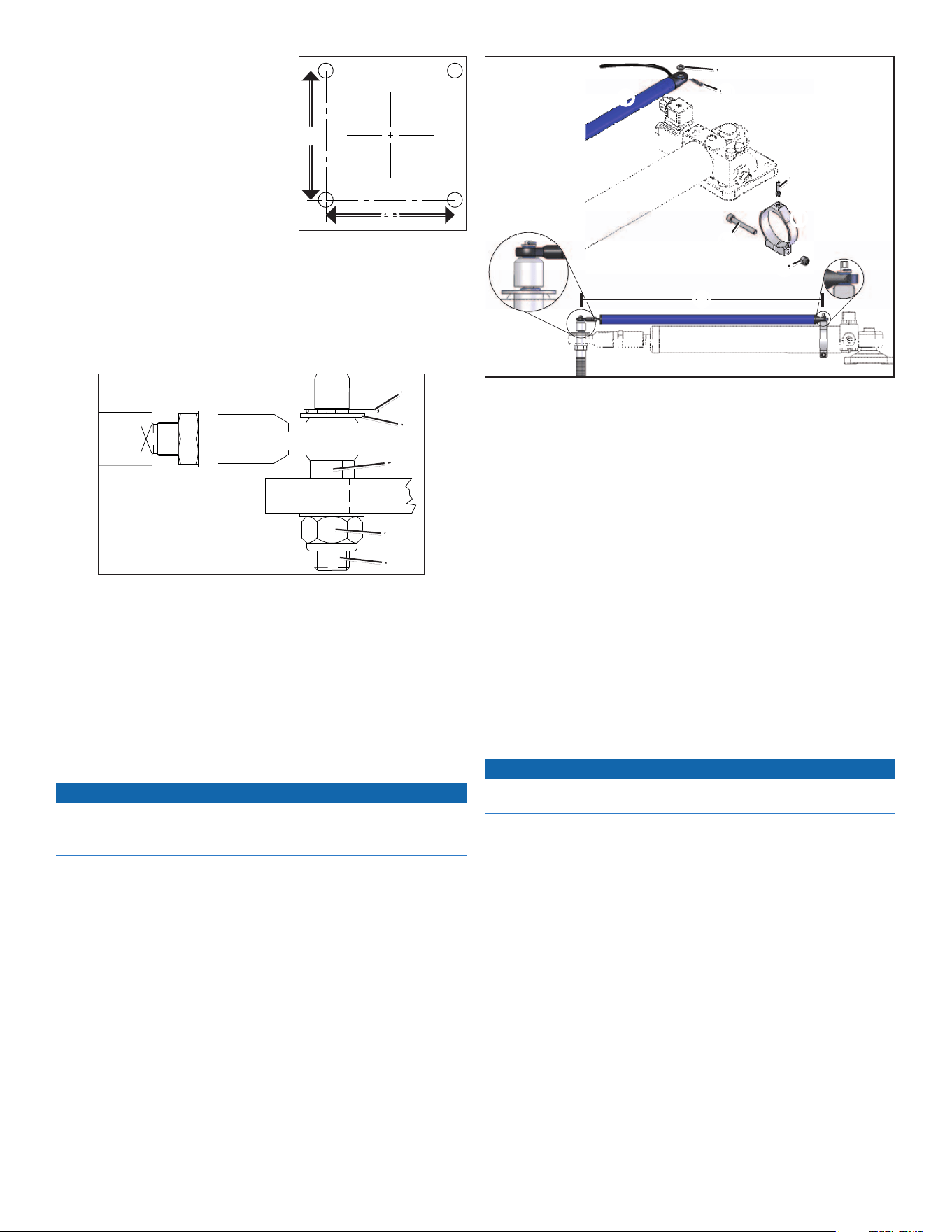
1. With the mounting foot in the chosen location, mark the locations of the
four mounting holes on the mounting surface.
4 ClassBDriveUnitInstallationInstructions
2. Verify the marked locations.
The marked locations should be 3 in.
(76.2 mm)
➊
apart.
Note: The diagram is not to scale.
3. Drill .35 in. (8.8 mm) holes through the
mounting surface.
4. Secure the mounting foot to the
mounting surface using the supplied
M8 bolts, washers, and nuts.
5. Tighten the bolts to 12.5 ft-lbf (17
Nm).
Installing the tiller Bolt
The supplied tiller bolt is suitable for a quadrant or tiller arm thickness of
.79 in. (20 mm) to .98 in. (25 mm).
1. Drill a 20.1 mm hole in the quadrant or tiller arm
➊
(not included) for the
tiller bolt
➋
.
➊
➋
➌
➍
➏
➐
➑
➎
2. It is recommended to apply Loctite 638 or equivalent to the tiller bolt
where it passes through the quadrant or tiller arm
➌
.
3. Place the tiller bolt into the quadrant or tiller arm, and secure it with the
M20 washer
➍
and the M20 nut
➎
.
4. Tighten the M20 nut to 50.15 ft-lbf (68 Nm).
5. Place the rod
➏
on the tiller bolt.
6. Fasten the rod to the tiller bolt with the other M20 washer
➐
and the
locking pin
➑
.
Installing the Rudder Feedback Sensor
Notice
You must carefully measure the operating distance of the drive unit cylinder
rod and install the feedback sensor mounting clamp at the proper location, or
you will damage the feedback sensor.
To use the drive unit with a Garmin autopilot, you must install the rudder
feedback sensor after you have installed the drive unit.
1. Place the sensor mounting clamp
➊
on the cylinder
➋
.
➊
➋
➌
➍
➎
➏
➐
➑
➒
2. Fasten the sensor mounting clamp to the cylinder using the included
45 mm M6 screw
➌
and M6 nut
➍
.
Do not tighten the nut at this time.
3. Adjust the position of the sensor mounting clamp so that the distance
➎
between the mounting bracket and the center of the tiller bolt is between
19.69 in. (500 mm) and 32.28 in. (820 mm) during the full range of the
cylinder movement.
If the distance ever compresses below 19.69 in. (500 mm) or extends
beyond 32.28 in. (820 mm) it will damage the sensor.
4. Tighten the M6 nut to 3.7 ft-lbf (5 Nm).
5. Install the sensor mounting stud
➏
in the sensor mounting clamp.
6. Fit the rudder feedback sensor
➐
on the sensor mounting clamp and the
tiller bolt.
7. Fasten the rudder feedback sensor to the sensor mounting clamp with the
included M5 A4 washer
➑
and locking pin
➒
.
8. Fasten the rudder feedback sensor to the tiller bolt with the included M5
A4 washer and locking pin.
Connecting the Drive Unit to the Garmin Autopilot
Notice
Do not cut the cables connected to the drive unit. Cutting the drive-unit
cables voids your warranty.
Consult the installation instructions provided with your Garmin autopilot to
install the autopilot components and to connect the drive unit to the correct
component.
➊
➊
ClassBDriveUnitInstallationInstructions 5
Maintenance and Service
General Maintenance
• To maximize the life of your drive unit, take the following precautions:
◦ Keep the cylinder rod free from damage.
◦ Avoid exposing the drive unit to salt water.
• Perform the following tasks on a regular basis:
◦ Inspect the cylinder-mounting-foot hardware and the tiller-bolt
hardware.
If necessary, tighten any components.
◦ Lubricate the cylinder rod-end and the tiller bolt.
Use only high-quality marine grease that is compatible with nitrile
seals.
Inspecting the Motor Brushes
You should inspect the motor brushes every 500 hours (typically annually)
for wear.
1. Remove the brush holder on the side of the motor.
2. Inspect the brushes for wear.
3. If necessary, purchase replacement brushes.
Replacing the Motor Brushes
Replace the brushes with the correct replacement part while following
these guidelines:
• Clean all of the loose carbon from the inside the motor before tting
the new brushes in the motor.
• If hydraulic uid has entered the motor, correct the cause, and then
degrease the brush gear and commutator before running the motor.
If you do not degrease the motor in this situation, arching will reduce
the bush life.
Bleeding the System
CAUtIon
When bleeding the system, stay clear of moving steering components and
linkages at all times to avoid injury.
Notice
Before bleeding the system, make sure the oil and any storage containers are
clean and free of contamination to avoid damaging the drive unit.
The hydraulic system of the drive unit was lled and tested at the factory, so
follow this procedure only if air has entered the system or if the system has
been dismantled.
Before you can bleed the system, you must purchase the correct type of
hydraulic oil (page 6). Dispose of any waste oil responsibly.
1. Set the reservoir tap to the ON position (page 3).
2. Push in the cylinder rod so that it is fully retracted.
3. Loosen, but do not disconnect, the reservoir hoses from the cylinder.
Oil will emerge from the connectors when loosened properly.
4. Tighten the hoses.
5. Turn on the autopilot system to energize the drive unit.
6. Slowly pull out the cylinder rod until it is fully extended.
7. Observe the oil level in the reservoir.
8. If necessary, ll the reservoir to the minimum line on the label.
9. Fully retract the rod.
The oil level will rise when the rod is retracted.
10. Observe the oil level in the reservoir.
11. If necessary, ll the reservoir to the maximum line on the label.
12. Repeat steps 6–11 until you can see no air rising into the reservoir, and
the pump takes over.
13. Use the autopilot to extend and retract the rod until you can see no air
rising into the reservoir.
You may need to manually assist the cylinder at rst to purge any
remaining air in the system.
14. Observe the oil level in the reservoir.
15. If necessary, ll the reservoir to the maximum line on the label.
troubleshooting
Symptom Possible Causes
The motor does not
run.
• The power and clutch cable is not connected to
the ECU.
• The rudder-feedback cable is not connected to
the ECU.
• The motor brushes need to be replaced (page 5).
The motor runs, but
the cylinder rod does
not move or moves
erratically.
There is air in the cylinder (may be accompanied by
external oil loss). Bleed the system (page 5).
The pump makes
excessive noise.
• There is air in the cylinder (may be accompanied
by external oil loss). Bleed the system (page 5).
• The motor may be damaged.

6 ClassBDriveUnitInstallationInstructions
Appendix
Specications
Component Specication Value
Motor Nominal output power 100 W
Maximum continuous current 12 A
Rotation Reversing
Protection IP55
Ignition protection BS EN 28846:1993
EMC BS EN 60945: 2002
Clutch Coil voltage nominal 12 Vdc
Coil power continuous 12 W
Protection IP65
Cylinder Volume (Nominal) 0.44 gal. (538 cc)
Area 0.27 in² (176.6 mm²)
Stroke 12 in. (305 mm)
Adjustment 0.7 in. (18 mm)
Maximum thrust (intermittent) 2,469 lbs (1120 kg)
Hard over time nominal 13 sec.
Relief valve setting 62 bar
Cylinder body material Aluminium BS 1490
Cylinder rod material Stainless Steel Chrome Plated
Seals Nitrile & PTFE
Body Protection SP270
Oil Recommended Q8 Dynobear 10
Equivalent Mineral based hydraulic
Minimum – ISO VG10
Maximum – ISO VG40
Ports Pump G1/4(BSP) parallel BS2779’73
Cylinder G1/4(BSP) parallel BS2779’73
Hoses Threads 5/8-18 SAE female swivel
Material Brass
Type Marine Steering Hose
• 1000 PSI working pressure
• 5/16″ I/D
Length 3.28 ft. (1 m)
General System Weight (Gross) 30.86 lbs. (14 kg)
Temperature rating From -4° to 149°F (from -20º to 65ºC)
ClassBDriveUnitInstallationInstructions 7
Reservoir Dimensions
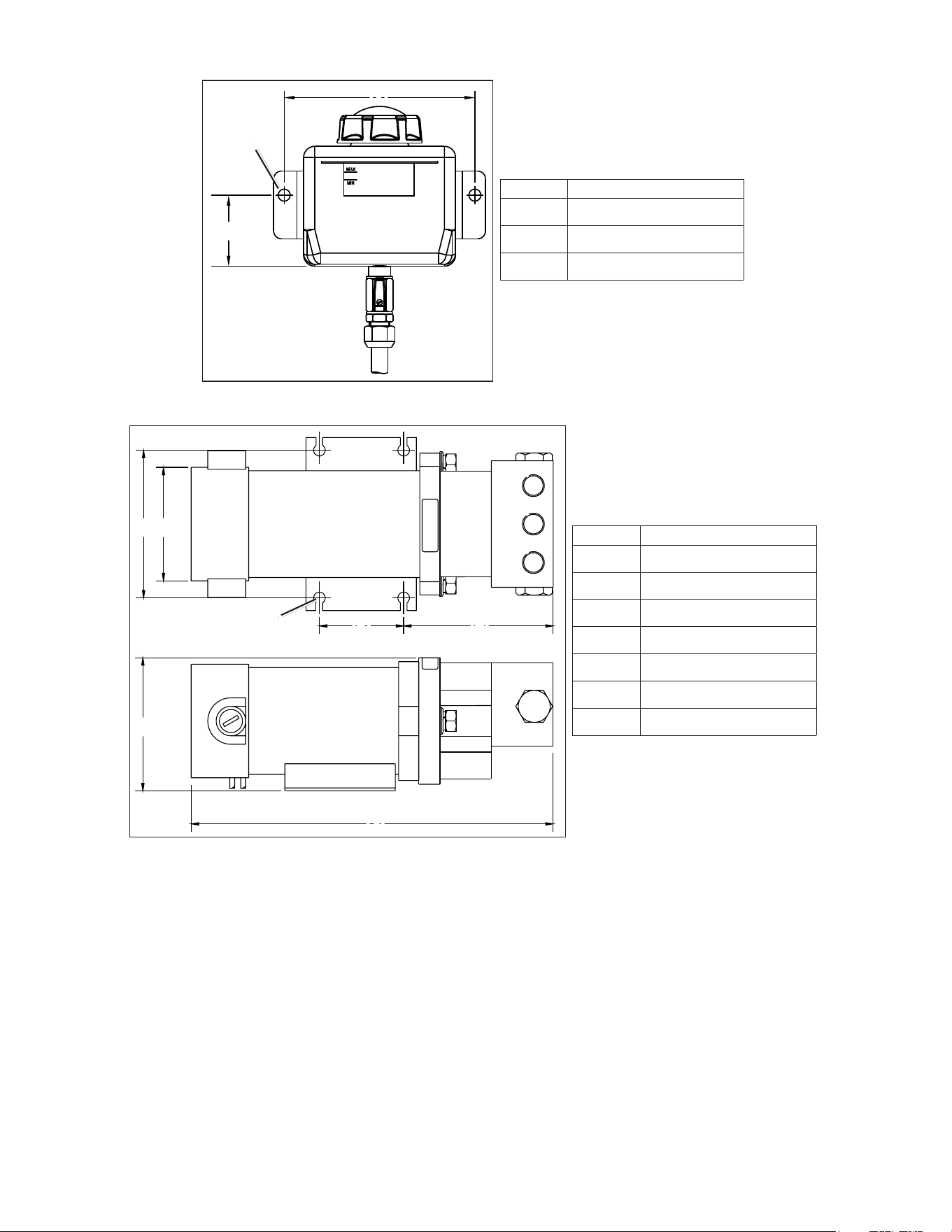
Item Measurement
➊
5.85 in. (148.7 mm)
➋
3/8 in. (9.5 mm) diameter
➌
2.18 in. (55.3 mm)
➊
➌
➋
Pump Dimensions
Item Measurement
➊
3.5 in. (88.9 mm)
➋
2.68 in. (68 mm) diameter
➌
0.28 in. (7 mm) diameter
➍
2 in. (50.8 mm)
➎
3.33 in. (84.6 mm)
➏
3.15 in. (80 mm)
➐
8.58 in. (218 mm)
➊ ➋
➍ ➎
➏
➐
➌
8 ClassBDriveUnitInstallationInstructions
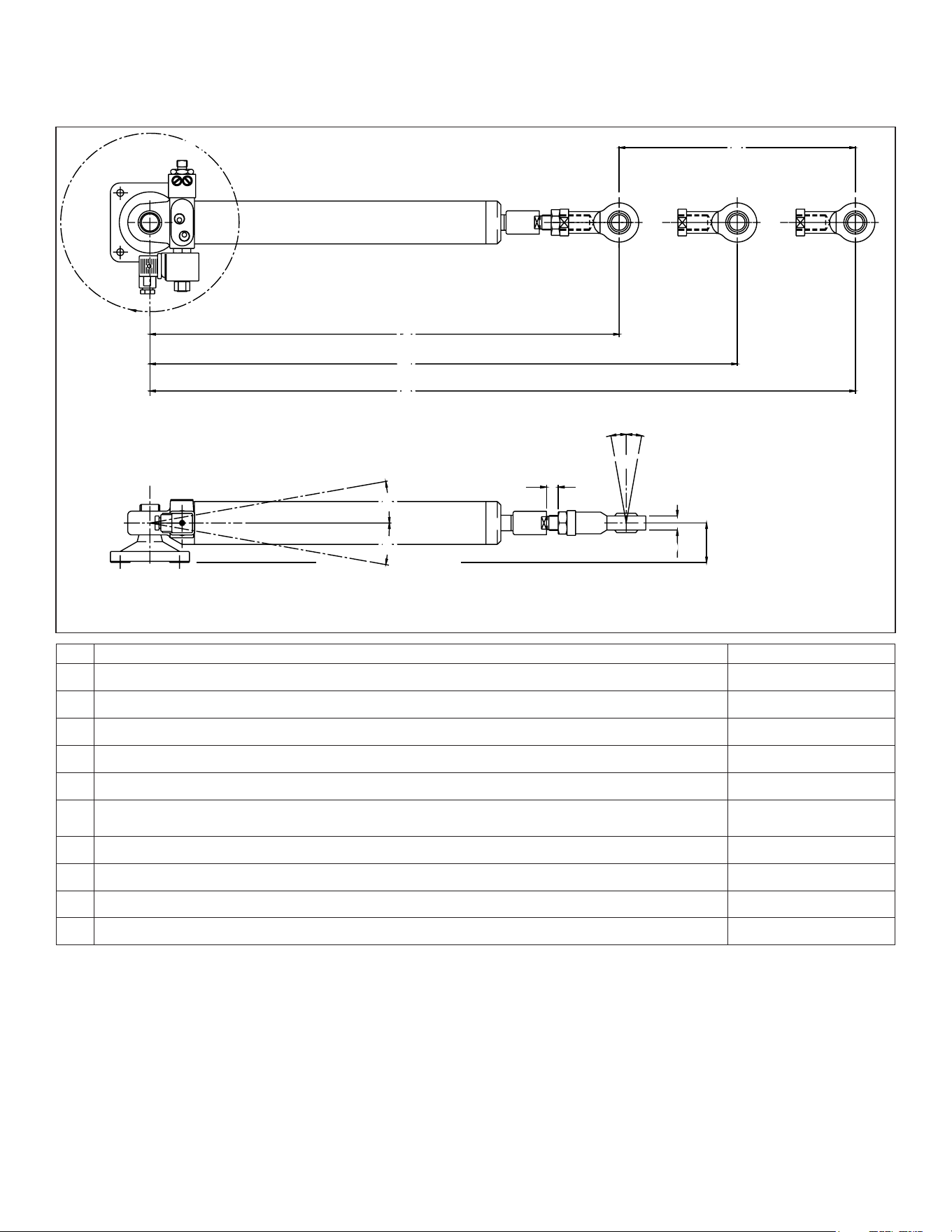
Cylinder Installation Dimensions
B
A
➊
➋
➌
➍
➎
➏
➏
➐
➑ ➑
➒
➓
Item Description Measurement
➊
Pivot radius of the cylinder on the mounting foot. 360°
➋
Stroke distance from fully retracted to fully extended. 12 in. (305 mm)
➌
Distance from the center of the cylinder mount to the rudder bolt when fully retracted. 23.75 in. (603.2 mm)
➍
Distance from the center of the cylinder mount to the rudder bolt when the rudder is amidships. 29.72 in. (754.9 mm)
➎
Distance from the center of the cylinder mount to the rudder bolt when the rod is fully extended. 35.7 in. (906.8)
➏
Maximum tilt angle of the cylinder when at the extremes of the stroke.
Exceeding this angle will damage the drive unit.
5° to either side of center
➐
Maximum adjustable distance of the rudder bolt adapter from the end of the rod. 0.59 in. (15 mm)
➑
Maximum tilt angle of the rudder bolt when at the extremes of the stroke. 10° to either side of center
➒
Thickness of the rudder bolt adapter. 0.98 in. (24.9 mm)
➓
Relative distance from the center of the rod to the base of the cylinder mount when at rest. 2 in. (51 mm)
ClassBDriveUnitInstallationInstructions 9
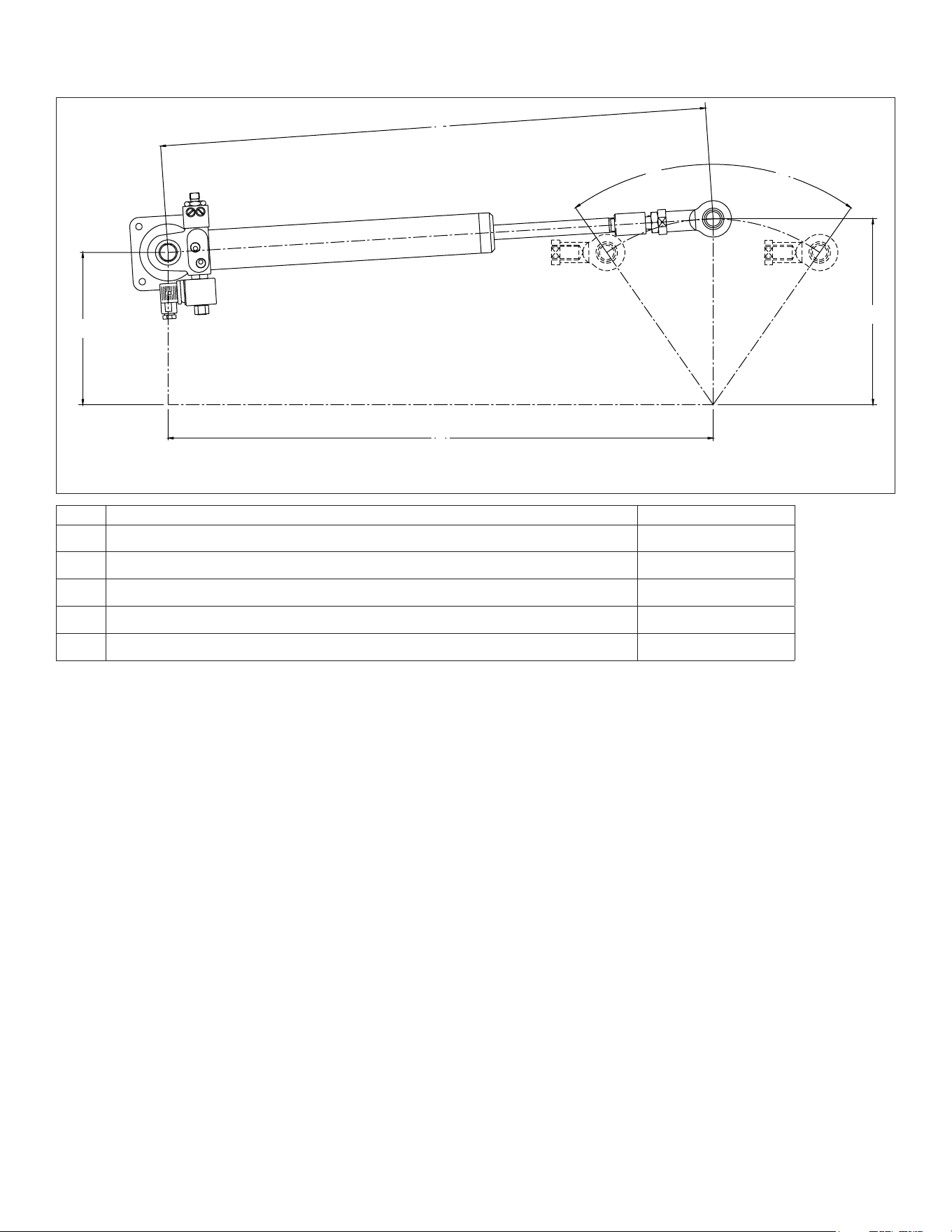
Cylinder Mounting Example
This example shows a typical cylinder installation on a 8.4 in. (214 mm) quadrant with total rudder angle of 70° (2 × 35°).
➊
➋ ➋
➌
➍
➎
Item Description Measurement
➊
Distance from the center of the cylinder base to the tiller bolt when the rudder is amidships. 29.66 in. (753.3 mm)
➋
Degree of travel from amidships to the installed cylinder stops. 35°
➌
Relative distance from the center of the cylinder base to the rudder post. 8.28 in. (210.4 mm)
➍
Distance from the center of the tiller bolt to the rudder post. 10.12 in. (257 mm)
➎
Distance from the center of the cylinder base to the rudder post when the rudder is amidships. 29.67 in. (753.7 mm)
© 2011 Garmin Ltd. or its subsidiaries
All rights reserved. Except as expressly provided herein, no part of this manual may be reproduced, copied, transmitted, disseminated, downloaded or stored in any storage medium, for any purpose without the
express prior written consent of Garmin. Garmin hereby grants permission to download a single copy of this manual onto a hard drive or other electronic storage medium to be viewed and to print one copy of
this manual or of any revision hereto, provided that such electronic or printed copy of this manual must contain the complete text of this copyright notice and provided further that any unauthorized commercial
distribution of this manual or any revision hereto is strictly prohibited.
Information in this document is subject to change without notice. Garmin reserves the right to change or improve its products and to make changes in the content without obligation to notify any person or
organization of such changes or improvements. Visit the Garmin Web site (www.garmin.com) for current updates and supplemental information concerning the use and operation of this and other Garmin
products.
Garmin
®
and the Garmin logo are trademarks of Garmin Ltd. or its subsidiaries, registered in the USA and other countries. These trademarks may not be used without the express permission of Garmin.
Loctite
®
638™ is a trademark of Henkel Corporation in the U.S. and elsewhere.
© 2011 Garmin Ltd. or its subsidiaries
Garmin International, Inc.
1200 East 151
st
Street, Olathe, Kansas 66062, USA
Garmin (Europe) Ltd.
Liberty House, Hounsdown Business Park, Southampton, Hampshire, SO40 9LR UK
Garmin Corporation
No. 68, Zhangshu 2
nd
Road, Xizhi Dist., New Taipei City, 221, Taiwan (R.O.C.)
www.garmin.com