Before using your new product, please read these instructions to prevent any damage.
ASSEMBLY GUIDE
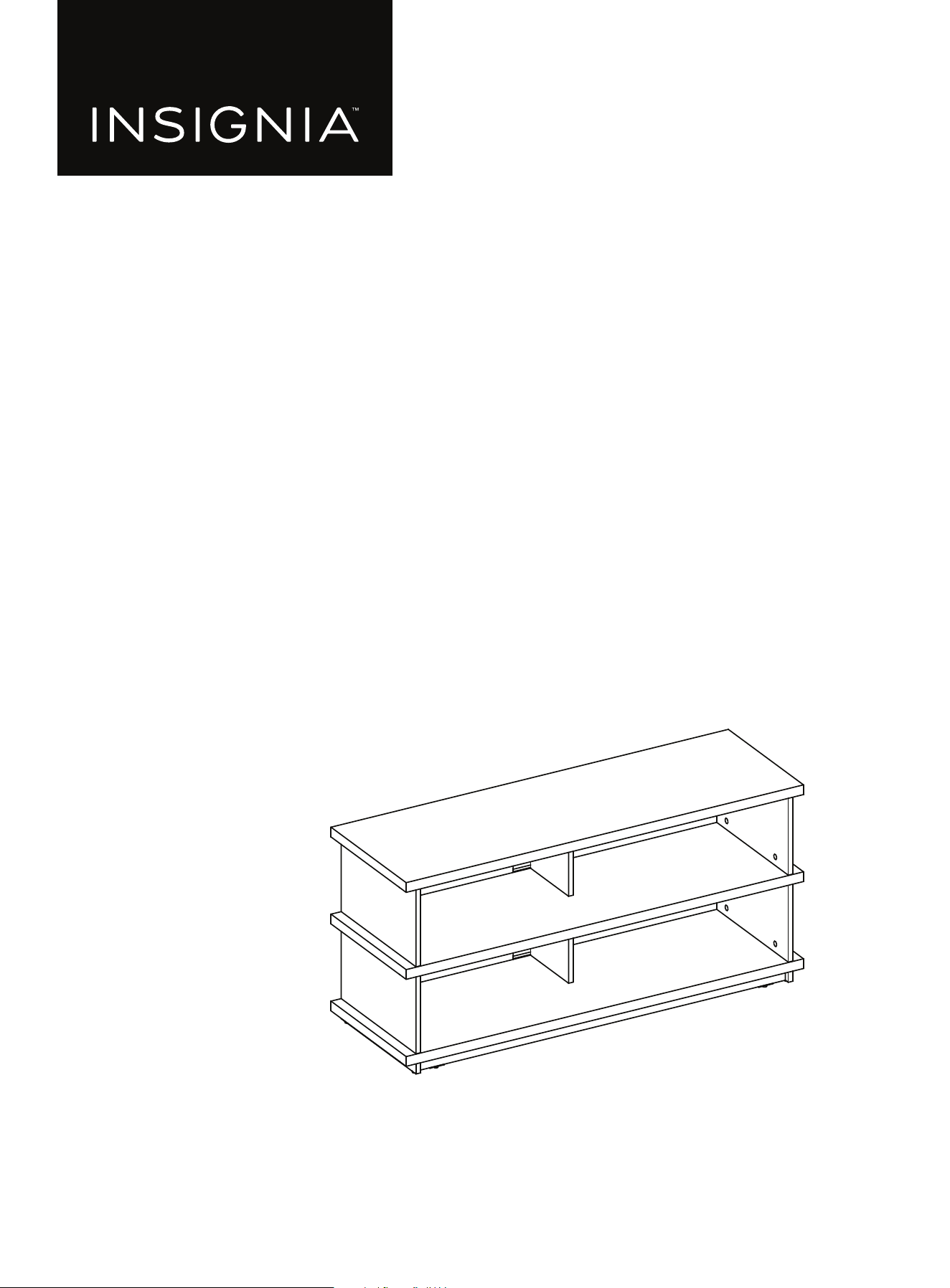
47.5 in. TV Stand
NS-STV555

www.insigniaproducts.com
2
Contents
IMPORTANT SAFEGUARDS . . . . . . . . . . . . . . . . . . . . . . . . . . . . . . . . . . . . . . . . . . . . . . . . . . . . . . . . . . . . . . . . . . . . . . . . . . . . 3
Features . . . . . . . . . . . . . . . . . . . . . . . . . . . . . . . . . . . . . . . . . . . . . . . . . . . . . . . . . . . . . . . . . . . . . . . . . . . . . . . . . . . . . . . . . . . . . . 4
Dimensions. . . . . . . . . . . . . . . . . . . . . . . . . . . . . . . . . . . . . . . . . . . . . . . . . . . . . . . . . . . . . . . . . . . . . . . . . . . . . . . . . . . . . . . . . . . . . . . . . . . . . . . 4
Package contents . . . . . . . . . . . . . . . . . . . . . . . . . . . . . . . . . . . . . . . . . . . . . . . . . . . . . . . . . . . . . . . . . . . . . . . . . . . . . . . . . . . . . 5
Parts . . . . . . . . . . . . . . . . . . . . . . . . . . . . . . . . . . . . . . . . . . . . . . . . . . . . . . . . . . . . . . . . . . . . . . . . . . . . . . . . . . . . . . . . . . . . . . . . . . . . . . . . . . . . . 5
Hardware. . . . . . . . . . . . . . . . . . . . . . . . . . . . . . . . . . . . . . . . . . . . . . . . . . . . . . . . . . . . . . . . . . . . . . . . . . . . . . . . . . . . . . . . . . . . . . . . . . . . . . . . . 5
Tools needed (not provided) . . . . . . . . . . . . . . . . . . . . . . . . . . . . . . . . . . . . . . . . . . . . . . . . . . . . . . . . . . . . . . . . . . . . . . . . . . 6
Installation tips . . . . . . . . . . . . . . . . . . . . . . . . . . . . . . . . . . . . . . . . . . . . . . . . . . . . . . . . . . . . . . . . . . . . . . . . . . . . . . . . . . . . . . . 7
Assembling your TV stand. . . . . . . . . . . . . . . . . . . . . . . . . . . . . . . . . . . . . . . . . . . . . . . . . . . . . . . . . . . . . . . . . . . . . . . . . . . . . 8
Maintaining your TV stand . . . . . . . . . . . . . . . . . . . . . . . . . . . . . . . . . . . . . . . . . . . . . . . . . . . . . . . . . . . . . . . . . . . . . . . . . . .26
Specifications. . . . . . . . . . . . . . . . . . . . . . . . . . . . . . . . . . . . . . . . . . . . . . . . . . . . . . . . . . . . . . . . . . . . . . . . . . . . . . . . . . . . . . . .26
ONE-YEAR LIMITED WARRANTY . . . . . . . . . . . . . . . . . . . . . . . . . . . . . . . . . . . . . . . . . . . . . . . . . . . . . . . . . . . . . . . . . . . . . .27
www.insigniaproducts.com
3
47.5 in. TV Stand
IMPORTANT SAFEGUARDS
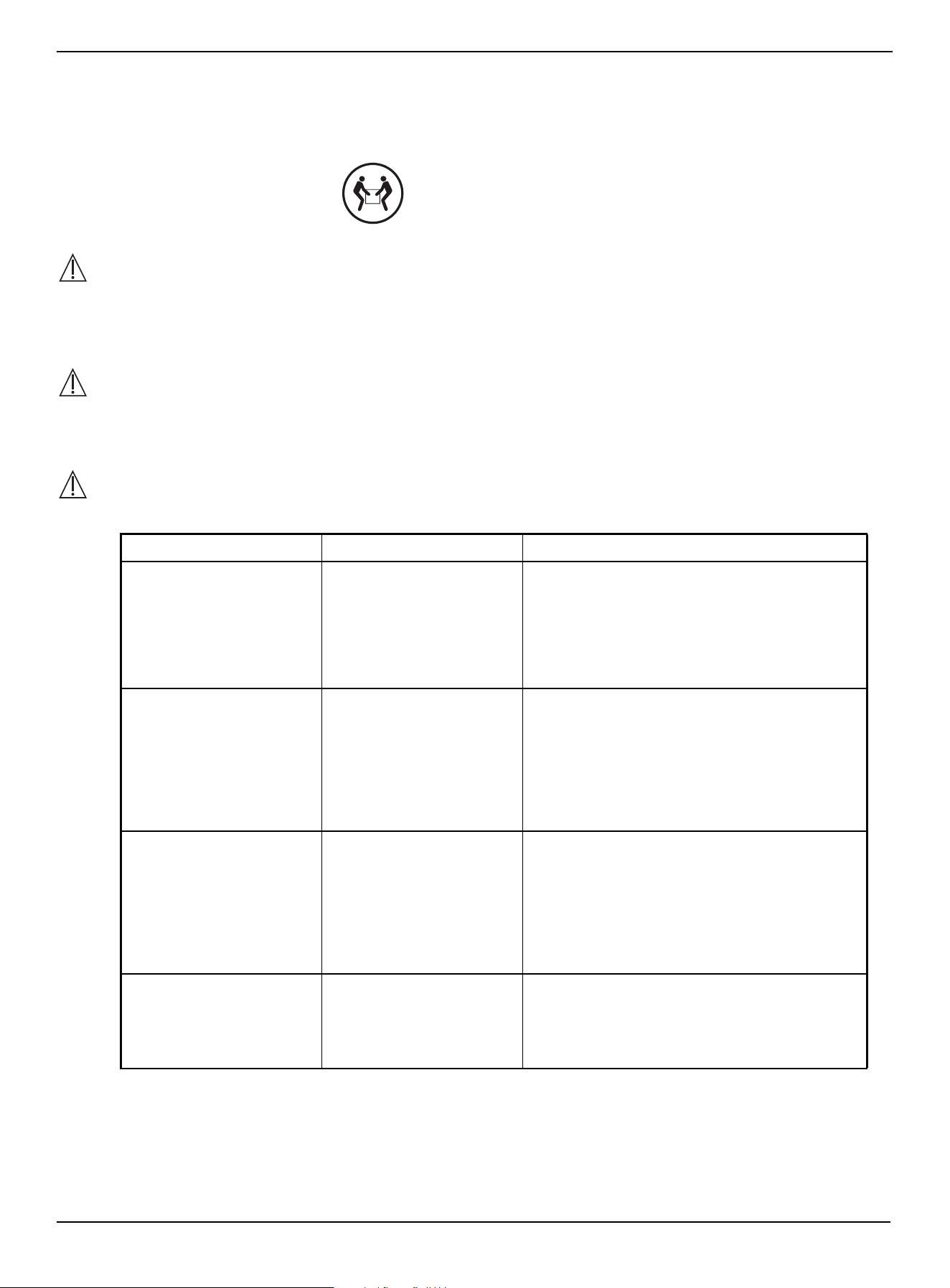
WARNING
CAUTION
The top surface of this TV stand is designed for use with a product weighing no more than 70 lbs. (31.75 kg) and having a
width that permits it to sit evenly on the TV stand with no more than a one-inch overhang on each side of the shelf. Use
with products that weigh more than the maximum weight allowed, or with dimensions that extend beyond the
maximum width may result in instability, which may result in injury.
CAUTION
This product contains small items that could be a choking hazard if swallowed. Keep these items away from young
children!
WARNING
Please use your TV stand correctly and safely. Improper use can cause safety hazards or damage to your furniture or
household items. Carefully read the following chart.
SAVE THESE INSTRUCTIONS
LOOK OUT FOR: WHAT CAN HAPPEN: HOW TO AVOID THE PROBLEM:
• Children climbing on the
TV stand.
• A child may try to reach a
toy or other object by
climbing on the TV stand.
• Children will play and be
active near the TV.
• Risk of injury or death.
• A child climbing on the
TV stand can make it
top-heavy and cause it to
tip over.
• A child playing with a TV
can cause it to tip over.
• Never allow children to climb on or play with
the TV stand.
• Do not place toys or food on the top shelves.
Children may try to climb to reach them out of
curiosity.
• Improper use of the TV
stand to support TVs. A
stand designed for use
with TVs will specify the
maximum weight rating
and recommended size of
the TVs it will safely
support.
• Risk of injury or death.
• TVs can be very heavy.
Note: older CRT TVs tend to be
unbalanced and prone to
tipping forward.
• A TV must only be set on furniture specifically
designed to support a television.
• Never use a TV that exceeds the weight ratings
or size guidelines specified for the TV stand.
• Improperly moving the
TV stand.
• The TV stand can tip over
or break if improperly
moved.
• Risk of injury.
• Unload shelves from the top to the bottom
before moving the TV stand.
• Do not push the TV stand, especially on a
carpeted floor. Have a friend help you lift the
item and set it in place.
• Do not lift the TV stand using the top shelf. Lift
from the frame.
• Remove the TV before moving the TV stand.
• The TV/stand assembly
tipping forward.
• Risk of injury.
• Top-heavy furniture can
tip over.
• The TV and stand could
be damaged.
• Use the tipping restraint hardware provided
and install it properly.
Some steps are more easily
handled with two adults.
www.insigniaproducts.com
4
Features
• 47.5 in. (120.65) tabletop holds most TVs up to 55 in. (139.7 cm) and 70 lbs. (31.75 kg)
• Large storage areas accommodate your DVD Player, gaming console, cable box, and more*
• Cutouts make it easy to route and hide cords
• Black color matches your electronics and fits any room décor
*Shelf weight capacity 50 lbs. (22.68 kg)
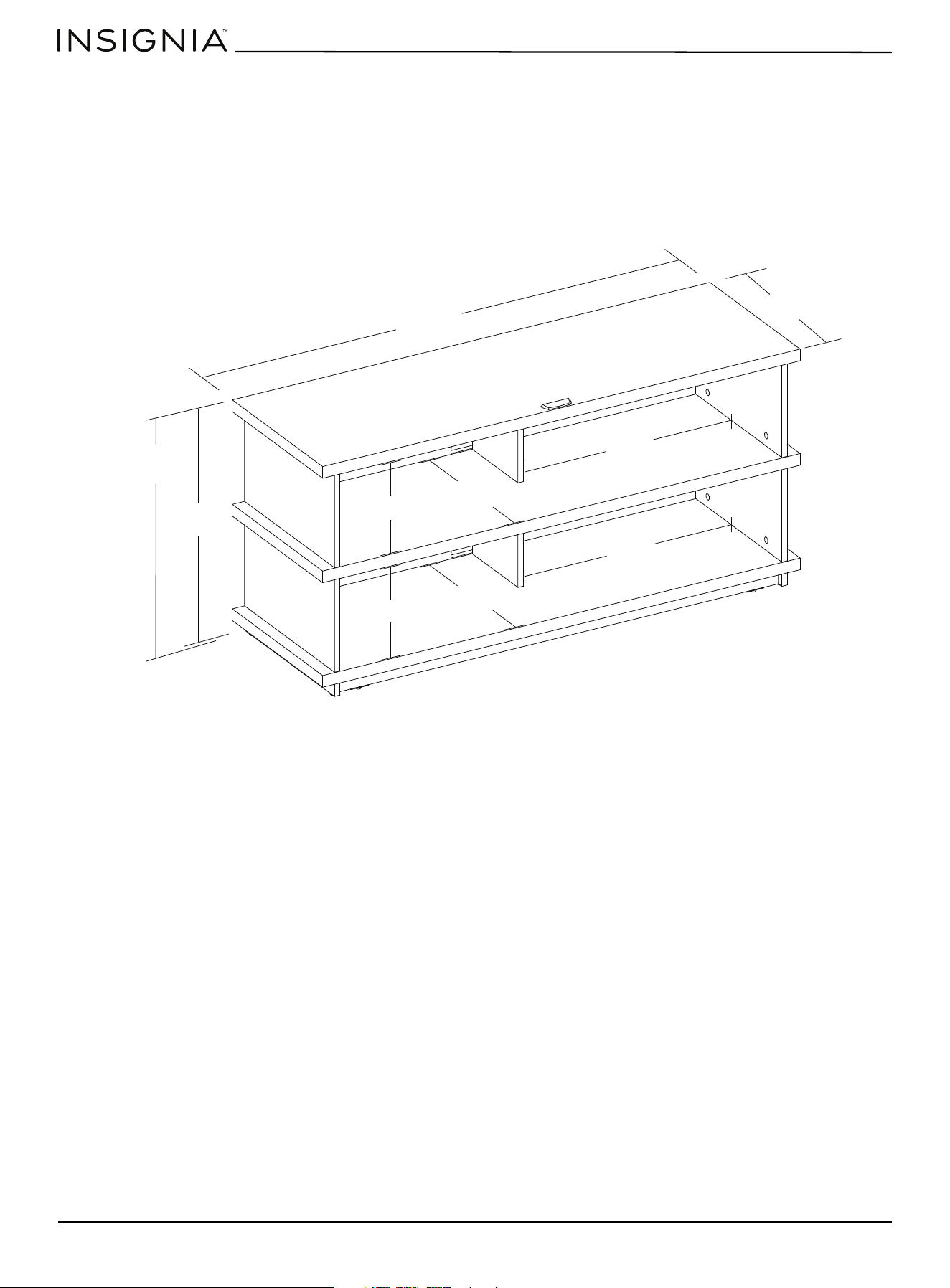
Dimensions
22 in.
(55.8 cm)
47.5 in.
(120.6 cm)
22.2 in. (56.4 cm)
15.5 in. (39.5 cm)
14.9 in. (37.8 cm)
8.7 in. (22.2 cm)
21.7 in.
(55.1 cm)
8.7 in. (22.2 cm)
14.9 in. (37.8 cm)
21.7 in.
(55.1 cm)
www.insigniaproducts.com
5
47.5 in. TV Stand
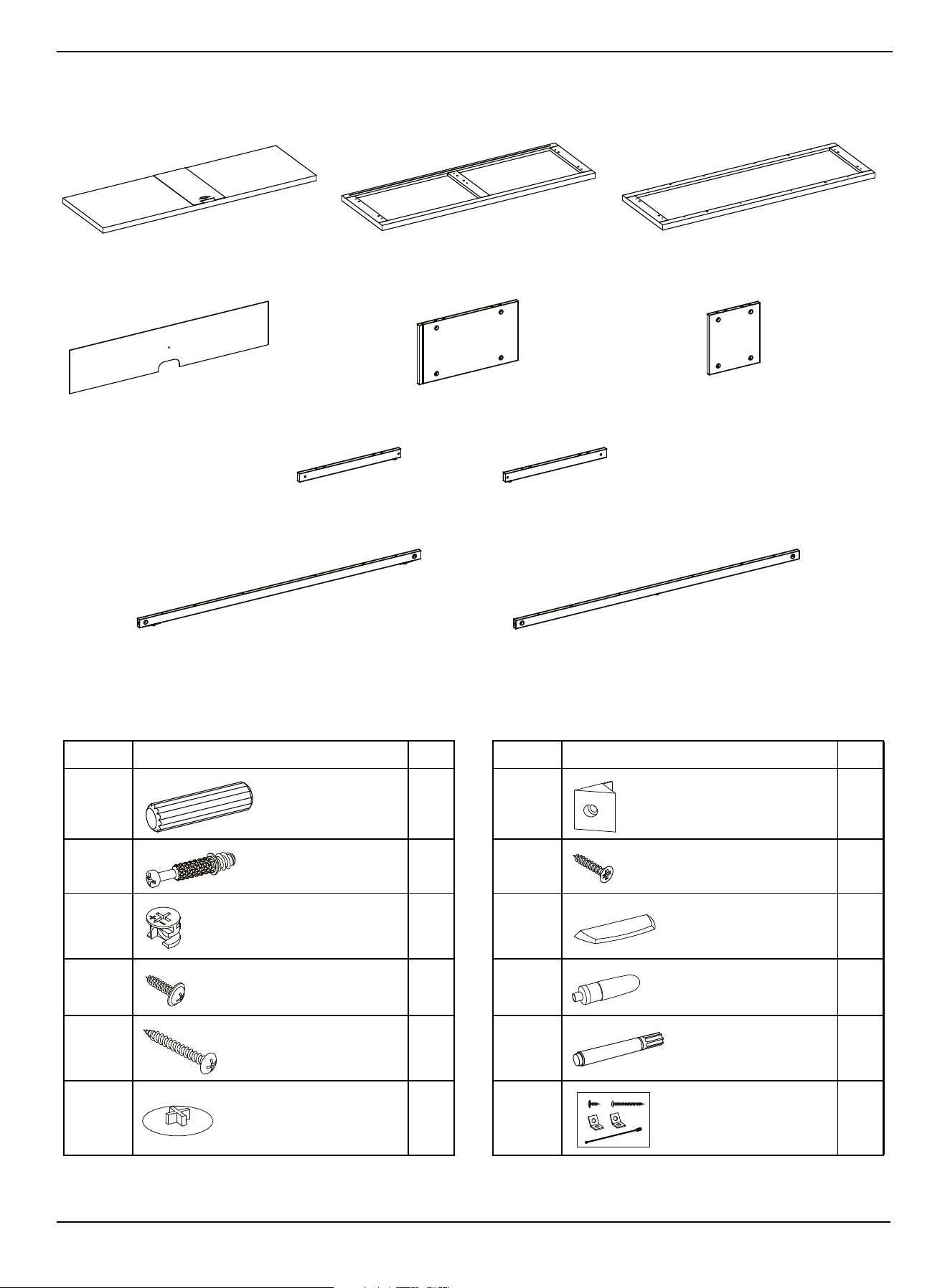
Package contents
Parts
Hardware
LABEL TV STAND PART QTY. LABEL TV STAND PART QTY.
J32Q16
K28R16
L28S 2
M2T 1
N12U 1
P24V 2
A Top panel (1)
Note: Keep the stopper template attached.
B Media shelf (1) C Bottom panel (1)
D Back panel (2) E Side panel (4) F Partition panel (2)
G Base left stretcher (1)
W Base back stretcher (1)
H Base right stretcher (1)
I Base front stretcher (1)
Wood dowel M8 x 30 mm
Plastic holder
Cam pin
Flat head screw M3 x 17 mm
Cam lock
Acrylic stopper
Washer head screw M3.5 x 15 mm
Glue
Pan head screw M4 x 40 mm
Touch-up pen
Cam lock cover
Tipping restraint hardware kit
www.insigniaproducts.com
6
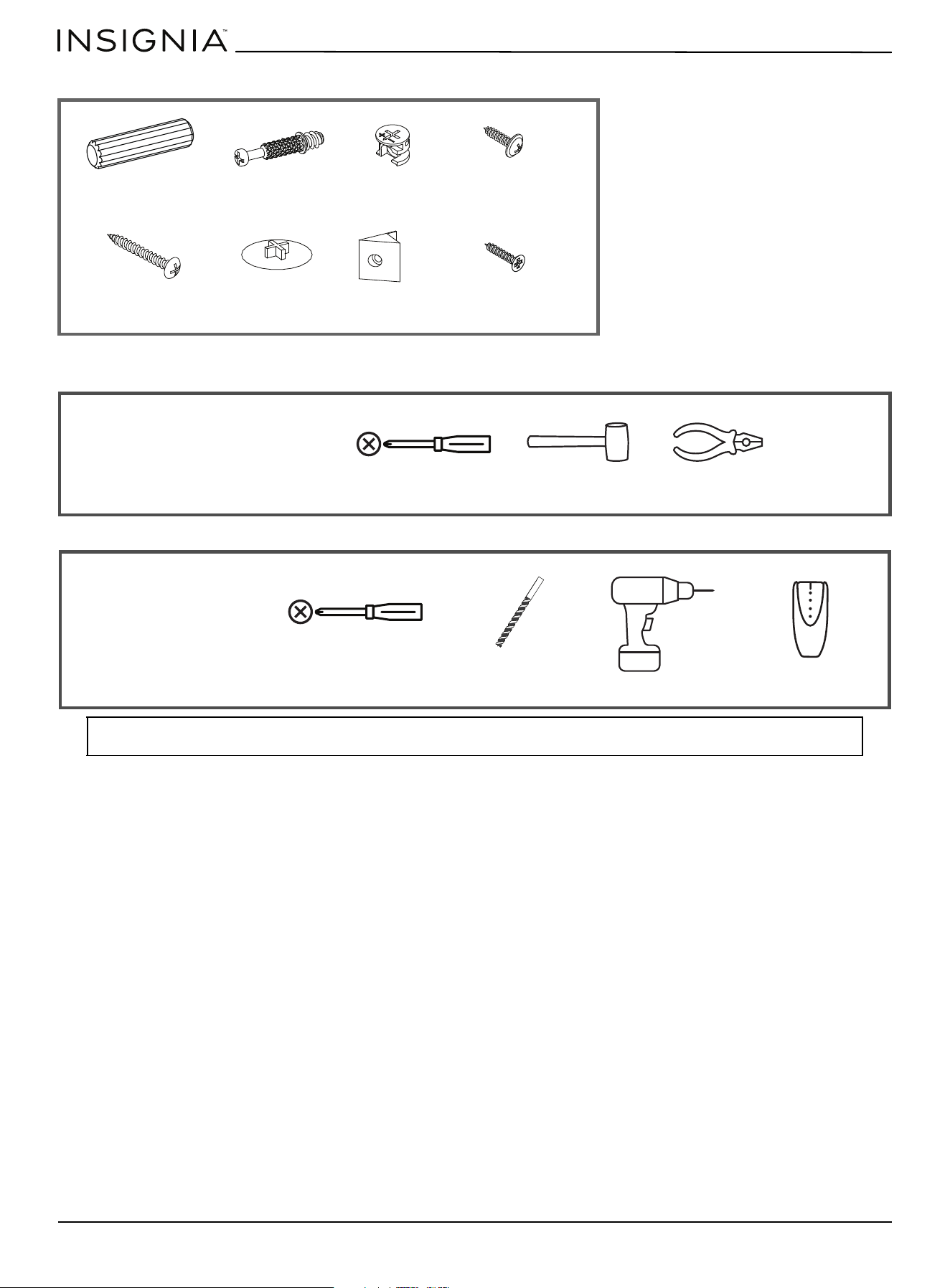
Extra hardware
Tools needed (not provided)
Note: DO NOT USE power tools unless it is explicitly identified in this manual as required for use during assembly. Power tools can
damage the fasteners, hardware, and/or components.
Wood dowel M8 x 30 mm
Cam pin
Cam lock Washer head screw
M3.5 x 15 mm
Pan head screw
M4 x 40 mm
Cam lock cover
Plastic holder
Flat head screw
M3 x 17 mm
Phillips screwdriver Rubber mallet Pliers
For assembling the
TV stand
Phillips screwdriver
1/8” drill bit
Power drill
For installing the
tipping restraint
Edge-to-edge stud finder
www.insigniaproducts.com
7
47.5 in. TV Stand
Installation tips
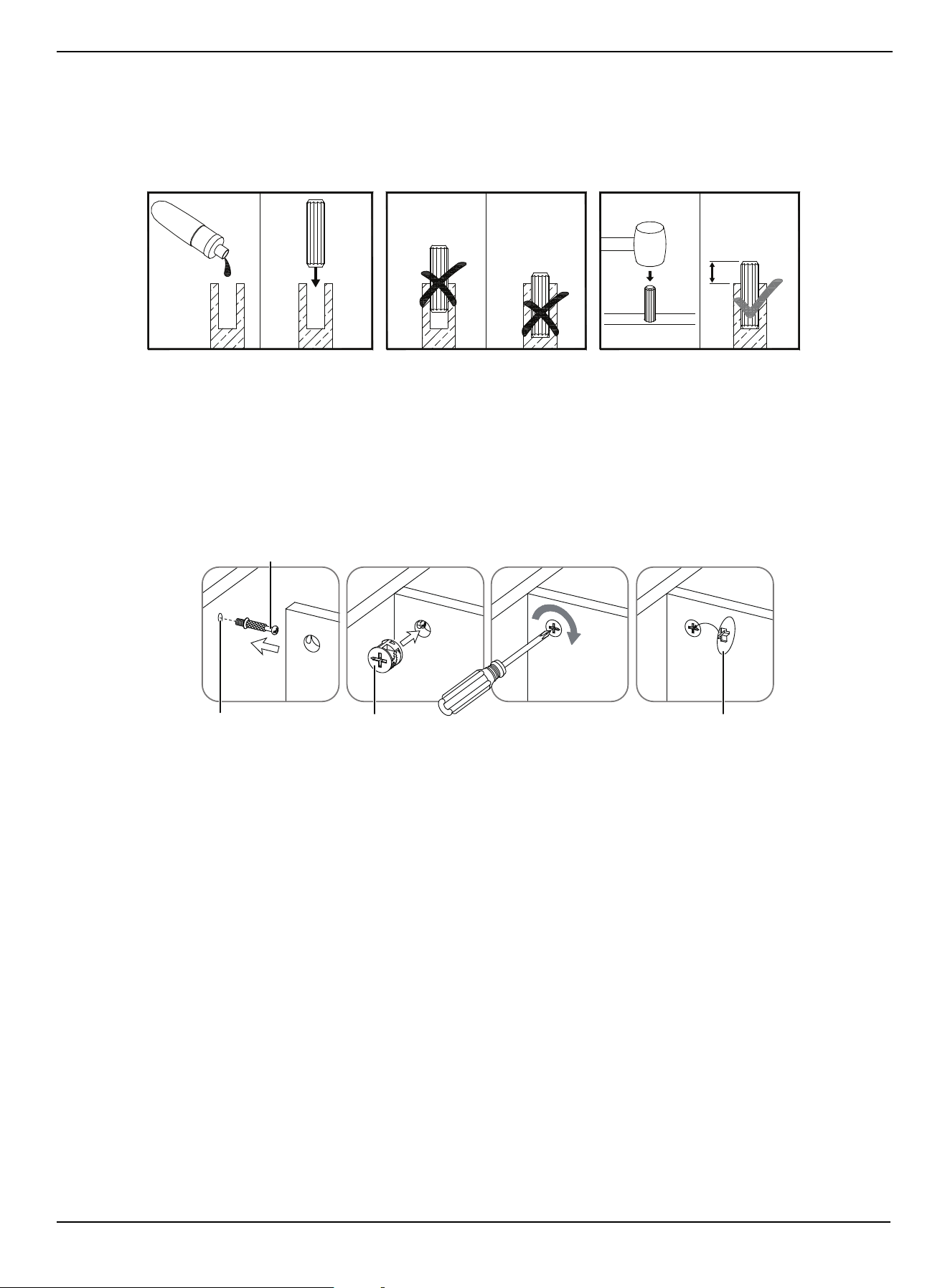
Gluing wood dowels (J)
When using a wood dowel (J), put one drop of glue (T) in the hole before you insert the wood dowel (J). Insert
the wood dowel (J), then gently tap it with a rubber mallet to secure it in place.
Locking cam pins (K) and cam locks (L)
1 One end of a cam pin (K) is threaded so that it screws into place. The other end is not threaded. Before you insert the
un-threaded end into a hole, insert a cam lock (L) into the hole and make sure that the hole in the cam lock (L) faces
the outside edge of the part being used.
2 Insert the un-threaded end of the cam pin (K) through the hole in the part being used and into the cam lock hole,
then rotate the cam lock (L) clockwise with a screwdriver to lock the cam pin (K) into place.
3 Insert a cam lock cover (P) into the cross slot of the cam lock (L) to conceal.
Note: 1/3 of the
dowel should
remain exposed.
G
L
U
E
1/3
Cam pin
Pre-drilled hole Cam lock
Cam lock cover
LOCKED
PANEL
PANEL
www.insigniaproducts.com
8
Assembling your TV stand
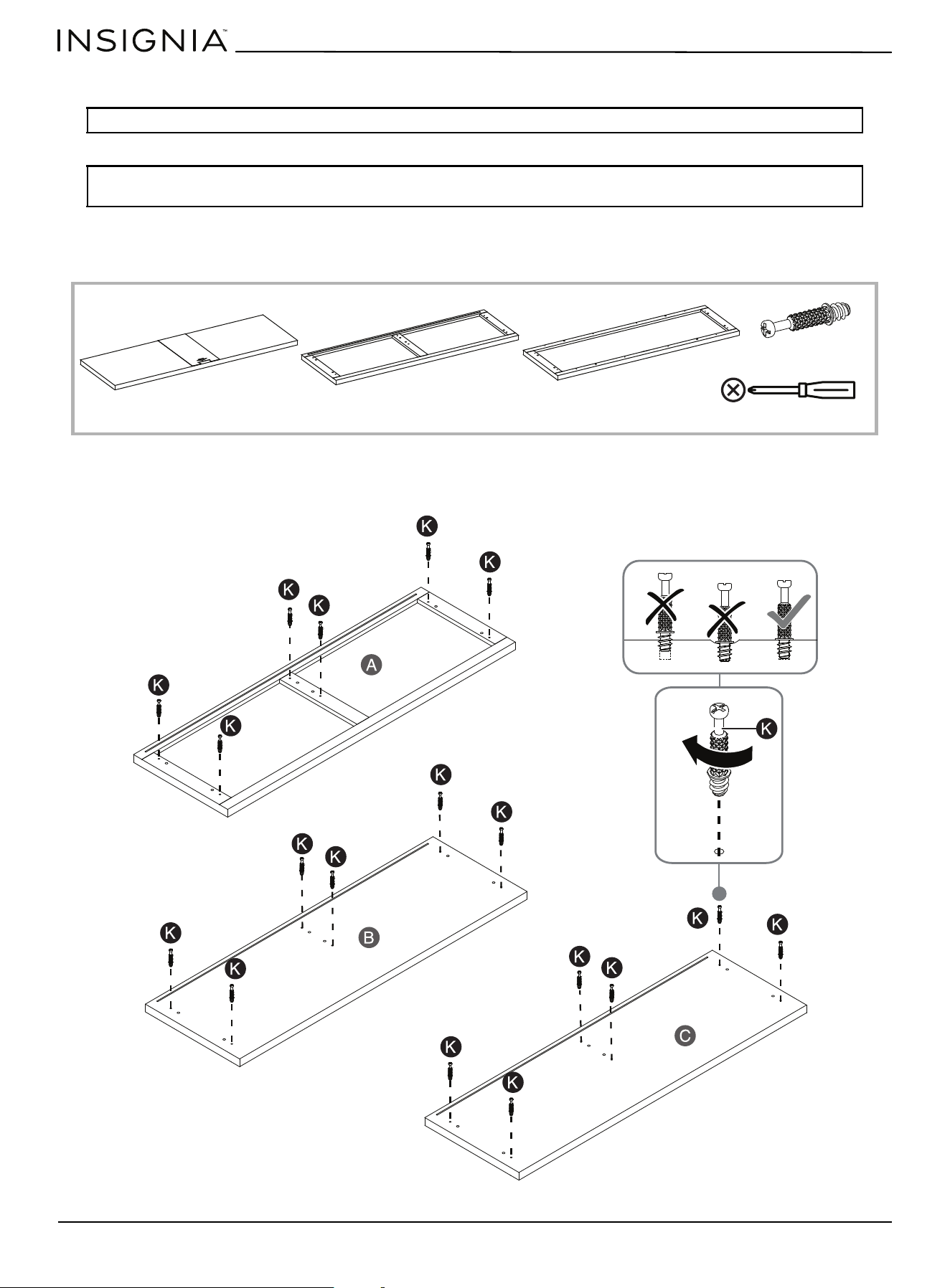
STEP 1: Preparing the shelf panels
You need:
• Securely screw the cam pins (K) into the indicated holes in the panels (A, B, and C), using a Phillips screwdriver.
Tip: Assemble your TV stand on a carpeted floor or the empty TV stand carton to avoid scratching it.
Note: Do not fully tighten all bolts until you finish assembling all of the parts. After assembly, go back and fully
tighten all bolts. This will make the assembly easier.
A Top panel (1) C Bottom panel (1)
K Cam pin (18)
Phillips screwdriver
B Media shelf (1)
www.insigniaproducts.com
9
47.5 in. TV Stand
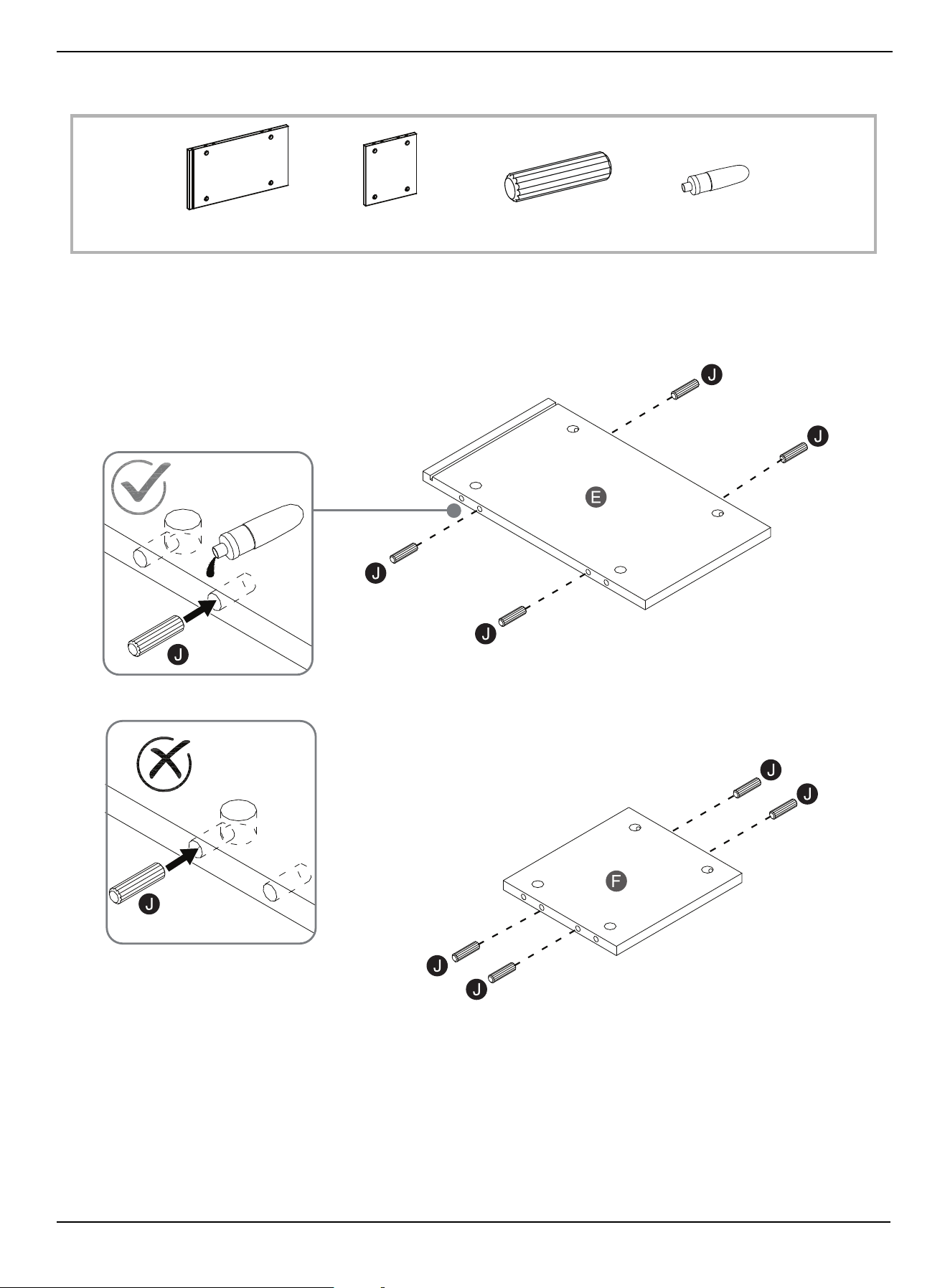
STEP 2: Preparing the side and partition panels
You need:
• Glue wood dowels (J) into the drilled inner holes on the ends of the panels (E and F).
E Side panel (4) F Partition panel (2) T Glue (1)J Wood dowel (24)
x4
x2
www.insigniaproducts.com
10
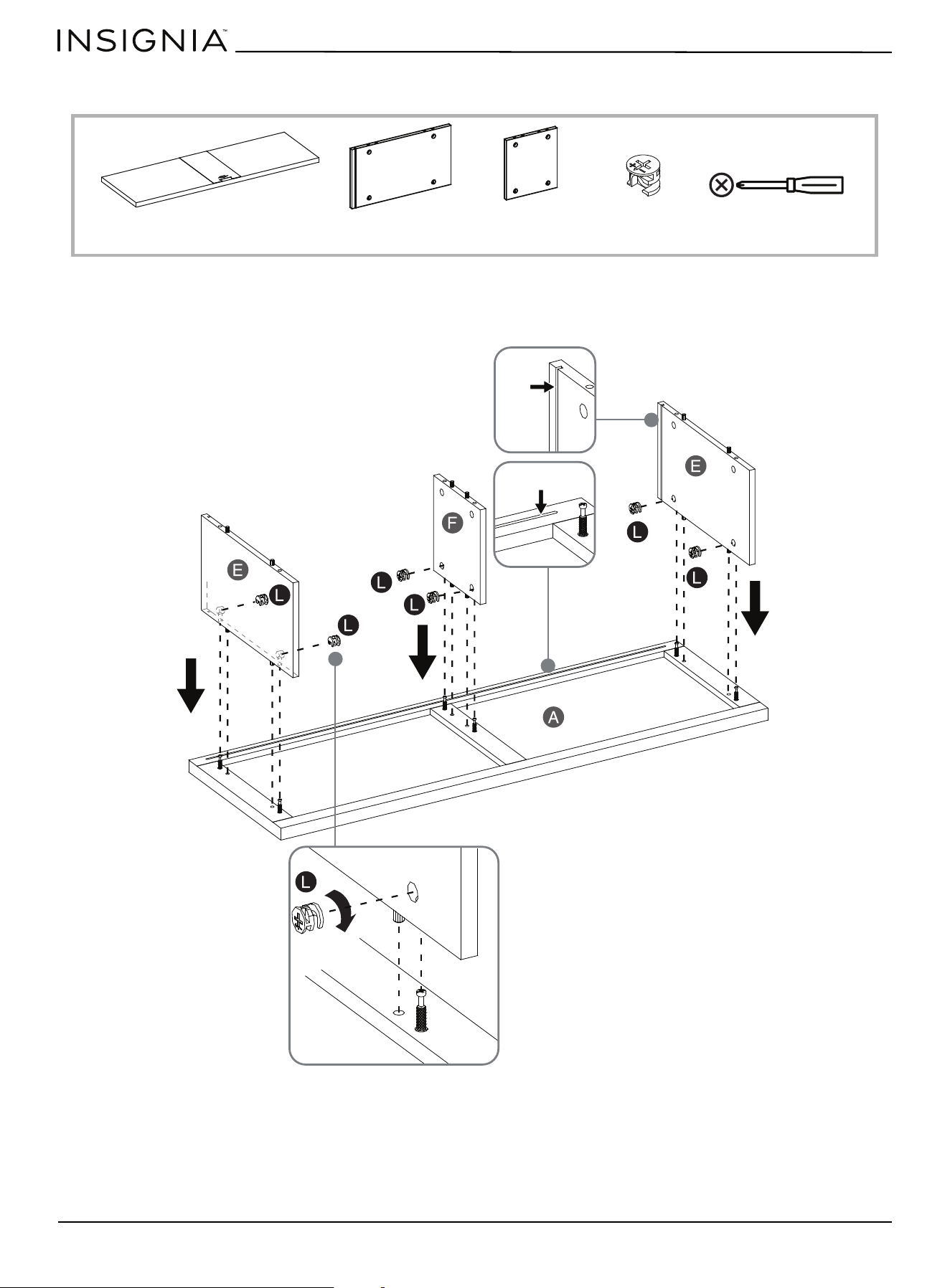
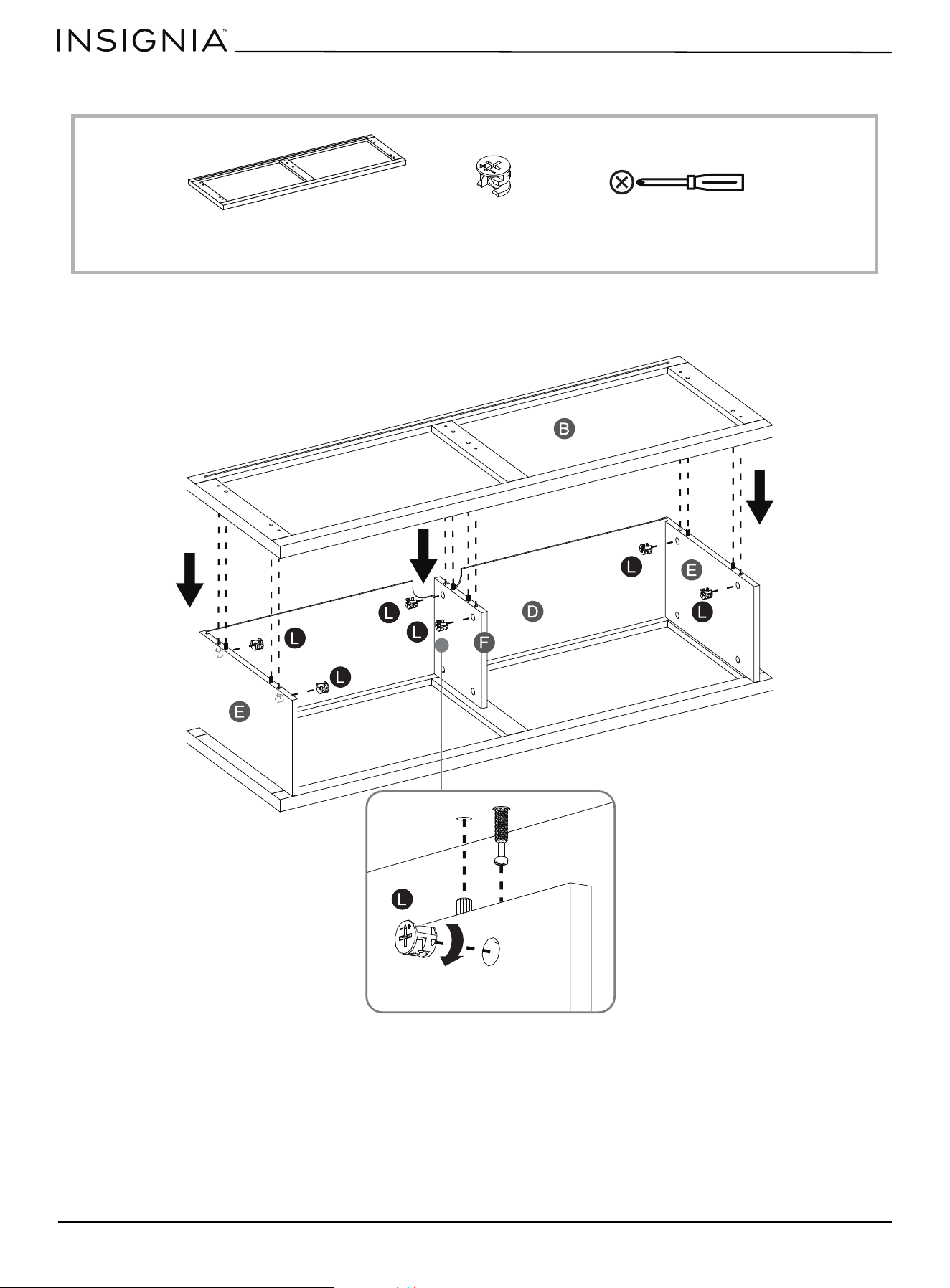
STEP 3: Attaching two side panels and one partition to the top
You need:
• Align and attach two side panels (E) and one partition panel (F) to the top panel (A) by engaging and tightening six
cam locks (L).
Phillips screwdriverF Partition panel (1) L Cam lock (6)E Side panel (2)A Top panel (1)
Note: Grooves line up with each other and face inward
www.insigniaproducts.com
11
47.5 in. TV Stand
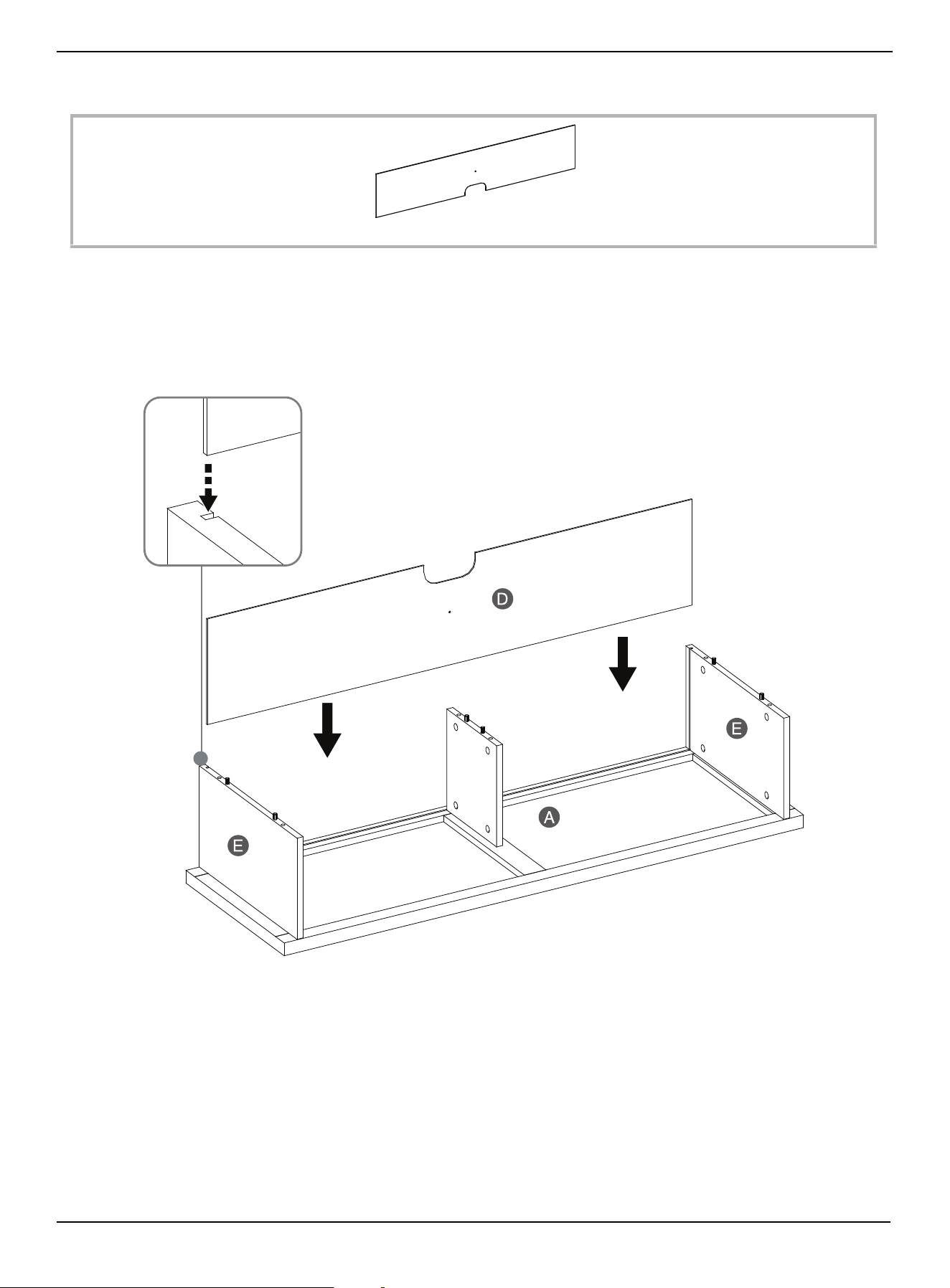
STEP 4: Installing the upper back panel
You need:
• Align and slide one back panel (D) into the grooves on in the side panels (E) until fully inserted into the top panel (A).
D Back panel (1)
Groove
www.insigniaproducts.com
12
STEP 5: Installing the media shelf
You need:
• Align and attach the media shelf (B) to both side panels (E) and the partition panel (F) by engaging and tightening six
cam locks (L). Make sure that the back panel (D) fits into the groove of the media shelf (B).
L Cam lock (6)B Media shelf (1) Phillips screwdriver
BOT TOM
www.insigniaproducts.com
13
47.5 in. TV Stand
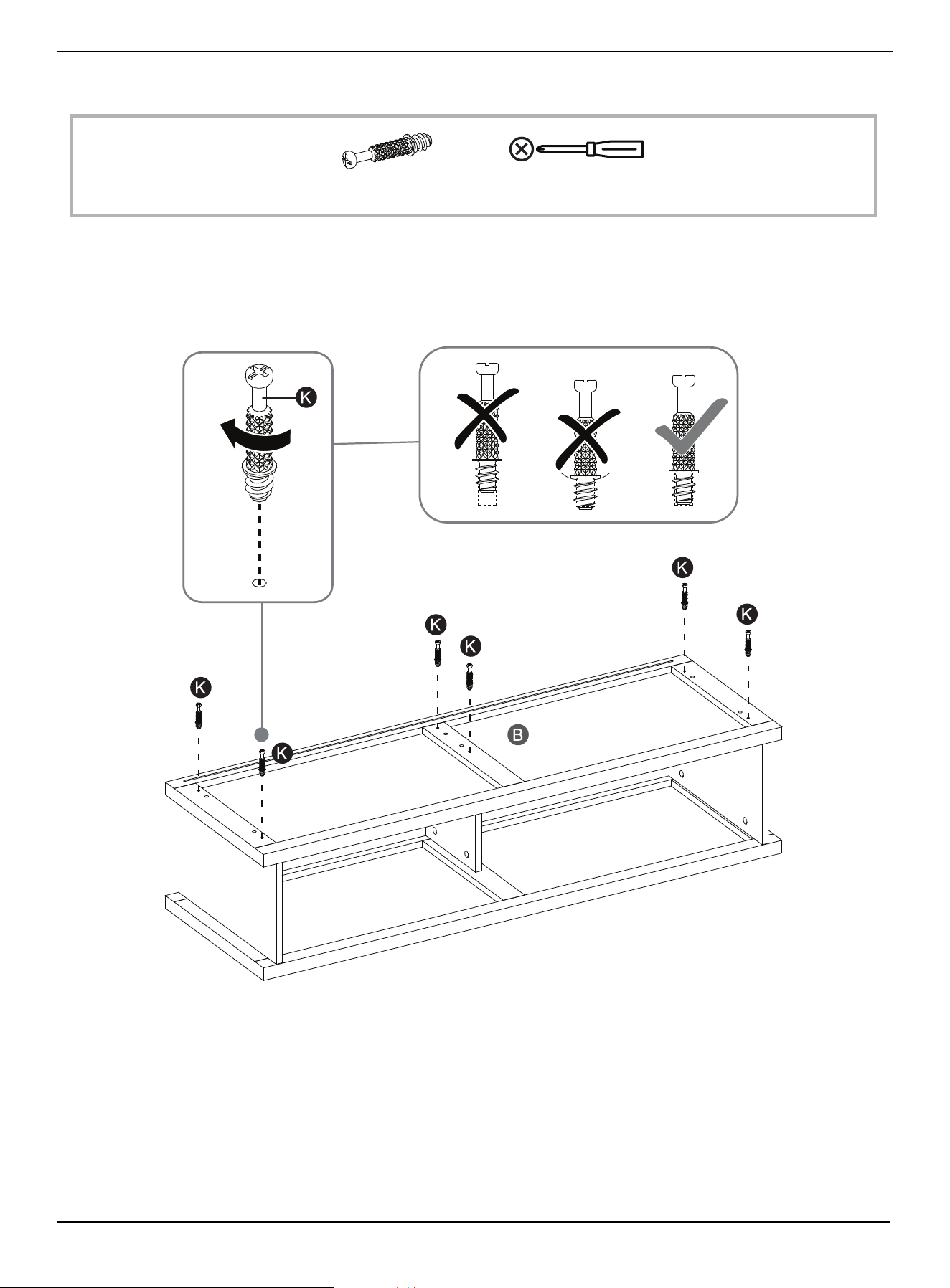
STEP 6: Preparing the lower side panels and partition panel
You need:
• Securely screw six cam pins (K) into the indicated holes in the media shelf (B), using a Phillips screwdriver.
K Cam pin (6) Phillips screwdriver
www.insigniaproducts.com
14
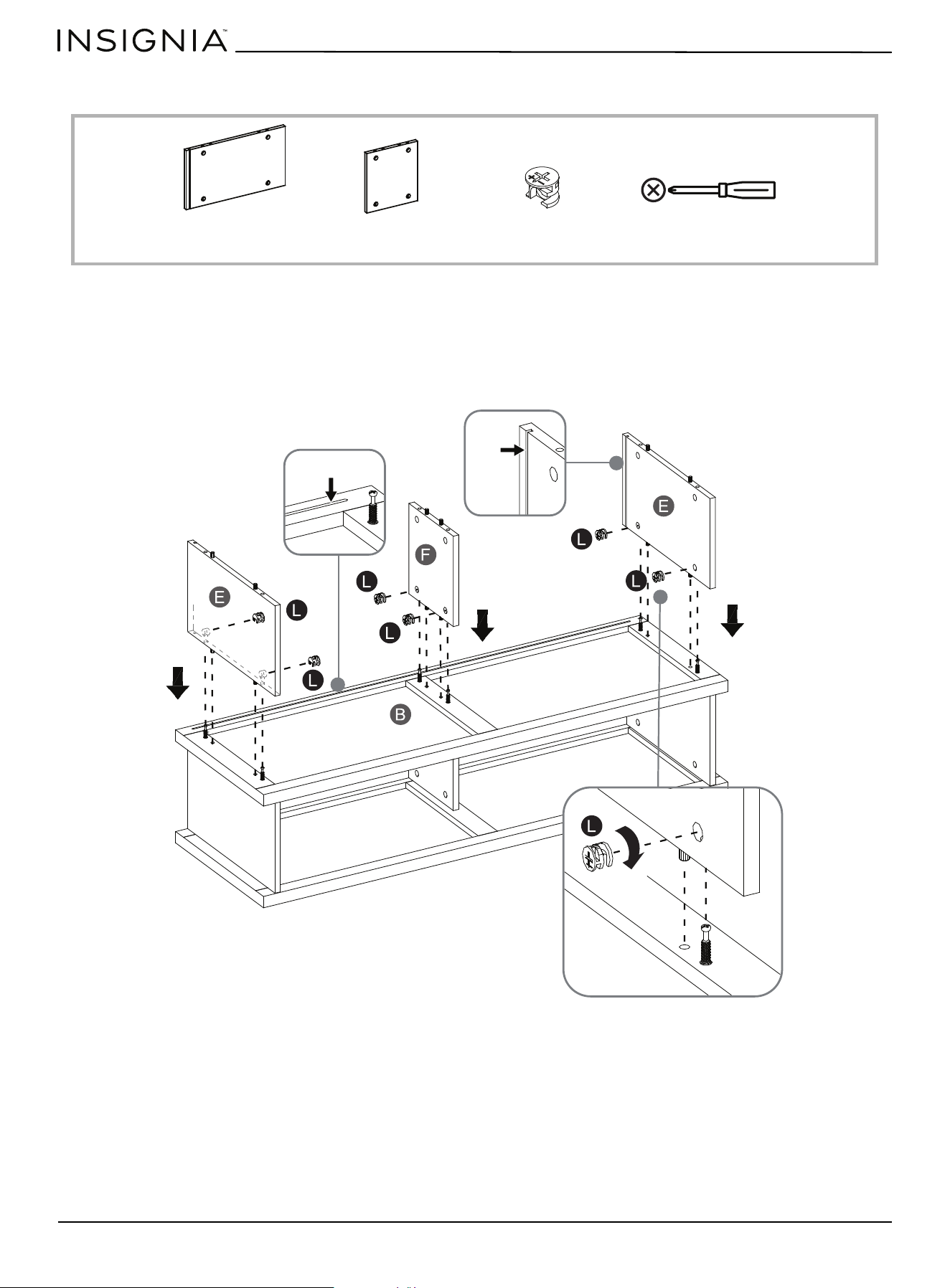
STEP 7: Attaching the lower side panels and partition to the media shelf
You need:
• Align and attach the remaining two side panels (E) and one partition (F) to the media shelf (B) by engaging and
tightening six cam locks (L).
L Cam lock (6)E Side panel (2) F Partition panel (1) Phillips screwdriver
Note: Grooves line up with each other and face inward
www.insigniaproducts.com
15
47.5 in. TV Stand
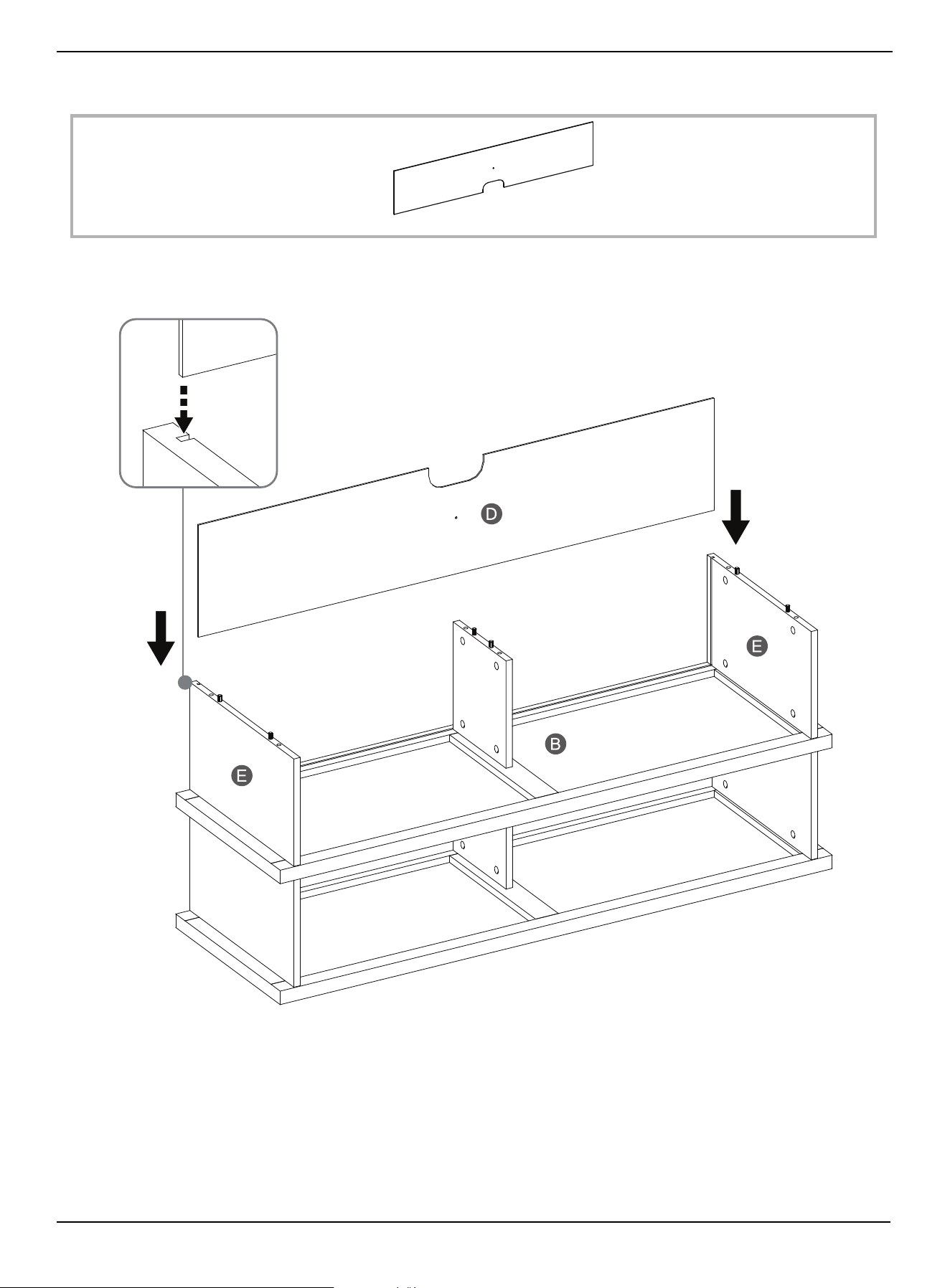
STEP 8: Installing the lower back panel
You need:
• Align and slide the lower back panel (D) into the grooves on both side panels (E) until fully inserted into the media shelf
(B).
D Back panel (1)
www.insigniaproducts.com
16
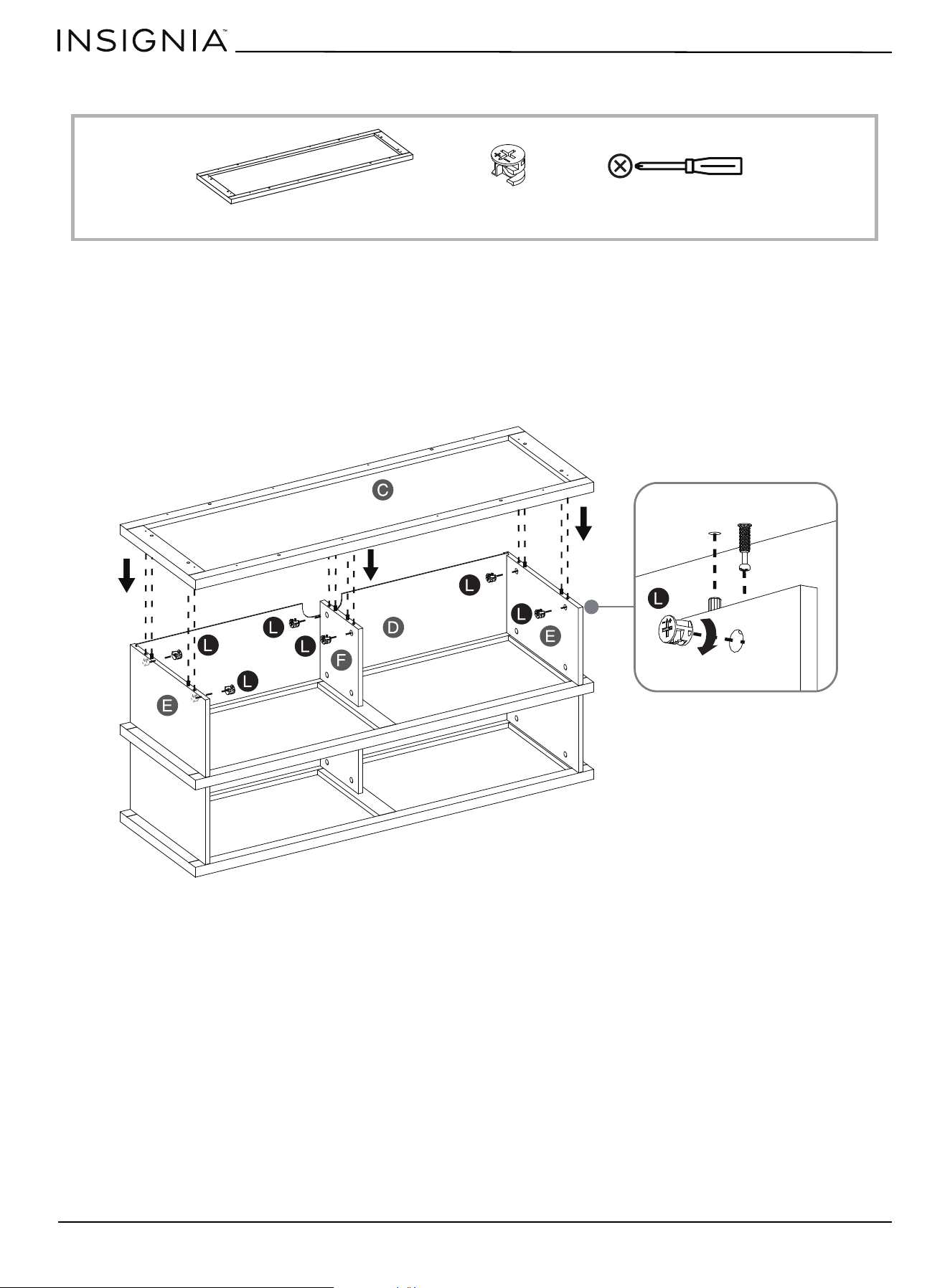
STEP 9: Attaching the bottom panel
You need:
• Align and attach the bottom panel (C) to both side panels (E) and the partition (F) by engaging and tightening six cam
locks (L). Make sure that the back panel (D) fits into the groove of the bottom panel (C).
C Bottom panel (1) L Cam lock (6) Phillips screwdriver
www.insigniaproducts.com
17
47.5 in. TV Stand
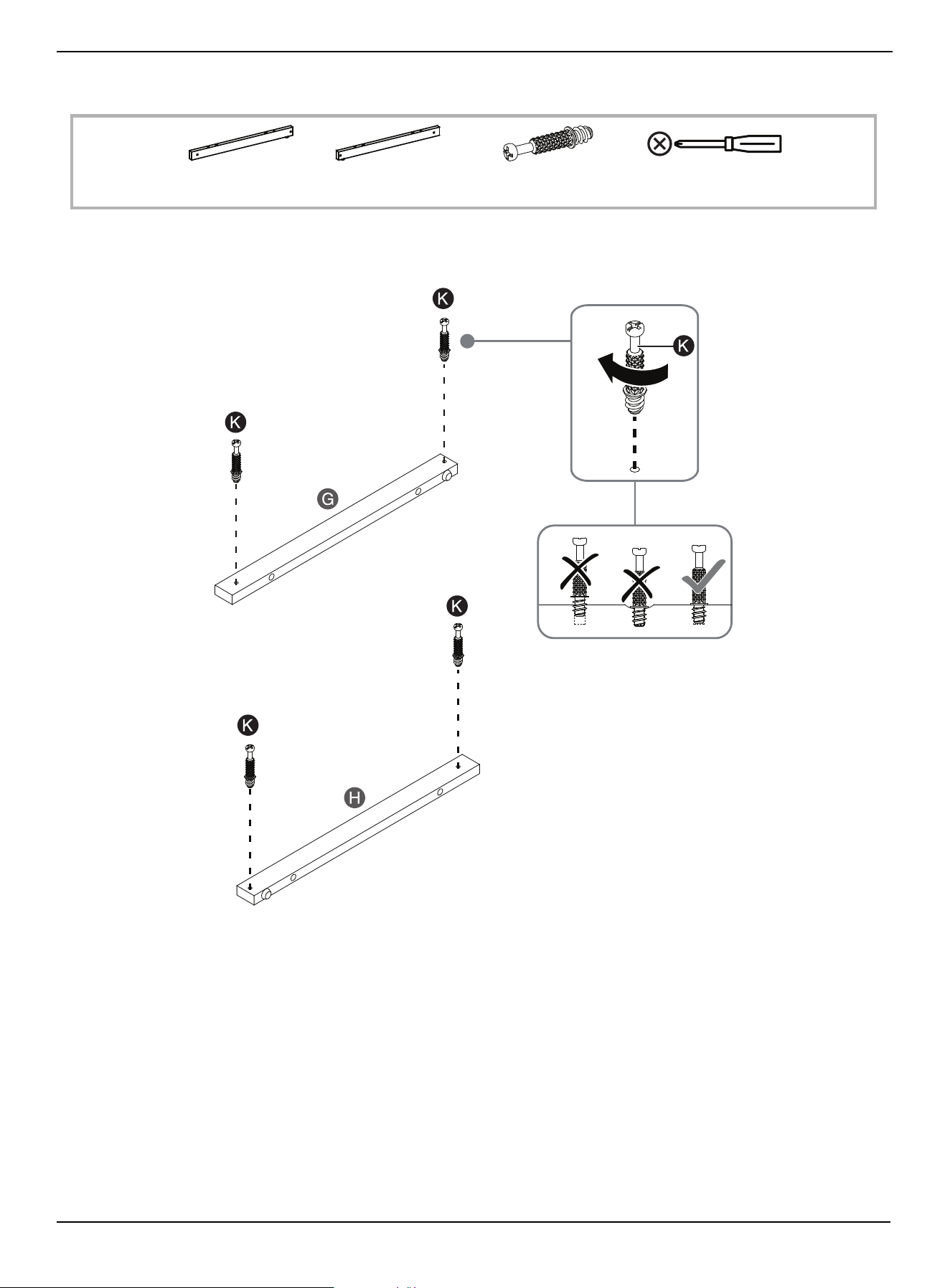
STEP 10: Preparing the base side stretchers
You need:
• Securely screw four cam pins (K) into the indicated holes in the base stretchers (G and H), using a Phillips screwdriver.
H Base right stretcher (1) K Cam pins (4)G Base left stretcher (1) Phillips screwdriver
www.insigniaproducts.com
18
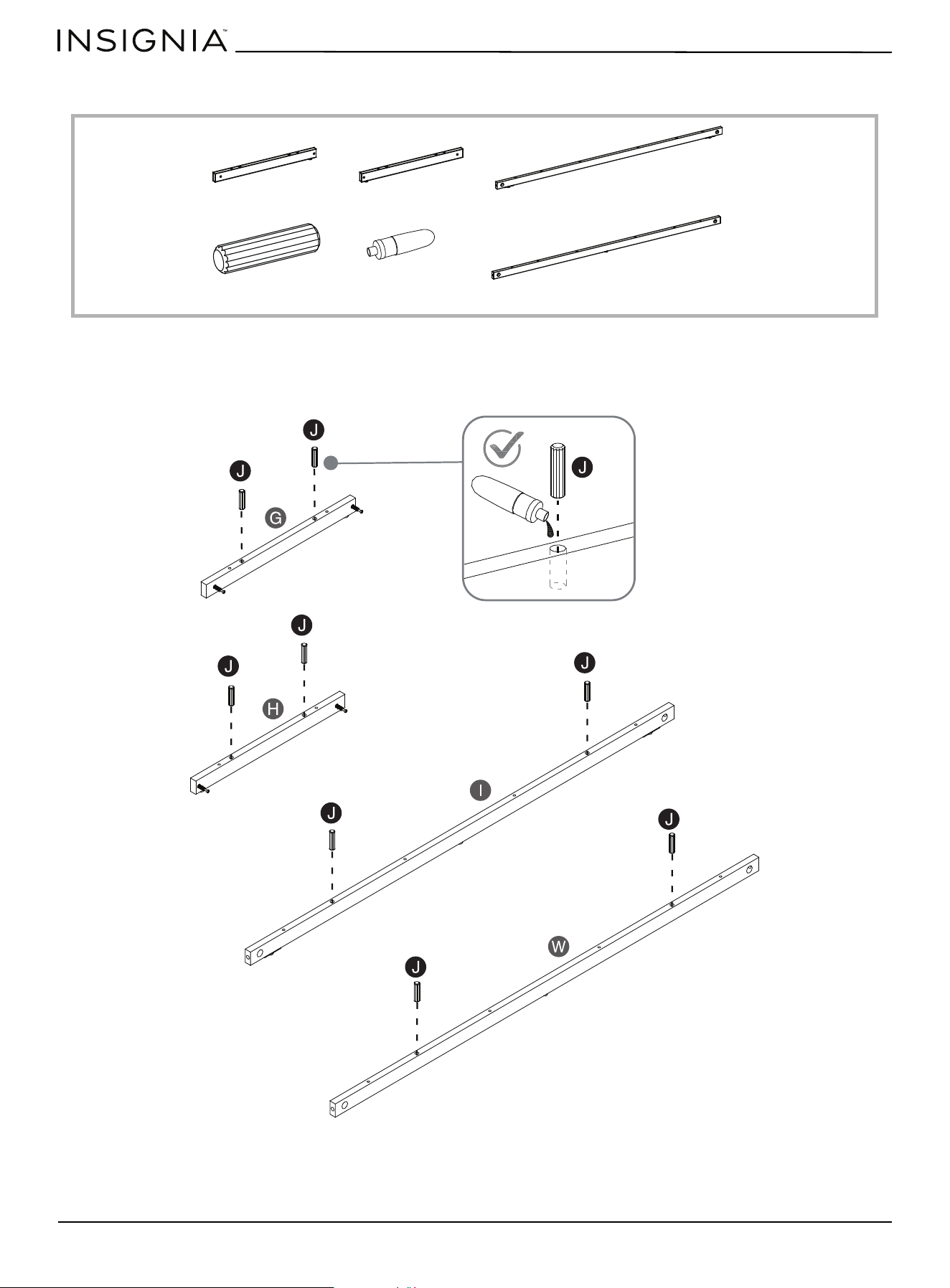
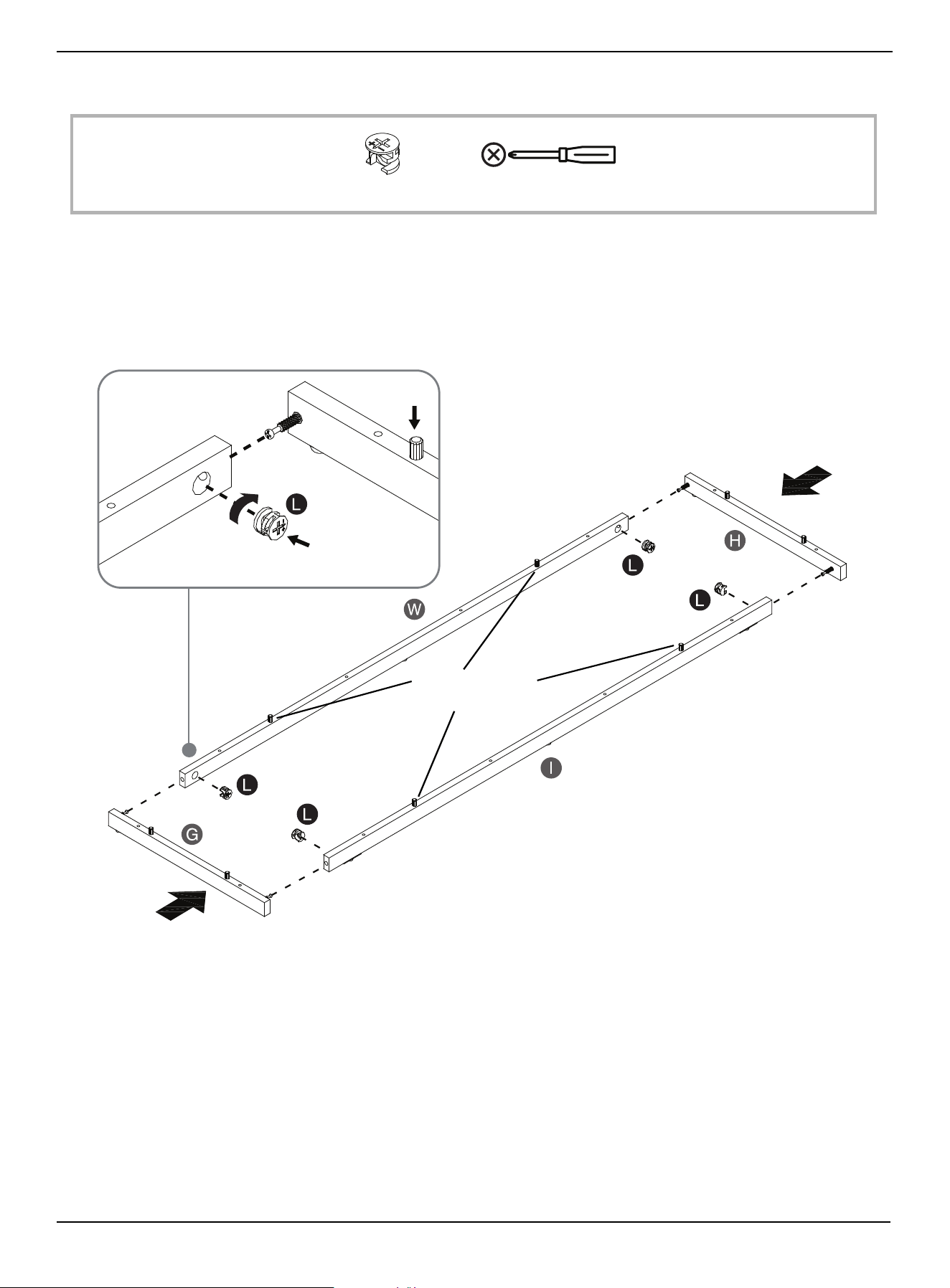
STEP 11: Preparing the base stretchers
You need:
• Glue eight wood dowels (J) into the indicated holes in the base stretchers (G, H, I, and W).
H Base right stretcher (1)G Base left stretcher (1) I Base front stretcher (1)
W Base back stretcher (1)
J Wood dowel (8)
T Glue (1)
www.insigniaproducts.com
19
47.5 in. TV Stand
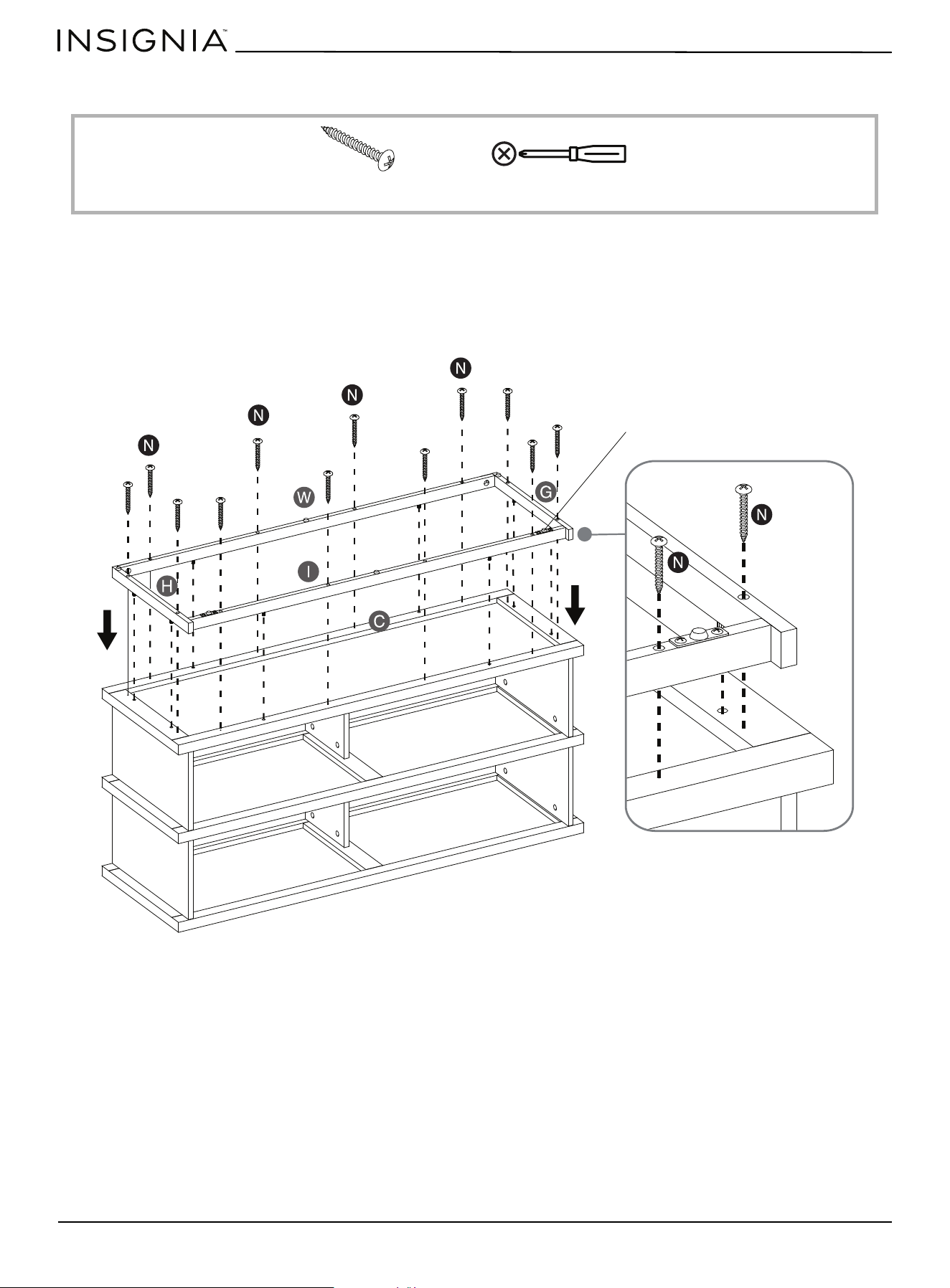
STEP 12: Assembling the base stretchers
You need:
• Align and attach the base front and back stretchers (I and W) between the base side stretchers (G and H) by engaging
and tightening four cam locks (L).
L Cam lock (4) Phillips screwdriver
Note: Cam locks face inward
Note: Wood dowels
face the same direction
www.insigniaproducts.com
20
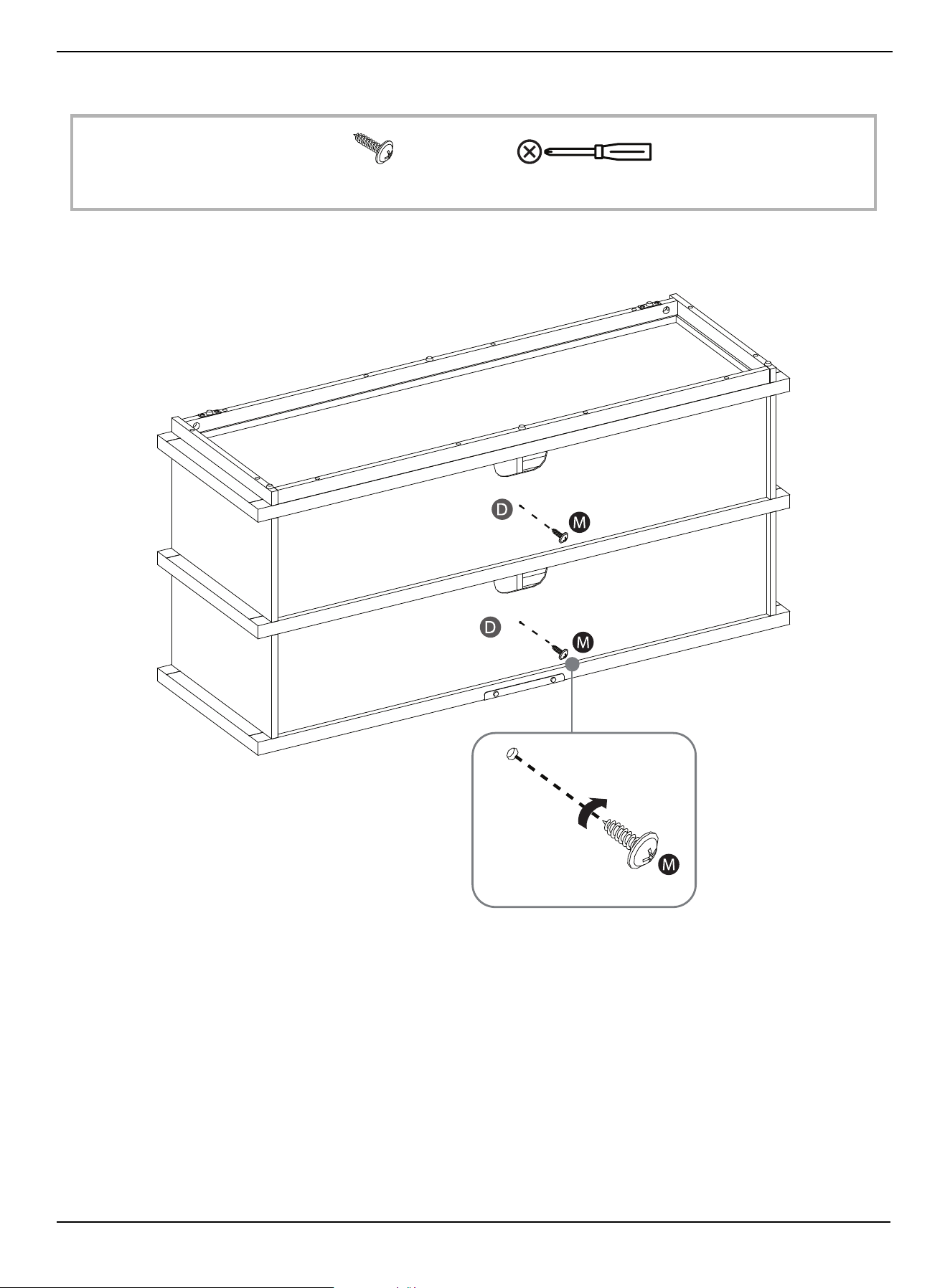
STEP 13: Attaching the assembled base to the bottom shelf
You need:
• Align and attach the assembled base (G, H, I, and W) to the bottom panel (C) with twelve M4 x 40 mm pan head screws
(N).
Phillips screwdriverN Pan head screw M4 x 40 mm (12)
Note: The floor levelers are
located at the front of the unit.
www.insigniaproducts.com
21
47.5 in. TV Stand
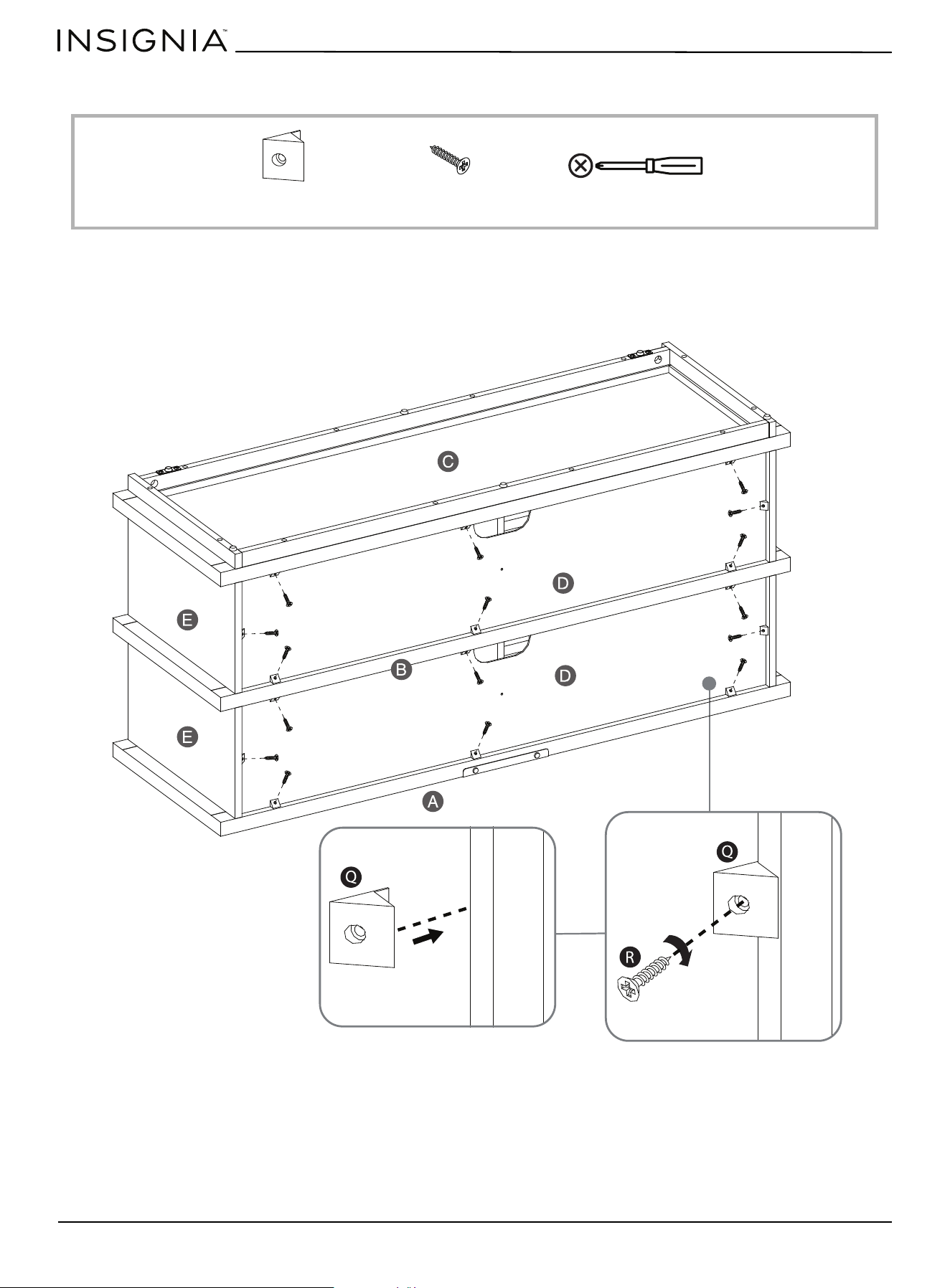
STEP 14: Fastening the back panels to the partitions
You need:
• Insert two M3.5 x 15 mm washer head screws (M) through the pre-drilled holes in the back panels (D) and screw them
into the partition panels (F) using a Phillips screwdriver.
Phillips screwdriverM Washer head screw M3.5 x 15 mm (2)
www.insigniaproducts.com
22
STEP 15: Fastening the back panels to the shelves and sides
You need:
1 Insert sixteen plastic holders (Q) evenly into the gaps between the back panels (D) and the panels (A, B, C, and E) as
shown.
2 Secure the plastic holders into place with M3 x 17 mm flat head screws (R) using a Phillips screwdriver. Do not damage
the edges.
Phillips screwdriverQ Plastic holders (16) R Flat head screw M3 x 17 mm (16)
www.insigniaproducts.com
23
47.5 in. TV Stand
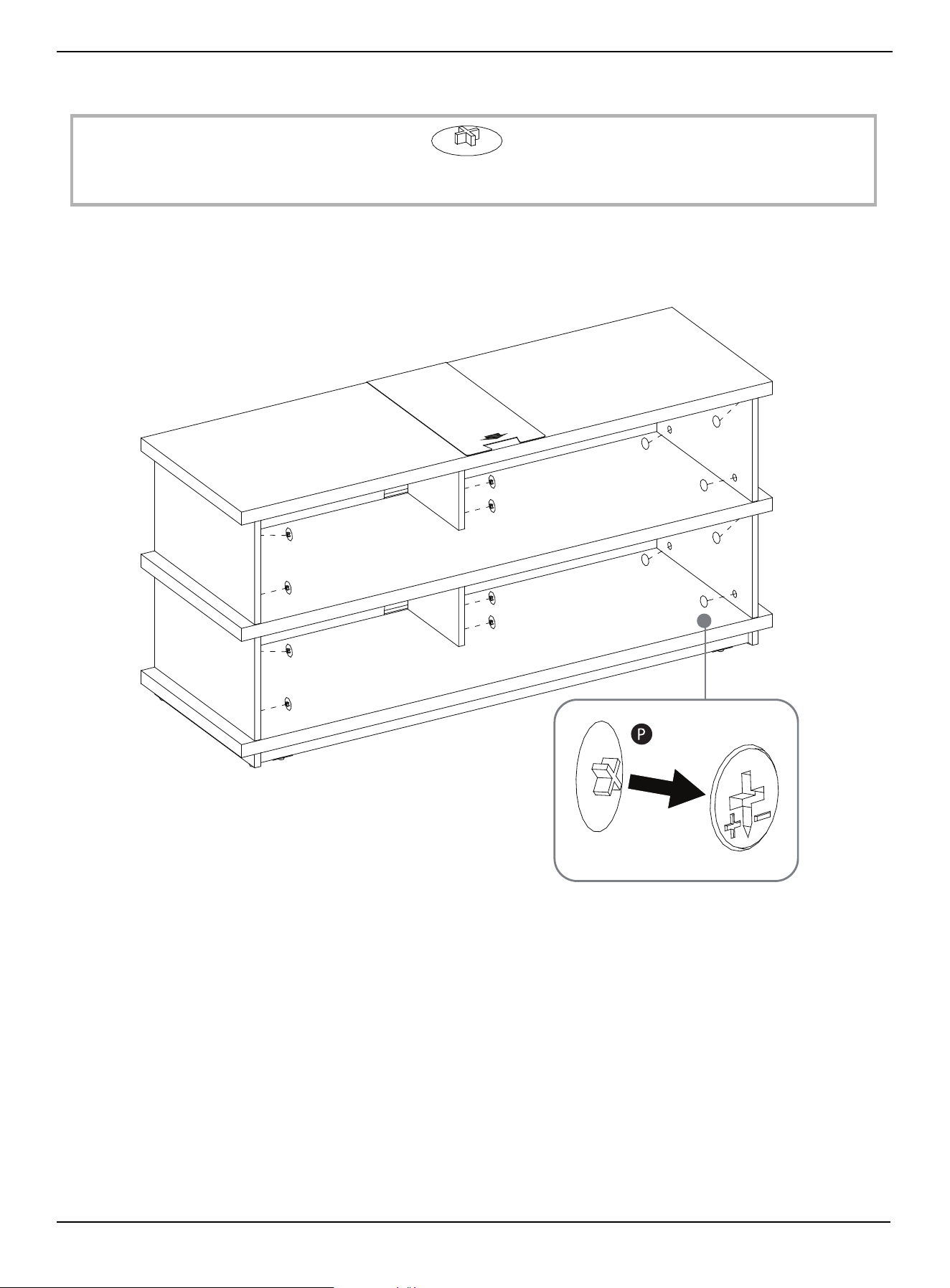
STEP 16: Installing the cam lock covers
You need:
1 Turn the unit upright (with assistance) and position it near the final location.
2 Place the cam lock covers (P) over the visible cam locks (L) to conceal the cams.
P Cam lock cover (24)
www.insigniaproducts.com
24
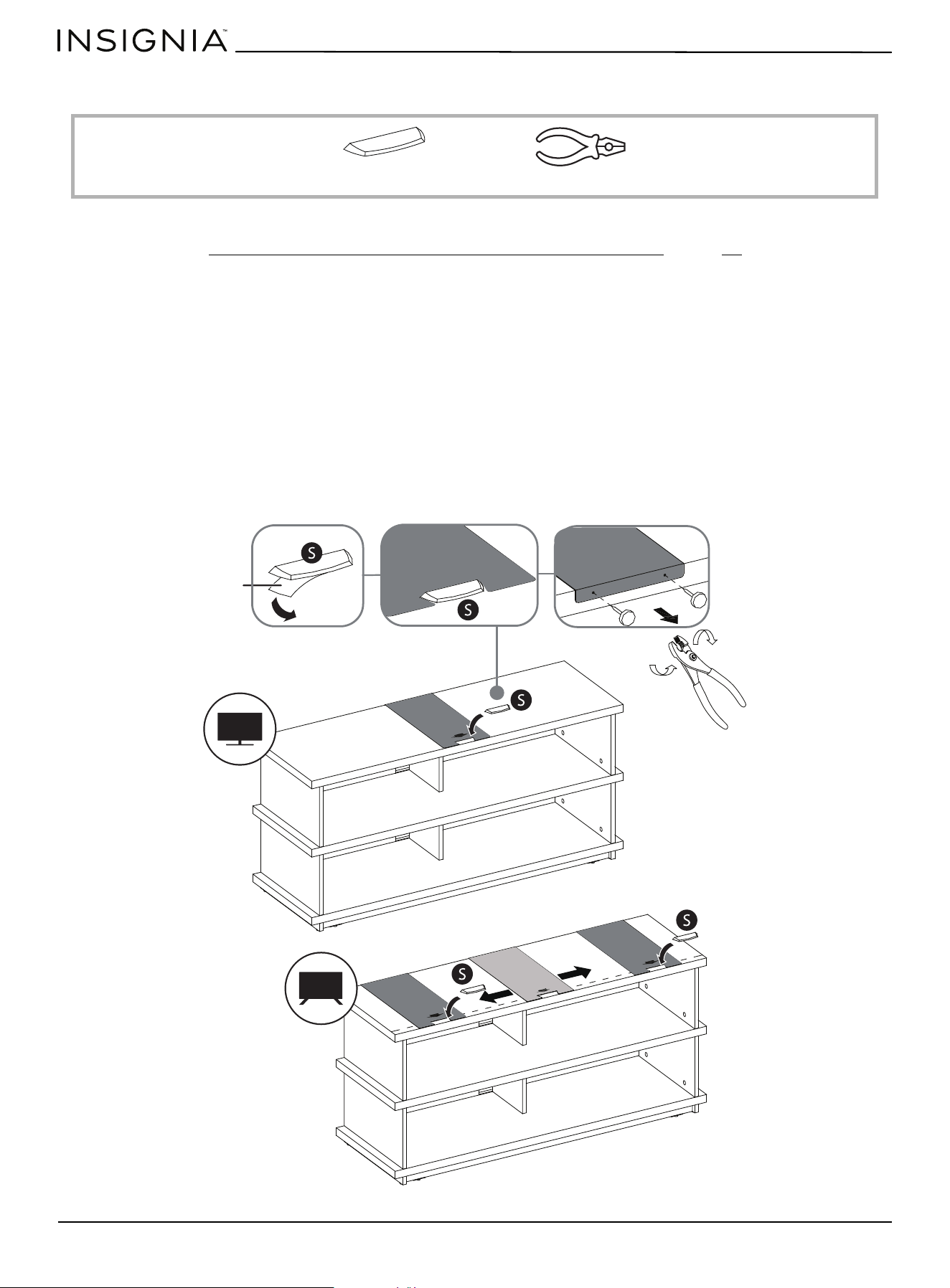
STEP 17: Installing the stopper(s) on the top panel
You need:
If you place your TV on top of your TV stand, you must follow these instructions to prevent your TV from tipping.
Otherwise, skip to STEP 18: Positioning the TV stand and installing the tipping restraints
on page 25.
If your TV has one leg
1 Remove the paper backing from the bottom of the stopper (S), then place it in the stopper cut-out of the template on
the top panel (A). Press down on the stopper (S) to adhere it to the panel.
2 On the back of the top panel (A), carefully pull out the thumb tacks to remove the stopper template.
If your TV has two legs:
1 On the back of the top panel (A), carefully pull out the thumb tacks to remove the stopper template.
2 Align the template at the position where one of your TV’s legs or one of the feet will be located.
3 Remove the paper backing from the stopper (S), then place it in the stopper cut-out of the template on the top panel
(A). Press down on the stopper (S) to adhere it to the panel.
4 Repeat this process to attach the second stopper where the other one of the TV’s legs or feet will be located.
S Acrylic stopper (2) Pliers
Stopper backing
Stopper backing
www.insigniaproducts.com
25
47.5 in. TV Stand
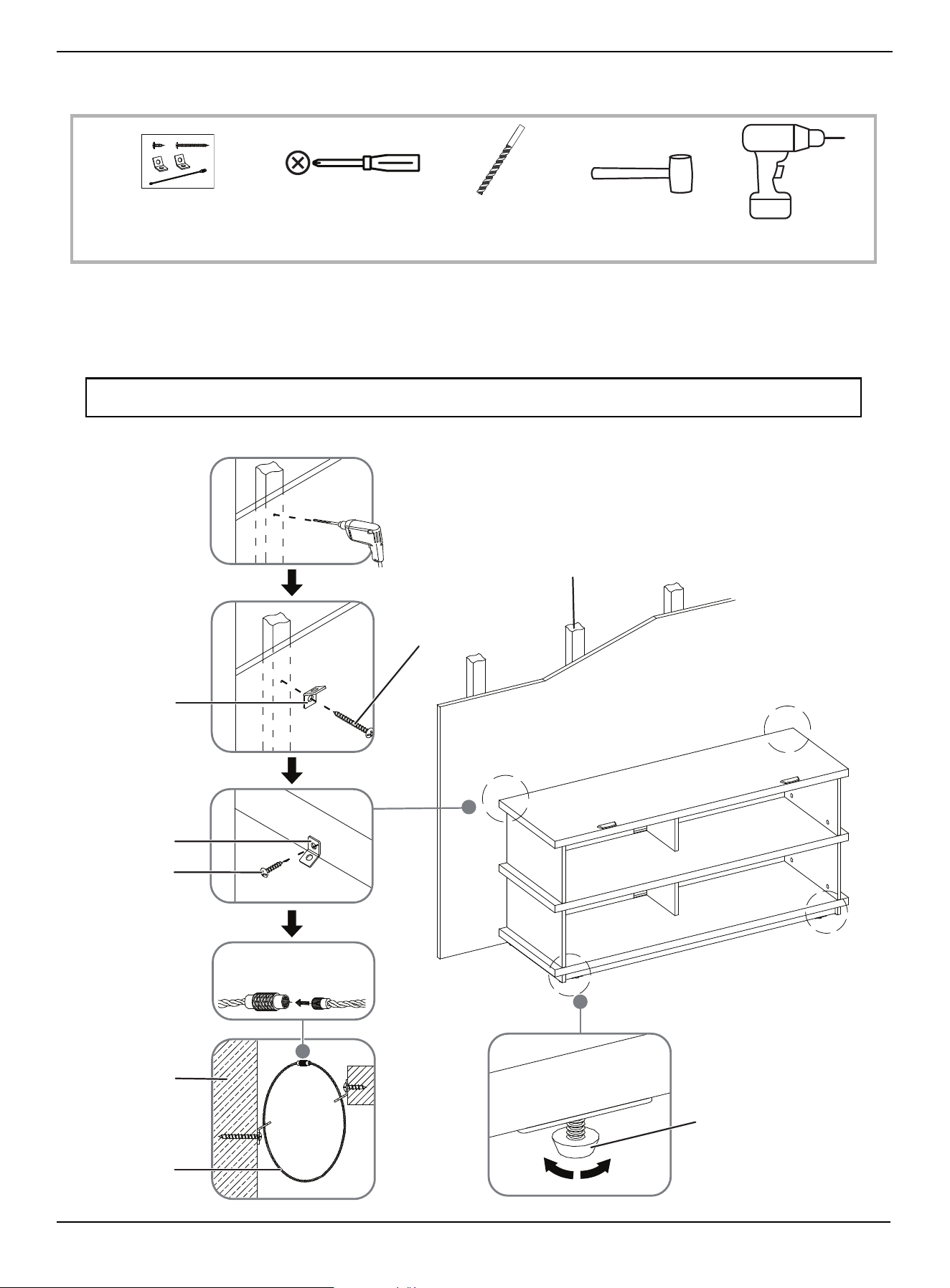
STEP 18: Positioning the TV stand and installing the tipping restraints
You need:
1 Position the assembled TV stand against the wall where you plan to use it.
2 Adjust the leveling feet to level the TV stand.
3 Follow the instructions printed on the bag containing the tipping restraint hardware kit (V) to attach the restraint
hardware to the wall and to the TV stand.
WARNING: It is very important that the tipping restraint be installed correctly. Failure to do this could result in your TV stand
falling forward, resulting in damage to equipment or personal injury.
Phillips screwdriver 1/8" drill bit
Power drill
V Tipping restraint (2) Rubber mallet
Wooden stud
Leveling feet
Long screw
Metal bracket
Metal bracket
Short screw
Wall
Steel cable
Wall
www.insigniaproducts.com
26
Maintaining your TV stand
Wood/Laminate
• Use your favorite type of furniture polish.
• Do not spray polish directly onto the TV stand. Spray onto a soft cloth, then wipe the TV stand.
• Always test any polish in a discrete location first, such as the back of the TV stand, to make sure that there is no adverse
reaction.
• Dust frequently with a soft cloth.
• Never slide objects across surfaces. Lift objects from the top surface rather than dragging them across the finish when
moving them.
• Do not expose your TV stand to direct sunlight, drying heat sources, or dampness.
• Clean spills immediately with a soft, damp cloth.
• Use a protective pad when using your TV stand as a writing surface (especially when using a ballpoint pen).
Specifications
Maximum overall weight 140 lbs. (63.5 kg)
Maximum top panel weight 70 lbs. (31.75 kg)
Maximum shelf weight 50 lbs. (22.68 kg)
Maximum bottom panel weight 50 lbs. (22.68 kg)
Maximum TV weight 70 lbs. (31.75 kg)
Maximum screen size 55 in. (139.7 cm)
Overall dimensions (H × W × D) 22.2 × 47.5 × 15.5 in. (56.4 × 120.65 × 39.37 cm)
Middle and bottom shelf dimensions (W × D) 44 × 14.9 in. (111.76 × 37.84 cm)
TV stand weight Net: 48.28 lbs. (21.9 kg)
Gross: 55.56 lbs. (25.2 kg)

www.insigniaproducts.com
27
47.5 in. TV Stand
ONE-YEAR LIMITED WARRANTY
Definitions:
The Distributor* of Insignia branded products warrants to you, the original purchaser of this new Insignia-branded product (“Product”), that the Product shall
be free of defects in the original manufacturer of the material or workmanship for a period of one (1) year from the date of your purchase of the Product
(“Warranty Period”).
For this warranty to apply, your Product must be purchased in the United States or Canada from a Best Buy branded retail store or online at www.bestbuy.com
or www.bestbuy.ca and is packaged with this warranty statement.
How long does the coverage last?
The Warranty Period lasts for 1 year (365 days) from the date you purchased the Product. Your purchase date is printed on the receipt you received with the
Product.
What does this warranty cover?
During the Warranty Period, if the original manufacture of the material or workmanship of the Product is determined to be defective by an authorized Insignia
repair center or store personnel, Insignia will (at its sole option): (1) repair the Product with new or rebuilt parts; or (2) replace the Product at no charge with
new or rebuilt comparable products or parts. Products and parts replaced under this warranty become the property of Insignia and are not returned to you. If
service of Products or parts are required after the Warranty Period expires, you must pay all labor and parts charges. This warranty lasts as long as you own your
Insignia Product during the Warranty Period. Warranty coverage terminates if you sell or otherwise transfer the Product.
How to obtain warranty service?
If you purchased the Product at a Best Buy retail store location or from a Best Buy online website ((www.bestbuy.com or www.bestbuy.ca), please take your
original receipt and the Product to any Best Buy store. Make sure that you place the Product in its original packaging or packaging that provides the same
amount of protection as the original packaging.
To obtain warranty service, in the United States and Canada call 1-877-467-4289. Call agents may diagnose and correct the issue over the phone.
Where is the warranty valid?
This warranty is valid only in the United States and Canada at Best Buy branded retail stores or websites to the original purchaser of the product in the country
where the original purchase was made.
What does the warranty not cover?
This warranty does not cover:
• Food, beverage, and/or medicine loss/spoilage.
• Customer instruction/education
•Installation
•Set up adjustments
• Cosmetic damage
• Damage due to weather, lightning, and other acts of God, such as power surges
• Accidental damage
•Misuse
•Abuse
•Negligence
• Commercial purposes/use, including but not limited to use in a place of business or in communal areas of a multiple dwelling condominium or
apartment complex, or otherwise used in a place of other than a private home.
• Modification of any part of the Product, including the antenna
• Display panel damaged by static (non-moving) images applied for lengthy periods (burn-in).
• Damage due to incorrect operation or maintenance
• Connection to an incorrect voltage or power supply
• Attempted repair by any person not authorized by Insignia to service the Product
• Products sold “as is” or “with all faults”
• Consumables, including but not limited to batteries (i.e. AA, AAA, C etc.)
• Products where the factory applied serial number has been altered or removed
• Loss or Theft of this product or any part of the product
• Display panels containing up to three (3) pixel failures (dots that are dark or incorrectly illuminated) grouped in an area smaller than one tenth (1/10)
of the display size or up to five (5) pixel failures throughout the display. (Pixel based displays may contain a limited number of pixels that may not
function normally.)
• Failures or Damage caused by any contact including but not limited to liquids, gels or pastes.
REPAIR REPLACEMENT AS PROVIDED UNDER THIS WARRANTY IS YOUR EXCLUSIVE REMEDY FOR BREACH OF WARRANTY. INSIGNIA SHALL NOT BE LIABLE
FOR ANY INCIDENTAL OR CONSEQUENTIAL DAMAGES FOR THE BREACH OF ANY EXPRESS OR IMPLIED WARRANTY ON THIS PRODUCT, INCLUDING, BUT
NOT LIMITED TO, LOST DATA, LOSS OF USE OF YOUR PRODUCT, LOST BUSINESS OR LOST PROFITS. INSIGNIA PRODUCTS MAKES NO OTHER EXPRESS
WARRANTIES WITH RESPECT TO THE PRODUCT, ALL EXPRESS AND IMPLIED WARRANTIES FOR THE PRODUCT, INCLUDING BUT NOT LIMITED TO ANY
IMPLIED WARRANTIES OF AND CONDITIONS OF MERCHANTABILITY AND FITNESS FOR A PARTICULAR PURPOSE, ARE LIMITED IN DURATION TO THE
WARRANTY PERIOD SET FORTH ABOVE AND NO WARRANTIES, WHETHER EXPRESS OR IMPLIED, WILL APPLY AFTER THE WARRANTY PERIOD. SOME
STATES, PROVINCES AND JURISDICTIONS DO NOT ALLOW LIMITATIONS ON HOW LONG AN IMPLIED WARRANTY LASTS, SO THE ABOVE LIMITATION MAY
NOT APPLY TO YOU. THIS WARRANTY GIVES YOU SPECIFIC LEGAL RIGHTS, AND YOU MAY ALSO HAVE OTHER RIGHTS, WHICH VARY FROM STATE TO STATE
OR PROVINCE TO PROVINCE.
Contact Insignia:
1-877-467-4289
www.insigniaproducts.com
INSIGNIA is a trademark of Best Buy and its affiliated companies.
*Distributed by Best Buy Purchasing, LLC
7601 Penn Ave South, Richfield, MN 55423 U.S.A.
©2024 Best Buy. All rights reserved.

www.insigniaproducts.com
1-877-467-4289 (U.S. and Canada) or 01-800-926-3000 (Mexico)
INSIGNIA is a trademark of Best Buy and its affiliated companies.
Distributed by Best Buy Purchasing, LLC
7601 Penn Ave South, Richfield, MN 55423 U.S.A.
©2024 Best Buy. All rights reserved.
V2 ENGLISH
24-0553