ENGLISH............................................................................3
ESPAÑOL........................................................................ 21
Before using your new product, please read these instructions to prevent any damage.
Antes de usar su producto nuevo, lea estas instrucciones para prevenir cualquier daño.
USER GUIDE | GUÍA DEL USUARIO
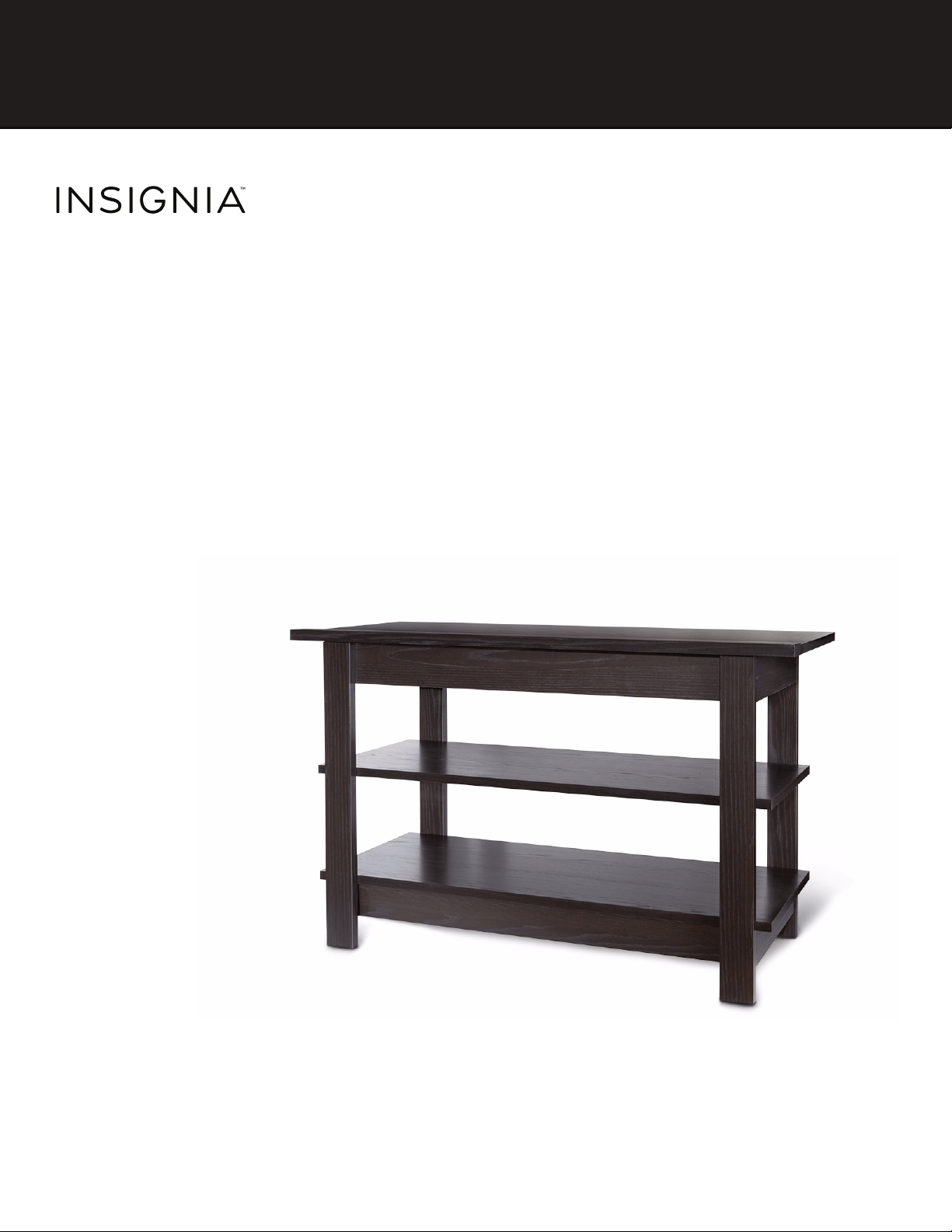
36” Espresso Finish Open Frame TV
Stand
Base para televisor con armazón
abierto de 36 pulg. con acabado
expreso
NS-HWD1636

2
36
”
E
spresso
Fi
n
i
s
h
O
pen
F
rame
TV
S
tan
d
www.insigniaproducts.com
CONTENTS
ENGLISH........................................................................................3
SAFETY INFORMATION AND SPECIFICATIONS....................................................... 3
PACKAGE CONTENTS: PARTS........................................................................................ 4
PACKAGE CONTENTS: HARDWARE............................................................................. 5
ASSEMBLY INSTRUCTIONS............................................................................................ 6
CARE AND MAINTENANCE..........................................................................................18
ONE-YEAR LIMITED WARRANTY................................................................................19
ESPAÑOL.................................................................................... 21
INFORMACIÓN DE SEGURIDAD Y ESPECIFICACIONES......................................21
CONTENIDO DEL PAQUETE: PIEZAS.........................................................................22
CONTENIDO DEL PAQUETE: FERRETERÍA...............................................................23
INSTRUCCIONES DE MONTAJE ..................................................................................24
CUIDADO Y MANTENIMIENTO...................................................................................36
GARANTÍA LIMITADA DE UN AÑO............................................................................37
3
36
”
E
spresso
Fi
n
i
s
h
O
pen
F
rame
TV
S
tan
d
www.insigniaproducts.com
ENGLISH
SAFETY INFORMATION AND SPECIFICATIONS
CAUTION: The top surface of this stand
is designed for use with a product
weighing no more than
50 lbs. (22.68 kg) and having a width
that permits it to sit evenly on the
stand with no more than a one-inch overhang on
each side of the shelf. Use with products that weigh
more than the maximum weight allowed, or with
dimensions that extend beyond the maximum
width may result in instability, which may result in
injury.
CAUTION: This product contains small
items that could be a choking hazard if
swallowed.
Keep these items away from young
children!
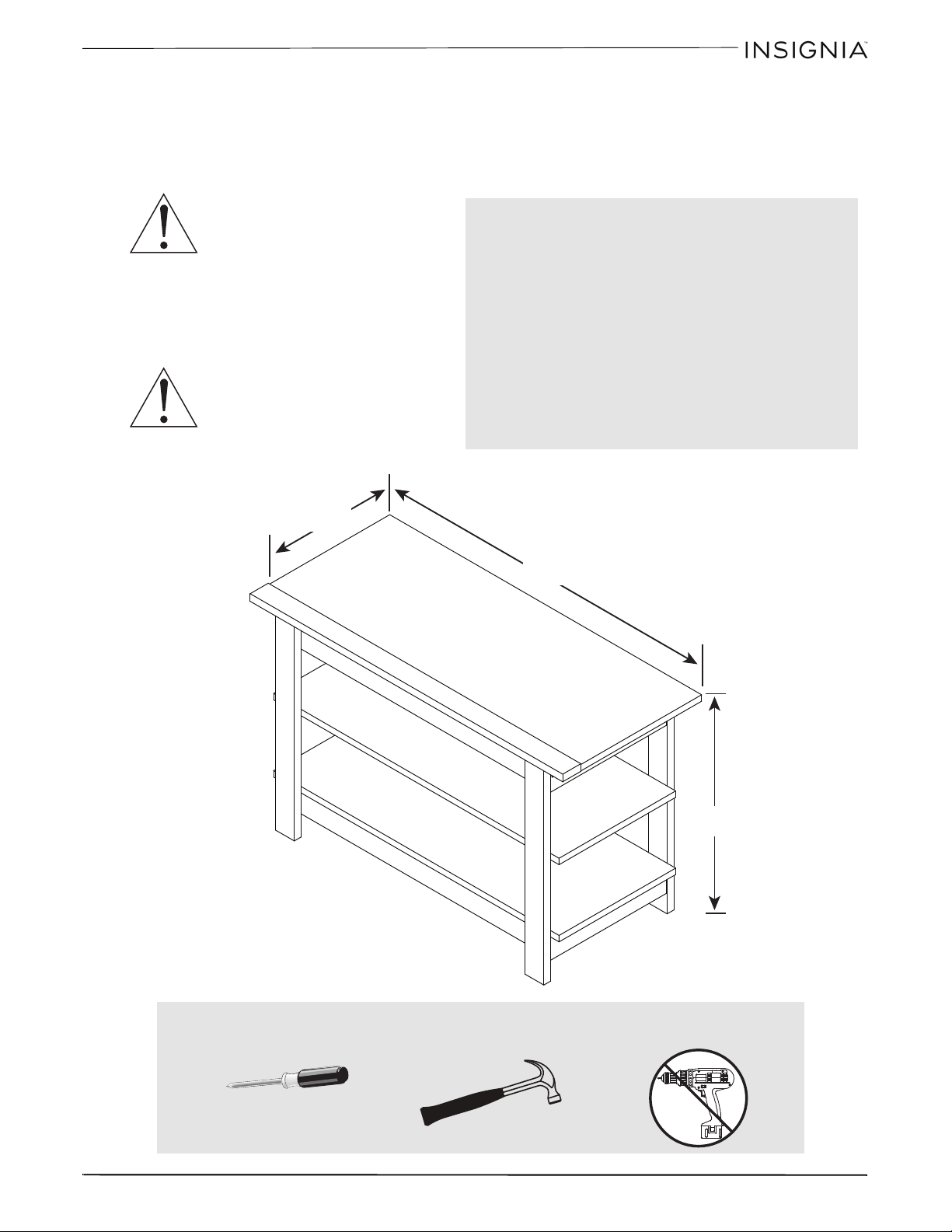
Model #: NS-HWD1636
Maximum Supported Weights:
- Top shelf: 50 lbs. (22.68 kg)
- Middle shelf: 20 lbs. (9 kg)
- Bottom shelf: 30 lbs. (13.6 kg)
Maximum screen size: 40” diagonal
Overall dimensions (H × W × D):
22.0 x 35.4 x 15.7 in.
(55.8 x 89.8 x 40.0 cm)
Overall weight:
40 Lbs. (18.14 kg)
35.4 inch
(89.8 cm)
22.0 inch
(55.8 cm)
15.7 inch
(40.0 cm)
50 lbs.
20 lbs.
30 lbs.
Tools needed:
Phillips screwdriver
Hammer
4
36
”
E
spresso
Fi
n
i
s
h
O
pen
F
rame
TV
S
tan
d
www.insigniaproducts.com
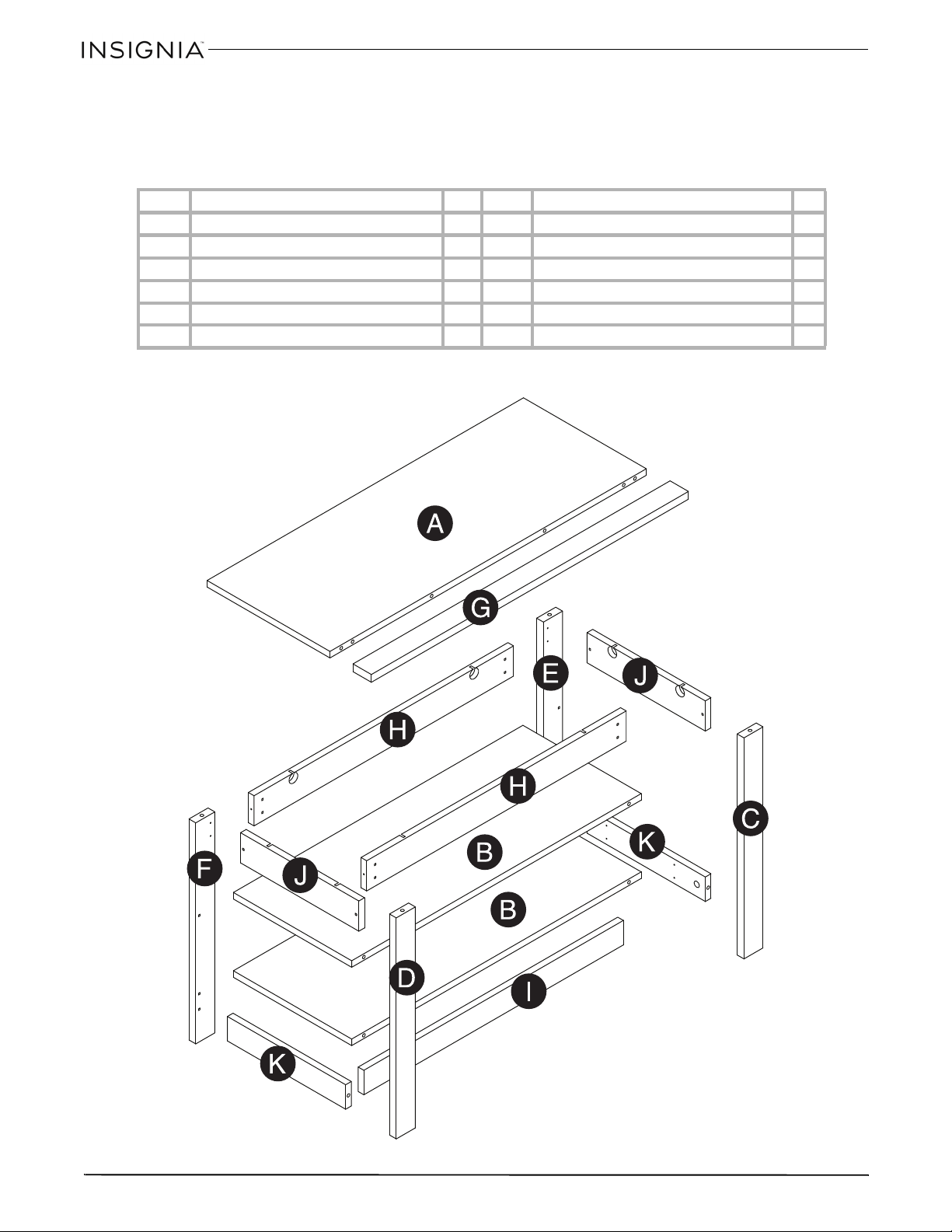
PACKAGE CONTENTS: PARTS
Make sure that you have all the parts necessary to assemble your new TV stand. While not all parts are
labeled, some of the parts will have a label or an inked letter on the edge to help distinguish similar parts
from each other. Use this part identification to help identify similar parts.
Label Part Qty Label Part Qty
A Top 1 G Stop Molding 1
B Shelf 2 H Upper Long Skirt 2
C Right Front Leg 1 I Lower Long Skirt 1
D Left Front Leg 1 J Upper Short Skirt 2
E Right Rear Leg 1 K Lower Short Skirt 2
FLeft Rear Leg 1
5
36
”
E
spresso
Fi
n
i
s
h
O
pen
F
rame
TV
S
tan
d
www.insigniaproducts.com
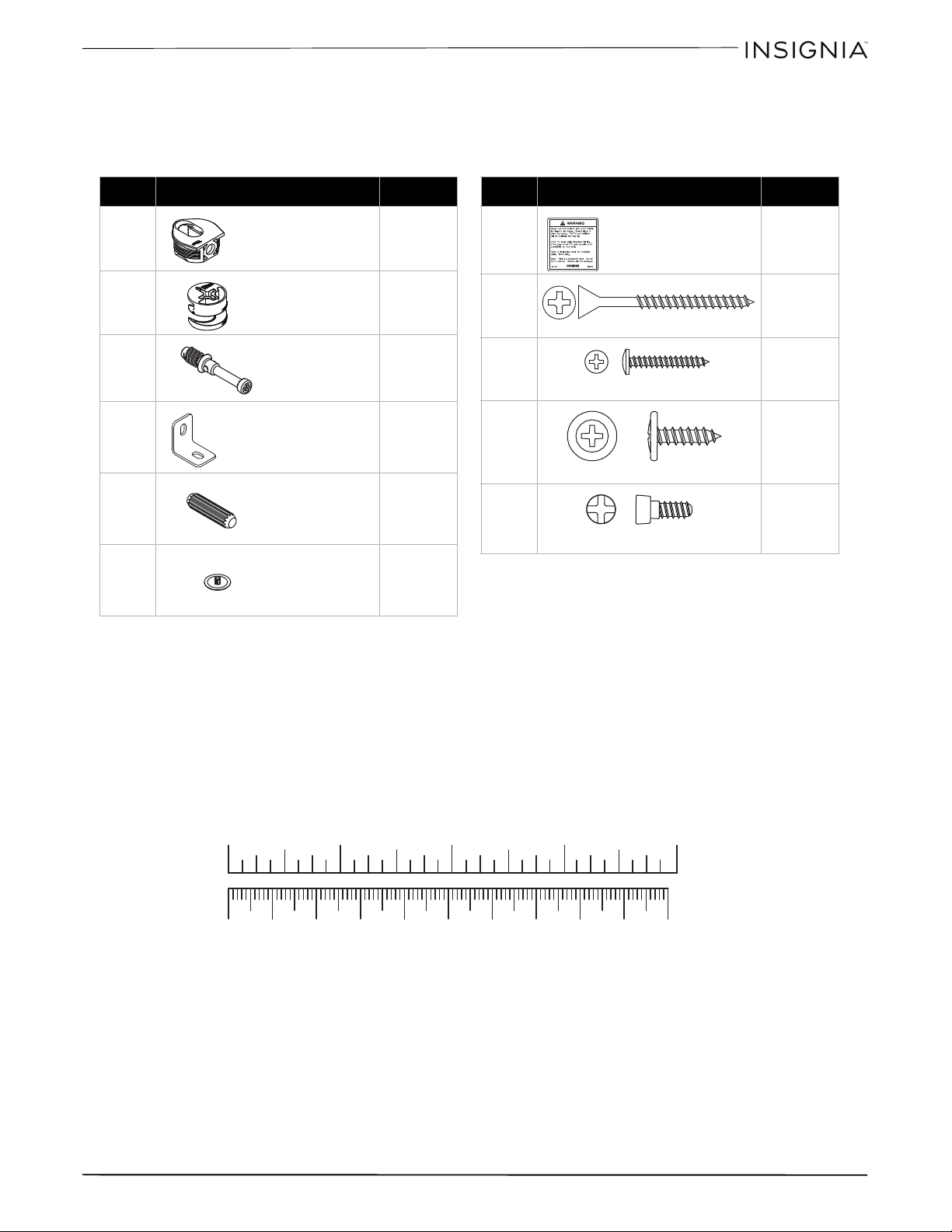
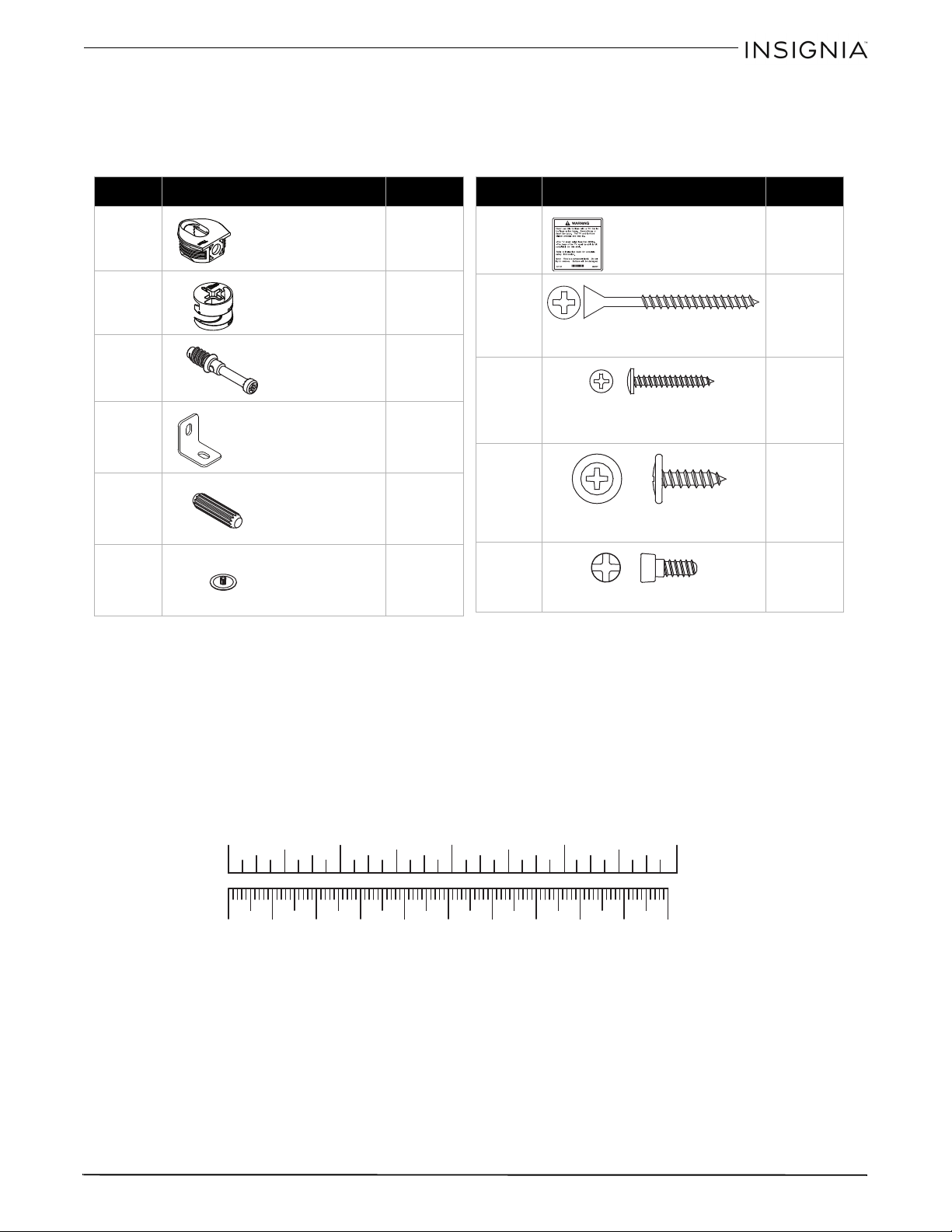
PACKAGE CONTENTS: HARDWARE
Note: The table below shows the required hardware. You may receive extra hardware.
Make sure that you have all the hardware necessary to assemble your new TV stand.
Label Hardware Qty.
5F 8
1F 10
8F 10
4G 7
15F 6
20P 10
Hidden
connector
Hidden cam
Cam screw
Metal bracket
Wood dowel
Screw cover
Label Hardware Qty.
1L 1
2S 10
9S 8
1S 14
8S 8
Warning label
Black 1-7/8” flat head screw
Black 1-1/8” pan head screw
Black 9/16” large head screw
Connector screw
1 0 20 30 40 50 60 70 80 90 100mm
1234in
6
36
”
E
spresso
Fi
n
i
s
h
O
pen
F
rame
TV
S
tan
d
www.insigniaproducts.com
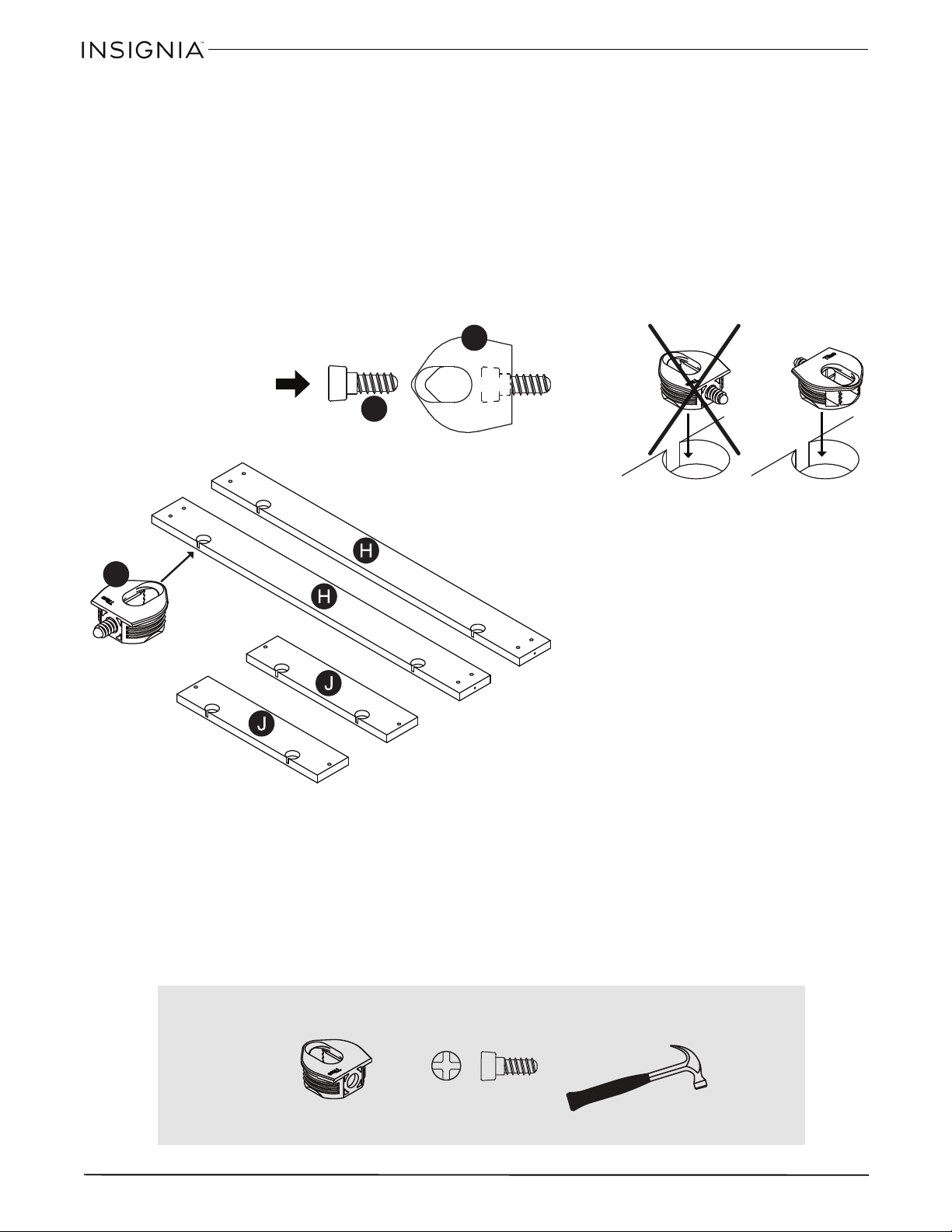
ASSEMBLY INSTRUCTIONS
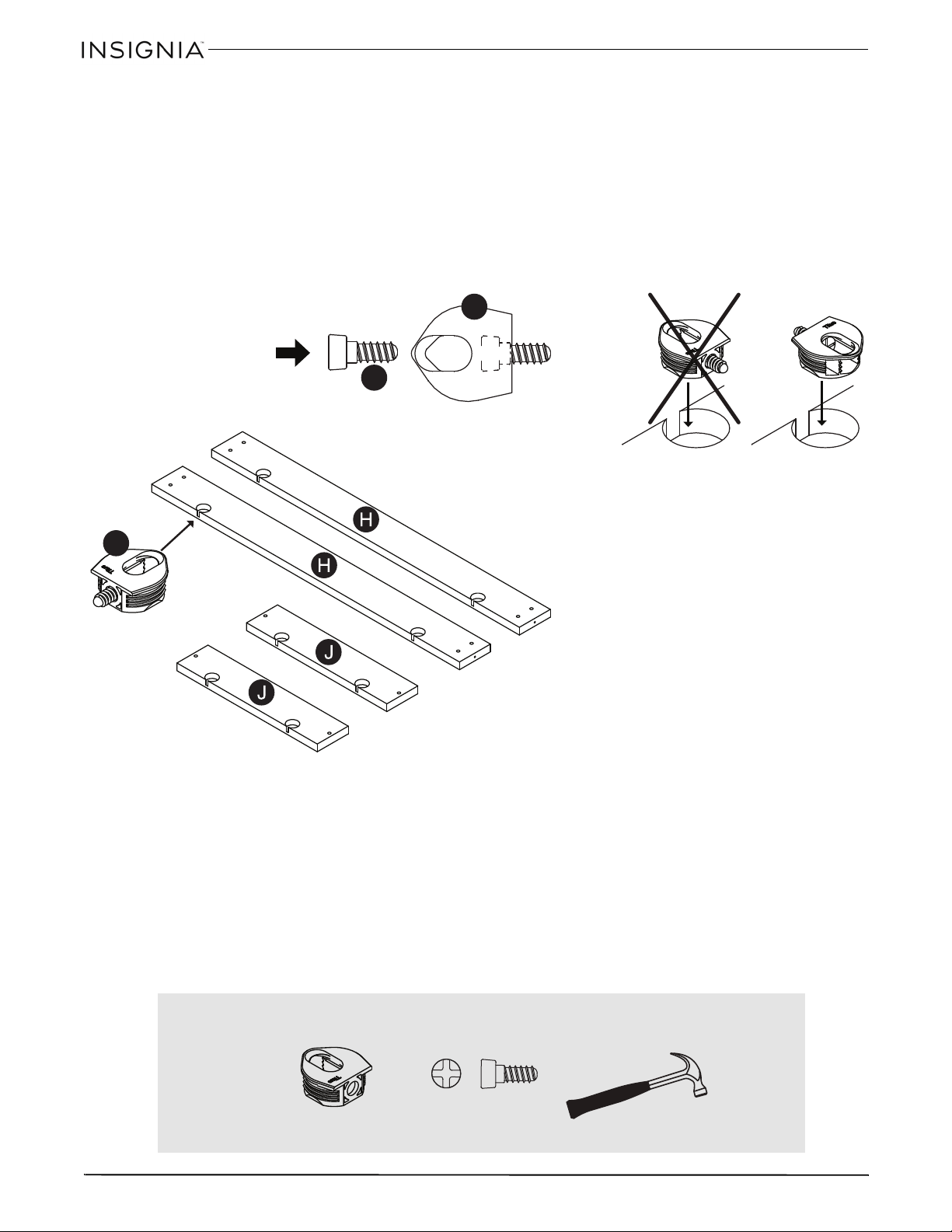
Step 1: Preparing the upper skirts
Caution: Assemble your stand on a carpeted floor or on the empty carton to avoid scratching your stand.
• Insert a connector screw (8S) into each hidden connector (5F), then use a hammer to tap a hidden connector and
screw assembly into the large holes in the upper long skirts (H) and upper short skirts (J).
Note: Make sure that the threads in the connector screws (8S) are pointing straight out, away from the wood part.
8S
5F
5F
You’ll need:
5F (8)
8S (8)
Hammer
7
36
”
E
spresso
Fi
n
i
s
h
O
pen
F
rame
TV
S
tan
d
www.insigniaproducts.com
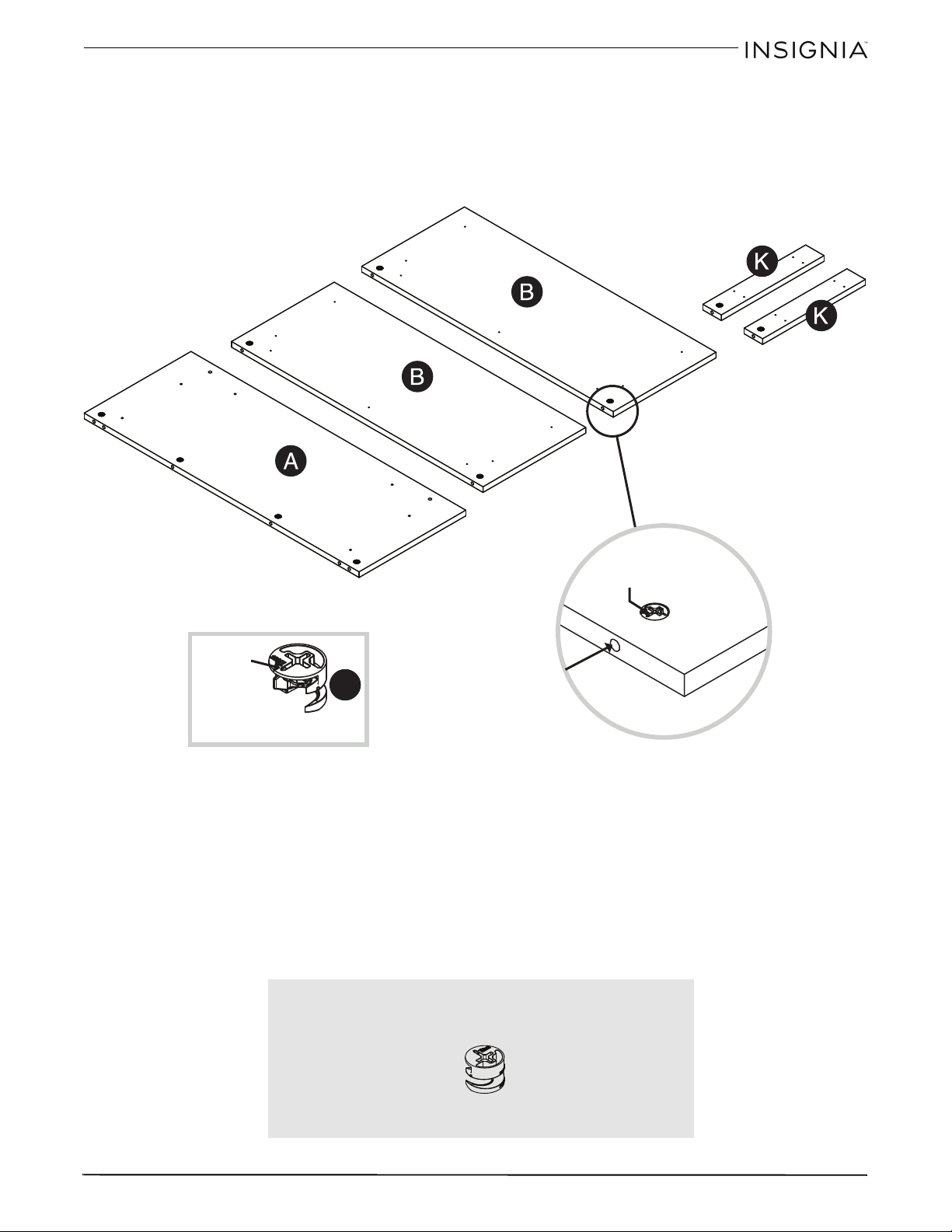
Step 2
:
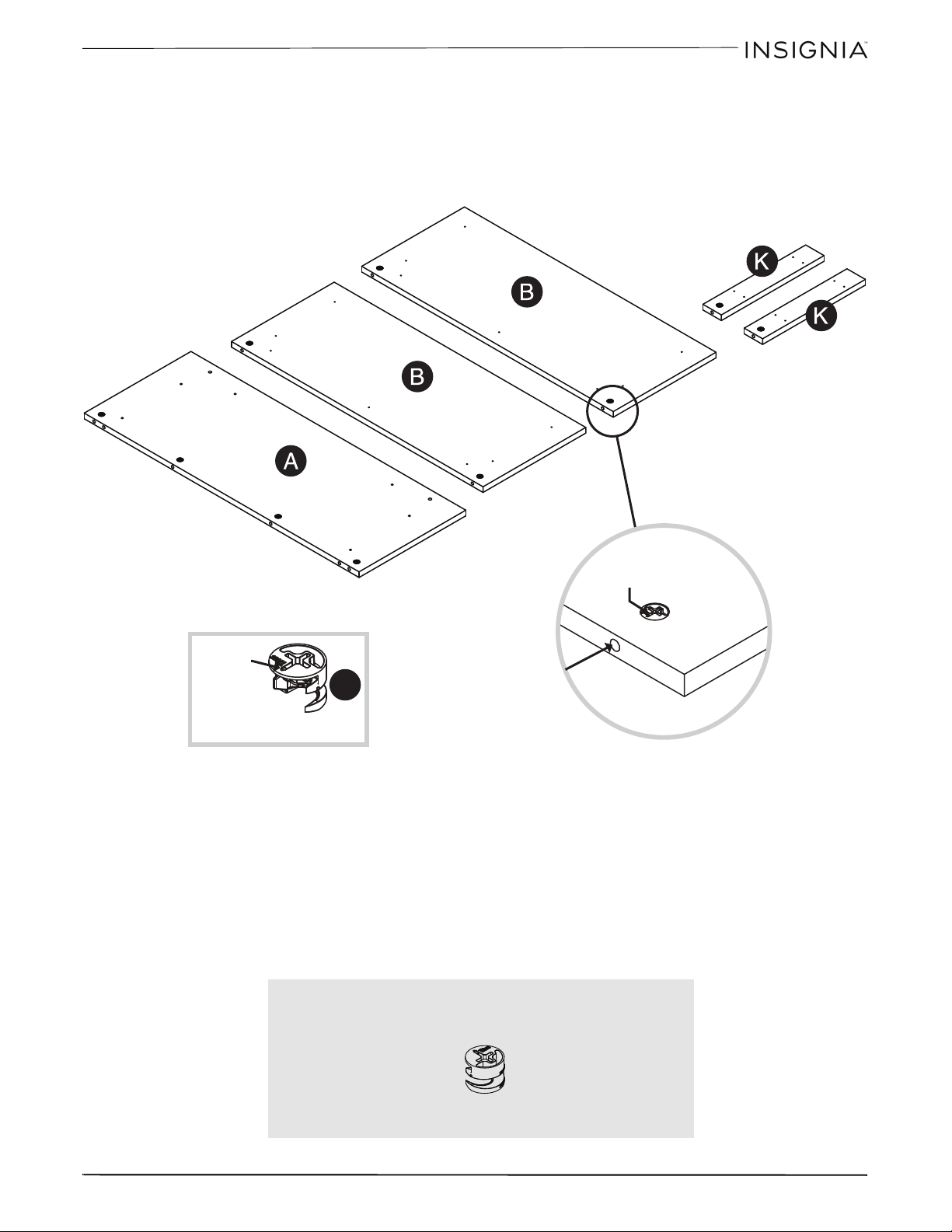
Preparing the top, shelves, and lower short skirts
• Push ten hidden cams (1F) into the top (A), shelves (B), and lower short skirts (K). The arrow on the
hidden cams must point toward the hole in the edge of the part.
1F
Arrow
Arrow
The arrow in the hidden cam
must point toward the hole in
the edge of the board
Hole
You’ll need:
1F (10)
8
36
”
E
spresso
Fi
n
i
s
h
O
pen
F
rame
TV
S
tan
d
www.insigniaproducts.com
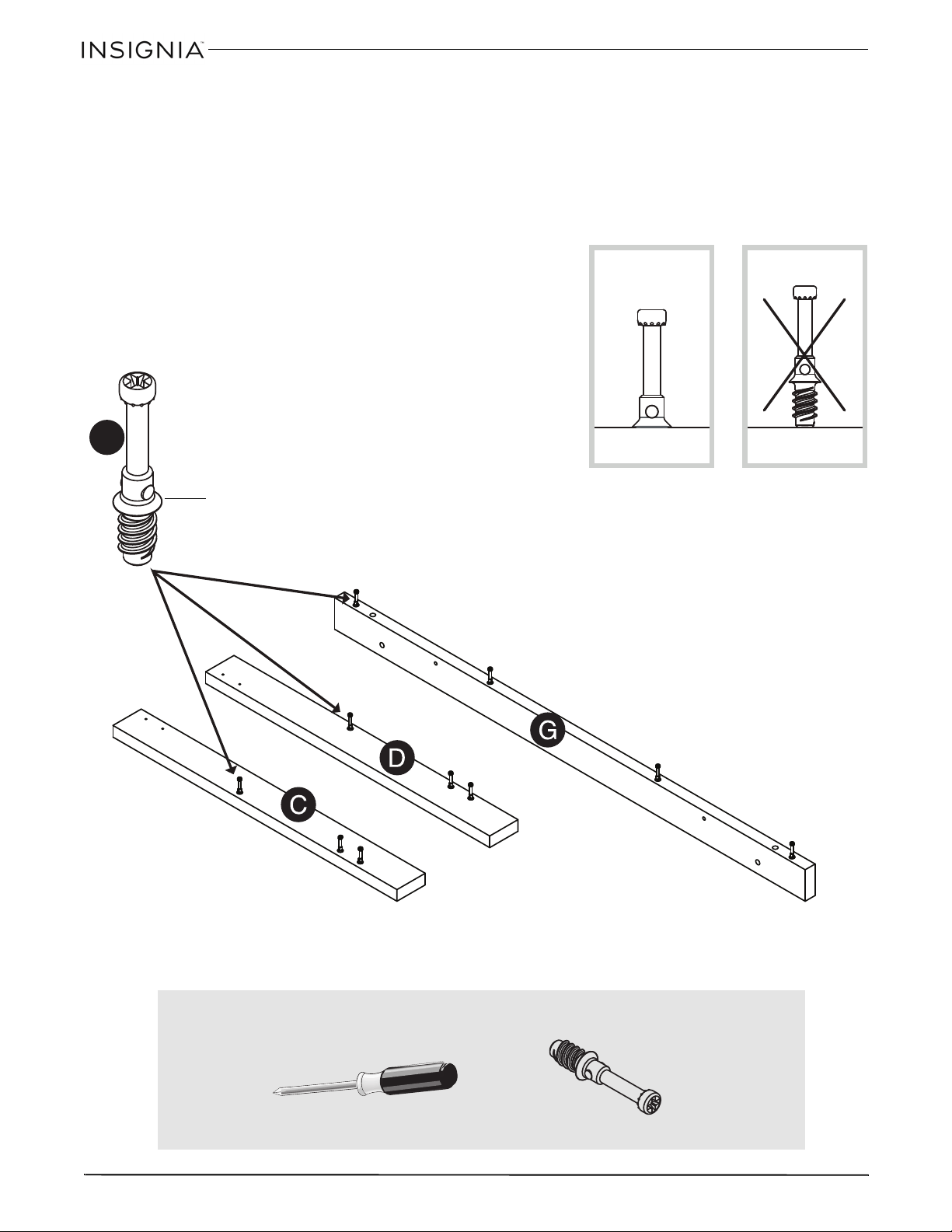
Step 3
:
Preparing the stop molding
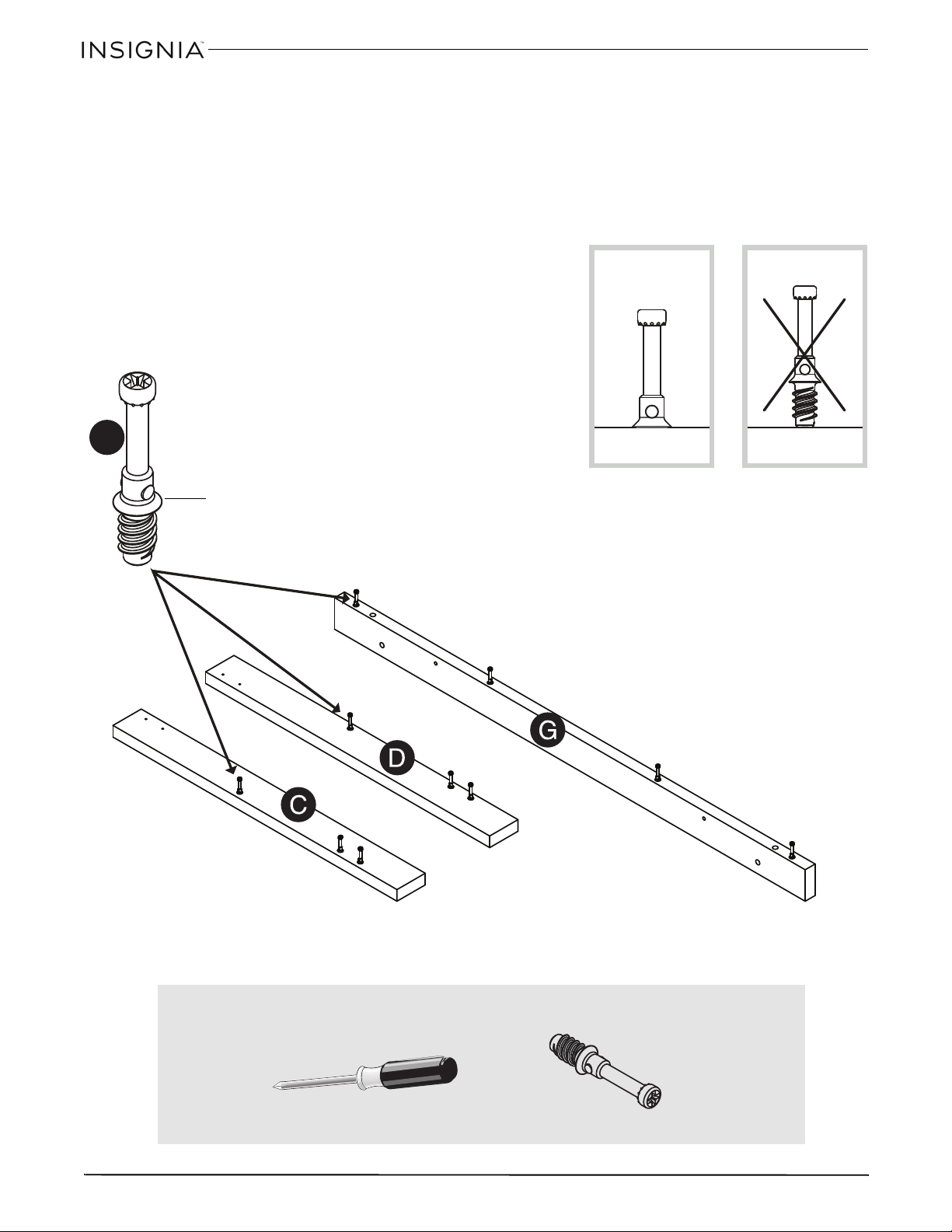
• Screw ten cam screws (8F) into the predrilled holes in the front legs (C and D) and stop molding (G),
then tighten with a phillips screw driver until the raised collar of the cam screw (8F) is flush with the
surface of the part.
8F
Collar
You’ll need:
Phillips screwdriver
8F (10)
9
36
”
E
spresso
Fi
n
i
s
h
O
pen
F
rame
TV
S
tan
d
www.insigniaproducts.com
Step 4
:
Attaching the stop molding to the top
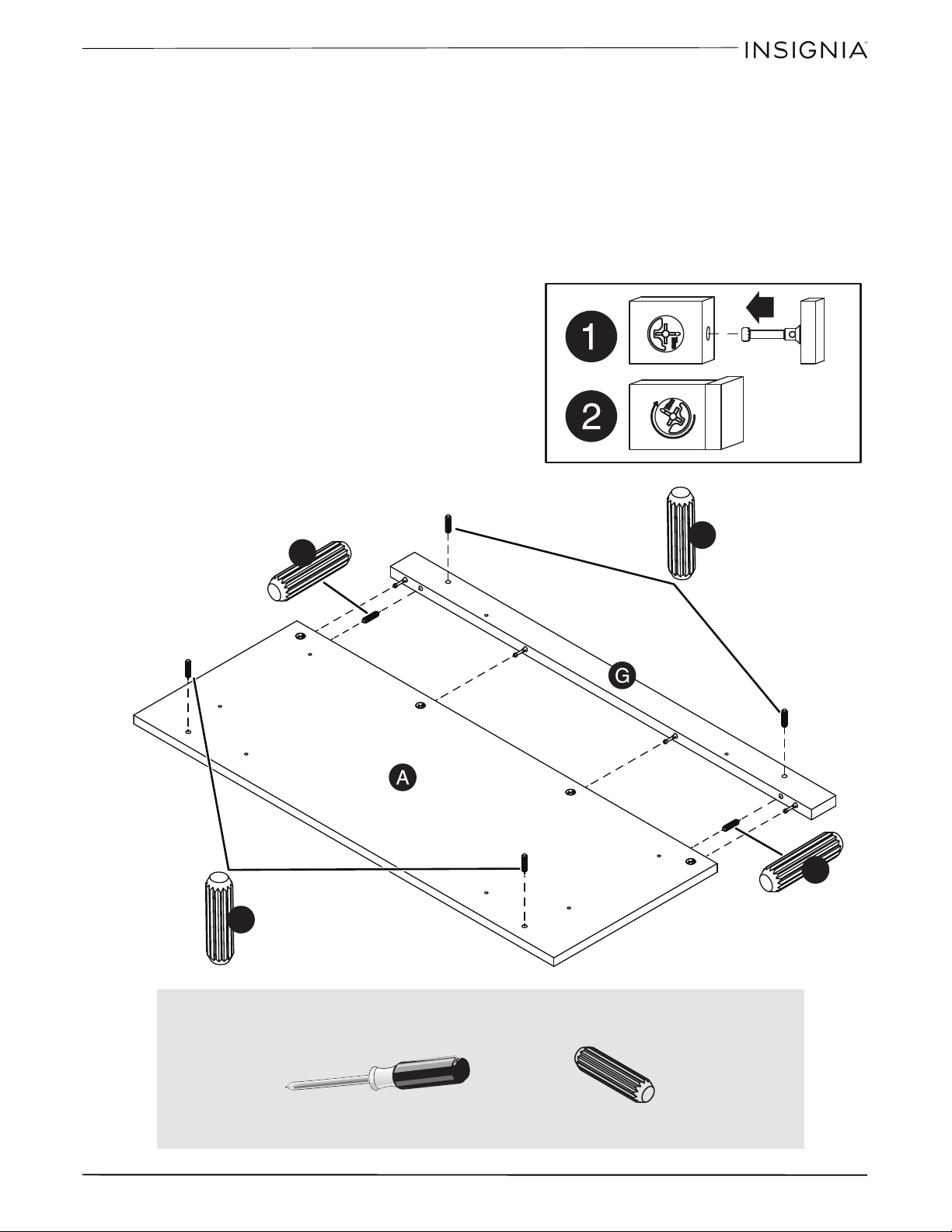
1 Insert two wooden dowels (15F) into the holes in the edge of the stop molding (G).
2 Insert the cam screw and dowel end of the stop molding (G) into the holes on the top (A).
Note: Make sure that the wooden dowels in the stop molding insert into the holes in the top, and that the dowel end
of the fastener remains fully inserted in the hole of the adjoining part while locking the fastener.
3 Tighten each hidden cam with a Phillips screwdriver as tight as possible.
4 Insert four wooden dowels (15F) into the holes shown in the surfaces of the top (A) and stop molding (G).
15F
15F
15F
15F
S
u
r
f
a
c
e
w
i
t
h
h
o
l
e
s
S
u
r
f
a
c
e
w
i
t
h
h
i
d
d
e
n
c
a
m
s
You’ll need:
Phillips screwdriver
15F (6)
10
36
”
E
spresso
Fi
n
i
s
h
O
pen
F
rame
TV
S
tan
d
www.insigniaproducts.com
Step 5: Attaching the upper long skirts to the top
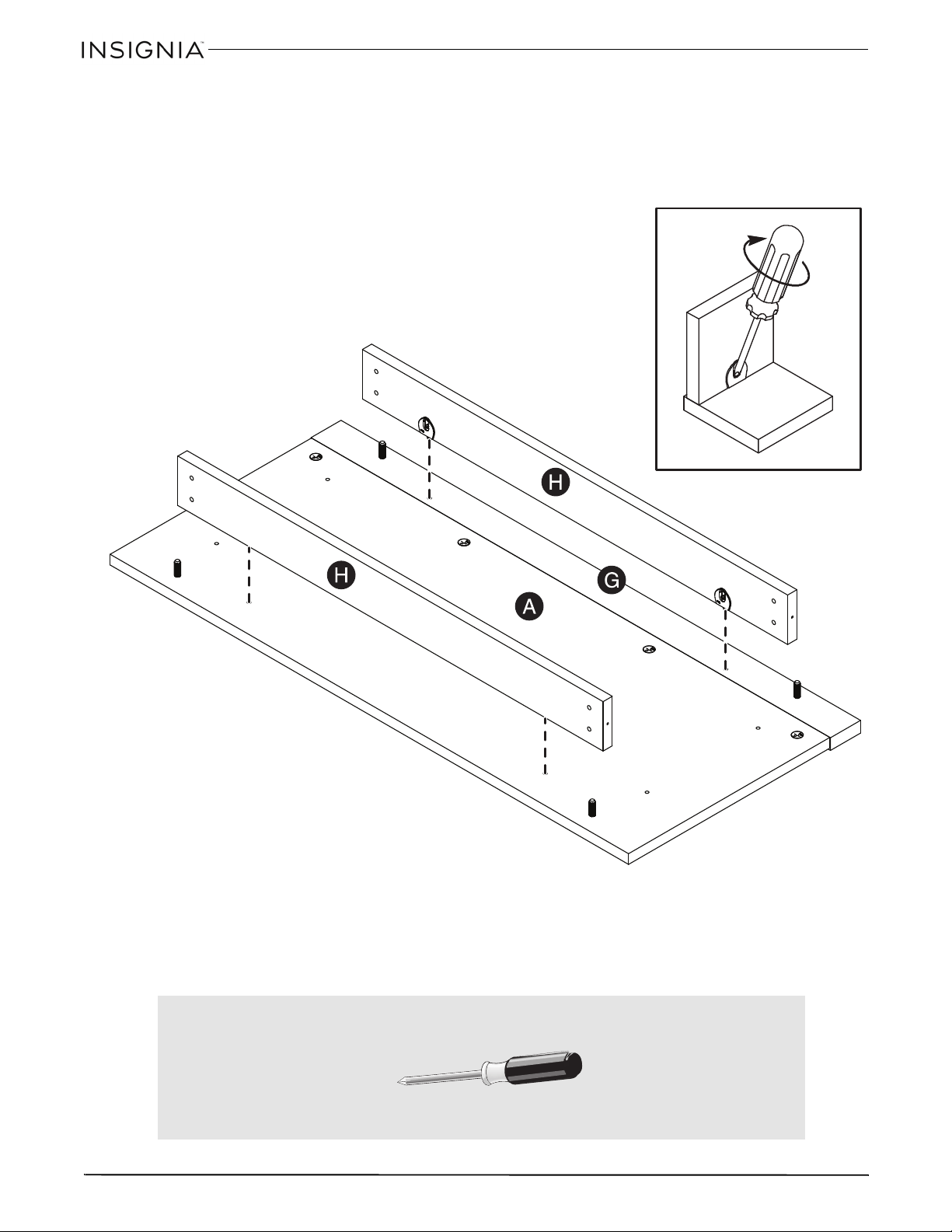
• Attach the upper long skirts (H) to the top (A) and stop molding (G), then tighten the four hidden connectors.
S
u
r
f
a
c
e
w
i
t
h
o
u
t
h
i
d
d
e
n
c
o
n
n
e
c
t
o
r
s
To fasten two parts together using the hidden
connectors, insert your screwdriver at an angle
into the slot in the hidden connector. While
pushing the screw into the hole of the
adjoining part, turn the screwdriver clockwise
to tighten. Do not overtighten.
S
u
r
f
a
c
e
w
i
t
h
h
i
d
d
e
n
c
o
n
n
e
c
t
o
r
s
You’ll need:
Phillips screwdriver
11
36
”
E
spresso
Fi
n
i
s
h
O
pen
F
rame
TV
S
tan
d
www.insigniaproducts.com
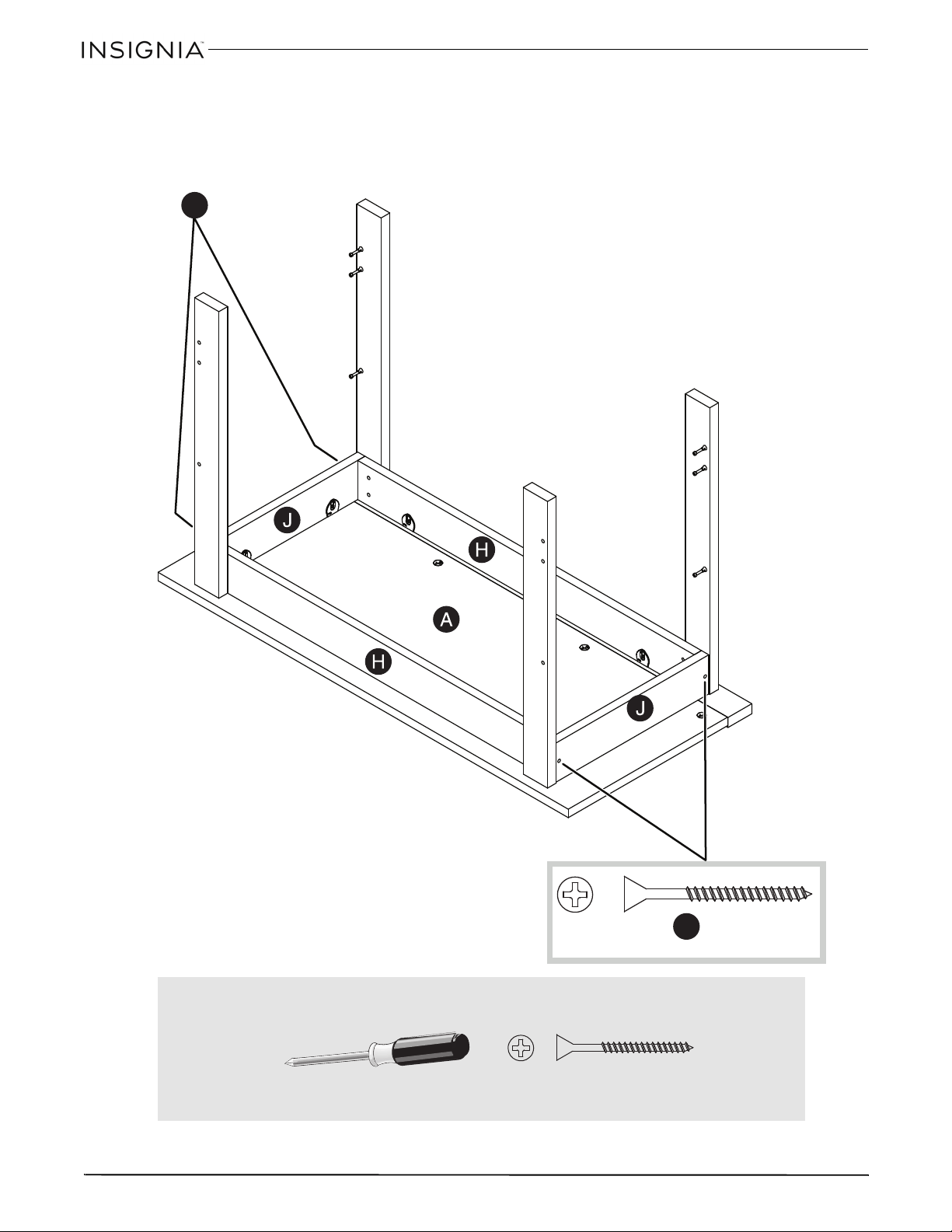
Step 6: Attaching the legs
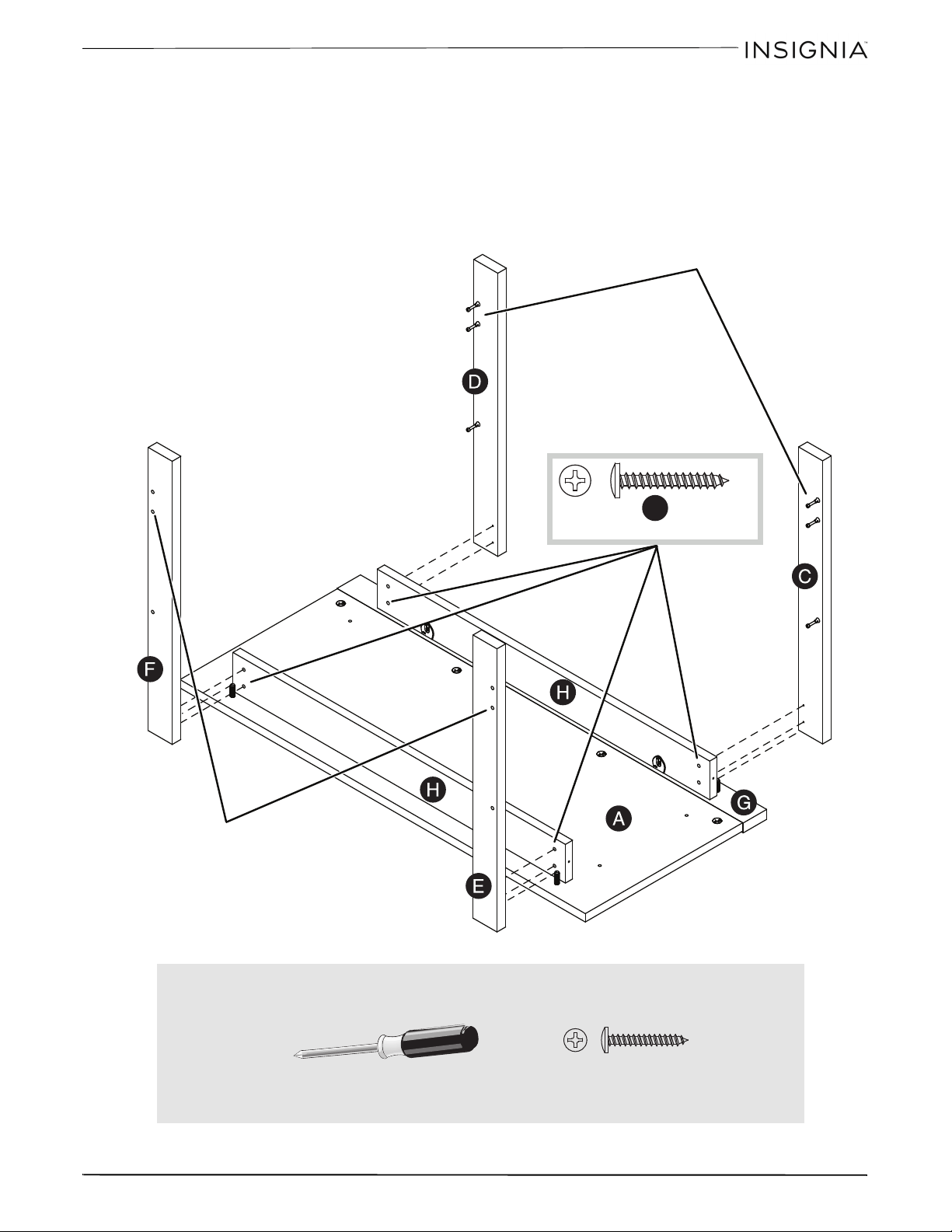
1 Place the legs (C, D, E, and F) onto the wooden dowels (15F) in the top (A) and stop molding (G).
2 Attach the the legs (C, D, E, and F) to the upper long skirts (H) with black 1-1/8” pan head screws (9S).
Tip: Make sure the screw holes are aligned.
9S
These cam screws
must be here.
These holes must
be here.
You’ll need:
Phillips screwdriver
9S (8)
12
36
”
E
spresso
Fi
n
i
s
h
O
pen
F
rame
TV
S
tan
d
www.insigniaproducts.com
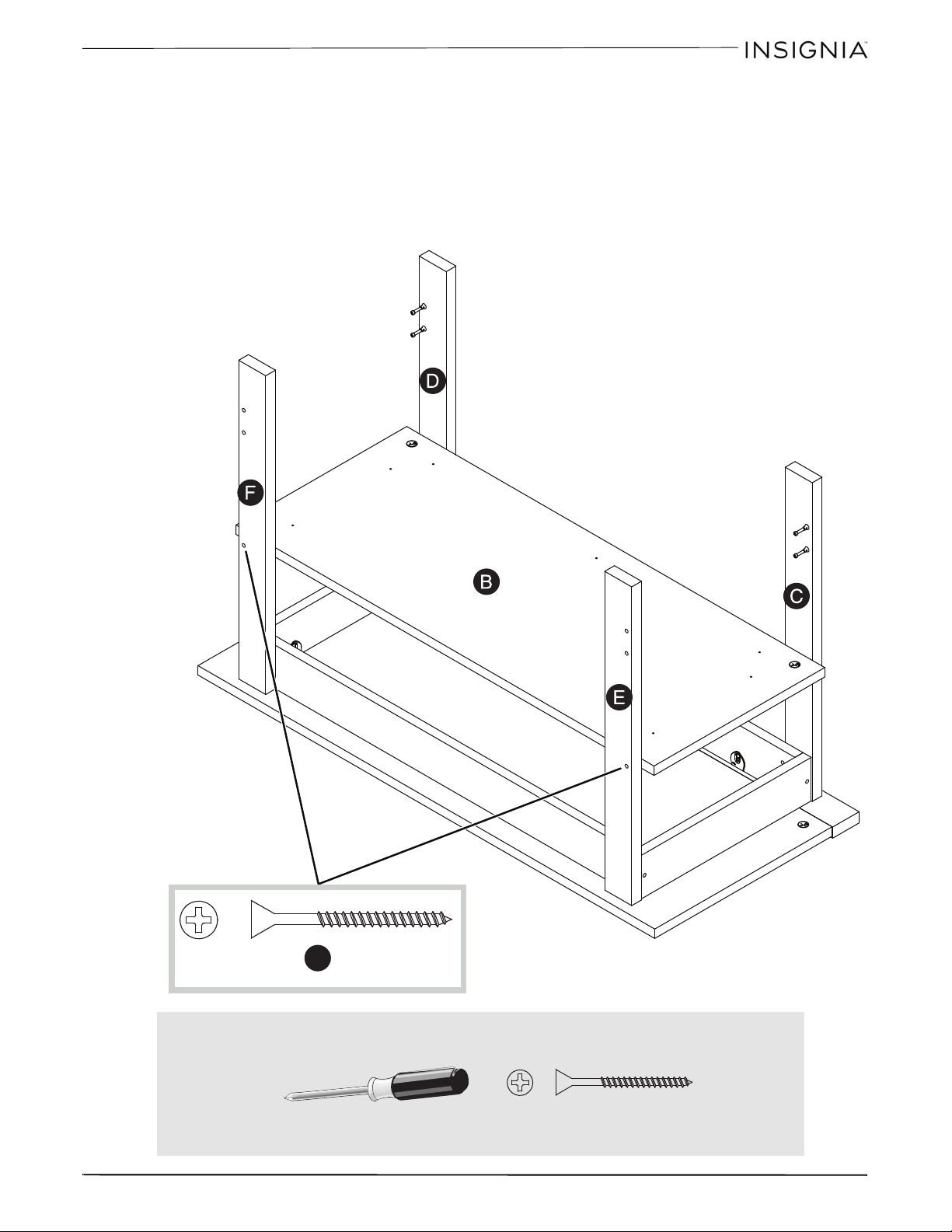
Step 7: Attaching the upper short skirts
1 Attach the upper short skirts (J) to the top (A), then tighten the four hidden connectors.
2 Attach the upper short skirts (J) to the upper long skirts (H) with four black 1-7/8” flat head screws (2S).
2S
2S
You’ll need:
Phillips screwdriver
2S (4)
13
36
”
E
spresso
Fi
n
i
s
h
O
pen
F
rame
TV
S
tan
d
www.insigniaproducts.com
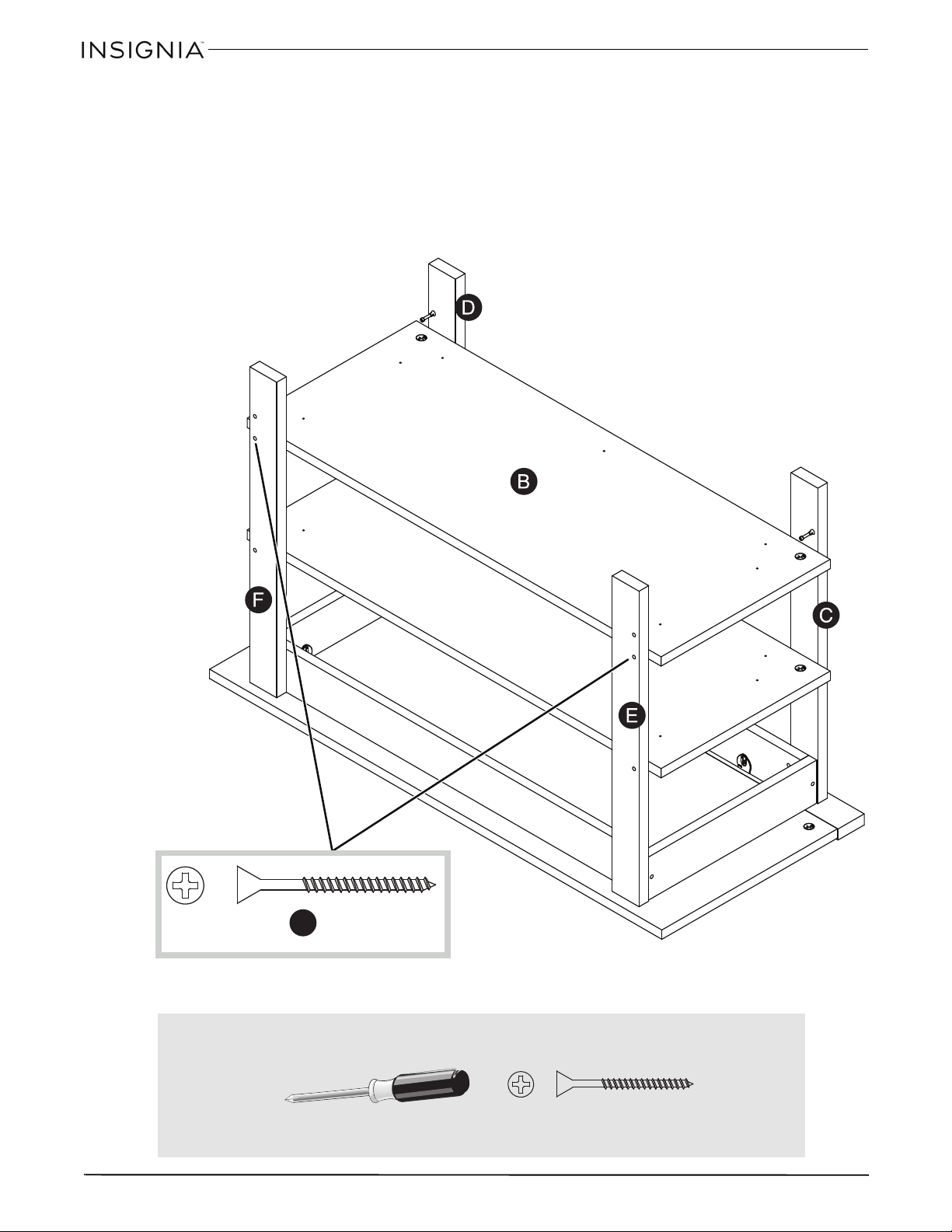
Step 8: Attaching the middle shelf
1 Attach the middle shelf (B) to the front legs (C and D), then tighten the two hidden cams on the shelf.
Notes:
You will need to tilt the shelf onto the cam screws in the front legs.
Make sure that the holes in the back legs (E and F) line up with the holes in the edge of the shelf (B).
2 Attach the shelf (B) to the back legs (E and F) with two black 1-7/8” flat head screws (2S).
2S
S
u
r
f
a
c
e
w
i
t
h
h
i
d
d
e
n
c
a
m
s
You’ll need:
Phillips screwdriver
2S (2)
14
36
”
E
spresso
Fi
n
i
s
h
O
pen
F
rame
TV
S
tan
d
www.insigniaproducts.com
Step 9: Attaching the bottom shelf
1 Attach the bottom shelf (B) to the front legs (C and D), then tighten the two hidden cams on the shelf.
Notes:
You will need to tilt the shelf onto the cam screws in the front legs.
Make sure that the holes in the back legs (E and F) line up with the holes in the edge of the shelf (B).
2 Attach the shelf (B) to the back legs (E and F) with two black 1-7/8” flat head screws (2S).
2S
S
u
r
f
a
c
e
w
i
t
h
h
i
d
d
e
n
c
a
m
s
You’ll need:
Phillips screwdriver
2S (2)
15
36
”
E
spresso
Fi
n
i
s
h
O
pen
F
rame
TV
S
tan
d
www.insigniaproducts.com
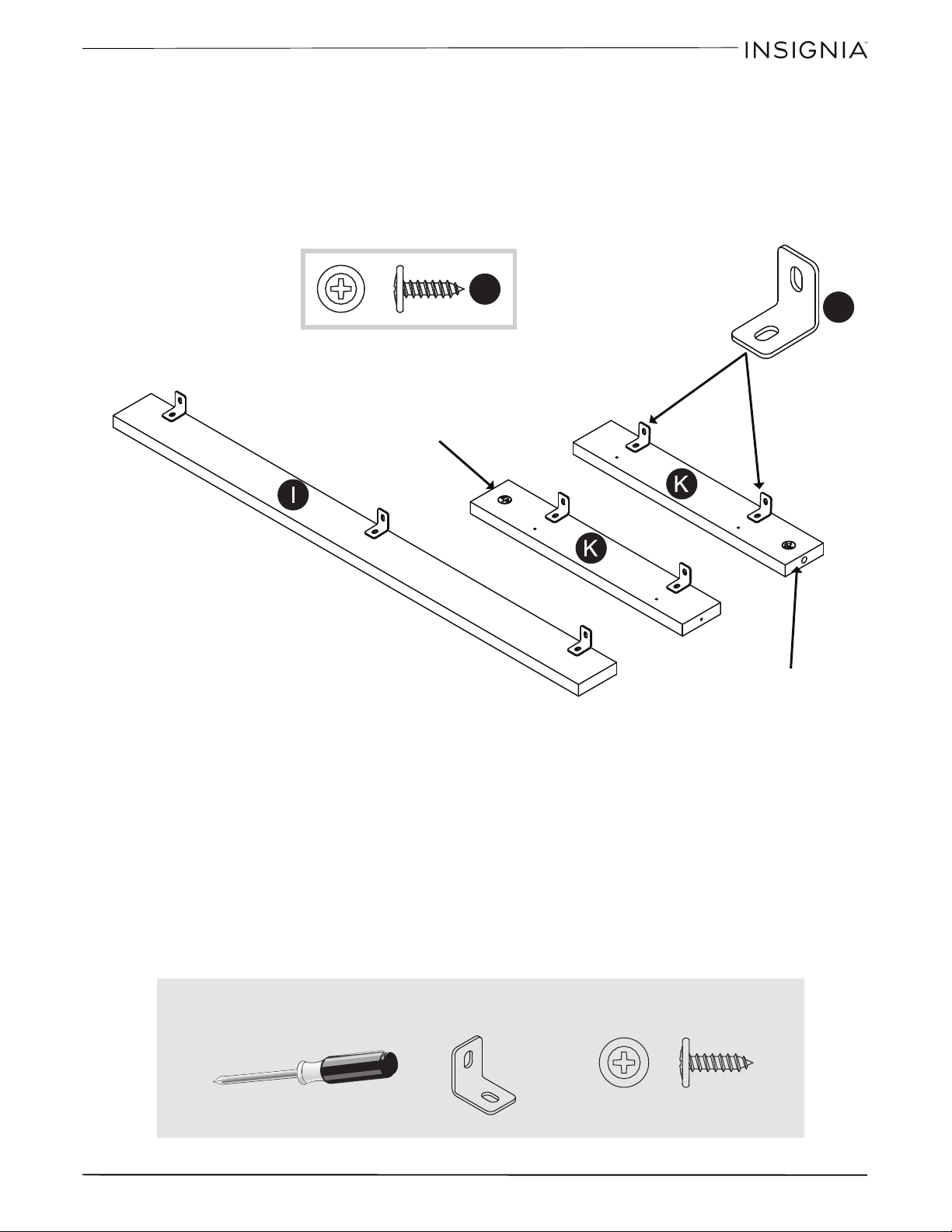
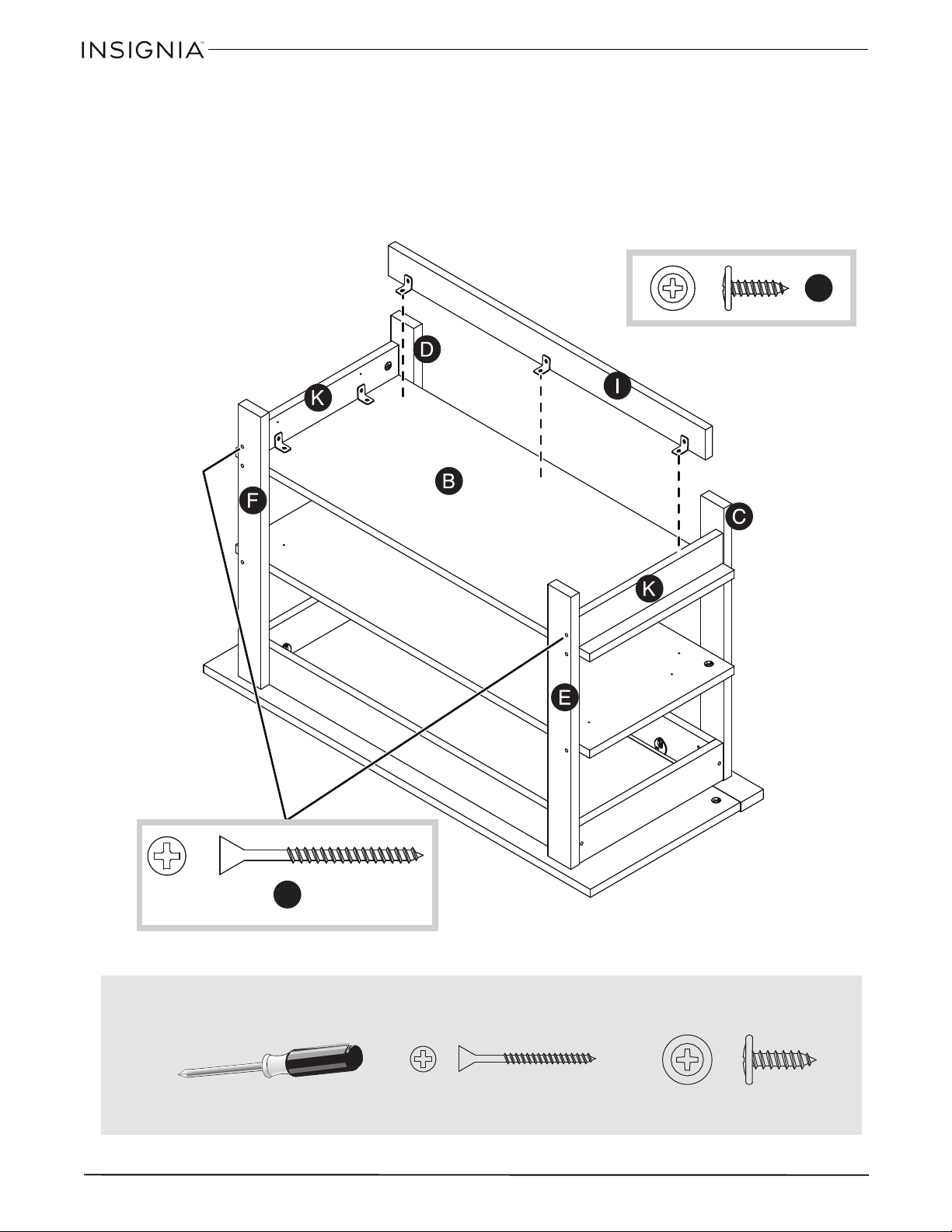
Step 10: Preparing the lower skirts
• Fasten the metal brackets (4G) to the lower skirts (I and K) with the black 9/16” large head screws (1S).
Note: Make sure that the brackets are even with the edges of the lower skirts.
Note: Use the exact holes shown in the illustration.
1S
4G
Edge with
hidden cam
Edge with
hidden cam
You’ll need:
Phillips screwdriver
4G (7)
1S (7)
16
36
”
E
spresso
Fi
n
i
s
h
O
pen
F
rame
TV
S
tan
d
www.insigniaproducts.com
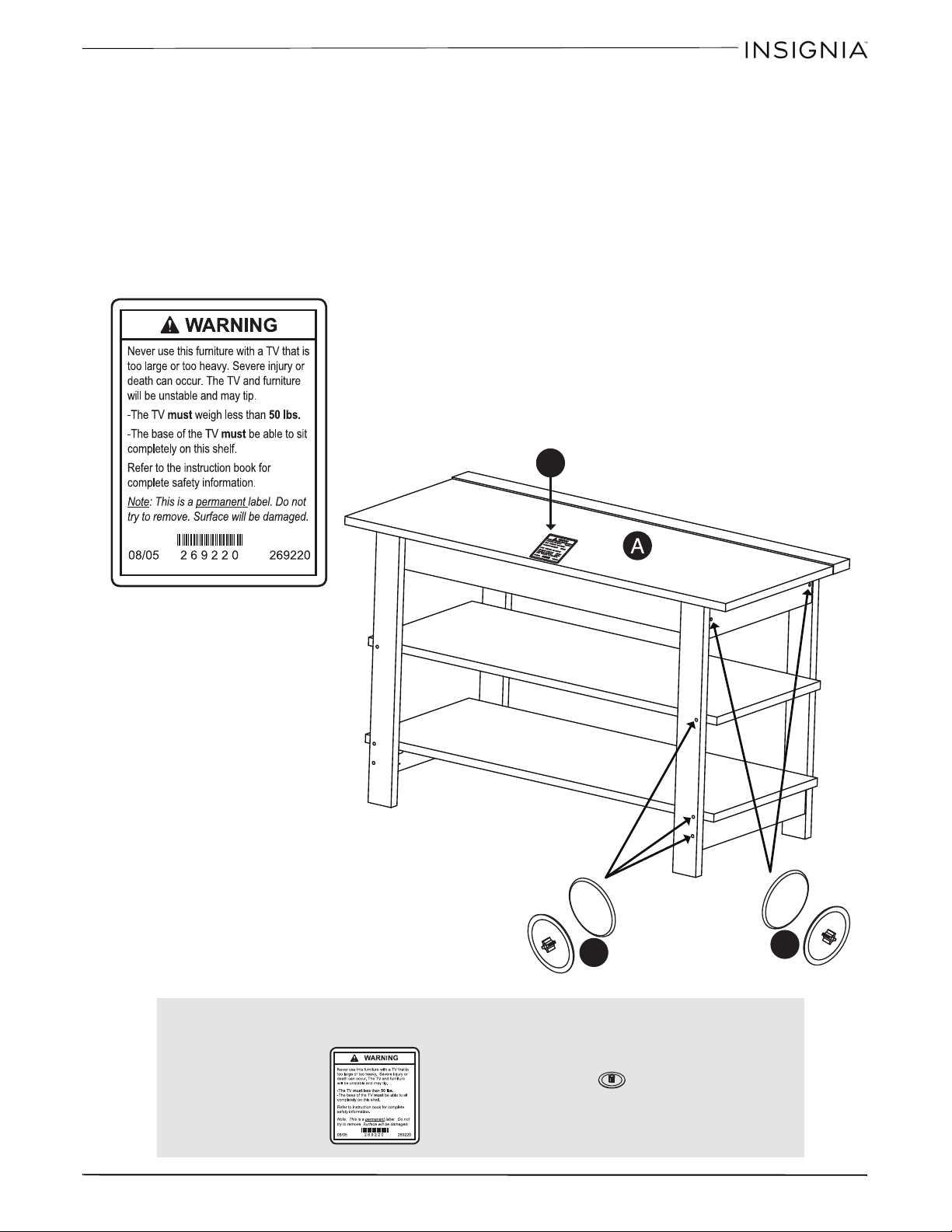
Step 11: Attaching the lower skirts
1 Attach the lower short skirts (K) to the front legs (C and D), then tighten the two hidden cams.
2 Attach the lower short skirts (K) to the back legs (E and F) with two black 1-7/8” flat head screws (2S).
3 Attach the skirts (I and K), finished side out, to the bottom shelf (B) with black 9/16” large head
screws (1S) through the metal brackets into the shelf.
1S
2S
You’ll need:
Phillips screwdriver
1S (7)
2S (2)
17
36
”
E
spresso
Fi
n
i
s
h
O
pen
F
rame
TV
S
tan
d
www.insigniaproducts.com
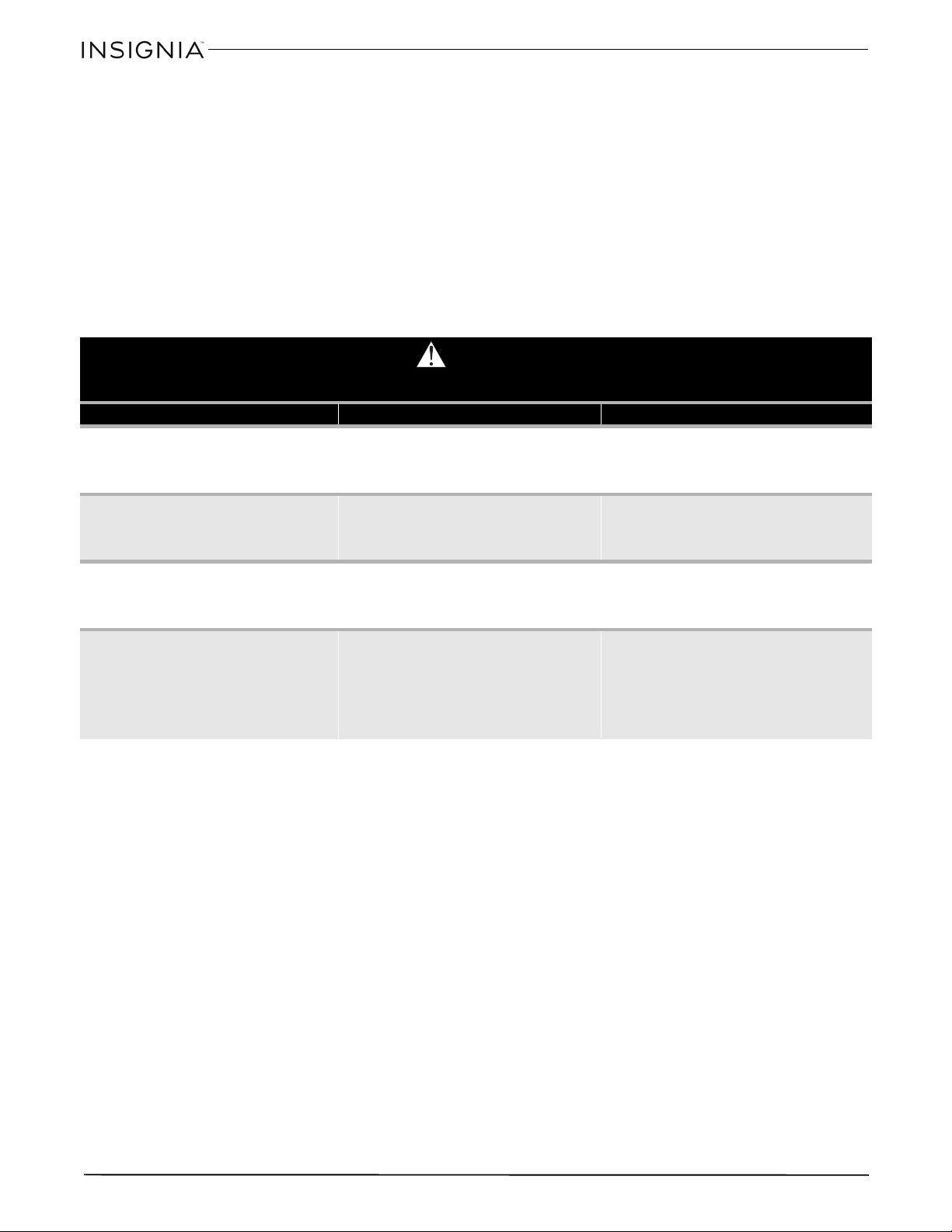
Step 12
:
Completing the TV stand
1 Carefully stand your unit upright.
2 Center a screw cover (20P) over the head of each visible screw and press firmly.
3 Apply the warning label (1L) to the top (A) so that it is readable only when the TV is removed from the unit. Peel
off the back of the label and apply it to the top as shown.
Note: This is a permanent label intended to last for the life of the product. After it is applied, do not try to remove it.
This completes the assembly of your TV stand. Clean with your favorite furniture polish or a damp cloth, then
wipe dry.
20P
1L
20P
You’ll need:
1L (1)
20P (10)
18
36
”
E
spresso
Fi
n
i
s
h
O
pen
F
rame
TV
S
tan
d
www.insigniaproducts.com
CARE AND MAINTENANCE
Wood/Laminate
• Use your favorite type of furniture polish.
• Do not spray polish directly onto the stand. Spray onto a soft cloth then wipe the stand.
• Always test any polish in a discrete location first, such as the back of the stand, to make sure that there is no
adverse reaction.
• Dust frequently with a soft cloth.
• Never slide objects across surfaces. Lift objects from the top surface rather than dragging them across the finish
when moving them.
• Do not expose your stand to direct sunlight, drying heat sources, or dampness.
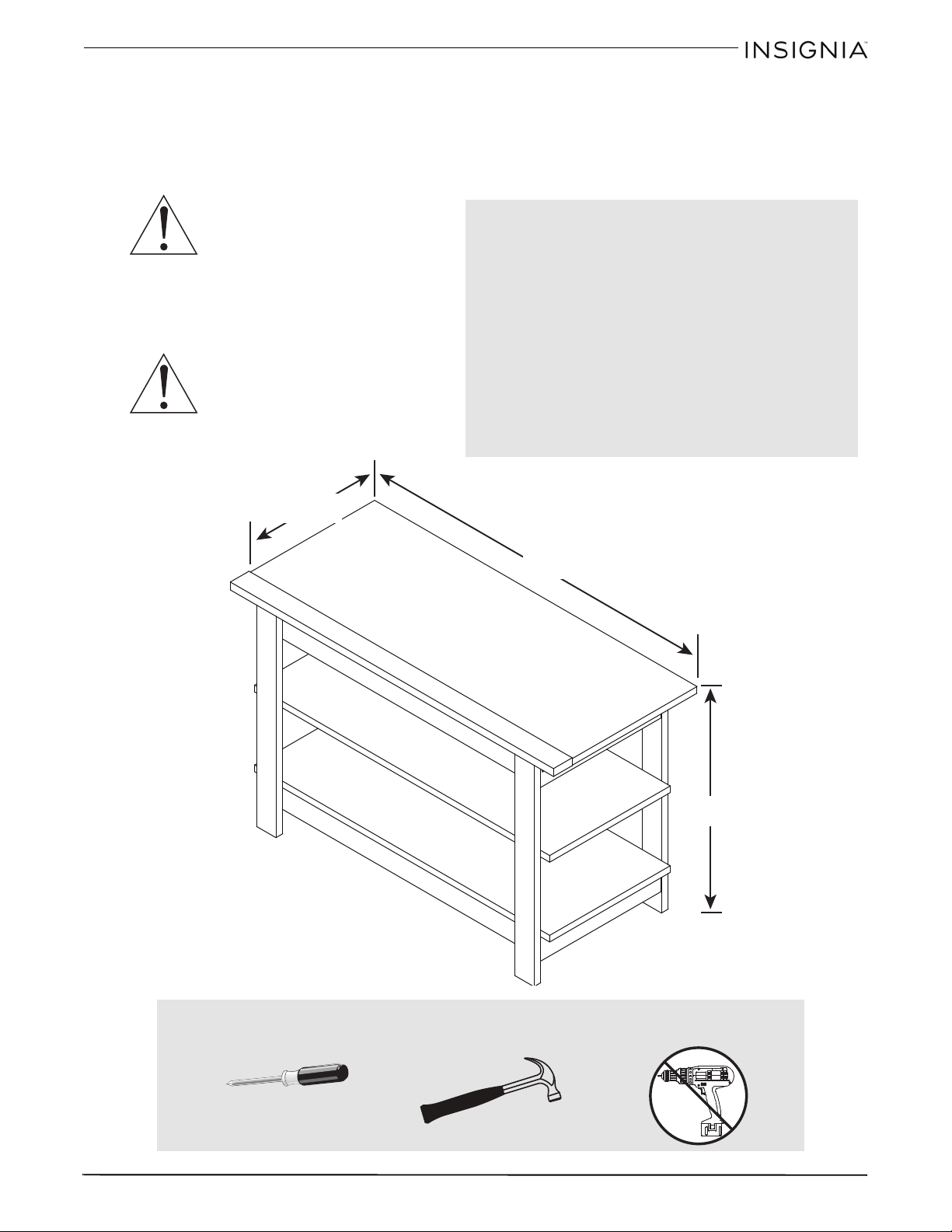
WARNING
Please use your stand correctly and safely. Improper use can cause safety hazards or damage to your furniture or household items. Carefully read
the following chart.
Look out for: What can happen: How to avoid the problem:
• Children climbing on the stand.
• A child may try to reach a toy or other object by climbing
on the stand.
• Children will play and be active near the TV.
• Risk of injury or death.
• A child climbing on the stand can make it top-heavy and
cause it to tip over.
• A child playing with a TV can cause it to tip over.
• Never allow children to climb on or play with the stand.
• Do not place toys or food on the top shelves. Children may
try to climb to reach them out of curiosity.
• Improper use of the stand to support TVs.
• The stand is designed for use with TVs will specify the
maximum weight rating and recommended size of the
TVs it will safely support.
• Risk of injury or death.
• TVs can be very heavy. Note, older CRT TVs tend to be
unbalanced and prone to tipping forward.
• A TV must only be set on furniture specifically designed to
support a television.
• Never use a TV that exceeds the weight ratings or size
guidelines specified for the stand.
• Overloaded shelves • Risk of injury.
• Top-heavy furniture can tip over.
• Overloaded shelves can break.
• Never exceed the weight limits shown in the instructions.
• Work from the bottom to the top when loading shelves.
• The middle shelf can only support 20 lbs. and the bottom
shelf can only support 30 lbs. The top can support 50 lbs.
•Improperly moving the stand. • The stand can tip over or break if improperly moved.
• Risk of injury.
• Unload shelves from the top to the bottom before moving
the stand.
• Do not push the stand, especially on a carpeted floor. Have a
friend help you lift the item and set it in place.
• Do not lift the stand using the top shelf. Lift from the frame
or leg assembly.
• Remove the TV before moving the TV stand.

19
36
”
E
spresso
Fi
n
i
s
h
O
pen
F
rame
TV
S
tan
d
www.insigniaproducts.com
ONE-YEAR LIMITED
WARRANTY
Definitions:
The Distributor* of Insignia branded products warrants to you,
the original purchaser of this new Insignia-branded product
(“Product”), that the Product shall be free of defects in the
original manufacturer of the material or workmanship for a
period of one (1) year from the date of your purchase of the
Product (“Warranty Period”).
For this warranty to apply, your Product must be purchased in
the United States or Canada from a Best Buy branded retail store
or online at www.bestbuy.com or www.bestbuy.ca, and is
packaged with this warranty statement.
How long does the coverage last?
The Warranty Period lasts for 1 year (365 days) from the date you
purchased the Product. Your purchase date is printed on the
receipt you received with the Product.
What does this warranty cover?
During the Warranty Period, if the original manufacture of the
material or workmanship of the Product is determined to be
defective by an authorized Insignia repair center or store
personnel, Insignia will (at its sole option): (1) repair the Product
with new or rebuilt parts; or (2) replace the Product at no charge
with new or rebuilt comparable products or parts. Products and
parts replaced under this warranty become the property of
Insignia and are not returned to you. If service of Products or
parts are required after the Warranty Period expires, you must
pay all labor and parts charges. This warranty lasts as long as you
own your Insignia Product during the Warranty Period. Warranty
coverage terminates if you sell or otherwise transfer the Product.
How to obtain warranty service?
If you purchased the Product at a Best Buy retail store location,
please take your original receipt and the Product to any Best Buy
store. Make sure that you place the Product in its original
packaging or packaging that provides the same amount of
protection as the original packaging. If you purchased the
Product from a Best Buy online web site (www.bestbuy.com or
www.bestbuy.ca), mail your original receipt and the Product to
the address listed on the web site. Make sure that you put the
Product in its original packaging or packaging that provides the
same amount of protection as the original packaging.
To obtain warranty service, in the United States call
1-888-BESTBUY or in Canada call 1-866-BESTBUY. Call agents
may diagnose and correct the issue over the phone.
Where is the warranty valid?
This warranty is valid only in the United States and Canada at
Best Buy branded retail stores or websites to the original
purchaser of the product in the county where the original
purchase was made.
What does the warranty not cover?
This warranty does not cover:
• Customer instruction/education
• Installation
•Set up adjustments
• Cosmetic damage
• Damage due to weather, lightning, and other acts of God,
such as power surges
•Accidental damage
•Misuse
•Abuse
•Negligence
• Commercial purposes/use, including but not limited to use
in a place of business or in communal areas of a multiple
dwelling condominium or apartment complex, or
otherwise used in a place of other than a private home.
• Modification of any part of the Product, including the
antenna
• Display panel damaged by static (non-moving) images
applied for lengthy periods (burn-in).
• Damage due to incorrect operation or maintenance
• Connection to an incorrect voltage or power supply
• Attempted repair by any person not authorized by Insignia
to service the Product
• Products sold “as is” or “with all faults”
• Consumables, including but not limited to batteries (i.e. AA,
AAA, C etc.)
• Products where the factory applied serial number has been
altered or removed
• Loss or Theft of this product or any part of the product
• Display panels containing up to three (3) pixel failures (dots
that are dark or incorrectly illuminated) grouped in an area
smaller than one tenth (1/10) of the display size or up to
five (5) pixel failures throughout the display. (Pixel based
displays may contain a limited number of pixels that may
not function normally.)
• Failures or Damage caused by any contact including but
not limited to liquids, gels or pastes.
REPAIR REPLACEMENT AS PROVIDED UNDER THIS WARRANTY IS
YOUR EXCLUSIVE REMEDY FOR BREACH OF WARRANTY. INSIGNIA
SHALL NOT BE LIABLE FOR ANY INCIDENTAL OR
CONSEQUENTIAL DAMAGES FOR THE BREACH OF ANY EXPRESS
OR IMPLIED WARRANTY ON THIS PRODUCT, INCLUDING, BUT
NOT LIMITED TO, LOST DATA, LOSS OF USE OF YOUR PRODUCT,
LOST BUSINESS OR LOST PROFITS. INSIGNIA PRODUCTS MAKES
NO OTHER EXPRESS WARRANTIES WITH RESPECT TO THE
PRODUCT, ALL EXPRESS AND IMPLIED WARRANTIES FOR THE
PRODUCT, INCLUDING, BUT NOT LIMITED TO, ANY IMPLIED
WARRANTIES OF AND CONDITIONS OF MERCHANTABILITY AND
FITNESS FOR A PARTICULAR PURPOSE, ARE LIMITED IN
DURATION TO THE WARRANTY PERIOD SET FORTH ABOVE AND
NO WARRANTIES, WHETHER EXPRESS OR IMPLIED, WILL APPLY
AFTER THE WARRANTY PERIOD. SOME STATES, PROVINCES AND
JURISDICTIONS DO NOT ALLOW LIMITATIONS ON HOW LONG AN
IMPLIED WARRANTY LASTS, SO THE ABOVE LIMITATION MAY NOT
APPLY TO YOU. THIS WARRANTY GIVES YOU SPECIFIC LEGAL
RIGHTS, AND YOU MAY ALSO HAVE OTHER RIGHTS, WHICH VARY
FROM STATE TO STATE OR PROVINCE TO PROVINCE.
Contact Insignia:
For customer service please call 1-877-467-4289
www.insigniaproducts.com
INSIGNIA is a trademark of Best Buy and its affiliated companies.
Distributed by Best Buy Purchasing, LLC
©2015 Best Buy. All rights reserved.
Made in USA with U.S. and imported materials

20
36
”
E
spresso
Fi
n
i
s
h
O
pen
F
rame
TV
S
tan
d
www.insigniaproducts.com
21
B
ase para te
l
ev
i
sor con armaz
ó
n a
bi
erto
d
e 36 pu
l
g. con aca
b
a
d
o expreso
www.insigniaproducts.com
ESPAÑOL
INFORMACIÓN DE SEGURIDAD Y ESPECIFICACIONES
CUIDADO: la parte superior de esta
base está diseñada para utilizarse con
productos de un peso máximo de
50 lb (22.68 kg) y teniendo un ancho
que le permita asentarse de manera
uniforme con un saliente no mayor de una pulgada
a cada lado de la repisa. El uso con otros productos
o con productos que pesen más de lo especificado
o que se sobrepasen del ancho máximo puede
crear inestabilidad y causar posibles lesiones.
CUIDADO: este producto contiene
piezas pequeñas que representan un
peligro de asfixia si se tragan.
¡Mantenga estas piezas alejadas de los
niños!
N.° de modelo: NS-HWD1636
Pesos máximos admitidos:
- Repisa superior:50 lb (22.68 kg)
- Repisa de en medio:20 lb (9 kg)
- Repisa inferior:30 lb (13.6 kg)
Tamaño máximo de pantalla: 40 pulg. en
diagonal
Dimensiones totales
(Alto×Ancho×Profundidad):
22 x 35.4 x 15.7 pulg.
(55.8 x 89.8 x 40 cm)
Peso total:
40 lb (18.14 kg)
35.4 pulgada
(89.8 cm)
22 pulgadas
(55.8 cm)
15.7 pulgada
(40 cm)
50 lb
20 lb
30 lb
Herramientas requeridas:
Destornillador Phillips
Martillo

22
B
ase para te
l
ev
i
sor con armaz
ó
n a
bi
erto
d
e 36 pu
l
g. con aca
b
a
d
o expreso
www.insigniaproducts.com
CONTENIDO DEL PAQUETE: PIEZAS
Asegúrese de que tenga todos los elementos necesarios para ensamblar su base nueva para televisor.
Aunque no todas las partes están marcadas, algunas de las partes tendrán una etiqueta o una letra
marcada con tinta en el borde para ayudar a distinguir las partes similares una de la otra. Use esta parte de
identificación para ayudarle a identificar las partes similares.
Etiqueta Elemento Cantidad Etiqueta Elemento Cantidad
A Vista desde arriba 1 G Moldura de retención 1
B Repisa 2 H Faldón largo superior 2
C Pata frontal derecha 1 I Faldón largo inferior 1
D Pata frontal izquierda 1 J Faldón corto superior 2
E Pata posterior derecha 1 K Faldón corto inferior 2
F Pata posterior izquierda 1
23
B
ase para te
l
ev
i
sor con armaz
ó
n a
bi
erto
d
e 36 pu
l
g. con aca
b
a
d
o expreso
www.insigniaproducts.com
CONTENIDO DEL PAQUETE: FERRETERÍA
Nota: la tabla a continuación le muestra la ferretería requerida. Puede ser que reciba ferretería extra.
Asegúrese de que tenga todos los herrajes necesarios para el ensamblaje de la base de su televisor.
Etiqueta Ferretería Cantidad
5F 8
1F 10
8F 10
4G 7
15F 6
20P 10
Conector
oculto
Leva oculta
Tornillo de leva
Soporte
metálico
Espiga de
madera
Tornillos de la
cubierta
Etiqueta Ferretería Cantidad
1L 1
2S 10
9S 8
1S 14
8S 8
Etiqueta de
advertencia
Tornillos negros de cabeza
plana de 1 7/8 pulg.
Tornillos de cabeza de placa
negro de 1 1/8 pulg.
Tornillo negro con cabeza
grande de 9/16 pulg.
Conector del tornillo
1 0 20 30 40 50 60 70 80 90 100mm
1234in
24
B
ase para te
l
ev
i
sor con armaz
ó
n a
bi
erto
d
e 36 pu
l
g. con aca
b
a
d
o expreso
www.insigniaproducts.com
INSTRUCCIONES DE MONTAJE
Paso 1: Preparación de los faldones superiores
Cuidado: ensamble la base sobre una alfombra o sobre el cartón vacío para evitar ralladuras en la base.
• Inserción a un tornillo conector (8S) en cada conector oculto (5F), luego use un martillo para golpear el
ensamblaje de un conector oculto y el tornillo de montaje en los agujeros grandes en los faldones largos
superiores (H) y en los faldones cortos superiores (J).
Nota: asegúrese de que las roscas de los tornillos del conector (8S) estén apuntando hacia afuera, lejos de la parte de
madera.
8S
5F
5F
Necesitará:
5F (8)
8S (8)
Martillo
25
B
ase para te
l
ev
i
sor con armaz
ó
n a
bi
erto
d
e 36 pu
l
g. con aca
b
a
d
o expreso
www.insigniaproducts.com
Paso 2
:
Preparación de la parte superior, las repisas y los faldones cortos inferiores
• Presione las levas ocultas (1F) en la parte superior (A), repisas (B) y los faldones cortos inferiores (K). La
flecha en las levas ocultas deben de apuntar hacia el agujero en el borde de la pieza.
1F
Flecha
Flecha
La flecha en la leva oculta debe de
apuntar hacia el agujero en el
borde de la tabla
Agujero
Necesitará:
1F (10)
26
B
ase para te
l
ev
i
sor con armaz
ó
n a
bi
erto
d
e 36 pu
l
g. con aca
b
a
d
o expreso
www.insigniaproducts.com
Paso 3
:
Preparación de la moldura de retención
• Enrosque diez tornillos de leva (8F) en los agujeros pre taladrados en las patas frontales (C y D) y la
moldura de retención (G) y apriete con un destornillador Phillips hasta que el collar del tornillo de leva
(8F) quede al ras con la superficie de la pieza.
8F
Collar
Necesitará:
Destornillador Phillips
8F (10)
27
B
ase para te
l
ev
i
sor con armaz
ó
n a
bi
erto
d
e 36 pu
l
g. con aca
b
a
d
o expreso
www.insigniaproducts.com
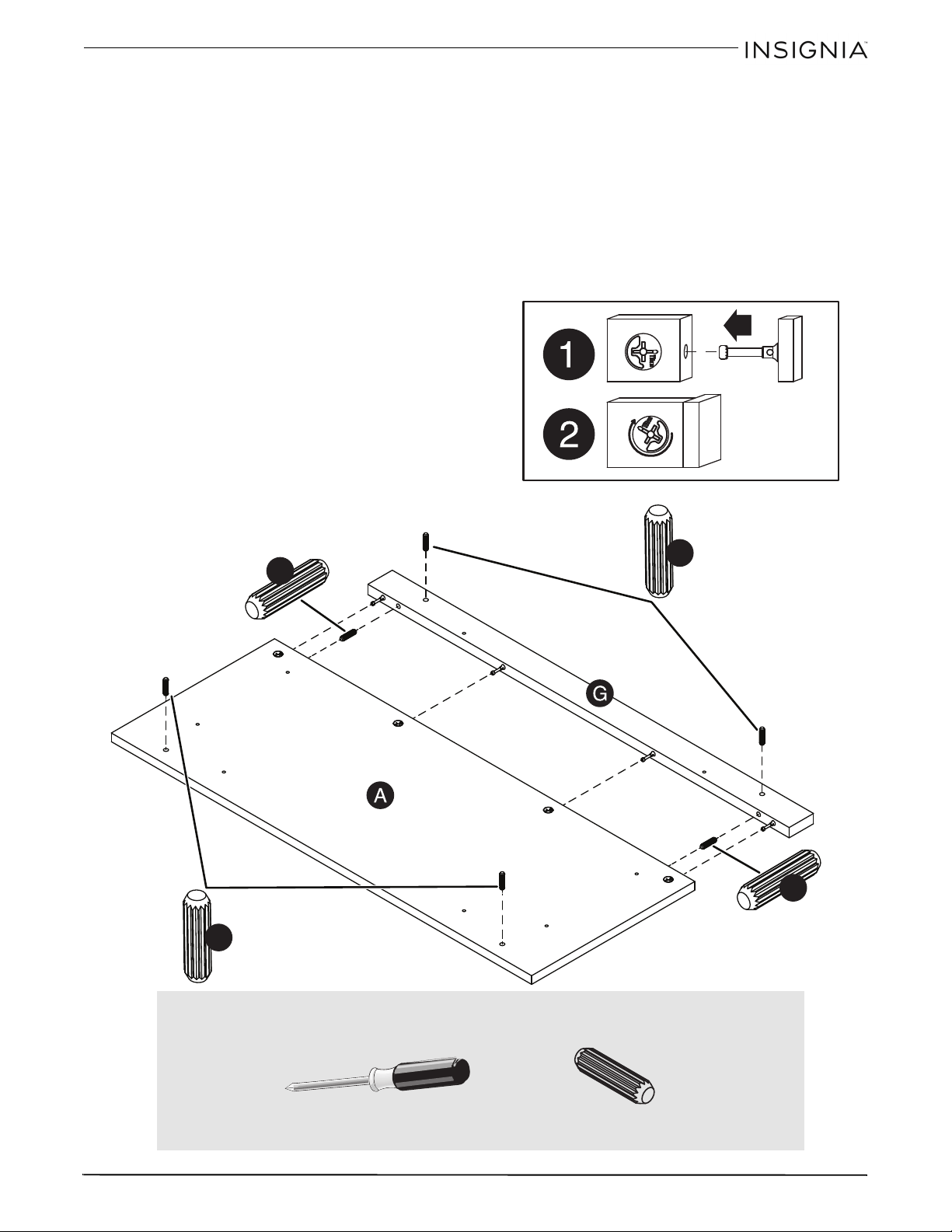
Paso 4: Fijación de la moldura de retención a la parte superior
1 Inserte dos espigas de madera (15F) en los agujeros en el borde de la moldura de retención (G).
2 Inserte el tornillo de leva y el extremo de la espiga de la moldura de retención (G) en los orificios de la parte
superior (A).
Nota: Asegúrese de que las espigas de madera en la moldura de retención sean insertadas en la parte superior y que
la extremidad de la espiga del sujetador permanezca completamente insertada en el agujero de la parte adyacente
mientras bloquea el sujetador.
3 Apriete cada leva oculta con un destornillador Phillips lo más ajustado posible.
4 Inserte cuatro espigas de madera (15F) en los agujeros de la parte superior (A) y de la moldura de retención (G).
15F
15F
15F
15F
S
u
p
e
r
f
i
c
i
e
c
o
n
a
g
u
j
e
r
o
s
S
u
p
e
r
f
i
c
i
e
c
o
n
l
e
v
a
s
o
c
u
l
t
a
s
Necesitará:
Destornillador Phillips
15F (6)
28
B
ase para te
l
ev
i
sor con armaz
ó
n a
bi
erto
d
e 36 pu
l
g. con aca
b
a
d
o expreso
www.insigniaproducts.com
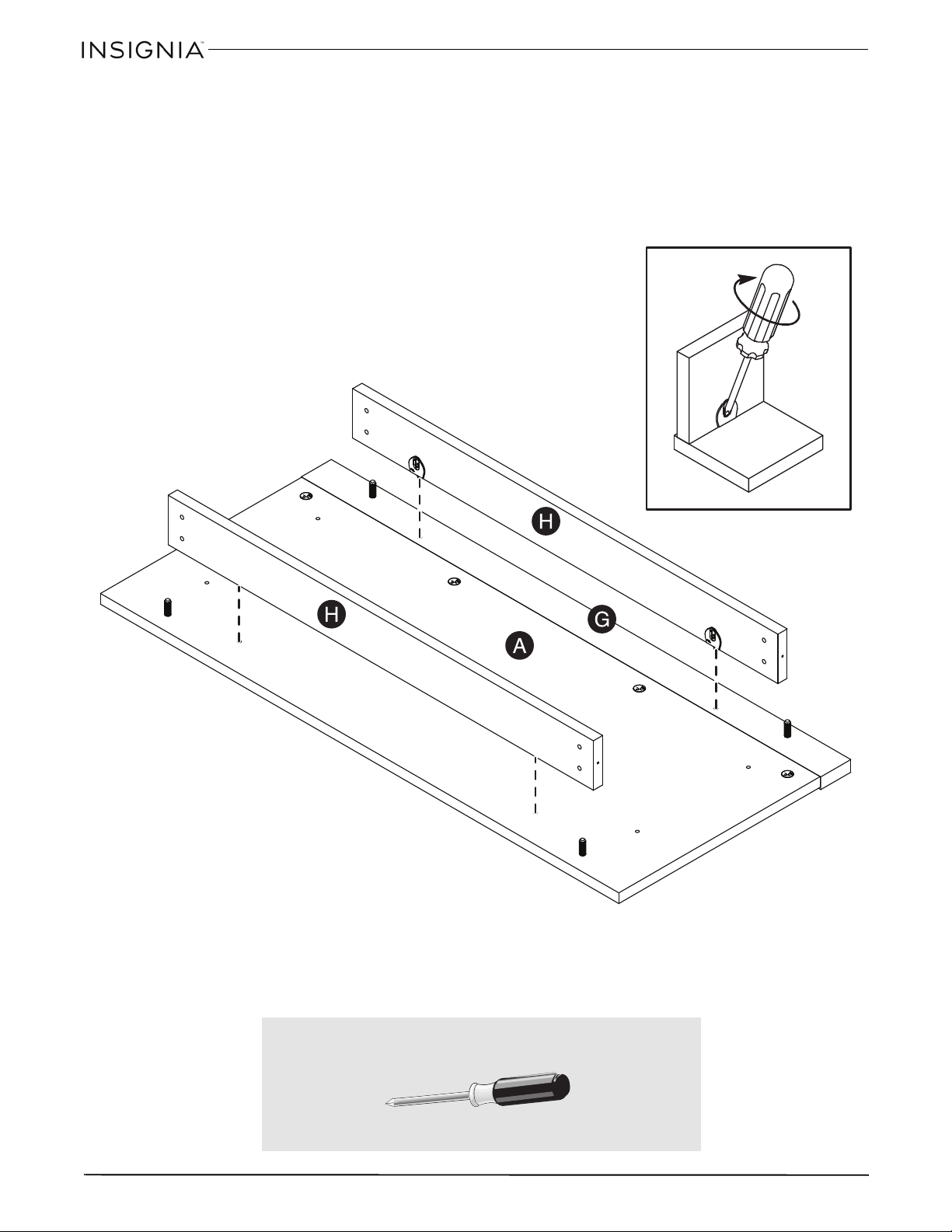
Paso 5
:
Fijación de los faldones largos superiores a la parte superior
• Sujete los faldones largos superiores (H) a la parte superior (A) y a la moldura de retención (G) y apriete los cuatro
conectores ocultos.
S
u
p
e
r
f
i
c
i
e
c
o
n
c
o
n
e
c
t
o
r
e
s
o
c
u
l
t
o
s
Para apretar dos partes juntas usando los
conectores ocultos, inserte el destornillador en
un ángulo en la ranura en el conector oculto.
Mientras empuja el tornillo en el agujero de la
pieza adyacente, gire el destornillador hacia la
derecha para apretar. No apriete demasiado.
S
u
p
e
r
f
i
c
i
e
s
i
n
c
o
n
e
c
t
o
r
e
s
o
c
u
l
t
o
s
Necesitará:
Destornillador Phillips
29
B
ase para te
l
ev
i
sor con armaz
ó
n a
bi
erto
d
e 36 pu
l
g. con aca
b
a
d
o expreso
www.insigniaproducts.com
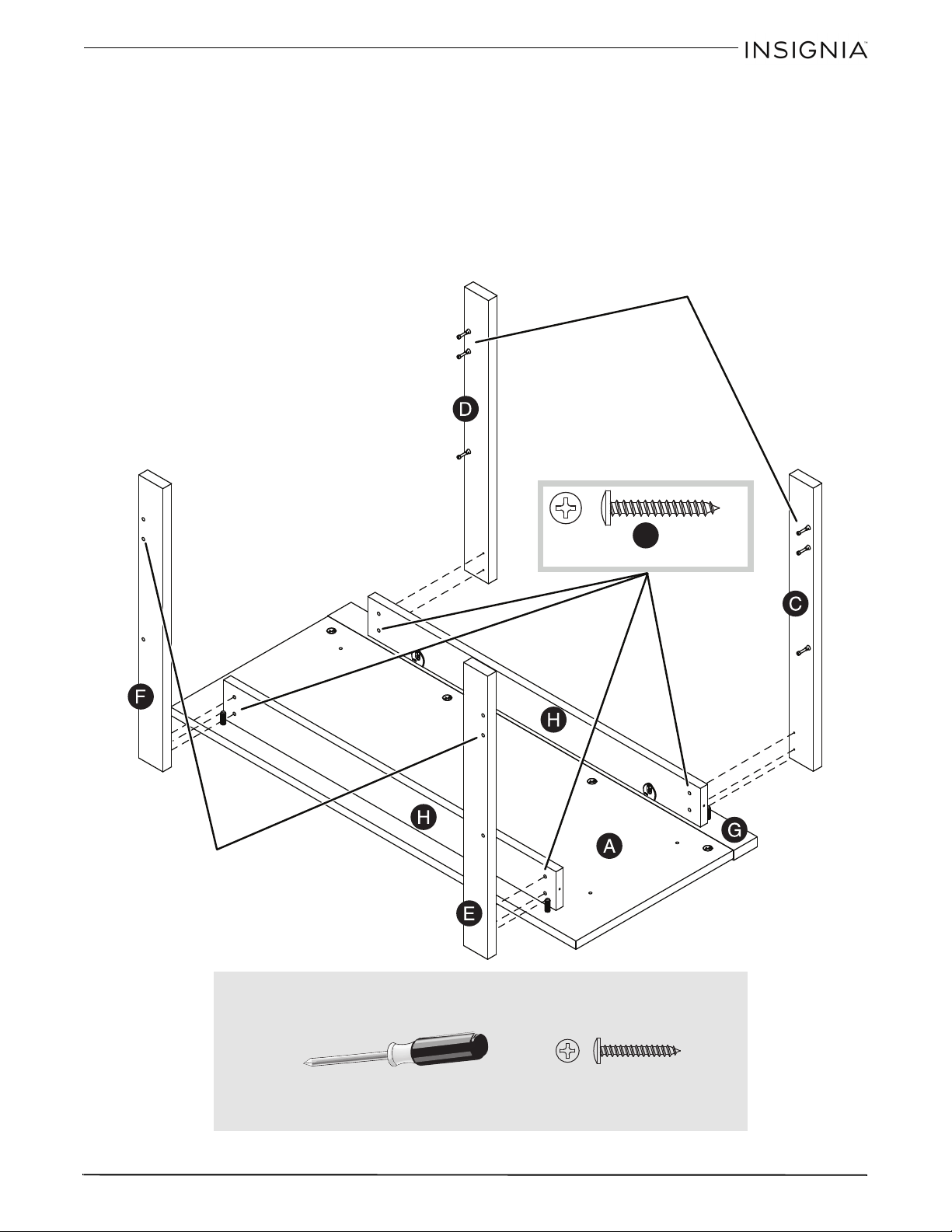
Paso 6: Colocación de las patas
1 Coloque las patas (C, D, E y F) en las espigas de madera (15F) en la parte superior (A) y la moldura de
retención (G).
2 Sujete las patas (C, D, E y F) a los faldones largos superiores (H) con los tornillos negros de cabeza de placa
de 1 1/8 pulg. (9S).
Consejo: asegúrese de que los agujeros de los tornillos estén alineados.
9S
Estos tornillos de leva
tendrán que estar aquí.
Estos orificios tendrán
que estar aquí.
Necesitará:
Destornillador Phillips
9S (8)
30
B
ase para te
l
ev
i
sor con armaz
ó
n a
bi
erto
d
e 36 pu
l
g. con aca
b
a
d
o expreso
www.insigniaproducts.com
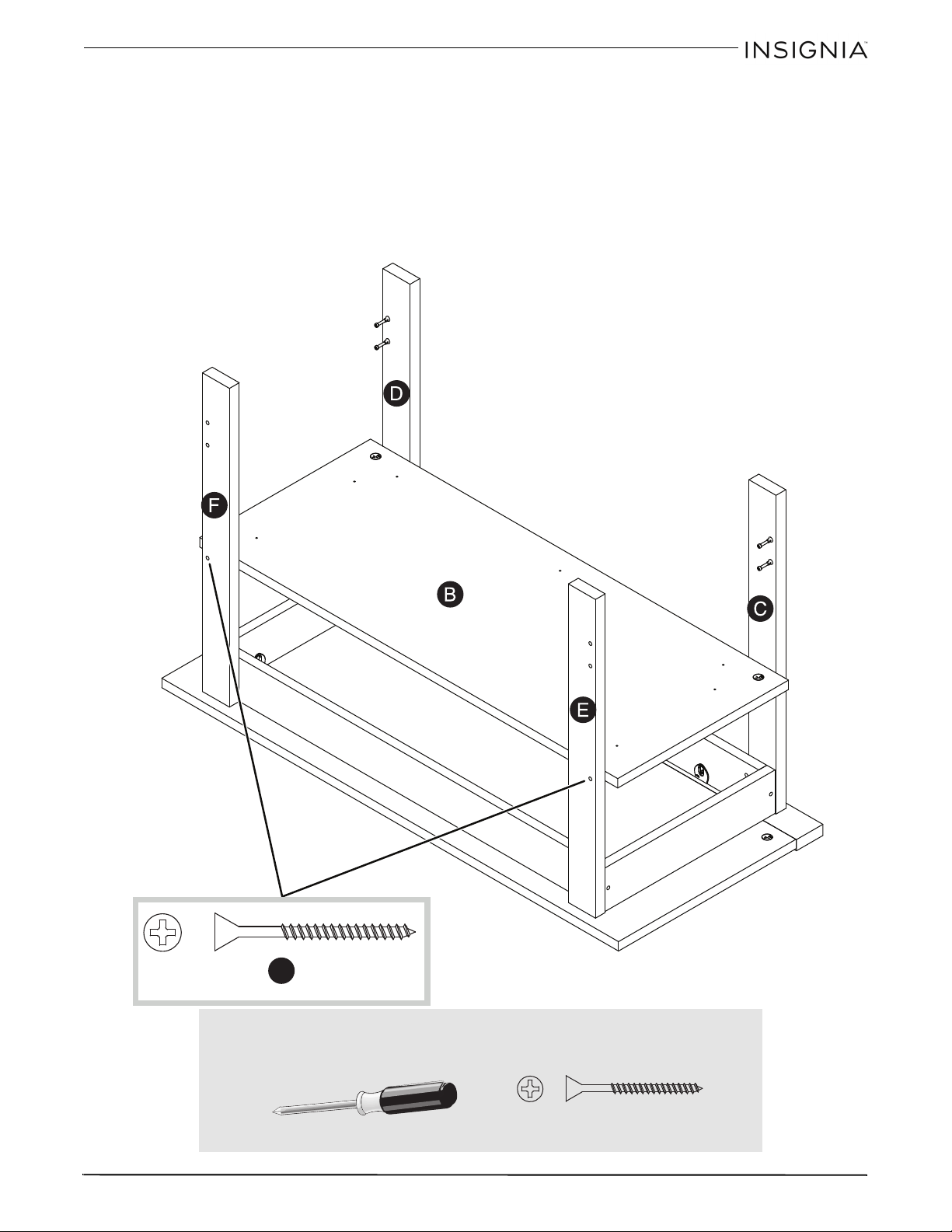
Paso 7: Fijación de los faldones cortos superiores
1 Sujete los faldones cortos superiores (J) a la parte superior (A) y apriete los cuatro conectores ocultos.
2 Fije los faldones superiores cortos (J) a los faldones largos superiores (H) con cuatro tornillos negros de cabeza
plana de 1 7/8 pulg. (2S).
2S
2S
Necesitará:
Destornillador Phillips
2S (4)
31
B
ase para te
l
ev
i
sor con armaz
ó
n a
bi
erto
d
e 36 pu
l
g. con aca
b
a
d
o expreso
www.insigniaproducts.com
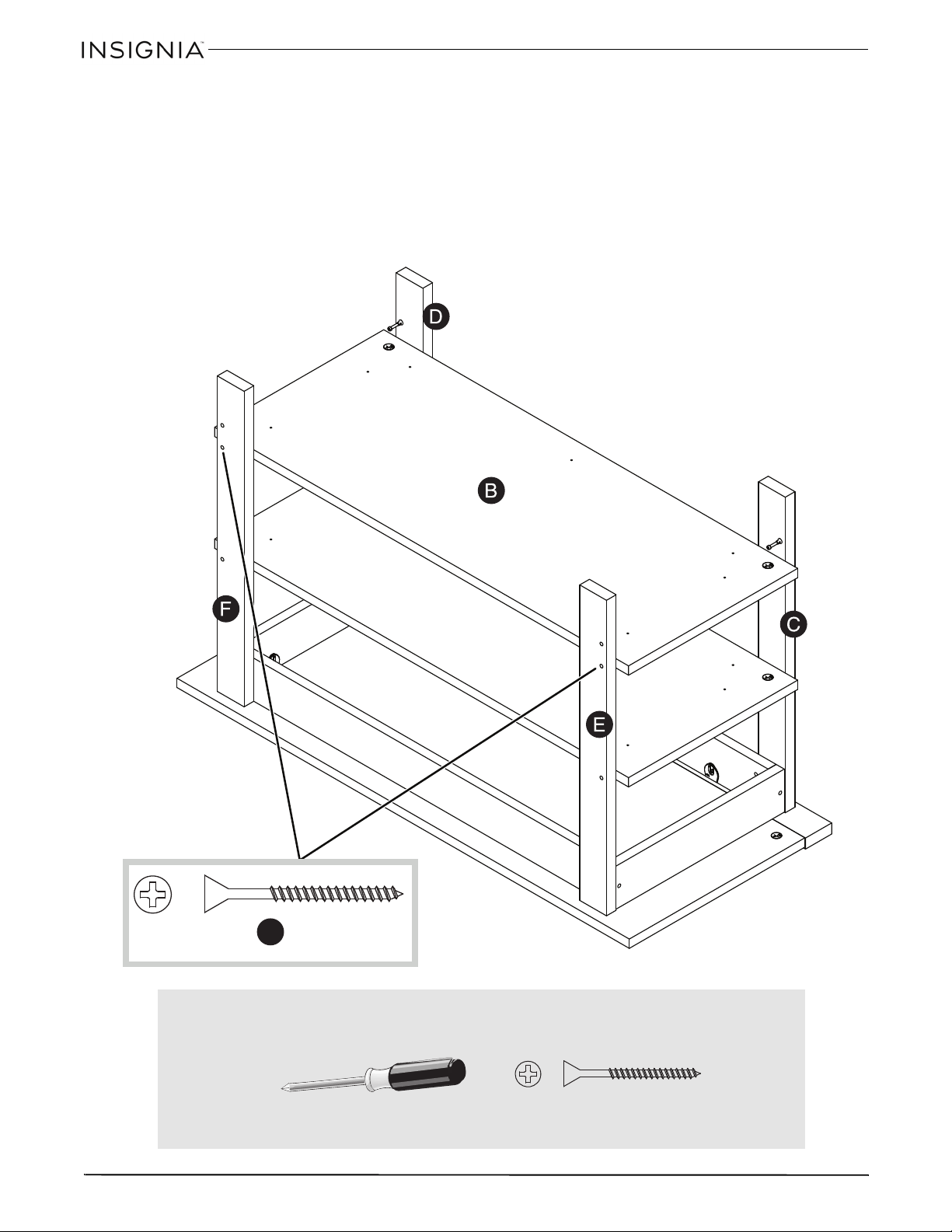
Paso 8: Instalación de la repisa de en medio
1 Fije la repisa de en medio (B) a las patas frontales (C y D) y apriete las dos levas ocultas en la repisa.
Notas:
Necesitará inclinar la repisa en los tornillos de leva de las patas frontales.
Asegúrese de que los agujeros de las patas posteriores (E y F) sean alineados con los orificios del borde de la repisa (B).
2 Fije la repisa (B) a las patas posteriores (E y F) con dos tornillos negros de cabeza plana de 1 7/8 pulg. (2S).
2S
S
u
p
e
r
f
i
c
i
e
c
o
n
l
e
v
a
s
o
c
u
l
t
a
s
Necesitará:
Destornillador Phillips
2S (2)
32
B
ase para te
l
ev
i
sor con armaz
ó
n a
bi
erto
d
e 36 pu
l
g. con aca
b
a
d
o expreso
www.insigniaproducts.com
Paso 9: Instalación de la repisa inferior
1 Fije la repisa inferior (B) a las patas frontales (C y D) y apriete las dos levas ocultas en la repisa.
Notas:
Necesitará inclinar la repisa en los tornillos de leva de las patas frontales.
Asegúrese de que los agujeros de las patas posteriores (E y F) sean alineados con los orificios del borde de la repisa (B).
2 Fije la repisa (B) a las patas posteriores (E y F) con dos tornillos negros de cabeza plana de 1 7/8 pulg. (2S).
2S
S
u
p
e
r
f
i
c
i
e
c
o
n
l
e
v
a
s
o
c
u
l
t
a
s
Necesitará:
Destornillador Phillips
2S (2)
33
B
ase para te
l
ev
i
sor con armaz
ó
n a
bi
erto
d
e 36 pu
l
g. con aca
b
a
d
o expreso
www.insigniaproducts.com
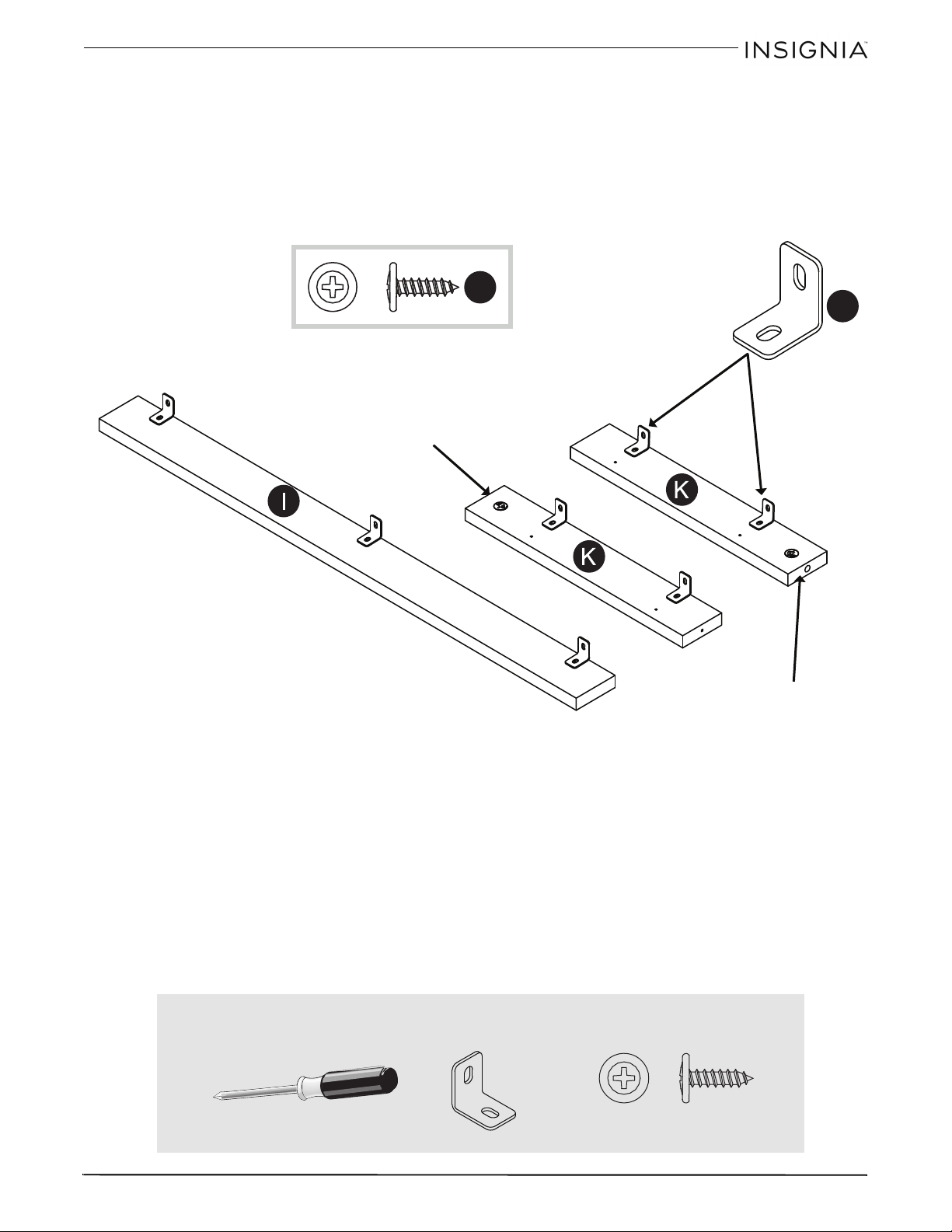
Paso 10
:
Preparación del faldón inferior
• Apriete los soportes metálicos (4G) a los faldones inferiores (I y K) con los tornillos negros de cabeza grande de
9/16 (1S).
Nota: asegúrese de que los soportes estén a nivel con los bordes de los faldones inferiores.
Nota: use los mismos agujeros mostrados en la ilustración.
1S
4G
Borde con
leva oculta
Borde con
leva oculta
Necesitará:
Destornillador Phillips
4G (7)
1S (7)
34
B
ase para te
l
ev
i
sor con armaz
ó
n a
bi
erto
d
e 36 pu
l
g. con aca
b
a
d
o expreso
www.insigniaproducts.com
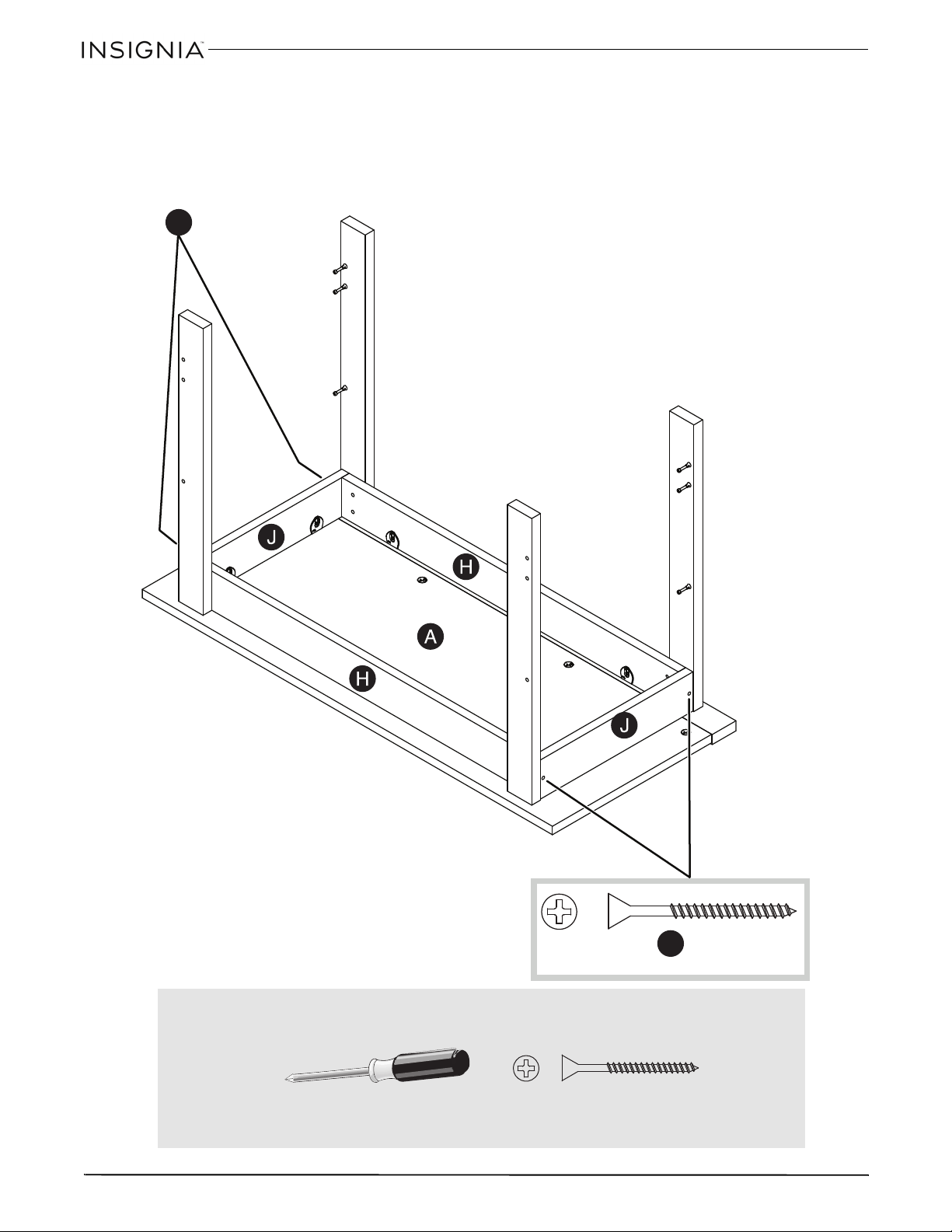
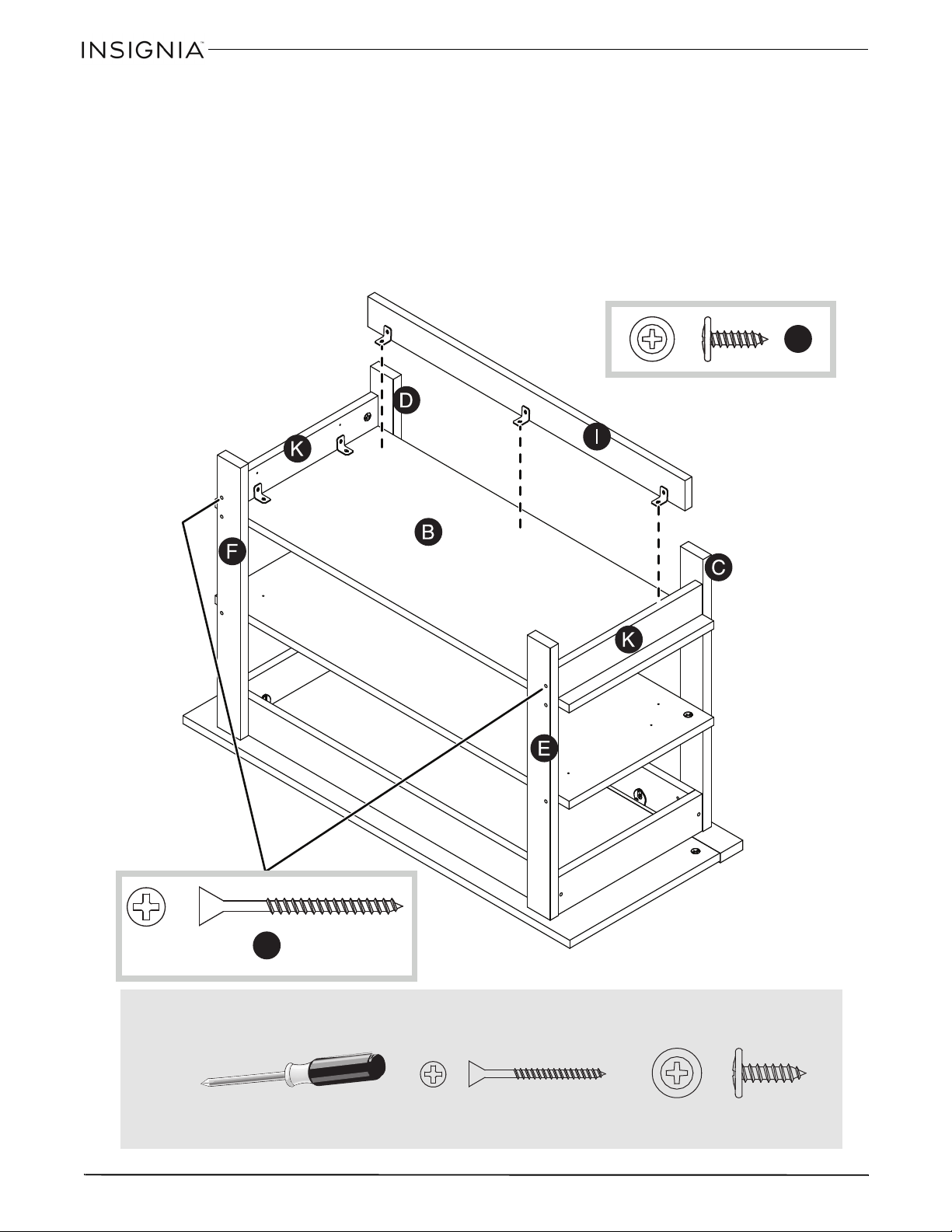
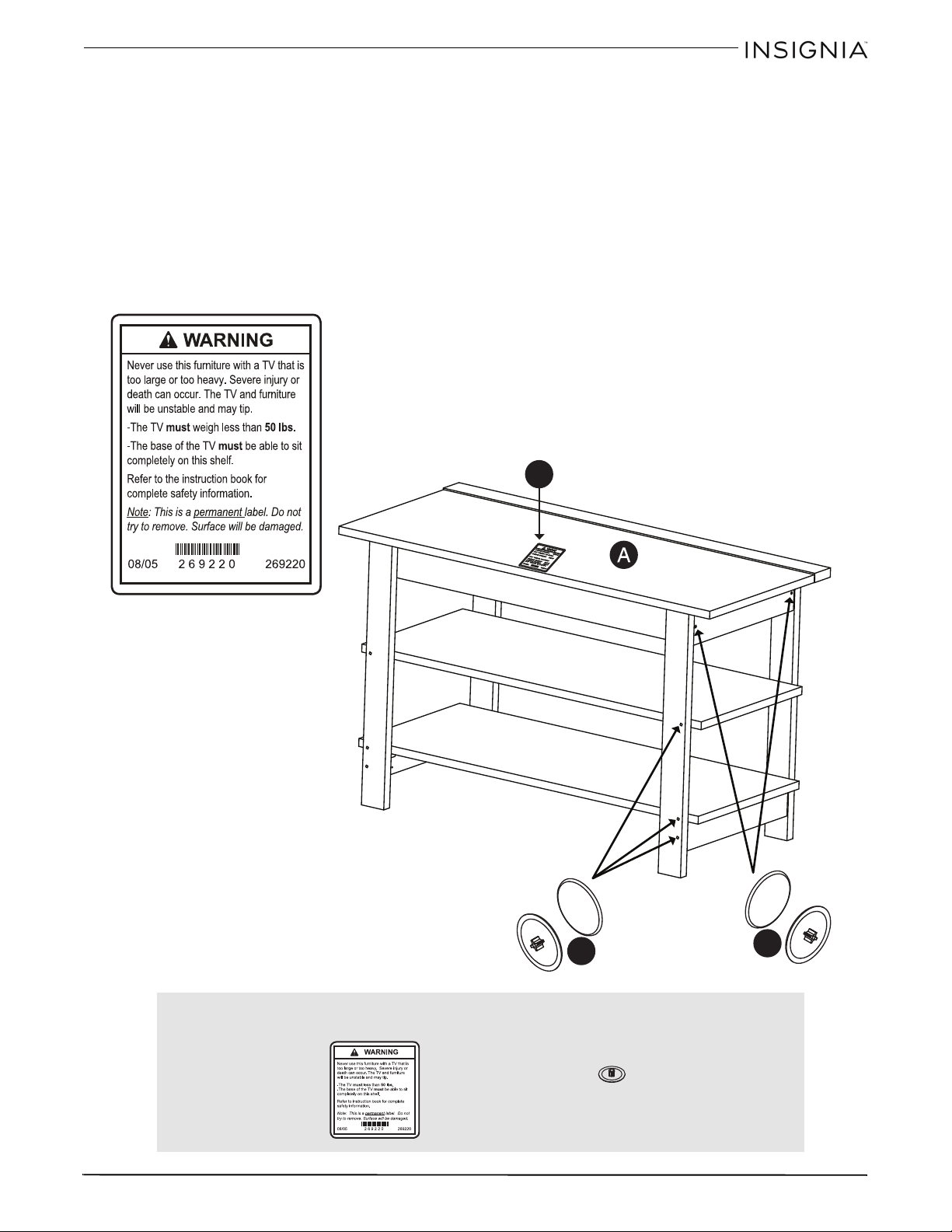
Paso 11: Fijación de los faldones inferiores
1 Fije los faldones cortos inferiores (K) a las patas frontales (C y D) y apriete las dos levas ocultas.
2 Fije los faldones cortos inferiores (K) a las patas posteriores (E y F) con dos tornillos negros de cabeza plana
de 1 7/8 pulg. (2S).
3 Fije los faldones (I y K), lado exterior con acabado, a la repisa inferior (B) con los tornillos negros de cabeza
grande de 9/16 pulg. (1S) a través de los soportes de metal en la repisa.
1S
2S
Necesitará:
Destornillador Phillips
1S (7)
2S (2)
35
B
ase para te
l
ev
i
sor con armaz
ó
n a
bi
erto
d
e 36 pu
l
g. con aca
b
a
d
o expreso
www.insigniaproducts.com
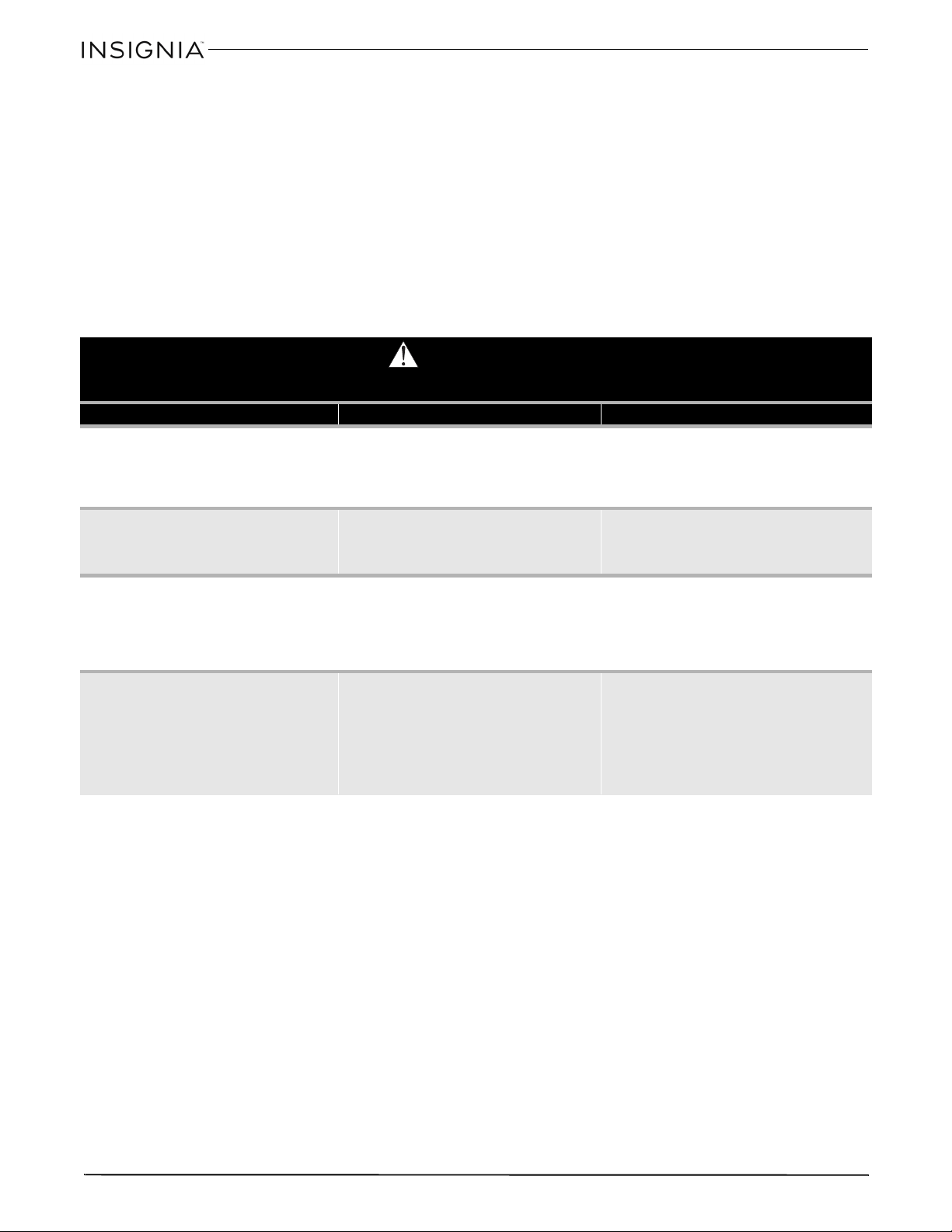
Paso 12
:
Completado de la base del televisor
1 Cuidadosamente levante la unidad.
2 Coloque una cubierta de tornillo (20P) en la cabeza de cada tornillo visible y presione firmemente.
3 Coloque la etiqueta de advertencia (1L) en la parte superior (A) para que se pueda leer al retirarse el televisor de
la unidad. Despegue la parte posterior de la etiqueta y aplíquela a la parte superior como se muestra.
Nota: esta es una etiqueta permanente que se diseñó para que dure por la vida del producto. Una vez aplicada, no
intente retirarla.
Esto finaliza el ensamblaje de la base para su televisor. Limpie la base con su producto para muebles favorito o
con un paño húmedo y séquelos.
20P
1L
20P
Necesitará:
1L (1)
20P (10)
36
B
ase para te
l
ev
i
sor con armaz
ó
n a
bi
erto
d
e 36 pu
l
g. con aca
b
a
d
o expreso
www.insigniaproducts.com
CUIDADO Y MANTENIMIENTO
Madera y laminado
• Utilice su tipo de cera para muebles favorita.
• No vaporice directamente la cera en el mueble. Vaporice en un paño suave cuando limpie el mueble.
• Siempre pruebe la cera en un lugar discreto primero, tal como la parte posterior del mueble para asegurarse que
no haya una reacción no deseada.
• Limpie regularmente con un paño suave.
• No deslice objetos en las superficies. Levante los objetos de la superficie superior para no arrastrarlos sobre el
acabado al moverlos.
• No exponga su mueble a la luz solar directa, a fuentes de calor secadoras o humedad.
ADVERTENCIA
Por favor use su mueble correctamente y con cuidado. El uso incorrecto puede causar riesgos para la seguridad o daños al mueble o a los artículos
del hogar. Lea cuidadosamente la siguiente tabla.
Preste atención a: ¿Qué puede suceder? Como evitar el problema:
• Niños subiéndose al mueble.
• Un niño puede tratar de alcanzar un juguete o un objeto
al subirse al mueble.
• Cerca del televisor los niños juegan y están activos.
• Riesgo de lesiones o muerte.
• Un niño subiéndose a un mueble podría poner demasiado
peso en este y lo haría volcar.
• Un niño jugando con un televisor podría hacerlo volcar.
• No deje que niños se suban sobre el mueble o jueguen con el
mismo.
• No coloque juguetes o comidas sobre las repisas superiores.
Los niños trataran de subir para alcanzarlos solo por
curiosidad.
• Uso incorrecto del mueble para sostener televisores.
• Los muebles diseñados para su uso con televisores
especificarán el peso máximo y el tamaño recomendado
que apoyará en el mueble de forma segura.
• Riesgo de lesiones o muerte.
• El televisor puede ser muy pesado. Además, los televisores
antiguos CRT (con tubo catódico) se pueden desequilibrar
y volcarse hacia delante.
• Un televisor debe de ser colocado solamente en un mueble
diseñado para televisores.
• No utilice un televisor que exceda el peso y las dimensiones
especificadas para este mueble.
• Repisas sobrecargadas • Riesgo de lesiones.
• Los muebles pesados se pueden volcar.
• Las repisas sobrecargadas pueden romperse.
• No exceda nunca los limites de peso que se muestran en las
instrucciones.
• Llene las repisas de abajo hacia arriba.
• La repisa de en medio solamente puede aguantar 20 lb y la
repisa inferior puede aguantar 30 lb. Las repisa superiores
pueden aguantar 50 lb.
• Desplazamiento incorrecto del mueble • El mueble puede volcarse o romperse si se mueve
incorrectamente.
• Riesgo de lesiones.
• Retire las repisas de arriba hacia a bajo antes de mover el
mueble.
• No empuje el mueble, sobre todo en un piso de alfombra.
Que un amigo le ayude a levantar el producto y colocarlo en
su lugar.
• No levante el mueble usando la repisa superior. Levántela
por el marco o las patas.
• Retire el televisor antes de mover el mueble para televisor.

37
B
ase para te
l
ev
i
sor con armaz
ó
n a
bi
erto
d
e 36 pu
l
g. con aca
b
a
d
o expreso
www.insigniaproducts.com
GARANTÍA LIMITADA DE UN
AÑO
Descripción:
El distribuidor* de los productos de la marca Insignia le garantiza
a usted, el comprador original de este producto nuevo de la
marca Insignia (“Producto”), que éste se encontrará libre de
defectos de material o de mano de obra en su fabricación
original por un período de un (1) año a partir de la fecha de
compra del Producto (“Período de garantía”).
Para que esta garantía se aplique, su Producto tiene que haberse
comprado en los Estados Unidos o en Canadá con un detallista
de la marca Best Buy o en línea en los sitios www.bestbuy.com o
www.bestbuy.ca y empacado con esta declaración de garantía.
¿Cuánto dura la garantía?
El Período de garantía dura por 1 año (365 días) a partir de la
fecha en que compró el Producto. La fecha de compra se
encuentra impresa en el recibo que recibió con el Producto.
¿Qué es lo que cubre esta garantía?
Durante el Período de garantía, si un centro de reparación
autorizado de Insignia concluye que la fabricación original del
material o la mano de obra del Producto se encuentran
defectuosos Insignia (cómo su opción exclusiva): (1) reparará el
Producto con repuestos nuevos o reconstruidos; o (2)
reemplazará el Producto sin costo alguno por un producto
nuevo o reconstruido con características similares. Los Productos
y repuestos reemplazados bajo esta garantía se volverán
propiedad de Insignia y no se le regresarán a usted. Si se requiere
la reparación de Productos o partes después de que se vence el
Período de garantía, usted deberá pagar todos los costos de
mano de obra y de repuestos. Esta garantía estará vigente tanto
como usted sea el dueño de su producto Insignia durante el
período de garantía. La cobertura de la garantía se anula si usted
vende o transfiere el Producto.
¿Cómo se obtiene el servicio de garantía?
Si se compró el Producto en una tienda de Best Buy por favor
lleve su recibo original y el Producto a cualquier tienda de Best
Buy. Asegúrese de volver a colocar el Producto en su empaque
original o en un empaque que provea la misma protección que
el original. Si compró el Producto en un sitio Web de Best Buy
(www.bestbuy.com o www.bestbuy.ca), envíe por correo su
recibo original y el Producto a la dirección postal especificada en
el sitio Web. Asegúrese de colocar el Producto en su empaque
original o en un empaque que provea la misma protección que
el original.
Para obtener servicio de garantía, por favor llame al
1-888-BESTBUY en los Estados Unidos o llame al 1-866-BESTBUY
en Canadá. Los agentes de soporte técnico diagnosticarán y
corregirán el problema por teléfono.
¿Dónde es válida la garantía?
Esta garantía sólo es válida en los Estados Unidos y Canadá en las
tiendas de Best Buy o en sus sitios Web para el comprador
original del producto en el país donde se realizó la compra.
¿Qué es lo que no cubre la garantía?
Esta garantía no cubre:
• Capacitación o instrucción del cliente
•Instalación
• Ajustes de configuración
•Daños cosméticos
• Daños debidos al clima, relámpagos, causas de fuerza
mayor, tales como sobretensiones
• Danos accidentales
•Uso inapropiado
•Abuso
•Negligencia
• Uso o propósito comercial, incluyendo pero no limitado al
uso en centros comerciales o lugares comunes de un
condominio de varios pisos o un edificio de
departamentos, o cualquier uso en un lugar que no sea una
casa privada.
• Modificación de alguna parte del Producto, incluyendo la
antena
• Un panel de pantalla plasma dañado por la persistencia de
imágenes estáticas (sin movimiento), mostradas por
períodos de tiempo extendido (efecto “burn-in”).
• Daño debido al uso o mantenimiento inapropiado
• Conexión a una fuente de voltaje o de alimentación
incorrecta
• Intento de reparación por cualquier persona que no sea
autorizada por Insignia para reparar el Producto
• Productos vendidos “tal cual” (en el estado en que se
encuentran) o “con todas sus fallas”
• Consumibles, incluyendo pero no limitado a pilas (tipo AA,
AAA, C etc.)
• Productos en los cuales el número de serie asignado en la
fábrica ha sido alterado o removido
• Perdida o robo de este producto o cualquier parte de sus
componentes
• Las pantallas con hasta tres (3) píxeles defectuosos (puntos
oscuros o incorrectamente iluminados) agrupados en una
superficie más pequeña que la décima parte (1/10) del
tamaño de la pantalla ni hasta cinco (5) píxeles defectuosos
en toda la superficie de la pantalla. Las pantallas con
píxeles pueden tener un número limitado de píxeles
defectuosos.
• Los defectos o daños causados cómo resultado de
cualquier contacto, sin limitarse a líquidos, geles o pastas.
EL REEMPLAZO O LA REPARACIÓN ESTIPULADOS BAJO ESTA
GARANTÍA SON SU RECURSO EXCLUSIVO POR CUALQUIER
VIOLACIÓN DE LA GARANTÍA. INSIGNIA NO SERÁ RESPONSABLE
POR DAÑOS INCIDENTALES O CONSECUENTES DEBIDO AL
INCUMPLIMIENTO DE CUALQUIER GARANTÍA EXPRESA O
IMPLÍCITA RELACIONADA CON ESTE PRODUCTO, INCLUYENDO
PERO SIN LIMITARSE A LA PÉRDIDA DE INFORMACIÓN, LA
PÉRDIDA DE NEGOCIOS O DE GANANCIAS. INSIGNIA PRODUCTS
NO HACE NINGUNA OTRA GARANTÍA EXPRESA E IMPLÍCITA
RELACIONADA A ESTE PRODUCTO, INCLUYENDO PERO SIN
LIMITARSE A, CUALQUIER GARANTÍA IMPLÍCITA Y CONDICIONES
DE COMERCIALIZACIÓN Y IDONEIDAD PARA UN USO
PARTICULAR, ESTÁN LIMITADAS EN DURACIÓN AL PERÍODO DE
GARANTÍA DECLARADO ANTERIORMENTE Y NINGUNA
GARANTÍA YA SEA EXPRESA O IMPLÍCITA SE APLICARÁ DESPUÉS
DEL PERÍODO DE GARANTÍA. ALGUNOS ESTADOS, PROVINCIAS Y
JURISDICCIONES NO PERMITEN RESTRICCIONES EN CUANTO A
LA DURACIÓN DE UNA GARANTÍA IMPLÍCITA, ASÍ QUE LA
RESTRICCIÓN ANTERIOR PUEDE NO APLICARSE EN SU CASO.
ESTA GARANTÍA LE DA DERECHOS LEGALES ESPECÍFICOS, Y
USTED PUEDE POSEER OTROS DERECHOS QUE VARÍAN DE
ESTADO A ESTADO, O DE PROVINCIA A PROVINCIA.
Comuníquese con Insignia:
Para servicio al cliente favor llamar al 1-877-467-4289
www.insigniaproducts.com
INSIGNIA es una marca comercial de Best Buy y sus compañías
asociadas.
Distribuida por Best Buy Purchasing, LLC
© 2015 Best Buy. Todos los derechos reservados.
Hecho en los Estados Unidos con materiales de EE.UU. e
importados

38
B
ase para te
l
ev
i
sor con armaz
ó
n a
bi
erto
d
e 36 pu
l
g. con aca
b
a
d
o expreso
www.insigniaproducts.com

39
B
ase para te
l
ev
i
sor con armaz
ó
n a
bi
erto
d
e 36 pu
l
g. con aca
b
a
d
o expreso
www.insigniaproducts.com

Certificado de conformidad
1. Este certificado aplica al producto de Insignia
identificado en este manual de instrucciones.
2. Este certificado aplica al cumplimiento de este
producto con la Prohibición CPSC de Pintura con
Plomo (16 CFR 1303).
3. Este producto fue fabricado por:
Insignia -
4. Fecha de fabricación: ___________
Número de lote: 377287
1-877-467-4289 (U.S. and Canada) or 01-800-926-3000 (Mexico)
www.insigniaproducts.com
INSIGNIA is a trademark of Best Buy and its affiliated companies.
Distributed by Best Buy Purchasing, LLC
©2015 Best Buy. All rights reserved.
Made in USA with U.S. and imported materials
1-877-467-4289 (EE.UU. y Canadá) o el 01-800-926-3000 (México)
www.insigniaproducts.com
INSIGNIA es una marca comercial de Best Buy y sus compañías asociadas.
Distribuida por Best Buy Purchasing, LLC
© 2015 Best Buy. Todos los derechos reservados.
Hecho en los Estados Unidos con materiales de EE.UU. e importados
V4 ENGLISH
V4 ESPAÑOL
15-0791
Certificate of Conformity
1. This certificate applies to the Insignia Product
identified by this instruction booklet.
2. This certificate applies to the compliance of this
product with the CPSC Ban on Lead-Containing
Paint (16 CFR 1303).
3. This product was manufactured for:
Insignia
4. Date of Manufacture: _______________
Lot number: 377287