
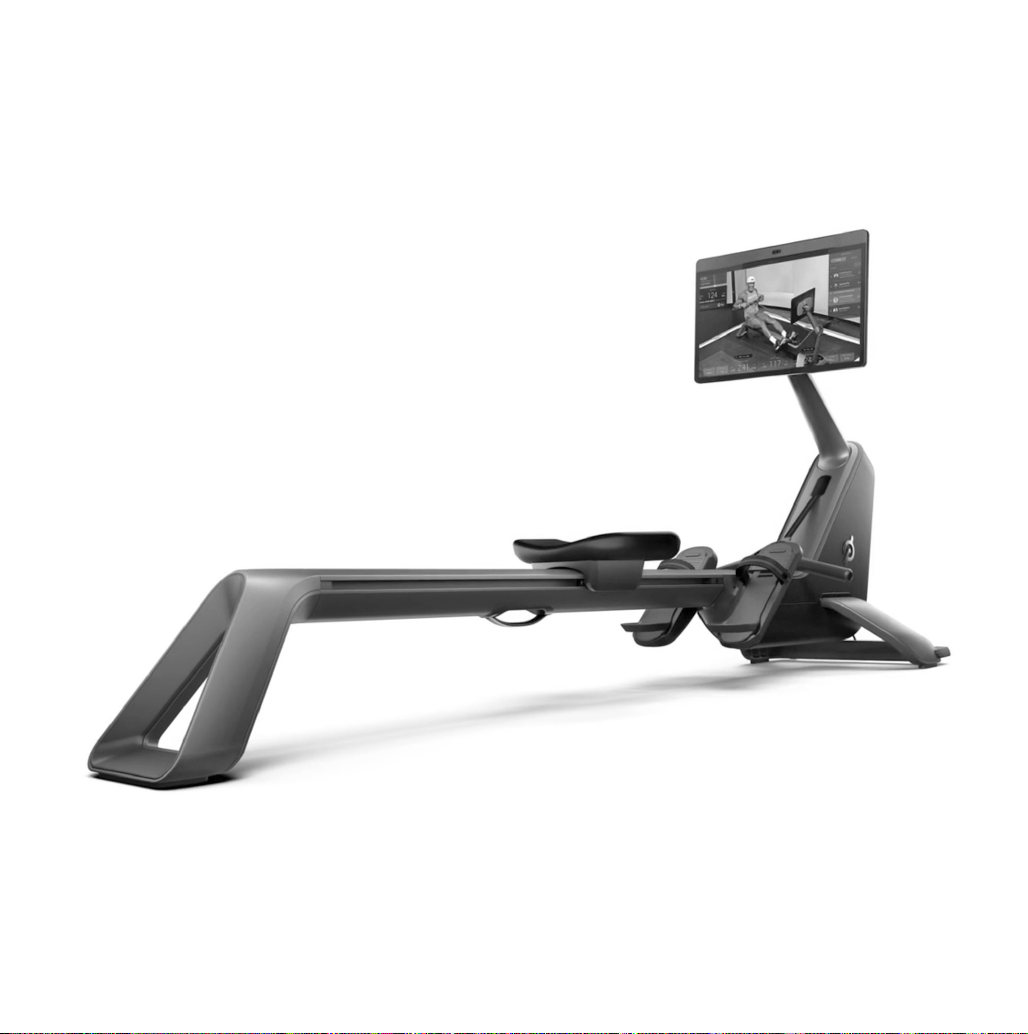
USER MANUAL
2 3
|
TABLE OF CONTENTS
4
9
10
12
14
18
20
24
31
32
33
34
WARNINGS AND SAFETY INSTRUCTIONS
MEMBER SUPPORT
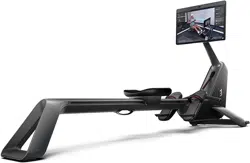
GETTING TO KNOW THE PELOTON ROW
SETTING UP THE PELOTON ROW
USING THE PELOTON ROW
CLASS SCREEN
MAXIMIZING YOUR FIRST WORKOUT
MOVING THE PELOTON ROW AND STOWING IT UPRIGHT
MAINTENANCE AND CARE
SPECIFICATIONS
NOTICES
PELOTON ROW LIMITED HOME USE WARRANTY
Table of Contents
WARNING: Read all precautions and instructions in this manual before using this equipment. Improper use or
maintenance can void the warranty. Keep this manual for future reference. The information in this manual may
not reect recent updates as we continue to improve our product. Please see onepeloton.com/manuals for the
latest version of the manual.

2 3
|
TABLE OF CONTENTS
4
9
10
12
14
18
20
24
31
32
33
34
WARNINGS AND SAFETY INSTRUCTIONS
MEMBER SUPPORT
GETTING TO KNOW THE PELOTON ROW
SETTING UP THE PELOTON ROW
USING THE PELOTON ROW
CLASS SCREEN
MAXIMIZING YOUR FIRST WORKOUT
MOVING THE PELOTON ROW AND STOWING IT UPRIGHT
MAINTENANCE AND CARE
SPECIFICATIONS
NOTICES
PELOTON ROW LIMITED HOME USE WARRANTY
Table of Contents
WARNING: Read all precautions and instructions in this manual before using this equipment. Improper use or
maintenance can void the warranty. Keep this manual for future reference. The information in this manual may
not reect recent updates as we continue to improve our product. Please see onepeloton.com/manuals for the
latest version of the manual.
4 5
|
WARNINGS AND SAFETY INSTRUCTIONS
Warnings and Safety Instructions
WARNING: For safe use, read and follow
all warnings and instructions in the User
Manual, the Upright Wall Anchor Guide,
and warning labels. Use only as described.
Misuse of this equipment may result in
serious injury or death. Peloton is not
responsible for damage or injury caused
by improper use not in accordance with
these instructions.
RISK OF PERSONAL INJURY—KEEP
PEOPLE UNDER THE AGE OF 16 AWAY
FROM THE PELOTON ROW.
NEVER store the Peloton Row vertically
without properly installing and using the
Peloton Upright Wall Anchor provided.
To avoid risk of serious injury from the
Row tipping over, read and follow all the
instructions in the Upright Wall Anchor
Guide provided.
WARNING: Fully tighten rail bolt during
assembly and before stowing upright to
prevent rail separation and risk of injury
Always remain alert while using the
Peloton Row. Cease exercise if you feel
faint or dizzy.
Metrics on the screen, including heart rate
monitoring, may be inaccurate. Use values
for reference only.
Inspect the Peloton Row before use and do
not use if it appears damaged or inoperable.
Use only Peloton original parts. Use of
unauthorized parts could damage the
Peloton Row, impair its operation and
cause serious injury. Damage caused by
unauthorized parts is not covered by the
express warranty.
Do not attempt to service the Peloton Row
yourself other than performing the basic
maintenance described in this manual or
instructed by a Peloton Member Support
Representative. Service other than basic
maintenance should be performed by
authorized personnel.
The power cord must never pass under the
Peloton Row. Never operate the Row if it
isn’t working properly, or if the power cord
has been damaged. Keep power cord away
from heated surfaces, sharp edges, and
water. Always keep the power cable clean
and dry. Sweat, spills, and other damage
to the power cable may result in property
damage or bodily harm.
To reduce the risk of burn, fire, electric
shock, or injury to persons, connect this
appliance only to a properly grounded
outlet. See the Grounding Instructions in
this manual.
Always turn the power switch to the off
position and unplug the Peloton Row
from the electrical outlet before cleaning,
assembling or disassembling it.
Do not operate where aerosol (spray)
products are being used or where oxygen is
being administered
Do not carry this appliance by its cord or
use its cord as a handle.
If you are not able to lift more than 40 lbs/
18 kg, over your head,get assistance in
stowing, unstowing or moving the Peloton
Row.
The Peloton Row must be stored a) flat on
the ground with the touchscreen upright OR
b) vertically, with the touchscreen folded
down and anchored to a wall using the
Upright Wall Anchor. Storing the Row in any
other manner could result in:
• Injury to yourself and/or bystanders,
• Damage to the Peloton Row or,
• Damage to personal property.
WARNING: For your safety, Peloton
recommends professional installation of
the Peloton Upright Wall Anchor, such as
by a handyman, appliance installer or local
hardware retailer.
The Upright Wall Anchor is designed to be
installed through drywall, on a load-bearing
wall into a wooden stud only. Do not install
into drywall alone, metal studs, or masonry.
Always verify that the Upright Wall Anchor
is securely mounted to the wall and check
for damage before using. DO NOT use
the Upright Wall Anchor if any damage
is visible. Using a damaged Upright Wall
Anchor could result in injury to persons,
animals or personal property.
The tether and clip move freely and could
present a strangulation hazard. Always wrap
the tether securely around the mounting
bracket when the Peloton Upright Wall
Anchor is not in use.
People under the age of 16 and persons
with reduced physical, sensory, or mental
capabilities that impair the safe use of
the equipment must not use the Row.
People with a lack of experience and
knowledgemust be given supervision
or instruction before using the Row. Do
not allow children of any age to perform
maintenance.
The Row is intended for users ages 16 and
over weighing under 300 lbs/136 kg.

4 5
|
WARNINGS AND SAFETY INSTRUCTIONS
Warnings and Safety Instructions
WARNING: For safe use, read and follow
all warnings and instructions in the User
Manual, the Upright Wall Anchor Guide,
and warning labels. Use only as described.
Misuse of this equipment may result in
serious injury or death. Peloton is not
responsible for damage or injury caused
by improper use not in accordance with
these instructions.
RISK OF PERSONAL INJURY—KEEP
PEOPLE UNDER THE AGE OF 16 AWAY
FROM THE PELOTON ROW.
NEVER store the Peloton Row vertically
without properly installing and using the
Peloton Upright Wall Anchor provided.
To avoid risk of serious injury from the
Row tipping over, read and follow all the
instructions in the Upright Wall Anchor
Guide provided.
WARNING: Fully tighten rail bolt during
assembly and before stowing upright to
prevent rail separation and risk of injury
Always remain alert while using the
Peloton Row. Cease exercise if you feel
faint or dizzy.
Metrics on the screen, including heart rate
monitoring, may be inaccurate. Use values
for reference only.
Inspect the Peloton Row before use and do
not use if it appears damaged or inoperable.
Use only Peloton original parts. Use of
unauthorized parts could damage the
Peloton Row, impair its operation and
cause serious injury. Damage caused by
unauthorized parts is not covered by the
express warranty.
Do not attempt to service the Peloton Row
yourself other than performing the basic
maintenance described in this manual or
instructed by a Peloton Member Support
Representative. Service other than basic
maintenance should be performed by
authorized personnel.
The power cord must never pass under the
Peloton Row. Never operate the Row if it
isn’t working properly, or if the power cord
has been damaged. Keep power cord away
from heated surfaces, sharp edges, and
water. Always keep the power cable clean
and dry. Sweat, spills, and other damage
to the power cable may result in property
damage or bodily harm.
To reduce the risk of burn, fire, electric
shock, or injury to persons, connect this
appliance only to a properly grounded
outlet. See the Grounding Instructions in
this manual.
Always turn the power switch to the off
position and unplug the Peloton Row
from the electrical outlet before cleaning,
assembling or disassembling it.
Do not operate where aerosol (spray)
products are being used or where oxygen is
being administered
Do not carry this appliance by its cord or
use its cord as a handle.
If you are not able to lift more than 40 lbs/
18 kg, over your head,get assistance in
stowing, unstowing or moving the Peloton
Row.
The Peloton Row must be stored a) flat on
the ground with the touchscreen upright OR
b) vertically, with the touchscreen folded
down and anchored to a wall using the
Upright Wall Anchor. Storing the Row in any
other manner could result in:
• Injury to yourself and/or bystanders,
• Damage to the Peloton Row or,
• Damage to personal property.
WARNING: For your safety, Peloton
recommends professional installation of
the Peloton Upright Wall Anchor, such as
by a handyman, appliance installer or local
hardware retailer.
The Upright Wall Anchor is designed to be
installed through drywall, on a load-bearing
wall into a wooden stud only. Do not install
into drywall alone, metal studs, or masonry.
Always verify that the Upright Wall Anchor
is securely mounted to the wall and check
for damage before using. DO NOT use
the Upright Wall Anchor if any damage
is visible. Using a damaged Upright Wall
Anchor could result in injury to persons,
animals or personal property.
The tether and clip move freely and could
present a strangulation hazard. Always wrap
the tether securely around the mounting
bracket when the Peloton Upright Wall
Anchor is not in use.
People under the age of 16 and persons
with reduced physical, sensory, or mental
capabilities that impair the safe use of
the equipment must not use the Row.
People with a lack of experience and
knowledgemust be given supervision
or instruction before using the Row. Do
not allow children of any age to perform
maintenance.
The Row is intended for users ages 16 and
over weighing under 300 lbs/136 kg.

6 7
|
WARNINGS AND SAFETY INSTRUCTIONS
GROUNDING INSTRUCTIONS
This product must be grounded. If it should malfunction or break down, grounding provides a
path of least resistance for electric current to reduce the risk of electric shock. This product
is equipped with a cord that has an equipment-grounding conductor and a grounding plug.
The plug must be plugged into an appropriate outlet that is properly installed and grounded
in accordance with all local codes and ordinances.
DANGER: Improper connection of the equipment-grounding conductor can result in a risk
of electric shock. Check with a qualified electrician or serviceman if you are in doubt as to
whether the product is properly grounded. Do not modify the plug provided with the product
– if it will not fit in the outlet, have a proper outlet installed by a qualified electrician.
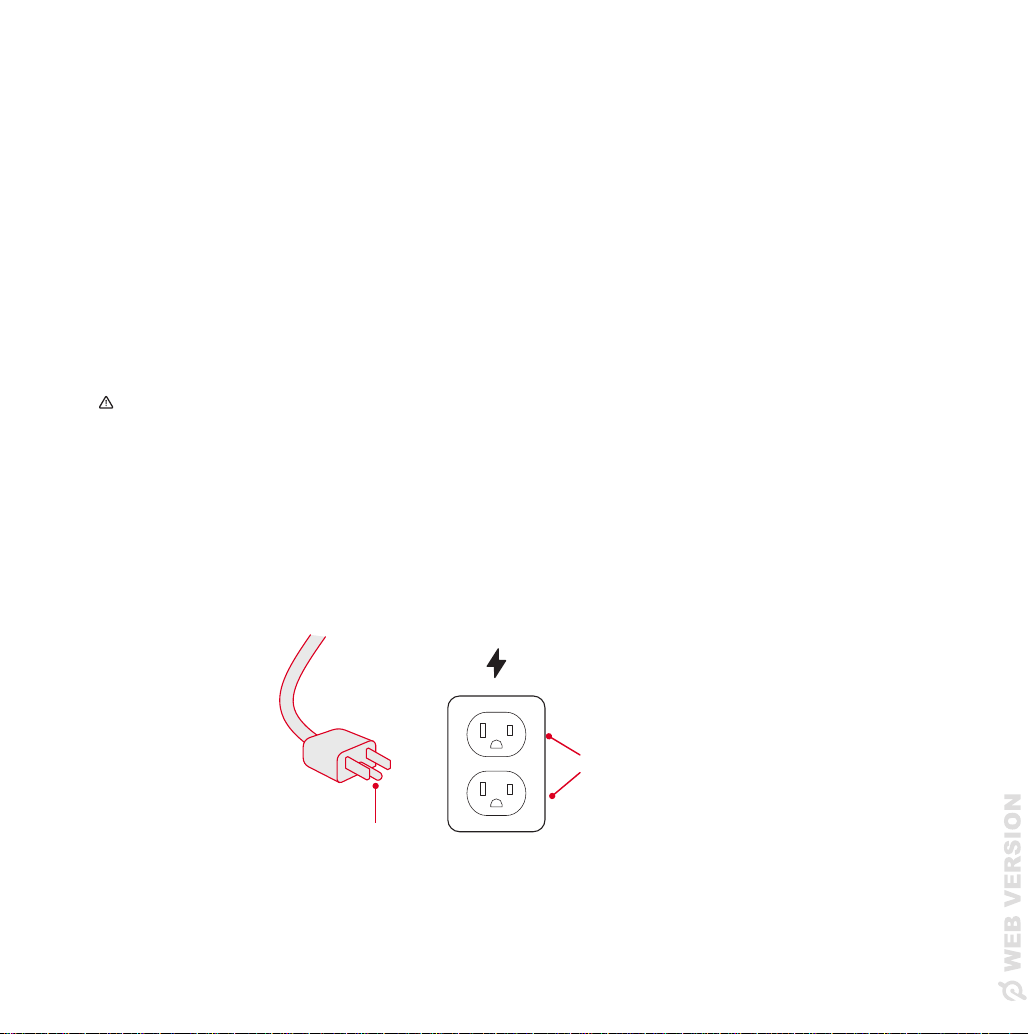
This product is for use on a nominal 120-volt circuit and has a grounding plug that looks like
the plug illustrated in the figure below. Make sure that the product is connected to an outlet
having the same configuration as the plug. Do not use an adapter with this product.
Grounded Outlets
Grounding Pin
Consult a physician before beginning a new
fitness plan. Incorrect or excessive training
can result in serious injury.
Never put your fingers near the seat or rail
when using or storing the Row. Exposed
moving parts can cause serious injury.
Keep clear.
To avoid serious injury, keep loose clothing,
exercise equipment, furniture and other
objects as well as animals clear of the
Row. Make sure you have 24 in/0.6 m of
clearance on either side of the Row.
Keep towels away from the seat and rail.
Make sure your shoelaces don’t extend
past the soles of your shoes. Always wear
appropriate footwear when using the Row.
You may experience chafing or sores on
your hands due to repetitive friction when
you first begin rowing. Chafing and sores
will usually develop into callouses over time.
Improper handle grip can also cause
persistent chafing, sores and wrist pain.
Always follow instructions for proper
handle grip.
Allow time for your skin to recover between
workouts if necessary. Ensure that chafing
or sores are properly cared for. See a
physician if chafing, sores or other skin
irritation persists despite rest and proper
care.
To avoid risk of injury, use only on a solid,
level surface.
Do not store or operate the Row outdoors,
at high humidity levels, or in damp or wet
locations. The Row is designed for home
use. Do not use in a commercial or rental
setting.
SAVE THESE INSTRUCTIONS.
6 7
|
WARNINGS AND SAFETY INSTRUCTIONS
GROUNDING INSTRUCTIONS
This product must be grounded. If it should malfunction or break down, grounding provides a
path of least resistance for electric current to reduce the risk of electric shock. This product
is equipped with a cord that has an equipment-grounding conductor and a grounding plug.
The plug must be plugged into an appropriate outlet that is properly installed and grounded
in accordance with all local codes and ordinances.
DANGER: Improper connection of the equipment-grounding conductor can result in a risk
of electric shock. Check with a qualified electrician or serviceman if you are in doubt as to
whether the product is properly grounded. Do not modify the plug provided with the product
– if it will not fit in the outlet, have a proper outlet installed by a qualified electrician.
This product is for use on a nominal 120-volt circuit and has a grounding plug that looks like
the plug illustrated in the figure below. Make sure that the product is connected to an outlet
having the same configuration as the plug. Do not use an adapter with this product.
Grounded Outlets
Grounding Pin
Consult a physician before beginning a new
fitness plan. Incorrect or excessive training
can result in serious injury.
Never put your fingers near the seat or rail
when using or storing the Row. Exposed
moving parts can cause serious injury.
Keep clear.
To avoid serious injury, keep loose clothing,
exercise equipment, furniture and other
objects as well as animals clear of the
Row. Make sure you have 24 in/0.6 m of
clearance on either side of the Row.
Keep towels away from the seat and rail.
Make sure your shoelaces don’t extend
past the soles of your shoes. Always wear
appropriate footwear when using the Row.
You may experience chafing or sores on
your hands due to repetitive friction when
you first begin rowing. Chafing and sores
will usually develop into callouses over time.
Improper handle grip can also cause
persistent chafing, sores and wrist pain.
Always follow instructions for proper
handle grip.
Allow time for your skin to recover between
workouts if necessary. Ensure that chafing
or sores are properly cared for. See a
physician if chafing, sores or other skin
irritation persists despite rest and proper
care.
To avoid risk of injury, use only on a solid,
level surface.
Do not store or operate the Row outdoors,
at high humidity levels, or in damp or wet
locations. The Row is designed for home
use. Do not use in a commercial or rental
setting.
SAVE THESE INSTRUCTIONS.

8 9
|
MEMBER SUPPORT
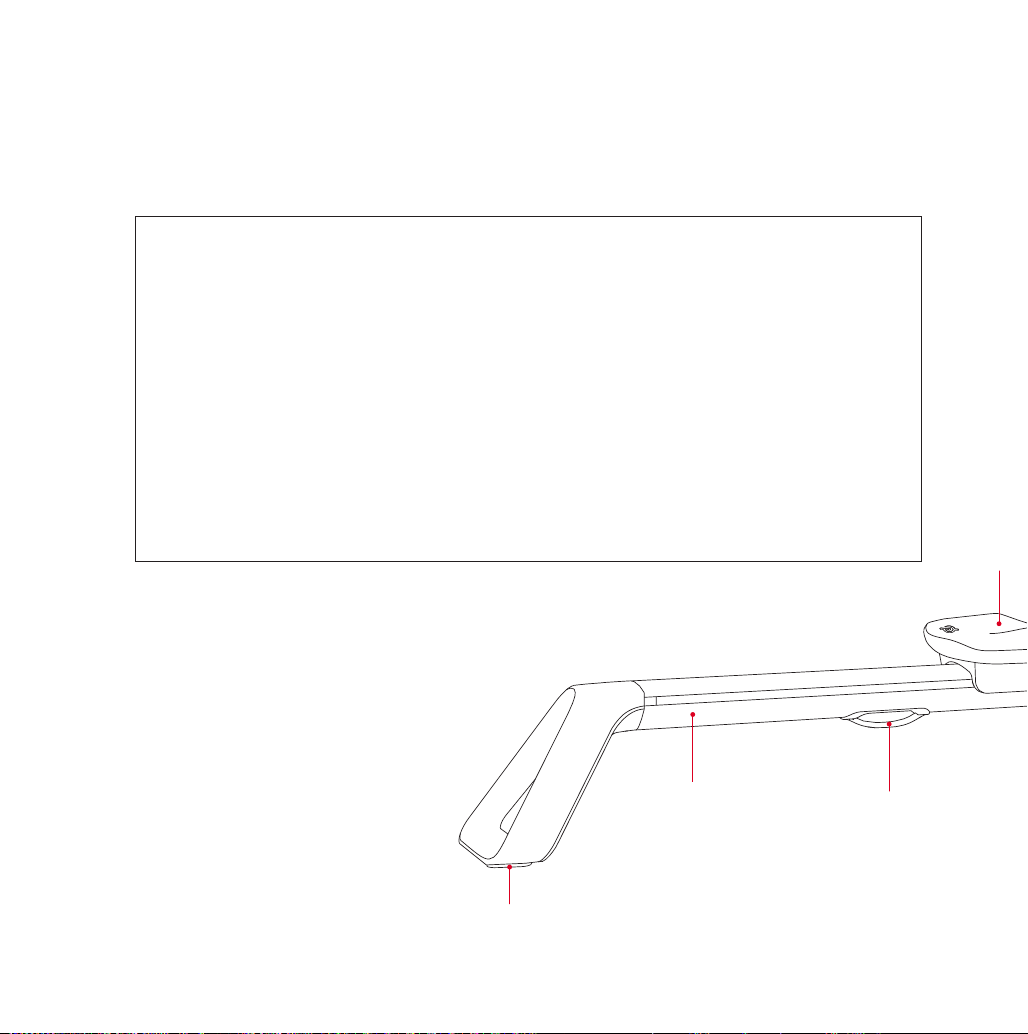
LABELS
Familiarize yourself with all warnings on the Peloton Row before use. If any label is damaged
or lost, contact member support at support.onepeloton.com for a replacement immediately.
The serial number on the Product Label indicates this unit’s
date of construction. For example, ‘RAIDP1200417xxxx’
would mean that the unit was constructed on 17 April 2020.
Member Support
Member satisfaction is a top priority for
Peloton. If you require assistance or are
experiencing issues with your Peloton Row,
please contact Member Support for
additional help.
support.onepeloton.com
When you contact Member Support, have
the following information ready:
• Row ID/serial number
*
• Purchase Date
• Your order number or the email address
associated with your Row purchase
* Access the Row ID/serial number from the
touchscreen by tapping the menu icon at
the lower right, and select About.
DISTRIBUTED BY:
Peloton Interactive, Inc.
441 9th Ave, 6th Floor
New York, NY 10001
11.11.2022
CAESAR RAIL BOLT LABEL - NORTH AMERICA
not outlined
outlined
4.0mm
2.0mm
Overprint Area Die Line (DO NOT PRINT)
Pantone 152 C
Black
Fully tighten rail bolt
40016386
Fully tighten rail bolt during assembly and before stowing
upright to prevent rail separation and risk of injury
Serrez complètement le boulon du rail pendant
l'assemblage et avant de le ranger à la verticale pour
éviter la séparation du rail et le risque de blessures.
WARNING / AVERTISSEMENT

8 9
|
MEMBER SUPPORT
LABELS
Familiarize yourself with all warnings on the Peloton Row before use. If any label is damaged
or lost, contact member support at support.onepeloton.com for a replacement immediately.
The serial number on the Product Label indicates this unit’s
date of construction. For example, ‘RAIDP1200417xxxx’
would mean that the unit was constructed on 17 April 2020.
Member Support
Member satisfaction is a top priority for
Peloton. If you require assistance or are
experiencing issues with your Peloton Row,
please contact Member Support for
additional help.
support.onepeloton.com
When you contact Member Support, have
the following information ready:
• Row ID/serial number
*
• Purchase Date
• Your order number or the email address
associated with your Row purchase
* Access the Row ID/serial number from the
touchscreen by tapping the menu icon at
the lower right, and select About.
DISTRIBUTED BY:
Peloton Interactive, Inc.
441 9th Ave, 6th Floor
New York, NY 10001
11.11.2022
CAESAR RAIL BOLT LABEL - NORTH AMERICA
not outlined
outlined
4.0mm
2.0mm
Overprint Area Die Line (DO NOT PRINT)
Pantone 152 C
Black
Fully tighten rail bolt
40016386
Fully tighten rail bolt during assembly and before stowing
upright to prevent rail separation and risk of injury
Serrez complètement le boulon du rail pendant
l'assemblage et avant de le ranger à la verticale pour
éviter la séparation du rail et le risque de blessures.
WARNING / AVERTISSEMENT
10 11
|
GETTING TO KNOW THE PELOTON ROW
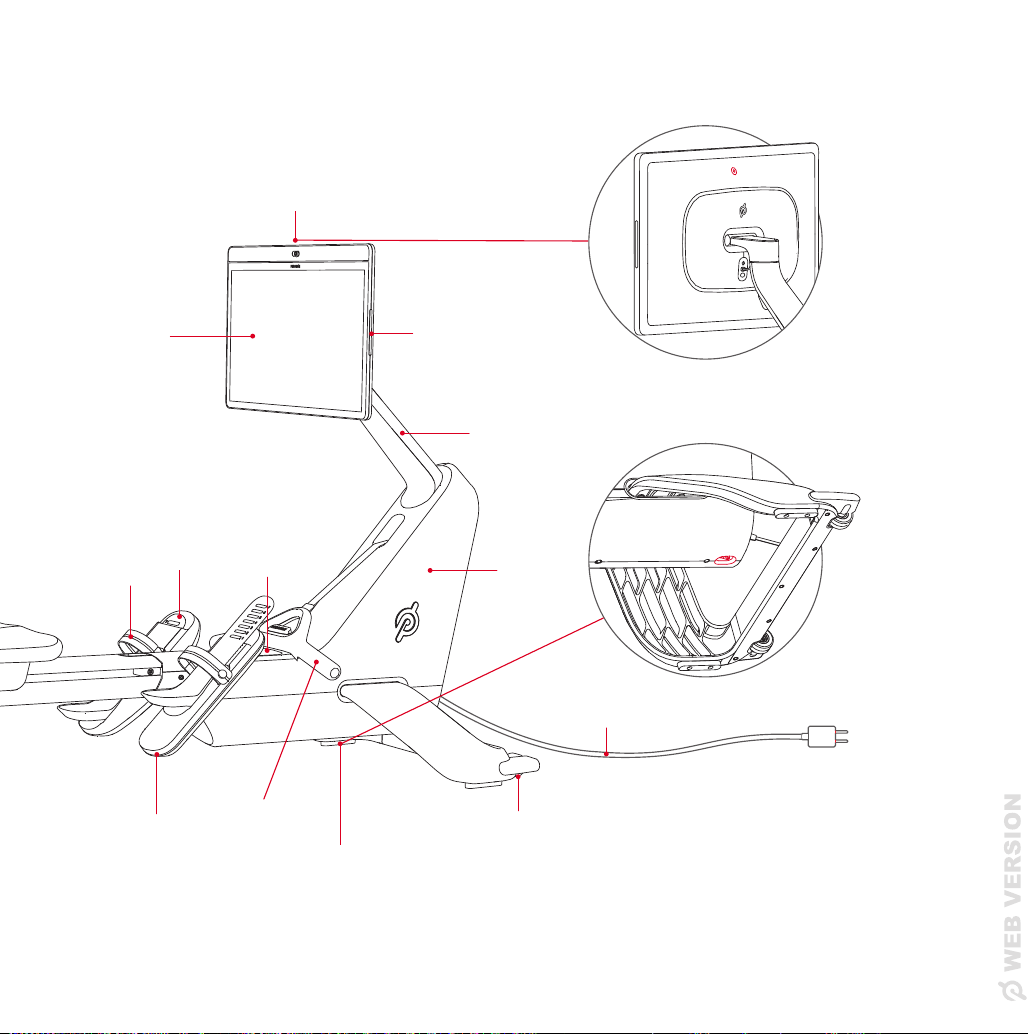
Getting To Know The Peloton Row
A Power Button
(on back of Touchscreen)
B Volume Control
C Monitor Arm
D Base
E Power Cord
F Wheels
G Power Switch
(under the Base)
H Rowing Handle
I Foot Rest
J Rail Handle
K Rail
L Rail Foot
M Seat
N Foot Straps
O Heel Slide
P Accessory Tray
Q Touchscreen
G
H
C
P
A
D
Q
B
E
F
I
J
K
L
M
N
O
10 11
|
GETTING TO KNOW THE PELOTON ROW
Getting To Know The Peloton Row
A Power Button
(on back of Touchscreen)
B Volume Control
C Monitor Arm
D Base
E Power Cord
F Wheels
G Power Switch
(under the Base)
H Rowing Handle
I Foot Rest
J Rail Handle
K Rail
L Rail Foot
M Seat
N Foot Straps
O Heel Slide
P Accessory Tray
Q Touchscreen
G
H
C
P
A
D
Q
B
E
F
I
J
K
L
M
N
O

12 13
|
SETTING UP THE PELOTON ROW
LOCATION REQUIREMENTS
• Make sure there is a clearance of no less than 24 in/60 cm on both sides
and behind the Peloton Row.
• Keep the dimensions of the Row in mind when determining the location
(Height/length: 7 ft 10 in/2.39 m; width: 24 in/60 cm).
• Do not store the Row near heaters.
Setting Up the Peloton Row
JOINING THE COMMUNITY
LOGGING IN
When you log in for the first time, you will
need ONE of the following:
• Your Subscription Activation Key
• The username and password you set up
when you purchased your Peloton Row
CONNECTING TO YOUR WI-FI
• Select your Wi-Fi network
• Enter the password
• Tap Connect
CREATING AND ADDING A PROFILE
If you don’t already have a Peloton profile, you’ll be prompted to create one when you first set
up your Row. The information you enter will be used to calculate metrics and organize your
leaderboard.
If you want more than one person to use your Row, create a new account for them from the
Login Screen. We recommend creating a new account for each user because calibration data
will be saved to your profile. Sharing profiles can cause some features to work improperly.
Row required clearance
Row workout footprint: 10 ft long x 6 ft wide
Row + bootcamp workout footprint: 10 ft long x 8 ft wide
24 in
60 cm
24 in
60 cm
24 in
60 cm

12 13
|
SETTING UP THE PELOTON ROW
LOCATION REQUIREMENTS
• Make sure there is a clearance of no less than 24 in/60 cm on both sides
and behind the Peloton Row.
• Keep the dimensions of the Row in mind when determining the location
(Height/length: 7 ft 10 in/2.39 m; width: 24 in/60 cm).
• Do not store the Row near heaters.
Setting Up the Peloton Row
JOINING THE COMMUNITY
LOGGING IN
When you log in for the first time, you will
need ONE of the following:
• Your Subscription Activation Key
• The username and password you set up
when you purchased your Peloton Row
CONNECTING TO YOUR WI-FI
• Select your Wi-Fi network
• Enter the password
• Tap Connect
CREATING AND ADDING A PROFILE
If you don’t already have a Peloton profile, you’ll be prompted to create one when you first set
up your Row. The information you enter will be used to calculate metrics and organize your
leaderboard.
If you want more than one person to use your Row, create a new account for them from the
Login Screen. We recommend creating a new account for each user because calibration data
will be saved to your profile. Sharing profiles can cause some features to work improperly.
Row required clearance
Row workout footprint: 10 ft long x 6 ft wide
Row + bootcamp workout footprint: 10 ft long x 8 ft wide
24 in
60 cm
24 in
60 cm
24 in
60 cm
14 15
|
USING THE PELOTON ROW
Using the Peloton Row
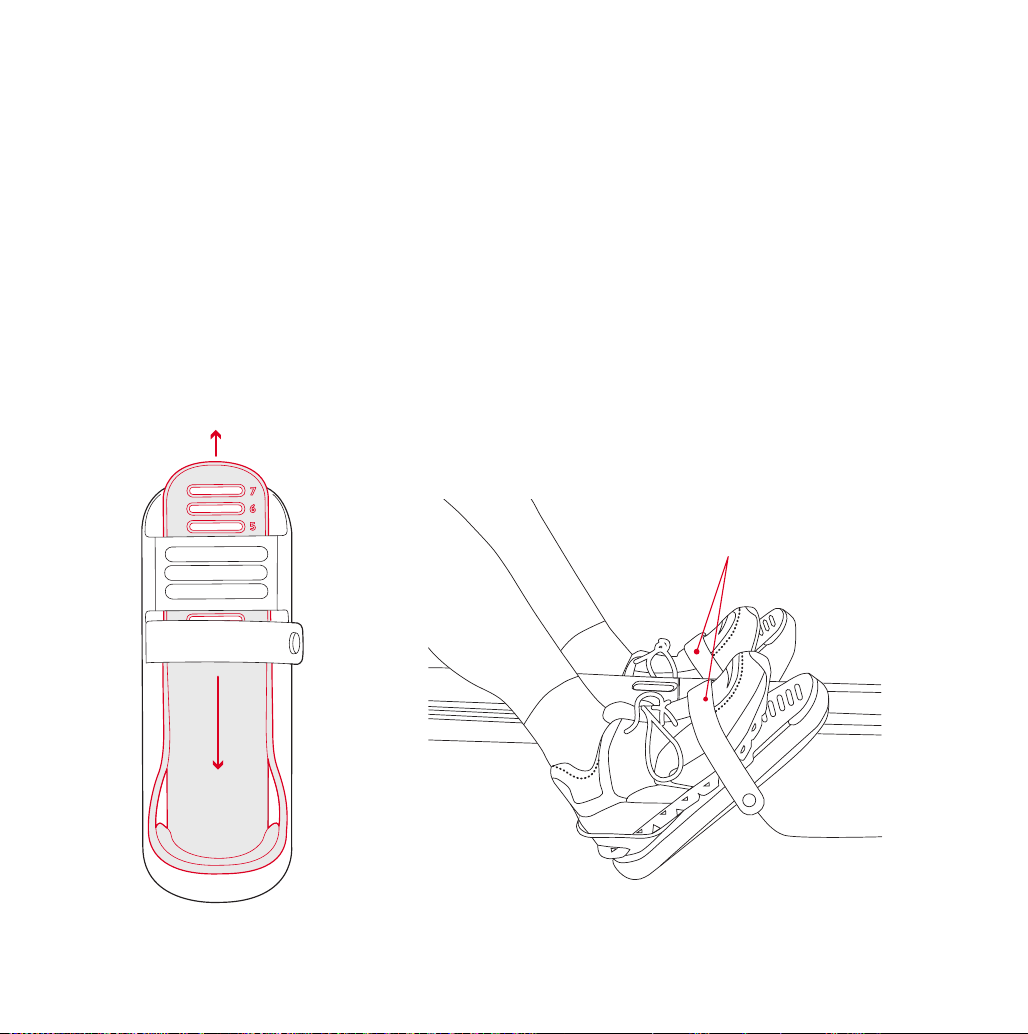
Foot Straps
STRAPPING IN YOUR FEET
Always wear appropriate footwear when using your Row.
• Adjust the length of the heel slide so that the foot strap rests across the base of your toes.
• Tighten the foot strap so there is enough room to insert two fingers between the strap and
the top of your shoe.
NOTE: Make sure you can lift your heel comfortably while your toes and the ball of your foot
press firmly against the foot rest.
CALIBRATION: ACTIVATING FORM ASSIST
When setting up your Peloton Row, you will be prompted to calibrate your form. To confirm
your calibration, make sure the Form Assist figure is following your motions during your first
workout. Once calibrated, Form Assist will provide real-time form feedback and form summaries
after workouts. If the Form Assist figure seems to be out of sync with your movements, it may
need to be recalibrated. To recalibrate, tap into your profile and select Calibrate.
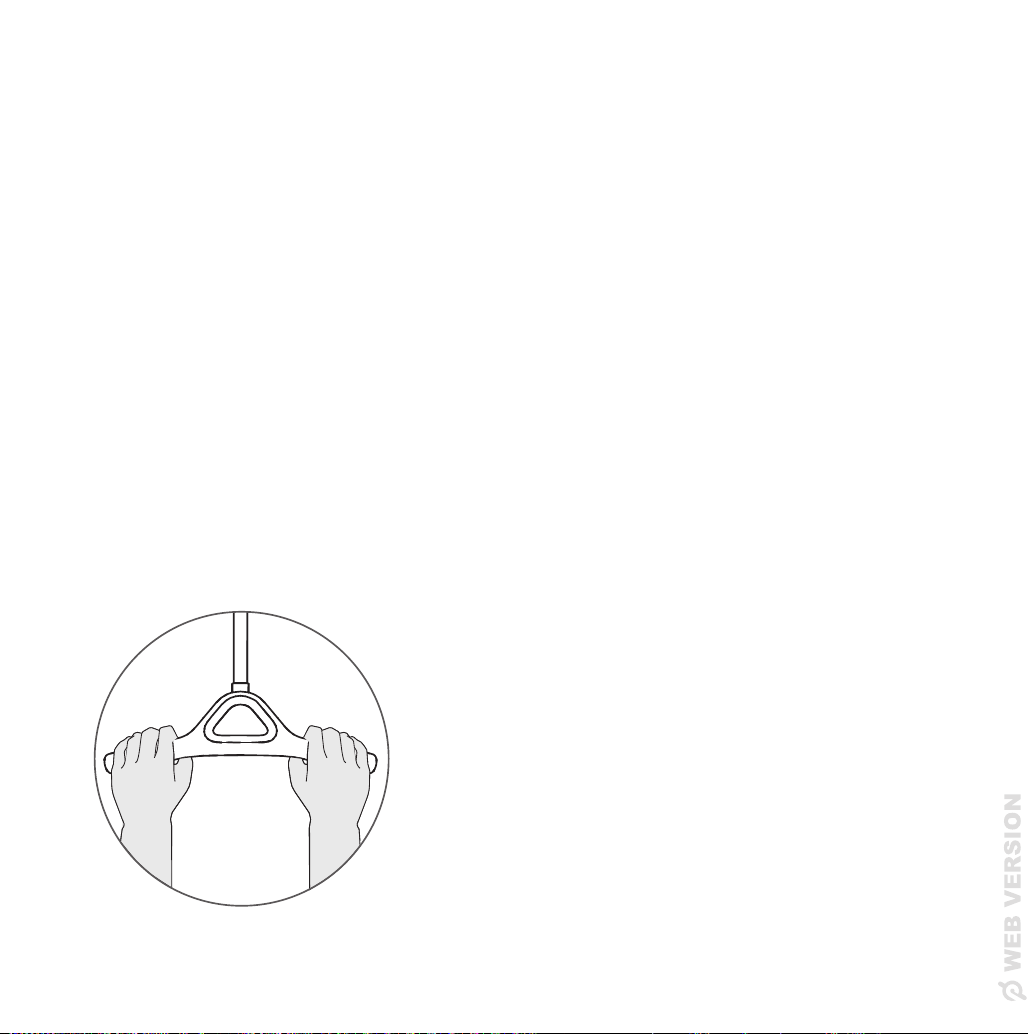
HOLDING THE HANDLE
Position your hands wide apart so your little ngers are at the ends of the handle. Hold the handle
loosely so your knuckles are directly on top of the handle and your palms are not touching it.
Your wrists should be horizontal, forming a straight line with the handle strap, and the handle
should rotate smoothly under your fingers throughout the stroke.
14 15
|
USING THE PELOTON ROW
Using the Peloton Row
Foot Straps
STRAPPING IN YOUR FEET
Always wear appropriate footwear when using your Row.
• Adjust the length of the heel slide so that the foot strap rests across the base of your toes.
• Tighten the foot strap so there is enough room to insert two fingers between the strap and
the top of your shoe.
NOTE: Make sure you can lift your heel comfortably while your toes and the ball of your foot
press firmly against the foot rest.
CALIBRATION: ACTIVATING FORM ASSIST
When setting up your Peloton Row, you will be prompted to calibrate your form. To confirm
your calibration, make sure the Form Assist figure is following your motions during your first
workout. Once calibrated, Form Assist will provide real-time form feedback and form summaries
after workouts. If the Form Assist figure seems to be out of sync with your movements, it may
need to be recalibrated. To recalibrate, tap into your profile and select Calibrate.
HOLDING THE HANDLE
Position your hands wide apart so your little ngers are at the ends of the handle. Hold the handle
loosely so your knuckles are directly on top of the handle and your palms are not touching it.
Your wrists should be horizontal, forming a straight line with the handle strap, and the handle
should rotate smoothly under your fingers throughout the stroke.
16 17
|
USING THE PELOTON ROW
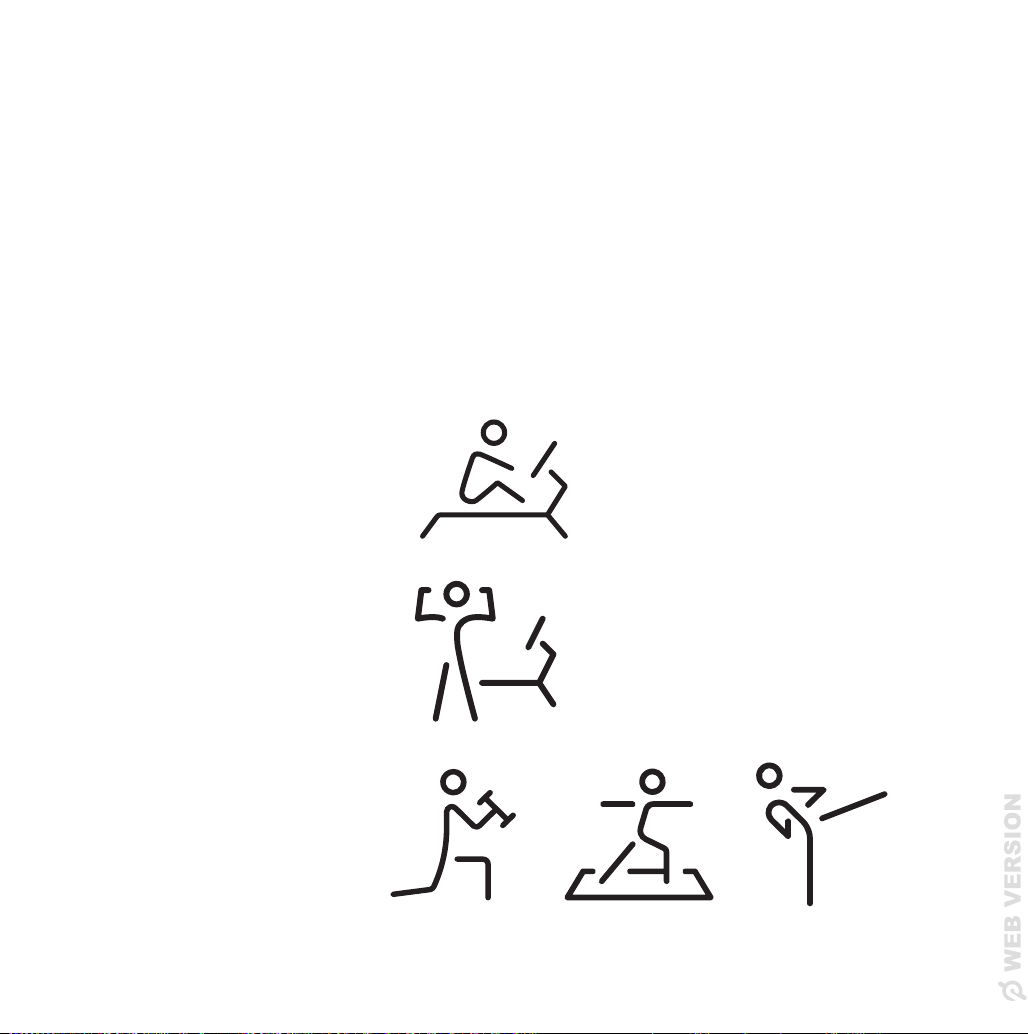
SELECTING A CLASS
• Live and on-demand classes are available.
• Filter by instructor, class length, class type and more.
• If the workout does not include a warmup or cooldown, they are available separately.
• Select More for a Scenic Row or Just Row experience.
CLASS TYPES
Row classes
Take place only on the Row.
Bootcamp
Part of the class is on the Row
and part is off the Row.
Strength/Yoga/Cardio
Take place off the Row.
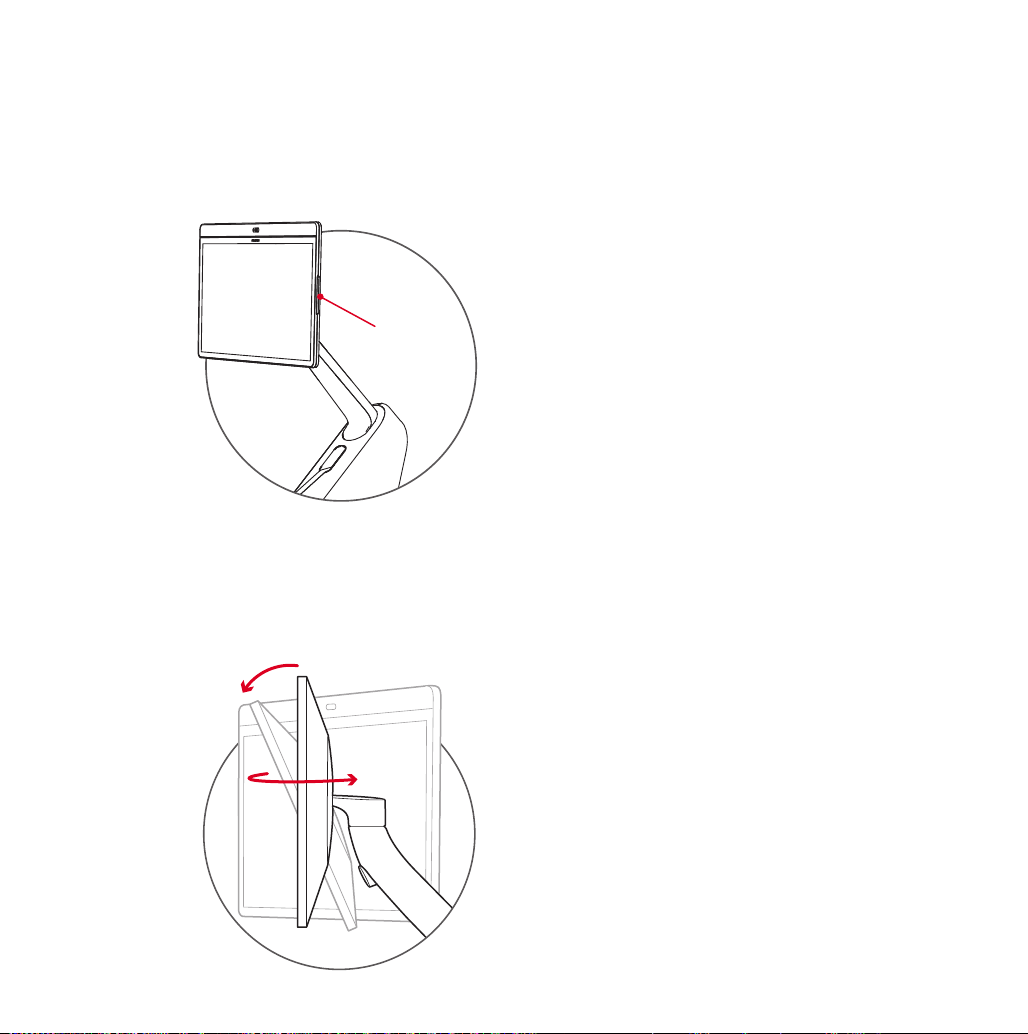
ADJUSTING YOUR MONITOR
Touchscreen swivels 45 degrees left and right and 25 degrees up and down.
ADJUSTING YOUR VOLUME
VOLUME
16 17
|
USING THE PELOTON ROW
SELECTING A CLASS
• Live and on-demand classes are available.
• Filter by instructor, class length, class type and more.
• If the workout does not include a warmup or cooldown, they are available separately.
• Select More for a Scenic Row or Just Row experience.
CLASS TYPES
Row classes
Take place only on the Row.
Bootcamp
Part of the class is on the Row
and part is off the Row.
Strength/Yoga/Cardio
Take place off the Row.
ADJUSTING YOUR MONITOR
Touchscreen swivels 45 degrees left and right and 25 degrees up and down.
ADJUSTING YOUR VOLUME
VOLUME
18 19
|
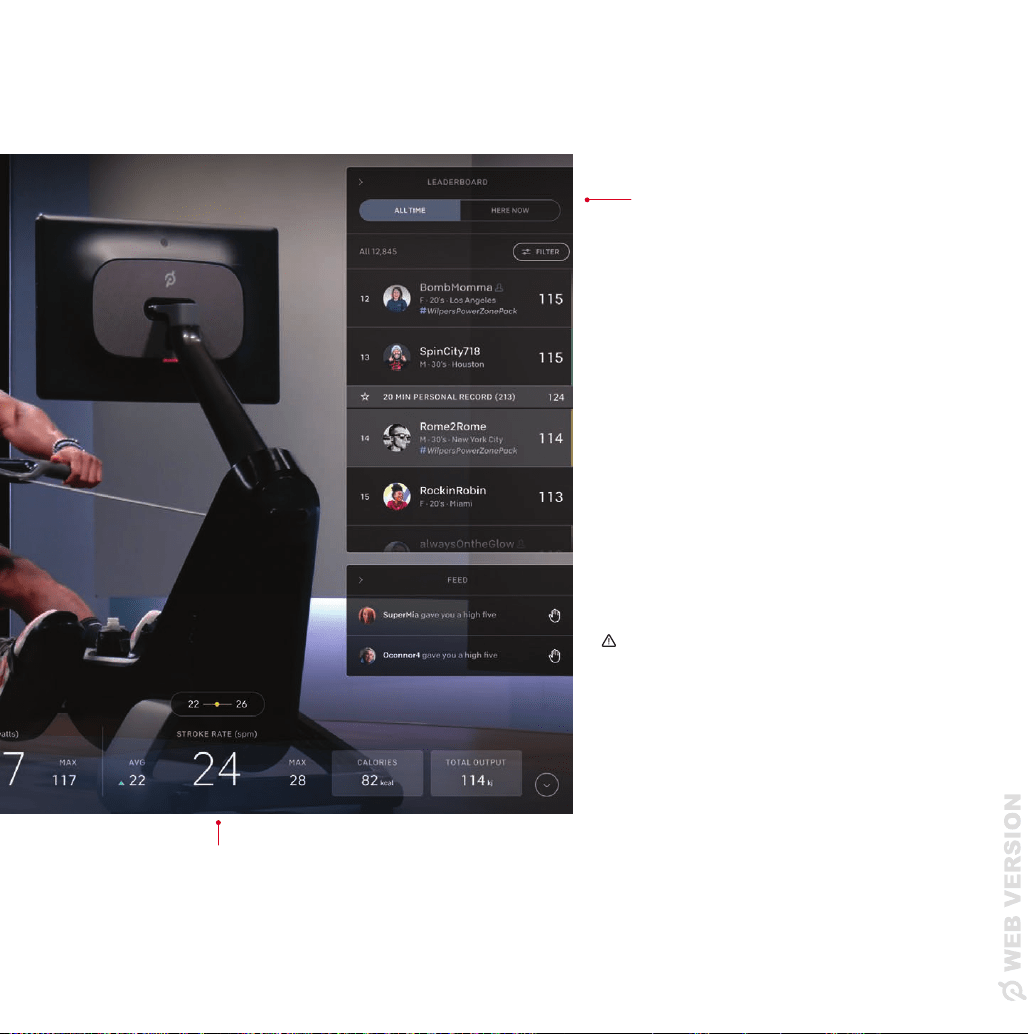
CLASS SCREEN
FORM ASSIST
RHYTHM WAVE
helps you achieve a smooth
stroke rhythm
H E A R T R AT E
Heart rate is measured when
you connect a heart rate
monitor
OUTPUT
Stroke power
CLASS TIMER
Your Class Timer shows
class segments and your
progress within the class
PACE
The time it would take to row
500m at your current speed
Class Screen
WARNING: Heart rate monitoring
systems may be inaccurate.
Overexercising may result
in serious injury or death. If
you feel faint, stop exercising
immediately. Use metrics on the
screen for reference only.
LEADERBOARD
• The Leaderboard shows all
participants in a class
• Filter by Friends, Tags,
or use #HereNow to see
who is rowing right now
STROKE RATE
The total number of times you’d move up and
down the rail per minute at your current rate
18 19
|
CLASS SCREEN
FORM ASSIST
RHYTHM WAVE
helps you achieve a smooth
stroke rhythm
H E A R T R AT E
Heart rate is measured when
you connect a heart rate
monitor
OUTPUT
Stroke power
CLASS TIMER
Your Class Timer shows
class segments and your
progress within the class
PACE
The time it would take to row
500m at your current speed
Class Screen
WARNING: Heart rate monitoring
systems may be inaccurate.
Overexercising may result
in serious injury or death. If
you feel faint, stop exercising
immediately. Use metrics on the
screen for reference only.
LEADERBOARD
• The Leaderboard shows all
participants in a class
• Filter by Friends, Tags,
or use #HereNow to see
who is rowing right now
STROKE RATE
The total number of times you’d move up and
down the rail per minute at your current rate

20 21
|
MAXIMIZING YOUR FIRST WORKOUT
WHAT DO THE PELOTON ROW SCREEN METRICS MEAN?
• Stroke Rate: Stroke rate is measured in “Strokes Per Minute” (SPM), which is the total
number of times your body moves back and forth along the rail in 60 seconds.
NOTE: Remember that moving the handle while driving the seat back along the rail is the
only way to feel the resistance the machine provides.
• Pace: Pace describes how fast your boat would be moving if you were rowing on the
water. Your pace is the amount of time it would take you to row 500 meters at your
current speed. The harder you work, the shorter your pace time will be.
°
Peloton Instructors will coach using pace targets because it’s a good way to measure
how hard you’re working, and it’s directly connected to your power output.
°
You can make your boat go faster without increasing your stroke rate by driving your
legs harder.
• Drag Factor: Drag factor controls how much resistance builds up as you pull the handle
faster. It’s important to know that Drag Factor is not equivalent to resistance on bikes
or other workout equipment, because resistance on rowers increases by default as the
velocity of the handle increases.
NOTE: Drag Factor is not intended to be a difficulty setting like those found on other
Peloton products, and may not lead to a more efficient workout. It may even get in
the way of your learning and could lead to bad habits or injuries if not used properly.
We recommend sticking with the default setting for the best experience.
PELOTON 101
Check out our Peloton Row 101 videos for details on rowing metrics, instructions on setting
up your Row, Form Assist and calibration, and more.
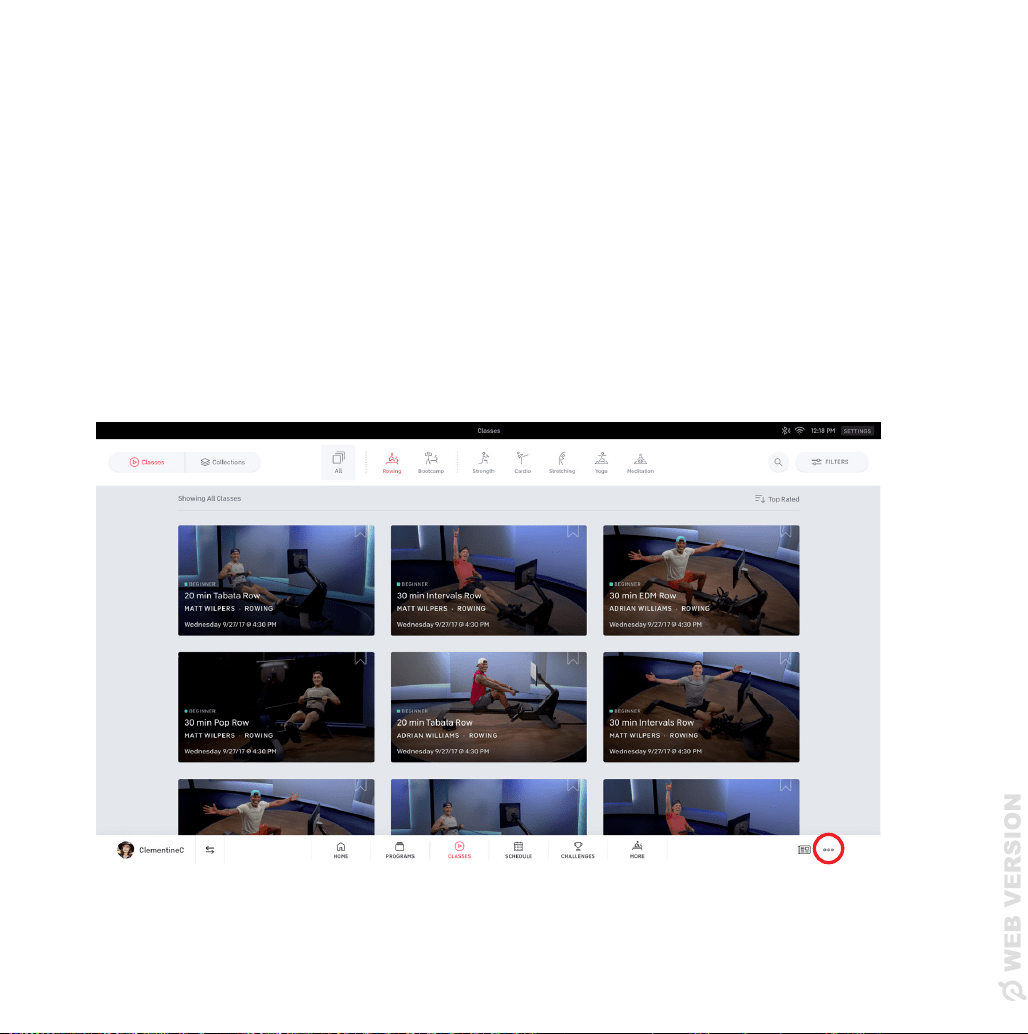
To access Peloton 101, tap on the three dots icon on the lower right of the home or classes
screen and select Peloton 101.
Maximizing Your First Workout
20 21
|
MAXIMIZING YOUR FIRST WORKOUT
WHAT DO THE PELOTON ROW SCREEN METRICS MEAN?
• Stroke Rate: Stroke rate is measured in “Strokes Per Minute” (SPM), which is the total
number of times your body moves back and forth along the rail in 60 seconds.
NOTE: Remember that moving the handle while driving the seat back along the rail is the
only way to feel the resistance the machine provides.
• Pace: Pace describes how fast your boat would be moving if you were rowing on the
water. Your pace is the amount of time it would take you to row 500 meters at your
current speed. The harder you work, the shorter your pace time will be.
°
Peloton Instructors will coach using pace targets because it’s a good way to measure
how hard you’re working, and it’s directly connected to your power output.
°
You can make your boat go faster without increasing your stroke rate by driving your
legs harder.
• Drag Factor: Drag factor controls how much resistance builds up as you pull the handle
faster. It’s important to know that Drag Factor is not equivalent to resistance on bikes
or other workout equipment, because resistance on rowers increases by default as the
velocity of the handle increases.
NOTE: Drag Factor is not intended to be a difficulty setting like those found on other
Peloton products, and may not lead to a more efficient workout. It may even get in
the way of your learning and could lead to bad habits or injuries if not used properly.
We recommend sticking with the default setting for the best experience.
PELOTON 101
Check out our Peloton Row 101 videos for details on rowing metrics, instructions on setting
up your Row, Form Assist and calibration, and more.
To access Peloton 101, tap on the three dots icon on the lower right of the home or classes
screen and select Peloton 101.
Maximizing Your First Workout

22 23
|
MAXIMIZING YOUR FIRST WORKOUT
HOW DO I GET A BETTER WORKOUT WHILE ROWING?
• Check how you are situated in the seat - too far forward or back, and you may not be
able to hinge/pivot from the hips as easily.
• Check the position of your feet - where you position your feet determines how easy or
hard it is to slide forward towards the catch. Find a comfortable height (usually around
the balls of your feet) and don’t strap in too tightly!
• Be aware of how you are using the handle - as you start to ‘pull’, remember that the
more you push with your legs and move the handle (without bending your arms), the
more power you will be able to generate and maintain.
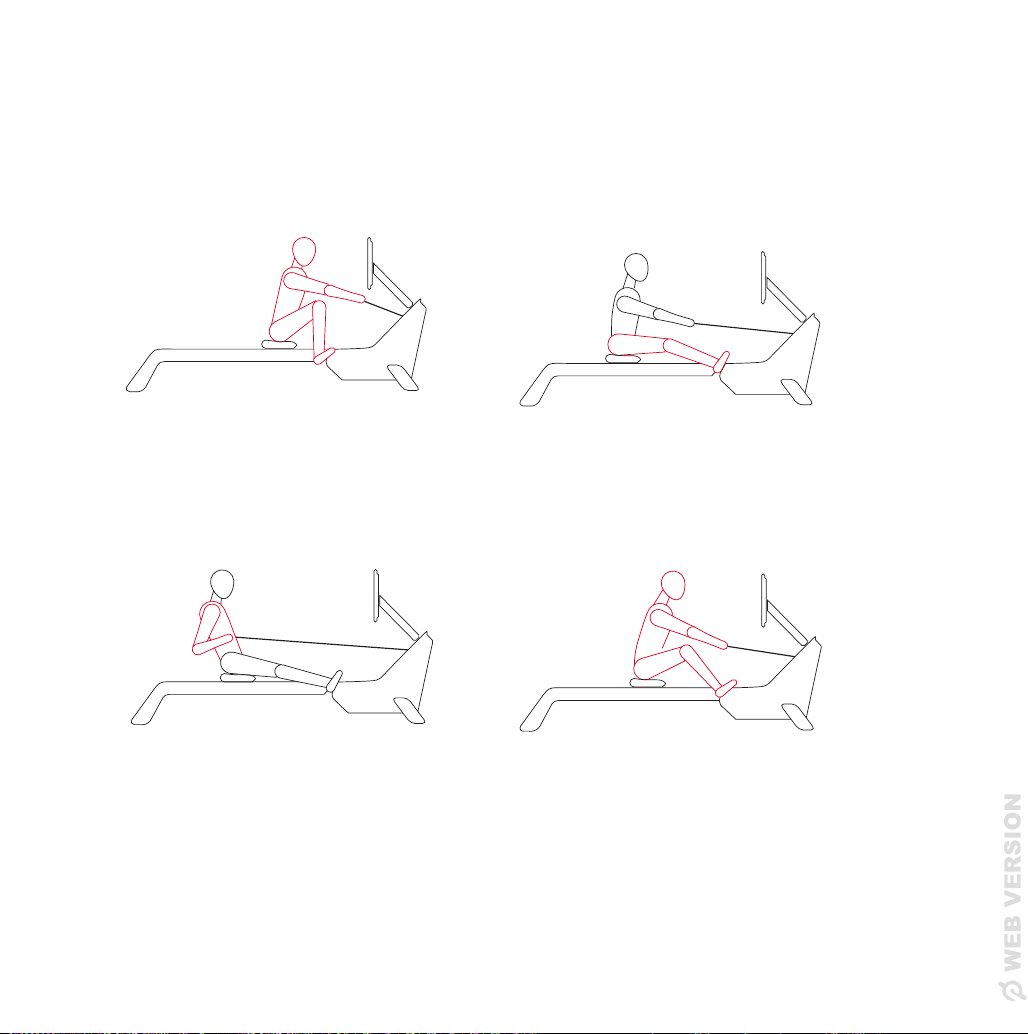
• Focus on your form (rather than output, pace, and stroke rate) - as you learn how to
row, proper form will help you maximize the effectiveness of your workout and better
enjoy the wide array of rowing that Peloton offers. The images below demonstrate the
proper form for each position.
1
Catch
3
Finish
4
Recovery
2
Drive
Catch
Drive
22 23
|
MAXIMIZING YOUR FIRST WORKOUT
HOW DO I GET A BETTER WORKOUT WHILE ROWING?
• Check how you are situated in the seat - too far forward or back, and you may not be
able to hinge/pivot from the hips as easily.
• Check the position of your feet - where you position your feet determines how easy or
hard it is to slide forward towards the catch. Find a comfortable height (usually around
the balls of your feet) and don’t strap in too tightly!
• Be aware of how you are using the handle - as you start to ‘pull’, remember that the
more you push with your legs and move the handle (without bending your arms), the
more power you will be able to generate and maintain.
• Focus on your form (rather than output, pace, and stroke rate) - as you learn how to
row, proper form will help you maximize the effectiveness of your workout and better
enjoy the wide array of rowing that Peloton offers. The images below demonstrate the
proper form for each position.
1
Catch
3
Finish
4
Recovery
2
Drive
Catch
Drive
24 25
|
MOVING THE PELOTON ROW AND STORING IT UPRIGHT
Moving The Peloton Row and
Storing It Upright
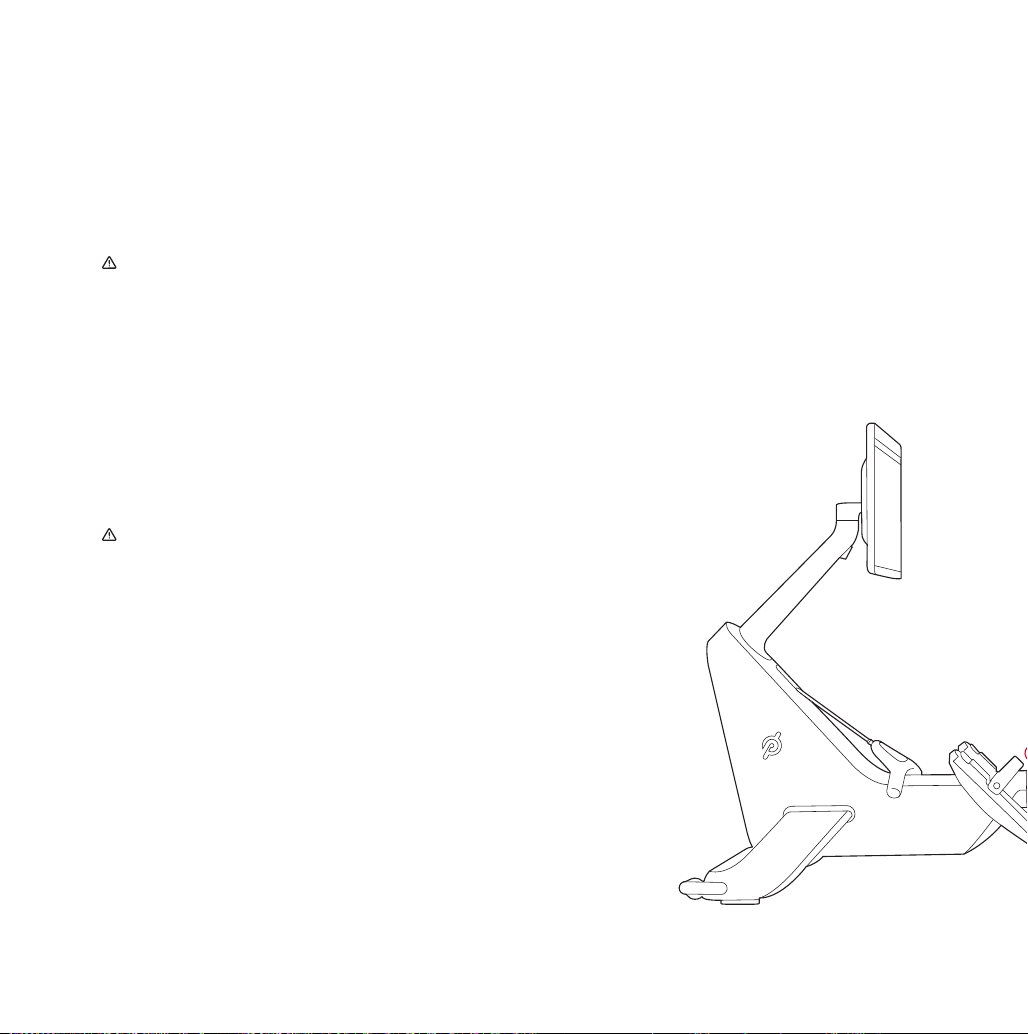
1
Power off the Row and unplug it.
NEVER store the Peloton Row vertically
without properly installing and using
the Upright Wall Anchor. To avoid risk
of serious injury, read and follow all
instructions in the Upright Wall Anchor
Guide.
If you are not able to lift more than
40 lbs / 18 kg over your head, get
assistance in stowing, unstowing or
moving the Row from someone who can.
NEVER insert your fingers into the rail
groove.
Always verify that the Upright Wall Anchor is
securely mounted to the wall and check for
damage before using it.
For your safety, Peloton recommends
having the Peloton Upright Wall Anchor
installed by a professional such as a
handyman, appliance installer, or local
hardware retailer.
The Upright Wall Anchor is designed to
be screwed into a load-bearing wooden
stud only. Do not install into unsupported
drywall, metal studs, or masonry.
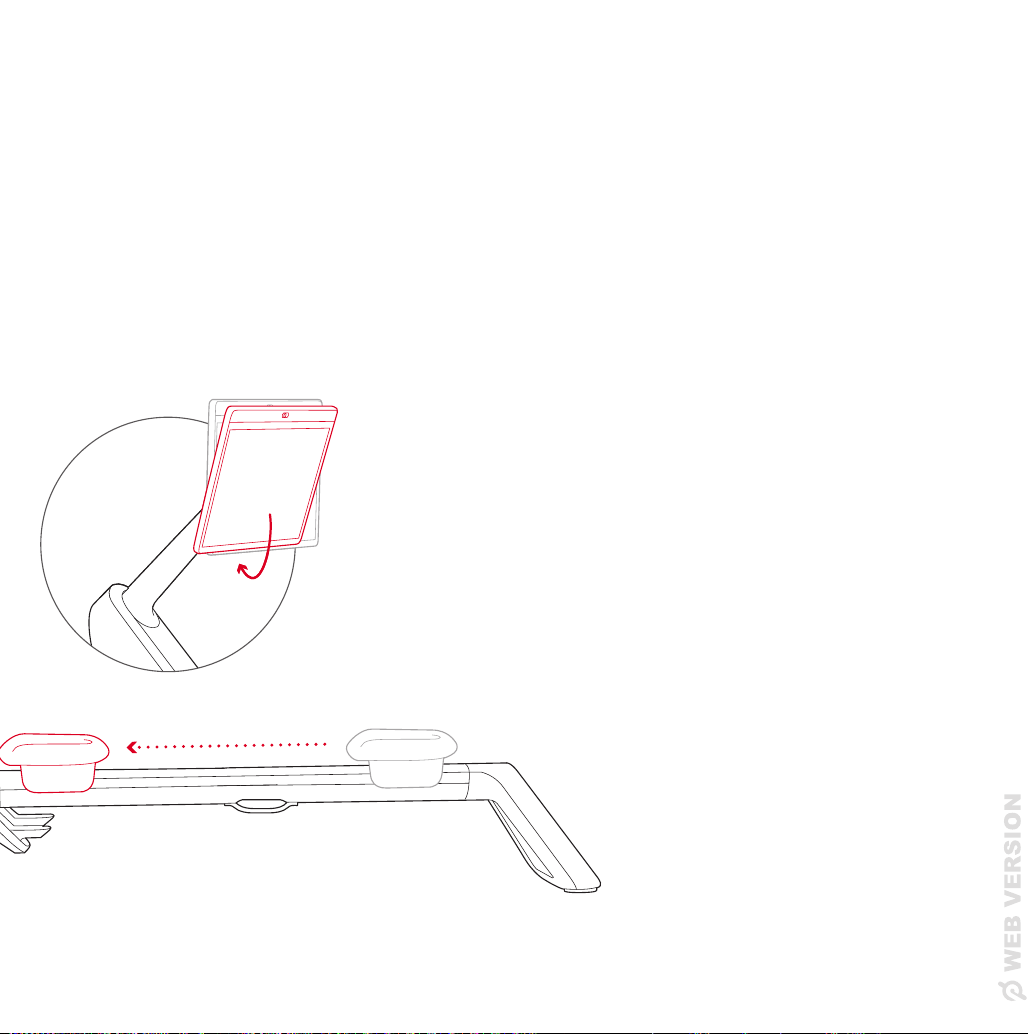
2
Tilt the monitor all the way down.
3
Move the seat all the way forward.
Be careful not to pinch your fingers
as the seat moves freely.
24 25
|
MOVING THE PELOTON ROW AND STORING IT UPRIGHT
Moving The Peloton Row and
Storing It Upright
1
Power off the Row and unplug it.
NEVER store the Peloton Row vertically
without properly installing and using
the Upright Wall Anchor. To avoid risk
of serious injury, read and follow all
instructions in the Upright Wall Anchor
Guide.
If you are not able to lift more than
40 lbs / 18 kg over your head, get
assistance in stowing, unstowing or
moving the Row from someone who can.
NEVER insert your fingers into the rail
groove.
Always verify that the Upright Wall Anchor is
securely mounted to the wall and check for
damage before using it.
For your safety, Peloton recommends
having the Peloton Upright Wall Anchor
installed by a professional such as a
handyman, appliance installer, or local
hardware retailer.
The Upright Wall Anchor is designed to
be screwed into a load-bearing wooden
stud only. Do not install into unsupported
drywall, metal studs, or masonry.
2
Tilt the monitor all the way down.
3
Move the seat all the way forward.
Be careful not to pinch your fingers
as the seat moves freely.
26 27
|
MOVING THE PELOTON ROW AND STORING IT UPRIGHT
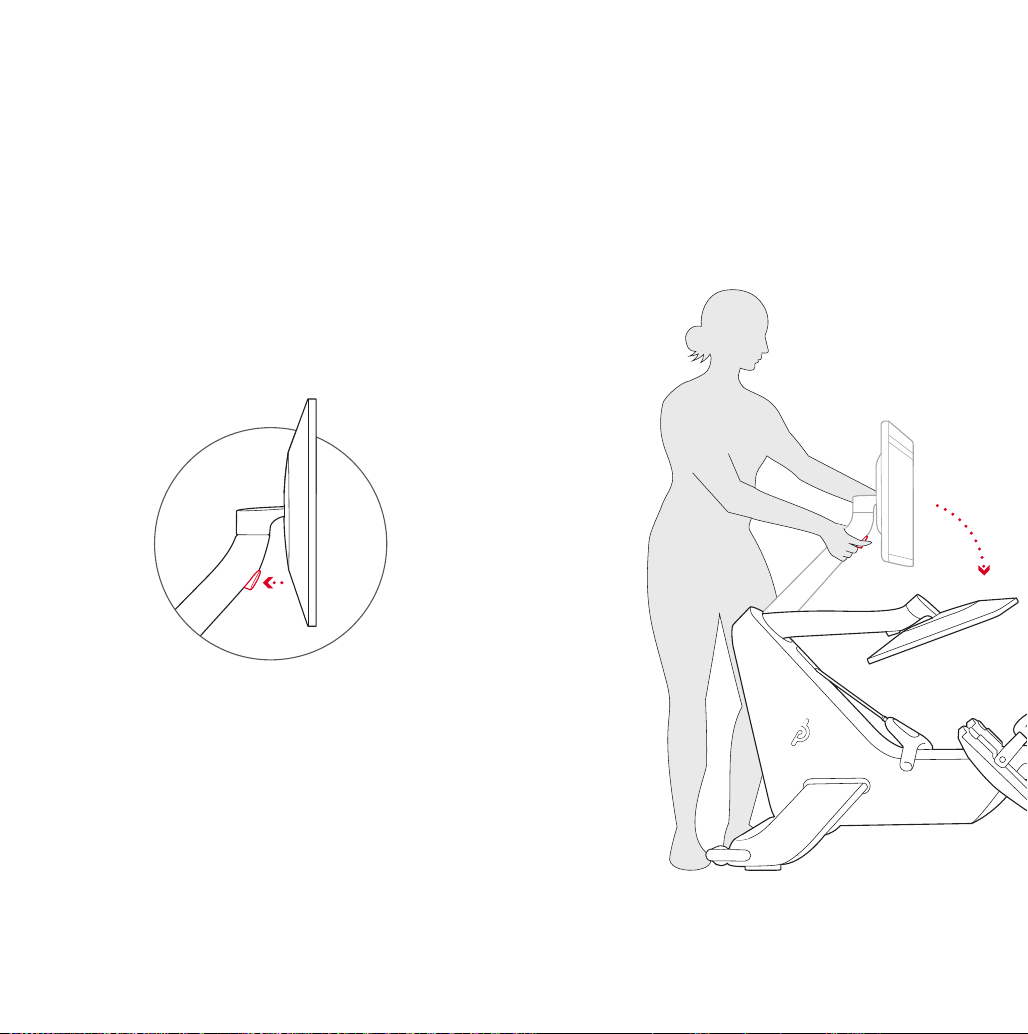
4
Press the monitor arm release button.
Click
5
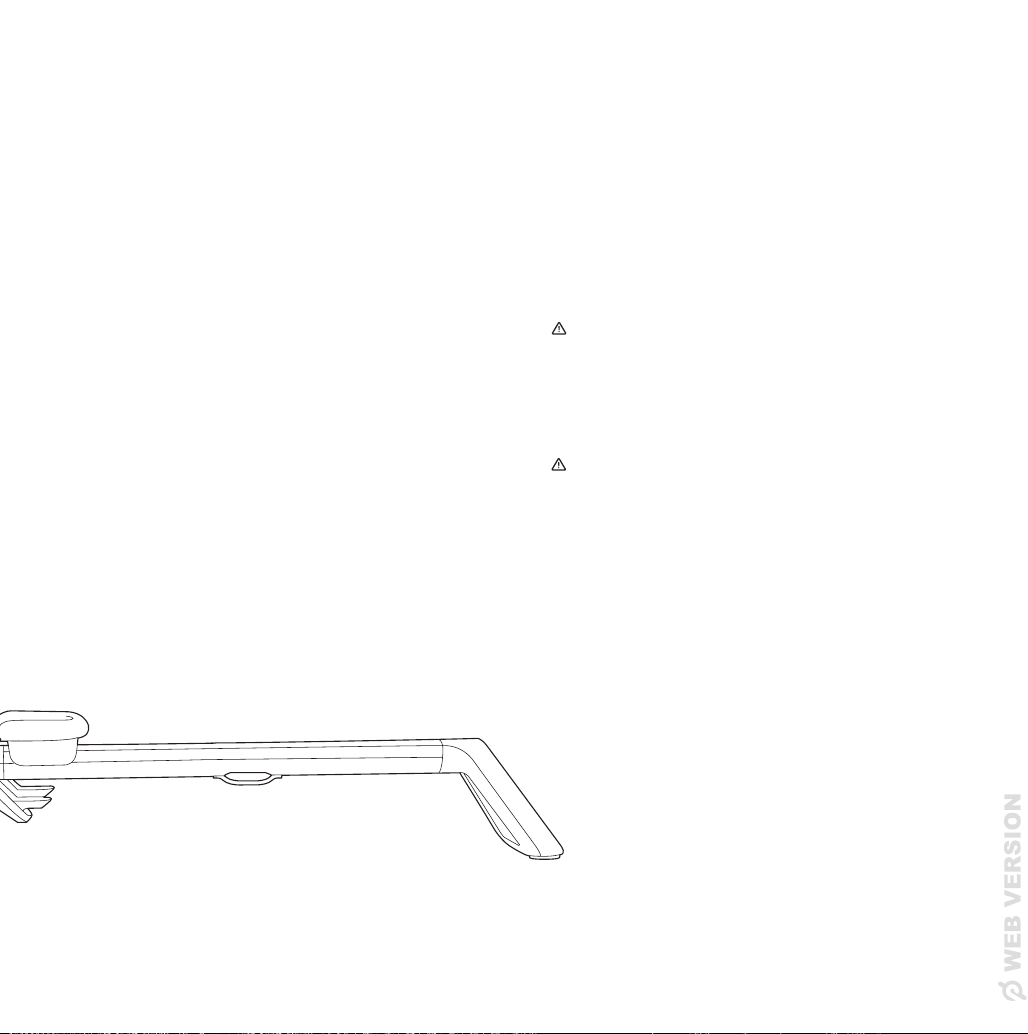
Carefully lower the monitor arm until
it stops, and then release the button.
Slowly lift the monitor arm until you
hear a click. Confirm that the monitor
arm is locked into place before
attempting to move the Peloton Row.
WARNING: To avoid instability when
stowing the Row vertically, the monitor
must be stored with the monitor arm in
the lowered position shown.
WARNING: Fully tighten rail bolt during
assembly and before stowing upright to
prevent rail separation and risk of injury
26 27
|
MOVING THE PELOTON ROW AND STORING IT UPRIGHT
4
Press the monitor arm release button.
Click
5
Carefully lower the monitor arm until
it stops, and then release the button.
Slowly lift the monitor arm until you
hear a click. Confirm that the monitor
arm is locked into place before
attempting to move the Peloton Row.
WARNING: To avoid instability when
stowing the Row vertically, the monitor
must be stored with the monitor arm in
the lowered position shown.
WARNING: Fully tighten rail bolt during
assembly and before stowing upright to
prevent rail separation and risk of injury

28 29
|
MOVING THE PELOTON ROW AND STORING IT UPRIGHT
6
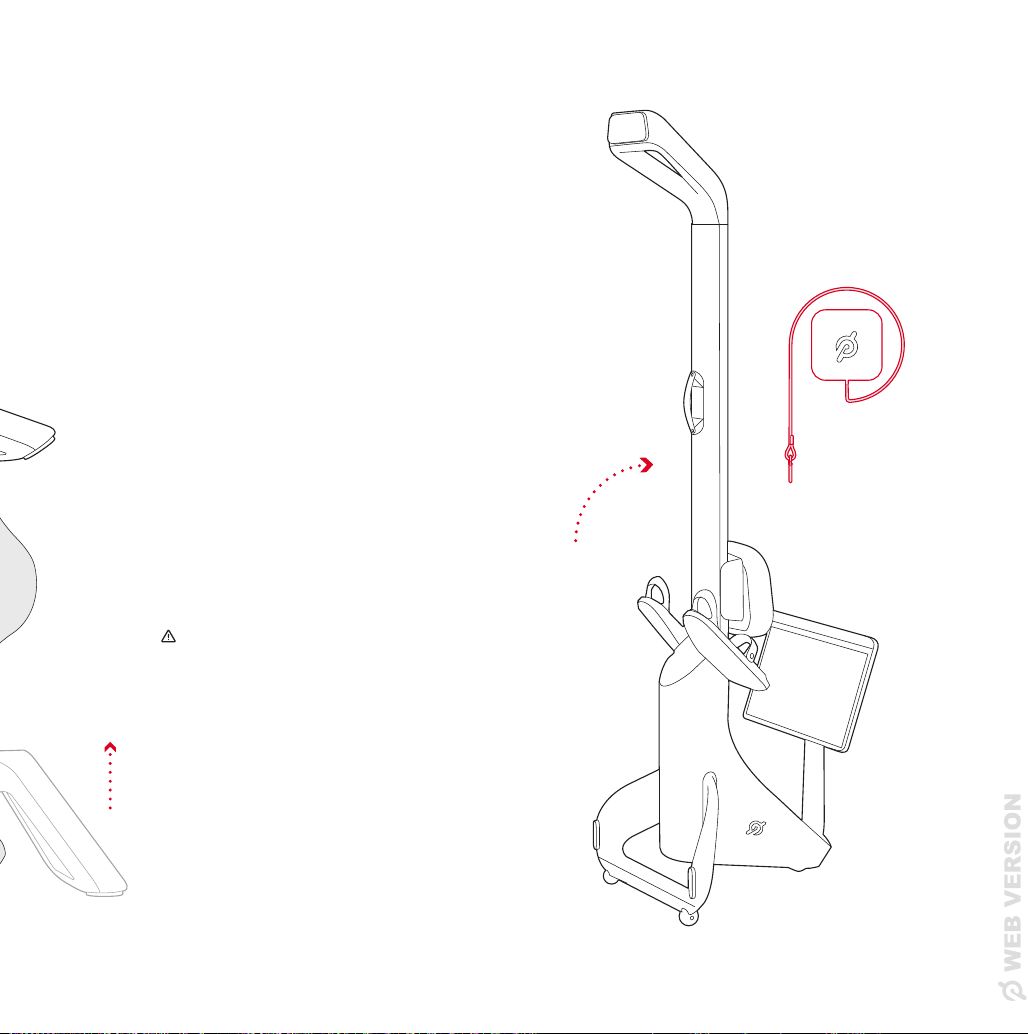
Lift the rail foot until you can reach the rail
handle. The wheels will engage, allowing
you to roll it to the desired location.
7
Center the Peloton Row in front of the
Peloton Upright Wall Anchor.
When stowing the Peloton Row, carefully
lift it until it is fully upright. Be careful to
leave enough space between the Row and
the wall so your Row doesn't collide with
the wall when you're tipping it up.
WARNING: Never store the Peloton Row
vertically on the Peloton Mat or any other
mat. Always roll the Peloton Mat up with the
logo facing out and store it where it will not
be a tripping hazard.
28 29
|
MOVING THE PELOTON ROW AND STORING IT UPRIGHT
6
Lift the rail foot until you can reach the rail
handle. The wheels will engage, allowing
you to roll it to the desired location.
7
Center the Peloton Row in front of the
Peloton Upright Wall Anchor.
When stowing the Peloton Row, carefully
lift it until it is fully upright. Be careful to
leave enough space between the Row and
the wall so your Row doesn't collide with
the wall when you're tipping it up.
WARNING: Never store the Peloton Row
vertically on the Peloton Mat or any other
mat. Always roll the Peloton Mat up with the
logo facing out and store it where it will not
be a tripping hazard.
30 31
|
MAINTENANCE AND CARE
8
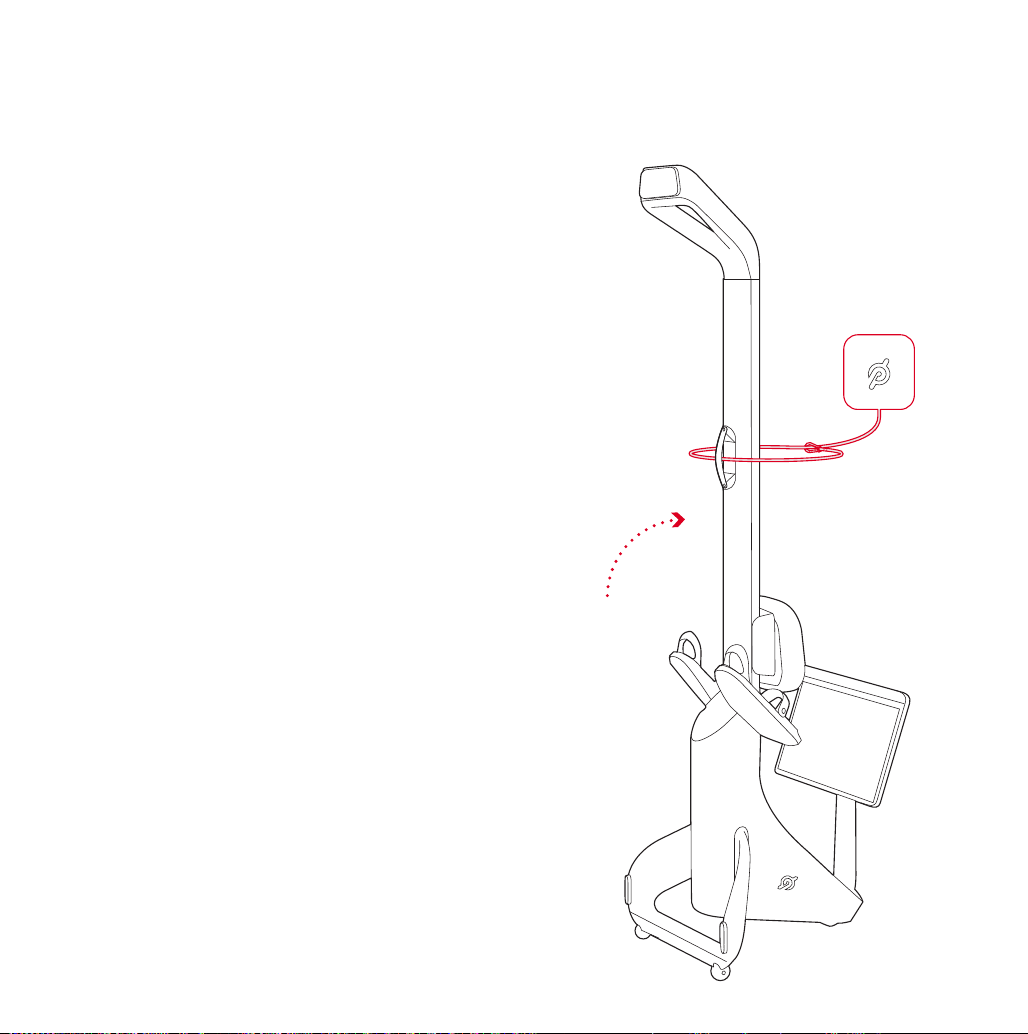
Unwind the tether and loop the tether and
carabiner around the rail and through the
rail handle.
Clip the carabiner to the tether.
Maintenance and Care
WARNING: To avoid risk of injury, service
(other than the procedures described here
or specifically instructed by a Member
Support representative) must be performed
by an authorized technician.
WARNING: Always unplug the Row prior
to cleaning. After cleaning, make sure the
power cord is free of any moisture before
plugging it back in.
BEFORE EVERY CLASS
• Check the area around and underneath
the Peloton Row for potential
obstructions.
• Inspect the Peloton Row and do not use it
if it appears damaged or inoperable.
BEFORE STOWING THE
PELOTON ROW UPRIGHT:
• Make sure the Accessory Tray is cleared
of any items.
• Make sure that the Upright Wall Anchor is
securely mounted to the wall and that the
cord is not frayed or otherwise damaged.
Always attach the Row to the Upright Wall
Anchor when stowing vertically, and never
stow vertically if the Upright Wall Anchor
is not securely attached to the wall.
MO N T H LY
• Check the power cord for damage.
• Check the entire Row for wear and
damage, especially the handle strap and
foot straps.
• Clean the area underneath the Row.
• Remove the front cover of the Upright
Wall Anchor and verify that the tether is
secured to the mounting bracket and not
frayed, and that the bolts are secured to
the wall.
• Clean all visible surfaces of the Row
thoroughly using a damp cloth and a mild
household cleaner diluted in water. Do not
use harsh cleaning products containing
bleach or ammonia.

30 31
|
MAINTENANCE AND CARE
8
Unwind the tether and loop the tether and
carabiner around the rail and through the
rail handle.
Clip the carabiner to the tether.
Maintenance and Care
WARNING: To avoid risk of injury, service
(other than the procedures described here
or specifically instructed by a Member
Support representative) must be performed
by an authorized technician.
WARNING: Always unplug the Row prior
to cleaning. After cleaning, make sure the
power cord is free of any moisture before
plugging it back in.
BEFORE EVERY CLASS
• Check the area around and underneath
the Peloton Row for potential
obstructions.
• Inspect the Peloton Row and do not use it
if it appears damaged or inoperable.
BEFORE STOWING THE
PELOTON ROW UPRIGHT:
• Make sure the Accessory Tray is cleared
of any items.
• Make sure that the Upright Wall Anchor is
securely mounted to the wall and that the
cord is not frayed or otherwise damaged.
Always attach the Row to the Upright Wall
Anchor when stowing vertically, and never
stow vertically if the Upright Wall Anchor
is not securely attached to the wall.
MO N T H LY
• Check the power cord for damage.
• Check the entire Row for wear and
damage, especially the handle strap and
foot straps.
• Clean the area underneath the Row.
• Remove the front cover of the Upright
Wall Anchor and verify that the tether is
secured to the mounting bracket and not
frayed, and that the bolts are secured to
the wall.
• Clean all visible surfaces of the Row
thoroughly using a damp cloth and a mild
household cleaner diluted in water. Do not
use harsh cleaning products containing
bleach or ammonia.

32 33
|
SPECIFICATIONS
Specifications
USER REQUIREMENTS
Height : 4 ft 11 in - 6 ft 5 in/150 - 195 cm
Weight : under 300 lb/136 kg
Age : 16 years or older
POWER REQUIREMENTS
Universal AC input: 100-240Vac, 50-60Hz, 0.65A-1.5A
DIMENSIONS
Total : 7 ft 10 in L x 24 in W/2.39 m L x 61 cm W
Weight: 156.5 lb
Foot stretcher: women’s size 5 - men’s size 13.5
PERFORMANCE
Screen Adjustment : 0-25 degree vertical tilt
Screen Adjustment : 0-45 degree horizontal tilt
TECHNOLOGY
Screen : 23.8 in/60.5 cm 1080p HD touchscreen
Camera : 8MP still photo/1080P video camera
with privacy cover
4 Digital Microphone Array
Sound:
Front-facing stereo speakers, 2.2 channel
with rear-facing woofers
80Hz to 20KHz frequency response
Connection:
WiFi 802.11 a/b/g/n/ac, MIMO 2x2 Antenna
ANT+™ wireless
Bluetooth® 5.0
This device complies with part 15 of the
FCC Rules. Operation is subject to the
following two conditions: (1) this device
must not cause harmful interference, and
(2) this device must accept any interference
received, including interference that may
cause undesired operation.
NOTE
:
This equipment has been tested
and found to comply with the limits for a
Class B digital device, pursuant to Part
15 of the FCC Rules. These limits are
designed to provide reasonable protection
against harmful interference in a residential
installation. This equipment generates, uses
and can radiate radio frequency energy
and, if not installed and used in accordance
with the instructions, may cause harmful
interference to radio communications.
However, there is no guarantee that
interference will not occur in a particular
installation. If this equipment does cause
harmful interference to radio or television
reception, which can be determined by
turning the equipment off and on, the
user is encouraged to try to correct the
interference by one or more of the following
measures:
1 Reorient or relocate the receiving
antenna.
2 Increase the separation between the
equipment and receiver.
3 Connect the equipment to an outlet on
a circuit different from that to which the
receiver is connected.
4 Consult the dealer or an experienced
radio and TV technician for help.
CAUTION
:
1 To comply with FCC RF exposure
compliance requirements, a separation
distance of at least 20 cm must be
maintained between the antenna of this
device and all persons.
2 This transmitter must not be co-located
or operated in conjunction with any other
antenna or transmitter.
Waste electrical products should not
be disposed of with household waste.
Please recycle where facilities exist.
Check with your local authority or
retailer for recycling advice.
This product is ANT+™ certified and
is compatible with ANT+ sensors that
support heart rate monitoring.
DISTRIBUTED BY:
Peloton Interactive, Inc.
441 9th Ave, 6th Floor
New York, NY 10001
Notices
32 33
|
SPECIFICATIONS
Specifications
USER REQUIREMENTS
Height : 4 ft 11 in - 6 ft 5 in/150 - 195 cm
Weight : under 300 lb/136 kg
Age : 16 years or older
POWER REQUIREMENTS
Universal AC input: 100-240Vac, 50-60Hz, 0.65A-1.5A
DIMENSIONS
Total : 7 ft 10 in L x 24 in W/2.39 m L x 61 cm W
Weight: 156.5 lb
Foot stretcher: women’s size 5 - men’s size 13.5
PERFORMANCE
Screen Adjustment : 0-25 degree vertical tilt
Screen Adjustment : 0-45 degree horizontal tilt
TECHNOLOGY
Screen : 23.8 in/60.5 cm 1080p HD touchscreen
Camera : 8MP still photo/1080P video camera
with privacy cover
4 Digital Microphone Array
Sound:
Front-facing stereo speakers, 2.2 channel
with rear-facing woofers
80Hz to 20KHz frequency response
Connection:
WiFi 802.11 a/b/g/n/ac, MIMO 2x2 Antenna
ANT+™ wireless
Bluetooth® 5.0
This device complies with part 15 of the
FCC Rules. Operation is subject to the
following two conditions: (1) this device
must not cause harmful interference, and
(2) this device must accept any interference
received, including interference that may
cause undesired operation.
NOTE
:
This equipment has been tested
and found to comply with the limits for a
Class B digital device, pursuant to Part
15 of the FCC Rules. These limits are
designed to provide reasonable protection
against harmful interference in a residential
installation. This equipment generates, uses
and can radiate radio frequency energy
and, if not installed and used in accordance
with the instructions, may cause harmful
interference to radio communications.
However, there is no guarantee that
interference will not occur in a particular
installation. If this equipment does cause
harmful interference to radio or television
reception, which can be determined by
turning the equipment off and on, the
user is encouraged to try to correct the
interference by one or more of the following
measures:
1 Reorient or relocate the receiving
antenna.
2 Increase the separation between the
equipment and receiver.
3 Connect the equipment to an outlet on
a circuit different from that to which the
receiver is connected.
4 Consult the dealer or an experienced
radio and TV technician for help.
CAUTION
:
1 To comply with FCC RF exposure
compliance requirements, a separation
distance of at least 20 cm must be
maintained between the antenna of this
device and all persons.
2 This transmitter must not be co-located
or operated in conjunction with any other
antenna or transmitter.
Waste electrical products should not
be disposed of with household waste.
Please recycle where facilities exist.
Check with your local authority or
retailer for recycling advice.
This product is ANT+™ certified and
is compatible with ANT+ sensors that
support heart rate monitoring.
DISTRIBUTED BY:
Peloton Interactive, Inc.
441 9th Ave, 6th Floor
New York, NY 10001
Notices

34 35
|
WARRANTY
Peloton Row
Limited Home Use Warranty
USA
Peloton Row Limited Warranty (“Limited
Warranty”)
Peloton Interactive, Inc. (“Peloton”) extends
the following Limited Warranty, which
applies only to the components and all
original parts included with the new or
refurbished Peloton Row (together, the
“Product”) when used in a non-commercial,
in-home, indoor setting. Any other use of
the Product shall void this Limited Warranty.
During the applicable Limited Warranty
periods described below, Peloton warrants
that the Product will be free of defects or
malfunctions under normal use. Certain
exclusions apply, as further described in
this Limited Warranty..
What is covered by this Limited Warranty?
The Limited Warranty applies to the
following components of the Product only,
for the time periods indicated. The Limited
Warranty applies only against defects
discovered within the applicable Limited
Warranty period and only so long as the
Product remains in the possession of the
original purchaser, or, for a gifted Product,
the owner of the original membership
attached to the Product.
HD TOUCHSCREEN: 12 MONTHS
Peloton warrants the touchscreen against
defects in workmanship and materials
under normal use for a period of 12 months
from the date of original delivery, or for
any additional period that is required by
applicable law.
FRAME: FIVE YEARS
Peloton warrants the frame (excluding any
moving parts attached to the structural
frame) against defects in workmanship and
materials under normal use for a period of
five years from the date of original delivery,
or for any additional period that is required
by applicable law.
ROW COMPONENTS: 12 MONTHS
Peloton warrants all other components and
original parts of the Product against defects
in workmanship and materials under normal
use for a period of 12 months from the date
of original delivery, or for any additional
period that is required by applicable law.
LABOR: 12 MONTHS
Peloton will cover the labor cost for the
repair or replacement made under this
Limited Warranty for a period of 12 months
from the date of original delivery, or for
any additional period that is required by
applicable law. Except where applicable
law requires otherwise, repair labor is
not covered if the Product is moved to a
location that is outside of Peloton’s sales
area.
EXCLUSIONS AND LIMITATIONS
Who is covered by this Limited Warranty?
The original owner of the Product or original
giftee of the Product. The Product must
remain in the possession of the original
purchaser, or, for a gifted Product, the
owner of the original membership attached
to that Product. This Limited Warranty
is not transferable beyond the owner of
the original membership attached to the
Product.
What is NOT covered by this Limited
Warranty?
This Limited Warranty does not apply to:
Any other Peloton products or services
not expressly referred to under the
heading “What is covered by this Limited
Warranty?” above, non-Peloton products
or labor not approved in advance by
Peloton Member Support, a Product that
is, or that Peloton reasonably believes to
be, stolen, counterfeit, or purchased from
an unauthorized distributor or reseller, a
Product purchased or used outside the
U.S. or Canada, a Product that is moved
outside of Peloton’s sales area in the U.S. or
Canada, and units missing serial numbers.
Warranty coverage is limited to any area
which Peloton sells the Product to in the
United States and Canada.
Software, even if sold with or embedded in
the Product (except to the extent required
by applicable law), or Internet connectivity.
Peloton does not warrant that the operation
of the Product will be uninterrupted or
error-free.
Data loss, including any damages or costs
related to data recovery, removal, and
installation. Peloton does not warrant that it
will be able to repair or replace the Product
under this Limited Warranty without risk to
or loss of information or data stored on the
Product.

34 35
|
WARRANTY
Peloton Row
Limited Home Use Warranty
USA
Peloton Row Limited Warranty (“Limited
Warranty”)
Peloton Interactive, Inc. (“Peloton”) extends
the following Limited Warranty, which
applies only to the components and all
original parts included with the new or
refurbished Peloton Row (together, the
“Product”) when used in a non-commercial,
in-home, indoor setting. Any other use of
the Product shall void this Limited Warranty.
During the applicable Limited Warranty
periods described below, Peloton warrants
that the Product will be free of defects or
malfunctions under normal use. Certain
exclusions apply, as further described in
this Limited Warranty..
What is covered by this Limited Warranty?
The Limited Warranty applies to the
following components of the Product only,
for the time periods indicated. The Limited
Warranty applies only against defects
discovered within the applicable Limited
Warranty period and only so long as the
Product remains in the possession of the
original purchaser, or, for a gifted Product,
the owner of the original membership
attached to the Product.
HD TOUCHSCREEN: 12 MONTHS
Peloton warrants the touchscreen against
defects in workmanship and materials
under normal use for a period of 12 months
from the date of original delivery, or for
any additional period that is required by
applicable law.
FRAME: FIVE YEARS
Peloton warrants the frame (excluding any
moving parts attached to the structural
frame) against defects in workmanship and
materials under normal use for a period of
five years from the date of original delivery,
or for any additional period that is required
by applicable law.
ROW COMPONENTS: 12 MONTHS
Peloton warrants all other components and
original parts of the Product against defects
in workmanship and materials under normal
use for a period of 12 months from the date
of original delivery, or for any additional
period that is required by applicable law.
LABOR: 12 MONTHS
Peloton will cover the labor cost for the
repair or replacement made under this
Limited Warranty for a period of 12 months
from the date of original delivery, or for
any additional period that is required by
applicable law. Except where applicable
law requires otherwise, repair labor is
not covered if the Product is moved to a
location that is outside of Peloton’s sales
area.
EXCLUSIONS AND LIMITATIONS
Who is covered by this Limited Warranty?
The original owner of the Product or original
giftee of the Product. The Product must
remain in the possession of the original
purchaser, or, for a gifted Product, the
owner of the original membership attached
to that Product. This Limited Warranty
is not transferable beyond the owner of
the original membership attached to the
Product.
What is NOT covered by this Limited
Warranty?
This Limited Warranty does not apply to:
Any other Peloton products or services
not expressly referred to under the
heading “What is covered by this Limited
Warranty?” above, non-Peloton products
or labor not approved in advance by
Peloton Member Support, a Product that
is, or that Peloton reasonably believes to
be, stolen, counterfeit, or purchased from
an unauthorized distributor or reseller, a
Product purchased or used outside the
U.S. or Canada, a Product that is moved
outside of Peloton’s sales area in the U.S. or
Canada, and units missing serial numbers.
Warranty coverage is limited to any area
which Peloton sells the Product to in the
United States and Canada.
Software, even if sold with or embedded in
the Product (except to the extent required
by applicable law), or Internet connectivity.
Peloton does not warrant that the operation
of the Product will be uninterrupted or
error-free.
Data loss, including any damages or costs
related to data recovery, removal, and
installation. Peloton does not warrant that it
will be able to repair or replace the Product
under this Limited Warranty without risk to
or loss of information or data stored on the
Product.

36 37
|
WARRANTY
Damage or equipment failure due to
unauthorized installation, relocation, repair,
improper or negligent assembly of the
Product or any accessories, or maintenance
(other than in each case that is caused by a
Peloton authorized service technician or at
the direction of Peloton), normal wear and
tear, use of the Product beyond its design
and its intended purpose, use of the Product
with parts or accessories from third parties,
or with parts or accessories not originally
intended for or compatible with the Product,
or any use contrary to the instructions in the
Peloton Product User Manual (if applicable),
the technical specifications or other
published guidelines relating to the Product.
Damage or equipment failure due to
accident, abuse, improper or abnormal
use, neglect, corrosion, discoloration of
paint or plastic (or any other change in
cosmetic appearance that does not affect
performance), theft, vandalism, fire, flood,
wind, lightning, freezing or other natural
disasters or acts of God of any kind,
electrical wiring, power reduction, power
fluctuation or power failure from whatever
cause, unusual atmospheric conditions,
collision, introduction of foreign objects, or
modifications that are unauthorized or not
recommended by Peloton.
Incidental or consequential damages; or
economic loss, loss of property or profits,
or loss of enjoyment or use. To the extent
permitted by applicable law, Peloton is not
responsible or liable for indirect, special,
incidental or consequential damages,
economic loss, loss of property or
profits, loss of enjoyment or use, or other
consequential or punitive damages of any
nature whatsoever in connection with the
purchase, use, repair or maintenance of
equipment or parts, and Peloton will not
provide monetary or other compensation
for any such repairs or replacement parts
costs, including but not limited to gym
membership fees, work time lost, cost of
substitute equipment, diagnostic visits,
maintenance visits or transportation.
Some States do not allow the exclusion or
limitation of incidental or consequential
damages, so the above limitation or
exclusion may not apply to you.
Use of the Product for commercial purposes
or for any use other than normal use in a
single family or household.
Any attempt to move, repair, or assemble
fitness equipment creates a risk of injury
and property damage (including a risk of
damage to the Product itself). Peloton is
not responsible or liable for any damage or
injury incurred during, or as a result of, any
move, repair, attempted repair, or assembly
of equipment by anyone other than a
Peloton authorized service technician. All
moves, repairs or assemblies attempted by
you or your agents are undertaken AT YOUR
OWN RISK and Peloton will have no liability
for any injury to persons or property arising
from such attempted moves, repairs or
assemblies.
Labor will no longer be covered by this
Limited Warranty if the Product is moved
outside of Peloton’s sales area
What do you need to do to make a claim
under the Limited Warranty?
To make a claim under this Limited
Warranty, you must, upon discovering any
nonconformity or defect:
• cease using the Product;
• provide Peloton Member Support with:
• the serial number or order number
of your Product (if applicable);
• a copy of the dated receipt, or
other proof of purchase indicating
the date purchased;a description
of the nonconformity or defect;
and
• photographs of the nonconformity
or defect where they may assist
Peloton Member Support to
assess the claim.
• If Peloton Member Support determines
that it is necessary to return the
Product or a component, Peloton
Member Support will arrange for a
collection of the Product or provide
you with a pre-paid shipping label for
the components. You must follow all
directions provided by Peloton Member
Support and ensure that the defective
Product or components are properly
packed to protect it from damage
during shipping. If you do not do so,
Peloton will not be responsible for any

36 37
|
WARRANTY
Damage or equipment failure due to
unauthorized installation, relocation, repair,
improper or negligent assembly of the
Product or any accessories, or maintenance
(other than in each case that is caused by a
Peloton authorized service technician or at
the direction of Peloton), normal wear and
tear, use of the Product beyond its design
and its intended purpose, use of the Product
with parts or accessories from third parties,
or with parts or accessories not originally
intended for or compatible with the Product,
or any use contrary to the instructions in the
Peloton Product User Manual (if applicable),
the technical specifications or other
published guidelines relating to the Product.
Damage or equipment failure due to
accident, abuse, improper or abnormal
use, neglect, corrosion, discoloration of
paint or plastic (or any other change in
cosmetic appearance that does not affect
performance), theft, vandalism, fire, flood,
wind, lightning, freezing or other natural
disasters or acts of God of any kind,
electrical wiring, power reduction, power
fluctuation or power failure from whatever
cause, unusual atmospheric conditions,
collision, introduction of foreign objects, or
modifications that are unauthorized or not
recommended by Peloton.
Incidental or consequential damages; or
economic loss, loss of property or profits,
or loss of enjoyment or use. To the extent
permitted by applicable law, Peloton is not
responsible or liable for indirect, special,
incidental or consequential damages,
economic loss, loss of property or
profits, loss of enjoyment or use, or other
consequential or punitive damages of any
nature whatsoever in connection with the
purchase, use, repair or maintenance of
equipment or parts, and Peloton will not
provide monetary or other compensation
for any such repairs or replacement parts
costs, including but not limited to gym
membership fees, work time lost, cost of
substitute equipment, diagnostic visits,
maintenance visits or transportation.
Some States do not allow the exclusion or
limitation of incidental or consequential
damages, so the above limitation or
exclusion may not apply to you.
Use of the Product for commercial purposes
or for any use other than normal use in a
single family or household.
Any attempt to move, repair, or assemble
fitness equipment creates a risk of injury
and property damage (including a risk of
damage to the Product itself). Peloton is
not responsible or liable for any damage or
injury incurred during, or as a result of, any
move, repair, attempted repair, or assembly
of equipment by anyone other than a
Peloton authorized service technician. All
moves, repairs or assemblies attempted by
you or your agents are undertaken AT YOUR
OWN RISK and Peloton will have no liability
for any injury to persons or property arising
from such attempted moves, repairs or
assemblies.
Labor will no longer be covered by this
Limited Warranty if the Product is moved
outside of Peloton’s sales area
What do you need to do to make a claim
under the Limited Warranty?
To make a claim under this Limited
Warranty, you must, upon discovering any
nonconformity or defect:
• cease using the Product;
• provide Peloton Member Support with:
• the serial number or order number
of your Product (if applicable);
• a copy of the dated receipt, or
other proof of purchase indicating
the date purchased;a description
of the nonconformity or defect;
and
• photographs of the nonconformity
or defect where they may assist
Peloton Member Support to
assess the claim.
• If Peloton Member Support determines
that it is necessary to return the
Product or a component, Peloton
Member Support will arrange for a
collection of the Product or provide
you with a pre-paid shipping label for
the components. You must follow all
directions provided by Peloton Member
Support and ensure that the defective
Product or components are properly
packed to protect it from damage
during shipping. If you do not do so,
Peloton will not be responsible for any

38 39
|
WARRANTY
damage that occurs to the Product or
component during shipment.
Contact Member Support if you believe you
need services:
• Visit support.onepeloton.com
• Address: 441 Ninth Avenue, 6th Floor,
New York, New York 10001
Claims must be made within the specified
warranty period.
What happens after you submit a claim?
• If, within the applicable Limited
Warranty period, a defect arises in the
Product or a warranted component
that is covered by this Limited
Warranty and you submit a claim to
Peloton under this Limited Warranty,
then without excluding, restricting or
modifying any other rights to which
you may be entitled under applicable
laws, Peloton will, at its option and as
its sole obligation, either replace the
defective or malfunctioning Product
or component of the same or a
comparable model, or repair it.
• Any replacement or repaired
component shall be warranted for
the remainder of the original Limited
Warranty period or 30 days, whichever
is longer, or for any additional period
that is required by applicable law.
Where permitted by law, replacement
units, parts and electronic components
reconditioned to as-new condition by
Peloton or its vendors may sometimes
be supplied as warranty replacement
and constitute fulfillment of warranty
terms. Products presented for repair
may be replaced by refurbished
Products of the same type rather than
being repaired. Refurbished parts may
be used to repair the Products.
• If a successful claim is made for a
defect that is covered by this Limited
Warranty within the Limited Warranty
periods identified above, any shipping
costs to return the relevant component
to Peloton or the cost of Peloton
collecting the relevant part(s) will be at
Peloton’s cost.
• To the extent that the Product or
component is capable of retaining user
generated data, you should be aware
that repairs may result in the loss of
that data.
• All exchanged components or Products
replaced under this Limited Warranty
become the property of Peloton after
the repair or exchange.
Disputes; Disclaimer of Warranties,
Limitation of Liability.
Any disputes between you and Peloton
related to this Limited Warranty or the
Product will be governed by the then-current
dispute resolution procedures in Peloton’s
Terms of Service, available at
www.onepeloton.com/terms-of-service.
*This Limited Warranty is the exclusive
warranty given by Peloton and supersedes
any prior, contrary or additional
representations. The duration and
remedies of all implied warranties,
including the warranties of merchantability
and fitness for a particular purpose, are
limited to the duration of this express
Limited Warranty. Some states do not
allow limitations on how long an implied
warranty lasts, so that limitation may not
apply to you.
The remedies described above are
your sole and exclusive remedies and
Peloton’s entire liability for any breach of
this Limited Warranty. Peloton’s liability
shall under no circumstances exceed
the actual amount paid by you for the
defective product, nor shall Peloton
under any circumstances be liable for
any consequential, incidental, special or
punitive damages or losses, whether direct
or indirect.
Some jurisdictions do not allow the
exclusion or limitation of incidental or
consequential damages, so the above
limitation may not apply to you.
This limited warranty gives you specific
legal rights, and you may also have other
legal rights, which vary from state to state.
NOTE: This warranty may have been
updated. Check support.onepeloton.com for
updated terms.

38 39
|
WARRANTY
damage that occurs to the Product or
component during shipment.
Contact Member Support if you believe you
need services:
• Visit support.onepeloton.com
• Address: 441 Ninth Avenue, 6th Floor,
New York, New York 10001
Claims must be made within the specified
warranty period.
What happens after you submit a claim?
• If, within the applicable Limited
Warranty period, a defect arises in the
Product or a warranted component
that is covered by this Limited
Warranty and you submit a claim to
Peloton under this Limited Warranty,
then without excluding, restricting or
modifying any other rights to which
you may be entitled under applicable
laws, Peloton will, at its option and as
its sole obligation, either replace the
defective or malfunctioning Product
or component of the same or a
comparable model, or repair it.
• Any replacement or repaired
component shall be warranted for
the remainder of the original Limited
Warranty period or 30 days, whichever
is longer, or for any additional period
that is required by applicable law.
Where permitted by law, replacement
units, parts and electronic components
reconditioned to as-new condition by
Peloton or its vendors may sometimes
be supplied as warranty replacement
and constitute fulfillment of warranty
terms. Products presented for repair
may be replaced by refurbished
Products of the same type rather than
being repaired. Refurbished parts may
be used to repair the Products.
• If a successful claim is made for a
defect that is covered by this Limited
Warranty within the Limited Warranty
periods identified above, any shipping
costs to return the relevant component
to Peloton or the cost of Peloton
collecting the relevant part(s) will be at
Peloton’s cost.
• To the extent that the Product or
component is capable of retaining user
generated data, you should be aware
that repairs may result in the loss of
that data.
• All exchanged components or Products
replaced under this Limited Warranty
become the property of Peloton after
the repair or exchange.
Disputes; Disclaimer of Warranties,
Limitation of Liability.
Any disputes between you and Peloton
related to this Limited Warranty or the
Product will be governed by the then-current
dispute resolution procedures in Peloton’s
Terms of Service, available at
www.onepeloton.com/terms-of-service.
*This Limited Warranty is the exclusive
warranty given by Peloton and supersedes
any prior, contrary or additional
representations. The duration and
remedies of all implied warranties,
including the warranties of merchantability
and fitness for a particular purpose, are
limited to the duration of this express
Limited Warranty. Some states do not
allow limitations on how long an implied
warranty lasts, so that limitation may not
apply to you.
The remedies described above are
your sole and exclusive remedies and
Peloton’s entire liability for any breach of
this Limited Warranty. Peloton’s liability
shall under no circumstances exceed
the actual amount paid by you for the
defective product, nor shall Peloton
under any circumstances be liable for
any consequential, incidental, special or
punitive damages or losses, whether direct
or indirect.
Some jurisdictions do not allow the
exclusion or limitation of incidental or
consequential damages, so the above
limitation may not apply to you.
This limited warranty gives you specific
legal rights, and you may also have other
legal rights, which vary from state to state.
NOTE: This warranty may have been
updated. Check support.onepeloton.com for
updated terms.

©Peloton 2023, Peloton Interactive, Inc. All rights reserved.
support.onepeloton.com
RW01 | 40005860-4.0