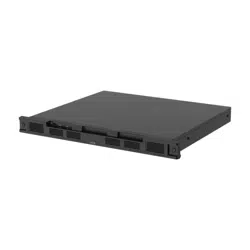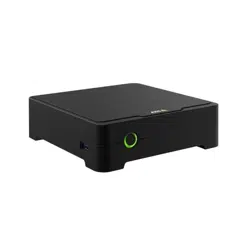
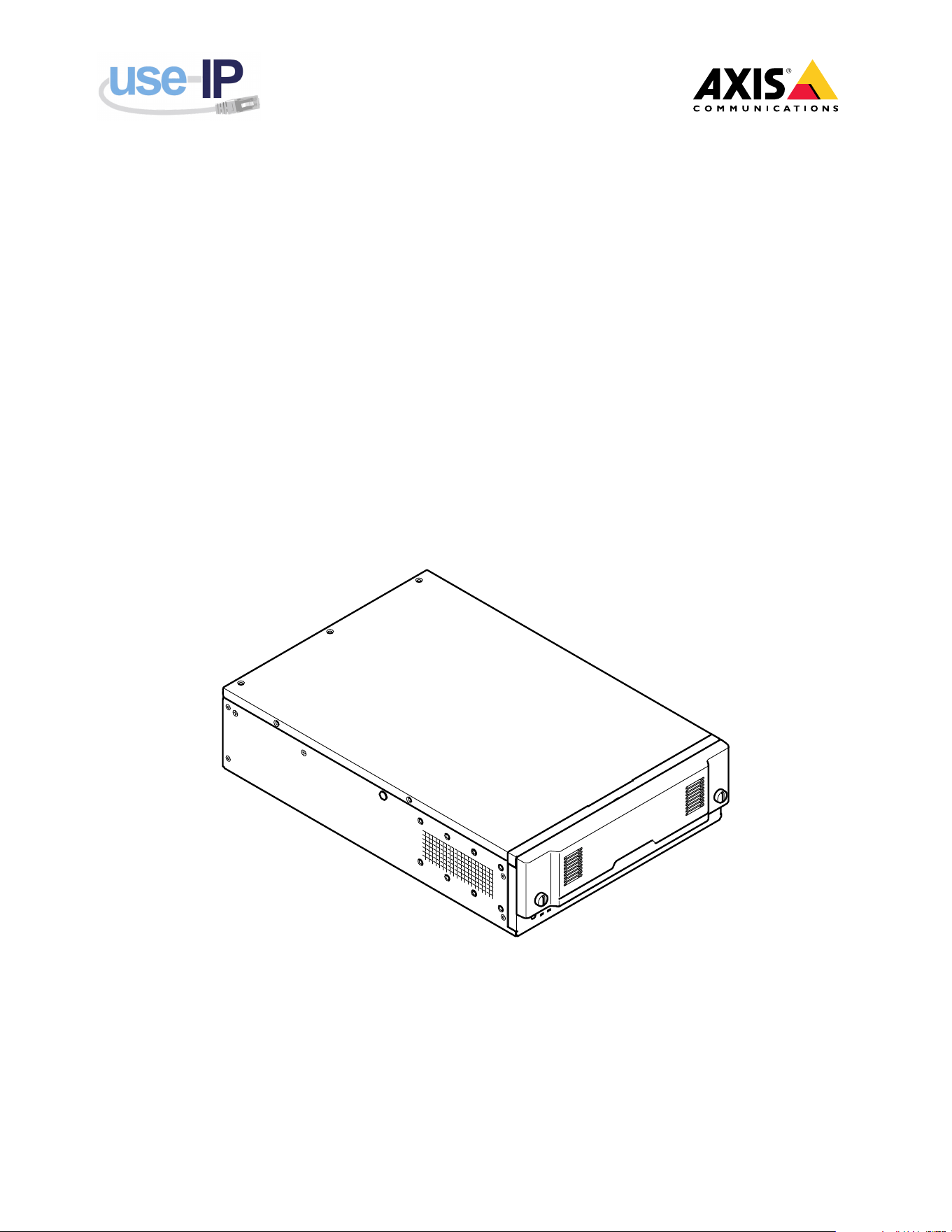
AXIS Camera Station S22 Mk II Appliance Series
AXIS Camera Station S2208 Mk II Appliance
AXIS Camera Station S2212 Mk II Appliance
Installation guide
Read this rst
Read through this installation guide carefully before
you install the product. Keep the installation guide
for future reference.
Legal considerations
Video and audio surveillance can be regulated by laws
that vary from country to country. Check the laws
in your local region before using this product for
surveillance purposes.
This product is subject to export control regulations,
and you should always comply with all applicable
national and international export or re-export control
regulations.
Liability
Every care has been taken in the preparation of this
document. Please inform your local Axis ofce of
any inaccuracies or omissions. Axis Communications
AB cannot be held responsible for any technical or
typographical errors and reserves the right to make
changes to the product and manuals without prior
notice. Axis Communications AB makes no warranty
of any kind with regard to the material contained
within this document, including, but not limited to,
the implied warranties of merchantability and tness
for a particular purpose. Axis Communications AB
shall not be liable nor responsible for incidental
or consequential damages in connection with the
furnishing, performance or use of this material. This
product is only to be used for its intended purpose.
Intellectual property rights
Axis AB has intellectual property rights relating to
technology embodied in the product described in this
document. In particular, and without limitation, these
intellectual property rights may include one or more of
the patents listed at axis.com/patent and one or more
additional patents or pending patent applications in
the US and other countries.
Equipment modications
This equipment must be installed and used in
strict accordance with the instructions given in
the user documentation. This equipment contains
no user-serviceable components. Unauthorized
equipment changes or modications will invalidate all
applicable regulatory certications and approvals.
Trademark acknowledgements
AXIS COMMUNICATIONS, AXIS, ARTPEC and VAPIX
are registered trademarks of Axis AB in various
jurisdictions. All other trademarks are the property
of their respective owners.
Microsoft, Windows, the Windows logo, Microsoft
Edge, Internet Explorer, DirectX, BitLocker, Intel,
Intel Core, Celeron, Pentium, Xeon, Dell, Dell EMC,
PowerEdge, Optiplex, NVIDIA, NVIDIA Quadro,
DisplayPort, and Bonjour are registered trademarks of
the respective holders.
Regulatory information
Europe
This product complies with the applicable CE marking
directives and harmonized standards:
• Electromagnetic Compatibility (EMC) Directive
2014/30/EU. See Electromagnetic compatibility
(EMC) on page 2 .
• Low Voltage Directive (LVD) 2014/35/EU. See
Safety on page 3 .
• Restriction of Hazardous Substances (RoHS)
Directive 2011/65/EU and 2015/863, including
any amendments, updates or replacements. See
Disposal and recycling on page 3 .
A copy of the original declaration of conformity
may be obtained from Axis Communications AB. See
Contact information on page 4 .
Electromagnetic compatibility (EMC)
This equipment has been designed and tested to fulll
applicable standards for:
• Radio frequency emission when installed
according to the instructions and used in its
intended environment.
• Immunity to electrical and electromagnetic
phenomena when installed according to the
instructions and used in its intended environment.
USA
This device complies with part 15 of the FCC Rules.
Operation is subject to the following two conditions:
1. This device may not cause harmful interference,
and
2. this device must accept any interference received,
including interference that may cause undesired
operation.
This equipment has been tested using an unshielded
network cable (UTP) and found to comply with the
limits for a Class A digital device, pursuant to part 15
of the FCC rules. This equipment has also been tested
using a shielded network cable (STP) and found to
comply with the limits for a Class A digital device,
pursuant to part 15 of the FCC rules. These limits are
designed to provide reasonable protection against
harmful interference when the equipment is operated
in a commercial environment. This equipment
generates, uses, and can radiate radio frequency
energy and, if not installed and used in accordance
with the instruction manual, may cause harmful
interference to radio communications. Operation of
this equipment in a residential area is likely to cause
harmful interference in which case the user will be
required to correct the interference at his own expense.
Contact information
Axis Communications Inc.
300 Apollo Drive
Chelmsford, MA 01824
United States of America
Tel: +1 978 614 2000
Canada
2
This digital apparatus complies with
CAN ICES-3 (Class A). Cet appareil numérique
est conforme à la norme CAN NMB-3 (classe A).
Europe
This digital equipment fullls the requirements for RF
emission according to the Class A limit of EN 55032.
The product shall be connected using a shielded
network cable (STP) that is properly grounded. Notice!
This is a Class A product. In a domestic environment
this product may cause RF interference, in which case
the user may be required to take adequate measures.
Australia/New Zealand
This digital equipment fullls the requirements
for RF emission according to the Class A limit of
AS/NZS CISPR 32. Notice! This is a Class A product. In
a domestic environment this product may cause RF
interference, in which case the user may be required
to take adequate measures.
Japan
この装置は、クラスA機器です。この装置を
住宅環境で使用すると電波妨害を引き起こす
ことがあります。この場合には使用者が適切
な対策を講ずるよう要求されることがありま
す。 VCCI ‒ A
本製品は電気通信事業者(移動通信会社、固
定通信会社、インターネットプロバイダ等)
の通信回線(公衆無線 LAN を含む)に直接接
続することができません。本製品をインター
ネットに接続する場合は、必ずルータ等を経
由し接続してください。
Korea
이 기기는 업무용 환경에서 사용할 목적으로
적합성평가를 받은 기기로서 가정용 환경에서
사용하는 경우 전파간섭의 우려가 있습니다.
적절히 접지된 STP (shielded twisted pair) 케
이블을 사용하여 제품을 연결 하십시오.
Safety
This product complies with IEC/EN/UL 62368-1 ed. 3,
safety of audio/video and IT equipment for indoor use.
If its connecting cables are routed outdoors, the
product shall be grounded either through a shielded
network cable (STP) or other appropriate method.
The power supply used with this product shall fulll
one of the following requirements:
• Safety Extra Low Voltage (SELV) according to
CEC/NEC Class 2 source of supply as dened in the
Canadian Electrical Code, CSA C22.1 and National
Electrical Code, ANSI/NFPA 70
• Class 1 electrical energy source (ES1) and
Class 2 power source (PS2) rated output
power limited to ≤100 W according to
IEC/EN/UL 62368-1
Korea
제조자: NEXCOM International Co., Ltd. (Hua-Ya
Factory)
A/S연락처: 080-543-2100
Disposal and recycling
When this product has reached the end of its
useful life, dispose of it according to local laws and
regulations. For information about your nearest
designated collection point, contact your local
authority responsible for waste disposal. In accordance
with local legislation, penalties may be applicable for
incorrect disposal of this waste.
Europe
This symbol means that the product shall not be
disposed of together with household or commercial
waste. Directive 2012/19/EU on waste electrical
and electronic equipment (WEEE) is applicable in
the European Union member states. To prevent
potential harm to human health and the environment,
the product must be disposed of in an approved
and environmentally safe recycling process. For
information about your nearest designated collection
point, contact your local authority responsible for
waste disposal. Businesses should contact the product
supplier for information about how to dispose of this
product correctly.
This product complies with the requirements of
Directive 2011/65/EU and 2015/863 on the restriction
of the use of certain hazardous substances in electrical
and electronic equipment (RoHS).
China
This product complies with the requirements
of SJ/T 11364-2014, Marking for the restriction of
hazardous substances in electrical and electronic
products.
有毒有害物质或元素
部
件
名
称
铅
(Pb)
汞
(H-
g)
镉
(Cd)
六
价
铬
(Cr(
VI))
多
溴
联
苯
(P-
BB)
多
溴
二
苯
醚
(P-
B-
DE)
电
气
实
装
部
分
X
0 0 0 0 0
0: 表示该有毒有害物质在该部件均质
材料中的含量均在GB/T 26572标准规定
的限量要求以下。
X: 表示该有毒有害物质至少在该部件的
某一均质材料中的含量超出GB/T 26572
标准规定的限量要求。
Taiwan
3
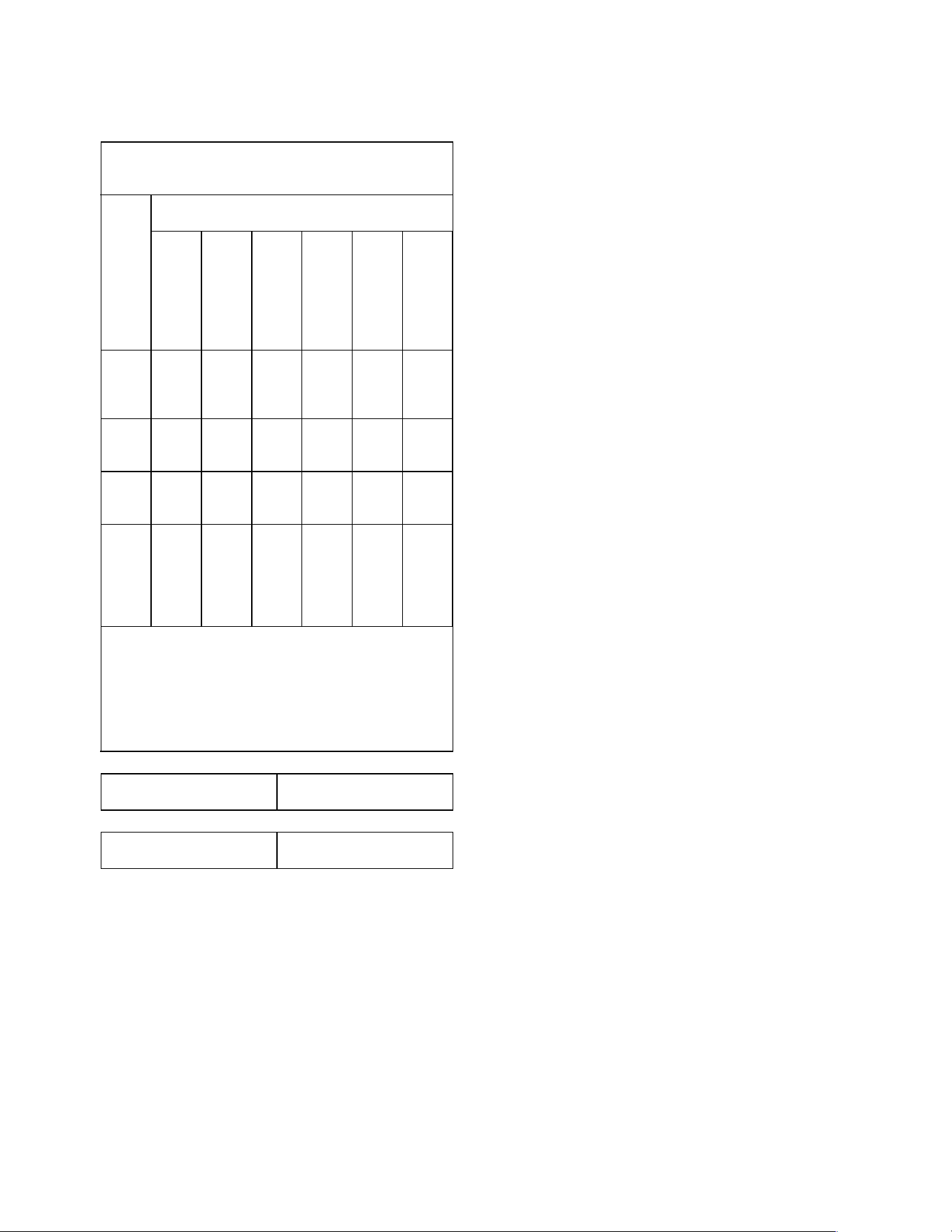
Declaration of the Presence Condition of the Restricted
Substances Marking.
限用物質含有情況標示
設備名稱:伺伺
伺
服服
服
器器
器
裝裝
裝
置置
置
型號(型式):
AXIS S2208 Mk II 4 TB, AXIS S2212 Mk II 6 TB
限用物質及其化學符號
單
元
鉛
(Pb)
汞
(H-
g)
鎘
(Cd)
六
價
鉻
(Cr
+6
)
多
溴
聯
苯
(PBB)
多
溴
二
苯
醚
(PBDE)
電
路
板
-
機
箱
線
材
電
源
供
應
器
-
備考1.〝超出0.1 wt %〞及〝超出0.01 wt
%〞係指限用物質之百分比含量超出百
分比含量基準值。備考2.〝〞係指該
項限用物質之百分比含量未超出百分比
含量基準值。備考3.〝-〞係指該項限
用物質為排除項目。
輸入
54 VDC
最高工作溫度
40°C (104 °F)
商品名稱: 伺服器裝置
報驗義務人名稱: 台灣安迅士網絡通訊股份有
限公司
地址: 臺北市內湖區瑞光路258巷39號6樓
警告:為避免電磁干擾,本產品不應安裝或使
用於住宅環境。
Contact information
Axis Communications AB
Gränden 1
223 69 Lund
Sweden
Tel: +46 46 272 18 00
Fax: +46 46 13 61 30
axis.com
Warranty information
For information about Axis’ product warranty and
thereto related information, go to axis.com/warranty.
Support
Should you require any technical assistance, please
contact your Axis reseller. If your questions cannot be
answered immediately, your reseller will forward your
queries through the appropriate channels to ensure a
rapid response. If you are connected to the Internet,
you can:
• download user documentation and software
updates
• nd answers to resolved problems in the FAQ
database, search by product, category, or phrase
• report problems to Axis support staff by logging
in to your private support area
• chat with Axis support staff
• visit Axis Support at axis.com/support
Learn more!
Visit Axis learning center axis.com/learning for useful
trainings, webinars, tutorials and guides.
4

English
Safety information
Hazard levels
DANGER
Indicates a hazardous situation which, if not avoided,
will result in death or serious injury.
WARNING
Indicates a hazardous situation which, if not avoided,
could result in death or serious injury.
CAUTION
Indicates a hazardous situation which, if not avoided,
could result in minor or moderate injury.
NONO
NO
TICETICE
TICE
Indicates a situation which, if not avoided, could result
in damage to property.
Other message levels
Important
Indicates signicant information which is essential for
the product to function correctly.
Note
Indicates useful information which helps in getting
the most out of the product.
Safety instructions
WARNING
Outdoor devices connected to the appliance must be
placed on the same building as where the appliance
is located. The devices must also be installed so they
are protected from lightning strikes, for example under
a roof.
NONO
NO
TICETICE
TICE
• The Axis product shall be used in compliance with
local laws and regulations.
• Store the Axis product in a dry and ventilated
environment.
• Use only applicable tools when installing the Axis
product. Using excessive force with power tools
could cause damage to the product.
• Use a soft cloth dampened with pure lukewarm
water to clean the device.
• Don’t use chemicals such as window cleaner or
acetone to clean your device.
• Use only accessories that comply with the technical
specication of your product. These can be provided
by Axis or a third party. Axis recommends using
Axis power source equipment compatible with your
product.
• Use only spare parts provided by or recommended
by Axis.
• Do not attempt to repair the product yourself.
Contact Axis support or your Axis reseller for
service matters.
• This equipment is not suitable for use in locations
where children are likely to be present.
• Suitable for installation in Information Technology
Rooms in accordance with Article 645 of the
National Electrical Code and NFPA 75.
• Ensure to connect the power cord to a socket-outlet
with earthing connection.
• Never open the equipment. For safety reasons,
the equipment should be opened only by qualied
Skilled person.
• When connecting to the SFP port, use a certied
optical transceiver with specication 3.3Vdc, Laser
Class I.
Transportation
NONO
NO
TICETICE
TICE
• When transporting the Axis product, use the
original packaging or equivalent to prevent damage
to the product.
Battery
The Axis product uses a 3.0 V CR2032 lithium battery
as the power supply for its internal real-time clock
(RTC). Under normal conditions this battery will last
for a minimum of ve years.
Low battery power affects the operation of the RTC,
causing it to reset at every power-up. When the
battery needs replacing, a log message will appear
in the product’s server report. For more information
about the server report, see the product´s web page
or contact Axis support.
WARNING
• Risk of explosion if the battery is incorrectly
replaced.
• The battery should be replaced with an identical
battery only.
• Used batteries should be disposed of according to
local regulations or the battery manufacturer's
instructions.
Lithium coin cell 3.0 V batteries contain
1,2-dimethoxyethane; ethylene glycol dimethyl ether
(EGDME), CAS no. 110-71-4.
Français
Informations sur la sécurité
Niveaux de risques
DANGER
Indique une situation dangereuse qui, si elle n'est pas
évitée, entraînera le décès ou des blessures graves.
AVERTISSEMENT
Indique une situation dangereuse qui, si elle n'est pas
évitée, pourrait entraîner le décès ou des blessures
graves.
ATTENTION
5

Indique une situation dangereuse qui, si elle n'est
pas évitée, pourrait entraîner des blessures légères ou
modérées.
REMARQUEREMARQUE
REMARQUE
Indique une situation qui, si elle n'est pas évitée,
pourrait endommager l'appareil.
Autres niveaux de message
Important
Indique les informations importantes, nécessaires pour
assurer le bon fonctionnement de l’appareil.
Remarque
Indique les informations utiles qui permettront
d’obtenir le fonctionnement optimal de l’appareil.
Consignes de sécurité
AVERTISSEMENT
Les périphériques d'extérieur connectés à l'appareil
doivent être placés sur le même bâtiment que
l'appareil. Les périphériques doivent également être
installés de sorte à être protégés de la foudre, par
exemple sous un toit.
REMARQUEREMARQUE
REMARQUE
• Le produit Axis doit être utilisé conformément aux
lois et règlements locaux.
• Conserver ce produit Axis dans un environnement
sec et ventilé.
• Utiliser uniquement des outils recommandés pour
l'installation de l'appareil Axis. L'application
d'une force excessive sur l'appareil avec des outils
puissants pourrait l'endommager.
• Pour nettoyer le dispositif, utilisez un chiffon doux
humide à l'eau tiède pure.
• N'utilisez pas de produits chimiques tels que le
nettoyant pour vitres ou l'acétone pour nettoyer
votre dispositif.
• Utiliser uniquement des accessoires conformes
aux caractéristiques techniques de votre produit.
Ils peuvent être fournis par Axis ou un tiers.
Axis recommande d'utiliser un équipement
d'alimentation Axis compatible avec votre produit.
• Utiliser uniquement les pièces de rechange fournies
ou recommandées par Axis.
• Ne pas essayer de réparer vous-même ce produit.
Contacter l'assistance technique d'Axis ou votre
revendeur Axis pour des problèmes liés à l'entretien.
• Cet appareil ne convient pas à une utilisation dans
des endroits où des enfants peuvent être présents.
• Convient à une installation dans les salles
informatiques conformément à l'Article 645 du
Code national de l'électricité (« National Electrical
Code »), NFPA 75.
• Veillez à brancher le cordon d'alimentation à une
prise de courant avec mise à la terre.
• Ne jamais ouvrir l'équipement. Pour des raisons de
sécurité, seul un personnel qualié est autorisé à
ouvrir l'équipement.
• Lors de la connexion au port SFP, utilisez un
émetteur-récepteur optique certié de catégorie 1
avec une tension nominale de 3,3 V CC.
Transport
REMARQUEREMARQUE
REMARQUE
• Lors du transport du produit Axis, utilisez
l'emballage d'origine ou un équivalent pour éviter
d'endommager le produit.
Batterie
Le produit Axis utilise une batterie au lithium CR2032
3,0 V comme alimentation de son horloge en temps
réel interne (RTC). Dans des conditions normales, cette
batterie a une durée de vie minimale de cinq ans.
Si la batterie est faible, le fonctionnement de
l'horloge en temps réel peut être affecté et entraîner
sa réinitialisation à chaque mise sous tension. Un
message enregistré apparaît dans le rapport de serveur
du produit lorsque la batterie doit être remplacée. Pour
plus d'informations sur le rapport serveur, consultez
la page Web du produit ou contactez l'assistance
technique d'Axis.
AVERTISSEMENT
• Risque d'explosion si la batterie est remplacée de
façon incorrecte.
• La batterie doit être remplacée par une batterie
identique uniquement.
• Les batteries usagées doivent être mises au rebut
conformément aux réglementations locales ou aux
instructions du fabricant de la batterie.
Les piles boutons 3,0 V au lithium contiennent du
1,2-diméthoxyéthane, éthylène glycol diméthyl éther
(EGDME), CAS n° 110-71-4.
Deutsch
Sicherheitsinformationen
Gefährdungsstufen
GEFAHR
Weist auf eine gefährliche Situation hin, welche, wenn
sie nicht vermieden wird, zum Tod oder zu schweren
Verletzungen führen wird.
WARNUNG
Weist auf eine gefährliche Situation hin, welche, wenn
sie nicht vermieden wird, zum Tod oder zu schweren
Verletzungen führen könnte.
VORSICHT
Weist auf eine gefährliche Situation hin, welche, wenn
sie nicht vermieden wird, zu leichteren oder mäßig
schweren Verletzungen führen könnte.
HINWEISHINWEIS
HINWEIS
Weist auf eine Situation hin, welche, wenn sie nicht
vermieden wird, zu Sachschäden führen könnte.
6

Andere Meldeebenen
Wichtig
Weist auf wichtige Informationen hin, die den
richtigen Betrieb des Produkts gewährleisten.
Hinweis
Weist auf nützliche Informationen hin, die die optimale
Verwendung des Produkts unterstützen.
Sicherheitsanweisungen
WARNUNG
Geräte im Außenbereich müssen sich auf demselben
Gebäude benden, in dem die Vorrichtung installiert
ist. Die Geräte müssen vor Blitzschlag geschützt
installiert werden, also zum Beispiel unter einem
entsprechend geschützten Dach.
HINWEISHINWEIS
HINWEIS
• Das Axis Produkt muss unter Beachtung der
geltenden Gesetze und Bestimmungen betrieben
werden.
• Lagern Sie das Axis Produkt in einer trockenen und
belüfteten Umgebung.
• Verwenden Sie bei der Installation des Axis Produkts
ausschließlich passende Werkzeuge. Ein zu großer
Kraftaufwand mit elektrischen Werkzeugen kann
das Produkt beschädigen.
• Verwenden Sie zur Reinigung des Geräts
ein weiches, mit lauwarmem reinen Wasser
befeuchtetes Tuch.
• Verwenden Sie zur Reinigung Ihres Geräts keine
chemischen Substanzen wie Fensterreiniger oder
Aceton.
• Verwenden Sie nur Zubehör, das den technischen
Vorgaben Ihres Produkts entspricht. Dieses ist von
Axis oder Drittanbietern erhältlich. Axis empehlt
die mit Ihrem Produkt kompatible Stromversorgung
von Axis.
• Verwenden Sie ausschließlich Ersatzteile die von
Axis angeboten oder empfohlen werden.
• Versuchen Sie nicht, dieses Produkt selbsttätig zu
reparieren. Wenden Sie sich bezüglich Reparatur
und Wartung an den Axis Support oder Ihren Axis
Händler.
• Dieses Gerät ist nicht für die Verwendung an Orten
geeignet, an denen sich möglicherweise Kinder
aufhalten.
• Geeignet für die Installation in IT-Räumen gemäß
Artikel 645 der nationalen Elektrizitätsrichtlinie
und NFPA 75.
• Sicherstellen, dass das andere Ende des Stromkabels
an eine geerdete Steckdose angeschlossen wird.
• Niemals das Gehäuse öffnen. Aus
Sicherheitsgründen darf die Ausrüstung nur
von Personen mit entsprechender Sach- und
Fachkunde geöffnet werden.
• Beim Anschließen an einen SFP-Port, einen
zugelassenen optischen Sender-Empfänger des Typs
3.3Vdc, Laserklasse I verwenden.
Transport
HINWEISHINWEIS
HINWEIS
• Bei Bedarf transportieren Sie das Axis Produkt in
der Originalverpackung oder einer entsprechenden
Verpackung, so dass Schäden vermieden werden.
Batterie
Das Axis Produkt ist mit einer 3,0 V-CR2032-Lithium-
Batterie ausgestattet, mit der die interne Echtzeituhr
(RTC) versorgt wird. Unter normalen Bedingungen hat
die Batterie eine Lebensdauer von mindestens fünf
Jahren.
Eine nicht ausreichend geladene Batterie
beeinträchtigt den Betrieb der Echtzeituhr, die
dann bei jedem Systemstart zurückgesetzt wird. Sie
erhalten eine Protokollnachricht im Server-Bericht des
Produkts, wenn ein Batteriewechsel erforderlich ist.
Weitere Informationen zum Server-Bericht nden Sie
auf den Webseiten des Produkts, oder wenden Sie sich
an den Axis Support.
WARNUNG
• Explosionsgefahr bei fehlerhaftem Batteriewechsel.
• Die Batterie darf nur durch eine identische Batterie
ersetzt werden.
• Verbrauchte Batterien gemäß den örtlichen
Vorschriften oder den Anweisungen des Herstellers
entsorgen.
Lithium-Knopfzellen (3,0 V) enthalten
1,2-Dimethoxyethan; Ethylenglycoldimethylether
(EGDME), CAS-Nr. 110-71-4.
Italiano
Informazioni di sicurezza
Livelli di pericolo
PERICOLO
Indica una situazione pericolosa che, se non evitata,
provoca morte o lesioni gravi.
AVVISO
Indica una situazione pericolosa che, se non evitata,
potrebbe provocare la morte o lesioni gravi.
ATTENZIONE
Indica una situazione pericolosa che, se non evitata,
potrebbe provocare lesioni medie o minori.
AA
A
VVISOVVISO
VVISO
Indica una situazione che, se non evitata, potrebbe
danneggiare la proprietà.
Altri livelli di messaggio
Importante
Indica informazioni importanti, essenziali per il
corretto funzionamento del dispositivo.
Nota
Indica informazioni utili che aiutano a ottenere il
massimo dal dispositivo.
7

Informazioni di sicurezza
AVVISO
I dispositivi esterni connessi all'apparecchio devono
essere posizionati sulla stesso edicio in cui si trova
l'apparecchio. I dispositivi devono essere inoltre
installati in modo da essere protetti da fulmini, ad
esempio sotto un tetto.
AA
A
VVISOVVISO
VVISO
• Il dispositivo Axis deve essere utilizzato in
conformità alle leggi e alle normative locali.
• Conservare il dispositivo Axis in un ambiente
asciutto e ventilato.
• Utilizzare solo strumenti applicabili quando si
installa il dispositivo Axis. Se si utilizza una forza
eccessiva con strumenti non adatti è possibile
causare danni al dispositivo.
• Usare un panno morbido inumidito con acqua pura
tiepida per pulire il dispositivo.
• Non utilizzare sostanze chimiche come detergenti
per vetri o acetone per pulire il dispositivo.
• Utilizzare solo accessori compatibili con le
speciche tecniche del dispositivo. Questi possono
essere forniti da Axis o da terze parti. Axis consiglia
l'uso dell'apparecchiatura di alimentazione Axis
compatibile con il dispositivo.
• Utilizzare solo parti di ricambio fornite o consigliate
da Axis.
• Non tentare di riparare il dispositivo da soli.
Contattare l'assistenza o il rivenditore Axis per
questioni relative alla manutenzione.
• Questo dispositivo non è adatto per l'uso in luoghi
in cui potrebbero essere presenti bambini.
• Adatto per installazioni in locali informatici in
conformità all'articolo 645 del National Electrical
Code e del codice NFPA 75.
• Vericare di aver collegato il cavo di alimentazione
alla presa di corrente con collegamento di messa a
terra.
• Non aprire mai il dispositivo. Per motivi di sicurezza,
il dispositivo deve essere aperto solo da persona
esperta qualicata.
• Quando si collega la porta SFP, è possibile utilizzare
un dispositivo ricetrasmettitore ottico certicato
con speciche 3,3 v CC, Laser classe I.
Trasporto
AA
A
VVISOVVISO
VVISO
• Durante il trasporto del dispositivo Axis, utilizzare
l'imballaggio originale o equivalente per evitare
danni al dispositivo.
Batteria
Il dispositivo Axis utilizza una batteria al litio da
3 V CR2032 come alimentazione per il suo orologio
in tempo reale (RTC) interno. In condizioni normali
questa batteria avrà una durata minima di cinque anni.
Una bassa carica della batteria inuisce sul
funzionamento dell'orologio in tempo reale, facendolo
resettare a ogni accensione. Quando la batteria
deve essere sostituita, un messaggio di registro viene
visualizzato nel report server del dispositivo. Per
ulteriori informazioni sul report del server, vedere la
pagina Web del dispositivo o contattare l'assistenza
Axis.
AVVISO
• Rischio di esplosione se la batteria viene sostituita
in modo errato.
• La batteria può essere sostituita solo con una
batteria identica.
• Le batterie esaurite devono essere smaltite in base
alle normative locali o alle istruzioni del produttore
della batteria.
Le batterie a bottone al litio da 3 V contengono
1,2-dimetossietano; etere dimetilico di glicole etilenico
(EGDME), CAS n. 110-71-4.
Español
Información de seguridad
Niveles de peligro
PELIGRO
Indica una situación peligrosa que, si no se evita,
provocará lesiones graves o la muerte.
ADVERTENCIA
Indica una situación peligrosa que, si no se evita,
puede provocar lesiones graves o la muerte.
PRECAUCIÓN
Indica una situación peligrosa que, si no se evita,
puede provocar lesiones moderadas o leves.
AA
A
VISOVISO
VISO
Indica una situación peligrosa que, si no se evita,
puede provocar daños materiales.
Otros niveles de mensaje
Importante
Indica información importante que es fundamental
para que el producto funcione correctamente.
Nota
Indica información útil que ayuda a aprovechar el
producto al máximo.
Instrucciones de seguridad
ADVERTENCIA
Los dispositivos de exterior conectados al aparato
se deben colocar en el mismo edicio en el que se
encuentre el aparato. Los dispositivos también deben
instalarse de manera que estén protegidos de los rayos,
por ejemplo, bajo un tejado.
AA
A
VISOVISO
VISO
• Este producto de Axis debe utilizarse de acuerdo
con las leyes y normativas locales.
• Almacene el producto de Axis en un entorno seco
y ventilado.
8
• Utilice solo las herramientas correspondientes
cuando instale el producto de Axis. La aplicación
de una fuerza excesiva con herramientas eléctricas
puede provocar daños en el producto.
• Utilice un paño suave humedecido con agua pura y
tibia para limpiar el dispositivo.
• No utilice productos químicos como un
limpiacristales o acetona para limpiar el dispositivo.
• Utilice solo accesorios que cumplan con las
especicaciones técnicas de su producto. Estos
accesorios los puede proporcionar Axis o un tercero.
Axis recomienda utilizar un equipo de suministro de
alimentación de Axis compatible con su producto.
• Utilice solo piezas de repuesto proporcionadas o
recomendadas por Axis.
• No intente reparar el producto usted mismo.
Póngase en contacto con el servicio de asistencia
técnica de Axis o con su distribuidor de Axis para
tratar asuntos de reparación.
• Este equipo no es adecuado para su uso en lugares
donde es probable que haya presencia de niños.
• Adecuado para la instalación en salas de tecnología
de la información, de conformidad con el artículo
645 del Código Eléctrico Nacional y la NFPA 75.
• Asegúrese de conectar el cable de alimentación a
una toma de corriente con conexión a tierra.
• Nunca abra el equipo. Por motivos de seguridad,
solo el personal formado y cualicado debe abrir
el equipo.
• Al conectar al puerto SFP, utilice un transceptor
óptico certicado con especicación 3,3 V CC, láser
Clase I.
Transporte
AA
A
VISOVISO
VISO
• Cuando transporte el producto de Axis, utilice el
embalaje original o un equivalente para evitar
daños en el producto.
Batería
Este producto de Axis utiliza una batería de litio
CR2032 de 3,0 V como fuente de alimentación del
reloj interno en tiempo real. En condiciones normales,
esta batería durará un mínimo de cinco años.
Un nivel bajo de batería afectará al funcionamiento
del reloj en tiempo real, lo que provocará el
restablecimiento de este cada vez que se encienda el
producto. Cuando sea necesario sustituir la batería,
aparecerá un mensaje de registro en el informe del
servidor del producto. Para obtener más información
sobre el informe del servidor, consulte la página web
del producto o póngase en contacto con el soporte
técnico de Axis.
ADVERTENCIA
• La sustitución incorrecta de la batería implica
riesgo de explosión.
• La batería solo debe sustituirse por una batería
idéntica.
• Las baterías usadas deben desecharse de
conformidad con la normativa local o las
instrucciones del fabricante.
Las pilas de botón de litio de 3,0 V contienen
1,2-dimetoxietano; éter dimetílico de etilenglicol
(EGDME), n.º CAS 110-71-4.
日本語
安全情報
危険レベル
危険
回避しない場合、死亡または重傷につながる
危険な状態を示します。
警告
回避しない場合、死亡または重傷につながる
おそれのある危険な状態を示します。
注意
回避しない場合、軽傷または中程度の怪我につ
ながるおそれのある危険な状態を示します。
注意
回避しない場合、器物の破損につながるおそ
れのある状態を示します。
その他のメッセージレベル
重要
製品を正しく機能させるために不可欠な重要
情報を示します。
注
製品を最大限に活用するために役立つ有用な
情報を示します。
安全手順
警告
• 本製品に接続される屋外用デバイスは、製
品が設置されている同じ建物に配置する必
要があります。 また、落雷から保護するた
めにデバイスを屋根の下などに設置する必
要があります。
• 製品に付属している電源ケーブルおよび部
分品は同梱の製品専用部品であり、他の機
器に使用することはできません。また、附
属の電源ケーブル以外のものを本機器に使
用しないでください。
注意
• 本製品は、お使いになる地域の法律や規制
に準拠して使用してください。
• 本製品は乾燥した換気のよい環境に保管
してください。
• 本製品を設置する際には、適切な工具のみ
を使用してください。 電動工具を使用し
て過剰な力をかけると、製品が損傷するこ
とがあります。
• 装置のクリーニングには、ぬるま湯で湿ら
せた柔らかい布を使用してください。
9

• 窓ガラス用洗剤やアセトンなどの化学薬
品を使用して装置をクリーニングしないで
ください。
• 製品の技術仕様に準拠したアクセサリーの
みを使用してください。 これらのアクセサ
リーは、Axisまたはサードパーティから入
手できます。 Axisは、ご使用の製品と互換
性のあるAxis給電ネットワークスイッチの
使用を推奨します。
• Axisが提供または推奨する交換部品のみを
使用してください。
• 製品を自分で修理しないでください。 修理
については、Axisサポートまたは販売代理
店にお問い合わせください。
• 本製品は、お子様がいる可能性がある場所
での使用に適していません。
• 米国電気工事規定およびNFPA 75のArticle
645に準拠した情報技術ルームでの設置に
適しています。
• 電源ケーブルをアース接続のあるコンセント
に接続していることを確認してください。
• 本装置を絶対に開けないでください。 安全
上の理由から、本装置はスキルを備えた有
資格者だけが開けるようにしてください。
• SFPポートに接続する場合は、認定済みの
光学トランシーバー (仕様は3.3V DC、レー
ザークラスI) を使用します。
輸送
注意
• 本製品を運搬する際は、製品が損傷しな
いよう、元の梱包か同等の梱包を使用して
ください。
バッテリー
本製品は、内部リアルタイムクロック (RTC) 用
電源として、3.0 V CR2032リチウムバッテリー
を使用します。 このバッテリーは、通常条件
下で最低5年間使用できます。
バッテリーが低電力状態になると、RTCの動作
に影響し、電源を入れるたびにRTCがリセッ
トされます。 バッテリーの交換が必要になる
と、製品のサーバーレポートにログメッセー
ジが表示されます。 サーバーレポートの詳
細については、製品のWebページを参照する
か、Axisサポートまでお問い合わせください。
警告
• バッテリーは、正しく交換しないと爆発す
る危険があります。
• バッテリーを交換する場合は、同一品のみ
を使用してください。
• 使用済みバッテリーは、地域の規制また
はバッテリーメーカーの指示に従って廃棄
してください。
リチウムコイン型3.0 V電池は、1,2-ジメトキ
シエタン (エチレングリコールジメチルエーテ
ル (EGDME)、CAS番号110-71-4) を含有してい
ます。
Português
Informações sobre segurança
Níveis de perigo
PERIGO
Indica uma situação perigosa que, se não evitada, irá
resultar em morte ou lesões graves.
AVISO
Indica uma situação perigosa que, se não evitada,
poderá resultar em morte ou lesões graves.
CUIDADO
Indica uma situação perigosa que, se não evitada,
poderá resultar em lesões leves ou moderadas.
OBSERVAÇÃOOBSERVAÇÃO
OBSERVAÇÃO
Indica uma situação perigosa que, se não evitada,
poderá resultar em danos à propriedade.
Outros níveis de mensagens
Importante
Indica informações signicativas que são essenciais
para o produto funcionar corretamente.
Observação
Indica informações úteis que ajudam a obter o máximo
do produto.
Instruções de segurança
AVISO
Dispositivos externos conectados ao dispositivo
deverão ser colocados no mesmo prédio em que o
dispositivo está localizado. Os dispositivos também
devem ser instalados de modo a permanecer protegidos
contra raios, por exemplo, sob um telhado.
OBSERVAÇÃOOBSERVAÇÃO
OBSERVAÇÃO
• O produto Axis deve ser usado em conformidade
com as leis e regulamentações locais.
• Armazene o produto Axis em um ambiente seco
e ventilado.
• Use apenas as ferramentas recomendadas ao
instalar o produto Axis. O uso de força excessiva
com ferramentas elétricas poderia danicar o
produto.
• Use um pano macio umedecido com água morna
para limpar o dispositivo.
• Não use produtos químicos como limpa-vidros ou
acetona para limpar o dispositivo.
• Utilize apenas acessórios que atendam às
especicações técnicas do produto. Esses poderão
ser fornecidos pela Axis ou por terceiros. A
Axis recomenda usar equipamento de fonte de
alimentação Axis compatível com seu produto.
• Utilize apenas peças sobressalentes fornecidas ou
recomendadas pela Axis.
• Não tente reparar o produto por conta própria.
Entre em contato com o suporte ou seu revendedor
Axis para quaisquer questões relacionadas a
serviços.
• Este equipamento não é adequado para uso em
locais com possível presença de crianças.
10

• Ele é indicado para instalação em salas de
tecnologia da informação de acordo com o Artigo
645 do Código Elétrico Nacional (EUA) e NFPA 75.
• Certique-se de conectar o cabo de alimentação a
uma tomada com conexão de aterramento.
• Nunca abra o equipamento. Por questões de
segurança, o equipamento deve ser aberto somente
por pessoas qualicadas especializadas.
• Ao conectar à porta SFP, use um transceptor óptico
certicado com especicação 3, 3VCC, Laser Classe
I.
Transporte
OBSERVAÇÃOOBSERVAÇÃO
OBSERVAÇÃO
• Ao transportar o produto Axis, use a embalagem
original ou equivalente para evitar danos ao
produto.
Bateria
Este produto Axis usa uma bateria de lítio CR2032
de 3,0 V como fonte de alimentação para seu relógio
interno de tempo real (RTC). Em condições normais, a
vida útil mínima desta bateria é de cinco anos.
Se a carga da bateria estiver baixa, a operação do RTC
será afetada, fazendo com que ele seja reiniciado toda
vez que o sistema for ligado. Quando for necessário
substituir a bateria, uma mensagem de log será exibida
no relatório do servidor do produto. Para obter mais
informações sobre o relatório do servidor, consulte a
página da Web do produto ou entre em contato com o
suporte da Axis.
AVISO
• A troca incorreta da bateria poderá representar
risco de explosão.
• A bateria deve ser substituída somente por uma
bateria idêntica.
• Baterias usadas devem ser descartadas de acordo
com as regulamentações locais ou as instruções
do fabricante da bateria.
As baterias tipo célula de íons de lítio de 3,0 V contêm
1,2-dimetoxietano; etileno glicol éter dimetílico
(EGDME), nº CAS 110-71-4.
РУССКИЙ
Сведения по безопасности
Уровни опасности
ОПАСНО
Опасная ситуация, которая, если ее не устранить,
приведет к смерти или опасным травмам.
ВНИМАНИЕ!
Опасная ситуация, которая, если ее не устранить,
может привести к смерти или опасным травмам.
ОСТОРОЖНО
Опасная ситуация, которая, если ее не устранить,
может привести к травмам незначительной или
средней тяжести.
ПРИМЕЧАНИЕ
Опасная ситуация, которая, если ее не устранить,
может вызвать повреждение имущества.
Прочие уведомления
Важно!
Означает существенную информацию, которая
важна для правильной работы изделия.
Примечание.
Означает полезную информацию, которая помогает
использовать все возможности изделия.
Правила безопасности
ВНИМАНИЕ!
Работающее на открытом воздухе оборудование,
подключаемое к устройству, должно
устанавливаться на то же здание, внутри
которого находится устройство. Оборудование
необходимо устанавливать таким образом, чтобы
оно было защищено от ударов молнии (например,
под крышей).
ПРИМЕЧАНИЕ
• Это изделие Axis следует использовать
в соответствии с местными законами и
нормативами.
• Устройство Axis должно храниться в сухом,
хорошо проветриваемом помещении.
• При установке устройства Axis используйте
только предназначенные для этого инструменты.
Приложение чрезмерных усилий к инструментам
может привести к повреждению устройства.
• Для очистки устройства используйте мягкую
ткань, смоченную в чистой умеренно теплой
воде.
• Не используйте для очистки устройства средство
для мытья окон, ацетон и другие подобные
химические вещества.
• Используйте только принадлежности, которые
соответствуют техническим характеристикам
данного устройства. Они могут поставляться
компанией Axis или сторонним производителем.
Компания Axis рекомендует использовать блоки
питания Axis, совместимые с устройством.
• Используйте только запасные части,
поставляемые или рекомендованные компанией
Axis.
• Не пытайтесь отремонтировать устройство
самостоятельно. По вопросам обслуживания
обращайтесь в службу поддержки Axis или к
своему реселлеру Axis.
• Данное оборудование не подходит для
применения в местах возможного присутствия
детей.
• Подходит для установки в помещениях для
оборудования информационных технологий
в соответствии со статьей 645 Национальных
11

правил эксплуатации электроустановок и NFPA
75.
• Шнур питания должен быть подключен к розетке
с заземляющим контактом.
• Никогда не открывайте оборудование. По
соображениям безопасности оборудование
должно открываться только опытным,
квалифицированным специалистом.
• При подключении к порту SFP используйте
сертифицированный оптический
приемопередатчик с напряжением питания 3,3 В
пост. тока, соответствующий классу I лазерной
безопасности.
Транспортировка
ПРИМЕЧАНИЕ
• При транспортировке устройства Axis
используйте оригинальную упаковку или ее
эквивалент во избежание повреждения изделия.
Батарея
В качестве источника питания для внутренних
часов реального времени в этом устройстве
Axis используется литиевая батарея CR2032 с
напряжением 3 В. При нормальных условиях эта
батарея способна работать не менее пяти лет.
При низком заряде батареи часы реального времени
будут сбрасываться при каждом выключении
устройства. Когда возникает необходимость
замены батареи, в отчете сервера устройства
появляется сообщение журнала. Чтобы получить
дополнительные сведения об отчете сервера, см.
веб-страницу устройства или обратитесь в службу
поддержки Axis.
ВНИМАНИЕ!
• При неправильной замене батареи возможен
взрыв.
• Замену следует проводить только на идентичную
батарею.
• Утилизация использованных батарей должна
выполняться в соответствии с местными
нормативными требованиями или указаниями
производителя батарей.
Плоские литиевые батареи (3,0 В) содержат
1,2-диметоксиэтан — диметиловый эфир
этиленгликоля (EGDME), CAS № 110-71-4.
中中
中
文文
文
安安
安
全全
全
信信
信
息息
息
危危
危
险险
险
等等
等
级级
级
危险
表示如果不避免则会导致死亡或严重伤害的危
险情况。
警告
表示如果不避免则可能导致死亡或严重伤害的
危险情况。
警示
表示如果不避免则可能导致轻微或中度伤害的
危险情况。
注意
表示如果不避免则可能导致财产损失的情况。
其其
其
他他
他
消消
消
息息
息
等等
等
级级
级
重要
表示产品正常工作所必需的重要信息。
注
表示有助于充分利用产品的有用信息。
安安
安
全全
全
说说
说
明明
明
警告
连接到装置的室外设备必须放置在装置所在的
同一建筑物上。 另外还必须安装设备,以防止
其被雷击,例如,安装在屋顶下。
注意
• 使用 A xis 产品时应遵守当地法律和法规。
• 在干燥通风的环境中存放安讯士产品。
• 安装安讯士产品时,仅使用适用的工具。 使
用电动工具过度施力可能导致产品损坏。
• 使用蘸有温水的软布清洁设备。
• 请勿使用窗户清洁剂或丙酮等化学品来清
洁设备。
• 仅使用符合产品技术规格的附件。 这些附件
可由安讯士或第三方提供。 安讯士推荐使用
与产品兼容的安讯士电源设备。
• 仅使用安讯士提供或推荐的备件。
• 请勿尝试自行维修产品。 有关服务事项,请
联系安讯士支持部门或安讯士经销商。
• 此设备不适合用于儿童可能出现的位置。
• 适合按照国家电气规范第 645 条和 NFPA 75
安装在劳技室内。
• 确保将电源线连接至具有接地连接的插座。
• 切勿打开设备。 出于安全原因,应该仅由经
验丰富的合格人员打开设备。
• 在连接到 SFP 端口时,请使用符合规范
3.3Vdc、激光等级为 I 的通过认证的光收发
器。
运运
运
输输
输
注意
• 安讯士产品运输途中,应使用其原包装或等
效包装,以防对产品造成损坏。
电电
电
池池
池
安讯士产品使用 3.0 V CR2032 锂电池作为其内
部实时时钟 (RTC) 的电源。 在正常情况下,此
电池将持续至少五年。
蓄电池电量过低会影响实时时钟的运行,从而
导致实时时钟在每次上电时重置。 当电池需要
更换时,产品的服务器报告中将显示一条日志
消息。 有关服务器报告的更多信息,请参见产
品网页或与安讯士支持部门联系。
警告
• 如果未正确更换电池,则存在爆炸危险。
• 仅应更换上同型号的电池。
12

• 应根据当地法规或电池制造商的说明处理
废电池。
3.0 V 纽扣锂电池内含 1,2-二甲氧基乙烷;乙二
醇二甲醚 (EG DME) ,CAS 编号为 110-71-4。
한국어
안전 정보
위험 레벨
위험
피하지 못한 경우 사망이나 심각한 부상이 발
생하는 위험한 상황을 나타냅니다.
경고
피하지 못한 경우 사망이나 심각한 부상이 발
생할 수 있는 위험한 상황을 나타냅니다.
주의
피하지 못한 경우 경미하거나 심하지 않은
부상이 발생할 수 있는 위험한 상황을 나타
냅니다.
통지
피하지 못한 경우 재산상 손해가 발생할 수
있는 상황을 나타냅니다.
기타 메시지 레벨
중요 사항
제품이 올바르게 작동하는 데 필수적인 중
요 정보를 나타냅니다.
참고
제품을 최대한으로 활용하는 데 도움이 되는
유용한 정보를 나타냅니다.
안전 지침
경고
기기에 연결된 실외 장치들은 반드시 연결되
어 있는 기기와 같은 건물에 위치해야 합니다.
지붕 아래와 같이 벼락으로부터 보호받을 수
있는 장소에 이 장치들을 설치해야 합니다.
통지
• Axis 제품은 해당 지역 법률 및 규정을 준
수하여 사용해야 합니다.
• Axis 제품은 건조하고 환기가 잘 되는 곳
에 보관하십시오.
• Axis 제품을 설치할 경우 해당 도구만 사용
하십시오. 전동 공구로 과도한 힘을 사용하
면 제품에 손상을 줄 수 있습니다.
• 미지근한 물에 적신 부드러운 천으로 장치
를 세척합니다.
• 창문 세정제나 아세톤과 같은 화학 물질을
사용하여 장치를 세척하지 마십시오.
• 제품의 기술적 사양을 준수하는 액세서리
만 사용하십시오. 이러한 액세서리는 Axis
또는 제3자가 제공할 수 있습니다. Axis
는 귀하의 제품과 호환되는 Axis 전원 장
비 사용을 권합니다.
• Axis가 공급하거나 추천하는 예비 부품만
사용하십시오.
• 제품을 직접 수리하려고 하지 마십시오. 서
비스 문제에 대해 Axis 지원 부서 또는 Axis
리셀러에 문의하십시오.
• 이 장비는 어린이가 접근할 수 있는 곳에서
사용하기에 적합하지 않습니다.
• 미국 전기법 645항 및 NFPA 75에 따라 IT
관련 공간에 설치하는 것이 좋습니다.
• 접지 연결이 있는 콘센트에 전원 코드를 연
결하십시오.
• 절대로 해당 장비를 개봉하지 마십시오. 안
전상의 이유로 해당 장비는 반드시 숙련된
사람이 개봉해야 합니다.
• SFP 포트에 연결할 때 인증된 3.3Vdc 및 레
이저 클래스 1 사양의 광 트랜스시버를 사
용하십시오.
운반
통지
• Axis 제품을 운반할 때는 원래 포장이나 이
에 준하는 포장을 사용해 제품이 손상되
지 않도록 하십시오.
배터리
Axis 제품은 3.0V CR2032 리튬 배터리를 내
부 RTC(real-time clock)의 전원으로 사용합니
다. 정상 조건에서 이 배터리는 최소 5년간
사용할 수 있습니다.
배터리 전력이 부족하면 RTC의 작동에 영향
을 주어 기기의 전원을 켤 때마다 RTC가 재
설정됩니다. 배터리의 교체가 필요하면 제품
의 서버 리포트에 로그 메시지가 나타납니
다. 서버 리포트에 대한 자세한 내용은 제품
의 웹 페이지를 참조하거나 Axis 지원 부서
에 문의하십시오.
경고
• 배터리를 올바르게 교체하지 않으면 폭
발 위험이 있습니다.
• 배터리는 동일한 배터리로만 교체해야 합
니다.
• 사용한 배터리는 해당 지역 규정 또는 배터
리 제조업체의 지침에 따라 폐기하십시오.
리튬 코인 셀 3.0V 배터리는 1,2-디메톡시에
탄, EGDME(ethylene glycol dimethyl ether),
CAS no. 110-71-4를 포함하고 있습니다.
繁繁
繁
體體
體
中中
中
文文
文
安安
安
全全
全
資資
資
訊訊
訊
危危
危
險險
險
等等
等
級級
級
危危
危
險險
險
表示如果不避免,此危險情況會導致死亡或嚴
重傷害。
警警
警
告告
告
13
表示如果不避免,此危險情況可能導致死亡或
嚴重傷害。
小小
小
心心
心
表示如果不避免,此危險情況可能導致輕度或
中度傷害。
注注
注
意意
意
表示如果不避免,此情況可能導致財產損壞。
安安
安
全全
全
指指
指
示示
示
警警
警
告告
告
連線到應用裝置的戶外裝置必須跟應用裝置一
樣,放置於同一建築物內。 裝置的安裝也必須
能防止雷擊,例如安裝於屋頂下。
注注
注
意意
意
• 使用 Axis 產品時,應符合當地法律及法規。
• 請將 Axis 產品存放在乾燥且通風良好的環
境中。
• 安裝 Axis 產品時,僅可使用適合的工具。
使用電動工具時,過度施力可能會造成產品
損壞。
• 使用沾有純淨溫水的軟布清潔設備。
• 請勿使用窗戶清潔劑或丙酮等化學物質來
清潔設備。
• 所有配件必須符合產品的技術規格。 可由
Axis 或第三方供應商提供。 Axis 建議使用相
容於產品的 Axis 電源設備。
• 只使用 Axis 提供或推薦的備用零件。
• 請勿嘗試自行修理產品。 請向 Axis 技術支援
人員或 Axis 經銷商洽詢維修事宜。
• 本設備不適用於兒童可能在場的位置。
• 根據美國電氣法規第 645 條與 NFPA 75 的規
定,適用於安裝於資訊科技機房。
• 請確定將電源線連接至接地的電源插座。
• 切勿拆開設備。 僅應由技術熟練的合格人員
拆開設備,以策安全。
• 連接至 SFP 連接埠時,請使用規格 3.3Vdc、
雷射等級 I 的認證光纖收發器。
運運
運
輸輸
輸
注注
注
意意
意
• 當運送安迅士產品時,請使用原包裝或有相
同保護效果的包裝,以防止產品損壞。
電電
電
池池
池
本 Axis 產品使用一顆 3.0 V CR2032 鋰電池做
為其內建即時時鐘 (RTC) 的電源。 在一般情況
下,此電池可使用五年以上。
電量不足將影響 RTC 的運作,使其在每次開機
時重設。 當電池需要更換時,產品的伺服器
報告中會顯示一則記錄訊息。 如需有關伺服
器報告的詳細資訊,請參閱產品的網頁或連絡
Axis 支援人員。
警警
警
告告
告
• 如果電池更換不當,會有爆炸的危險。
• 應使用相同的電池進行更換。
• 廢電池應依照當地法規或電池製造商的指示
做妥善的回收處理。
鋰離子 3.0 V 鈕扣電池內含二甲基溶纖劑
(1,2-dimethoxyethane);乙二醇 (ethylene
glycol) 二甲醚 (dimethyl ether) (EGDME),CAS
編號 110-71-4。
14
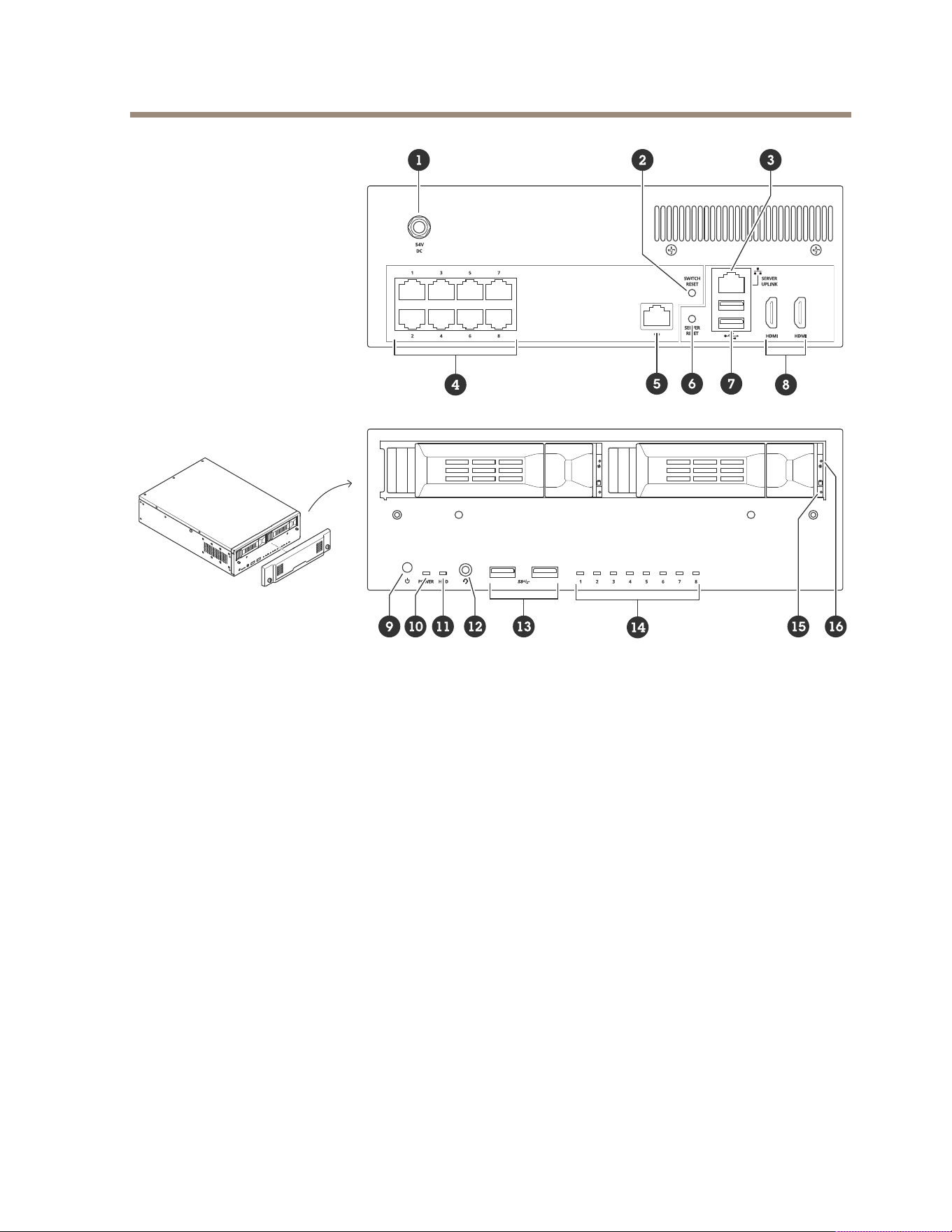
AXIS Camera Station S22 Mk II Appliance Series
1
Power connector
2
Switch reset button
3
1 GbE Ethernet port — Server uplink
4
1 GbE PoE Ethernet ports
5
1 GbE Ethernet port — Switch uplink (RJ45)
6
Server reset button
7
USB 2.0 ports
8
HDMI ports
9
Power button
10
Power LED
11
Hard drive activity LED
12
Universal audio jack
13
USB 3.2 ports
14
PoE Ethernet ports status LED
15
Hard drive activity LED
16
Hard drive status LED
15

AXIS Camera Station S22 Mk II Appliance Series
Français
1. Bloc d'alimentation
2. Bouton de réinitialisation de commutateur
3. 1 port Ethernet 1 Go — Liaison montante de serveur
4. Ports Ethernet 1 Go PoE
5. Port Ethernet GbE — Liaison montante de commutateur (RJ45)
6. Bouton de réinitialisation du serveur
7. Ports USB 2.0
8. Ports HDMI
9. Bouton d’alimentation
10. LED d’alimentation
11. Voyant d'activité du disque dur
12. Prise audio universelle
13. Ports USB 3.2
14. LED de statut des ports Ethernet PoE
15. Voyant d'activité du disque dur
16. LED de statut du disque dur
Deutsch
1. Stromanschluss
2. Reset-Taste des Switches
3. 1 GbE Ethernet-Port – Server-Uplink
4. 1 GbE PoE Ethernet-Ports
5. 1 GbE Ethernet-Port – Switch-Uplink (RJ45)
6. Reset-Taste des Servers
7. USB 2.0 Ports
8. HDMI™-Ports
9. Power-Taste
10. Netz-LED
11. Festplattenaktivität LED
12. Universalstecker Audio
13. USB 3.2 Ports
14. Status-LED für PoE Ethernet-Ports
15. Festplattenaktivität LED
16. Festplattenstatus-LED
16

AXIS Camera Station S22 Mk II Appliance Series
Italiano
1. Connettore di alimentazione
2. Pulsante di ripristino dello switch
3. 1 porta Ethernet GbE — Uplink del server
4. 1 porta Ethernet PoE GbE
5. 1 porta Ethernet GbE — Switch uplink (RJ45)
6. Pulsante di ripristino del server
7. Porte USB 2.0
8. Porte HDMI
9. Pulsante di alimentazione
10. Power LED
11. LED attività del disco rigido
12. Jack audio universale
13. Porte USB 3.2
14. LED stato delle porte Ethernet PoE
15. LED attività del disco rigido
16. LED di stato del disco rigido
Español
1. Conector de alimentación
2. Botón de reinicio del switch
3. Puerto de 1 GbE Ethernet - Enlace ascendente del servidor
4. Puertos de 1 GbE PoE Ethernet
5. Puerto de 1 GbE Ethernet - Enlace ascendente del switch (RJ45)
6. Botón de reinicio del servidor
7. Puertos USB 2.0
8. Puertos HDMI™:
9. Botón de encendido
10. LED de alimentación
11. LED de actividad del disco duro
12. Toma de audio universal
13. Puertos USB 3.2
14. LED de estado de los puertos Ethernet PoE
15. LED de actividad del disco duro
16. LED de estado del disco duro
17

AXIS Camera Station S22 Mk II Appliance Series
日本語
1. 電源コネクター
2. スイッチのリセットボタン
3. 1 GbEイーサネットポート サーバーアップリンク
4. 1 GbE PoEイーサネットポート
5. 1 GbEイーサネットポート スイッチアップリンク (RJ45)
6. サーバーのリセットボタン
7. USB 2.0ポート
8. HDMI™ポート
9. 電源ボタン
10. ハードドライブアクティビティLED
11. 電源LED
12. ユニバーサルオーディオジャック
13. USB 3.2ポート
14. PoEイーサネットポートのステータスLED
15. ハードドライブアクティビティLED
16. ハードドライブステータスLED
Português
1. Conector de alimentação
2. Botão de redenição do switch
3. Porta Ethernet 1 GbE — Uplink do servidor
4. Portas Ethernet PoE de 1 GbE
5. Porta Ethernet de 1 GbE — Uplink do switch (RJ45)
6. Botão de redenição do servidor
7. Portas USB 2.0
8. Portas HDMI
9. Botão liga/desliga
10. LED de alimentação
11. LED de atividade do disco rígido
12. Conector de áudio universal
13. Portas USB 3.2
14. LED de status das portas Ethernet PoE
15. LED de atividade do disco rígido
16. LED de status do disco rígido
18

AXIS Camera Station S22 Mk II Appliance Series
РУССКИЙ
1. Разъем питания
2. Кнопка сброса коммутатора
3. 1 порт GbE Ethernet — связь с сервером
4. 1 порт GbE PoE Ethernet
5. 1 порт GbE Ethernet — связь с коммутатором (RJ45)
6. Кнопка сброса сервера
7. Порты USB 2.0
8. Порты HDMI
9. Кнопка питания
10. Индикатор питания
11. Индикатор работы жесткого диска
12. Универсальный аудиоразъем
13. Порты USB 3.2
14. Индикатор состояния портов PoE Ethernet
15. Индикатор работы жесткого диска
16. Индикатор состояния жесткого диска
中中
中
文文
文
1. 电源连接器
2. 交换机重置按钮
3. 1 GbE 以太网端口 — 服务器上行链路
4. 1 GbE PoE 以太网端口
5. 1 GbE 以太网端口 — 交换机上行链路 (RJ45)
6. 服务器重置按钮
7. USB 2.0 端口
8. HDMI 端口
9. 电源按钮
10. 电源灯
11. 硬盘活动 LED
12. 通用音频插孔
13. USB 3.2 端口
14. PoE 以太网端口状态 LED
15. 硬盘活动 LED
16. 硬盘状态 LED
19

AXIS Camera Station S22 Mk II Appliance Series
한국어
1. 전원 커넥터
2. 스위치 재설정 버튼
3. 1GbE 이더넷 포트 — 서버 업링크
4. 1GbE PoE 이더넷 포트
5. 1GbE 이더넷 포트 — 스위치 업링크(RJ45)
6. 서버 재설정 버튼
7. USB 2.0 포트
8. HDMI 포트
9. 전원 버튼
10. 전원 LED
11. 하드 드라이브 작동 LED
12. 범용 오디오 잭
13. USB 3.2 포트
14. PoE 이더넷 포트 상태 LED
15. 하드 드라이브 작동 LED
16. 하드 드라이브 상태 LED
繁繁
繁
體體
體
中中
中
文文
文
1. 電源接頭
2. 開關重設按鈕
3. 1 GbE 乙太網路連接埠 — 伺服器上行
4. 1 GbE PoE 乙太網路連接埠
5. 1 GbE 乙太網路連接埠 — 開關上行 (RJ45)
6. 伺服器重設按鈕
7. USB 2.0 連接埠
8. HDMI 連接埠
9. 電源按鈕
10. 電源 LED
11. 硬碟活動 LED
12. 通用音訊插頭
13. USB 3.2 連接埠
14. PoE 乙太網路連接埠狀態 LED
15. 硬碟活動 LED
16. 硬碟狀態 LED
20
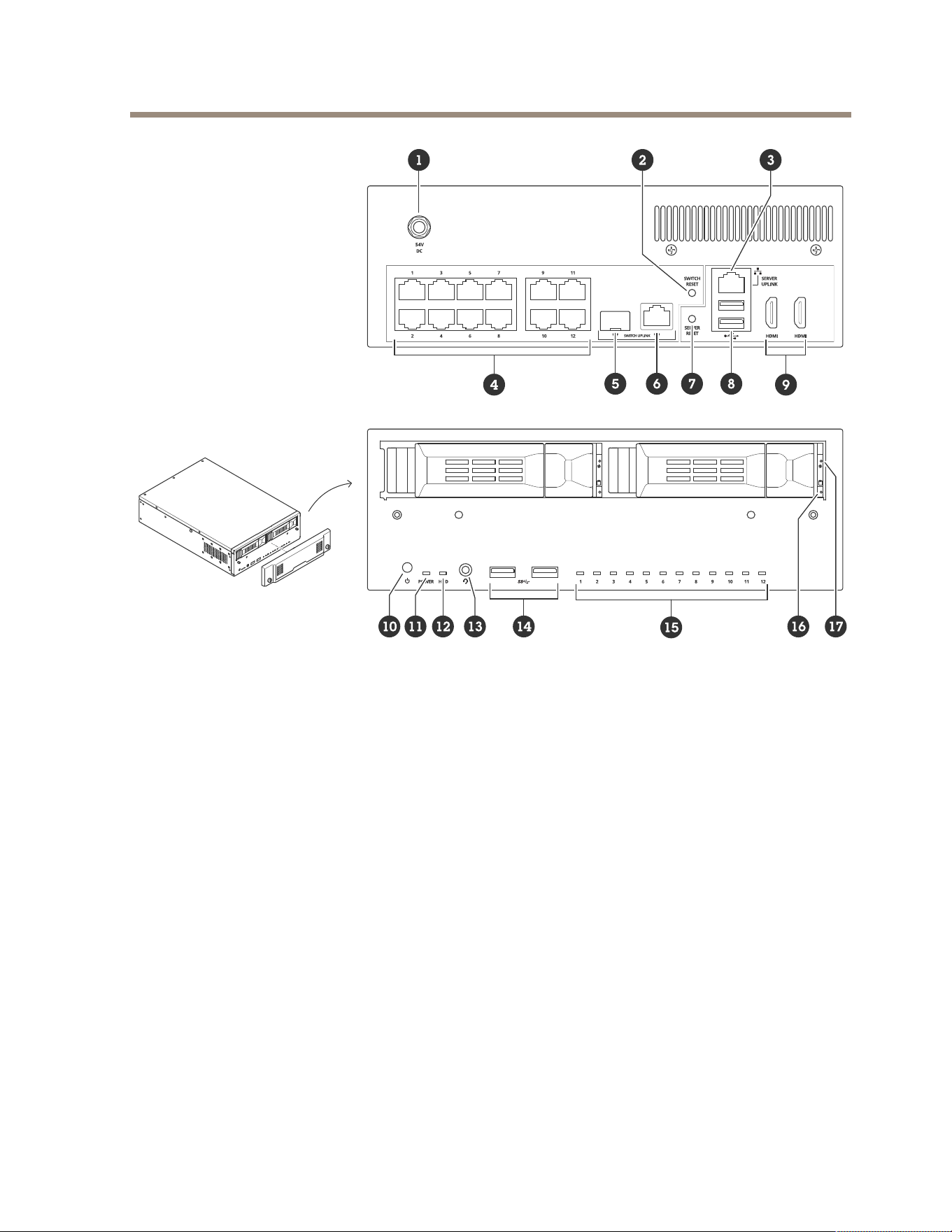
AXIS Camera Station S22 Mk II Appliance Series
1
Power connector
2
Switch reset button
3
1 GbE Ethernet port — Server uplink
4
1 GbE PoE Ethernet ports
5
1 GbE Ethernet port — Switch uplink (SFP)
6
1 GbE Ethernet port — Switch uplink (RJ45)
7
Server reset button
8
USB 2.0 ports
9
HDMI ports
10
Power button
11
Power LED
12
Hard drive activity LED
13
Universal audio jack
14
USB 3.2 ports
15
PoE Ethernet ports status LED
16
Hard drive activity LED
17
Hard drive status LED
21

AXIS Camera Station S22 Mk II Appliance Series
Français
1. Bloc d'alimentation
2. Bouton de réinitialisation de commutateur
3. 1 port Ethernet 1 Go — Liaison montante de serveur
4. Ports Ethernet 1 Go PoE
5. Port Ethernet GbE — Liaison montante de commutateur (SFP)
6. Port Ethernet GbE — Liaison montante de commutateur (RJ45)
7. Bouton de réinitialisation du serveur
8. Ports USB 2.0
9. Ports HDMI
10. Bouton d’alimentation
11. LED d’alimentation
12. Voyant d'activité du disque dur
13. Prise audio universelle
14. Ports USB 3.2
15. LED de statut des ports Ethernet PoE
16. Voyant d'activité du disque dur
17. LED de statut du disque dur
Deutsch
1. Stromanschluss
2. Reset-Taste des Switches
3. 1 GbE Ethernet-Port – Server-Uplink
4. 1 GbE PoE Ethernet-Ports
5. 1 GbE Ethernet-Port – Switch-Uplink (SFP)
6. 1 GbE Ethernet-Port – Switch-Uplink (RJ45)
7. Reset-Taste des Servers
8. USB 2.0 Ports
9. HDMI™-Ports
10. Power-Taste
11. Netz-LED
12. Festplattenaktivität LED
13. Universalstecker Audio
14. USB 3.2 Ports
15. Status-LED für PoE Ethernet-Ports
22

AXIS Camera Station S22 Mk II Appliance Series
16. Festplattenaktivität LED
17. Festplattenstatus-LED
Italiano
1. Connettore di alimentazione
2. Pulsante di ripristino dello switch
3. 1 porta Ethernet GbE — Uplink del server
4. 1 porta Ethernet PoE GbE
5. 1 porta Ethernet GbE — Switch uplink (SFP)
6. 1 porta Ethernet GbE — Switch uplink (RJ45)
7. Pulsante di ripristino del server
8. Porte USB 2.0
9. Porte HDMI
10. Pulsante di alimentazione
11. Power LED
12. LED attività del disco rigido
13. Jack audio universale
14. Porte USB 3.2
15. LED stato delle porte Ethernet PoE
16. LED attività del disco rigido
17. LED di stato del disco rigido
Español
1. Conector de alimentación
2. Botón de reinicio del switch
3. Puerto de 1 GbE Ethernet - Enlace ascendente del servidor
4. Puertos de 1 GbE PoE Ethernet
5. Puerto de 1 GbE Ethernet - Enlace ascendente del switch (SFP)
6. Puerto de 1 GbE Ethernet - Enlace ascendente del switch (RJ45)
7. Botón de reinicio del servidor
8. Puertos USB 2.0
9. Puertos HDMI™:
10. Botón de encendido
11. LED de alimentación
23

AXIS Camera Station S22 Mk II Appliance Series
12. LED de actividad del disco duro
13. Toma de audio universal
14. Puertos USB 3.2
15. LED de estado de los puertos Ethernet PoE
16. LED de actividad del disco duro
17. LED de estado del disco duro
日本語
1. 電源コネクター
2. スイッチのリセットボタン
3. 1 GbEイーサネットポート サーバーアップリンク
4. 1 GbE PoEイーサネットポート
5. 1 GbEイーサネットポート スイッチアップリンク (SFP)
6. 1 GbEイーサネットポート スイッチアップリンク (RJ45)
7. サーバーのリセットボタン
8. USB 2.0ポート
9. HDMI™ポート
10. 電源ボタン
11. ハードドライブアクティビティLED
12. 電源LED
13. ユニバーサルオーディオジャック
14. USB 3.2ポート
15. PoEイーサネットポートのステータスLED
16. ハードドライブアクティビティLED
17. ハードドライブステータスLED
Português
1. Conector de alimentação
2. Botão de redenição do switch
3. Porta Ethernet 1 GbE — Uplink do servidor
4. Portas Ethernet PoE de 1 GbE
5. Porta Ethernet de 1 GbE — Uplink do switch (SFP)
6. Porta Ethernet de 1 GbE — Uplink do switch (RJ45)
7. Botão de redenição do servidor
24

AXIS Camera Station S22 Mk II Appliance Series
8. Portas USB 2.0
9. Portas HDMI
10. Botão liga/desliga
11. LED de alimentação
12. LED de atividade do disco rígido
13. Conector de áudio universal
14. Portas USB 3.2
15. LED de status das portas Ethernet PoE
16. LED de atividade do disco rígido
17. LED de status do disco rígido
РУССКИЙ
1. Разъем питания
2. Кнопка сброса коммутатора
3. 1 порт GbE Ethernet — связь с сервером
4. 1 порт GbE PoE Ethernet
5. 1 порт GbE Ethernet — связь с коммутатором (SFP)
6. 1 порт GbE Ethernet — связь с коммутатором (RJ45)
7. Кнопка сброса сервера
8. Порты USB 2.0
9. Порты HDMI
10. Кнопка питания
11. Индикатор питания
12. Индикатор работы жесткого диска
13. Универсальный аудиоразъем
14. Порты USB 3.2
15. Индикатор состояния портов PoE Ethernet
16. Индикатор работы жесткого диска
17. Индикатор состояния жесткого диска
中中
中
文文
文
1. 电源连接器
2. 交换机重置按钮
3. 1 GbE 以太网端口 — 服务器上行链路
25

AXIS Camera Station S22 Mk II Appliance Series
4. 1 GbE PoE 以太网端口
5. 1 GbE 以太网端口 — 交换机上行链路 (SFP)
6. 1 GbE 以太网端口 — 交换机上行链路 (RJ45)
7. 服务器重置按钮
8. USB 2.0 端口
9. HDMI 端口
10. 电源按钮
11. 电源灯
12. 硬盘活动 LED
13. 通用音频插孔
14. USB 3.2 端口
15. PoE 以太网端口状态 LED
16. 硬盘活动 LED
17. 硬盘状态 LED
한국어
1. 전원 커넥터
2. 스위치 재설정 버튼
3. 1GbE 이더넷 포트 — 서버 업링크
4. 1GbE PoE 이더넷 포트
5. 1GbE 이더넷 포트 — 스위치 업링크(SFP)
6. 1GbE 이더넷 포트 — 스위치 업링크(RJ45)
7. 서버 재설정 버튼
8. USB 2.0 포트
9. HDMI 포트
10. 전원 버튼
11. 전원 LED
12. 하드 드라이브 작동 LED
13. 범용 오디오 잭
14. USB 3.2 포트
15. PoE 이더넷 포트 상태 LED
16. 하드 드라이브 작동 LED
17. 하드 드라이브 상태 LED
26

AXIS Camera Station S22 Mk II Appliance Series
繁繁
繁
體體
體
中中
中
文文
文
1. 電源接頭
2. 開關重設按鈕
3. 1 GbE 乙太網路連接埠 — 伺服器上行
4. 1 GbE PoE 乙太網路連接埠
5. 1 GbE 乙太網路連接埠 — 開關上行 (SFP)
6. 1 GbE 乙太網路連接埠 — 開關上行 (RJ45)
7. 伺服器重設按鈕
8. USB 2.0 連接埠
9. HDMI 連接埠
10. 電源按鈕
11. 電源 LED
12. 硬碟活動 LED
13. 通用音訊插頭
14. USB 3.2 連接埠
15. PoE 乙太網路連接埠狀態 LED
16. 硬碟活動 LED
17. 硬碟狀態 LED
27
AXIS Camera Station S22 Mk II Appliance Series
28
AXIS Camera Station S22 Mk II Appliance Series
29
AXIS Camera Station S22 Mk II Appliance Series
30
AXIS Camera Station S22 Mk II Appliance Series
31
AXIS Camera Station S22 Mk II Appliance Series
32
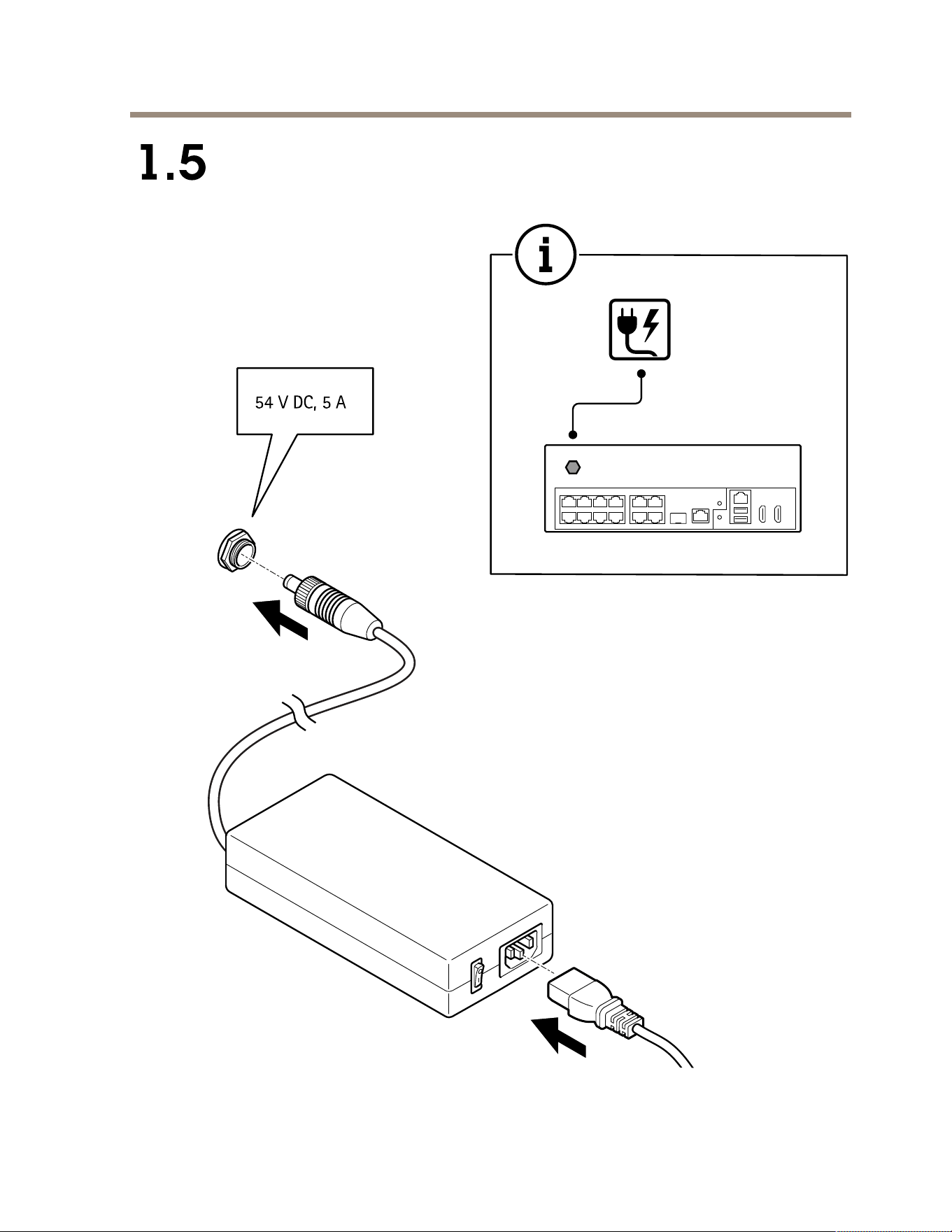
AXIS Camera Station S22 Mk II Appliance Series
33
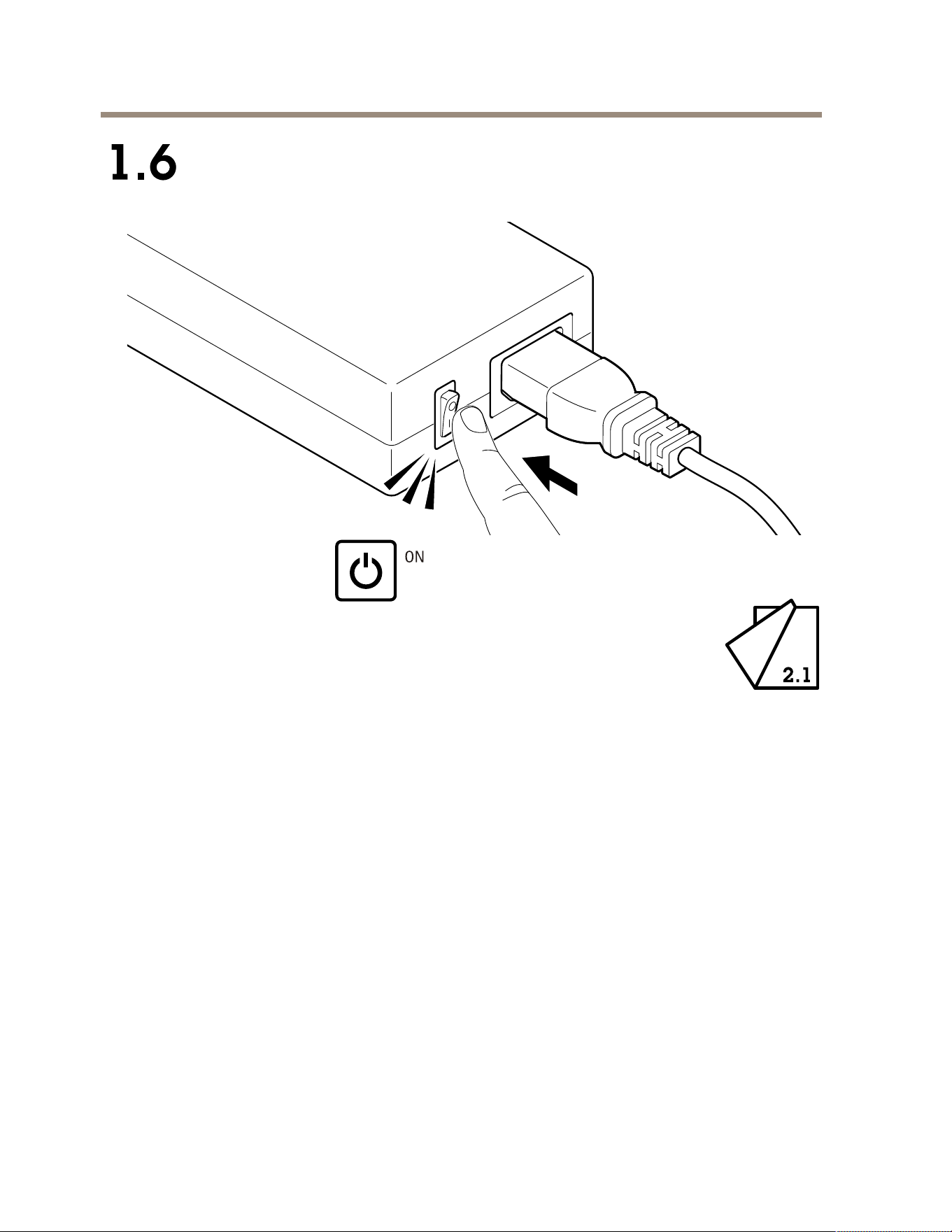
AXIS Camera Station S22 Mk II Appliance Series
34
AXIS Camera Station S22 Mk II Appliance Series
EN
Initial Windows® setup: language, region, keyboard layout, user and password.
FR
Conguration initiale de Windows® : langue, région, disposition du clavier, utilisateur et
mot de passe.
DE
Erstes Windows®-Setup: Sprache, Region, Tastaturgestaltung, Benutzer und Kennwort.
IT
Congurazione iniziale di Windows®: lingua, regione, layout di tastiera, utente e password.
ES Conguración inicial de Windows®: idioma, región, distribución del teclado, usuario
y contraseña.
JA
Windows®の初期設定: 言語、地域、キーボードレイアウト、ユーザー、パ
スワード。
PT
Conguração inicial do Windows®: idioma, região, layout do teclado, usuário e senha.
RU
Первоначальная настройка Windows®: язык, регион, раскладка клавиатуры, имя
и пароль пользователя.
ZH
初始 Windows®安装: 语言、区域、键盘布局、用户和密码。
KO
초기 Windows® 설정: 언어, 지역, 키보드 레이아웃, 사용자 및 암호.
ZH_
TW
Windows® 初始設定:語言、地區、鍵盤配置、使用者和密碼。
35
AXIS Camera Station S22 Mk II Appliance Series
EN Initial Axis recorder setup: computer name, date and time and network.
FR
Conguration initiale de l'enregistreur Axis : nom, date, heure et réseau de l'ordinateur.
DE
Erstes Setup des Axis Recorders: Computername, Datum und Uhrzeit sowie Netzwerk.
IT
Congurazione iniziale del registratore Axis: nome del computer, data e ora e rete.
ES Conguración inicial del grabador de Axis: nombre del ordenador, fecha, hora y red.
JA
Axisレコーダーの初期設定: コンピューター名、日付と時刻、ネットワーク。
PT
Conguração inicial do gravador Axis: nome, data e hora e rede do computador.
RU Первоначальная настройка устройства видеозаписи Axis: имя компьютера, дата и
время и сеть.
ZH
初始 Axis 录像机设置: 电脑名称、日期、时间及网络。
KO
초기 Axis 레코더 설정: 컴퓨터 이름, 날짜/시간 및 네트워크.
ZH_
TW
Axis 錄影機初始設定:電腦名稱、日期和時間以及網路。
36
AXIS Camera Station S22 Mk II Appliance Series
EN Update Windows to the latest version and create additional user accounts.
FR Mettez à jour Windows vers la dernière version et créez des comptes utilisateur
supplémentaires.
DE
Aktualisieren Sie Windows auf die neueste Version und erstellen Sie weitere Benutzerkonten.
IT Aggiornare Windows alla versione più recente e creare account utente aggiuntivi.
ES
Actualice Windows a la versión más reciente y cree cuentas de usuario adicionales.
JA
追加のユーザーアカウントを作成する前に、Windowsを最新バージョンに
更新してください。
PT Atualize o Windows para a versão mais recente e crie contas de usuário adicionais.
RU
Обновите Windows до последней версии и создайте дополнительные учетные записи
пользователей.
ZH
将 Windows 更新至新版本并创建其他用户帐户。
KO
Windows를 최신 버전으로 업데이트하고 추가 사용자 계정을 생성합니다.
ZH_
TW
將 Windows 更新至最新版本並建立額外的使用者帳戶。
37
AXIS Camera Station S22 Mk II Appliance Series
EN
Update AXIS Camera Station to the latest version before using it.
FR
Mettez à jour AXIS Camera Station vers la dernière version avant de l'utiliser.
DE
Aktualisieren Sie AXIS Camera Station vor der Verwendung auf die aktuelle Version.
IT
Aggiornare AXIS Camera Station alla versione più recente prima dell'uso.
ES Actualice AXIS Camera Station a la versión más reciente antes de su uso.
JA
AXIS Camera Stationを使用する前に、最新バージョンに更新してください。
PT
Atualize o AXIS Camera Station para a versão mais recente do computador antes de usá-la.
RU
Обновите AXIS Camera Station до последней версии, прежде чем использовать этот
продукт.
ZH
使用之前,请将 AXIS Camera Station 更新为新版本。
KO
사용하기 전에 AXIS Camera Station을 최신 버전으로 업데이트합니다.
ZH_
TW
在使用 AXIS Camera Station 之前先更新至最新版本。
38
AXIS Camera Station S22 Mk II Appliance Series
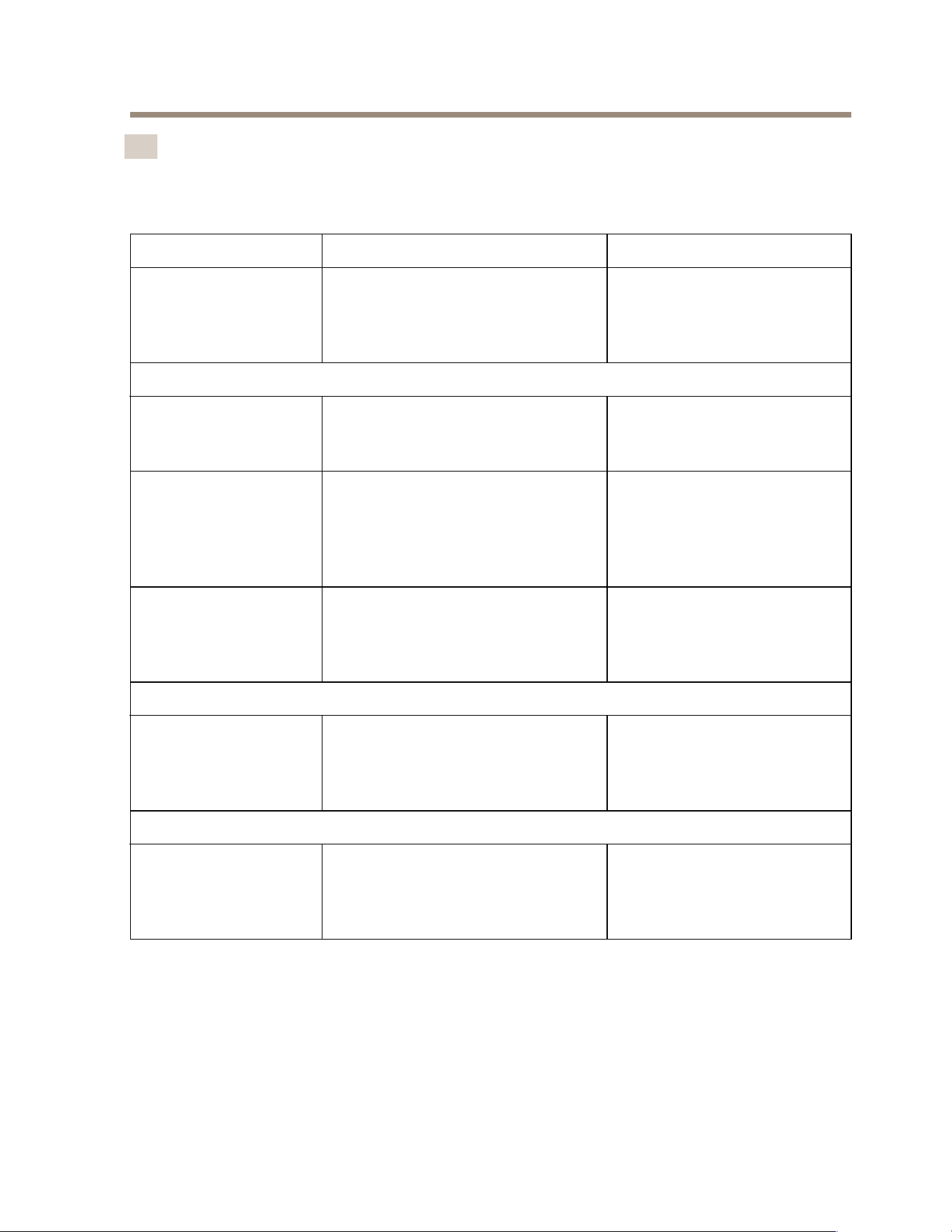
EN User accounts
The following table lists the user accounts that can be used for installation, conguration
and operation of your Axis system.
User account Description Note
MyAxis Used to download the latest software
and access AXIS License Manager,
Axis Secure Remote Access, and
System Health Monitoring.
Registered from my.axis.com.
Windows®
Windows administrator Administrator privileges in Windows.
We recommend you do not use it as
AXIS Camera Station administrator.
Created during initial Windows
setup.
Windows user with
AXIS Camera Station
administrator privileges
A Windows user granted with
administrator privileges in AXIS
Camera Station to be used by system
integrator or system administrator
for conguration or troubleshooting.
Created in Windows settings.
Windows user with
AXIS Camera Station
operator or viewer
privileges
A Windows user granted with
operator or viewer privileges in AXIS
Camera Station.
Created in Windows settings.
Hardware management
Switch
The administrator account of the
built-in switch. Only used when you
want to change the switch settings.
IP address: 192.168.10.1
Username: admin
Password: Printed on a sticker
behind the front bezel.
Device
Device administrator Used by the administrator to
access the camera from the video
management system or device
webpage.
Created from the device
webpage or when you add the
device to AXIS Camera Station.
39
AXIS Camera Station S22 Mk II Appliance Series
FR
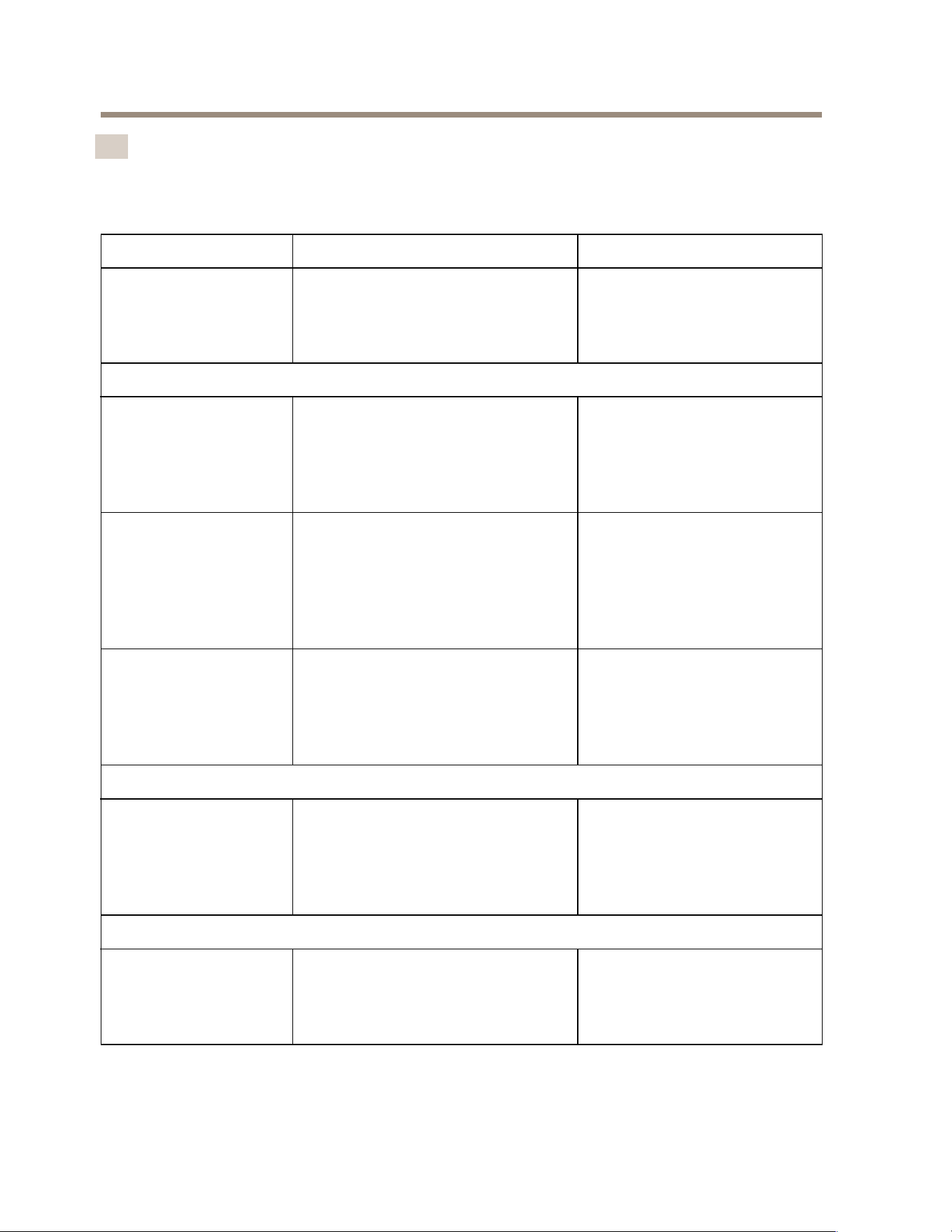
Comptes utilisateurs
Le tableau suivant répertorie les comptes utilisateur qui peuvent être utilisés pour
l'installation, la conguration et le fonctionnement de votre système Axis.
Compte utilisateur
Description Note
MyAxis Utilisé pour télécharger les derniers
logiciels et accéder à AXIS License
Manager, Axis Secure Remote Access
et System Health Monitoring.
Enregistré à partir de
my.axis.com.
Windows®
Administrateur
Windows
Privilèges administrateur sous
Windows. Nous vous recommandons
de ne pas l'utiliser en tant
qu'administrateur d'AXIS Camera
Station.
Créé pendant la conguration
initiale de Windows.
Utilisateur Windows
avec droits
d'administrateur AXIS
Camera Station
Utilisateur Windows doté des
privilèges d'administrateur AXIS
Camera Station qui doit être
utilisé par l'intégrateur système ou
l'administrateur système pour la
conguration ou le dépannage.
Créé dans les paramètres
Windows.
Utilisateur Windows
avec privilèges
d'utilisateur ou
d'opérateur AXIS
Camera Station.
Utilisateur Windows doté des
privilèges d'utilisateur ou
d'opérateur dans AXIS Camera
Station.
Créé dans les paramètres
Windows.
Gestion du matériel
Commutateur Compte administrateur du
commutateur intégré. Utilisé
uniquement lorsque vous souhaitez
modier les paramètres du
commutateur.
Adresse IP : 192.168.10.1
Nom d'utilisateur : admin
Mot de passe : Imprimé sur un
autocollant derrière le cadre
avant.
Périphérique
Administrateur du
périphérique
Utilisé par l'administrateur pour
accéder à la caméra depuis le
système de gestion vidéo ou la page
Web du périphérique.
Créé à partir de la page Web
du périphérique ou lorsque
vous ajoutez le périphérique à
AXIS Camera Station.
40
AXIS Camera Station S22 Mk II Appliance Series
DE Benutzerkonten
In der folgenden Tabelle sind die Benutzerkonten aufgeführt, die für die Installation,
Konguration und den Betrieb Ihres AXIS Systems verwendet werden können.
Benutzerkonto Beschreibung Hinweis
MyAxis Wird verwendet, um die neueste
Software herunterzuladen und auf
AXIS License Manager, AXIS Secure
Remote Access und System Health
Monitoring zuzugreifen.
Registriert von my.axis.com.
Windows®
Windows-
Administrator
Administratorrechte unter Windows.
Es wird empfohlen, die Anwendung
nicht als Administrator von AXIS
Camera Station zu verwenden.
Erstellt während des ersten
Windows-Setups.
Windows-Benutzer mit
AXIS Camera Station
Administratorrechten
Ein Windows-Benutzer mit
Administratorrechten in
AXIS Camera Station, der
von einem Systemintegrator
oder Systemadministrator zur
Konguration oder Fehlerbehebung
verwendet werden kann.
In Windows-Einstellungen
erstellt.
Windows-Benutzer
mit Bediener- oder
Betrachterrechten in
AXIS Camera Station.
Ein Windows-Benutzer mit
Bediener- oder Betrachterrechten in
AXIS Camera Station.
In Windows-Einstellungen
erstellt.
Hardware-Verwaltung
Switch
Das Administratorkonto des
integrierten Switches. Wird
nur verwendet, wenn Sie die
Switch-Einstellungen ändern
möchten.
IP-Adresse: 192.168.10.1
Benutzername: admin
Kennwort: Auf einen hinter
der Frontblende angebrachten
Aufkleber gedruckt.
Gerät
Geräteadministrator
Wird vom Administrator für den
Zugriff auf die Kamera über das
Video Management System oder die
Webseite des Geräts verwendet.
Erstellt von der Gerätewebseite
oder beim Hinzufügen des
Geräts zur AXIS Camera
Station.
41
AXIS Camera Station S22 Mk II Appliance Series
IT Account utente
La tabella seguente elenca gli account utente che possono essere utilizzati per
l'installazione, la congurazione e l'utilizzo del sistema Axis.
Account utente Descrizione Nota
MyAxis Utilizzato per scaricare il software
più recente e accedere ad AXIS
License Manager, Axis Secure
Remote Access e al Monitoraggio
dell'integrità del sistema.
Registrato da my.axis.com.
Windows®
Amministratore
Windows
Privilegi di amministratore su
Windows. Si consiglia di non
utilizzarlo come amministratore di
AXIS Camera Station.
Creato durante l'impostazione
iniziale di Windows.
Utente Windows
con privilegi di
amministratore di
AXIS Camera Station
Un utente Windows con privilegi
di amministratore in AXIS Camera
Station per l'utilizzo da parte di
un integratore di sistema o da un
amministratore di sistema per la
congurazione o la risoluzione dei
problemi.
Creato nelle impostazioni di
Windows.
Utente di Windows con
privilegi di operatore o
visualizzatore in AXIS
Camera Station
Un utente Windows con privilegi di
operatore o visualizzatore in AXIS
Camera Station.
Creato nelle impostazioni di
Windows.
Gestione hardware
Switch
L'account amministratore dello
switch integrato. Utilizzato solo
quando si desidera modicare le
impostazioni dello switch.
Indirizzo IP: 192.168.10.1
Nome utente: admin
Password: stampata su un
adesivo dietro la mascherina
anteriore.
Dispositivo
Amministratore
dispositivo
Utilizzato dall'amministratore per
accedere alla telecamera dal Video
Management System o dalla pagina
Web del dispositivo.
Creato dalla pagina Web
del dispositivo o quando si
aggiunge il dispositivo ad AXIS
Camera Station.
42
AXIS Camera Station S22 Mk II Appliance Series
ES Cuentas de usuario
En la siguiente tabla se muestran las cuentas de usuario que se pueden utilizar para la
instalación, conguración y funcionamiento del sistema Axis.
Cuenta de usuario
Descripción
Nota
MyAxis
Se utiliza para descargar el software
más reciente y acceder a Axis License
Manager, Axis Secure Remote Access
y System Health Monitoring.
Registrado desde my.axis.com.
Windows®
Administrador de
Windows
Privilegios de administrador en
Windows. Le recomendamos que
no lo utilice como administrador de
AXIS Camera Station.
Se ha creado durante la
conguración inicial de
Windows.
Usuario de Windows
con privilegios de
administrador de AXIS
Camera Station
De la conguración o solución de
problemas se debe encargar un
usuario de Windows con privilegios
de administrador concedidos en AXIS
Camera Station por un integrador o
administrador del sistema.
Se ha creado en la
conguración de Windows.
Usuario de Windows
con privilegios de
operador u observador
en AXIS Camera Station
Un usuario de Windows con
privilegios de operador u observador
en AXIS Camera Station.
Se ha creado en la
conguración de Windows.
Gestión de hardware
Switch
La cuenta de administrador del
switch integrado. Se utiliza
solo cuando desea cambiar la
conguración del switch.
IP address (Dirección IP):
192.168.10.1
Nombre de usuario: admin
Contraseña: Impreso en un
adhesivo detrás del bisel
delantero.
Dispositivo
Administrador de
dispositivos
Utilizado por el administrador para
acceder a la cámara desde el sistema
de gestión de vídeo o la página web
del dispositivo.
Se crea a partir de la página
web del dispositivo o al agregar
el dispositivo a AXIS Camera
Station.
43
AXIS Camera Station S22 Mk II Appliance Series
JA
ユユ
ユ
ーー
ー
ザザ
ザ
ーー
ー
アア
ア
カカ
カ
ウウ
ウ
ンン
ン
トト
ト
次の表に、Axisシステムのインストール、設定、操作に使用できるユーザーア
カウントを示します。
ユユ
ユ
ーー
ー
ザザ
ザ
ーー
ー
アア
ア
カカ
カ
ウウ
ウ
ンン
ン
トト
ト
説説
説
明明
明
注注
注
MyAxis
最新のソフトウェアのダウン
ロード、AXIS License Manager
へのアクセス、Axisセキュアリ
モートアクセス、システムの
健全性監視に使用。
my.axis.com
から登録。
Windows®Windows®
Windows®
Windows管理者 Windowsの管理者権限。 AXIS
Camera Stationの管理者として
使用しないことをお勧めしま
す。
Windowsの初期設定中に
作成。
AXIS Camera Station
管理者権限を持つ
Windowsユーザー
AXIS Camera Stationの管理者権
限が付与されたWindowsユー
ザー。システムインテグレー
ターまたはシステム管理者が設
定またはトラブルシューティン
グに使用。
Windowsの設定で作成。
AXIS Camera Station
のオペレーターまた
は閲覧者権限を持つ
Windowsユーザー
AXIS Camera Stationのオペレー
ターまたは閲覧者権限が付与さ
れたWindowsユーザー。
Windowsの設定で作成。
ハハ
ハ
ーー
ー
ドド
ド
ウウ
ウ
ェェ
ェ
アア
ア
のの
の
管管
管
理理
理
スイッチ
内蔵スイッチの管理者アカウ
ント。 スイッチの設定を変更
するときにのみ使用。
IPアドレス: 192.168.10.1
ユーザー名: admin
パスワード: フロントベゼ
ル裏のステッカーに印刷
されています。
装装
装
置置
置
装置管理者
管理者がビデオ管理システム
から、またはデバイスのWeb
ページからカメラにアクセスす
るために使用。
装置のWebページから、
または装置をAXIS Camera
Stationに追加したときに
作成されます。
44
AXIS Camera Station S22 Mk II Appliance Series
PT
Contas de usuário
A tabela a seguir lista as contas de usuário que podem ser usadas para instalação,
conguração e operação do seu sistema Axis.
Conta de usuário
Descrição Observação:
MyAxis Usada para baixar o software mais
recente e acessar o AXIS License
Manager, o AXIS Secure Remote
Access e o monitoramento de
integridade do sistema.
Registrada em my.axis.com.
Windows®
Administrador do
Windows
Privilégios de administrador no
Windows. Recomenda-se não usá-la
como administrador do AXIS Camera
Station.
Criada durante a conguração
inicial do Windows.
Usuário do Windows
com privilégios de
administrador do AXIS
Camera Station
Um usuário do Windows que
recebeu privilégios de administrador
no AXIS Camera Station e pode ser
usado pelo integrador de sistemas
ou pelo administrador do sistema
para conguração ou solução de
problemas.
Criada nas congurações do
Windows.
Usuário do Windows
com privilégios
de operador ou
visualizador no AXIS
Camera Station.
Um usuário do Windows que
recebeu privilégios de operador ou
visualizador no AXIS Camera Station.
Criada nas congurações do
Windows.
Gerenciamento de hardware
Switch
A conta de administrador do switch
integrado. Usada somente quando
você deseja alterar as congurações
do switch.
Endereço IP: 192.168.10.1
Nome de usuário: admin
Senha: impressa em um
adesivo atrás do painel frontal.
Dispositivo
Administrador de
dispositivos
Usada pelo administrador para
acessar a câmera via sistema de
gerenciamento de vídeo ou página
da Web do dispositivo.
Criada via página da Web do
dispositivo ou ao adicionar o
dispositivo ao AXIS Camera
Station.
45
AXIS Camera Station S22 Mk II Appliance Series
RU
Учетные записи пользователей
В следующей таблице представлены учетные записи пользователей, которые можно
использовать для установки, настройки и работы системы Axis.
Учетная запись
пользователя
Описание
Примечание.
MyAxis Используется для загрузки
новейшего программного
обеспечения и доступа к AXIS
License Manager, Axis Secure
Remote Access и System Health
Monitoring.
Зарегистрировано с
веб-сайта my.axis.com.
Windows®
Администратор
Windows
Права администратора в Windows.
Не рекомендуется использовать
его в качестве администратора
AXIS Camera Station.
Создано во время
первоначальной настройки
Windows.
Пользователь
Windows с правами
администратора AXIS
Camera Station
Пользователь Windows,
которому предоставлены права
администратора в AXIS Camera
Station, будет использоваться
системным интегратором или
системным администратором
для настройки или устранения
неисправностей.
Создано в настройках
Windows.
Пользователь
Windows с правами
оператора или
наблюдателя в AXIS
Camera Station
Пользователь Windows, которому
предоставлены права оператора
или наблюдателя в AXIS Camera
Station.
Создано в настройках
Windows.
Управление оборудованием
Коммутатор Учетная запись администратора
встроенного коммутатора.
Используется только в том
случае, если требуется изменить
настройки коммутатора.
IP-адрес: 192.168.10.1
Имя пользователя: admin
Пароль: напечатан на
наклейке за передней
панелью.
46

AXIS Camera Station S22 Mk II Appliance Series
Устройство
Администратор
устройства
Используется администратором
для доступа к камере из
системы управления видео
или с веб-страницы устройства.
Создано на веб-странице
устройства или при
добавлении устройства в
AXIS Camera Station.
47
AXIS Camera Station S22 Mk II Appliance Series
ZH
用用
用
户户
户
账账
账
户户
户
下表列出了可用于您的 Axis 系统的安装、配置和操作的用户账户。
用用
用
户户
户
账账
账
户户
户
说说
说
明明
明
备备
备
注注
注
MyAxis
用于下载新软件并访问 AXIS
License Manager、Axis Secure
Remote Access 和 System
Health Monitor ing。
已从
my.axis.com
注册。
WindowsWindows
Windows
®®
®
Windows 管理员 Windows 中的管理员权限。 我
们建议您不要将其用作 A XIS
Camera Station 管理员。
在初始 Windows 安装过程
中创建。
具有 AXIS Camera
Station 管理员权限
的 Windows 用户
由系统集成商或系统管理员在
AXIS Camera Station 中授予管
理员权限以进行配置或故障排
查的 Windows 用户。
在 Windows 设置中创建。
具有 AXIS Camera
Station 操作员或查看
者权限的 Windows
用户
在 AX IS Camera Station 中授予
操作员或查看者权限的 Windows
用户。
在 Windows 设置中创建。
固固
固
件件
件
管管
管
理理
理
开关
内置交换机的管理员账户。 仅
在需要更改交换机设置时使用。
IP 地址: 192.168.10.1
用户名: 管理员
密码: 印在前挡板后面的
贴纸上。
设设
设
备备
备
设备管理员 由管理员用于从视频管理系统
或设备网页访问摄像机。
通过设备网页创建或将
设备添加到 AXIS Camera
Station。
48
AXIS Camera Station S22 Mk II Appliance Series
KO
사용자 계정
다음 표에는 Axis 시스템의 설치, 구성 및 작동에 사용할 수 있는 사용자
계정이 나열되어 있습니다.
사용자 계정 설명
참고
MyAxis
최신 소프트웨어 다운로드,
AXIS License Manager, Axis
Secure Remote Access 및
System Health Monitoring 액
세스에 사용됩니다.
my.axis.com
에서 등록했습
니다.
Windows®
Windows 관리자 Windows의 관리자 권한입니다.
AXIS Camera Station 관리자로
사용하지 않는 것이 좋습니다.
초기 Windows 설정 중에
생성되었습니다.
AXIS Camera
Station 관리자 권
한이 있는 Windows
사용자
시스템 통합자 또는 시스템 관
리자가 구성 또는 문제 해결을
위해 사용할 수 있도록 AXIS
Camera Station에서 관리자 권
한이 부여된 Windows 사용자
입니다.
Windows 설정에서 생성
되었습니다.
AXIS Camera
Station 운영자 또는
관찰자 권한이 있는
Windows 사용자
AXIS Camera Station에서 운영
자 또는 뷰어 권한이 부여된
Windows 사용자입니다.
Windows 설정에서 생성
되었습니다.
하드웨어 관리
스위치 내장 스위치의 관리자 계정입
니다. 스위치 설정을 변경하려
는 경우에만 사용됩니다.
IP 주소: 192.168.10.1
사용자 이름: admin
패스워드: 전면 베젤 뒤
의 스티커에 인쇄되어 있
습니다.
장치
장치 관리자 관리자가 영상 관리 시스템 또
는 장치 웹 페이지에서 카메라
에 액세스하는 데 사용합니다.
장치 웹 페이지에서 생
성되었거나 AXIS Camera
Station에 장치를 추가할
때 생성되었습니다.
49
AXIS Camera Station S22 Mk II Appliance Series
ZH_
TW
使用者帳戶
下表列出了可用來安裝、設定和操作您 Axis 系統的使用者帳戶。
使用者帳戶
說明
備註
MyAxis
用於下載最新軟體和存取 AXIS
License Manager、Axis Secure
Remote Access 以及系統健全狀
況監控。
在
my.axis.com
完成註冊。
Windows®®
®
Windows 管理員 Windows 的管理員權限。 我
們建議您不要以它作為 AXIS
Camera Station 管理員。
在 Windows 初始設定時建
立。
具備 AXIS Camera
Station 管理員權限
的 Windows 使用者
具備 AXIS Camera Station 管理
員權限的 Windows 使用者,是
供系統整合業者或系統管理員用
於進行設定或疑難排解。
在 Windows 設定中建立。
具備 AXIS Camera
Station 操作員
或檢視者權限的
Windows 使用者
具備 AXIS Camera Station 操作
員或檢視者權限的 Windows 使
用者。
在 Windows 設定中建立。
硬體管理
開關
內建開關的管理員帳戶。 僅當
您想要變更開關設定時使用。
IP 位址: 192.168.10.1
使用者名稱: 管理
密碼: 列印在前擋板後面
的貼紙上。
設備
設備管理員 供管理員從影像管理系統或設
備網頁存取攝影機。
從設備網頁、或當您將
設備新增至 AXIS Camera
Station 時建立。
50

51
Installation guide Ver. M1.18
AXIS Camera Station S22 Mk II Appliance Series
Date: August 2024
© 2024 Axis Communications AB
Part no. 3088321