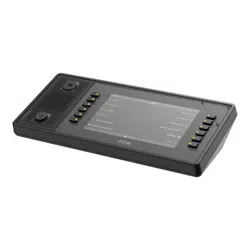


AXISC6110NetworkPagingConsole
TableofContents
Installation................................................3
Getstarted................................................4
Findthedeviceonthenetwork....................................4
Openthedevice'swebinterface....................................4
Createanadministratoraccount...................................4
Securepasswords...............................................4
Verifythatnoonehastamperedwiththedevicesoftware..............5
Congureyourdevice........................................6
SetupdirectSIP(P2P)...........................................6
SetupSIPthroughaserver(PBX)..................................6
Addcontactsandrecipientdevices.................................7
Congurebuttons,foldersandpages................................8
Changethedisplaysettings.......................................8
Setuprulesforevents...........................................8
Placeandreceiveacall......................................10
Placeacall....................................................10
Receiveacall...................................................10
Pageamessage.............................................11
Playanannouncement.......................................12
Connectexternalequipment..................................13
UseanAXISTC6901GooseneckMicrophone..........................13
Useaheadset..................................................
13
Learnmore................................................14
SessionInitiationProtocol(SIP)....................................14
Peer-to-peerSIP(P2PSIP).........................................14
PrivateBranchExchange(PBX)....................................14
NATtraversal...................................................
15
Thewebinterface...........................................16
Status........................................................
16
Communication.................................................
17
Display........................................................21
Audio.........................................................
22
Recordings.....................................................24
Apps..........................................................25
System........................................................
25
Maintenance...................................................
44
Specications..............................................46
Productoverview................................................
46
LEDIndicators..................................................
46
SDcardslot....................................................
47
Buttons.......................................................47
Connectors....................................................
47
Troubleshooting............................................50
Resettofactorydefaultsettings...................................50
Contactsupport.................................................50
2

AXISC6110NetworkPagingConsole
Installation
Installation
ThefollowingvideoshowsanexampleofhowyoucaninstallanAXISC6110NetworkPagingConsoletogetherwithan
AXISTC6901GooseneckMicrophone.
Forcompleteinstructionsonallinstallationscenariosaswellasimportantsafetyinformation,seetheinstallationguideon
axis.com/products/axis-c6110/support.
Towatchthisvideo,gotothewebversionofthisdocument.
help.axis.com/?&piaId=88402§ion=install
3

AXISC6110NetworkPagingConsole
Getstarted
Getstarted
Findthedeviceonthenetwork
TondAxisdevicesonthenetworkandassignthemIPaddressesinWindows®,useAXISIPUtilityorAXISDeviceManager.Both
applicationsarefreeandcanbedownloadedfromaxis.com/support.
FormoreinformationabouthowtondandassignIPaddresses,gotoHowtoassignanIPaddressandaccessyourdevice.
Browsersupport
Youcanusethedevicewiththefollowingbrowsers:
Chrome
TM
Firefox
®
Edge
TM
Safari
®
Windows
®
recommended
recommended
macOS
®
recommendedrecommended
Linux
®
recommendedrecommended
Otheroperatingsystems*
*TouseAXISOSwebinterfacewithiOS15oriPadOS15,gotoSettings Settings
Settings
> >
>
Safari Safari
Safari
> >
>
Advanced Advanced
Advanced
> >
>
Experimental Experimental
Experimental
Features Features
Features
anddisable
NSURLSessionWebsocket.
Ifyouneedmoreinformationaboutrecommendedbrowsers,gotoAXISOSPortal.
Openthedevice'swebinterface
1.OpenabrowserandtypetheIPaddressorhostnameoftheAxisdevice.
IfyoudonotknowtheIPaddress,useAXISIPUtilityorAXISDeviceManagertondthedeviceonthenetwork.
2.Typetheusernameandpassword.Ifyouaccessthedeviceforthersttime,youmustcreateanadministratoraccount.See
Createanadministratoraccountonpage4.
Fordescriptionsofallthecontrolsandoptionsinthedevice’swebinterface,seeThewebinterfaceonpage16.
Createanadministratoraccount
Thersttimeyoulogintoyourdevice,youmustcreateanadministratoraccount.
1.Enterausername.
2.Enterapassword.SeeSecurepasswordsonpage4.
3.Re-enterthepassword.
4.Acceptthelicenseagreement.
5.ClickAddaccount.
Important
Thedevicehasnodefaultaccount.Ifyoulosethepasswordforyouradministratoraccount,youmustresetthedevice.See
Resettofactorydefaultsettingsonpage50.
4

AXISC6110NetworkPagingConsole
Getstarted
Securepasswords
Important
Axisdevicessendtheinitiallysetpasswordincleartextoverthenetwork.Toprotectyourdeviceaftertherstlogin,set
upasecureandencryptedHTTPSconnectionandthenchangethepassword.
Thedevicepasswordistheprimaryprotectionforyourdataandservices.Axisdevicesdonotimposeapasswordpolicyasthey
maybeusedinvarioustypesofinstallations.
Toprotectyourdatawestronglyrecommendthatyou:
•Useapasswordwithatleast8characters,preferablycreatedbyapasswordgenerator.
•Don’texposethepassword.
•Changethepasswordatarecurringinterval,atleastonceayear.
Verifythatnoonehastamperedwiththedevicesoftware
TomakesurethatthedevicehasitsoriginalAXISOS,ortotakefullcontrolofthedeviceafterasecurityattack:
1.Resettofactorydefaultsettings.SeeResettofactorydefaultsettingsonpage50.
Afterthereset,securebootguaranteesthestateofthedevice.
2.Congureandinstallthedevice.
5

AXISC6110NetworkPagingConsole
Configureyourdevice
Configureyourdevice
SetupdirectSIP(P2P)
Usepeer-to-peerwhenthecommunicationisbetweenafewuseragentswithinthesameIPnetworkandthereisnoneedforextra
featuresthataPBX-servercouldprovide.TobetterunderstandhowP2Pworks,seePeer-to-peerSIP(P2PSIP)onpage14.
Formoreinformationaboutsettingoptions,seeSIPonpage18.
1.GotoSystem>SIP>SIPsettingsandselectEnableSIP.
2.Toallowthedevicetoreceiveincomingcalls,selectAllowincomingcalls.
3.UnderCallhandling,setthetimeoutanddurationforthecall.
4.UnderPorts,entertheportnumbers.
-SIPport–ThenetworkportusedforSIPcommunication.Thesignalingtrafcthroughthisportisnon-encrypted.
Thedefaultportnumberis5060.Enteradifferentportnumberifrequired.
-TLSport–ThenetworkportusedforencryptedSIPcommunication.Thesignalingtrafcthroughthisportis
encryptedwithTransportLayerSecurity(TLS).Thedefaultportnumberis5061.Enteradifferentportnumber
ifrequired.
-RTPstartport–EntertheportusedfortherstRTPmediastreaminaSIPcall.Thedefaultstartportfor
mediatransportis4000.SomerewallsmightblockRTPtrafconcertainportnumbers.Aportnumbermust
bebetween1024and65535.
5.UnderNATtraversal,selecttheprotocolsyouwanttoenableforNATtraversal.
Note
UseNATtraversalwhenthedeviceisconnectedtothenetworkfrombehindaNATrouterorarewall.Formoreinformation
seeNATtraversalonpage15.
6.UnderAudio,selectatleastoneaudiocodecwiththedesiredaudioqualityforSIPcalls.Drag-and-droptochange
thepriority.
7.UnderAdditional,selectadditionaloptions.
-UDP-to-TCPswitching–SelecttoallowcallstoswitchtransportprotocolsfromUDP(UserDatagramProtocol)
toTCP(TransmissionControlProtocol)temporarily.Thereasonforswitchingistoavoidfragmentation,and
theswitchcantakeplaceifarequestiswithin200bytesofthemaximumtransmissionunit(MTU)orlarger
than1300bytes.
-Allowviarewrite–SelecttosendthelocalIPaddressinsteadoftherouter'spublicIPaddress.
-Allowcontactrewrite–SelecttosendthelocalIPaddressinsteadoftherouter'spublicIPaddress.
-Registerwithserverevery–SethowoftenyouwantthedevicetoregisterwiththeSIPserverfortheexisting
SIPaccounts.
-DTMFpayloadtype–ChangesthedefaultpayloadtypeforDTMF.
8.ClickSave.
SetupSIPthroughaserver(PBX)
UseaPBX-serverwhenthecommunicationshouldbebetweenaninnitenumberofuseragentswithinandoutsidetheIPnetwork.
AdditionalfeaturescouldbeaddedtothesetupdependingonthePBX-provider.TobetterunderstandhowP2Pworks,seePrivate
BranchExchange(PBX)onpage14.
6

AXISC6110NetworkPagingConsole
Configureyourdevice
Formoreinformationaboutsettingoptions,seeSIPonpage18.
1.RequestthefollowinginformationfromyourPBXprovider:
-UserID
-Domain
-Password
-AuthenticationID
-CallerID
-Registrar
-RTPstartport
2.Toaddanewaccount,gotoSystem>SIP>SIPaccountsandclick+Account.
3.EnterthedetailsyoureceivedfromyourPBXprovider.
4.SelectRegistered.
5.Selectatransportmode.
6.ClickSave.
7.SetuptheSIPsettingsthesamewayasforpeer-to-peer.SeeSetupdirectSIP(P2P)onpage6formoreinformation.
Addcontactsandrecipientdevices
Toaddcontacts,openthewebinterfacebyenteringtheIPaddressofyourpagingconsoleinawebbrowser.
Note
OnlycontactsthatarepersonswillappearinthecontactslistonthedisplayofyourAXISC61 10PagingConsole.
Deviceswillnotshowupinthecontactslist,butyoucancongureabuttononthedisplaytotargetthedevicedirectly.
Note
OnlySIPdevicescanbeusedfortwo-waycommunication.
Note
OnlyVAPIXdevicescanbeusedforcontactgroups.
Addanindividualpersonordeviceasacontact:
1.GotoContactlist>Contacts.
2.ClickAddcontact.
3.SelectDeviceorPerson.
4.Enternameandlocation.
5.SelectSIPorVAPIXandenterthedetails.
Forinformationabouttheoptions,seeContactlistonpage17.
6.ClickSave.
CreateagroupofVAPIXcontacts:
7

AXISC6110NetworkPagingConsole
Configureyourdevice
1.GotoContactlist>Groups.
2.ClickAddcontactgroupandenterthedetails.
Forinformationabouttheoptions,seeContactlistonpage17.
3.ClickSave.
Congurebuttons,foldersandpages
Tocongurebuttonsandfolders,openthewebinterfacebyenteringtheIPaddressofyourpagingconsoleinawebbrowser.
Createanewbuttonorfolder:
1.Gotothelocationwhereyouwanttoaddthebuttonorfolder.
ThiswilleitherbeontheHomevieworinsideoneofyourfolders.
2.Clickawhitebutton.
Whitecolorindicatesthatthebuttonhasnotbeencongured.
3.Selectifyouwanttocreateanactionorafolder.
Note
Ifyouhaveaviewthatislocateddeepdowninthefolderstructure,agoodpracticeistoaddaHomebuttonthatmakesit
easytoreturntothehomeview.
4.EnterthedetailsandclickSave.
Editordeleteanexistingbuttonorfolder:
•Click
andselectEditorDelete.
Addanewpage:
•ClickAddpage.
Thiswilladdapagetothesamelocation,i.e.attheHomevieworinsidethecurrentfolder.
Note
Ifyoucreatemanypages,agoodpracticeistoaddaHomebuttonthatmakesiteasytoreturntothehomeview.
Youcanaddupto10pagesperfolder.
Changethedisplaysettings
Tochangethedisplaysettings,openthewebinterfacebyenteringtheIPaddressofyourpagingconsoleinawebbrowser.
•Toadjustbrightness,timersandpresencedetection,gotoDisplaysettings>Display.
•Toadjustlanguageandclocksettingsforthedisplayofyourpagingconsole,gotoDisplay>Localization.
Formoreinformationabouttheindividualoptions,seeDisplaysettingsonpage22.
Setuprulesforevents
Youcancreaterulestomakeyourdeviceperformactionswhencertaineventsoccur.Aruleconsistsofconditionsandactions.The
conditionscanbeusedtotriggertheactions.Forexample,thedevicecanplayanaudioclipaccordingtoascheduleorwhenit
receivesacall,orsendanemailifthedevicechangesIPaddress.
8


AXISC6110NetworkPagingConsole
Placeandreceiveacall
Placeandreceiveacall
Placeacall
1.Navigatetothepageonthedisplaywherethecontactislocated.
Contactsareindicatedby
.
2.Toplaceacall,pressthebuttonforthecontact.
3.Tomuteorunmuteyourmicrophone,presstheMuteorUnmutebutton.
4.Toregulatethevolumelevelofyourspeaker,pressthevolumebuttonontheleftsideofthepagingconsole.
5.Toendthecall,pressthebuttonforHangup.
Receiveacall
Whenyoureceiveacall,thedisplayshowsIncomingcallandaringingsignalisheard.
1.Toanswerthecall,presstheAnswerbutton.
2.Tohanguporrejectthecall,presstheHangupbutton.
Ifyouhavemissedacall,
isshownatthetoprightcornerofthedisplay.Toseewhocalled,presstheCallhistorybutton.
10

AXISC6110NetworkPagingConsole
Pageamessage
Pageamessage
Topageaone-waylivecallout:
1.Navigatetothepageonthedisplaywherethetargetislocated.
Thetargetcanbeanindividualpersonordevice,oragroup.Targetsareindicatedby
.
2.Pressthebuttonofthetarget.
3.Waitforthepre-announcementmessagetobeplayed,ifsuchmessageisconguredforthetarget.
4.Pressandholdthepush-to-talkbutton,andspeakyourmessage.
5.Whenyouaredone,pressCancel.
11

AXISC6110NetworkPagingConsole
Playanannouncement
Playanannouncement
Playapre-recordedaudiole:
1.Navigatetothepageonthedisplaywheretheannouncementislocated.
Announcementsareindicatedby
.
2.Pressthebuttonfortheannouncement.
12

AXISC6110NetworkPagingConsole
Connectexternalequipment
Connectexternalequipment
UseanAXISTC6901GooseneckMicrophone
TheAXISTC6901GooseneckMicrophoneisanaccessorythatissoldseparately.
Formountinginstructions,seetheinstallationguideforAXISTC6901GooseneckMicrophone.
1
AXISTC6901GooseneckMicrophone
Touseagooseneckmicrophone:
1.OpenthewebinterfacebyenteringtheIPaddressofyourpagingconsoleinawebbrowser.
2.GotoDevicesettings.
3.SetInputtypetoBalancedmicrophone.
Useaheadset
Youcanconnectaheadsettothe3.5mmaudioconnectorlocatedonthesideoftheAXISC6110NetworkPagingConsole.
Youcanadjustthevolumefortheheadsetusingthevolumebuttons.
Ifyouconnectheadphoneswithoutamicrophone,theinternalmicrophonewillstayactive.
13
AXISC6110NetworkPagingConsole
Learnmore
Learnmore
SessionInitiationProtocol(SIP)
TheSessionInitiationProtocol(SIP)isusedtosetup,maintainandterminateVoIPcalls.Youcanmakecallsbetweentwoormore
parties,calledSIPuseragents.TomakeaSIPcallyoucanuse,forexample,SIPphones,softphonesorSIP-enabledAxisdevices.
TheactualaudioorvideoisexchangedbetweentheSIPuseragentswithatransportprotocol,forexampleRTP(Real-Time
TransportProtocol).
Youcanmakecallsonlocalnetworksusingapeer-to-peersetup,oracrossnetworksusingaPBX.
Peer-to-peerSIP(P2PSIP)
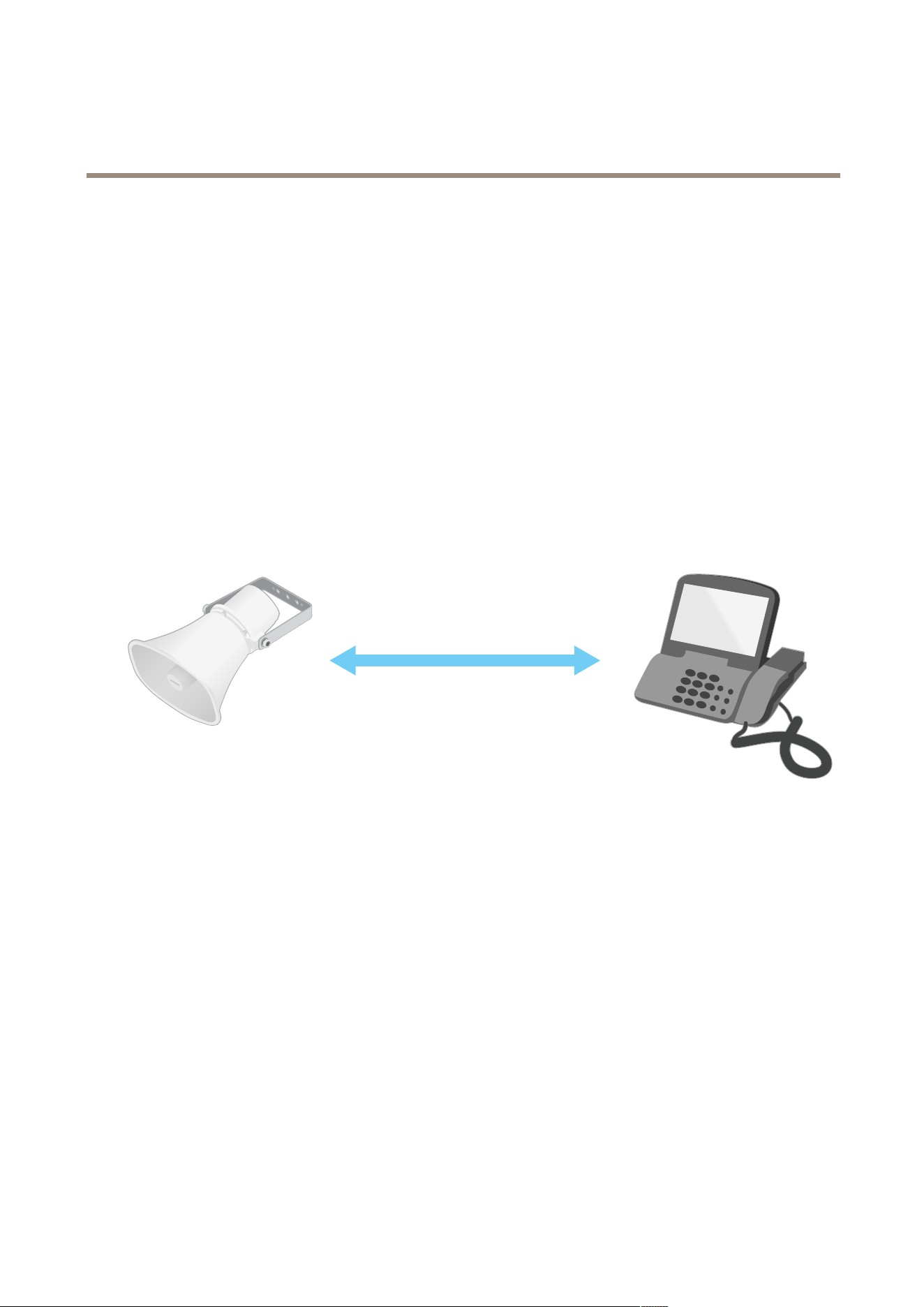
ThemostbasictypeofSIPcommunicationtakesplacedirectlybetweentwoormoreSIPuseragents.Thisiscalledpeer-to-peerSIP
(P2PSIP).Ifittakesplaceonalocalnetwork,allthat’sneededaretheSIPaddressesoftheuseragents.AtypicalSIPaddressinthis
casewouldbesip:<local-ip>.
Example:
SIP
sip:192.168.1.101 sip:192.168.1.100
YoucansetupaSIP-enabledphonetocallanaudiodeviceonthesamenetworkusingapeer-to-peerSIPsetup.
PrivateBranchExchange(PBX)
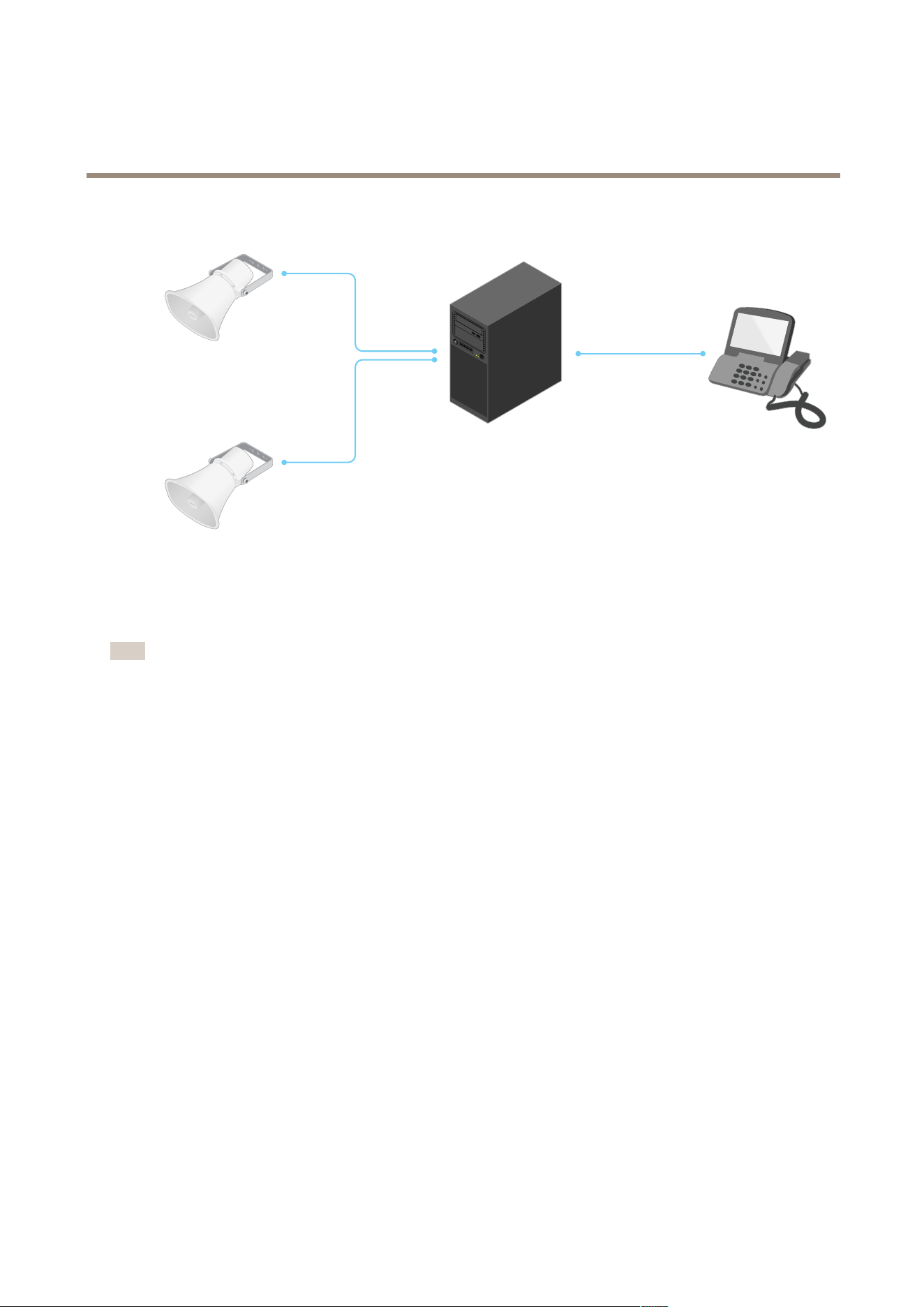
WhenyoumakeSIPcallsoutsideyourlocalIPnetwork,aPrivateBranchExchange(PBX)canactasacentralhub.Themain
componentofaPBXisaSIPserver,whichisalsoreferredtoasaSIPproxyoraregistrar.APBXworkslikeatraditionalswitchboard,
showingtheclient'scurrentstatusandallowingforexamplecalltransfers,voicemail,andredirections.
ThePBXSIPservercanbesetupasalocalentityoroffsite.Itcanbehostedonanintranetorbyathirdpartyprovider.Whenyou
makeSIPcallsbetweennetworks,callsareroutedthroughasetofPBXs,thatquerythelocationoftheSIPaddresstobereached.
EachSIPuseragentregisterswiththePBX,andcanthenreachtheothersbydialingthecorrectextension.AtypicalSIPaddressin
thiscasewouldbesip:<user>@<domain>orsip:<user>@<registrar-ip>.TheSIPaddressisindependentofitsIP
addressandthePBXmakesthedeviceaccessibleaslongasitisregisteredtothePBX.
Example:
14
AXISC6110NetworkPagingConsole
Learnmore
SIP
SIP
SIP
sip:myspeaker@company.com
PBX
sip.company.com
sip:office@company.com
sip:myspeaker@company.com
NATtraversal
UseNAT(NetworkAddressTranslation)traversalwhentheAxisdeviceislocatedonanprivatenetwork(LAN)andyouwantto
accessitfromoutsideofthatnetwork.
Note
TheroutermustsupportNATtraversalandUPnP®.
EachNATtraversalprotocolcanbeusedseparatelyorindifferentcombinationsdependingonthenetworkenvironment.
•ICETheICEInteractiveConnectivityEstablishment)protocolincreasesthechancesofndingthemostefcientpathto
successfulcommunicationbetweenpeerdevices.IfyoualsoenableSTUNandTURN,youimprovetheICEprotocol’s
chances.
•STUN-STUN(SessionTraversalUtilitiesforNAT)isaclient-servernetworkprotocolthatletstheAxisdevicedetermineif
itislocatedbehindaNATorrewall,andifsoobtainthemappedpublicIPaddressandportnumberallocatedfor
connectionstoremotehosts.EntertheSTUNserveraddress,forexample,anIPaddress.
•TURN-TURN(TraversalUsingRelaysaroundNAT)isaprotocolthatletsadevicebehindaNATrouterorrewallreceive
incomingdatafromotherhostsoverTCPorUDP.EnterTURNserveraddressandthelogininformation.
15

AXISC6110NetworkPagingConsole
Thewebinterface
Thewebinterface
Toreachthedevice’swebinterface,typethedevice’sIPaddressinawebbrowser.
Note
Supportforthefeaturesandsettingsdescribedinthissectionvariesbetweendevices.Thisicon
indicatesthat
thefeatureorsettingisonlyavailableinsomedevices.
Showorhidethemainmenu.
Accessthereleasenotes.
Accesstheproducthelp.
Changethelanguage.
Setlightthemeordarktheme.
Theusermenucontains:
•Informationabouttheuserwhoisloggedin.
•
Changeaccount:Logoutfromthecurrentaccountandlogintoanewaccount.
•
Logout:Logoutfromthecurrentaccount.
Thecontextmenucontains:
•Analyticsdata:Accepttosharenon-personalbrowserdata.
•Feedback:Shareanyfeedbacktohelpusimproveyouruserexperience.
•Legal:Viewinformationaboutcookiesandlicenses.
•About:Viewdeviceinformation,includingAXISOSversionandserialnumber.
Status
Locatedevice
Showsthelocatedeviceinformation,includingserialnumberandIPaddress.
Locatedevice:Playsasoundthathelpsyouidentifythespeaker.Forsomeproducts,thedevicewillashaLED.
Deviceinfo
Showsthedeviceinformation,includingAXISOSversionandserialnumber.
UpgradeAXISOS:Upgradethesoftwareonyourdevice.TakesyoutotheMaintenancepagewhereyoucandotheupgrade.
Timesyncstatus
ShowsNTPsynchronizationinformation,includingifthedeviceisinsyncwithanNTPserverandthetimeremaininguntil
thenextsync.
16
AXISC6110NetworkPagingConsole
Thewebinterface
NTPsettings:ViewandupdatetheNTPsettings.TakesyoutotheDateandtimepagewhereyoucanchangetheNTPsettings.
Security
Showswhatkindofaccesstothedevicethatisactive,whatencryptionprotocolsareinuse,andifunsignedappsareallowed.
RecommendationstothesettingsarebasedontheAXISOSHardeningGuide.
Hardeningguide:LinktoAXISOSHardeningguidewhereyoucanlearnmoreaboutcybersecurityonAxisdevicesandbest
practices.
Connectedclients
Showsthenumberofconnectionsandconnectedclients.
Viewdetails:Viewandupdatethelistofconnectedclients.ThelistshowsIPaddress,protocol,port,state,andPID/process
ofeachconnection.
Ongoingrecordings
Showsongoingrecordingsandtheirdesignatedstoragespace.
Recordings:Viewongoingandlteredrecordingsandtheirsource.Formoreinformation,seeRecordingsonpage24
Showsthestoragespacewheretherecordingissaved.
Communication
Contactlist
Contacts
Addcontact:Clicktoaddanewcontacttothecontactlist.
•Device:Ifthecontactisanon-personaldevice,suchasaspeaker.
-Name:Enteranameforthecontact.
-Location:Enteralocationforthecontact.
•Person:Ifthecontactisapersonaldevice,suchasaSIPphone.Onlycontactsthatareaddedaspersonswillshowup
inthelistofcontactswhenyoupresstheShowcontactsbutton.
-Firstname:Enterthecontact’srstname.
-Lastname:Enterthecontact’slastname.
-Location:Enteralocationforthecontact.
•SIP
-SIPaddress:IfyouuseSIP,enterthecontact'sIPaddressorextension.
-SIPaccount:IfyouuseSIP,selecttheSIPaccounttouseforthecallfromthedevicetothecontact.
•VAPIX
-IP:EntertheIPaddress.
-Username:Enterusername.
-Password:Enterpassword.
Thecontextmenucontains:
Editcontact:Editthecontact’sproperties.
Deletecontact:Deletethecontact.
Groups
17

AXISC6110NetworkPagingConsole
Thewebinterface
ForpagingagroupofAxisdevicesusingVAPIX.
Addgroup:Clicktocreateanewgroupofexistingcontacts.
•Name:Enteranameforthegroup.
•VAPIXcontacts:SelecttheVAPIXcontactsyouwanttoincludeinthegroup.Thelistincludecontactsthatyou
havecreatedontheContactstab.
Thecontextmenucontains:
Editgroup:Editthegroup’sproperties.
Deletegroup:Deletethegroup.
SIP
Settings
SessionInitiationProtocol(SIP)isusedforinteractivecommunicationsessionsbetweenusers.Thesessionscanincludeaudio
andvideo.
SIPsetupassistant:ClicktosetupandcongureSIPstepbystep.
EnableSIP:CheckthisoptiontomakeitpossibletoinitiateandreceiveSIPcalls.
Allowincomingcalls:CheckthisoptiontoallowincomingcallsfromotherSIPdevices.
Callhandling
•Callingtimeout:Setthemaximumdurationofanattemptedcallifnooneanswers.
•Incomingcallduration:Setthemaximumtimeanincomingcallcanlast(max10min).
•Endcallsafter:Setthemaximumtimethatacallcanlast(max60minutes).SelectInnitecalldurationifyoudon’t
wanttolimitthelengthofacall.
Ports
Aportnumbermustbebetween1024and65535.
•SIPport:ThenetworkportusedforSIPcommunication.Thesignalingtrafcthroughthisportisnon-encrypted.
Thedefaultportnumberis5060.Enteradifferentportnumberifrequired.
•TLSport:ThenetworkportusedforencryptedSIPcommunication.Thesignalingtrafcthroughthisportisencrypted
withTransportLayerSecurity(TLS).Thedefaultportnumberis5061.Enteradifferentportnumberifrequired.
•RTPstartport:ThenetworkportusedfortherstRTPmediastreaminaSIPcall.Thedefaultstartportnumberis
4000.SomerewallsblockRTPtrafconcertainportnumbers.
NATtraversal
UseNAT(NetworkAddressTranslation)traversalwhenthedeviceislocatedonanprivatenetwork(LAN)andyouwantto
makeitavailablefromoutsideofthatnetwork.
Note
ForNATtraversaltowork,theroutermustsupportit.TheroutermustalsosupportUPnP®.
EachNATtraversalprotocolcanbeusedseparatelyorindifferentcombinationsdependingonthenetworkenvironment.
•ICE:TheICE(InteractiveConnectivityEstablishment)protocolincreasesthechancesofndingthemostefcient
pathtosuccessfulcommunicationbetweenpeerdevices.IfyoualsoenableSTUNandTURN,youimprovetheICE
protocol’schances.
•STUN:STUN(SessionTraversalUtilitiesforNAT)isaclient-servernetworkprotocolthatletsthedevicedetermineif
itislocatedbehindaNATorrewall,andifsoobtainthemappedpublicIPaddressandportnumberallocatedfor
connectionstoremotehosts.EntertheSTUNserveraddress,forexample,anIPaddress.
18

AXISC6110NetworkPagingConsole
Thewebinterface
•TURN:TURN(TraversalUsingRelaysaroundNAT)isaprotocolthatletsadevicebehindaNATrouterorrewallreceive
incomingdatafromotherhostsoverTCPorUDP.EntertheTURNserveraddressandthelogininformation.
Audio
•Audiocodecpriority:SelectatleastoneaudiocodecwiththedesiredaudioqualityforSIPcalls.Drag-and-dropto
changethepriority.
Note
Theselectedcodecsmustmatchthecallrecipientcodec,sincetherecipientcodecisdecisivewhenacallismade.
•Audiodirection:Selectallowedaudiodirections.
Additional
•UDP-to-TCPswitching:SelecttoallowcallstoswitchtransportprotocolsfromUDP(UserDatagramProtocol)toTCP
(TransmissionControlProtocol)temporarily.Thereasonforswitchingistoavoidfragmentation,andtheswitchcan
takeplaceifarequestiswithin200bytesofthemaximumtransmissionunit(MTU)orlargerthan1300bytes.
•Allowviarewrite:SelecttosendthelocalIPaddressinsteadoftherouter'spublicIPaddress.
•Allowcontactrewrite:SelecttosendthelocalIPaddressinsteadoftherouter'spublicIPaddress.
•Registerwithserverevery:SethowoftenyouwantthedevicetoregisterwiththeSIPserverfortheexisting
SIPaccounts.
•DTMFpayloadtype:ChangesthedefaultpayloadtypeforDTMF.
•Maxretransmissions:SetthemaximumnumberoftimesthedevicetriestoconnecttotheSIPserverbeforeit
stopstrying.
•Secondsuntilfailback:SetthenumberofsecondsuntilthedevicetriestoreconnecttotheprimarySIPserverafterit
hasfailedovertoasecondarySIPserver.
Accounts
AllcurrentSIPaccountsarelistedunderSIPaccounts.Forregisteredaccounts,thecoloredcircleletsyouknowthestatus.
TheaccountissuccessfullyregisteredwiththeSIPserver.
Thereisaproblemwiththeaccount.Possiblereasonscanbeauthorizationfailure,thattheaccountcredentialsarewrong,
orthattheSIPservercan’tndtheaccount.
Thepeertopeer(default)accountisanautomaticallycreatedaccount.Youcandeleteitifyoucreateatleastoneotheraccount
andsetthataccountasdefault.ThedefaultaccountisalwaysusedwhenaVAPIX®ApplicationProgrammingInterface(API)call
ismadewithoutspecifyingwhichSIPaccounttocallfrom.
Addaccount:ClicktocreateanewSIPaccount.
•Active:Selecttobeabletousetheaccount.
•Makedefault:Selecttomakethisthedefaultaccount.Theremustbeadefaultaccount,andtherecanonly
beonedefaultaccount.
•Answerautomatically:Selecttoautomaticallyansweranincomingcall.
•PrioritizeIPv6overIPv4
:SelecttoprioritizeIPv6addressesoverIPv4addresses.Thisisusefulwhenyou
connecttopeer-to-peeraccountsordomainnamesthatresolveinbothIPv4andIPv6addresses.Youcanonly
prioritizeIPv6fordomainnamesthataremappedtoIPv6addresses.
•Name:Enteradescriptivename.Thiscan,forexample,bearstandlastname,arole,oralocation.Thenameis
notunique.
•UserID:Entertheuniqueextensionorphonenumberassignedtothedevice.
•Peer-to-peer:UsefordirectcallstoanotherSIPdeviceonthelocalnetwork.
•Registered:UseforcallstoSIPdevicesoutsidethelocalnetwork,throughaSIPserver.
•Domain:Ifavailable,enterthepublicdomainname.ItwillbeshownaspartoftheSIPaddresswhencallingother
accounts.
•Password:EnterthepasswordassociatedwiththeSIPaccountforauthenticatingagainsttheSIPserver.
•AuthenticationID:EntertheauthenticationIDusedforauthenticatingagainsttheSIPserver.Ifitisthesameasthe
userID,youdon’tneedtoentertheauthenticationID.
19

AXISC6110NetworkPagingConsole
Thewebinterface
•CallerID:Thenamewhichispresentedtotherecipientofcallsfromthedevice.
•Registrar:EntertheIPaddressfortheregistrar.
•Transportmode:SelecttheSIPtransportmodefortheaccount:UPD,TCP,orTLS.
•TLSversion(onlywithtransportmodeTLS):SelecttheversionofTLStouse.Versionsv1.2andv1.3arethemost
secure.Automaticselectsthemostsecureversionthatthesystemcanhandle.
•Mediaencryption(onlywithtransportmodeTLS):Selectthetypeofencryptionformedia(audioandvideo)inSIPcalls.
•Certicate(onlywithtransportmodeTLS):Selectacerticate.
•Verifyservercerticate(onlywithtransportmodeTLS):Checktoverifytheservercerticate.
•SecondarySIPserver:TurnonifyouwantthedevicetotrytoregisteronasecondarySIPserverifregistration
ontheprimarySIPserverfails.
•SIPsecure:SelecttouseSecureSessionInitiationProtocol(SIPS).SIPSusestheTLStransportmodetoencrypttrafc.
•Proxies
-
Proxy:Clicktoaddaproxy.
-Prioritize:Ifyouhaveaddedtwoormoreproxies,clicktoprioritizethem.
-Serveraddress:EntertheIPaddressoftheSIPproxyserver.
-Username:Ifrequired,entertheusernamefortheSIPproxyserver.
-Password:Ifrequired,enterthepasswordfortheSIPproxyserver.
•Video
-Viewarea:Selecttheviewareatouseforvideocalls.Ifyouselectnone,thenativeviewisused.
-Resolution:Selecttheresolutiontouseforvideocalls.Theresolutionaffectstherequiredbandwidth.
-Framerate:Selectthenumberofframespersecondforvideocalls.Theframerateaffectstherequired
bandwidth.
-H.264prole:Selecttheproletouseforvideocalls.
DTMF
Addsequence:Clicktocreateanewdual-tonemultifrequency(DTMF)sequence.Tocreatearulethatisactivatedby
touch-tone,gotoEvents>Rules.
Sequence:Enterthecharacterstoactivatetherule.Allowedcharacters:0–9,A-D,#,and*.
Description:Enteradescriptionoftheactiontobetriggeredbythesequence.
Accounts:SelecttheaccountsthatwillusetheDTMFsequence.Ifyouchoosepeer-to-peer,allpeer-to-peeraccountswillshare
thesameDTMFsequence.
Protocols
Selecttheprotocolstouseforeachaccount.Allpeer-to-peeraccountssharethesameprotocolsettings.
UseRTP(RFC2833):Turnontoallowdual-tonemultifrequency(DTMF)signaling,othertonesignalsandtelephonyeventsin
RTPpackets.
UseSIPINFO(RFC2976):TurntoincludetheINFOmethodtotheSIPprotocol.TheINFOmethodaddsoptionalapplicationlayer
information,generallyrelatedtothesession.
Testcall
SIPaccount:Selectwhichaccounttomakethetestcallfrom.
SIPaddress:EnteraSIPaddressandclick
tomakeatestcallandverifythattheaccountworks.
Accesslist
20

AXISC6110NetworkPagingConsole
Thewebinterface
Useaccesslist:Turnontorestrictwhocanmakecallstothedevice.
Policy:
•Allow:Selecttoallowincomingcallsonlyfromthesourcesintheaccesslist.
•Block:Selecttoblockincomingcallsfromthesourcesintheaccesslist.
Addsource:Clicktocreateanewentryintheaccesslist.
SIPsource:TypethecallerIDorSIPserveraddressofthesource.
Multicastcontroller
Usermulticastcontroller:Turnontoactivatemulticastcontroller.
Audiocodec:Selectanaudiocodec.
Source:Addanewmulticastcontrollersource.
•Label:Enterthenameofalabelthatisnotalreadyusedbyasource.
•Source:Enterasource.
•Port:Enteraport.
•Priority:Selectapriority.
•Prole:Selectaprole.
•SRTPkey:EnteranSRTPkey.
Thecontextmenucontains:
Edit:Editthemulticastcontrollersource.
Delete:Deletethemulticastcontrollersource.
Display
Conguration
Buttons
Clickabuttontocongureit.
•Action:Selecttomakethebuttonanaction.
-Useanexistingaction:Selecttochooseanactionthatalreadyexists.
-Createanewaction:Selecttocreateanewaction.
-Action:Selectanactionforthebutton.
•Folder:Selecttomakethebuttonafolderthatcancontainfurtherbuttons.
-Name:Namethefolder.
21

AXISC6110NetworkPagingConsole
Thewebinterface
Actions
+Addaction:Clicktocreateanactionthatcanbeusedforthebuttons.Availableactiontypes:
•Announcement:Selecttomakeanannouncement(playanaudioletoapersonoradevice).
•Callcontact:Selecttoinitiatetwo-waycalltoacontact(apersonoradevice).
•Clearcallhistory:Selecttoclearthecallhistory.
•HTTPrequest:SelecttomakeanHTTPrequest.
•Pagecontact:Selecttopageacontact(one-waycommunicationtoapersonordevice).
•Home:Selecttogotothehomescreen.
•Showcallhistory:Selecttoshowthecallhistory.
•Showcontacts:Selecttoshowthelistofcontactsthatareaddedaspersons(seeAddcontacts)
Folder:Selecttocreateafolderthatcancontainfurtherbuttonsorfolders.
Displaysettings
Display
Brightness
•Adaptivebrightness:Selectforautomaticadjustmentofthebrightness.
•Level:Selectabrightnesslevelmanually.
Timers
•Lowpowermode:Selectatimetowaitforactivitybeforeactivationamodeoflowpowerconsumption.
•Returntohome:Selectatimetowaitbeforereturningtothehomescreen.
Presencedetection
•Turnondisplaywhenpresenceisdetected:Turnontomakethedisplayactivateitselfwhenitdetectspresence.
•Distance:Setthedistanceforpresencedetection.
Localization
Displaylanguage
Displaylanguage
•Language:Selectthelanguagetouseonthedisplay.
Statusbarclock
•Off/On:Turnontoshowtheclock,andturnofftohidetheclock.
•24-hourclock:Turnontousea24-hourformat,andturnofftousea12-hourformat.
Audio
Devicesettings
Input:Turnonoroffaudioinput.Showsthetypeofinput.
22
AXISC6110NetworkPagingConsole
Thewebinterface
Inputtype:Selectthetypeofinput,forinstance,ifit’sinternalmicrophoneorline.
Powertype
:Selectpowertypeforyourinput.
Applychanges
:Applyyourselection.
Echocancellation
:Turnontoremoveechoesduringtwo-waycommunication.
Separategaincontrols
:Turnontoadjustthegainseparatelyforthedifferentinputtypes.
Automaticgaincontrol
:Turnontodynamicallyadaptthegaintochangesinthesound.
Gain:Usetheslidertochangethegain.Clickthemicrophoneicontomuteorunmute.
Output:Showsthetypeofoutput.
Gain:Usetheslidertochangethegain.Clickthespeakericontomuteorunmute.
Stream
Encoding:Selecttheencodingtousefortheinputsourcestreaming.Youcanonlychooseencodingifaudioinputisturnedon.If
audioinputisturnedoff,clickEnableaudioinputtoturniton.
Audioclips
Addclip:Addanewaudioclip.Youcanuse.au,.mp3,.opus,.vorbis,.wavles.
Playtheaudioclip.
Stopplayingtheaudioclip.
Thecontextmenucontains:
•Rename:Changethenameoftheaudioclip.
•Createlink:CreateaURLthat,whenused,playstheaudiocliponthedevice.Specifythevolumeandnumber
oftimestoplaytheclip.
•Download:Downloadtheaudiocliptoyourcomputer.
•Delete:Deletetheaudioclipfromthedevice.
23
AXISC6110NetworkPagingConsole
Thewebinterface
Listenandrecord
Clicktolisten.
Startacontinuousrecordingoftheliveaudiostream.Clickagaintostoptherecording.Ifarecordingisongoing,itwill
resumeautomaticallyafterareboot.
Note
Youcanonlylistenandrecordifinputisturnedonforthedevice.GotoAudio>Devicesettingstomakesureyou
turnoninput.
Showstheconguredstorageforthedevice.Tocongurethestorage,youneedtobeloggedinasanadministrator.
Recordings
Ongoingrecordings:Showallongoingrecordingsonthedevice.
Startarecordingonthedevice.
Choosewhichstoragedevicetosaveto.
Stoparecordingonthedevice.
Triggeredrecordingswillendwhenmanuallystoppedorwhenthedeviceisshutdown.
Continuousrecordingswillcontinueuntilmanuallystopped.Evenifthedeviceisshutdown,therecordingwillcontinuewhen
thedevicestartsupagain.
Playtherecording.
Stopplayingtherecording.
Showorhideinformationandoptionsabouttherecording.
Setexportrange:Ifyouonlywanttoexportpartoftherecording,enteratimespan.Notethatifyouworkinadifferenttime
zonethanthelocationofthedevice,thetimespanisbasedonthedevice’stimezone.
Encrypt:Selecttosetapasswordforexportedrecordings.Itwillnotbepossibletoopentheexportedlewithoutthepassword.
Clicktodeletearecording.
Export:Exportthewholeorapartoftherecording.
24
AXISC6110NetworkPagingConsole
Thewebinterface
Clicktoltertherecordings.
From:Showrecordingsdoneafteracertainpointintime.
To:Showrecordingsupuntilacertainpointintime.
Source
:Showrecordingsbasedonsource.Thesourcereferstothesensor.
Event:Showrecordingsbasedonevents.
Storage:Showrecordingsbasedonstoragetype.
Apps
Addapp:Installanewapp.
Findmoreapps:Findmoreappstoinstall.YouwillbetakentoanoverviewpageofAxisapps.
Allowunsignedapps:Turnontoallowinstallationofunsignedapps.
Allowroot-privilegedapps
:Turnontoallowappswithrootprivilegesfullaccesstothedevice.
ViewthesecurityupdatesinAXISOSandACAPapps.
Note
Thedevice’sperformancemightbeaffectedifyourunseveralappsatthesametime.
Usetheswitchnexttotheappnametostartorstoptheapp.
Open:Accesstheapp’ssettings.Theavailablesettingsdependontheapplication.Someapplicationsdon’thaveanysettings.
Thecontextmenucancontainoneormoreofthefollowingoptions:
•Open-sourcelicense:Viewinformationaboutopen-sourcelicensesusedintheapp.
•Applog:Viewalogoftheappevents.Thelogishelpfulwhenyoucontactsupport.
•Activatelicensewithakey:Iftheapprequiresalicense,youneedtoactivateit.Usethisoptionifyourdevice
doesn’thaveinternetaccess.
Ifyoudon’thavealicensekey,gotoaxis.com/products/analytics.YouneedalicensecodeandtheAxisproductserial
numbertogeneratealicensekey.
•Activatelicenseautomatically:Iftheapprequiresalicense,youneedtoactivateit.Usethisoptionifyourdevicehas
internetaccess.Youneedalicensecodetoactivatethelicense.
•Deactivatethelicense:Deactivatethelicensetoreplaceitwithanotherlicense,forexample,whenyouchangefroma
triallicensetoafulllicense.Ifyoudeactivatethelicense,youalsoremoveitfromthedevice.
•Settings:Conguretheparameters.
•Delete:Deletetheapppermanentlyfromthedevice.Ifyoudon’tdeactivatethelicenserst,itremainsactive.
System
Timeandlocation
Dateandtime
25

AXISC6110NetworkPagingConsole
Thewebinterface
Thetimeformatdependsonthewebbrowser’slanguagesettings.
Note
Werecommendyousynchronizethedevice’sdateandtimewithanNTPserver.
Synchronization:Selectanoptionforthedevice’sdateandtimesynchronization.
•Automaticdateandtime(manualNTSKEservers):SynchronizewiththesecureNTPkeyestablishmentservers
connectedtotheDHCPserver.
-ManualNTSKEservers:EntertheIPaddressofoneortwoNTPservers.WhenyouusetwoNTPservers,
thedevicesynchronizesandadaptsitstimebasedoninputfromboth.
-MaxNTPpolltime:SelectthemaximumamountoftimethedeviceshouldwaitbeforeitpollstheNTP
servertogetanupdatedtime.
-MinNTPpolltime:SelecttheminimumamountoftimethedeviceshouldwaitbeforeitpollstheNTP
servertogetanupdatedtime.
•Automaticdateandtime(NTPserversusingDHCP):SynchronizewiththeNTPserversconnectedtotheDHCPserver.
-FallbackNTPservers:EntertheIPaddressofoneortwofallbackservers.
-MaxNTPpolltime:SelectthemaximumamountoftimethedeviceshouldwaitbeforeitpollstheNTP
servertogetanupdatedtime.
-MinNTPpolltime:SelecttheminimumamountoftimethedeviceshouldwaitbeforeitpollstheNTP
servertogetanupdatedtime.
•Automaticdateandtime(manualNTPservers):SynchronizewithNTPserversofyourchoice.
-ManualNTPservers:EntertheIPaddressofoneortwoNTPservers.WhenyouusetwoNTPservers,the
devicesynchronizesandadaptsitstimebasedoninputfromboth.
-MaxNTPpolltime:SelectthemaximumamountoftimethedeviceshouldwaitbeforeitpollstheNTP
servertogetanupdatedtime.
-MinNTPpolltime:SelecttheminimumamountoftimethedeviceshouldwaitbeforeitpollstheNTP
servertogetanupdatedtime.
•Customdateandtime:Manuallysetthedateandtime.ClickGetfromsystemtofetchthedateandtimesettings
oncefromyourcomputerormobiledevice.
Timezone:Selectwhichtimezonetouse.Timewillautomaticallyadjusttodaylightsavingtimeandstandardtime.
•DHCP:AdoptsthetimezoneoftheDHCPserver.ThedevicemustconnectedtoaDHCPserverbeforeyoucanselect
thisoption.
•Manual:Selectatimezonefromthedrop-downlist.
Note
Thesystemusesthedateandtimesettingsinallrecordings,logs,andsystemsettings.
Devicelocation
Enterwherethedeviceislocated.Yourvideomanagementsystemcanusethisinformationtoplacethedeviceonamap.
•Latitude:Positivevaluesarenorthoftheequator.
•Longitude:Positivevaluesareeastoftheprimemeridian.
•Heading:Enterthecompassdirectionthatthedeviceisfacing.0isduenorth.
•Label:Enteradescriptivenameforthedevice.
•Save:Clicktosaveyourdevicelocation.
Network
IPv4
26

AXISC6110NetworkPagingConsole
Thewebinterface
AssignIPv4automatically:SelecttoletthenetworkrouterassignanIPaddresstothedeviceautomatically.Werecommend
automaticIP(DHCP)formostnetworks.
IPaddress:EnterauniqueIPaddressforthedevice.StaticIPaddressescanbeassignedatrandomwithinisolatednetworks,
providedthateachaddressisunique.Toavoidconicts,werecommendyoucontactyournetworkadministratorbeforeyou
assignastaticIPaddress.
Subnetmask:Enterthesubnetmasktodenewhataddressesareinsidethelocalareanetwork.Anyaddressoutsidethelocal
areanetworkgoesthroughtherouter.
Router:EntertheIPaddressofthedefaultrouter(gateway)usedtoconnectdevicesthatareattachedtodifferentnetworksand
networksegments.
FallbacktostaticIPaddressifDHCPisn’tavailable:SelectifyouwanttoaddastaticIPaddresstouseasfallbackifDHCP
isunavailableandcan’tassignanIPaddressautomatically.
Note
IfDHCPisn’tavailableandthedeviceusesastaticaddressfallback,thestaticaddressisconguredwithalimitedscope.
IPv6
AssignIPv6automatically:SelecttoturnonIPv6andtoletthenetworkrouterassignanIPaddresstothedeviceautomatically.
Hostname
Assignhostnameautomatically:Selecttoletthenetworkrouterassignahostnametothedeviceautomatically.
Hostname:Enterthehostnamemanuallytouseasanalternativewayofaccessingthedevice.Theserverreportandsystemlog
usethehostname.AllowedcharactersareA–Z,a–z,0–9and-.
DNSservers
AssignDNSautomatically:SelecttolettheDHCPserverassignsearchdomainsandDNSserveraddressestothedevice
automatically.WerecommendautomaticDNS(DHCP)formostnetworks.
Searchdomains:Whenyouuseahostnamethatisnotfullyqualied,clickAddsearchdomainandenteradomaininwhichto
searchforthehostnamethedeviceuses.
DNSservers:ClickAddDNSserverandentertheIPaddressoftheDNSserver.ThisprovidesthetranslationofhostnamestoIP
addressesonyournetwork.
HTTPandHTTPS
HTTPSisaprotocolthatprovidesencryptionforpagerequestsfromusersandforthepagesreturnedbythewebserver.Theencrypted
exchangeofinformationisgovernedbytheuseofanHTTPScerticate,whichguaranteestheauthenticityoftheserver.
TouseHTTPSonthedevice,youmustinstallanHTTPScerticate.GotoSystem>Securitytocreateandinstallcerticates.
27

AXISC6110NetworkPagingConsole
Thewebinterface
Allowaccessthrough:SelectifauserisallowedtoconnecttothedevicethroughtheHTTP,HTTPS,orbothHTTPandHTTPS
protocols.
Note
IfyouviewencryptedwebpagesthroughHTTPS,youmightexperienceadropinperformance,especiallywhenyou
requestapageforthersttime.
HTTPport:EntertheHTTPporttouse.Thedeviceallowsport80oranyportintherange1024-65535.Ifyouareloggedinasan
administrator,youcanalsoenteranyportintherange1-1023.Ifyouuseaportinthisrange,yougetawarning.
HTTPSport:EntertheHTTPSporttouse.Thedeviceallowsport443oranyportintherange1024-65535.Ifyouareloggedinas
anadministrator,youcanalsoenteranyportintherange1-1023.Ifyouuseaportinthisrange,yougetawarning.
Certicate:SelectacerticatetoenableHTTPSforthedevice.
Networkdiscoveryprotocols
Bonjour
®
:Turnontoallowautomaticdiscoveryonthenetwork.
Bonjourname:Enterafriendlynametobevisibleonthenetwork.ThedefaultnameisthedevicenameandMACaddress.
UPnP
®
:Turnontoallowautomaticdiscoveryonthenetwork.
UPnPname:Enterafriendlynametobevisibleonthenetwork.ThedefaultnameisthedevicenameandMACaddress.
WS-Discovery:Turnontoallowautomaticdiscoveryonthenetwork.
LLDPandCDP:Turnontoallowautomaticdiscoveryonthenetwork.TurningLLDPandCDPoffcanimpactthePoEpower
negotiation.ToresolveanyissueswiththePoEpowernegotiation,congurethePoEswitchforhardwarePoEpowernegotiation
only.
One-clickcloudconnection
One-clickcloudconnection(O3C)togetherwithanO3Cserviceprovideseasyandsecureinternetaccesstoliveandrecordedvideo
fromanylocation.Formoreinformation,seeaxis.com/end-to-end-solutions/hosted-services.
AllowO3C:
•One-click:Thisisthedefaultsetting.PressandholdthecontrolbuttononthedevicetoconnecttoanO3Cservice
overtheinternet.YouneedtoregisterthedevicewiththeO3Cservicewithin24hoursafteryoupressthecontrol
button.Otherwise,thedevicedisconnectsfromtheO3Cservice.Onceyouregisterthedevice,Alwaysisenabledand
thedevicestaysconnectedtotheO3Cservice.
•Always:ThedeviceconstantlyattemptstoconnecttoanO3Cserviceovertheinternet.Onceyouregisterthedevice,
itstaysconnectedtotheO3Cservice.Usethisoptionifthecontrolbuttononthedeviceisoutofreach.
•No:DisablestheO3Cservice.
Proxysettings:Ifneeded,entertheproxysettingstoconnecttotheproxyserver.
Host:Entertheproxyserver’saddress.
Port:Entertheportnumberusedforaccess.
LoginandPassword:Ifneeded,enterusernameandpasswordfortheproxyserver.
Authenticationmethod:
•Basic:ThismethodisthemostcompatibleauthenticationschemeforHTTP.It’slesssecurethantheDigestmethod
becauseitsendstheusernameandpasswordunencryptedtotheserver.
•Digest:Thismethodismoresecurebecauseitalwaystransfersthepasswordencryptedacrossthenetwork.
•Auto:Thisoptionletsthedeviceselecttheauthenticationmethoddependingonthesupportedmethods.Itprioritizes
theDigestmethodovertheBasicmethod.
28

AXISC6110NetworkPagingConsole
Thewebinterface
Ownerauthenticationkey(OAK):ClickGetkeytofetchtheownerauthenticationkey.Thisisonlypossibleifthedeviceis
connectedtotheinternetwithoutarewallorproxy.
SNMP
TheSimpleNetworkManagementProtocol(SNMP)allowsremotemanagementofnetworkdevices.
SNMP:SelecttheversionofSNMPtouse.
•v1andv2c:
-Readcommunity:Enterthecommunitynamethathasread-onlyaccesstoallsupportedSNMPobjects.The
defaultvalueispublic.
-Writecommunity:EnterthecommunitynamethathasreadorwriteaccesstoallsupportedSNMPobjects
(exceptread-onlyobjects).Thedefaultvalueiswrite.
-Activatetraps:Turnontoactivatetrapreporting.Thedeviceusestrapstosendmessagesforimportant
eventsorstatuschangestoamanagementsystem.Inthewebinterface,youcansetuptrapsforSNMPv1
andv2c.TrapsareautomaticallyturnedoffifyouchangetoSNMPv3orturnoffSNMP.IfyouuseSNMPv3,
youcansetuptrapsthroughtheSNMPv3managementapplication.
-Trapaddress:EntertheIPaddressorhostnameofthemanagementserver.
-Trapcommunity:Enterthecommunitytousewhenthedevicesendsatrapmessagetothemanagement
system.
-Traps:
-Coldstart:Sendsatrapmessagewhenthedevicestarts.
-Warmstart:SendsatrapmessagewhenyouchangeanSNMPsetting.
-Linkup:Sendsatrapmessagewhenalinkchangesfromdowntoup.
-Authenticationfailed:Sendsatrapmessagewhenanauthenticationattemptfails.
Note
AllAxisVideoMIBtrapsareenabledwhenyouturnonSNMPv1andv2ctraps.Formoreinformation,see
AXISOSPortal>SNMP.
•v3:SNMPv3isamoresecureversion,whichprovidesencryptionandsecurepasswords.TouseSNMPv3,we
recommendyoutoactivateHTTPS,asthepasswordisthensentthroughHTTPS.Thisalsopreventsunauthorized
parties’accesstounencryptedSNMPv1andv2ctraps.IfyouuseSNMPv3,youcansetuptrapsthroughtheSNMPv3
managementapplication.
-Passwordfortheaccount“initial”:EntertheSNMPpasswordfortheaccountnamed“initial”.Althoughthe
passwordcanbesentwithoutactivatingHTTPS,wedon’trecommendit.TheSNMPv3passwordcanonly
besetonce,andpreferablyonlywhenHTTPSisenabled.Oncethepasswordisset,thepasswordeldisno
longerdisplayed.Tosetthepasswordagain,youmustresetthedevicetofactorydefaultsettings.
Security
Certicates
Certicatesareusedtoauthenticatedevicesonanetwork.Thedevicesupportstwotypesofcerticates:
•Client/servercerticates
Aclient/servercerticatevalidatesthedevice’sidentity,andcanbeself-signedorissuedbyaCerticateAuthority(CA).
Aself-signedcerticateofferslimitedprotectionandcanbeusedbeforeaCA-issuedcerticatehasbeenobtained.
•CAcerticates
YoucanuseaCAcerticatetoauthenticateapeercerticate,forexampletovalidatetheidentityofanauthentication
serverwhenthedeviceconnectstoanetworkprotectedbyIEEE802.1X.Thedevicehasseveralpre-installedCA
certicates.
Theseformatsaresupported:
•Certicateformats:.PEM,.CER,and.PFX
•Privatekeyformats:PKCS#1andPKCS#12
Important
Ifyouresetthedevicetofactorydefault,allcerticatesaredeleted.Anypre-installedCAcerticatesarereinstalled.
29

AXISC6110NetworkPagingConsole
Thewebinterface
Addcerticate:Clicktoaddacerticate.
•More:Showmoreeldstollinorselect.
•Securekeystore:SelecttouseSecureelementorTrustedPlatformModule2.0tosecurelystoretheprivatekey.For
moreinformationonwhichsecurekeystoretoselect,gotohelp.axis.com/en-us/axis-os#cryptographic-support.
•Keytype:Selectthedefaultoradifferentencryptionalgorithmfromthedrop-downlisttoprotectthecerticate.
Thecontextmenucontains:
•Certicateinformation:Viewaninstalledcerticate’sproperties.
•Deletecerticate:Deletethecerticate.
•Createcerticatesigningrequest:Createacerticatesigningrequesttosendtoaregistrationauthoritytoapply
foradigitalidentitycerticate.
Securekeystore
:
•Secureelement(CCEAL6+):Selecttousesecureelementforsecurekeystore.
•TrustedPlatformModule2.0(CCEAL4+,FIPS140-2Level2):SelecttouseTPM2.0forsecurekeystore.
Networkaccesscontrolandencryption
IEEE802.1x
IEEE802.1xisanIEEEstandardforport-basednetworkadmissioncontrolprovidingsecureauthenticationofwiredandwireless
networkdevices.IEEE802.1xisbasedonEAP(ExtensibleAuthenticationProtocol).
ToaccessanetworkprotectedbyIEEE802.1x,networkdevicesmustauthenticatethemselves.Theauthenticationisperformedby
anauthenticationserver,typicallyaRADIUSserver(forexample,FreeRADIUSandMicrosoftInternetAuthenticationServer).
IEEE802.1AEMACsec
IEEE802.1AEMACsecisanIEEEstandardformediaaccesscontrol(MAC)securitythatdenesconnectionlessdatacondentiality
andintegrityformediaaccessindependentprotocols.
Certicates
WhenconguredwithoutaCAcerticate,servercerticatevalidationisdisabledandthedevicetriestoauthenticateitself
regardlessofwhatnetworkitisconnectedto.
Whenusingacerticate,inAxis'implementation,thedeviceandtheauthenticationserverauthenticatethemselveswithdigital
certicatesusingEAP-TLS(ExtensibleAuthenticationProtocol-TransportLayerSecurity).
Toallowthedevicetoaccessanetworkprotectedthroughcerticates,youmustinstallasignedclientcerticateonthedevice.
Authenticationmethod:SelectanEAPtypeusedforauthentication.
Clientcerticate:SelectaclientcerticatetouseIEEE802.1x.Theauthenticationserverusesthecerticatetovalidatethe
client’sidentity.
CAcerticates:SelectCAcerticatestovalidatetheauthenticationserver’sidentity.Whennocerticateisselected,thedevice
triestoauthenticateitselfregardlessofwhatnetworkitisconnectedto.
EAPidentity:Entertheuseridentityassociatedwiththeclientcerticate.
EAPOLversion:SelecttheEAPOLversionthatisusedinthenetworkswitch.
UseIEEE802.1x:SelecttousetheIEEE802.1xprotocol.
ThesesettingsareonlyavailableifyouuseIEEE802.1xPEAP-MSCHAPv2astheauthenticationmethod:
•Password:Enterthepasswordforyouruseridentity.
30

AXISC6110NetworkPagingConsole
Thewebinterface
•Peapversion:SelectthePeapversionthatisusedinthenetworkswitch.
•Label:Select1touseclientEAPencryption;select2touseclientPEAPencryption.SelecttheLabelthatthenetwork
switchuseswhenusingPeapversion1.
ThesesettingsareonlyavailableifyouuseIEEE802.1aeMACsec(StaticCAK/Pre-SharedKey)astheauthenticationmethod:
•Keyagreementconnectivityassociationkeyname:Entertheconnectivityassociationname(CKN).Itmustbe2to64
(divisibleby2)hexadecimalcharacters.TheCKNmustbemanuallyconguredintheconnectivityassociationand
mustmatchonbothendsofthelinktoinitiallyenableMACsec.
•Keyagreementconnectivityassociationkey:Entertheconnectivityassociationkey(CAK).Itshouldbeeither32
or64hexadecimalcharacterslong.TheCAKmustbemanuallyconguredintheconnectivityassociationandmust
matchonbothendsofthelinktoinitiallyenableMACsec.
Preventbrute-forceattacks
Blocking:Turnontoblockbrute-forceattacks.Abrute-forceattackusestrial-and-errortoguesslogininfoorencryptionkeys.
Blockingperiod:Enterthenumberofsecondstoblockabrute-forceattack.
Blockingconditions:Enterthenumberofauthenticationfailuresallowedpersecondbeforetheblockstarts.Youcansetthe
numberoffailuresallowedbothonpagelevelanddevicelevel.
Firewall
Activate:Turnontherewall.
DefaultPolicy:Selectthedefaultstatefortherewall.
•Allow:Allowsallconnectionstothedevice.Thisoptionissetbydefault.
•Deny:Deniesallconnectionstothedevice.
Tomakeexceptionstothedefaultpolicy,youcancreaterulesthatallowsordeniesconnectionstothedevicefromspecic
addresses,protocols,andports.
•Address:EnteranaddressinIPv4/IPv6orCIDRformatthatyouwanttoallowordenyaccessto.
•Protocol:Selectaprotocolthatyouwanttoallowordenyaccessto.
•Port:Enteraportnumberthatyouwanttoallowordenyaccessto.Youcanaddaportnumberbetween1and65535.
•Policy:Selectthepolicyoftherule.
:Clicktocreateanotherrule.
Addrules:Clicktoaddtherulesthatyouhavedened.
•Timeinseconds:Setatimelimitfortestingtherules.Thedefaulttimelimitissetto300seconds.Toactivatethe
rulesstraightaway,setthetimeto0seconds.
•Conrmrules:Conrmtherulesandtheirtimelimit.Ifyouhavesetatimelimitofmorethan1second,theruleswill
beactiveduringthistime.Ifyouhavesetthetimeto0,theruleswillbeactivestraightaway.
Pendingrules:Anoverviewofthelatesttestedrulesthatyouareyettoconrm.
Note
TherulesthathaveatimelimitappearunderActiverulesuntilthedisplayedtimerrunsout,oruntilyouconrmthem.If
youdon'tconrmthem,theywillappearunderPendingrulesoncethetimerrunsout,andtherewallwillreverttothe
previouslydenedsettings.Ifyouconrmthem,theywillreplacethecurrentactiverules.
Conrmrules:Clicktoactivatethependingrules.
Activerules:Anoverviewoftherulesyouarecurrentlyrunningonthedevice.
:Clicktodeleteanactiverule.
:Clicktodeleteallrules,bothpendingandactive.
31
AXISC6110NetworkPagingConsole
Thewebinterface
CustomsignedAXISOScerticate
ToinstalltestsoftwareorothercustomsoftwarefromAxisonthedevice,youneedacustomsignedAXISOScerticate.The
certicateveriesthatthesoftwareisapprovedbyboththedeviceownerandAxis.Thesoftwarecanonlyrunonaspecicdevice
whichisidentiedbyitsuniqueserialnumberandchipID.OnlyAxiscancreatecustomsignedAXISOScerticates,sinceAxis
holdsthekeytosignthem.
Install:Clicktoinstallthecerticate.Youneedtoinstallthecerticatebeforeyouinstallthesoftware.
Thecontextmenucontains:
•Deletecerticate:Deletethecerticate.
Accounts
Accounts
Addaccount:Clicktoaddanewaccount.Youcanaddupto100accounts.
Account:Enterauniqueaccountname.
Newpassword:Enterapasswordfortheaccount.Passwordsmustbe1to64characterslong.OnlyASCIIprintablecharacters
(code32to126)areallowedinthepassword,forexample,letters,numbers,punctuation,andsomesymbols.
Repeatpassword:Enterthesamepasswordagain.
Privileges:
•Administrator:Hasfullaccesstoallsettings.Administratorscanalsoadd,update,andremoveotheraccounts.
•Operator:Hasaccesstoallsettingsexcept:
-AllSystemsettings.
-Addingapps.
•Viewer:Doesn’thaveaccesstochangeanysettings.
Thecontextmenucontains:
Updateaccount:Edittheaccountproperties.
Deleteaccount:Deletetheaccount.Youcan’tdeletetherootaccount.
Anonymousaccess
Allowanonymousviewing:Turnontoallowanyoneaccessthedeviceasaviewerwithoutlogginginwithanaccount.
AllowanonymousPTZoperating
:Turnontoallowanonymoususerstopan,tilt,andzoomtheimage.
SSHaccounts
32

AXISC6110NetworkPagingConsole
Thewebinterface
AddSSHaccount:ClicktoaddanewSSHaccount.
•Restrictrootaccess:Turnontorestrictfunctionalitythatrequiresrootaccess.
•EnableSSH:TurnontouseSSHservice.
Account:Enterauniqueaccountname.
Newpassword:Enterapasswordfortheaccount.Passwordsmustbe1to64characterslong.OnlyASCIIprintablecharacters
(code32to126)areallowedinthepassword,forexample,letters,numbers,punctuation,andsomesymbols.
Repeatpassword:Enterthesamepasswordagain.
Comment:Enteracomment(optional).
Thecontextmenucontains:
UpdateSSHaccount:Edittheaccountproperties.
DeleteSSHaccount:Deletetheaccount.Youcan’tdeletetherootaccount.
OpenIDConguration
Important
Ifyoucan'tuseOpenIDtosignin,usetheDigestorBasiccredentialsyouusedwhenyouconguredOpenIDtosignin.
ClientID:EntertheOpenIDusername.
OutgoingProxy:EntertheproxyaddressfortheOpenIDconnectiontouseaproxyserver.
Adminclaim:Enteravaluefortheadminrole.
ProviderURL:EntertheweblinkfortheAPIendpointauthentication.Formatshouldbehttps://[insert
URL]/.well-known/openid-conguration
Operatorclaim:Enteravaluefortheoperatorrole.
Requireclaim:Enterthedatathatshouldbeinthetoken.
Viewerclaim:Enterthevaluefortheviewerrole.
Remoteuser:Enteravaluetoidentifyremoteusers.Thisassiststodisplaythecurrentuserinthedevice’swebinterface.
Scopes:Optionalscopesthatcouldbepartofthetoken.
Clientsecret:EntertheOpenIDpassword
Save:ClicktosavetheOpenIDvalues.
EnableOpenID:TurnontoclosecurrentconnectionandallowdeviceauthenticationfromtheproviderURL.
Events
Rules
Aruledenestheconditionsthattriggerstheproducttoperformanaction.Thelistshowsallthecurrentlyconguredrulesin
theproduct.
Note
Youcancreateupto256actionrules.
33

AXISC6110NetworkPagingConsole
Thewebinterface
Addarule:Createarule.
Name:Enteranamefortherule.
Waitbetweenactions:Entertheminimumtime(hh:mm:ss)thatmustpassbetweenruleactivations.Itisusefuliftheruleis
activatedby,forexample,day-nightmodeconditions,toavoidthatsmalllightchangesduringsunriseandsunsetactivate
therulerepeatedly.
Condition:Selectaconditionfromthelist.Aconditionmustbemetforthedevicetoperformanaction.Ifmultiple
conditionsaredened,allofthemmustbemettotriggertheaction.Forinformationaboutspecicconditions,see
Getstartedwithrulesforevents.
Usethisconditionasatrigger:Selecttomakethisrstconditionfunctiononlyasastartingtrigger.Itmeansthatoncetherule
isactivated,itremainsactiveforaslongasalltheotherconditionsaremet,nomatterthestateoftherstcondition.Ifyoudon’t
selectthisoption,therulewillsimplybeactivewheneveralltheconditionsaremet.
Invertthiscondition:Selectifyouwanttheconditiontobetheoppositeofyourselection.
Addacondition:Clicktoaddanadditionalcondition.
Action:Selectanactionfromthelistandenteritsrequiredinformation.Forinformationaboutspecicactions,see
Getstartedwithrulesforevents.
Yourproductmayhavesomeofthefollowingpre-conguredrules:
Front-facingLEDActivation:LiveStream:Whenthemicrophoneisturnedonandalivestreamisreceived,thenthefront-facing
LEDontheaudiodevicewillturngreen.
Front-facingLEDActivation:Recording:Whenthemicrophoneisturnedonandarecordingisongoing,thenthefront-facing
LEDontheaudiodevicewillturngreen.
Front-facingLEDActivation:SIP:WhenthemicrophoneisturnedonandaSIPcallisactive,thenthefront-facingLEDonthe
audiodevicewillturngreen.YoumustenableSIPontheaudiodevicebeforeitcantriggerthisevent.
Pre-announcementtone:Playtoneonincomingcall:WhenaSIPcallismadetotheaudiodevice,thenthedeviceplaysa
pre-denedaudioclip.YoumustenableSIPfortheaudiodevice.FortheSIPcallertoheararingtonewhiletheaudiodeviceplays
theaudioclip,youmustconguretheSIPaccountforthedevicetonotanswerthecallautomatically.
Pre-announcementtone:Answercallafterincomingcall-tone:Whentheaudiocliphasended,theincomingSIP-callis
answered.YoumustenableSIPfortheaudiodevice.
Loudringer:WhenaSIPcallismadetotheaudiodevice,apre-denedaudioclipisplayedaslongastheruleisactive.You
mustenableSIPfortheaudiodevice.
Recipients
Youcansetupyourdevicetonotifyrecipientsabouteventsorsendles.Thelistshowsalltherecipientscurrentlyconguredinthe
product,alongwithinformationabouttheirconguration.
Note
Youcancreateupto20recipients.
34

AXISC6110NetworkPagingConsole
Thewebinterface
Addarecipient:Clicktoaddarecipient.
Name:Enteranamefortherecipient.
Type:Selectfromthelist:
•FTP
-Host:Entertheserver'sIPaddressorhostname.Ifyouenterahostname,makesurethataDNSserveris
speciedunderSystem>Network>IPv4andIPv6.
-Port:EntertheportnumberusedbytheFTPserver.Thedefaultis21.
-Folder:Enterthepathtothedirectorywhereyouwanttostoreles.Ifthisdirectorydoesn’talreadyexist
ontheFTPserver,youwillgetanerrormessagewhenuploadingles.
-Username:Entertheusernameforthelogin.
-Password:Enterthepasswordforthelogin.
-Usetemporarylename:Selecttouploadleswithtemporary,automaticallygeneratedlenames.The
lesgetrenamedtothedesirednameswhentheuploadcompletes.Iftheuploadisaborted/interrupted,
youdon’tgetanycorruptles.However,youprobablystillgetthetemporaryles.Thiswayyouknow
thatalllesthathavethedesirednamearecorrect.
-UsepassiveFTP:Undernormalcircumstances,theproductsimplyrequeststhetargetFTPservertoopenthe
dataconnection.ThedeviceactivelyinitiatesboththeFTPcontrolanddataconnectionstothetargetserver.
ThisisnormallyneededifthereisarewallbetweenthedeviceandthetargetFTPserver.
•HTTP
-URL:EnterthenetworkaddresstotheHTTPserverandthescriptthatwillhandletherequest.Forexample,
http://192.168.254.10/cgi-bin/notify.cgi.
-Username:Entertheusernameforthelogin.
-Password:Enterthepasswordforthelogin.
-Proxy:TurnonandentertherequiredinformationifaproxyservermustbepassedtoconnecttotheHTTP
server.
•HTTPS
-URL:EnterthenetworkaddresstotheHTTPSserverandthescriptthatwillhandletherequest.Forexample,
https://192.168.254.10/cgi-bin/notify.cgi.
-Validateservercerticate:SelecttovalidatethecerticatethatwascreatedbyHTTPSserver.
-Username:Entertheusernameforthelogin.
-Password:Enterthepasswordforthelogin.
-Proxy:TurnonandentertherequiredinformationifaproxyservermustbepassedtoconnecttotheHTTPS
server.
•Networkstorage
YoucanaddnetworkstoragesuchasNAS(network-attachedstorage)anduseitasarecipienttostoreles.Theles
arestoredintheMatroska(MKV)leformat.
-Host:EntertheIPaddressorhostnameforthenetworkstorage.
-Share:Enterthenameoftheshareonthehost.
-Folder:Enterthepathtothedirectorywhereyouwanttostoreles.
-Username:Entertheusernameforthelogin.
-Password:Enterthepasswordforthelogin.
•SFTP
-Host:Entertheserver'sIPaddressorhostname.Ifyouenterahostname,makesurethataDNSserveris
speciedunderSystem>Network>IPv4andIPv6.
-Port:EntertheportnumberusedbytheSFTPserver.Thedefaultis22.
-Folder:Enterthepathtothedirectorywhereyouwanttostoreles.Ifthisdirectorydoesn’talreadyexiston
theSFTPserver,youwillgetanerrormessagewhenuploadingles.
-Username:Entertheusernameforthelogin.
-Password:Enterthepasswordforthelogin.
-SSHhostpublickeytype(MD5):Enterthengerprintoftheremotehost’spublickey(a32-digit
hexadecimalstring).TheSFTPclientsupportsSFTPserversusingSSH-2withRSA,DSA,ECDSA,andED25519
hostkeytypes.RSAisthepreferredmethodduringnegotiation,followedbyECDSA,ED25519,andDSA.Make
suretoentertherightMD5hostkeythatisusedbyyourSFTPserver.WhiletheAxisdevicesupportsboth
35

AXISC6110NetworkPagingConsole
Thewebinterface
MD5andSHA-256hashkeys,werecommendusingSHA-256duetostrongersecurityoverMD5.Formore
informationonhowtocongureanSFTPserverwithanAxisdevice,gototheAXISOSPortal.
-SSHhostpublickeytype(SHA256):Enterthengerprintoftheremotehost’spublickey(a43-digitBase64
encodedstring).TheSFTPclientsupportsSFTPserversusingSSH-2withRSA,DSA,ECDSA,andED25519host
keytypes.RSAisthepreferredmethodduringnegotiation,followedbyECDSA,ED25519,andDSA.Make
suretoentertherightMD5hostkeythatisusedbyyourSFTPserver.WhiletheAxisdevicesupportsboth
MD5andSHA-256hashkeys,werecommendusingSHA-256duetostrongersecurityoverMD5.Formore
informationonhowtocongureanSFTPserverwithanAxisdevice,gototheAXISOSPortal.
-Usetemporarylename:Selecttouploadleswithtemporary,automaticallygeneratedlenames.The
lesgetrenamedtothedesirednameswhentheuploadcompletes.Iftheuploadisabortedorinterrupted,
youdon’tgetanycorruptles.However,youprobablystillgetthetemporaryles.Thisway,youknow
thatalllesthathavethedesirednamearecorrect.
•SIPorVMS
:
SIP:SelecttomakeaSIPcall.
VMS:SelecttomakeaVMScall.
-FromSIPaccount:Selectfromthelist.
-ToSIPaddress:EntertheSIPaddress.
-Test:Clicktotestthatyourcallsettingsworks.
•Email
-Sendemailto:Entertheemailaddresstosendemailsto.Toentermultipleaddresses,usecommasto
separatethem.
-Sendemailfrom:Entertheemailaddressofthesendingserver.
-Username:Entertheusernameforthemailserver.Leavethiseldemptyifthemailserverdoesnot
requireauthentication.
-Password:Enterthepasswordforthemailserver.Leavethiseldemptyifthemailserverdoesnotrequire
authentication.
-Emailserver(SMTP):EnterthenameoftheSMTPserver,forexample,smtp.gmail.com,smtp.mail.yahoo.com.
-Port:EntertheportnumberfortheSMTPserver,usingvaluesintherange0-65535.Thedefaultvalueis587.
-Encryption:Touseencryption,selecteitherSSLorTLS.
-Validateservercerticate:Ifyouuseencryption,selecttovalidatetheidentityofthedevice.Thecerticate
canbeself-signedorissuedbyaCerticateAuthority(CA).
-POPauthentication:TurnontoenterthenameofthePOPserver,forexample,pop.gmail.com.
Note
Someemailprovidershavesecurityltersthatpreventusersfromreceivingorviewinglargeamountof
attachments,fromreceivingscheduledemailsandsimilar.Checktheemailprovider'ssecuritypolicytoavoid
youremailaccountbeinglockedormissingoutonyourexpectedemails.
•TCP
-Host:Entertheserver'sIPaddressorhostname.Ifyouenterahostname,makesurethataDNSserveris
speciedunderSystem>Network>IPv4andIPv6.
-Port:Entertheportnumberusedtoaccesstheserver.
Test:Clicktotestthesetup.
Thecontextmenucontains:
Viewrecipient:Clicktoviewalltherecipientdetails.
Copyrecipient:Clicktocopyarecipient.Whenyoucopy,youcanmakechangestothenewrecipient.
Deleterecipient:Clicktodeletetherecipientpermanently.
Schedules
Schedulesandpulsescanbeusedasconditionsinrules.Thelistshowsalltheschedulesandpulsescurrentlyconguredinthe
product,alongwithinformationabouttheirconguration.
Addschedule:Clicktocreateascheduleorpulse.
36

AXISC6110NetworkPagingConsole
Thewebinterface
Manualtriggers
Youcanusethemanualtriggertomanuallytriggerarule.Themanualtriggercan,forexample,beusedtovalidateactions
duringproductinstallationandconguration.
MQTT
MQTT(MessageQueuingTelemetryTransport)isastandardmessagingprotocolfortheInternetofThings(IoT).Itwasdesignedfor
simpliedIoTintegrationandisusedinawidevarietyofindustriestoconnectremotedeviceswithasmallcodefootprintand
minimalnetworkbandwidth.TheMQTTclientinAxisdevicesoftwarecansimplifyintegrationofdataandeventsproducedinthe
devicetosystemswhicharenotvideomanagementsoftware(VMS).
SetupthedeviceasanMQTTclient.MQTTcommunicationisbasedontwoentities,theclientsandthebroker.Theclientscan
sendandreceivemessages.Thebrokerisresponsibleforroutingmessagesbetweenclients.
YoucanlearnmoreaboutMQTTinAXISOSPortal.
ALPN
ALPNisaTLS/SSLextensionthatallowsfortheselectionofanapplicationprotocolduringthehandshakephaseoftheconnection
betweentheclientandserver.ThisisusedtoenableMQTTtrafcoverthesameportthatisusedforotherprotocols,suchasHTTP.
Insomecases,theremightnotbeadedicatedportopenforMQTTcommunication.AsolutioninsuchcasesistouseALPNto
negotiatetheuseofMQTTastheapplicationprotocolonastandardport,allowedbytherewalls.
MQTTclient
Connect:TurnonorofftheMQTTclient.
Status:ShowsthecurrentstatusoftheMQTTclient.
Broker
Host:EnterthehostnameorIPaddressoftheMQTTserver.
Protocol:Selectwhichprotocoltouse.
Port:Entertheportnumber.
•1883isthedefaultvalueforMQTToverTCP
•8883isthedefaultvalueforMQTToverSSL
•80isthedefaultvalueforMQTToverWebSocket
•443isthedefaultvalueforMQTToverWebSocketSecure
ALPNprotocol:EntertheALPNprotocolnameprovidedbyyourMQTTbrokerprovider.ThisisonlyapplicablewithMQTToverSSL
andMQTToverWebSocketSecure.
Username:Entertheusernamethattheclientwillusetoaccesstheserver.
Password:Enterapasswordfortheusername.
ClientID:EnteraclientID.Theclientidentierissenttotheserverwhentheclientconnectstoit.
Cleansession:Controlsthebehavioratconnectionanddisconnectiontime.Whenselected,thestateinformationisdiscarded
atconnectanddisconnect.
HTTPproxy:AURLwithamaximumlengthof255bytes.Youcanleavetheeldemptyifyoudon'twanttouseanHTTPproxy.
HTTPSproxy:AURLwithamaximumlengthof255bytes.Youcanleavetheeldemptyifyoudon'twanttouseanHTTPSproxy.
Keepaliveinterval:Enablestheclienttodetectwhentheserverisnolongeravailablewithouthavingtowaitforthelong
TCP/IPtimeout.
Timeout:Thetimeintervalinsecondstoallowaconnecttocomplete.Defaultvalue:60
37

AXISC6110NetworkPagingConsole
Thewebinterface
Devicetopicprex:UsedinthedefaultvaluesforthetopicintheconnectmessageandLWTmessageontheMQTTclienttab,
andinthepublicationconditionsontheMQTTpublicationtab.
Reconnectautomatically:Specieswhethertheclientshouldreconnectautomaticallyafteradisconnect.
Connectmessage
Speciesifamessageshouldbesentoutwhenaconnectionisestablished.
Sendmessage:Turnontosendmessages.
Usedefault:Turnofftoenteryourowndefaultmessage.
Topic:Enterthetopicforthedefaultmessage.
Payload:Enterthecontentforthedefaultmessage.
Retain:SelecttokeepthestateofclientonthisTopic
QoS:ChangetheQoSlayerforthepacketow.
LastWillandTestamentmessage
TheLastWillTestament(LWT)letsaclientprovideatestamentalongwithitscredentialswhenconnectingtothebroker.Ifthe
clientdisconnectsungracefullyatsomepointlater(maybebecausehispowersourcedied),itcanletthebrokerdeliveramessage
tootherclients.ThisLWTmessagehasthesameformasanordinarymessageandgetsroutedviathesamemechanics.
Sendmessage:Turnontosendmessages.
Usedefault:Turnofftoenteryourowndefaultmessage.
Topic:Enterthetopicforthedefaultmessage.
Payload:Enterthecontentforthedefaultmessage.
Retain:SelecttokeepthestateofclientonthisTopic
QoS:ChangetheQoSlayerforthepacketow.
MQTTpublication
Usedefaulttopicprex:Selecttousethedefaulttopicprex,thatisdenedinthedevicetopicprexintheMQTTclienttab.
Includetopicname:SelecttoincludethetopicthatdescribestheconditionintheMQTTtopic.
Includetopicnamespaces:SelecttoincludeONVIFtopicnamespacesintheMQTTtopic.
Includeserialnumber:Selecttoincludethedevice’sserialnumberintheMQTTpayload.
Addcondition:Clicktoaddacondition.
Retain:DeneswhichMQTTmessagesaresentasretained.
•None:Sendallmessagesasnon-retained.
•Property:Sendonlystatefulmessagesasretained.
•All:Sendbothstatefulandstatelessmessagesasretained.
QoS:SelectthedesiredlevelfortheMQTTpublication.
MQTTsubscriptions
38

AXISC6110NetworkPagingConsole
Thewebinterface
Addsubscription:ClicktoaddanewMQTTsubscription.
Subscriptionlter:EntertheMQTTtopicthatyouwanttosubscribeto.
Usedevicetopicprex:AddthesubscriptionlterasprextotheMQTTtopic.
Subscriptiontype:
•Stateless:SelecttoconvertMQTTmessagesintoastatelessmessage.
•Stateful:SelecttoconvertMQTTmessagesintoacondition.Thepayloadisusedasthestate.
QoS:SelectthedesiredlevelfortheMQTTsubscription.
Storage
Networkstorage
Ignore:Turnontoignorenetworkstorage.
Addnetworkstorage:Clicktoaddanetworksharewhereyoucansaverecordings.
•Address:EntertheIPaddressorhostnameofthehostserver,typicallyaNAS(network-attachedstorage).We
recommendyoutocongurethehosttouseaxedIPaddress(notDHCPsinceadynamicIPaddresscanchange)or
thatyouuseDNS.WindowsSMB/CIFSnamesarenotsupported.
•Networkshare:Enterthenameofthesharedlocationonthehostserver.SeveralAxisdevicescanusethesame
networksharesinceeachdevicegetsitsownfolder.
•User:Iftheserverrequiresalogin,entertheusername.Tologintoaspecicdomainserver,type
DOMAIN\username.
•Password:Iftheserverrequiresalogin,enterthepassword.
•SMBversion:SelecttheSMBstorageprotocolversiontoconnecttotheNAS.IfyouselectAuto,thedevicetries
tonegotiateoneofthesecureversionsSMB:3.02,3.0,or2.1.Select1.0or2.0toconnecttoolderNASthatdon’t
supporthigherversions.YoucanreadmoreaboutSMBsupportinAxisdeviceshere.
•Addsharewithouttesting:Selecttoaddthenetworkshareevenifanerrorisdiscoveredduringtheconnectiontest.
Theerrorcanbe,forexample,thatyoudidn’tenterapasswordeventhoughtheserverrequiresone.
Removenetworkstorage:Clicktounmount,unbind,andremovetheconnectiontothenetworkshare.Thisremovesallsettings
forthenetworkshare.
Unbind:Clicktounbindanddisconnectthenetworkshare.
Bind:Clicktobindandconnectthenetworkshare.
Unmount:Clicktounmountthenetworkshare.
Mount:Clicktomountthenetworkshare.
Writeprotect:Turnontostopwritingtothenetworkshareandprotectrecordingsfrombeingremoved.Youcan’tformata
write-protectednetworkshare.
Retentiontime:Selecthowlongtokeeprecordings,tolimittheamountofoldrecordings,ortocomplywithregulationsregarding
datastorage.Ifthenetworkstoragebecomesfull,oldrecordingsareremovedbeforetheselectedtimeperiodpasses.
Tools
•Testconnection:Testtheconnectiontothenetworkshare.
•Format:Formatthenetworkshare,forexample,whenyouneedtoquicklyerasealldata.CIFSistheavailable
lesystemoption.
Usetool:Clicktoactivatetheselectedtool.
Onboardstorage
39

AXISC6110NetworkPagingConsole
Thewebinterface
Important
Riskofdatalossandcorruptedrecordings.DonotremovetheSDcardwhilethedeviceisrunning.UnmounttheSD
cardbeforeyouremoveit.
Unmount:ClicktosafelyremovetheSDcard.
Writeprotect:TurnontostopwritingtotheSDcardandprotectrecordingsfrombeingremoved.Youcan’tformata
write-protectedSDcard.
Autoformat:TurnontoautomaticallyformatanewlyinsertedSDcard.Itformatsthelesystemintoext4.
Ignore:TurnontostopstoringrecordingsontheSDcard.WhenyouignoretheSDcard,thedevicenolongerrecognizesthatthe
cardexists.Thesettingisonlyavailableforadministrators.
Retentiontime:Selecthowlongtokeeprecordings,tolimittheamountofoldrecordings,ortocomplywithregulationsregarding
datastorage.IftheSDcardbecomesfull,oldrecordingsareremovedbeforetheselectedtimeperiodhaspassed.
Tools
•Check:CheckforerrorsontheSDcard.Thisonlyworksfortheext4lesystem.
•Repair:Repairerrorsintheext4lesystem.TorepairanSDcardwiththeVFATlesystem,ejecttheSDcard,insertit
inacomputer,andperformadiskrepair.
•Format:FormattheSDcard,forexample,whenyouneedtochangethelesystemorquicklyerasealldata.VFAT
andext4arethetwoavailablelesystemoptions.Therecommendedformatisext4,duetoitsresilienceagainst
datalossifthecardisejectedorifthereisanabruptpowerloss.However,youneedathird-partyext4driveror
applicationtoaccessthelesystemfromWindows®.
•Encrypt:UsethistooltoformattheSDcardandenableencryption.EncryptdeletesalldatastoredontheSDcard.
AfterusingEncrypt,thedatathat’sstoredontheSDcardisprotectedusingencryption.
•Decrypt:UsethistooltoformattheSDcardwithoutencryption.DecryptdeletesalldatastoredontheSDcard.After
usingDecrypt,thedatathat’sstoredontheSDcardisnotprotectedusingencryption.
•Changepassword:ChangethepasswordrequiredtoencrypttheSDcard.
Usetool:Clicktoactivatetheselectedtool.
Weartrigger:SetavaluefortheSDcardwearlevelatwhichyouwanttotriggeranaction.Thewearlevelrangesfrom0–200%.
AnewSDcardthathasneverbeenusedhasawearlevelof0%.Awearlevelof100%indicatesthattheSDcardiscloseto
itsexpectedlifetime.Whenthewear-levelreaches200%,thereisahighriskoftheSDcardmalfunctioning.Werecommend
settingtheweartriggerbetween80–90%.ThisgivesyoutimetodownloadanyrecordingsaswellasreplacetheSDcardin
timebeforeitpotentiallywearsout.Theweartriggerallowsyoutosetupaneventandgetanoticationwhenthewear
levelreachesyoursetvalue.
ONVIF
ONVIFaccounts
ONVIF(OpenNetworkVideoInterfaceForum)isaglobalinterfacestandardthatmakesiteasierforend-users,integrators,
consultants,andmanufacturerstotakeadvantageofthepossibilitiesofferedbynetworkvideotechnology.ONVIFenables
interoperabilitybetweendifferentvendorproducts,increasedexibility,reducedcostandfuture-proofsystems.
WhenyoucreateanONVIFaccount,youautomaticallyenableONVIFcommunication.Usetheaccountnameandpasswordforall
ONVIFcommunicationwiththedevice.FormoreinformationseetheAxisDeveloperCommunityataxis.com.
40

AXISC6110NetworkPagingConsole
Thewebinterface
Addaccounts:ClicktoaddanewONVIFaccount.
Account:Enterauniqueaccountname.
Newpassword:Enterapasswordfortheaccount.Passwordsmustbe1to64characterslong.OnlyASCIIprintablecharacters
(code32to126)areallowedinthepassword,forexample,letters,numbers,punctuation,andsomesymbols.
Repeatpassword:Enterthesamepasswordagain.
Role:
•Administrator:Hasfullaccesstoallsettings.Administratorscanalsoadd,update,andremoveotheraccounts.
•Operator:Hasaccesstoallsettingsexcept:
-AllSystemsettings.
-Addingapps.
•Mediaaccount:Allowsaccesstothevideostreamonly.
Thecontextmenucontains:
Updateaccount:Edittheaccountproperties.
Deleteaccount:Deletetheaccount.Youcan’tdeletetherootaccount.
ONVIFmediaproles
AnONVIFmediaproleconsistsofasetofcongurationsthatyoucanusetochangemediastreamsettings.Youcancreatenew
proleswithyourownsetofcongurationsorusepreconguredprolesforaquicksetup.
Addmediaprole:ClicktoaddanewONVIFmediaprole.
Prolename:Addanameforthemediaprole.
Videosource:Selectthevideosourceforyourconguration.
•Selectconguration:Selectauser-denedcongurationfromthelist.Thecongurationsinthedrop-downlist
correspondtothedevice'svideochannels,includingmultiviews,viewareasandvirtualchannels.
Videoencoder:Selectthevideoencodingformatforyourconguration.
•Selectconguration:Selectauser-denedcongurationfromthelistandadjusttheencodingsettings.The
congurationsinthedrop-downlistactasidentiers/namesofthevideoencoderconguration.Selectuser0to15
toapplyyourownsettings,orselectoneofthedefaultusersifyouwanttousepredenedsettingsforaspecic
encodingformat.
Note
Enableaudiointhedevicetogettheoptiontoselectanaudiosourceandaudioencoderconguration.
Audiosource:Selecttheaudioinputsourceforyourconguration.
•Selectconguration:Selectauser-denedcongurationfromthelistandadjusttheaudiosettings.The
congurationsinthedrop-downlistcorrespondtothedevice'saudioinputs.Ifthedevicehasoneaudioinput,it's
user0.Ifthedevicehasseveralaudioinputs,therewillbeadditionalusersinthelist.
Audioencoder
:Selecttheaudioencodingformatforyourconguration.
•Selectconguration:Selectauser-denedcongurationfromthelistandadjusttheaudioencodingsettings.The
congurationsinthedrop-downlistactasidentiers/namesoftheaudioencoderconguration.
Audiodecoder
:Selecttheaudiodecodingformatforyourconguration.
41
AXISC6110NetworkPagingConsole
Thewebinterface
•Selectconguration:Selectauser-denedcongurationfromthelistandadjustthesettings.Thecongurationsin
thedrop-downlistactasidentiers/namesoftheconguration.
Audiooutput
:Selecttheaudiooutputformatforyourconguration.
•Selectconguration:Selectauser-denedcongurationfromthelistandadjustthesettings.Thecongurationsin
thedrop-downlistactasidentiers/namesoftheconguration.
Metadata:Selectthemetadatatoincludeinyourconguration.
•Selectconguration:Selectauser-denedcongurationfromthelistandadjustthemetadatasettings.The
congurationsinthedrop-downlistactasidentiers/namesofthemetadataconguration.
PTZ
:SelectthePTZsettingsforyourconguration.
•Selectconguration:Selectauser-denedcongurationfromthelistandadjustthePTZsettings.Thecongurations
inthedrop-downlistcorrespondtothedevice'svideochannelswithPTZsupport.
Create:Clicktosaveyoursettingsandcreatetheprole.
Cancel:Clicktocancelthecongurationandclearallsettings.
prole_x:Clickontheprolenametoopenandeditthepreconguredprole.
Detectors
Audiodetection
Thesesettingsareavailableforeachaudioinput.
Soundlevel:Adjustthesoundleveltoavaluefrom0–100,where0isthemostsensitiveand100theleastsensitive.Usethe
activityindicatorasaguidewhenyousetthesoundlevel.Whenyoucreateevents,youcanusethesoundlevelasacondition.
Youcanchoosetotriggeranactionifthesoundlevelrisesabove,fallsbeloworpassesthesetvalue.
Shockdetection
Shockdetector:Turnontogenerateanalarmifthedeviceishitbyanobjectorifitistamperedwith.
Sensitivitylevel:Movetheslidertoadjustthesensitivitylevelatwhichthedeviceshouldgenerateanalarm.Alowvalue
meansthatthedeviceonlygeneratesanalarmifthehitispowerful.Ahighvaluemeansthatthedevicegeneratesanalarm
evenwithmildtampering.
Accessories
I/Oports
Usedigitalinputtoconnectexternaldevicesthatcantogglebetweenanopenandclosedcircuit,forexample,PIRsensors,door
orwindowcontacts,andglassbreakdetectors.
UsedigitaloutputtoconnectexternaldevicessuchasrelaysandLEDs.YoucanactivateconnecteddevicesthroughtheVAPIX®
ApplicationProgrammingInterfaceorthewebinterface.
42

AXISC6110NetworkPagingConsole
Thewebinterface
Port
Name:Editthetexttorenametheport.
Direction:
indicatesthattheportisaninputport.indicatesthatit’sanoutputport.Iftheportiscongurable,
youcanclicktheiconstochangebetweeninputandoutput.
Normalstate:Click
foropencircuit,andforclosedcircuit.
Currentstate:Showsthecurrentstateoftheport.Theinputoroutputisactivatedwhenthecurrentstateisdifferentfromthe
normalstate.Aninputonthedevicehasanopencircuitwhenit’sdisconnectedorwhenthereisavoltageabove1VDC.
Note
Duringrestart,theoutputcircuitisopen.Whentherestartiscomplete,thecircuitgoesbacktothenormalposition.Ifyou
changeanysettingsonthispage,theoutputcircuitsgobacktotheirnormalpositionsregardlessofanyactivetriggers.
Supervised
:Turnontomakeitpossibletodetectandtriggeractionsifsomeonetamperswiththeconnectiontodigital
I/Odevices.Inadditiontodetectingifaninputisopenorclosed,youcanalsodetectifsomeonehastamperedwithit(thatis,cut
orshorted).Tosupervisetheconnectionrequiresadditionalhardware(end-of-lineresistors)intheexternalI/Oloop.
Logs
Reportsandlogs
Reports
•Viewthedeviceserverreport:Viewinformationabouttheproductstatusinapop-upwindow.TheAccessLogis
automaticallyincludedintheServerReport.
•Downloadthedeviceserverreport:Itcreatesa.ziplethatcontainsacompleteserverreporttextleinUTF–8
format,aswellasasnapshotofthecurrentliveviewimage.Alwaysincludetheserverreport.ziplewhenyou
contactsupport.
•Downloadthecrashreport:Downloadanarchivewithdetailedinformationabouttheserver'sstatus.Thecrashreport
containsinformationthatisintheserverreportaswellasdetaileddebuginformation.Thisreportmightcontain
sensitiveinformationsuchasnetworktraces.Itcantakeseveralminutestogeneratethereport.
Logs
•Viewthesystemlog:Clicktoshowinformationaboutsystemeventssuchasdevicestartup,warnings,andcritical
messages.
•Viewtheaccesslog:Clicktoshowallfailedattemptstoaccessthedevice,forexample,whenawronglogin
passwordisused.
Networktrace
Important
Anetworktracelemightcontainsensitiveinformation,forexamplecerticatesorpasswords.
Anetworktracelecanhelpyoutroubleshootproblemsbyrecordingactivityonthenetwork.
Tracetime:Selectthedurationofthetraceinsecondsorminutes,andclickDownload.
Remotesystemlog
Syslogisastandardformessagelogging.Itallowsseparationofthesoftwarethatgeneratesmessages,thesystemthatstoresthem,
andthesoftwarethatreportsandanalyzesthem.Eachmessageislabeledwithafacilitycode,whichindicatesthesoftware
typegeneratingthemessage,andassignedaseveritylevel.
43

AXISC6110NetworkPagingConsole
Thewebinterface
Server:Clicktoaddanewserver.
Host:EnterthehostnameorIPaddressoftheserver.
Format:Selectwhichsyslogmessageformattouse.
•Axis
•RFC3164
•RFC5424
Protocol:Selecttheprotocoltouse:
•UDP(Defaultportis514)
•TCP(Defaultportis601)
•TLS(Defaultportis6514)
Port:Edittheportnumbertouseadifferentport.
Severity:Selectwhichmessagestosendwhentriggered.
CAcerticateset:Seethecurrentsettingsoraddacerticate.
Plaincong
PlaincongisforadvanceduserswithexperienceofAxisdeviceconguration.Mostparameterscanbesetandeditedfrom
thispage.
Maintenance
Restart:Restartthedevice.Thisdoesnotaffectanyofthecurrentsettings.Runningapplicationsrestartautomatically.
Restore:Returnmostsettingstothefactorydefaultvalues.Afterwardsyoumustrecongurethedeviceandapps,reinstallany
appsthatdidn’tcomepreinstalled,andrecreateanyeventsandpresets.
Important
Theonlysettingssavedafterrestoreare:
•Bootprotocol(DHCPorstatic)
•StaticIPaddress
•Defaultrouter
•Subnetmask
•802.1Xsettings
•O3Csettings
•DNSserverIPaddress
Factorydefault:Returnallsettingstothefactorydefaultvalues.AfterwardsyoumustresettheIPaddresstomakethedevice
accessible.
Note
AllAxisdevicesoftwareisdigitallysignedtoensurethatyouonlyinstallveriedsoftwareonyourdevice.Thisfurther
increasestheoverallminimumcybersecuritylevelofAxisdevices.Formoreinformation,seethewhitepaper“Axis
EdgeVault”ataxis.com.
AXISOSupgrade:UpgradetoanewAXISOSversion.Newreleasescancontainimprovedfunctionality,bugxes,andcompletely
newfeatures.WerecommendyoutoalwaysusethelatestAXISOSrelease.Todownloadthelatestrelease,gotoaxis.com/support.
Whenyouupgrade,youcanchoosebetweenthreeoptions:
44

AXISC6110NetworkPagingConsole
Thewebinterface
•Standardupgrade:UpgradetothenewAXISOSversion.
•Factorydefault:Upgradeandreturnallsettingstothefactorydefaultvalues.Whenyouchoosethisoption,youcan’t
reverttothepreviousAXISOSversionaftertheupgrade.
•Autorollback:Upgradeandconrmtheupgradewithinthesettime.Ifyoudon’tconrm,thedevicerevertstothe
previousAXISOSversion.
AXISOSrollback:ReverttothepreviouslyinstalledAXISOSversion.
45
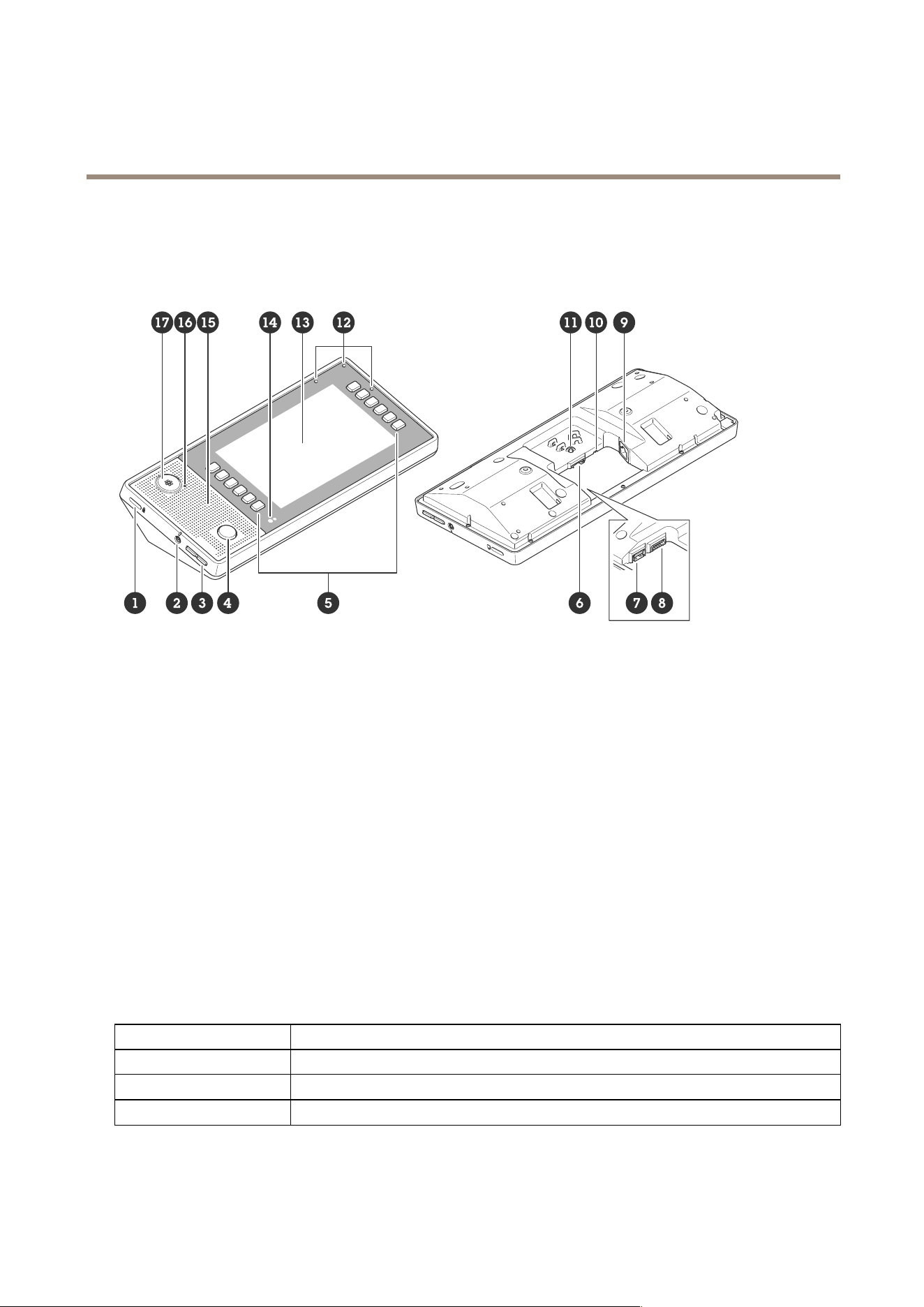
AXISC6110NetworkPagingConsole
Specifications
Specifications
Productoverview
1
Securityslot
2
Headsetconnector(3.5mmaudioconnector)
SeeAudioconnectoronpage47
3
Volumebuttons
4
Push-to-talkbutton
5
Softkeys
6
SDcardslotonpage47
7
USBconnector(notinuse)
8
I/Oconnectoronpage48
9
Networkconnectoronpage47(PoE)
10
StatusLED
11
Controlbuttononpage47
12
Built-inbeamformingmicrophone
13
7-inchcolordisplay
14
Lightandpresencesensor
15
Speaker
16
MicrophonestatusLED
17
XLRconnectorforgooseneckmicrophone
Theconnectorisplacedunderneaththecover,whichisreplacedifyouconnectagooseneckmicrophone.Formore
information,seeXLRconnectoronpage48
LEDIndicators
StatusLED
Indication
UnlitUnlitfornormaloperation.
GreenSteadygreenfornormaloperation.
Amber
Steadyduringstartupandwhenrestoringsettings.
46

AXISC6110NetworkPagingConsole
Specifications
Red
Slowashforfailedupgrade.
Red/GreenFlashesred/greenfastwhenidentifyinganaudiodeviceisselected.
SDcardslot
NO NO
NO
TICE TICE
TICE
•RiskofdamagetoSDcard.Don’tusesharptools,metalobjects,orexcessiveforcewheninsertingorremovingtheSDcard.
Useyourngerstoinsertandremovethecard.
•Riskofdatalossandcorruptedrecordings.UnmounttheSDcardfromthedevice’swebinterfacebeforeremovingit.
Don’tremovetheSDcardwhiletheproductisrunning.
ForSDcardrecommendations,seeaxis.com.
SD,SDHC,andSDXCLogosaretrademarksofSD-3CLLC.SD,SDHCandSDXCaretrademarksorregistered
trademarksofSD-3C,LLCintheUnitedStates,othercountriesorboth.
Buttons
Controlbutton
Thecontrolbuttonisusedfor:
•Calibratingthespeakertest.Pressandreleasethecontrolbuttonandatesttoneisplayed.
•Resettingtheproducttofactorydefaultsettings.SeeResettofactorydefaultsettingsonpage50.
Connectors
Networkconnector
RJ45EthernetconnectorwithPoweroverEthernet(PoE).
NO NO
NO
TICE TICE
TICE
Thedeviceshallbeconnectedusingashieldednetworkcable(STP).Allcablesconnectingthedevicetothenetworkshallbe
intendedfortheirspecicuse.Makesurethatthenetworkdevicesareinstalledinaccordancewiththemanufacturer’s
instructions.Forinformationaboutregulatoryrequirements,seetheInstallationGuideatwww.axis.com.
Audioconnector
3.5mminput/outputconnectorforheadset(4-poleTRRS)orheadphone(3-poleTRS).
Audioinput/outputforheadset(standard)
1Tip2Ring3Ring
4Sleeve
Channel1,unbalancedline,monoChannel1,unbalancedline,monoGround
Micro-
phone
Balancedline,“hot”signalBalancedline,“cold”signal
Ground
Micro-
phone
47

AXISC6110NetworkPagingConsole
Specifications
Stereounbalancedline,“left”Stereounbalancedline,“right”Ground
Micro-
phone
Channel1,unbalancedlineChannel2,unbalancedlineGround
Micro-
phone
XLRconnector
Formoreinformation,seeUseanAXISTC6901GooseneckMicrophoneonpage13
Pin
1
23
Function
Ground
BalancedMicrophoneHot(+)InBalancedMicrophoneCold(-)In
I/Oconnector
UsetheI/Oconnectorwithexternaldevicesincombinationwith,forexample,motiondetection,eventtriggering,andalarm
notications.Inadditiontothe0VDCreferencepointandpower(12VDCoutput),theI/Oconnectorprovidestheinterfaceto:
Digitalinput-Forconnectingdevicesthatcantogglebetweenanopenandclosedcircuit,forexamplePIRsensors,door/window
contacts,andglassbreakdetectors.
Digitaloutput-ForconnectingexternaldevicessuchasrelaysandLEDs.ConnecteddevicescanbeactivatedbytheVAPIX®
ApplicationProgrammingInterface,throughaneventorfromthedevice’swebinterface.
6-pinterminalblock
FunctionPinNotes
Specications
DCground
1
0VDC
DCoutput
2
Canbeusedtopowerauxiliaryequipment.
Note:Thispincanonlybeusedaspowerout.
12VDC
Maxload=25mA
DigitalI/O
3
Connecttopin1toactivate,orleaveoating(unconnected)
todeactivate.
0tomax30VDC
DigitalI/O
4
Internallyconnectedtopin1(DCground)whenactive,
andoating(unconnected)wheninactive.Ifusedwithan
inductiveload,e.g.,arelay,connectadiodeinparallelwith
theload,toprotectagainstvoltagetransients.
0tomax30VDC,opendrain,
100mA
RS485
5
RS485:A+
RS485
6
RS485:B+
48
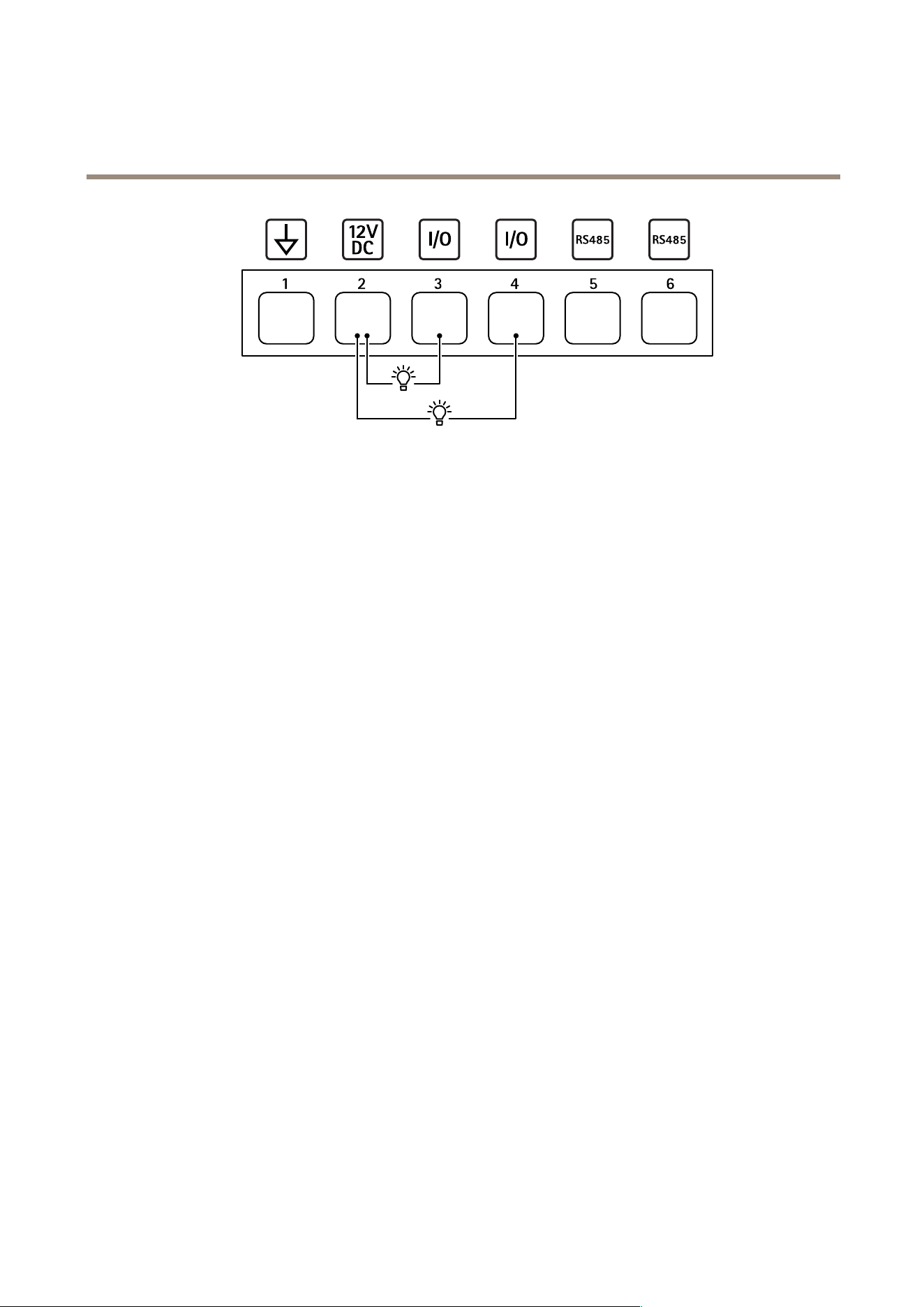
AXISC6110NetworkPagingConsole
Specifications
1
DCground
2
DCoutput12V,max50mA
3
DigitalI/O
4
DigitalI/O
5
CongurableI/O(RS485)
6
CongurableI/O(RS485)
49

AXISC6110NetworkPagingConsole
Troubleshooting
Troubleshooting
Resettofactorydefaultsettings
Important
Resettofactorydefaultshouldbeusedwithcaution.Aresettofactorydefaultresetsallsettings,includingtheIPaddress,to
thefactorydefaultvalues.
Toresettheproducttothefactorydefaultsettings:
1.Disconnectpowerfromtheproduct.
2.Pressandholdthecontrolbuttonwhilereconnectingpower.SeeProductoverviewonpage46.
3.Keepthecontrolbuttonpressedfor10secondsuntilthestatusLEDindicatorturnsamberforthesecondtime.
4.Releasethecontrolbutton.TheprocessiscompletewhenthestatusLEDindicatorturnsgreen.Theproducthasbeenreset
tothefactorydefaultsettings.IfnoDHCPserverisavailableonthenetwork,thedefaultIPaddressis192.168.0.90.
5.Usetheinstallationandmanagementsoftwaretools,assignanIPaddress,setthepassword,andaccesstheproduct.
Youcanalsoresetparameterstofactorydefaultthroughthedevice’swebinterface.GotoMaintenance>Factorydefaultand
clickDefault.
Contactsupport
Ifyouneedmorehelp,gotoaxis.com/support.
50

UsermanualVer.M1.22
AXISC6110NetworkPagingConsole
Date:June2024
©AxisCommunicationsAB,2024
Partno.T10201145
