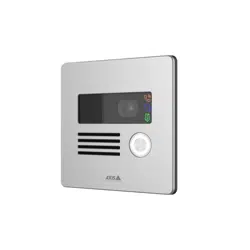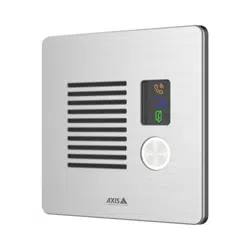


AXISI7010-VENetworkIntercom
TableofContents
Setupoverview.............................................3
Getstarted................................................4
Findthedeviceonthenetwork....................................4
Openthedevice'swebinterface....................................4
Createanadministratoraccount...................................4
Securepasswords...............................................4
Verifythatnoonehastamperedwiththedevicesoftware..............5
Congureyourdevice........................................6
SetupdirectSIP(P2P)...........................................6
SetupSIPthroughaserver(PBX)..................................6
Createacontact................................................7
Congurethecallbutton.........................................8
UseDTMFtounlockthedoorforavisitor............................8
Allowcredentialholderstoopenthedoor............................9
Setuprulesforevents...........................................9
Thewebinterface...........................................11
Status........................................................11
Video.........................................................12
Communication.................................................19
Reader........................................................
24
Audio.........................................................
26
Recordings.....................................................27
Apps..........................................................28
System........................................................
28
Maintenance...................................................
49
Learnmore................................................51
VoiceoverIP(VoIP)..............................................51
NATtraversal...................................................
52
Cybersecurity...................................................
53
Applications....................................................54
Specications..............................................55
Productoverview................................................
55
Frontpanelindicatorsandcontrols.................................55
LEDindicators..................................................
56
SDcardslot....................................................
56
Buttons.......................................................
56
Connectors....................................................
56
Connectequipment.........................................59
RelaypoweredbyPoE(12V).......................................59
Relaypoweredbyseparatepowersupply............................59
Potential-freerelay..............................................
60
12VFail-securelockpoweredbyPoEfromintercom...................60
12VFail-securelockpoweredbyexternalpowersupply.................60
Troubleshooting............................................
62
Resettofactorydefaultsettings...................................62
AXISOSoptions................................................62
CheckthecurrentAXISOSversion..................................62
UpgradeAXISOS................................................62
Technicalissues,clues,andsolutions................................63
Performanceconsiderations.......................................64
Contactsupport.................................................64
Safetyinformation..........................................65
Hazardlevels...................................................65
Othermessagelevels.............................................65
2
AXISI7010-VENetworkIntercom
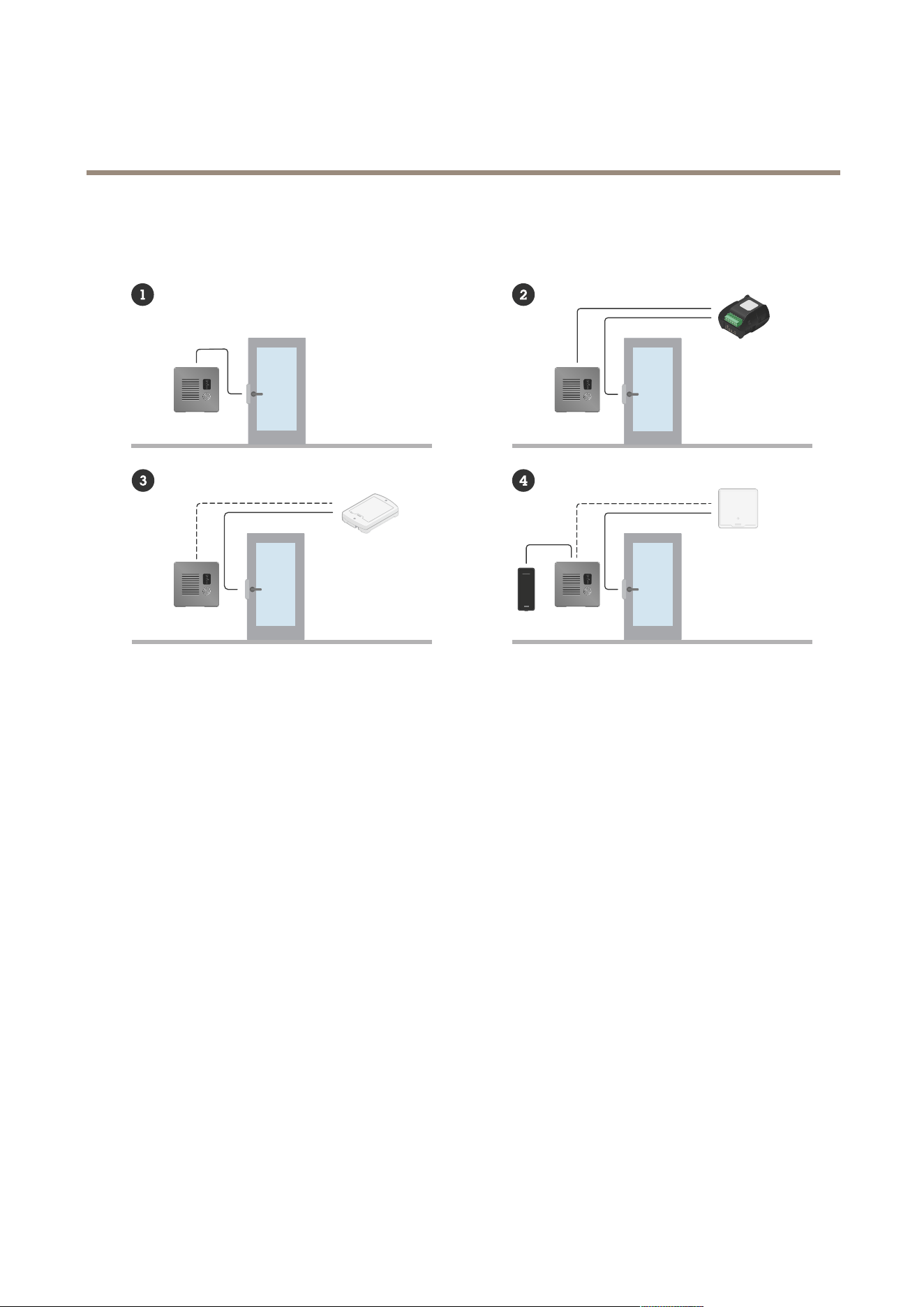
Setupoverview
Setupoverview
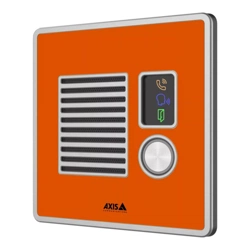
1
Intercom
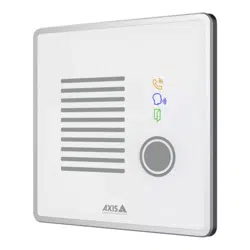
2
IntercomcombinedwithAXISA9801
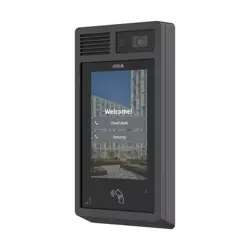
3
IntercomcombinedwithAXISA9161
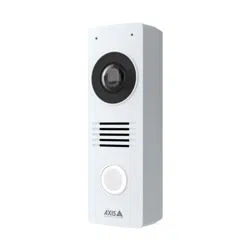
4
Intercomcombinedwithareaderandanaccesscontrolsystem
3

AXISI7010-VENetworkIntercom
Getstarted
Getstarted
Findthedeviceonthenetwork
TondAxisdevicesonthenetworkandassignthemIPaddressesinWindows®,useAXISIPUtilityorAXISDeviceManager.Both
applicationsarefreeandcanbedownloadedfromaxis.com/support.
FormoreinformationabouthowtondandassignIPaddresses,gotoHowtoassignanIPaddressandaccessyourdevice.
Browsersupport
Youcanusethedevicewiththefollowingbrowsers:
Chrome
TM
Firefox
®
Edge
TM
Safari
®
Windows
®
recommended
recommended
macOS
®
recommendedrecommended
Linux
®
recommendedrecommended
Otheroperatingsystems*
*TouseAXISOSwebinterfacewithiOS15oriPadOS15,gotoSettings Settings
Settings
> >
>
Safari Safari
Safari
> >
>
Advanced Advanced
Advanced
> >
>
Experimental Experimental
Experimental
Features Features
Features
anddisable
NSURLSessionWebsocket.
Ifyouneedmoreinformationaboutrecommendedbrowsers,gotoAXISOSPortal.
Openthedevice'swebinterface
1.OpenabrowserandtypetheIPaddressorhostnameoftheAxisdevice.
IfyoudonotknowtheIPaddress,useAXISIPUtilityorAXISDeviceManagertondthedeviceonthenetwork.
2.Typetheusernameandpassword.Ifyouaccessthedeviceforthersttime,youmustcreateanadministratoraccount.See
Createanadministratoraccountonpage4.
Fordescriptionsofallthecontrolsandoptionsinthedevice’swebinterface,seeThewebinterfaceonpage1 1.
Createanadministratoraccount
Thersttimeyoulogintoyourdevice,youmustcreateanadministratoraccount.
1.Enterausername.
2.Enterapassword.SeeSecurepasswordsonpage4.
3.Re-enterthepassword.
4.Acceptthelicenseagreement.
5.ClickAddaccount.
Important
Thedevicehasnodefaultaccount.Ifyoulosethepasswordforyouradministratoraccount,youmustresetthedevice.See
Resettofactorydefaultsettingsonpage62.
4

AXISI7010-VENetworkIntercom
Getstarted
Securepasswords
Important
Axisdevicessendtheinitiallysetpasswordincleartextoverthenetwork.Toprotectyourdeviceaftertherstlogin,set
upasecureandencryptedHTTPSconnectionandthenchangethepassword.
Thedevicepasswordistheprimaryprotectionforyourdataandservices.Axisdevicesdonotimposeapasswordpolicyasthey
maybeusedinvarioustypesofinstallations.
Toprotectyourdatawestronglyrecommendthatyou:
•Useapasswordwithatleast8characters,preferablycreatedbyapasswordgenerator.
•Don’texposethepassword.
•Changethepasswordatarecurringinterval,atleastonceayear.
Verifythatnoonehastamperedwiththedevicesoftware
TomakesurethatthedevicehasitsoriginalAXISOS,ortotakefullcontrolofthedeviceafterasecurityattack:
1.Resettofactorydefaultsettings.SeeResettofactorydefaultsettingsonpage62.
Afterthereset,securebootguaranteesthestateofthedevice.
2.Congureandinstallthedevice.
5

AXISI7010-VENetworkIntercom
Configureyourdevice
Configureyourdevice
Thissectioncoversalltheimportantcongurationsthataninstallerneedstodotogettheproductupandrunningafterthe
hardwareinstallationhasbeencompleted.
SetupdirectSIP(P2P)
VoIP(VoiceoverIP)isagroupoftechnologiesthatenablesvoiceandmultimediacommunicationoverIPnetworks.Formore
information,seeVoiceoverIP(VoIP)onpage51.
InthisdeviceVoIPisenabledthroughtheSIPprotocol.FormoreinformationaboutSIP,seeSessionInitiationProtocol(SIP)onpage51
TherearetwotypesofsetupsforSIP.Directorpeer-to-peer(P2P)isoneofthem.Usepeer-to-peerwhenthecommunicationis
betweenafewuseragentswithinthesameIPnetworkandthereisnoneedforextrafeaturesthataPBX-servercouldprovide.For
informationonhowtosetitup,seePeer-to-peerSIP(P2PSIP)onpage51.
1.GotoCommunication>SIP>SettingsandselectEnableSIP.
2.Toallowthedevicetoreceiveincomingcalls,selectAllowincomingcalls.
NO NO
NO
TICE TICE
TICE
Whenyouallowincomingcalls,thedeviceacceptscallsfromanydeviceconnectedtothenetwork.Ifthedeviceisaccessible
fromapublicnetworkortheinternet,werecommendyounottoallowincomingcalls.
3.ClickCallhandling.
4.InCallingtimeout,setthenumberofsecondsthatacallwilllastbeforeitendsifthereisnoanswer.
5.Ifyouhaveallowedincomingcalls,setthenumberofsecondsbeforetimeoutforincomingcallsinIncomingcalltimeout.
6.ClickPorts.
7.EntertheSIPportnumberandTLSportnumber.
Note
•SIPport–forSIPsessions.Signallingtrafcthroughthisportisnon-encrypted.Thedefaultportnumberis5060.
•TLSport–forSIPSandTLSsecuredSIPsessions.SignallingtrafcthroughthisportisencryptedwithTransportLayer
Security(TLS).Thedefaultportnumberis5061.
•RTPstartport–theportusedfortherstRTPmediastreaminaSIPcall.Thedefaultstartportis4000.Somerewallscan
blockRTPtrafconcertainportnumbers.Theportnumbermustbebetween1024and65535.
8.ClickNATtraversal.
9.SelecttheprotocolsyouwanttoenableforNATtraversal.
Note
UseNATtraversalwhenthedeviceisconnectedtothenetworkfrombehindaNATrouterorarewall.Formoreinformation
seeNATtraversalonpage52.
10.ClickSave.
SetupSIPthroughaserver(PBX)
VoIP(VoiceoverIP)isagroupoftechnologiesthatenablesvoiceandmultimediacommunicationoverIPnetworks.Formore
information,seeVoiceoverIP(VoIP)onpage51.
Inthisdevice,VoIPisenabledthroughtheSIPprotocol.FormoreinformationaboutSIP,seeSessionInitiationProtocol(SIP)onpage51
6

AXISI7010-VENetworkIntercom
Configureyourdevice
TherearetwotypesofsetupsforSIP.APBXserverisoneofthem.UseaPBXserverwhenthecommunicationshouldbebetweenan
innitenumberofuseragentswithinandoutsidetheIPnetwork.Additionalfeaturescouldbeaddedtothesetupdependingonthe
PBXprovider.Formoreinformation,seePrivateBranchExchange(PBX)onpage52.
1.RequestthefollowinginformationfromyourPBXprovider:
-UserID
-Domain
-Password
-AuthenticationID
-CallerID
-Registrar
-RTPstartport
2.GotoCommunication>SIP>Accountsandclick+Addaccount.
3.EnteraNamefortheaccount.
4.SelectRegistered.
5.Selectatransportmode.
6.AddtheaccountinformationfromthePBXprovider.
7.ClickSave.
8.SetuptheSIPsettingsinthesamewayasforpeer-to-peer,seeSetupdirectSIP(P2P)onpage6.UsetheRTPstart
portfromthePBXprovider.
Createacontact
Thisexampleexplainshowtocreateanewcontactinthecontactlist.Beforeyoustart,enableSIPinCommunication>SIP.
Tocreateanewcontact:
1.GotoCommunication>Contactlist.
2.Click+Addcontact.
3.Entertherstandlastnameofthecontact.
4.Enterthecontact’sSIPaddress.
Note
ForinformationaboutSIPaddresses,seeSessionInitiationProtocol(SIP)onpage51.
5.SelecttheSIPaccounttocallfrom.
Note
AvailabilityoptionsaredenedinSystem>Events>Schedules.
6.Choosethecontact’sAvailability.Ifthere’sacallwhenthecontactisn’tavailable,thecallgetscanceledunlessathere’s
afallbackcontact.
Note
Afallbackisacontact,towhomthecallgetsforwardediftheoriginalcontactdoesn’treplyorisn’tavailable.
7

AXISI7010-VENetworkIntercom
Configureyourdevice
7.InFallback,selectNone.
8.ClickSave.
Congurethecallbutton
Bydefault,thecallbuttonisconguredtomakeVMS(videomanagementsoftware)calls.Ifyouwanttokeepthisconguration,you
justneedtoaddtheAxisintercomtotheVMS.
Thisexampleexplainshowtosetupthesystemtocallacontactinthecontactlistwhenavisitorpressesthecallbutton.
1.GotoCommunication>Calls>Callbutton.
2.UnderRecipients,removeVMS.
3.UnderRecipients,selectanexistingorcreateanewcontact.
Todisablethecallbutton,turnoffEnablecallbutton.
UseDTMFtounlockthedoorforavisitor
Whenavisitormakesacallfromtheintercom,thepersonwhoanswerscanusetheDual-ToneMulti-Frequencysignaling(DTMF)
ofhisSIPdevicetounlockthedoor.Thedoorcontrollerunlocksandlocksthedoor.
Thisexampleexplainshowto:
•denetheDTMFsignalintheintercom
•setuptheintercomto:
-requestthedoorcontrollertounlockthedoor,or
-unlockthedoorusingtheinternalrelay.
Youmakeallsettingsintheintercom’swebpage.
Beforeyoustart
•AllowSIPcallsfromthedeviceandcreateaSIPaccount.SeeSetupdirectSIP(P2P)onpage6andSetupSIPthrough
aserver(PBX)onpage6.
DenetheDTMFsignalintheintercom
1.GotoCommunication>SIP>DTMF.
2.Click+Addsequence.
3.InSequence,enter1.
4.InDescription,enterUnlockdoor.
5.InAccounts,selecttheSIPaccount.
6.ClickSave.
Setuptheintercomtounlockthedoorusingtheinternalrelay
7.GotoSystem>Events>Rulesandaddarule.
8.IntheNameeld,enterDTMFunlockdoor.
9.Fromthelistofconditions,underCall,selectDTMFandUnlockdoor.
10.Fromthelistofactions,underI/O,selectToggleI/Oonce.
8

AXISI7010-VENetworkIntercom
Configureyourdevice
11.Fromthelistofports,selectRelay1.
12.ChangeDurationto00:00:07,whichmeansthatthedoorisopenfor7seconds.
13.ClickSave.
Allowcredentialholderstoopenthedoor
WithEntrylist,youcanmakeitpossibleforcredentialholderstousetheircardorPINtotriggeractions,suchasopeningadoor.This
exampleexplainshowtoaddacredentialholderwhocanusetheircardtoopenthedoor10times.
Prerequisites
•MakesurethecorrectchiptypeisactiveinReader>Chiptypes.
TurnonEntrylistandaddacredentialholder:
1.GotoReader>Entrylist.
2.TurnonUseEntrylist.
3.Click+Addcredentialholder.
4.Enterthecredentialholder'srstandlastname.Therstnamemustbeunique.
5.SelectCard.
6.Swipethecredentialholder'scardonthedeviceandclickGetlatest.
7.KeeptheeventconditionAccessgranted.
8.UnderValidto,selectNumberoftimes.
9.InNumberoftimes,enter10.
10.ClickSave.
Createarule:
1.GotoSystem>Events.
2.UnderRules,click+Addarule.
3.InName,enterOpendoor.
4.Inthelistofconditions,selectEntrylist>Accessgranted.
5.Inthelistofactions,selectI/O>ToggleI/Oonce.
6.Inthelistofports,selectDoor.
7.UnderState,selectActive.
8.Setthedurationto00:00:07.
9.ClickSave.
Setuprulesforevents
Youcancreaterulestomakeyourdeviceperformanactionwhencertaineventsoccur.Aruleconsistsofconditionsandactions.
Theconditionscanbeusedtotriggertheactions.Forexample,thedevicecanstartarecordingorsendanemailwhenitdetects
motion,orshowanoverlaytextwhilethedeviceisrecording.
Tolearnmore,checkoutourguideGetstartedwithrulesforevents.
9

AXISI7010-VENetworkIntercom
Configureyourdevice
Triggeranaction
1.GotoSystem>Eventsandaddarule.Theruledeneswhenthedevicewillperformcertainactions.Youcanset
uprulesasscheduled,recurring,ormanuallytriggered.
2.EnteraName.
3.SelecttheConditionthatmustbemettotriggertheaction.Ifyouspecifymorethanoneconditionfortherule,allofthe
conditionsmustbemettotriggertheaction.
4.SelectwhichActionthedeviceshouldperformwhentheconditionsaremet.
Note
Ifyoumakechangestoanactiverule,therulemustbeturnedonagainforthechangestotakeeffect.
10

AXISI7010-VENetworkIntercom
Thewebinterface
Thewebinterface
Toreachthedevice’swebinterface,typethedevice’sIPaddressinawebbrowser.
Note
Supportforthefeaturesandsettingsdescribedinthissectionvariesbetweendevices.Thisicon
indicatesthat
thefeatureorsettingisonlyavailableinsomedevices.
Showorhidethemainmenu.
Accessthereleasenotes.
Accesstheproducthelp.
Changethelanguage.
Setlightthemeordarktheme.
Theusermenucontains:
•Informationabouttheuserwhoisloggedin.
•
Changeaccount:Logoutfromthecurrentaccountandlogintoanewaccount.
•
Logout:Logoutfromthecurrentaccount.
Thecontextmenucontains:
•Analyticsdata:Accepttosharenon-personalbrowserdata.
•Feedback:Shareanyfeedbacktohelpusimproveyouruserexperience.
•Legal:Viewinformationaboutcookiesandlicenses.
•About:Viewdeviceinformation,includingAXISOSversionandserialnumber.
•Legacydeviceinterface:Changethedevice’swebinterfacetothelegacyversion.
Status
Deviceinfo
Showsthedeviceinformation,includingAXISOSversionandserialnumber.
UpgradeAXISOS:Upgradethesoftwareonyourdevice.TakesyoutotheMaintenancepagewhereyoucandotheupgrade.
Timesyncstatus
ShowsNTPsynchronizationinformation,includingifthedeviceisinsyncwithanNTPserverandthetimeremaininguntil
thenextsync.
NTPsettings:ViewandupdatetheNTPsettings.TakesyoutotheDateandtimepagewhereyoucanchangetheNTPsettings.
Security
11
AXISI7010-VENetworkIntercom
Thewebinterface
Showswhatkindofaccesstothedevicethatisactive,whatencryptionprotocolsareinuse,andifunsignedappsareallowed.
RecommendationstothesettingsarebasedontheAXISOSHardeningGuide.
Hardeningguide:LinktoAXISOSHardeningguidewhereyoucanlearnmoreaboutcybersecurityonAxisdevicesandbest
practices.
Connectedclients
Showsthenumberofconnectionsandconnectedclients.
Viewdetails:Viewandupdatethelistofconnectedclients.ThelistshowsIPaddress,protocol,port,state,andPID/process
ofeachconnection.
Ongoingrecordings
Showsongoingrecordingsandtheirdesignatedstoragespace.
Recordings:Viewongoingandlteredrecordingsandtheirsource.Formoreinformation,seeRecordingsonpage27
Showsthestoragespacewheretherecordingissaved.
Video
Installation
Capturemode:Acapturemodeisapresetcongurationthatdeneshowthecameracapturesimages.Whenyouchange
thecapturemode,itcanaffectmanyothersettings,suchasviewareasandprivacymasks.
Mountingposition
:Theorientationoftheimagecanchangedependingonhowyoumountthecamera.
Powerlinefrequency:Tominimizeimageicker,selectthefrequencyyourregionuses.TheAmericanregionsusuallyuse60Hz.
Therestoftheworldmostlyuses50Hz.Ifyou'renotsureofyourregion'spowerlinefrequency,checkwiththelocalauthorities.
Rotate:Selectthepreferredimageorientation.
Image
Appearance
Sceneprole:Selectasceneprolethatsuitsyoursurveillancescenario.Asceneproleoptimizesimagesettings,
includingcolorlevel,brightness,sharpness,contrast,andlocalcontrast,foraspecicenvironmentorpurpose.
•Forensic:Suitableforsurveillancepurposes.
•Indoor
:Suitableforindoorenvironments.
•Outdoor:Suitableforoutdoorenvironments.
•Vivid:Usefulfordemonstrationpurposes.
•Trafcoverview:Suitableforvehicletrafcmonitoring.
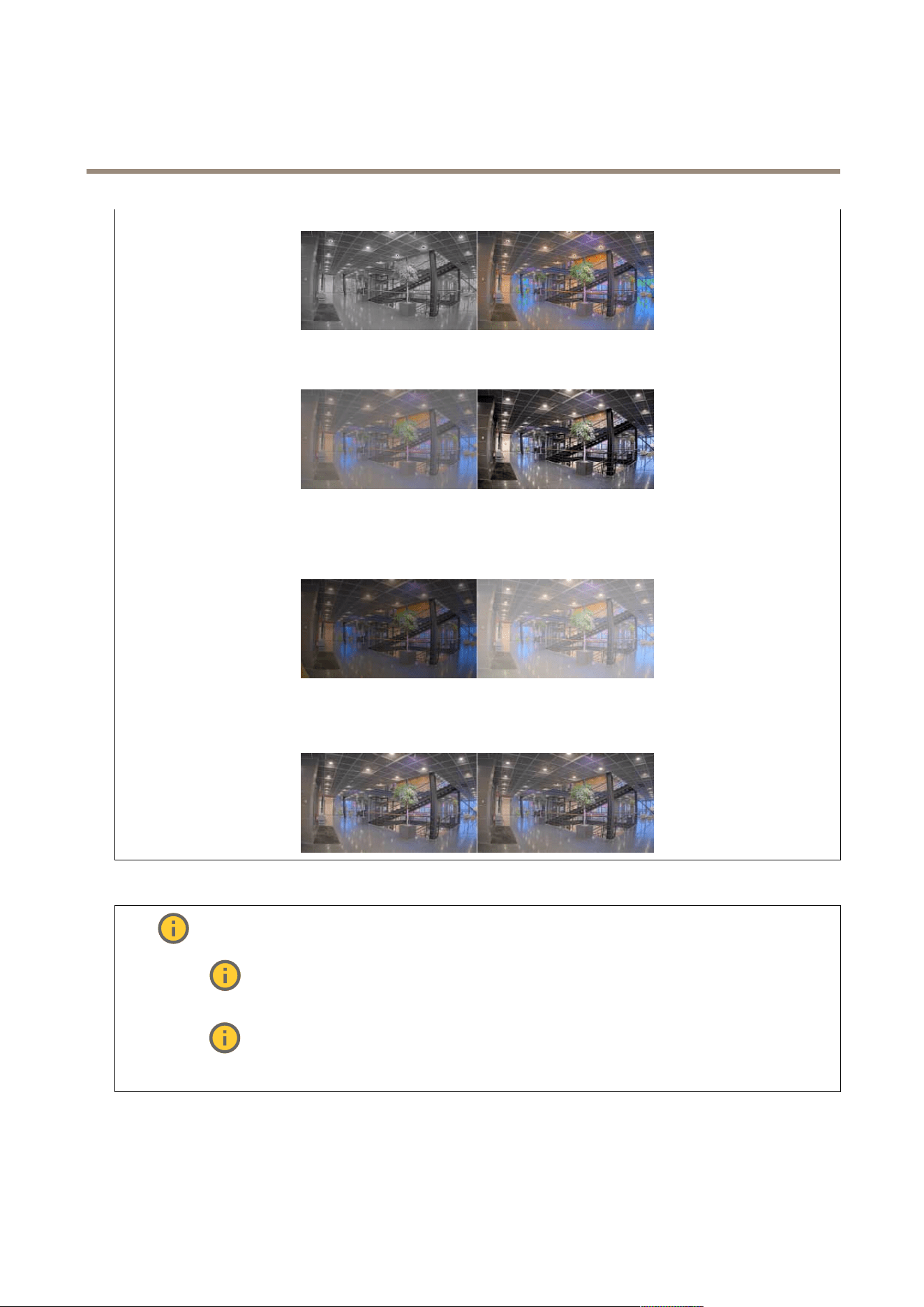
Saturation:Usetheslidertoadjustthecolorintensity.Youcan,forexample,getagrayscaleimage.
12
AXISI7010-VENetworkIntercom
Thewebinterface
Contrast:Usetheslidertoadjustthedifferencebetweenlightanddark.
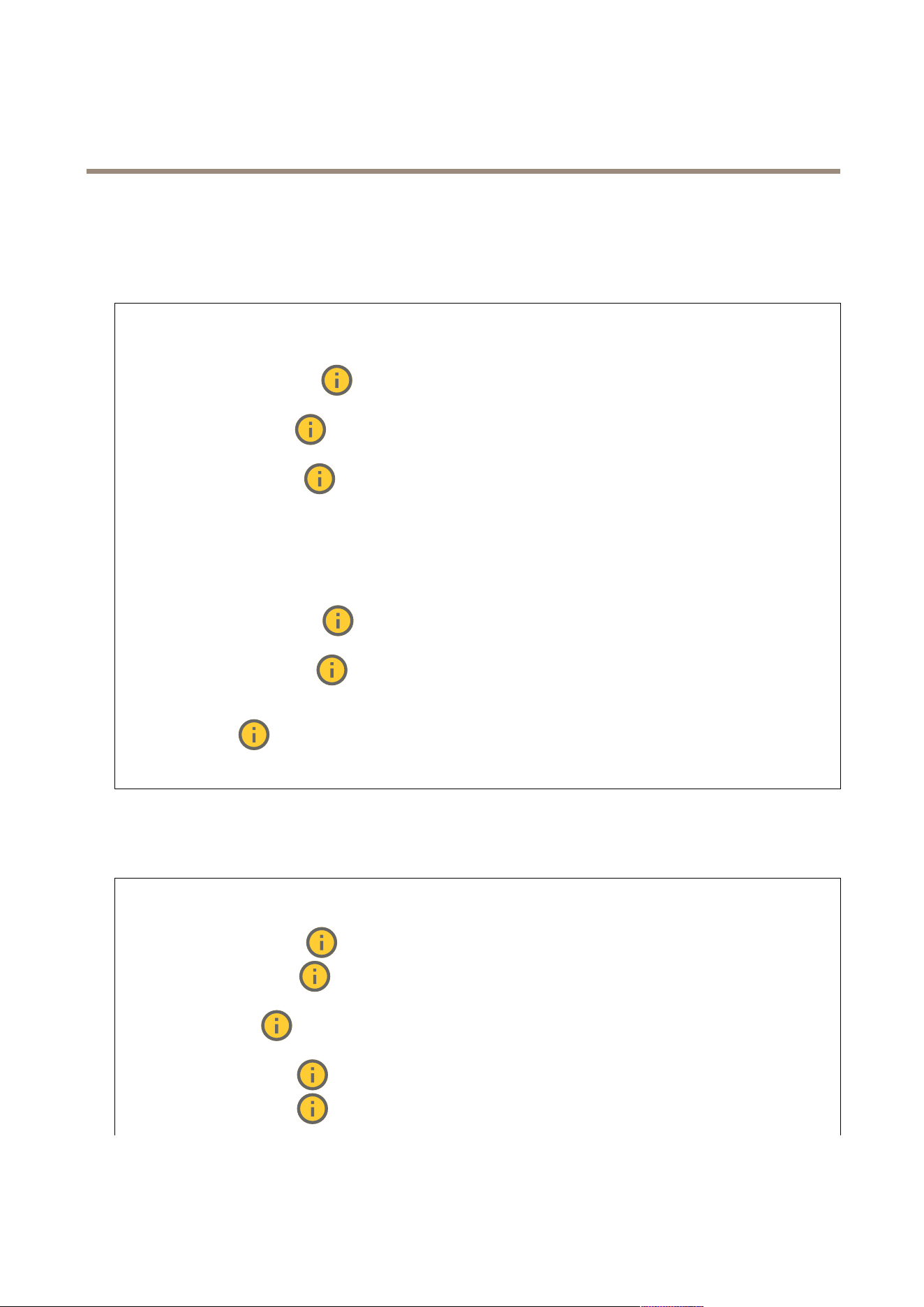
Brightness:Usetheslidertoadjustthelightintensity.Thiscanmakeobjectseasiertosee.Brightnessisappliedafterimage
capture,anddoesn’taffecttheinformationintheimage.Togetmoredetailsfromadarkarea,it’susuallybettertoincrease
gainorexposuretime.
Sharpness:Usetheslidertomakeobjectsintheimageappearsharperbyadjustingtheedgecontrast.Ifyouincreasethe
sharpness,itmayincreasethebitrateandtheamountofstoragespaceneededaswell.
Widedynamicrange
WDR:Turnontomakebothbrightanddarkareasoftheimagevisible.
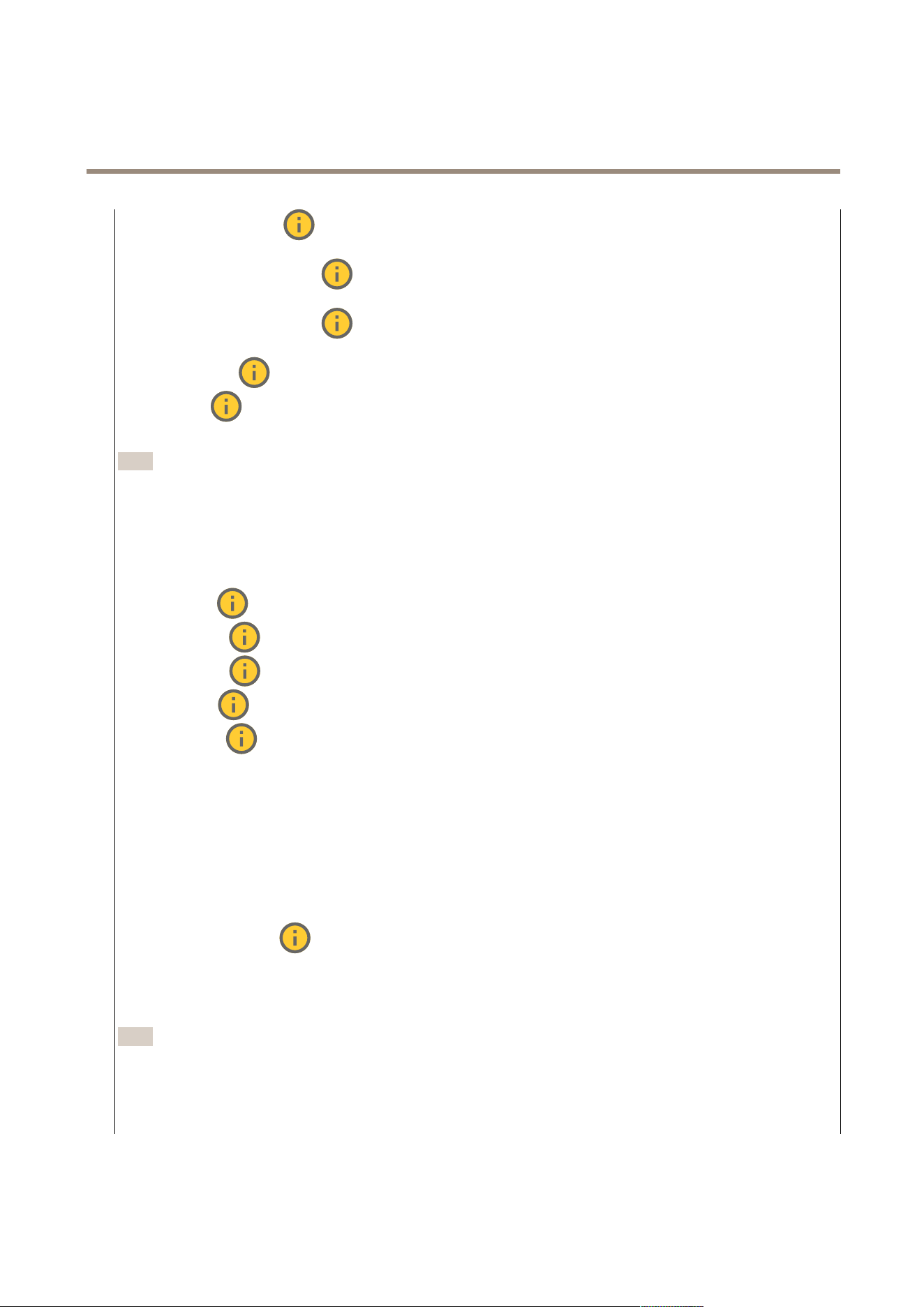
Localcontrast
:Usetheslidertoadjustthecontrastoftheimage.Ahighervaluemakesthecontrasthigherbetween
darkandlightareas.
Tonemapping:Usetheslidertoadjusttheamountoftonemappingthatisappliedtotheimage.Ifthevalueissetto
zero,onlythestandardgammacorrectionisapplied,whileahighervalueincreasesthevisibilityofthedarkestandbrightest
partsintheimage.
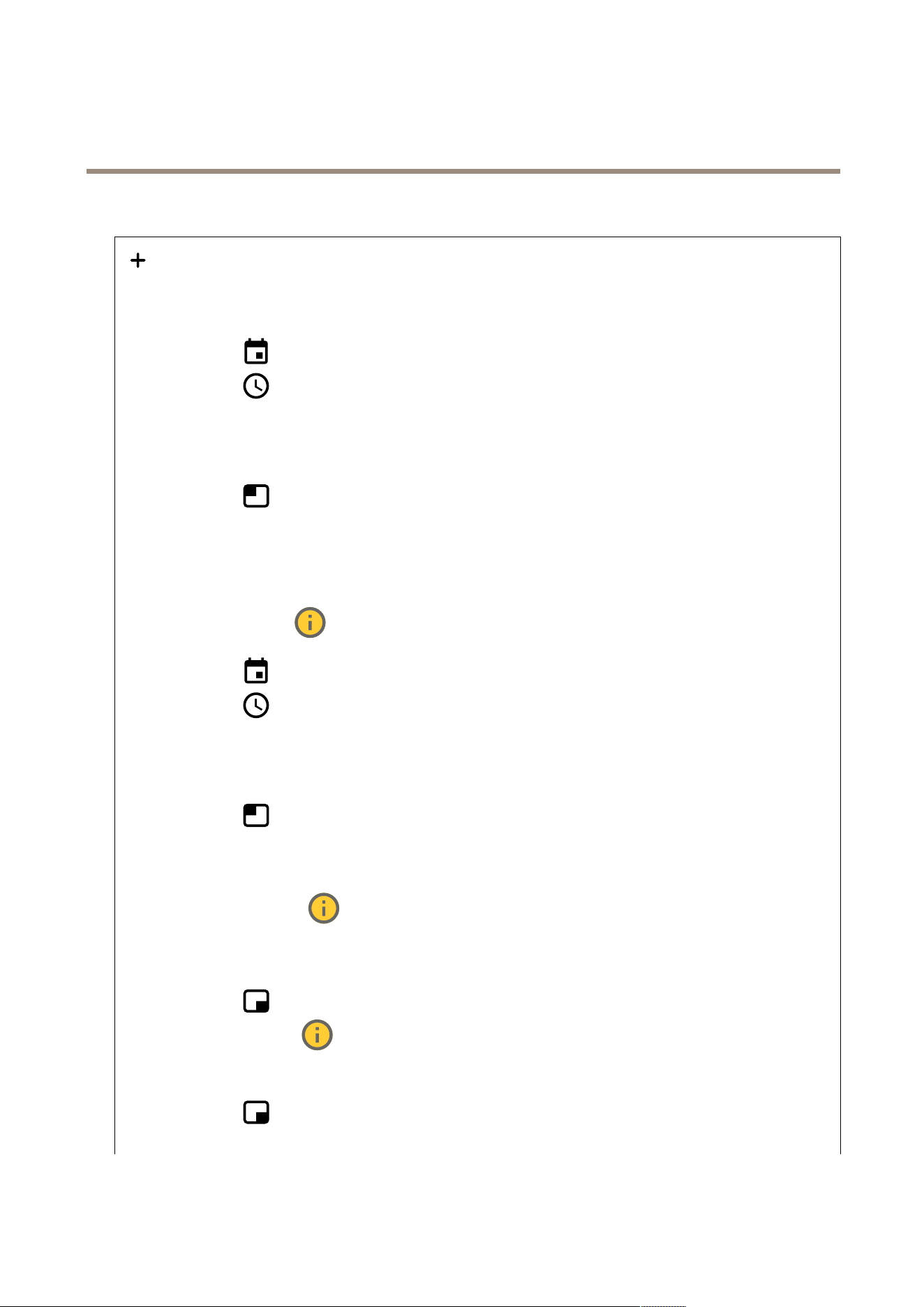
Whitebalance
Whenthecameradetectsthecolortemperatureoftheincominglight,itcanadjusttheimagetomakethecolorslookmorenatural.
Ifthisisnotsufcient,youcanselectasuitablelightsourcefromthelist.
13
AXISI7010-VENetworkIntercom
Thewebinterface
Theautomaticwhitebalancesettingreducestheriskofcolorickerbyadaptingtochangesgradually.Ifthelightingchanges,or
whenthecameraisrststarted,itcantakeupto30secondstoadapttothenewlightsource.Ifthereismorethanonetypeoflight
sourceinascene,thatis,theydifferincolortemperature,thedominatinglightsourceactsasareferencefortheautomaticwhite
balancealgorithm.Thisbehaviorcanbeoverriddenbychoosingaxedwhitebalancesettingthatmatchesthelightsourceyou
wanttouseasareference.
Lightenvironment:
•Automatic:Automaticidenticationandcompensationforthelightsourcecolor.Thisistherecommendedsetting
whichcanbeusedinmostsituations.
•Automatic–outdoors
:Automaticidenticationandcompensationforthelightsourcecolor.Thisisthe
recommendedsettingwhichcanbeusedinmostoutdoorsituations.
•Custom–indoors
:Fixedcoloradjustmentforaroomwithsomearticiallightotherthanuorescentlighting
andgoodforanormalcolortemperaturearound2800K.
•Custom–outdoors
:Fixedcoloradjustmentforsunnyweatherconditionswithacolortemperaturearound
5500K.
•Fixed–uorescent1:Fixedcoloradjustmentforuorescentlightingwithacolortemperaturearound4000K.
•Fixed–uorescent2:Fixedcoloradjustmentforuorescentlightingwithacolortemperaturearound3000K.
•Fixed–indoors:Fixedcoloradjustmentforaroomwithsomearticiallightotherthanuorescentlightingand
goodforanormalcolortemperaturearound2800K.
•Fixed–outdoors1:Fixedcoloradjustmentforsunnyweatherconditionswithacolortemperaturearound5500K.
•Fixed–outdoors2:Fixedcoloradjustmentforcloudyweatherconditionwithacolortemperaturearound6500K.
•Streetlight–mercury
:Fixedcoloradjustmentforultravioletemissioninmercuryvaporlightscommon
instreetlighting.
•Streetlight–sodium
:Fixedcoloradjustmentthatcompensatesfortheyelloworangecolorofsodiumvapor
lightscommoninstreetlighting.
•Holdcurrent:Keepthecurrentsettingsanddonotcompensateforlightchanges.
•Manual
:Fixthewhitebalancewiththehelpofawhiteobject.Dragthecircletoanobjectthatyouwant
thecameratointerpretaswhiteintheliveviewimage.UsetheRedbalanceandBluebalancesliderstoadjustthe
whitebalancemanually.
Exposure
Selectanexposuremodetoreducerapidlychangingirregulareffectsintheimage,forexample,ickerproducedbydifferenttypesof
lightsources.Werecommendyoutousetheautomaticexposuremode,orthesamefrequencyasyourpowernetwork.
Exposuremode:
•Automatic:Thecameraadjuststheaperture,gain,andshutterautomatically.
•Automaticaperture
:Thecameraadjuststheapertureandgainautomatically.Theshutterisxed.
•Automaticshutter
:Thecameraadjuststheshutterandgainautomatically.Theapertureisxed.
•Holdcurrent:Locksthecurrentexposuresettings.
•Flicker-free
:Thecameraadjuststheapertureandgainautomatically,andusesonlythefollowingshutter
speeds:1/50s(50Hz)and1/60s(60Hz).
•Flicker-free50Hz
:Thecameraadjuststheapertureandgainautomatically,andusestheshutterspeed1/50s.
•Flicker-free60Hz
:Thecameraadjuststheapertureandgainautomatically,andusestheshutterspeed1/60s.
14
AXISI7010-VENetworkIntercom
Thewebinterface
•Flicker-reduced:Thisisthesameasicker-free,butthecameramightuseshutterspeedsfasterthan
1/100s(50Hz)and1/120s(60Hz)forbrighterscenes.
•Flicker-reduced50Hz
:Thisisthesameasicker-free,butthecameramightuseshutterspeedsfaster
than1/100sforbrighterscenes.
•Flicker-reduced60Hz
:Thisisthesameasicker-free,butthecameramightuseshutterspeedsfaster
than1/120sforbrighterscenes.
•Manual
:Theaperture,gain,andshutterarexed.
Exposurezone
:Useexposurezonestooptimizetheexposureinaselectedpartofthescene,forexample,theareain
frontofanentrancedoor.
Note
Theexposurezonesarerelatedtotheoriginalimage(unrotated),andthenamesofthezonesapplytotheoriginalimage.
Thismeans,forexample,thatifthevideostreamisrotated90°,thentheUpperzonebecomestheRightzoneinthe
stream,andLeftbecomesLower.
•Automatic:Suitableformostsituations.
•Center:Usesaxedareainthecenteroftheimagetocalculatetheexposure.Theareahasaxedsizeand
positionintheliveview.
•Full
:Usestheentireliveviewtocalculatetheexposure.
•Upper
:Usesanareawithaxedsizeandpositionintheupperpartoftheimagetocalculatetheexposure.
•Lower
:Usesanareawithaxedsizeandpositioninthelowerpartoftheimagetocalculatetheexposure.
•Left
:Usesanareawithaxedsizeandpositionintheleftpartoftheimagetocalculatetheexposure.
•Right
:Usesanareawithaxedsizeandpositionintherightpartoftheimagetocalculatetheexposure.
•Spot:Usesanareawithaxedsizeandpositionintheliveviewtocalculatetheexposure.
•Custom:Usesanareaintheliveviewtocalculatetheexposure.Youcanadjustthesizeandpositionofthearea.
Maxshutter:Selecttheshutterspeedtoprovidethebestimage.Lowshutterspeeds(longerexposure)mightcausemotionblur
whenthereismovement,andatoohighshutterspeedmightaffecttheimagequality.Maxshutterworkswithmaxgainto
improvetheimage.
Maxgain:Selectthesuitablemaxgain.Ifyouincreasethemaxgain,itimprovesthevisiblelevelofdetailindarkimages,but
alsoincreasesthenoiselevel.Morenoisecanalsoresultinincreaseduseofbandwidthandstorage.Ifyousetthemaxgain
toahighvalue,imagescandifferalotifthelightconditionsareverydifferentfromdaytonight.Maxgainworkswithmax
shuttertoimprovetheimage.
Motion-adaptiveexposure
:Selecttoreducemotionblurinlow-lightconditions.
Blur-noisetrade-off:Usetheslidertoadjusttheprioritybetweenmotionblurandnoise.Ifyouwanttoprioritizelowbandwidth
andhavelessnoiseattheexpenseofdetailsinmovingobjects,movetheslidertowardsLownoise.Ifyouwanttoprioritizethe
preservationofdetailsinmovingobjectsattheexpenseofnoiseandbandwidth,movetheslidertowardsLowmotionblur.
Note
Youcanchangetheexposureeitherbyadjustingtheexposuretimeorbyadjustingthegain.Ifyouincreasetheexposure
time,itresultsinmoremotionblur,andifyouincreasethegain,itresultsinmorenoise.IfyouadjusttheBlur-noise
trade-offtowardsLownoise,theautomaticexposurewillprioritizelongerexposuretimesoverincreasinggain,andthe
oppositeifyouadjustthetrade-offtowardsLowmotionblur.Boththegainandexposuretimewilleventuallyreach
theirmaximumvaluesinlow-lightconditions,regardlessofthepriorityset.
15

AXISI7010-VENetworkIntercom
Thewebinterface
Lockaperture:TurnontokeeptheaperturesizesetbytheApertureslider.Turnofftoallowthecameratoautomatically
adjusttheaperturesize.Youcan,forexample,locktheapertureforsceneswithpermanentlightconditions.
Aperture:Usetheslidertoadjusttheaperturesize,thatis,howmuchlightpassesthroughthelens.Toallowmorelight
toenterthesensorandtherebyproduceabrighterimageinlow-lightconditions,movetheslidertowardsOpen.Anopenaperture
alsoreducesthedepthofeld,whichmeansthatobjectsclosetoorfarfromthecameracanappearunfocused.Toallowmoreof
theimagetobeinfocus,movetheslidertowardsClosed.
Exposurelevel:Usetheslidertoadjusttheimageexposure.
Defog
:Turnontodetecttheeffectsoffoggyweatherandautomaticallyremovethemforaclearerimage.
Note
WerecommendyounottoturnonDefoginsceneswithlowcontrast,largelightlevelvariations,orwhentheautofocusis
slightlyoff.Thiscanaffecttheimagequality,forexample,byincreasingthecontrast.Furthermore,toomuchlightcan
negativelyimpacttheimagequalitywhendefogisactive.
Stream
General
Resolution:Selecttheimageresolutionsuitableforthesurveillancescene.Ahigherresolutionincreasesbandwidthandstorage.
Framerate:Toavoidbandwidthproblemsonthenetworkorreducestoragesize,youcanlimittheframeratetoaxedamount.
Ifyouleavetheframerateatzero,theframerateiskeptatthehighestpossiblerateunderthecurrentconditions.Ahigher
frameraterequiresmorebandwidthandstoragecapacity.
P-frames:AP-frameisapredictedimagethatshowsonlythechangesintheimagefromthepreviousframe.Enterthedesired
numberofP-frames.Thehigherthenumber,thelessbandwidthisrequired.However,ifthereisnetworkcongestion,therecould
beanoticeabledeteriorationinthevideoquality.
Compression:Usetheslidertoadjusttheimagecompression.Highcompressionresultsinalowerbitrateandlowerimagequality.
Lowcompressionimprovestheimagequality,butusesmorebandwidthandstoragewhenyourecord.
Signedvideo
:Turnontoaddthesignedvideofeaturetothevideo.Signedvideoprotectsthevideofromtamperingby
addingcryptographicsignaturestothevideo.
Zipstream
Zipstreamisabitratereductiontechnology,optimizedforvideosurveillance,thatreducestheaveragebitrateinanH.264orH.265
streaminrealtime.AxisZipstreamappliesahighbitrateinsceneswheretherearemultipleregionsofinterest,forexample,inscenes
withmovingobjects.Whenthesceneismorestatic,Zipstreamappliesalowerbitrate,andtherebyreducestherequiredstorage.
Tolearnmore,seeReducingthebitratewithAxisZipstream
16

AXISI7010-VENetworkIntercom
Thewebinterface
SelectthebitratereductionStrength:
•Off:Nobitratereduction.
•Low:Novisiblequalitydegradationinmostscenes.Thisisthedefaultoptionanditcanbeusedinalltypes
ofscenestoreducethebitrate.
•Medium:Visibleeffectsinsomescenesthroughlessnoiseandaslightlylowerlevelofdetailinregionsoflower
interest,forexample,wherethere’snomovement.
•High:Visibleeffectsinsomescenesthroughlessnoiseandalowerlevelofdetailinregionsoflowerinterest,for
example,wherethere’snomovement.Werecommendthislevelforcloud-connecteddevicesanddevicesthat
uselocalstorage.
•Higher:Visibleeffectsinsomescenesthroughlessnoiseandalowerlevelofdetailinregionsoflowerinterest,
forexample,wherethere’snomovement.
•Extreme:Visibleeffectsinmostscenes.Thebitrateisoptimizedforsmallestpossiblestorage.
Optimizeforstorage:Turnontominimizethebitratewhilemaintainingquality.Theoptimizationdoesnotapplytothestream
showninthewebclient.ThiscanonlybeusedifyourVMSsupportsB-frames.TurningonOptimizeforstoragealsoturnson
DynamicGOP.
DynamicFPS(framespersecond):Turnontoallowthebandwidthtovarybasedonthelevelofactivityinthescene.More
activityrequiresmorebandwidth.
Lowerlimit:Enteravaluetoadjusttheframeratebetweenminimalfpsandthestreamdefaultfpsbasedonscenemotion.We
recommendyoutouselowerlimitinsceneswithverylittlemotion,wherethefpscoulddropto1orlower.
DynamicGOP(GroupofPictures):TurnontodynamicallyadjusttheintervalbetweenI-framesbasedonthelevelofactivity
inthescene.
Upperlimit:EnteramaximumGOPlength,thatis,themaximumnumberofP-framesbetweentwoI-frames.AnI-frameisa
self-containedimageframethatisindependentofotherframes.
Bitratecontrol
•Average:Selecttoautomaticallyadjustthebitrateoveralongertimeperiodandprovidethebestpossibleimage
qualitybasedontheavailablestorage.
-
Clicktocalculatethetargetbitratebasedonavailablestorage,retentiontime,andbitratelimit.
-Targetbitrate:Enterdesiredtargetbitrate.
-Retentiontime:Enterthenumberofdaystokeeptherecordings.
-Storage:Showstheestimatedstoragethatcanbeusedforthestream.
-Maximumbitrate:Turnontosetabitratelimit.
-Bitratelimit:Enterabitratelimitthatishigherthanthetargetbitrate.
•Maximum:Selecttosetamaximuminstantbitrateofthestreambasedonyournetworkbandwidth.
-Maximum:Enterthemaximumbitrate.
•Variable:Selecttoallowthebitratetovarybasedonthelevelofactivityinthescene.Moreactivityrequiresmore
bandwidth.Werecommendthisoptionformostsituations.
Orientation
Mirror:Turnontomirrortheimage.
Audio
Include:Turnontouseaudiointhevideostream.
Source
:Selectwhataudiosourcetouse.
Stereo
:Turnontoincludebuilt-inaudioaswellasaudiofromanexternalmicrophone.
17
AXISI7010-VENetworkIntercom
Thewebinterface
Overlays
:Clicktoaddanoverlay.Selectthetypeofoverlayfromthedropdownlist:
•Text:Selecttoshowatextthatisintegratedintheliveviewimageandvisibleinallviews,recordingsandsnapshots.
Youcanenteryourowntext,andyoucanalsoincludepre-conguredmodierstoautomaticallyshow,forexample,
time,date,andframerate.
-
:Clicktoaddthedatemodier%Ftoshowyyyy-mm-dd.
-
:Clicktoaddthetimemodier%Xtoshowhh:mm:ss(24-hourclock).
-Modiers:Clicktoselectanyofthemodiersshowninthelisttoaddthemtothetextbox.Forexample,
%ashowsthedayoftheweek.
-Size:Selectthedesiredfontsize.
-Appearance:Selectthetextcolorandbackgroundcolor,forexample,whitetextonablackbackground
(default).
-
:Selectthepositionoftheoverlayintheimage.
•Image:Selecttoshowastaticimagesuperimposedoverthevideostream.Youcanuse.bmp,.png,.jpeg,or.svgles.
Touploadanimage,clickImages.Beforeyouuploadanimage,youcanchooseto:
-Scalewithresolution:Selecttoautomaticallyscaletheoverlayimagetotthevideoresolution.
-Usetransparency:SelectandentertheRGBhexadecimalvalueforthatcolor.UsetheformatRRGGBB.
Examplesofhexadecimalvalues:FFFFFFforwhite,000000forblack,FF0000forred,6633FFforblue,and
669900forgreen.Onlyfor.bmpimages.
•Sceneannotation:Selecttoshowatextoverlayinthevideostreamthatstaysinthesameposition,even
whenthecamerapansortiltsinanotherdirection.Youcanchoosetoonlyshowtheoverlaywithincertainzoomlevels.
-
:Clicktoaddthedatemodier%Ftoshowyyyy-mm-dd.
-
:Clicktoaddthetimemodier%Xtoshowhh:mm:ss(24-hourclock).
-Modiers:Clicktoselectanyofthemodiersshowninthelisttoaddthemtothetextbox.Forexample,
%ashowsthedayoftheweek.
-Size:Selectthedesiredfontsize.
-Appearance:Selectthetextcolorandbackgroundcolor,forexample,whitetextonablackbackground
(default).
-
:Selectthepositionoftheoverlayintheimage.Theoverlayissavedandremainsinthepanand
tiltcoordinatesofthisposition.
-Annotationbetweenzoomlevels(%):Setthezoomlevelswhichtheoverlaywillbeshownwithin.
-Annotationsymbol:Selectasymbolthatappearsinsteadoftheoverlaywhenthecameraisnotwithinthe
setzoomlevels.
•Streamingindicator
:Selecttoshowananimationsuperimposedoverthevideostream.Theanimation
indicatesthatthevideostreamislive,evenifthescenedoesn’tcontainanymotion.
-Appearance:Selecttheanimationcolorandbackgroundcolor,forexample,redanimationonatransparent
background(default).
-Size:Selectthedesiredfontsize.
-
:Selectthepositionoftheoverlayintheimage.
•Widget:Linegraph
:Showagraphchartthatdisplayshowameasuredvaluechangesovertime.
-Title:Enteratitleforthewidget.
-Overlaymodier:Selectanoverlaymodierasdatasource.IfyouhavecreatedMQTToverlays,theywillbe
locatedattheendofthelist.
-
:Selectthepositionoftheoverlayintheimage.
-Size:Selectthesizeoftheoverlay.
18

AXISI7010-VENetworkIntercom
Thewebinterface
-Visibleonallchannels:Turnofftoshowonlyonyourcurrentlyselectedchannel.Turnontoshowonall
activechannels.
-Updateinterval:Choosethetimebetweendataupdates.
-Transparency:Setthetransparencyoftheentireoverlay.
-Backgroundtransparency:Setthetransparencyonlyofthebackgroundoftheoverlay.
-Points:Turnontoaddapointtothegraphlinewhendataisupdated.
-Xaxis
-Label:Enterthetextlabelforthexaxis.
-Timewindow:Enterhowlongtimethedataisvisualized.
-Timeunit:Enteratimeunitforthexaxis.
-Yaxis
-Label:Enterthetextlabelfortheyaxis.
-Dynamicscale:Turnonforthescaletoautomaticallyadapttothedatavalues.Turnofftomanuallyenter
valuesforaxedscale.
-MinalarmthresholdandMaxalarmthreshold:Thesevalueswilladdhorizontalreferencelinestothegraph,
makingiteasiertoseewhenthedatavaluebecomestoohighortoolow.
•Widget:Meter
:Showabarchartthatdisplaysthemostrecentlymeasureddatavalue.
-Title:Enteratitleforthewidget.
-Overlaymodier:Selectanoverlaymodierasdatasource.IfyouhavecreatedMQTToverlays,theywillbe
locatedattheendofthelist.
-
:Selectthepositionoftheoverlayintheimage.
-Size:Selectthesizeoftheoverlay.
-Visibleonallchannels:Turnofftoshowonlyonyourcurrentlyselectedchannel.Turnontoshowonall
activechannels.
-Updateinterval:Choosethetimebetweendataupdates.
-Transparency:Setthetransparencyoftheentireoverlay.
-Backgroundtransparency:Setthetransparencyonlyofthebackgroundoftheoverlay.
-Points:Turnontoaddapointtothegraphlinewhendataisupdated.
-Yaxis
-Label:Enterthetextlabelfortheyaxis.
-Dynamicscale:Turnonforthescaletoautomaticallyadapttothedatavalues.Turnofftomanuallyenter
valuesforaxedscale.
-MinalarmthresholdandMaxalarmthreshold:Thesevalueswilladdhorizontalreferencelinestothebar
chart,makingiteasiertoseewhenthedatavaluebecomestoohighortoolow.
Privacymasks
:Clicktocreateanewprivacymask.
Privacymasks:Clicktochangethecolorofallprivacymasks,ortodeleteallprivacymaskspermanently.
Maskx:Clicktorename,disable,orpermanentlydeletethemask.
Communication
Contactlist
Contacts
19

AXISI7010-VENetworkIntercom
Thewebinterface
Clicktodownloadthecontactlistasajsonle.
Clicktoimportacontactlist(json).
Addcontact:Clicktoaddanewcontacttothecontactlist.
Firstname:Enterthecontact’srstname.
Lastname:Enterthecontact’slastname.
Speeddial
:Enteranavailablespeeddialnumberforthecontact.Thisnumberisusedtocallthecontactfromthedevice.
SIPaddress:IfyouuseSIP,enterthecontact'sIPaddressorextension.
:Clicktomakeatestcall.Thecallwillautomaticallyendwhenanswered.
SIPaccount:IfyouuseSIP,selecttheSIPaccounttouseforthecallfromthedevicetothecontact.
Availability:Selectthecontact’savailabilityschedule.Ifacallisattemptedwhenthecontactisn’tavailable,thecalliscanceled
unlessthere’safallbackcontact.
Fallback:Ifapplicable,selectafallbackcontactfromthelist.
Thecontextmenucontains:
Editcontact:Editthecontact’sproperties.
Deletecontact:Deletethecontact.
SIP
Settings
SessionInitiationProtocol(SIP)isusedforinteractivecommunicationsessionsbetweenusers.Thesessionscanincludeaudio
andvideo.
SIPsetupassistant:ClicktosetupandcongureSIPstepbystep.
EnableSIP:CheckthisoptiontomakeitpossibletoinitiateandreceiveSIPcalls.
Allowincomingcalls:CheckthisoptiontoallowincomingcallsfromotherSIPdevices.
Callhandling
•Callingtimeout:Setthemaximumdurationofanattemptedcallifnooneanswers.
•Incomingcallduration:Setthemaximumtimeanincomingcallcanlast(max10min).
•Endcallsafter:Setthemaximumtimethatacallcanlast(max60minutes).SelectInnitecalldurationifyoudon’t
wanttolimitthelengthofacall.
Ports
Aportnumbermustbebetween1024and65535.
•SIPport:ThenetworkportusedforSIPcommunication.Thesignalingtrafcthroughthisportisnon-encrypted.
Thedefaultportnumberis5060.Enteradifferentportnumberifrequired.
•TLSport:ThenetworkportusedforencryptedSIPcommunication.Thesignalingtrafcthroughthisportisencrypted
withTransportLayerSecurity(TLS).Thedefaultportnumberis5061.Enteradifferentportnumberifrequired.
20

AXISI7010-VENetworkIntercom
Thewebinterface
•RTPstartport:ThenetworkportusedfortherstRTPmediastreaminaSIPcall.Thedefaultstartportnumberis
4000.SomerewallsblockRTPtrafconcertainportnumbers.
NATtraversal
UseNAT(NetworkAddressTranslation)traversalwhenthedeviceislocatedonanprivatenetwork(LAN)andyouwantto
makeitavailablefromoutsideofthatnetwork.
Note
ForNATtraversaltowork,theroutermustsupportit.TheroutermustalsosupportUPnP®.
EachNATtraversalprotocolcanbeusedseparatelyorindifferentcombinationsdependingonthenetworkenvironment.
•ICE:TheICE(InteractiveConnectivityEstablishment)protocolincreasesthechancesofndingthemostefcient
pathtosuccessfulcommunicationbetweenpeerdevices.IfyoualsoenableSTUNandTURN,youimprovetheICE
protocol’schances.
•STUN:STUN(SessionTraversalUtilitiesforNAT)isaclient-servernetworkprotocolthatletsthedevicedetermineif
itislocatedbehindaNATorrewall,andifsoobtainthemappedpublicIPaddressandportnumberallocatedfor
connectionstoremotehosts.EntertheSTUNserveraddress,forexample,anIPaddress.
•TURN:TURN(TraversalUsingRelaysaroundNAT)isaprotocolthatletsadevicebehindaNATrouterorrewallreceive
incomingdatafromotherhostsoverTCPorUDP.EntertheTURNserveraddressandthelogininformation.
Audioandvideo
•Audiocodecpriority:SelectatleastoneaudiocodecwiththedesiredaudioqualityforSIPcalls.Drag-and-dropto
changethepriority.
Note
Theselectedcodecsmustmatchthecallrecipientcodec,sincetherecipientcodecisdecisivewhenacallismade.
•Audiodirection:Selectallowedaudiodirections.
•H.264packetizationmode:Selectwhichpacketizationmodetouse.
-Auto:(Recommended)Thedevicedecideswhichpacketizationmodetouse.
-None:Nopacketizationmodeisset.Thismodeisofteninterpretedasmode0.
-0:Non-interleavedmode.
-1:SingleNALunitmode.
•Videodirection:Selectallowedvideodirections.
Additional
•UDP-to-TCPswitching:SelecttoallowcallstoswitchtransportprotocolsfromUDP(UserDatagramProtocol)toTCP
(TransmissionControlProtocol)temporarily.Thereasonforswitchingistoavoidfragmentation,andtheswitchcan
takeplaceifarequestiswithin200bytesofthemaximumtransmissionunit(MTU)orlargerthan1300bytes.
•Allowviarewrite:SelecttosendthelocalIPaddressinsteadoftherouter'spublicIPaddress.
•Allowcontactrewrite:SelecttosendthelocalIPaddressinsteadoftherouter'spublicIPaddress.
•Registerwithserverevery:SethowoftenyouwantthedevicetoregisterwiththeSIPserverfortheexisting
SIPaccounts.
•DTMFpayloadtype:ChangesthedefaultpayloadtypeforDTMF.
•Maxretransmissions:SetthemaximumnumberoftimesthedevicetriestoconnecttotheSIPserverbeforeit
stopstrying.
•Secondsuntilfailback:SetthenumberofsecondsuntilthedevicetriestoreconnecttotheprimarySIPserverafterit
hasfailedovertoasecondarySIPserver.
Accounts
21

AXISI7010-VENetworkIntercom
Thewebinterface
AllcurrentSIPaccountsarelistedunderSIPaccounts.Forregisteredaccounts,thecoloredcircleletsyouknowthestatus.
TheaccountissuccessfullyregisteredwiththeSIPserver.
Thereisaproblemwiththeaccount.Possiblereasonscanbeauthorizationfailure,thattheaccountcredentialsarewrong,
orthattheSIPservercan’tndtheaccount.
Thepeertopeer(default)accountisanautomaticallycreatedaccount.Youcandeleteitifyoucreateatleastoneotheraccount
andsetthataccountasdefault.ThedefaultaccountisalwaysusedwhenaVAPIX®ApplicationProgrammingInterface(API)call
ismadewithoutspecifyingwhichSIPaccounttocallfrom.
Addaccount:ClicktocreateanewSIPaccount.
•Active:Selecttobeabletousetheaccount.
•Makedefault:Selecttomakethisthedefaultaccount.Theremustbeadefaultaccount,andtherecanonly
beonedefaultaccount.
•Answerautomatically:Selecttoautomaticallyansweranincomingcall.
•PrioritizeIPv6overIPv4
:SelecttoprioritizeIPv6addressesoverIPv4addresses.Thisisusefulwhenyou
connecttopeer-to-peeraccountsordomainnamesthatresolveinbothIPv4andIPv6addresses.Youcanonly
prioritizeIPv6fordomainnamesthataremappedtoIPv6addresses.
•Name:Enteradescriptivename.Thiscan,forexample,bearstandlastname,arole,oralocation.Thenameis
notunique.
•UserID:Entertheuniqueextensionorphonenumberassignedtothedevice.
•Peer-to-peer:UsefordirectcallstoanotherSIPdeviceonthelocalnetwork.
•Registered:UseforcallstoSIPdevicesoutsidethelocalnetwork,throughaSIPserver.
•Domain:Ifavailable,enterthepublicdomainname.ItwillbeshownaspartoftheSIPaddresswhencallingother
accounts.
•Password:EnterthepasswordassociatedwiththeSIPaccountforauthenticatingagainsttheSIPserver.
•AuthenticationID:EntertheauthenticationIDusedforauthenticatingagainsttheSIPserver.Ifitisthesameasthe
userID,youdon’tneedtoentertheauthenticationID.
•CallerID:Thenamewhichispresentedtotherecipientofcallsfromthedevice.
•Registrar:EntertheIPaddressfortheregistrar.
•Transportmode:SelecttheSIPtransportmodefortheaccount:UPD,TCP,orTLS.
•TLSversion(onlywithtransportmodeTLS):SelecttheversionofTLStouse.Versionsv1.2andv1.3arethemost
secure.Automaticselectsthemostsecureversionthatthesystemcanhandle.
•Mediaencryption(onlywithtransportmodeTLS):Selectthetypeofencryptionformedia(audioandvideo)inSIPcalls.
•Certicate(onlywithtransportmodeTLS):Selectacerticate.
•Verifyservercerticate(onlywithtransportmodeTLS):Checktoverifytheservercerticate.
•SecondarySIPserver:TurnonifyouwantthedevicetotrytoregisteronasecondarySIPserverifregistration
ontheprimarySIPserverfails.
•SIPsecure:SelecttouseSecureSessionInitiationProtocol(SIPS).SIPSusestheTLStransportmodetoencrypttrafc.
•Proxies
-
Proxy:Clicktoaddaproxy.
-Prioritize:Ifyouhaveaddedtwoormoreproxies,clicktoprioritizethem.
-Serveraddress:EntertheIPaddressoftheSIPproxyserver.
-Username:Ifrequired,entertheusernamefortheSIPproxyserver.
-Password:Ifrequired,enterthepasswordfortheSIPproxyserver.
•Video
-Viewarea:Selecttheviewareatouseforvideocalls.Ifyouselectnone,thenativeviewisused.
-Resolution:Selecttheresolutiontouseforvideocalls.Theresolutionaffectstherequiredbandwidth.
-Framerate:Selectthenumberofframespersecondforvideocalls.Theframerateaffectstherequired
bandwidth.
-H.264prole:Selecttheproletouseforvideocalls.
DTMF
22

AXISI7010-VENetworkIntercom
Thewebinterface
Addsequence:Clicktocreateanewdual-tonemultifrequency(DTMF)sequence.Tocreatearulethatisactivatedby
touch-tone,gotoEvents>Rules.
Sequence:Enterthecharacterstoactivatetherule.Allowedcharacters:0–9,A-D,#,and*.
Description:Enteradescriptionoftheactiontobetriggeredbythesequence.
Accounts:SelecttheaccountsthatwillusetheDTMFsequence.Ifyouchoosepeer-to-peer,allpeer-to-peeraccountswillshare
thesameDTMFsequence.
Protocols
Selecttheprotocolstouseforeachaccount.Allpeer-to-peeraccountssharethesameprotocolsettings.
UseRTP(RFC2833):Turnontoallowdual-tonemultifrequency(DTMF)signaling,othertonesignalsandtelephonyeventsin
RTPpackets.
UseSIPINFO(RFC2976):TurntoincludetheINFOmethodtotheSIPprotocol.TheINFOmethodaddsoptionalapplicationlayer
information,generallyrelatedtothesession.
Testcall
SIPaccount:Selectwhichaccounttomakethetestcallfrom.
SIPaddress:EnteraSIPaddressandclick
tomakeatestcallandverifythattheaccountworks.
Accesslist
Useaccesslist:Turnontorestrictwhocanmakecallstothedevice.
Policy:
•Allow:Selecttoallowincomingcallsonlyfromthesourcesintheaccesslist.
•Block:Selecttoblockincomingcallsfromthesourcesintheaccesslist.
Addsource:Clicktocreateanewentryintheaccesslist.
SIPsource:TypethecallerIDorSIPserveraddressofthesource.
Calls
Callbutton
Enablecallbutton:Turnontomakeitpossibletousethecallbutton.
Standbylight:Selectanoptionforthebuilt-inlightaroundthecallbutton.
•Auto
:Thedeviceturnsthebuilt-inlightonandoffbasedonthesurroundinglight.
•On:Thebuilt-inlightisalwaysturnedonwhenthedeviceisinstandbymode.
•Off:Thebuilt-inlightisalwaysturnedoffwhenthedeviceisinstandbymode.
Recipients:Selectorcreateoneormorecontactstocallwhensomeonepressesthecallbutton.Ifyouaddmorethanone
recipient,thecallwillbeplacedtoallofthematthesametime.ThemaximumnumberofSIPcallrecipientsissix,while
youcanhaveanunlimitednumberofVMScallrecipients.
Fallback:Addafallbackcontactfromthelistincasenoneoftherecipientsreplies.
General
23

AXISI7010-VENetworkIntercom
Thewebinterface
Audio
Note
•Theselectedaudioclipisonlyplayedwhenacallismade.
•Ifyouchangetheaudiocliporgainduringanongoingcall,itdoesn’ttakeeffectuntilthenextcall.
Ringtone:Selecttheaudiocliptoplaywhensomeonemakesacalltothedevice.Usetheslidertoadjustthegain.
Ringbacktone:Selecttheaudiocliptoplaywhensomeonemakesacallfromthedevice.Usetheslidertoadjustthegain.
VMScalls
VMScalls
Allowcallsinthevideomanagementsoftware(VMS):SelecttoallowcallsfromthedevicetotheVMS.YoucanmakeVMS
callsevenifSIPisturnedoff.
Calltimeout:Setthemaximumdurationofanattemptedcallifnooneanswers.
Reader
Connection
Externalreader(Input)
UseexternalOSDPreader:Turnontousethedevicewithanexternalreader.Connectthereadertothereaderconnector.
Status:
•Connected:Thedeviceisconnectedtotheactiveexternalreader.
•Connecting:Thedeviceistryingtoconnecttotheexternalreader.
•Notconnected:OSDPisturnedoff.
Readerprotocol
Readerprotocoltype:Selecttheprotocoltouseforthereaderfunctionality.
•VAPIXreader:CanonlybeusedwithanAxisdoorcontroller.
-Protocol:SelectHTTPSorHTTP.
-Doorcontrolleraddress:EntertheIPaddressforthedoorcontroller.
-Username:Entertheusernameofthedoorcontroller.
-Password:Enterthepasswordofthedoorcontroller.
-Connect:Clicktoconnecttothedoorcontroller.
-Selectreader:Selecttheentrancereaderfortheappropriatedoor.
•OSDP:
-OSDPaddress:EntertheOSDPreaderaddress.0isthedefaultandmostcommonaddressforsinglereaders.
•Wiegand:
-Beeper:Turnontoactivatethebeeperinput.
-Inputforbeeper:SelecttheI/Oportusedforthebeeper.
-InputusedforLEDcontrol:SelecthowmanyI/OportstouseforcontrollingLEDfeedbackonthedevice.
-InputforLED1/LED2:SelectwhichI/OportstouseforLEDinput.
-Idlecolor:IfnoI/OportisusedtocontroltheLED,youcanselectastaticcolortoshowonthecardreader
indicatorstripe.
-Colorforstatelow/high:IfoneI/OportisusedforLEDcontrol,selectthecolortoshowforstatelowand
statehighrespectively.
24

AXISI7010-VENetworkIntercom
Thewebinterface
-Idlecolor/LED1color/LED2color/LED1+LED2color:IftwoI/OportsareusedforLEDcontrol,selectthe
colorstoshowforidle,LED1,LED2,andLED1+LED2respectively.
-Keypressformat:SelecthowtoformatthePINwhenit’ssenttotheaccesscontrolunit.
-FourBit:PIN1234isencodedandsentas0x10x20x30x4.Thisisthedefaultandmostcommonbehaviour.
-EightBitZeroPadded:PIN1234isencodedandsentas0x010x020x030x04.
-EightBitInvertPadded:PIN1234isencodedandsentas0xE10xD20xC30xB4.
-Wiegand26:ThePINisencodedinWiegand26formatwithan8bitfacilitycodeanda16bitid.
-Wiegand34:ThePINisencodedinaWiegand34formatwitha16bitfacilitycodeanda16bitid.
-Wiegand37:ThePINisencodedinaWiegand37format(H10302)witha35bitid.
-Wiegand37FacilityCode:ThePINisencodedinaWiegand37format(H10304)witha16bitfacilitycodeand
a19bitid.
-Facilitycode:Enterthefacilitycodetobesent.Thisoptionisonlyavailableforsomekeypressformats.
Outputformat
Selectdataformat:Selectinwhichformattosendcarddatatotheaccesscontrolunit.
•Raw:Transmitsthecarddataasitis.
•Wiegand26:EncodesthecarddatainWiegand26formatwithan8bitfacilitycodeanda16bitid.
•Wiegand34:EncodesthecarddatainWiegand34formatwitha16bitfacilitycodeanda16bitid.
•Wiegand37:EncodesthecarddatainWiegand37format(H10302)witha35bitid.
•Wiegand37FacilityCode:EncodesthecarddatainWiegand37format(H10304)witha16bitfacilitycodeand
a19bitid.
•Custom:Deneyourownformatting.
Facilitycodeoverridemode:Selectanoptionforoverridingthefacilitycode.
•Auto:Doesn’toverridethefacilitycode,andcreatesafacilitycodefromtheinputdataautodetection.Eitherusesthe
card’soriginalfacilitycode,orforgesitfromexcessbitsofacardnumber.
•Optional:Usesthefacilitycodefromtheinputdata,oroverrideswithaconguredoptionalvalue.
•Override:Alwaysoverrideswithaspeciedfacilitycode.
PIN
ThePINsettingsmustmatchtheonesconguredintheaccesscontrolunit.
Length(0–32):EnterthenumberofdigitsinthePIN.Ifusersaren’trequiredtouseaPINwhentheyusethereader,setthe
lengthto0.
Timeout(seconds,3–50):Enterthenumberofsecondsthatneedtopassbeforethedevicereturnstoidlemodewhenno
PINisreceived.
Entrylist
WithEntrylist,youcansetupthedevicetoallowcredentialholderstousetheircardorPINtoperformdifferentactions,suchas
openingadoor.Youstorethecredentialslocallyinthedevice.Youcanalsocombinethisfunctionalitywithanexternaldoorcontroller.
UseEntrylist:TurnontousetheEntrylistfunctionality.
Useconnecteddoorcontroller:Turnonifthedeviceisalreadyconnectedtoadoorcontroller.Ifsomeonepresentsacredential
thatdoesn’texistinEntrylist,we’llsendtherequesttotheconnecteddoorcontroller.Wedon’tsendcredentialsthatare
availableinEntrylist.
Addcredentialholder:Clicktoaddanewcredentialholder.
Firstname:Enterarstname.
Lastname:Enteralastname.
Credentialtype:
25
AXISI7010-VENetworkIntercom
Thewebinterface
•PIN:
-PIN:EnterauniquePINorclickGeneratetocreateoneautomatically.
•Card:
-UID:Enterthecard’sUIDandbitlength,orclickGetlatesttofetchthedatafromthelatestcardswipe.
Eventcondition:Selectoneormoreconditionstotriggerwhenthecredentialholderusestheircredential.Tosetuptheresulting
action,gotoSystem>Eventsandcreatearule,usingthesameconditionyouselecthere.
Validfrom:SelectCurrentdevicetimetoactivatethecredentialimmediately.Cleartospecifywhentoactivatethecredential.
Validto:
•Noenddate:Credentialisvalidindenitely.
•Enddate:Specifythedateandtimewhenthecredentialbecomesinvalid.
•Numberoftimes:Specifyhowmanytimesthecredentialholdercanusethecredential.Thevalueintheeldreduces
asthecredentialisused,toshowtheremaininguses.
Notes:Enteroptionalinformation.
Suspend:Selecttomakethecredentialtemporarilyinvalid.
Audio
Devicesettings
Input:Turnonoroffaudioinput.Showsthetypeofinput.
Noisecancellation:Turnontoimproveaudioqualitybyremovingbackgroundnoise.
Inputtype
:Selectthetypeofinput,forinstance,ifit’sinternalmicrophoneorline.
Powertype
:Selectpowertypeforyourinput.
Applychanges
:Applyyourselection.
Echocancellation
:Turnontoremoveechoesduringtwo-waycommunication.
Separategaincontrols
:Turnontoadjustthegainseparatelyforthedifferentinputtypes.
Automaticgaincontrol
:Turnontodynamicallyadaptthegaintochangesinthesound.
Gain:Usetheslidertochangethegain.Clickthemicrophoneicontomuteorunmute.
Output:Showsthetypeofoutput.
Gain:Usetheslidertochangethegain.Clickthespeakericontomuteorunmute.
Stream
Encoding:Selecttheencodingtousefortheinputsourcestreaming.Youcanonlychooseencodingifaudioinputisturnedon.If
audioinputisturnedoff,clickEnableaudioinputtoturniton.
26
AXISI7010-VENetworkIntercom
Thewebinterface
Audioclips
Addclip:Addanewaudioclip.Youcanuse.au,.mp3,.opus,.vorbis,.wavles.
Playtheaudioclip.
Stopplayingtheaudioclip.
Thecontextmenucontains:
•Rename:Changethenameoftheaudioclip.
•Createlink:CreateaURLthat,whenused,playstheaudiocliponthedevice.Specifythevolumeandnumber
oftimestoplaytheclip.
•Download:Downloadtheaudiocliptoyourcomputer.
•Delete:Deletetheaudioclipfromthedevice.
Recordings
Ongoingrecordings:Showallongoingrecordingsonthedevice.
Startarecordingonthedevice.
Choosewhichstoragedevicetosaveto.
Stoparecordingonthedevice.
Triggeredrecordingswillendwhenmanuallystoppedorwhenthedeviceisshutdown.
Continuousrecordingswillcontinueuntilmanuallystopped.Evenifthedeviceisshutdown,therecordingwillcontinuewhen
thedevicestartsupagain.
Playtherecording.
Stopplayingtherecording.
Showorhideinformationandoptionsabouttherecording.
Setexportrange:Ifyouonlywanttoexportpartoftherecording,enteratimespan.Notethatifyouworkinadifferenttime
zonethanthelocationofthedevice,thetimespanisbasedonthedevice’stimezone.
Encrypt:Selecttosetapasswordforexportedrecordings.Itwillnotbepossibletoopentheexportedlewithoutthepassword.
Clicktodeletearecording.
Export:Exportthewholeorapartoftherecording.
27
AXISI7010-VENetworkIntercom
Thewebinterface
Clicktoltertherecordings.
From:Showrecordingsdoneafteracertainpointintime.
To:Showrecordingsupuntilacertainpointintime.
Source
:Showrecordingsbasedonsource.Thesourcereferstothesensor.
Event:Showrecordingsbasedonevents.
Storage:Showrecordingsbasedonstoragetype.
Apps
Addapp:Installanewapp.
Findmoreapps:Findmoreappstoinstall.YouwillbetakentoanoverviewpageofAxisapps.
Allowunsignedapps:Turnontoallowinstallationofunsignedapps.
Allowroot-privilegedapps
:Turnontoallowappswithrootprivilegesfullaccesstothedevice.
ViewthesecurityupdatesinAXISOSandACAPapps.
Note
Thedevice’sperformancemightbeaffectedifyourunseveralappsatthesametime.
Usetheswitchnexttotheappnametostartorstoptheapp.
Open:Accesstheapp’ssettings.Theavailablesettingsdependontheapplication.Someapplicationsdon’thaveanysettings.
Thecontextmenucancontainoneormoreofthefollowingoptions:
•Open-sourcelicense:Viewinformationaboutopen-sourcelicensesusedintheapp.
•Applog:Viewalogoftheappevents.Thelogishelpfulwhenyoucontactsupport.
•Activatelicensewithakey:Iftheapprequiresalicense,youneedtoactivateit.Usethisoptionifyourdevice
doesn’thaveinternetaccess.
Ifyoudon’thavealicensekey,gotoaxis.com/products/analytics.YouneedalicensecodeandtheAxisproductserial
numbertogeneratealicensekey.
•Activatelicenseautomatically:Iftheapprequiresalicense,youneedtoactivateit.Usethisoptionifyourdevicehas
internetaccess.Youneedalicensecodetoactivatethelicense.
•Deactivatethelicense:Deactivatethelicensetoreplaceitwithanotherlicense,forexample,whenyouchangefroma
triallicensetoafulllicense.Ifyoudeactivatethelicense,youalsoremoveitfromthedevice.
•Settings:Conguretheparameters.
•Delete:Deletetheapppermanentlyfromthedevice.Ifyoudon’tdeactivatethelicenserst,itremainsactive.
System
Timeandlocation
Dateandtime
28

AXISI7010-VENetworkIntercom
Thewebinterface
Thetimeformatdependsonthewebbrowser’slanguagesettings.
Note
Werecommendyousynchronizethedevice’sdateandtimewithanNTPserver.
Synchronization:Selectanoptionforthedevice’sdateandtimesynchronization.
•Automaticdateandtime(manualNTSKEservers):SynchronizewiththesecureNTPkeyestablishmentservers
connectedtotheDHCPserver.
-ManualNTSKEservers:EntertheIPaddressofoneortwoNTPservers.WhenyouusetwoNTPservers,
thedevicesynchronizesandadaptsitstimebasedoninputfromboth.
-MaxNTPpolltime:SelectthemaximumamountoftimethedeviceshouldwaitbeforeitpollstheNTP
servertogetanupdatedtime.
-MinNTPpolltime:SelecttheminimumamountoftimethedeviceshouldwaitbeforeitpollstheNTP
servertogetanupdatedtime.
•Automaticdateandtime(NTPserversusingDHCP):SynchronizewiththeNTPserversconnectedtotheDHCPserver.
-FallbackNTPservers:EntertheIPaddressofoneortwofallbackservers.
-MaxNTPpolltime:SelectthemaximumamountoftimethedeviceshouldwaitbeforeitpollstheNTP
servertogetanupdatedtime.
-MinNTPpolltime:SelecttheminimumamountoftimethedeviceshouldwaitbeforeitpollstheNTP
servertogetanupdatedtime.
•Automaticdateandtime(manualNTPservers):SynchronizewithNTPserversofyourchoice.
-ManualNTPservers:EntertheIPaddressofoneortwoNTPservers.WhenyouusetwoNTPservers,the
devicesynchronizesandadaptsitstimebasedoninputfromboth.
-MaxNTPpolltime:SelectthemaximumamountoftimethedeviceshouldwaitbeforeitpollstheNTP
servertogetanupdatedtime.
-MinNTPpolltime:SelecttheminimumamountoftimethedeviceshouldwaitbeforeitpollstheNTP
servertogetanupdatedtime.
•Customdateandtime:Manuallysetthedateandtime.ClickGetfromsystemtofetchthedateandtimesettings
oncefromyourcomputerormobiledevice.
Timezone:Selectwhichtimezonetouse.Timewillautomaticallyadjusttodaylightsavingtimeandstandardtime.
•DHCP:AdoptsthetimezoneoftheDHCPserver.ThedevicemustconnectedtoaDHCPserverbeforeyoucanselect
thisoption.
•Manual:Selectatimezonefromthedrop-downlist.
Note
Thesystemusesthedateandtimesettingsinallrecordings,logs,andsystemsettings.
Devicelocation
Enterwherethedeviceislocated.Yourvideomanagementsystemcanusethisinformationtoplacethedeviceonamap.
•Latitude:Positivevaluesarenorthoftheequator.
•Longitude:Positivevaluesareeastoftheprimemeridian.
•Heading:Enterthecompassdirectionthatthedeviceisfacing.0isduenorth.
•Label:Enteradescriptivenameforthedevice.
•Save:Clicktosaveyourdevicelocation.
29
AXISI7010-VENetworkIntercom
Thewebinterface
Congurationcheck
Interactivedeviceimage:Clickthebuttonsintheimagetosimulaterealkeypresses.Thisallowsyoutotryoutcongurationsor
troubleshootthehardwarewithouthavingphysicalaccesstothedevice.
Latestcredentials
:Showsinformationaboutthecredentialsthatwerelastregistered.
Showthelatestcredentialsdata.
Thecontextmenucontains:
•ReverseUID:InvertthebyteorderoftheUID.
•RevertUID:RevertthebyteorderoftheUIDbacktotheoriginalorder.
•Copytoclipboard:CopytheUID.
Checkcredentials
:EnteraUIDoraPINandsubmittocheckthecredentials.Thesystemwillrespondinthesamewayas
ifyouusedthecredentialsatthedevice.IfbothUIDandPINisrequired,startbyenteringtheUID.
Network
IPv4
AssignIPv4automatically:SelecttoletthenetworkrouterassignanIPaddresstothedeviceautomatically.Werecommend
automaticIP(DHCP)formostnetworks.
IPaddress:EnterauniqueIPaddressforthedevice.StaticIPaddressescanbeassignedatrandomwithinisolatednetworks,
providedthateachaddressisunique.Toavoidconicts,werecommendyoucontactyournetworkadministratorbeforeyou
assignastaticIPaddress.
Subnetmask:Enterthesubnetmasktodenewhataddressesareinsidethelocalareanetwork.Anyaddressoutsidethelocal
areanetworkgoesthroughtherouter.
Router:EntertheIPaddressofthedefaultrouter(gateway)usedtoconnectdevicesthatareattachedtodifferentnetworksand
networksegments.
FallbacktostaticIPaddressifDHCPisn’tavailable:SelectifyouwanttoaddastaticIPaddresstouseasfallbackifDHCP
isunavailableandcan’tassignanIPaddressautomatically.
Note
IfDHCPisn’tavailableandthedeviceusesastaticaddressfallback,thestaticaddressisconguredwithalimitedscope.
IPv6
AssignIPv6automatically:SelecttoturnonIPv6andtoletthenetworkrouterassignanIPaddresstothedeviceautomatically.
Hostname
Assignhostnameautomatically:Selecttoletthenetworkrouterassignahostnametothedeviceautomatically.
Hostname:Enterthehostnamemanuallytouseasanalternativewayofaccessingthedevice.Theserverreportandsystemlog
usethehostname.AllowedcharactersareA–Z,a–z,0–9and-.
DNSservers
30

AXISI7010-VENetworkIntercom
Thewebinterface
AssignDNSautomatically:SelecttolettheDHCPserverassignsearchdomainsandDNSserveraddressestothedevice
automatically.WerecommendautomaticDNS(DHCP)formostnetworks.
Searchdomains:Whenyouuseahostnamethatisnotfullyqualied,clickAddsearchdomainandenteradomaininwhichto
searchforthehostnamethedeviceuses.
DNSservers:ClickAddDNSserverandentertheIPaddressoftheDNSserver.ThisprovidesthetranslationofhostnamestoIP
addressesonyournetwork.
HTTPandHTTPS
HTTPSisaprotocolthatprovidesencryptionforpagerequestsfromusersandforthepagesreturnedbythewebserver.Theencrypted
exchangeofinformationisgovernedbytheuseofanHTTPScerticate,whichguaranteestheauthenticityoftheserver.
TouseHTTPSonthedevice,youmustinstallanHTTPScerticate.GotoSystem>Securitytocreateandinstallcerticates.
Allowaccessthrough:SelectifauserisallowedtoconnecttothedevicethroughtheHTTP,HTTPS,orbothHTTPandHTTPS
protocols.
Note
IfyouviewencryptedwebpagesthroughHTTPS,youmightexperienceadropinperformance,especiallywhenyou
requestapageforthersttime.
HTTPport:EntertheHTTPporttouse.Thedeviceallowsport80oranyportintherange1024-65535.Ifyouareloggedinasan
administrator,youcanalsoenteranyportintherange1-1023.Ifyouuseaportinthisrange,yougetawarning.
HTTPSport:EntertheHTTPSporttouse.Thedeviceallowsport443oranyportintherange1024-65535.Ifyouareloggedinas
anadministrator,youcanalsoenteranyportintherange1-1023.Ifyouuseaportinthisrange,yougetawarning.
Certicate:SelectacerticatetoenableHTTPSforthedevice.
Networkdiscoveryprotocols
Bonjour
®
:Turnontoallowautomaticdiscoveryonthenetwork.
Bonjourname:Enterafriendlynametobevisibleonthenetwork.ThedefaultnameisthedevicenameandMACaddress.
UPnP
®
:Turnontoallowautomaticdiscoveryonthenetwork.
UPnPname:Enterafriendlynametobevisibleonthenetwork.ThedefaultnameisthedevicenameandMACaddress.
WS-Discovery:Turnontoallowautomaticdiscoveryonthenetwork.
LLDPandCDP:Turnontoallowautomaticdiscoveryonthenetwork.TurningLLDPandCDPoffcanimpactthePoEpower
negotiation.ToresolveanyissueswiththePoEpowernegotiation,congurethePoEswitchforhardwarePoEpowernegotiation
only.
One-clickcloudconnection
One-clickcloudconnection(O3C)togetherwithanO3Cserviceprovideseasyandsecureinternetaccesstoliveandrecordedvideo
fromanylocation.Formoreinformation,seeaxis.com/end-to-end-solutions/hosted-services.
31

AXISI7010-VENetworkIntercom
Thewebinterface
AllowO3C:
•One-click:Thisisthedefaultsetting.PressandholdthecontrolbuttononthedevicetoconnecttoanO3Cservice
overtheinternet.YouneedtoregisterthedevicewiththeO3Cservicewithin24hoursafteryoupressthecontrol
button.Otherwise,thedevicedisconnectsfromtheO3Cservice.Onceyouregisterthedevice,Alwaysisenabledand
thedevicestaysconnectedtotheO3Cservice.
•Always:ThedeviceconstantlyattemptstoconnecttoanO3Cserviceovertheinternet.Onceyouregisterthedevice,
itstaysconnectedtotheO3Cservice.Usethisoptionifthecontrolbuttononthedeviceisoutofreach.
•No:DisablestheO3Cservice.
Proxysettings:Ifneeded,entertheproxysettingstoconnecttotheproxyserver.
Host:Entertheproxyserver’saddress.
Port:Entertheportnumberusedforaccess.
LoginandPassword:Ifneeded,enterusernameandpasswordfortheproxyserver.
Authenticationmethod:
•Basic:ThismethodisthemostcompatibleauthenticationschemeforHTTP.It’slesssecurethantheDigestmethod
becauseitsendstheusernameandpasswordunencryptedtotheserver.
•Digest:Thismethodismoresecurebecauseitalwaystransfersthepasswordencryptedacrossthenetwork.
•Auto:Thisoptionletsthedeviceselecttheauthenticationmethoddependingonthesupportedmethods.Itprioritizes
theDigestmethodovertheBasicmethod.
Ownerauthenticationkey(OAK):ClickGetkeytofetchtheownerauthenticationkey.Thisisonlypossibleifthedeviceis
connectedtotheinternetwithoutarewallorproxy.
SNMP
TheSimpleNetworkManagementProtocol(SNMP)allowsremotemanagementofnetworkdevices.
SNMP:SelecttheversionofSNMPtouse.
•v1andv2c:
-Readcommunity:Enterthecommunitynamethathasread-onlyaccesstoallsupportedSNMPobjects.The
defaultvalueispublic.
-Writecommunity:EnterthecommunitynamethathasreadorwriteaccesstoallsupportedSNMPobjects
(exceptread-onlyobjects).Thedefaultvalueiswrite.
-Activatetraps:Turnontoactivatetrapreporting.Thedeviceusestrapstosendmessagesforimportant
eventsorstatuschangestoamanagementsystem.Inthewebinterface,youcansetuptrapsforSNMPv1
andv2c.TrapsareautomaticallyturnedoffifyouchangetoSNMPv3orturnoffSNMP.IfyouuseSNMPv3,
youcansetuptrapsthroughtheSNMPv3managementapplication.
-Trapaddress:EntertheIPaddressorhostnameofthemanagementserver.
-Trapcommunity:Enterthecommunitytousewhenthedevicesendsatrapmessagetothemanagement
system.
-Traps:
-Coldstart:Sendsatrapmessagewhenthedevicestarts.
-Warmstart:SendsatrapmessagewhenyouchangeanSNMPsetting.
-Linkup:Sendsatrapmessagewhenalinkchangesfromdowntoup.
-Authenticationfailed:Sendsatrapmessagewhenanauthenticationattemptfails.
Note
AllAxisVideoMIBtrapsareenabledwhenyouturnonSNMPv1andv2ctraps.Formoreinformation,see
AXISOSPortal>SNMP.
•v3:SNMPv3isamoresecureversion,whichprovidesencryptionandsecurepasswords.TouseSNMPv3,we
recommendyoutoactivateHTTPS,asthepasswordisthensentthroughHTTPS.Thisalsopreventsunauthorized
parties’accesstounencryptedSNMPv1andv2ctraps.IfyouuseSNMPv3,youcansetuptrapsthroughtheSNMPv3
managementapplication.
-Passwordfortheaccount“initial”:EntertheSNMPpasswordfortheaccountnamed“initial”.Althoughthe
passwordcanbesentwithoutactivatingHTTPS,wedon’trecommendit.TheSNMPv3passwordcanonly
32

AXISI7010-VENetworkIntercom
Thewebinterface
besetonce,andpreferablyonlywhenHTTPSisenabled.Oncethepasswordisset,thepasswordeldisno
longerdisplayed.Tosetthepasswordagain,youmustresetthedevicetofactorydefaultsettings.
Security
Certicates
Certicatesareusedtoauthenticatedevicesonanetwork.Thedevicesupportstwotypesofcerticates:
•Client/servercerticates
Aclient/servercerticatevalidatesthedevice’sidentity,andcanbeself-signedorissuedbyaCerticateAuthority(CA).
Aself-signedcerticateofferslimitedprotectionandcanbeusedbeforeaCA-issuedcerticatehasbeenobtained.
•CAcerticates
YoucanuseaCAcerticatetoauthenticateapeercerticate,forexampletovalidatetheidentityofanauthentication
serverwhenthedeviceconnectstoanetworkprotectedbyIEEE802.1X.Thedevicehasseveralpre-installedCA
certicates.
Theseformatsaresupported:
•Certicateformats:.PEM,.CER,and.PFX
•Privatekeyformats:PKCS#1andPKCS#12
Important
Ifyouresetthedevicetofactorydefault,allcerticatesaredeleted.Anypre-installedCAcerticatesarereinstalled.
Addcerticate:Clicktoaddacerticate.
•More
:Showmoreeldstollinorselect.
•Securekeystore:SelecttouseSecureelementorTrustedPlatformModule2.0tosecurelystoretheprivatekey.For
moreinformationonwhichsecurekeystoretoselect,gotohelp.axis.com/en-us/axis-os#cryptographic-support.
•Keytype:Selectthedefaultoradifferentencryptionalgorithmfromthedrop-downlisttoprotectthecerticate.
Thecontextmenucontains:
•Certicateinformation:Viewaninstalledcerticate’sproperties.
•Deletecerticate:Deletethecerticate.
•Createcerticatesigningrequest:Createacerticatesigningrequesttosendtoaregistrationauthoritytoapply
foradigitalidentitycerticate.
Securekeystore
:
•Secureelement(CCEAL6+):Selecttousesecureelementforsecurekeystore.
•TrustedPlatformModule2.0(CCEAL4+,FIPS140-2Level2):SelecttouseTPM2.0forsecurekeystore.
Networkaccesscontrolandencryption
IEEE802.1x
IEEE802.1xisanIEEEstandardforport-basednetworkadmissioncontrolprovidingsecureauthenticationofwiredandwireless
networkdevices.IEEE802.1xisbasedonEAP(ExtensibleAuthenticationProtocol).
ToaccessanetworkprotectedbyIEEE802.1x,networkdevicesmustauthenticatethemselves.Theauthenticationisperformedby
anauthenticationserver,typicallyaRADIUSserver(forexample,FreeRADIUSandMicrosoftInternetAuthenticationServer).
IEEE802.1AEMACsec
IEEE802.1AEMACsecisanIEEEstandardformediaaccesscontrol(MAC)securitythatdenesconnectionlessdatacondentiality
andintegrityformediaaccessindependentprotocols.
Certicates
33

AXISI7010-VENetworkIntercom
Thewebinterface
WhenconguredwithoutaCAcerticate,servercerticatevalidationisdisabledandthedevicetriestoauthenticateitself
regardlessofwhatnetworkitisconnectedto.
Whenusingacerticate,inAxis'implementation,thedeviceandtheauthenticationserverauthenticatethemselveswithdigital
certicatesusingEAP-TLS(ExtensibleAuthenticationProtocol-TransportLayerSecurity).
Toallowthedevicetoaccessanetworkprotectedthroughcerticates,youmustinstallasignedclientcerticateonthedevice.
Authenticationmethod:SelectanEAPtypeusedforauthentication.
Clientcerticate:SelectaclientcerticatetouseIEEE802.1x.Theauthenticationserverusesthecerticatetovalidatethe
client’sidentity.
CAcerticates:SelectCAcerticatestovalidatetheauthenticationserver’sidentity.Whennocerticateisselected,thedevice
triestoauthenticateitselfregardlessofwhatnetworkitisconnectedto.
EAPidentity:Entertheuseridentityassociatedwiththeclientcerticate.
EAPOLversion:SelecttheEAPOLversionthatisusedinthenetworkswitch.
UseIEEE802.1x:SelecttousetheIEEE802.1xprotocol.
ThesesettingsareonlyavailableifyouuseIEEE802.1xPEAP-MSCHAPv2astheauthenticationmethod:
•Password:Enterthepasswordforyouruseridentity.
•Peapversion:SelectthePeapversionthatisusedinthenetworkswitch.
•Label:Select1touseclientEAPencryption;select2touseclientPEAPencryption.SelecttheLabelthatthenetwork
switchuseswhenusingPeapversion1.
ThesesettingsareonlyavailableifyouuseIEEE802.1aeMACsec(StaticCAK/Pre-SharedKey)astheauthenticationmethod:
•Keyagreementconnectivityassociationkeyname:Entertheconnectivityassociationname(CKN).Itmustbe2to64
(divisibleby2)hexadecimalcharacters.TheCKNmustbemanuallyconguredintheconnectivityassociationand
mustmatchonbothendsofthelinktoinitiallyenableMACsec.
•Keyagreementconnectivityassociationkey:Entertheconnectivityassociationkey(CAK).Itshouldbeeither32
or64hexadecimalcharacterslong.TheCAKmustbemanuallyconguredintheconnectivityassociationandmust
matchonbothendsofthelinktoinitiallyenableMACsec.
Preventbrute-forceattacks
Blocking:Turnontoblockbrute-forceattacks.Abrute-forceattackusestrial-and-errortoguesslogininfoorencryptionkeys.
Blockingperiod:Enterthenumberofsecondstoblockabrute-forceattack.
Blockingconditions:Enterthenumberofauthenticationfailuresallowedpersecondbeforetheblockstarts.Youcansetthe
numberoffailuresallowedbothonpagelevelanddevicelevel.
Firewall
Activate:Turnontherewall.
DefaultPolicy:Selectthedefaultstatefortherewall.
•Allow:Allowsallconnectionstothedevice.Thisoptionissetbydefault.
•Deny:Deniesallconnectionstothedevice.
Tomakeexceptionstothedefaultpolicy,youcancreaterulesthatallowsordeniesconnectionstothedevicefromspecic
addresses,protocols,andports.
•Address:EnteranaddressinIPv4/IPv6orCIDRformatthatyouwanttoallowordenyaccessto.
•Protocol:Selectaprotocolthatyouwanttoallowordenyaccessto.
•Port:Enteraportnumberthatyouwanttoallowordenyaccessto.Youcanaddaportnumberbetween1and65535.
•Policy:Selectthepolicyoftherule.
34
AXISI7010-VENetworkIntercom
Thewebinterface
:Clicktocreateanotherrule.
Addrules:Clicktoaddtherulesthatyouhavedened.
•Timeinseconds:Setatimelimitfortestingtherules.Thedefaulttimelimitissetto300seconds.Toactivatethe
rulesstraightaway,setthetimeto0seconds.
•Conrmrules:Conrmtherulesandtheirtimelimit.Ifyouhavesetatimelimitofmorethan1second,theruleswill
beactiveduringthistime.Ifyouhavesetthetimeto0,theruleswillbeactivestraightaway.
Pendingrules:Anoverviewofthelatesttestedrulesthatyouareyettoconrm.
Note
TherulesthathaveatimelimitappearunderActiverulesuntilthedisplayedtimerrunsout,oruntilyouconrmthem.If
youdon'tconrmthem,theywillappearunderPendingrulesoncethetimerrunsout,andtherewallwillreverttothe
previouslydenedsettings.Ifyouconrmthem,theywillreplacethecurrentactiverules.
Conrmrules:Clicktoactivatethependingrules.
Activerules:Anoverviewoftherulesyouarecurrentlyrunningonthedevice.
:Clicktodeleteanactiverule.
:Clicktodeleteallrules,bothpendingandactive.
CustomsignedAXISOScerticate
ToinstalltestsoftwareorothercustomsoftwarefromAxisonthedevice,youneedacustomsignedAXISOScerticate.The
certicateveriesthatthesoftwareisapprovedbyboththedeviceownerandAxis.Thesoftwarecanonlyrunonaspecicdevice
whichisidentiedbyitsuniqueserialnumberandchipID.OnlyAxiscancreatecustomsignedAXISOScerticates,sinceAxis
holdsthekeytosignthem.
Install:Clicktoinstallthecerticate.Youneedtoinstallthecerticatebeforeyouinstallthesoftware.
Thecontextmenucontains:
•Deletecerticate:Deletethecerticate.
Accounts
Accounts
Addaccount:Clicktoaddanewaccount.Youcanaddupto100accounts.
Account:Enterauniqueaccountname.
Newpassword:Enterapasswordfortheaccount.Passwordsmustbe1to64characterslong.OnlyASCIIprintablecharacters
(code32to126)areallowedinthepassword,forexample,letters,numbers,punctuation,andsomesymbols.
Repeatpassword:Enterthesamepasswordagain.
Privileges:
•Administrator:Hasfullaccesstoallsettings.Administratorscanalsoadd,update,andremoveotheraccounts.
•Operator:Hasaccesstoallsettingsexcept:
-AllSystemsettings.
-Addingapps.
•Viewer:Hasaccessto:
35
AXISI7010-VENetworkIntercom
Thewebinterface
-Watchandtakesnapshotsofavideostream.
-Watchandexportrecordings.
-Pan,tilt,andzoom;withPTZuseraccess.
Thecontextmenucontains:
Updateaccount:Edittheaccountproperties.
Deleteaccount:Deletetheaccount.Youcan’tdeletetherootaccount.
Anonymousaccess
Allowanonymousviewing:Turnontoallowanyoneaccessthedeviceasaviewerwithoutlogginginwithanaccount.
AllowanonymousPTZoperating
:Turnontoallowanonymoususerstopan,tilt,andzoomtheimage.
SSHaccounts
AddSSHaccount:ClicktoaddanewSSHaccount.
•Restrictrootaccess:Turnontorestrictfunctionalitythatrequiresrootaccess.
•EnableSSH:TurnontouseSSHservice.
Account:Enterauniqueaccountname.
Newpassword:Enterapasswordfortheaccount.Passwordsmustbe1to64characterslong.OnlyASCIIprintablecharacters
(code32to126)areallowedinthepassword,forexample,letters,numbers,punctuation,andsomesymbols.
Repeatpassword:Enterthesamepasswordagain.
Comment:Enteracomment(optional).
Thecontextmenucontains:
UpdateSSHaccount:Edittheaccountproperties.
DeleteSSHaccount:Deletetheaccount.Youcan’tdeletetherootaccount.
Virtualhost
Addvirtualhost:Clicktoaddanewvirtualhost.
Enabled:Selecttousethisvirtualhost.
Servername:Enterthenameoftheserver.Onlyusenumbers0-9,lettersA-Z,andhyphen(-).
Port:Entertheporttheserverisconnectedto.
Type:Selectthetypeofauthenticationtouse.SelectbetweenBasic,Digest,andOpenID.
Thecontextmenucontains:
•Update:Updatethevirtualhost.
•Delete:Deletethevirtualhost.
Disabled:Theserverisdisabled.
OpenIDConguration
36

AXISI7010-VENetworkIntercom
Thewebinterface
Important
Ifyoucan'tuseOpenIDtosignin,usetheDigestorBasiccredentialsyouusedwhenyouconguredOpenIDtosignin.
ClientID:EntertheOpenIDusername.
OutgoingProxy:EntertheproxyaddressfortheOpenIDconnectiontouseaproxyserver.
Adminclaim:Enteravaluefortheadminrole.
ProviderURL:EntertheweblinkfortheAPIendpointauthentication.Formatshouldbehttps://[insert
URL]/.well-known/openid-conguration
Operatorclaim:Enteravaluefortheoperatorrole.
Requireclaim:Enterthedatathatshouldbeinthetoken.
Viewerclaim:Enterthevaluefortheviewerrole.
Remoteuser:Enteravaluetoidentifyremoteusers.Thisassiststodisplaythecurrentuserinthedevice’swebinterface.
Scopes:Optionalscopesthatcouldbepartofthetoken.
Clientsecret:EntertheOpenIDpassword
Save:ClicktosavetheOpenIDvalues.
EnableOpenID:TurnontoclosecurrentconnectionandallowdeviceauthenticationfromtheproviderURL.
Events
Rules
Aruledenestheconditionsthattriggerstheproducttoperformanaction.Thelistshowsallthecurrentlyconguredrulesin
theproduct.
Note
Youcancreateupto256actionrules.
Addarule:Createarule.
Name:Enteranamefortherule.
Waitbetweenactions:Entertheminimumtime(hh:mm:ss)thatmustpassbetweenruleactivations.Itisusefuliftheruleis
activatedby,forexample,day-nightmodeconditions,toavoidthatsmalllightchangesduringsunriseandsunsetactivate
therulerepeatedly.
Condition:Selectaconditionfromthelist.Aconditionmustbemetforthedevicetoperformanaction.Ifmultiple
conditionsaredened,allofthemmustbemettotriggertheaction.Forinformationaboutspecicconditions,see
Getstartedwithrulesforevents.
Usethisconditionasatrigger:Selecttomakethisrstconditionfunctiononlyasastartingtrigger.Itmeansthatoncetherule
isactivated,itremainsactiveforaslongasalltheotherconditionsaremet,nomatterthestateoftherstcondition.Ifyoudon’t
selectthisoption,therulewillsimplybeactivewheneveralltheconditionsaremet.
Invertthiscondition:Selectifyouwanttheconditiontobetheoppositeofyourselection.
Addacondition:Clicktoaddanadditionalcondition.
37

AXISI7010-VENetworkIntercom
Thewebinterface
Action:Selectanactionfromthelistandenteritsrequiredinformation.Forinformationaboutspecicactions,see
Getstartedwithrulesforevents.
Recipients
Youcansetupyourdevicetonotifyrecipientsabouteventsorsendles.Thelistshowsalltherecipientscurrentlyconguredinthe
product,alongwithinformationabouttheirconguration.
Note
Youcancreateupto20recipients.
Addarecipient:Clicktoaddarecipient.
Name:Enteranamefortherecipient.
Type:Selectfromthelist:
•FTP
-Host:Entertheserver'sIPaddressorhostname.Ifyouenterahostname,makesurethataDNSserveris
speciedunderSystem>Network>IPv4andIPv6.
-Port:EntertheportnumberusedbytheFTPserver.Thedefaultis21.
-Folder:Enterthepathtothedirectorywhereyouwanttostoreles.Ifthisdirectorydoesn’talreadyexist
ontheFTPserver,youwillgetanerrormessagewhenuploadingles.
-Username:Entertheusernameforthelogin.
-Password:Enterthepasswordforthelogin.
-Usetemporarylename:Selecttouploadleswithtemporary,automaticallygeneratedlenames.The
lesgetrenamedtothedesirednameswhentheuploadcompletes.Iftheuploadisaborted/interrupted,
youdon’tgetanycorruptles.However,youprobablystillgetthetemporaryles.Thiswayyouknow
thatalllesthathavethedesirednamearecorrect.
-UsepassiveFTP:Undernormalcircumstances,theproductsimplyrequeststhetargetFTPservertoopenthe
dataconnection.ThedeviceactivelyinitiatesboththeFTPcontrolanddataconnectionstothetargetserver.
ThisisnormallyneededifthereisarewallbetweenthedeviceandthetargetFTPserver.
•HTTP
-URL:EnterthenetworkaddresstotheHTTPserverandthescriptthatwillhandletherequest.Forexample,
http://192.168.254.10/cgi-bin/notify.cgi.
-Username:Entertheusernameforthelogin.
-Password:Enterthepasswordforthelogin.
-Proxy:TurnonandentertherequiredinformationifaproxyservermustbepassedtoconnecttotheHTTP
server.
•HTTPS
-URL:EnterthenetworkaddresstotheHTTPSserverandthescriptthatwillhandletherequest.Forexample,
https://192.168.254.10/cgi-bin/notify.cgi.
-Validateservercerticate:SelecttovalidatethecerticatethatwascreatedbyHTTPSserver.
-Username:Entertheusernameforthelogin.
-Password:Enterthepasswordforthelogin.
-Proxy:TurnonandentertherequiredinformationifaproxyservermustbepassedtoconnecttotheHTTPS
server.
•Networkstorage
YoucanaddnetworkstoragesuchasNAS(network-attachedstorage)anduseitasarecipienttostoreles.Theles
arestoredintheMatroska(MKV)leformat.
-Host:EntertheIPaddressorhostnameforthenetworkstorage.
-Share:Enterthenameoftheshareonthehost.
-Folder:Enterthepathtothedirectorywhereyouwanttostoreles.
-Username:Entertheusernameforthelogin.
-Password:Enterthepasswordforthelogin.
38

AXISI7010-VENetworkIntercom
Thewebinterface
•SFTP
-Host:Entertheserver'sIPaddressorhostname.Ifyouenterahostname,makesurethataDNSserveris
speciedunderSystem>Network>IPv4andIPv6.
-Port:EntertheportnumberusedbytheSFTPserver.Thedefaultis22.
-Folder:Enterthepathtothedirectorywhereyouwanttostoreles.Ifthisdirectorydoesn’talreadyexiston
theSFTPserver,youwillgetanerrormessagewhenuploadingles.
-Username:Entertheusernameforthelogin.
-Password:Enterthepasswordforthelogin.
-SSHhostpublickeytype(MD5):Enterthengerprintoftheremotehost’spublickey(a32-digit
hexadecimalstring).TheSFTPclientsupportsSFTPserversusingSSH-2withRSA,DSA,ECDSA,andED25519
hostkeytypes.RSAisthepreferredmethodduringnegotiation,followedbyECDSA,ED25519,andDSA.Make
suretoentertherightMD5hostkeythatisusedbyyourSFTPserver.WhiletheAxisdevicesupportsboth
MD5andSHA-256hashkeys,werecommendusingSHA-256duetostrongersecurityoverMD5.Formore
informationonhowtocongureanSFTPserverwithanAxisdevice,gototheAXISOSPortal.
-SSHhostpublickeytype(SHA256):Enterthengerprintoftheremotehost’spublickey(a43-digitBase64
encodedstring).TheSFTPclientsupportsSFTPserversusingSSH-2withRSA,DSA,ECDSA,andED25519host
keytypes.RSAisthepreferredmethodduringnegotiation,followedbyECDSA,ED25519,andDSA.Make
suretoentertherightMD5hostkeythatisusedbyyourSFTPserver.WhiletheAxisdevicesupportsboth
MD5andSHA-256hashkeys,werecommendusingSHA-256duetostrongersecurityoverMD5.Formore
informationonhowtocongureanSFTPserverwithanAxisdevice,gototheAXISOSPortal.
-Usetemporarylename:Selecttouploadleswithtemporary,automaticallygeneratedlenames.The
lesgetrenamedtothedesirednameswhentheuploadcompletes.Iftheuploadisabortedorinterrupted,
youdon’tgetanycorruptles.However,youprobablystillgetthetemporaryles.Thisway,youknow
thatalllesthathavethedesirednamearecorrect.
•SIPorVMS
:
SIP:SelecttomakeaSIPcall.
VMS:SelecttomakeaVMScall.
-FromSIPaccount:Selectfromthelist.
-ToSIPaddress:EntertheSIPaddress.
-Test:Clicktotestthatyourcallsettingsworks.
•Email
-Sendemailto:Entertheemailaddresstosendemailsto.Toentermultipleaddresses,usecommasto
separatethem.
-Sendemailfrom:Entertheemailaddressofthesendingserver.
-Username:Entertheusernameforthemailserver.Leavethiseldemptyifthemailserverdoesnot
requireauthentication.
-Password:Enterthepasswordforthemailserver.Leavethiseldemptyifthemailserverdoesnotrequire
authentication.
-Emailserver(SMTP):EnterthenameoftheSMTPserver,forexample,smtp.gmail.com,smtp.mail.yahoo.com.
-Port:EntertheportnumberfortheSMTPserver,usingvaluesintherange0-65535.Thedefaultvalueis587.
-Encryption:Touseencryption,selecteitherSSLorTLS.
-Validateservercerticate:Ifyouuseencryption,selecttovalidatetheidentityofthedevice.Thecerticate
canbeself-signedorissuedbyaCerticateAuthority(CA).
-POPauthentication:TurnontoenterthenameofthePOPserver,forexample,pop.gmail.com.
Note
Someemailprovidershavesecurityltersthatpreventusersfromreceivingorviewinglargeamountof
attachments,fromreceivingscheduledemailsandsimilar.Checktheemailprovider'ssecuritypolicytoavoid
youremailaccountbeinglockedormissingoutonyourexpectedemails.
•TCP
-Host:Entertheserver'sIPaddressorhostname.Ifyouenterahostname,makesurethataDNSserveris
speciedunderSystem>Network>IPv4andIPv6.
-Port:Entertheportnumberusedtoaccesstheserver.
Test:Clicktotestthesetup.
Thecontextmenucontains:
Viewrecipient:Clicktoviewalltherecipientdetails.
39

AXISI7010-VENetworkIntercom
Thewebinterface
Copyrecipient:Clicktocopyarecipient.Whenyoucopy,youcanmakechangestothenewrecipient.
Deleterecipient:Clicktodeletetherecipientpermanently.
Schedules
Schedulesandpulsescanbeusedasconditionsinrules.Thelistshowsalltheschedulesandpulsescurrentlyconguredinthe
product,alongwithinformationabouttheirconguration.
Addschedule:Clicktocreateascheduleorpulse.
Manualtriggers
Youcanusethemanualtriggertomanuallytriggerarule.Themanualtriggercan,forexample,beusedtovalidateactions
duringproductinstallationandconguration.
MQTT
MQTT(MessageQueuingTelemetryTransport)isastandardmessagingprotocolfortheInternetofThings(IoT).Itwasdesignedfor
simpliedIoTintegrationandisusedinawidevarietyofindustriestoconnectremotedeviceswithasmallcodefootprintand
minimalnetworkbandwidth.TheMQTTclientinAxisdevicesoftwarecansimplifyintegrationofdataandeventsproducedinthe
devicetosystemswhicharenotvideomanagementsoftware(VMS).
SetupthedeviceasanMQTTclient.MQTTcommunicationisbasedontwoentities,theclientsandthebroker.Theclientscan
sendandreceivemessages.Thebrokerisresponsibleforroutingmessagesbetweenclients.
YoucanlearnmoreaboutMQTTinAXISOSPortal.
ALPN
ALPNisaTLS/SSLextensionthatallowsfortheselectionofanapplicationprotocolduringthehandshakephaseoftheconnection
betweentheclientandserver.ThisisusedtoenableMQTTtrafcoverthesameportthatisusedforotherprotocols,suchasHTTP.
Insomecases,theremightnotbeadedicatedportopenforMQTTcommunication.AsolutioninsuchcasesistouseALPNto
negotiatetheuseofMQTTastheapplicationprotocolonastandardport,allowedbytherewalls.
MQTTclient
Connect:TurnonorofftheMQTTclient.
Status:ShowsthecurrentstatusoftheMQTTclient.
Broker
Host:EnterthehostnameorIPaddressoftheMQTTserver.
Protocol:Selectwhichprotocoltouse.
Port:Entertheportnumber.
•1883isthedefaultvalueforMQTToverTCP
•8883isthedefaultvalueforMQTToverSSL
•80isthedefaultvalueforMQTToverWebSocket
•443isthedefaultvalueforMQTToverWebSocketSecure
ALPNprotocol:EntertheALPNprotocolnameprovidedbyyourMQTTbrokerprovider.ThisisonlyapplicablewithMQTToverSSL
andMQTToverWebSocketSecure.
Username:Entertheusernamethattheclientwillusetoaccesstheserver.
40

AXISI7010-VENetworkIntercom
Thewebinterface
Password:Enterapasswordfortheusername.
ClientID:EnteraclientID.Theclientidentierissenttotheserverwhentheclientconnectstoit.
Cleansession:Controlsthebehavioratconnectionanddisconnectiontime.Whenselected,thestateinformationisdiscarded
atconnectanddisconnect.
HTTPproxy:AURLwithamaximumlengthof255bytes.Youcanleavetheeldemptyifyoudon'twanttouseanHTTPproxy.
HTTPSproxy:AURLwithamaximumlengthof255bytes.Youcanleavetheeldemptyifyoudon'twanttouseanHTTPSproxy.
Keepaliveinterval:Enablestheclienttodetectwhentheserverisnolongeravailablewithouthavingtowaitforthelong
TCP/IPtimeout.
Timeout:Thetimeintervalinsecondstoallowaconnecttocomplete.Defaultvalue:60
Devicetopicprex:UsedinthedefaultvaluesforthetopicintheconnectmessageandLWTmessageontheMQTTclienttab,
andinthepublicationconditionsontheMQTTpublicationtab.
Reconnectautomatically:Specieswhethertheclientshouldreconnectautomaticallyafteradisconnect.
Connectmessage
Speciesifamessageshouldbesentoutwhenaconnectionisestablished.
Sendmessage:Turnontosendmessages.
Usedefault:Turnofftoenteryourowndefaultmessage.
Topic:Enterthetopicforthedefaultmessage.
Payload:Enterthecontentforthedefaultmessage.
Retain:SelecttokeepthestateofclientonthisTopic
QoS:ChangetheQoSlayerforthepacketow.
LastWillandTestamentmessage
TheLastWillTestament(LWT)letsaclientprovideatestamentalongwithitscredentialswhenconnectingtothebroker.Ifthe
clientdisconnectsungracefullyatsomepointlater(maybebecausehispowersourcedied),itcanletthebrokerdeliveramessage
tootherclients.ThisLWTmessagehasthesameformasanordinarymessageandgetsroutedviathesamemechanics.
Sendmessage:Turnontosendmessages.
Usedefault:Turnofftoenteryourowndefaultmessage.
Topic:Enterthetopicforthedefaultmessage.
Payload:Enterthecontentforthedefaultmessage.
Retain:SelecttokeepthestateofclientonthisTopic
QoS:ChangetheQoSlayerforthepacketow.
MQTTpublication
41

AXISI7010-VENetworkIntercom
Thewebinterface
Usedefaulttopicprex:Selecttousethedefaulttopicprex,thatisdenedinthedevicetopicprexintheMQTTclienttab.
Includetopicname:SelecttoincludethetopicthatdescribestheconditionintheMQTTtopic.
Includetopicnamespaces:SelecttoincludeONVIFtopicnamespacesintheMQTTtopic.
Includeserialnumber:Selecttoincludethedevice’sserialnumberintheMQTTpayload.
Addcondition:Clicktoaddacondition.
Retain:DeneswhichMQTTmessagesaresentasretained.
•None:Sendallmessagesasnon-retained.
•Property:Sendonlystatefulmessagesasretained.
•All:Sendbothstatefulandstatelessmessagesasretained.
QoS:SelectthedesiredlevelfortheMQTTpublication.
MQTTsubscriptions
Addsubscription:ClicktoaddanewMQTTsubscription.
Subscriptionlter:EntertheMQTTtopicthatyouwanttosubscribeto.
Usedevicetopicprex:AddthesubscriptionlterasprextotheMQTTtopic.
Subscriptiontype:
•Stateless:SelecttoconvertMQTTmessagesintoastatelessmessage.
•Stateful:SelecttoconvertMQTTmessagesintoacondition.Thepayloadisusedasthestate.
QoS:SelectthedesiredlevelfortheMQTTsubscription.
MQTToverlays
Note
ConnecttoanMQTTbrokerbeforeyouaddMQTToverlaymodiers.
Addoverlaymodier:Clicktoaddanewoverlaymodier.
Topiclter:AddtheMQTTtopicthatcontainsthedatayouwanttoshowintheoverlay.
Dataeld:Specifythekeyforthemessagepayloadthatyouwanttoshowintheoverlay,assumingthemessageisinJSONformat.
Modier:Usetheresultingmodierwhenyoucreatetheoverlay.
•Modiersthatstartwith#XMPshowallofthedatareceivedfromthetopic.
•Modiersthatstartwith#XMDshowthedataspeciedinthedataeld.
Storage
Networkstorage
42

AXISI7010-VENetworkIntercom
Thewebinterface
Ignore:Turnontoignorenetworkstorage.
Addnetworkstorage:Clicktoaddanetworksharewhereyoucansaverecordings.
•Address:EntertheIPaddressorhostnameofthehostserver,typicallyaNAS(network-attachedstorage).We
recommendyoutocongurethehosttouseaxedIPaddress(notDHCPsinceadynamicIPaddresscanchange)or
thatyouuseDNS.WindowsSMB/CIFSnamesarenotsupported.
•Networkshare:Enterthenameofthesharedlocationonthehostserver.SeveralAxisdevicescanusethesame
networksharesinceeachdevicegetsitsownfolder.
•User:Iftheserverrequiresalogin,entertheusername.Tologintoaspecicdomainserver,type
DOMAIN\username.
•Password:Iftheserverrequiresalogin,enterthepassword.
•SMBversion:SelecttheSMBstorageprotocolversiontoconnecttotheNAS.IfyouselectAuto,thedevicetries
tonegotiateoneofthesecureversionsSMB:3.02,3.0,or2.1.Select1.0or2.0toconnecttoolderNASthatdon’t
supporthigherversions.YoucanreadmoreaboutSMBsupportinAxisdeviceshere.
•Addsharewithouttesting:Selecttoaddthenetworkshareevenifanerrorisdiscoveredduringtheconnectiontest.
Theerrorcanbe,forexample,thatyoudidn’tenterapasswordeventhoughtheserverrequiresone.
Removenetworkstorage:Clicktounmount,unbind,andremovetheconnectiontothenetworkshare.Thisremovesallsettings
forthenetworkshare.
Unbind:Clicktounbindanddisconnectthenetworkshare.
Bind:Clicktobindandconnectthenetworkshare.
Unmount:Clicktounmountthenetworkshare.
Mount:Clicktomountthenetworkshare.
Writeprotect:Turnontostopwritingtothenetworkshareandprotectrecordingsfrombeingremoved.Youcan’tformata
write-protectednetworkshare.
Retentiontime:Selecthowlongtokeeprecordings,tolimittheamountofoldrecordings,ortocomplywithregulationsregarding
datastorage.Ifthenetworkstoragebecomesfull,oldrecordingsareremovedbeforetheselectedtimeperiodpasses.
Tools
•Testconnection:Testtheconnectiontothenetworkshare.
•Format:Formatthenetworkshare,forexample,whenyouneedtoquicklyerasealldata.CIFSistheavailable
lesystemoption.
Usetool:Clicktoactivatetheselectedtool.
Onboardstorage
Important
Riskofdatalossandcorruptedrecordings.DonotremovetheSDcardwhilethedeviceisrunning.UnmounttheSD
cardbeforeyouremoveit.
Unmount:ClicktosafelyremovetheSDcard.
Writeprotect:TurnontostopwritingtotheSDcardandprotectrecordingsfrombeingremoved.Youcan’tformata
write-protectedSDcard.
Autoformat:TurnontoautomaticallyformatanewlyinsertedSDcard.Itformatsthelesystemintoext4.
Ignore:TurnontostopstoringrecordingsontheSDcard.WhenyouignoretheSDcard,thedevicenolongerrecognizesthatthe
cardexists.Thesettingisonlyavailableforadministrators.
Retentiontime:Selecthowlongtokeeprecordings,tolimittheamountofoldrecordings,ortocomplywithregulationsregarding
datastorage.IftheSDcardbecomesfull,oldrecordingsareremovedbeforetheselectedtimeperiodhaspassed.
Tools
•Check:CheckforerrorsontheSDcard.Thisonlyworksfortheext4lesystem.
43

AXISI7010-VENetworkIntercom
Thewebinterface
•Repair:Repairerrorsintheext4lesystem.TorepairanSDcardwiththeVFATlesystem,ejecttheSDcard,insertit
inacomputer,andperformadiskrepair.
•Format:FormattheSDcard,forexample,whenyouneedtochangethelesystemorquicklyerasealldata.VFAT
andext4arethetwoavailablelesystemoptions.Therecommendedformatisext4,duetoitsresilienceagainst
datalossifthecardisejectedorifthereisanabruptpowerloss.However,youneedathird-partyext4driveror
applicationtoaccessthelesystemfromWindows®.
•Encrypt:UsethistooltoformattheSDcardandenableencryption.EncryptdeletesalldatastoredontheSDcard.
AfterusingEncrypt,thedatathat’sstoredontheSDcardisprotectedusingencryption.
•Decrypt:UsethistooltoformattheSDcardwithoutencryption.DecryptdeletesalldatastoredontheSDcard.After
usingDecrypt,thedatathat’sstoredontheSDcardisnotprotectedusingencryption.
•Changepassword:ChangethepasswordrequiredtoencrypttheSDcard.
Usetool:Clicktoactivatetheselectedtool.
Weartrigger:SetavaluefortheSDcardwearlevelatwhichyouwanttotriggeranaction.Thewearlevelrangesfrom0–200%.
AnewSDcardthathasneverbeenusedhasawearlevelof0%.Awearlevelof100%indicatesthattheSDcardiscloseto
itsexpectedlifetime.Whenthewear-levelreaches200%,thereisahighriskoftheSDcardmalfunctioning.Werecommend
settingtheweartriggerbetween80–90%.ThisgivesyoutimetodownloadanyrecordingsaswellasreplacetheSDcardin
timebeforeitpotentiallywearsout.Theweartriggerallowsyoutosetupaneventandgetanoticationwhenthewear
levelreachesyoursetvalue.
Streamproles
Astreamproleisagroupofsettingsthataffectthevideostream.Youcanusestreamprolesindifferentsituations,forexample,
whenyoucreateeventsanduserulestorecord.
Addstreamprole:Clicktocreateanewstreamprole.
Preview:Apreviewofthevideostreamwiththestreamprolesettingsyouselect.Thepreviewupdateswhenyouchangethe
settingsonthepage.Ifyourdevicehasdifferentviewareas,youcanchangetheviewareainthedrop-downinthebottomleft
corneroftheimage.
Name:Addanameforyourprole.
Description:Addadescriptionofyourprole.
Videocodec:Selectthevideocodecthatshouldapplyfortheprole.
Resolution:SeeStreamonpage16foradescriptionofthissetting.
Framerate:SeeStreamonpage16foradescriptionofthissetting.
Compression:SeeStreamonpage16foradescriptionofthissetting.
Zipstream
:SeeStreamonpage16foradescriptionofthissetting.
Optimizeforstorage
:SeeStreamonpage16foradescriptionofthissetting.
DynamicFPS
:SeeStreamonpage16foradescriptionofthissetting.
DynamicGOP
:SeeStreamonpage16foradescriptionofthissetting.
Mirror
:SeeStreamonpage16foradescriptionofthissetting.
GOPlength
:SeeStreamonpage16foradescriptionofthissetting.
44

AXISI7010-VENetworkIntercom
Thewebinterface
Bitratecontrol:SeeStreamonpage16foradescriptionofthissetting.
Includeoverlays:Selectwhattypeofoverlaystoinclude.SeeOverlaysonpage18forinformationabouthowtoaddoverlays.
Includeaudio
:SeeStreamonpage16foradescriptionofthissetting.
ONVIF
ONVIFaccounts
ONVIF(OpenNetworkVideoInterfaceForum)isaglobalinterfacestandardthatmakesiteasierforend-users,integrators,
consultants,andmanufacturerstotakeadvantageofthepossibilitiesofferedbynetworkvideotechnology.ONVIFenables
interoperabilitybetweendifferentvendorproducts,increasedexibility,reducedcostandfuture-proofsystems.
WhenyoucreateanONVIFaccount,youautomaticallyenableONVIFcommunication.Usetheaccountnameandpasswordforall
ONVIFcommunicationwiththedevice.FormoreinformationseetheAxisDeveloperCommunityataxis.com.
Addaccounts:ClicktoaddanewONVIFaccount.
Account:Enterauniqueaccountname.
Newpassword:Enterapasswordfortheaccount.Passwordsmustbe1to64characterslong.OnlyASCIIprintablecharacters
(code32to126)areallowedinthepassword,forexample,letters,numbers,punctuation,andsomesymbols.
Repeatpassword:Enterthesamepasswordagain.
Role:
•Administrator:Hasfullaccesstoallsettings.Administratorscanalsoadd,update,andremoveotheraccounts.
•Operator:Hasaccesstoallsettingsexcept:
-AllSystemsettings.
-Addingapps.
•Mediaaccount:Allowsaccesstothevideostreamonly.
Thecontextmenucontains:
Updateaccount:Edittheaccountproperties.
Deleteaccount:Deletetheaccount.Youcan’tdeletetherootaccount.
ONVIFmediaproles
AnONVIFmediaproleconsistsofasetofcongurationsthatyoucanusetochangemediastreamsettings.Youcancreatenew
proleswithyourownsetofcongurationsorusepreconguredprolesforaquicksetup.
Addmediaprole:ClicktoaddanewONVIFmediaprole.
Prolename:Addanameforthemediaprole.
Videosource:Selectthevideosourceforyourconguration.
•Selectconguration:Selectauser-denedcongurationfromthelist.Thecongurationsinthedrop-downlist
correspondtothedevice'svideochannels,includingmultiviews,viewareasandvirtualchannels.
Videoencoder:Selectthevideoencodingformatforyourconguration.
•Selectconguration:Selectauser-denedcongurationfromthelistandadjusttheencodingsettings.The
congurationsinthedrop-downlistactasidentiers/namesofthevideoencoderconguration.Selectuser0to15
45
AXISI7010-VENetworkIntercom
Thewebinterface
toapplyyourownsettings,orselectoneofthedefaultusersifyouwanttousepredenedsettingsforaspecic
encodingformat.
Note
Enableaudiointhedevicetogettheoptiontoselectanaudiosourceandaudioencoderconguration.
Audiosource
:Selecttheaudioinputsourceforyourconguration.
•Selectconguration:Selectauser-denedcongurationfromthelistandadjusttheaudiosettings.The
congurationsinthedrop-downlistcorrespondtothedevice'saudioinputs.Ifthedevicehasoneaudioinput,it's
user0.Ifthedevicehasseveralaudioinputs,therewillbeadditionalusersinthelist.
Audioencoder
:Selecttheaudioencodingformatforyourconguration.
•Selectconguration:Selectauser-denedcongurationfromthelistandadjusttheaudioencodingsettings.The
congurationsinthedrop-downlistactasidentiers/namesoftheaudioencoderconguration.
Audiodecoder
:Selecttheaudiodecodingformatforyourconguration.
•Selectconguration:Selectauser-denedcongurationfromthelistandadjustthesettings.Thecongurationsin
thedrop-downlistactasidentiers/namesoftheconguration.
Audiooutput
:Selecttheaudiooutputformatforyourconguration.
•Selectconguration:Selectauser-denedcongurationfromthelistandadjustthesettings.Thecongurationsin
thedrop-downlistactasidentiers/namesoftheconguration.
Metadata:Selectthemetadatatoincludeinyourconguration.
•Selectconguration:Selectauser-denedcongurationfromthelistandadjustthemetadatasettings.The
congurationsinthedrop-downlistactasidentiers/namesofthemetadataconguration.
PTZ
:SelectthePTZsettingsforyourconguration.
•Selectconguration:Selectauser-denedcongurationfromthelistandadjustthePTZsettings.Thecongurations
inthedrop-downlistcorrespondtothedevice'svideochannelswithPTZsupport.
Create:Clicktosaveyoursettingsandcreatetheprole.
Cancel:Clicktocancelthecongurationandclearallsettings.
prole_x:Clickontheprolenametoopenandeditthepreconguredprole.
Analyticsmetadata
Metadataproducers
Liststheappsthatstreammetadataandthechannelstheyuse.
Producer:Theappthatproducesthemetadata.Belowtheappisalistofthetypesofmetadatatheappstreamsfromthedevice.
Channel:Thechannelthattheappuses.Selecttoenablethemetadatastream.Deselectforcompatibilityorresource
managementreasons.
Detectors
Cameratampering
Thecameratamperingdetectorgeneratesanalarmwhenthescenechanges,forexample,whenthelensiscovered,sprayed
orseverelyputoutoffocus,andthetimeinTriggerdelayhaspassed.Thetamperingdetectoronlyactivateswhenthecamera
hasnotmovedforatleast10seconds.Duringthisperiod,thedetectorsetsupascenemodeltouseasacomparisontodetect
tamperingincurrentimages.Forthescenemodeltobesetupproperly,makesurethatthecameraisinfocus,thelighting
46

AXISI7010-VENetworkIntercom
Thewebinterface
conditionsarecorrect,andthecameradoesn’tpointatascenethatlackscontours,forexample,ablankwall.Cameratampering
canbeusedasaconditiontotriggeractions.
Triggerdelay:Entertheminimumtimethatthetamperingconditionsmustbeactivebeforethealarmtriggers.Thiscanhelp
preventfalsealarmsforknownconditionsthataffecttheimage.
Triggerondarkimages:Itisverydifculttogeneratealarmswhenthecameralensissprayed,sinceitisimpossibletodistinguish
thateventfromothersituationswheretheimageturnsdarkinasimilarway,forexample,whenthelightingconditionschange.
Turnonthisparametertogeneratealarmsforallcaseswheretheimageturnsdark.Whenit’sturnedoff,thedevicedoesn’t
generateanyalarmwhentheimageturnsdark.
Note
Fordetectionoftamperingattemptsinstaticandnon-crowdedscenes.
Audiodetection
Thesesettingsareavailableforeachaudioinput.
Soundlevel:Adjustthesoundleveltoavaluefrom0–100,where0isthemostsensitiveand100theleastsensitive.Usethe
activityindicatorasaguidewhenyousetthesoundlevel.Whenyoucreateevents,youcanusethesoundlevelasacondition.
Youcanchoosetotriggeranactionifthesoundlevelrisesabove,fallsbeloworpassesthesetvalue.
Shockdetection
Shockdetector:Turnontogenerateanalarmifthedeviceishitbyanobjectorifitistamperedwith.
Sensitivitylevel:Movetheslidertoadjustthesensitivitylevelatwhichthedeviceshouldgenerateanalarm.Alowvalue
meansthatthedeviceonlygeneratesanalarmifthehitispowerful.Ahighvaluemeansthatthedevicegeneratesanalarm
evenwithmildtampering.
Accessories
I/Oports
Usedigitalinputtoconnectexternaldevicesthatcantogglebetweenanopenandclosedcircuit,forexample,PIRsensors,door
orwindowcontacts,andglassbreakdetectors.
UsedigitaloutputtoconnectexternaldevicessuchasrelaysandLEDs.YoucanactivateconnecteddevicesthroughtheVAPIX®
ApplicationProgrammingInterfaceorthewebinterface.
Port
Name:Editthetexttorenametheport.
Usage:ThedefaultoptionfortherelayportisDoor.Fordeviceswithindicatoricons,turnsgreenwhenthestatechanges
andthedoorisunlocked.Ifyouusetherelayforsomethingotherthanadooranddon’twanttheicontolightupwhenthestate
changes,youcanselectoneoftheotheroptionsfortheport.
Direction:
indicatesthattheportisaninputport.indicatesthatit’sanoutputport.Iftheportiscongurable,
youcanclicktheiconstochangebetweeninputandoutput.
Normalstate:Clickforopencircuit,andforclosedcircuit.
Currentstate:Showsthecurrentstateoftheport.Theinputoroutputisactivatedwhenthecurrentstateisdifferentfromthe
normalstate.Aninputonthedevicehasanopencircuitwhenit’sdisconnectedorwhenthereisavoltageabove1VDC.
47

AXISI7010-VENetworkIntercom
Thewebinterface
Note
Duringrestart,theoutputcircuitisopen.Whentherestartiscomplete,thecircuitgoesbacktothenormalposition.Ifyou
changeanysettingsonthispage,theoutputcircuitsgobacktotheirnormalpositionsregardlessofanyactivetriggers.
Supervised
:Turnontomakeitpossibletodetectandtriggeractionsifsomeonetamperswiththeconnectiontodigital
I/Odevices.Inadditiontodetectingifaninputisopenorclosed,youcanalsodetectifsomeonehastamperedwithit(thatis,cut
orshorted).Tosupervisetheconnectionrequiresadditionalhardware(end-of-lineresistors)intheexternalI/Oloop.
Logs
Reportsandlogs
Reports
•Viewthedeviceserverreport:Viewinformationabouttheproductstatusinapop-upwindow.TheAccessLogis
automaticallyincludedintheServerReport.
•Downloadthedeviceserverreport:Itcreatesa.ziplethatcontainsacompleteserverreporttextleinUTF–8
format,aswellasasnapshotofthecurrentliveviewimage.Alwaysincludetheserverreport.ziplewhenyou
contactsupport.
•Downloadthecrashreport:Downloadanarchivewithdetailedinformationabouttheserver'sstatus.Thecrashreport
containsinformationthatisintheserverreportaswellasdetaileddebuginformation.Thisreportmightcontain
sensitiveinformationsuchasnetworktraces.Itcantakeseveralminutestogeneratethereport.
Logs
•Viewthesystemlog:Clicktoshowinformationaboutsystemeventssuchasdevicestartup,warnings,andcritical
messages.
•Viewtheaccesslog:Clicktoshowallfailedattemptstoaccessthedevice,forexample,whenawronglogin
passwordisused.
Networktrace
Important
Anetworktracelemightcontainsensitiveinformation,forexamplecerticatesorpasswords.
Anetworktracelecanhelpyoutroubleshootproblemsbyrecordingactivityonthenetwork.
Tracetime:Selectthedurationofthetraceinsecondsorminutes,andclickDownload.
Remotesystemlog
Syslogisastandardformessagelogging.Itallowsseparationofthesoftwarethatgeneratesmessages,thesystemthatstoresthem,
andthesoftwarethatreportsandanalyzesthem.Eachmessageislabeledwithafacilitycode,whichindicatesthesoftware
typegeneratingthemessage,andassignedaseveritylevel.
48

AXISI7010-VENetworkIntercom
Thewebinterface
Server:Clicktoaddanewserver.
Host:EnterthehostnameorIPaddressoftheserver.
Format:Selectwhichsyslogmessageformattouse.
•Axis
•RFC3164
•RFC5424
Protocol:Selecttheprotocoltouse:
•UDP(Defaultportis514)
•TCP(Defaultportis601)
•TLS(Defaultportis6514)
Port:Edittheportnumbertouseadifferentport.
Severity:Selectwhichmessagestosendwhentriggered.
CAcerticateset:Seethecurrentsettingsoraddacerticate.
Plaincong
PlaincongisforadvanceduserswithexperienceofAxisdeviceconguration.Mostparameterscanbesetandeditedfrom
thispage.
Maintenance
Restart:Restartthedevice.Thisdoesnotaffectanyofthecurrentsettings.Runningapplicationsrestartautomatically.
Restore:Returnmostsettingstothefactorydefaultvalues.Afterwardsyoumustrecongurethedeviceandapps,reinstallany
appsthatdidn’tcomepreinstalled,andrecreateanyeventsandpresets.
Important
Theonlysettingssavedafterrestoreare:
•Bootprotocol(DHCPorstatic)
•StaticIPaddress
•Defaultrouter
•Subnetmask
•802.1Xsettings
•O3Csettings
•DNSserverIPaddress
Factorydefault:Returnallsettingstothefactorydefaultvalues.AfterwardsyoumustresettheIPaddresstomakethedevice
accessible.
Note
AllAxisdevicesoftwareisdigitallysignedtoensurethatyouonlyinstallveriedsoftwareonyourdevice.Thisfurther
increasestheoverallminimumcybersecuritylevelofAxisdevices.Formoreinformation,seethewhitepaper“Axis
EdgeVault”ataxis.com.
AXISOSupgrade:UpgradetoanewAXISOSversion.Newreleasescancontainimprovedfunctionality,bugxes,andcompletely
newfeatures.WerecommendyoutoalwaysusethelatestAXISOSrelease.Todownloadthelatestrelease,gotoaxis.com/support.
Whenyouupgrade,youcanchoosebetweenthreeoptions:
49

AXISI7010-VENetworkIntercom
Thewebinterface
•Standardupgrade:UpgradetothenewAXISOSversion.
•Factorydefault:Upgradeandreturnallsettingstothefactorydefaultvalues.Whenyouchoosethisoption,youcan’t
reverttothepreviousAXISOSversionaftertheupgrade.
•Autorollback:Upgradeandconrmtheupgradewithinthesettime.Ifyoudon’tconrm,thedevicerevertstothe
previousAXISOSversion.
AXISOSrollback:ReverttothepreviouslyinstalledAXISOSversion.
50
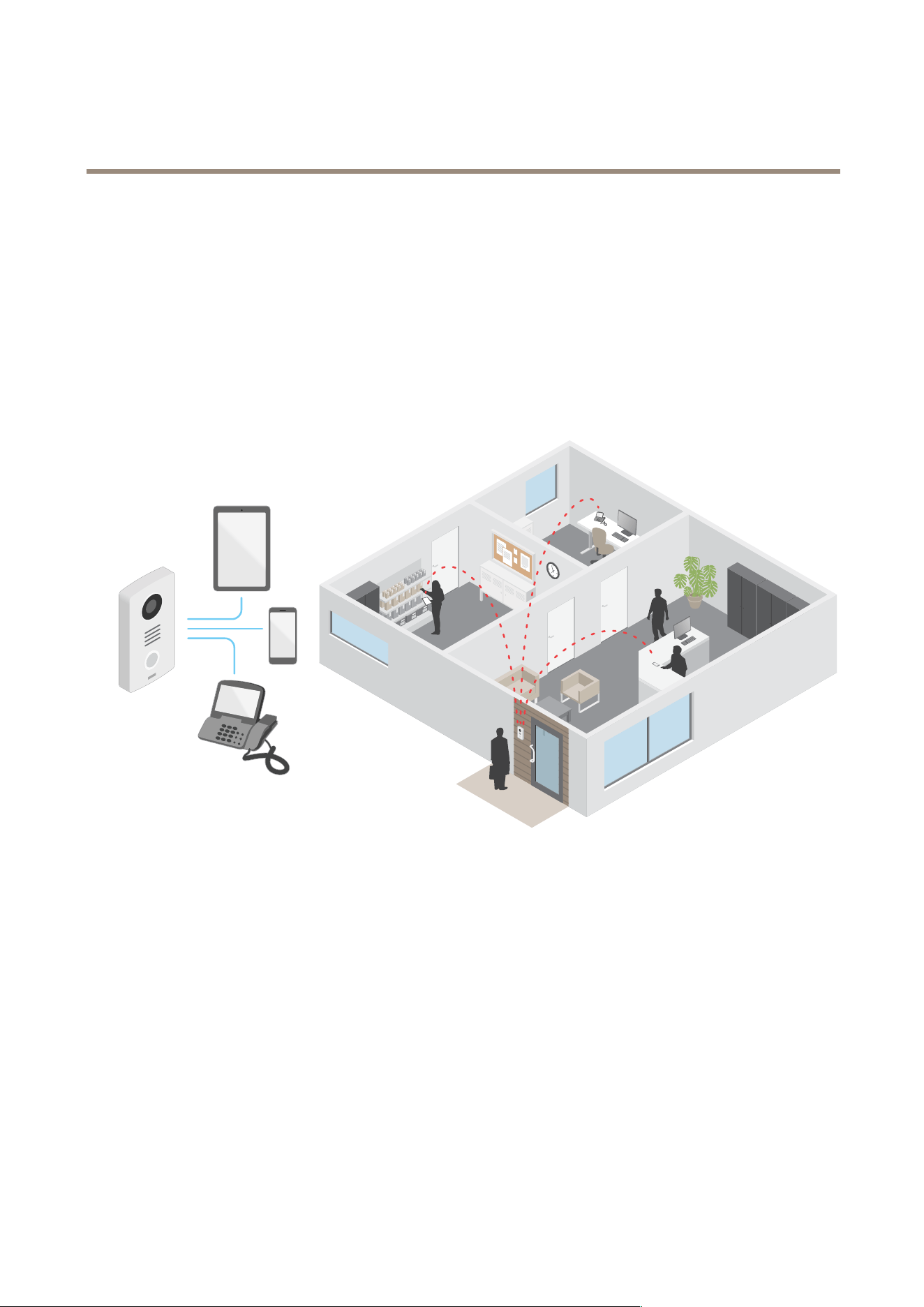
AXISI7010-VENetworkIntercom
Learnmore
Learnmore
VoiceoverIP(VoIP)
VoiceoverIP(VoIP)isagroupoftechnologiesthatenablesvoicecommunicationandmultimediasessionsoverIPnetworks,suchas
theinternet.Intraditionalphonecalls,analogsignalsaresentthroughcircuittransmissionsoverthePublicSwitchedTelephone
Network(PSTN).InaVoIPcall,analogsignalsareturnedintodigitalsignalstomakeitpossibletosendthemindatapackets
acrosslocalIPnetworksortheinternet.
IntheAxisproduct,VoIPisenabledthroughtheSessionInitiationProtocol(SIP)andDual-ToneMulti-Frequency(DTMF)signaling.
Example:
WhenyoupressthecallbuttononanAxisintercom,acallisinitiatedtooneormorepredenedrecipients.Whenarecipientreplies,
acallisestablished.ThevoiceandvideoistransferredthroughVoIPtechnologies.
SessionInitiationProtocol(SIP)
TheSessionInitiationProtocol(SIP)isusedtosetup,maintainandterminateVoIPcalls.Youcanmakecallsbetweentwoormore
parties,calledSIPuseragents.TomakeaSIPcallyoucanuse,forexample,SIPphones,softphonesorSIP-enabledAxisdevices.
TheactualaudioorvideoisexchangedbetweentheSIPuseragentswithatransportprotocol,forexampleRTP(Real-Time
TransportProtocol).
Youcanmakecallsonlocalnetworksusingapeer-to-peersetup,oracrossnetworksusingaPBX.
Peer-to-peerSIP(P2PSIP)
ThemostbasictypeofSIPcommunicationtakesplacedirectlybetweentwoormoreSIPuseragents.Thisiscalledpeer-to-peerSIP
(P2PSIP).Ifittakesplaceonalocalnetwork,allthat’sneededaretheSIPaddressesoftheuseragents.AtypicalSIPaddressinthis
casewouldbesip:<local-ip>.
Example:
51
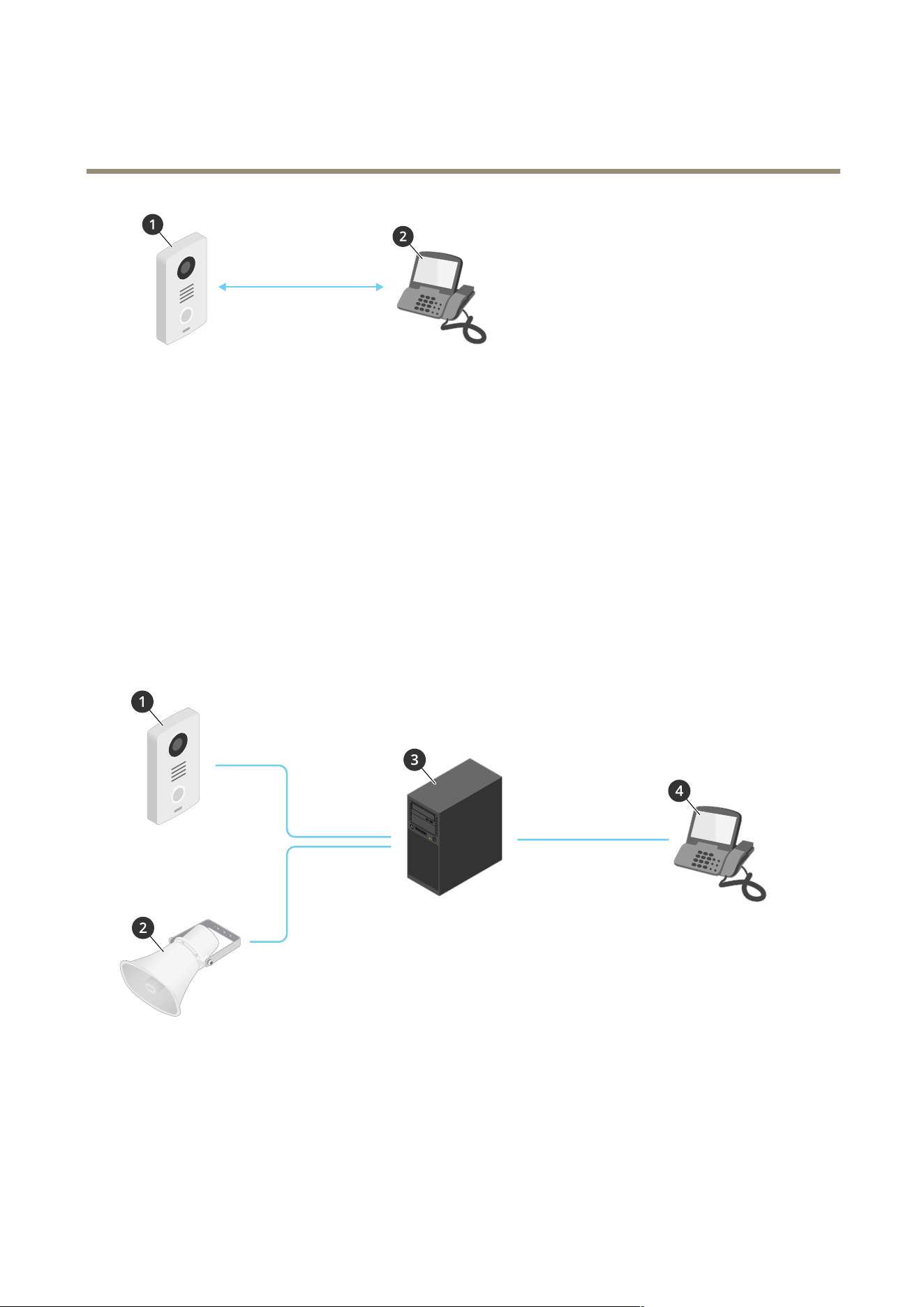
AXISI7010-VENetworkIntercom
Learnmore
SIP
1
UseragentA-intercom.SIPaddress:sip:192.168.1.101
2
UseragentB-SIP-enabledphone.SIPaddress:sip:192.168.1.100
YoucansetuptheAxisintercomtocallforexampleaSIP-enabledphoneonthesamenetworkusingapeer-to-peerSIPsetup.
PrivateBranchExchange(PBX)
WhenyoumakeSIPcallsoutsideyourlocalIPnetwork,aPrivateBranchExchange(PBX)canactasacentralhub.Themain
componentofaPBXisaSIPserver,whichisalsoreferredtoasaSIPproxyoraregistrar.APBXworkslikeatraditionalswitchboard,
showingtheclient'scurrentstatusandallowingforexamplecalltransfers,voicemail,andredirections.
ThePBXSIPservercanbesetupasalocalentityoroffsite.Itcanbehostedonanintranetorbyathirdpartyprovider.Whenyou
makeSIPcallsbetweennetworks,callsareroutedthroughasetofPBXs,thatquerythelocationoftheSIPaddresstobereached.
EachSIPuseragentregisterswiththePBX,andcanthenreachtheothersbydialingthecorrectextension.AtypicalSIPaddressin
thiscasewouldbesip:<user>@<domain>orsip:<user>@<registrar-ip>.TheSIPaddressisindependentofitsIP
addressandthePBXmakesthedeviceaccessibleaslongasitisregisteredtothePBX.
Example:
SIP
SIP
SIP
1
sip:mydoor@company.com
2
sip:myspeaker@company.com
3
PBX PBX
PBX
sip.company.com
4
sip:ofce@company.com
WhenyoupressthecallbuttononanAxisintercom,thecallisforwardedthroughoneormorePBXstoaSIPaddresseitheronthe
localIPnetworkorovertheinternet.
52

AXISI7010-VENetworkIntercom
Learnmore
NATtraversal
UseNAT(NetworkAddressTranslation)traversalwhentheAxisdeviceislocatedonanprivatenetwork(LAN)andyouwantto
accessitfromoutsideofthatnetwork.
Note
TheroutermustsupportNATtraversalandUPnP®.
EachNATtraversalprotocolcanbeusedseparatelyorindifferentcombinationsdependingonthenetworkenvironment.
•ICETheICEInteractiveConnectivityEstablishment)protocolincreasesthechancesofndingthemostefcientpathto
successfulcommunicationbetweenpeerdevices.IfyoualsoenableSTUNandTURN,youimprovetheICEprotocol’s
chances.
•STUN-STUN(SessionTraversalUtilitiesforNAT)isaclient-servernetworkprotocolthatletstheAxisdevicedetermineif
itislocatedbehindaNATorrewall,andifsoobtainthemappedpublicIPaddressandportnumberallocatedfor
connectionstoremotehosts.EntertheSTUNserveraddress,forexample,anIPaddress.
•TURN-TURN(TraversalUsingRelaysaroundNAT)isaprotocolthatletsadevicebehindaNATrouterorrewallreceive
incomingdatafromotherhostsoverTCPorUDP.EnterTURNserveraddressandthelogininformation.
Cybersecurity
AxisEdgeVault
AxisEdgeVaultprovidesahardware-basedcybersecurityplatformthatsafeguardstheAxisdevice.Itoffersfeaturestoguaranteethe
device’sidentityandintegrityandtoprotectyoursensitiveinformationfromunauthorizedaccess.Itbuildsonastrongfoundationof
cryptographiccomputingmodules(secureelementandTPM)andSoCsecurity(TEEandsecureboot),combinedwithexpertisein
edgedevicesecurity.
SignedOS
SignedOSisimplementedbythesoftwarevendorsigningtheAXISOSimagewithaprivatekey.Whenthesignatureisattached
totheoperatingsystem,thedevicewillvalidatethesoftwarebeforeinstallingit.Ifthedevicedetectsthattheintegrityofthe
softwareiscompromised,theAXISOSupgradewillberejected.
Secureboot
Securebootisabootprocessthatconsistsofanunbrokenchainofcryptographicallyvalidatedsoftware,startinginimmutable
memory(bootROM).BeingbasedontheuseofsignedOS,securebootensuresthatadevicecanbootonlywithauthorizedsoftware.
Securekeystore
Atamper-protectedenvironmentfortheprotectionofprivatekeysandsecureexecutionofcryptographicoperations.Itprevents
unauthorizedaccessandmaliciousextractionintheeventofasecuritybreach.Dependingonsecurityrequirements,anAxisdevice
canhaveeitheroneormultiplehardware-basedcryptographiccomputingmodules,whichprovideahardware-protectedsecure
keystore.Dependingonsecurityrequirements,anAxisdevicecanhaveeitheroneormultiplehardware-basedcryptographic
computingmodules,likeaTPM2.0(TrustedPlatformModule)orasecureelement,and/oraTEE(TrustedExecutionEnvironment),
whichprovideahardware-protectedsecurekeystore.Furthermore,selectedAxisproductsfeatureaFIPS140-2Level2-certied
securekeystore.
AxisdeviceID
Beingabletoverifytheoriginofthedeviceiskeytoestablishingtrustinthedeviceidentity.Duringproduction,deviceswith
AxisEdgeVaultareassignedaunique,factory-provisioned,andIEEE802.1AR-compliantAxisdeviceIDcerticate.Thisworks
likeapassporttoprovetheoriginofthedevice.ThedeviceIDissecurelyandpermanentlystoredinthesecurekeystoreasa
certicatesignedbyAxisrootcerticate.ThedeviceIDcanbeleveragedbythecustomer’sITinfrastructureforautomatedsecure
deviceonboardingandsecuredeviceidentication
53

AXISI7010-VENetworkIntercom
Learnmore
Encryptedlesystem
Thesecurekeystorepreventsthemaliciousexltrationofinformationandpreventscongurationtamperingbyenforcingstrong
encryptionuponthelesystem.Thisensuresnodatastoredinthelesystemcanbeextractedortamperedwithwhenthedeviceis
notinuse,unauthenticatedaccesstothedeviceisachievedand/ortheAxisdeviceisstolen.Duringthesecurebootprocess,the
read-writelesystemisdecryptedandcanbemountedandusedbytheAxisdevice.
TolearnmoreaboutthecybersecurityfeaturesinAxisdevices,gotoaxis.com/learning/white-papersandsearchforcybersecurity.
Axissecuritynoticationservice
AxisprovidesanoticationservicewithinformationaboutvulnerabilityandothersecurityrelatedmattersforAxisdevices.Toreceive
notications,youcansubscribeataxis.com/security-notication-service.
Vulnerabilitymanagement
Tominimizecustomers'riskofexposure,Axis,asaCommonVulnerabilityandExposures(CVE)numberingauthority(CNA),follows
industrystandardstomanageandrespondtodiscoveredvulnerabilitiesinourdevices,software,andservices.Formoreinformation
aboutAxisvulnerabilitymanagementpolicy,howtoreportvulnerabilities,alreadydisclosedvulnerabilities,andcorresponding
securityadvisories,seeaxis.com/vulnerability-management.
SecureoperationofAxisdevices
Axisdeviceswithfactorydefaultsettingsarepre-conguredwithsecuredefaultprotectionmechanisms.Werecommendusingmore
securitycongurationwheninstallingthedevice.TondoutmoreaboutAxishardeningguidesandothercybersecurityrelated
documentation,gotoaxis.com/support/cybersecurity/resources.
Applications
Withapplications,youcangetmoreoutofyourAxisdevice.AXISCameraApplicationPlatform(ACAP)isanopenplatformthat
makesitpossibleforthirdpartiestodevelopanalyticsandotherapplicationsforAxisdevices.Applicationscanbepreinstalledonthe
device,availablefordownloadforfree,orforalicensefee.
TondtheusermanualsforAxisapplications,gotohelp.axis.com.
54
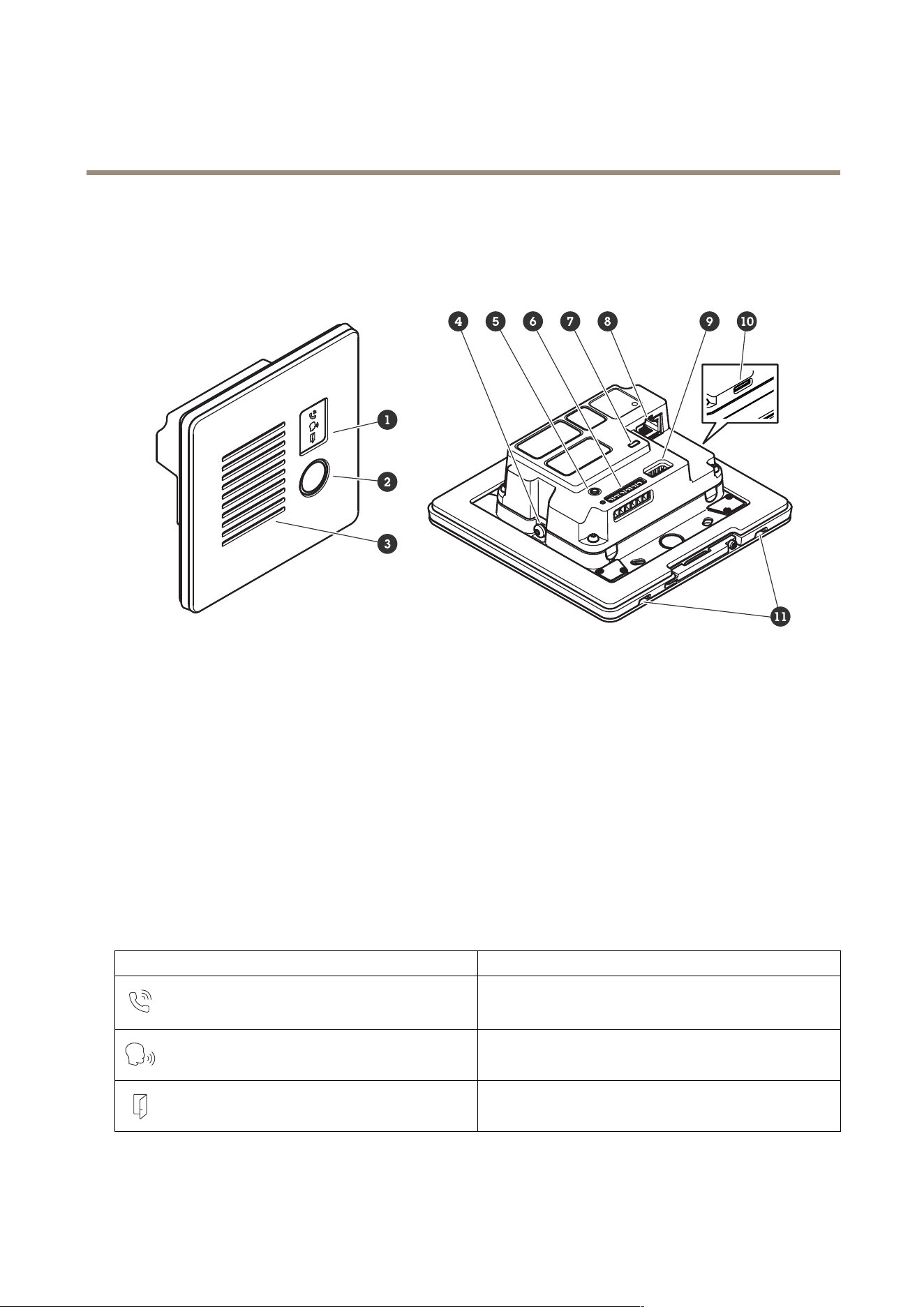
AXISI7010-VENetworkIntercom
Specifications
Specifications
Productoverview
1
Indicatoriconsonpage55
2
Callbutton
3
Speaker
4
Groundingscrew
5
Controlbuttononpage56
6
I/O,reader,andrelayconnectoronpage57
7
StatusLED
8
Networkconnectoronpage56
9
Audioconnectoronpage56
10
SDcardslotonpage56(microSD/microSDHC/microSDXC)
11
Microphone(2x)
Frontpanelindicatorsandcontrols
Whenyouconnecttheproducttopower,theindicatoriconsandtheindicatorstriplightupforafewseconds.
Indicatoricons
IconIndication
Steadyamberwhenoutgoingcallinitiated.
Flashesamberwhenincomingcallinitiated.
Steadyblueforongoingcall.
Steadygreenwhendoorisopen.
55

AXISI7010-VENetworkIntercom
Specifications
LEDindicators
StatusLED
Indication
GreenSteadygreenfornormaloperation.
SDcardslot
NO NO
NO
TICE TICE
TICE
•RiskofdamagetoSDcard.Don’tusesharptools,metalobjects,orexcessiveforcewheninsertingorremovingtheSDcard.
Useyourngerstoinsertandremovethecard.
•Riskofdatalossandcorruptedrecordings.UnmounttheSDcardfromthedevice’swebinterfacebeforeremovingit.
Don’tremovetheSDcardwhiletheproductisrunning.
ThisdevicesupportsmicroSD/microSDHC/microSDXCcards.
ForSDcardrecommendations,seeaxis.com.
microSD,microSDHC,andmicroSDXCLogosaretrademarksofSD-3CLLC.microSD,microSDHC,microSDXCare
trademarksorregisteredtrademarksofSD-3C,LLCintheUnitedStates,othercountriesorboth.
Buttons
Controlbutton
Thecontrolbuttonisusedfor:
•Resettingtheproducttofactorydefaultsettings.SeeResettofactorydefaultsettingsonpage62.
•Connectingtoaone-clickcloudconnection(O3C)serviceovertheinternet.Toconnect,pressandholdthebutton
forabout3secondsuntilthestatusLEDashesgreen.
Connectors
Networkconnector
RJ45EthernetconnectorwithPoweroverEthernet(PoE).
Audioconnector
4-pinterminalblockforaudioinputandoutput.
FunctionPinNotes
Linein
1
Linein(mono)
GND
2
Audioground
Lineout
3
Lineout(mono)
GND
4
Audioground
56

AXISI7010-VENetworkIntercom
Specifications
I/O,reader,andrelayconnector
YoucanusethisconnectorforI/Oandrelay,orforreaderconnectivity.
6-pinterminalblock
1
-
2
12V
3
A/IO1
4
B/IO2
5
COM
6
NO/NC
FunctionPinNotes
Specications
DCground
1
0VDC
DCoutput
2
Canbeusedtopowerauxiliaryequipment.
Note:Thispincanonlybeusedaspowerout.
12VDC
I/O:Maxload=50mA
Reader/relay:Maxload=
350mA
I/O:Congurable
(InputorOutput)
Reader:A
3
I/O:Digitalinput–Connecttopin1toactivate,orleaveoating
(unconnected)todeactivate.Digitaloutput–Internallyconnected
topin1(DCground)whenactive,andoating(unconnected)when
inactive.Ifusedwithaninductiveload,e.g.,arelay,connectadiode
inparallelwiththeload,toprotectagainstvoltagetransients.
Reader:RS485–A
I/O:input–0tomax30VDC
output–0tomax30VDC,
opendrain,100mA
I/O:Congurable
(InputorOutput)
Reader:B
4
I/O:sameaspin3
Reader:RS485–B
I/O:sameaspin3
Relay:COM
5
Common
Relay:NO/NC
6
Normallyopen/normallyclosed.Forconnectingrelaydevices.The
tworelaypinsaregalvanicallyseparatedfromtherestofthe
circuitry.
Maxcurrent700mA,max
voltage30VDC
I/Oconnector
OneoptionistousetheconnectorasanI/Oconnectorwithexternaldevicesincombinationwith,forexample,motiondetection,
eventtriggering,andalarmnotications.Inadditiontothe0VDCreferencepointandpower(12VDCoutput),theI/Oconnector
providestheinterfaceto:
Digitalinput-Forconnectingdevicesthatcantogglebetweenanopenandclosedcircuit,forexamplePIRsensors,door/window
contacts,andglassbreakdetectors.
Digitaloutput-ForconnectingexternaldevicessuchasrelaysandLEDs.ConnecteddevicescanbeactivatedbytheVAPIX®
ApplicationProgrammingInterface,throughaneventorfromthedeviceinterface.
Example:
57
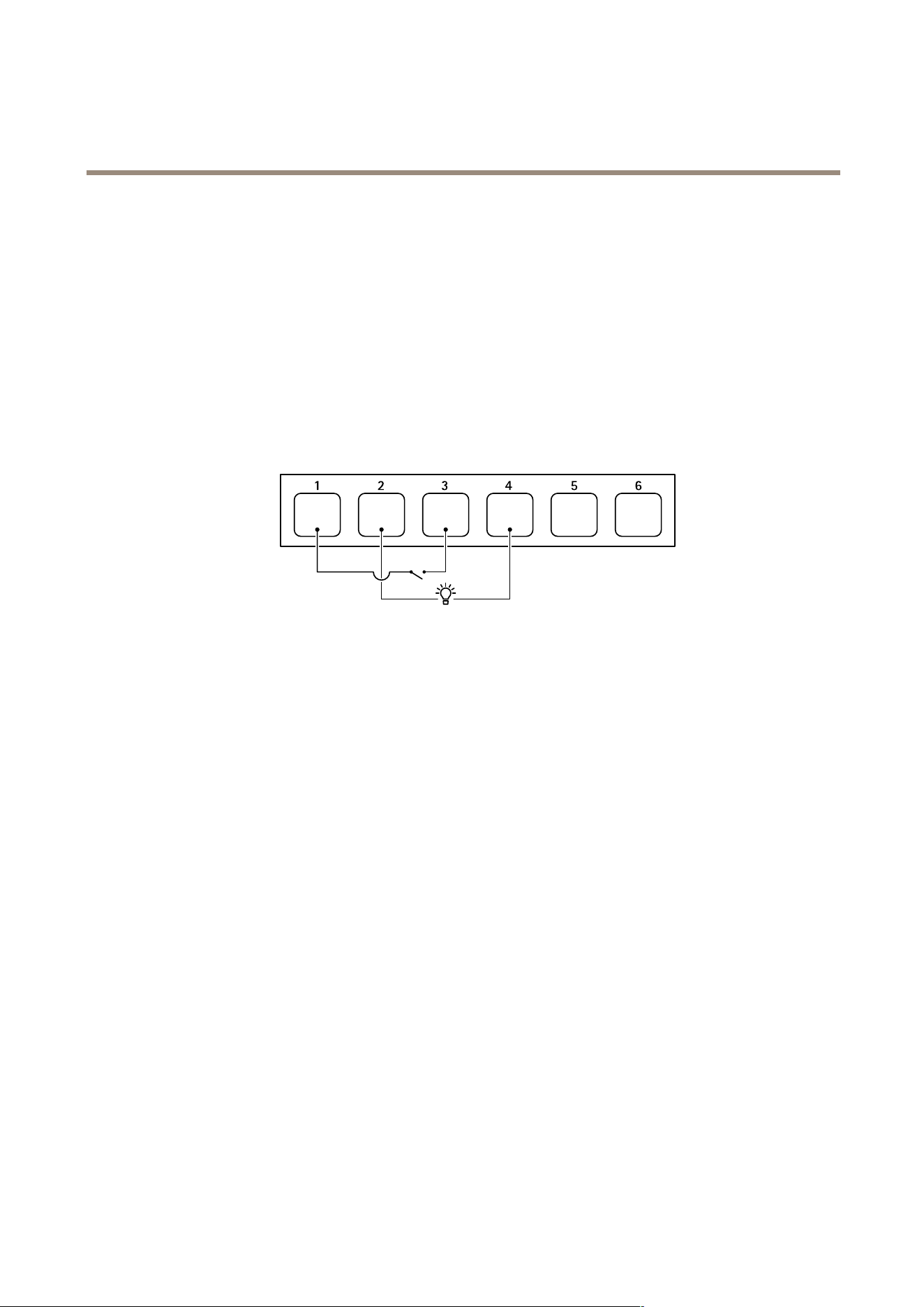
AXISI7010-VENetworkIntercom
Specifications
1
DCground
2
DCoutput12V,max50mA
3
I/Oconguredasinput
4
I/Oconguredasoutput
5
Relayonly
6
Relayonly
Relayconnector
IncombinationwithI/O,youcanusetheconnectorasarelayconnectortoconnectasolidstaterelay,anduseit:
•asastandardrelaythatopensandclosesauxiliarycircuits,
•tocontrolalockdirectly,
•tocontrolalockthroughasafetyrelay.Usingasafetyrelayonthesecuresideofthedoorpreventshotwiring.
Readerconnector
Athirdoptionistousetheconnectorasareaderconnectortoconnectanexternalreader.
58
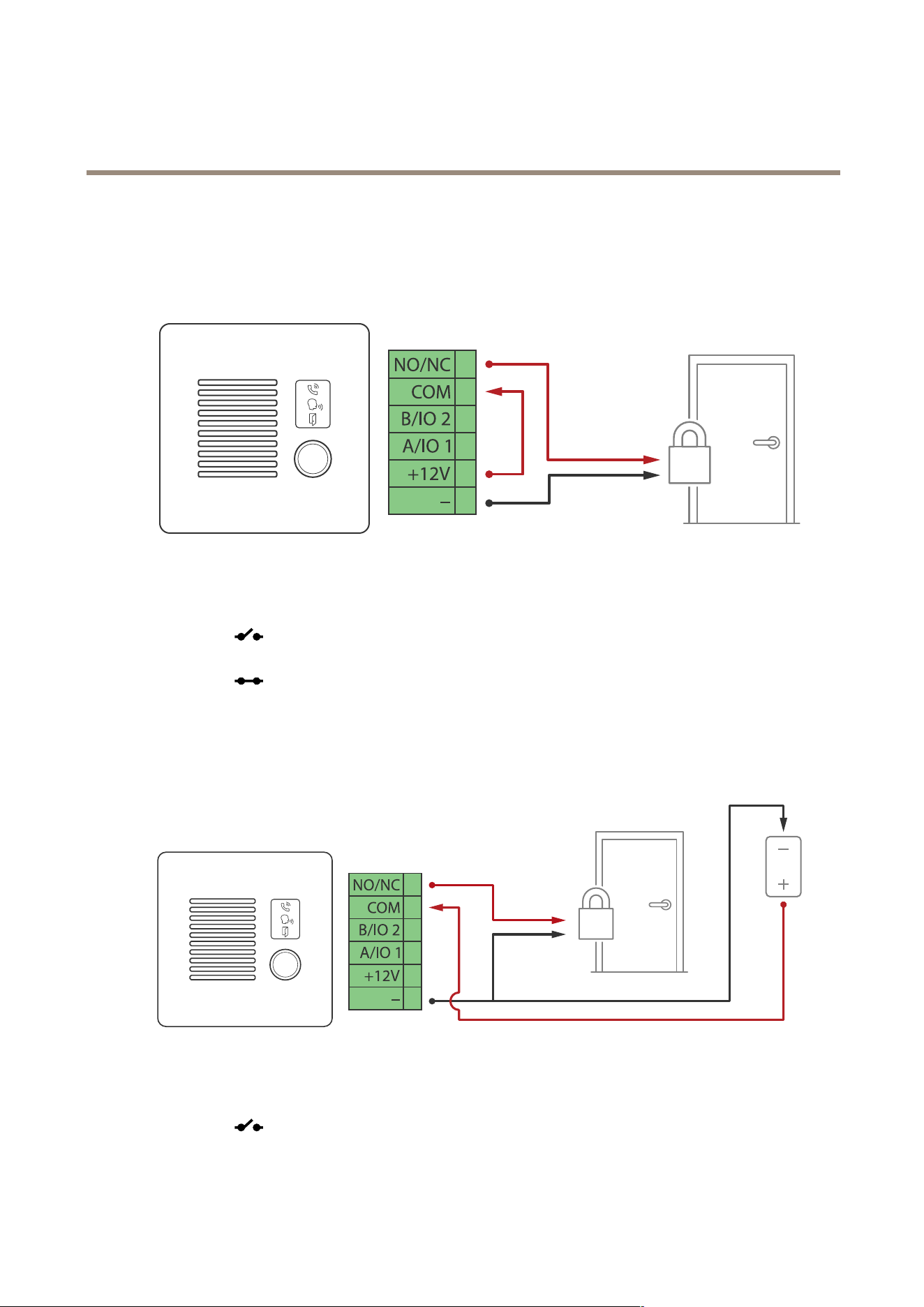
AXISI7010-VENetworkIntercom
Connectequipment
Connectequipment
RelaypoweredbyPoE(12V)
1.Tocheckrelaystate,gotoSystem>Accessoriesandndtherelayport.
2.SetNormalstateto:
-
forafail-securelock.
-forafail-safelock.
Relaypoweredbyseparatepowersupply
1.Tocheckrelaystate,gotoSystem>Accessoriesandndtherelayport.
2.SetNormalstateto:
-
forafail-securelock.
59
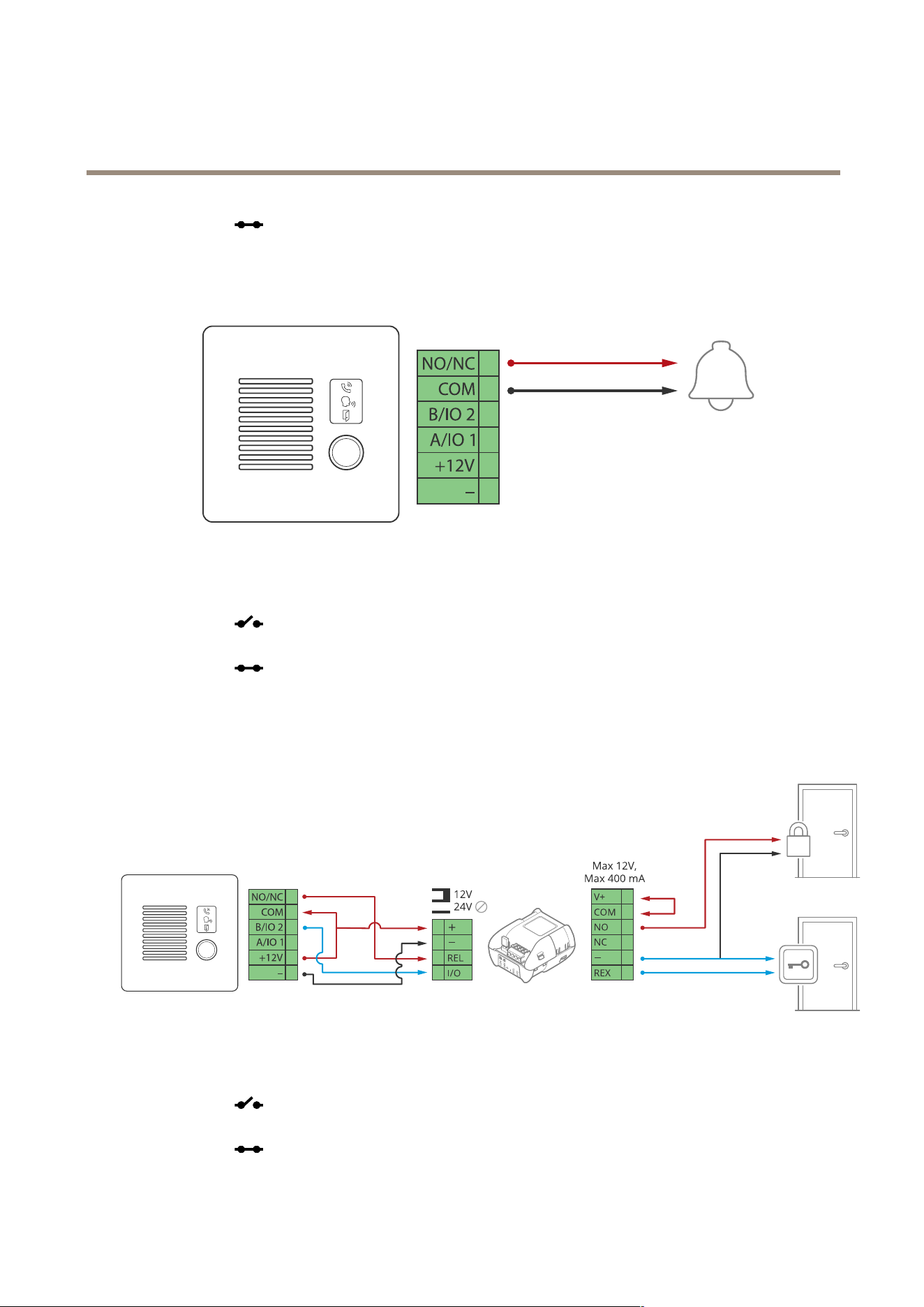
AXISI7010-VENetworkIntercom
Connectequipment
-forafail-safelock.
Potential-freerelay
1.Tocheckrelaystate,gotoSystem>Accessoriesandndtherelayport.
2.SetNormalstateto:
-
forafail-securelock.
-forafail-safelock.
12VFail-securelockpoweredbyPoEfromintercom
1.Tocheckrelaystate,gotoSystem>Accessoriesandndtherelayport.
2.SetNormalstateto:
-
forafail-securelock.
-
forafail-safelock.
60
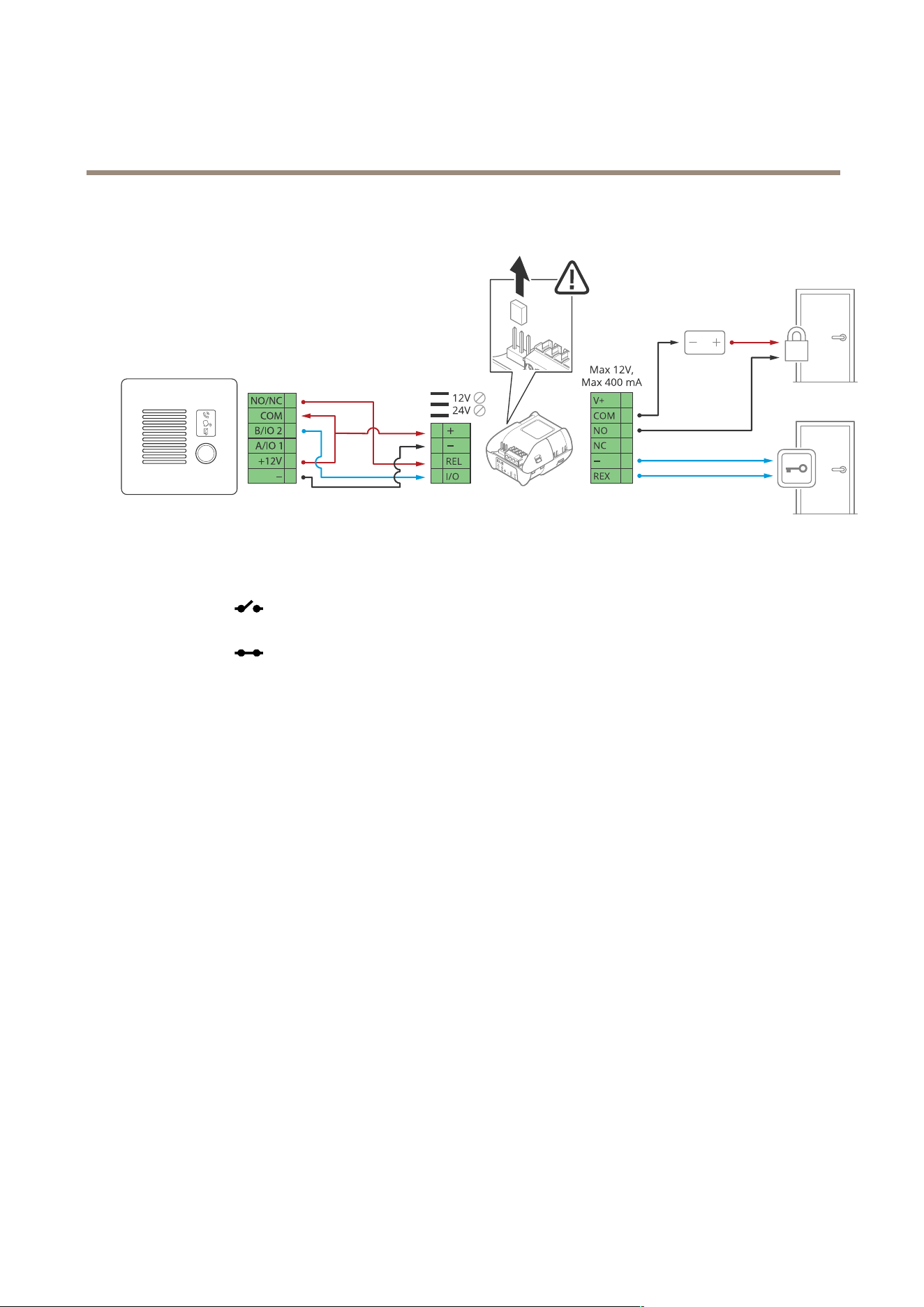
AXISI7010-VENetworkIntercom
Connectequipment
12VFail-securelockpoweredbyexternalpowersupply
1.Tocheckrelaystate,gotoSystem>Accessoriesandndtherelayport.
2.SetNormalstateto:
-
forafail-securelock.
-forafail-safelock.
61

AXISI7010-VENetworkIntercom
Troubleshooting
Troubleshooting
Resettofactorydefaultsettings
Important
Resettofactorydefaultshouldbeusedwithcaution.Aresettofactorydefaultresetsallsettings,includingtheIPaddress,to
thefactorydefaultvalues.
Toresettheproducttothefactorydefaultsettings:
1.Disconnectpowerfromtheproduct.
2.Pressandholdthecontrolbuttonwhilereconnectingpower.SeeProductoverviewonpage55.
3.Keepthecontrolbuttonpressedfor15–30secondsuntilthestatusLEDindicatorashesamber.
4.Releasethecontrolbutton.TheprocessiscompletewhenthestatusLEDindicatorturnsgreen.Theproducthasbeenreset
tothefactorydefaultsettings.IfnoDHCPserverisavailableonthenetwork,thedefaultIPaddressis192.168.0.90.
5.UsetheinstallationandmanagementsoftwaretoolstoassignanIPaddress,setthepassword,andaccessthedevice.
Theinstallationandmanagementsoftwaretoolsareavailablefromthesupportpagesonaxis.com/support.
Youcanalsoresetparameterstofactorydefaultthroughthedevice’swebinterface.GotoMaintenance>Factorydefaultand
clickDefault.
AXISOSoptions
Axisoffersdevicesoftwaremanagementaccordingtoeithertheactivetrackorthelong-termsupport(LTS)tracks.Beingonthe
activetrackmeanscontinuouslygettingaccesstoallthelatestproductfeatures,whiletheLTStracksprovideaxedplatformwith
periodicreleasesfocusedmainlyonbugxesandsecurityupdates.
UsingAXISOSfromtheactivetrackisrecommendedifyouwanttoaccessthenewestfeatures,orifyouuseAxisend-to-endsystem
offerings.TheLTStracksarerecommendedifyouusethird-partyintegrations,whicharenotcontinuouslyvalidatedagainstthelatest
activetrack.WithLTS,theproductscanmaintaincybersecuritywithoutintroducinganysignicantfunctionalchangesoraffecting
anyexistingintegrations.FormoredetailedinformationaboutAxisdevicesoftwarestrategy,gotoaxis.com/support/device-software.
CheckthecurrentAXISOSversion
AXISOSdeterminesthefunctionalityofourdevices.Whenyoutroubleshootaproblem,werecommendthatyoutostartbychecking
thecurrentAXISOSversion.Thelatestversionmightcontainacorrectionthatxesyourparticularproblem.
TocheckthecurrentAXISOSversion:
1.Gotothedevice’swebinterface>Status.
2.UnderDeviceinfo,seetheAXISOSversion.
UpgradeAXISOS
Important
•Preconguredandcustomizedsettingsaresavedwhenyouupgradethedevicesoftware(providedthatthefeaturesare
availableinthenewAXISOS)althoughthisisnotguaranteedbyAxisCommunicationsAB.
•Makesurethedeviceremainsconnectedtothepowersourcethroughouttheupgradeprocess.
62

AXISI7010-VENetworkIntercom
Troubleshooting
Note
WhenyouupgradethedevicewiththelatestAXISOSversionintheactivetrack,theproductreceivesthelatestfunctionality
available.Alwaysreadtheupgradeinstructionsandreleasenotesavailablewitheachnewreleasebeforeyouupgrade.To
ndthelatestAXISOSversionandthereleasenotes,gotoaxis.com/support/device-software.
1.DownloadtheAXISOSletoyourcomputer,availablefreeofchargeataxis.com/support/device-software.
2.Logintothedeviceasanadministrator.
3.GotoMaintenance>AXISOSupgradeandclickUpgrade.
Whentheupgradehasnished,theproductrestartsautomatically.
Technicalissues,clues,andsolutions
Ifyoucan’tndwhatyou’relookingforhere,trythetroubleshootingsectionataxis.com/support.
ProblemsupgradingAXISOS
AXISOSupgradefailure
Iftheupgradefails,thedevicereloadsthepreviousversion.Themostcommonreasonisthatthe
wrongAXISOSlehasbeenuploaded.CheckthatthenameoftheAXISOSlecorrespondsto
yourdeviceandtryagain.
ProblemsafterAXISOS
upgrade
Ifyouexperienceproblemsaftertheupgrade,rollbacktothepreviouslyinstalledversionfrom
theMaintenancepage.
ProblemssettingtheIPaddress
Thedeviceislocatedona
differentsubnet
IftheIPaddressintendedforthedeviceandtheIPaddressofthecomputerusedtoaccessthe
devicearelocatedondifferentsubnets,youcannotsettheIPaddress.Contactyournetwork
administratortoobtainanIPaddress.
TheIPaddressisbeingused
byanotherdevice
DisconnecttheAxisdevicefromthenetwork.Runthepingcommand(inaCommand/DOSwindow,
typepingandtheIPaddressofthedevice):
•Ifyoureceive:Replyfrom<IPaddress>:bytes=32;time=10...
thismeansthattheIPaddressmayalreadybeinusebyanotherdeviceonthenetwork.
ObtainanewIPaddressfromthenetworkadministratorandreinstallthedevice.
•Ifyoureceive:Requesttimedout,thismeansthattheIPaddressisavailable
forusewiththeAxisdevice.Checkallcablingandreinstallthedevice.
PossibleIPaddressconict
withanotherdeviceonthe
samesubnet
ThestaticIPaddressintheAxisdeviceisusedbeforetheDHCPserversetsadynamicaddress.
ThismeansthatifthesamedefaultstaticIPaddressisalsousedbyanotherdevice,theremay
beproblemsaccessingthedevice.
Thedevicecan’tbeaccessedfromabrowser
Can’tlogin
WhenHTTPSisenabled,ensurethatthecorrectprotocol(HTTPorHTTPS)isusedwhenattempting
tologin.Youmayneedtomanuallytypehttporhttpsinthebrowser’saddresseld.
Ifthepasswordfortherootaccountislost,thedevicemustberesettothefactorydefaultsettings.
SeeResettofactorydefaultsettingsonpage62.
TheIPaddresshasbeen
changedbyDHCP
IPaddressesobtainedfromaDHCPserveraredynamicandmaychange.IftheIPaddresshasbeen
changed,useAXISIPUtilityorAXISDeviceManagertolocatethedeviceonthenetwork.Identify
thedeviceusingitsmodelorserialnumber,orbytheDNSname(ifthenamehasbeencongured).
Ifrequired,astaticIPaddresscanbeassignedmanually.Forinstructions,gotoaxis.com/support.
Certicateerrorwhenusing
IEEE802.1X
Forauthenticationtoworkproperly,thedateandtimesettingsintheAxisdevicemustbe
synchronizedwithanNTPserver.GotoSystem>Dateandtime.
63

AXISI7010-VENetworkIntercom
Troubleshooting
Thedeviceisaccessiblelocallybutnotexternally
Toaccessthedeviceexternally,werecommendyoutouseoneofthefollowingapplicationsforWindows
®
:
•AXISCompanion:freeofcharge,idealforsmallsystemswithbasicsurveillanceneeds.
•AXISCameraStation5:30-daytrialversionfreeofcharge,idealforsmalltomid-sizesystems.
•AXISCameraStationPro:90-daytrialversionfreeofcharge,idealforsmalltomid-sizesystems.
Forinstructionsanddownload,gotoaxis.com/vms.
Can’tconnectoverport8883withMQTToverSSL
Therewallblockstrafc
usingport8883asit’s
deemedinsecure.
Insomecasestheserver/brokermightnotprovideaspecicportforMQTTcommunication.Itmay
stillbepossibletouseMQTToveraportnormallyusedforHTTP/HTTPStrafc.
•Iftheserver/brokersupportsWebSocket/WebSocketSecure(WS/WSS),typicallyon
port443,usethisprotocolinstead.Checkwiththeserver/brokerprovidertoseeif
WS/WSSissupportedandwhichportandbasepathtouse.
•Iftheserver/brokersupportsALPN,theuseofMQTTcanbenegotiatedoveranopen
port,suchas443.Checkwithyourserver/brokerprovidertoseeifALPNissupported
andwhichALPNprotocolandporttouse.
Performanceconsiderations
Whensettingupyoursystem,itisimportanttoconsiderhowvarioussettingsandsituationsaffecttheperformance.Somefactors
affecttheamountofbandwidth(thebitrate)required,otherscanaffecttheframerate,andsomeaffectboth.Iftheloadonthe
CPUreachesitsmaximum,thisalsoaffectstheframerate.
Thefollowingfactorsarethemostimportanttoconsider:
•Highimageresolutionorlowercompressionlevelsresultinimagescontainingmoredatawhichinturnaffectsthe
bandwidth.
•AccessbylargenumbersofMotionJPEGorunicastH.264clientsaffectsthebandwidth.
•Simultaneousviewingofdifferentstreams(resolution,compression)bydifferentclientsaffectsbothframerateand
bandwidth.
Useidenticalstreamswhereverpossibletomaintainahighframerate.Streamprolescanbeusedtoensurethat
streamsareidentical.
•AccessingMotionJPEGandH.264videostreamssimultaneouslyaffectsbothframerateandbandwidth.
•Heavyusageofeventsettingsaffectstheproduct’sCPUloadwhichinturnaffectstheframerate.
•UsingHTTPSmayreduceframerate,inparticularifstreamingMotionJPEG.
•Heavynetworkutilizationduetopoorinfrastructureaffectsthebandwidth.
•Viewingonpoorlyperformingclientcomputerslowersperceivedperformanceandaffectsframerate.
•RunningmultipleAXISCameraApplicationPlatform(ACAP)applicationssimultaneouslymayaffecttheframerateand
thegeneralperformance.
Contactsupport
Ifyouneedmorehelp,gotoaxis.com/support.
64

AXISI7010-VENetworkIntercom
Safetyinformation
Safetyinformation
Hazardlevels
DANGER
Indicatesahazardoussituationwhich,ifnotavoided,willresultindeathorseriousinjury.
WARNING
Indicatesahazardoussituationwhich,ifnotavoided,couldresultindeathorseriousinjury.
CAUTION
Indicatesahazardoussituationwhich,ifnotavoided,couldresultinminorormoderateinjury.
NO NO
NO
TICE TICE
TICE
Indicatesasituationwhich,ifnotavoided,couldresultindamagetoproperty.
Othermessagelevels
Important
Indicatessignicantinformationwhichisessentialfortheproducttofunctioncorrectly.
Note
Indicatesusefulinformationwhichhelpsingettingthemostoutoftheproduct.
65

UsermanualVer.M1.21
AXISI7010-VENetworkIntercom
Date:June2024
©AxisCommunicationsAB,2024
Partno.T10208511