Legal Considerations
Video and audio surveillance can be prohibited
by laws that vary from country to country. Check
the laws in your local region before using this
product for surveillance purposes.
Electromagnetic Compatibility (EMC)
This equipment has been designed and tested to
fulfill applicable standards for:
• Radio frequency emission when installed
according to the instructions and used in its
intended environment.
• Immunity to electrical and electromagnetic
phenomena when installed according to the
instructions and used in its intended
environment.
USA - This equipment has been tested using a
shielded network cable and found to comply
with the limits for a Class A digital device,
pursuant to part 15 of the FCC Rules. These
limits are designed to provide reasonable
protection against harmful interference when
the equipment is operated in a commercial
environment. This equipment generates, uses,
and can radiate radio frequency energy and, if
not installed and used in accordance with the
instruction manual, may cause harmful
interference to radio communications. Operation
of this equipment in a residential area is likely to
cause harmful interference in which case the
user will be required to correct the interference
at his own expense.
Canada - This Class A digital apparatus
complies with Canadian ICES-003.
Europe - This digital equipment
fulfills the requirements for RF emission
according to the Class A limit of
EN 55022. NOTICE! This is a Class A product. In a
domestic environment this product may cause
RF interference, in which case the user may be
required to take adequate measures. This
product fulfills the requirements for emissions
and immunity according to EN 50121-4 and
IEC 62236-4 railway applications. This product
fulfills the requirements for immunity according
to EN 61000-6-1 residential, commercial and
light-industrial environments. This product
fulfills the requirements for immunity according
to EN 61000-6-2 industrial environments. This
product fulfills the requirements for immunity
according to EN 55024 office and commercial
environments.
Australia - This digital equipment fulfills the
requirements for RF emission according to the
Class A limit of AS/NZS CISPR 22.
Safety - This product complies with
IEC/EN 60950-1 Safety of Information
Technology Equipment.
Equipment Modifications - This
equipment must be installed and used in strict
accordance with the instructions given in the
user documentation. This equipment contains no
user-serviceable components. Unauthorized
equipment changes or modifications will
invalidate all applicable regulatory certifications
and approvals.
Liability - Every care has been taken in the
preparation of this document. Please inform
your local Axis office of any inaccuracies or
omissions. Axis Communications AB cannot be
held responsible for any technical or
typographical errors and reserves the right to
make changes to the product and
documentation without prior notice. Axis
Communications AB makes no warranty of any
kind with regard to the material contained
within this document, including, but not limited
to, the implied warranties of merchantability
and fitness for a particular purpose. Axis
Communications AB shall not be liable nor
responsible for incidental or consequential
damages in connection with the furnishing,
performance or use of this material. This product
is only to be used for its intended purpose.
RoHS - This product complies with
both the European RoHS directive,
2002/95/EC, and the Chinese RoHS
regulations, ACPEIP.
WEEE Directive
The European Union has enacted a
Directive 2002/96/EC on Waste
Electrical and Electronic Equipment
(WEEE Directive). This directive is
applicable in the European Union member
states.
The WEEE marking on this product (see right) or
its documentation indicates that the product
must not be disposed of together with
household waste. To prevent possible harm to
human health and/or the environment, the
Korea -
ࢇЕ߶הࡈ$ࢷળࢶଢԻ۰
શӖЕیࡈЕࢇࢺࡶ࣯ࢂଜݤԂֲ
ɼࢽ࠹ࢂࠇ߾۰یࡈଜЕʨࡶּࢶࡳԻଢТЬ
Japan -
この装置は、クラスA情報技術装置です。
この装置を家庭環境で使用すると電波妨害を引き起
こすことがあります。この場合には使用者が適切な
対策を講ずるよう要求されることがあります。

product must be disposed of in an approved and
environmentally safe recycling process. For
further information on how to dispose of this
product correctly, contact the product supplier,
or the local authority responsible for waste
disposal in your area.
Business users should contact the product
supplier for information on how to dispose of
this product correctly. This product should not
be mixed with other commercial waste.
Support - Should you require any technical
assistance, please contact your Axis reseller. If
your questions cannot be answered immediately,
your reseller will forward your queries through
the appropriate channels to ensure a rapid
response. If you are connected to the Internet,
you can:
• download user documentation and software
updates
• find answers to resolved problems in the FAQ
database. Search by product, category, or
phrase
• report problems to Axis support staff by
logging in to your private support area
• chat with Axis support staff (selected
countries only)
• visit Axis Support at www.axis.com/techsup/

Safeguards
Please read through this Installation Guide carefully before installing the Axis
product. Keep the Installation Guide for further reference.
• Store the Axis product in a dry and ventilated environment.
• Avoid exposing the Axis product to vibration, shocks or heavy pressure. Do not
install the product on unstable brackets, unstable or vibrating surfaces or
walls, since this could cause damage to the product.
• Only use applicable tools when installing the Axis product; excessive force
could cause damage to the product.
• Do not use chemicals, caustic agents, or aerosol cleaners. Use a damp cloth
for cleaning.
• Use only accessories that comply with technical specification of the product.
These can be provided by Axis or a third party.
• Use only spare parts provided by or recommended by Axis.
• Do not attempt to repair the product by yourself, contact Axis or your Axis
reseller for service matters.
• This Axis product shall be used in compliance with local laws and regulations.
• To use this Axis product outdoors, it shall be installed in an approved outdoor
housing.
• The Axis product should be installed by a trained professional. Observe rele-
vant national and local regulations for the installation.
Transportation
• When transporting the Axis product, use the original packaging or equivalent
to prevent damage to the product.
ENGLISH

AXIS T8604 Page 7
ENGLISH
AXIS T8604 Installation Guide
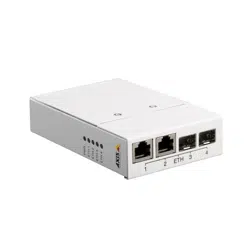
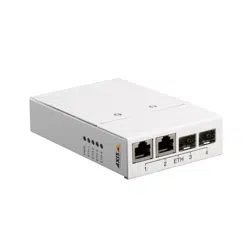
This Installation Guide provides instructions for installing AXIS T8604 Media
Converter Switch on your network.
Installation Steps
1. Check the package contents against the list below.
2. Hardware overview. See page 8.
3. Install the hardware. See page 10.
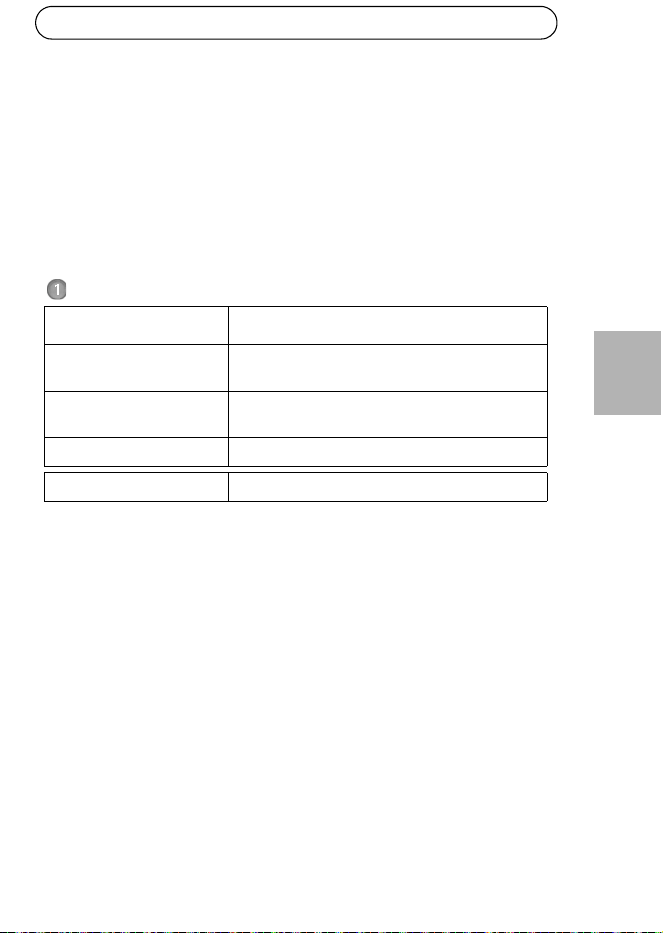
Package Contents
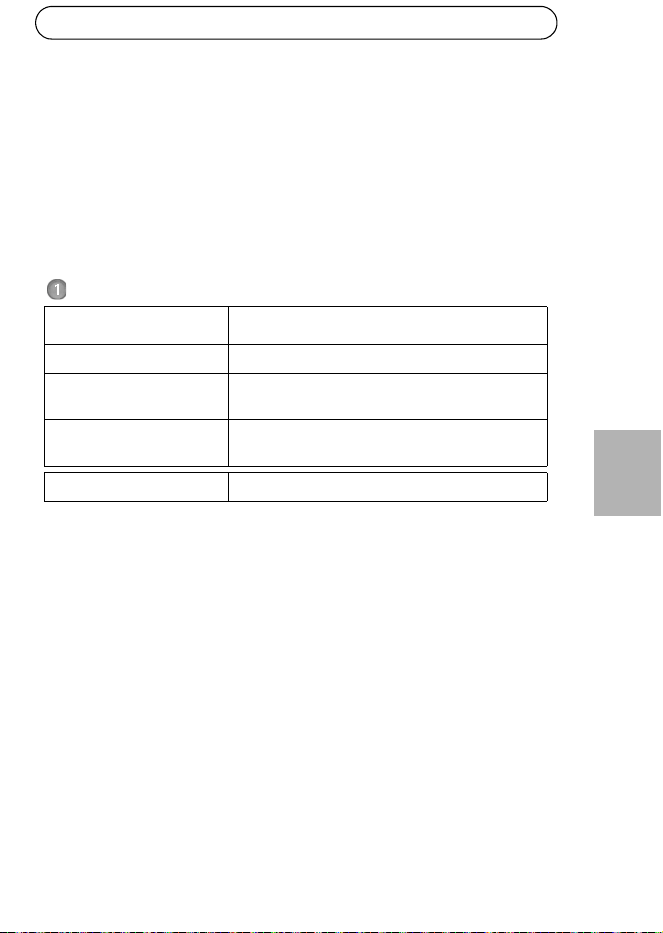
Item Models/variants/notes
Media converter switch AXIS T8604
Mounting kit Clip for DIN clip
Screw (2x)
Printed materials AXIS T8604 Installation Guide (this document)
Optional accessories SFP module
Page 8 AXIS T8604
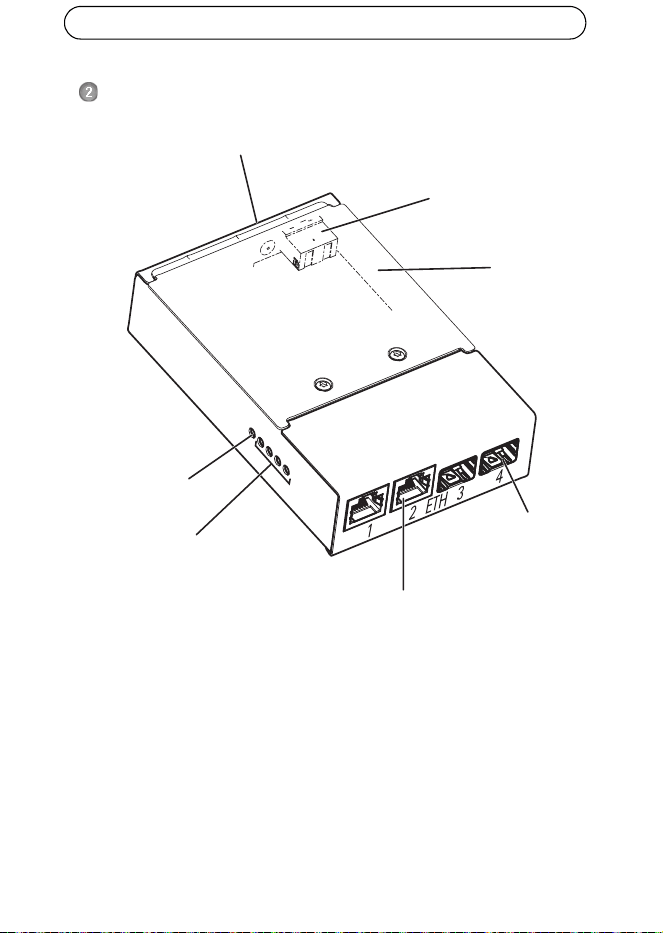
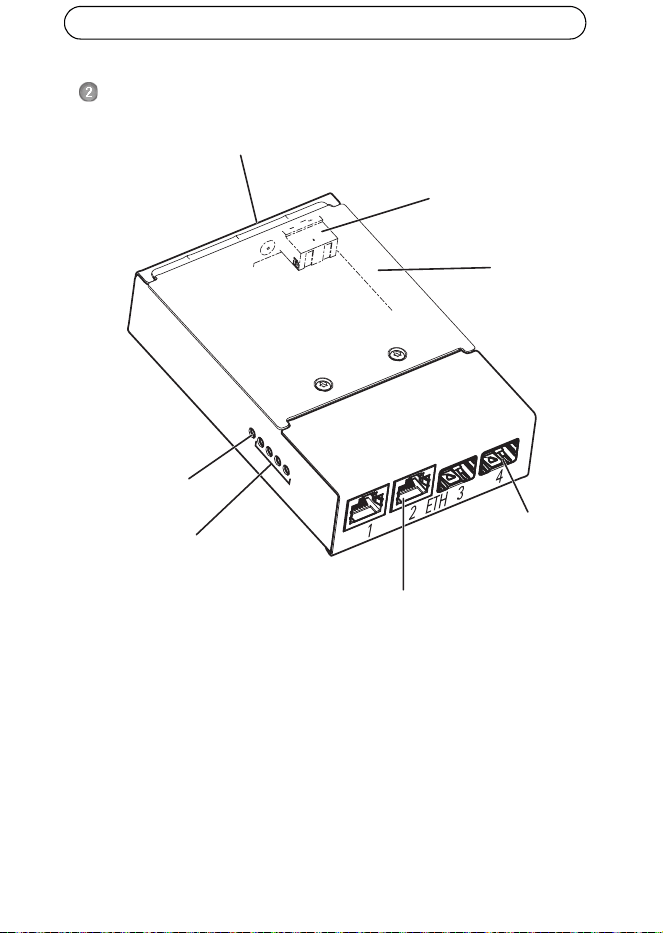
Hardware Overview
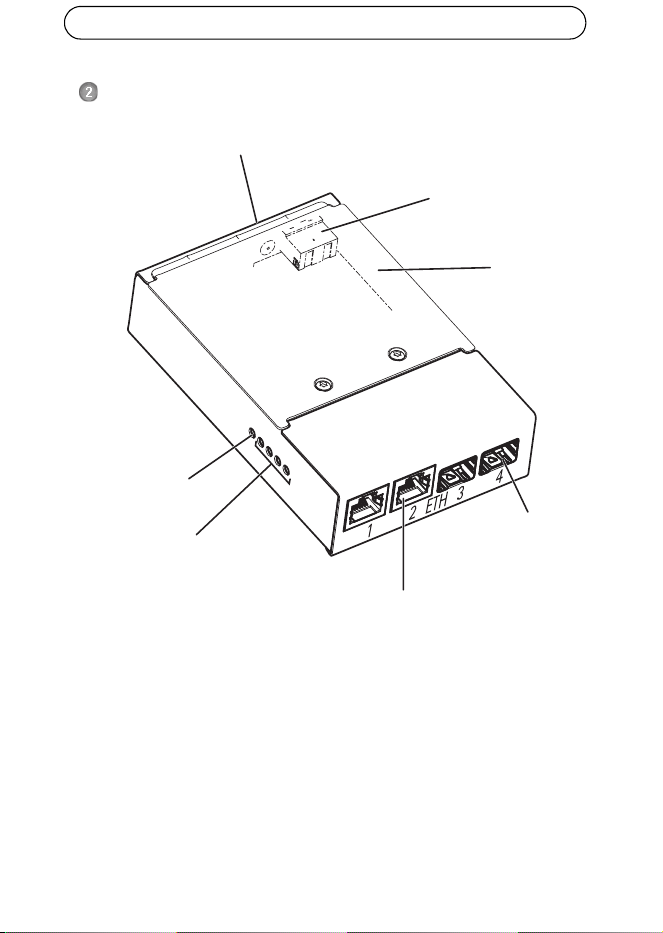
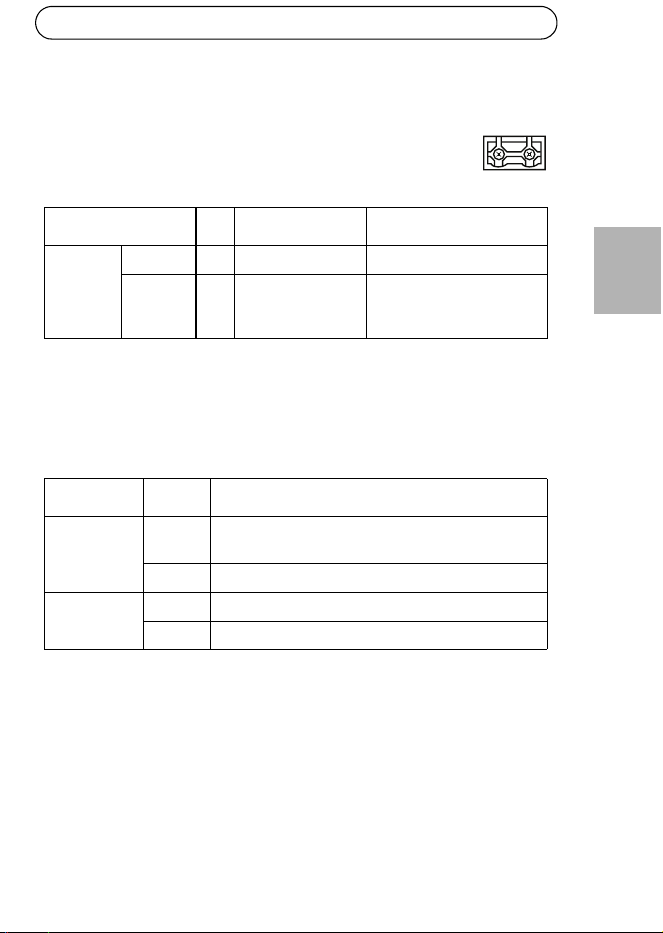
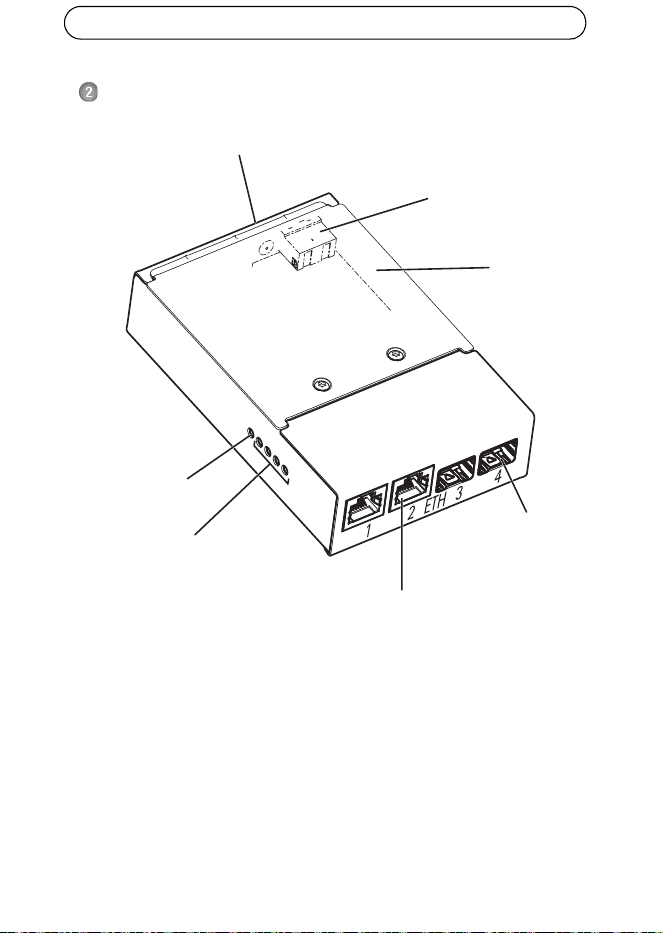
Each RJ-45 and SFP connector has its own dip switch, which is accessed by
removing the cover. However, removing the cover is not necessary because the dip
switches shall be left in their original positions (position B) unless connecting one
or more ports to AXIS Q6032-C/Q6034-C/Q6035-C and AXIS T8605. For more
information, see AXIS Q6032-C/Q6034-C/Q6035-C User Manuals.
Network connector RJ-45
Network connector
Cover
Power LED
Network LED indicator (4x)
ETH 1/2/3/4
indicator
(2x)
(2x)
Power connector
(DC input)
Ground screw
SFP
AXIS T8604 Page 9
ENGLISH
Connectors
Network connector RJ-45 (external) - Two RJ-45 connectors (10Base-T/
100Base-TX) for network connectivity.
Network connector SFP (external) - Two SFP connectors (100Base-FX/1000Base-
X) for network connectivity.
LED Indicators
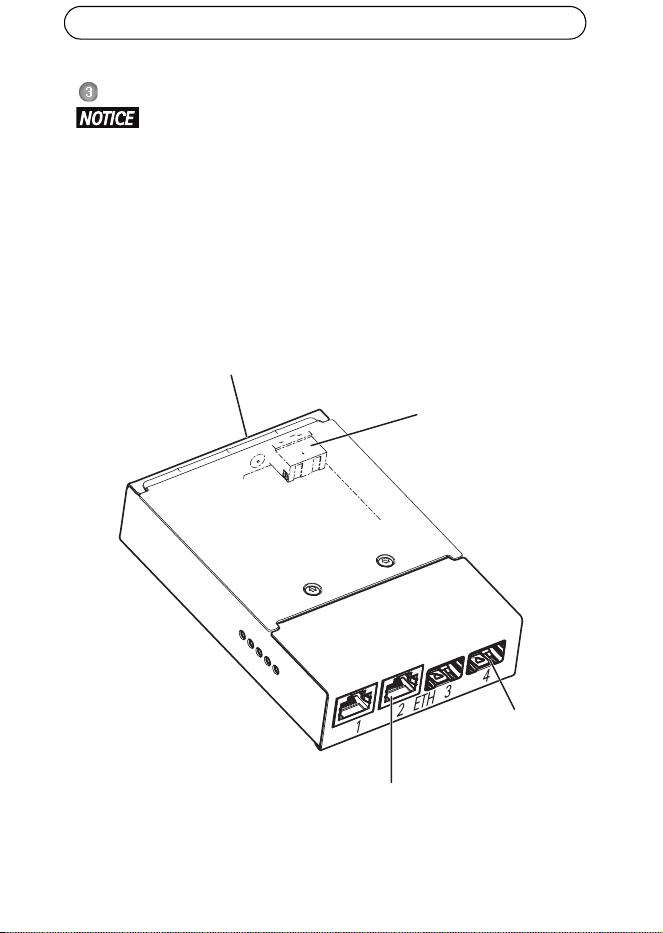
Power connector (DC input) - 2-pin terminal block for power input.
Function Pin Notes Specifications
DC input GND 1 Ground
12 V DC 2 Power in from
power supply (sold
separately)
Max load = 0.3 A
12 - 13.2VDC, min3.5W
LED Color Indication
Power Unlit DC power unconnected or current protection
engaged (power overload).
Green DC power connected.
Network (4x) Amber 10 Mbit connection. Flashes during activity.
Green 100/1000 Mbit connection. Flashes during activity.
-+
21
Page 10 AXIS T8604
Install the Hardware
• The media converter switch shall be installed in an environment pro-
tected against dust and water, for example indoors or in an appropriate
cabinet.
• The media converter switch shall be connected using shielded network
cables (STP) intended for their specific use. Make sure that the switch is
properly grounded. See Electromagnetic Compatibility (EMC) for regula-
tory requirements.
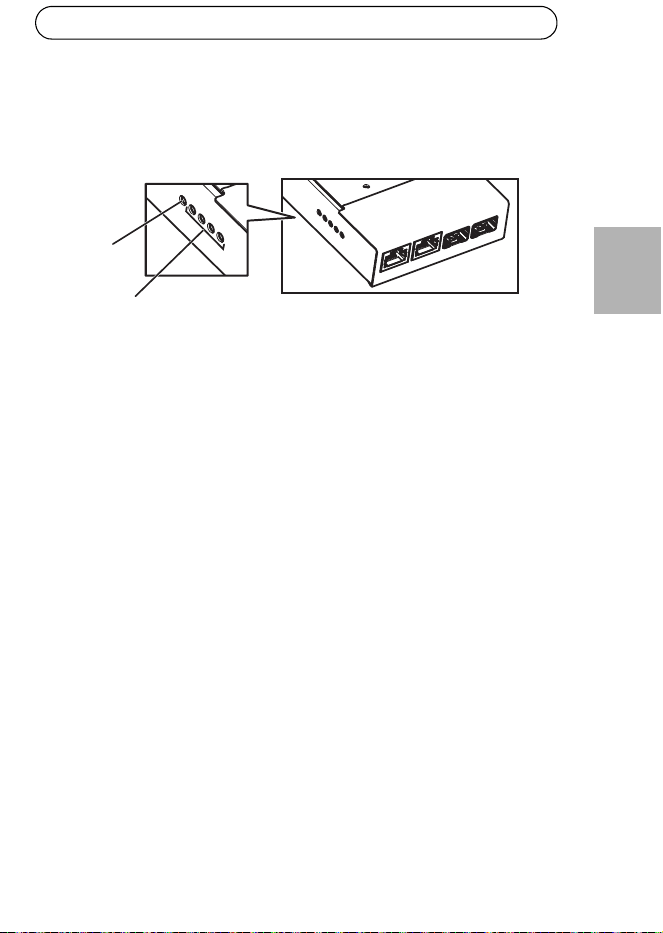
1. Mount the media converter switch on the wall or, if applicable, attach it to a
DIN rail in the cabinet.
2. Connect the network cables to the network connectors (RJ-45, SFP) as
required.
Network connector
Network connector
SFP (2x)
RJ-45 (2x)
Ground screw
Power connector
(DC input)
AXIS T8604 Page 11
ENGLISH
3. Connect the power cable to the power connector (DC input).
4. Earth the switch by connecting to the ground screw.
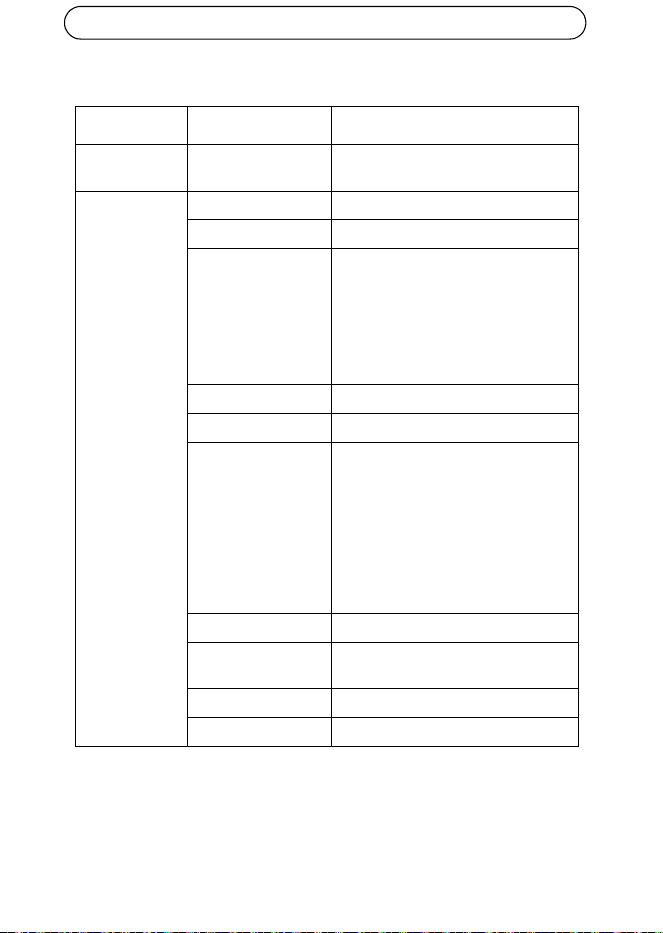
5. Make sure the LED indicators on the media converter switch indicate the
correct conditions. For information, see LED Indicators, on page 9.
Power LED
Network LED (4x)
ETH 1/2/3/4
Page 12 AXIS T8604
Technical specifications
Function/group Item Specifications
Media converter
switch
Model AXIS T8604
General Casing Metal
Power 12–13.2 V DC, max 3.5 W
Connectors 2x RJ-45 connectors (10/100 Mbps)*
2x SFP connectors (100/1000 Mbps)
for SFP fiber optic modules or SFP to
copper modules
1x power
*use shielded cables (STP) CAT5 or
higher
Environment Indoor/cabinet
Operating conditions -40 °C to 75 °C (-40 °F to 167 °F)
Approvals EN 55022 Class A, EN 61000-3-2,
EN 61000-3-3, EN 61000-6-1,
EN 61000-6-2, EN 55024
FCC Part 15 Subpart B Class A
ICES-003 Class A
C-tick AS/NZS CISPR 22
KCC Class A
VCCI Class A
IEC/EN 60950-1
Weight 284 g (0.63 lb.)
Dimensions
(HxWxD)
150 x 100 x 30 mm (5.9” x 3.9” x 1.2”)
Included Accessories Installation Guide, clip for DIN rail
Optional Accessories SFP module
AXIS T8604 Page 13
ENGLISH
Further Information
Visit Axis learning center www.axis.com/academy for useful trainings, webinars,
tutorials and guides
.
Warranty
For information about Axis’ product warranty and thereto related information, see
www.axis.com/warranty

FRAN
Ç
AIS
Mesures de sécurité
Lisez attentivement le présent Guide d'installation avant d'installer le produit Axis.
Conservez le Guide d'installation pour une utilisation ultérieure.
• Conservez le produit Axis dans un environnement sec et aéré.
• Évitez d'exposer le produit Axis aux vibrations, aux chocs ou à une forte pres-
sion. N'installez pas le produit sur un support instable, ou des surfaces ou des
murs instables ou vibrants, car cela pourrait l'endommager.
• N'utilisez que les outils applicables pour installer le produit Axis ; une force
excessive pourrait endommager le produit.
• Pour le nettoyage, n’utilisez ni produits chimiques, ni substances caustiques ou
aérosols. Utilisez un chiffon humide pour le nettoyage.
• N’utilisez que des accessoires conformes aux caractéristiques techniques du
produit. Ceux-ci peuvent être fournis par Axis ou par un fournisseur tiers.
• Utilisez uniquement des pièces de rechange fournies ou recommandées par Axis.
• Ne tentez pas de réparer le produit vous-même, contactez Axis ou votre reven-
deur Axis pour toute réparation.
• Ce produit Axis doit être utilisé conformément aux lois et réglementations
locales en vigueur.
• Pour pouvoir être utilisé à l'extérieur, ce produit Axis doit être placé dans un
boîtier d'extérieur homologué.
• Le produit Axis doit être installé par un professionnel qualifié. Veuillez vous con-
former aux règlements nationaux et locaux relatifs à l'installation.
Transport
• Pour transporter le produit Axis et éviter de l'endommager, utilisez l'emballage
d'origine ou un emballage équivalent.

Axis T8604 Page 17
FRAN
Ç
AIS
Axis T8604 Guide d'installation
Ce Guide d'installation fournit des instructions pour l'installation du Convertisseur
de media Axis T8604 sur votre réseau.
Procédure d’installation
1. Vérifiez le contenu de l’emballage avec la liste ci-dessous.
2. Aperçu du matériel. Reportez-vous à la section page 18.
3. Installation du matériel. Reportez-vous à la section page 20.
Contenu de la boîte
Article Modèles/variantes/remarques
Interrupteur de
Convertisseur de média
Axis T8604
Kit de montage Clip pour le rail DIN
Vis (2x)
Documentations imprimées Axis T8604 Guide d'installation (ce document)
Accessoires en option Module SFP
Page 18 Axis T8604
Présentation du matériel
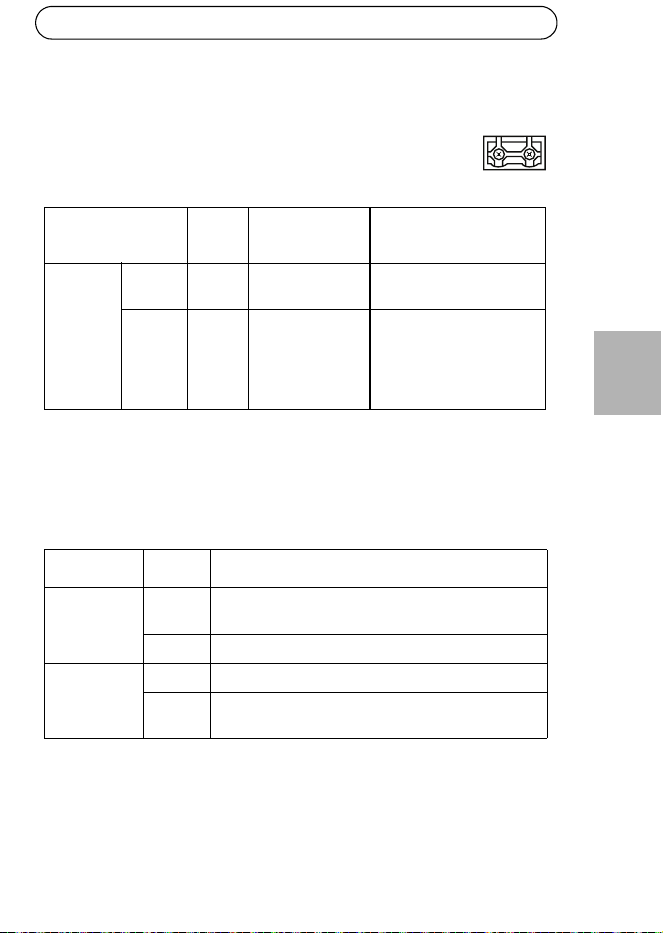
Chaque port RJ-45 et connecteur SFP possède son propre commutateur dip, qui est
accessible en retirant le couvercle. Toutefois, le retrait du couvercle n'est pas
nécessaire, parce que les commutateurs dip doivent être laissés dans leur position
initiale (position B) sauf si vous connectez un ou plusieurs ports à l' AXIS Q6032-C/
Q6034-C/Q6035-C et à l' AXIS T8605. Pour en savoir plus, consultez les manuels de
l'utilisateur AXIS Q6032-C/Q6034-C/Q6035-C.
Connecteur réseau RJ-45
Connecteur réseau SFP
Couvercle
Témoin DEL
Témoin DEL
ETH 1/2/3/4
(x2)
(x2)
Connecteur d’alimentation
(Entrée CC)
Vis de mise à la terre
d'alimentation
réseau (x4)
Axis T8604 Page 19
FRAN
Ç
AIS
Connecteurs
Connecteur réseau RJ-45 (externe) - Deux connecteurs RJ-45 (10Base-T/
100Base-TX) pour la connectivité au réseau.
Connecteur réseau SFP (externe) - Deux connecteurs SFP (100Base-FX/
1000Base-X) pour la connectivité au réseau.
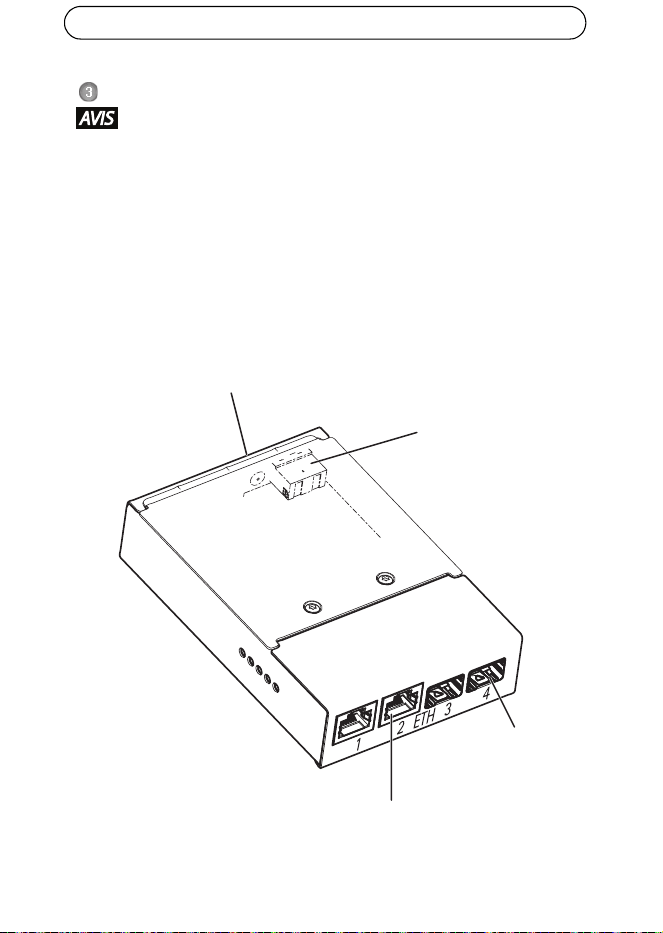
Voyants DEL
Connecteur d'alimentation (entrée CC) - Prise à 2 broches pour
l'entrée de courant.
Fonction Broche Remarques Caractéristiques
techniques
Entrée CC GND
(Terre)
1 Mise à la terre
12 V CC 2 Entrée de courant
provenant de
l'alimentation
(vendue
séparément)
Charge max = 0.3 A
12 - 13,2 V CC, min 3.5 W
DEL Couleur Indication
Alimentation Éteint Alimentation CC déconnectée ou dispositif de
protection ampère-métrique activé (surcharge).
Vert Alimentation CC connectée
Réseau (x4) Orange Connexion 10 Mbit Clignote pendant l'activité.
Vert Connexion 100/1000 Mbit Clignote pendant
l'activité.
-+
21
Page 20 Axis T8604
Installation du matériel
• Le convertisseur de media doit être installé dans un environnement
protégé contre la poussière et l'eau, par exemple en intérieur ou dans
une armoire.
• Le convertisseur de media doit être connecté au réseau à l'aide de câbles
blindés (STP) prévus pour cette utilisation spécifique. Assurez-vous que
le convertisseur de média est convenablement mis à la terre. Reportez-
vous à la section Electromagnetic Compatibility (EMC) pour connaître les
exigences réglementaires.
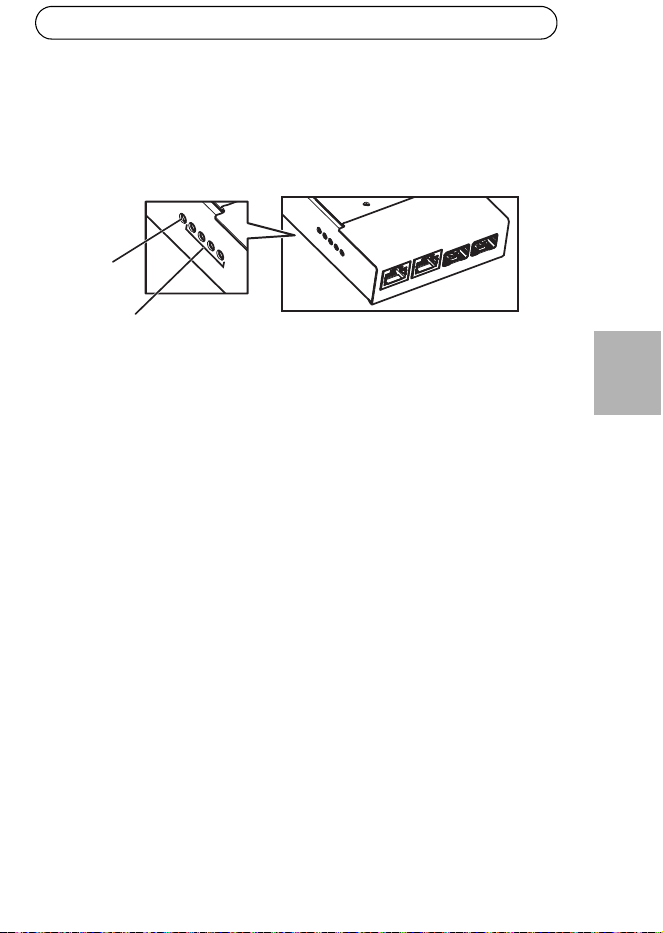
1. Fixez le convertisseur de media sur le mur ou, le cas échéant, fixez-le sur un
rail DIN dans l'armoire.
2. Connectez les câbles de réseau aux connecteurs réseau (RJ-45, SFP) comme
requis.
Connecteur réseau
Connecteur réseau
SFP (2x)
RJ-45 (2x)
Vis de mise à la terre
Connecteur d’alimentation
(Entrée CC)
Axis T8604 Page 21
FRAN
Ç
AIS
3. Connectez le câble d'alimentation au connecteur d'alimentation (Entrée CC).
4. Câblez le convertisseur à la terre en le connectant à la vis de mise à la terre.
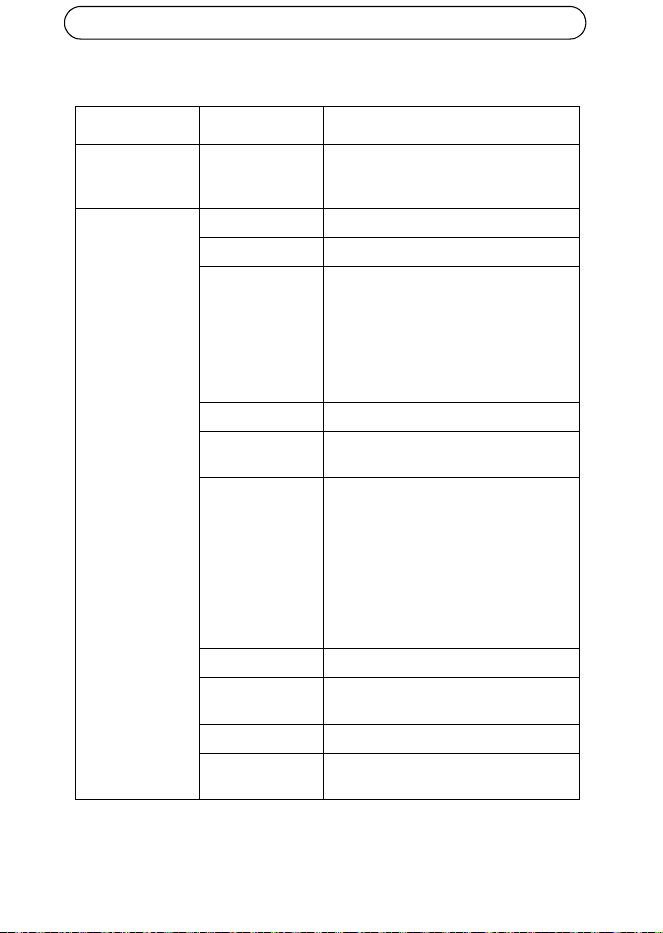
5. Assurez-vous que les voyants DEL sur le convertisseur de média indiquent les
conditions appropriées. Pour en savoir plus, reportez-vous à la section Voyants
DEL, page 19.
Témoin DEL
DEL réseau (x4)
ETH 1/2/3/4
d'alimentation
Page 22 Axis T8604
Caractéristiques techniques
Fonction/groupe Article Caractéristiques techniques
Interrupteur du
Convertisseur de
média
Modèle Axis T8604
Général Boîtier Métal
Alimentation 12-13,2 V CC, max. 3,5 W
Connecteurs 2X connecteurs RJ-45 (10/100 Mbits) *
2X connecteurs SFP (100/1000 Mbits)
pour modules de fibres optiques SFP ou
SFP vers modules cuivre
1 x alimentation
* Utilisez des câbles blindés (STP) CAT5
ou supérieur
Environnement Intérieur/Armoire
Conditions
d’utilisation
-40 °C à 75 °C (-40 °F à 167 °F)
Agréments EN 50022 classe A, EN 61000-3-2, EN
61000-3-3, EN 61000-6-1, EN 61000-
6-2, EN 55024
FCC Partie 15 Sous-partie B Classe A
ICES-003 Classe A
C-tick AS/NZS CISPR 22
KCC Classe A
VCCI Classe A
CEI/EN 60950-1
Poids 284 g (0.63 lb.)
Dimensions
(HxLxP)
150 X 100 x 30 mm (5,9" x 3,9" x 1,2 ")
Accessoires inclus Guide d'installation, clip pour rail DIN
Accessoires en
option
Module SFP
Axis T8604 Page 23
FRAN
Ç
AIS
Plus d’informations
Visitez le centre d'apprentissage AXIS sur www.axis.com/academy pour des
formations utiles, des webinars, des tutoriels et des guides
.
Garantie
Pour plus d'informations à propos de la garantie du produit Axis et des information
s'y rapportant, voir www.axis.com/warranty

DEUTSCH
Sicherheitsvorkehrungen
Bitte lesen Sie diese Installationsanleitung sorgfältig durch, bevor Sie mit der
Installation des Axis Produkts beginnen. Halten Sie die Installationsanleitung
bereit, falls Sie darauf zurückgreifen müssen.
• Lagern Sie das Axis-Produkt in einer trockenen und belüfteten Umgebung.
• Setzen Sie das Axis Produkt keinen Vibrationen, Erschütterungen oder starkem
Druck aus. Installieren Sie das Produkt nicht an instabilen Halterungen oder
instabilen oder vibrierenden Oberflächen oder Mauern, da dadurch das Produkt
beschädigt werden könnte.
• Verwenden Sie bei der Installation des Axis Produkts nur geeignetes Werkzeug;
zu hoher Kraftaufwand kann das Produkt beschädigen.
• Verwenden Sie keine chemischen, ätzenden oder aerosolhaltigen Reini-
gungsmittel. Verwenden Sie zur Reinigung ein feuchtes Tuch.
• Verwenden Sie nur Zubehör, das den technischen Spezifikationen des Produkts
entspricht. Dieses ist von Axis oder Drittanbietern erhältlich.
• Verwenden Sie nur Ersatzteile, die von Axis empfohlen bzw. bereitgestellt wur-
den.
• Versuchen Sie nicht, das Produkt selbst zu reparieren. Wenden Sie sich bei Ser-
vice-Angelegenheiten an Axis oder an Ihren Axis-Händler.
• Verwenden Sie dieses Axis-Produkt unter Beachtung der vor Ort geltenden
rechtlichen Bestimmungen.
• Um dieses Axis-Produkt im Freien verwenden zu können, muss es in einem
zugelassenen Außengehäuse installiert werden.
• Das Axis Produkt sollte nur von geschultem Fachpersonal installiert werden.
Beachten Sie bei der Montage die geltenden nationalen und lokalen Bestim-
mungen.
Transport
• Transportieren Sie das Axis-Produkt nur in der Originalverpackung bzw. in einer
vergleichbaren Verpackung, damit das Produkt nicht beschädigt wird.

AXIS T8604 Seite 27
DEUTSCH
AXIS T8604 Installationsanleitung
Diese Anleitung enthält die Anweisungen zur Installation AXIS T8604 Medien-
Umschalter auf Ihrem Netz.
Installationsschritte
1. Prüfen Sie den Packungsinhalt anhand der nachfolgenden Liste.
2. Hardwareübersicht. Siehe Seite 28.
3. Installieren der Hardware. Siehe Seite 30.
Inhalt der Packung
Artikel Modelle / Varianten / Hinweise
Medien-Umschalter AXIS T8604
Montagesatz Klemme für DIN Klemme
Schrauben (2x)
Gedruckte Dokumente AXIS T8604 Installationsanleitung (dieses
Dokument)
Optionales Zubehör SFP Modul
Seite 28 AXIS T8604
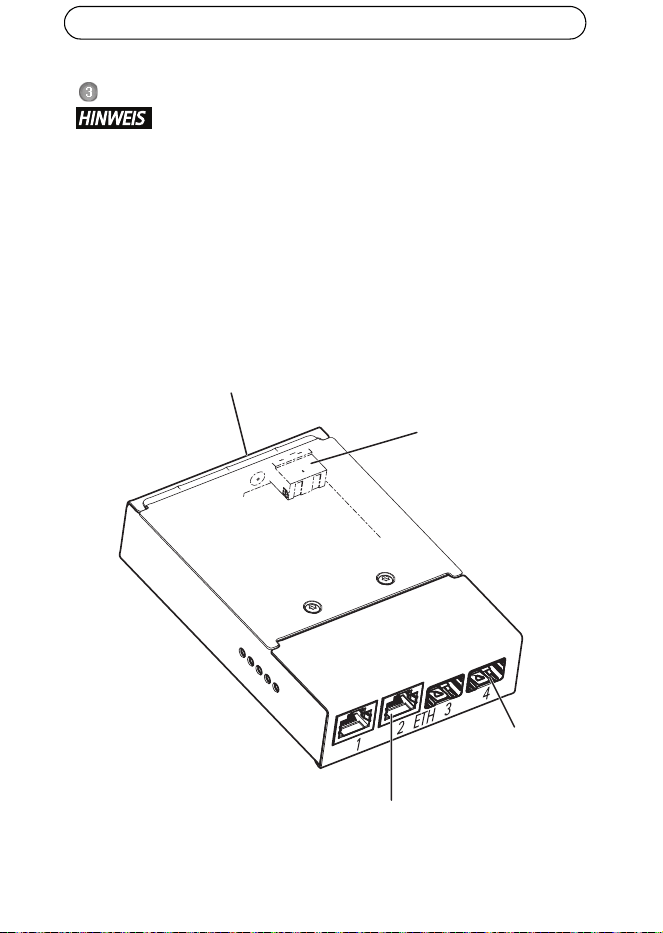
Hardwareübersicht
Jeder RJ-45 und SFP Anschluss hat seinen eigenen Dip-Schalter, auf den man durch
Entfernen der Abdeckung zugreifen kann. Es ist jedoch nicht notwendig die
Abdeckung zu entfernen, da der Dip-Schalter in seiner ursprünglichen Position
(Position B) verbleiben sollte, es sei denn, man verbindet eine oder mehrere
Schnittstellen mit Axis Q6032-C/Q6034-C/Q6035-C und Axis T8605. Für weitere
Informationen lesen Sie bitte das Axis Q6032-C/Q6034-C/Q6035-C
Benutzerhandbuch.
Netzwerkanschluss RJ-45
Netzwerkanschluss SPF
Abdeckung
Netz-LED
Netzwerk-LED-Anzeige (4x)
ETH 1/2/3/4
Anzeige
(2x)
(2x)
Netzanschluss
(Gleichstromeingang)
Masseschraube
AXIS T8604 Seite 29
DEUTSCH
Anschlüsse
Netzwerkanschluss RJ-45 (extern) - Zwei RJ-45 Anschlüsse (10Base-T/100Base-
TX) für Netzwerkanschluss.
Netzwerkanschluss SFP (extern) - Zwei SFP-Anschlüsse (100Base-FX/1000Base-
X) für Netzwerkanschluss.
LED-Anzeigen
Netzanschluss (Gleichstromeingang) - 2-polige Klemmenleiste für
Stromeingang.
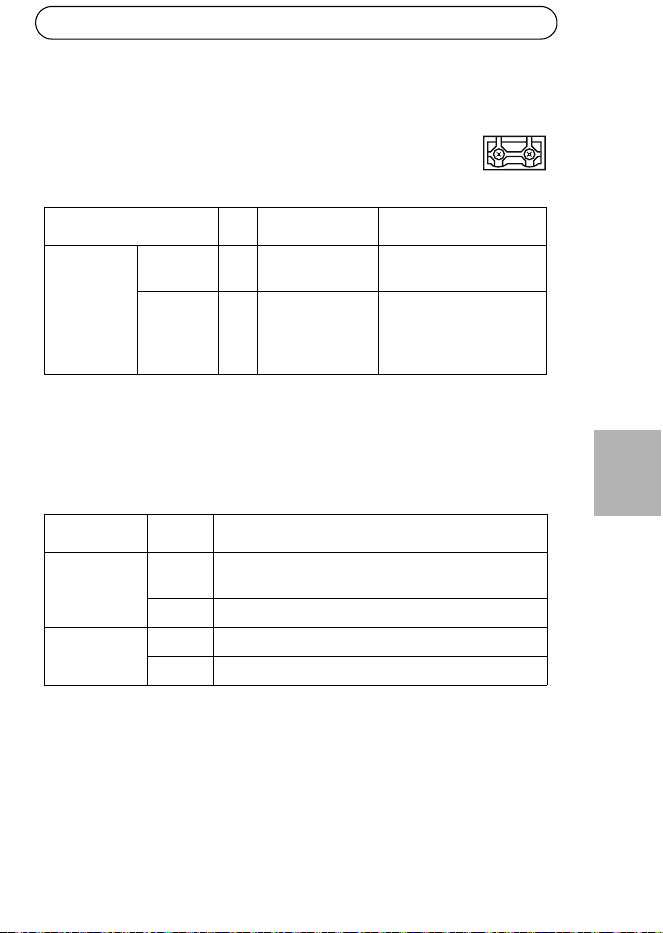
Funktion Pol Hinweise Spezifikationen
Gleichstrom-
eingang
Masse
(GND)
1Masse
12 V DC 2 Stromeingang
von Stromquelle
(separat
angeboten)
Max. Stromstärke = 0.3 A
12–13,2 V Gleichstrom,
min 3.5 W
LED Farbe Bedeutung
Netzspannung Leuchtet
nicht
Gleichstrom nicht angeschlossen oder
Fehlerstromschutz aktiviert (Überlastung).
Grün Gleichstrom angeschlossen.
Netzwerk (4x) Gelb 10-Mbit-Anschluss. Blinkt wenn aktiv.
Grün 100/1000-Mbit-Anschluss. Blinkt wenn aktiv.
-+
21
Seite 30 AXIS T8604
Installieren der Hardware
• Der Medien-Umschalter sollte in einem gegen Staub und Wasser
geschützten Umfeld installiert werden, zum Beispiel im Haus oder in
einem passenden Gehäuse.
• Der Medien-Umschalter muss mit geschirmten Netzwerkkabeln (STP),
nach ihrer bestimmungsgemäßen Verwendung, verbunden werden.
Stellen Sie sicher, dass der Schalter ordnungsgemäß geerdet ist.
Beachten Sie die behördlichen Bestimmungen bezüglich Electromagnetic
Compatibility (EMC).
1. Montieren Sie den Medien-Umschalter an eine Wand oder, wenn möglich, auf
eine DIN Leiste in einem Gehäuse.
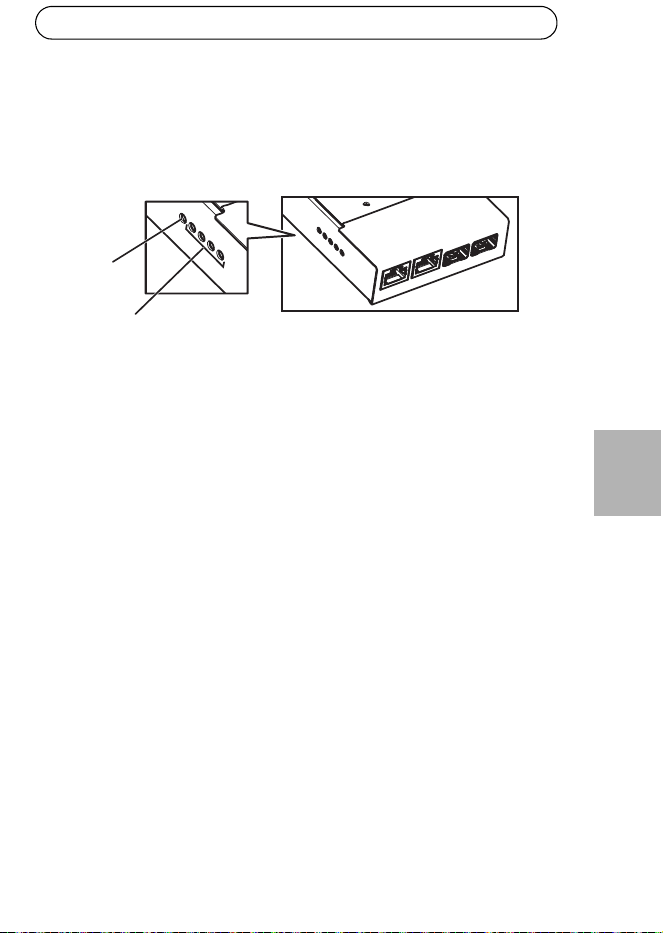
2. Verbinden Sie die Netzkabel zu den Netzwerkanschlüssen (RJ-45, SFP) wie
erforderlich.
Netzwerkanschluss
Netzwerkanschluss
SFP (2x)
RJ-45 (2x)
Masseschraube
Netzanschluss
(Gleichstromeingang)
AXIS T8604 Seite 31
DEUTSCH
3. Verbinden Sie das Netzkabel mit dem Stromanschluss (DC Eingang).
4. Erden Sie den Schalter durch eine Verbindung mit der Erdungsschraube.
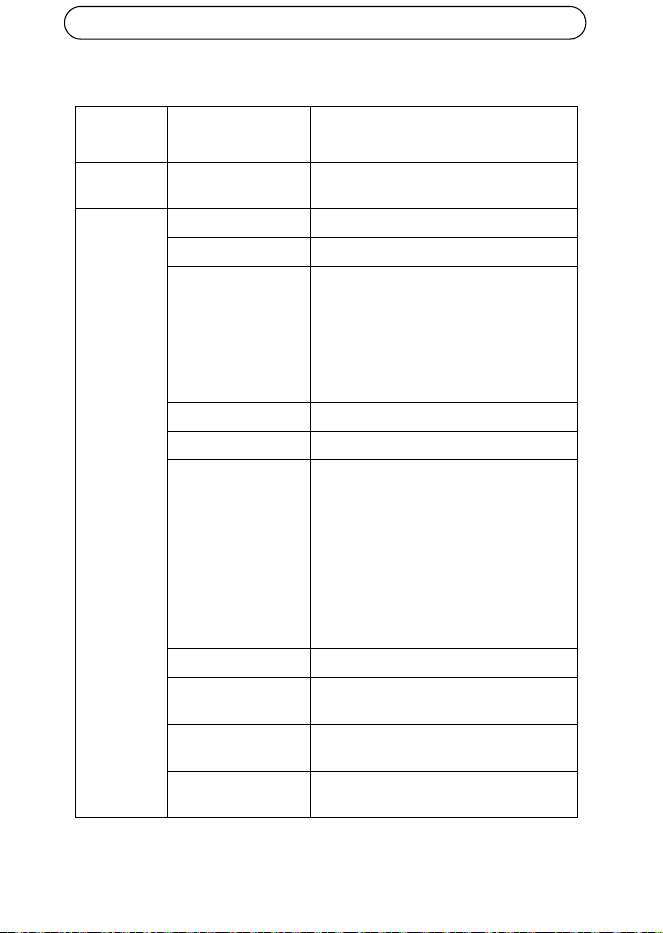
5. Stellen Sie sicher, dass die LED-Anzeigen im Medien-Umschalter die korrekten
Bedingungen anzeigen. Weitere Informationen finden Sie unter LED-Anzeigen,
auf Seite 29.
Netz-LED
Netzwerk LED (4x)
ETH 1/2/3/4
Seite 32 AXIS T8604
Technische Daten
Funktion/
Gruppe
Artikel Spezifikationen
Medien-
Umschalter
Modell AXIS T8604
Allgemeines Gehäuse Metall
Netzspannung 12–13.2 V DC, Max. 3,5 W
Anschlüsse 2x RJ-45 Anschlüsse (10/100 Mbps)*
2x SFP Anschlüsse (100/1000 Mbps) für
die SFP faseroptischen Module oder SFP
zu Kupfermodule
1x Netzspannung
*Gebrauch von geschirmten Kabeln (STP)
Kategorie 5 oder höher
Umgebung Innen/Gehäuse
Betriebsbedingungen -40 °C bis 75 °C (-40 °F bis 167 °F)
Zulassungen EN 55022 Klasse A, EN 61000-3-2,
EN 61000-3-3, EN 61000-6-1,
EN 61000-6-2, EN 55024
FCC Abschnitt 15 Unterabschnitt B Klasse
A
ICES-003 Klasse A
C-tick AS/NZS CISPR 22
KCC Klasse A
VCCI Klasse A
IEC/EN 60950-1
Gewicht 284 g (0.63 lb.)
Abmessungen
(HxBxT)
150 x 100 x 30 mm (5.9” x 3.9” x 1.2”)
Im Lieferumfang
enthaltenes Zubehör
Installationsanleitung, Klemme für DIN
Leiste
Optionale
Zubehörteile
SFP Modul
AXIS T8604 Seite 33
DEUTSCH
Weitere Informationen
Im Axis Lernzentrum unter www.axis.com/academy finden Sie hilfreiche
Schulungen, Webinare, Lernprogramme und Anleitungen
.
Garantie
Informationen zur Axis Produktgarantie finden Sie unter www.axis.com/warranty

ITALIANO
Sicurezza
Leggere attentamente questa Guida all'installazione prima di installare un prodotto
Axis. Conservare la Guida all'installazione per future consultazioni.
• Conservare il prodotto Axis in un ambiente asciutto e ben ventilato.
• Evitare di esporre il prodotto Axis alle vibrazioni, agli urti o a forte pressione.
Non installare il prodotto su staffe instabili, superfici o pareti instabili o vibranti,
poiché ciò potrebbe danneggiare il prodotto.
• Utilizzare solo strumenti idonei quando si installa il prodotto Axis. Una forza
eccessiva potrebbe danneggiare il prodotto.
• Non utilizzare sostanze chimiche, agenti caustici o detergenti spray. Utilizzare
un panno umido per la pulizia.
• Utilizzare solo accessori conformi alle specifiche tecniche del prodotto. Queste
possono essere fornite da Axis o da terze parti.
• Utilizzare solo parti di ricambio fornite o raccomandate da Axis.
• Non tentare di riparare il prodotto da soli, contattare Axis o il rivenditore di
zona Axis per assistenza.
• Questo prodotto Axis deve essere utilizzato in conformità alle leggi e alle dispo-
sizioni locali.
• Per utilizzare questo prodotto Axis all'esterno, è necessario installarlo in un
alloggiamento per esterni approvato.
• Il prodotto Axis deve essere installato da un tecnico qualificato. Osservare le
disposizioni nazionali e locali per l'installazione.
Trasporto
• Quando si trasporta il prodotto Axis, utilizzare l'imballo originale o un imballo
equivalente per evitare di danneggiare il prodotto.

AXIS T8604 Pagina 37
ITALIANO
AXIS T8604 Guida all'installazione
Questo documento fornisce le istruzioni necessarie per installare l'unità Switch
media converter AXIS T8604 nella rete in uso.
Procedura di installazione
1. Controllare il contenuto della confezione con l'elenco che segue.
2. Panoramica dell’hardware. Vedere pagina 38.
3. Installazione dell’hardware. Vedere pagina 40.
Contenuto della confezione
Elemento Modelli/varianti/note
Switch media converter AXIS T8604
Kit di montaggio Clip per clip DIN
Viti (2)
Materiali stampati AXIS T8604 Guida all'installazione (questo
documento)
Accessori opzionali Modulo SFP
Pagina 38 AXIS T8604
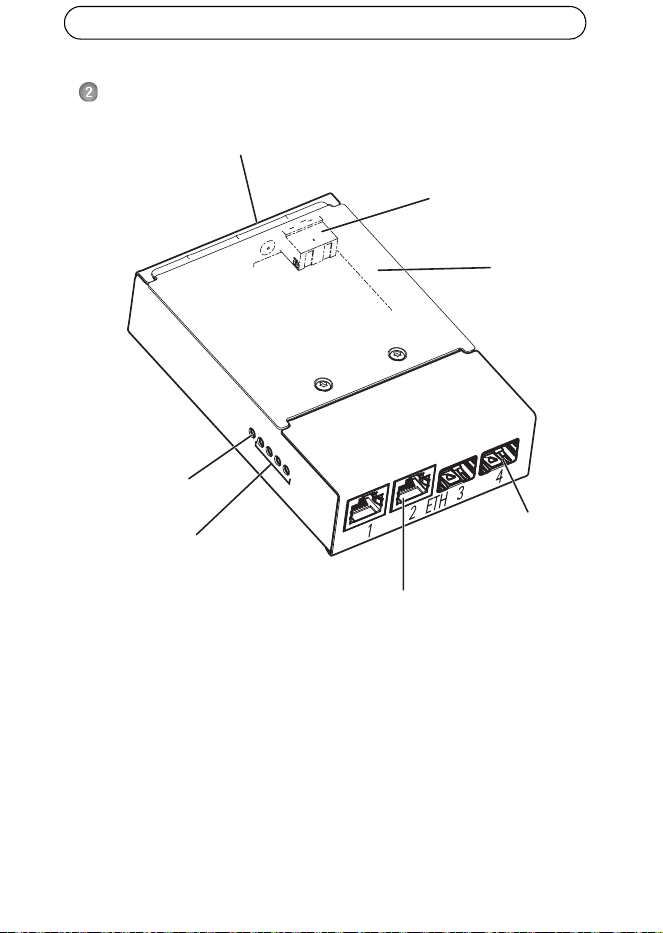
Panoramica dell'hardware
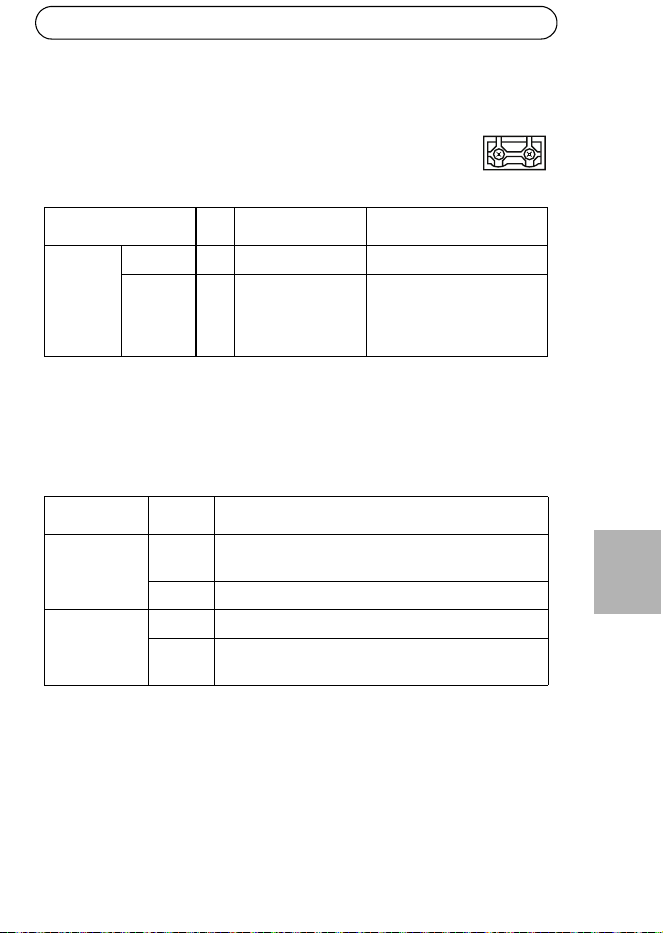
Ogni connettore RJ-45 e SFP possiede il proprio dip switch, accessibile rimuovendo
la copertura. Tuttavia, non è necessario rimuovere la copertura in quanto i dip
switch devono restare nelle posizione iniziali (posizione B) a meno che non si
colleghino una o più porte all'unità AXIS Q6032-C/Q6034-C/Q6035-C e all'unità
AXIS T8605. Per maggiori informazioni leggere i manuali d'uso delle unità AXIS
Q6032-C/Q6034-C/Q6035-C.
Connettore di rete RJ-45
Connettore di rete SPF
Copertura
Indicatore LED
Indicatore LED di rete (4x)
ETH 1/2/3/4
di alimentazione
(2)
(2)
Connettore di alimentazione
(Ingresso CC)
Vite a terra
AXIS T8604 Pagina 39
ITALIANO
Connettori
Connettore di rete RJ-45 (esterno) - Due connettori RJ-45 (10Base-T/100Base-
TX) per connettività di rete.
Connettore di rete SFP (esterno) - Due connettori SFP (100Base-FX/1000Base-X)
per connettività di rete.
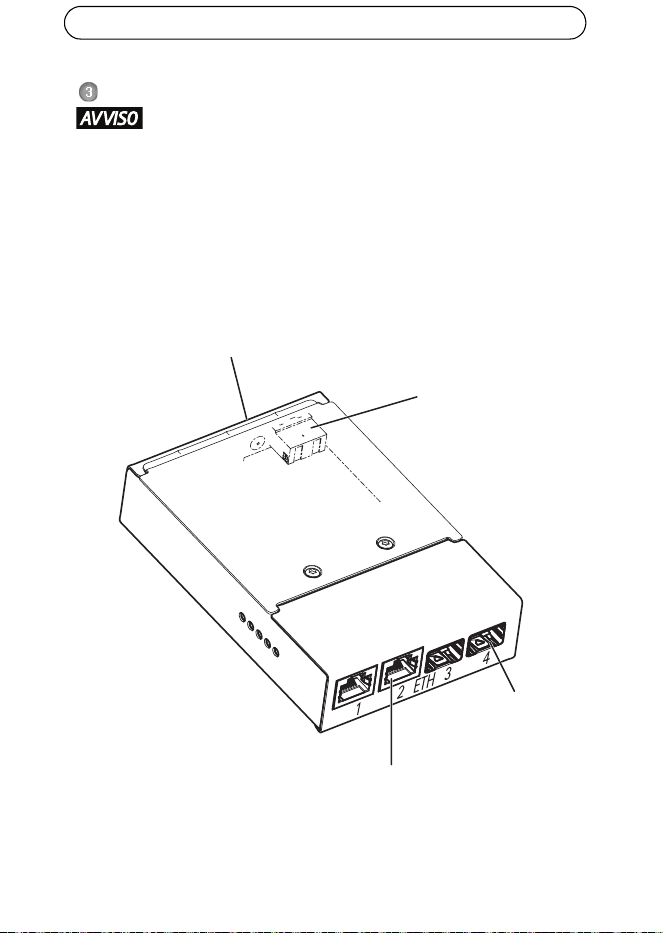
Indicatori LED
Morsettiera di alimentazione (ingresso CC) - Morsettiera di
alimentazione a 2 pin per ingresso alimentazione.
Funzione Pin Note Specifiche
Ingresso
CC
GND 1 Terra
12 V CC 2 Alimentazione
dall'alimentatore
(venduto
separatamente)
Carico max = 0,3 A
12 - 13,2 V CC, min 3,5 W
LED Colore Indicazione
Alimentazione Spento Alimentazione CC non connessa o protezione della
corrente attivata (sovraccarico di alimentazione).
Verde Connesso all'alimentazione CC.
Rete (4) Giallo Connessione 10 Mbit. Lampeggia durante l'attività
Verde Connessione 100/1000 Mbit. Lampeggia durante
l'attività
-+
21
Pagina 40 AXIS T8604
Installazione dell'hardware
• Lo switch media converter dovrà essere installato in un ambiente
protetto dalla polvere e dall'acqua, ad esempio all'interno o in un
armadietto adatto.
• Lo switch media converter dovrà essere connesso usando cavi di rete
schermati (STP) adatti all'uso specifico. Assicurarsi che lo switch sia
adeguatamente connesso a terra. Per i requisiti normativi consultare
Electromagnetic Compatibility (EMC).
1. Montare lo switch media converter sulla parete o, se possibile, collegarlo a
una guida DIN nell'armadietto.
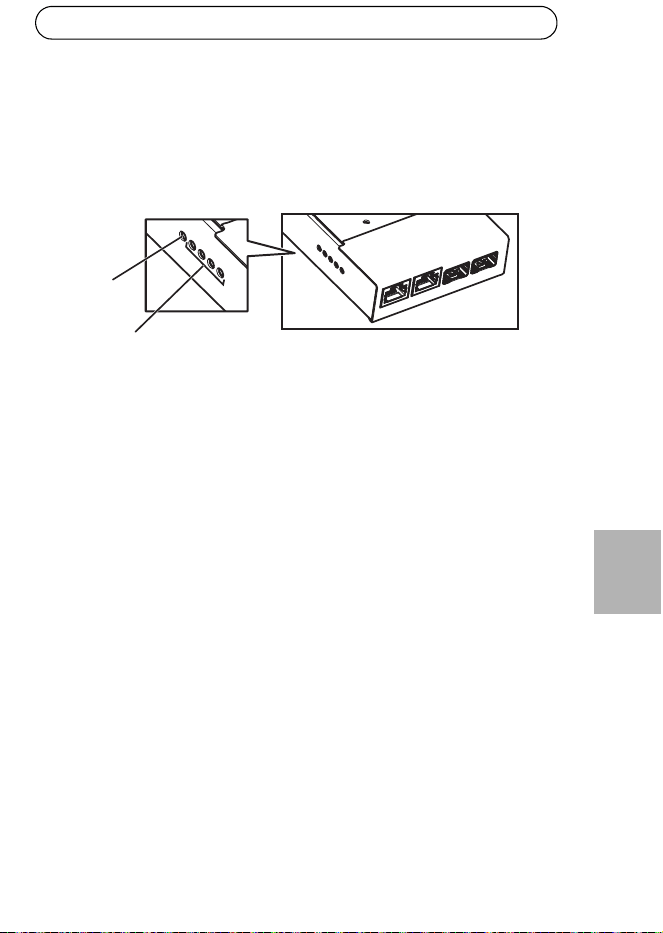
2. Connettere i cavi di rete ai connettori di rete (RJ-45, SFP) come richiesto.
Connettore di rete
Connettore di rete
SFP (2)
RJ-45 (2)
Vite di terra
Connettore di alimentazione
(Ingresso CC)
AXIS T8604 Pagina 41
ITALIANO
3. Connettere il cavo di alimentazione al connettore di alimentazione (ingresso
CC).
4. Mettere a terra lo switch usando la vite di terra.
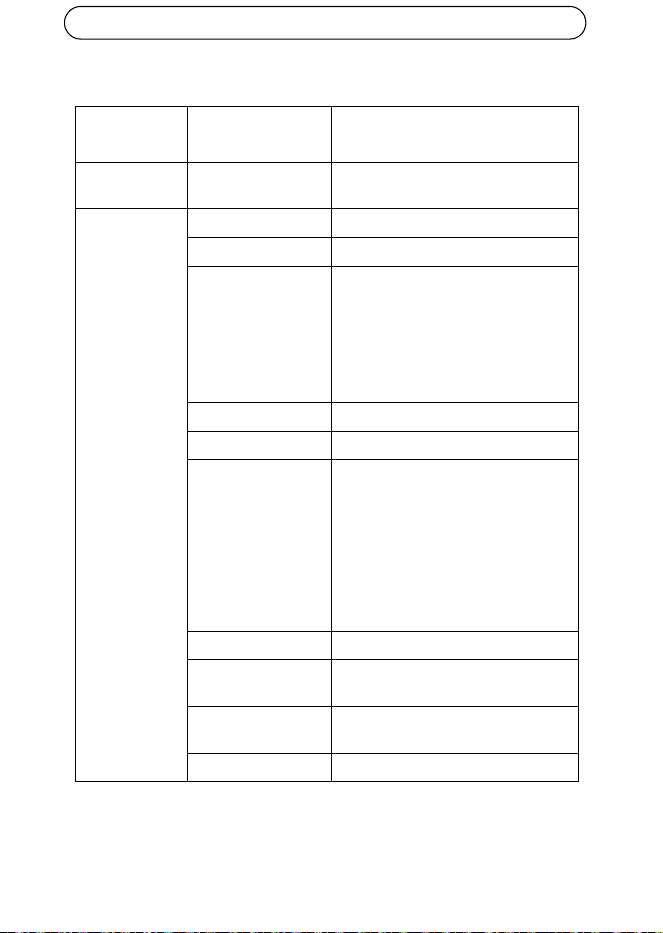
5. Verificare che gli indicatori LED dello switch media converter visualizzino le
condizioni corrette. Per maggiori informazioni, vedere Indicatori LED, a pagina
39
LED di
LED di rete (4)
ETH 1/2/3/4
alimentazione
Pagina 42 AXIS T8604
Specifiche tecniche
Funzione/
gruppo
Elemento Specifiche
Switch media
converter
Modello AXIS T8604
Caratteristiche
generali
Involucro Metallo
Alimentazione 12-13,2 V CC, max 3,5 W
Connettori 2 Connettori RJ-45 (10/100 Mbps)*
2 Connettori SFP (100/1000 Mbps) per
moduli SFP a fibra ottica o moduli SFP
in rame
1 alimentatore
*usare cavi schermati (STP) CAT5 o
maggiori
Ambiente Interno/armadietto
Condizioni operative -40 °C a 75 °C (-40 °F a 167 °F)
Approvazioni EN 55022 Classe A, EN 61000-3-2,
EN 61000-3-3, EN 61000-6-1,
EN 61000-6-2, EN 55024
FCC Parte 15 Sezione B Classe A
ICES-003 Classe A
Contrassegno AS/NZS CISPR 22
KCC Classe A
VCCI Classe A
IEC/EN 60950-1
Peso 284g (0,63lb.)
Dimensioni
(HxLxP)
150 x 100 x 30 mm (5,9” x 3,9” x 1,2”)
Accessori inclusi Manuale d'installazione, clip per guida
DIN
Accessori opzionali Modulo SFP
AXIS T8604 Pagina 43
ITALIANO
Ulteriori informazioni
Per utili corsi di formazione, webinar, tutorial e guide, visitare il centro di
apprendimento di Axis all'indirizzo www.axis.com/academy.
Garanzia
Per informazioni sulla garanzia del prodotto Axis e le relative informazioni, visitare
il sito www.axis.com/warranty

ESPAÑOL
Medidas preventivas
Lea detenidamente esta Guía de instalación antes de instalar el producto Axis.
Guarde la Guía de instalación para poder consultarla en el futuro.
• Guarde el producto Axis en un entorno seco y ventilado.
• Evite exponer el producto Axis a vibraciones, golpes o presiones excesivas. No
instale el producto en soportes inestables ni en superficies o paredes inestables
o con vibraciones, ya que esto podría dañarlo.
• Utilice solo las herramientas apropiadas para instalar el producto Axis; una
fuerza excesiva podría dañarlo.
• No utilice productos químicos, agentes cáusticos ni limpiadores en aerosol.
Límpielo con un paño húmedo.
• Utilice solo accesorios que cumplan las especificaciones técnicas del producto.
Puede obtenerlos de Axis o de un tercero.
• Utilice solo piezas de recambio suministradas o recomendadas por Axis.
• No intente reparar el producto usted mismo, póngase en contacto con Axis o
con el distribuidor de Axis para los temas de servicio técnico.
• Este producto Axis se utilizará de conformidad con la legislación y normativas
locales.
• Para utilizar este producto Axis en exteriores, se instalará en una carcasa pro-
tectora para exteriores aprobada.
• La instalación del producto Axis debe realizarla un profesional cualificado. Siga
las normativas nacionales y locales aplicables para la instalación.
Transporte
• A la hora de transportar el producto Axis, utilice el embalaje original o uno
equivalente para no dañar el producto.

AXIS T8604 Página 47
ESPAÑOL
Guía de instalación AXIS T8604
Esta guía de instalación proporciona las instrucciones necesarias para instalar el
switch convertidor de medios AXIS T8604 en su red.
Pasos para la instalación
1. Verifique el contenido del paquete cotejándolo con la lista que aparece más
abajo.
2. Presentación del hardware. Véase la página 48.
3. Instalación del hardware. Véase la página 50.
Contenido del paquete
Artículo Modelos/variantes/notas
Switch convertidor de
medios
AXIS T8604
Kit de montaje Clip para el clip DIN
Tornillos (2x)
Materiales impresos AXIS T8604 Guía de instalación (este documento)
Accesorios opcionales Módulo SFP
Página 48 AXIS T8604
Presentación del hardware
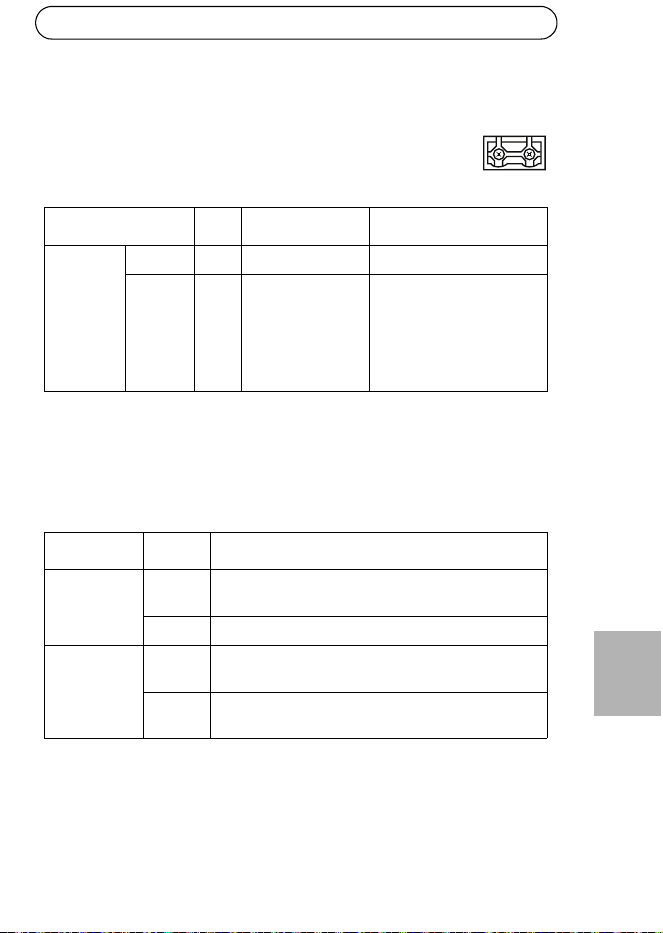
Cada conector RJ-45 y SFP tiene su propio switch DIP y puede acceder a éste
quitando la cubierta. No obstante, no es necesario quitar la cubierta ya que los
switches DIP deben mantenerse en su posición original (posición B) a menos que
conecte uno o más puertos para AXIS Q6032-C/Q6034-C/Q6035-C y AXIS T8605.
Para más información, vea los manuales de usuario de AXIS Q6032-C/Q6034-C/
Q6035-C.
Conector de red RJ-45
Conector de red
Cubierta
Indicador LED
Indicadores LED de red (4)
ETH 1/2/3/4
de alimentación
(2x)
(2x)
Conector de alimentación
(entrada de CC)
Tornillo de masa
SFP
AXIS T8604 Página 49
ESPAÑOL
Conectores
Conector de red RJ-45 (externo) - Dos conectores RJ-45 (10Base-T/100Base-TX)
para conectividad de red.
Conector de red SFP (externo) - Dos conectores SFP (100Base-FX/1000Base-X)
para conectividad de red.
Indicadores LED
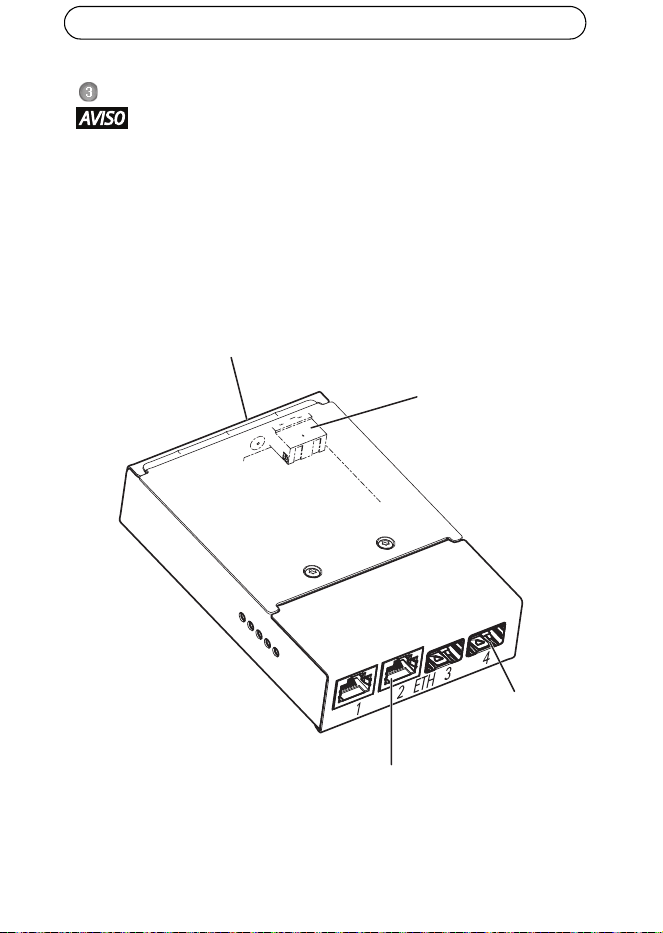
Conector de alimentación (entrada de CC) - Bloque de terminales de
2 pines para la entrada de alimentación.
Función Pines Notas Especificaciones
Entrada CC Masa 1 Masa
12 V CC 2 Entrada de
alimentación
desde fuente de
alimentación (se
vende por
separado)
Carga máx. = 0,3 A
12 - 13,2 V CC, mín. 3,5 W
LED Color Indicación
Alimentación Apagado Alimentación de CC no conectada o protección de
corriente aplicada (sobrecarga de alimentación).
Verde Alimentación de CC conectada.
Red (4) Ámbar Conexión de 10 Mbits. Parpadea para indicar
actividad.
Verde Conexión de 100/1000 Mbits. Parpadea para indicar
actividad.
-+
21
Página 50 AXIS T8604
Instalación del hardware
• El switch convertidor de medios se instalará en un entorno protegido del
polvo y el agua, por ejemplo, en interiores o en un armario apropiado.
• El switch convertidor de medios debe conectarse con cables de red
blindados (STP) destinados para su uso específico. Asegúrese de que el
switch esté correctamente conectado a masa. Consulte los requisitos
normativos en la sección Electromagnetic Compatibility (EMC).
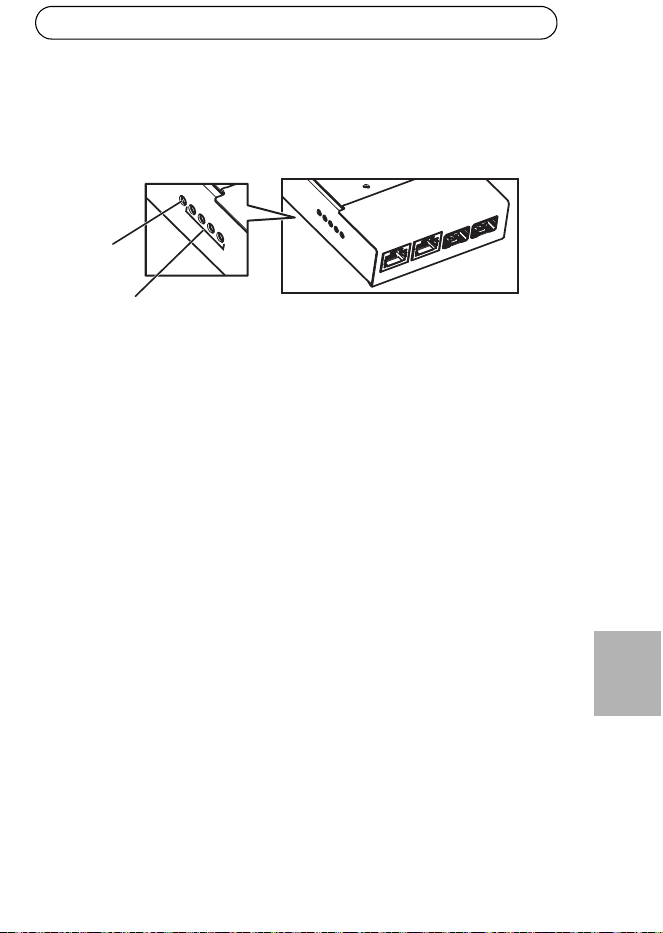
1. Instale el switch convertidor de medios en la pared o, si procede, fíjelo a un
carril DIN en el armario.
2. Conecte los cables de red a los conectores de red (RJ-45, SFP) según
corresponda.
3. Conecte el cable de alimentación al conector de alimentación (entrada de CC).
Conector de red
Conector de red
SFP (2)
RJ-45 (2)
Tornillo de masa
Conector de alimentación
(entrada de CC)
AXIS T8604 Página 51
ESPAÑOL
4. Conecte a tierra el switch conectándolo al tornillo de masa.
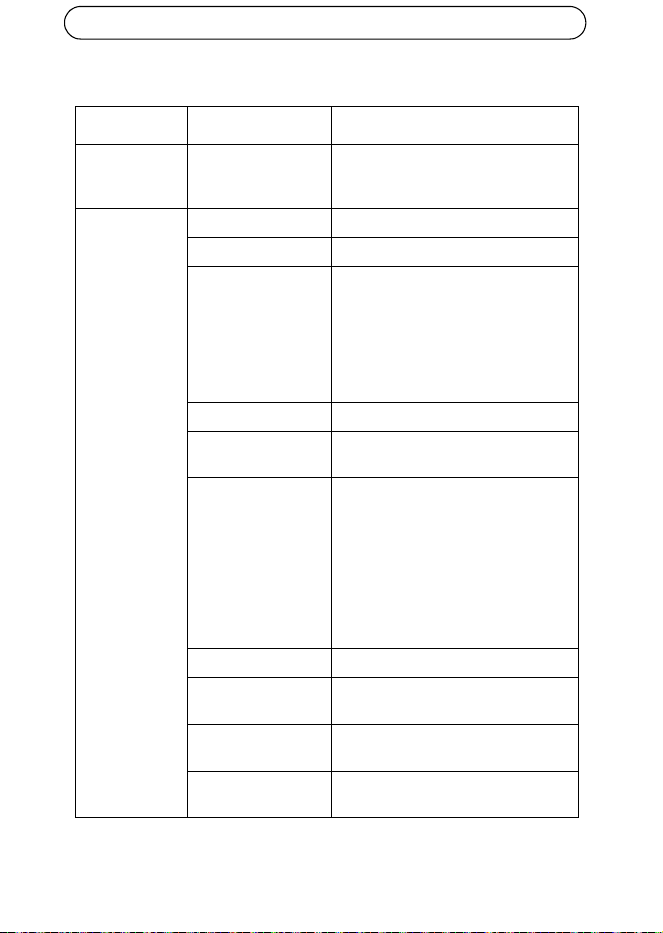
5. Asegúrese de que los indicadores LED del switch convertidor de medios
indiquen las condiciones adecuadas. Para obtener más información, consulte
la sección Indicadores LED, en la página 49.
LED de
LED de red (4)
ETH 1/2/3/4
alimentación
Página 52 AXIS T8604
Especificaciones técnicas
Función/Grupo Artículo Especificaciones
Switch
convertidor de
medios
Modelo AXIS T8604
Generales Carcasa Metálica
Alimentación 12-13,2 V CC, máx. 3,5 W
Conectores 2 conectores RJ-45 (10/100 Mbps)*
2 conectores SFP (100/1000 Mbps)
para los módulos SFP de fibra óptica o
SFP para módulos de cobre
1 alimentación
*use cables blindados (STP) CAT5 o
superior
Entorno Interior/armario
Condiciones de
funcionamiento
-40 °C a 75 °C (-40 °F a 167 °F)
Homologaciones EN 55022 Clase A, EN 61000-3-2,
EN 61000-3-3, EN 61000-6-1,
EN 61000-6-2, EN 55024
FCC Parte 15 Subparte B Clase A
ICES-003 Clase A
C-tick AS/NZS CISPR 22
KCC Clase A
VCCI Clase A
IEC/EN 60950-1
Peso 284g (0,63lb)
Dimensiones
(Alt. x Anch. x Prof.)
150 x 100 x 30 mm (5,9” x 3,9” x 1,2”)
Accesorios incluidos Guía de instalación, clip para el riel
DIN
Accesorios
opcionales
Módulo SFP
AXIS T8604 Página 53
ESPAÑOL
Más información
Visite el centro de formación de Axis en www.axis.com/academy para consultar
cursos, seminarios web, tutoriales y guías
.
Garantía
Para obtener información acerca de la garantía del producto de Axis e información
relacionada, vea www.axis.com/warranty



Installation Guide Ver.1.1
AXIS T8604 Printed: October 2012
© Axis Communications AB, 2012 Part No. 49186