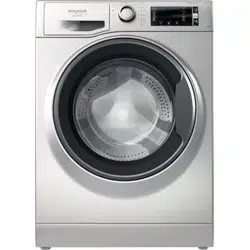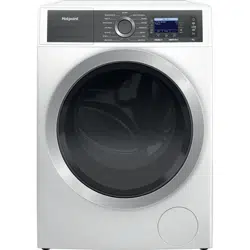
GB
Quick Guide
Before using the appliance carefully read the Health and Safety guide.
Before using the machine, it is imperative that the transport bolts are removed. For more
detailed instructions on how to remove them, see the Installation Guide.
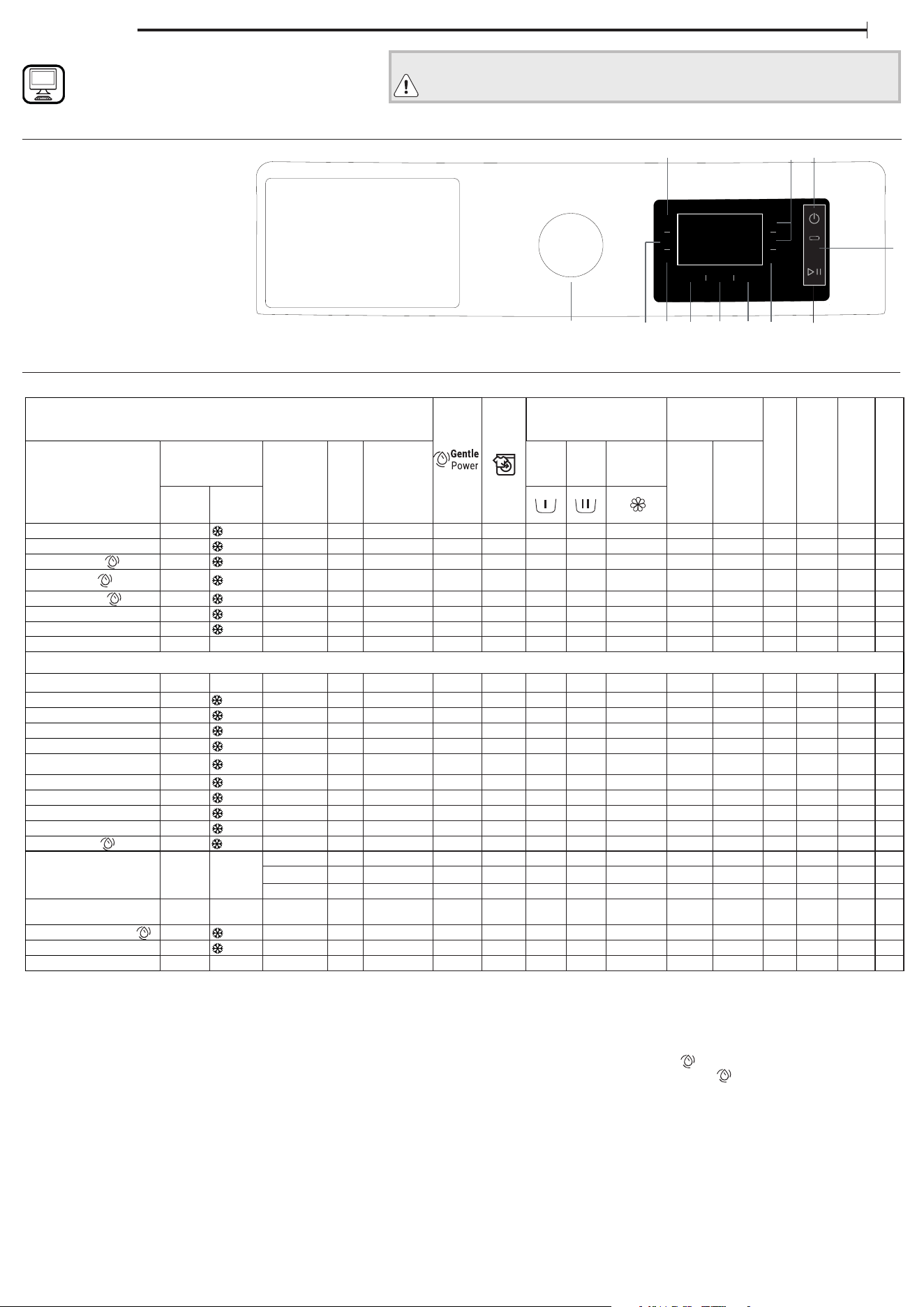
CONTROL PANEL
WASH CYCLE TABLE
1. RAPID button
2. SCROLL UP / SCROLL DOWN buttons
3. ON/OFF button
4. GENTLE POWER button and indicator light
5. START/PAUSE button
6. CONFIRM / KEY LOCK button
7. START DELAY button
8. SPIN button
9. TEMPERATURE button
10. CYCLE OPTION MENU
/ SETTINGS MENU button
11. STEAM HYGIENE button
12. WASH CYCLE SELECTOR KNOB
THANK YOU FOR PURCHASING A HOTPOINT PRODUCT.
To receive more comprehensive assistance, register the
appliance on
www.hotpoint.eu/register
For all testing institutes:
2) Long cotton cycle: set wash cycle “Cotton ” with a temperature of 40°C.
3) Long synthetics cycle: set wash cycle “Synthetics ” with a temperature of 40°C.
* By selecting the “Spin & Drain” cycle and excluding the spin cycle, the washing machine will
drain only.
** The duration of the wash cycles can be checked on the display.
***
After programme end and spinning with maximum selectable spin speed, in default
programme setting.
The cycle duration indicated on the display or instruction manual is an estimate based on
standard conditions. The actual duration may vary in relation to several factors, such as the
temperature and pressure of the incoming water, ambient temperature, amount of detergent,
load quantity and type, load balancing and any additional options selected.The values given
for programmes other than the Eco 40-60 programme are indicative only.
1) Eco 40-60 - Test wash cycle in compliance with EU Ecodesign regulation 2019/2014. The most efficient
programme in terms of energy and water consumption for washing normally soiled cotton laundry.
Note: spin speed values shown on the display can slightly differs from the values stated in the table.
! Selecting “More cycles” on the control dial gives you access to extra wash cycles shown in
the table above.
4
1
2
3
56
7
8
911
10
12
DISPLAY
Maximum load 8 kg
Power input in o mode 0.5 W / in left-on mode 8 W
Detergents and
Additives
Recommended
detergent
Residual dampness
% (***)
Energy consumption
kWh
Total water l
Laundry
temperature °C
Wash cycle
Temperature
Max.
spin speed
(rpm)
Max.
load
(kg)
Duration
(h : m)
Pre-
wash
Wash
Fabric
softener
Powder Liquid
Setting Range
Anti Stain 40°C - 40°C 1400 8,0 ** –
–
– – – –
Mixed Extra Silence
40°C - 40°C 600 4,0 ** –
–
–
– – – –
Mixed
40°C - 40°C 1400 8,0 **
–
–
– – – –
Cotton (2)
40°C - 90°C 1400 8,0 3:10
49 0,874 68 45
Synthetics (3)
40°C - 60°C 1200 4,5 2:45
35 0,540 74 43
Delicates
30°C - 30°C - 1,0 ** –
–
–
– – – –
Wool
30°C - 30°C 600 2,0 ** –
–
–
– – – –
Spin & Drain *
– – 1400 8,0 ** – – – – – – – – – – –
More Cycles
• Rinse & Spin
– – 1400 8,0 ** – – – –
– – – – – –
• Multi Color
20 °C - 20 °C 1400 8,0 ** –
–
–
– – – –
• Bed & Bath
60°C - 60°C 1400 8,0 ** –
–
– – – –
• Duvet
30°C - 30°C 1000 3,5 ** –
–
–
– – – –
• Silk & Curtains
30°C - 30°C – 1,0 ** –
–
–
– – – –
• Baby
40°C - 40°C 800 4,0 ** –
–
–
– – – –
• Cuddly Toys
30°C - 30°C – 1,0 ** –
–
–
– – – –
• Pets Stu
40°C - 40°C 600 2,0 ** –
–
–
– – – –
• Shirts
40°C - 40°C 800 3,0 ** –
–
–
– – – –
• Jeans
40°C - 40°C 600 2,0 ** –
–
–
– – – –
20°C
20 °C - 20 °C 1400 8,0 1:50
–
–
55 0,138 78 22
Eco 40-60
40 °C 40°C
1351 8,0 3:35 –
–
53 0,720 60 30
1351 4,0 2:45
–
53 0,430 40 25
1351 2,0 1:55 –
–
53 0,230 35 20
Anti Allergy
60°C
40°C -
60°C
1400 5,0 ** –
–
– – – –
Full Load 45 min.
40°C - 40°C 1200 8,0 **
–
– – – –
Rapid 30 min
30°C - 30°C 800 4,5 0:30 –
–
–
71 0,178 37 27
Steam Refresh 20 min
– – – 2,0 ** – – – – – – – – – – –
WASH CYCLES
Follow the instructions on the symbols of the garment’s wash care
label. The value indicated in the symbol is the maximum
recommended temperature for washing the garment. Optimal
washing results are obtained by respecting the maximum load kg
shown in the cycle table.
Anti Stain
The programme is suitable to heavily-soiled garments with resistant
colours. It ensures a washing class that is higher than the standard class.
When running the programme, do not mix garments of dierent colours.
We recommend the use of powder detergent. Pre-treatment with special
additives is recommended if there are obstinate stains.
Mixed Extra Silence
Discover the silence: this programme runs silently for the entire cycle, spin
phase included, staying always below 60db. The characteristics and the
duration of the cycle make it perfect for being run at night. It is designed
for a half load and mixed bers (cotton & synthetics), with the spin speed
adjusted for a more delicate clean. After the cycle, Steam Finish option
will start automatically, for 100% freshness and total peace of mind.
Mixed
For washing lightly to normally soiled resilient garments in cotton, linen,
synthetic bres and mixed bres.
Cotton
Normally to heavily soiled and robust cottons .
Synthetics
Suitable for washing moderately soiled garments made of synthetic bres
(e.g. polyester, polyacrylic, viscose, etc.) or mixed synthetic-cotton bres.
Delicates
For washing very delicate garments. It is advisable to turn the garments
inside out before washing them. For best results, use liquid detergent on
delicate garments.
Wool
All wool garments can be washed using programme‚ “Wool“ even those
carrying the “hand-wash only “ label. For best results, use special
detergents and do not exceed max kg declaration of laundry.
Spin & Drain
Spins the load then empties the water. For resilient garments. If you
exclude the spin cycle, the machine will drain only.
More Cycles
• Rinse & Spin
Rinses and then spins. For resilient garments.
• Multi Color
This cycle is suitable for washing multi-coloured items, or various
dierent colours together. The programme is studied to guarantee
colour care, working at 20°C with the same performance as 40°C. It is
suggested to use a detergent for coloured clothes and for low
temperatures.
! It’s always suggested to separate clothes that are faded and new
coloured clothes, being washed for the rst time.
• Bed & Bath
For washing bed linen and towels in a single cycle. It optimises the use
of fabric softener and allows for saving time and electricity. We
recommend the use of powder detergent.
• Duvet
Designed for washing eiderdown padded items such as double or
single duvets, cushions and anoraks. It is recommended to load such
padded items in the drum with the edges folded inwards and not to
exceed ¾ of the drum’s volume. For optimal washing, we recommend
using a liquid detergent.
• Silk & Curtains
Use the special wash cycle to wash all silk garments or curtains. We
recommend the use of special detergent which has been designed to
wash delicate clothes.
For washing curtains, fold and place them in a pillow case or mesh bag.
• Baby
Use the special wash cycle the remove the soiling typically caused by
babies, while removing all traces of detergent from nappies in order to
prevent the delicate skin of babies from suering allergic reactions.
The cycle has been designed to reduce the amount of bacteria by
using a greater quantity of water and optimising the eect of special
disinfecting additives added to the detergent.
• Cuddly toys
Specic programme for removing dust and washing cuddly toys.
• Pets Stu
Perfect for removing animal hair from pets bedding and items.
• Jeans
Turn garments inside-out before washing and use a liquid detergent.
• Shirts
Use the special wash cycle to wash shirts in dierent fabrics and
colours to guarantee they receive the best possible care.
20°C
For washing lightly soiled cotton garments, at a temperature of 20 °C.
Eco 40-60
For washing normally soiled cotton garments declared to be washable
at 40 °C or 60 °C, together in the same cycle. This is the standard cotton
programme and the most ecient in terms of water and energy
consumption. It is a normative programme that can be set up only at 40 °C.
Anti Allergy
Suitable for removing major allergens such as pollen, mites and cat or dog
hair, thanks to a high-temperature technology and extra rinses.
! This cycle is working at 60°C temperature for at least 30 minutes.
Full Load 45 min.
Suitable for washing a full load of cotton clothes moderately soiled in 45
minutes.
Rapid 30 min
For washing lightly soiled garments quickly. This cycle lasts only 30
minutes, saving time and energy.
Steam Refresh 20 min
The garments will be damp once the cycle is completed, so we
recommend hanging them to dry (2 kg, roughly 3 items). This programme
refreshes garments by removing bad odours and relaxing the bres. Insert
dry items only (that are not dirty) and select programme “Steam Refresh”.
The “Steam Refresh” programme makes ironing easier.
! Do not add softeners or detergents.
! Not recommended for wool or silk garments.
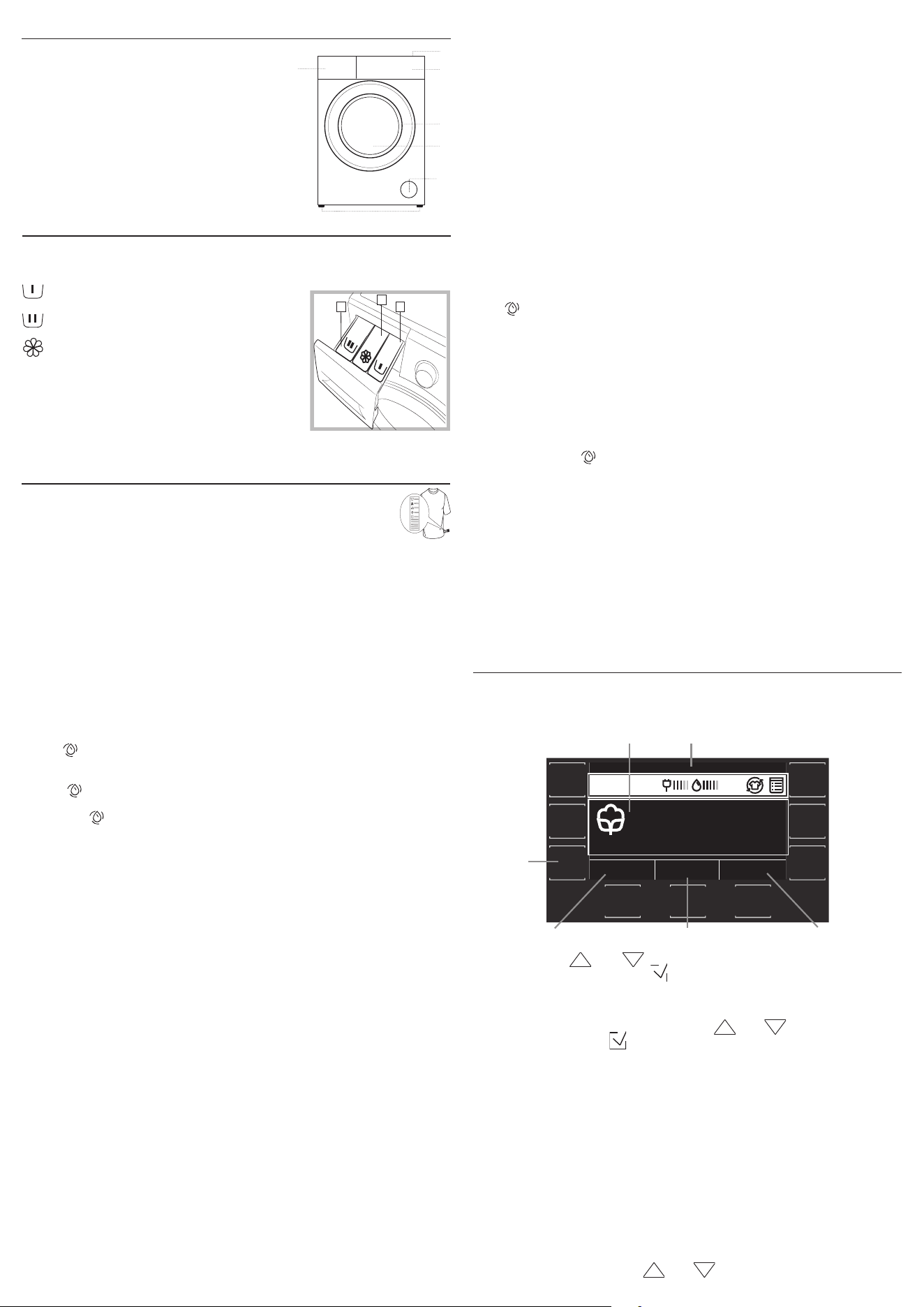
DISPLAY
The display is useful when programming the washing machine and
provides plenty of information.
COTTON
--:--
1:40
140040°
By pressing the and buttons, it is possible to select the desired
option and conrm it with the button.
The rst time the machine is switched on, you will be asked to select the
language and the display will automatically display the language selection
menu.
To select the desired language, press the and buttons; to conrm
the selection, press the button.
Area A will display the following: the icon and selected washing programme,
the washing phases and the time remaining to the end of the wash cycle.
Area B will display: the selected options, the energy and water consumption
for the chosen cycle and the button lock symbol.
Area C will display the default temperature value on the basis of the set
programme; if the programme does not include the setting of the
temperature, the area will display the “-- °” symbol.
Area D will display the default spin cycle speed on the basis of the set
programme; if the programme does not include the setting of the spin
cycle, the area will display the “--” symbol.
Area E will display the time remaining to the start of the selected
programme if the DELAYED START function was set.
Pressing button F allows for accessing the menu from which to set
additional washing options.
Pressing and holding button F for 3 seconds allows for accessing the
settings menu:
- Language: by pressing the and buttons, the user can select the
1. Top
2. Detergent dispenser drawer
3. Control panel
4. Handle
5. Porthole door
6. Pump Filter / Emergency drain hose
(behind cover ap)
7. Adjustable feet (4)
DETERGENT DISPENSER DRAWER
Handle the dispenser with care. Avoid pulling or pushing hard the
dispenser during opening and closing.
compartment 1: Pre-wash detergent
(powder)
compartment 2: Detergent for the wash
cycle (powder or liquid)
compartment 3: Additives (fabric
softeners, etc.)
The fabric softener should not overow the grid.
! Use powder detergent for white cotton
garments, for pre-washing, and for washing at
temperatures over 60°C.
! Follow the instructions given on the detergent
packaging.
1
3
2
PRODUCT DESCRIPTION
1.
3.
2.
5.
4.
6.
7.
A
E
C
D
B
F
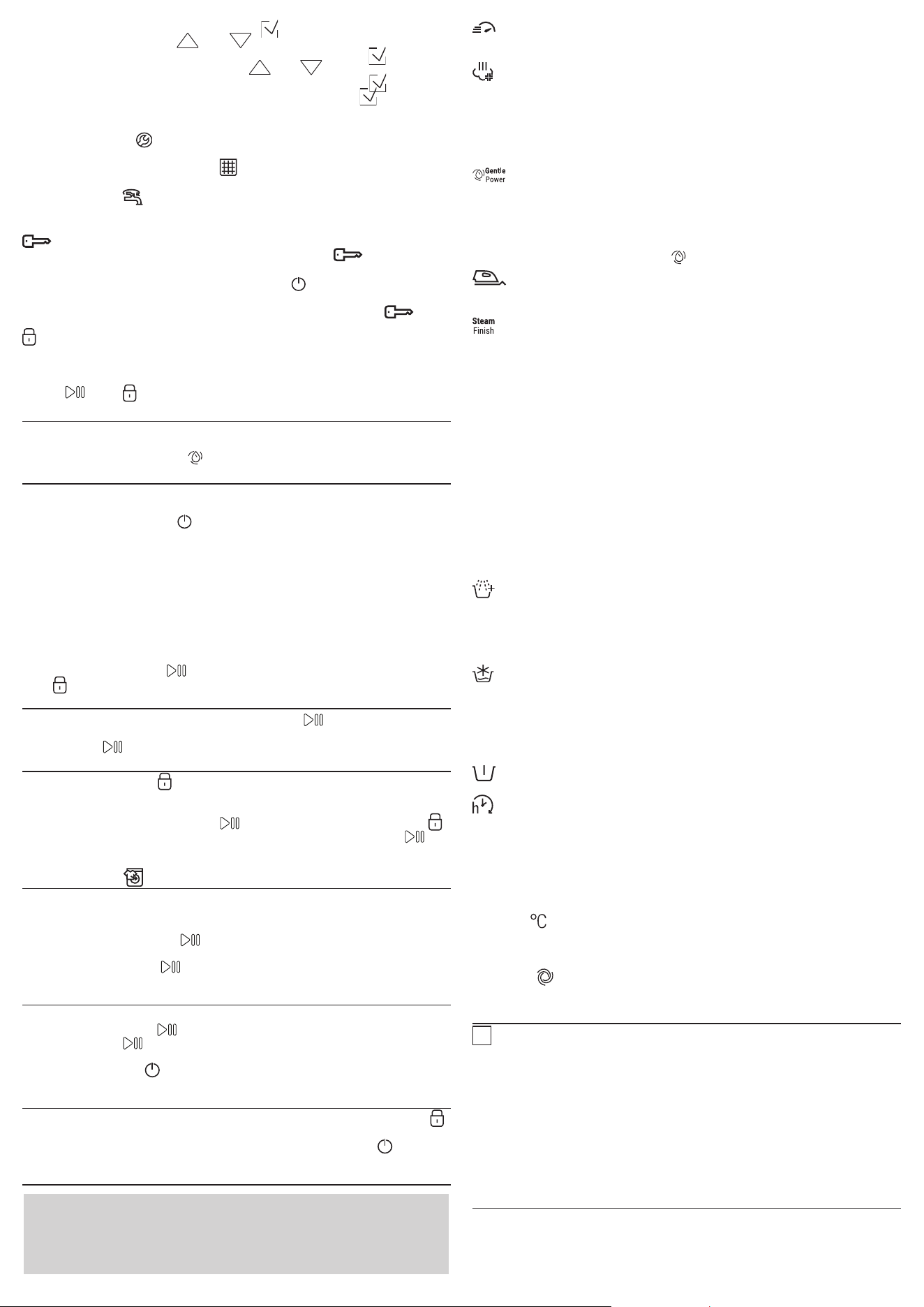
desired language and conrm it with the button.
- Sound: by pressing the and buttons, the user can activate or
deactivate the sound of the buttons and conrm it with the button.
- Display brightness: by pressing the and buttons, the user can
select the type of display brightness and conrm it with the button.
- Restoring the factory settings: pressing and holding the button for 2
seconds restores the factory settings.
DISPLAY INDICATORS
Failure: Call Service
Refer to Troubleshooting section
Failure: Drain pump lter clogged
Water cannot be drained; drain pump lter might be blocked
Failure: No water
No or not sucient inlet water.
In the event of any failure, refer to the “Troubleshooting” section.
Key Lock
To activate the control panel lock, press and hold the button for
roughly 3 seconds. When the display visualises “KEY LOCK”, the control
panel is locked (except for the ON/OFF button ). This will prevent
accidental modications to wash cycles, especially when children are at
home. To deactivate the control panel lock, press and hold the
button for approximately 3 seconds.
Locked door indicator
When lit, the symbol indicates that the door is locked. To prevent any
damage, wait until the symbol turns o before opening the door.
To open the door while a cycle is in progress, press the START/PAUSE
button ; if the symbol is o, the door can be opened.
FIRST-TIME USE
Once the appliance has been installed, and before you use it for the rst
time, run a wash cycle with a small amount of detergent and no laundry,
using the wash cycle Cotton (60°) without option Prewash selected.
DAILY USE
Prepare the laundry by following the suggestions appearing under the
“TIPS AND SUGGESTIONS” section.
- Press the ON/OFF button ; “HOTPOINT” will appear on the display.
- Open the door. Load the laundry while making sure not to exceed the
maximum load quantity indicated in the wash cycle table.
- Push to open the detergent dispenser drawer and pour the detergent
into the relevant compartments, as described in the “DETERGENT
DISPENSER DRAWER” section.
- Close the door.
- Select the desired wash cycle.
- Select the desired options.
- The machine automatically selects the default temperature and spin
speed set for the selected wash cycle.
- Press the START/PAUSE button to start the wash cycle; the door will
lock ( symbol on). After this operation will start the Sensing routine.
PAUSING A CYCLE
To pause the wash cycle, press the START/PAUSE button again. To start
the wash cycle from the point at which it was interrupted, press the
START/PAUSE button again.
OPENING THE DOOR, IF NECESSARY
Once a cycle starts, the symbol turns on to signal that the door cannot
be opened. While a wash cycle is running, the door remains locked. To
open the door while a cycle is under way, for example, to add or remove
garments, press the START/PAUSE button to pause the cycle. If the
symbol is not lit, the door may be opened. Press the START/PAUSE
button again to continue the cycle. After this operation will start the
Sensing routine.
STOP&ADD
An icon on the display will signal when additional garments can be
introduced into the washing machine, without decreasing the washing
performance. To add garments, rst stop the washing machine by
pressing the START/PAUSE button then open the door and insert
them.
Press the START/PAUSE button again to restart the wash cycle from
the point at which it was interrupted.
CHANGING A RUNNING WASH CYCLE
To change a wash cycle while it is in progress, pause the washing machine
using the START/PAUSE button, then select the desired cycle and press
the START/PAUSE button again.
! To cancel a cycle that has already begun, press and hold for a few
seconds the ON/OFF button. If water is present then drain function will
start. The cycle will be stopped and the machine will switch o.
AT THE END OF THE WASH CYCLE
This will be indicated by the word “CYCLE END” on the display; when the
symbol switches o, the door may be opened. Open the door, unload the
laundry and switch o the machine. If you do not press ON/OFF button,
the washing machine will switch o automatically after about 10 minutes.
OPTIONS
- If the selected option is incompatible with the set wash cycle or with
another previously selected option, in the menu the name of
incompatible option is represented in grey color and the wording “Not
available” will appear on the display, accompanied by a buzzer, the
option will not be activated.
Rapid
Select this option to reduce the cycle time. This cycle is suggested for
washing light soiled clothes.
Steam Hygiene
This option enhances washing performance by generating steam during
the wash cycle to remove any bacteria from the bres, which are treated
at the same time. Place the laundry in the drum, choose a compatible
programme and select option Steam Hygiene.
! The steam generated during the operation of the washing machine may
cause the porthole door to become hazy.
GentlePower
The new Gentle Power Technology is designed to protect your garments
while ensuring powerful results. When Gentle Power is turned on, a
stream of water is released from the top of the drum and distributes
throught your garments evenly: the result is a thorough wash even at low
temperatures, to always take care of colours and fabrics.
! Compatible with cycles with the “ ”
Easy Iron
By selecting this function, the wash and the spin cycles will be modied in
order to reduce the formation of creases.
Steam Finish
100% freshness with Steam: Steam Finish option is designed to keep your
garments fresh up to 6 hours after the cycle is over.
Innovative Steam Finish system takes care of your garments inside the
washing machine with delicate steaming and tumbling action (tested by
SSOG lab). Steam Finish system gently massages the laundry with regular
slow movements alternated with steam actions - letting air circulate
inside the bers to keep garments fresh and prevent bad odours. Steam
Finish treatment leaves truly fresher clothes and peace of mind - even
hours after the end of the cycle. Steam Finish treatment inhibits the
proliferation of the main bad odour sources (inside the washing machine)
up to 6 hours after the washing ends: at any moment, putting in OFF the
machine, the door can be opened and the cycle will stop. When steam
action is ongoing, a bit of time will need to be waited before the door
unlocks for opening: at any moment, putting in OFF the machine, the door
can be opened and the cycle will stop. When steam action is ongoing, a bit
of time will need to be waited before the door unlocks for opening.
Not compatible with programmes designed for delicate garments and
duvets.
Multi Rinse
By selecting this option, the eciency of the rinse is increased and optimal
detergent removal is guaranteed. It is particularly useful for sensitive skin.
Press the button once, two or three times to select an additional 1, 2 or 3
rinses after the standard cycle rinse and remove all traces of detergent.
Press the button again to go back to the “Normal rinse” rinse type.
Cold Wash
This option saves energy by not heating the water used to wash your
laundry – an advantage both to the environment and to your energy bill.
Instead, intensied wash action and water optimisation ensure great
wash results in the same average time of a standard cycle.
For the best washing results we recommend the usage of a liquid
detergent.
Prewash
Allows you to perform a prewash.
Start Delay
To set a delayed start for the selected cycle, press the corresponding
button repeatedly until the desired delay period is reached. When this
option has been activated, the selected values of delay start will appear
on the display. To remove the delayed start setting, press the button until
“--:--” appears on the display.
Temperature
Each wash cycle has a pre-dened temperature. To modify the temperature,
press the “ ” button. All values available, for each cycle, will appear on the
display.
Spin
Each wash cycle has a pre-dened spin speed. To modify the spin speed,
press the “ ” button. All values available, for each cycle, will appear on
the display.
DESCALE AND CLEAN PROCEDURE
i
Reminder on the display will regularly (roughly every 50 cycles) remind
users that is time to run a maintenance cycle to clean the washing machine
and combat limescale build-up and bad odours.
For optimal maintenance we suggest to run empty cycle “Cotton” at minimum
60°C without PreWash and using WPRO Limescale and grease remover.
The product can be purchased by contacting the technical assistance service
or through the website www.whirlpool.eu.
Whirlpool declines all liability for any damages to the appliance caused by the
use of other cleaning products for washing machines available on the market.
To delete the descale alert turn the knob or push any button (including
ON/OFF button).
TIPS AND SUGGESTIONS
Divide the laundry according to:
Type of fabric (cotton, mixed bres, synthetics, wool, garments to be
hand-washed). Colour (separate coloured garments from whites, wash new
coloured garments separately). Delicates (small garments – such as nylon
stockings – and items with hooks – such as bras: insert them in a fabric bag).
Empty the pockets:
Objects such as coins or lighters can damage the washing machine and
the drum. Check all buttons.
Follow the dosage recommendation / additives
It optimizes the cleaning result, it avoids irritating residues of surplus
detergent in your laundry and it saves money by avoiding waste of surplus
detergent
Use low temperature and longer duration
The most ecient programmes in terms of energy consumption are
generally those that perform at lower temperatures and longer duration.
Observe the load sizes
Load your washing machine up to the capacity indicated in the
“PROGRAMME CHART” table to save water and energy.
Noise and remaining moisture content
They are inuenced by the spinning speed: the higher the spinning speed
in the spinning phase, the higher the noise and the lower the remaining
moisture content.
CARE AND MAINTENANCE
Before performing cleaning and maintenance, switch the washing machine
o and disconnect it from the mains power. Do not use ammable liquids to
clean the washing machine. Clean and maintain your washer - dryer
periodically (at least 4 times per year).
Disconnect the water and power supplies
Close the water tap after every wash. This will limit wear on the hydraulic
system inside the washing machine and help to prevent leaks.
Unplug the washing machine when cleaning it and during all
maintenance work.
Clean the washing machine
The outer parts and rubber components of the appliance can be cleaned
using a soft cloth soaked in lukewarm soapy water. Do not use solvents or
abrasives.
Clean the detergent dispenser drawer
Remove the detergent drawer as indicated in the DETERGENT DISPENSER
DRAWER paragraph, wash it under running water, also running water in
the detergent and softener tanks, this operation should be repeated
frequently.
Care for the door and drum
Always leave the porthole door ajar in order to prevent unpleasant odours
from forming.
Check the water inlet hose
Check the water inlet hose at least once a year. If it is cracked or broken, it
must be replaced: during wash cycles, the high pressure of the water
could suddenly split the hose open.
! Never use hoses that have already been used.
Cleaning the drain pump lter / draining residual water
Switch o and unplug the washing machine, before cleaning the drain pump
lter or draining residual water.
If you used a hot wash programme, wait until the water has cooled down before
draining any water. Clean the drain pump lter regularly, to avoid that the
water cannot drain after the wash due to obstruction of the lter. If the water
cannot drain, the display indicates that the drain pump lter may be clogged.
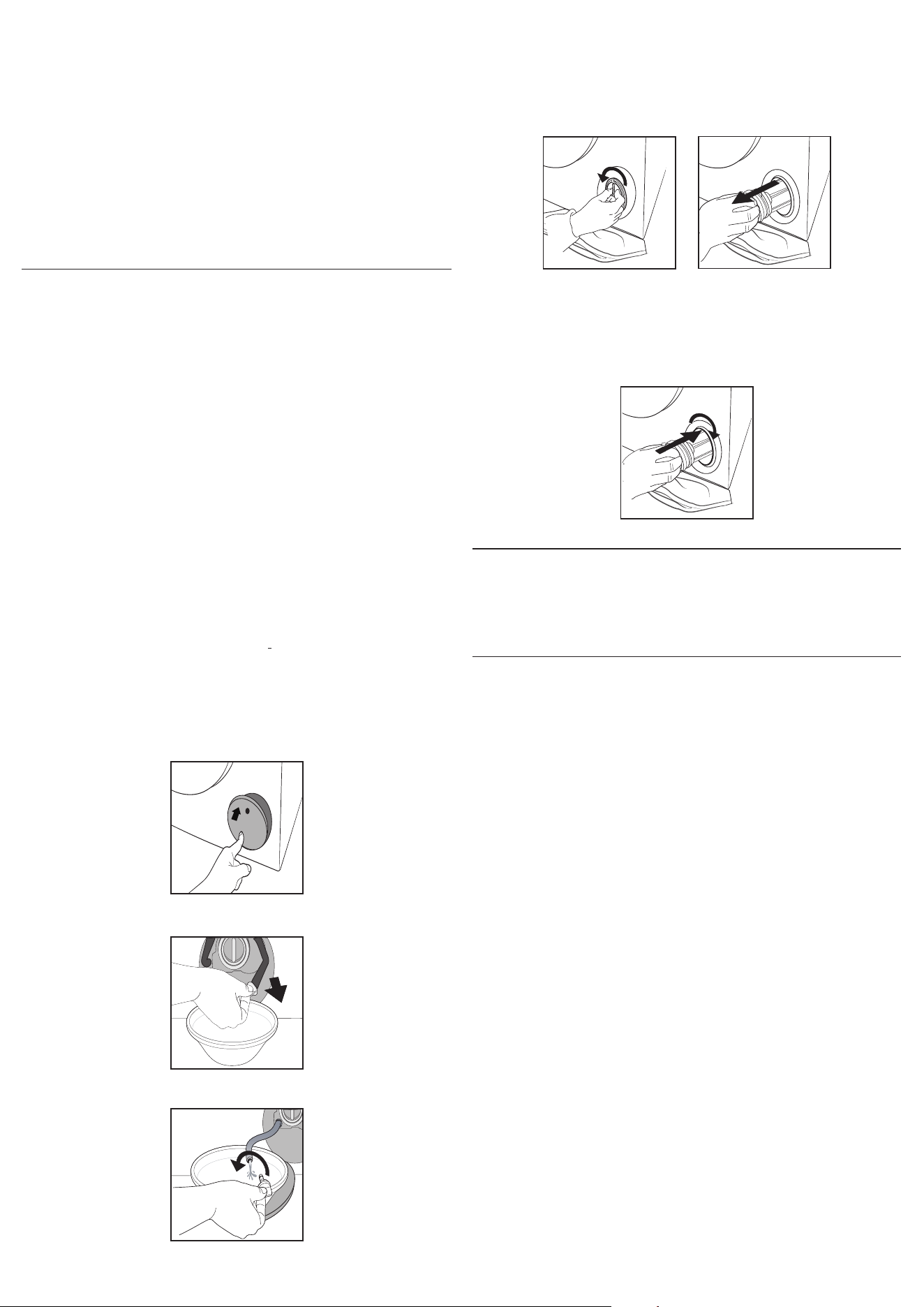
1. Power O and unplug the washing machine from the electrical outlet.
2. Gently press the top area of the lter cover to open.
3 . Place a container close to the pump to collect any spillage.
4. Stretch the “emergency drain hose” to the container.
5.Turn the stopper of the “emergency drain hose” at the end of the hose and
let the water ow into the container.
6 . When the container is full with water, plug the stopper to the hose end,
and reinsert the small hose in the washing machine’s base . After, empty
the container . Afterwards rmly close the emergency drain hose with the
stopper .
Afterwards rmly close the emergency drain hose with the stopper .
7. Remove lter: Lay a cotton cloth beneath the drain pump lter, which
can absorb a small amount of water . Then remove the drain pump lter by
turning it out anticlockwise .
8 . Clean the drain pump lter: remove residues in the lter and clean it
under running water. Check that there are no foreign bodies in the lter
housing (coins, buttons, color-catching strips...) that would prevent the
rotation of the pump fan.
9 . Insert the drain pump lter: Reinsert the drain pump lter again by
turning it in clockwise direction . Make sure to turn it in as far as it goes; the
lter handle must be in vertical position .
1
2
ACCESSORIES
Contact our Technical Assistance Service to check whether the following
accessories are available for this washing machine model.
Stacking kit
With this accessory you can secure the tumble dryer to the upper part of
your washing machine to save space and facilitate loading and unloading
of the tumble dryer.
TRANSPORT AND HANDLING
Do not lift the washing machine by gripping it from the upper section.
Unplug the appliance and close the water tap. Check that the door and
detergent dispenser drawer are tightly closed. Detach the lling hose
from the water tap then detach the drain hose. Empty all the water
remaining in the hoses and secure the latter so that they do not get
damaged during transport. Apply the transport bolts back on. Repeat, in
reverse order, the transport bolt removal procedure described in the
“Installation instructions”.
TROUBLESHOOTING
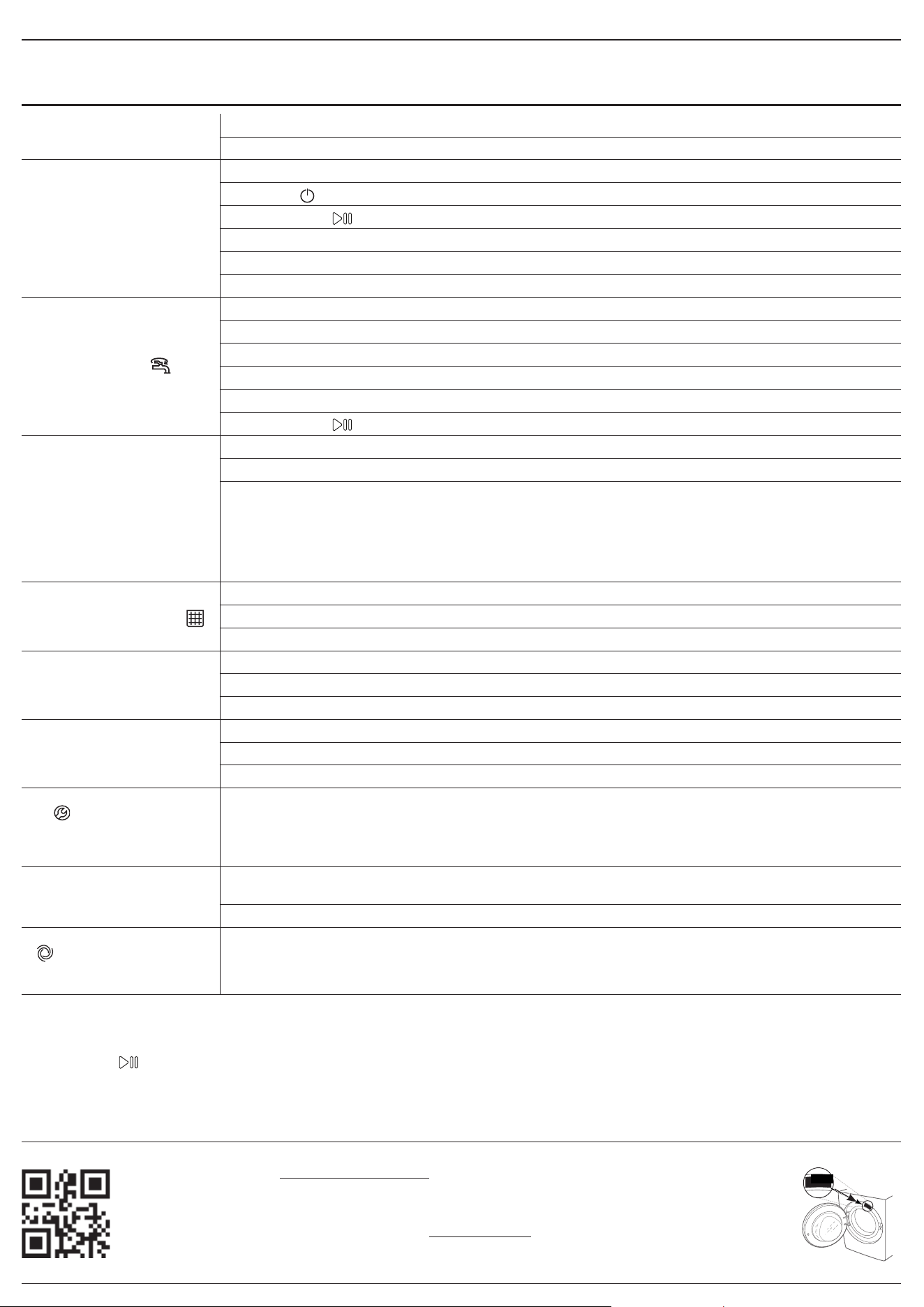
Your washing machine could occasionally fail to work. Before contacting the Technical Assistance Service, make sure that the problem cannot be easily
solved using the following list.
Anomalies Possible causes / Solution
The washing machine does
not start.
The appliance is not plugged into the socket fully, or not enough to make contact.
There is no power in the house.
The wash cycle does not start.
The washing machine door is not closed properly.
The ON/OFF button has not been pressed.
The START/PAUSE button has not been pressed.
The water tap has not been opened.
A delay has been set for the start time.
The Demo Mode is active (see below how to deactivate).
The washing machine does
not ll with water (“ ”
appears on the display).
The water inlet hose is not connected to the tap.
The hose is bent.
The water tap has not been opened.
There is no water supply in the house.
The pressure is too low.
The START/PAUSE button has not been pressed.
The washing machine
continuously loads and
unloads water.
The drain hose is not tted between 65 and 100 cm from the oor.
The free end of the hose is immersed in water.
The wall drainage system is not tted with a breather pipe.
If the problem persists even after these checks, turn o the water tap, switch the appliance o and contact the
Technical Assistance Service. If the home is on one of the upper oors of a building, there may be problems relating
to back-siphonage, causing the washing machine to ll with water and drain continuously. Special anti-siphon
valves are available in shops and help to prevent this inconvenience.
The washing machines does
not drain and the symbol
(F9E1) on the display.
Clean the pump lter (see Care and maintenance chapter)
The drain hose is bent.
The drainage duct is clogged.
The washing machine
vibrates a lot during the spin
cycle.
Transport bolts have been not removed correctly during installation.
The washing machine is not leveled.
The washing machine is tucked between furniture cabinets and the wall.
The washing machine leaks.
The water inlet hose is not screwed on properly.
The detergent dispenser drawer is obstructed.
The drain hose is not properly attached.
The symbol appear and
the display visualises an error
code (e.g.: F1E1, F4...).
Switch o the machine and unplug it, wait for approximately 1 minute and then switch it back on again.
If the problem persists, contact the Technical Assistance Service.
There is too much foam.
The detergent is not suitable for machine washing (it should display the text “for washing machines” or “hand and
machine wash”, or the like).
Too much detergent was used.
“ ” phase icon blinks, “0”
spin speed displayed .
Unbalance of laundry load prevented spin cycle, to protect the washing machine.
If you want to spin the wet laundry, add more laundry items of dierent sizes and start “Spin&Drain” programme.
Avoid small laundry loads consisting of few big, absorbent pieces of laundry / wash dierent sizes of articles in one
load.
Disable the DEMO MODE : The following actions must be carried out in sequence, without breaks. Switch the machine ON and then switch it OFF again. Press
the START/PAUSE button until the buzzer is heard. Switch the machine on again. The “DEMO” indicator ashes and then turns OFF.
xxxxxxxxxxxx
xxxx
You can download the H&S INSTRUCTIONS, PRODUCT FICHE and ENERGY DATA by:
• Visiting our website - http://docs.hotpoint.eu.
• Using QR code
• Alternatively, contact our After-sales Service (See phone number in the warranty booklet). When
contacting our After-sales Service, please state the codes provided on your product’s identication plate.
For User’s Repair & Maintenance Information visit www.hotpoint.eu
The model information can be retrieved using the QR-Code reported in the energy label. The label also
includes the model identier that can be used to consult the portal of the registry at https://eprel.ec.europa.eu



400011718555