ENGLISH
Instruction Manual
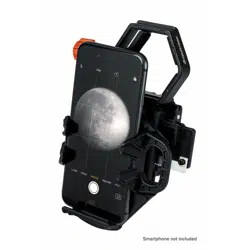
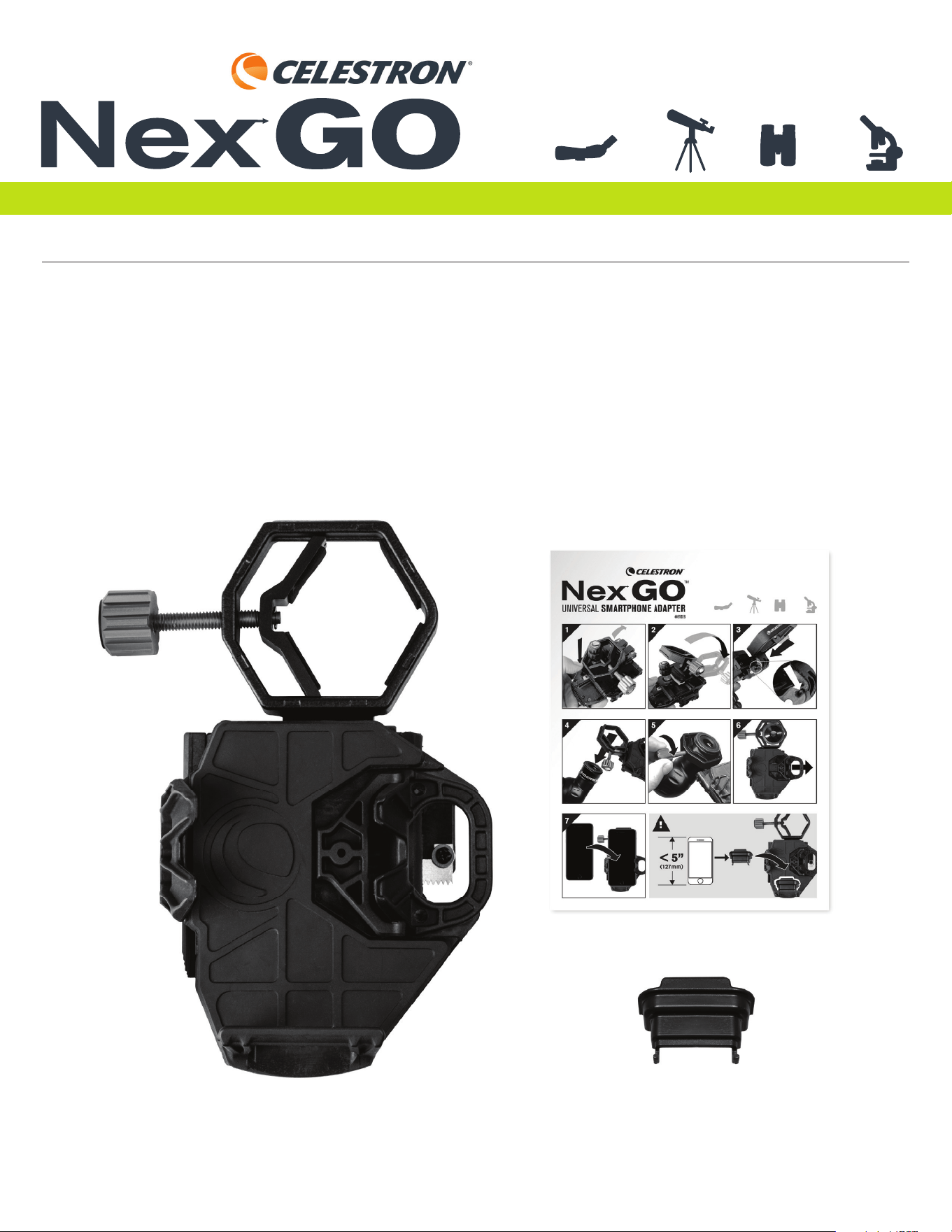
Thank you for purchasing the NexGO Universal Smartphone Adapter. NexGO is a great fi rst step into the world of digiscoping or
astroimaging. This easy-to-use adapter will help you capture sharp, detailed images and video through your optic’s eyepiece.
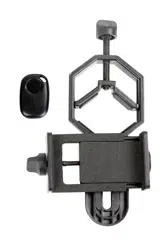
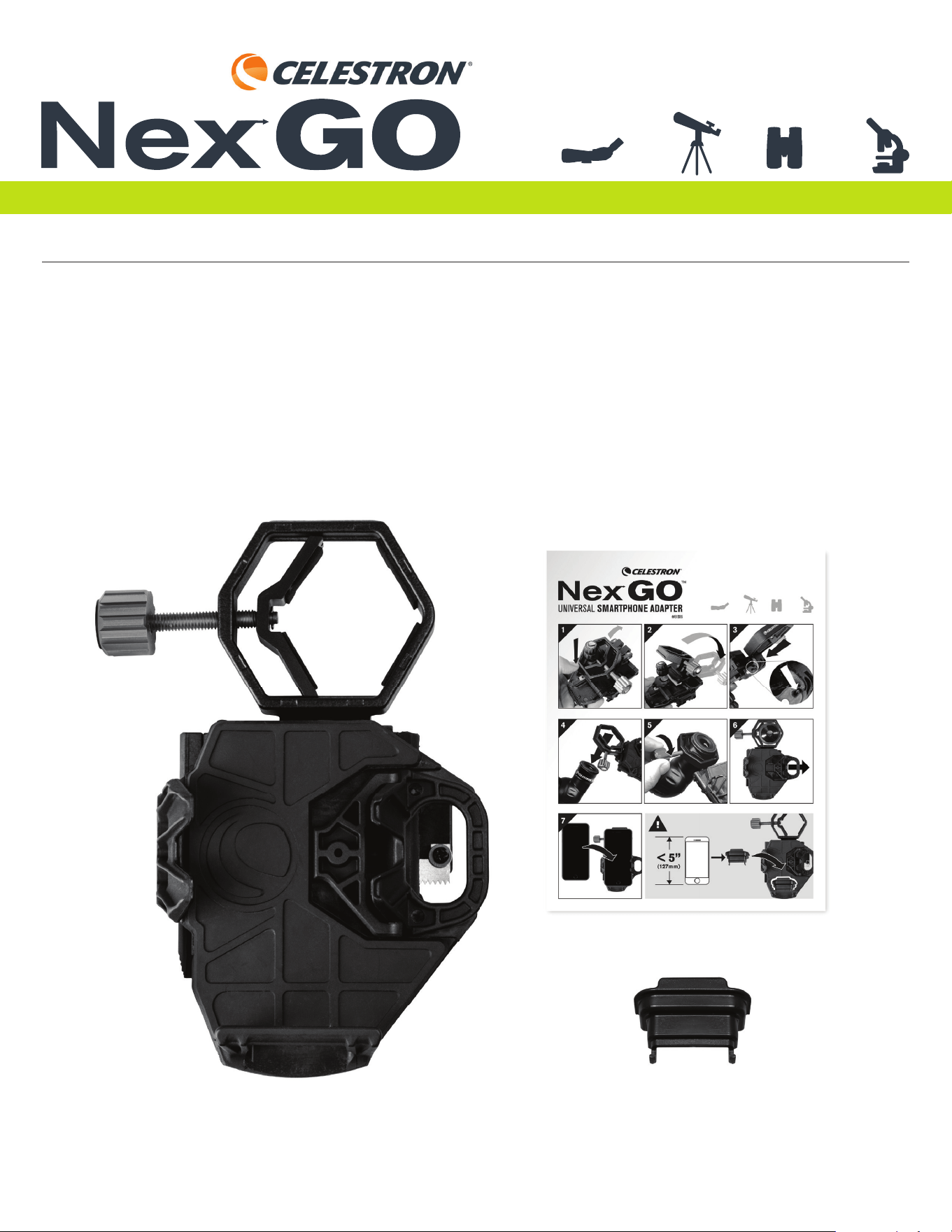
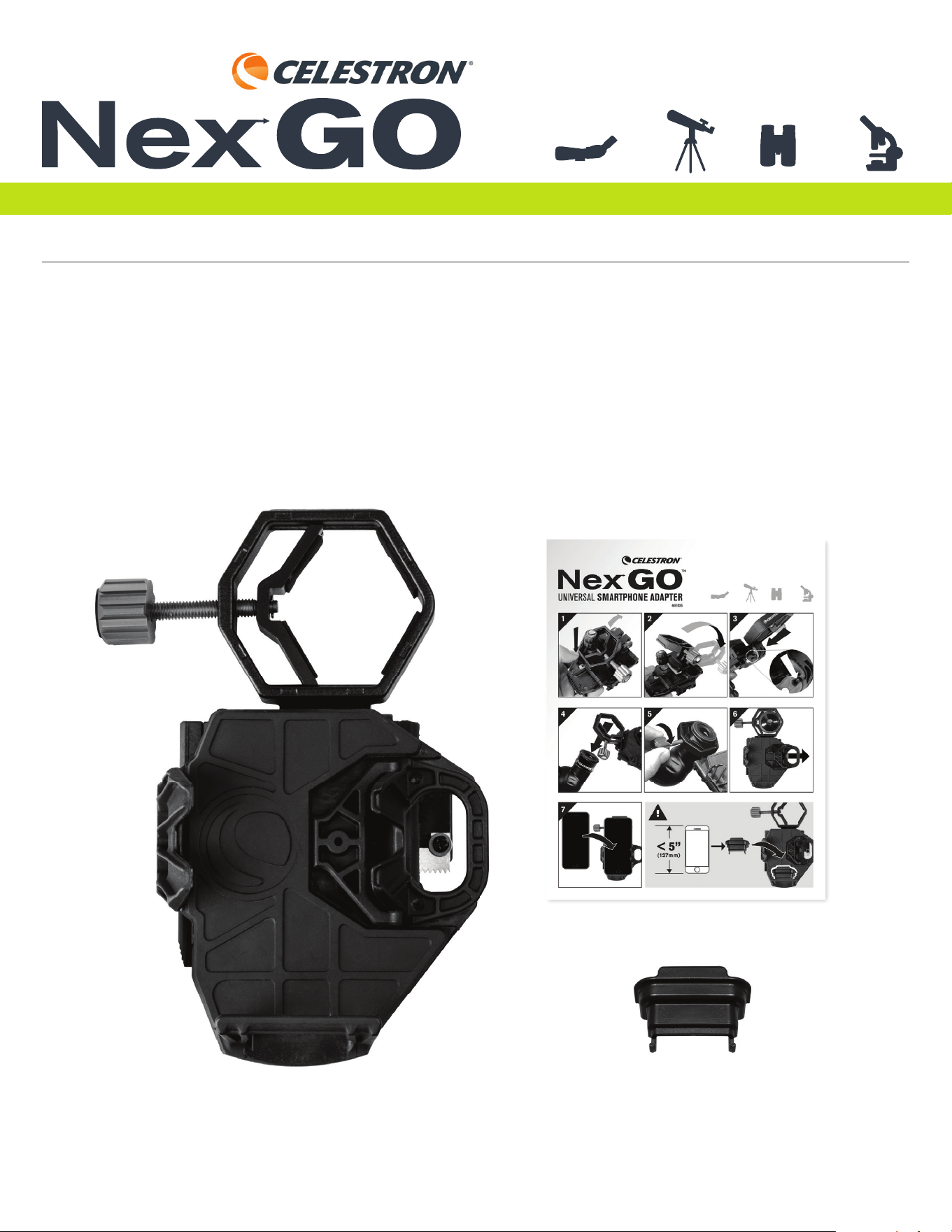
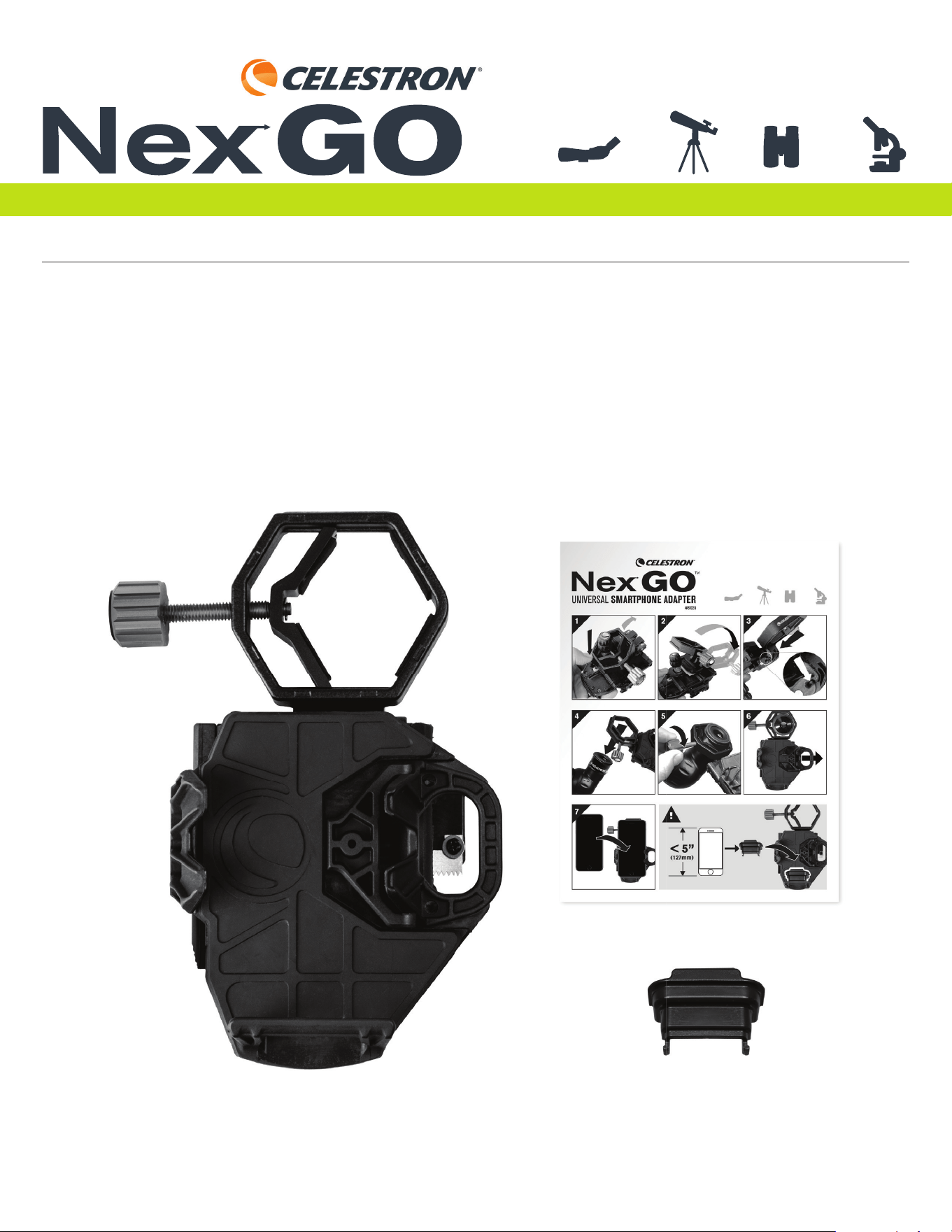
What’s in the Box
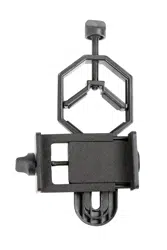
NexGO Smartphone Adapter
Phone Booster
Quick Setup Guide
UNIVERSAL SMARTPHONE ADAPTER
#81036
®
2 | ENGLISH INSTRUCTION MANUAL
UNIVERSAL SMARTPHONE ADAPTER
®
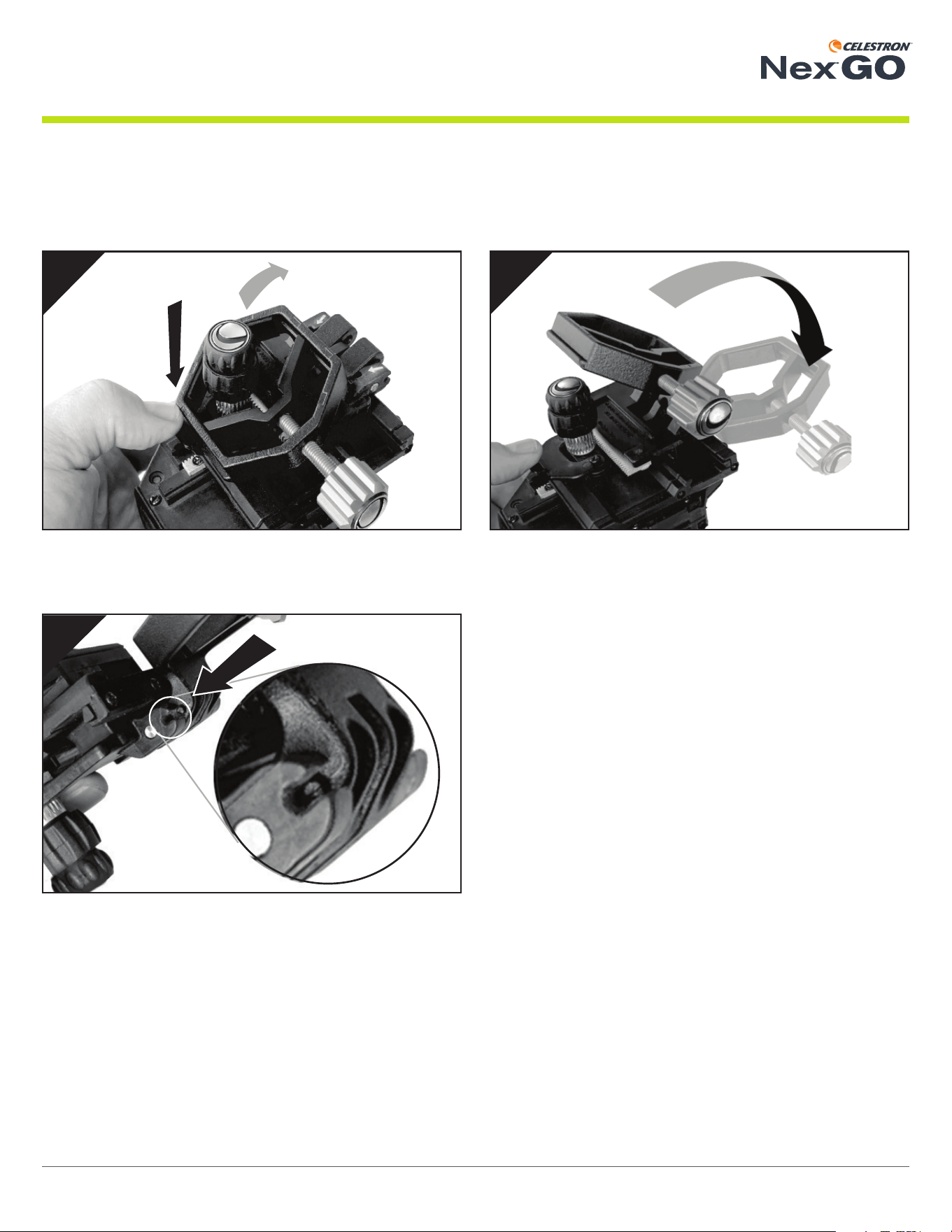
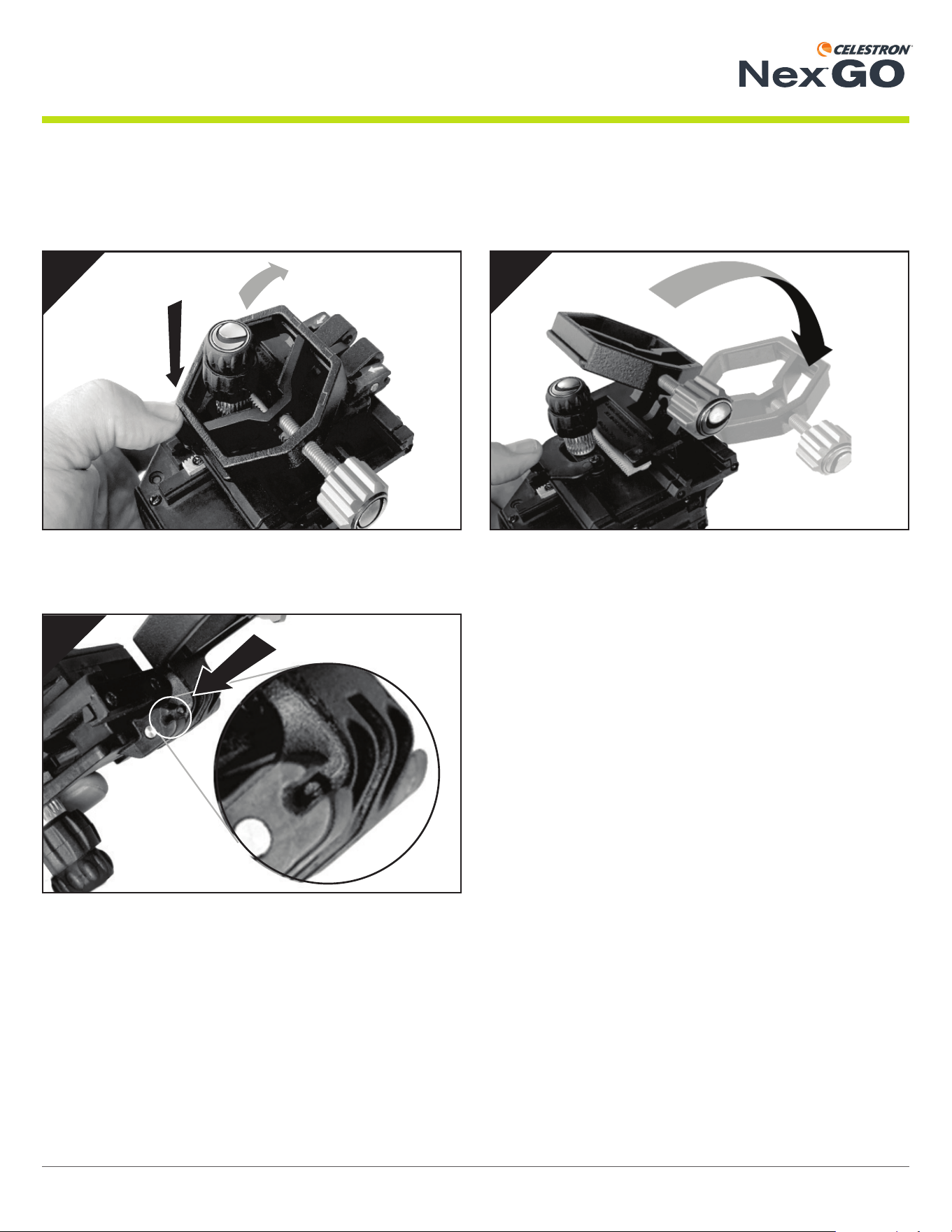
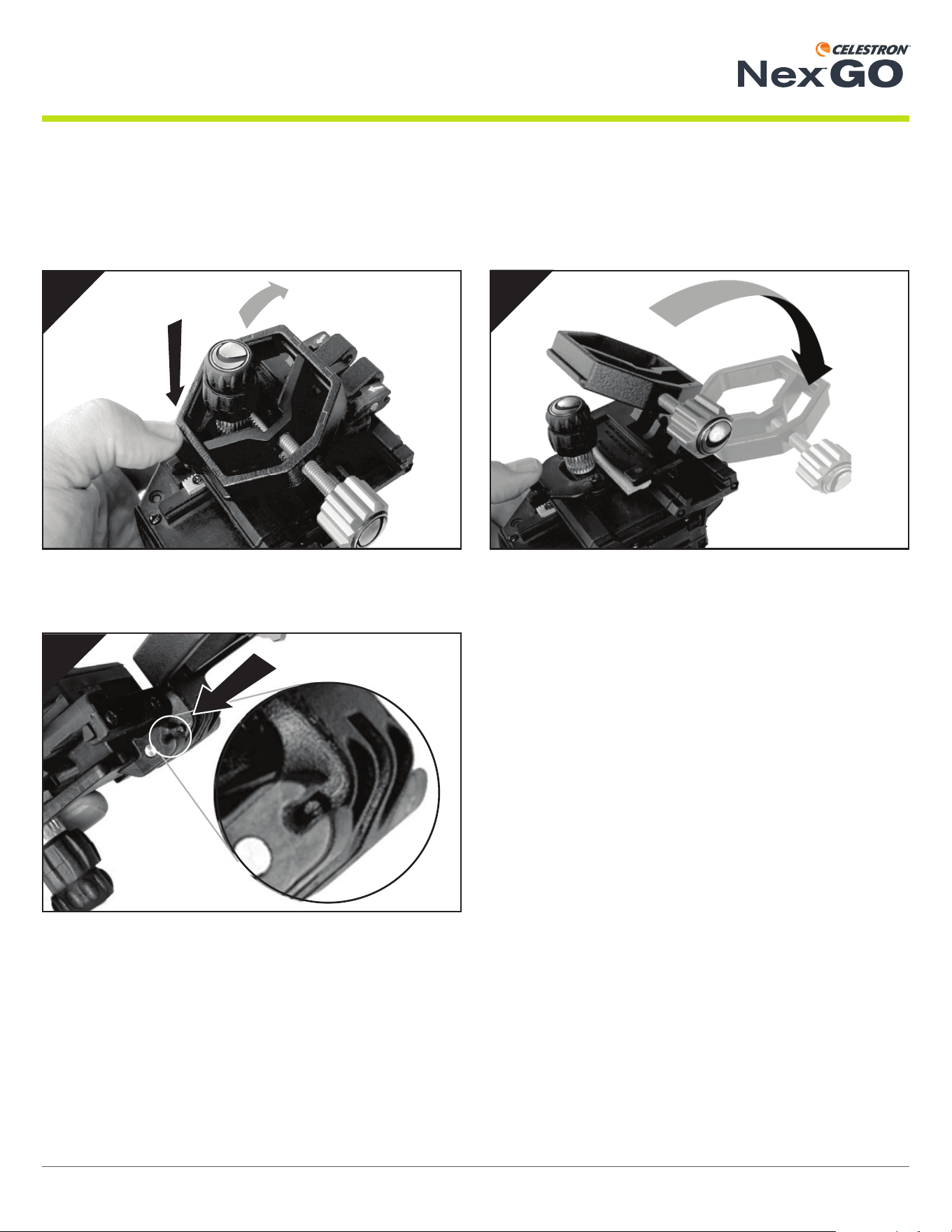
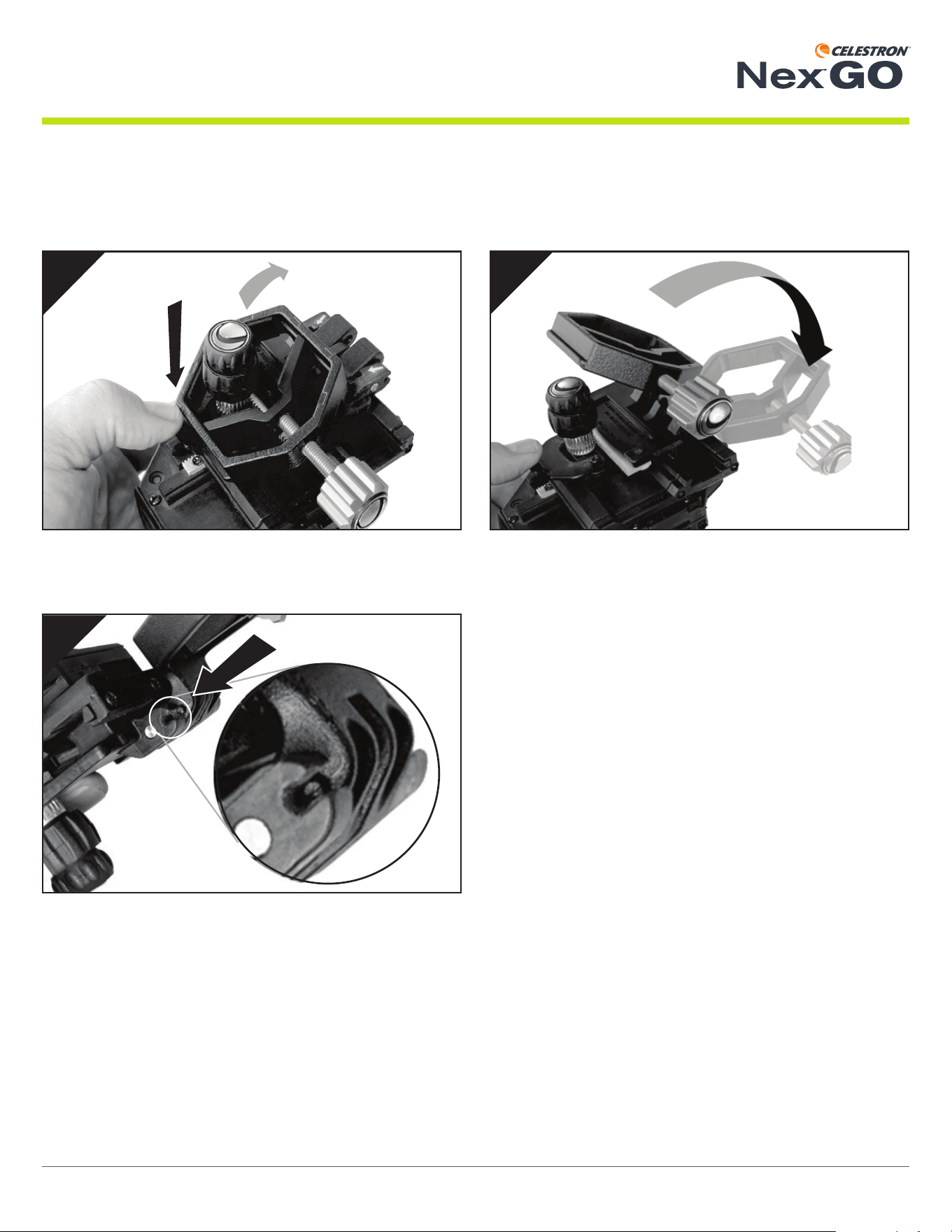
Flip the clamp open.
2
Press the lock tab to release the clamp.
1
Align the tab on the clamp with the “C”-shaped opening on the
phone bed assembly. Once aligned, push the clamp in towards
the bed assembly, locking the clamp in place. You should feel a
slight “click” when the clamp engages properly.
YOU ARE NOW READY TO USE YOUR NexGO!
3
Unfolding NexGO
The NexGO ships in the folded position. To use it, you’ll fi rst need to unfold NexGO and lock the clamp into the main body.
3 | ENGLISH INSTRUCTION MANUAL
UNIVERSAL SMARTPHONE ADAPTER
®
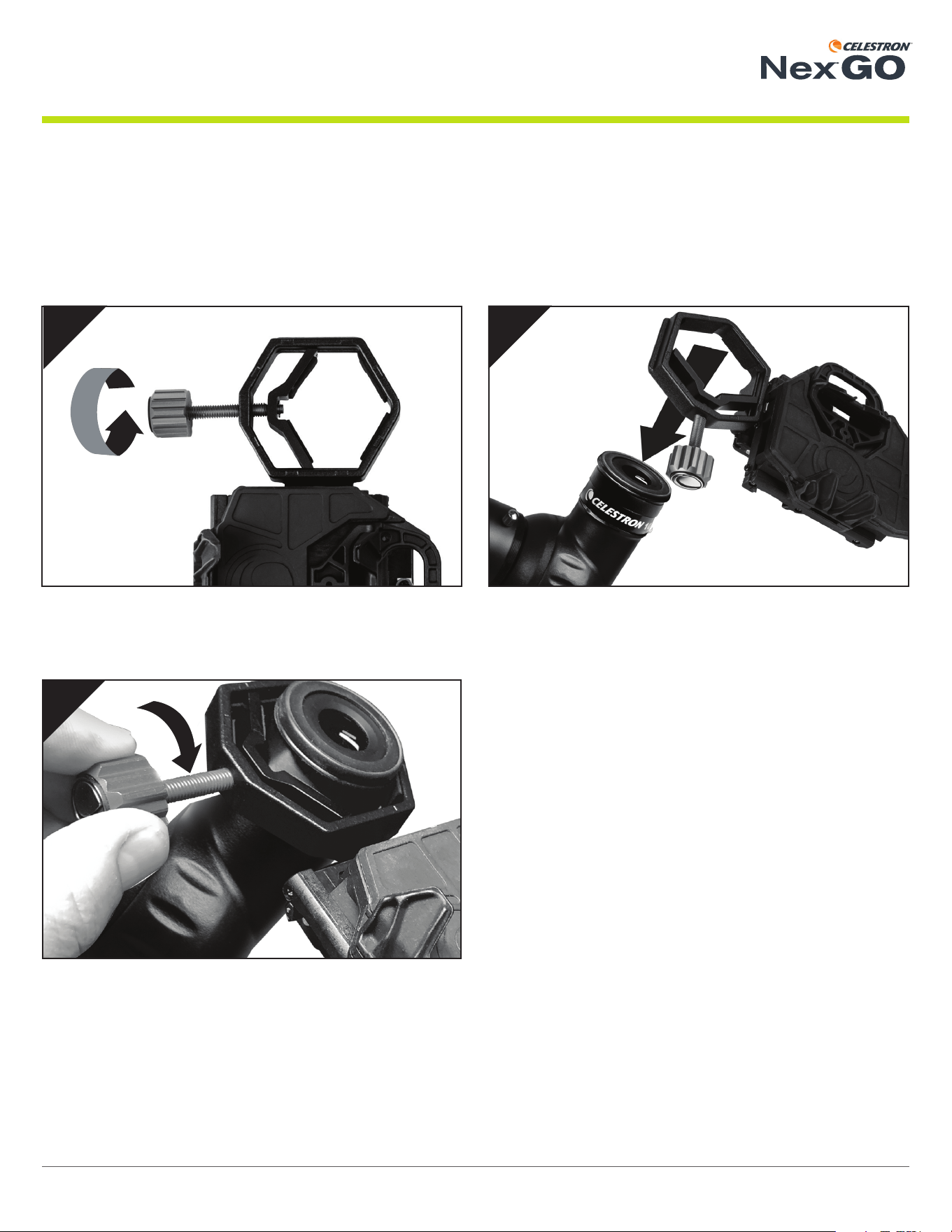
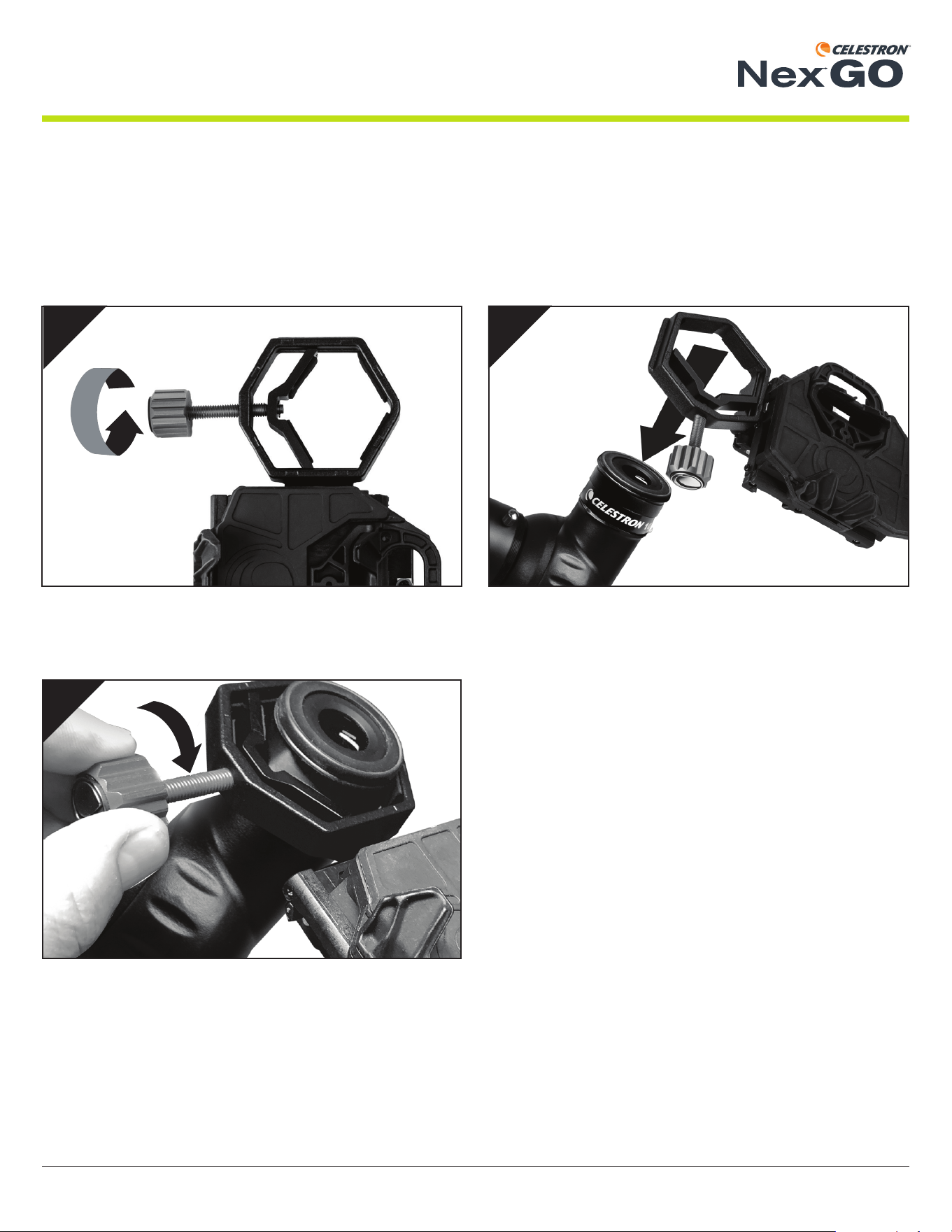
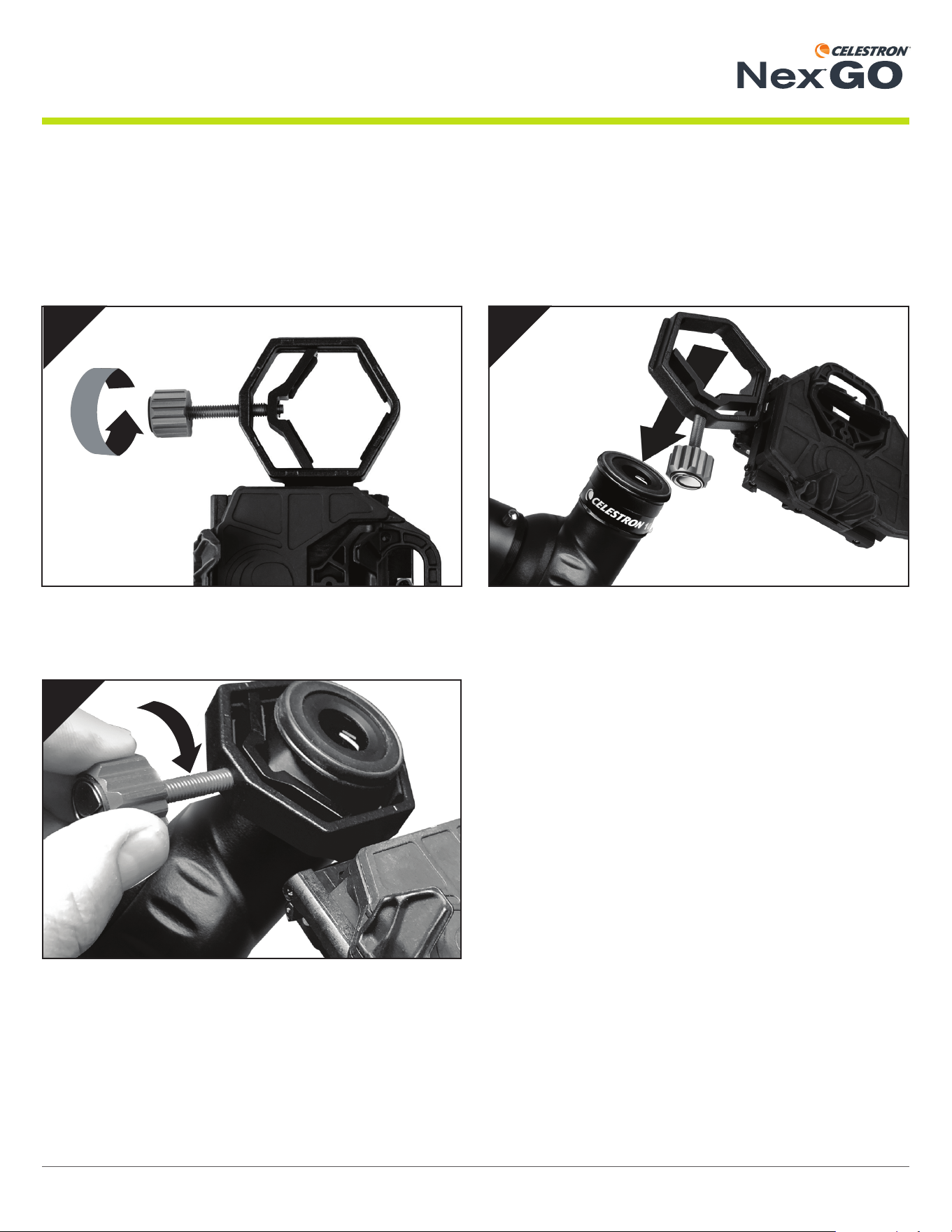
Attaching NexGO To Your Optic
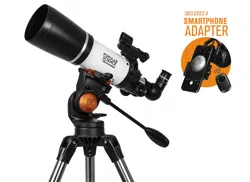
NexGO is designed to work with many different optics, including telescopes, binoculars, spotting scopes, and even microscopes.
All these optics have different size eyepieces. NexGO’s clamp range can open from 25.4mm (1.0”) to 44.45mm (1.75”) to accom-
modate a variety of eyepieces.
1 2
3
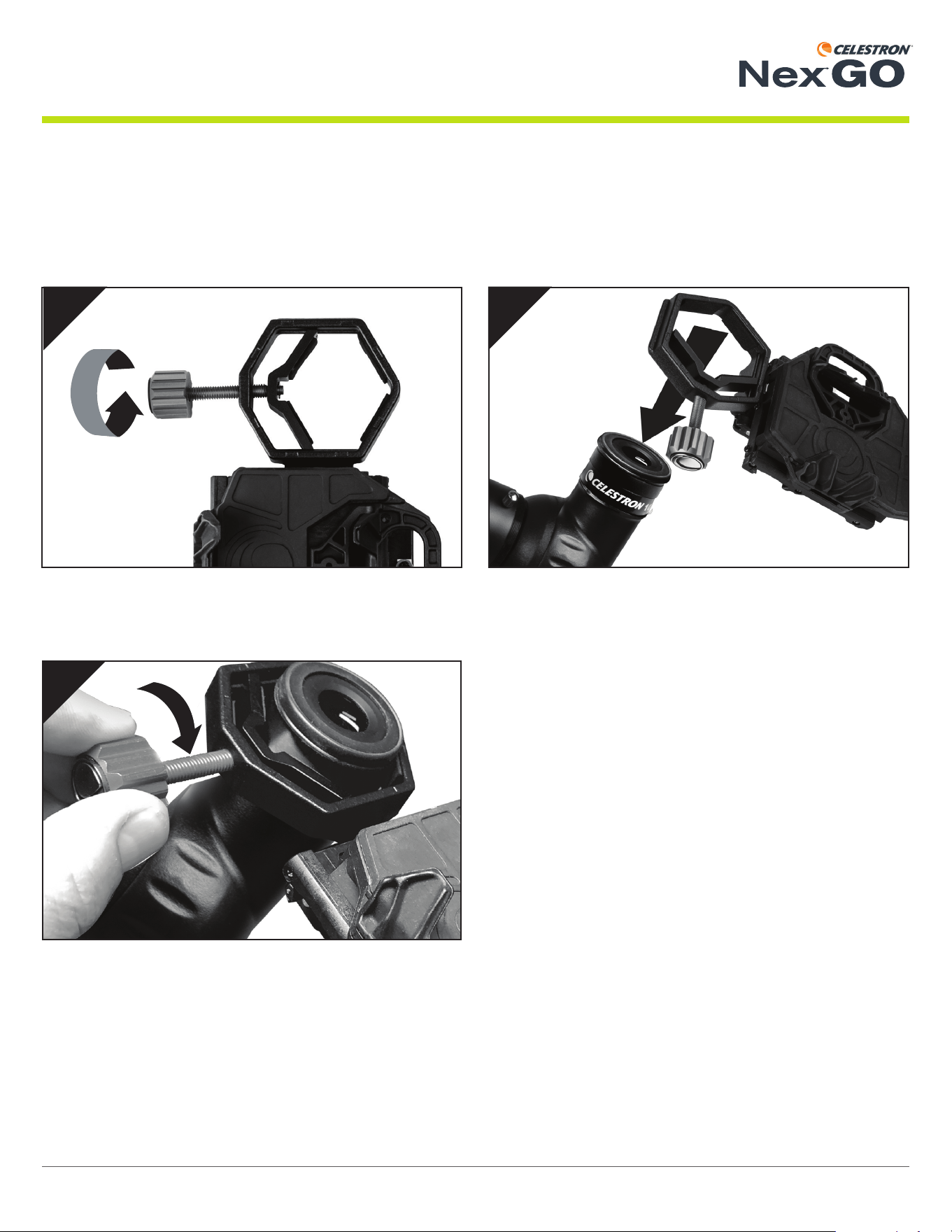
To attach NexGO to your eyepiece, fi rst open the clamp (if
needed) by rotating the clamp knob.
Then position the clamp over your eyepiece.
Tighten the clamp and assembly onto the eyepiece by rotating
the clamp knob clockwise.
4 | ENGLISH INSTRUCTION MANUAL
UNIVERSAL SMARTPHONE ADAPTER
®
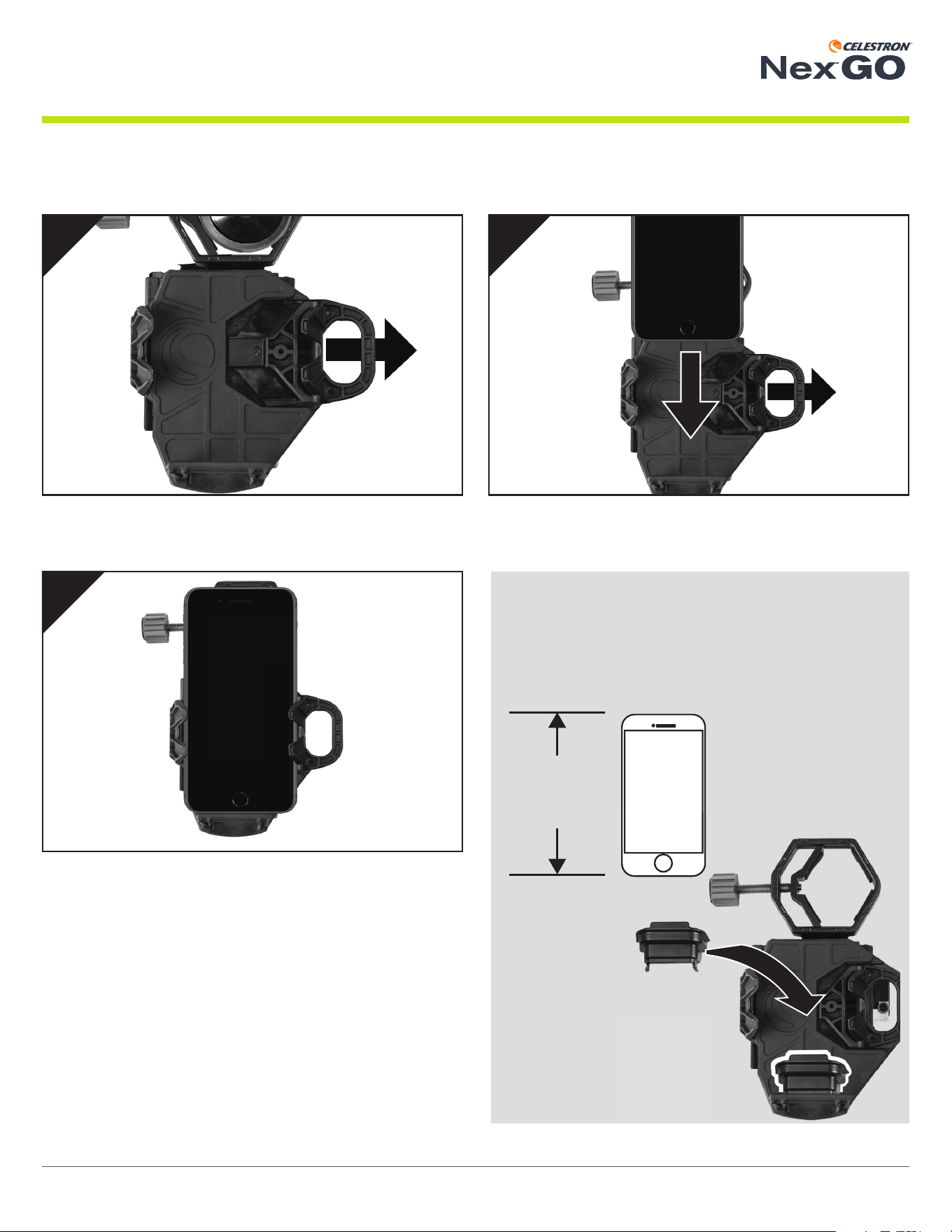
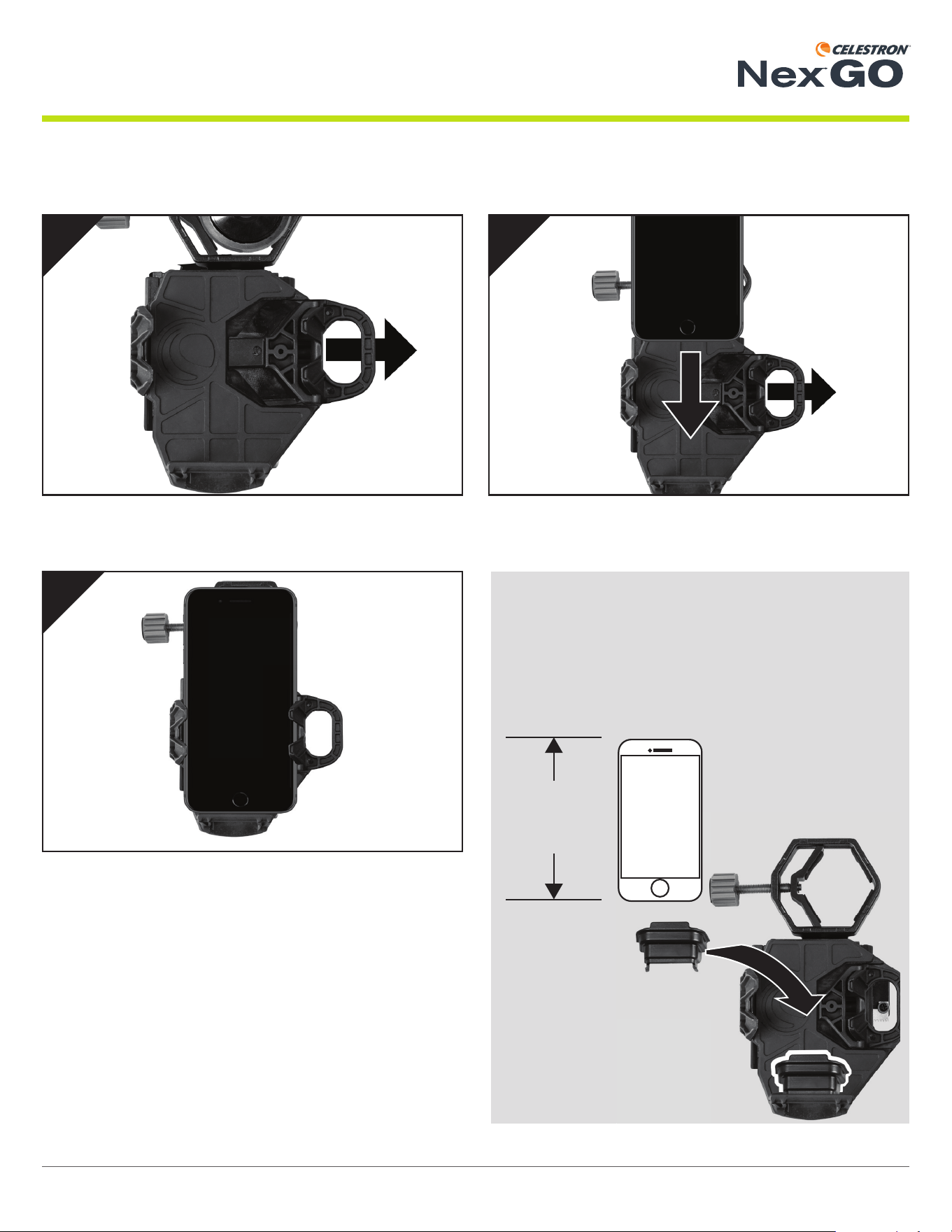
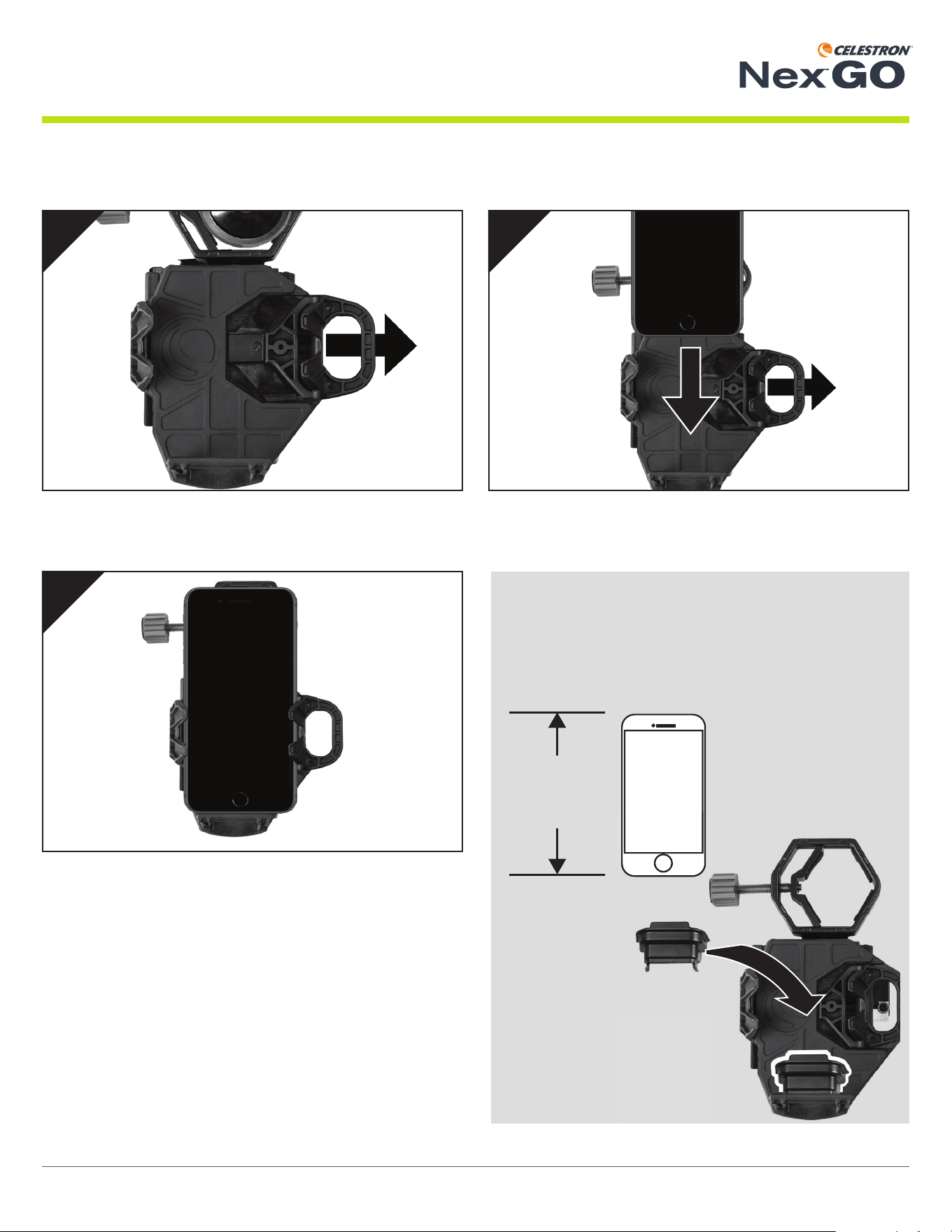
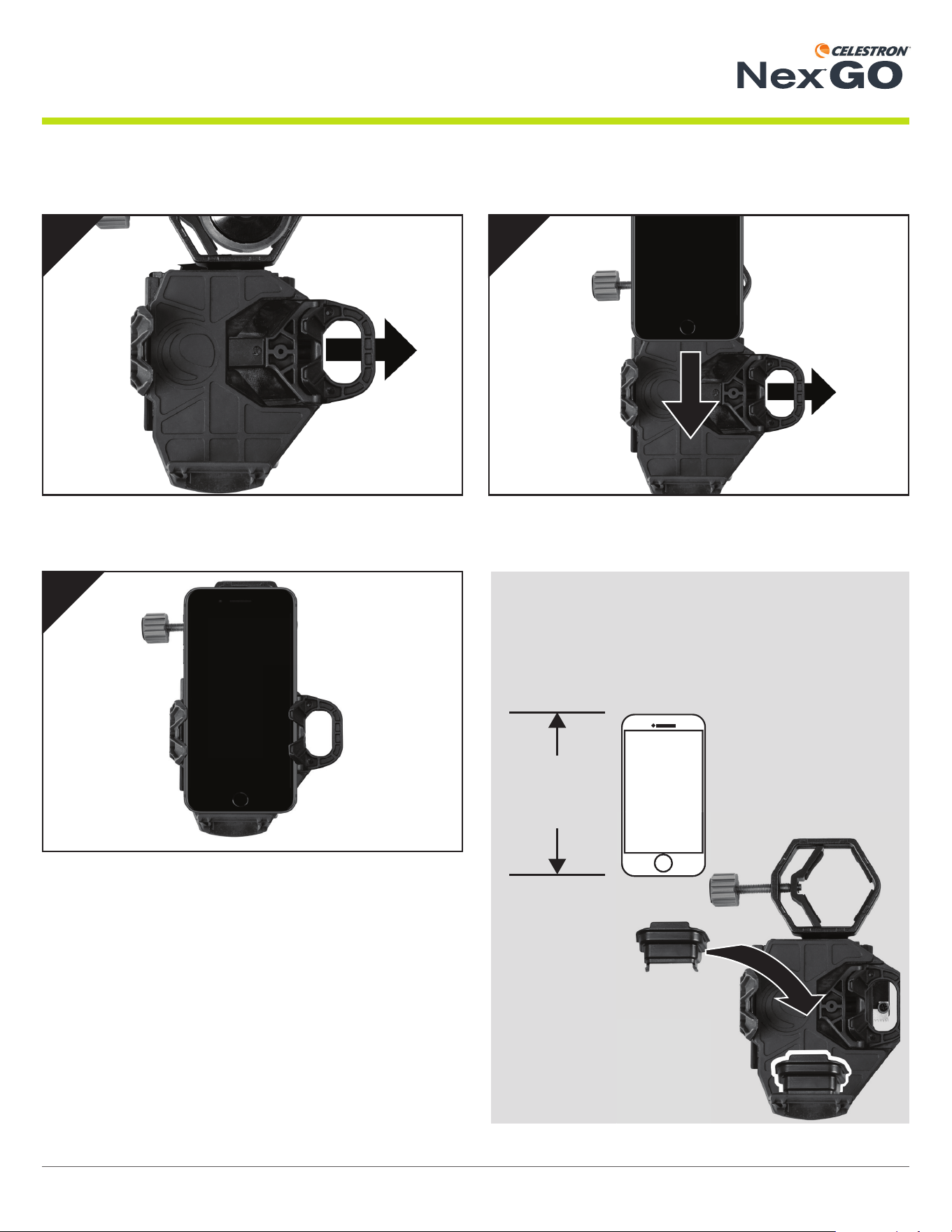
Securing Your Phone on the Phone Bed
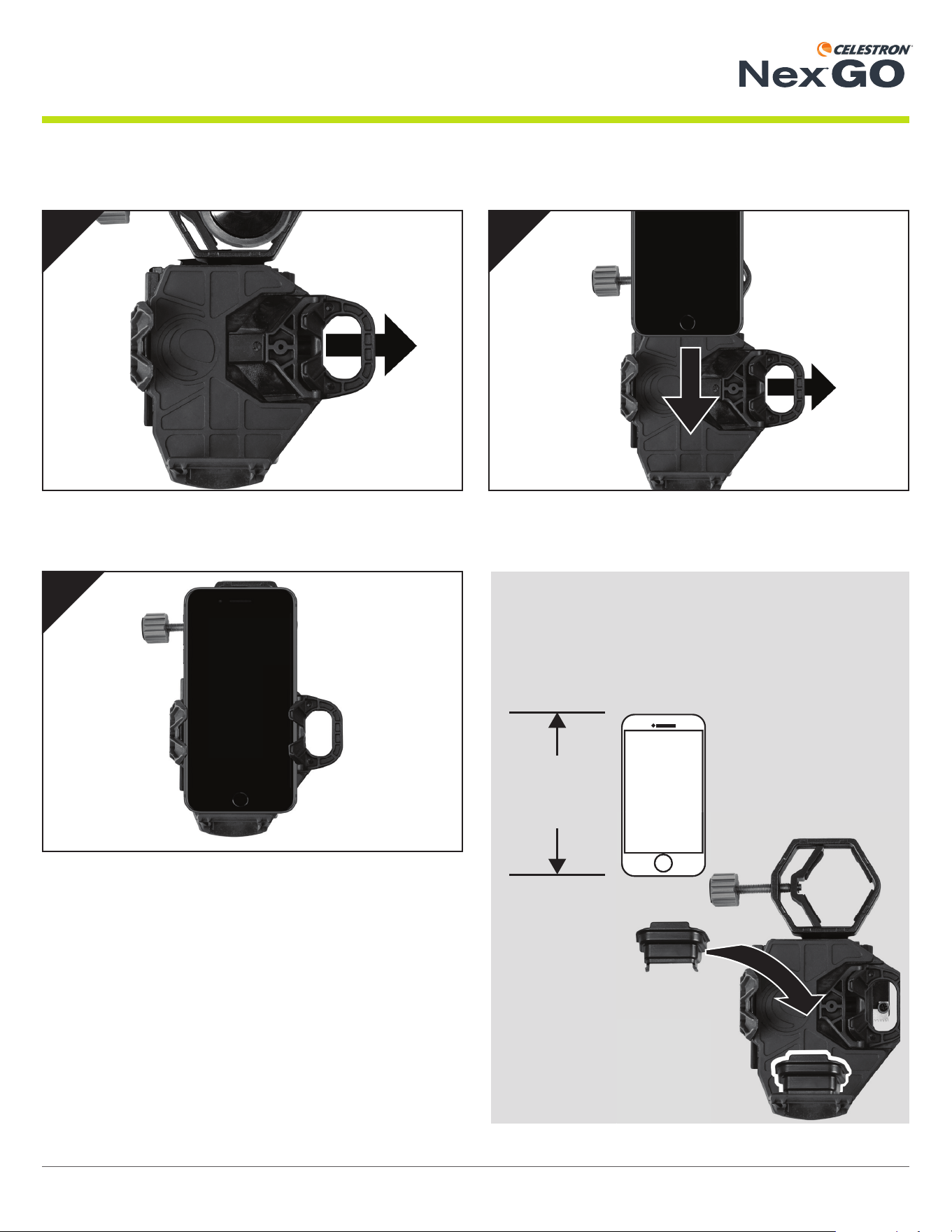
Pull the spring-loaded arm on the phone bed outward.
Slowly release the spring loaded arm to secure the phone in
place.
While holding the arm open, place your phone on the bed.
Make sure the phone is resting fl at on the bed.
< 5”
(127mm)
1
3
2
NOTE:
We have included a booster to raise up smaller phones
that measure less than 5” in length. If you need to use the
booster, place it in the phone bed fi rst, and then place
your phone on top of the booster.
5 | ENGLISH INSTRUCTION MANUAL
UNIVERSAL SMARTPHONE ADAPTER
®
X
Y
3
1
Y
X
2
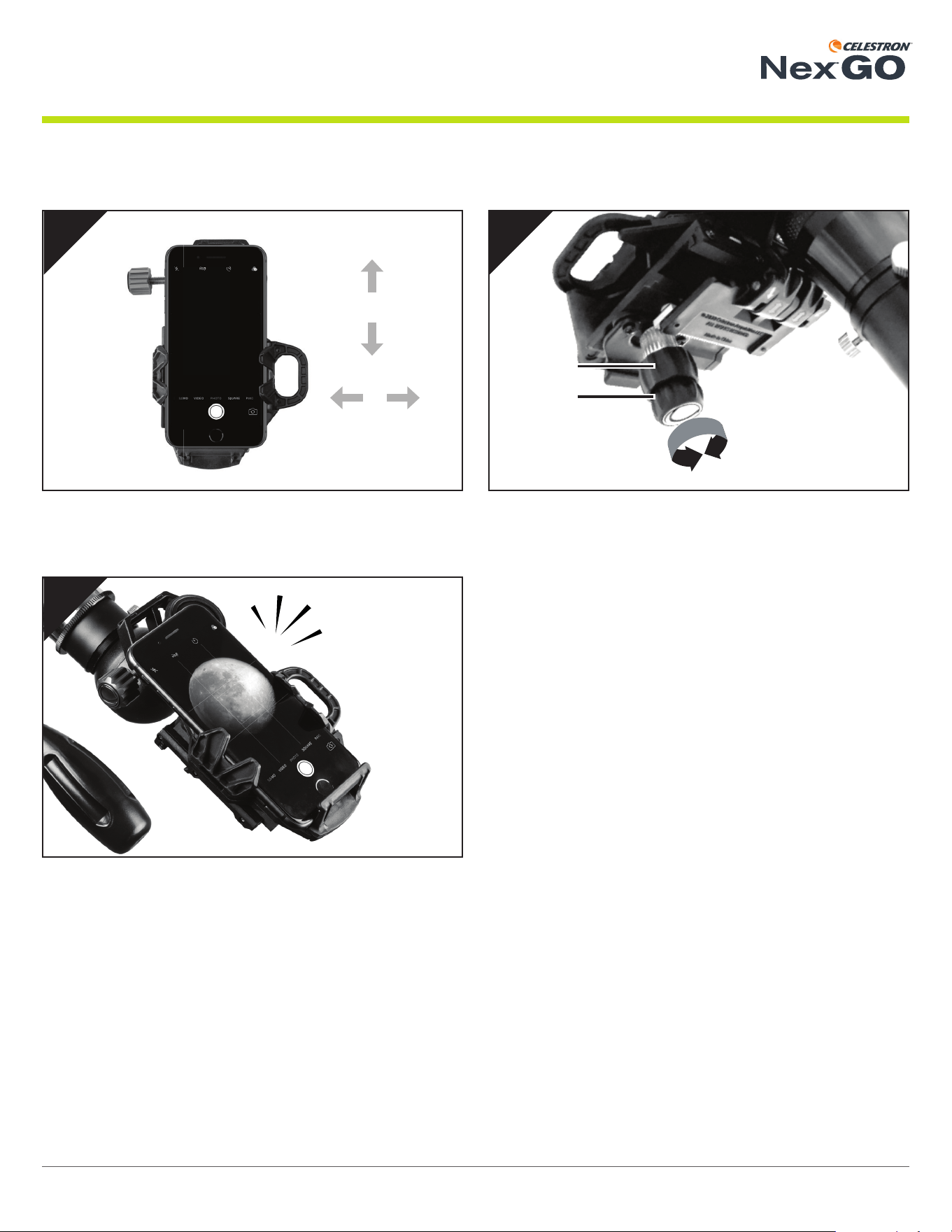
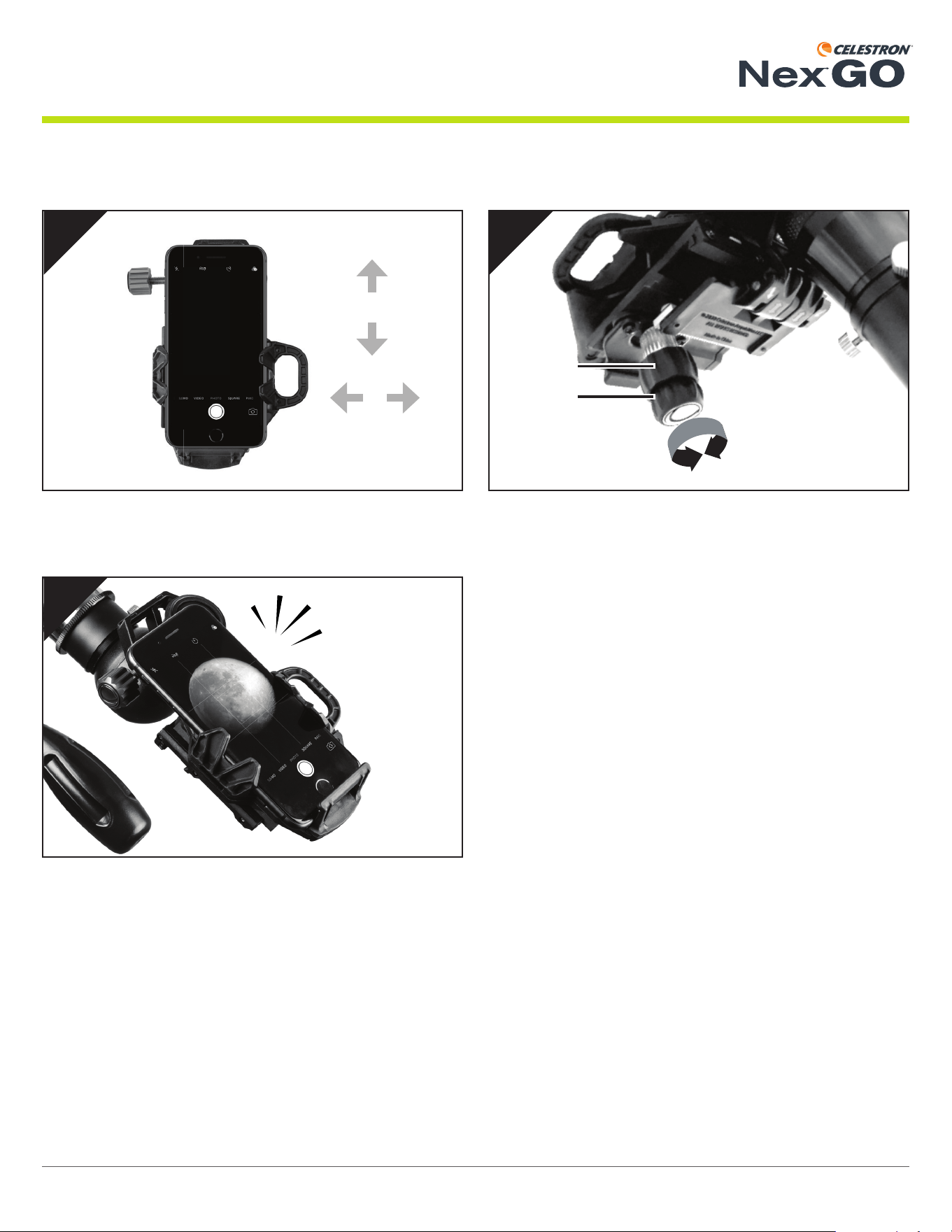
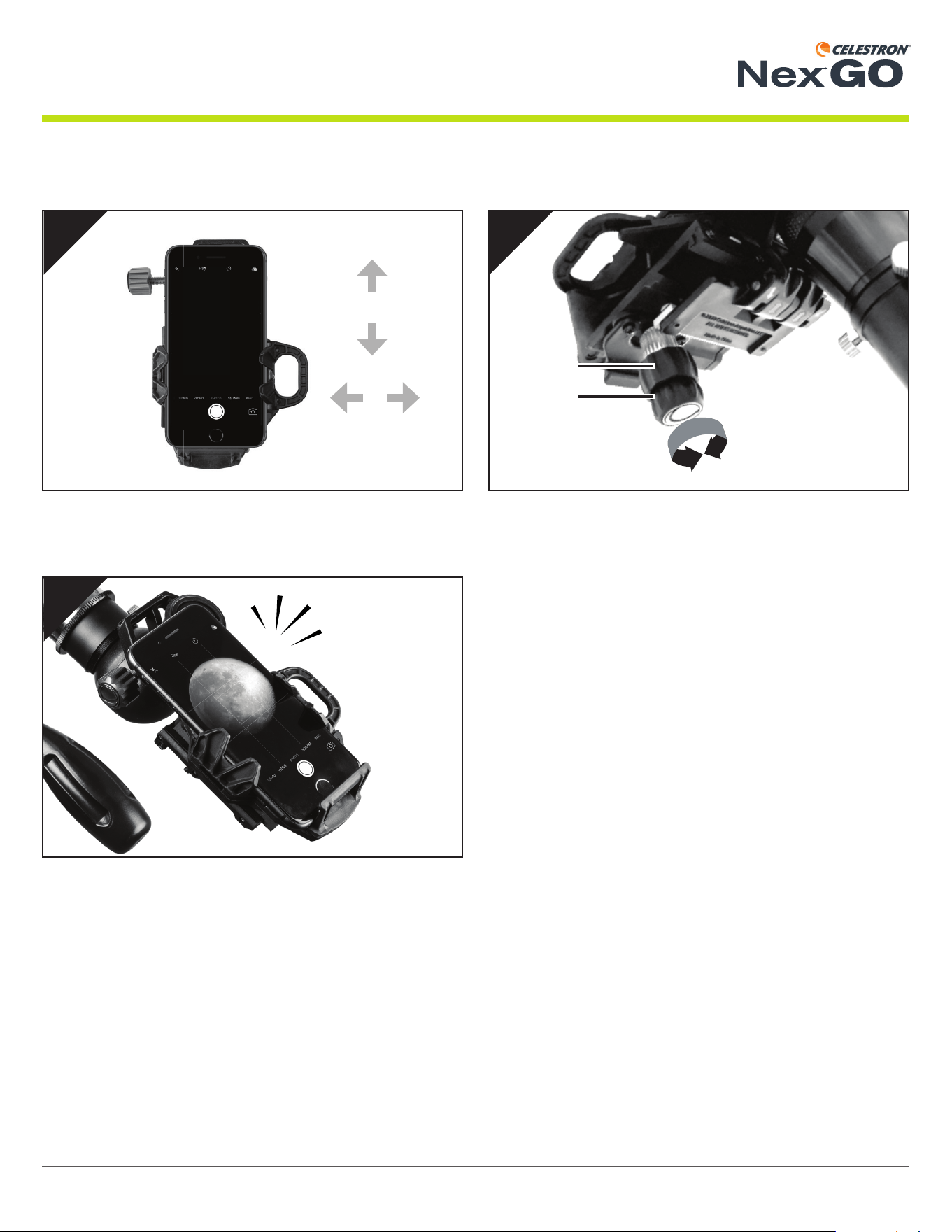
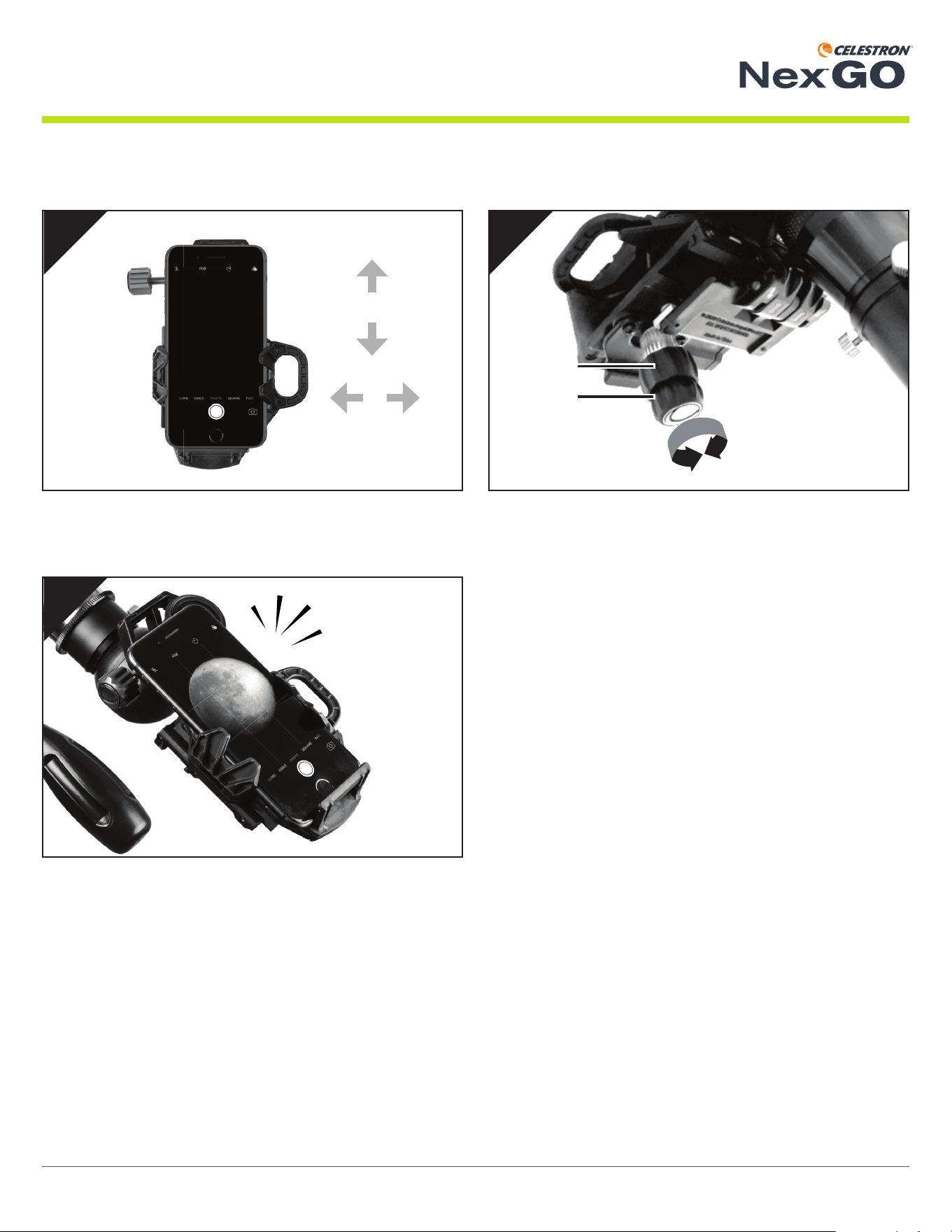
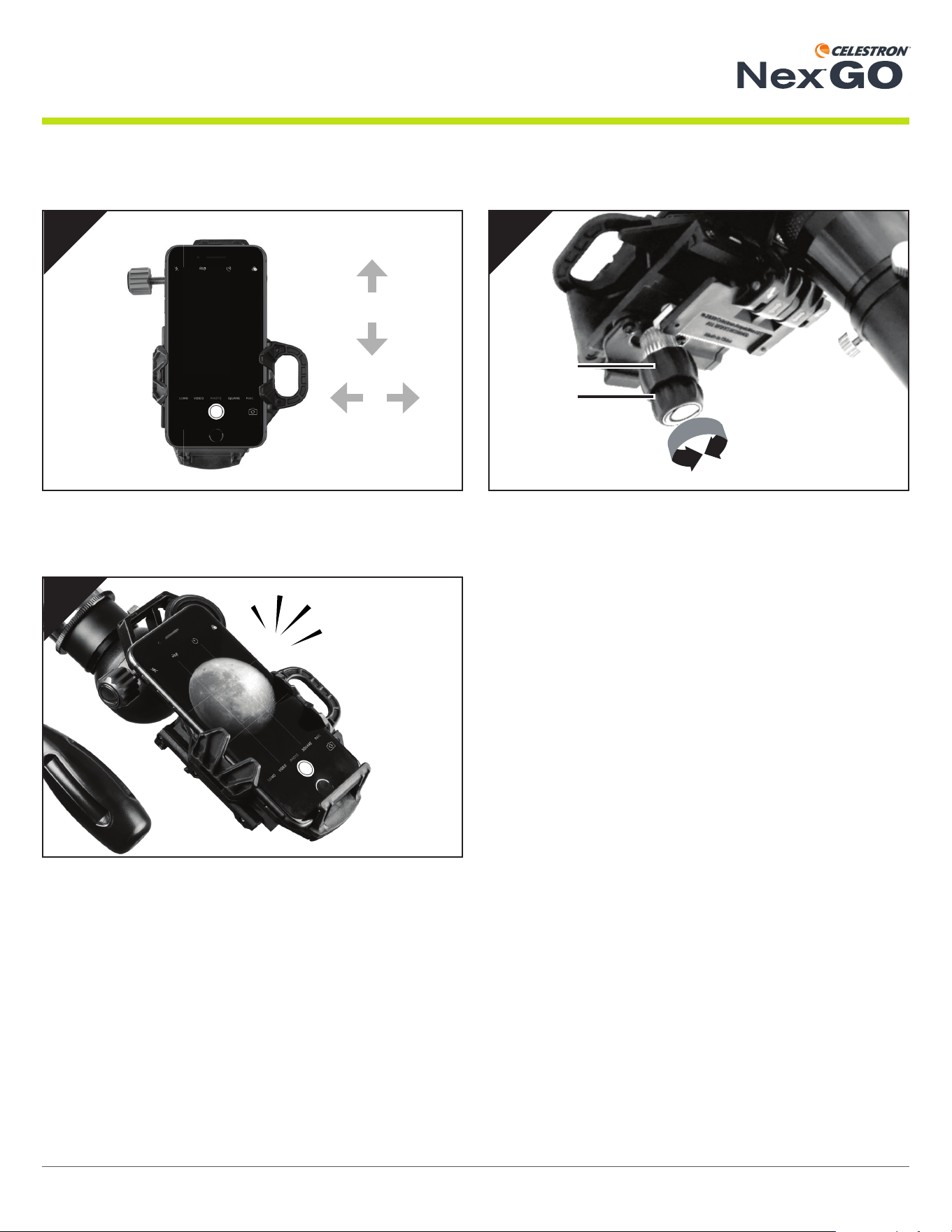
Aligning Your Smartphone Camera
Use the X and Y adjustment knobs to move your phone and
adjust the fi eld of view until it is centered over the eyepiece.
NOTE: You may need to zoom in slightly to remove any dark edges
or “vignetting.”
You are now ready to shoot great images through your optics!
Turn on your smartphone camera.
6 | ENGLISH INSTRUCTION MANUAL
UNIVERSAL SMARTPHONE ADAPTER
®
1
2
43
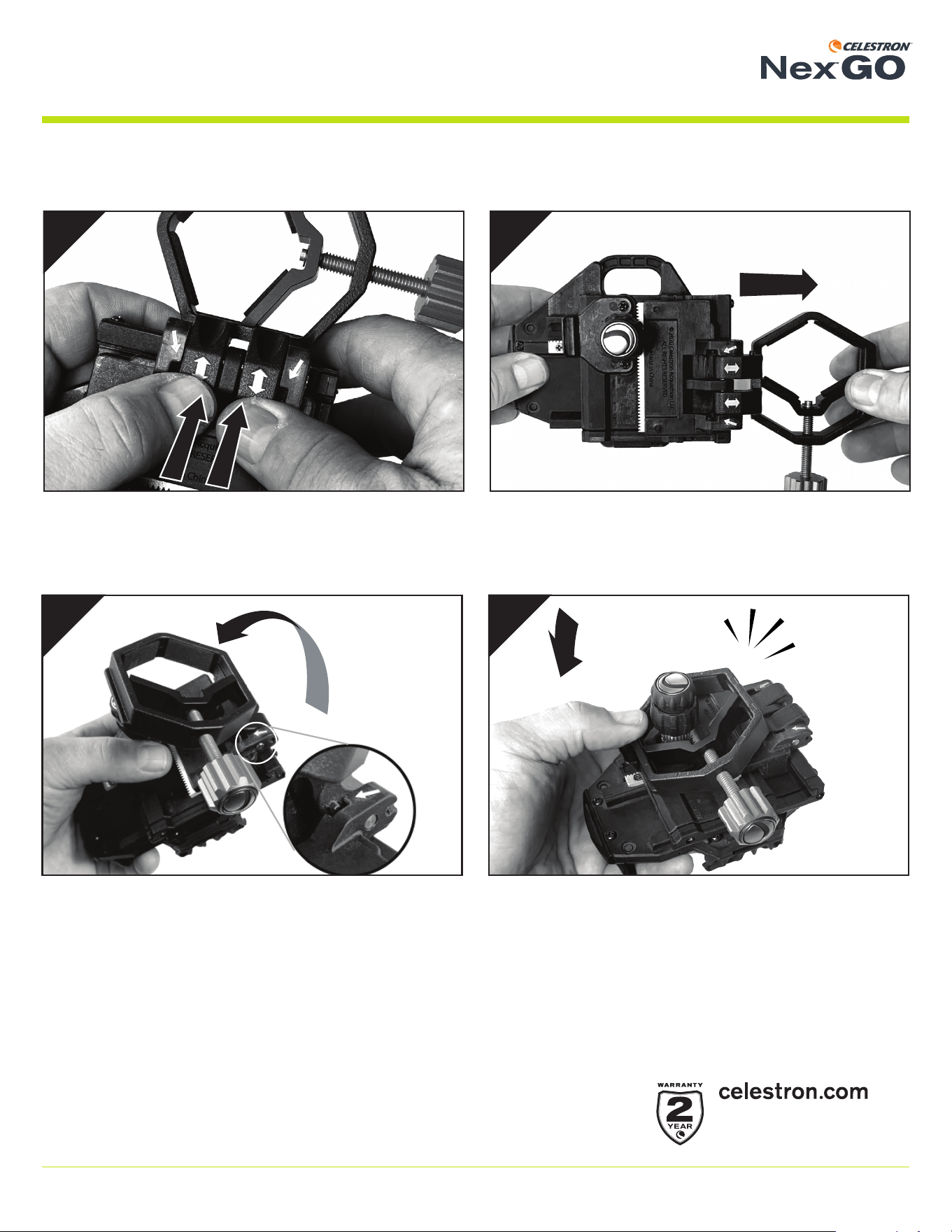
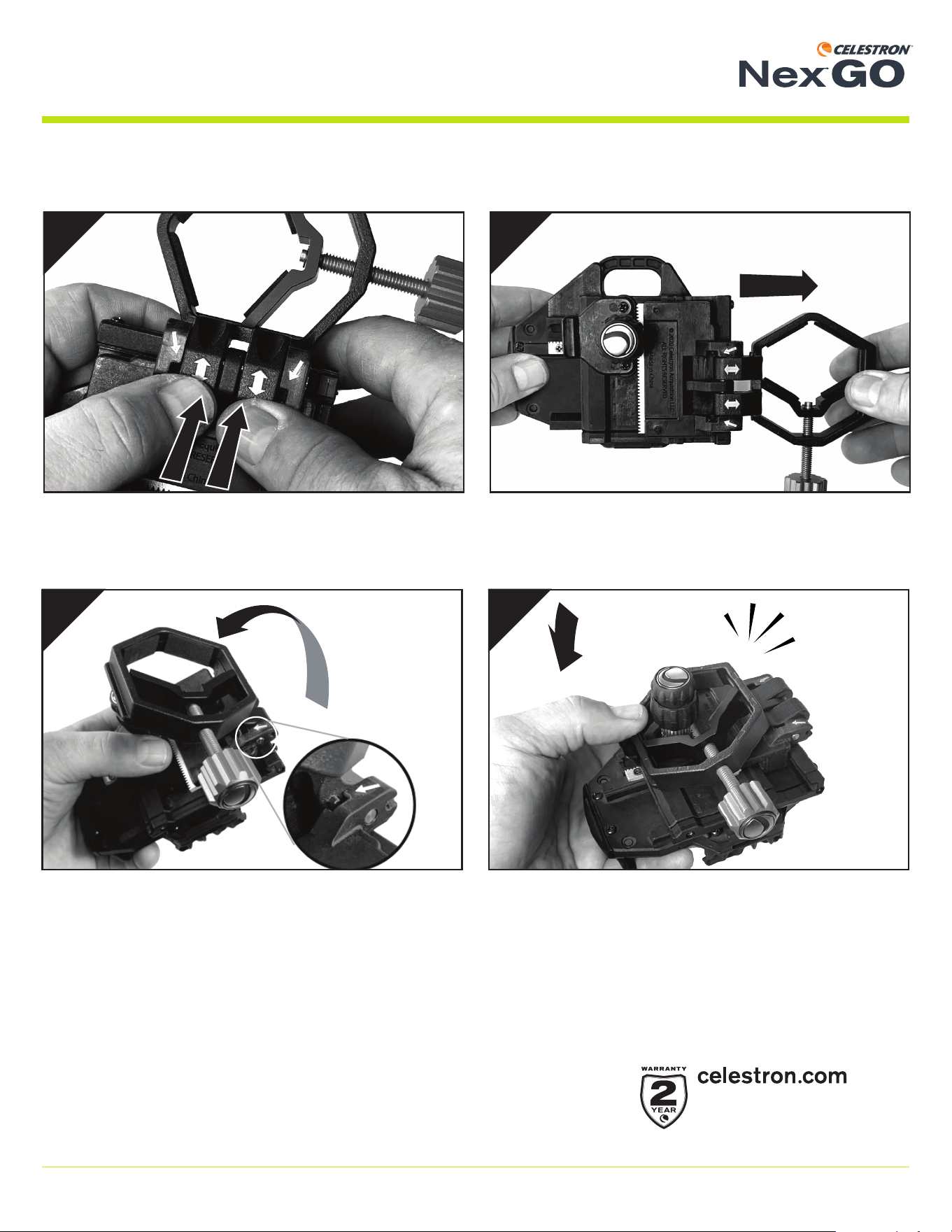
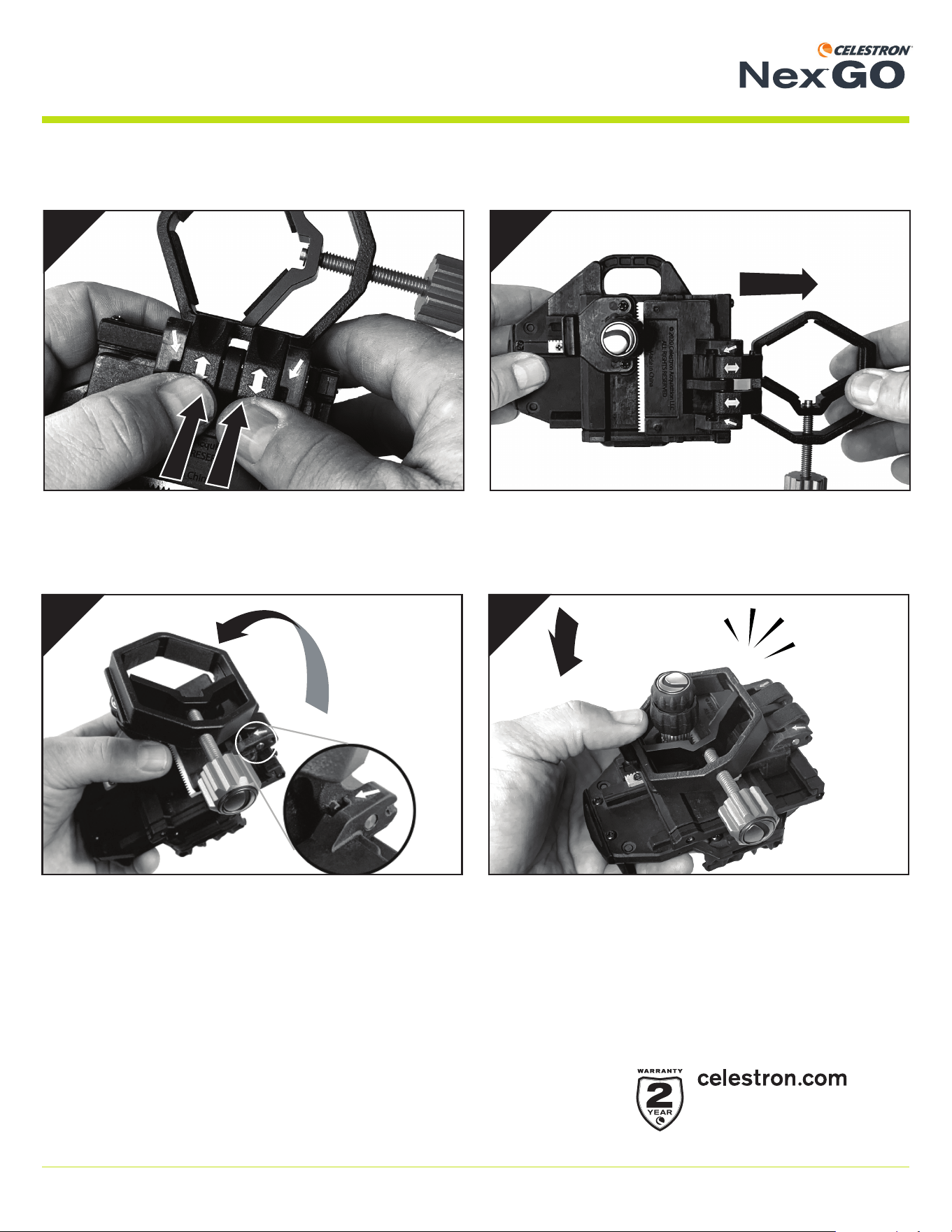
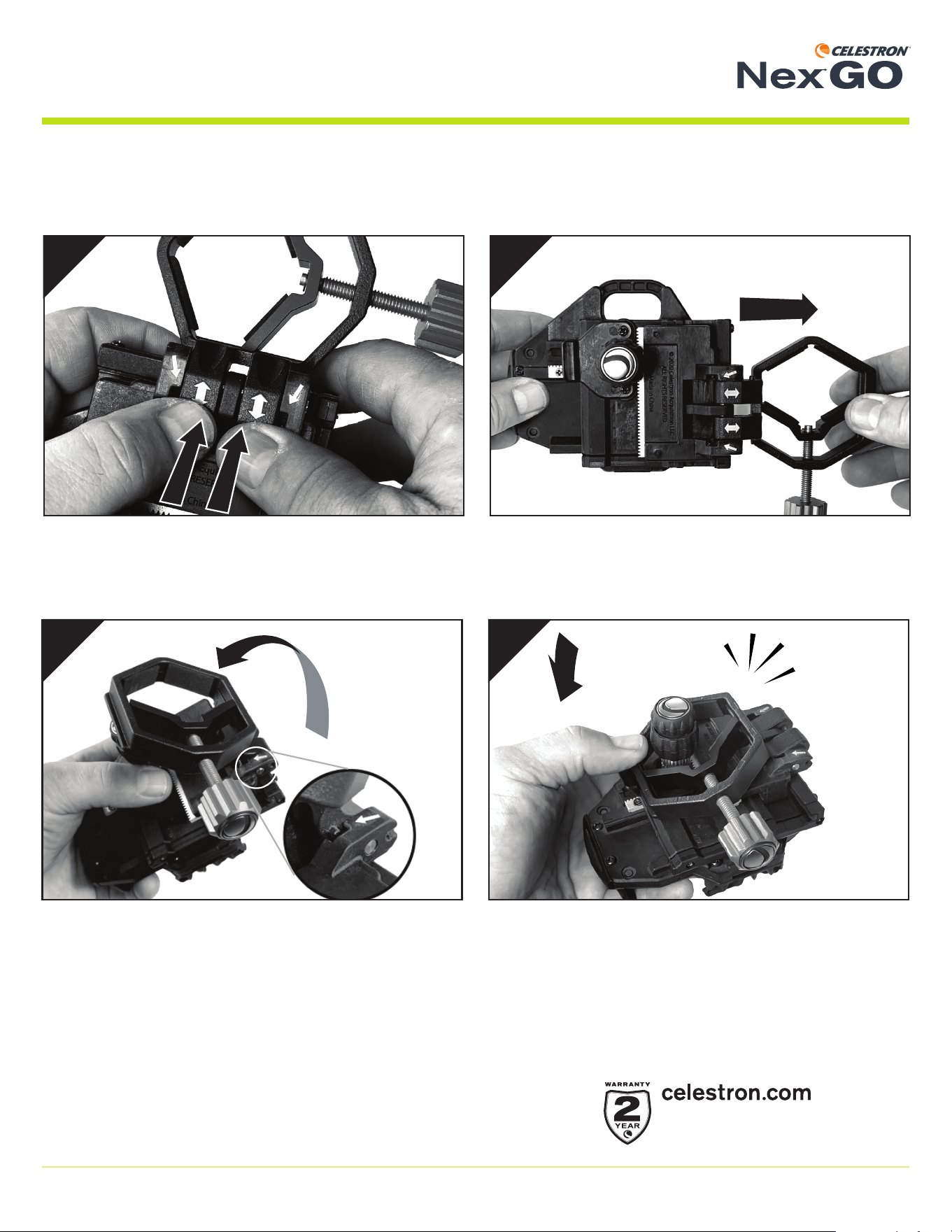
Folding NexGO for Storage
On the underside of the unit, you will see two white arrows.
Use both thumbs to push out and disengage the clamp from
the main assembly.
Hinge the clamp back and align the tabs on the clamp with the
openings on the main assembly as shown.
Make sure the clamp is all the way out.
Slide the clamp into place and press until it snaps into place
with the lock tab.
© 2021 Celestron • All rights reserved
celestron.com/support/warranties
#81036
FRANÇAIS
Mode d'emploi
Merci d’avoir acheté d’adaptateur pour téléphone intelligent universel NexGO. NexGO représente une très bonne introduction au
monde de la digiscopie ou de l’astrophotographie. Cet adaptateur facile d'utilisation vous aidera à capturer des images nettes et
détaillées, ainsi que des vidéos dans l’oculaire de votre équipement optique.
Contenu de la boîte
ADAPTATEUR POUR TÉLÉPHONE INTELLIGENT UNIVERSEL
Adaptateur pour téléphone intelligent NexGO
Cale de téléphone
Guide de confi guration rapide
®
8 | FRANÇAIS
MODE D’EMPLOI
ADAPTATEUR POUR TÉLÉPHONE INTELLIGENT UNIVERSEL
®
Écartez la pince pour l’ouvrir.
2
Appuyez sur l’onglet de verrouillage pour ouvrir la pince.
1
Alignez l’onglet sur la pince comportant l’ouverture en forme de
« C » sur l’assemblage de la base de téléphone. Une fois aligné,
poussez la pince vers la base de téléphone, verrouillant la pince
en place. Vous devriez sentir un léger « clic » quand la pince est
correctement engagée.
VOUS ÊTES MAINTENANT PRÊT À UTILISER VOTRE NexGO!
3
Déployer le NexGO
Le NexGO est livré replié. Pour l’utiliser, vous devez d’abord déployer le NexGO et verrouiller la pince sur le corps principal.
9 | FRANÇAIS
MODE D’EMPLOI
ADAPTATEUR POUR TÉLÉPHONE INTELLIGENT UNIVERSEL
®
Attacher NexGO à votre matériel optique
NexGO est conçu pour fonctionner avec une grande variété de matériel optique : les télescopes, les jumelles, les longues-vues et
même les microscopes. Ces matériels optiques comportent des optiques de tailles différentes. La pince de NexGO peut accepter
les oculaires variés de 25,4 mm (1,0”) à 44,45 mm (1,75”).
1 2
3
Pour fi xer NexGO à votre oculaire, ouvrez d’abord la pince (si
nécessaire) en faisant tourner la molette de la pince.
Positionnez ensuite la pince sur votre oculaire.
Serrez la pince et l’assemblage sur votre oculaire en faisant
tourner la pince dans le sens horaire.
10 | FRANÇAIS
MODE D’EMPLOI
ADAPTATEUR POUR TÉLÉPHONE INTELLIGENT UNIVERSEL
®
Fixer votre téléphone à la base de téléphone
Tirez le bras sur ressort de la base de téléphone vers
l’extérieur.
Relâchez doucement le bras à ressort pour fi xer le téléphone en
place.
Tout en tenant le bras écarté, placez votre téléphone sur la
base de téléphone. Assurez-vous que le téléphone est à plat
sur la base de téléphone.
< 5”
(127 mm)
1
3
2
NOTE:
Nous avons inclus une cale vous permettant de surélever
les téléphones mesurant moins de 5’’ de longueur. Si
vous souhaitez utiliser la cale, placez-la d’abord sur la
base de téléphone et ensuite le téléphone.
11 | FRANÇAIS
MODE D’EMPLOI
ADAPTATEUR POUR TÉLÉPHONE INTELLIGENT UNIVERSEL
®
X
Y
3
1
Y
X
2
Aligner la caméra de votre téléphone intelligent
Utilisez les molettes d’ajustement X et Y pour déplacer le télé-
phone et ajustez le champ de vision jusqu’à ce qu’il soit centré
sur l’oculaire.
NOTE: Il pourrait être nécessaire de zoomer légèrement pour
éliminer les bordures sombres, ou l’effet de « vignettage ».
Vous voilà prêt à capturer de superbes images avec votre
matériel optique!
Allumez la caméra de votre téléphone intelligent.
12 | FRANÇAIS
MODE D’EMPLOI
ADAPTATEUR POUR TÉLÉPHONE INTELLIGENT UNIVERSEL
®
1
2
43
Replier NexGO pour le ranger
Vous remarquerez la présence de deux fl èches blanches sur le
dessous de l’unité. Poussez avec les pouces dans le sens des
fl èches pour séparer la pince de l’assemblage principal.
Repliez la pince vers l’arrière et alignez les onglets sur la pince
avec les ouvertures correspondantes de l’assemblage principal,
comme illustré.
Assurez-vous que la pince est complètement retirée.
Faites glisser la pince en place jusqu’à ce qu’elle s’enclenche
avec les onglets de verrouillage.
© 2021 Celestron • Tous droits réservés.
celestron.com/support/warranties
Best.-Nr. 81036
DEUTSCH
Bedienungsanleitung
Vielen Dank, dass Sie sich für das NexGO Universeller Smartphone-Adapter. NexGO ist ein großer erster Schritt in die Welt der
Digiskopie oder Astrofotografi e. Dieser einfach zu bedienende Adapter unterstützt Sie bei der Aufnahme scharfer, detaillierter Bilder
und Videos durch das Okular Ihrer Optik.
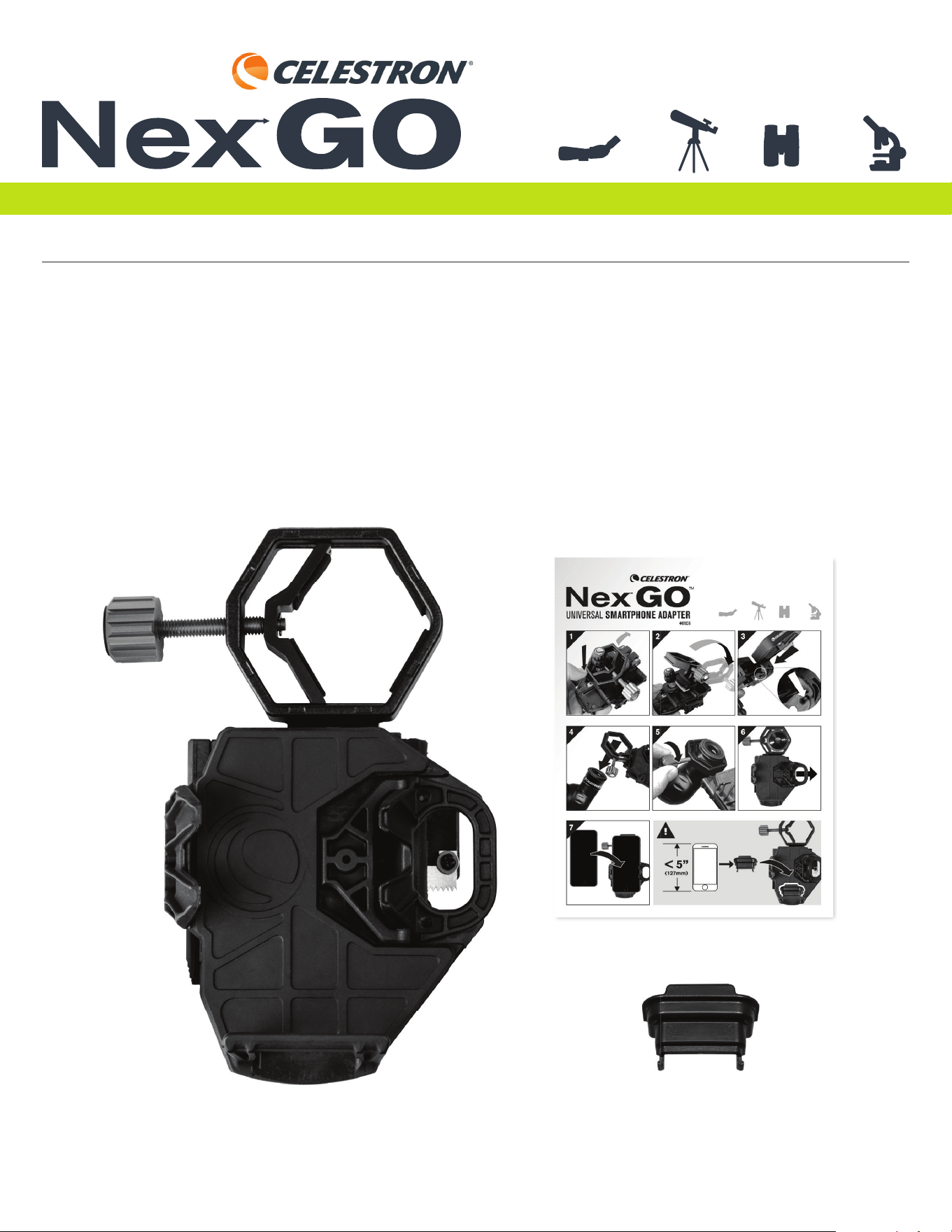
Lieferumfang
UNIVERSELLER SMARTPHONE-ADAPTER
NexGO Smartphone-Adapter Telefon-Verlängerung
Kurzanleitung zur Einrichtung
®
14 | DEUTSCH
BEDIENUNGSANLEITUNG
ADATTATORE PER SMARTPHONE UNIVERSALE
®
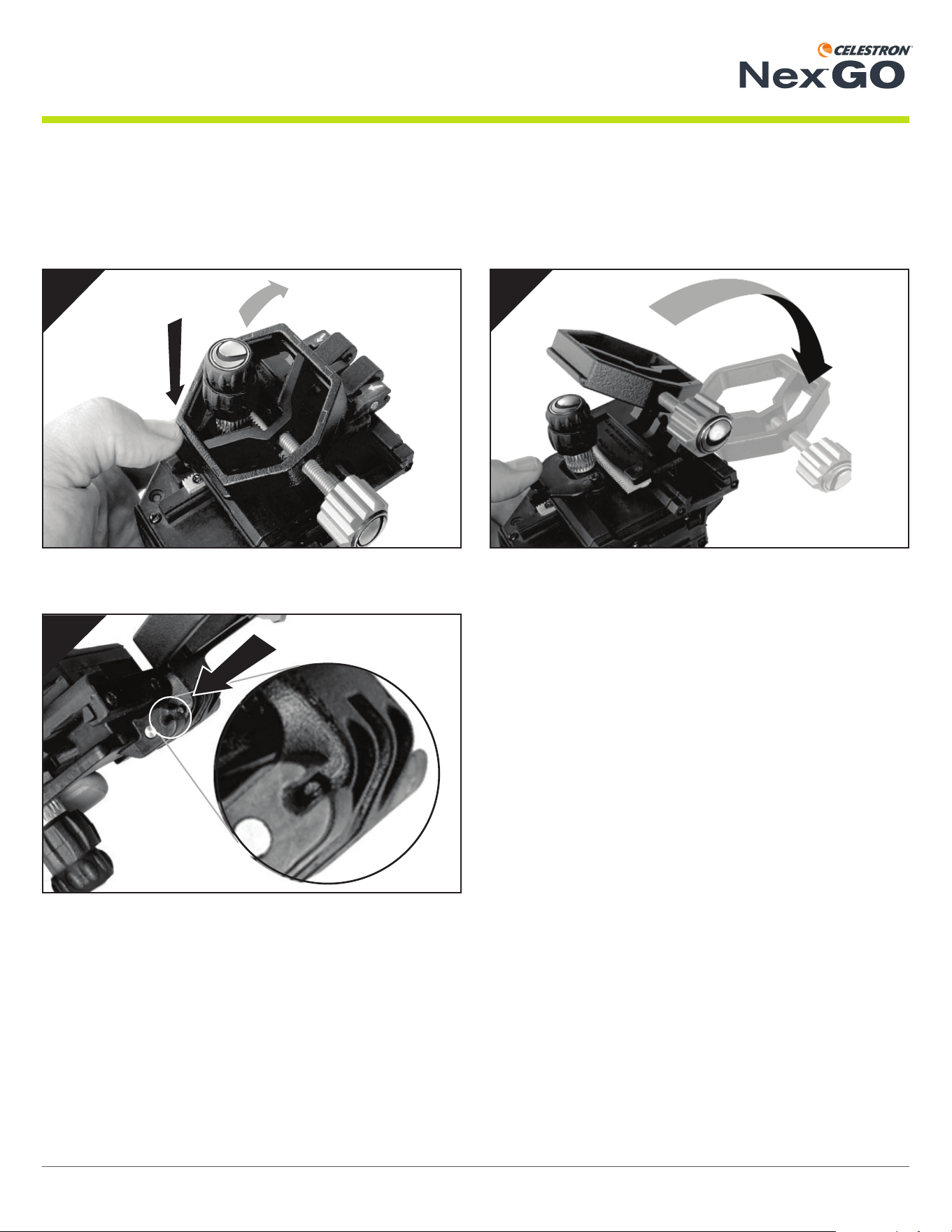
Klappen Sie die Klemme auf.
2
Drücken Sie die Arretierlasche, um die Klemme zu entriegeln.
1
Richten Sie die Lasche an der Klemme mit der „C“-förmigen
Öffnung der Telefonaufl age-Baugruppe aus. Sobald sie
ausgerichtet ist, drücken Sie die Klemme in Richtung der
Telefonaufl age-Baugruppe, sodass sie einrastet. Sie sollten ein
leises Klickgeräusch hören, wenn die Klemme ordnungsgemäß
einrastet.
SIE KÖNNEN NUN IHR NEXGO ZU VERWENDEN!
3
NexGO aufklappen
NexGO wird in eingeklappter Stellung geliefert. Zum Gebrauch von NexGO müssen Sie ihn zunächst aufklappen und die Klemme im
Hauptgehäuse einrasten.
15 | DEUTSCH
BEDIENUNGSANLEITUNG
ADATTATORE PER SMARTPHONE UNIVERSALE
®
NexGO an Ihrer Optik anbringen
NexGO wurde so konzipiert, dass er mit vielen verschiedenen Optiken funktioniert, einschließlich Teleskopen, Ferngläsern, Spek-
tiven und sogar Mikroskopen. Alle diese Optiken haben unterschiedlich große Okulare. Der Klemmbereich von NexGO kann von
25,4 mm (1,0 Zoll) bis 44,45 mm (1,75 Zoll") geöffnet werden, um eine Vielzahl von Okularen aufzunehmen.
1 2
3
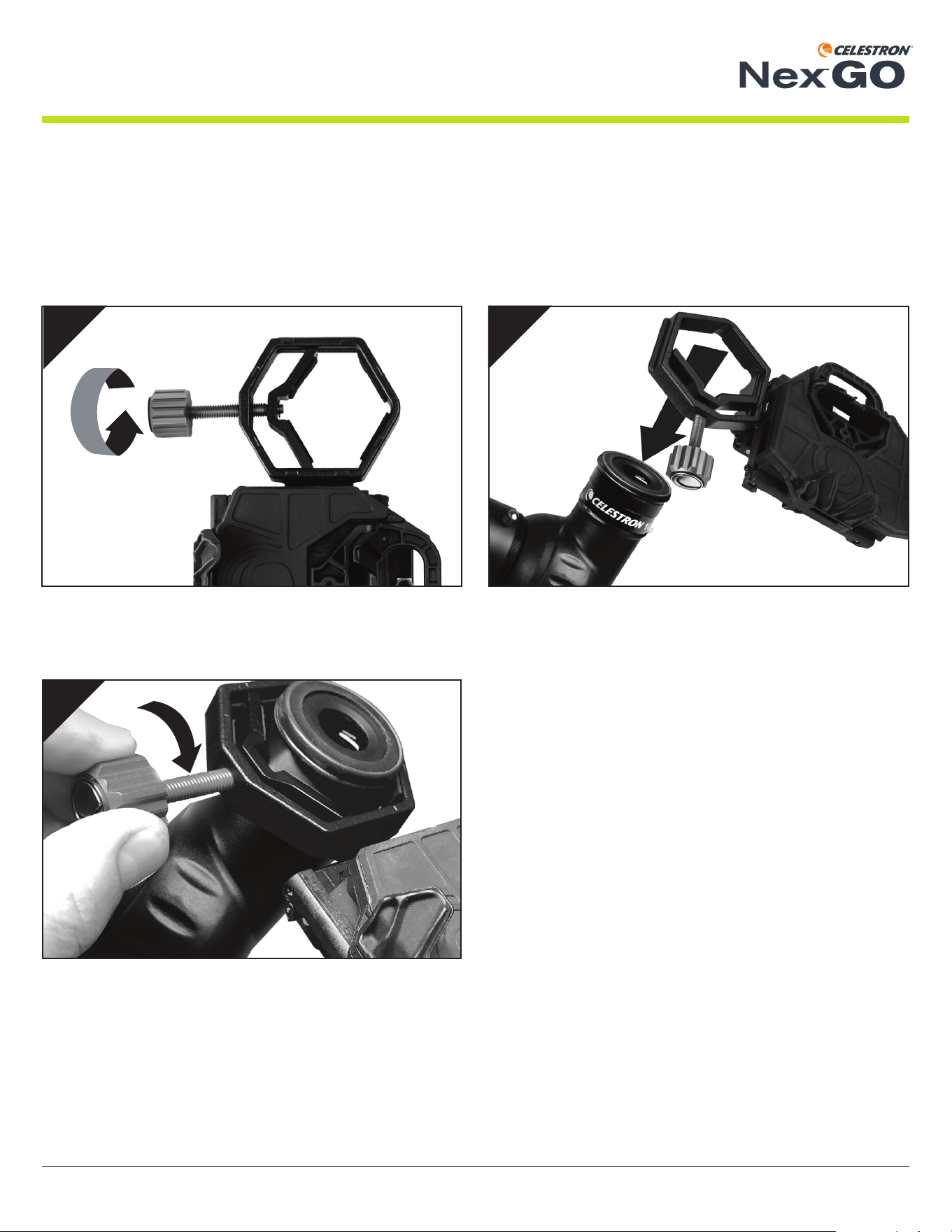
Öffnen Sie zum Anbringen von NexGO an Ihrem Okular zu-
nächst die Klemme (falls erforderlich), indem Sie den Klemmenk-
nopf gegen den Uhrzeigersinn drehen.
Setzen Sie dann die Klemme über Ihr Okular.
Ziehen Sie Klemme und Baugruppe am Okular fest, indem Sie
den Klemmenknopf im Uhrzeigersinn drehen.
16 | DEUTSCH
BEDIENUNGSANLEITUNG
ADATTATORE PER SMARTPHONE UNIVERSALE
®
Ihr Telefon auf der Telefonaufl age sichern
Ziehen Sie den federgespannten Arm an der Telefonaufl age
nach außen.
Lassen Sie den federgespannten Arm langsam los, um das
Telefon zu sichern.
Halten Sie den Arm geöffnet und platzieren Sie das Telefon auf
der Aufl age. Achten Sie darauf, dass das Telefon fl ach auf der
Aufl age aufl iegt.
1
3
2
HINWEIS:
Wir haben eine Verlängerung mitgeliefert, um kleinere
Telefone, die weniger als 5 Zoll lang sind, anzupassen.
Wenn Sie die Verlängerung verwenden müssen,
platzieren Sie sie zuerst in die Telefonaufl age und dann
Ihr Telefon oben auf der Verlängerung.
< 5”
(127 mm)
17 | DEUTSCH
BEDIENUNGSANLEITUNG
ADATTATORE PER SMARTPHONE UNIVERSALE
®
X
Y
3
1
Y
X
2
Ihre Smartphone-Kamera ausrichten
Bewegen Sie Ihr Smartphone mit den X- und Y-Einstellknöp-
fen und stellen Sie das Sichtfeld ein, bis es über dem Okular
zentriert ist.
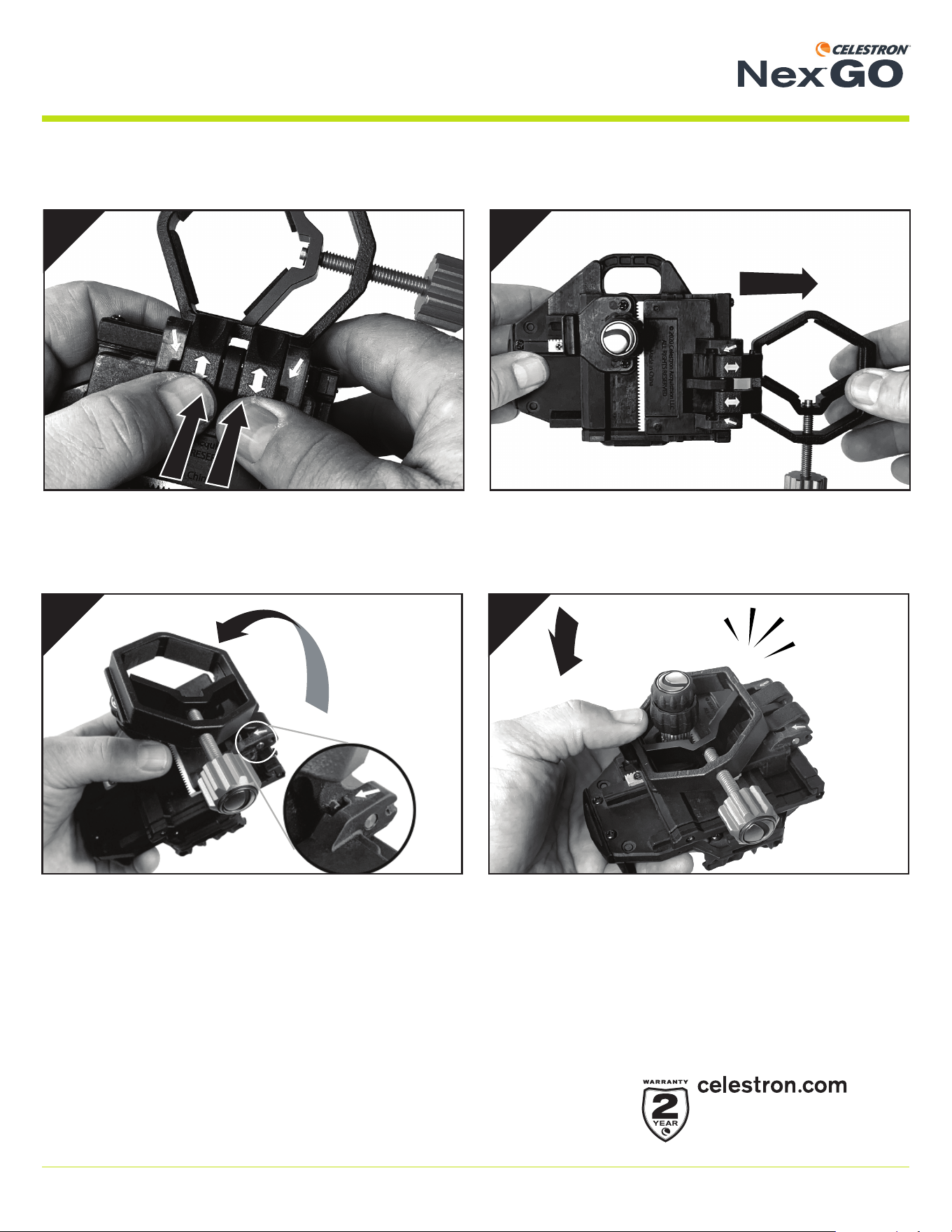
HINWEIS: Möglicherweise müssen Sie etwas heranzoomen, um
dunkle Ränder oder „Vignettierungen“ zu entfernen.
Sie sind nun bereit, tolle Bilder durch Ihre Optik aufzunehmen!
Schalten Sie Ihre Smartphone-Kamera ein.
18 | DEUTSCH
BEDIENUNGSANLEITUNG
ADATTATORE PER SMARTPHONE UNIVERSALE
®
1
2
43
NexGO für die Aufbewahrung zusammenfalten
Auf der Unterseite des Geräts sehen Sie zwei weiße Pfeile.
Drücken Sie die Klemme mit beiden Daumen heraus und lösen
Sie sie von der Hauptbaugruppe.
Klappen Sie die Klemme zurück und richten Sie die Laschen an
der Klemme, wie dargestellt, an den Öffnungen der Hauptbau-
gruppe aus.
Stellen Sie sicher, dass die Klemme ganz herausgezogen
wurde.
Schieben Sie die Klemme in Ihre Position und drücken Sie sie,
bis sie mit der Arretierlasche einrastet.
© 2021 Celestron • Alle Rechte vorbehalten
celestron.com/support/warranties
#81036
ITALIANO
Manuale di istruzioni
Grazie per avere acquistato il adattatore per smartphone universale NexGO. NexGO rappresenta il primo grande passo verso il
mondo della digiscopia o dell’astrofotografi a. Questo adattatore facile da usare permette di catturare immagini e video dettagliati e
nitidi attraverso l’oculare dello strumento ottico.
Contenuto della confezione
ADATTATORE PER SMARTPHONE UNIVERSALE
Adattatore per smartphone NexGO
Estensione telefono
Guida rapida
®
20 | ITALIANO
MANUALE DI ISTRUZIONI
ADATTATORE PER SMARTPHONE UNIVERSALE
®
Aprire il fermo.
2
Premere la linguetta di blocco per rilasciare il fermo.
1
Allineare la linguetta del fermo all’apertura a forma di “C” del
supporto del telefono. Una volta fatto ciò, spingere il fermo verso
il supporto, bloccandolo in posizione. Dovrebbe essere udibile
un leggero “clic” quando il fermo è bloccato correttamente.
SI È ORA PRONTI PER UTILIZZARE IL NexGO!
3
Apertura del NexGO
Il NexGO viene fornito in posizione ripiegata. Per poterlo utilizzare occorre innanzitutto aprire NexGO e bloccare il fermo sul corpo
principale.
21 | ITALIANO
MANUALE DI ISTRUZIONI
ADATTATORE PER SMARTPHONE UNIVERSALE
®
Fissaggio del NexGO allo strumento ottico
NexGO è progettato per essere utilizzato con svariati strumenti ottici, compresi telescopi, binocoli, cannocchiali e perfi no microsco-
pi. Tutti questi strumenti ottici hanno diverse misure di oculare. Il fermo NexGO ha un’apertura che si estende da 25,4 mm (1,0”) a
44,45 mm (1,75”) per poter accogliere un’ampia varietà di oculari.
1 2
3
Per fi ssare il NexGO all’oculare, aprire innanzitutto il fermo (se
necessario) ruotando l’apposita manopola.
Quindi, sistemare il fermo sull’oculare.
Serrare il fermo e il supporto sull’oculare ruotando la manopola
del fermo in senso orario.
22 | ITALIANO
MANUALE DI ISTRUZIONI
ADATTATORE PER SMARTPHONE UNIVERSALE
®
Fissaggio del telefono all’apposito supporto
Estrarre verso l’esterno il braccio caricato a molla sul
supporto del telefono.
Rilasciare lentamente il braccio caricato a molla per fi ssare il
telefono in posizione.
Mantenendo il braccio aperto, sistemare il telefono sul suppor-
to. Assicurarsi che il telefono poggi perfettamente sul supporto.
< 5”
(127 mm)
1
3
2
NOTA:
È presente un’estensione per sollevare telefoni più
piccoli che misurano meno di 127 mm di lunghezza. Se
occorre utilizzare l’estensione, sistemarla per prima cosa
sul supporto del telefono, quindi sistemare il telefono
sopra l’estensione.
23 | ITALIANO
MANUALE DI ISTRUZIONI
ADATTATORE PER SMARTPHONE UNIVERSALE
®
X
Y
3
1
Y
X
2
Allineamento della fotocamera dello smartphone
Utilizzare le manopole di regolazione X e Y per spostare il
telefono e regolare il campo visivo fi no a quando è centrato
sull’oculare.
NOTA: Potrebbe essere necessario ingrandire leggermente per
eliminare eventuali bordi scuri dovuti alla “vignettatura”.
Ora è possibile scattare fantastiche foto attraverso lo strumento
ottico!
Accendere la fotocamera dello smartphone.
24 | ITALIANO
MANUALE DI ISTRUZIONI
ADATTATORE PER SMARTPHONE UNIVERSALE
®
1
2
43
Come ripiegare il NexGO per riporlo dopo l’uso
Sulla parte inferiore dell’unità sono visibili due frecce bianche.
Utilizzare entrambi i pollici per spingere verso l’esterno e stac-
care il fermo dal gruppo principale.
Richiudere il fermo e allineare le linguette sul fermo con le
aperture sul gruppo principale come mostrato.
Assicurarsi che il fermo sia completamente fuori.
Fare scorrere il fermo in posizione e premerlo fi no a quando
scatta in posizione con la linguetta di fermo.
© 2021 Celestron • Tutti i diritti riservati.
celestron.com/support/warranties
#81036
ESPAÑOL
Manual de instrucciones
Gracias por adquirir el Adaptador de Teléfono Universal NexGO. NexGO es un excelente primer paso en el mundo del digiscoping
o la astrofotografía. Este adaptador fácil de usar le ayuda a capturar imágenes y video defi nidos y detallados por el ocular de su
óptica.
Contenido de la caja
ADAPTADOR DE TELÉFONO UNIVERSAL
Adaptador de teléfono NexGO Potenciador de teléfono
Guía de instalación rápida
®
26 | ESPAÑOL
MANUAL DE INSTRUCCIONES
ADAPTADOR DE TELÉFONO UNIVERSAL
®
Abra la fi jación.
2
Presione la pestaña de bloqueo para soltar la fi jación.
1
Alinee la pestaña de la fi jación con la apertura en forma de
"C" en la estructura del alojamiento del teléfono. Cuando esté
alineado, presione la fi jación hacia la estructura del alojamiento,
bloqueando la fi jación en posición. Debería escuchar un
chasquido tenue cuando la fi jación encaje correctamente.
AHORA PUEDE USAR SU NexGO!
3
Desplegar NexGO
NexGO se entrega en posición plegada. Para usarlo, deberá desplegar primero el NexGO y bloquear la fi jación en el cuerpo principal.
27 | ESPAÑOL
MANUAL DE INSTRUCCIONES
ADAPTADOR DE TELÉFONO UNIVERSAL
®
Instalar NexGO en su óptica
NexGo ha sido diseñado para funcionar con muchas ópticas distintas, incluyendo telescopios, binoculares, catalejos e incluso mi-
croscopios. Todas estas ópticas tienen oculares de distinto tamaño. La gama de fi jación de NexGO puede abrirse desde 25,4mm
(1,0") hasta 44,45mm (1,75") para adaptarse a diversos oculares.
1 2
3
Para instalar NexGO en su ocular, abra primero la fi jación (si es
necesario) girando el mando de fi jación.
Coloque a continuación la fi jación sobre su ocular.
Apriete la fi jación y la estructura sobre el ocular girando el man-
do de la fi jación en sentido horario.
28 | ESPAÑOL
MANUAL DE INSTRUCCIONES
ADAPTADOR DE TELÉFONO UNIVERSAL
®
Asegurar su teléfono en el alojamiento
Tire del brazo con muelle del alojamiento del teléfono hacia
fuera.
Suelte lentamente el brazo con muelle para asegurar el teléfono
en posición.
Manteniendo abierto el brazo con muelle, coloque su teléfono
en el alojamiento. Asegúrese de que el teléfono quede plano
sobre el alojamiento.
< 5”
(127mm)
1
3
2
NOTA:
Hemos incluido un potenciador para aumentar teléfonos
de menos de 5" de longitud. Si necesita usar el
potenciador, colóquelo primero en el alojamiento del
teléfono, y coloque el teléfono sobre el potenciador.
29 | ESPAÑOL
MANUAL DE INSTRUCCIONES
ADAPTADOR DE TELÉFONO UNIVERSAL
®
X
A
3
1
A
X
2
Alinear la cámara de su teléfono
Use los mandos de ajuste X e Y para mover su teléfono y ajus-
tar el campo de visión hasta que esté centrado sobre el ocular.
NOTA: Puede tener que aumentar ligeramente para eliminar bordes
oscuros o "viñeta.”
¡Ahora podrá capturar magnífi cas imágenes con su óptica!
Encienda la cámara de su teléfono.
30 | ESPAÑOL
MANUAL DE INSTRUCCIONES
ADAPTADOR DE TELÉFONO UNIVERSAL
®
1
2
43
Plegar NexGO para guardarlo
Bajo la unidad verá dos fl echas blancas. Use ambos pulgares
para soltar la fi jación de la estructura principal.
Vuelva a colocar la fi jación y alinee las pestañas de ésta con las
aperturas de la estructura principal como se indica.
Asegúrese de que la fi jación esté totalmente sacada.
Deslice la fi jación en posición y presione hasta que encaje con
las pestañas de bloqueo.
© 2021 Celestron • Todos los derechos reservados
celestron.com/support/warranties