
IMPORTANT SAFEGUARDS
When using electrical appliances, basic safety precautions should
always be followed. These instructions should be saved for future
reference:
• Read and familiarise yourself with all operating instructions before
using this Desk Fan.
• Before plugging your unit into the mains, visually check that the unit
is intact and has not suered any transit damage.
• Do not use this product with a programmer, timer, separate
remote-control system or any other device.
• Check that the voltage indicated on the data plate corresponds with
that of the local network before connecting the appliance to the
mains power supply.
• This appliance can be used by children aged from 8 years and
above and persons with reduced physical, sensory or mental
capabilities or lack of experience and knowledge if they have been
given supervision or instruction concerning use of the appliance in
a safe way and understand the hazards involved. Children shall not
play with the appliance. Cleaning and user maintenance shall not be
made by children without supervision.
• Close supervision is required when using this appliance near
children.
• Never leave this appliance within reach of children.
• Children of less than 3 years should be kept away unless
continuously supervised.
• Do not immerse the appliance or its cord in water or any other
liquids.
• Do not leave the appliance unattended during use.
• Do not leave the appliance unattended whilst connected to the mains
supply.
• Always use this appliance on a solid, level, surface.
• Do not use this appliance outdoors.
• t is imperative to unplug the power cord after the appliance has been
used, before it is cleaned and whilst being repaired.
• Repairs to electrical appliances should only be performed by a
qualied electrician. Improper repairs may place user at serious risk.
• Do not allow the mains cable to hang over sharp edges or come in
contact with hot surfaces.
• Do not operate this appliance with a damaged plug or cord, after a
malfunction or after being dropped or damaged in any way.
• Regular, periodic checks should be carried out on the mains cable to
ensure no damage is evident. Should there be any signs of damage
the appliance should not be used.
• If the power cable is damaged, it should only be replaced by the
manufacturer or a suitable qualied after-sales-service in order to
avoid a hazard.
• Do not run the mains cable under carpets, rugs, etc.
• This appliance is intended for household use only and should not be
used for industrial purposes.
• Do not use any accessories or attachments with this appliance other
than those supplied or recommended by the supplier.
• Do not use this appliance for anything other than its intended use.
• Do not push objects (including ngers) into the fan grill or any open-
ings as this could risk injury, damage to the appliance and/or electric
shock.
• Unplug after each use. Grasp the plug, not the cord.
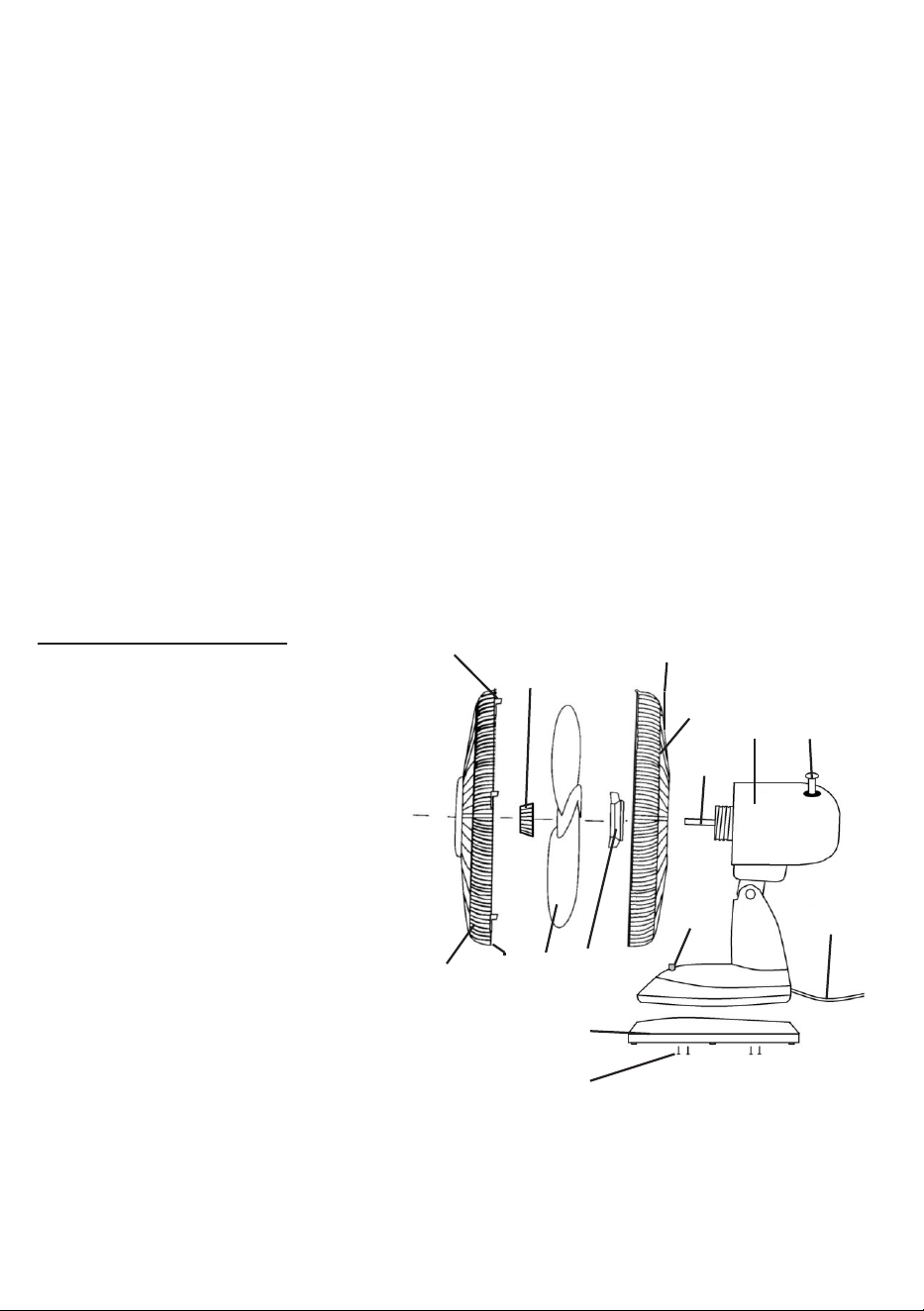
Description of parts
1. Front Guard
2. Guard Nut and Screw
3. Fan Blade
4. Rear Guard Fixing Nut
5. Rear Guard
6. Motor Housing
7. Oscillating Control
8. Power cord
9. Speed Control Switches
10. Motor Spindle
11. Blade Retaining Nut
12. Base Surround
13. Base Fastening Screws
14. Carry Handle
15. Guard Fastening Clips
1. 2. 3.
4.
5.
6. 7.
8.
9.
10.
11.
12.
13.
14.
15.
Assembly
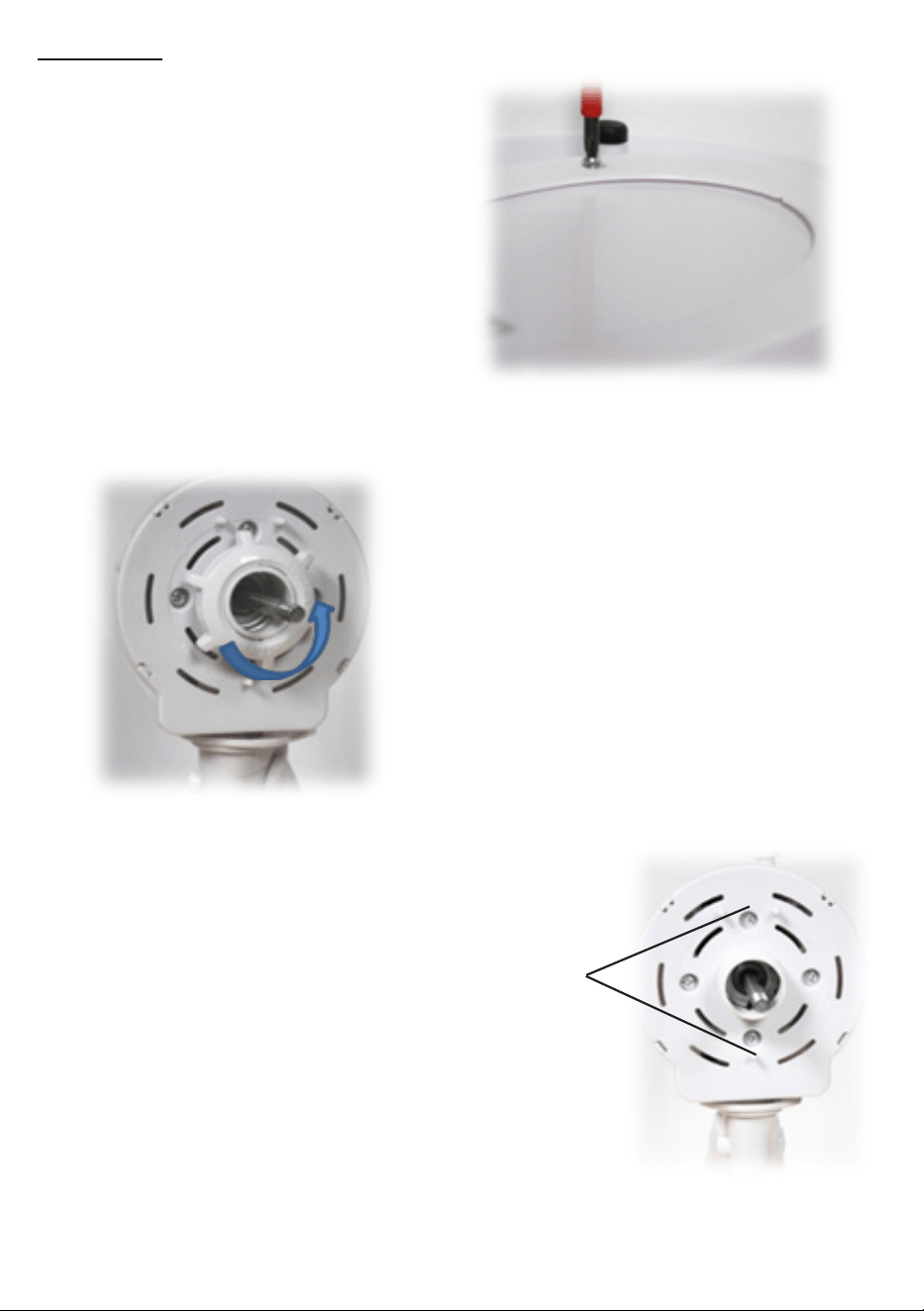
1: First attach the Base Surround
(12) to the base of the fan using
the four pozidrive screws sup-
plied (13) Take care not to over-
tighten the screws.
2: Next place the fan on its base and
remove the Rear Guard Fixing nut (4)
from the Motor Housing (6) by un-
screwing anticlockwise (arrowed).
3: Note the two Rear Guard lo-
cating pins on the Motor Housing
shown right.
Rear guard
locating pins
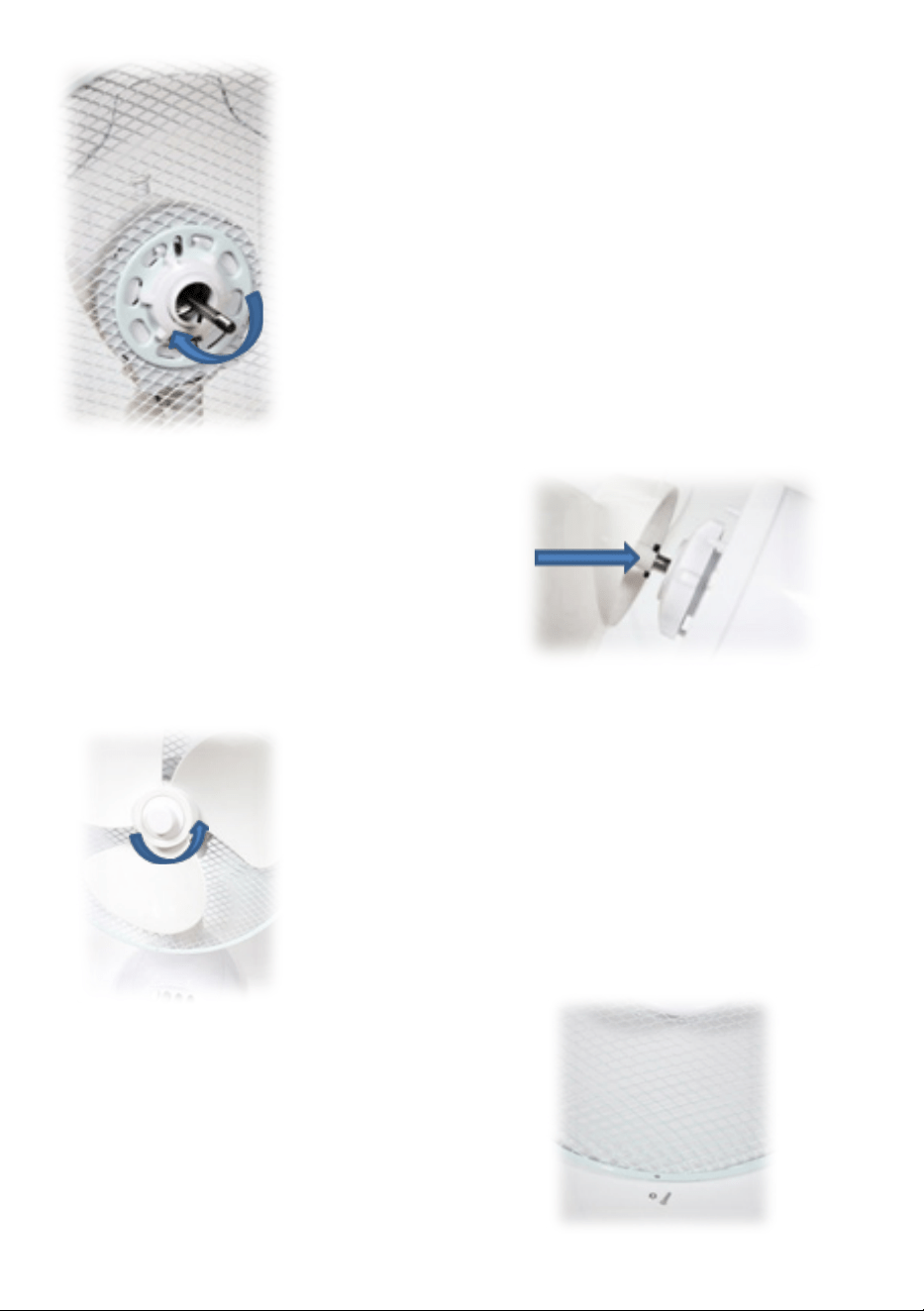
4: Place the Rear Guard (5) over the two pins
on the Motor Housing (6) and replace the Rear
Guard Fixing nut (4) and screw it back on clock-
wise.
NB ensure that the guard is tted such that the
Carry Handle (14) is at the top.
5: Take the Fan Blade (3); slide it onto
the Motor Spindle (10), after rst re-
moving the plastic spindle cover.
Ensure that the notch on the rear of
the fan blade ts over the splines on
the spindle (arrowed right).
NB Rear Guard removed for clarity
6: : Secure the fan blade to the motor spin-
dle by screwing on the Blade Retaining Nut
(11) in an anticlockwise direction.
NB the retaining nut is reverse threaded.
7: Remove the small Guard Nut &
Screw from the Front Guard.
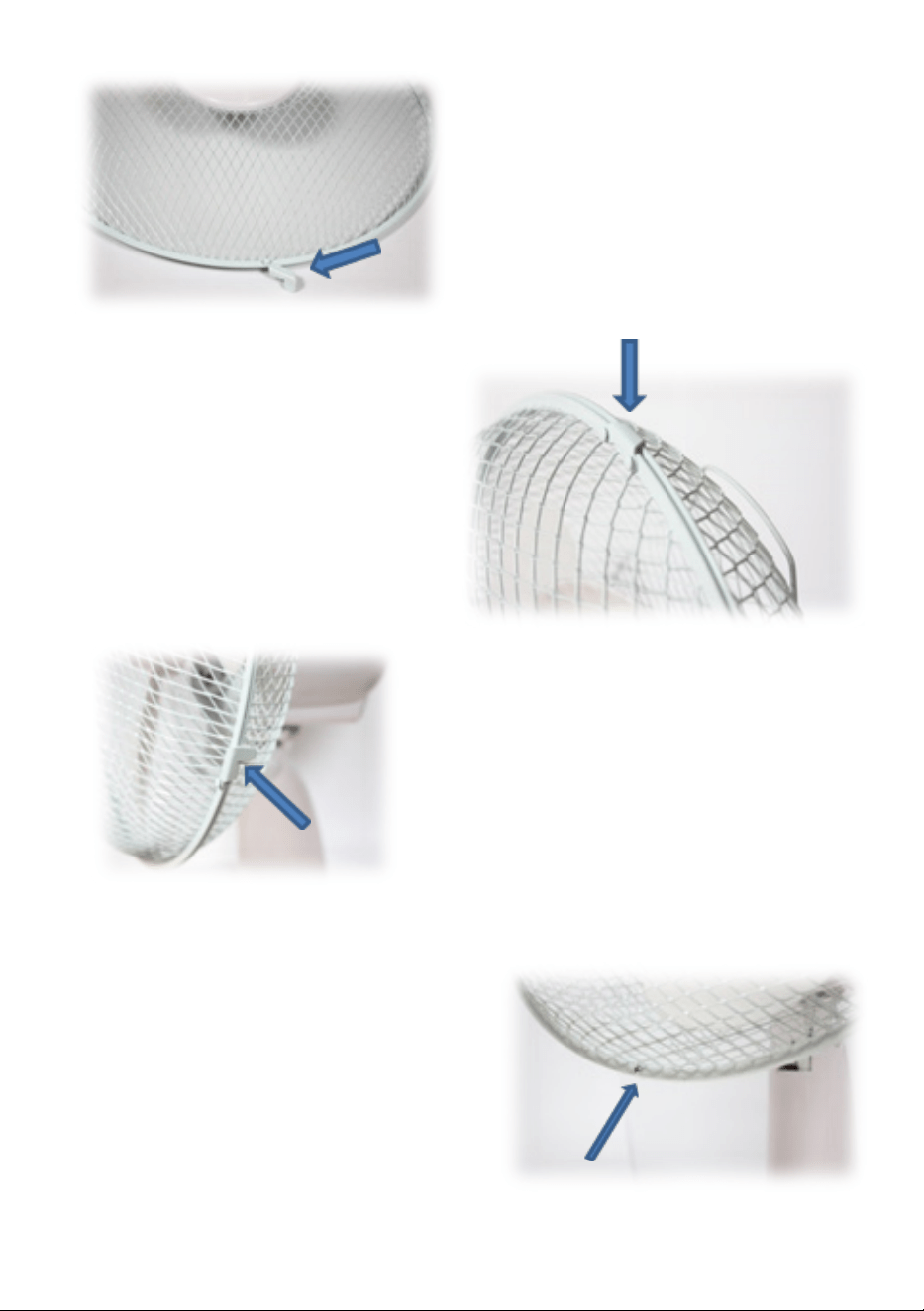
8: Move the Clips (15) at the edge
of the front guard outwards.
9: Hang the front guard (1) by
its hook over the top of the rear
guard (5).
10: Bring the front guard down to
meet the rear guard and push the
clips inwards until the front guard is
fastened to the rear guard.
11: Finally t the Guard Nut and
Screw (2 - arrowed) through the
holes in the bottom edge of the guard
and tighten with a suitable pozidrive
screwdriver (not supplied).
NB this screw and nut must be
tted so that the guard cannot be
removed accidentally.

Operating your desk fan
Place the fan in the desired position ensuring that it is stable.
If desired, the fan guard can be tilted up and down to alter the direction
of the airow. NB do not adjust the fan whilst connected to the mains
and/or switched on.
Press the ‘0’ button on the base to ensure the fan is o.
Insert the mains plug into the nearest socket.
Press the 1 button for the low speed.
Press the 2 button for the medium speed Press the 3 button for the high
speed
NB Press the ‘0’ button to switch the fan o.
Making your fan oscillate from side to side
Press the oscillation control (7) down to enable the fan to oscillate from
side to side.
Pull the control up to stop the fan oscillating.
Care and Use of your Fan
• Ensure that the fan is not connected to the mains supply before
cleaning.
• Wipe the fan body clean with a clean, soft damp cloth.
• Do not immerse the fan or its cord in water or any other liquid.
Technical Data
Voltage : 220-240V AC 50Hz
Rated power : 35W
Model Number : COL1063
Protection Class : Class II
Electrical Connections
This appliance is tted with a fused three-pin plug to BS 1363. If the plug
has to be removed, it should be cut o and carefully disposed of immedi-
ately. To avoid a possible shock hazard, do not insert the discarded plug
into a mains socket.
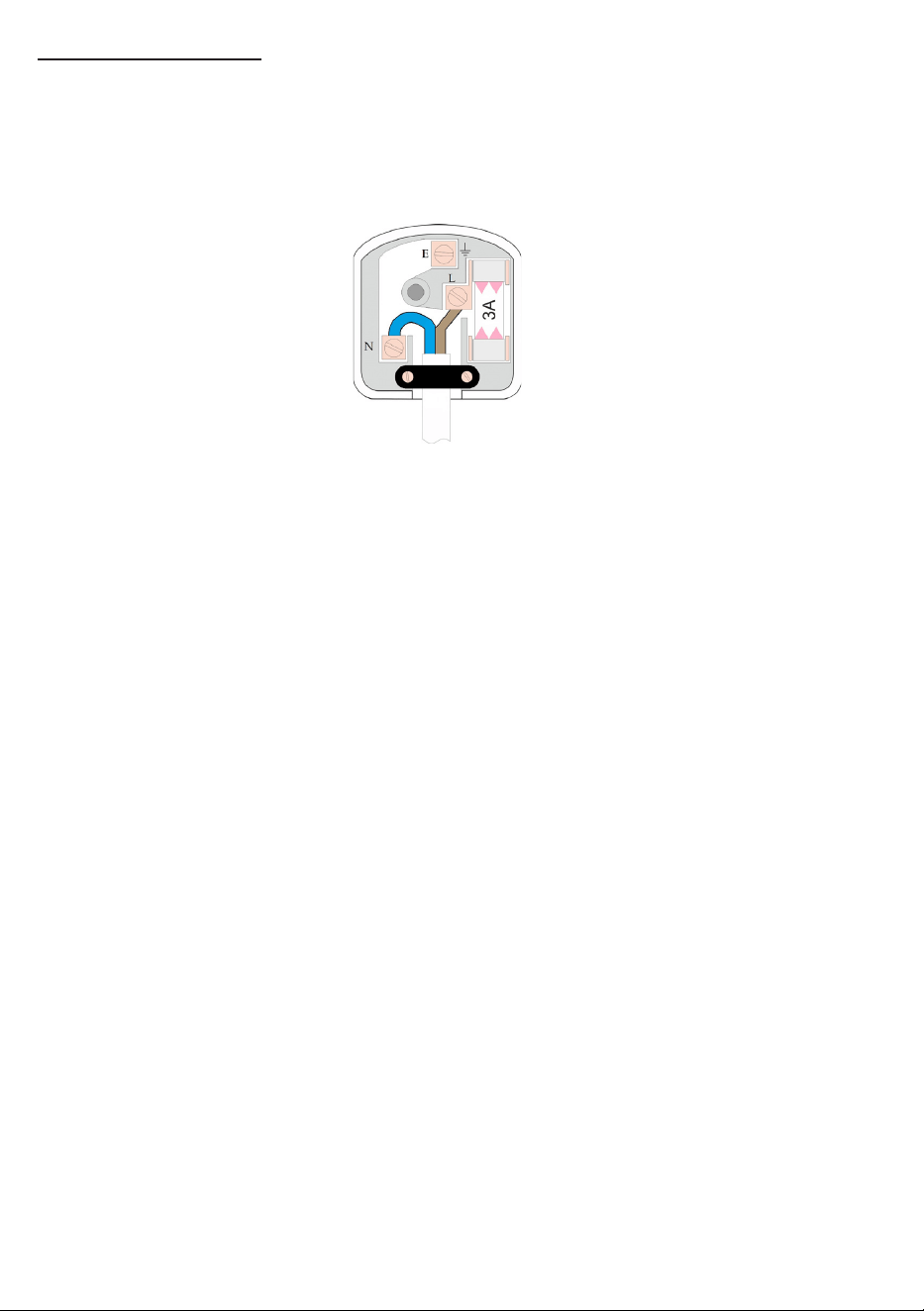
Fitting a new plug
If for any reason you need to t a new plug, the exible mains lead must
be connected as shown below. The wires in the mains lead tted to this
appliance are coloured in accordance with the following code:
Connect Blue to
Neutral (N)
Connect Brown to
Live (L)
Ensure the outer sheath is
securely held by the cord clamp
• The Blue wire must be connected to the terminal marked N or
coloured Black.
• The Brown wire must be connected to the terminal marked L or
coloured Red.
• Check that there are no cut or stray strands of wire inside the plug.
• Use a 3 Amp BS 1362 fuse, only use BSI or ASTA approved fuses.
• If you are in any way unsure which plug or fuse to use, always refer
to a qualied electrician.
• After replacing or changing a fuse on a moulded plug, the cover must
be retted to the plug; the appliance must not be used without a fuse
cover.