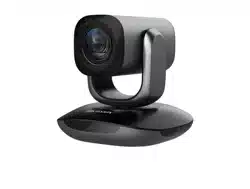

Video Conference Camera
User Manual
User Manual
Thank you for purchasing our product. If there are any
questions, or requests, do not hesitate to contact the
dealer.
This manual may contain several technical mistakes or
printing errors, and the content is subject to change
without notice. The updates will be added to the new
version of this manual. We will readily improve or update
the products or procedures described in the manual.
01000020221201

© 2022 Hangzhou Hikvision Digital Technology Co., Ltd.
All rights reserved.
About this Manual
The Manual includes instructions for using and managing
the Product. Pictures, charts, images and all other
information hereinafter are for description and
explanation only. The information contained in the
Manual is subject to change, without notice, due to
firmware updates or other reasons. Please find the latest
version of this Manual at the Hikvision website
(https://www.hikvision.com/).
Please use this Manual with the guidance and assistance
of professionals trained in supporting the Product.
Trademarks
and other Hikvision’s trademarks and
logos are the properties of Hikvision in various
jurisdictions.
Other trademarks and logos mentioned are the
properties of their respective owners.
Disclaimer
TO THE MAXIMUM EXTENT PERMITTED BY APPLICABLE
LAW, THIS MANUAL AND THE PRODUCT DESCRIBED, WITH
ITS HARDWARE, SOFTWARE AND FIRMWARE, ARE
PROVIDED “AS IS” AND “WITH ALL FAULTS AND ERRORS”.
HIKVISION MAKES NO WARRANTIES, EXPRESS OR
IMPLIED, INCLUDING WITHOUT LIMITATION,
MERCHANTABILITY, SATISFACTORY QUALITY, OR FITNESS
FOR A PARTICULAR PURPOSE. THE USE OF THE PRODUCT
BY YOU IS AT YOUR OWN RISK. IN NO EVENT WILL
HIKVISION BE LIABLE TO YOU FOR ANY SPECIAL,
CONSEQUENTIAL, INCIDENTAL, OR INDIRECT DAMAGES,
INCLUDING, AMONG OTHERS, DAMAGES FOR LOSS OF
BUSINESS PROFITS, BUSINESS INTERRUPTION, OR LOSS OF
DATA, CORRUPTION OF SYSTEMS, OR LOSS OF
DOCUMENTATION, WHETHER BASED ON BREACH OF
CONTRACT, TORT (INCLUDING NEGLIGENCE), PRODUCT
LIABILITY, OR OTHERWISE, IN CONNECTION WITH THE
USE OF THE PRODUCT, EVEN IF HIKVISION HAS BEEN
ADVISED OF THE POSSIBILITY OF SUCH DAMAGES OR
LOSS.
YOU ACKNOWLEDGE THAT THE NATURE OF THE INTERNET
PROVIDES FOR INHERENT SECURITY RISKS, AND
HIKVISION SHALL NOT TAKE ANY RESPONSIBILITIES FOR
ABNORMAL OPERATION, PRIVACY LEAKAGE OR OTHER
DAMAGES RESULTING FROM CYBER-ATTACK, HACKER
ATTACK, VIRUS INFECTION, OR OTHER INTERNET
SECURITY RISKS; HOWEVER, HIKVISION WILL PROVIDE
TIMELY TECHNICAL SUPPORT IF REQUIRED.
YOU AGREE TO USE THIS PRODUCT IN COMPLIANCE WITH
ALL APPLICABLE LAWS, AND YOU ARE SOLELY
RESPONSIBLE FOR ENSURING THAT YOUR USE
CONFORMS TO THE APPLICABLE LAW. ESPECIALLY, YOU
ARE RESPONSIBLE, FOR USING THIS PRODUCT IN A
MANNER THAT DOES NOT INFRINGE ON THE RIGHTS OF
THIRD PARTIES, INCLUDING WITHOUT LIMITATION,
RIGHTS OF PUBLICITY, INTELLECTUAL PROPERTY RIGHTS,
OR DATA PROTECTION AND OTHER PRIVACY RIGHTS. YOU
SHALL NOT USE THIS PRODUCT FOR ANY PROHIBITED
END-USES, INCLUDING THE DEVELOPMENT OR
PRODUCTION OF WEAPONS OF MASS DESTRUCTION, THE
DEVELOPMENT OR PRODUCTION OF CHEMICAL OR
BIOLOGICAL WEAPONS, ANY ACTIVITIES IN THE CONTEXT
RELATED TO ANY NUCLEAR EXPLOSIVE OR UNSAFE
NUCLEAR FUEL-CYCLE, OR IN SUPPORT OF HUMAN
RIGHTS ABUSES.
IN THE EVENT OF ANY CONFLICTS BETWEEN THIS
MANUAL AND THE APPLICABLE LAW, THE LATTER
PREVAILS.
Regulatory Information
FCC Information
Please take attention that changes or modification not
expressly approved by the party responsible for
compliance could void the user’s authority to operate the
equipment.
FCC compliance
This product has been tested and found to comply with
the limits for a Class B digital device, pursuant to Part 15
of the FCC Rules. These limits are designed to provide
reasonable protection against harmful interference in a
residential installation.
This product generates, uses, and can radiate radio
frequency energy and, if not installed and used in
accordance with the instructions, may cause harmful
interference to radio communications. However, there is
no guarantee that interference will not occur in a
particular installation. If this product does cause harmful
interference to radio or television reception, which can be
determined by turning the equipment off and on, the
user is encouraged to try to correct the interference by
one or more of the following measures:
—Reorient or relocate the receiving antenna.
—Increase the separation between the equipment and
receiver.
—Connect the equipment into an outlet on a circuit
different from that to which the receiver is connected.
—Consult the dealer or an experienced radio/TV
technician for help.
FCC Conditions
This device complies with part 15 of the FCC Rules.
Operation is subject to the following two conditions:
1. This device may not cause harmful interference.
2. This device must accept any interference received,
including interference that may cause undesired
operation.
EU Conformity Statement
This product and - if applicable - the
supplied accessories too are marked with
"CE" and comply therefore with the
applicable harmonized European standards
listed under the Low Voltage Directive 2014/35/EU, the
EMC Directive 2014/30/EU, the RoHS Directive
2011/65/EU.
2012/19/EU (WEEE directive): Products
marked with this symbol cannot be
disposed of as unsorted municipal waste in
the European Union. For proper recycling,
return this product to your local supplier
upon the purchase of equivalent new
equipment, or dispose of it at designated collection
points. For more information see: www.recyclethis.info.
2006/66/EC (battery directive): This product contains a
battery that cannot be disposed of as
unsorted municipal waste in the European
Union. See the product documentation for
specific battery information. The battery is
marked with this symbol, which may
include lettering to indicate cadmium (Cd), lead (Pb), or
mercury (Hg). For proper recycling, return the battery to

your supplier or to a designated collection point. For
more information, see: www.recyclethis.info.
Industry Canada ICES-003 Compliance
This device meets the CAN ICES-3 (A)/NMB-3(A)
standards requirements.
This device complies with Industry Canada licence-
exempt RSS standard(s). Operation is subject to the
following two conditions:
1.this device may not cause interference, and
2.this device must accept any interference, including
interference that may cause undesired operation of the
device.
Le présent appareil est conforme aux CNR d'Industrie
Canada applicables aux appareils radioexempts de
licence. L'exploitation est autorisée aux deux conditions
suivantes:
1. l'appareil ne doit pas produire de brouillage, et
2. l'utilisateur de l'appareil doit accepter tout brouillage
radioélectrique subi, même si le brouillage est susceptible
d'en compromettre le fonctionnement.
Warning
This is a class A product. In a domestic environment this
product may cause radio interference in which case the
user may be required to take adequate measures.
Safety Instructions
Warnings
Laws and Regulations
The device should be used in compliance with local laws,
electrical safety regulations, and fire prevention
regulations.
Electrical Safety
The socket-outlet shall be installed near the equipment
and shall be easily accessible.
Battery
CAUTION: Risk of explosion if the battery is replaced by
an incorrect type.
Improper replacement of the battery with an incorrect
type may defeat a safeguard (for example, in the case of
some lithium battery types).
Do not dispose of the battery into fire or a hot oven, or
mechanically crush or cut the battery, which may result in
an explosion.
Do not leave the battery in an extremely high
temperature surrounding environment, which may result
in an explosion or the leakage of flammable liquid or gas.
Do not subject the battery to extremely low air pressure,
which may result in an explosion or the leakage of
flammable liquid or gas.
Dispose of used batteries according to the instructions.
Cautions
Fire Prevention
No naked flame sources, such as lighted candles, should
be placed on the equipment.
Installation
Install the equipment according to the instructions in this
manual.
Never place the equipment in an unstable location. The
equipment may fall, causing serious personal injury or
death.
DO NOT touch the sharp edges or corners.
Transportation

Keep the device in original or similar packaging while
transporting it.
DO NOT drop the product or subject it to physical shock.
Power Supply
Refer to the device label for the standard power supply.
Please make sure your power supply matches with your
device.
Use a power adapter provided by qualified
manufacturers. It is recommended to provide an
independent power adapter for each device as adapter
overload may cause over-heating or a fire hazard.
Maintenance
If the product does not work properly, please contact
your dealer or the nearest service center. We shall not
assume any responsibility for problems caused by
unauthorized repair or maintenance.
Cleaning
Please use a soft and dry cloth to clean the interior and
exterior surfaces. Do not use alkaline detergents.
Using Environment
When any laser equipment is in use, make sure that the
device lens is not exposed to the laser beam, or it may
burn out.
DO NOT aim the lens at the sun or any other bright light.
To avoid heat accumulation, good ventilation is required
for a proper operating environment.
DO NOT expose the device to extremely hot, cold, dusty,
corrosive, saline-alkali, or damp environments. For
temperature and humidity requirements, see device
specification.
DO NOT expose the device to high electromagnetic
radiation.
Emergency
If smoke, odor, or noise arises from the device,
immediately turn off the power, unplug the power cable,
and contact the service center.
1
To achieve a better product experience, please visit
https://www.hikvision.com/sg/support/download/sof
tware/hikin/ to download the HIK IN installation
package.
1 Introduction
1.1 Product Features
The main features are as follows:
High performance CMOS sensor
Varifocal lens
Clear imaging against strong back light due to WDR
technology
AGC for self-adjust brightness
Support remote control
Built-in microphone with clear sound
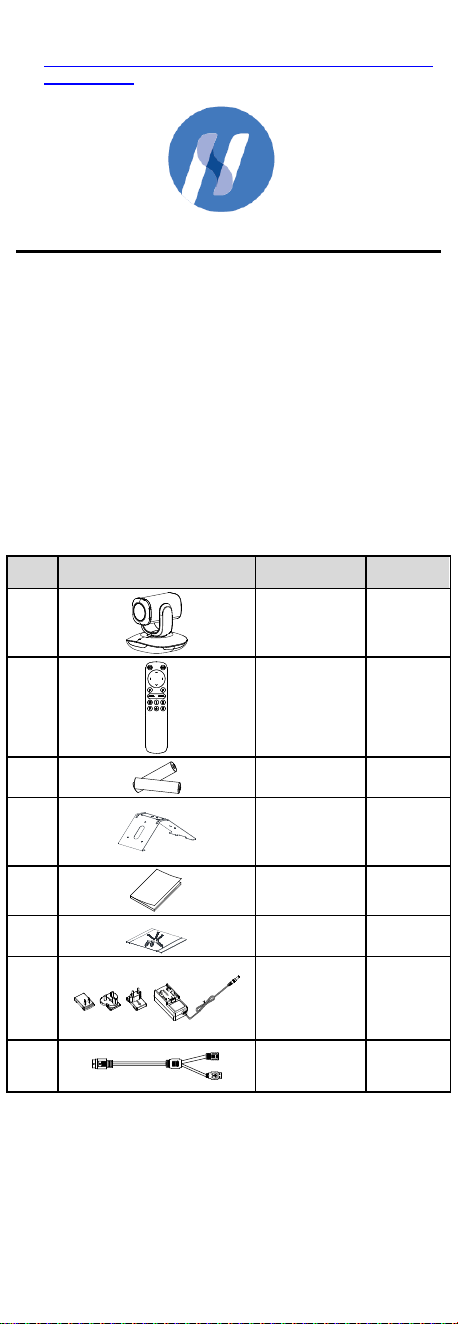
1.2 Packing List
Check the package contents and make sure that the
device in the package is in good condition and all the
assembly parts are included.
Table 1-1 Packing List
No.
Item
Description
Amount
1
Camera
1
2
Remote
Control
1
3
Battery
2
3
Bracket
1
4
Quick Start
Guide
1
5
Screws
1
6
Power
Adapter
1
7
Cable
1
Note:
The figure of power adapter is for reference only. Refer to
the actual product as standard.
2
1.3 Overview
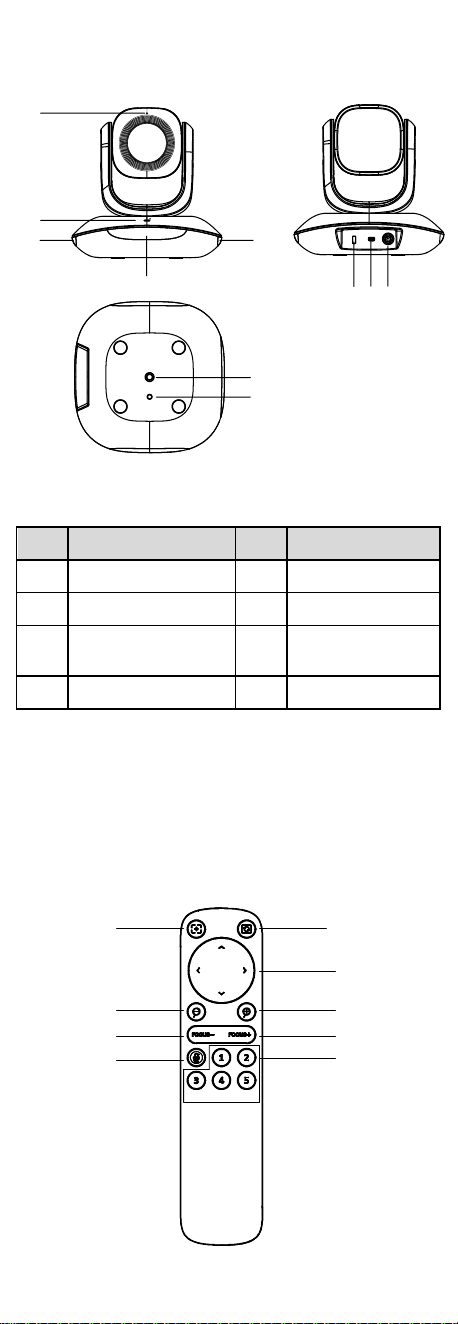
1.3.1 Appearance
1
2
3
6
7
54
3
3
8
Figure 1-1 Appearance of Video Conference Camera
Table 1-2 Description
No.
Description
No.
Description
1
Microphone
5
Audio In
2
Indicator
6
PS2 Interface
3
IR Signal Receiving
Module
7
1/4-20UNC Screw
Hole
4
Kensington Lock
8
Lashing Eye
Note:
When the indicator turns to red, it means the device is
standby. When the indicator turns to blue, it means the
device is working normally.
1.3.2 Remote Control
You can control the camera through the remote control.
1
2
3
4
4
5
5
7
6
Figure 1-2 Appearance of Remote Control

3
Table 1-3 Description
No.
Description
No.
Description
1
One-touch Focus
5
Manual Focus
2
One-touch Flip
6
Mute
3
Pan/Tilt Control
7
Presets
4
Zoom in/out
One-touch Focus: It enables the device to focus
automatically.
One-touch Flip: It enables to rotate the image 180°
when the device is installed upside down.
Pan/Tilt Control: It enables to adjust the lens direction.
Manual Focus: It enables the device to focus manually.
Mute: Turn off the microphone.
Preset: A preset is a predefined position. For the
defined preset, you can press the preset number to
quickly view the desired image position.
1. Adjust the image by remote control.
2. Press and hold a preset number for 3 seconds, and
the indicator flashes blue light twice. It means the
preset is successfully set.
3. Press the preset number, and the device return to the
defined position. Up to 5 presets can be set.
Restore to the default settings: Press and hold One-
touch Flip and Mute at the same time for 5 seconds,
and the red indicator flashes three times.
1.3.3 Device Connection
Smart TV
Figure 1-3 Connection
4
2 Installation
The package contains the mount. Table mounting and
wall mounting share the same mount.
The installation methods are not compulsory. You can just
put the camera on the table, if this way meets your
needs.
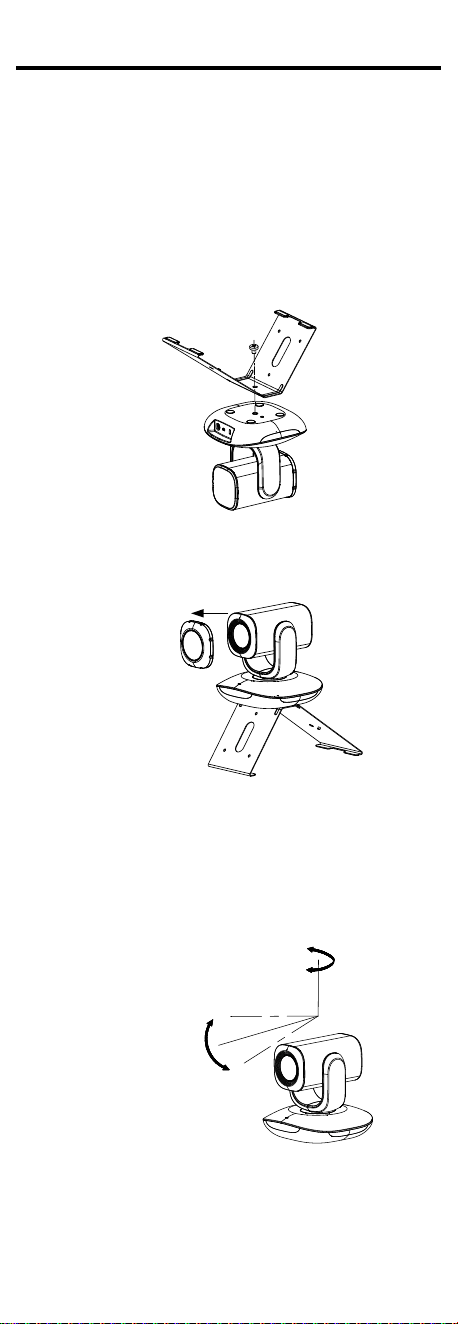
2.1 Table Mounting
Steps:
1. Align the screw hole in camera with that on the
mount.
2. Use the supplied screw to secure the camera on the
mount.
Screw
Figure 2-1 Fix the Camera on the Mount
3. Take the lens cover out of the camera to finish the
installation
Lens
Cover
Figure 2-2 Put the Lens Back
4. Power on the camera and connect the camera with
the computer.
5. Check whether the image on the screen is gotten from
the optimum angle. If not, adjust the view angle by
remote control shown as the figure below.
Rotation Range:
-170° to 160°
Tilt Range:
-28° to 28°
Figure 2-3 Angle Adjustment
1) Press right/left direction button on the remote
control to adjust the pan range from -170° to 160°.
2) Press up/down direction button on the remote
control to adjust the tilt range from -28° to 28°.
5
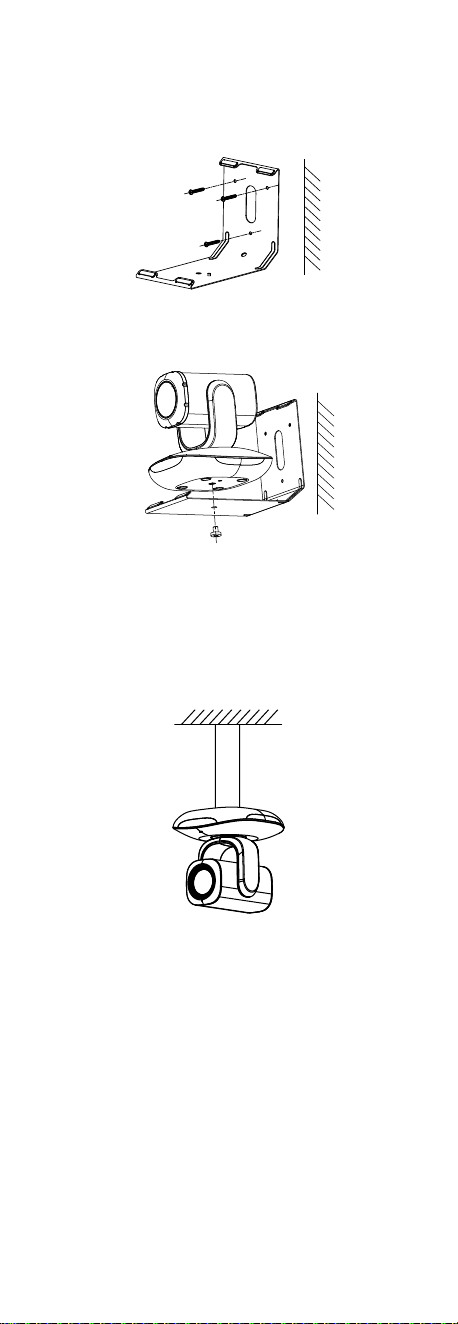
2.2 Wall Mounting
Steps:
1. Drill three screw holes in the wall according to the
holes of the mount.
2. Align the screw holes on the mount with that on the
wall, and secure the mount with supplied screws.
Figure 2-4 Fix the Mount in the Wall
Screw
Figure 2-5 Secure the Camera with the Mount
Repeat steps 3 to 5 of section 2.1 Table Mounting to finish
the installation.
2.3 Pendant Mounting
The device also supports pendant mounting, and the
mount should be purchased separately.
Figure 2-6 Pendant Mounting