Page 3
Page 4
Page | 2
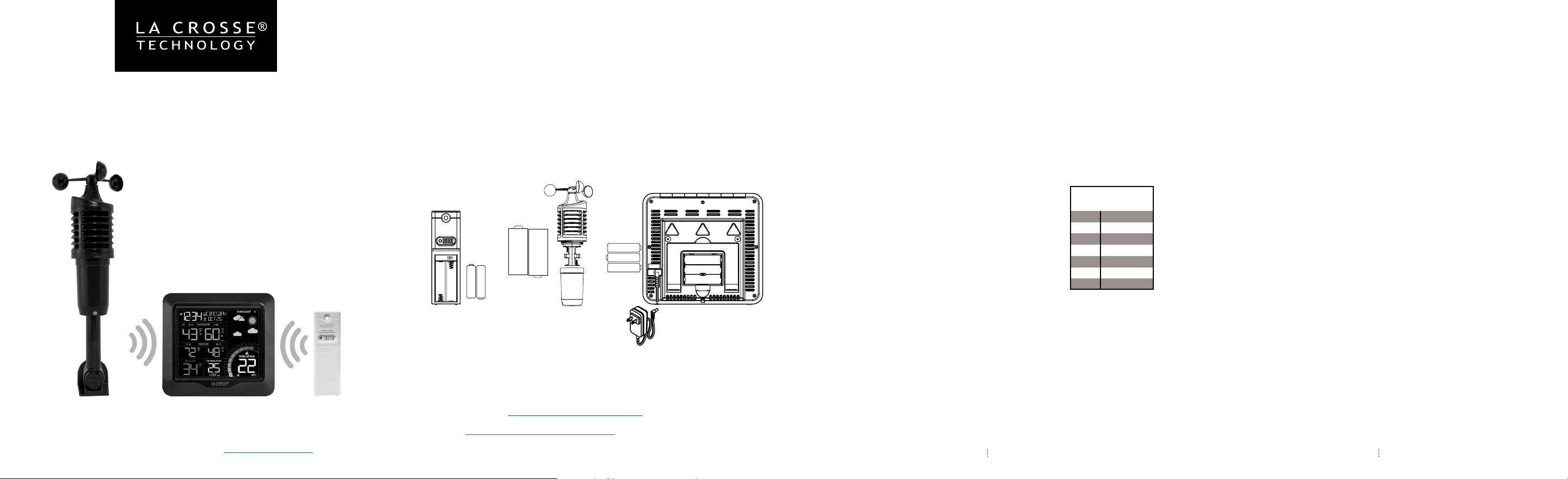
COLOR WIND SPEED
WEATHER STATION
MODEL: 327-1417V3
DC: 071421
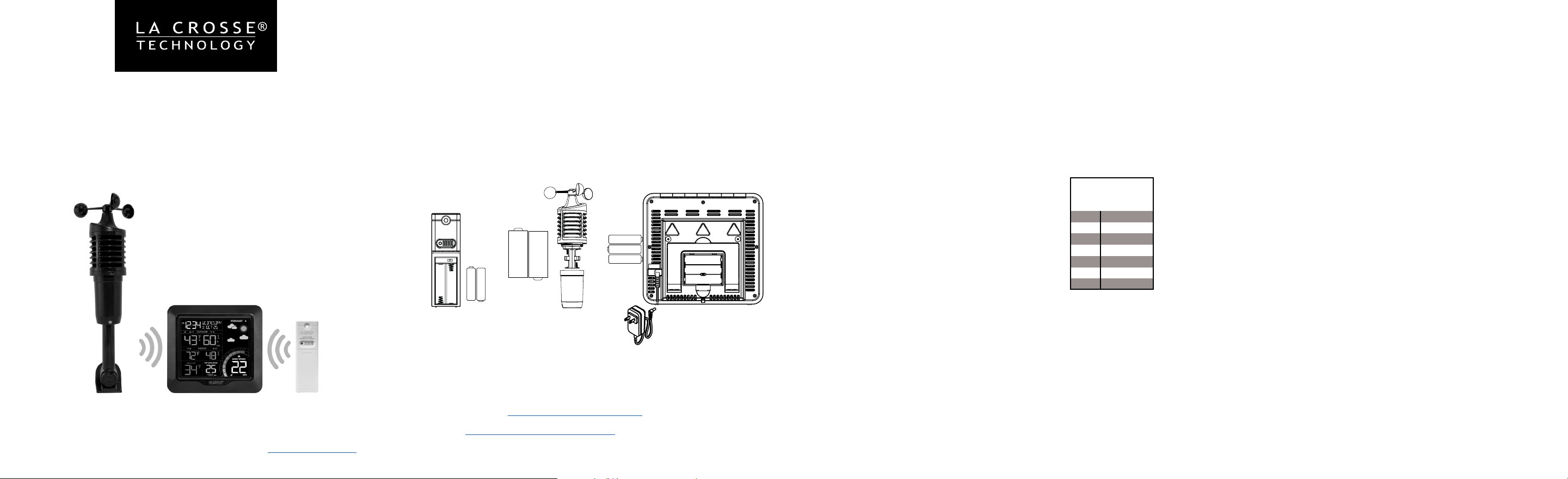
POWER UP
1. Insert 2-AA batteries into your Thermo-Hygro Sensor.
2. Insert 2-C batteries into your Wind Speed Sensor.
3. Insert the 5 volt power cord into the outlet, then into your
Weather Station. Optional: Insert 3-AA batteries for backup.
4. Adjust time and date settings on the station.
5. Once the both sensor readings show, place them outside.
SETTINGS
1. Hold the SET button to enter the Settings Menu.
2. Use the + or -/CH button to adjust and SET to confirm.
3. Press the LIGHT button anytime to exit.
Settings Menu order:
• Beep ON | OFF
• Atomic ON | OFF
• Time Zone
• DST ON | OFF (Daylight Saving Time)
• 12Hr | 24Hr Format
• Hour
• Minutes
• Year
• Month
• Date
• Temperature Fahrenheit | Celsius
• Wind Speed MPH / KMH
ATOMIC OFF: If Atomic is OFF, you will skip to the 12/24 Hr time
setting.
WEEKDAY: Weekday will set automatically when Year, Month and
Date are set.
OTHER BUTTON FUNCTIONS
Optional
AA
AA
+
-
AA
+
-
+
-
AA
AA
+
-
+
-
+ C -
+ C -
Watch sensor mounting videos:
TX141TH-BCHv3 - bit.ly/th_sensor_mounting
TX144W - bit.ly/wind_sensor_mounting
POSITION SENSORS
North America
Time Zones
Atlantic
Eastern
Central
Mountain
Pacic
Alaska
Hawaii
AST
EST
CST
MST
PST
AKT
HAT
ALERTS:
• Hold two seconds to enter Alert Settings
• Press + or -/CH to adjust values and ALERTS to confirm
WIND:
• Hold three seconds to search for Wind Speed Sensor
• Press WIND to view Wind Speed History
1 Hour, 24 Hour, 7 Day, Month and Year Top Wind Speeds
• When veiwing Wind History, hold the -/CH button to reset Wind
Speed History
TEMP:
• Hold three seconds to search for Thermo-Hygro Sensor
• Press to view HI/LO Temperature & Humidity Records, Feels Like
Records, and Dew Point
• When viewing HI/LO records, hold the -/CH button to reset Record.
-/CH:
• Press to toggle channels (1, 2, 3), when multiple sensors are used
• Hold to reset Wind Speed History or HI/LO Records when
viewed
LIGHT:
• Press to adjust Backlight (HI/LO/OFF) when using the provided
power cord
• Press to exit any Settings Menu
FACTORY RESET:
• Hold ALERTS and LIGHT until display resets.
Thermo-Hygro Sensor
TX141TH-BCHv3
Weather Station
327-1417v3
Wind Speed Sensor
TX144W
For more product information visit: bit.ly/laxtech_support
Page 6Page 5 Page 7
Page 8
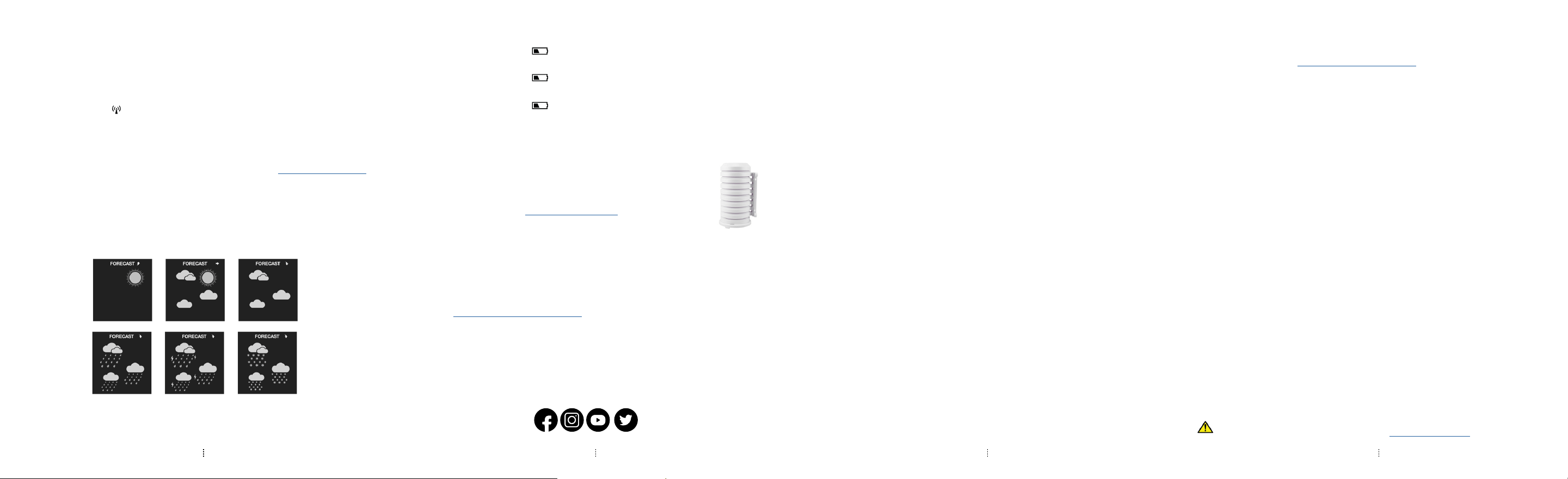
ATOMIC TIME SIGNAL
SENSOR WEATHER SHIELD
• The optional Sensor Weather Shield is designed to protect
your outdoor sensor from rain and snow.
• This shield will oer limited protection from the sun’s heat.
• Optional purchase at: http://bit.ly/925-1418
LOW BATTERY INDICATORS
• When battery indicator shows next to outdoor temperature, replace
batteries in the Thermo-Hygro Sensor.
• When battery indicator shows next to wind speed, replace batteries
in the Wind Speed Sensor.
• When battery indicator shows next to the indoor time, replace
batteries in the Weather Station.
SPECIFICATIONS
Indoor:
Temperature Range: 32°F to 122°F (0°C to 50°C)
Humidity Range: 10% to 99% RH
Update Interval: About every 60 seconds
Outdoor:
Temperature Range: -40°F to 140°F (-40°C to 60°C)
Humidity Range: 10% to 99% RH
Transmission Range: Over 330 feet (100 meters) in open air RF 433MHz
Update Interval: About every 58 seconds
Wind:
Wind Speed Range: 0-111.8 mph (0-180 kmh)
Transmission Range: 330 ft (100 m) RF 433MHz open air
Update Interval: About every 30 seconds
Power Requirements:
327-1417v3: 5.0 Volt 150mA adapter included (Primary)
AC6: GPU280500150WAOO
Optional: 3 “AA” LR6 Batteries (sold separately)
The plug on the power adapter is intended to serve as the disconnect device, the
socket-outlet shall be installed near the equipment and shall be easily accessible.
TX141TH-BCHv3: 2 “AA” LR6 Batteries (sold separately)
TX144W: 2 “C” LR14 Batteries (sold separately)
Battery Life:
327-1417v3: Over 12 months with reputable batteries
TX144W & TX141TH-BCHv3: Over 24 months with reputable batteries
Dimensions:
327-1417v3: 6.88” L x 1.25” W x 6.42” H (17.5cm L x 3.2cm W x 16.3cm H)
TX141TH-BCHv3: 1.57” L x 0.82” W x 5.11” H (3.98cm L x 2.08cm W x 12.98cm H)
TX144W: 6.24” L x 5.63” W 11.94” H (15.85cm L x 14.30cm D x 30.33cm H)
• The station will search for the WWVB Atomic Time Signal at
UTC 7:00, 8:00, 9:00, 10:00, and 11:00.
• If there is no signal reception, the station will search for the signal
every 2 hours until the signal is received.
• The Tower Icon will flash while searching, and be solid when
connected.
• Press the SET button to manually search for the atomic time
signal.
• For information about WWVB Atomic Time visit: bit.ly/AtomicTime
The station will use changes in atmospheric pressure to predict
your weather conditions to come in the next 12 hours. Please allow
up to 10 days for correct calibration and accurate forecast icons.
WEATHER FORECAST ICONS
Note: Snowy icon shows when outdoor temperature is below 32°F
and forecast is rain or t-storm.
If you require additional support, get in touch with our friendly customer
support team based out of La Crosse, WI.
Phone: 1-608-782-1610
Online: bit.ly/contact_techsupport
Our knowledgeable customer support team is available:
Monday-Friday, 8am-6pm CST.
JOIN THE CONVERSATION
Ask questions, watch detailed setup videos, and provide feedback on our
social media outlets!
WE’RE HERE TO HELP!
*sold separately
WARRANTY INFO
La Crosse Technology, Ltd. provides a 1-year limited time warranty (from date of purchase) on this product
relating to manufacturing defects in materials & workmanship.
La Crosse Technology, Ltd, 2830 S. 26th St., La Crosse, WI 54601
For Full Warranty Details, Visit: www.lacrossetechnology.com/support
CARE + MAINTENANCE
•
Do not mix old and new batteries.
•
Do not mix Alkaline, Lithium, standard, or rechargeable batteries.
•
Always purchase the correct size and grade of battery most suitable for intended use.
•
Clean the battery contacts and also those of the device prior to battery installation.
•
Ensure the batteries have with correct polarity (+ / -).
•
Remove batteries from equipment that will not to be used for an extended period.
•
Promptly remove expired batteries.
FCC STATEMENT
This equipment has been tested and found to comply with the limits for a Class B digital device, pursuant
to part 15 of the FCC Rules. These limits are designed to provide reasonable protection against harmful
interference in a residential installation. This equipment generates, uses and can radiate radio frequency
energy and, if not installed and used in accordance with the instructions, may cause harmful interference to
radio communications. However, there is no guarantee that interference will not occur in a particular installation.
If this equipment does cause harmful interference to radio or television reception, which can be determined by
turning the equipment off and on, the user is encouraged to try to correct the interference by one or more of
the following measures:
• Reorient or relocate the receiving antenna.
• Increase the separation between the equipment and receiver.
• Connect the equipment into an outlet on a circuit different from that to which the receiver is connected.
• Consult the dealer or an experienced radio/TV technician for help.
This device complies with Part 15 of the FCC Rules. Operation is subject to the following two conditions:
(1) This device may not cause harmful interference, and
(2) This device must accept any interference received, including interference that may cause undesired
operation.
CAUTION!
Any changes or modifications not expressly approved by the party responsible for compliance could void the
user’s authority to operate the equipment.
All rights reserved. This manual may not be reproduced in any form, even in part, or duplicated or processed
using electronic, mechanical or chemical process without the written permission
of the publisher.
This booklet may contain errors or misprints. The information it contains is regularly checked and corrections
are included in subsequent editions. We disclaim any responsibility for any technical error or printing error, or
their consequences. All trademarks and patents are recognized.
WARNING: This product can expose you to chemicals including styrene, which is known to the State of
California to cause cancer. For more information go to: www.P65Warnings.ca.gov
Pagina 3 Pagina 4Pagina 2
ESTACIÓN A COLOR DE
PRONOSTICO DE CLIMA Y
VELOCIDAD DEL VIENTO
MODELO: 327-1417V3
DC: 071421
ENCENDIDO
1. Inserte 2 baterías “AA” en su sensor de Temperatura y
Humendad.
2. Inserte 2 baterías “C” en su sensor de velocidad del viento.
3. Inserte el cable de alimentación de 5 voltios en el
tomacorriente, luego en su estación de pronóstico de clima.
Opcional: inserte 3 baterías “AA” como respaldo.
4. Ajuste la configuración de la hora y fecha en la estación.
5. Una vez que aparezcan en su estación la información de ambos
sensores, instálelos afuera.
CONFIGURACION
1. Mantenga presionado el botón SET para ingresar al menú de
configuración.
2. Use el botón + o - / CH para ajustar y SET para confirmar.
3. Presione el botón LIGHT en cualquier momento para salir.
Orden del menú de configuración:
• Bip ON | OFF
• Hora Atómica ON | OFF
• Zona horaria
• DST ON | OFF (horario de verano)
• Formato de 12 / 24 horas
• Hora
• Minutos
• Año
• Mes
• Fecha
• Temperatura Fahrenheit | Celsius
• Velocidad del viento MPH / KMH
HORA ATOMICA OFF: Si la función de Hora Atómica está apagada
(OFF), se salta a la configuración de tiempo de 12/24 horas.
DÍA DE LA SEMANA: El día de la semana se establecerá automáti-
camente cuando se configura el año, el mes y la fecha.
OTRAS FUNCIONES DE LOS BOTONES
Opcional
AA
AA
+
-
AA
+
-
+
-
AA
AA
+
-
+
-
+ C -
+ C -
Vea los videos de como instalar los sensores:
TX141TH-BCHv3 - bit.ly/th_sensor_mounting
TX144W - bit.ly/wind_sensor_mounting
POSICION DE LOS SENSORES
ZONAS HORARIAS
DE AMÉRICA
DEL NORTE
Atlántico
Oriental
Central
Montaña
Pacico
Alaska
Hawaii
AST
EST
CST
MST
PST
AKT
HAT
ALERTS / ALERTAS:
• Mantenga presionado dos segundos para ingresar a la configuración de alertas
• Presione + o - / CH para ajustar los valores y ALERTAS para confirmar
WIND / VIENTO:
• Mantenga presionado tres segundos para buscar el sensor de velocidad del
viento.
• Presione WIND para ver el historial de velocidad del viento
Velocidades máximas del viento en 1 hora, 24 horas, 7 días, mes y año
• Al ver el historial de viento, mantenga presionado el botón - / CH para restablecer
el historial de velocidad del viento
TEMP / TEMPERATURA:
• Mantenga presionado tres segundos para buscar el sensor de Temperatur y
Humedad
• Presione HI / LO para ver los registros de temperatura y humedad, sensación
térmica y punto de rocío
• Cuando vea registros HI / LO, mantenga presionado el botón - / CH para
restablecer el registro.
-/CH (CANALES):
• Presione para alternar los canales (1, 2, 3), cuando se utilizan varios sensores
• Mantenga presionado para restablecer el historial de velocidad del viento o los
registros HI / LO cuando los haya visto.
LIGHT / LUZ:
• Presione para ajustar la luz de fondo de la pantalla (HI / LO / OFF) cuando utilice
el cable de alimentación proporcionado
• Presione para salir de cualquier menú de configuración
RESTABLECIMIENTO DE FÁBRICA:
• Mantenga presionados ALERTS y LIGHT hasta que la pantalla se reinicie.
Sensor de Temperatura y
Humedad
TX141TH-BCHv3
Estación de Pronostico
de Clima
327-1417v3
Sensor de Velocidad
del Viento
TX144W
Para obtener más información sobre el producto, visite: bit.ly/laxtech_support
Pagina 6Pagina 5 Pagina 7
Pagina 8
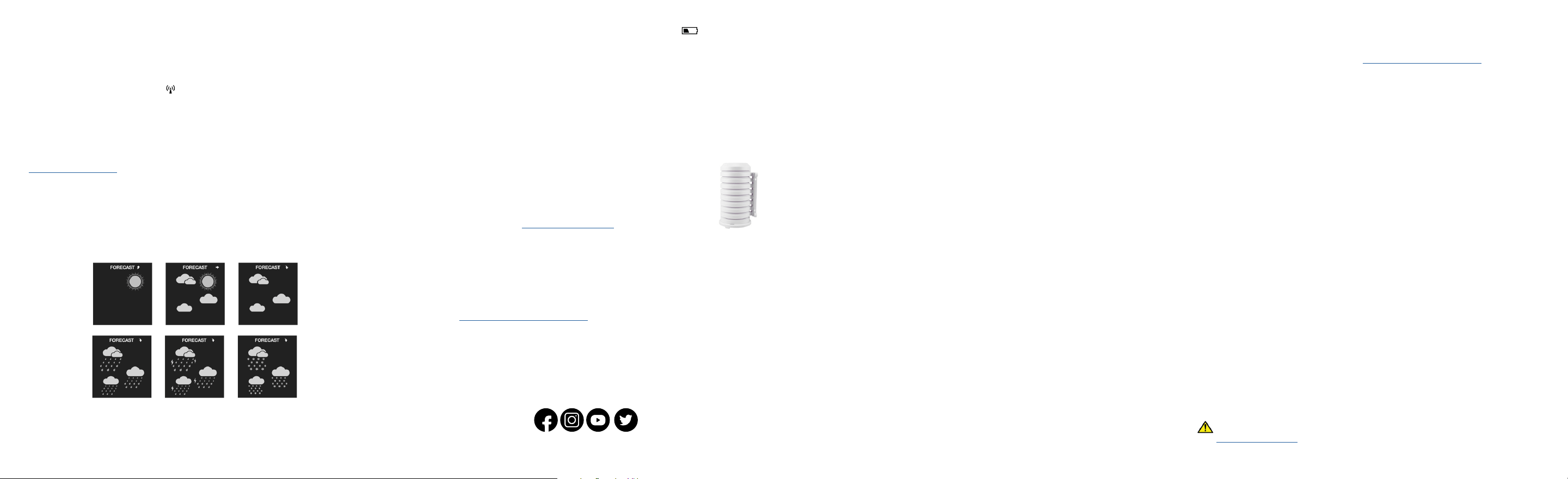
SEÑAL DE LA HORA ATÓMICA
PROTECTOR DE INTEMPERIE PARA EL SENSOR
• El protector de sensor está diseñado para proteger su
sensor exterior de la lluvia y la nieve.
• Este escudo ofrecerá una protección limitada contra el calor
del sol.
• Compra opcional en: http://bit.ly/925-1418
INDICADORES DE BATERÍA BAJA
• Cuando el indicador de batería se muestra junto a la temperatura
exterior, reemplace las baterías en el sensor de Temperatura y
Humedad.
• Cuando el indicador de batería se muestra junto a la velocidad del
viento, reemplace las baterías en el sensor de velocidad del viento.
• Cuando el indicador de batería se muestre junto a la hora en el interior,
reemplace las baterías en la estación.
ESPECIFICACIONES
Interior:
Rango de temperatura: 32 ° F a 122 ° F (0 ° C a 50 ° C)
Rango de humedad: 10% a 99% RH
Intervalo de actualización: aproximadamente cada 60 segundos
Exterior:
Rango de temperatura: -40 ° F a 140 ° F (-40 ° C a 60 ° C)
Rango de humedad: 10% a 99% RH
Rango de transmisión: más de 330 pies (100 metros) al aire libre RF 433MHz
Intervalo de actualización: aproximadamente cada 58 segundos
Viento:
Rango de velocidad del viento: 0-111,8 mph (0-180 kmh)
Rango de transmisión: 330 pies (100 m) RF 433MHz al aire libre
Intervalo de actualización: Aproximadamente cada 30 segundos
Requerimientos de energía:
327-1417v3: Adaptador de 5.0 voltios 150mA incluido (primario)
AC6: GPU280500150WAOO
Opcional: 3 baterías “AA” LR6 (se venden por separado)
El enchufe del adaptador de corriente está diseñado para servir como dispositivo
de desconexión, la toma de corriente debe instalarse cerca del equipo y debe ser
fácilmente accesible.
TX141TH-BCHv3: 2 baterías “AA” LR6 (se venden por separado)
TX144W: 2 baterías “C” LR14 (se venden por separado)
Duración de las baterías:
327-1417v3: más de 12 meses con baterías reconocidas en el mercado.
TX144W y TX141TH-BCHv3: Más de 24 meses con baterías reconocidas en el
mercado.
• La estación buscará la señal de hora atómica WWVB en UTC 7:00, 8:00,
9:00, 10:00 y 11:00.
• Si no hay recepción de señal, la estación buscará la señal cada 2 horas
hasta que se reciba la señal.
• El icono de la torre estará intermitente durante la búsqueda y
permanecerá fijo cuando esté conectado.
• Presione el botón SET para buscar manualmente la señal de hora
atómica.
• Para obtener información sobre la hora atómica WWVB visite:
bit.ly/AtomicTime
La estación utilizará los cambios en la presión atmosférica para prede-
cir las condiciones meteorológicas en las próximas 12 horas. Por favor
espere hasta 10 días para que la calibración sea correcta y los íconos de
pronóstico sean precisos.
ICONOS DE PRONOSTICO DEL CLIMA
Nota: El icono de nieve se muestra cuando la temperatura exterior
es inferior a 32 ° F y el pronóstico es lluvia o tormenta eléctrica.
Si necesita soporte adicional, póngase en contacto con nuestro amable
equipo de atención al cliente con sede en La Crosse, WI.
Telefono: 1-608-782-1610
En linea: bit.ly/contact_techsupport
Nuestro experimentado equipo de atención al cliente está disponible:
De lunes a viernes, de 8 a. M. A 6 p. M. CST.
UNASE A LA CONVERSACIÓN
¡Haga preguntas, vea videos de configuración detallados y proporcione
comentarios en nuestras redes sociales!
ESTAMOS AQUÍ PARA AYUDAR
*sold separately
INFORMACIÓN SOBRE LA GARANTÍA
La Crosse Technology, Ltd. ofrece una garantía de tiempo limitado de 1 año (a partir de la fecha de compra)
para este producto en relación con defectos de fabricación en materiales y mano de obra.
La Crosse Technology, Ltd, 2830 S. 26th St., La Crosse, WI 54601
Para obtener todos los detalles de la garantía, visite: www.lacrossetechnology.com/support
CUIDADO + MANTENIMIENTO
• No mezcle baterías nuevas y viejas.
• No mezcle baterías alcalinas, de litio, estándar o recargables.
• Adquiera siempre el tamaño y grado de batería correcto más adecuados para el uso previsto.
• Limpie los contactos de la batería y también los del dispositivo antes de la instalación de la batería.
• Asegúrese de que las baterías tengan la polaridad correcta (+ / -).
• Retire las baterías del equipo que no se utilizará durante un período prolongado.
• Retire inmediatamente las baterías caducadas.
DECLARACIÓN DE LA FCC
Este equipo ha sido probado y cumple con los límites para un dispositivo digital de Clase B, de acuerdo
con la parte 15 de las Reglas de la FCC. Estos límites están diseñados para proporcionar una protección
razonable contra interferencias perjudiciales en una instalación residencial. Este equipo genera, usa y puede
irradiar energía de radiofrecuencia y, si no se instala y usa de acuerdo con las instrucciones, puede causar
interferencia dañina a las comunicaciones por radio. Sin embargo, no hay garantía de que no se produzcan
interferencias en una instalación en particular. Si este equipo causa interferencia dañina en la recepción de
radio o televisión, lo cual se puede determinar encendiendo y apagando el equipo, se recomienda al usuario
que intente corregir la interferencia mediante una o más de las siguientes medidas:
• Reorientar o reubicar la antena receptora.
• Aumente la separación entre el equipo y el receptor.
• Conecte el equipo a una toma de corriente en un circuito diferente al que está conectado el receptor.
• Consulte con el distribuidor o con un técnico de radio / TV experimentado para obtener ayuda.
Este dispositivo cumple con la Parte 15 de las Reglas de la FCC. El funcionamiento está sujeto a las siguientes
dos condiciones:
(1) Este dispositivo no puede causar interferencias perjudiciales y (2) Este dispositivo debe aceptar cualquier
interferencia recibida, incluidas las interferencias que puedan causar un funcionamiento no deseado.
¡PRECAUCIÓN!
Cualquier cambio o modificación no aprobado expresamente por la parte responsable del cumplimiento podría
anular la autoridad del usuario para operar el equipo.
Todos los derechos reservados. Este manual no puede ser reproducido de ninguna forma, ni siquiera en parte,
ni duplicarse ni procesarse mediante procesos electrónicos, mecánicos o químicos sin el permiso por escrito
del editor.
Este folleto puede contener errores o erratas. La información que contiene se verifica periódicamente y las
correcciones se incluyen en ediciones posteriores. Rechazamos a cualquier responsabilidad por cualquier
error técnico o error de impresión, o sus consecuencias. Todas las marcas comerciales y patentes son
reconocidas.
ADVERTENCIA: Este producto puede exponerlo a productos químicos, incluido el estireno, que en el
Estado de California se considera cancerígeno. Para obtener más información, visite:
www.P65Warnings.ca.gov