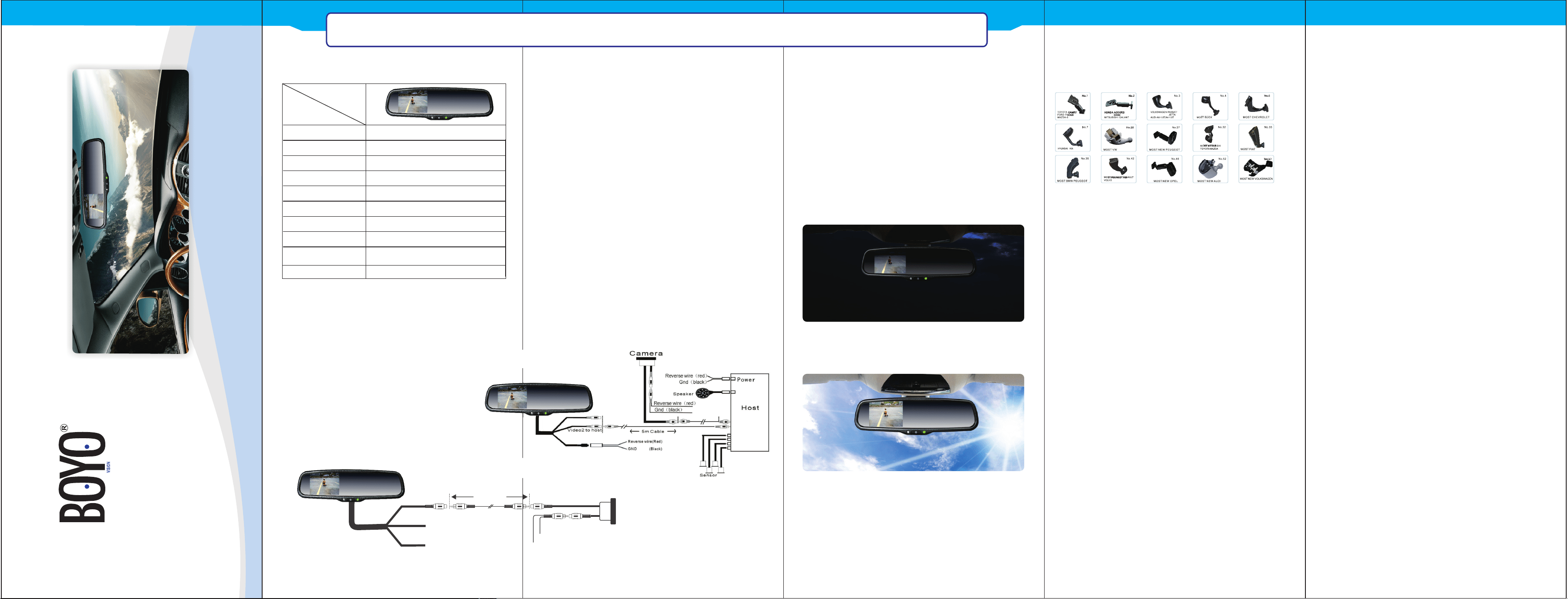
Use Backup Camera only (1-1)
Connect Red wire to Reverse Light (+12V),
Black to Ground.
△
WIRING OPTIONS
1-1
Black to GND
Red to ACC +12
Back up to camera
5M cable
CAMERA
Black to GND
Red : camera power to reversing power
1-2
3.5”
TFT-LCD
320(H)×240(V)
Screen Size
4 : 3
16.7M dithering
0.219X0.219
4W
DC 12V
VIDEO-IN to GPS/DVD (default)
CAMERA to backup camera.
.
PAL/AUTO/NSTC
Display Screen
Display Resolution
Aspect Radio
Color Depth
Pixel Pitch (mm)
Power Consumption
Working Voltage
Video Input
Signal System
Description
Model
SPECIFICATIONS
Red wire to Acc Power and Black wire to Ground.
I. Under power-on condition: when reverse
gear is engaged, the system automatically
switches from video sources (such as GPS) to
backup camera video, and when not engaged , it
switches back automatically. Refer to Optional
Wiring Diagram 1-2.
II. Under power-off condition: When reverse
gear is engaged, the system automatically
switches to the camera signal and displays
backup video. When not engaged, it switches off
automatically.
III. PWR Button on middle of the Mirror
1) Camera mode ( in reverse ), this button is
used to adjust the backlight of the monitor.
2) Video mode, this button is used to turn
monitor on/off.
Use Backup camera and Video input (1-2)
△
SUPER HIGH BRIGHTNESS SCREEN WITH AUTO
ADJUSTMENT
When video from backup camera is displayed on
the screen, the screen will automatically adjust
brightness with the ambient light. It can ensure
that you can see the screen clearly under sunshine
when the light is super bright; the screen also can
automatically become dimmer, which is enough to
protect you from the sudden light from the turned-
on screen at night.
weak light
super bright
OEM MARKET MOUNT
I. The Mirror monitor is made of glass. Do not
subject it to a mechanical shock by dropping it from a
high place, etc.
II. Do not apply excessive force to the monitor
surface or the adjoining areas since this may cause
the color tone to vary.
III. Clean with a soft dry cloth and/or Windex only.
IV. Do not attempts to disassemble the mirror
monitor.
PRECAUTIONS FOR USE OF
MIRROR MONITOR
CLEANING
SAFETY
I.When cleaning the mirror ,spray glass cleaner
onto paper towelorsimilar material.
Do not spray glass cleaner directly onto the mirror as
damage to circuitry may occur.
II. When cleaning the camera,do not apply
excessive force as the position and angle may
deviate.Wipe lens off using a soft cloth.If it can be
wiped off,use a mild detergent.Do not use
degreasing agents,wax,or glass coating on camera.
OE-STYLEDHIGHBRIGHTNESSREARVIEWMIRRORMONITOR
I. The rear camera display is only a visual assist
device when reversing the vehicle.The image on the
screen may be different from the actual
conditions.Always look directly with your eyes and
drive carefully.
II. Backup as slow as possible since high speeds
might limit your reaction time to stop the vehicle.
III. The displayable range varies depending on the
vehicle loads and road conditions.
IV.Do not use the rear view camera system with the
tailgate open.
V. Objects under the bumper or around the
bumper can not be displayed
OE-STYLEDHIGHBRIGHTNESSREARVIEWMIRRORMONITOR
VTM35M
◆