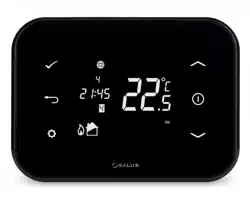
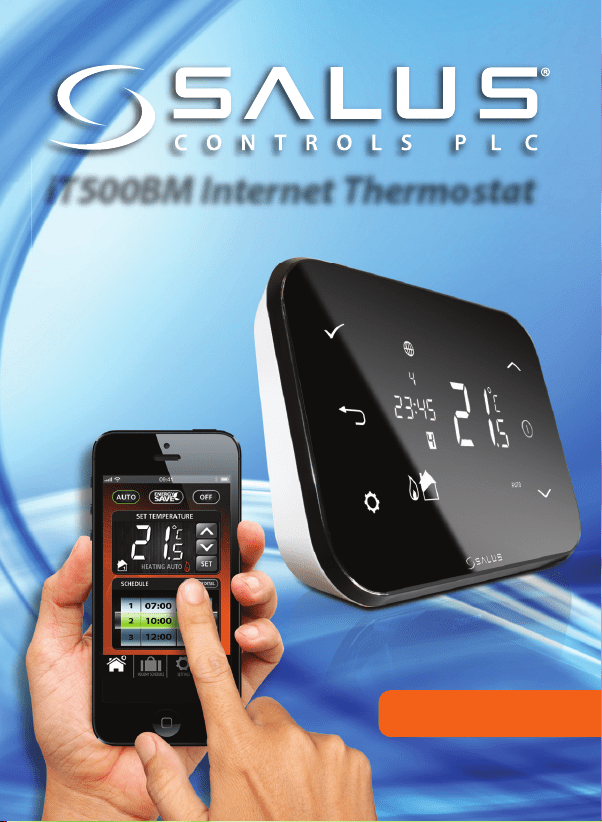
iT500BM Internet Thermostat
USER MANUAL
iT500BM USER Resized 002_Layout 1 12/11/2013 14:42 Page 1
Product compliance & safety information
These instructions are applicable to the SALUS Controls model stated on the front
cover of this manual only, and must not be used with any other make or model.
This accessory must be tted by a competent person, and installation must
comply with the guidance provided in the current IEE Wiring Regulations and
current Building Regulations. Failure to comply with the requirements of these
publications could lead to prosecution.
When tting batteries, do not mix old and new batteries together.
Do not use rechargeable batteries.
Please leave these instructions with the end user where they should be kept in
a safe place for future reference.
Always isolate the AC Mains supply before installing or working
on any components that require 230 VAC 50Hz supply.
02 iT500BM User Manual
iT500BM USER Resized 002_Layout 1 12/11/2013 14:42 Page 2
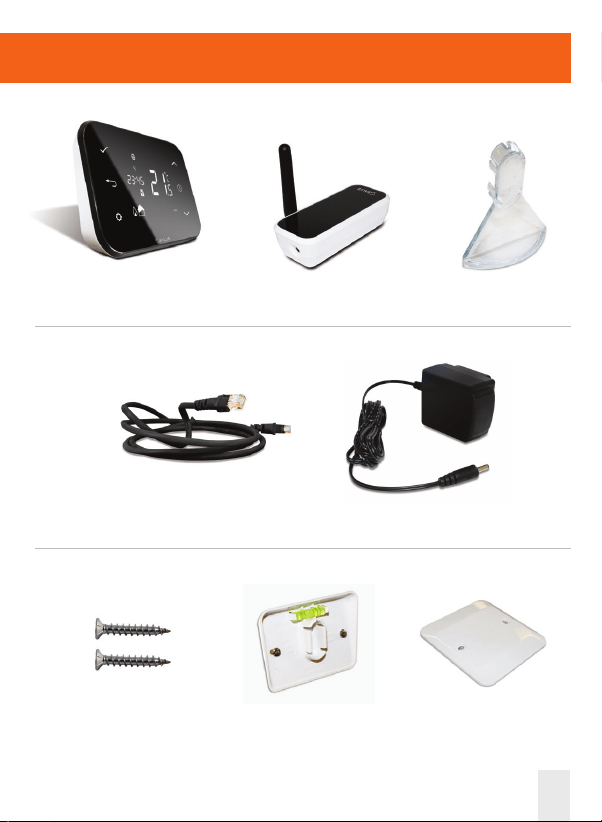
Contents of the box
iT500BM User Manual 03
iT500TR Thermostat
iTA500 Power adaptor
ADSL Cable
Optional Stand
Fixing screws
& plugs
iTG500 Gateway
Bracket
Wall mount
iT500BM USER Resized 002_Layout 1 12/11/2013 14:42 Page 3
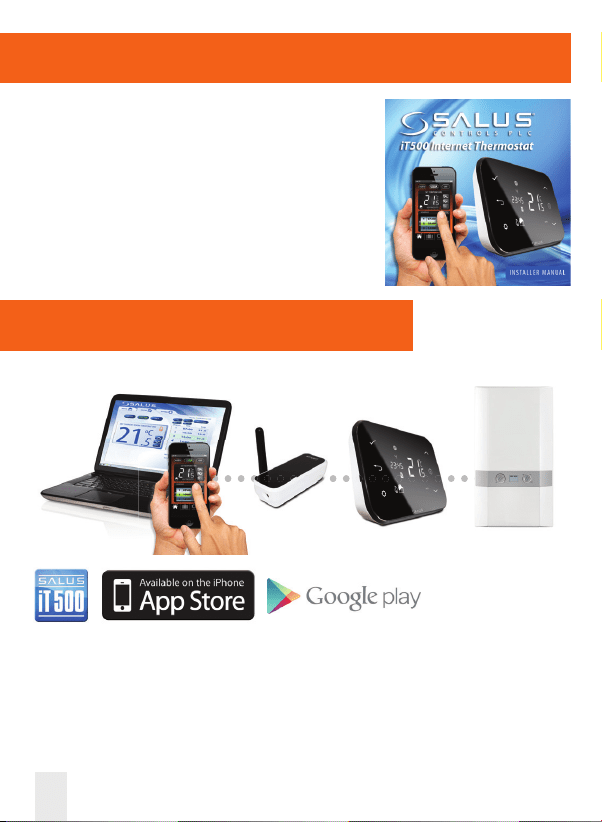
Installation
04 iT500BM User Manual
Connection & Control
www.salus-controls.com
For details please refer to page 28 in the installation manual.
Please refer to the installation guide.
The installation guide also shows how to
connect your iT500 thermostat to the internet.
iT500BM USER Resized 002_Layout 1 12/11/2013 14:42 Page 4
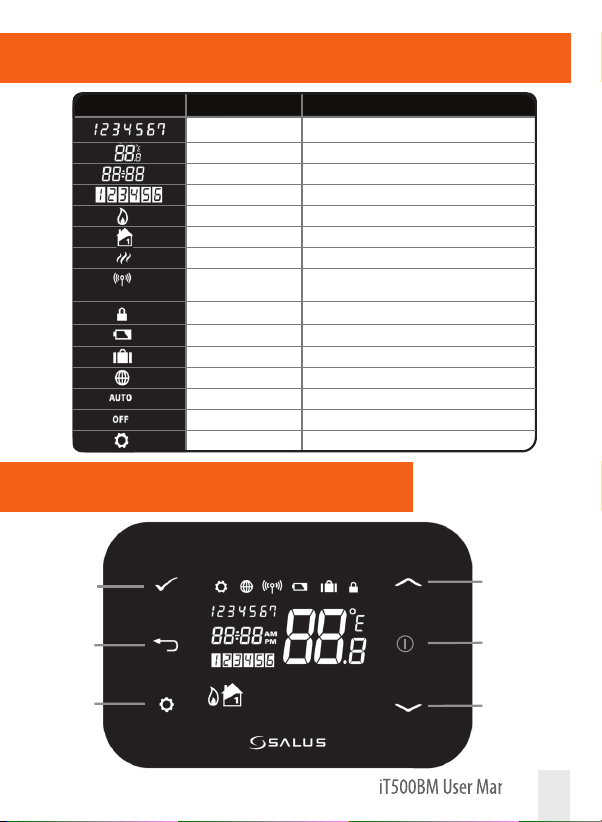
LCD Overview
iT500BM User Manual 05
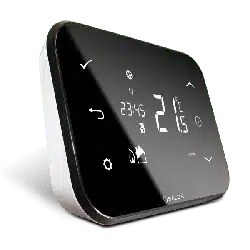
LCD ICONS DESCRIPTION FUNCTION
Day of the week Displays the number of the day of the week. 1 being Monday
Temperature indicator Displays set or measured temperature
Clock display Displays time
Program number indicator Displays the number of the active (selected) program
Heat mode indicator Indicates heating output is turned on*
Heat indicator Indicates heating zone
Hot water mode indicator Indicates hot water output is turned on*
RF signal indicator Indicates the unit is transmitting a wireless signal to the
iT500RX or is receiving the signal from the iT300*
Touch lock indicator Indicates touch lock is activated
Battery status Indicates battery is low
Holiday indicator Indicates holiday operation mode is selected
Internet indicator Indicates connection to iTG500 and SALUS server
AUTO indicator Automatic program mode
OFF indicator O mode
Setting indicator Manual override or settings mode
Conrm
Backup
Increase
Display ON
Decrease
Settings
Controls
iT500BM USER Resized 002_Layout 1 12/11/2013 14:42 Page 5
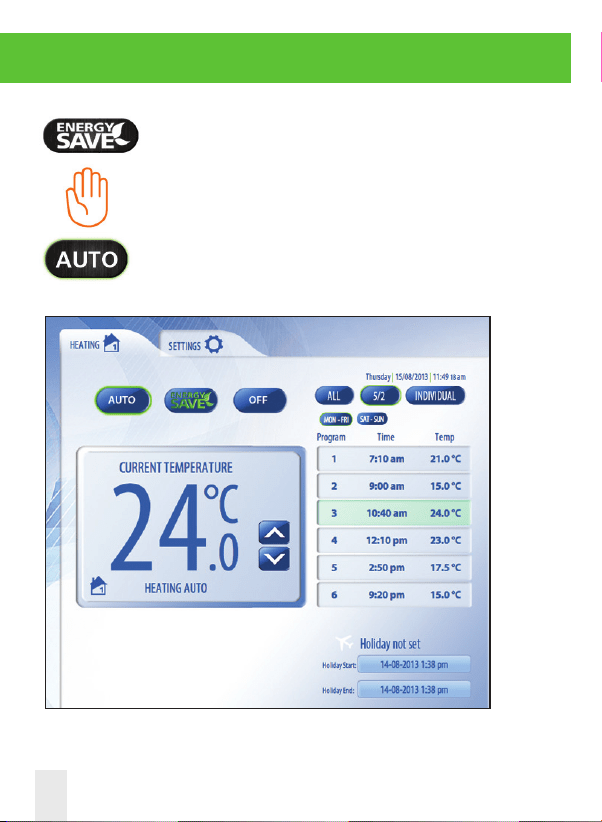
System PC & Smartphone Control
Energy save will use the lowest set
temperature on your daily schedule.
*Press AUTO to cancel temporary override of program temperature.
Will be displayed when the current program
has been manually overridden.
06 iT500BM User Manual
iT500BM USER Resized 002_Layout 1 12/11/2013 14:42 Page 6
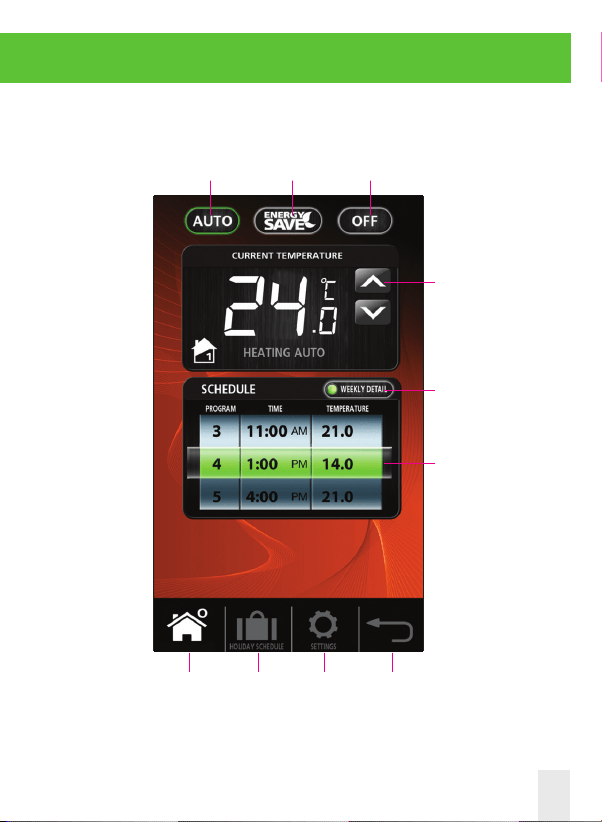
Follows
weekly
schedule
Energy
save
mode
Home Holiday Settings Back
Heating
continuously
o
Override
program
temperature*
Change/view
weekly heating
schedule
Current
program
System PC & Smartphone Control
iT500BM User Manual 07
iT500BM USER Resized 002_Layout 1 12/11/2013 14:42 Page 7
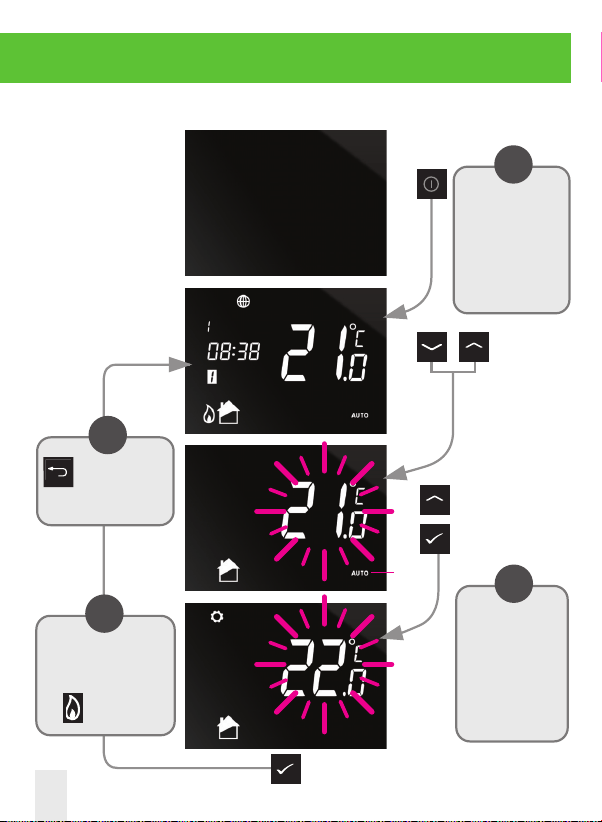
System Local Control
Temporary
override of
your
temperature
Press the power button to
start and use the buttons
indicated to change the
SET temperature. Then
press the tick to accept.
Note:
Status has
been added.
OR
The unit will return to
the home screen with
the symbol showing.
i
The operations
described in the next
few pages can be
controlled via your
Smartphone or PC.
i
All changes made
locally on the iT500
will automatically
update PC and
Smartphone.
i
Control available on your Smartphone or PC is also available locally on the iT500.
Press to cancel
temporary override.
i
08 iT500BM User Manual
iT500BM USER Resized 002_Layout 1 12/11/2013 14:42 Page 8
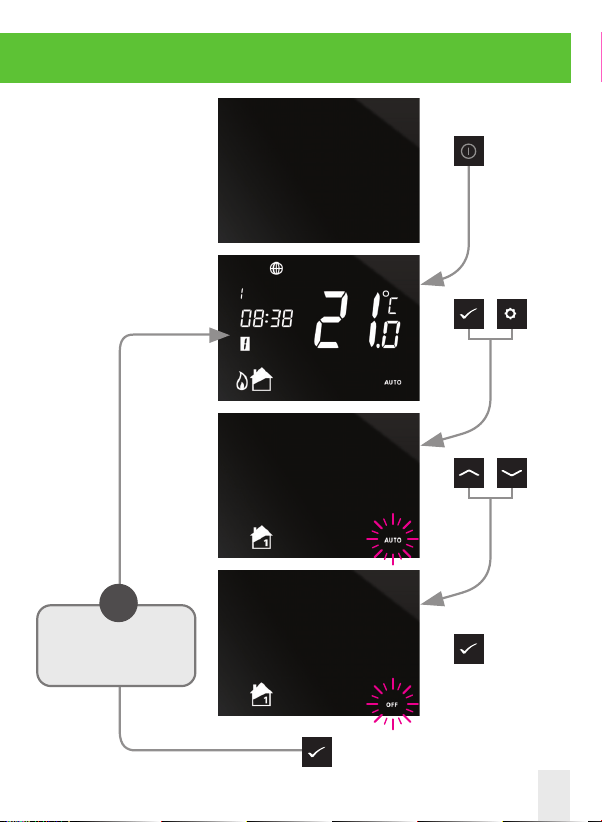
System PC & Smartphone Control
Switching your
heating from
AUTO to OFF.
Press the power button to
start and use the buttons
indicated to switch from
AUTO to OFF.
+
OR
The unit will return to the
home screen.
i
iT500BM User Manual 09
iT500BM USER Resized 002_Layout 1 12/11/2013 14:42 Page 9
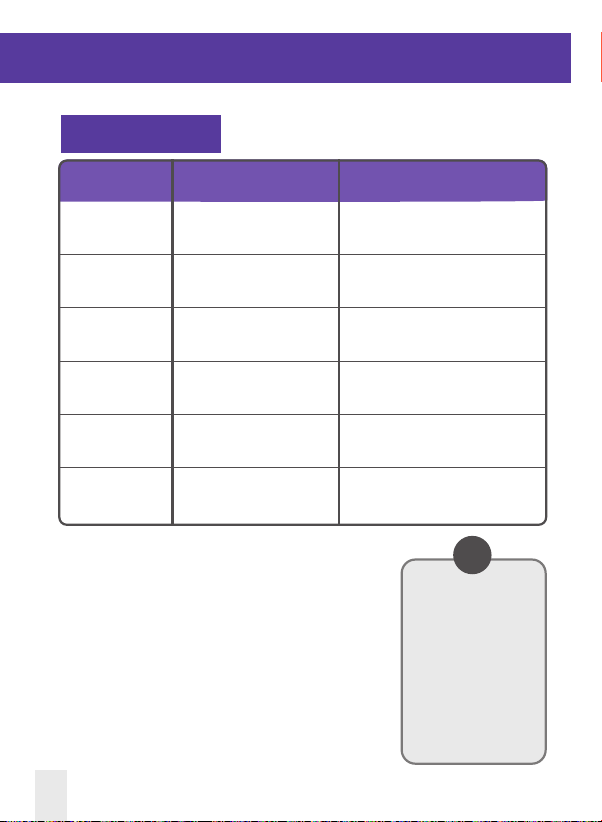
Default Program Schedules
PROGRAM WEEKDAY (1 to 5) WEEKDAY (6 to 7)
1 Time 6:00am Time 6:00am
Setpoint Temp 21ºC Setpoint Temp 21ºC
2 Time 8:00am Time 8:00am
Setpoint Temp 14ºC Setpoint Temp 14ºC
3 Time 11:00am Time 11:00am
Setpoint Temp 21ºC Setpoint Temp 21ºC
4 Time 1:00pm Time 1:00pm
Setpoint Temp 14ºC Setpoint Temp 14ºC
5 Time 4:00pm Time 4:00pm
Setpoint Temp 21ºC Setpoint Temp 21ºC
6 Time 9:00pm Time 9:00pm
Setpoint Temp 14ºC Setpoint Temp 14ºC
Central Heating
Your iT500 comes pre-set
with these default
program schedules.
These can be easily
changed via the PC or
Smartphone App.
i
10 iT500BM User Manual
iT500BM USER Resized 002_Layout 1 12/11/2013 14:42 Page 10
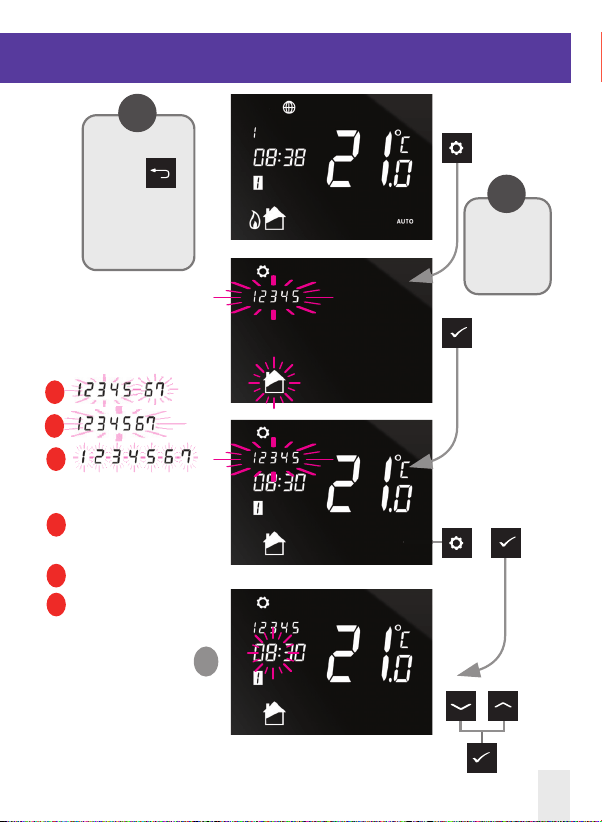
Viewing or changing your program schedule
A Program for Monday to Friday
and program for Sat/Sun
B All week programmer
C Individual day programming
1
Long press to
enter user
settings.
i
OR
OR
A
B
C
At any time press
and hold
for 5 seconds to
return to the
home screen.
i
Program for Monday to Friday
iT500BM User Manual 11
iT500BM USER Resized 002_Layout 1 12/11/2013 14:43 Page 11
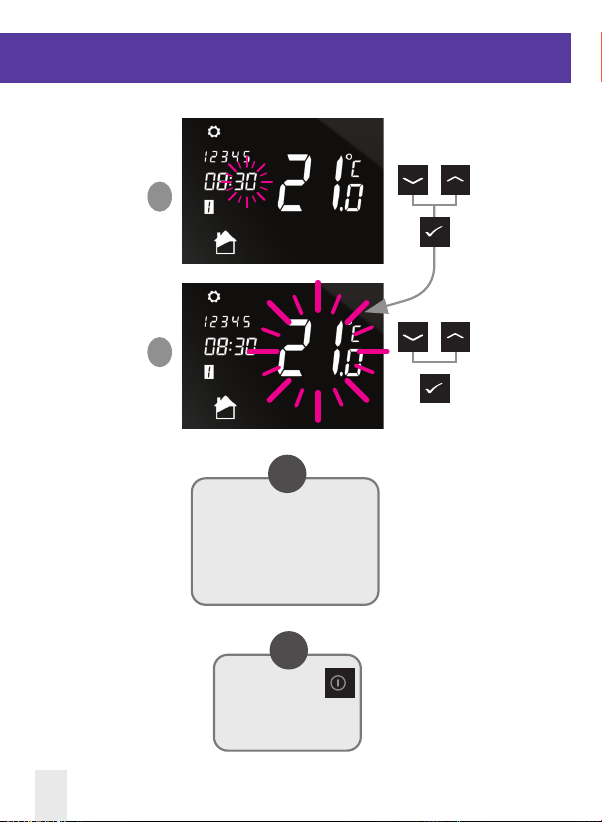
Default Program Schedules
2
3
Program time and temperature
now set for program 1 Monday
to Friday. Please continue to
program 2 on the next page.
i
Continually pressing
will keep the screen on
continually.
i
OR
OR
12 iT500BM User Manual
iT500BM USER Resized 002_Layout 1 12/11/2013 14:43 Page 12
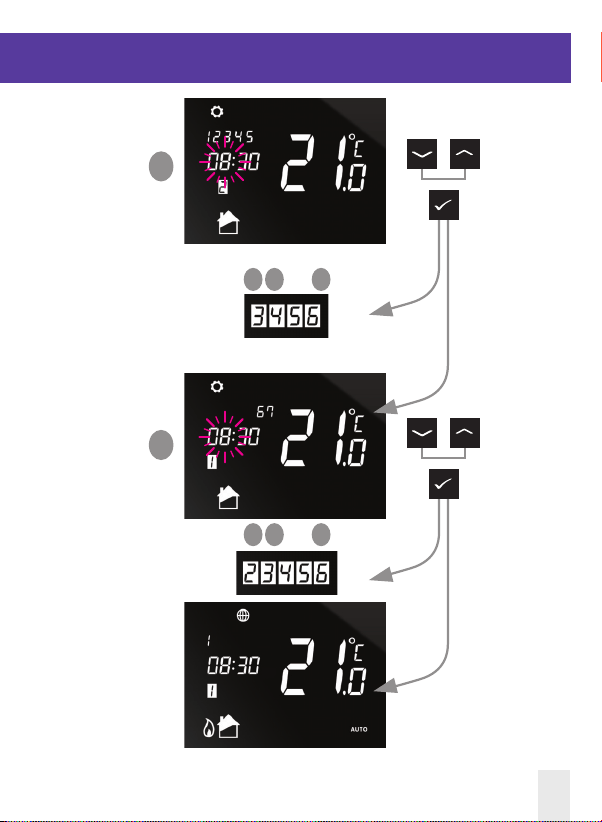
Viewing or changing your program schedule
You are now ready to set program 2
Repeat steps and for program
Repeat steps and for program
All programs now set
Program for Saturday and Sunday
OR
OR
4
5
1 2 3
1 2 3
iT500BM User Manual 13
iT500BM USER Resized 002_Layout 1 12/11/2013 14:43 Page 13
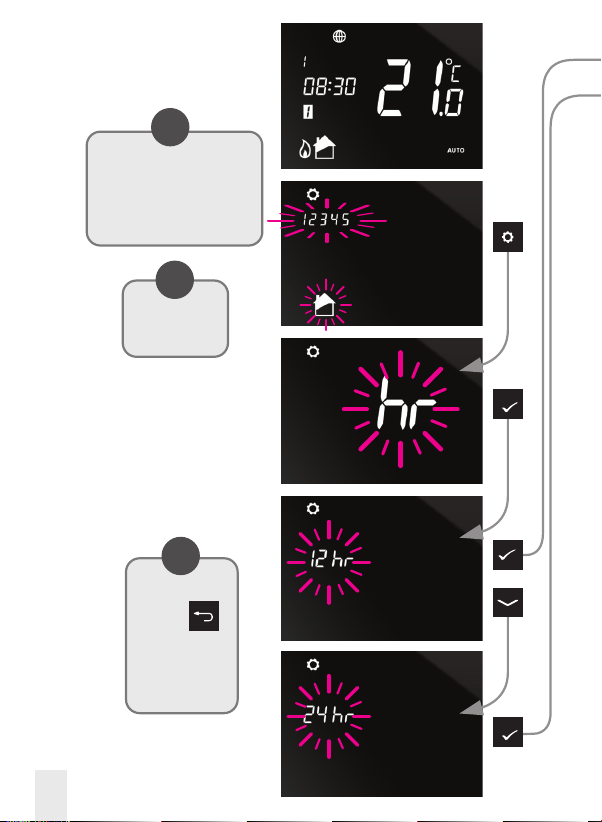
Program Menu:
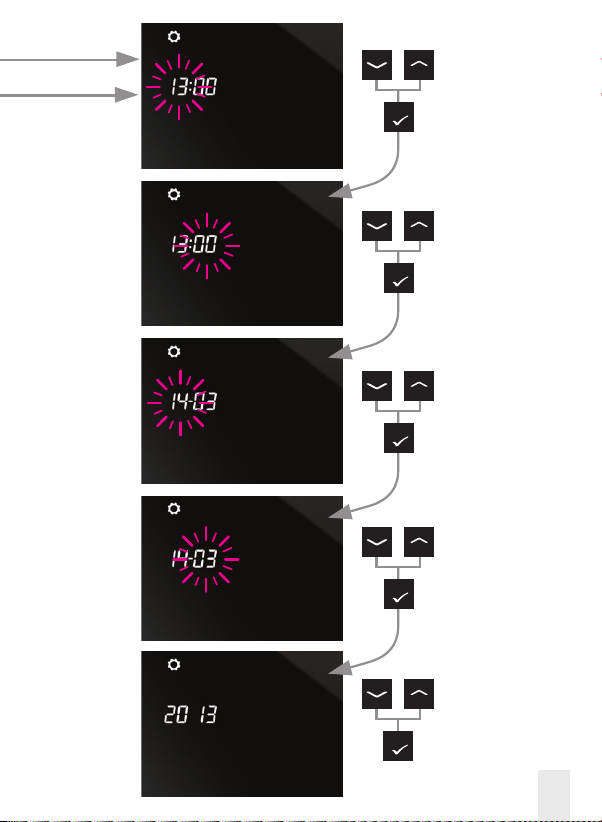
Setting Time and Date
At any time press
and hold
for 5 seconds to
return to the
home screen.
i
OR
Long press to enter
user settings.
i
When connected to the internet,
the iT500 will set the time and
date automatically, however this
can also be set manually.
i
14 iT500BM User Manual
iT500BM USER Resized 002_Layout 1 12/11/2013 14:43 Page 14
iT500BM User Manual 15
OR
OR
OR
OR
OR
Hour
Minute
Day
Month
Year
iT500BM USER Resized 002_Layout 1 12/11/2013 14:43 Page 15
Useful information
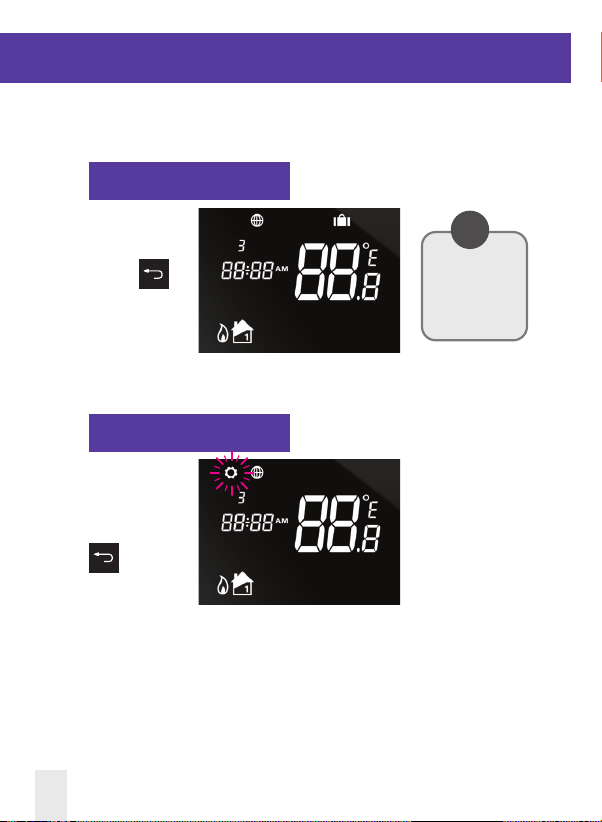
Exiting Holiday Mode
Exiting Energy Mode
To exit holiday
mode, press and
hold the
button.
To enter or exit
energy mode, press
and hold the
button.
You can only activate
holiday function via
the Web App and
Smartphone App.
i
*See page 6 for description
16 iT500BM User Manual
iT500BM USER Resized 002_Layout 1 12/11/2013 14:43 Page 16
Useful information
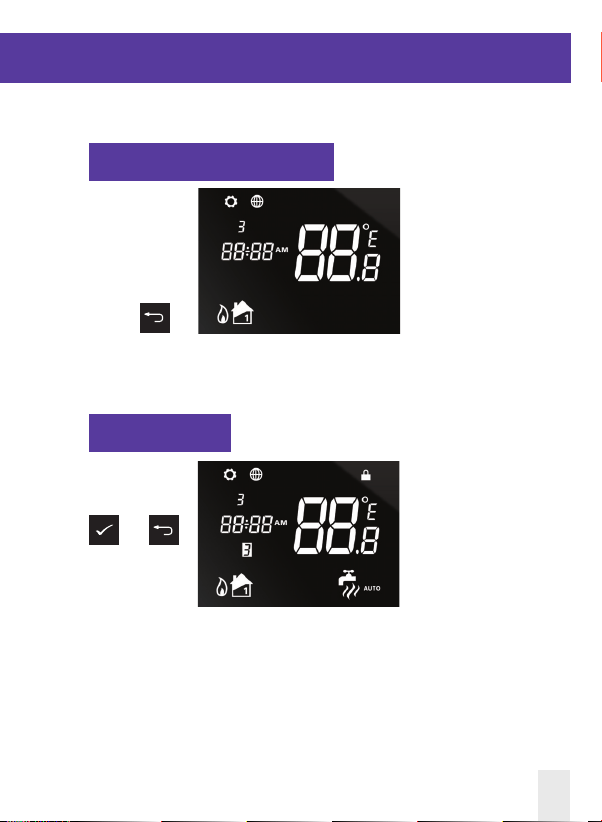
Lock Function
To enable or disable
lock function press
and
together.
Cancel Temporary Override
To cancel
temporary
override of set
temperature press
and hold
iT500BM User Manual 17
iT500BM USER Resized 002_Layout 1 12/11/2013 14:43 Page 17

18 iT500BM User Manual
Notes
iT500BM USER Resized 002_Layout 1 12/11/2013 14:43 Page 18
iT500BM User Manual 19
iT500BM USER Resized 002_Layout 1 12/11/2013 14:43 Page 19

www.salus-controls.com
SALUS Controls plc
SALUS House
Dodworth Business Park South,
Whinby Road,
Dodworth, Barnsley S75 3SP
UK.
SALES: T: +44 (0) 1226 323961
TECHNICAL: T: +44 (0) 1226 323961
Issue Date: Nov 2013
Maintaining a policy of continuous product development SALUS
Controls plc reserve the right to change specication, design and
materials of products listed in this brochure without prior notice.
SALUS Controls is a member of the Computime Group
00086/2
iT500BM USER Resized 002_Layout 1 12/11/2013 14:43 Page 20