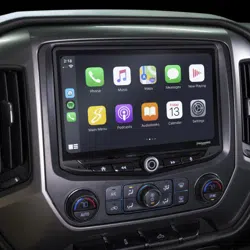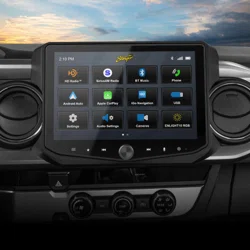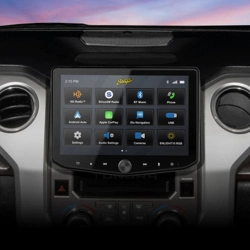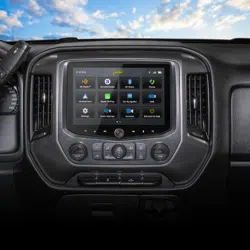
Stinger HORIZON10
Radio Replacement Kit for select
2014-2019 Silverado/Sierra Trucks
SR-GM14HX
© 2024 Stinger. All rights reserved. PAC is a Power Brand of Stinger Solutions.
Pacific Accessory Corporation
Page 1
Rev: V1
Date: 090424
®
®
Introduction and Features
The SR-GM14HX is a complete radio replacement kit for the installation of the Stinger HORIZON10
®
modular radio in Chevrolet
Silverado and GMC Sierra trucks. All modules, cables and adapters are included to retain important features of the factory system,
including: OnStar, front and rear park assist, warning chimes, factory reverse camera, steering wheel-mounted radio controls and
AM/FM reception. Plug & Play wiring harnesses allow for quick and easy installation without the need to cut or splice any wiring.
The display mounting panel allows ush mounting the 10 inch display without modifying/cutting any part of the vehicle’s sub-dash.
Important Notes
Recommended Tools
We recommend reading this manual thoroughly to familiarize yourself
with the entire process prior to beginning the installation.
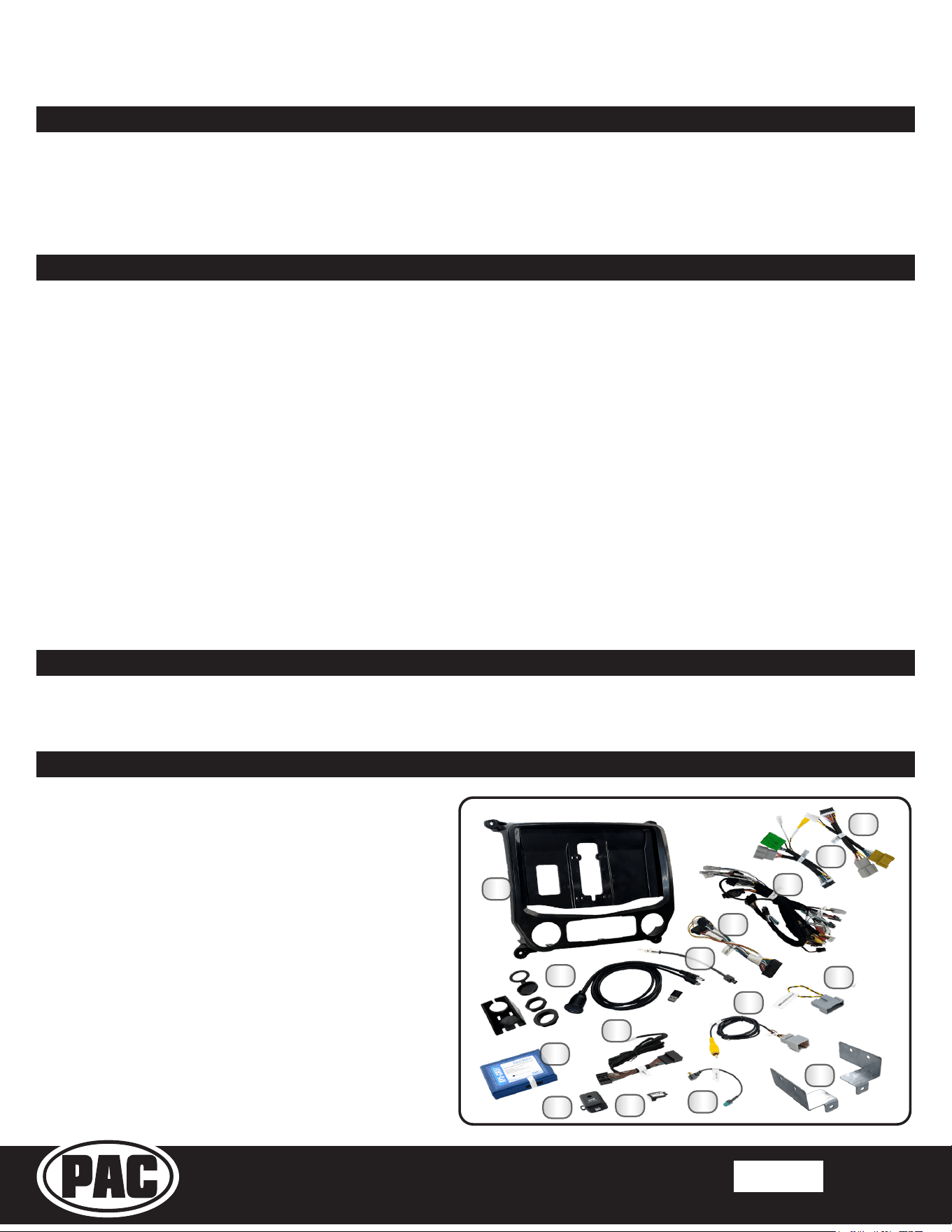
1. HORIZON10 Display Mounting Panel
2. Dual USB Extension (SSUSB3)
3. AM / FM Antenna Adapter (BAA22)
4. Main Harness Adapter (SR-SRK-ADAPT-IX2XX)
5. Main Harness (SR-GM14H-HAR-A)
6. Vehicle Side Harness C (SR-GM14H-HAR-C)
7. Vehicle Side Harness B (SR-GM14H-HAR-B)
8. Radio Replacement Interface (RP5-GM51)
9. Steering Wheel Control Harness (GM5LIN-SW-HAR)
10. Factory Rear Camera Adapter (CAM-GM51-HAR)
11. IOB Display Harness (GM5CAM-DIS-HAR)
12. Chime Module (CMX)
13. Dierential Video Adapter (RPA-VA1)
14. Satellite Antenna Adapter (SAT-01)
15. Side Mounting Brackets (L & R)
Included Components
1
4
6
10
8
5
2
11
3
7
9
12
13
14
1. Does not retain the following factory features:
2. Not compatible with vehicles equipped with Bose amplied audio system.
3. Please make your vehicle settings selections before removing the factory radio for optimal installation time. Once the
radio has been removed, the vehicle settings which are normally selected through the factory radio can be accessed and
changed by downloading and installing the PAC Vehicle Settings program from http://www.pac-audio.com/rmware
4. The Voice button can be set to activate the factory OnStar function when pressed for longer than 1.5 seconds or given the
ability to control the aftermarket radio. This option can be found in the PAC Vehicle Settings program mentioned above in note
three. The default setting for this button is to control the factory OnStar. If this button is set to control the aftermarket radio,
OnStar can still be accessed by using the mirror controls.
5. For the HORIZON10 Display to be waterproof, you must install 6 waterproof plugs to the back of the touch panel display in the
screw holes not used for mounting.
● Factory satellite radio
● Rear seat entertainment system (RSE)
● Steering wheel control backlighting
● Factory USB Ports
Plastic Panel Tool
7mm Socket
10mm Socket
Pick Tool
Wire Feeder
Power Screwdriver
Ratchet
Torx T15 Screwdriver
Small Flat-blade Screwdriver
NOTE: Along with the SR-GM14HX components, additional
hardware and wire harnesses from the HORIZON10 (ix210)
kit will also be used in the installation.
15
Stinger HORIZON10
Radio Replacement Kit for select
2014-2019 Silverado/Sierra Trucks
SR-GM14HX
© 2024 Stinger. All rights reserved. PAC is a Power Brand of Stinger Solutions.
Pacific Accessory Corporation
Page 2
Rev: V1
Date: 090424
®
®
GPS
USB-C
USB-A
STINGER
DISPLAY
AV IN
16PIN
POWER
26PIN
GPS
ANT
Stinger
HORIZON10
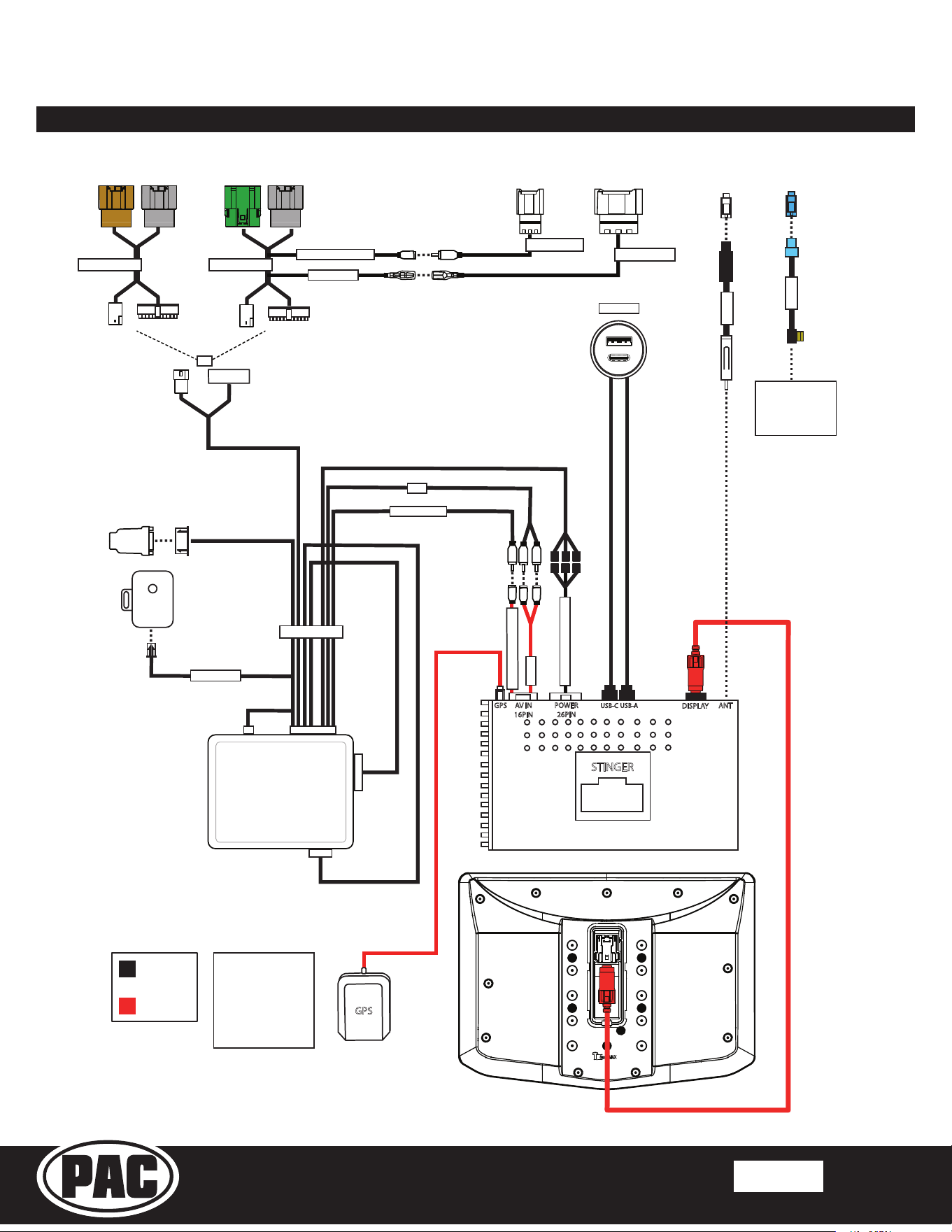
Connections
SR-GM14HX
Connections
Connections shown are
all required for full
functionality of the kit
and radio. If adding
additional components,
additional connections
will be needed.
Connects to
SXV300 Satellite
Radio Tuner
(sold separately)
SSUSB3
REVERSE CAMERA IN
A/V IN
RPA-VA1
REVERSE CAM
AUX
CAM GM51 INPUT
SWC INPUT
CMX
chime module
OR
SR-GM14H-HAR-B
SR-GM14H-HAR-A
SR-GM14H-HAR-C
CAM-GM51-HAR
GM5LIN-SW-HAR
CMX CHIME
RP5-GM51
SR-SRK-ADAPT-IX2XX
BAA22
SAT-01
Wiring Overview
Stinger HORIZON10
Radio Replacement Kit for select
2014-2019 Silverado/Sierra Trucks
SR-GM14HX
© 2024 Stinger. All rights reserved. PAC is a Power Brand of Stinger Solutions.
Pacific Accessory Corporation
Page 3
Rev: V1
Date: 090424
®
®
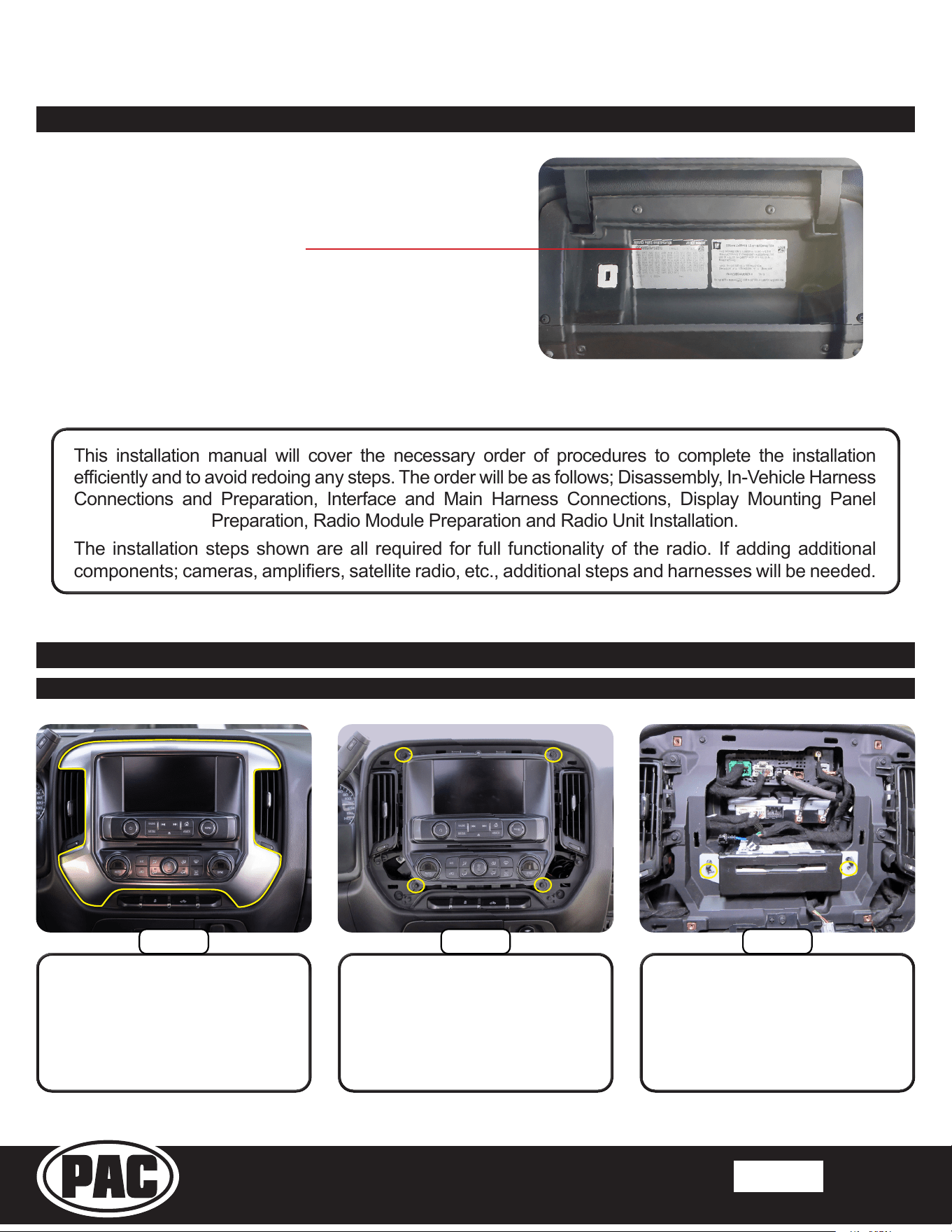
Before starting, determine the vehicle’s factory audio system by
referencing the Service Parts Identication sticker inside the
upper glove box.
The installations are very similar for each type of factory audio
system, but there are dierences referenced throughout this guide.
Note: The installation shown in this guide is IO5 with factory
rear camera and steering wheel controls.
One of these RPO codes will be listed:
IO3, IO4, IO5, IO6 or IOB
Section 1: Disassembly
Part One: Center Dash Disassembly
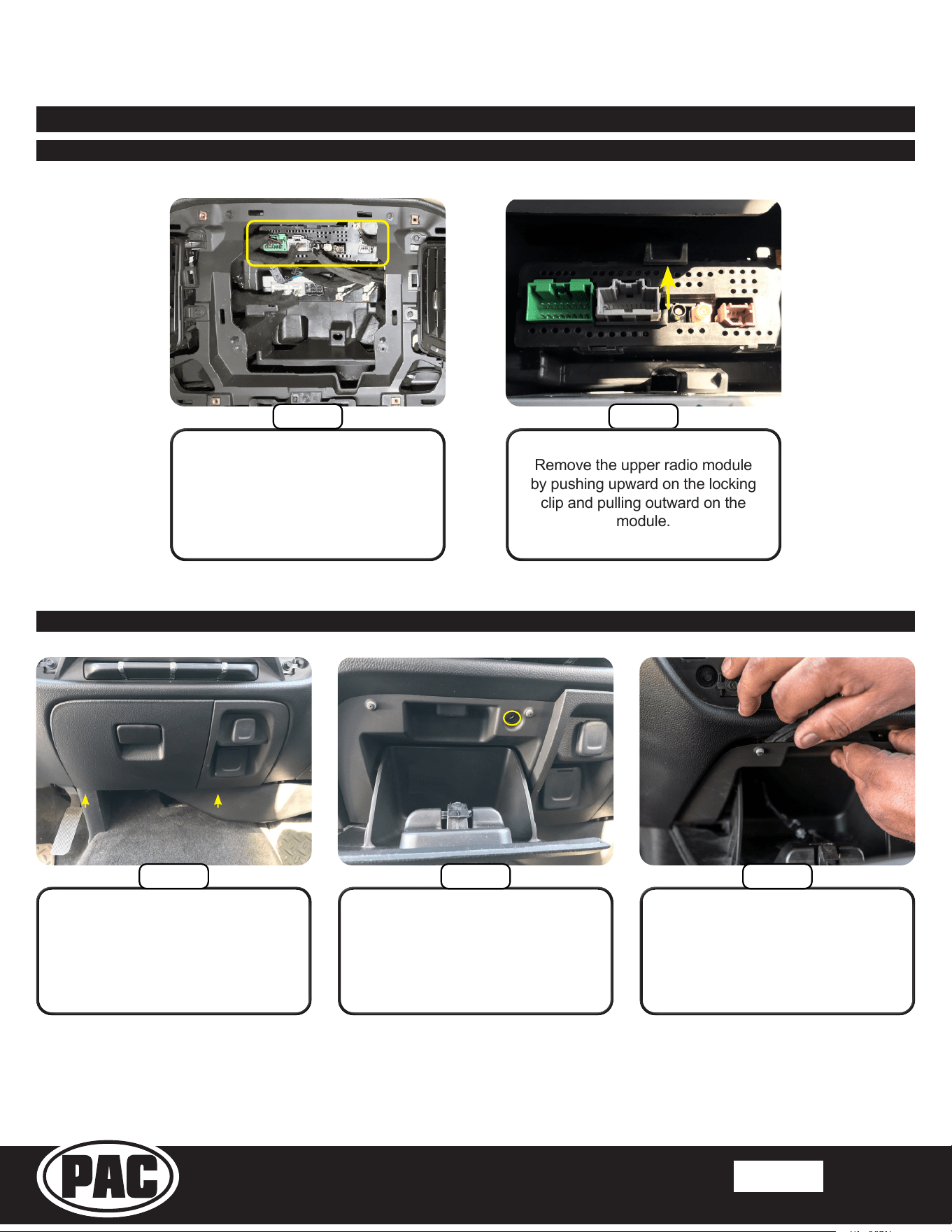
If equipped, remove the two
7mm screws from the CD/DVD
mechanism, remove and unplug.
(This plug will not be reconnected).
Remove the four 7mm screws
securing the radio display/climate
control panel. Pull outward to
release the retaining clips.
Remove all connectors from the
back of the panel.
Remove the radio display/climate
control trim panel using a plastic
trim tool to release the retaining
clips. Unplug any wire harnesses
from the back of the trim panel, if
equipped.
This installation manual will cover the necessary order of procedures to complete the installation
eciently and to avoid redoing any steps. The order will be as follows; Disassembly, In-Vehicle Harness
Connections and Preparation, Interface and Main Harness Connections, Display Mounting Panel
Preparation, Radio Module Preparation and Radio Unit Installation.
The installation steps shown are all required for full functionality of the radio. If adding additional
components; cameras, ampliers, satellite radio, etc., additional steps and harnesses will be needed.
Factory Radio Code
Step 3
Step 1
Step 2
Stinger HORIZON10
Radio Replacement Kit for select
2014-2019 Silverado/Sierra Trucks
SR-GM14HX
© 2024 Stinger. All rights reserved. PAC is a Power Brand of Stinger Solutions.
Pacific Accessory Corporation
Page 4
Rev: V1
Date: 090424
®
®
Part One: Center Dash Disassembly (Continued)
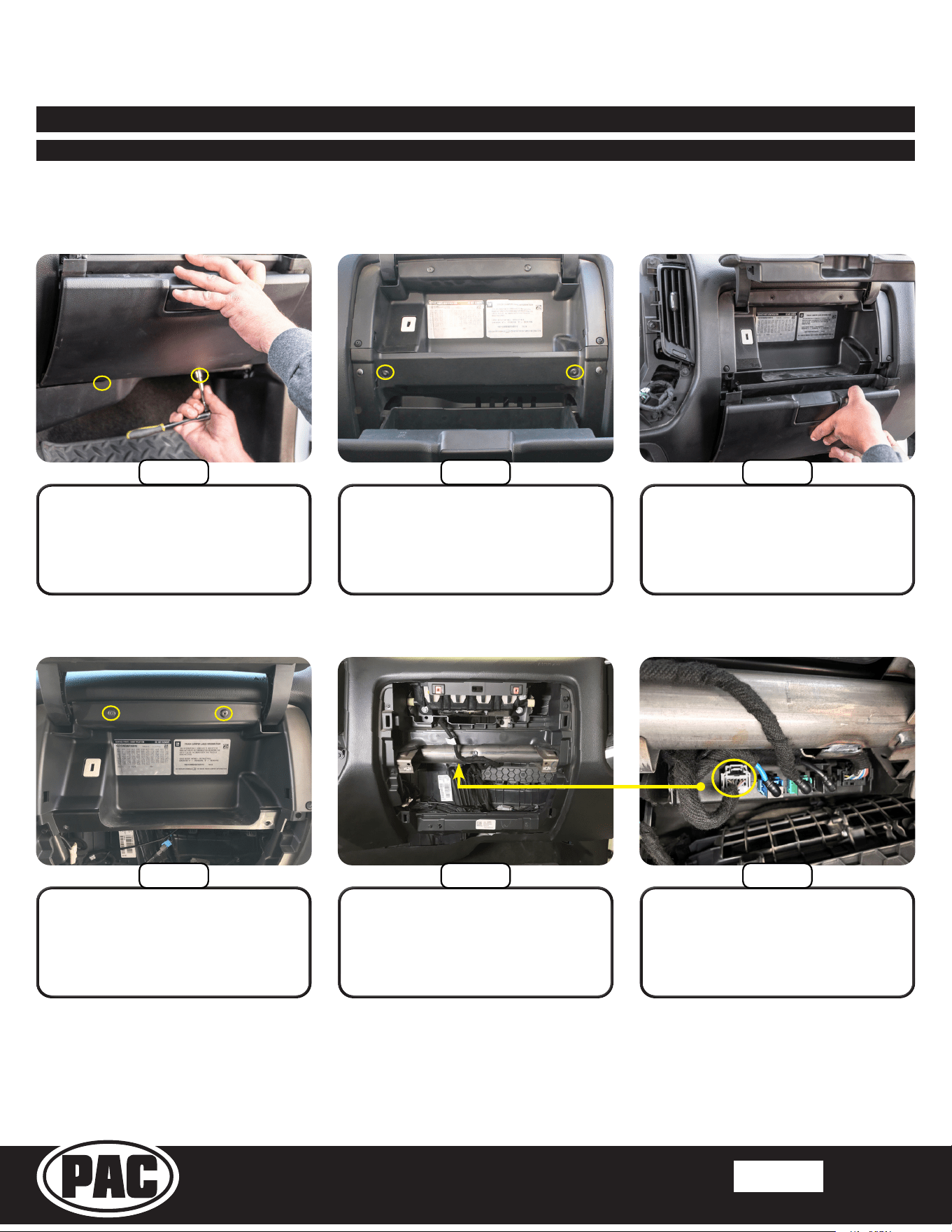
Remove the upper radio module
by pushing upward on the locking
clip and pulling outward on the
module.
Using a panel tool or similar,
release the top retaining clips and
remove the storage assembly.
Remove the upper Torx T15
screw inside the storage
compartment.
Remove the two Torx T15 screws
from the bottom edge of the
storage compartment.
Part Two: Lower Storage Compartment Removal
Section 1: Disassembly (Continued)
Step 5
Unplug all connectors and cables
from the upper radio module
shown.
Step 4
Step 1
Step 2 Step 3
Stinger HORIZON10
Radio Replacement Kit for select
2014-2019 Silverado/Sierra Trucks
SR-GM14HX
© 2024 Stinger. All rights reserved. PAC is a Power Brand of Stinger Solutions.
Pacific Accessory Corporation
Page 5
Rev: V1
Date: 090424
®
®
Section 1: Disassembly (Continued)
Part Three: Glove Box Removal (Optional)
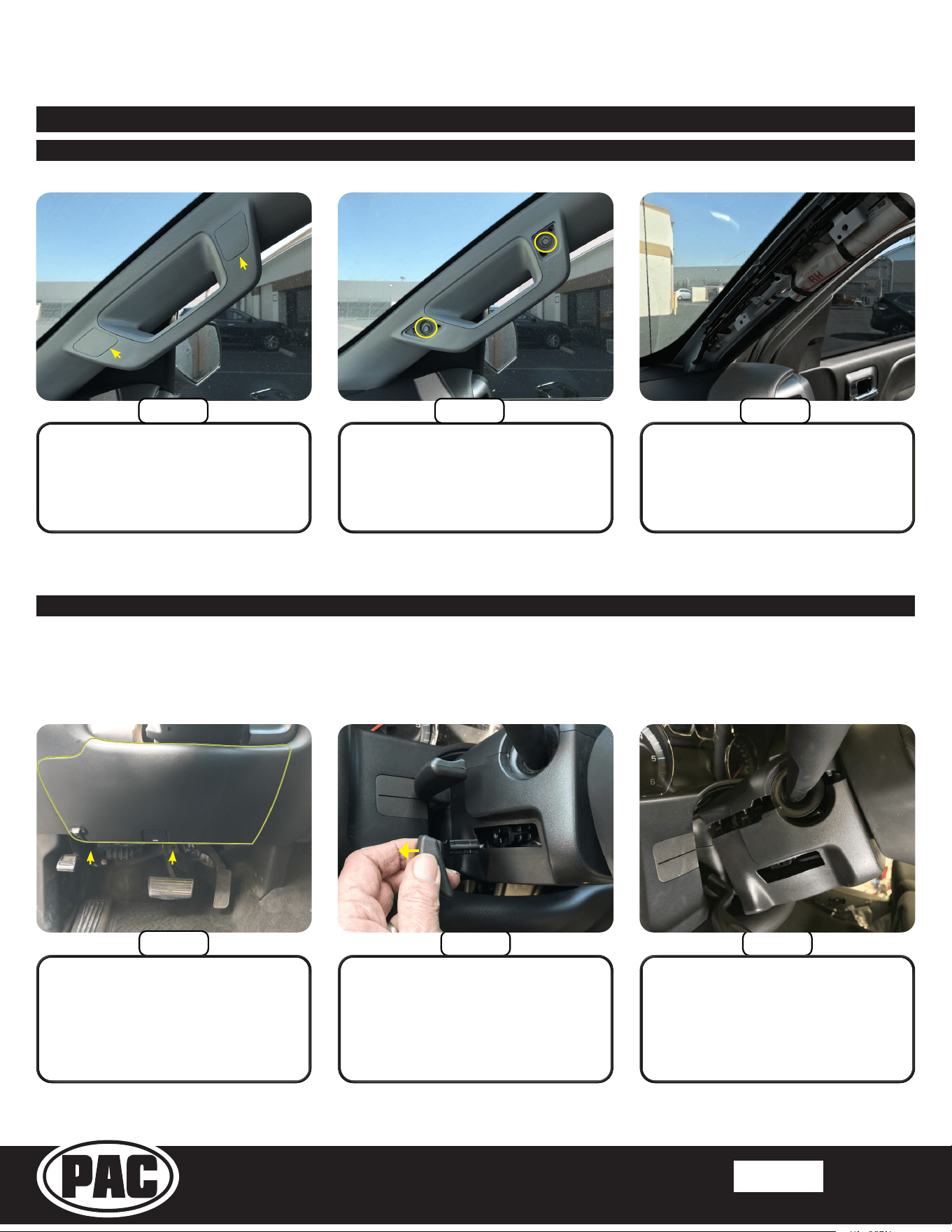
Pull outward on the lower glove
box to release the retaining clips
and remove the lower glove box.
Unplug the gray 12 pin camera
harness from the HMI module.
Open the upper and lower glove
box doors and remove the two
Torx T15 screws securing the
lower glove box.
Up, behind the metal bar running
across the inner dash, locate the
HMI Module; black module with
multiple colored plugs facing down.
Remove the two Torx T15 screws
from the bottom edge of the lower
glove box.
Remove the two Torx T15 screws
and pull to remove the upper
glove box. Unplug the factory USB
port from the backside.
If the vehicle is equipped with IO4, IO5 or IO6 radio AND a factory rear camera, follow the steps below to
remove the glove box. For IO3 and IOB vehicles, or no factory rear camera, proceed to Part Four.
Step 1
Step 2 Step 3
Step 4
Step 6Step 5
Stinger HORIZON10
Radio Replacement Kit for select
2014-2019 Silverado/Sierra Trucks
SR-GM14HX
© 2024 Stinger. All rights reserved. PAC is a Power Brand of Stinger Solutions.
Pacific Accessory Corporation
Page 6
Rev: V1
Date: 090424
®
®
Part Four: A Pillar Removal
Pull the trim panel to release the
retaining clips and remove.
Remove the two 10mm bolts.
Remove the inserts covering the
bolts on the passenger A pillar
handle.
Part Five: Lower Steering Column Cover Removal (Optional)
Step 3Step 2
Pull downward on the lower
cover on both sides to release
the locking tabs and remove the
lower cover.
Remove the plastic handle from
the steering wheel tilt lever by
pulling outward, towards the
driver’s door on the handle. A trim
tool may also be used if unable to
remove by hand.
If the vehicle is equipped with IO3, IO4, IO5 or IO6 radio AND steering wheel controls, follow the steps
below to remove the lower steering column cover. For IOB vehicles or no steering wheel controls, proceed
to Section Two on next page.
Step 1
Remove the two Torx T15 screws
from the bottom edge of knee
panel below the steering column.
Pull outward to remove the panel
and lay carefully on the oor board.
Section 1: Disassembly (Continued)
Step 1 Step 2 Step 3
Stinger HORIZON10
Radio Replacement Kit for select
2014-2019 Silverado/Sierra Trucks
SR-GM14HX
© 2024 Stinger. All rights reserved. PAC is a Power Brand of Stinger Solutions.
Pacific Accessory Corporation
Page 7
Rev: V1
Date: 090424
®
®
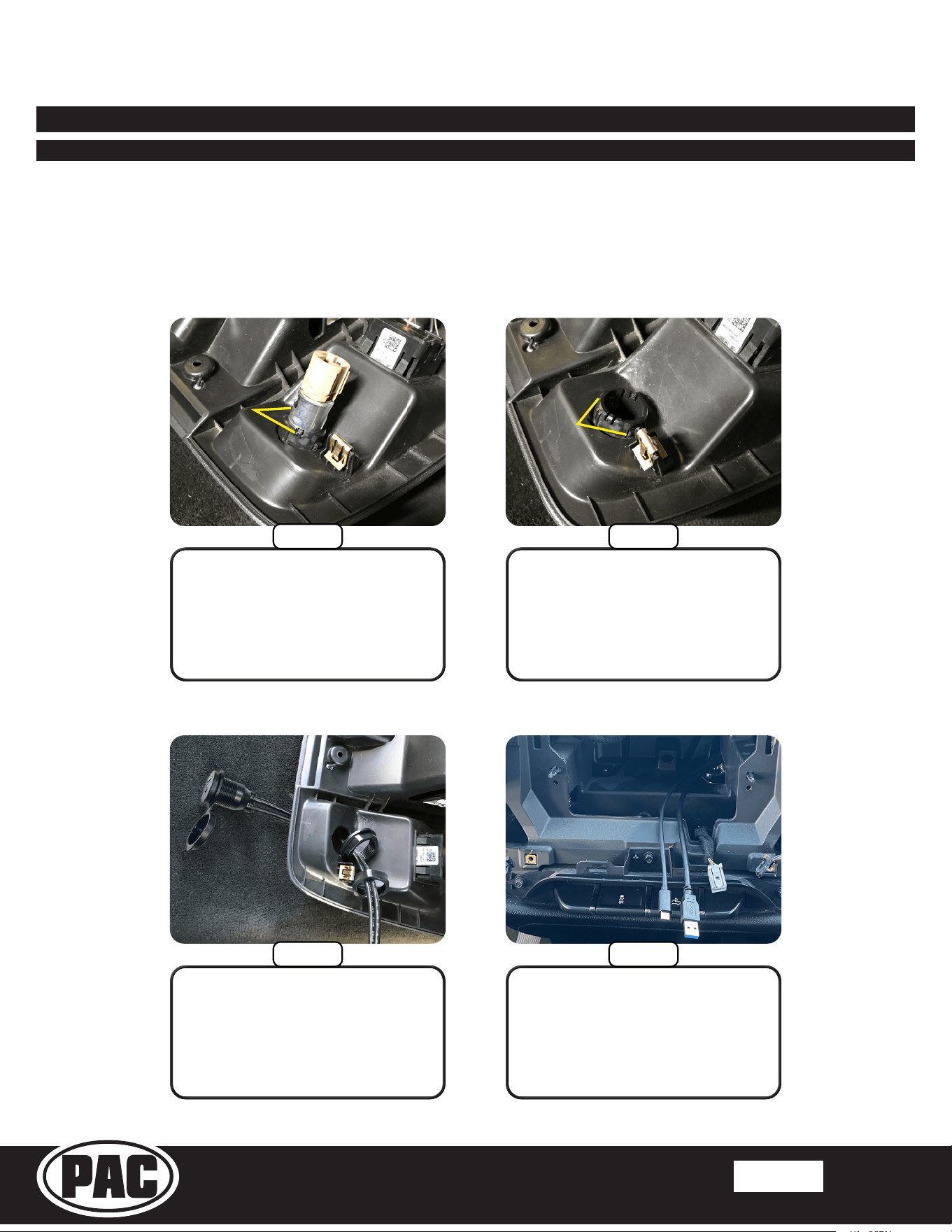
Install the optional USB cover and
feed the USB cables through the
front of the panel. Secure with the
anged nut and then lock with the
lock nut.
Remove the plastic sleeve by
depressing the two tabs and
pushing out the front.
From the backside of the lower
storage compartment, remove the
metal insert from the power outlet
by releasing the two retaining clips
with a small pick and pushing out
the front side.
Route the USB cables up and out
of the right side opening at the
rear of the CD/DVD opening.
Section 2: In-Vehicle Harness Connections and Preparation
Part One: Dual USB Extension (SSUSB3)
Apple CarPlay, Android Auto, and any Firmware Updates require access to a USB port. The SSUSB3 is designed to extend the
USB ports on the back of the HORIZON10 to where they are accessible once the radio is installed.
For this installation, the factory 12V power outlet will be replaced with the SSUSB3. You may chose to follow these steps, or
mount the USB port somewhere else in the vehicle. Please note, the factory USB ports will no longer function after the factory
radio is removed.
Step 1
Step 2
Step 4
Step 3
Stinger HORIZON10
Radio Replacement Kit for select
2014-2019 Silverado/Sierra Trucks
SR-GM14HX
© 2024 Stinger. All rights reserved. PAC is a Power Brand of Stinger Solutions.
Pacific Accessory Corporation
Page 8
Rev: V1
Date: 090424
®
®
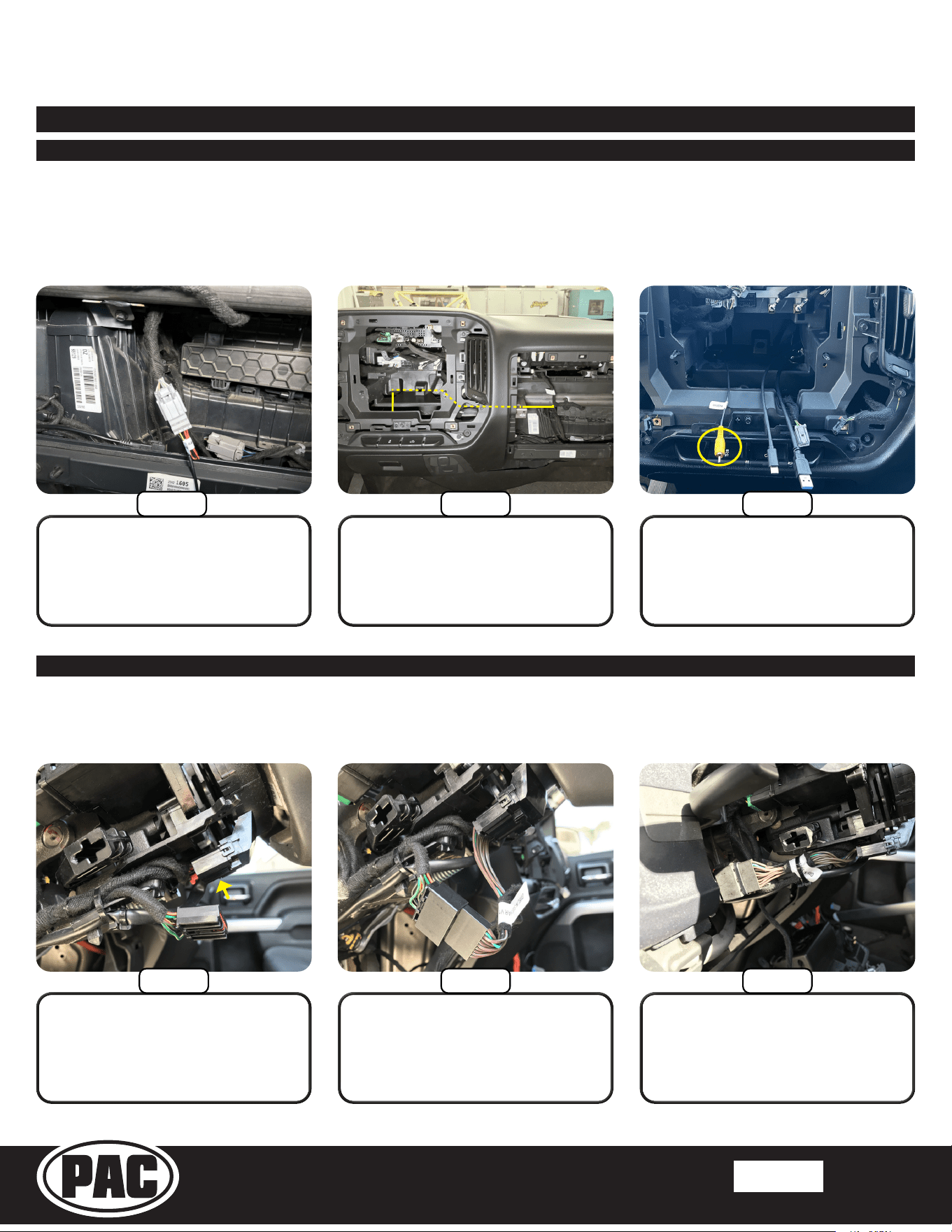
Route the camera RCA out of the
left side opening at the rear of the
CD/DVD opening.
Secure the T-harness to the factory
wire harness. Route the 50” single
lead from the GM5LIN-SW-HAR
to the radio opening, securing with
zip ties.
Route the yellow RCA end of
the camera cable to the radio
opening. Secure plug and cable
with zip ties.
Plug the male connector into the
female end of the GM5LIN-SW-
HAR and plug the GM5LIN-SW-
HAR male end into the female
connector on the steering column.
Plug the gray 12 pin camera
harness from the HMI module into
the CAM-GM51-HAR.
Locate and unplug the black 10
pin connector located on the
underside of the steering column.
Section 2: In-Vehicle Harness Connections and Preparation (Continued)
Part Two: Factory Rear Camera Retention Harness (CAM-GM51-HAR)
Part Three: Steering Wheel Control (SWC) Retention Harness (GM5LIN-SW-HAR)
If the vehicle is equipped with IO4, IO5 or IO6 radio AND a factory rear camera, follow the steps below to
install the factory camera retention harness behind the glove box. For IO3 and IOB vehicles, or no factory
rear camera, proceed to Part Four.
If the vehicle is equipped with IO4, IO5 or IO6 radio AND steering wheel controls, follow the steps below to
install the SWC retention harness at the steering column. For IO3 and IOB vehicles, or no steering wheel
controls, proceed to Part Four.
Step 1
Step 2 Step 3
Step 1 Step 2 Step 3
Stinger HORIZON10
Radio Replacement Kit for select
2014-2019 Silverado/Sierra Trucks
SR-GM14HX
© 2024 Stinger. All rights reserved. PAC is a Power Brand of Stinger Solutions.
Pacific Accessory Corporation
Page 9
Rev: V1
Date: 090424
®
®
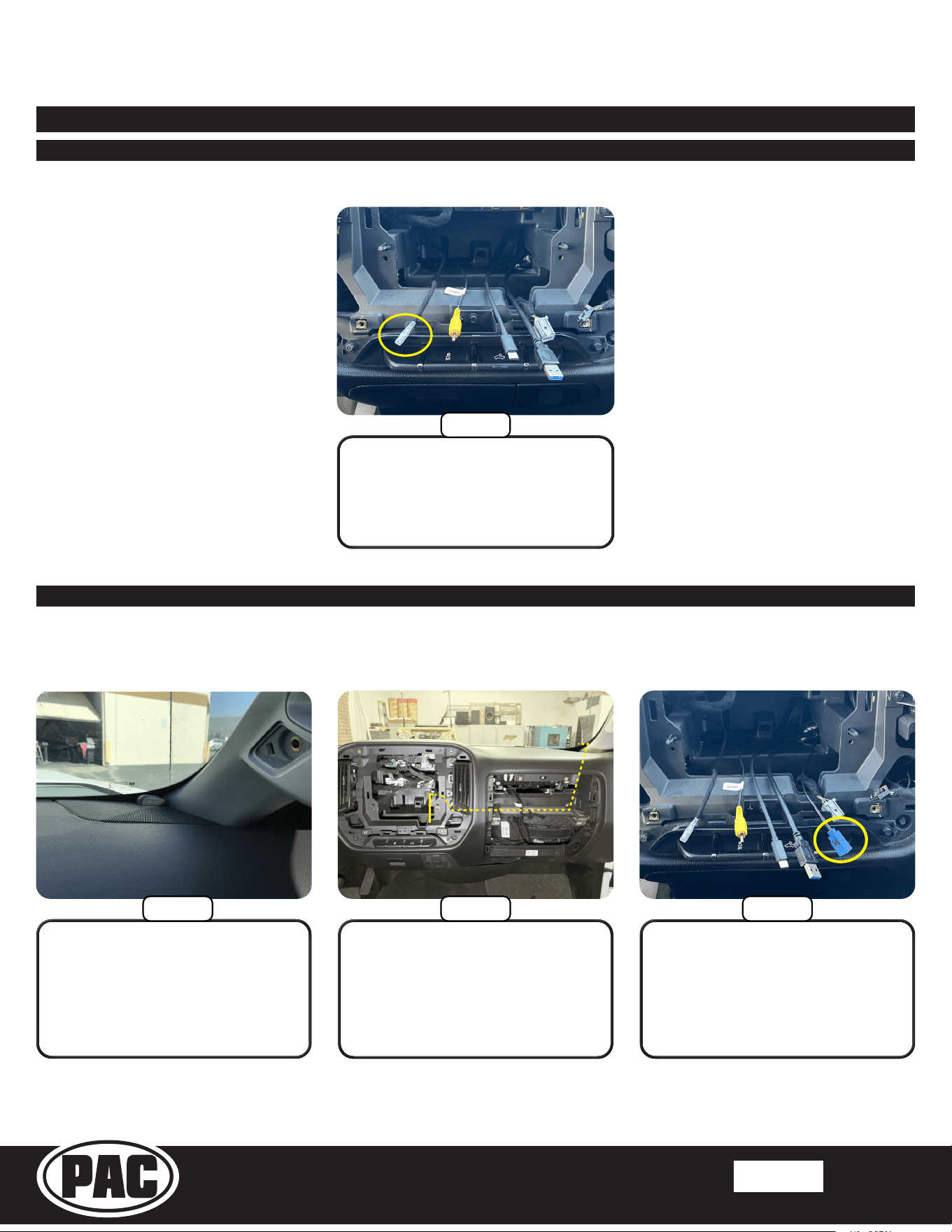
Route the steering wheel control
lead into the CD/DVD area
through the left side opening in the
rear of the cavity.
Part Three: Steering Wheel Control (SWC) Retention Harness (Continued)
Part Four: GPS Antenna
The GPS antenna is required for proper operation of Apple CarPlay and Android Auto, in addition to the optional GPS if
installed. The GPS antenna is included in the HORIZON10 hardware.
Section 2: In-Vehicle Harness Connections and Preparation (Continued)
Continue routing the GPS cable
across the inner dash towards the
radio opening securing with zip ties.
Position the GPS Antenna and
route the antenna cable down
into the glove box area. Replace
the A pillar panel and ensure the
cable does not interfere or get
pinched.
Route the GPS cable into the CD/
DVD area through the right side
opening at the rear of the cavity.
Step 4
Step 1
Step 2 Step 3
Stinger HORIZON10
Radio Replacement Kit for select
2014-2019 Silverado/Sierra Trucks
SR-GM14HX
© 2024 Stinger. All rights reserved. PAC is a Power Brand of Stinger Solutions.
Pacific Accessory Corporation
Page 10
Rev: V1
Date: 090424
®
®
Section 3: Interface and Main Harness Connections and Preparation
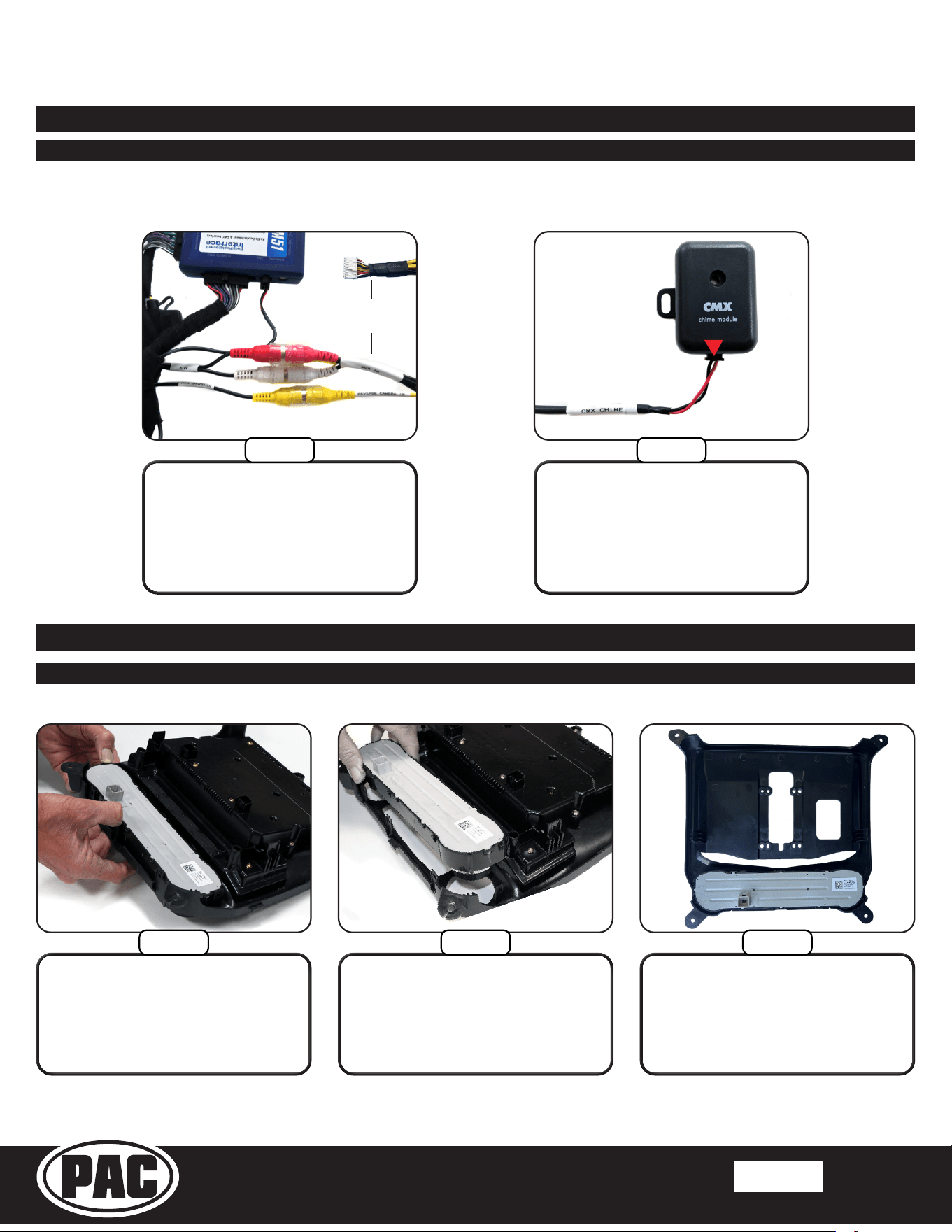
Part One: RP5-GM51 Radio Interface Connections
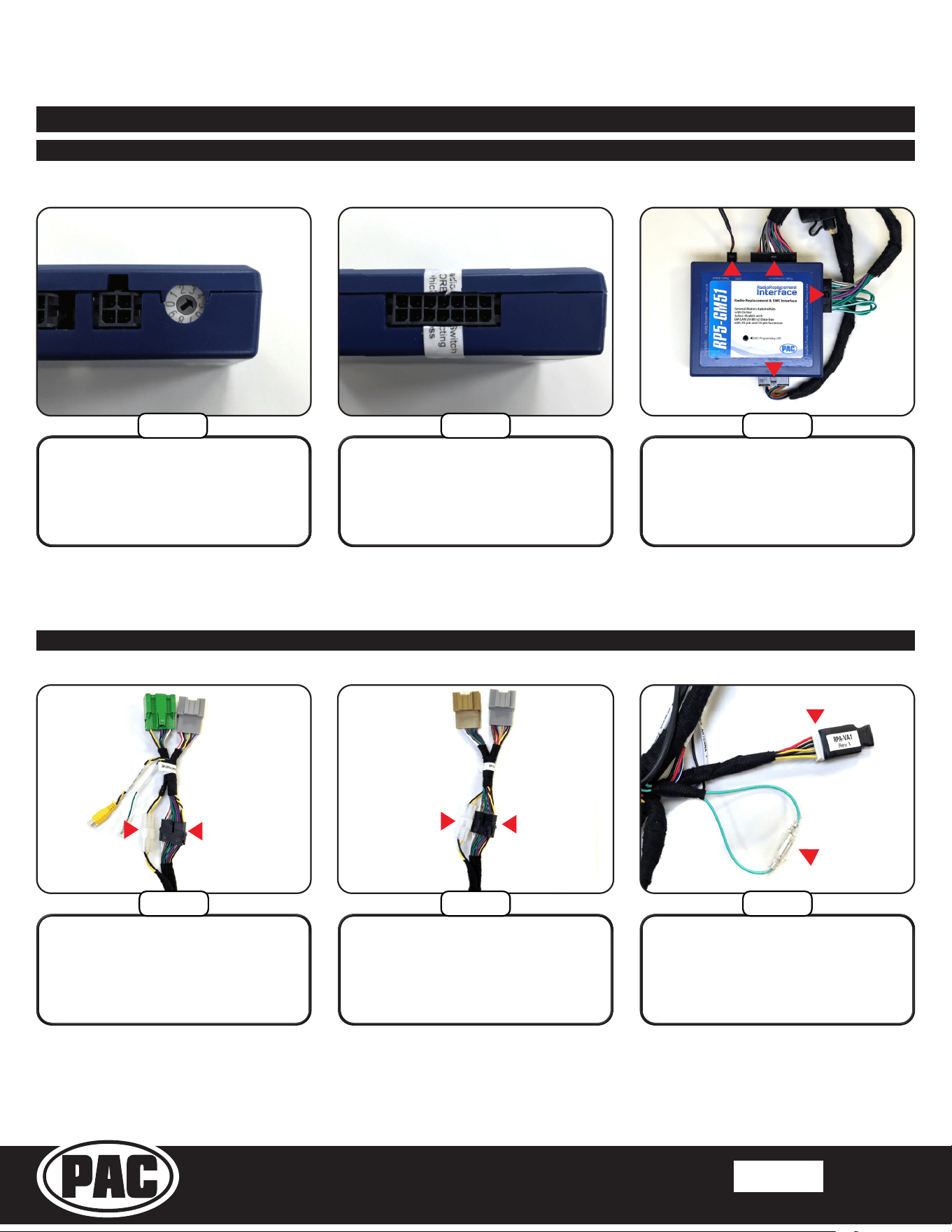
Connect the four connectors from
the Main Harness (SR-GM14H-
HAR-A) to the indicated ports on
the RP5-GM51 module.
Remove the warning sticker on
“Vehicle Connections” port on
the other side of the RP5-GM51
module.
Using a small at-blade
screwdriver or similar, set the
“Radio Select Dial” on the side of
the RP5-GM51 to Number 4.
1 2
3
4
x
x
Part Two: Main Harness Connections (SR-GM14H-HAR-A)
Plug the 6-pin lead on the Main
Harness into the Dierential
Video Adapter (RPA-VA1).
Connect the male and female ends
of the Light Green leads together.
For IOB radios, connect the white
2-pin and the black 18-pin of the
Vehicle Side Harness B (SR-
GM14H-HAR-B) to the Main
Harness.
For IO3, IO4, IO5 and IO6 radios,
connect the white 2-pin and the
black 18-pin of the Vehicle Side
Harness C (SR-GM14H-HAR-C)
to the Main Harness.
OR
Step 1 Step 2
Step 3
Step 4B
Step 5
Step 4A
Stinger HORIZON10
Radio Replacement Kit for select
2014-2019 Silverado/Sierra Trucks
SR-GM14HX
© 2024 Stinger. All rights reserved. PAC is a Power Brand of Stinger Solutions.
Pacific Accessory Corporation
Page 11
Rev: V1
Date: 090424
®
®
Part Two: Main Harness Connections (SR-GM14H-HAR-A) (Continued)
Section 3: Interface and Main Harness Connections and Preparation (Continued)
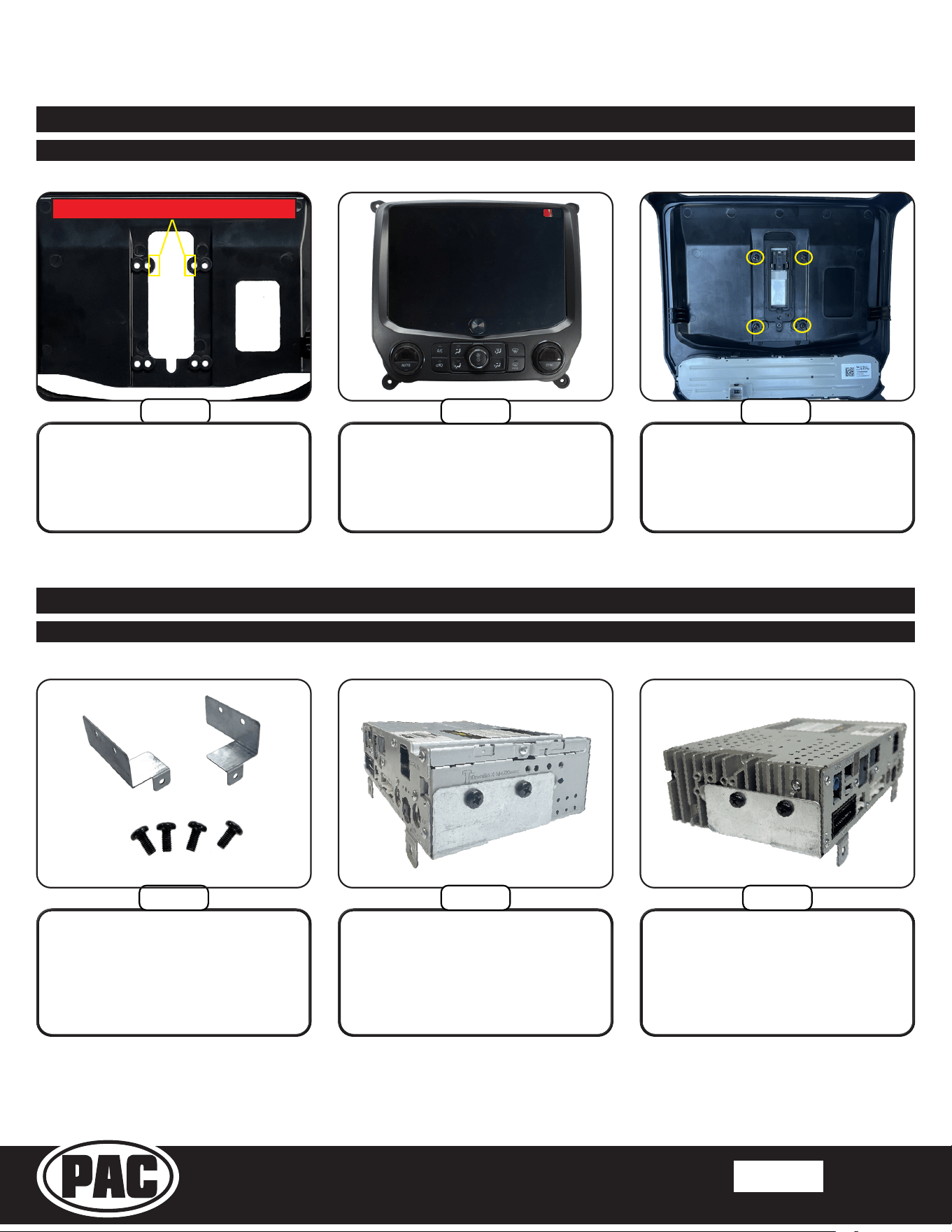
Connect the Chime Module
(CMX) to the 2 pin “CMX Chime”
connector on the Main Harness.
Connect the “AUX” RCAs from the
Main Harness to the “AUX IN”
RCAs on the HORIZON10’s 16 Pin
AV Harness (PSEH-2103). Connect
the “REVERSE CAM” RCA to the
“REVERSE CAMERA IN” RCA on
the 16 Pin AV Harness.
HORIZON10
16 Pin AV Harness
Section 4: Display Mounting Panel Preparation
Once all the clips are released,
remove the climate controls from
the factory bezel.
With the factory radio display /
climate control panel face down,
apply slight pressure to the front
of the controls while releasing the
locking tabs around the perimeter.
Align the controls in the
HORIZON10 Display Mounting
Panel and push to seat and lock
all the retaining clips.
Part One: Transferring the Climate Controls
Step 7
Step 6
Step 2Step 1 Step 3
Stinger HORIZON10
Radio Replacement Kit for select
2014-2019 Silverado/Sierra Trucks
SR-GM14HX
© 2024 Stinger. All rights reserved. PAC is a Power Brand of Stinger Solutions.
Pacific Accessory Corporation
Page 12
Rev: V1
Date: 090424
®
®
Section 4: Display Mounting Panel Preparation (Continued)
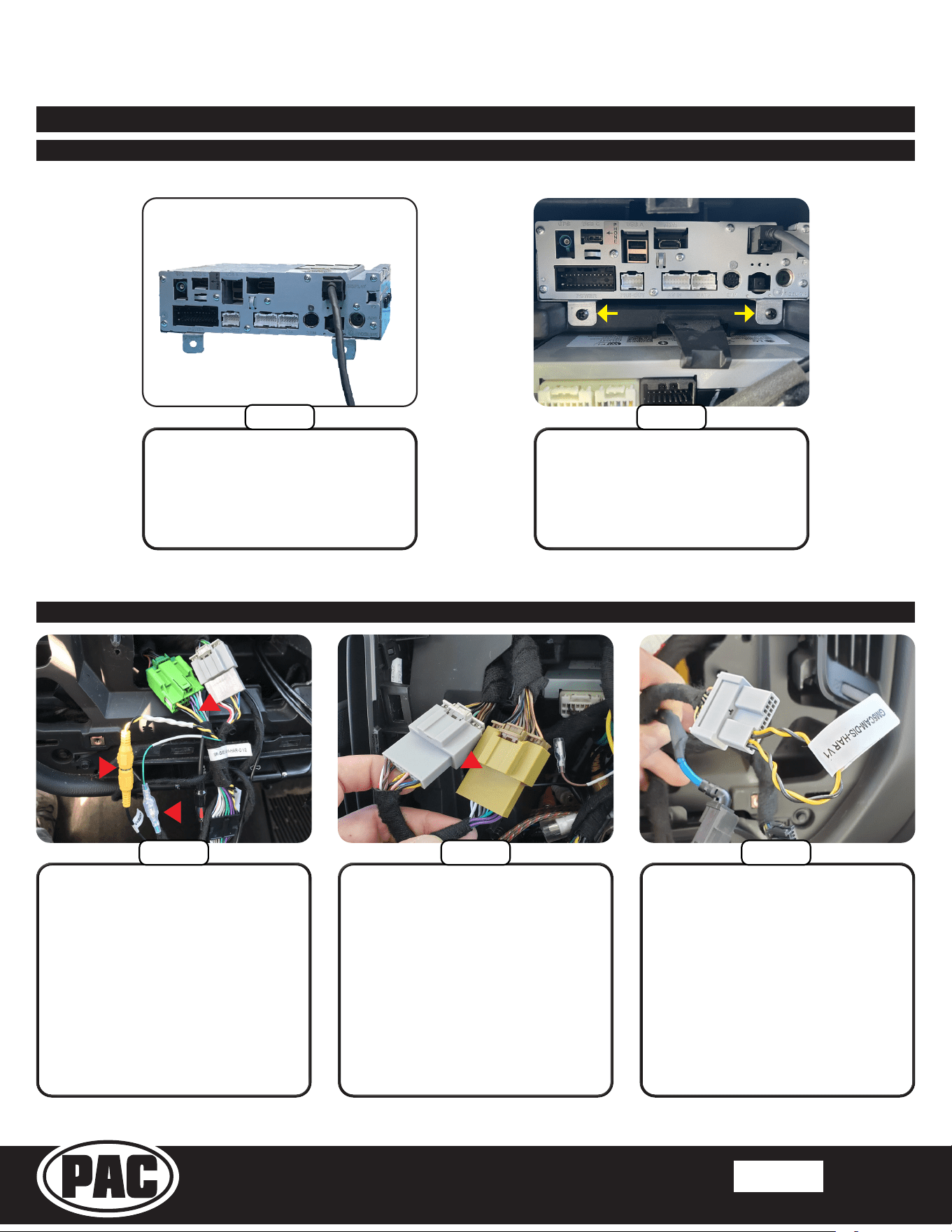
Attach the display to the panel
using four M4 x 12 screws.
Insert the Touch Panel Display
into the front of the Display
Mounting Panel and carefully
turn the panel over while holding
the display in place.
Part Two: Mounting the Display
Section 5: Radio Module Preparation
Part One: Radio Module Side Brackets
Using two M5x10 screws attach
one side bracket as shown
above.
Locate the two Side Mounting
Brackets and four M5x10 screws.
Using two M5x10 screws attach
the other side bracket as shown
above.
Step 2
Step 3
Step 2Step 1 Step 3
Step 1
Remove the indicated tabs in the
opening of the Display Mounting
Panel.
CUT OR BREAK OFF THESE TABS
Stinger HORIZON10
Radio Replacement Kit for select
2014-2019 Silverado/Sierra Trucks
SR-GM14HX
© 2024 Stinger. All rights reserved. PAC is a Power Brand of Stinger Solutions.
Pacific Accessory Corporation
Page 13
Rev: V1
Date: 090424
®
®
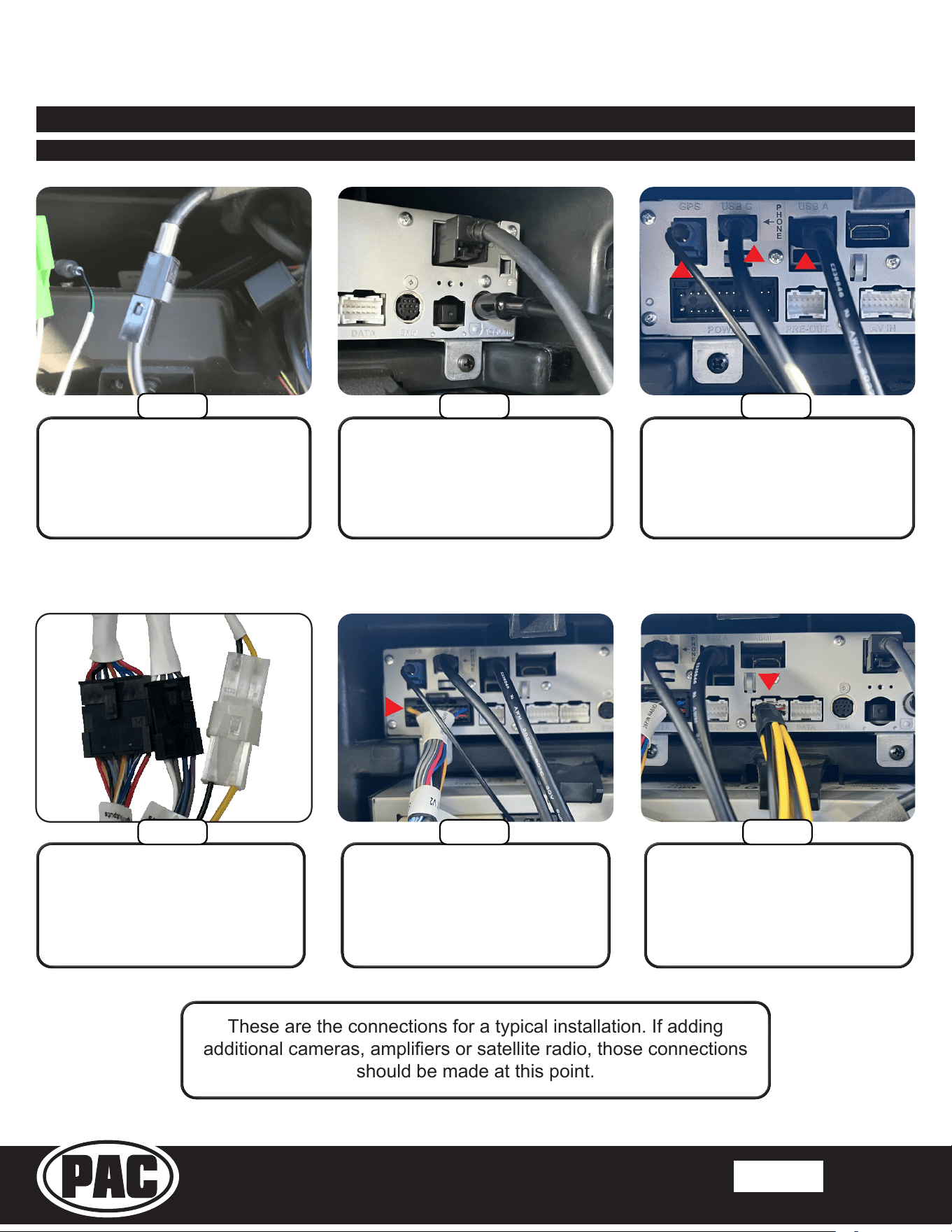
From the HORIZON10 box,
connect the LVDS Display
Cable (PSEH-2101) to the
“DISPLAY” port on the Radio
Module.
Inside the truck, slide the
HORIZON10 Radio Module into
the upper compartment until the
bracket tabs contact the sub dash.
Secure with supplied #8 x 1/2”
screws.
Section 6: Radio Unit Installation
Part One: Mounting the Radio Module
IO3, IO4, IO5, IO6: Connect the
Green and Gray SR-GM14H-
HAR-C (1) connectors to the
matching plugs in the vehicle.
IO4, IO5, IO6: If equipped,
connect the Yellow RCA from the
CAM-GM51 to the “CAM-GM51
INPUT” (2) and connect the wire
from the GM5LIN-SW-HAR to the
“SWC INPUT” (3).
IOB:
Connect the Mustard and
Gray SR-GM14H-HAR-B (1)
connectors to the matching plugs
in the vehicle.
Part Two: In-Vehicle Harness and Cabling Connections
1
1
3
2
OR
2018-19 IOB Only:
Plug the 20 pin harness that was
removed from the factory display
into the GM5CAM-DIS-HAR.
Step 2
Step 1
Step 1A
Step 1B Step 2
Stinger HORIZON10
Radio Replacement Kit for select
2014-2019 Silverado/Sierra Trucks
SR-GM14HX
© 2024 Stinger. All rights reserved. PAC is a Power Brand of Stinger Solutions.
Pacific Accessory Corporation
Page 14
Rev: V1
Date: 090424
®
®
Section 6: Radio Unit Installation (Continued)
Part Two: In-Vehicle Harness and Cabling Connections (Continued)
Connect the GPS Antenna (1) and
the two USB cables (2) to the Radio
Module. The USB-C will handle
Apple CarPlay and Android Auto
Connect the 16 Pin A/V Harness
(4) to the “AV IN” port on the
Radio Module.
Connect the AM/FM Antenna
Adapter (BAA22) to the black
factory antenna cable.
Plug the other end of the BAA22
into the HORIZON10’s “ANT” port.
From the SR-SRK-ADAPT-
IX2XX harness, connect the “26
PIN RADIO” (3) connector to
the “POWER” port on the Radio
Module. The PAC Link (PL1) 3 pin
connector is not used.
1
2
3
These are the connections for a typical installation. If adding
additional cameras, ampliers or satellite radio, those connections
should be made at this point.
Step 3
Step 5Step 4
Step 7 Step 8
Connect the 2 pin, 8 pin and 14
pin connectors from the Main
Harness Adapter (SR-SRK-
ADAPT-IX2XX) to the Main
Harness (SR-GM14H-HAR-A).
Step 6
2
4
Stinger HORIZON10
Radio Replacement Kit for select
2014-2019 Silverado/Sierra Trucks
SR-GM14HX
© 2024 Stinger. All rights reserved. PAC is a Power Brand of Stinger Solutions.
Pacific Accessory Corporation
Page 15
Rev: V1
Date: 090424
®
®
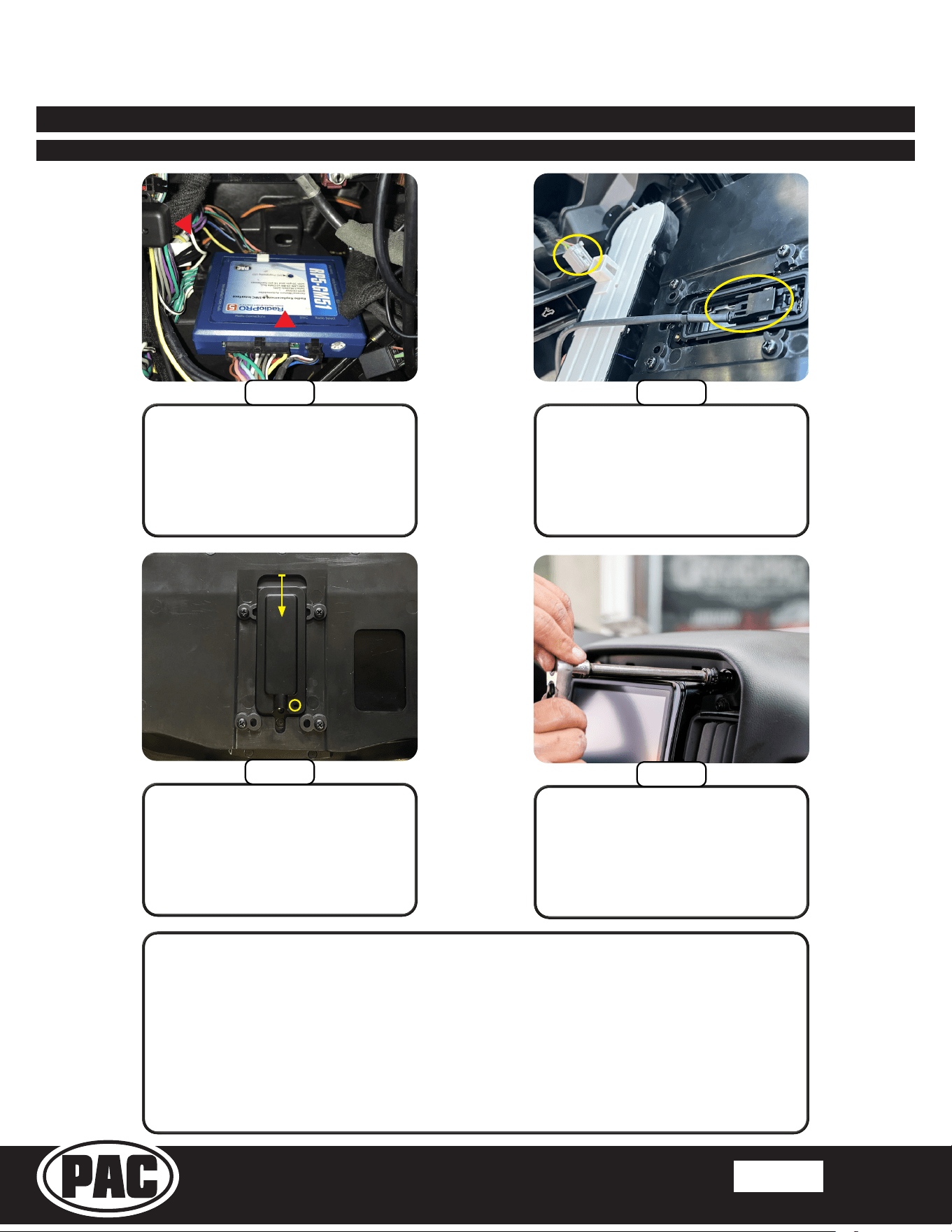
Zip tie the Chime Module (1)
in a suitable location. Use the
supplied two-sided tape to
secure the Radio Replacement
Interface (2) in the lower CD/
DVD cavity.
Plug the LVDS Display Cable
into the back of the Touch Panel
Display. Re-connect the factory
climate control connector to the
climate controls.
Place the LVDS Connector Rear
Cover in the top of the opening
on the back of the Touch Panel
Display. Push the cover down until
the screw hole opening is visible.
Insert the M2.6x6.5 screw to secure
the cover.
Before reassembly, it is recommended to power up the radio and check the
chime volume* and all other functionality...
Volume, Balance, Fade Steering Wheel Controls
AM/FM Reception Bluetooth
USB Apple Carplay
Android Auto Camera(s)
* The Chime Module has a 4 position volume selector on the side. Setting 1
being the loudest and 4 being the quietest.
Section 6: Radio Unit Installation (Continued)
Part Two: In-Vehicle Harness and Cabling Connections (Continued)
Step 10
Step 11
Step 9
2
1
Place the Display Mounting
Panel in place and temporarily
secure it with two 7mm screws.
Step 12

Stinger HORIZON10
Radio Replacement Kit for select
2014-2019 Silverado/Sierra Trucks
SR-GM14HX
© 2024 Stinger. All rights reserved. PAC is a Power Brand of Stinger Solutions.
Pacific Accessory Corporation
Page 16
Rev: V1
Date: 090424
®
®
Firmware Updates (RadioPRO)
The PAC RP5-GM51 interface can be updated with new rmware as it becomes available using the PAC-UP interface updater
(sold separately). Please visit www.PAC-audio.com/rmware for available updates.
Product Updates (Firmware)
Firmware Updates (Stinger Radio and PAC Application APK)
To update the HORIZON10 radio rmware and PAC Application APK rmware, refer to the HORIZON10 product page:
https://stingersolutions.com/products/stinger-horizon10-10in-radio
Email: [email protected]
Phone: 727-592-5991
Technical Support