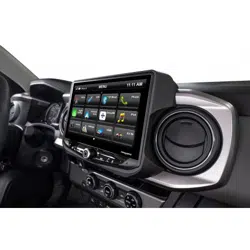
Stinger HORIZON10 Radio Replacement Kit
for 2016-2023 Toyota Tacoma
SR-TAC16HX
© 2024 Stinger. All rights reserved. PAC is a Power Brand of Stinger Solutions. PAC-audio.com
Pacific Accessory Corporation
Page 1
Rev: V2
Date:082224
®
®
Introduction and Features
Important Notes
The SR-TAC16HX is a complete radio replacement kit for the installation of the Stinger HORIZON10
®
modular radio in Toyota Tacoma
trucks equipped with either 6” or 7” factory display radios. All modules, cables and adapters are included to retain important features
of the factory system, including: steering wheel-mounted radio controls, factory amplier, factory reverse camera, factory USB port
and AM/FM reception. Plug & Play wiring harnesses allow for quick and easy installation without the need to cut or splice any wiring.
The display mounting panel allows mounting the 10 inch display without modifying/cutting any part of the vehicle’s sub-dash.
1. Adjustment of the vehicle settings through the original radio’s vehicle settings menu will be disabled after installation of the new
radio. It is advised to make sure all settings are as you desire prior to removal of the original radio.
2. The RP4.2-TY11 does not retain Rear Seat Entertainment.
3. To retain SiriusXM Radio, a SXV300 Tuner is required and sold separately.
4. After installation, if you do not initially hear any audio, you may need to cycle the ignition again to initialize the factory amplier.
5. Speaker fading on factory amplied systems is only supported with the “amplied output” connection of the RP4.2-TY11.
6. When using real time fade, if the fader setting is biased more to the front or rear, as the radio turns on the sound may begin at
the default setting and then quickly transition to your custom setting.
7. Radio features such as High Pass Filters (crossovers) will interfere with proper fader function. In order for the RP4.2-TY11’s
fader function to work, the audio from the radio’s output must match so it can compare the front and rear audio levels and
determine the proper fader setting for the factory amplier.
8. If the truck is equipped with a factory 360° camera system, changing camera views using the touch screen will no longer be
available. Camera views can be changed using the steering wheel controls only.
9. For the HORIZON10 Display to be waterproof, you must install 6 waterproof plugs to the back of the touch panel display in the
screw holes not used for mounting.
We recommend reading this manual thoroughly to familiarize yourself
with the entire process prior to beginning the installation.
Recommended Tools
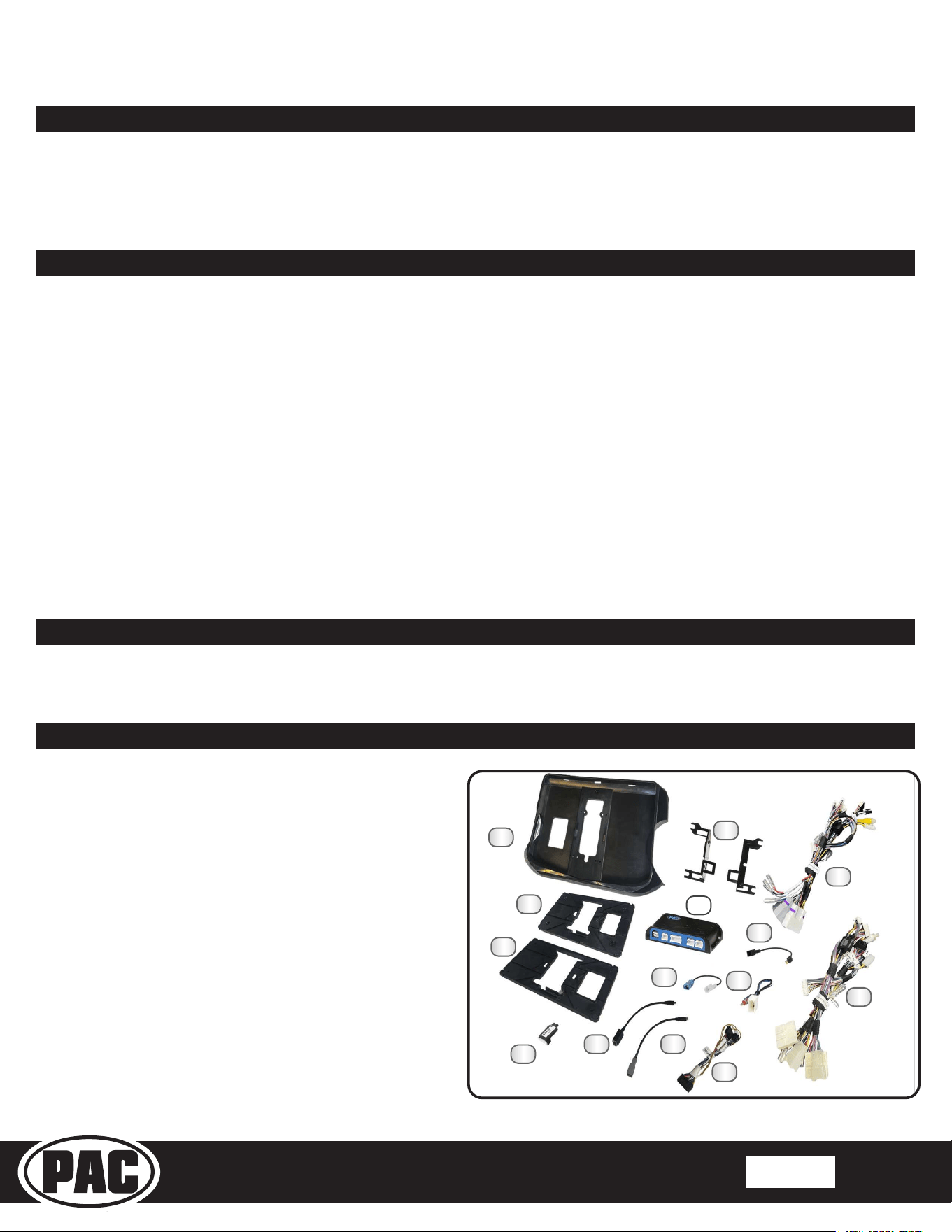
1. HORIZON10 Display Mounting Panel
2. Side Brackets (TOYK971/974)
3. Main Harness 2019-2021 (SR-TAC19H-HAR)
4. 6” Mounting Plate (TAC16H-6)
5. Radio Replacement Interface Module (RP4.2-TY11)
6. Satellite Radio Antenna Adapter (SAT-02)
7. Main Harness 2016-2018 (SR-TAC16H-HAR)
8. 7” Mounting Plate (TAC16H-7)
9. GPS Antenna Adapter (SR-GPS-TY01)
10. AM/FM Antenna Adapter (SR-BAA44)
11. Dierential Video Adapter (RPA-VA1)
12. USB Adapter (USBC-TY1)
13. USB Adapter (USBC-TY3)
14. Main Harness Adapter (SR-SRK-ADAPT-IX2XX)
Included Components
1
4
6
10
8
5
2
11
3
7
9
12 13
10mm Socket
Ratchet
Phillips Screwdriver
Flush Cutters
Painters Tape
NOTE: Along with the SR-TAC16HX components,
additional hardware and wire harnesses from the
HORIZON10 (ix210) kit will also be used in the
installation. Refer to the ix210 Installation Guide for
harness and hardware descriptions.
Included double-sided tape, zip ties and M4 x 12 Zinc Screws (6x) not shown.
14
Stinger HORIZON10 Radio Replacement Kit
for 2016-2023 Toyota Tacoma
SR-TAC16HX
© 2024 Stinger. All rights reserved. PAC is a Power Brand of Stinger Solutions. PAC-audio.com
Pacific Accessory Corporation
Page 2
Rev: V2
Date:082224
®
®
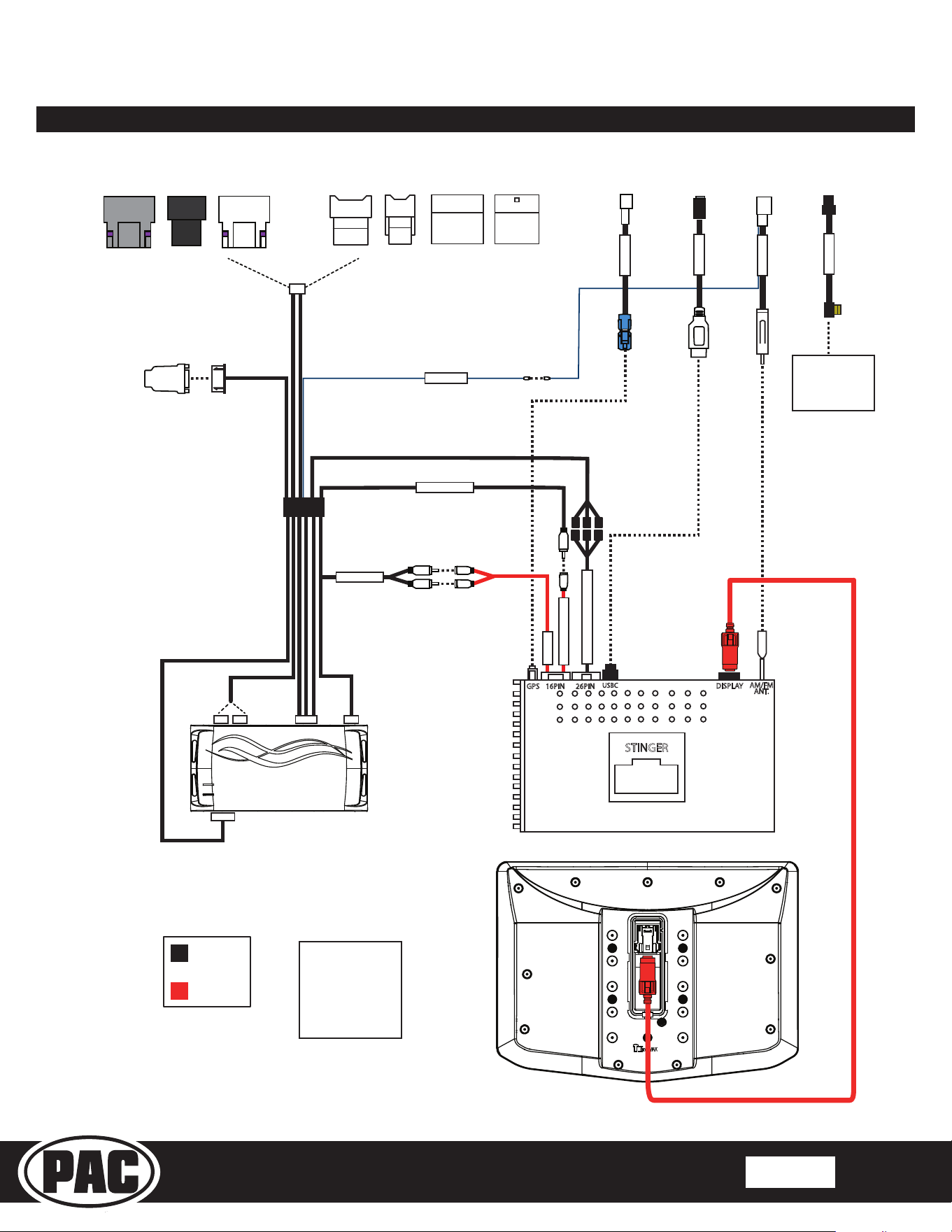
Wiring Overview
USBC
STINGER
DISPLAY
16PIN 26PINGPS
AM/FM
ANT.
Stinger
Connection
Main Harness
Connection
Connections shown are
all required for full
functionality of the kit
and radio. If adding
additional components,
additional connections
will be needed.
Connects to
SXV300 Satellite
Radio Tuner
(sold separately)
REVERSE CAM IN
RPA-VA1
OEM CAMERA
PWR ANT
OR
AUX IN
AUX AUDIO
*Only applicable to
SR-TAC16H-HAR
SR-SRK-ADAPT-IX2XX
GPS-TY01
USBC-TY-
SR-BAA44
SAT-02
SR-TAC16H-HAR
VEHICLE CONNECTORS
SR-TAC19H-HAR
VEHICLE CONNECTORS
Stinger HORIZON10 Radio Replacement Kit
for 2016-2023 Toyota Tacoma
SR-TAC16HX
© 2024 Stinger. All rights reserved. PAC is a Power Brand of Stinger Solutions. PAC-audio.com
Pacific Accessory Corporation
Page 3
Rev: V2
Date:082224
®
®
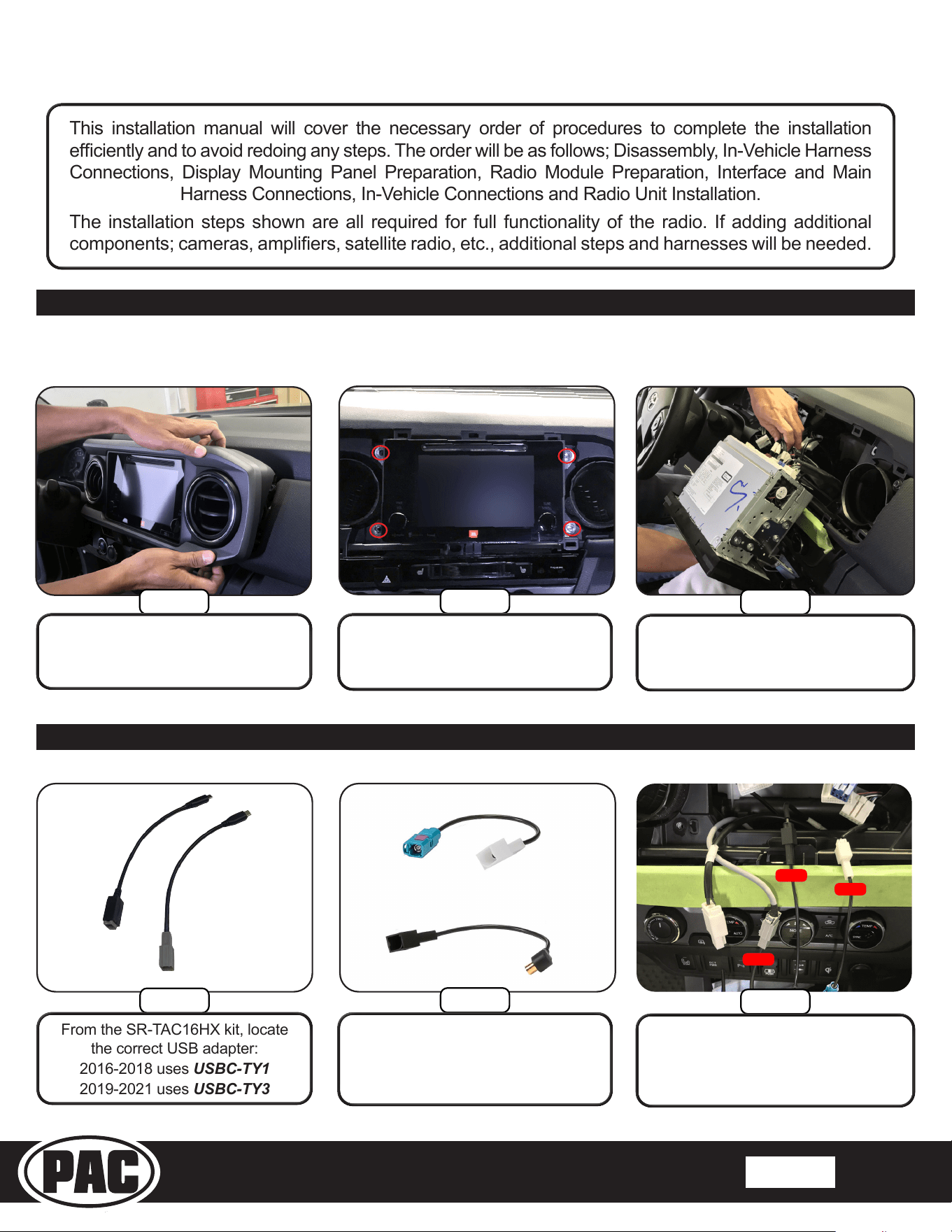
Section 1: Disassembly
Section 2: In-Vehicle Harness Connections
This installation manual will cover the necessary order of procedures to complete the installation
efciently and to avoid redoing any steps. The order will be as follows; Disassembly, In-Vehicle Harness
Connections, Display Mounting Panel Preparation, Radio Module Preparation, Interface and Main
Harness Connections, In-Vehicle Connections and Radio Unit Installation.
The installation steps shown are all required for full functionality of the radio. If adding additional
components; cameras, ampliers, satellite radio, etc., additional steps and harnesses will be needed.
Before removing the factory radio, ensure that all vehicle settings that are
programmed using the factory radio are set to the desired settings.
Step 3
Step 2
Step 1
Remove all connectors and cables
from the back of the radio.
Remove the four 10mm bolts
securing the radio. Remove the
radio from the sub-dash.
Using your hands or soft tool, pull
and remove the radio trim and air
vent panel.
Step 3
Step 2
Step 1
Connect the adapters to the matching
colored connectors removed from the
factory radio.
From the SR-TAC16HX kit, locate
the correct USB adapter:
2016-2018 uses USBC-TY1
2019-2021 uses USBC-TY3
From the SR-TAC16HX kit, locate
the GPS Antenna Adapter and
Satellite Radio Antenna Adapter
if installing a SXM tuner.
USB
GPS
SXM
GPS-TY01
USBC-TY1
USBC-TY3
SAT-02
OR
Stinger HORIZON10 Radio Replacement Kit
for 2016-2023 Toyota Tacoma
SR-TAC16HX
© 2024 Stinger. All rights reserved. PAC is a Power Brand of Stinger Solutions. PAC-audio.com
Pacific Accessory Corporation
Page 4
Rev: V2
Date:082224
®
®
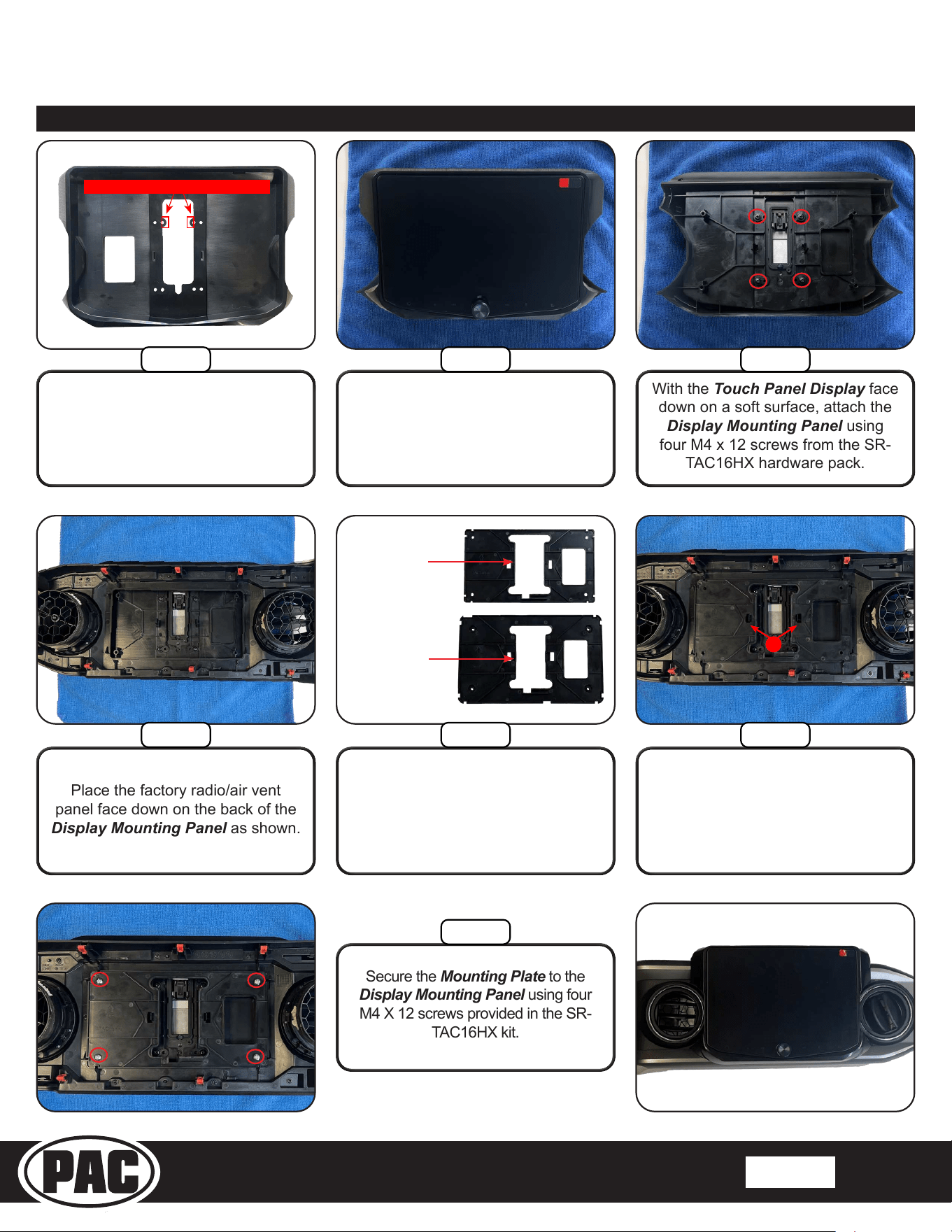
Section 3: Display Mounting Panel Preparation
With the Touch Panel Display face
down on a soft surface, attach the
Display Mounting Panel using
four M4 x 12 screws from the SR-
TAC16HX hardware pack.
TAC16H-6
TAC16H-7
1
Place the HORIZON10 Touch
Panel Display into the Display
Mounting Panel. Carefully turn
the panel over while holding the
display in place.
Place the factory radio/air vent
panel face down on the back of the
Display Mounting Panel as shown.
With the arrow pointing up, align the
Mounting Plate to the locking clips (1)
and push down until both clips engage.
Move the panel side-to-side to ensure
the mounting panel is centered.
Secure the Mounting Plate to the
Display Mounting Panel using four
M4 X 12 screws provided in the SR-
TAC16HX kit.
From the SR-TAC16HX kit,
choose the appropriate Mounting
Plate. TAC16H-6 is used when
replacing a 6” factory display and
TAC16H-7 is used when replacing a
7” factory display radio.
Cut or break off these tabs
Remove the tabs in the middle
opening of the Display Mounting
Panel.
Step 2Step 1
Step 3
Step 4 Step 5 Step 6
Step 7
Stinger HORIZON10 Radio Replacement Kit
for 2016-2023 Toyota Tacoma
SR-TAC16HX
© 2024 Stinger. All rights reserved. PAC is a Power Brand of Stinger Solutions. PAC-audio.com
Pacific Accessory Corporation
Page 5
Rev: V2
Date:082224
®
®
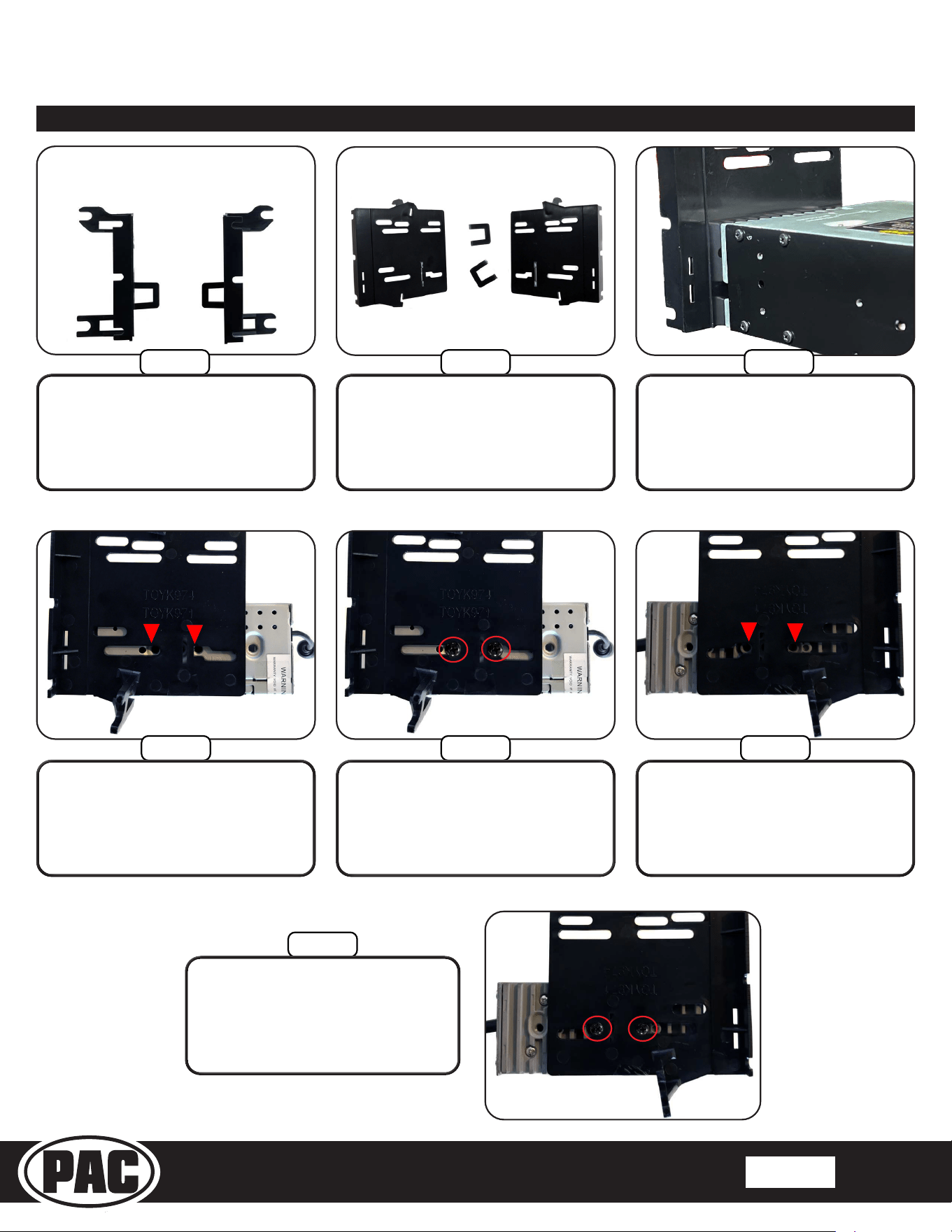
Section 4: Radio Module Preparation
Step 7
Secure the left side bracket using
two M5 x 10 screws from the
HORIZON10 hardware.
Left Bracket
Top
Right Bracket
Top
Step 3Step 2Step 1
The HORIZON10 Radio Module will
be mounted using the lower slots on
the Side Brackets. The Radio Module
will be inverted and set back ¾”.
Locate the Side Brackets
(TOYK971/974) included in the
SR-TAC16HX kit and four M5 X
10 screws from the HORIZON10
hardware.
Remove the tabs located on the
inside of the left and right Side
Brackets.
Step 6Step 5Step 4
Position the right side bracket as
shown and align the bracket to
the mounting holes indicated.
Position the left side bracket as
shown and align the bracket to
the mounting holes indicated.
Secure the right side bracket
using two M5 x 10 screws from
the HORIZON10 hardware.
Stinger HORIZON10 Radio Replacement Kit
for 2016-2023 Toyota Tacoma
SR-TAC16HX
© 2024 Stinger. All rights reserved. PAC is a Power Brand of Stinger Solutions. PAC-audio.com
Pacific Accessory Corporation
Page 6
Rev: V2
Date:082224
®
®
Section 5: Interface and Main Harness Connections
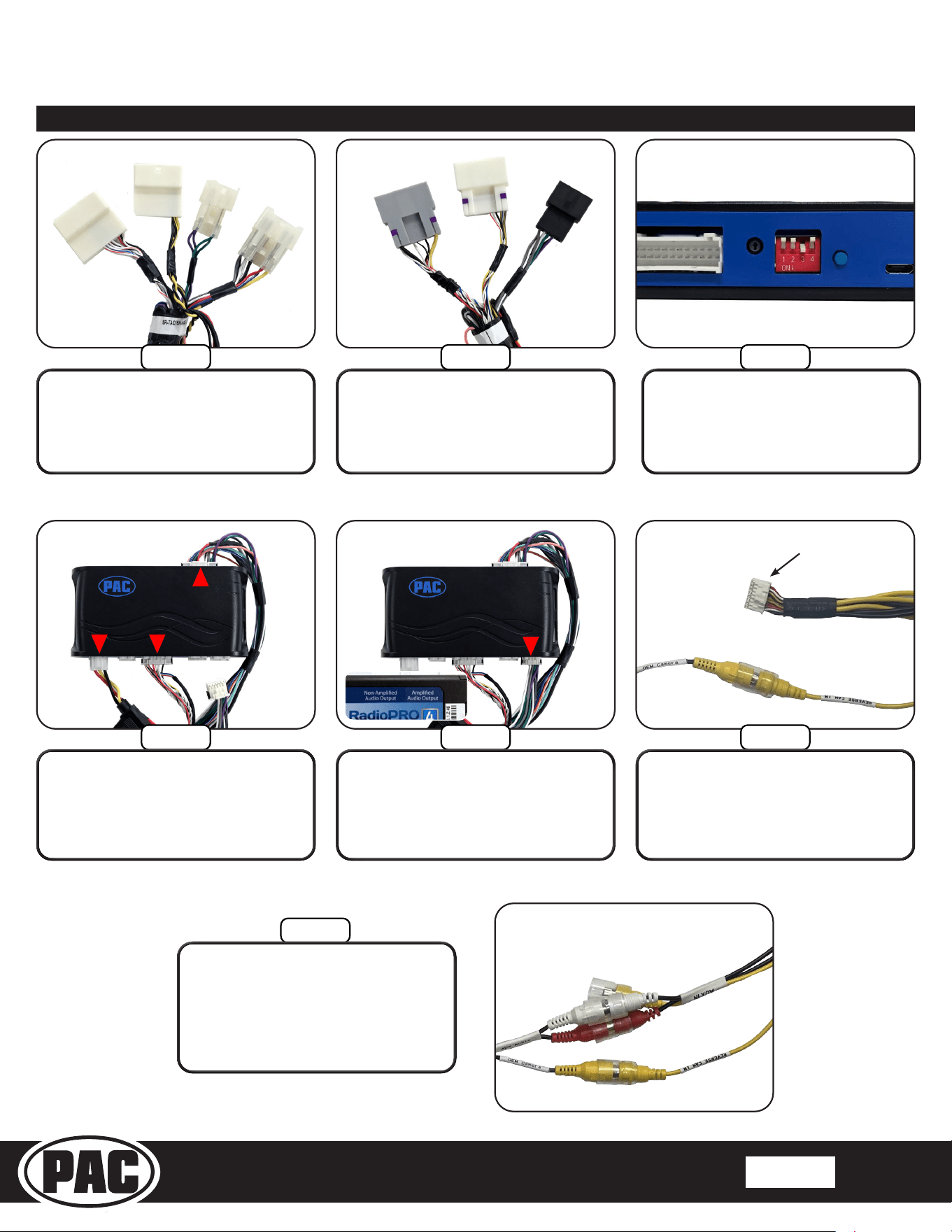
For 2019-2023 Tacoma, the
SR-TAC19H-HAR (3-Plug) Main
Harness will be used.
Step
1A
Step
1B
For 2016-2018 Tacoma, the
SR-TAC16H-HAR (4-Plug) Main
Harness will be used.
Step 2
Set dip switch #3 to the down (ON)
position on the side of the Radio
Replacement Interface Module
(RP4.2-TY11).
Step 3
Plug in the 3-pin (1), 20-pin (2) and
the 24-pin (3) plugs on the Main
Harness to the appropriate ports on
the RP4.2-TY11.
Step 4
Referencing the sticker on the
back, connect the 12-pin connector (4)
to the appropriate port. Amplied
if the truck has a factory amplier,
Non-Amplied for base audio.
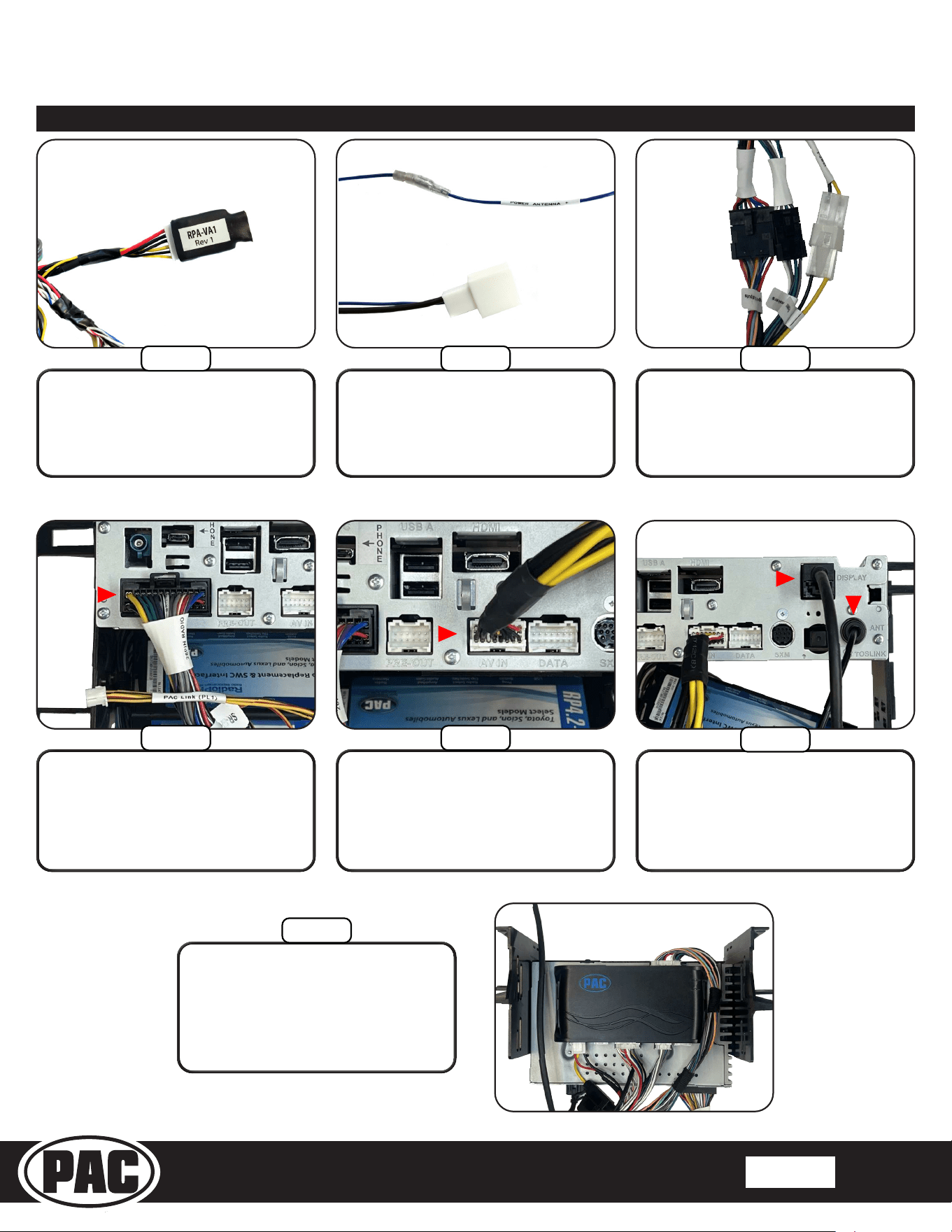
Step 5
Step 6
Connect the “OEM Camera” RCA on
the Main Harness to the “Reverse
Cam In” RCA on the HORIZON10’s
16 Pin AV Harness (PSEH-2103).
For 2016-2018 Tacoma, connect
the pair of RCA’s labeled “AUX
Audio” from the Main Harness
(SR-TAC16H-HAR) to the “AUX IN”
RCA’s on the HORIZON10’s 16 Pin
AV Harness.
1 2
4
3
HORIZON10 16-pin
AV harness
OR
Stinger HORIZON10 Radio Replacement Kit
for 2016-2023 Toyota Tacoma
SR-TAC16HX
© 2024 Stinger. All rights reserved. PAC is a Power Brand of Stinger Solutions. PAC-audio.com
Pacific Accessory Corporation
Page 7
Rev: V2
Date:082224
®
®
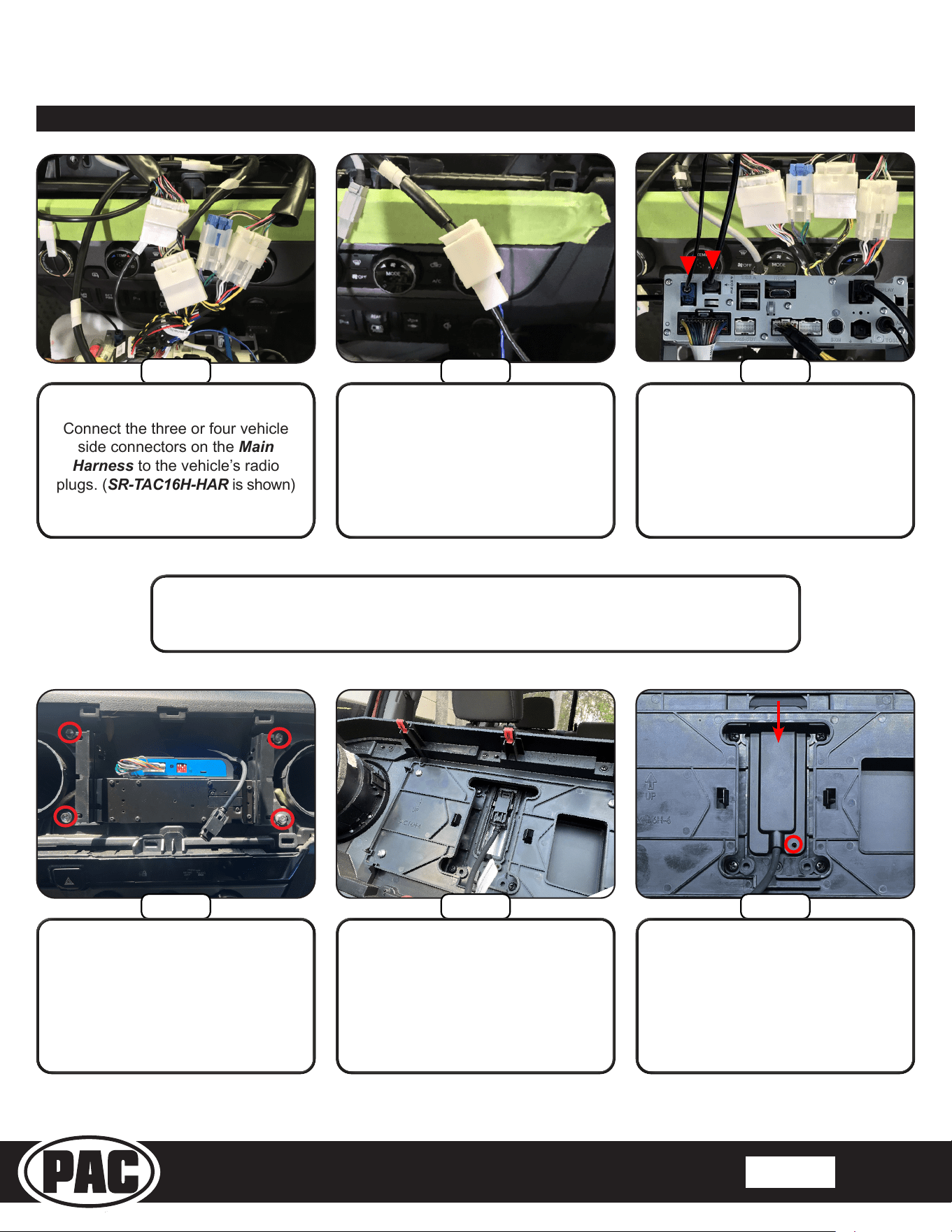
Step 9
From the SR-TAC16HX kit, connect the
Dierential Video Adapter (RPA-VA1)
to the 6-pin plug on the Main Harness.
Step 8
Step 11
Connect the blue wire on the AM/
FM Antenna Adapter (BAA44) to
the blue “POWER ANTENNA +” lead
on the Main Harness.
Connect the AM/FM Antenna to
the “ANT” input (3) on the Radio
Module. Connect the LVDS Display
Cable (PSEH-2101) into the
“DISPLAY” connection (4) on the
Radio Module.
Section 5: Interface and Main Harness Connections (Continued)
3
4
Using the supplied two-sided tape,
mount the Radio Interface (RP4.2-
TY11) to the top of the Radio
Module. Position the interface so
that it does not cover the vent holes.
Step 13
Step 7
Step 10
Step 12
Connect the Radio Harness Adapter
(SR-SRK-ADAPT-IX2XX) to the Main
Harness (from step 1).
2
1
Insert the Radio Harness Adapter
26 pin connector into the “Power”
connector (1) on the HORIZON10
Radio Module. The “PAC-LINK (PL1)”
3 pin connector will not be used.
Connect the 16 Pin A/V Harness
(PSEH-2103) (2) to the “AV IN”
connection on the back of the
HORIZON10 Radio Module.
Stinger HORIZON10 Radio Replacement Kit
for 2016-2023 Toyota Tacoma
SR-TAC16HX
© 2024 Stinger. All rights reserved. PAC is a Power Brand of Stinger Solutions. PAC-audio.com
Pacific Accessory Corporation
Page 8
Rev: V2
Date:082224
®
®
Section 6: In-Vehicle Connections and Radio Unit Installation
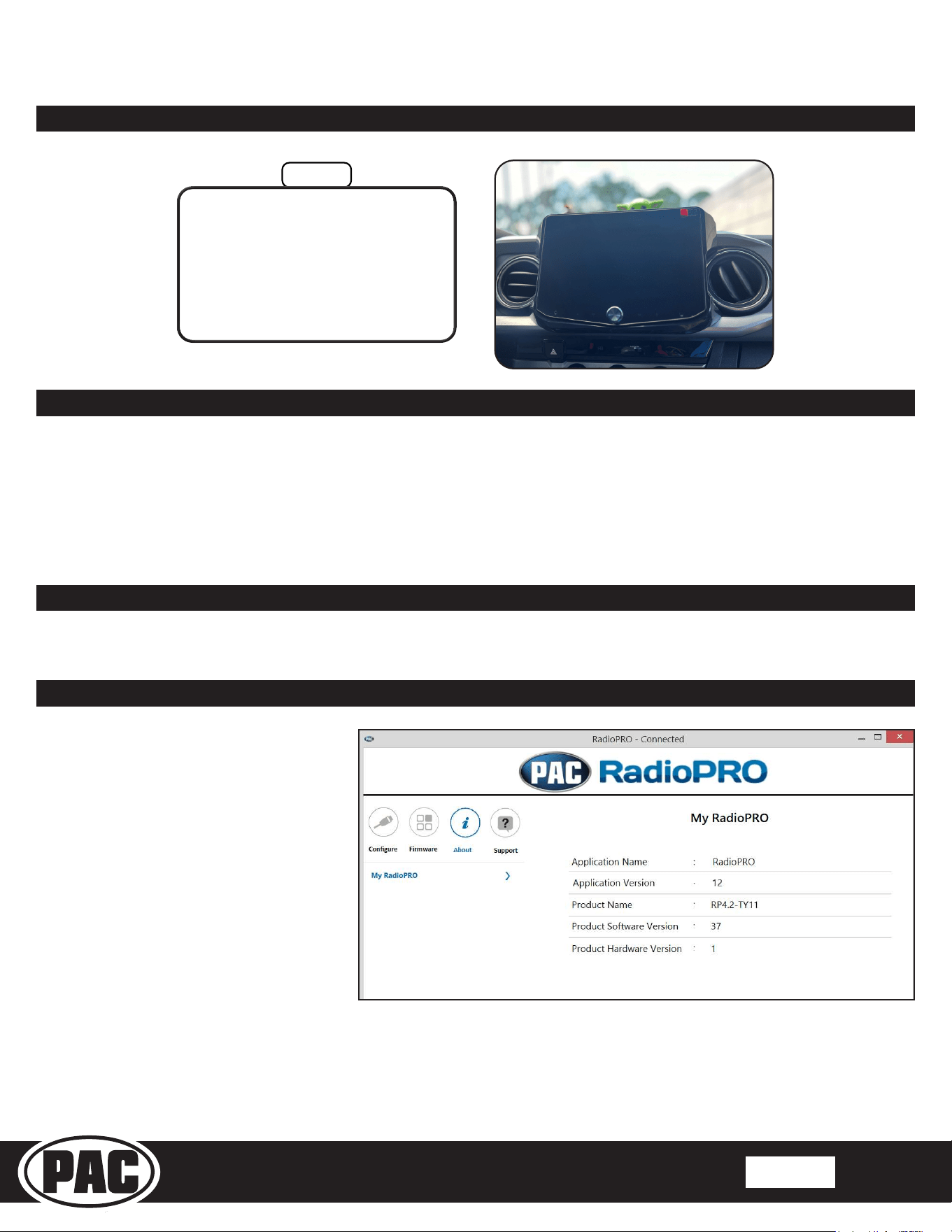
Step 2
Connect the AM/FM Antenna
Adapter (SR-BAA44) to the
vehicle’s antenna connector.
Step 1
Step 4
Connect the three or four vehicle
side connectors on the Main
Harness to the vehicle’s radio
plugs. (SR-TAC16H-HAR is shown)
These are the connections for the basic installation. If adding additional components
such as a second USB, SXM tuner or additional cameras, those connections should be
made at this point, before mounting the radio module.
With the display cable routed over
the top of the radio assembly, slide
the assembly into position and re-
install the four factory 10mm bolts.
Step 3
Step 5
Connect the GPS Antenna (1) to
the “GPS” input. Connect the USB
Adapter (2) to the USB-C input.
Connect the LVDS Display Cable
into the back of the Touch Panel
Display.
1
2
Step 6
Place the LVDS Connector Rear
Cover in the top of the opening
on the back of the Touch Panel
Display. Push the cover down until
the screw hole opening is visible.
Insert the M2.6x6.5 screw to secure
the cover.
Stinger HORIZON10 Radio Replacement Kit
for 2016-2023 Toyota Tacoma
SR-TAC16HX
© 2024 Stinger. All rights reserved. PAC is a Power Brand of Stinger Solutions. PAC-audio.com
Pacific Accessory Corporation
Page 9
Rev: V2
Date:082224
®
®
Testing and Verication
RadioPRO App
Use of the RadioPRO App allows
you to do the following:
• Congure User Interface Options such
as:
• Aftermarket radio Parking Brake
Sequencing
• Factory amplier settings (Bass,
Mid, Treble, Gain, Fader and
Balance)
• Real Time Fading
• Update Product Firmware
• Read Firmware/Hardware Versions
• Access Product User Manuals
PLEASE NOTE:
The interface must be connected to the vehicle when using the following features of the Radio PRO App:
• Factory Amplier Settings
The interface does not need to be connected to the vehicle when using the following features of the Radio PRO App:
• Firmware Updates
• Reading rmware/hardware versions
1. Turn on the radio and check volume, balance and fade. If you do not hear any audio you may need to cycle the ignition to
initialize the factory amplier. If there is still no audio, reset the interface according to the procedure in the next section.
2. For JBL systems, if the overall volume is too low, use the gain adjustment on the side of the RP4.2 interface to set it to the
desired level. The best way to do this is to turn the volume on the radio to 3/4 volume, then turn the gain on the RP4.2 until
some distortion is heard, then back it down a little.
3. Verify that all SWC are functioning properly. If any of the SWC are not functioning properly you may need to reset the
interface.
4. Verify AM/FM Reception, Bluetooth, USB, Apple Carplay, Android Auto and Camera(s) are functioning correctly.
Firmware Updates (Stinger HORIZON10)
To update the Stinger radio rmware, refer to the HORIZON10 product page at:
stingersolutions.com/products/stinger-horizon10-10in-radio
Step 7
Re-install the factory radio/air vent
panel by aligning the retaining
clips and pushing until all the clips
engage.
Section 6: In-Vehicle Connections and Radio Unit Installation (continued)
Stinger HORIZON10 Radio Replacement Kit
for 2016-2023 Toyota Tacoma
SR-TAC16HX
© 2024 Stinger. All rights reserved. PAC is a Power Brand of Stinger Solutions. PAC-audio.com
Pacific Accessory Corporation
Page 10
Rev: V2
Date:082224
®
®
Infotainment/Factory Amplier Settings
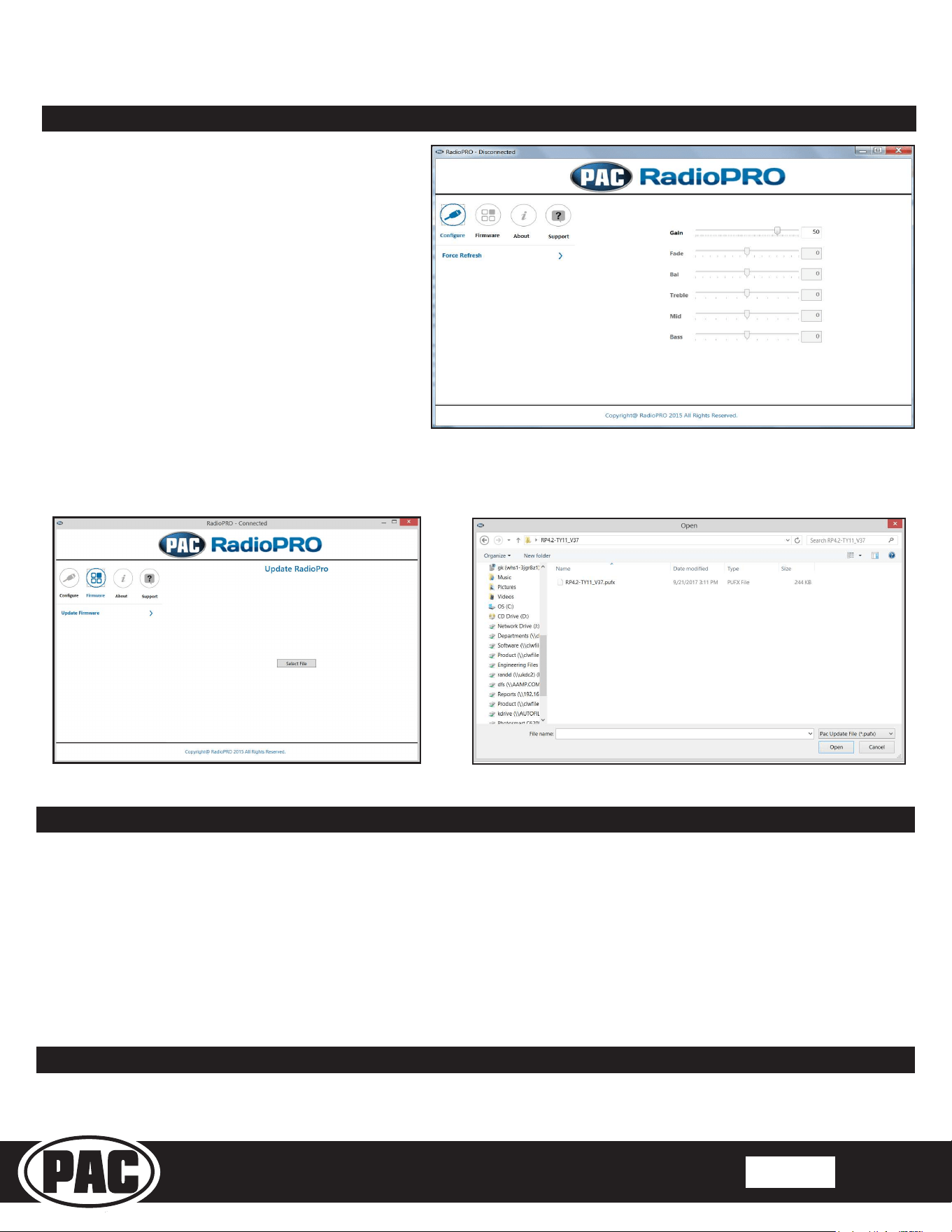
The RadioPRO app will also allow you to adjust the
settings of the factory amplier. You can adjust Amp
Gain, Fader, Balance, Bass, Mid and Treble and real
time fade. When real time fade is enabled in amplied
systems, it will allow fading to be controlled directly
from the aftermarket radio. Restoring factory settings
on the module will default all values back to middle.
RadioPRO App (continued)
Firmware Updates
The RadioPRO app will also allow you to update the
interface with new rmware as it becomes available.
Please visit www.pac-audio.com or contact our tech
support department to see if there is a rmware update
for your interface.
In order to update the interface all DIP switches must be set to the down position. Connect the interface to your PC and select
“Update Firmware”. Now select “Select File”. Finally, browse to the place where you saved the le and select it. This will begin
the updating process. Once nished, disconnect the interface from the PC and set the DIP switches back according to the radio
you have installed.
Technical Support
Email: [email protected]
Phone: 727-592-5991
Restoring Factory Settings
You can restore the RP4.2-TY11 interface to factory default settings by pressing and holding the programming button on the side
of the module until the status LED starts blinking red. Once the LED starts blinking red, release the button. You must release the
button while the LED is blinking red in order to perform the reset. Please note, the LED will go through two stages before it starts
blinking red. First it will blink green, then amber, then red.
This reset will restore the following settings to their factory defaults:
• SWC Mapping
• Parking Brake Output Settings
• Factory Amplier Settings
• Real Time Fade will be reset to on