USER MANUAL
Please keep this manual properly for
reference. You can also scan the QR code
below to visit our official website for
product usage videos. For any usage issues,
please feel free to contact us at
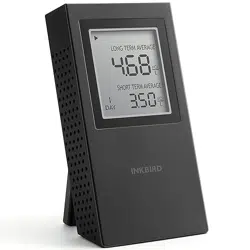
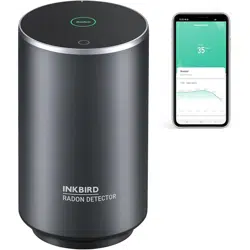
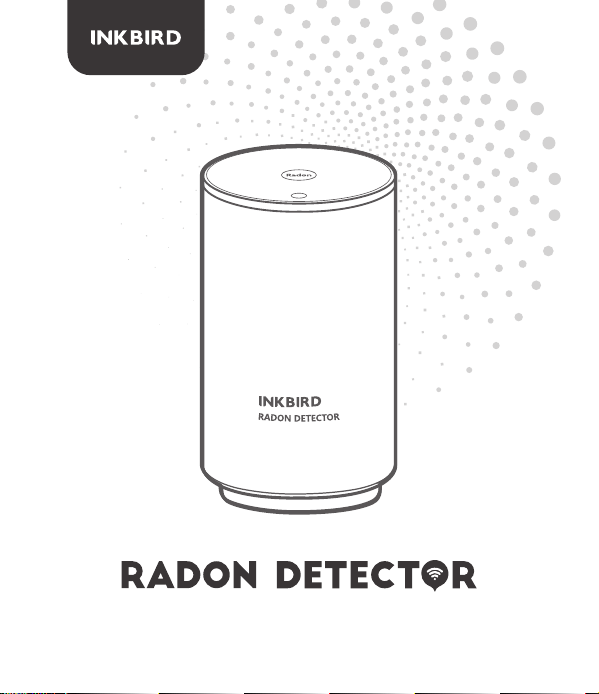
This innovative radon monitor integrates the latest high-precision radon
sensor, is combined with a friendly and stable WiFi APP, and provides a
simple, fast, highly accurate, and affordable solution for continuous
radon monitoring.
Overview 1
Technical Specifications2
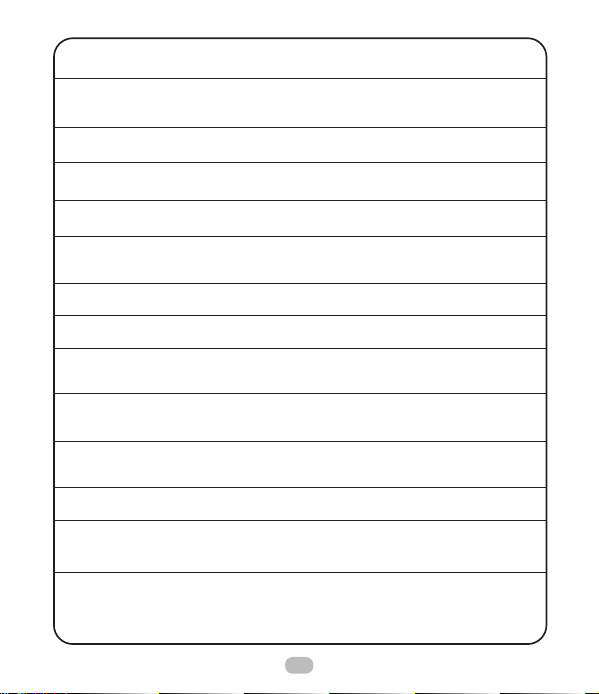
Product Name
Model Number
Item Number
Sensor Type
Radon Detector
RN-PRO300
INK-RD2
Pulsed ion chamber
1
First Radon Result
First Highly Reliable
Radon Result
Radon Date Update Interval
Radon Count Sensitivity
Measurement Range
Range of Measurement
Errors
Connectivity
Radon Alarm
Radon Level Visual
indicator
Power Consumption
Working Environment
Product Size & Weight
Package Size & Weight
Package Including
About 10 min
Within 1 hour
10 min
30CPH (1hour / 1pCi/L)
0.2 ~ 99.9 pCi/L (1~3700 Bq/m³)
< 10% at 10 pCi/L (370 Bq/m³)
after 10 hours
2.4GHz Wi-Fi
Audible alerts & Visual indicator
3-Color Led (red, orange, green)
DC 12 + 0.1V; 65mA
(12V DC adapter)
Temperature 32~104°F (0~ 40°C);
Humidity < 80% RH
80 mm X 140 mm , 380g
100 mm X 100 mm X 190 mm,
450g
1 x Radon Monitor
1 x Power Adapter
1 x User Manual
2
This innovative radon monitor integrates the latest high-precision radon
sensor, is combined with a friendly and stable WiFi APP, and provides a
simple, fast, highly accurate, and affordable solution for continuous
radon monitoring.
Product Description3
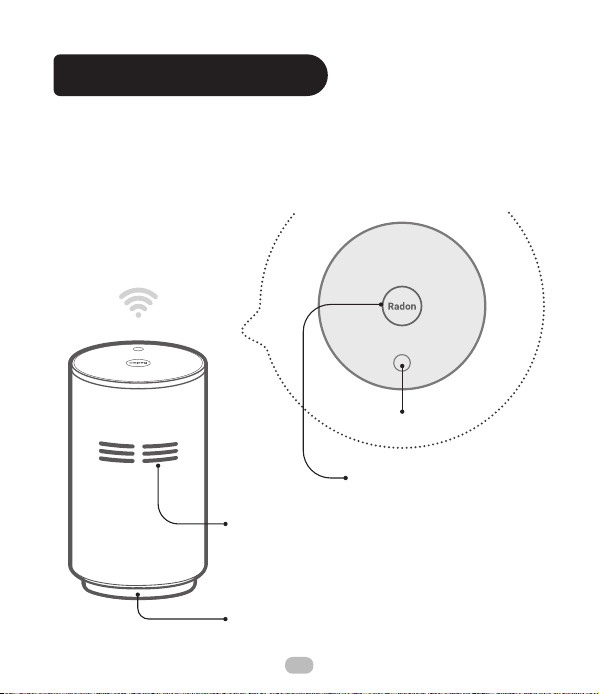
Air inlets
Rest button
Visual indicator
Green:<alarm threshold
Red: ≥alarm threshold
DC port
3
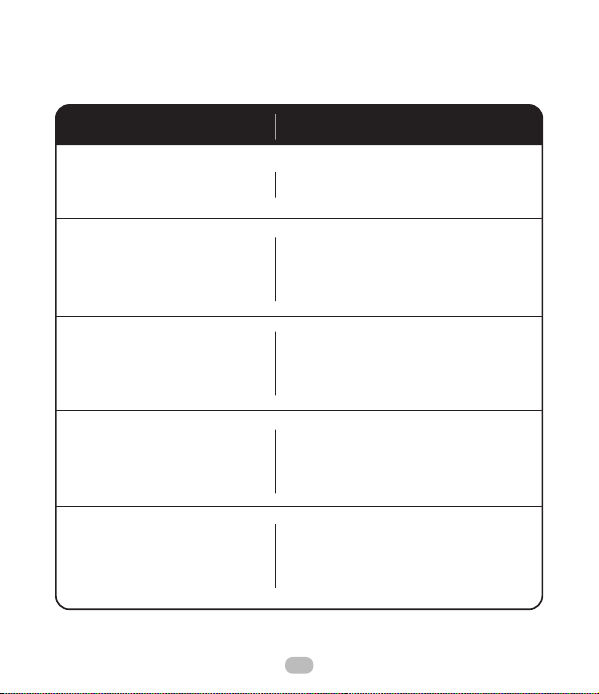
LED Light Color Guide
LED Status Monitor Status
Flashing Green quickly
The device is powered on.
It's in the paring state, waiting
for the smartphone and
wireless router.
The WiFi connection is
successful and the device is
working fine.
The current network signal is
weak and needs to be restored
or paired again.
It is detected that the current
radon level exceeds the threshold,
which can be set on the App.
Flashing Red slowly
Always on Green
Flashing Orange
Flashing Red with
audio alarm
4
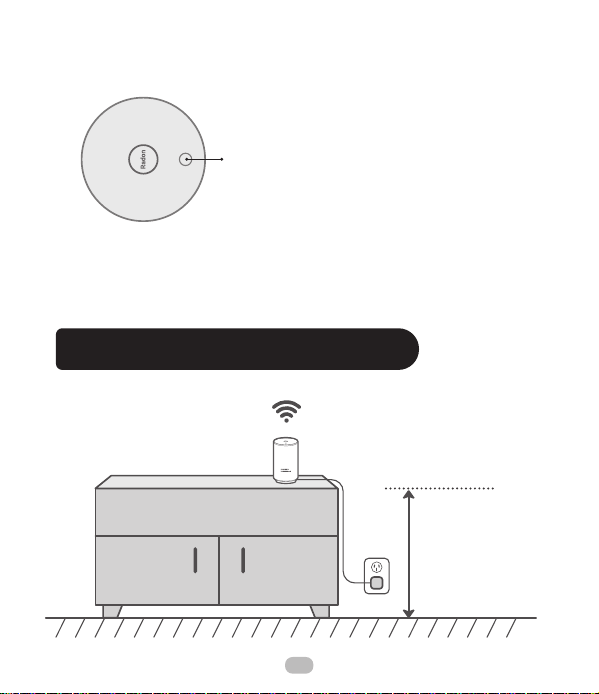
Long press to enter the pairing state
Product Placement Guidelines4
Reset Button
After plugging in the device, press and hold the Reset button for more
than 5 seconds to enter the networking state, at which the indicator
light turns red and flashes slowly.
Rest button
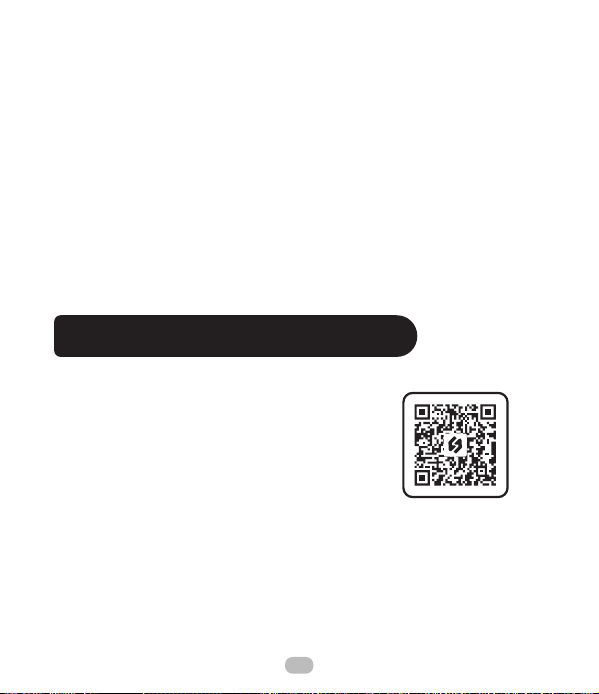
20 inches
(50 cm)
5
NOTES:
a)Your iOS devices must be running iOS 12.0 or above to download
the app smoothly.
b)Your android devices must be running android 7.1 or above to
download the app smoothly.
APP Installation & Connection5
5.1 Search the INKBIRD App from
Google Play or App Store to get it for free,
or you can scan the QR code below to
download it directly.
a)Make sure the radon detector is at the correct height. Place it at least
20 inches (50cm) above the floor.
b)Place the radon detector at least 59 inches (150 cm) away from open
windows or vents. And be sure to keep it away from places with high
temperatures and high humidity (>85%RH).
c)Find a place with a good Wi-Fi signal. This radon monitor connects to
the internet with WiFi and sends information to your smartphone APP.
d)Don't move the device during use. Vibration can cause the unit to
pause the measurement and produce a warning sound.
e)Re-pairing is required if the network is changed.
6

5.2 Registration
5.3 How to Pair the Device with the App
Step1: Registering an account is necessary before using the
INKBIRD app for the first time.
Step2: Open the app, select your Country/Region, and a verification
code will be sent to you.
Step3: Enter the verification code to confirm your identity, and the
registration is complete.
c)The device supports a 2.4GHz Wi-Fi router only.
d)APP Location Permission Requirement: We need to obtain your
location information to discover and add nearby devices. INKBIRD
promises to keep your location information strictly confidential.
And your location information will only be used for the location
function of the App and will not be collected, used, or disclosed to
any third party. Your privacy is very important to us. We will abide
by relevant laws and regulations and take reasonable security
measures to protect your information security.
7
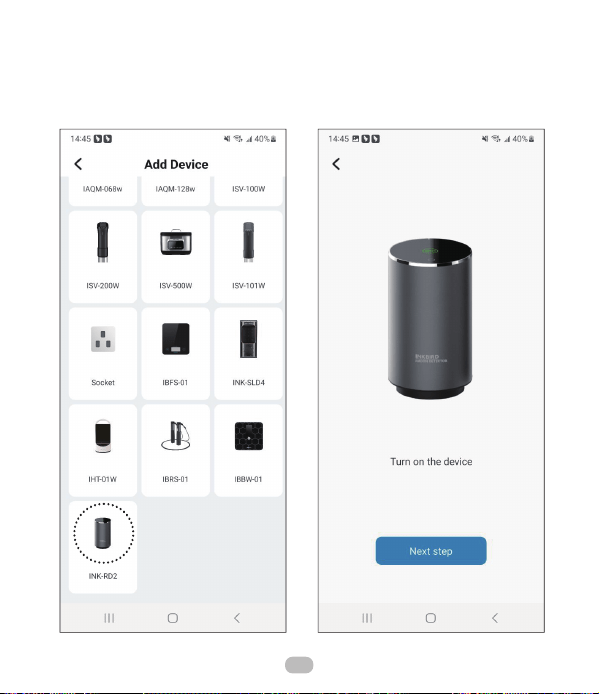
Step1: Open the App and click
the “+” in the upper right corner
to find the radon detector.
Step2: Plug in the detector to
power it on, then click Next Step.
8
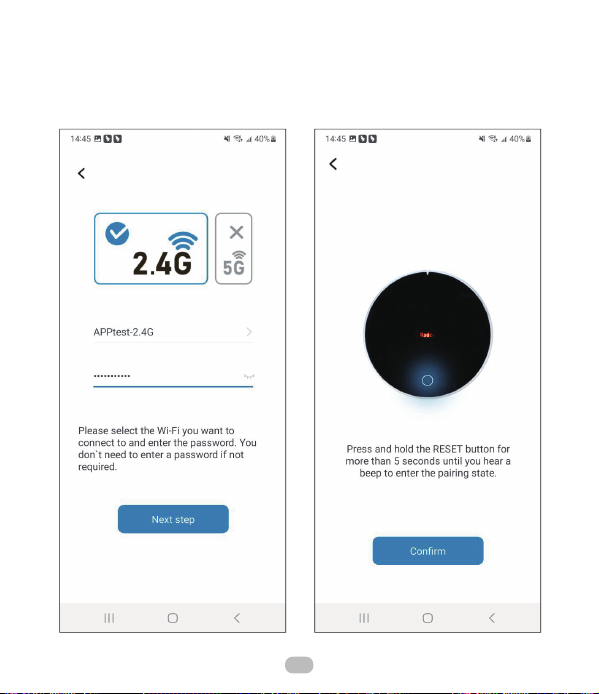
Step3: Select a 2.4 GHz WiFi
network, enter the password,
and click Next Step.
Step4: Press and hold the RESET
button on the device for more than
5 seconds to enter the pairing
state. Then click Confirm.
9
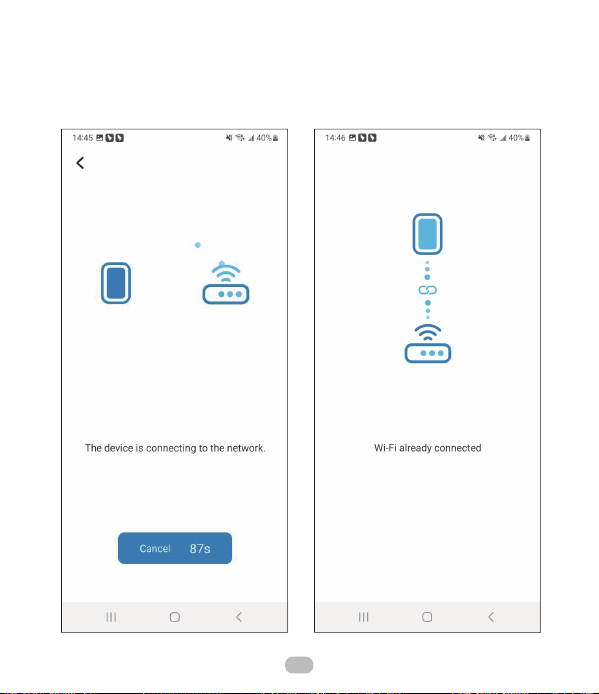
Step5: The App is automatically
pairing with the device.
Step6: The pairing is successful.
10
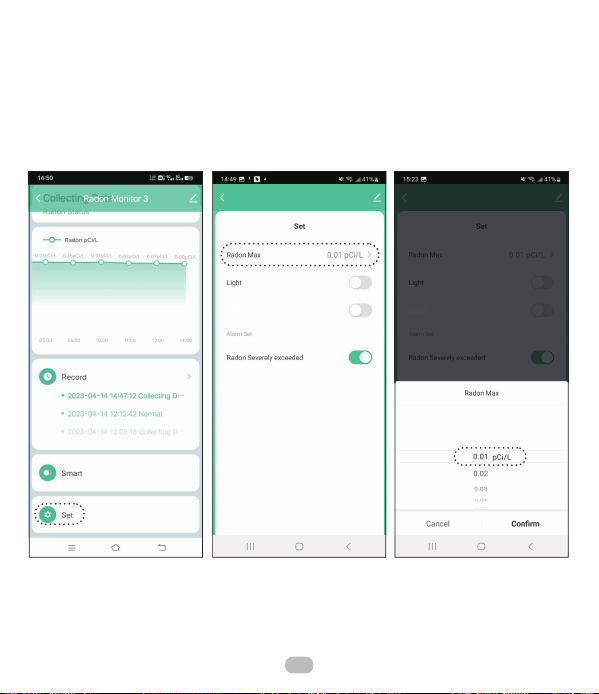
5.4 Set the Alarm Level Threshold
Enter the settings, click Radon Max, and select a value.
11
Sound
Sound
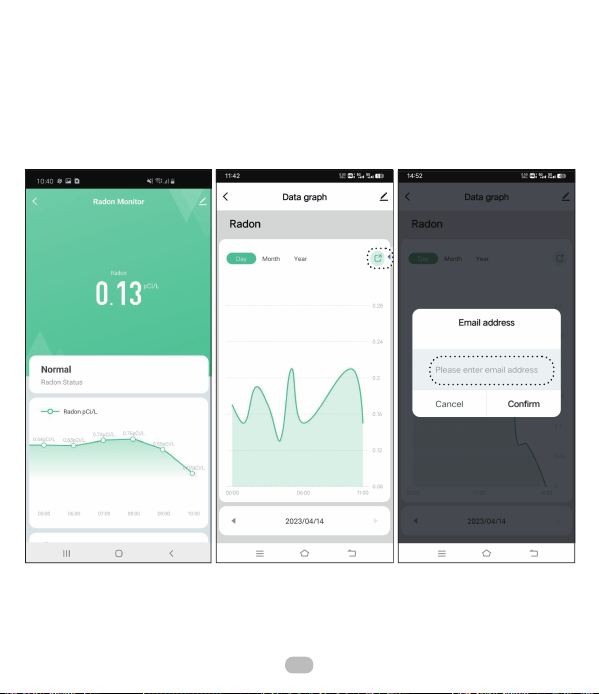
5.5 Historical Data Export
Click the data curve to view the complete data graph, and click the
export icon to enter your email address.
12

FCC Requirement6
This equipment has been tested and found to comply with the limits for
a Class B digital device, pursuant to part 15 of the FCC Rules. These
limits are designed to provide reasonable protection against harmful
interference in a residential installation. This equipment generates, uses
and can radiate radio frequency energy and, if not installed and used in
accordance with the instructions, may cause harmful interference to
radio communications. However, there is no guarantee that interference
will not occur in a particular installation. If this equipment does cause
harmful interference to radio or television reception, which can be
determined by turning the equipment off and on, the user is encouraged
to try to correct the interference by one or more of the following
measures:
• Reorient or relocate the receiving antenna.
• Increase the separation between the equipment and receiver.
• Connect the equipment into an outlet on a circuit different from that to
which the receiver is connected.
• Consult the dealer or an experienced radio/TV technician for help.
Caution: Any changes or modifications to this device not explicitly
approved by manufacturer could void your authority to operate this
equipment.
This device complies with part 15 of the FCC Rules. Operation is subject
to the following two conditions: (1) This device may not cause harmful
13
Customer Service7
interference, and (2) this device must accept any interference received,
including interference that may cause undesired operation.
The device has been evaluated to meet general RF exposure
requirement. The device can be used in portable exposure condition
without restriction.
This item carries a 1-year warranty against defects in either compo-
nents or workmanship. During this period, products that prove to be
defective will, at the discretion of INKBIRD, be either repaired or
replaced without charge. For any problems in use, please feel free to
contact us at [email protected]. We will do our best to help you.
14
V 1.0
INKBIRD TECH.C.L.
Factory address: 6th Floor, Building 713, Pengji
Liantang Industrial Area, NO.2 Pengxing Road, Luohu
District, Shenzhen, China
Office address: Room 1803, Guowei Building, NO.68
Guowei Road, Xianhu Community, Liantang, Luohu
District,Shenzhen, China
MADE IN CHINA