1. Overview
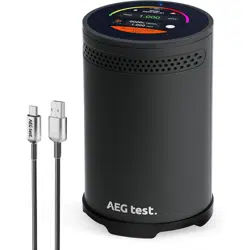
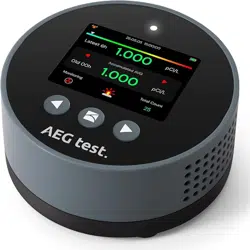
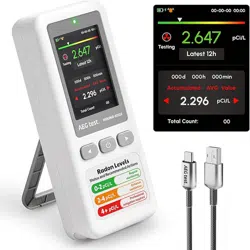
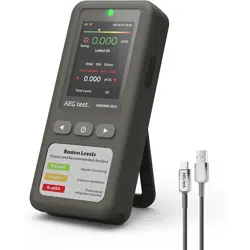
The AEGTEST HOUND-3699 is a radon concentration monitoring device designed for home use. It provides continuous, long-term monitoring of radon gas levels with regular measurement updates.

This device uses a high-precision radon pulse ionization sensor to detect alpha radiation from radon decay. It is intended to help you assess the radon concentration in your living space over time.
2. Features & Specifications
2.1 Key Features
- Fast and Accurate Detection: Provides initial detection within 1 hour and updates radon concentration readings every 10 minutes.
- Visual and Audible Alarms: Alerts you when radon levels exceed a customizable threshold using both screen indicators and sound.
- Data Tracking: Stores up to 508 days of historical measurement data. Data can be exported via the included USB cable to generate PDF reports.
- Touchscreen Interface: Features a 2.1-inch high-resolution capacitive touch color screen for navigation and settings adjustment.
- Long-Term Monitoring: Designed for continuous operation to track radon level fluctuations over extended periods.
2.2 Physical Specifications
| Brand | AEGTEST |
|---|
| Model Number | HOUND-3699 |
|---|
| Color Options | Black, Blue, White |
|---|
| Product Dimensions | 3.2"D x 3.2"W x 5.1"H |
|---|
| Item Weight | 0.64 Kilograms |
|---|
| Display | 2.1-inch capacitive touch color screen |
|---|
2.3 Technical Specifications
| Power Source | Battery Powered (Rechargeable via included USB-C cable) |
|---|
| Alarm Type | Audible and Visual |
|---|
| Measurement Unit | pCi/L (Picocuries per liter) |
|---|
| Sensor Type | Radon Pulse Ionization Chamber |
|---|
| Data Storage Capacity | Up to 508 days |
|---|
| Data Export | PDF report generation via USB connection to computer or mobile phone |
|---|
3. What's in the Box
- 1x HOUND-3699 Radon Detector
- 1x USB-C Charging/Data Cable
- 1x User Manual (this document)
4. Use Guide
4.1 Initial Setup and Power On
- Fully charge the device using the included USB-C cable connected to a standard USB power adapter or computer port.
- Once charged, press and hold the power button to turn on the device.
- The touchscreen will illuminate. Follow any initial on-screen prompts if present.
Note: For the most accurate results, place the detector in a frequently occupied area of the home (e.g., living room, bedroom, or basement), at least 20 inches off the floor and away from drafts, doors, windows, and exterior walls.
4.2 Understanding the Display & Interface
The primary screen displays the current radon concentration in pCi/L. The 2.1-inch touchscreen allows you to:
- Navigate menus by tapping icons or options.
- Switch between different display modes (e.g., current reading, short-term average, long-term average).
- Access settings to configure alarm thresholds, screen brightness, and unit preferences.
The interface is designed to be clear and readable from a distance.
4.3 Taking Measurements
- The device begins measuring automatically once powered on.
- The first meaningful reading is typically available after 1 hour of operation.
- The displayed radon concentration is updated every 10 minutes.
- For a reliable assessment of your home's radon level, allow the detector to monitor continuously for a minimum of 48 hours, and preferably for several days or weeks, as radon levels fluctuate.
4.4 Alarms and Alerts
The device can be set to trigger an alarm when the radon concentration exceeds a user-defined level.
- Audible Alarm: A sound will be emitted from the device.
- Visual Alarm: The screen display will change (e.g., flash or show a warning icon/color).
To configure the alarm threshold, navigate to the settings menu using the touchscreen. The U.S. EPA recommends taking action if long-term average levels are at or above 4.0 pCi/L.
4.5 Data Management and Export
- The device internally stores historical data for up to 508 days.
- To export data, connect the detector to a Windows computer (recommended) or mobile phone using the included USB-C cable.
- The device will be recognized as a storage device. Navigate to the appropriate folder to find the data files.
- Data can be automatically compiled into a PDF report without requiring additional software installation.
- The device also allows you to view the latest three sets of data from recent restarts or remeasurements directly on the screen.
4.6 Charging and Power Management
The device is powered by an internal rechargeable battery.
- Use only the provided USB-C cable to charge the device.
- A full charge is required before first use and for optimal long-term monitoring.
- The device is designed for continuous operation while charging.
5. Safety and Maintenance
- This device is for indoor use only. Do not expose it to water, rain, or excessive moisture.
- Place the detector in a stable location where it will not be knocked over.
- Keep the ventilation slots on the device clear of obstructions such as dust, fabric, or other objects.
- Clean the exterior with a soft, dry cloth. Do not use liquids, aerosols, or abrasive cleaners.
- The sensor does not require user calibration.
6. Understanding Radon
Radon is a naturally occurring, radioactive gas that is odorless, colorless, and tasteless. It forms from the decay of uranium in soil, rock, and groundwater and can seep into homes through cracks in foundations and other openings.
Prolonged exposure to elevated levels of radon is a health risk and is the second leading cause of lung cancer after smoking. Monitoring radon levels is the only way to know if your home has a concentration that may require mitigation.