1. SAFETY INFORMATION AND WARNINGS
Radon Hazard Explanation
Radon is a radioactive gas that enters buildings through foundation cracks and openings from soil, rocks, or groundwater. Long-term exposure to high radon levels can damage lungs and is the second leading cause of lung cancer after smoking.
Intended Use Statement
This device is a portable radon detector intended for continuous monitoring of radon gas concentration in indoor air within homes and buildings. It is designed for personal, non-professional use.
General Safety Precautions
- Use the device only as described in this manual.
- Do not disassemble, modify, or attempt to repair the device.
- Keep the device away from children and pets.
- Place the detector in areas where radon may collect, such as basements, garages, or near floor cracks.
2. PACKAGE CONTENTS
Ensure the following items are included in the box:
- 1× HOUND-1011S Radon Detector
- 1× Type-C Charging Cable
- 1× Lanyard
- 1× User Manual
- 1× Stand
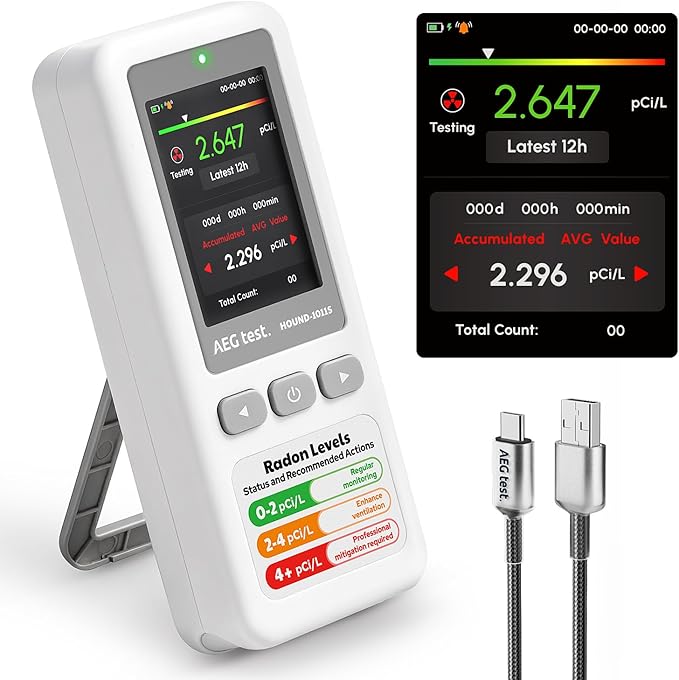
3. PRODUCT OVERVIEW
Device Diagram with Labeled Parts
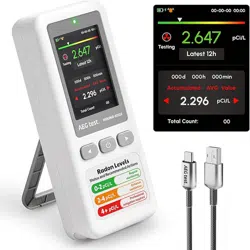
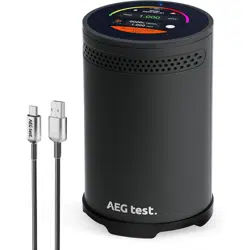
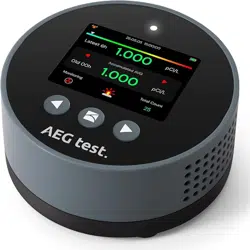
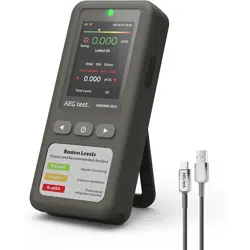
The device is a compact, rectangular unit with an LCD screen, a single power button, and a Type-C charging port. It includes a mounting hole for the stand or lanyard.


LCD Screen Layout and Icons
The LCD screen displays the current radon concentration, unit of measurement (pCi/L or Bq/m³), battery status, and menu icons for historical data.
Button Functions
Power Button: A single multi-function button located on the device.
- Long Press: Powers the device on or off.
- Short Press: Cycles through menus to view records, change units, or set the alarm threshold when the device is on.
4. GETTING STARTED
Initial Setup
Remove the device from the packaging. Attach the stand for tabletop placement or attach the lanyard for hanging.
Charging the Device
Connect the provided Type-C cable to the device's charging port and a USB power source. The device can operate while charging for continuous monitoring.
Powering On/Off
To Power On: Press and hold the power button for approximately 2-3 seconds until the screen activates.
To Power Off: Press and hold the power button for 2-3 seconds until the screen turns off.
5. BASIC OPERATION
Placing the Detector
For accurate long-term monitoring:
- Place the device in the area you wish to monitor, such as a basement, garage, or near potential entry points like floor cracks.
- Avoid locations with direct sunlight, strong artificial light (e.g., camera flash), excessive vibration, or high humidity.
- Once placed, avoid moving the device. If moved, a new test should be started.
Starting a Measurement
After powering on and placing the device, measurement begins automatically.
Understanding the First Reading
The first radon concentration reading will appear on the LCD screen after approximately 12 hours of continuous operation.
Reading Updates
After the initial reading, the displayed radon level is updated every hour for real-time accuracy.
6. MENU AND SETTINGS
Access menus by short pressing the power button when the device is on.
Viewing Historical Data
Cycle through the DATA menu to view average radon concentrations for different timeframes:
- Past 12 hours (12H)
- Past 24 hours (24H)
- Past 48 hours (48H)
- Past 72 hours (72H)
- Past 96 hours (96H)
- The device can store historical data for up to 504 days.
Changing Units
Within the settings menu, you can switch the measurement unit between pCi/L and Bq/m³.
Setting the Alarm Threshold
You can set a custom radon concentration level. The device will trigger audible and visual alarms when the measured level exceeds this threshold.
7. ALARMS
Audible and Visual Alarm Description
When the measured radon level exceeds your set threshold, the device will emit an audible beep and activate a visual indicator (such as a flashing icon) on the LCD screen.
Alarm Threshold Explanation
The alarm threshold is the radon concentration level you define as the safety limit. Common recommended action levels are 4.0 pCi/L (US EPA) or 200 Bq/m³ (WHO).
What to Do When Alarm Triggers
If the alarm activates:
- Note the displayed radon concentration.
- Increase ventilation in the area (open windows, use fans).
- Consider consulting a radon mitigation professional for long-term solutions if high levels persist.
8. DATA AND MONITORING
Short-Term vs. Long-Term Monitoring
The device is suitable for both:
- Short-Term: View trends over hours or days.
- Long-Term: Monitor levels over weeks and months to understand seasonal variations and long-term exposure risks. Data for up to 504 days is stored.
How to Interpret Readings
Radon levels naturally fluctuate. Focus on the long-term average (e.g., 48H, 96H) rather than a single hourly reading for a more accurate assessment of the environment.
Data Storage and Retrieval
Historical data is stored internally. Access different timeframes via the DATA menu using short presses of the power button.
9. BATTERY AND POWER
Battery Life
The built-in battery lasts up to 45 days in sleep mode when not connected to power.
Charging Instructions
Use the provided Type-C cable. The device can be used while charging.
Continuous Monitoring with Cable
For permanent installation and uninterrupted monitoring, leave the device plugged into a power source using the Type-C cable.
10. TROUBLESHOOTING
Common Issues and Solutions
Issue: The reading seems too high?
Solution: Movement may affect the first reading. Retest after stabilizing the device in its location for 12 hours.
Issue: No reading after restart?
Solution: Restarting resets the 12-hour measurement cycle. The device will begin a new test. Historical data is still accessible in the DATA menu.
Issue: Device moved accidentally.
Solution: Stabilize the device in the new desired location and start a new test. A new 12-hour initialization period is required for accurate readings.
Issue: Exposure to strong light (sunlight, flash).
Solution: Place the device in a dark area (e.g., a drawer) for 1–2 hours, then retest. Note that standard indoor lighting does not affect results.
Issue: High humidity environments.
Solution: Place a desiccant (silica gel packet) near the device's air inlet if needed, then start a new test.
11. MAINTENANCE AND CARE
Cleaning Instructions
Wipe the exterior with a soft, dry cloth. Do not use liquids, solvents, or abrasive cleaners.
Storage Recommendations
Store in a cool, dry place away from direct sunlight and extreme temperatures.
Precautions to Avoid
- Vibration/Movement: Avoid during measurement. Stabilize and restart test if moved.
- Strong Light: Avoid direct sunlight or intense flashes.
- High Humidity: Use in a dry environment or with a desiccant.
12. TECHNICAL SPECIFICATIONS
- Brand: AEGTEST
- Model Number: HOUND-1011S-WT
- Color: White
- Measurement Range: 0.09 to 1000 pCi/L
- Supported Units: pCi/L, Bq/m³
- Sensor Type: High-precision semiconductor sensor
- Display: LCD screen
- First Reading Time: Within 12 hours
- Update Frequency: Hourly
- Data History: Up to 504 days
- Alarms: Audible and visual
- Power Source: Built-in rechargeable battery, Type-C charging port
- Battery Life (Sleep Mode): Up to 45 days
- Included Accessories: Type-C Charging Cable, Lanyard, Stand, Manual