
この印刷物は再生紙を使用しております。
フィリッ プ ス
電 動 シェーバー
取扱説明書
X5007/00, X5006/00,
X5006/05, X5012/05
品番
©2023 Koninklijke Philips N.V.
記載されている製品名などの固有名詞は、
Koninklijke Philips N.V.
またはその他 の
会社の商標または登録商標です。
3000.090.9736.1 (02/23)
フィリッ プ ス
シェーバーをお買い 上げいただき、まことにありがとうご
ざいます。長い間ご愛用いただくために、ご使用前にこの取扱説明書
をよくお読みのうえ、正しくお使いください。
また、お読みになった後は、お使いになる方がいつでも見られるとこ
ろに必ず保管してください。
●商品のご確認
商品をご確認ください。
必 ず お 守りくだ さ い
1
●ここに示した注意事項は、安全に関する重要な内容ですので、必ず
守ってください。
●誤った取扱いをしたときに想定される内容を「危険」、「警告」、「注意」
とに 区 分 けして い ます。
安 全 上 の ご 注 意
注 意
●
充電する場合は、定格出力電圧
DC5V
、定格出力電流
1A
以
上 で 、タ イ プ プ レ ー ト に
PSE
マークの表示がある安全技術基準
に適 合した
USB
充電アダプタで充電してください。
●
USB
充電アダプタとの接続には変換コネクタや変換ケーブルは
使用しないでください。本体の破損や火災の原因となります。
●
ご使用前に刃に異常がないことを確認してください。
●
刃は強く押さえないでください。破損して皮膚を傷つけること
が あります。
●
充電時以外は、本体から充電ケーブルを抜いてください。け
がややけど、絶縁劣化による感電・漏電・火災の原因となり
ます。
●
本製品や部品を食器洗浄機で洗わないでください。故障や破
損の原因になります。
●
衛生上の理由から他の人と共用しないでください。
注意
●シェーバー本体は防水加工をしており、水場や浴室でも使用できますが、
水や液体の中に浸けないでください(故障の原因となります)。
注意
●シェーバー本体は防水加工をしており、水場や浴室でも使用できますが、
水や液体の中に浸けないでください(故障の原因となります)。
CERTIFICATE OF PURCHASE
この保証書は、「無料修理規定」記載内容で無料修理を行うことをお約
束するものです。お買い上げの日から下記期間中に故障が発生した場合
は、フィリップスサポートセンターにお 問 い 合 わ せください。お客 様 にご 記 入
いただいた個 人情 報(保 証 書の控え)は、株式 会社フィリップス・ジャパン
のホームページ
http://www.philips.co.jp/
に 掲 載 さ れ て い る「 プ ラ イ バ シ ー に 関
する通知」に基づき適切に管理いたします。
★
保証書は再発行しませんので、大切に保管してください。
★
ご販売店様へ
この保証書はお客様へのアフターサービスの実施と責任を明確に
するものです。贈答品、記念品の場合も含めて必ず記入捺印してお客様にお
渡 しくだ さ い 。
品名電 動 シェーバー
品番
X5007/00, X5006/00, X5006/05, X5012/05
保証期間お買い上げ日より
2
年
対象部分
本 体 、充 電 ケーブル(シェービングユニット、トリマー、保 護キャップを除く)
お買い上げ日
年 月 日
お客様
ご住所
〒
ご芳名
電話番号
★販売店
販売店名・住所・電話番号
フィリッ プ ス
電 動 シェーバー
保証書
お買い上げのお客様へ
初めてご使用になる際は、ご使用前に充電してください。
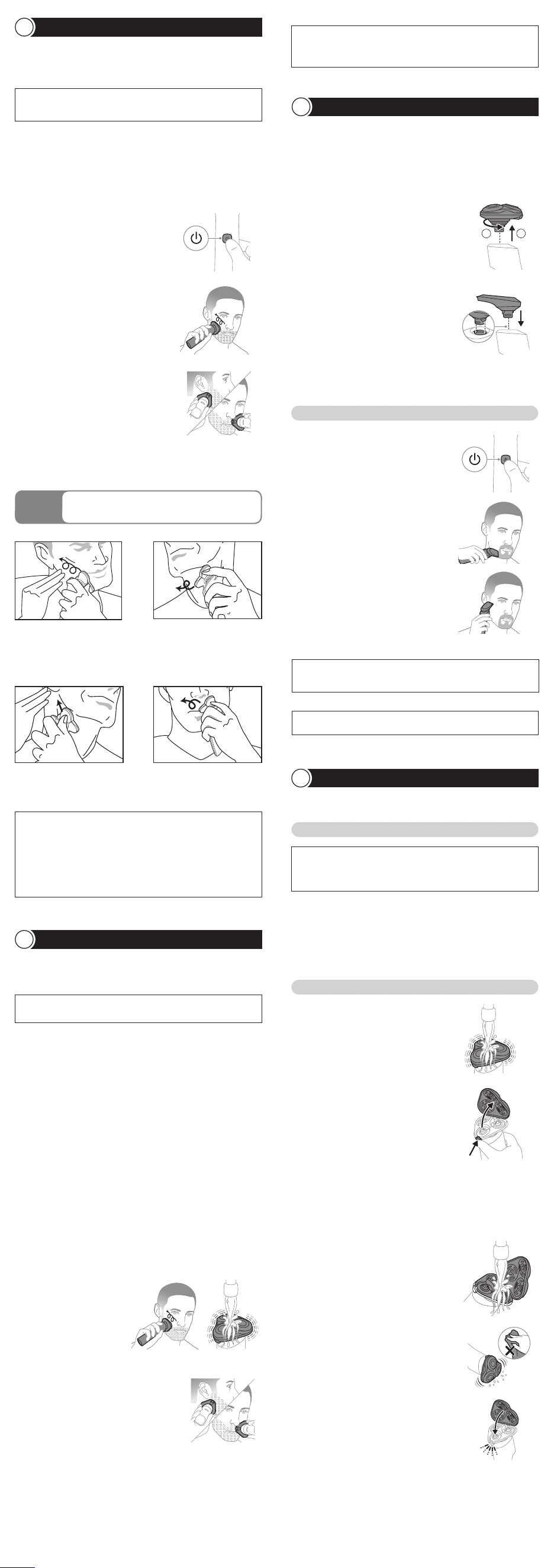
シ ェ ー ビ ン グ の し か た( ド ラ イ )
5
シ ェ ー ビ ン グ の し か た( ウ ェ ッ ト )
6
注意
●定格出力電圧
DC5V
、定格出力電流
1A
以 上 で 、タ イ プ プ レ ー ト に
PSE
マークの表示がある安全技術基準に適合した
USB
充 電 アダプ
タで 充 電 してくださ い 。
●
USB
充電アダプタとの接続には変換コネクタや変換ケーブルは使用
しな い でください 。
●水場や浴室で充電をしないでください。
●充電をしながらシェービングはできません。
保管のしかた
10
トリマーのお手入れ
水洗いによるお手入れ方法
シェービングユニットのお手入れ方法(分解+水洗い)
シェービングユニットのお手入れ方法
※
満充電後、約
30
分経過すると充電表示ランプが消えます。
5
充電が完了すると充電表示ランプが点灯します。
※
ロック機 能 が
ON
になっている場合は、ロックを解除
して か ら 電 源 を
ON
にしてくだ さい 。
※
途 中 、よ り な め ら か に シ ェ ー ビ ン グ
す る た め に 、シ ェ ー ビ ン グ ヘ ッ ド を 水
で濡らすと効果的です。
※
通常の目安として満充電で
1
日
3
分使用し、約
16
日間使用できますが、ご使用状況(使用時
間 ・ヒゲ の 濃 さなど )に より変 わります。
※
内刃と外刃は
1
組になっているため、一度に
2
組以上の内刃と外刃をクリーニング
しないでください。誤った外刃に内刃を組み合わせてしまうと、最適な性能に戻る
まで数週間かかる場合があります。
※
外刃に突起がある場合は、刃の3つとも〇印の位置に外刃がくるように
セットしてくだ さ い 。
※
トリ マ ー は タオ ル や ティッ シュペ ー パ ー な ど で ふ か な い
で く だ さ い 。刃 を 傷 め る 原 因 に な り ま す 。
※
ロック機 能 が
ON
になっている場合は、ロックを解除してから電源を
ON
にしてくだ さい 。
※トリマーは、使用後必ずお手入れしてください。
※室温
5
℃~
35
℃の環境で保管してください。
※直射日光の当たる場所には保管しないでください。
※夏場、車の中には放置しないでください。
※シェービング性能を維持するために、刃は
2
年ごとに 交 換 することをお す すめします。
※交換する際は、必ずフィリップス社製の専用の替刃(品番:
SH50
)と お 取 り 替 え く だ さ い 。
3
充 電 ケ ーブル の
USB
コネクタ部 を
USB
充 電 アダプタに 差し込 みます。
4
ご家庭のコンセントに
USB
充 電 アダプタ
の電源プラグ部を差し込みます。
1
電源ボタンを押し、電源を
ON
にします。
4
刃を肌に軽く押しあて、円を描くように動 かしながら剃ります。
シェービングフォームや シェービングジェルにより、鏡 を見 た 時 に 剃 った
部分を確認しやすくなります。
4
シェービング後は電源ボタンを押し、電源を
OFF
にします。
1
顔を濡 らし、市 販 の シェービングフォームまた はシェービングジェルを
付けます。
1
シェーバー本体の電源が
OFF
に なって い ることを 確 認 してくだ さ い 。
2
シェービングヘッドを水 で 濡らし、肌 の上でなめらかに動くようにします。
6
シェービング後は電源ボタンを押し、電源を
OFF
にします。
3
電源ボタンを押し、電源を
ON
にします。
3
シェービングヘッドホルダー受 部 の 汚 れをぬるま湯 で 洗 い 流します。
1
シェーバー本体の電源が
OFF
に なって い ることを 確 認 してくだ さ い 。
3
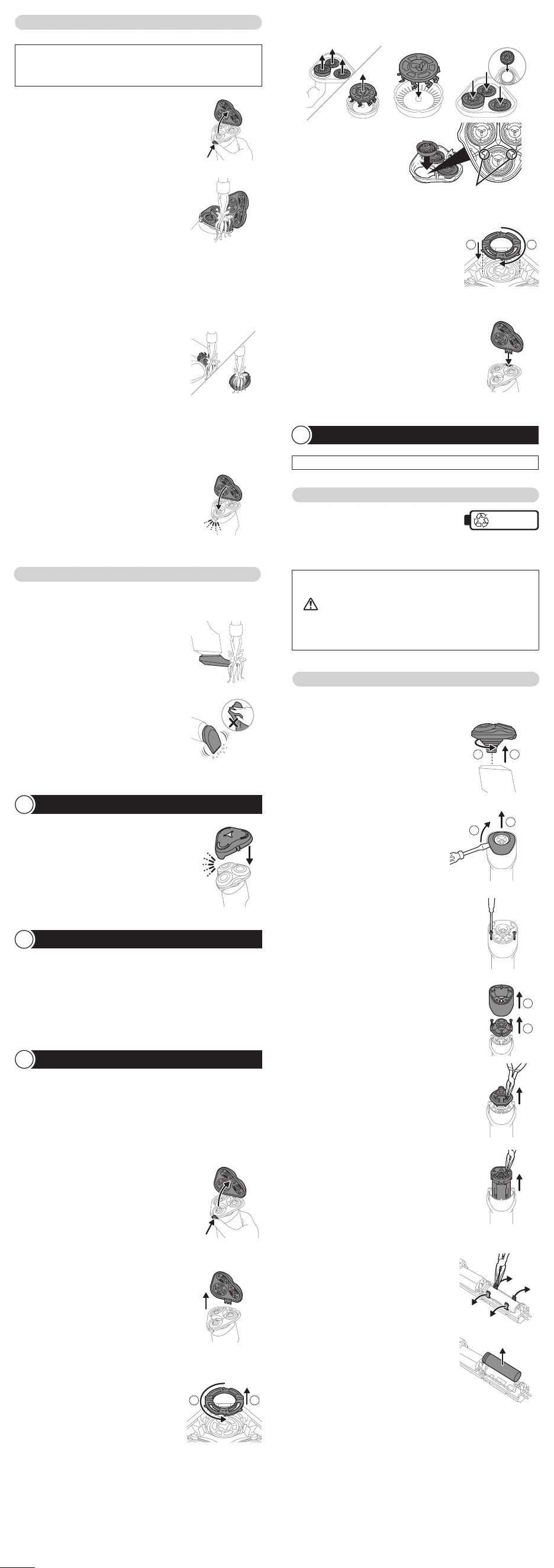
内 刃と外 刃を取り外します
(詳しい手順については、「⑪刃の交換」をご参照ください)。
6
内刃と外刃をシェービングユニットに取り付けます
(詳しい手順については、「⑪刃の交換」をご参照ください)。
4
内刃を外刃から取り外し、流水で洗います。
7
シェーバーをきれいに洗います(「⑧お手入れ方法」をご参照ください)。
2
刃を肌に軽く押しあて、円を描くように
動 かし な が ら 剃 ります。
3
下あごの輪郭沿いや鼻の下など、刃が
届きにくい部分をシェービングする場合
は、シェービングユニットの先端部を使
用 してくださ い 。
2
シェービングユニットの 外しかた
シェービングユニットを反時計回りに回
転させ(図①)、シェービングユニット接続
部からまっすぐに引き抜きます(図②)。
2
トリマーの刃を肌に垂直にあてながら、
やさしく上下に動かしてください。
1
電源ボタンを押し、電源を
ON
にします。
1
シェ ー ビ ン グユ ニット 表 面 の 汚 れ を ぬ る
ま湯または 水で 約
30
秒 洗 います。
2
シェービングユニットリリースボタンを押
し 、シ ェ ー ビ ン グ ユ ニ ッ ト を 開 き ま す 。
4
シェービングヘッドホルダーの内側の汚
れをぬるま湯または 水で約
30
秒洗い流
します。
3
トリマ ー の 取り付 け か た
トリマーの突起部をシェービングユニット
接続部に合わせ、カチッと音がするまで
押し込み本体に取り付けます。電源を
ON
にすると、トリマー先端の刃が往復
して カ ットし ま す。
3
ト リ マ ー を 使 用 し て 、あ ご ひ げ や も み あ げ
の 輪 郭 を 描 くこともで きま す。
5
下あごの輪郭沿いや鼻の下など、刃が
届きにくい部分をシェービングする場合
は、シェービングユニットの先端部を使
用 してくださ い 。
5
シェ ー ビ ン グユ ニット の 余 分 な 水 を 切 り、
よく乾 か します。
1
シェービングユニットリリースボタンを押
し て 、シ ェ ー ビ ン グ ユ ニ ッ ト を 開 き ま す 。
1
トリマ ー を 取り 付 け た 状 態 で シェーバ ー
の電源を
ON
に し 、ぬ る ま 湯 ま た は 水 で
す すぎ 洗 い をします。
7
シェービン グヘッド ホ ル ダー の 金 具 を
シェービン グヘッド ホ ル ダー 受 部 の くぼ
み に 差 し 込 み 、シ ェ ー ビ ン グ ユ ニ ッ ト を 閉
じます。
5
水 を 切ります。
2
シェービングヘッドホルダー内 側とシェー
ビングヘッド ホ ル ダー 受 部 の 汚 れ を 水 で
洗い流します。
2
シェーバーの 電 源を
OFF
にし、トリマー
を充分に乾燥させてください。
6
乾 い た こ と を 確 認 し た ら 、シ ェ ー ビ ン グ ユ
ニット を 閉 じ てくだ さ い 。
6
充電後はコンセントから
USB
充 電アダプ
タを取り外し(図①)、
USB
充 電アダプ
タから
USB
コネクタ部 を引き抜きます
(図②)。続いてシェーバー本体の電源
コネクタ受部から、充電ケーブルを引き
抜きます(図③)。
2
充電ケーブルの電源コネクタ部をシェーバー本体の電源コネクタ受
部 に 差し 込 みます。
刃の交換
11
1
シェービングユニットリリースボタンを押
し 、シ ェ ー ビ ン グ ユ ニ ッ ト を 開 き ま す 。
3
保持板を、反時計回りに回して(図①)
シ ェ ー ビ ン グ ヘ ッ ド か ら 外 し ま す( 図
②)。他の保持板も同様に外します。
1 2
5
保持板をシェービングヘッドに戻し(図
①)時計回りに回して(図②)シェービン
グヘッドホルダーにセットします。他の保
持板も同様にセットします。
1 2
6
シェービン グヘッド ホ ル ダー の 金 具 を
シェービン グヘッド ホ ル ダー 受 部 の くぼ
み に 差 し 込 み 、シ ェ ー ビ ン グ ユ ニ ッ ト を 閉
じます。
2
シェービングヘッドホルダーをシェービン
グユニットから引き抜きます。
4
シェービン グヘッド ホ ル ダー か ら シェ ー ビン グヘッド の 内 刃 と 外 刃
を取り外し、新しい替刃に交換してください。
※改良の為、仕様を予告なく変更することがあります。
7 .
直射日光の当たる場所には保管しないでください。夏 場 、車の中に放置しな
い で くだ さ い 。
8 .
シェーバー本体は防水加工をしておりますが、水や液体の中に浸けないでくだ
さい。
9 .
本体のお手入れは、水またはぬるま湯で行ってください。研磨パッドや研磨剤
を含んだ洗剤またエアダスターは 使 用しないでください。
3 .
本製品の使用、充電、保管は室温
5
℃~
35
℃の環境下で行ってください(尚、
低温や高温で充電すると、充電池の寿命が短くなります)。
4 .
外 刃 は 、薄 く 仕 上 げ て あ り ま す の で 、刃 部 を 強 く 押 さ え た り 、硬 い も の に あ て な
いよう、ていねいに扱ってください。
6 .
切れ味が衰えてきたり、刃が 破 損した場 合は、使 用せず 必ず 新しい 替 刃に交 換
してくだ さい 。
使 用 上 の ご 注 意
1 .
フィリップスシェーバーを初めてお使いの 方 は、剃りかたに慣れるまで
2
~
3
週 間 か か ること が あります。
2 .
60
℃以上の水でシェーバーを洗浄しないでください
5 .
シェービングユニットの着脱は、必ず電源を
OFF
にしてから行ってください。
クイック チ ャ ー ジ
充電残量が
0
の状態で充電アダプタで充電すると、約
5
分 間 で シェービング
1
回
分が急速充電されます。
※クイックチャージ中は充電表示ランプが高速点滅します。
※
クイックチャージが完了すると通常の充電が行われます。その際、充電表示ラ
ンプが白色にゆっくり点滅します。
フィリップスのシェーバーを初めてお使いの 方は 、剃りかたに慣れるまで
2
~
3
週
間かかることがあります。初めてのシェービングで思い通りの結果が得られない
ことや、少し肌にヒリヒリ感が残る場 合がありますが、これは普通のことです。フィ
リップスのシェーバーに 限らず シェービング 方 法 を変 える時 に は 、肌もヒゲも 新
しいシェービング方法に慣れる時間が必要です。新しいシェーバーに肌を慣ら
す 為 、ま ず は
3
週間このシェーバーを使い続けてみてください(最低でも
1
週間
に
3
回以上)。この
3
週 間 は 、あまりシェービング 方 法 を変 えたりせず、同じシェー
バーで 肌 を慣らすことが 大 切 です。
※
トリマーの切れ味を保つため、使用後は必ずぬるま湯または水ですすぎ洗い
をしてくださ い 。
※
1
カ月に
1
度 、また は シェーバーの 切 れ 味 が 落 ちてきたら 、シェービングヘッド
を分解して水洗いすることをおすすめします。
※お手入れの際は、電源を
OFF
にしてから分解や水洗いをしてください。
シェービング 後 は 、シェービングフォームや シェービングジェル がしっかりと洗 い
流されているかを確認してください。お手入れが不十分な場合、臭いが出るば
かりでなく、故障の原因にもなります。
トリマ ー の 使 い か た
※
X5006/05, X5012/05
のみ
7
フィリップスでは、製品をより快適にご
使 用 い た だくた め に
製品登録をおすすめしております。
MyPhilips
では製品の保証書や
購入証明書の写真も保管でき、
万が一購入証明書を紛失された場合
にも安 心で す。
http://www.philips.co.jp/myphilips-about
URL
MyPhilips
登録のご案内
製品の使用方法や修理に関するお問い合わせ
★
受付時間:
9
:
00
~
18
:
00
(年末年始除く)
0120
(
944
)
859
フィリップスサポートセンター
Web
からの
お問い合わせ
注意
●お手入れの際は、電源を
OFF
にして か ら 水 洗 い してくだ さい 。
● シェービングユニットは 水 洗 いできますが、本 体 は 水 中に 浸けないでください 。
●シェービングユニットを乾燥させる時に、タオルやティッシュペーパーを使用
しないでください。刃を傷める場合があります。
注意
●
長期間使用しない場合は、充電池が過放電や液漏れして使えなくな
ることがあります。
3
~
4
カ月に一度は充電してください。
●
本製品を
24
時間以上コンセントに接続したままにしないでください。
注意
あまり押し当て過ぎると肌 を傷めますのでご 注 意ください。
お手入れ方法
8
保護キャップの取り付けかた
9
●
本製品は充電式電池を内蔵しています。火中投入、加熱、高温で
の充電・使用・放置をしないでください。発熱・発火・破裂の
原 因 に なります。
危 険
人が死亡または重傷を負う可能性が大きい内容。
危険
人が傷害を負う可能性および物的損害のみの発生が想定
される内容。
注意
人が死亡または重傷を負う可能性が想定される内容。
警告
○絵表示の例
記号は、してはいけない「禁止」を示します。図の中や近くに具体的
な禁止内容(左図の場合は分解禁止)を示します。
記号は、必ずしていただく「強制」を示します。図の中や近くに具体
的な強制内容(左図の場合は電源プラグをコンセントから抜くこと)を
示します。
記号は、「危険、警告、注意」を示します。図の中や近くに具体的な注
意内容(左図の場合は高温注意)を示します。
○絵表示について
トリミングのしかた
肌を伸ばし、ヒゲを立たせるよう
に円を描くように小さく回転さ
せ な が ら 剃ります。
片方の手で肌を後ろに引っ張
りな が ら 剃ります。
刃を肌に軽くあて、図のようにあ
ごを上げて円を描くように小さ
く回 転 させ な が ら 剃ります。
鼻の下を伸ばし、円を描くように
小さく回転させながら剃ります。
充電のしかた
4
LED
表示について
3
初めてお使いになるときや、長い間お使いにならなかったとき、または充電残量が
少なくなったときは、ご使用前に充電してください。充電時間は約
1
時間です。充電
開始後数分間、充電表示ランプが点滅しないことがありますが、そのまま充電する
と充電表示ランプが点滅します。
●
モーターの始動時、微弱な振動がシェーバー本体に伝わりますが、問題はありま
せん。
●ほこりなどで肌が汚れている場合、ふきとってからご使用ください。
●ご使用の前に外刃の破れや変形がないか確認してください
(外刃に破れや変形があると肌を傷つける原因になります)。
●ヒゲ剃り以外の目的(頭髪など)には、使用しないでください。
[重要]
●
モーターの始動時、微弱な振動がシェーバー本体に伝わりますが、問題はありま
せん。
●ご使用の前に外刃の破れや変形がないか確認してください
(外刃に破れや変形があると肌を傷つける原因になります)。
●ヒゲ剃り以外の目的(頭髪など)には、使用しないでください。
●
石けんもお使いいただけますが、肌の上での滑りをよくするため、シェービング
フォームやジェル の 使 用をお 勧めします。
肌が乾いた状態でのシェービングのしかたです。
ご使用の際は本体から充電ケーブルを抜いてご使用ください。接続されている
と作 動しません 。
シェービングフォームや シェービングジェルを使 った シェービングのし かたです。
剃った部分を実感しながら、なめらかなシェービングができます。
シェーバーを保管する前にきちんと乾燥させてください。
専用の替刃品番は
SH50
です。
シェービングユニットはご使用の都度、ぬるま湯または水でお手入れをしてください。
保 護キャップを取り付ける前 にシェーバーをきちんと
乾 燥 させ てください 。
※
研磨パッドや研磨剤を含んだ洗剤またエアダスターは使用しないでください。
※
ぬ る ま 湯(
40
℃前後)でのお手入れをおすすめします。臭いのもととなる皮脂や
汗などが取れやすくなります。ただし、熱湯はお止めください。故障の原因となり
ます。
※
お手入れ中にシェーバーの底から水が漏れてくる場合がありますが、異常では
ありま せん 。
トリマーは ヘアーライン、もみあげ、ヒゲなどを整 えるの に 便 利 です。
初めてお使いになるときや、長い間ご使用にならなかったときは、
LED
表示が出
るまでに時間がかかる場合があります。
主な表示(本体)
●接続の前に
USB
コネクタが完全に乾いていることを確認してく
ださい。ショート・感電の原因になります。
●
お手入れの際は必ず本体から充電ケーブルを外してください。
感電やけがをすることがあります。
●
電池が漏液した場合は、液が目や皮膚に触れない様に注意し
てください。万一目に入った時は、こすらずに水道水で十分
洗浄し医師の治療を受けてください。皮膚や衣類に付いた場
合は水道水で十分洗い流してください。
●
乳幼児の手の届くところに本製品を置かないでください。また
お子様が本製品で遊ぶことがないように監視してください。
●
補助を必要とする人(子どもを含む)に使用させないでくださ
い。またお体の不自由な人だけでは使用しないでください。
●
本 製品はヒゲ(あごヒゲ、 口ヒゲ、もみあげなど)の 長さを整
えたり、シェービングするためのものです。本取扱説明書に記
載されている以 外 の目的で 使 用しないでください。
●シェーバー本 体は改造しないでください。また、分解したり修理
しないでください。火災、感電、けがの原因となります。修理はフィ
リップ スサ ポ ート セ ン ター に お 問 い 合 わ せ くだ さ い 。
●
異常・故障時には、直ちに使用を中止してください。そのまま、
使用すると火災・感電・けがに至るおそれがあります。
●
充 電 ケ ーブル を 無 理 に 曲 げ たり、 引 っ 張 っ たり、 ね じった り、
たばねたり、重いものを載せたり、挟み込んだり、加工したり
しないでください。充電ケーブルが破損し、火災・感電の原
因となります。
●
USB
コネクタ部 は 確 実 に
USB
充 電 アダプタに 差 し 込 んでくだ
さい。スムーズに差し込みができない場合は無理に押し込も
うとしないでください。火災や感電の原因になります。
●
刃が破損または故障した場合は、本製品を使用しないでくだ
さい。けがの原因になります。交換の際には必ずフィリップス
社製の同型部品とお取替えください。
●
水場や浴室での充電は絶対にしないでください。ショート・感電
の 原 因 に なります。
●
濡れた手で充電ケーブルを抜き差ししないでください。感電や
け が をすることが あります。
警 告
警 告
本体
/
トリマー
/
充電ケーブル
/
保護キャップ
各部の名称
2
① 必 ず お 守 りくだ さ い
② 各部の名称
③
LED
表示について
④ 充電のしかた
⑤
シェービングのし かた
(
ドライ
)
⑥
シェービングのし かた
(
ウェット
)
⑦
トリマ ー の 使 い か た
⑧
お手入れ方法
⑨ 保護キャップの取り付けかた
⑩ 保管のしかた
⑪ 刃の交換
⑫
シェーバ ーを廃 棄 するとき
⑬ 故障かな
?
と思ったら
⑭ 保 証とアフターサ ービス
⑮ 仕様
⑯ 無料修理規定
Guidance in English
目 次
シェービングユニット
トリマ ー
※
X5012/05, X5006/05
のみ
充 電 ケ ーブル
保 護 キャップ
本体
(
替刃品番:
SH50)
シェービング
ヘッド ホ ル ダー
シェービングヘッド分解図
保持板
内刃
外刃
シェービング
ヘッド ホ ル ダー 受 部
ラ イトリン グ
充電表示ランプ
1 2
1
2
3
3
sec
●ロック機能(ロック機能中は電源は入りません)
●充電表示
●充電完了表示
●充電催促表示
●保護キャップを図のように、シェービングユニット
に取り付け、保 護します。
●プラグ解除お知らせ表示
ほお
ほおの奥から首筋
あごの裏側
鼻の下
電源
ボタンを約
3
秒長押しすると、ライトリング
が点滅してロックがかかります。再度約
3
秒長
押しすると解除できます。充電アダプタに接続す
ると、ロックは自動的に解除されます。
充電中
は充電表示ランプが白色に点滅します。
充電
が完了すると、白色の充電表示ランプが点
灯します。満充電後、約
30
分経過すると充電
表示ランプが消えます。
動作中
に充電残量が少なくなると、充電表示ラ
ンプがオレンジ色に点滅します。電源を
OFF
に
すると、充電表示ランプが数秒間オレンジ色に
点滅後、消灯します
充電
アダプタに接続している時に電源ボタンを
押す充電表示ランプがすばやく白色に点滅しま
す。ご使用の際は、充電アダプタをシェーバー
本体からはずしてご使用ください。
5000X Series
Shaver
上手に
剃るには
肌 に 強く押しつ けるので は なく、軽く押しあてて
自分から見て時計回りに回転させながら剃るのがコツです。
保 護 キャップ
シェ ー ビ ン グユ ニット
充電表示ランプ
電 源 ボタン
電源コネクタ受部
シェ ー ビ ン グユ ニット
リリー ス ボ タ ン
ラ イトリン グ
※電源
ON
時点灯
シェービングユニット接続部
電 源コネクタ部
充 電 ケーブル
USB
コネクタ部
(
USB Type-A
)
電 源 コード 部
トリマ ー
※
X5006/05, X5012/05
のみ
※
USB
充電アダプタは付属していません。充電の際は、
USB
充電アダプタ(定格出力電圧
DC5V
、定格出力電流
1A
以 上 で タ イププレ ート に
PSE
マークの表示がある安全技術基準
に適 合した
USB
充電アダプタ)をご準備ください。
シェーバーを 廃 棄 するとき
12
警告
●製品を廃棄するとき以外は、絶対に本体を分解しないでください。
●本体内部の金具は鋭いので、ご注意ください。
●一度分解した製品は安全上の理由から、絶対に再使用しないでください。
●完全に放電してから、充電池を取り外してください
●電池が漏液した場合は、液が目や皮膚に触れない様に注意してくださ
い。万一目に入った時は、こすらずに水道水で十分洗浄し医師の治療
を受けてください。皮膚や衣服に付いた場合は水道水で十分洗い流し
てください。
リチウムイオン充電池のリサイクルについて
※お客様による充電池の修理交換はできません。
本製品はリチウムイオン充電池を使用しています。
リチウムイオン充電池はリサイクル可能な貴重な
資源です。ご使用済みの製品の廃棄に際しては、
リチウムイオン充電池を取り出し、各自治体の処理方法に従い、リサイクル
協力店にお持ちください。
Li-ion
充電池の取り外し方
1
シェービングユニットを反時計回りに回
転させ(図①)、シェービングユニット接続
部からまっすぐに引き抜きます(図②)。
2
本体上部のすき間にマイナスドライバー
をこじ入れて(図①)カバーをはずします
(図②)。
3
ドライバーを使い本体上部のねじ
2
本を
はずします。
4
内 側 の バ ッ ク カ バ ー を 取 り は ず し( 図
① )、モ ー タ ー ユ ニ ッ ト 上 部 カ バ ー の ね じ
2
本をはずします(図②)。
5
モ ー タ ー ユ ニット 上 部 カ バ ー を 取 り は ず
します。
6
モーターユニットを取り出します。
1 2
1
2
1
2
電源を
ON
にして、完全に動作しなくなるまで充電池を放電させてから、行っ
てください 。
※充電池を取り外した後は、通電しないでください。
※ショートしないように充電池の端子をテープで覆ってください。
※
充電池を取り出した後の製品の廃棄については、お住まいの地域の条例などに従って処
分 してくだ さい 。
7
モ ー タ ー ユ ニット の 電 池 ホ ル ダー 部 に あ
る左右
2
つ ず つ 、計
4
つ のツメをは ず し、
カバーを開 けます。
8
充 電 池を取り出します。

この印刷物は再生紙を使用しております。
フィリッ プ ス
電 動 シェーバー
取扱説明書
X5007/00, X5006/00,
X5006/05, X5012/05
品番
©2023 Koninklijke Philips N.V.
記載されている製品名などの固有名詞は、
Koninklijke Philips N.V.
またはその他 の
会社の商標または登録商標です。
3000.090.9736.1 (02/23)
フィリッ プ ス
シェーバーをお買い 上げいただき、まことにありがとうご
ざいます。長い間ご愛用いただくために、ご使用前にこの取扱説明書
をよくお読みのうえ、正しくお使いください。
また、お読みになった後は、お使いになる方がいつでも見られるとこ
ろに必ず保管してください。
●商品のご確認
商品をご確認ください。
必 ず お 守 りくだ さ い
1
●ここに示した注意事項は、安全に関する重要な内容ですので、必ず
守ってください。
●誤った取扱いをしたときに想定される内容を「危険」、「警告」、「注意」
とに 区 分 けして い ます。
安 全 上 の ご 注 意
注 意
●
充電する場合は、定格出力電圧
DC5V
、定格出力電流
1A
以
上 で 、タ イ プ プ レ ー ト に
PSE
マークの表示がある安全技術基準
に適 合した
USB
充電アダプタで充電してください。
●
USB
充電アダプタとの接続には変換コネクタや変換ケーブルは
使用しないでください。本体の破損や火災の原因となります。
●
ご使用前に刃に異常がないことを確認してください。
●
刃は強く押さえないでください。破損して皮膚を傷つけること
が あります。
●
充電時以外は、本体から充電ケーブルを抜いてください。け
がややけど、絶縁劣化による感電・漏電・火災の原因となり
ます。
●
本製品や部品を食器洗浄機で洗わないでください。故障や破
損の原因になります。
●
衛生上の理由から他の人と共用しないでください。
注意
●シェーバー本体は防水加工をしており、水場や浴室でも使用できますが、
水や液体の中に浸けないでください(故障の原因となります)。
注意
●シェーバー本体は防水加工をしており、水場や浴室でも使用できますが、
水や液体の中に浸けないでください(故障の原因となります)。
CERTIFICATE OF PURCHASE
この保証書は、「無料修理規定」記載内容で無料修理を行うことをお約
束するものです。お買い上げの日から下記期間中に故障が発生した場合
は、フィリップスサポートセンターにお 問 い 合 わ せください。お客 様 にご 記 入
いただいた個 人情 報( 保 証 書の控え)は、株式 会社フィリップス・ジャパン
のホームページ
http://www.philips.co.jp/
に 掲 載 さ れ て い る「 プ ラ イ バ シ ー に 関
する通知」に基づき適切に管理いたします。
★
保証書は再発行しませんので、大切に保管してください。
★
ご販売店様へ
この保証書はお客様へのアフターサービスの実施と責任を明確に
するものです。贈答品、記念品の場合も含めて必ず記入捺印してお客様にお
渡 しくだ さ い 。
品名電 動 シェーバー
品番
X5007/00, X5006/00, X5006/05, X5012/05
保証期間お買い上げ日より
2
年
対象部分
本 体 、充 電 ケーブル(シェービングユニット、トリマー、保 護キャップを除く)
お買い上げ日
年 月 日
お客様
ご住所
〒
ご芳名
電話番号
★販売店
販売店名・住所・電話番号
フィリッ プ ス
電 動 シェーバー
保証書
お買い上げのお客様へ
初めてご使用になる際は、ご使用前に充電してください。
シ ェ ー ビ ン グ の し か た( ド ラ イ )
5
シ ェ ー ビ ン グ の し か た( ウ ェ ッ ト )
6
注意
●定格出力電圧
DC5V
、定格出力電流
1A
以 上 で 、タ イ プ プ レ ー ト に
PSE
マークの表示がある安全技術基準に適合した
USB
充 電 アダプ
タで 充 電 してくださ い 。
●
USB
充電アダプタとの接続には変換コネクタや変換ケーブルは使用
しな い でください 。
●水場や浴室で充電をしないでください。
●充電をしながらシェービングはできません。
保管のしかた
10
トリマーのお手入れ
水洗いによるお手入れ方法
シェービングユニットのお手入れ方法(分解+水洗い)
シェービングユニットのお手入れ方法
※
満充電後、約
30
分経過すると充電表示ランプが消えます。
5
充電が完了すると充電表示ランプが点灯します。
※
ロック機 能 が
ON
になっている場合は、ロックを解除
して か ら 電 源 を
ON
にしてくだ さい 。
※
途 中 、よ り な め ら か に シ ェ ー ビ ン グ
す る た め に 、シ ェ ー ビ ン グ ヘ ッ ド を 水
で濡らすと効果的です。
※
通常の目安として満充電で
1
日
3
分使用し、約
16
日間使用できますが、ご使用状況(使用時
間 ・ヒゲ の 濃 さなど )に より変 わります。
※
内刃と外刃は
1
組になっているため、一度に
2
組以上の内刃と外刃をクリーニング
しないでください。誤った外刃に内刃を組み合わせてしまうと、最適な性能に戻る
まで数週間かかる場合があります。
※
外刃に突起がある場合は、刃の3つとも〇印の位置に外刃がくるように
セットしてくだ さ い 。
※
トリ マ ー は タオ ル や ティッ シュペ ー パ ー な ど で ふ か な い
で く だ さ い 。刃 を 傷 め る 原 因 に な り ま す 。
※
ロック機 能 が
ON
になっている場合は、ロックを解除してから電源を
ON
にしてくだ さい 。
※トリマーは、使用後必ずお手入れしてください。
※室温
5
℃~
35
℃の環境で保管してください。
※直射日光の当たる場所には保管しないでください。
※夏場、車の中には放置しないでください。
※シェービング性能を維持するために、刃は
2
年ごとに 交 換 することをお す すめします。
※交換する際は、必ずフィリップス社製の専用の替刃(品番:
SH50
)と お 取 り 替 え く だ さ い 。
3
充 電 ケ ーブル の
USB
コネクタ部 を
USB
充 電 アダプタに 差し込 みます。
4
ご家庭のコンセントに
USB
充 電 アダプタ
の電源プラグ部を差し込みます。
1
電源ボタンを押し、電源を
ON
にします。
4
刃を肌に軽く押しあて、円を描くように動 かしながら剃ります。
シェービングフォームや シェービングジェルにより、鏡 を見 た 時 に 剃 った
部分を確認しやすくなります。
4
シェービング後は電源ボタンを押し、電源を
OFF
にします。
1
顔を濡 らし、市 販 の シェービングフォームまた はシェービングジェルを
付けます。
1
シェーバー本体の電源が
OFF
に なって い ることを 確 認 してくだ さ い 。
2
シェービングヘッドを水 で 濡らし、肌 の上でなめらかに動くようにします。
6
シェービング後は電源ボタンを押し、電源を
OFF
にします。
3
電源ボタンを押し、電源を
ON
にします。
3
シェービングヘッドホルダー受 部 の 汚 れをぬるま湯 で 洗 い 流します。
1
シェーバー本体の電源が
OFF
に なって い ることを 確 認 してくだ さ い 。
3
内 刃と外 刃を取り外します
(詳しい手順については、「⑪刃の交換」をご参照ください)。
6
内刃と外刃をシェービングユニットに取り付けます
(詳しい手順については、「⑪刃の交換」をご参照ください)。
4
内刃を外刃から取り外し、流水で洗います。
7
シェーバーをきれいに洗います(「⑧お手入れ方法」をご参照ください)。
2
刃を肌に軽く押しあて、円を描くように
動 かし な が ら 剃 ります。
3
下あごの輪郭沿いや鼻の下など、刃が
届きにくい部分をシェービングする場合
は、シェービングユニットの先端部を使
用 してくださ い 。
2
シェービングユニットの 外しかた
シェービングユニットを反時計回りに回
転させ(図①)、シェービングユニット接続
部からまっすぐに引き抜きます(図②)。
2
トリマーの刃を肌に垂直にあてながら、
やさしく上下に動かしてください。
1
電源ボタンを押し、電源を
ON
にします。
1
シェ ー ビ ン グユ ニット 表 面 の 汚 れ を ぬ る
ま湯または 水で 約
30
秒 洗 います。
2
シェービングユニットリリースボタンを押
し 、シ ェ ー ビ ン グ ユ ニ ッ ト を 開 き ま す 。
4
シェービングヘッドホルダーの内側の汚
れをぬるま湯または 水で約
30
秒洗い流
します。
3
トリマ ー の 取り付 け か た
トリマーの突起部をシェービングユニット
接続部に合わせ、カチッと音がするまで
押し込み本体に取り付けます。電源を
ON
にすると、トリマー先端の刃が往復
して カ ットし ま す。
3
ト リ マ ー を 使 用 し て 、あ ご ひ げ や も み あ げ
の 輪 郭 を 描 くこともで きま す。
5
下あごの輪郭沿いや鼻の下など、刃が
届きにくい部分をシェービングする場合
は、シェービングユニットの先端部を使
用 してくださ い 。
5
シェ ー ビ ン グユ ニット の 余 分 な 水 を 切 り、
よく乾 か します。
1
シェービングユニットリリースボタンを押
し て 、シ ェ ー ビ ン グ ユ ニ ッ ト を 開 き ま す 。
1
トリマ ー を 取り 付 け た 状 態 で シェーバ ー
の電源を
ON
に し 、ぬ る ま 湯 ま た は 水 で
す すぎ 洗 い をします。
7
シェービン グヘッド ホ ル ダー の 金 具 を
シェービン グヘッド ホ ル ダー 受 部 の くぼ
み に 差 し 込 み 、シ ェ ー ビ ン グ ユ ニ ッ ト を 閉
じます。
5
水 を 切ります。
2
シェービングヘッドホルダー内 側とシェー
ビングヘッド ホ ル ダー 受 部 の 汚 れ を 水 で
洗い流します。
2
シェーバーの 電 源を
OFF
にし、トリマー
を充分に乾燥させてください。
6
乾 い た こ と を 確 認 し た ら 、シ ェ ー ビ ン グ ユ
ニット を 閉 じ てくだ さ い 。
6
充電後はコンセントから
USB
充 電アダプ
タを取り外し(図①)、
USB
充 電アダプ
タから
USB
コネクタ部 を引き抜きます
(図②)。続いてシェーバー本体の電源
コネクタ受部から、充電ケーブルを引き
抜きます(図③)。
2
充電ケーブルの電源コネクタ部をシェーバー本体の電源コネクタ受
部 に 差し 込 みます。
刃の交換
11
1
シェービングユニットリリースボタンを押
し 、シ ェ ー ビ ン グ ユ ニ ッ ト を 開 き ま す 。
3
保持板を、反時計回りに回して(図①)
シ ェ ー ビ ン グ ヘ ッ ド か ら 外 し ま す( 図
②)。他の保持板も同様に外します。
1 2
5
保持板をシェービングヘッドに戻し(図
①)時計回りに回して(図②)シェービン
グヘッドホルダーにセットします。他の保
持板も同様にセットします。
1 2
6
シェービン グヘッド ホ ル ダー の 金 具 を
シェービン グヘッド ホ ル ダー 受 部 の くぼ
み に 差 し 込 み 、シ ェ ー ビ ン グ ユ ニ ッ ト を 閉
じます。
2
シェービングヘッドホルダーをシェービン
グユニットから引き抜きます。
4
シェービン グヘッド ホ ル ダー か ら シェ ー ビン グヘッド の 内 刃 と 外 刃
を取り外し、新しい替刃に交換してください。
※改良の為、仕様を予告なく変更することがあります。
7 .
直射日光の当たる場所には保管しないでください。夏 場 、車の中に放置しな
い で くだ さ い 。
8 .
シェーバー本体は防水加工をしておりますが、水や液体の中に浸けないでくだ
さい。
9 .
本体のお手入れは、水またはぬるま湯で行ってください。研磨パッドや研磨剤
を含んだ洗剤またエアダスターは 使 用しないでください。
3 .
本製品の使用、充電、保管は室温
5
℃~
35
℃の環境下で行ってください(尚、
低温や高温で充電すると、充電池の寿命が短くなります)。
4 .
外 刃 は 、薄 く 仕 上 げ て あ り ま す の で 、刃 部 を 強 く 押 さ え た り 、硬 い も の に あ て な
いよう、ていねいに扱ってください。
6 .
切れ味が衰えてきたり、刃が 破 損した場 合は、使 用せず 必ず 新しい 替 刃に交 換
してくだ さい 。
使 用 上 の ご 注 意
1 .
フィリップスシェーバーを初めてお使いの 方 は、剃りかたに慣れるまで
2
~
3
週 間 か か ること が あります。
2 .
60
℃以上の水でシェーバーを洗浄しないでください
5 .
シェービングユニットの着脱は、必ず電源を
OFF
にしてから行ってください。
クイック チ ャ ー ジ
充電残量が
0
の状態で充電アダプタで充電すると、約
5
分 間 で シェービング
1
回
分が急速充電されます。
※クイックチャージ中は充電表示ランプが高速点滅します。
※
クイックチャージが完了すると通常の充電が行われます。その際、充電表示ラ
ンプが白色にゆっくり点滅します。
フィリップスのシェーバーを初めてお使いの 方は 、剃りかたに慣れるまで
2
~
3
週
間かかることがあります。初めてのシェービングで思い通りの結果が得られない
ことや、少し肌にヒリヒリ感が残る場 合がありますが、これは普通のことです。フィ
リップスのシェーバーに 限らず シェービング 方 法 を変 える時 に は 、肌もヒゲも 新
しいシェービング方法に慣れる時間が必要です。新しいシェーバーに肌を慣ら
す 為 、ま ず は
3
週間このシェーバーを使い続けてみてください(最低でも
1
週間
に
3
回以上)。この
3
週 間 は 、あまりシェービング 方 法 を変 えたりせず、同じシェー
バーで 肌 を慣らすことが 大 切 です。
※
トリマーの切れ味を保つため、使用後は必ずぬるま湯または水ですすぎ洗い
をしてくださ い 。
※
1
カ月に
1
度 、また は シェーバーの 切 れ 味 が 落 ちてきたら 、シェービングヘッド
を分解して水洗いすることをおすすめします。
※お手入れの際は、電源を
OFF
にしてから分解や水洗いをしてください。
シェービング 後 は 、シェービングフォームや シェービングジェル がしっかりと洗 い
流されているかを確認してください。お手入れが不十分な場合、臭いが出るば
かりでなく、故障の原因にもなります。
トリマ ー の 使 い か た
※
X5006/05, X5012/05
のみ
7
フィリップスでは、製品をより快適にご
使 用 い た だくた め に
製品登録をおすすめしております。
MyPhilips
では製品の保証書や
購入証明書の写真も保管でき、
万が一購入証明書を紛失された場合
にも安 心で す。
http://www.philips.co.jp/myphilips-about
URL
MyPhilips
登録のご案内
製品の使用方法や修理に関するお問い合わせ
★
受付時間:
9
:
00
~
18
:
00
(年末年始除く)
0120
(
944
)
859
フィリップスサポートセンター
Web
からの
お問い合わせ
注意
●お手入れの際は、電源を
OFF
にして か ら 水 洗 い してくだ さい 。
● シェービングユニットは 水 洗 いできますが、本 体 は 水 中に 浸けないでください 。
●シェービングユニットを乾燥させる時に、タオルやティッシュペーパーを使用
しないでください。刃を傷める場合があります。
注意
●
長期間使用しない場合は、充電池が過放電や液漏れして使えなくな
ることがあります。
3
~
4
カ月に一度は充電してください。
●
本製品を
24
時間以上コンセントに接続したままにしないでください。
注意
あまり押し当て過ぎると肌 を傷めますのでご 注 意ください。
お手入れ方法
8
保護キャップの取り付けかた
9
●
本製品は充電式電池を内蔵しています。火中投入、加熱、高温で
の充電・使用・放置をしないでください。発熱・発火・破裂の
原 因 に なります。
危 険
人が死亡または重傷を負う可能性が大きい内容。
危険
人が傷害を負う可能性および物的損害のみの発生が想定
される内容。
注意
人が死亡または重傷を負う可能性が想定される内容。
警告
○絵表示の例
記号は、してはいけない「禁止」を示します。図の中や近くに具体的
な禁止内容(左図の場合は分解禁止)を示します。
記号は、必ずしていただく「強制」を示します。図の中や近くに具体
的な強制内容(左図の場合は電源プラグをコンセントから抜くこと)を
示します。
記号は、「危険、警告、注意」を示します。図の中や近くに具体的な注
意内容(左図の場合は高温注意)を示します。
○絵表示について
トリミングのしかた
肌を伸ばし、ヒゲを立たせるよう
に円を描くように小さく回転さ
せ な が ら 剃ります。
片方の手で肌を後ろに引っ張
りな が ら 剃ります。
刃を肌に軽くあて、図のようにあ
ごを上げて円を描くように小さ
く回 転 させ な が ら 剃ります。
鼻の下を伸ばし、円を描くように
小さく回転させながら剃ります。
充電のしかた
4
LED
表示について
3
初めてお使いになるときや、長い間お使いにならなかったとき、または充電残量が
少なくなったときは、ご使用前に充電してください。充電時間は約
1
時間です。充電
開始後数分間、充電表示ランプが点滅しないことがありますが、そのまま充電する
と充電表示ランプが点滅します。
●
モーターの始動時、微弱な振動がシェーバー本体に伝わりますが、問題はありま
せん。
●ほこりなどで肌が汚れている場合、ふきとってからご使用ください。
●ご使用の前に外刃の破れや変形がないか確認してください
(外刃に破れや変形があると肌を傷つける原因になります)。
●ヒゲ剃り以外の目的(頭髪など)には、使用しないでください。
[重要]
●
モーターの始動時、微弱な振動がシェーバー本体に伝わりますが、問題はありま
せん。
●ご使用の前に外刃の破れや変形がないか確認してください
(外刃に破れや変形があると肌を傷つける原因になります)。
●ヒゲ剃り以外の目的(頭髪など)には、使用しないでください。
●
石けんもお使いいただけますが、肌の上での滑りをよくするため、シェービング
フォームやジェル の 使 用をお 勧めします。
肌が乾いた状態でのシェービングのしかたです。
ご使用の際は本体から充電ケーブルを抜いてご使用ください。接続されている
と作 動しません 。
シェービングフォームや シェービングジェルを使 った シェービングのし かたです。
剃った部分を実感しながら、なめらかなシェービングができます。
シェーバーを保管する前にきちんと乾燥させてください。
専用の替刃品番は
SH50
です。
シェービングユニットはご使用の都度、ぬるま湯または水でお手入れをしてください。
保 護キャップを取り付ける前 にシェーバーをきちんと
乾 燥 させ てください 。
※
研磨パッドや研磨剤を含んだ洗剤またエアダスターは使用しないでください。
※
ぬ る ま 湯(
40
℃前後)でのお手入れをおすすめします。臭いのもととなる皮脂や
汗などが取れやすくなります。ただし、熱湯はお止めください。故障の原因となり
ます。
※
お手入れ中にシェーバーの底から水が漏れてくる場合がありますが、異常では
ありま せん 。
トリマーは ヘアーライン、もみあげ、ヒゲなどを整 えるの に 便 利 です。
初めてお使いになるときや、長い間ご使用にならなかったときは、
LED
表示が出
るまでに時間がかかる場合があります。
主な表示(本体)
●接続の前に
USB
コネクタが完全に乾いていることを確認してく
ださい。ショート・感電の原因になります。
●
お手入れの際は必ず本体から充電ケーブルを外してください。
感電やけがをすることがあります。
●
電池が漏液した場合は、液が目や皮膚に触れない様に注意し
てください。万一目に入った時は、こすらずに水道水で十分
洗浄し医師の治療を受けてください。皮膚や衣類に付いた場
合は水道水で十分洗い流してください。
●
乳幼児の手の届くところに本製品を置かないでください。また
お子様が本製品で遊ぶことがないように監視してください。
●
補助を必要とする人(子どもを含む)に使用させないでくださ
い。またお体の不自由な人だけでは使用しないでください。
●
本 製品はヒゲ(あごヒゲ、 口ヒゲ、もみあげなど)の 長さを整
えたり、シェービングするためのものです。本取扱説明書に記
載されている以 外 の目的で 使 用しないでください。
●シェーバー本 体は改造しないでください。また、分解したり修理
しないでください。火災、感電、けがの原因となります。修理はフィ
リップ スサ ポ ート セ ン ター に お 問 い 合 わ せ くだ さ い 。
●
異常・故障時には、直ちに使用を中止してください。そのまま、
使用すると火災・感電・けがに至るおそれがあります。
●
充 電 ケ ーブル を 無 理 に 曲 げ たり、 引 っ 張 っ たり、 ね じった り、
たばねたり、重いものを載せたり、挟み込んだり、加工したり
しないでください。充電ケーブルが破損し、火災・感電の原
因となります。
●
USB
コネクタ部 は 確 実 に
USB
充 電 アダプタに 差 し 込 んでくだ
さい。スムーズに差し込みができない場合は無理に押し込も
うとしないでください。火災や感電の原因になります。
●
刃が破損または故障した場合は、本製品を使用しないでくだ
さい。けがの原因になります。交換の際には必ずフィリップス
社製の同型部品とお取替えください。
●
水場や浴室での充電は絶対にしないでください。ショート・感電
の 原 因 に なります。
●
濡れた手で充電ケーブルを抜き差ししないでください。感電や
け が をすることが あります。
警 告
警 告
本体
/
トリマー
/
充電ケーブル
/
保護キャップ
各部の名称
2
① 必 ず お 守 りくだ さ い
② 各部の名称
③
LED
表示について
④ 充電のしかた
⑤
シェービングのし かた
(
ドライ
)
⑥
シェービングのし かた
(
ウェット
)
⑦
トリマ ー の 使 い か た
⑧
お手入れ方法
⑨ 保護キャップの取り付けかた
⑩ 保管のしかた
⑪ 刃の交換
⑫
シェーバ ーを廃 棄 するとき
⑬ 故障かな
?
と思ったら
⑭ 保 証とアフターサ ービス
⑮ 仕様
⑯ 無料修理規定
Guidance in English
目 次
シェービングユニット
トリマ ー
※
X5012/05, X5006/05
のみ
充 電 ケ ーブル
保 護 キャップ
本体
(
替刃品番:
SH50)
シェービング
ヘッド ホ ル ダー
シェービングヘッド分解図
保持板
内刃
外刃
シェービング
ヘッド ホ ル ダー 受 部
ラ イトリン グ
充電表示ランプ
1 2
1
2
3
3
sec
●ロック機能(ロック機能中は電源は入りません)
●充電表示
●充電完了表示
●充電催促表示
●保護キャップを図のように、シェービングユニット
に取り付け、保 護します。
●プラグ解除お知らせ表示
ほお
ほおの奥から首筋
あごの裏側
鼻の下
電源
ボタンを約
3
秒長押しすると、ライトリング
が点滅してロックがかかります。再度約
3
秒長
押しすると解除できます。充電アダプタに接続す
ると、ロックは自動的に解除されます。
充電中
は充電表示ランプが白色に点滅します。
充電
が完了すると、白色の充電表示ランプが点
灯します。満充電後、約
30
分経過すると充電
表示ランプが消えます。
動作中
に充電残量が少なくなると、充電表示ラ
ンプがオレンジ色に点滅します。電源を
OFF
に
すると、充電表示ランプが数秒間オレンジ色に
点滅後、消灯します
充電
アダプタに接続している時に電源ボタンを
押す充電表示ランプがすばやく白色に点滅しま
す。ご使用の際は、充電アダプタをシェーバー
本体からはずしてご使用ください。
5000X Series
Shaver
上手に
剃るには
肌 に 強く押しつ けるので は なく、軽く押しあてて
自分から見て時計回りに回転させながら剃るのがコツです。
保 護 キャップ
シェ ー ビ ン グユ ニット
充電表示ランプ
電 源 ボタン
電源コネクタ受部
シェ ー ビ ン グユ ニット
リリー ス ボ タ ン
ラ イトリン グ
※電源
ON
時点灯
シェービングユニット接続部
電 源コネクタ部
充 電 ケーブル
USB
コネクタ部
(
USB Type-A
)
電 源 コード 部
トリマ ー
※
X5006/05, X5012/05
のみ
※
USB
充電アダプタは付属していません。充電の際は、
USB
充電アダプタ(定格出力電圧
DC5V
、定格出力電流
1A
以 上 で タ イププレ ート に
PSE
マークの表示がある安全技術基準
に適 合した
USB
充電アダプタ)をご準備ください。
シェーバーを 廃 棄 するとき
12
警告
●製品を廃棄するとき以外は、絶対に本体を分解しないでください。
●本体内部の金具は鋭いので、ご注意ください。
●一度分解した製品は安全上の理由から、絶対に再使用しないでください。
●完全に放電してから、充電池を取り外してください
●電池が漏液した場合は、液が目や皮膚に触れない様に注意してくださ
い。万一目に入った時は、こすらずに水道水で十分洗浄し医師の治療
を受けてください。皮膚や衣服に付いた場合は水道水で十分洗い流し
てください。
リチウムイオン充電池のリサイクルについて
※お客様による充電池の修理交換はできません。
本製品はリチウムイオン充電池を使用しています。
リチウムイオン充電池はリサイクル可能な貴重な
資源です。ご使用済みの製品の廃棄に際しては、
リチウムイオン充電池を取り出し、各自治体の処理方法に従い、リサイクル
協力店にお持ちください。
Li-ion
充電池の取り外し方
1
シェービングユニットを反時計回りに回
転させ(図①)、シェービングユニット接続
部からまっすぐに引き抜きます(図②)。
2
本体上部のすき間にマイナスドライバー
をこじ入れて(図①)カバーをはずします
(図②)。
3
ドライバーを使い本体上部のねじ
2
本を
はずします。
4
内 側 の バ ッ ク カ バ ー を 取 り は ず し( 図
① )、モ ー タ ー ユ ニ ッ ト 上 部 カ バ ー の ね じ
2
本をはずします(図②)。
5
モ ー タ ー ユ ニット 上 部 カ バ ー を 取 り は ず
します。
6
モーターユニットを取り出します。
1 2
1
2
1
2
電源を
ON
にして、完全に動作しなくなるまで充電池を放電させてから、行っ
てください 。
※充電池を取り外した後は、通電しないでください。
※ショートしないように充電池の端子をテープで覆ってください。
※
充電池を取り出した後の製品の廃棄については、お住まいの地域の条例などに従って処
分 してくだ さい 。
7
モ ー タ ー ユ ニット の 電 池 ホ ル ダー 部 に あ
る左右
2
つ ず つ 、計
4
つ のツメをは ず し、
カバーを開 けます。
8
充 電 池を取り出します。
この印刷物は再生紙を使用しております。
フィリッ プ ス
電 動 シェーバー
取扱説明書
X5007/00, X5006/00,
X5006/05, X5012/05
品番
©2023 Koninklijke Philips N.V.
記載されている製品名などの固有名詞は、
Koninklijke Philips N.V.
またはその他 の
会社の商標または登録商標です。
3000.090.9736.1 (02/23)
フィリッ プ ス
シェーバーをお買い 上げいただき、まことにありがとうご
ざいます。長い間ご愛用いただくために、ご使用前にこの取扱説明書
をよくお読みのうえ、正しくお使いください。
また、お読みになった後は、お使いになる方がいつでも見られるとこ
ろに必ず保管してください。
●商品のご確認
商品をご確認ください。
必 ず お 守 りくだ さ い
1
●ここに示した注意事項は、安全に関する重要な内容ですので、必ず
守ってください。
●誤った取扱いをしたときに想定される内容を「危険」、「警告」、「注意」
とに 区 分 けして い ます。
安 全 上 の ご 注 意
注 意
●
充電する場合は、定格出力電圧
DC5V
、定格出力電流
1A
以
上 で 、タ イ プ プ レ ー ト に
PSE
マークの表示がある安全技術基準
に適 合した
USB
充電アダプタで充電してください。
●
USB
充電アダプタとの接続には変換コネクタや変換ケーブルは
使用しないでください。本体の破損や火災の原因となります。
●
ご使用前に刃に異常がないことを確認してください。
●
刃は強く押さえないでください。破損して皮膚を傷つけること
が あります。
●
充電時以外は、本体から充電ケーブルを抜いてください。け
がややけど、絶縁劣化による感電・漏電・火災の原因となり
ます。
●
本製品や部品を食器洗浄機で洗わないでください。故障や破
損の原因になります。
●
衛生上の理由から他の人と共用しないでください。
注意
●シェーバー本体は防水加工をしており、水場や浴室でも使用できますが、
水や液体の中に浸けないでください(故障の原因となります)。
注意
●シェーバー本体は防水加工をしており、水場や浴室でも使用できますが、
水や液体の中に浸けないでください(故障の原因となります)。
CERTIFICATE OF PURCHASE
この保証書は、「無料修理規定」記載内容で無料修理を行うことをお約
束するものです。お買い上げの日から下記期間中に故障が発生した場合
は、フィリップスサポートセンターにお 問 い 合 わ せください。お客 様 にご 記 入
いただいた個 人情 報( 保 証 書の控え)は、株式 会社フィリップス・ジャパン
のホームページ
http://www.philips.co.jp/
に 掲 載 さ れ て い る「 プ ラ イ バ シ ー に 関
する通知」に基づき適切に管理いたします。
★
保証書は再発行しませんので、大切に保管してください。
★
ご販売店様へ
この保証書はお客様へのアフターサービスの実施と責任を明確に
するものです。贈答品、記念品の場合も含めて必ず記入捺印してお客様にお
渡 しくだ さ い 。
品名電 動 シェーバー
品番
X5007/00, X5006/00, X5006/05, X5012/05
保証期間お買い上げ日より
2
年
対象部分
本 体 、充 電 ケーブル(シェービングユニット、トリマー、保 護キャップを除く)
お買い上げ日
年 月 日
お客様
ご住所
〒
ご芳名
電話番号
★販売店
販売店名・住所・電話番号
フィリッ プ ス
電 動 シェーバー
保証書
お買い上げのお客様へ
初めてご使用になる際は、ご使用前に充電してください。
シ ェ ー ビ ン グ の し か た( ド ラ イ )
5
シ ェ ー ビ ン グ の し か た( ウ ェ ッ ト )
6
注意
●定格出力電圧
DC5V
、定格出力電流
1A
以 上 で 、タ イ プ プ レ ー ト に
PSE
マークの表示がある安全技術基準に適合した
USB
充 電 アダプ
タで 充 電 してくださ い 。
●
USB
充電アダプタとの接続には変換コネクタや変換ケーブルは使用
しな い でください 。
●水場や浴室で充電をしないでください。
●充電をしながらシェービングはできません。
保管のしかた
10
トリマーのお手入れ
水洗いによるお手入れ方法
シェービングユニットのお手入れ方法(分解+水洗い)
シェービングユニットのお手入れ方法
※
満充電後、約
30
分経過すると充電表示ランプが消えます。
5
充電が完了すると充電表示ランプが点灯します。
※
ロック機 能 が
ON
になっている場合は、ロックを解除
して か ら 電 源 を
ON
にしてくだ さい 。
※
途 中 、よ り な め ら か に シ ェ ー ビ ン グ
す る た め に 、シ ェ ー ビ ン グ ヘ ッ ド を 水
で濡らすと効果的です。
※
通常の目安として満充電で
1
日
3
分使用し、約
16
日間使用できますが、ご使用状況(使用時
間 ・ヒゲ の 濃 さなど )に より変 わります。
※
内刃と外刃は
1
組になっているため、一度に
2
組以上の内刃と外刃をクリーニング
しないでください。誤った外刃に内刃を組み合わせてしまうと、最適な性能に戻る
まで数週間かかる場合があります。
※
外刃に突起がある場合は、刃の3つとも〇印の位置に外刃がくるように
セットしてくだ さ い 。
※
トリ マ ー は タオ ル や ティッ シュペ ー パ ー な ど で ふ か な い
で く だ さ い 。刃 を 傷 め る 原 因 に な り ま す 。
※
ロック機 能 が
ON
になっている場合は、ロックを解除してから電源を
ON
にしてくだ さい 。
※トリマーは、使用後必ずお手入れしてください。
※室温
5
℃~
35
℃の環境で保管してください。
※直射日光の当たる場所には保管しないでください。
※夏場、車の中には放置しないでください。
※シェービング性能を維持するために、刃は
2
年ごとに 交 換 することをお す すめします。
※交換する際は、必ずフィリップス社製の専用の替刃(品番:
SH50
)と お 取 り 替 え く だ さ い 。
3
充 電 ケ ーブル の
USB
コネクタ部 を
USB
充 電 アダプタに 差し込 みます。
4
ご家庭のコンセントに
USB
充 電 アダプタ
の電源プラグ部を差し込みます。
1
電源ボタンを押し、電源を
ON
にします。
4
刃を肌に軽く押しあて、円を描くように動 かしながら剃ります。
シェービングフォームや シェービングジェルにより、鏡 を見 た 時 に 剃 った
部分を確認しやすくなります。
4
シェービング後は電源ボタンを押し、電源を
OFF
にします。
1
顔を濡 らし、市 販 の シェービングフォームまた はシェービングジェルを
付けます。
1
シェーバー本体の電源が
OFF
に なって い ることを 確 認 してくだ さ い 。
2
シェービングヘッドを水 で 濡らし、肌 の上でなめらかに動くようにします。
6
シェービング後は電源ボタンを押し、電源を
OFF
にします。
3
電源ボタンを押し、電源を
ON
にします。
3
シェービングヘッドホルダー受 部 の 汚 れをぬるま湯 で 洗 い 流します。
1
シェーバー本体の電源が
OFF
に なって い ることを 確 認 してくだ さ い 。
3
内 刃と外 刃を取り外します
(詳しい手順については、「⑪刃の交換」をご参照ください)。
6
内刃と外刃をシェービングユニットに取り付けます
(詳しい手順については、「⑪刃の交換」をご参照ください)。
4
内刃を外刃から取り外し、流水で洗います。
7
シェーバーをきれいに洗います(「⑧お手入れ方法」をご参照ください)。
2
刃を肌に軽く押しあて、円を描くように
動 かし な が ら 剃 ります。
3
下あごの輪郭沿いや鼻の下など、刃が
届きにくい部分をシェービングする場合
は、シェービングユニットの先端部を使
用 してくださ い 。
2
シェービングユニットの 外しかた
シェービングユニットを反時計回りに回
転させ(図①)、シェービングユニット接続
部からまっすぐに引き抜きます(図②)。
2
トリマーの刃を肌に垂直にあてながら、
やさしく上下に動かしてください。
1
電源ボタンを押し、電源を
ON
にします。
1
シェ ー ビ ン グユ ニット 表 面 の 汚 れ を ぬ る
ま湯または 水で 約
30
秒 洗 います。
2
シェービングユニットリリースボタンを押
し 、シ ェ ー ビ ン グ ユ ニ ッ ト を 開 き ま す 。
4
シェービングヘッドホルダーの内側の汚
れをぬるま湯または 水で約
30
秒洗い流
します。
3
トリマ ー の 取り付 け か た
トリマーの突起部をシェービングユニット
接続部に合わせ、カチッと音がするまで
押し込み本体に取り付けます。電源を
ON
にすると、トリマー先端の刃が往復
して カ ットし ま す。
3
ト リ マ ー を 使 用 し て 、あ ご ひ げ や も み あ げ
の 輪 郭 を 描 くこともで きま す。
5
下あごの輪郭沿いや鼻の下など、刃が
届きにくい部分をシェービングする場合
は、シェービングユニットの先端部を使
用 してくださ い 。
5
シェ ー ビ ン グユ ニット の 余 分 な 水 を 切 り、
よく乾 か します。
1
シェービングユニットリリースボタンを押
し て 、シ ェ ー ビ ン グ ユ ニ ッ ト を 開 き ま す 。
1
トリマ ー を 取り 付 け た 状 態 で シェーバ ー
の電源を
ON
に し 、ぬ る ま 湯 ま た は 水 で
す すぎ 洗 い をします。
7
シェービン グヘッド ホ ル ダー の 金 具 を
シェービン グヘッド ホ ル ダー 受 部 の くぼ
み に 差 し 込 み 、シ ェ ー ビ ン グ ユ ニ ッ ト を 閉
じます。
5
水 を 切ります。
2
シェービングヘッドホルダー内 側とシェー
ビングヘッド ホ ル ダー 受 部 の 汚 れ を 水 で
洗い流します。
2
シェーバーの 電 源を
OFF
にし、トリマー
を充分に乾燥させてください。
6
乾 い た こ と を 確 認 し た ら 、シ ェ ー ビ ン グ ユ
ニット を 閉 じ てくだ さ い 。
6
充電後はコンセントから
USB
充 電アダプ
タを取り外し(図①)、
USB
充 電アダプ
タから
USB
コネクタ部 を引き抜きます
(図②)。続いてシェーバー本体の電源
コネクタ受部から、充電ケーブルを引き
抜きます(図③)。
2
充電ケーブルの電源コネクタ部をシェーバー本体の電源コネクタ受
部 に 差し 込 みます。
刃の交換
11
1
シェービングユニットリリースボタンを押
し 、シ ェ ー ビ ン グ ユ ニ ッ ト を 開 き ま す 。
3
保持板を、反時計回りに回して(図①)
シ ェ ー ビ ン グ ヘ ッ ド か ら 外 し ま す( 図
②)。他の保持板も同様に外します。
1 2
5
保持板をシェービングヘッドに戻し(図
①)時計回りに回して(図②)シェービン
グヘッドホルダーにセットします。他の保
持板も同様にセットします。
1 2
6
シェービン グヘッド ホ ル ダー の 金 具 を
シェービン グヘッド ホ ル ダー 受 部 の くぼ
み に 差 し 込 み 、シ ェ ー ビ ン グ ユ ニ ッ ト を 閉
じます。
2
シェービングヘッドホルダーをシェービン
グユニットから引き抜きます。
4
シェービン グヘッド ホ ル ダー か ら シェ ー ビン グヘッド の 内 刃 と 外 刃
を取り外し、新しい替刃に交換してください。
※改良の為、仕様を予告なく変更することがあります。
7 .
直射日光の当たる場所には保管しないでください。夏 場 、車の中に放置しな
い で くだ さ い 。
8 .
シェーバー本体は防水加工をしておりますが、水や液体の中に浸けないでくだ
さい。
9 .
本体のお手入れは、水またはぬるま湯で行ってください。研磨パッドや研磨剤
を含んだ洗剤またエアダスターは 使 用しないでください。
3 .
本製品の使用、充電、保管は室温
5
℃~
35
℃の環境下で行ってください(尚、
低温や高温で充電すると、充電池の寿命が短くなります)。
4 .
外 刃 は 、薄 く 仕 上 げ て あ り ま す の で 、刃 部 を 強 く 押 さ え た り 、硬 い も の に あ て な
いよう、ていねいに扱ってください。
6 .
切れ味が衰えてきたり、刃が 破 損した場 合は、使 用せず 必ず 新しい 替 刃に交 換
してくだ さい 。
使 用 上 の ご 注 意
1 .
フィリップスシェーバーを初めてお使いの 方 は、剃りかたに慣れるまで
2
~
3
週 間 か か ること が あります。
2 .
60
℃以上の水でシェーバーを洗浄しないでください
5 .
シェービングユニットの着脱は、必ず電源を
OFF
にしてから行ってください。
クイック チ ャ ー ジ
充電残量が
0
の状態で充電アダプタで充電すると、約
5
分 間 で シェービング
1
回
分が急速充電されます。
※クイックチャージ中は充電表示ランプが高速点滅します。
※
クイックチャージが完了すると通常の充電が行われます。その際、充電表示ラ
ンプが白色にゆっくり点滅します。
フィリップスのシェーバーを初めてお使いの 方は 、剃りかたに慣れるまで
2
~
3
週
間かかることがあります。初めてのシェービングで思い通りの結果が得られない
ことや、少し肌にヒリヒリ感が残る場 合がありますが、これは普通のことです。フィ
リップスのシェーバーに 限らず シェービング 方 法 を変 える時 に は 、肌もヒゲも 新
しいシェービング方法に慣れる時間が必要です。新しいシェーバーに肌を慣ら
す 為 、ま ず は
3
週間このシェーバーを使い続けてみてください(最低でも
1
週間
に
3
回以上)。この
3
週 間 は 、あまりシェービング 方 法 を変 えたりせず、同じシェー
バーで 肌 を慣らすことが 大 切 です。
※
トリマーの切れ味を保つため、使用後は必ずぬるま湯または水ですすぎ洗い
をしてくださ い 。
※
1
カ月に
1
度 、また は シェーバーの 切 れ 味 が 落 ちてきたら 、シェービングヘッド
を分解して水洗いすることをおすすめします。
※お手入れの際は、電源を
OFF
にしてから分解や水洗いをしてください。
シェービング 後 は 、シェービングフォームや シェービングジェル がしっかりと洗 い
流されているかを確認してください。お手入れが不十分な場合、臭いが出るば
かりでなく、故障の原因にもなります。
トリマ ー の 使 い か た
※
X5006/05, X5012/05
のみ
7
フィリップスでは、製品をより快適にご
使 用 い た だくた め に
製品登録をおすすめしております。
MyPhilips
では製品の保証書や
購入証明書の写真も保管でき、
万が一購入証明書を紛失された場合
にも安 心で す。
http://www.philips.co.jp/myphilips-about
URL
MyPhilips
登録のご案内
製品の使用方法や修理に関するお問い合わせ
★
受付時間:
9
:
00
~
18
:
00
(年末年始除く)
0120
(
944
)
859
フィリップスサポートセンター
Web
からの
お問い合わせ
注意
●お手入れの際は、電源を
OFF
にして か ら 水 洗 い してくだ さい 。
● シェービングユニットは 水 洗 いできますが、本 体 は 水 中に 浸けないでください 。
●シェービングユニットを乾燥させる時に、タオルやティッシュペーパーを使用
しないでください。刃を傷める場合があります。
注意
●
長期間使用しない場合は、充電池が過放電や液漏れして使えなくな
ることがあります。
3
~
4
カ月に一度は充電してください。
●
本製品を
24
時間以上コンセントに接続したままにしないでください。
注意
あまり押し当て過ぎると肌 を傷めますのでご 注 意ください。
お手入れ方法
8
保護キャップの取り付けかた
9
●
本製品は充電式電池を内蔵しています。火中投入、加熱、高温で
の充電・使用・放置をしないでください。発熱・発火・破裂の
原 因 に なります。
危 険
人が死亡または重傷を負う可能性が大きい内容。
危険
人が傷害を負う可能性および物的損害のみの発生が想定
される内容。
注意
人が死亡または重傷を負う可能性が想定される内容。
警告
○絵表示の例
記号は、してはいけない「禁止」を示します。図の中や近くに具体的
な禁止内容(左図の場合は分解禁止)を示します。
記号は、必ずしていただく「強制」を示します。図の中や近くに具体
的な強制内容(左図の場合は電源プラグをコンセントから抜くこと)を
示します。
記号は、「危険、警告、注意」を示します。図の中や近くに具体的な注
意内容(左図の場合は高温注意)を示します。
○絵表示について
トリミングのしかた
肌を伸ばし、ヒゲを立たせるよう
に円を描くように小さく回転さ
せ な が ら 剃ります。
片方の手で肌を後ろに引っ張
りな が ら 剃ります。
刃を肌に軽くあて、図のようにあ
ごを上げて円を描くように小さ
く回 転 させ な が ら 剃ります。
鼻の下を伸ばし、円を描くように
小さく回転させながら剃ります。
充電のしかた
4
LED
表示について
3
初めてお使いになるときや、長い間お使いにならなかったとき、または充電残量が
少なくなったときは、ご使用前に充電してください。充電時間は約
1
時間です。充電
開始後数分間、充電表示ランプが点滅しないことがありますが、そのまま充電する
と充電表示ランプが点滅します。
●
モーターの始動時、微弱な振動がシェーバー本体に伝わりますが、問題はありま
せん。
●ほこりなどで肌が汚れている場合、ふきとってからご使用ください。
●ご使用の前に外刃の破れや変形がないか確認してください
(外刃に破れや変形があると肌を傷つける原因になります)。
●ヒゲ剃り以外の目的(頭髪など)には、使用しないでください。
[重要]
●
モーターの始動時、微弱な振動がシェーバー本体に伝わりますが、問題はありま
せん。
●ご使用の前に外刃の破れや変形がないか確認してください
(外刃に破れや変形があると肌を傷つける原因になります)。
●ヒゲ剃り以外の目的(頭髪など)には、使用しないでください。
●
石けんもお使いいただけますが、肌の上での滑りをよくするため、シェービング
フォームやジェル の 使 用をお 勧めします。
肌が乾いた状態でのシェービングのしかたです。
ご使用の際は本体から充電ケーブルを抜いてご使用ください。接続されている
と作 動しません 。
シェービングフォームや シェービングジェルを使 った シェービングのし かたです。
剃った部分を実感しながら、なめらかなシェービングができます。
シェーバーを保管する前にきちんと乾燥させてください。
専用の替刃品番は
SH50
です。
シェービングユニットはご使用の都度、ぬるま湯または水でお手入れをしてください。
保 護キャップを取り付ける前 にシェーバーをきちんと
乾 燥 させ てください 。
※
研磨パッドや研磨剤を含んだ洗剤またエアダスターは使用しないでください。
※
ぬ る ま 湯(
40
℃前後)でのお手入れをおすすめします。臭いのもととなる皮脂や
汗などが取れやすくなります。ただし、熱湯はお止めください。故障の原因となり
ます。
※
お手入れ中にシェーバーの底から水が漏れてくる場合がありますが、異常では
ありま せん 。
トリマーは ヘアーライン、もみあげ、ヒゲなどを整 えるの に 便 利 です。
初めてお使いになるときや、長い間ご使用にならなかったときは、
LED
表示が出
るまでに時間がかかる場合があります。
主な表示(本体)
●接続の前に
USB
コネクタが完全に乾いていることを確認してく
ださい。ショート・感電の原因になります。
●
お手入れの際は必ず本体から充電ケーブルを外してください。
感電やけがをすることがあります。
●
電池が漏液した場合は、液が目や皮膚に触れない様に注意し
てください。万一目に入った時は、こすらずに水道水で十分
洗浄し医師の治療を受けてください。皮膚や衣類に付いた場
合は水道水で十分洗い流してください。
●
乳幼児の手の届くところに本製品を置かないでください。また
お子様が本製品で遊ぶことがないように監視してください。
●
補助を必要とする人(子どもを含む)に使用させないでくださ
い。またお体の不自由な人だけでは使用しないでください。
●
本 製品はヒゲ(あごヒゲ、 口ヒゲ、もみあげなど)の 長さを整
えたり、シェービングするためのものです。本取扱説明書に記
載されている以 外 の目的で 使 用しないでください。
●シェーバー本 体は改造しないでください。また、分解したり修理
しないでください。火災、感電、けがの原因となります。修理はフィ
リップ スサ ポ ート セ ン ター に お 問 い 合 わ せ くだ さ い 。
●
異常・故障時には、直ちに使用を中止してください。そのまま、
使用すると火災・感電・けがに至るおそれがあります。
●
充 電 ケ ーブル を 無 理 に 曲 げ たり、 引 っ 張 っ たり、 ね じった り、
たばねたり、重いものを載せたり、挟み込んだり、加工したり
しないでください。充電ケーブルが破損し、火災・感電の原
因となります。
●
USB
コネクタ部 は 確 実 に
USB
充 電 アダプタに 差 し 込 んでくだ
さい。スムーズに差し込みができない場合は無理に押し込も
うとしないでください。火災や感電の原因になります。
●
刃が破損または故障した場合は、本製品を使用しないでくだ
さい。けがの原因になります。交換の際には必ずフィリップス
社製の同型部品とお取替えください。
●
水場や浴室での充電は絶対にしないでください。ショート・感電
の 原 因 に なります。
●
濡れた手で充電ケーブルを抜き差ししないでください。感電や
け が をすることが あります。
警 告
警 告
本体
/
トリマー
/
充電ケーブル
/
保護キャップ
各部の名称
2
① 必 ず お 守 りくだ さ い
② 各部の名称
③
LED
表示について
④ 充電のしかた
⑤
シェービングのし かた
(
ドライ
)
⑥
シェービングのし かた
(
ウェット
)
⑦
トリマ ー の 使 い か た
⑧
お手入れ方法
⑨ 保護キャップの取り付けかた
⑩ 保管のしかた
⑪ 刃の交換
⑫
シェーバ ーを廃 棄 するとき
⑬ 故障かな
?
と思ったら
⑭ 保 証とアフターサ ービス
⑮ 仕様
⑯ 無料修理規定
Guidance in English
目 次
シェービングユニット
トリマ ー
※
X5012/05, X5006/05
のみ
充 電 ケ ーブル
保 護 キャップ
本体
(
替刃品番:
SH50)
シェービング
ヘッド ホ ル ダー
シェービングヘッド分解図
保持板
内刃
外刃
シェービング
ヘッド ホ ル ダー 受 部
ラ イトリン グ
充電表示ランプ
1 2
1
2
3
3
sec
●ロック機能(ロック機能中は電源は入りません)
●充電表示
●充電完了表示
●充電催促表示
●保護キャップを図のように、シェービングユニット
に取り付け、保 護します。
●プラグ解除お知らせ表示
ほお
ほおの奥から首筋
あごの裏側
鼻の下
電源
ボタンを約
3
秒長押しすると、ライトリング
が点滅してロックがかかります。再度約
3
秒長
押しすると解除できます。充電アダプタに接続す
ると、ロックは自動的に解除されます。
充電中
は充電表示ランプが白色に点滅します。
充電
が完了すると、白色の充電表示ランプが点
灯します。満充電後、約
30
分経過すると充電
表示ランプが消えます。
動作中
に充電残量が少なくなると、充電表示ラ
ンプがオレンジ色に点滅します。電源を
OFF
に
すると、充電表示ランプが数秒間オレンジ色に
点滅後、消灯します
充電
アダプタに接続している時に電源ボタンを
押す充電表示ランプがすばやく白色に点滅しま
す。ご使用の際は、充電アダプタをシェーバー
本体からはずしてご使用ください。
5000X Series
Shaver
上手に
剃るには
肌 に 強く押しつ けるので は なく、軽く押しあてて
自分から見て時計回りに回転させながら剃るのがコツです。
保 護 キャップ
シェ ー ビ ン グユ ニット
充電表示ランプ
電 源 ボタン
電源コネクタ受部
シェ ー ビ ン グユ ニット
リリー ス ボ タ ン
ラ イトリン グ
※電源
ON
時点灯
シェービングユニット接続部
電 源コネクタ部
充 電 ケーブル
USB
コネクタ部
(
USB Type-A
)
電 源 コード 部
トリマ ー
※
X5006/05, X5012/05
のみ
※
USB
充電アダプタは付属していません。充電の際は、
USB
充電アダプタ(定格出力電圧
DC5V
、定格出力電流
1A
以 上 で タ イププレ ート に
PSE
マークの表示がある安全技術基準
に適 合した
USB
充電アダプタ)をご準備ください。
シェーバーを 廃 棄 するとき
12
警告
●製品を廃棄するとき以外は、絶対に本体を分解しないでください。
●本体内部の金具は鋭いので、ご注意ください。
●一度分解した製品は安全上の理由から、絶対に再使用しないでください。
●完全に放電してから、充電池を取り外してください
●電池が漏液した場合は、液が目や皮膚に触れない様に注意してくださ
い。万一目に入った時は、こすらずに水道水で十分洗浄し医師の治療
を受けてください。皮膚や衣服に付いた場合は水道水で十分洗い流し
てください。
リチウムイオン充電池のリサイクルについて
※お客様による充電池の修理交換はできません。
本製品はリチウムイオン充電池を使用しています。
リチウムイオン充電池はリサイクル可能な貴重な
資源です。ご使用済みの製品の廃棄に際しては、
リチウムイオン充電池を取り出し、各自治体の処理方法に従い、リサイクル
協力店にお持ちください。
Li-ion
充電池の取り外し方
1
シェービングユニットを反時計回りに回
転させ(図①)、シェービングユニット接続
部からまっすぐに引き抜きます(図②)。
2
本体上部のすき間にマイナスドライバー
をこじ入れて(図①)カバーをはずします
(図②)。
3
ドライバーを使い本体上部のねじ
2
本を
はずします。
4
内 側 の バ ッ ク カ バ ー を 取 り は ず し( 図
① )、モ ー タ ー ユ ニ ッ ト 上 部 カ バ ー の ね じ
2
本をはずします(図②)。
5
モ ー タ ー ユ ニット 上 部 カ バ ー を 取 り は ず
します。
6
モーターユニットを取り出します。
1 2
1
2
1
2
電源を
ON
にして、完全に動作しなくなるまで充電池を放電させてから、行っ
てください 。
※充電池を取り外した後は、通電しないでください。
※ショートしないように充電池の端子をテープで覆ってください。
※
充電池を取り出した後の製品の廃棄については、お住まいの地域の条例などに従って処
分 してくだ さい 。
7
モ ー タ ー ユ ニット の 電 池 ホ ル ダー 部 に あ
る左右
2
つ ず つ 、計
4
つ のツメをは ず し、
カバーを開 けます。
8
充 電 池を取り出します。
この印刷物は再生紙を使用しております。
フィリッ プ ス
電 動 シェーバー
取扱説明書
X5007/00, X5006/00,
X5006/05, X5012/05
品番
©2023 Koninklijke Philips N.V.
記載されている製品名などの固有名詞は、
Koninklijke Philips N.V.
またはその他 の
会社の商標または登録商標です。
3000.090.9736.1 (02/23)
フィリッ プ ス
シェーバーをお買い 上げいただき、まことにありがとうご
ざいます。長い間ご愛用いただくために、ご使用前にこの取扱説明書
をよくお読みのうえ、正しくお使いください。
また、お読みになった後は、お使いになる方がいつでも見られるとこ
ろに必ず保管してください。
●商品のご確認
商品をご確認ください。
必 ず お 守 りくだ さ い
1
●ここに示した注意事項は、安全に関する重要な内容ですので、必ず
守ってください。
●誤った取扱いをしたときに想定される内容を「危険」、「警告」、「注意」
とに 区 分 けして い ます。
安 全 上 の ご 注 意
注 意
●
充電する場合は、定格出力電圧
DC5V
、定格出力電流
1A
以
上 で 、タ イ プ プ レ ー ト に
PSE
マークの表示がある安全技術基準
に適 合した
USB
充電アダプタで充電してください。
●
USB
充電アダプタとの接続には変換コネクタや変換ケーブルは
使用しないでください。本体の破損や火災の原因となります。
●
ご使用前に刃に異常がないことを確認してください。
●
刃は強く押さえないでください。破損して皮膚を傷つけること
が あります。
●
充電時以外は、本体から充電ケーブルを抜いてください。け
がややけど、絶縁劣化による感電・漏電・火災の原因となり
ます。
●
本製品や部品を食器洗浄機で洗わないでください。故障や破
損の原因になります。
●
衛生上の理由から他の人と共用しないでください。
注意
●シェーバー本体は防水加工をしており、水場や浴室でも使用できますが、
水や液体の中に浸けないでください(故障の原因となります)。
注意
●シェーバー本体は防水加工をしており、水場や浴室でも使用できますが、
水や液体の中に浸けないでください(故障の原因となります)。
CERTIFICATE OF PURCHASE
この保証書は、「無料修理規定」記載内容で無料修理を行うことをお約
束するものです。お買い上げの日から下記期間中に故障が発生した場合
は、フィリップスサポートセンターにお 問 い 合 わ せください。お客 様 にご 記 入
いただいた個 人情 報( 保 証 書の控え)は、株式 会社フィリップス・ジャパン
のホームページ
http://www.philips.co.jp/
に 掲 載 さ れ て い る「 プ ラ イ バ シ ー に 関
する通知」に基づき適切に管理いたします。
★
保証書は再発行しませんので、大切に保管してください。
★
ご販売店様へ
この保証書はお客様へのアフターサービスの実施と責任を明確に
するものです。贈答品、記念品の場合も含めて必ず記入捺印してお客様にお
渡 しくだ さ い 。
品名電 動 シェーバー
品番
X5007/00, X5006/00, X5006/05, X5012/05
保証期間お買い上げ日より
2
年
対象部分
本 体 、充 電 ケーブル(シェービングユニット、トリマー、保 護キャップを除く)
お買い上げ日
年 月 日
お客様
ご住所
〒
ご芳名
電話番号
★販売店
販売店名・住所・電話番号
フィリッ プ ス
電 動 シェーバー
保証書
お買い上げのお客様へ
初めてご使用になる際は、ご使用前に充電してください。
シ ェ ー ビ ン グ の し か た( ド ラ イ )
5
シ ェ ー ビ ン グ の し か た( ウ ェ ッ ト )
6
注意
●定格出力電圧
DC5V
、定格出力電流
1A
以 上 で 、タ イ プ プ レ ー ト に
PSE
マークの表示がある安全技術基準に適合した
USB
充 電 アダプ
タで 充 電 してくださ い 。
●
USB
充電アダプタとの接続には変換コネクタや変換ケーブルは使用
しな い でください 。
●水場や浴室で充電をしないでください。
●充電をしながらシェービングはできません。
保管のしかた
10
トリマーのお手入れ
水洗いによるお手入れ方法
シェービングユニットのお手入れ方法(分解+水洗い)
シェービングユニットのお手入れ方法
※
満充電後、約
30
分経過すると充電表示ランプが消えます。
5
充電が完了すると充電表示ランプが点灯します。
※
ロック機 能 が
ON
になっている場合は、ロックを解除
して か ら 電 源 を
ON
にしてくだ さい 。
※
途 中 、よ り な め ら か に シ ェ ー ビ ン グ
す る た め に 、シ ェ ー ビ ン グ ヘ ッ ド を 水
で濡らすと効果的です。
※
通常の目安として満充電で
1
日
3
分使用し、約
16
日間使用できますが、ご使用状況(使用時
間 ・ヒゲ の 濃 さなど )に より変 わります。
※
内刃と外刃は
1
組になっているため、一度に
2
組以上の内刃と外刃をクリーニング
しないでください。誤った外刃に内刃を組み合わせてしまうと、最適な性能に戻る
まで数週間かかる場合があります。
※
外刃に突起がある場合は、刃の3つとも〇印の位置に外刃がくるように
セットしてくだ さ い 。
※
トリ マ ー は タオ ル や ティッ シュペ ー パ ー な ど で ふ か な い
で く だ さ い 。刃 を 傷 め る 原 因 に な り ま す 。
※
ロック機 能 が
ON
になっている場合は、ロックを解除してから電源を
ON
にしてくだ さい 。
※トリマーは、使用後必ずお手入れしてください。
※室温
5
℃~
35
℃の環境で保管してください。
※直射日光の当たる場所には保管しないでください。
※夏場、車の中には放置しないでください。
※シェービング性能を維持するために、刃は
2
年ごとに 交 換 することをお す すめします。
※交換する際は、必ずフィリップス社製の専用の替刃(品番:
SH50
)と お 取 り 替 え く だ さ い 。
3
充 電 ケ ーブル の
USB
コネクタ部 を
USB
充 電 アダプタに 差し込 みます。
4
ご家庭のコンセントに
USB
充 電 アダプタ
の電源プラグ部を差し込みます。
1
電源ボタンを押し、電源を
ON
にします。
4
刃を肌に軽く押しあて、円を描くように動 かしながら剃ります。
シェービングフォームや シェービングジェルにより、鏡 を見 た 時 に 剃 った
部分を確認しやすくなります。
4
シェービング後は電源ボタンを押し、電源を
OFF
にします。
1
顔を濡 らし、市 販 の シェービングフォームまた はシェービングジェルを
付けます。
1
シェーバー本体の電源が
OFF
に なって い ることを 確 認 してくだ さ い 。
2
シェービングヘッドを水 で 濡らし、肌 の上でなめらかに動くようにします。
6
シェービング後は電源ボタンを押し、電源を
OFF
にします。
3
電源ボタンを押し、電源を
ON
にします。
3
シェービングヘッドホルダー受 部 の 汚 れをぬるま湯 で 洗 い 流します。
1
シェーバー本体の電源が
OFF
に なって い ることを 確 認 してくだ さ い 。
3
内 刃と外 刃を取り外します
(詳しい手順については、「⑪刃の交換」をご参照ください)。
6
内刃と外刃をシェービングユニットに取り付けます
(詳しい手順については、「⑪刃の交換」をご参照ください)。
4
内刃を外刃から取り外し、流水で洗います。
7
シェーバーをきれいに洗います(「⑧お手入れ方法」をご参照ください)。
2
刃を肌に軽く押しあて、円を描くように
動 かし な が ら 剃 ります。
3
下あごの輪郭沿いや鼻の下など、刃が
届きにくい部分をシェービングする場合
は、シェービングユニットの先端部を使
用 してくださ い 。
2
シェービングユニットの 外しかた
シェービングユニットを反時計回りに回
転させ(図①)、シェービングユニット接続
部からまっすぐに引き抜きます(図②)。
2
トリマーの刃を肌に垂直にあてながら、
やさしく上下に動かしてください。
1
電源ボタンを押し、電源を
ON
にします。
1
シェ ー ビ ン グユ ニット 表 面 の 汚 れ を ぬ る
ま湯または 水で 約
30
秒 洗 います。
2
シェービングユニットリリースボタンを押
し 、シ ェ ー ビ ン グ ユ ニ ッ ト を 開 き ま す 。
4
シェービングヘッドホルダーの内側の汚
れをぬるま湯または 水で約
30
秒洗い流
します。
3
トリマ ー の 取り付 け か た
トリマーの突起部をシェービングユニット
接続部に合わせ、カチッと音がするまで
押し込み本体に取り付けます。電源を
ON
にすると、トリマー先端の刃が往復
して カ ットし ま す。
3
ト リ マ ー を 使 用 し て 、あ ご ひ げ や も み あ げ
の 輪 郭 を 描 くこともで きま す。
5
下あごの輪郭沿いや鼻の下など、刃が
届きにくい部分をシェービングする場合
は、シェービングユニットの先端部を使
用 してくださ い 。
5
シェ ー ビ ン グユ ニット の 余 分 な 水 を 切 り、
よく乾 か します。
1
シェービングユニットリリースボタンを押
し て 、シ ェ ー ビ ン グ ユ ニ ッ ト を 開 き ま す 。
1
トリマ ー を 取り 付 け た 状 態 で シェーバ ー
の電源を
ON
に し 、ぬ る ま 湯 ま た は 水 で
す すぎ 洗 い をします。
7
シェービン グヘッド ホ ル ダー の 金 具 を
シェービン グヘッド ホ ル ダー 受 部 の くぼ
み に 差 し 込 み 、シ ェ ー ビ ン グ ユ ニ ッ ト を 閉
じます。
5
水 を 切ります。
2
シェービングヘッドホルダー内 側とシェー
ビングヘッド ホ ル ダー 受 部 の 汚 れ を 水 で
洗い流します。
2
シェーバーの 電 源を
OFF
にし、トリマー
を充分に乾燥させてください。
6
乾 い た こ と を 確 認 し た ら 、シ ェ ー ビ ン グ ユ
ニット を 閉 じ てくだ さ い 。
6
充電後はコンセントから
USB
充 電アダプ
タを取り外し(図①)、
USB
充 電アダプ
タから
USB
コネクタ部 を引き抜きます
(図②)。続いてシェーバー本体の電源
コネクタ受部から、充電ケーブルを引き
抜きます(図③)。
2
充電ケーブルの電源コネクタ部をシェーバー本体の電源コネクタ受
部 に 差し 込 みます。
刃の交換
11
1
シェービングユニットリリースボタンを押
し 、シ ェ ー ビ ン グ ユ ニ ッ ト を 開 き ま す 。
3
保持板を、反時計回りに回して(図①)
シ ェ ー ビ ン グ ヘ ッ ド か ら 外 し ま す( 図
②)。他の保持板も同様に外します。
1 2
5
保持板をシェービングヘッドに戻し(図
①)時計回りに回して(図②)シェービン
グヘッドホルダーにセットします。他の保
持板も同様にセットします。
1 2
6
シェービン グヘッド ホ ル ダー の 金 具 を
シェービン グヘッド ホ ル ダー 受 部 の くぼ
み に 差 し 込 み 、シ ェ ー ビ ン グ ユ ニ ッ ト を 閉
じます。
2
シェービングヘッドホルダーをシェービン
グユニットから引き抜きます。
4
シェービン グヘッド ホ ル ダー か ら シェ ー ビン グヘッド の 内 刃 と 外 刃
を取り外し、新しい替刃に交換してください。
※改良の為、仕様を予告なく変更することがあります。
7 .
直射日光の当たる場所には保管しないでください。夏 場 、車の中に放置しな
い で くだ さ い 。
8 .
シェーバー本体は防水加工をしておりますが、水や液体の中に浸けないでくだ
さい。
9 .
本体のお手入れは、水またはぬるま湯で行ってください。研磨パッドや研磨剤
を含んだ洗剤またエアダスターは 使 用しないでください。
3 .
本製品の使用、充電、保管は室温
5
℃~
35
℃の環境下で行ってください(尚、
低温や高温で充電すると、充電池の寿命が短くなります)。
4 .
外 刃 は 、薄 く 仕 上 げ て あ り ま す の で 、刃 部 を 強 く 押 さ え た り 、硬 い も の に あ て な
いよう、ていねいに扱ってください。
6 .
切れ味が衰えてきたり、刃が 破 損した場 合は、使 用せず 必ず 新しい 替 刃に交 換
してくだ さい 。
使 用 上 の ご 注 意
1 .
フィリップスシェーバーを初めてお使いの 方 は、剃りかたに慣れるまで
2
~
3
週 間 か か ること が あります。
2 .
60
℃以上の水でシェーバーを洗浄しないでください
5 .
シェービングユニットの着脱は、必ず電源を
OFF
にしてから行ってください。
クイック チ ャ ー ジ
充電残量が
0
の状態で充電アダプタで充電すると、約
5
分 間 で シェービング
1
回
分が急速充電されます。
※クイックチャージ中は充電表示ランプが高速点滅します。
※
クイックチャージが完了すると通常の充電が行われます。その際、充電表示ラ
ンプが白色にゆっくり点滅します。
フィリップスのシェーバーを初めてお使いの 方は 、剃りかたに慣れるまで
2
~
3
週
間かかることがあります。初めてのシェービングで思い通りの結果が得られない
ことや、少し肌にヒリヒリ感が残る場 合がありますが、これは普通のことです。フィ
リップスのシェーバーに 限らず シェービング 方 法 を変 える時 に は 、肌もヒゲも 新
しいシェービング方法に慣れる時間が必要です。新しいシェーバーに肌を慣ら
す 為 、ま ず は
3
週間このシェーバーを使い続けてみてください(最低でも
1
週間
に
3
回以上)。この
3
週 間 は 、あまりシェービング 方 法 を変 えたりせず、同じシェー
バーで 肌 を慣らすことが 大 切 です。
※
トリマーの切れ味を保つため、使用後は必ずぬるま湯または水ですすぎ洗い
をしてくださ い 。
※
1
カ月に
1
度 、また は シェーバーの 切 れ 味 が 落 ちてきたら 、シェービングヘッド
を分解して水洗いすることをおすすめします。
※お手入れの際は、電源を
OFF
にしてから分解や水洗いをしてください。
シェービング 後 は 、シェービングフォームや シェービングジェル がしっかりと洗 い
流されているかを確認してください。お手入れが不十分な場合、臭いが出るば
かりでなく、故障の原因にもなります。
トリマ ー の 使 い か た
※
X5006/05, X5012/05
のみ
7
フィリップスでは、製品をより快適にご
使 用 い た だくた め に
製品登録をおすすめしております。
MyPhilips
では製品の保証書や
購入証明書の写真も保管でき、
万が一購入証明書を紛失された場合
にも安 心で す。
http://www.philips.co.jp/myphilips-about
URL
MyPhilips
登録のご案内
製品の使用方法や修理に関するお問い合わせ
★
受付時間:
9
:
00
~
18
:
00
(年末年始除く)
0120
(
944
)
859
フィリップスサポートセンター
Web
からの
お問い合わせ
注意
●お手入れの際は、電源を
OFF
にして か ら 水 洗 い してくだ さい 。
● シェービングユニットは 水 洗 いできますが、本 体 は 水 中に 浸けないでください 。
●シェービングユニットを乾燥させる時に、タオルやティッシュペーパーを使用
しないでください。刃を傷める場合があります。
注意
●
長期間使用しない場合は、充電池が過放電や液漏れして使えなくな
ることがあります。
3
~
4
カ月に一度は充電してください。
●
本製品を
24
時間以上コンセントに接続したままにしないでください。
注意
あまり押し当て過ぎると肌 を傷めますのでご 注 意ください。
お手入れ方法
8
保護キャップの取り付けかた
9
●
本製品は充電式電池を内蔵しています。火中投入、加熱、高温で
の充電・使用・放置をしないでください。発熱・発火・破裂の
原 因 に なります。
危 険
人が死亡または重傷を負う可能性が大きい内容。
危険
人が傷害を負う可能性および物的損害のみの発生が想定
される内容。
注意
人が死亡または重傷を負う可能性が想定される内容。
警告
○絵表示の例
記号は、してはいけない「禁止」を示します。図の中や近くに具体的
な禁止内容(左図の場合は分解禁止)を示します。
記号は、必ずしていただく「強制」を示します。図の中や近くに具体
的な強制内容(左図の場合は電源プラグをコンセントから抜くこと)を
示します。
記号は、「危険、警告、注意」を示します。図の中や近くに具体的な注
意内容(左図の場合は高温注意)を示します。
○絵表示について
トリミングのしかた
肌を伸ばし、ヒゲを立たせるよう
に円を描くように小さく回転さ
せ な が ら 剃ります。
片方の手で肌を後ろに引っ張
りな が ら 剃ります。
刃を肌に軽くあて、図のようにあ
ごを上げて円を描くように小さ
く回 転 させ な が ら 剃ります。
鼻の下を伸ばし、円を描くように
小さく回転させながら剃ります。
充電のしかた
4
LED
表示について
3
初めてお使いになるときや、長い間お使いにならなかったとき、または充電残量が
少なくなったときは、ご使用前に充電してください。充電時間は約
1
時間です。充電
開始後数分間、充電表示ランプが点滅しないことがありますが、そのまま充電する
と充電表示ランプが点滅します。
●
モーターの始動時、微弱な振動がシェーバー本体に伝わりますが、問題はありま
せん。
●ほこりなどで肌が汚れている場合、ふきとってからご使用ください。
●ご使用の前に外刃の破れや変形がないか確認してください
(外刃に破れや変形があると肌を傷つける原因になります)。
●ヒゲ剃り以外の目的(頭髪など)には、使用しないでください。
[重要]
●
モーターの始動時、微弱な振動がシェーバー本体に伝わりますが、問題はありま
せん。
●ご使用の前に外刃の破れや変形がないか確認してください
(外刃に破れや変形があると肌を傷つける原因になります)。
●ヒゲ剃り以外の目的(頭髪など)には、使用しないでください。
●
石けんもお使いいただけますが、肌の上での滑りをよくするため、シェービング
フォームやジェル の 使 用をお 勧めします。
肌が乾いた状態でのシェービングのしかたです。
ご使用の際は本体から充電ケーブルを抜いてご使用ください。接続されている
と作 動しません 。
シェービングフォームや シェービングジェルを使 った シェービングのし かたです。
剃った部分を実感しながら、なめらかなシェービングができます。
シェーバーを保管する前にきちんと乾燥させてください。
専用の替刃品番は
SH50
です。
シェービングユニットはご使用の都度、ぬるま湯または水でお手入れをしてください。
保 護キャップを取り付ける前 にシェーバーをきちんと
乾 燥 させ てください 。
※
研磨パッドや研磨剤を含んだ洗剤またエアダスターは使用しないでください。
※
ぬ る ま 湯(
40
℃前後)でのお手入れをおすすめします。臭いのもととなる皮脂や
汗などが取れやすくなります。ただし、熱湯はお止めください。故障の原因となり
ます。
※
お手入れ中にシェーバーの底から水が漏れてくる場合がありますが、異常では
ありま せん 。
トリマーは ヘアーライン、もみあげ、ヒゲなどを整 えるの に 便 利 です。
初めてお使いになるときや、長い間ご使用にならなかったときは、
LED
表示が出
るまでに時間がかかる場合があります。
主な表示(本体)
●接続の前に
USB
コネクタが完全に乾いていることを確認してく
ださい。ショート・感電の原因になります。
●
お手入れの際は必ず本体から充電ケーブルを外してください。
感電やけがをすることがあります。
●
電池が漏液した場合は、液が目や皮膚に触れない様に注意し
てください。万一目に入った時は、こすらずに水道水で十分
洗浄し医師の治療を受けてください。皮膚や衣類に付いた場
合は水道水で十分洗い流してください。
●
乳幼児の手の届くところに本製品を置かないでください。また
お子様が本製品で遊ぶことがないように監視してください。
●
補助を必要とする人(子どもを含む)に使用させないでくださ
い。またお体の不自由な人だけでは使用しないでください。
●
本 製品はヒゲ(あごヒゲ、 口ヒゲ、もみあげなど)の 長さを整
えたり、シェービングするためのものです。本取扱説明書に記
載されている以 外 の目的で 使 用しないでください。
●シェーバー本 体は改造しないでください。また、分解したり修理
しないでください。火災、感電、けがの原因となります。修理はフィ
リップ スサ ポ ート セ ン ター に お 問 い 合 わ せ くだ さ い 。
●
異常・故障時には、直ちに使用を中止してください。そのまま、
使用すると火災・感電・けがに至るおそれがあります。
●
充 電 ケ ーブル を 無 理 に 曲 げ たり、 引 っ 張 っ たり、 ね じった り、
たばねたり、重いものを載せたり、挟み込んだり、加工したり
しないでください。充電ケーブルが破損し、火災・感電の原
因となります。
●
USB
コネクタ部 は 確 実 に
USB
充 電 アダプタに 差 し 込 んでくだ
さい。スムーズに差し込みができない場合は無理に押し込も
うとしないでください。火災や感電の原因になります。
●
刃が破損または故障した場合は、本製品を使用しないでくだ
さい。けがの原因になります。交換の際には必ずフィリップス
社製の同型部品とお取替えください。
●
水場や浴室での充電は絶対にしないでください。ショート・感電
の 原 因 に なります。
●
濡れた手で充電ケーブルを抜き差ししないでください。感電や
け が をすることが あります。
警 告
警 告
本体
/
トリマー
/
充電ケーブル
/
保護キャップ
各部の名称
2
① 必 ず お 守 りくだ さ い
② 各部の名称
③
LED
表示について
④ 充電のしかた
⑤
シェービングのし かた
(
ドライ
)
⑥
シェービングのし かた
(
ウェット
)
⑦
トリマ ー の 使 い か た
⑧
お手入れ方法
⑨ 保護キャップの取り付けかた
⑩ 保管のしかた
⑪ 刃の交換
⑫
シェーバ ーを廃 棄 するとき
⑬ 故障かな
?
と思ったら
⑭ 保 証とアフターサ ービス
⑮ 仕様
⑯ 無料修理規定
Guidance in English
目 次
シェービングユニット
トリマ ー
※
X5012/05, X5006/05
のみ
充 電 ケ ーブル
保 護 キャップ
本体
(
替刃品番:
SH50)
シェービング
ヘッド ホ ル ダー
シェービングヘッド分解図
保持板
内刃
外刃
シェービング
ヘッド ホ ル ダー 受 部
ラ イトリン グ
充電表示ランプ
1 2
1
2
3
3
sec
●ロック機能(ロック機能中は電源は入りません)
●充電表示
●充電完了表示
●充電催促表示
●保護キャップを図のように、シェービングユニット
に取り付け、保 護します。
●プラグ解除お知らせ表示
ほお
ほおの奥から首筋
あごの裏側
鼻の下
電源
ボタンを約
3
秒長押しすると、ライトリング
が点滅してロックがかかります。再度約
3
秒長
押しすると解除できます。充電アダプタに接続す
ると、ロックは自動的に解除されます。
充電中
は充電表示ランプが白色に点滅します。
充電
が完了すると、白色の充電表示ランプが点
灯します。満充電後、約
30
分経過すると充電
表示ランプが消えます。
動作中
に充電残量が少なくなると、充電表示ラ
ンプがオレンジ色に点滅します。電源を
OFF
に
すると、充電表示ランプが数秒間オレンジ色に
点滅後、消灯します
充電
アダプタに接続している時に電源ボタンを
押す充電表示ランプがすばやく白色に点滅しま
す。ご使用の際は、充電アダプタをシェーバー
本体からはずしてご使用ください。
5000X Series
Shaver
上手に
剃るには
肌 に 強く押しつ けるので は なく、軽く押しあてて
自分から見て時計回りに回転させながら剃るのがコツです。
保 護 キャップ
シェ ー ビ ン グユ ニット
充電表示ランプ
電 源 ボタン
電源コネクタ受部
シェ ー ビ ン グユ ニット
リリー ス ボ タ ン
ラ イトリン グ
※電源
ON
時点灯
シェービングユニット接続部
電 源コネクタ部
充 電 ケーブル
USB
コネクタ部
(
USB Type-A
)
電 源 コード 部
トリマ ー
※
X5006/05, X5012/05
のみ
※
USB
充電アダプタは付属していません。充電の際は、
USB
充電アダプタ(定格出力電圧
DC5V
、定格出力電流
1A
以 上 で タ イププレ ート に
PSE
マークの表示がある安全技術基準
に適 合した
USB
充電アダプタ)をご準備ください。
シェーバーを 廃 棄 するとき
12
警告
●製品を廃棄するとき以外は、絶対に本体を分解しないでください。
●本体内部の金具は鋭いので、ご注意ください。
●一度分解した製品は安全上の理由から、絶対に再使用しないでください。
●完全に放電してから、充電池を取り外してください
●電池が漏液した場合は、液が目や皮膚に触れない様に注意してくださ
い。万一目に入った時は、こすらずに水道水で十分洗浄し医師の治療
を受けてください。皮膚や衣服に付いた場合は水道水で十分洗い流し
てください。
リチウムイオン充電池のリサイクルについて
※お客様による充電池の修理交換はできません。
本製品はリチウムイオン充電池を使用しています。
リチウムイオン充電池はリサイクル可能な貴重な
資源です。ご使用済みの製品の廃棄に際しては、
リチウムイオン充電池を取り出し、各自治体の処理方法に従い、リサイクル
協力店にお持ちください。
Li-ion
充電池の取り外し方
1
シェービングユニットを反時計回りに回
転させ(図①)、シェービングユニット接続
部からまっすぐに引き抜きます(図②)。
2
本体上部のすき間にマイナスドライバー
をこじ入れて(図①)カバーをはずします
(図②)。
3
ドライバーを使い本体上部のねじ
2
本を
はずします。
4
内 側 の バ ッ ク カ バ ー を 取 り は ず し( 図
① )、モ ー タ ー ユ ニ ッ ト 上 部 カ バ ー の ね じ
2
本をはずします(図②)。
5
モ ー タ ー ユ ニット 上 部 カ バ ー を 取 り は ず
します。
6
モーターユニットを取り出します。
1 2
1
2
1
2
電源を
ON
にして、完全に動作しなくなるまで充電池を放電させてから、行っ
てください 。
※充電池を取り外した後は、通電しないでください。
※ショートしないように充電池の端子をテープで覆ってください。
※
充電池を取り出した後の製品の廃棄については、お住まいの地域の条例などに従って処
分 してくだ さい 。
7
モ ー タ ー ユ ニット の 電 池 ホ ル ダー 部 に あ
る左右
2
つ ず つ 、計
4
つ のツメをは ず し、
カバーを開 けます。
8
充 電 池を取り出します。
X5007/00, X5006/00, X5006/05, X5012/05
ENGLISH
Important safety information
Only use the product for its intended purpose. Read
this important information carefully before you use the
product and its batteries and accessories, and save it for
future reference. Misuse can lead to hazards or serious
injuries. Accessories supplied may vary for dierent
products.
Warning
- To charge the product, only use a certied safety
extra low voltage (SELV) supply unit with output
rating 5 V, ≥ 1 A. For safe charging in a moist
environment (e.g. in a bathroom), only use an IPX4
(splash-proof) supply unit. A suitable supply unit
(e.g. Philips HQ87) is available via
www.philips.com/support. If you need support
nding the correct USB supply unit, contact the
Consumer Care Center in your country (see the
international warranty leaet for contact details).
Using a non-certied supply unit may cause hazards
or serious injuries.
- Keep the USB cable and the USB supply unit dry
(Fig. 2).
- This shaver is waterproof (Fig. 3). It is suitable for use
in the bath or shower and for cleaning under the
tap. For safety reasons, the shaver can therefore only
be used without cord.
- This appliance can be used by children aged from 8
years and above and persons with reduced physical,
sensory or mental capabilities or lack of experience
and knowledge if they have been given supervision
or instruction concerning use of the appliance in
a safe way and understand the hazards involved.
Children shall not play with the appliance. Cleaning
and user maintenance shall not be made by children
without supervision.
- Do not modify the supply unit.
- Do not use the supply unit in or near wall sockets
that contain an electric air freshener to prevent
irreparable damage to the supply unit.
- Do not use a damaged appliance. Replace damaged
parts with new Philips parts.
- Because of hygiene, only one person should use the
appliance.
- Unplug the appliance before cleaning it with water.
- Only use cold or lukewarm water to clean the
appliance.
- Never use compressed air, scouring pads, abrasive
cleaning agents or aggressive liquids to clean the
appliance.
- Water may drip from the socket at the bottom of
the shaver when you rinse it. This is normal and not
dangerous because all electronics are enclosed in a
sealed power unit inside the shaver.
- Only use original Philips accessories or consumables.
- Charge, use and store the product at a temperature
between 41 °F / 5 °C and 95 °F / 35 °C.
- Keep product and batteries away from re and
do not expose them to direct sunlight or high
temperatures.
- If the product becomes abnormally hot or smelly,
changes color or if charging takes longer than usual,
stop using and charging the product and contact
Philips.
- Do not place products and their batteries in
microwave ovens or on induction cookers.
- Do not open, modify, pierce, damage or dismantle
the product or battery to prevent batteries
from heating up or releasing toxic or hazardous
substances. Do not short-circuit, overcharge or
reverse charge batteries.
- If batteries are damaged or leaking, avoid contact
with the skin or eyes. If this occurs, immediately rinse
well with water and seek medical care.
Electromagnetic elds (EMF)
This Philips appliance complies with all applicable
standards and regulations regarding exposure to
electromagnetic elds.
General description
1 Protective cap
2 Shaving unit
3 Shaving unit release button
4 Shaving unit connector
5 Power-on light ring
6 On/o button
7 Battery charge indicator
8 Socket for small plug
9 Trimmer(X5012/05, X5006/05 only)
10 USB cable
Note: A suitable supply unit (e.g. Philips HQ87) is
available via www.philips.com/support
Introduction
Congratulations on your purchase and welcome to
Philips! To fully benet from the support that Philips
oers, register your product at
www.philips.com/welcome
Charging
Warning: Keep the USB cable and the USB supply
unit dry (Fig. 2).
Fully charge the product before rst use and when
the display indicates that the battery is almost empty.
Charging takes approx. 1 hour. A fully charged shaver
provides up to 50 minutes of shaving time.
Quick Charge: After approx. 5 minutes of charging, the
battery contains enough energy for one full shave.
1 Make sure that the appliance is switched o.
2 Insert the small plug of the USB cable into the socket
in the bottom of the appliance.
3 Insert the USB plug into the USB supply unit (not
provided) (Fig. 4).
4 Insert the USB supply unit into the wall socket (Fig. 5).
The battery indicator starts to ash white (Fig. 6).
5 After charging, remove the USB supply unit from the
wall socket, pull the USB plug out of the supply unit
and then pull the small plug out of the appliance
(Fig. 7).
Charge indications
Battery low
When the battery is almost empty, the battery charge
indicator ashes orange (Fig. 6).
Battery charging
While the product charges, the battery charge indicator
quickly ashes white (Fig. 8).
Quick charge
When the battery contains enough energy for one
shave, the battery charge indicator starts ashing white
more slowly.
Battery full
When the product is fully charged, the battery charge
indicator lights up white continuously. After approx.30
minutes, the lights go out automatically.
Note: This product can only be used without cord
(Fig.9).
'Unplug before use' reminder
The battery charge indicator ashes white to remind
you to unplug the shaver rst.
Using the product
Always check the product and all accessories
before using. Do not use the product or any
accessory if it is damaged, as this may cause
injury. Always replace a damaged part with one
of the original type.
Note: This product can only be used without cord.
Removing or attaching the click-on
attachments
1 Make sure the product is switched o.
2 To attach the click-on attachment, insert the lug
of the attachment into the slot in the top of the
product. Then press down the attachment to attach
it to the product (‘click’) (Fig. 10).
3 To remove the click-on attachment, twist the
attachment and then pull it o the product (Fig.11).
Shaving
Skin adaptation period
Your rst shaves may not bring you the result you
expect and your skin may even become slightly irritated.
This is normal. Your skin and beard need time to adapt
to any new shaving system. To allow your skin to
adapt to this new appliance, we advise you to shave
regularly (at least 3 times a week) and exclusively with
this appliance for a period of 3 weeks. You can use this
product either wet or dry, or even in the shower.
For a wet shave, apply some water and shaving foam or
gel to your skin and rinse the shaving heads under the
tap with warm water before following the steps below.
1 Press the on/o button once to switch on the
product (Fig. 12).
2 Move the shaving heads over your skin in circular
movements (Fig. 13) to catch all hairs growing in
dierent directions. Make sure each shaving head is
fully in contact with the skin. Exert gentle pressure
for a close, comfortable shave.
Note: Do not press too hard, as this can cause skin
irritation.
Note: If you are shaving with gel or foam, rinse the
shaving unit regularly during your shave to ensure
that it continues to glide smoothly over your skin
(Fig. 14).
3 Use the narrow sides of the shaving unit to shave in
hard-to-reach areas such as along your jawline and
under your nose (Fig. 15).
4 Switch o and clean the product after each use (see
'Cleaning and maintenance').
Note: Make sure you rinse all foam or shaving gel o
the product.
Trimming (X5012/05, X5006/05 only)
1 Press the on/o button once to switch on the
product (Fig. 12).
2 Hold the trimmer perpendicular to the skin and
move it downwards while exerting gentle pressure.
3 You can also use the trimmer to contour your beard
(Fig. 16) and sideburns (Fig. 17).
4 Switch o the product and clean the trimmer after
each use to prevent clogging and damage. Switch
o the product and clean the trimmer after each use
to prevent clogging and damage.
Cleaning and maintenance
Clean the product and the attachments after each use
for optimal performance.
Cleaning the shaver under the tap
Clean the shaver after every shave for optimal
performance.
Always check if the water is too hot, to prevent
burning your hands.
Never dry the shaving unit with a towel or tissue,as
this may damage the shaving heads.
While rinsing shaving heads, water may drip out of
the base of shaver. This is a normal occurrence.
1 Press the on/o button once to switch on the
product (Fig. 12).
2 Rinse the shaving unit with cold or lukewarm water
(Fig. 14).
3 Press the on/o button to switch o the product.
Press the release button to open the shaving unit
(Fig. 18).
4 Rinse the hair chamber under a warm tap (Fig. 19).
5 Rinse the shaving head holder under the tap
(Fig.20).
6 Carefully shake o excess water and let the shaving
head holder air-dry completely (Fig. 21).
7 Close the shaving unit (Fig. 22).
Thorough cleaning
We advise you to clean the shaving heads thoroughly
once a month or when the shaver does not shave as
well as it used to.
Note: The guards of the shaving heads shown in this
user manual may dier from the ones you purchased.
The handling is the same.
1 Make sure that the product is disconnected from the
USB cable.
2 Press the on/o button once to switch o the
product (Fig. 12).
3 Press the release button on the shaving unit (Fig.18)
and pull the shaving head holder o the shaving
unit (Fig. 23).
4 Turn the retaining rings counterclockwise and
remove them (Fig. 24).
5 Remove the shaving heads from the shaving head
holder. Each shaving head consists of a cutter and
guard (Fig. 25).
Note: Do not clean more than one cutter and guard
at a time, since they are all matching sets. If you
accidentally put a cutter in the wrong shaving guard,
it may take several weeks before optimal shaving
performance is restored.
6 Clean the cutter and guard under the tap (Fig. 26).
7 Put the cutter back into the guard (Fig. 27).
8 Place the shaving heads in the shaving head holder
(Fig. 28).
Note: Make sure that the projections of the shaving
heads t exactly into the recesses of the shaving
head holder.
9 Place the retaining rings back onto the shaving head
holder and turn them clockwise ('click') (Fig.29).
- Each retaining ring has two recesses and two
projections that t exactly in the projections and
recesses of the shaving head holder.
10 Reinsert the hinge of the shaving head holder
into the slot of the shaving unit (Fig. 30). Close the
shaving unit (Fig. 22).
Cleaning the click-on trimmer
(X5012/05, X5006/05 only)
Never dry the trimmer with a towel or tissue,as this
may damage the trimming teeth.
Clean the trimmer after each use.
1 Press the on/o button once to switch on the
product (Fig. 12).
2 Rinse the trimmer with cold or lukewarm water (Fig.
31).
3 After cleaning, press the on/button to switch o the
product.
4 Carefully shake o excess water and let the trimmer
air-dry completely (Fig. 32).
5 For optimal performance, lubricate the teeth of the
trimmer with a drop of mineral oil every six months.
Storage and travel
Put the protection cap on the product (Fig. 33) to
protect it from dirt accumulation. We advise you to let
the product dry before you store it.
Travel lock
You can lock the shaver when you are going to travel
to prevent it from switching on accidentally. To activate
or deactivate the travel lock, press the on/o button
for 3 seconds. When the travel lock is activated or
deactivated, the power-on light ring ashes three times
(Fig. 34).
Note: The appliance unlocks automatically when
connected to the wall socket.
Replacement
For maximum shaving performance, we advise you to
replace the shaving heads every two years (Fig. 35).
Replace damaged shaving heads immediately. Always
replace the shaving heads with original Philips shaving
heads.
Note: The guards of the shaving heads shown in this
user manual may dier from the ones you purchased.
The handling is the same.
The following accessories and spare parts are available:
- SH50 Philips replacement shaving heads.
Support
For all product support such as frequently asked
questions, please visit www.philips.com/support
Recycling
- This symbol means that electrical products and
batteries shall not be disposed of with normal
household waste (Fig. 36).
- Follow your country’s rules for the separate
collection of electrical products and batteries.
Removal of built-in rechargeable battery
The built-in rechargeable battery must only be removed
by a qualied professional when the appliance is
discarded. Before removing the battery, make sure that
the appliance is disconnected from the wall socket and
that the battery is completely empty.
Take any necessary safety precautions when you
handle tools to open the appliance and when
you dispose of the rechargeable battery.
When you handle batteries, make sure that your
hands, the product and the batteries are dry.
無料修理規定
16
1.
取扱説明書、本体貼付ラベル等の注意書に従った正常な使用状態で
保証期間内に故障した場合には、無料修理します。
2.
保証期間内に故障して無料修理をお受けになる場合には、フィリップス
サポートセンターにお問い合わせください。
3.
ご贈答品の修理に関するご相談は、フィリップスサポートセンターに
お問い合わせください。
4.
保証期間内でも次の場合には有料修理になります。
○
1
使用上の誤り及び不当な修理や改造による故障及び損傷。
○
2
お買い上げ後の輸送、移動、落下等による故障及び損傷。
○
3
火災、地震、水害、落雷、その他の天災地変、公害や異常電圧による故障及び損傷。
○
4
一般家庭以外(例えば、業務用の長時間使用)に使用された場合の故障及び損傷。
○
5
保証書の提示がない場合。
○
6
保証書にお買い上げ年月日、お客様名、販売店名の記入のない場合、或は字句を書
き換えられた場合。
※保証書は、本書に明示した条件のもとにおいて無料修理をお約束するも
のです。従って保証書を発行している者(保証責任者)、及びそれ以外の
事業者に対するお客様の法律上の権利を制限するものではありません。
保証期間経過後の修理についてご不明の場合は、フィリップスサポートセ
ンターにお問い合わせください。
※保証期間経過後の修理・補修用性能部品の保有期間について詳しく
は取扱説明書の保証とアフターサービスの項目をご覧ください。
※お客様にご記入いただいた個人情報(保証書の控え)は保証期間内
のサービス活動及びその後の安全点検活動のために利用させていた
だく場合がございます。ご了承ください。また個人情報は、株式会社
フィリップス・ジャパン のホームページ
http://www.philips.co.jp/
に掲載されている「プライバシーに関する通知」に基づき適切に管理い
たします。
〈無料修理規定〉
お買い上げ日
年 月 日
お買い上げ店名
TEL.
(
)
便 利メモ
このような症状の時は、故障や事故防止のため、電源を
OFF
に し 、充 電 ア ダ プ タ を
コンセ ント から 外 して 、必 ずフィリップスサポ ートセ ンター に お 問 い 合 わ せくだ さ い 。
ご使用の時、このような症状はありませんか?
●
本 体 にさわると時 々電 気 を感 じる。
● こ げくさい 臭 い が す る。
●
電 源 コード部 を動 かすと通 電したり、しな かったりする。
●
その他の異常、故障がある。
仕様
15
※改良の為、仕様を予告なく変更することがあります。
株式会社
フィリップ ス・ジャ パ ン
〒
108-8507
東京都港区港南
2-13-37
フィリッ プ ス ビ ル
【補修用性能部品の保有期間】
●
補修用性能部品の保有期間は製造打ち切り後
6
年です。
●
性能部品とは、その製品の機能を維持するために必要な部品です。
【ご不明な点や修理に関するご相談は】
●
修理に関するご相談ならびにご不明な点は、フィリップスサポートセンターにお
問い合わせください。
【修理を依頼されるときは】
●
修理をご依頼される前に、この取扱説明書をよくお読みいただき、再度点検くだ
さい。尚、異常のあるときはご使用を中止し、フィリップスサポートセンターにお
問い合わせください。
【保証期間中は】
●
製品と保証書をご用意いただき、フィリップスサポートセンターにお問い合わせく
ださい。保証書の記載内容により無料修理いたします。
【保証期間が過ぎているときは】
●
修理によって商品の機能が維持できる場合は、補修用性能部品の保有期間内で
あれば、ご希望により有料で修理させていただきます。
【
海外での本製品の保証及びアフターサービスについて
】
●
本製品の保証は海外においても有効です。(同シリーズ製品の取り扱いがある国に
限ります )
●
日本国以外のフィリップスサービス部門においても保証期間内及び保証期間の
経過後のアフターサービスを受けることができますが、この場合多少日数を要す
ることも あります。
●
海外にてアフターサービスを受けられる場合は、現地のフィリップスサービス部門
にお問い合わせください。尚、お困りの点がございましたら下記までご連絡くだ
さい。
Philips Consumer Lifestyle Service Department P.O.Box 20100 9200 CA DRACHTEN
The Netherlands Fax:+31 51 259 2785
【お客様の個人情報のお取り扱いについて】
●
お受けしましたお客様の個人情報は、株式会社フィリップス・ジャパンのホームペー
ジ
http://www.philips.co.jp/
に掲載されている「プライバシーに関する通知」
に基づき適切に管理いたします。
保 証とアフターサービス
14
保証書と修理サービスについて(必ずお読みください。)
保証期間 お買い上げ日から
2
年間
対象部分 本体、充電ケーブル(シェービングユニット、トリマー、保護キャップを除く)
〈保証書・表面左側に付属〉
●
保証書は、必ず「お買い上げ日・販売店名」等の記入をお確かめのうえ、販売店か
ら受け取っていただき内容をよくお読みのあと大切に保管してください。
English
1
2
3
1 2
1 2
1 2
3
sec
1
2
1
2
品 番
X5007/00 X5006/00 X5006/05 X5012/05
ハンドル 品 番
X5007 X5006 X5012
替 刃 品 番
SH50
本体寸法
( 高 さ×幅×奥 行 )
170
×
60
×
60mm
本 体 質 量 約
161g
電 源 方 式 充電式
定 格 入 力
DC 5V 1A
充 電 時 間 約
1
時間
使 用 時 間 約
50
分
使用充電池 リ チ ウ ム イ オ ン 充 電 池(
Li-ion
)
2
1
5
8
6
9
7
10
11
14
17
20 21 22
23 24 25
26
29
27
30 31
32
35
38
33
36
39
34
37
40
41 42 43
28
12
15
18
13
16
19
3
4
4
1
2
3
4
6
7
8
5
9
10
To avoid accidental short-circuiting of batteries
after removal, do not let battery terminals
come into contact with metal objects (e.g.coins,
hairpins, rings). Do not wrap batteries in
aluminum foil. Tape battery terminals or put
batteries in a plastic bag before you discard
them.
Only remove the battery if it is completely
empty.
1 Pull the shaving unit o the shaver (Fig. 11).
2 Use a athead screwdriver to remove the top cap of
the housing (Fig. 37).
3 Remove the screws (Fig. 38).
4 Pull the inner parts out of the housing (Fig. 39). If
necessary, use a pair of pliers (Fig. 40).
5 Remove the battery compartment (Fig. 41) from the
housing.
6 Wedge a screwdriver or a pair of pliers between the
battery and the pins on the frame. Then pry the pins
away from the battery to break them (Fig. 42).
7 Grab the battery and pull it away from the internal
components to break it from the frame (Fig. 43).
Caution: be aware of the sharp edges of the
battery tabs so as to avoid injury to your ngers.
故 障 か な?と 思 っ た ら
13
故障かな?と思ったら、お調べください。
充電しても使用時間が極端に短い
▶
シェーバーが完全に止まるまで作動させてから、もう一度充電
してください。
それでも改善されないときは、充電池の寿命です。
シェーバー本体のモーターは回転しているが、内刃が回転しない
▶
外刃にキズ、ヘコミがある場合はシェービングヘッドを交換し
てください。
(替刃品番:
SH50
)
だんだん切れ味が悪くなった
▶シェービングヘッド部が汚れていないか確認してください。
▶
シェービングヘッド部が損傷または摩耗していないか確認して
ください。
損傷または摩耗しているときは、シェービングヘッドを交換してください。
(替刃品番:
SH50
)
▶
シェービングヘッドに長いヒゲがからまっていないか確認して
ください。
シェーバーの電源ボタンを押しても作動しない
▶
シェーバーに充電ケーブルが接続されている場合は外してくだ
さい。
▶充電されてない場合は約1時間充電をしてください。
▶ロック機能が
ON
になっている場合はロックを解除してください。
▶刃が破損している場合は交換をしてください。
以上の点検により、正常な状態に戻らない場合は、
フィリップスサポートセンターにお問 い合わせください。
充電できない
▶
シェーバー本体の電源コネクタ受部に充電ケーブルがきちんと
差し込まれているか確認してください。
▶
充電ケーブルが断線している場合は新しい充電ケーブルをお買
い求めください。
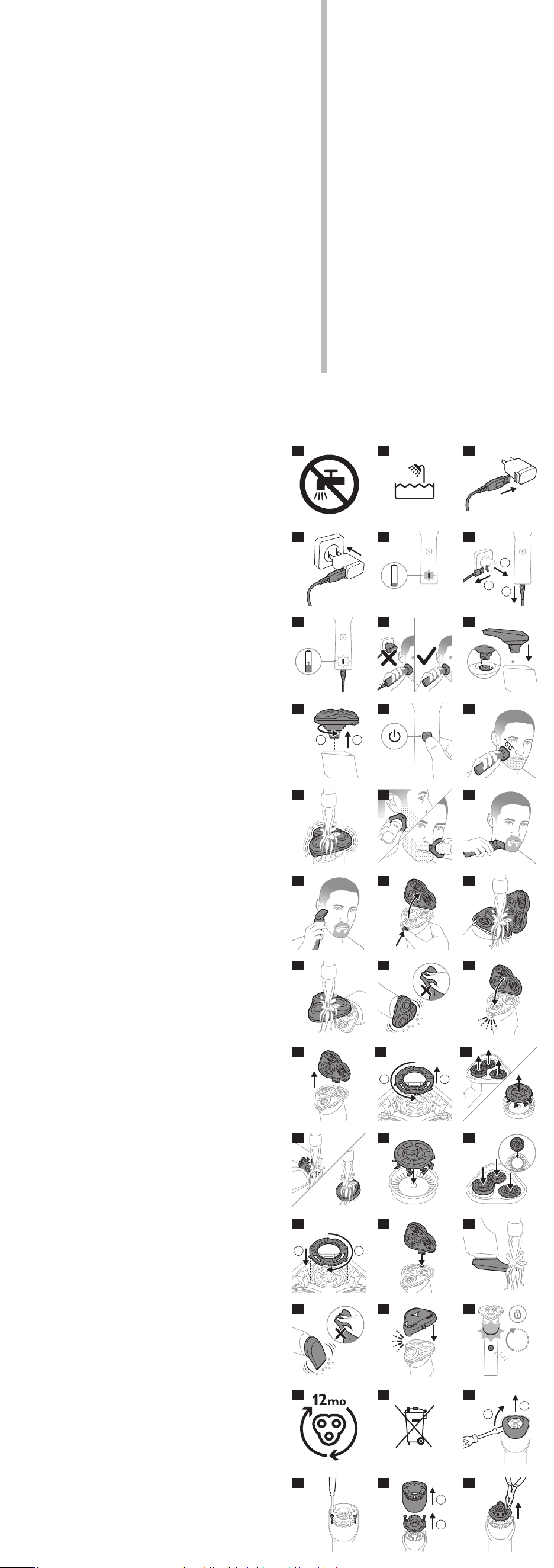
X5007/00, X5006/00, X5006/05, X5012/05
ENGLISH
Important safety information
Only use the product for its intended purpose. Read
this important information carefully before you use the
product and its batteries and accessories, and save it for
future reference. Misuse can lead to hazards or serious
injuries. Accessories supplied may vary for dierent
products.
Warning
- To charge the product, only use a certied safety
extra low voltage (SELV) supply unit with output
rating 5 V, ≥ 1 A. For safe charging in a moist
environment (e.g. in a bathroom), only use an IPX4
(splash-proof) supply unit. A suitable supply unit
(e.g. Philips HQ87) is available via
www.philips.com/support. If you need support
nding the correct USB supply unit, contact the
Consumer Care Center in your country (see the
international warranty leaet for contact details).
Using a non-certied supply unit may cause hazards
or serious injuries.
- Keep the USB cable and the USB supply unit dry
(Fig. 2).
- This shaver is waterproof (Fig. 3). It is suitable for use
in the bath or shower and for cleaning under the
tap. For safety reasons, the shaver can therefore only
be used without cord.
- This appliance can be used by children aged from 8
years and above and persons with reduced physical,
sensory or mental capabilities or lack of experience
and knowledge if they have been given supervision
or instruction concerning use of the appliance in
a safe way and understand the hazards involved.
Children shall not play with the appliance. Cleaning
and user maintenance shall not be made by children
without supervision.
- Do not modify the supply unit.
- Do not use the supply unit in or near wall sockets
that contain an electric air freshener to prevent
irreparable damage to the supply unit.
- Do not use a damaged appliance. Replace damaged
parts with new Philips parts.
- Because of hygiene, only one person should use the
appliance.
- Unplug the appliance before cleaning it with water.
- Only use cold or lukewarm water to clean the
appliance.
- Never use compressed air, scouring pads, abrasive
cleaning agents or aggressive liquids to clean the
appliance.
- Water may drip from the socket at the bottom of
the shaver when you rinse it. This is normal and not
dangerous because all electronics are enclosed in a
sealed power unit inside the shaver.
- Only use original Philips accessories or consumables.
- Charge, use and store the product at a temperature
between 41 °F / 5 °C and 95 °F / 35 °C.
- Keep product and batteries away from re and
do not expose them to direct sunlight or high
temperatures.
- If the product becomes abnormally hot or smelly,
changes color or if charging takes longer than usual,
stop using and charging the product and contact
Philips.
- Do not place products and their batteries in
microwave ovens or on induction cookers.
- Do not open, modify, pierce, damage or dismantle
the product or battery to prevent batteries
from heating up or releasing toxic or hazardous
substances. Do not short-circuit, overcharge or
reverse charge batteries.
- If batteries are damaged or leaking, avoid contact
with the skin or eyes. If this occurs, immediately rinse
well with water and seek medical care.
Electromagnetic elds (EMF)
This Philips appliance complies with all applicable
standards and regulations regarding exposure to
electromagnetic elds.
General description
1 Protective cap
2 Shaving unit
3 Shaving unit release button
4 Shaving unit connector
5 Power-on light ring
6 On/o button
7 Battery charge indicator
8 Socket for small plug
9 Trimmer(X5012/05, X5006/05 only)
10 USB cable
Note: A suitable supply unit (e.g. Philips HQ87) is
available via www.philips.com/support
Introduction
Congratulations on your purchase and welcome to
Philips! To fully benet from the support that Philips
oers, register your product at
www.philips.com/welcome
Charging
Warning: Keep the USB cable and the USB supply
unit dry (Fig. 2).
Fully charge the product before rst use and when
the display indicates that the battery is almost empty.
Charging takes approx. 1 hour. A fully charged shaver
provides up to 50 minutes of shaving time.
Quick Charge: After approx. 5 minutes of charging, the
battery contains enough energy for one full shave.
1 Make sure that the appliance is switched o.
2 Insert the small plug of the USB cable into the socket
in the bottom of the appliance.
3 Insert the USB plug into the USB supply unit (not
provided) (Fig. 4).
4 Insert the USB supply unit into the wall socket (Fig. 5).
The battery indicator starts to ash white (Fig. 6).
5 After charging, remove the USB supply unit from the
wall socket, pull the USB plug out of the supply unit
and then pull the small plug out of the appliance
(Fig. 7).
Charge indications
Battery low
When the battery is almost empty, the battery charge
indicator ashes orange (Fig. 6).
Battery charging
While the product charges, the battery charge indicator
quickly ashes white (Fig. 8).
Quick charge
When the battery contains enough energy for one
shave, the battery charge indicator starts ashing white
more slowly.
Battery full
When the product is fully charged, the battery charge
indicator lights up white continuously. After approx.30
minutes, the lights go out automatically.
Note: This product can only be used without cord
(Fig.9).
'Unplug before use' reminder
The battery charge indicator ashes white to remind
you to unplug the shaver rst.
Using the product
Always check the product and all accessories
before using. Do not use the product or any
accessory if it is damaged, as this may cause
injury. Always replace a damaged part with one
of the original type.
Note: This product can only be used without cord.
Removing or attaching the click-on
attachments
1 Make sure the product is switched o.
2 To attach the click-on attachment, insert the lug
of the attachment into the slot in the top of the
product. Then press down the attachment to attach
it to the product (‘click’) (Fig. 10).
3 To remove the click-on attachment, twist the
attachment and then pull it o the product (Fig.11).
Shaving
Skin adaptation period
Your rst shaves may not bring you the result you
expect and your skin may even become slightly irritated.
This is normal. Your skin and beard need time to adapt
to any new shaving system. To allow your skin to
adapt to this new appliance, we advise you to shave
regularly (at least 3 times a week) and exclusively with
this appliance for a period of 3 weeks. You can use this
product either wet or dry, or even in the shower.
For a wet shave, apply some water and shaving foam or
gel to your skin and rinse the shaving heads under the
tap with warm water before following the steps below.
1 Press the on/o button once to switch on the
product (Fig. 12).
2 Move the shaving heads over your skin in circular
movements (Fig. 13) to catch all hairs growing in
dierent directions. Make sure each shaving head is
fully in contact with the skin. Exert gentle pressure
for a close, comfortable shave.
Note: Do not press too hard, as this can cause skin
irritation.
Note: If you are shaving with gel or foam, rinse the
shaving unit regularly during your shave to ensure
that it continues to glide smoothly over your skin
(Fig. 14).
3 Use the narrow sides of the shaving unit to shave in
hard-to-reach areas such as along your jawline and
under your nose (Fig. 15).
4 Switch o and clean the product after each use (see
'Cleaning and maintenance').
Note: Make sure you rinse all foam or shaving gel o
the product.
Trimming (X5012/05, X5006/05 only)
1 Press the on/o button once to switch on the
product (Fig. 12).
2 Hold the trimmer perpendicular to the skin and
move it downwards while exerting gentle pressure.
3 You can also use the trimmer to contour your beard
(Fig. 16) and sideburns (Fig. 17).
4 Switch o the product and clean the trimmer after
each use to prevent clogging and damage. Switch
o the product and clean the trimmer after each use
to prevent clogging and damage.
Cleaning and maintenance
Clean the product and the attachments after each use
for optimal performance.
Cleaning the shaver under the tap
Clean the shaver after every shave for optimal
performance.
Always check if the water is too hot, to prevent
burning your hands.
Never dry the shaving unit with a towel or tissue,as
this may damage the shaving heads.
While rinsing shaving heads, water may drip out of
the base of shaver. This is a normal occurrence.
1 Press the on/o button once to switch on the
product (Fig. 12).
2 Rinse the shaving unit with cold or lukewarm water
(Fig. 14).
3 Press the on/o button to switch o the product.
Press the release button to open the shaving unit
(Fig. 18).
4 Rinse the hair chamber under a warm tap (Fig. 19).
5 Rinse the shaving head holder under the tap
(Fig.20).
6 Carefully shake o excess water and let the shaving
head holder air-dry completely (Fig. 21).
7 Close the shaving unit (Fig. 22).
Thorough cleaning
We advise you to clean the shaving heads thoroughly
once a month or when the shaver does not shave as
well as it used to.
Note: The guards of the shaving heads shown in this
user manual may dier from the ones you purchased.
The handling is the same.
1 Make sure that the product is disconnected from the
USB cable.
2 Press the on/o button once to switch o the
product (Fig. 12).
3 Press the release button on the shaving unit (Fig.18)
and pull the shaving head holder o the shaving
unit (Fig. 23).
4 Turn the retaining rings counterclockwise and
remove them (Fig. 24).
5 Remove the shaving heads from the shaving head
holder. Each shaving head consists of a cutter and
guard (Fig. 25).
Note: Do not clean more than one cutter and guard
at a time, since they are all matching sets. If you
accidentally put a cutter in the wrong shaving guard,
it may take several weeks before optimal shaving
performance is restored.
6 Clean the cutter and guard under the tap (Fig. 26).
7 Put the cutter back into the guard (Fig. 27).
8 Place the shaving heads in the shaving head holder
(Fig. 28).
Note: Make sure that the projections of the shaving
heads t exactly into the recesses of the shaving
head holder.
9 Place the retaining rings back onto the shaving head
holder and turn them clockwise ('click') (Fig.29).
- Each retaining ring has two recesses and two
projections that t exactly in the projections and
recesses of the shaving head holder.
10 Reinsert the hinge of the shaving head holder
into the slot of the shaving unit (Fig. 30). Close the
shaving unit (Fig. 22).
Cleaning the click-on trimmer
(X5012/05, X5006/05 only)
Never dry the trimmer with a towel or tissue,as this
may damage the trimming teeth.
Clean the trimmer after each use.
1 Press the on/o button once to switch on the
product (Fig. 12).
2 Rinse the trimmer with cold or lukewarm water (Fig.
31).
3 After cleaning, press the on/button to switch o the
product.
4 Carefully shake o excess water and let the trimmer
air-dry completely (Fig. 32).
5 For optimal performance, lubricate the teeth of the
trimmer with a drop of mineral oil every six months.
Storage and travel
Put the protection cap on the product (Fig. 33) to
protect it from dirt accumulation. We advise you to let
the product dry before you store it.
Travel lock
You can lock the shaver when you are going to travel
to prevent it from switching on accidentally. To activate
or deactivate the travel lock, press the on/o button
for 3 seconds. When the travel lock is activated or
deactivated, the power-on light ring ashes three times
(Fig. 34).
Note: The appliance unlocks automatically when
connected to the wall socket.
Replacement
For maximum shaving performance, we advise you to
replace the shaving heads every two years (Fig. 35).
Replace damaged shaving heads immediately. Always
replace the shaving heads with original Philips shaving
heads.
Note: The guards of the shaving heads shown in this
user manual may dier from the ones you purchased.
The handling is the same.
The following accessories and spare parts are available:
- SH50 Philips replacement shaving heads.
Support
For all product support such as frequently asked
questions, please visit www.philips.com/support
Recycling
- This symbol means that electrical products and
batteries shall not be disposed of with normal
household waste (Fig. 36).
- Follow your country’s rules for the separate
collection of electrical products and batteries.
Removal of built-in rechargeable battery
The built-in rechargeable battery must only be removed
by a qualied professional when the appliance is
discarded. Before removing the battery, make sure that
the appliance is disconnected from the wall socket and
that the battery is completely empty.
Take any necessary safety precautions when you
handle tools to open the appliance and when
you dispose of the rechargeable battery.
When you handle batteries, make sure that your
hands, the product and the batteries are dry.
無料修理規定
16
1.
取扱説明書、本体貼付ラベル等の注意書に従った正常な使用状態で
保証期間内に故障した場合には、無料修理します。
2.
保証期間内に故障して無料修理をお受けになる場合には、フィリップス
サポートセンターにお問い合わせください。
3.
ご贈答品の修理に関するご相談は、フィリップスサポートセンターに
お問い合わせください。
4.
保証期間内でも次の場合には有料修理になります。
○
1
使用上の誤り及び不当な修理や改造による故障及び損傷。
○
2
お買い上げ後の輸送、移動、落下等による故障及び損傷。
○
3
火災、地震、水害、落雷、その他の天災地変、公害や異常電圧による故障及び損傷。
○
4
一般家庭以外(例えば、業務用の長時間使用)に使用された場合の故障及び損傷。
○
5
保証書の提示がない場合。
○
6
保証書にお買い上げ年月日、お客様名、販売店名の記入のない場合、或は字句を書
き換えられた場合。
※保証書は、本書に明示した条件のもとにおいて無料修理をお約束するも
のです。従って保証書を発行している者(保証責任者)、及びそれ以外の
事業者に対するお客様の法律上の権利を制限するものではありません。
保証期間経過後の修理についてご不明の場合は、フィリップスサポートセ
ンターにお問い合わせください。
※保証期間経過後の修理・補修用性能部品の保有期間について詳しく
は取扱説明書の保証とアフターサービスの項目をご覧ください。
※お客様にご記入いただいた個人情報(保証書の控え)は保証期間内
のサービス活動及びその後の安全点検活動のために利用させていた
だく場合がございます。ご了承ください。また個人情報は、株式会社
フィリップス・ジャパン のホームページ
http://www.philips.co.jp/
に掲載されている「プライバシーに関する通知」に基づき適切に管理い
たします。
〈無料修理規定〉
お買い上げ日
年 月 日
お買い上げ店名
TEL.
(
)
便 利メモ
このような症状の時は、故障や事故防止のため、電源を
OFF
に し 、充 電 ア ダ プ タ を
コンセ ント から 外 して 、必 ずフィリップスサポ ートセ ンター に お 問 い 合 わ せくだ さ い 。
ご使用の時、このような症状はありませんか?
●
本 体 にさわると時 々電 気 を感 じる。
● こ げくさい 臭 い が す る。
●
電 源 コード部 を動 かすと通 電したり、しな かったりする。
●
その他の異常、故障がある。
仕様
15
※改良の為、仕様を予告なく変更することがあります。
株式会社
フィリップ ス・ジャ パ ン
〒
108-8507
東京都港区港南
2-13-37
フィリッ プ ス ビ ル
【補修用性能部品の保有期間】
●
補修用性能部品の保有期間は製造打ち切り後
6
年です。
●
性能部品とは、その製品の機能を維持するために必要な部品です。
【ご不明な点や修理に関するご相談は】
●
修理に関するご相談ならびにご不明な点は、フィリップスサポートセンターにお
問い合わせください。
【修理を依頼されるときは】
●
修理をご依頼される前に、この取扱説明書をよくお読みいただき、再度点検くだ
さい。尚、異常のあるときはご使用を中止し、フィリップスサポートセンターにお
問い合わせください。
【保証期間中は】
●
製品と保証書をご用意いただき、フィリップスサポートセンターにお問い合わせく
ださい。保証書の記載内容により無料修理いたします。
【保証期間が過ぎているときは】
●
修理によって商品の機能が維持できる場合は、補修用性能部品の保有期間内で
あれば、ご希望により有料で修理させていただきます。
【
海外での本製品の保証及びアフターサービスについて
】
●
本製品の保証は海外においても有効です。(同シリーズ製品の取り扱いがある国に
限ります )
●
日本国以外のフィリップスサービス部門においても保証期間内及び保証期間の
経過後のアフターサービスを受けることができますが、この場合多少日数を要す
ることも あります。
●
海外にてアフターサービスを受けられる場合は、現地のフィリップスサービス部門
にお問い合わせください。尚、お困りの点がございましたら下記までご連絡くだ
さい。
Philips Consumer Lifestyle Service Department P.O.Box 20100 9200 CA DRACHTEN
The Netherlands Fax:+31 51 259 2785
【お客様の個人情報のお取り扱いについて】
●
お受けしましたお客様の個人情報は、株式会社フィリップス・ジャパンのホームペー
ジ
http://www.philips.co.jp/
に掲載されている「プライバシーに関する通知」
に基づき適切に管理いたします。
保 証とアフターサービス
14
保証書と修理サービスについて(必ずお読みください。)
保証期間 お買い上げ日から
2
年間
対象部分 本体、充電ケーブル(シェービングユニット、トリマー、保護キャップを除く)
〈保証書・表面左側に付属〉
●
保証書は、必ず「お買い上げ日・販売店名」等の記入をお確かめのうえ、販売店か
ら受け取っていただき内容をよくお読みのあと大切に保管してください。
English
1
2
3
1 2
1 2
1 2
3
sec
1
2
1
2
品 番
X5007/00 X5006/00 X5006/05 X5012/05
ハンドル 品 番
X5007 X5006 X5012
替 刃 品 番
SH50
本体寸法
( 高 さ×幅×奥 行 )
170
×
60
×
60mm
本 体 質 量 約
161g
電 源 方 式 充電式
定 格 入 力
DC 5V 1A
充 電 時 間 約
1
時間
使 用 時 間 約
50
分
使用充電池 リ チ ウ ム イ オ ン 充 電 池(
Li-ion
)
2
1
5
8
6
9
7
10
11
14
17
20 21 22
23 24 25
26
29
27
30 31
32
35
38
33
36
39
34
37
40
41 42 43
28
12
15
18
13
16
19
3
4
4
1
2
3
4
6
7
8
5
9
10
To avoid accidental short-circuiting of batteries
after removal, do not let battery terminals
come into contact with metal objects (e.g.coins,
hairpins, rings). Do not wrap batteries in
aluminum foil. Tape battery terminals or put
batteries in a plastic bag before you discard
them.
Only remove the battery if it is completely
empty.
1 Pull the shaving unit o the shaver (Fig. 11).
2 Use a athead screwdriver to remove the top cap of
the housing (Fig. 37).
3 Remove the screws (Fig. 38).
4 Pull the inner parts out of the housing (Fig. 39). If
necessary, use a pair of pliers (Fig. 40).
5 Remove the battery compartment (Fig. 41) from the
housing.
6 Wedge a screwdriver or a pair of pliers between the
battery and the pins on the frame. Then pry the pins
away from the battery to break them (Fig. 42).
7 Grab the battery and pull it away from the internal
components to break it from the frame (Fig. 43).
Caution: be aware of the sharp edges of the
battery tabs so as to avoid injury to your ngers.
故 障 か な?と 思 っ た ら
13
故障かな?と思ったら、お調べください。
充電しても使用時間が極端に短い
▶
シェーバーが完全に止まるまで作動させてから、もう一度充電
してください。
それでも改善されないときは、充電池の寿命です。
シェーバー本体のモーターは回転しているが、内刃が回転しない
▶
外刃にキズ、ヘコミがある場合はシェービングヘッドを交換し
てください。
(替刃品番:
SH50
)
だんだん切れ味が悪くなった
▶シェービングヘッド部が汚れていないか確認してください。
▶
シェービングヘッド部が損傷または摩耗していないか確認して
ください。
損傷または摩耗しているときは、シェービングヘッドを交換してください。
(替刃品番:
SH50
)
▶
シェービングヘッドに長いヒゲがからまっていないか確認して
ください。
シェーバーの電源ボタンを押しても作動しない
▶
シェーバーに充電ケーブルが接続されている場合は外してくだ
さい。
▶充電されてない場合は約1時間充電をしてください。
▶ロック機能が
ON
になっている場合はロックを解除してください。
▶刃が破損している場合は交換をしてください。
以上の点検により、正常な状態に戻らない場合は、
フィリップスサポートセンターにお問 い合わせください。
充電できない
▶
シェーバー本体の電源コネクタ受部に充電ケーブルがきちんと
差し込まれているか確認してください。
▶
充電ケーブルが断線している場合は新しい充電ケーブルをお買
い求めください。
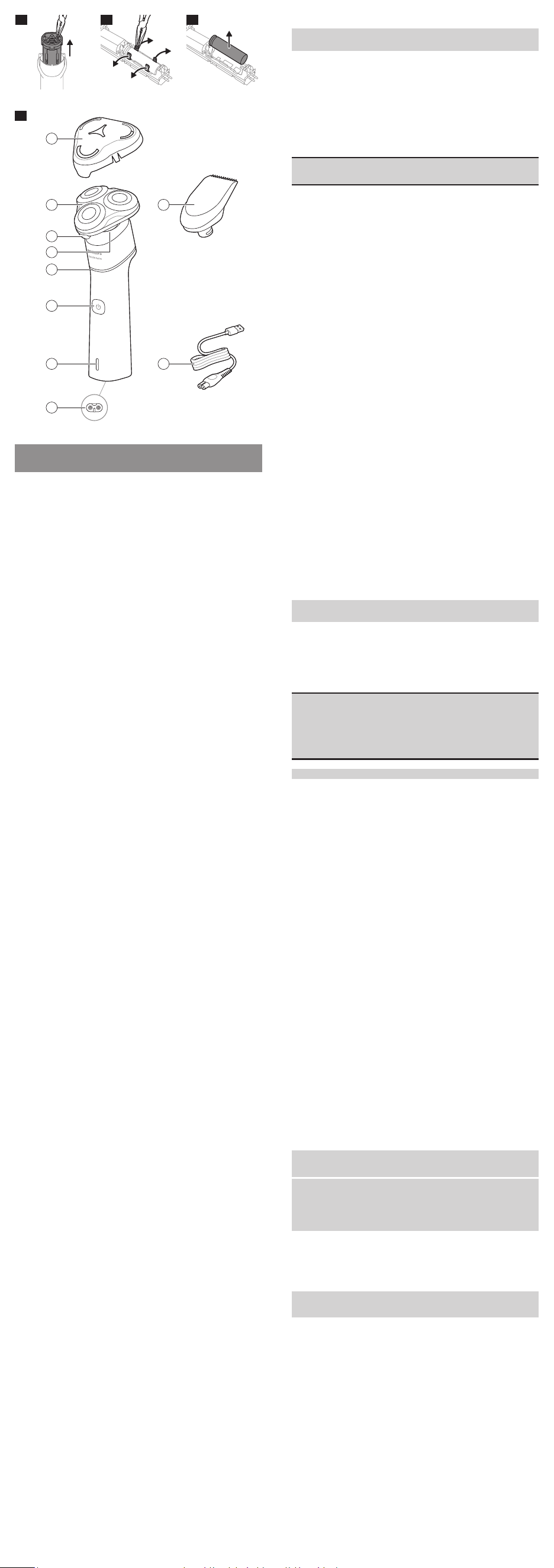
X5007/00, X5006/00, X5006/05, X5012/05
ENGLISH
Important safety information
Only use the product for its intended purpose. Read
this important information carefully before you use the
product and its batteries and accessories, and save it for
future reference. Misuse can lead to hazards or serious
injuries. Accessories supplied may vary for dierent
products.
Warning
- To charge the product, only use a certied safety
extra low voltage (SELV) supply unit with output
rating 5 V, ≥ 1 A. For safe charging in a moist
environment (e.g. in a bathroom), only use an IPX4
(splash-proof) supply unit. A suitable supply unit
(e.g. Philips HQ87) is available via
www.philips.com/support. If you need support
nding the correct USB supply unit, contact the
Consumer Care Center in your country (see the
international warranty leaet for contact details).
Using a non-certied supply unit may cause hazards
or serious injuries.
- Keep the USB cable and the USB supply unit dry
(Fig. 2).
- This shaver is waterproof (Fig. 3). It is suitable for use
in the bath or shower and for cleaning under the
tap. For safety reasons, the shaver can therefore only
be used without cord.
- This appliance can be used by children aged from 8
years and above and persons with reduced physical,
sensory or mental capabilities or lack of experience
and knowledge if they have been given supervision
or instruction concerning use of the appliance in
a safe way and understand the hazards involved.
Children shall not play with the appliance. Cleaning
and user maintenance shall not be made by children
without supervision.
- Do not modify the supply unit.
- Do not use the supply unit in or near wall sockets
that contain an electric air freshener to prevent
irreparable damage to the supply unit.
- Do not use a damaged appliance. Replace damaged
parts with new Philips parts.
- Because of hygiene, only one person should use the
appliance.
- Unplug the appliance before cleaning it with water.
- Only use cold or lukewarm water to clean the
appliance.
- Never use compressed air, scouring pads, abrasive
cleaning agents or aggressive liquids to clean the
appliance.
- Water may drip from the socket at the bottom of
the shaver when you rinse it. This is normal and not
dangerous because all electronics are enclosed in a
sealed power unit inside the shaver.
- Only use original Philips accessories or consumables.
- Charge, use and store the product at a temperature
between 41 °F / 5 °C and 95 °F / 35 °C.
- Keep product and batteries away from re and
do not expose them to direct sunlight or high
temperatures.
- If the product becomes abnormally hot or smelly,
changes color or if charging takes longer than usual,
stop using and charging the product and contact
Philips.
- Do not place products and their batteries in
microwave ovens or on induction cookers.
- Do not open, modify, pierce, damage or dismantle
the product or battery to prevent batteries
from heating up or releasing toxic or hazardous
substances. Do not short-circuit, overcharge or
reverse charge batteries.
- If batteries are damaged or leaking, avoid contact
with the skin or eyes. If this occurs, immediately rinse
well with water and seek medical care.
Electromagnetic elds (EMF)
This Philips appliance complies with all applicable
standards and regulations regarding exposure to
electromagnetic elds.
General description
1 Protective cap
2 Shaving unit
3 Shaving unit release button
4 Shaving unit connector
5 Power-on light ring
6 On/o button
7 Battery charge indicator
8 Socket for small plug
9 Trimmer(X5012/05, X5006/05 only)
10 USB cable
Note: A suitable supply unit (e.g. Philips HQ87) is
available via www.philips.com/support
Introduction
Congratulations on your purchase and welcome to
Philips! To fully benet from the support that Philips
oers, register your product at
www.philips.com/welcome
Charging
Warning: Keep the USB cable and the USB supply
unit dry (Fig. 2).
Fully charge the product before rst use and when
the display indicates that the battery is almost empty.
Charging takes approx. 1 hour. A fully charged shaver
provides up to 50 minutes of shaving time.
Quick Charge: After approx. 5 minutes of charging, the
battery contains enough energy for one full shave.
1 Make sure that the appliance is switched o.
2 Insert the small plug of the USB cable into the socket
in the bottom of the appliance.
3 Insert the USB plug into the USB supply unit (not
provided) (Fig. 4).
4 Insert the USB supply unit into the wall socket (Fig. 5).
The battery indicator starts to ash white (Fig. 6).
5 After charging, remove the USB supply unit from the
wall socket, pull the USB plug out of the supply unit
and then pull the small plug out of the appliance
(Fig. 7).
Charge indications
Battery low
When the battery is almost empty, the battery charge
indicator ashes orange (Fig. 6).
Battery charging
While the product charges, the battery charge indicator
quickly ashes white (Fig. 8).
Quick charge
When the battery contains enough energy for one
shave, the battery charge indicator starts ashing white
more slowly.
Battery full
When the product is fully charged, the battery charge
indicator lights up white continuously. After approx.30
minutes, the lights go out automatically.
Note: This product can only be used without cord
(Fig.9).
'Unplug before use' reminder
The battery charge indicator ashes white to remind
you to unplug the shaver rst.
Using the product
Always check the product and all accessories
before using. Do not use the product or any
accessory if it is damaged, as this may cause
injury. Always replace a damaged part with one
of the original type.
Note: This product can only be used without cord.
Removing or attaching the click-on
attachments
1 Make sure the product is switched o.
2 To attach the click-on attachment, insert the lug
of the attachment into the slot in the top of the
product. Then press down the attachment to attach
it to the product (‘click’) (Fig. 10).
3 To remove the click-on attachment, twist the
attachment and then pull it o the product (Fig.11).
Shaving
Skin adaptation period
Your rst shaves may not bring you the result you
expect and your skin may even become slightly irritated.
This is normal. Your skin and beard need time to adapt
to any new shaving system. To allow your skin to
adapt to this new appliance, we advise you to shave
regularly (at least 3 times a week) and exclusively with
this appliance for a period of 3 weeks. You can use this
product either wet or dry, or even in the shower.
For a wet shave, apply some water and shaving foam or
gel to your skin and rinse the shaving heads under the
tap with warm water before following the steps below.
1 Press the on/o button once to switch on the
product (Fig. 12).
2 Move the shaving heads over your skin in circular
movements (Fig. 13) to catch all hairs growing in
dierent directions. Make sure each shaving head is
fully in contact with the skin. Exert gentle pressure
for a close, comfortable shave.
Note: Do not press too hard, as this can cause skin
irritation.
Note: If you are shaving with gel or foam, rinse the
shaving unit regularly during your shave to ensure
that it continues to glide smoothly over your skin
(Fig. 14).
3 Use the narrow sides of the shaving unit to shave in
hard-to-reach areas such as along your jawline and
under your nose (Fig. 15).
4 Switch o and clean the product after each use (see
'Cleaning and maintenance').
Note: Make sure you rinse all foam or shaving gel o
the product.
Trimming (X5012/05, X5006/05 only)
1 Press the on/o button once to switch on the
product (Fig. 12).
2 Hold the trimmer perpendicular to the skin and
move it downwards while exerting gentle pressure.
3 You can also use the trimmer to contour your beard
(Fig. 16) and sideburns (Fig. 17).
4 Switch o the product and clean the trimmer after
each use to prevent clogging and damage. Switch
o the product and clean the trimmer after each use
to prevent clogging and damage.
Cleaning and maintenance
Clean the product and the attachments after each use
for optimal performance.
Cleaning the shaver under the tap
Clean the shaver after every shave for optimal
performance.
Always check if the water is too hot, to prevent
burning your hands.
Never dry the shaving unit with a towel or tissue,as
this may damage the shaving heads.
While rinsing shaving heads, water may drip out of
the base of shaver. This is a normal occurrence.
1 Press the on/o button once to switch on the
product (Fig. 12).
2 Rinse the shaving unit with cold or lukewarm water
(Fig. 14).
3 Press the on/o button to switch o the product.
Press the release button to open the shaving unit
(Fig. 18).
4 Rinse the hair chamber under a warm tap (Fig. 19).
5 Rinse the shaving head holder under the tap
(Fig.20).
6 Carefully shake o excess water and let the shaving
head holder air-dry completely (Fig. 21).
7 Close the shaving unit (Fig. 22).
Thorough cleaning
We advise you to clean the shaving heads thoroughly
once a month or when the shaver does not shave as
well as it used to.
Note: The guards of the shaving heads shown in this
user manual may dier from the ones you purchased.
The handling is the same.
1 Make sure that the product is disconnected from the
USB cable.
2 Press the on/o button once to switch o the
product (Fig. 12).
3 Press the release button on the shaving unit (Fig.18)
and pull the shaving head holder o the shaving
unit (Fig. 23).
4 Turn the retaining rings counterclockwise and
remove them (Fig. 24).
5 Remove the shaving heads from the shaving head
holder. Each shaving head consists of a cutter and
guard (Fig. 25).
Note: Do not clean more than one cutter and guard
at a time, since they are all matching sets. If you
accidentally put a cutter in the wrong shaving guard,
it may take several weeks before optimal shaving
performance is restored.
6 Clean the cutter and guard under the tap (Fig. 26).
7 Put the cutter back into the guard (Fig. 27).
8 Place the shaving heads in the shaving head holder
(Fig. 28).
Note: Make sure that the projections of the shaving
heads t exactly into the recesses of the shaving
head holder.
9 Place the retaining rings back onto the shaving head
holder and turn them clockwise ('click') (Fig.29).
- Each retaining ring has two recesses and two
projections that t exactly in the projections and
recesses of the shaving head holder.
10 Reinsert the hinge of the shaving head holder
into the slot of the shaving unit (Fig. 30). Close the
shaving unit (Fig. 22).
Cleaning the click-on trimmer
(X5012/05, X5006/05 only)
Never dry the trimmer with a towel or tissue,as this
may damage the trimming teeth.
Clean the trimmer after each use.
1 Press the on/o button once to switch on the
product (Fig. 12).
2 Rinse the trimmer with cold or lukewarm water (Fig.
31).
3 After cleaning, press the on/button to switch o the
product.
4 Carefully shake o excess water and let the trimmer
air-dry completely (Fig. 32).
5 For optimal performance, lubricate the teeth of the
trimmer with a drop of mineral oil every six months.
Storage and travel
Put the protection cap on the product (Fig. 33) to
protect it from dirt accumulation. We advise you to let
the product dry before you store it.
Travel lock
You can lock the shaver when you are going to travel
to prevent it from switching on accidentally. To activate
or deactivate the travel lock, press the on/o button
for 3 seconds. When the travel lock is activated or
deactivated, the power-on light ring ashes three times
(Fig. 34).
Note: The appliance unlocks automatically when
connected to the wall socket.
Replacement
For maximum shaving performance, we advise you to
replace the shaving heads every two years (Fig. 35).
Replace damaged shaving heads immediately. Always
replace the shaving heads with original Philips shaving
heads.
Note: The guards of the shaving heads shown in this
user manual may dier from the ones you purchased.
The handling is the same.
The following accessories and spare parts are available:
- SH50 Philips replacement shaving heads.
Support
For all product support such as frequently asked
questions, please visit www.philips.com/support
Recycling
- This symbol means that electrical products and
batteries shall not be disposed of with normal
household waste (Fig. 36).
- Follow your country’s rules for the separate
collection of electrical products and batteries.
Removal of built-in rechargeable battery
The built-in rechargeable battery must only be removed
by a qualied professional when the appliance is
discarded. Before removing the battery, make sure that
the appliance is disconnected from the wall socket and
that the battery is completely empty.
Take any necessary safety precautions when you
handle tools to open the appliance and when
you dispose of the rechargeable battery.
When you handle batteries, make sure that your
hands, the product and the batteries are dry.
無料修理規定
16
1.
取扱説明書、本体貼付ラベル等の注意書に従った正常な使用状態で
保証期間内に故障した場合には、無料修理します。
2.
保証期間内に故障して無料修理をお受けになる場合には、フィリップス
サポートセンターにお問い合わせください。
3.
ご贈答品の修理に関するご相談は、フィリップスサポートセンターに
お問い合わせください。
4.
保証期間内でも次の場合には有料修理になります。
○
1
使用上の誤り及び不当な修理や改造による故障及び損傷。
○
2
お買い上げ後の輸送、移動、落下等による故障及び損傷。
○
3
火災、地震、水害、落雷、その他の天災地変、公害や異常電圧による故障及び損傷。
○
4
一般家庭以外(例えば、業務用の長時間使用)に使用された場合の故障及び損傷。
○
5
保証書の提示がない場合。
○
6
保証書にお買い上げ年月日、お客様名、販売店名の記入のない場合、或は字句を書
き換えられた場合。
※保証書は、本書に明示した条件のもとにおいて無料修理をお約束するも
のです。従って保証書を発行している者(保証責任者)、及びそれ以外の
事業者に対するお客様の法律上の権利を制限するものではありません。
保証期間経過後の修理についてご不明の場合は、フィリップスサポートセ
ンターにお問い合わせください。
※保証期間経過後の修理・補修用性能部品の保有期間について詳しく
は取扱説明書の保証とアフターサービスの項目をご覧ください。
※お客様にご記入いただいた個人情報(保証書の控え)は保証期間内
のサービス活動及びその後の安全点検活動のために利用させていた
だく場合がございます。ご了承ください。また個人情報は、株式会社
フィリップス・ジャパン のホームページ
http://www.philips.co.jp/
に掲載されている「プライバシーに関する通知」に基づき適切に管理い
たします。
〈無料修理規定〉
お買い上げ日
年 月 日
お買い上げ店名
TEL.
(
)
便 利メモ
このような症状の時は、故障や事故防止のため、電源を
OFF
に し 、充 電 ア ダ プ タ を
コンセ ント から 外 して 、必 ずフィリップスサポ ートセ ンター に お 問 い 合 わ せくだ さ い 。
ご使用の時、このような症状はありませんか?
●
本 体 にさわると時 々電 気 を感 じる。
● こ げくさい 臭 い が す る。
●
電 源 コード部 を動 かすと通 電したり、しな かったりする。
●
その他の異常、故障がある。
仕様
15
※改良の為、仕様を予告なく変更することがあります。
株式会社
フィリップ ス・ジャ パ ン
〒
108-8507
東京都港区港南
2-13-37
フィリッ プ ス ビ ル
【補修用性能部品の保有期間】
●
補修用性能部品の保有期間は製造打ち切り後
6
年です。
●
性能部品とは、その製品の機能を維持するために必要な部品です。
【ご不明な点や修理に関するご相談は】
●
修理に関するご相談ならびにご不明な点は、フィリップスサポートセンターにお
問い合わせください。
【修理を依頼されるときは】
●
修理をご依頼される前に、この取扱説明書をよくお読みいただき、再度点検くだ
さい。尚、異常のあるときはご使用を中止し、フィリップスサポートセンターにお
問い合わせください。
【保証期間中は】
●
製品と保証書をご用意いただき、フィリップスサポートセンターにお問い合わせく
ださい。保証書の記載内容により無料修理いたします。
【保証期間が過ぎているときは】
●
修理によって商品の機能が維持できる場合は、補修用性能部品の保有期間内で
あれば、ご希望により有料で修理させていただきます。
【
海外での本製品の保証及びアフターサービスについて
】
●
本製品の保証は海外においても有効です。(同シリーズ製品の取り扱いがある国に
限ります )
●
日本国以外のフィリップスサービス部門においても保証期間内及び保証期間の
経過後のアフターサービスを受けることができますが、この場合多少日数を要す
ることも あります。
●
海外にてアフターサービスを受けられる場合は、現地のフィリップスサービス部門
にお問い合わせください。尚、お困りの点がございましたら下記までご連絡くだ
さい。
Philips Consumer Lifestyle Service Department P.O.Box 20100 9200 CA DRACHTEN
The Netherlands Fax:+31 51 259 2785
【お客様の個人情報のお取り扱いについて】
●
お受けしましたお客様の個人情報は、株式会社フィリップス・ジャパンのホームペー
ジ
http://www.philips.co.jp/
に掲載されている「プライバシーに関する通知」
に基づき適切に管理いたします。
保 証とアフターサービス
14
保証書と修理サービスについて(必ずお読みください。)
保証期間 お買い上げ日から
2
年間
対象部分 本体、充電ケーブル(シェービングユニット、トリマー、保護キャップを除く)
〈保証書・表面左側に付属〉
●
保証書は、必ず「お買い上げ日・販売店名」等の記入をお確かめのうえ、販売店か
ら受け取っていただき内容をよくお読みのあと大切に保管してください。
English
1
2
3
1 2
1 2
1 2
3
sec
1
2
1
2
品 番
X5007/00 X5006/00 X5006/05 X5012/05
ハンドル 品 番
X5007 X5006 X5012
替 刃 品 番
SH50
本体寸法
( 高 さ×幅×奥 行 )
170
×
60
×
60mm
本 体 質 量 約
161g
電 源 方 式 充電式
定 格 入 力
DC 5V 1A
充 電 時 間 約
1
時間
使 用 時 間 約
50
分
使用充電池 リ チ ウ ム イ オ ン 充 電 池(
Li-ion
)
2
1
5
8
6
9
7
10
11
14
17
20 21 22
23 24 25
26
29
27
30 31
32
35
38
33
36
39
34
37
40
41 42 43
28
12
15
18
13
16
19
3
4
4
1
2
3
4
6
7
8
5
9
10
To avoid accidental short-circuiting of batteries
after removal, do not let battery terminals
come into contact with metal objects (e.g.coins,
hairpins, rings). Do not wrap batteries in
aluminum foil. Tape battery terminals or put
batteries in a plastic bag before you discard
them.
Only remove the battery if it is completely
empty.
1 Pull the shaving unit o the shaver (Fig. 11).
2 Use a athead screwdriver to remove the top cap of
the housing (Fig. 37).
3 Remove the screws (Fig. 38).
4 Pull the inner parts out of the housing (Fig. 39). If
necessary, use a pair of pliers (Fig. 40).
5 Remove the battery compartment (Fig. 41) from the
housing.
6 Wedge a screwdriver or a pair of pliers between the
battery and the pins on the frame. Then pry the pins
away from the battery to break them (Fig. 42).
7 Grab the battery and pull it away from the internal
components to break it from the frame (Fig. 43).
Caution: be aware of the sharp edges of the
battery tabs so as to avoid injury to your ngers.
故 障 か な?と 思 っ た ら
13
故障かな?と思ったら、お調べください。
充電しても使用時間が極端に短い
▶
シェーバーが完全に止まるまで作動させてから、もう一度充電
してください。
それでも改善されないときは、充電池の寿命です。
シェーバー本体のモーターは回転しているが、内刃が回転しない
▶
外刃にキズ、ヘコミがある場合はシェービングヘッドを交換し
てください。
(替刃品番:
SH50
)
だんだん切れ味が悪くなった
▶シェービングヘッド部が汚れていないか確認してください。
▶
シェービングヘッド部が損傷または摩耗していないか確認して
ください。
損傷または摩耗しているときは、シェービングヘッドを交換してください。
(替刃品番:
SH50
)
▶
シェービングヘッドに長いヒゲがからまっていないか確認して
ください。
シェーバーの電源ボタンを押しても作動しない
▶
シェーバーに充電ケーブルが接続されている場合は外してくだ
さい。
▶充電されてない場合は約1時間充電をしてください。
▶ロック機能が
ON
になっている場合はロックを解除してください。
▶刃が破損している場合は交換をしてください。
以上の点検により、正常な状態に戻らない場合は、
フィリップスサポートセンターにお問 い合わせください。
充電できない
▶
シェーバー本体の電源コネクタ受部に充電ケーブルがきちんと
差し込まれているか確認してください。
▶
充電ケーブルが断線している場合は新しい充電ケーブルをお買
い求めください。

X5007/00, X5006/00, X5006/05, X5012/05
ENGLISH
Important safety information
Only use the product for its intended purpose. Read
this important information carefully before you use the
product and its batteries and accessories, and save it for
future reference. Misuse can lead to hazards or serious
injuries. Accessories supplied may vary for dierent
products.
Warning
- To charge the product, only use a certied safety
extra low voltage (SELV) supply unit with output
rating 5 V, ≥ 1 A. For safe charging in a moist
environment (e.g. in a bathroom), only use an IPX4
(splash-proof) supply unit. A suitable supply unit
(e.g. Philips HQ87) is available via
www.philips.com/support. If you need support
nding the correct USB supply unit, contact the
Consumer Care Center in your country (see the
international warranty leaet for contact details).
Using a non-certied supply unit may cause hazards
or serious injuries.
- Keep the USB cable and the USB supply unit dry
(Fig. 2).
- This shaver is waterproof (Fig. 3). It is suitable for use
in the bath or shower and for cleaning under the
tap. For safety reasons, the shaver can therefore only
be used without cord.
- This appliance can be used by children aged from 8
years and above and persons with reduced physical,
sensory or mental capabilities or lack of experience
and knowledge if they have been given supervision
or instruction concerning use of the appliance in
a safe way and understand the hazards involved.
Children shall not play with the appliance. Cleaning
and user maintenance shall not be made by children
without supervision.
- Do not modify the supply unit.
- Do not use the supply unit in or near wall sockets
that contain an electric air freshener to prevent
irreparable damage to the supply unit.
- Do not use a damaged appliance. Replace damaged
parts with new Philips parts.
- Because of hygiene, only one person should use the
appliance.
- Unplug the appliance before cleaning it with water.
- Only use cold or lukewarm water to clean the
appliance.
- Never use compressed air, scouring pads, abrasive
cleaning agents or aggressive liquids to clean the
appliance.
- Water may drip from the socket at the bottom of
the shaver when you rinse it. This is normal and not
dangerous because all electronics are enclosed in a
sealed power unit inside the shaver.
- Only use original Philips accessories or consumables.
- Charge, use and store the product at a temperature
between 41 °F / 5 °C and 95 °F / 35 °C.
- Keep product and batteries away from re and
do not expose them to direct sunlight or high
temperatures.
- If the product becomes abnormally hot or smelly,
changes color or if charging takes longer than usual,
stop using and charging the product and contact
Philips.
- Do not place products and their batteries in
microwave ovens or on induction cookers.
- Do not open, modify, pierce, damage or dismantle
the product or battery to prevent batteries
from heating up or releasing toxic or hazardous
substances. Do not short-circuit, overcharge or
reverse charge batteries.
- If batteries are damaged or leaking, avoid contact
with the skin or eyes. If this occurs, immediately rinse
well with water and seek medical care.
Electromagnetic elds (EMF)
This Philips appliance complies with all applicable
standards and regulations regarding exposure to
electromagnetic elds.
General description
1 Protective cap
2 Shaving unit
3 Shaving unit release button
4 Shaving unit connector
5 Power-on light ring
6 On/o button
7 Battery charge indicator
8 Socket for small plug
9 Trimmer(X5012/05, X5006/05 only)
10 USB cable
Note: A suitable supply unit (e.g. Philips HQ87) is
available via www.philips.com/support
Introduction
Congratulations on your purchase and welcome to
Philips! To fully benet from the support that Philips
oers, register your product at
www.philips.com/welcome
Charging
Warning: Keep the USB cable and the USB supply
unit dry (Fig. 2).
Fully charge the product before rst use and when
the display indicates that the battery is almost empty.
Charging takes approx. 1 hour. A fully charged shaver
provides up to 50 minutes of shaving time.
Quick Charge: After approx. 5 minutes of charging, the
battery contains enough energy for one full shave.
1 Make sure that the appliance is switched o.
2 Insert the small plug of the USB cable into the socket
in the bottom of the appliance.
3 Insert the USB plug into the USB supply unit (not
provided) (Fig. 4).
4 Insert the USB supply unit into the wall socket (Fig. 5).
The battery indicator starts to ash white (Fig. 6).
5 After charging, remove the USB supply unit from the
wall socket, pull the USB plug out of the supply unit
and then pull the small plug out of the appliance
(Fig. 7).
Charge indications
Battery low
When the battery is almost empty, the battery charge
indicator ashes orange (Fig. 6).
Battery charging
While the product charges, the battery charge indicator
quickly ashes white (Fig. 8).
Quick charge
When the battery contains enough energy for one
shave, the battery charge indicator starts ashing white
more slowly.
Battery full
When the product is fully charged, the battery charge
indicator lights up white continuously. After approx.30
minutes, the lights go out automatically.
Note: This product can only be used without cord
(Fig.9).
'Unplug before use' reminder
The battery charge indicator ashes white to remind
you to unplug the shaver rst.
Using the product
Always check the product and all accessories
before using. Do not use the product or any
accessory if it is damaged, as this may cause
injury. Always replace a damaged part with one
of the original type.
Note: This product can only be used without cord.
Removing or attaching the click-on
attachments
1 Make sure the product is switched o.
2 To attach the click-on attachment, insert the lug
of the attachment into the slot in the top of the
product. Then press down the attachment to attach
it to the product (‘click’) (Fig. 10).
3 To remove the click-on attachment, twist the
attachment and then pull it o the product (Fig.11).
Shaving
Skin adaptation period
Your rst shaves may not bring you the result you
expect and your skin may even become slightly irritated.
This is normal. Your skin and beard need time to adapt
to any new shaving system. To allow your skin to
adapt to this new appliance, we advise you to shave
regularly (at least 3 times a week) and exclusively with
this appliance for a period of 3 weeks. You can use this
product either wet or dry, or even in the shower.
For a wet shave, apply some water and shaving foam or
gel to your skin and rinse the shaving heads under the
tap with warm water before following the steps below.
1 Press the on/o button once to switch on the
product (Fig. 12).
2 Move the shaving heads over your skin in circular
movements (Fig. 13) to catch all hairs growing in
dierent directions. Make sure each shaving head is
fully in contact with the skin. Exert gentle pressure
for a close, comfortable shave.
Note: Do not press too hard, as this can cause skin
irritation.
Note: If you are shaving with gel or foam, rinse the
shaving unit regularly during your shave to ensure
that it continues to glide smoothly over your skin
(Fig. 14).
3 Use the narrow sides of the shaving unit to shave in
hard-to-reach areas such as along your jawline and
under your nose (Fig. 15).
4 Switch o and clean the product after each use (see
'Cleaning and maintenance').
Note: Make sure you rinse all foam or shaving gel o
the product.
Trimming (X5012/05, X5006/05 only)
1 Press the on/o button once to switch on the
product (Fig. 12).
2 Hold the trimmer perpendicular to the skin and
move it downwards while exerting gentle pressure.
3 You can also use the trimmer to contour your beard
(Fig. 16) and sideburns (Fig. 17).
4 Switch o the product and clean the trimmer after
each use to prevent clogging and damage. Switch
o the product and clean the trimmer after each use
to prevent clogging and damage.
Cleaning and maintenance
Clean the product and the attachments after each use
for optimal performance.
Cleaning the shaver under the tap
Clean the shaver after every shave for optimal
performance.
Always check if the water is too hot, to prevent
burning your hands.
Never dry the shaving unit with a towel or tissue,as
this may damage the shaving heads.
While rinsing shaving heads, water may drip out of
the base of shaver. This is a normal occurrence.
1 Press the on/o button once to switch on the
product (Fig. 12).
2 Rinse the shaving unit with cold or lukewarm water
(Fig. 14).
3 Press the on/o button to switch o the product.
Press the release button to open the shaving unit
(Fig. 18).
4 Rinse the hair chamber under a warm tap (Fig. 19).
5 Rinse the shaving head holder under the tap
(Fig.20).
6 Carefully shake o excess water and let the shaving
head holder air-dry completely (Fig. 21).
7 Close the shaving unit (Fig. 22).
Thorough cleaning
We advise you to clean the shaving heads thoroughly
once a month or when the shaver does not shave as
well as it used to.
Note: The guards of the shaving heads shown in this
user manual may dier from the ones you purchased.
The handling is the same.
1 Make sure that the product is disconnected from the
USB cable.
2 Press the on/o button once to switch o the
product (Fig. 12).
3 Press the release button on the shaving unit (Fig.18)
and pull the shaving head holder o the shaving
unit (Fig. 23).
4 Turn the retaining rings counterclockwise and
remove them (Fig. 24).
5 Remove the shaving heads from the shaving head
holder. Each shaving head consists of a cutter and
guard (Fig. 25).
Note: Do not clean more than one cutter and guard
at a time, since they are all matching sets. If you
accidentally put a cutter in the wrong shaving guard,
it may take several weeks before optimal shaving
performance is restored.
6 Clean the cutter and guard under the tap (Fig. 26).
7 Put the cutter back into the guard (Fig. 27).
8 Place the shaving heads in the shaving head holder
(Fig. 28).
Note: Make sure that the projections of the shaving
heads t exactly into the recesses of the shaving
head holder.
9 Place the retaining rings back onto the shaving head
holder and turn them clockwise ('click') (Fig.29).
- Each retaining ring has two recesses and two
projections that t exactly in the projections and
recesses of the shaving head holder.
10 Reinsert the hinge of the shaving head holder
into the slot of the shaving unit (Fig. 30). Close the
shaving unit (Fig. 22).
Cleaning the click-on trimmer
(X5012/05, X5006/05 only)
Never dry the trimmer with a towel or tissue,as this
may damage the trimming teeth.
Clean the trimmer after each use.
1 Press the on/o button once to switch on the
product (Fig. 12).
2 Rinse the trimmer with cold or lukewarm water (Fig.
31).
3 After cleaning, press the on/button to switch o the
product.
4 Carefully shake o excess water and let the trimmer
air-dry completely (Fig. 32).
5 For optimal performance, lubricate the teeth of the
trimmer with a drop of mineral oil every six months.
Storage and travel
Put the protection cap on the product (Fig. 33) to
protect it from dirt accumulation. We advise you to let
the product dry before you store it.
Travel lock
You can lock the shaver when you are going to travel
to prevent it from switching on accidentally. To activate
or deactivate the travel lock, press the on/o button
for 3 seconds. When the travel lock is activated or
deactivated, the power-on light ring ashes three times
(Fig. 34).
Note: The appliance unlocks automatically when
connected to the wall socket.
Replacement
For maximum shaving performance, we advise you to
replace the shaving heads every two years (Fig. 35).
Replace damaged shaving heads immediately. Always
replace the shaving heads with original Philips shaving
heads.
Note: The guards of the shaving heads shown in this
user manual may dier from the ones you purchased.
The handling is the same.
The following accessories and spare parts are available:
- SH50 Philips replacement shaving heads.
Support
For all product support such as frequently asked
questions, please visit www.philips.com/support
Recycling
- This symbol means that electrical products and
batteries shall not be disposed of with normal
household waste (Fig. 36).
- Follow your country’s rules for the separate
collection of electrical products and batteries.
Removal of built-in rechargeable battery
The built-in rechargeable battery must only be removed
by a qualied professional when the appliance is
discarded. Before removing the battery, make sure that
the appliance is disconnected from the wall socket and
that the battery is completely empty.
Take any necessary safety precautions when you
handle tools to open the appliance and when
you dispose of the rechargeable battery.
When you handle batteries, make sure that your
hands, the product and the batteries are dry.
無料修理規定
16
1.
取扱説明書、本体貼付ラベル等の注意書に従った正常な使用状態で
保証期間内に故障した場合には、無料修理します。
2.
保証期間内に故障して無料修理をお受けになる場合には、フィリップス
サポートセンターにお問い合わせください。
3.
ご贈答品の修理に関するご相談は、フィリップスサポートセンターに
お問い合わせください。
4.
保証期間内でも次の場合には有料修理になります。
○
1
使用上の誤り及び不当な修理や改造による故障及び損傷。
○
2
お買い上げ後の輸送、移動、落下等による故障及び損傷。
○
3
火災、地震、水害、落雷、その他の天災地変、公害や異常電圧による故障及び損傷。
○
4
一般家庭以外(例えば、業務用の長時間使用)に使用された場合の故障及び損傷。
○
5
保証書の提示がない場合。
○
6
保証書にお買い上げ年月日、お客様名、販売店名の記入のない場合、或は字句を書
き換えられた場合。
※保証書は、本書に明示した条件のもとにおいて無料修理をお約束するも
のです。従って保証書を発行している者(保証責任者)、及びそれ以外の
事業者に対するお客様の法律上の権利を制限するものではありません。
保証期間経過後の修理についてご不明の場合は、フィリップスサポートセ
ンターにお問い合わせください。
※保証期間経過後の修理・補修用性能部品の保有期間について詳しく
は取扱説明書の保証とアフターサービスの項目をご覧ください。
※お客様にご記入いただいた個人情報(保証書の控え)は保証期間内
のサービス活動及びその後の安全点検活動のために利用させていた
だく場合がございます。ご了承ください。また個人情報は、株式会社
フィリップス・ジャパン のホームページ
http://www.philips.co.jp/
に掲載されている「プライバシーに関する通知」に基づき適切に管理い
たします。
〈無料修理規定〉
お買い上げ日
年 月 日
お買い上げ店名
TEL.
(
)
便 利メモ
このような症状の時は、故障や事故防止のため、電源を
OFF
に し 、充 電 ア ダ プ タ を
コンセ ント から 外 して 、必 ずフィリップスサポ ートセ ンター に お 問 い 合 わ せくだ さ い 。
ご使用の時、このような症状はありませんか?
●
本 体 にさわると時 々電 気 を感 じる。
● こ げくさい 臭 い が す る。
●
電 源 コード部 を動 かすと通 電したり、しな かったりする。
●
その他の異常、故障がある。
仕様
15
※改良の為、仕様を予告なく変更することがあります。
株式会社
フィリップ ス・ジャ パ ン
〒
108-8507
東京都港区港南
2-13-37
フィリッ プ ス ビ ル
【補修用性能部品の保有期間】
●
補修用性能部品の保有期間は製造打ち切り後
6
年です。
●
性能部品とは、その製品の機能を維持するために必要な部品です。
【ご不明な点や修理に関するご相談は】
●
修理に関するご相談ならびにご不明な点は、フィリップスサポートセンターにお
問い合わせください。
【修理を依頼されるときは】
●
修理をご依頼される前に、この取扱説明書をよくお読みいただき、再度点検くだ
さい。尚、異常のあるときはご使用を中止し、フィリップスサポートセンターにお
問い合わせください。
【保証期間中は】
●
製品と保証書をご用意いただき、フィリップスサポートセンターにお問い合わせく
ださい。保証書の記載内容により無料修理いたします。
【保証期間が過ぎているときは】
●
修理によって商品の機能が維持できる場合は、補修用性能部品の保有期間内で
あれば、ご希望により有料で修理させていただきます。
【
海外での本製品の保証及びアフターサービスについて
】
●
本製品の保証は海外においても有効です。(同シリーズ製品の取り扱いがある国に
限ります )
●
日本国以外のフィリップスサービス部門においても保証期間内及び保証期間の
経過後のアフターサービスを受けることができますが、この場合多少日数を要す
ることも あります。
●
海外にてアフターサービスを受けられる場合は、現地のフィリップスサービス部門
にお問い合わせください。尚、お困りの点がございましたら下記までご連絡くだ
さい。
Philips Consumer Lifestyle Service Department P.O.Box 20100 9200 CA DRACHTEN
The Netherlands Fax:+31 51 259 2785
【お客様の個人情報のお取り扱いについて】
●
お受けしましたお客様の個人情報は、株式会社フィリップス・ジャパンのホームペー
ジ
http://www.philips.co.jp/
に掲載されている「プライバシーに関する通知」
に基づき適切に管理いたします。
保 証とアフターサービス
14
保証書と修理サービスについて(必ずお読みください。)
保証期間 お買い上げ日から
2
年間
対象部分 本体、充電ケーブル(シェービングユニット、トリマー、保護キャップを除く)
〈保証書・表面左側に付属〉
●
保証書は、必ず「お買い上げ日・販売店名」等の記入をお確かめのうえ、販売店か
ら受け取っていただき内容をよくお読みのあと大切に保管してください。
English
1
2
3
1 2
1 2
1 2
3
sec
1
2
1
2
品 番
X5007/00 X5006/00 X5006/05 X5012/05
ハンドル 品 番
X5007 X5006 X5012
替 刃 品 番
SH50
本体寸法
( 高 さ×幅×奥 行 )
170
×
60
×
60mm
本 体 質 量 約
161g
電 源 方 式 充電式
定 格 入 力
DC 5V 1A
充 電 時 間 約
1
時間
使 用 時 間 約
50
分
使用充電池 リ チ ウ ム イ オ ン 充 電 池(
Li-ion
)
2
1
5
8
6
9
7
10
11
14
17
20 21 22
23 24 25
26
29
27
30 31
32
35
38
33
36
39
34
37
40
41 42 43
28
12
15
18
13
16
19
3
4
4
1
2
3
4
6
7
8
5
9
10
To avoid accidental short-circuiting of batteries
after removal, do not let battery terminals
come into contact with metal objects (e.g.coins,
hairpins, rings). Do not wrap batteries in
aluminum foil. Tape battery terminals or put
batteries in a plastic bag before you discard
them.
Only remove the battery if it is completely
empty.
1 Pull the shaving unit o the shaver (Fig. 11).
2 Use a athead screwdriver to remove the top cap of
the housing (Fig. 37).
3 Remove the screws (Fig. 38).
4 Pull the inner parts out of the housing (Fig. 39). If
necessary, use a pair of pliers (Fig. 40).
5 Remove the battery compartment (Fig. 41) from the
housing.
6 Wedge a screwdriver or a pair of pliers between the
battery and the pins on the frame. Then pry the pins
away from the battery to break them (Fig. 42).
7 Grab the battery and pull it away from the internal
components to break it from the frame (Fig. 43).
Caution: be aware of the sharp edges of the
battery tabs so as to avoid injury to your ngers.
故 障 か な?と 思 っ た ら
13
故障かな?と思ったら、お調べください。
充電しても使用時間が極端に短い
▶
シェーバーが完全に止まるまで作動させてから、もう一度充電
してください。
それでも改善されないときは、充電池の寿命です。
シェーバー本体のモーターは回転しているが、内刃が回転しない
▶
外刃にキズ、ヘコミがある場合はシェービングヘッドを交換し
てください。
(替刃品番:
SH50
)
だんだん切れ味が悪くなった
▶シェービングヘッド部が汚れていないか確認してください。
▶
シェービングヘッド部が損傷または摩耗していないか確認して
ください。
損傷または摩耗しているときは、シェービングヘッドを交換してください。
(替刃品番:
SH50
)
▶
シェービングヘッドに長いヒゲがからまっていないか確認して
ください。
シェーバーの電源ボタンを押しても作動しない
▶
シェーバーに充電ケーブルが接続されている場合は外してくだ
さい。
▶充電されてない場合は約1時間充電をしてください。
▶ロック機能が
ON
になっている場合はロックを解除してください。
▶刃が破損している場合は交換をしてください。
以上の点検により、正常な状態に戻らない場合は、
フィリップスサポートセンターにお問 い合わせください。
充電できない
▶
シェーバー本体の電源コネクタ受部に充電ケーブルがきちんと
差し込まれているか確認してください。
▶
充電ケーブルが断線している場合は新しい充電ケーブルをお買
い求めください。