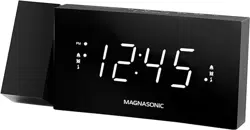
User Manual / Guide de l’utilisateur v1.3
SelfSet
™
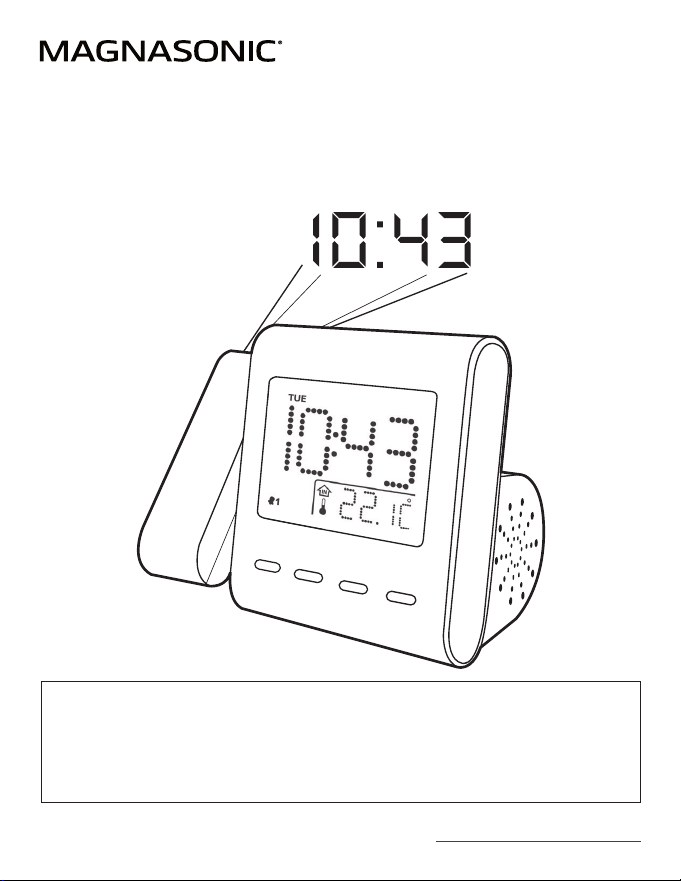
Clock Radio with Dual Alarm
Radio- réveil SelfSet
™
avec double alarme
EAAC601/ EAAC601W
magnasonic.com/support
Thank you for your purchase of this Magnasonic product. Please read this instruction manual carefully before
using product to ensure proper use. Keep this manual in a safe place for future reference.
Merci d’avoir fait l’achat de cet appareil Magnasonic. Veuillez lire le présent guide attentivement avant de faire
fonctionner l’appareil pour vous assurer de l’utiliser correctement. Conservez le présent guide dans un endroit
sûr an de pouvoir vous y référer au besoin.

2
WARNING
Do not ingest the battery, Chemical Burn Hazard.
This product contains a coin/button cell battery. If the coin/button cell battery is
swallowed, it can cause severe internal burns in just 2 hours and can lead to death.
Keep new and used batteries away from children.
If the battery compartment does not close securely, stop using the product and
keep it away from children.
If you think batteries might have been swallowed or placed inside any part of the
body, seek immediate medical attention.
• Mains plug is used as disconnect device and it should remain readily operable
during intended use. In order to disconnect the apparatus from the mains
completely, the mains plug should be disconnected form the socket outlet
completely.
• Caution marking is located at the back of apparatus.
CAUTION
• Danger of explosion if battery is incorrectly replaced. Replace only with the
same or equivalent type.
• Battery cannot be subjected to high or low extreme temperatures, low air
pressure at high altitude during use, storage or transportation.
• Replacement of a battery with an incorrect type that can result in an explo-
sion or the leakage of ammable liquid or gas.
• Disposal of a battery into re or a hot oven, or mechanically crushing or
cutting of a battery, that can result in an explosion.
• Leaving a battery in an extremely high temperature surrounding environ-
ment that can result in an explosion or the leakage of ammable liquid or
gas.
• A battery subjected to extremely low air pressure that may result in an
explosion or the leakage of ammable liquid or gas.

3
TABLE OF CONTENTS
WARNING ......................................................................................................... 2
PRODUCT INFORMATION ...........................................................................4
OPERATING INSTRUCTIONS .....................................................................6
Connecting Power .........................................................................................................................6
Setting Alarm 1 & Alarm 2 ........................................................................................................ 6
Setting the Date & Time .............................................................................................................8
Daylight Saving Time (DST) / Summer Time ....................................................................8
Canceling / Reactivating Automatic DST / Summer Time ......................................... 8
Battery Backup ................................................................................................................................ 9
Installing the Battery .....................................................................................................................9
Snooze Function ..........................................................................................................................10
Sleep Timer .....................................................................................................................................10
Nap Timer .......................................................................................................................................10
Dimmer .............................................................................................................................................10
Temperature Settings .................................................................................................................11
Listening to the Radio ................................................................................................................11
To Set the Radio Presets ..........................................................................................................11
To Recall the Radio Presets ....................................................................................................12
Projection Unit ..............................................................................................................................12
AUX In ..............................................................................................................................................12
MAGNASONIC
®
WARRANTY ...................................................................13
TROUBLESHOOTING ..................................................................................15
SPECIFICATIONS ..........................................................................................15
CARE AND MAINTENANCE ......................................................................16

4
NAP / SIESTE°C / °FDST / HA
14 15 16 17
13
TIME ZONE / FUS HOR
DIMMER / GRADATEUR AM / FMMEM / M+
SET /
RÉGL
SNOOZE / SLEEP
MIN SOM / SOMNO
18 19 20 21
12
11
5
9
10
3
4
1 2
7 8
6
PRODUCT INFORMATION
5
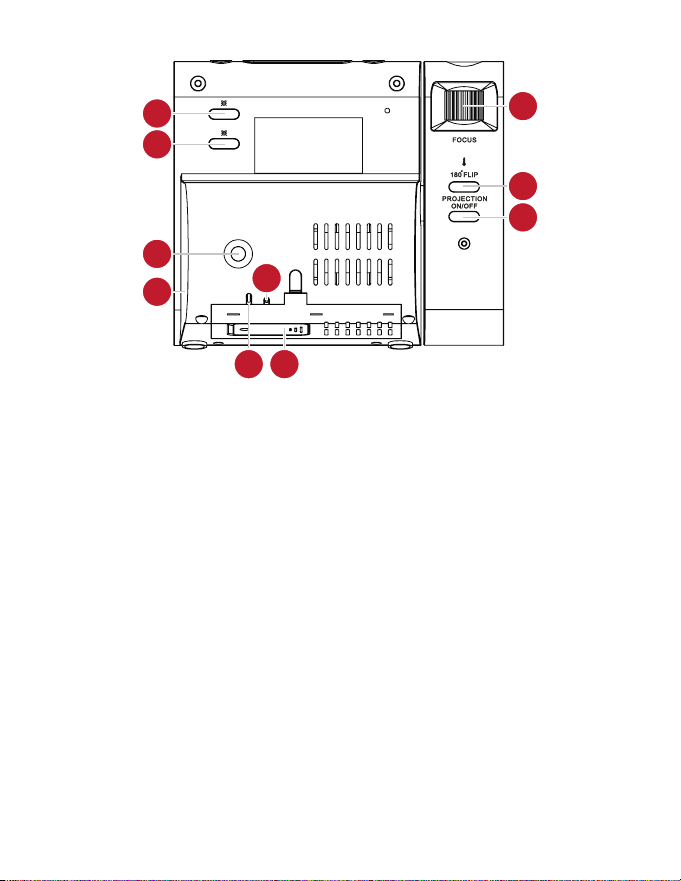
1. Month Indicator
2. Daylight Savings Time ‘on’ Indicator
3. Year Indicator
4. PM Indicator
5. Time Zone Selection ‘on’ Indicator
6. FM/AM Band Indicator
7. Alarm Indicators:
Alarm 1 Radio / Alarm 1 Buzzer /
Alarm 2 Radio / Alarm 2 Buzzer
8. Sleep Mode ‘on’ Indicator
9. Day of the Week Indicator
10. Date Indicator
11. Time / Main Function Indicator
12. Indoor Temperature Display
13. LCD Screen
14. << / Daylight Savings Time
15. >> / ºC-ºF
16. Volume Down / Nap
17. Volume Up / Calendar
18. Projection Unit
19. Set / Memory
20. Time Zone / Snooze / Sleep / Dimmer
21. Radio ON/OFF / AM/FM Band
22. Alarm 1
23. Alarm 2
24. AUX Input
25. Speaker
26. FM Antenna
27. Indoor Temperature Sensor
28. Battery Door
29. Projection Focus
30. Projection 180º Flip / Projection
Temperature ON/OFF
31. Projection ON/OFF
AUX
2827
26
29
30
22
23
25
24
31
6
Connecting Power
The SelfSet
™
Clock Radio is equipped with an “auto time set” feature. When
power is connected, the clock display will ash ‘2’ which is TIME ZONE 2 (East-
ern time) and the default TIME ZONE setting.
To select TIME ZONE 2 (Eastern time) as your default time zone:
• Press ONCE to conrm your selection.
• The correct time will be displayed, unless you are in another time zone.
To change your time zone upon setup:
• Press or until your own time zone appears on the display; press
ONCE to conrm your selection.
To change your time zone after setup:
• With the radio o, press and hold the button until the time
zone numbers ash.
• Press or until your own time zone appears on the display; press
ONCE to conrm your selection.
There are 8 programmed times zones:
OPERATING INSTRUCTIONS
0 - Newfoundland time
1 - Atlantic time
2 - Eastern time (default)
3 - Central time
4 - Mountain time
5 - Pacic time
6 - Alaska time
7 - Hawaiian time
Setting Alarm 1 & Alarm 2
Press the ALARM 1 or ALARM 2 button once to view the current alarm
setting and then press and hold to enter the alarm set mode. The alarm time will
ash, and the settings will appear in the following order:
HOUR > MIN > ALARM MODES > WAKE OPTIONS > RADIO VOLUME (if applicable)
1. Press the or buttons to decrease/increase the HOUR; press the
or button to conrm HOUR. The MINUTES will begin to ash.
2. Press the or buttons to decrease/increase the MINUTES; press the
or button to conrm MINUTES. Alarm modes will ash.
7
1=Monday
2=Tuesday
3=Wednesday
4=Thursday
NOTE: When selecting 1-1, you must select a specic day as follows:
5=Friday
6=Saturday
7=Sunday
3. Press the or buttons to toggle between the ALARM MODE settings
then press the or button to conrm your selection; if 1-1 is selected,
press the or buttons to toggle between the days of the week and
press the or button to conrm your selection. The Wake options will
begin to ash.
4. Press the or buttons to toggle between the Wake options AM, FM or
bu (buzzer); press the or button to conrm your selection; if AM or
FM is selected, the Alarm Volume selection will begin to ash.
5. Press the or buttons to decrease/increase the Alarm Volume; press
the or button to conrm your selection.
Alarm modes allow you to set more than one alarm in a week e.g.,
ALARM 1 set to wake you Monday-Friday and ALARM 2 set to wake you
on weekends.
Alarm mode settings:
1-5 : Monday to Friday
1-7 : Whole week
6-7 : Saturday & Sunday
1-1 : One day of week
• Press and hold the or buttons to quickly decrease/increase
through settings.
• To cancel an alarm while it is going o, press the button.
• If an alarm is not cancelled, it will sound for 30 minutes then automatically
turn o. It will resume to the same alarm time on next scheduled day.
• To enable/disable an alarm, press and hold the
or button. An icon
will appear on screen to indicate that an alarm is enabled.

8
Setting the Date & Time
To change the Date/Time, press and hold the button. The settings will appear
in the following order:
YEAR > MONTH > DAY > 12/24 H > HOUR > MIN
1. Press the or buttons to toggle through the settings
2. To conrm your selection, press the button once again.
Daylight Saving Time (DST) / Summer Time
Daylight Saving Time/Summer Time is automatically preset. An icon will appear on
screen to indicate DST is on
• Daylight saving time begins at: 2:00 AM on the second Sunday of March.
• Standard time begins at: 2:00 AM on the rst Sunday of November.
Canceling / Reactivating Automatic DST / Summer Time
1. To cancel DST/Summer Time, press and hold the button for 3 sec-
onds while the radio is OFF.
2. ‘OFF’ will appear in the display to show that the Automatic DST/Summer
Time adjustment is canceled. The display will return to the clock.
3. To reactivate DST/Summer Time, press and hold the button for 3
seconds while the radio is OFF.
4. ‘ON’ will appear in the display to show that the Automatic DST/Summer
Time adjustment is reactivated. The display will return to the clock.
• The timing of Automatic DST/Summer Time employed by the unit
(see above) is subjected to variations by region and the law in each
country/region. In such a case, cancel the Automatic DST/Summer Time
adjustment.
• If you live in a country/region that has not introduced Daylight Saving
Time/Summer Time, you must cancel Automatic DST/Summer Time
adjustment before using the unit.

9
Battery Backup
This alarm clock is equipped with a battery backup feature. This feature will
restore your alarm clock settings in the event of a power outage. The 3V, CR2032
Flat Lithium battery is pre-installed at the factory, however, should you need to
replace the battery, please read the following instructions.
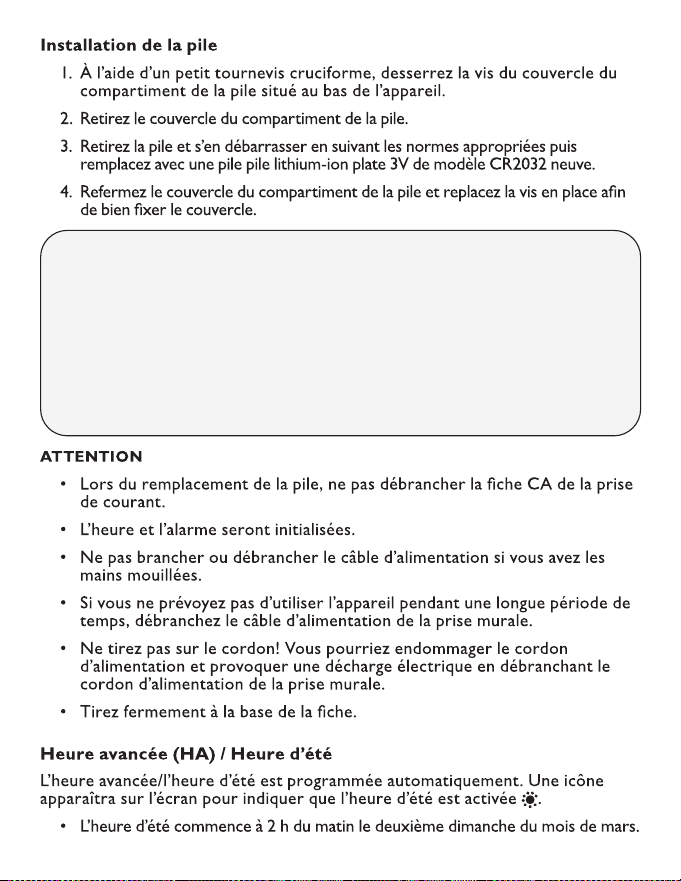
Installing the Battery
1. Using a small Phillips Head screwdriver, loosen the screw from the battery
panel on the bottom of the unit.
2. Remove the battery compartment panel.
3. Remove/properly dispose of depleted battery and replace with new, 3V,
CR2032 Flat Lithium battery.
4. Close the battery compartment and put screw into place to secure battery panel.
ATTENTION
• When replacing the battery, do not disconnect AC plug from AC outlet.
Current time and alarm will stay the same.
• Do not plug or unplug the power cable if you have wet hands.
• If you are not planning to use the unit for an extended period of time, dis-
connect the power cable from the wall outlet.
• Do not pull on the cord! You may damage the power cord and may cause an
electric shock when disconnecting the power cord from the wall outlet. Pull
rmly at the base of the plug.
• Batteries must be installed by an adult.
• Use only the recommended size and type of battery specied.
• Please be sure to follow the correct polarity when installing the battery
in the battery compartment. A reversed battery may cause damage to
the alarm clock.
• When not using the unit for a prolonged period of time, please remove
the battery to avoid possible damage caused by a leaking battery.

10
Snooze Function
• When an alarm is sounding, press the button to stop the alarm
for 9 minutes. Alarm will resume after 9 minutes.
• Pressing the button on the top of the unit will cancel the snooze function;
Snooze function will also stop automatically after 30 minutes.
Sleep Timer
The sleep timer allows you to listen to music for a preset amount of time ranging
from 90 minutes to 15 minutes. It is commonly used by people who prefer to fall
asleep to music.
1. Press the button to turn the radio on.
2. Press the button to toggle through the preset times:
90min > 60min > 30min > 15min > OFF
3. To cancel the sleep timer, press the button until you see ‘OFF’
in the display or press the button.
Nap Timer
The nap timer allows you to set a buzzer alarm to go o after a preset amount of
time ranging from 90 minutes to 10 minutes.
1. With radio o, press the button to turn on the nap timer.
2. Press the button to toggle through the preset times;
90min > 80min > 70min > 60min > 50min > 40min > 30min > 20min >
10min > OFF
3. When enabled, pressing the button will show current nap timer
and pressing again will reset the timer to 90 minutes.
4. When the nap timer expires, it will continue to buzz for 30 minutes or it can
be stopped by pressing the button.
5. To cancel the nap timer, press the button until you see ‘OFF’ in the
display.
Dimmer
You can adjust the brightness of the LCD display making it brighter, dimmer or
even turning it o. There are three dimming options: High > Low > OFF.
1. With the radio o, press the button to toggle between the
dimmer settings.
11
Temperature Settings
The temperature can be displayed in °C or °F.
• With the radio o, press and hold the button to switch between
°C or °F modes.
Listening to the Radio
1. Press the button on the top panel to turn the radio ‘ON’.
2. Press and hold the button while the radio is ON to toggle between
AM and FM radio.
3. Press the or buttons once, to move back/move forward one station
at a time.
4. Press and hold the or buttons for one second to scan back/forward
through the stations; the unit will automatically scan to the next broadcasting
station.
5. Control the radio volume with the or buttons.
6. Press the button to turn the radio ‘OFF’.
7.
Please ensure that the FM antenna is completely unrolled and extended for
best FM reception. The AM band uses an internal directional aerial. For best
reception, please rotate the radio.
To Set the Radio Presets
1. Press the button on the front panel to turn the radio ‘ON’.
2. Press and hold the button while the radio is ON to toggle between
AM and FM radio.
3. Use the or buttons to select the desired radio station.
4. To set a radio present, press and hold the button. A preset number will
blink on the display e.g., ‘P02’.
5. Use the or buttons to toggle to the desired preset number.
6. Press the button again to set the preset.
7. Repeat steps 2 through 6 to set more presets.
12
To Recall the Radio Presets
1. Press the button on the front panel to turn the radio ‘ON’.
2. Press the button to select a preset. The current preset number will
appear on the display. Press the button again to cycle through all radio
presets.
There are 20 available presets.
10 for AM radio (P01 to P10) and 10 for FM radio (P01 to P10)
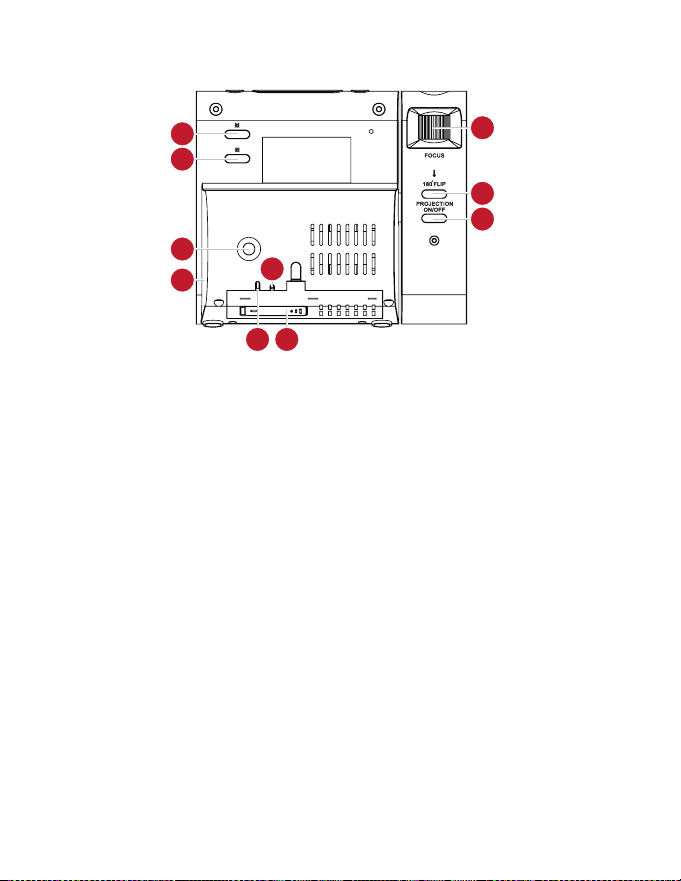
Projection Unit
The Projection Unit will project the Time or the Temperature on a wall or ceiling
of a darkened room (maximum distance is 3-9 feet).
• To turn the projected image ON/OFF, press the button.
• Turn the Focus Adjustment Wheel ( on the back of the projection
unit) until the projected time/temperature is clearly shown on the ceiling or
wall.
• To display the temperature, press and hold the button on the back of the
projection unit.
• To ip the projected image (temperature or time) 180°, press the
button once.
AUX In
This clock radio is equipped with a convenient auxiliary input that allows you to
use your clock radio as a speaker for another audio device.
1. Connect a 3.5mm cable (not included) into the connection on the back
of the clock radio and connect the other end of the cable to the audio out
connection of your external audio device.
2. Any device connected through the auxiliary input will override the radio
function when the radio is on.
3. Operate the external audio device as you normally would. You can control
the volume with the clock radio or buttons.

13
MAGNASONIC
®
WARRANTY
WARRANTY INFORMATION
Thank you for choosing Magnasonic! We guarantee your investment in our products is a solid one. Our products
come with a complete one-year parts and labor warranty. High performance components combined with quality
craftsmanship allow us to maintain the highest possible production standards. All items are guaranteed against de-
fects in materials and craftsmanship. Magnasonic has outstanding quality control; if something should go wrong with
any of our products, we will repair it free of charge within the warranty period. If the product cannot be repaired,
we will replace the product. In the event that Magnasonic replaces a product under warranty, the replacement
would only carry the original warranty from the original date of purchase.
Warranty Exclusions
Magnasonic products are warrantied for parts and labor for one year from date of original purchase, and are
subject to the terms and conditions of the warranty. Magnasonic warranties are valid for the original owner and are
non-transferable.
• Any defects caused or repairs required as a result of abusive operation, negligence, accident,
improper installation or inappropriate use as outlined in the owner’s manual.
• Any Magnasonic product tampered with, modied, adjusted, or repaired by any party other than
Magnasonic.
• Any cosmetic damage to the surface or exterior that has been defaced or caused by normal wear
and tear.
• Any damage caused by external or environmental conditions, including but not limited to, trans-
mission line/power line voltage or liquid spillage.
• Any product received without an appropriate model and serial number.
• Any products used for rental or commercial purposes.
• Any installation, set up and/or programming charges.
To Obtain Warranty Service
Should your product require warranty service, please contact us at www.magnasonic.com/contact or call us at
1-855-768-3589 to set up a Return Authorization. Products returned without a valid Return Authorization number
will be refused.
Magnasonic products must be returned in their original packaging. Our products are packaged specially to protect
them from any damage during shipping, and without this packaging the return shipment could get damaged.
This warranty does not cover the shipping cost, insurance, or any other incidental charges. Products shipped for
warranty service must be pre-paid by the customer, and Magnasonic will cover the cost to ship the repaired or
replaced product back to the customer.
14
DO NOT RETURN THIS
PRODUCT TO THE STORE
NEED
HELP?
Please contact a Magnasonic customer support representative rst
regarding any additional information on product features, specications
or assistance with setup.
Please contact us via one of the methods below:
For more product information visit Magnasonic.com
Support:
Magnasonic.com/support
Online Web Chat:
Magnasonic.com
15
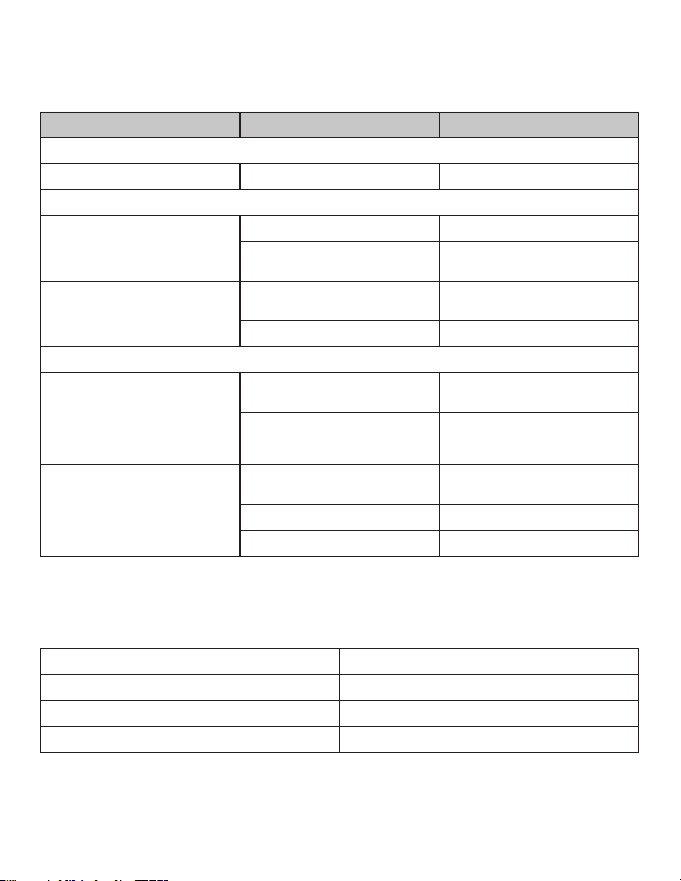
TROUBLESHOOTING
If you experience a problem with this unit, check the chart below before calling
for service.
SYMPTOM POSSIBLE CAUSE POSSIBLE SOLUTION
GENERAL
Power does not come on AC cord not plugged in Insert plug rmly into AC outlet
RADIO
No sound
Power is not on Press power to turn the radio on
Volume control is at the mini-
mum position
Turn the volume control up
Noise or sound is distorted on
AM or FM radio
AM: Interference
Position the radio for better AM
reception
FM: Antenna wire not extended Extend antenna wire
CLOCK
Incorrect time
Batteries inserted incorrectly,
not connected or dead
Check batteries
Clock not set Set the clock
Alarm does not turn on
Alarm is not set to turn on
Press and hold ALARM 1 or
ALARM 2 to turn on the alarm
Clock is not set Set the clock
Alarm time is not set Set alarm time
SPECIFICATIONS
Frequency Range (AM) 520 - 1710 kHz
Frequency Range (FM) 87.5 - 108 MHz
Power Supply AC 120V ~ 60Hz, 5W
Battery Backup DC 3V CR2032 (battery included)
Specications are subject to change without notice.

16
CARE AND MAINTENANCE
PRECAUTIONS:
1. Always turn o the unit after use.
2. Keep the unit away from magnetic objects, water or heat sources.
3. Use a clean soft cloth moistened with lukewarm water to clean the cabinet.
Never use chemical cleaners that could damage the nish of the unit.
4. Disconnect the unit from any power sources before cleaning.
NOTE: This equipment has been tested and found to comply with the limits
for a Class B digital device, pursuant to Part 15 of the FCC Rules. These limits
are designed to provide reasonable protection against harmful interference in
a residential installation. This equipment generates, uses, and can radiate radio
frequency energy and, if not installed and used in accordance with the instructions,
may cause harmful interference to radio communications. However, there is no
guarantee that interference will not occur in a particular installation. If this equip-
ment does cause harmful interference to radio or television reception, which can
be determined by turning the equipment o and on, the user is encouraged to try
to correct the interference by one or more of the following measures:
• Reorient or relocate the receiving antenna.
• Increase the separation between the equipment and the receiver.
• Connect the equipment to an outlet on a circuit dierent from that to which
the receiver is connected.

17
NOTES

18
ATTENTION
N’ingérez pas la batterie, risque de brûlure chimique.
Ce produit contient une pile bouton / bouton. Si la pile bouton / bouton est
avalée, elle peut provoquer de graves brûlures internes en seulement 2 heures et
entraîner la mort.
Gardez les piles neuves et usagées hors de portée des enfants.
Si le compartiment à piles ne se ferme pas correctement, cessez d’utiliser le pro-
duit et gardez-le hors de portée des enfants.
Si vous pensez que des piles ont été avalées ou placées dans une partie du corps,
consultez immédiatement un médecin.
• La prise principale est utilisée comme dispositif de déconnexion et elle doit
rester facilement accessible pendant l’utilisation prévue. An de déconnecter
complètement l’appareil du secteur, la che secteur doit être complètement
débranchée de la prise de courant.
• Le marquage Attention est situé à l’arrière de l’appareil.
MISE EN GARDE
• Risque d’explosion si la batterie n’est pas remplacée correctement. Rem-
placez uniquement par un type identique ou équivalent.
• La batterie ne peut pas être soumise à des températures extrêmes élevées
ou basses, à une pression d’air basse à haute altitude pendant l’utilisation, le
stockage ou le transport.
• Remplacement d’une batterie par un type incorrect qui peut entraîner une
explosion ou une fuite de liquide ou de gaz inammable.
• Élimination d’une batterie dans le feu ou dans un four chaud, ou écrasement
ou coupure mécanique d’une batterie, pouvant entraîner une explosion.
• Laisser une batterie dans un environnement environnant à température
extrêmement élevée pouvant entraîner une explosion ou une fuite de liquide
ou de gaz inammable.
• Une batterie soumise à une pression d’air extrêmement basse pouvant
entraîner une explosion ou une fuite de liquide ou de gaz inammable.

19
TABLE DES MATIÈRES
ATTENTION .................................................................................................. 18
RENSEIGNEMENTS SUR LE PRODUIT ................................................... 20
MODE D’EMPLOI .......................................................................................... 22
Raccordement électrique ........................................................................................................22
Pile de secours ..............................................................................................................................22
Installation de la pile ..................................................................................................................23
Heure avancée (HA) / Heure d’été .................................................................................... 23
Annulation/réactivation automatique de l’HA/l’heure d’été..................................24
Réglage de la date et de l’heure ...........................................................................................24
Réglage de l’alarme 1 et de l’alarme 2 ............................................................................... 24
Fonction de rappel de sonnerie ........................................................................................... 26
Minuterie sommeil ...................................................................................................................... 26
Minuterie sieste ............................................................................................................................26
Intensité d’éclairage....................................................................................................................27
Réglages de la température .................................................................................................... 27
Écouter la radio ............................................................................................................................27
Pour régler les stations programmées .............................................................................. 28
Pour rappeler les stations programmées ........................................................................28
Unité de projection .................................................................................................................... 29
Entrée AUX ...................................................................................................................................29
GARANTIE MAGNASONIC
®
....................................................................30
DÉPANNAGE ................................................................................................. 32
SPECIFICATIONS ......................................................................................... 33
ENTRETIEN ET MAINTENANCE ............................................................. 33

20
NAP / SIESTE°C / °FDST / HA
14 15 16 17
13
TIME ZONE / FUS HOR
DIMMER / GRADATEUR AM / FMMEM / M+
SET /
RÉGL
SNOOZE / SLEEP
MIN SOM / SOMNO
18 19 20 21
12
11
5
9
10
3
4
1 2
7 8
6
RENSEIGNEMENTS SUR LE PRODUIT
21
1. Indicateur du mois
2. Indicateur de l’heure d’été
« ON » (activée)
3. Indicateur de l’année
4. Indicateur p.m.
5. Indicateur de sélection du fuseau
horaire « ON » (activé)
6. Indicateur de fréquence AM/FM
7. Indicateurs d’alarme :
Alarme 1 Radio / Alarme 1 Avertisseur
sonore / Alarme 2 Radio / Alarme 2
Avertisseur sonore
8. Indicateur du mode Sleep (arrêt
diéré) « ON » (activée)
9. Indicateur du jour de la semaine
10. Indicateur de la date
11. Indicateur de la fonction Heure /
Actuelle
12. Achage de la température intérieure
13. Écran ACL
14. << / Heure d’été
15. >> / ºC et ºF
16. Réduction du volume / Sieste
17. Augmentation du volume / Calendrier
18. Unité de projection
19. Réglage / Mémoire
20. Fuseau horaire / Rappel de sonnerie /
Arrêt diéré / Intensité d’éclairage
21. Radio « ON/OFF » (allumée/éteinte) et
fréquence AM/FM
22. Alarme 1
23. Alarme 2
24. Entrée AUX
25. Haut-parleur
26. Antenne FM
27. Capteur de la température intérieure
28. Couverture des piles
29. Mise au point de projection
30. Projection basculement 180º / Projec-
tion température
« ON/OFF » (allumée/éteinte)
31. Projection « ON/OFF » (allumée/
éteinte)
AUX
2827
26
29
30
22
23
25
24
31

22
MODE D’EMPLOI
Raccordement électrique
Le radio-réveil SelfSetMC est doté d’une fonction de “réglage automatique de
l’heure”. Lorsque l’alimentation est connectée, l’achage de l’horloge clignote
“2”qui représente le FUSEAU HORAIRE 2 (heure de l’Est) et le réglage du fuseau
horaire par défaut.
Pour choisir le FUSEAU HORAIRE 2 (heure de l’Est) comme fuseau horaire par
défaut:
• Appuyez UNE fois sur • an de conrmer votre choix.
• L’heure exacte s’ache, sauf si vous êtes dans un autre fuseau horaire.
Pour changer votre fuseau horaire lors de la conguration:
• Appuyez sur ou jusqu’à ce que votre propre fuseau horaire apparaît
à l’écran; appuyez sur UNE fois pour conrmer votre sélection.
Pour changer votre fuseau horaire après la conguration:
• Avec la radio éteinte, appuyez et maintenez enfoncé le bouton jusqu’à ce que
les numéros des fuseaux horaires clignotent.
• Appuyez sur ou jusqu’à ce que votre propre fuseau horaire apparaît à
l’écran; appuyez sur UNE fois pour conrmer votre sélection.
Il y a huit (8) fuseaux horaires programmes
0 – Heure de Terre-Neuve
1 – Heure de l’Atlantique
2 – Heure normale de l’Est (par défaut)
3 – Heure normale du Centre
Pile de secours
Ce réveil dispose d’une fonction de sauvegarde de la pile. Cette fonction permet
de restaurer vos réglages d’alarme de réveil en cas de coupure de courant. La pile
lithium-ion plate 3V de modèle CR2032 est préinstallée en usine, cependant, si
vous devez remplacer la pile, veuillez lire les instructions suivantes.
4 – Heure normale des Rocheuses
5 – Heure normale du Pacique
6 – Heure normale du Alaska
7 – Heure d’Hawaii
23
• La pile doit être installée par un adulte.
• N’utilisez que la taille et le type de pile spéciés.
• Veuillez prendre soin de respecter la polarité lors de l’installation de la
pile dans son compartiment. Une pile inversée peut endommager le réveil.
• L’orsque l’appareil n’est pas utilise pendant une période prolongée,
veuillez retirer la pile an d’éviter les dommages éventuels causés par une
pile qui a fui.
24
• La programmation automatique de l’HA/l’heure d’été utilisée par
l’appareil (voir ci-dessus) est soumise à des variations selon la région et
la juridiction de chaque pays/région. Dans un tel cas, annulez le réglage
automatique de l’HA/l’heure été.
• Si vous vivez dans un pays ou une région qui n’a pas introduit l’heure
avancée/l’heure d’été, vous devez annuler le réglage automatique de
l’HA/l’heure d’été avant d’utiliser l’appareil.
25
3.
4.
5.

26
• Appuyez et maintenez enfoncé les boutons ou pour passer rap-
idement à travers les paramètres.
• Pour annuler une alarme lorsqu’elle retentit, appuyez sur le bouton .
• Si une alarme n’est pas annulée, elle retentira pendant 30 minutes, puis
s’éteindra automatiquement. Il reprendra à la même heure établie pour
l’alarme au prochain jour prévu.
• Pour activer/désactiver une alarme, appuyez et maintenez enfoncé le
bouton ou . Une icône apparaîtra sur l’écran pour indiquer qu’une
alarme est activée.

27
2.
3.
4.
5.
ACL
28
Veuillez vous assurer que l’antenne FM est entièrement déroulée et étendue
pour une meilleure réception FM. La fréquence AM utilise une antenne direc-
tionnelle interne. Pour une meilleure réception, veuillez faire tourner la radio.
Il y a 20 préréglages disponibles.
10 pour la radio AM (P01 à P10) et 10 pour la radio FM (P01 à P10)
5.
6.

29

30
GARANTIE MAGNASONIC
®
INFORMATIONS DE GARANTIE
Merci d’avoir choisi Magnasonic! Nous garantissons que votre investissement dans nos produits est solide.
Nos produits sont livrés avec une garantie complète d’un an sur les pièces et la main-d’œuvre. Des com-
posants haute performance associés à un savoir-faire de qualité nous permettent de maintenir les standards
de production les plus élevés possibles. Tous les articles sont garantis contre les défauts de matériaux et de
l’artisanat. Magnasonic a un contrôle de qualité exceptionnel; En cas de problème avec l’un de nos produits,
nous le réparerons gratuitement pendant la période de garantie. Si le produit ne peut pas être réparé, nous
remplacerons le produit. Dans le cas où Magnasonic remplace un produit sous garantie, le remplacement ne
porterait que la garantie d’origine à compter de la date d’achat originale.
Exclusions de garantie
Les produits Magnasonic sont garantis pour les pièces et la main d’œuvre pendant un an à compter de la
date d’achat initiale, et sont soumis aux termes et conditions de la garantie. Les garanties Magnasonic sont
valables pour le propriétaire original et ne sont pas transférables.
• Tout défaut ou réparation dû à une utilisation abusive, à une négligence, à un accident, à une
mauvaise installation ou à une utilisation inappropriée comme indiqué dans le manuel du
propriétaire.
• Tout produit Magnasonic altéré, modié, ajusté ou réparé par un tiers autre que Magnasonic.
• Tout dommage esthétique à la surface ou à l’extérieur qui a été endommagé ou causé par
l’usure normale.
• Tout dommage causé par des conditions externes ou environnementales, y compris, mais
sans s’y limiter, la tension de la ligne de transmission / de la ligne d’alimentation ou un déverse-
ment de liquide.
• Tout produit reçu sans un modèle et un numéro de série appropriés.
• Tous les produits utilisés à des ns locatives ou commerciales.
• Toute installation, mise en place et / ou frais de programmation.
Pour obtenir un service de garantie
Si votre produit nécessite un service de garantie, veuillez nous contacter à www.magnasonic.com/contact ou
appelez-nous au 1-855-768-3589 pour congurer une autorisation de retour. Les produits retournés sans
numéro d’autorisation de retour valide seront refusés.
Les produits Magnasonic doivent être retournés dans leur emballage d’origine. Nos produits sont emballés
spécialement pour les protéger de tout dommage pendant l’expédition, et sans cet emballage, l’envoi de
retour pourrait être endommagé.
Cette garantie ne couvre pas les frais d’expédition, d’assurance ou autres frais accessoires. Les produits
expédiés pour le service de garantie doivent être prépayés par le client, et Magnasonic couvrira le coût
d’expédition du produit réparé ou remplacé au client.
31
Veuillez contacter d’abord un représentant du soutien à la
clientèle Magnasonic pour toute information supplémentaire sur
les caractéristiques du produit, les spécifications ou pour de l’aide
avec l’installation.
Veuillez nous contacter par l’une des méthodes ci-dessous:
Soutien:
magnasonic.com/support
Clavardage en ligne:
magnasonic.com
Pour plus d’information sur nos produits, visitez magnasonic.com

32
SYMPTÔME CAUSE POSSIBLE SOLUTION POSSIBLE
GÉNÉRAL
L'appareil ne s'allume pas
Le cordon d'alimentation n'est
pas branché
Insérez fermement la che dans
la prise murale
RADIO
Pas de son
Elle n’est pas allumée
Appuyez sur POWER pour
allumer la radio
Le contrôle du volume est à la
position minimum
Tournez la commande de volume
vers le haut
Bruit ou le son est déformé sur la
radio AM ou FM.
AM : interférence
Placez la radio pour une meil-
leure réception AM
FM : le de l'antenne n'est pas
bien étiré
Étirez le l de l’antenne
HORLOGE
Incorrect time
La pile est mal insérée, l’appareil
n’est pas branché ou la pile est
à plat
Réglez l’horloge
L’horloge n’est pas réglée
Appuyez et maintenez enfoncé
le bouton de l’ALARME 1 ou
l’ALARME 2 an d’activer l'alarme
L’alarme ne sonne pas
L’alarme n’est pas programmée
pour sonner
Appuyez et maintenez enfoncé
le bouton de l’ALARME 1 ou
l’ALARME 2 an d’activer l'alarme
L’horloge n’est pas réglée Réglez l’horloge
L’heure de l’alarme n’est pas
réglée
Réglez l’alarme
33
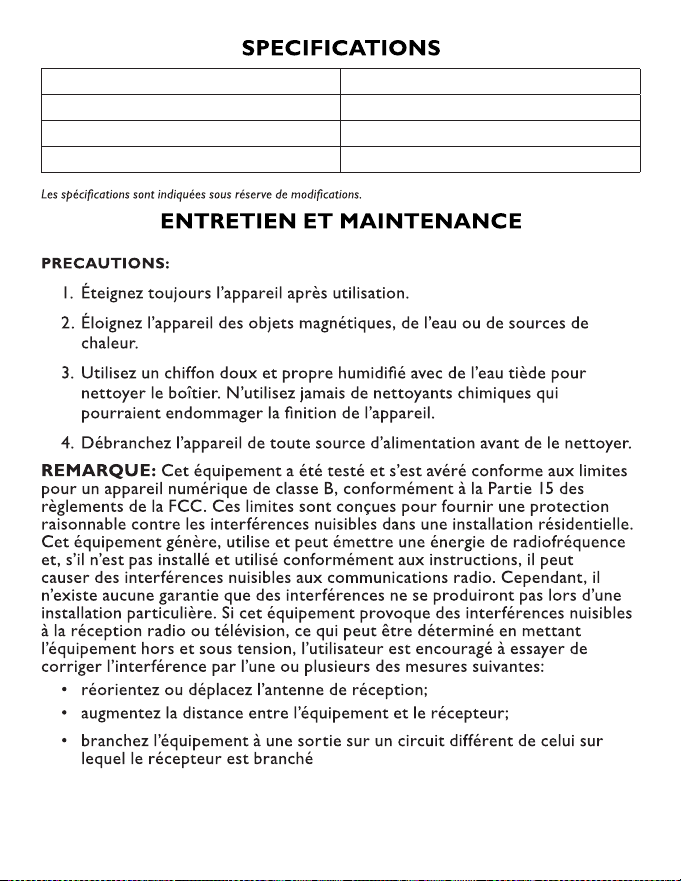
Bande de fréquences (AM) 520 - 1710 kHz
Bande de fréquences (FM) 87.5 - 108 MHz
Source de courant AC 120V ~ 60Hz, 5W
Pile de secours DC 3V CR2032 (pile incluse)

34
NOTES

35
NOTES

Magnasonic.com