Operating instructions
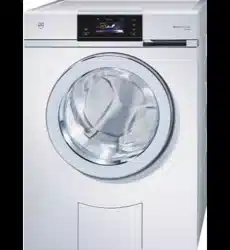
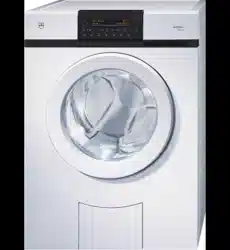
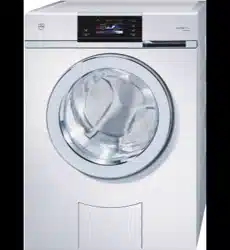
AdoraWash V4000 OptiDos
Washing machine
V-ZUG-Home
Install the app, network your appliances and
benefit from a wide range of useful functions.

Thank you for choosing to buy one of our products. Your appliance is made to high
standards and is easy to use. Nevertheless, please take the time to read these operating
instructions in order to familiarize yourself with the appliance and get the best use out of
it.
Please follow the safety precautions.
Modifications
Text, diagrams and data correspond to the technical standard of the appliance at the
time these operating instructions went to press. The right to make technical modifications
for the purpose of the further development of the appliances is reserved.
Validity
These operating instructions apply to:
Appliance designation Model number Type
AdoraWash V4000 OptiDos 11023 AW4T-11023
Variations depending on the model are noted in the text.
© V-ZUG Ltd, CH-6302 Zug, 2022
2

3
Contents
1 Safety warnings 5
1.1 Symbols used......................................................... 5
1.2 General safety precautions.................................. 5
1.3 Appliance-specific safety precautions ............... 5
1.4 Instructions for use................................................ 6
2 Using for the first time 8
2.1 Transport lock ........................................................ 8
2.2 Running the first wash cycle without any
washing ................................................................... 8
3 Appliance description 8
3.1 Construction ........................................................... 8
3.2 Drawers ................................................................... 9
3.3 Operating and display elements.......................10
3.4 Indicator lights......................................................10
3.5 Button state...........................................................11
4 OptiDos 11
4.1 Selection guidance..............................................11
4.2 Container selection and cleaning programme
................................................................................11
4.3 Selection of agent................................................12
4.4 Fill level display....................................................12
5 Programme overview 12
5.1 Whites and coloureds programmes ................12
5.2 Textile programmes ............................................13
5.3 Programmes for normally soiled cotton load
................................................................................15
5.4 Extra programmes...............................................15
5.5 Additional functions.............................................16
5.6 EcoManagement..................................................18
6 Preparations 19
6.1 Putting the appliance into operation ................19
6.2 Loading the washing...........................................19
7 Operation with OptiDos 20
7.1 Preparing OptiDos...............................................20
7.2 Selecting programme .........................................22
7.3 Selecting additional functions ...........................23
7.4 Delayed start ........................................................24
7.5 OptiTime .................................................................25
7.6 Separate rinsing/spinning...................................25
7.7 Correcting entry ....................................................25
7.8 Aborting a programme ........................................26
7.9 With childproof lock activated............................26
7.10 Drum illumination..................................................27
7.11 Opening the appliance door during washing
.................................................................................27
7.12 End of programme ...............................................27
7.13 EcoManagement...................................................29
8 Operation without OptiDos 30
8.1 Adding washing detergent..................................30
8.2 Detergent dosage.................................................31
8.3 Dyeing textiles .......................................................31
8.4 Starting programme .............................................32
8.5 Washing with multi-component detergent........32
9 Favourites 33
9.1 Defining and saving favourites...........................33
9.2 Changing or clearing favourites.........................33
9.3 Starting favourites.................................................34
10 V-ZUG-Home 34
10.1 Conditions ..............................................................34
10.2 Initial set-up............................................................34
11 User settings 35
11.1 Changing the user settings.................................35
11.2 Button tone ............................................................35
11.3 Background image...............................................35
11.4 Brightness ..............................................................35
11.5 Language ...............................................................35
11.7 Spin speed.............................................................36
11.8 Degree of soiling ..................................................36
11.9 AquaPlus ................................................................36
11.10 Automatic door opener........................................36
11.11 Delayed start / OptiTime .....................................36
11.12 Hygiene info...........................................................37
11.13 Childproof lock......................................................37

4
11.14 Drum illumination.................................................37
11.15 EcoManagement..................................................37
11.16 Multi-component detergent................................37
11.17 Loosening up the washing.................................37
11.18 Soft water ..............................................................37
11.19 OptiDos..................................................................37
11.20 Water options * ....................................................38
11.21 V-ZUG-Home.........................................................38
11.22 Factory settings....................................................38
12 Demo mode 38
12.1 Switching on .........................................................38
12.2 Switching off .........................................................39
13 Care and maintenance 39
13.1 Cleaning intervals ................................................39
13.2 Cleaning the OptiDos drawer with the cleaning
programme ...........................................................40
13.3 Cleaning the OptiDos drawer manually ..........40
13.4 Cleaning the detergent dispenser drawer ......44
13.5 Cleaning the water inlet filter.............................44
13.6 Emergency draining ............................................44
13.7 Cleaning the foreign body trap .........................45
13.8 Cleaning the drum illumination .........................46
13.9 Opening the appliance door in the event of a
power failure .........................................................46
14 Trouble-shooting 47
14.1 Error messages....................................................47
14.2 Other possible problems....................................50
14.3 Unsatisfactory wash results ...............................52
15 Spare parts 55
16 Technical data 55
16.1 Light sources........................................................55
16.2 Note for testing institutes ...................................56
16.3 Consumption values ...........................................56
16.4 VAS Vibration Absorbing System .....................56
16.5 Water and energy economy ..............................56
17 Washing tips 57
17.1 Energy and water economy...............................57
17.2 Avoiding damage ................................................57
18 Disposal 58
19 Index 60
20 Service & Support 63
Quick instructions 64

5
1 Safety warnings
1.1 Symbols used
Denotes important safety precau-
tions.
Failure to observe said precautions
can result in injury or in damage to
the appliance or fittings!
Information and precautions that
should be observed.
Information on disposal
Information about the Operating In-
structions
▸ Indicates step-by-step instructions.
– Describes how the appliance reacts
to the steps taken.
▪ Indicates a list.
1.2 General safety precautions
▪ Read the operating instruc-
tions before using the appli-
ance for the first time.
▪ This appliance can be used
by children aged 8 and above
and by persons with reduced
physical, sensory or mental
capabilities, or lack of experi-
ence and/or knowledge,
provided they are supervised
or have been instructed on
the safe use of the appliance
and have understood the haz-
ards involved. Children shall
not play with the appliance.
Cleaning and user mainten-
ance shall not be undertaken
by children without supervi-
sion.
▪ If an appliance is not
equipped with a mains cable
and a plug or other means for
disconnecting from the mains
with a contact opening on
each pole complying with the
conditions of overvoltage cat-
egory III for full isolation, an
isolating device must be in-
corporated into the perman-
ently installed electrical install-
ation in accordance with the
installation regulations.
▪ If the mains cable of this ap-
pliance is damaged, it must
be replaced by the manufac-
turer or its Customer Services
or a similarly qualified person
in order to avoid hazard.
1.3 Appliance-specific safety
precautions
▪ Children under 3 years of age
must be kept away from the
appliance unless they are
constantly supervised.
▪ The appliance has a max-
imum dry load capacity of
8 kg.

1 Safety warnings
6
1.4 Instructions for use
Before using for the first time
▪ The appliance must be installed and
connected to the electricity supply in
accordance with the separate installa-
tion instructions. Have a qualified fitter/
electrician carry out the necessary
work.
▪ If connected to the water mains by de-
tachable hoses, the new hose set sup-
plied with the appliance must be used.
Do not reuse old hose sets.
▪ Ensure ready access to the power
socket being used.
Correct use
▪ The appliance is only suitable for wash-
ing home textiles with water and regular
automatic washing machine detergent.
▪ The appliance is intended to be used in
household and similar applications
such as staff kitchen areas in shops, of-
fices and similar working environments,
farm houses, hotels, motels, bed and
breakfast establishments and similar
residential type establishments, as well
as communal laundry rooms in multi-
family buildings.
▪ The appliance is not intended to be
used in launderettes or similar applica-
tions and may only be used for the
above-mentioned purpose.
▪ No liability is assumed for any damage
caused by improper or incorrect use.
▪ Before closing the appliance door and
starting a programme, ensure that there
are no foreign objects or pets in the
washing drum.
Services and support
▪ If the appliance is not working properly
or in case a repair is needed, follow the
instructions given in the «Service & Sup-
port» section. Please contact our Cus-
tomer Services if necessary.
▪ Any repairs, modifications or manipula-
tions to the appliance, especially any
electrically live parts, may only be car-
ried out by the manufacturer, its Cus-
tomer Services or a similarly qualified
person. Repairs if carried out incorrectly
may cause serious injury, damage to
the appliance and fittings, as well as af-
fect the functioning of the appliance.
▪ Any work carried out by an unauthor-
ized service provider as well as the use
of spare parts other than the original
spare parts void the obligations under
the warranty.
Note on use
▪ If the appliance is not functioning prop-
erly, disconnect it from the power sup-
ply immediately.
▪ To protect your washing, follow the fab-
ric care symbols and the hints and ad-
vice in the «Washing tips» section.
▪ Textiles that have been cleaned, treated
or soaked with flammable chemicals,
detergents or solvents such as ben-
zene, alcohol, stain remover, oil, paint,
wax, etc. are not to be washed in the
appliance. Fire or explosion hazard!
Wash materials containing such sub-
stances first by hand with water or allow
the solvent to evaporate completely.
▪ Ensure the washing drum has stopped
moving before reaching inside. Do not
touch the washing drum while it is still
in motion – risk of serious injury!
▪ Disconnect the appliance from the
mains before carrying out maintenance
work.
Caution: Risk to life!
▪ Packaging material, e.g. plastic film and
polystyrene, can be dangerous for chil-
dren and animals. Danger of suffoca-
tion! Keep packaging material away
from children and animals.

1 Safety warnings
7
▪ When carrying out maintenance work
on the appliance, including replacing
light bulbs, cut off the electricity supply
to the appliance: remove the screw fuse
from the holder or switch the circuit
breaker off, or unplug from the mains
socket.
How to avoid damaging the appliance
▪ Close the appliance door carefully.
▪ When cleaning the appliance make
sure no water gets inside it. Use a mod-
erately damp cloth. Do not spray the
outside or the inside of the appliance
with water. If water gets inside the appli-
ance, it will cause damage.
▪ Before closing the appliance door and
starting a programme, ensure that there
are no foreign objects or pets in the
washing drum, detergent compartment
or around the foreign body trap. For-
eign objects such as coins, nails, paper
clips, etc. can damage parts of the ap-
pliance as well as the washing.
▪ During longer periods of absence, turn
off the water tap before switching off
the power by pulling out the mains
plug. Never pull the mains plug out of
the mains socket by the cable. Please
note: The built-in overflow protection is
rendered inactive when the power is
switched off.
▪ Textiles with metal or plastic reinforce-
ments such as belt buckles and protect-
ors are not to be washed in the appli-
ance. Risk of damage.
▪ Trainers, diving suits, rucksacks, car-
pets, etc. are not to be washed in the
appliance.
2 Using for the first time
The appliance must be installed and connected to the electricity supply in accord-
ance with the separate installation instructions. Have a qualified fitter/electrician
carry out the necessary work.
2.1 Transport lock
Remove the transport lock (hexagon head screws at the back of the appliance) in
order to avoid damage to the appliance (see installation instructions).
2.2 Running the first wash cycle without any washing
▸ Add a little washing detergent to compartment II of the detergent dispenser drawer.
▸ Run an empty coloureds 60°C cycle to remove any residues from the manufacturing
process.
3 Appliance description
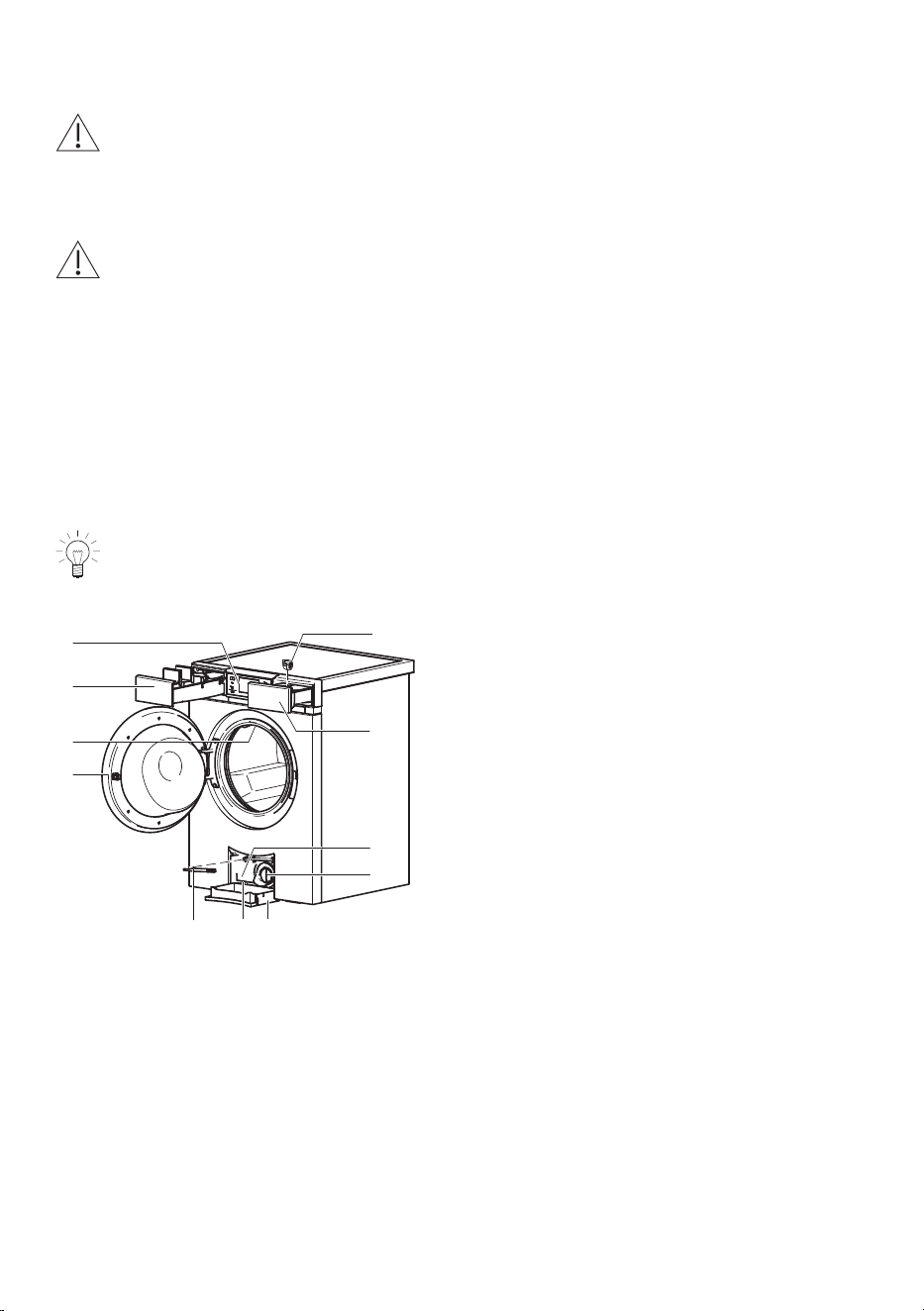
3.1 Construction
The appliance door can be opened to the left or to the right. Our Customer Ser-
vices can make the necessary adjustments to the appliance.
4
5
3
6
1
2
11 10
8
9
7
1
Appliance door
2
Circulation nozzle
3
OptiDos drawer
4
Operating panel (pivoting)
5
Liquid-detergent flap
6
Detergent dispenser drawer
7
Identification plate / serial
number (SN)
8
Foreign body trap
9
Drain tray
10
Emergency door release
11
Emergency door release tool
8
3 Appliance description
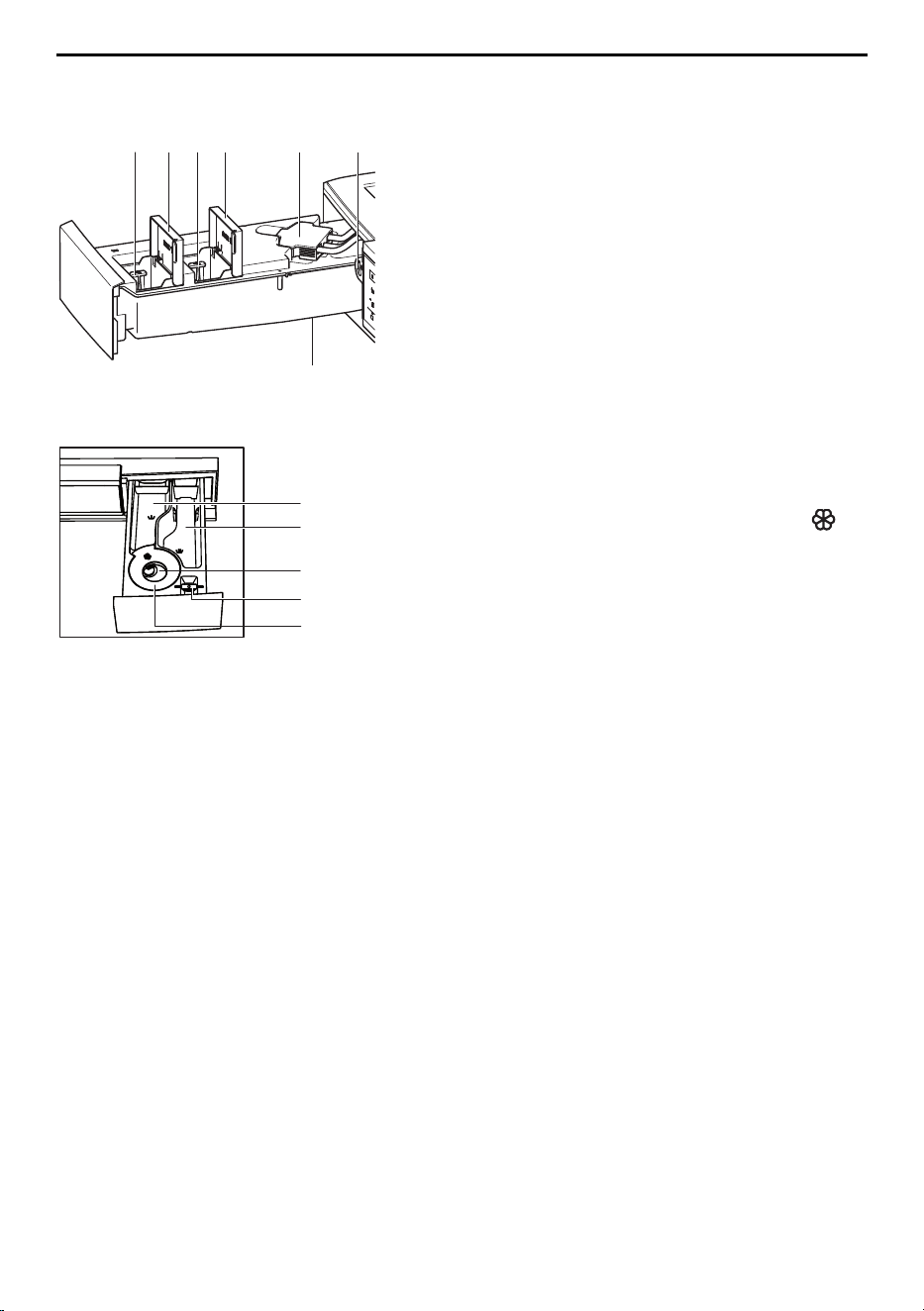
3.2 Drawers
OptiDos drawer
4
3
2
1
5
6
1 Drain valve B
2 Container B *
3 Drain valve A
4 Container A *
5
Coupling
6
Release
* Fill volume: 1.2 litres
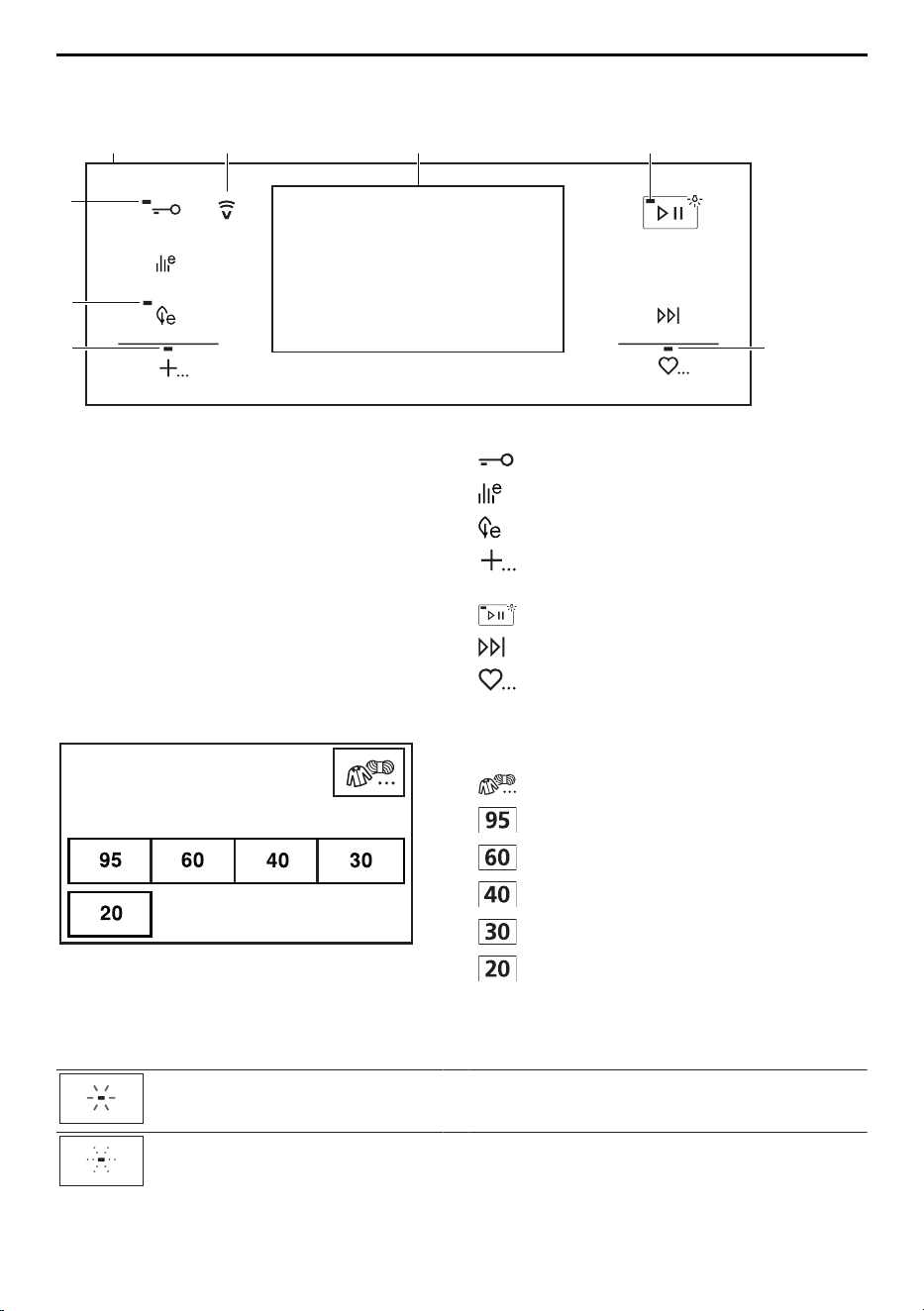
Detergent dispenser drawer
7
8
9
10
11
7 Pre-wash detergent, compartment I
8 Main wash detergent, compartment II
9
Fabric conditioner, compartment
10
Flap for liquid detergent /
Drain tray opener /
Release for OptiDos
11
Siphon for fabric conditioner
9
3 Appliance description
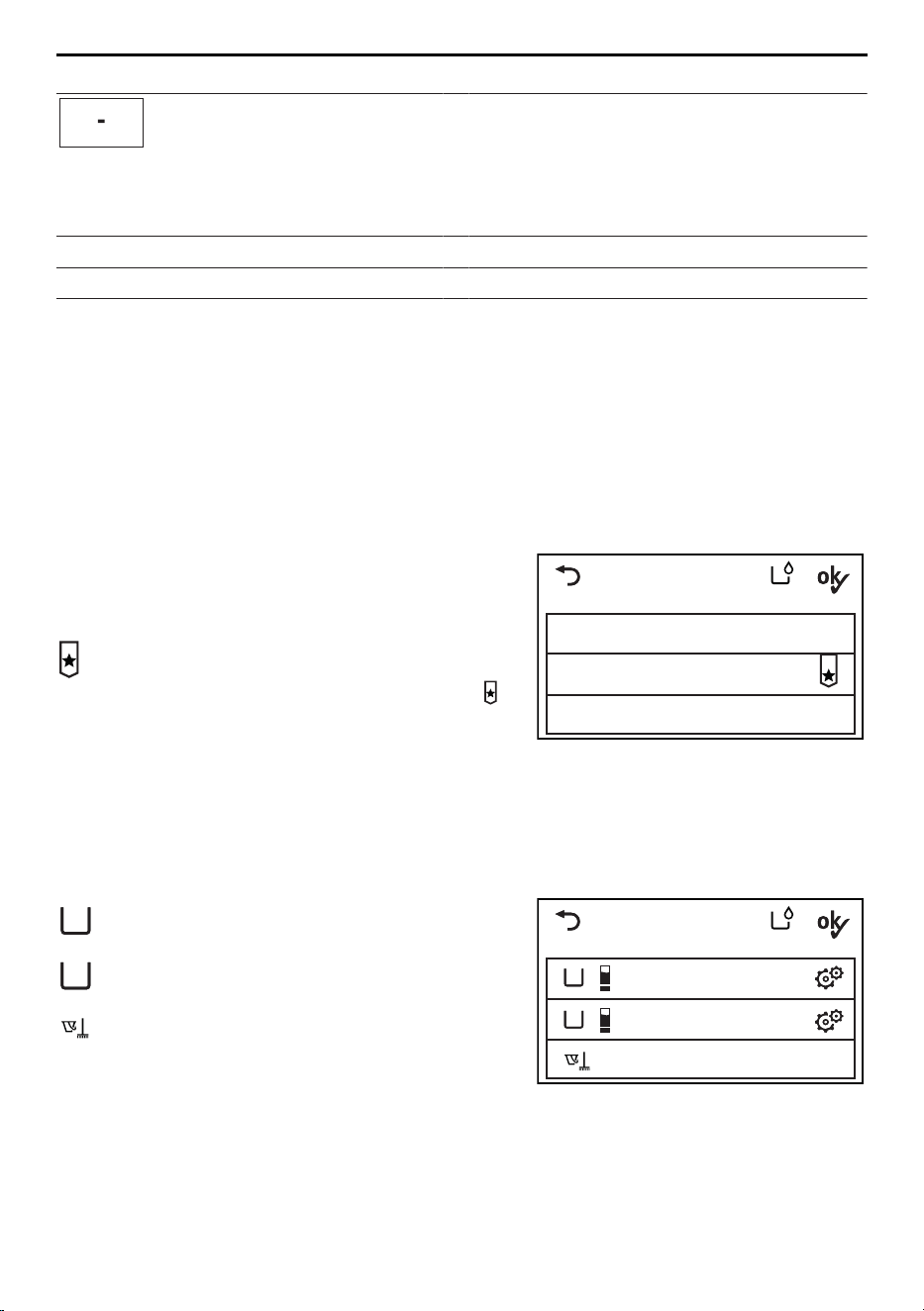
3.3 Operating and display elements
Operating panel
3
1
2
4
4 4
4
4
1
Operating panel
Buttons
2
V-ZUG-Home display Door opener
3
TouchDisplay EcoManagement
4
Indicator lights Energy saving
Programmes for normally soiled cot-
ton load and extra programmes
Start/Pause/Drum illumination
End of programme / Fast forward
Favourites
TouchDisplay
Coloureds
Select temperature
Buttons
Textile programmes
Whites 95°C
Coloureds 60°C
Coloureds 40°C
Coloureds 30°C
Coloureds 20°C
3.4 Indicator lights
Indicator light Activity State
Indicator light is il-
luminated.
Function is active.
Indicator light is
flashing.
Function is selectable.
10
4 OptiDos
Indicator light Activity State
Indicator light is
not illuminated.
Function is not selectable.
3.5 Button state
Background colour Symbol colour State
Blue White Function is active.
Black White Function is selectable.
Black Black Function is not selectable.
4 OptiDos
OptiDos consists of 2 containers to which regular washing detergent or fabric condi-
tioner for automatic dosage are added. Whether the appliance should provide a recom-
mendation for the most suitable agent and from which container it should be drawn can
be defined in the user settings. A cleaning programme is also available.
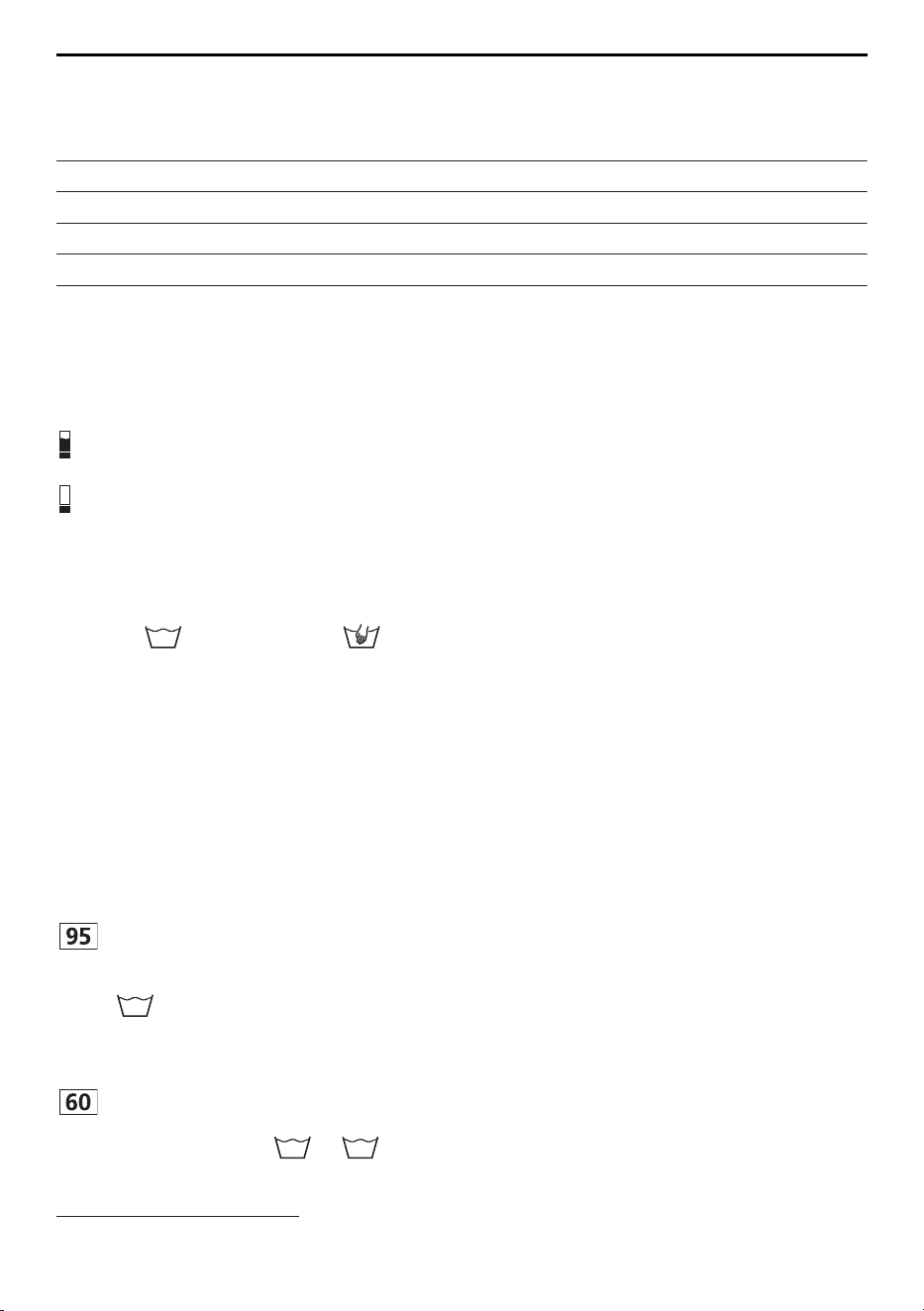
4.1 Selection guidance
OptiDos without selection guidance: The
defined agents are not indicated by a re-
commendation.
OptiDos setting
Disable OptiDos
OptiDos without selection guidance
OptiDos with selection guidance
OptiDos with selection guidance: The
agent that is the most suitable of all for
the programme selected is indicated by .
Disable OptiDos: OptiDos is not used.
The agent must be added to the deter-
gent dispenser drawer before each wash
cycle.
4.2 Container selection and cleaning programme
Each container has a fill volume of 1.2litres.
A
Container A: Container from which the
defined agent is drawn.
B
A
Cleaning programme
not enabled
not enabled
OptiDos setting
B
Container B: Container from which the
defined agent is drawn.
Cleaning programme: Traces of washing
detergent or fabric conditioner are re-
moved from the OptiDos containers.
11
5 Programme overview
4.3 Selection of agent
The following agents can be assigned to the two containers:
Liquid detergent or fabric conditioner
Universal detergent Detergent for woollens
Detergent for coloureds Baby washing detergent
Detergent for delicates Detergent for blacks
Fabric conditioner Detergent for whites
Detergent for outdoor garments
4.4 Fill level display
The fill level of both containers is displayed when the OptiDos drawer is opened and dur-
ing programme selection with OptiDos.
There is still sufficient agent in the con-
tainer.
The agent should be replenished.
5 Programme overview
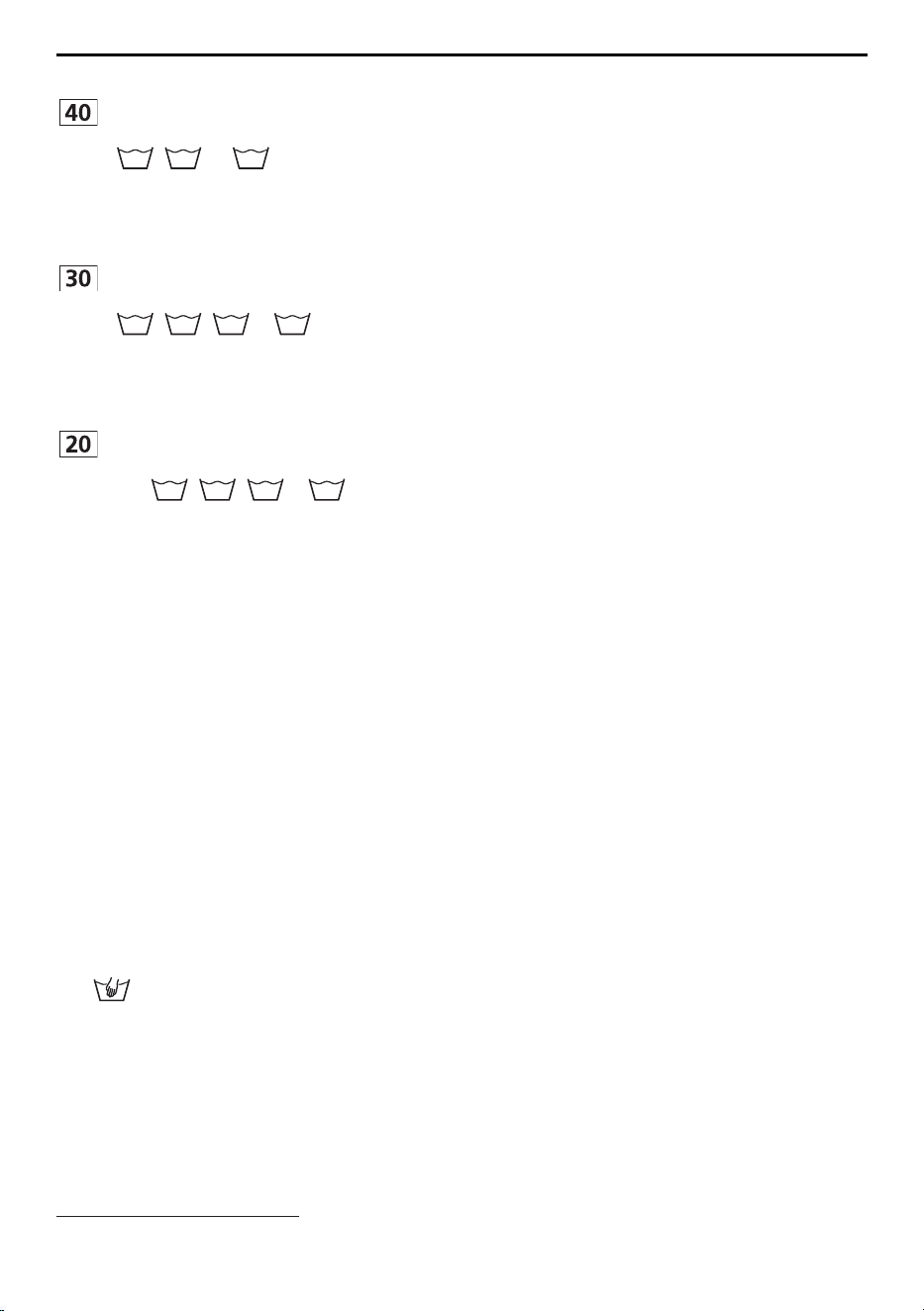
To select the right programme, please follow the fabric care symbols on the laundry la-
bels, e.g.
40
. Textiles with the fabric care label may only be washed using the
«Hand wash» textile programme.
Consumption values
The consumption data and programme times given serve only as a guide. They refer to
the maximum load capacity and can vary with, for instance, towelling material, a very
cold water feed, the degree of soiling selected or a smaller wash load. The time remain-
ing shown and the programme end time are adjusted accordingly. The spin speeds
given are the factory settings.
5.1 Whites and coloureds programmes
Whites 95 °C
For white cottons/linens e.g. bed and
table linen, towels, white or colour-fast un-
derwear. Suitable for washing with the
95
fabric care symbol.
▪ Load: 1–8 kg
▪ Spin speed: 1200rpm
▪ Duration: 2h15
2
▪ Water: 75l
2
▪ Energy:2.2 kWh
2
Coloureds 60 °C
For coloured cottons e.g. bright blouses,
overalls, shirts, bed linen. Suitable for
washing with the
95
or
60
fabric care
symbol.
▪ Load: 1–8 kg
▪ Spin speed: 1200rpm
▪ Duration: 1h32
2
▪ Water: 65l
2
▪ Energy:1.3 kWh
2
2
Indicative values
12
5 Programme overview
Coloureds 40 °C
For coloured cottons and mixed washing
e.g. t-shirts. Suitable for washing with the
95
,
60
or
40
fabric care symbol.
▪ Load: 1–8 kg
▪ Spin speed: 1200rpm
▪ Duration: 1h14
2
▪ Water: 70l
2
▪ Energy:0.8 kWh
2
Coloureds 30 °C
For coloured cottons and mixed washing
e.g. t-shirts. Suitable for washing with the
95
,
60
,
40
or
30
fabric care symbol.
▪ Load: 1–8 kg
▪ Spin speed: 1200rpm
▪ Duration: 1h05
2
▪ Water: 70l
2
▪ Energy: 0.5 kWh
2
Coloureds 20 °C
Energy-saving programme for lightly
soiled textiles. Suitable for washing with
the
95
,
60
,
40
or
30
fabric care sym-
bol.
▪ Load: 1–8 kg
▪ Spin speed: 1200rpm
▪ Duration: 1h00
2
▪ Water: 70l
2
▪ Energy: 0.3 kWh
2
5.2 Textile programmes
Coloureds
For the «Coloureds» textile programme, the de-
scriptions and consumption values given in the
«Whites and coloureds programmes» section
apply.
Woollens
Gentle treatment for woollens and other delicate
textiles. Only for woollens with a felt-free finish
and labelled as «machine washable».
The consumption values apply to Woollens
30°C.
▪ Load: 1–2.5kg
▪ Spin speed: 800rpm
▪ Duration: 0h48
2
▪ Water: 52l
2
▪ Energy: 0.3 kWh
2
Hand wash
Very gentle treatment for textiles labelled with
the fabric care symbol.
The consumption values apply to Hand wash
20°C.
▪ Load: 1–2kg
▪ Spin speed: 600rpm
▪ Duration: 0h45
2
▪ Water: 58l
2
▪ Energy: 0.2 kWh
2
2
Indicative values
13
5 Programme overview
Shirts
Optimized for minimizing creasing, contains
steam anti-crease.
The consumption values apply to Shirts 40°C.
▪ Load: max.7items
▪ Spin speed: 1000rpm
▪ Duration: 1h23
2
▪ Water: 33l
2
▪ Energy: 0.4 kWh
2
Down
Optimized for the particular wetting characterist-
ics of down fabrics. Short spin at the beginning
of the programme to get rid of any air in down
fabrics.
The consumption values apply to Down 40°C.
▪ Load: max.1item / 2kg
▪ Spin speed: 800rpm
▪ Duration: 1h25
2
▪ Water: 40l
2
▪ Energy: 0.5 kWh
2
Outdoor garments
For waterproof and breathable clothing. Higher
water level during washing and rinsing.
The consumption values apply to Outdoor gar-
ments 40°C.
▪ Load: 1–3kg
▪ Spin speed: 1000rpm
▪ Duration: 1h05
2
▪ Water: 40l
2
▪ Energy: 0.4 kWh
2
Silks
For delicate silk items. Spin speed is reduced to
minimize creasing.
The consumption values apply to Silks 30°C.
▪ Load: 1–1.5 kg
▪ Spin speed: 400rpm
▪ Duration: 0h48
2
▪ Water: 52l
2
▪ Energy: 0.3 kWh
2
Net curtains
Reduced washing action for very gentle treat-
ment. Higher water level during washing and
rinsing. The washing remains lying in the water
after the final rinse (stop after rinsing).
▪ Draining with spinning: 1×
▪ Draining without spinning: 2×
The consumption values apply to Net curtains
30°C.
▪ Load: 1–2kg
▪ Spin speed: Stop after rinsing
▪ Duration: 1h00
2
▪ Water: 45l
2
▪ Energy: 0.4 kWh
2
Baby garments
Very thorough rinsing for the protection of sens-
itive baby skin. If 95°C is selected as the tem-
perature, a pre-wash is included.
The consumption values apply to Baby gar-
ments 60°C.
▪ Load: 1–5kg
▪ Spin speed: 1200rpm
▪ Duration: 1h50
2
▪ Water: 120l
2
▪ Energy: 1.6 kWh
2
2
Indicative values
14

5 Programme overview
Denim
Optimized for colour loss (colour run) from
denim.
The consumption values apply to Denim 40°C.
▪ Load: 1–4kg
▪ Spin speed: 1200rpm
▪ Duration: 1h16
2
▪ Water: 55l
2
▪ Energy: 0.5 kWh
2
FirstWash
Quick wash cycle for new textiles. Add only a
very small amount of washing detergent! Not
suitable for woollens and hand wash!
The consumption values apply to FirstWash
20°C.
▪ Load: 1–2kg
▪ Spin speed: 1000rpm
▪ Duration: 0h15
2
▪ Water: 25l
2
▪ Energy: 0.1 kWh
2
Black garments
Optimized rinsing through a higher water level
and extended rinsing time for dark textiles.
The consumption values apply to Black gar-
ments 40°C.
▪ Load: 1–4kg
▪ Spin speed: 1200rpm
▪ Duration: 1h20
2
▪ Water: 85l
2
▪ Energy: 0.5 kWh
2
5.3 Programmes for normally soiled cotton load
40 °C Coloureds normal
The recommended programme for wash-
ing normally soiled cottons at rated load
capacity.
▪ Load: 1–8 kg
The consumption values are de-
scribed in the section on «Technical
data».
10 °C Coloureds normal
The programme with the lowest possible
temperature setting for washing cottons. It
corresponds to the 40°C Coloureds nor-
mal programme without the water being
heated. This programme has the same
water level as the 40°C Coloureds nor-
mal programme.
▪ Load: 1–8 kg
5.4 Extra programmes
Steam anti-crease
Dry washing is partially uncreased and
made damp, ready to iron. Suitable for
washing with the
95
,
60
or
40
fabric
care symbol.
▪ Load: 1–1.5 kg
▪ Spin speed: 0rpm
▪ Duration: 0h23
2
▪ Water: 1l
2
▪ Energy: 0.1kWh
2
2
Indicative values
15

5 Programme overview
Proofing
For starching or proofing laundry, add the
agent to the fabric conditioner compart-
ment.
▪ Load: 1–3 kg
▪ Spin speed: 800rpm
▪ Duration: 0h28
2
▪ Water: 12l
2
▪ Energy: 0.1kWh
2
Appliance hygiene
Steam cleaning without laundry. ▪ Load: 0 kg
▪ Spin speed: 0rpm
▪ Duration: 0h30
2
▪ Water: 9l
2
▪ Energy: 0.7kWh
2
5.5 Additional functions
Whenever a programme is selected, the selectable additional functions are displayed.
Energy saving
Programme with large energy savings due to reduced wash temperature. The ex-
tended washing time ensures the washing performance is maintained. Depending
on programme, energy savings of about 10%-40%, extension of the washing times
by 25–60 minutes and water savings of about 10%-20%.
Easy care
For washing requiring very gentle treatment. Increased water level, reduced wash-
ing action and lower spin speed. The maximum load is 3.5kg.
Pre-wash
Suitable for heavily soiled washing. Programme duration extended about
15minutes.
Delayed start
For using cheap-rate electricity (setting range of up to 24hours). The programme
starts automatically when the set time is reached.
OptiTime
If a programme end time has been selected, OptiTime calculates the most en-
ergy-efficient programme that can be carried out in the time remaining to pro-
gramme end.
OptiTime reduces the washing temperature, while the washing performance is
maintained. The more time is available for washing, the more the washing temper-
ature can be reduced. If higher wash temperatures with a germ-killing effect are
needed, a corresponding programme without the OptiTime function must be se-
lected (see page 36).
2
Indicative values
16
5 Programme overview
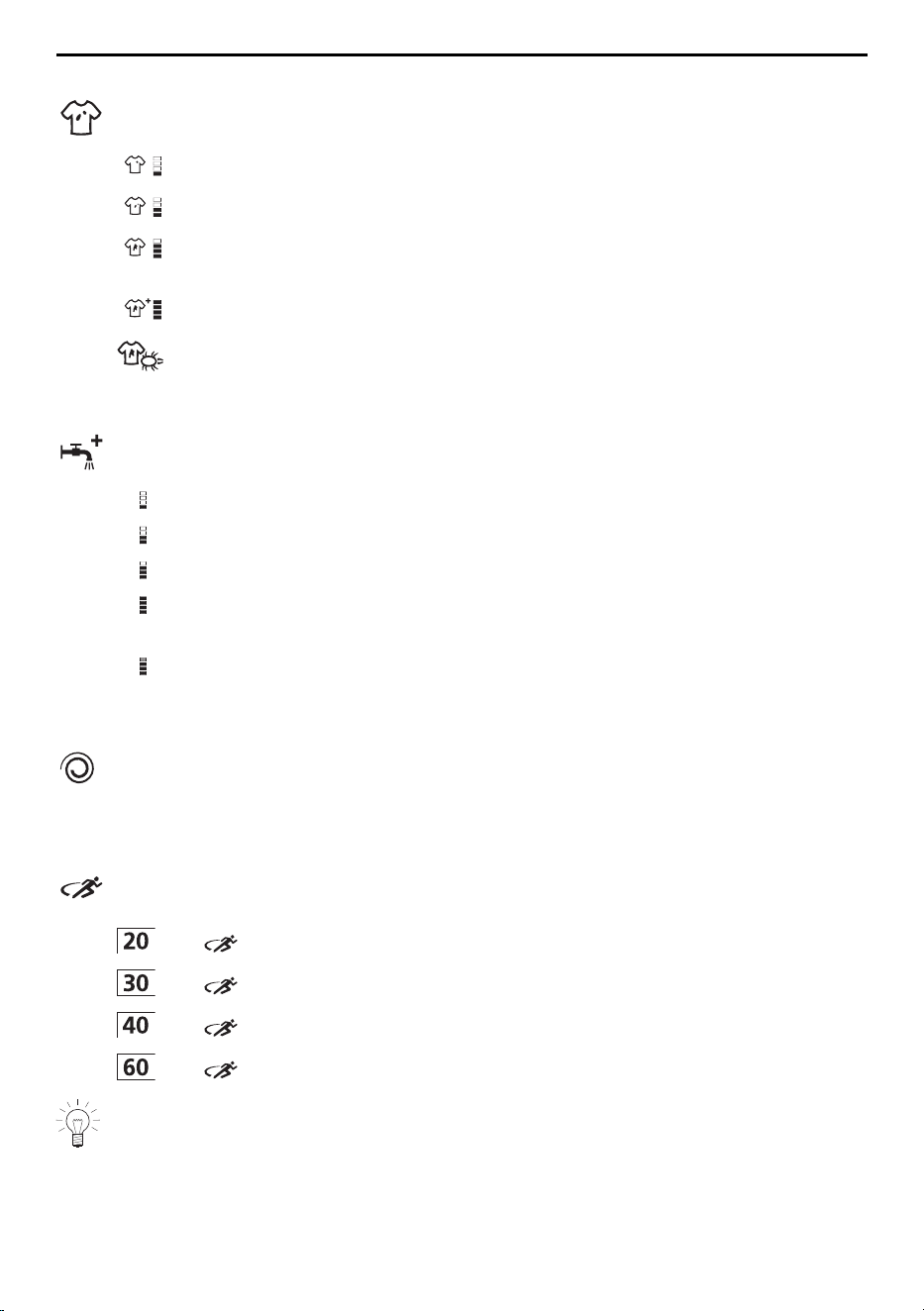
Degree of soiling
Adjustment to the degree of soiling of the washing.
Light soiling: For lightly soiled washing.
Medium soiling: Extended wash time.
Heavy soiling: Extended wash time, higher water level, an additional rinsing
cycle.
Soaking: The duration can be set between 0.5 and 6 hours.
Anti-mite: The main wash is extended and intensified. The mites are killed
and the allergens are rinsed out thoroughly.
AquaPlus
There are different settings for rinsing intensity.
Basis: Normal water level.
more water: Increased water level during the main wash and rinsing.
+ 1 rinse: An additional rinsing cycle.
more water + 1 rinse: Increased water level during the main wash and rins-
ing, an additional rinsing cycle.
Skin protection: Increased water level during rinsing, two additional rinsing
cycles. Suitable for sensitive skin.
Spin speed
The spin speed can be changed. Delicates can be spun at a lower spin speed.
However, this increases the drying time (greater energy consumption for tumble
drying).
Sprint
Quick programme for lightly soiled washing. 2 instead of 3 rinsing cycles. The
maximum load is 2.5kg.
+ : 28mins.
+ : 32mins.
+ : 35mins.
+ : 48mins.
If washing on the Sprint programme without OptiDos, add only a small amount of
washing detergent. A large washing load or too much washing detergent can signi-
ficantly extend the programme time. Use liquid detergent only.
17

5 Programme overview
Steam anti-crease
Reduces creasing significantly. Loosening-up period: 60minutes. The washing is
warm and should be hung up immediately to dry or be tumble dried. The spin
speed is limited to 1000 rpm. The maximum load capacity is 2kg.
Separate rinsing / Separate spinning
The programme starts at the desired parts of the programme and the programme
sequence is shortened.
Bio wash / Soap wash
The «Multi-component detergent» user setting must be activated to use Bio wash
or Soap wash (see page 37). The programme sequence is adapted for the use
of multi-component detergents.
Bio wash: Alkaline detergent + bleach
Soap wash: Softener + soap detergent
Start/Pause/Drum illumination
Touch the button to start or interrupt programmes. Touch the button again to re-
sume the programme after being interrupted. The drum illumination can be turned
on and off.
5.6 EcoManagement
The «EcoManagement» user setting must be activated to use «EcoManagement»
(see page 37). EcoManagement provides information on the energy and water
consumption of the appliance. The following statistical data can only be retrieved
when there is no programme running:
▪ Energy and water consumption of last programme
▪ Total energy and water consumption
▪ Average energy and water consumption of the last 25 programmes
The energy and water consumption of a programme is displayed during pro-
gramme selection.
At the end of a programme, the energy and water consumption of the programme
that has just ended is displayed.
The values can vary according to programme, load, additional functions and user
settings.
18
6 Preparations
6 Preparations
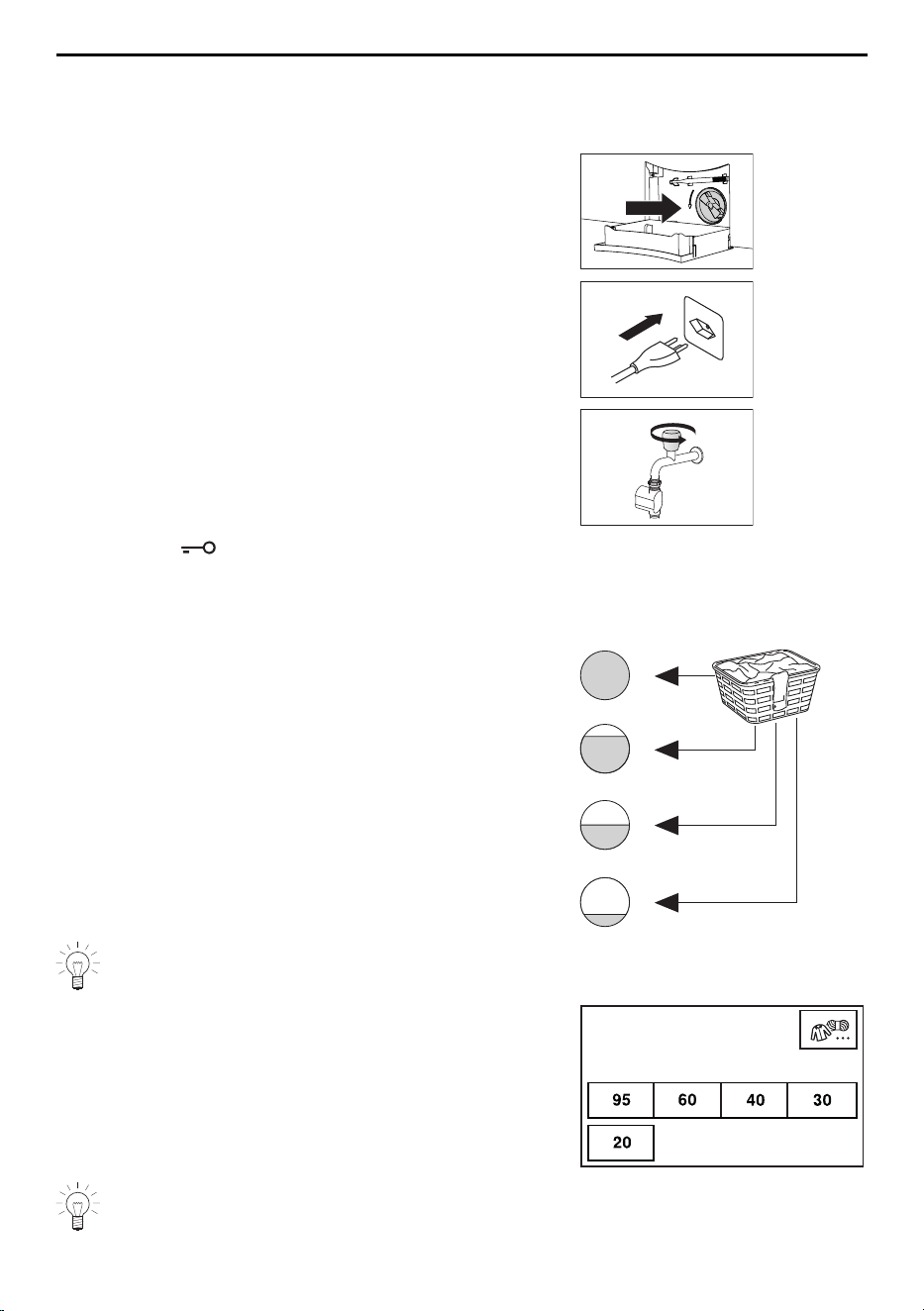
6.1 Putting the appliance into operation
▸ Check the foreign body trap is inserted correctly
(see page 45).
▸ Insert the mains plug into a mains socket.
▸ Turn on water tap.
▸ Touch the button to open the appliance door.
6.2 Loading the washing
▸ Load up to a maximum of 8kg dry washing.
▪ Full: Normally soiled whites and coloureds
▪ Max. ¾: Heavily soiled whites and coloureds
▪ Max. ½: Easy care cottons, white and coloured
synthetics as well as mixed fabrics
▪ Max. ¼: Delicates, woollens, silks, polyacrylics
and net curtains
For wet loads, only half-fill the washing drum. The washing drum should not be
loaded with any one single, heavy item.
▸ Close the appliance door.
– The start screen appears.
Coloureds
Select temperature
If no programme selection is made within 5 minutes, all the displays go out. Touch
anywhere on the TouchDisplay at any time to display the start screen again.
19
7 Operation with OptiDos
7 Operation with OptiDos
7.1 Preparing OptiDos
In order to use the OptiDos function, the containers in the OptiDos drawer must be filled
with the desired liquid detergents or fabric conditioners and the user settings defined ac-
cordingly.
The containers can be used as follows:
▪ Both containers with liquid detergent
▪ Both containers with fabric conditioner
▪ Only one container with liquid detergent or fabric conditioner
▪ One container with liquid detergent, the other with fabric conditioner
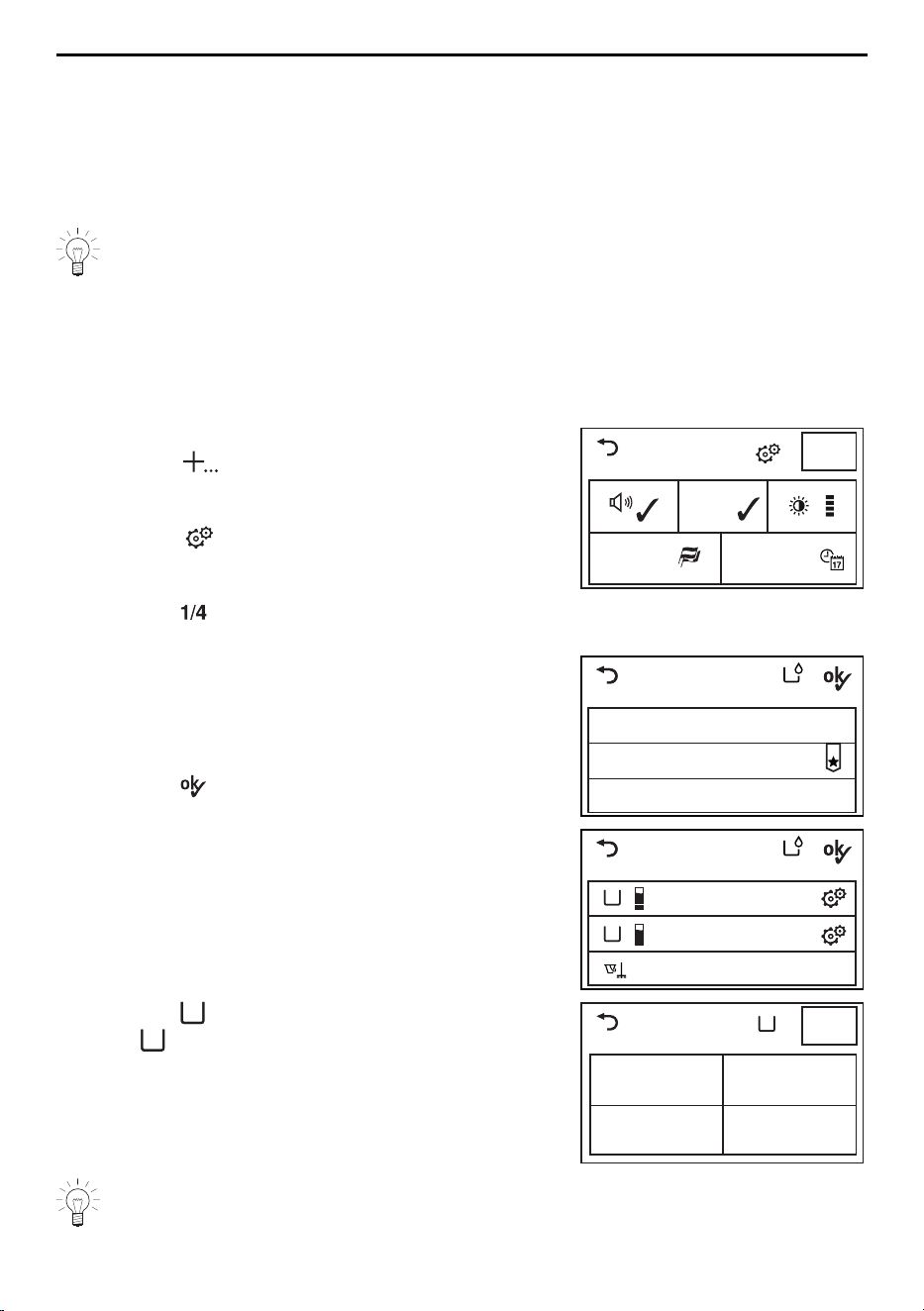
Defining the agent for a container
▸ Close the appliance door.
▸ Touch the button.
– The selection of extra programmes appears in
the TouchDisplay.
▸ Touch the button.
– The user settings menu appears in the Touch-
Display.
▸ Touch the button repeatedly until the «Op-
tiDos» user setting appears.
Settings
SN 11023 000123
Background
image
Language
English
1/4
19.41
▸ Touch the «OptiDos» button.
– The OptiDos menu appears in the TouchDis-
play.
▸ Touch either «OptiDos without selection guid-
ance» or «OptiDos with selection guidance».
▸ Touch the button.
– The selection of containers appears in the
TouchDisplay.
OptiDos setting
Disable OptiDos
OptiDos without selection guidance
OptiDos with selection guidance
B
A
Cleaning programme
not enabled
not enabled
OptiDos setting
▸ Touch the
A
button to define an agent for con-
tainer
A
.
– Various agents appear in the TouchDisplay.
▸ Touch the desired agent.
– The input field for the dosage appears in the
TouchDisplay.
Container
Universal
detergent
Fabric conditionerDelicates detergent
Colour detergent
1/3
A
To define the correct agent, observe the designation on the packaging of your li-
quid detergent or fabric conditioner.
20
7 Operation with OptiDos
Entering dosage
Enter the dosage recommended on the detergent package for 4–5kg of medium-
soiled washing and in line with the local water hardness!
When the function is turned on, the appliance takes the agent automatically from the Op-
tiDos drawer. OptiDos calculates the optimal dosage based on the programme selected
and the actual amount of washing placed in the washing drum.
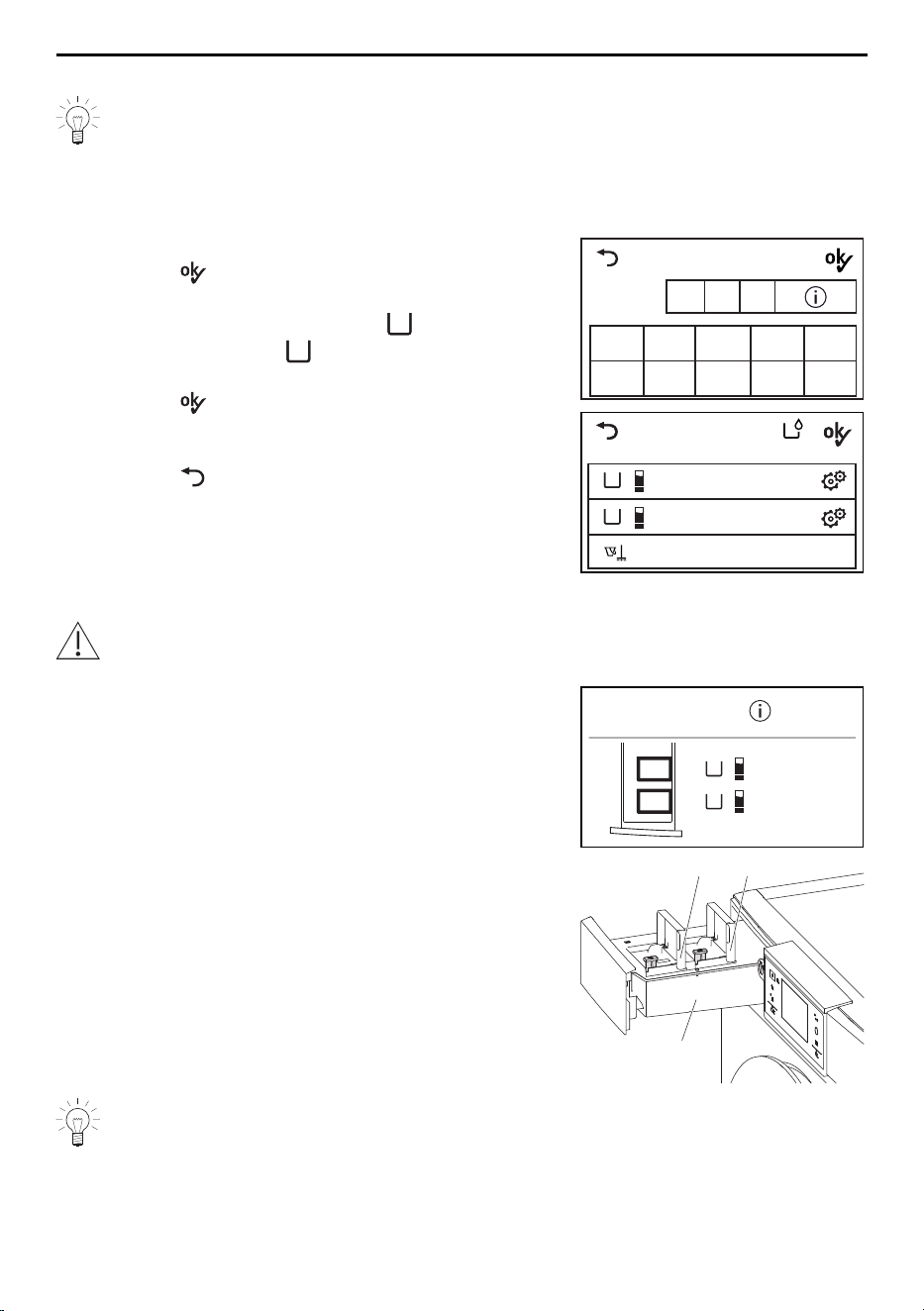
▸ Enter the dosage.
▸ Touch the button.
– Enter the dosage and the type of agent selec-
ted in the TouchDisplay under
A
.
▸ Similarly for container
B
, define the agent (see
page 20) and enter the dosage.
▸ Touch the button.
– The overview of the user settings appears in
the TouchDisplay.
▸ Touch the button.
– The start screen appears.
Colour detergent
0 1
2
3 4
5 6 7 8 9
0 8 0
Dosage
in ml
B
A
Cleaning programme
Colour detergent
not enabled
OptiDos setting
90 ml
Adding the liquid detergent / fabric conditioner
Under no circumstances use powder detergent, tabs, bleach or similar bleaching
agents!
▸ Pull the OptiDos drawer1 out.
– The containersA and B with the assigned
agents appear in the TouchDisplay.
▸ Open the cover flap on containersA and B.
▸ Add the assigned agent slowly to the assigned
containers, filling up to the (MAX) mark.
▸ Close the cover flap on containersA and B.
▸ Push the OptiDos drawer1 back in.
OptiDos
A
Colour detergent
B
not enabled
B A
1
Add the agent slowly!
The container takes longer to fill if the agent is thick and viscous. Each container
has a fill volume of 1.2 litres.
21
7 Operation with OptiDos
7.2 Selecting programme
Main wash programmes
When a programme is selected, all the necessary settings for it are assigned automatic-
ally. Additional functions can be selected or deselected by using further buttons in other
views.
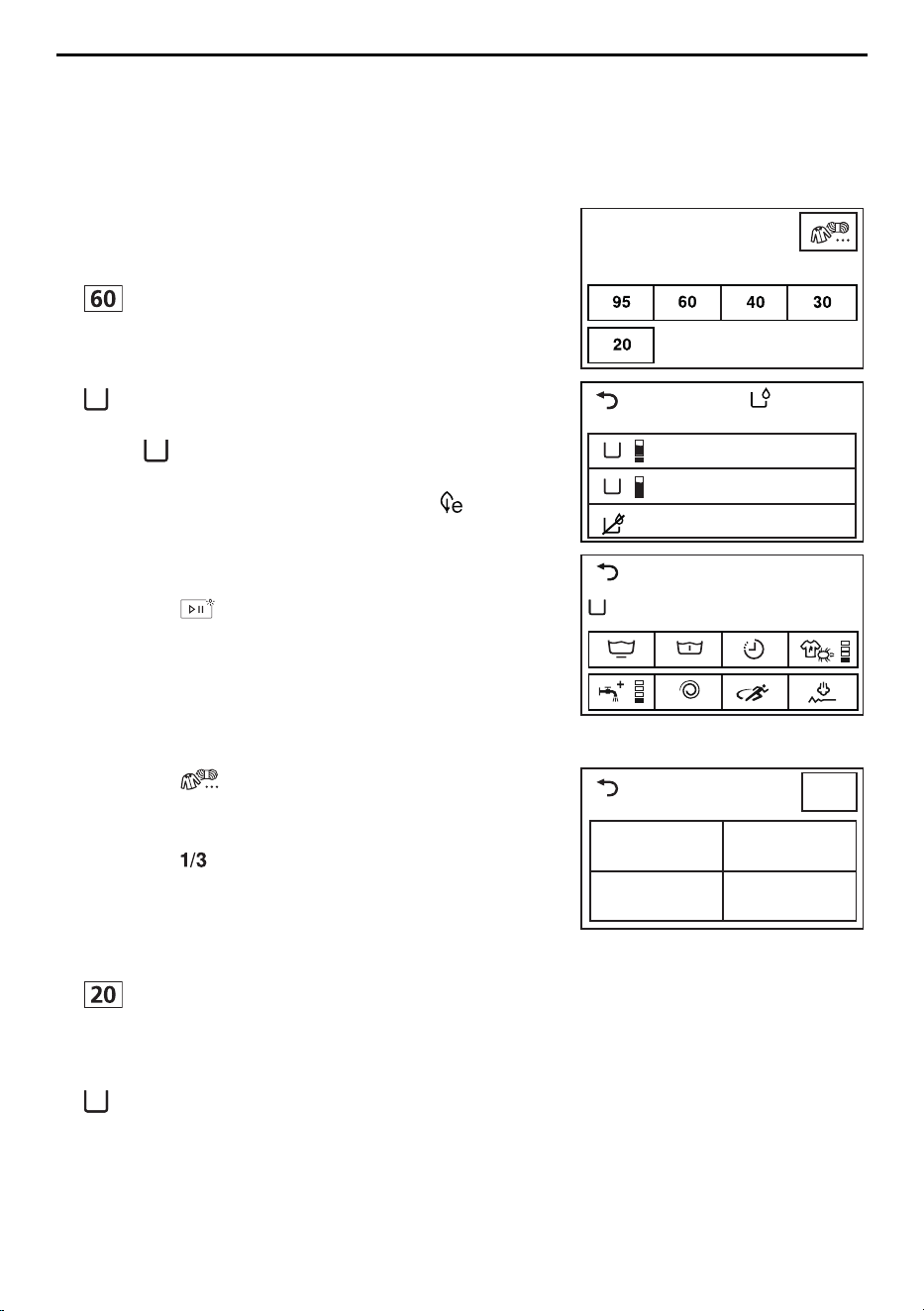
▸ Close the appliance door.
– The start screen appears.
Coloureds
Select temperature
OptiDos
Detergent selection
B
A
without OptiDos detergent
Colour detergent
Universal detergent
1200
1 h 00
End 16 : 13
60°C Coloureds
A
▸ Touch the button for the desired programme, e.g.
.
– The selection of containers appears in the
TouchDisplay.
▸ Touch the button for the desired container, e.g.
A
.
– The programme selected, the container selec-
ted
A
and the selectable additional functions
appear in the TouchDisplay.
– The indicator light for the selectable button
flashes.
▸ Touch the button for the desired additional func-
tion as required.
▸ Touch the button.
– The programme selected starts and washes
with OptiDos.
Textile programmes
▸ Touch the button.
– The selection of textile programmes appears in
the TouchDisplay.
Textile programmes
Coloureds
ShirtsHand wash
Woollens
1/3
▸ Touch the button repeatedly until the desired
textile programme is displayed.
▸ Touch the button for the desired textile pro-
gramme, e.g. «Woollens».
▸ Touch the button for the desired temperature, e.g.
.
– The selection of containers appears in the
TouchDisplay.
▸ Touch the button for the desired container, e.g.
A
.
▸ To start the programme, carry out steps analog-
ous to those described in «Main wash pro-
grammes».
22
7 Operation with OptiDos
Programmes for normally soiled cotton load
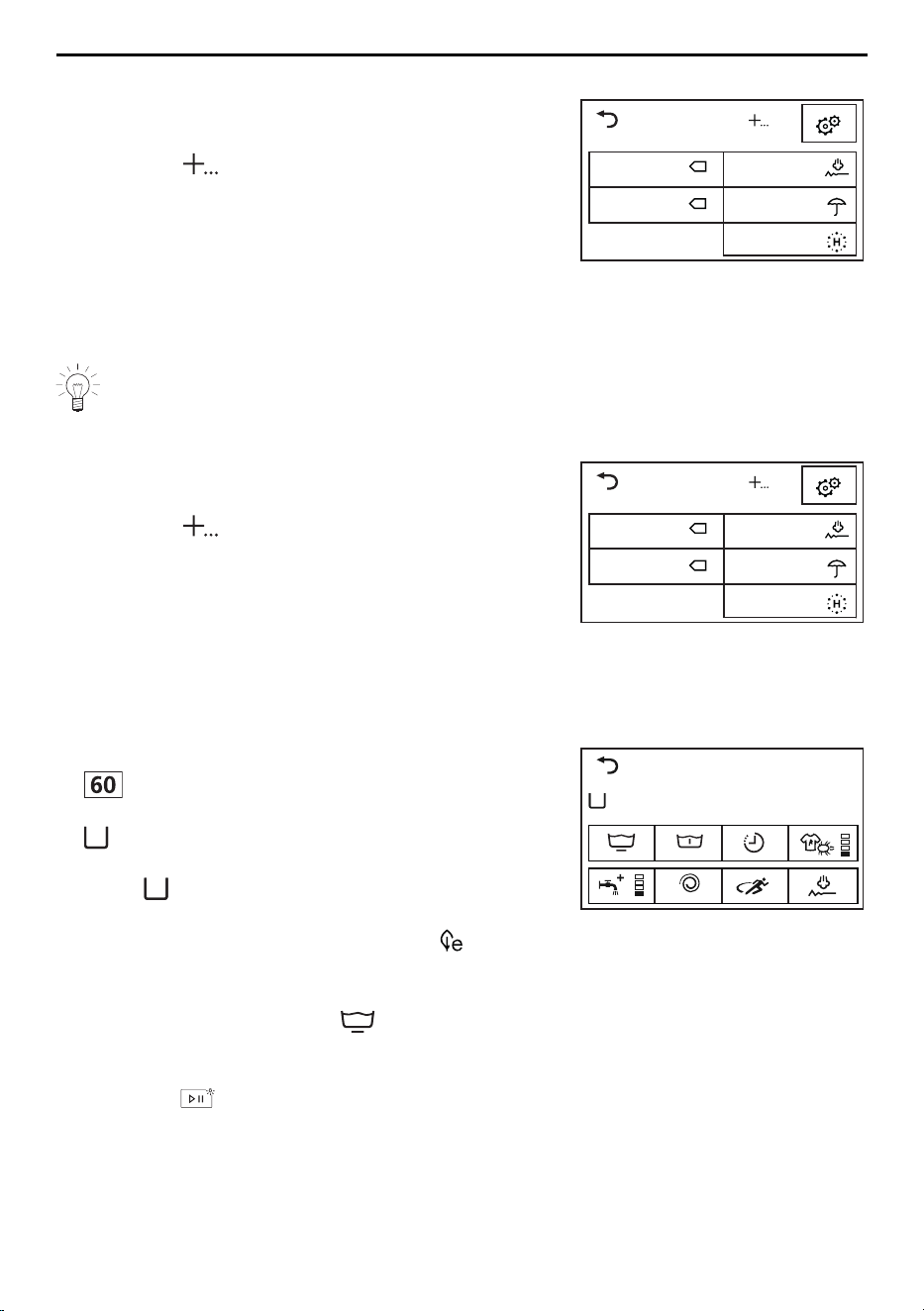
▸ Close the appliance door.
– The start screen appears.
Extra
10° Standard
Proofing
Steam anti-cr.
App. hygiene
40° Standard
▸ Touch the button.
– A selection of programmes for normally soiled
cotton load appears in the TouchDisplay.
▸ Touch the button for the desired programme for
normally soiled cotton load, e.g. 40°Standard.
▸ To start the programme, carry out steps analog-
ous to those described in «Main wash pro-
grammes».
With the programmes for normally soiled cotton load, it is not possible to select
the additional functions. Only delayed start is selectable.
Extra programmes
▸ Close the appliance door.
– The start screen appears.
Extra
10° Standard
Proofing
Steam anti-cr.
App. hygiene
40° Standard
▸ Touch the button.
– The selection of extra programmes appears in
the TouchDisplay.
▸ Touch the button for the desired programme.
▸ To start the programme, carry out steps analog-
ous to those described in «Main wash pro-
grammes».
7.3 Selecting additional functions
▸ Touch the button for the desired programme, e.g.
.
▸ Touch the button for the desired container, e.g.
A
.
– The programme selected, the container selec-
ted
A
and the selectable additional functions
appear in the TouchDisplay.
– The indicator light for the selectable button
flashes.
1200
1 h 00
End 16 : 13
60°C Coloureds
A
▸ For the desired additional functions, touch the
corresponding buttons, e.g. .
– The new programme duration and the pro-
gramme end time appear in the TouchDisplay.
▸ Touch the button.
– The programme selected starts.
23
7 Operation with OptiDos
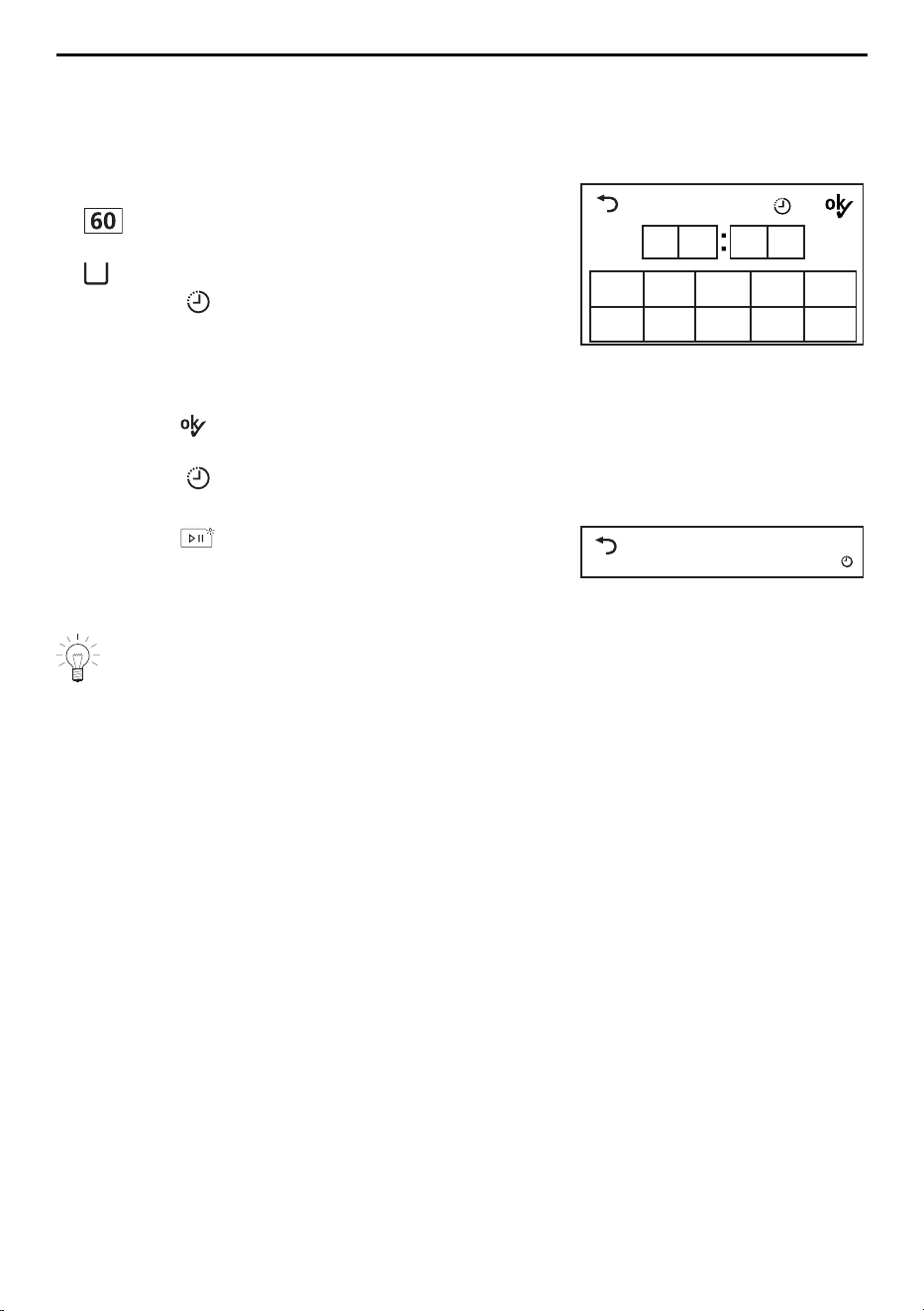
7.4 Delayed start
Selecting programme end time
The option «Programme end, OptiTime off» must be enabled in the user settings under
«Delayed start / OptiTime» (see page 36).
▸ Touch the button for the desired programme, e.g.
.
▸ Touch the button for the desired container, e.g.
A
.
▸ Touch the button.
– The input field for the programme end time ap-
pears in the TouchDisplay.
▸ Enter the time the desired programme should
end.
▸ Touch the button.
– The programme end time is saved.
▸ Touch the button again if any changes have
to be made.
Progr. end time
0 1
2
3 4
5 6 7 8 9
1
6 1 3
▸ Touch the button.
– The delayed start time starts. The desired pro-
gramme starts so that it finishes at the set pro-
gramme end time.
60°Coloureds
1 h 00
End 16 : 13
Washing can be added at any time during the delayed start time (see page 27).
Selecting programme start time
The option «Programme start» must be enabled in the user settings under «Delayed
start / OptiTime». (see page 36)
▸ Carry out steps analogous to those described in «Selecting programme end time»
(see page 24).
24
7 Operation with OptiDos
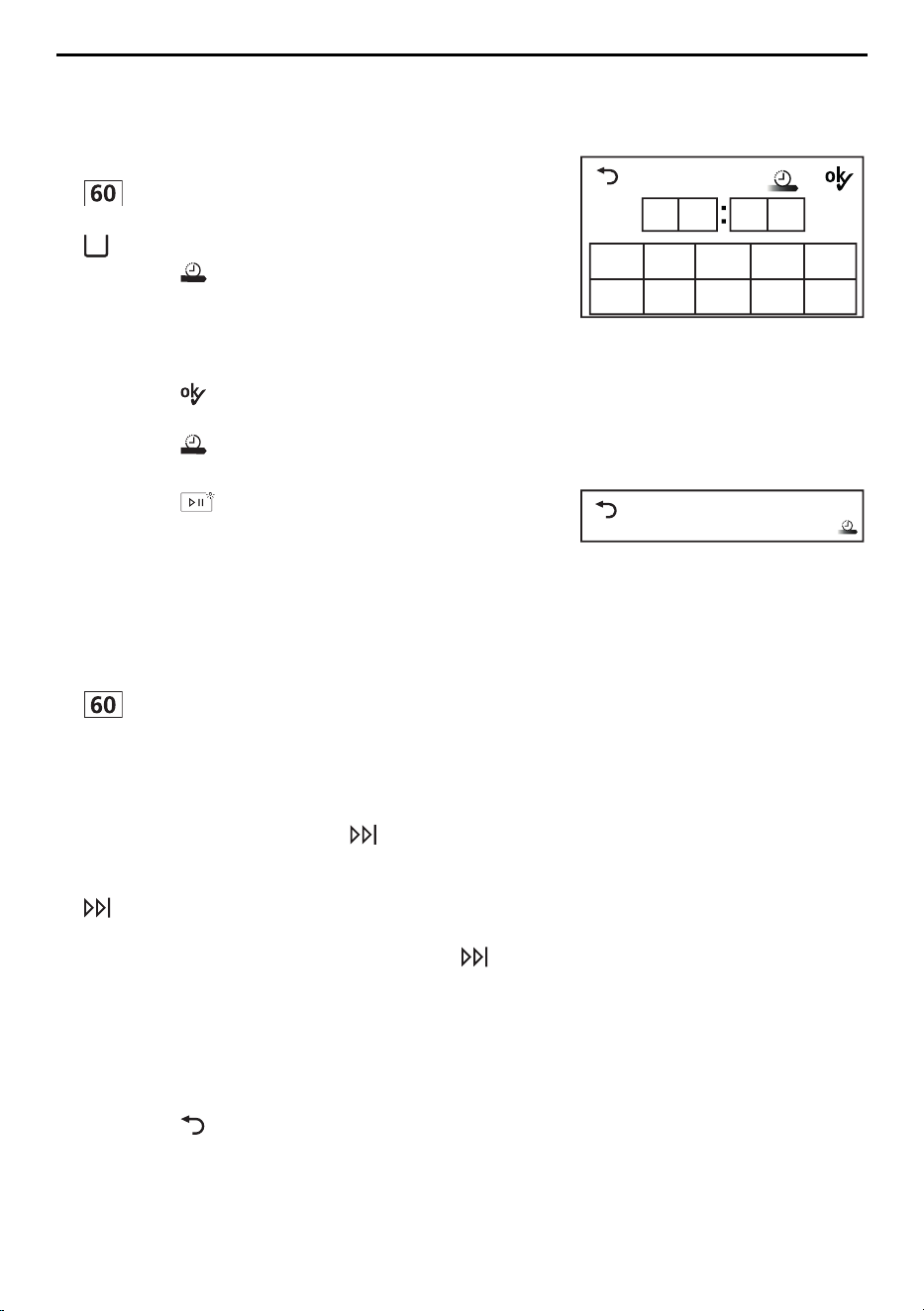
7.5 OptiTime
The option «Programme end, OptiTime on» must be enabled in the user settings under
«Delayed start / OptiTime» (see page 36).
▸ Touch the button for the desired programme, e.g.
.
▸ Touch the button for the desired container, e.g.
A
.
▸ Touch the button.
– The input field for the programme end time ap-
pears in the TouchDisplay.
▸ Enter the time the desired programme should
end.
▸ Touch the button.
– The programme end time is saved.
▸ Touch the button again if any changes have to
be made.
Progr. end time
0 1
2
3 4
5 6 7 8 9
1
8 4 5
▸ Touch the button.
– The delayed start time starts with the additional
function «OptiTime». The desired programme
starts so that it finishes at the set programme
end time.
60°Coloureds
1 h 00
End 18 : 45
7.6 Separate rinsing/spinning
▸ Touch the button for the desired programme, e.g.
.
– The programme selected and the selectable
additional functions appear in the TouchDis-
play.
▸ To start the programme from the «Rinsing» stage
of the programme, touch the button 1×.
▸ To start the programme from the «Final rinse /
Conditioning» stage of the programme, touch the
button 2×.
▸ To start the programme from the «Separate spin-
ning» stage of the programme, touch the but-
ton 3×.
7.7 Correcting entry
During programme selection, entries can be corrected as follows:
Clearing entries in the current view
▸ Touch the button.
– The entries are discarded.
– The previous TouchDisplay appears.
25
7 Operation with OptiDos
Clearing all entries
▸ Touch the button repeatedly until the Touch-
Display goes dark.
– All entries are cleared.
7.8 Aborting a programme
Once a programme has started, only the spin speed can be changed. For any
other changes, the programme must be aborted.
▸ Touch the button repeatedly until «Draining» is
displayed.
– This part of the programme cannot be skipped
and will be carried out in full.
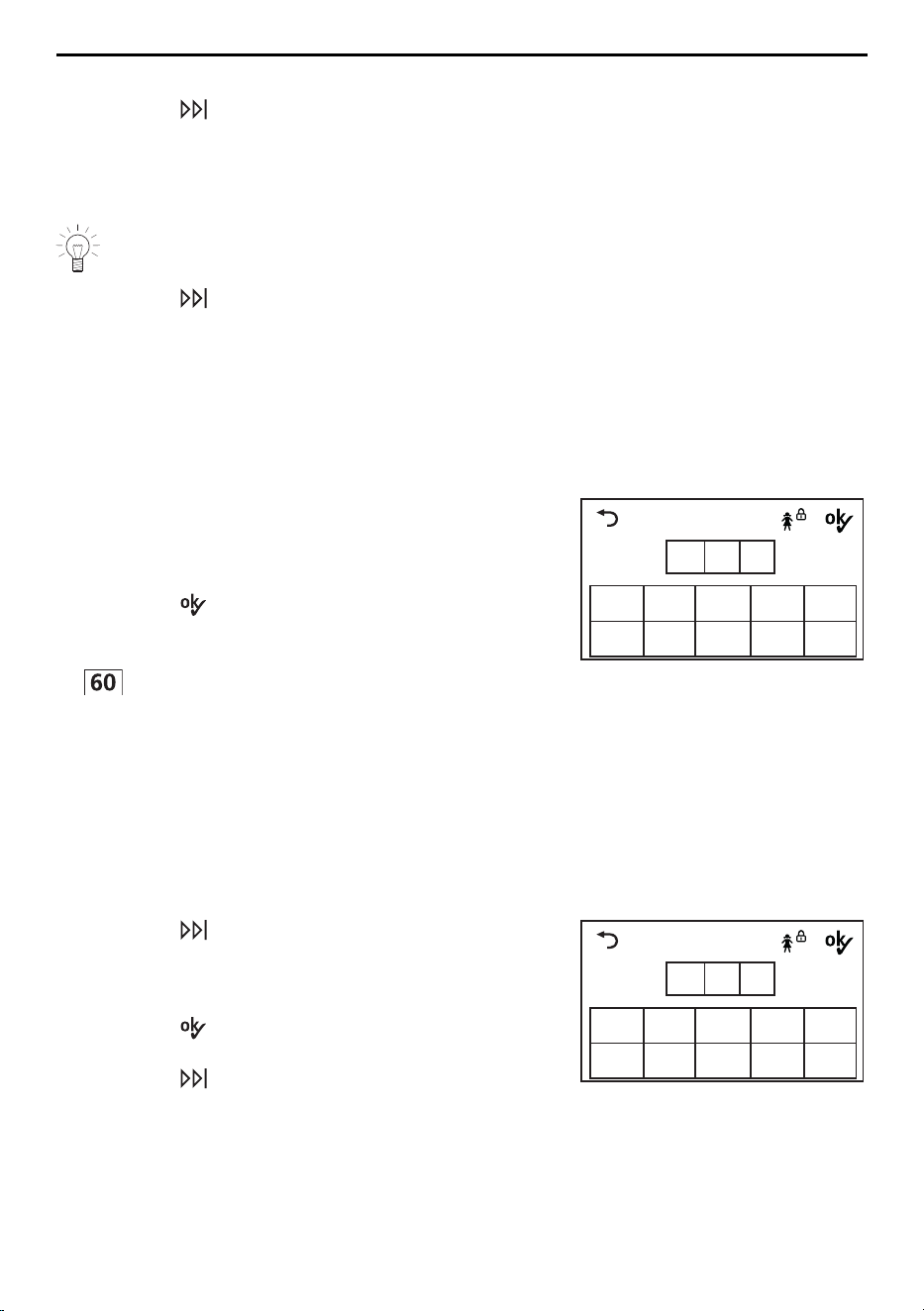
7.9 With childproof lock activated
Selecting programme
How to turn the childproof lock on/off is described in «User settings».
▸ Close the appliance door.
– The input field for the code appears in the
TouchDisplay.
▸ Touch the digits 7, 3, 1 in sequence.
▸ Touch the button.
– The appliance is unlocked.
▸ Touch the button for the desired programme, e.g.
.
– The appliance can now be operated without
further regard to the childproof lock. If no pro-
gramme selection is made within the next 20
seconds, the input field for the code appears in
the TouchDisplay again.
Childproof lock
0 1
2
3 4
5 6 7 8 9
0 0 0
Code
731
After being unlocked, the appliance can be operated normally. The childproof lock is
automatically activated as soon as the programme starts.
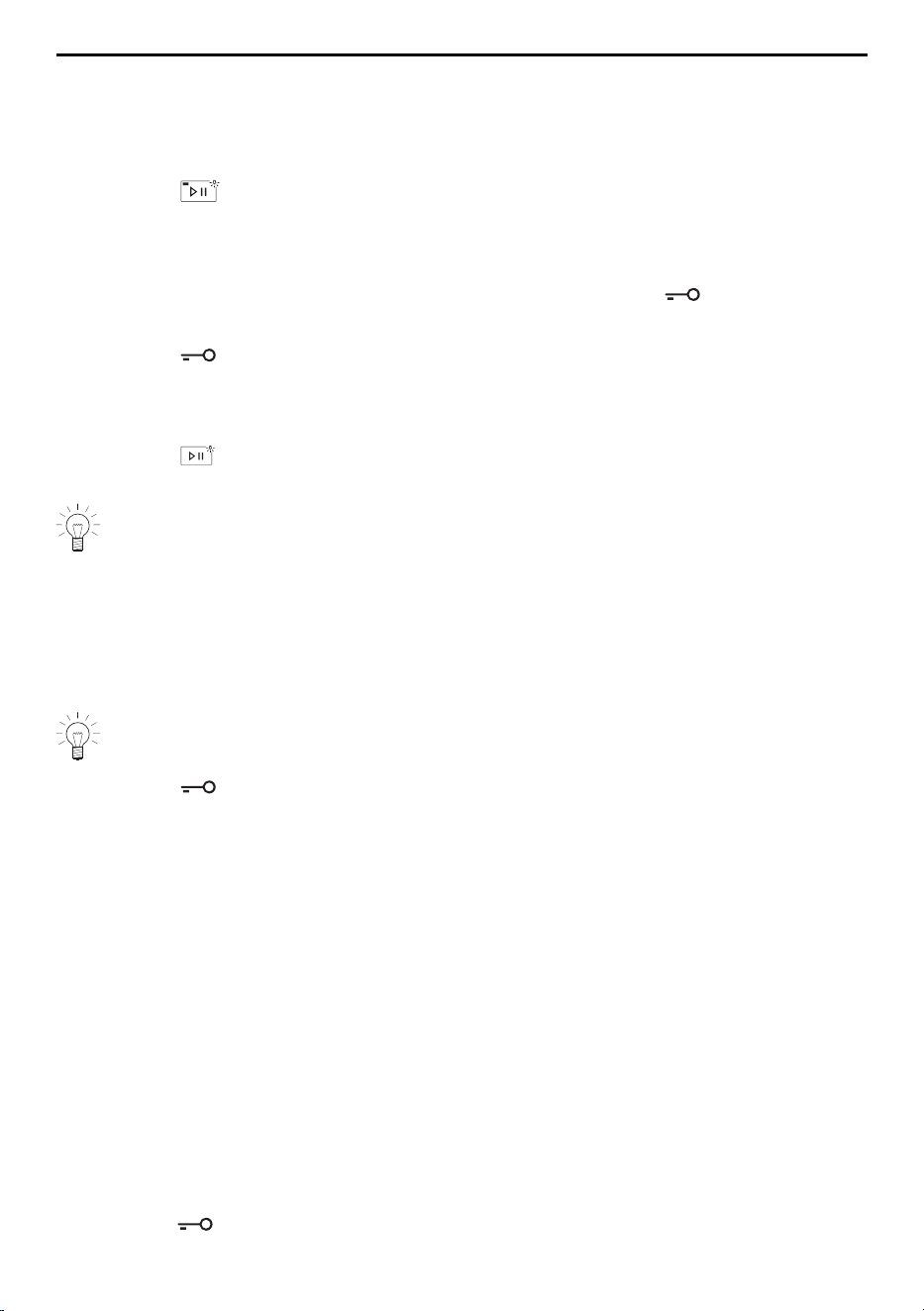
Aborting programme / opening appliance door at end of programme
▸ Touch the button.
– The input field for the code appears in the
TouchDisplay.
▸ Touch the digits 7, 3, 1 in sequence.
▸ Touch the button.
– The appliance is unlocked.
▸ Touch the button repeatedly until «Draining»
appears in the TouchDisplay.
– The appliance door opens.
Childproof lock
0 1
2
3 4
5 6 7 8 9
0 0 0
Code
731
26
7 Operation with OptiDos
7.10 Drum illumination
The drum illumination automatically switches on whenever the appliance door is opened
and switches off when it is closed. If the appliance door is left open, the drum illumina-
tion switches off automatically within 2 minutes.
▸ Touch the button to switch the drum illumina-
tion on or off when the appliance door is open.
7.11 Opening the appliance door during washing
The appliance door can be opened when the indicator light for the button is illumin-
ated.
▸ Touch the button.
– The appliance door opens.
– Laundry can be added or removed.
▸ Close the appliance door.
▸ Touch the button.
– The programme is resumed.
In the event of a power failure, the appliance door can only be opened using the
emergency door release (see page 46). The programme sequence is automatic-
ally resumed following such a power failure.
7.12 End of programme
Unloading the washing before time
Shortly before the end of the programme, the washing is loosened up. This takes about
1–2 minutes.
If steam anti-crease has been selected, the loosening-up period is extended to
about 60 minutes to further prevent creasing.
▸ Touch the button to unload the washing dur-
ing the loosening-up phase.
Door opener
The user settings that are enabled determine whether the appliance door opens automat-
ically when the programme ends (see page 36) and whether information on energy and
water consumption is displayed or not (see page 37).
▪ «Automatic door opener On»:
When the programme has finished,
– the appliance door opens automatically.
– the washing can be unloaded.
▪ «Automatic door opener Off»:
When the programme has finished,
– «End of programme» is displayed in the TouchDisplay for about 20minutes.
– information on the energy and water consumption is displayed in the TouchDisplay,
provided «EcoManagement» has been turned on (see page 37).
▸ Touch the button to open the appliance door and unload the washing at any time.
27
7 Operation with OptiDos
Stop after rinsing
The washing remains lying in the water after the final rinse. The water must be drained
off before the washing can be unloaded.
▸ Touch the button 1×.
– The washing is spun at the spin speed set for
the programme.
– The water is pumped off.
Or:
▸ Touch the button 2×.
– The washing is not spun.
– The water is pumped off.
Hygiene recommendation
Washing almost exclusively with low temperatures will result in the formation of foul
smelling coatings in the appliance.
To prevent this, a «Hygiene recommendation» indicates when a wash of at least 60°C
or carrying out the «Appliance hygiene» programme is recommended for hygiene reas-
ons.
▸ Touch the button.
▸ Run the next wash cycle at least at 60°C.
Hygiene recommend.
- Mindestens 60°C Programm
oder Gerätehygiene wählen
Hygiene recommend.
- At least 60°C programme
or select appliance hygiene
Or:
▸ Touch the button.
▸ Under «Extra programmes», select the «Appliance
hygiene» programme (see page 23).
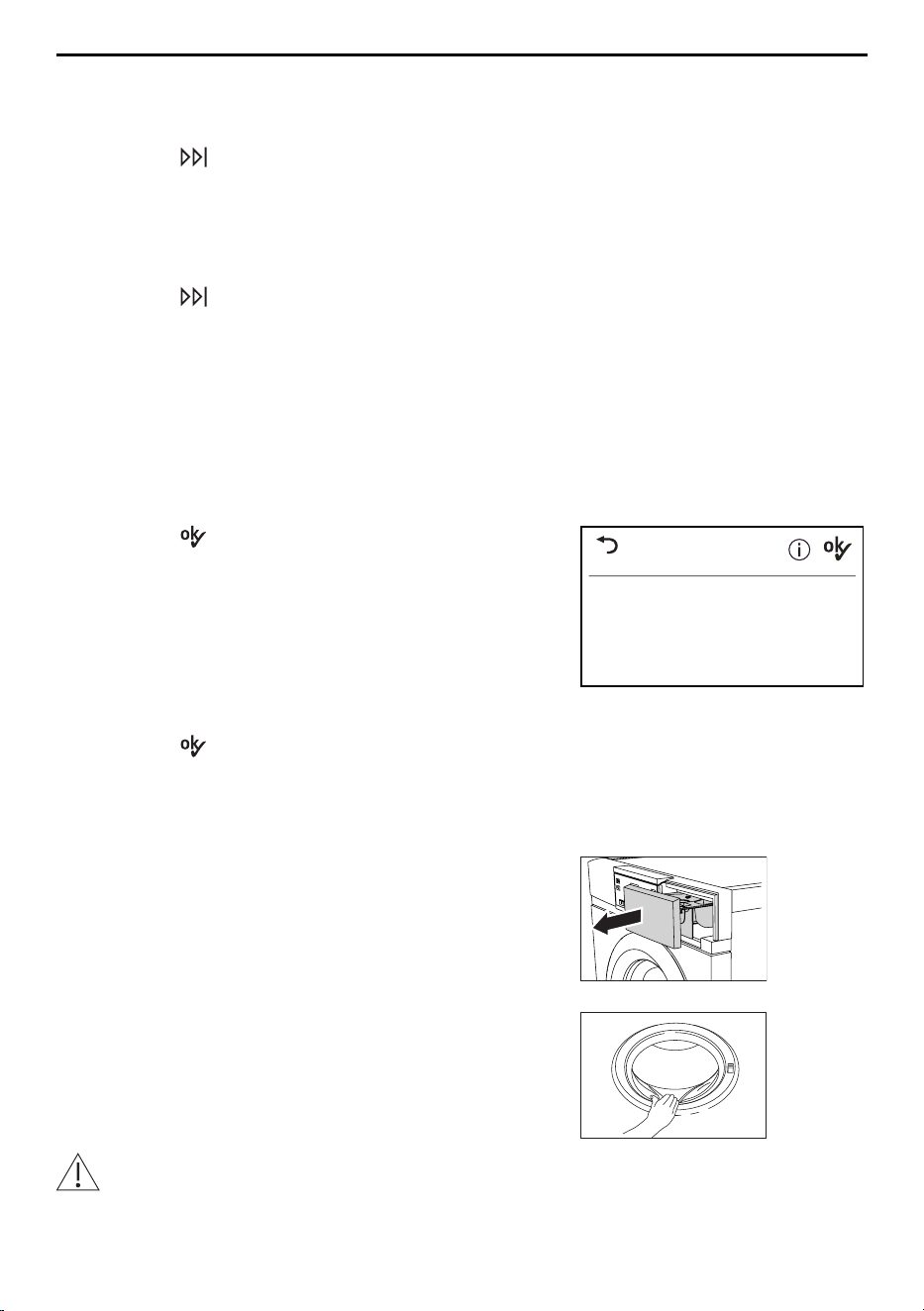
Each time after use
▸ Clean the detergent compartments (see page
44).
▸ To allow the washing drum and door seal to dry
between wash days, open the appliance door and
pull the detergent dispenser drawer out as far as
it will go.
▸ Carefully remove any deposits or foreign objects
from out of the door seal.
Incorrect handling can result in damage to the appliance!
The drum illumination is located in the door seal. Care must be taken when clean-
ing the door seal to avoid damaging the drum illumination.
28
7 Operation with OptiDos
7.13 EcoManagement
The «EcoManagement» user setting must be activated to use «EcoManagement» (see
page 37).
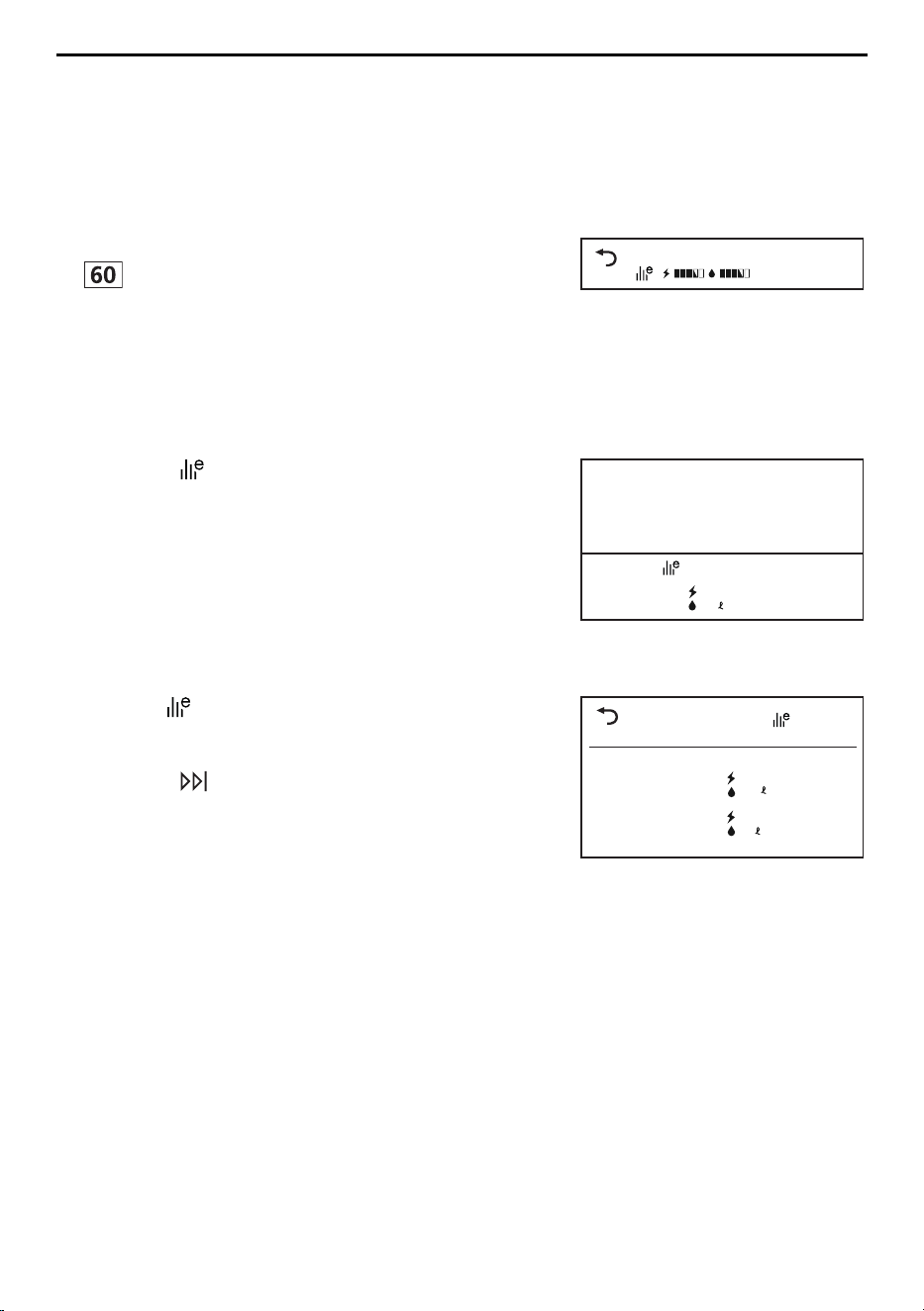
Displaying estimate during programme selection
The expected energy and water consumption can be displayed during additional function
selection.
▸ Touch the button for the desired programme, e.g.
.
– The programme selected with the expected en-
ergy and water consumption appears in the
TouchDisplay.
60°Coloureds
1 h 15
End 2:15
Displaying last programme
The energy and water consumption of the last programme can be displayed if no pro-
gramme is running.
▸ Touch the button.
– The energy and water consumption of the last
programme appears in the TouchDisplay.
0.9 kWh
10
Consumption values
Last programme
Displaying total and average consumption
Total and average consumption can be displayed if no programme is running.
▸ Hold the button depressed for 3 seconds.
– Total and average consumption appear in the
TouchDisplay.
▸ Touch the button to end statistic retrieval.
EcoManagement
Total
Average
390 kWh
920
Statistics
0.9 kWh
10
29
8 Operation without OptiDos
8 Operation without OptiDos
8.1 Adding washing detergent
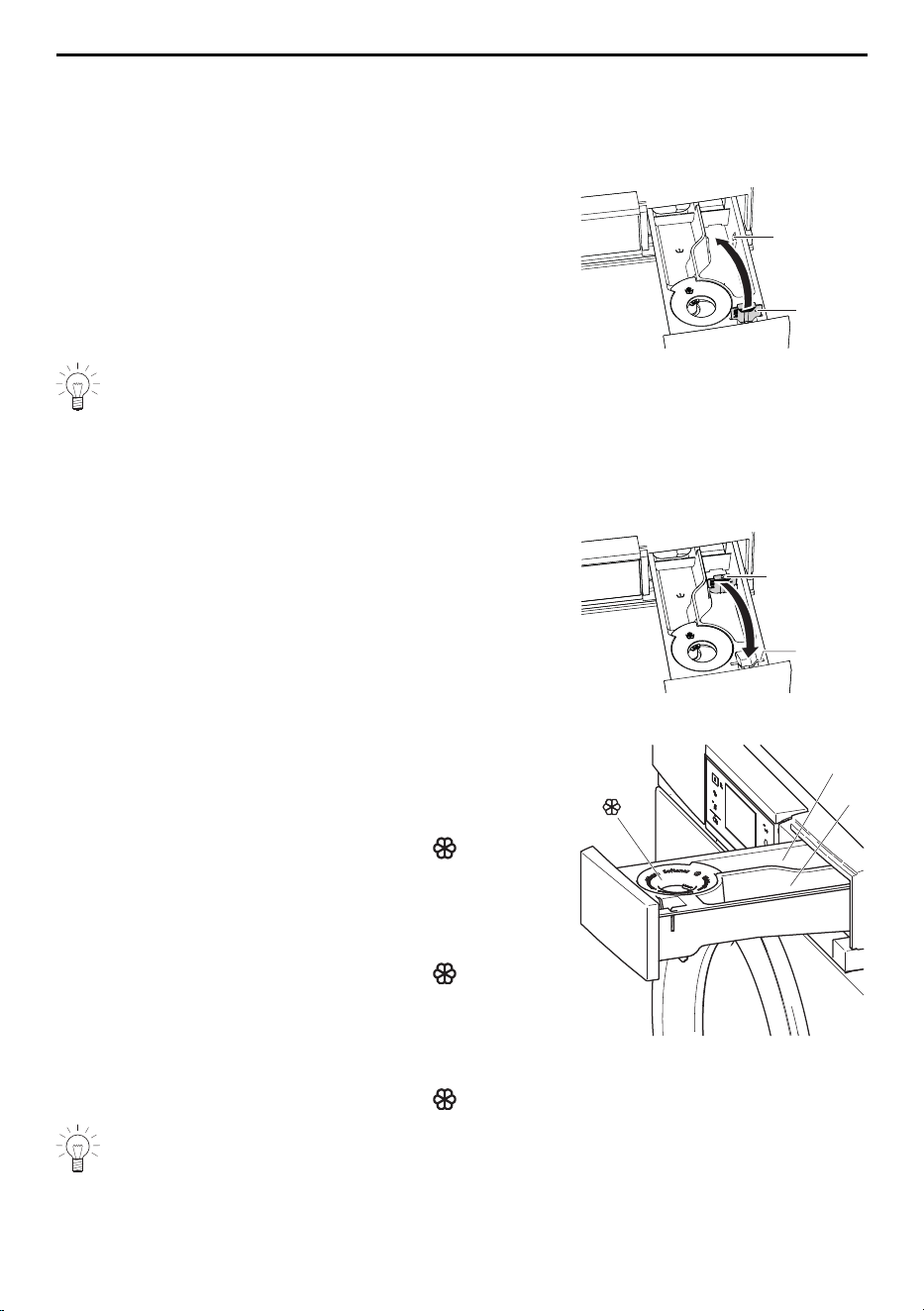
Liquid detergent
▸ Pull the detergent dispenser drawer out as far as
it will go.
▸ Pull flap 1 upwards and out and insert into posi-
tion b.
1
b
Do not fill liquid detergent past the upper mark. Liquid detergent can only be used
for the main wash with programmes without a pre-wash. If washing with a delayed
start, add liquid detergent to a dosing aid (e.g. ball) and then place it directly in the
washing drum so that no detergent gets onto the washing during the delayed start
time.
Powder detergent
▸ Pull the detergent dispenser drawer out as far as
it will go.
▸ Pull flap 1 upwards and out and insert into posi-
tion a.
1
a
Compartments
Conventional washing
I
II
Pre-wash detergent
Compartment I
Main wash detergent
Compartment II
Fabric conditioner
Compartment
Bio wash
Alkaline detergent
Compartment II
Bleach
Compartment I
Fabric conditioner
Compartment
Soap wash
Water softener
Compartment I
Soap detergent
Compartment II
Fabric conditioner
Compartment
Do not fill fabric conditioner past the upper mark.
30
8 Operation without OptiDos
8.2 Detergent dosage
Adding too much washing detergent can cause excess foaming. The con-
sequences: poor wash results, damage to the appliance in the worst case.
The correct dosage depends on the degree of soiling, the wash load, the water hardness
and the product used. Follow the manufacturer’s dosing instructions.
Water hardness
The local water authorities can provide information on the level of water hardness in your
area.
Soft
0°fH to 15°fH
Medium
15°fH to 25°fH
Hard
over 25°fH
After adding the washing detergent
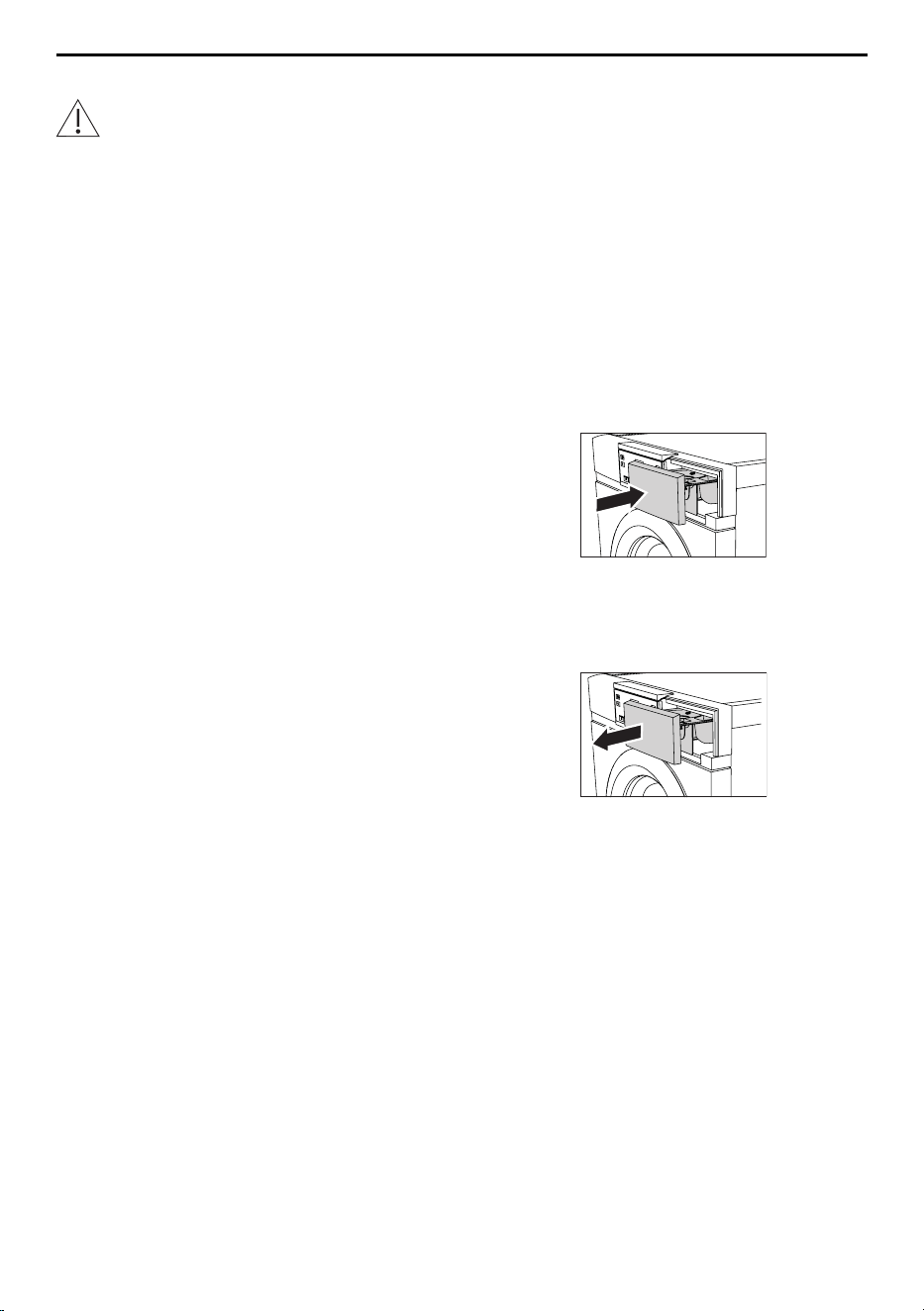
▸ Push the detergent dispenser drawer back in.
▸ Select a programme.
8.3 Dyeing textiles
Textiles can be dyed in the appliance using suitable dyeing agents. Follow the manufac-
turer’s safety instructions and warnings.
▸ Select the desired programme.
– The programme starts with brief draining; water
runs into the washing drum.
▸ Open detergent dispenser drawer slightly.
▸ Add liquid dye components.
▸ Close the detergent dispenser drawer.
31
8 Operation without OptiDos
8.4 Starting programme
▸ Close the appliance door.
– The start screen appears.
Coloureds
Select temperature
1200
1 h 00
End 16 : 13
60°C Coloureds
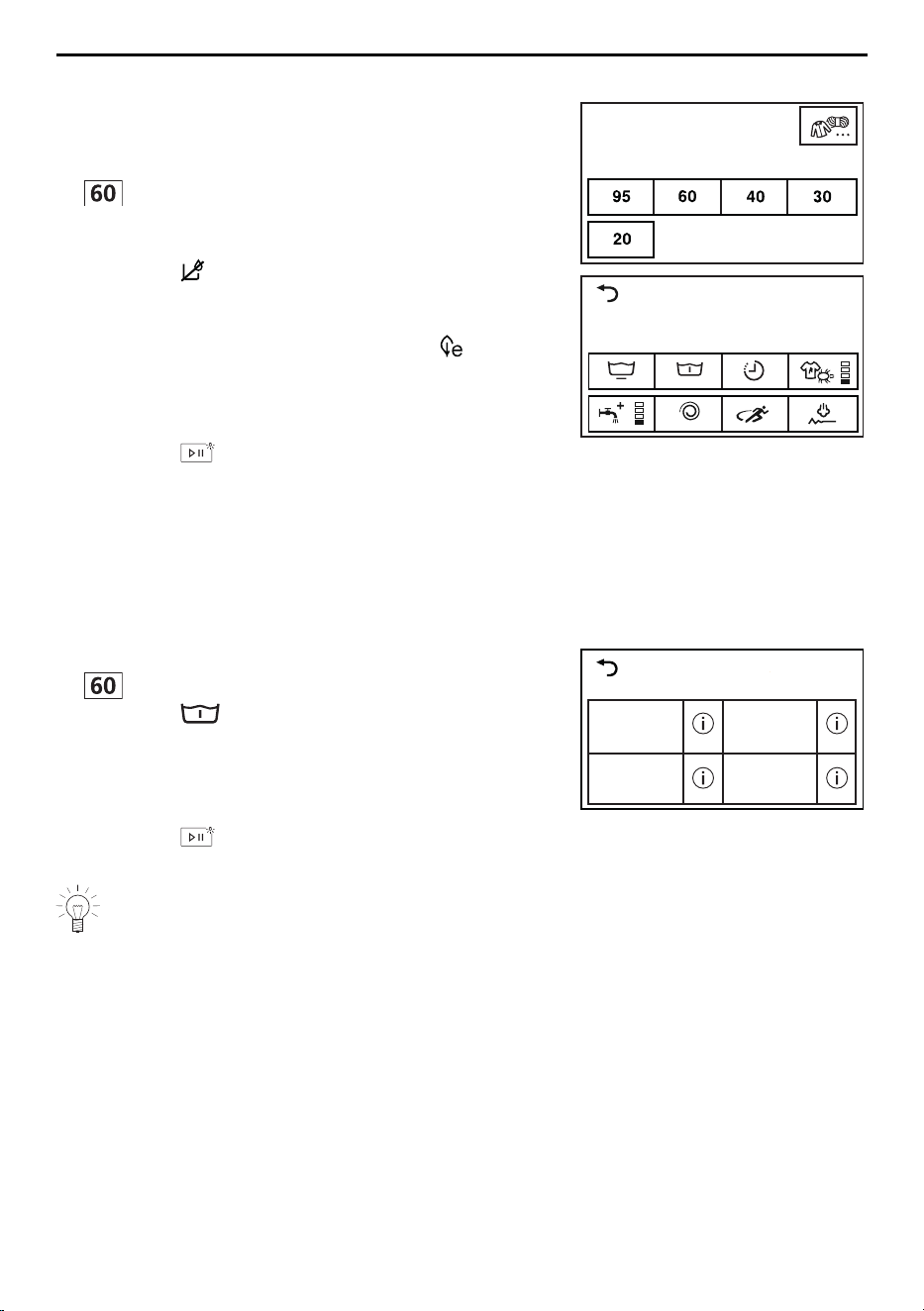
▸ Touch the button for the desired programme, e.g.
.
– The selection of containers appears in the
TouchDisplay.
▸ Touch the button.
– The selectable additional functions appear in
the TouchDisplay.
– The indicator light for the selectable button
flashes.
▸ Touch the button for the desired additional func-
tion as required.
▸ Touch the button.
– The programme selected starts and washes
without OptiDos.
8.5 Washing with multi-component detergent
To start Bio or Soap wash, «Multi-component detergent» must be enabled in the user set-
tings (see page 37). Ensure the alkaline detergent or soap detergent are added to the
correct compartment.
▸ Touch the button for the desired programme, e.g.
.
▸ Touch the button.
– The selection of washing detergents appears in
the TouchDisplay.
▸ Touch the button for the desired detergent, e.g.
«Bio wash».
▸ Touch the button.
– The programme selected starts.
Select wash detergent
Standard with pre-wash
Soap wash Bio wash
Add multi-component detergent only to the detergent dispenser drawer and not to
the OptiDos drawer.
32
9 Favourites
9 Favourites
The appliance door has to be open to define, change or delete a favourite.
9.1 Defining and saving favourites
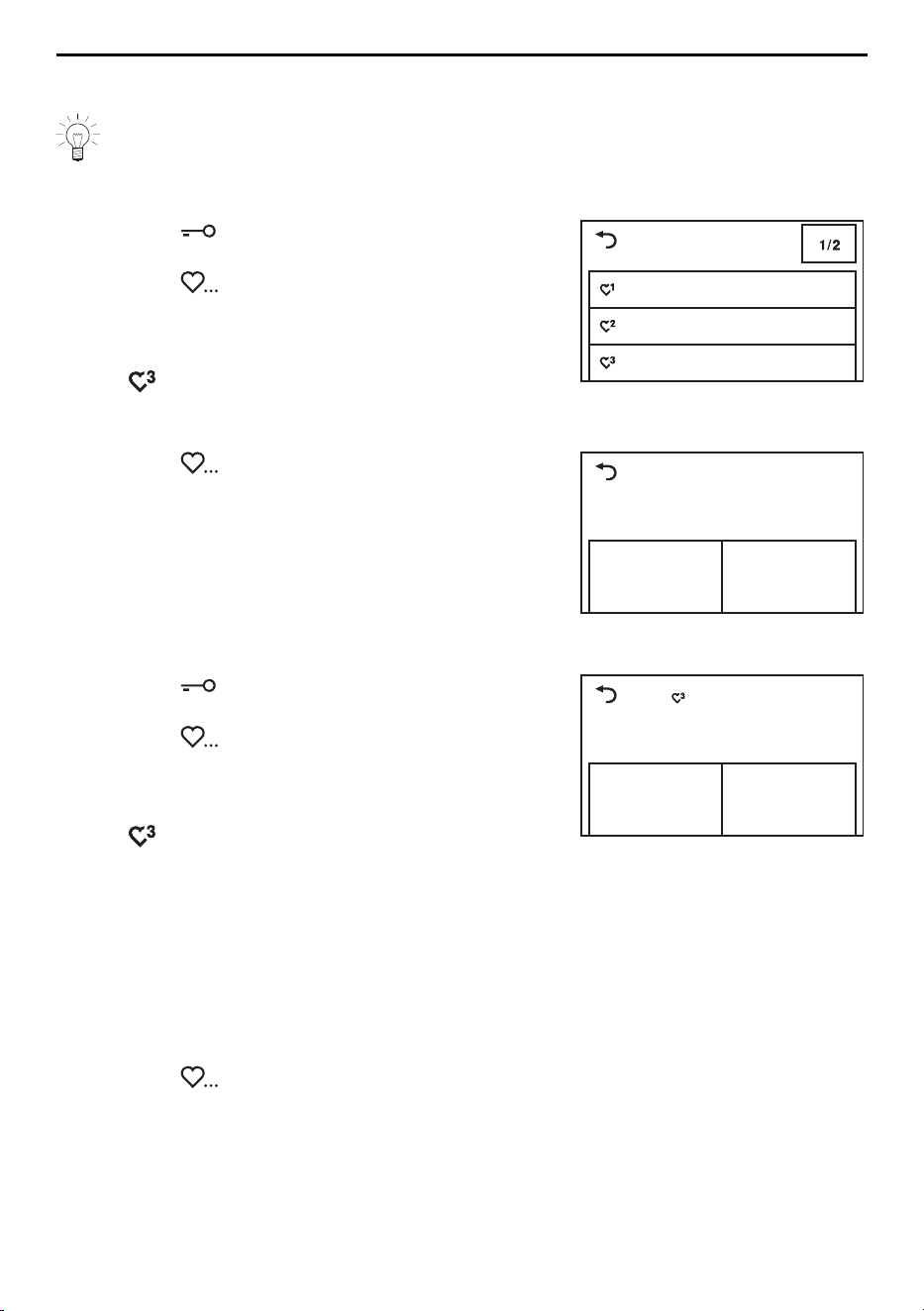
▸ Touch the button.
– The appliance door opens.
▸ Touch the button.
– The Favourite programmes menu appears in
the TouchDisplay.
▸ Touch one of the empty favourite programmes,
e.g. .
– The start screen appears in the TouchDisplay.
▸ Select programme and additional functions.
empty
empty
empty
Define favourite
▸ Touch the button.
– In the TouchDisplay appears: «Save changes?»
▸ To create favourites, touch «Yes».
– The defined favourite appears in the Favourite
programmes menu.
▸ To discard favourites, touch «No».
Save changes?
Yes
No
9.2 Changing or clearing favourites
▸ Touch the button.
– The appliance door opens.
▸ Touch the button.
– The Favourite programmes menu appears in
the TouchDisplay.
▸ Touch the favourite programme to be changed,
e.g. .
– In the TouchDisplay appears: «Change» and
«Clear»
Coloureds
Change
Clear
Changing
▸ To change the favourite programme, touch
«Change».
– The favourite programme appears in the
TouchDisplay.
▸ Make any changes.
▸ Touch the button and save the changes.
Clearing
▸ To clear the favourite programme, touch «Clear».
– The Favourite programmes menu appears in
the TouchDisplay.
– The favourite programme is cleared.
33
10 V-ZUG-Home
9.3 Starting favourites
▸ Close the appliance door.
– The drum illumination switches off.
– The start screen appears in the TouchDisplay.
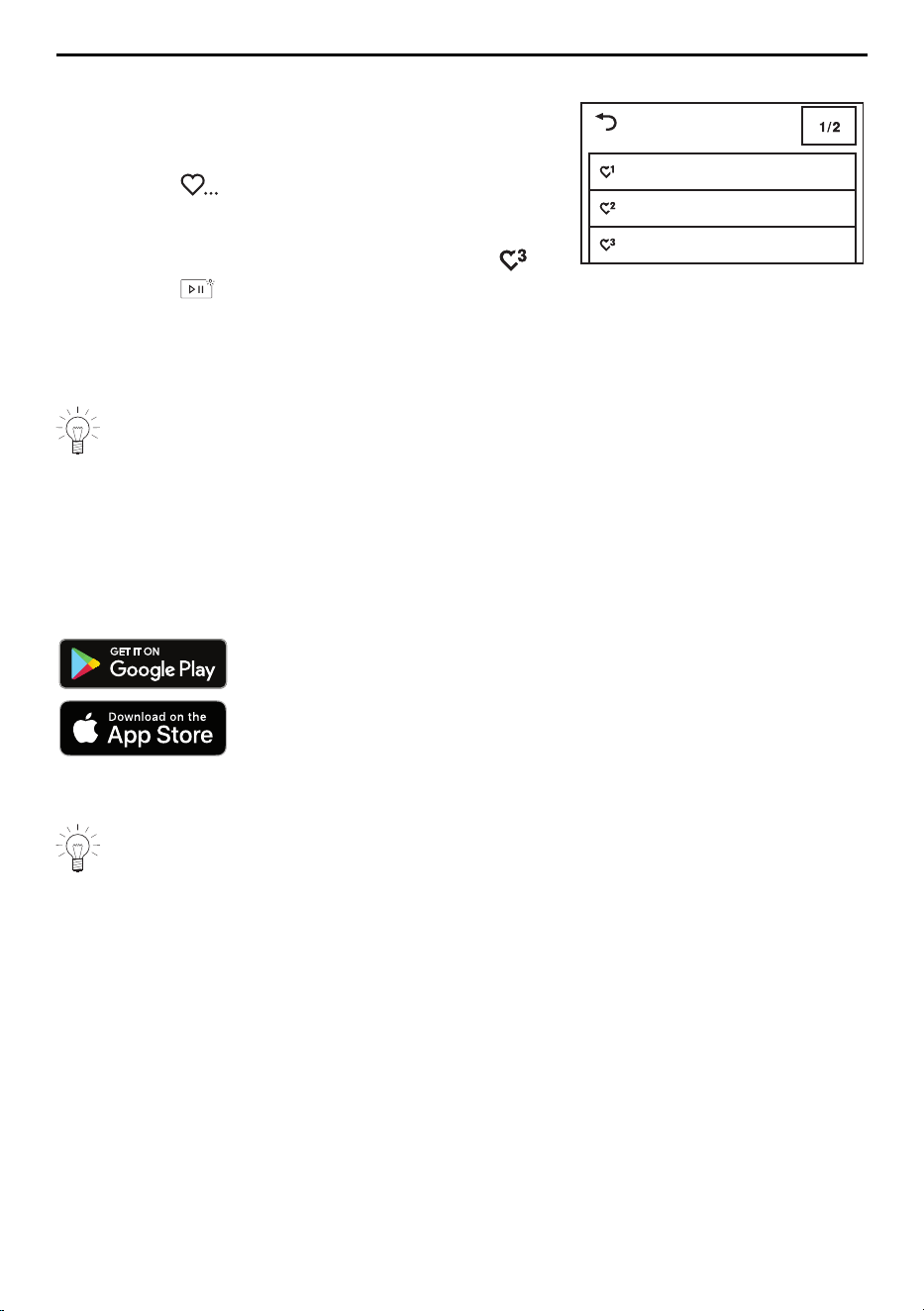
▸ Touch the button.
– The Favourite programmes menu appears in
the TouchDisplay.
▸ Touch the desired favourite programme, e.g. .
▸ Touch the button.
– The programme selected starts.
Select favourite
empty
empty
Coloureds
10 V-ZUG-Home
Download updates to your appliance via V-ZUG-Home so that you are always up to
date.
10.1 Conditions
The following conditions must be met for full use of V-ZUG-Home:
▪ Access to the internet and to Google Play
TM
Store / App Store
®
▪ Smartphone or tablet that is connected to the home network
▪ System requirements for smartphone or tablet: from Android 6.0 or from iOS 11.0
▪ WLAN/Wi-Fi that meets one of the following standards: 2.4GHz 802.11 b/g/n
Google Play
TM
is a trademark of Google Inc.
Apple and the Apple logo are trademarks of Apple Inc., registered
in the U.S. and other countries. App Store
®
is a service mark of
Apple Inc.
10.2 Initial set-up
When establishing a connection, stay close to your household appliance and have
the password for your wireless network at the ready.
Installing the app
▸ Enable bluetooth and location determination on the smartphone or tablet.
▸ Search the Google Play
TM
Store or the App Store® for «V-ZUG».
▸ Install and open the V-ZUG App.
Enabling the V-ZUG-Home mode on the appliance
▸ Set to the «Display» or «Operate and display» mode under «V-ZUG-Home» in the user
settings.
Connecting the appliance to the home network
▸ In the V-ZUG App, add the household appliance.
– A bluetooth pairing request appears in the V-ZUG App.
– A 6-digit PIN appears in the display of the household appliance.
▸ Enter the 6-digit PIN in the V-ZUG App and confirm the bluetooth pairing request.
– The name of the active WLAN/Wi-Fi appears in the V-ZUG App and then you are
prompted to enter the WLAN/Wi-Fi password.
34
11 User settings
▸ Enter the WLAN/Wi-Fi password.
– The household appliance is connected to the active WLAN/Wi-Fi connection.
11 User settings
Providing no programme is running and no error messages are displayed, the user
settings can be changed.
11.1 Changing the user settings
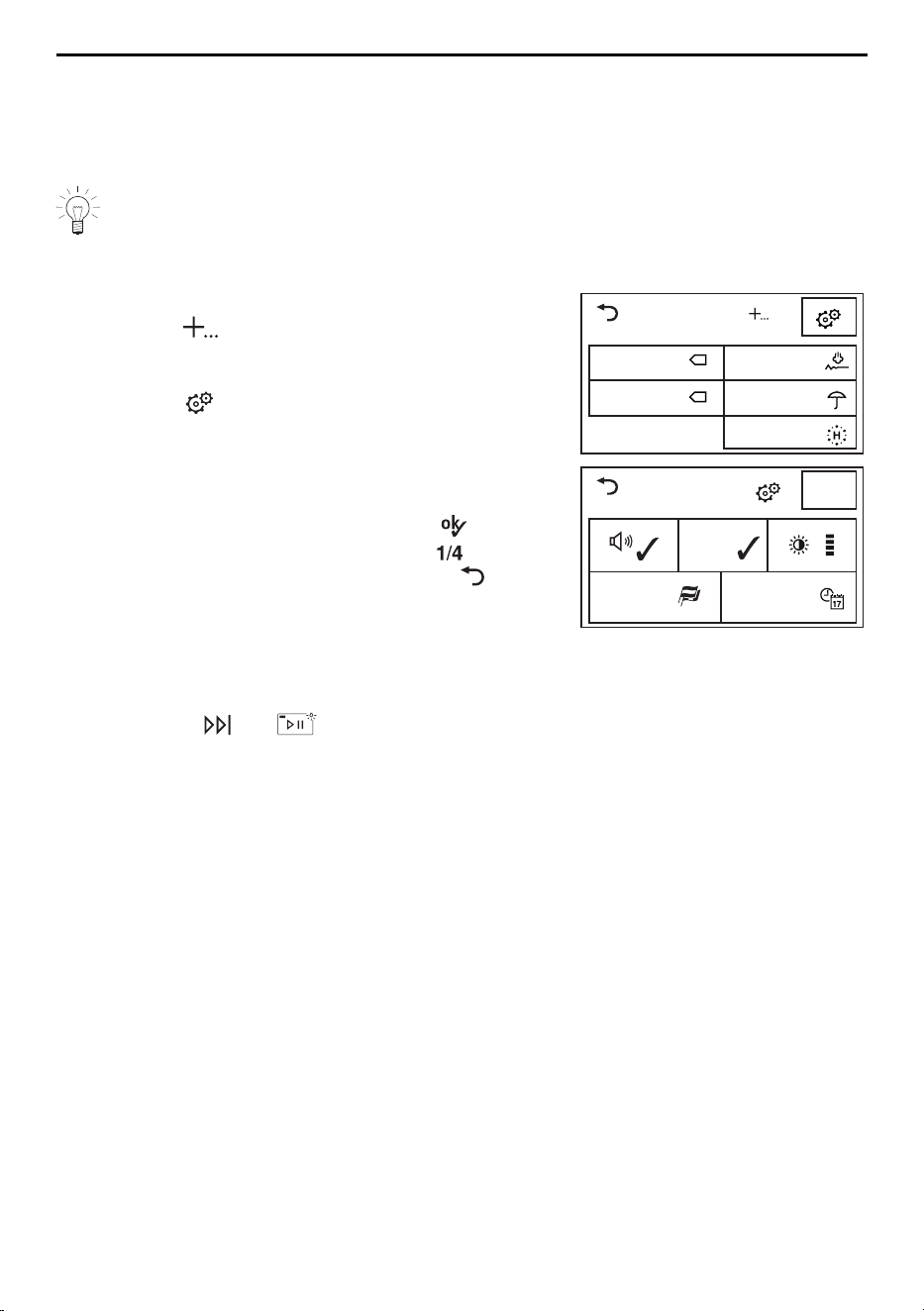
▸ Close the appliance door.
▸ Touch the button.
– The selection of extra programmes appears in
the TouchDisplay.
▸ Touch the button.
– The user settings menu appears in the Touch-
Display.
▸ Select and change the desired settings and sub-
menus.
▸ To save the selected setting, touch the button.
▸ To select any other settings, touch the button.
▸ To exit the user settings menu, touch the but-
ton.
Extra
10° Standard
Proofing
Steam anti-cr.
App. hygiene
40° Standard
Settings
SN 11023 000123
Background
image
Language
English
1/4
19.41
11.2 Button tone
The button tone can be turned on and off. The but-
ton tone for the and buttons cannot be
turned off.
▪ On (factory setting)
▪ Off
11.3 Background image
The background image of the TouchDisplay can be
turned off. In this case, the background appears
black.
▪ On (factory setting)
▪ Off
11.4 Brightness
The display can be adjusted to the prevailing light
conditions.
▪ Dark
▪ Medium bright
▪ Bright (factory setting)
▪ Very bright
11.5 Language
The language is set during the initial set-up of the
appliance. It can be changed.
▪ German
▪ …
35

11 User settings
11.6 Time
The time must be reset if the power is cut for more
than about 5 weeks. The appliance must not be dis-
connected from the mains supply for at least 30
minutes after making the settings.
19:43
▪ Clock
11.7 Spin speed
An increase in the spin speed is only possible for
suitable programmes. A reduction in the spin speed
is possible for all programmes.
▪ 400
▪ 600
▪ 800
▪ 1000
▪ 1200 (factory setting)
▪ 1400
▪ 1600
11.8 Degree of soiling
There are 3 settings for degree of soiling. ▪ Lightly soiled (factory set-
ting)
▪ Medium soiled
▪ Heavily soiled
11.9 AquaPlus
There are 5 settings for rinsing intensity. ▪ Basis (factory setting)
▪ more water
▪ + 1 rinse
▪ more water + 1 rinse
▪ Skin protection
11.10 Automatic door opener
When the function is turned on, the appliance door
opens automatically when the programme ends.
When the function is turned off, the appliance door
can be opened by touching the button.
▪ On (factory setting)
▪ Off
11.11 Delayed start / OptiTime
When the «Programme start» function is turned on,
the time a programme should start running can be
defined.
When the «Programme end» function is turned on,
the time a programme should end can be defined. If
the «OptiTime» function is also turned on, the «Opti-
Time» function is automatically added whenever a
delayed start is selected.
▪ Programme start
▪ Programme end, OptiTime
on
▪ Programme end, OptiTime
off (factory setting)
36

11 User settings
11.12 Hygiene info
When the function is turned on, a wash of at least
60°C is recommended whenever for hygiene reas-
ons the formation of foul smelling coatings in the ap-
pliance is to be prevented.
▪ On (factory setting)
▪ Off
11.13 Childproof lock
The childproof lock prevents a programme from be-
ing started accidentally. The appliance can only be
operated after first entering the code 731.
▪ On
▪ Off (factory setting)
11.14 Drum illumination
When this function is activated, the drum illumination
automatically switches on whenever the appliance
door is opened and switches off whenever it is
closed.
▪ On (factory setting)
▪ Off
11.15 EcoManagement
When this function is activated, the estimated con-
sumption values appear at the start of the pro-
gramme and the actual consumption values appear
at the end of the programme. The saved consump-
tion values can be deleted under «Statistics».
▪ On (factory setting)
▪ Off
▪ Statistics
▪ Information
11.16 Multi-component detergent
When the function is turned on, the desired type of
washing detergent can be selected under the addi-
tional function «Pre-wash».
▪ On
▪ Off (factory setting)
11.17 Loosening up the washing
Touch the button at any time to open the appli-
ance door. The washing can be unloaded.
▪ 30 seconds (factory setting)
▪ 10 minutes
▪ 30 minutes
▪ 6 hours
11.18 Soft water
When the function is turned on, adjusting for very
soft water prevents heavy foaming.
▪ On
▪ Off (factory setting)
11.19 OptiDos
When the function is turned on, the agent can be
drawn from the OptiDos drawer. OptiDos calculates
the optimum dosage based on the programme se-
lected and the actual amount of washing.
▪ OptiDos without selection
guidance
▪ OptiDos with selection guid-
ance
▪ Disable OptiDos
37
12 Demo mode
11.20 Water options *
* Depending on model
The appliance is equipped 2 water connection op-
tions: Either 2 water connections for hot and cold
water or 2 water connections for hard and soft wa-
ter.
Water connections for hot and cold water: Either a
high or a low mixing temperature can be set for the
main wash. Either a hot or a cold rinse temperature
can be set for rinsing. All detailed settings are de-
scribed in the installation instructions on «Water op-
tions».
▪ Mixing temperature high
▪ Mixing temperature low
▪ Rinse temperature cold
▪ Rinse temperature hot
▪ Off
Water connections for hard and soft water: Soft wa-
ter is used for the main wash and the first rinse. Wa-
ter for subsequent rinse cycles is drawn from the
hard water connection.
▪ Yes
▪ No
11.21 V-ZUG-Home
With V-ZUG-Home (see page 34), you can access
your appliances over the V-ZUG App to, for instance
▪ switch off a running appliance
▪ call up the status of your household appliances.
▪ Operate and display
▪ Display
▪ Off (factory setting)
When the network connection is activated, energy consumption in the standby
mode is increased.
11.22 Factory settings
The factory settings can be restored. The language if
changed is not reset to the factory setting.
▪ : Restore
▪ : Do not restore
Saved favourites are also cleared when factory settings are restored.
12 Demo mode
The appliance can be fully operated in the demo mode, but it will not wash.
The demo mode can only be switched on or off when the appliance door is open.
12.1 Switching on
▸ Touch the button.
– The appliance door opens.
– The drum illumination switches on.
▸ Simultaneously hold the , and buttons depressed for 5seconds until the
Demo mode menu appears in the TouchDisplay.
– In the TouchDisplay appears: «Status: Off»
38
13 Care and maintenance
▸ Touch the button.
– The demo mode is selected.
▸ Touch the button.
– The demo mode is switched on.
– The TouchDisplay goes dark.
12.2 Switching off
▸ Touch the button.
– The appliance door opens.
– The drum illumination switches on.
▸ Simultaneously press the , and buttons until the Demo mode menu ap-
pears in the TouchDisplay.
– In the TouchDisplay appears: «Status: On»
▸ Touch the button.
– The demo mode is no longer selected.
▸ Touch the button.
– The demo mode is switched off.
– The TouchDisplay goes dark.
13 Care and maintenance
13.1 Cleaning intervals
Appliance part Cleaning interval
OptiDos drawer ▪ As required
▪ If heavily soiled
Detergent dispenser drawer ▪ At the end of the wash day
Water inlet filter ▪ When prompted «A9 Check water inlet»
Foreign body trap ▪ 1× per month
Drum illumination ▪ As required
When using fabric conditioner in the OptiDos drawer, we recommend running the
cleaning programme every 3months.
39
13 Care and maintenance
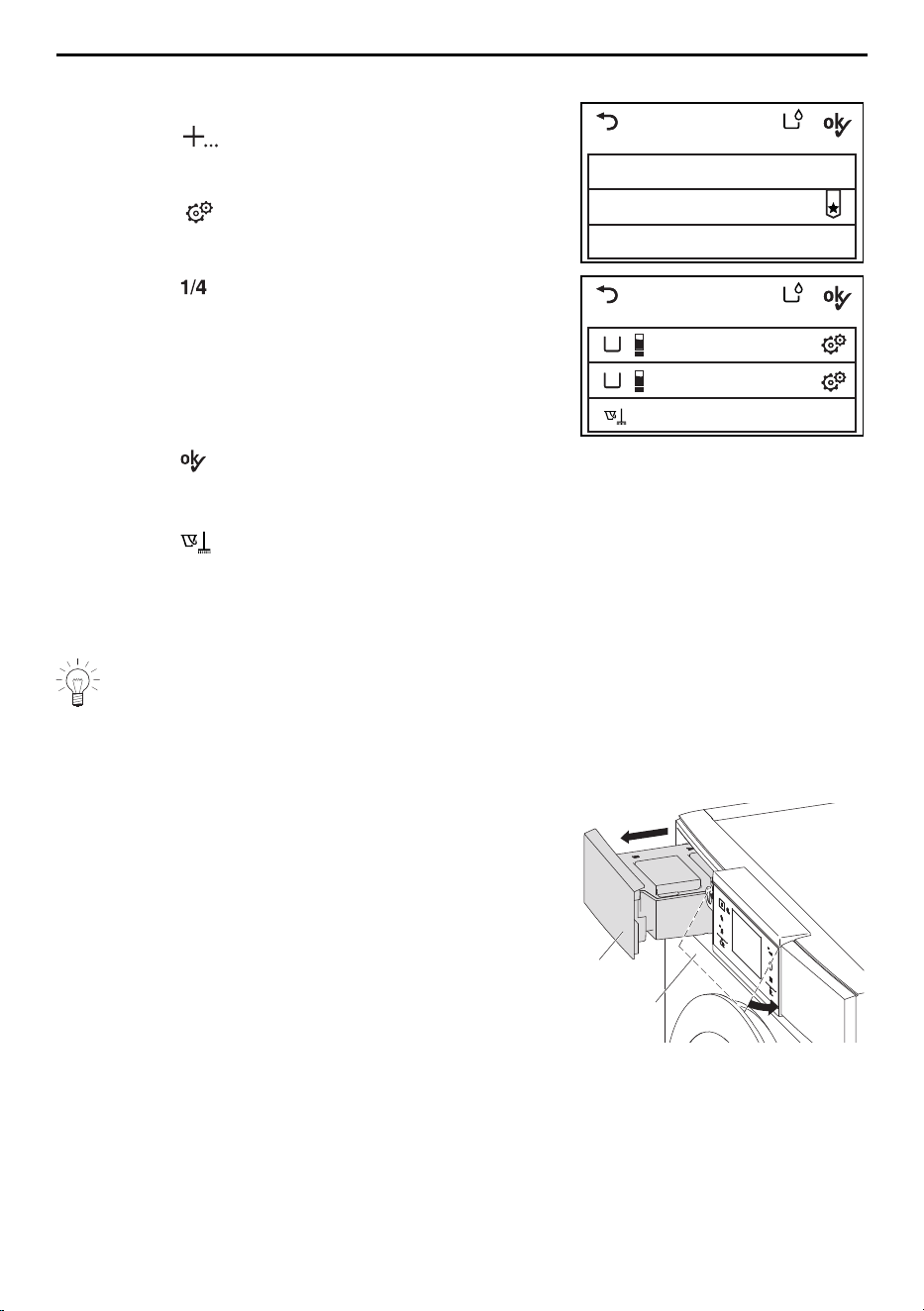
13.2 Cleaning the OptiDos drawer with the cleaning programme
▸ Close the appliance door.
▸ Touch the button.
– The selection of extra programmes appears in
the TouchDisplay.
▸ Touch the button.
– The user settings menu appears in the Touch-
Display.
▸ Touch the button repeatedly until the «Op-
tiDos» user setting appears.
OptiDos setting
Disable OptiDos
OptiDos without selection guidance
OptiDos with selection guidance
B
A
Cleaning programme
not enabled
not enabled
OptiDos setting
▸ Touch the «OptiDos» button.
– The OptiDos menu appears in the TouchDis-
play.
▸ Touch either «OptiDos without selection guid-
ance» or «OptiDos with selection guidance».
▸ Touch the button.
– The selection of containers appears in the
TouchDisplay.
▸ Touch the button
– The cleaning programme starts.
▸ Follow the instructions in the TouchDisplay.
13.3 Cleaning the OptiDos drawer manually
It is imperative that the OptiDos drawer be cleaned when changing over from a
fabric conditioner to a washing detergent or vice versa. Otherwise the OptiDos
drawer only needs to be cleaned if particularly dirty, e.g. with dried-on washing de-
tergent.
Emptying the containers
▸ Pull the OptiDos drawer 1 out as far as it will go.
▸ Fold down the operating panel 2.
1
2
40
13 Care and maintenance
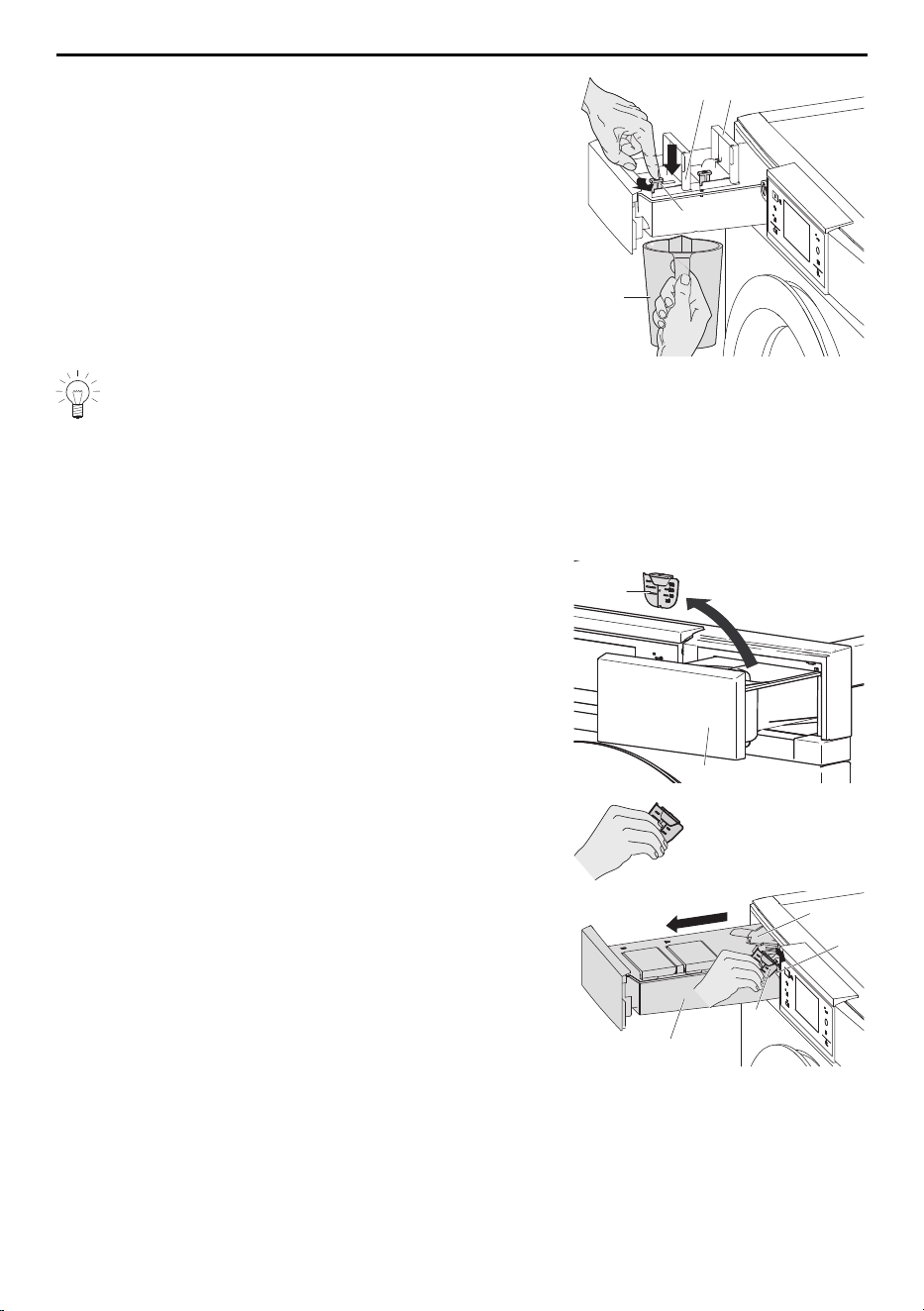
▸ Place the receptacle3 beneath containerB.
▸ Press down drain valve4 in a controlled manner and
then lock in an anti-clockwise direction.
– Any washing detergent left runs into the recept-
acle 3.
3
B
4
A
Depending on the detergent used, this process can take several minutes.
▸ As soon as containerB has been drained, release
the locked drain valve 4 in a clockwise direction.
▸ Empty containerA in the same way as containerB.
Removing the OptiDos drawer
▸ Open the detergent dispenser drawer 13 on the
right-hand side of the appliance.
▸ Remove the blue liquid-detergent flap 14 from the
detergent dispenser drawer 13.
13
14
▸ Hold the liquid-detergent flap 14 with the sharp-
edged corners pointing upwards.
▸ Using the liquid-detergent flap14, slightly turn the
blue release6 in a clockwise direction and at the
same time pull out the OptiDos drawer1 to the next
stop position.
– The coupling7 becomes visible.
7
6
14
1
41
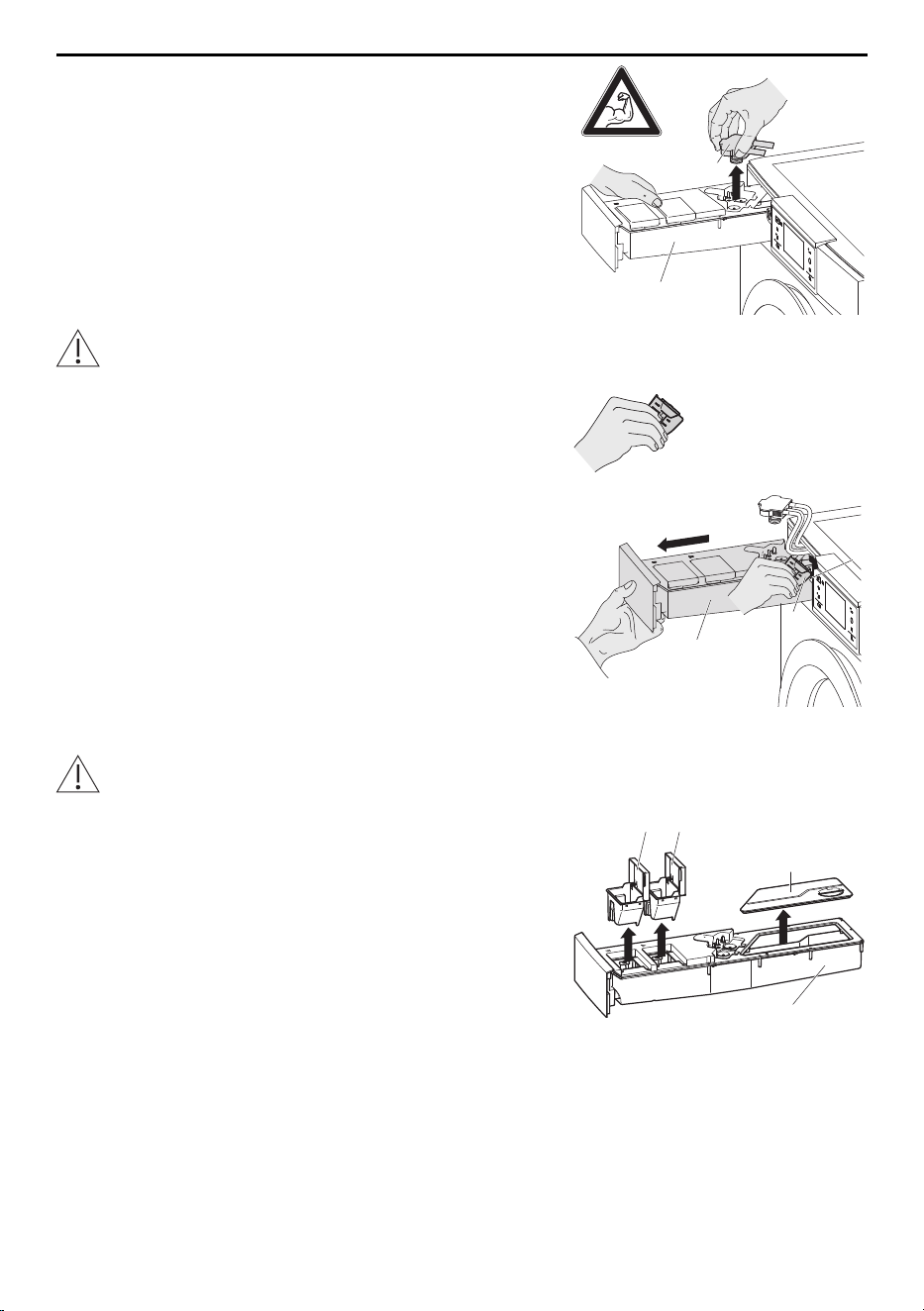
13 Care and maintenance
▸ Hold the OptiDos drawer1 with one hand.
▸ Take hold of the coupling 7 with the other hand.
▸ Using some force, remove the coupling7 from the
OptiDos drawer1.
7
1
Do not push the OptiDos drawer1 down! Do not pull the hose connected to the
coupling 7! This can damage the appliance!
▸ Hold the liquid-detergent flap 14 with the sharp-
edged corners pointing upwards.
▸ Using the liquid-detergent flap14, turn the blue re-
lease6 in a clockwise direction again and at the
same time pull the OptiDos drawer1 completely out.
14
6
1
Cleaning the OptiDos drawer
Do not clean the OptiDos drawer in the dishwasher!
▸ Place the OptiDos drawer1 on a flat surface.
▸ Take out containersA and B and cover8, clean with
water and then wipe dry.
8
AB
1
42
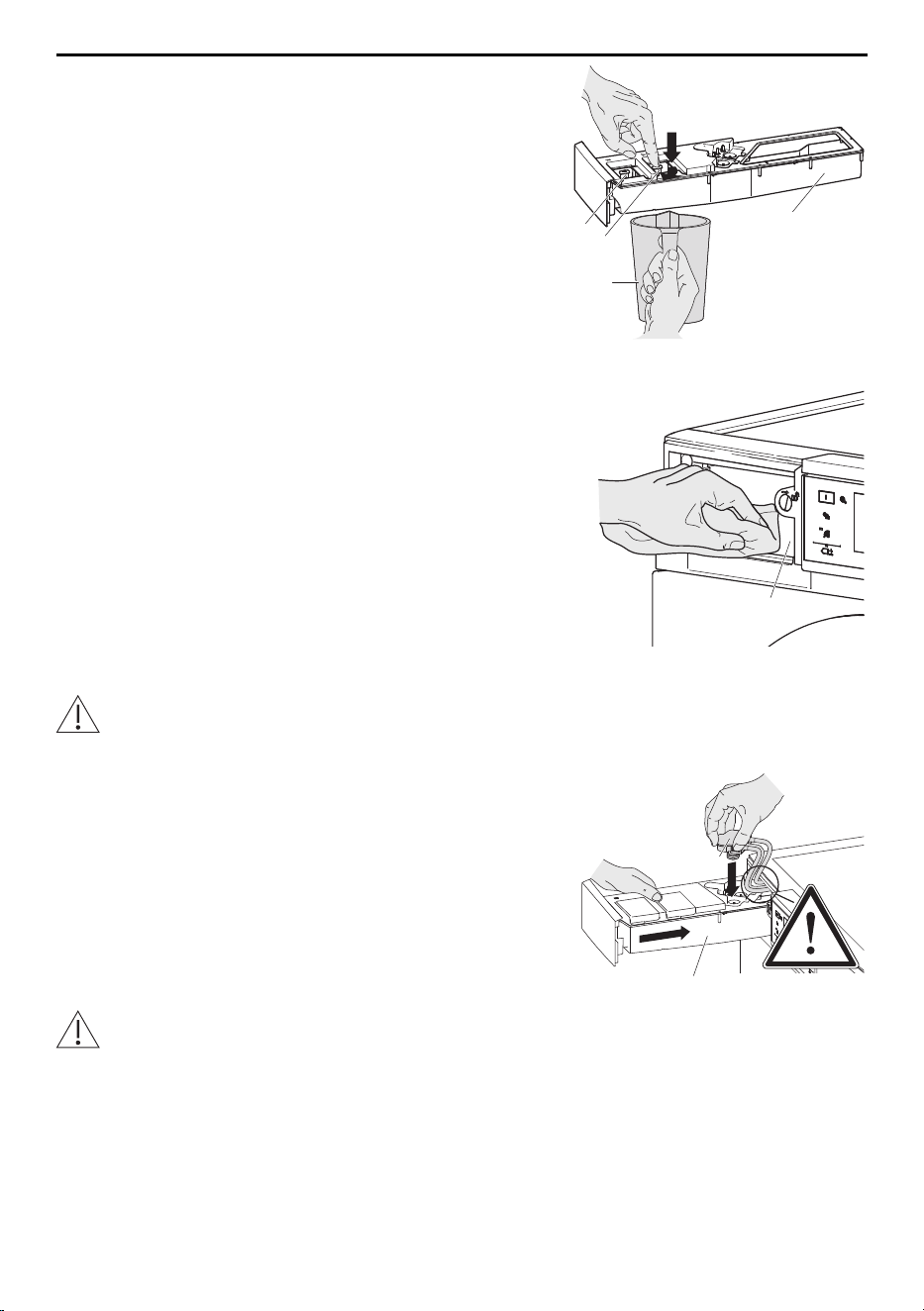
13 Care and maintenance
▸ Hold the receptacle3 beneath drain valves4 and 5.
▸ Tilt the OptiDos drawer1 so that any washing deter-
gent left runs in the direction of drain valves4 and 5.
▸ Press down drain valves 4 and 5 in a controlled
manner and then lock in an anti-clockwise direction.
– Any washing detergent left runs into the recept-
acle 3.
▸ Clean the OptiDos drawer1 in the bath tub, shower
or sink with warm water and then wipe dry.
▸ Put containers A and B and cover8 back in the Op-
tiDos drawer1.
3
5
4
1
Cleaning the coupling and guide duct
▸ Clean the coupling7 with a damp cloth.
9
▸ If dirty, clean the guide duct9 with a damp cloth.
Installing the OptiDos drawer
Hold coupling7 in your hand in such a way that the cable and the hoses are not
twisted.
▸ Hold the cable and hoses up.
▸ Push the OptiDos drawer1 into the guide duct9 until
the coupling7 can be inserted.
▸ Insert coupling7 and push down until it engages.
7
1
Only push the coupling down, not the OptiDos drawer!
▸ Push the OptiDos drawer1 back in.
– The OptiDos drawer 1 is locked again.
43
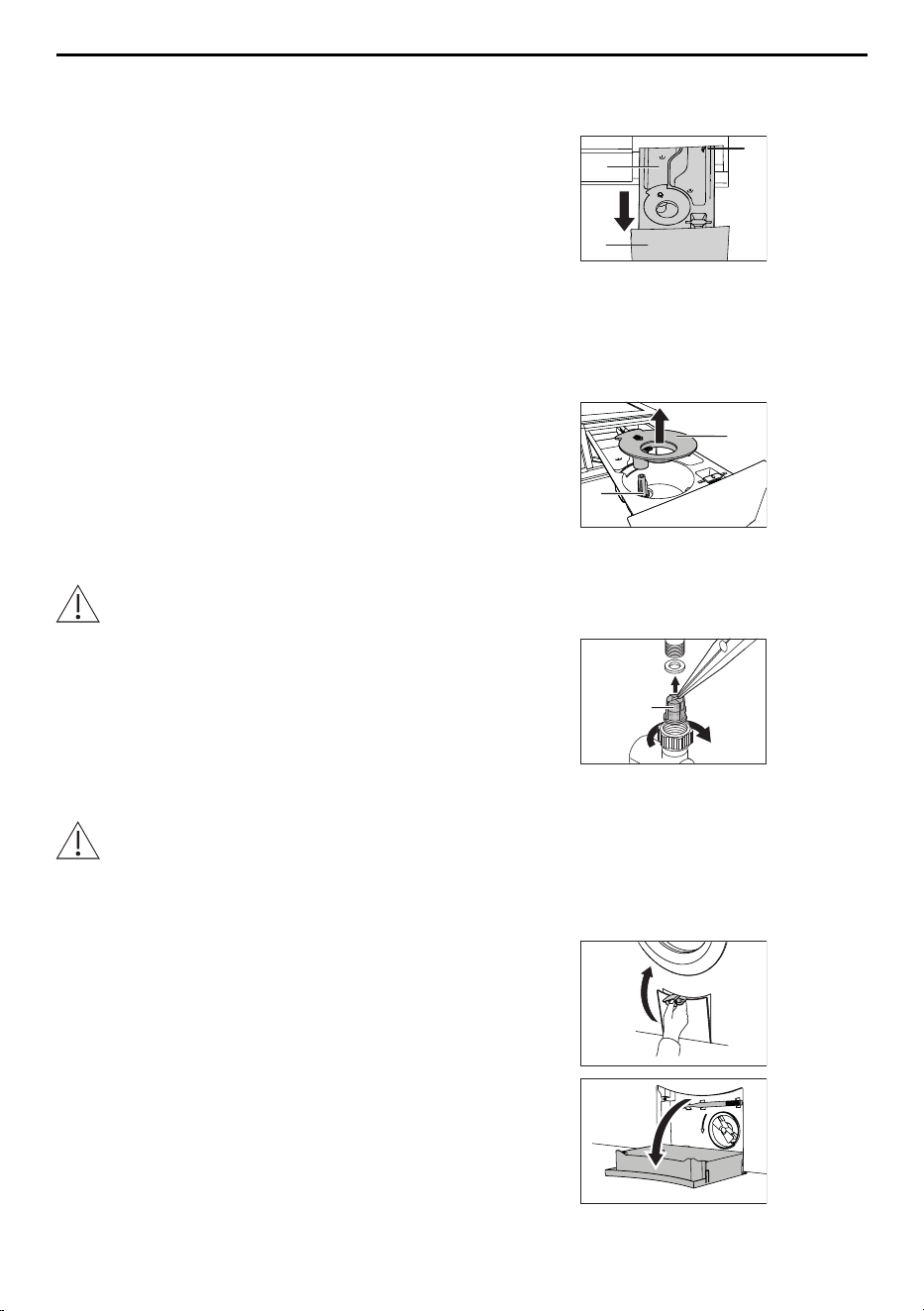
13 Care and maintenance
13.4 Cleaning the detergent dispenser drawer
Cleaning the detergent compartments
▸ Pull the detergent dispenser drawer 1 out as far
as it will go.
▸ Push the blue release lever 2 to the left and pull
the detergent dispenser drawer 1 completely out.
▸ Wash out the detergent compartments.
▸ Clean the duct under the pre-wash detergent
compartment l.
▸ Insert the detergent dispenser drawer 1 again cor-
rectly.
l
2
1
Cleaning the siphon and suction tube
▸ Pull siphon 1 in fabric conditioner compartment
upwards and out.
▸ Clean the siphon1 and suction tube2.
– Insert the siphon 1 again correctly.
2
1
13.5 Cleaning the water inlet filter
Test the water inlet for leaks following maintenance work.
▸ To avoid blockages, periodically check and, if ne-
cessary, clean the water inlet filter 1.
1
13.6 Emergency draining
The water in the appliance may be hot. Scalding hazard! Allow to cool down before
emergency draining.
In the event of a blocked water outlet or drain pump, a malfunction or a power failure, if
there is water still in the appliance it must be drained off as follows:
▸ Open the drain tray with the flap for liquid deter-
gent.
▸ Fold the drain tray right down. It also functions as
a receptacle for collecting any water that runs out.
44
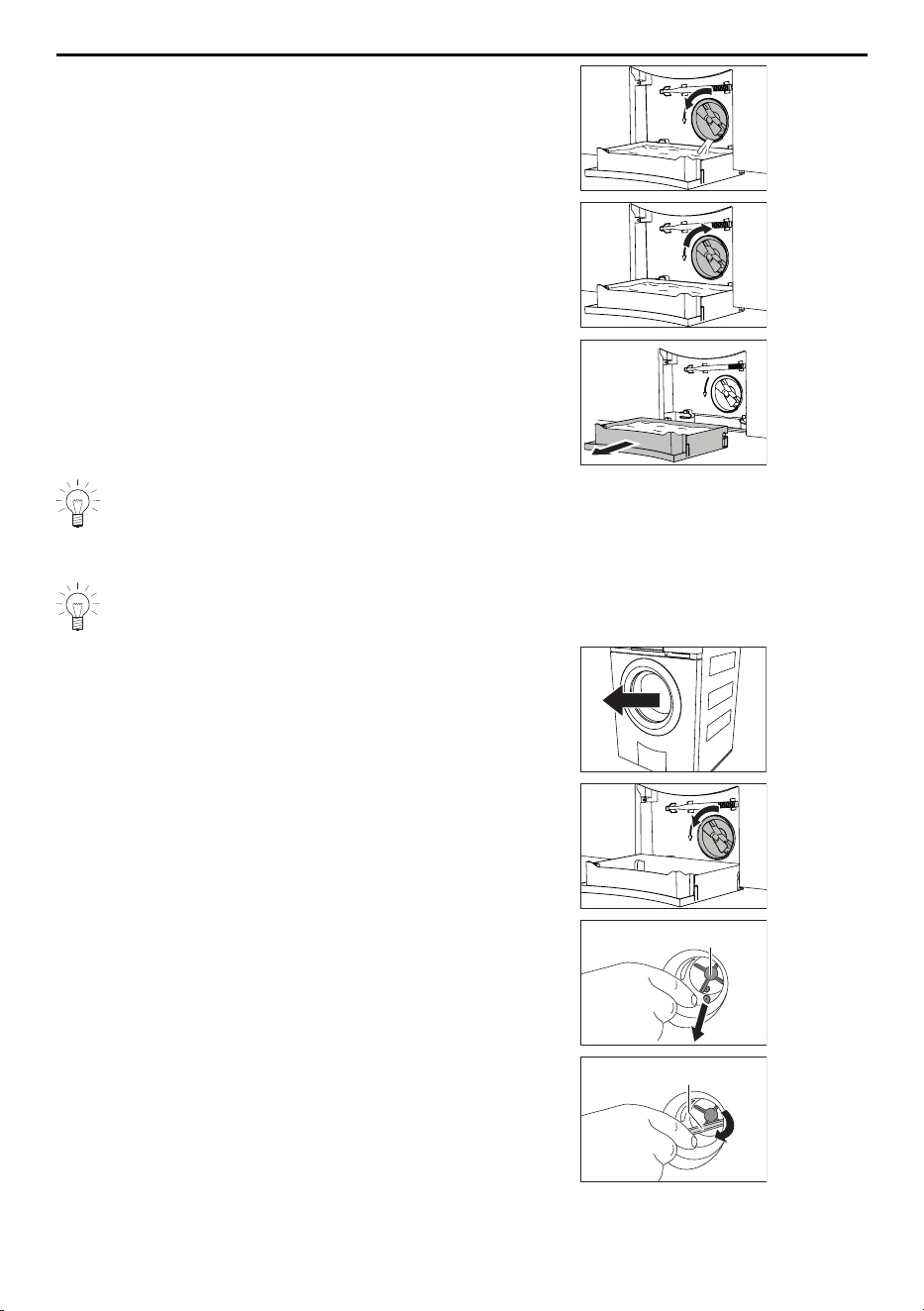
13 Care and maintenance
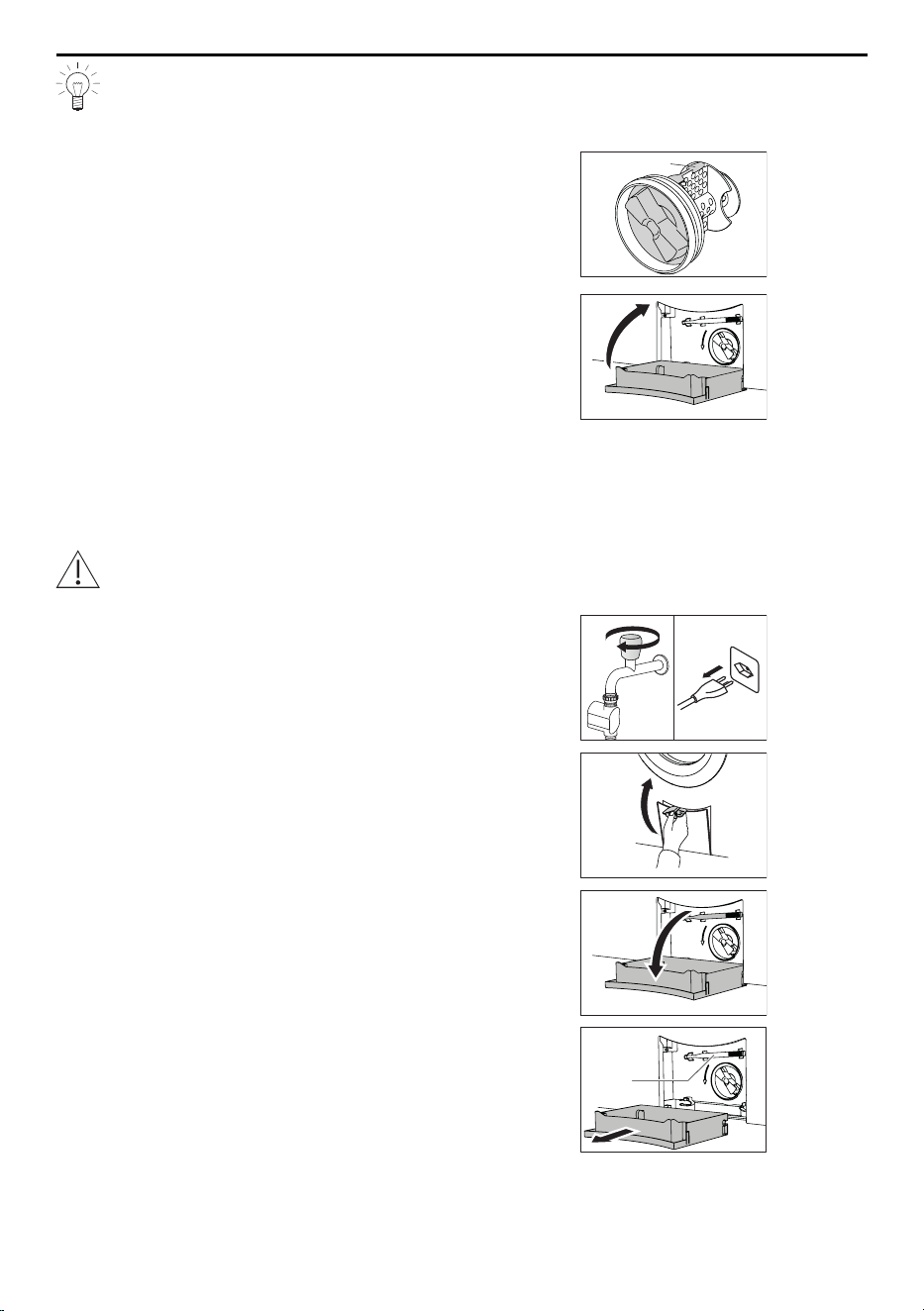
▸ Carefully release the foreign body trap somewhat
by turning it anti-clockwise and steadily drain off
the water.
▸ Close the foreign body trap by turning it clockwise
and remove the drain tray from the front.
▸ Empty the drain tray and then put it back, pushing
it in straight as far as it will go.
The drain tray can be removed and a larger receptacle used in its place to drain-
ing off the water. The appliance can hold up to 30 litres of water.
13.7 Cleaning the foreign body trap
Clean the foreign body trap at regular intervals as well as after washing, for in-
stance, pet blankets or other wash items that cause a thick build-up of fluff.
▸ Open the appliance door.
▸ Drain off any residual water (see page 44).
▸ Remove any foreign objects (buttons, coins, etc.)
from around the impeller 1.
1
▸ Using the emergency door release tool 2, check
that the drain pump impeller can turn.
2
45
13 Care and maintenance
The impeller1 may turn stiffly. This is construction related and does not indicate
the presence of any foreign object or defect. If the impeller does not turn, please
contact our Customer Services.
▸ Insert the foreign body trap– with the arrow-like
cam3 pointing upwards – as far as it will go.
▸ Screw the foreign body trap in clockwise as far as
it will go.
3
▸ Put the drain tray back and close it to.
13.8 Cleaning the drum illumination
▸ If necessary, wipe carefully with a soft cloth.
13.9 Opening the appliance door in the event of a power failure
Wait until the washing drum is completely stationary. A washing drum that is still
rotating poses a risk of serious injury.
▸ Close the water tap and disconnect the appliance
from the mains.
▸ Open the drain tray with the flap for liquid deter-
gent.
▸ Fold the drain tray right down. If necessary, carry
out emergency draining.
▸ Remove drain tray.
▸ Remove the emergency door release tool 1 from
its bracket.
1
46
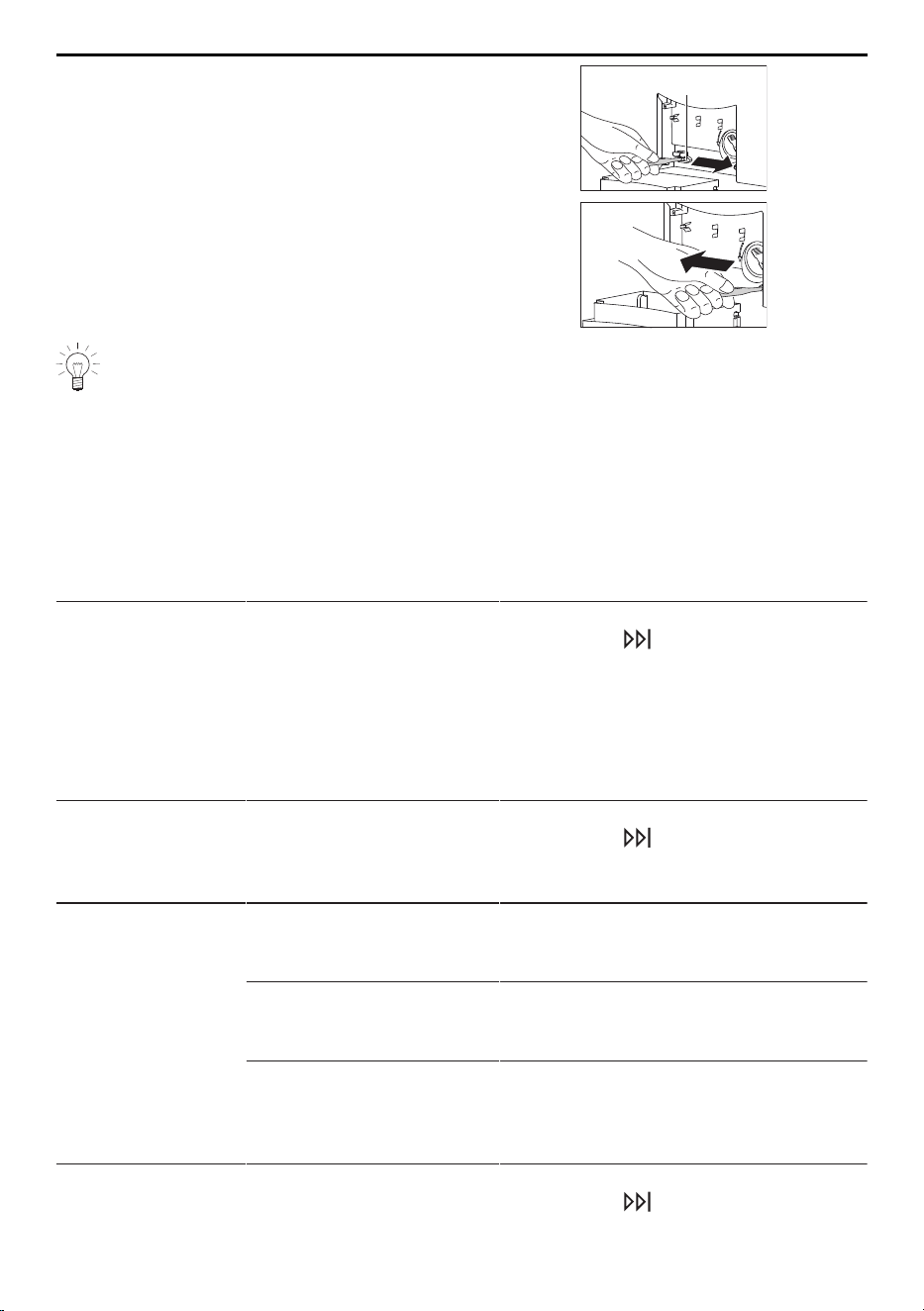
14 Trouble-shooting
▸ Insert emergency door release tool into blue
opening cap2 and turn in direction of arrow.
– a. Door opens from right
– b. Door opens from left
– The appliance door springs open.
a.
2
b.
If the emergency door release tool is missing, a screw driver can be used instead.
14 Trouble-shooting
You may be able to trouble-shoot the following malfunctions yourself. If not, note down
the error message in full (message, F and E numbers) and call Customer Services.
14.1 Error messages
Display Possible cause Solution
A2
Check water outlet
▪ The foreign body trap is
clogged.
▪ The drain pump is
blocked.
▪ The drain hose is bent
or kinked.
▪ The outlet or drain trap
is clogged.
▸ Check cause (see page 45).
▸ Touch the button.
▸ Restart the programme.
A3
Clean foreign
body trap
▪ The foreign body trap is
clogged.
▪ The circulation nozzle is
clogged.
▸ Check cause (see page 45).
▸ Touch the button.
▸ Restart the programme.
A5
Spin stop:
Unbalanced load
▪ Large items are un-
evenly distributed in the
washing drum.
▸ Wash large and small items to-
gether.
▪ Pillows or similar items
in the wash.
▸ Remove the pillows.
▸ Spin the washing again.
▸ Spin the pillows separately.
▪ Wash items are tangled. ▸ Separate the wash items.
▸ Fasten duvet covers and pillow
cases.
▸ Spin the washing again.
A6
Check foreign
body trap
▪ The foreign body trap is
missing or is not sitting
correctly.
▸ Check cause (see page 45).
▸ Touch the button.
▸ Restart the programme.
47
14 Trouble-shooting
Display Possible cause Solution
A9
Check water inlet
▪ The water tap is turned
off.
▪ The water inlet filter is
clogged.
▪ Water supply is interrup-
ted.
▪ Water pressure is too
low.
▸ Clean water inlet filter or restore wa-
ter supply (see page 44).
▸ Touch the button.
▸ Restart the programme.
F6/E77
see instructions
SN XXXXX XXXXXX
▪ Anti-leak protection was
triggered.
▸ Turn off water tap.
▸ Note down error message in full and
appliance's SN.
▸ Touch the button.
▸ Call Customer Services.
FXX/EXX
see instructions
SN XXXXX XXXXXX
▪ Various situations can
lead to an "F" message.
▸ Touch the button.
▸ Switch the power supply off for
about 1 minute.
▸ Switch the power supply back on
again and select a new programme.
▪ If the error appears
again:
▸ Note down error message in full and
appliance's SN.
▸ Interrupt the water and power sup-
ply.
▸ If there is laundry in the appliance:
carry out emergency draining, use
emergency door release and unload
laundry.
▸ Call Customer Services.
H20
▪ The water inlet counter
is defective. It is still
possible to wash
without a problem. The
water consumption dis-
played can deviate from
the actual consumption.
▸ Call Customer Services.
U1/E27
see instructions
SN XXXXX XXXXXX
▪ Faulty electrical connec-
tion.
▪ Overvoltage.
▸ Touch the button.
▸ Switch the power supply off for
about 1 minute.
▸ Switch the power supply back on
again and select a new programme.
▪ If the error appears
again:
▸ Have an electrician check the house
installation.
▸ Note down error message in full and
appliance's SN.
▸ Disconnect from the power supply.
▸ Call Customer Services.
48

14 Trouble-shooting
Display Possible cause Solution
Foam in main
wash:
Rinsing extended
(with OptiDos)
▪ If there is very heavy
foaming, the pro-
gramme is automatically
extended by a rinsing
cycle. This improves the
wash results, but ex-
tends the programme
time.
▸ Check whether the dosage entered
corresponds to the amount recom-
mended on the detergent package
for 4–5kg of washing.
▸ Adjust the dosage as required.
▪ If the error appears
again:
▸ Reduce the dosage.
Foam in main
wash:
Rinsing extended
(without OptiDos)
▪ If there is very heavy
foaming, the pro-
gramme is automatically
extended by a rinsing
cycle. This improves the
wash results, but ex-
tends the programme
time.
▸ Reduce the amount of washing de-
tergent used next time.
▸ Adjust detergent dosage to the wa-
ter hardness.
Hygiene recom-
mendation
▪ No wash cycle has
been carried out at a
temperature of at least
60 °C for a longer
period of time.
▸ With one of the next wash cycles
carry out a wash with at least 60°C.
Or:
▸ Run «Appliance hygiene» pro-
gramme without laundry.
Inlet water very
cold:
Heating extended
▪ Inlet water is very cold.
Heating is extended.
▸ No action is necessary.
Too many items:
Heating extended
▪ The selected pro-
gramme is intended for
a smaller load. Heating
and possibly rinsing is
extended.
▸ Adjust load to the max. load size.
Large unbalanced
load:
Spin extended
▪ The appliance optimizes
the distribution of the
wash load to com-
pensate an unbalanced
load. The final spin is
extended.
▸ Wash large and small items together
to avoid large unbalanced loads.
49
14 Trouble-shooting
14.2 Other possible problems
Problem Possible cause Solution
The washing has
not been spun or
has been spun in-
sufficiently.
▪ The spin speed set is
too low.
▸ Increase the spin speed for the next
wash cycle (see page 36).
▪ Large unbalanced load
in the washing drum
▸ Wash large and small items to-
gether.
▪ «Steam anti-crease»
was selected and the
appliance was not
standing level.
▸ Optimize appliance set-up according
to installation instructions.
The appliance vi-
brates heavily
when spinning.
▪ The transport lock has
not been removed.
▸ Remove transport lock.
▪ The feet of the appli-
ance are not properly
adjusted.
▸ Set appliance feet so that the appli-
ance stands level.
▪ The load could not be
optimally balanced in
the washing drum.
▸ Wash large and small items to-
gether.
At the end of the
programme, the
appliance door
cannot be opened
with the but-
ton.
▪ The appliance door is
stuck.
▸ Press hard against the lock area of
the appliance door (i.e. front edge of
appliance door).
▸ Touch the button again.
▪ An interruption in the
power supply.
▸ Use the emergency door
release (see page 46).
Water sounds
after programme
has finished when
washing drum is
turned by hand.
▪ The vanes are filled with
water to compensate
the unbalanced load.
▸ The water is automatically pumped
off. No action is necessary.
Traces of condi-
tioner or water in
fabric conditioner
compartment.
▪ Siphon in fabric condi-
tioner compartment is
missing or not inserted
correctly.
▸ Insert the siphon correctly (see page
44).
▪ Siphon or suction tube
is clogged.
▸ Clean siphon and suction tube (see
page 44).
50
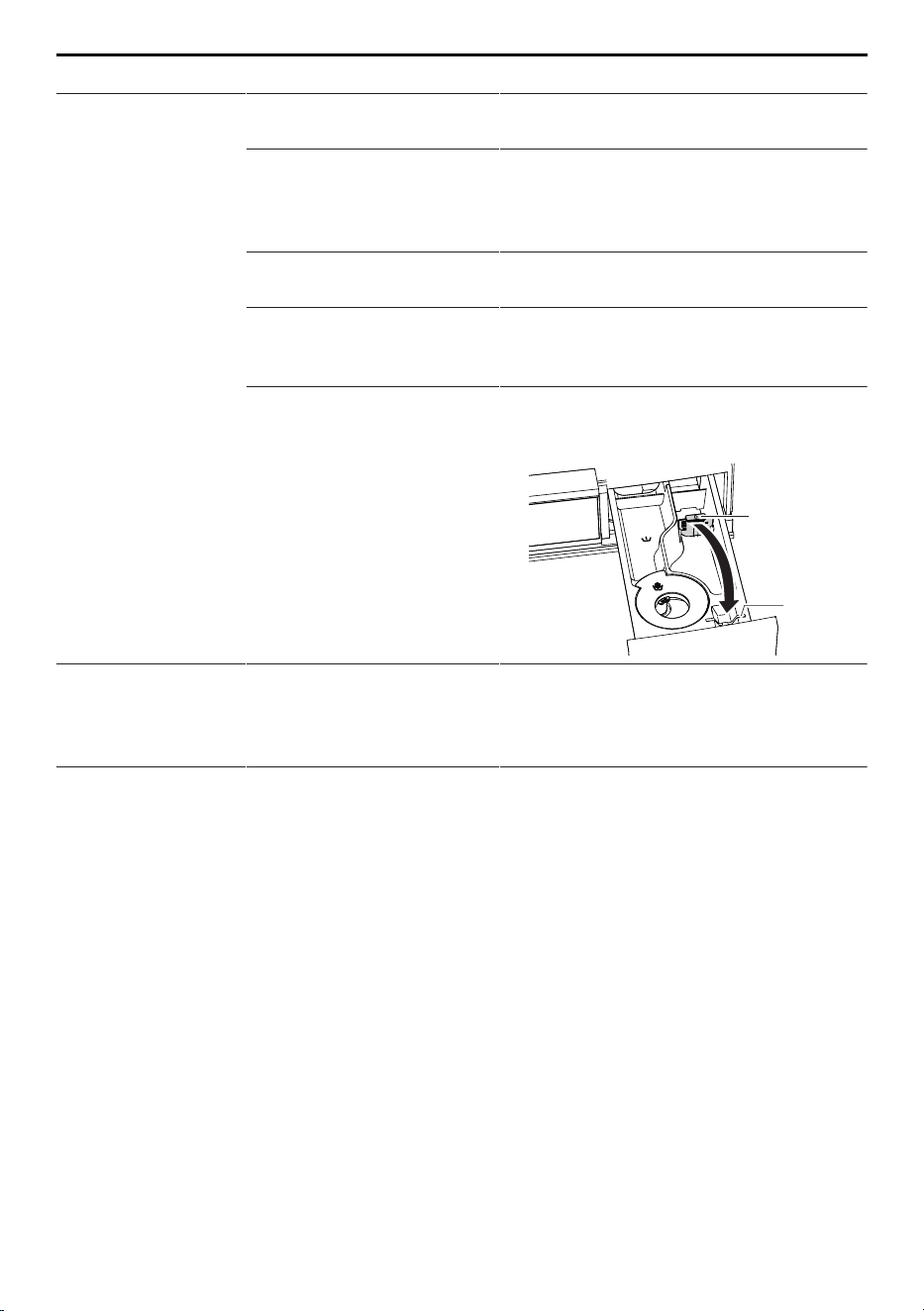
14 Trouble-shooting
Problem Possible cause Solution
Traces of powder
detergent in deter-
gent compartment.
▪ Damp or lumpy washing
detergent.
▸ Store washing detergent in a dry
place.
▪ Detergent compartment
was damp and a
delayed start was selec-
ted.
▸ Wipe detergent compartment dry be-
fore adding the detergent.
▪ Water flow pressure is
too low.
▸ Open water tap fully.
▪ Water inlet is scaled up. ▸ Check water inlet and, if necessary,
clean the water inlet
filter (see page 44).
▪ Flap 1 was inserted into
position for liquid deter-
gent.
▸ Pull flap 1 upwards and out and in-
sert into position a for powder deter-
gent.
1
a
Laundry is still dry
after programme
has finished – no
error message.
▪ The demo mode is
switched on.
▸ Switch the demo mode off (see
page 39).
The consumption
values for Eco-
Management dis-
played are too
high.
▪ The values can vary ac-
cording to programme,
load, additional func-
tions and user settings.
▪ System-related fluctu-
ations cannot be ruled
out.
▸ Observe the user settings and addi-
tional functions.
51

14 Trouble-shooting
Problem Possible cause Solution
The programme
takes significantly
longer than indic-
ated.
The programme times
given serve only as a
guide. The duration can be
extended by, for example,
the following factors:
▸ Further information can be found in
the section on «Consumption val-
ues».
▪ Inlet water is very cold.
Heating is extended.
▸ No action is necessary.
▪ Washing detergent
dosage is too high.
▸ Reduce the amount of washing de-
tergent used next time.
▸ Adjust detergent dosage to the wa-
ter hardness.
▪ Too unbalanced a load
during the intermediate
spin.
▸ Follow the trouble-shooting solution
for error message A5 (see page 47).
▪ Flow of inlet water is
low.
▸ No action is necessary.
▪ There are deposits or
fluff build-ups in the
draining system or for-
eign body trap.
▸ Follow the trouble-shooting solution
for error message A2 (see page 47).
The fill level dis-
play shows a full
container even
though the con-
tainer is empty.
▪ The system is dirty. ▸ Clean the OptiDos drawer manually
(see page 40).
14.3 Unsatisfactory wash results
Result Possible cause Solution
White residue on
washing
▪ Despite intensive rins-
ing, badly soluble com-
pounds in the detergent
can be left on the wash-
ing.
▸ Shake out or brush the wash items.
▸ Wash the items again with just a little
washing detergent.
▸ Use a liquid detergent that does not
contain zeolites.
▸ Select the «Black garments» textile
programme.
52
14 Trouble-shooting
Result Possible cause Solution
Grey residue on
washing (with Op-
tiDos)
▪ Grease and dirt
particles left behind.
▪ Residue from detergent,
limescale and dirt
▸ Check whether the dosage entered
corresponds to the amount recom-
mended on the detergent package
for 4–5kg of washing.
▸ Adjust the dosage as required.
▸ Adjust washing detergent dosage to
water hardness.
▪ If the error appears
again:
▸ Increase the dosage.
▪ Washing drum is over-
loaded.
▸ Put less laundry into the washing
drum.
Grey residue on
washing (without
OptiDos)
▪ Grease and dirt
particles left behind.
▪ Residue from detergent,
limescale and dirt
▸ Increase detergent dosage.
▸ Use heavy-duty washing detergent.
▸ Adjust amount of detergent to water
hardness and degree of soiling of
washing.
▪ Washing drum is over-
loaded.
▸ Put less laundry into the washing
drum.
Washing feels
hard
▪ Poor rinsing effect
through very soft water
(below 15 °fH).
▸ Select user setting «Soft water» (see
page 37).
Unsatisfactory
wash result using
detergent for col-
oureds (with Op-
tiDos)
▪ Washing detergent used
does not contain
bleach.
▸ Do not use the OptiDos drawer. Do
not add washing detergent contain-
ing bleach to the OptiDos drawer!
▸ Open detergent dispenser drawer.
▸ Use washing detergent containing
bleach.
▪ Exceptionally heavily
soiled washing.
▸ More intensive programme, e.g. de-
gree of soiling «heavily
soiled».
Unsatisfactory
wash result using
detergent for col-
oureds (without
OptiDos)
▪ Washing detergent used
does not contain
bleach.
▸ Use washing detergent containing
bleach.
▪ Exceptionally heavily
soiled washing.
▸ More intensive programme, e.g. de-
gree of soiling «heavily
soiled».
Unsatisfactory
wash result using
liquid detergent
▪ Liquid detergent does
not contain bleach.
▸ Use washing detergent containing
bleach.
Soap deposits on
washing
▪ Water hardness is too
high.
▸ Soap detergent should only be used
if the water hardness is below 25
°fH.
53

14 Trouble-shooting
Result Possible cause Solution
Unsatisfactory
rinsing (with Op-
tiDos)
▪ Too much washing de-
tergent.
▸ Adjust washing detergent dosage to
water hardness.
▪ Very soft water (below
15°fH)
▸ Select user setting «Soft water» (see
page 37).
Unsatisfactory
rinsing (without
OptiDos)
▪ Too much washing de-
tergent.
▸ Adjust washing detergent dosage to
water hardness and degree of soil-
ing.
▪ Very soft water (below
15°fH)
▸ Select user setting «Soft water» (see
page 37).
Fabric stains ▪ Rust stains
▪ Chemical effect
▪ Residues from hair care
products, cosmetics
and plants can react
with the suds to cause a
chemical reaction that
can result in staining.
▸ Brush out pockets in garments.
▸ Wash items with metal parts separ-
ately.
Colour run ▪ Non-fast colours in the
wash.
▸ Wash white and coloured textiles
separately.
▸ Follow fabric care labels.
▪ Items in the wash
whose colour has run.
▸ Empty garment pockets.
Holes, rips or
tears
▪ Items in the wash with
zips or hooks open.
▸ Fasten zip fasteners and hooks be-
fore washing.
▸ Wash delicates in a laundry bag or
pillow case.
▸ Turn pockets inside out.
▸ Empty garment pockets.
▪ Chemical effect of
washing detergent, tex-
tile quality
▸ Do not put washing detergent dir-
ectly onto the laundry.
▪ Washing drum dam-
aged by foreign objects
(e.g. nails, paper clips,
etc.)
▸ Inspect washing drum for foreign ob-
jects and damage.
▸ Remove foreign objects.
▸ Call Customer Services if the wash-
ing drum is damaged.
Fabric wear ▪ Washing drum over-
loaded
▸ Put less laundry into the washing
drum.
▪ Friction between fabrics
during washing.
▸ Select additional function «Easy
care».
▪ Pilling ▸ Turn items inside out before wash-
ing.
54
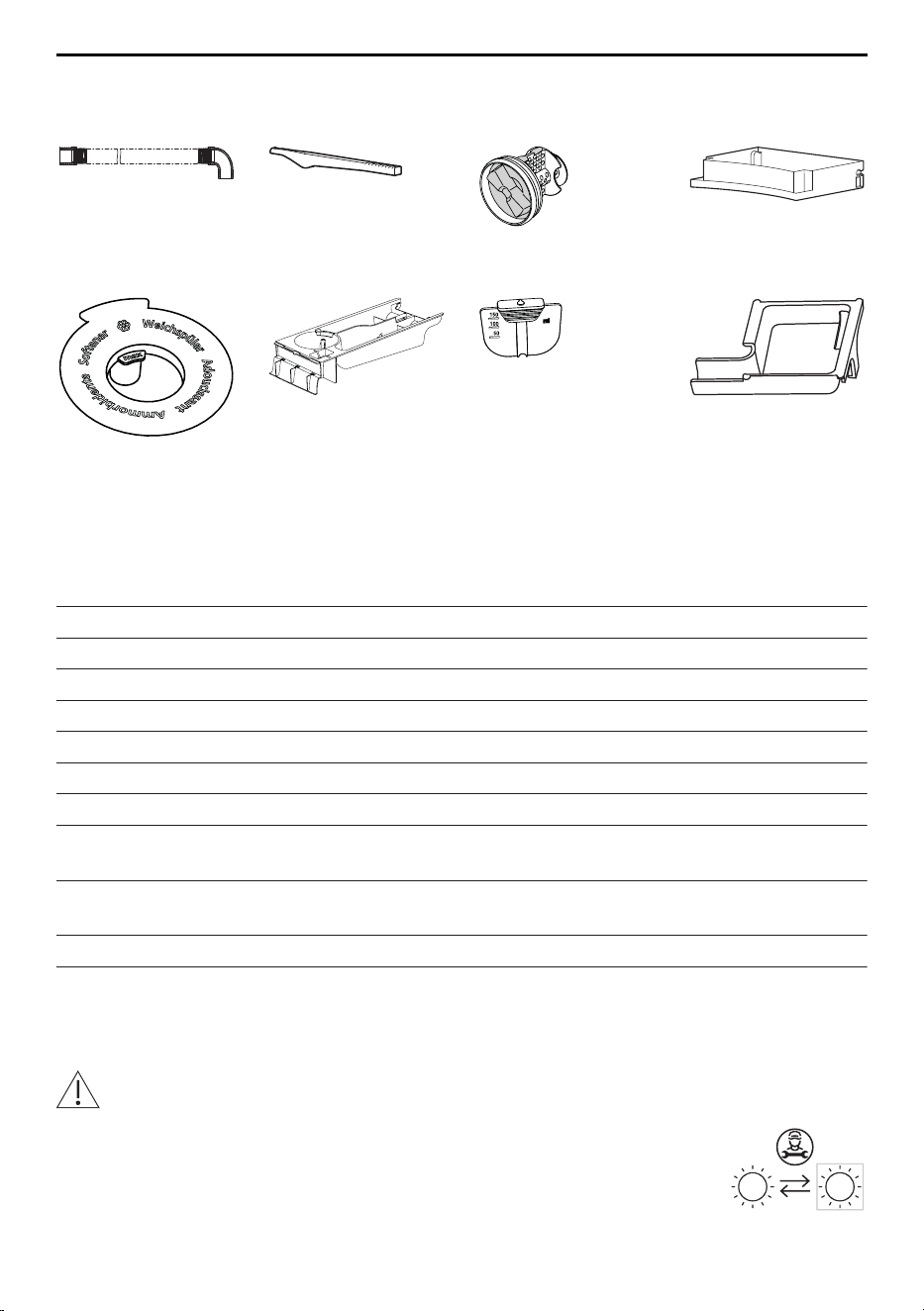
15 Spare parts
15 Spare parts
Please state the serial number (SN) when ordering parts.
Drain hose 1.5m /
4.0m
Emergency door
release tool
Foreign body trap Drain tray
Siphon Detergent dis-
penser drawer
Flap for liquid de-
tergent
Insert for detergent
dispenser drawer
16 Technical data
General notes
Height 85cm
Width 59.5cm
Depth 62.5cm
Weight 71 kg
Pumping height of pump 1.2m
Load capacity 8 kg dry washing
Connection to water supply Cold water G¾"
Permitted pressure of water sup-
ply
0.1–0.6MPa (1–6bar)
Max. pumping height of drain
pump
1.2m
Spin speed 400, 600, 800, 1000, 1200, 1400, 1600 rpm
Electrical connection The electrical connection can be found on the identi-
fication plate (see page 63).
16.1 Light sources
Light sources may only be replaced by a service technician.
This product contains a light source of energy efficiency class E.
55

16 Technical data
16.2 Note for testing institutes
Set to the standard programmes according to AS/NZS 2040.2:2005.
Programme Load capacity
40°C Coloureds normal 8kg
10°C Coloureds normal 8kg
▸ Touch the button.
▸ Touch the button.
▸ Touch the button.
For test institutes we recommend for the measurement of end mode the door remains
open so that it matches normal use without user intervention. Note at the point of end
mode the door will automatically pop open.
16.3 Consumption values
Programme for
normally soiled
cotton load
Load
capa-
city
kg
Programme
duration
hrs./mins.
Energy consump-
tion
kWh/cycle
Water consump-
tion
l/cycle
Residual
moisture
%
40 °C Col-
oureds normal
8 4h10 0.65 67 53
16.4 VAS Vibration Absorbing System
As the washing drum starts to spin, if the control system detects that the load is out of
balance it will interrupt the spinning action once or more. In this case, the appliance tries
to improve the distribution of the wash load in the washing drum.
When spinning, at all spin speeds the load is, where necessary, actively balanced in the
washing drum, whereby the hollow vanes are filled with the necessary quantity of water.
This ensures optimal care and draining of the washing.
16.5 Water and energy economy
During the first few minutes of a programme running, sensors automatically determine
the type and the size of the load being washed.
Water levels are then optimally adjusted to the wash load so that only the strict amount
of water needed is used.
56

17 Washing tips
17 Washing tips
17.1 Energy and water economy
▪ Where possible fill the drum to the maximum load capacity of the relevant pro-
gramme.
▪ Select «Pre-wash» or «Soaking» only for washing that is heavily soiled or stained.
▪ For lightly soiled washing without staining select the «20°C» main wash programme
or the additional function «Sprint».
▪ Select the additional function «Energy saving» if the duration of the programme or the
germ-killing effect of high temperatures do not play a role.
▪ Select the additional function «OptiTime» if washing using a delayed start or the germ-
killing effect of high temperatures do not play a role.
Spin speed
The energy consumption, noise and remaining moisture content of subsequent tumble
drying depend on the spin speed set. The higher the spin speed in the spinning phase,
the higher the noise and the lower the remaining moisture content of the washing at the
end of the programme.
rpm
1600 1400 1200 1000 800 600 400
Remaining moisture content
(cottons)
~44% ~47% ~52% ~60% ~70% ~90% ~110%
Automatic door opener
Use the appliance with the automatic door opener switched on. When the appliance door
opens the appliance immediately enters the lowest possible stand-by power consump-
tion state.
17.2 Avoiding damage
▪ Follow the fabric care symbols on garment labels.
▪ The wash temperature selected should agree with the recommended temperature
range of the washing detergent to ensure the washing detergent is at its most effect-
ive.
▪ Wash white and coloured textiles separately.
▪ Empty pockets and turn inside out. Remove any foreign objects (coins, nails, paper
clips, etc.).
▪ Empty and brush out pockets of work overalls worn in the metal industry. Metal shav-
ings can damage the washing and cause rust stains.
▪ Fasten hook and eye fasteners and zips. These can damage the laundry and the
drum.
▪ Fasten cloth belts, apron ties and duvet and pillow cases to avoid them getting
tangled up.
▪ Wash smaller items (e.g. nylon tights, belts) and items with zips and hooks in a wash-
ing net or cushion cover.
▪ Remove stains before washing using a suitable stain remover.
▪ Pre-treat heavily soiled areas (collars, cuffs, etc.) with soap, special detergent or
paste.
▪ Textiles, such as dog or horse blankets, that are covered in animal hair should be
brushed out before washing.
57
18 Disposal
18 Disposal
18.1 Packaging
Never allow children to play with packaging material due to the danger of injury or
suffocation. Store the packaging material in a safe location or dispose of it in an
environmentally-friendly way.
18.2 Safety
Render the appliance unusable to prevent accidents caused by improper use (e.g.
through children playing):
▸ Disconnect the appliance from the mains. With a fixed appliance, this is to be carried
out by a qualified electrician. Then cut the mains cable off flush with the appliance.
▸ Remove or disable the lock on the appliance door.
18.3 Disposal
▪ The «crossed‐out wheeled bin» symbol requires the separate collection of waste
electrical and electronic equipment (WEEE). Such equipment can contain hazardous,
environmentally harmful materials.
▪ These appliances are to be handed over to a designated collection point for the recyc-
ling of electrical and electronic equipment and must not be disposed of with unsorted
household waste. And in this way, you will be helping to protect resources and the en-
vironment.
▪ For more information, please contact the local authorities.
58

Addresses of the importers
Addresses of the importers
AU/
NZ
V-ZUG Australia Pty. Ltd.
2/796 High Street
Kew East 3102, VIC
AUSTRALIA
IL
Digital Kitchen
Hataarucha 3
6350903 Tel Aviv
ISRAEL
CN
V-ZUG (Shanghai)
Domestic Appliance Co. Ltd.
Raffles City Changning Office
Tower 3
No. 1139 Changning Road
200051 Shanghai
CHINA
LB
Kitchen Avenue SAL
Mirna El Chalouhi Highway
Wakim Bldg, Jdeiheh
Beirut
LEBANON
AT/
BE/
DE/
FR/
NL/LU
V-ZUG Europe BVBA
Evolis 102
8530 Harelbeke
BELGIUM
RU
OOO Hometek
Dubininskaya Street 57 building 1
113054 Moscow
RUSSIA
GB/IE
V-ZUG UK Ltd.
One Pancras Square
Gridiron Building
N1C 4G London
GREAT BRITAIN
SG
V-ZUG Singapore Pte. Ltd.
6 Scotts Road
Scotts Square #03-11/12/13
228209 Singapore
SINGAPORE
HK/
MO
V-ZUG Hong Kong Co. Ltd.
12/F, 8 Russell Street
Causeway Bay
HONG KONG
TR
GÜRELLER
Anchor Sit.3A/1-2 Çayyolu
06690 ÇANKAYA/ANKARA
TURKEY
IT
Frigo 2000 S.p.A
Viale Fulvio Testi 125
20092 Cinisello Balsamo (Milano)
ITALY
UA
Private enterprise "Stirion" (MIRS
corp.)
Osipova Street 37
65012 Odessa
UKRAINE
59

19 Index
A
Aborting
Programme entry ......................................... 25
Running programme................................... 26
Adding fabric conditioner............................... 21
Adding washing detergent............................. 21
Additional functions
Starting.................................................... 23, 29
Addresses of the importers ........................... 59
Allergies
Anti-mite......................................................... 17
Anti-mite............................................................. 17
Appliance
Disposal......................................................... 58
Appliance door.................................................... 8
Appliance hygiene ........................................... 16
Starting........................................................... 28
AquaPlus ........................................................... 17
Increasing/Reducing................................... 36
Automatic water and energy economy........ 56
B
Baby garments
Textile programmes .................................... 14
Background image .......................................... 35
Black garments
Textile programmes .................................... 15
Breathable textiles
Outdoor garments ....................................... 14
Brightness ......................................................... 35
Button tone........................................................ 35
C
Childproof lock
Aborting programme................................... 26
Opening appliance door ............................ 26
Starting a programme................................. 26
Switching on ................................................. 37
Cleaning
OptiDos drawer (automatic) ...................... 40
OptiDos drawer (manual)........................... 40
Cleaning programme ...................................... 11
Clock .................................................................. 36
Coloureds
Coloureds programmes ............................. 12
Textile programmes .................................... 13
Coloureds programmes .......................... 10, 12
Starting.................................................... 22, 32
Container ....................................................... 9, 11
Adding agent................................................ 21
Defining agent .............................................. 20
Draining ......................................................... 40
Fill level.......................................................... 12
Selecting........................................................ 22
Coupling ............................................................... 9
Cleaning ........................................................ 43
Removing ...................................................... 42
Crease guard
Steam anti-crease................................. 15, 18
Curtains
Net curtains................................................... 14
D
Dark garments
Textile programmes .................................... 15
Degree of soiling.............................................. 17
Increasing/Reducing................................... 36
Delayed start..................................................... 16
Starting........................................................... 24
Switching on ................................................. 36
Demo mode ...................................................... 38
Denim
Textile programmes .................................... 15
Detergent compartments................................ 30
Cleaning ........................................................ 44
Detergent dispenser drawer ...................... 8, 55
Cleaning ........................................................ 44
Removing ...................................................... 44
Disposal............................................................. 58
Door opener...................................................... 10
Down
Textile programmes .................................... 14
Drain hose......................................................... 55
Drain tray ....................................................... 8, 55
Drain valve ........................................................... 9
Drum illumination ...................................... 10, 18
Dyeing ................................................................ 31
E
EcoManagement....................................... 10, 18
Display ........................................................... 29
Switching on ................................................. 37
Emergency door release ................................... 8
Emergency door release tool ........................ 55
Energy efficiency
Energy saving............................................... 57
Energy saving................................................... 10
Energy-efficient washing
Delayed start ................................................ 16
Extra programmes ........................................... 10
Starting.................................................... 23, 35
F
Factory settings................................................ 38
60

19 Index
Fast wash .......................................................... 10
Separate rinsing.................................... 18, 25
Separate spinning................................. 18, 25
Sprint.............................................................. 17
Favourites.......................................................... 10
Starting........................................................... 34
Fill level .............................................................. 12
Flap for liquid detergent ................................. 55
Foreign body trap ........................................ 8, 55
Cleaning ........................................................ 45
G
Gentle washing
Baby garments............................................. 14
Easy care ...................................................... 16
Hand wash .................................................... 13
Silks................................................................ 14
Woollens........................................................ 13
H
How to avoid damaging the appliance........... 7
Hygiene info ...................................................... 37
I
Identification plate........................................ 8, 63
Insert for detergent dispenser drawer
..................................................................... 55
L
Language........................................................... 35
Leisurewear
Outdoor garments ....................................... 14
Linen textiles
Whites programme...................................... 12
Liquid detergent ............................................... 30
Liquid-detergent flap........................................... 8
M
Malfunctions...................................................... 47
Model designation .............................................. 2
Multi-component detergent
Bio wash........................................................ 18
Soap wash .................................................... 18
Starting........................................................... 32
Switching on ................................................. 37
N
Net curtains
Textile programmes .................................... 14
New textiles
FirstWash....................................................... 15
O
Opening appliance door.......................... 10, 19
Automatic ...................................................... 36
During a wash .............................................. 27
When programme has finished................. 27
OptiDos drawer
Automatic cleaning...................................... 40
Manual cleaning........................................... 40
Pushing in ..................................................... 43
Removing ...................................................... 41
OptiTime ............................................................ 16
Starting........................................................... 25
Switching on ................................................. 36
Outdoor garments ........................................... 14
P
Powder detergent ............................................ 30
Power failure ..................................................... 46
Pre-wash ............................................................ 16
Problems ........................................................... 47
Programme
Aborting .................................................. 10, 26
Changing....................................................... 25
Interrupting............................................. 10, 27
Starting............................................. 10, 32, 35
Starting with OptiDos .................................. 22
Programmes for normally soiled cotton load
.............................................................. 10, 15
Starting........................................................... 23
Proofing
Extra programmes....................................... 16
Q
Quick programme............................................ 17
R
Reducing creasing
Steam anti-crease................................. 15, 18
Reducing foaming
Soft water ...................................................... 37
Reducing odours
Appliance hygiene....................................... 16
Hygiene info.................................................. 37
Release................................................................. 9
Rinsing intensity
AquaPlus ....................................................... 17
S
Safety warnings
General .............................................................5
Saving energy................................................... 57
EcoManagement.......................................... 18
Energy saving............................................... 16
OptiTime ........................................................ 16
Selection guidance............................ 11, 20, 40
Sensitive skin
Skin protection ............................................. 17
Serial number ...................................................... 8
61

Serial number (SN).......................................... 63
Service & Support............................................ 63
Shirts
Textile programmes .................................... 14
Silks
Textile programmes .................................... 14
Siphon................................................................ 55
Cleaning ........................................................ 44
Skin protection ................................................. 17
Switching on ................................................. 36
Smartphone
System requirements .................................. 34
SN .......................................................................... 8
Soaking.............................................................. 17
Spare parts ....................................................... 55
Spin speed ................................................. 17, 57
Increasing/Reducing................................... 36
Sportswear
Outdoor garments ....................................... 14
Sprint programme............................................ 17
Steam anti-crease
Extra programmes....................................... 15
Symbols ................................................................ 5
T
Tablet
System requirements .................................. 34
Technical questions......................................... 63
Textile programmes
Starting........................................................... 22
Type....................................................................... 2
U
Using for the first time........................................ 8
V
Validity................................................................... 2
VAS Vibration Absorbing System ................. 56
V-ZUG App........................................................ 34
V-ZUG-Home.............................................. 10, 34
Switching on mode...................................... 38
W
Warranty extensions ........................................ 63
Water hardness ................................................ 31
Whites programme ................................... 10, 12
Starting.................................................... 22, 32
WLAN connection ............................................ 34
Woollen textiles
Woollens........................................................ 13
62
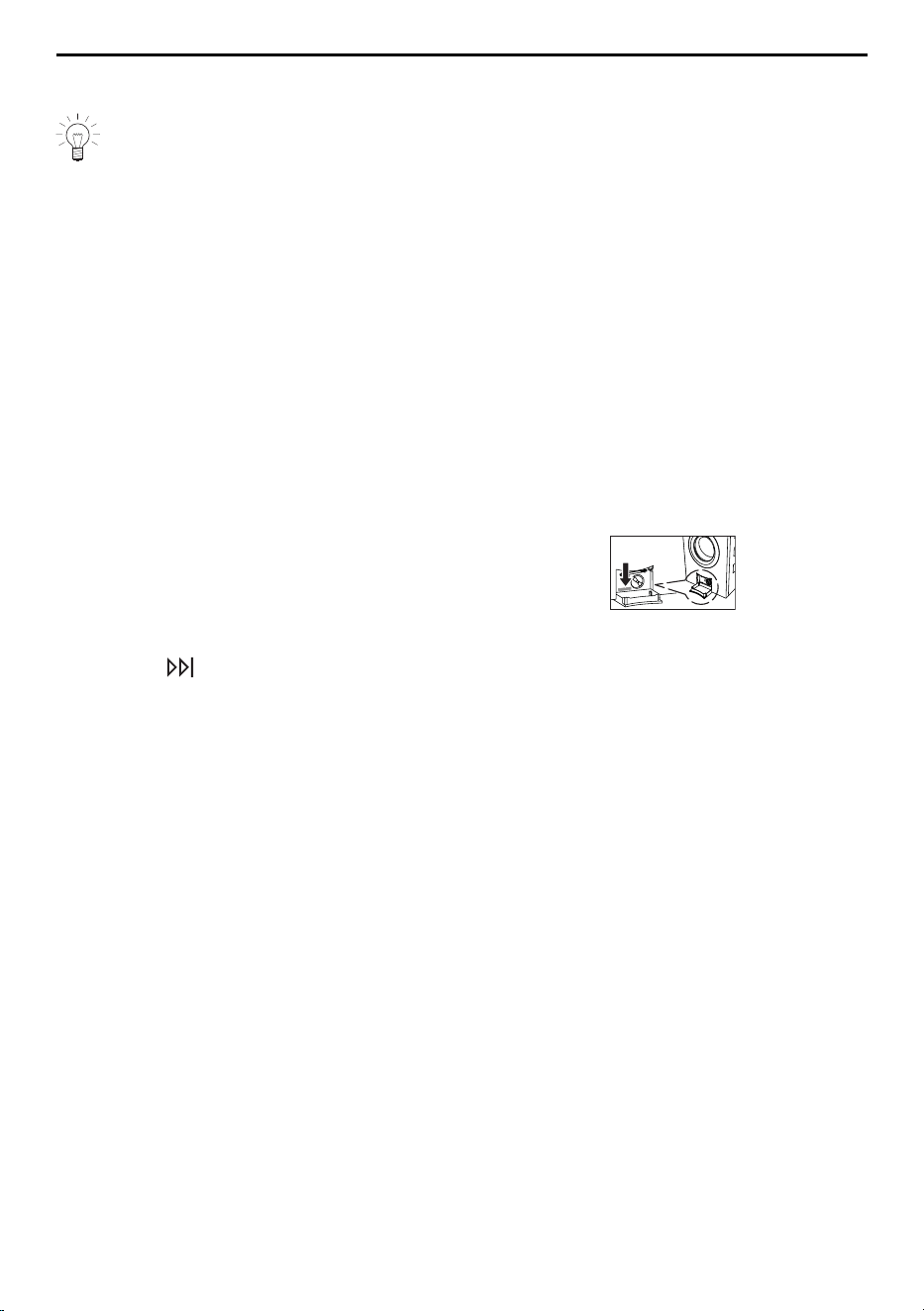
20 Service & Support
20 Service & Support
The «Trouble-shooting» section gives you valuable tips on how to deal with minor
malfunctions yourself, saving you the time and trouble of calling out a service tech-
nician and any cost that goes along with it.
Information on the V-ZUG warranty can be found at www.vzug.com →Service
→Warranty information. Please read this information carefully.
Please register your appliance straightaway online at www.vzug.com →Service
→Warranty registration. This will allow you to take advantage of the best possible support
in the event of a fault in the appliance during the guarantee period. You will require the
serial number (SN) and appliance designation to register your appliance. You will find
them on the identification plate of your appliance.
My appliance information:
SN: __________________________ Appliance: ________________________________
Please have this appliance information to hand when contacting V-ZUG. Thank you.
Identification plate
▸ Open up drain tray.
– The identification plate is located on the left-
hand side next to the foreign body trap.
The SN can also be retrieved as follows:
▸ Hold the button depressed until «Settings – SN 11023 000123» appears in the
TouchDisplay.
Your repair order
At www.vzug.com →Service→Service number you will find the telephone number of your
nearest V‑ZUG service centre.
Technical questions, accessories, warranty extensions
V-ZUG is happy to help you with any general administrative or technical queries, to take
your orders for accessories and spare parts and to inform you about our progressive
service agreements.
63

Quick instructions
Please first read the safety precautions in the operating instructions.
Starting programme without OptiDos
▸ Switch on appliance and turn on water tap.
▸ Press the button. Appliance door opens.
▸ Load laundry.
▸ Add washing detergent to detergent dispenser drawer.
▸ Select programme and any additional functions (if required).
▸ Press the button. Programme starts.
Starting programme with OptiDos
▸ Switch on appliance and turn on water tap.
▸ Press the button. Appliance door opens.
▸ Load laundry.
▸ Enable OptiDos in the user settings.
▸ Define washing detergent / fabric conditioner.
▸ Enter dosage.
▸ Add washing detergent / fabric conditioner to the OptiDos drawer.
▸ Select programme.
▸ Select container.
▸ Select any additional functions (if required).
▸ Press the button. Programme starts.
When programme has finished
▸ Press the button and unload the laundry.
▸ Clean detergent dispenser drawer.
▸ Push appliance door to, but do not close.
V-ZUG Ltd, Industriestrasse 66, CH-6302 Zug
[email protected], www.vzug.com
1185868-01