V-ZUG Ltd
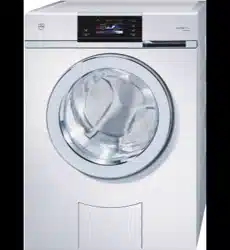
Washing machine
Adora SLQ
Operating instructions

Thank you for choosing to buy one of our products. Your appliance is made to
high standards and is easy to use. Nevertheless, please take the time to read
these operating instructions in order to familiarize yourself with the appliance
and get the best use out of it.
Please follow the safety precautions.
Modifications
Text, diagrams and data correspond to the technical standard of the appliance
at the time these operating instructions went to press. The right to make tech-
nical modifications for the purpose of the further development of the appliance
is reserved.
Validity
The product family (model number) corresponds to the first alphanumerics on
the identification plate. These operating instructions apply to:
Model Type Product family
Adora SLQ WA-SLQ 11006
Variations depending on the model are noted in the text.
Colour operating instructions can be downloaded from the internet from
www.vzug.com
© V-ZUG Ltd, CH-6301 Zug, 2013
2

Contents
1 Safety precautions 6
1.1 Symbols used ......................................................................................... 6
1.2 General safety precautions .................................................................. 7
1.3 Appliance-specific safety precautions ................................................ 9
1.4 Instructions for use ................................................................................ 10
2 Disposal 13
3 Using for the first time 14
3.1 Where is the identification plate? ........................................................ 14
4 Appliance description 15
4.1 Appliance overview ................................................................................ 15
4.2 Appliance construction.......................................................................... 16
4.3 Operating and display elements ......................................................... 17
5 Programme overview 19
5.1 Main wash programmes ....................................................................... 19
5.2 2 programmes for normally soiled cotton load ................................ 21
5.3 Extra programmes ................................................................................. 21
5.4 Further fabric types ................................................................................ 22
5.5 Additional programmes ......................................................................... 25
5.6 Bio and soap wash ................................................................................ 27
5.7 Separate rinsing / Separate spinning ................................................ 28
5.8 Additional functions ............................................................................... 29
5.9 Favourites ............................................................................................... 30
6 User settings 32
6.1 Adjusting user settings .......................................................................... 32
6.2 Language ................................................................................................. 33
6.3 Time .......................................................................................................... 33
6.4 Spin speed .............................................................................................. 33
6.5 AquaPlus .................................................................................................. 34
6.6 Degree of soiling .................................................................................... 34
6.7 Automatic door opener ......................................................................... 35
6.8 Childproof lock ....................................................................................... 35
6.9 Hygiene recommendation .................................................................... 35
6.10 Soft water ................................................................................................. 36
6.11 Multi-component detergent ................................................................... 36
6.12 Loosening up the washing ................................................................... 36
3

6.13 Brightness ................................................................................................ 36
6.14 Button tone .............................................................................................. 37
6.15 Background image ................................................................................ 37
6.16 Silent ......................................................................................................... 37
6.17 Restoring factory settings ..................................................................... 37
7 Washing 38
7.1 Preparing the appliance ........................................................................ 38
7.2 Loading the appliance ........................................................................... 39
7.3 Adding washing detergent ................................................................... 40
7.4 Selecting a programme ........................................................................ 43
7.5 Selecting whites and coloureds programmes .................................. 44
7.6 Selecting another main programme ................................................... 45
7.7 Selecting programmes for normally soiled cotton load .................. 46
7.8 Selecting additional programmes ....................................................... 47
7.9 Opening the appliance door during operation ................................. 50
7.10 Changing selection ................................................................................ 51
7.11 Programme selection with childproof lock activated ...................... 52
7.12 End of programme ................................................................................. 53
7.13 At the end of the wash day .................................................................. 54
8 Care and maintenance 55
8.1 Cleaning the detergent dispenser drawer ......................................... 55
8.2 Cleaning the water inlet filter ................................................................ 56
8.3 Emergency draining ............................................................................... 57
8.4 Cleaning the foreign body trap ............................................................ 58
9 Trouble-shooting 59
9.1 What to do if … ....................................................................................... 59
9.2 Opening the appliance door in the event of a power failure ......... 68
10 Washing tips 69
10.1 Fabric care symbols .............................................................................. 69
10.2 Washing detergent ................................................................................. 69
10.3 General tips ............................................................................................. 69
10.4 Net curtains ............................................................................................. 70
10.5 Saving energy and water ..................................................................... 71
10.6 Unsatisfactory wash results .................................................................. 72
4

11 Spare parts 76
12 Technical data 77
12.1 Dimensions .............................................................................................. 77
12.2 Plumbing in .............................................................................................. 77
12.3 Electrical connection ............................................................................. 77
12.4 Spin speed .............................................................................................. 77
12.5 Consumption data .................................................................................. 78
12.6 Note for testing institutes ...................................................................... 80
12.7 VAS Vibration Absorbing System ........................................................ 80
12.8 Water and energy economy ................................................................. 81
12.9 Automatic energy-saving stand-by ...................................................... 81
13 Index 82
14 Repair service 87
5

1 Safety precautions
1.1 Symbols used
Denotes important safety precautions.
Failure to observe said precautions can result in injury or in
damage to the appliance or fittings!
Information and precautions that should be observed.
Information on disposal
Information about the operating instructions
Indicates step-by-step instructions.
– Describes how the appliance reacts to the steps taken.
• Indicates a list.
6
1.2 General safety precautions
• Read the operating instructions before using
the appliance for the first time!
• This appliance can be used by children aged
8 and above and by persons with reduced
physical, sensory or mental capabilities, or
lack of experience and/or knowledge,
provided they are supervised or have been
instructed on the safe use of the appliance
and have understood the hazards involved.
Children shall not play with the appliance.
Cleaning and user maintenance shall not be
undertaken by children without supervision.
1 Safety precautions
7

• If an appliance is not equipped with a mains
cable and a plug or other means for discon-
necting from the mains with a contact opening
on each pole complying with the conditions of
overvoltage category III for full isolation, an
isolating device must be incorporated into the
permanently installed electrical installation in
accordance with the installation regulations.
• If the mains cable of this appliance is
damaged, it must be replaced by the manu-
facturer or its Customer Services or a similarly
qualified person in order to avoid hazard.
1 Safety precautions
8

1.3 Appliance-specific safety precautions
• Children under 3 years of age must be kept
away unless constantly supervised.
• The appliance has a maximum dry load
capacity of 8 kg.
CAUTION
• If this appliance is supplied from a cord exten-
sion set or electrical portable outlet device,
the cord extension set or electrical portable
outlet device must be positioned so that it is
not subject to splashing or ingress of mois-
ture.
1 Safety precautions
9

1.4 Instructions for use
Before using for the first time
• The appliance must be installed and connected to the electricity supply in
accordance with the separate installation instructions. Have a qualified fitter/
electrician carry out the necessary work.
• Ensure access to the place of disconnection (e.g. socket outlet, wall switch,
fuse) and the water tap.
• The transportation lock must be removed. Failure to remove the transporta-
tion locks can result in damage to the appliance or apartment or laundry
room fittings.
Correct use
• The appliance is suitable for washing home textiles with water and regular
washing machine detergent. It is designed for use in the home and for the
above-mentioned purpose only. No liability is assumed for any damage
caused by improper or incorrect use.
• Any repairs, modifications or manipulations to the appliance, especially any
electrically live parts, may only be carried out by the manufacturer, its
Customer Services or a similarly qualified person. Repairs if carried out
incorrectly could cause serious injury or damage to the appliance and
fittings as well as affect the functioning of the appliance. If the appliance is
not working properly or in case of a repair order, follow the instructions
given in the 'Repair service' section. If necessary, please contact our
Customer Services.
• Use original spare parts only.
Note on use
• If the appliance is not operating properly, disconnect it from the power
supply immediately.
• To protect your washing, follow the fabric care symbols and the hints and
advice in the 'Washing tips' section.
1 Safety precautions
10

Caution: Burns hazard!
• Textiles that have been cleaned, treated or soaked with flammable chemi-
cals, detergents or solvents such as benzene, alcohol, stain remover, oil,
paint, wax, etc. are not to be washed in the appliance. Fire or explosion
hazard! Wash materials containing such substances first by hand with water
or allow the solvent to evaporate completely.
Caution: Risk of injury!
• Ensure the washing drum has stopped moving before reaching inside. Do
not touch the washing drum while it is still in motion – risk of serious injury!
• Disconnect the appliance from the mains before carrying out maintenance
work.
Caution: Risk to life!
• Packaging material, e.g. plastic film and polystyrene, can be dangerous for
children. Danger of suffocation! Keep packaging material away from chil-
dren.
1 Safety precautions
11

How to avoid damaging the appliance
• Close the appliance door carefully.
• Before closing the appliance door and starting a programme, ensure that
there are no foreign objects or pets in the washing drum, detergent
dispenser drawer or around the foreign body trap. Foreign objects such as
coins, nails, paper clips, etc. can damage parts of the appliance, as well as
the washing.
• During longer periods of absence, turn off the water tap before switching off
the power by pulling out the mains plug. Never pull the mains plug out by
the cable. Please note: the built-in overflow protection is rendered inactive
when the power is switched off.
• When cleaning the appliance make sure no water gets inside it. Use a
moderately damp cloth. Do not spray the outside or the inside of the appli-
ance with water. If water gets inside the appliance, it will cause damage.
• Textiles with metal reinforcements are not to be washed in the appliance
(risk of damage).
• Trainers, diving suits, rucksacks, carpets, etc. are not to be washed in the
appliance.
1 Safety precautions
12

2 Disposal
Packaging
• All packaging materials (cardboard, plastic film (PE) and polystyrene (EPS))
are marked and should, if possible, be collected for recycling and disposed
of in an environmentally friendly way.
Disconnection
• Disconnect the appliance from the mains. With a fixed appliance, this is to
be carried out by a qualified electrician!
Safety
• Disable the appliance to prevent accidents caused by improper use, espe-
cially through children playing.
• Pull the plug out of the mains socket or have the appliance disconnected
from the mains by an electrician. Then cut the mains cable off flush with the
appliance.
• Remove or disable the lock on the appliance door.
Disposal
• The old appliance should not be discarded as worthless rubbish. If
disposed of correctly, the raw materials can be recovered for recycling.
• The symbol on the identification plate warns that the appliance may not
be disposed of in normal household waste.
• The appliance must be disposed of in accordance with local regulations on
waste disposal. For more information on the handling, disposal and recy-
cling of the product, please contact the local authorities, the local recycling
facilities for household waste or the retailer from whom you purchased the
appliance.
13
3 Using for the first time
The appliance must be installed and connected to the electricity supply in
accordance with the separate installation instructions. Have a qualified fitter/
electrician carry out the necessary work.
The appliance was tested with water before being shipped. There may
therefore still be traces of water left in the appliance.
Transport lock
Before using the appliance for the first time, the transportation lock
must be removed (3 screws with washers at the back of the appli-
ance), in order to avoid damage to the appliance.
Running the first wash cycle without any washing
Run an empty wash cycle to remove any residues from the manufacturing
process.
Add a little washing detergent to compartment II.
Select coloureds 60 °C.
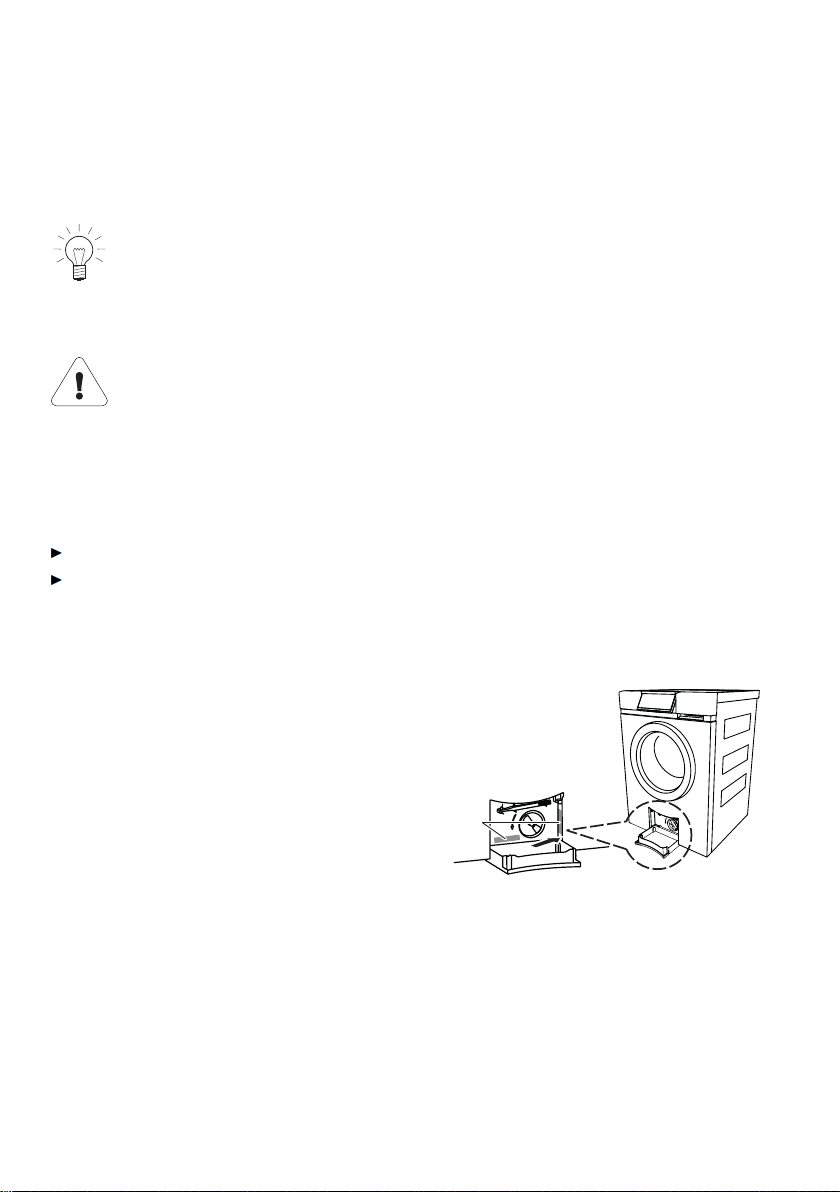
3.1 Where is the identification plate?
1
Identification plate with serial number
(FN)
1*
* Depending on the serial number (FN)
Note down the serial number (FN) of your appliance on the back page of
these operating instructions.
14

4 Appliance description
4.1 Appliance overview
• Load capacity: 8 kg dry washing
• Programmes for 14 different types of textiles
• 2 programmes for normally soiled cotton load
• 4 extra programmes
• 6 favourite programmes
• Additional programmes
– Eco – Anti-mite
– Sprint – AquaPlus including skin protection
– Easy care – Delayed start
– Pre-wash – Soaking
– Steam anti-crease – Soap wash
– Spin-speed setting including
stop after rinsing
– Bio wash
– Programmes for lightly to
heavily soiled washing
• Additional functions
• Sensors for optimizing the wash cycle
• Automatic energy-saving stand-by
• TouchDisplay
• Automatic door opener
• Language selection
• Childproof lock
• Aquastop with anti-leak protection
15
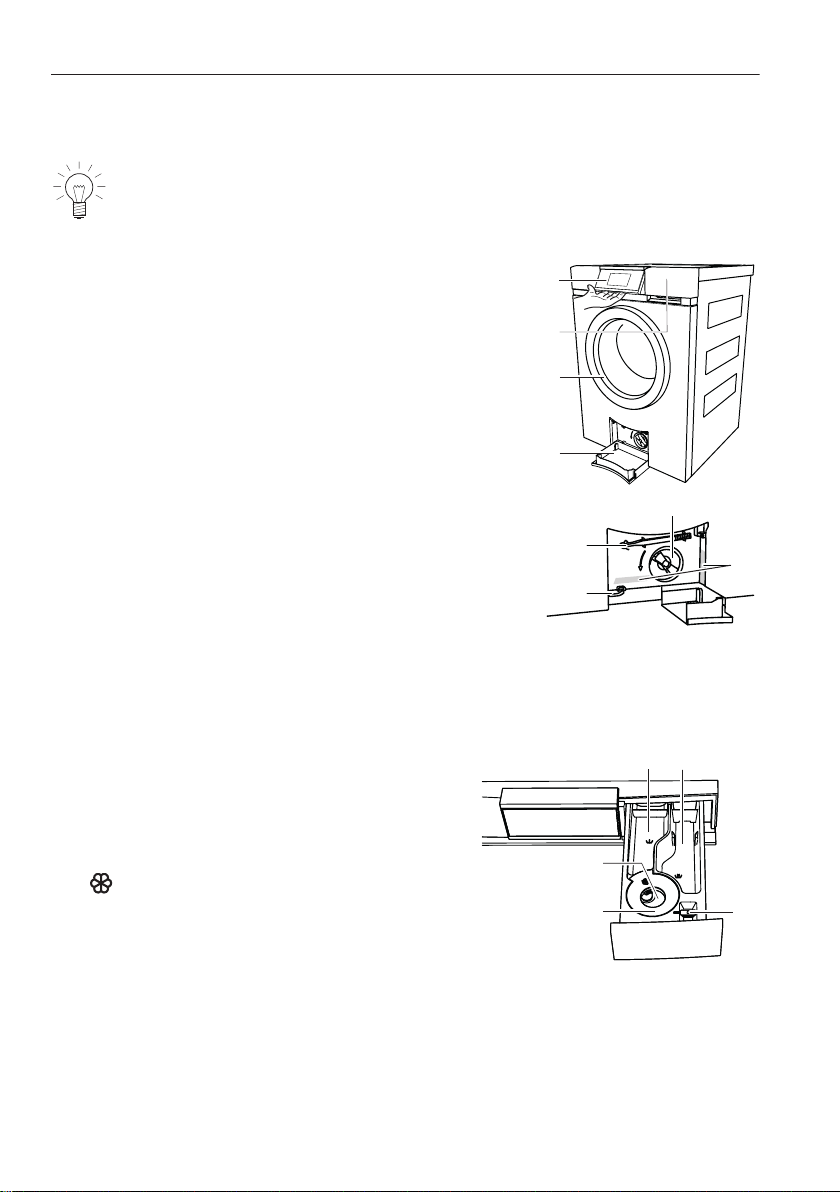
4.2 Appliance construction
The appliance door can be set to open to the left or to the right. Our
Customer Services can make the necessary adjustments to the appli-
ance.
1
Operating and display elements
(pivoting operating panel)
1
2
3
4
5
6
7
8*
2
Detergent dispenser drawer
3
Appliance door
4
Drain tray
5
Foreign body trap
6
Emergency door release tool
7
Emergency door release
8
Identification plate / Serial number (FN)
* Depending on the serial number (FN)
Detergent dispenser drawer
9
Pre-wash detergent, compartment I
10
9
13
12
11
10
Main wash detergent, compartment II
11
Liquid detergent flap
12
Siphon for fabric conditioner (softener)
13
Fabric conditioner (softener), compartment
4 Appliance description
16
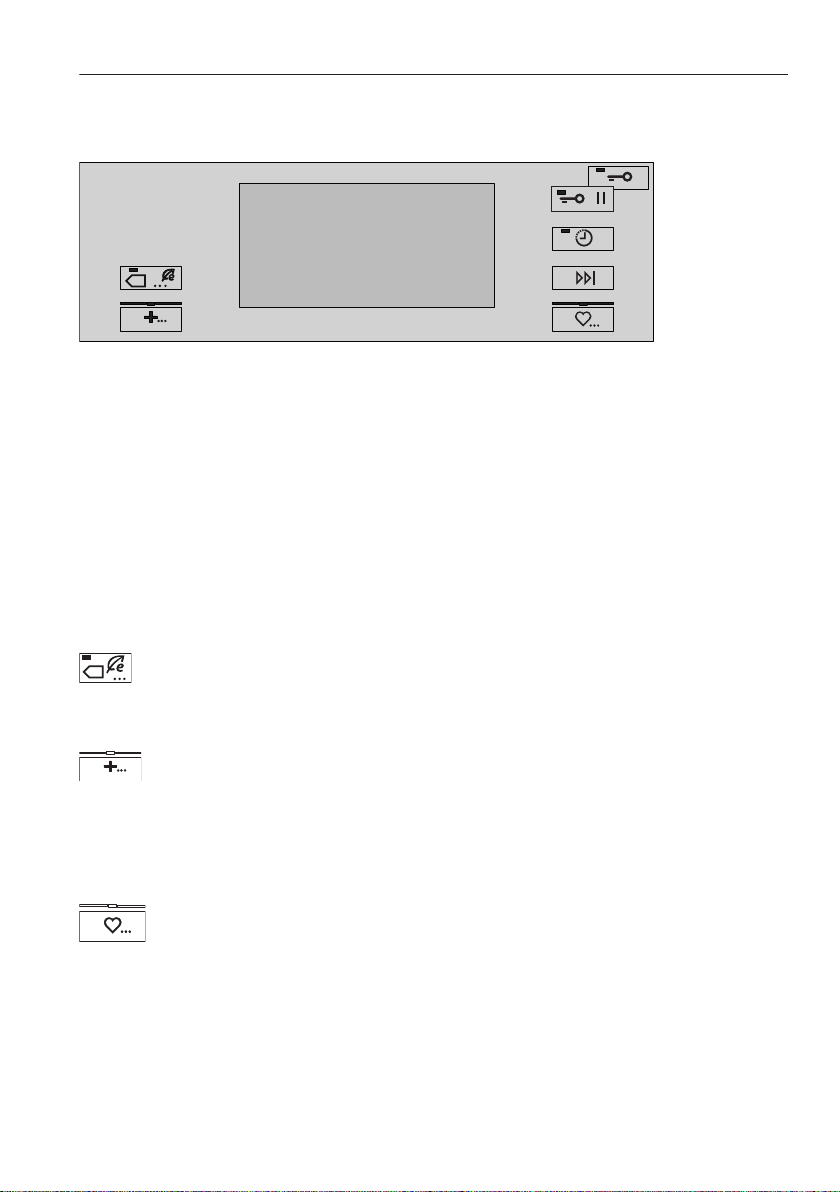
4.3 Operating and display elements
*
TouchDisplay
All available functions are displayed on the TouchDisplay and can be selected
directly by pressing the corresponding symbol or text
• Programme name with duration • Delayed start
• Programme end time • User settings
• Programme progress with time
remaining
• Hints and trouble-shooting
• Additional functions • Further information
Programmes for normally soiled cotton load
• 40 °C Coloureds normal
• 10 °C Coloureds normal
Extra programmes
• Steam anti-crease
• Proofing
• Appliance hygiene
• Spinning
Favourites
4 Appliance description
17
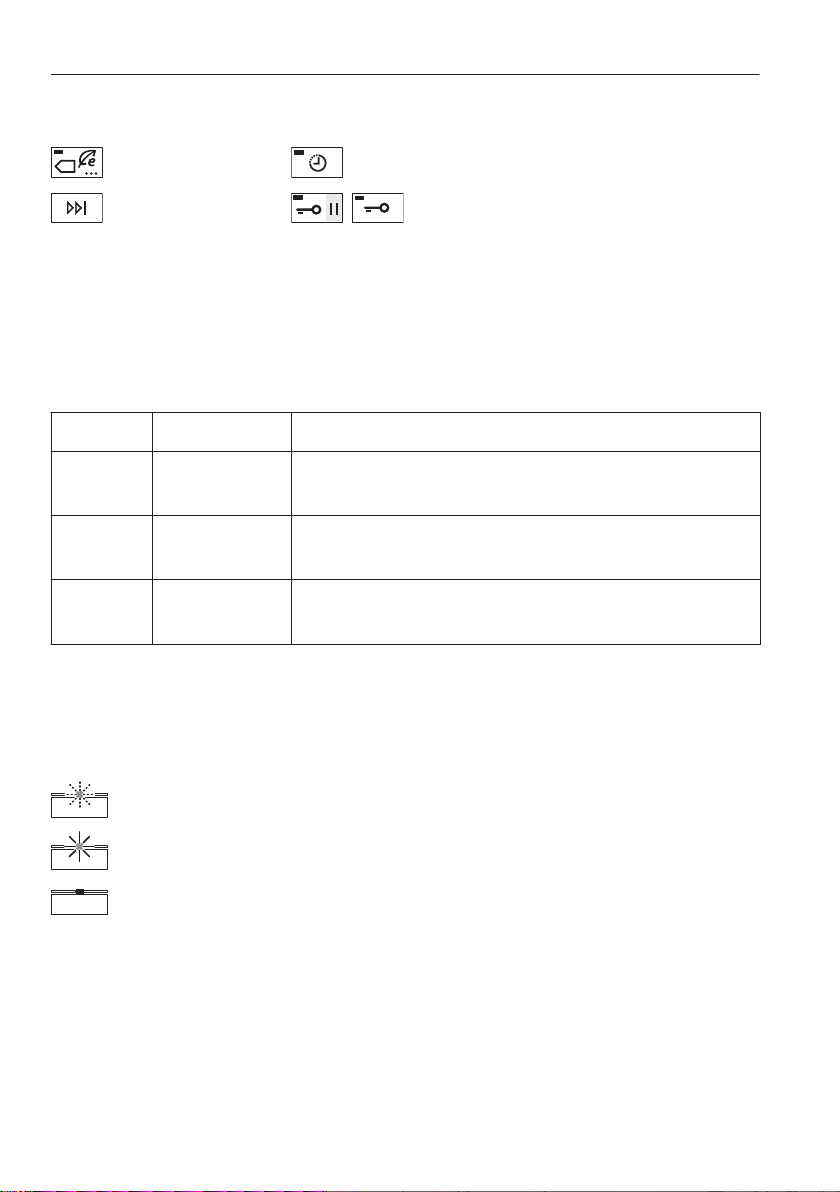
Additional function/Additional programmes
Eco Delayed start
Fast forward /
End of programme
/
* Pause / Door opener or Door opener
* Depending on the serial number (FN)
Button state
The buttons arranged on the TouchDisplay have three different operating
states.
Symbol Background
Bright Dark
Selectable function
Programme or function can be selected.
Bright Blue
Function selected/changed
Programme or function is active.
Dark Dark
Non-selectable function
Programme or function is switched off.
Indicator lights
Certain of the buttons to the left and right of the TouchDisplay are equipped
with an indicator light.
Indicator light flashes
Programme or function can be selected.
Indicator light is illuminated
Programme or function is active.
Indicator light is dark
Programme or function is switched off.
4 Appliance description
18
5 Programme overview
5.1 Main wash programmes
To select the right programme, follow the fabric care symbols on the
labels of the wash items, e.g.
40
.
95
Whites 95 °C
1–8 kg
White cottons, linens with the
95
fabric care symbol e.g. bed and
table linen, towels, white or colour-fast underwear.
70
Coloureds 70 °C
1–8 kg
Energy-saving programme for coloured cottons with the
95
fabric
care label.
60
Coloureds 60 °C
1–8 kg
Coloured cottons with the
60
fabric care symbol e.g. bright blouses,
overalls, shirts, bed linen.
40
Coloureds 40 °C
1–8 kg
Coloured cottons and mixed washing with the
40
fabric care symbol
e.g. coloured sweatshirts, t-shirts.
19
30
Coloureds 30 °C
1–8 kg
Coloured cottons and mixed fabrics with the
30
fabric care symbol
e.g. t-shirts.
20
Coloureds 20 °C
1–8 kg
Energy-saving programme for lightly soiled textiles with fabric care
symbols
30
,
40
,
60
or
95
.
cold
Coloureds cold
1–8 kg
Refresh programme without heat. Suitable for washing new textiles
with the
30
,
40
,
60
or
95
fabric care label for the first time.
Favourites
Six programmes that can be freely put together and saved
1– 6
.
5 Programme overview
20
5.2 2 programmes for normally soiled cotton load
+
40
40 °C Coloureds normal
The recommended programme for washing normally soiled cottons
at rated load capacity.
+
cold
10 °C Coloureds normal
The programme with the lowest possible temperature setting for
washing cottons. It corresponds to the 40 °C Coloureds normal
programme without the water being heated. This programme has
the same water level as the 40 °C Coloureds normal programme.
5.3 Extra programmes
Steam anti-crease
1–1.5 kg
Dry, creased washing that can be washed at min. 40°C is partially
uncreased and made damp, ready to iron.
Proofing
1–3 kg
For starching or proofing fabrics. The starching or proofing agent can
be added to the fabric conditioner compartment .
Appliance hygiene
0 kg
Without any washing. A small amount of water is heated up to
around 80 °C and the steam produced sharply reduces the germ
count.
Spinning
1–8 kg
5 Programme overview
21

5.4 Further fabric types
Shirts
Maximum 7 shirts/blouses
Programme is optimized for minimizing creasing. Programme contains steam
anti-crease. Select temperature according to fabric care symbol.
Woollens
1–2.5 kg
Gentle wash for woollens and other delicates. Only for woollens with a felt-free
finish and labelled as «machine washable».
Hand wash
1–2 kg
Very gentle wash for items labelled with the fabric care symbol.
Down
1 item of washing, max. 1 kg
Programme is optimized for the particular wetting characteristics of down
fabrics.
Short spin at the beginning of the programme to get rid of any air in down
textiles.
Intermediate spinning for optimal removal of water. Select temperature
according to fabric care symbol.
Add the detergent to the detergent dispenser drawer. Do not use a
dosing ball.
Outdoor garments
1–3 kg
Programme for waterproof and breathable clothing. Higher water level during
washing and spinning. Intermediate spinning for optimal removal of water.
Select temperature according to fabric care symbol.
5 Programme overview
22

Silks
1–1.5 kg
Programme is optimized for delicate silk articles. Spin speed is reduced to
minimize creasing. Select temperature according to fabric care symbol.
Underwear
1–3 kg
Very gentle programme for washing delicates, such as underwear, with the
fabric care label. The intermediate spin is significantly reduced and the
final spin has a lower spin speed. Select temperature according to fabric care
symbol.
Baby garments
1–5 kg
Very thorough rinsing for the protection of sensitive baby skin. If a
95
temperature is selected, the programme contains a pre-wash. Select tempera-
ture according to fabric care symbol.
Denim
1–4 kg
Optimized for colour run from denim. Select temperature according to fabric
care symbol.
WetClean
1–1.5 kg
For all fabrics labelled as washable. Most gentle treatment possible through
applying a gentle rocking motion and a fine spray of water.
5 Programme overview
23
Net curtains
1–2 kg
Reduced washing action for very gentle treatment. Higher water level during
washing and spinning. The washing remains lying in the water after the final
rinse (stop after rinsing).
Press the button 1×.
– Start draining with spinning at 400 rpm.
Press the button 2×.
– Start draining without spinning.
Select temperature according to fabric care symbol.
Black garments
1–4 kg
Rinsing is optimized through a higher water level and extended rinsing. Select
temperature according to fabric care symbol.
Black hand wash garments
1–2 kg
Very gentle wash for items labelled with the fabric care symbol. Rinsing is
optimized through a higher water level and extended rinsing time. Select
temperature according to fabric care symbol.
5 Programme overview
24

5.5 Additional programmes
Eco
Large energy savings due to reduced wash temperature. The
extended washing time ensures the washing performance is main-
tained.
• Programme duration extended: 25–60 minutes
• Energy saving depending on programme: 10–40 %
Water savings due to reduced amount of water for rinsing. The
extended rinsing time ensures the rinsing performance is maintained.
• Water saving: 10-20 %
Sprint
Short programme for lightly soiled washing
• Programme duration for 2.5 kg wash load
+ : 26 minutes
+ : 28 minutes
+ : 29 minutes
+ : 39 minutes
• 2 instead of 3 rinsing cycles
Add a small quantity of washing detergent.
A large washing load or too much washing detergent can significantly
lengthen the programme duration.
Easy care
For washing requiring very gentle treatment
• Reduced washing action
• Higher water level during washing and rinsing
• Reduced spin speed: 800 rpm
• Optimum wash load: max. 3.5 kg
Pre-wash
Suitable for heavily soiled washing
• Programme duration extended: about 15 minutes
5 Programme overview
25
Steam anti-crease
The steam finish at the end of the programme significantly reduces
creasing in the washing. Recommended for items that crease easily,
e.g. shirts and blouses.
• The washing is warm and should be hung up immediately to dry –
for easy ironing – or tumble dried.
• To avoid renewed creasing at the end of the programme, the
washing is loosened up for an extended period (min. 60 minutes).
The washing can be unloaded at any time.
– Press the
or button and unload the washing.
• Programme duration extended: about 20 minutes
• Limited spin speed: max. 1000 rpm
• Optimum wash load: max. 2 kg
Degree of soiling
Adjustment to the degree of soiling of the washing
«Soiling light»
• Suitable for lightly soiled washing
«Soiling medium»
• Wash time extended: 25–80 minutes
«Soiling heavy»
• Extended wash time
• Higher water level during washing
• Additional rinsing cycle
«Soaking»
Press the corresponding button in the TouchDisplay to set the
soaking time (0.5–6 hours)
Anti-mite
Can be selected with
60
,
70
and
95
only.
• Suitable for individuals with an allergy to mites
– The main wash is extended and intensified at the temperature
set. The mites are killed and the allergens are rinsed out thor-
oughly.
5 Programme overview
26
AquaPlus
There are 5 different settings for rinsing intensity.
«Standard»
• Normal water level
«More water»
• The water level is increased by around 1–3 cm during the main wash
and each rinse cycle.
«+1 rinse»
• An extra rinse cycle is added to each programme.
«More water +1 rinse»
• An extra rinse cycle is added to each programme and the water level
is also increased by around 1–3 cm during the main wash and each
rinse cycle.
«Skin protection»
• Two extra rinse cycles are added to each programme and the water
level is also increased by about 5 cm during each rinse cycle. This
function is particularly suitable for people with sensitive skin or with a
suspected allergy to washing detergent.
5.6 Bio and soap wash
Bio wash (alkaline detergent + bleach)
The programme sequence is adapted for the use of multi-component deter-
gents (alkaline detergent + bleach). First the alkaline detergent with softener
(compartment II) is added to the wash and the suds are heated up to 40 °C.
Then after around 6 minutes the bleach (compartment I) is added.
Soap wash (softener + soap detergent)
The programme sequence is adapted for the use of multi-component deter-
gents (softener + soap detergent). The softener (compartment I) and the soap
detergent (compartment II) are added to the wash one after the other.
5 Programme overview
27
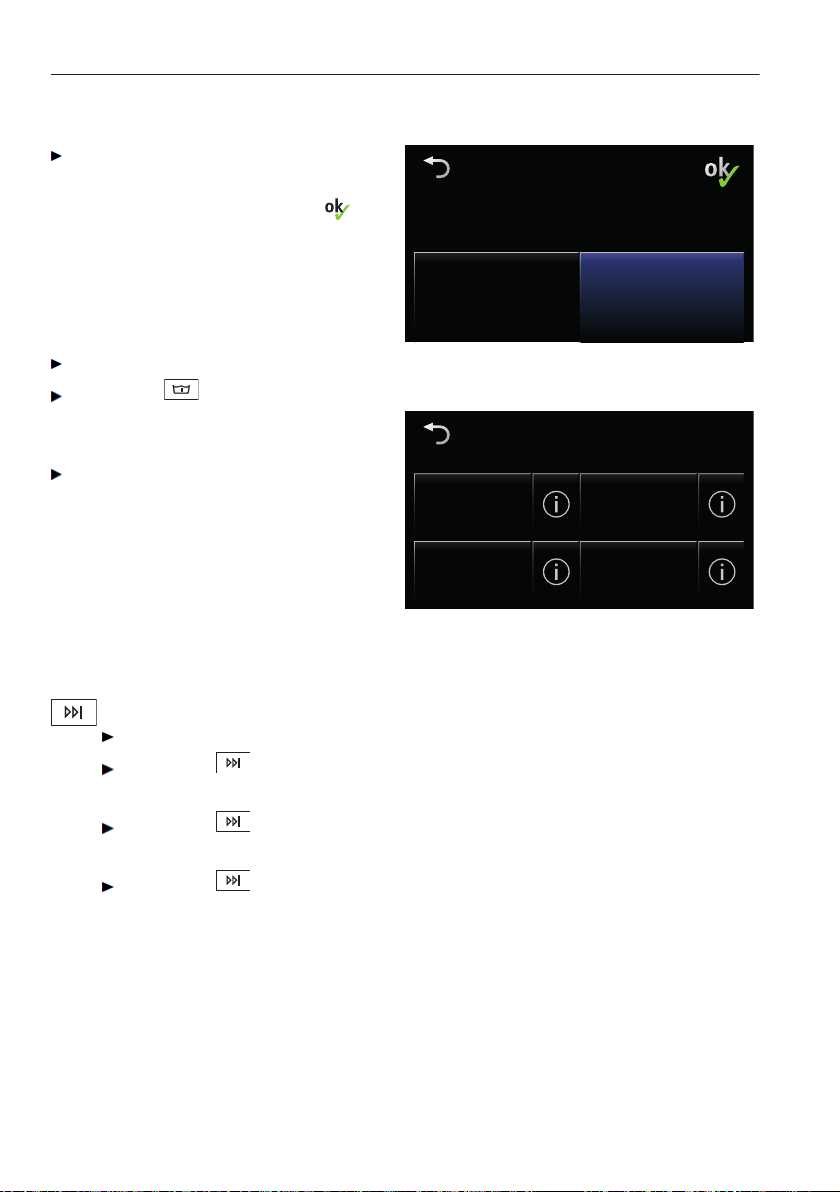
Selecting bio or soap detergent
In user settings, set the «multi-
component detergent» setting to
status ON and confirm with .
Multi-component
detergent
Multi-component
detergent
Multi-component detergent
Status: Off
Multi-component
detergent
Multi-component
detergent
Multi-component detergent
Status: Off
Select main programme.
Press the button.
– The display shown adjacent
appears.
Press the desired detergent type.
Select wash detergent
Standard With pre-wash
Soap wash Bio wash
5.7 Separate rinsing / Separate spinning
It is possible to skip parts of the programme selected.
Select main programme according to fabric care labels.
Press the button 1×.
– Rinsing and final spin are selected.
Press the button 2×.
– Final rinse / Conditioning and final spin are selected.
Press the button 3×.
– Separate final spin is selected.
5 Programme overview
28

5.8 Additional functions
Function/Symbol Uses
Spin speed
The spin speed can be changed in steps of 200 rpm
(1200, 1000, 800, 600, 400 rpm, stop after rinsing,
1600, 1400 rpm). Delicates can thus be spun at a
lower spin speed. However, this increases the drying
time (greater energy consumption for tumble drying).
Delayed start Take advantage of cheap-rate electricity (setting
range of up to 24 hours). When the time set is
reached, the programme starts automatically.
Fast forward /
End of programme
Press the button to skip individual parts of a
programme at any time during the programme
sequence.
Pause / Door opener*
Pressing the button 1× when a programme is
running will cause the programme to pause. Pressing
the button again will cause the appliance door to
open provided the appliance is in a state (depending
on the water level, temperature, speed) that allows
this.
Press the «Continue programme» button in the
TouchDisplay to end the pause and resume the
programme.
* Depending on the serial number (FN)
5 Programme overview
29
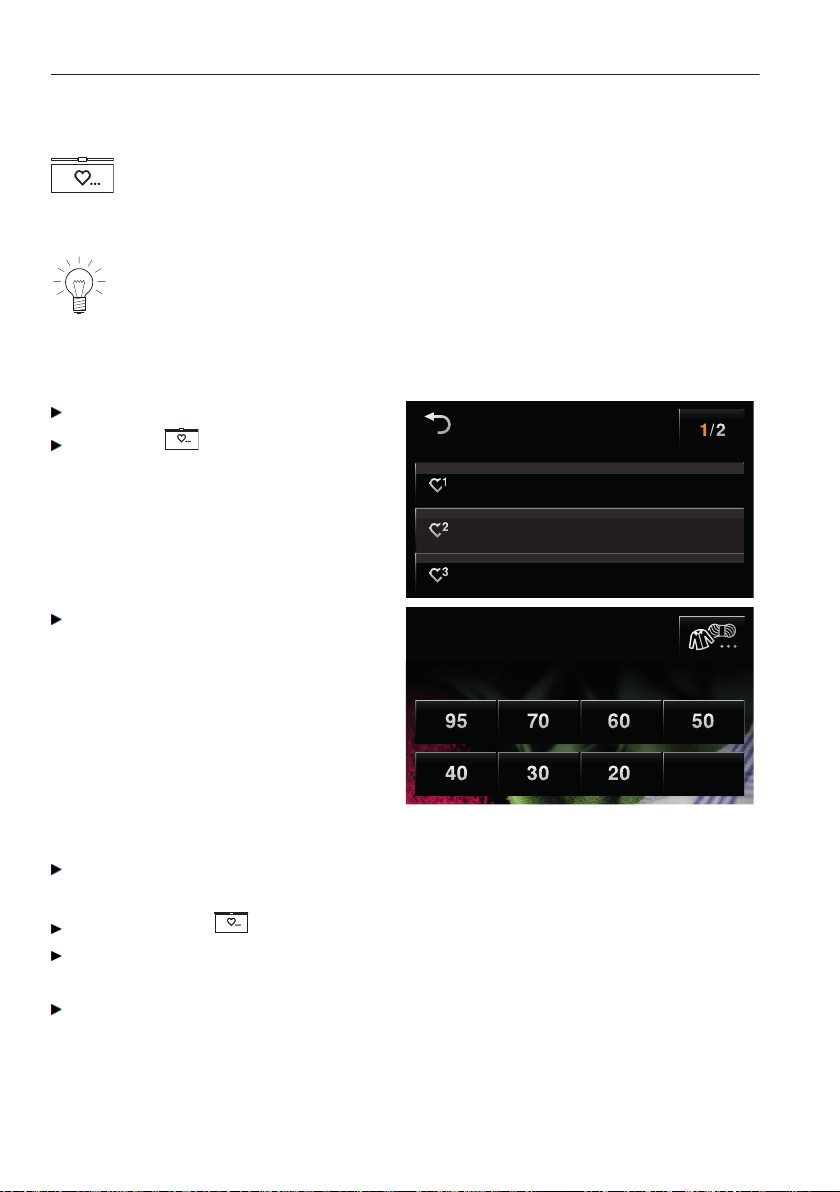
5.9 Favourites
Simplifies selecting frequently used programmes. You can compile
your own favourites. Favourites are easy to start.
A maximum of six favourites can be saved.
The appliance door has to be open to define, change or delete a
favourite.
Defining favourites
Open the appliance door.
Press the button.
– The adjacent screen appears in
the TouchDisplay:
Define favourites
empty
empty
empty
Press one of the 6 favourite
buttons.
– The TouchDisplay switches to
the adjacent view.
Coloureds
Select temperature
cold
Select the desired main programme, additional programmes and additional
functions.
Then press the button again.
Press the Yes button.
– The defined favourite is saved.
Press the No button.
– The favourites programme remains empty.
5 Programme overview
30
Starting your favourite
Close the appliance door.
Press the button.
Press the desired favourites programme.
– The programme starts automatically after about 20 seconds.
Changing your favourite
Open the appliance door.
Press the button.
Press the desired favourites programme.
Press the Change button.
Make the desired changes.
Press the button.
Press the Yes button.
– The changes are saved.
Press the No button.
– The changes are discarded.
Deleting a favourite
Open the appliance door.
Press the button.
Press the desired favourites programme.
Press the Clear button.
– The favourites programme is deleted.
5 Programme overview
31
6 User settings
6.1 Adjusting user settings
Providing no programme is running and no error message is displayed, the
user settings can be changed. The procedure is generally the same for all
settings.
Changing user settings
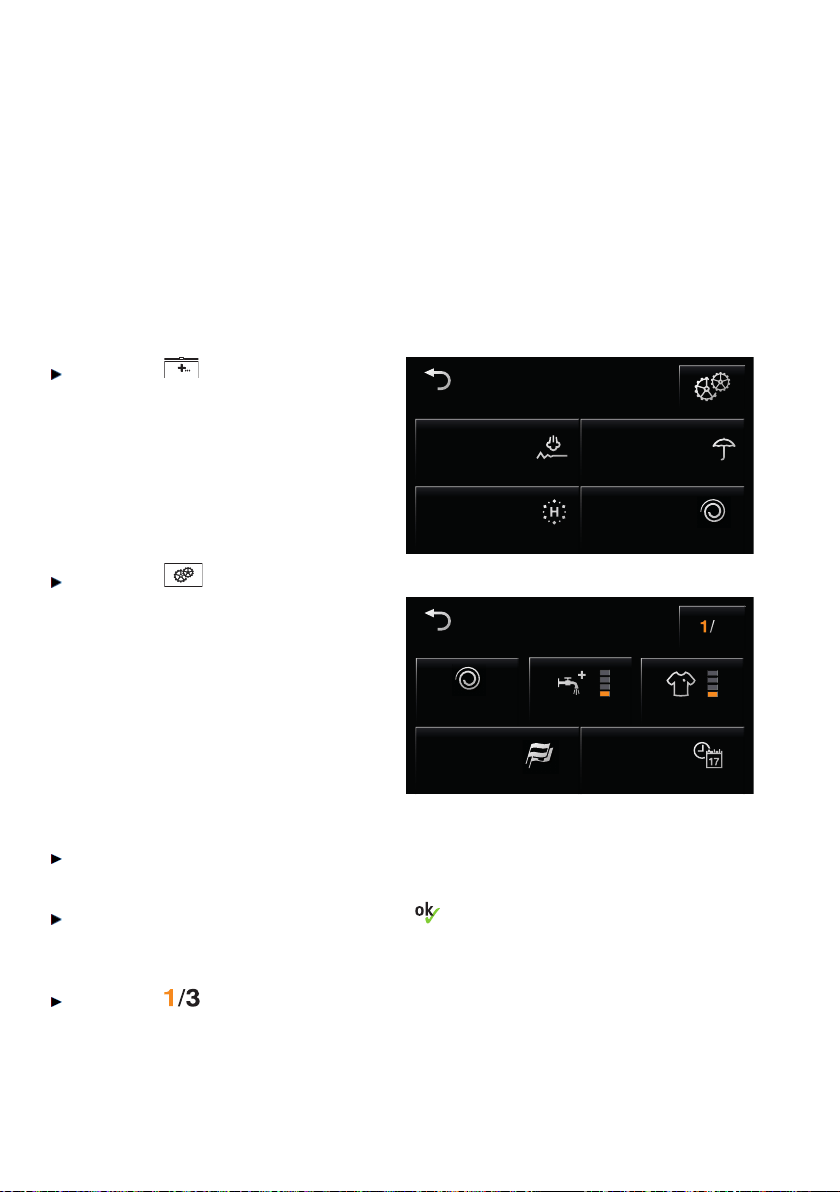
Press the button.
– A selection of extra
programmes appears in the
TouchDisplay.
Extra
SpinningAppliance hygiene
ProofingSteam anti-crease
Extra
SpinningAppliance hygiene
ProofingSteam anti-crease
Press the button.
The first of several pages with user
settings appears.
Settings
Language
English
3
Settings
Language
English
Time
10.34
800
Press the desired setting to change it.
– A selection of possible levels appears.
Press the desired level and save with .
To go to the other user setting pages:
Press the button.
– The screen changes to the next page.
32

Exiting user settings
To exit user settings:
Press the button
6.2 Language
The language in the TouchDisplay can be changed.
6.3 Time
The time must be reset if the appliance has been disconnected from
the mains for a longer period of time (about 5 weeks).
To ensure the time is stored, the appliance should not be discon-
nected from the mains supply for at least 30 minutes after making the
settings.
6.4 Spin speed
Each programme and combination of programmes is
assigned an optimum spin speed at the factory. This
can be adjusted to suit individual needs.
Increasing the spin
speed:
To protect delicates, can only be used with suitable
programmes (e.g. whites).
Reducing the spin
speed:
Can be used with all programmes.
6 User settings
33
6.5 AquaPlus
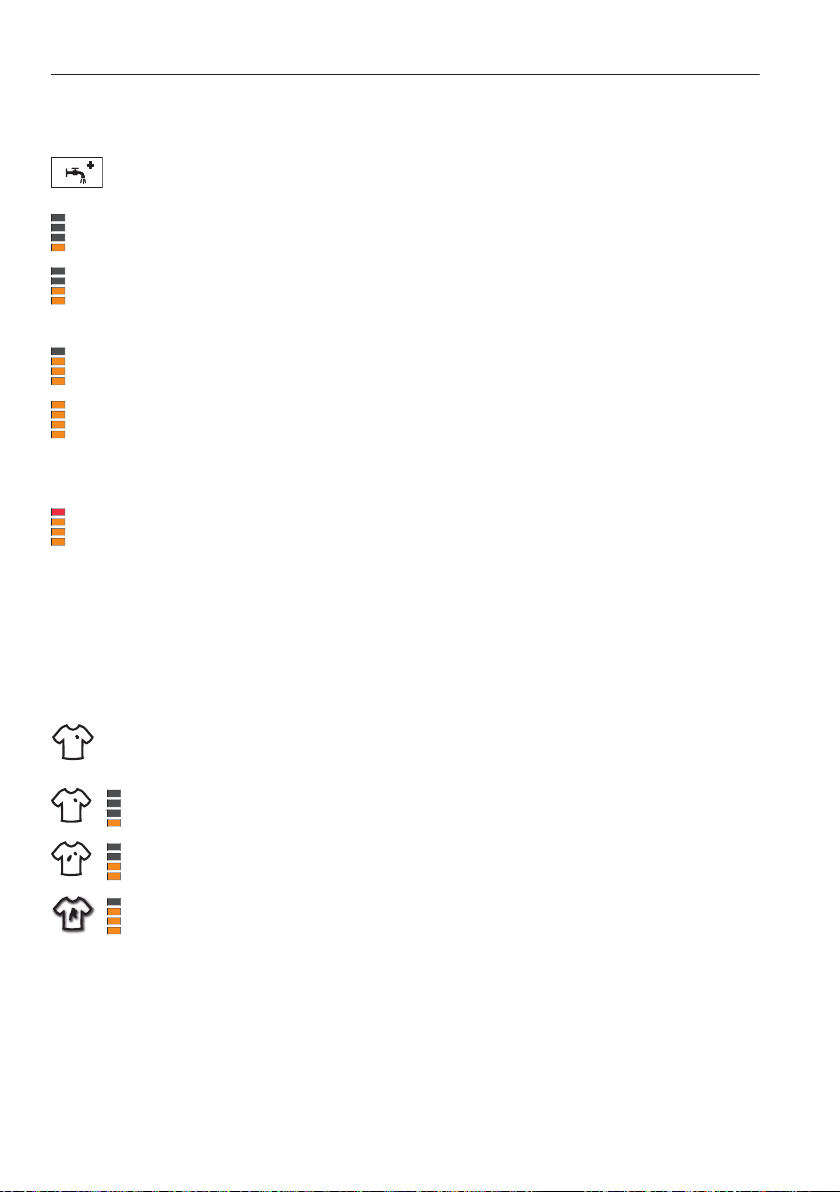
There are 5 different settings for rinsing intensity.
«Standard»
• Normal water level
«More water»
• The water level is increased by around 1–3 cm during the main wash
and each rinse cycle.
«+1 rinse»
• An extra rinse cycle is added to each programme.
«More water +1 rinse»
• An extra rinse cycle is added to each programme and the water level
is also increased by around 1–3 cm during the main wash and each
rinse cycle.
«Skin protection»
• Two extra rinse cycles are added to each programme and the water
level is also increased by about 5 cm during each rinse cycle. This
function is particularly suitable for people with sensitive skin or with a
suspected allergy to washing detergent.
6.6 Degree of soiling
There are three different pre-settings for degree of soiling.
«Soiling light»
• Suitable for lightly soiled washing
«Soiling medium»
• Wash time extended: 25–80 minutes
«Soiling heavy»
• Extended wash time
• Higher water level during washing
• Additional rinsing cycle
6 User settings
34

6.7 Automatic door opener
If the automatic door opener is switched on, the appliance door opens auto-
matically at the end of the programme. Otherwise it remains closed and can
be opened by pressing the or button.
6.8 Childproof lock
The childproof lock is to prevent children accidentally starting or stop-
ping a programme. When the childproof lock is activated, the appli-
ance can only be operated after first entering a code.
6.9 Hygiene recommendation
It is common nowadays to select programmes with temperatures below 60° C
in order to save energy. These achieve perfectly good results with lightly
soiled everyday washing. Washing almost exclusively with low temperatures
will result in the formation of foul smelling coatings in the appliance. To
prevent this, «hygiene info» indicates when it is recommendable to wash with a
temperature of at least 60° C or to use the hygiene programme.
6 User settings
35
6.10 Soft water
The programmes can be adjusted for use with very soft water.
The slightly reduced wash action prevents excessive foaming. Since the deter-
gent does not rinse out as well with soft water, the amount of water used for
rinsing is increased slightly and an extra rinse cycle is added.
6.11 Multi-component detergent
If this setting is switched on, after programme selection when the button is
pressed a detergent selection display appears. Depending on the desired
detergent, select soap wash (softener and soap detergent), bio wash (alkaline
detergent and bleach) or with pre-wash.
6.12 Loosening up the washing
The loosening-up period at the end of the programme can be set to 4 levels:
• 30 seconds*
• 10 minutes
• 30 minutes
• 6 hours
*Factory setting
The washing can be unloaded at any time during the loosening-up
phase by pressing the or button.
6.13 Brightness
With this function, the readability of the display can be adjusted to the
lighting conditions.
1. Dark
2. Medium
3. Bright
4. Very bright
6 User settings
36
6.14 Button tone
The button tone can be switched on/off.
The button tone for the button cannot be switched off.
6.15 Background image
The background image of the TouchDisplay can be switched off. In this case,
the background is black.
6.16 Silent
The function can also be assigned to the additional
programme. This lengthens the duration of the programmes slightly,
but also makes them quieter because the washing is spun at a lower
spin speed.
6.17 Restoring factory settings
The factory settings can be restored.
Any favourites that have been saved will be deleted.
6 User settings
37

7 Washing
7.1 Preparing the appliance
Ensure that the foreign body trap 1 is sitting properly.
1
Plug the appliance in at the mains or turn the wall
switch on.
– The appliance switches on.
1
0
1
0
Turn on the water tap.
Press the or button to open the appliance
door.
38
7.2 Loading the appliance
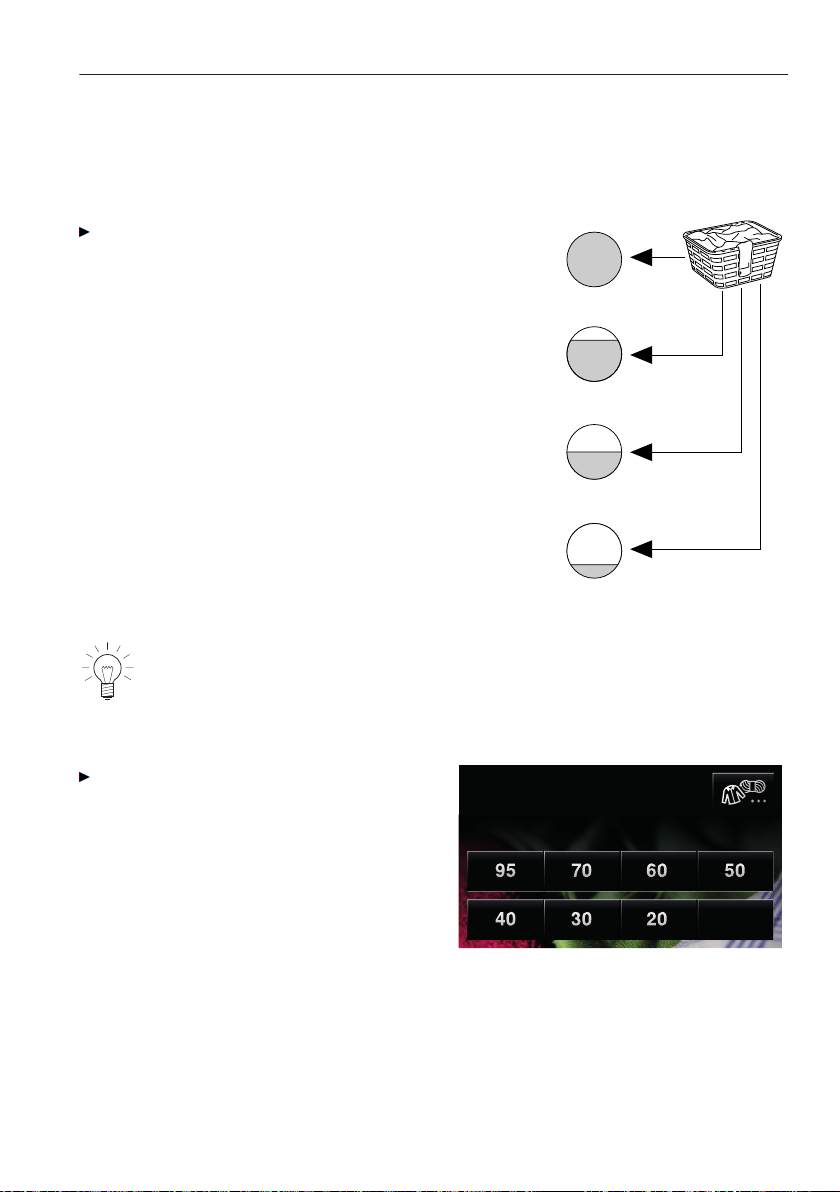
Load dry washing (max. 8 kg).
• If washing normally soiled whites and
coloureds, fill the washing drum.
• If washing heavily soiled whites and coloureds,
fill the washing drum max. ¾ full.
• If washing easy care cotton fabrics, white and
coloured synthetic fabrics as well as mixed
fabrics, fill the washing drum max. ½ full.
• If washing delicates, woollens, silks, polya-
crylics or net curtains, fill the washing drum
max. ¼ full.
For wet loads, halve these load capacities.
To prevent unbalanced spinning, vibration noise and interrupted spin-
ning action, avoid loading the washing drum with any one single,
heavy item.
Close the appliance door (pushing
firmly to)
– The start screen appears
Coloureds
Select temperature
cold
If no programme selection is made within about 20 seconds, all the displays
go out. Touch anywhere on the TouchDisplay at any time to display the start
screen again.
7 Washing
39
7.3 Adding washing detergent
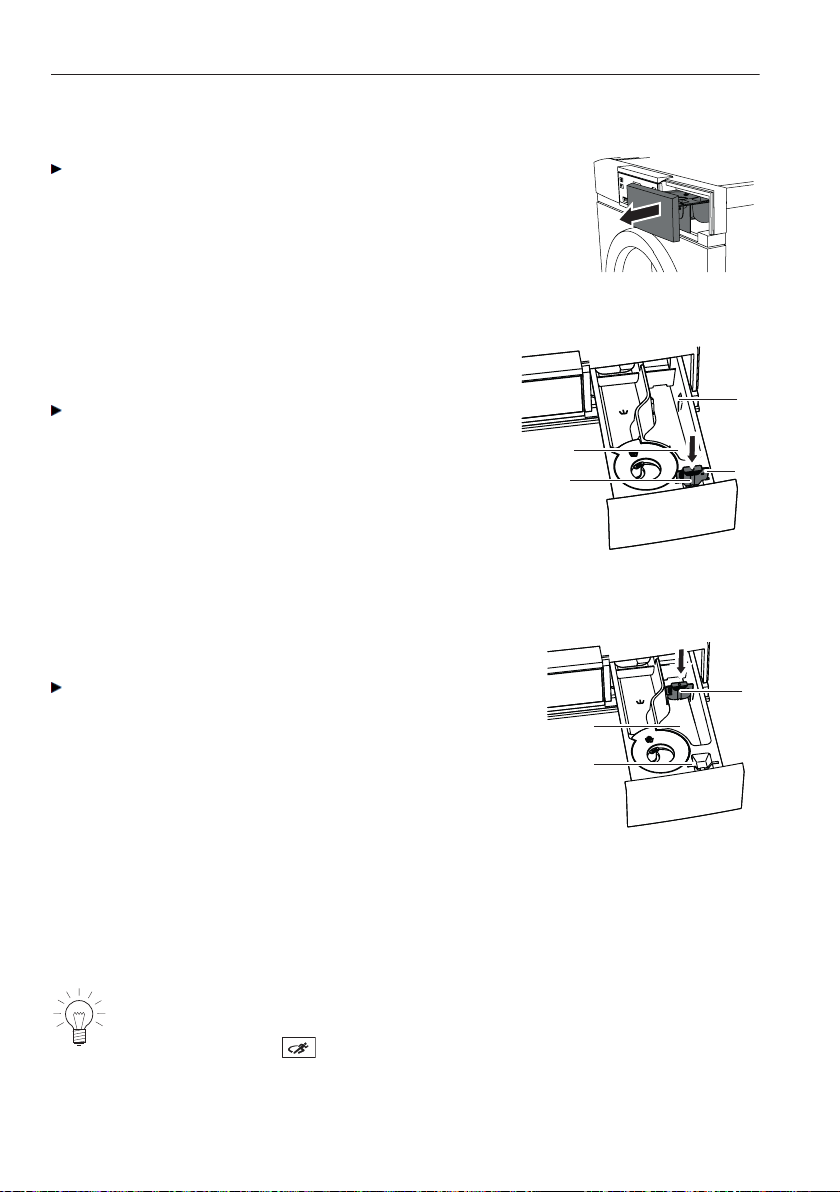
Pull the detergent dispenser drawer out as
far as it will go.
Powder detergent
If using powder detergent, flap 1 in compart-
ment II must be removed.
Pull flap 1 upwards and out of position 3
and insert in position 2.
2
3
II
1
Liquid detergent
If using liquid detergent, flap 1 in compart-
ment II must be inserted in position 3.
Pull flap 1 upwards and out of position 2
and insert in position 3.
3
1
II
2
Do not fill with liquid detergent past the upper mark. Liquid detergent can only
be used for the main wash with programmes without a pre-wash. They are
only suitable for temperatures of up to 60 °C. With 95 °C programmes, liquid
detergents are not as effective as they do not contain bleach.
Liquid detergents are best used with very gentle programmes (e.g.
«Woollens» and «Hand wash»), low-temperature programmes and
programmes with .
7 Washing
40

Liquid detergent and a delayed start
If a delayed start has been selected, after loading the washing the liquid deter-
gent should be added to a dosing aid (e.g. ball). It is important that the liquid
detergent does not spill onto the washing during the delayed start period,
otherwise the washing could be damaged through a possible chemical reac-
tion.
Detergent dosage
Adding too much washing detergent can cause excess foaming,
giving a poor wash result and, in the worst case, causing damage
to the appliance.
The amount of detergent required depends on the degree of soiling as well as
the wash load, the hardness of the water and the product being used. Follow
the detergent manufacturer’s dosing instructions.
The hardness of the water is measured using the French degree of water hard-
ness (° fH) and is subdivided into three categories:
• Soft
0 °fH to 15 °fH
• Medium
15 °fH to 25 °fH
• Hard
over 25 °fH
(NB Use water softener to reduce amount of washing detergent required.)
The local water authorities can provide information on the level of water hard-
ness in your area.
7 Washing
41
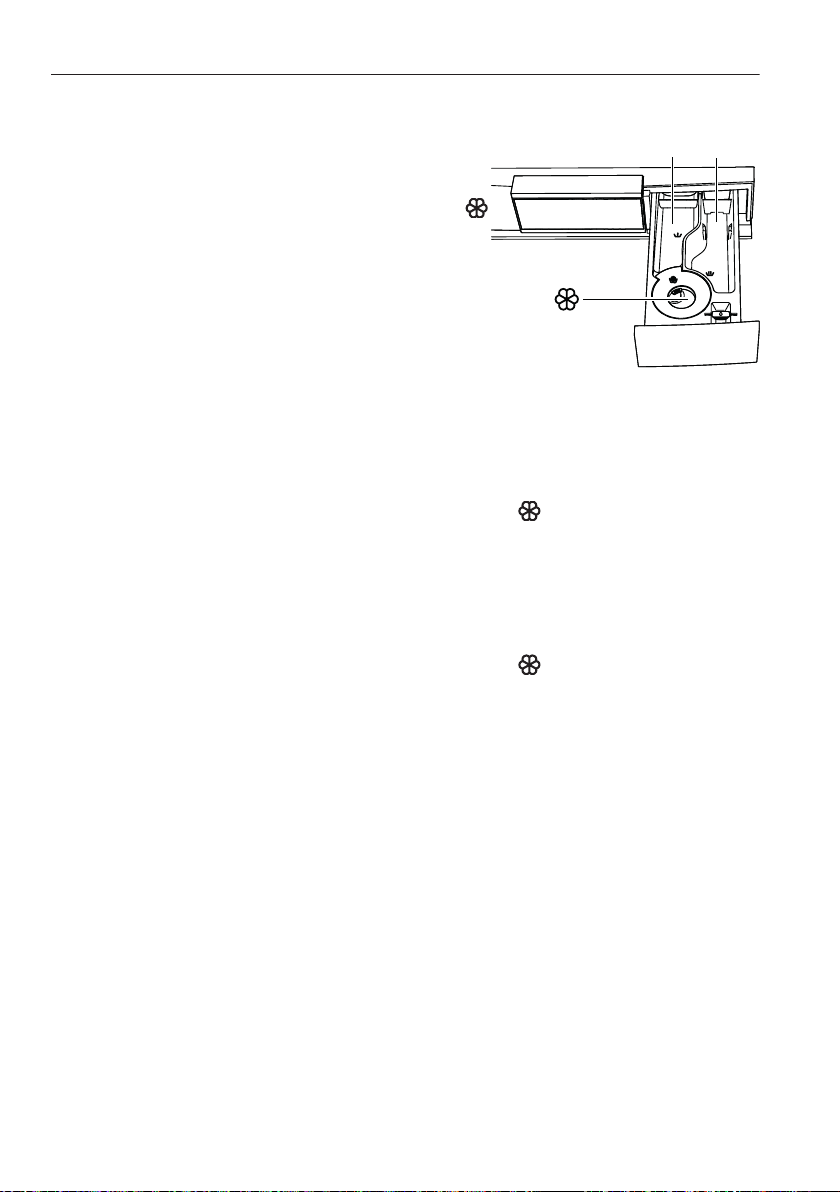
Compartment
Pre-wash detergent Add to compartment I
I
II
Main detergent Add to compartment II
Fabric conditioner (soft-
ener)
Add to compartment
Bio wash
Alkaline detergent Add to compartment II
Bleach Add to compartment I
Fabric conditioner (softener)
Add to compartment
Soap wash
Water softener Add to compartment I
Soap detergent Add to compartment II
Fabric conditioner (softener)
Add to compartment
Fabric conditioner
Do not fill with fabric conditioner past the «MAX» mark.
Do not use fabric conditioner if drying the washing in a tumble dryer. Tumble
drying automatically leaves fabrics soft and fluffy.
Soap detergent (softener + soap detergent)
Select the additional «Soap wash» programme to wash with soap detergent.
Since soap binds with lime, soap detergent should only be used when the
water is soft or moderately hard (up to 25 °fH) and limescale protection is
added. Soap scum can otherwise form and build up in the laundry and the
appliance. Further, limescale build-up on the tub heating element can result in
damage to the appliance.
7 Washing
42

Dyeing textiles
Textiles can be dyed in the appliance using suitable dyeing agents. Please
follow the manufacturer’s safety instructions and warnings carefully.
Each wash programme starts with brief draining and for this reason
liquid dye components should be added after this.
After adding the wash detergent
Push the detergent dispenser drawer back in.
Select main programme.
7.4 Selecting a programme
«Press and go»
• After being switched on, the appli-
ance is ready for the user to select a
coloureds programme.
• Press one of the temperature buttons
displayed to select the coloureds
programme with the corresponding
temperature.
Coloureds
Select temperature
cold
• All the necessary settings for the programme are assigned automatically.
• The TouchDisplay changes to another view where additional functions can
be selected or deselected by pressing the corresponding button.
• If no other button is pressed within the next 20 seconds, the coloureds
programme selected starts automatically.
Use the programme overview to determine which programme is the
most suitable for your washing.
7 Washing
43

7.5 Selecting whites and coloureds programmes
Close the appliance door.
– The following screen appears in
the TouchDisplay.
Coloureds
Select temperature
cold
Press the desired temperature
button, e.g. 60 °C.
– The TouchDisplay changes to a
view where all possible additional
functions can be selected or
deselected by pressing the corre-
sponding button.
1 h 00
16 : 13
60°C Coloureds
800
1 h 00
end 16 : 13
60°C
800
– The programme selected, the likely duration (hours/minutes) and the
end time are displayed.
– The indicator lights for the selectable and buttons flash.
– If no other button is pressed within the next 20 seconds, the coloureds
programme selected starts automatically.
Press the button at the top left of the TouchDisplay or press the or
button at any time to cancel the programme selected.
7 Washing
44
7.6 Selecting another main programme
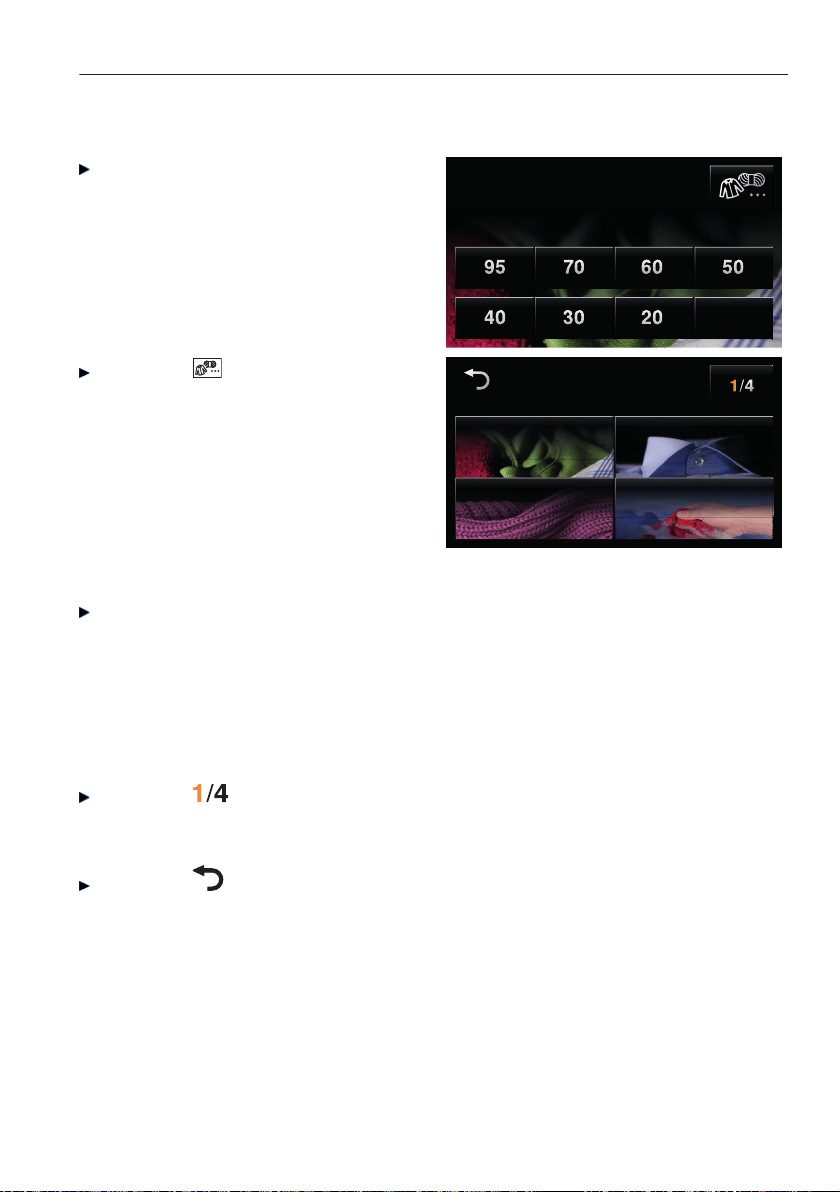
Close the appliance door.
– The following screen appears in
the TouchDisplay.
Coloureds
Select temperature
cold
Press the button at the top right
of the TouchDisplay.
– The first of several pages with
fabric selection appears.
Fabric selection
Coloureds
Hand washWollens
Shirts
Fabric selection
Coloureds
Hand washWollens
Shirts
Press the required type of fabric.
– The TouchDisplay switches back again to the temperature selection
page.
– The selected fabric type is displayed.
– Only temperatures suitable for the fabric type selected are available for
selection.
or:
Press the button.
– The screen changes to the next page of fabric selection.
or:
Press the button.
– The TouchDisplay switches back again to the temperature selection
page. The whites/coloureds programme remains selected.
7 Washing
45
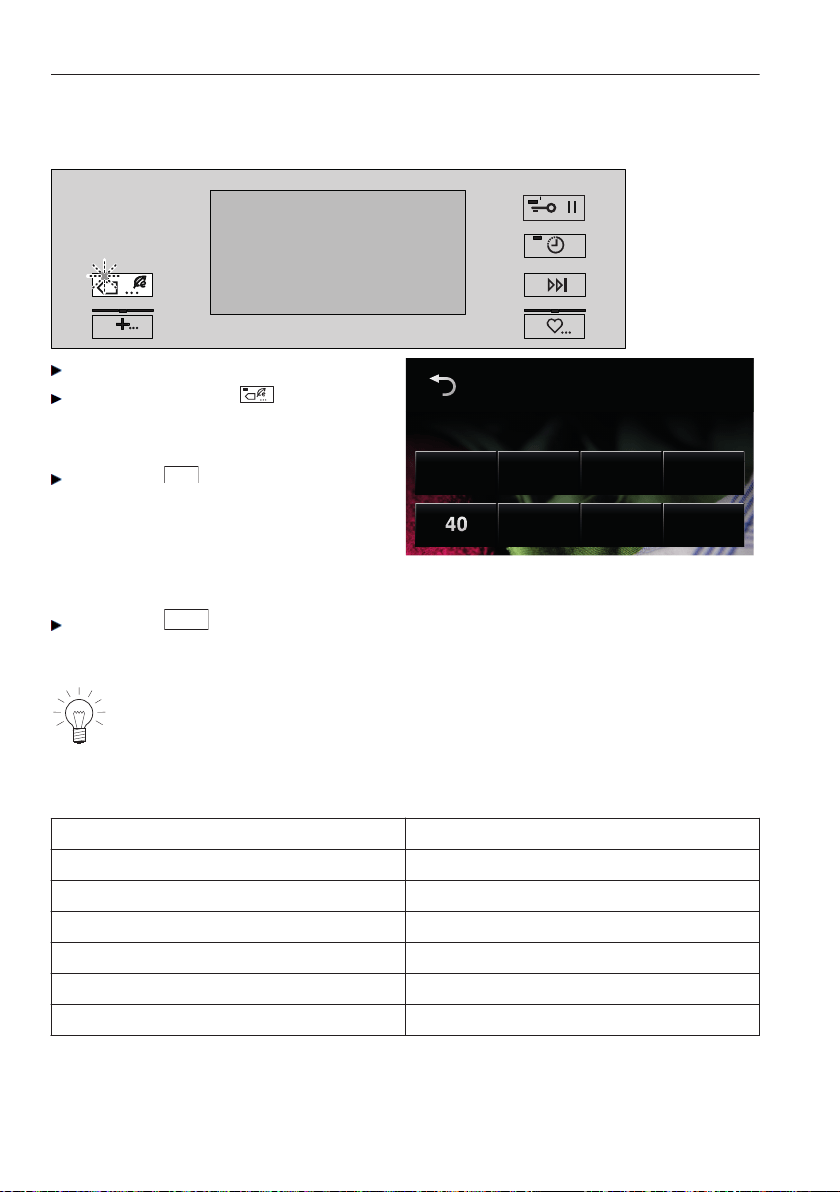
7.7 Selecting programmes for normally soiled cotton load
Close the appliance door.
Press the flashing button.
– The adjacent screen appears in
the TouchDisplay:
Press the
40
button to select the
programme 40 °C Coloureds
normal.
or:
Press the
cold
button to select the
standard 10 °C Coloureds normal.
Coloureds normal
Select temperature
cold
With these programmes, it is not possible to change the additional
functions. Only delayed start is selectable.
Data of programme 40 °C Coloureds normal
Load capacity 8 kg
Programme duration 3h50
Energy star rating 4.5
Energy consumption 0.69 kWh/cycle
Water star rating 4.5
Water consumtion 66 i/cycle
Residual moisture 53 %
7 Washing
46
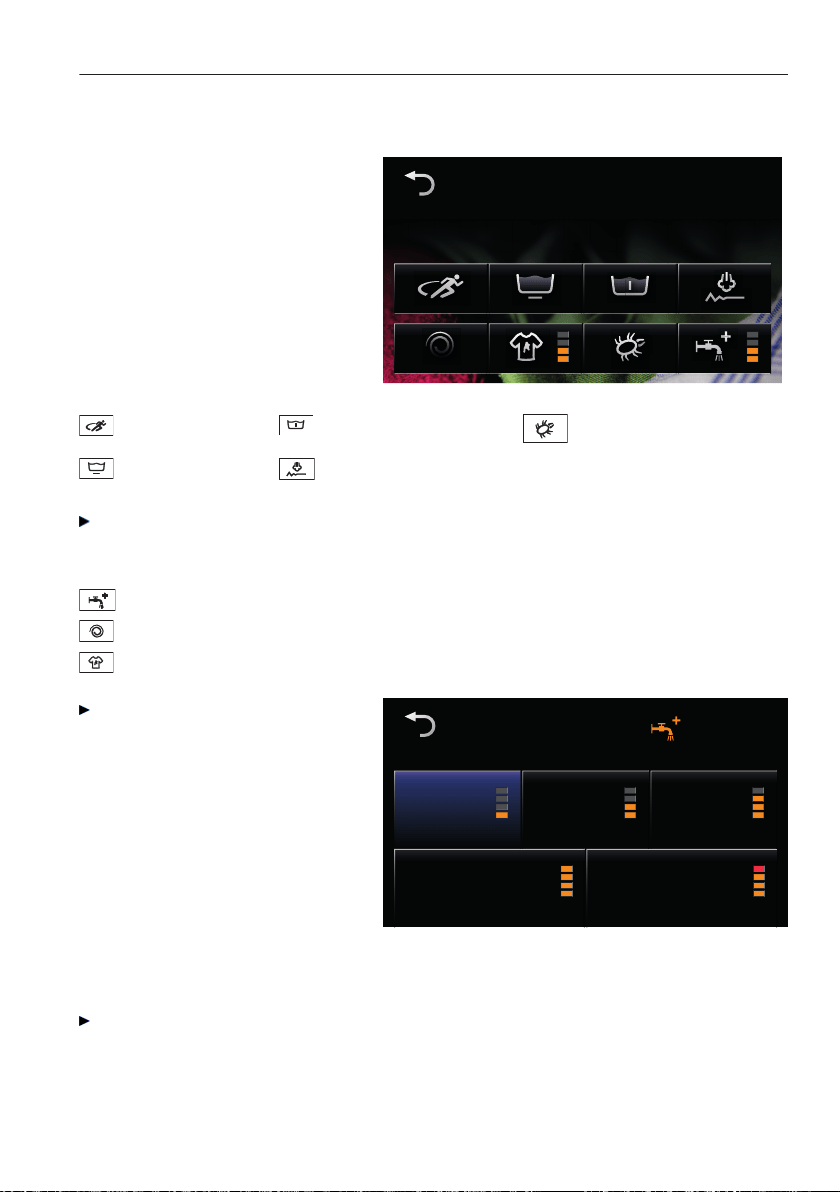
7.8 Selecting additional programmes
After selecting fabric type, e.g.
coloureds, and wash tempera-
ture, e.g. 60 °C, the display
adjacent appears:
1 h 00
16 : 13
60°C Coloureds
800
1 h 00
end 16 : 13
60°C
800
Sprint Pre-wash
Anti-mite
Easy care Steam anti-crease
Press the desired button in the TouchDisplay.
– The button changes its colour from dark «selectable» to blue «selected».
– The new programme duration and programme end time are displayed.
AquaPlus
Spin speed
Degree of soiling
Press the desired button, e.g.
AquaPlus, in the TouchDisplay.
– The TouchDisplay switches
to the adjacent screen:
AquaPlus
+ 1 rinse+ WaterStandard
Skin protection + Water + 1 rinse
– Alternatives to the corresponding additional function are displayed. The
pre-selected state is marked blue.
Press the desired setting.
– The setting is immediately accepted.
– The TouchDisplay switches back again.
7 Washing
47

– The additional function that has been changed is shown as «selected»
blue and the corresponding setting is displayed.
– The new programme duration and programme end time are displayed.
Selecting Eco
Eco
Press the Eco button while the indicator light is flashing.
– The new programme duration and the programme end time appear in
the TouchDisplay.
7 Washing
48
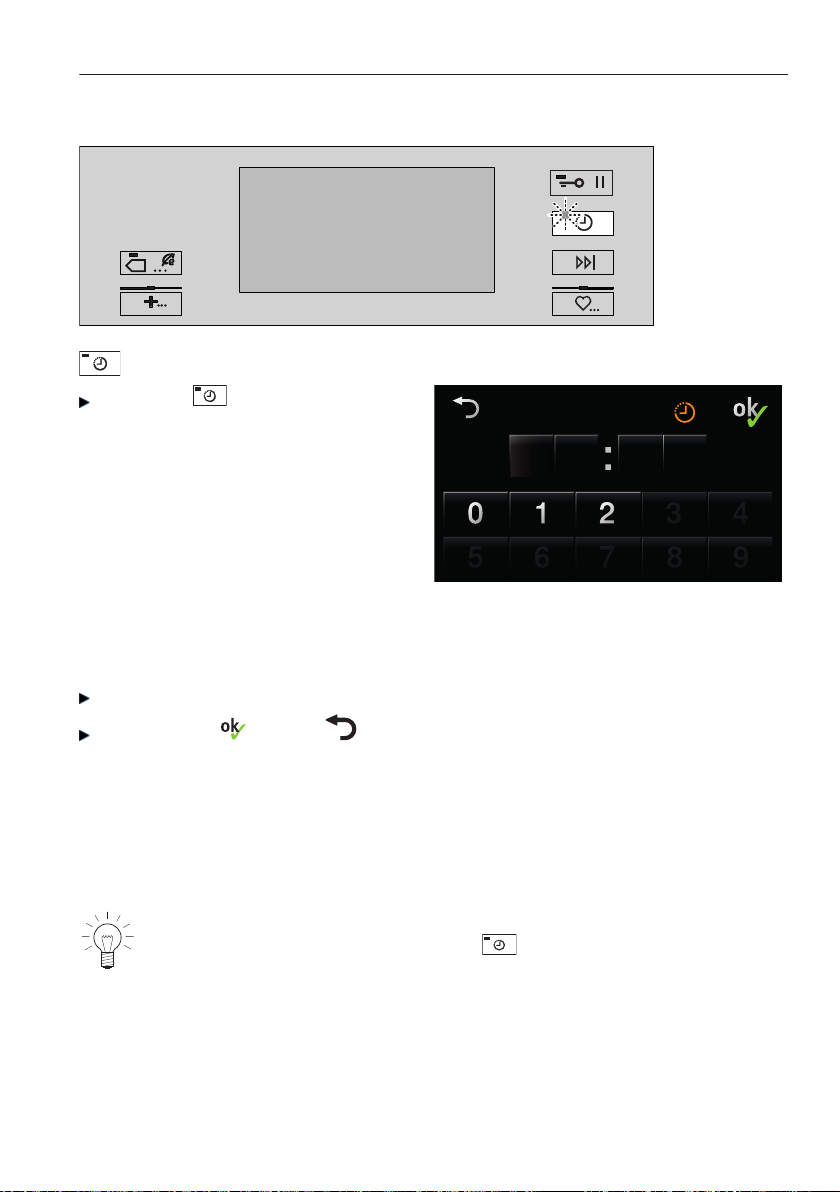
Selecting a delayed start
Delayed start
Press the button while the
indicator light is flashing.
– The TouchDisplay switches to
the adjacent screen:
21 0 3
End of programme
– The digit which can be changed is displayed in orange.
– After a digit has been entered, the orange marking switches automati-
cally to the next digit.
Enter the desired programme end time.
Confirm with (or with back to additional function selection without
delayed start).
– The TouchDisplay switches back again to additional function selection
and goes dark.
– The programmed end time and the calculated start time of the
programme is displayed.
– The programme starts automatically when the start time set is reached.
Washing can be added at any time. The desired end time can be
changed at any time by pressing the button and entering another
programme end time.
7 Washing
49
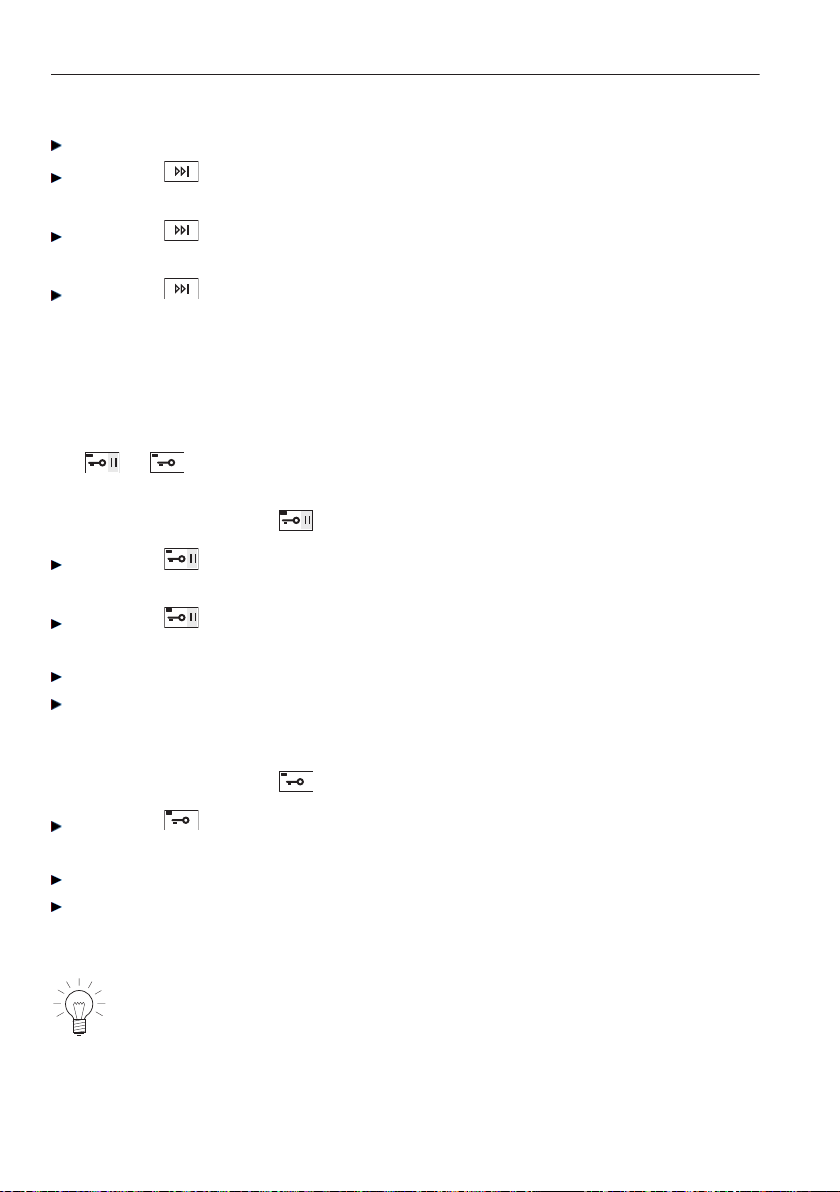
Selecting separate rinsing / separate spinning
Select programme.
Press the button 1×.
– The programme starts from rinse.
Press the button 2×.
– The programme starts from last rinse.
Press the button 3×.
– The programme starts from final spin.
7.9 Opening the appliance door during operation
The appliance door can only be opened if the water level and temperature are
still low and there is no spinning in progress. As long as the indicator light for
the or button is illuminated, the appliance door can be opened.
For appliances with the button
Press the button 1×.
– The appliance changes over to the «Pause» mode.
Press the button again.
– The appliance door opens.
Add or unload wash items.
Close the appliance door.
– The programme is resumed.
For appliances with the button
Press the button.
– The appliance door opens.
Add or unload wash items.
Close the appliance door.
– The programme is resumed.
In the event of a power failure, the appliance door can only be opened
using the emergency door release.
The programme memory ensures that the programme sequence is
resumed after a power failure.
7 Washing
50

7.10 Changing selection
During programme selection
Press the or button.
– All settings are cleared.
Press the button.
– The changes at the active level are not accepted.
– The TouchDisplay switches back to the previous screen.
After a programme has started
The spin speed and temperature can still be changed. To change any other
settings, the programme must be aborted.
Aborting a programme
Press the button repeatedly until the «Draining» part of the programme
appears in the TouchDisplay.
– This part of the programme cannot be skipped and will be carried out in
full.
7 Washing
51
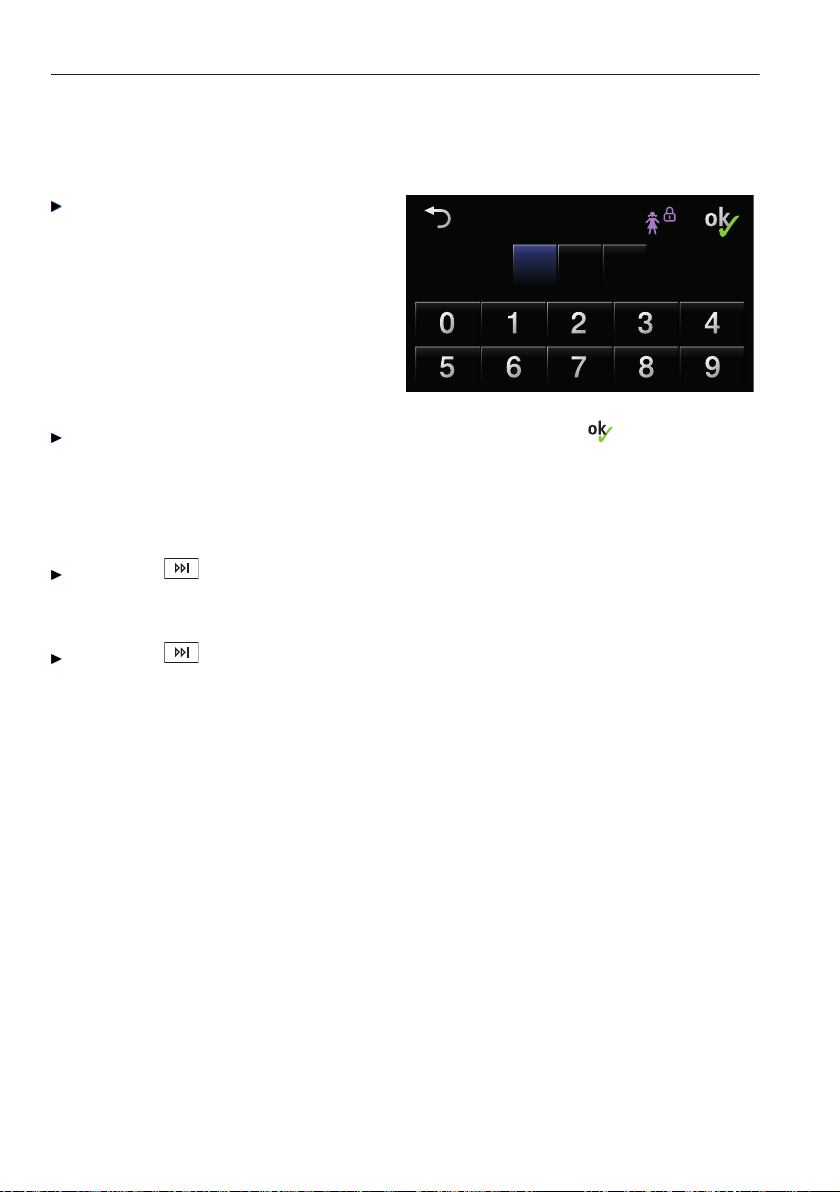
7.11 Programme selection with childproof lock activated
How to switch the childproof lock on/off is described in 'User settings'.
Close the appliance door
– The following display appears:
0 0 0
Childproof lock
Code
731
Childproof lock
Code
731
One after the other, press the digits 7, 3, 1. Confirm with .
– A programme can now be selected.
– If no programme selection is made within 30 seconds, the childproof
lock is activated again.
Aborting a programme
Press the button
– The above display appears again.
– Enter the code to override the childproof lock.
Press the button again until the «Draining» part of the programme
appears in the TouchDisplay.
7 Washing
52
7.12 End of programme
Loosening up the washing
Shortly before the end of the programme, the washing is loosened up. If steam
anti-crease has been selected, the loosening-up period is extended to about
60 minutes to prevent further creasing.
Press the or button to unload the washing at any time during
the loosening-up phase.
With «Automatic door opener OFF»
When the programme has finished, the following
appears in the TouchDisplay for about 20 minutes: End
of programme
Press the or button.
– The appliance door opens and the washing can be unloaded.
In the event of a power failure, the appliance door can only be
opened using the emergency door release.
With «Automatic door opener ON»
• The appliance door opens automatically at the end of the programme.
The washing can be unloaded.
7 Washing
53
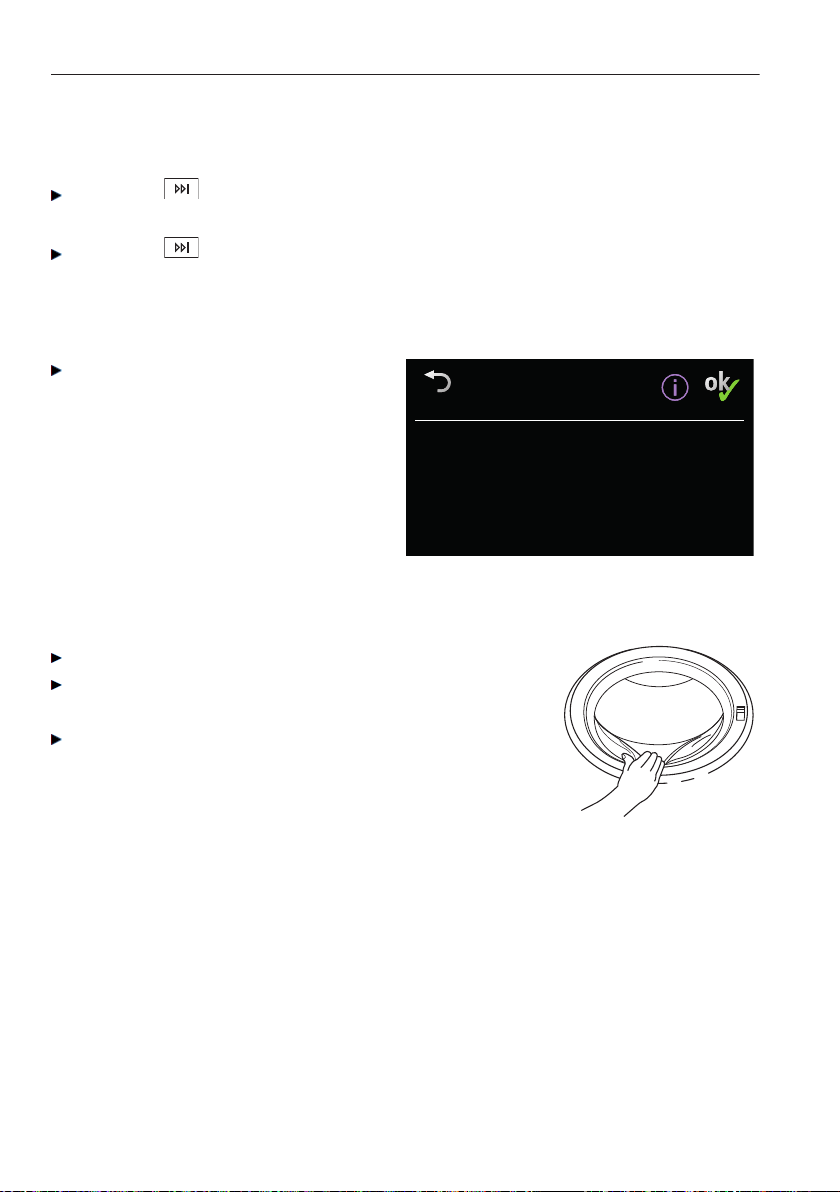
With «Stop after rinsing»
The washing remains lying in the water after the final rinse. The water must be
drained off before the washing can be unloaded.
Press the button 1×.
– The washing is spun at the spin speed set for the programme selected.
Press the button 2×.
– Draining without spinning.
With the hygiene recommendation display
One of the next times you wash, run
a minimum 60 °C wash programme
or the appliance hygiene
programme.
Hygiene
recommendation
- At least 60°C programme
or select appliance hygiene
Hygiene
recommendation
- At least 60°C programme
or select appliance hygiene
7.13 At the end of the wash day
Clean the detergent dispenser drawer if necessary.
After finishing washing for the day, remove any
deposits or foreign bodies from out of the door seal
Push the appliance door to, but do not close.
– This allows the washing drum and the door seal
to dry.
7 Washing
54
8 Care and maintenance
Using the correct dosage of detergent will automatically clean the inside of the
appliance. Immediately wipe away all traces of detergent with a soft cloth to
avoid staining.
8.1 Cleaning the detergent dispenser drawer
If the correct dosage of detergent is used, the compartments in the detergent
dispenser drawer are cleaned by the water flowing in. Wash out the detergent
compartments if particularly soiled.
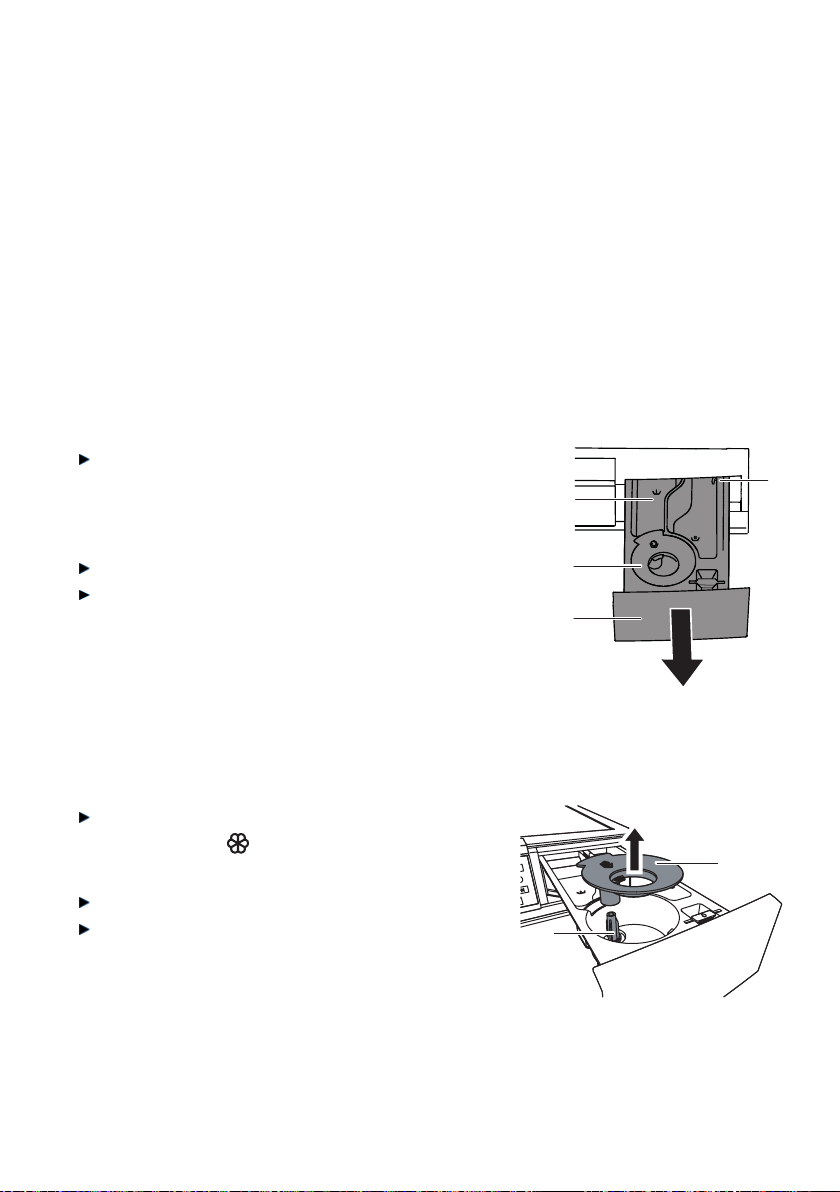
Cleaning the detergent compartments
Pull the detergent dispenser drawer 1 out
as far as it will go, push the release lever
4 to the left and then remove the drawer
completely.
Wash out the detergent compartments.
Clean the duct under the pre-wash deter-
gent compartment l.
2
1
4
l
Cleaning the siphon and suction tube
Pull the siphon 2 in the fabric conditioner
compartment up in the direction of the
arrow.
Clean the siphon 2 and suction tube 3.
Replace the siphon correctly.
3
2
55
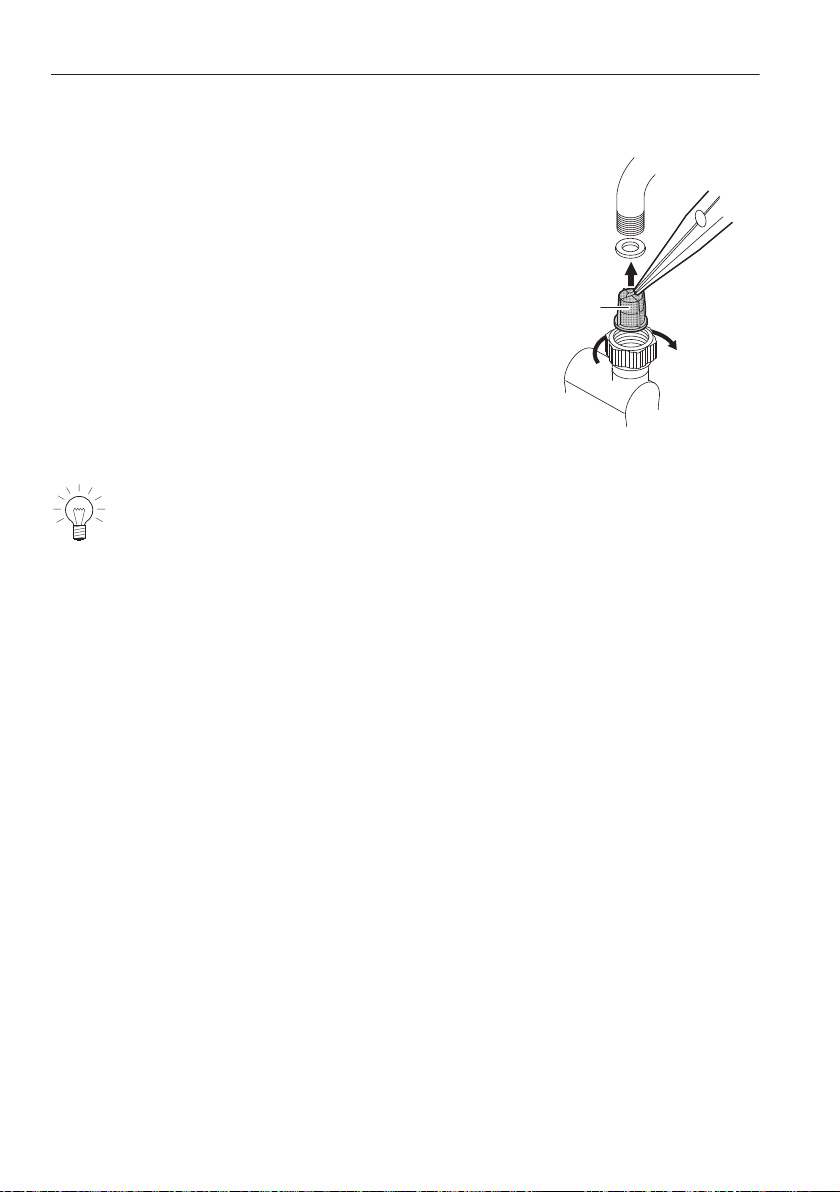
8.2 Cleaning the water inlet filter
To avoid blockages, the filter 1 in the water inlet must
be periodically checked and, if necessary, cleaned.
1
The water inlet should be tested for leaks following maintenance work.
8 Care and maintenance
56

8.3 Emergency draining
The water in the appliance may be hot. Scalding hazard! Allow to
cool before emergency draining.
In the event of a blocked water outlet or drain pump, a malfunction
or a power failure, if there is water still in the appliance it must be
drained off as follows:
Open the drain tray 1 by pressing it at
the bottom.
1
1
1
2
1
or:
Open the drain tray 1 with the liquid
detergent flap.
Fold the drain tray 1 right down.
– The drain tray also functions as a
receptacle for collecting the water
being drained off.
Release the foreign body trap 2
slightly by slowly turning it anti-clock-
wise. Steadily drain off the water.
From time to time the drain tray
may have to be emptied.
Close the foreign body trap by turning
it clockwise and remove the drain tray
1 from the front.
Empty the drain tray and then put it
back in position (push it straight in
until it clicks into position).
When draining off the water, the drain tray can be removed and a
larger receptacle used in its place. The appliance can hold up to 30
litres of water.
8 Care and maintenance
57
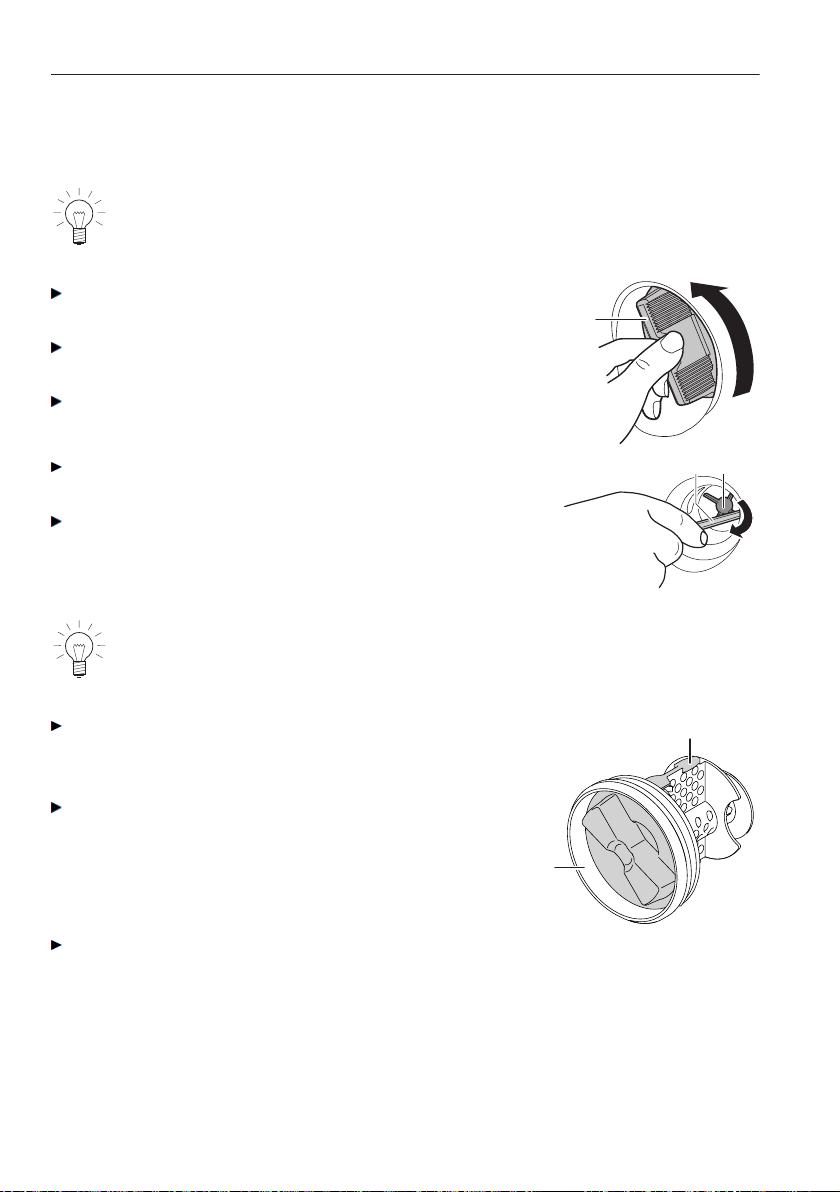
8.4 Cleaning the foreign body trap
The foreign body trap 1 must be periodically cleaned of any deposits.
The foreign body trap should also be cleaned after washing e.g. pet
blankets or other wash items that cause a thick build-up of fluff.
Drain off any residual water, see section on «Emer-
gency draining».
Then turn the foreign body trap 1 anti-clockwise and
remove. Clean thoroughly.
Remove any foreign objects (buttons, coins, etc.).
1
Check that the drain pump impeller 2 can turn. Use
the emergency door release tool 3 for this.
If the impeller 2 does not turn, please contact
Customer Services.
23
The impeller 2 may turn stiffly. This is construction related and does
not indicate the presence of any foreign object or defect.
Insert the foreign body trap 1 – with
the arrow-Shaped positioning lug 4
facing upwards – as far as it will go.
Then turn the whole thing clockwise
as far as it will go.
4
1
Replace the drain tray and close it
to.
8 Care and maintenance
58
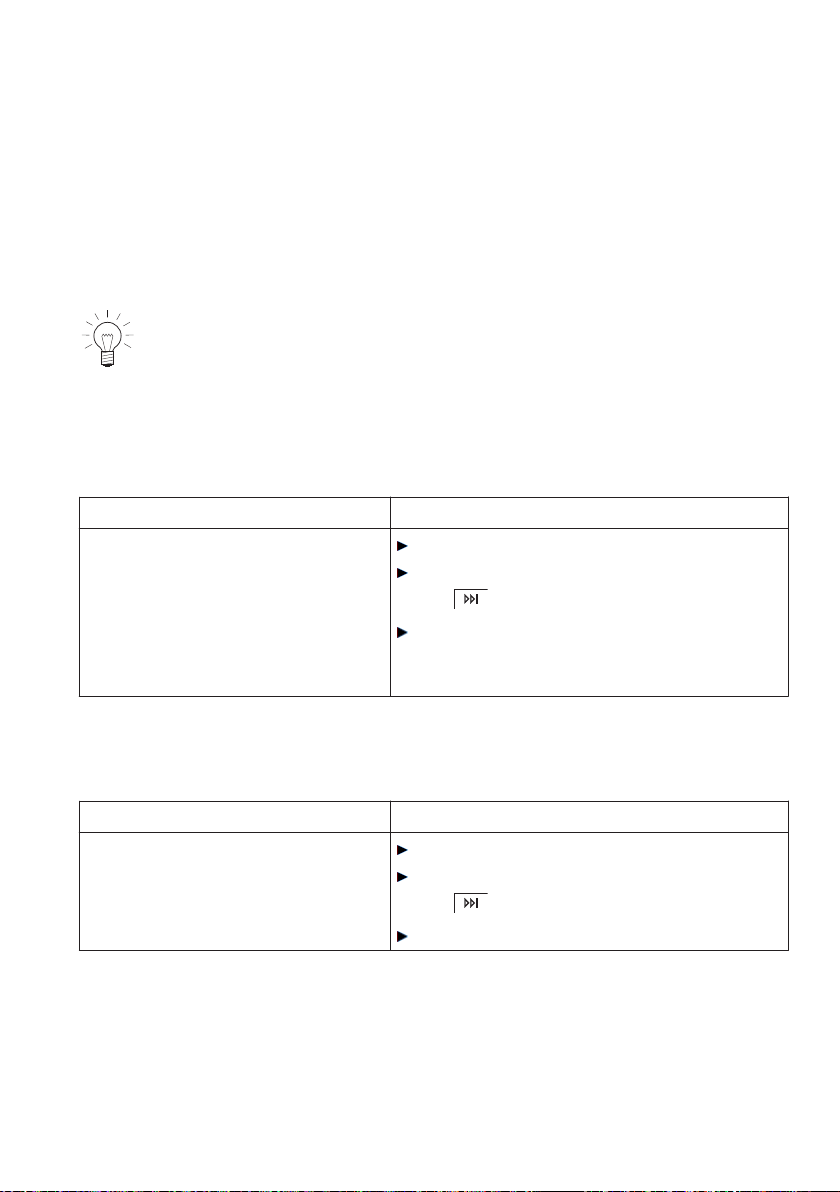
9 Trouble-shooting
9.1 What to do if …
This section lists faults that can be solved simply by following the instructions
given. If another fault is displayed or the fault cannot be remedied, please call
Customer Services.
Before calling Customer Services, please note down the error
message in full.
FXX/EXXX FNXXXXX XXXXXX see instructions
... in the display appears
A2 Check water outlet
Possible cause Solution
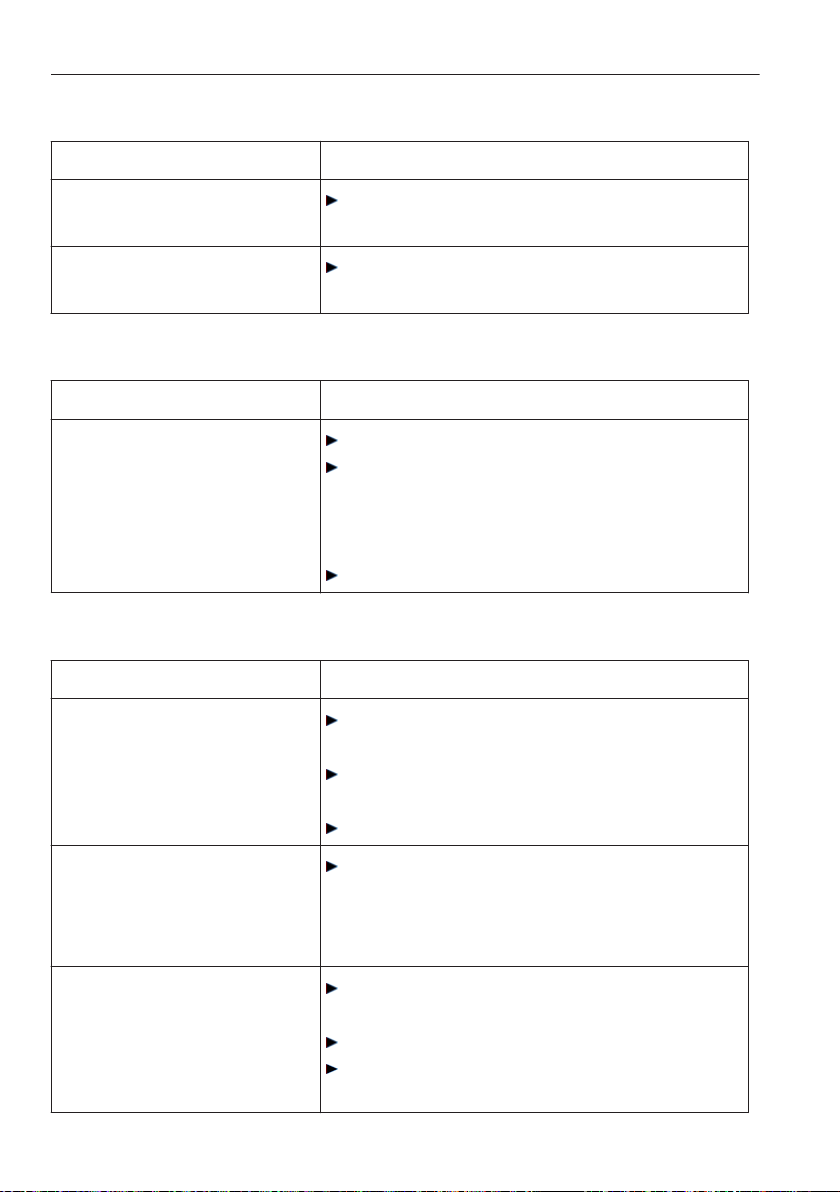
• The foreign body trap or drain
pump is blocked.
• The drain hose is bent or
kinked.
• The outlet or drain trap is
clogged.
Resolve the cause of the problem.
Cancel the error message by pressing
the button.
Restart the programme.
... in the display appears
A3 Clean foreign body trap
Possible cause Solution
• The foreign body trap is
clogged.
• The circulation nozzle is
clogged.
Remove the cause of the problem.
Cancel the error message by pressing
the button.
Restart the programme.
59
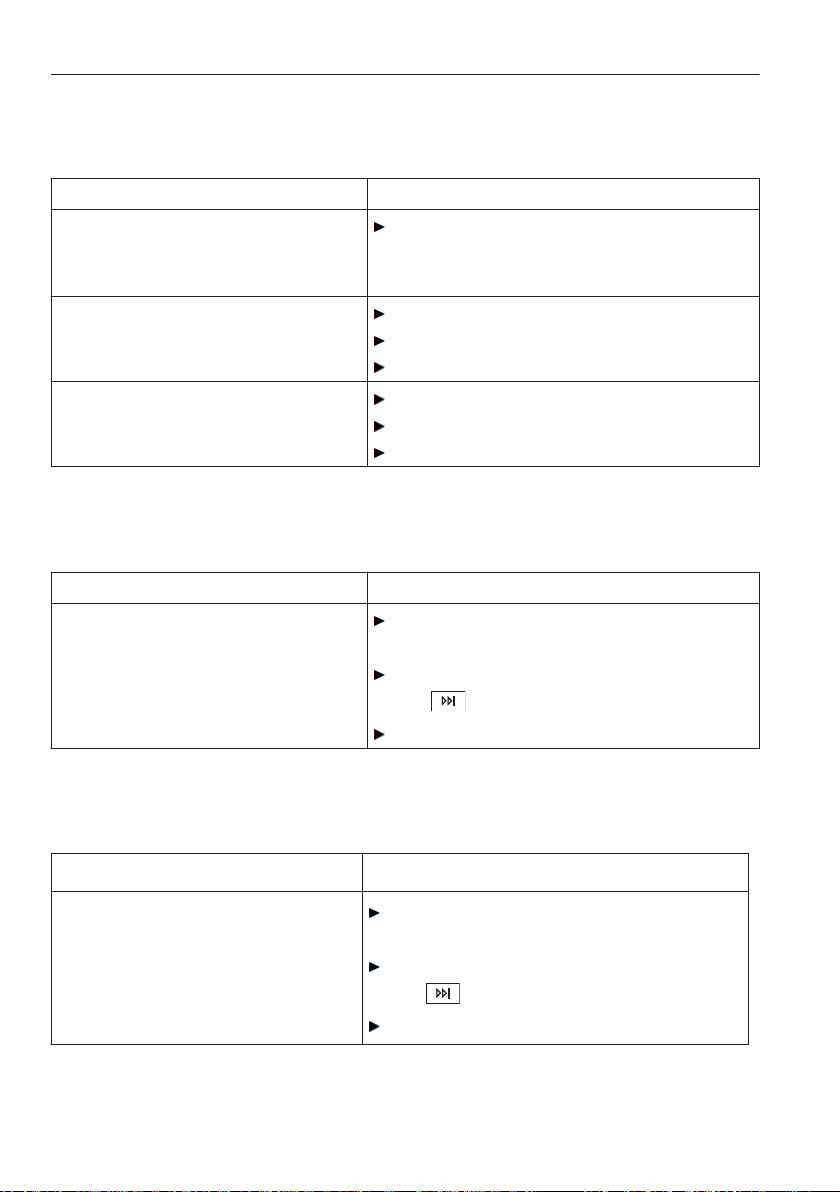
... in the display appears
A5 Spin stop: Unbalanced load
Possible cause Solution
• Large items are unevenly
distributed in the washing
drum.
Wash large and small items together to
reduce the possibility of unbalanced
loads forming.
• Pillows or similar items in the
wash.
Remove the pillows.
Spin the washing again.
Spin the pillows separately.
• Wash items are tangled.
Separate the wash items.
Fasten duvet covers and pillow cases.
Spin the washing again.
... in the display appears
A6 Check foreign body trap
Possible cause Solution
• The foreign body trap is
missing or is not sitting
correctly.
Ensure the foreign body trap is sitting
correctly.
Cancel the error message by pressing
the button.
Restart the programme.
... in the display appears
A9 Check water inlet
Possible cause Solution
• The water tap is turned off.
• The mesh filter in the water
connection is clogged.
• Interruption in water supply.
• The water pressure is too low.
Remove the cause of the problem or
wait until the water supply is restored.
Cancel the error message by pressing
the button.
Restart the programme.
9 Trouble-shooting
60
... in the display appears
F6/E77 FNXXXXX XXXXXX see instructions
Possible cause Solution
• Related to anti-leak protection.
Turn off the water tap.
Note down the error message in full
(message, F and E number).
Cancel the error message by pressing
the button.
Call Customer Services.
... in the display appears
Possible cause Solution
• Various situations can lead to
an «F» message.
Cancel the error message by pressing
the button.
Switch off the power supply for about
1 minute.
Switch the power supply back on
again and select a new programme.
If the error appears again, note down
the error message in full (message, F
and E number)
Turn off the water supply and switch
off the power supply.
Call Customer Services.
If there is still some washing in the appli-
ance:
Carry out emergency draining.
Use emergency door release.
Unload the washing.
Call Customer Services.
9 Trouble-shooting
61
... in the display appears
U1/E27 FNXXXXX XXXXXX see instructions
Possible cause Solution
• Faulty electrical connection.
• Overvoltage
Cancel the error message by pressing
the button.
Switch off the power supply for about
1 minute.
Switch the power supply back on
again and select a new programme.
If the error appears again:
Switch the power supply off.
Have an electrician check the house
installation.
If the error appears again:
note down the error message in full
and the serial number (FN) and then
disconnect the power supply.
Call Customer Services.
... in the display appears
Foam in main wash, rinsing extended
Possible cause Solution
• If there is very heavy foaming
during the wash cycle, the
programme is automatically
extended by an additional
rinsing cycle. This improves
the wash results, but also
increases the duration of the
programme.
Reduce the amount of washing deter-
gent used next time.
Adjust the amount of washing deter-
gent used to the water hardness.
9 Trouble-shooting
62
... in the display appears
Hygiene recommendation: Select at least a 60 °C programme or appliance
hygiene
Possible cause Solution
• No wash cycle has been
carried out at a tempera-
ture of at least 60 °C for
a longer period of time.
With one of the next wash cycles carry out
a wash with at least 60° C.
or:
Run the «Appliance hygiene» programme
without any washing.
... the programme takes significantly longer than indicated
Possible cause Solution
• Using too much washing
detergent. Lengthening
the rinsing time.
Reduce the amount of washing detergent
used next time.
• Large unbalanced load in
the washing drum.
Wash large and small items together to
reduce the possibility of unbalanced loads
forming.
• Inlet water very cold.
Heating is extended.
... in the display appears
Inlet water very cold, heating extended
Possible cause Solution
• Inlet water very cold.
Heating is extended.
9 Trouble-shooting
63
... in the display appears
Too many articles, heating extended
Possible cause Solution
• Selected programme is
intended for a reduced
washing load. If there are
too many articles, heating
and possibly also the
rinsing will be extended.
With the next wash cycle adjust the amount of
articles to the max. washing load (see
'Programme overview').
… the washing is not spinning or is not being spun properly
Possible cause Solution
• The spin speed set is too
low.
Increase the spin speed for the next wash
cycle.
• Too unbalanced a load in
the washing drum. The
wash items cannot be
more evenly distributed.
Wash large and small items together to
reduce the possibility of unbalanced loads
forming.
• Steam anti-crease was
selected and the appli-
ance was not standing
level.
Optimize the appliance set-up according to
the installation instructions.
... in the display appears
Large unbalanced load, spin extended
Possible cause Solution
• Large unbalance in the
washing drum. The appli-
ance tries to improve the
distribution of the wash
load. The final spin is
extended.
Wash large and small items together to
reduce the possibility of unbalanced loads
forming.
9 Trouble-shooting
64

… vibrating heavily when spinning
Possible cause Solution
• The transportation lock
has not been removed.
Remove transportation lock.
• The feet of the appliance
are not properly adjusted.
Optimize the appliance set-up according to
the installation instructions.
• The load could not be
optimally balanced in the
washing drum. This is not
a malfunction.
Wash large and small items together to
reduce the possibility of unbalanced loads
forming.
… at the end of the programme, the appliance door cannot be opened by
pressing the door opener button
Possible cause Solution
• The appliance door is
stuck.
Press hard against the lock side of the
appliance door (i.e. front edge of appliance
door).
Some text appears in the plain text display.
Press the or button.
• An interruption in the
power supply.
Use emergency door release.
… at the end of the programme water sounds can be heard when the
washing drum is turned by hand
Possible cause Solution
• The water that the vanes
were filled with to
compensate the unbal-
anced load could not be
completely drained before
the end of the
programme.
No action is necessary. The expelled water is
automatically pumped off and there are no
negative consequences.
9 Trouble-shooting
65
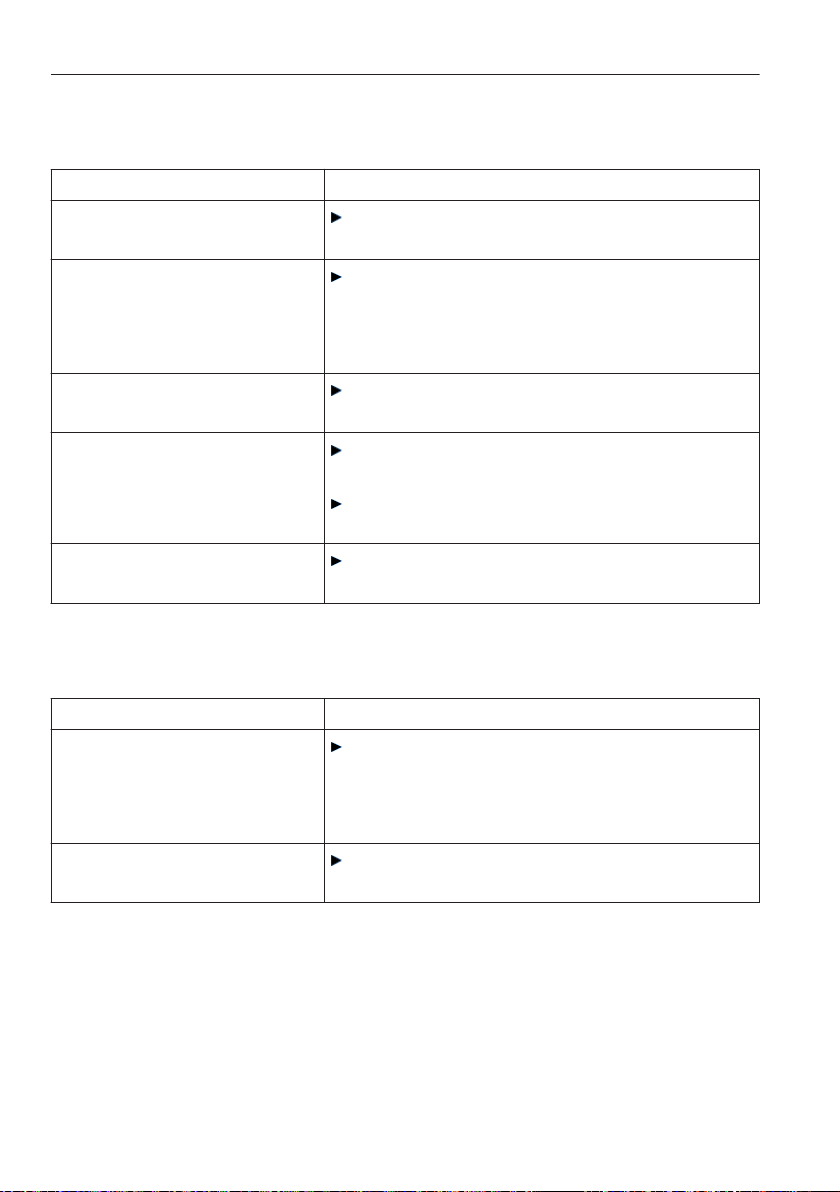
... traces of washing detergent left behind in the washing detergent
compartment
Possible cause Solution
• Damp or lumpy washing
detergent.
Store washing detergent in a dry place.
• The washing detergent
compartment was damp
and a delayed start was
selected.
Wipe the washing detergent compartment
dry before adding the detergent.
• The water flow pressure is
too low.
Open water tap fully.
• The water inlet is scaled
up.
Check the water supply and, if necessary,
clean the filter.
Clean nozzles above detergent dispenser
drawer.
• The liquid detergent flap
was inserted.
Remove the flap and stow away.
... traces of fabric conditioner or water left behind in the fabric conditioner
compartment
Possible cause Solution
• The siphon in the fabric
conditioner compartment
is missing or is not in
place correctly.
Ensure the siphon is in place correctly.
• The siphon or suction
tube is clogged.
Clean the siphon and suction tube.
9 Trouble-shooting
66
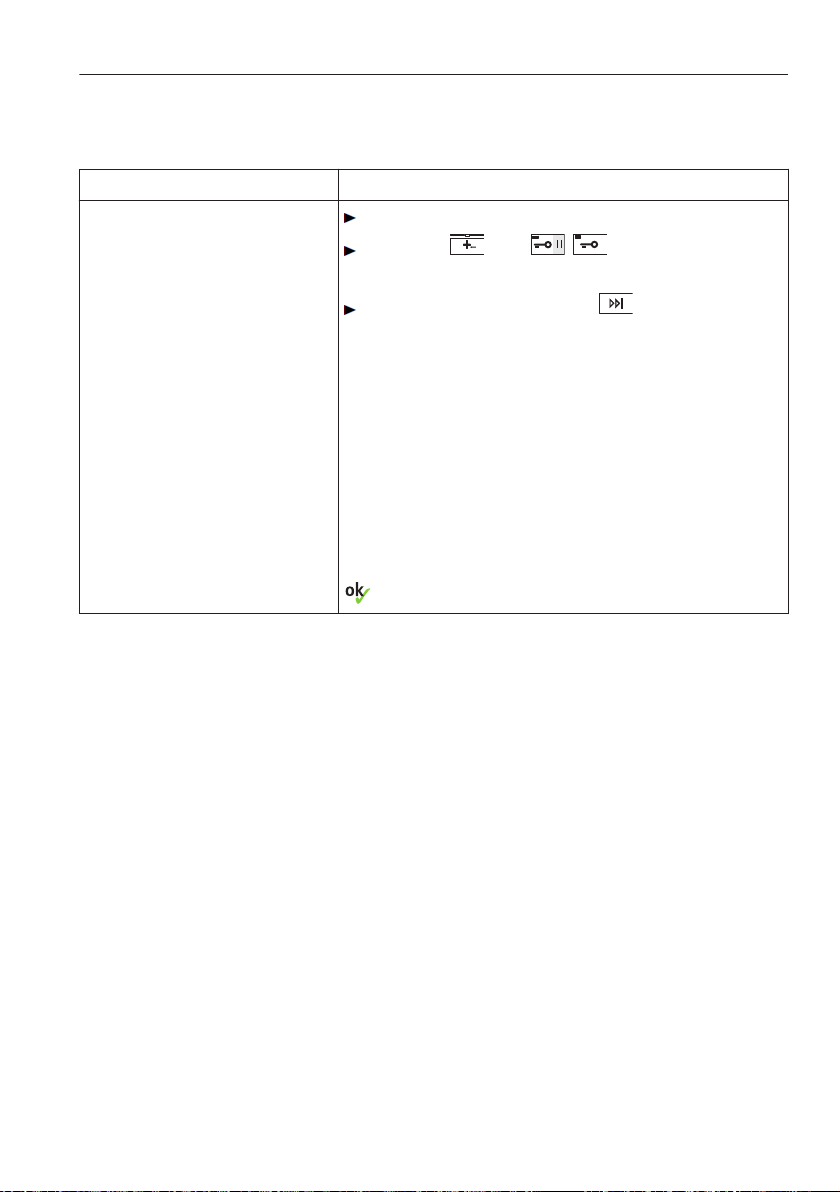
… the washing load is still dry at the end of the programme and no error
message is displayed
Possible cause Solution
• «Demo mode» is
switched on.
Open the appliance door.
Hold the and / buttons
depressed.
Simultaneously press the button.
In the TouchDisplay appears:
Status of
demo mode: ON
Turn the demo mode off by pressing the rele-
vant button in the TouchDisplay and save with
.
9 Trouble-shooting
67

9.2 Opening the appliance door in the event of a power
failure
Ensure that the washing drum is stationary. Do not touch the drum
while it is still in motion – risk of serious injury.
If the emergency door release tool 2 is missing, a screw driver can be
used instead.
Turn off the water tap.
Disconnect the appliance from the elec-
tricity supply.
1
3
2
1
1
Open the drain tray 1 by pressing it at
the bottom.
or:
Open the drain tray 1 with the liquid
detergent flap.
Fold the drain tray right down.
If necessary, carry out emergency
draining.
Remove the drain tray 1.
Remove the emergency door release
tool 2 from its fastening.
Insert the emergency door release tool
into the blue opening cap 3 and turn in
the direction of the arrow.
- The appliance door springs open.
Door hinged left Door hinged right
9 Trouble-shooting
68

10 Washing tips
10.1 Fabric care symbols
To wash items correctly, please follow the fabric care symbols on the labels of
the wash items.
10.2 Washing detergent
The wash temperature selected should agree with the recommended tempera-
ture range of the washing detergent to ensure the washing detergent is at its
most effective.
10.3 General tips
• Wash white and coloured textiles separately.
• Empty pockets and turn inside out. Remove any foreign objects (coins,
nails, paper clips, etc.).
• Empty and brush out pockets of work overalls worn in the metal industry
(metal shavings can damage the washing and cause rust stains).
• Fasten duvet covers and pillow cases; close zips and hook and eye
fasteners; fasten cloth belts and apron ties.
• Wash smaller items (e.g. nylon tights, belts) and items with zips and hooks
in a washing net or cushion cover.
• Remove stains before washing using a suitable stain remover.
• Pre-treat heavily soiled areas (collars, cuffs, etc.) with soap, special deter-
gent or paste.
• For medium or heavily soiled washing, select the additional pre-wash
programme or select a heavier degree of soiling.
• Wash woollens and other textiles with the fabric care label using the
main hand wash programme only. Use detergent suitable for woollens
and delicates.
• Textiles, such as dog or horse blankets, that are covered in animal hair
should be brushed out before washing
69

10.4 Net curtains
If washing curtains made from mixed or man-made fibres:
• Ask the retailer whether the curtains are machine washable and, if so, at
what water temperature.
• Fill the washing drum only a quarter full.
• Tie up metal rollers and plastic sliders using an open weave fabric.
• Use a mild detergent (use sparingly due to foaming).
• With older, faded curtains, the material is weaker and may be easily
damaged if machine washed.
10 Washing tips
70

10.5 Saving energy and water
• Use the maximum wash load capacity of the particular programme.
• Select «Pre-wash» or «Soaking» only for washing that is heavily soiled or
stained.
• For lightly soiled washing without staining select the main
20
programme
or the additional «Sprint» function.
• Select the additional Eco function if programme duration plays no role.
Spin speed
How much energy is consumed by subsequent tumble drying depends on the
spin speed set. The higher the spin speed set, the lower the level of residual
moisture in the washing at the end of the programme.
rpm Residual moisture in cotton fabrics in %
1600 ~44
1400 ~47
1200 ~52
1000 ~60
800 ~70
600 ~90
400 ~110
Automatic door opener
Use the appliance with the automatic door opener turned on. In this way, when
the appliance door opens the appliance immediately enters the lowest
possible stand-by power consumption state.
10 Washing tips
71
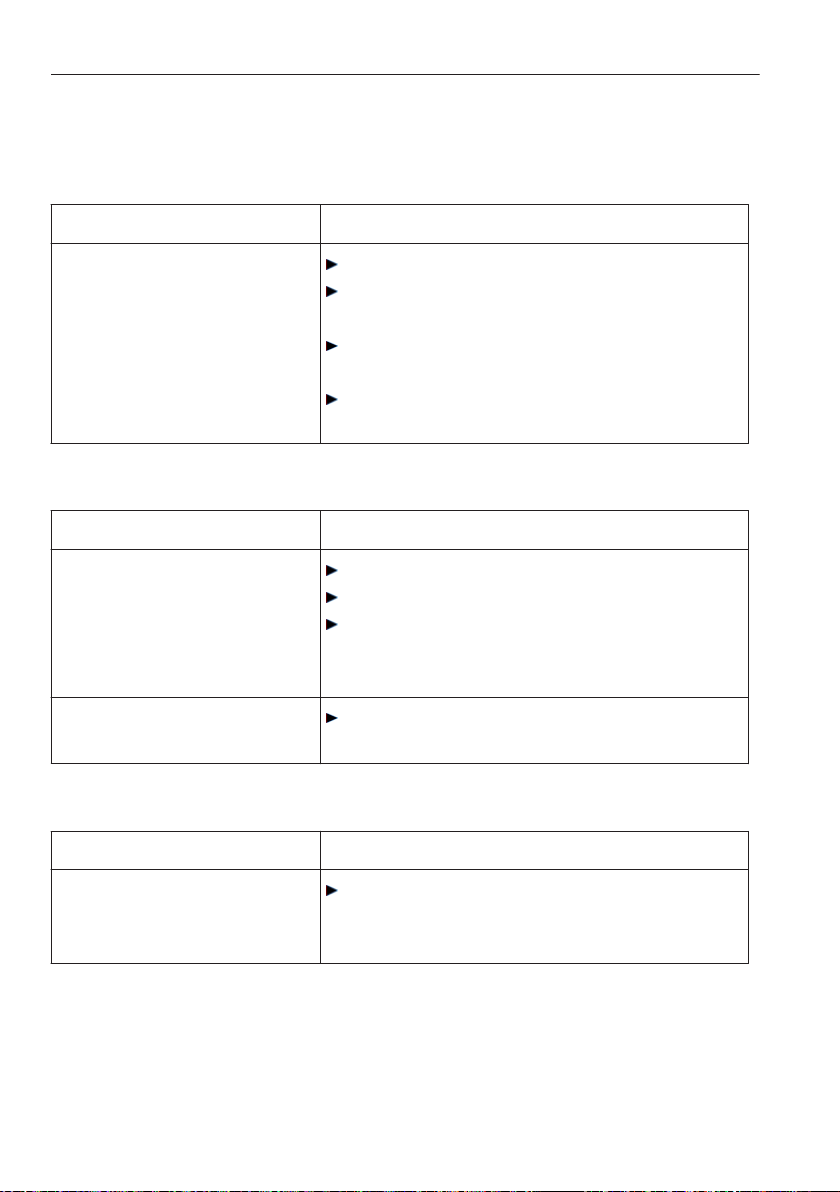
10.6 Unsatisfactory wash results
White residue on washing
Possible cause Solution
• Despite thorough rinsing,
badly soluble compounds
(zeolites) in the detergent
can be left on the
washing.
Shake out or brush the wash items.
Wash the items again with just a little
washing detergent.
Use a liquid detergent that does not
contain zeolites.
Select the additional «Black garments»
programme.
Grey residue on washing
Possible cause Solution
• Grease and dirt particles
have not been removed
from fabric effectively.
• Residue from detergent,
limescale and dirt.
Use more detergent next time.
Use heavy-duty washing detergent.
Adjust amount of detergent to water hard-
ness and degree of soiling of washing.
• Overloaded washing
drum.
Put less laundry into the washing drum.
Washing feels hard to the touch
Possible cause Solution
• Poor rinse effect from
«very soft» water (below
15 °fH).
Select the «Soft water» user setting.
10 Washing tips
72
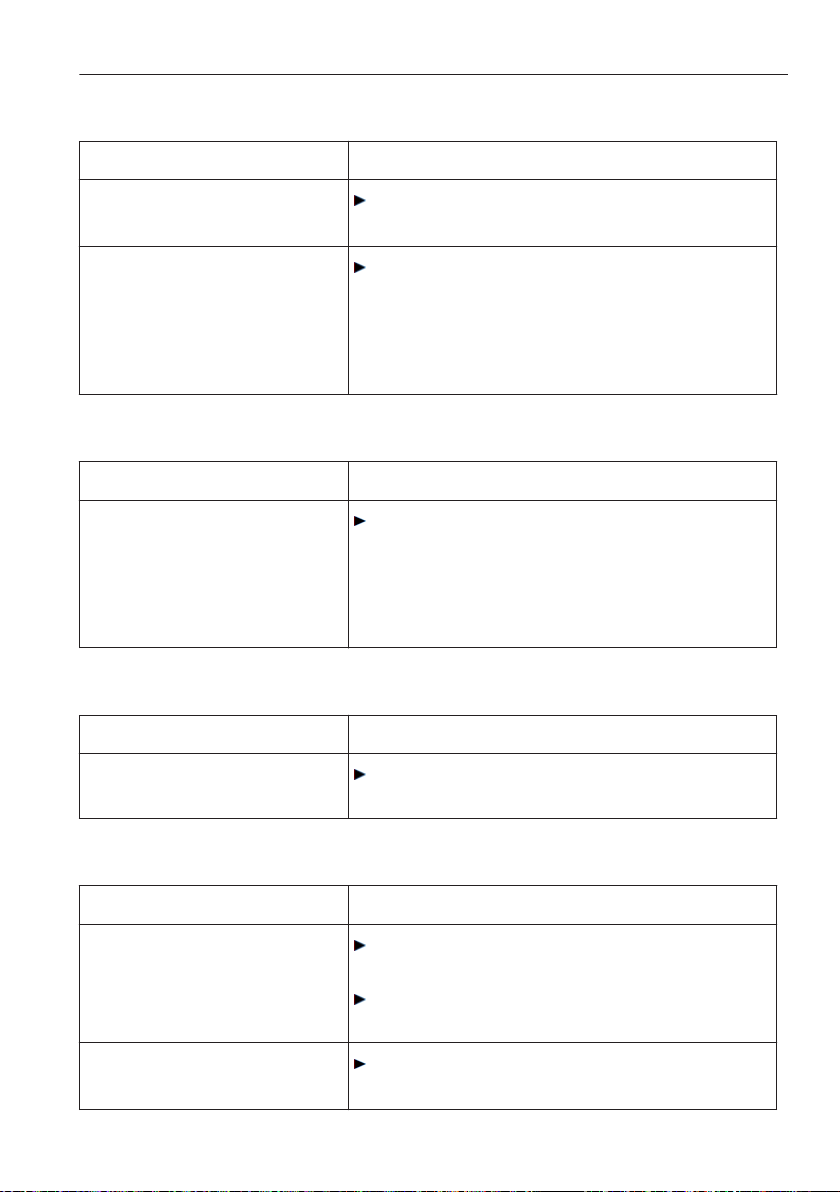
Unsatisfactory wash result using detergent for coloureds
Possible cause Solution
• Exceptionally heavily
soiled washing.
Select stronger wash programme, e.g.
degree of soiling «heavy».
• Washing detergent used
does not contain bleach.
Fruit, coffee and tea
stains cannot be
removed.
Use washing detergent containing bleach.
Unsatisfactory wash result using liquid detergent
Possible cause Solution
• Liquid detergent used
does not contain bleach.
Fruit, coffee and tea
stains cannot be
removed.
Use washing detergent containing bleach.
Soap deposits on washing
Possible cause Solution
• Water too hard.
Only use soap detergent if the water hard-
ness does not exceed 25 °fH.
Colour run
Possible cause Solution
• Non-fast colours in the
wash.
Wash white and coloured textiles sepa-
rately.
Follow the fabric care instructions on the
items of washing.
• Objects in the wash
whose colour has run.
Empty garment pockets.
10 Washing tips
73
Unsatisfactory rinsing performance
Possible cause Solution
• Too much washing deter-
gent.
Adjust washing detergent dosage to water
hardness and degree of soiling.
• Very «soft» water (below
15 °fH).
Set to the soft water setting (see 'User
settings').
Fabric stains
Possible cause Solution
• Rust stains.
• Chemical effect.
Brush out work overall pockets.
Residues from hair care products,
cosmetics and plants can react with the
suds to cause a chemical reaction that can
result in staining.
Wash items with metal parts separately.
Holes, rips or tears
Possible cause Solution
• Washing items with zips
or hooks (e.g. bras)
open.
Fasten zip fasteners and hooks before
washing.
Wash delicates in a laundry bag or pillow
case.
Turn garment pockets inside out.
• Chemical effect of
washing detergent.
• Fabric quality, wear and
tear, weathering of fibres.
Do not put washing detergent directly on to
fabrics.
• Washing drum damaged
by foreign objects (e.g.
nails, paper clips, bra
hooks).
Inspect the washing drum for foreign
objects and for damage.
Remove foreign objects.
Call Customer Services if the washing
drum is damaged.
10 Washing tips
74
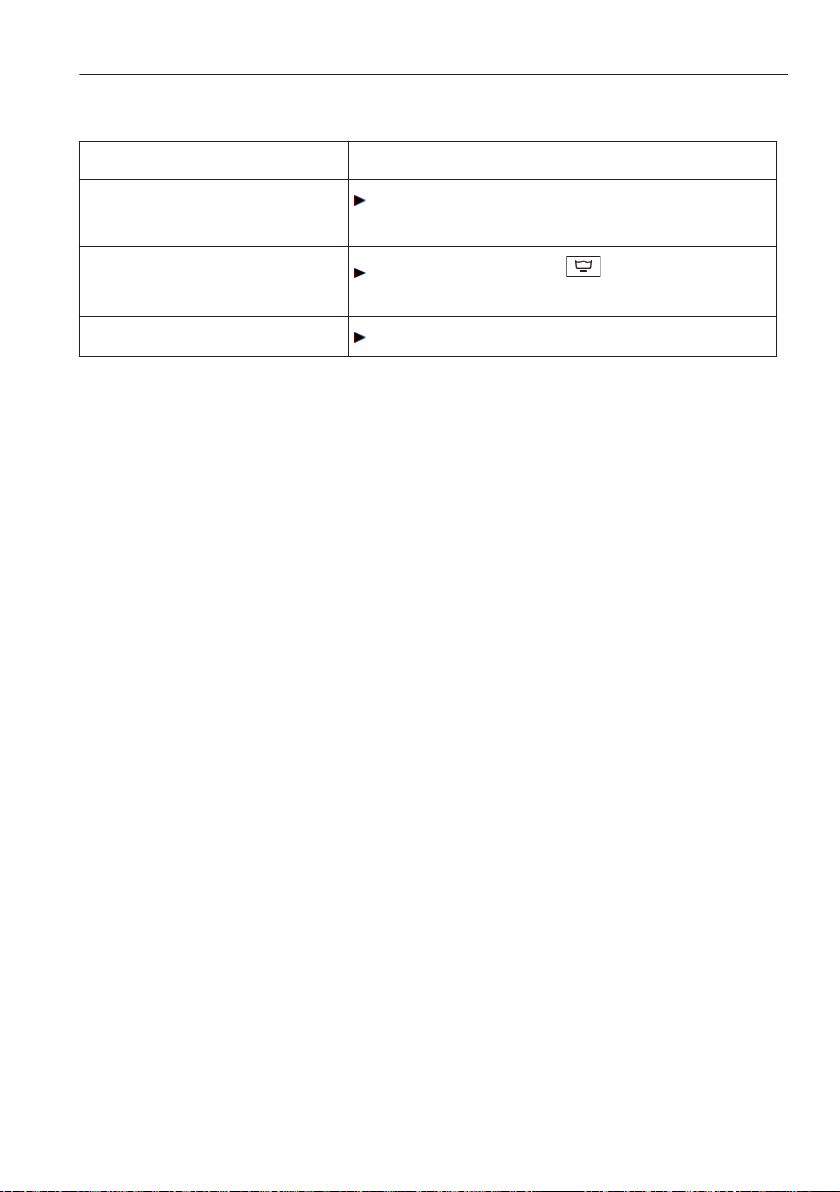
Fabric wear
Possible cause Solution
• Washing drum over-
loaded.
Put less laundry into the washing drum.
• Friction between fabrics
during washing.
Select the additional «Easy care»
programme.
• Pilling.
Turn items inside out before washing.
10 Washing tips
75
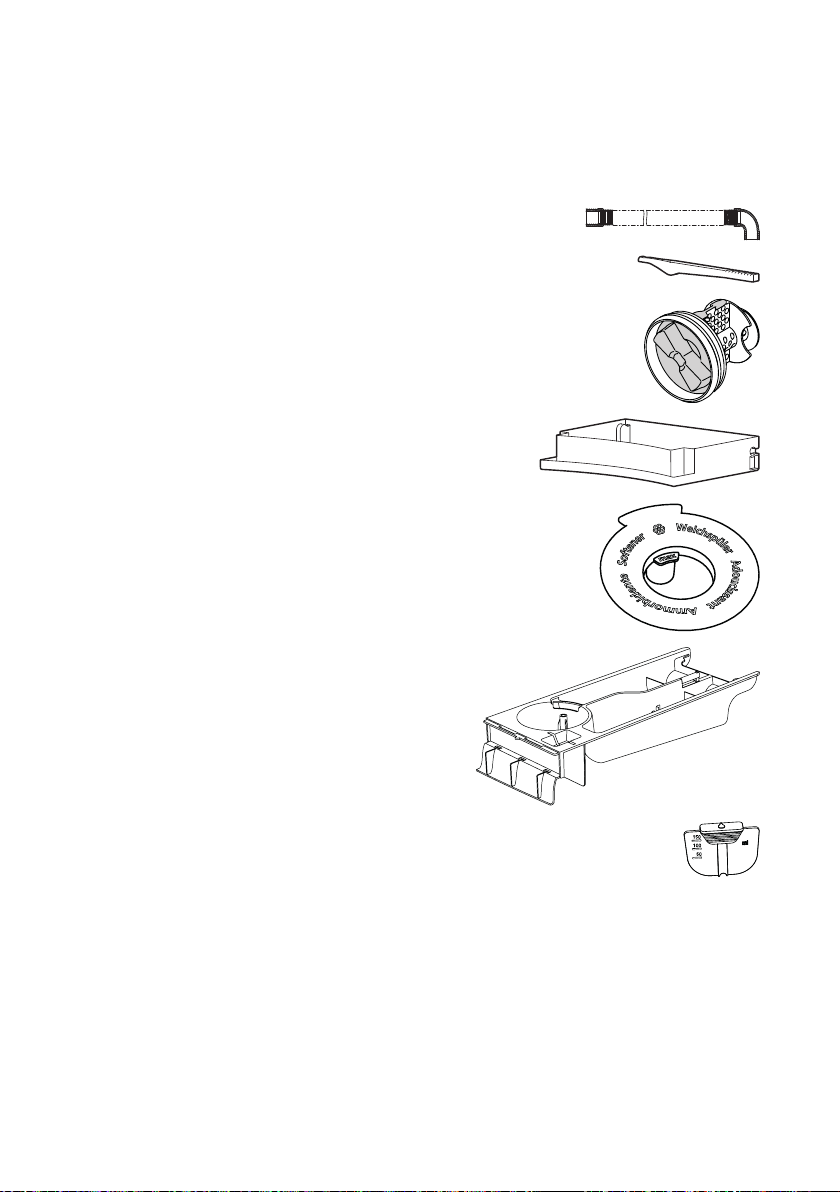
11 Spare parts
Please give product family and exact designation when ordering parts.
Drain hose 1.5 m / 4.0 m
Emergency door release tool
Foreign body trap
Drain tray
Siphon
Detergent dispenser drawer
Liquid detergent flap
76
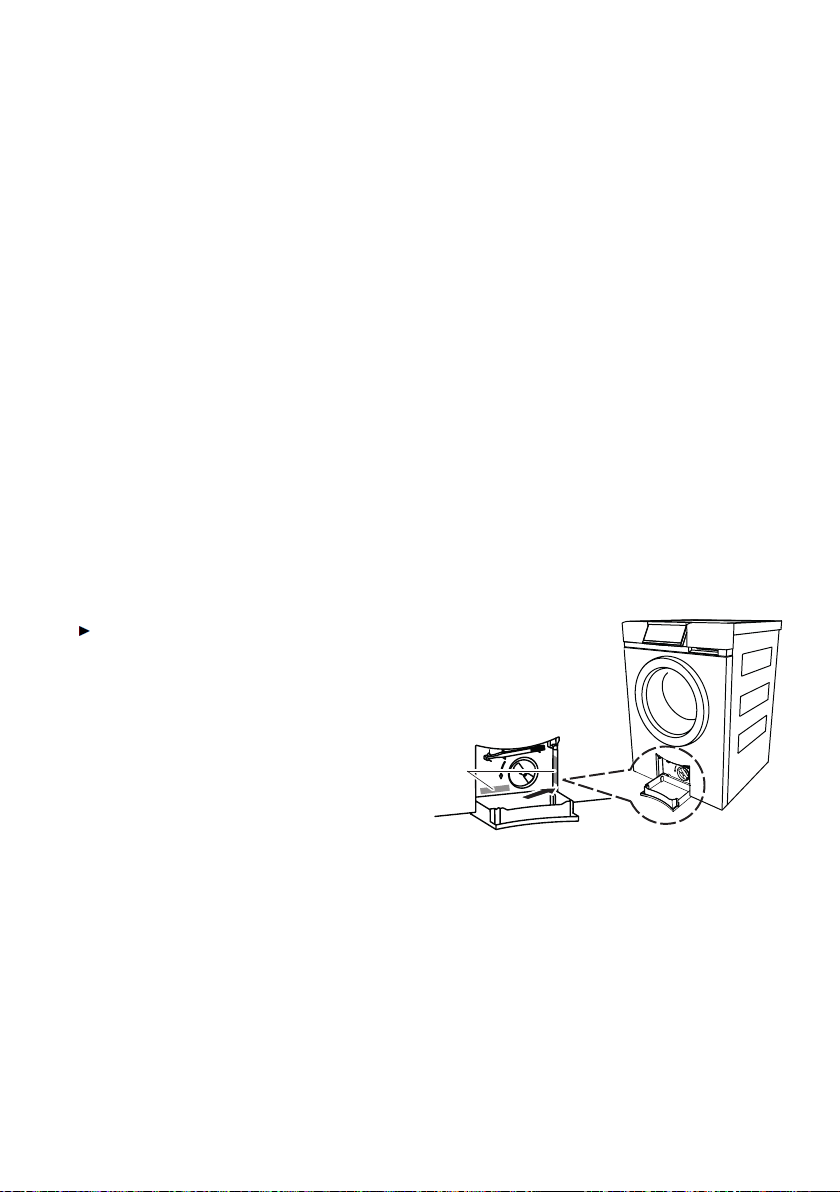
12 Technical data
12.1 Dimensions
Height: 85 cm
Width: 59.5 cm
Depth: 60 cm
Empty weight: 71 kg
Dry load capacity: 8 kg
12.2 Plumbing in
Connection to water supply: Cold water G¾"
Permitted pressure of water supply: 0.1–0.6 MPa (1–6 bar)
Max. pumping height of drain pump: 1.2 m
12.3 Electrical connection
See identification plate 1
1*
* Depending on the serial number (FN)
12.4 Spin speed
400, 600, 800, 1000, 1200, 1400, 1600 rpm
77

12.5 Consumption data
The consumption data and programme durations given serve only as a guide.
They refer to the maximum load capacity and can vary with, for instance,
towelling material, a very cold water feed, the degree of soiling selected or a
smaller wash load. The time remaining and the programme end time shown
are adjusted during the programme sequence accordingly.
Whites and coloureds programmes, soiling light
Programme Load
kg
Spin
speed
1
rpm
Duration
2
hrs./mins.
Water
Litre
Energy
kWh
Whites
95 °C
1–8 1200 1h38 2h15 75 2.2
Coloureds
70 °C
1–8 1200 1h30 2h00 65 1.6
Coloureds
60 °C
1–8 1200 1h15 1h32 65 1.3
Coloureds
40 °C
1–8 1200 1h05 1h14 70 0.8
Coloureds
30 °C
1–8 1200 1h02 1h05 70 0.5
Coloureds
20 °C
1–8 1200 0h59 1h00 70 0.3
Coloureds cold 1–8 1200 0h58 0h58 70 0.2
1
Factory setting
2
The longer programme duration is valid for 230 V~ 50 Hz, 10 A mains
connection.
12 Technical data
78
Fabric types
Programme Load
kg
Spin
speed
1
rpm
Duration
2
hrs./
mins.
Water
Litre
Energy
kWh
Shirts
40 °C
Max. 7 shirts/
blouses
1000 1h23 33 0.4
Woollens 30 °C 1–1.5 kg 800 0h48 52 0.3
Hand wash
20 °C
1–2 kg 600 0h45 58 0.2
Down filling
40 °C
1 item,
max. 2 kg
800 1h25 40 0.5
Outdoor
garments
40 °C
max. 3 kg 1000 1h05 40 0.4
Silks
30 °C
max. 1.5 kg 400 0h48 52 0.3
Underwear
30 °C
max. 3 kg 800 1h05 40 0.3
Baby garments
60 °C
max. 5 kg 1200 1h50 120 1.6
Denim
40 °C
max. 4 kg 1200 1h16 55 0.5
WetClean
20 °C
max. 1.5 kg 400 0h55 60 0.2
Net curtains
30 °C
max. 2 kg Stop after
rinsing
1h00 45 0.4
Black garments
40 °C
max. 4 kg 1200 1h20 85 0.5
Black hand
wash 20 °C
max. 1.5 kg 600 0h58 68 0.2
12 Technical data
79
Extra programmes
Programme Load
kg
Spin speed
1
rpm
Duration
hrs./mins.
Water
litres
Energy
kWh
Steam
anti-crease
1–1.5
None
0h23 1 0.1
Proofing 20 °C 1–3 800 0h28 12 0.1
Appliance
hygiene
0
None
0h30 9 0.7
12.6 Note for testing institutes
Set to the test according to AS/NZS 2040.2:2005
Programme 40 °C Coloureds normal
Press the button.
Press the
40
button in the TouchDisplay.
– The programme 40 °C Coloureds normal is selected.
Programme 10 °C Coloureds normal
Press the button.
Press the
cold
button in the TouchDisplay.
– The programme 10 °C Coloureds normal is selected.
12.7 VAS Vibration Absorbing System
As the washing drum starts to spin, if the control unit detects that the load is
out of balance it will interrupt the spinning action once or more. In this case,
the appliance tries to improve the distribution of the wash load in the washing
drum.
When spinning, at all spin speeds the load is, where necessary, actively
balanced in the washing drum, whereby the hollow vanes are filled with the
necessary quantity of water. This ensures optimal care and draining of the
washing.
12 Technical data
80

12.8 Water and energy economy
During the first few minutes of a programme running, sensors automatically
determine the type and the size of the load being washed.
Water levels are then optimally adjusted to the wash load so that only the strict
amount of water needed is used.
12.9 Automatic energy-saving stand-by
The appliance is equipped with automatic energy-saving stand-by to avoid
consuming energy unnecessarily.
All displays go out within minutes of a programme finishing. Energy consump-
tion is reduced to an absolute minimum. The safety functions, however, remain
activated.
Power consumption in accordance with AS/NZS 2040.2:2005
• In «OFF mode»:
0 watts
• In «Left-on mode»:
0 watts
12 Technical data
81

13 Index
A
Aborting a programme
Aborting ...................................... 51
After a programme has started
................................................ 51
During programme selection.. 51
Additional functions ................18, 29
Delayed start ............................. 18
Door opener ..............................18
Economy programme .............. 18
End of programme ...................18
Fast forward ............................... 18
Pause ..........................................18
Additional programmes ................. 25
Selecting ..................................... 47
Allergies ....................................27, 34
Anti-mite ....................................26, 47
Appliance
Construction ..............................16
Description ................................. 15
Preparing .................................... 38
Appliance door ............................... 16
Checking the door seal ........... 54
Door does not open ................. 65
Opening during operation ....... 50
Opening in the event of a power
failure ..................................... 68
Appliance hygiene.......................... 21
AquaPlus ............................27, 34, 47
Automatic door opener ...35, 53, 71
Automatic water and energy
economy ..................................... 81
B
Background image ........................37
Before using for the first time ......10
Bio wash ..........................................27
Brightness ........................................ 36
Button state .....................................18
C
Care ..................................................55
Caution: Burns hazard! .................. 11
Caution: Risk of injury! ..................11
Changing user settings .................32
Childproof lock ...............................35
Cleaning
Detergent dispenser drawer ...55
Foreign body trap .....................58
Siphon ......................................... 55
Water inlet filter .........................56
Colour run ........................................73
Coloureds programme
Selecting ..................................... 44
Correct use ...................................... 10
82

D
Damage to fabrics .........................74
Degree of soiling .....................26, 34
Delayed start ............................29, 41
Selecting ..................................... 49
Deposits on washing .....................73
Detergent dispenser drawer .. 16, 76
Cleaning .....................................55
Traces .........................................66
Detergent dosage ..........................41
Dimensions ...................................... 77
Disconnection .................................13
Display .............................................. 17
A messages ........................ 59, 60
F messages ...............................61
Display elements ............................17
Disposal ...........................................13
Door opener
Automatic ................................... 53
Door seal
Checking ....................................54
Drain hose .......................................76
Drain tray ..................................16, 76
Dyeing .............................................. 43
E
Easy care ..................................25, 47
Eco ....................................................25
Selecting ..................................... 48
Electrical connection .....................77
Faulty ........................................... 62
Emergency door release ..............16
Emergency door release tool ...16,
68, 76
Emergency draining ....................... 57
End of the wash day ......................54
Extra programmes ..................17, 80
Appliance hygiene .................... 17
Proofing ......................................17
Spinning .....................................17
Steam anti-crease ..................... 17
F
Fabric care symbols ......................69
Fabric conditioner ...................16, 42
Conditioning ..............................28
Traces .........................................66
Fabric stains ....................................74
Fabric wear ...................................... 75
Factory settings ..............................37
Fast forward ....................................29
Favourites .................................17, 30
Foam in main wash........................ 62
Foreign body trap .............16, 58, 76
Checking ....................................60
Cleaning ..............................58, 59
G
General note .................................... 71
Grey residue on washing .............. 72
13 Index
83

H
How to avoid damaging the appli-
ance ............................................12
Hygiene recommendation .....35, 63
I
Identification plate ..........................16
Inlet water very cold ....................... 63
L
Language .........................................33
Large unbalanced load .................64
Liquid detergent .............................. 40
Liquid detergent flap ...............16, 76
Load capacity .................................. 15
Loosening up the washing ....36, 53
M
Main programme
Selecting another ...................... 45
Main wash detergent ..................... 16
Main wash programmes ............... 19
Maintenance ....................................55
Model no. ............................................2
Multi-component detergent ........... 36
N
Net curtains ..................................... 70
Note on use ..................................... 10
O
Opening the appliance door during
operation
Opening ...................................... 50
Pause ..........................................50
Operating elements ....................... 17
Overvoltage ..................................... 62
P
Packaging ........................................13
Pause
Continuing the programme ..... 29
Door opener ..............................29
Programme pause .................... 29
Plumbing ..........................................77
Powder detergent ...........................40
Power failure ...................................68
Pre-wash ...................................25, 47
Pre-wash detergent ........................16
Product family ....................................2
Programme
10°C Coloureds normal .......... 80
40°C Coloureds normal .......... 80
End .......................................29, 53
Taking too long .........................63
Proofing ............................................21
Q
Quick instructions ........................... 88
R
Repair service ................................. 87
Rinsing performance
Unsatisfactory ............................ 74
13 Index
84

S
Safety ................................................13
Safety precautions
Before using for first time........ 10
General ..........................................7
Saving
Energy ......................................... 71
Water ........................................... 71
Selecting programmes for normally
soiled cotton load .....................46
Separate rinsing/spinning .....28, 50
Serial number (FN) .................14, 16
Silent .................................................37
Siphon .............................................. 76
Siphon for fabric conditioner ........ 16
Cleaning ..................................... 55
Skin protection .........................27, 34
Soap detergent ............................... 42
Soap wash ....................................... 27
Soft water ......................................... 36
Softener .....................................16, 42
Spare parts ...................................... 76
Spin speed .................29, 33, 71, 77
Spin stop .......................................... 60
Sprint .........................................25, 47
Standard programmes .................. 17
Stand-by
Energy-saving ............................ 81
Steam anti-crease ...................26, 47
Stop after rinsing ............................ 54
Symbols ..............................................6
T
Tears in washing ............................74
Technical data ................................. 77
Technical questions ....................... 87
Time ..................................................33
Too many articles ...........................64
TouchDisplay ................................... 17
Traces of washing detergent in the
detergent dispenser drawer ...66
Type .....................................................2
U
Unsatisfactory wash result using
detergent for coloureds ........... 73
Unsatisfactory wash result using
liquid detergent .........................73
User settings ...................................32
Exiting .........................................33
Using for the first time ...................10
V
Validity .................................................2
VAS Vibration Absorbing System 80
Vibrating ...........................................65
13 Index
85

W
Warranty extensions ...................... 87
Wash results
Unsatisfactory ............................ 72
Washing
Adding washing detergent ...... 40
Changing selection ..................51
Drying .......................................... 67
End of programme ...................53
Loading ....................................... 39
Preparing appliance .................38
Spinning unsatisfactory ...........64
Washing detergent .........................69
Adding ........................................40
Washing feels hard to the touch .72
Washing tips .................................... 69
Water hardness ..............................41
Water inlet
Checking ....................................60
Water inlet filter
Cleaning .....................................56
Water outlet
Checking ....................................59
Water sounds ..................................65
White residue on washing ............72
Whites ...............................................19
Whites programme
Selecting ..................................... 44
13 Index
86

14 Repair service
The «Trouble-shooting» section gives you valuable tips on how to
correct minor functions yourself, saving you the time and trouble of
calling out a service technician and the cost that goes along with it.
Register your V-ZUG appliance today online via our website at vzug.com or
using the card supplied and benefit from the best possible support in the
event of a malfunction – including during the manufacturer's warranty period.
You need the serial number (FN) and designation of the appliance to register.
You can also note them down here or on the service sticker which comes with
the appliance:
FN _______________________ Appliance _______________________
Please have these details to hand when contacting V-ZUG in connection with a
malfunction. You will find them on the identification plate of your appliance.
Open up drain tray.
– The identification plate* is located next to the foreign body trap.
* Depending on the serial number (FN)
Your repair order
You will find contact information for your nearest V-ZUG Service Centre at
vzug.com. In most countries you will also be able to contact V-ZUG Service &
Support using the toll-free service number 00800 850 850 00 (or
+800 850 850 00).
Technical questions, accessories, warranty extensions
Your V-ZUG Service Centre will be happy to help you with any technical ques-
tions, to accept your orders for accessories and spare parts and to inform you
about the progressive warranty extensions.
87
Quick instructions
Please first read the safety precautions in the operating instructions!
Switch on the appliance and turn on the water tap
Open the appliance door by pressing the or button
Load the washing and then close the appliance door
Pull the detergent dispenser drawer out and add the washing detergent
Push the detergent dispenser drawer back in
Select programme
If required, select any additional programme/functions
The appliance starts automatically after about 20 seconds
When the programme has finished:
Press the or button and unload the washing
At the end of the wash day:
If necessary, clean the detergent dispenser drawer
Push the appliance door to, but do not close
V-ZUG Ltd
Industriestrasse 66, CH-6301 Zug
[email protected], www.vzug.com
J11006.360-4