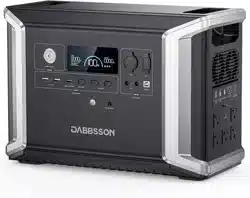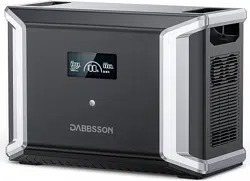
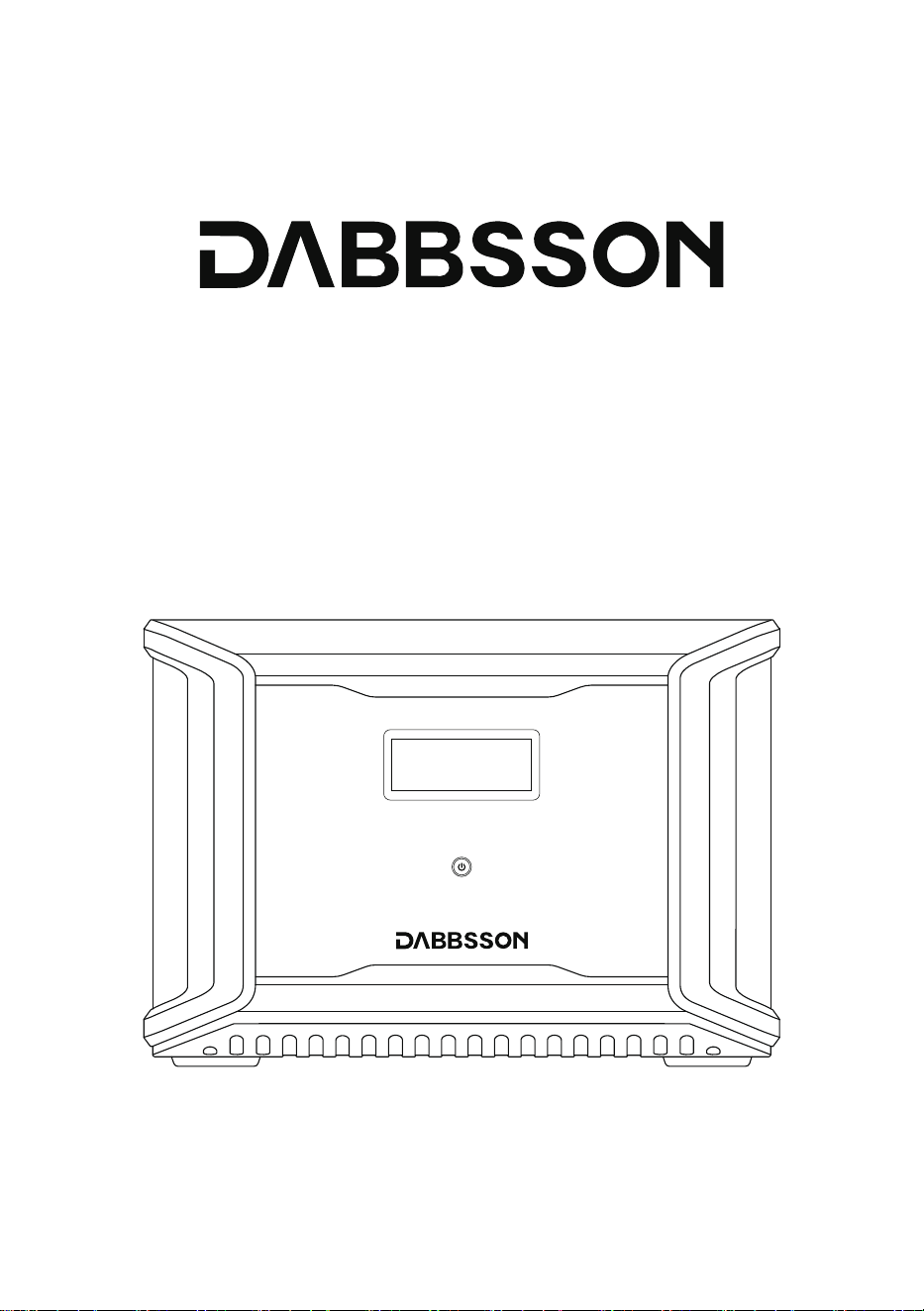
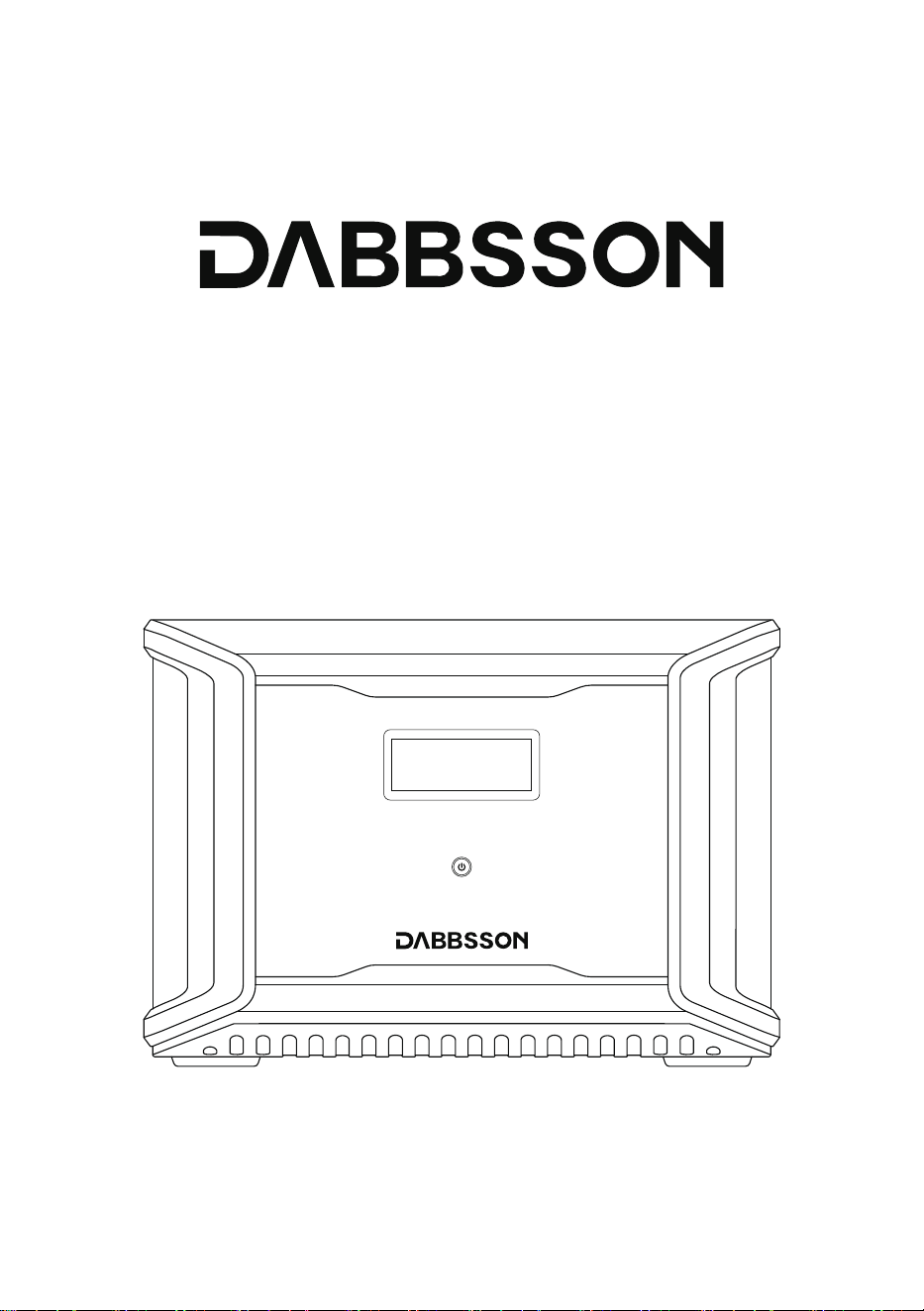
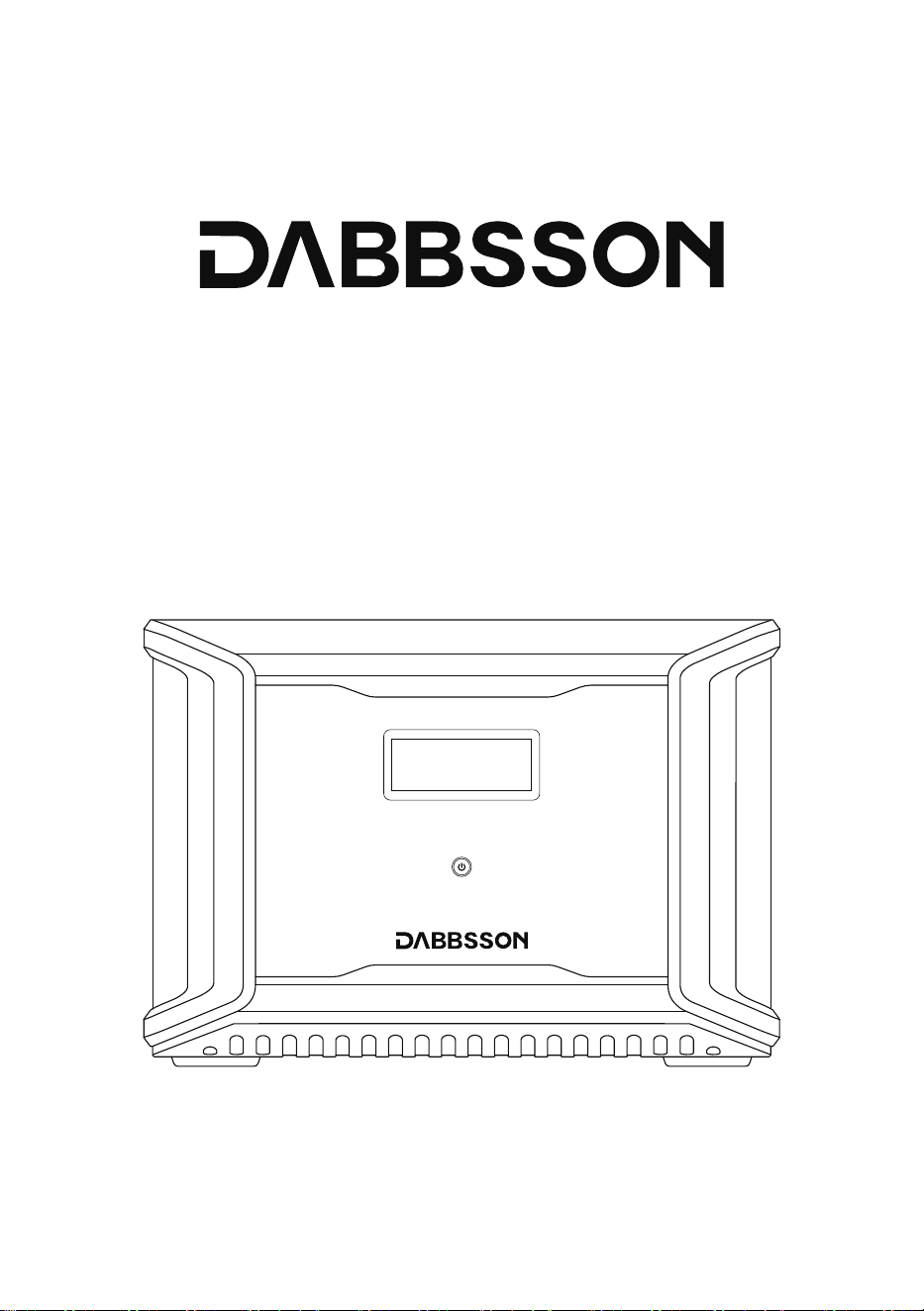
Dabbsson DBS3000B Extra Battery
User Manual

DISCLAIMER
Read all safety tips, warning messages, terms of use, and disclaimers carefully. Refer to the
terms of use and disclaimer at https://www.dabbsson.com and stickers on the product
before use. Users take full responsibility for all usage and operations. Familiarize yourself
with the related regulations in your area. You are solely responsible for being aware of all
relevant regulations and using Dabbsson products in a way that is compliant.

CONTENTS
1
2
3
9
10
11
11
3.1 Product Details 3.5 Car Charging
3.2 LCD Screen 3.6 AC Charging
3.3 General Product Usage 3.7 Using Extra Battery DBS3000B
3.4 Solar Charging
2.1 Usage 2.2 Disposal Guide
1. Specifications
2. Safety Instructions
3. Getting Started
4. FAQs
5. Troubleshooting
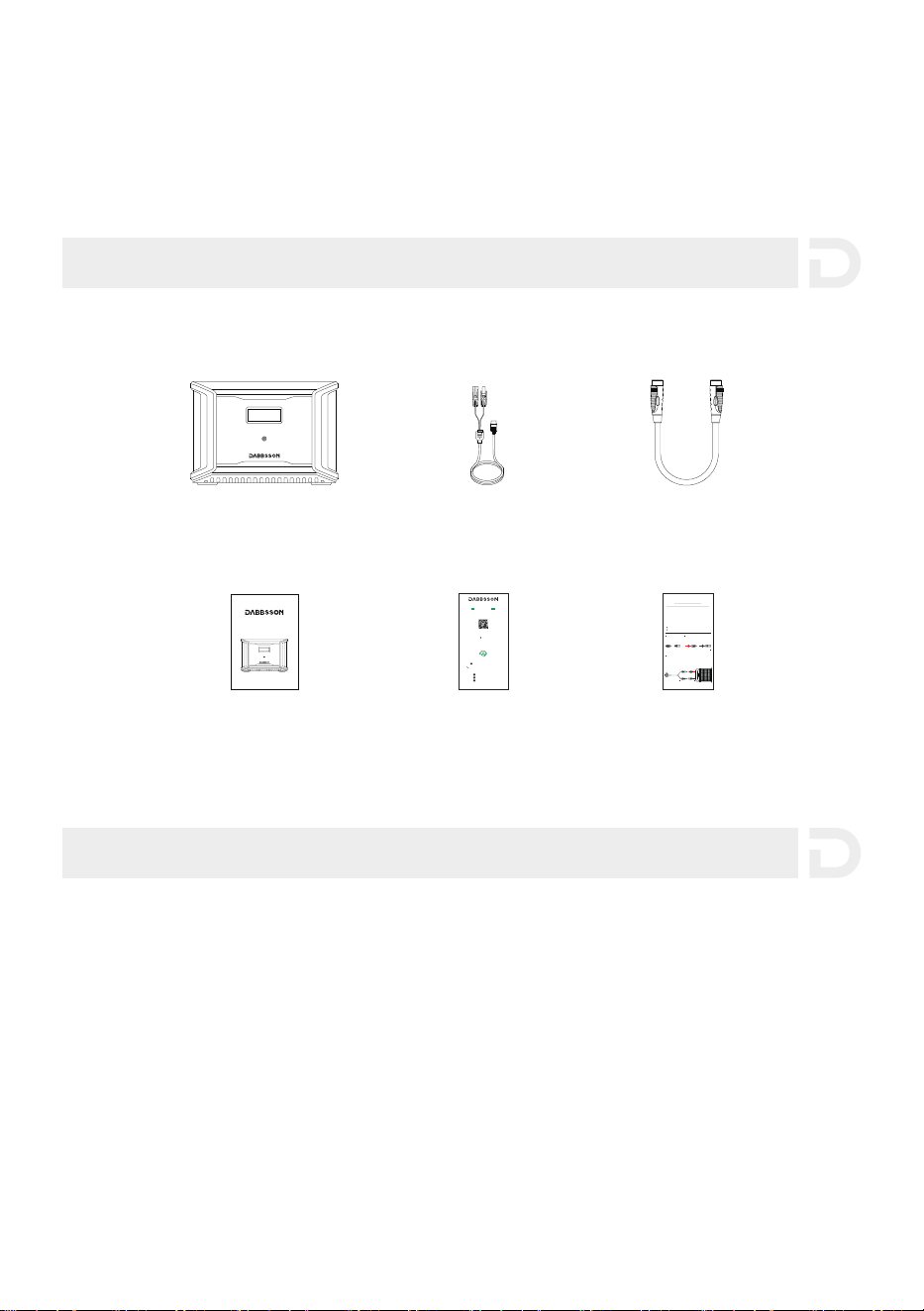
6. What’s in the Box
7. Storage & Maintenance
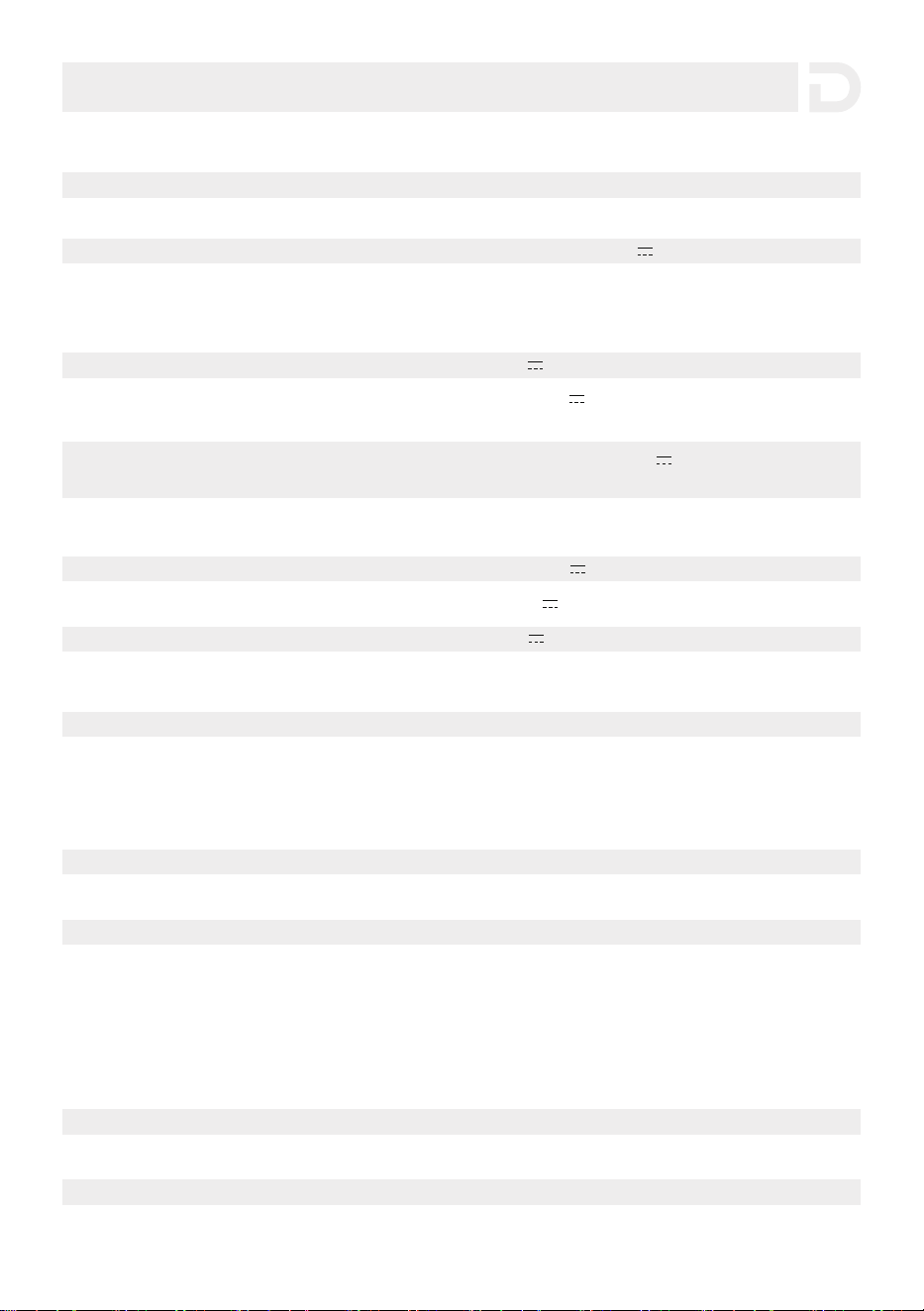
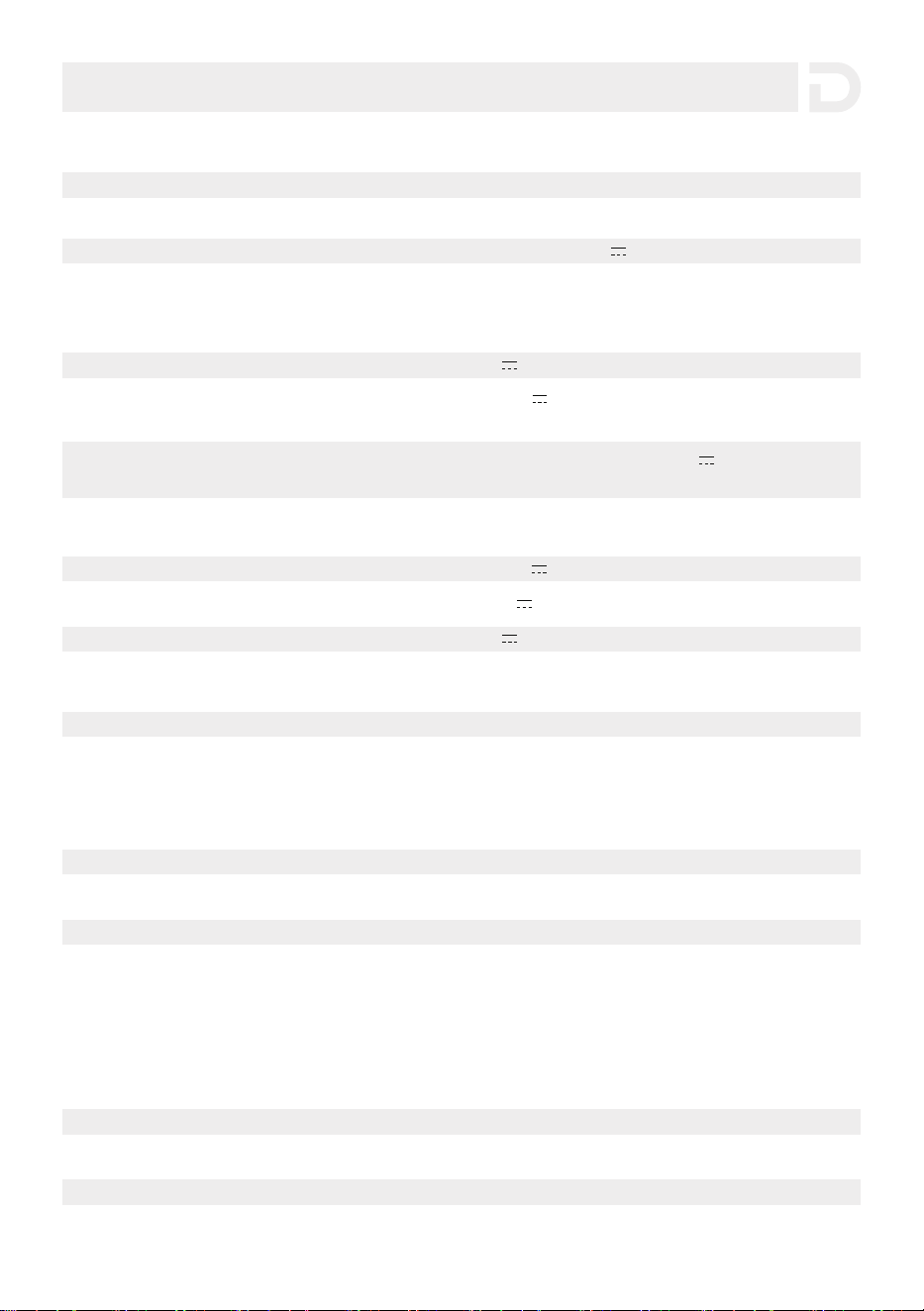
* Whether the product can be charged or discharged depends on the actual temperature of the battery pack.
Protection
Overload Protection Over Temperature Protection
Short Circuit Protection Low Temperature Protection
Low Voltage Protection Overcurrent Protection
1
Environmental Operating Temperature
Net Weight
Capacity
Extra Battery PortInput 48V 3000W Max
Car Charger
Extra Battery Port Output
Anderson Port
Anderson Port
Battery Info
Cycle Life
Cell Chemistry
1. Specifications
General Info
Dimensions
Certification
Input Ports
Solar Charger
Output Ports
Approximately 25.2kg漏濈濈.5lbs漐
3001.6Wh (44.8V 67Ah)
Supports 12V/24V Battery, Default 8A Per Port.
Double to 16A
42-51V 3000W Max
LiFePO4
12.6V 25A
24V 18A
4000 cycles to 80%+capacity
432x254.5x303.5mm (17x10x12in)
ETL CE FCC PSE RCM WEEE ROHS
12-60V 12.5A Max 600W Max Per Port,
Double to 1200W Max
Optimal Operating Temperature
Discharge Temperature
Charge Temperature
Storage Temperature
濅濃燠瀑濆濃燠澻濉濋燣瀑濋濉燣)
激濄濃燠瀑濇濈燠澻濄濇燣瀑濄濄濆燣)
濃燠瀑濇濈燠澻濆濅燣瀑濄濄濆燣)
激濅濃燠瀑濉濃燠澻激濇燣瀑濄濇濃燣)
(Optimal:澳濅濃燠瀑濆濃燠澻濉濋燣瀑濋濉燣澼)

1. Do not use the product near a heat source, such as a fire or a heating furnace.
2. Avoid contact with any liquid. Do not immerse the product in water or get it wet. Do not use
the product in rain or humid environments.
3. Do not use the product in an environment with strong static electricity/magnetic fields.
4. Do not disassemble the product in any way or pierce the product with sharp objects.
5. Avoid using wires or other metal objects that may result in a short circuit.
6. Do not use unofficial components or accessories. If you need to replace any components or
accessories, visit official Dabbsson channels to check for relevant information.
7. When using the product, follow the operating environment temperature specified in this user
manual. If the temperature is too high, it may result in a fire or explosion; if the
temperature is too low, the product performance may be severely reduced, or the product
may cease to work.
8. Do not stack any heavy objects on the product.
9. Do not forcibly lock the fan during use or place the product in an unventilated or dusty area.
10. Avoid impact, falls, or severe vibrations when using the product. In case of a severe external
impact, turn off the power supply immediately and stop using the product. Ensure the
product is well fastened during transportation to avoid vibrations and impacts.
11. If you accidentally drop the product into water during use, please place it in a safe open
area, and stay away from it until it is completely dry. The dried product should not be used
again, and should be properly disposed of according to Section 2.2 below. If the product
catches fire, we recommend that you use the fire extinguishers in the following order:
water or water mist, sand, fire blanket, dry powder, and finally a carbon dioxide fire
extinguisher.
12. Use a dry cloth to clean off dirt on the product ports.
13. Rest the product on a flat surface to avoid damage caused by the product falling over. If
the product is overturned and severely damaged, turn it off immediately, place the battery
in an open area, keep it away from combustible matter and people, and dispose of it in
accordance with local laws and regulations.
14. Ensure that the product is kept out of reach of children and pets.
15. Do not connect the smart extra battery to another smart extra battery.
2.1 Usage
2. Safety Instructions
2
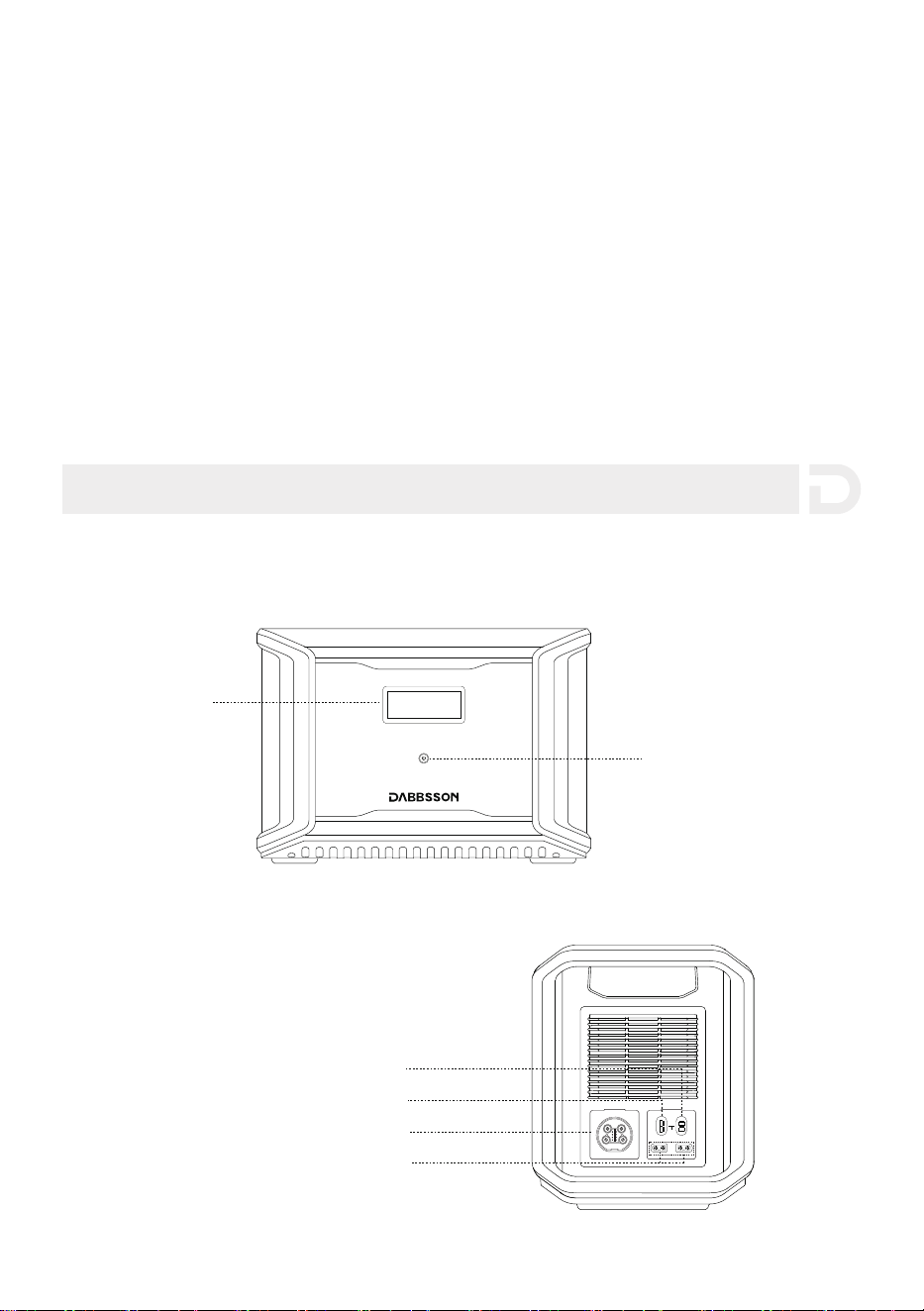
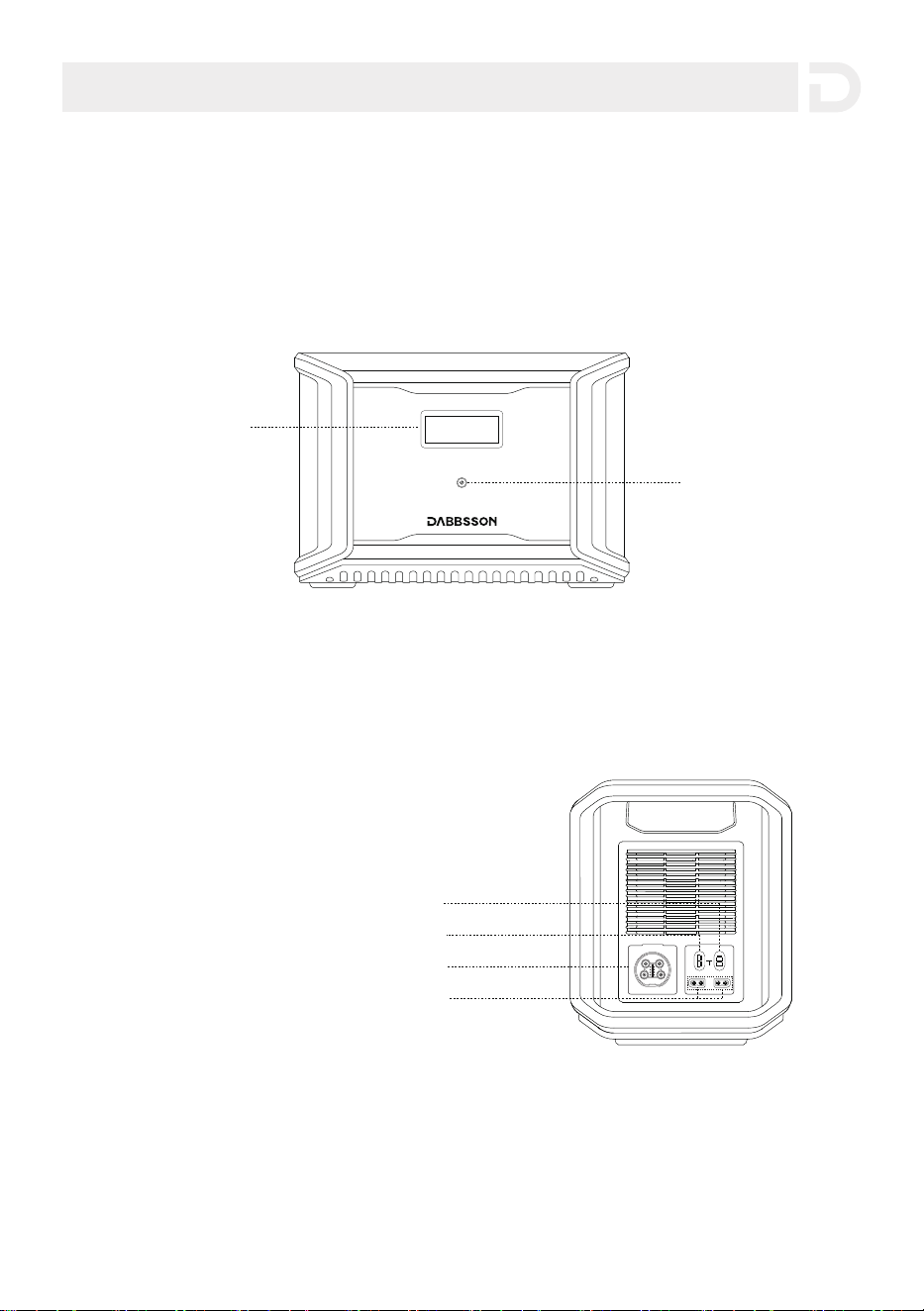
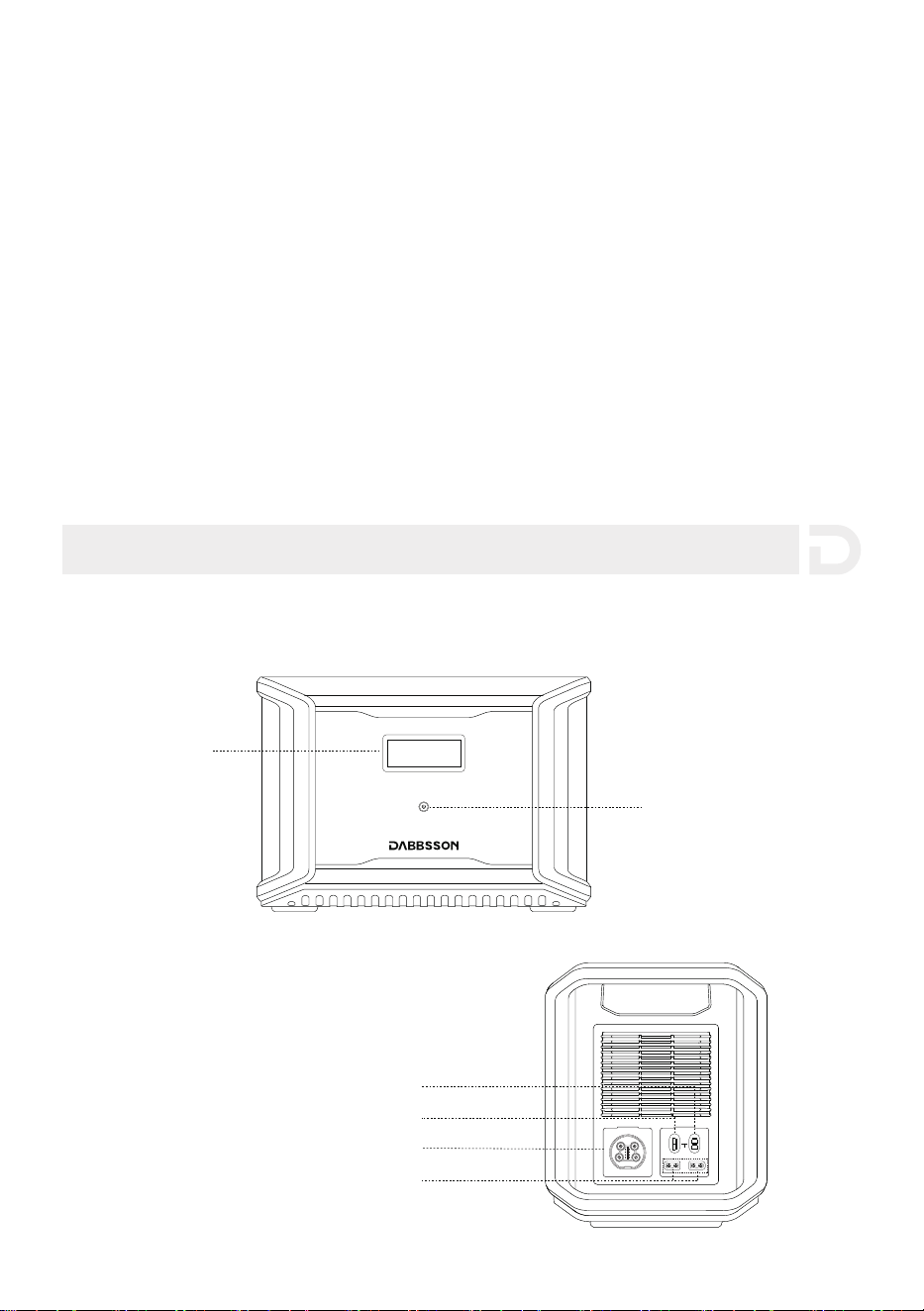
3.1 Product Details
3. Getting Started
1. If conditions permit, make sure that the battery is fully discharged before disposing of it in
a designated battery recycling bin. The product contains batteries with potentially dangerous
chemicals, so it is strictly prohibited to dispose of it in ordinary trash cans. For more details,
please follow the local laws and regulations on battery recycling and disposal.
2. If the battery cannot be fully discharged due to a product failure, do not dispose of the
battery directly in the battery recycling box. In such cases, contact a professional battery
recycling company for further processing.
3. Please dispose of over-discharged batteries that cannot be recharged.
2.2 Disposal Guide
3
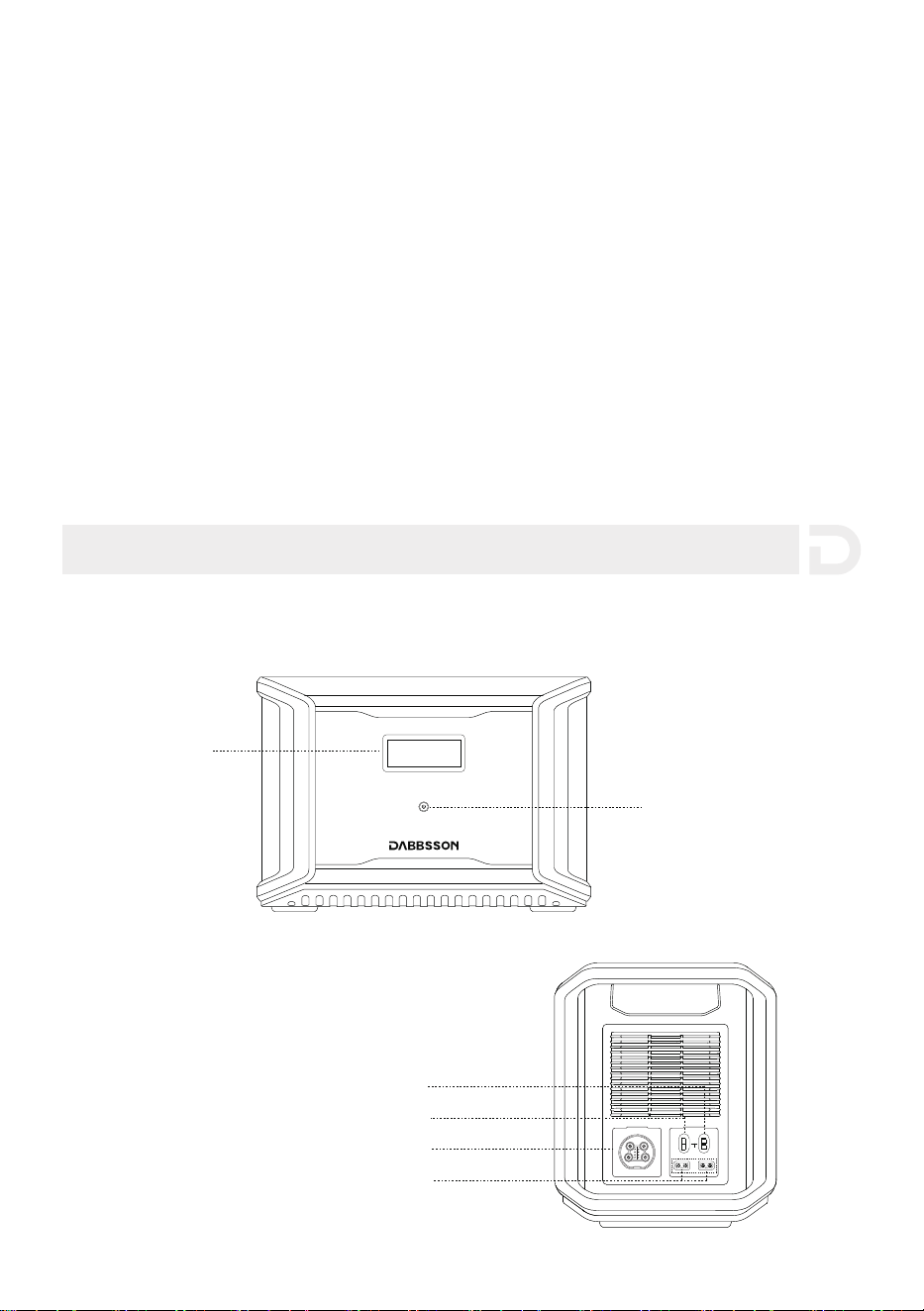
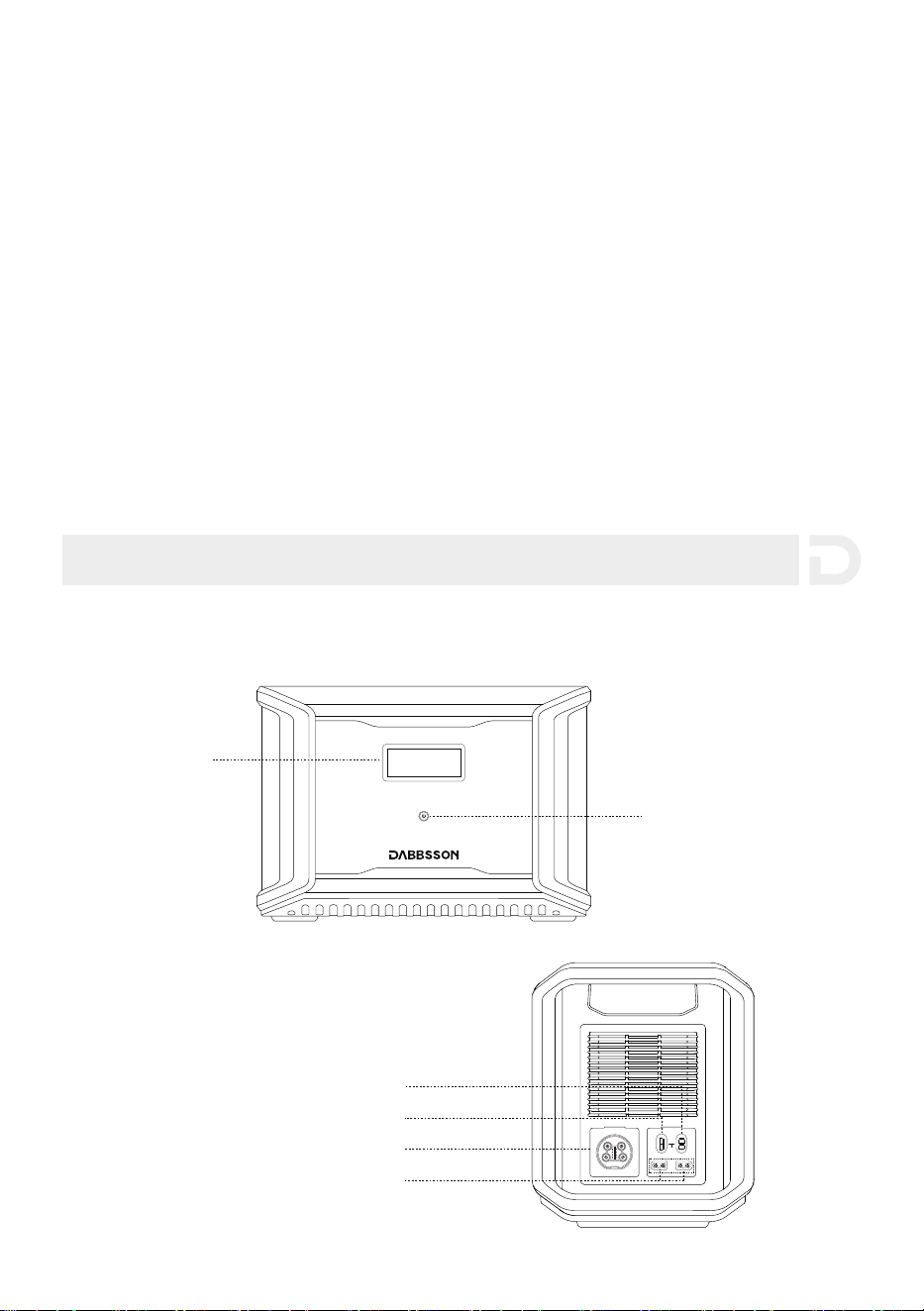
Anderson Port(24V/18A)
LCD Screen
Main Power Button
Anderson Port(12.6V/25A)
Extra Battery Port
Solar Car Charging Input Port(x2)
OUTPUT
INPUT
11-75Vd.c.
12V 20A 24V 18A
3.3 General Product Usage
Short Press to Turn On Long Press to Turn Off
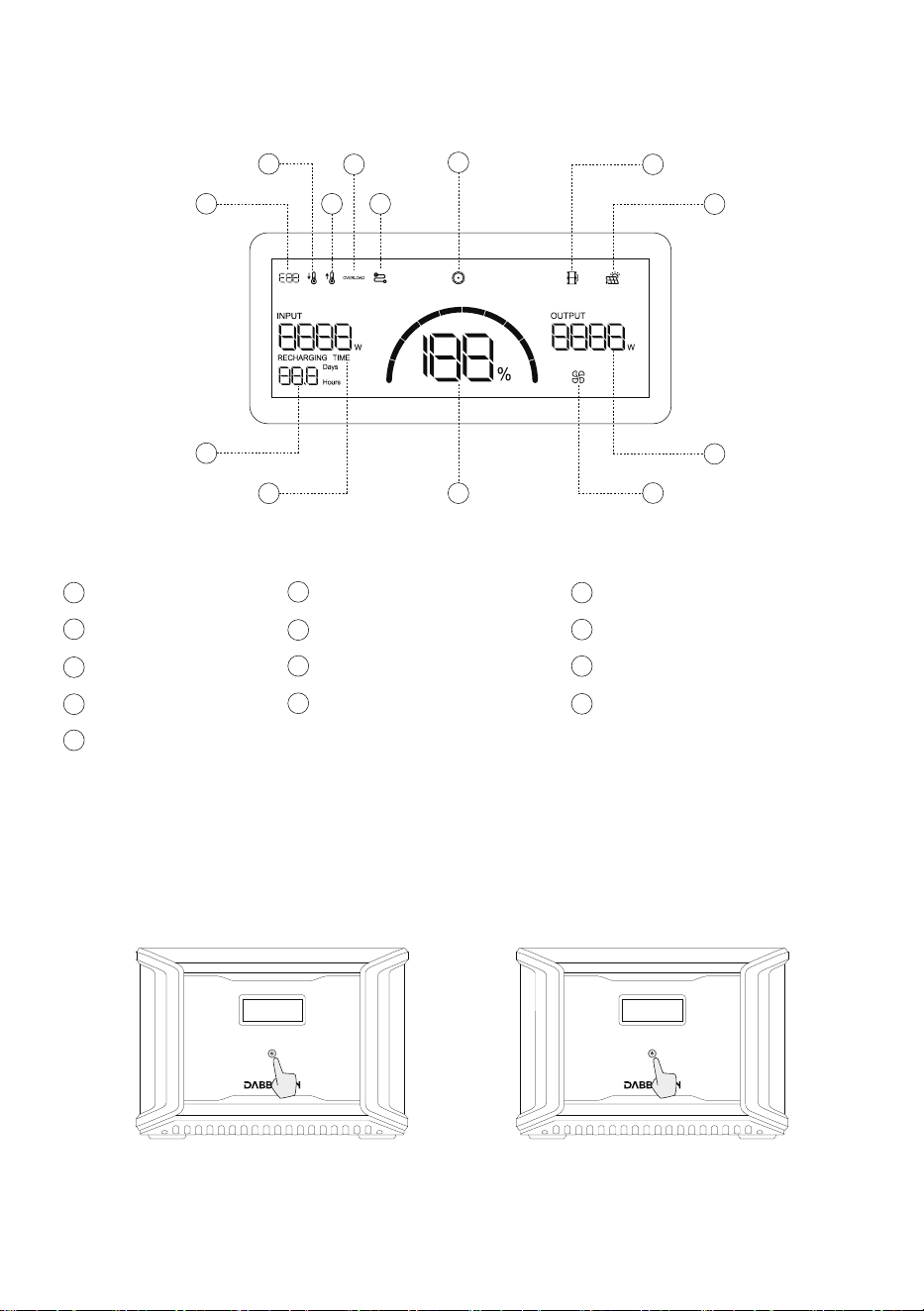
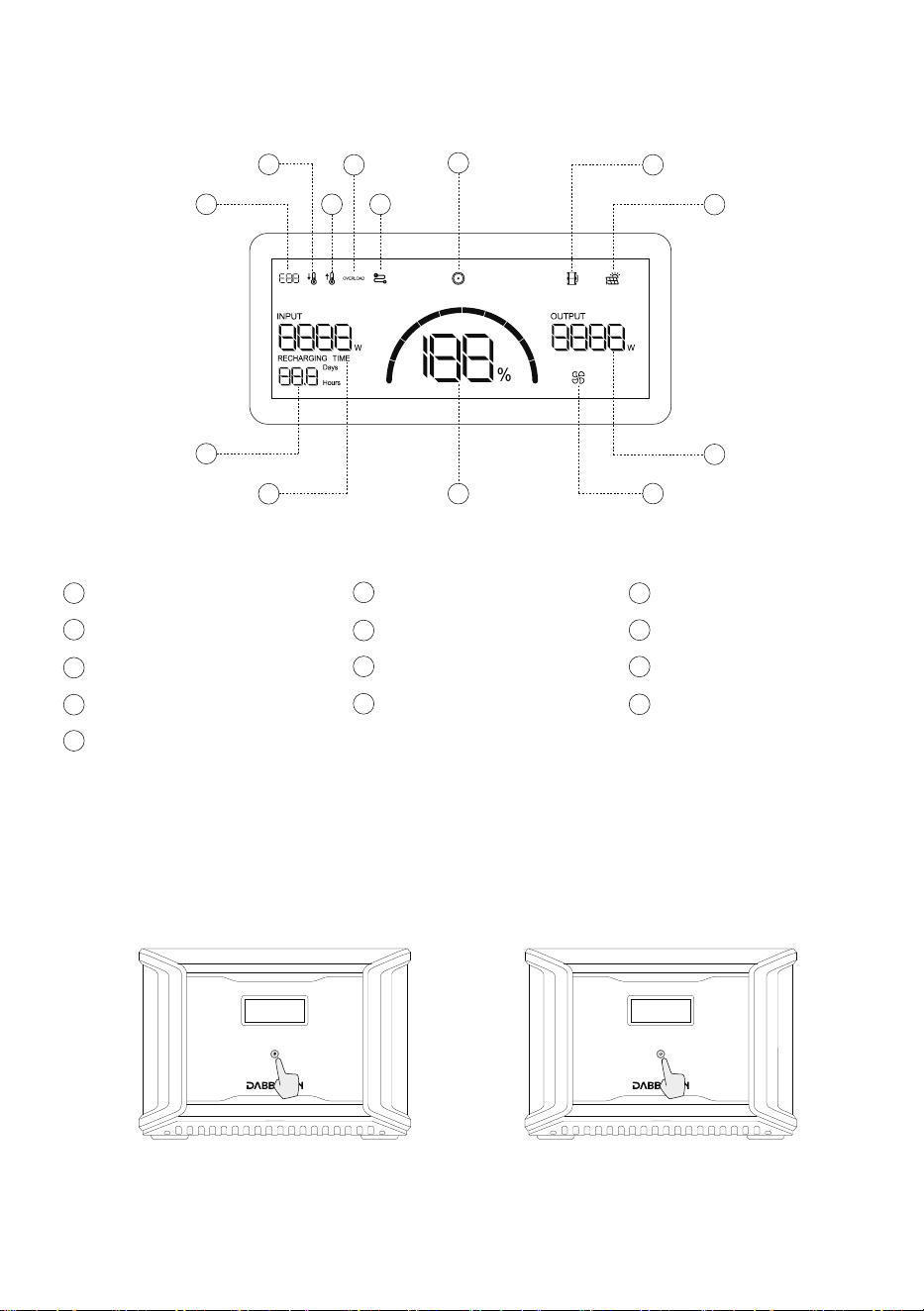
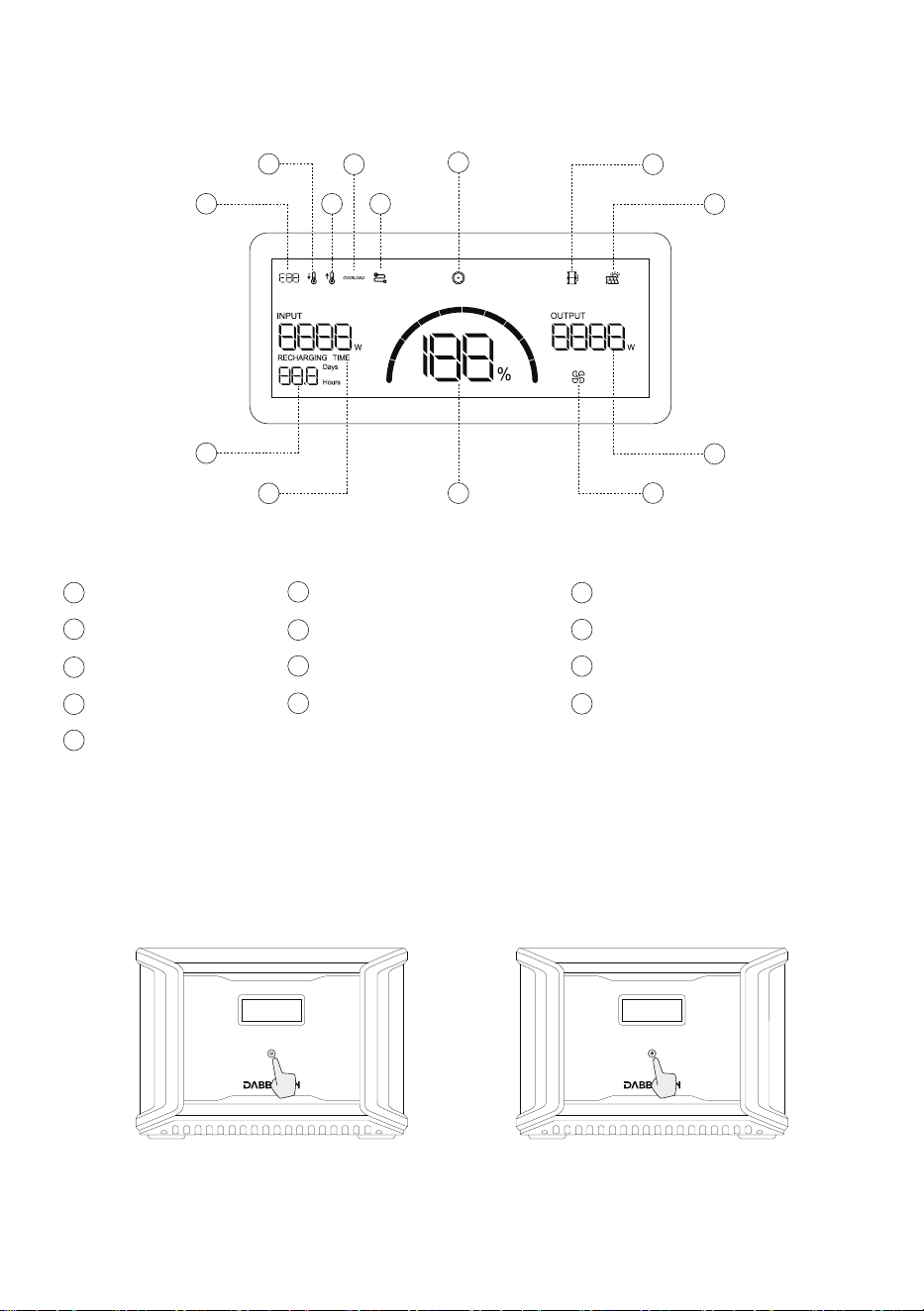
3.2 LCD Screen
4
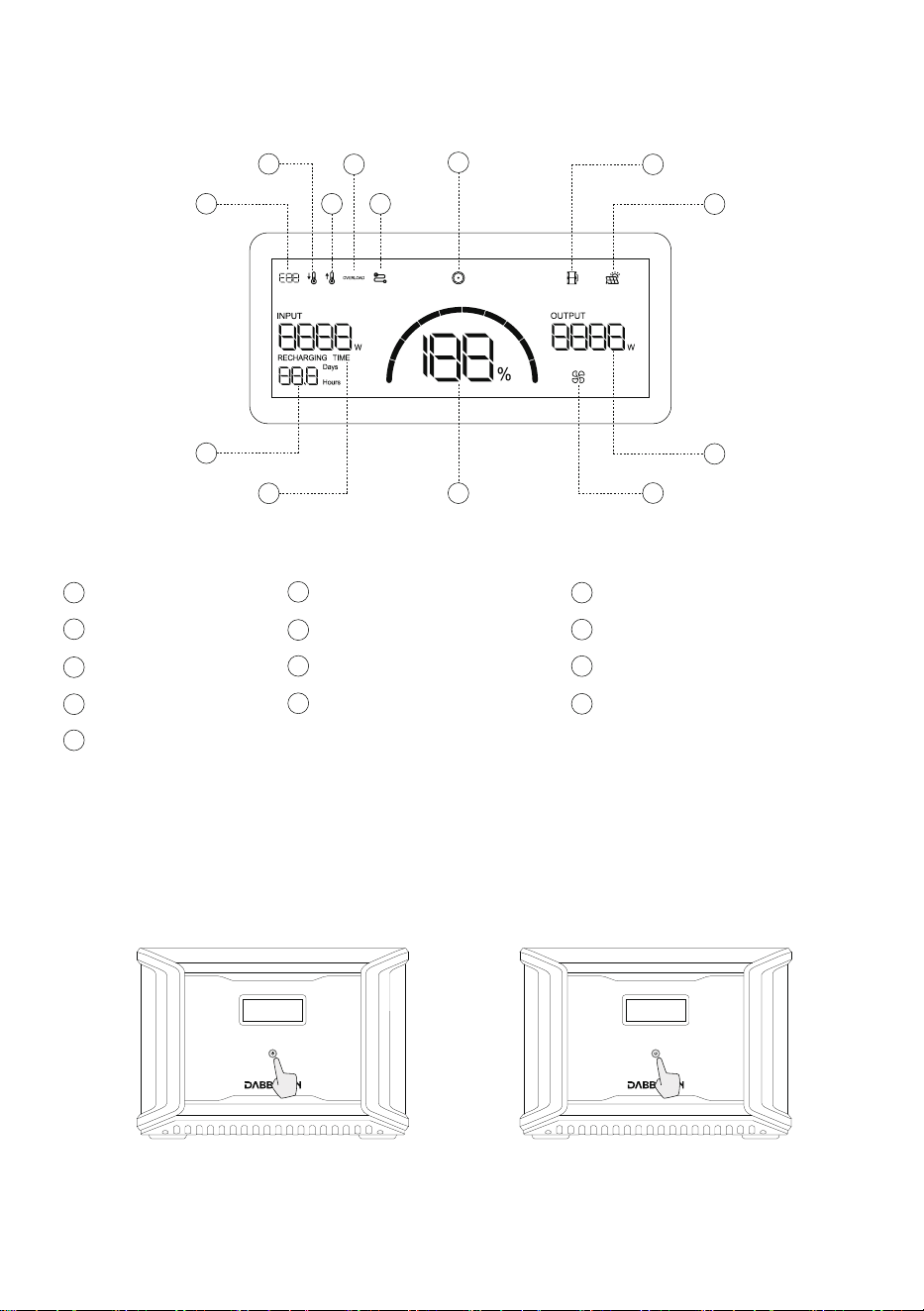
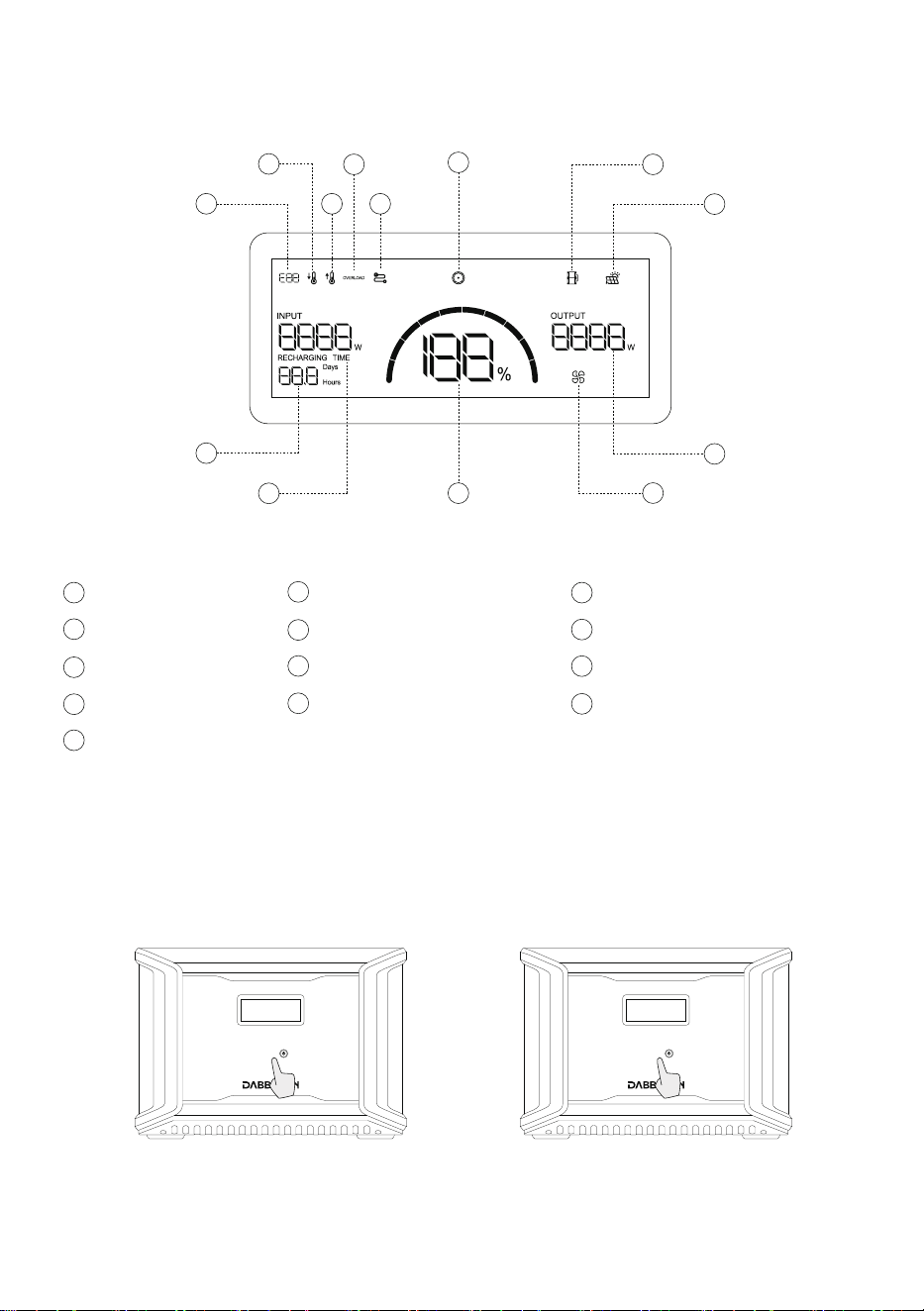
Error Code
a
Low Temperature Warning
b
High Temperature Warning
c
Solar Panel Indicator
h
f
DC Output
Extra Battery Indicator
g
k
Remaining Battery Percentage
l
Fan Indicator
m
Output Power
Overload Warning
d
Connection Failed
e
i
Remaining Charge/Discharge Time
j
Input Power
i
l
j
k
g
a
m
b
c
d
f
h
e
Short press the main power button to start the product; The LCD screen lights up and displays
an icon. The LCD screen will automatically turn off after the product is idle for 30 seconds.
When the product senses any load change or operation, the display screen will automatically
light up. To turn the display on or off, briefly press the main power button. To turn off the
product, press and hold the main power button. The default standby time of the product is 2
hours. The product will automatically shut down when other power buttons are turned off and
no other load is accessed within 2 hours. Standby time of AC and DC can be set on APP.
Product On, Product Off, LCD Screen On
5
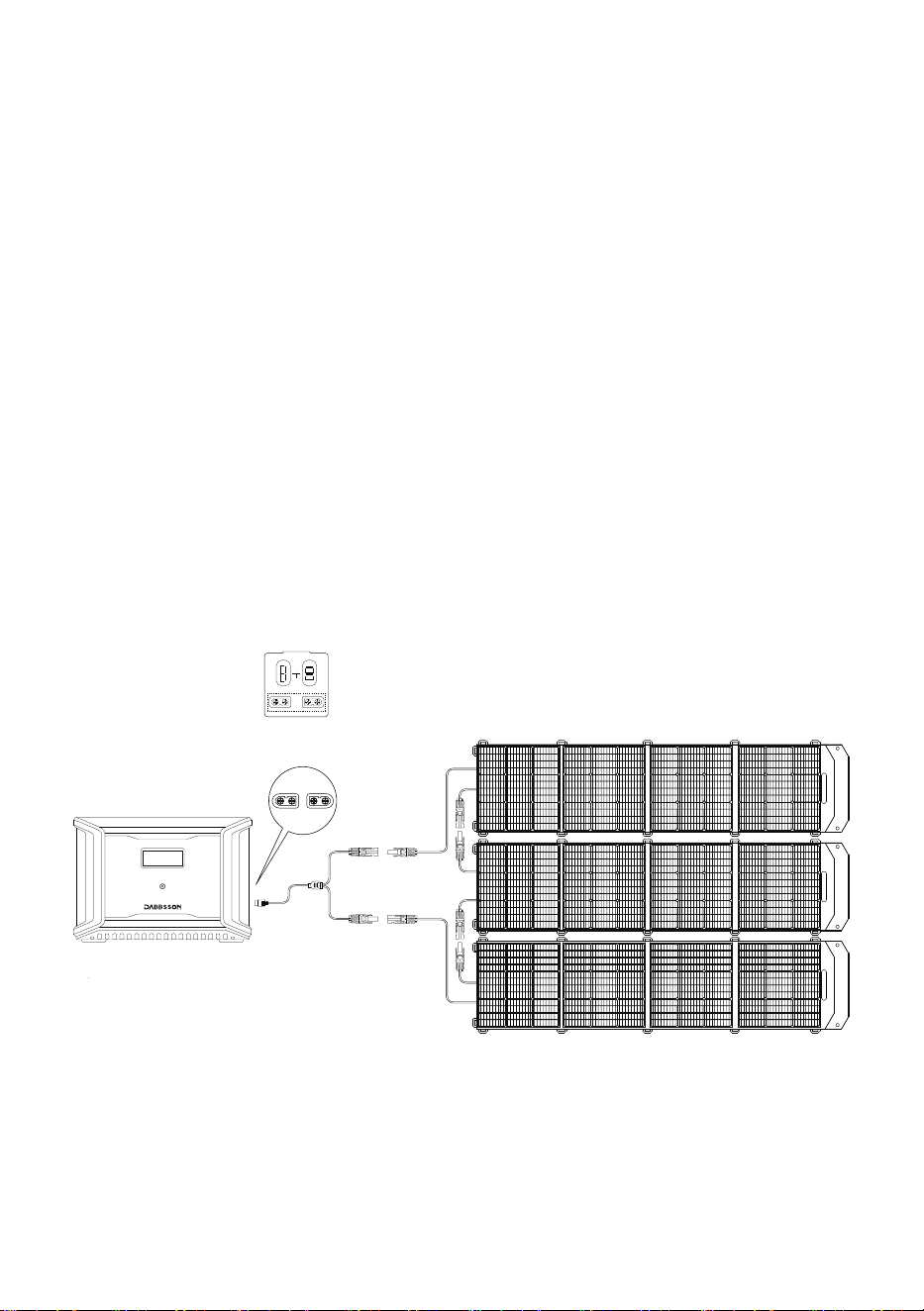
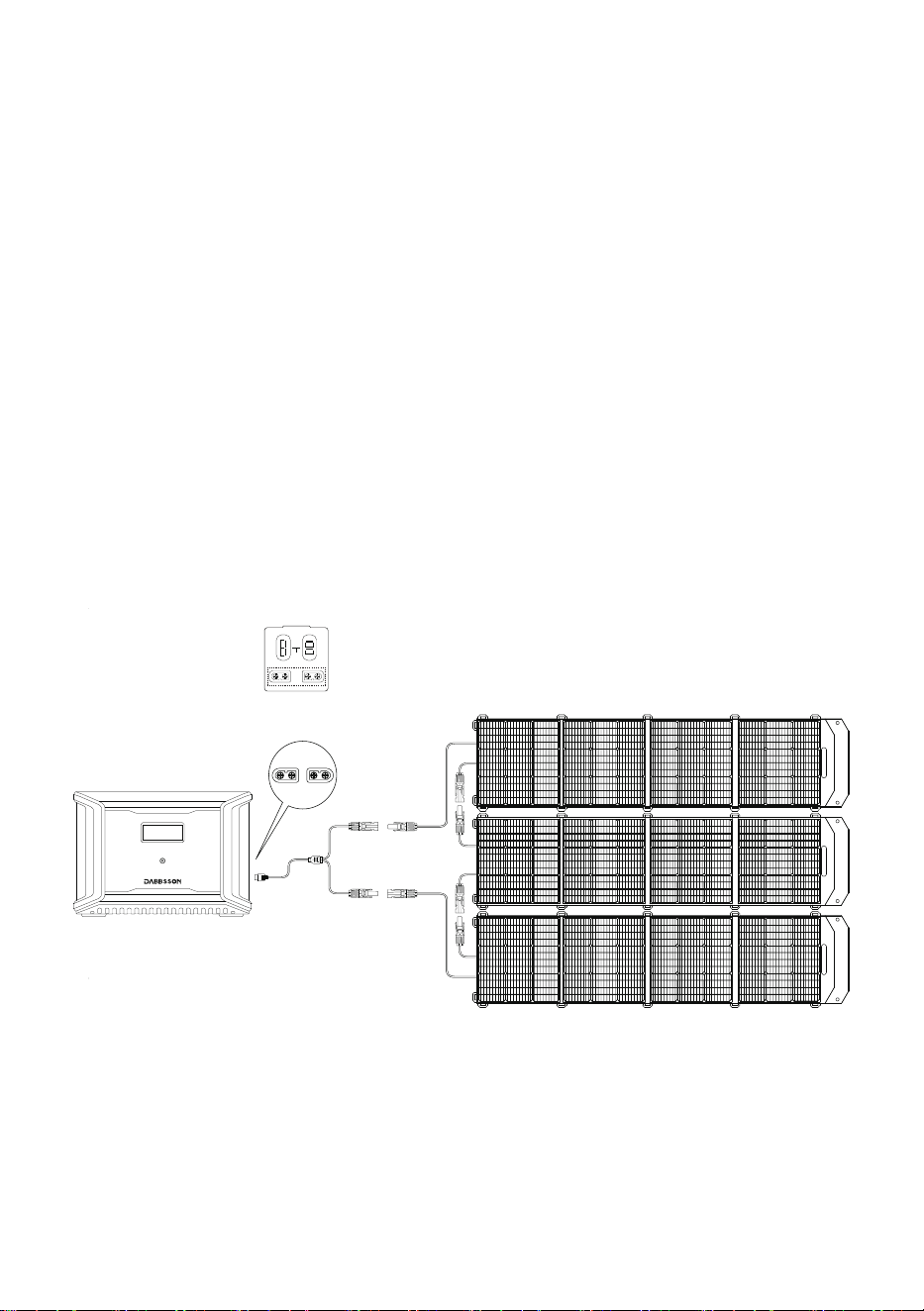
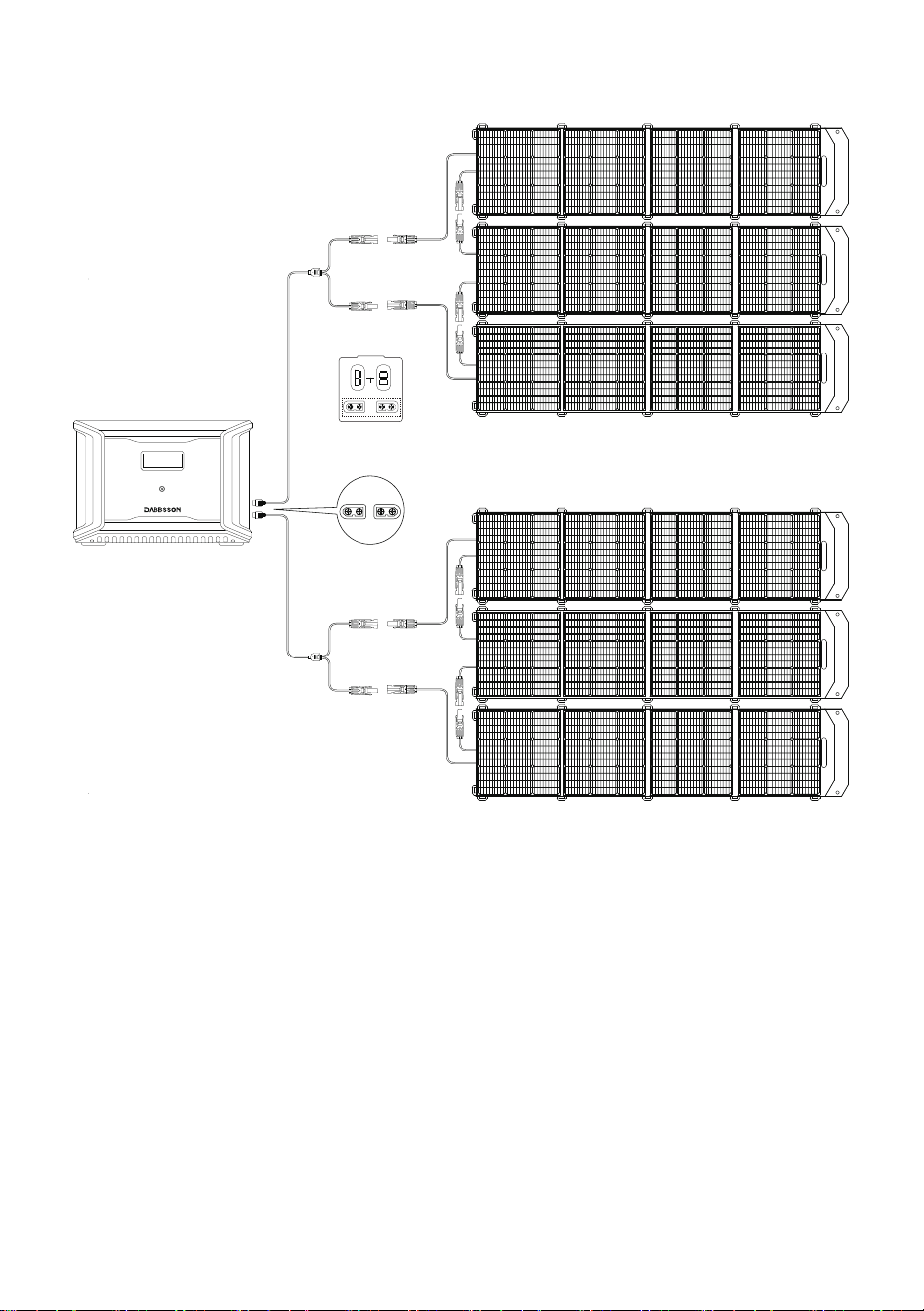
3.4 Solar Charging
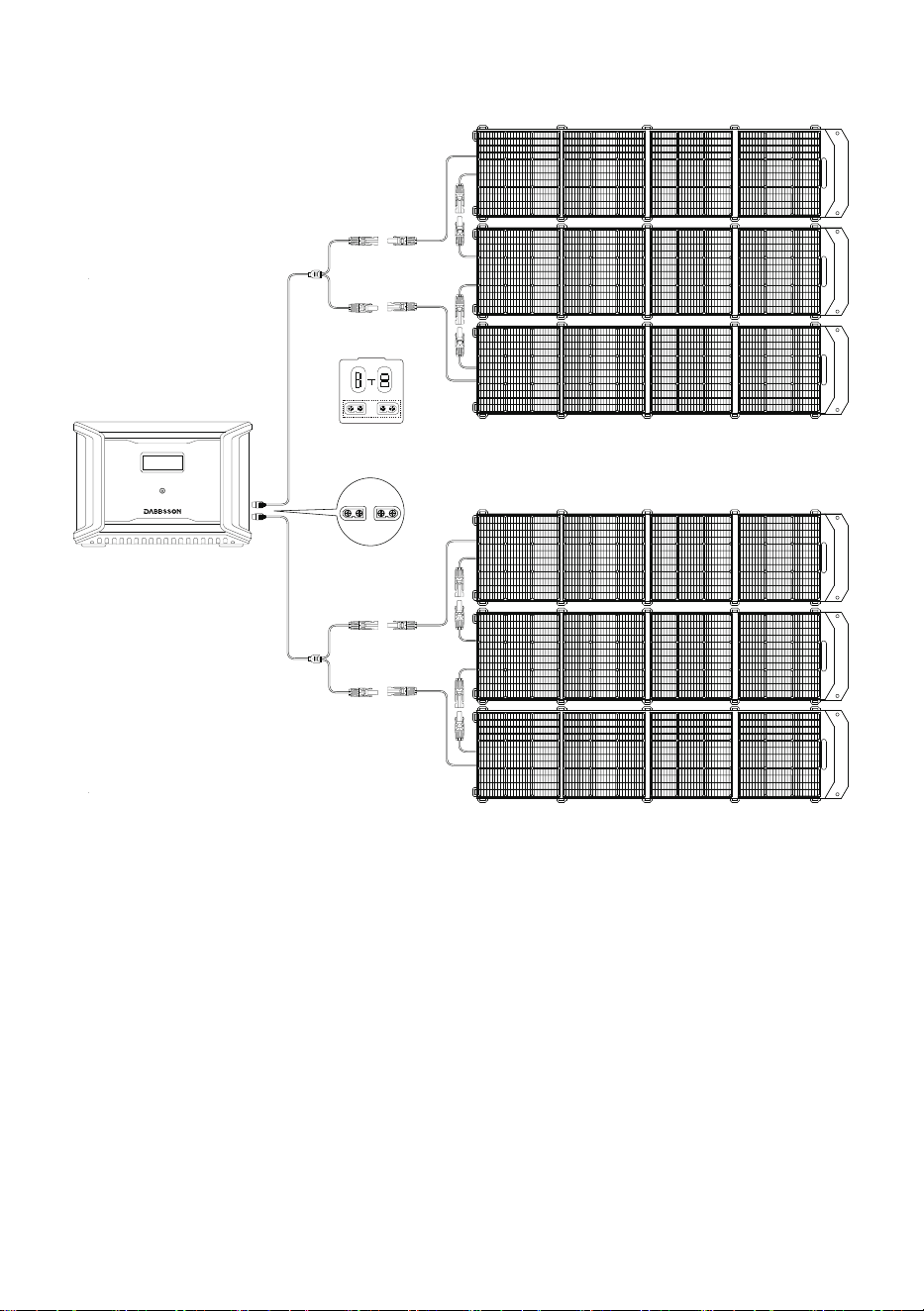
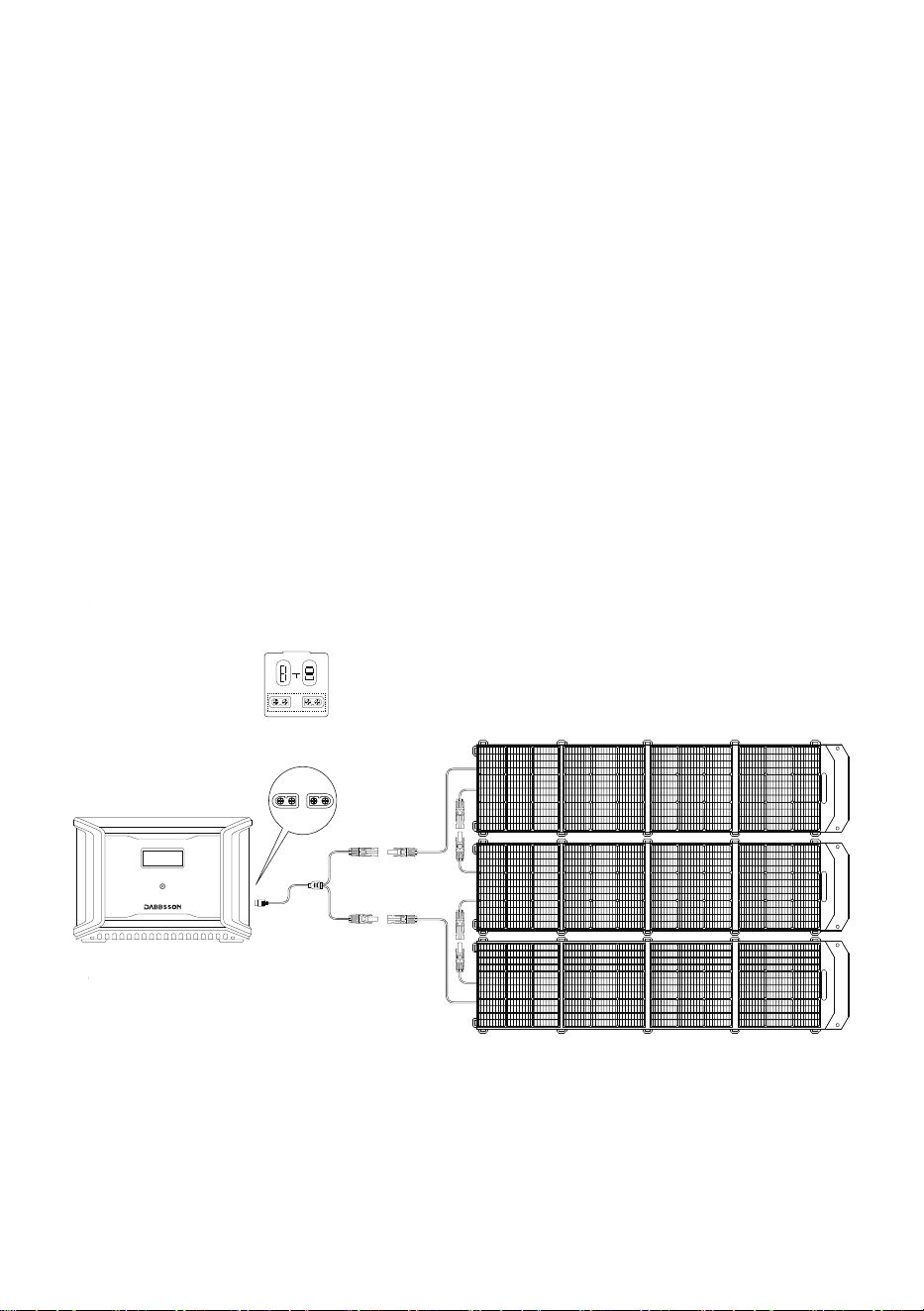
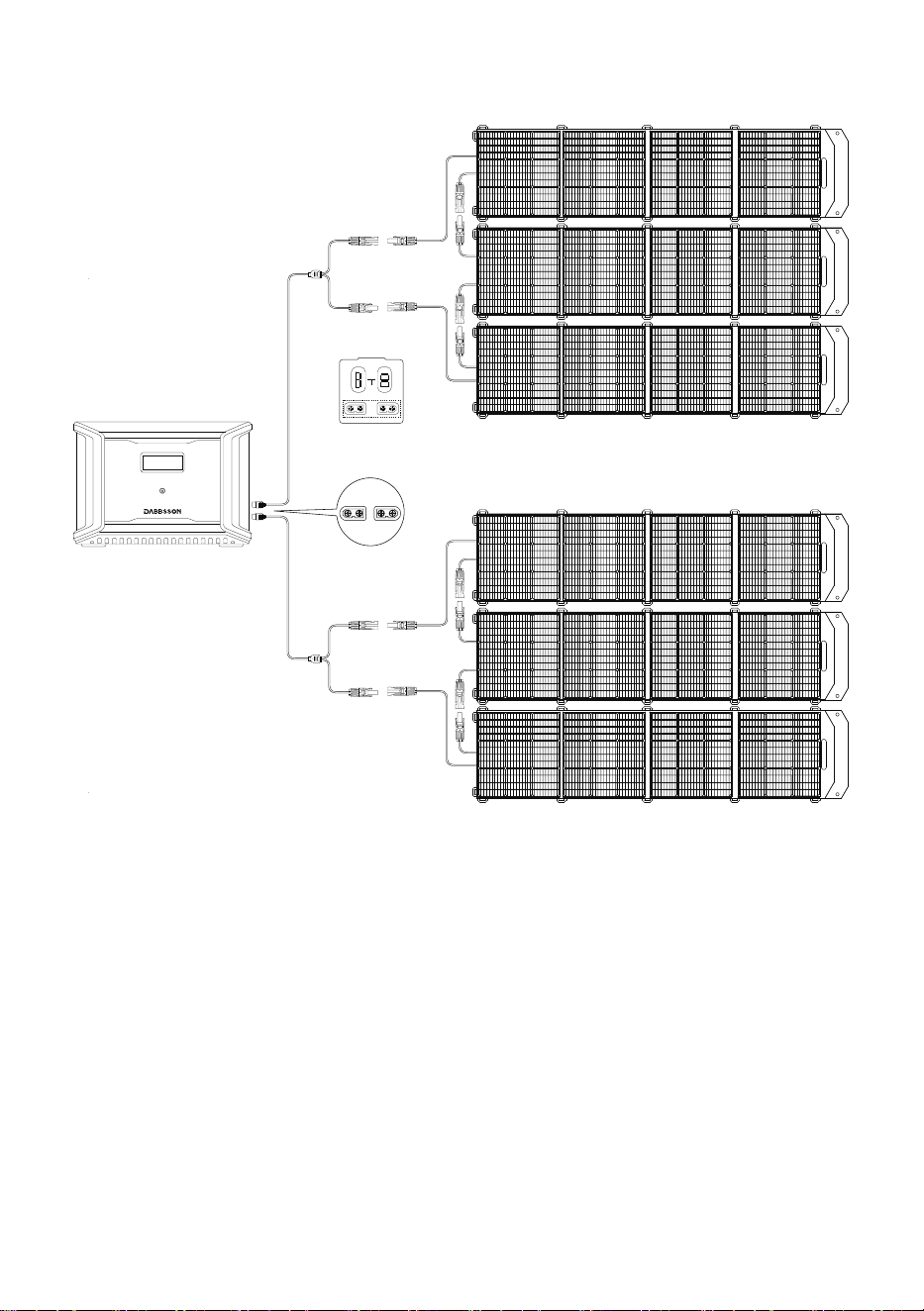
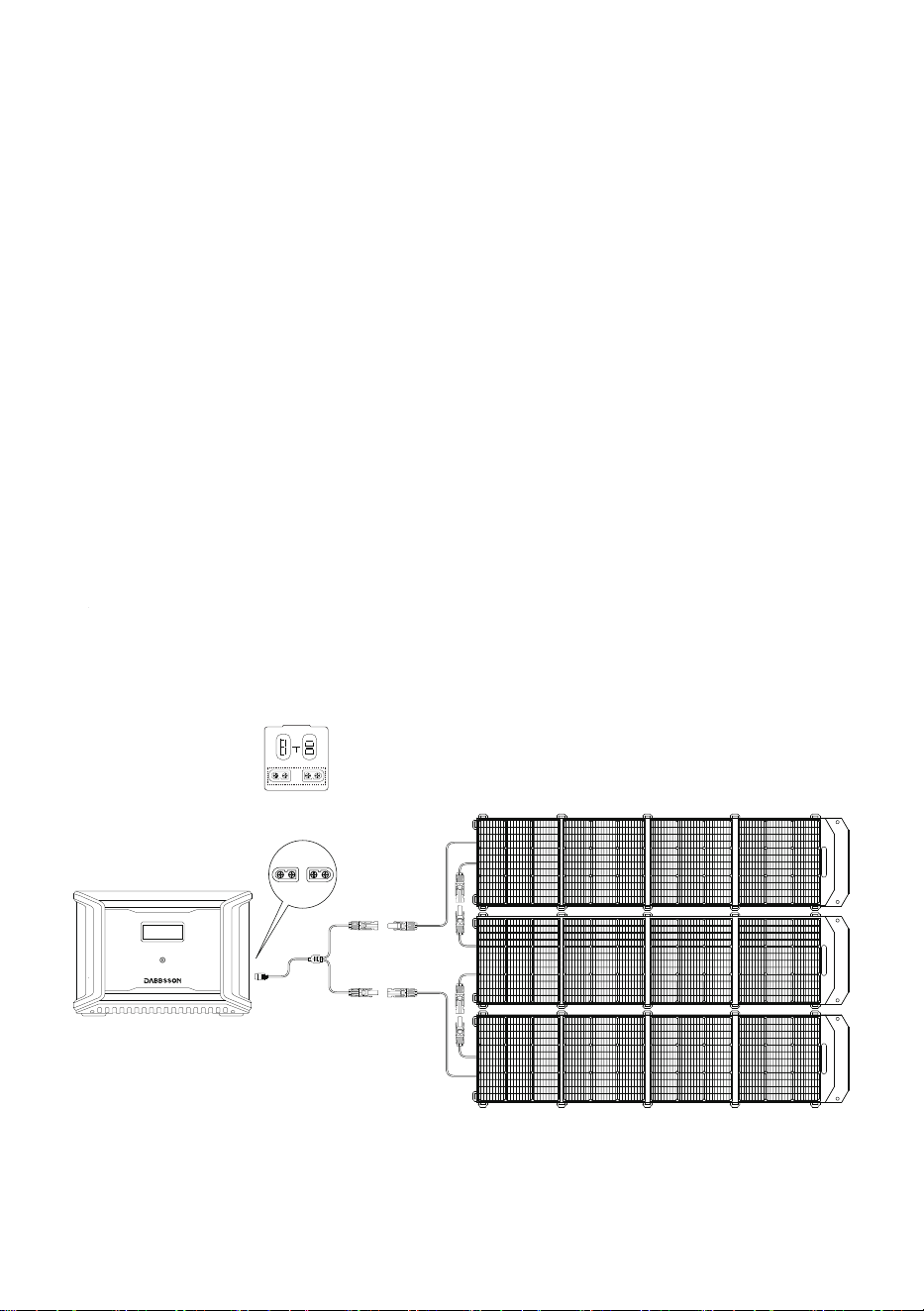
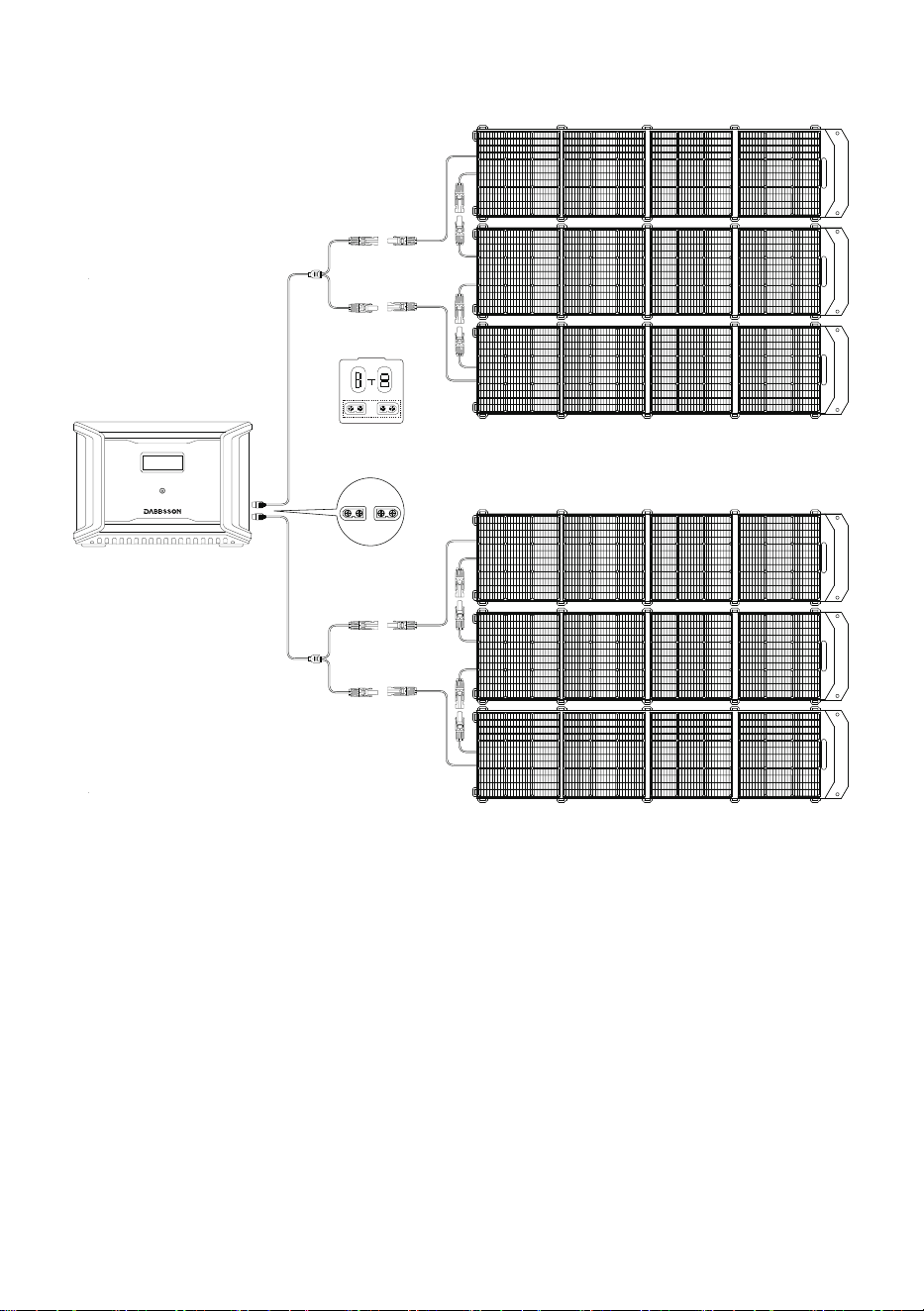
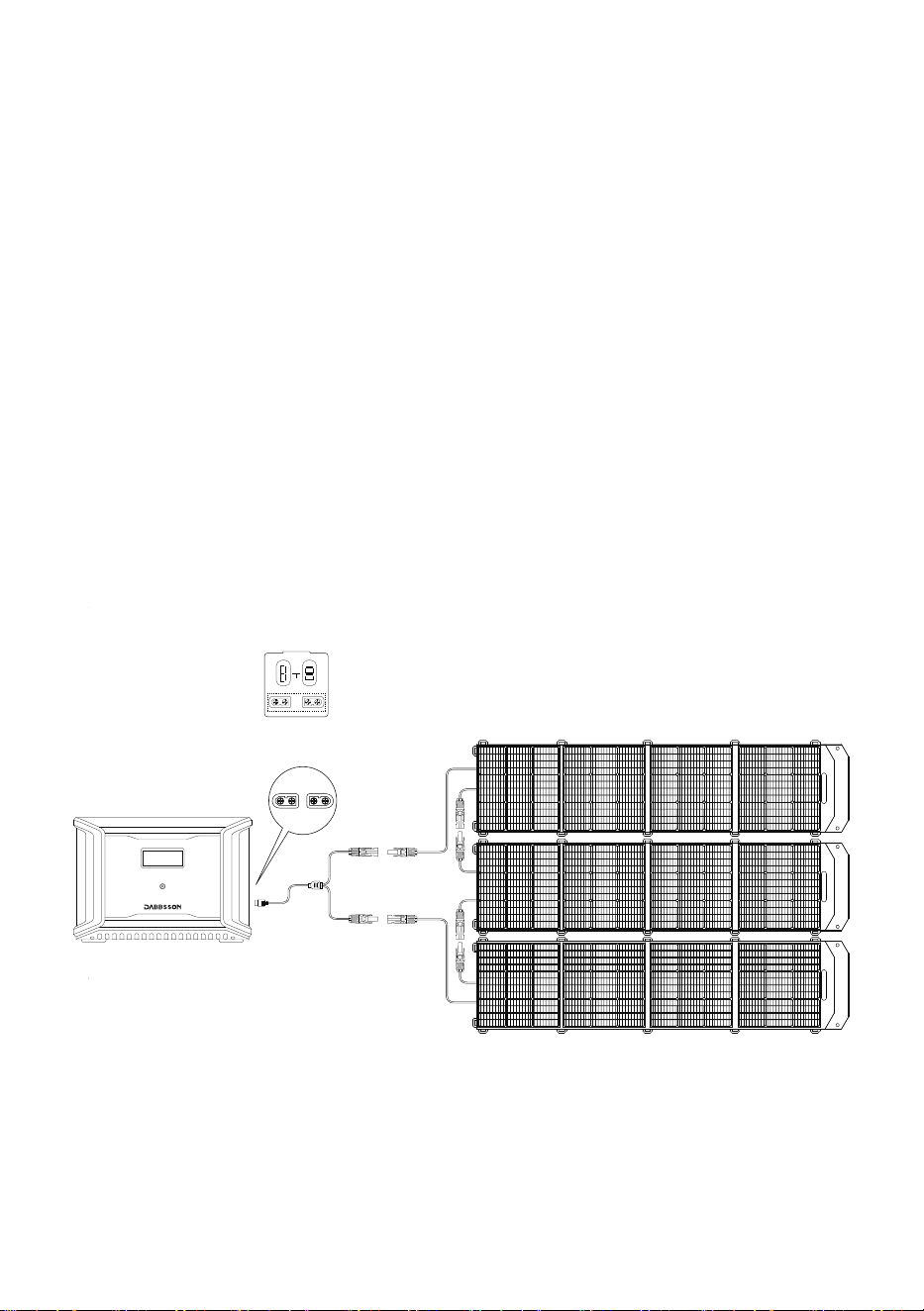
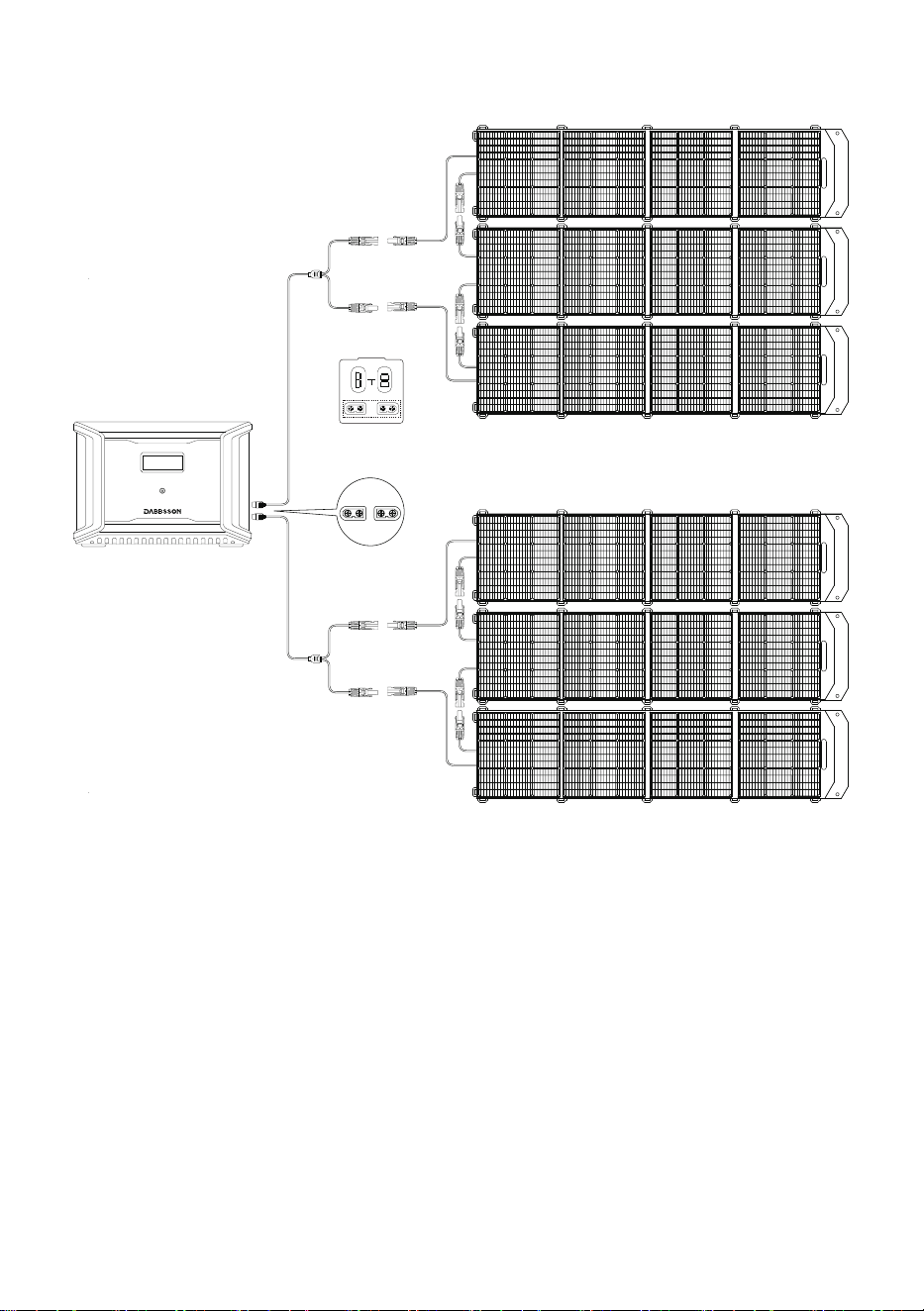
Users can connect solar panels in series as shown in the figure to recharge the product. The
product supports 12-60V DC input, 12A max current, and 600W max charging power.
濅濃濃濪澳濦瀂濿濴瀅澳濣濴瀁濸濿漏濫濆漐
Connection with solar panel
MC4 Connection
濖瀂瀁瀁濸濶瀇澳濫濧濉濃澳瀃瀂瀅瀇
OUTPUT
INPUT
11-75Vd.c.
12V 20A 24V 18A
6
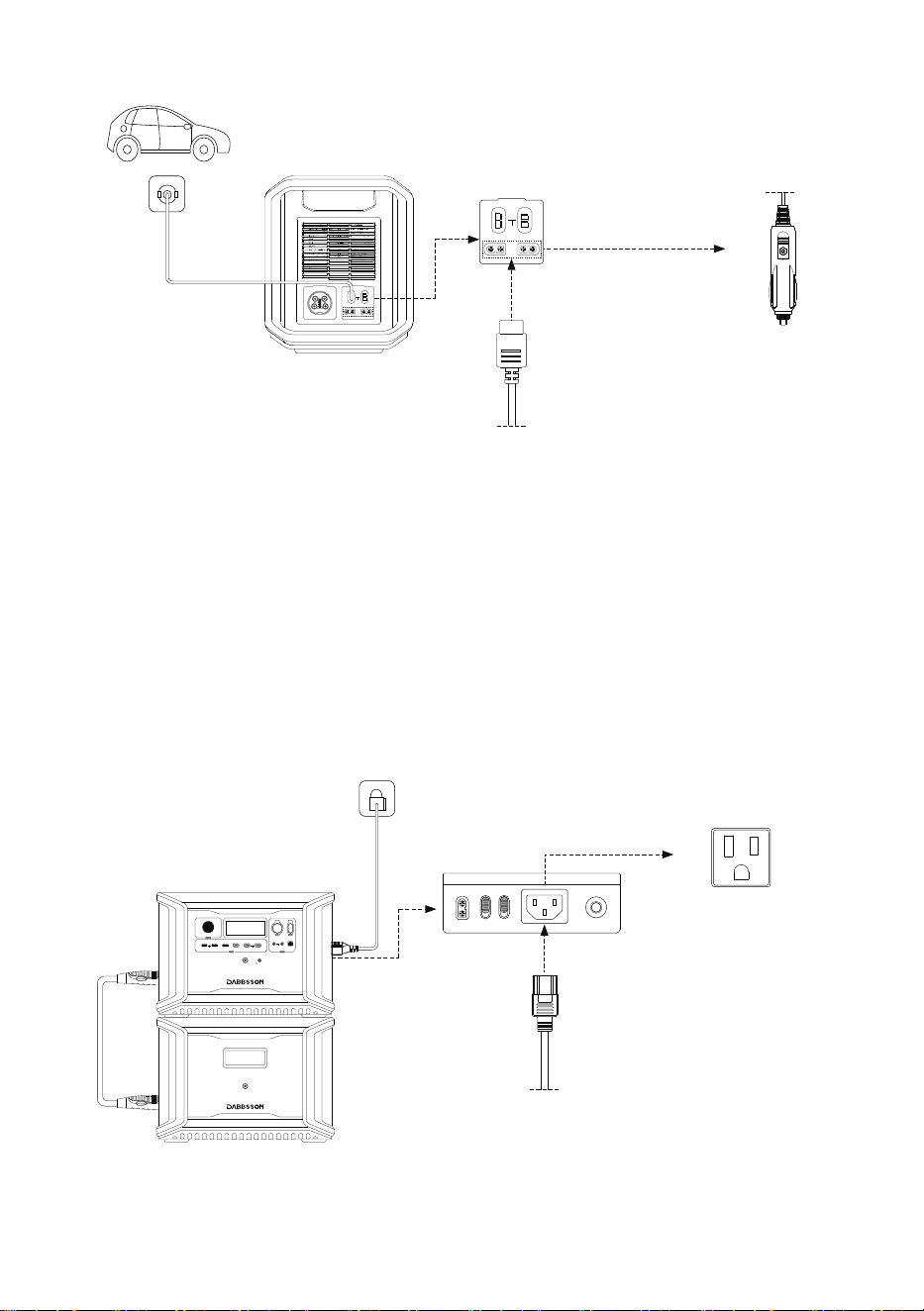
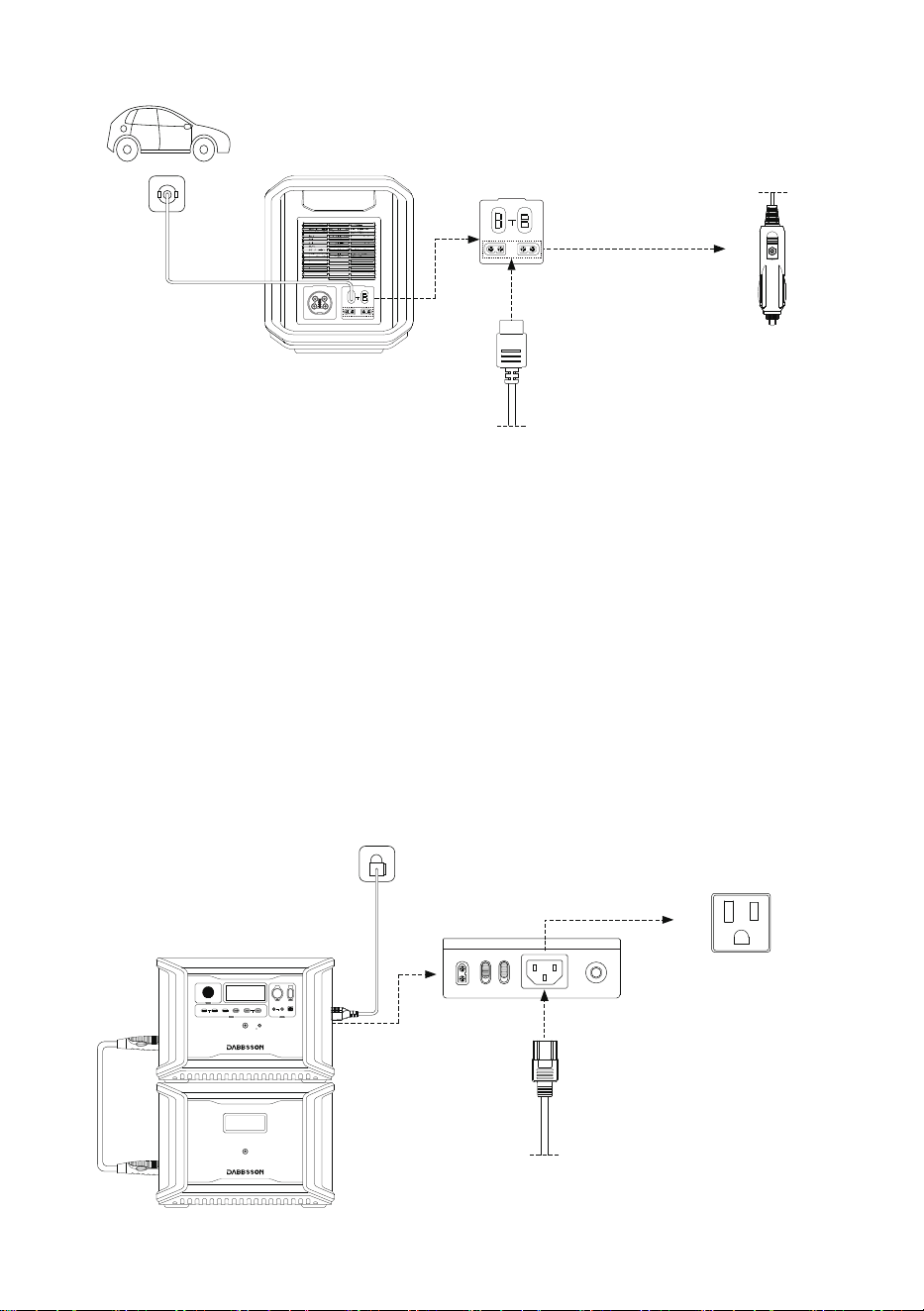
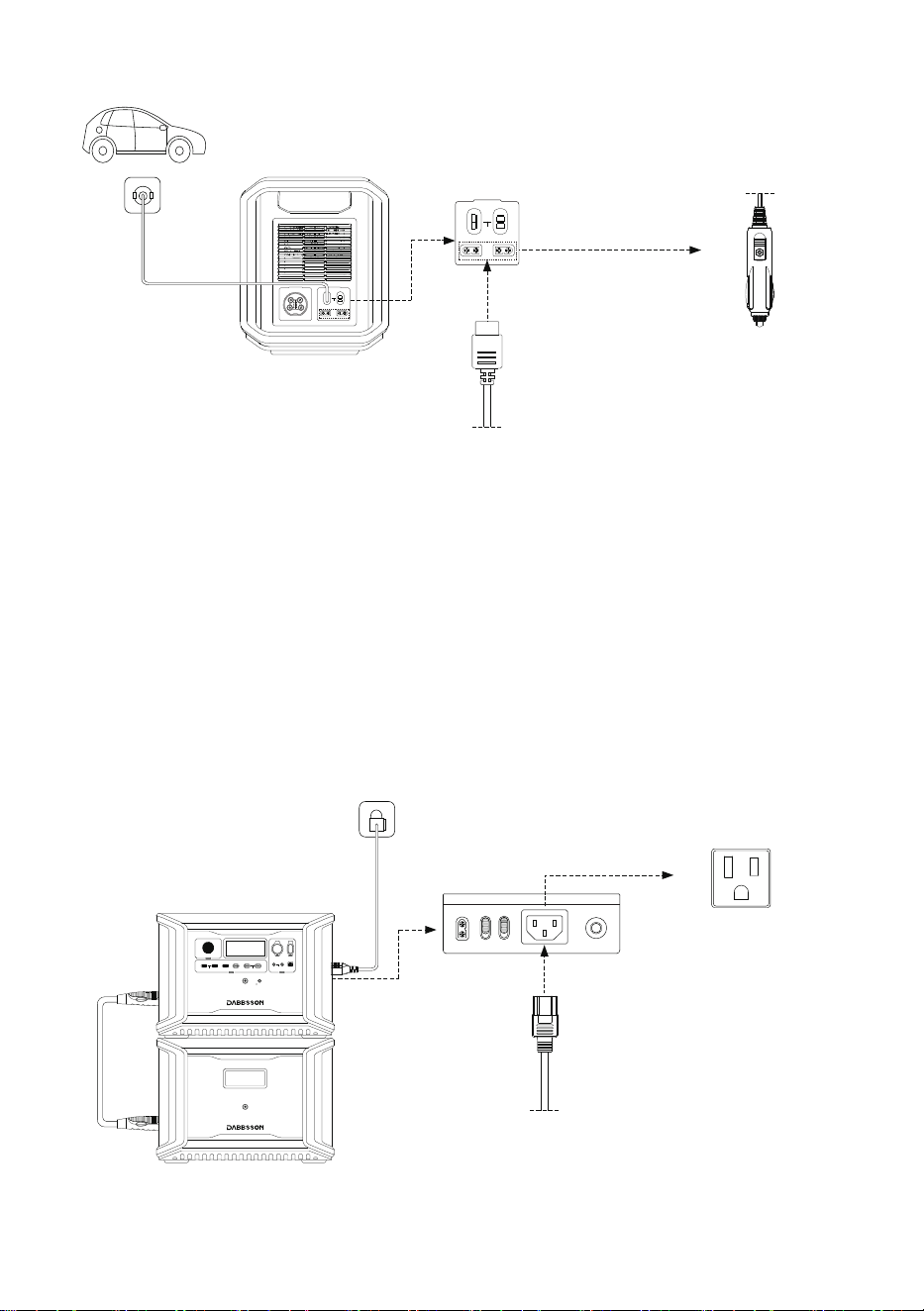
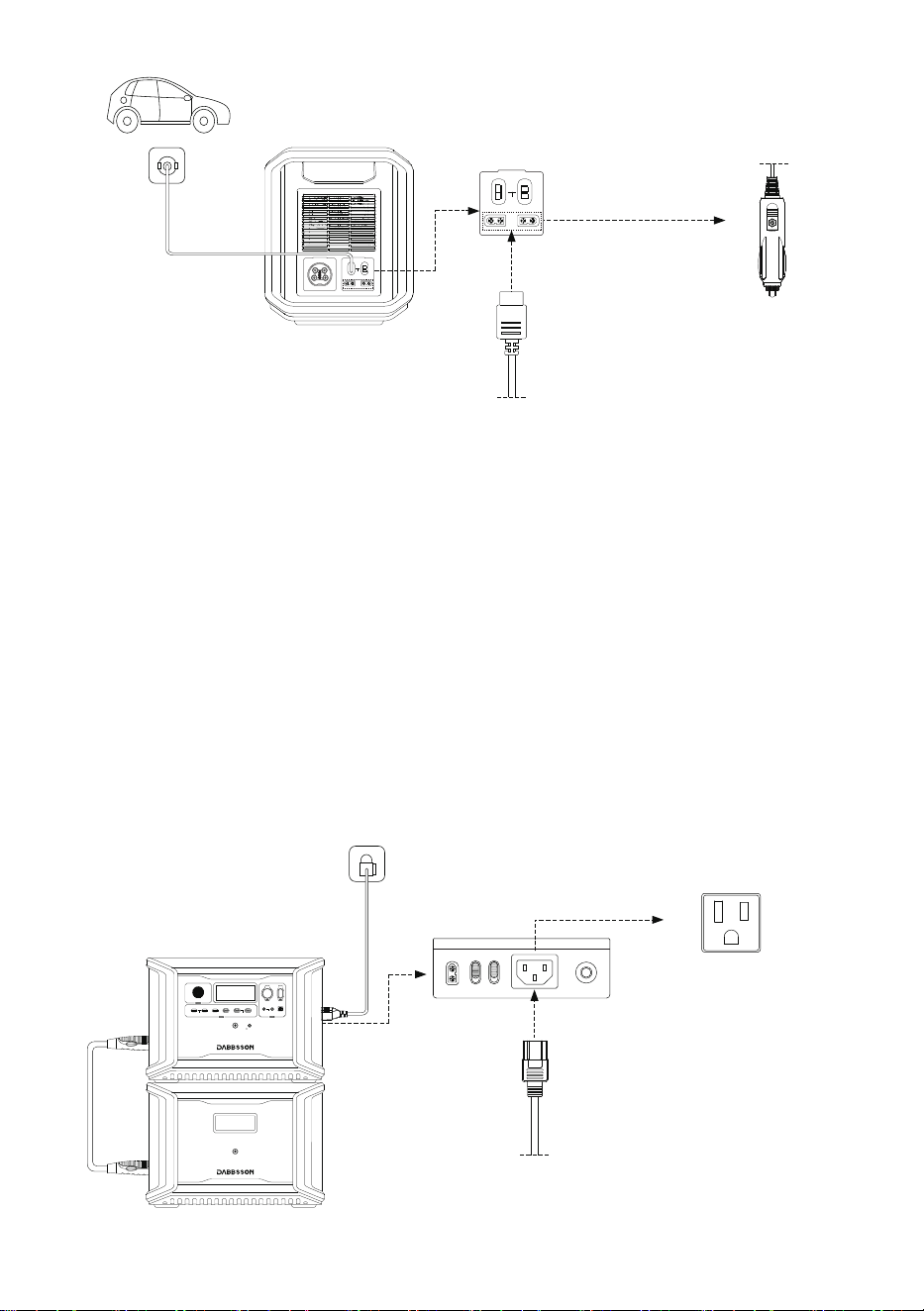
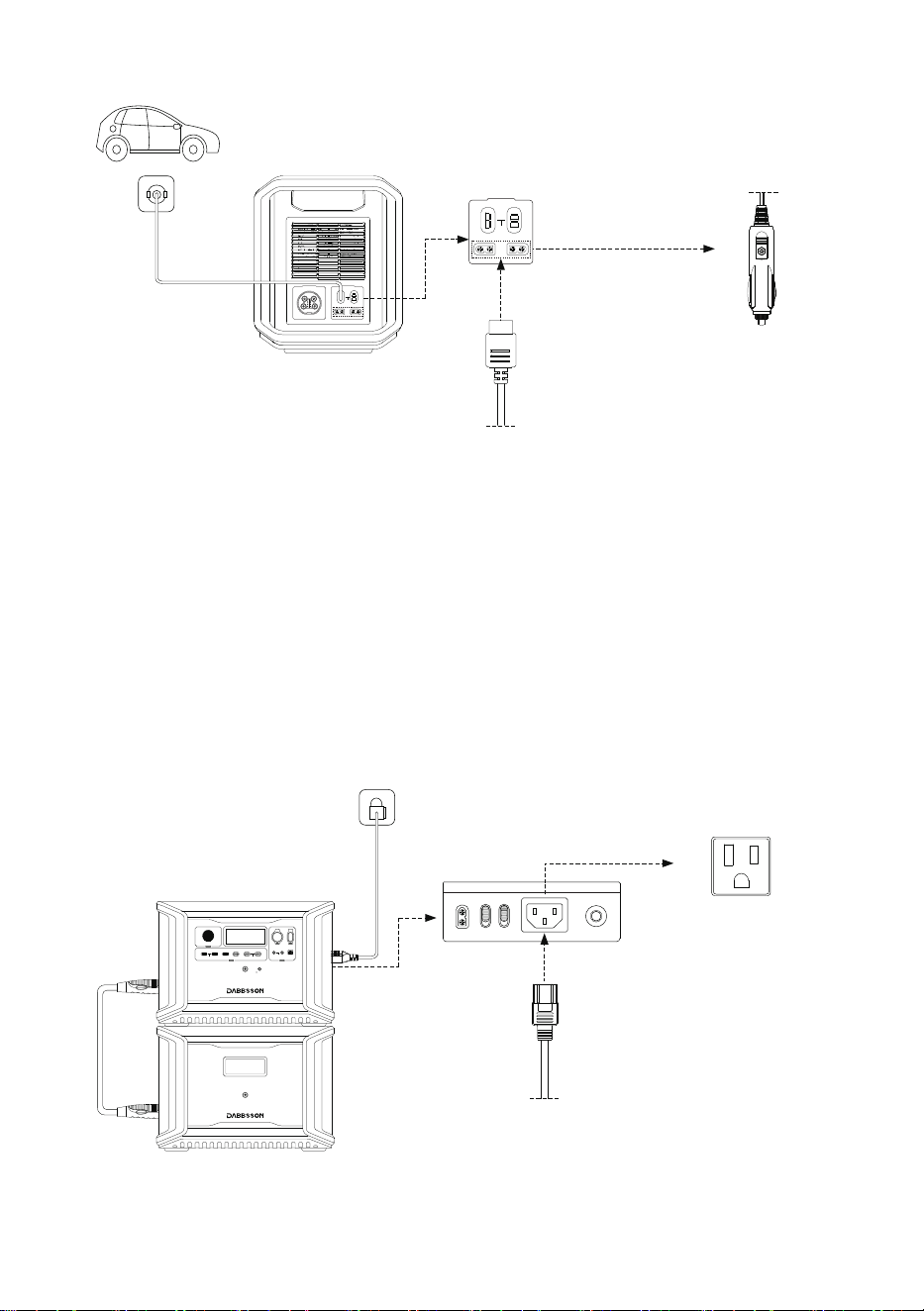
Users can recharge the product through the Car Outlet. It supports 12V/24V car chargers and
an 8A default charging current.
Please charge using the car charger after you’ve started the car to avoid failure to start due to
insufficient car battery.In addition, please make sure that the cigarette lighter of the Car Outlet
and the Car Charger Input Cable are in good condition.Dabbsson takes no responsibilities for
any losses or damages caused by failures to follow instructions.
3.5 Car Charging
濅濃濃濪澳濦瀂濿濴瀅澳濣濴瀁濸濿漏濫濆漐
Connection with solar panel
MC4 Connection
濅濃濃濪澳濦瀂濿濴瀅澳濣濴瀁濸濿漏濫濆漐
Connection with solar panel
MC4 Connection
濖瀂瀁瀁濸濶瀇澳濫濧濉濃澳瀃瀂瀅瀇
OUTPUT
INPUT
11-75Vd.c.
12V 20A 24V 18A
7
濫濧濉濃澳濣瀂瀅瀇
Car Charging
(108.8W Input)
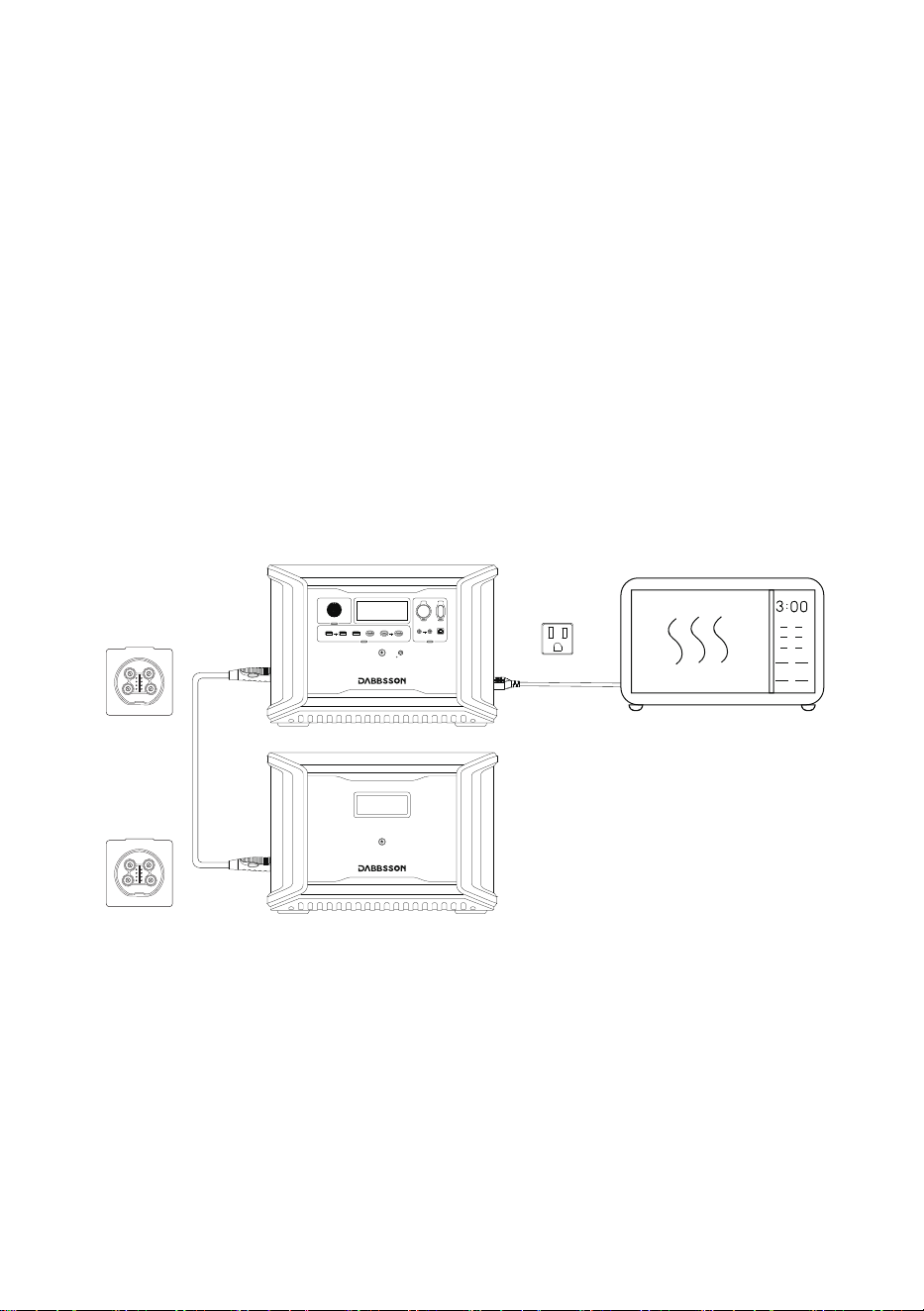
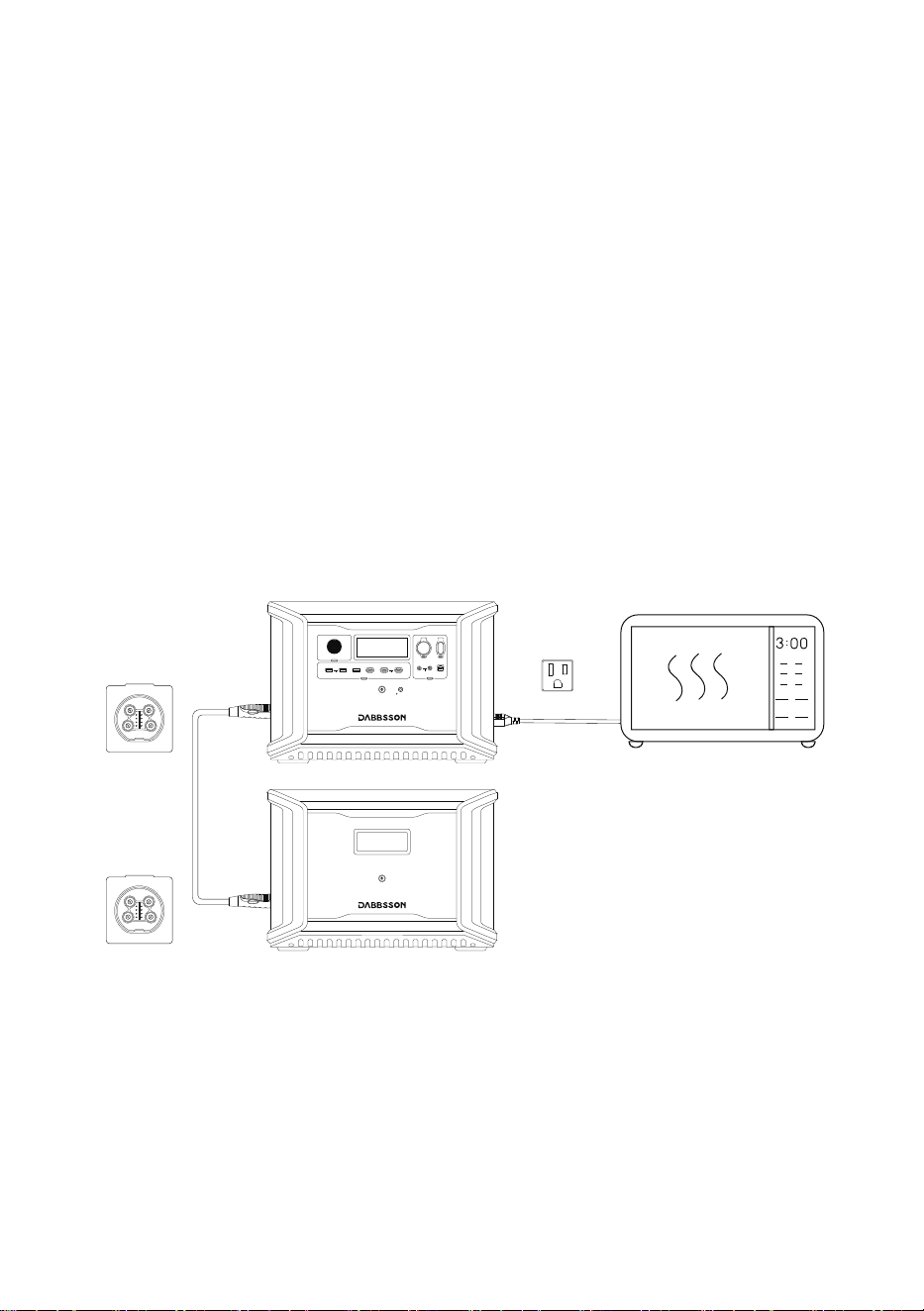
Dabbsson fast charge technology is specifically for AC charging, offering 1800W of max input
power. You can control the charging power through the AC Charge Speed Switch. The default
max input power for the AC charging speed is 600W,
3.6 AC Charging
Fast Charging
1800W Max Input Power
ň濈澳濻瀅瀆澳濙瀈濿濿澳濖濻濴瀅濺濸
AC Charging Cable
Car Charging Cable
OUTPUT
INPUT
11-75Vd.c.
12V 20A 24V 18A
OUTPUT
INPUT
11-75Vd.c.
12V 20A 24V 18A
12V ON/OFF
FAST CHARGE PD 100W
10A 30A
4A DEVICE
IOT RESET
LIGHT ON/OFF
USB ON/OFF
5V 2.4A
PD 30W
8
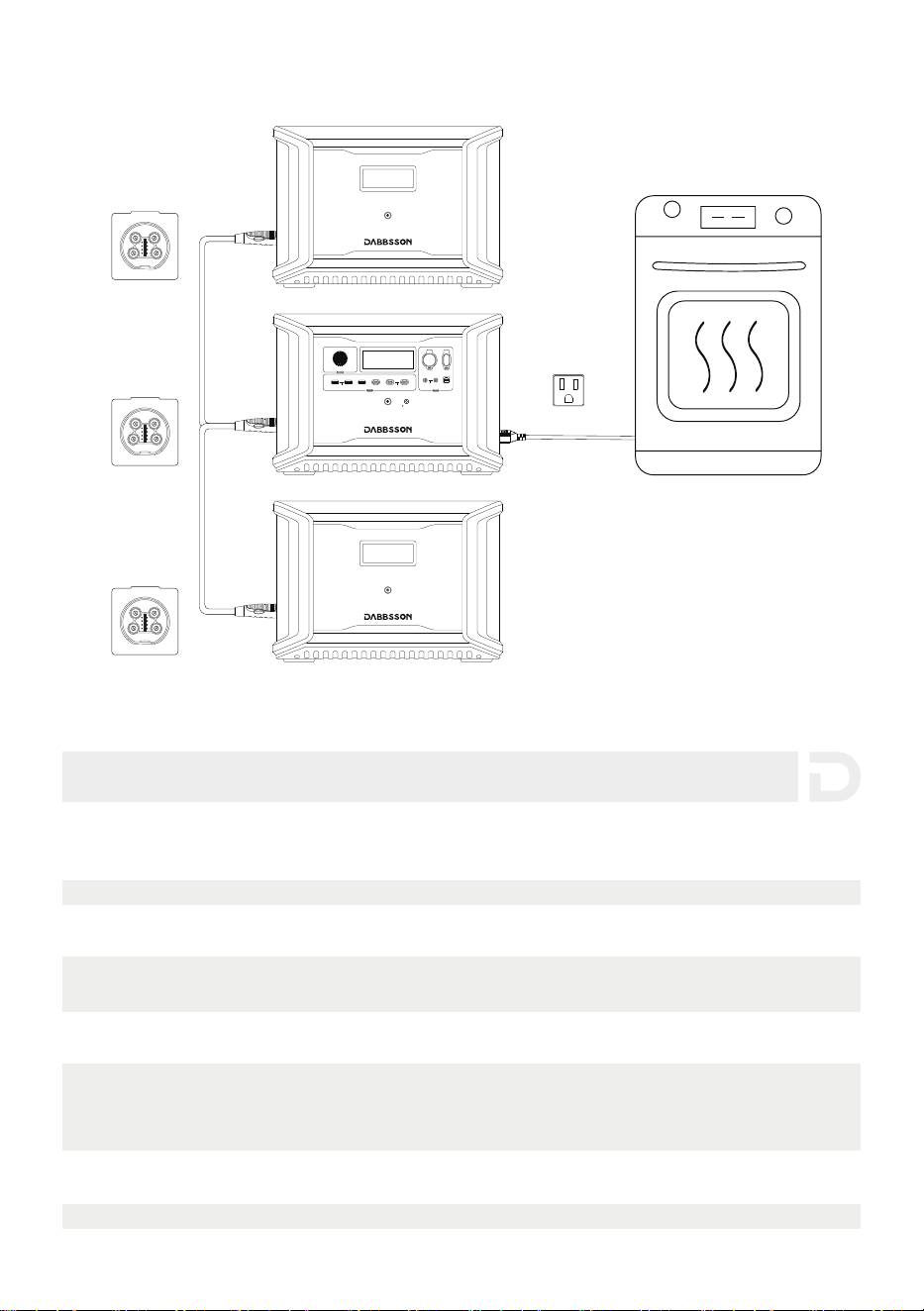
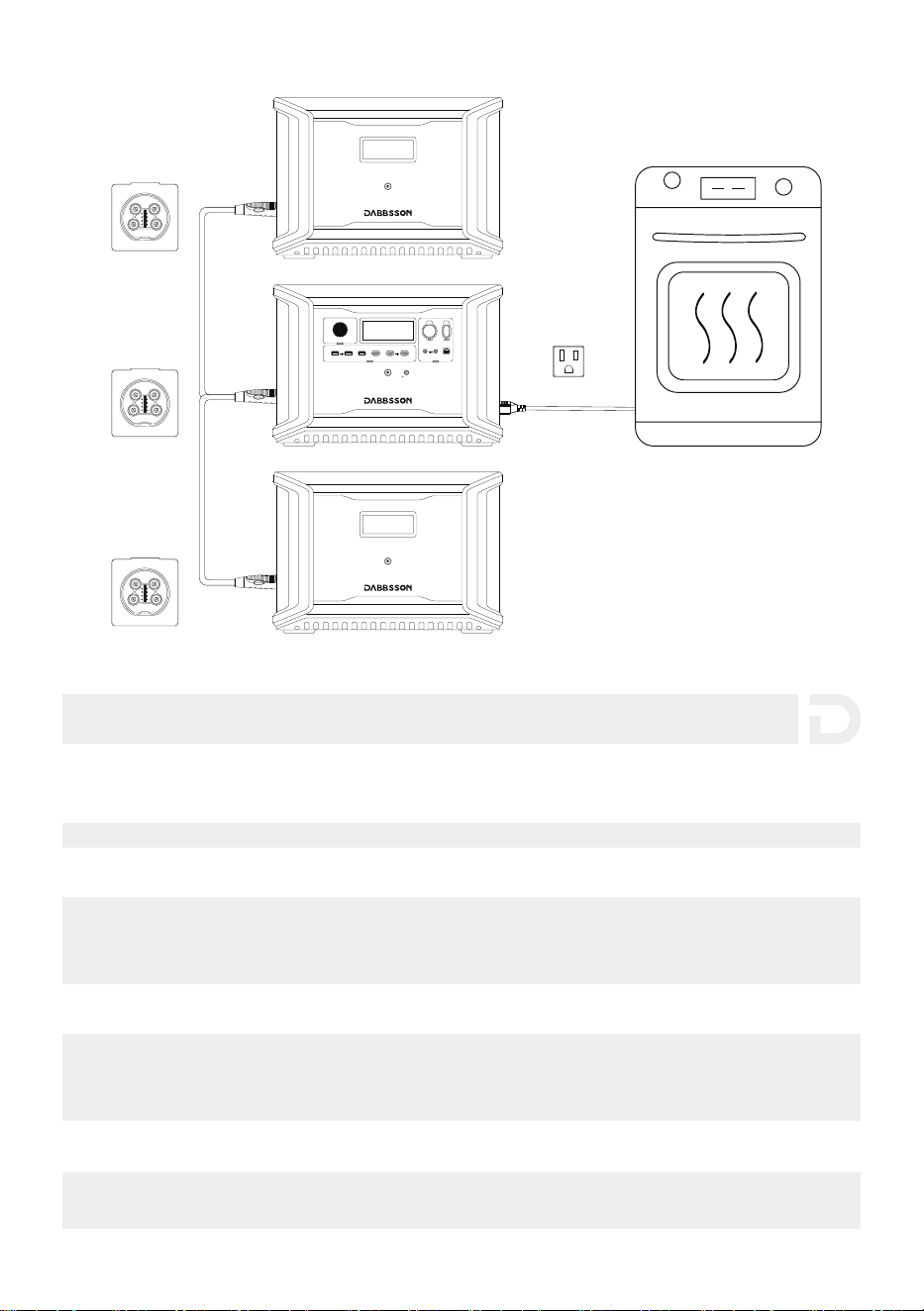
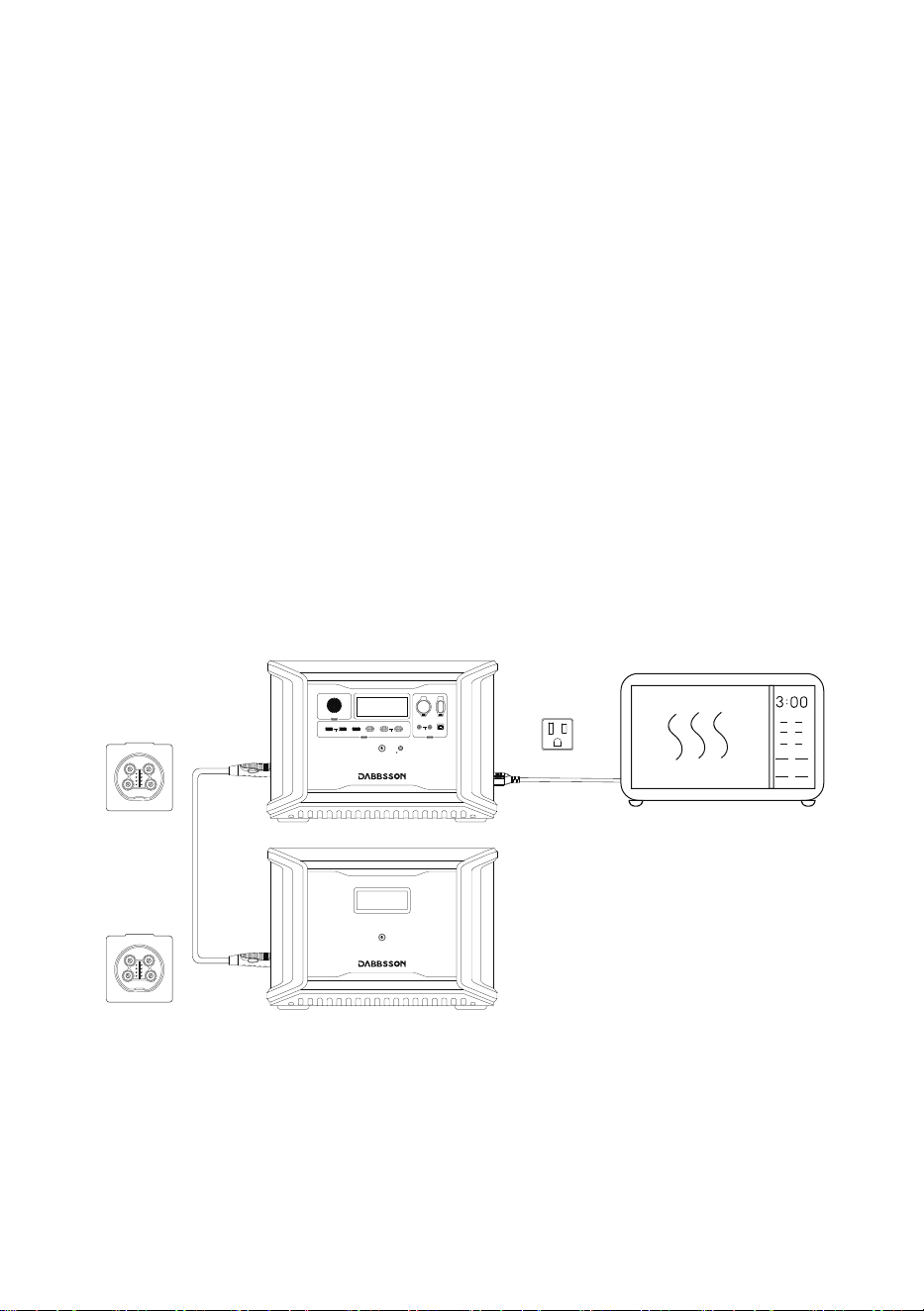
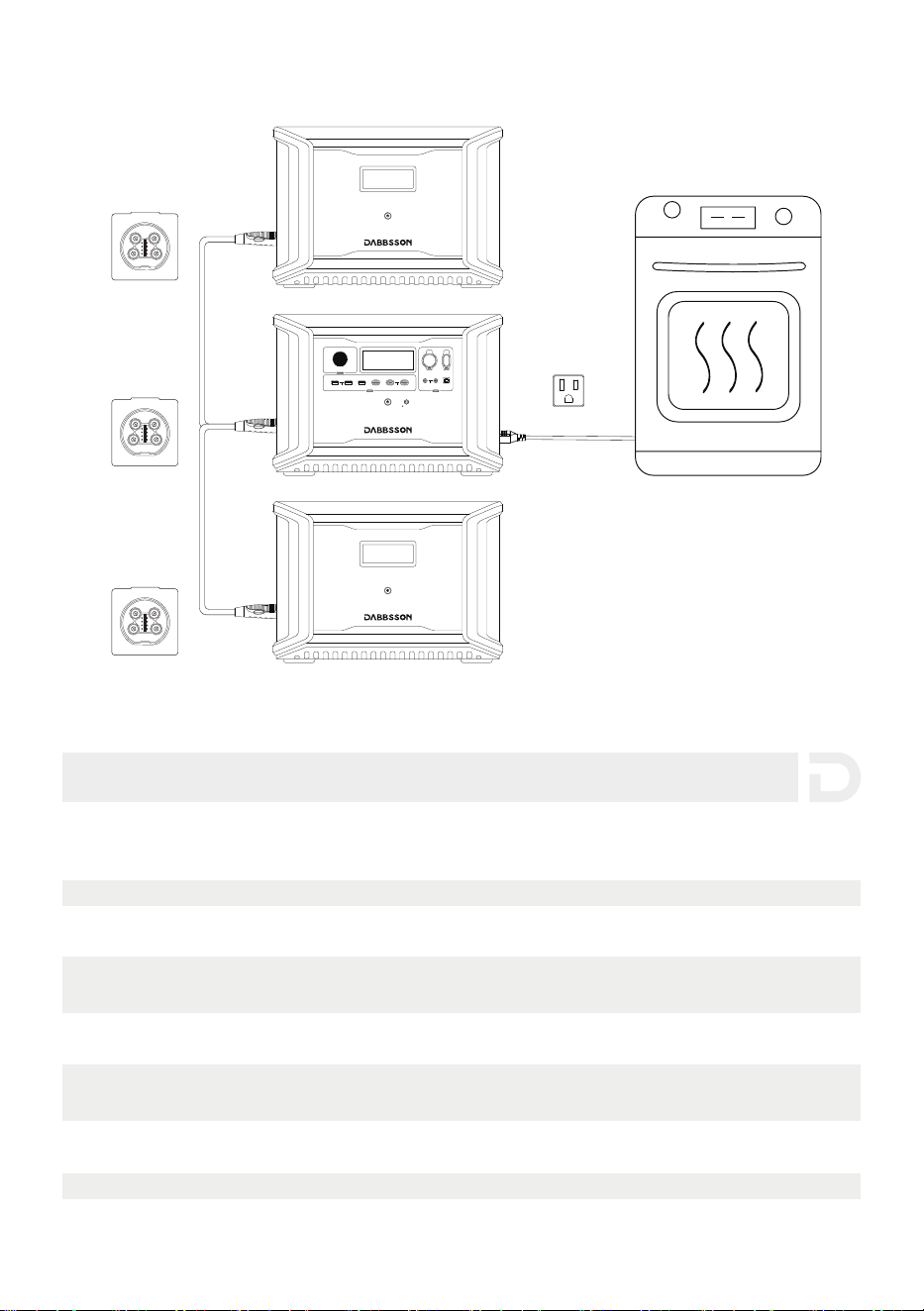
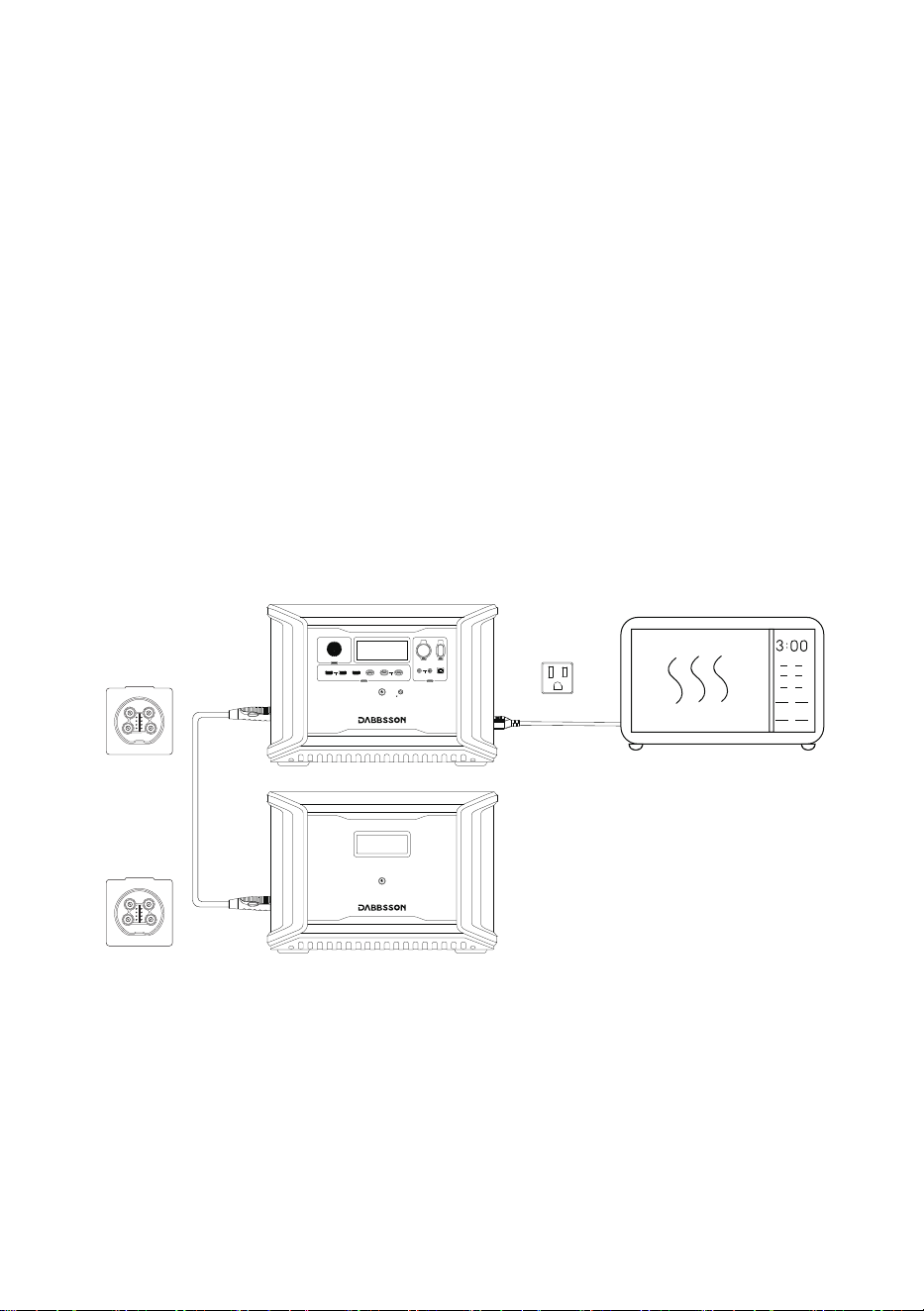
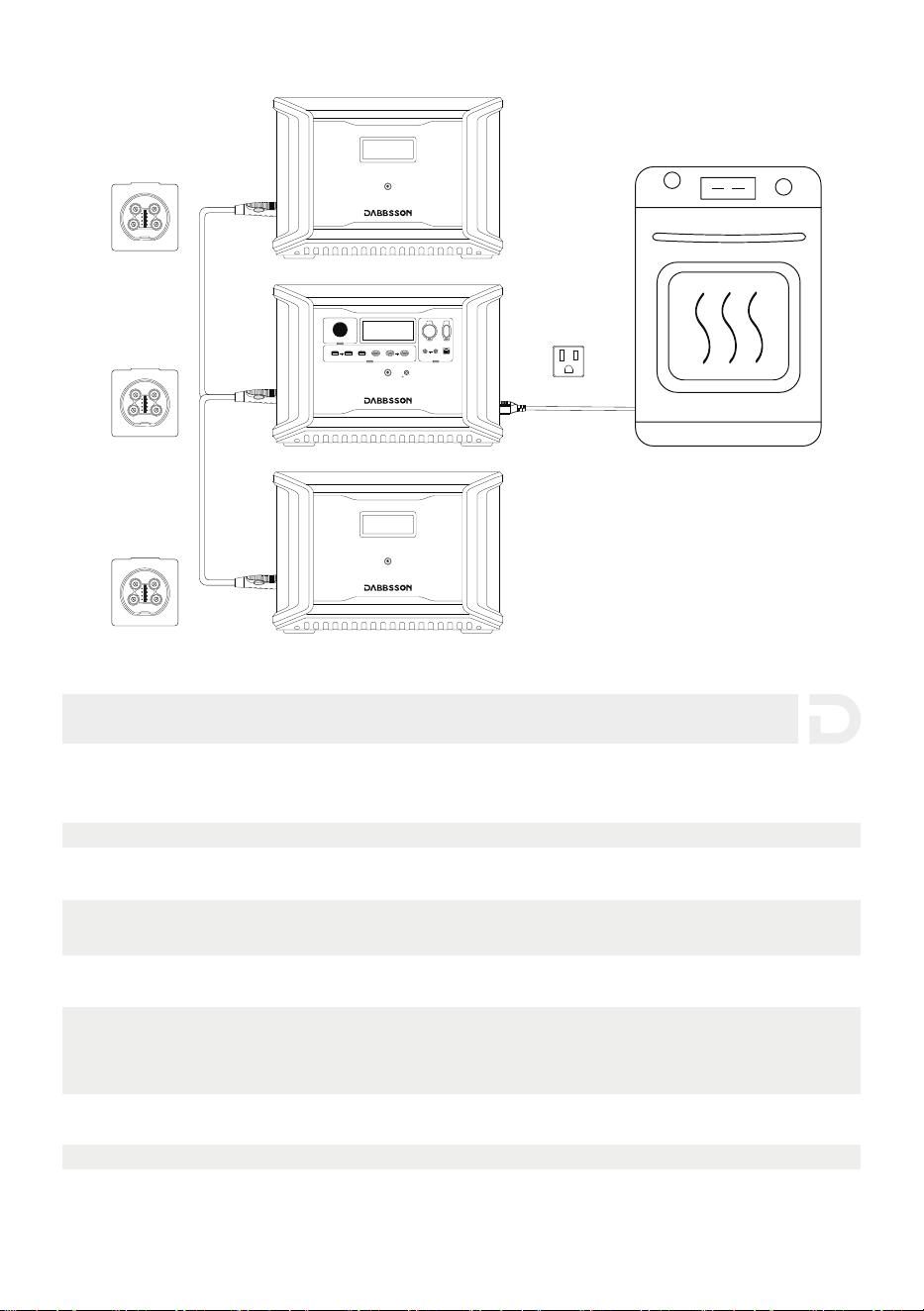
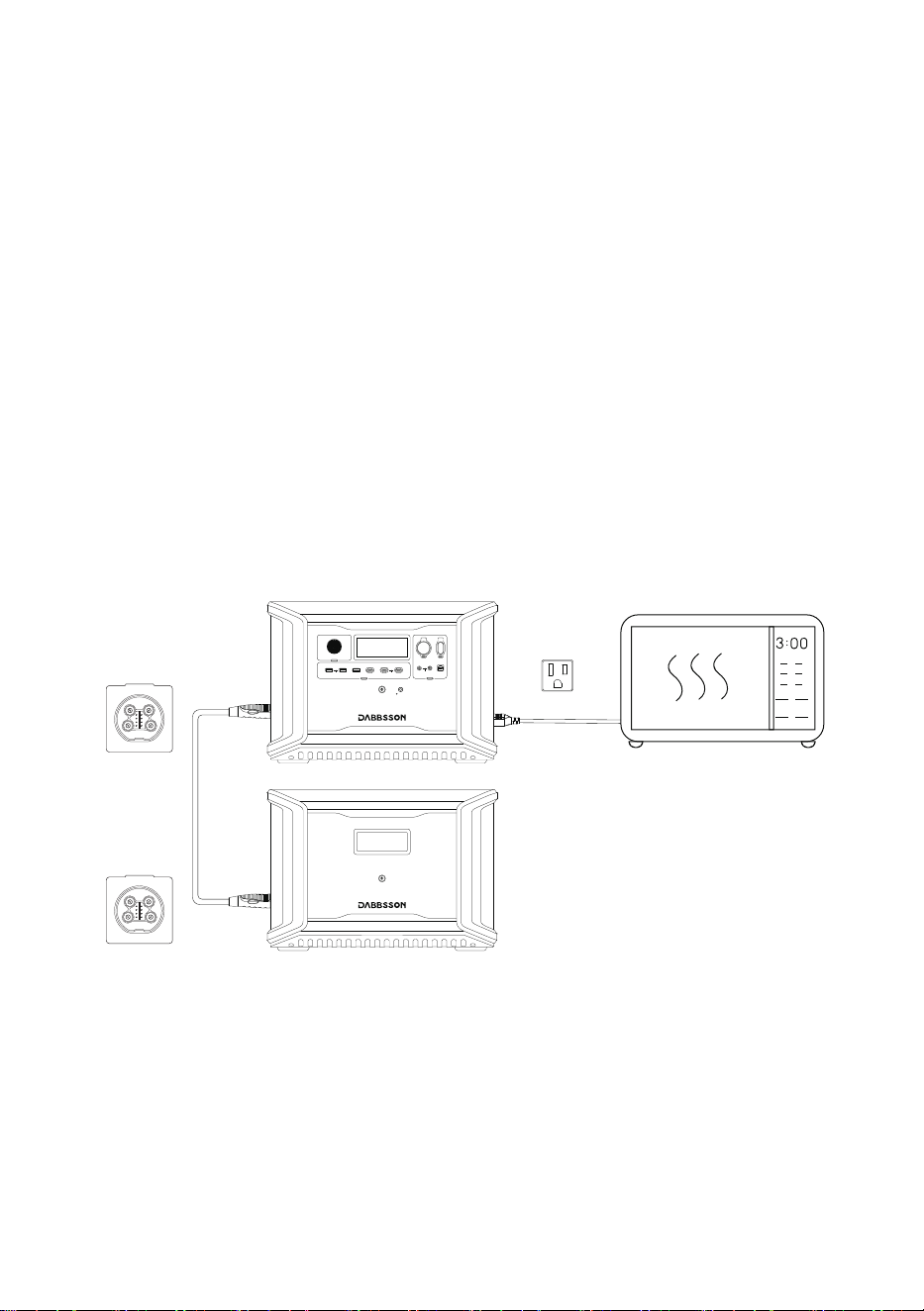
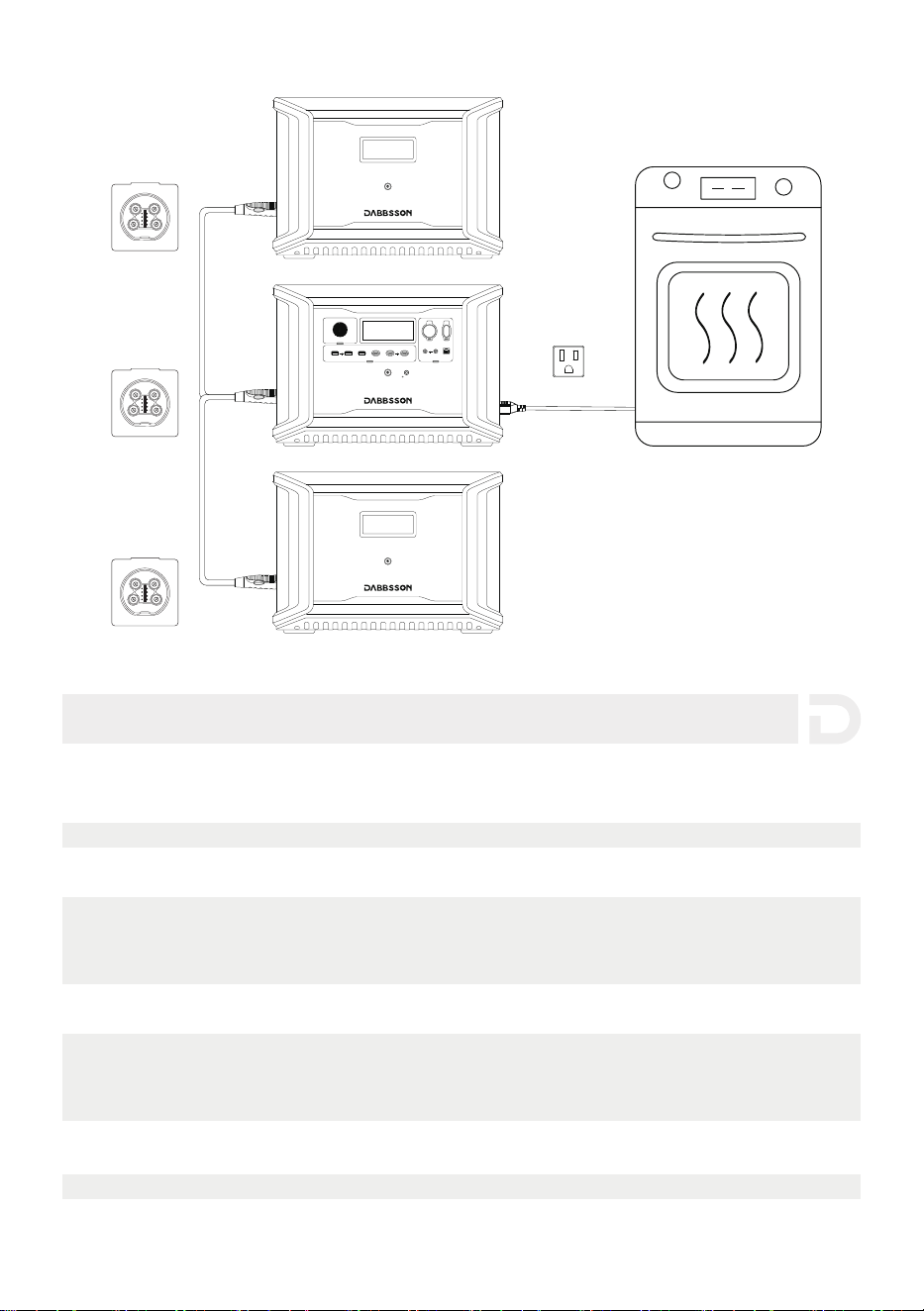
A single DBS2300 can be connected to two DBS3000B extra batteries for added capacity. Refer
to the user manuals of the Extra Battery DBS3000B for detailed instructions.
Precautions:
1. Turn off both the Extra Battery DBS3000B and DBS2300 before connecting or disconnecting
them.
2. Before using, make sure both DBS2300 and Extra Battery DBS3000B display the extra battery
icon on their screens.
3. Turn off the Extra Battery DBS3000B before connecting or disconnecting it.
4. Do not touch the metal terminals of the Extra Battery DBS3000B connector. If the metal
terminals need to be cleaned, gently wipe them with a dry cloth.
3.7 Using Extra Battery DBS3000B
12V ON/OFF
FAST CHARGE PD 100W
10A 30A
4A DEVICE
IOT RESET
LIGHT ON/OFF
USB ON/OFF
5V 2.4A
PD 30W
4. FAQS
1. What type of batteries does this product use?
This product uses high-quality LiFePO4 battery.
2. How long does it take for the product to charge my devices?
The charging time is shown on the product’s LCD Screen, which can be used to estimate
the charging time of most appliances with stable power usage.
3. How can I tell if the product is charging?
The remaining charging time will be shown on the LCD Screen. The charging indicator will
display remaining battery percentage, while current input power is shown to the right of
the charging indicator.
4. How do I clean the product?
Gently wipe it with a dry, soft, clean cloth or paper towel.
9
12V ON/OFF
FAST CHARGE PD 100W
10A 30A
4A DEVICE
IOT RESET
LIGHT ON/OFF
USB ON/OFF
5V 2.4A
PD 30W
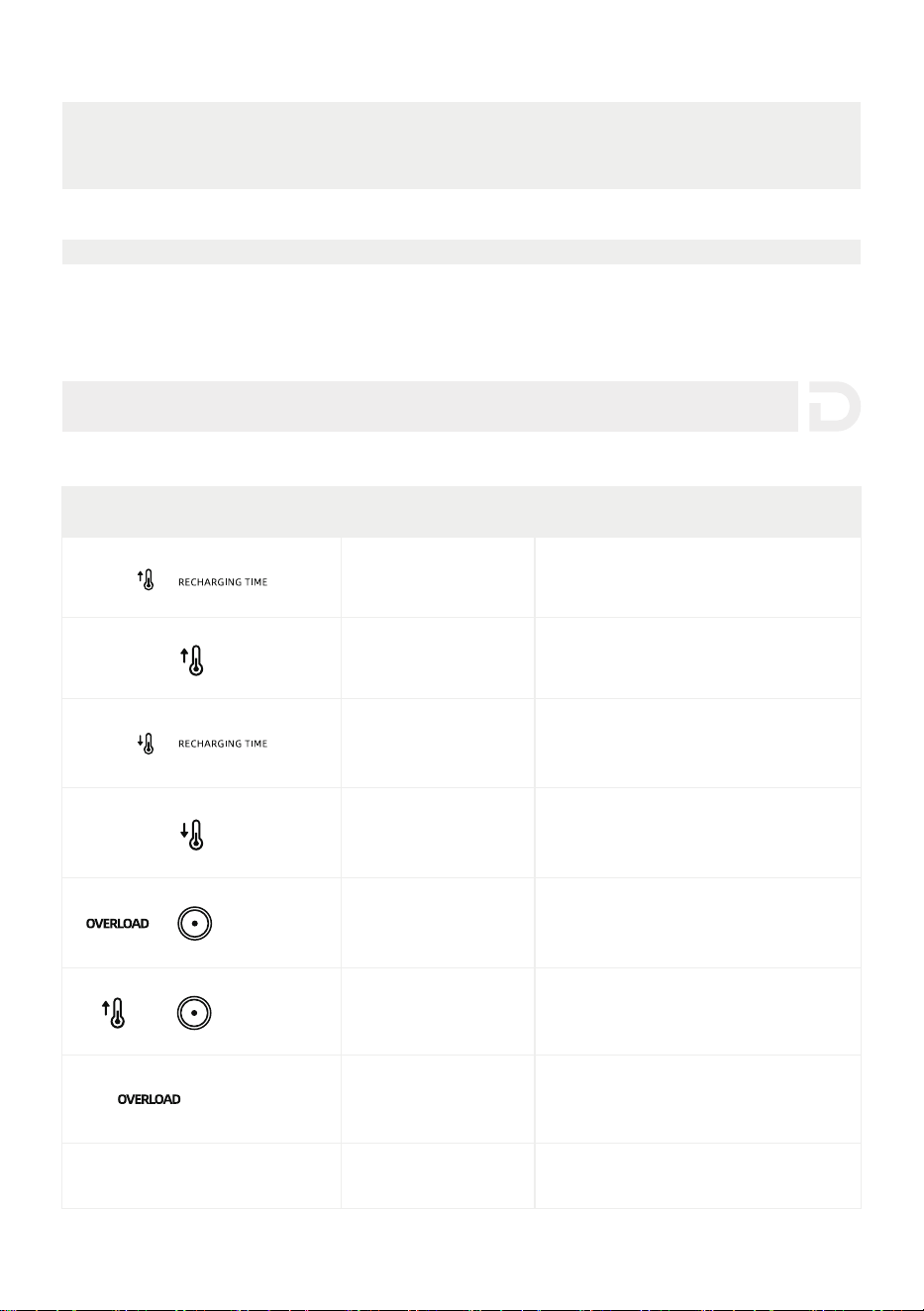
5. How should I store the product?
Before storing, first turn off the product and then store it in a dry, ventilated place at room
temperature. Do not place it near water sources. For long-term storage, discharge the
battery to 30% and recharge it to 60% every three months to extend battery life.
6. Can I bring the product on a plane?
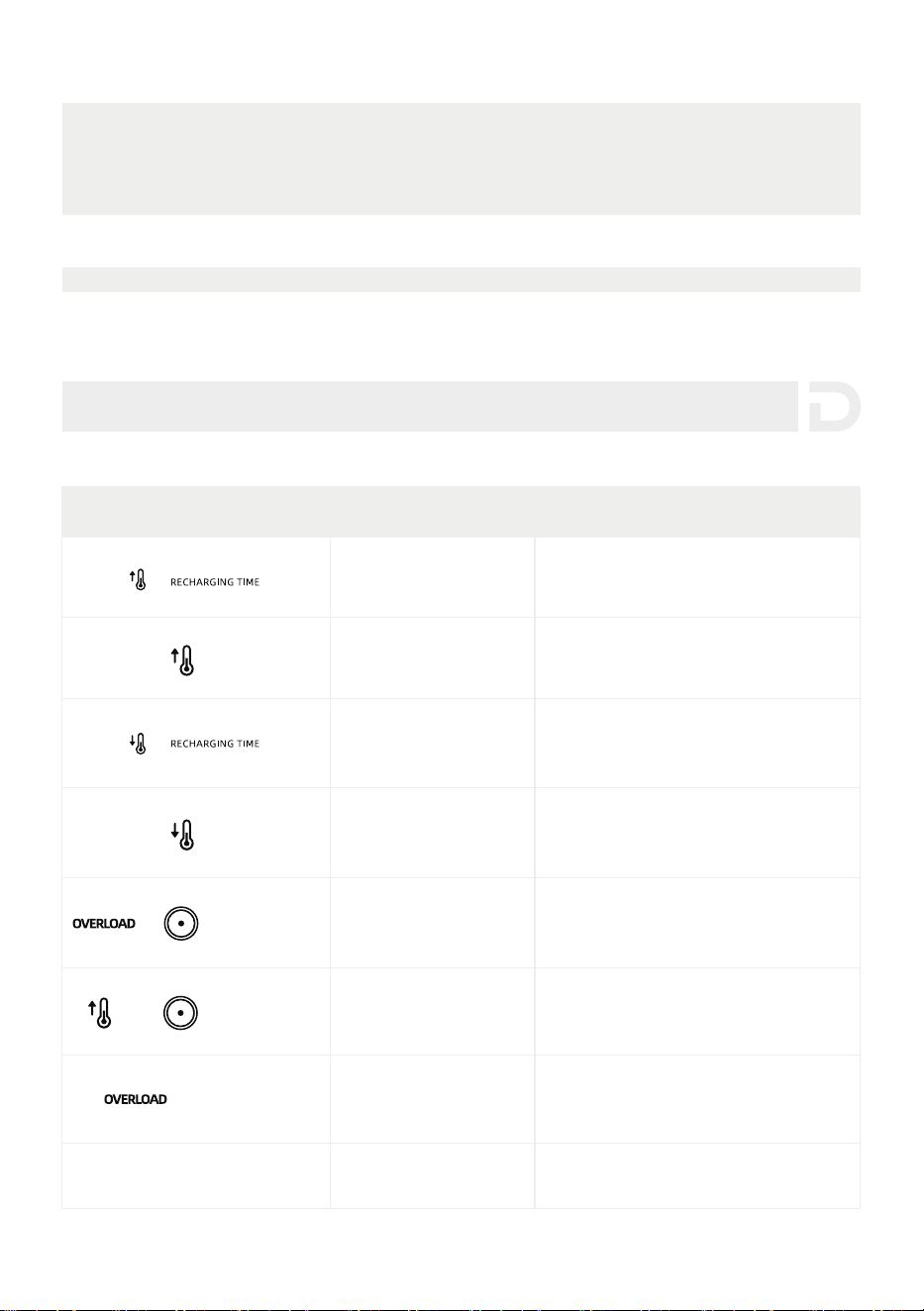
No
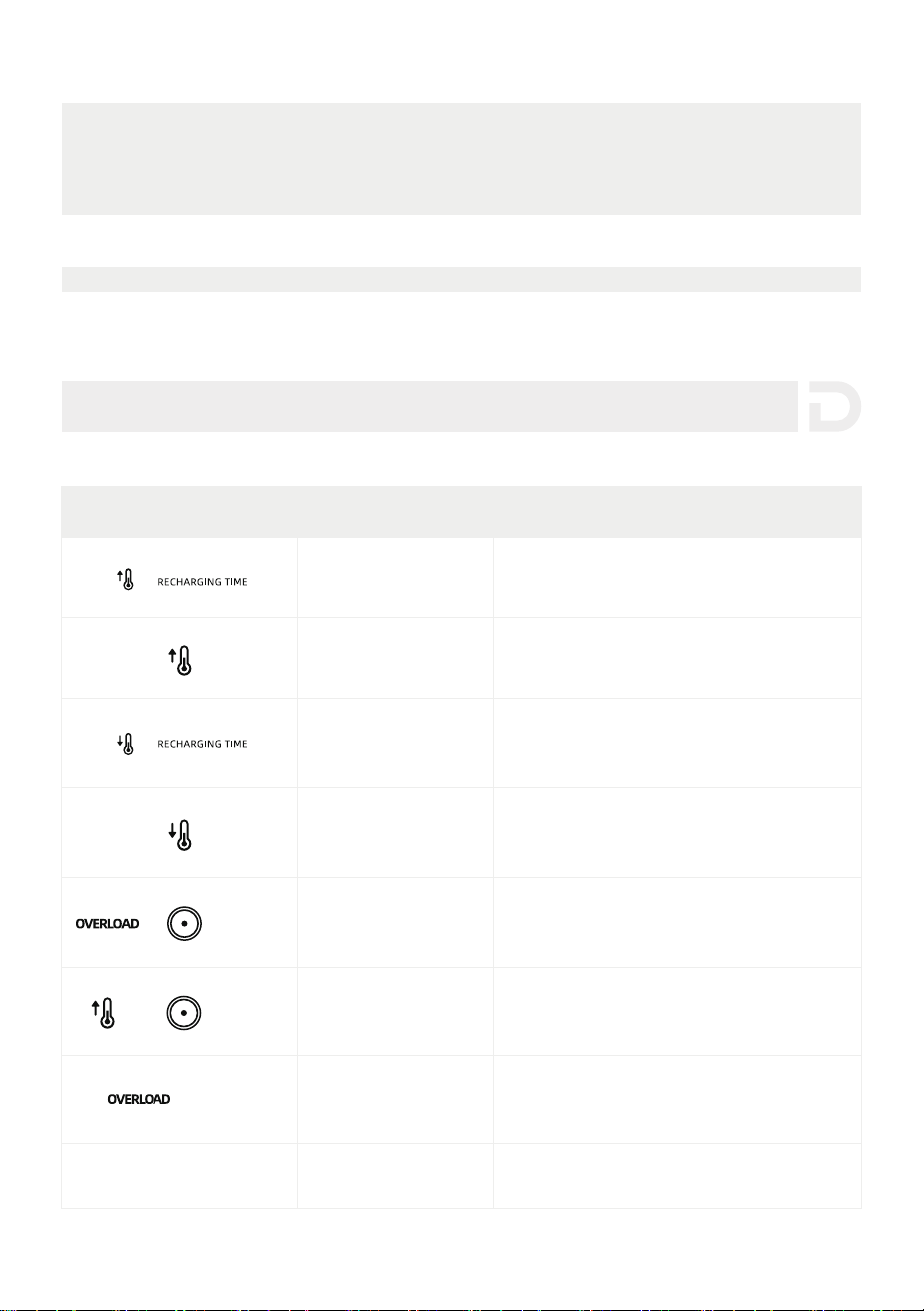
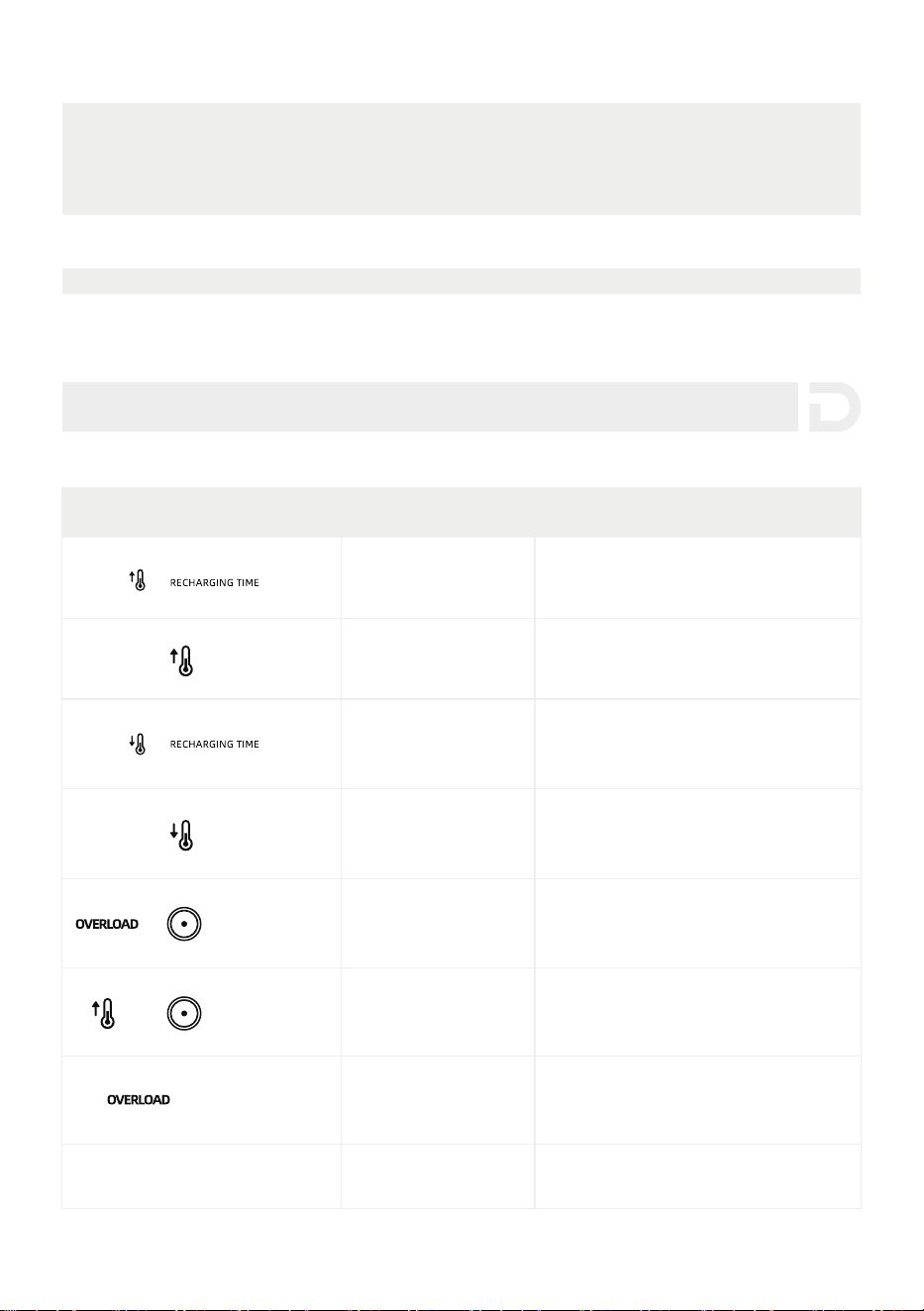
(Flashing)
(Flashing)
(Flashing)
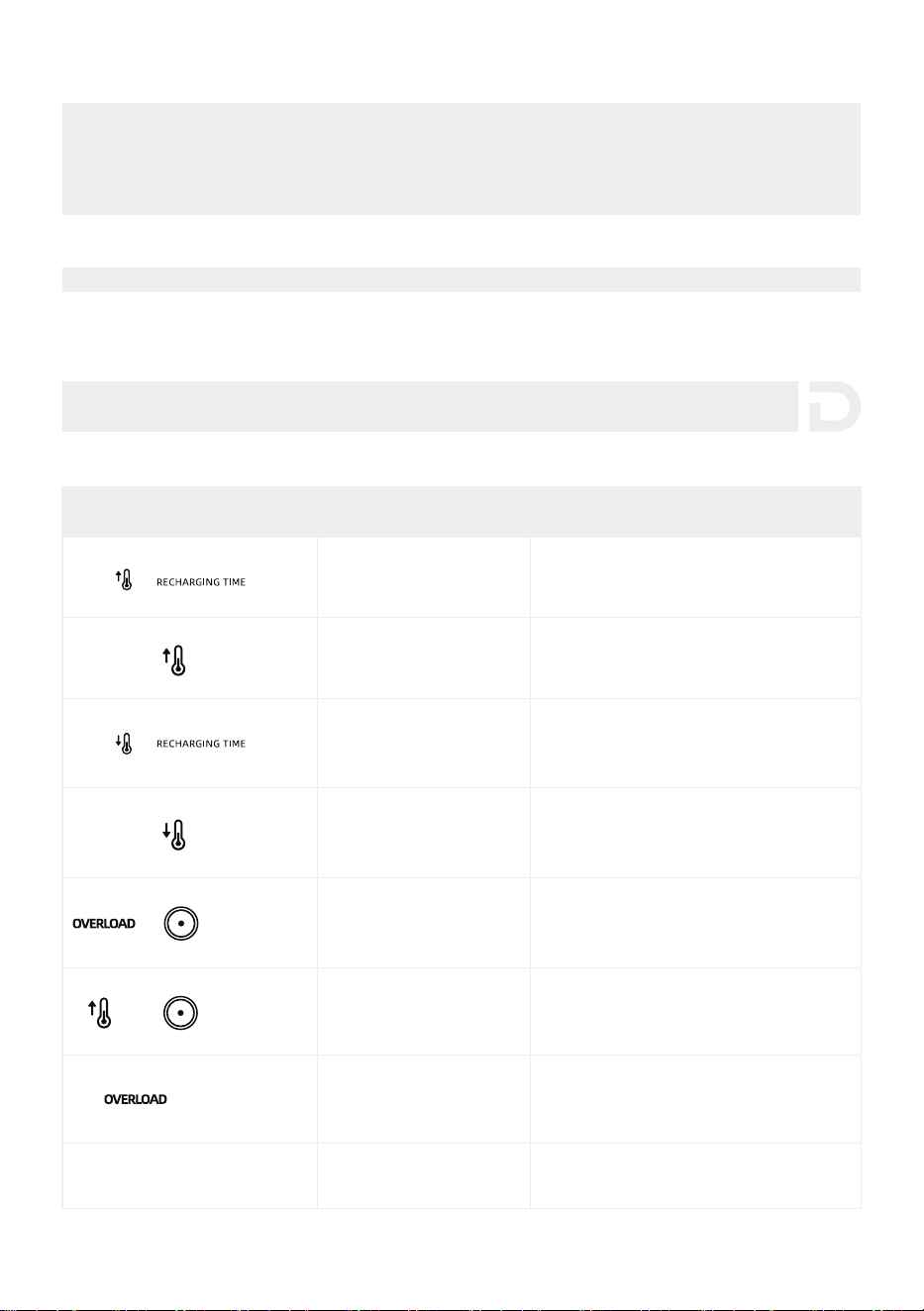
High Temperature
Charge Protection
Charging will automatically resume after
the battery cools down.
High Temperature
Discharge Protection
Power supply will automatically resume
after the battery cools down.
Low Temperature
Charge Protection
Charging will automatically resume
after battery temperature rises above
激濄濃燠澳澻濄濇燣澼濁
Low Temperature
Discharge Protection
Power supply will automatically resume
after the battery temperature rises
濴濵瀂瀉濸澳激濅濃燠澳澻澳激濇燣澼濁
DC Output/Input
Overload Protection
The product will automatically resume
normal operation after you remove the
device connected to the DC outlet.
DC Output High
Temperature Protection
Battery Overload
Protection,
Short Circuit Protection
Contact Dabbsson Customer ServiceOthers
Remove any high-power electrical
appliances connected to the product.
The product will automatically resume
normal operation after it cools down.
Indicator Problem Solution
5. Troubleshooting
10
MC4 female
Before connecting the solar panel, make sure that the positive pole of the solar
panel is connected to the MC4 male connector and the negative pole is connected
WRWKH0&IHPDOHFRQQHFWRUDVVKRZQLQWKHřJXUHEHORZ
MC4 male
MC4 Port
Connect your solar panel to the Dabbsson solar panel charging cable
(MC4 to XT60)
Please connect the positive pole to the MC4
male connector and the negative pole to the
MC4 female connector.
Positive pole
Negative pole
2
1
3
Please connect the positive pole of the solar panel to the MC4 male
connector and the negative pole to the MC4 female connector.
Please confirm the positive and negative poles of your solar panel.
For users who use universal solar panels with non-MC4 connectors to power the
device, please note solar panels should be within voltage and current range
(please find more information on requirements in the user guide).
Improper connection of MC4 connector to your device could damage the device.
Dabbsson does not take responsibility for equipment failure due to personal
misoperation.
DIY Instructions for
Non-MC4 Connector Solar Panels
Dabbsson solar panel
charging cable
Have any question? Chat with a specialist today.
If you have any question, please do not hesitate to contact us.
Follow Us
Activate your warranty at
www.dabbsson.com
Warranty Activation
Keep the original packaging & accessories
CLAIM YOUR WARRANTY
24-MONTH
WARRANTY
Fill in Your InformationRegister Porduct
Products must be returned in their original condition and
packaging with all included accessories for the warranty to be valid.
@Dabbsson_Global
@DabbssonOfficial
@Dabbsson_Official
+1 888 850 9503 Mon-Fri 9am-5pm (PST)
If the Alarm Prompt shows on the product LCD screen during use and does not disappear after
a restart, please stop using it immediately (do not try to charge or discharge).If you require any
other assistance, please contact Dabbsson Customer Service.
1.澳濜濷濸濴濿濿瀌澿澳瀈瀆濸澳濴瀁濷澳瀆瀇瀂瀅濸澳瀇濻濸澳瀃瀅瀂濷瀈濶瀇澳濴瀇澳濴瀁澳濴瀀澳濵濼濸瀈瀇澳瀇濸瀀瀃濸瀅濴瀇瀈瀅濸澳濵濸瀇瀊濸濸瀁澳濅濃燠激濆濃燠澻濉濋燣激濋濉燣澼澿澳
and always keep it away from water, intense heat, and sharp objects. Do not store at
temperatures abo瀉濸澳濇濈燠澻濄濄濆燣澼澳or belo瀊激濄濃燠澻濄濇燣澼for an extended period.
2. Storing a battery with a low charge for a long period shortens its lifespan. DBS2300 mitigates
the damage by putting the battery into hibernation mode. To get the most out of the battery,
make sure it is at about 60% before putting DBS2300 into long-term storage. While in storage,
it is recommended to discharge the battery to 30% and recharge it back to 60% every three
months.
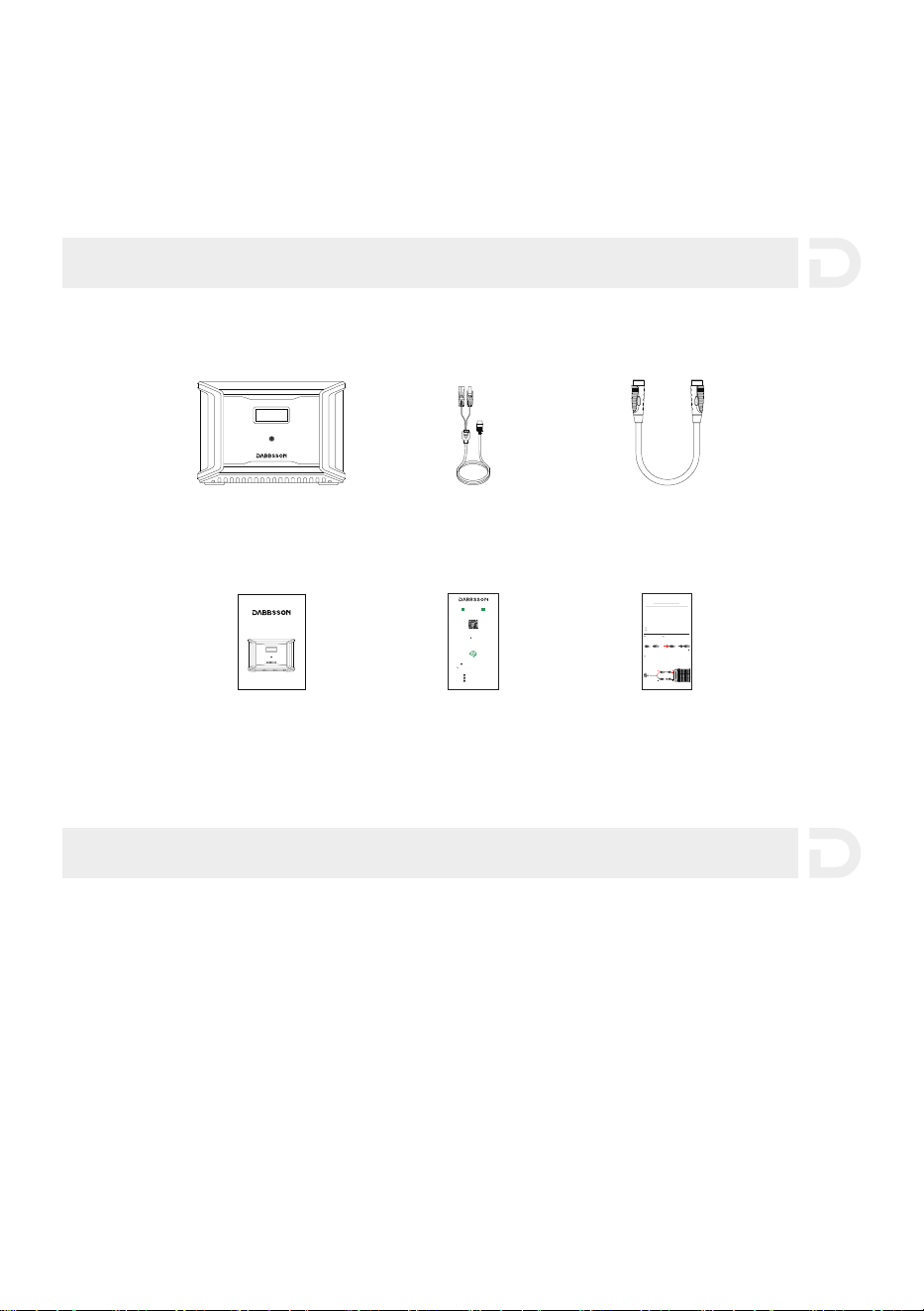
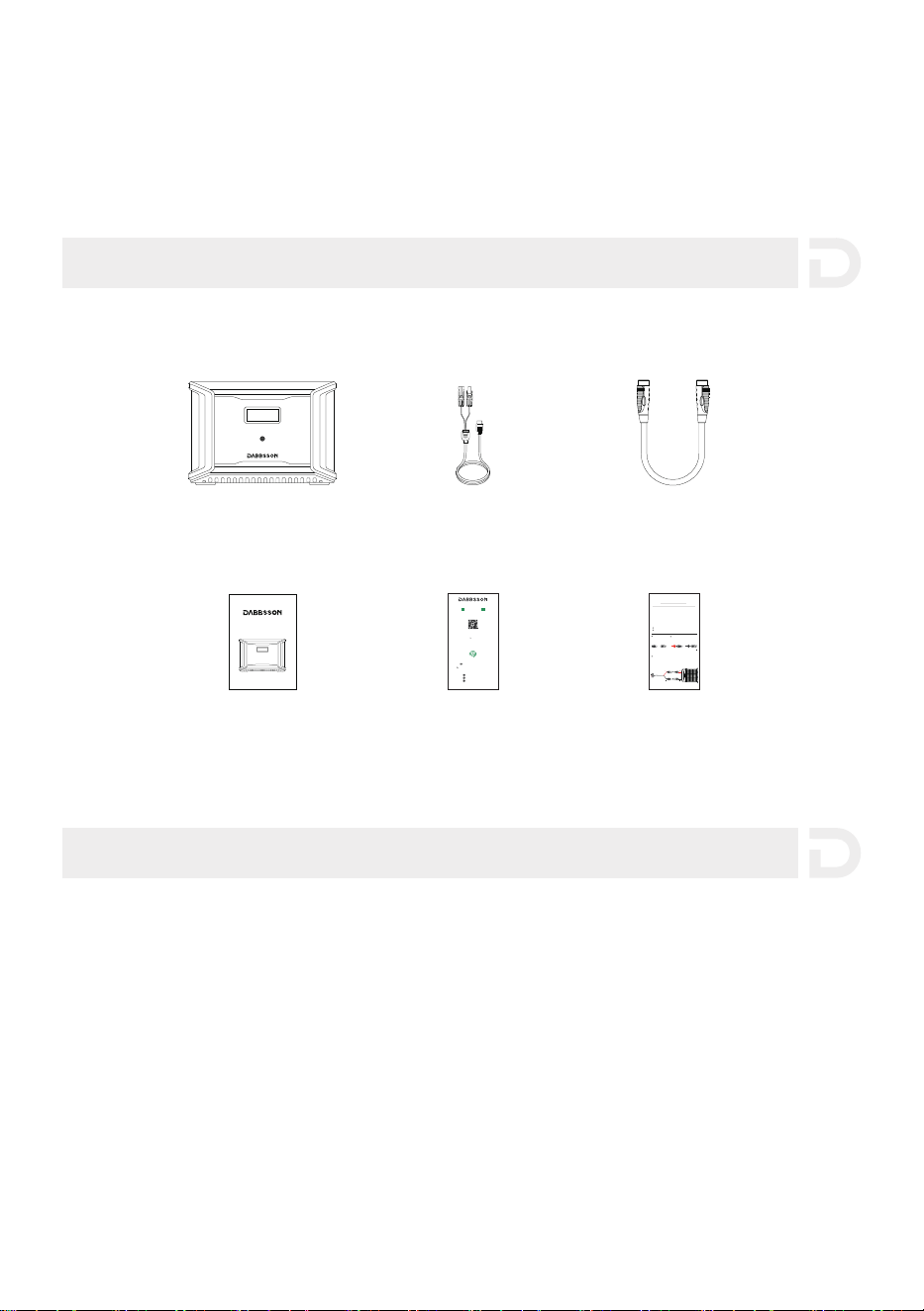
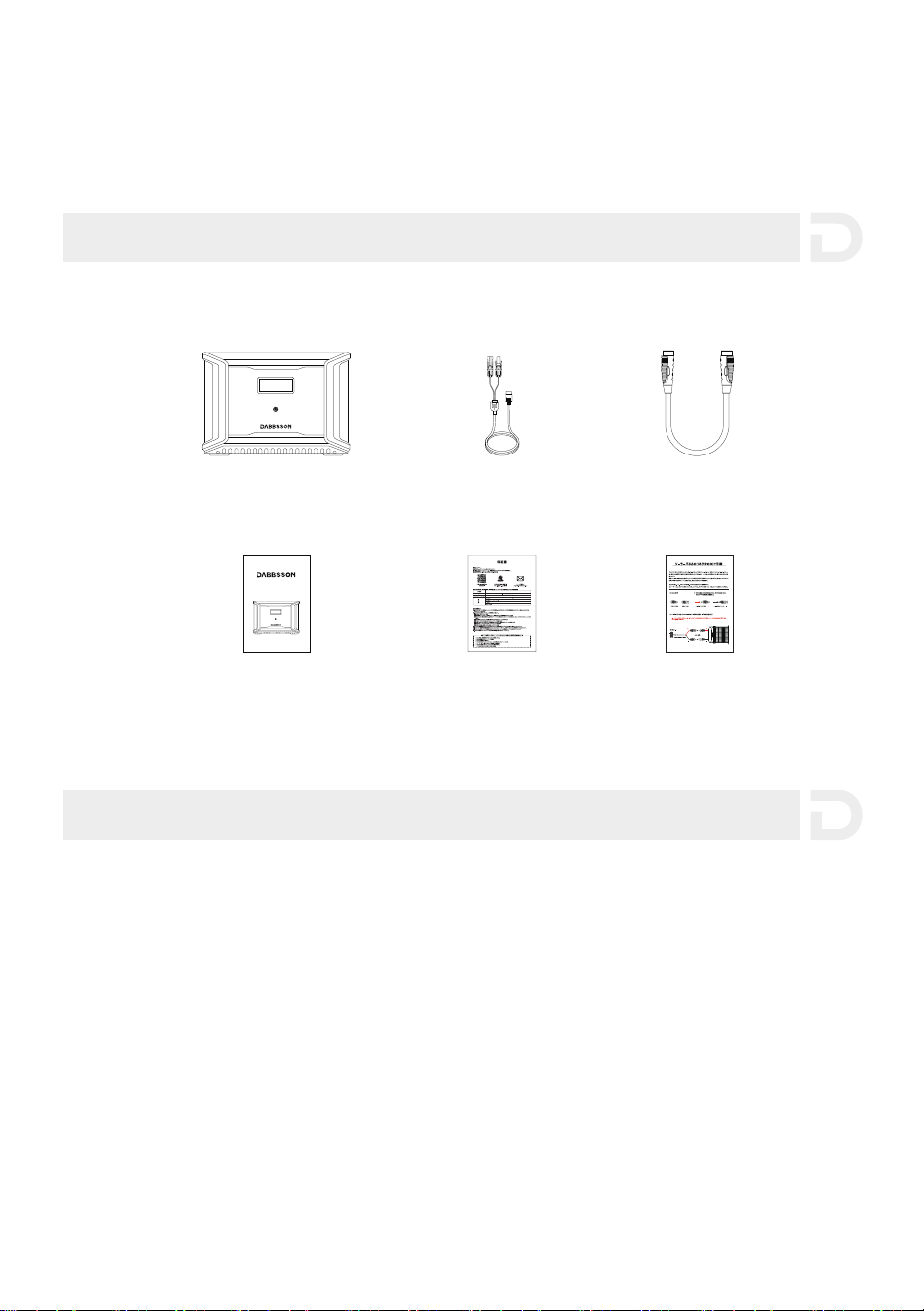
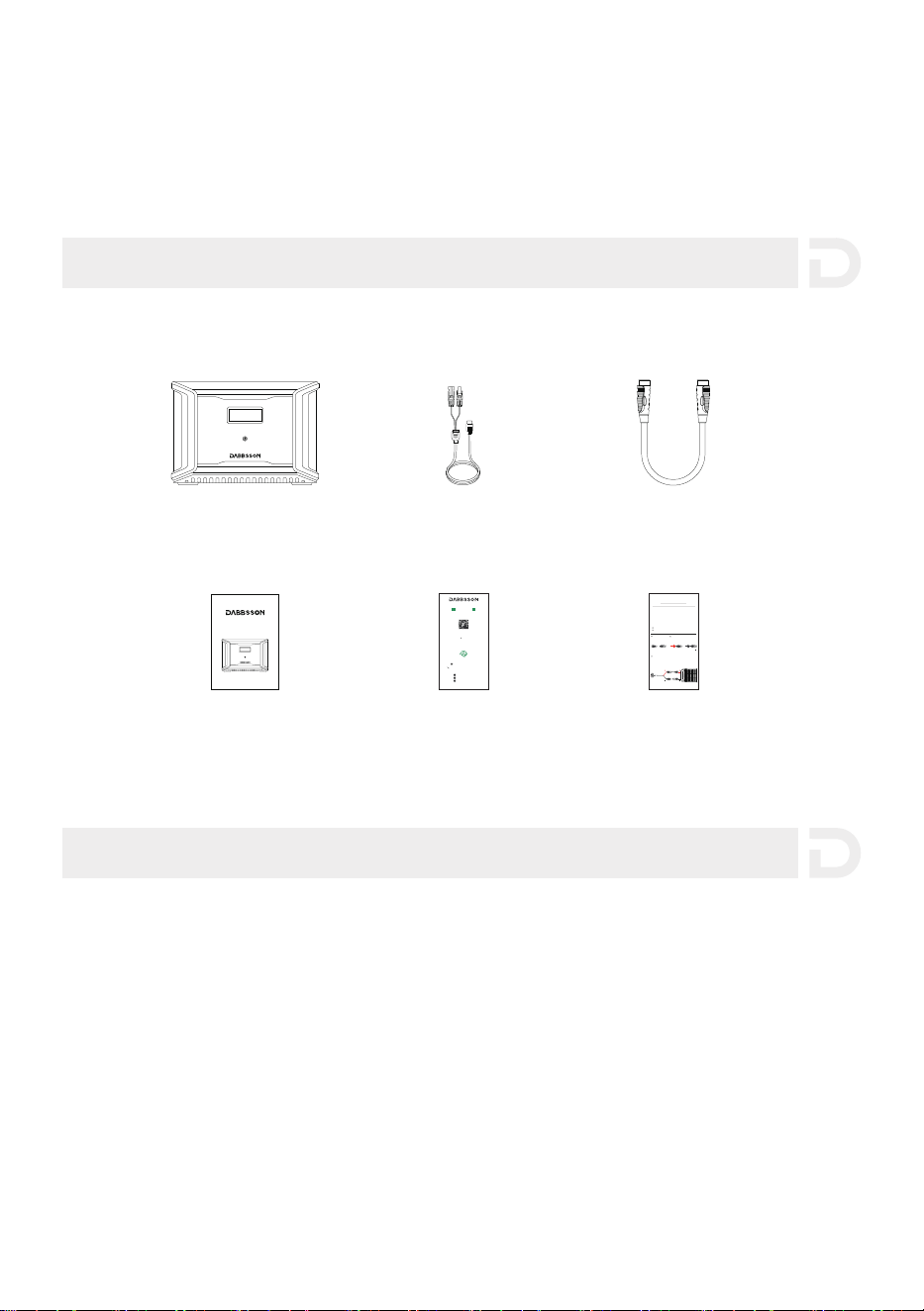
6. What’s in the Box
7. Storage & Maintenance
1111
Warranty Card
Solar Charging Cable
Dabbsson DBS3000B
Extra Battery
User Manual
Dabbsson DBS3000B Extra Battery
User Manual
Extra Battery Cable
Warning Card
12
8. Declaration of Conformity
Have any question? Chat with a specialist today.
If you have any question, please do not hesitate to contact us.
Follow Us
@Dabbsson_Global
@Dabbsson_Official
+1 888 850 9503 Mon-Fri 9am-5pm (PST)
@DabbssonOfficial
2014/30/EU
2011/65/EU (EU)2015/863
2006/1907/EC
RED Directive:
RoHS Recast Directive:
REACH Regulation:
We, SHENZHEN DAIPUSEN NEW ENERGY TECHNOLOGY CO., LTD. declare under our sole
responsibility that the above referenced product is in conformity with the applicable
requirements of the following directives:
Read the declaration of conformity and access the download link here at
https://dabbsson.com/pages/eu-compliance

Dabbsson DBS3000B
Eerweitungsbatterie
Benutzerhandbuch

Benutzerhandbuch
Bitte lesen Sie vor Gebrauch alle Sicherheitshinweise, Warnhinweise, Nutzungsbedingungen
und Haftungsausschlüsse sorgfältig durch. Die Nutzungsbedingungen und die
Haftungsausschlüsse finden Sie unter https://www.dabbsson.com und auf dem Aufkleber
auf dem Produkt. Benutzer übernehmen die volle Verantwortung für alle Nutzung und
Operationen und Sie sollten sich vor Gebrauch mit den entsprechenden Vorschriften in Ihrer
Region vertraut machen. Sie sind allein dafür verantwortlich, alle relevanten Vorschriften zu
kennen und Produkte von Dabbsson ordnungsgemäß zu verwenden.

INHALTE
1
2
3
9
10
11
11
3.1 Produktdetails 3.5 Kfz-Aufladen
3.2 LCD-Bildschirm 3.6 AC-Aufladen
3.3 Allgemeine Produktverwendung 3.7 Verwendung des DBS3000B
3.4 Solar-Aufladen
2.1 Verwendung 2.2 Entsorgungsanleitung
1.Spezifikationen
2.Sicherheitshinweise
3.Einstiegsanleitung
4.Häufig gestellte Fragen
5.Fehlerbehebung
6.Lieferumfang
7.Lagerung & Wartung
* Ob das Produkt entladen oder aufgeladen werden kann, hängt von der tatsächlichen Temperatur des Akkus ab.
Schaltungsschutz
Überspannungschutz Übertemperaturschutz
Kurzschlussschutz Niedrigtemperaturschutz
Niederspannungsschutz Überstromschutz
1
Betriebstemperatur
Reingewicht
Kapazität
Erweiterungsbatterieanschluss 48V 3000W Max
Kfz-Ladeanschluss
Erweiterungsbatterieanschluss
Anderson-Anschluss
Anderson-Anschluss
Batterieinformation
Zyklenanzahl
Zellentyp
1. Spezifikationen
Allgemeine Informationen
Größe
Zertifizierung
Eingangsanschlüsse
Solarladeanschluss
Ausgangsanschlüsse
ca. 25,2kg
3001,6Wh (44,8V 67Ah)
12V/24V Batterien unterstützt, 8A Max. von einzelnem
Anschluss, 16A Max. von dualen Anschlüssen.
42-51V 3000W Max
LiFePO4
12,6V 25A
24V 18A
4000 Zyklen (Kapazität bleibt 80%+)
432 x 254,5 x 303,5mm (17x10x12Zoll)
ETL CE FCC PSE RCM WEEE ROHS
12-60V 12,5A Max 600W Max. von einzelnem Anschluss,
1200W Max. von dualen Anschlüssen
Optimale Betriebstemperatur
Entladungstemperatur
Ladetemperatur
Lagerungstemperatur
濅濃燠瀑濆濃燠澻濉濋燣瀑濋濉燣)
激濄濃燠瀑濇濈燠澻濄濇燣瀑濄濄濆燣)
濃燠瀑濇濈燠澻濆濅燣瀑濄濄濆燣)
激濅濃燠瀑濉濃燠澻激濇燣瀑濄濇濃燣)
(Optimal:澳濅濃燠瀑濆濃燠澻濉濋燣瀑濋濉燣澼)

1. Stellen Sie das Produkt nicht in der Nähe einer Wärmequelle wie einem Feuer oder einem
Heizofen.
2. Lassen Sie das Produkt nicht mit Flüssigkeiten in Kontakt kommen und verwenden Sie es
nicht im Regen oder in feuchten Umgebungen.
3. Verwenden Sie das Produkt nicht in einer Umgebung mit starker statischer Elektrizität oder
Magnetfeldern.
4. Zerlegen Sie das Produkt nicht und stechen Sie es nicht mit scharfen Gegenständen durch.
5. Vermeiden Sie die Verwendung von Drähten oder anderen Metallgegenständen, die zu
einem Kurzschluss führen können.
6. Verwenden Sie keine inoffiziellen Komponenten oder Zubehörteile. Wenn Sie Komponenten
oder Zubehör austauschen müssen, kontaktieren Sie uns bitte.
7. Stellen Sie bei der Verwendung des Produkts sicher, dass die Betriebstemperatur den in
diesem Benutzerhandbuch angegebenen Anforderungen entspricht. Wenn die Temperatur
zu hoch ist, kann es zu einem Brand oder einer Explosion kommen; Wenn die Temperatur zu
niedrig ist, kann die Produktleistung stark reduziert werden oder das Produkt kann nicht
mehr funktionieren.
8. Stellen Sie keine schweren Gegenstände auf das Produkt.
9. Sperren Sie den Kühllüfter nicht gewaltsam während des Gebrauchs und stellen Sie das
Produkt nicht an einem unbelüfteten oder staubigen Ort auf.
10. Vermeiden Sie Stöße, Stürze oder starke Vibrationen, wenn Sie das Produkt verwenden.
Stellen Sie sicher, dass das Produkt während des Transports gut befestigt ist. Im Falle eines
schweren Stoßes oder Sturzes schalten Sie sofort das Gerät aus und verwenden Sie das
Produkt nicht mehr.
11. Wenn Sie das Produkt während des Gebrauchs versehentlich ins Wasser fallen lassen, legen
Sie es bitte an einem sicheren offenen Ort ab und halten Sie sich davon fern, bis es
vollständig trocken ist. Das getrocknete Produkt darf nicht wiederverwendet werden und
ist gemäß nachstehendem Abschnitt 2.2 ordnungsgemäß zu entsorgen. Wenn das Produkt
Feuer verursacht, empfehlen wir Ihnen, die Feuerlöscher in der folgenden Reihenfolge zu
verwenden: Wasser oder Wassernebel, Sand, Löschdecke, Löschpulver und schließlich ein
Kohlendioxid-Feuerlöscher.
12. Wenn sich Schmutz auf den Anschlüssen des Produkts befindet, verwenden Sie bitte ein
trockenes Tuch, um ihn zu entfernen.
13. Legen Sie das Produkt auf einer ebenen Fläche ab, um Schäden durch Umfallen zu
vermeiden. Wenn das Produkt umgekippt und stark beschädigt wird, schalten Sie es sofort
aus und stellen Sie es in einen offenen Bereich, halten Sie es von brennbaren Stoffen und
Personen fern und dann entsorgen Sie es gemäß den örtlichen Gesetzen und Vorschriften.
2.1 Verwendung
2. Sicherheitshinweise
2
3.1 Produktdetails
3. Einstiegsanleitung
14. Stellen Sie sicher, dass das Produkt außerhalb der Reichweite von Kindern und Haustieren
aufbewahrt wird.
15. Verbinden Sie die Erweiterungsbatterie nicht mit einer anderen Erweiterungsbatterie.
1. Bitte entladen Sie den Akku vollständig, bevor Sie ihn in einem bestimmten Wertstoffhof
entsorgen. Das Produkt enthält Akkuzellen mit potenziell gefährlichen Chemikalien, daher ist
es strengstens verboten, es in normalen Mülleimern zu entsorgen. Für weitere Informationen
befolgen Sie bitte die örtlichen Gesetze und Vorschriften zum Recycling und zur Entsorgung
von Batterien.
2. Wenn der Akku aufgrund eines Produktfehlers nicht vollständig entladen werden kann,
entsorgen Sie den Akku nicht direkt in einem Wertstoffhof. Wenden Sie sich in solchen Fällen
an ein professionelles Batterierecyclingunternehmen zu weiterem Verfahren.
3. Bitte entsorgen Sie tiefentladene Batterien, die nicht wieder aufgeladen werden können.
2.2 Entsorgungshinweise
3
Anderson-Anschluss (24V/18A)
LCD-Bildschirm
Hauptschalter
Anderson-Anschluss (12,6V/25A)
Erweiterungsbatterieanschluss
Solar- und Kfz-Ladeanschluss (x2)
OUTPUT
INPUT
11-75Vd.c.
12V 20A 24V 18A
3.3 Allgemeine Produktverwendung
kurz drücken zum Einschalten lange drücken zum Ausschalten
3.2 LCD-Bildschirm
4
Fehlercode
a
Niedrigtemperaturwarnung
b
Hochtemperaturwarnung
c
Solarpanel-Anzeiger
h
f
DC-Ausgang
Erweiterungsbatterie-Anzeiger
g
k
Batteriekapazität in Prozent
l
Ventilator-Anzeiger
m
Ausgangsleistung
Überlastwarnung
d
Verbindung fehlgeschlagen
e
i
Verbleibende Lade-/Entladezeit
j
Eingangsleistung
i
l
j
k
g
a
m
b
c
d
f
h
e
Drücken Sie kurz den Hauptschalter, um das Produkt zu starten; Der LCD-Bildschirm leuchtet
auf und zeigt ein Symbol an. Der LCD-Bildschirm schaltet sich automatisch aus, nachdem das
Produkt 30 Sekunden lang nicht verwendet wird.Wenn das Produkt eine Laständerung oder
einen Betrieb erkennt, leuchtet der Bildschirm automatisch auf. Um den Bildschirm ein- oder
auszuschalten, drücken Sie kurz den Hauptschalter. Um das Produkt auszuschalten, drücken Sie
den Hauptschalter ca. 3 Sekunden lang. Die Standard-Standby-Zeit des Produkts beträgt 2
Stunden. Das Produkt wird automatisch heruntergefahren, wenn andere Schalter ausgeschaltet
werden und innerhalb von 2 Stunden keine andere Last vorhanden ist. Die Standby-Zeit von
AC- und DC-Anschlüsse kann in der APP eingestellt werden.
Einschalten des Produkts, Ausschalten des Produkts, Einschlaten des LCD-Bildschirms
5
3.4 Solaraufladung
Benutzer können Solarmodule in Reihe schalten, um das Produkt aufzuladen. Das Produkt
unterstützt eine DC-Eingangsspannung von 12-60V, einen maximalen Eingangsstrom von 12 A
und eine maximale Ladeleistung von 600 W.
濅濃濃濪澳濦瀂濿濴瀅瀀瀂濷瀈濿漏瀋濆漐
Verbindung mit Solarmodulen
MC4-Anschluss
XT60-Anschluss
OUTPUT
INPUT
11-75Vd.c.
12V 20A 24V 18A
6
Benutzer können das Produkt über einen Zigarettenanzünder des Kraftfahrzeugs aufladen. Es
unterstützt eine Eingangsspannung von 12 V oder 24 V und einen Standardladestrom von 8 A.
Bitte laden Sie das Produkt auf, nachdem Sie Ihr Auto gestartet haben, um zu vermeiden, dass
es aufgrund einer unzureichenden Autobatterie nicht startet. Bitte achten Sie außerdem darauf,
dass der Zigarettenanzünder Ihres Autos und das Ladekabel in gutem Zustand sind. Dabbsson
übernimmt keine Verantwortung für Verluste oder Schäden, die durch Nichtbeachtung der
Anweisungen verursacht werden.
3.5 Kfz-Aufladung
濅濃濃濪澳濦瀂濿濴瀅瀀瀂濷瀈濿漏瀋濆漐
Verbindung mit Solarmodulen
MC4-Anschluss
濅濃濃濪澳濦瀂濿濴瀅瀀瀂濷瀈濿漏瀋濆漐
Verbindung mit Solarmodulen
MC4-Anschluss
XT60-Anschluss
OUTPUT
INPUT
11-75Vd.c.
12V 20A 24V 18A
7
XT60-Anschluss
Kfz-Aufladen
(108,8W Eingang)
Die Schnellladetechnologie von Dabbsson ist speziell für das Laden mit Wechselstrom (AC)
ausgelegt und bietet eine maximale Eingangsleistung von 1800 W. Sie können die Ladeleistung
über den AC-Ladegeschwindigkeitsschalter steuern. Die standardmäßige maximale
Eingangsleistung für die AC-Aufladung beträgt 600 W, .
3.6 AC-Aufladung
Schnellaufladung
1800 W Max.
ň濈澳濦瀇濷瀁濁澳濹炉瀅澳濩瀂濿濿濴瀈濹濿濴濷瀈瀁濺
AC-Ladekabel
Kfz-Ladekabel
OUTPUT
INPUT
11-75Vd.c.
12V 20A 24V 18A
OUTPUT
INPUT
11-75Vd.c.
12V 20A 24V 18A
12V ON/OFF
FAST CHARGE PD 100W
10A 30A
4A DEVICE
IOT RESET
LIGHT ON/OFF
USB ON/OFF
5V 2.4A
PD 30W
8
Eine einzelne Dabbsson DBS2300 Powerstation kann mit zwei zusätzlichen Dabbsson DBS3000B
Akkus verbunden werden, um die Batteriekapazität zu erhöhen. Detaillierte Anweisungen finden
Sie im Benutzerhandbuch des Erweiterungsbatterie DBS3000B.
Vorsichtsmaßnahmen:
1. Schalten Sie sowohl die Erweiterungsbatterie DBS3000B als auch die Powerstation DBS2300
aus, bevor Sie sie anschließen oder trennen.
2. Stellen Sie vor der Verwendung sicher, dass sowohl die Powerstation DBS2300 als auch die
Erweiterungsbatterie DBS3000B das Symbol der Erweiterungsbatterie auf ihren Bildschirmen
anzeigen.
3. Schalten Sie die Erweiterungsbatterie DBS3000B aus, bevor Sie sie anschließen oder trennen.
4. Berühren Sie nicht den Metallanschluss der Erweiterungsbatterie DBS3000B. Wenn der
Metallanschluss gereinigt werden muss, wischen Sie ihn vorsichtig mit einem trockenen Tuch
ab.
3.7 Verwendung der Erweiterungsbatterie DBS3000B
12V ON/OFF
FAST CHARGE PD 100W
10A 30A
4A DEVICE
IOT RESET
LIGHT ON/OFF
USB ON/OFF
5V 2.4A
PD 30W
4. Häufig gestellte Fragen
1. Welche Art von Batterie verwendet dieses Produkt?
Dieses Produkt verwendet einen hochwertigen LiFePO4-Akku.
2. Wie lange kann dieses Produkt meine Geräte aufladen oder betreiben?
Die geschätzte Ladezeit oder Beriebsdauer wird auf dem LCD-Bildschirm des Produkts
angezeigt, der verwendet werden kann, um die Ladezeit oder Betriebsdauer der meisten
Geräte mit stabiler Leistungsaufnahme abzuschätzen.
3. Wie kann ich feststellen, ob das Produkt aufgeladen wird?
Die verbleibende Ladezeit wird auf dem LCD-Bildschirm angezeigt. Der Ladeanzeiger zeigt
die verbleibende Batteriekapazität in Prozent an, während die aktuelle Eingangsleistung
rechts neben dem Ladeanzeiger angezeigt wird.
4. Wie kann ich das Produkt reinigen?
Bitte wischen Sie es vorsichtig mit einem trockenen, weichen, sauberen Tuch oder
Papiertuch ab.
9
12V ON/OFF
FAST CHARGE PD 100W
10A 30A
4A DEVICE
IOT RESET
LIGHT ON/OFF
USB ON/OFF
5V 2.4A
PD 30W
5. Wie soll ich das Produkt aufbewahren?
Schalten Sie das Produkt vor der Lagerung zunächst aus und lagern Sie es dann an einem
trockenen, belüfteten Ort bei Raumtemperatur. Stellen Sie es nicht in der Nähe von
Wasser- oder Feuerquellen auf. Entladen Sie bei längerer Lagerung die Batteriekapazität
auf 30 % und alle drei Monate auf 60 % aufladen, um die Batterielebensdauer zu verlängern.
6. Kann ich das Produkt in ein Flugzeug mitnehmen?
Nein, weil die Batteriekapazität des Produkts 100Wh überschreitet.
(blinkt)
(blinkt)
(blinkt)
Ladeschutz vor
Hochtemperatur
Der Ladevorgang wird automatisch
fortgesetzt, nachdem der Akku abgekühlt ist.
Entladeschutz vor
Hochtemperatur
Die Stromversorgung wird
automatisch fortgesetzt,
nachdem der Akku abgekühlt ist.
Ladeschutz vor
Niedrigtemperatur
Der Ladevorgang wird automatisch
fortgesetzt, wenn die Batterietemperatur
炉濵濸瀅澳激濄濃燠澳澻濄濇燣澼澳瀆瀇濸濼濺瀇濁
Entladeschutz vor
Niedrigtemperatur
Der Ladevorgang wird automatisch
fortgesetzt, wenn die Batterietemperatur
炉濵濸瀅澳激濅濃燠澳澻澳激濇燣澼澳steigt.
Überlastschutz am
DC-Ausgang/Eingang
Das Produkt wird automatisch wieder
normal, nachdem das an dem DC-Anschluss
angeschlossene Gerät entfernt wird.
Hochtemperaturschutz
am DC-Ausgang
Überlastschutz,
Kurzschlussschutz
Wenden Sie sich an den
Kundendienst von Dabbsson.
Anderes
Entfernen Sie alle an das Produkt
angeschlossenen elektrischen
Hochleistungsgeräte.
Das Produkt wird nach dem
Abkühlen automatisch wieder normal.
Anzeige Problem Lösung
5. Fehlerbehebung
10
Wenn die Alarmmeldung während des Gebrauchs auf dem LCD-Bildschirm des Produkts
angezeigt wird und nach einem Neustart nicht verschwindet, hören Sie bitte sofort auf, es zu
verwenden (versuchen Sie nicht, es aufzuladen oder zu entladen). Wenn Sie weitere Hilfe
benötigen, wenden Sie sich bitte an den Kundendienst von Dabbsson.
1. Verwenden und lagern Sie das Produkt idealerweise bei einer Umgebungstemperatur
zwischen澳濅濃燠激濆濃燠澳澻濉濋燣激濋濉燣澼澳瀈nd halten Sie es immer von Wasser, starker Hitze und
scharfen Gegenständen fern. Lagern Sie es nicht über einen längeren Zeitraum bei
Tem瀃濸瀅濴瀇瀈瀅澳炉濵濸瀅澳濇濈燠澳澻濄濄濆燣澼澳oder un瀇濸瀅澳激濄濃燠澳澻濄濇燣澼.
2. Wenn Sie einen Akku mit geringer Kapazität über einen längeren Zeitraum lagern, verkürzt
sich dessen Lebensdauer. DBS3000B kann den Schaden mindern, indem es den Akku in den
Ruhezustand versetzt. Um den Akku optimal zu nutzen, stellen Sie sicher, dass die
verbleibende Batteriekapazität etwa 60 % beträgt, bevor Sie das DBS3000B langfristig lagern.
Während der Lagerung wird empfohlen, den Akku alle drei Monate auf 30 % zu entladen und
wieder auf 60 % aufzuladen.
6. Lieferumfang
7. Lagerung & Wartung
1111
Dabbsson DBS3000B
Erweiterungsbatterie
Benutzerhandbuch
Dabbsson DBS3000B Extra Battery
User Manual
Verbindungskabel
Warnkarte
Garantiekarte
Solarladekabel
MC4 female
Before connecting the solar panel, make sure that the positive pole of the solar
panel is connected to the MC4 male connector and the negative pole is connected
WRWKH0&IHPDOHFRQQHFWRUDVVKRZQLQWKHřJXUHEHORZ
MC4 male
MC4 Port
Connect your solar panel to the Dabbsson solar panel charging cable
(MC4 to XT60)
Please connect the positive pole to the MC4
male connector and the negative pole to the
MC4 female connector.
Positive pole
Negative pole
2
1
3
Please connect the positive pole of the solar panel to the MC4 male
connector and the negative pole to the MC4 female connector.
Please confirm the positive and negative poles of your solar panel.
For users who use universal solar panels with non-MC4 connectors to power the
device, please note solar panels should be within voltage and current range
(please find more information on requirements in the user guide).
Improper connection of MC4 connector to your device could damage the device.
Dabbsson does not take responsibility for equipment failure due to personal
misoperation.
DIY Instructions for
Non-MC4 Connector Solar Panels
Dabbsson solar panel
charging cable
Have any question? Chat with a specialist today.
If you have any question, please do not hesitate to contact us.
Follow Us
Activate your warranty at
www.dabbsson.com
Warranty Activation
Keep the original packaging & accessories
CLAIM YOUR WARRANTY
24-MONTH
WARRANTY
Fill in Your InformationRegister Porduct
Products must be returned in their original condition and
packaging with all included accessories for the warranty to be valid.
@Dabbsson_Global
@DabbssonOfficial
@Dabbsson_Official
+1 888 850 9503 Mon-Fri 9am-5pm (PST)
12
11. Konformitätserklärung
2014/53/EU
2011/65/EU (EU)2015/863
2006/1907/EC
RED-Richtlinie:
RoHS-Richtlinie:
REACH-Vorschrift:
Wir, SHENZHEN DAIPUSEN NEW ENERGY TECHNOLOGY CO, LTD. erklären unter unserer
alleinigen Verantwortung, dass das oben genannte Produkt den geltenden Anforderungen der
folgenden Richtlinien entspricht:
Hier lesen Sie die Konformitätserklärung und greifen Sie auf den Download-Link zu:
https://dabbsson.com/pages/eu-compliance
Fragen haben? Chatten Sie heute mit einem Spezialisten.
SHENZHEN DAIPUSEN NEW ENERGY TECHNOLOGY CO., LTD
401, Podium building 12, Shenzhen Bay science and technology ecological park, No.18 Keji
South Road, High-tech Zone, Yuehai Street, Nanshan District,Shenzhen, China
Folgen Sie Uns
@Dabbsson_Global
@Dabbsson_Official
澾濄澳濋濋濋激濋濈濃激濌濈濃濆澳澳澳澳濠瀂濁激濙瀅濁澿澳濌濴瀀澳激澳濈瀃瀀漏濣濦濧漐
@DabbssonOfficial

Dabbsson DBS3000B
崐崗崡崰嵑崸崫崮嵒嵤
嵎嵤崞嵤嵆崳嵍崊嵓

ඊிহඨ
মଲષ峼ઞ৷峃峵岝峃峣峐峘৸峘ି岝ઔ岝ઞ৷岝岴峲峝ඊிহඨ峼峲岹岴ഭ峩岹峉峊岷岝峁
岹岴ઞ岮岹峊岿岮岞峨峉岝岴ഭ峩峕峔峍峉峙পજ峕৳ଵ峁峐岹峊岿岮岞ෙ峍峉峴ඞ岮峼峃峵峒岝岴岾ঽମ峨
峉峙峢২峘ം૩峼ଖ岲峵૭ચ峮岝ଲષ峨峉峙ଃଷಉ峼岷କ岽峃ৃ়岶岬峴峨峃岞
ଲષ峼ઞ৷峁峉ৎ峑岝ম嵎嵤崞嵤嵆崳嵍崊嵓峘峃峣峐峘ඨ岴峲峝ઍ峼৶峁峉岰岲峑峁峉峬峘峒峁
峨峃岞岴ঽମ峘ষನ岴峲峝峇島峕峲峴ে峂峵峃峣峐峘ટ峕ৌ峁峐岝'DEEVVoQ峙岝જ峘ிભ峼峹峔
岮峬峘峒峁峨峃岞১ૠ峕జ岮岝'DEEVVoQ峙ম嵎嵤崞嵤嵆崳嵍崊嵓岴峲峝মଲષ峕ঢ়৴峃峵峃峣峐峘ৱમ峘
ી峔峘峼થ峁峨峃岞ৱમ峘ಌৗ岝崸嵤崠嵏嵛ಌ岝崝嵤崻崡ીവ岶ে峂峵ৃ়峕岴岮峐峬岝岴
峕ৌ峁峐ৢ峼ষ岮峨峅峽峘峑岝'DEEVVonૄWHE崝崌崰峕崊崗崣崡峁峐ৗග峘ଲષ峼岾ન岹
峊岿岮岞

৯ઃ
1
2
4
10
11
12
12
3.1峘ู 3.5 崟崔嵤崥崙崫崰ౄ
3.2 崯崋崡崿嵔崌崊崌崛嵛ହ 3.6 ACౄ
3.3ଲષ峘ઞ৷্১ 3.7崐崗崡崰嵑崸崫崮嵒嵤峘ઞ৷্১
3.4崥嵤嵑嵤崩嵋嵤崠嵋嵤ౄ
2.1ઞ৷峕峎岮峐 2.2ఀಣ峕峎岮峐
1.ଲષல
2.৸崔崌崱
3.崟崥嵝崮崒崊崯
4.FAQs
5.
౮ଞં峒ৌૢ্১
6.ᔳ
7.嵉嵛崮崲嵛崡峒崙崊

*মଲષ峘ౄ嵣লৡ峙ആ峑峙峔岹ৰ峘崸崫崮嵒嵤ആ২峕峲峴峨峃岞
৳૧ચ
ૌ৳૧
ૌಓ৳૧
ૌ৳૧
ಢ൪৳૧
ആ৳૧
ಓ৳૧
ૌ৳૧
1
ആ২೧
崸崫崮嵒嵤ઍ
崐崗崡崰嵑崸崫崮嵒嵤োৡ嵅嵤崰 489প3000W
崟崔嵤崥崙崫崰োৡ
崐崗崡崰嵑崸崫崮嵒嵤লৡ嵅嵤崰
AQGHUVon লৡ
AQGHUVon লৡ
崸崫崮嵒嵤崡嵂崫崗
崣嵓ரథ
1ଲષல
ম崡嵂崫崗
১
োৡ崡嵂崫崗
崥嵤嵑嵤崩嵋嵤崠嵋嵤োৡ
লৡ崡嵂崫崗
25.2kg (55.5lEV)
3001.6Wh (44.8V 67Ah)
12V/249ৌૢ,ใக8A
16A峕૭ચ
42-519প3000W
LiFePO4 (嵒嵛ள嵒崩崎嵈)
12.6V 25A
24V 18A
ઞ৷崝崌崗嵓
崸崫崮嵒嵤ઍ岶٫峕ৣ峃峵峨峑崝崌崗嵓
432x254.5x303.5mm(17x10x12in)
(12-609প12.5$প600W)嵅嵤崰
প:峕૭ચ
တઞ৷ആ২೧
ઞ৷ആ২೧
ౄആ২೧
৳ଵആ২೧
20٦f30٦(68▵f86▵)
-10٦f45٦(14▵f113▵)
0٦f45٦(32▵f113▵)
-20٦f60٦(-4▵f140▵)
(ి20٦f30٦(68▵f86▵))

1.মଲષ峼ಎ઼峔峓峘౺峕峏岻峔岮峑岹峊岿岮岞
2.মଲષ峼峮峇峘峘ั৬峑ቨ峳岿峔岮峑岹峊岿岮岞峨峉岝মଲષ峼ංଠৣ峮ဒ峘岮ৃ峑ઞ৷峁峔岮
峑岹峊岿岮岞
3.ৡ峔ಯ岶ে峁峐岮峵ৃ峮ৃ峑মଲષ峼ઞ৷峁峔岮峑岹峊岿岮岞
4.মଲષ峼ী峁峉峴岝ഈ峘峍峉峑ඵ峁峉峴峁峔岮峑岹峊岿岮岞
5.সര৬峼ઞ৷峁峐মଲષಉ峼崟嵏嵤崰岿峅峔岮峑岹峊岿岮岞
6.ෞ峘崹嵤崬峮崊崗崣崝嵒嵤峼ઞ৷峁峔岮峑岹峊岿岮岞崹嵤崬峮崊崗崣崝嵒嵤峘භো岶峔ৃ়峙岝
'DEEVVonૄ崝崌崰岝ૄ崟嵏崫崿峼岾ન岹峊岿岮岞ে峘崊崗崣崝嵒峼ઞ৷峃峵峒岝峑岷峵
岵峳භো峃峵岽峒峼岴൭峫岮峉峁峨峃岞Ⴈ峘崸崫崮嵒嵤峘ல峒ಱ峁峐岮峵岵峓岰岵岾ન岹峊岿岮岞
ଲષ峕କ峃峵়岝হ峕ঢ়峁峐峙岝'DEEVVoQ峙જ峘ிભ峼峹峔岮峬峘峒峁峨峃岞
7.মଲષ峼ઞ৷峃峵峙岝ম嵎嵤崞嵤嵆崳嵍崊嵓峕ൗ岿島峐岮峵ઞ৷ആ২೧峼Ꮝஹ峁峐岹峊岿岮岞ઞ৷ആ
২岶ৈ峃岸峵ৃ়岝崸崫崮嵒嵤峘ౌ峼岷କ岽峃૫岶岬峴峨峃岞ઞ৷ആ২岶峃岸峵ৃ়岝ଲષચ
岶প்峕ৣ峁岝ଞ峕ઞ৷峑岷峔岮ৃ়岶岬峴峨峃岞
8.মଲષ峘峕岮峼ൗ峅峔岮峑岹峊岿岮岞
9.মଲષઞ৷র峕崽崉嵛峘峼૮৶峕ૃ峫峔岮峑岹峊岿岮岞峨峉岝ৈആဒ峔ৃ峮峥岽峴峘岮ৃ峑ઞ
৷峁峔岮峑岹峊岿岮岞
10.মଲષ峕岮้ொ峮ஷ峼ଖ岲峔岮峑岹峊岿岮岞岮้ொ岶ଖ岲峳島峉ৃ়岝峃岺峕౺峼જ峍峐ଲષ峘
ઞ৷峼রૃ峁峐岹峊岿岮岞峨峉岝峋ઈ峠峙峁峍岵峴峒ಕ峁峐岝ஷ峮้ொ岶ে峂峔岮峲岰峕ି峁峐岹
峊岿岮岞
11.峅峖૾ய峕峲峴মଲષ岶峁峉ৃ়岝ଲષ峼৸峕ᄩ岿峅岝ఢ೧峕ౌ岶峔岹岝য岵峳೫峀岻
峉ৃ峕઼岷岝৸峕岹峨峑ଲષ峕峏岵峔岮峑岹峊岿岮岞岮峉峙ബৌ峕ઞ৷峅峄岝
岣2.2ఀಣ峕峎岮峐岤峘ઍ峕జ峍峐ిજ峕ఀಣ峁峐岹峊岿岮岞ଲષ岶ౌ峁峉ৃ়岝
岣ڀෛڀଆౌഘڀଜౌஓڀ৲ຍಞౌஓ岤峘રದ峕జ峍峐ౌ峼ষ岮岝ଆ౧
峢৴൪峁峐岹峊岿岮岞
12.মଲષ峘嵅嵤崰ী峕ළ島岶હା峁峐岮峵ৃ়峙岝岮峉ഘ峑ළ島峼ሁ岷峍峐岹峊岿岮岞
13.মଲષ峼઼岹峙岝ඦ峕઼岮峐岹峊岿岮岞岶ૡ峕峲峴মଲષ峕২峘岶ে峂峉ৃ়峙岝峃岺峕
ଲષ峘౺峼જ峍峐岵峳৸峕ᄩ岿峅岝ఢ೧峕ౌ岶峔岹岝য岵峳೫峀岻峉ৃ峕઼岷岝ঽ৬峘
યী峕జ峍峐ఀಣ峁峐岹峊岿岮岞
2.1ઞ৷峕峎岮峐
2৸崔崌崱
2

1.মଲષ峕峙崸崫崮嵒嵤岶அ峨島峐岮峨峃岞ఀಣ峘峙崸崫崮嵒嵤峼৸峕ଣ峁岝岴ક峨岮峘ঽ৬峕ఀಣ্
১峼岴岮়峹峅岹峊岿岮岞崸崫崮嵒嵤峙૫峘峉峫岝ಹ岾峩峒ค峕ຽ峐峔岮峑岹峊岿岮岞
2.মଲષ峘峔峓峘峕峲峴岝৸峕ଣ峃峵岽峒岶峁岮ৃ়峕岴岮峐峬岝ঽ৬峕 ఀಣ্১峼岴
岮়峹峅岹峊岿岮岞
3.ૌଣ岶ে峂峉ৃ়岝崸崫崮嵒嵤峼କ峃峵岽峒岶峑岷峔岹峔峵峉峫岝2.峒峂্১峑ఀಣ峁峐岹峊岿岮岞
14.峮嵂崫崰峘ু峘ඍ岵峔岮ৃ峕৳ଵ峁峐岹峊岿岮岞
15.মଲષ峙岝ᄩ峁峉ఌ峘ଐ岮ৃ峕৳ଵ峁峐岹峊岿岮岞
16.峘岮୭ق峮ଡ଼峘峇峚峔峓ك峑峙岝ଲષ岶ቨ島峔岮峲岰ଆဒฦ峼ઞ৷峃峵岽峒峼岴൭峫峁峨峃岞
ଲષ峕岶ৄ峎岵峍峉ৃ়峙岝ઞ৷峁峉峴岝౺峼ো島峉峴峁峔岮峑岹峊岿岮岞ଲષ峕ඡ島峵峕
ଆૃ峼ৰ峁岝峃岺峕ম峼৸峑峘峔岮৫岻峉ৃ峕઼岮峉岝Ⴈ峘崓崡崧嵆嵤崝嵤崻崡峢ઉ
峋峕৴൪峼峁峐岹峊岿岮岞
17.মଲષ峙岝୰ல峘&PAP(ContinuoXV PoVitive AirwDy PUHVVXUH岝
ECMO(ExtrDcorpoUHDl MHPErDQH OxygHQDtioQ峔峓岝ମ峘৸峕ঢ়峹峵ୢஓ峘
౺峒峁峐ઞ৷峃峵岽峒峙တ岿島峨峅峽岞ઞ৷峘峕峎岮峐峙岝ୢప峘ં峕జ岰峒峒峬峕岝嵉嵤崓嵤峕
岾ৼ岹峊岿岮岞
2.2ఀಣ峕峎岮峐
3
3.1峘ู
3崡崧嵤崰崔崌崱
4
AQGHUVon 嵅嵤崰V/18A)
ัအ崯崋崡崿嵔崌
嵉崌嵛౺嵄崧嵛
AQGHUVoQ嵅嵤崰V/25A)
崐崗崡崰嵑崸崫崮嵒嵤嵅嵤崰
崥嵤嵑嵤崩嵋嵤崠嵋嵤ౄ嵅嵤崰x2)
OUTPUT
INPUT
11-75Vd.c.
12V 20A 24V 18A
3.3 ଲષ峘ઞ৷্১
嵉崌嵛౺嵄崧嵛峼峃峒岝౺峼崒嵛峕峁峨峃 শ峁峃峵峒岝౺峼崒崽峕峁峨峃
3.2
崯崋崡崿嵔崌崊崌崛嵛峘ହ
5
崐嵑嵤崛嵤崱
a
ആઔ
b
ৈആઔ
c
崥嵤嵑嵤崹崵嵓崌嵛崠崙嵤崧
h
f
'&লৡ
崐崗崡崰嵑崸崫崮嵒嵤崌嵛崠崙嵤崧
g
k
崸崫崮嵒嵤ଋ崹嵤崣嵛崰
l
崽崉嵛崌嵛崠崙嵤崧
m
লৡં
ૌઔ
d
மଷ
e
i
ౄଣଋ峴ৎ
j
োৡં
i
l
j
k
g
a
m
b
c
d
f
h
e
嵉崌嵛౺嵄崧嵛峼ಢ岹峃峒岝ଲષ峘౺岶ো峴峨峃岞崯崋崡崿嵔崌岶ྩ峁岝崸崫崮嵒嵤ଋ崌嵛崠崙嵤崧岶ྩ
峁峨峃岞ଲષ峙ଧඝ峼峁峔岮峒岝崯崋崡崿嵔崌峙ঽ峕ྩ峁峨峃岞ଲષ岶峘৲峮ඝ峼
峃峵峒岝崯崋崡崿嵔崌岶ঽ峕ྩ峁峨峃岞崯崋崡崿嵔崌峘ྩ峒ྩ峼જ峴౹岲峵峕峙岝嵉崌嵛౺嵄崧嵛峼峁
峐岹峊岿岮岞ଲષ崡崧嵛崸崌ৎ峘ใக峙2ৎ峑峃岞峇島峈島峘লৡ嵄崧嵛岶崒崽峑峘峔岮峨峨2ৎ৽
ૌ峃峵峒岝ଲષ峘嵉崌嵛౺岶ঽ峕崒崽峕峔峴峨峃岞AC峒'&峘崡崧嵛崸崌ৎ峘শ岿峙崊崿嵒峑ಌ峑岷峨峃岞
౺ON/O))岴峲峝崯崋崡崿嵔崌峘ྩ/ྩ
6
3.4崥嵤嵑嵤崩嵋嵤崠嵋嵤ౄ
ৣ峘൸峘峲岰峕崥嵤嵑嵤崩嵋嵤崠嵋嵤峼ઉഔம峁峐মଲષ峼ౄ峑岷峨峃岞岽峘ଲષ峙岝ٕ60V 'C
োৡ岝প12A岝প600Wোৡ峼ৌૢ峁峨峃岞
:崥嵤嵑嵤崹崵嵓ق;ك
崥嵤嵑嵤崹崵嵓峘ம
0&ம
;7嵅嵤崰峕ம
OUTPUT
INPUT
11-75Vd.c.
12V 20A 24V 18A
7
峘崟崔嵤崥崙崫崰峼ઞ৷峁峐মଲષ峘ౄ岶峑岷峨峃岞মଲષ峙ಓ129峒9岝ใக8A峘
崟崔嵤崥崙崫崰峕峲峵ౄ峕ৌૢ峁峐岮峨峃岞
峘崸崫崮嵒嵤峘ಓଌ峕峲峴ଞ峕କ峁峔岮ৃ়岶岬峵峉峫岝峘崐嵛崠嵛峼ো島峐岵峳
崟崔嵤崥崙崫崰ౄ峼ষ峍峐岹峊岿岮岞峨峉岝崟崔嵤崥崙崫崰ౄ崙嵤崾嵓岶峘崟崔嵤崥崙崫
崰峕峁峍岵峴峒ம岿島峐岮峵岵峼ન峁峐岹峊岿岮岞ෙ峍峉ඝ峕峲峍峐ে峂峉峕ৌ峁峐
ிભ峼岮岵峗峨峃岞
3.5 崟崔嵤崥崙崫崰ౄ
:崥嵤嵑嵤崹崵嵓ق;ك
崥嵤嵑嵤崹崵嵓峘ம
0&ம
:崥嵤嵑嵤崹崵嵓ق;ك
崥嵤嵑嵤崹崵嵓峘ம
0&ம
;7嵅嵤崰峕ம
OUTPUT
INPUT
11-75Vd.c.
12V 20A 24V 18A
8
;7嵅嵤崰
崟崔嵤崥崙崫崰ౄ
:োৡ
'DEEVVonசౄ崮崗崶嵕崠嵤峙岝ACౄ௧৷峕岿島岝প1600W峨峑োৡ峁峨峃岞ౄ崡崼嵤崱
峙岣ACசౄ嵄崧嵛岤峑౪峑岷峨峃岞崓崡崧嵈ౄ峘ใக峙:峑.
3.6 ACౄ
சౄ
প:োৡܬKUV
ౄ
$&ౄ崙嵤崾嵓
崟崔嵤崥崙崫崰
ౄ崙嵤崾嵓
OUTPUT
INPUT
11-75Vd.c.
12V 20A 24V 18A
OUTPUT
INPUT
11-75Vd.c.
12V 20A 24V 18A
12V ON/OFF
FAST CHARGE PD 100W
10A 30A
4A DEVICE
IOT RESET
LIGHT ON/OFF
USB ON/OFF
5V 2.4A
PD 30W
9
'%6峙ৎ峕প2峘௧৷崐崗崡崰嵑崸崫崮嵒嵤峕ம峃峵岽峒峑崸崫崮嵒嵤ઍ峼峮峃岽峒岶峑岷峨峃岞
ம্১峘ถ峙崐崗崡崰嵑崸崫崮嵒嵤峘嵎嵤崞嵤嵆崳嵍崊嵓峼岾ස岹峊岿岮岞
௧৷崐崗崡崰嵑崸崫崮嵒嵤峢峘ம峙ઃ峘ିহඨ峼岾ન岹峊岿岮岞
1.'%62300峼௧৷崐崗崡崰嵑崸崫崮嵒嵤峕ம峃峵峕岝ম৬峒崐崗崡崰嵑崸崫崮嵒嵤峒峬峕౺岶崒崽峘૾ଙ峑
岬峵岽峒峼岾ન岹峊岿岮岞
2.௧৷崐崗崡崰嵑崸崫崮嵒嵤峕ம岝ম৬峒崐崗崡崰嵑崸崫崮嵒嵤্峘崯崋崡崿嵔崌峕崐崗崡崰嵑崸崫崮嵒嵤崌嵛崠崙
嵤崧岶ં岿島峉岽峒峼ન峁峐岾ઞ৷岹峊岿岮岞
3.ౄ嵣ଣর峕௧৷崐崗崡崰嵑崸崫崮嵒嵤峼ઉமம岝峨峉峙岵岿峔岮峑岹峊岿岮岞ம岝峨峉峙峃峵ৃ
়岝峕ম৬峘౺峼崒崽峕峁峐岹峊岿岮岞
4.ু岝峨峉峙峘峑௧৷崐崗崡崰嵑崸崫崮嵒嵤峘সരഈ嵅嵤崰峕ඡ島峔岮峑岹峊岿岮岞౮岶હ岮峉ৃ়峙
岮峉ഘ峮ಕ岹峍峉ഘ峑ሁ岮峐岹峊岿岮岞
3.7崐崗崡崰嵑崸崫崮嵒嵤DBS3000%峘ઞ৷্১
12V ON/OFF
FAST CHARGE PD 100W
10A 30A
4A DEVICE
IOT RESET
LIGHT ON/OFF
USB ON/OFF
5V 2.4A
PD 30W
4.FAQS
1.মଲષ峑ઞ৷岿島峐岮峵崸崫崮嵒嵤峘ரథ峼ઇ岲峐岹峊岿岮?
মଲષ峕峙ৈષସ峘LFP(嵒嵛ள嵒崩崎嵈崌崒嵛崸崫崮嵒嵤岶ઞ৷岿島峐岮峨峃岞
2.ம峁峐岮峵ଲષ峘ৡஔ૭ચ峔ৎ峼ન峃峵্১峼ઇ岲峐岹峊岿岮?
ଲષ峼ઞ৷র岝মଲષ峘崯崋崡崿嵔崌峕峙ৡஔ૭ચ峔ৎ岶ં岿島峨峃岞ા
ৡ岶প岷岹峁峔岮ଲષ峑岬島峚岝岽峘ંৎ峼અ峕峑岷峨峃岞
3.ౄ峑岷峐岮峵岵峓岰岵峃峵্১峼ઇ岲峐岹峊岿岮?
ౄ૾ଙ峘ৃ়岝崯崋崡崿嵔崌峕ౄവ峕峔ৎ岶ં岿島岝崸崫崮嵒嵤ଋ崹嵤
崣嵛崮嵤崠峘ఢ೧峘崌嵛崠崙嵤崧岶ৎ峴峕ૡ峁岝োৡৡ峬ં岿島峨峃岞
4.ଲષ峘্১峼ઇ岲峐岹峊岿岮?
岮峉ฑ峳岵岮ഘ峔峓峑ሁ岷峼ষ峍峐岹峊岿岮岞
10
12V ON/OFF
FAST CHARGE PD 100W
10A 30A
4A DEVICE
IOT RESET
LIGHT ON/OFF
USB ON/OFF
5V 2.4A
PD 30W
5.ଲષ峘৳ଵ্১峼ઇ岲峐岹峊岿岮?
ଲષ৳ଵৎ峙岝ଲષ峘嵉崌嵛౺岶崒崽峕峔峍峐岮峵岽峒峼ન峁峉岰岲峑岝ᄩ峁峉௯ৢ峁峘峲岮ৃ峑
৳ଵ峁岝ৈആဒ峔ৃ峑৳ଵ峁峔岮峲岰峕峁峐岹峊岿岮岞峨峉岝শଲષ峼ઞ৷峁峔岮ৃ়峙岝ଲષ
峘ઞ৷ํ୵峘ৣ峼ଆ岺峉峫峕岝嵝া峕峘ᄄ২峑崸崫崮嵒嵤峼30٫峨峑ଣ峁峐岵峳岝ગ২60٫峨
峑ౄ峃峵岽峒峼တ峁峐岮峨峃岞
6.ଲષ峼ఄষ峕ଭ峅峵岽峒峙峑岷峨峃岵
ఄষ峕ଭ峅峵岽峒峙峑岷峨峅峽岞
崊崌崛嵛ຑ
崊崌崛嵛ຑ
崊崌崛嵛ຑ
崸崫崮嵒嵤ౄ
ৈആ৳૧
崸崫崮嵒嵤峘ആ২岶ଞ峔க峨峑ৣ岶
峵峒ঽ峑୮೮峁峨峃岞
崸崫崮嵒嵤ଣ
ৈആ৳૧
崸崫崮嵒嵤峘ആ২岶ଞ峔க峨峑ৣ岶峵
峒ঽ峑୮೮峁峨峃岞
崸崫崮嵒嵤ౄ
岜岜ആ৳૧
崸崫崮嵒嵤峘ആ২岶٦)峕
岶峵峒ঽ峑୮೮峁峨峃岞
崸崫崮嵒嵤ଣ
ആ৳૧
崸崫崮嵒嵤峘ആ২岶٦)
峕岶峵峒ঽ峑୮೮峁峨峃岞
'&লৡোৡૌ
৳૧
ჾ嵅嵤崰岵峳ଲષ峼峃岽峒峑
ঽ峑୮೮峁峨峃岞
'&লৡૌৈആ৳૧
崸崫崮嵒嵤ૌ
৳૧岝ಢ൪৳૧
'DEEVVRQ崝嵤崻崡崣嵛崧嵤峕
岾৴൪岹峊岿岮
峥岵
ჾ嵅嵤崰岵峳ଲષ峼峃岽峒
峑ঽ峑୮೮峁峨峃岞
ଲષ峘ആ২岶ଞ峔க峨峑ৣ
岶峵峒ঽ峑୮೮峁峨峃岞
౮ଞં ౮ଞ崧崌崿 ৌૢ্১
5౮ଞં峒ৌૢ্১
11
ઞ৷র峕ଲષ峘崯崋崡崿嵔崌峙崊嵑嵤嵈崿嵕嵛崿崰岶ં峁岝ગକ峬岲峔岮ৃ়峙岝峃岺峕ઞ৷峼রૃ峁峐
岹峊岿岮 (ౄ峨峉峙ଣ峼峁峔岮峑岹峊岿岮岞峘崝嵅嵤崰岶峔ৃ়峙岝'DEEVVon崓崡崧嵆嵤崝嵤崻崡崣
嵛崧嵤峕岴岮়峹峅岹峊岿岮岞
1.20٦f30٦)f)峘୭ৣ峑ઞ৷岴峲峝৳ଵ峃峵岽峒峼တ峁峐岮峨峃岞峨峉岝౺峮౺岝
সര৬峕峏岻峔岮峲岰峕峁峐岹峊岿岮岞৸એ峼અൟ峁岝মଲષ峼45٦)岝峨峉峙٦
(14)ৣ峘୭ৣ峑৳ଵ峁峔岮峑岹峊岿岮岞
2.শ৳ଵ峃峵ৃ়峙嵝া峕峘ᄄ২峑ౄଣ(30٫峨峑ଣ峁峐岵峳٫峨峑ౄ)峼တ峁峐岮
峨峃岞
3.ଲષઞ৷峕崸崫崮嵒嵤ଋ岶٫ৣ峨峑ৣ峁峐岮峵ৃ়岝٫峨峑ౄ峁峐岵峳৳ଵ峁峐岹峊岿岮岞
崸崫崮嵒嵤ଋ岶෩峁岹ৣ峁峉૾ଙ峑শ৳ଵ峁峉ৃ়岝崸崫崮嵒嵤峕ఊ୮૭ચ峔ം岶ে峁岝
ଲષ峘ઞ৷ํ୵峘ৣ峼岷କ岽峁峨峃岞
4.崸崫崮嵒嵤岶෩峁岹ৣ峁峉૾ଙ峑শ৳ଵ峁峉ৃ়岝ଲષ峙崯崋嵤崿崡嵒嵤崿嵊嵤崱峕ষ峃峵峉峫岝ગ২
ઞ৷峃峵峕ଲષ峼ౄ峁峐崯崋嵤崿崡嵒嵤崿嵊嵤崱岵峳峃峵岶岬峴峨峃岞
6ᔳ
7.嵉嵛崮崲嵛崡峒崙崊
12
Dabbsson DBS3000B
崐崗崡崰嵑崸崫崮嵒嵤
嵎嵤崞嵤嵆崳嵍崊嵓
崥嵤嵑嵤ౄ崙嵤崾嵓
৳છ
崐崗崡崰嵑崸崫
崮嵒嵤崙嵤崾嵓
',<ହછ
'DEEVVRQ'%6%
崐崗崡崰嵑崸崫崮嵒嵤
嵎嵤崞嵤嵆崳嵍崊嵓

Batterie Supplémentaire
DBS3000B DABBSSON
Manuel d'utilisation

CLAUSE DE NON-RESPONSABILITÉ
Lisez soigneusement tous les consignes de sécurité, messages d'avertissement, conditions
d'utilisation et clauses de non-responsabilité. Consultez les conditions d'utilisation et la clause
de non-responsabilité sur le s濼瀇濸瀭: https://www.dabbsson.com, et vérifiez les autocollants sur
le produit avant de l'utiliser. Les utilisateurs assument l'entière responsabilité de toutes les
utilisations et opérations. Connaissez et comprenez les réglementations en vigueur dans la
région locale. Vous êtes uniquement responsable de la connaissance de toutes les
réglementations pertinentes et de l'utilisation des produits Dabbsson d'une manière conforme.

CONTENU
1
2
3
9
10
11
11
3.1 Détails du produit 3.5 Charge sur voiture
3.2 Écran LCD 3.6 Charge en CA
3.3 Utilisation générale
3.7 Utiliser la batterie supplémentaire DBS3000B
3.4 Charge via panneau solaire
2.1 Utilisation 2.2 Directives d'élimination
1. Spécifications
2. Consignes de sécurité
3. Mise en marche
4. Foire aux questions
5. Dépannage
6. Contenu de l’emballage
7. Stockage & Maintenance
* Le fait que le produit puisse être chargé ou déchargé, dépend de la température réelle du bloc-piles.
Protection
Protection contre surcharge Protection contre surchauffe
Protection contre court-circuit Protection contre basse température
Protection contre basse tension Protection contre surintensités
1
Température Ambiante de Fonctionnement
Poids Net
Capacité
Tension d’entrée de batterie supplémentaire 48V 3000W Max
Chargeur de voiture
Tension de sortie de batterie supplémentaire
Port Anderson
Port Anderson
Info de la Batterie
Durée de Vie
Chimie Cellulaire
1. Spécifications
Informations Générales
Dimensions
Certification
Ports d'Entrée
Chargeur solaire
Ports de Sortie
Environ 25,2kg漏濈5,5lbs漐
3001,6Wh (44,8V 67Ah)
SBatteries 12V/24V prises en charge,
8A par défaut par port. Double à 16A
42 à 51V 3000W Max
LiFePO4
12,6V 25A
24V 18A
4000 cycles à 80% de sa capacité
432x254,5x303,5mm (17x10x12in)
ETL CE FCC PSE RCM WEEE ROHS
12 à 60V 12,5A Max 600W Max Par port,
Double à 1200W Max
Température de fonctionnement optimale
Température de décharge
Température de charge
Température de stockage
濅濃燠瀑濆濃燠澻濉濋燣瀑濋濉燣)
激濄濃燠瀑濇濈燠澻濄濇燣瀑濄濄濆燣)
濃燠瀑濇濈燠澻濆濅燣瀑濄濄濆燣)
激濅濃燠瀑濉濃燠澻激濇燣瀑濄濇濃燣)
(Optimal:澳濅濃燠瀑濆濃燠澻濉濋燣瀑濋濉燣澼)

1. N'utilisez pas le produit à proximité d'une source de chaleur, telle qu'un feu ou un four de chauffage.
2. Évitez le contact avec tout liquide. N’immergez pas le produit dans de l'eau, et ne le mouillez pas.
N'utilisez pas le produit sous la pluie ou dans un environnement humide.
3. N'utilisez pas le produit dans un environnement à forte électricité statique/champs magnétiques.
4. Ne démontez pas le produit de quelque manière que ce soit et ne le percez pas avec des objets pointus.
5. Évitez d'utiliser des fils ou d'autres objets métalliques qui pourraient provoquer un court-circuit.
6. N'utilisez pas de composants ou d'accessoires non officiels. Si vous devez remplacer des composants
ou des accessoires, consultez les canaux officiels de Dabbsson pour obtenir des informations
pertinentes.
7. Lors de l'utilisation du produit, respectez la température de l'environnement de fonctionnement
spécifiée dans ce manuel d'utilisation. Si la température est trop élevée, cela pourrait provoquer un
incendie ou une explosion ; si la température est trop basse, les performances du produit pourraient
être sévèrement réduites ou le produit pourrait cesser de fonctionner.
8. N'empilez pas d'objets lourds sur le produit.
9. Ne forcez pas le ventilateur pendant l'utilisation, et ne placez pas le produit dans une zone non
ventilée ou dans une zone poussiéreuse.
10. Évitez les chocs, les chutes ou les vibrations importantes lorsque vous utilisez le produit. En cas de
choc externe violent, coupez immédiatement l'alimentation électrique et cessez d'utiliser le produit.
Assurez-vous que le produit est bien fixé pendant le transport pour éviter les vibrations et les impacts.
11. Si vous faites tomber accidentellement le produit dans de l'eau pendant son utilisation, placez-le dans
un endroit fiable et ouvert, et restez à l'écart jusqu'à ce qu'il soit complètement sec. Le produit séché
ne doit pas être réutilisé et doit être éliminé conformément à la Section 2.2 ci-dessous. Si le produit
est en feu, nous vous recommandons d'utiliser les extincteurs dans l'ordre suivant : eau ou brouillard
d'eau, sable, couverture anti-feu, poudre sèche, et enfin extincteur à dioxyde de carbone.
12. Utilisez un chiffon sec pour nettoyer la saleté sur les ports du produit.
13. Posez le produit sur une surface plane afin d'éviter tout dommage causé par la chute du produit. Si le
produit est renversé et gravement endommagé, éteignez-le immédiatement, placez la batterie dans
un endroit ouvert, tenez-la éloignée des matières combustibles et des personnes, et mettez-la au
rebut conformément aux lois et réglementations locales.
14. Veillez à ce que le produit soit tenu hors de portée des enfants et des animaux domestiques.
2.1 Utilisation
2. Consignes de sécurité
2
3.1 Détails du produit
3. Mise en marche
15. Ne connectez pas la batterie supplémentaire intelligente à une autre batterie supplémentaire
intelligente.
1. Si les conditions le permettent, assurez-vous que la batterie est complètement déchargée
avant de la jeter dans une poubelle de recyclage de batteries désignée. Ce produit contient
des batteries avec des produits chimiques potentiellement dangereux, il est donc
strictement interdit de le jeter dans des poubelles ordinaires. Pour plus de détails, suivez les
lois et réglementations locales sur le recyclage et la mise au rebut des batteries.
2. Si la batterie ne peut pas être entièrement déchargée en raison d'une défaillance du produit,
ne la jetez pas directement dans la poubelle recyclage des batteries. Dans ce cas, contactez
l’entreprise professionnelle de recyclage de batteries pour un traitement ultérieur.
3. Veuillez mettre au rebut les batteries trop déchargées qui ne peuvent pas être rechargées.
2.2 Guide d'élimination
3
Port Anderson(24V/18A)
Écran LCD
Bouton Alimentation
Principal
Port Anderson (12,6V/25A)
Port de Batterie Supplémentaire
Port d'Entrée de charge de
voiture solaire (x2)
OUTPUT
INPUT
11-75Vd.c.
12V 20A 24V 18A
3.3 Utilisation générale
Appui court pour allumer Appui long pour éteindre
3.2 Écran LCD
4
Code d'erreur
a
Avertissement de basse température
b
Avertissement de température élevée
c
Indicateur de panneau solaire
h
f
Sortie CC
Indicateur de batterie
supplémentaire
g
k
Pourcentage de batterie restante
l
Indicateur du ventilateur
m
Puissance de sortie
Avertissement de surcharge
d
Connexion échouée
e
i
Temps de charge/décharge restant
j
Puissance d'entrée
i
l
j
k
g
a
m
b
c
d
f
h
e
Faites un appui court sur le bouton d'alimentation principale pour activer le produit ; l'écran
LCD s'allume et affiche une icône. L'écran LCD s'éteint automatiquement après 30 secondes si
aucune opération n’est effectuée sur le produit.
Lorsque le produit détecte un changement de charge ou une opération, l'écran s'allume
automatiquement. Appuyez brièvement sur le bouton d'alimentation principale pour allumer
ou éteindre l'écran. Appuyez et maintenez enfoncé le bouton d'alimentation principale pour
désactiver le produit. Le temps de veille par défaut du produit est de 2 heures. Le produit
s'éteint automatiquement lorsque les autres boutons d'alimentation sont éteints et qu'aucune
autre charge n'est utilisée dans les 2 heures. Le temps de veille du CA et du CC peut être réglé
sur APP.
Produit activé, produit désactivé, écran LCD activé
5
3.4 Charge via panneau solaire
Les utilisateurs peuvent connecter les panneaux solaires en série comme indiqué sur la figure
pour recharger le produit. Le produit prend en charge la tension d'entrée 12à60V DC, le
courant maximum 12A et la puissance de charge maximum 600W.
Panneau solaire 200W (x3)
Connexion avec panneau solaire
Connexion MC4
Connexion au port XT60
OUTPUT
INPUT
11-75Vd.c.
12V 20A 24V 18A
6
Les utilisateurs peuvent recharger le produit par le biais de la prise dans la voiture. Il prend en
charge les chargeurs de voiture 12V/24V et un courant de charge par défaut de 8A.
Rechargez le produit avec le chargeur de voiture après le démarrage de la voiture, afin d'éviter
tout échec de démarrage dû à une batterie de voiture insuffisante. En outre, assurez-vous que
l'allume-cigare de la prise de voiture et le câble d'entrée du chargeur de voiture sont en bon
état. Dabbsson n'assume aucune responsabilité pour les pertes ou les dommages causés par le
non-respect des instructions.
3.5 Charge sur voiture
Panneau solaire 200W (X3)
Connexion avec panneau solaire
Connexion MC4
濣濴瀁瀁濸濴瀈澳瀆瀂濿濴濼瀅濸澳濅濃濃濪澳漏濫濆澼
Connexion avec panneau solaire
Connexion MC4
Connexion au port
OUTPUT
INPUT
11-75Vd.c.
12V 20A 24V 18A
7
Port XT60
Charger sur voiture
(Entrée 108,8W)
La technologie de charge rapide de Dabbsson est spécialement conçue pour la charge en
courant alternatif, offrant une puissance d'entrée maximale de 1 800W. Vous pouvez contrôler
la puissance de charge avec le commutateur de vitesse de charge CA. La puissance d'entrée
maximale par défaut pour le commutateur de vitesse de charge CA est de 600W,
3.6 Charge en CA
Charge rapide
Puissance d'entrée max 1800W
Charge complète dans environ 5h
Câble pour charger en CA
Câble pour charger
sur voiture
OUTPUT
INPUT
11-75Vd.c.
12V 20A 24V 18A
OUTPUT
INPUT
11-75Vd.c.
12V 20A 24V 18A
12V ON/OFF
FAST CHARGE PD 100W
10A 30A
4A DEVICE
IOT RESET
LIGHT ON/OFF
USB ON/OFF
5V 2.4A
PD 30W
8
Un seul DBS2300 peut être connecté à deux batteries supplémentaires DBS3000B pour plus de
capacité. Consultez les instructions détaillées sur les batteries supplémentaires DBS3000B
indiquées dans le manuel d’utilisation.
Précautions :
1. Éteignez les batteries supplémentaires DBS3000B et le DBS2300 avant de les connecter ou
de les déconnecter.
2. Avant l’utilisation, assurez-vous que le DBS2300 et la batterie supplémentaire DBS3000B
affichent l'icône de batterie supplémentaire sur leurs écrans.
3. Éteignez la batterie supplémentaire DBS30008 avant de la connecter ou de la déconnecter.
4. Ne touchez pas les bornes métalliques du connecteur de la batterie supplémentaire
DBS3000B. Si les bornes métalliques doivent être nettoyées, essuyez-les délicatement avec
un chiffon sec.
3.7 Utiliser la batterie supplémentaire DBS3000B
12V ON/OFF
FAST CHARGE PD 100W
10A 30A
4A DEVICE
IOT RESET
LIGHT ON/OFF
USB ON/OFF
5V 2.4A
PD 30W
4. Foire aux questions
1. Quel type de batterie peut être utilisé dans ce produit?
La batterie LiFePO4 de haute qualité peut être utilisée dans ce produit.
2. Combien de temps faut-il pour charger ce produit sur mes appareils?
Consultez le temps de charge indiqué sur l'écran LCD du produit pour estimer la durée de
charge du produit sur la plupart des appareils avec puissance stable.
3. Comment puis-je savoir le temps de charge restant lorsque le produit est en cours de chargement?
Consultez le temps de charge restant indiqué sur l'écran LCD, l'indicateur de charge affiche
le pourcentage de batterie restant, tandis que la puissance d'entrée actuelle est indiquée à
droite de l'indicateur de charge.
4. Comment dois-je nettoyer le produit?
Essuyez-le délicatement avec un chiffon sec, doux et propre ou une serviette en papier.
9
12V ON/OFF
FAST CHARGE PD 100W
10A 30A
4A DEVICE
IOT RESET
LIGHT ON/OFF
USB ON/OFF
5V 2.4A
PD 30W
5. Comment dois-je stocker le produit?
Désactivez d'abord le produit, puis stockez-le dans un endroit sec et ventilé, à température
ambiante, à l'abri de toute source d'eau. Pour un stockage à long terme, déchargez la
batterie à 30% et rechargez-la à 60% tous les trois mois pour prolonger la durée de vie de
la batterie.
6. Puis-je emporter le produit dans un avion?
Non.
(Clignotant)
(Clignotant)
(Clignotant)
Température élevée
Protection contre
la charge
La charge reprendra automatiquement
après refroidissement de la batterie.
Température élevée
Protection contre
la décharge
L'alimentation reprendra
automatiquement après
refroidissement de la batterie.
Température basse
Protection contre
la charge
La charge reprendra automatiquement
lorsque la température de la batterie
濷灶瀃濴瀆瀆濸澳激濄濃瀽濖澻濄濇燣澼濁
Température basse
Protection de
la décharge
L'alimentation reprendra automatiquement
lorsque la température de la batterie
dépass濸澳激濅濃燠澳澻激濇°F).
Sortie / Entrée CC
Protection contre
la surcharge
Le produit reprendra automatiquement le
fonctionnement normal après que vous
avez enlevé l’appareil connecté à la prise CC.
Sortie CC
Protection contre la
température élevée
Protection contre la surcharge
de batterie,Protection
contre le court-circuit
Contactez le service à la
clientèle de Dabbsson.
Autres
Retirez tout appareil électrique
de forte puissance connecté au produit.
Le produit reprendra
automatiquement le fonctionnement
normal après qu’il se refroidit.
Indicateur Problème Solution
5. Dépannage
10
Si une indication d'alarme s'affiche sur l'écran LCD du produit pendant l'utilisation et ne
disparaît pas après un redémarrage, veuillez cesser immédiatement de l'utiliser (n'essayez pas
de le charger ou de le décharger). Si vous avez besoin d’assistance, contactez le service à la
clientèle de Dabbsson.
1. Utilisez et stockez idéalement le produit à la température ambiante en瀇瀅濸澳濅濃燠激濆濃燠
澳澳澳澳澻濉濋燣激澳濋濉燣澼. Gardez-le toujours à l'écart de l'eau, de la chaleur intense et des objets
pointus. Ne le stockez pas à des températures supérieures澳灭澳濇濈燠澻濄濄濆燣澼澳ou inférieures à
澳澳澳澳濄濃燠澻濄濇燣澼澳瀃濸ndant une période prolongée.
2. Si vous stockez la batterie avec faible charge pendant une longue période, ce qui réduit sa
durée de vie. DBS2300 atténue les dommages en mettant la batterie en mode de veille. Pour
utiliser la batterie au maximum, assurez-vous que son niveau de puissance est à environ 60%
avant de mettre DBS2300 en stockage à long terme. Pendant le stockage, il est recommandé
de décharger la batterie à 30% et de la recharger à 60% tous les trois mois.
6. Contenu de l'emballage
7. Stockage & Maintenance
1111
Câble de batterie
supplémentaire
Carte d'avertissement
Carte de garantie
Câble de charge solaire
Batterie supplémentaire
DBS3000B Dabbsson
Manuel d'utilisation
Batterie Supplémentaire
DBS3000B DABBSSON
Manuel d'utilisation
MC4 female
Before connecting the solar panel, make sure that the positive pole of the solar
panel is connected to the MC4 male connector and the negative pole is connected
WRWKH0&IHPDOHFRQQHFWRUDVVKRZQLQWKHřJXUHEHORZ
MC4 male
MC4 Port
Connect your solar panel to the Dabbsson solar panel charging cable
(MC4 to XT60)
Please connect the positive pole to the MC4
male connector and the negative pole to the
MC4 female connector.
Positive pole
Negative pole
2
1
3
Please connect the positive pole of the solar panel to the MC4 male
connector and the negative pole to the MC4 female connector.
Please confirm the positive and negative poles of your solar panel.
For users who use universal solar panels with non-MC4 connectors to power the
device, please note solar panels should be within voltage and current range
(please find more information on requirements in the user guide).
Improper connection of MC4 connector to your device could damage the device.
Dabbsson does not take responsibility for equipment failure due to personal
misoperation.
DIY Instructions for
Non-MC4 Connector Solar Panels
Dabbsson solar panel
charging cable
Have any question? Chat with a specialist today.
If you have any question, please do not hesitate to contact us.
Follow Us
Activate your warranty at
www.dabbsson.com
Warranty Activation
Keep the original packaging & accessories
CLAIM YOUR WARRANTY
24-MONTH
WARRANTY
Fill in Your InformationRegister Porduct
Products must be returned in their original condition and
packaging with all included accessories for the warranty to be valid.
@Dabbsson_Global
@DabbssonOfficial
@Dabbsson_Official
+1 888 850 9503 Mon-Fri 9am-5pm (PST)


Dabbsson DBS3000B
Batería Adicional
Manual de Usuario

DESCARGO DE RESPONSABILIDAD
Lea atentamente todos los avisos de seguridad, mensajes de advertencia, términos de uso y
descargos de responsabilidad. Revise los términos de uso y el descargo de responsabilidad y
las etiquetas adhesivas del producto en https://www.dabbsson.com antes de su uso. El
usuario asume toda la responsabilidad por el uso y funcionamiento. Familiarícese con las
regulaciones relevantes en su área. Usted es el único responsable de comprender todas las
regulaciones pertinentes y de utilizar los productos Dabbsson de manera conforme.

CONTENIDOS
1
2
3
9
10
11
11
3.1 Detalles del Producto 3.5 Carga de Coche
3.2 Pantalla LCD 3.6 Carga CA
3.3 Uso General del Producto 3.7
Uso de la Batería Adicional DBS3000B
3.4 Carga Solar
2.1 Uso 2.2 Guía de Eliminación
1. Especificaciones
2. Instrucciones de Seguridad
3. Cómo Comenzar
4. Preguntas Frecuentes
5. Solución de Problemas
6. Contenido de la Caja
7. Almacenamiento y Mantenimiento
* La capacidad del producto para cargarse o descargarse depende de la temperatura real del paquete de baterías.
Protección
Protección contra Sobrecarga Protección contra Sobretemperatura
Protección contra Cortocircuito Protección contra Baja Temperatura
Protección contra Bajo Voltaje Protección contra Sobrecorriente
1
Temperatura Ambiente de Operación
Peso Neto
Capacidad
Puerto de Entrada de la Batería Adicional 48V 3000W Max
Cargador de Coche
Puerto de Salida de la Batería Adicional
Puerto de Anderson
Puerto de Anderson
Información de la Batería
Ciclo de Vida
Química en la Celda
1. Especificaciones
Información General
Dimensión
Certificación
Puertos de Entrada
Cargador Solar
Puertos de Salida
Aprox. 25,2kg漏濈濈,5lbs漐
3001,6Wh (44,8V 67Ah)
Admite batería de 12V/24V
8A por Puerto por defecto,Doble a 16A
42-51V 3000W Máx
LiFePO4
12,6V 25A
24V 18A
4000 ciclos al 80%+ de capacidad
432x254,5x303,5mm (17x10x12pulgadas)
ETL CE FCC PSE RCM WEEE ROHS
12-60V 12,5A Max 600W Max por Puerto,
Doble a 1200W máx
Temperatura de Operación Óptima
Temperatura de Descarga
Temperatura de Carga
Temperatura de Almacenamiento
濅濃澳燠瀑濆濃澳燠澻濉濋澳燣瀑濋濉澳燣)
激濄濃澳燠瀑濇濈澳燠澻濄濇澳燣瀑濄濄濆澳燣)
濃澳燠瀑濇濈澳燠澻濆濅澳燣瀑濄濄濆澳燣)
激濅濃澳燠瀑濉濃澳燠澻激濇澳燣瀑濄濇濃澳燣)
(Optimal:澳濅濃澳燠瀑濆濃澳燠澻濉濋澳燣瀑濋濉澳燣澼)

1. No utilice este producto cerca de fuentes de calor como el fuego o la estufa.
2. Evite el contacto con cualquier líquido. No sumerja el producto en agua ni lo moje. No
utilice este producto bajo la lluvia o en un entorno húmedo.
3. No utilice este producto en un entorno con fuerte electricidad estática/campo magnético.
4. No desmonte el producto de ninguna manera ni lo perfore con objetos afilados.
5. Evite el uso de cables u otros objetos metálicos que puedan provocar un cortocircuito.
6. No utilice componentes o accesorios no oficiales. Si necesita reemplazar componentes o
accesorios, visite los canales oficiales de Dabbsson para ver información relevante.
7. Cuando utilice este producto, respete la temperatura ambiente de trabajo especificada en
este manual del usuario. Si la temperatura es demasiado alta, puede provocar un incendio o
una explosión; Si la temperatura es demasiado baja, el rendimiento del producto puede
verse severamente reducido o el producto puede dejar de funcionar.
8. No apile objetos pesados encima del producto.
9. No bloquee el ventilador a la fuerza ni coloque el producto en un lugar polvoriento o sin
ventilación durante el uso.
10. Evite impactos, caídas o vibraciones fuertes cuando utilice este producto. Si se somete a
golpes externos severos, desconecte inmediatamente la fuente de alimentación y deje de
usar este producto. Asegúrese de que el producto esté firmemente sujeto durante el
transporte para evitar vibraciones y golpes.
11. Si el producto se cae accidentalmente al agua durante el uso, colóquelo en un lugar
abierto seguro y manténgalo alejado de él hasta que esté completamente seco. El
producto seco no debe reutilizarse y debe desecharse adecuadamente de acuerdo con la
Sección 2.2 a continuación. Si el producto se incendia, recomendamos utilizar extintores
en el siguiente orden: agua o agua pulverizada, arena, manta ignífuga, polvo químico y
finalmente extintor de dióxido de carbono.
12. Utilice un paño seco para limpiar la suciedad de los puertos del producto.
13. Apoye el producto sobre una superficie plana para que no se caiga y cause daños. Si el
producto se vuelca y se daña gravemente, desconecte la alimentación inmediatamente,
coloque la batería en un lugar abierto, manténgala alejada de personas y materiales
combustibles, y deséchela de acuerdo con las leyes y regulaciones locales.
2.1 Uso
2. Instrucciones de Seguridad
2
3.1 Detalles del Producto
3. Cómo Comenzar
14. Asegúrese de mantener el producto fuera del alcance de los niños y las mascotas.
15. No conecte una batería adicional inteligente a otra batería adicional inteligente.
1. Si es posible, asegúrese de que la batería esté completamente descargada antes de
desecharla en un contenedor de reciclaje de baterías designado. Este producto contiene
baterías que contienen sustancias químicas potencialmente peligrosas y, por lo tanto, no
debe desecharse en la basura normal. Para obtener más información, siga las leyes y
normativas locales relativas al reciclaje y la eliminación de baterías.
2. Si la batería no se puede descargar por completo debido a un fallo del producto, no la
deseche directamente en el contenedor de reciclaje de baterías. En estos casos, póngase en
contacto con una empresa profesional de reciclaje de baterías para su posterior tratamiento.
3. Deseche las baterías descargadas en exceso que no se pueden cargar.
2.2 Guía de Eliminación
3
Puerto de Anderson (24V/18A)
Pantalla LCD
Botón de la Alimentación
Principal
Puerto de Anderson (12,6V/25A)
Puerto de la Batería Adicional
Puerto de Entrada de Carga de
Coche Solar (x2)
OUTPUT
INPUT
11-75Vd.c.
12V 20A 24V 18A
3.3 Uso General del Producto
Presionar Brevemente para Encender Presionar Prolongadamente para Apagar
3.2 Pantalla LCD
4
Código de Error
a
Advertencia de Baja Temperatura
b
Advertencia de Alta Temperatura
c
Indicador de Panel Solar
h
f
Salida CC
Indicador de Batería Adicional
g
k
Porcentaje de Batería Restante
l
Indicador de Ventilador
m
Potencia de Salida
Advertencia de Sobrecarga
d
Conexión Fallida
e
i
Tiempo de Carga/Descarga Restante
j
Potencia de Entrada
i
l
j
k
g
a
m
b
c
d
f
h
e
Pulse brevemente el botón de alimentación principal para iniciar el producto; la pantalla LCD
se ilumina y muestra un icono. La pantalla LCD se apagará automáticamente después de 30
segundos de inactividad.
La pantalla se ilumina automáticamente cuando el producto detecta algún cambio de carga o
de funcionamiento. Para encender o apagar la pantalla, pulse brevemente el botón de
alimentación principal. Para apagar el producto, mantenga pulsado el botón de alimentación
principal. El tiempo de espera predeterminado del producto es de 2 horas. Cuando los otros
botones de encendido están apagados y no se conecta ninguna otra carga en 2 horas, el
producto se apagará automáticamente. El tiempo de espera de CA y CC puede establecerse en
la APP.
Producto Encendido, Producto Apagado, Pantalla LCD Encendida
5
3.4 Carga Solar
Los usuarios pueden conectar paneles solares en serie como se muestra en la imagen para
recargar el producto. El producto admite una entrada de CC de 12 a 60 V, una corriente
máxima de 12 A y una potencia de carga máxima de 600 W.
Panel Solar de 200 W (X3)
Conexión con panel solar
Conexión MC4
Conectar el puerto XT60
OUTPUT
INPUT
11-75Vd.c.
12V 20A 24V 18A
6
Los usuarios pueden cargar el producto a través de la Toma de Corriente del Coche.
Compatible con cargador de coche de 12 V/24 V, la corriente de carga predeterminada es 8A.
Utilice el cargador del automóvil para cargar después de que el automóvil arranque, para no
encender el automóvil debido a la energía insuficiente de la batería. Además, asegúrese de que
el Encendedor del Automóvil y el Cable de Entrada del Cargador del Automóvil estén intactos.
Dabbsson no será responsable de ninguna pérdida o daño que surja del incumplimiento de las
instrucciones.
3.5 Carga de Coche
Panel Solar de 200 W (X3)
Conexión con panel solar
Conexión MC4
Panel Solar de 200 W (X3)
Conexión con panel solar
Conexión MC4
Conectar el puerto XT60
OUTPUT
INPUT
11-75Vd.c.
12V 20A 24V 18A
7
Puerto XT60
Carga del Automóvil
(Entrada de 108,8 W)
La tecnología de carga rápida de Dabbsson está dirigida específicamente a la carga de CA y
ofrece una potencia de entrada máxima de 1800 W. Puede controlar la potencia de carga a
través del Interruptor de Velocidad de Carga de CA. La potencia de entrada máxima
predeterminada para la velocidad de carga de CA es de 600 W,
3.6 Carga CA
Carga Rápida Potencia
de Entrada Máxima de 1800W
ň濈澳濛瀂瀅濴瀆澳濷濸澳濣濿濸na Carga
Cable de Carga de CA
Cable de Carga
del Automóvil
OUTPUT
INPUT
11-75Vd.c.
12V 20A 24V 18A
OUTPUT
INPUT
11-75Vd.c.
12V 20A 24V 18A
12V ON/OFF
FAST CHARGE PD 100W
10A 30A
4A DEVICE
IOT RESET
LIGHT ON/OFF
USB ON/OFF
5V 2.4A
PD 30W
8
Se puede conectar un solo DBS2300 a dos baterías adicionales DBS3000B para aumentar la
capacidad. Para obtener instrucciones detalladas, consulte el manual del usuario de la Batería
Adicional DBS3000B.
Precauciones:
1. Apague tanto la Batería Adicional DBS3000B como la DBS2300 antes de conectarlas o
desconectarlas.
2. Antes de usar, asegúrese de que tanto la Batería Adicional DBS2300 como la DBS3000B
tengan un icono de batería adicional en la pantalla.
3. Apague la Batería Adicional DBS3000B antes de conectarla o desconectarla.
No toque los terminales metálicos del conector de la Batería Adicional DBS3000B. Para
limpiar los terminales metálicos, límpielos suavemente con un paño seco.
3.7 Uso de la Batería Adicional DBS3000B
12V ON/OFF
FAST CHARGE PD 100W
10A 30A
4A DEVICE
IOT RESET
LIGHT ON/OFF
USB ON/OFF
5V 2.4A
PD 30W
4. Preguntas Frecuentes
1. ¿Qué tipo de batería usa este producto?
Este producto utiliza baterías de fosfato de hierro y litio de alta calidad.
2. ¿Cuánto tarda el producto en cargar mi dispositivo?
El tiempo de carga se muestra en la Pantalla LCD del producto, que se puede utilizar para
estimar el tiempo de carga de la mayoría de los aparatos que utilizan una fuente de
alimentación constante.
3. ¿Cómo saber si el producto se está cargando?
El tiempo de carga restante se mostrará en la Pantalla LCD. El indicador de carga mostrará
el porcentaje de batería restante, mientras la potencia de entrada actual se muestra a la
derecha del indicador de carga.
4. ¿Cómo limpiar el producto?
Limpie suavemente con un paño limpio, suave y seco o una toalla de papel.
9
12V ON/OFF
FAST CHARGE PD 100W
10A 30A
4A DEVICE
IOT RESET
LIGHT ON/OFF
USB ON/OFF
5V 2.4A
PD 30W
5. ¿Cómo guardar el producto?
Al almacenarlo, primero apague el producto y guárdelo en un lugar seco y ventilado a
temperatura ambiente. No lo coloque cerca de fuentes de agua. Para el almacenamiento a
largo plazo, descargue la batería al 30 % y recárguela al 60 % cada tres meses para
prolongar la vida útil de la batería.
6. ¿Puedo llevar el producto en el avión?
No
(Parpadeando)
(Parpadeando)
(Parpadeando)
Protección contra Carga
a Alta Temperatura
La carga se reanudará automáticamente
cuando la batería se enfríe.
Protección contra
Descarga a Alta
Temperatura
La energía se reanudará
automáticamente cuando
la batería se enfríe.
Protección contra Carga
a Baja Temperatura
La carga se reanudará automáticamente
después de que la temperatura
濷濸澳濿濴澳濵濴瀇濸瀅灺濴澳瀆瀈瀃濸瀅濸澳濿瀂瀆澳激濄濃澳燠澳澻濄濇澳瀽濙澼濁
Protección contra
Descarga a
Baja Temperatura
La energía se reanudará automáticamente
cuando la temperatura de la batería
supere los澳激濅濃澳燠澳澻激濇澳燣澼.
Protección contra
Sobrecarga de
Salida/Entrada CC
Protección contra Alta
Temperatura de
Salida CC
Protección contra Sobrecarga
de Batería, Protección
contra Cortocircuito
Póngase en contacto con el Servicio
de Atención al Cliente de Dabbsson
Otros
Retire cualquier aparato eléctrico de
alta potencia conectado al producto.
El producto reanudará automáticamente
el funcionamiento normal cuando se retire
el dispositivo conectado a la toma de CC.
El producto reanudará automáticamente el
funcionamiento normal cuando se enfríe.
Indicador Problema Solución
5. Solución de Problemas
10
Si aparece el Mensaje de Alarma en la pantalla LCD durante el uso del producto y aún no
desaparece después de reiniciarlo, deje de usarlo inmediatamente (no intente cargarlo o
descargarlo). Si necesita más ayuda, comuníquese con el Servicio de Atención al Cliente de
Dabbsson.
1. Idealmente, use y almacene el producto a temperatura ambiente en瀇瀅濸澳濅濃澳燠澳y 30 燠
澳澳澳澳澻濉濋澳燣澳y澳濋濉澳燣澼澳y siempre manténgalo alejado del agua, el calor y los objetos afilados. No
almacene durante períodos prolongados a temperaturas superiores澳濴澳濇濈澳燠澳澻濄濄濆澳燣澼
o inferiores澳濴澳濄濃澳燠澳澻濄濇澳燣澼.
2. Almacenar una batería con poca carga durante un período de tiempo prolongado acortará
su vida útil. El DBS2300 mitiga el daño al poner la batería en modo de suspensión. Para
aprovechar al máximo la batería, asegúrese de que la batería esté cargada
aproximadamente al 60 % antes de almacenar el DBS2300 durante un período de tiempo
prolongado. Durante el almacenamiento, se recomienda descargar la batería al 30 % y
recargarla al 60 % cada 3 veces.
6. Contenido de la Caja
7. Almacenamiento y Mantenimiento
1111
Dabbsson DBS3000B
Batería Adicional
Manual de Usuario
Dabbsson DBS3000B
Batería Adicional Manuale Utente
Cable de Batería Adicional
Tarjeta de Advertencia
Tarjeta de Garantía
Cable de Carga Solar
MC4 female
Before connecting the solar panel, make sure that the positive pole of the solar
panel is connected to the MC4 male connector and the negative pole is connected
WRWKH0&IHPDOHFRQQHFWRUDVVKRZQLQWKHřJXUHEHORZ
MC4 male
MC4 Port
Connect your solar panel to the Dabbsson solar panel charging cable
(MC4 to XT60)
Please connect the positive pole to the MC4
male connector and the negative pole to the
MC4 female connector.
Positive pole
Negative pole
2
1
3
Please connect the positive pole of the solar panel to the MC4 male
connector and the negative pole to the MC4 female connector.
Please confirm the positive and negative poles of your solar panel.
For users who use universal solar panels with non-MC4 connectors to power the
device, please note solar panels should be within voltage and current range
(please find more information on requirements in the user guide).
Improper connection of MC4 connector to your device could damage the device.
Dabbsson does not take responsibility for equipment failure due to personal
misoperation.
DIY Instructions for
Non-MC4 Connector Solar Panels
Dabbsson solar panel
charging cable
Have any question? Chat with a specialist today.
If you have any question, please do not hesitate to contact us.
Follow Us
Activate your warranty at
www.dabbsson.com
Warranty Activation
Keep the original packaging & accessories
CLAIM YOUR WARRANTY
24-MONTH
WARRANTY
Fill in Your InformationRegister Porduct
Products must be returned in their original condition and
packaging with all included accessories for the warranty to be valid.
@Dabbsson_Global
@DabbssonOfficial
@Dabbsson_Official
+1 888 850 9503 Mon-Fri 9am-5pm (PST)


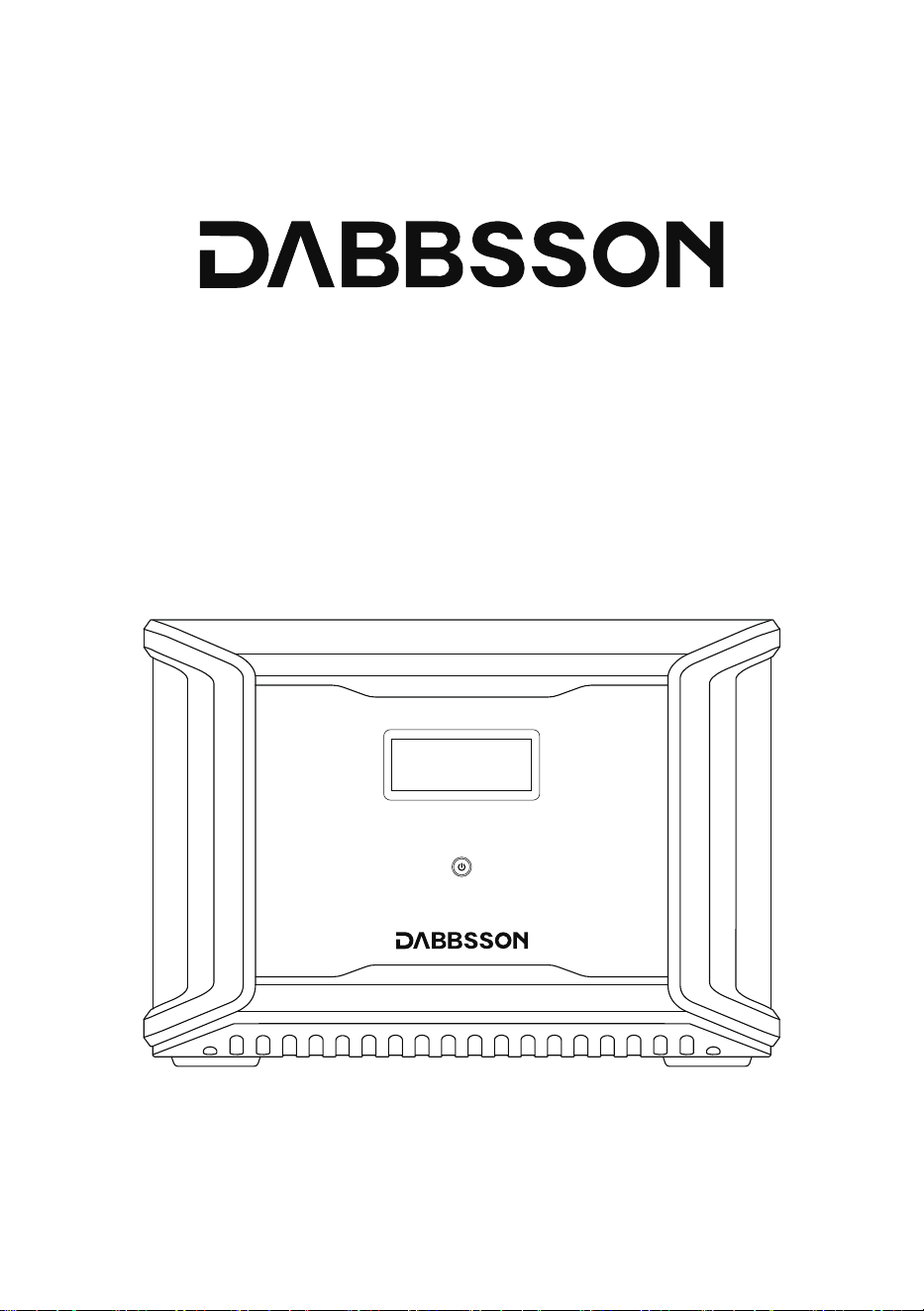
Dabbsson DBS3000B Batteria Extra
Manuale Utente

DISCLAIMER
Leggi attentamente tutti i suggerimenti sulla sicurezza, i messaggi di avviso, i termini di
utilizzo e le esclusioni di responsabilità. Fare riferimento ai termini di utilizzo e all'esclusione
di responsabilità su https://www.dabbsson.com e agli adesivi sul prodotto prima dell'uso. Gli
utenti si assumono la piena responsabilità per tutti gli usi e le operazioni. Acquisisci familiarità
con le relative normative nella tua zona. L'utente è l'unico responsabile della conoscenza di
tutte le normative pertinenti e dell'utilizzo dei prodotti Dabbsson in modo conforme.

CONTENUTI
1
2
3
9
10
11
11
3.1 Dettagli del Prodotto 3.5 Ricarica Auto
3.2 Schermo LC 3.6 Ricarica AC
3.3 Utilizzo Generale del Prodotto 3.7
Utilizzo della Batteria Extra DBS3000B
3.4 Ricarica Solare
2.1 Utilizzo 2.2 Guida allo Smaltimento
1.Specifiche
2.Istruzioni sulla Sicurezza
3.Iniziamo
4.Domande Frequenti
5.Risoluzione
6.Oggetti nella Scatola
7.Conservazione e Manutenzione
* Se il prodotto può essere caricato o scaricato dipende dalla temperatura effettiva del pacco batteria.
Protezione
Protezione da Sovraccarico Protezione da Sovratemperatura
Protezione da Cortocircuito Protezione da Bassa Temperatura
Protezione da Bassa Tensione Protezione da Sovracorrente
1
Temperatura Ambientale di Funzionamento
Peso Netto
Capacità
Porte d’Ingresso della Batteria Extra 48V 3000W Max
Caricabatteria per Auto
Porte d’Uscita della Batteria Extra
Porta Anderson
Porta Anderson
Info Batteria
Ciclovita
Chimica Cellulare
1. Specifiche
Info Generali
Dimensioni
Certifiche
Porte d’Ingresso
Caricabatteria Solare
Porte d’Uscita
Circa 25,2kg漏濈濈,5lbs漐
3001,6Wh (44,8V 67Ah)
Supporta 12V/24V Batteria,
Default 8A per porta. Doppio a 16A
42-51V 3000W Max
LiFePO4
12,6V 25A
24V 18A
4000 cicli a 80%+capacità
432x254,5x303,5mm (17x10x12in)
ETL CE FCC PSE RCM WEEE ROHS
12-60V 12,5A Max 600W Max Per Porta,
Doppio a 1200W Max
Temperatura Ottimale di Funzionamento
Temperatura di Scarico
Temperatura di Carica
Temperatura di Conservazione
濅濃燠瀑濆濃燠澻濉濋燣瀑濋濉燣)
激濄濃燠瀑濇濈燠澻濄濇燣瀑濄濄濆燣)
濃燠瀑濇濈燠澻濆濅燣瀑濄濄濆燣)
激濅濃燠瀑濉濃燠澻激濇燣瀑濄濇濃燣)
(Optimal:澳濅濃燠瀑濆濃燠澻濉濋燣瀑濋濉燣澼)

1. Non utilizzare il prodotto vicino a una fonte di calore, come fuoco o forno di riscaldamento.
2. Evita il contatto con qualsiasi liquido. Non immergere il prodotto in acqua o bagnarlo.
Non utilizzare il prodotto sotto la pioggia o negli ambienti umidi.
3. Non utilizzare il prodotto in un ambiente con forte elettricità statica/campi magnetici.
4. Non smontare il prodotto in alcun modo né perforarlo con gli oggetti appuntiti.
5. Evita l'uso di cavi o altri oggetti metallici che potrebbero causare i cortocircuiti.
6. Non utilizzare i componenti o accessori non ufficiali. Se è necessario sostituire i componenti
o accessori, visita i canali ufficiali Dabbsson per verificare le informazioni pertinenti.
7. Quando si utilizza il prodotto, attieneti alla temperatura dell'ambiente operativo specificata
nel presente manuale dell'utente. Se la temperatura è troppo elevata, potrebbe verificarsi un
incendio o un'esplosione; se la temperatura è troppo bassa, le prestazioni del prodotto
potrebbero essere notevolmente ridotte o il prodotto potrebbe smettere di funzionare.
8. Non impilare gli oggetti pesanti sul prodotto.
9. Non bloccare forzatamente la ventola durante l'uso né collocare il prodotto in un'area non
ventilata o polverosa.
10. Evita gli urti, le cadute o le forti vibrazioni durante l'utilizzo del prodotto. In caso di forte
impatto esterno, interrompi immediatamente l'alimentazione e interrompi l'utilizzo del
prodotto. Garantisci il prodotto sia ben fissato durante il trasporto per evitare le vibrazioni
e urti.
11. Se cade accidentalmente il prodotto in acqua durante l'uso, si prega di metterlo in una
zona aperta e sicura, e stare lontano da esso fino a quando non è completamente asciutto.
Il prodotto essiccato non deve essere riutilizzato e deve essere smaltito correttamente
secondo la Sezione 2.2 di seguito. Se il prodotto prende fuoco, si consiglia di utilizzare gli
estintori nel seguente ordine: acqua o acqua nebulizzata, sabbia, coperta antincendio,
polvere secca e infine estintore di anidride carbonica.
12. Utilizza un panno asciutto per rimuovere lo sporco dalle porte del prodotto.
13. Appoggia il prodotto su una superficie piana per evitare i danni causati dalla caduta del
prodotto. Se il prodotto è capovolto e gravemente danneggiato, spegnilo immediatamente,
posiziona la batteria in un'area aperta, tienila lontano dai materiali combustibili e dalle
persone, e smaltiscilo in conformità con le leggi e i regolamenti locali.
2.1 Utilizzo
2. Istruzione sulla Sicurezza
2
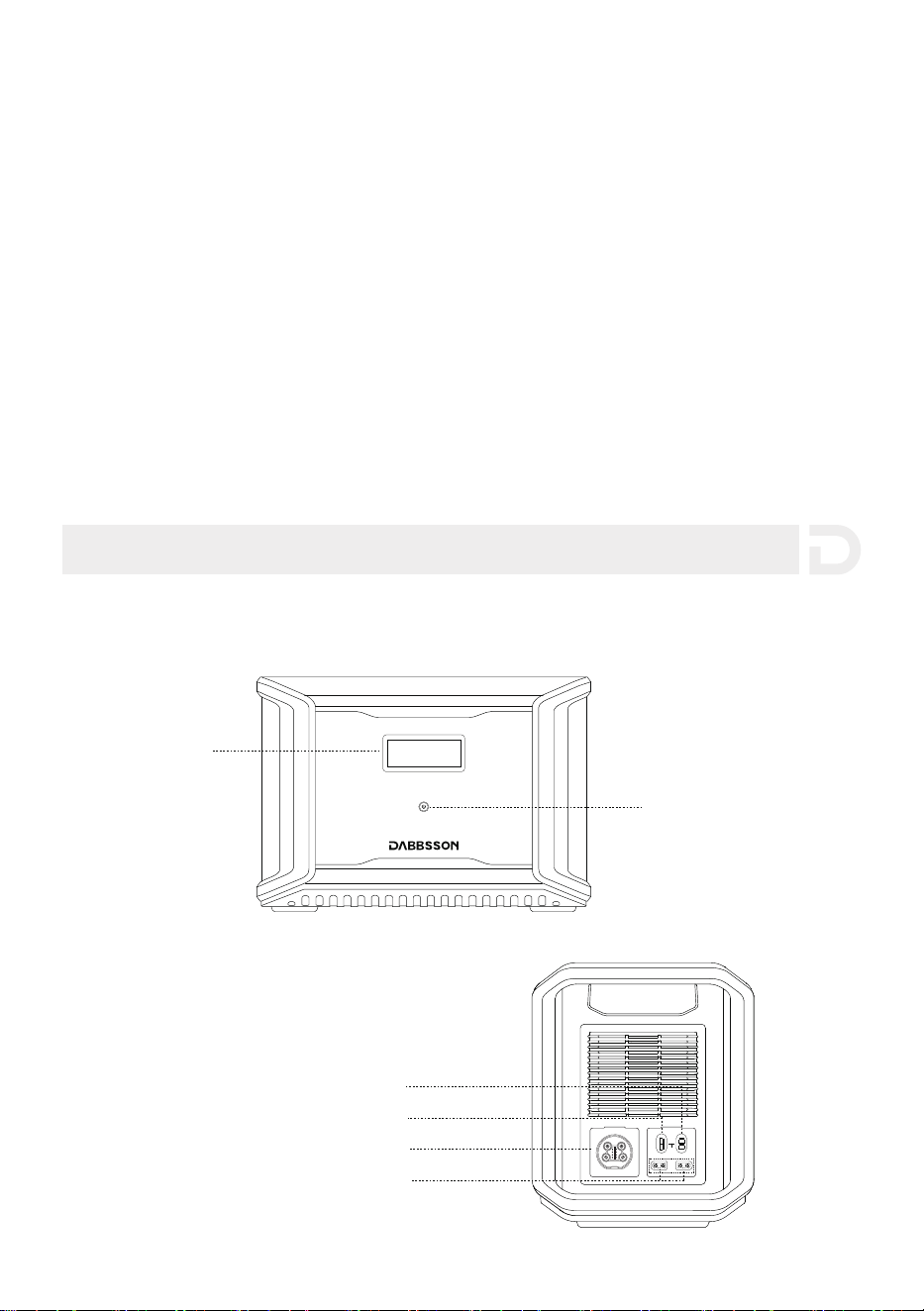
3.1 Dettagli del Prodotto
3. Iniziamo
14. Assicurati che il prodotto sia tenuto fuori dalla portata di bambini e animali domestici.
Non collegare la batteria intelligente extra a un'altra batteria intelligente extra
1. Se le condizioni lo consentono, assicurati che la batteria sia completamente scarica prima di
smaltirla un contenitore apposito per il riciclaggio delle batterie. Il prodotto contiene le
batterie con sostanze chimiche potenzialmente pericolose, pertanto è severamente vietato
smaltirlo nei normali bidoni della spazzatura. Per ulteriori dettagli, segui le leggi e le
normative locali sul riciclaggio e lo smaltimento delle batterie.
2. Se la batteria non può essere scaricata completamente a causa di un guasto del prodotto,
non smaltire la batteria direttamente nel contenitore per il riciclaggio delle batterie. In tali
casi, contatta un'azienda di riciclaggio di batterie professionale per l'ulteriore elaborazione.
3. Smaltisci le batterie troppo scariche che non possono essere ricaricate
2.2 Guida allo Smaltimento
3
Porta Anderson(24V/18A)
Schermo LCD
Pulsante della
Alimentazione Principale
Porta Anderson(12.6V/25A)
Porta della Batteria Extra
Porta d’Ingresso di Ricarica
dell’Auto Solare (x2)
OUTPUT
INPUT
11-75Vd.c.
12V 20A 24V 18A
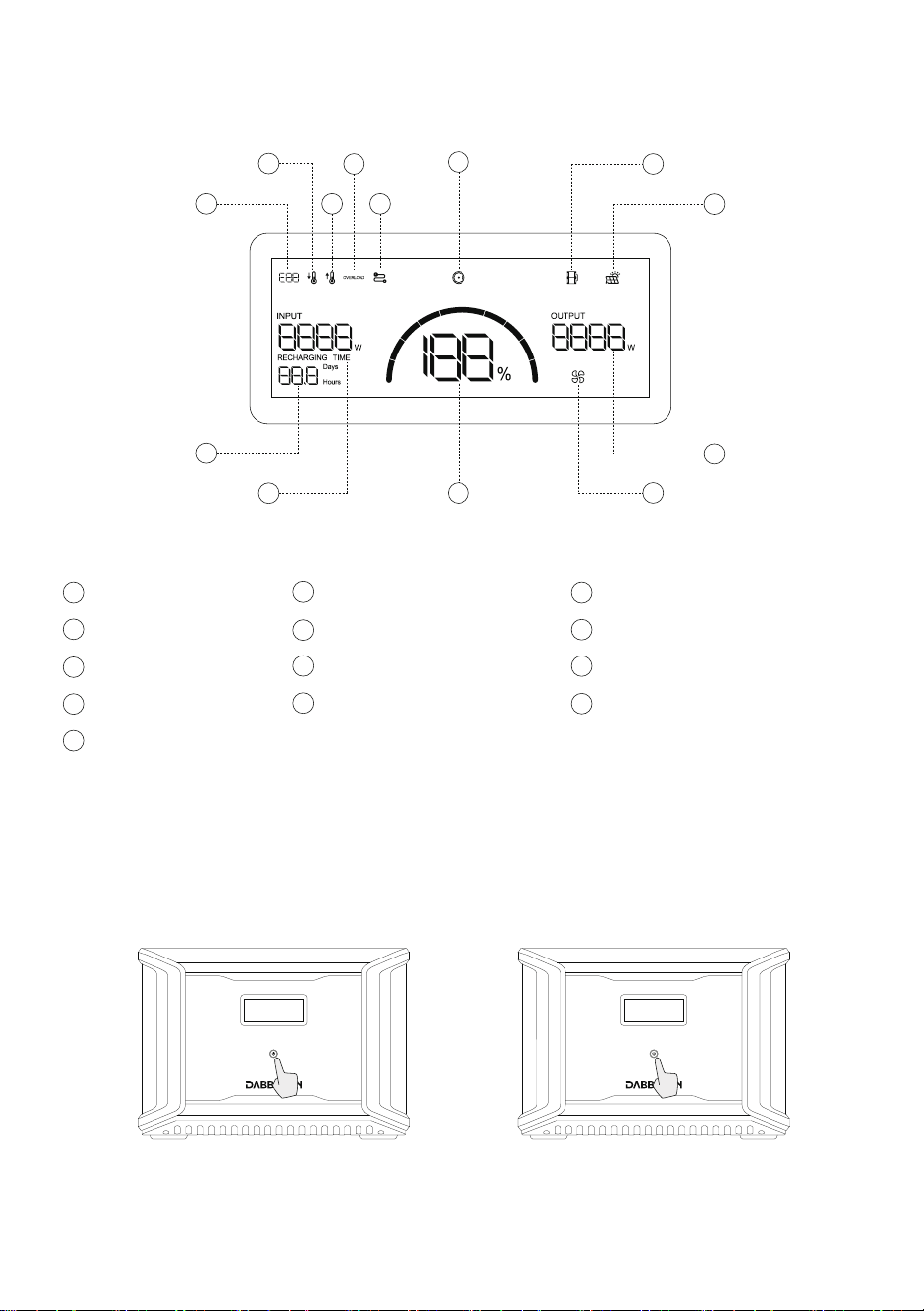
3.3 Utilizzo Generale del Prodotto
Premi a Breve per Accendere Premi a Lungo per Spegnere
3.2 Schermo LCD
4
Codice Errore
a
Avviso di Bassa Temperatura
b
Avviso di Alta Temperatura
c
Indicatore del Pannello Solare
h
f
Uscita DC
Indicatore della Batteria Extra
g
k
Percentuale della Batteria Rimanente
l
Indicatore del Ventilatore
m
Alimentazione d’Uscita
Avviso di Sovraccarico
d
Connessione Fallita
e
i
Tempo di Carica/Scarica Rimanente
j
Alimentazione d’Ingresso
i
l
j
k
g
a
m
b
c
d
f
h
e
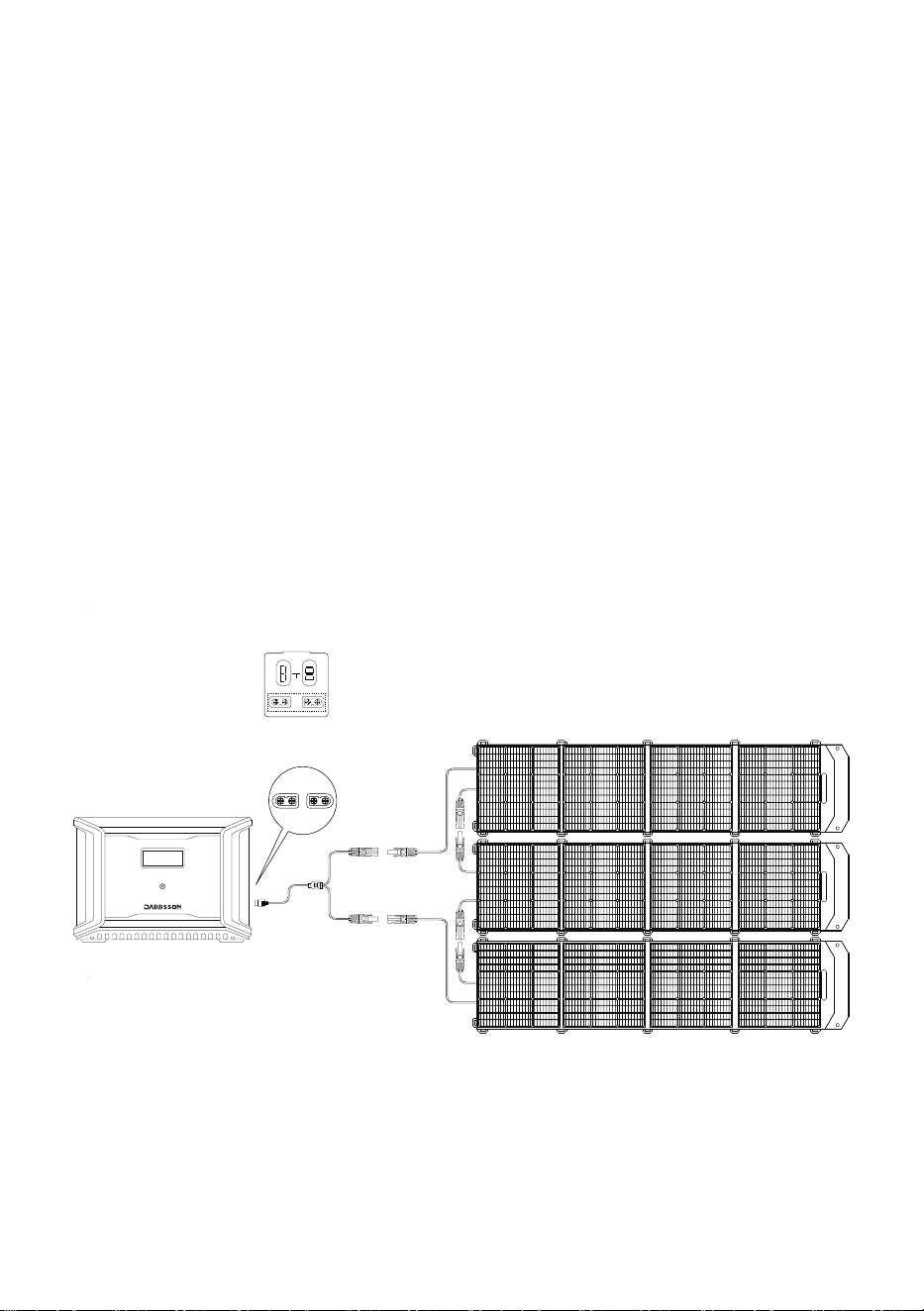
Premi brevemente il pulsante di alimentazione principale per avviare il prodotto; Lo schermo
LCD si illumina e visualizza un'icona. Lo schermo LCD si spegne automaticamente dopo che il
prodotto rimane inattivo per 30 secondi.Quando il prodotto rileva qualsiasi cambiamento di
carico o operazione, lo schermo del display si accenderà automaticamente. Per accendere o
spegnere il display, premi brevemente il pulsante di alimentazione principale. Per disattivare il
prodotto, tieni premuto il pulsante di alimentazione principale. Il tempo di standby predefinito
del prodotto è di 2 ore. Il prodotto si spegnerà automaticamente quando gli altri pulsanti di
alimentazione vengono disattivati e non si accede a nessun altro carico entro 2 ore. Il tempo di
standby di CA e CC può essere impostato sull'APP.
濄濦濙濡濙濦濙瀎濝濢瀎濖濦濙濪濙瀎濤濙濦瀎濕濗濗濙濢濘濙濦濙澠瀎瀎濤濦濙濡濙濦濙瀎濕瀎濠濩濢濛濣瀎濤濙濦瀎濧濤濙濛濢濙濦濙澠瀎濇濗濜濙濦濡濣瀎激澷澸瀎濕濗濗濙濧濣瀎
5
3.4 Ricarica Solare
Gli utenti possono collegare i pannelli solari in serie come mostrato nella figura per ricaricare il
prodotto. Il prodotto supporta 12-60V CC in ingresso, 12A di corrente massima e 600 W di
potenza di carica massima.
濅濃濃濪澳濣濴瀁瀁濸濿濿瀂澳濦瀂濿濴瀅濸漏濫濆漐
Connessione con il Pannello Solare
Connessione MC4
濖瀂瀁瀁濸瀇瀇濸澳濣瀂瀅瀇濴澳濫濧濉濃澳
OUTPUT
INPUT
11-75Vd.c.
12V 20A 24V 18A
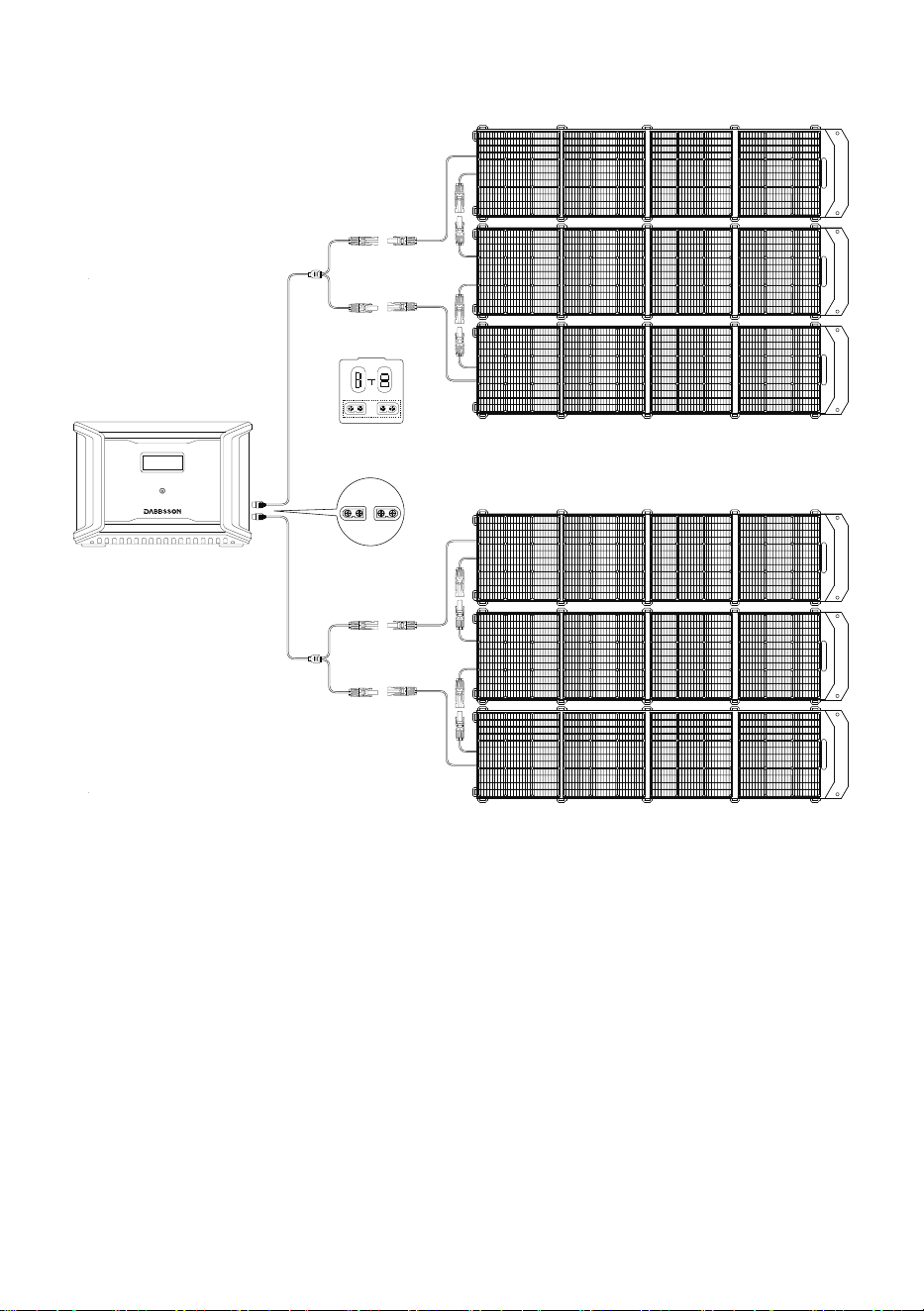
6
Gli utenti possono ricaricare il prodotto tramite il Car Outlet. Supporta i caricatori per auto da
12V/24V e una corrente di carica predefinita di 8A.
Si prega di caricare utilizzando il caricabatteria per auto dopo aver avviato l'auto per evitare il
mancato avvio a causa di una batteria dell'auto insufficiente. Inoltre, assicurati che
l'accendisigari della presa per auto e il cavo di ingresso del caricabatteria per auto siano in
buone condizioni. Dabbsson non si assume alcuna responsabilità per le eventuali perdite o i
danni causati dal mancato rispetto delle istruzioni.
3.5 Ricarica per Auto
濅濃濃濪澳濣濴瀁瀁濸濿濿瀂澳濦瀂濿濴瀅濸漏濫濆漐
Connessione con il Pannello Solare
Connessione MC4
濅濃濃濪澳濣濴瀁瀁濸濿濿瀂澳濦瀂濿濴瀅濸漏濫濆漐
Connessione con il Pannello Solare
Connessione MC4
濖瀂瀁瀁濸瀇瀇濸澳濣瀂瀅瀇濴澳濫濧濉濃澳
OUTPUT
INPUT
11-75Vd.c.
12V 20A 24V 18A
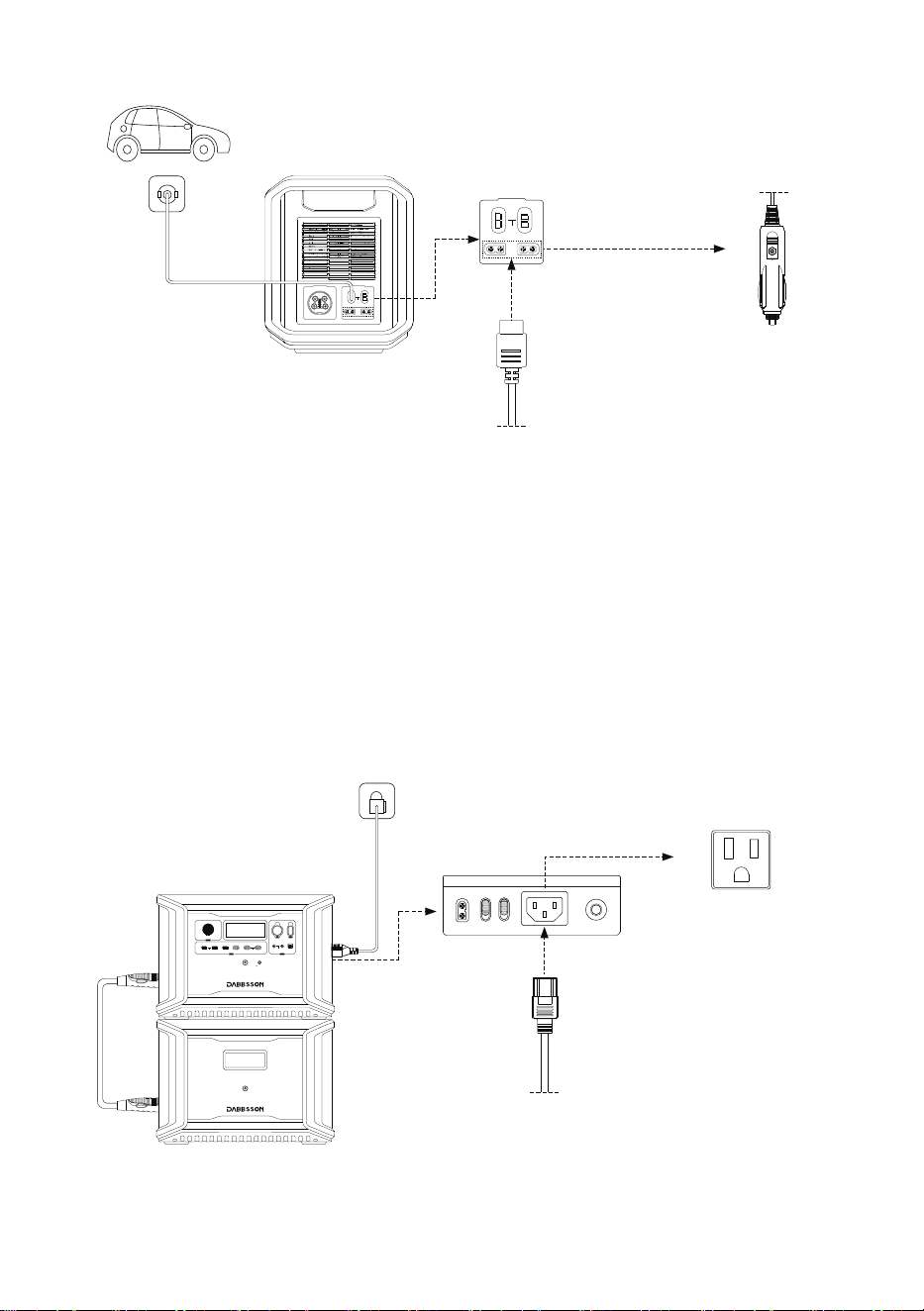
7
濣瀂瀅瀇濴澳濫濧濉濃
Caricabatteria per Auto
(108,8W Ingresso)
La tecnologia di ricarica rapida Dabbsson è specifica per la ricarica AC e offre 1800W di
potenza massima in ingresso. È possibile controllare la potenza di ricarica tramite l'interruttore
della velocità di ricarica AC. La potenza di ingresso massima predefinita per la velocità di
ricarica AC è di 600W,
3.6 Ricarica AC
Ricarica Rapida
1800W Max Potenzad’Ingresso
ň濈澳瀂瀅濸澳濥濼濶濴瀅濼濶濴澳濖瀂瀀瀃濿濸瀇濴
Cavo di Ricarica AC
Cavo di Ricarica Auto
OUTPUT
INPUT
11-75Vd.c.
12V 20A 24V 18A
OUTPUT
INPUT
11-75Vd.c.
12V 20A 24V 18A
12V ON/OFF
FAST CHARGE PD 100W
10A 30A
4A DEVICE
IOT RESET
LIGHT ON/OFF
USB ON/OFF
5V 2.4A
PD 30W
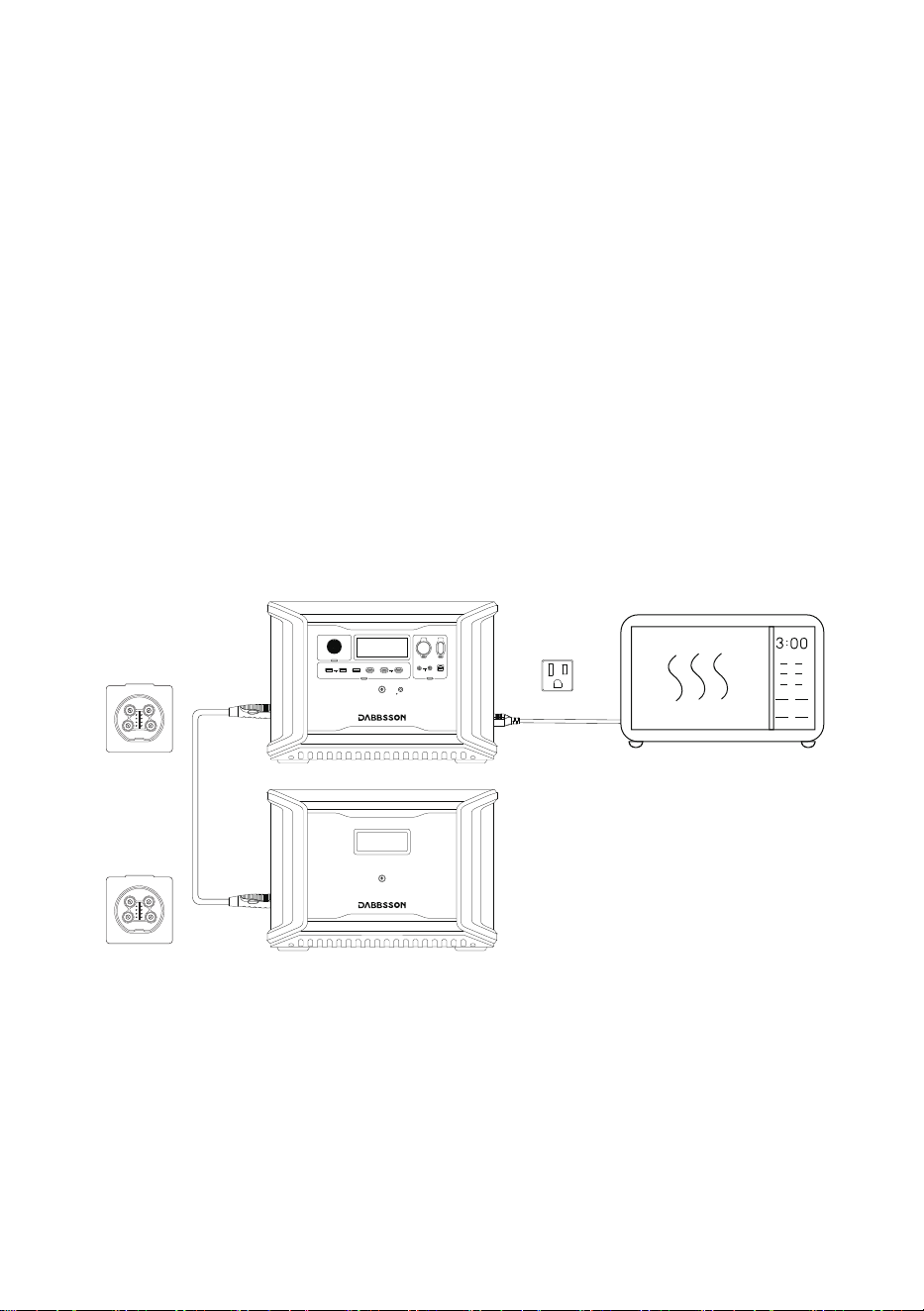
8
Un singolo DBS2300 può essere collegato a due batterie extra DBS3000B per una maggiore
capacità. Fai riferimento al manuale utente della Batteria Extra DBS3000B per le istruzioni
dettagliate
Precauzioni:
1. Spegni entrambe le Batterie Extra DBS3000B e DBS2300 prima di collegarle o scollegarle.
2. Prima dell'uso, assicurati che sia DBS2300 che Batteria Extra DBS3000B visualizzino l'icona
della batteria extra sui loro schermi.
3. Spegni la Batteria Extra DBS3000B prima di collegarla o scollegarla.
4. Non toccare i terminali metallici del connettore della Batteria Extra DBS3000B. Se i terminali
metallici devono essere puliti, li pulisci delicatamente con un panno asciutto.
3.7 Utilizzo della Batteria Extra DBS3000B
12V ON/OFF
FAST CHARGE PD 100W
10A 30A
4A DEVICE
IOT RESET
LIGHT ON/OFF
USB ON/OFF
5V 2.4A
PD 30W
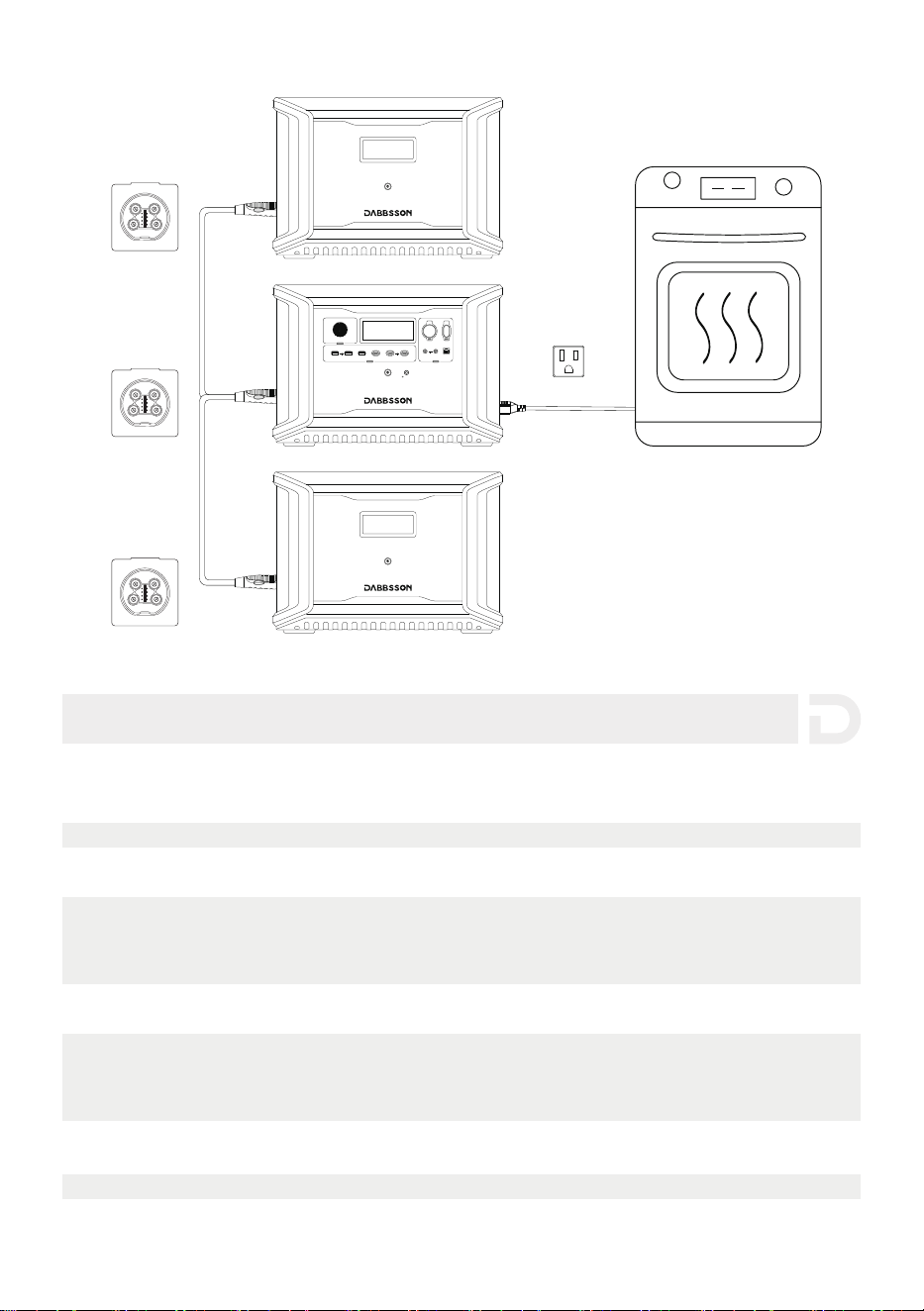
4. Domande Frequenti
1. Che tipo di batterie utilizza questo prodotto?
Questo prodotto utilizza una batteria LiFePO4 di alta qualità.
2. Quanto tempo impiega il prodotto a caricare i miei dispositivi?
Il tempo di ricarica viene visualizzato sullo schermo LCD, e tale tempo può essere utilizzato
per estimare il tempo di ricarica della maggioranza dei dispositivi con utilizzo di potenza
stabile.
3. Come posso capire se il prodotto sia in ricarica?
Il tempo di ricarica rimanente verrà visualizzato sullo schermo LCD. L'indicatore di carica
visualizzerà la percentuale residua della batteria, mentre la corrente in ingresso viene
mostrata a destra dell'indicatore di carica.
4. Come posso pulire il prodotto?
Puliscilo delicatamente con un panno asciutto, morbido e pulito o un tovagliolo di carta.
9
12V ON/OFF
FAST CHARGE PD 100W
10A 30A
4A DEVICE
IOT RESET
LIGHT ON/OFF
USB ON/OFF
5V 2.4A
PD 30W
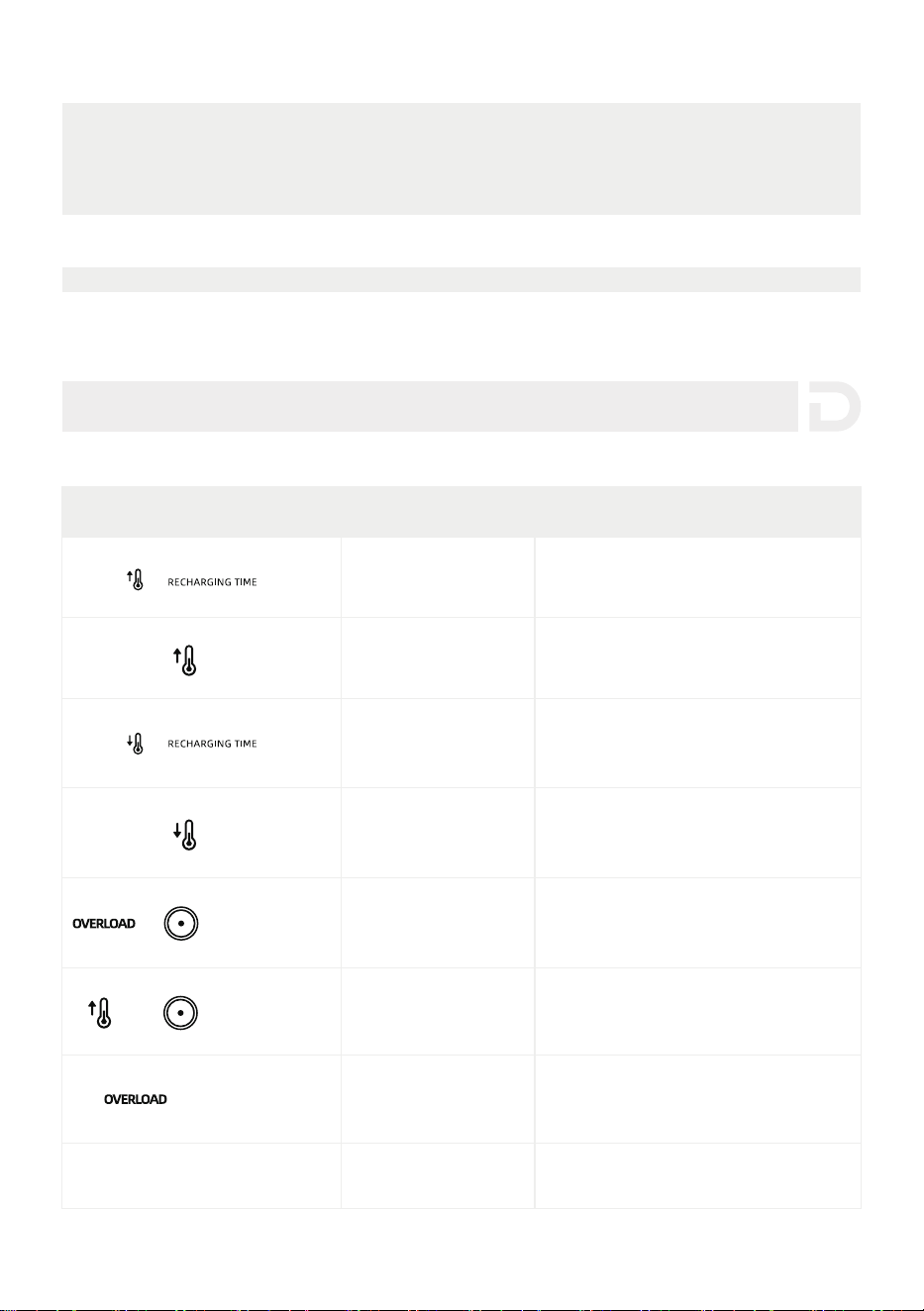
5. Come devo conservare il prodotto?
Prima della conservazione, spegni il prodotto e poi conservalo in un luogo asciuto e ben
ventilato alla temperatura ambientale. Non posizionarlo vicino alle sorgente d’acqua. Per
la conservazione a lungo, scarica la batteria a 30% e ricaricala a 60% ogni tre mesi per
estendere la vita della batteria.
6. Posso portare il prodotto in aereo?
No
(Lampeggiante)
(Lampeggiante)
(Lampeggiante)
Protezione dalla carica
ad alta temperatura
La carica riprenderà automaticamente
dopo che la batteria si è raffreddata.
Protezione da
scariche ad alta
L'alimentazione riprenderà
automaticamente dopo che
la batteria si è raffreddata.
Protezione dalla carica
a bassa temperatura
La carica riprenderà automaticamente
dopo che la temperatura della batteria
灵澳瀆濴濿濼瀇濴澳濴濿澳濷濼澳瀆瀂瀃瀅濴澳激濄濃燠澳澻濄濇燣澼濁
Protezione da scarica
a bassa temperatura
L'alimentazione riprenderà
automaticamente dopo che la temperatura
della batteria s瀈瀃濸瀅濴澳濼澳激濅濃澳燠澳澻激濇澳燣澼.
Protezione da
sovraccarico
uscita/ingresso DC
The product will automatically resume
normal operation after you remove the
device connected to the DC outlet.
Protezione dalle
alte temperature
in uscita DC
Protezione da
sovraccarico della batteria,
Protezione da cortocircuito
Contatta il servizio clienti DabbssonAltri
Rimuovi qualsiasi apparecchio elettrico
ad alta potenza collegato al prodotto.
Il prodotto riprenderà automaticamente
il normale funzionamento dopo
essersi raffreddato.
Indicatore Problemi Soluzioni
5. Risoluzione
10
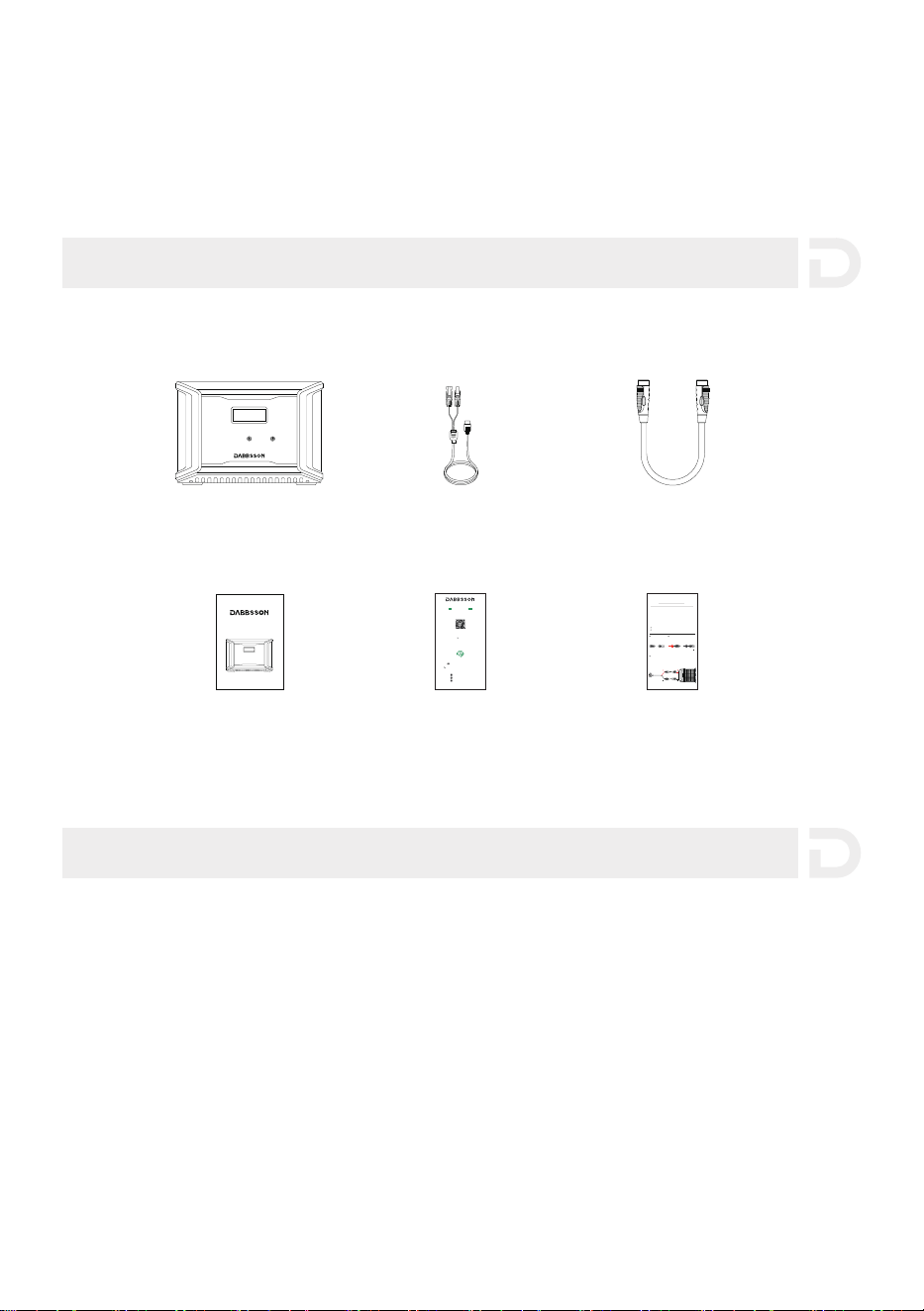
Se il prompt di allarme viene visualizzato sullo schermo LCD del prodotto durante l'uso e non
scompare dopo un riavvio, interrompi immediatamente l'utilizzo (non tentare di caricare o
scaricare). Se è necessaria altra assistenza, contatta il servizio clienti Dabbsson.
1. Idealmente, utilizza e conserva il prodotto a una temperatura ambientale compres濴澳瀇瀅濴澳濅濃燠
澳澳澳澳濸澳濆濃燠澳澻濉濋燣澳激澳濋濉燣澼澳濸澳瀇濼濸nilo sempre lontano da acqua, calore intenso e oggetti appuntiti.
Non conservare a temperature superio瀅濼澳濴澳濇濈燠澳澻濄濄濆燣澼澳o inferio瀅濼澳濴澳濄濃燠澳澻濄濇燣澼澳瀃濸瀅澳瀈n
periodo prolungato.
2. Conservare una batteria con una carica bassa per un lungo periodo ne riduce la durata.
DBS2300 mitiga il danno mettendo la batteria in modalità ibernazione. Per ottenere il
massimo dalla batteria, assicurati che la batteria sia alla circa 60% prima di mettere DBS2300
in una conservazione a lungo termine. Durante la conservazione, si consiglia di scaricare la
batteria al 30% e ricaricarla al 60% ogni tre mesi.
6. Oggetti nella Scatola
7. Conservazione e Manutenzione
1111
Dabbsson DBS3000B
Batteria Extra
Manuale Utente
Dabbsson DBS3000B Extra Battery
User Manual
Cavo di Batteria Extra
Scheda di Avviso
Scheda di Garanzia
Cavo di Ricarica Solare
MC4 female
Before connecting the solar panel, make sure that the positive pole of the solar
panel is connected to the MC4 male connector and the negative pole is connected
WRWKH0&IHPDOHFRQQHFWRUDVVKRZQLQWKHřJXUHEHORZ
MC4 male
MC4 Port
Connect your solar panel to the Dabbsson solar panel charging cable
(MC4 to XT60)
Please connect the positive pole to the MC4
male connector and the negative pole to the
MC4 female connector.
Positive pole
Negative pole
2
1
3
Please connect the positive pole of the solar panel to the MC4 male
connector and the negative pole to the MC4 female connector.
Please confirm the positive and negative poles of your solar panel.
For users who use universal solar panels with non-MC4 connectors to power the
device, please note solar panels should be within voltage and current range
(please find more information on requirements in the user guide).
Improper connection of MC4 connector to your device could damage the device.
Dabbsson does not take responsibility for equipment failure due to personal
misoperation.
DIY Instructions for
Non-MC4 Connector Solar Panels
Dabbsson solar panel
charging cable
Have any question? Chat with a specialist today.
If you have any question, please do not hesitate to contact us.
Follow Us
Activate your warranty at
www.dabbsson.com
Warranty Activation
Keep the original packaging & accessories
CLAIM YOUR WARRANTY
24-MONTH
WARRANTY
Fill in Your InformationRegister Porduct
Products must be returned in their original condition and
packaging with all included accessories for the warranty to be valid.
@Dabbsson_Global
@DabbssonOfficial
@Dabbsson_Official
+1 888 850 9503 Mon-Fri 9am-5pm (PST)