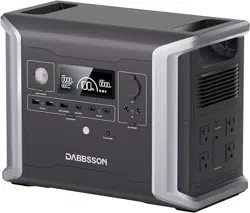
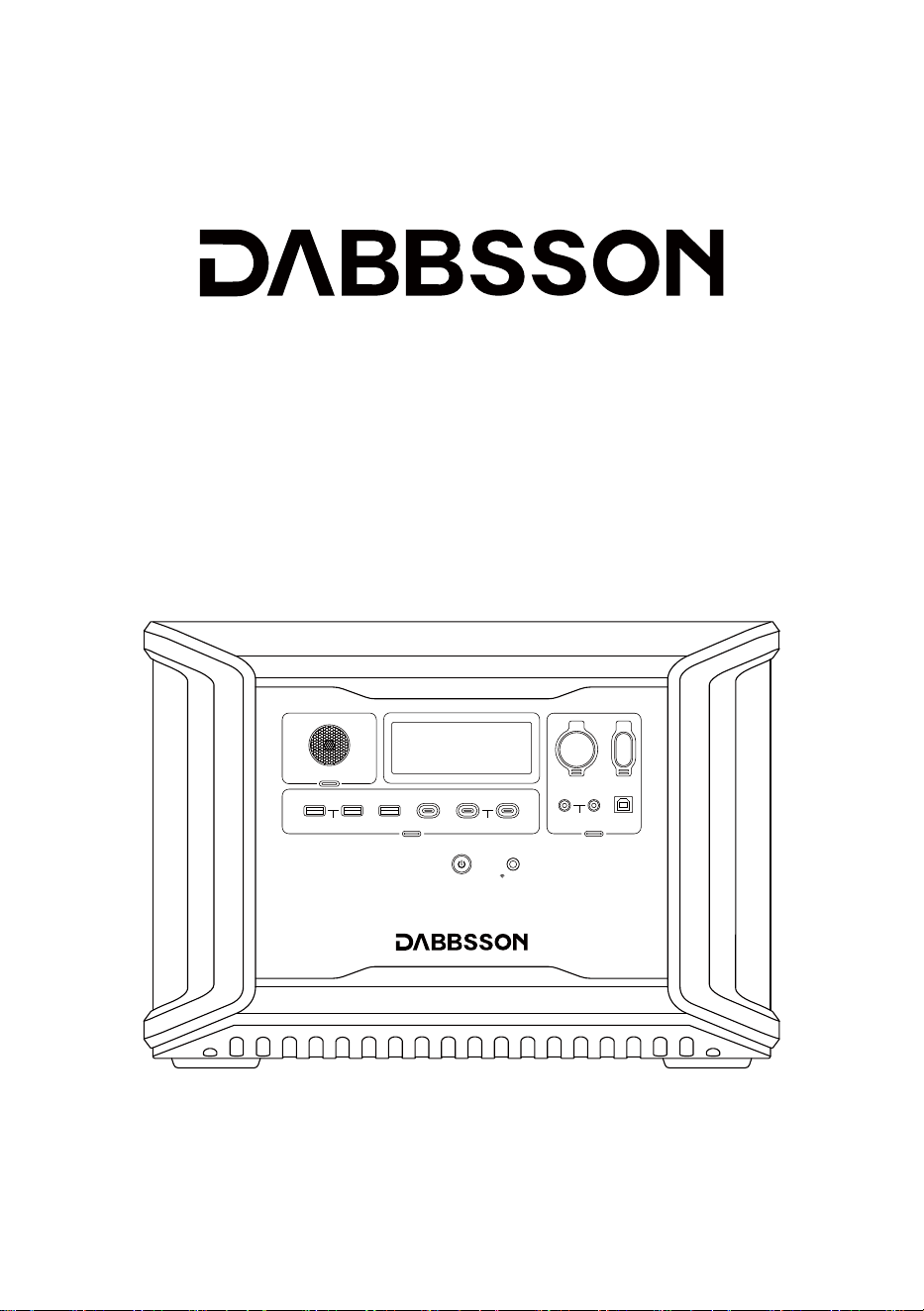
Dabbsson DBS2300
User Manual
12V ON/OFF
FAST CHARGE PD 100W
10A 30A
4A DEVICE
IOT RESET
LIGHT ON/OFF
USB ON/OFF
5V 2.4A
PD 30W

DISCLAIMER
Read all safety tips, warning messages, terms of use, and disclaimers carefully. Refer to the
terms of use and disclaimer at https://www.dabbsson.com and stickers on the product
before use. Users take full responsibility for all usage and operations. Familiarize yourself
with the related regulations in your area. You are solely responsible for being aware of all
relevant regulations and using Dabbsson products in a way that is compliant.

CONTENTS
AC Charging
Solar Charging
Car Charging
Using Smart Extra Battery
3.2 LCD Screen
AC oulets
DC outlets
P-Boost and EPS
Power On/Off
4.1 Charging DBS2300 6
4.2 Control the product 12
4.3 Charging Your Devices 13
2.1 Usage
1
1. Specifications
2
2. Safety Instructions
4
3. Product Details
6
4. General Product Usage
22
6. FAQS
15
5. App Control
23
7. Troubleshooting
24
8. What’s in the Box
24
9. Storage & Maintenance
25
10. Fcc Statement
3.1 Over View
2.2 Disposal Guide
5
2
4
3
Net Weight
Capacity
BT
AC (x2) Pure Sine Wave, 2200W total (surge 4400W),
120V~ (50/60Hz)
USB-A Fast Charge (x1)
USB-C (x1)
USB-C (x2)
Car Charger
DC5521 Output (x2)
Anderson Output
AC Charge
AC Input Voltage
Solar Charger
Car Charger
Add-on
Battery Info
Cycle Life
Cell Chemistry
1. Specifications
General Info
Dimensions
Wi-Fi
Output Ports
USB-A (x2)
* The car charger shares power with the DC5521 output port, offering a maximum output of 126W.
Input Ports
Approximately 24.1kg (53.1lbs)
2330Wh (44.8V 52Ah)
Supported
Certification ETL CE FCC PSE RCM WEEE ROHS TELEC
5V 3.0A 9V 2A 12V 1.5A, 18W Max
5/9/12/15/20V 1.5A, 30W Max Per Port, Total 60W
12.6V 10A, 126W Max
12.6V 4A, 50.4W Max Per Port
12.6V 30A, 378W Max
LED 2W
1800W Max
LiFePO4
120V~ 15A, 50/60Hz
12-60V 12A Max, 600W Max
Supports 12V/24V Battery, Default 10A
Extra Battery DBS3000B*2, Total 8330Wh
4000 Cycles to 80%+Capacity
432x254.5x303.5mm (17x10x12in)
Supported
5V 2.4A, 12W Max Per Port, Total 12W
5/9/12/15V 3A, 20V 5A 100W Max
1

Over Voltage Protection
Over Temperature Protection
Low Temperature Protection
Overcurrent Protection
Overload Protection
Short Circuit Protection
Low Voltage Protection
Protection
Discharge Temperature
Charging Temperature
Storage Temperature
Optimal Operating Temperature 0℃~40℃(32℉~104℉)
-5℃~50℃(23℉~122℉)
1. Do not use the product near a heat source, such as a fire source or a heating furnace.
2. Avoid contact with any liquid. Do not immerse the product in water or get it wet. Do not
use the product in rain or humid environments.
3. Do not use the product in an environment with strong static electricity or magnetic fields.
4. Do not disassemble the product in any way or pierce the product with sharp objects.
5. Avoid using wires or other metal objects that may result in a short circuit.
6. Do not use unofficial components or accessories. If you need to replace any components or
accessories, visit official Dabbsson channels to check for relevant information.
2.1 Usage
2. Safety Instructions
* Whether the product can be charged or discharged depends on the actual temperature of the battery pack.
Environmental Operating Temperature
-20℃~55℃(-4℉~131℉)
-10℃~45℃(14℉~113℉)
(Optimal: 20℃~30℃(68℉~86℉))
2

2.2 Disposal Guide
1. If conditions permit, make sure that the battery is fully discharged before disposing of it in a
designated battery recycling bin. The product contains batteries with potentially dangerous
chemicals, so it is strictly prohibited to dispose of it in ordinary trash cans. For more details,
please follow the local laws and regulations on battery recycling and disposal.
2. If the battery cannot be fully discharged due to a product failure, do not dispose of the
battery directly in the battery recycling box. In such cases, contact a professional
battery recycling company for further processing.
3. Please dispose of over-discharged batteries that cannot be recharged.
7. It is highly recommended that third-party accessories are purchased from reliable
distributors and that they match your product’s specifications. Dabbsson is not liable for
abnormality, inconvenience, losses or expenses resulting from defective third-party
accessories.
8. When using the product, please strictly follow the operating environment temperature
specified in this user manual. If the temperature is too high, it may result in a fire or
explosion; if the temperature is too low, the product performance may be severely reduced,
or the product may cease to work.
9. Do not forcibly lock the fan during use or place the product in an unventilated or dusty area.
10. Avoid impact, falls, or severe vibrations when using the product. In case of a severe
external impact, turn off the power supply immediately and stop using the product. Ensure
the product is well fastened during transportation to avoid vibrations and impacts.
11. If you accidentally drop the product into water during use, place it in a safe open area, and
stay away from it until it is completely dry. The dried product should not be used again, and
should be properly disposed of according to Section 2.2 below. If the product catches fire,
we recommend that you use the fire extinguishers in the following order: water or water
mist, sand, fire blanket, dry powder, and finally a carbon dioxide fire extinguisher.
12. Use a dry cloth to clean off dirt on the product ports.
13. Rest the product on a flat surface to avoid damage caused by the product falling over.
If the product is overturned and severely damaged, turn it off immediately, place the
battery in an open area, keep it away from combustible matter and people, and dispose of
it in accordance with local laws and regulations.
14. Ensure that the product is kept out of reach of children and pets.
15. DO NOT connect the smart extra battery to another smart extra battery.
3
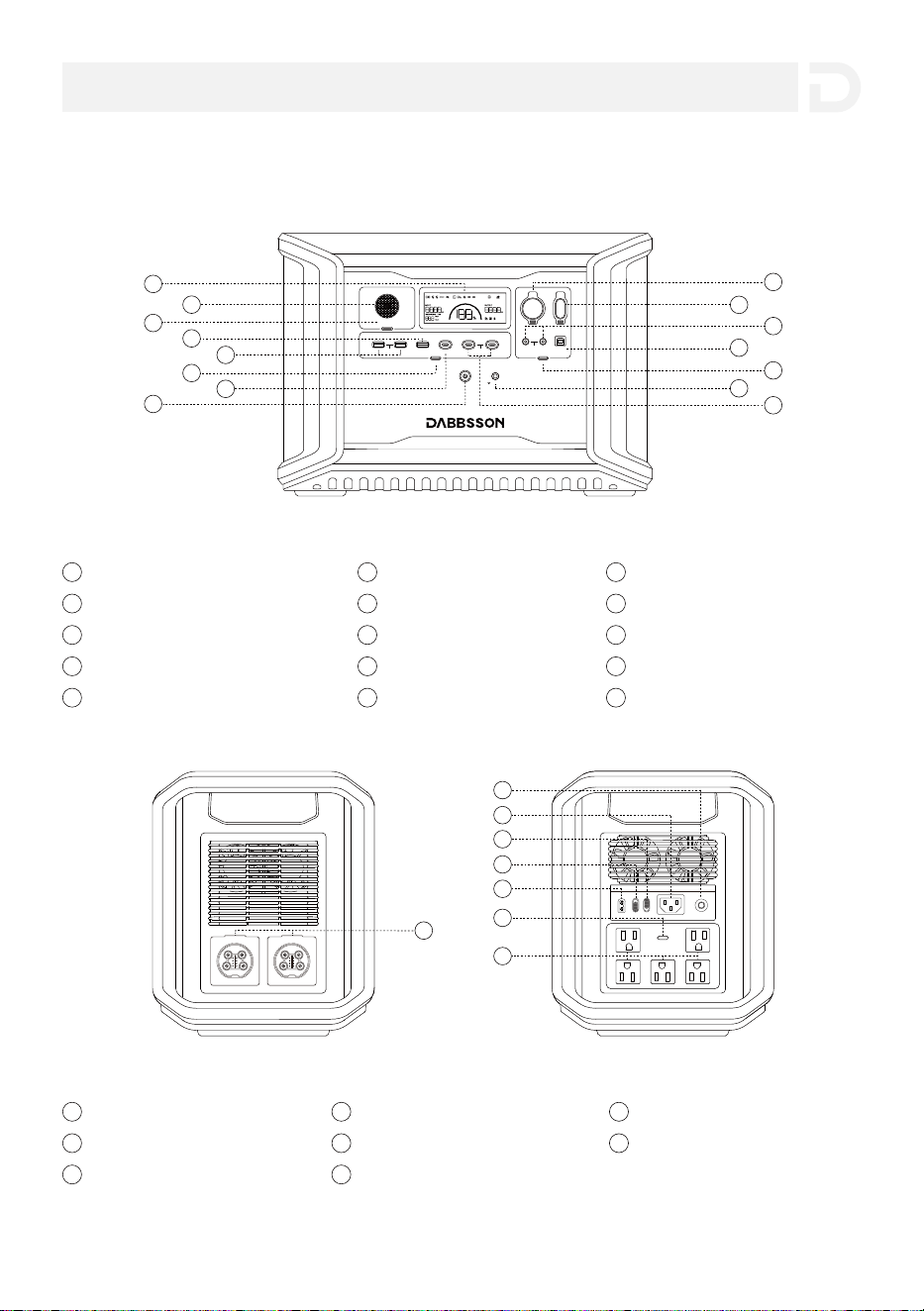
3.1 Over View
3. Product Details
12V ON/OFF
FAST CHARGE PD 100W
10A 30A
4A DEVICE
IOT RESET
LIGHT ON/OFF
USB ON/OFF
5V 2.4A
PD 30W
2
1
5
3
4
6
8
7
9
12
13
14
15
11
10
LCD Screen
1
LED
2
3
LIGHT ON/OFF
4
USB-A Fast Charge Output Port
6
USB ON/OFF
USB-C 100W Output Port
7
Main Power Button
8
Car Port
9
USB-A Output Port(x2)
5
Anderson Port(12V/30A)
10
DC5521 Output Port
11
12
13
12V DC Power Button
14
IOT Reset Button
15
USB-C 30W Output Port(x2)
16
Overload Protection
17
AC Output Port(x5)
23
21
Solar/Car Charging Input Port
20
AC Charge Speed Switch
Extra Battery Port
16
Standby/ECO Mode Switch
19
AC Power Button
22
18
AC Charging Input Port
*
DEVICE Control Port
* "Device control port" is only used by the manufacturer for upgrading.
4
AC NO/OFF
17
18
19
20
21
22
23
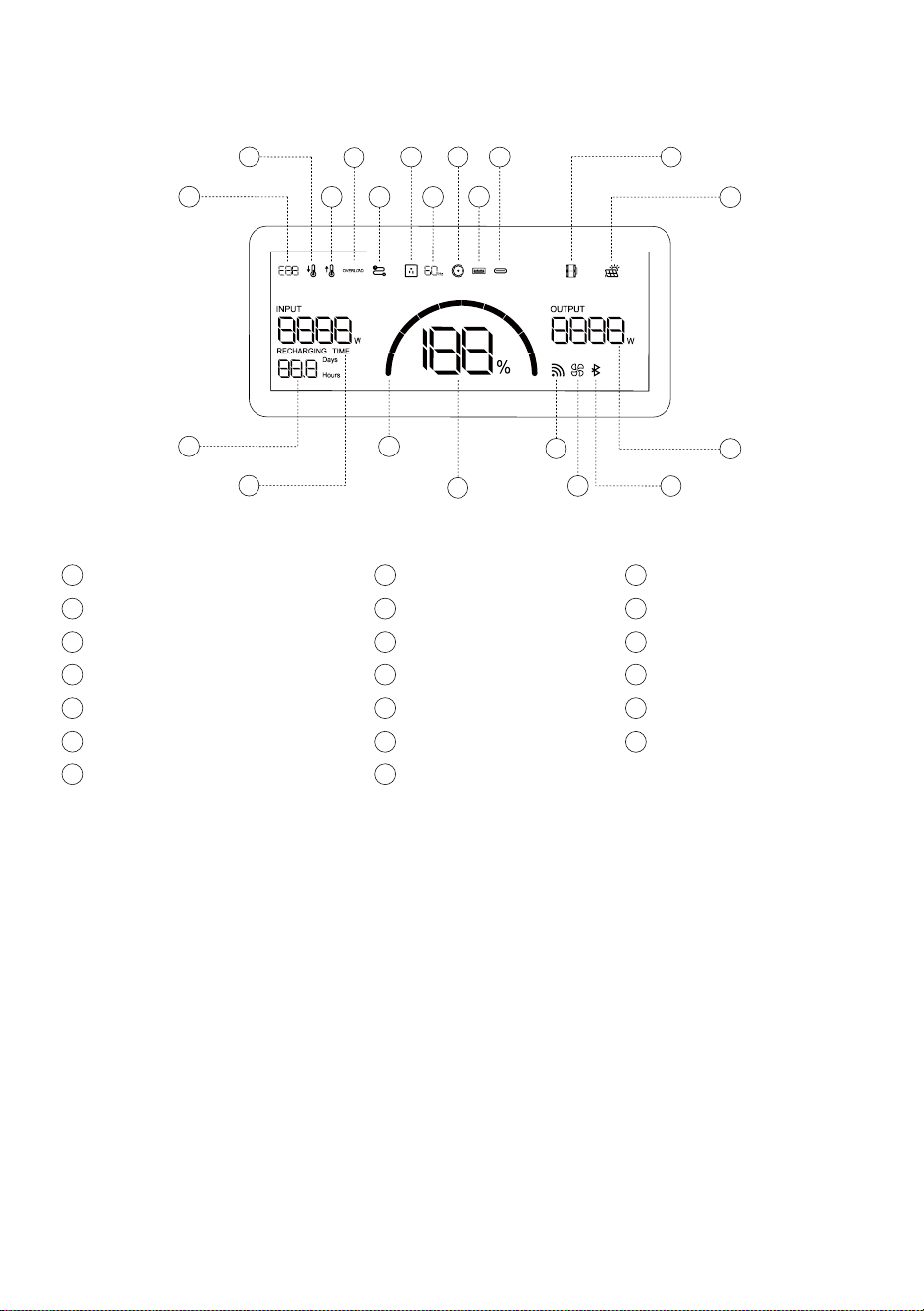
3.2 LCD Screen
Error Code
a
Low Temperature Warning
b
High Temperature Warning
c
Overload Warning
d
AC Output Frequency
g
e
Connection Failed
AC Output
f
Pairing Indicator
s
Output Power
t
DC Output
h
USB-A Output
i
USB-C Output
j
Solar Panel Indicator
l
Extra Battery Indicator
k
Remaining Charge/Discharge Time
m
Input Power
n
Battery Level Indicator
o
Remaining Battery Percentage
p
Fan Indicator
r
Wi-Fi Status
q
t
q
p
o
n
r
s
m
a
b
c
d
f
l
j
i
h
k
g
e
Press and hold the IOT button for 3 seconds, and the Wi-Fi icon will flash, indicating that the
product is ready for pairing. If the product pairing is completed, the Wi-Fi icon will stay on.
The indicator ring fills up from left to right while charging. If the battery is at 0% charge, the
indicator ring will flash. If the battery degree is at 100% charge, the indicator will be full.
Wi-Fi Status
Battery Level Indicator
5
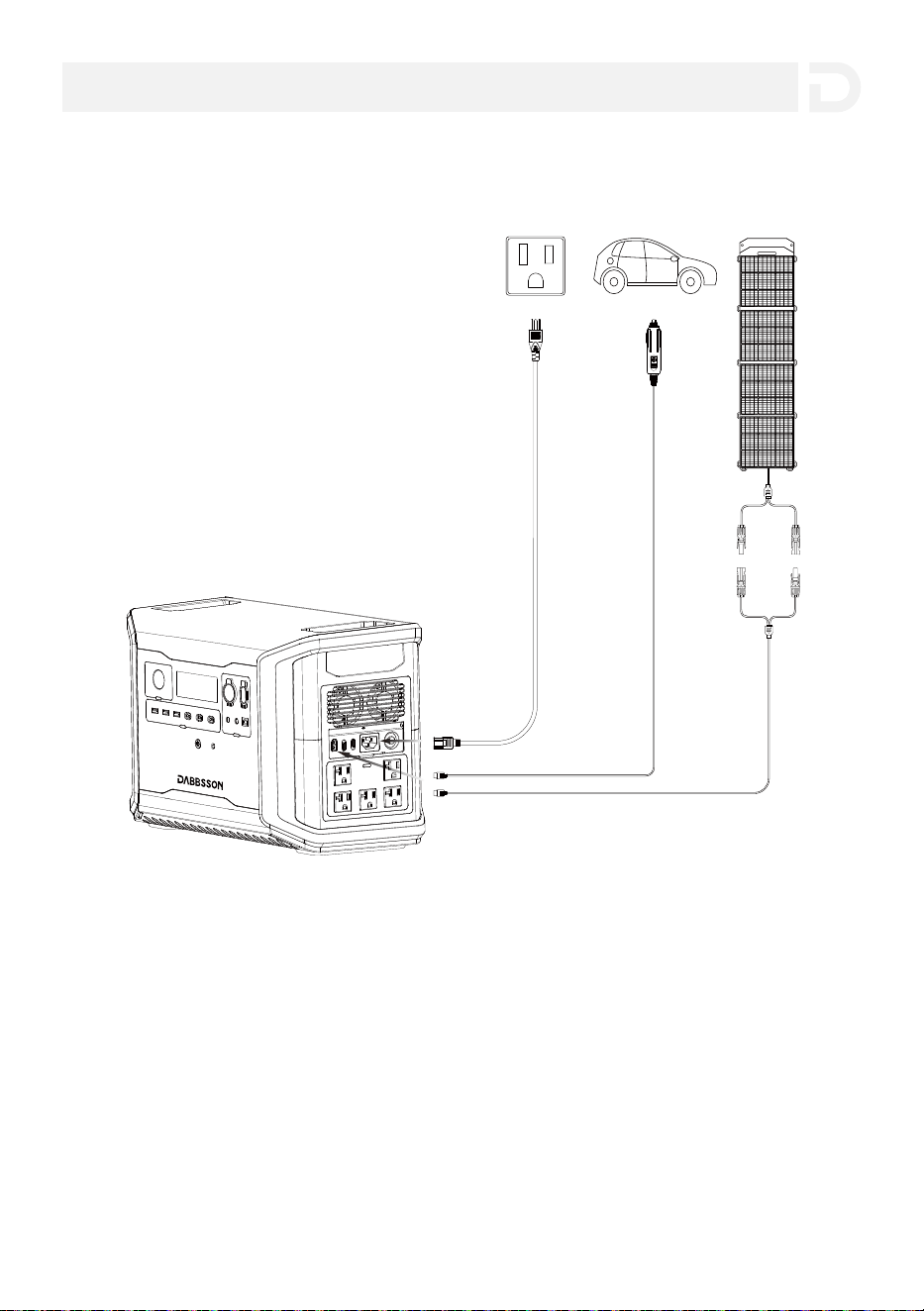
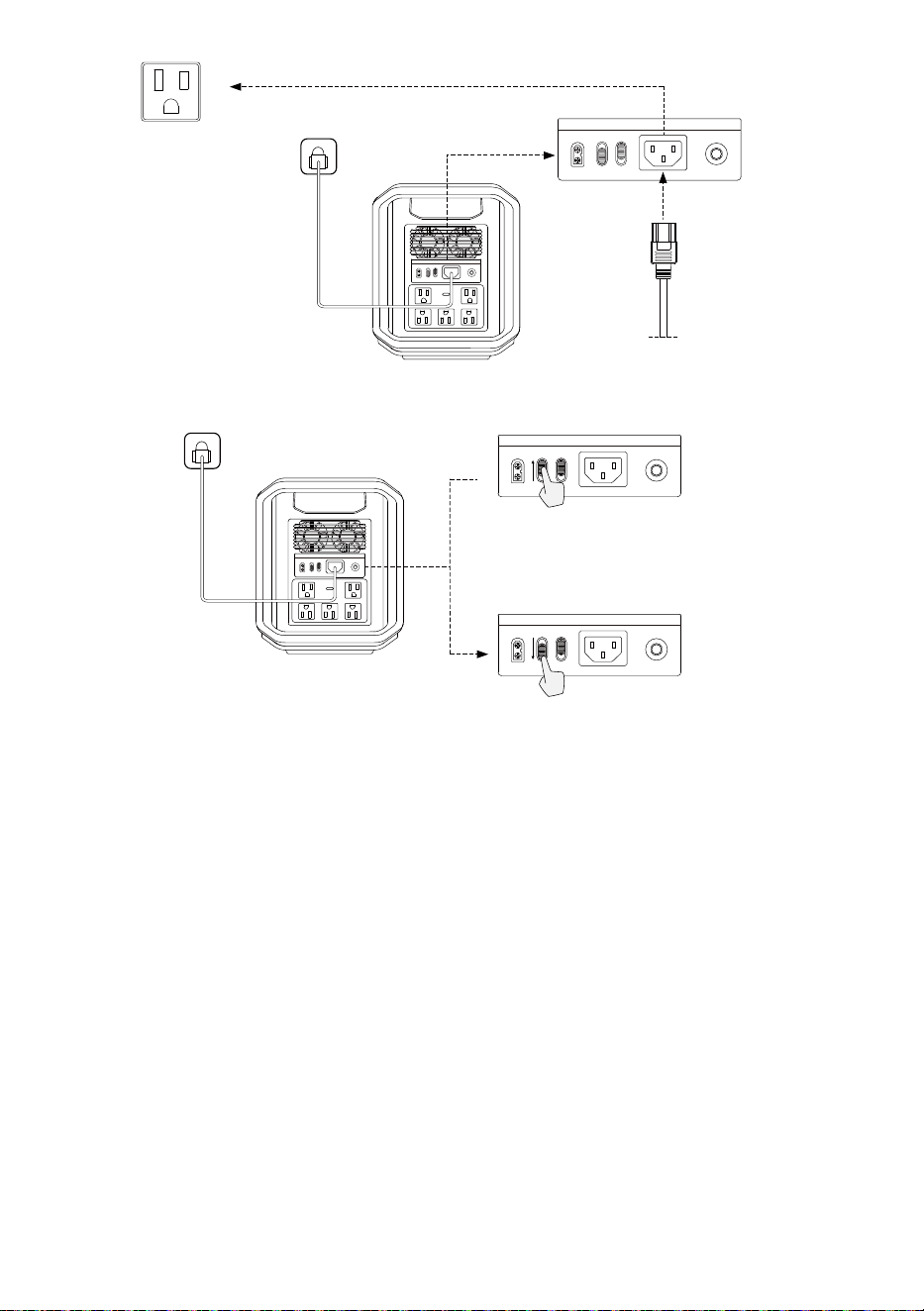
Dabbsson fast charge technology is specifically for AC charging, offering 1800W of max input
power. You can control the charging power through the AC Charge Speed Switch. The default
max input power for the AC charging speed is 600W, which can be modified in the Dabbsson
app.
In case of unusual situations where the AC input current remains higher than 20A, the charging
input port will initiate a self-protection function, and the Overload Protection Switch on the
product will automatically pop up. After confirming that there is no product failure, you can
press the Overload Protection Switch to resume charging.
AC Charging
4.1 Charging DBS2300
4. General Product Usage
6
Solar Charging
Users can connect solar panels in series as shown in the figure to recharge the product. The
product supports 12-60V DC input, 25A max current, and 600W max charging power.
The charging power can be adjusted through the AC Charge Speed Switch on the back of the
product. You can set the charging power range in the Dabbsson App.
Please use the AC Charging Cable included in the package for fast charging. Do not use other
cables to charge. Plug directly into an AC wall outlet and make sure that the wall output
current is more than 15A.Otherwise, reduce the unit charging speed with the AC Charge Speed
Switch. Dabbsson takes no responsibilities for any consequences caused by failures to follow
instructions, including but not limited to charging with other AC charging cables.
Fast Charging 1800W Max
Input Power
Customized Charging Power Rate Range
200-1800W
(Default:600W)
Fast Charging
1800W Max Input Power
≈2 hrs Full Charge
AC Charging Cable
AC NO/OF
7
AC NO/OF
AC NO/OF
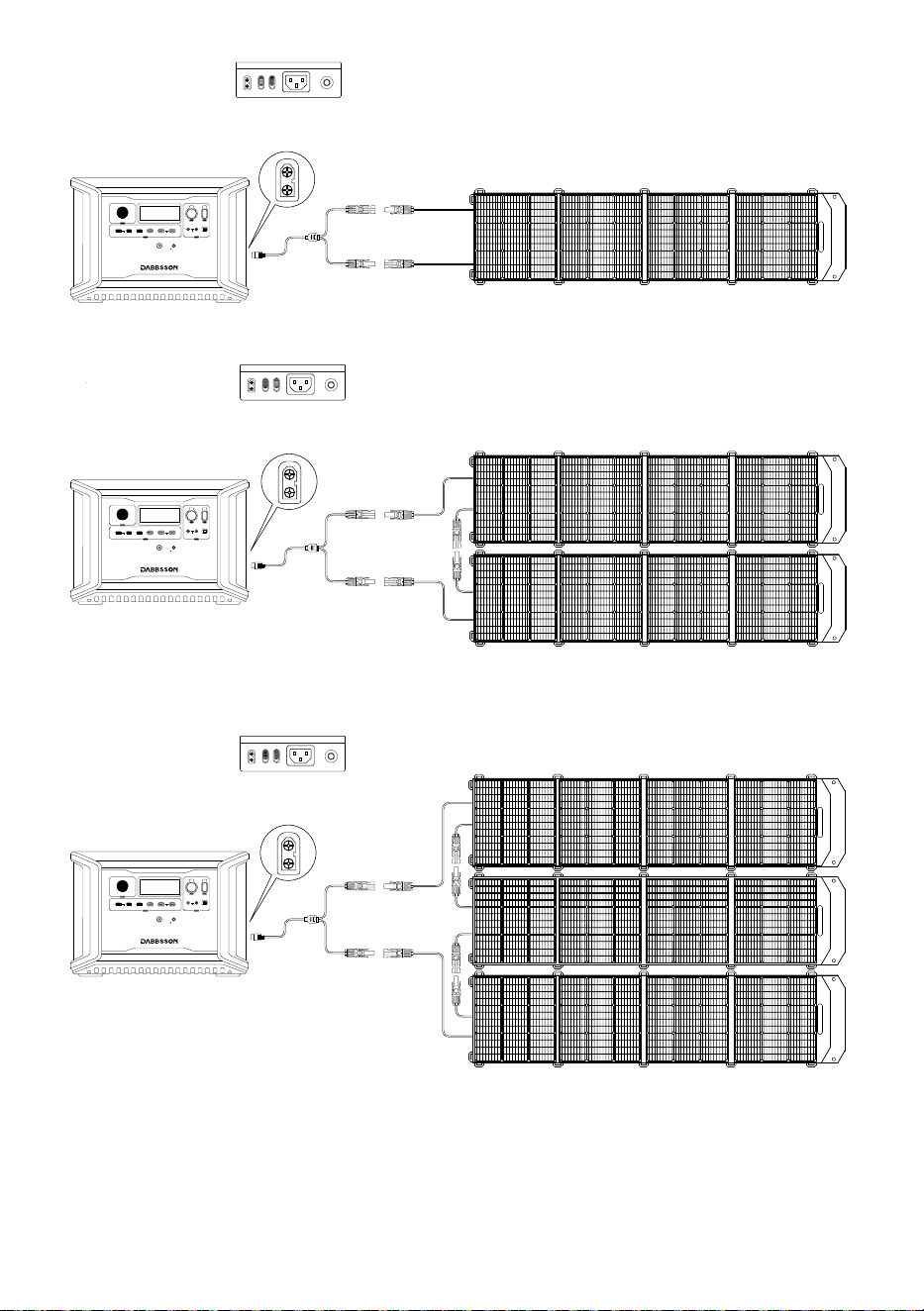
When using an Dabbsson solar panel to charge the product, please follow the instructions that
come with the solar panel.Before connecting the solar panel, please ensure that the solar
panel’s output voltage is within 70V to avoid product damages.
Connect XT60 Port
200W Solar Panel (x2)
Connection with Solar Panel
Connect XT60 Port
200W Solar Panel (x3)
Connection with Solar Panel
MC4 Connection
MC4 Connection
Connect XT60 Port
200W Solar Panel
Connection with Solar Panel
MC4 Connection
12V ON/OFF
FAST CHARGE PD 100W
10A 30A
4A DEVICE
IOT RESET
LIGHT ON/OFF
USB ON/OFF
5V 2.4A
PD 30W
12V ON/OFF
FAST CHARGE PD 100W
10A 30A
4A DEVICE
IOT RESET
LIGHT ON/OFF
USB ON/OFF
5V 2.4A
PD 30W
12V ON/OFF
FAST CHARGE PD 100W
10A 30A
4A DEVICE
IOT RESET
LIGHT ON/OFF
USB ON/OFF
5V 2.4A
PD 30W
8
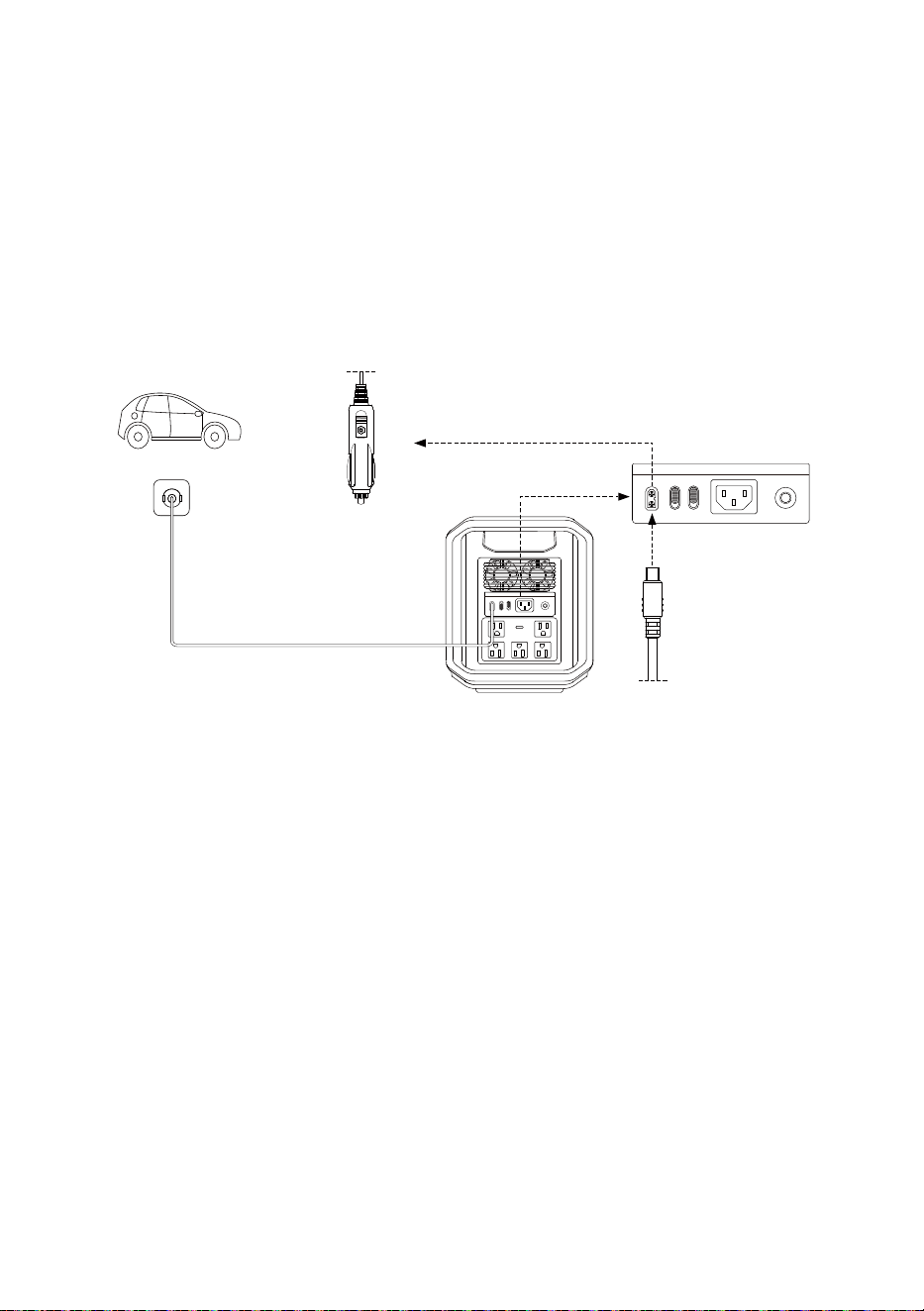
Users can recharge the product through the Car Outlet. It supports 12V/24V car chargers and
an 8A default charging current.
Only charge using the car charger after you’ve started the car.This prevents the car from failing
to start due to insufficient battery power. In addition, please make sure that the cigarette
lighter of the Car Outlet and the Car Charger Input Cable are in good condition. Dabbsson
takes no responsibilities for any losses or damage caused by failures to follow instructions.
Car Charging
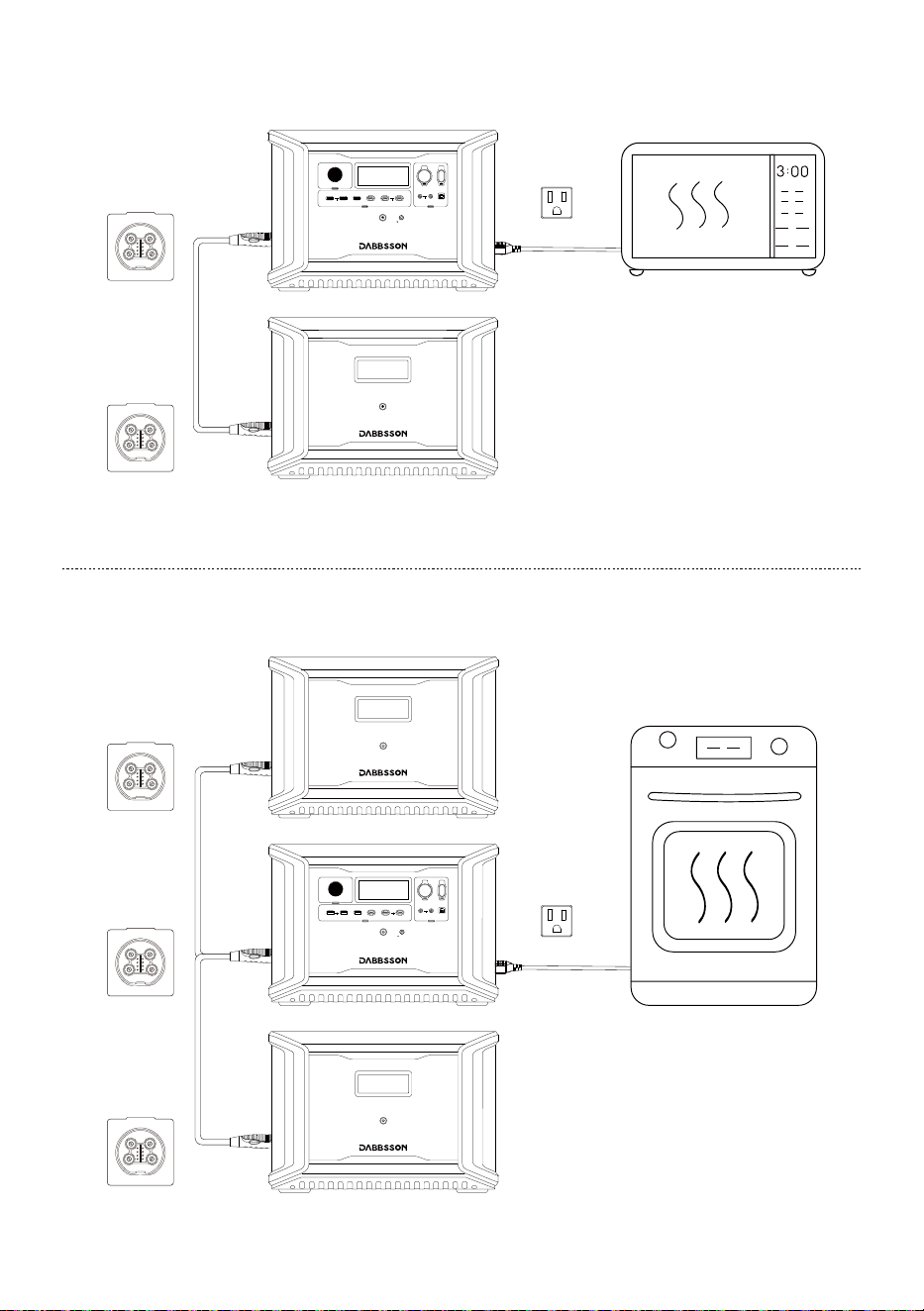
A single DBS2300 can be connected to two DBS3000B extra batteries for added capacity. Refer
to the Extra Battery DBS3000B user manual for detailed instructions.
● DBS2300 can expand the capacity by 1 DBS3000 battery pack to 5330Wh.
● DBS2300 can expand the capacity by 2 DBS3000 battery pack to 8330Wh.
Please refer to Dabbsson support youtube channel for detailed installation instructions.
Precautions
1. Turn off both the Extra Battery DBS3000B and DBS2300 before plug or unplug the extra
battery.
2. Before using, make sure both DBS2300 and Extra Battery DBS3000B display the extra battery
icon on their LCD screens.
3. Do not touch the metal terminals of the Extra Battery DBS3000B connector. If the metal
terminals need to be cleaned, gently wipe them with a dry cloth.
Using Extra Battery
9
Car Charging Cable
Car Charging
(108.8W input)
XT60 Port
AC NO/OFF
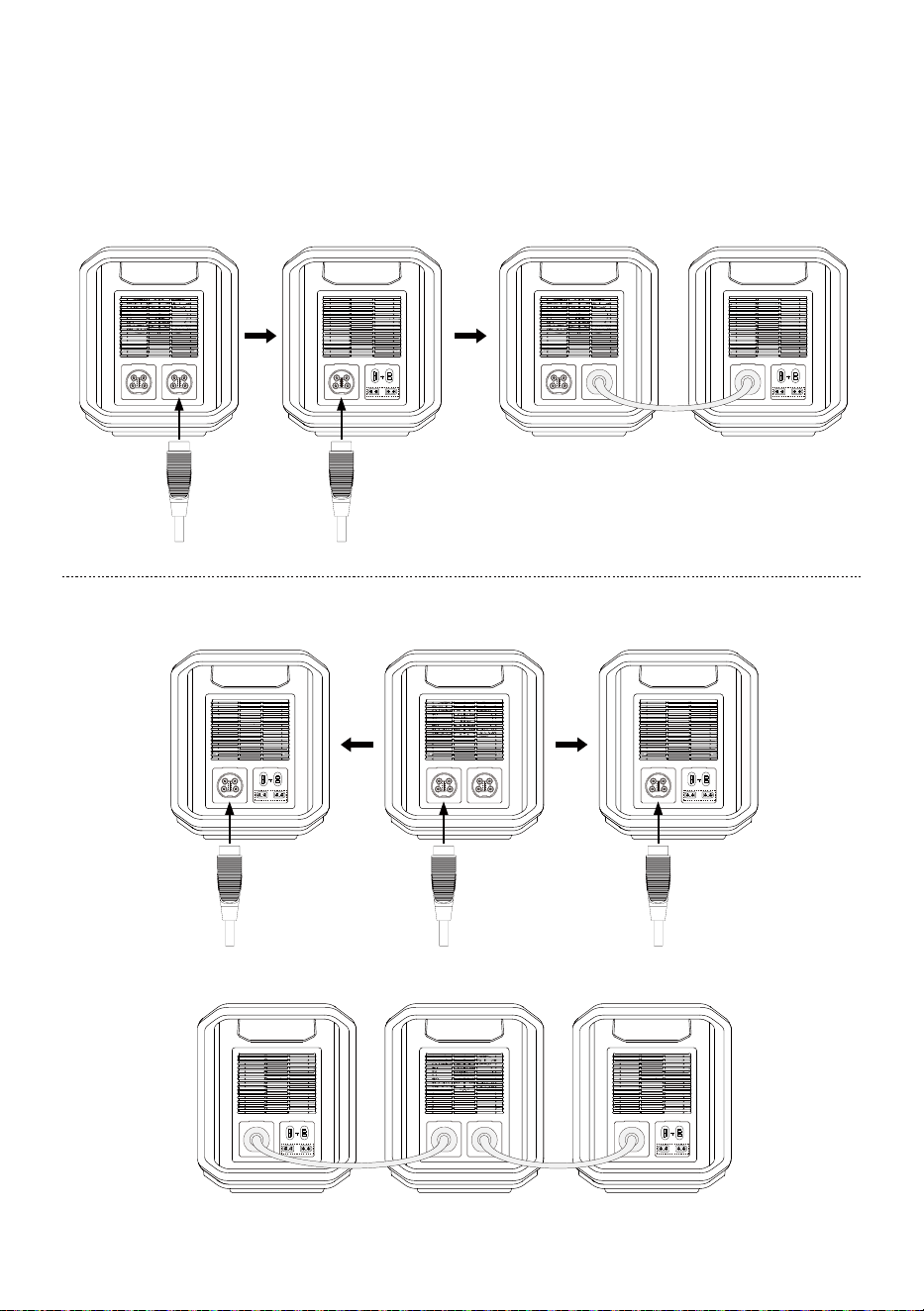
4. When the DBS2300 power station and DBS3000B expandable battery are not in use, please
remove the connecting cable.
5.
To protect the battery from over-discharging,please unplug the cable when the unit is
fully charged or not in use.
DBS2300 DBS3000B DBS2300
DBS2300
DBS3000B
OUTPUT
INPUT
11-75Vd.c.
12V 20A 24V 18A
OUTPUT
INPUT
11-75Vd.c.
12V 20A 24V 18A
DBS3000BDBS3000B
10
OUTPUT
INPUT
11-75Vd.c.
12V 20A 24V 18A
OUTPUT
INPUT
11-75Vd.c.
12V 20A 24V 18A
DBS3000B
OUTPUT
INPUT
11-75Vd.c.
12V 20A 24V 18A
DBS2300 DBS3000B
OUTPUT
INPUT
11-75Vd.c.
12V 20A 24V 18A
12V ON/OFF
FAST CHARGE PD 100W
10A 30A
4A DEVICE
IOT RESET
LIGHT ON/OFF
USB ON/OFF
5V 2.4A
PD 30W
12V ON/OFF
FAST CHARGE PD 100W
10A 30A
4A DEVICE
IOT RESET
LIGHT ON/OFF
USB ON/OFF
5V 2.4A
PD 30W
11
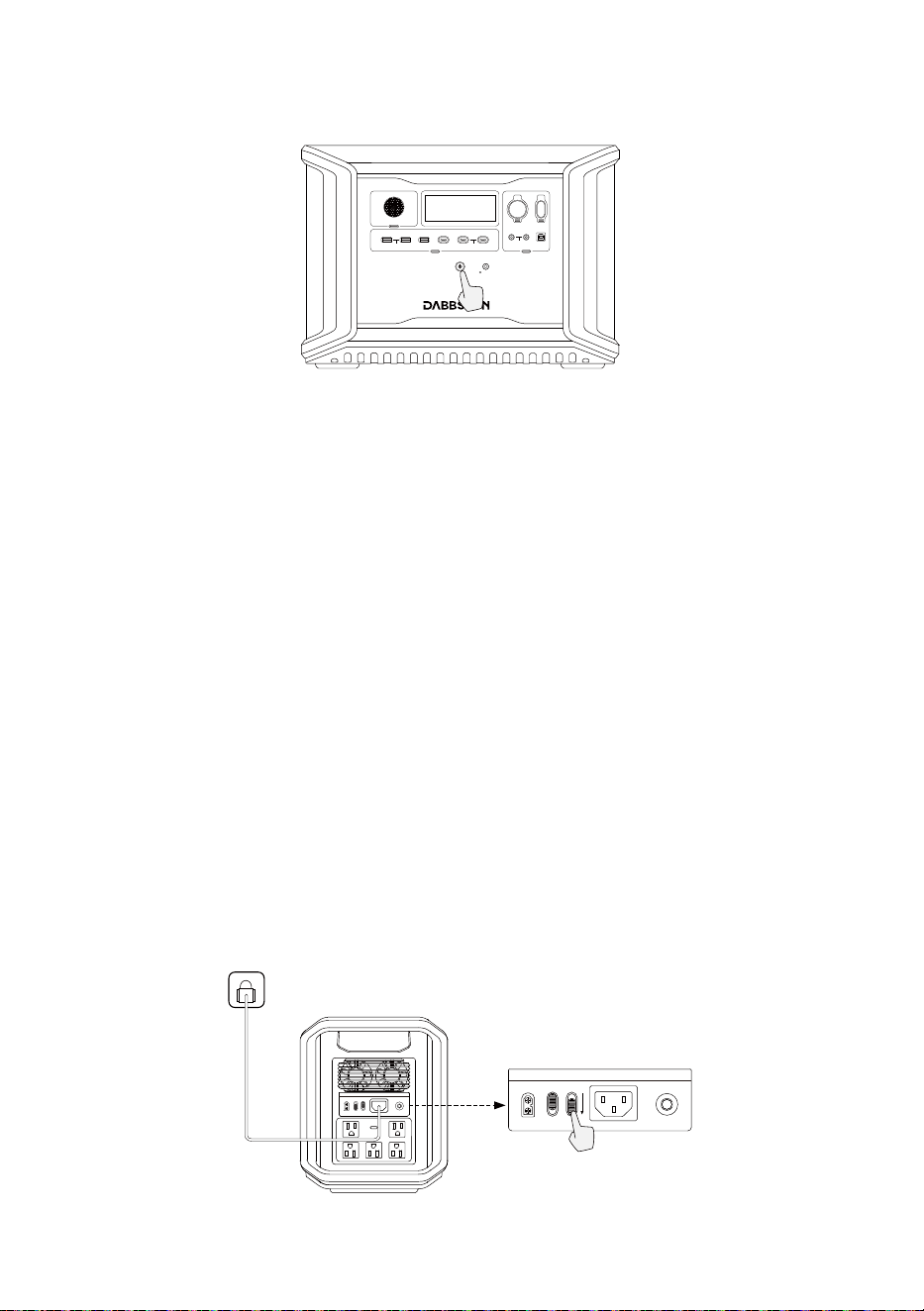
4.2 Control the product
Short press the Main Power Button to start the product, the LCD screen lights up and displays
an icon. It will automatically turn off after the product is idle for 5 Minutes.When the device
senses any load change or operation, the display screen will automatically light up. To turn the
display on or off, briefly press the Main Power Button. To turn off the device, long press the
Main Power Button. The default standby time is 2 hours. The device will automatically shut
down when other power buttons are turned off and no other power source is detected within
2 hours. Standby time of AC and DC can be set via the Dabbsson APP.
Product On, Product Off, LCD Screen On
STANDBY MODE/ECO MODE
Default ECO MODE will be on.
Short Press to Turn On/Long Press to Turn Off
12V ON/OFF
FAST CHARGE PD 100W
10A 30A
4A DEVICE
IOT RESET
LIGHT ON/OFF
USB ON/OFF
5V 2.4A
PD 30W
You can choose STANDBY MODE, the AC and DC power buttons will not be automatically
turned off after being turned on, and can only be controlled manually or through App.
12
AC NO/OF
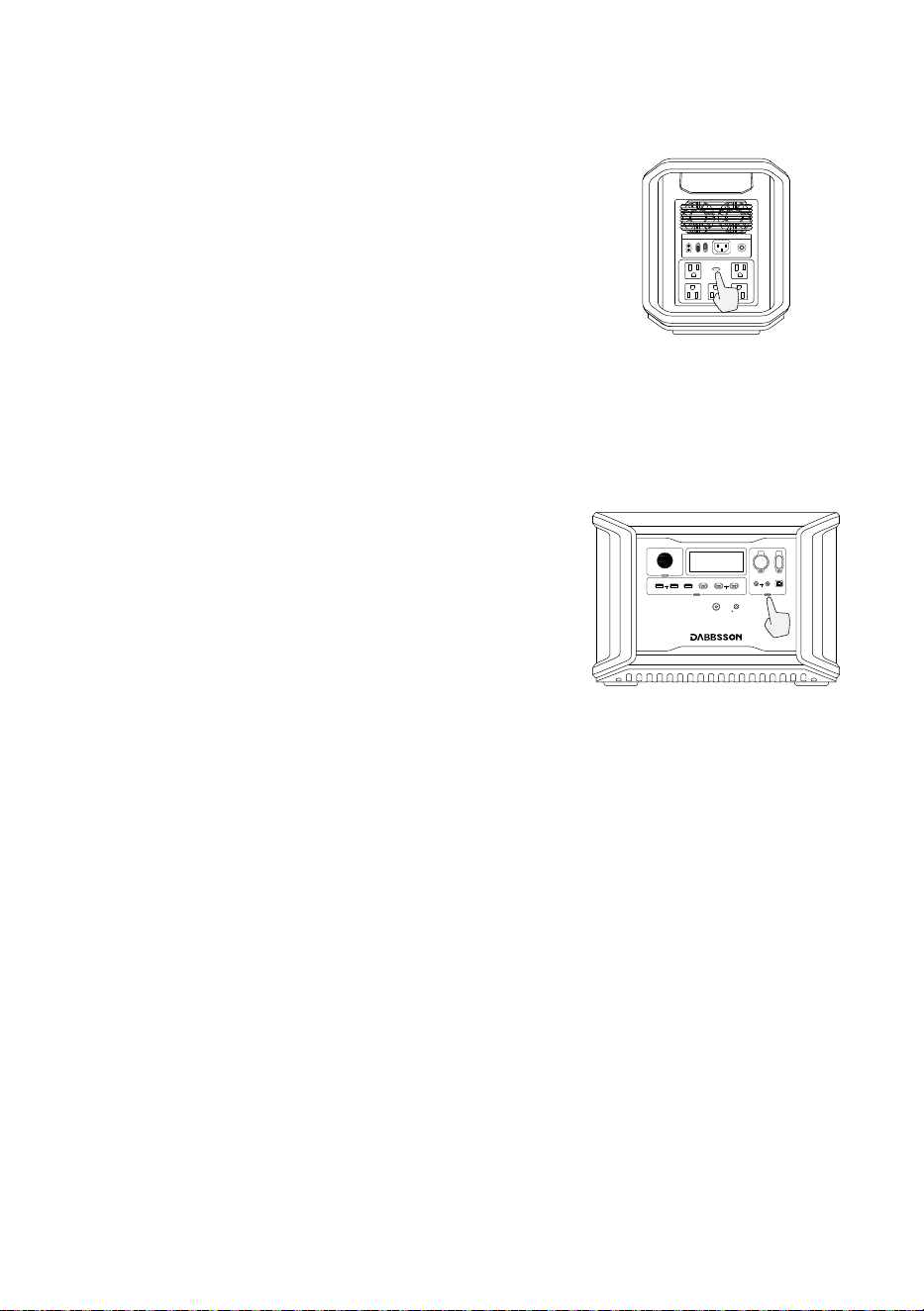
4.3 Charging Your Devices
After turning on the main power button, short press
the 12V DC power button to use the 12V DC output
port. Press the button again will turn it off. When the
12V DC power button is turned on, the product does
not automatically turn off.
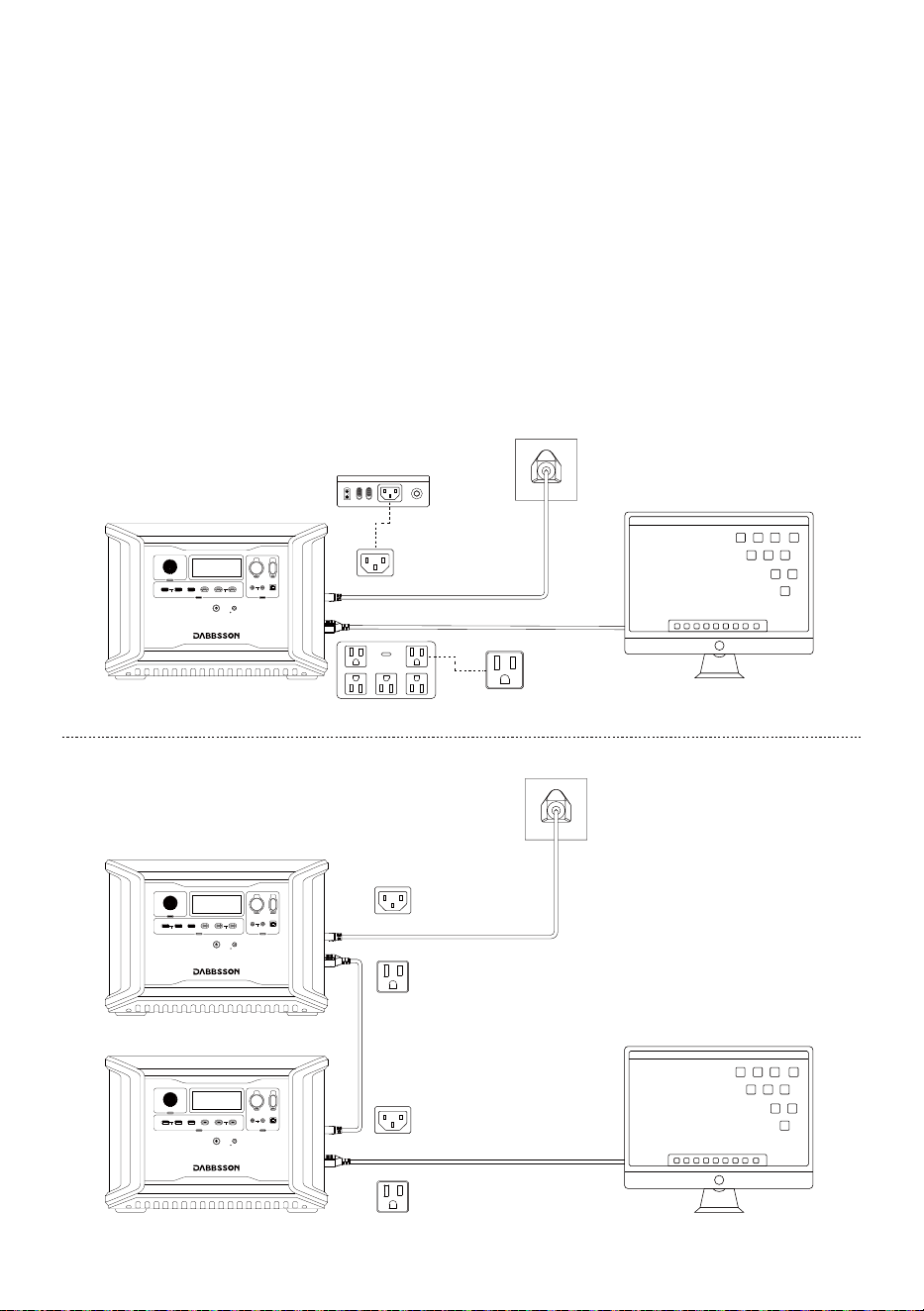
P-Boost
With Dabbsson P-Boost technology, the product can power a 3000W Max device while the
rated output power remains 2200W, avoiding operation failure due to overload protection.
P-Boost Tips
1. P-Boost is not available when the AC output is turned on in a recharging state.
2. P-Boost is not applicable for all electrical appliances; it’s incompatible with appliances with
strict voltage requirements and a rated power over 2200W. Appliances with voltage
protection (such as precise instruments) are not supported. P-Boost mode is more suitable
for heating devices. Please conduct your own tests with your devices with P-Boost enabled.
12V DC Output Port
Short Press
12V DC Power Button
12V ON/OFF
FAST CHARGE PD 100W
10A 30A
4A DEVICE
IOT RESET
LIGHT ON/OFF
USB ON/OFF
5V 2.4A
PD 30W
AC Output Port
After turning on the main power button, short press
the AC power button to use the AC output port. Press
the button again will turn it off. The default standby
time for the AC output port is 12 hours.
The AC power will be automatically turned off if no
load access for 12 hours. When the product is not in
use, turn off the AC power button to save power.
AC NO/OFF
Short Press
AC Power Button
13
AC NO/OFF
12V ON/OFF
FAST CHARGE PD 100W
10A 30A
4A DEVICE
IOT RESET
LIGHT ON/OFF
USB ON/OFF
5V 2.4A
PD 30W
12V ON/OFF
FAST CHARGE PD 100W
10A 30A
4A DEVICE
IOT RESET
LIGHT ON/OFF
USB ON/OFF
5V 2.4A
PD 30W
12V ON/OFF
FAST CHARGE PD 100W
10A 30A
4A DEVICE
IOT RESET
LIGHT ON/OFF
USB ON/OFF
5V 2.4A
PD 30W
The product supports EPS. When you connect the grid power to the AC Input Port of the
product through an AC cable, you can power electrical devices through the AC Output Port
(AC power will come from the grid and not the power station in this situation). In case of a
sudden blackout, the product can automatically switch to the battery powered supply mode
within 15ms. As a basic UPS function, this function does not support 0ms switching. Please do
not connect the product to any device that requires 0ms UPS, such as data servers and
workstations. Please test and confirm the compatibility before using the product. We
recommend that you only charge one device at a time and avoid using multiple devices at the
same time to avoid overload protection. Dabbsson takes no responsibilities for any device
failures or data losses caused by failures to follow instructions.
Emergency Power Supply (EPS)
14
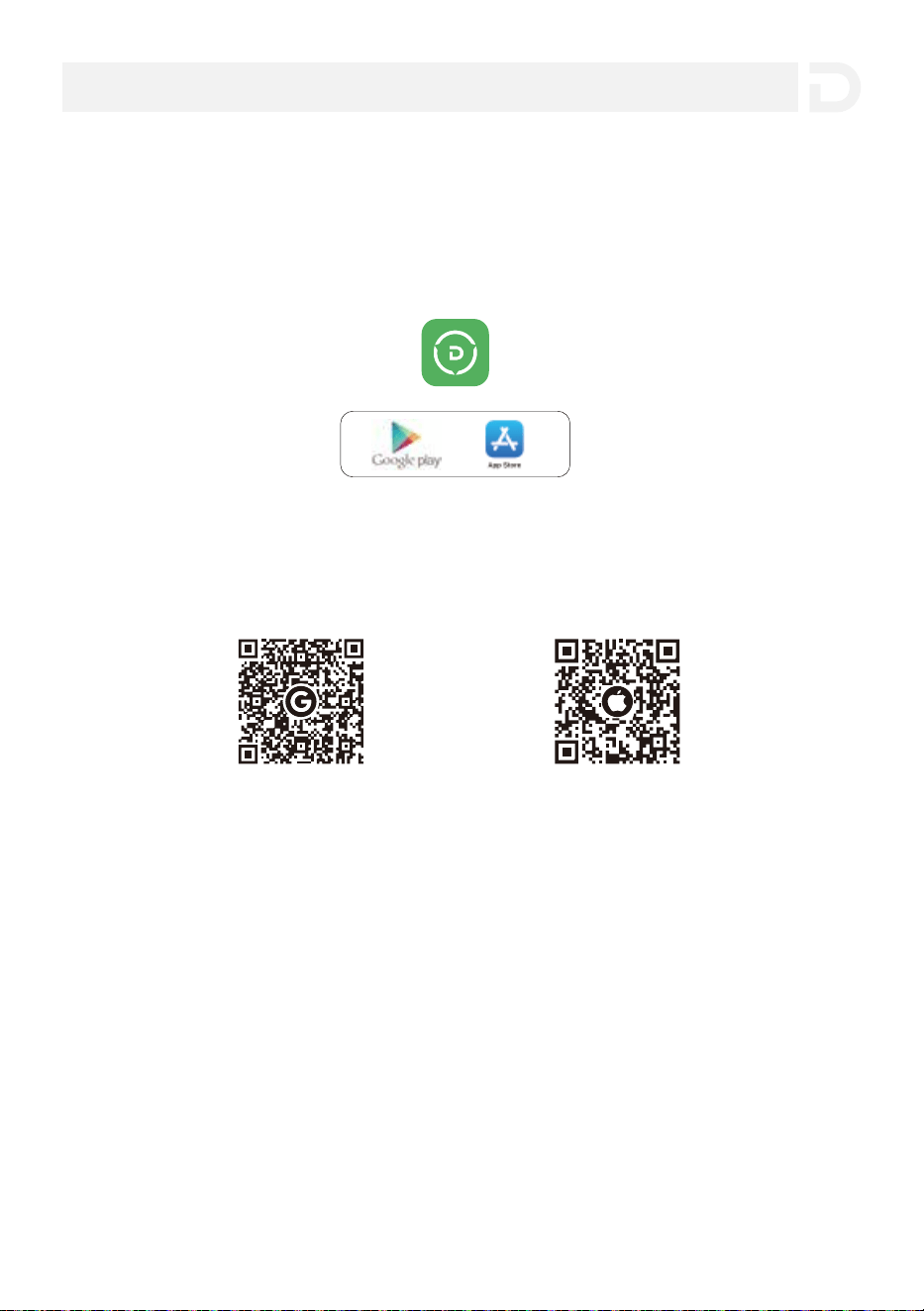
Android iOS
2. You can download the app on the App Store and Google Play by scanning the QR codes
below.
3. Download the Dabbsson APP on the official website: www.dabbsson.com
* The Dabbsson App can only control AC and DC parameters setting in ECO or STANDBY open mode.
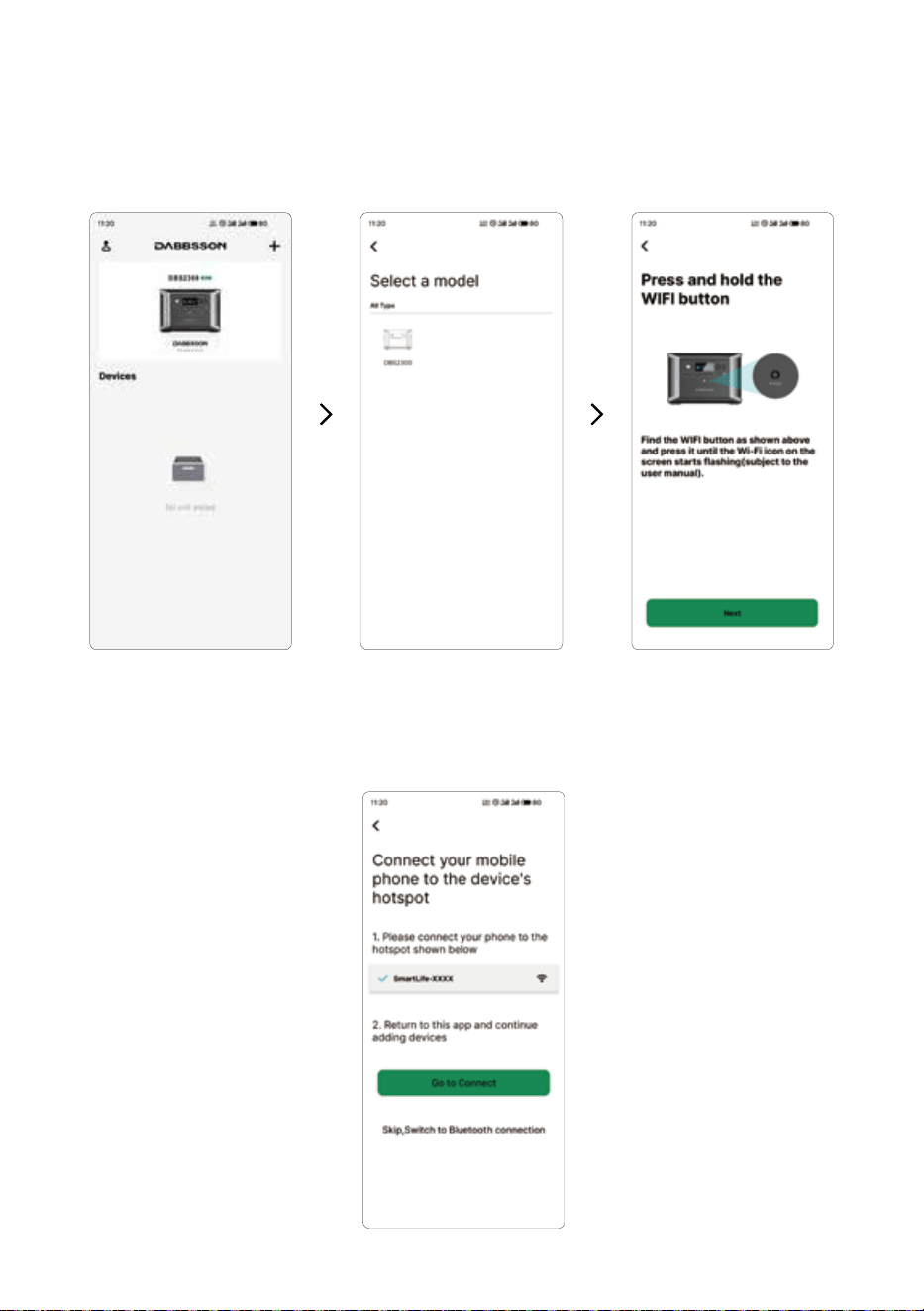
1. Long press the Wi-Fi reset button of the device for 3 seconds until the Wi-Fi icon flickers on
the screen, then the device is prepared for pairing.
Connecting the APP to DBS2300
When there is network around
Download Dabbsson APP
1. Search for “Dabbsson” in the APP Store (for iOS devices) or Google Play (for Android devices)
to download the Dabbsson App.
5.App Control
15
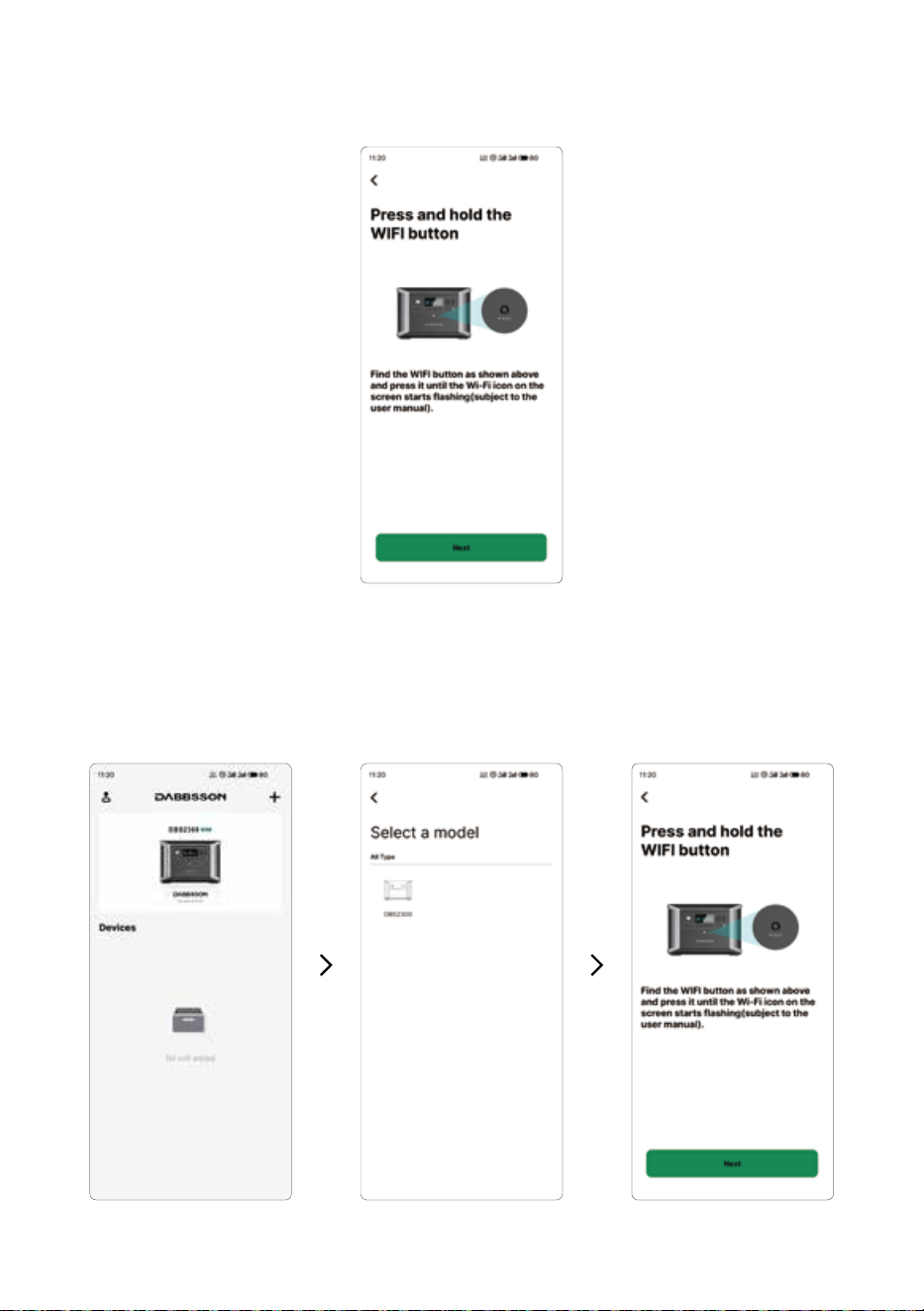
2. Open the Dabbsson APP and select the symbol “+” on the top right corner of the homepage.
Then select the model name of the device you are using. In the next page, select ”Next” to
enter the page of connecting your mobile phone to the device’s hotspot.
16
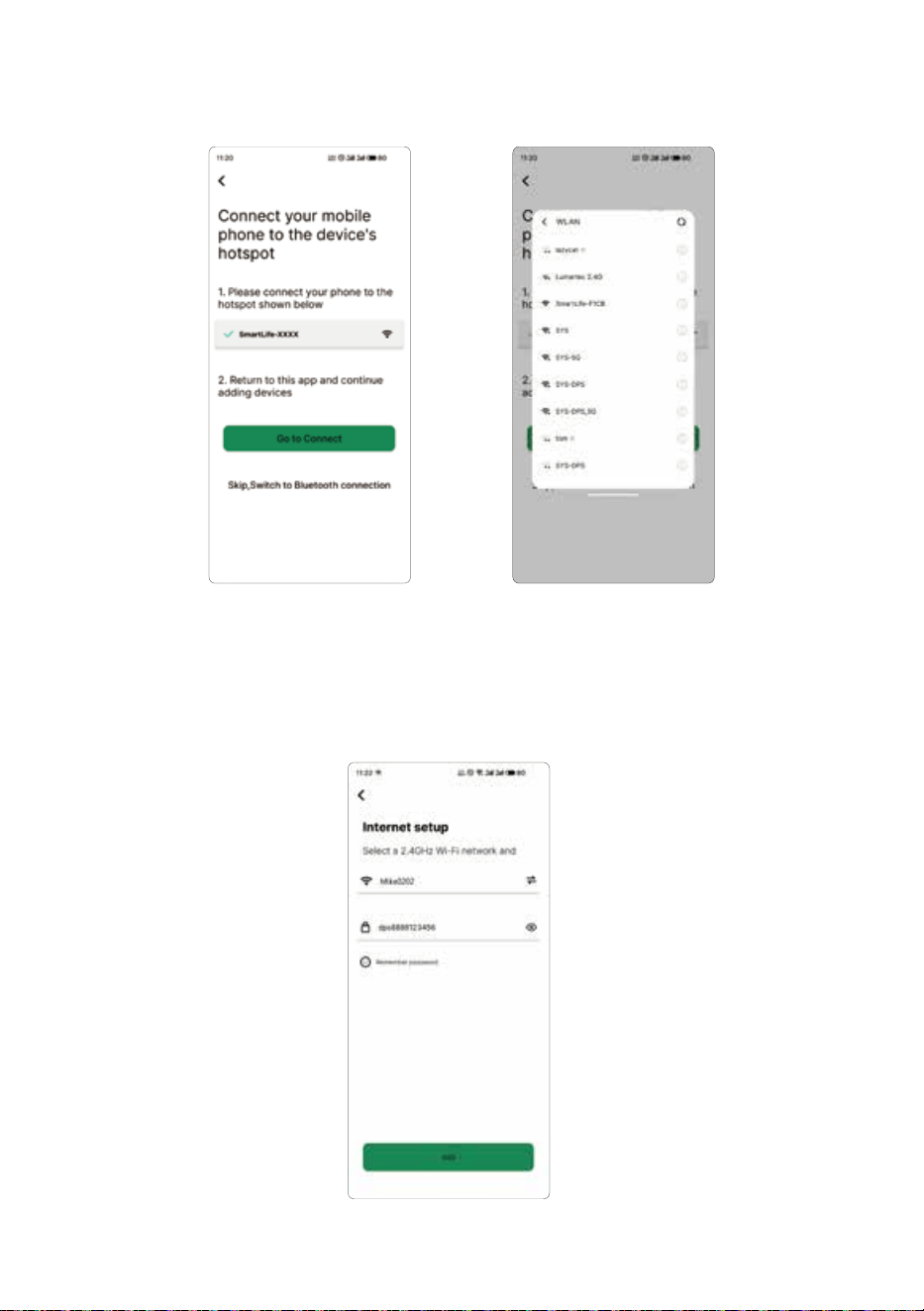
3. Select “Go to Connect” and then connect your mobile phone to the device’s hotspot
(the default hotspot name of the device is SmartLife-xxx).
17
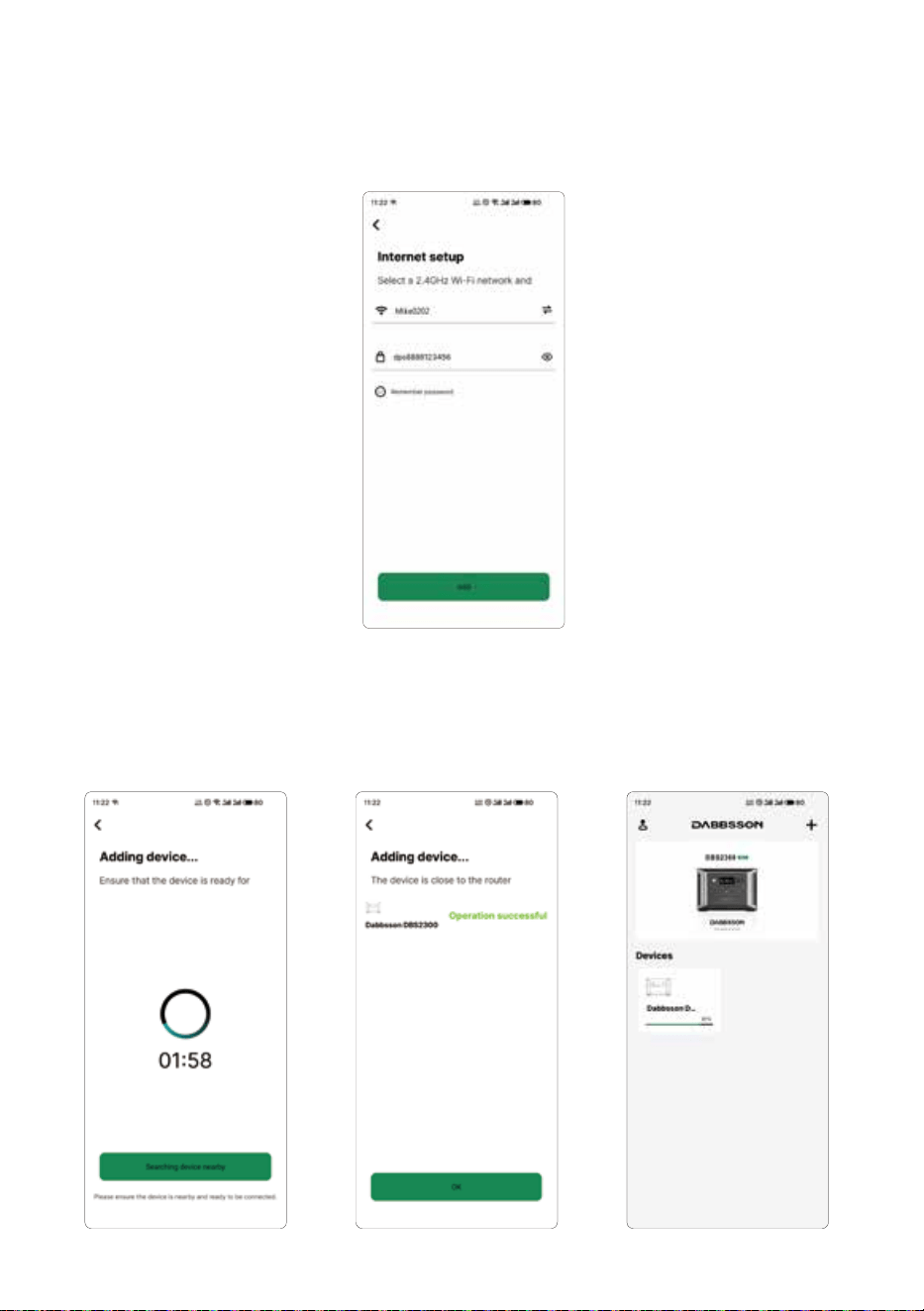
4. In the “Internet setup” page, enter the name and password of a available external WiFi, or
you can also drop down the WiFi selection button and choose a WiFi and enter the
password. Then select “Add” to connect your device to the external WiFi.
(Note: Only 2.4G WIFI hotspots are supported).
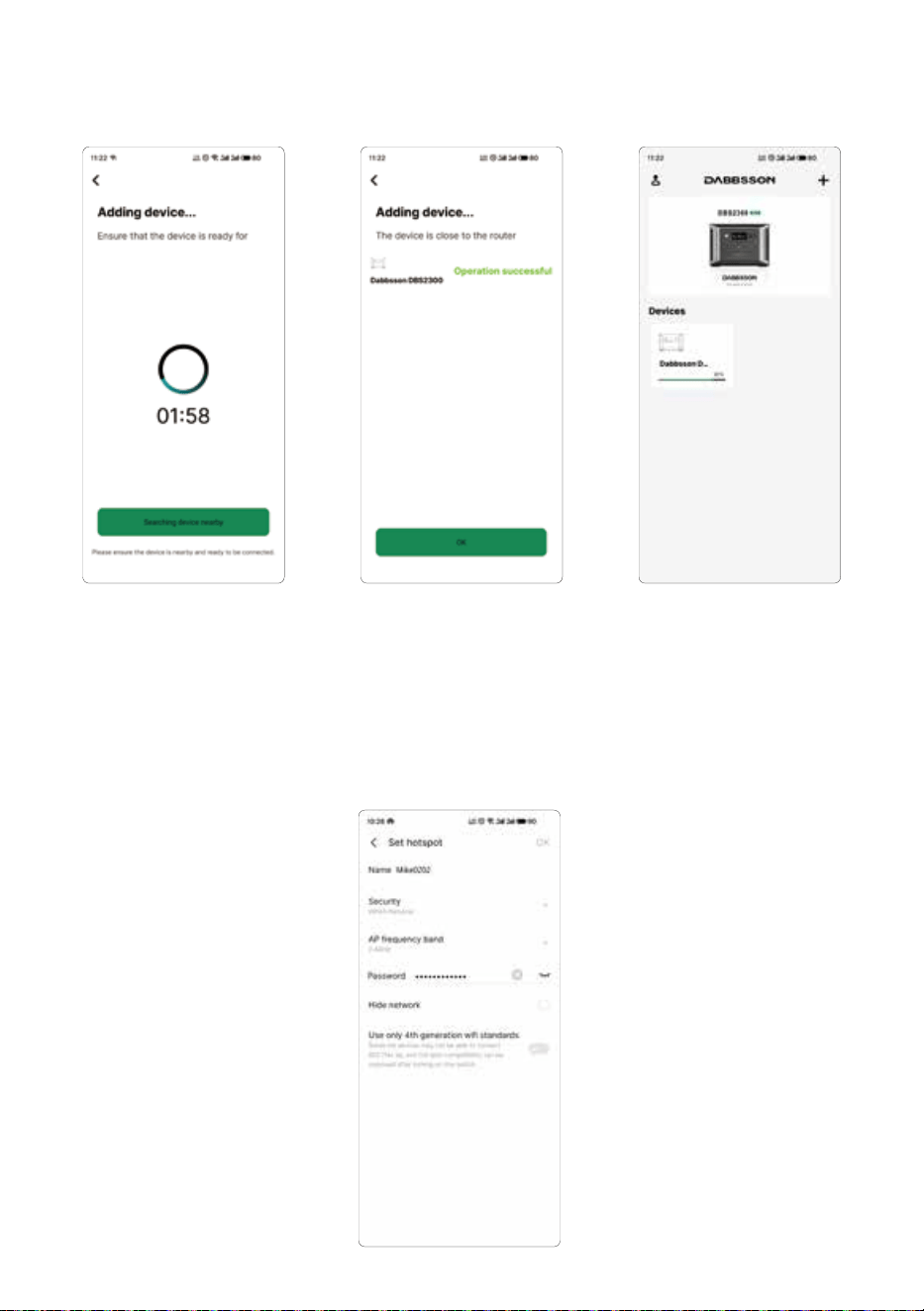
5. Wait while the APP is adding your device. If successful, the device will appear under the
device list in the APP.
18
When there is not network around
1. Open the personal hotspot on your mobile phone, then remember the hotspot
name and password.
(Note: Only 2.4G WIFI hotspots are supported).
2. Open the Dabbsson APP and select the symbol “+” on the top right corner of the
homepage. Then select the model name of the device you are using. In the next
page, select “Next” to enter the page of connecting your mobile phone to the
device’s hotspot.
3. In this page, select “ Skip, Switch to BT Connection”, then open the BT of your
mobile phone and you will enter the “Internet setup” page.
19
5. Wait while the APP is adding your device. If successful, the device will appear
under the device list in the APP.
20
4. Enter the name and password of your mobile phone’s hotspot, and then select
“Add” to connect your device to the hotspot of your mobile phone.
Privacy Policy
By using Dabbsson Products, Applications and Services,
you consent to the Dabbsson Term of Use and Privacy
Policy, which you can access via the "About" section of
the"User"page on the Dabbsson App or on the official
Dabbsson website at https://www.dabbsson.com
If the device appear under the device list successfully, you can turn off the hotspot
of your mobile phone. Then the device will be connected to the APP via BT.Turn off
the external Wi-Fi or hotspot the device is connected to, the device will disconnect
from the Wi-Fi network or hotspot and automatically switch to local BT control after
3-5 minutes.
Note: In BT mode, you can remotely control your device within a distance of about
10 meters due to the limitation of the effective transmission distance of BT signals.
21

6. FAQS
1. What type of batteries does the product use?
This product uses high-quality LiFePO4 battery.
2. What devices can use the product’s AC output port power?
With 2200W rated power and 4400W peak power, the product’s AC output port can power
most household appliances. Before using we recommend you check the power of the
appliances first and ensure the power sum of all loaded appliances is lower than the rated
power.
3. How long does it take for the product to charge my devices?
The charging time is shown on the product’s LCD Screen, which can be used to estimate
the charging time of most appliances with stable power usage.
4. How can I tell if the product is charging?
The remaining charging time will be shown on the LCD Screen. The charging indicator will
display remaining battery percentage, while current input power is shown to the right of
the charging indicator.
5. How do I clean the product?
Please gently wipe it with a dry, soft, clean cloth or paper towel.
6. How should I store the product?
Before storing, turn off the product first, and then store it in a dry,ventilated area at
room temperature.Do not place it near water sources. For long-term storage, discharge
the battery to 30% and recharge it to 60% every three months to extend its battery life.
7. Can I bring the product on a plane?
No
22
(Flashing)
(Flashing)
(Flashing)
(Flashing)
(Flashing)
(Flashing)
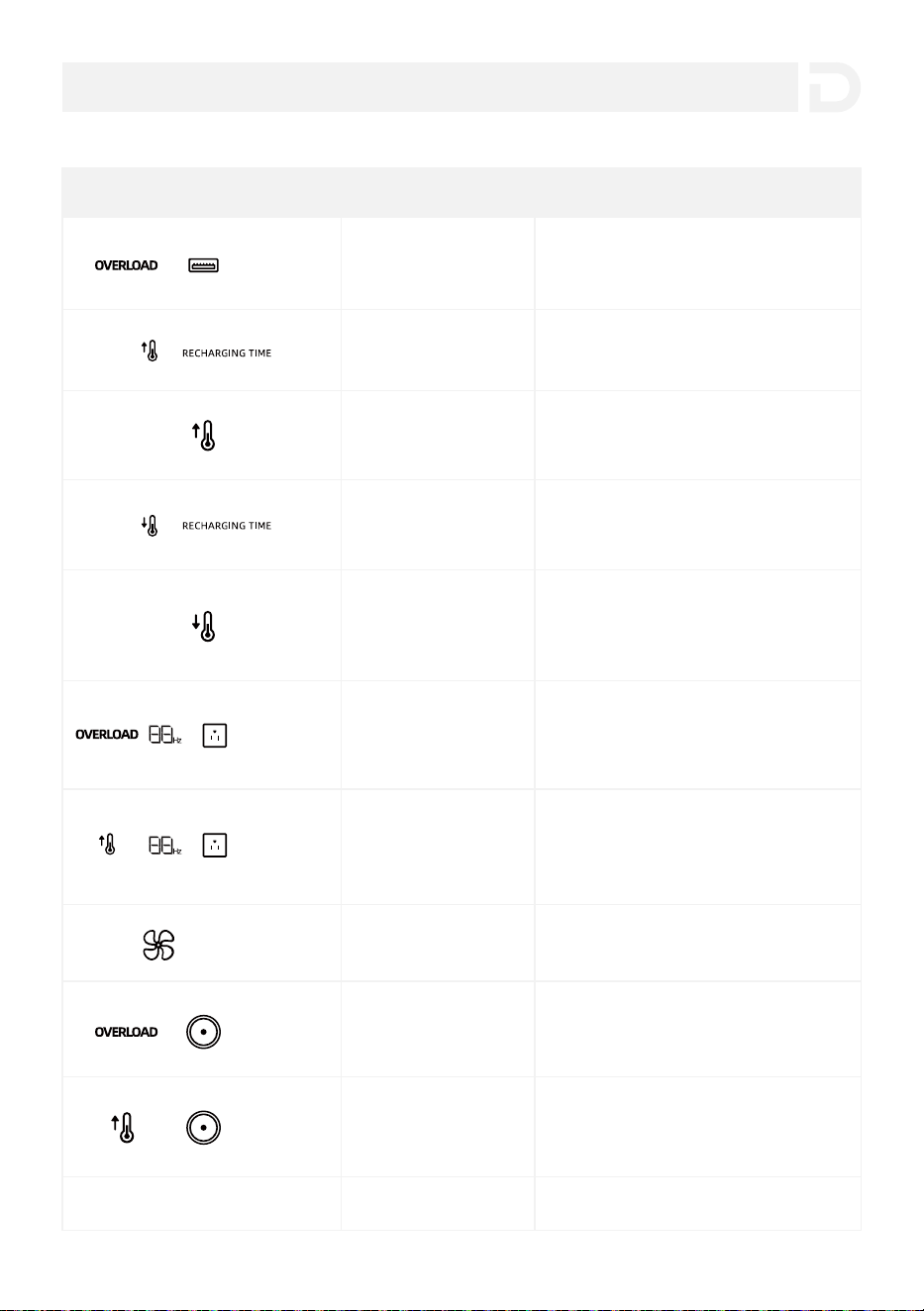
USB-A Overload
Protection
Resume normal operation by removing
the electrical device connected to the
USB-A port.
High Temperature
Charge Protection
Charging will automatically resume after
the battery cools down.
High Temperature
Discharge Protection
Power supply will automatically resume
after the battery cools down.
Low Temperature
Charge Protection
Charging will automatically resume after
battery temperature rises above
-10℃(14℉).
Low Temperature
Discharge Protection
Power supply will automatically resume
after the battery temperature rises
above -20℃(-4℉).
AC Output
Overload Protection
AC High
Temperature Protection
Fan Blockage Please check if the fan is blocked.
The product will automatically resume
normal operation after it cools down.
Contact Dabbsson Customer Service
The product will automatically resume
normal operation after you remove the
device connected to the DC outlet.
DC Output
Overload Protection
DC Output High
Temperature Protection
Others
Check whether the fan inlet and/or
outlet are blocked. If not, normal
operation will automatically resume
after the product cools down.
Normal operation will automatically
resume after you remove the overloaded
device and restart the product.
Indicator Problem Solution
7. Troubleshooting
23
1. Ideally,you should use and store the product at an ambient temperature between 20℃-30℃
(68℉-86℉), and always keep it away from water, intense heat, and sharp objects. Do not
store in temperatures above 45℃ (113℉) or below -10℃ (14℉) for an extended period.
2. Storing a battery with a low charge for a long period shortens its lifespan. DBS2300
mitigates the damage by putting the battery into hibernation mode. To get the most out of
the battery, make sure it is at about 60% before putting DBS2300 into long-term storage.
While in storage, it is recommended to discharge the battery to 30% and recharge it back to
60% every three months.
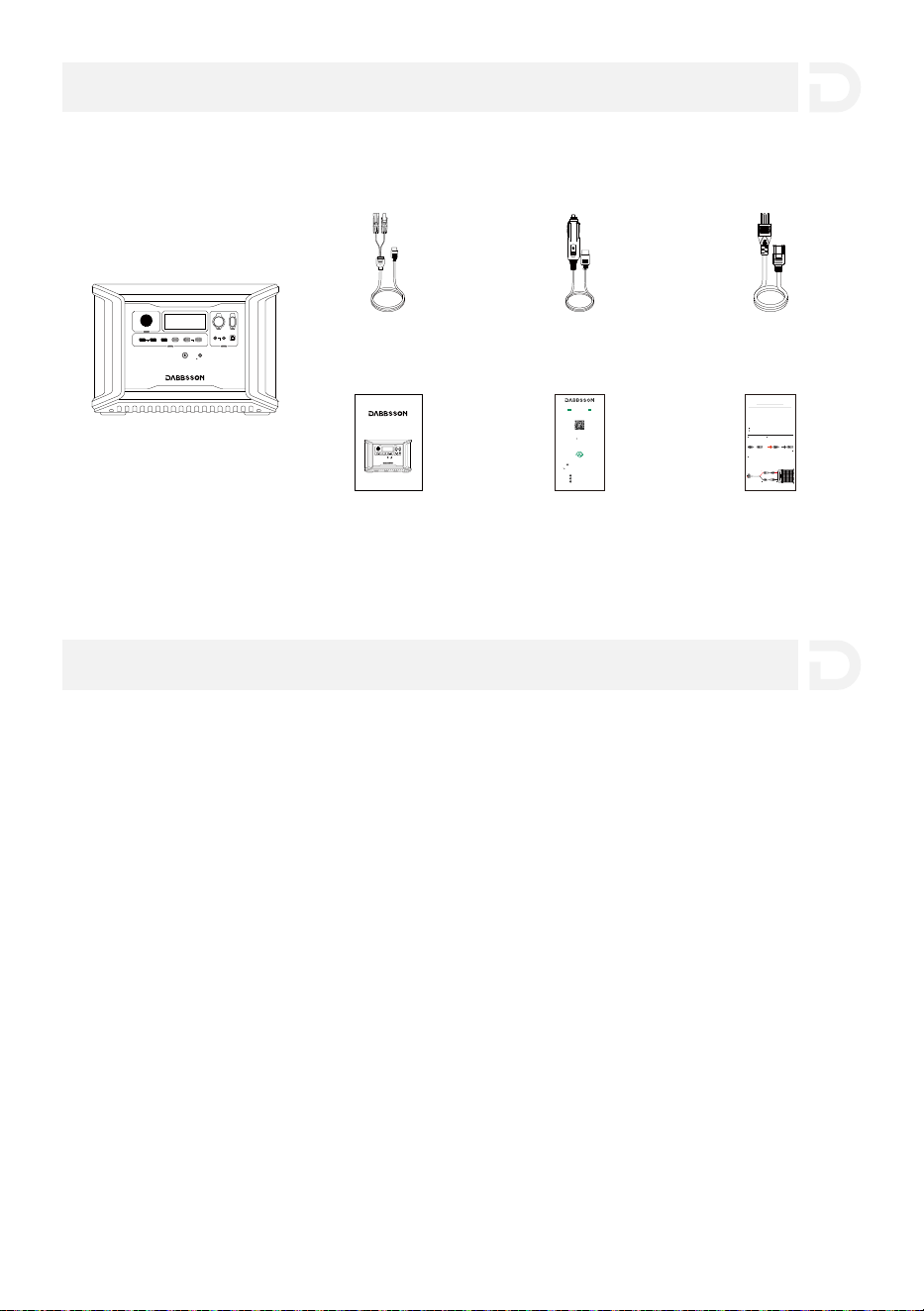
8. What’s in the Box
9. Storage & Maintenance
DBS2300
12V ON/OFF
FAST CHARGE PD 100W
10A 30A
4A DEVICE
IOT RESET
LIGHT ON/OFF
USB ON/OFF
5V 2.4A
PD 30W
AC Charging Cable
Warning Card
Car Charging Cable
Warranty CardUser Manual
Solar Charging Cable
12V ON/OFF
FAST CHARGE PD 100W
10A 30A
4A DEVICE
IOT RESET
LIGHT ON/OFF
USB ON/OFF
5V 2.4A
PD 30W
Dabbsson DBS2300
User Manual
24
MC4 female
Before connecting the solar panel, make sure that the positive pole of the solar
panel is connected to the MC4 male connector and the negative pole is connected
to the MC4 female connector (as shown in the figure below).
MC4 male
MC4 Port
Connect your solar panel to the Dabbsson solar panel charging cable
(MC4 to XT60)
Please connect the positive pole to the MC4
male connector and the negative pole to the
MC4 female connector.
Positive pole
+
Negative pole
2
1
3
Please connect the positive pole of the solar panel to the MC4 male
connector and the negative pole to the MC4 female connector.
Please confirm the positive and negative poles of your solar panel.
For users who use universal solar panels with non-MC4 connectors to power the
device, please note solar panels should be within voltage and current range
(please find more information on requirements in the user guide).
Improper connection of MC4 connector to your device could damage the device.
Dabbsson does not take responsibility for equipment failure due to personal
misoperation.
DIY Instructions for
Non-MC4 Connector Solar Panels
Dabbsson solar panel
charging cable
Have any question? Chat with a specialist today.
If you have any question, please do not hesitate to contact us.
Follow Us
Activate your warranty at
www.dabbsson.com
Warranty Activation
Keep the original packaging & accessories
CLAIM YOUR WARRANTY
24-MONTH
WARRANTY
Fill in Your InformationRegister Porduct
Products must be returned in their original condition and
packaging with all included accessories for the warranty to be valid.
@Dabbsson_Global
@DabbssonOfficial
@Dabbsson_Official
+1 888 850 9503 Mon-Fri 9am-5pm (PST)

This device complies with Part 15 of the FCC Rules. Operation is subject to the following
two conditions:
(1)This device may not cause harmful interference.
(2)This device must accept any interference received, including interference that may cause
undesired operation.
Warning:
Changes or modifications not expressly approved by the party responsible for compliance
could void the user's authority to operate the equipment.
NOTE:
This equipment has been tested and found to comply with the limits for a Class A digital
device, pursuant to Part 15 of the FCC Rules. These limits are designed to provide reasonable
protection against harmful interference when the equipment is operated in a commercial
environment. This equipment generates, uses, and can radiate radio frequency energy and, if
not installed and used in accordance with the instruction manual, may cause harmful
interference to radio communications. Operation of this equipment in a residential area is
likely to cause harmful interference in which case the user will be required to correct the
interference at his own expense.
FCC Radiation Exposure Statement:
This equipment complies with FCC radiation exposure limits set forth for an uncontrolled
environment. This equipment should be installed and operated with minimum distance of
20cm between the radiator & your body.
10. Fcc Statement
25