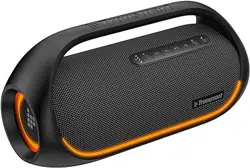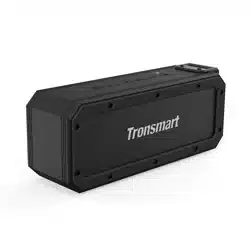
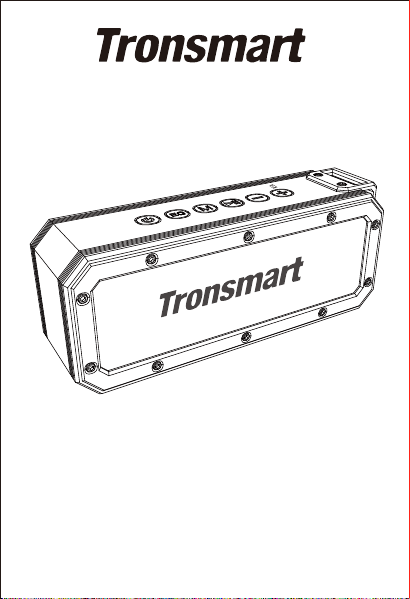
Tronsmart Element Force+
Bluetooth Speaker
User manual

1
Thank you for choosing Tronsmart Element Force+ Bluetooth
Speaker. Element Force+ is equipped with Bluetooth 5.0 for
optimal connection and pairing with your Bluetooth enabled
device. Please read the user manual before use and keep it
handy for future reference.
FEATURES
·Silicon covered exterior with IPX7 rating.
·Passive radiator for deeper bass.
·Up to 40W powerful output.
·Up to 15 hours of play time.
·True Wireless Stereo (TWS) for stereo surround sound.
·Bluetooth 5.0.
·Equipped with USB Type-C port supporting DC 5V/2.4A
input charging.
·Supports voice assistant for music streaming, phone calls,
weather inquiries and much more.
Note: Voice Assistant is supported by Siri, Google and other
local Android voice assistants that run on Samsung, Huawei,
Xiaomi and more devices.
PACKAGE CONTENTS
1 x Element Force+ Bluetooth speaker
1 x Charging cable
1 x 3.5mm AUX cable
1 x 60cm lanyard
1 x Warranty card
BUTTON CONFIGURATIONS
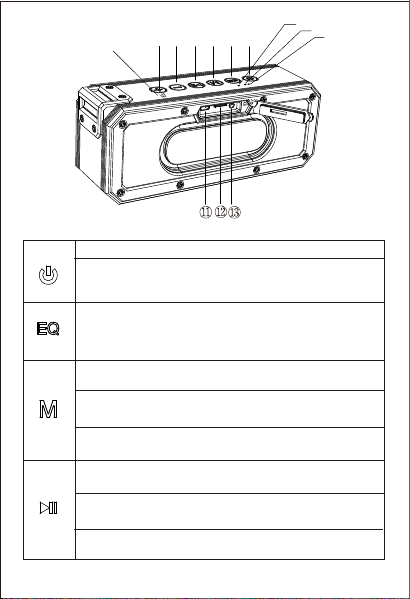
①Power ON/OFF
② Tri-bass effects: Extra Bass,
3D, Standard; TWS
③ Music playing mode/Reset
/Bluetooth disconnect
④Play/Pause/Hands-free
/Voice assistant
⑤ Volume-/Previous track
⑥ Volume+/Next track
⑦ Charging indicator
/TWS indicator
⑧ Bluetooth indicator
⑨ Audio effect switching
indicator
⑩ NFC area
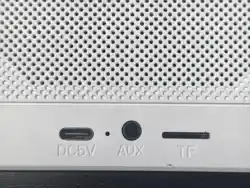
USB Charging port
Micro SD/TF card slot
AUX-in
ON/OFF: Hold for 2-3 seconds to Power ON & OFF.
Hold for 6-8 seconds until the Bluetooth blue indicator
goes off to power OFF & ON the speaker forcedly if it is
malfunctions.
2
FUNCTIONS
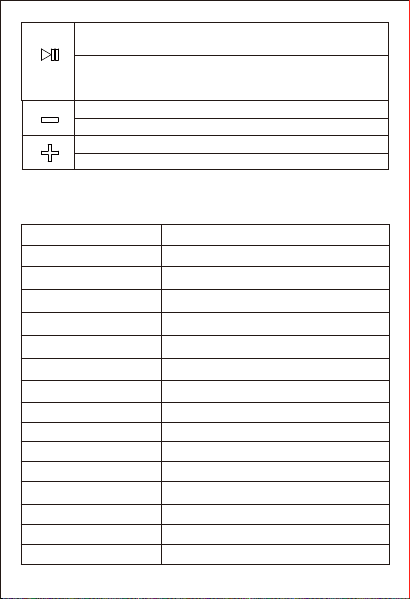
Press to switch audio effect between Extra Bass, 3D and
Standard music. Note: The default audio effect is Extra
Bass (No LED indicator). 3D music with green indicator
ON while Standard music with white indicator ON.
Press to switch music playing mode between Bluetooth,
Micro SD/TF and Aux-in.
Reset: Hold for 5 seconds until a sound prompt is heard
to clear the paired devices and reset to factory setting.
Bluetooth disconnect: Hold for 3 seconds until a sound
prompt is heard to disconnect the Bluetooth pairing.
Play/Pause: During music playing mode, press to play and
pause the music.
Answer/Hang up a phone call: During an incoming call,
press to answer or hang up the phone call.
Reject a phone call: Hold for 2 seconds to reject the
incoming call.
①②
③ ④
⑤
⑥
⑦
⑧
⑨
⑩
3
Bluetooth 5.0
Element Force+
Transmission range
20m/66ft (open area)
Waterproof
IPX7
Output
2 x 20W Max.
Playtime
Power supply
Battery capacity
Charging time
Loudspeaker size
Distortion
Frequency
Functions
Dimension
Product weight
Up to 15 hours (medium volume)
DC 5V/2.4A max.
3300mAh*2
About 3 hours
Standby About 24 months
53mm
≤1.0%
80Hz-18KHz
Micro SD/TF card, aux-in, hands-free
209 x 64 x 83mm / 8.22 x 2.51 x 3.26in
667 ± 5g / 23.52 ±0.2 oz
Model
SPECIFICATIONS
Redial: During Bluetooth connected mode, double press
quickly to redial the last dialed number.
Voice assistant: After your device is paired to the speaker
over Bluetooth, hold the play/pause button for 2 seconds
to activate voice assistant.
Press to lower down the volume.
Hold to choose previous track.
Press to increase the volume.
Hold to choose next track.

BLUETOOTH
Turn ON the speaker and wait for the blue LED light to flash
and then activate the Bluetooth in your device. Go to
device’s Bluetooth settings, scan for new Bluetooth devices
and upon discovering the device ‘Tronsmart Element
Force+’ click to pair with it. Hold the ‘M’ button for 3
seconds to disconnect the Bluetooth.
TWS MODE
What is TWS?
TWS is true wireless stereo which means two Force+
Bluetooth speakers are able to be paired to play music
simultaneously to provide stereo surround sound.
How to pair two Force+ speakers?
1. Turn ON two speakers and confirm they are disconnect-
ed to any Bluetooth device.
2. Hold EQ button for 2 seconds on one speaker, then you
will hear a voice prompt which means it has entered TWS
pairing mode and will pair with each other automatically.
After connecting successfully, you will hear a sound prompt
from two speakers and the blue LED light of main speaker
flashes slowly while the blue light of sub-speaker goes off.
Both TWS indicators are steady ON yellow.
3. Go to device’s Bluetooth settings, scan for ‘Tronsmart
Element Force+’ and click to pair with it. The blue light of
main speaker being steady ON means the connection to
Bluetooth device is successful. And then start to play music
to enjoy stereo surround sound.
4. If the speaker used to be paired in TWS mode, it is
suggested to hold the Mode button for 5-7 seconds to reset
the speaker. Then restart to pair another new Element
Force+ speaker according to the above instructions.
4

5
Note:
1. Once the speakers are paired for the first time they will
be automatically paired next time without the above
pairing operations as long as they are ON.
2. During TWS mode, only the main speaker can perform
hands-free function.
AUX-IN MODE
The speaker also features one AUX audio in port. Simply
connect the speaker with your mobile phone/MP3
player/PC/laptop with the 3.5mm audio jack cable. Once
the blue light is steady on, then you can play music via the
wired connection.
MICRO SD/TF CARD MODE
Press the Mode button to switch Bluetooth Mode to Micro
SD/TF card Mode. It supports WAV/FLAC/APE/MP3 audio
formats.
NFC MODE
Confirm Bluetooth & NFC function are enabled on your
mobile device and then put it on the NFC area of the
Force+ speaker to pair automatically. If your mobile phone
prompts you to choose whether to accept the speaker
connecting to your phone or not, please choose ‘accept’ to
make it pair with the speaker. Once paired successfully,
you can take away your phone and enjoy the music from
the speaker. Put your phone back to the NFC area again to
disconnect NFC pairing mode.

6
LED
Bluetooth: Blue light flashes slowly for pairing. Blue light
kept ON for connected successfully.
Micro SD/TF & AUX-IN: Blue light flashes slowly.
Charging: Red light ON for charging. Red light goes OFF for
charging completion.
TWS: Yellow light kept ON.
RESET
Hold the Mode button for 5 seconds until a sound prompt is
heard to reset to factory setting if the speaker malfunctions.
It can help to clear all pairing records from the speaker.
After resetting you need to connect it to your Bluetooth
device manually like the first time you did.
SLEEP MODE
The Force+ speaker will go into Sleep Mode after 10 minutes
to save battery power if it does not pair with any device
through Bluetooth or any sound is not played after pairing.
When you need to use it, press the Power ON/OFF button to
turn it on.
TIPS
Because of the powerful output of this speaker, please do
not be too close to the speaker and keep an appropriate
distance away to listen to the music. To avoid any
discomfort caused by excessive sound, it is recommended
to listen to music at a suitable volume.
CAUTION
RISK OF EXPLOSION IF BATTERY IS REPLACED BY AN
INCORRECT TYPE. DISPOSE OF USED BATTERIES ACCORDING

7
TO INSTRUCTIONS.
To prevent possible hearing damage, do not listen at high
volume levels for long periods.
FCC STATEMENT
This device complies with Part 15 of the FCC rules.
Operation is subject to the following two conditions: 1) this
device may not cause harmful interference, and 2) this
device must accept any interference received, including
interference that may cause undesired operation.
Note: This equipment has been tested and found to comply
with the limits for a Class B digital device, pursuant to part
15 of the FCC Rules. These limits are designed to provide
reasonable protection against harmful interference in a
residential installation.
This equipment generates uses and can radiate radio
frequency energy and, if not installed and used in
accordance with the instructions, may cause harmful
interference to radio communications. However, there is
no guarantee that interference will not occur in particular
installation. If this equipment does cause harmful
interference to radio or television reception, which can be
determined by turning the equipment off and on, the user
is encouraged to try to correct the interference by one or
more of the following measures:
--Reorient or relocate the receiving antenna.
--Increase the separation between the equipment and
receiver.
--Connect the equipment into an outlet on a circuit
different from that to which the receiver is connected.
--Consult the dealer or an experienced radio/TV technician
for help.
Changes or modifications not expressly approved by the

8
party responsible for compliance could void the user’s
authority to operate the equipment.
FCC Radiation Exposure Statement
This device complies with FCC RF radiation exposure limits
set forth for an uncontrolled environment. This transmitter
must not be co-located or operating in conjunction with
any other antenna or transmitter.
CARE & MAINTENANCE
Please keep this manual handy for future reference. To
clean the Tronsmart Element Force+ Bluetooth Speaker
use a lightly dampened cloth in water to clean the exterior
in-case it gets dirty. Do not use any form of detergents or
cleaning material to clean the product as any type of
chemical may make this device unusable. Do not
disassemble this product. It contains no user serviceable
parts. Do not drop or jump on it and treat it with care for
the best performance. Keep the product in a dry location.
Dust, dirt & moisture from humidity can accumulate on
the body of the product if kept at an unfriendly place. Do
not dispose this product in fire, batteries may explode or
leak.
WARRANTY INFORMATION
Your ‘Tronsmart Element Force+ Bluetooth Speaker’ is
warranted to the original owner for 12 months from the
date of purchase against defects in material and
workmanship under normal use and service. Should the
product prove defective within 12 months from the date of
purchase, return the defective part or unit, freight prepaid
along with an explanation of the claim. Please pack the

.
.
.
.
.
9
product carefully to avoid damages in transit. Under this
warranty, Tronsmart will repair or replace any parts found
to be defective due to manufacturer’s defect. This warranty
extends only to personal use and does not extend to any
product that has been used for commercial use, rental use,
or use which is not intended. There are no warranties other
than that expressly set forth herein. This warranty is not
transferable. Tronsmart is not responsible in any way for
damages, losses or inconveniences caused by equipment
with the ‘User Manual’ or any additional safety, use, or
warnings included in the product materials. Further,
Tronsmart is not liable for incidental use of this product and
any liability shall not exceed the purchase price of the
product.
This Warranty gives you specific legal rights. You may also
have other rights which vary from state to state.
THIS WARRANTY DOES NOT APPLY TO THE FOLLOWING
Damage due to accident, misuse, abuse, alterations or
vandalism.
Improper or inadequate maintenance.
Unauthorized modifications or commercial use.
Damage in return transit.
Unsupervised use by children under 18 years of age.
(Tronsmart and its subsidiaries assume no liability for
damage caused by the use of the Element Force+ Bluetooth
Speaker other than for its intended use or as instructed
above in the User Manual.)
.
SHENZHEN GEEKBUY E-COMMERCE CO., LTD.
19th Floor, Galaxy World Tower B, #1 YaBao Rd.,
LongGang District, Shenzhen, China
Email: support@ tronsmart.com
800-270-1082
(
USA&Canada)
+86-755-23603740 (Global)