User Instructions
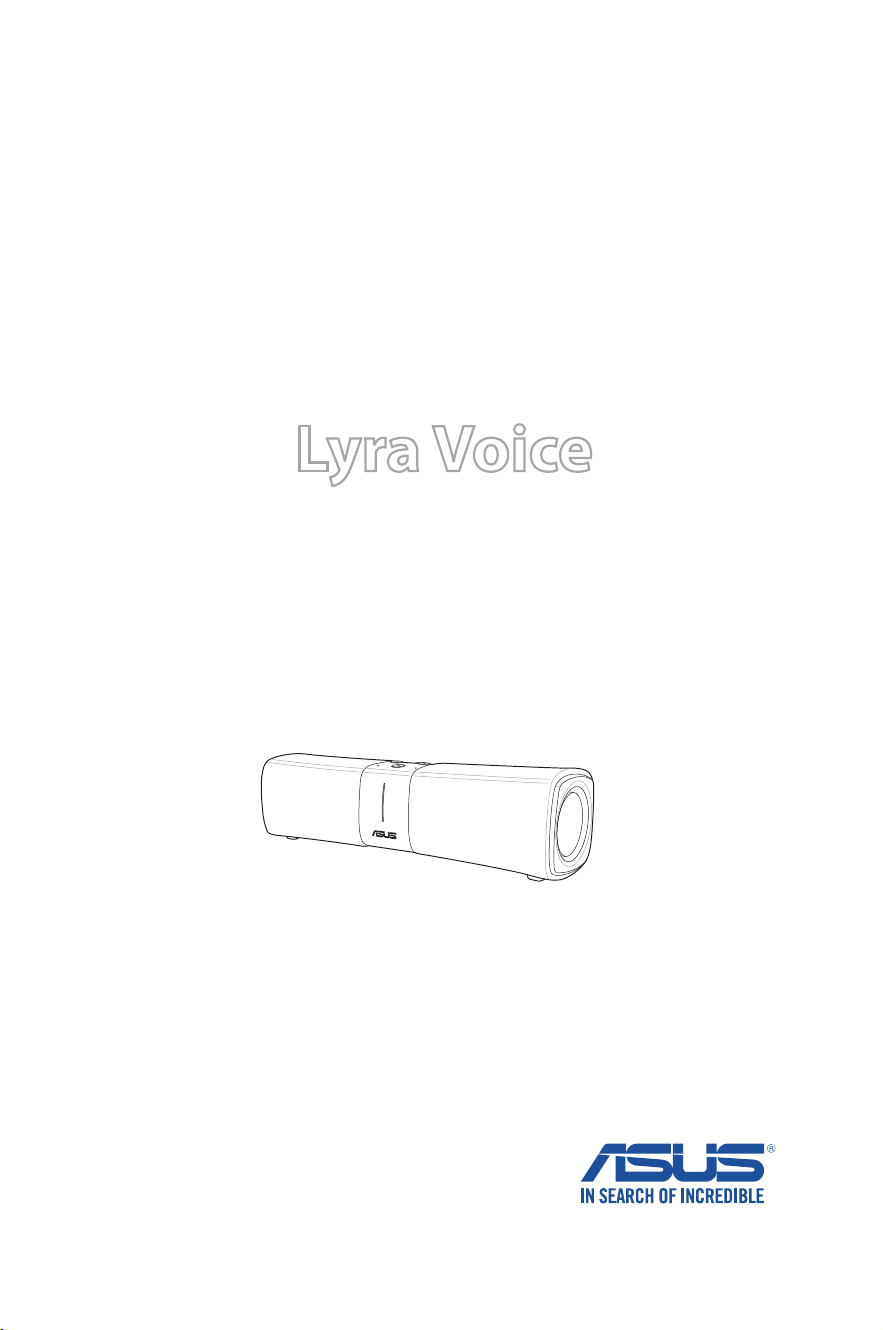
Lyra Voice
Wireless-AC2200 Tri Band Gigabit Router

2
Copyright © 2018 ASUSTeK Computer Inc. All Rights Reserved.
No part of this manual, including the products and software described
in it, may be reproduced, transmitted, transcribed, stored in a retrieval
system, or translated into any language in any form or by any means, except
documentation kept by the purchaser for backup purposes, without the
express written permission of ASUSTeK Computer Inc. (“ASUS”).
Product warranty or service will not be extended if: (1) the product is repaired,
modified or altered, unless such repair, modification of alteration is authorized
in writing by ASUS; or (2) the serial number of the product is defaced or
missing.
ASUS PROVIDES THIS MANUAL “AS IS” WITHOUT WARRANTY OF ANY KIND,
EITHER EXPRESS OR IMPLIED, INCLUDING BUT NOT LIMITED TO THE IMPLIED
WARRANTIES OR CONDITIONS OF MERCHANTABILITY OR FITNESS FOR A
PARTICULAR PURPOSE. IN NO EVENT SHALL ASUS, ITS DIRECTORS, OFFICERS,
EMPLOYEES OR AGENTS BE LIABLE FOR ANY INDIRECT, SPECIAL, INCIDENTAL,
OR CONSEQUENTIAL DAMAGES (INCLUDING DAMAGES FOR LOSS OF PROFITS,
LOSS OF BUSINESS, LOSS OF USE OR DATA, INTERRUPTION OF BUSINESS
AND THE LIKE), EVEN IF ASUS HAS BEEN ADVISED OF THE POSSIBILITY OF
SUCH DAMAGES ARISING FROM ANY DEFECT OR ERROR IN THIS MANUAL OR
PRODUCT.
SPECIFICATIONS AND INFORMATION CONTAINED IN THIS MANUAL ARE
FURNISHED FOR INFORMATIONAL USE ONLY, AND ARE SUBJECT TO CHANGE
AT ANY TIME WITHOUT NOTICE, AND SHOULD NOT BE CONSTRUED AS A
COMMITMENT BY ASUS. ASUS ASSUMES NO RESPONSIBILITY OR LIABILITY
FOR ANY ERRORS OR INACCURACIES THAT MAY APPEAR IN THIS MANUAL,
INCLUDING THE PRODUCTS AND SOFTWARE DESCRIBED IN IT.
Products and corporate names appearing in this manual may or may not be
registered trademarks or copyrights of their respective companies, and are used
only for identification or explanation and to the owners’ benefit, without intent
to infringe.
E15051
First Edition
December 2018

3
Table of contents
1 Setting up your Lyra Voice ........................................................4
2 Device usage and supported language ..............................7
3 Setting up your Amazon account for Alexa voice service ..9
4 Setting up AiMesh .................................................................... 10
5 Setting up Repeater Mode..................................................... 11
6 Enabling Bluetooth for music streaming .......................... 13
7 Configuring Spotify .................................................................. 13
8 DTS surround sound ................................................................ 15
9 LED Night Mode ........................................................................ 16
10 Using Web GUI for advanced settings ............................... 17
11 Resetting Lyra Voice ................................................................. 18
12 Updating firmware on Lyra Voice ........................................ 19
13 Enabling Rescue Mode (Firmware Restoration) ............. 20
14 Enabling/view logging for troubleshooting ................... 24
15 Supported functions ................................................................ 26
Appendices
Notices ....................................................................................................... 27
ASUS Contact information .................................................................... 45
Networks Global Hotline Information............................................... 46
4
1 Setting up your Lyra Voice
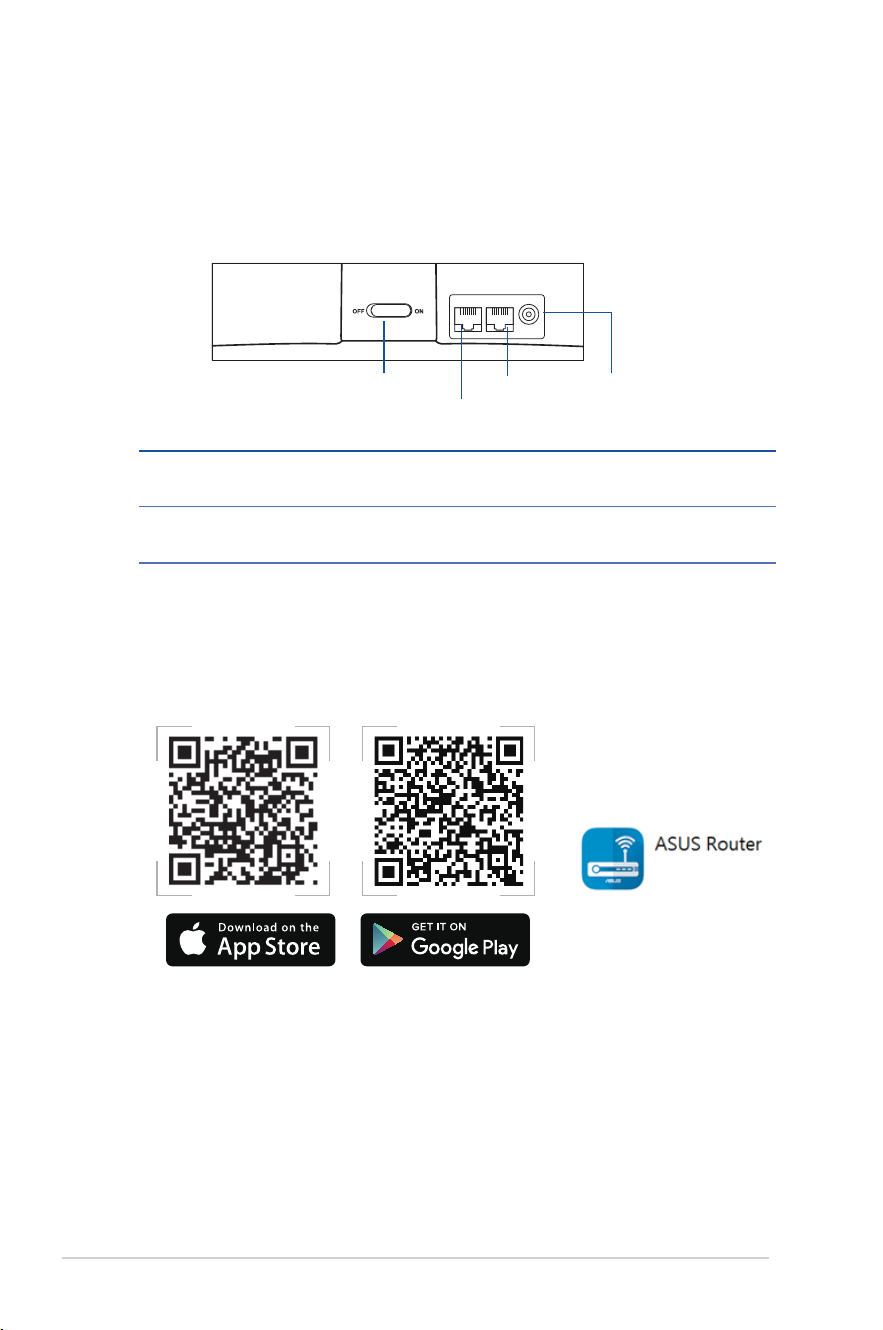
1. Plug the adapter into the DCIN port of your Lyra Voice.
2 Connect an Ethernet cable with Internet access to the WAN port on the
rear side of your Lyra Voice.
3. Slide the switch to ON to power on your device.
4. Use your mobile device to scan either of the QR codes below to install
the ASUS Router app for iOS or Android and setup Wi-Fi and Alexa
functionality on your Lyra Voice.
switch
WAN port
LAN port DCIN
WAN PORT
Connect your modem to this port with a network cable.
LAN PORT
Connect your PC to this port with a network cable.
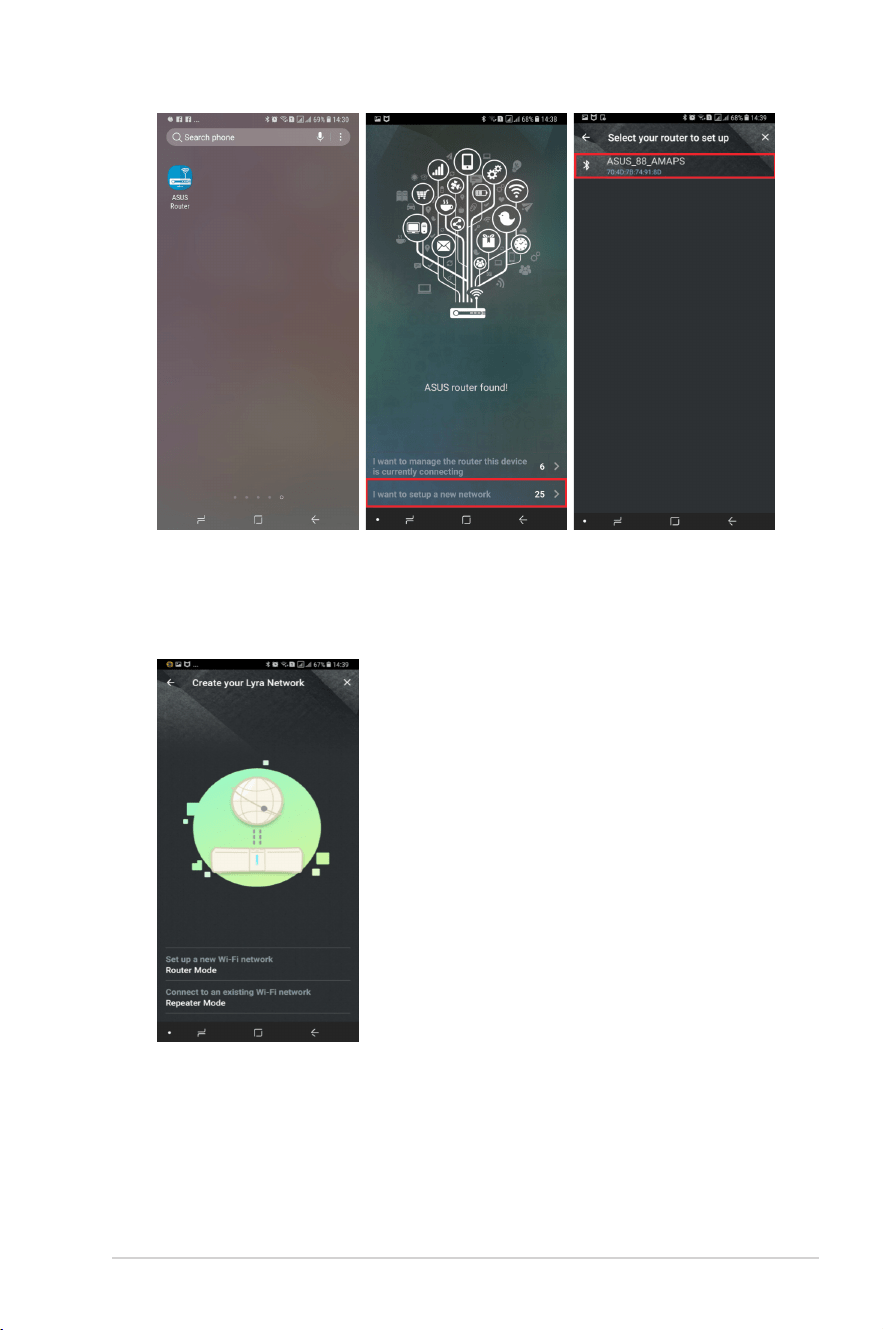
5. After installing the ASUS Router app, tap on the app and complete the
following steps.
5
6. Choose whether you want to setup your Lyra Voice as a router or as a
repeater. If you have existing routers, you can choose Repeater Mode to
connect your Lyra Voice to your existing routers for Wi-Fi signal extension.
6
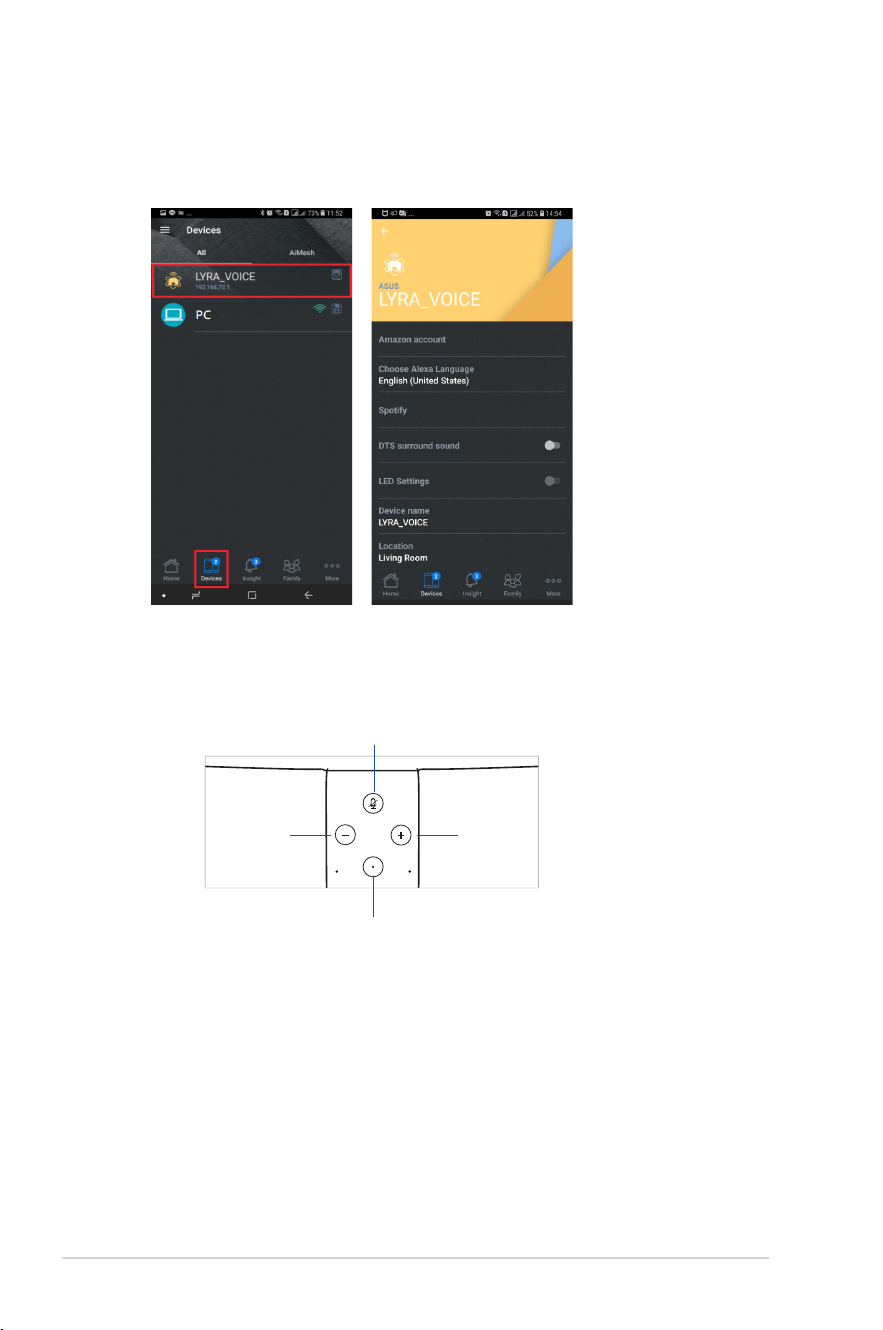
7. When you have finished setting up your Lyra Voice, tap on the Devices
icon for more settings, such as Amazon account configuration, Alexa
Language settings, DTS surround sound and LED settings.
8. Now your Lyra Voice is ready to use Alexa. Launch Alexa via voice
commands or by tapping on the Set button.
Set
Mute
Volume
down
Volume
up

7
2 Device usage and supported language
1. Device usage
Currently Lyra Voice can be set up in Router/AP/Repeater mode, and AVS
Client will be initiated once there is an available Internet connection. It can
be set up via the ASUS Router app.
2. Language support
• Deutsch(Germany)
• English(UnitedStates)
• English(Canada)
• English(India)
• English(Australia)
• English(UnitedKingdom)
• Español(Spain)
• Français(France)
• Italiano(Italy)
• 日本語 (Japan)
The following languages will be supported soon in 2019:
• Español(Mexico)
• Français(Canada)
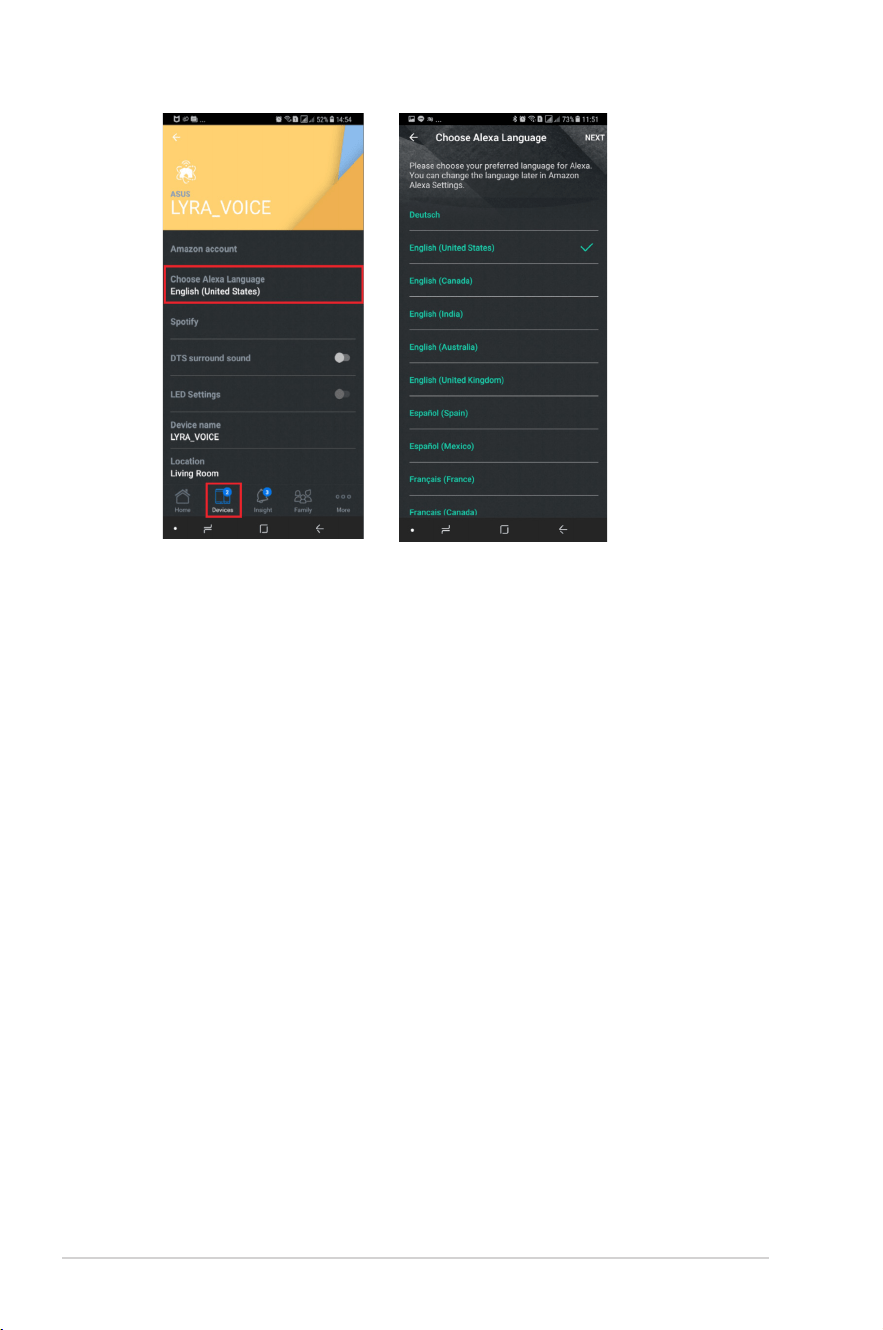
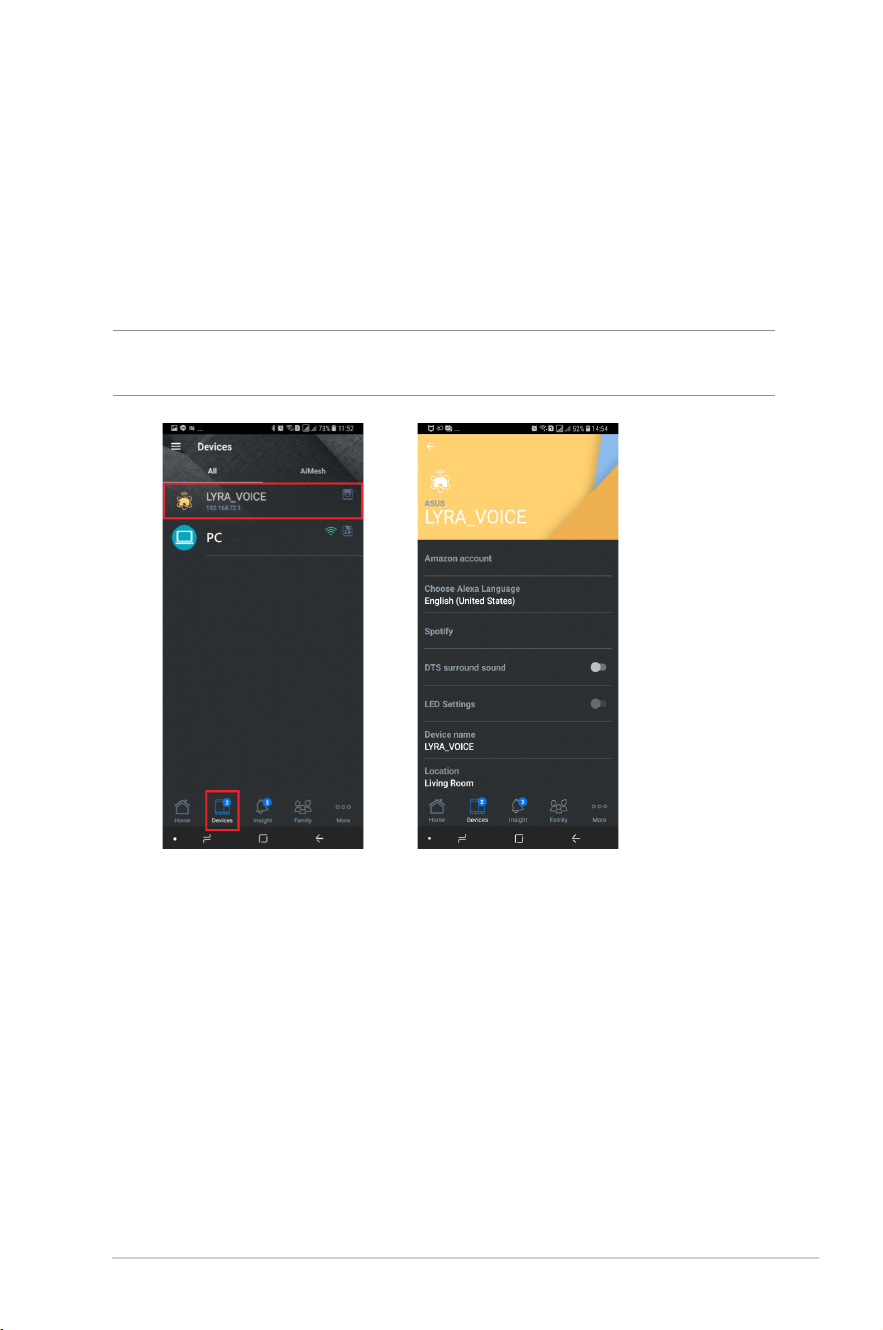
After setting up your device, you can change the Alexa language by tapping on
Device > Choose Alexa Language:
8
9
3 Setting up your Amazon account for
Alexa voice service
1. When you have completed setting up your Lyra Voice via the ASUS Router
app, tap on Amazon account to log into your Amazon account of each
Lyra Voice device, you can use the Alexa voice service once completing the
set up process.
NOTE: You can also set different Amazon accounts on different Lyra Voice
devices.
10
4 Setting up AiMesh
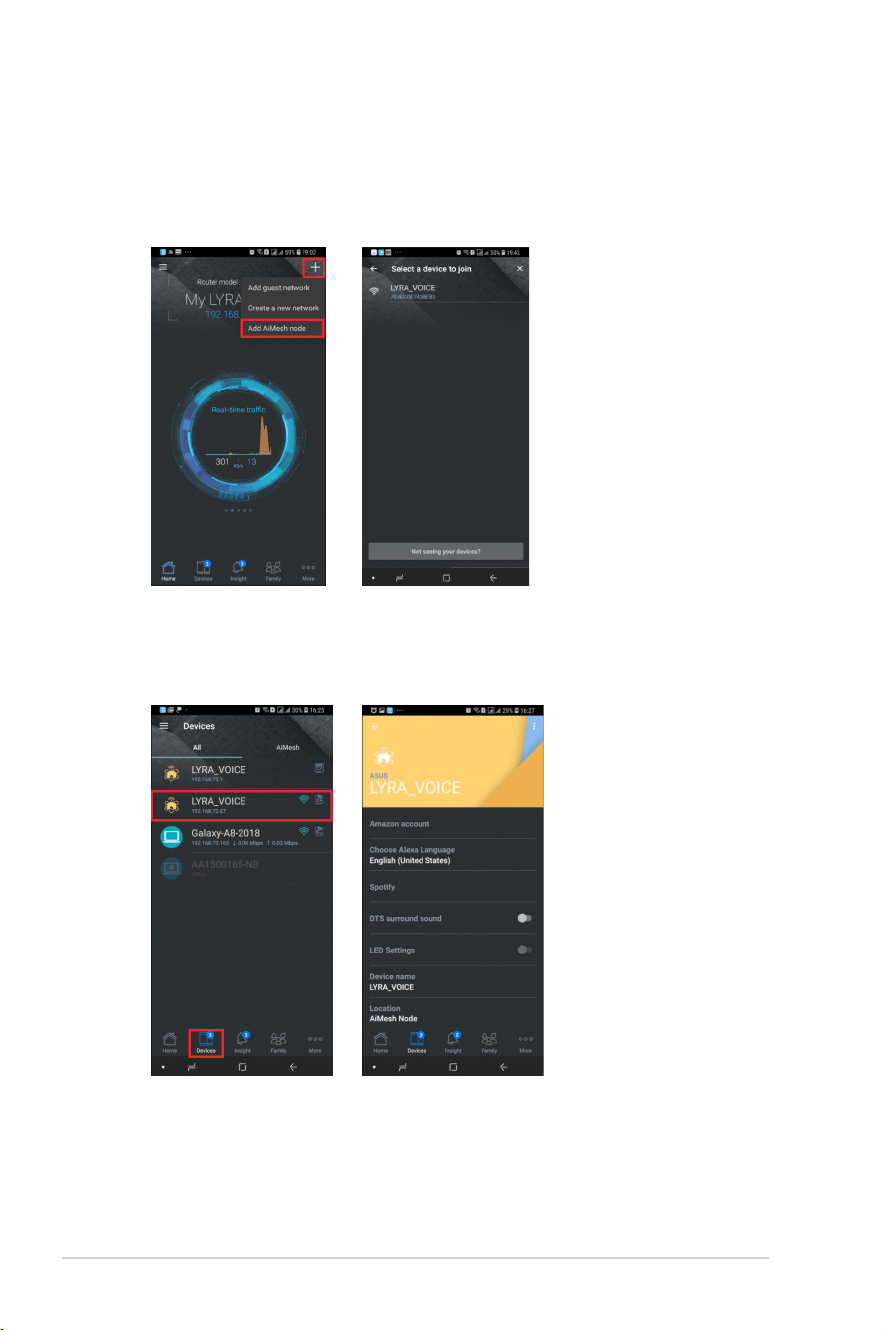
If you want to add an AiMesh node to your existing network, you can go to
ASUS Router app and follow the steps below.
It takes around 2 minutes to connect your Router and node, once connected,
go to Devices icon and choose the node for more settings.
11
5 Setting up Repeater Mode
If you already have an existing router, you can configure your Lyra Voice as a
repeater to extend the Wi-Fi signal in your home by following the instructions
below:
NOTE: Your Lyra Voice should be in its default status before starting the setup
process and the LED should be white and spinning. If your device isn’t in its
default status, press the volume- and mute button simultaneously for around 6
seconds to reset the system.
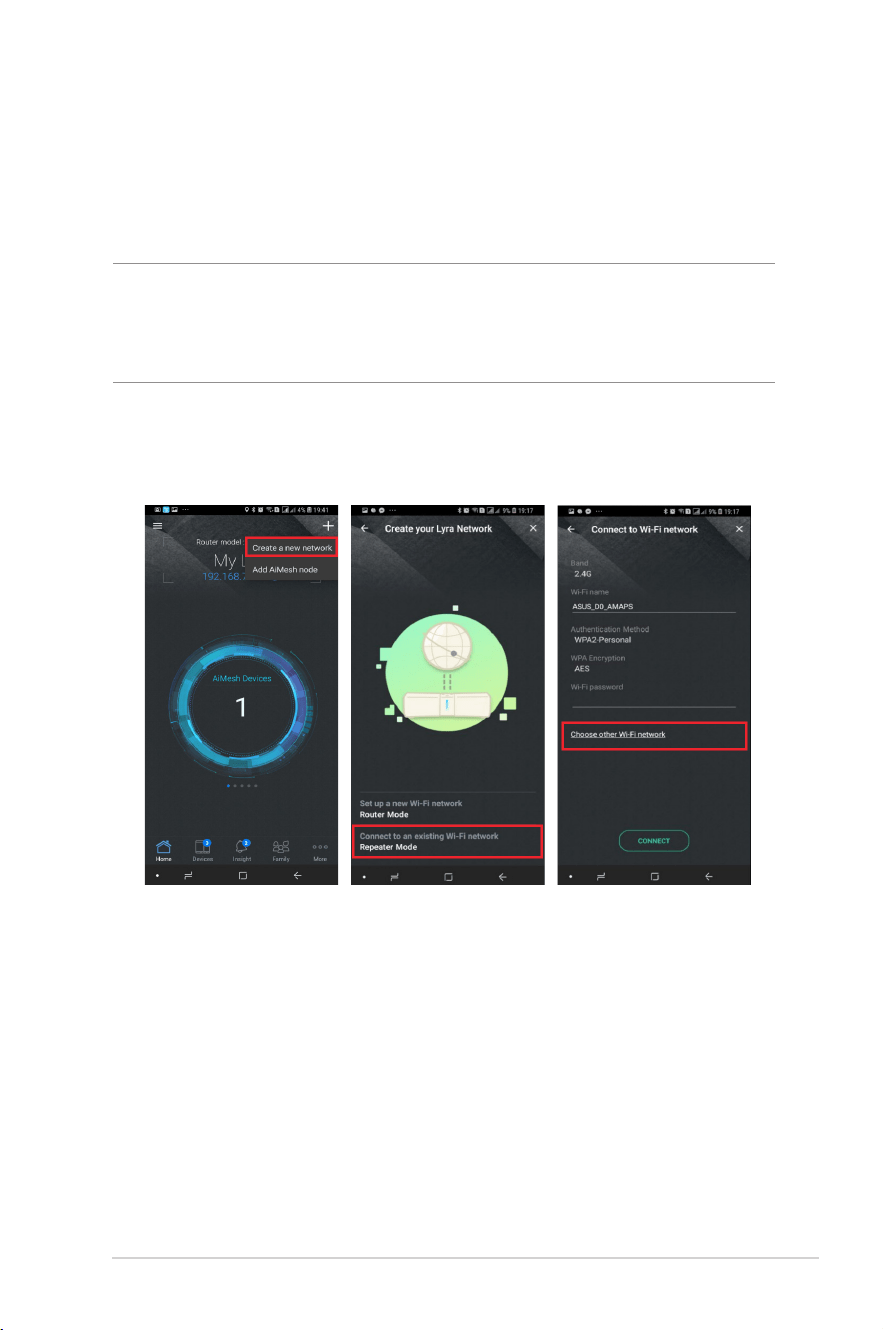
a. Go to ASUS Router app > Create a new network > Repeater Mode and
choose an existing Wi-Fi network you would like to connect to, you can
also manually fill in the Wi-Fi name and password on this page.
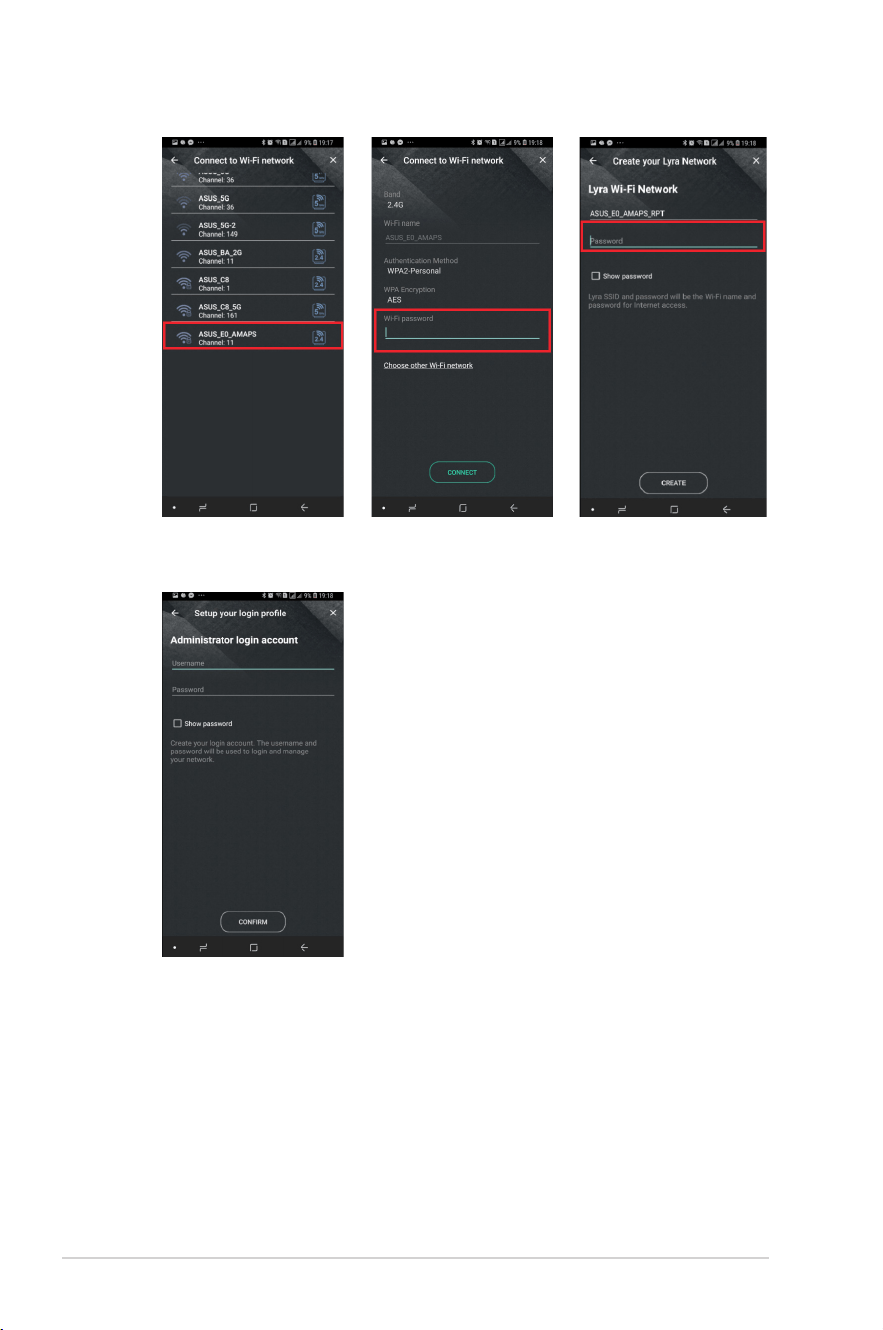
b. If you choose connecting to an existing router ASUS_E0_AMAPS, please
key in the Wi-Fi password of ASUS_E0_AMAPS first, and set up the Wi-Fi
password for your repeater, and its default SSID will be ASUS_E0_AMAPS_
RPT.
12
c. Set up your Administrator login account and password for your repeater.
13
6 Enabling Bluetooth for music streaming
1. Bluetooth pairing can be triggered by pressing and holding the volume+
and volume- buttons on your Lyra Voice for 5 seconds. The LED will pulse
with a blue light (timeout 3 minutes). This mode can be used when
the ASUS Router app > QIS setup or Web QIS setup process has been
completed.
2. You can also use voice command “Alexa, pair my phone” to trigger
Bluetooth on your Lyra Voice, then turn on your mobile device’s bluetooth
and choose Lyra_Voice_XX to pair.
3. Once Bluetooth pairing is completed, you can stream any music source
from your target devices to your Lyra Voice via Bluetooth.
7 Configuring Spotify
1. Connect your mobile device to the same Wi-Fi network (SSID) as your Lyra
Voice.
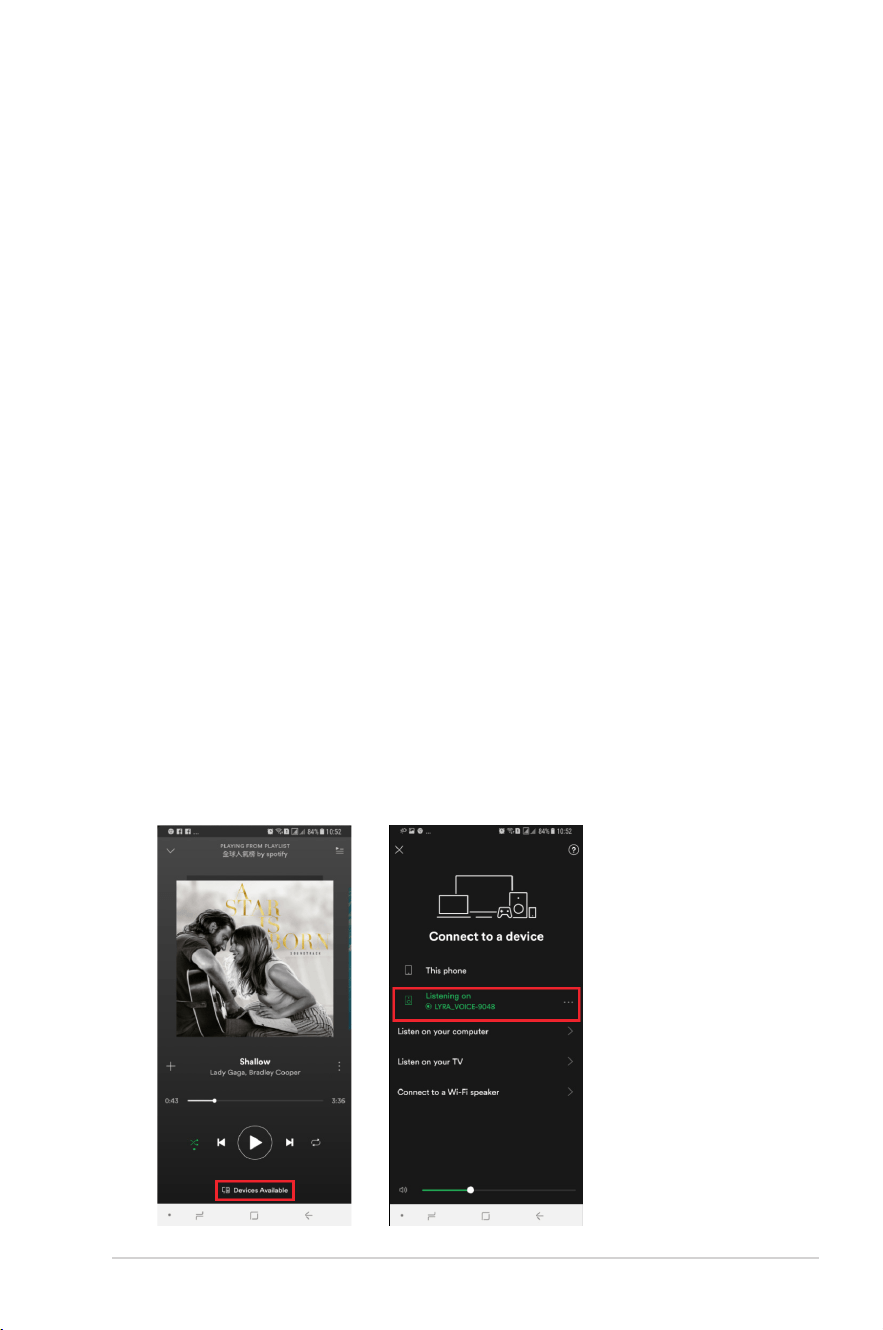
2. Open Spotify APP and play a song.
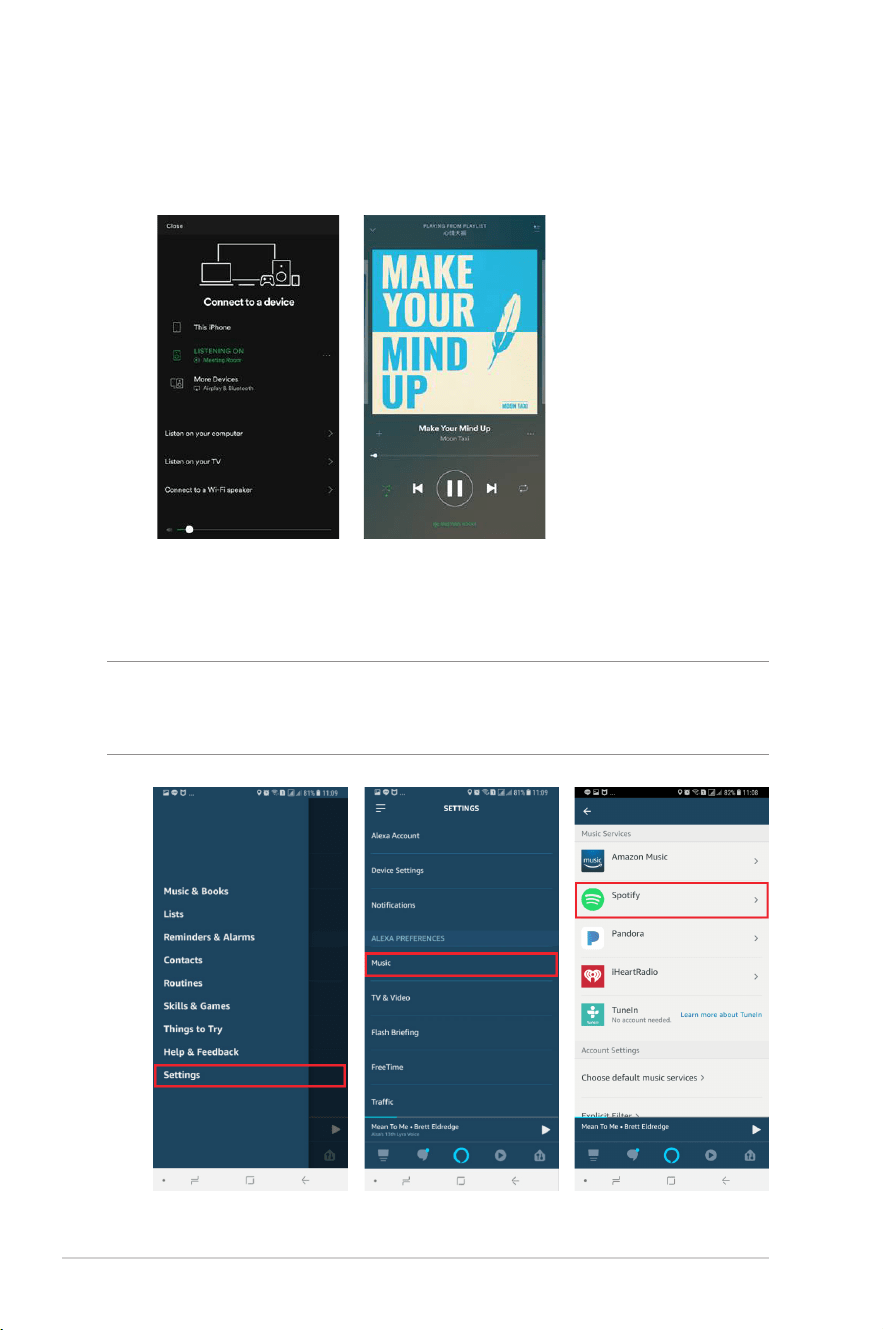
3. Tap Devices Available and choose the device name LYRA_VOICE to
stream your music from the device to your Lyra Voice.
4. If your Lyra Voice is in its system defaults (not setup via Lyra app > QIS), the
Device ID will be LYRA_VOICE-XXXX (XXXX stands for the last two bytes of
its MAC address).
14
5. If your Lyra Voice has been configured using the Lyra app > QIS, the Device
ID will be the name assigned during the QIS setup process. The following
images show the Device ID configured as “Meeting Room”.
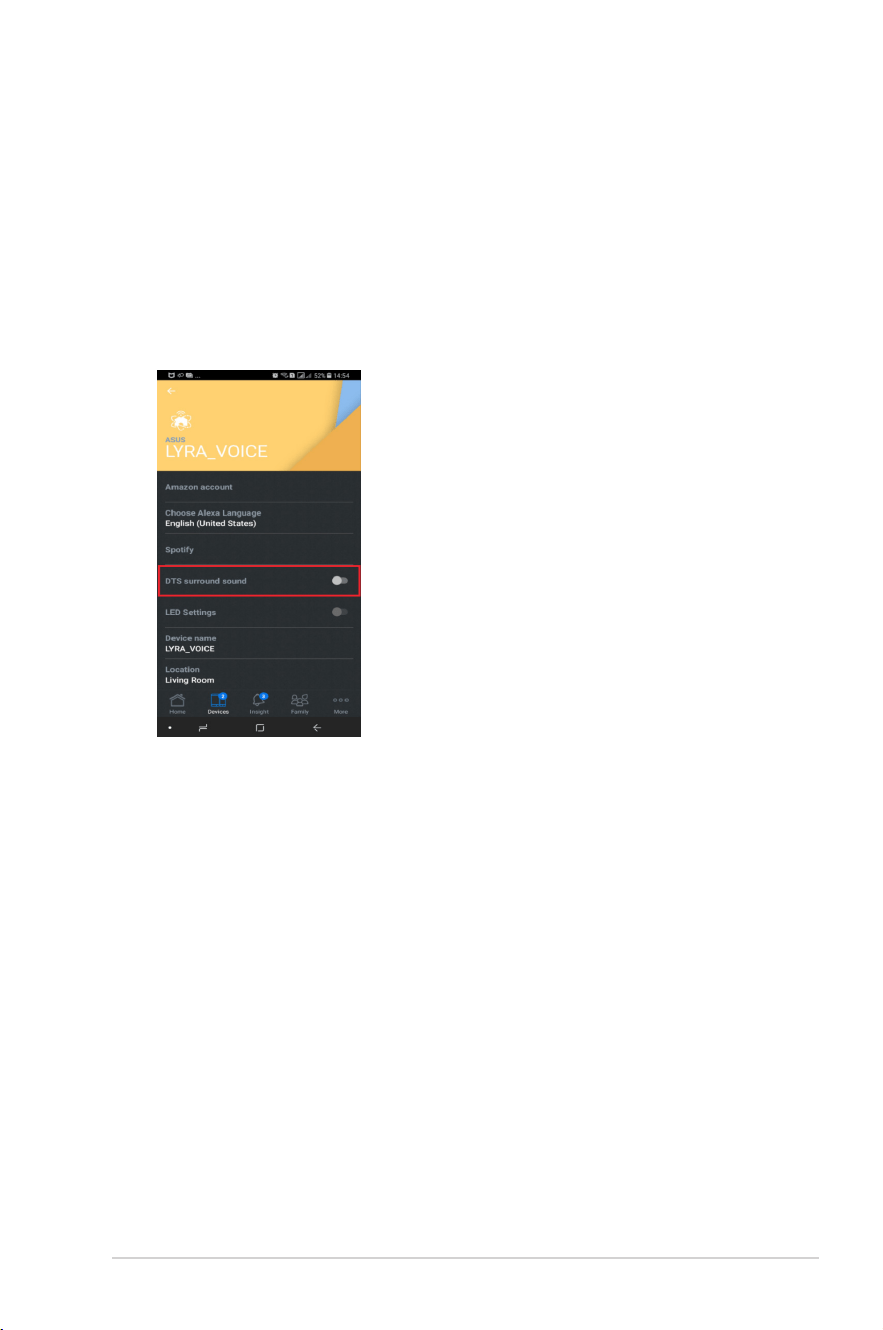
6. You can also use Spotify Music after binding your Spotify account to your
Amazon account via the Alexa app, you can ask Alexa to play music from
Spotify using the voice command “Alexa, play [song] from Spotify”.
NOTE: Please download the Amazon Alexa app and follow the steps below to
setup your Spotify account on Amazon Alexa app before asking Alexa to play
music from Spotify.
15
8 DTS surround sound
1. Your Lyra Voice has been designed to include DTS surround sound
technology. DTS (dedicated to sound) is a series of multichannel audio
technologies owned by Xperi Corporation. When you are streaming music
via your Lyra Voice, you can turn on DTS surround sound to make the
sound similar to a movie theater experience.
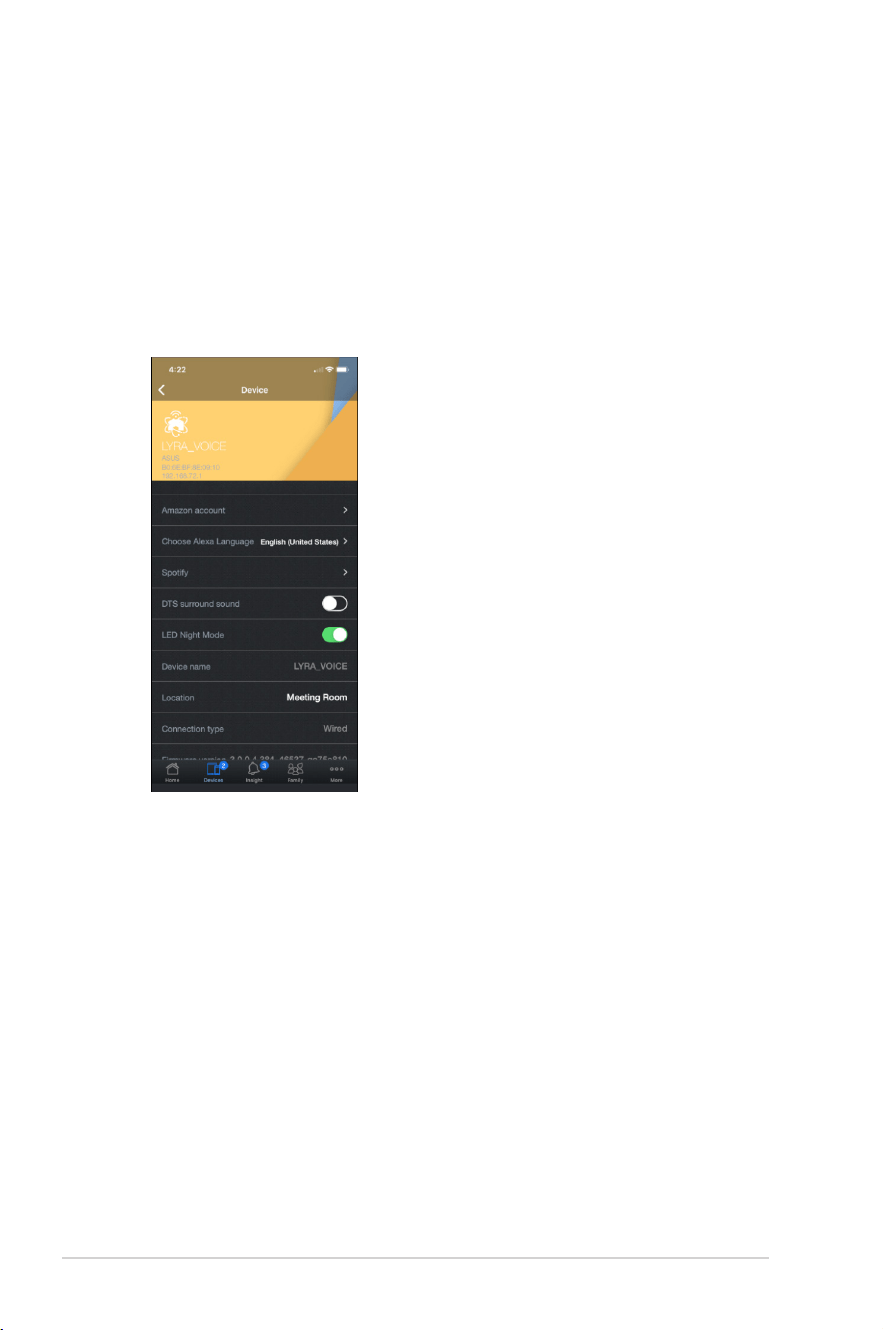
2. Go to Devices and turn on DTS surround sound to use this feature.
16
9 LED Night Mode
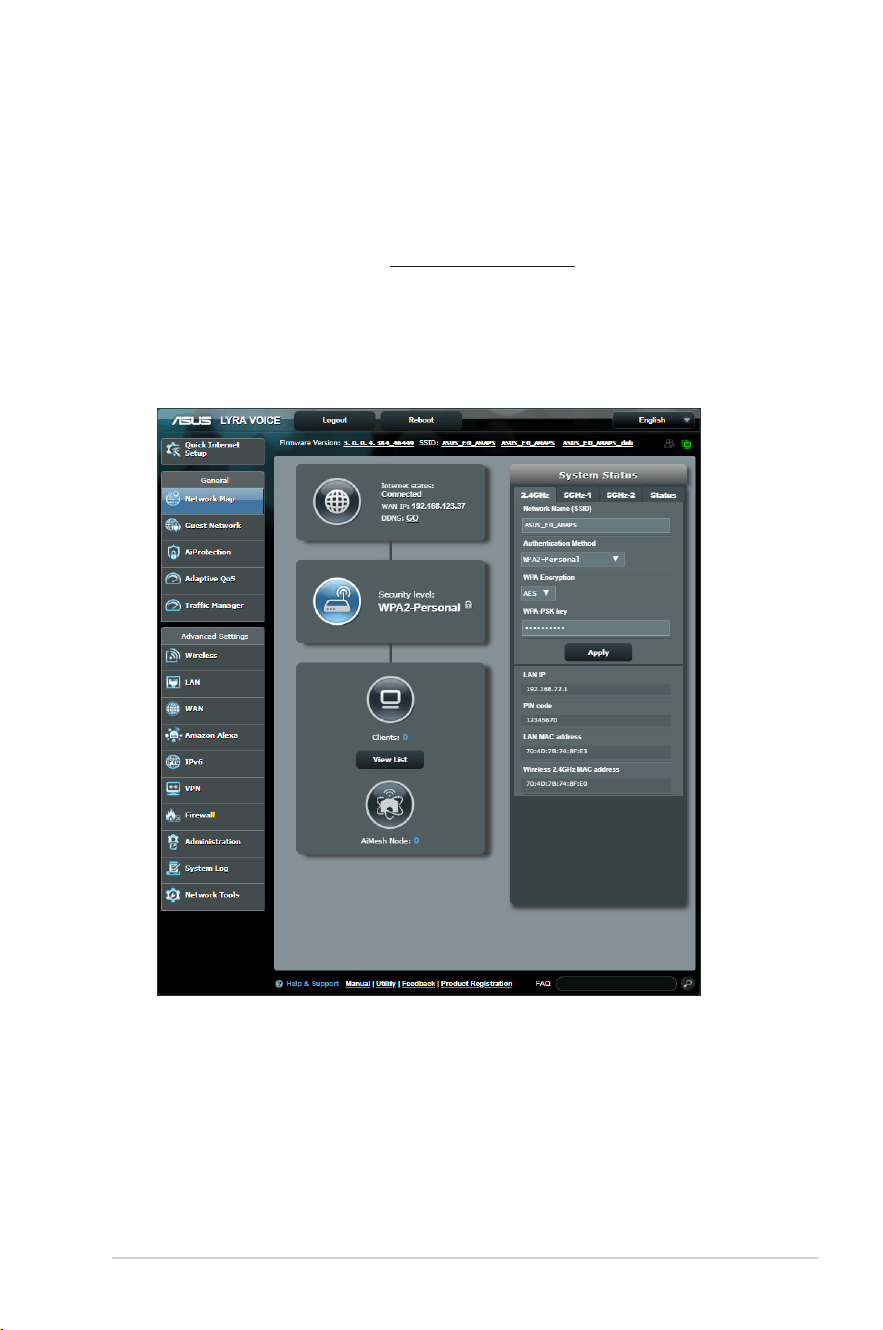
Lyra Voice devices have an LED Night Mode function, allowing users to reduce
the brightness of the LED strip, making it easier to sleep with your Lyra Voice in
your bedroom.
LED effect includes Mute mode (RED)/ Reset Combo buttons pressed (Yellow)/
Internet not available (Orange) etc. When under night mode, the brightness of
the LED will be reduced by 90%.
17
10 Using Web GUI for advanced settings
Lyra Voice also has a Web GUI allowing users to use more advanced settings.
To log into the web GUI:
1. On your web browser, enter http://router.asus.com.
2. On the login page, key in your user name and password.
3. You can now configure various settings of your ASUS Wireless Router using
the Web GUI.
18
11 Resetting Lyra Voice
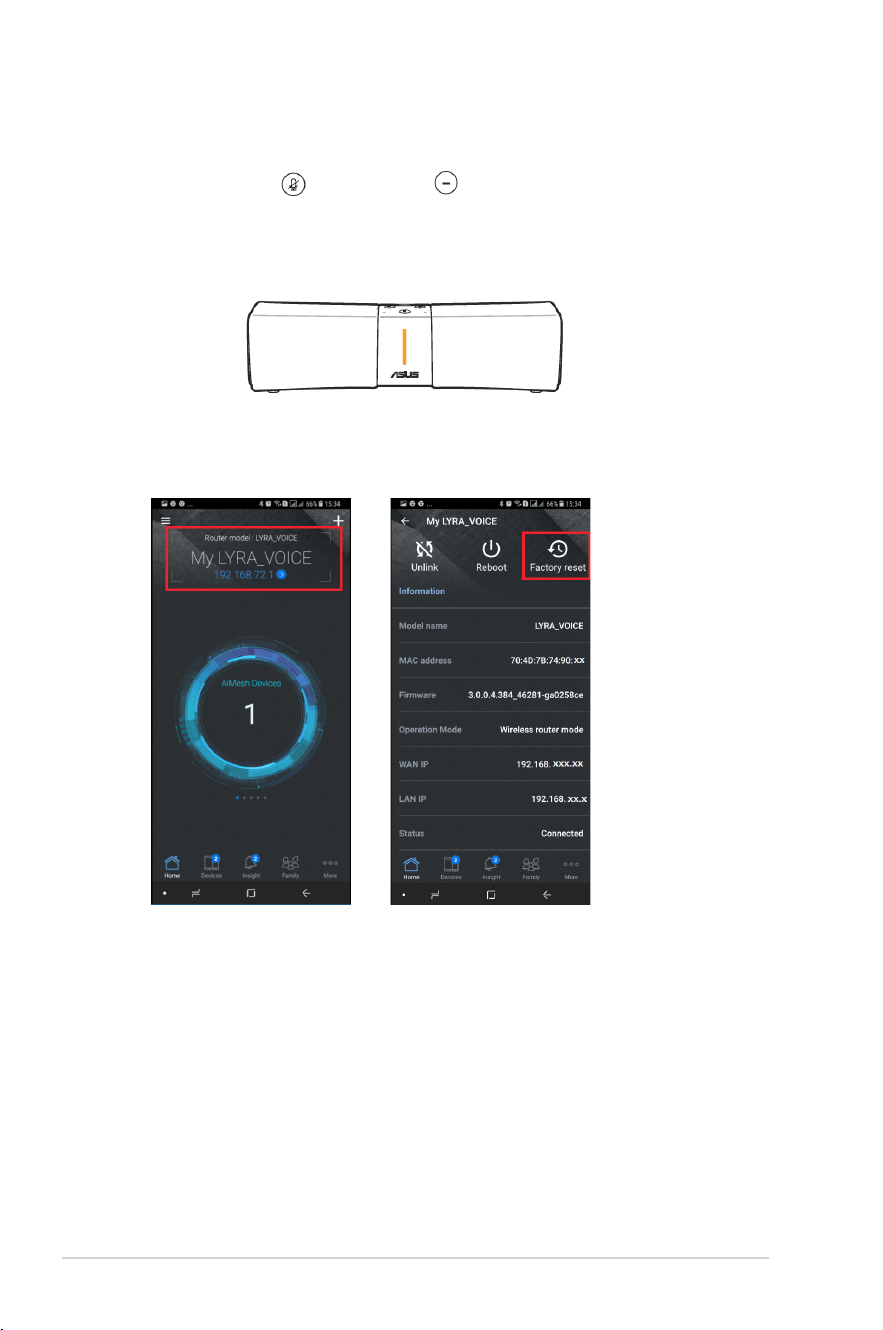
1. Press the mute and volume – buttons simultaneously for around
6 seconds to reset the system, the LED light bar will turn yellow first and
then will start the reset process.
2. You can also follow the steps below to reset your system using the ASUS
Router app.
19
12 Updating firmware on Lyra Voice
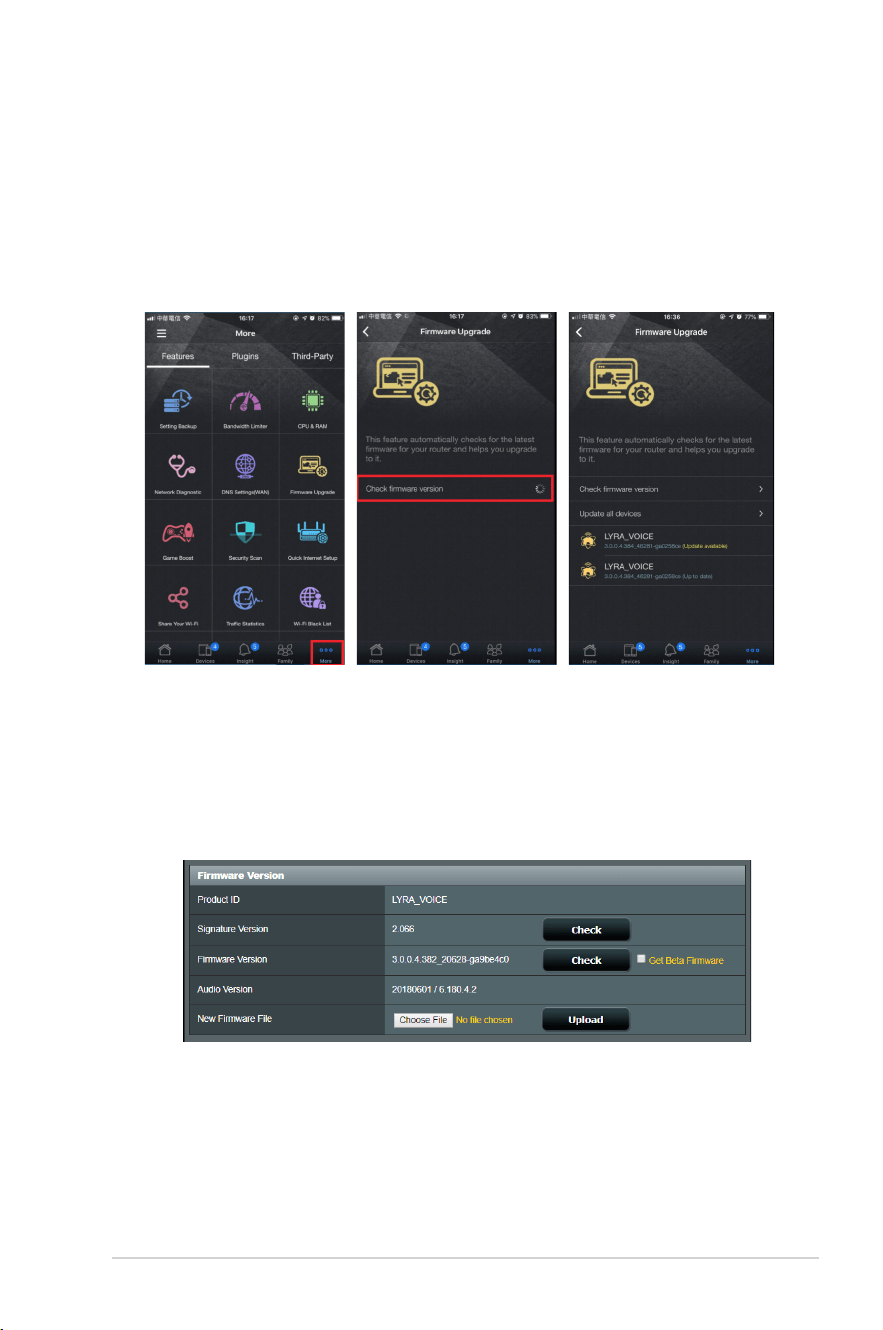
1. You can update the firmware from the ASUS Router app. Go to ASUS
Router app > More > Firmware Upgrade > Check firmware version, and
the system will check whether there is an update available, upgrade each
Lyra Voice to the latest firmware by tapping on each one.
2. You can also upgrade the firmware via Web GUI (via Lyra Voice’s default
IP router.asus.com). Go to Advanced Settings > Administration >
Firmware Upgrade page. Click on Firmware Version > Check button for
OTA update, or Choose File and upgrade manually.
20
13 Enabling Rescue Mode (Firmware
Restoration)
1. If you brick your router while upgrading the firmware or some other
actions, you can try to run the firmware restoration program to fix your
device.
To enable the Rescue Mode:
a. Use an Ethernet cable to connect your PC to the LAN port of your Lyra
Voice.
b. Install the Firmware Restoration tool to your PC first, you can download
the tool from our support site.
c. Turn off your Lyra Voice.
d. Press the Set button for 6 seconds while powering on your device, do not
release the Set button until the LED color changes to purple.
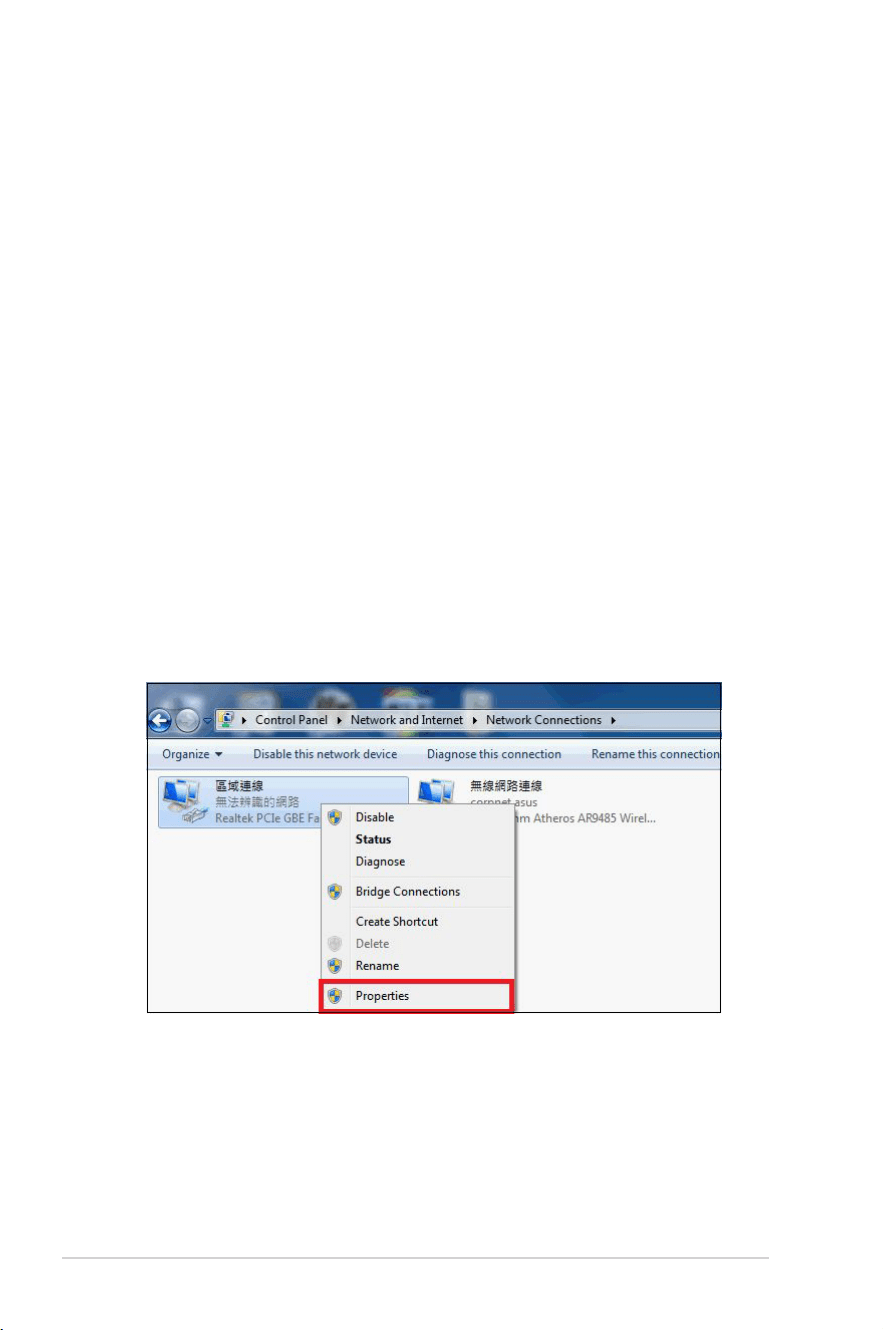
e. Computer:
Click Start > Control panel > Network and Internet > Network and
Sharing Center > Change adapter settings > LAN > Properties.
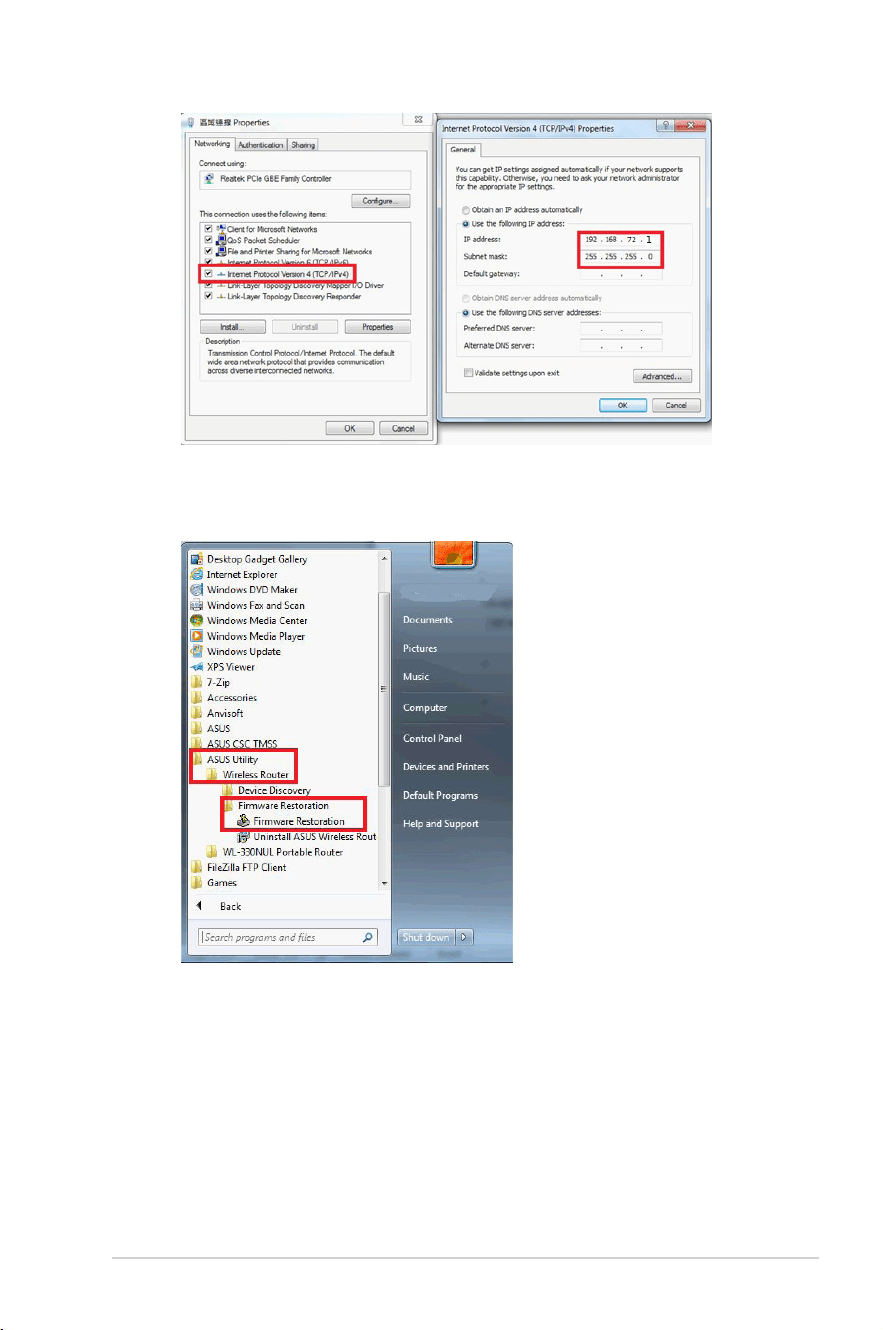
f. Click Internet protocol version 4 (TCP/IPv4) > Properties. Modify the
content of Internet Protocol Version 4 (TCP/IPv4) Properties as shown
below:
g. Key in the following IP address and click OK.
IP address:192.168.72.2
Subnet mask: 255.255.255.0
21
h. Click Start > All programs > ASUS Utility > Wireless Router > Firmware
Restoration.
22
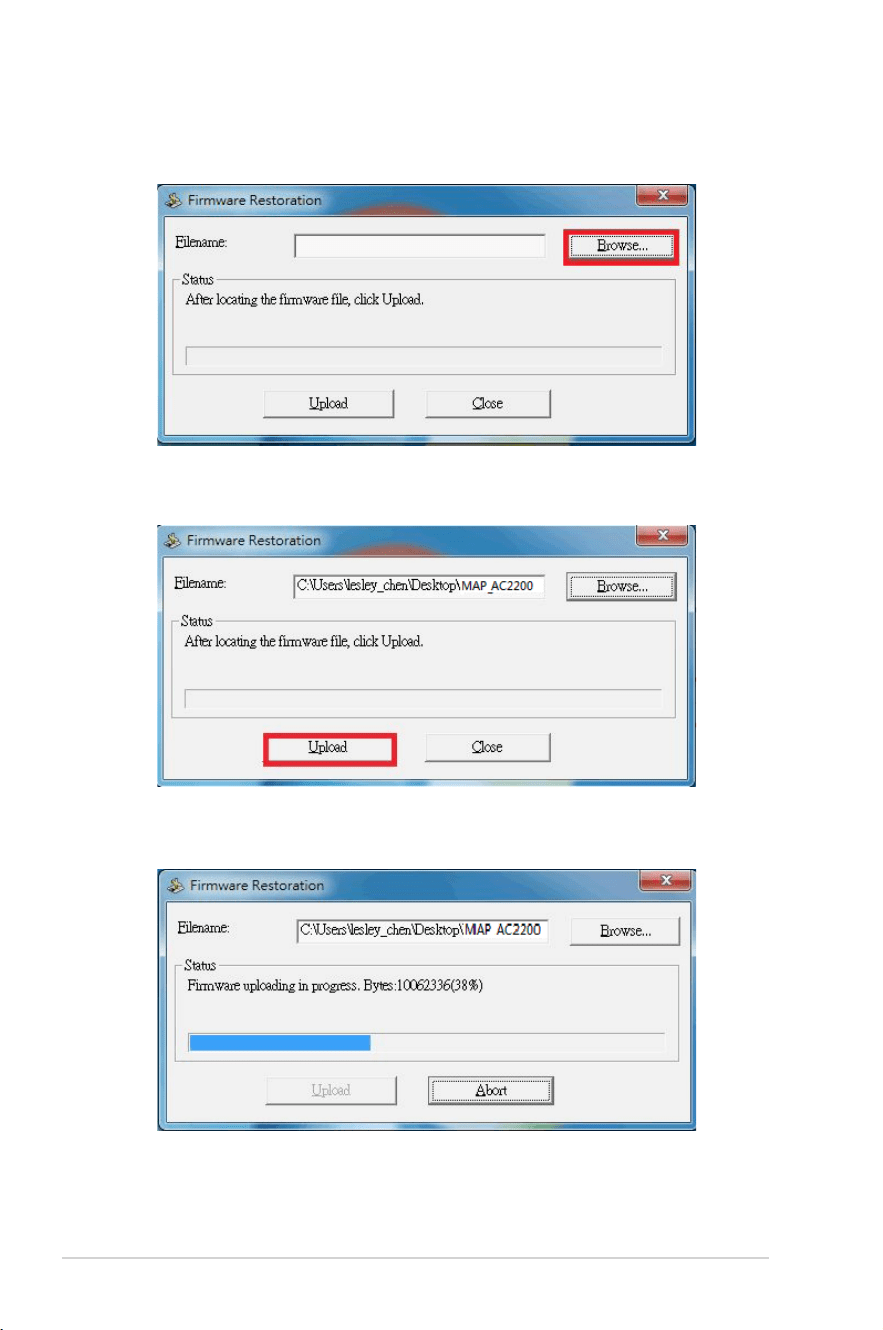
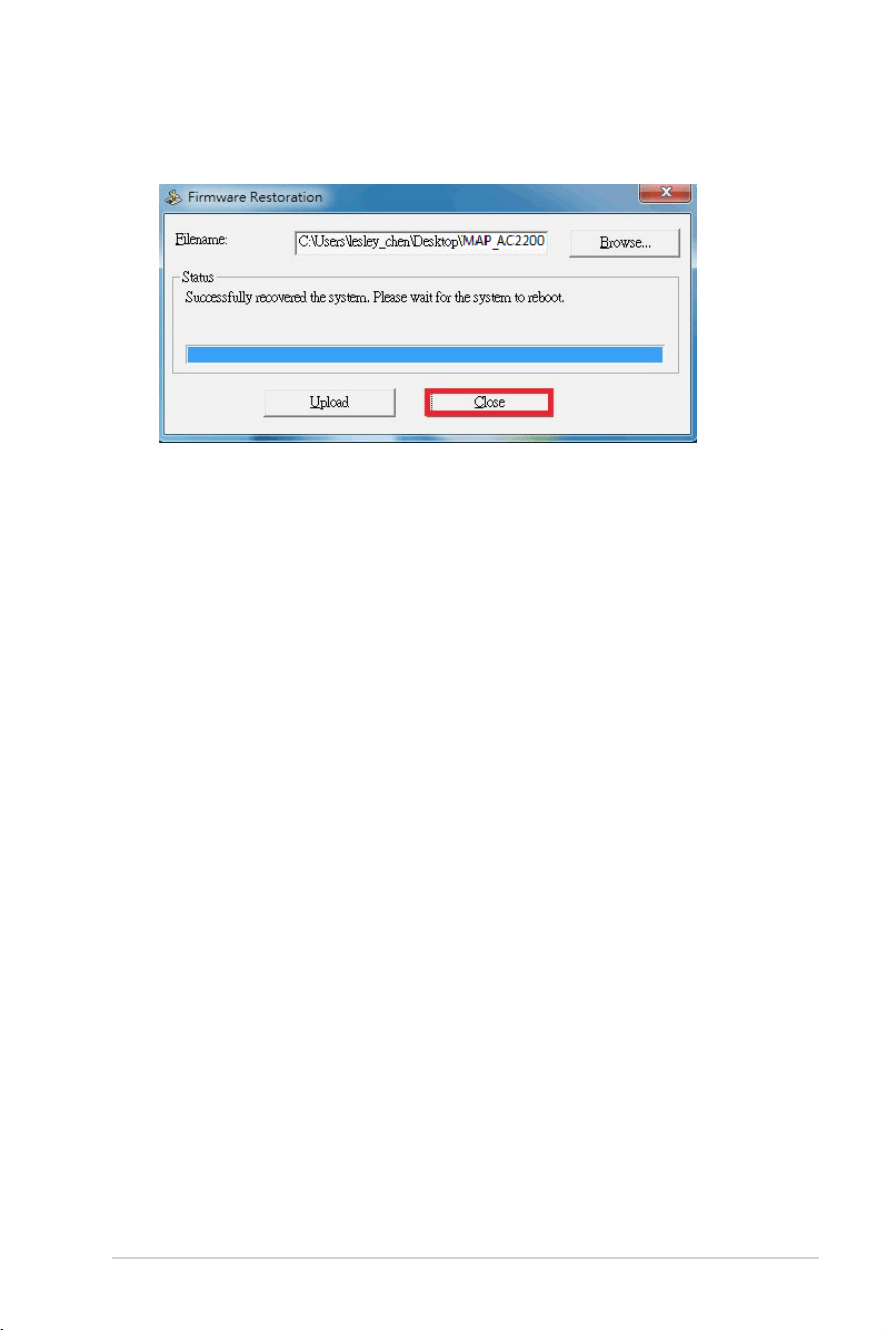
i. On the Firmware Restoration window, click Browse and choose the
latest firmware which you downloaded from the ASUS support site.
j. Click Upload.
k. Wait for 60 seconds.
23
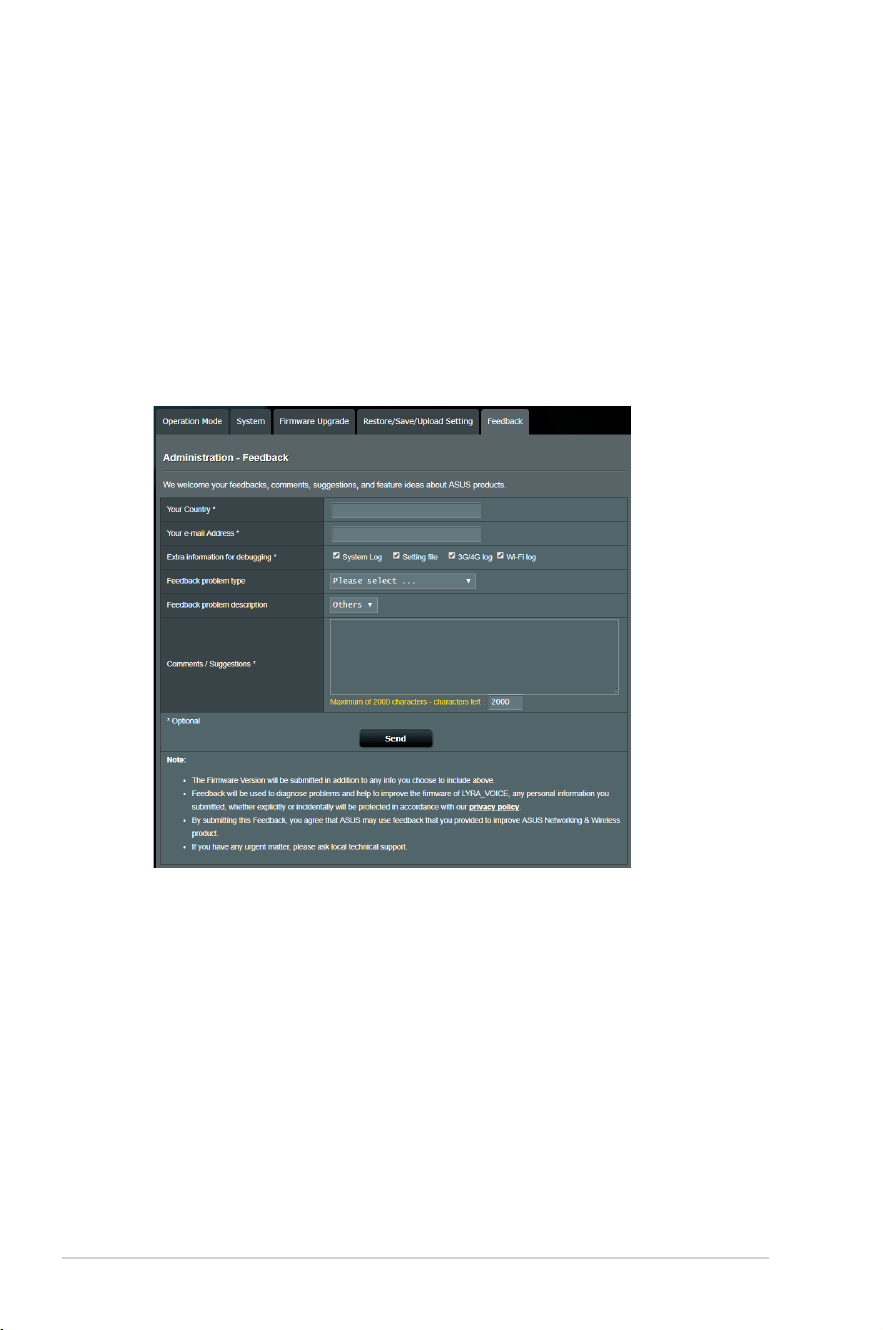
l. Click Close when the Status message shows Successfully recovered the
system. Please wait for the system to reboot.
24
14 Enabling/view logging for
troubleshooting
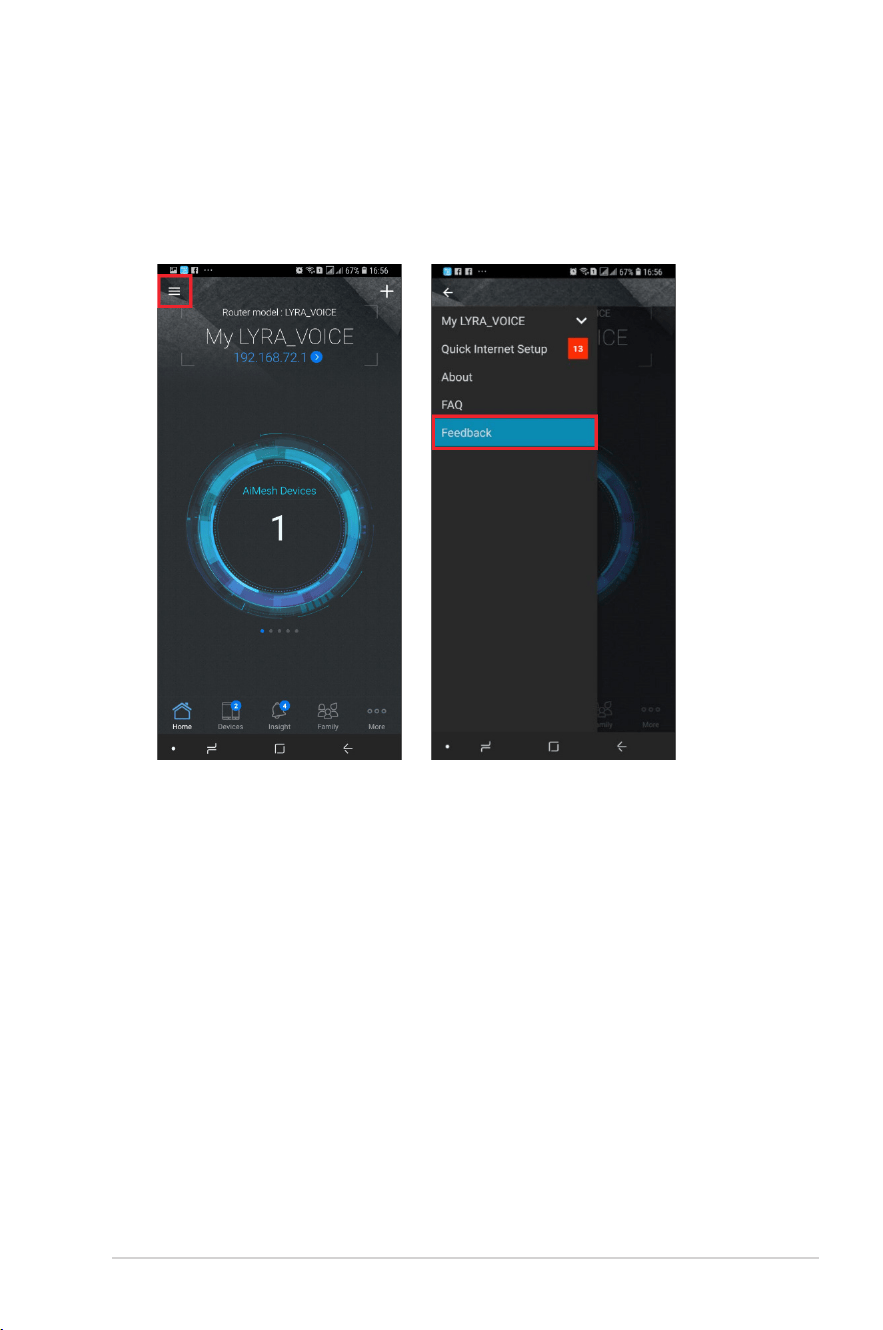
1. Go to firmware UI (via Lyra Voice’s default IP 192.168.72.1), Advanced
Settings > System Log, and then check General Log (and other logs if
needed) for troubleshooting. If you would like the ASUS team to look
into your issue(s), then go to Advanced Settings > Administration
> Feedback, and check all debug options, fill in the email/ comments
section and then submit the form. Once we receive your feedback, our
support team will analyze it (refer to the screenshot below).
25
2. You can also use the ASUS Router app > Feedback section (refer to the
screenshot below), send back issue description via our feedback button,
related logs will be included, directly send this mail to already filled in
address which is rout[email protected], and our support team will
analyze it.
26
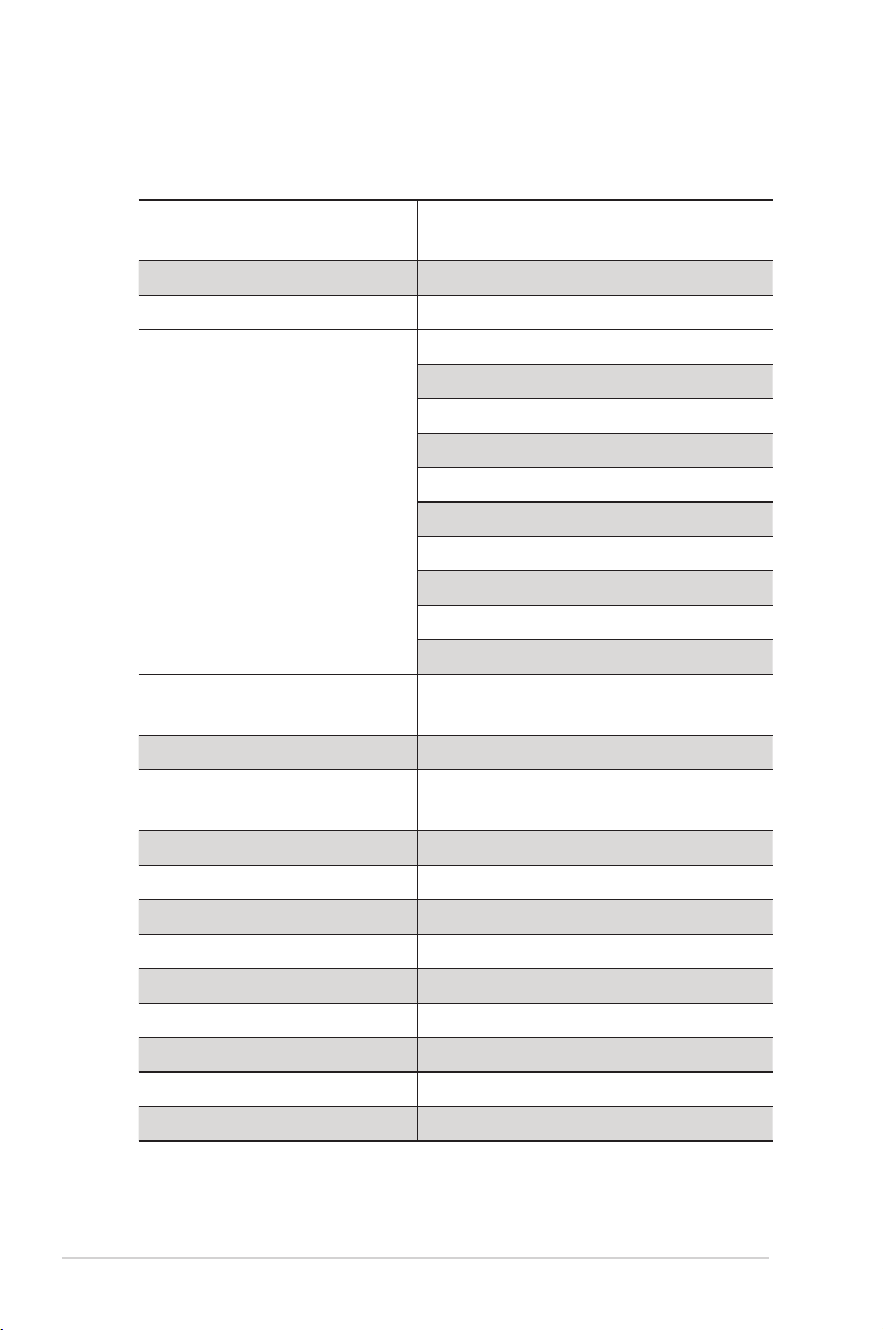
15 Supported functions
Overview
AC2200 Mesh Router + Alexa Voice
Assistant+ Bluetooth Speaker
Speaker size 1.8” Stereo speaker x 2
Passive Radiator x 2
Language Support
Deutsch (Germany)
English (United States)
English (Canada)
English (India)
English (Australia)
English (United Kingdom)
Español(Spain)
Français(France)
Italiano (Italy)
日本語 (Japan)
Music service
Amazon Music, Spotify, Pandora,
SiriusXM, TuneIn, iHeartRadio…etc
Controls smart home devices V
Free audio calls to US, Mexico,
and Canada
May support in the near future
Bluetooth Speaker V
Alexa Skill V
AiMesh V
Router/AP/Repeater Mode V
Spotify Connect Speaker V
AiProtection V
Far Field MIC Array V
Echo cancellation V
360 degree sound detection V

27
Appendices
Notices
ASUS Recycling/Takeback Services
ASUS recycling and takeback programs come from our commitment to the
highest standards for protecting our environment. We believe in providing
solutions for you to be able to responsibly recycle our products, batteries, other
components, as well as the packaging materials. Please go to http://csr.asus.
com/english/Takeback.htm for the detailed recycling information in different
regions.
REACH
Complying with the REACH (Registration, Evaluation, Authorisation, and
Restriction of Chemicals) regulatory framework, we published the chemical
substances in our products at ASUS REACH website at
http://csr.asus.com/english/reach.aspx
Federal Communications Commission Statement
This device complies with Part 15 of the FCC Rules. Operation is subject to the
following two conditions:
• Thisdevicemaynotcauseharmfulinterference.
• Thisdevicemustacceptanyinterferencereceived,including
interference that may cause undesired operation.
This equipment has been tested and found to comply with the limits for a class
B digital device, pursuant to part 15 of the FCC Rules. These limits are designed
to provide reasonable protection against harmful interference in a residential
installation.
This equipment generates, uses and can radiate radio frequency energy and, if
not installed and used in accordance with the instructions, may cause harmful
interference to radio communications. However, there is no guarantee that
interference will not occur in a particular installation. If this equipment does
cause harmful interference to radio or television reception, which can be
determined by turning the equipment off and on, the user is encouraged to try
to correct the interference by one or more of the following measures:

28
• Reorientorrelocatethereceivingantenna.
• Increasetheseparationbetweentheequipmentandreceiver.
• Connecttheequipmentintoanoutletonacircuitdifferentfromthatto
which the receiver is connected.
• Consultthedealeroranexperiencedradio/TVtechnicianforhelp.
WARNING! Any changes or modifications not expressly approved by the
party responsible for compliance could void the user’s authority to operate the
equipment.
IMPORTANT! This device within the 5.15 ~ 5.25 GHz is restricted to indoor
operations to reduce any potential for harmful interference to co-channel MSS
operations.
WARNING! This equipment must be installed and operated in accordance
with provided instructions and the antenna(s) used for this transmitter must be
installed to provide a separation distance of at least 20 cm from all persons and
must not be co-located or operating in conjunction with any other antenna or
transmitter.
Prohibition of Co-location
This device and its antenna(s) must not be co-located or operating in
conjunction with any other antenna or transmitter.

29
IMPORTANT NOTE
Radiation Exposure Statement: This equipment complies with FCC radiation
exposure limits set forth for an uncontrolled environment. End users must
follow the specific operating instructions for satisfying RF exposure compliance.
To maintain compliance with FCC exposure compliance requirement, please
follow operation instruction as documented in this manual. This equipment
should be installed and operated with minimum distance 20cm between the
radiator and your body.
Declaration of Conformity for Ecodesign directive
2009/125/EC
Testing for eco-design requirements according to (EC) No 1275/2008 and (EU)
No 801/2013 has been conducted. When the device is in Networked Standby
Mode, its I/O and network interface are in sleep mode and may not work
properly. To wake up the device, press the Wi-Fi on/off, LED on/off, reset, or WPS
button.
Canada, Industry Canada (IC) Notices
This Class B digital apparatus complies with Canadian ICES-003 and RSS-247.
Operation is subject to the following two conditions: (1) this device may not
cause interference, and (2) this device must accept any interference, including
interference that may cause undesired operation of the device.
Radio Frequency (RF) Exposure Information
The radiated output power of the ASUS Wireless Device is below the Industry
Canada (IC) radio frequency exposure limits. The ASUS Wireless Device should
be used in such a manner such that the potential for human contact during
normal operation is minimized.
This device has been certified for use in Canada. Status of the listing in the
Industry Canada’s REL (Radio Equipment List) can be found at the following
web address:
http://www.ic.gc.ca/app/sitt/reltel/srch/nwRdSrch.do?lang=eng
Additional Canadian information on RF exposure also can be found at the
following web:
http://www.ic.gc.ca/eic/site/smt-gst.nsf/eng/sf08792.html

30
Canada, avis d’Industry Canada (IC)
Cet appareil numérique de la classe B est conforme aux normes ICES-003 et
RSS-247 du Canada.
Son utilisation est sujette aux deux conditions suivantes : (1) cet appareil
ne doit pas créer d’interférences et (2) cet appareil doit tolérer tout type
d’interférences, y compris celles susceptibles de provoquer un fonctionnement
non souhaité de l’appareil.
Informations concernant l’exposition aux fréquences
radio (RF)
La puissance de sortie émise par l’appareil de sans l ASUS est inférieure à
la limite d’exposition aux fréquences radio d’Industry Canada (IC). Utilisez
l’appareildesanslASUSdefaçonàminimiserlescontactshumainslorsdu
fonctionnement normal.
Ce périphérique est homologué pour l’utilisation au Canada. Pour consulter
l’entrée correspondant à l’appareil dans la liste d’équipement radio (REL - Radio
Equipment List) d’Industry Canada rendez-vous sur:
http://www.ic.gc.ca/app/sitt/reltel/srch/nwRdSrch.do?lang=eng
Pour des informations supplémentaires concernant l’exposition aux RF au
Canada rendezvous sur :
http://www.ic.gc.ca/eic/site/smt-gst.nsf/eng/sf08792.html
CE statement
Simplified EU Declaration of Conformity
ASUSTek Computer Inc. hereby declares that this device is in compliance with
the essential requirements and other relevant provisions of Directive 2014/53/
EU. Full text of EU declaration of conformity is available at https://www.asus.
com/support/.
Declaration of Conformity for Ecodesign directive 2009/125/EC
Testing for eco-design requirements according to (EC) No 1275/2008 and (EU)
No 801/2013 has been conducted. When the device is in Networked Standby
Mode, its I/O and network interface are in sleep mode and may not work
properly. To wake up the device, press the Wi-Fi on/off, LED on/off, reset, or WPS
button.
This equipment complies with EU radiation exposure limits set forth for an

31
uncontrolled environment. This equipment should be installed and operated
with minimum distance 20 cm between the radiator & your body.
CE Mark Warning
This is a Class B product, in a domestic environment, this product may cause
radio interference, in which case the user may be required to take adequate
measures. Operation Channels: CH1~11 for N. America; Ch1~13 for Japan;
CH1~13 for Europe (ETSI)
This equipment may be operated in AT, BE, CY, CZ, DK, EE, FI, FR, DE, GR, HU, IE,
IT, LU, MT, NL, PL, PT, SK, SL, ES, SE, GB, IS, LI, NO, CH, BG, RO, RT.

32
All operational modes:
2.4GHz: 802.11b, 802.11g, 802.11n (HT20), 802.11n (HT40), 5GHz: 802.11a,
802.11n (HT20), 802.11n (HT40), 802.11ac (VHT20), 802.11ac (VHT40), 802.11ac
(VHT80)
The frequency, mode and the maximum transmitted power in EU are listed
below:
2412-2472MHz (802.11 VHT40, MCS0): 19.909 dBm
5180-5240MHz (802.11VHT40, MCS0): 22.821 dBm
5260-5320MHz (802.11 VHT40, MCS0): 22.695 dBm
5500-5700MHz (802.11 VHT80 MCS0): 29.827 dBm
BT 2.0
2402-2480MHz (GFSK): 9.070 dBm
BT 4.0
2402-2480MHz: 7.630 dBm
The device is restricted to indoor use only when operating in the 5150 to 5350
MHz frequency range.
AT BE BG CZ DK EE FR
DE IS IE IT EL ES CY
LV LI LT LU HU MT NL
NO PL PT RO SI SK TR
FI SE CH UK HR
この装置は、情報処理装置等電波障害自主規制協議会 (VCCI) の基
準に基づくクラス B 情報技術装置です。この装置は、家庭環境で使
用することを目的としていますが、この装置がラジオやテレビジョ
ン受信機に近接して使用されると、受信障害を引き起こすことがあ
ります。取り扱い説明書に従って正しい取り扱いをしてください。

33
Precautions for the use of the device
a. Pay particular attention to the personal safety when use this device in
airports, hospitals, gas stations and professional garages.
b. Medical device interference: Maintain a minimum distance of at least 15
cm (6 inches) between implanted medical devices and ASUS products
in order to reduce the risk of interference.
c. Kindly use ASUS products in good reception conditions in order to
minimize the radiation’s level.
d. Keep the device away from pregnant women and the lower abdomen
of the teenager.
Précautions d'emploi de l'appareil
a. Soyez particulièrement vigilant quant à votre sécurité lors de
l'utilisation de cet appareil dans certains lieux (les avions, les aéroports,
les hôpitaux, les stations-service et les garages professionnels).
b. Évitez d'utiliser cet appareil à proximité de dispositifs médicaux
implantés. Si vous portez un implant électronique (stimulateurs
cardiaques, pompes à insuline, neurostimulateurs…),veuillez
impérativement respecter une distance minimale de 15 centimètres
entre cet appareil et votre corps pour réduire les risques d'interférence.
c. Utilisez cet appareil dans de bonnes conditions de réception pour
minimiser le niveau de rayonnement. Ce n'est pas toujours le cas dans
certaines zones ou situations, notamment dans les parkings souterrains,
dans les ascenseurs, en train ou en voiture ou tout simplement dans un
secteur mal couvert par le réseau.
d. Tenez cet appareil à distance des femmes enceintes et du bas-ventre
des adolescents.
Este equipamento não tem direito à proteção contra
interferência prejudicial e não pode causar interferência em
sistemas devidamente autorizados.
Paramaioresinformações,consulteositedaANATEL
www.anatel.gov.br
34
NCC 警語
經型式認證合格之低功率射頻電機,非經許可,公司、商號或使用者均不得
擅自變更頻率、加大功率或變更原設計之特性及功能。低功率射頻電機之使
用不得影響飛航安全及干擾合法通信;經發現有干擾現象時,應立即停用,
並改善至無干擾時方得繼續使用。前項合法通信,指依電信法規定作業之無
線電通信。低功率射頻電機須忍受合法通信或工業、科學及醫療用電波輻射
性電機設備之干擾。
此設備的安裝與操作要離使用者之最小距離為20 公分;電磁波曝露量MPE
標準值1 mWcm2,送測產品實測值為:0.302 mWcm2。
D33005
RoHS
單元
限用物質及其化學符號
鉛
(Pb)
汞
(Hg)
鎘
(Cd)
六價鉻
(Cr
+6
)
多溴聯苯
(PBB)
多溴二苯醚
(PBDE)
印刷電路板及
電子組件
— ○ ○ ○ ○ ○
外殼 ○ ○ ○ ○ ○ ○
天線 — ○ ○ ○ ○ ○
其他及其配件 — ○ ○ ○ ○ ○
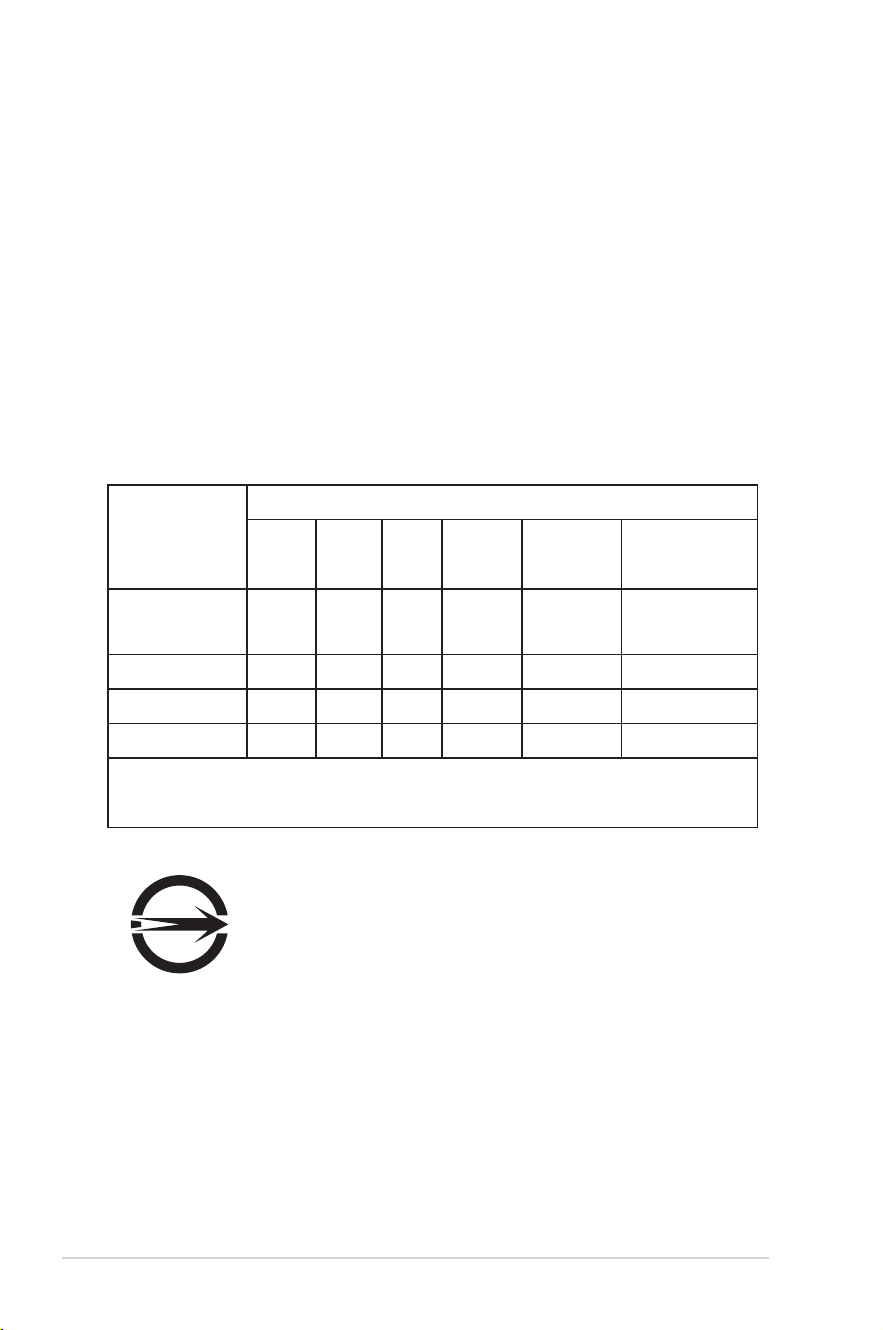
備考 1. " ○ " 係指該項限用物質之百分比含量未超出百分比含量基準值。
備考 2. "—" 係指該項限用物質為排除項目。
「產品之限用物質含有情況」之相關資訊,請參考下表:
35
電子電氣產品有害物質限制使用標識:圖中之數字為產
品之環保使用期限。僅指電子電氣產品中含有的有害物
質不致發生外洩或突變,從而對環境造成污染或對人身、
財產造成嚴重損害的期限。
部件名稱
有害物質
鉛
(Pb)
汞
(Hg)
鎘
(Cd)
六價鉻
(Cr(VI))
多溴
聯苯
(PBB)
多溴二
苯醚
(PBDE)
印刷電路板及
其電子組件
× ○ ○ ○ ○ ○
外殼 ○ ○ ○ ○ ○ ○
電源適配器 × ○ ○ ○ ○ ○
外部信號連接
頭及線材
× ○ ○ ○ ○ ○
中央處理器與
內容
× ○ ○ ○ ○ ○
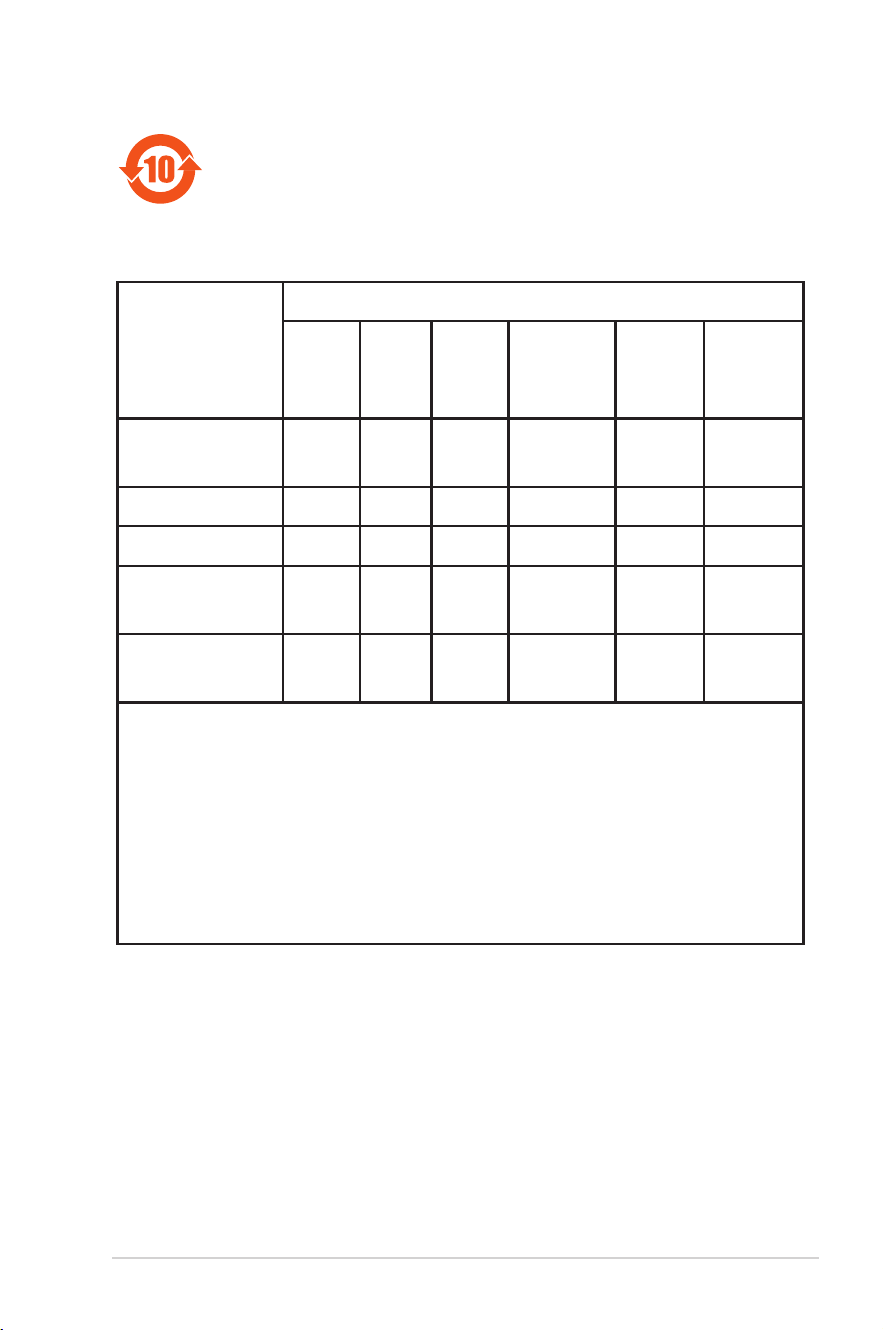
本表格依據 SJ/T 11364 的規定編制。
○: 表示該有害物質在該部件所有均質材料中的含量均在 GB/
T 26572 規定的限量要求以下。
×: 表示該有害物質至少在該部件的某一均質材料中的含量超
出 GB/T 26572 規定的限量要求,然該部件仍符合歐盟
指令 2011/65/EU 的規范。
備註:此產品所標示之環保使用期限,係指在一般正常使用狀
況下。

36
GNU General Public License
Licensing information
This product includes copyrighted third-party software licensed under the
terms of the GNU General Public License. Please see The GNU General Public
License for the exact terms and conditions of this license. We include a copy of
the GPL with every CD shipped with our product. All future firmware updates
will also be accompanied with their respective source code. Please visit our web
site for updated information. Note that we do not offer direct support for the
distribution.
GNU GENERAL PUBLIC LICENSE
Version 2, June 1991
Copyright (C) 1989, 1991 Free Software Foundation, Inc.
59 Temple Place, Suite 330, Boston, MA 02111-1307 USA
Everyone is permitted to copy and distribute verbatim copies of this license
document, but changing it is not allowed.
Preamble
The licenses for most software are designed to take away your freedom to
share and change it. By contrast, the GNU General Public License is intended
to guarantee your freedom to share and change free software--to make sure
the software is free for all its users. This General Public License applies to most
of the Free Software Foundation’s software and to any other program whose
authors commit to using it. (Some other Free Software Foundation software is
covered by the GNU Library General Public License instead.) You can apply it to
your programs, too.
When we speak of free software, we are referring to freedom, not price. Our
General Public Licenses are designed to make sure that you have the freedom
to distribute copies of free software (and charge for this service if you wish),
that you receive source code or can get it if you want it, that you can change
the software or use pieces of it in new free programs; and that you know you
can do these things.
To protect your rights, we need to make restrictions that forbid anyone to
deny you these rights or to ask you to surrender the rights. These restrictions
translate to certain responsibilities for you if you distribute copies of the
software, or if you modify it.
For example, if you distribute copies of such a program, whether gratis or for

37
a fee, you must give the recipients all the rights that you have. You must make
sure that they, too, receive or can get the source code. And you must show
them these terms so they know their rights.
We protect your rights with two steps: (1) copyright the software, and (2) offer
you this license which gives you legal permission to copy, distribute and/or
modify the software.
Also, for each author’s protection and ours, we want to make certain that
everyone understands that there is no warranty for this free software. If the
software is modified by someone else and passed on, we want its recipients to
know that what they have is not the original, so that any problems introduced
by others will not reflect on the original authors’ reputations.
Finally, any free program is threatened constantly by software patents. We wish
to avoid the danger that redistributors of a free program will individually obtain
patent licenses, in effect making the program proprietary. To prevent this, we
have made it clear that any patent must be licensed for everyone’s free use or
not licensed at all.
The precise terms and conditions for copying, distribution and modification
follow.
Terms & conditions for copying, distribution, & modification
0. This License applies to any program or other work which contains a notice
placed by the copyright holder saying it may be distributed under the
terms of this General Public License. The “Program”, below, refers to any
such program or work, and a “work based on the Program” means either
the Program or any derivative work under copyright law: that is to say, a
work containing the Program or a portion of it, either verbatim or with
modifications and/or translated into another language. (Hereinafter,
translation is included without limitation in the term “modification”.) Each
licensee is addressed as “you”.
Activities other than copying, distribution and modification are not
covered by this License; they are outside its scope. The act of running the
Program is not restricted, and the output from the Program is covered only
if its contents constitute a work based on the Program (independent of
having been made by running the Program). Whether that is true depends
on what the Program does.
1. You may copy and distribute verbatim copies of the Program’s source code
as you receive it, in any medium, provided that you conspicuously and
appropriately publish on each copy an appropriate copyright notice and

38
disclaimer of warranty; keep intact all the notices that refer to this License
and to the absence of any warranty; and give any other recipients of the
Program a copy of this License along with the Program.
You may charge a fee for the physical act of transferring a copy, and you
may at your option offer warranty protection in exchange for a fee.
2. You may modify your copy or copies of the Program or any portion of it,
thus forming a work based on the Program, and copy and distribute such
modifications or work under the terms of Section 1 above, provided that
you also meet all of these conditions:
a) You must cause the modified files to carry prominent notices stating
that you changed the files and the date of any change.
b) You must cause any work that you distribute or publish, that in whole
or in part contains or is derived from the Program or any part thereof, to
be licensed as a whole at no charge to all third parties under the terms of
this License.
c) If the modified program normally reads commands interactively when
run, you must cause it, when started running for such interactive use in
the most ordinary way, to print or display an announcement including an
appropriate copyright notice and a notice that there is no warranty (or
else, saying that you provide a warranty) and that users may redistribute
the program under these conditions, and telling the user how to view
a copy of this License. (Exception: if the Program itself is interactive but
does not normally print such an announcement, your work based on the
Program is not required to print an announcement.)
These requirements apply to the modified work as a whole. If identifiable
sections of that work are not derived from the Program, and can be
reasonably considered independent and separate works in themselves,
then this License, and its terms, do not apply to those sections when you
distribute them as separate works. But when you distribute the same
sections as part of a whole which is a work based on the Program, the
distribution of the whole must be on the terms of this License, whose
permissions for other licensees extend to the entire whole, and thus to
each and every part regardless of who wrote it.
Thus, it is not the intent of this section to claim rights or contest your
rights to work written entirely by you; rather, the intent is to exercise the
right to control the distribution of derivative or collective works based on
the Program.

39
In addition, mere aggregation of another work not based on the Program
with the Program (or with a work based on the Program) on a volume of a
storage or distribution medium does not bring the other work under the
scope of this License.
3. You may copy and distribute the Program (or a work based on it, under
Section 2) in object code or executable form under the terms of Sections 1
and 2 above provided that you also do one of the following:
a) Accompany it with the complete corresponding machine-readable
source code, which must be distributed under the terms of Sections 1 and
2 above on a medium customarily used for software interchange; or,
b) Accompany it with a written offer, valid for at least three years, to
give any third party, for a charge no more than your cost of physically
performing source distribution, a complete machine-readable copy of the
corresponding source code, to be distributed under the terms of Sections
1 and 2 above on a medium customarily used for software interchange; or,
c) Accompany it with the information you received as to the offer to
distribute corresponding source code. (This alternative is allowed only
for noncommercial distribution and only if you received the program
in object code or executable form with such an offer, in accord with
Subsection b above.)
The source code for a work means the preferred form of the work for
making modifications to it. For an executable work, complete source code
means all the source code for all modules it contains, plus any associated
interface definition files, plus the scripts used to control compilation and
installation of the executable. However, as a special exception, the source
code distributed need not include anything that is normally distributed
(in either source or binary form) with the major components (compiler,
kernel, and so on) of the operating system on which the executable runs,
unless that component itself accompanies the executable.
If distribution of executable or object code is made by offering access to
copy from a designated place, then offering equivalent access to copy
the source code from the same place counts as distribution of the source
code, even though third parties are not compelled to copy the source
along with the object code.
4. You may not copy, modify, sublicense, or distribute the Program except
as expressly provided under this License. Any attempt otherwise to copy,
modify, sublicense or distribute the Program is void, and will automatically

40
terminate your rights under this License. However, parties who have
received copies, or rights, from you under this License will not have their
licenses terminated so long as such parties remain in full compliance.
5. You are not required to accept this License, since you have not signed it.
However, nothing else grants you permission to modify or distribute the
Program or its derivative works. These actions are prohibited by law if you
do not accept this License.
Therefore, by modifying or distributing the Program (or any work based
on the Program), you indicate your acceptance of this License to do so,
and all its terms and conditions for copying, distributing or modifying the
Program or works based on it.
6. Each time you redistribute the Program (or any work based on the
Program), the recipient automatically receives a license from the original
licensor to copy, distribute or modify the Program subject to these terms
and conditions. You may not impose any further restrictions on the
recipients’ exercise of the rights granted herein. You are not responsible for
enforcing compliance by third parties to this License.
7. If, as a consequence of a court judgment or allegation of patent
infringement or for any other reason (not limited to patent issues),
conditions are imposed on you (whether by court order, agreement or
otherwise) that contradict the conditions of this License, they do not
excuse you from the conditions of this License. If you cannot distribute so
as to satisfy simultaneously your obligations under this License and any
other pertinent obligations, then as a consequence you may not distribute
the Program at all. For example, if a patent license would not permit
royalty-free redistribution of the Program by all those who receive copies
directly or indirectly through you, then the only way you could satisfy both
it and this License would be to refrain entirely from distribution of the
Program.
If any portion of this section is held invalid or unenforceable under any
particular circumstance, the balance of the section is intended to apply
and the section as a whole is intended to apply in other circumstances.
It is not the purpose of this section to induce you to infringe any patents
or other property right claims or to contest validity of any such claims;
this section has the sole purpose of protecting the integrity of the free
software distribution system, which is implemented by public license
practices. Many people have made generous contributions to the
wide range of software distributed through that system in reliance on

41
consistent application of that system; it is up to the author/donor to
decide if he or she is willing to distribute software through any other
system and a licensee cannot impose that choice.
This section is intended to make thoroughly clear what is believed to be a
consequence of the rest of this License.
8. If the distribution and/or use of the Program is restricted in certain
countries either by patents or by copyrighted interfaces, the original
copyright holder who places the Program under this License may add an
explicit geographical distribution limitation excluding those countries,
so that distribution is permitted only in or among countries not thus
excluded. In such case, this License incorporates the limitation as if written
in the body of this License.
9. The Free Software Foundation may publish revised and/or new versions
of the General Public License from time to time. Such new versions will be
similar in spirit to the present version, but may differ in detail to address
new problems or concerns.
Each version is given a distinguishing version number. If the Program
specifies a version number of this License which applies to it and “any later
version”, you have the option of following the terms and conditions either
of that version or of any later version published by the Free Software
Foundation. If the Program does not specify a version number of this
License, you may choose any version ever published by the Free Software
Foundation.
10. If you wish to incorporate parts of the Program into other free programs
whose distribution conditions are different, write to the author to ask for
permission.
For software which is copyrighted by the Free Software Foundation, write
to the Free Software Foundation; we sometimes make exceptions for this.
Our decision will be guided by the two goals of preserving the free status
of all derivatives of our free software and of promoting the sharing and
reuse of software generally.
NO WARRANTY
11 BECAUSE THE PROGRAM IS LICENSED FREE OF CHARGE, THERE IS
NO WARRANTY FOR THE PROGRAM, TO THE EXTENT PERMITTED BY
APPLICABLE LAW. EXCEPT WHEN OTHERWISE STATED IN WRITING THE
COPYRIGHT HOLDERS AND/OR OTHER PARTIES PROVIDE THE PROGRAM
“AS IS” WITHOUT WARRANTY OF ANY KIND, EITHER EXPRESSED OR

42
IMPLIED, INCLUDING, BUT NOT LIMITED TO, THE IMPLIED WARRANTIES
OF MERCHANTABILITY AND FITNESS FOR A PARTICULAR PURPOSE. THE
ENTIRE RISK AS TO THE QUALITY AND PERFORMANCE OF THE PROGRAM IS
WITH YOU. SHOULD THE PROGRAM PROVE DEFECTIVE, YOU ASSUME THE
COST OF ALL NECESSARY SERVICING, REPAIR OR CORRECTION.
12 IN NO EVENT UNLESS REQUIRED BY APPLICABLE LAW OR AGREED TO IN
WRITING WILL ANY COPYRIGHT HOLDER, OR ANY OTHER PARTY WHO MAY
MODIFY AND/OR REDISTRIBUTE THE PROGRAM AS PERMITTED ABOVE,
BE LIABLE TO YOU FOR DAMAGES, INCLUDING ANY GENERAL, SPECIAL,
INCIDENTAL OR CONSEQUENTIAL DAMAGES ARISING OUT OF THE USE OR
INABILITY TO USE THE PROGRAM (INCLUDING BUT NOT LIMITED TO LOSS
OF DATA OR DATA BEING RENDERED INACCURATE OR LOSSES SUSTAINED
BY YOU OR THIRD PARTIES OR A FAILURE OF THE PROGRAM TO OPERATE
WITH ANY OTHER PROGRAMS), EVEN IF SUCH HOLDER OR OTHER PARTY
HAS BEEN ADVISED OF THE POSSIBILITY OF SUCH DAMAGES.
END OF TERMS AND CONDITIONS

43

44
For Turkey only
AEEE Yönetmeliğine Uygundur.
Authorised distributors in Turkey:
BOGAZICI BIL GISAYAR SAN. VE TIC. A.S.
Tel. No.: +90 212 3311000
Address: AYAZAGA MAH. KEMERBURGAZ CAD. NO.10
AYAZAGA/ISTANBUL
CIZGI Elektronik San. Tic. Ltd. Sti.
Tel. No.: +90 212 3567070
Address: CEMAL SURURI CD. HALIM MERIC IS MERKEZI
No: 15/C D:5-6 34394 MECIDIYEKOY/ISTANBUL
KOYUNCU ELEKTRONiK BiLGi iSLEM SiST. SAN. VE DIS TIC. A.S.
Tel. No.: +90 216 5288888
Address: EMEK MAH.ORDU CAD. NO:18, SARIGAZi,
SANCAKTEPE ISTANBUL
ENDEKS BİLİŞİM SAN VE DIŞ TİC LTD ŞTİ
Tel. No.: +90 216 523 35 70 (pbx)
Address: Bulgurlu Mahallesi Alemdağ Caddesi No:56 / B-1
34696 Üsküdar/ İSTANBUL

45
ASUS Contact information
ASUSTeK COMPUTER INC. (Asia Pacific)
Address 15 Li-Te Road, Peitou, Taipei, Taiwan 11259
Website www.asus.com.tw
Technical Support
Telephone +886228943447
Support Fax +886228907698
Online support swww.asus.com/support/
ASUS COMPUTER INTERNATIONAL (America)
Address 48720 Kato Rd., Fremont, CA 94538, USA
Telephone +15107393777
Fax +15106084555
Website usa.asus.com
Online support www.asus.com/support/
ASUS COMPUTER GmbH (Germany and Austria)
Address Harkort Str. 21-23, D-40880 Ratingen, Germany
Support Fax +49-2102-959931
Website asus.com/de
Online contact eu-rma.asus.com/sales
Technical Support
Telephone (Component) +49-2102-5789555
Telephone Germany
(System/Notebook/Eee/LCD) +49-2102-5789557
Telephone Austria
(System/Notebook/Eee/LCD) +43-820-240513
Support Fax +49-2102-959911
Online support www.asus.com/support/

46
Networks Global Hotline Information
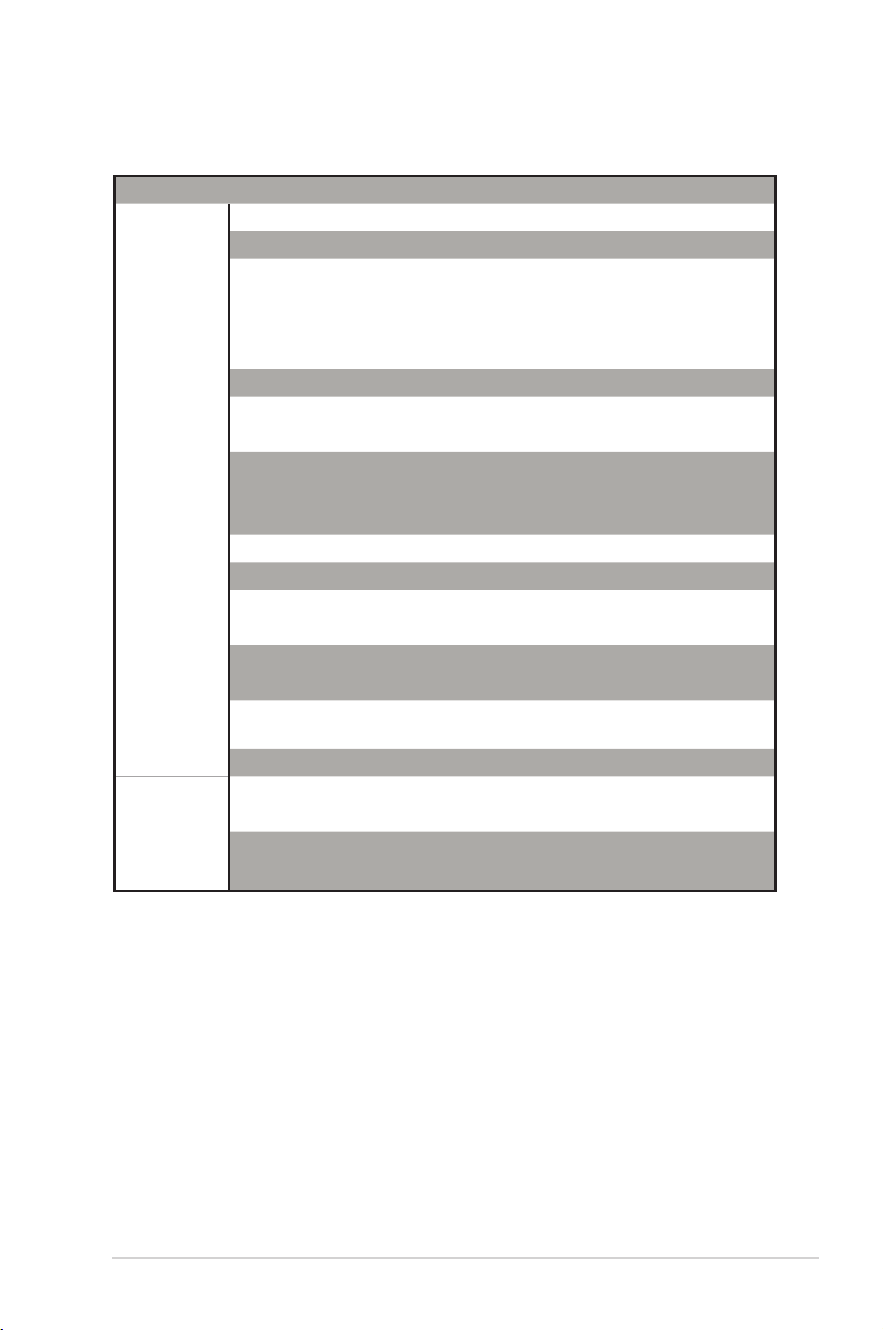
Region Country Hotline Number Service Hours
Europe
Cyprus 800-92491
09:00-13:00 ;
14:00-18:00 Mon-Fri
France 0033-170949400 09:00-18:00 Mon-Fri
Germany
0049-1805010920
09:00-18:00 Mon-Fri
10:00-17:00 Mon-Fri
0049-1805010923
(component support)
0049-2102959911 ( Fax )
Hungary 0036-15054561 09:00-17:30 Mon-Fri
Italy 199-400089
09:00-13:00 ;
14:00-18:00 Mon-Fri
Greece 00800-44142044
09:00-13:00 ;
14:00-18:00 Mon-Fri
Austria 0043-820240513 09:00-18:00 Mon-Fri
Netherlands/
Luxembourg
0031-591570290 09:00-17:00 Mon-Fri
Belgium 0032-78150231 09:00-17:00 Mon-Fri
Norway 0047-2316-2682 09:00-18:00 Mon-Fri
Sweden 0046-858769407 09:00-18:00 Mon-Fri
Finland 00358-969379690 10:00-19:00 Mon-Fri
Denmark 0045-38322943 09:00-18:00 Mon-Fri
Poland 0048-225718040 08:30-17:30 Mon-Fri
Spain 0034-902889688 09:00-18:00 Mon-Fri
Portugal 00351-707500310 09:00-18:00 Mon-Fri
Slovak Republic 00421-232162621 08:00-17:00 Mon-Fri
Czech Republic 00420-596766888 08:00-17:00 Mon-Fri
Switzerland-German 0041-848111010 09:00-18:00 Mon-Fri
Switzerland-French 0041-848111014 09:00-18:00 Mon-Fri
Switzerland-Italian 0041-848111012 09:00-18:00 Mon-Fri
United Kingdom 0044-1442265548 09:00-17:00 Mon-Fri
Ireland 0035-31890719918 09:00-17:00 Mon-Fri
Russia and CIS 008-800-100-ASUS 09:00-18:00 Mon-Fri
Ukraine 0038-0445457727 09:00-18:00 Mon-Fri
47
Networks Global Hotline Information
Region Country Hotline Numbers Service Hours
Asia-Pacific
Australia 1300-278788 09:00-18:00 Mon-Fri
New Zealand 0800-278788 09:00-18:00 Mon-Fri
Japan
0800-1232787
09:00-18:00 Mon-Fri
09:00-17:00 Sat-Sun
0081-570783886
( Non-Toll Free )
09:00-18:00 Mon-Fri
09:00-17:00 Sat-Sun
Korea 0082-215666868 09:30-17:00 Mon-Fri
Thailand 0066-24011717 09:00-18:00 Mon-Fri
1800-8525201
Singapore 0065-64157917 11:00-19:00 Mon-Fri
0065-67203835 11:00-19:00 Mon-Fri
( Repair Status Only ) 11:00-13:00 Sat
Malaysia 1300-88-3495 9:00-18:00 Mon-Fri
Philippine 1800-18550163 09:00-18:00 Mon-Fri
India
1800-2090365
09:00-18:00 Mon-Sat
India(WL/NW) 09:00-21:00 Mon-Sun
Indonesia 0062-2129495000 09:30-17:00 Mon-Fri
500128 (Local Only) 9:30 – 12:00 Sat
Vietnam 1900-555581
08:00-12:00
13:30-17:30 Mon-Sat
Hong Kong 00852-35824770 10:00-19:00 Mon-Sat
Americas
USA
1-812-282-2787
8:30-12:00 EST Mon-Fri
Canada 9:00-18:00 EST Sat-Sun
Mexico 001-8008367847 08:00-20:00 CST Mon-Fri
08:00-15:00 CST Sat
48
NOTES:
• For more information, visit the ASUS support site at:
https://www.asus.com/support
• UK support email: net[email protected]
Manufacturer:
ASUSTeK Computer Inc.
Tel: +886-2-2894-3447
Address: 4F, No. 150, LI-TE RD., PEITOU, TAIPEI
112, TAIWAN
Authorised
representative
in Europe:
ASUS Computer GmbH
Address: HARKORT STR. 21-23, 40880
RATINGEN, GERMANY
Region Country Hotline Numbers Service Hours
Middle
East +
Africa
Egypt 800-2787349 09:00-18:00 Sun-Thu
Saudi Arabia 800-1212787 09:00-18:00 Sat-Wed
UAE 00971-42958941 09:00-18:00 Sun-Thu
Turkey 0090-2165243000 09:00-18:00 Mon-Fri
South Africa 0861-278772 08:00-17:00 Mon-Fri
Israel *6557/00972-39142800 08:00-17:00 Sun-Thu
*9770/00972-35598555 08:30-17:30 Sun-Thu
Balkan
Countries
Romania 0040-213301786 09:00-18:30 Mon-Fri
Bosnia
Herzegovina
00387-33773163 09:00-17:00 Mon-Fri
Bulgaria 00359-70014411 09:30-18:30 Mon-Fri
00359-29889170 09:30-18:00 Mon-Fri
Croatia 00385-16401111 09:00-17:00 Mon-Fri
Montenegro 00382-20608251 09:00-17:00 Mon-Fri
Serbia 00381-112070677 09:00-17:00 Mon-Fri
Slovenia 00368-59045400
08:00-16:00 Mon-Fri
00368-59045401
Baltic
Countries
Estonia 00372-6671796 09:00-18:00 Mon-Fri
Latvia 00371-67408838 09:00-18:00 Mon-Fri
Lithuania-Kaunas 00370-37329000 09:00-18:00 Mon-Fri
Lithuania-Vilnius 00370-522101160 09:00-18:00 Mon-Fri
Networks Global Hotline Information