Distributed by:
Perfect Aire, LLC
5401 Dansher Rd.
Countryside, IL 60525
844-4PA-AIRE | 844-472-2473
www.perfectaire.us
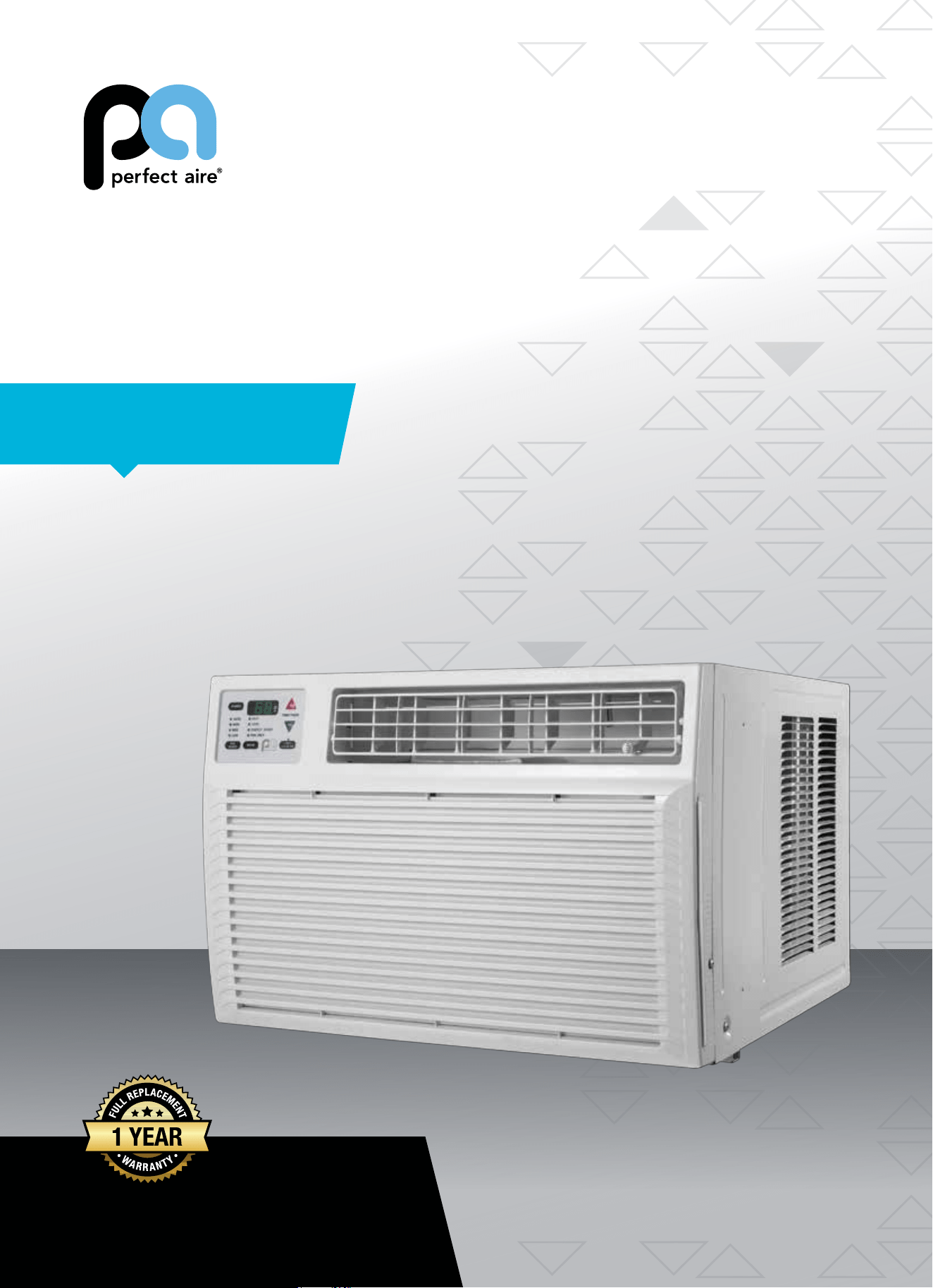
WINDOW
AIR CONDITIONER
FOR MODEL:
2PAHP12002
WITH HEAT PUMP
Before using your air conditioner, please
read this manual carefully and keep it for
future reference, along with your receipt.
Specification and performance data is subject to change without notice.
Printed in China
PA/User_2PAHP12002/11212017
USER MANUAL
For your own records, please attach a copy of your sales receipt to this manual and complete the following:
Model Number: _____________________________________ Serial Number: _______________________________________
Purchase Date: ____________________________________ Store Purchased: _____________________________________
Installation Date: ___________________________________ Installation Co.: _______________________________________
Installer Name: _____________________________________ Installer Phone No.: ___________________________________
CONSUMER PRODUCT INFORMATION
SAFETY PRECAUTIONS ...................................................................1
IMPORTANT SAFETY INSTRUCTIONS ...........................................3
PARTS DIAGRAM ..............................................................................4
BEFORE INSTALLING .......................................................................5
PREPARING FOR INSTALLATION ...................................................6
CABINET INSTALLATION .................................................................7
INSTALLATION INSTRUCTIONS .....................................................9
CONTROL PANEL .............................................................................10
REMOTE CONTROL .........................................................................11
CARE & CLEANING ..........................................................................14
TROUBLESHOOTING ....................................................................... 15
CONTENTS
This manual provides the information needed for proper use and maintenance
of this air conditioner. Basic preventative care can help extend the life of this
unit. The “Troubleshooting” section in this manual contains a chart with solu-
tions to the most common problems. Referring to this section may save time
and prevent the need for a service call in the event of a problem.
CAUTION
● Contactanauthorizedservicetechnicianforrepairormaintenanceofthisunit.
● Contactaninstallerforinstallationofthisunit,ifnecessary.
● Theairconditionerisnotintendedforusebyyoungchildrenwithoutadultsupervision.Youngchildrenshouldbe
supervised to ensure that they do not play with the air conditioner.
● Disabledpersonsmayrequireassistancewithsetup.
● Ifthepowercordistobereplaced,replacementworkshouldbeperformedbyauthorizedpersonnelonly.
● Installationandrepairworkmustbeperformedinaccordancewiththenationalwiringstandardsbyauthorized
personnel only.
● Donotoperateyourairconditionerinawetroomsuchasabathroomorlaundryroom.
NOTE: All the illustrations in this manual are for explanation purposes only. Unit purchased may be
slightlydierent.
Thedesignandspecicationsaresubjecttochangewithoutpriornoticeforproductimprovement.Contactcustomer
service for details.
1
WARNINGS
Plug in power cord properly. Failuretodosomaycauseelectricshockorredueto
excess heat generation.
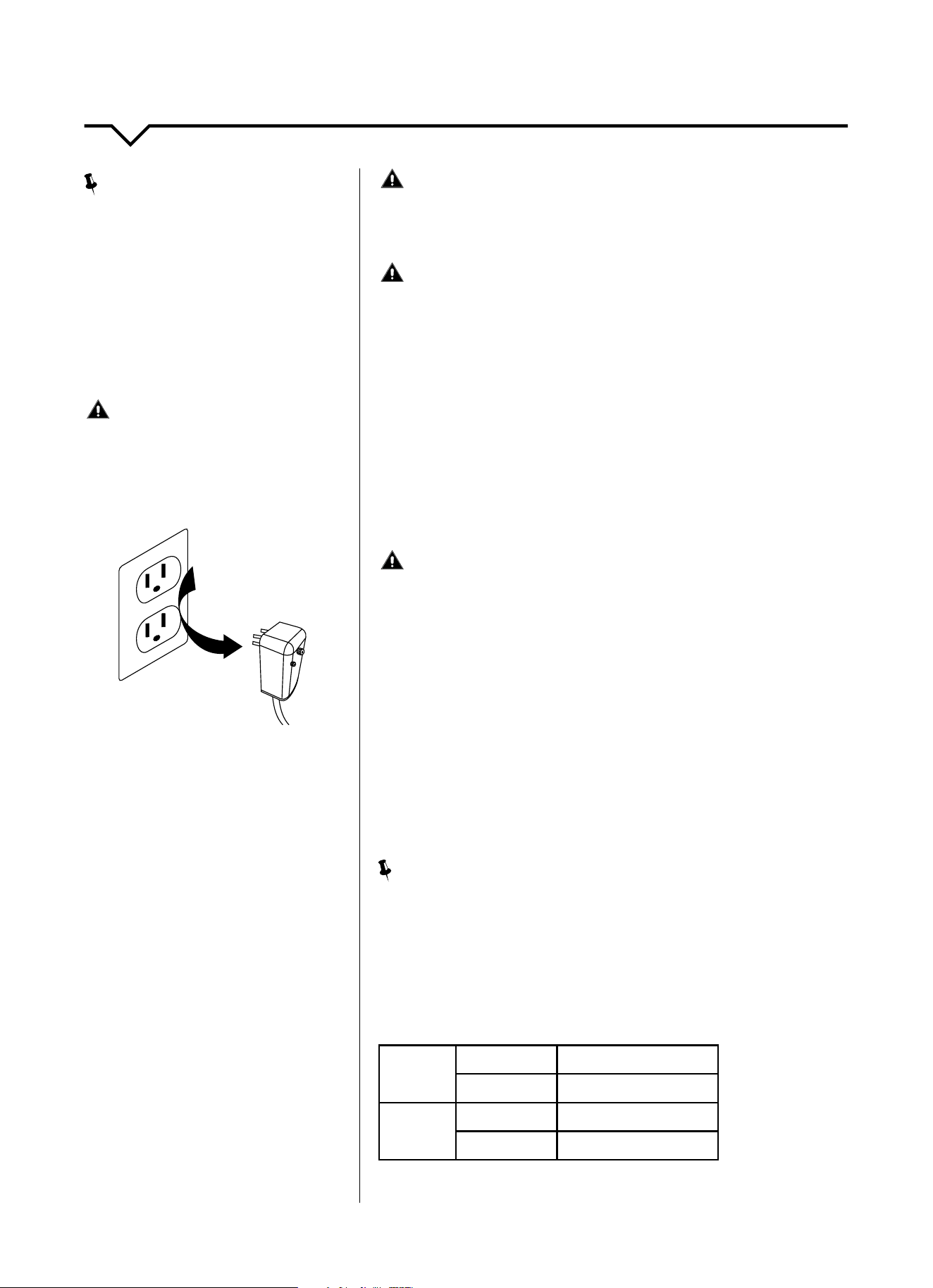
DO NOT operate or stop the unit by inserting or pull-
ing out the power plug directly from the wall.
Doingsomaycauseelectricshockorredueto
heat generation
DO NOT use a damaged power cord.
Doingsomaycauseelectricshockorre.Ifthepower
cord is damaged, it must be replaced by the manufactur-
eroranauthorizedservicecenterorasimilarlyqualied
personinordertoavoidahazard
DO NOT modify power cord length or share the
outlet with other appliances.
Doingsomaycauseelectricshockorredueto
heat generation.
DO NOT operate with wet hands or in
damp environment.
Doingsomaycauseelectricshock.
DO NOTdirectairowdirectlyatroomoccupants.
This could cause health issues.
Alwaysensureeectivegrounding. Incorrectgroundingmaycauseelectricshock.
DO NOT allow water to run into electric parts.
Doingsomaycausefailureofmachineorelectricshock.
Alwaysinstallcircuitbreakerandadedicated
power circuit.
Incorrectinstallationmaycausereandelectricshock.
Always unplug the unit if strange sounds, smell or
smokecomesfromtheunit.
Failuretodosomaycausereandelectricshock.
DO NOTusethesocketifitislooseordamaged.
Doingsomaycausereandelectricshock.
DO NOT open the unit during operation.
Doingsomaycauseelectricshock.
DO NOTuserearmsnearunit.
Doingsomaycausere.
DO NOT use the power cord close to
heating appliances.
Doingsomaycausereandelectricshock.
DO NOT disassemble, modify, or drill holes into
the air conditioner.
Doingsomaycausefailureandelectricshockandvoid
manufacturer's warranty.
Ventilate room before operating air conditioner if
thereisagasleakfromanotherappliancesuchas
a stove.
Failuretodosomaycauseexplosion,reandburns.
DO NOT
usethepowercordnearammablegasor
combustibles,suchasgasoline,benzene,thinner,etc.
Doingsomaycauseanexplosionorre.
READ SAFETY PRECAUTIONS BEFORE INSTALLATION
Topreventinjurytotheuserorotherpeopleandpropertydamage,thefollowinginstructionsmustbefollowed.
Incorrectoperationduetoignoringofinstructionsmaycauseharmordamage.Theseriousnessisclassiedbythe
following indications.
THIS SYMBOL INDICATES THAT IGNORING INSTRUCTIONS MAY CAUSE
DEATH OR SERIOUS INJURY.
NEVER DO THIS.OTHER SYMBOLS: ALWAYS DO THIS.
THIS SYMBOL INDICATES THAT IGNORING INSTRUCTIONS MAY CAUSE
MODERATE INJURY TO YOUR PERSON, OR DAMAGE TO YOUR UNIT OR
OTHER PROPERTY.
SAFETY PRECAUTIONS
2
CAUTIONS
Whenremovingairlter,DO NOT touch metal parts of
the unit.
Doingsomaycauseaninjury.
DO NOT clean with water.
Water may enter the unit and degrade the insulation
causinganelectricshock.
Ensure proper ventilation especially in rooms with a
stove or other appliances.
Failure to do so may result in an oxygen shortage.
Unitandcircuitbreaker/fusemustbeswitchedOFF
when cleaning.
CleaningunitwhenpowerisONmaycausereand
electricshockandmaycauseaninjury.
DO NOT put a pet or house plant where it will be ex-
posedtodirectairow.
Thiscouldinjurethepetorplant.
Use ONLY as intended. This unit is NOT intended to preserve precision devic-
es,food,pets,plants,andartobjects.Itmaycause
deteriorationofquality,etc.
Stop operation and close the window in severe
storms or hurricanes.
Operationwithwindowsopenmaycausemoistureto
enter the room.
Hold the plug by the head of the power plug when
takingitout.
Failuretodosomaycauseelectricshock
and damage.
If unit will not be used for a long period of time, un-
plugorturnOFFmainpowerswitch.
Leavingpoweronmaycauseunitfailureorre.
DO NOT place obstacles around air-inlets or inside of
air-outlet.
Obstaclesmaycauseappliancefailureoraccident.
Periodicallycheckinstallationbracketfordamage. Prolonged exposure to outdoor elements may cause
damagetoinstallationbracketcausingunittofall.
Alwaysinsertlter(s)securely.Cleanlter(s)AT
LEASTonceeverytwoweeks.
Operationwithoutsecured,installedltersmay
causefailure.Adirtyltercancausetheunittonot
runeciently.
Use only a soft cloth to clean the unit. Cleaners or detergents may change the color or
scratch the surface of the unit.
Usecautionwhenunpackingandinstalling. Sharpedgescouldcauseinjury.
NEVERdrinkwaterdrainedfromairconditioner.
Water from unit contains contaminants and could
cause illness.
DO NOTplaceheavyobjectsonthepowercordand
always ensure that the cord is not compressed.
Thereisdangerofreorelectricshock.
If water enters the unit's electrical components, turn
theunitoatthepoweroutletandswitchothecir-
cuitbreaker.Isolatesupplybytakingthepower-plug
outandcontactaqualiedservicedtechnician.
Thereisdangerofelectricshock.
3
IMPORTANT SAFETY INSTRUCTIONS
NOTE
:
The power supply cord with this air
conditioner contains a current detection
devicedesignedtoreducetherisk
ofre.Pleaserefertothesection
“OperationofCurrentDevice”(below)
for details. In the event that the power
supply cord is damaged, it cannot be
repaired. It must be replaced by an
authorizedrepairtechnicianwithacord
from the Product Manufacturer.
WARNING
Avoidrehazardsorelectricshock.
DO NOT use an extension cord or an
adapter plug. DO NOT remove any prong
from the power cord.
OPERATION OF
CURRENT DEVICE:
The power supply cord contains a
current device that senses damage
to the power cord. To test your power
supply cord, do the following:
1. Plug in the air conditioner.
2. The power supply cord will have
TWObuttonsontheplughead.Press
theTESTbutton.Youwillnoticea
clickastheRESETbuttonpopsout.
3. Press the RESET button. Again,
youwillnoticeaclickasthe
button engages.
4. The power supply cord is now
supplyingelectricitytotheunit.(On
some products this is also indicated
byalightontheplughead.)
WARNING
FORYOURSAFETY:Donotstoreorusegasolineorotherammable
vaporsandliquidsinthevicinityofthisoranyotherappliances.
WARNING - PREVENT ACCIDENTS
Toreducetheriskofre,electricalshock,orinjurytopersonswhenusing
your air conditioner, follow basic precautions, including the following:
● Besuretheelectricalserviceisadequateforthemodelyouhave
chosen. This information can be found on the serial plate, which is
located on the side of the cabinet and behind the grille.
● Iftheairconditioneristobeinstalledinawindow,youwillwantto
cleanbothsidesoftheglassrst.Ifthewindowisatriple-track
type with a screen panel included, remove the screen completely
before installation.
● Besuretheairconditionerhasbeensecurelyandcorrectlyinstalled
according to the installation instructions in this manual.
●
Save this manual for possible future use in removing or installing this unit.
● Whenhandlingtheairconditioner,becarefultoavoidcutsfromsharp
metalnsonfrontandrearcoils.
WARNING - ELECTRICAL INFORMATION
The complete electrical rating of your new room air conditioner is
statedontheserialplate.Refertotheratingwhencheckingthe
electricalrequirements.
● Besuretheairconditionerisproperlygrounded.Tominimizeshock
andrehazards,propergroundingisimportant.Thepowercordis
equippedwithathree-pronggroundingplugforprotectionagainst
shockhazards.
● Yourairconditionermustbeusedinaproperlygroundedwall
receptacle.Ifthewallreceptacleyouintendtouseisnotadequately
groundedorprotectedbyatimedelayfuseorcircuitbreaker,havea
qualiedelectricianinstalltheproperreceptacle.
● Ensurethereceptacleisaccessibleaftertheunitinstallation.
● DO NOT run air conditioner without side protective cover in place. This
could result in mechanical damage within the air conditioner.
● DO NOT use an extension cord or an adapter plug.
NOTE
:
DO NOTusetheplugtoturntheunitonoro.
● AlwaysmakesuretheRESETbuttonispushedinforcorrectoperation.
● ThepowersupplymustbereplacedifitfailsresetwheneithertheTEST
button is pushed or it cannot be reset.
● Ifpowersupplycordisdamaged,itcannotberepaired.Pleasecall
Consumer Services at 844-472-2473 to assist with replacement.
NOTE: This air conditioner is designed to be operated under the
following conditions:
Cooling
Operation
Outdoor Temp:
64–109°F/18–43°C
Indoor Temp:
61–86°F/16–30°C
Heating
Operation
Outdoor Temp:
19–84°F/-7–29°C
Indoor Temp:
32–80°F/0–27°C
Performance may be reduced outside of these operating temperatures.
Grounding Type
Wall Receptacle
Do not, under any
circumstances, cut,
remove, or bypass the
ground prong.
Power supply cord
with 3-prong grounding
plug and current
detection device
4
PARTS DIAGRAM
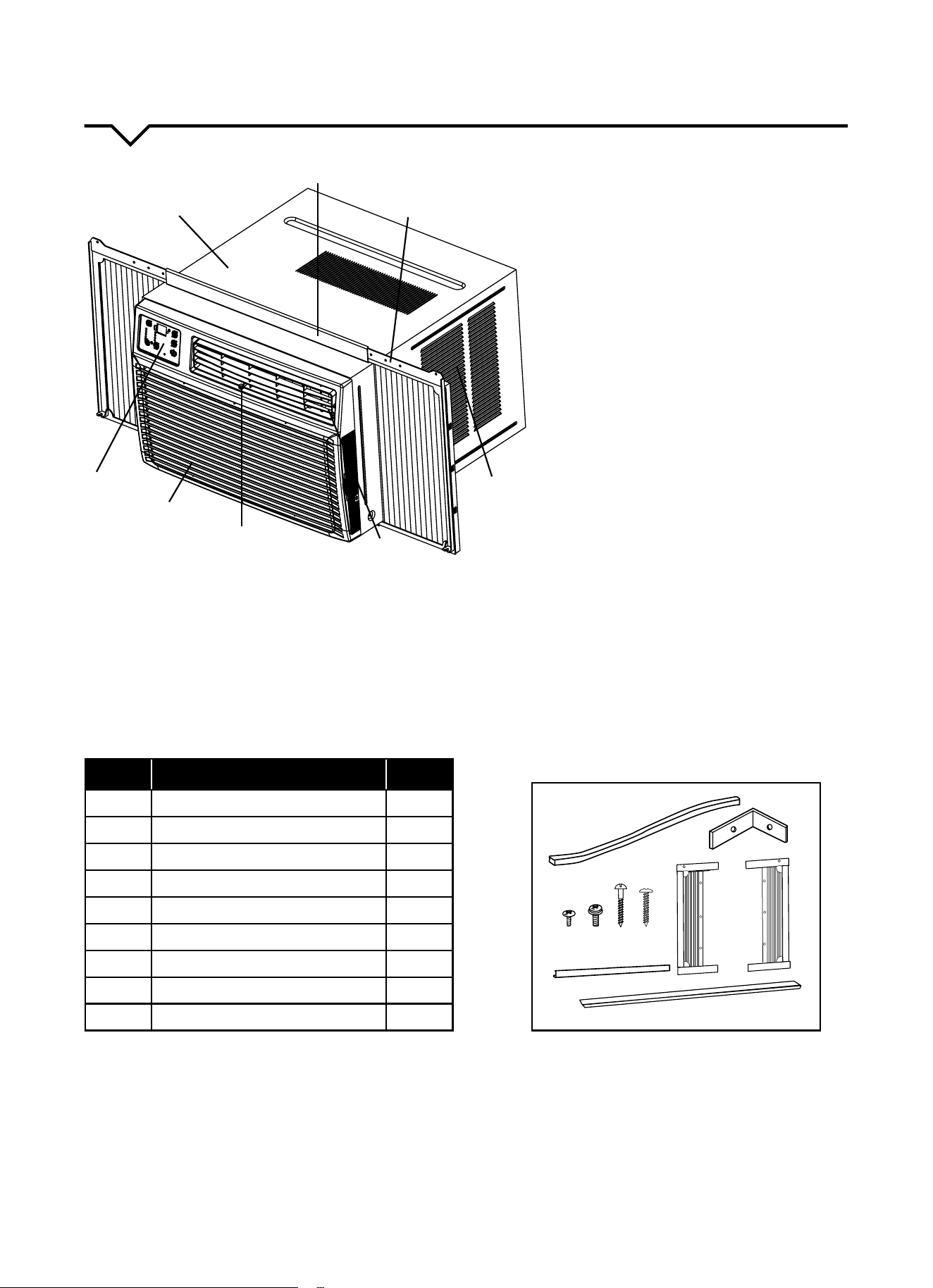
INSTALLATION HARDWARE
Beforeinstalling,pleaseensureyouhaveallinstallationaccessoriesincludedwiththisunit.(Seelistbelow.)Ifmissing
parts,pleasecontactConsumerServicesat844-4PA-AIRE(844-472-2473).
1. CABINET
2. TOP RAIL
3. SLIDING ACCORDION PANEL
4. AIR INLET
5. LOUVER DIRECTION ADJUSTMENT*
6. FRESH AIR SWITCH
7. FRONT GRILLE (Airlterislocatedbehind
thefrontgrille)
8. CONTROL PANEL
* Changing Airflow Direction -
Airowonunitmaybedivertedleftor
right from center by louvers. Upward
and downward air discharge is provided
bytiltinglouvers.Adjust/tiltlouversfor
desiredairowdirection.
NOTE: All of the illustrations in this manual
are for explanation purposes only. Unit
purchasedmaybeslightlydierent.
ITEM NAME OF PART QTY
A Foam Window Sash Seal 1
B WindowLockBrackets 2
C #10 x ¼ʺ Pan-head Phillips Screws 6
D #10x⅜ʺ Pan-head Phillips Screws 3 or 7
E #10 x ¾ʺ Round-head Screws 6
F #10 x ½ʺ Pan-head Phillips Screws 3
G Top Rail 1
H Accordion Panels 2
I Foam Seal 1
B
C
G
E
F
A
H
D
I
1
2
5
7
6
3
4
8
5
BEFORE YOU BEGIN
Read these instructions completely and carefully.
IMPORTANT- Save these instructions.
IMPORTANT-Observeallgoverningcodes
and ordinances.
Note to Installer- Be sure to leave these instructions with
the Consumer.
Note to Consumer- Keep these instructions for future
reference.
Skill level-Installationofthisappliancerequiresbasic
mechanicalskills;professionalinstallationpreferred.
Completion time- Approximately 1 – 1½ hours.
We recommend that two people install this product.
Proper installation is the responsibility of the installer.
Product failure due to improper installation is not
covered under the Warranty.
YouMUSTuseallsuppliedpartsanduseproper
installation procedures as described in these
instructions when installing this air conditioner.
INSTALLATION REQUIREMENTS
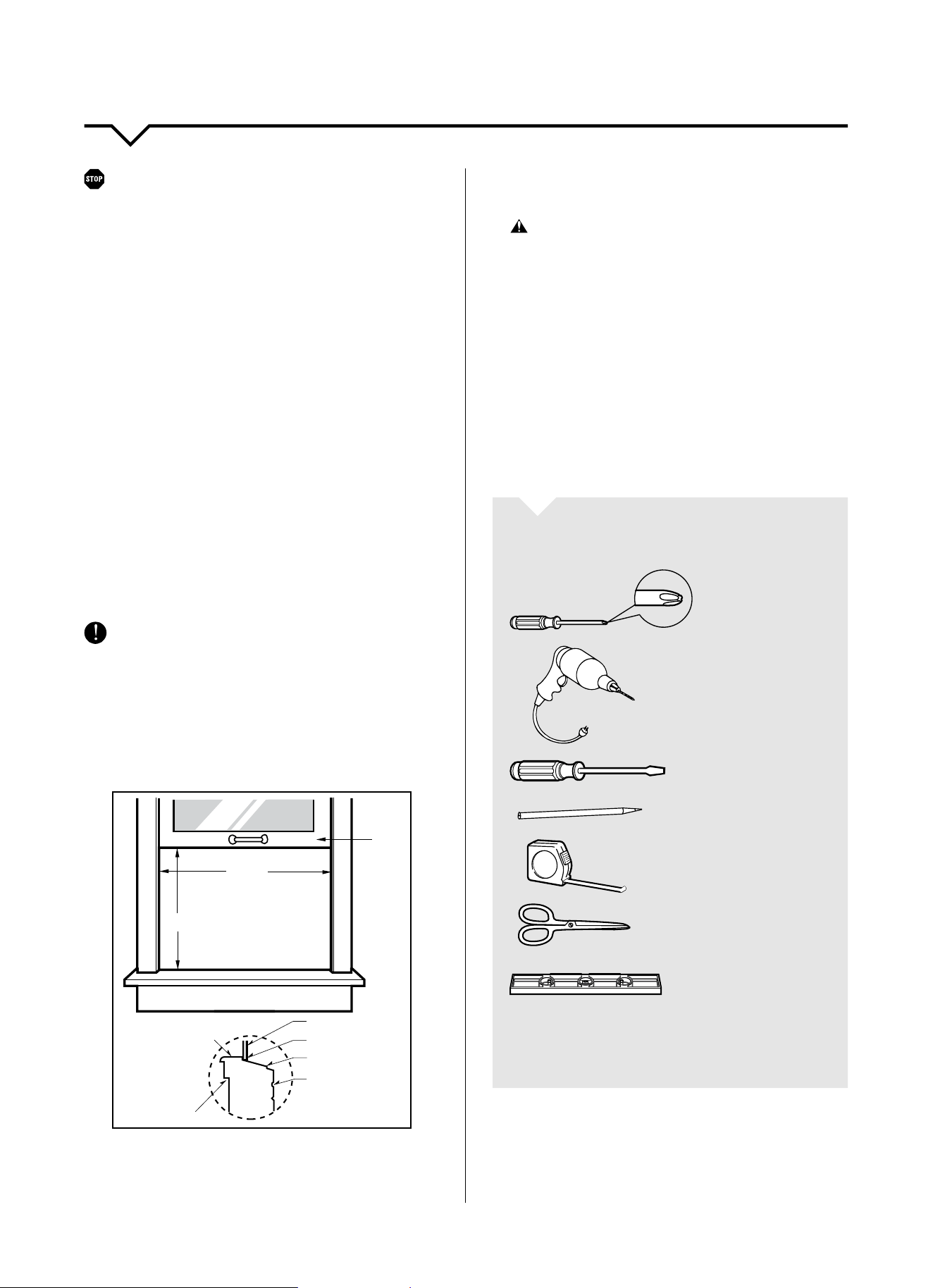
This room air conditioner is designed for installation in
standard double-hung windows with actual opening
widths of 27 in. to 39 in. Lower sash must open
sufficiently to allow a clear vertical opening of 16¼ in.
Side louvers and the rear of the air conditioner must
have clear air space to allow enough airflow through the
condenser for heat removal. The rear of the unit must be
outdoors, not inside a building or garage.
Inner sill
Offset
Window
Sill
Exterior
Interior wall
27–39ʺ
16
¼
ʺ
min
Sash
Checkthelocationwheretheunitwillbeinstalled.
Properinstallationisyourresponsibility.Makesureyou
have everything necessary for correct installation.
The location should provide:
• Groundedelectrical3prongoutletwithin4ft.of
where the air conditioner power cord exists.
WARNING: DO NOT use an extension cord.
• DO NOTblockthelouversonthefrontpanel.
• DO NOT blockthelouversontheoutsideofthe
air conditioner.
NOTE: Cabinet louvers must not be obstructed. Air must
be able to pass freely through the cabinet louvers.
INSTALL ATION
Pickalocationwhichwillallowcoldairtoblowinto
the area you desire. Windows used for installation
must be strong enough to support the weight of the air
conditioner. Good installation with special attention to
the proper position of the unit will lessen the chance
that service will be needed.
TOOLS YOU WILL NEED
Phillips
Screwdriver
Drill&3/16ʺ
drill bit
Screwdriver
Pencil
Ruler or Tape
Measure
Scissors or
Knife
Level
NOTE: Save carton and these Installation Instructions for
future reference. The carton is the best way to store unit
during winter or when not in use.
If you encounter problems during installation, call
Perfect Aire Consumer Services at 844-4PA-AIRE
(844-472-2473).
BEFORE INSTALLING
6
PREPARING FOR INSTALLATION
STEP 1:
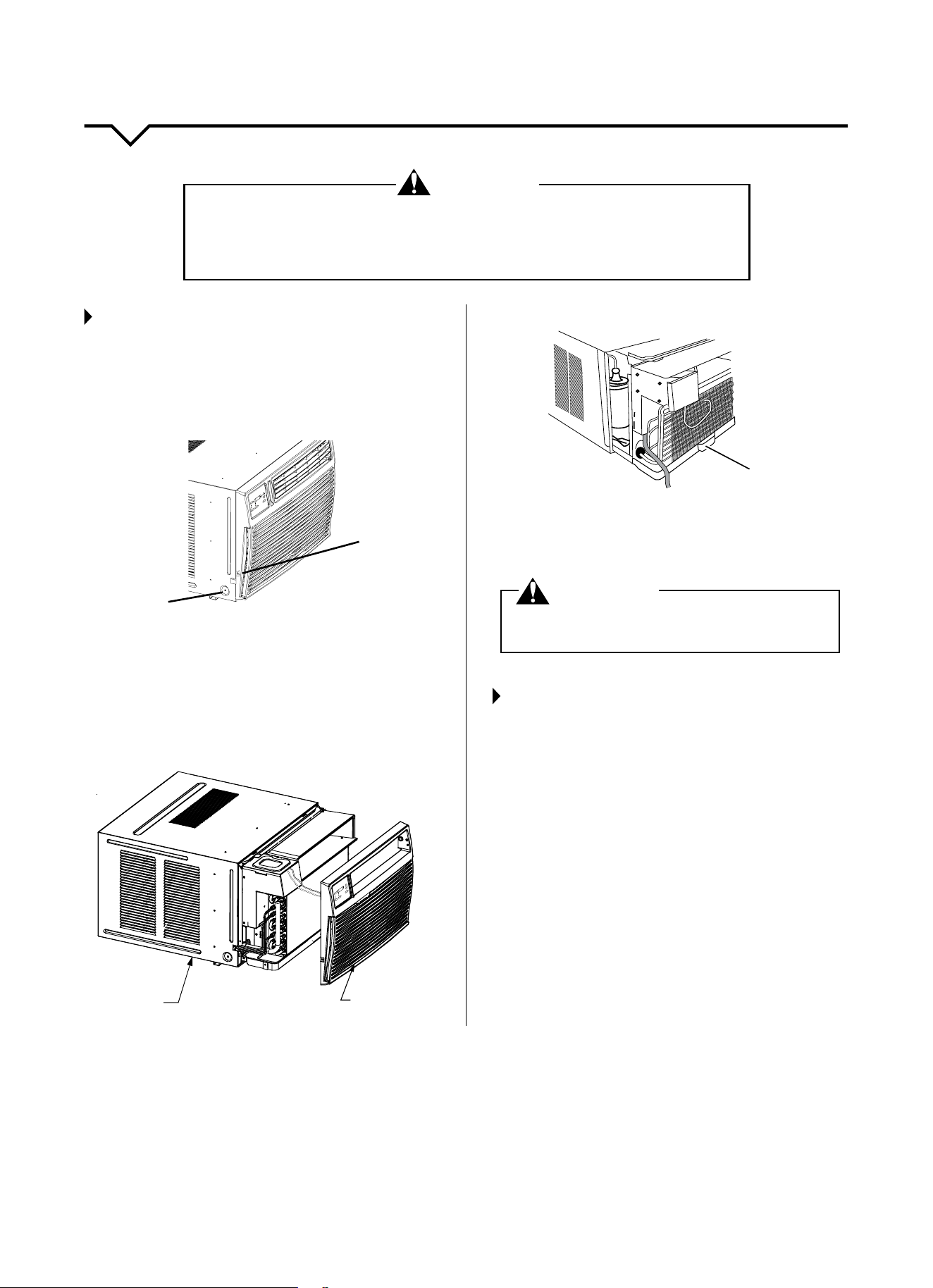
SLIDE OUT CHASSIS REMOVAL
1. Remove the air conditioner from box and place it on
cardboard.
2. Remove shipping screws from both sides of
the cabinet.
Shipping
Screw
Panel
Screw
Set
-
LOW
MED
O
ER
AN
H
IG
AU
H
T
POW
SPE
F
ED
MODE
F
EN
C
ER
N
AN O
L
Y
Y
SAVER
O
H
E
O
G
A
L
T
T
1
T
-24 H
IMER
R
EMP/T
+
IMER
3. Remove front panel by removing 2 Phillips screws
on both bottom left and right sides of front. Unplug
control panel from unit.
4. Using base pan handle, pull chassis straight out,
slowly and evenly, until approximately 9–12
inches extend from outer case. Use both hands to
grasp base pan and pull remaining chassis from
outer case.
Chassis
Plastic Front
Se
t
-
MED
AN
L
OW
H
I
A
G
U
H
T
PO
O
WE
R
SP
F
E
ED
MO
DE
F
E
N
C
ER
N
A
N
O
L
Y
Y
S
AVER
O
H
O
E
G
L
AT
1-
T
I
24
M
H
ER
R
TEM
R
P
/
T
I
+
M
E
5. Removeanypackingfoamfrominsideofunit.
Handle
NOTE: Do not lift, push, pull or remove any expanded
polystyrene (foam) from inside the air conditioner. It is not
packing material.
WARNING
DO NOT operate unit with shipping foam blocks in
place. Always remove prior to running unit.
STEP 2:
REMOVE PACKING MATERIALS
• Removeanddisposeoforrecycleallpackaging
materials. Remove tape and glue residue from
surfaces before turning on the air conditioner. Rub a
smallamountofliquiddishsoapovertheadhesive
withyourngers.Wipewithwarmwateranddry.
• DO NOT use sharp instruments, rubbing alcohol,
ammableuids,orabrasivecleanerstoremovetape
or glue. These products can damage the surface of
your air conditioner.
• Handleairconditionergently.
WARNING
EXCESSIVE WEIGHT HAZARD!
Toreducetheriskofpersonalinjury,weadviseyouhavetheassistanceof2ormore
individuals while moving and installing the air conditioner. Failure to do so can result in
backorotherinjuries.Aroomairconditionercanweighbetween70–240lbs.
7
CABINET INSTALLATION
STEP 1:
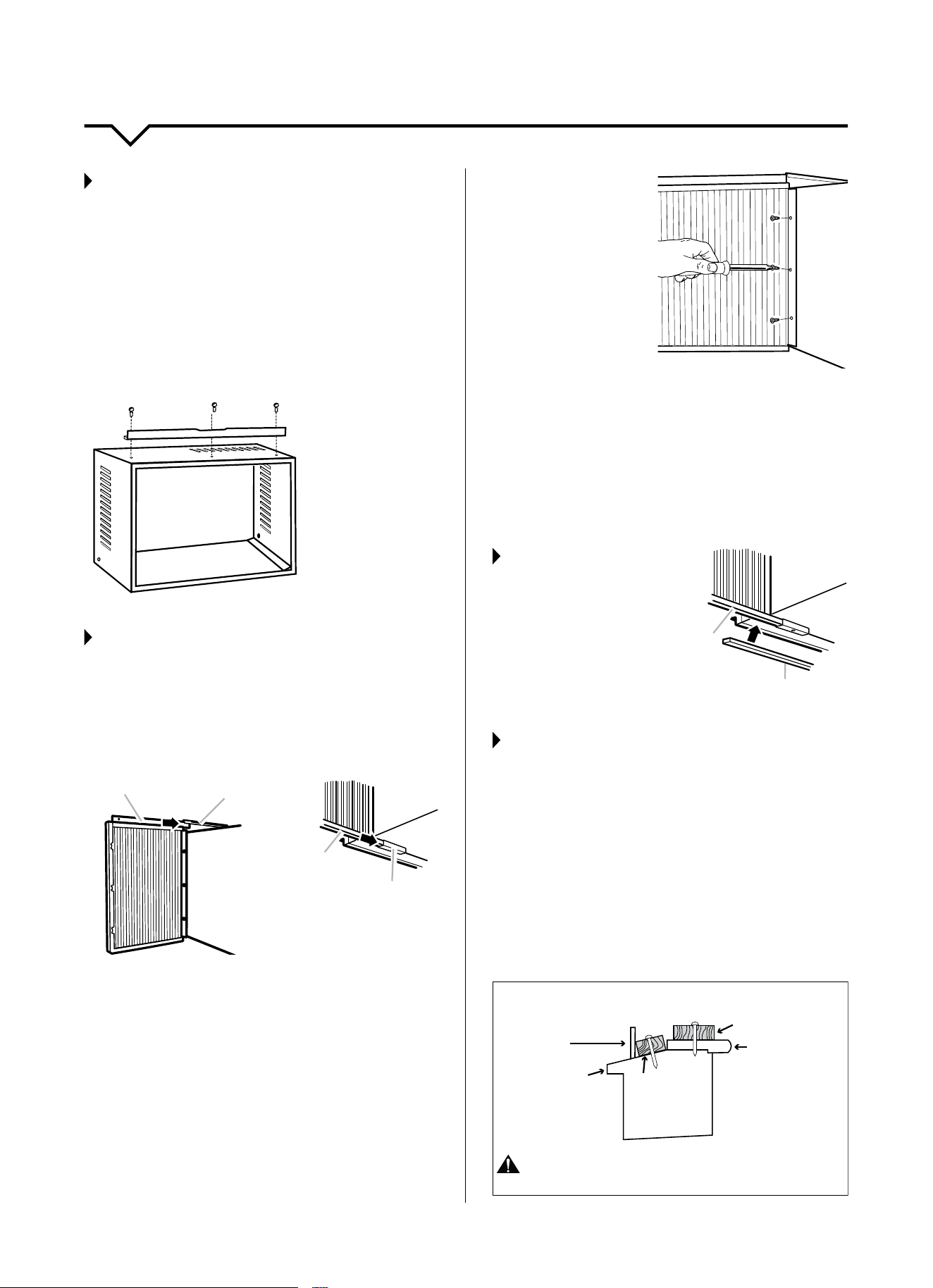
TOP RAIL
1. Removetheairconditionerandtoprail(G)fromthe
cartonandplacethemonaatsurface.
2. Align the holes in the top rail with those in the top of
the unit.
3. Securethetoprailtotheunitwiththreeofthe3/8
inchshortscrews(D)asshowninthediagrambelow.
NOTE: Higher side of the top rail is to be facing the
inside of the room.
D–
G–
D–
D–
D. #10 x 3/8″
pan-head Phillips
screws (3x)
G. Top Rail
STEP 2:
ATTACH SIDE ACCORDION PANELS
1. Insert top and then bottom of right-hand accordion
panel to top rail and bottom guide on air
conditioner cabinet.
Accordion
Panel
Top Rail
2. Extend the right-hand accordion panel outward so
youcaninserttherstscrewthroughthemiddlehole
oftheaccordionpanel.Using#10x1/4inchpan-
headPhillipsScrew(C),screwaccordionpanelto
middle hole in air conditioner cabinet.
NOTE:
These(6x)Phillipsscrews(C)arerequiredtocorrectly
attach accordion panel to the air conditioner cabinet.
3. While the right-hand
accordion is still
extended, insert
the#10x1/4inch
pan-head Phillips
screws(C)intothe
top and bottom slots
of accordion. Screw
accordion to the top
and bottom holes
in air conditioner
cabinet.
NOTE: Some accordion panels may have 2 slots at each
end.Youwillbeabletoseeamountingholethroughthe
correct slot.
4. Slide accordion panel housing into guides as far as it
will go.
5. Repeat the above steps for the left-hand
accordion panel.
STEP 3:
ATTACH FOAM
ADHESIVE
SEAL
Attach foam adhesive
seal(A)alongthe
bottom of th accordion
panel’s bottom guide.
STEP 4:
INSTALL CABINET INTO WINDOW
• Handleairconditionergently.
• Besureyourairconditionercabinetdoesnotfallout
of the opening during installation or removal.
• Thelocationwherethepowercordexitstheair
conditioner should be no more than 4 ft from a
grounded 3 prong outlet.
• Donotblockthelouversonthefrontpanel.
• Donotblockthelouversontheoutsideoftheair
conditioner.Ifairisobstructedand/ordeectedback
into the unit, the air conditioner’s compressor may
cycleonandorapidly.Thiscoulddamagetheunit.
INNER SILL
OUTER SILL
FOR STORM WINDOWS
WOOD FOR
INNER SILL
STORM WINDOW
FRAME
WOOD
STRIP
CAUTION: Do not install this air conditioner in
a window if the bolts do not make contact with the window sill.
BOTTOM VIEWBACK VIEW
Accordion
Panel
Bottom Guide
Accordion
Panel
Bottom Guide
8
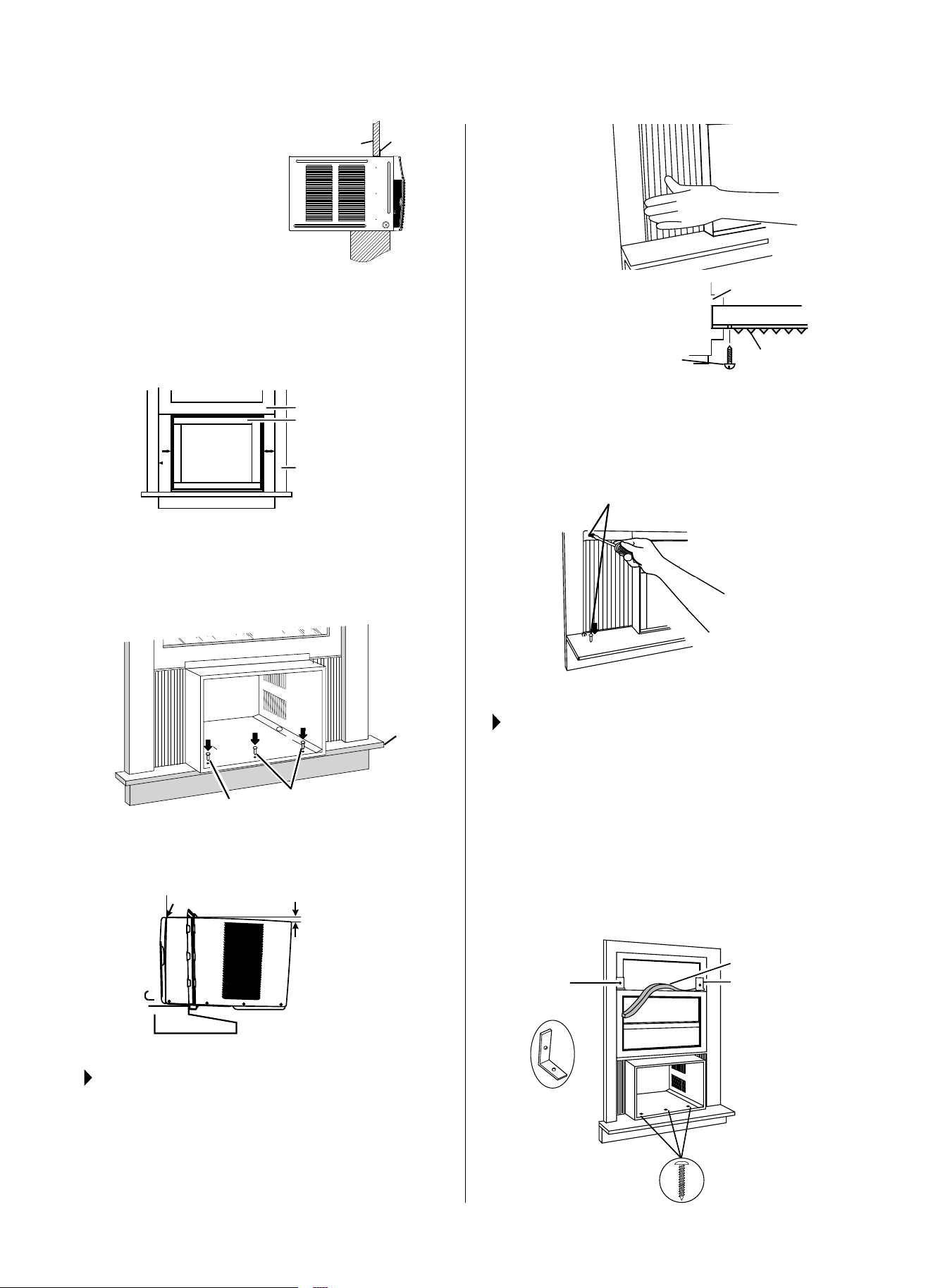
1. Center empty cabinet in
window.Checkthatlower
rail of air conditioner cabinet
is behind and against
backsideofwindowsill.
Maintainarmholdon
the air conditioner cabinet.
Lower window sash to hold
cabinet in place. Top rail
must be on the inside room of window sash.
2. Measure the distance between the right-hand side of
the cabinet and the inside of the window channel.
3. Repeatfortheleftside.Adjustthecabinetuntilthe
distance on each side is the same.
Window Sash
Empty Cabinet
Window Frame
4.
Usea3/16ʺdrillbittodrill3starterholes1/2ʺ deep
through the 3 holes on the cabinet and into
window sill.
5. Attachcabinettowindowsillwith3-#10x1/2ʺ pan-
headPhillipsscrews(F).
(3x) #10 x 1/2″ pan-head Phillips screws (F)
Window
Sill
F
F
6.
Checkthatairconditionercabinetistiltedtotheoutside
so that condensate water will run to the outside.
Wooden Windows
INSIDE
OUTSIDE
H: Approx. 1ʺ to 1³/
8
ʺ
H
Measure from the cabinet edge
STEP 5:
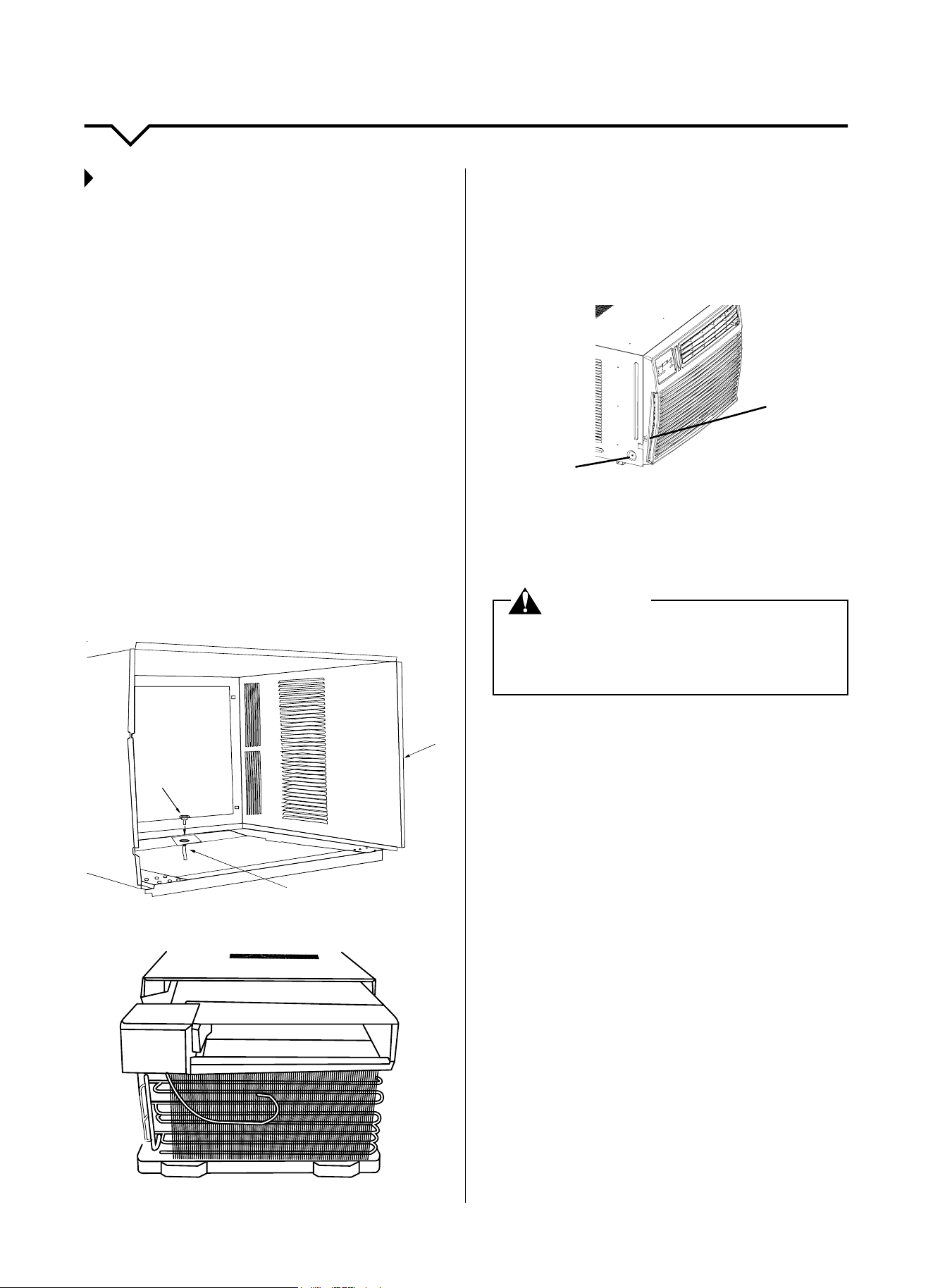
SECURING ACCORDION TO THE
WINDOW FRAME
1. Pull left-hand accordion panel out until it reaches the
windowframe.Usea3/32ʺ drill bit to drill a starter
hole through the hole in the accordion panel housing
& into the lower window sash.
(See top of next column.)
FRONT VIEW
TOP VIEW
(2x) #10 x 3/4″
round-head screw (E)
Window frame
Left-hand
accordion
panel
2. Insertoneofthe#10x3/4ʺround-headscrews(E)
through hole and into lower window sash. Insert one
ofthe#10x3/4ʺround-headscrews(E)through
threaded hole in top of curtain and one in bottom
of curtain.
(2x) #10 x 3/4ʺ round-head screws (E)
3. Repeat for right-hand accordion panel.
STEP 6:
COMPLETE WINDOW INSTALLATION
1. Insert foam seal behind the top of the lower window
sash and against the glass of the upper window.
2. Placewindow-lockbracketontopoflowerwindow
and against upper window sash.
3. Usea3/32ʺ drill bit to drill a starter hole through the
holeinthebracketandintothewindowsash.
4. Attachwindow-lockbrackettowindowsashwith
#10x3/4ʺround-headscrew(E)tosecurewindow
in place.
Window
Lock Bracket
(2x)
Foam Seal (A)
Upper Window
(3x) #10 x 1/2ʺ
pan-head Phillips
screws (F)
Window
Sash
Top
Channel
9
INSTALLATION INSTRUCTIONS
DRAIN CUP INSTALLATION AND USE
Yourairconditionerusesasystemwherethewater
removedfromtheindoorair(condensate)ischanneled
to the outdoor side of the unit. The outdoor fan blade
has a “slinger” ring attached to it that dips into the water
and slings the water onto the outdoor coil surface. This
is the sound of water you hear during normal operation.
Thewaterquicklyevaporatesonthiswarmsurface
andimprovestheeciencyofyourairconditioner.In
normal conditions the unit can evaporate the water as
fast as it is removed from the indoor air.
However, in very humid conditions excess amounts of
watermaydripotheunitchassis.Ifthisprovestobe
a problem, install the condensate drain cup included
with the unit to route excess water where it will not be a
problem(seeillustration).
To install, remove the unit chassis from the outer case.
Insert the condensate drain cup through the recessed
½ʺholeonthebackcenteroftheoutercase.Once
inserted, place a ½ʺ diameter hose or tube on the drain
cup bottom spout. The hose allows you to route where
you want the excess water to go. Reinsert the unit
chassisintotheoutercase.Theunitbasepanoverow
hole will be positioned directly above the drain cup and
will catch any water that might run out.
Condensate
Drain Cup
1/2ʺ Diameter Hose
Outer
Case
1. Insert air conditioner into cabinet.
2. Install shipping screws on both sides of cabinet.
3. Plug the control panel to the unit.
4. Insert front tabs of front panel into top of cabinet and
swing front into place.
5. Attach bottom front with panel screws, one screw on
each side.
Shipping
screw
Panel
Screw
Set
-
LOW
MED
O
ER
AN
H
IG
AU
H
T
POW
SPE
F
ED
MODE
F
EN
C
ER
N
AN O
L
Y
Y
SAVER
O
H
E
O
G
A
L
T
T
1
T
-24 H
IMER
R
EMP/T
+
IMER
6. Plug into a grounded 3 prong outlet.
7. Press RESET on the power supply cord plug.
8. Turn unit on.
WARNING
ELECTRICAL SHOCK HAZARD!
Replace two shipping screws on both sides of cabinet
for grounding purposes. Failure to do so can result in
death or electrical shock.
Operatingyourairconditionerproperlywillhelpyou
obtain the best possible results.
This section explains proper air conditioner operation.
IMPORTANT:
• Ifyouturnotheairconditioner,waitatleast3
minutesbeforeturningitbackon.Thisprevents
the air conditioner from blowing a fuse or tripping a
circuitbreaker.
• Donottrytooperateyourairconditionerinthe
cooling mode when outside temperature is below
61°F(16°C).Donottrytooperateyourair
conditioner in the heating mode when outside
temperatureisover86°F(30°C).Theinside
evaporatorcoilwillfreezeup,andtheairconditioner
will not operate properly.
NOTE: In the event of a power failure, your air conditioner
will operate at the previous settings when the power is
restored.
10
CONTROL PANEL
USING THE CONTROL PANEL
COOL Mode
• PresstheMODEbuttonuntiltheCOOLindicatorison.
• PresstheTEMP/TIMEbuttons(+/–)toadjustdesired
room temperature on the display.
• PresstheSPEEDbuttontoselectdesiredfanspeed
(High,Med,Low,Auto).
HEAT Mode
• PresstheMODEbuttonuntiltheHEATindicatorison.
• PresstheTEMP/TIMEbuttons(+/–)toadjustdesired
room temperature on the display.
• PresstheSPEEDbuttontoselectdesiredfanspeed
(High,Med,Low,Auto).
FAN Mode
Use this mode to circulate the air in the room without
cooling or dehumidifying the room. In FAN mode, the
temperaturecannotbeadjusted.
• PressthemodebuttonuntiltheFANindicatorison.
• PresstheSPEEDbuttontoadjustthefanspeed(High,
Med,Low).Whenusingthecontrolpanel,AUTOfan
speedcannotbeselected.AUTOfanspeedcanbe
selected with the remote only.
ENERGY SAVER Mode
WhiletheunitisrunningpresstheMODEbuttontoselect
ENERGYSAVER. When the set temperature is reached
thecompressorwillshuto.Thefanwillcontinuetorun
3minutesafterthecompressorshutso.Theunitwillnot
run for 10 minutes. After 10 minutes the fan will run for 1
minute and repeat the cycle. If the temperature changes, the
compressor will turn on until the set temperature is reached.
TIMER ON/OFF Function
TIMER ON
• Turntheunitontosetthedesiredtemperatureandfan
speed for when the unit turns on with the Timer.
• Turntheunito(Standby).
• PresstheTIMERbutton
• PresstheTEMP/TIMERbuttons(+/–)tosetthetimeon
thedisplayfrom0.5–24hours(by0.5hourincrementsup
to24hours).
• TheTIMERON/OFFindicatorwillbeonwhenthetimer
has been set.
TIMER OFF
• Turntheunitontosetthedesiredtemp.andfanspeed.
• PresstheTIMERbutton.
• PresstheTEMP/TIMERbuttons(+/–)tosetthetimeon
thedisplayfrom0.5–24hours(by0.5hourincrementsup
to24hours).
• TheTIMERON/OFFindicatorwillbeonwhenthetimer
has been set.
NOTE:
To cancel the timer function press the TIMER button again.
Lights next to the touch pads on the unit's
control panel indicate the selected settings.
The display shows the set temperature when
in HEAT/COOL/ENERGYSAVER modes. The
display shows time remaining on the delay timer.
It shows the room temp. when in FAN only mode.
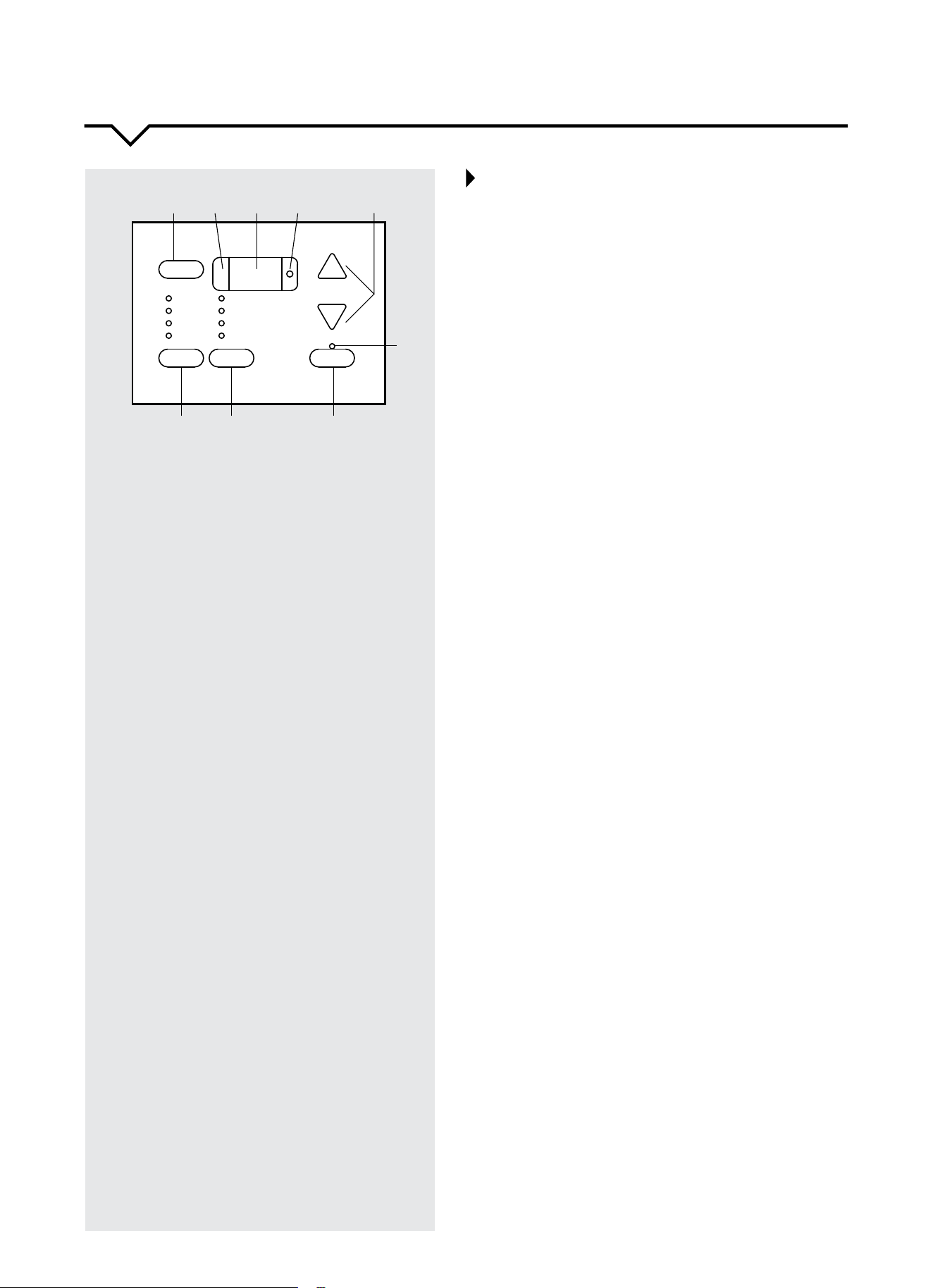
1. POWER Button
PresstoturntheunitON/OFF.
2. REMOTE CONTROL SIGNAL RECEIVER
•Makesuresignalreceiverisunobstructed.
•Maximumremotedistanceis26ft.
•Unitwillbeepwhensignalfromremotehas
been received.
3. DIGITAL DISPLAY
•InFANmode,thisdisplaystheroomtemp.
•InCOOLandHEATmode,thisdisplaysthe
set temperature.
•InTIMERfunction,On/Otimeisdisplayed.
•IfDisplayshowsErrorCodes,contact
Consumer Services at 844-472-2473.
4. SET Indicator
Light indicates the unit is in the temperature or
delay time set mode.
5. TEMP/TIMER Buttons +/–
•Presstoadjustthetemperatureandsetthe
timefortheOnorOtimer.
•Pressboth+and–atthesametimeto
switch between °C and °F.
6. TIMER ON/OFF Indicator
IlluminateswhentimerhasbeensetforOn
and/orO.
7. TIMER Button
PresstosetthetimerOn/O.
8. MODE Button
PresstoselectHEAT,COOL,ENERGYSAVER
or FAN.
9. FAN SPEED Button
PresstoselectLOW,MED,HIGHorAUTO
fan speed.
Set
+
-
TIMER
MED
HIGH
LOW
AUTO
POWER
FAN
SPEED
MODE
COOL
ENERGY SAVER
FAN ONLY
HEAT
0.5-24 HR
TEMP/TIMER
1 2 5
7
6
3 4
8
9
11
REMOTE CONTROL
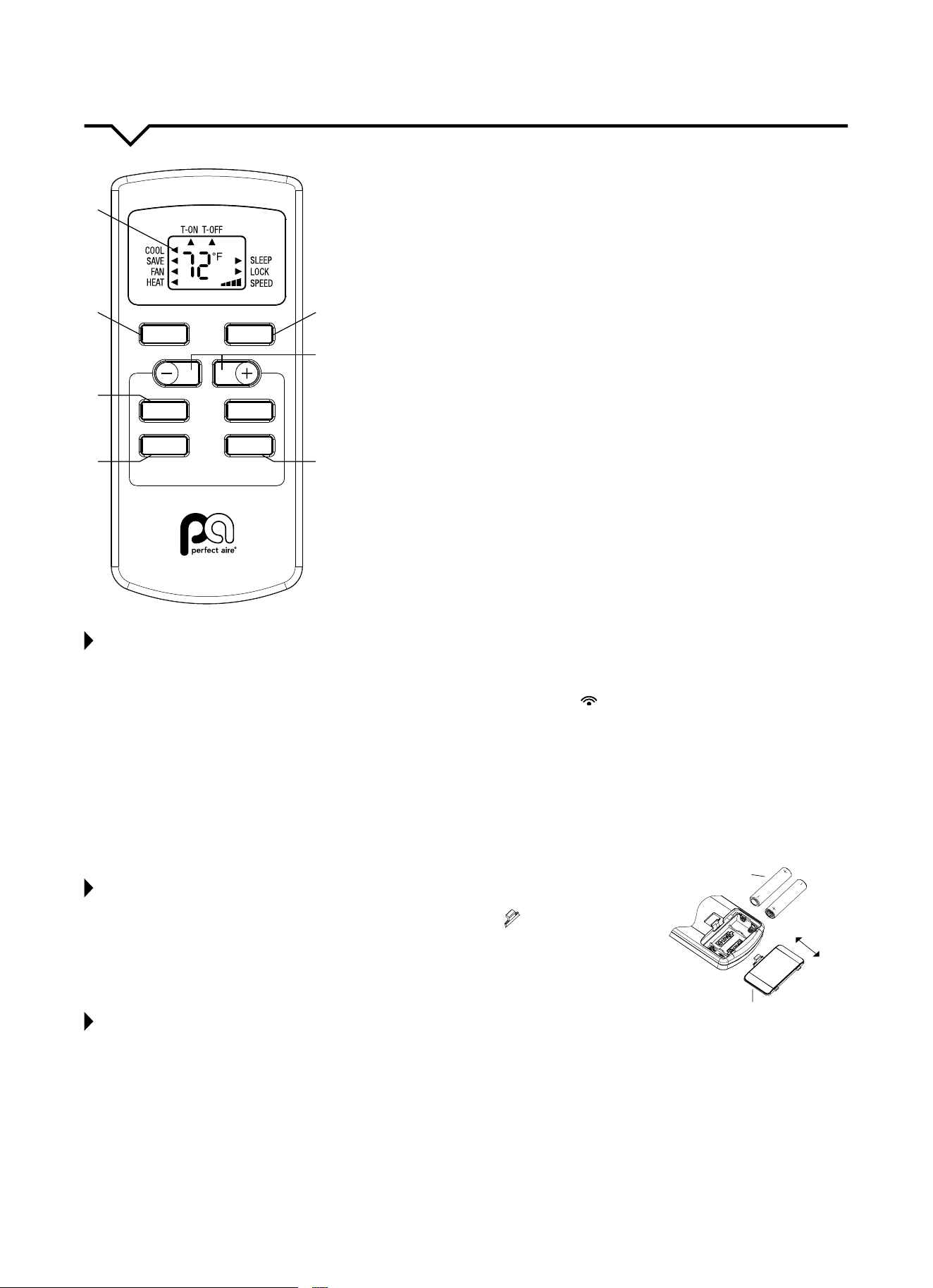
1. ON/OFF Button
PresstoturntheunitON/OFF.
2. DIGITAL DISPLAY
3. MODE Button
Press this button to select operating mode.
4. +/– BUTTONS
Thesebuttonsareforincreasing/decreasingthetemperature
settingswithinarangeof61–86°F(16–30°C)andforsettingthe
time when setting the Timer.
5. TIMER Button
PressthisbuttontosettheTimerfortimeSwitch-On,Switch-O
ortocancelthetimer.(Seepage10formoreinformation.)
6. SLEEP Button
Available on remote control only. See page 13.
7. FAN Button
Press this button to select fan speed.
NOTES ABOUT USING THE REMOTE CONTROL
• Somefunctionsmaynotbeavailableforthisunit.Ifselected,unitwillcontinuetorunwithnochange.
• Whentheunitispoweredo,youcanoperatetheairconditionerwiththeremotecontrol.
• Eachtimeyoupressthebuttontheremotecontrol,thesendingsignalicon“ ”ontheremotewillblinkonce.Iftheair
conditioner beeps, it means the signal has been received.
• Whenunitiso,settemperaturewillbedisplayedontheremotecontrol.Whenunitison,itwilldisplaytheiconofthe
on-going function.
• DO NOT place the remote near anything with high temperature, such as an electric heating pad or radiator.
• DO NOT place the remote where it is exposed to direct sunlight or strong lights.
• DO NOT drop anything on the remote as this may cause damage.
• DO NOTblocktheareabetweentheunitandremoteoritwillnotreceivesignalsfromtheremote.
• DO NOTsplashwaterorotherliquidsontotheremote.
• DO NOTplaceheavyobjectsontheremote.
REPLACING THE BATTERIES
1. Pressthebacksideofremotecontrolonthespotmarkedwith“ ”, and then push out
the cover of battery box along the arrow direction.
2. ReplacetwoAA1.5Vdrybatteries;makesurethepositionsof+and–polararecorrect.
3. Reinstall the cover of battery box.
NOTE: DO NOT mix old and new batteries.
REMOTE CONTROL TIPS
• Duringoperation,pointtheremotecontrolsignalsenderatthereceivingwindowonindoorunit.
• Thedistancebetweensignalsenderandreceivingwindowshouldbenomorethan26ft,andthereshouldbeno
obstacles between them.
• Signalmaybeinterferedeasilyintheroomwherethereisuorescentlamporwirelesstelephone;remotecontrol
should be close to indoor unit during operation.
• ReplacewithAA1.5Vdrybatterieswhenreplacementisrequired.
• Removebatteriesfromremotecontrolwhennotoperatingunitforanextendedperiodoftime.
• Ifthedisplayonremotecontrolisfuzzyorthere’snodisplay,pleasereplacebatteries.
SLEEP
TIMER
FAN
ON
/
OFF
MODE
1
2
3
7
6
4
5
reinstall
remove
battery
cover of battery box
12
USING THE REMOTE CONTROL
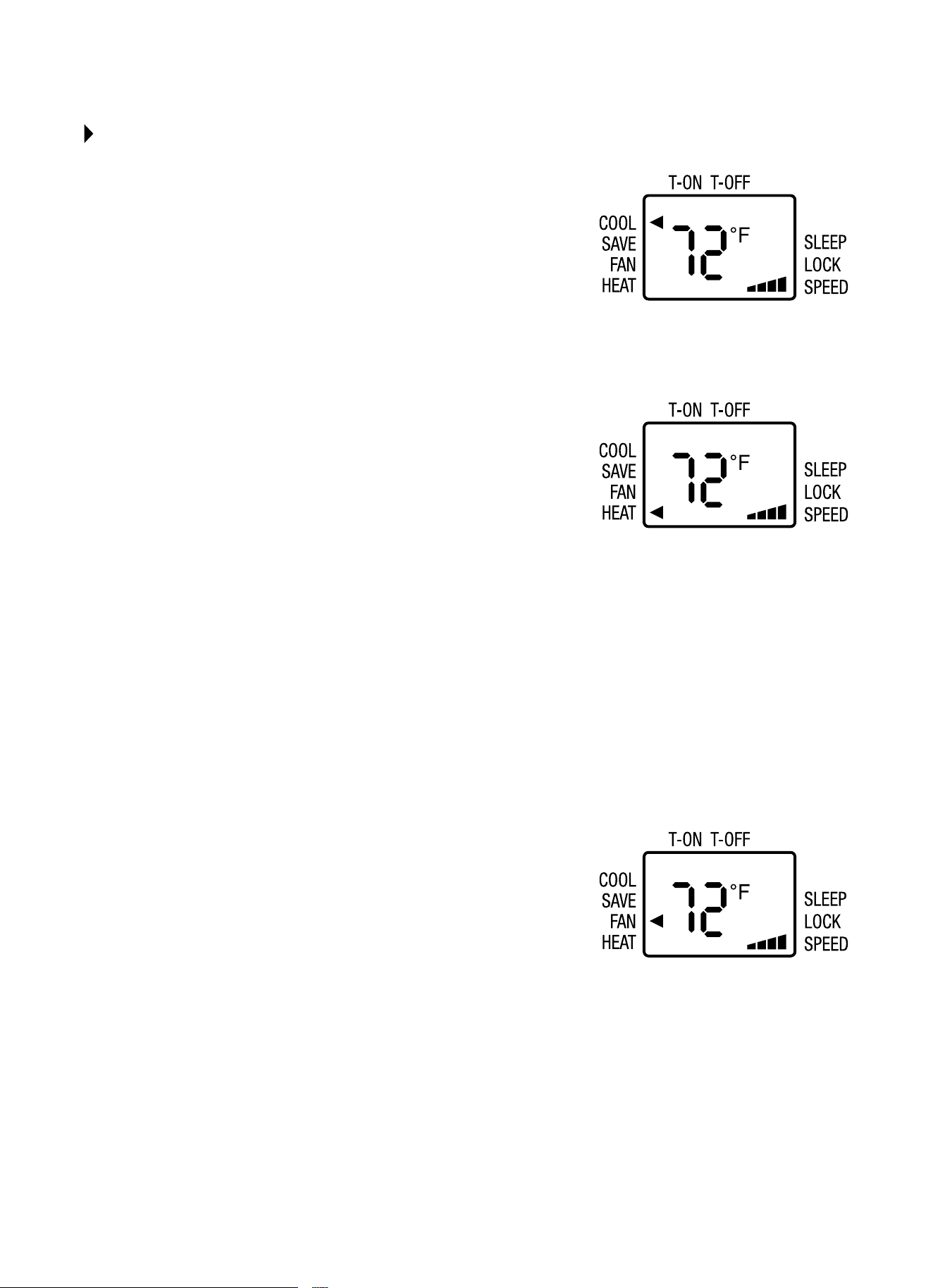
COOL Mode
• PresstheON/OFFbuttontoturntheuniton.
• PresstheMODEbuttontoselectCOOL.Anarrowwillappearnexttothis
icon to indicate that it is selected.
• Setthetemperatureusingthe–/+buttons.
• Toselectfanspeed,presstheFANbuttonuntiltherequiredspeedis
selected(LOW/MED/HIGH/AUTO).
NOTE:InCOOLmodetheunitautomaticallyremovesexcessmoisturefrom
the atmosphere.
HEAT Mode - Room Heat Pumps
Heatpumpsworkbymovingheatinsteadofcreatingit.Inthesummer,
the cool indoor coil absorbs heat from your room and moves it outdoors,
providing cooling. In the winter, heat pumps reverse this operation. By
lowering the temperature of the outdoor coil below the outdoor temperature,
the heat pump absorbs the heat from outdoors and moves it inside your
house.Thisheattransferringprocessisveryecient.Forexample,at45°F
outdoor temperature, a heat pump can provide 2½ watts of heat for every
watt of electricity it consumes.
Asoutdoortemperaturesdrop,theheatingcapacityandeciencyoftheheat
pumpdeclines.Attemperaturesbelow45°F,itislikelythaticewillformon
the outdoor coil. Heat pump units are designed to operate as a heat pump
above approximately 40°F. Below 40°F, these units switch automatically from
reversecycleheatpumptoauxiliaryelectricheating.Nodefrostisrequired.
There is no minimum operating temperature.
• PresstheON/OFFbuttontoturntheuniton.
• PresstheMODEbuttontoselectHEAT.Anarrowwillappearnexttothis
icon to indicate that it is selected.
• Setthetemperatureusingthe–/+buttons.
• Toselectfanspeed,presstheFANbuttonuntiltherequiredspeedis
selected(LOW/MED/HIGH/AUTO).
FAN Mode
• PresstheON/OFFbuttontoturntheuniton.
• PresstheMODEbuttontoselectFAN.Anarrowwillappearnexttothis
icon to indicate that it is selected.
• Toselectfanspeed,presstheFANbuttonuntilthedesiredspeedis
selected(LOW/MED/HIGH/AUTO).
• Fanspeedisindicatedbytheiconontherightsideofthescreen.
13
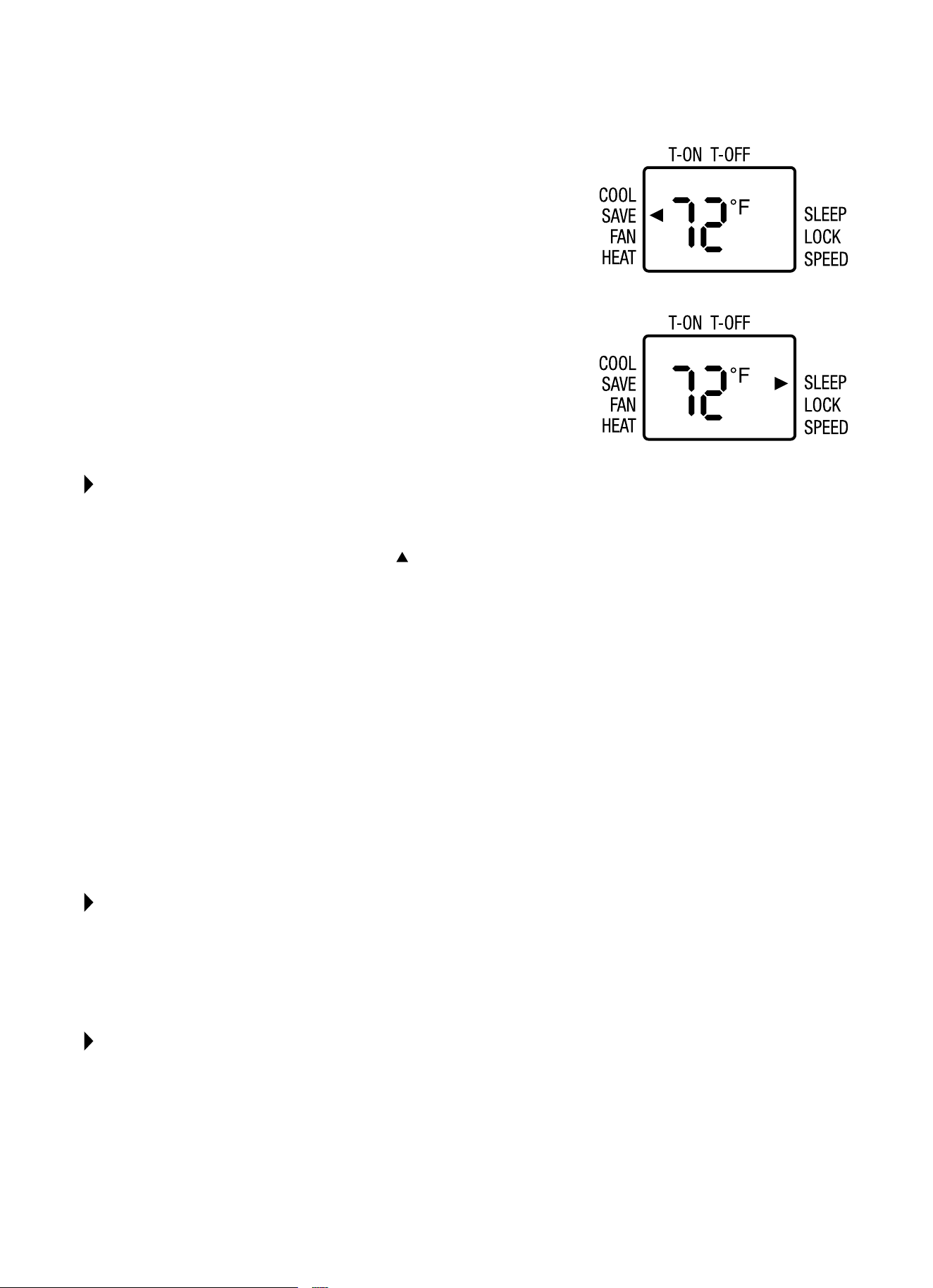
ENERGY SAVER Mode
WhiletheunitisrunningpresstheMODEbuttontoselectEnergySaver
(”SAVE”).Whenthesettemperatureisreachedthecompressorwillshuto.
Thefanwillcontinuetorun3minutesafterthecompressorshutso.Theunit
will not run for 10 minutes. After 10 minutes, the fan will run for 1 minute and
repeat the cycle. If the temperature changes the compressor will turn on until
the set temperature is reached.
SLEEP Function
The temperature setting will gradually increase to 1ºF above the original
settemperatureforeachoftherst2hours.Theunitwillkeepoperatingat
the same temperature for 6 hours, then switch to standby mode. To set
this function:
• Selecttheoperatingmode(COOL/HEAT).
• PresstheSLEEPbutton;theunitwilloperateintheselectedmode.
SETTING THE TIMER
Thetimercanbeusedtodelaystartuporshutdowntimestoavoidwastingelectricitybyoptimizingoperatingperiods.
TIMER OFF Function
1. WiththeunitOn,presstheTIMERbutton.The
isdisplayedbelowT-OFFtoindicatethatitisactiveandHwillblink
on the display.
2. Setthetimeyouwanttheunittoswitchousingthe+/–buttonswithin5seconds.
•Youcanselect30minuteintervalsfrom30minutesto24hours.
3. PresstheTIMERbuttonagaintoconrmthesetting.TheTIMERlightonthecontrolpanelwillbeactivated.
•Attheendofthesettime,theapplianceswitchesOautomatically.
•TocanceltheTIMERsetting,presstheTIMERbuttonagainatanypointduringthesettime.
TIMER ON Function
1. Withtheuniton,setoperatingmode,temperatureandfanspeedbeforesettingTimerOnfunction.
2. PressON/OFFbuttontoswitchintoSTANDBY.
3. PresstheTIMERbuttontwice;theT-ONiconwillbeactive.
4. Setthetimeyouwanttheunittoswitchousingthe+/–buttonswithin5seconds.
•Youcanselect30minuteintervalsfrom30minutesto24hours.
5. PresstheTIMERbuttonagaintoconrmthesetting.Thetimericonwillbeactive.
•AttheendofthesettimetheunitswitchesOnautomatically.
•TocanceltheTIMERsetting,presstheTIMERbuttonagainatanypointduringthesettime.
CHILD LOCK FUNCTION
Pressingthe“+”and“–”buttonssimultaneouslyturnsthechildlockfunctionOnorO.Whenchildlockfunctionis
started,theLOCKindicatorontheremotecontrolisOn.Ifyouoperatetheremotecontrol,theremotecontrolwon’tsend
a signal.
TEMPERATURE DISPLAY SWITCHOVER FUNCTION
UnderOstatus,pressthe“–”and“MODE”buttonssimultaneouslytoswitchbetween°Cand°F.
14
CARE AND CLEANING
CAUTION
Cleanairconditioneroccasionallytokeepitlookingandoperatinglikenew.
Be sure to unplug the unit before cleaning to prevent shock or fire hazards.
NOTE: Iftheairlterscreenisblockedbydust,theperformanceoftheunitwillbeaected,theunitwillbelouderthan
normal,andpowerconsumptionwillincrease.Therefore,periodiccleaningoftheairlterscreenisnecessary.
NOTE: The life of your unit may be greatly reduced if you live in a salty air or other corrosive type environment. Under
these conditions, the unit should be removed from its case and completely cleaned at least once a year. At that time, any
scratches or blisters on the painted surfaces should be sanded and repainted. Placing an algaecide tablet in the outdoor
side of the unit’s base pan is suggested in humid areas where algae formation is common.
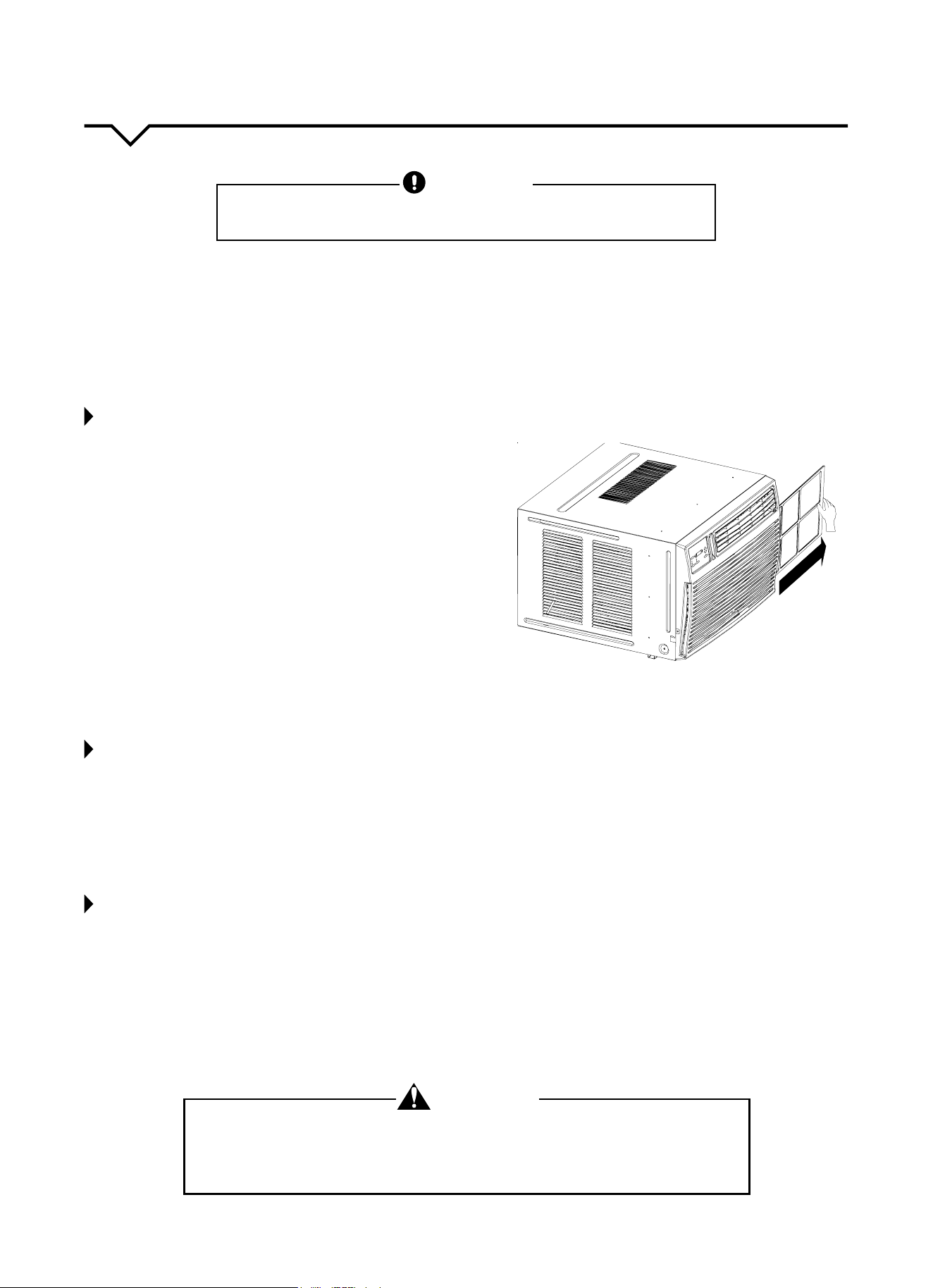
CLEANING THE AIR FILTER
Cleantheairlterscreenthroughouttheoperationalseason.It
isrecommendedthattheairlterscreenbecleanedonceevery
twoweeksusingthemethodbelow:
1.Grasplterhandleandslidelteroutofunit.
2.Cleantheairlterscreen.Iftheairlterscreenisverydirty,
youmayuselukewarmwater(about86ºF/30ºC)tocleanit.
Allow it to completely air dry before returning it to the unit.
NOTE: DO NOTuseboilingwatertocleanthescreen;DO NOT
pull or push on the screen with too much force.
3.Installtheairlterscreen.Slidetheairlterbackintogrille.If
theairconditionerisoperatedwithoutanairlterscreen,the
interior of the unit will be contaminated with dirt which may
cause performance failure or damage to parts.
4. Clean the air conditioner.
•Useasoft,dryclothtowipetheairconditioneroruseavacuumcleanertodothecleaning.
•Iftheairconditionerisverydirty,youmayuseaclothsoakedwithmildhouseholddetergenttodothecleaning.
BEFORE THE SEASON
1. Checktoseeifanythingisblockingtheairinletandfrontgrille.
2. Ensure the bottom of the unit is not corroded or rusty.
3. Ensure the plug is not damaged.
4. Cleantheairlter.
5. Connecttoanappropriateoutletwithsucientpower.Seeproductstickerforinformation.
6. Load fresh batteries into the remote control.
AFTER THE SEASON
1. Pressthepowerbutton.Setthetemperatureto86ºF(30ºC)andletthemachineruninCOOLmodeforhalfaday.
Makesureanysignsofcondensationontheoutsideoftheunitarewipedowithasoft,dry,cleancloth.
2. Turnotheunit.Unplugtheunitduringnon-operationalseasonstosaveenergyandforsafetyreasons.
3. Cleantheairlterscreenandinstallitbackinplace.
4. Clean the unit.
•Useasoft,dryclothtowipetheairconditioneroruseavacuumcleanertodothecleaning.
•Iftheairconditionerisverydirty,youmayuseaclothsoakedwithmildhouseholddetergenttodothecleaning.
5. Remove the batteries from the remote control.
Set
-
1-24 HR
TIMER
HIGH
O
W
MED
AN
L
AUT
POWE
O
R
SPE
F
ED
MODE
F ONLA
N
Y
SAV
ER
C
ENERGY
OOL
HEAT
TEMP/
+
TIMER
WARNING
EXCESSIVE WEIGHT HAZARD!
Toreducetheriskofpersonalinjury,weadviseyouhavetheassistanceof2ormore
individuals while moving and installing the air conditioner. Failure to do so can result in
backorotherinjuries.Aroomairconditionercanweighbetween70–240lbs.
15
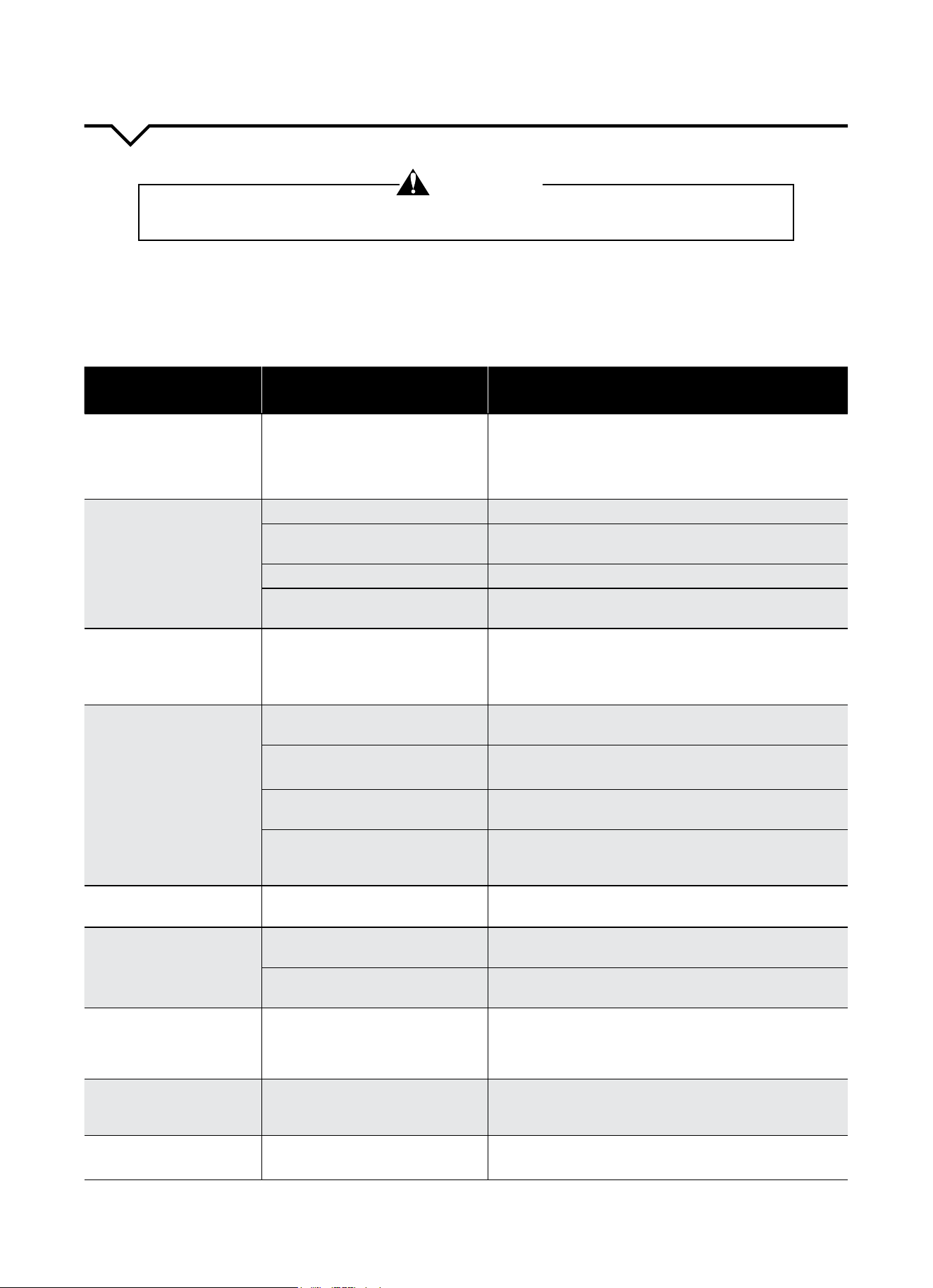
The following is a list of problems that are sometimes encountered when using a room air conditioner. Possible cause
andsuggestedremediesaregivenforeachproblem.Iftheproblemcannotbexedusingthesuggestedremedies,see
WHEN ASSISTANCE IS REQUIRED section on the next page.
TROUBLESHOOTING
BEFORE CALLING FOR SERVICE, PLEASE REVIEW THE CHART BELOW
ISSUE POSSIBLE CAUSES POSSIBLE SOLUTIONS
UNIT WILL NOT RUN
•No power to unit
•Push reset button on power cord.
•SetFanControltopositionotherthanOFF.
•Makesureplugisrmlyseatedinoutlet.
•Checkforblownfuses,trippedcircuitbreakers.
LITTLE/NO COOLING
LITTLE/NO HEATING
(fan and compressor run)
•Freshair/exhaustdamperopen •SetventtoCLOSED.
•Obstructedindooror
outdoorairow
•Remove obstruction from indoor grille or
outdoor louvers.
•Dirtyairlters •Dirtyairlter.Cleanorreplace,asneeded.
•Unitundersizedforapplication
•Checkwithdealertodeterminepropercapacityunit
for application.
LITTLE/NO COOLING
LITTLE/NO HEATING
(only fan runs)
•Temperature Control not set
properly
•For cooling, turn Temperature Control to
cooler setting.
•For heating, turn Temperature Control to
warmer setting.
NOISY UNIT
•Loose front on
mounting assembly
•Tighten any loose parts.
•Weakbuildingconstruction
•Provide additional support for unit.
•Water hitting fan blade
•Normal in high humidity. Stop noise by removing
drain plug or adding condensate drain cup.
•Unitoversizedforapplication;
compressor cycles on and
ofrequently
•Checkwithdealertodeterminepropercapacityunit
for application.
MOUNTING SUPPORT NOT
INSTALLED
•Storm window frame installed
in window
•Somemodelsrequireremovalofstormwindowframe
before installation.
FROST ON INDOOR COIL
•Dirtyairlter
•Cleanairlterbyvacuumingorwashingwithwater&
mild soap.
•Normal for low outdoor
temperatures
•Turning Temperature Control to warmer setting
reduces occurrence and duration of frost.
FROST ON OUTDOOR COIL
(heat pump)
•Normal for outdoor
temperatures at or below 45°
•Call Consumer Services at 844-472-2473 only if
unitdoesnotheatroomandyouhavechecked
all problems and remedies listed under “Little or
No Heating.”
ODORS IN COOLING
•Mold, mildew, or algae
formation on wet surfaces
•To reduce algae growth, use algaecide tablet in base
pan;removedrainplug;addcondensatedraincup
and hose. Thoroughly clean unit.
ODORS IN HEATING
•Normalforrsttimeheateris
used each season
•Caused by dust accumulation during unused months.
•Odordissipatesquicklywithheateruse.
WARNING
Toreducetheriskofelectricshock,personalinjury,ordeath,turnthefancontroltotheOFF position
andremovetheunitplugfromthewalloutletbeforedoinganyinspectionormaintenancework
16
The design and specifications are subject to change without prior notice for
product improvement. Consult with the sales agency or manufacturer for details.
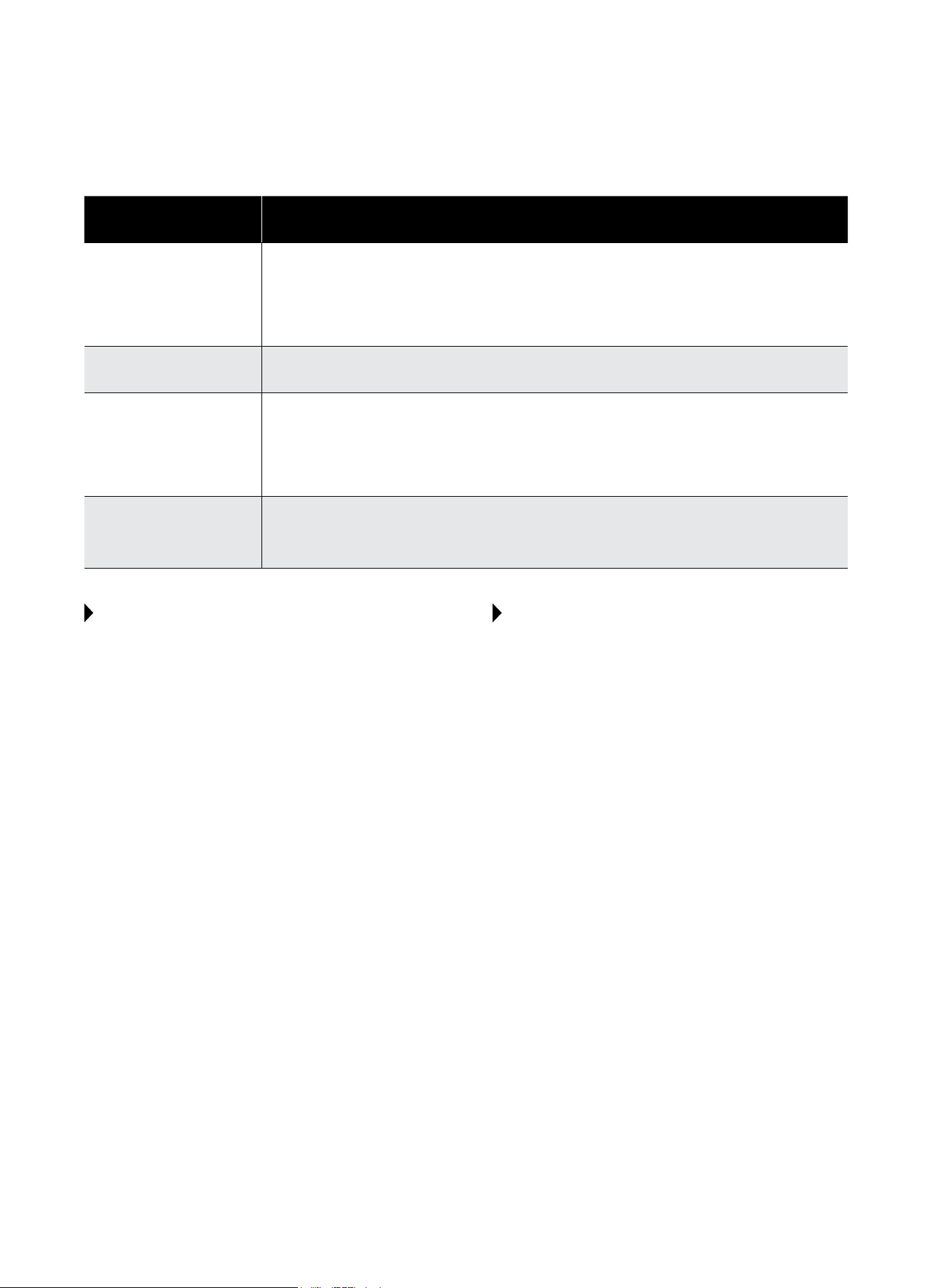
BEFORE CALLING FOR SERVICE, PLEASE REVIEW THE CHART BELOW
ISSUE POSSIBLE CAUSES
WATER PUDDLES INSIDE
UNIT OR IS COMING
INTO ROOM
•Adjustslopeofunitsoitdrainsdownwardtowardtheexteriorofthehome.
(Seeinstallationinstructions.)
•Makesurethatthereisnodebrisblockingthedrainageareaoftheunit.
•If the air conditioner operates in high humidity for a long time, moisture may be
condensedandappearattheairoutlets(louvers).
WATER DRIPPING OUTSIDE
•Unitisremovingalargequantityofmoisturefromahumidroom.Thisisnormalduring
excessively humid days.
NO REMOTE CONTROL
SIGNAL IS RECEIVED
•When the signal receiver on the air conditioner is exposed to sunlight or strong lights, it
mayfailtoreceivetheremotecontrolsignal.Shadeothesunlightordimthelighting.
•Ensurenothingisblockingthepathbetweentheremotecontrolandthesignalreceiver
on the unit.
•Checkthebatteriesintheremote.
UNIT BLOWS FUSES OR
POPS CIRCUIT BREAKER
•Makesurethereareenoughavailableampsonthecircuitfortheairconditioner.
•Largeunitswhichrunona230Vwillrequireadedicated20or30ampcircuit.
•Adedicatedpoweroutletisrequiredforallairconditioners.
ANY QUESTIONS?
Mostquestionscanbeansweredbyfollowingthe
troubleshooting tips included in this manual. If you have
other matters that cannot be resolved locally or you
need additional information regarding other cooling and
heatingproductsoeredbyPerfectAire,pleasecall:
CONSUMERSERVICES
Tel:844-4PA-AIRE(844-472-2473)
Website: www.perfectaire.us
WHEN ASSISTANCE IS REQUIRED
Help us give you prompt service by providing:
• Anaccuratedescriptionofproblem
• Completemodel,serial,andmanufacturingnumbers
fromproductsticker
• Proofofpurchase(salesreceipt)uponrequest
Repairbyunauthorizedservicerthatresultsin
subsequentfailureofunitvoidswarranty.Warranty
detailsarecontainedinwarrantycerticateenclosed
with unit. Keep accurate records of service calls,
including what was done, servicer's name, and date
of service.

Distributed by:
Perfect Aire, LLC
5401 Dansher Rd.
Countryside, IL 60525
844-4PA-AIRE | 844-472-2473
www.perfectaire.us
WINDOW
AIR CONDITIONER
FOR MODEL:
2PAHP12002
WITH HEAT PUMP
Before using your air conditioner, please
read this manual carefully and keep it for
future reference, along with your receipt.
Specification and performance data is subject to change without notice.
Printed in China
PA/User_2PAHP12002/11212017
USER MANUAL