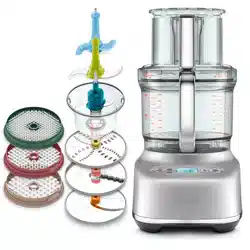
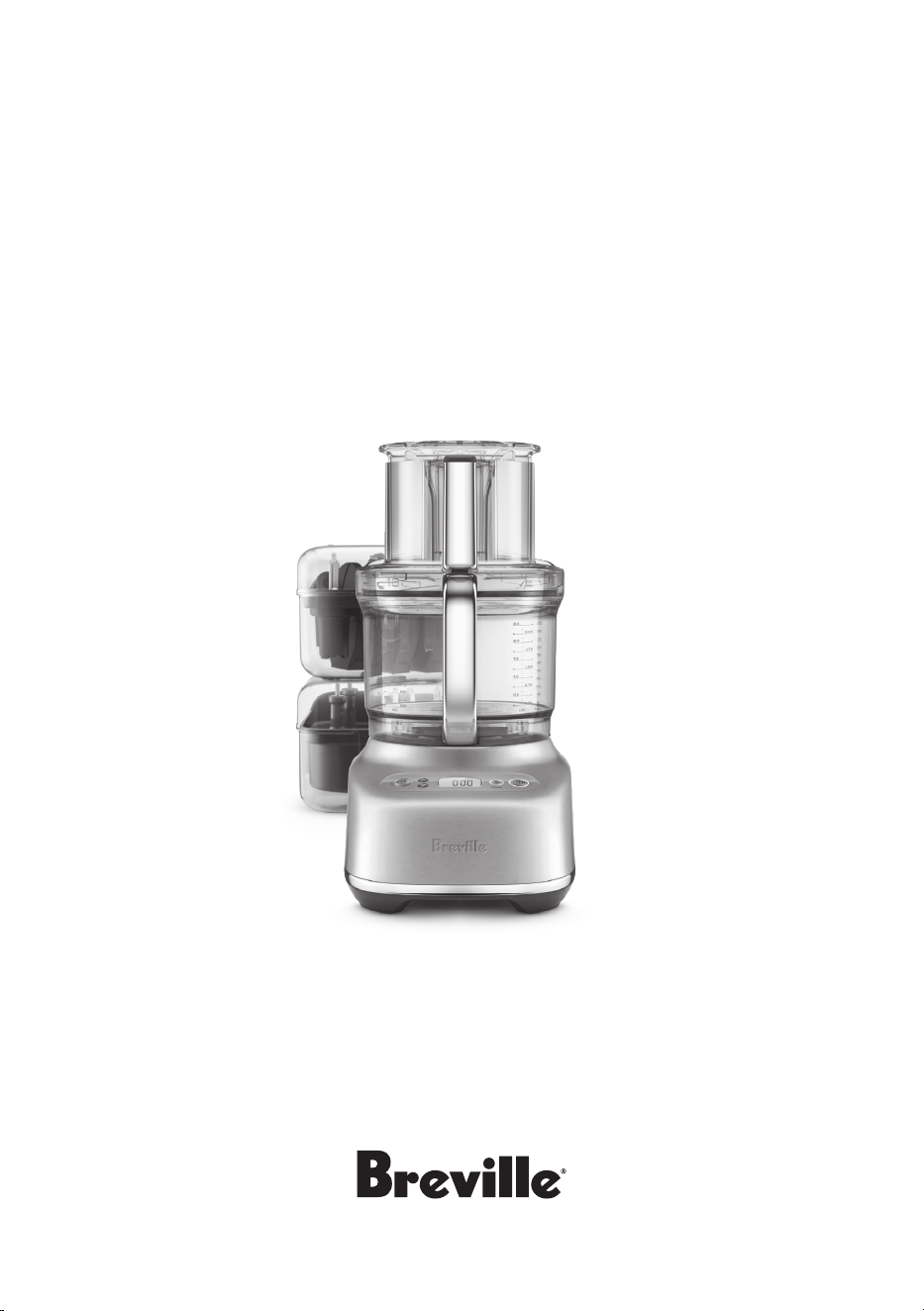
Instruction Book - BFP838
the Paradice
™
16

2
2 Breville recommends safety first
8 Components
11 Assembly
16 Functions
18 Tips
20 Care & Cleaning
22 Troubleshooting
Contents
BREVILLE
RECOMMENDS
SAFETY FIRST
At Breville we are very safety
conscious. We design and
manufacture consumer
products with the safety of you,
our valued customer, foremost
in mind. In addition we ask
that you exercise a degree of
care when using any electrical
appliance and adhere to the
following precautions.
IMPORTANT
SAFEGUARDS
READ ALL INSTRUCTIONS
BEFORE USE AND SAVE FOR
FUTURE REFERENCE
• Remove and safely discard
any packaging materials
and promotional labels
before using the appliance
for the first time.
• To eliminate a choking
hazard for young children,
remove and safely discard
the protective cover fitted
to the power plug of this
appliance.
• Do not place the
appliance near the edge
of abenchtop or table
during operation. Ensure
the surface is level, clean
and free of water. Vibration
during operation may
cause the appliance
to move during use.
• Do not use the appliance
on slippery, unstable or
uneven surfaces such as a
sink drain board.
• Do not place the appliance
on or near a hot gas or

3
electric burner, or where
it could touch any other
source of heat.
• Always make sure
the food processor is
completely assembled
before operating. The
appliance will not
operate unless properly
assembled.
• Ensure the appliance
is switched OFF, and
unplugged from the
power outlet before
attaching any accessories,
including any blades
or discs.
• Handle the food processor
and attachments with
care. Blades, cutting disc,
and dicing grids are razor
sharp and should be kept
out of reach from children.
• Always secure the
processing bowl onto
the motor base before
attaching the blades or
discs.
• Do not allow the power
cord to hang over the
edge of a table or counter,
touch hot surfaces or
become knotted. Unwind
the power cord fully
before use.
• Keep hands, hair, clothing,
spatulas and other utensils
away from moving blades
or discs while processing
food, to prevent the
possibility of severe
personal injury or damage
to the food processor. A
plastic spatula may be
used, but only when the
food processor isstopped.
• Ensure the appliance
motor is o and unplug
the power cord from the
outlet before removing the
lid from the processing
bowl.
• Avoid contact with
moving parts. Never push
food down by hand when
slicing or shredding.
Always use the food
pusher to push the food
down the feed chute.
• Do not fill the processing
bowl above the marked
maximum fill line for each
type of the ingredients.
Always add drier or

4
thicker ingredients to the
processing bowl prior to
adding fluids. Failing to
follow this instruction
may cause product
malfunction, product
damage or personal injury
due to damage to the
cover or bowl.
• Never store any blade or
disc on motor shaft.
Toreduce the risk of injury,
never place cutting blade
or discs on the shaft
without first putting bowl
properly in place. Store
blades and discs, as you
would sharp knives, out
of reach of children in the
storage box provided.
• Be sure lid is securely
locked in place before
operating food processor.
• Never try to override or
tamper with lid interlock
mechanism.
• Always remove the plug
from the power outlet if
the appliance is not in use,
before attempting to move
the appliance, before
cleaning, disassembling,
assembling and when
storing the appliance.
• Some sti mixtures, such
as dough, may cause the
processing blade to rotate
more slowly than normal.
If this happens, do not
process for longer than
1 minute.
• Do not process hot or
boiling liquids – allow to
cool to room temperature
before placing into the
processing bowl. Hot
liquid can be ejected to
cause injury due to sudden
steaming.
• Do not move appliance
while in operation.
• Do not place any part
ofthe food processor in
amicrowave oven.
• Never remove the lid while
the appliance is operating.
Always use the POWER
or PAUSE buttons to stop
the machine before lid
removal.
• Care should be taken
when removing the food

5
from the processing
bowl by ensuring the
motor and blade / disc
has completely stopped
before disassembling.
Ensure the POWER
button has been pressed
to switch the motor o
and unplug the power
cord from the power outlet
before removing the lid
from the processing bowl.
The processing bowl
should then be unlocked
from the motor body and
the blade / disc should be
carefully removed before
attempting to remove the
processed food.
• Do not use harsh abrasive,
caustic cleaners when
cleaning the appliance.
• Keep the appliance
clean. Strictly follow
the care and cleaning
instructions described
in this book. To avoid
possible malfunction of
bowl switch, never store
the food processor with
pusher assembly in
locked position.
• This appliance is for
household use only. Do
not use this appliance
for anything other than
its intended use. Do not
use in moving vehicles
or boats. Do not use
outdoors. Misuse may
cause injury.
• The use of attachments
not sold or recommended
by Breville may cause fire,
electric shock or injury.
• Do not leave the appliance
unattended when in use.
• The appliance can be
used by children aged 8
or older and persons with
reduced physical, sensory
or mental capabilities
or a lack of experience
and knowledge, only if
they have been given
supervision or instruction
concerning use of the
appliance in a safe way
and understand the
hazards involved.
• Children should not play
with the appliance.
• Cleaning and user
maintenance of the

6
appliance should not be
carried out by children
unless they are 8 years
or older and under adult
supervision.
• The appliance and its cord
should be kept out
of reach of children aged
8 years and younger.
• Any maintenance other
than cleaning should
be performed at an
authorised Breville
Service Centre, or contact
the Breville Customer
Care Centre by phone on
1300 273 845 or email
AskUs@breville.com.au
• For safety reasons it is
recommended you plug
your Breville appliance
directly into its own
electrical outlet on a
dedicated circuit separate
from other appliances.
If the electric circuit is
overloaded with other
appliances, your appliance
may not function properly.
• It is recommended to
regularly inspect the
appliance. Do not use the
appliance if power supply
cord, plug or appliance
becomes damaged in
any way. Return the
entire appliance to
the nearest authorised
Breville Service Centre
for examination and/or
repair.
• In order to avoid a hazard
due to inadvertent
resetting of the thermal
cut-out, this appliance
must not be supplied
through an external
switching device, such as
a timer, or connected to
a circuit that is regularly
switched on and o by
the utility.
• The installation of
a residual current
device (safety switch)
is recommended to
provide additional safety
protection when using
electrical appliances.
It is advisable that a
safety switch with a
rated residual operating

7
current not exceeding
30mA be installed in
the electrical circuit
supplying the appliance.
See your electrician for
professional advice.
WARNING
To avoid possible
malfunction of the
processing bowl’s auto
switch, do not place the
processing lid in the
locked position when the
appliance is not in use.
To protect against
electric shock, do not
immerse the power cord,
power plug or appliance
in water or any other liquid.
The symbol shown
indicates that this
appliance should not
be disposed of in normal
household waste. It should
be taken to a local
authority waste collection
centre designated for this
purpose or to a dealer
providing this service.
For more information,
please contact your local
council oce.
FOR HOUSEHOLD USE ONLY
SAVE THESE INSTRUCTIONS
8
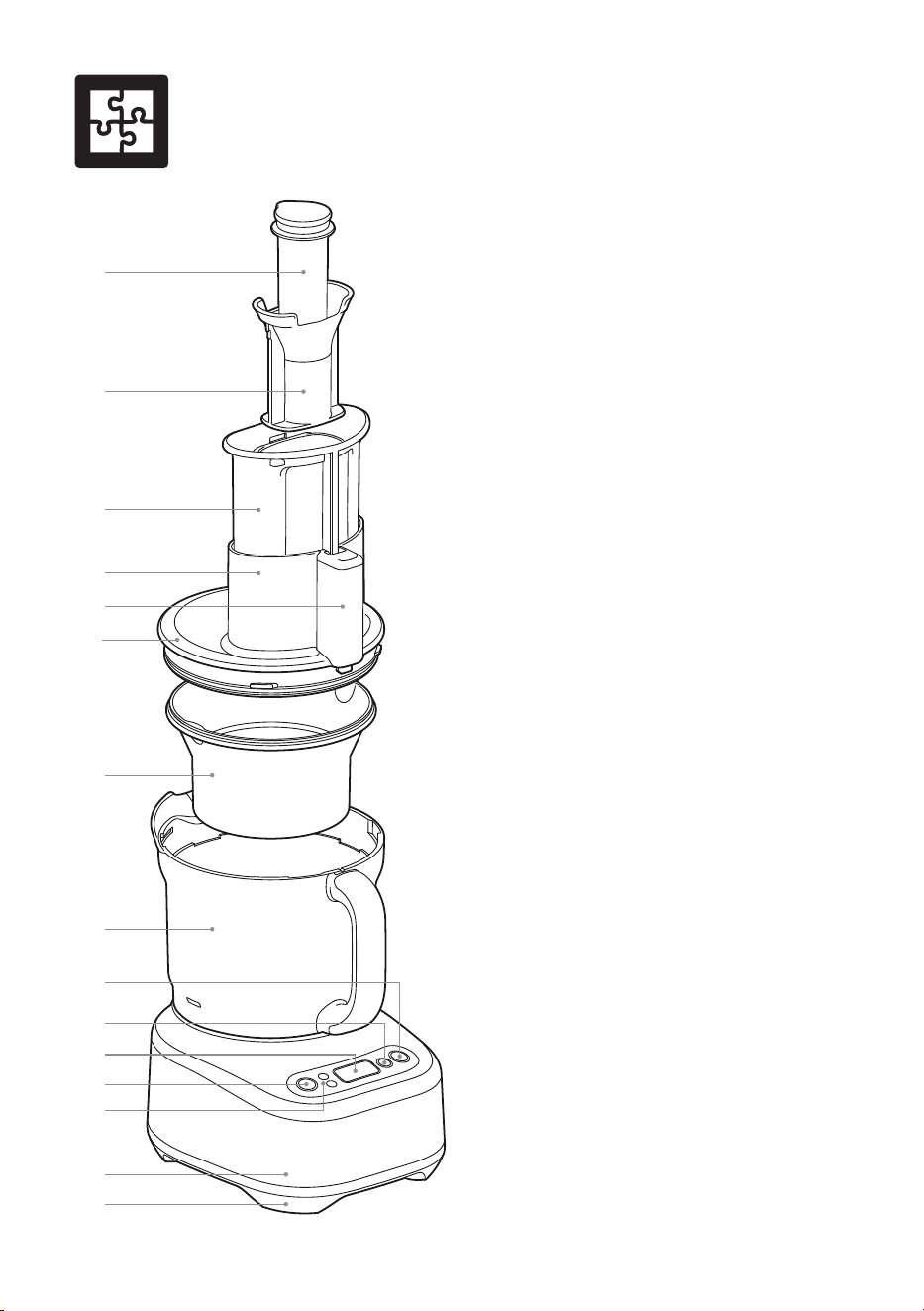
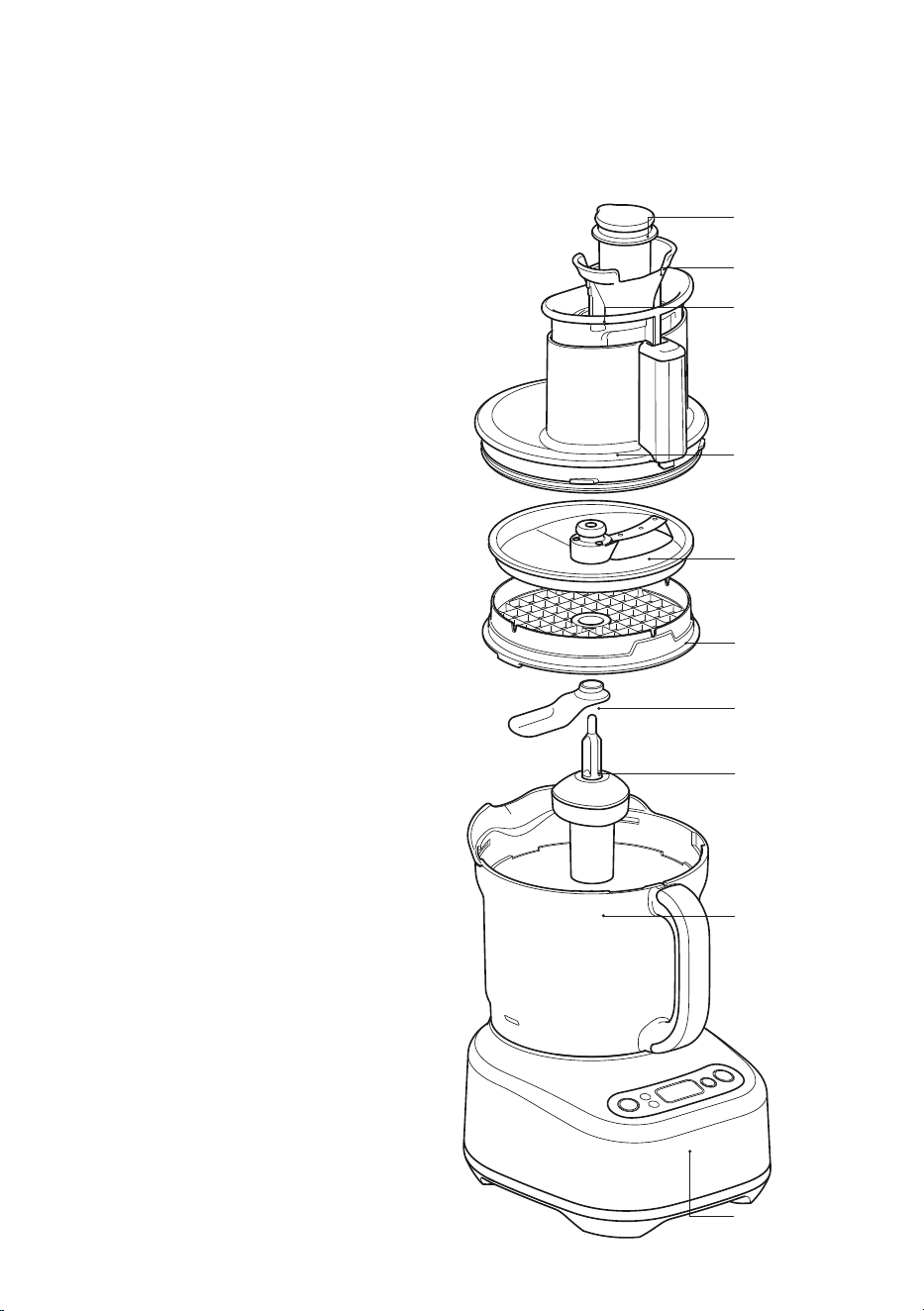
Components
A. Small food pusher
For improved processing control of
smaller ingredients. It also doubles as
a measuring cup. The food processor will
run continually whether the small pusher
is in or out.
B. Medium pusher
The food processor will run continually
whether the medium pusher is in or out.
C. Large food pusher
For pushing food down the feed chute.
Thefood processor will not start unless
thelarge pusher is correctly in place.
D. Extra wide 14cm chute
For larger ingredients.
E. Feed chute safety system
Prevents the motor from operating unless
the bowl and lid are correctly locked in
position, and large feed pusher is inserted.
F. Processing Lid with silicone seal
Locks onto the processing bowl.
G. Mini bowl with silicone seal
H. Main bowl with handle
The bowl locks onto the motor base.
I. PLAY | PAUSE button
Press to start and pause operation of
the motor.
J. PULSE button
Press down and hold briefly for short bursts
of power. The motor will automatically stop
after the PULSE button has been released.
K. Screen display
Displays the timer.
L. POWER button
M. Count up & count down timer
Used to set desired time required for
processing. Can count up or down, stopping
the processor once the time is reached
incount down mode.
N. Powerful induction motor base
Induction motor with safety braking system.
O. Non-skid rubber feet
For added safety and stability.
A
B
C
D
E
F
G
I
J
K
H
N
O
L
M
9
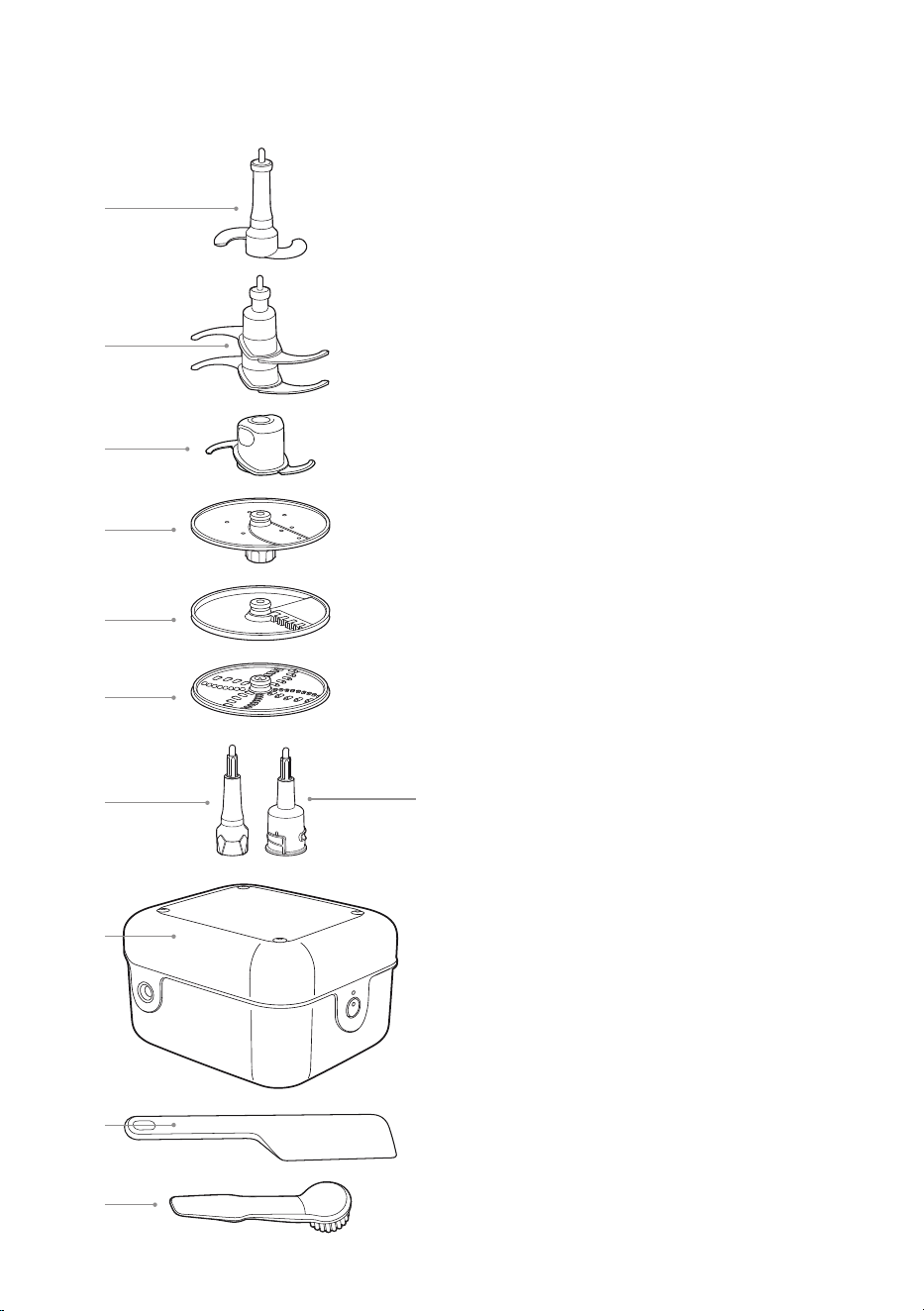
1. Dough Blade
Soft material blade for kneading dough.
2. Quad® Blade™
Swift action for even chopping, mixing,
whipping and processing a variety
of ingredients.
3. Mini Processing Blade
Attach to the mini spindle and use this
blade for small quantities with the mini
bowl for chopping, mixing and blending
a variety of ingredients.
4. Adjustable Slicer
Use this disc for slicing ingredients.
Ableto slice from 1 / 8in – 5 / 16in
(0.3mm – 8.0mm) thick.
5. French Fries Cutter
Use this disc to cut ingredients into
French fry shape.
6. Reversible Shredder
Use one side of this disc for fine shred-
ding and the other side for coarse
shredding.
7. Main Spindle
Attaches to the main bowl and drives
the Reversible shredder, the French fries
cutter or Adjustable slicer.
8. Mini Spindle
Drives the same accessories as the Main
spindle but it is used with the Mini bowl
to process fewer quantities.
9. Storage Box
To store all accessories.
10. Plastic Spatula
To scrape ingredients from the sides of
bowls (both the main and mini bowls).
11. Cleaning Brush
To aid with cleaning bowls, blades, discs
and other attachments.
Box 1
1
2
3
4
5
7
8
9
10
11
6
10
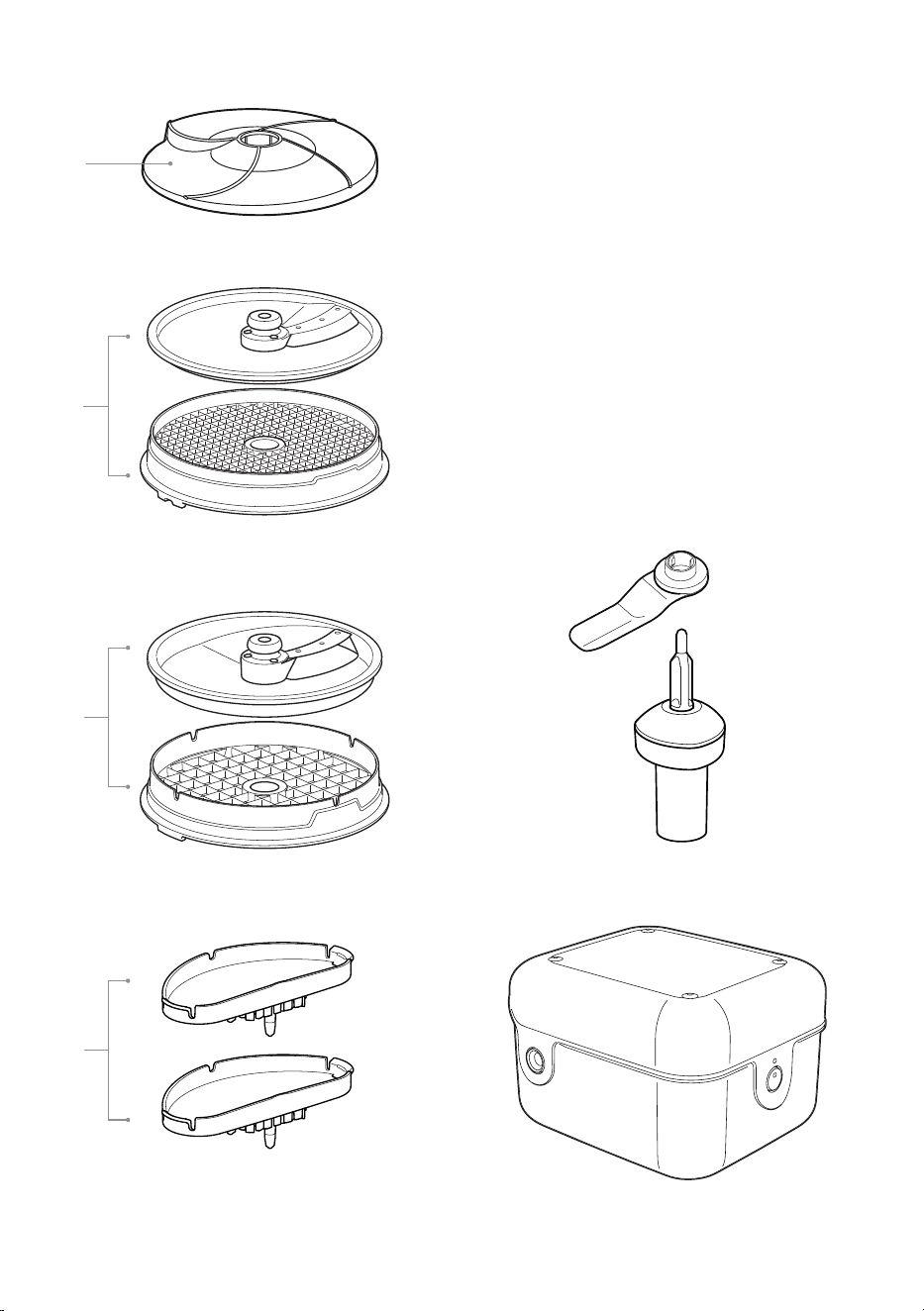
Box 2 - The Dicing Kit:
1. Peeler
Peels potatoes and other round, firm
produce.
2. 8mm Dicing Disc and Dicing Grid
3. 16mm Dicing Disc and Dicing Grid
4. 2 cleanings caps - 8mm, and 16mm to be
attached to large pusher
5. Dicing Distributor
6. Dicing gearbox
7. Storage Box
5
6
7
3
2
4
1
11
Assembly
ASSEMBLY
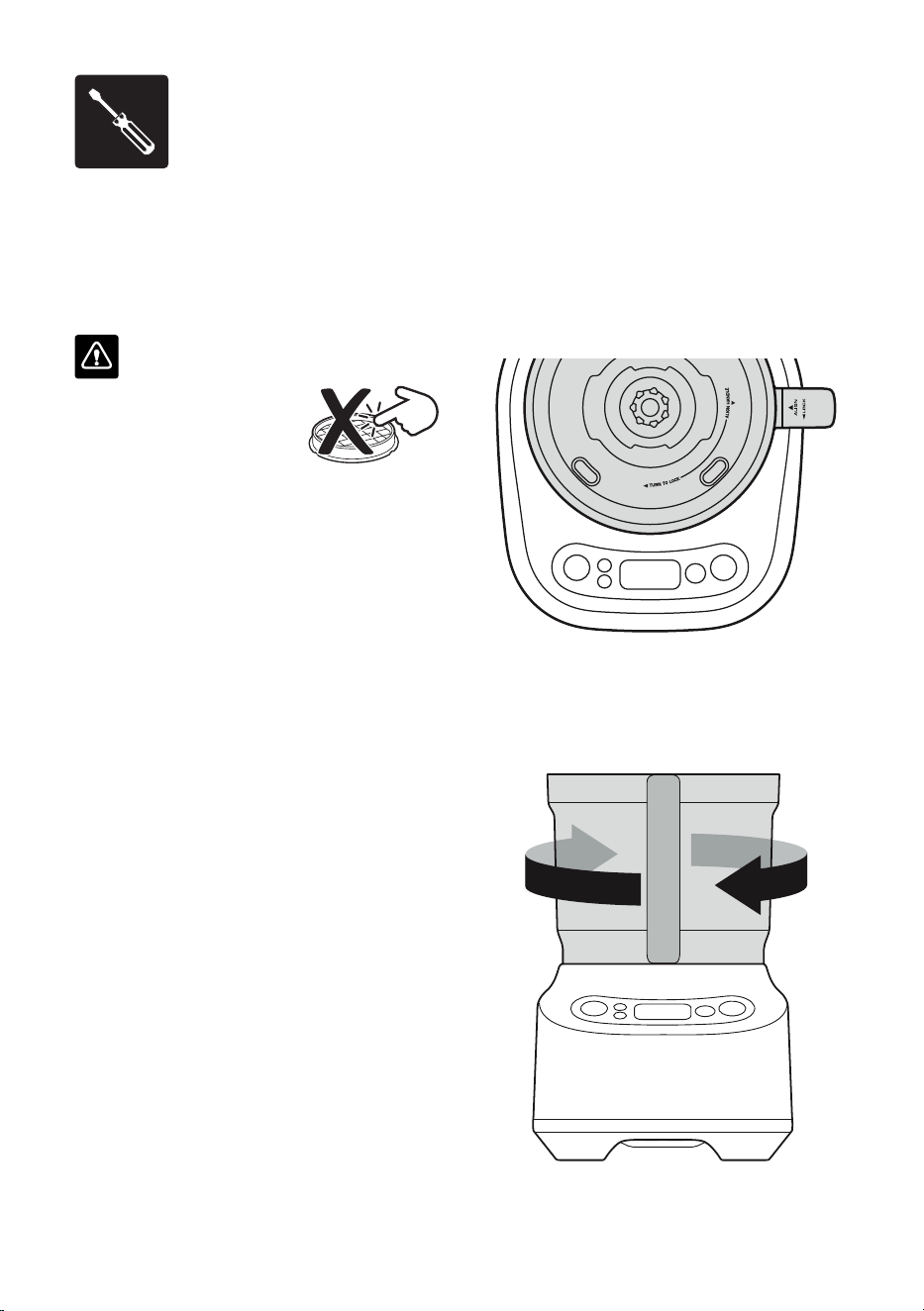
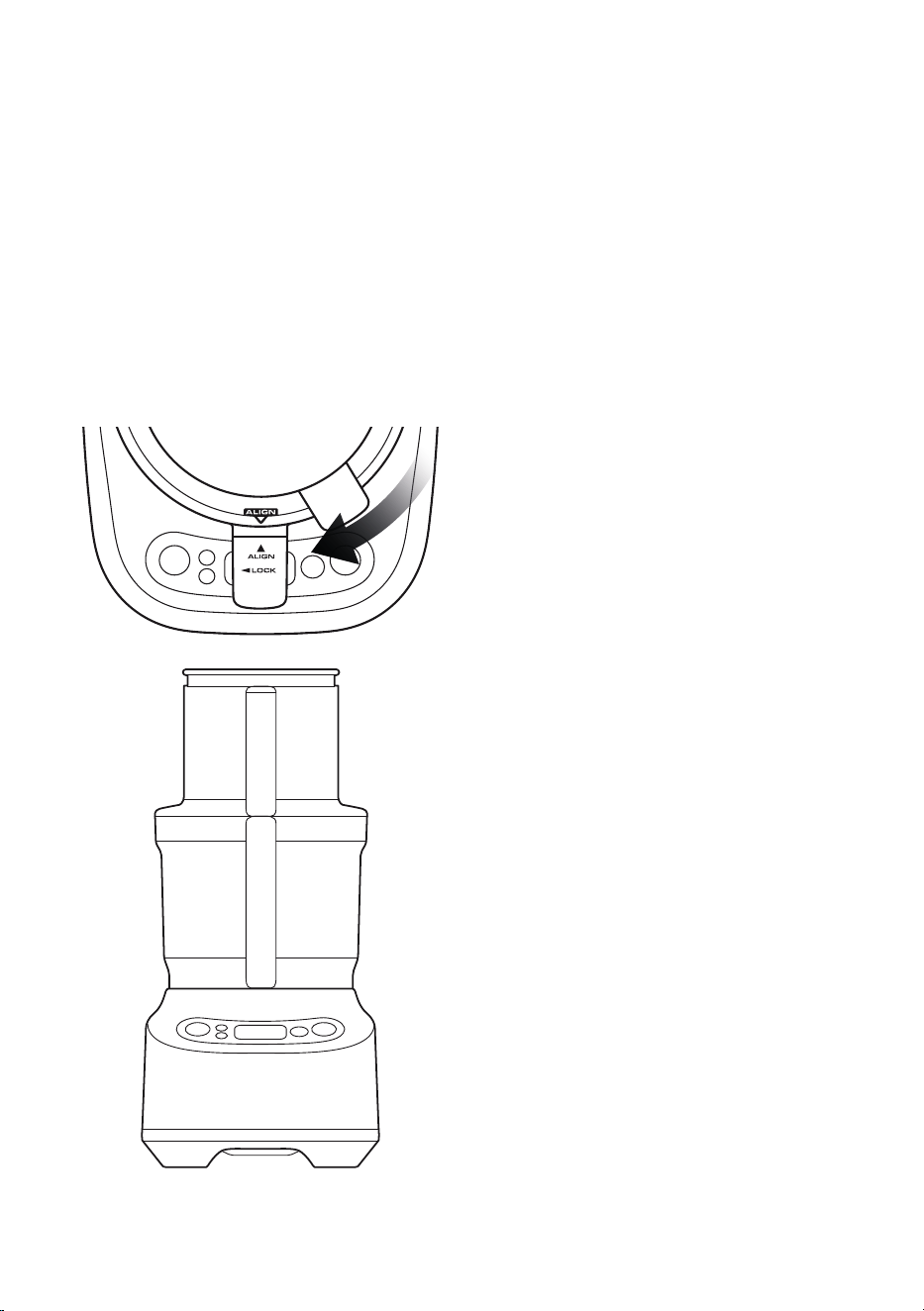
Motor Base and Bowl
1. Position the processing bowl onto the motor
base with the handle in line with the ALIGN
HANDLE graphic on the motor base.
2. Turn the bowl clockwise until the handle
locks to the front. The processing bowl
should now be securely locked into position.
The food processor will not operate unless
the bowl is locked into position correctly.
BEFORE FIRST USE
• Before using your food processor for the
first time, remove any packaging material
and promotional labels. Ensure food
processor is unplugged.
WARNING
Be careful when handling
the blades, grids, and discs
as they are extremely sharp.
• Wash the processing bowl, processing lid
and all attachments in warm soapy water
with a soft cloth. Rinse and dry thoroughly.
All attachments except the dicing gearbox
may be washed in the dishwasher.
• When first using your food processor,
you may notice an odor coming from the
motor. This is normal and will dissipate
with use.
• Always use the food processor on a dry,
level work surface.
12
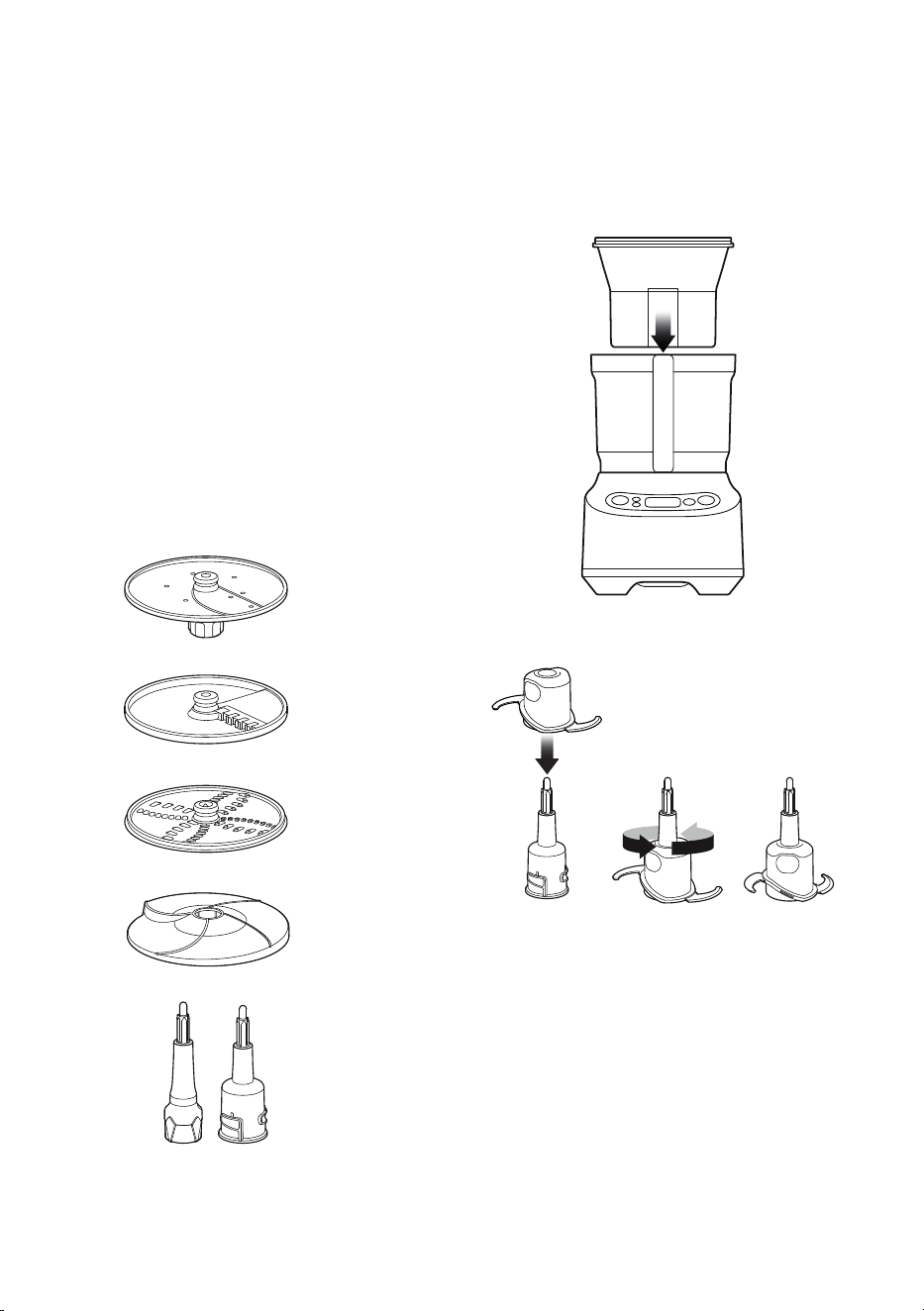
Spindles and Discs
1. Before placing the lid onto the Main bowl,
choose the spindle suited for either the Main
bowl or Mini bowl.
2. Insert the spindle onto the center of the
bowl.
3. Then, carefully attach the disc
accessory onto the metal tip of the
spindle. The disc should sit flat on the
spindle. Adjustable slicer, french fries &
reversible shredder disc will will work
on both main and mini spindles. The
peeler only works on the main spindle.
Adjustable slicer
French fries cutter
Reversible shredder
Main and mini
spindles
Mini Processing Bowl
The mini processing bowl fits inside the main
bowl.
Use the mini-spindle with the mini-bowl.
Themini-blade and disc accessories can be
used with the mini-spindle. Please note that
the mini blade cannot be used in the main
processing bowl and the S-Blade cannot be
used in the mini-bowl.
Peeler
13
Lid
Place lid onto the processing bowl so that
the ALIGN | LOCK graphics on the lid and
handle align. To LOCK the lid, hold the chute
and turn clockwise so that the handle parts
align. Locking the lid correctly will engage the
interlocking safety catch on the handle, and
when the large pusher is in position, it will
allow the motor to run.
14
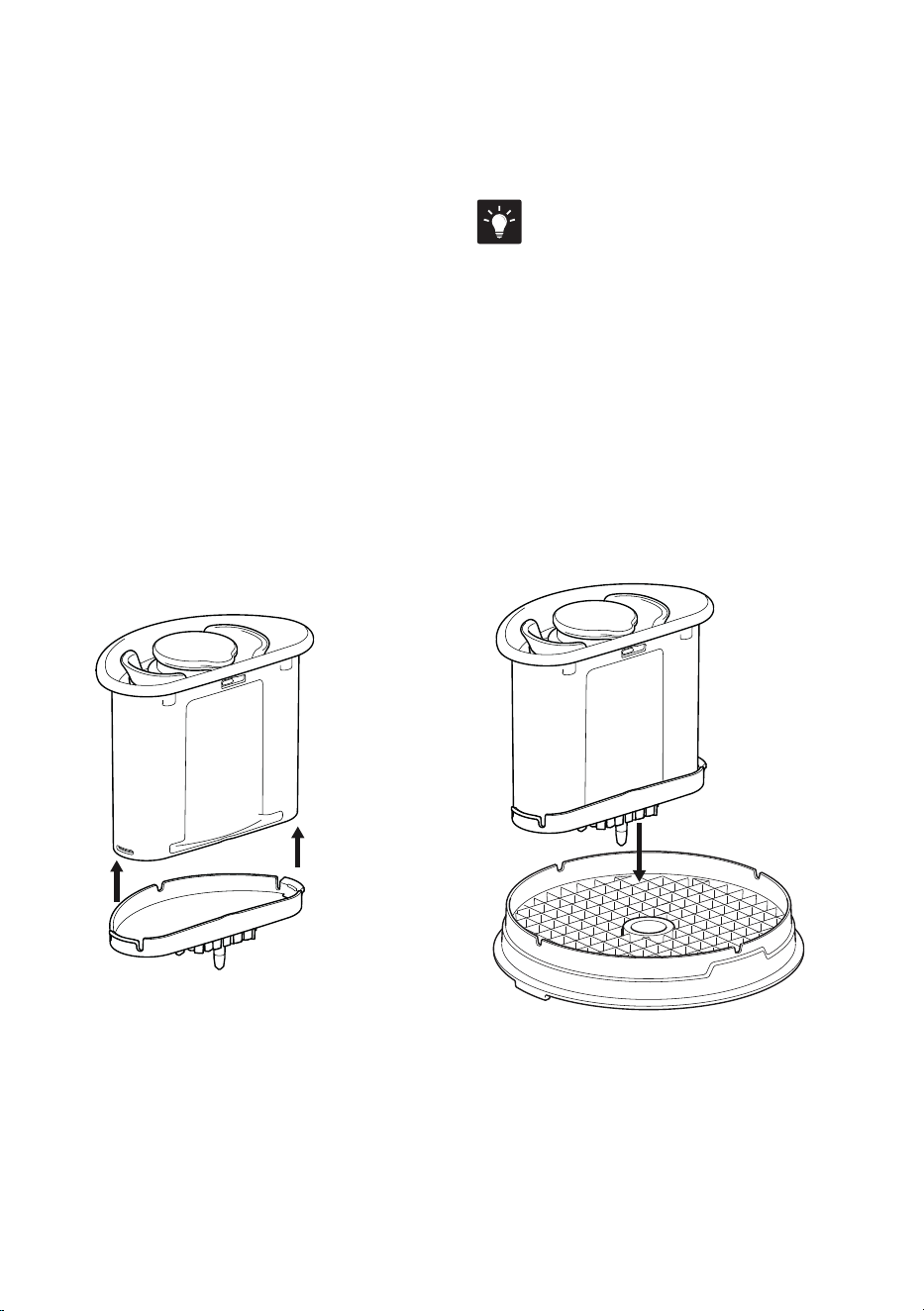
DICING KIT
The dicing kit comes with 2
corresponding Disc and Grids
• 8mm
• 16mm
Assemble in the order shown in the
diagram on the right.
1. Place dicing gearbox into the main
processing bowl.
2. Place dicing distributor on to the
dicing gearbox.
3. Carefully align and place the dicing
grid into the top of the Bowl and
rotate the grid until it drops into
place in the bowl and prevents
further rotation.
4. Dicing Disc can now be located
onto the top of the dicing gearbox
protruding from the centre of
the grid.
5. Align the lid and ensure it is properly
closed and ready for use. The dicing
kit also comes with a peeler which
can be used with the main spindle
and bowl.
IMPORTANT: Always remember to place
the dicing gearbox with dicing distributor,
dicing grid and dicing disc into the food
processor before adding the food.
Do not dice more than the indicated
MAX level at any one time. Exceeding
this capacity will lead to the produce
jamming in the disc. It will also make
the cleaning process of the dicing grid
challenging, and may cause damage to
the accessories in use.
Dicing Disc
Lid
Large Feed
Chute
Medium
Feed Chute
Small Feed
Chute
Processing
Bowl
Motor Base
Dicing Grid
Dicing
gearbox
Dicing
Distributor
15
To assemble the cleaning device:
1. Align the Cleaning Cap with the Grid and
then push down the pusher to clear out the
food. Use a rocking motion to help clear out
harder ingredients.
2. Repeat at four marked locations until the
grid is clear.
3. When finished dicing, use the brush to help
with clearing the remnants of food on the
Dicer grid.
TIPS
• You can remove the bowl from the base
to help the cleaning process.
• If it is still dicult to push from the top -
thenthe grid can be inverted onto the bench
and the cleaner used on the underside.
16
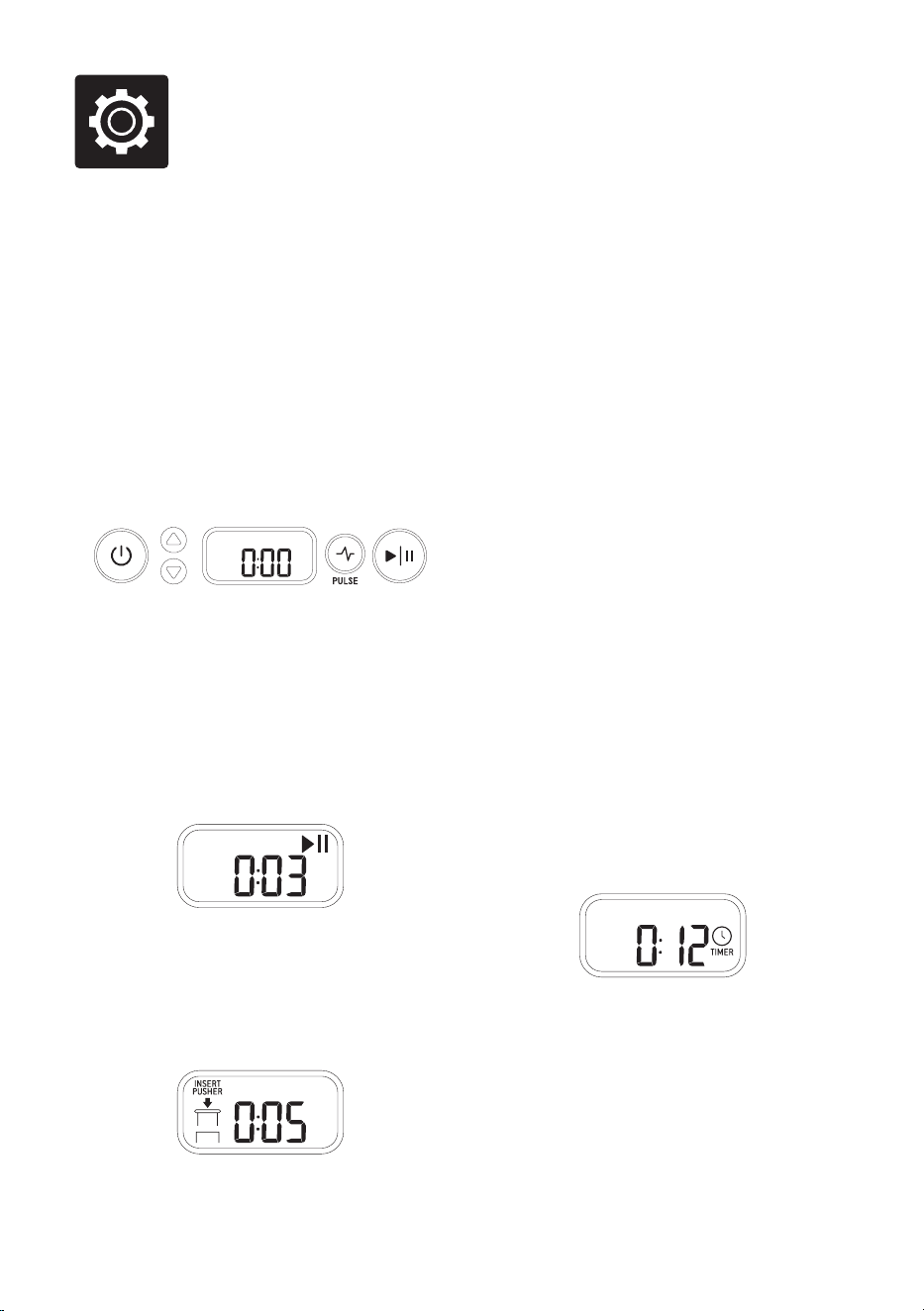
Functions
Removing the large pusher during processing
will stop the motor. The timer will stop, the
INSERT PUSHER icon will be displayed
and the PLAY | PAUSE button will flash.
Ingredients can be added into the lid chute,
and when the large pusher is re-inserted, the
unit will continue to process.
Pressing the PULSE button will cause the
motor to operate only while the button is held
down. Sequential presses will cause the timer
to count up the collective processing time.
This momentary operation is ideal for foods
that need sudden bursts of power to encourage
ingredients to move or be integrated, or with
food types that only require processing for
short periods.
Use a combination of the PULSE and PLAY |
PAUSE buttons for more control when
processing ingredients.
Timer
During operation the timer will count-up from
zero to display the accumulated processing
time. Continuous operation will stop if the
timer reaches 20 minutes (19:59) and the unit
will return to standby mode.
To control the processing duration – press
the up or down arrows to set the timer for any
recipe that requires a specific length of time
the ingredients should be processed. Each
single press will adjust by 5 seconds, holding
the button will adjust in 10 second or higher
increments. The TIMER icon will be displayed
on the screen.
Press PLAY | PAUSE to initiate processing
and the unit will operate as the displayed time
counts down. The motor will run continuously
until the timer reaches zero. Removing the
large pusher or using the pause function will
not aect the set time during processing.
Pressing POWER or PULSE buttons during
operation will clear the timer and return to
standby.
OPERATION
Getting started
The food processor will only operate when
the processing bowl, lid and large pusher are
correctly assembled. This engages the safety
interlock, and allows the motor to run.
The chute has a CHUTE FILL MAX graphic to
indicate the maximum volume of food that can
be placed in the chute for the pusher to activate
the feed chute safety system.
Control Panel
When the machine is connected to the power,
and the POWER button is pressed; the buttons
and screen will illuminate and the food
processor will be ready to operate. Pressing
the POWER button at this stage will turn the
unit o.
Pressing the PLAY | PAUSE button will start
the motor to run continuously, and the timer
will count up to show processing time.
Press PLAY | PAUSE again while processing
and the motor will stop. The timer will stop and
both the pause icon and PLAY | PAUSE button
will flash. Press PLAY | PAUSE to continue
processing or press POWER to return to
standby.
17
After Processing
Wait until the blades or discs have stopped
moving before unlocking the lid. Ensure that
the unit has been turned o using the POWER
button and unplug at the power outlet before
handling the blades or discs.
When removing the blades or discs, lift the part
by carefully gripping the plastic hub area in the
center.
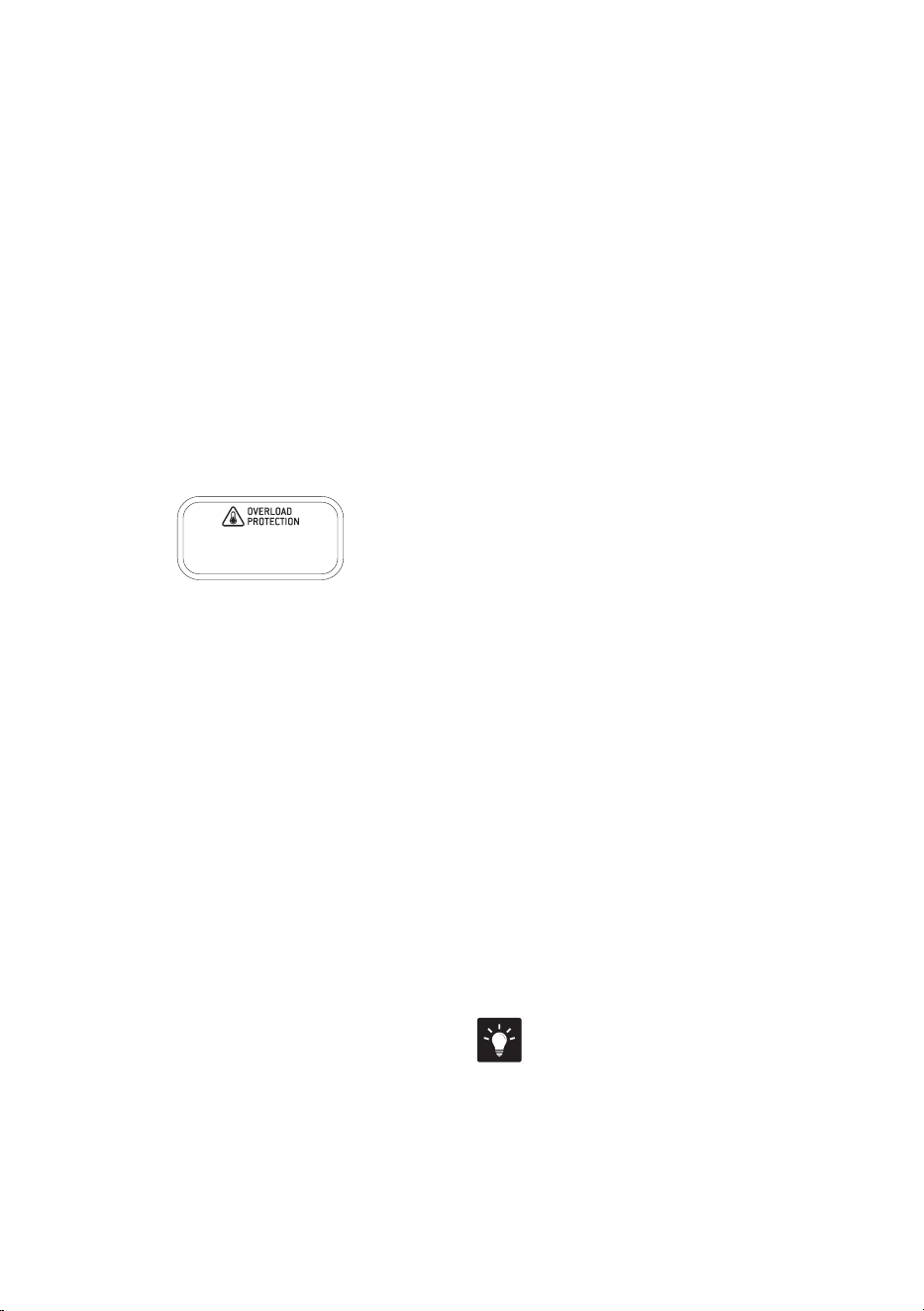
Overload Protection System
The food processor has an overload protection
system to prevent damage to the motor – this
will cause the food processor to go into standby
mode and the OVERLOAD PROTECTION
icon will flash.
Unplug the food processor and allow to cool for
30 minutes.
If the blades or discs stall while processing,
immediately stop the machine, then unplug
from the power outlet before clearing the
wedged ingredients. If this happens more
than once, the bowl may be overloaded. Try
processing in smaller batches.
PEELING WITH THE PEELER
Potato peeling made easy
Take the hard work out of peeling potatoes.
The Breville peeler will peel potatoes in
batches of 6–7, depending on the size. Peeling
is very fast, and may finish quicker than
expected. Keep your eye on progress, and it
should be done in 25–30 seconds.
Size matters
The best size potatoes to use are around 70mm
x 70mm. Choose potatoes that are round,
rather than elongated. Use whole potatoes, as
cutting potatoes into half or quarters creates
square edges that won't peel eciently.
Using rounder potatoes will reduce the amount
of waste.
Loading the potatoes
Position 6–7 potatoes evenly on top of the
peeler. Potatoes should have enough room
to freely roll and rumble. If potatoes are too
tightly packed, the peeling won't be as eective.
Keep in mind that the peeling works best with
a complete batch, and peeling just a couple
of potatoes won't be as ecient. Lock lid in
place before starting, and never insert potatoes
through the chute.
How long to peel
Peeling is very quick, with most potatoes
taking 25–30 seconds. Less time in the peeler
means less waste, but you may have to remove
the eyes by hand with a paring knife. More
time in the peeler will take a thicker layer o,
including most of the eyes.
TIP
The best size potato for the peeling disc is
around 70mm x 70mm. Choose potatoes that
are round, rather than elongated.
18
Tips
Tips listed below are suggestions only. For more detailed instructions, refer to specific recipes
provided online at www.breville.com
ACCESSORY ACTION TYPES OF
INGREDIENTS / DISHES
TIPS
Quad Blade
Chop
•
Raw fruits and vegetables
•
Raw or cooked meats and fish
•
Fresh herbs
•
Breadcrumbs
•
Nuts
•
Dried fruits
•
Trim and cut food into 2.5cm (1-inch) cubes
before processing.
WARNING
Motor should run for no more than
30 seconds at a time.
Mince /
Ground Meat
•
Raw and cooked proteins
•
Trim and cut food into 2.5cm (1-inch) cubes
before processing.
•
For best results, freeze proteins for 30 minutes.
•
Trim excess fats and sinew.
Puree / Blend
•
Cooked fruit and vegetables
•
Allow food to cool before pureeing or blending.
Mix
•
Sauces
•
Batters
•
Pesto
•
Compound butters
•
For batters, use PULSE button until mixed
evenly. Do not over process.
Dough Blade
Knead
•
Bread and pizza doughs
•
Add liquid through small feed chute whilst
themotor is running to incorporate.
•
Recommended maximum flour capacities:
- 750 g / 1.6 lb
Adjustable
Slicer Disc
Slice
•
Raw foods and vegetables
•
Salamis and deli meats
•
Place ingredients vertically on the left side of
appropriate sized feed chute to minimize tilting.
•
For deli meats like salami or pepperoni, trim one
end and process one at a time.
Reversible
Shredding Disc
Coarse & Fine
Shred
•
Cheeses
•
Fruits and vegetables such as
apples, potatoes, and cabbage
•
For best results, freeze softer cheeses for
45minutes before grating.
NOTE
Grating soft white cheeses such as fresh
mozzarella is not recommended.
•
Remove the rind from hard cheeses before
grating.
French Fries
Disc
French Fry
Cut
•
Potatoes
•
Sweet Potato
•
Carrots
•
Lay ingredients horizontally in large feed chute
to maximize length.
•
For potatoes and softer produce, use the large
feed chute to maximize length; however, for
best results on harder, fibrous produce, use the
medium chute for more control.

19
Dicing kit
(8, 16mm)
Dicing
•
Raw and cooked vegetables
and fruits
•
Use small or medium feed chutes for harder
ingredients such as carrot or pumpkin. To
further improve results you can also pre cook.
•
When dicing tomatoes, avocadoes firmer fruit
will give a better result
•
Always use the Dicing Distributor assembled
to the Dicing gearbox. This will keep the area
underneath the chute clear and prevent
blockages.
Potato Peeler
Peeling
•
Raw Potatoes
•
For best results use consistent shaped potatoes
IMPORTANT NOTES
For optimal results, position food in the chute
and use the pusher to push food with light
downward force prior to starting the food
processor.
Always use the small or medium size feed
chute for processing hard produce like
pumpkin and sweet potato. Feeding hard
produce through the large feed chute could
cause damage to the discs.
Smaller Ingredients
For long thin foods such as carrots, cucumbers,
zucchini, etc., use the small or medium feed
chute. This will avoid the ingredient from
tipping over, during slicing.
Larger Ingredients
The wide feed chute is 14cm wide and can fit
ingredients up to this size. The food should fit
snugly so it is supported in an upright position
in the chute, but not so tight that it could
prevent the food from moving down the chute.
Ensure not to overfill the chute, as the pusher
will not activate the interlock safety catch if
the chute is too full. Do not fill over the MAX
indicator.
Pressure
When processing, never force the food down
the chute as this can damage the discs. Apply
light, even pressure for soft foods such as
tomatoes and bananas. Apply medium, even
pressure for firmer foods such as potatoes,
cheese, deli meats and apples.
Mini Bowl
The mini processing bowl is used inside the
main processing bowl. It is for better control
when processing small quantities of food, or
herbs. Use the mini-spindle with the mini bowl
and then add the mini-blade for chopping,
mixing and blending a variety of ingredients.
Alternatively, the 'Adjustable Slicing',
Shredding or French Fries discs can be used on
the mini-spindle to process smaller quantities
into the mini bowl.
Dicing kit
Do not dice raw sweet potato/Kumara. Its dry,
hard and fibrous nature may cause damage to
the bowl and lid due to heavy load.
Do not fill the Bowl with ingredients above the
MAX level on the side of the Bowl.
Do not assemble the cutting disc onto the
gearbox without the grid in place.
Always use the Dicing Distributor on the
gearbox.
IMPORTANT NOTE
Due to the harder and more fibrous nature;
DO NOT DICE the following:
•
Cheese
•
Raw sweet potato/kumara.
•
Meat including hard deli meats.
•
Fruit and vegetables with tough skin such as pineapple
and watermelon. These should be peeled first.

20
Care & Cleaning
Food Pushers
All parts in the pusher stack can be placed in
the dishwasher (top rack).
Motor base
To clean the motor base, wipe with a soft, damp
cloth then dry thoroughly. Wipe any excess
food particles from the power cord.
Dicing Accessories
Follow the assembly instructions for dicing
cleaner. After dicing use the dicing accessory
to clean out residual food.
Dicing accessories can be washed in the
dishwasher excluding the dicing gearbox.
Cleaning agents
Do not use abrasive scouring pads or cleansers
on either the motor base or the jug, as they may
scratch the surface. Use only warm soapy water
with a soft cloth.
Stubborn food stains and odors
Strong smelling foods such as garlic, fish and
some vegetables such as carrots may leave an
odor or stain the bowl or lid.
To remove, pour warm soapy water and fill to
the MAX LIQUID mark. Set aside to soak for
5 minutes, without immersing the whole bowl.
Then wash with a mild detergent and warm
water, rinse and dry thoroughly. Store the bowl
with the lid o.
Remove the power cord from the power outlet
after use for safety reasons.
Processing bowl and lid
Due to the interlock components, we do not
recommend immersing the bowl in water for
long periods.
To keep your bowl and lid clean, and to avoid
food drying on, follow these steps as soon as
possible after use:
• Rinse most of the ingredients o the bowl
and lid.
• Hand wash in clean warm, soapy water
using a mild liquid detergent and non-
abrasive sponge.
• The processing bowl and lid may
occasionally be washed in the dishwasher
(top shelf only), however washing in the
dishwasher is not recommended on a
regular basis, as prolonged exposure to
harsh detergents, hot water and pressure
will damage and shorten the life of the
plastic and the interlock components.
WARNING
Oils in citrus rind can damage the material
of your food processor bowl if being exposed
to it for a longer period. Always clean your
processing bowl immediately after processing
citrus rind.
Blades and Discs
• Blades and discs are razor sharp, do not
touch. Always use a spatula or brush to
remove food or when cleaning blades.
• Spindle, blades and discs can be washed
in the dishwasher.

21
Storage
Place the large food pusher (with medium and
small pushers inserted) into the feed chute for
storage.
Store your food processor upright, with the
bowl and lid resting in position, but not locked.
Locking the bowl and lid can put unnecessary
strain on the safety interlock.
All accessories should be kept in the storage
container and out of the reach of children to
avoid accidental cuts. It is not recommended to
store the discs in a drawer with other utensils.
Do not place anything else on top of your food
processor during storage.

22
Troubleshooting
PROBLEM EASY SOLUTION
Food is unevenly
processed
•
Ingredients should be cut evenly into 2.5cm pieces before processing.
•
Ingredients should be processed in batches to avoid overloading.
Slices are slanted
or uneven
•
Place evenly cut food into the feed chute.
•
Apply pressure, then start the machine.
Food falls over in the feed
chute
•
The large feed chute must be packed full for best results.
If processing smaller quantities, place items to the far left in the feed chute,
or use a smaller feed chute, depending on the food size.
Unevenly cut french fries
•
Always clear any blocked potato before processing more potatoes.
Some food remains on top
of the disc after processing
•
It is normal for small pieces to remain after processing.
Motor slows down when
kneading dough
•
Amount of dough must not exceed maximum recommended quantity on the recipe.
Remove half and process in two batches.
•
Dough may be too dry. If motor speeds up, continue processing.
If not, add more water, 1 tablespoon at a time until the motor speeds up. Process until
dough cleans the side of the processing bowl.
Dough doesn’t clear inside
of the processing bowl
•
Amount of dough may exceed food processor maximum capacity.
Remove half and process in two batches.
•
Dough may be too dry.
Dough nub forms on
top of dough blade and
dough does not become
uniformly kneaded
•
Stop machine, carefully remove dough, divide it into 3 pieces and redistribute them
evenly in the processing bowl.
Dough feels tough
after kneading
•
Divide dough into 2 or 3 pieces and redistribute evenly in processing bowl. Process
10 seconds or until uniformly soft and pliable. Allowing dough to rest allows the gluten
strands to relax and become more pliable.
Dough is too dry
•
While machine is running, add water through the small feed chute, 1 tablespoon
at a time until dough clears the inside of the processing bowl.
Dough is too wet
•
While machine is running, add flour through the small feed chute, 1 tablespoon
at a time until dough clears the inside of the processing bowl.
The motor does not start
•
There is a safety interlock switch to prevent the motor from starting if it is not properly
assembled. Make sure the processing bowl and lid are securely locked into position.
Make sure the Main bowl is positioned such that its handle is pointing towards the user.
•
The food content in the feed chute should be below the maximum fill line.
•
If the motor still will not start, check the power cord and power outlet.

23
PROBLEM EASY SOLUTION
The food processor shuts
o during operation
•
Check whether the message "insert pusher" is displayed on the screen. If so, make sure
the big pusher, the lid and the bowl are correctly locked in place.
•
If the motor overloads, the 'OVERLOAD PROTECTION' icon in the screen will start to
flash. Switch o by pressing the POWER button and unplug the power cord. Allow the
food processor to cool for 30 minutes before resuming.
The motor slowed down
during operation
•
This is normal as some heavier loads (e.g. slicing / shredding cheese) may require
the motor to work harder. Reposition the food in the feed chute and cut the food into
smaller sizes and process using a smaller pusher and continue processing.
•
The maximum load capacity may have been exceeded. Remove some of the
ingredients and continue processing.
The food processor
vibrates / moves
during processing
•
Make sure the rubber feet at the bottom of the unit are clean and dry.
Also make sure that the maximum load capacity is not being exceeded.
•
This is normal as some heavier loads may require the motor to work harder.
•
Turn the unit o and clear any ingredients that may be caught on the disc, before
continuing.
•
If this occurs while mixing dough – then turn unit o and redistribute the dough
mixture more evenly around the bowl before continuing.
•
Process hard and fibrous foods such as carrots, through the medium or small chute.
INSERT PUSHER flashing
•
Make sure that food does not exceed the max line in the food chute.
•
If pusher is fully inserted and this warning flashes on the screen, check that the bowl
and lid are assembled correctly. Bowl handle should be facing the front of the unit.
The dicing accessory
is not working
•
Ensure the accessory kit is inserted as per assembly instructions.
•
Ensure dicing grid is clear from food on top and that it sits locked into the bowl,
flat and stable.
•
Make sure dicing disc is free from wedged ingredients. If this happened use spatula
toclear wedged ingredients.
•
Make sure all dicing parts belong to the same size, i.e. 8mm discs with 8mm grid, etc.

BFP838 ANZ - B23
Breville, the Breville Logo, Barista Express and Temp Control are trademarks of Breville Pty Ltd (“Breville”) and Breville's products
are distributed in Australia and New Zealand under license.
Copyright Breville Pty. Ltd. 2023.
Due to continued product improvement, the products illustrated/photographed
in this brochure may vary slightly from the actual product.
B##### ANZ – #23
Breville Service Centre
Australian Customers
Phone:
1300 139 798
Web: www.breville.com
New Zealand Customers
Phone:
0800 273 845
Web: www.breville.com