Before using your new product, please read these instructions to prevent any damage.
QUICK SETUP GUIDE
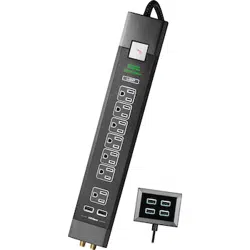
RF-HTS4418, 12-Outlet Power Center
PACKAGE CONTENTS
• Power Center
• USB Power Hub
• Extension Cables (2)
• Quick Setup Guide
SAFETY INFORMATION
• RISK OF ELECTRIC SHOCK - Use only in dry locations and only
indoors.
• DO NOT plug into another relocatable power tap.
• DO NOT “daisy chain” surge protectors.
• DO NOT use with any aquarium equipment.
• DO NOT use if correctly grounded outlets are not available.
• DO NOT install this device if there is not at least 30 feet (10 meters)
or more of wire between the electrical outlet and electrical service
panel.
• This device features internal protection that will disconnect the
surge protective component at the end of its useful life, but will
maintain power to the load – WHICH WILL BE UNPROTECTED. If you
don't want your equipment at risk, follow the manufacturer’s
instructions for replacing the device.
FEATURES
• Advanced three-stage power ltration removes unwanted interference
from incoming power to provide only clean, pure power to your
sensitive electronic devices
• Switchable LED trace lighting on all USB ports and outlets for easy
connection in dark spaces
• 4 on-board USB ports with 4.8A of current for high-speed charging of
devices
• Sleek, modern design with brushed aluminum accents and a premium
fabric-wrapped power cord to t with modern electronics
• Advanced reproof MOVs assure the best protection and safety during
a surge event
• Status indicator lights for Power Protection and Power Filtration so you
know your Power Center is working properly
• Wide-spaced outlets for larger plugs and power supplies
• Heavy-duty, low-prole plug for easy placement in tight spaces
• Wear-resistant, fabric-wrapped power cord
• Coax jacks for protecting cable/satellite/internet devices from power
surges
• Phone/Ethernet jacks for protecting telephone or Ethernet devices from
power surges
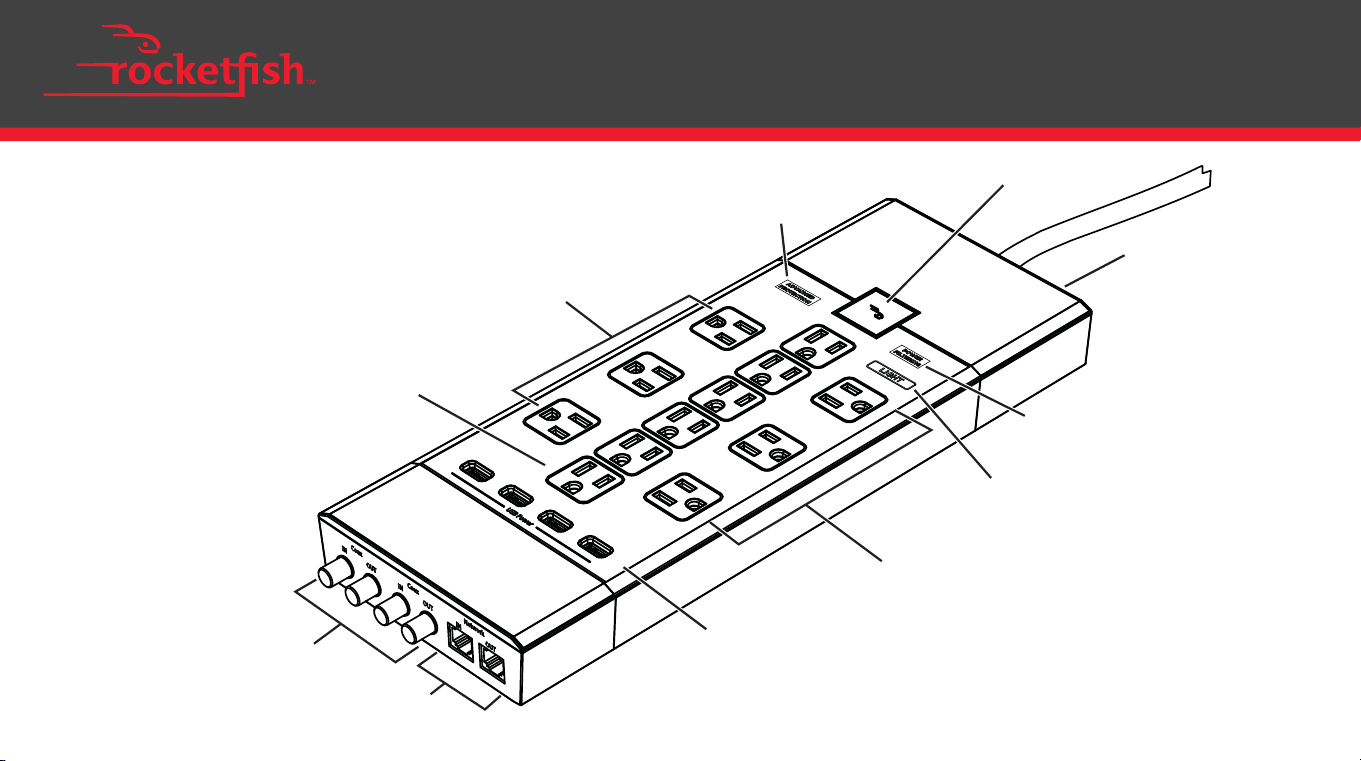
Advanced Protection
LED
AC outlets
USB ports
Coaxial cable
connectors
Data line
jacks
Wide-spaced
AC outlets
Wide-spaced
AC outlets
Power Filtering
LED
LED Light Switch
Power button and LED
Circuit
breaker

Before using your new product, please read these instructions to prevent any damage.
QUICK SETUP GUIDE
RF-HTS4418, 12-Outlet Power Center
PACKAGE CONTENTS
• Power Center
• USB Power Hub
• Extension Cables (2)
• Quick Setup Guide
SAFETY INFORMATION
• RISK OF ELECTRIC SHOCK - Use only in dry locations and only
indoors.
• DO NOT plug into another relocatable power tap.
• DO NOT “daisy chain” surge protectors.
• DO NOT use with any aquarium equipment.
• DO NOT use if correctly grounded outlets are not available.
• DO NOT install this device if there is not at least 30 feet (10 meters)
or more of wire between the electrical outlet and electrical service
panel.
• This device features internal protection that will disconnect the
surge protective component at the end of its useful life, but will
maintain power to the load – WHICH WILL BE UNPROTECTED. If you
don't want your equipment at risk, follow the manufacturer’s
instructions for replacing the device.
FEATURES
• Advanced three-stage power ltration removes unwanted interference
from incoming power to provide only clean, pure power to your
sensitive electronic devices
• Switchable LED trace lighting on all USB ports and outlets for easy
connection in dark spaces
• 4 on-board USB ports with 4.8A of current for high-speed charging of
devices
• Sleek, modern design with brushed aluminum accents and a premium
fabric-wrapped power cord to t with modern electronics
• Advanced reproof MOVs assure the best protection and safety during
a surge event
• Status indicator lights for Power Protection and Power Filtration so you
know your Power Center is working properly
• Wide-spaced outlets for larger plugs and power supplies
• Heavy-duty, low-prole plug for easy placement in tight spaces
• Wear-resistant, fabric-wrapped power cord
• Coax jacks for protecting cable/satellite/internet devices from power
surges
• Phone/Ethernet jacks for protecting telephone or Ethernet devices from
power surges
Advanced Protection
LED
AC outlets
USB ports
Coaxial cable
connectors
Data line
jacks
Wide-spaced
AC outlets
Wide-spaced
AC outlets
Power Filtering
LED
LED Light Switch
Power button and LED
Circuit
breaker
SPECIFICATIONS
Dimensions:
13.8 × 5.2 × 1.5 in. (35.0 × 13.2 × 3.8 cm)
Plug Style: Low-prole right angle plug
Cord length: 6 ft. Fabric Covered
Outlets-Total: 12 (6 Wide Spaced)
Surge Suppression: 5280 joules
Maximum Surge Current:150,000 amps
Response Time: <1 nanosecond
Attenuation: 78 dB
EMI/RFI Filtration: Level 2 (3-stage)
Coaxial Protection RG6 (Gold Plated): 2 in/2 out
Network Protection: 1 in/1out (Phone/Ethernet Combo)
Indicators: Advanced Protection, Power Filtering,
LED Light Switch
Safety: UL1363, UL1449, 3rd Edition UL1310, cUL
Environmental: RoHS Compliant
Product Warranty: 3 Years
Connected Equipment $1,000,000
Guarantee:
THREE-YEAR LIMITED WARRANTY
Visit www.rocketfishproducts.com for details.
CONTACT ROCKETFISH:
For customer service please call 1-800-620-2790
www.rocketfishproducts.com
ROCKETFISH is a trademark of Best Buy and its aliated companies
Distributed by Best Buy Purchasing, LLC
7601 Penn Ave South, Richeld, MN 55423 U.S.A.
©2017 Best Buy. All rights reserved
Made in China
V1 ENGLISH 17-0383
FCC STATEMENT
This device complies with Part 15 of the FCC Rules. Operation is subject to
the following two conditions: (1) this device may not cause harmful
interference, and (2) this device must accept any interference received,
including interference that may cause undesired operation.
This equipment has been tested and found to comply with the limits for a
Class B digital device, pursuant to Part 15 of the FCC Rules. These limits are
designed to provide reasonable protection against harmful interference in
a residential installation.
This equipment generates uses and can radiate radio frequency energy
and, if not installed and used in accordance with the instructions, may
cause harmful interference to radio communications. However, there is no
guarantee that interference will not occur in a particular installation. If this
equipment does cause harmful interference to radio or television
reception, which can be determined by turning the equipment o and on,
the user is encouraged to try to correct the interference by one or more of
the following measures:
• Reorient or relocate the receiving antenna.
• Increase the separation between the equipment and receiver.
• Connect the equipment into an outlet on a circuit dierent from that to
which the receiver is connected.
• Consult the dealer or an experienced radio/TV technician for help.
Warning: Changes or modications not expressly approved by the party
responsible for compliance could void the user's authority to operate the
equipment.
ICES-003:
This Class B digital apparatus complies with Canadian ICES-003
USING YOUR POWER CENTER
1. Plug the power center into a wall outlet. If the red LED on the
power button does not light up, press the circuit breaker.
Notes:
• Connect the extension cables if you need the power center or
connected devices to reach farther.
• Connect all cables before turning on your power center. Turn o
the power center when connecting or disconnecting cables.
2. If you need additional USB ports, plug the USB hub into the power
center.
3. Plug your devices into the power center's outlets, USB ports, data
line jacks, and coaxial cable connectors to protect them from power
surges.
4. If the Advanced Protection LED turns o, press the circuit breaker to
reset your power center.
Note: If the Advanced Protection LED does not turn back on, your
power center cannot absorb additional power surges or spikes.
Replace your power center.
Using the backlights
• Press the LED Light Switch to turn the LEDs on or o. Advanced
Protection and Power Filtering LEDs will always stay lit.
• Slide the switch on the USB power hub to turn the LEDs on or o.

SPECIFICATIONS
Dimensions:
13.8 × 5.2 × 1.5 in. (35.0 × 13.2 × 3.8 cm)
Plug Style: Low-prole right angle plug
Cord length: 6 ft. Fabric Covered
Outlets-Total: 12 (6 Wide Spaced)
Surge Suppression: 5280 joules
Maximum Surge Current:150,000 amps
Response Time: <1 nanosecond
Attenuation: 78 dB
EMI/RFI Filtration: Level 2 (3-stage)
Coaxial Protection RG6 (Gold Plated): 2 in/2 out
Network Protection: 1 in/1out (Phone/Ethernet Combo)
Indicators: Advanced Protection, Power Filtering,
LED Light Switch
Safety: UL1363, UL1449, 3rd Edition UL1310, cUL
Environmental: RoHS Compliant
Product Warranty: 3 Years
Connected Equipment $1,000,000
Guarantee:
THREE-YEAR LIMITED WARRANTY
Visit www.rocketfishproducts.com for details.
CONTACT ROCKETFISH:
For customer service please call 1-800-620-2790
www.rocketfishproducts.com
ROCKETFISH is a trademark of Best Buy and its aliated companies
Distributed by Best Buy Purchasing, LLC
7601 Penn Ave South, Richeld, MN 55423 U.S.A.
©2017 Best Buy. All rights reserved
Made in China
V1 ENGLISH 17-0383
FCC STATEMENT
This device complies with Part 15 of the FCC Rules. Operation is subject to
the following two conditions: (1) this device may not cause harmful
interference, and (2) this device must accept any interference received,
including interference that may cause undesired operation.
This equipment has been tested and found to comply with the limits for a
Class B digital device, pursuant to Part 15 of the FCC Rules. These limits are
designed to provide reasonable protection against harmful interference in
a residential installation.
This equipment generates uses and can radiate radio frequency energy
and, if not installed and used in accordance with the instructions, may
cause harmful interference to radio communications. However, there is no
guarantee that interference will not occur in a particular installation. If this
equipment does cause harmful interference to radio or television
reception, which can be determined by turning the equipment o and on,
the user is encouraged to try to correct the interference by one or more of
the following measures:
• Reorient or relocate the receiving antenna.
• Increase the separation between the equipment and receiver.
• Connect the equipment into an outlet on a circuit dierent from that to
which the receiver is connected.
• Consult the dealer or an experienced radio/TV technician for help.
Warning: Changes or modications not expressly approved by the party
responsible for compliance could void the user's authority to operate the
equipment.
ICES-003:
This Class B digital apparatus complies with Canadian ICES-003
USING YOUR POWER CENTER
1. Plug the power center into a wall outlet. If the red LED on the
power button does not light up, press the circuit breaker.
Notes:
• Connect the extension cables if you need the power center or
connected devices to reach farther.
• Connect all cables before turning on your power center. Turn o
the power center when connecting or disconnecting cables.
2. If you need additional USB ports, plug the USB hub into the power
center.
3. Plug your devices into the power center's outlets, USB ports, data
line jacks, and coaxial cable connectors to protect them from power
surges.
4. If the Advanced Protection LED turns o, press the circuit breaker to
reset your power center.
Note: If the Advanced Protection LED does not turn back on, your
power center cannot absorb additional power surges or spikes.
Replace your power center.
Using the backlights
• Press the LED Light Switch to turn the LEDs on or o. Advanced
Protection and Power Filtering LEDs will always stay lit.
• Slide the switch on the USB power hub to turn the LEDs on or o.