Visit Our Website
SCAN ME
PyleUSA.com
USER GUIDE
Questions or Comments?
We are here to help!
Phone: 1.718.535.1800
PyleUSA.com/ContactUs
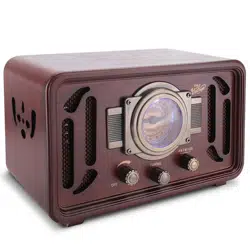
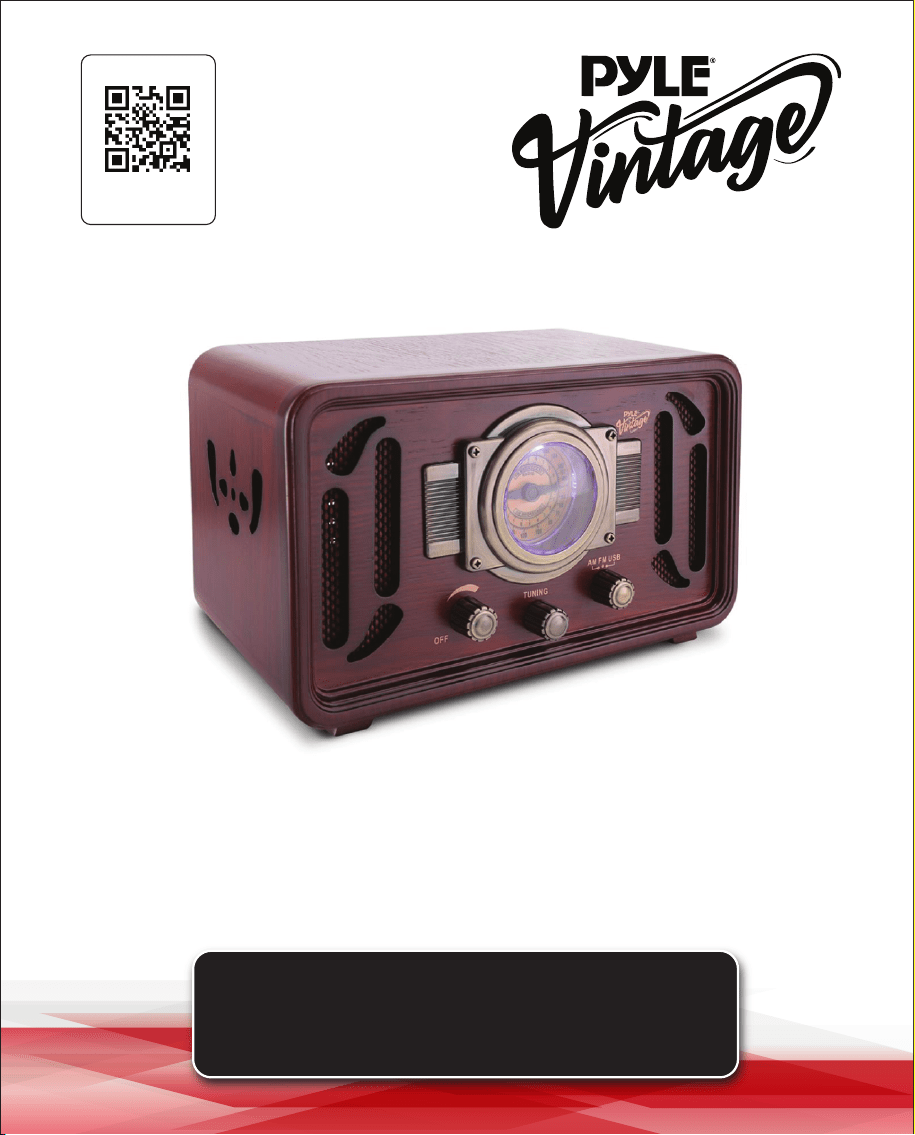
Retro Classic-Style Bluetooth Radio
Speaker Sound System
PUNP34BT

www.PyleUSA.com
2
www.PyleUSA.com
3
READ ALL INSTRUCTIONS CAREFULLY BEFORE USING THIS PRODUCT.
RETAIN THIS OWNER’S MANUAL FOR FUTURE REFERENCE.
Features:
• Classic Style Radio with Modern Technology
• Built-in Bluetooth for Wireless Music Streaming
• Elegant Vintage Replica Crafted Sound System
• AM/FM Radio with Retro Styled Dial
• Aux (3.5mm) Input Connector Jack
• Connect External Devices (Smartphone, Tablet, MP3 Players)
• USB Flash Drive & SD Memory Card Readers
• USB Port Double Function for Device Charging
• Plays Your Favorite MP3 Digital Audio Files
• Simple Rotary Knobs and Button Control Center
• RCA (L/R) Output Connector Jacks
• Ability to Connect to External Speaker Systems
• Full Range Sound Reproduction
• Dual Built-in Stereo Speakers
Bluetooth Wireless Streaming:
• Works with All of Your Favorite Devices
(iPhone, Android, Smartphone, iPad, Tablet, etc.)
• Stream your Audio through the Turntable's Speaker System
• Bluetooth Network Name: 'Pyle Turntable'
• Bluetooth Version: 5.3
• Bluetooth Wireless Range: 30'+ Feet
Technical Specs:
• Digital Audio File Compatibility: MP3 / WMA
• Maximum USB Flash/SD Card Support: 32GB
• Construction Material: Wood, MDF Fibreboard
• Power: 110V, AC
• Dimensions (L x W x H): 7.1'' x 11.8'' x 7.1'' -inches
SAFETY INSTRUCTIONS
WARNING: TO PREVENT FIRE OR SHOCK HAZARD, DO NOT EXPOSE THIS
APPLIANCE TO RAIN OR MOISTURE.
IMPORTANT SAFETY INSTRUCTIONS
1. Read instructions - All the safety and operating instructions should be read
before the appliance is operated and should be saved for future reference.
2. Retain instructions - The safety and operating instructions should be
retained for future reference.
3. Heed warnings - All warnings on the appliance and in the operating
instructions should be adhered to.
4. Follow instructions - All operation and use instructions should be followed.
5. Water and Moisture - The appliance should not be used near water; for
example, near a bathtub, washbowl, kitchen sink, laundry tub, in a wet
basement, or near a swimming pool, and the like.
6. Carts and Stands - The appliance should be used only with a
cart or stand that is recommended by the manufacturer.
An appliance and cart combination should be moved with care.
Quick stops, excessive force, and uneven surfaces may cause the appliance
and cart combination to overturn.
WARNING: Cancer and Reproductive Harm - www.P65warnings.ca.gov
CAUTION: TO REDUCE THE RISK OF FIRE
OR ELECTRIC SHOCK, DO NOT REMOVE
COVER (OR BACK) NO USER SERVICEABLE
PARTS INSIDE. REFER SERVICING TO
QUALIFIED SERVICE PERSONEL.
The ashing arrowhead
symbol within an
equilateral triangle is
intended to alert the
user to the presence of
“dangerous” voltage
within the product
The exclamation point
within an equilateral
triangle is intended to alert
the user to the presence of
important operating and
maintenance (servicing)
instructions in this manual.
www.PyleUSA.com
2
www.PyleUSA.com
3
READ ALL INSTRUCTIONS CAREFULLY BEFORE USING THIS PRODUCT.
RETAIN THIS OWNER’S MANUAL FOR FUTURE REFERENCE.
Features:
• Classic Style Radio with Modern Technology
• Built-in Bluetooth for Wireless Music Streaming
• Elegant Vintage Replica Crafted Sound System
• AM/FM Radio with Retro Styled Dial
• Aux (3.5mm) Input Connector Jack
• Connect External Devices (Smartphone, Tablet, MP3 Players)
• USB Flash Drive & SD Memory Card Readers
• USB Port Double Function for Device Charging
• Plays Your Favorite MP3 Digital Audio Files
• Simple Rotary Knobs and Button Control Center
• RCA (L/R) Output Connector Jacks
• Ability to Connect to External Speaker Systems
• Full Range Sound Reproduction
• Dual Built-in Stereo Speakers
Bluetooth Wireless Streaming:
• Works with All of Your Favorite Devices
(iPhone, Android, Smartphone, iPad, Tablet, etc.)
• Stream your Audio through the Turntable's Speaker System
• Bluetooth Network Name: 'Pyle Turntable'
• Bluetooth Version: 5.3
• Bluetooth Wireless Range: 30'+ Feet
Technical Specs:
• Digital Audio File Compatibility: MP3 / WMA
• Maximum USB Flash/SD Card Support: 32GB
• Construction Material: Wood, MDF Fibreboard
• Power: 110V, AC
• Dimensions (L x W x H): 7.1'' x 11.8'' x 7.1'' -inches
SAFETY INSTRUCTIONS
WARNING: TO PREVENT FIRE OR SHOCK HAZARD, DO NOT EXPOSE THIS
APPLIANCE TO RAIN OR MOISTURE.
IMPORTANT SAFETY INSTRUCTIONS
1. Read instructions - All the safety and operating instructions should be read
before the appliance is operated and should be saved for future reference.
2. Retain instructions - The safety and operating instructions should be
retained for future reference.
3. Heed warnings - All warnings on the appliance and in the operating
instructions should be adhered to.
4. Follow instructions - All operation and use instructions should be followed.
5. Water and Moisture - The appliance should not be used near water; for
example, near a bathtub, washbowl, kitchen sink, laundry tub, in a wet
basement, or near a swimming pool, and the like.
6. Carts and Stands - The appliance should be used only with a
cart or stand that is recommended by the manufacturer.
An appliance and cart combination should be moved with care.
Quick stops, excessive force, and uneven surfaces may cause the appliance
and cart combination to overturn.
WARNING: Cancer and Reproductive Harm - www.P65warnings.ca.gov
CAUTION: TO REDUCE THE RISK OF FIRE
OR ELECTRIC SHOCK, DO NOT REMOVE
COVER (OR BACK) NO USER SERVICEABLE
PARTS INSIDE. REFER SERVICING TO
QUALIFIED SERVICE PERSONEL.
The ashing arrowhead
symbol within an
equilateral triangle is
intended to alert the
user to the presence of
“dangerous” voltage
within the product
The exclamation point
within an equilateral
triangle is intended to alert
the user to the presence of
important operating and
maintenance (servicing)
instructions in this manual.

www.PyleUSA.com
4
www.PyleUSA.com
5
7. Wall and Ceiling Mounting - The appliance should be mounted to a wall
or ceiling only as recommended by the manufacturer.
8. Ventilation - The appliance should be situated so that its location or
position does not interfere with its proper ventilation. For example, the
appliance should not be situated on a bed, sofa, rug, or similar surface that
may block the ventilation openings; or placed in a built-in installation,
such as a bookcase or cabinet that may impede the ow of air through the
ventilation openings.
9. Heat - The appliance should be situated away from heat sources such as
radiators, heat registers, stoves, or other appliances (including ampliers)
that produce heat.
10. Power Sources - The appliance should be connected to a power supply
only of the type described in the operating instructions or as marked on
the appliance.
11. Grounding or Polarization - Precautions should be taken so that the
grounding or polarization means of an appliance is not defeated.
12. Power-Cord Protection - Power supply cords should be routed so that
they are not likely to be walked on or pinched by items placed upon or
against them, paying particular attention to cords at plugs, convenience
receptacles, and the point where they exit from the appliance.
13. Protective Attachment Plug - The appliance is equipped with an
attachment plug having overload protection. This is a safety feature.
See the Instruction Manual for replacement or resetting of the protective
device. If replacement of the plug is required, ensure the service technician
uses a replacement plug specied by the manufacturer that has the same
overload protection as the original plug.
14. Cleaning - The appliance should be cleaned only as recommended by
the manufacturer.
15. Power Lines - An outdoor antenna should be located away from power
lines.
16. Outdoor Antenna Grounding - If an outside antenna is connected to
the receiver, be sure the antenna system is grounded to provide some
protection against voltage surges and built-up static charges. Section 810
of the National Electrical Code, ANSI/NFPA No. 70-1984, provides information
on proper grounding of the mast and supporting structure, grounding of
the lead-in wire to an antenna discharge unit, size of grounding conductors,
location of the antenna discharge unit, connection to grounding
electrodes, and requirements for the grounding electrode.
17. Nonuse Periods - The power cord of the appliance should be unplugged
from the outlet when left unused for a long period of time.
18. Object and Liquid Entry - Care should be taken so that objects do not
fall and liquids are not spilled into the enclosure through openings.
19. Damage Requiring Service - The appliance should be serviced by
qualied service personnel when:
A. The power supply cord or the plug has been damaged; or
B. Objects have fallen, or liquid has been spilled into the appliance; or
C. The appliance has been exposed to rain; or
D. The appliance does not appear to operate normally or exhibits a
marked change in performance; or
E. The appliance has been dropped, or the enclosure damaged.
20. Servicing - The user should not attempt to service the appliance beyond
that described in the operating instructions. All other servicing should be
referred to qualied service personnel.
This symbol indicates that this product incorporates double
insulation between hazardous mains voltage and user accessible
parts. When servicing, use only identical replacement parts.
Register Product
Thank you for choosing PyleUSA. By registering your
product, you ensure that you receive the full benets of
our exclusive warranty and personalized customer
support. Complete the form to access expert support and
to keep your PyleUSA purchase in perfect condition.
PyleUSA.com/register
www.PyleUSA.com
4
www.PyleUSA.com
5
7. Wall and Ceiling Mounting - The appliance should be mounted to a wall
or ceiling only as recommended by the manufacturer.
8. Ventilation - The appliance should be situated so that its location or
position does not interfere with its proper ventilation. For example, the
appliance should not be situated on a bed, sofa, rug, or similar surface that
may block the ventilation openings; or placed in a built-in installation,
such as a bookcase or cabinet that may impede the ow of air through the
ventilation openings.
9. Heat - The appliance should be situated away from heat sources such as
radiators, heat registers, stoves, or other appliances (including ampliers)
that produce heat.
10. Power Sources - The appliance should be connected to a power supply
only of the type described in the operating instructions or as marked on
the appliance.
11. Grounding or Polarization - Precautions should be taken so that the
grounding or polarization means of an appliance is not defeated.
12. Power-Cord Protection - Power supply cords should be routed so that
they are not likely to be walked on or pinched by items placed upon or
against them, paying particular attention to cords at plugs, convenience
receptacles, and the point where they exit from the appliance.
13. Protective Attachment Plug - The appliance is equipped with an
attachment plug having overload protection. This is a safety feature.
See the Instruction Manual for replacement or resetting of the protective
device. If replacement of the plug is required, ensure the service technician
uses a replacement plug specied by the manufacturer that has the same
overload protection as the original plug.
14. Cleaning - The appliance should be cleaned only as recommended by
the manufacturer.
15. Power Lines - An outdoor antenna should be located away from power
lines.
16. Outdoor Antenna Grounding - If an outside antenna is connected to
the receiver, be sure the antenna system is grounded to provide some
protection against voltage surges and built-up static charges. Section 810
of the National Electrical Code, ANSI/NFPA No. 70-1984, provides information
on proper grounding of the mast and supporting structure, grounding of
the lead-in wire to an antenna discharge unit, size of grounding conductors,
location of the antenna discharge unit, connection to grounding
electrodes, and requirements for the grounding electrode.
17. Nonuse Periods - The power cord of the appliance should be unplugged
from the outlet when left unused for a long period of time.
18. Object and Liquid Entry - Care should be taken so that objects do not
fall and liquids are not spilled into the enclosure through openings.
19. Damage Requiring Service - The appliance should be serviced by
qualied service personnel when:
A. The power supply cord or the plug has been damaged; or
B. Objects have fallen, or liquid has been spilled into the appliance; or
C. The appliance has been exposed to rain; or
D. The appliance does not appear to operate normally or exhibits a
marked change in performance; or
E. The appliance has been dropped, or the enclosure damaged.
20. Servicing - The user should not attempt to service the appliance beyond
that described in the operating instructions. All other servicing should be
referred to qualied service personnel.
This symbol indicates that this product incorporates double
insulation between hazardous mains voltage and user accessible
parts. When servicing, use only identical replacement parts.
Register Product
Thank you for choosing PyleUSA. By registering your
product, you ensure that you receive the full benets of
our exclusive warranty and personalized customer
support. Complete the form to access expert support and
to keep your PyleUSA purchase in perfect condition.
PyleUSA.com/register
www.PyleUSA.com
6
www.PyleUSA.com
7
MAINTENANCE
Cleaning the unit: Do not use harsh chemicals on this unit. Clean by
lightly wiping with a soft cloth and water. Be sure to dry completely.
Note: Due to the evolving needs of customers, any changes to the functions,
specications, or the product may be made without notice.
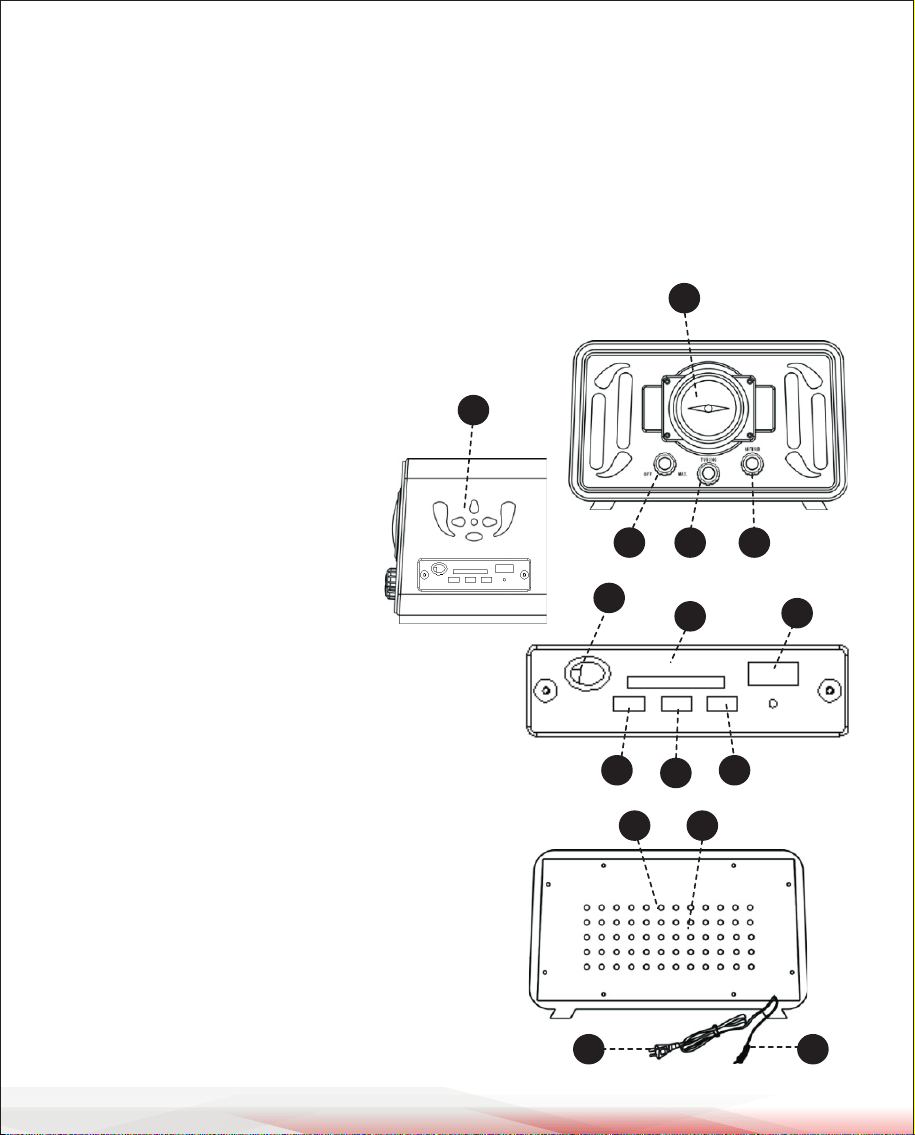
Functions & Controls
1. ON/OFF - Volume Control
2. Radio Tuning Control
3. Function Selector (AM, FM, USB)
4. Dial Control
5. Speakers
6. SD Card Reader
7. USB Flash Reader
8. Previous/Volume -
(Press for previous song/
Hold for volume down)
9. Play/Pause
10. Next/Volume + (Press for next song/
Hold for volume up)
11. IR Receiver
12. AC Power Cable
15. FM Wire Antenna
16. Aux Input
17. RCA Output
RADIO RECEPTION
1. Turn the VOLUME CONTROL clockwise until a “click” is heard.
2. Set the FUNCTION Selector to the AM or FM position.
3. Select the required receiving band with the BAND SWITCH.
4. Turn the TUNING CONTROL to select the desired radio station.
5. Adjust the VOLUME CONTROL to obtain the desired sound level from the
speaker.
6. To turn the radio o, turn the VOLUME CONTROL counter-clockwise until a
“click” is heard.
TIPS FOR GOOD RADIO RECEPTION
Use the FM WIRE ANTENNA and fully extend it into an open area.
To ensure the best AM sensitivity, try repositioning the unit until the best
reception is obtained.
CELLPHONE/SMARTPHONE CHARGE FUNCTION
When the unit is powered on, connect your USB cable into the port -- then
connect your device to the USB cable. Your phone will now charge.
USB/SD PLAYBACK FUNCTION
1. Using the Function Selector, choose 'USB'.
2. Inserting a USB or SD card will automatically play compatible audio les.
3. While playing from a USB ash drive, inserting an SD card will take priority
and play SD card les.
4. When both ash media drives are inserted, USB will take priority and play
rst.
• Please note the unit is compatible with only MP3 and WMA le types.
• The unit is compatible with USB smaller than 16GB.
1312
14 15
11
6
7
8
9
10
4
1 2 3
5

www.PyleUSA.com
6
www.PyleUSA.com
7
MAINTENANCE
Cleaning the unit: Do not use harsh chemicals on this unit. Clean by
lightly wiping with a soft cloth and water. Be sure to dry completely.
Note: Due to the evolving needs of customers, any changes to the functions,
specications, or the product may be made without notice.
Functions & Controls
1. ON/OFF - Volume Control
2. Radio Tuning Control
3. Function Selector (AM, FM, USB)
4. Dial Control
5. Speakers
6. SD Card Reader
7. USB Flash Reader
8. Previous/Volume -
(Press for previous song/
Hold for volume down)
9. Play/Pause
10. Next/Volume + (Press for next song/
Hold for volume up)
11. IR Receiver
12. AC Power Cable
15. FM Wire Antenna
16. Aux Input
17. RCA Output
RADIO RECEPTION
1. Turn the VOLUME CONTROL clockwise until a “click” is heard.
2. Set the FUNCTION Selector to the AM or FM position.
3. Select the required receiving band with the BAND SWITCH.
4. Turn the TUNING CONTROL to select the desired radio station.
5. Adjust the VOLUME CONTROL to obtain the desired sound level from the
speaker.
6. To turn the radio o, turn the VOLUME CONTROL counter-clockwise until a
“click” is heard.
TIPS FOR GOOD RADIO RECEPTION
Use the FM WIRE ANTENNA and fully extend it into an open area.
To ensure the best AM sensitivity, try repositioning the unit until the best
reception is obtained.
CELLPHONE/SMARTPHONE CHARGE FUNCTION
When the unit is powered on, connect your USB cable into the port -- then
connect your device to the USB cable. Your phone will now charge.
USB/SD PLAYBACK FUNCTION
1. Using the Function Selector, choose 'USB'.
2. Inserting a USB or SD card will automatically play compatible audio les.
3. While playing from a USB ash drive, inserting an SD card will take priority
and play SD card les.
4. When both ash media drives are inserted, USB will take priority and play
rst.
• Please note the unit is compatible with only MP3 and WMA le types.
• The unit is compatible with USB smaller than 16GB.
1312
14 15
11
6
7
8
9
10
4
1 2 3
5
www.PyleUSA.com
8
www.PyleUSA.com
9
BLUETOOTH FUNCTION
1. Turn the 'ON/OFF - Volume Control’ knob clockwise until you hear a ‘beep’
sound. This will turn the blue power light on.
2. Set the FUNCTION Selector to 'USB' mode.
3. Press and hold the 'Play / Pause’ button to change to ‘Bluetooth Mode'.
4. Turn on Bluetooth on your device. Search for 'Pyle Turntable' and connect.
5. When connected successfully, the blue light will remain on.
To ensure optimum Bluetooth sound quality, please remain within 30 feet
of the product during connection.
• Press and hold the 'Play/Pause’ button to switch between audio modes.
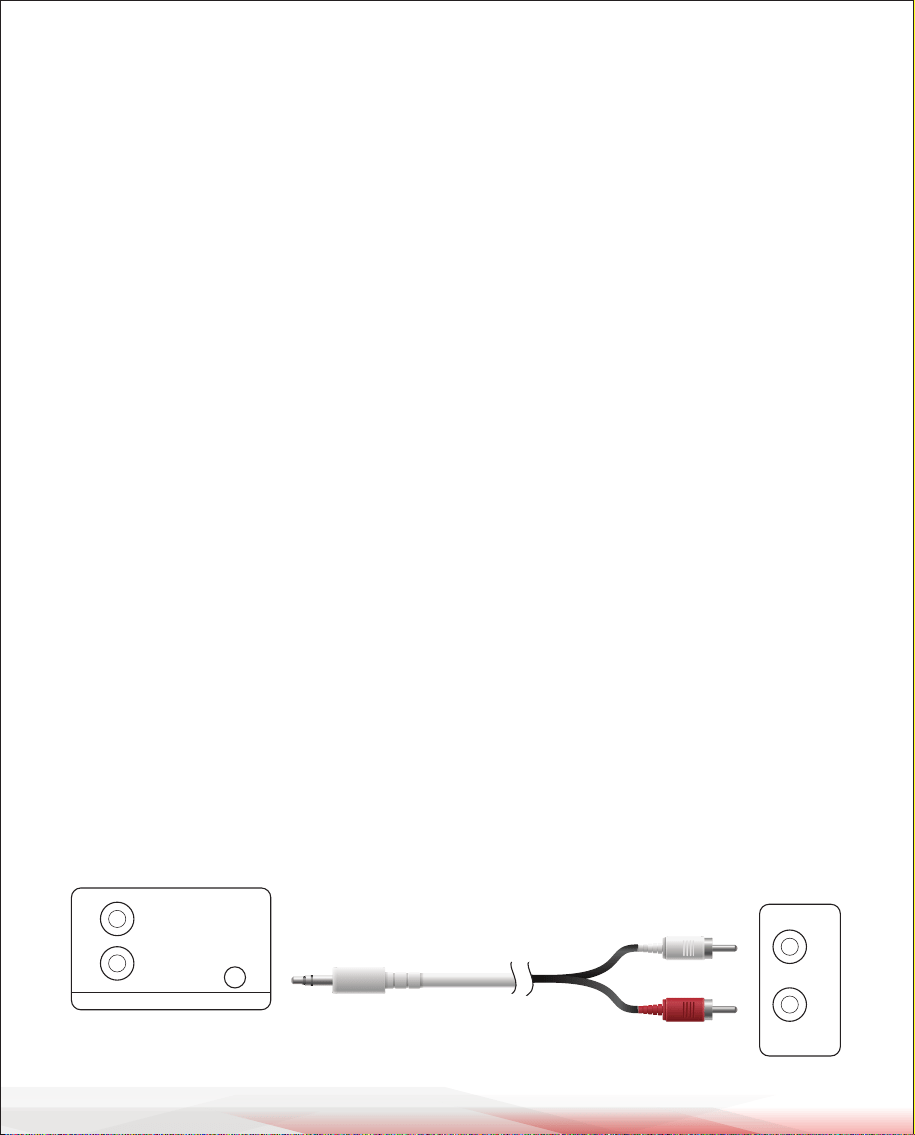
AUX PLAYBACK FUNCTION - CONNECTED DEVICE
To play audio from Aux (3.5mm) connected input devices:
• Connect your device via audio cable and connect to the unit.
• Switch the 'Function Selector’, located on the front panel, to USB Mode.
• On the side panel, press and hold the Play / Pause button for 5 seconds.
The LED indicator light will blink and shine orange when the unit is ready to
stream audio.
AUDIO INPUT
You will have the ability to connect external devices and stream their
audio through the radio's speakers.
Please be sure to turn the function switch selector to the 'USB' mode to listen
to your connected device.
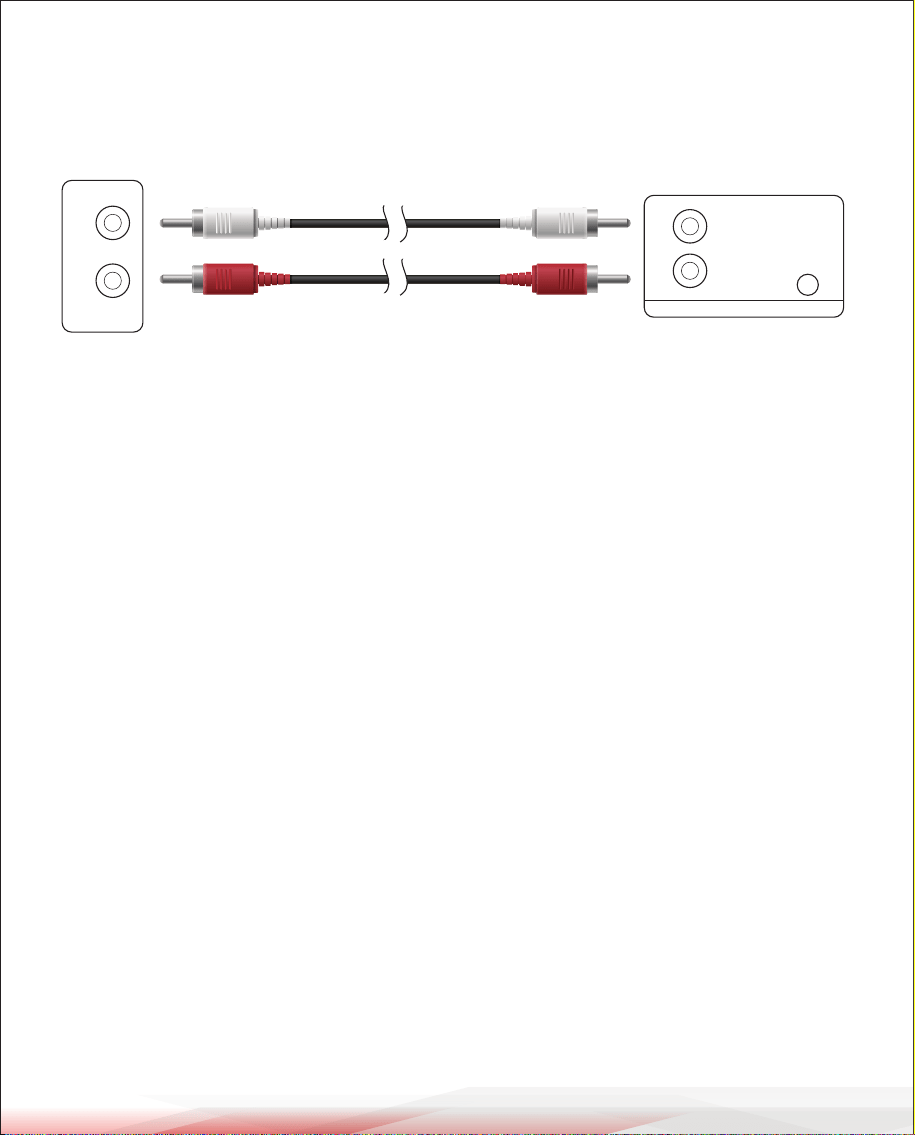
AUDIO OUTPUT
You will have the ability to connect the radio to external speaker systems.
ATTENTION
A. Before connecting, please make sure to turn o the power.
B. Ensure the connector is tted appropriately into the connector. Non-secure
or loose connections will result in distortion and unwanted noise.
C. The connector lines/cables should not be tight. There should be enough slack.
FCC INFORMATION
WARNING:
Changes or modications not expressly approved by the party responsible for compliance could void
the user’s authority to operate the equipment.
NOTE: This equipment has been tested and found to comply with the limits for a Class B digital device,
pursuant to Part 15 of the FCC Rules. These limits are designed to provide reasonable protection against
harmful interference in a residential installation. This unit generates, uses, and can radiate radio frequency
energy, and if not installed and used in accordance with the instructions, may cause harmful interference
to radio communications. However, there is no guarantee that interference will not occur in a particular
installation. If this equipment does cause harmful interference to radio or television reception, which can
be determined by turning the equipment o and on, the user is encouraged to try and correct the
interference by one or more of the following measures:
• Reorient or relocate the receiving antenna.
• Increase the separation between the equipment and receiver.
• Connect the equipment to an outlet on a circuit dierent from that to which the receiver is connected.
• Consult the dealer or an experienced radio/TV technician for help.
This device complies with Part 15 of the FCC Rules. Operation is subject to the following two
conditions:
1. This device may not cause harmful interference.
2. This device must accept any interference received, including interference that may cause undesired
operation.
L
R
AUX
OUTPUT AUDIO INPUT
L
R
AUDIO IN-OUT JACK PANEL AUDIO DEVICE OUT
White
Red
L
R
AUX
OUTPUT AUDIO INPUT
L
R
AUDIO IN-OUT JACK PANELAUDIO AMPLIFIER INT
White
Red
White
Red
www.PyleUSA.com
8
www.PyleUSA.com
9
BLUETOOTH FUNCTION
1. Turn the 'ON/OFF - Volume Control’ knob clockwise until you hear a ‘beep’
sound. This will turn the blue power light on.
2. Set the FUNCTION Selector to 'USB' mode.
3. Press and hold the 'Play / Pause’ button to change to ‘Bluetooth Mode'.
4. Turn on Bluetooth on your device. Search for 'Pyle Turntable' and connect.
5. When connected successfully, the blue light will remain on.
To ensure optimum Bluetooth sound quality, please remain within 30 feet
of the product during connection.
• Press and hold the 'Play/Pause’ button to switch between audio modes.
AUX PLAYBACK FUNCTION - CONNECTED DEVICE
To play audio from Aux (3.5mm) connected input devices:
• Connect your device via audio cable and connect to the unit.
• Switch the 'Function Selector’, located on the front panel, to USB Mode.
• On the side panel, press and hold the Play / Pause button for 5 seconds.
The LED indicator light will blink and shine orange when the unit is ready to
stream audio.
AUDIO INPUT
You will have the ability to connect external devices and stream their
audio through the radio's speakers.
Please be sure to turn the function switch selector to the 'USB' mode to listen
to your connected device.
AUDIO OUTPUT
You will have the ability to connect the radio to external speaker systems.
ATTENTION
A. Before connecting, please make sure to turn o the power.
B. Ensure the connector is tted appropriately into the connector. Non-secure
or loose connections will result in distortion and unwanted noise.
C. The connector lines/cables should not be tight. There should be enough slack.
FCC INFORMATION
WARNING:
Changes or modications not expressly approved by the party responsible for compliance could void
the user’s authority to operate the equipment.
NOTE: This equipment has been tested and found to comply with the limits for a Class B digital device,
pursuant to Part 15 of the FCC Rules. These limits are designed to provide reasonable protection against
harmful interference in a residential installation. This unit generates, uses, and can radiate radio frequency
energy, and if not installed and used in accordance with the instructions, may cause harmful interference
to radio communications. However, there is no guarantee that interference will not occur in a particular
installation. If this equipment does cause harmful interference to radio or television reception, which can
be determined by turning the equipment o and on, the user is encouraged to try and correct the
interference by one or more of the following measures:
• Reorient or relocate the receiving antenna.
• Increase the separation between the equipment and receiver.
• Connect the equipment to an outlet on a circuit dierent from that to which the receiver is connected.
• Consult the dealer or an experienced radio/TV technician for help.
This device complies with Part 15 of the FCC Rules. Operation is subject to the following two
conditions:
1. This device may not cause harmful interference.
2. This device must accept any interference received, including interference that may cause undesired
operation.
L
R
AUX
OUTPUT AUDIO INPUT
L
R
AUDIO IN-OUT JACK PANEL AUDIO DEVICE OUT
White
Red
L
R
AUX
OUTPUT AUDIO INPUT
L
R
AUDIO IN-OUT JACK PANELAUDIO AMPLIFIER INT
White
Red
White
Red
Visit Our Website
SCAN ME
PyleUSA.com
USER GUIDE
Questions or Comments?
We are here to help!
Phone: 1.718.535.1800
PyleUSA.com/ContactUs
Retro Classic-Style Bluetooth Radio
Speaker Sound System
PUNP34BT