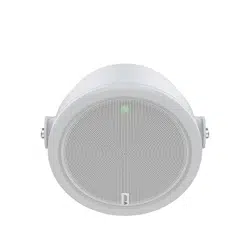


AXISC1610-VENetworkSoundProjector
Solutionoverview
Solutionoverview
Thismanualdescribeshowyoumakethedeviceaccessibletoyouraudiosystem,andhowtocongurethedevicedirectlyfromits
interface(forinstancewhenyouusethedevicewithoutanaudioorvideomanagementsoftware).
Ifyouareusinganaudioorvideomanagementsoftware,youcanusethatsoftwareforconguringthedevice.Thefollowing
managementsoftwareareavailableforcontrollingyouraudiosystem:
•AXISAudioManagerEdge—Audiomanagementsoftwareforsmallsystems.Comespre-installedonallaudiodevices
witharmwareequaltoorhigherthan10.0.
-AXISAudioManagerEdgeusermanual
•AXISAudioManagerPro—Advancedaudiomanagementsoftwareforlargesystems.
-AXISAudioManagerProusermanual
•AXISCameraStation—Advancedvideomanagementsoftwareforlargesystems.
-AXISCameraStationusermanual
•AXISCompanion—Videomanagementsoftwareforsmallsystems.
-AXISCompanionusermanual
Formoreinformation,seeAudiomanagementsoftware.
Towatchthisvideo,gotothewebversionofthisdocument.
help.axis.com/?&piaId=72697§ion=solution-overview
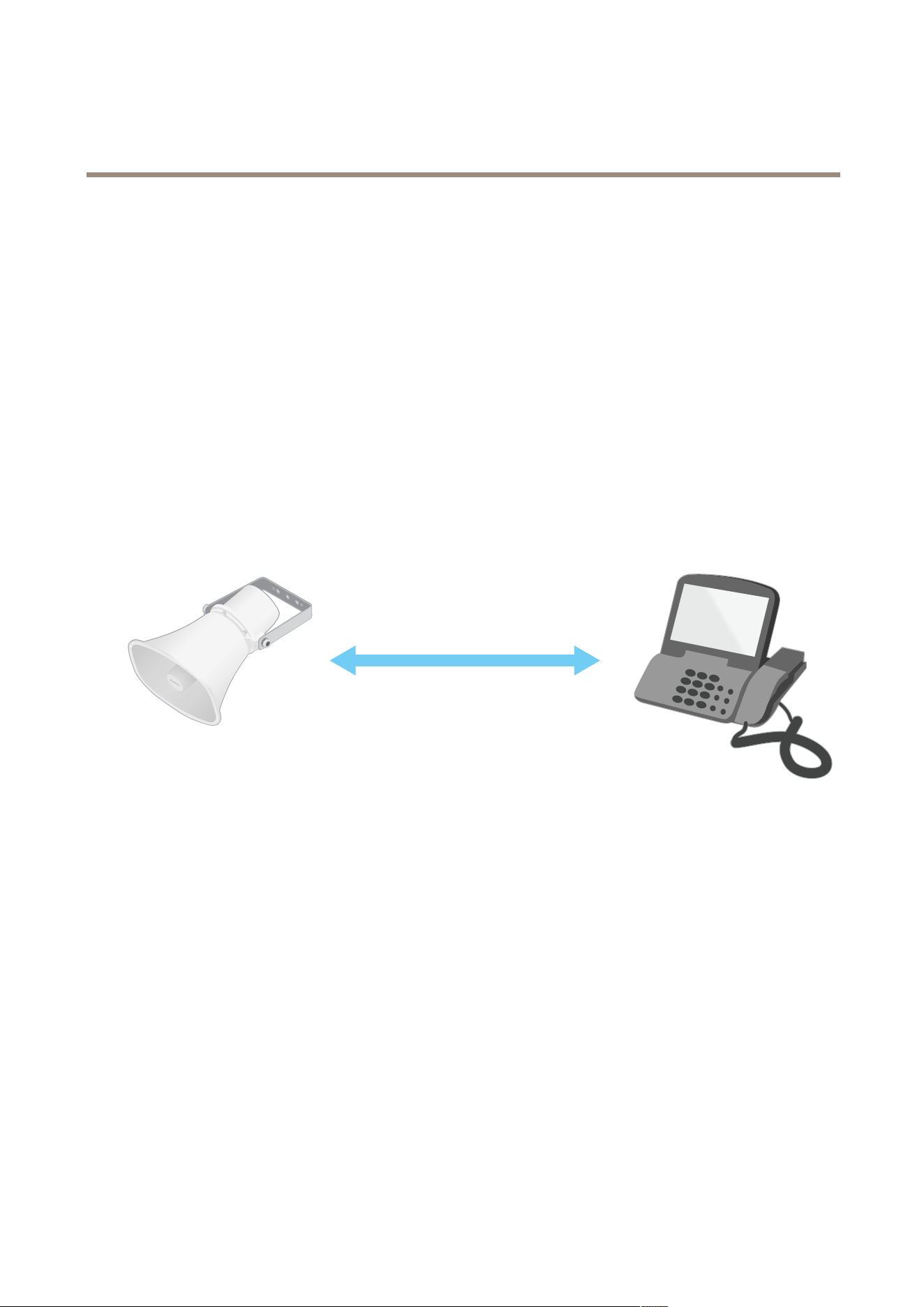
Anoverviewofhownetworkaudioworks.
2

AXISC1610-VENetworkSoundProjector
Installation
Installation
Towatchthisvideo,gotothewebversionofthisdocument.
help.axis.com/?&piaId=72697§ion=c1610-ve-installation-video
3

AXISC1610-VENetworkSoundProjector
Getstarted
Getstarted
Findthedeviceonthenetwork
TondAxisdevicesonthenetworkandassignthemIPaddressesinWindows®,useAXISIPUtilityorAXISDeviceManager.Both
applicationsarefreeandcanbedownloadedfromaxis.com/support.
FormoreinformationabouthowtondandassignIPaddresses,gotoHowtoassignanIPaddressandaccessyourdevice.
Browsersupport
Youcanusethedevicewiththefollowingbrowsers:
Chrome
TM
Firefox
®
Edge
TM
Safari
®
Windows
®
recommended
recommended
macOS
®
recommendedrecommended
Linux
®
recommendedrecommended
Otheroperatingsystems*
*TouseAXISOSwebinterfacewithiOS15oriPadOS15,gotoSettings Settings
Settings
> >
>
Safari Safari
Safari
> >
>
Advanced Advanced
Advanced
> >
>
Experimental Experimental
Experimental
Features Features
Features
anddisable
NSURLSessionWebsocket.
Ifyouneedmoreinformationaboutrecommendedbrowsers,gotoAXISOSPortal.
Accessthedevice
1.OpenabrowserandentertheIPaddressorhostnameoftheAxisdevice.
2.Entertheusernameandpassword.Ifyouaccessthedeviceforthersttime,youmustsettherootpassword.See.
Setanewpasswordfortherootaccount
Thedefaultadministratorusernameisroot.There’snodefaultpasswordfortherootaccount.Yousetapasswordtherst
timeyoulogintothedevice.
1.Typeapassword.Followtheinstructionsaboutsecurepasswords.SeeSecurepasswordsonpage4.
2.Retypethepasswordtoconrmthespelling.
3.ClickAdduser.
Important
Ifyoulosethepasswordfortherootaccount,gotoResettofactorydefaultsettingsonpage38andfollowtheinstructions.
Securepasswords
Important
Axisdevicessendtheinitiallysetpasswordincleartextoverthenetwork.Toprotectyourdeviceaftertherstlogin,set
upasecureandencryptedHTTPSconnectionandthenchangethepassword.
Thedevicepasswordistheprimaryprotectionforyourdataandservices.Axisdevicesdonotimposeapasswordpolicyasthey
maybeusedinvarioustypesofinstallations.
Toprotectyourdatawestronglyrecommendthatyou:
•Useapasswordwithatleast8characters,preferablycreatedbyapasswordgenerator.
4

AXISC1610-VENetworkSoundProjector
Getstarted
•Don’texposethepassword.
•Changethepasswordatarecurringinterval,atleastonceayear.
5

AXISC1610-VENetworkSoundProjector
Additionalsettings
Additionalsettings
Calibrateandrunaremotespeakertest
Youcanrunaspeakertesttoverifyfromaremotelocationthataspeakerisworkingasintended.Thespeakerperformsthetestby
playingaseriesoftesttonesthatareregisteredbyamicrophone.
Note
Thetestmustbecalibratedfromitsmountedpositionattheinstallationsite.Ifthespeakerismovedorifitslocal
surroundingschange,forinstanceifawallisbuiltorremoved,thespeakershouldbere-calibrated
Ifyoucalibratethespeakerwhenanexternalmicrophoneisconnected,thentheexternalmicrophonewillbeusedforthe
calibration.Thismeansthatwheneveryourunaspeakertestinthefuture,theexternalmicrophonemustbeintheexact
samepositionandsettothesamegain,asitdidduringtheinitialcalibration.Youcanavoidthisbydisconnectingthe
externalmicrophonewhenyoucalibrateandtestyourspeakers,sincetheinternalmicrophonewillbeusedinstead.
Duringcalibration,itisrecommendedthatsomeoneisphysicallypresentattheinstallationsitetolistentothetesttonesand
ensurethatthetesttonesarenotmufedorblockedbyanyunintendedobstructionsinthespeaker’sacousticpath.
1.Gotothedeviceinterface>Audio>Speakertest.
2.Tocalibratetheaudiodevice,clickCalibrate.
Note
OncetheAxisproductiscalibrated,thespeakertestcanberunatanytime.
3.Torunthespeakertest,clickRunthetest.
Note
Itisalsopossibletorunthecalibrationbypressingthecontrolbuttononthephysicaldevice.SeeProductoverviewonpage
41toidentifythecontrolbutton.
SetupdirectSIP(P2P)
Usepeer-to-peerwhenthecommunicationisbetweenafewuseragentswithinthesameIPnetworkandthereisnoneedforextra
featuresthataPBX-servercouldprovide.TobetterunderstandhowP2Pworks,seePeer-to-peerSIP(P2PSIP)onpage12.
Formoreinformationaboutsettingoptions,seeSIPonpage30.
1.GotoSystem>SIP>SIPsettingsandselectEnableSIP.
2.Toallowthedevicetoreceiveincomingcalls,selectAllowincomingcalls.
3.UnderCallhandling,setthetimeoutanddurationforthecall.
4.UnderPorts,entertheportnumbers.
-SIPport–ThenetworkportusedforSIPcommunication.Thesignalingtrafcthroughthisportisnon-encrypted.
Thedefaultportnumberis5060.Enteradifferentportnumberifrequired.
-TLSport–ThenetworkportusedforencryptedSIPcommunication.Thesignalingtrafcthroughthisportis
encryptedwithTransportLayerSecurity(TLS).Thedefaultportnumberis5061.Enteradifferentportnumber
ifrequired.
-RTPstartport–EntertheportusedfortherstRTPmediastreaminaSIPcall.Thedefaultstartportfor
mediatransportis4000.SomerewallsmightblockRTPtrafconcertainportnumbers.Aportnumbermust
bebetween1024and65535.
5.UnderNATtraversal,selecttheprotocolsyouwanttoenableforNATtraversal.
6

AXISC1610-VENetworkSoundProjector
Additionalsettings
Note
UseNATtraversalwhenthedeviceisconnectedtothenetworkfrombehindaNATrouterorarewall.Formoreinformation
seeNATtraversalonpage13.
6.UnderAudio,selectatleastoneaudiocodecwiththedesiredaudioqualityforSIPcalls.Drag-and-droptochange
thepriority.
7.UnderAdditional,selectadditionaloptions.
-UDP-to-TCPswitching–SelecttoallowcallstoswitchtransportprotocolsfromUDP(UserDatagramProtocol)
toTCP(TransmissionControlProtocol)temporarily.Thereasonforswitchingistoavoidfragmentation,and
theswitchcantakeplaceifarequestiswithin200bytesofthemaximumtransmissionunit(MTU)orlarger
than1300bytes.
-Allowviarewrite–SelecttosendthelocalIPaddressinsteadoftherouter'spublicIPaddress.
-Allowcontactrewrite–SelecttosendthelocalIPaddressinsteadoftherouter'spublicIPaddress.
-Registerwithserverevery–SethowoftenyouwantthedevicetoregisterwiththeSIPserverfortheexisting
SIPaccounts.
-DTMFpayloadtype–ChangesthedefaultpayloadtypeforDTMF.
8.ClickSave.
SetupSIPthroughaserver(PBX)
UseaPBX-serverwhenthecommunicationshouldbebetweenaninnitenumberofuseragentswithinandoutsidetheIPnetwork.
AdditionalfeaturescouldbeaddedtothesetupdependingonthePBX-provider.TobetterunderstandhowP2Pworks,seePrivate
BranchExchange(PBX)onpage12.
Formoreinformationaboutsettingoptions,seeSIPonpage30.
1.RequestthefollowinginformationfromyourPBXprovider:
-UserID
-Domain
-Password
-AuthenticationID
-CallerID
-Registrar
-RTPstartport
2.Toaddanewaccount,gotoSystem>SIP>SIPaccountsandclick+Account.
3.EnterthedetailsyoureceivedfromyourPBXprovider.
4.SelectRegistered.
5.Selectatransportmode.
6.ClickSave.
7.SetuptheSIPsettingsthesamewayasforpeer-to-peer.SeeSetupdirectSIP(P2P)onpage6formoreinformation.
7

AXISC1610-VENetworkSoundProjector
Additionalsettings
Setuprulesforevents
Youcancreaterulestomakeyourdeviceperformactionswhencertaineventsoccur.Aruleconsistsofconditionsandactions.The
conditionscanbeusedtotriggertheactions.Forexample,thedevicecanplayanaudioclipaccordingtoascheduleorwhenit
receivesacall,orsendanemailifthedevicechangesIPaddress.
Tolearnmore,checkoutourguideGetstartedwithrulesforevents.
Sendanemailifaspeakertestfails
Inthisexampletheaudiodeviceisconguredtosendanemailtoadenedrecipientwhenaspeakertestfails.Thespeakertest
isconguredtobeperformed18:00everyday.
1.Setupascheduleforthespeakertest:
1.1Gotothedeviceinterface>System>Events>Schedules.
1.2Createaschedulethatstartsat18:00andendsat18:01everyday.Nameit"Dailyat6pm".
2.Createanemailrecipient:
2.1Gotothedeviceinterface>System>Events>Recipients.
2.2ClickAddrecipient.
2.3Nametherecipient"Speakertestrecipients"
2.4UnderType,selectEmail.
2.5UnderSendemailto,entertheemailaddressesoftherecipients.Usecommastoseparatemultipleaddresses.
2.6Enterthedetailsfortheemailaccountofthesender.
2.7ClickTesttosendatestemail.
Note
Someemailprovidershavesecurityltersthatpreventusersfromreceivingorviewinglargeattachments,from
receivingscheduledemailsandsimilar.Checktheemailprovider’ssecuritypolicytoavoiddeliveryproblemsand
lockedemailaccounts.
2.8ClickSave.
3.Setuptheautomatedspeakertest:
3.1Gotothedeviceinterface>System>Events>Rules.
3.2ClickAddarule.
3.3Enteranamefortherule.
3.4UnderCondition,selectScheduleandselectfromthetriggerlist
3.5UnderSchedule,selectyourschedule(“Dailyat6pm”).
3.6UnderAction,selectRunautomaticspeakertest.
3.7ClickSave.
4.Setuptheconditionforsendinganemailwhenthespeakertestfails:
4.1Gotothedeviceinterface>System>Events>Rules.
4.2ClickAddarule.
8

AXISC1610-VENetworkSoundProjector
Additionalsettings
4.3Enteranamefortherule.
4.4UnderCondition,selectSpeakertestresult.
4.5UnderSpeakerteststatus,selectDidn’tpassthetest.
4.6UnderAction,selectSendnoticationtoemail.
4.7UnderRecipient,selectyourrecipient(“Speakertestrecipients”)
4.8Enterasubjectandamessage,andclickSave.
Playaudiowhenacameradetectsmotion
ThisexampleexplainshowtosetuptheaudiodevicetoplayanaudioclipwhenanAxisnetworkcameradetectsmotion.
Prerequisites
•TheAxisaudiodeviceandAxisnetworkcameraarelocatedonthesamenetwork.
•Themotiondetectionapplicationisconguredandrunninginthecamera.
1.Prepareanaudiocliplink:
1.1GotoAudio>Audioclips.
1.2Click
>Createlinkforanaudioclip.
1.3Setthevolumeandnumberoftimestorepeattheclip.
1.4Clickthecopyicontocopythelink.
2.Createanactionrule:
2.1GotoSystem>Events>Recipients.
2.2Click+Addrecipient.
2.3Typeanamefortherecipient,forexample“Speaker”.
2.4SelectHTTPfromtheTypedrop-downlist.
2.5PastetheconguredlinkfromtheaudiodeviceintheURLeld.
2.6Entertheusernameandpasswordoftheaudiodevice.
2.7ClickSave.
2.8GotoRulesandclick+Addarule.
2.9Typeanamefortheactionrule,forexample"Playclip".
2.10FromtheConditionlist,selectavideomotiondetectionalternativeunderApplications.
Note
Iftherearenooptionsforvideomotiondetection,thengotoApps,clickAXISVideoMotionDetectionand
turnonmotiondetection.
2.11FromtheActionlist,selectSendnoticationthroughHTTP.
2.12UnderRecipient,selectyourrecipient.
2.13ClickSave.
9

AXISC1610-VENetworkSoundProjector
Additionalsettings
StopaudiowithDTMF
Thisexampleexplainshowto:
•CongureDTMFonadevice.
•SetupaneventtostoptheaudiowhenaDTMFcommandissenttothedevice.
1.GotoSystem>SIP>SIPsettings.
2.MakesureEnableSIPisturnedon.
Ifyouneedtoturniton,remembertoclickSaveafterwards.
3.GotoSIPaccounts.
4.NexttotheSIPaccount,click
>Edit.
5.UnderDTMF,click+DTMFsequence.
6.UnderSequence,enter"1".
7.UnderDescription,enter"stopaudio".
8.ClickSave.
9.GotoSystem>Events>Rulesandclick+Addarule.
10.UnderName,enter"DTMFstopaudio".
11.UnderCondition,selectDTMF.
12.UnderDTMFEventID,selectstopaudio.
13.UnderAction,selectStopplayingaudioclip.
14.ClickSave.
SetupaudioforincomingSIPcalls
YoucansetuparulethatplaysanaudioclipwhenyoureceiveaSIPcall.
YoucanalsosetupanadditionalrulethatanswerstheSIPcallautomaticallyaftertheaudiocliphasended.Thiscanbeusefulin
caseswhereanalarmoperatorwantstocalltheattentionofsomeonenearanaudiodeviceandestablishalineofcommunication.
ThisisdonebymakingaSIPcalltotheaudiodevice,whichwillplayanaudiocliptoalertthepersonsneartheaudiodevice.When
theaudiocliphasstoppedplaying,theSIPcallisautomaticallyansweredbytheaudiodeviceandcommunicationbetweenthealarm
operatorandthepersonsneartheaudiodevicecantakeplace.
EnableSIPsettings:
1.Gotothedeviceinterfaceofthespeaker,byenteringitsIPaddressinawebbrowser.
2.GotoSystem>SIP>SIPsettingsandselectEnableSIP.
3.Toallowthedevicetoreceiveincomingcalls,selectAllowincomingcalls.
4.ClickSave.
5.GotoSIPaccounts.
6.NexttotheSIPaccount,click
>Edit.
7.UncheckAnswerautomatically.
10

AXISC1610-VENetworkSoundProjector
Additionalsettings
PlayaudiowhenaSIPcallisreceived:
1.GotoSettings>System>Events>Rulesandaddarule.
2.Typeanamefortherule.
3.Inthelistofconditions,selectState.
4.Inthelistofstates,selectRinging.
5.Inthelistofactions,selectPlayaudioclip.
6.Inthelistofclips,selecttheaudioclipyouwanttoplay.
7.Selecthowmanytimestorepeattheaudioclip.0means“playonce”.
8.ClickSave.
AnswertheSIPcallautomaticallyaftertheaudiocliphasended:
1.GotoSettings>System>Events>Rulesandaddarule.
2.Typeanamefortherule.
3.Inthelistofconditions,selectAudioclipplaying.
4.CheckUsethisconditionasatrigger.
5.CheckInvertthiscondition.
6.Click+Addaconditiontoaddasecondconditiontotheevent.
7.Inthelistofconditions,selectState.
8.Inthelistofstates,selectRinging.
9.Inthelistofactions,selectAnswercall.
10.ClickSave.
11
AXISC1610-VENetworkSoundProjector
Learnmore
Learnmore
SessionInitiationProtocol(SIP)
TheSessionInitiationProtocol(SIP)isusedtosetup,maintainandterminateVoIPcalls.Youcanmakecallsbetweentwoormore
parties,calledSIPuseragents.TomakeaSIPcallyoucanuse,forexample,SIPphones,softphonesorSIP-enabledAxisdevices.
TheactualaudioorvideoisexchangedbetweentheSIPuseragentswithatransportprotocol,forexampleRTP(Real-Time
TransportProtocol).
Youcanmakecallsonlocalnetworksusingapeer-to-peersetup,oracrossnetworksusingaPBX.
Peer-to-peerSIP(P2PSIP)
ThemostbasictypeofSIPcommunicationtakesplacedirectlybetweentwoormoreSIPuseragents.Thisiscalledpeer-to-peerSIP
(P2PSIP).Ifittakesplaceonalocalnetwork,allthat’sneededaretheSIPaddressesoftheuseragents.AtypicalSIPaddressinthis
casewouldbesip:<local-ip>.
Example
SIP
sip:192.168.1.101 sip:192.168.1.100
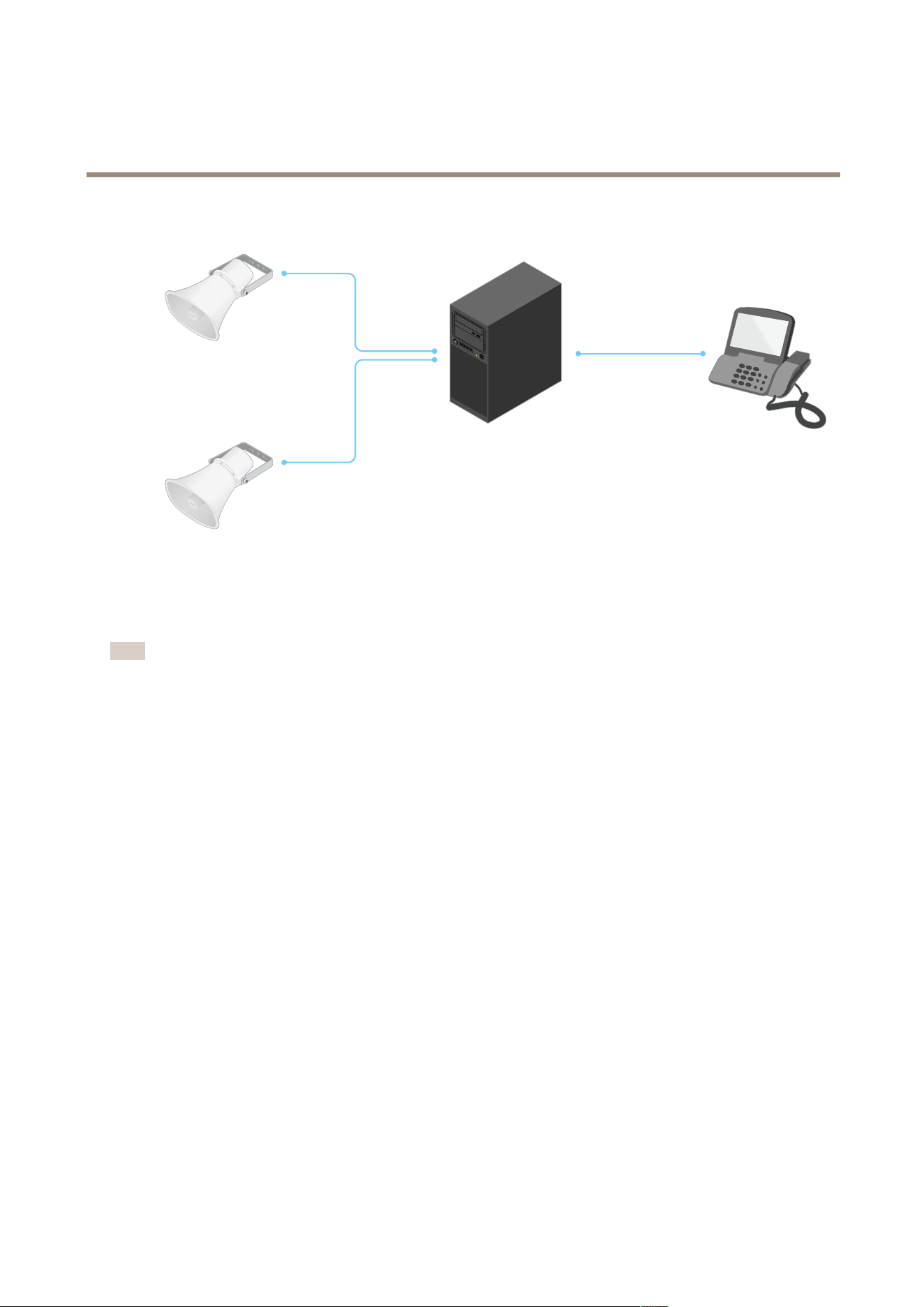
YoucansetupaSIP-enabledphonetocallanaudiodeviceonthesamenetworkusingapeer-to-peerSIPsetup.
PrivateBranchExchange(PBX)
WhenyoumakeSIPcallsoutsideyourlocalIPnetwork,aPrivateBranchExchange(PBX)canactasacentralhub.Themain
componentofaPBXisaSIPserver,whichisalsoreferredtoasaSIPproxyoraregistrar.APBXworkslikeatraditionalswitchboard,
showingtheclient'scurrentstatusandallowingforexamplecalltransfers,voicemail,andredirections.
ThePBXSIPservercanbesetupasalocalentityoroffsite.Itcanbehostedonanintranetorbyathirdpartyprovider.Whenyou
makeSIPcallsbetweennetworks,callsareroutedthroughasetofPBXs,thatquerythelocationoftheSIPaddresstobereached.
EachSIPuseragentregisterswiththePBX,andcanthenreachtheothersbydialingthecorrectextension.AtypicalSIPaddressin
thiscasewouldbesip:<user>@<domain>orsip:<user>@<registrar-ip>.TheSIPaddressisindependentofitsIP
addressandthePBXmakesthedeviceaccessibleaslongasitisregisteredtothePBX.
Example
12
AXISC1610-VENetworkSoundProjector
Learnmore
SIP
SIP
SIP
sip:myspeaker@company.com
PBX
sip.company.com
sip:office@company.com
sip:myspeaker@company.com
NATtraversal
UseNAT(NetworkAddressTranslation)traversalwhentheAxisdeviceislocatedonanprivatenetwork(LAN)andyouwantto
accessitfromoutsideofthatnetwork.
Note
TheroutermustsupportNATtraversalandUPnP®.
EachNATtraversalprotocolcanbeusedseparatelyorindifferentcombinationsdependingonthenetworkenvironment.
•ICETheICEInteractiveConnectivityEstablishment)protocolincreasesthechancesofndingthemostefcientpathto
successfulcommunicationbetweenpeerdevices.IfyoualsoenableSTUNandTURN,youimprovetheICEprotocol’s
chances.
•STUN-STUN(SessionTraversalUtilitiesforNAT)isaclient-servernetworkprotocolthatletstheAxisdevicedetermineif
itislocatedbehindaNATorrewall,andifsoobtainthemappedpublicIPaddressandportnumberallocatedfor
connectionstoremotehosts.EntertheSTUNserveraddress,forexample,anIPaddress.
•TURN-TURN(TraversalUsingRelaysaroundNAT)isaprotocolthatletsadevicebehindaNATrouterorrewallreceive
incomingdatafromotherhostsoverTCPorUDP.EnterTURNserveraddressandthelogininformation.
Applications
WithapplicationsyoucangetmoreoutofyourAxisdevice.AXISCameraApplicationPlatform(ACAP)isanopenplatformthat
makesitpossibleforthirdpartiestodevelopanalyticsandotherapplicationsforAxisdevices.Applicationscanbepreinstalledonthe
device,availablefordownloadforfree,orforalicensefee.Tondoutmoreaboutavailableapplications,downloads,trialsand
licenses,gotoaxis.com/products/acap/application-gallery.
TondtheusermanualsforAxisapplications,gotohelp.axis.com.
13
AXISC1610-VENetworkSoundProjector
Thedeviceinterface
Thedeviceinterface
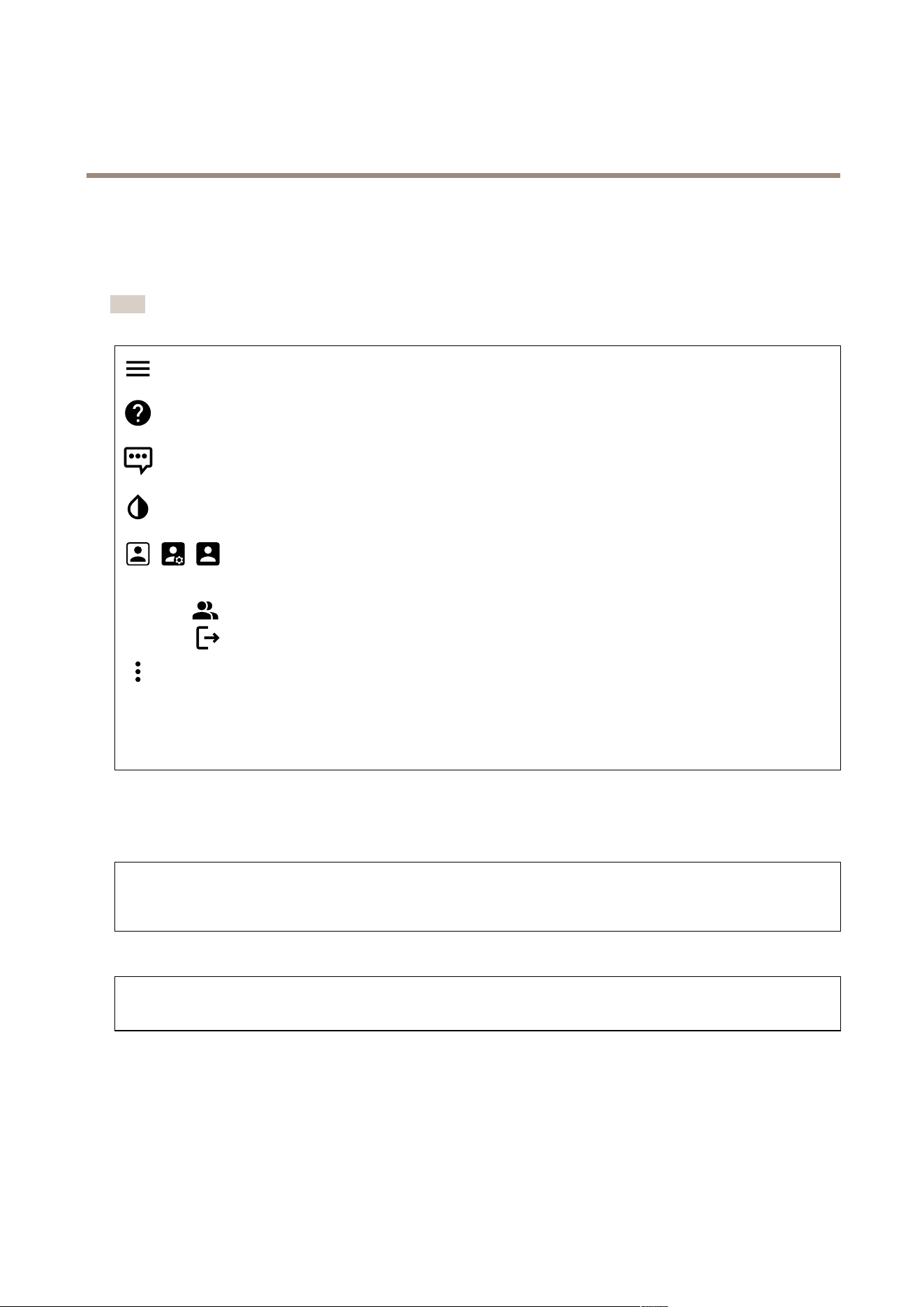
Toreachthedeviceinterface,typethedevice’sIPaddressinawebbrowser.
Note
Supportforthefeaturesandsettingsdescribedinthissectionvariesbetweendevices.
Showorhidethemainmenu.
Accesstheproducthelp.
Changethelanguage.
Setlightthemeordarktheme.
Theusermenucontains:
•Informationabouttheuserwhoisloggedin.
•
Changeuser:Logoutthecurrentuserandloginanewuser.
•
Logout:Logoutthecurrentuser.
Thecontextmenucontains:
•Analyticsdata:Accepttosharenon-personalbrowserdata.
•Feedback:Shareanyfeedbacktohelpusimproveyouruserexperience.
•Legal:Viewinformationaboutcookiesandlicenses.
•About:Viewdeviceinformation,includingrmwareversionandserialnumber.
Status
NTPsync
ShowsNTPsynchronizationinformation,includingifthedeviceisinsyncwithanNTPserverandthetimeremaininguntil
thenextsync.
NTPsettings:ClicktogototheDateandtimepagewhereyoucanchangetheNTPsettings.
Deviceinfo
Showsdeviceinformation,includingrmwareversionandserialnumber.
Upgradermware:ClicktogototheMaintenancepagewhereyoucandoarmwareupgrade.
Light
Overview
Lightstatus
14
AXISC1610-VENetworkSoundProjector
Thedeviceinterface
Showsthedifferentlightactivitiesrunningonthedevice.Youcanhavetenactivitiesinthestatuslistrunningatthesame
time.Whentwoormoreactivitiesrunatthesametime,theonewiththehighestpriorityisplayed.Thatrowishighlighted
ingreeninthestatuslist.
Proles
Proles
Aproleisacollectionofsetcongurations.Youcanhaveupto30proleswithdifferentprioritiesandpatterns.
Create:Clicktocreateaprole.
•Name:Enteranameoftheprole.
•Description:Enteradescriptionoftheprole.
•Light:Selectfromthedrop-downmenuwhatkindofpattern,speed,intensityandcolorofthelightyouwant.
•Siren:Selectfromthedrop-downmenuwhatkindofpatternandintensityofthesirenyouwant.
•Duration:Setthedurationoftheactivities.
-Continuous:Oncestarted,itrunsuntilit’sstopped.
-Time:Setaspeciedtimeforhowlongtheactivitywilllast.
-Repetitions:SettheactivitytorepeatthepatternXtimes.
•Priority:Setthepriorityofanactivityfrom1to10.Activitieswithprioritynumbershigherthan10cannotbe
removedfromthestatuslist.Therearethreeactivitieswithhigherprioritythan10,Maintenance(1 1),Identify
(12)andHealthcheck(13).
Import:Clicktoaddoneormoreproleswithpredenedcongurations.
•Add:Addnewproles.
Note
Youcan’thavetwoproleswiththesamename.
•Deleteandadd:Theoldprolesaredeleted,andyoucanuploadnewproles.
•Overwrite:Updatedprolesoverwritetheexistingproles.
Tocopyaproleandsaveittootherdevices,selecttheproleandclickExport.A.jsonleisexported.
:Clicktostartaprole.Theproleanditsactivitiesappearinthestatuslist.
Audio
Overview
Locatedevice:Clicktoplayasoundthathelpsyouidentifythespeaker.Forsomeproducts,aLEDwillashonthedevice.
Calibrate
:Clicktocalibratethespeaker.
LaunchAXISAudioManagerEdge:Clicktolaunchtheapplication.
Devicesettings
Input:Turnonoroffaudioinput.Showsthetypeofinput.
Gain:Usetheslidertochangethegain.Clickthemicrophoneicontomuteorunmute.
15
AXISC1610-VENetworkSoundProjector
Thedeviceinterface
Output:Showsthetypeofoutput.
Gain:Usetheslidertochangethegain.Clickthespeakericontomuteorunmute.
Stream
Encoding:Selecttheencodingtousefortheinputsourcestreaming.Youcanonlychooseencodingifaudioinputisturnedon.If
audioinputisturnedoff,clickEnableaudioinputtoturniton.
Echocancellation:Turnontoremoveechoesduringtwo-waycommunication.
Audioclips
Addclip:Clicktoaddanewaudioclip.Youcanuse.au,.mp3,.opus,.vorbis,.wavles.
Clicktoplaytheaudioclip.
Clicktostopplayingtheaudioclip.
Thecontextmenucontains:
•Rename:Changethenameoftheaudioclip.
•Createlink:CreateaURLwhich,whenused,playstheaudiocliponthedevice.Specifythevolumeandnumber
oftimestoplaytheclip.
•Download:Downloadtheaudiocliptoyourcomputer.
•Delete:Deletetheaudioclipfromthedevice.
Listenandrecord
Clicktolisten.
Clicktostartacontinuousrecordingoftheliveaudiostream.Clickagaintostoptherecording.Ifarecordingisongoing,it
willresumeautomaticallyafterareboot.
Note
Youcanonlylistenandrecordifinputisturnedonforthedevice.GotoAudio>Devicesettingstomakesurethat
inputisturnedon.
Clicktoshowthestoragethatisconguredforthedevice.Tocongurethestorageyouneedtobeloggedinasan
administrator.
Audiositesecurity
CAcerticate:SelectthecerticatetousewhenyouadddevicestotheaudiositewhenTLSauthenticationisenabledin
AXISAudioManagerEdge.
Save:Clicktoactivateandsaveyourselection.
16
AXISC1610-VENetworkSoundProjector
Thedeviceinterface
Speakertest
Youcanusethespeakertesttoverifyfromaremotelocationthatthespeakerworksasintended.
Calibrate:Clicktocalibratethespeakerbeforeyoutestitforthersttime.Duringcalibration,thespeakerplaysaseries
oftesttonesthatareregisteredbythebuilt-inmicrophone.Whenyoucalibratethespeaker,itmustbeinstalledinit’snal
position.Ifyoumovethespeakerlateron,orifit’ssurroundingschange,forexampleifawallisbuiltorremoved,youneed
torecalibratethespeaker.
Runthetest:Clicktoplaythesameseriesoftesttonesthatwereplayedduringcalibration,andcomparethemwiththe
registeredvaluesfromthecalibration.
Recordings
Clicktoltertherecordings.
From:Showrecordingsdoneafteracertainpointintime.
To:Showrecordingsupuntilacertainpointintime.
Source
:Showrecordingsbasedonsource.
Event:Showrecordingsbasedonevents.
Storage:Showrecordingsbasedonstoragetype.
Ongoingrecordings:Showallongoingrecordingsonthecamera.
Selecttostartarecordingonthecamera.
Choosewhichstoragedevicetosaveto.
Selecttostoparecordingonthecamera.
Triggeredrecordingswillendbothwhenmanuallystoppedandwhenthecameraisshutdown.
Continuousrecordingswillcontinueuntilmanuallystopped.Evenifthecameraisshutdown,therecordingwillcontinue
whenthecamerastartsupagain.
Clicktoplaytherecording.
17

AXISC1610-VENetworkSoundProjector
Thedeviceinterface
Clicktostopplayingtherecording.
18

AXISC1610-VENetworkSoundProjector
Thedeviceinterface
Clicktoshowmoreinformationandoptionsabouttherecording.
Setexportrange:Ifyouonlywanttoexportpartoftherecording,enterfromwhentowhen.
Clicktodeletetherecording.
Export:Clicktoexport(partof)therecording.
19

AXISC1610-VENetworkSoundProjector
Thedeviceinterface
Apps
Addapp:Clicktoinstallanewapp.
Findmoreapps:ClicktogotoanoverviewpageofAxisapps.
Allowunsignedapps:Turnontoallowinstallationofunsignedapps.
Thecontextmenucontains:
•Applog:Clicktoviewalogoftheappevents.Thelogishelpfulwhenyoucontactsupport.
•Activatelicensewithakey:Iftheapprequiresalicense,youneedtoactivateit.Usethisoptionifyourdevice
doesn’thaveinternetaccess.
Ifyoudon’thavealicensekey,gotoaxis.com/applications.YouneedalicensecodeandtheAxisproductserial
numbertogeneratealicensekey.
•Activatelicenseautomatically:Iftheapprequiresalicense,youneedtoactivateit.Usethisoptionifyourdevicehas
internetaccess.Youneedalicensecodetoactivatethelicense.
•Deactivatethelicense:Deactivatethelicensetouseitinanotherdevice.Ifyoudeactivatethelicense,youalso
removeitfromthedevice.Todeactivatethelicenserequiresinternetaccess.
•Settings
:Conguretheparameters.
•Delete:Deletetheapppermanentlyfromthedevice.Ifyoudon’tdeactivatethelicenserst,itremainsactive.
Note
Thedevice’sperformancemightbeaffectedifyourunseveralappsatthesametime.
Start:Startorstoptheapp.
Open:Clicktoaccesstheapp’ssettings.Theavailablesettingsdependontheapplication.Someapplicationsdon’thaveany
settings.
System
Dateandtime
Thetimeformatdependsonthewebbrowser’slanguagesettings.
Note
Werecommendyoutosynchronizethedevice’sdateandtimewithanNTPserver.
Synchronization:Selectanoptionforsynchronizingthedevice’sdateandtime.
•Automaticdateandtime(manualNTSKEservers):SynchronizewiththesecureNTPkeyestablishmentservers
connectedtotheDHCPserver.
-ManualNTSKEservers:EntertheIPaddressofoneortwoNTPservers.WhenyouusetwoNTPservers,
thedevicesynchronizesandadaptsitstimebasedoninputfromboth.
•Automaticdateandtime(NTPserversusingDHCP):SynchronizewiththeNTPserversconnectedtotheDHCPserver.
-FallbackNTPservers:EntertheIPaddressofoneortwofallbackservers.
•Automaticdateandtime(manualNTPservers):SynchronizewithNTPserversofyourchoice.
-ManualNTPservers:EntertheIPaddressofoneortwoNTPservers.WhenyouusetwoNTPservers,the
devicesynchronizesandadaptsitstimebasedoninputfromboth.
•Customdateandtime:Manuallysetthedateandtime.ClickGetfromsystemtofetchthedateandtimesettings
oncefromyourcomputerormobiledevice.
Timezone:Selectwhichtimezonetouse.Timewillbeautomaticallyadjustedfordaylightsavingtimeandstandardtime.
Note
Thesystemusesthedateandtimesettingsinallrecordings,logsandsystemsettings.
20

AXISC1610-VENetworkSoundProjector
Thedeviceinterface
Network
IPv4
AssignIPv4automatically:SelecttoletthenetworkrouterassignanIPaddresstothedeviceautomatically.Werecommend
automaticIP(DHCP)formostnetworks.
IPaddress:EnterauniqueIPaddressforthedevice.StaticIPaddressescanbeassignedatrandomwithinisolatednetworks,
providedthateachaddressisunique.Toavoidconicts,werecommendyoutocontactyournetworkadministratorbeforeyou
assignastaticIPaddress.
Subnetmask:Enterthesubnetmasktodenewhataddressesareinsidethelocalareanetwork.Anyaddressoutsidethelocal
areanetworkgoesthroughtherouter.
Router:EntertheIPaddressofthedefaultrouter(gateway)usedtoconnectdevicesthatareattachedtodifferentnetworksand
networksegments.
IPv6
AssignIPv6automatically:SelecttoturnonIPv6andtoletthenetworkrouterassignanIPaddresstothedeviceautomatically.
Hostname
Assignhostnameautomatically:Selecttoletthenetworkrouterassignahostnametothedeviceautomatically.
Hostname:Enterthehostnamemanuallytouseasanalternativewayofaccessingthedevice.TheHostnameisusedintheserver
reportandinthesystemlog.AllowedcharactersareA–Z,a–z,0–9and-.
DNSservers
AssignDNSautomatically:SelecttoletthenetworkrouterassignsearchdomainsandDNSserveraddressestothedevice
automatically.WerecommendautomaticDNS(DHCP)formostnetworks.
Searchdomains:Whenyouuseahostnamethatisnotfullyqualied,clickAddsearchdomainandenteradomaininwhichto
searchforthehostnameusedbythedevice.
DNSservers:ClickAddDNSserverandentertheIPaddressoftheDNSserver.ThisprovidesthetranslationofhostnamestoIP
addressesonyournetwork.
HTTPandHTTPS
Allowaccessthrough:SelectifauserisallowedtoconnecttothedevicethroughtheHTTP,HTTPS,orbothHTTPandHTTPS
protocols.
HTTPSisaprotocolthatprovidesencryptionforpagerequestsfromusersandforthepagesreturnedbythewebserver.The
encryptedexchangeofinformationisgovernedbytheuseofanHTTPScerticate,whichguaranteestheauthenticityoftheserver.
TouseHTTPSonthedevice,youmustinstallanHTTPScerticate.GotoSystem>Securitytocreateandinstallcerticates.
Note
IfyouviewencryptedwebpagesthroughHTTPS,youmightexperienceadropinperformance,especiallywhenyou
requestapageforthersttime.
HTTPport:EntertheHTTPporttouse.Port80oranyportintherange1024-65535areallowed.Ifyouareloggedinasan
administrator,youcanalsoenteranyportintherange1-1023.Ifyouuseaportinthisrange,yougetawarning.
HTTPSport:EntertheHTTPSporttouse.Port443oranyportintherange1024-65535areallowed.Ifyouareloggedinasan
administrator,youcanalsoenteranyportintherange1-1023.Ifyouuseaportinthisrange,yougetawarning.
Certicate:SelectacerticatetoenableHTTPSforthedevice.
21

AXISC1610-VENetworkSoundProjector
Thedeviceinterface
Networkdiscoveryprotocols
Bonjour
®
:Turnontoallowautomaticdiscoveryonthenetwork.
Bonjourname:Enterafriendlynametobevisibleonthenetwork.ThedefaultnameisthedevicenameandMACaddress.
UPnP
®
:Turnontoallowautomaticdiscoveryonthenetwork.
UPnPname:Enterafriendlynametobevisibleonthenetwork.ThedefaultnameisthedevicenameandMACaddress.
WS-Discovery:Turnontoallowautomaticdiscoveryonthenetwork.
One-clickcloudconnection
One-clickcloudconnection(O3C)togetherwithanO3Cserviceprovideseasyandsecureinternetaccesstoliveandrecordedvideo
fromanylocation.Formoreinformation,seeaxis.com/end-to-end-solutions/hosted-services.
AllowO3C:
•One-click:Thedefaultsetting.PressandholdthecontrolbuttononthedevicetoconnecttoanO3Cserviceoverthe
internet.YouneedtoregisterthedevicewiththeO3Cservicewithin24hoursafteryoupressthecontrolbutton.
Otherwise,thedevicedisconnectsfromtheO3Cservice.Onceyouhaveregisteredthedevice,Alwaysisenabledand
thedevicestaysconnectedtotheO3Cservice.
•Always:ThedeviceconstantlyattemptstoconnecttoanO3Cserviceovertheinternet.Onceyouhaveregisteredthe
device,itstaysconnectedtotheO3Cservice.Usethisoptionifthecontrolbuttononthedeviceisoutofreach.
•No:DisablestheO3Cservice.
Proxysettings:Ifneeded,entertheproxysettingstoconnecttotheproxyserver.
Host:Entertheproxyserver’saddress.
Port:Entertheportnumberusedforaccess.
LoginandPassword:Ifneeded,enterusernameandpasswordfortheproxyserver.
Authenticationmethod:
•Basic:ThismethodisthemostcompatibleauthenticationschemeforHTTP.It’slesssecurethantheDigestmethod
becauseitsendstheusernameandpasswordunencryptedtotheserver.
•Digest:Thismethodismoresecurebecauseitalwaystransfersthepasswordencryptedacrossthenetwork.
•Auto:Thisoptionletsthedeviceselecttheauthenticationmethoddependingonthesupportedmethods.Itprioritizes
theDigestmethodovertheBasicmethod.
Ownerauthenticationkey(OAK):ClickGetkeytofetchtheownerauthenticationkey.Thisisonlypossibleifthedeviceis
connectedtotheinternetwithoutarewallorproxy.
SNMP
TheSimpleNetworkManagementProtocol(SNMP)allowsremotemanagementofnetworkdevices.
SNMP:SelecttheversionofSNMPtouse.
•v1andv2c:
-Readcommunity:Enterthecommunitynamethathasread-onlyaccesstoallsupportedSNMPobjects.The
defaultvalueispublic.
-Writecommunity:Enterthecommunitynamethathasread/writeaccesstoallsupportedSNMPobjects
(exceptread-onlyobjects).Thedefaultvalueiswrite.
-Activatetraps:Turnontoactivatetrapreporting.Thedeviceusestrapstosendmessagesforimportant
eventsorstatuschangestoamanagementsystem.Inthedeviceinterface,youcansetuptrapsforSNMPv1
andv2c.TrapsareautomaticallyturnedoffifyouchangetoSNMPv3orturnoffSNMP.IfyouuseSNMPv3,
youcansetuptrapsthroughtheSNMPv3managementapplication.
-Trapaddress:EntertheIPaddressorhostnameofthemanagementserver.
-Trapcommunity:Enterthecommunitytousewhenthedevicesendsatrapmessagetothemanagement
system.
22

AXISC1610-VENetworkSoundProjector
Thedeviceinterface
-Traps:
-Coldstart:Sendsatrapmessagewhenthedevicestarts.
-Warmstart:SendsatrapmessagewhenyouchangeanSNMPsetting.
-Linkup:Sendsatrapmessagewhenalinkchangesfromdowntoup.
-Authenticationfailed:Sendsatrapmessagewhenanauthenticationattemptfails.
Note
AllAxisVideoMIBtrapsareenabledwhenyouturnonSNMPv1andv2ctraps.Formoreinformation,see
AXISOSPortal>SNMP.
•v3:SNMPv3isamoresecureversion,whichprovidesencryptionandsecurepasswords.TouseSNMPv3,we
recommendyoutoactivateHTTPS,asthepasswordisthensentthroughHTTPS.Thisalsopreventsunauthorized
partiestoaccessunencryptedSNMPv1andv2ctraps.IfyouuseSNMPv3,youcansetuptrapsthroughtheSNMPv3
managementapplication.
-Passwordfortheaccount“initial”:EntertheSNMPpasswordfortheaccountnamed“initial”.Althoughthe
passwordcanbesentwithoutactivatingHTTPS,wedon’trecommendit.TheSNMPv3passwordcanonly
besetonce,andpreferablyonlywhenHTTPSisenabled.Oncethepasswordisset,thepasswordeldisno
longerdisplayed.Tosetthepasswordagain,youmustresetthedevicetofactorydefaultsettings.
Connectedclients
Thelistshowsallclientsthatareconnectedtothedevice.
Update:Clicktorefreshthelist.
Security
Certicates
Certicatesareusedtoauthenticatedevicesonanetwork.Thedevicesupportstwotypesofcerticates:
•Client/servercerticates
Aclient/servercerticatevalidatesthedevice’sidentity,andcanbeself-signedorissuedbyaCerticateAuthority(CA).
Aself-signedcerticateofferslimitedprotectionandcanbeusedbeforeaCA-issuedcerticatehasbeenobtained.
•CAcerticates
YoucanuseaCAcerticatetoauthenticateapeercerticate,forexampletovalidatetheidentityofanauthentication
serverwhenthedeviceconnectstoanetworkprotectedbyIEEE802.1X.Thedevicehasseveralpre-installedCA
certicates.
Theseformatsaresupported:
•Certicateformats:.PEM,.CER,and.PFX
•Privatekeyformats:PKCS#1andPKCS#12
Important
Ifyouresetthedevicetofactorydefault,allcerticatesaredeleted.Anypre-installedCAcerticatesarereinstalled.
Filterthecerticatesinthelist.
Addcerticate:Clicktoaddacerticate.
Thecontextmenucontains:
•Certicateinformation:Viewaninstalledcerticate’sproperties.
•Deletecerticate:Deletethecerticate.
•Createcerticatesigningrequest:Createacerticatesigningrequesttosendtoaregistrationauthoritytoapply
foradigitalidentitycerticate.
23

AXISC1610-VENetworkSoundProjector
Thedeviceinterface
IEEE802.1x
IEEE802.1xisanIEEEstandardforport-basednetworkadmissioncontrolprovidingsecureauthenticationofwiredandwireless
networkdevices.IEEE802.1xisbasedonEAP(ExtensibleAuthenticationProtocol).
ToaccessanetworkprotectedbyIEEE802.1x,networkdevicesmustauthenticatethemselves.Theauthenticationisperformedby
anauthenticationserver,typicallyaRADIUSserver(forexampleFreeRADIUSandMicrosoftInternetAuthenticationServer).
Certicates
WhenconguredwithoutaCAcerticate,servercerticatevalidationisdisabledandthedevicetriestoauthenticateitself
regardlessofwhatnetworkitisconnectedto.
Whenusingacerticate,inAxis'implementation,thedeviceandtheauthenticationserverauthenticatethemselveswithdigital
certicatesusingEAP-TLS(ExtensibleAuthenticationProtocol-TransportLayerSecurity).
Toallowthedevicetoaccessanetworkprotectedthroughcerticates,asignedclientcerticatemustbeinstalledonthedevice.
Clientcerticate:SelectaclientcerticatetouseIEEE802.1x.Theauthenticationserverusesthecerticatetovalidatethe
client’sidentity.
CAcerticate:SelectaCAcerticatetovalidatetheauthenticationserver’sidentity.Whennocerticateisselected,thedevice
triestoauthenticateitselfregardlessofwhatnetworkitisconnectedto.
EAPidentity:Entertheuseridentityassociatedwiththeclientcerticate.
EAPOLversion:SelecttheEAPOLversionthatisusedinthenetworkswitch.
UseIEEE802.1x:SelecttousetheIEEE802.1xprotocol.
Preventbrute-forceattacks
Blocking:Turnontoblockbrute-forceattacks.Abrute-forceattackusestrial-and-errortoguesslogininfoorencryptionkeys.
Blockingperiod:Enterthenumberofsecondstoblockabrute-forceattack.
Blockingconditions:Enterthenumberofauthenticationfailuresallowedpersecondbeforetheblockstarts.Youcansetthe
numberoffailuresallowedbothonpagelevelanddevicelevel.
IPaddresslter
Uselter:SelecttolterwhichIPaddressesthatareallowedtoaccessthedevice.
Policy:ChoosewhethertoAllowaccessorDenyaccessforcertainIPaddresses.
Addresses:EntertheIPnumbersthatareeitherallowedordeniedaccesstothedevice.YoucanalsousetheCIDRformat.
Custom-signedrmwarecerticate
ToinstalltestrmwareorothercustomrmwarefromAxisonthedevice,youneedacustom-signedrmwarecerticate.The
certicateveriesthatthermwareisapprovedbyboththedeviceownerandAxis.Thermwarecanonlyrunonaspecic
devicewhichisidentiedbyitsuniqueserialnumberandchipID.Custom-signedrmwarecerticatescanonlybecreated
byAxis,sinceAxisholdsthekeytosignthem.
ClickInstalltoinstallthecerticate.Youneedtoinstallthecerticatebeforeyouinstallthermware.
24

AXISC1610-VENetworkSoundProjector
Thedeviceinterface
Users
Adduser:Clicktoaddanewuser.Youcanaddupto100users.
Username:Enterauniqueusername.
Newpassword:Enterapasswordfortheuser.Passwordsmustbe1to64characterslong.OnlyASCIIprintablecharacters(code
32to126)areallowedinthepassword,forexampleletters,numbers,punctuation,andsomesymbols.
Repeatpassword:Enterthesamepasswordagain.
Role:
•Administrator:Hasfullaccesstoallsettings.Administratorscanalsoadd,update,andremoveotherusers.
•Operator:Hasaccesstoallsettingsexcept:
-AllSystemsettings.
-Addingapps.
•Viewer:Doesn’thaveaccesstochangeanysettings.
Thecontextmenucontains:
Updateuser:Edittheuser’sproperties.
Deleteuser:Deletetheuser.Youcan’tdeletetherootuser.
Anonymoususers
Allowanonymousviewers:Turnontoallowanyonetoaccessthedeviceasaviewerwithouthavingtologinwithauseraccount.
AllowanonymousPTZoperators:Turnontoallowanonymoususerstopan,tilt,andzoomtheimage.
Events
Rules
Aruledenestheconditionsthatmustbemetfortheproducttoperformanaction.Thelistshowsallthecurrentlycongured
rulesintheproduct.
Note
Youcancreateupto256actionrules.
Addarule:Clicktocreatearule.
Name:Enteranamefortherule.
Waitbetweenactions:Entertheminimumtime(hh:mm:ss)thatmustpassbetweenruleactivations.Itisusefuliftheruleis
activatedbyforexampleday-nightmodeconditions,toavoidthatsmalllightchangesduringsunriseandsunsetactivate
therulerepeatedly.
Condition:Selectaconditionfromthelist.Aconditionmustbemetforthedevicetoperformanaction.Ifmultiple
conditionsaredened,allofthemmustbemettotriggertheaction.Forinformationaboutspecicconditions,see
Getstartedwithrulesforevents.
Usethisconditionasatrigger:Selecttomakethisrstconditionfunctiononlyasastartingtrigger.Itmeansthatoncetherule
isactivateditremainsactiveforaslongasalltheotherconditionsaremet,nomatterthestateoftherstcondition.Ifyoudon’t
selectthisoption,therulewillsimplybeactivewheneveralltheconditionsaremet.
Invertthiscondition:Selectifyouwanttheconditiontobetheoppositeofyourselection.
25

AXISC1610-VENetworkSoundProjector
Thedeviceinterface
Addacondition:Clicktoaddanadditionalcondition.
Action:Selectanactionfromthelistandenteritsrequiredinformation.Forinformationaboutspecicactions,see
Getstartedwithrulesforevents.
Yourproductmayhavesomeofthefollowingpre-conguredrules:
Front-facingLEDActivation:LiveStream:Whenthemicrophoneisturnedonandalivestreamisreceived,thenthefront-facing
LEDontheaudiodevicewillturngreen.
Front-facingLEDActivation:Recording:Whenthemicrophoneisturnedonandarecordingisongoing,thenthefront-facing
LEDontheaudiodevicewillturngreen.
Front-facingLEDActivation:SIP:WhenthemicrophoneisturnedonandaSIPcallisactive,thenthefront-facingLEDonthe
audiodevicewillturngreen.SIPmustbeenabledontheaudiodevicebeforethiseventcanbetriggered.
Pre-announcementtone:Playtoneonincomingcall:WhenaSIPcallismadetotheaudiodevice,thenapre-denedaudioclip
isplayed.SIPmustbeenabledfortheaudiodevice.FortheSIPcallertoheararingtonewhiletheaudioclipisplayed,theSIP
accountfortheaudiodevicemustbeconguredtonotanswerthecallautomatically.
Pre-announcementtone:Answercallafterincomingcall-tone:Whentheaudiocliphasended,theincomingSIP-callis
answered.SIPmustbeenabledfortheaudiodevice.
Loudringer:WhenaSIPcallismadetotheaudiodevice,apre-denedaudioclipisplayedaslongastheruleisactive.SIP
mustbeenabledfortheaudiodevice.
Recipients
Youcansetupyourdevicetonotifyrecipientsabouteventsorsendles.Thelistshowsalltherecipientscurrentlyconguredin
theproduct,alongwithinformationabouttheirconguration.
Note
Youcancreateupto20recipients.
Addarecipient:Clicktoaddarecipient.
Name:Enteranamefortherecipient.
Type:Selectfromthelist:
•FTP
-Host:Entertheserver'sIPaddressorhostname.Ifyouenterahostname,makesurethataDNSserveris
speciedunderSystem>Network>IPv4andIPv6.
-Port:EntertheportnumberusedbytheFTPserver.Thedefaultis21.
-Folder:Enterthepathtothedirectorywhereyouwanttostoreles.Ifthisdirectorydoesn’talreadyexist
ontheFTPserver,youwillgetanerrormessagewhenuploadingles.
-Username:Entertheusernameforthelogin.
-Password:Enterthepasswordforthelogin.
-Usetemporarylename:Selecttouploadleswithtemporary,automaticallygeneratedlenames.The
lesgetrenamedtothedesirednameswhentheuploadcompletes.Iftheuploadisaborted/interrupted,
youdon’tgetanycorruptles.However,youprobablystillgetthetemporaryles.Thiswayyouknowthat
alllesthathavethedesiredname,arecorrect.
-UsepassiveFTP:UndernormalcircumstancestheproductsimplyrequeststhetargetFTPservertoopenthe
dataconnection.ThedeviceactivelyinitiatesboththeFTPcontrolanddataconnectionstothetargetserver.
ThisisnormallyneededifthereisarewallbetweenthedeviceandthetargetFTPserver.
•HTTP
26

AXISC1610-VENetworkSoundProjector
Thedeviceinterface
-URL:EnterthenetworkaddresstotheHTTPserverandthescriptthatwillhandletherequest.Forexample:
http://192.168.254.10/cgi-bin/notify.cgi.
-Username:Entertheusernameforthelogin.
-Password:Enterthepasswordforthelogin.
-Proxy:TurnonandentertherequiredinformationifaproxyservermustbepassedtoconnecttotheHTTP
server.
•HTTPS
-URL:EnterthenetworkaddresstotheHTTPSserverandthescriptthatwillhandletherequest.Forexample:
https://192.168.254.10/cgi-bin/notify.cgi.
-Validateservercerticate:SelecttovalidatethecerticatethatwascreatedbyHTTPSserver.
-Username:Entertheusernameforthelogin.
-Password:Enterthepasswordforthelogin.
-Proxy:TurnonandentertherequiredinformationifaproxyservermustbepassedtoconnecttotheHTTPS
server.
•Networkstorage
YoucanaddnetworkstoragesuchasaNAS(NetworkAttachedStorage)anduseitasarecipienttostoreles.
ThelesarestoredintheMatroska(MKV)leformat.
-Host:EntertheIPaddressorhostnameforthenetworkstorage.
-Share:Enterthenameoftheshareonthehost.
-Folder:Enterthepathtothedirectorywhereyouwanttostoreles.
-Username:Entertheusernameforthelogin.
-Password:Enterthepasswordforthelogin.
•SFTP
-Host:Entertheserver'sIPaddressorhostname.Ifyouenterahostname,makesurethataDNSserveris
speciedunderSystem>Network>IPv4andIPv6.
-Port:EntertheportnumberusedbytheSFTPserver.Thedefaultis22.
-Folder:Enterthepathtothedirectorywhereyouwanttostoreles.Ifthisdirectorydoesn’talreadyexiston
theSFTPserver,youwillgetanerrormessagewhenuploadingles.
-Username:Entertheusernameforthelogin.
-Password:Enterthepasswordforthelogin.
-SSHhostpublickeytype(MD5):Enterthengerprintoftheremotehost’spublickey(a32-digit
hexadecimalstring).TheSFTPclientsupportsSFTPserversusingSSH-2withRSA,DSA,ECDSA,andED25519
hostkeytypes.RSAisthepreferredmethodduringnegotiation,followedbyECDSA,ED25519,andDSA.Make
suretoentertherightMD5hostkeythatisusedbyyourSFTPserver.WhiletheAxisdevicesupportsboth
MD5andSHA-256hashkeys,werecommendusingSHA-256duetostrongersecurityoverMD5.Formore
informationonhowtocongureanSFTPserverwithanAxisdevice,gototheAXISOSPortal.
-SSHhostpublickeytype(SHA256):Enterthengerprintoftheremotehost’spublickey(a43-digitBase64
encodedstring).TheSFTPclientsupportsSFTPserversusingSSH-2withRSA,DSA,ECDSA,andED25519host
keytypes.RSAisthepreferredmethodduringnegotiation,followedbyECDSA,ED25519,andDSA.Make
suretoentertherightMD5hostkeythatisusedbyyourSFTPserver.WhiletheAxisdevicesupportsboth
MD5andSHA-256hashkeys,werecommendusingSHA-256duetostrongersecurityoverMD5.Formore
informationonhowtocongureanSFTPserverwithanAxisdevice,gototheAXISOSPortal.
-Usetemporarylename:Selecttouploadleswithtemporary,automaticallygeneratedlenames.The
lesgetrenamedtothedesirednameswhentheuploadcompletes.Iftheuploadisaborted/interrupted,
youdon’tgetanycorruptles.However,youprobablystillgetthetemporaryles.Thiswayyouknowthat
alllesthathavethedesiredname,arecorrect.
•SIP
:
-FromSIPaccount:Selectfromthelist.
-ToSIPaddress:EntertheSIPaddress.
•Email
-Sendemailto:Entertheemailaddresstosendemailsto.Toentermultipleaddresses,usecommasto
separatethem.
-Sendemailfrom:Entertheemailaddressofthesendingserver.
-Username:Entertheusernameforthemailserver.Leavethiseldemptyifthemailserverdoesnot
requireauthentication.
-Password:Enterthepasswordforthemailserver.Leavethiseldemptyifthemailserverdoesnotrequire
authentication.
-Emailserver(SMTP):EnterthenameoftheSMTPserver,forexamplesmtp.gmail.com,smtp.mail.yahoo.com.
-Port:EntertheportnumberfortheSMTPserver,usingvaluesintherange0-65535.Thedefaultvalueis587.
-Encryption:Touseencryption,selecteitherSSLorTLS.
27
AXISC1610-VENetworkSoundProjector
Thedeviceinterface
-Validateservercerticate:Ifyouuseencryption,selecttovalidatetheidentityofthedevice.Thecerticate
canbeself-signedorissuedbyaCerticateAuthority(CA).
-POPauthentication:TurnontoenterthenameofthePOPserver,forexamplepop.gmail.com.
Note
Someemailprovidershavesecurityltersthatpreventusersfromreceivingorviewinglargeamountof
attachments,fromreceivingscheduledemailsandsimilar.Checktheemailprovider'ssecuritypolicytoavoid
youremailaccountbeinglockedormissingoutonyourexpectedemails.
•TCP
-Host:Entertheserver'sIPaddressorhostname.Ifyouenterahostname,makesurethataDNSserveris
speciedunderSystem>Network>IPv4andIPv6.
-Port:Entertheportnumberusedtoaccesstheserver.
Test:Clicktotestthesetup.
Thecontextmenucontains:
Viewrecipient:Clicktoviewalltherecipientdetails.
Copyrecipient:Clicktocopyarecipient.Whenyoucopy,youcanmakechangestothenewrecipient.
Deleterecipient:Clicktodeletetherecipientpermanently.
Schedules
Schedulesandpulsescanbeusedasconditionsinrules.Thelistshowsalltheschedulesandpulsescurrentlyconguredinthe
product,alongwithinformationabouttheirconguration.
Addschedule:Clicktocreateascheduleorpulse.
Manualtrigger
Themanualtriggerisusedtomanuallytriggerarule.Themanualtriggercanforexamplebeusedtovalidateactionsduring
productinstallationandconguration.
MQTT
MQTT(MessageQueuingTelemetryTransport)isastandardmessagingprotocolfortheInternetofThings(IoT).Itwasdesignedfor
simpliedIoTintegrationandisusedinawidevarietyofindustriestoconnectremotedeviceswithasmallcodefootprintand
minimalnetworkbandwidth.TheMQTTclientinAxisdevicermwarecansimplifyintegrationofdataandeventsproducedinthe
devicetosystemswhicharenotvideomanagementsystems(VMS).
SetupthedeviceasanMQTTclient.MQTTcommunicationisbasedontwoentities,theclientsandthebroker.Theclientscan
sendandreceivemessages.Thebrokerisresponsibleforroutingmessagesbetweenclients.
YoucanlearnmoreaboutMQTTinAXISOSPortal.
MQTTclient
28

AXISC1610-VENetworkSoundProjector
Thedeviceinterface
Connect:TurnonorofftheMQTTclient.
Status:ShowsthecurrentstatusoftheMQTTclient.
Broker
Host:EnterthehostnameorIPaddressoftheMQTTserver.
Protocol:Selectwhichprotocoltouse.
Port:Entertheportnumber.
•1883isthedefaultvalueforMQTToverTCP
•8883isthedefaultvalueforMQTToverSSL
•80isthedefaultvalueforMQTToverWebSocket
•443isthedefaultvalueforMQTToverWebSocketSecure
Username:Entertheusernamethattheclientwillusetoaccesstheserver.
Password:Enterapasswordfortheusername.
ClientID:EnteraclientID.Theclientidentierissenttotheserverwhentheclientconnectstoit.
Cleansession:Controlsthebehavioratconnectionanddisconnectiontime.Whenselected,thestateinformationisdiscarded
atconnectanddisconnect.
Keepaliveinterval:Thekeepaliveintervalenablestheclienttodetectwhentheserverisnolongeravailablewithouthaving
towaitforthelongTCP/IPtimeout.
Timeout:Thetimeintervalinsecondstoallowaconnecttocomplete.Defaultvalue:60
Devicetopicprex:UsedinthedefaultvaluesforthetopicintheconnectmessageandLWTmessageontheMQTTclienttab,
andinthepublicationconditionsontheMQTTpublicationtab.
Reconnectautomatically:Specieswhethertheclientshouldreconnectautomaticallyafteradisconnect.
Connectmessage
Speciesifamessageshouldbesentoutwhenaconnectionisestablished.
Sendmessage:Turnontosendmessages.
Usedefault:Turnofftoenteryourowndefaultmessage.
Topic:Enterthetopicforthedefaultmessage.
Payload:Enterthecontentforthedefaultmessage.
Retain:SelecttokeepthestateofclientonthisTopic
QoS:ChangetheQoSlayerforthepacketow.
LastWillandTestamentmessage
TheLastWillTestament(LWT)letsaclientprovideatestamentalongwithitscredentialswhenconnectingtothebroker.Ifthe
clientdisconnectsungracefullyatsomepointlater(maybebecausehispowersourcedied),itcanletthebrokerdeliveramessage
tootherclients.ThisLWTmessagehasthesameformasanordinarymessageandgetsroutedviathesamemechanics.
Sendmessage:Turnontosendmessages.
Usedefault:Turnofftoenteryourowndefaultmessage.
Topic:Enterthetopicforthedefaultmessage.
Payload:Enterthecontentforthedefaultmessage.
Retain:SelecttokeepthestateofclientonthisTopic
29

AXISC1610-VENetworkSoundProjector
Thedeviceinterface
QoS:ChangetheQoSlayerforthepacketow.
MQTTpublication
Usedefaulttopicprex:Selecttousethedefaulttopicprex,thatisdenedinthedevicetopicprexintheMQTTclienttab.
Includetopicname:SelecttoincludethetopicthatdescribestheconditionintheMQTTtopic.
Includetopicnamespaces:SelecttoincludeONVIFtopicnamespacesintheMQTTtopic.
Includeserialnumber:Selecttoincludethedevice’sserialnumberintheMQTTpayload.
Addcondition:Clicktoaddacondition.
Retain:DeneswhichMQTTmessagesaresentasretained.
•None:Sendallmessagesasnon-retained.
•Property:Sendonlystatefulmessagesasretained.
•All:Sendbothstatefulandstatelessmessagesasretained.
QoS:SelectthedesiredlevelfortheMQTTpublication.
MQTTsubscriptions
Addsubscription:ClicktoaddanewMQTTsubscription.
Subscriptionlter:EntertheMQTTtopicthatyouwanttosubscribeto.
Usedevicetopicprex:AddthesubscriptionlterasprextotheMQTTtopic.
Subscriptiontype:
•Stateless:SelecttoconvertMQTTmessagesintoastatelessmessage.
•Stateful:SelecttoconvertMQTTmessagesintoacondition.Thepayloadisusedasthestate.
QoS:SelectthedesiredlevelfortheMQTTsubscription.
SIP
SIPsettings
SessionInitiationProtocol(SIP)isusedforinteractivecommunicationsessionsbetweenusers.Thesessionscanincludeaudio
andvideo.
EnableSIP:CheckthisoptiontomakeitpossibletoinitiateandreceiveSIPcalls.
Allowincomingcalls:CheckthisoptiontoallowincomingcallsfromotherSIPdevices.
Callhandling
•Calltimeout:Setthemaximumtimeacallcanlastbeforeitendsifthereisnoanswer(max10min).
•Incomingcallduration:Setthemaximumtimeanincomingcallcanlast(max10min).
•Endcallsafter:Setthemaximumtimethatacallcanlast(max60min).SelectInnitecalldurationifyoudon’t
wanttolimitthelengthofacall.
Ports
Aportnumbermustbebetween1024and65535.
•SIPport:ThenetworkportusedforSIPcommunication.Thesignalingtrafcthroughthisportisnon-encrypted.
Thedefaultportnumberis5060.Enteradifferentportnumberifrequired.
30

AXISC1610-VENetworkSoundProjector
Thedeviceinterface
•TLSport:ThenetworkportusedforencryptedSIPcommunication.Thesignalingtrafcthroughthisportisencrypted
withTransportLayerSecurity(TLS).Thedefaultportnumberis5061.Enteradifferentportnumberifrequired.
•RTPstartport:ThenetworkportusedfortherstRTPmediastreaminaSIPcall.Thedefaultstartportnumberis
4000.SomerewallsblockRTPtrafconcertainportnumbers.
NATtraversal
UseNAT(NetworkAddressTranslation)traversalwhenthedeviceislocatedonanprivatenetwork(LAN)andyouwantto
makeitavailablefromoutsideofthatnetwork.
Note
ForNATtraversaltowork,theroutermustsupportit.TheroutermustalsosupportUPnP®.
EachNATtraversalprotocolcanbeusedseparatelyorindifferentcombinationsdependingonthenetworkenvironment.
•ICE:TheICE(InteractiveConnectivityEstablishment)protocolincreasesthechancesofndingthemostefcient
pathtosuccessfulcommunicationbetweenpeerdevices.IfyoualsoenableSTUNandTURN,youimprovetheICE
protocol’schances.
•STUN:STUN(SessionTraversalUtilitiesforNAT)isaclient-servernetworkprotocolthatletsthedevicedetermineif
itislocatedbehindaNATorrewall,andifsoobtainthemappedpublicIPaddressandportnumberallocatedfor
connectionstoremotehosts.EntertheSTUNserveraddress,forexample,anIPaddress.
•TURN:TURN(TraversalUsingRelaysaroundNAT)isaprotocolthatletsadevicebehindaNATrouterorrewallreceive
incomingdatafromotherhostsoverTCPorUDP.EntertheTURNserveraddressandthelogininformation.
Audio
•Audiocodecpriority:SelectatleastoneaudiocodecwiththedesiredaudioqualityforSIPcalls.Drag-and-dropto
changethepriority.
Note
Theselectedcodecsmustmatchthecallrecipientcodec,sincetherecipientcodecisdecisivewhenacallismade.
•Audiodirection:Selectallowedaudiodirections.
Additional
•UDP-to-TCPswitching:SelecttoallowcallstoswitchtransportprotocolsfromUDP(UserDatagramProtocol)toTCP
(TransmissionControlProtocol)temporarily.Thereasonforswitchingistoavoidfragmentation,andtheswitchcan
takeplaceifarequestiswithin200bytesofthemaximumtransmissionunit(MTU)orlargerthan1300bytes.
•Allowviarewrite:SelecttosendthelocalIPaddressinsteadoftherouter'spublicIPaddress.
•Allowcontactrewrite:SelecttosendthelocalIPaddressinsteadoftherouter'spublicIPaddress.
•Registerwithserverevery:SethowoftenyouwantthedevicetoregisterwiththeSIPserverfortheexisting
SIPaccounts.
•DTMFpayloadtype:ChangesthedefaultpayloadtypeforDTMF.
SIPaccounts
AllcurrentSIPaccountsarelistedunderSIPaccounts.Forregisteredaccounts,thecoloredcircleletsyouknowthestatus.
TheaccountissuccessfullyregisteredwiththeSIPserver.
Thereisaproblemwiththeaccount.Possiblereasonscanbeauthorizationfailure,thattheaccountcredentialsarewrong,
orthattheSIPservercan’tndtheaccount.
Thepeertopeer(default)accountisanautomaticallycreatedaccount.Youcandeleteitifyoucreateatleastoneotheraccount
andsetthataccountasdefault.ThedefaultaccountisalwaysusedwhenaVAPIX®ApplicationProgrammingInterface(API)call
ismadewithoutspecifyingwhichSIPaccounttocallfrom.
Account:ClicktocreateanewSIPaccount.
•Active:Selecttobeabletousetheaccount.
•Makedefault:Selecttomakethisthedefaultaccount.Theremustbeadefaultaccount,andtherecanonly
beonedefaultaccount.
31

AXISC1610-VENetworkSoundProjector
Thedeviceinterface
•Name:Enteradescriptivename.Thiscan,forexample,bearstandlastname,arole,oralocation.Thenameis
notunique.
•UserID:Entertheuniqueextensionorphonenumberassignedtothedevice.
•Peer-to-peer:UsefordirectcallstoanotherSIPdeviceonthelocalnetwork.
•Registered:UseforcallstoSIPdevicesoutsidethelocalnetwork,throughaSIPserver.
•Domain:Ifavailable,enterthepublicdomainname.ItwillbeshownaspartoftheSIPaddresswhencallingother
accounts.
•Password:EnterthepasswordassociatedwiththeSIPaccountforauthenticatingagainsttheSIPserver.
•AuthenticationID:EntertheauthenticationIDusedforauthenticatingagainsttheSIPserver.Ifitisthesameasthe
userID,youdon’tneedtoentertheauthenticationID.
•CallerID:Thenamewhichispresentedtotherecipientofcallsfromthedevice.
•Registrar:EntertheIPaddressfortheregistrar.
•Transportmode:SelecttheSIPtransportmodefortheaccount:UPD,TCP,orTLS.WhenyouselectTLS,yougetthe
optiontousemediaencryption.
•Mediaencryption(onlywithtransportmodeTLS):Selectthetypeofencryptionformedia(audioandvideo)inSIPcalls.
•Certicate(onlywithtransportmodeTLS):Selectacerticate.
•Verifyservercerticate(onlywithtransportmodeTLS):Checktoverifytheservercerticate.
•SecondarySIPserver:TurnonifyouwantthedevicetotrytoregisteronasecondarySIPserverifregistration
ontheprimarySIPserverfails.
•Answerautomatically:Selecttoautomaticallyansweranincomingcall.
•SIPsecure:SelecttouseSecureSessionInitiationProtocol(SIPS).SIPSusestheTLStransportmodetoencrypttrafc.
•Proxies
-
Proxy:Clicktoaddaproxy.
-Prioritize:Ifyouhaveaddedtwoormoreproxies,clicktoprioritizethem.
-Serveraddress:EntertheIPaddressoftheSIPproxyserver.
-Username:Ifrequired,entertheusernamefortheSIPproxyserver.
-Password:Ifrequired,enterthepasswordfortheSIPproxyserver.
•Video
-Viewarea:Selecttheviewareatouseforvideocalls.Ifyouselectnone,thenativeviewisused.
-Resolution:Selecttheresolutiontouseforvideocalls.Theresolutionaffectstherequiredbandwidth.
-Framerate:Selectthenumberofframespersecondforvideocalls.Theframerateaffectstherequired
bandwidth.
-H.264prole:Selecttheproletouseforvideocalls.
•DTMF
-UseRTP(RFC2833):Selecttoallowdual-tonemultifrequency(DTMF)signaling,othertonesignalsand
telephonyeventsinRTPpackets.
-UseSIPINFO(RFC2976):SelecttoincludetheINFOmethodtotheSIPprotocol.TheINFOmethodadds
optionalapplicationlayerinformation,generallyrelatedtothesession.
-
DTMFsequence:Clicktoaddanactionruletriggeredbytouch-tone.Youmustactivatetheaction
ruleintheEventstab.
-Sequence:Enterthecharacterstotriggertheactionrule.Allowedcharacters:0–9,A-D,#,and*.
-Description:Enteradescriptionoftheactiontobetriggered.
SIPtestcall
SIPaccount:Selectwhichaccounttomakethetestcallfrom.
SIPaddress:EnteraSIPaddressandclick
tomakeatestcallandverifythattheaccountworks.
Storage
Networkstorage
32

AXISC1610-VENetworkSoundProjector
Thedeviceinterface
Addnetworkstorage:Clicktoaddanetworksharewhereyoucansaverecordings.
•Address:EntertheIPaddressorhostnameofthehostserver,typicallyaNAS(NetworkAttachedStorage).We
recommendyoutocongurethehosttouseaxedIPaddress(notDHCPsinceadynamicIPaddresscanchange)or
thatyouuseDNS.WindowsSMB/CIFSnamesarenotsupported.
•Networkshare:Enterthenameofthesharedlocationonthehostserver.SeveralAxisdevicescanusethesame
networkshare,sinceeachdevicegetsitsownfolder.
•User:Iftheserverrequiresalogin,entertheusername.Tologintoaspecicdomainserver,type
DOMAIN\username.
•Password:Iftheserverrequiresalogin,enterthepassword.
•SMBversion:SelecttheSMBstorageprotocolversiontoconnecttotheNAS.IfyouselectAuto,thedevicetries
tonegotiateoneofthesecureversionsSMB:3.02,3.0,or2.1.Select1.0or2.0toconnecttoolderNASthatdon’t
supporthigherversions.YoucanreadmoreaboutSMBsupportinAxisdeviceshere.
•Addshareevenifconnectiontestfails:Selecttoaddthenetworkshareevenifanerrorisdiscoveredduringthe
connectiontest.Theerrorcanbe,forexample,thatyoudidn’tenterapasswordeventhoughtheserverrequiresone.
Removenetworkstorage:Clicktoremovetheconnectiontothenetworkshare.Thisremovesallsettingsforthenetworkshare.
Writeprotect:Turnontostopwritingtothenetworkshareandprotectrecordingsfrombeingremoved.Youcan’tformata
write-protectednetworkshare.
Ignore:Turnontostopstoringrecordingsonthenetworkshare.
Retentiontime:Selecthowlongtokeeprecordings,tolimittheamountofoldrecordingsortocomplywithregulationsregarding
datastorage.Ifthenetworkstoragebecomesfull,oldrecordingsareremovedbeforetheselectedtimeperiodhaspassed.
Tools
•Testconnection:Testtheconnectiontothenetworkshare.
•Format:Formatthenetworkshare,forexamplewhenyouneedtoquicklyerasealldata.cifsistheavailablele
systemoption.
ClickUsetooltoactivatetheselectedtool.
Onboardstorage
Important
Riskofdatalossandcorruptedrecordings.DonotremovetheSDcardwhilethedeviceisrunning.UnmounttheSD
cardbeforeyouremoveit.
Unmount:ClicktosafelyremovetheSDcard.
Writeprotect:TurnontostopwritingtotheSDcardandprotectrecordingsfrombeingremoved.Youcan’tformata
write-protectedSDcard.
Autoformat:TurnontoautomaticallyformatanewlyinsertedSDcard.Itformatsthelesystemintoext4.
Ignore:TurnontostopstoringrecordingsontheSDcard.WhenyouignoretheSDcard,thedevicenolongerrecognizesthatthe
cardexists.Thesettingisonlyavailableforadministrators.
Retentiontime:Selecthowlongtokeeprecordings,tolimittheamountofoldrecordingsortocomplywithregulationsregarding
datastorage.IftheSDcardbecomesfull,oldrecordingsareremovedbeforetheselectedtimeperiodhaspassed.
Tools
•Check:CheckforerrorsontheSDcard.Thisonlyworksfortheext4lesystem.
•Repair:Repairerrorsintheext4lesystem.TorepairanSDcardwiththeVFATlesystem,ejecttheSDcard,insertit
inacomputerandperformadiskrepair.
•Format:FormattheSDcard,forexamplewhenyouneedtochangethelesystemorquicklyerasealldata.VFAT
andext4arethetwoavailablelesystemoptions.Therecommendedformatisext4,duetoitsresilienceagainst
datalossifthecardisejectedorifthereisanabruptpowerloss.However,youneedathird-partyext4driveror
applicationtoaccessthelesystemfromWindows®.
33

AXISC1610-VENetworkSoundProjector
Thedeviceinterface
•Encrypt:UsethistooltoformattheSDcardandenableencryption.EncryptdeletesalldatastoredontheSDcard.
AfterusingEncryptdatathat’sstoredontheSDcardisprotectedusingencryption.
•Decrypt:UsethistooltoformattheSDcardwithoutencryption.DecryptdeletesalldatastoredontheSDcard.After
usingDecryptdatathat’sstoredontheSDcardisnotprotectedusingencryption.
•Changepassword:ChangethepasswordrequiredtoencrypttheSDcard.
ClickUsetooltoactivatetheselectedtool.
Weartrigger:SetavaluefortheSDcardwearlevelatwhichyouwanttotriggeranaction.Thewearlevelrangesfrom0–200%.
AnewSDcardthathasneverbeenusedhasawearlevelof0%.Awearlevelof100%indicatesthattheSDcardiscloseto
itsexpectedlifetime.Whenthewear-levelreaches200%thereisahighriskoftheSDcardmalfunctioning.Werecommend
settingtheweartriggerbetween80–90%.ThisgivesyoutimetodownloadanyrecordingsaswellasreplacetheSDcardin
timebeforeitpotentiallywearsout.Theweartriggerallowsyoutosetupaneventandgetanoticationwhenthewear
levelreachesyoursetvalue.
ONVIF
ONVIFusers
ONVIF(OpenNetworkVideoInterfaceForum)isaglobalinterfacestandardthatmakesiteasierforend-users,integrators,
consultants,andmanufacturerstotakeadvantageofthepossibilitiesofferedbynetworkvideotechnology.ONVIFenables
interoperabilitybetweendifferentvendorproducts,increasedexibility,reducedcostandfuture-proofsystems.
Adduser:ClicktoaddanewONVIFuser.
Username:Enterauniqueusername.
Newpassword:Enterapasswordfortheuser.Passwordsmustbe1to64characterslong.OnlyASCIIprintablecharacters(code
32to126)areallowedinthepassword,forexampleletters,numbers,punctuation,andsomesymbols.
Repeatpassword:Enterthesamepasswordagain
Role:
•Administrator:Hasfullaccesstoallsettings.Administratorscanalsoadd,update,andremoveotherusers.
•Operator:Hasaccesstoallsettingsexcept:
-AllSystemsettings.
-Addingapps.
•Mediauser:Allowsaccesstothevideostreamonly.
Thecontextmenucontains:
Updateuser:Edittheuser’sproperties.
Deleteuser:Deletetheuser.Youcan’tdeletetherootuser.
BycreatinganONVIFuser,youautomaticallyenableONVIFcommunication.UsetheusernameandpasswordforallONVIF
communicationwiththedevice.FormoreinformationseetheAxisDeveloperCommunityataxis.com.
ONVIFmediaproles
AnONVIFmediaproleconsistsofasetofcongurationsthatyoucanusetochangemediastreamsettings.
Addmediaprole:ClicktoaddanewONVIFmediaprole.
prole_x:Clickaproletoedit.
34

AXISC1610-VENetworkSoundProjector
Thedeviceinterface
Detectors
Audiodetection
Thesesettingsareavailableforeachaudioinput.
Soundlevel:Adjustthesoundleveltoavaluefrom0–100,where0isthemostsensitiveand100theleastsensitive.Usethe
activityindicatorasaguidewhenyousetthesoundlevel.Whenyoucreateevents,youcanusethesoundlevelasacondition.
Youcanchoosetotriggeranactionifthesoundlevelrisesabove,fallsbeloworpassesthesetvalue.
Logs
Reportsandlogs
Reports
•Viewthedeviceserverreport:Clicktoshowinformationabouttheproductstatusinapop-upwindow.TheAccess
LogisautomaticallyincludedintheServerReport.
•Downloadthedeviceserverreport:Clicktodownloadtheserverreport.Itcreatesa.ziplethatcontainsacomplete
serverreporttextleinUTF–8format,aswellasasnapshotofthecurrentliveviewimage.Alwaysincludetheserver
report.ziplewhenyoucontactsupport.
•Downloadthecrashreport:Clicktodownloadanarchivewithdetailedinformationabouttheserver'sstatus.The
crashreportcontainsinformationthatisintheserverreportaswellasdetaileddebuginformation.Thisreportmight
containsensitiveinformationsuchasnetworktraces.Itcantakeseveralminutestogeneratethereport.
Logs
•Viewthesystemlog:Clicktoshowinformationaboutsystemeventssuchasdevicestartup,warningsandcritical
messages.
•Viewtheaccesslog:Clicktoshowallfailedattemptstoaccessthedevice,forexamplewhenawronglogin
passwordisused.
Networktrace
Important
Anetworktracelemightcontainsensitiveinformation,forexamplecerticatesorpasswords.
Anetworktracelecanhelpyoutroubleshootproblemsbyrecordingactivityonthenetwork.Selectthedurationofthetracein
secondsorminutes,andclickDownload.
Remotesystemlog
Syslogisastandardformessagelogging.Itallowsseparationofthesoftwarethatgeneratesmessages,thesystemthatstores
them,andthesoftwarethatreportsandanalyzesthem.Eachmessageislabeledwithafacilitycode,whichindicatesthesoftware
typegeneratingthemessage,andassignedaseveritylevel.
Server:Clicktoaddanewserver.
Host:EnterthehostnameorIPaddressoftheserver.
Format:Selectwhichsyslogmessageformattouse.
•RFC3164
•RFC5424
Protocol:Selecttheprotocolandporttouse:
•UDP(Defaultportis514)
•TCP(Defaultportis601)
35

AXISC1610-VENetworkSoundProjector
Thedeviceinterface
•TLS(Defaultportis6514)
Severity:Selectwhichmessagestosendwhentriggered.
CAcerticateset:Seethecurrentsettingsoraddacerticate.
Accessories
I/Oports
Usedigitalinputtoconnectexternaldevicesthatcantogglebetweenanopenandclosedcircuit,forexamplePIRsensors,dooror
windowcontacts,andglassbreakdetectors.
UsedigitaloutputtoconnectexternaldevicessuchasrelaysandLEDs.YoucanactivateconnecteddevicesthroughtheVAPIX®
ApplicationProgrammingInterfaceorinthedeviceinterface.
Port
Name:Editthetexttorenametheport.
Direction:
indicatesthattheportisaninputport.indicatesthatit’sanoutputport.Iftheportiscongurable,
youcanclicktheiconstochangebetweeninputandoutput.
Normalstate:Clickopencircuit,andforclosedcircuit.
Currentstate:Showsthecurrentstateoftheport.Theinputoroutputisactivatedwhenthecurrentstateisdifferentfromthe
normalstate.Aninputonthedevicehasanopencircuitwhenit’sdisconnectedorwhenthereisavoltageabove1VDC.
Note
Duringrestarttheoutputcircuitisopen.Whentherestartiscomplete,thecircuitgoesbacktothenormalposition.Ifyou
changeanysettingsonthispage,theoutputcircuitsgobacktotheirnormalpositionsregardlessofanyactivetriggers.
Supervised
:Turnontomakeitpossibletodetectandtriggeractionsifsomeonetamperswiththeconnectiontodigital
I/Odevices.Inadditiontodetectingifaninputisopenorclosed,youcanalsodetectifsomeonehastamperedwithit(thatis,cut
orshorted).Tosupervisetheconnectionrequiresadditionalhardware(end-of-lineresistors)intheexternalI/Oloop.
Plaincong
PlaincongisforadvanceduserswithexperienceofAxisdeviceconguration.Mostparameterscanbesetandeditedfrom
thispage.
Maintenance
Restart:Restartthedevice.Thisdoesnotaffectanyofthecurrentsettings.Runningapplicationsrestartautomatically.
Restore:Returnmostsettingstothefactorydefaultvalues.Afterwardsyoumustrecongurethedeviceandapps,reinstallany
appsthatdidn’tcomepreinstalled,andrecreateanyeventsandPTZpresets.
36

AXISC1610-VENetworkSoundProjector
Thedeviceinterface
Important
Theonlysettingssavedafterrestoreare:
•Bootprotocol(DHCPorstatic)
•StaticIPaddress
•Defaultrouter
•Subnetmask
•802.1Xsettings
•O3Csettings
Factorydefault:Returnallsettingstothefactorydefaultvalues.AfterwardsyoumustresettheIPaddresstomakethedevice
accessible.
Note
AllAxisdevicermwareisdigitallysignedtoensurethatyouonlyinstallveriedrmwareonyourdevice.Thisfurther
increasestheoverallminimumcybersecuritylevelofAxisdevices.Formoreinformation,seethewhitepaper“Signed
rmware,secureboot,andsecurityofprivatekeys”ataxis.com.
Firmwareupgrade:Upgradetoanewrmwareversion.Newrmwarereleasescancontainimprovedfunctionality,bug
xes,andcompletelynewfeatures.Werecommendyoutoalwaysusethelatestrelease.Todownloadthelatestrelease,go
toaxis.com/support.
Whenyouupgrade,youcanchoosebetweenthreeoptions:
•Standardupgrade:Upgradetothenewrmwareversion.
•Factorydefault:Upgradeandreturnallsettingstothefactorydefaultvalues.Whenyouchoosethisoption,youcan’t
reverttothepreviousrmwareversionaftertheupgrade.
•Autorollback:Upgradeandconrmtheupgradewithinthesettime.Ifyoudon’tconrm,thedevicerevertstothe
previousrmwareversion.
Firmwarerollback:Reverttothepreviouslyinstalledrmwareversion.
37

AXISC1610-VENetworkSoundProjector
Troubleshooting
Troubleshooting
Resettofactorydefaultsettings
Important
Resettofactorydefaultshouldbeusedwithcaution.Aresettofactorydefaultresetsallsettings,includingtheIPaddress,to
thefactorydefaultvalues.
Toresettheproducttothefactorydefaultsettings:
1.Disconnectpowerfromtheproduct.
2.Pressandholdthecontrolbuttonwhilereconnectingpower.SeeProductoverviewonpage41.
3.Keepthecontrolbuttonpressedfor10secondsuntilthestatusLEDindicatorturnsamberforthesecondtime.
4.Releasethecontrolbutton.TheprocessiscompletewhenthestatusLEDindicatorturnsgreen.Theproducthasbeenreset
tothefactorydefaultsettings.IfnoDHCPserverisavailableonthenetwork,thedefaultIPaddressis192.168.0.90.
5.Usetheinstallationandmanagementsoftwaretools,assignanIPaddress,setthepassword,andaccesstheproduct.
Youcanalsoresetparameterstofactorydefaultthroughthedevice’swebpage.GotoMaintenance>Factorydefaultandclick
Default.
Checkthecurrentrmwareversion
Firmwareisthesoftwarethatdeterminesthefunctionalityofnetworkdevices.Whenyoutroubleshootaproblem,werecommend
youtostartbycheckingthecurrentrmwareversion.Thelatestrmwareversionmightcontainacorrectionthatxesyour
particularproblem.
Tocheckthecurrentrmware:
1.Gotothedeviceinterface>Status.
2.SeethermwareversionunderDeviceinfo.
Upgradethermware
Important
•Preconguredandcustomizedsettingsaresavedwhenyouupgradethermware(providedthatthefeaturesareavailablein
thenewrmware)althoughthisisnotguaranteedbyAxisCommunicationsAB.
•Makesurethedeviceremainsconnectedtothepowersourcethroughouttheupgradeprocess.
Note
Whenyouupgradethedevicewiththelatestrmwareintheactivetrack,theproductreceivesthelatestfunctionality
available.Alwaysreadtheupgradeinstructionsandreleasenotesavailablewitheachnewreleasebeforeyouupgradethe
rmware.Tondthelatestrmwareandthereleasenotes,gotoaxis.com/support/rmware.
1.Downloadthermwareletoyourcomputer,availablefreeofchargeataxis.com/support/rmware.
2.Logintothedeviceasanadministrator.
3.GotoMaintenance>FirmwareupgradeandclickUpgrade.
Whentheupgradehasnished,theproductrestartsautomatically.
38

AXISC1610-VENetworkSoundProjector
Troubleshooting
Technicalissues,cluesandsolutions
Ifyoucan’tndwhatyou’relookingforhere,trythetroubleshootingsectionataxis.com/support.
Problemsupgradingthermware
FirmwareupgradefailureIfthermwareupgradefails,thedevicereloadsthepreviousrmware.Themostcommonreason
isthatthewrongrmwarelehasbeenuploaded.Checkthatthenameofthermwarele
correspondstoyourdeviceandtryagain.
ProblemssettingtheIPaddress
Thedeviceislocatedona
differentsubnet
IftheIPaddressintendedforthedeviceandtheIPaddressofthecomputerusedtoaccessthe
devicearelocatedondifferentsubnets,youcannotsettheIPaddress.Contactyournetwork
administratortoobtainanIPaddress.
TheIPaddressisbeingused
byanotherdevice
DisconnecttheAxisdevicefromthenetwork.Runthepingcommand(inaCommand/DOSwindow,
typepingandtheIPaddressofthedevice):
•Ifyoureceive:Replyfrom<IPaddress>:bytes=32;time=10...
thismeansthattheIPaddressmayalreadybeinusebyanotherdeviceonthenetwork.
ObtainanewIPaddressfromthenetworkadministratorandreinstallthedevice.
•Ifyoureceive:Requesttimedout,thismeansthattheIPaddressisavailable
forusewiththeAxisdevice.Checkallcablingandreinstallthedevice.
PossibleIPaddressconict
withanotherdeviceonthe
samesubnet
ThestaticIPaddressintheAxisdeviceisusedbeforetheDHCPserversetsadynamicaddress.
ThismeansthatifthesamedefaultstaticIPaddressisalsousedbyanotherdevice,theremay
beproblemsaccessingthedevice.
Thedevicecannotbeaccessedfromabrowser
Cannotlogin
WhenHTTPSisenabled,ensurethatthecorrectprotocol(HTTPorHTTPS)isusedwhenattempting
tologin.Youmayneedtomanuallytypehttporhttpsinthebrowser’saddresseld.
Ifthepasswordfortheuserrootislost,thedevicemustberesettothefactorydefaultsettings.
SeeResettofactorydefaultsettingsonpage38.
TheIPaddresshasbeen
changedbyDHCP
IPaddressesobtainedfromaDHCPserveraredynamicandmaychange.IftheIPaddresshasbeen
changed,useAXISIPUtilityorAXISDeviceManagertolocatethedeviceonthenetwork.Identify
thedeviceusingitsmodelorserialnumber,orbytheDNSname(ifthenamehasbeencongured).
Certicateerrorwhenusing
IEEE802.1X
Forauthenticationtoworkproperly,thedateandtimesettingsintheAxisdevicemustbe
synchronizedwithanNTPserver.GotoSettings>System>Dateandtime.
Thedeviceisaccessiblelocallybutnotexternally
Toaccessthedeviceexternally,werecommendusingoneofthefollowingapplicationsforWindows
®
:
•AXISCameraStation:30-daytrialversionfreeofcharge,idealforsmalltomid-sizesystems.
Forinstructionsanddownload,gotoaxis.com/vms.
39

AXISC1610-VENetworkSoundProjector
Troubleshooting
Problemswithsoundles
Can’tuploadmediaclip
Thefollowingaudioclipformatsaresupported:
•auleformat,encodedinµ-lawandsampledwith8or16kHz.
•wavleformat,encodedinPCMaudio.Itsupportsencodingas8or16-bitmonoor
stereoandsamplerateof8to48kHz.
•mp3leformat,inmonoorstereowithbitrateof64kbpsto320kbpsandsample
rateof8to48kHz.
Mediaclipsareplayedwith
differentvolumes
Asoundleisrecordedwithacertaingain.Ifyouraudioclipshavebeencreatedwithdifferent
gains,theywillbeplayedwithadifferentloudness.Makesurethatyouuseclipsthathavethe
samegain.
Performanceconsiderations
Whensettingupyoursystem,itisimportanttoconsiderhowvarioussettingsandsituationsaffecttheamountofneededbandwidth
(thebitrate)required.
Thefollowingfactorsarethemostimportanttoconsider:
•Heavynetworkutilizationduetopoorinfrastructureaffectsthebandwidth.
•RunningmultipleAXISCameraApplicationPlatform(ACAP)applicationssimultaneouslymayaffectthegeneral
performance.
40
AXISC1610-VENetworkSoundProjector
Specifications
Specifications
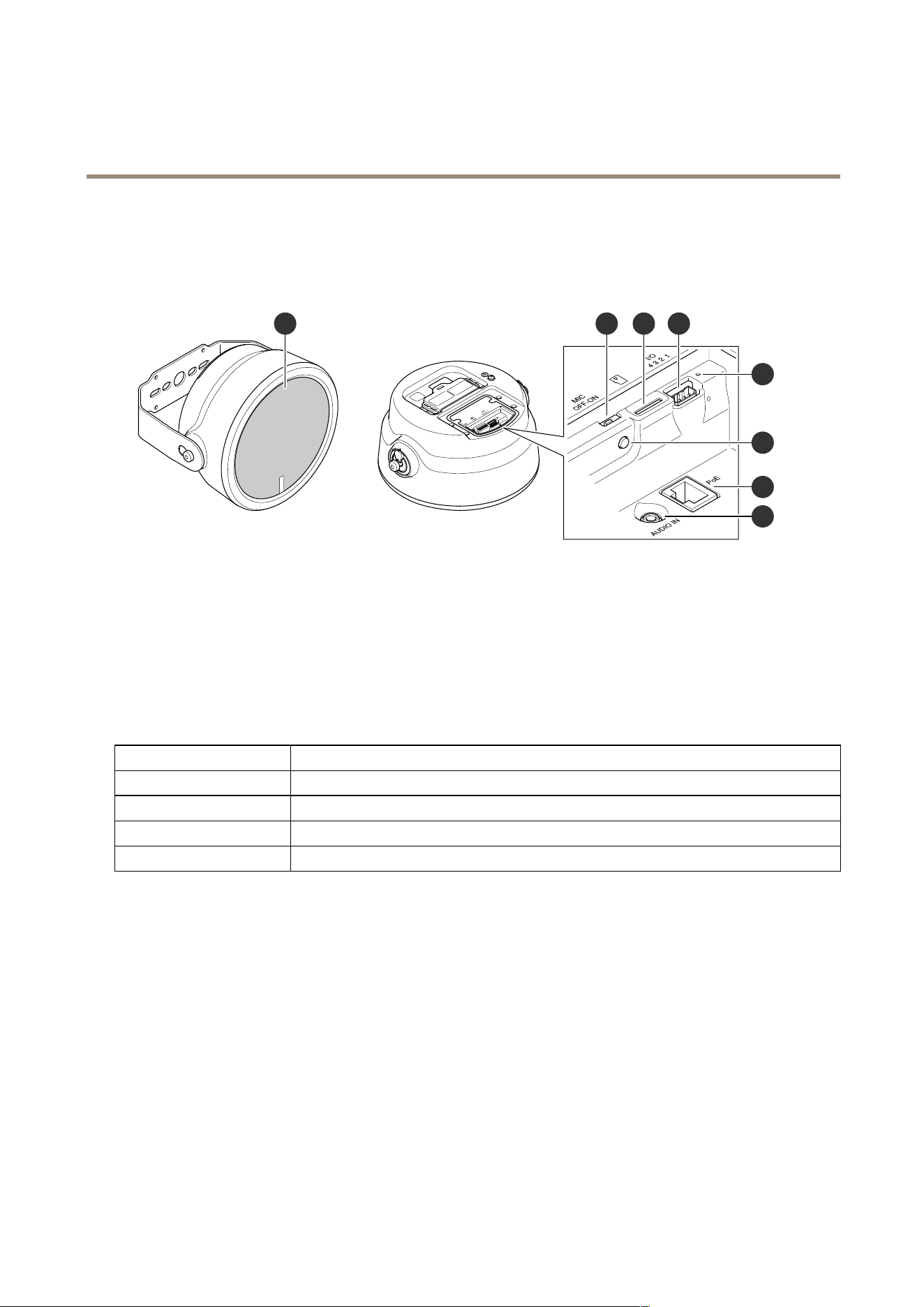
Productoverview
21 3 4
6
5
7
8
1
Mesh
2
Microphonedisableswitchonpage41
3
SDcardslot
4
I/Oconnectoronpage42
5
StatusLEDindicator,seeLEDindicatorsonpage41
6
Controlbuttononpage41
7
Networkconnectoronpage42
8
Audioin
LEDindicators
StatusLED
Indication
UnlitUnlitfornormaloperation.
GreenSteadygreenfornormaloperation.
Amber
Steadyduringstartupandwhenrestoringsettings.
Red
Slowashforfailedupgrade.
Buttons
Controlbutton
Thecontrolbuttonisusedfor:
•Calibratingthespeakertest.Pressandreleasethecontrolbuttonandatesttoneisplayed.
•Resettingtheproducttofactorydefaultsettings.SeeResettofactorydefaultsettingsonpage38.
Microphonedisableswitch
Forlocationofthemicrophonedisableswitch,seeProductoverviewonpage41.
ThemicrophonedisableswitchisusedtomechanicallyturnthemicrophoneONorOFF.Thefactorydefaultsettingforthisswitch
isON.
41

AXISC1610-VENetworkSoundProjector
Specifications
Connectors
Protectiveearthterminal
DANGER
Riskofelectricshock.Theproductshallbegroundedusingagroundingwire.Makesurebothendsofthegroundingwire
areincontactwiththeirrespectivegroundingsurfaces.
Makesurethegroundingwireisasshortaspossibletomakethecurrentpathasshortaspossible.
Networkconnector
RJ45EthernetconnectorwithPoweroverEthernet(PoE).
NO NO
NO
TICE TICE
TICE
Theproductshallbeconnectedusingashieldednetworkcable(STP).Allcablesconnectingtheproducttothenetworkshall
beintendedfortheirspecicuse.Makesurethatthenetworkdevicesareinstalledinaccordancewiththemanufacturer’s
instructions.Forinformationaboutregulatoryrequirements,seetheInstallationGuideatwww.axis.com.
I/Oconnector
UsetheI/Oconnectorwithexternaldevicesincombinationwith,forexample,motiondetection,eventtriggering,andalarm
notications.Inadditiontothe0VDCreferencepointandpower(12VDCoutput),theI/Oconnectorprovidestheinterfaceto:
Digitalinput-Forconnectingdevicesthatcantogglebetweenanopenandclosedcircuit,forexamplePIRsensors,door/window
contacts,andglassbreakdetectors.
Digitaloutput-ForconnectingexternaldevicessuchasrelaysandLEDs.ConnecteddevicescanbeactivatedbytheVAPIX®
ApplicationProgrammingInterface,throughaneventorfromtheproduct’swebpage.
4-pinterminalblock
FunctionPinNotes
Specications
DCground
1
0VDC
DCoutput
2
Canbeusedtopowerauxiliaryequipment.
Note:Thispincanonlybeusedaspowerout.
12VDC
Maxload=50mA
Digitalinput–Connecttopin1toactivate,orleaveoating
(unconnected)todeactivate.
0tomax30VDC Congurable
(InputorOutput)
3–4
Digitaloutput–Internallyconnectedtopin1(DCground)when
active,andoating(unconnected)wheninactive.Ifusedwithan
inductiveload,e.g.,arelay,connectadiodeinparallelwiththeload,
toprotectagainstvoltagetransients.
0tomax30VDC,opendrain,
100mA
Example
42
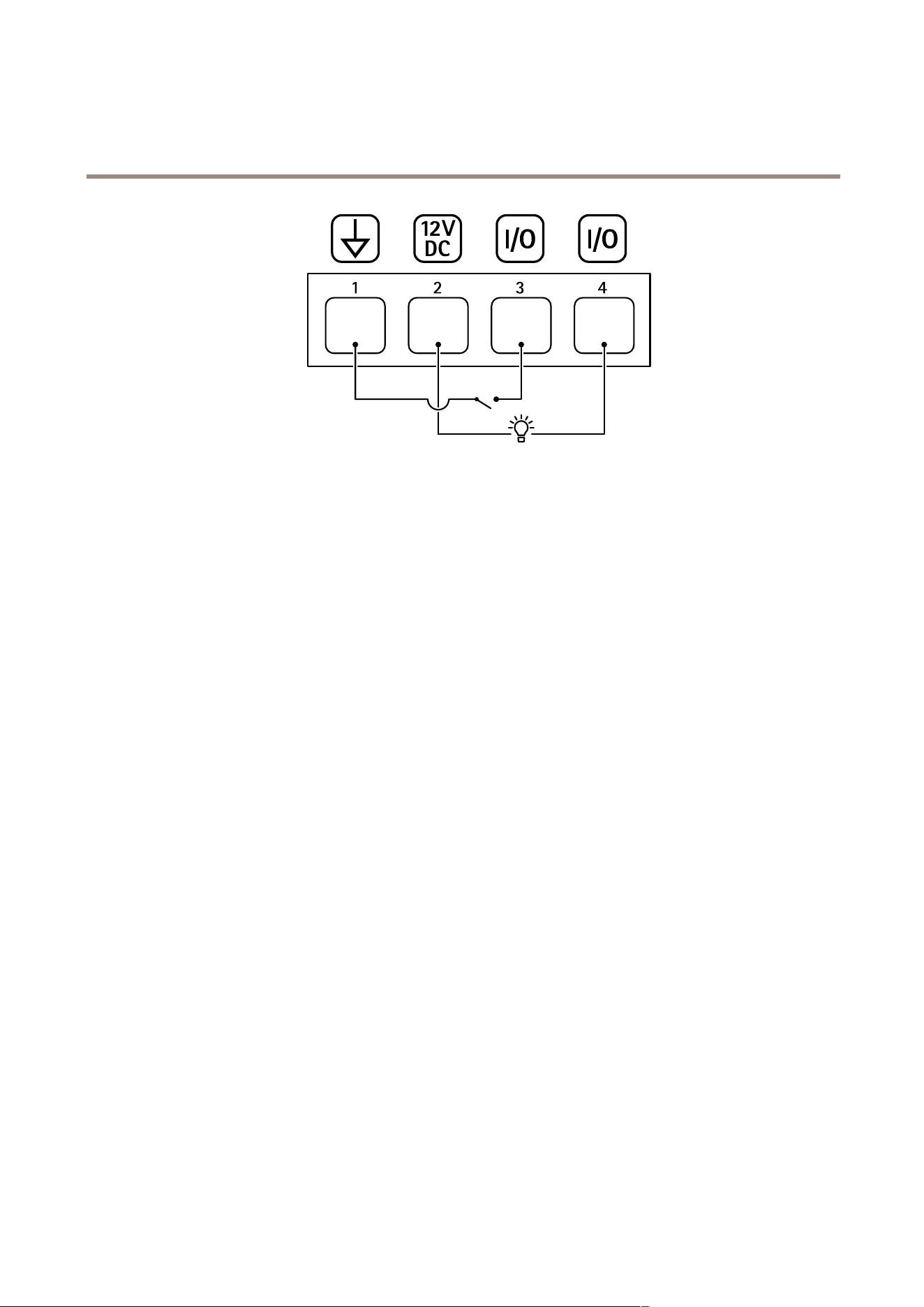
AXISC1610-VENetworkSoundProjector
Specifications
1
DCground
2
DCoutput12V,max50mA
3
I/Oconguredasinput
4
I/Oconguredasoutput
43

AXISC1610-VENetworkSoundProjector
APIcommands
APIcommands
VAPIX®isAxis’ownopenAPI(ApplicationProgrammingInterface).Youcancontrolalmostallfunctionalityavailablein
AxisdevicesthroughVAPIX®.TogetaccesstothecompleteVAPIX®documentation,joinAxisDeveloperCommunityat
axis.com/developer-community
Enterthecommandsinawebbrowser,andreplace<deviceIP>withtheIPaddressorhostnameofyourdevice.
Important
TheAPIcommandsexecuteimmediately.Ifyourestoreorresetyourdeviceallsettingswillbelost.Forexampleactionrules.
Example
Restartthedevice
Request
http://<deviceIP>/axis-cgi/restart.cgi
Example
Restorethedevice.Therequestreturnsmostsettingstodefaultvalues,butkeepstheIPnumber.
Request
http://<deviceIP>/axis-cgi/factorydefault.cgi
Example
Resetthedevice.TherequestreturnsallsettingsincludingIPnumbertodefaultvalues.
Request
http://<deviceIP>/axis-cgi/hardfactorydefault.cgi
Example
Seealistofalldeviceparameters.
Request
http://<deviceIP>/axis-cgi/param.cgi?action=list
Example
Getadebugarchive
Request
http://<deviceIP>/axis-cgi/debug/debug.tgz
Example
Getaserverreport
Request
http://<deviceIP>/axis-cgi/serverreport.cgi
Example
Captureanetworktraceof300seconds
Request
http://<deviceIP>/axis-cgi/debug/debug.tgz?cmd=pcapdump&duration=300
Example
EnableFTP
Request
http://<deviceIP>/axis-cgi/param.cgi?action=update&Network.FTP.Enabled=yes
Example
44

AXISC1610-VENetworkSoundProjector
APIcommands
DisableFTP
Request
http://<deviceIP>/axis-cgi/param.cgi?action=update&Network.FTP.Enabled=no
Example
EnableSSH
Request
http://<deviceIP>/axis-cgi/param.cgi?action=update&Network.SSH.Enabled=yes
Example
DisableSSH
Request
http://<deviceIP>/axis-cgi/param.cgi?action=update&Network.SSH.Enabled=no
45

UserManualVer.M2.2
AXISC1610-VENetworkSoundProjector
Date:January2023
©AxisCommunicationsAB,2023
PartNo.T10186021
