EcoFlowDELTAProUltraUserManual
Disclaimer
PleasereadthisUserManualandensureyouunderstanditfullybeforeusingtheproduct.
PleasekeepthisUserManualproperlyforfuturereference.
Inthismanualandotherrelated
documents,EcoFlowDELTAProUltraInverterisreferredtoastheinverter,andEcoFlowDELTA
ProUltraBatteryisreferredtoasthebattery.Failuretoproperlyoperatethisproductcould
causeseriousinjurytoyourselforothers,orcausedamagetothisproductandotherproperty.
Byusingthisproduct,youaredeemedtohaveunderstood,acknowledged,andacceptedall
termsandcontentsofthisdocument.Individualusersareresponsiblefortheiractionsandthe
consequencesofthoseactions.EcoFlowherebydisclaimsanyliabilityforanylossesduetothe
user'sfailuretousetheproductinaccordancewiththeUserManual.
Incompliancewithlawsandregulations,EcoFlowreservestherighttofinalinterpretationof
thisdocumentandalldocumentsrelatedtotheproduct.Thisdocumentissubjecttochanges
(updates,revisions,ortermination)withoutpriornotice.PleasevisitEcoFlow'sofficialwebsite
toobtainthelatestproductinformation.
SymbolConventions
Thesearesafetywarningsymbols.Suchsafetyinformationalertsyoutohazardsthatcanbe
lethaltoyouandothers,andthatcancausedamagetotheequipment.Allsafetyinformationis
precededbysafetywarningsymbolsandhazardwords,including:"DANGER","WARNING",
"CAUTION",and"NOTICE".The"DANGER","WARNING","CAUTION",and"NOTICE"statementsin
thismanualdonotcoverallthesafetyinstructions.Theyareonlysupplementstosafety
instructions.
Symbol
Description
Veryhighrisk.Ifnotavoided,itcouldleadtosevereinjuryor
evendeath.
Moderaterisk.Ifnotavoided,itcouldleadtosevereinjuryor
evendeath.
Lowerrisk.Ifnotavoided,itmayresultinminorormoderate
injury.
Potentiallyhazardous.Ifnotavoided,itcouldresultin
equipmentdamage,dataloss,performancedeterioration,or
unanticipatedresults.
SafetyInstructions
WARNING
SAVETHESEINSTRUCTIONS
‒
ThismanualcontainsimportantinstructionsformodelEFYJ751-
PCS-USandEFYJ751-BPthatshallbefollowedduringinstallationandmaintenance.
1. Beforeinstalling,usingandmaintainingtheproduct,pleasereadcarefullythesafety
instructionsinthismanual.EcoFlowisnotresponsibleforanyproblemscausedbyimproper
handlingoftheproductininstallationandmaintenanceprocedures.
2. Donotusepartsoraccessoriesthatarenotofficiallysupplied.Useofthird-partyaccessories
mayresultinriskssuchasfireandelectricshock.Ifpartsoraccessoriesarenecessary,please
visitEcoFlow
’
sofficialsaleschannelforpurchaseinformation.EcoFlowisnotresponsible
forproductproblemscausedbytheuseofcablesandotheraccessoriesproducedbythird-
partymanufacturers.
3. Keepthisproductoutofthereachofchildrenandpetsandcloseattentionisrequiredto
preventpotentialhazardswhenchildrenorpetsareclosetothedevice.
4. StrictlycomplywiththeambienttemperatureinthisUserManualwhenusingthisproduct.If
thetemperatureistoohigh,thebatterymaycatchfireorexplode.Ifthetemperatureistoo
low,theproductmaynotworknormally.
5. Donotdisassemble,modifyorreplacethisdevice(includinginternalandexternalparts),if
necessary,pleasecontactqualifiedprofessionalsorcontactEcoFlowafter-salesservicefor
handling.
6. Donotplaceotherheavyobjects(excepttheinverterandbatteries)onthedeviceduringuse
orstorage.
7. Avoidimpacts,falling,droppingorstrongvibrations.Inthecaseofsevereexternalimpact,
pleaseturnoffthepowerimmediatelyandstopusingtheproduct.Ensuretheproductiswell
fastenedduringtransportationtoavoidvibrationsandimpacts.
8. Iftheproductfallsintowateraccidentallyduringuse,placeitinasafeopenareaandstay
awayfromituntilitiscompletelydry.Thedriedproductshouldnotbereusedandshouldbe
disposedofproperlyasdescribedinthe"Disposal"sectionbelow.Iftheproductcatchesfire,
pleaseuseafireextinguisherorfire-fightingequipmentinthefollowingrecommended
order:waterormist,sand,fireblanket,drypowder,andcarbondioxidefireextinguisher.
9. Handlethisproductwithcaretopreventitfrombeingdamagedduetooverturning.Ifthe
productisbadlydamagedafteroverturning,pleaseturnoffthepowerimmediately,place
thebatteryinanopenareaawayfromcombustiblematerialsorpeople,andproperly
disposeofitaccordingtotherequirementsoflocallawsandregulations.
10. Electromagneticfieldscreatedbythisproductmayaffectthenormalfunctioningofmedical
implantsorpersonalmedicaldevices,suchaspacemakers,cochlearimplants,hearingaids,
defibrillatorsandsoon.Ifyouareusingthesemedicaldevices,pleaseconsultthe
manufacturersabouttherestrictionsontheuseofrelevantdevicestoensurethatasafe
distanceismaintainedbetweenthisproductandtheimplantedmedicaldevices(suchas
pacemakers,cochlearimplants,hearingaids,defibrillatorsandsoon)duringoperation.
11. Whenthepowersupplyisconnectedinnormalmodetoarefrigerator,powerfluctuationsof
therefrigeratormaycausethedevicetoautomaticallyshutdown.Therefore,whenthe
deviceisconnectedtoarefrigeratorthatstoresmedicine,vaccinesorothervaluableitems,
itisrecommendedtosettheACoutputto"AlwaysOn"intheappinordertoguarantee
continuouspowersupply,andpleasepayattentiontothepowerconsumptionofthedevice.
12. Aftertheinstallationiscompleted,cleanuptheitemsintime,suchascartons,foam,plastic,
cableties,etc.
EnvironmentalRequirements
1. Ensurethatthedeviceisinstalledinaventilatedenvironment,anddonotblockthevents
whenthedeviceisinoperation.Inadequateventilationmaydamagethedevice.
2. Donotusethisproductnearheatsourcesorhightemperatures(e.g.firesourcesorhot
stoves).Toprolongthebatterylife,itisrecommendedtouseorstorethisproductat20°Cto
30°C.
3. Wheninstallingorusingtheproductinanenvironmentnearfumes,smoke,heat,steamor
dust,itisnecessarytouseaprotectivecovertopreventtheriskoffire.
4. Theinstallationenvironmentshouldbehardflatground.Duetothelargemassofthedevice,
itisnecessarytoensurethattheinstallationenvironmentofthedeviceisstableandthatthe
equipmentdoesnottilttoavoidpersonalinjuryorproductdamage.
5. Keeptheproductawayfromhumidenvironments,donotimmerseitinwaterorgetitwet.If
theproductisinstalledorplacedneartheseaoranywaterways,werecommendusing
moisturebarrierbagstopreventtheproductfromgettingsoaked,otherwise,itmaycausea
riskoffire.Ifwaterisfoundinsidetheproduct,pleaseturnofftheproductandstopusingit
again.Takeanti-electricshockmeasuresbeforetouchingtheproduct,andputitimmediately
inasafe,waterproofandopenarea.ContactqualifiedpersonnelorEcoFlowafter-sales
serviceifnecessary.
SafetyRequirements
1. Donotstand,leanorsitonthedevice.
2. Iftheproductwillnotbeusedforalongperiodoftime,makesurethatitisunpluggedfrom
theoutletandturnedoff.
3. Donotconnectthisdevicewithdamagedcables.Useofdamagedcablesmayaffectthe
normaloperationofthedeviceorleadtopotentialrisks.
4. Donotputyourhandsorforeignobjectsintothedeviceportsorvents.
DisposalRequirements
EcoFlowDELTAProUltraInverter
Iftheinvertercannotworkanymore,disposeofitaccordingtothelocaldisposalrequirements
forelectricalequipmentwaste.Theinvertercannotbedisposedoftogetherwithhousehold
waste.
1. Beforeremovingtheinverter,poweritoff.Fordetails,checkPowerOn/Offin"usermanual".
2. Sequentiallydisconnectthefastcharginginputcable,PVinputcables,batterycables,andall
theothermodulesconnectingtotheinverter.
2. Removetheinverterandthebatteryfromtheportablestand.
4. Packandstoretheinverterproperly.
EcoFlowDELTAProUltraBattery
1. Ifconditionspermit,makesurethatthebatteryisfullydischargedbeforedisposingitina
designatedbatteryrecyclingbin.Theproductcontainsbatterieswithpotentiallydangerous
chemicals,soitisstrictlyprohibitedtodisposeofitinordinarytrashcans.Formoredetails,
pleasefollowthelocallawsandregulationsonbatteryrecyclinganddisposal.
2. Ifthebatterycannotbefullydischargedduetoaproductfailure,pleasedonotdisposeofthe
batterydirectlyinthebatteryrecyclingbox.Insuchcase,youshouldcontactaprofessional
batteryrecyclingcompanyforfurtherprocessing.
3. Pleasedisposeofover-dischargedbatteriesthatcannotberecharged.
Specifications
EcoFlowDELTAProUltraInverter
GeneralInformation
Model
EFYJ751-PCS-US
Weight
Approx.31.7kg
Dimensions
Approx.690×481×214mm(27.2×18.9×8.4in.)
Wi-Fi
Frequencyrange:2,412-2,462MHz/2,422-2,452MHz
Maximumoutputpower:0.3597W
Bluetooth
Frequencyrange:2,402-2,480MHz
Maximumoutputpower:0.0109W
OutputInformation
ACOutput(Discharging)
Puresine,7,200Wtotal,120/240V~60Hz
ACOutput(Bypass)
100-120V~30Amax,50/60Hz
USB-A
(
×2
)
5V2.4A,12Wmaxperport,total24W
USB-C(×2)
5/9/12/15/20V5A,100Wmaxperport,total200W
DCOutput(×1)
12.6V30A,378Wmax
InputSpecifications
ACInput(Charging)
100-120V~15A;200-240V~12.5A,50/60Hz
ACInput(Bypass)
100-120V~15A,50/60Hz(duration<3hrswhenthecurrentexceeds12A)
PowerInput/OutputPort
100-120V~30A,200-240V~30A,50/60Hz
HighVoltagePVInput
80-450V15Amax,4,000Wmax
LowVoltagePVInput
30-150V15Amax,1,600Wmax
AmbientTemperature
DischargingTemperature
−
20°C-45°C(
−
4°F-113°F)
ChargingTemperature
−
20°C-45°C(
−
4°F-113°F)
StorageTemperature
−
20°C-45°C(
−
4°F-113°F)(optimumat20°C-30°C/68°F-86°F)
OtherInformation
Altitude
≤
3,000m(
≈
9,842ft)
IPRating
IP54
NoiseLevel
<30dB
UPS
BackupUPS<20ms,onlineUPS0ms
CommunicationMethod
CAN&Wi-Fi&WAN&4G
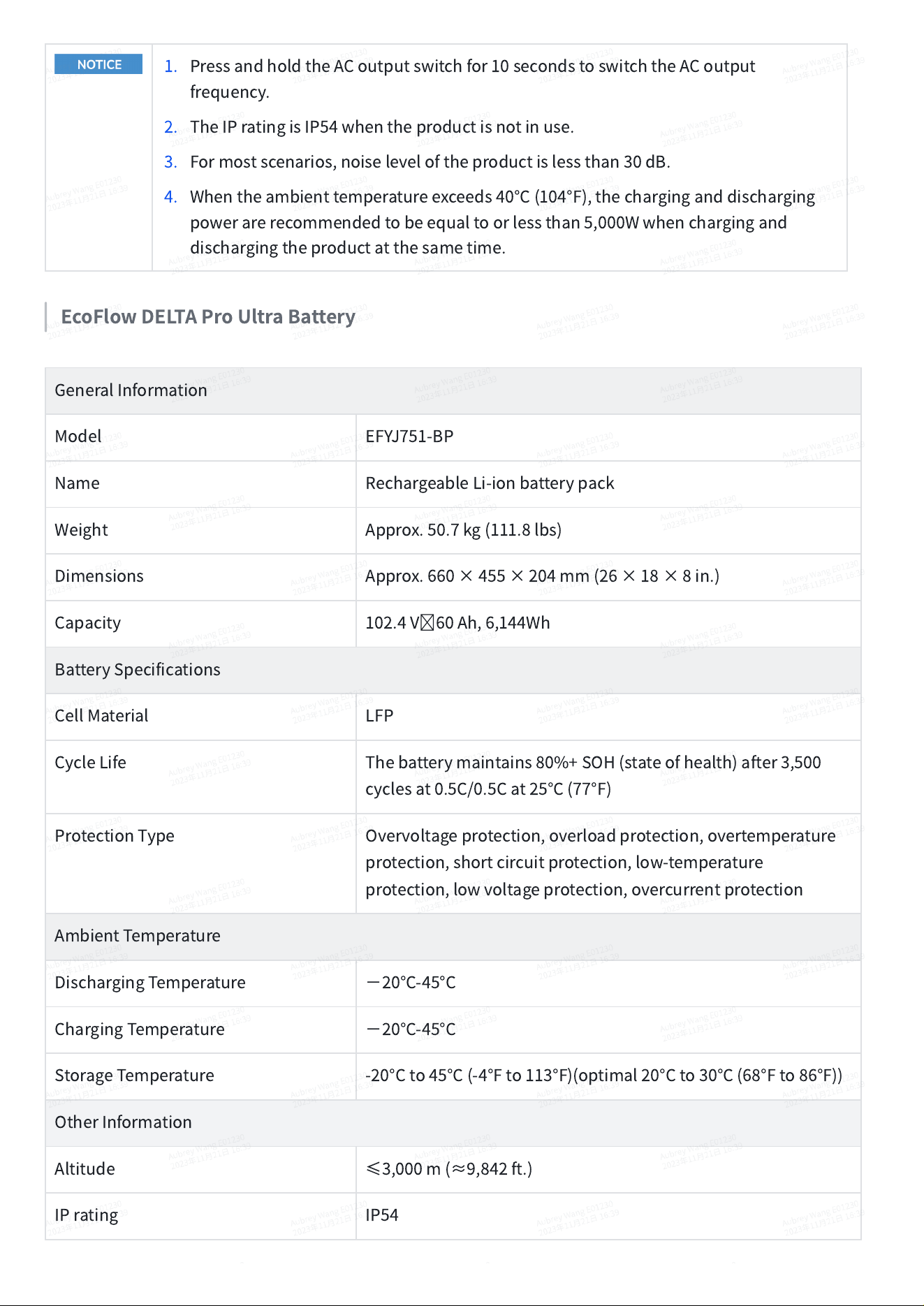
1. PressandholdtheACoutputswitchfor10secondstoswitchtheACoutput
frequency.
2. TheIPratingisIP54whentheproductisnotinuse.
3. Formostscenarios,noiseleveloftheproductislessthan30dB.
4. Whentheambienttemperatureexceeds40°C(104°F),thecharginganddischarging
powerarerecommendedtobeequaltoorlessthan5,000Wwhenchargingand
dischargingtheproductatthesametime.
EcoFlowDELTAProUltraBattery
GeneralInformation
Model
EFYJ751-BP
Name
RechargeableLi-ionbatterypack
Weight
Approx.50.7kg(111.8lbs)
Dimensions
Approx.660×455×204mm(26×18×8in.)
Capacity
102.4V60Ah,6,144Wh
BatterySpecifications
CellMaterial
LFP
CycleLife
Thebatterymaintains80%+SOH(stateofhealth)after3,500
cyclesat0.5C/0.5Cat25°C(77°F)
ProtectionType
Overvoltageprotection,overloadprotection,overtemperature
protection,shortcircuitprotection,low-temperature
protection,lowvoltageprotection,overcurrentprotection
AmbientTemperature
DischargingTemperature
−
20°C-45°C
ChargingTemperature
−
20°C-45°C
StorageTemperature
-20°Cto45°C(-4°Fto113°F)(optimal20°Cto30°C(68°Fto86°F))
OtherInformation
Altitude
≤
3,000m(
≈
9,842ft.)
IPrating
IP54
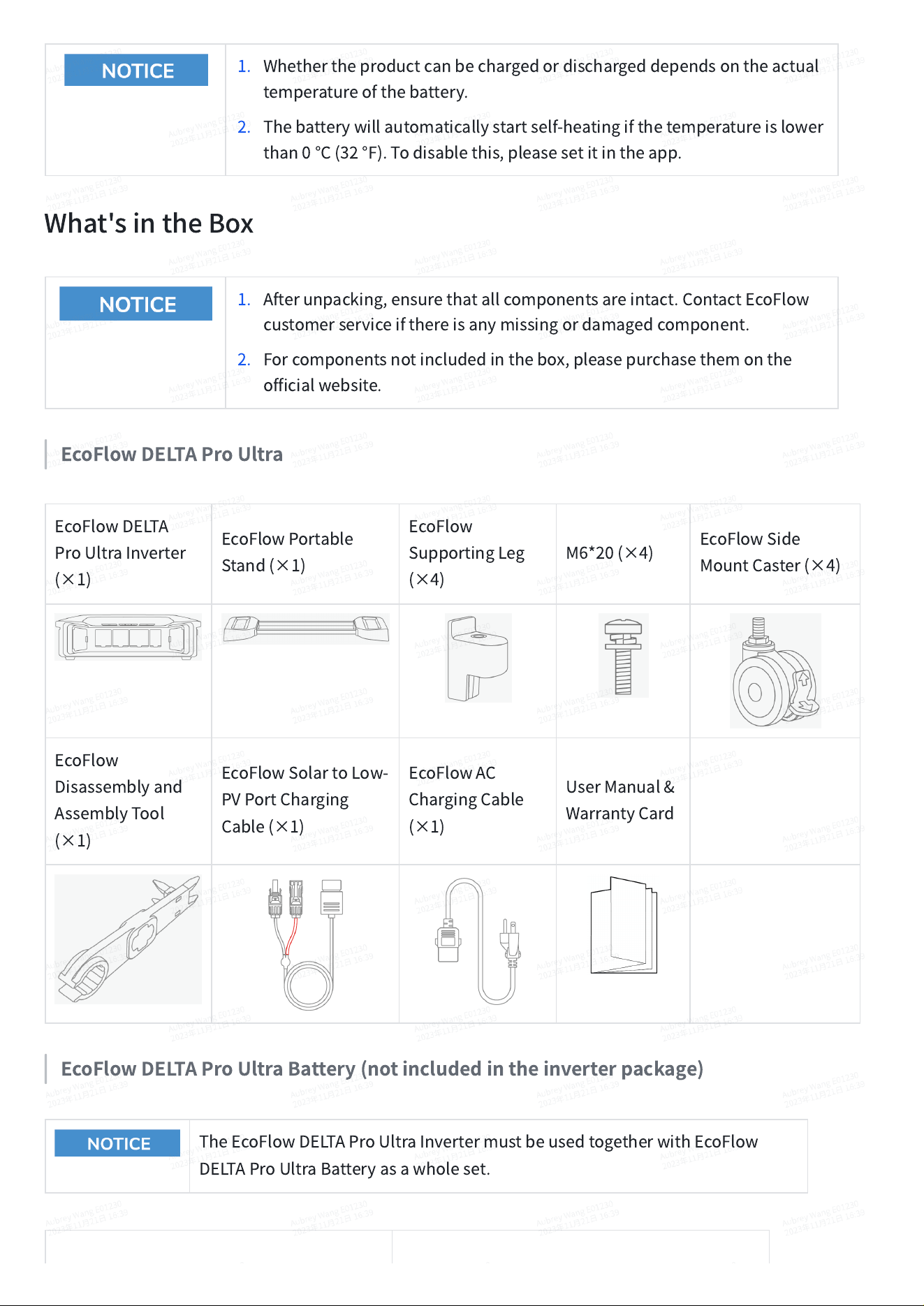
1. Whethertheproductcanbechargedordischargeddependsontheactual
temperatureofthebattery.
2. Thebatterywillautomaticallystartself-heatingifthetemperatureislower
than0°C(32°F).Todisablethis,pleasesetitintheapp.
What'sintheBox
1. Afterunpacking,ensurethatallcomponentsareintact.ContactEcoFlow
customerserviceifthereisanymissingordamagedcomponent.
2. Forcomponentsnotincludedinthebox,pleasepurchasethemonthe
officialwebsite.
EcoFlowDELTAProUltra
EcoFlowDELTA
ProUltraInverter
(×1)
EcoFlowPortable
Stand(×1)
EcoFlow
SupportingLeg
(×4)
M6*20(×4)
EcoFlowSide
MountCaster(×4)
EcoFlow
Disassemblyand
AssemblyTool
(×1)
EcoFlowSolartoLow-
PVPortCharging
Cable(×1)
EcoFlowAC
ChargingCable
(×1)
UserManual&
WarrantyCard
EcoFlowDELTAProUltraBattery(notincludedintheinverterpackage)
TheEcoFlowDELTAProUltraInvertermustbeusedtogetherwithEcoFlow
DELTAProUltraBatteryasawholeset.
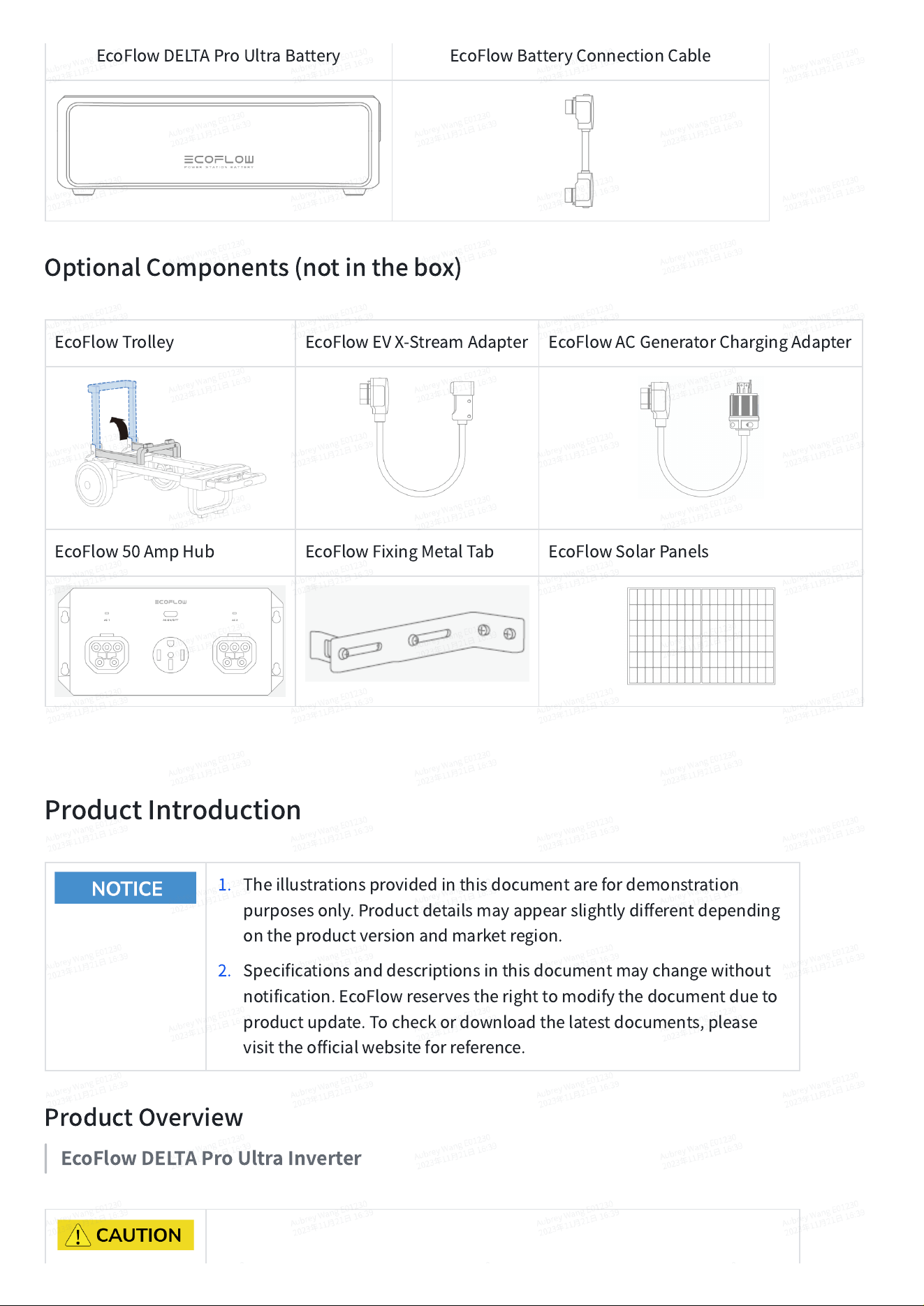
EcoFlowDELTAProUltraBattery
EcoFlowBatteryConnectionCable
OptionalComponents(notinthebox)
EcoFlowTrolley
EcoFlowEVX-StreamAdapter
EcoFlowACGeneratorChargingAdapter
EcoFlow50AmpHub
EcoFlowFixingMetalTab
EcoFlowSolarPanels
ProductIntroduction
1. Theillustrationsprovidedinthisdocumentarefordemonstration
purposesonly.Productdetailsmayappearslightlydifferentdepending
ontheproductversionandmarketregion.
2. Specificationsanddescriptionsinthisdocumentmaychangewithout
notification.EcoFlowreservestherighttomodifythedocumentdueto
productupdate.Tocheckordownloadthelatestdocuments,please
visittheofficialwebsiteforreference.
ProductOverview
EcoFlowDELTAProUltraInverter
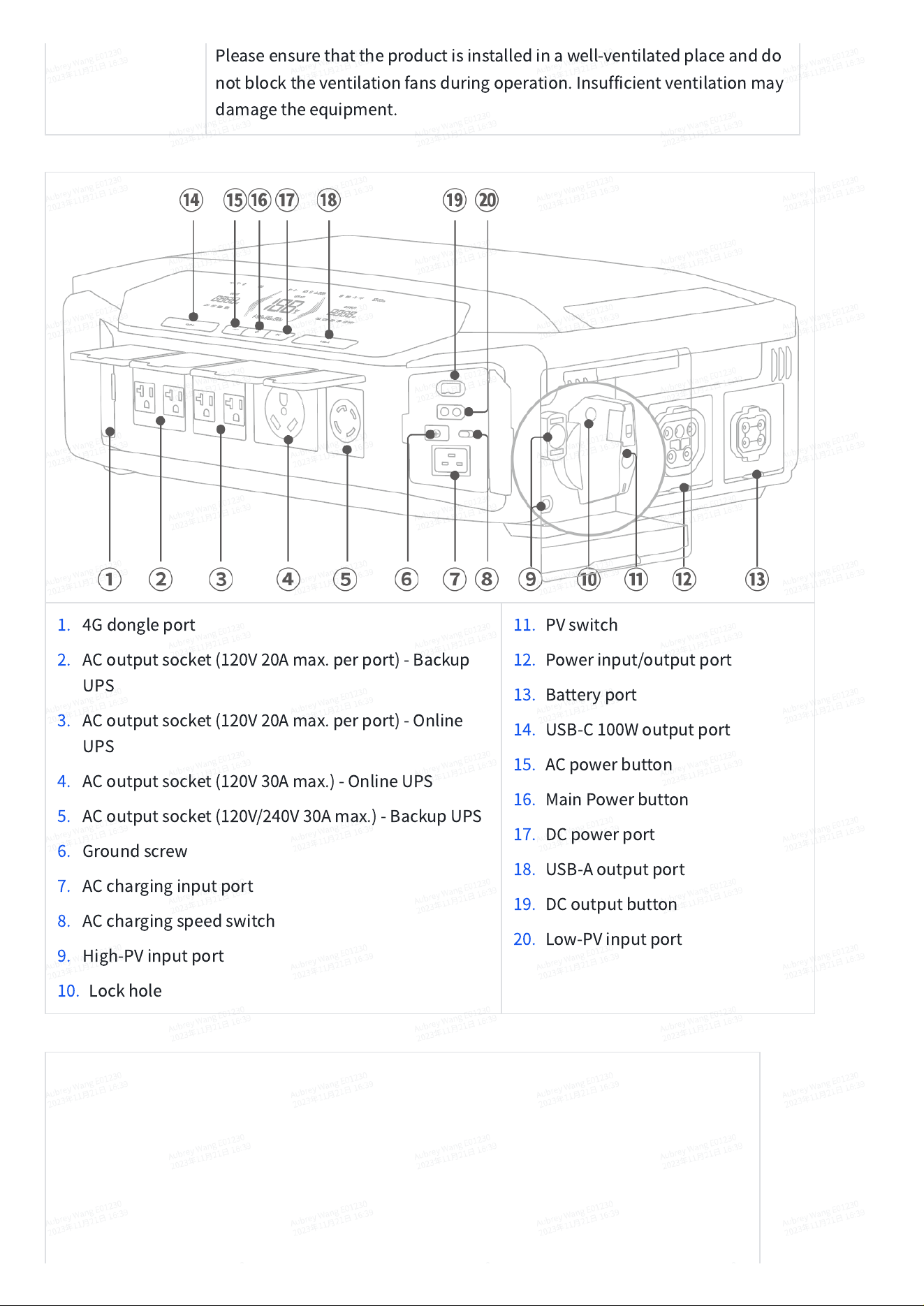
Pleaseensurethattheproductisinstalledinawell-ventilatedplaceanddo
notblocktheventilationfansduringoperation.Insufficientventilationmay
damagetheequipment.
1. 4Gdongleport
2. ACoutputsocket(120V20Amax.perport)-Backup
UPS
3. ACoutputsocket(120V20Amax.perport)-Online
UPS
4. ACoutputsocket(120V30Amax.)-OnlineUPS
5. ACoutputsocket(120V/240V30Amax.)-BackupUPS
6. Groundscrew
7. ACcharginginputport
8. ACchargingspeedswitch
9. High-PVinputport
10. Lockhole
11. PVswitch
12. Powerinput/outputport
13. Batteryport
14. USB-C100Woutputport
15. ACpowerbutton
16. MainPowerbutton
17. DCpower
port
18. USB-Aoutputport
19. DCoutputbutton
20. Low-PVinputport
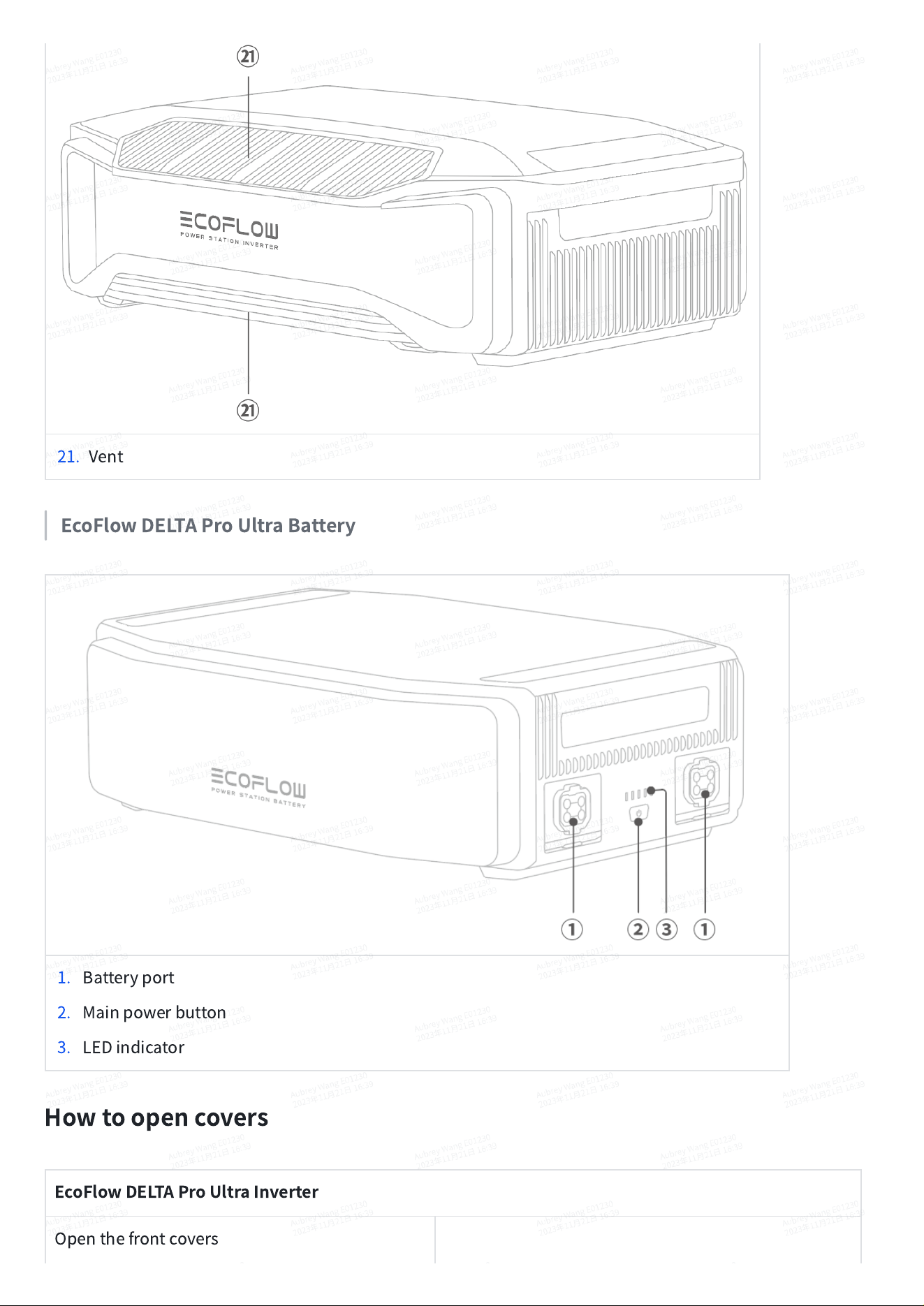
21. Vent
EcoFlowDELTAProUltraBattery
1. Batteryport
2. Mainpowerbutton
3. LEDindicator
Howtoopencovers
EcoFlowDELTAProUltraInverter
Openthefrontcovers
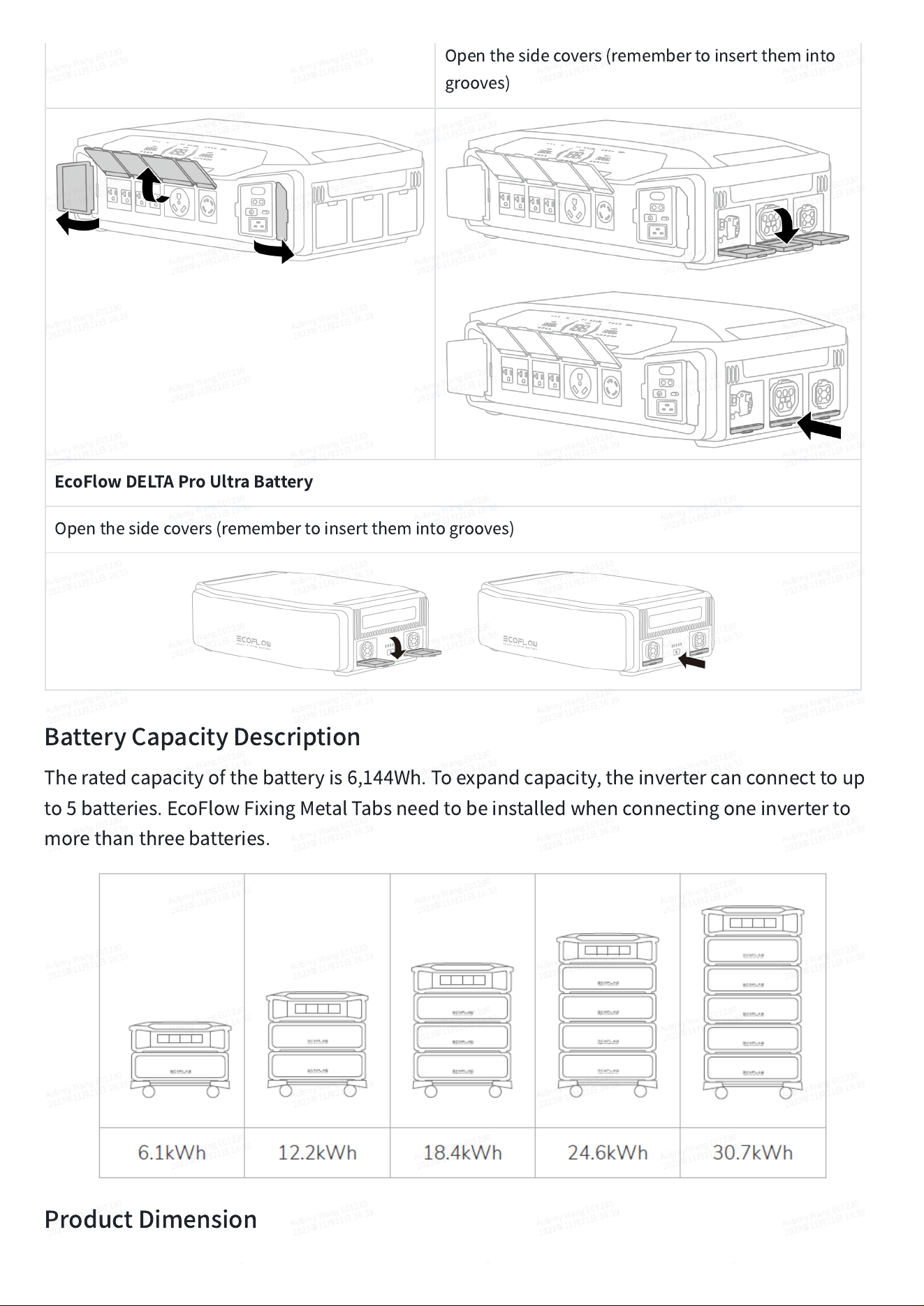
Openthesidecovers(remembertoinserttheminto
grooves)
EcoFlowDELTAProUltraBattery
Openthesidecovers(remembertoinsertthemintogrooves)
BatteryCapacityDescription
Theratedcapacityofthebatteryis6,144Wh.Toexpandcapacity,theinvertercanconnecttoup
to5batteries.EcoFlowFixingMetalTabsneedtobeinstalledwhenconnectingoneinverterto
morethanthreebatteries.
ProductDimension
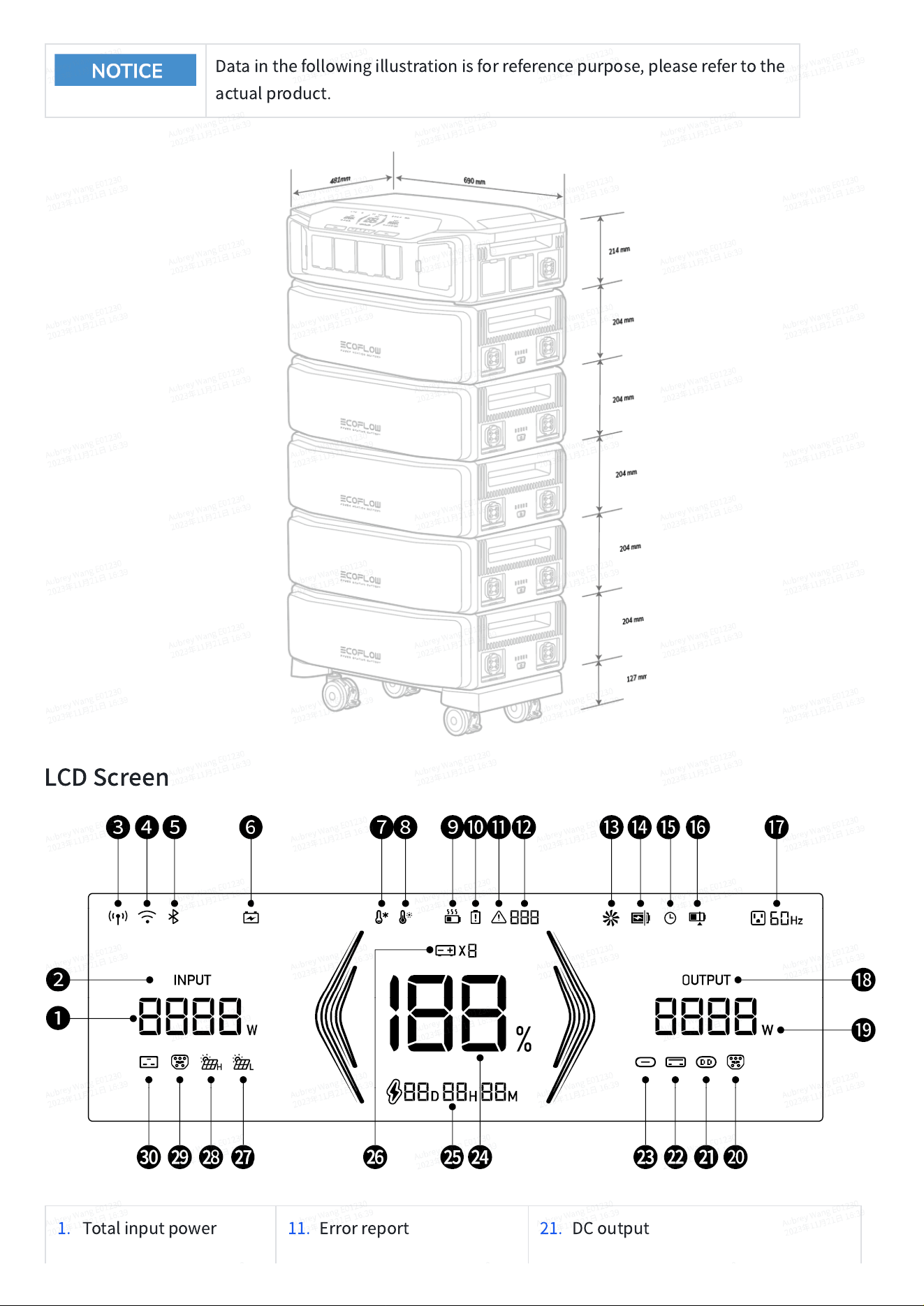
Datainthefollowingillustrationisforreferencepurpose,pleaserefertothe
actualproduct.
LCDScreen
1. Totalinputpower
11. Errorreport
21. DCoutput
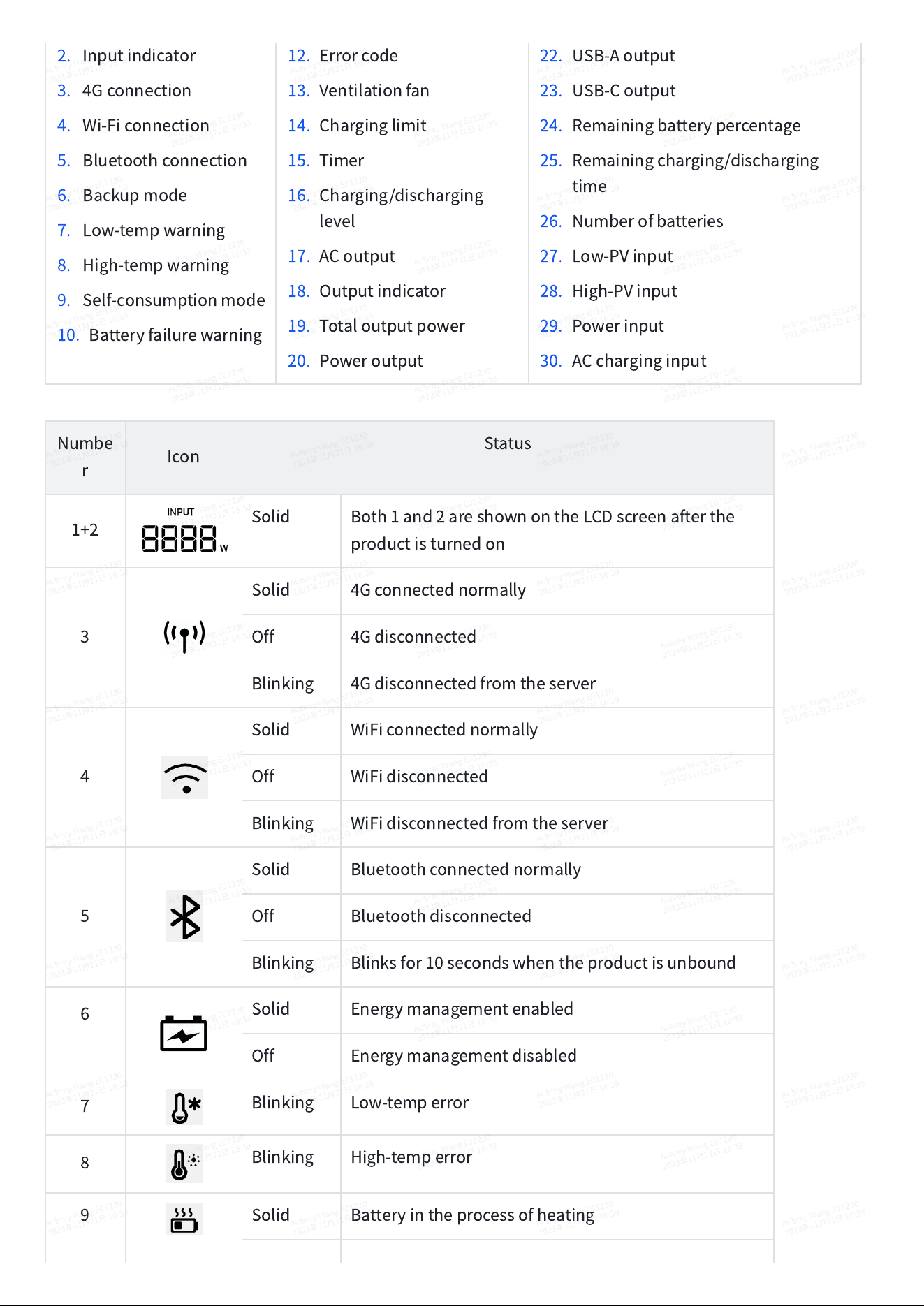
2. Inputindicator
3. 4Gconnection
4. Wi-Ficonnection
5. Bluetoothconnection
6. Backupmode
7. Low-tempwarning
8. High-tempwarning
9. Self-consumptionmode
10. Batteryfailurewarning
12. Errorcode
13. Ventilationfan
14. Charginglimit
15. Timer
16. Charging/discharging
level
17. ACoutput
18. Outputindicator
19. Totaloutputpower
20. Poweroutput
22. USB-Aoutput
23. USB-Coutput
24. Remainingbatterypercentage
25. Remainingcharging/discharging
time
26. Numberofbatteries
27. Low-PVinput
28. High-PVinput
29. Powerinput
30. ACcharginginput
Numbe
r
Icon
Status
1+2
Solid
Both1and2areshownontheLCDscreenafterthe
productisturnedon
3
Solid
4Gconnectednormally
Off
4Gdisconnected
Blinking
4Gdisconnectedfromtheserver
4
Solid
WiFiconnectednormally
Off
WiFidisconnected
Blinking
WiFidisconnectedfromtheserver
5
Solid
Bluetoothconnectednormally
Off
Bluetoothdisconnected
Blinking
Blinksfor10secondswhentheproductisunbound
6
Solid
Energymanagementenabled
Off
Energymanagementdisabled
7
Blinking
Low-temperror
8
Blinking
High-temperror
9
Solid
Batteryintheprocessofheating
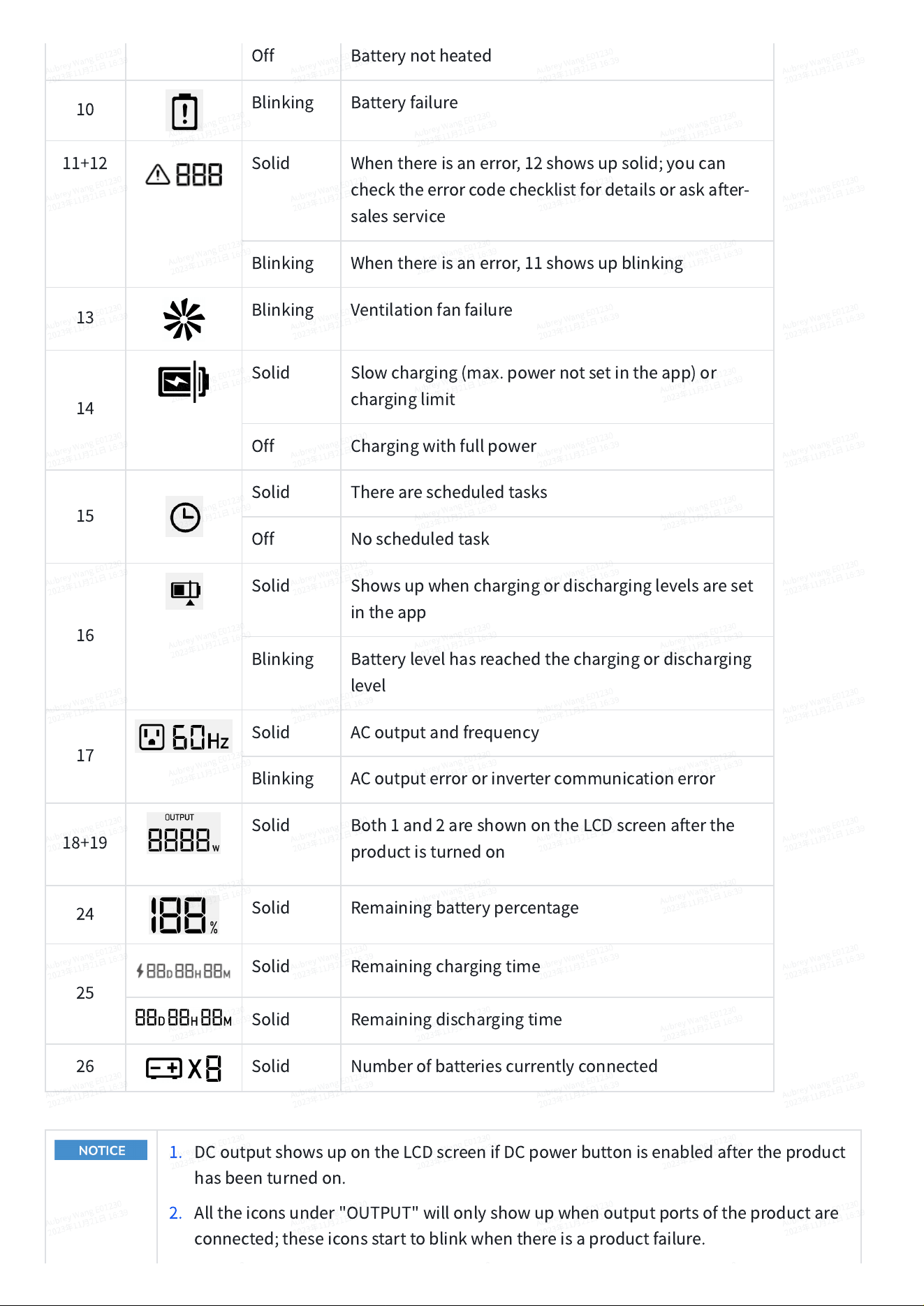
Off
Batterynotheated
10
Blinking
Batteryfailure
11+12
Solid
Whenthereisanerror,12showsupsolid;youcan
checktheerrorcodechecklistfordetailsoraskafter-
salesservice
Blinking
Whenthereisanerror,11showsupblinking
13
Blinking
Ventilationfanfailure
14
Solid
Slowcharging(max.powernotsetintheapp)or
charginglimit
Off
Chargingwithfullpower
15
Solid
Therearescheduledtasks
Off
Noscheduledtask
16
Solid
Showsupwhenchargingordischarginglevelsareset
intheapp
Blinking
Batterylevelhasreachedthechargingordischarging
level
17
Solid
ACoutputandfrequency
Blinking
ACoutputerrororinvertercommunicationerror
18+19
Solid
Both1and2areshownontheLCDscreenafterthe
productisturnedon
24
Solid
Remainingbatterypercentage
25
Solid
Remainingchargingtime
Solid
Remainingdischargingtime
26
Solid
Numberofbatteriescurrentlyconnected
1. DCoutputshowsupontheLCDscreenifDCpowerbuttonisenabledaftertheproduct
hasbeenturnedon.
2. Alltheiconsunder"OUTPUT"willonlyshowupwhenoutputportsoftheproductare
connected;theseiconsstarttoblinkwhenthereisaproductfailure.
3. Alltheiconsunder"INPUT"willonlyshowupwheninputportsoftheproductare
connected;theseiconsstarttoblinkwhenthereisaproductfailure.
4. Therotatingspeedoftheventilationfanicondependsonthegear.
5. Formoredetailsabouterrorcodes,pleasevisittheEcoFlowofficialwebsiteorcontact
EcoFlowcustomerservice.
Installation
EcoFlowPortableStandInstallation
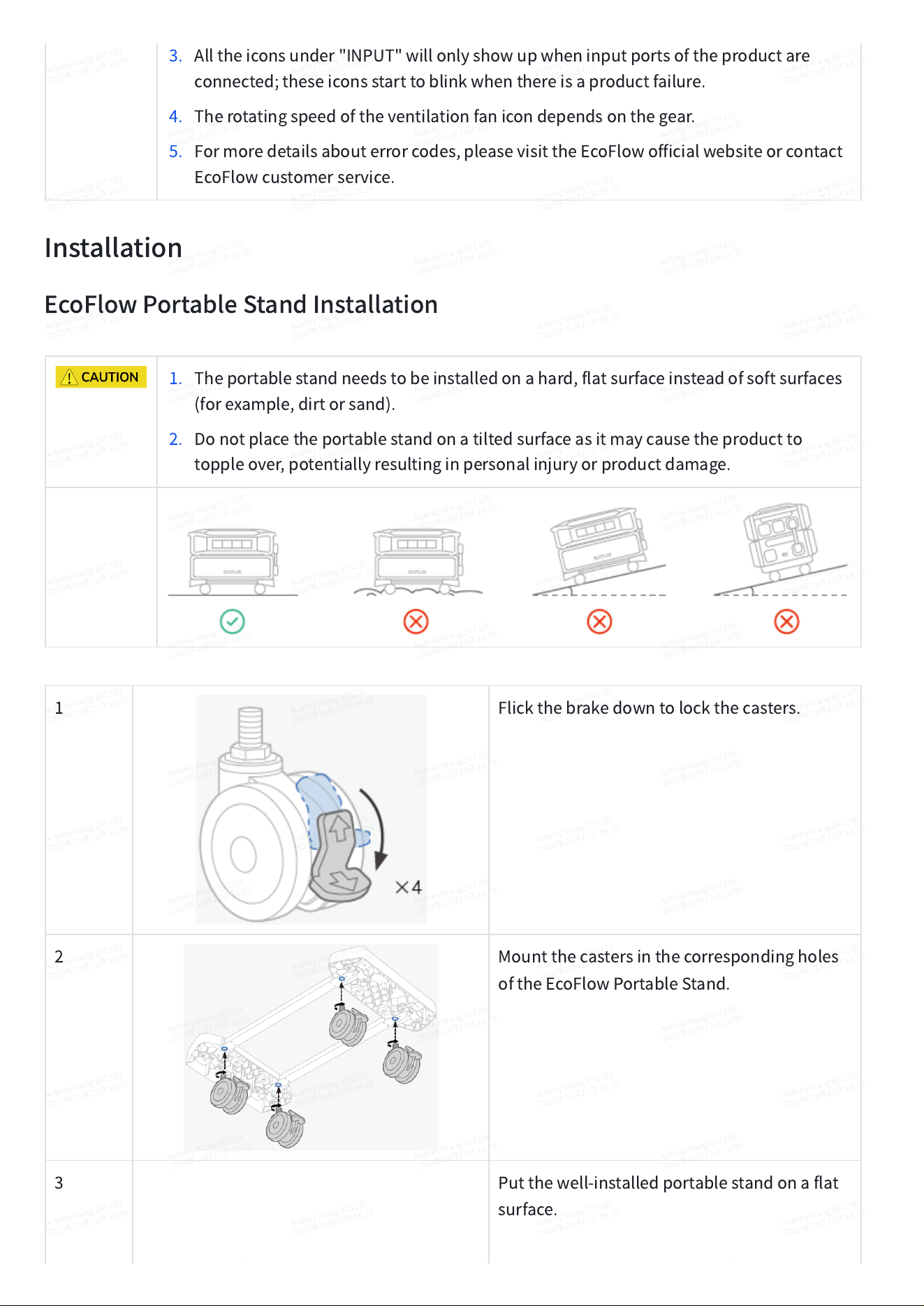
1. Theportablestandneedstobeinstalledonahard,flatsurfaceinsteadofsoftsurfaces
(forexample,dirtorsand).
2. Donotplacetheportablestandonatiltedsurfaceasitmaycausetheproductto
toppleover,potentiallyresultinginpersonalinjuryorproductdamage.
1
Flickthebrakedowntolockthecasters.
2
Mountthecastersinthecorrespondingholes
oftheEcoFlowPortableStand.
3
Putthewell-installedportablestandonaflat
surface.
ProductInstallation
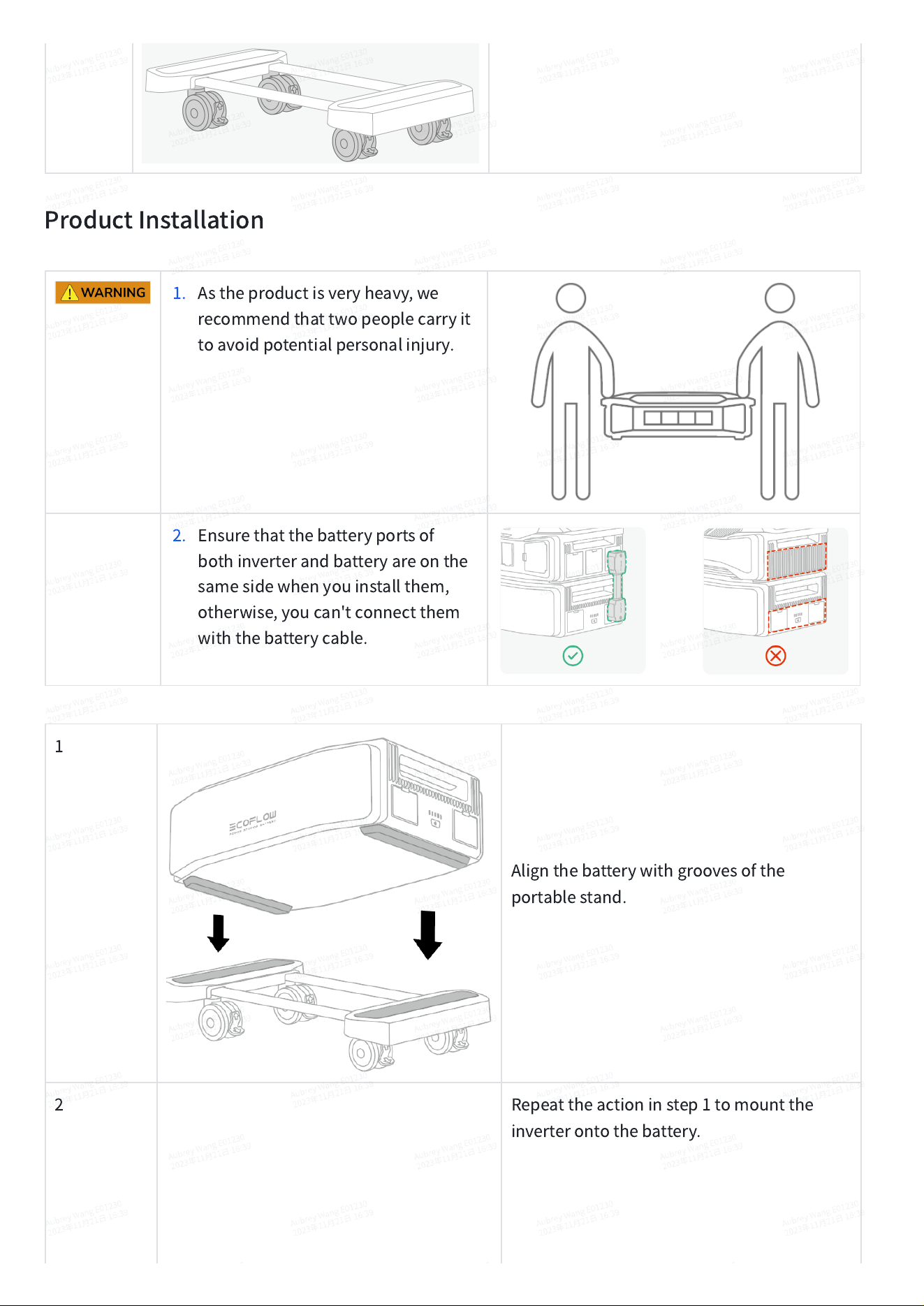
1. Astheproductisveryheavy,we
recommendthattwopeoplecarryit
toavoidpotentialpersonalinjury.
2. Ensurethatthebatteryportsof
bothinverterandbatteryareonthe
samesidewhenyouinstallthem,
otherwise,youcan'tconnectthem
withthebatterycable.
1
Alignthebatterywithgroovesofthe
portablestand.
2
Repeattheactioninstep1tomountthe
inverterontothebattery.
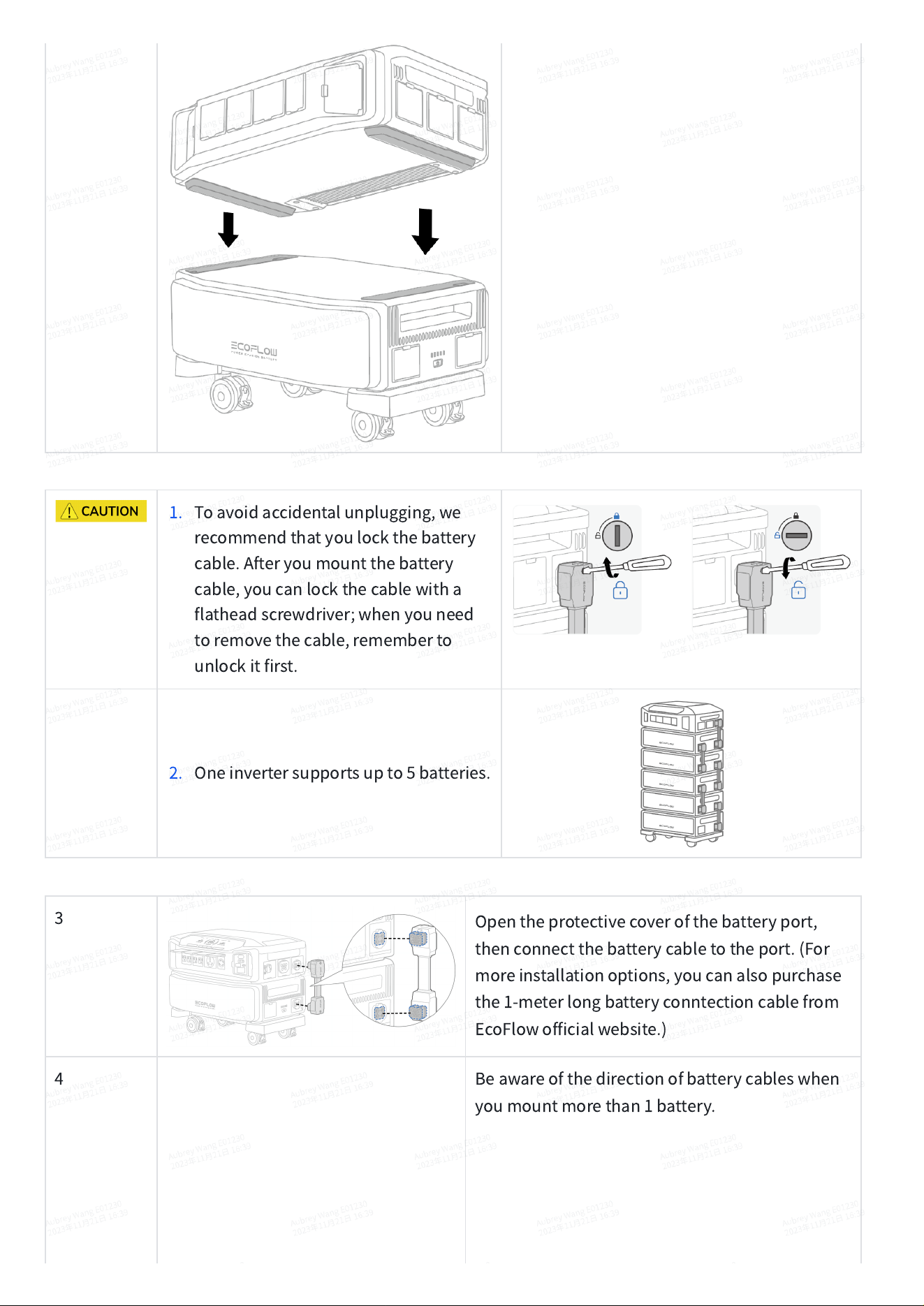
1. Toavoidaccidentalunplugging,we
recommendthatyoulockthebattery
cable.Afteryoumountthebattery
cable,youcanlockthecablewitha
flatheadscrewdriver;whenyouneed
toremovethecable,rememberto
unlockitfirst.
2. Oneinvertersupportsupto5batteries.
3
Opentheprotectivecoverofthebatteryport,
thenconnectthebatterycabletotheport.(For
moreinstallationoptions,youcanalsopurchase
the1-meterlongbatteryconntectioncablefrom
EcoFlowofficialwebsite.)
4
Beawareofthedirectionofbatterycableswhen
youmountmorethan1battery.
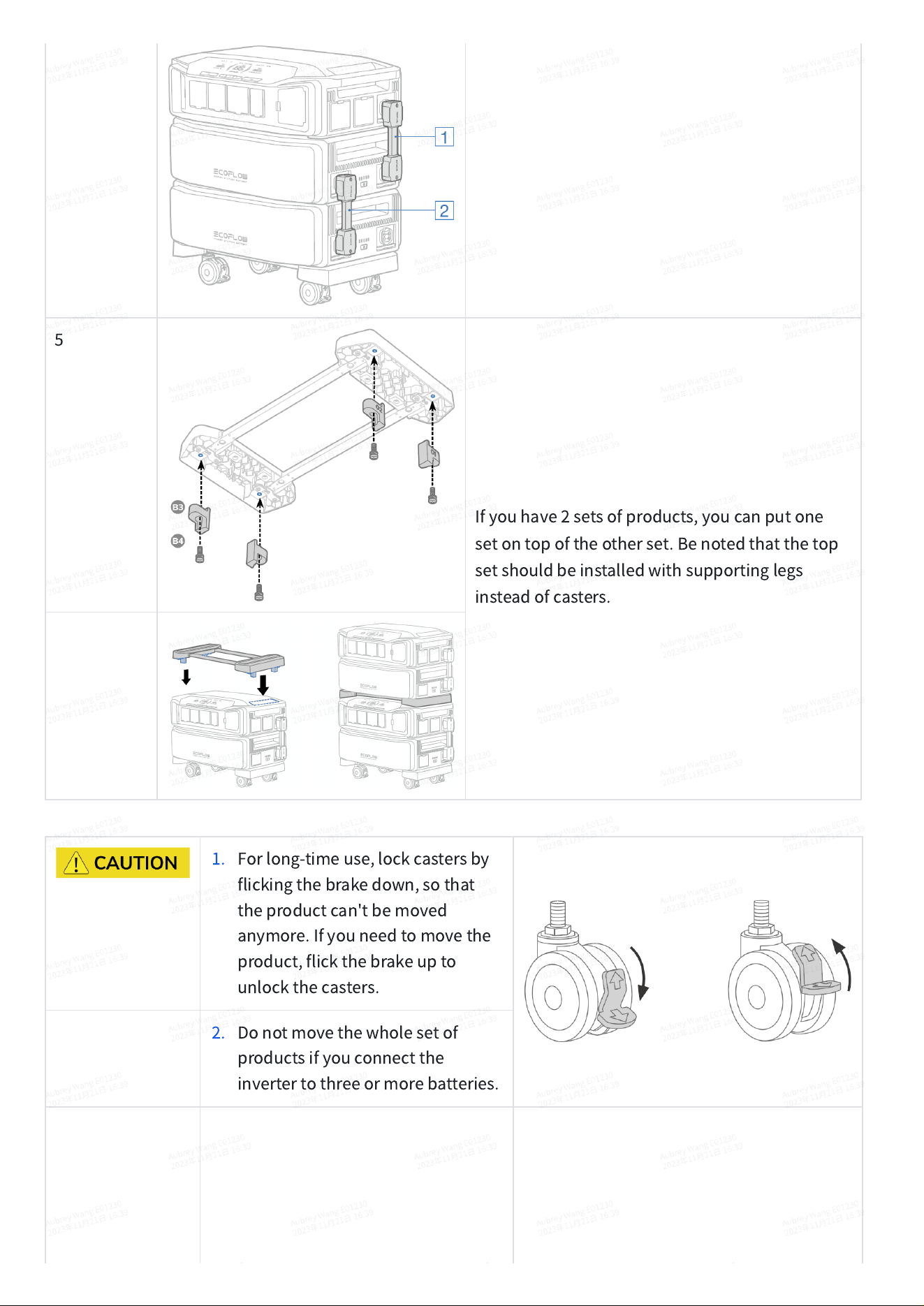
5
Ifyouhave2setsofproducts,youcanputone
setontopoftheotherset.Benotedthatthetop
setshouldbeinstalledwithsupportinglegs
insteadofcasters.
1. Forlong-timeuse,lockcastersby
flickingthebrakedown,sothat
theproductcan'tbemoved
anymore.Ifyouneedtomovethe
product,flickthebrakeupto
unlockthecasters.
2. Donotmovethewholesetof
productsifyouconnectthe
invertertothreeormorebatteries.
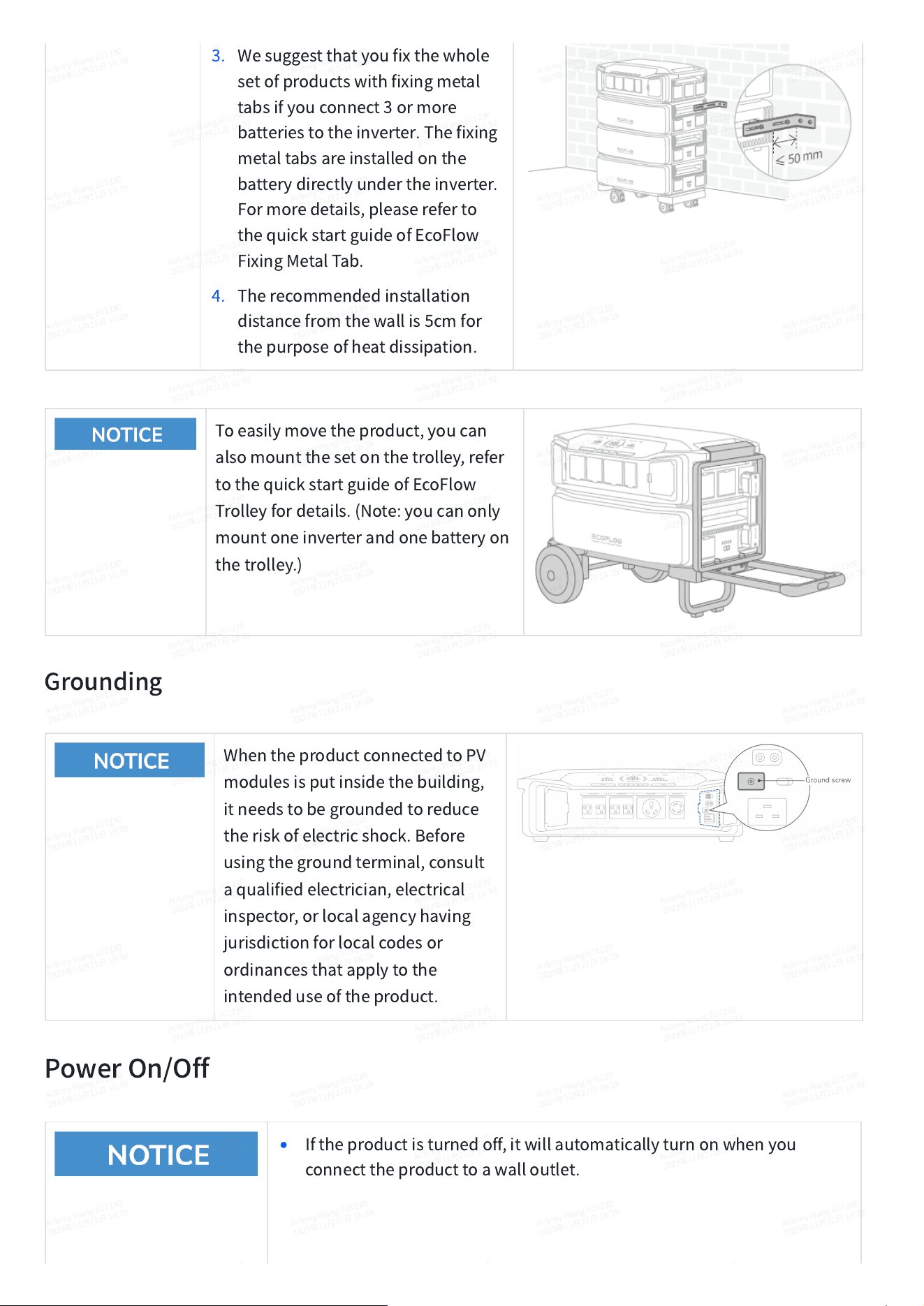
3. Wesuggestthatyoufixthewhole
setofproductswithfixingmetal
tabsifyouconnect3ormore
batteriestotheinverter.Thefixing
metaltabsareinstalledonthe
batterydirectlyundertheinverter.
Formoredetails,pleasereferto
thequickstartguideofEcoFlow
FixingMetalTab.
4. Therecommendedinstallation
distancefromthewallis5cmfor
thepurposeofheatdissipation.
Toeasilymovetheproduct,youcan
alsomountthesetonthetrolley,refer
tothequickstartguideofEcoFlow
Trolleyfordetails.(Note:youcanonly
mountoneinverterandonebatteryon
thetrolley.)
Grounding
WhentheproductconnectedtoPV
modulesisputinsidethebuilding,
itneedstobegroundedtoreduce
theriskofelectricshock.Before
usingthegroundterminal,consult
aqualifiedelectrician,electrical
inspector,orlocalagencyhaving
jurisdictionforlocalcodesor
ordinancesthatapplytothe
intendeduseoftheproduct.
PowerOn/Off
•
Iftheproductisturnedoff,itwillautomaticallyturnonwhenyou
connecttheproducttoawalloutlet.
•
Whentheproductisturnedon,theLCDscreenwilllightup;pressing
themainpowerbuttonagainwillturnofftheLCDscreenbutwillnot
turnofftheproduct.
•
Iftheinverterisconnectedtomorethanonebattery,youcanpress&
holdthemainpowerbuttonofanybatterytoturnontheproduct.
•
Theproductwillgointostandbymode,withtheLCDscreenshutdown,
ifithasn'tbeenusedfor5minutes.Whenyoustarttousetheproduct
again,theLCDscreenwillturnonautomatically.
•
Thedefaultstandbytimeoftheproductis2hours.Theproductwill
automaticallyshutdownifoutputpowerbuttonsareturnedofforno
loadsareconnectedfor2hours.
•
Pressandholdthemainpowerbuttonfor10secondstoresetthe
Bluetoothconnection.
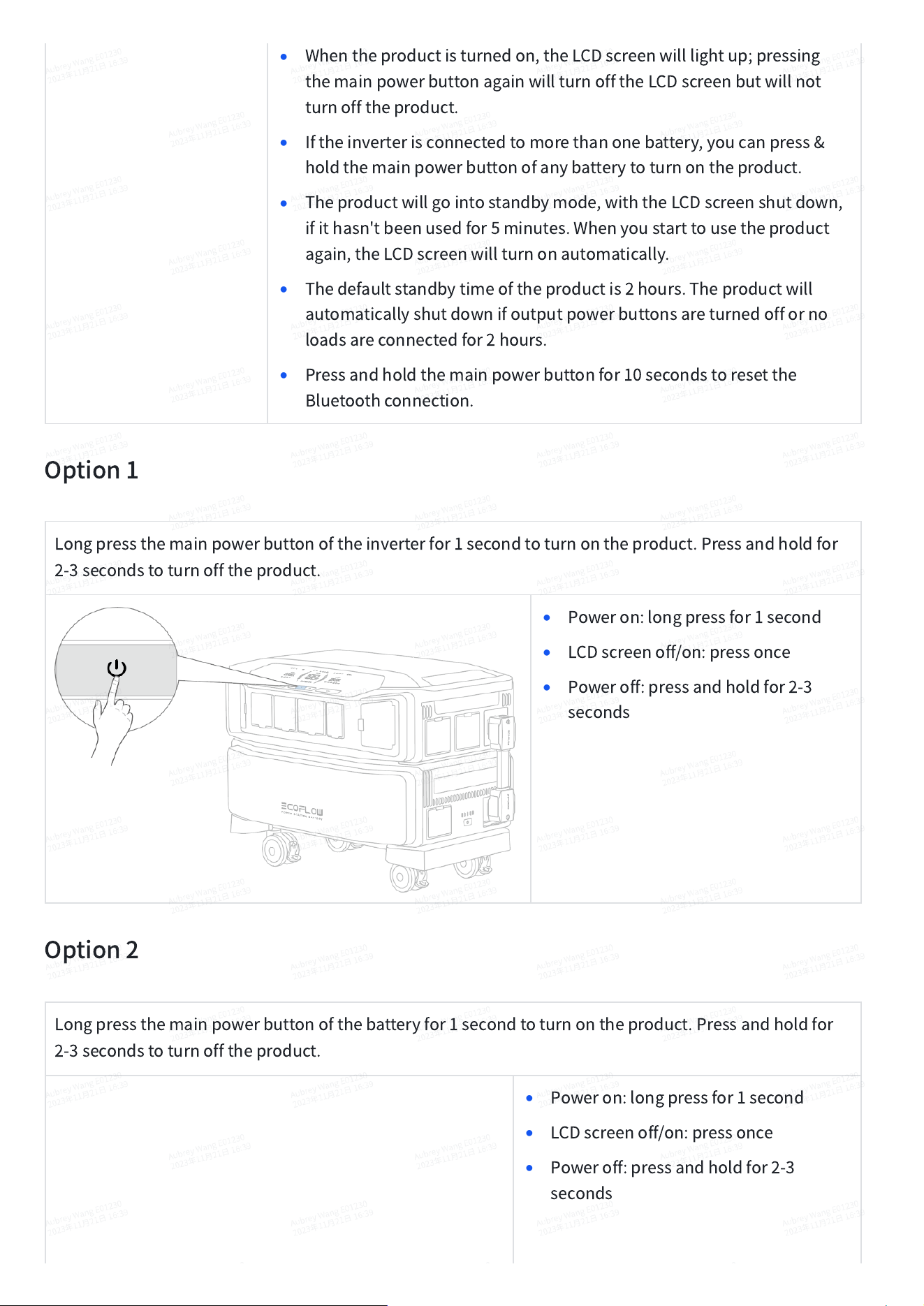
Option1
Longpressthemainpowerbuttonoftheinverterfor1secondtoturnontheproduct.Pressandholdfor
2-3secondstoturnofftheproduct.
•
Poweron:longpressfor1second
•
LCDscreenoff/on:pressonce
•
Poweroff:pressandholdfor2-3
seconds
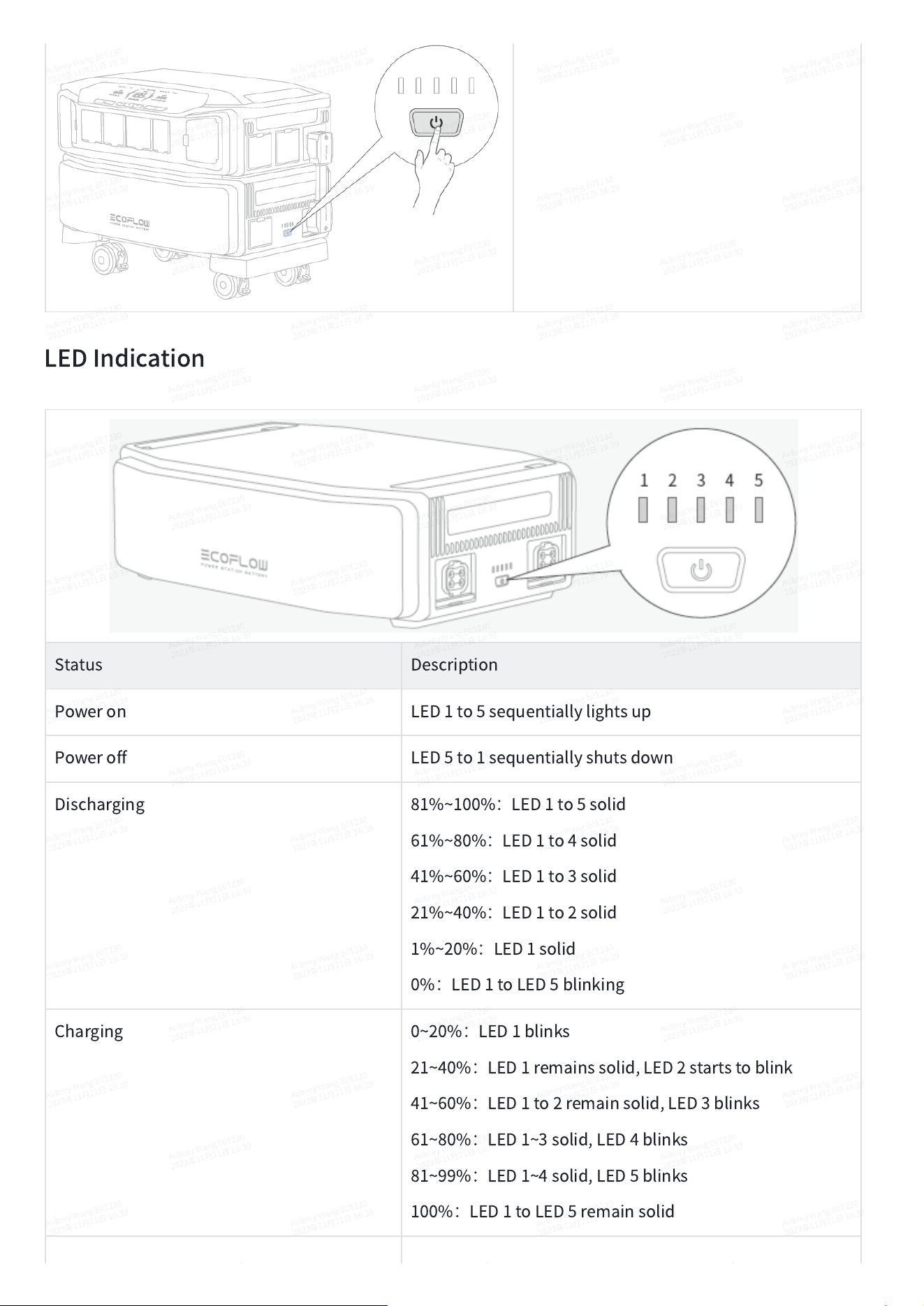
Option2
Longpressthemainpowerbuttonofthebatteryfor1secondtoturnontheproduct.Pressandholdfor
2-3secondstoturnofftheproduct.
•
Poweron:longpressfor1second
•
LCDscreenoff/on:pressonce
•
Poweroff:pressandholdfor2-3
seconds
LEDIndication
Status
Description
Poweron
LED1to5sequentiallylightsup
Poweroff
LED5to1sequentiallyshutsdown
Discharging
81%~100%
:
LED1to5solid
61%~80%
:
LED1to4solid
41%~60%
:
LED1to3solid
21%~40%
:
LED1to2solid
1%~20%
:
LED1solid
0%
:
LED1toLED5blinking
Charging
0~20%
:
LED1blinks
21~40%
:
LED1remainssolid,LED2startstoblink
41~60%
:
LED1to2remainsolid,LED3blinks
61~80%
:
LED1~3solid,LED4blinks
81~99%
:
LED1~4solid,LED5blinks
100%
:
LED1toLED5remainsolid
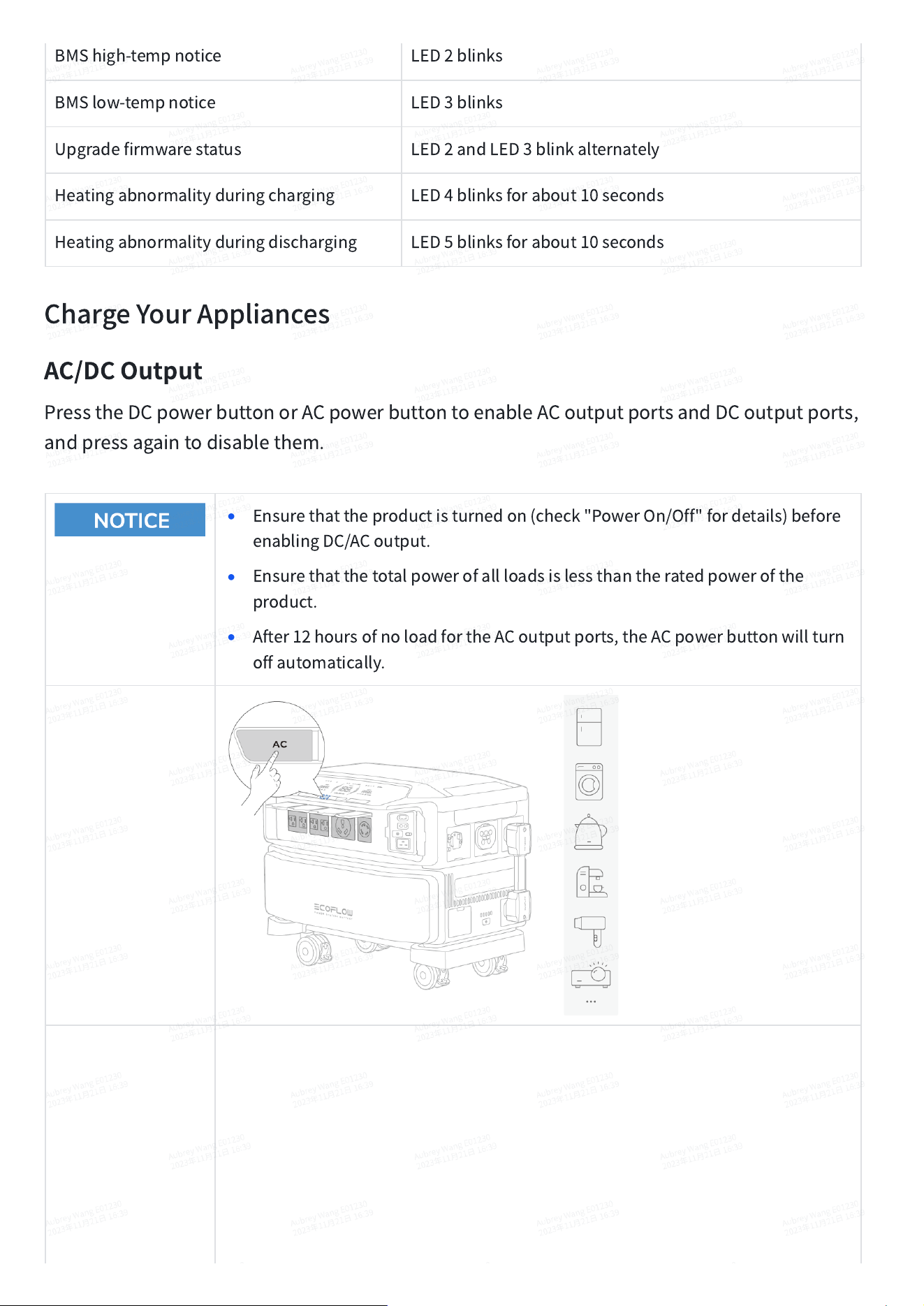
BMShigh-tempnotice
LED2blinks
BMSlow-tempnotice
LED3blinks
Upgradefirmwarestatus
LED2andLED3blinkalternately
Heatingabnormalityduringcharging
LED4blinksforabout10seconds
Heatingabnormalityduringdischarging
LED5blinksforabout10seconds
ChargeYourAppliances
AC/DCOutput
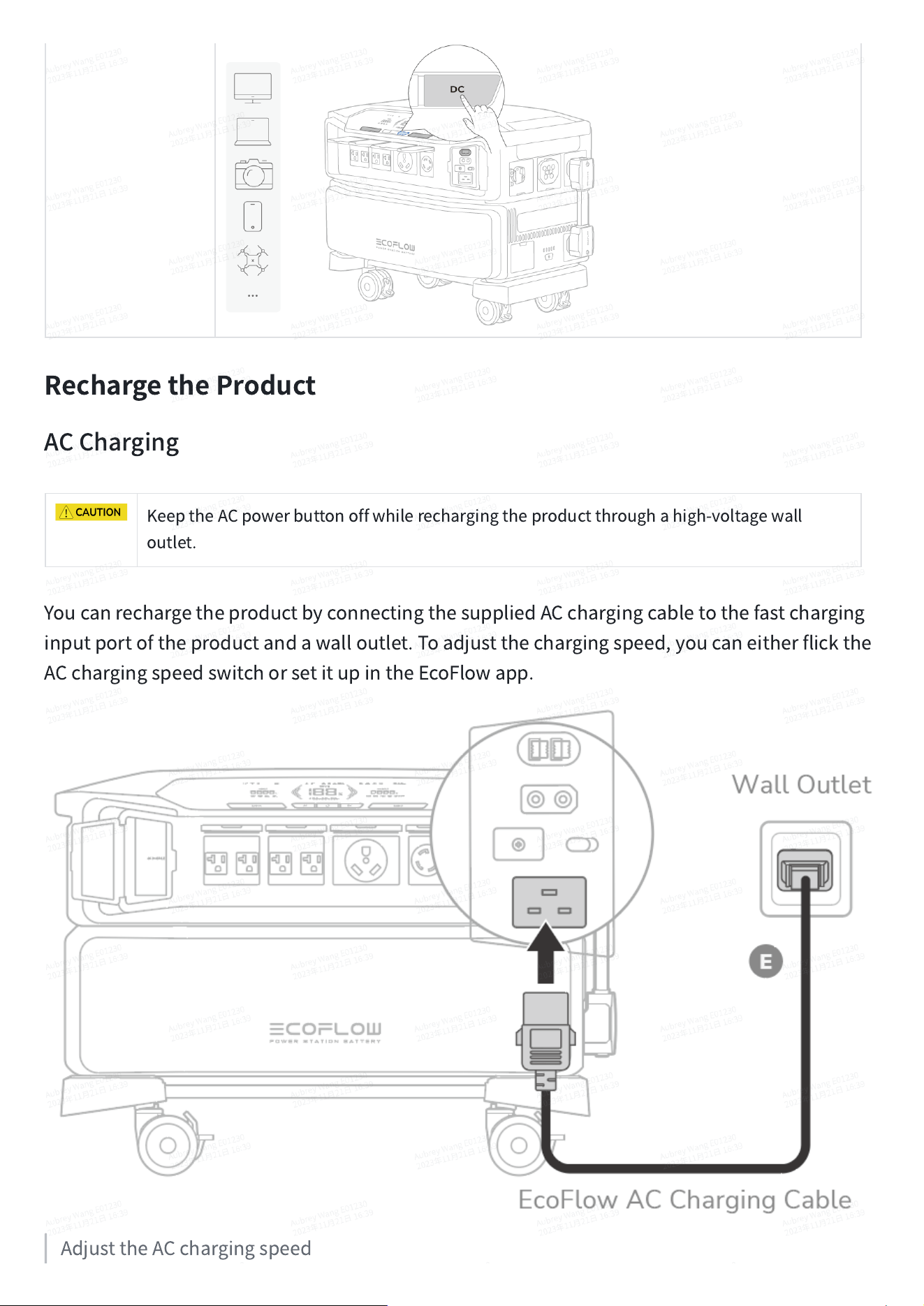
PresstheDCpowerbuttonorACpowerbuttontoenableACoutputportsandDCoutputports,
andpressagaintodisablethem.
•
Ensurethattheproductisturnedon(check"PowerOn/Off"fordetails)before
enablingDC/ACoutput.
•
Ensurethatthetotalpowerofallloadsislessthantheratedpowerofthe
product.
•
After12hoursofnoloadfortheACoutputports,theACpowerbuttonwillturn
offautomatically.
RechargetheProduct
ACCharging
KeeptheACpowerbuttonoffwhilerechargingtheproductthroughahigh-voltagewall
outlet.
YoucanrechargetheproductbyconnectingthesuppliedACchargingcabletothefastcharging
inputportoftheproductandawalloutlet.Toadjustthechargingspeed,youcaneitherflickthe
ACchargingspeedswitchorsetitupintheEcoFlowapp.
AdjusttheACchargingspeed
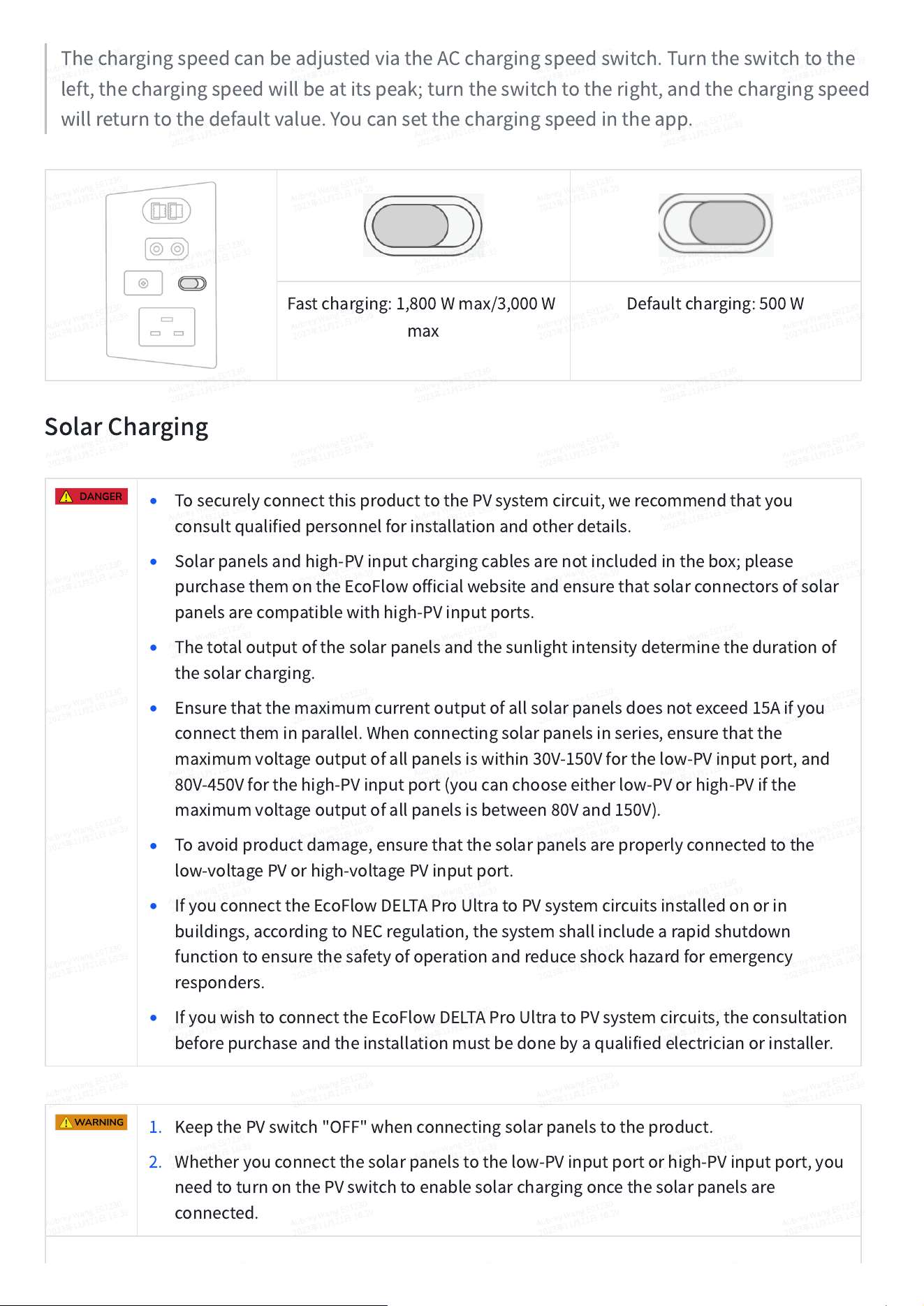
ThechargingspeedcanbeadjustedviatheACchargingspeedswitch.Turntheswitchtothe
left,thechargingspeedwillbeatitspeak;turntheswitchtotheright,andthechargingspeed
willreturntothedefaultvalue.Youcansetthechargingspeedintheapp.
Fastcharging:1,800Wmax/3,000W
max
Defaultcharging:500W
SolarCharging
•
TosecurelyconnectthisproducttothePVsystemcircuit,werecommendthatyou
consultqualifiedpersonnelforinstallationandotherdetails.
•
Solarpanelsandhigh-PVinputchargingcablesarenotincludedinthebox;please
purchasethemontheEcoFlowofficialwebsiteandensurethatsolarconnectorsofsolar
panelsarecompatiblewithhigh-PVinputports.
•
Thetotaloutputofthesolarpanelsandthesunlightintensitydeterminethedurationof
thesolarcharging.
•
Ensurethatthemaximumcurrentoutputofallsolarpanelsdoesnotexceed15Aifyou
connecttheminparallel.Whenconnectingsolarpanelsinseries,ensurethatthe
maximumvoltageoutputofallpanelsiswithin30V-150Vforthelow-PVinputport,and
80V-450Vforthehigh-PVinputport(youcanchooseeitherlow-PVorhigh-PVifthe
maximumvoltageoutputofallpanelsisbetween80Vand150V).
•
Toavoidproductdamage,ensurethatthesolarpanelsareproperlyconnectedtothe
low-voltagePVorhigh-voltagePVinputport.
•
IfyouconnecttheEcoFlowDELTAProUltratoPVsystemcircuitsinstalledonorin
buildings,accordingtoNECregulation,thesystemshallincludearapidshutdown
functiontoensurethesafetyofoperationandreduceshockhazardforemergency
responders.
•
IfyouwishtoconnecttheEcoFlowDELTAProUltratoPVsystemcircuits,theconsultation
beforepurchaseandtheinstallationmustbedonebyaqualifiedelectricianorinstaller.
1. KeepthePVswitch"OFF"whenconnectingsolarpanelstotheproduct.
2. Whetheryouconnectthesolarpanelstothelow-PVinputportorhigh-PVinputport,you
needtoturnonthePVswitchtoenablesolarchargingoncethesolarpanelsare
connected.
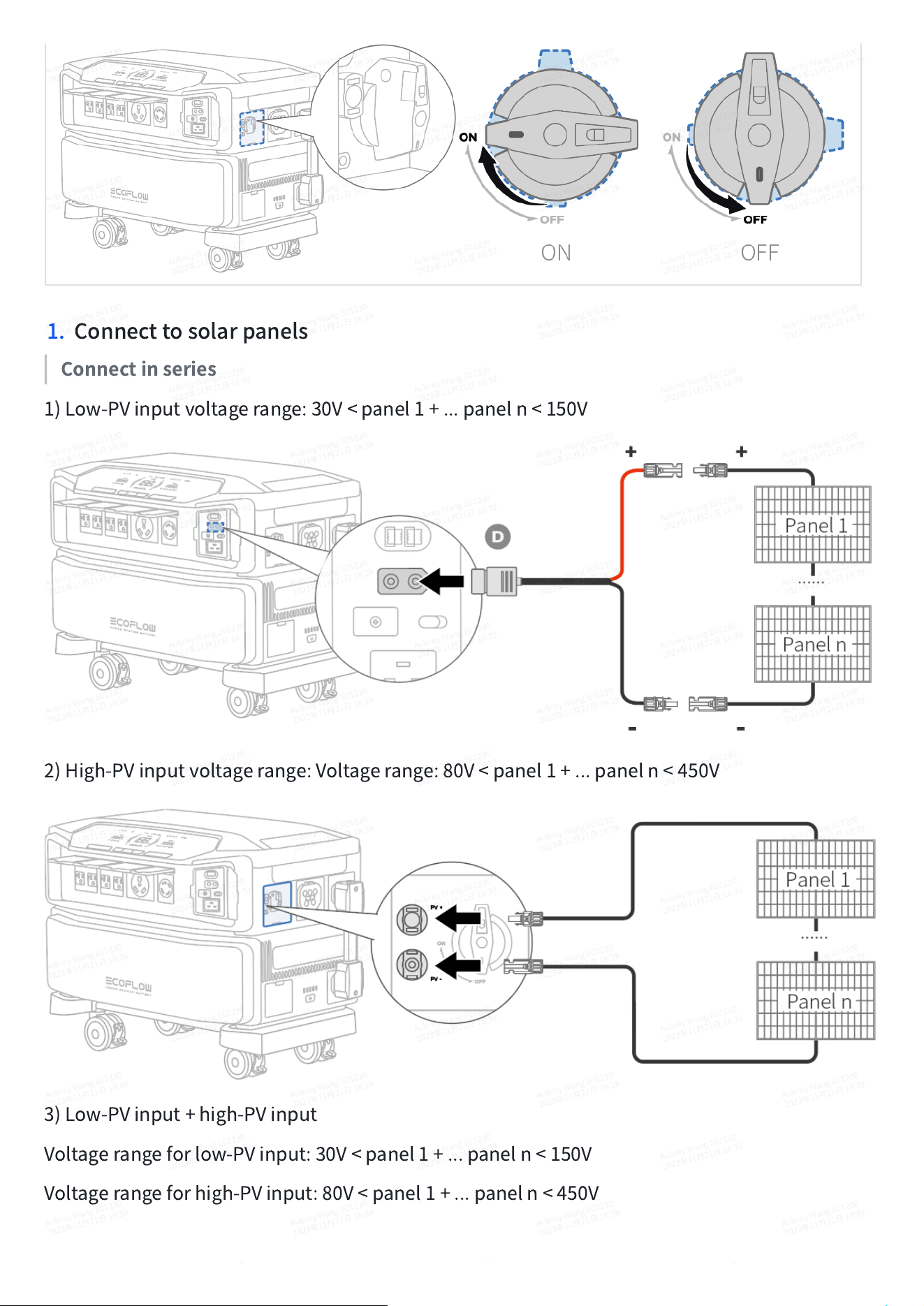
1. Connecttosolarpanels
Connectinseries
1)Low-PVinputvoltagerange:30V<panel1+...paneln<150V
2)High-PVinputvoltagerange:Voltagerange:80V<panel1+...paneln<450V
3)Low-PVinput+high-PVinput
Voltagerangeforlow-PVinput:30V<panel1+...paneln<150V
Voltagerangeforhigh-PVinput:80V<panel1+...paneln<450V
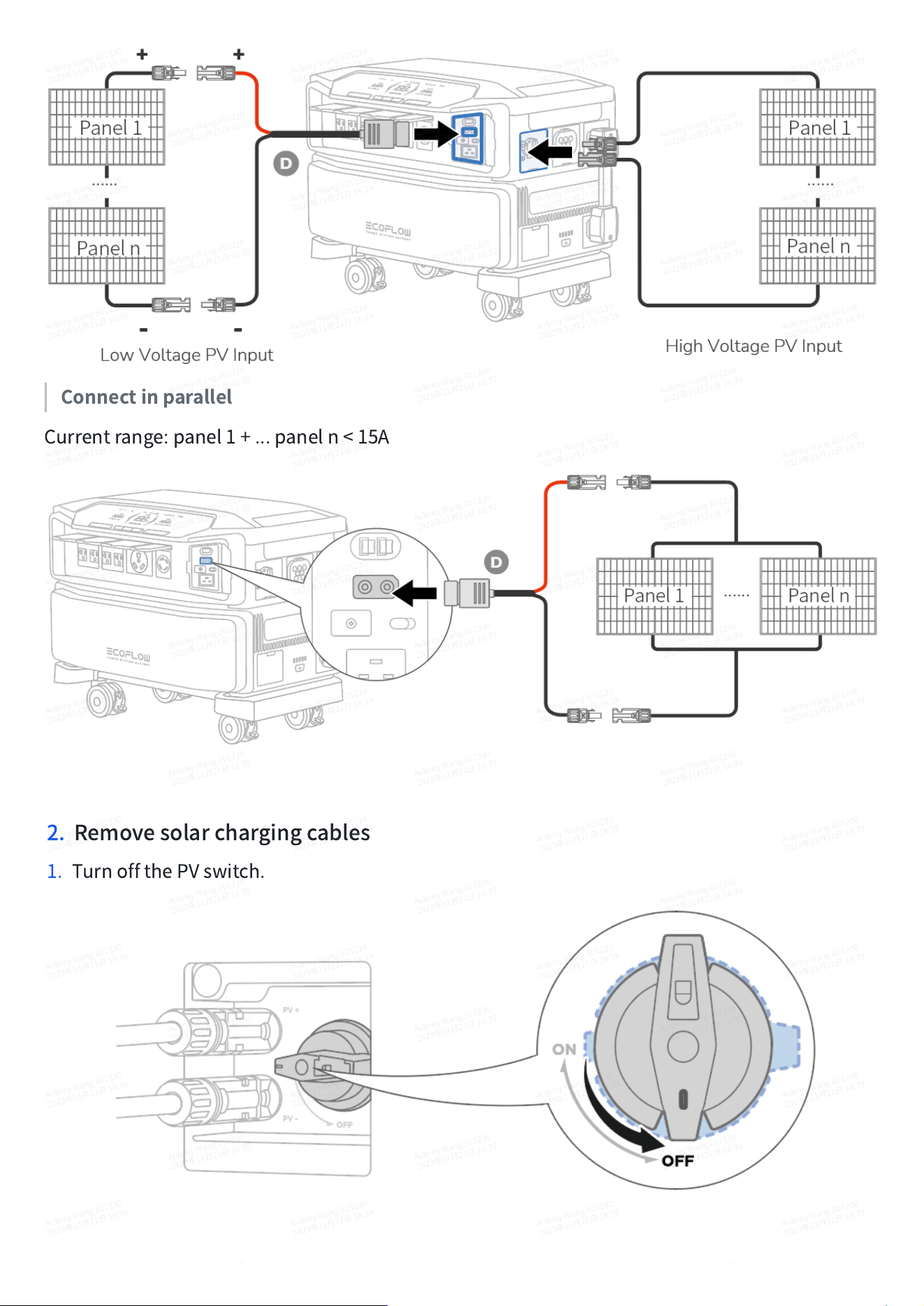
Connectinparallel
Currentrange:panel1+...paneln<15A
2. Removesolarchargingcables
1. TurnoffthePVswitch.
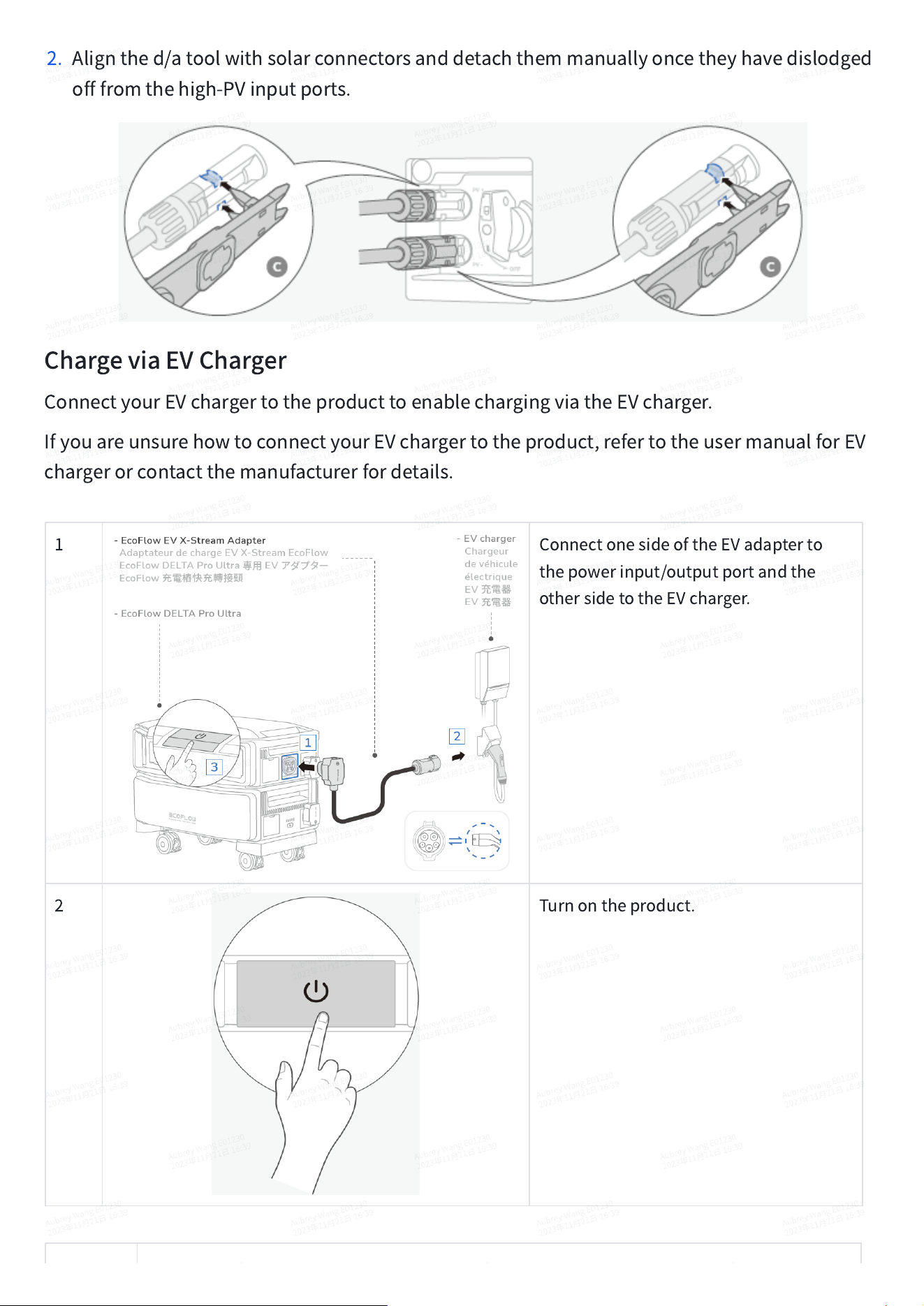
2. Alignthed/atoolwithsolarconnectorsanddetachthemmanuallyoncetheyhavedislodged
offfromthehigh-PVinputports.
ChargeviaEVCharger
ConnectyourEVchargertotheproducttoenablechargingviatheEVcharger.
IfyouareunsurehowtoconnectyourEVchargertotheproduct,refertotheusermanualforEV
chargerorcontactthemanufacturerfordetails.
1
ConnectonesideoftheEVadapterto
thepowerinput/outputportandthe
othersidetotheEVcharger.
2
Turnontheproduct.
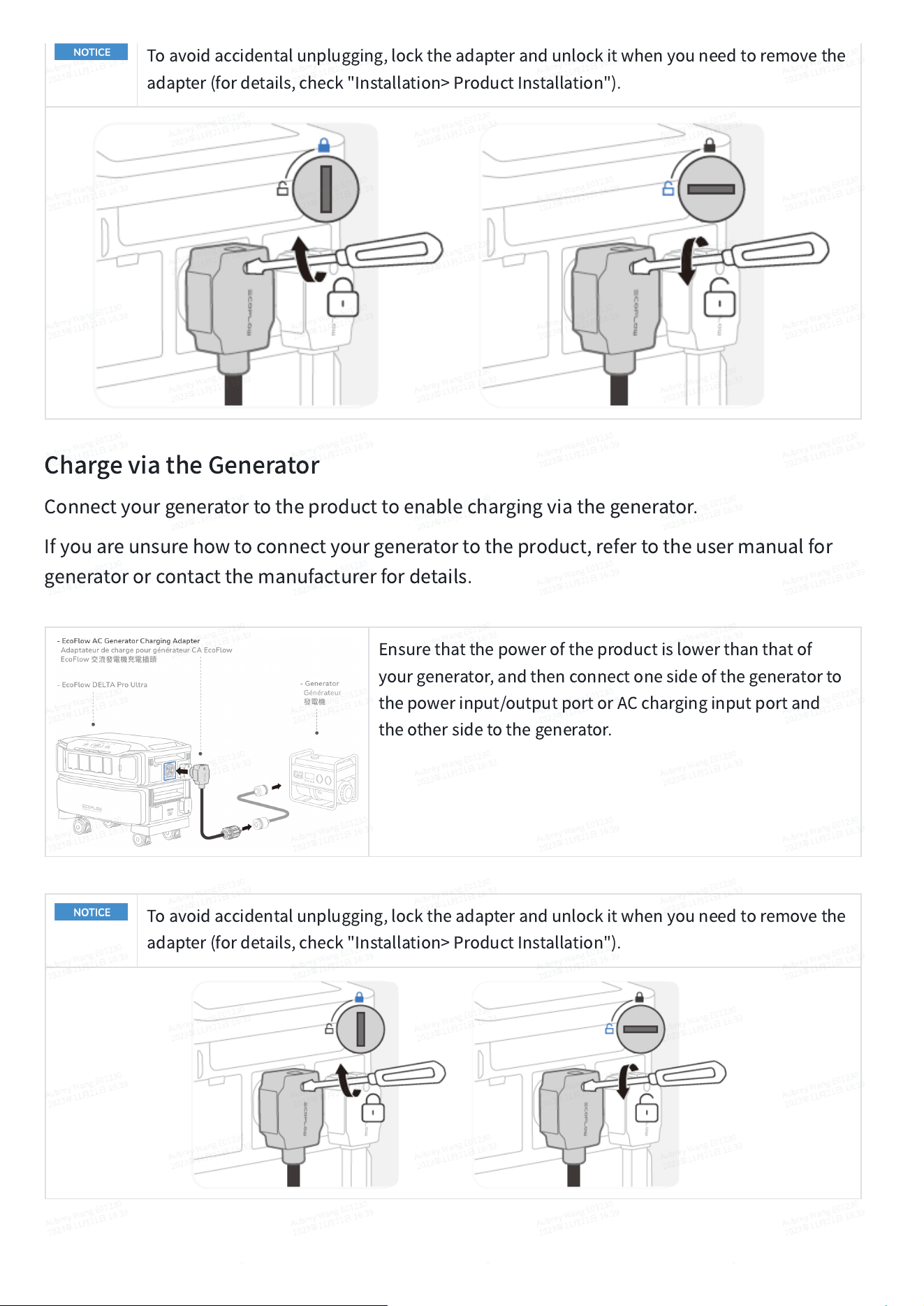
Toavoidaccidentalunplugging,locktheadapterandunlockitwhenyouneedtoremovethe
adapter(fordetails,check"Installation>ProductInstallation").
ChargeviatheGenerator
Connectyourgeneratortotheproducttoenablechargingviathegenerator.
Ifyouareunsurehowtoconnectyourgeneratortotheproduct,refertotheusermanualfor
generatororcontactthemanufacturerfordetails.
Ensurethatthepoweroftheproductislowerthanthatof
yourgenerator,andthenconnectonesideofthegeneratorto
thepowerinput/outputportorACcharginginputportand
theothersidetothegenerator.
Toavoidaccidentalunplugging,locktheadapterandunlockitwhenyouneedtoremovethe
adapter(fordetails,check"Installation>ProductInstallation").
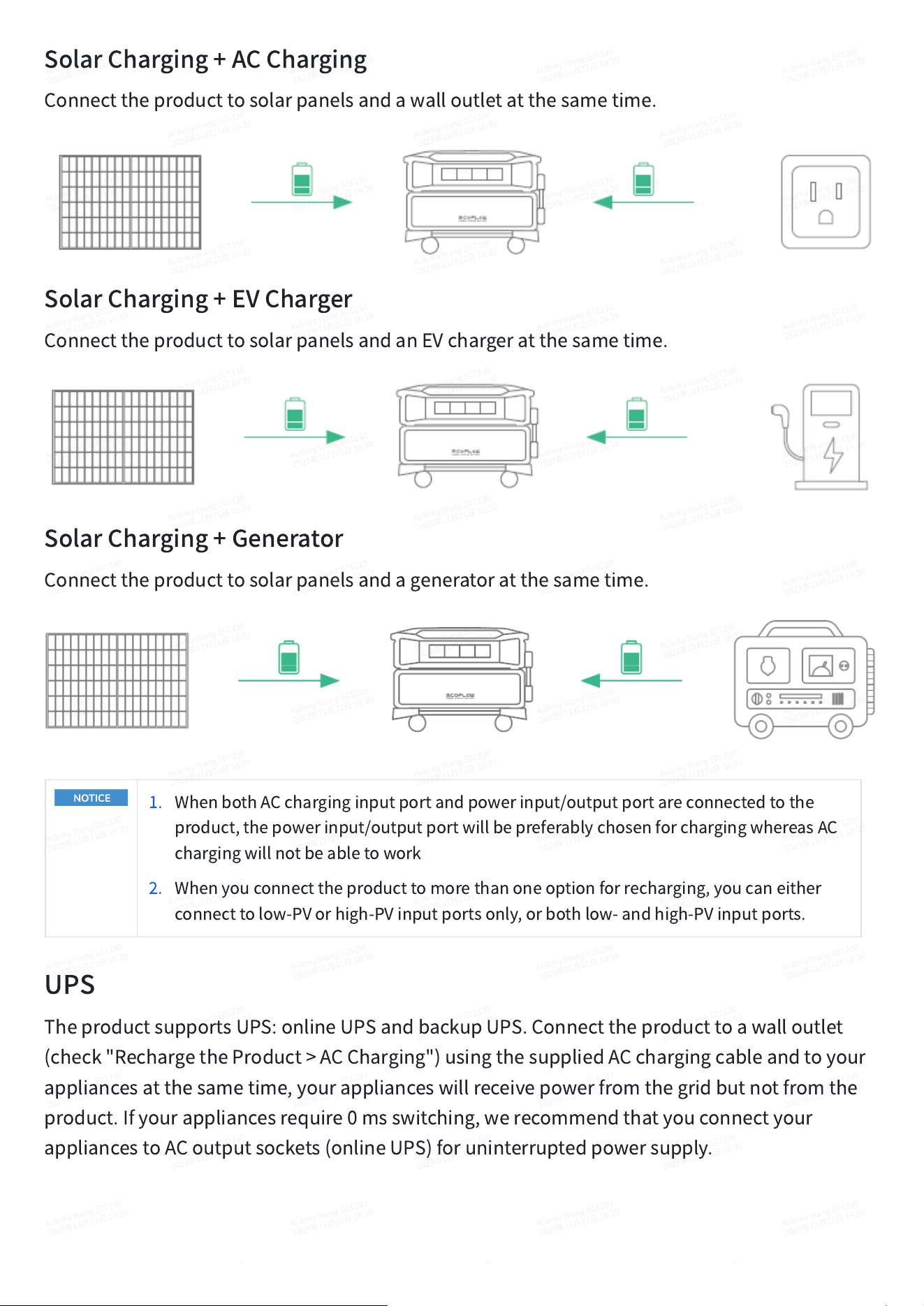
SolarCharging+ACCharging
Connecttheproducttosolarpanelsandawalloutletatthesametime.
SolarCharging+EVCharger
ConnecttheproducttosolarpanelsandanEVchargeratthesametime.
SolarCharging+Generator
Connecttheproducttosolarpanelsandageneratoratthesametime.
1. WhenbothACcharginginputportandpowerinput/outputportareconnectedtothe
product,thepowerinput/outputportwillbepreferablychosenforchargingwhereasAC
chargingwillnotbeabletowork
2. Whenyouconnecttheproducttomorethanoneoptionforrecharging,youcaneither
connecttolow-PVorhigh-PVinputportsonly,orbothlow-andhigh-PVinputports.
UPS
TheproductsupportsUPS:onlineUPSandbackupUPS.Connecttheproducttoawalloutlet
(check"RechargetheProduct>ACCharging")usingthesuppliedACchargingcableandtoyour
appliancesatthesametime,yourapplianceswillreceivepowerfromthegridbutnotfromthe
product.Ifyourappliancesrequire0msswitching,werecommendthatyouconnectyour
appliancestoACoutputsockets(onlineUPS)foruninterruptedpowersupply.
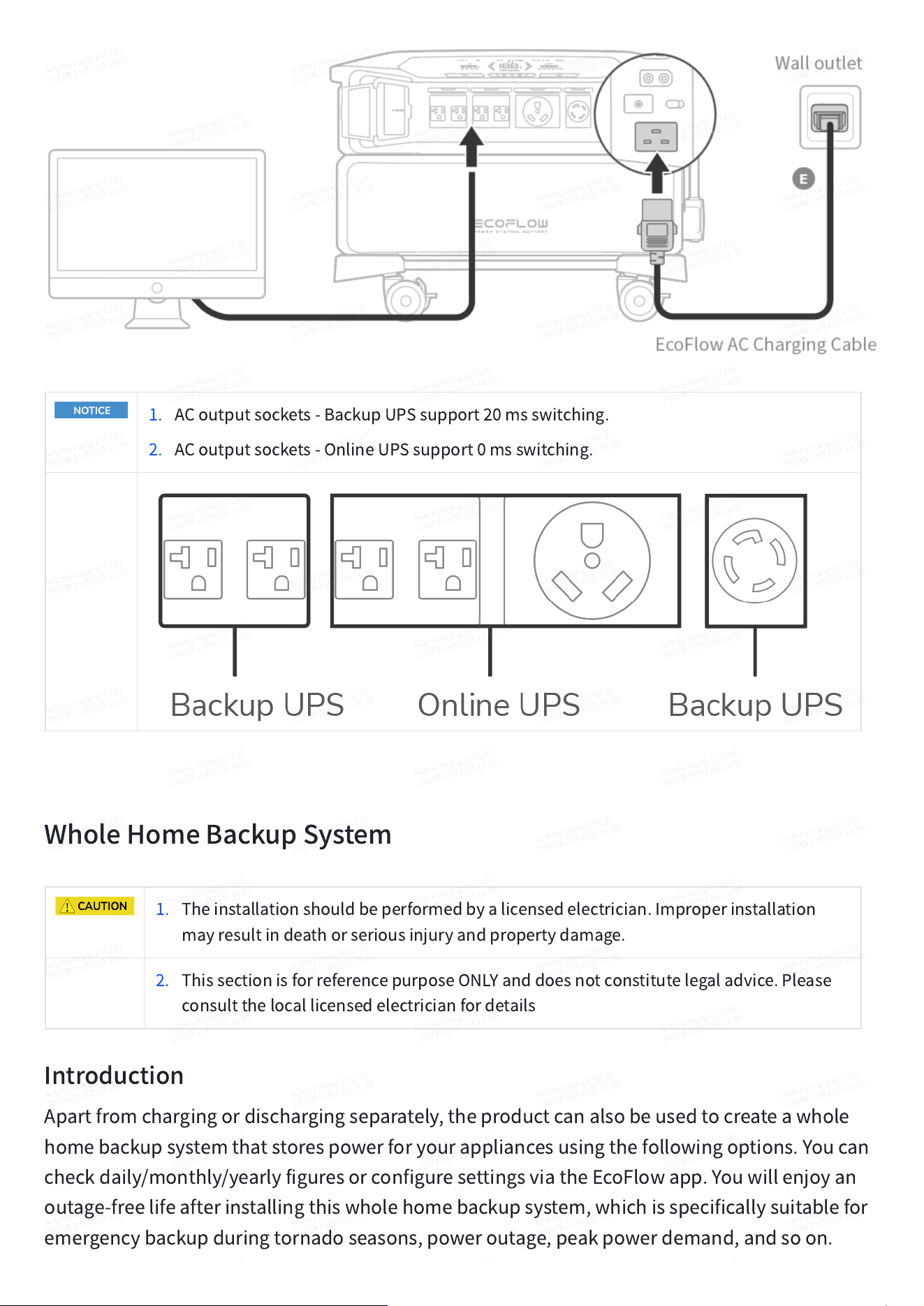
1. ACoutputsockets-BackupUPSsupport20msswitching.
2. ACoutputsockets-OnlineUPSsupport0msswitching.
WholeHomeBackupSystem
1. Theinstallationshouldbeperformedbyalicensedelectrician.Improperinstallation
mayresultindeathorseriousinjuryandpropertydamage.
2. ThissectionisforreferencepurposeONLYanddoesnotconstitutelegaladvice.Please
consultthelocallicensedelectricianfordetails
Introduction
Apartfromchargingordischargingseparately,theproductcanalsobeusedtocreateawhole
homebackupsystemthatstorespowerforyourappliancesusingthefollowingoptions.Youcan
checkdaily/monthly/yearlyfiguresorconfiguresettingsviatheEcoFlowapp.Youwillenjoyan
outage-freelifeafterinstallingthiswholehomebackupsystem,whichisspecificallysuitablefor
emergencybackupduringtornadoseasons,poweroutage,peakpowerdemand,andsoon.
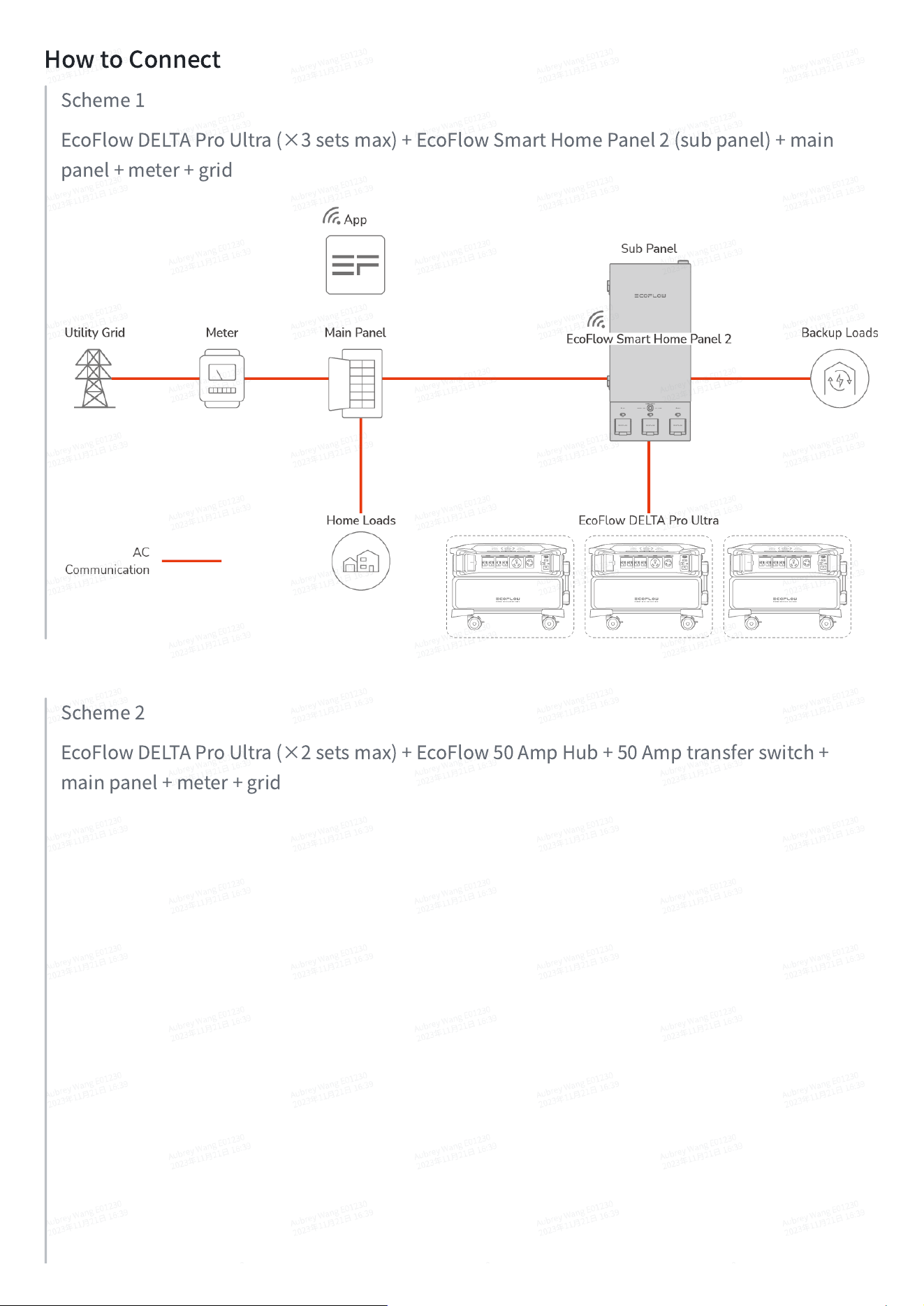
HowtoConnect
Scheme1
EcoFlowDELTAProUltra(×3setsmax)+EcoFlowSmartHomePanel2(subpanel)+main
panel+meter+grid
Scheme2
EcoFlowDELTAProUltra(×2setsmax)+EcoFlow50AmpHub+50Amptransferswitch+
mainpanel+meter+grid
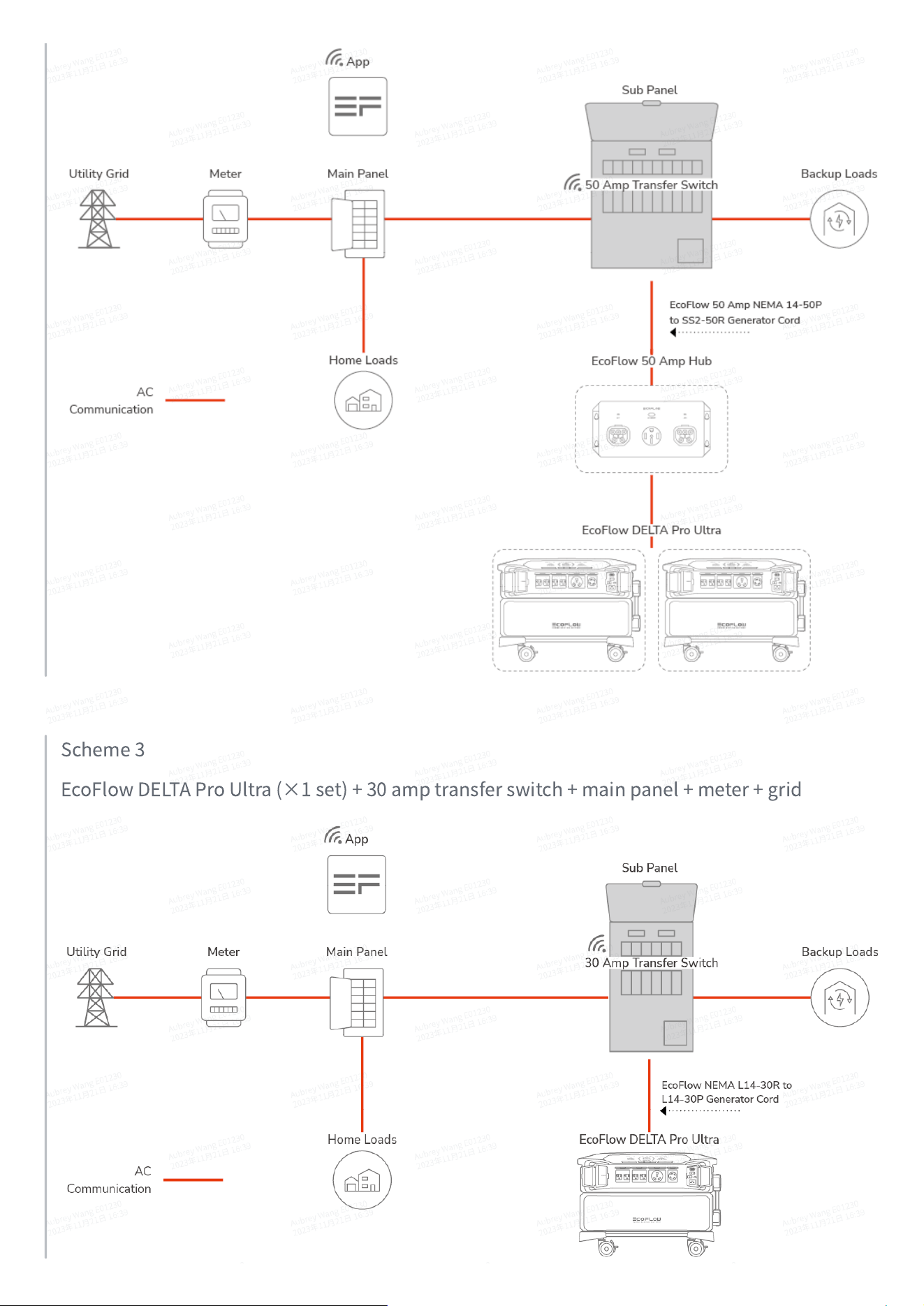
Scheme3
EcoFlowDELTAProUltra(×1set)+30amptransferswitch+mainpanel+meter+grid
DownloadEcoFlowApp
Control,monitor,andcustomizeyourEcoFlowDELTAProUltrafromafarwiththeEcoFlowApp.
Downloadhere:https://download.ecoflow.com/app
PrivacyPolicy
ByusingEcoFlowProducts,Applications,andServices,youconsenttothe
EcoFlowTermofUseandPrivacyPolicy,whichyoucanaccessviathe
“
About
”
sectionofthe
“
User
”
pageontheEcoFlowApporontheofficial
EcoFlowwebsiteat
https://www.ecoflow.com/policy/terms-of-useand
https://www.ecoflow.com/policy/privacy-policy
Maintenance
EcoFlowDELTAProUltra
1. Askqualifiedpersonneltocheckormaintaintheproduct,andreplacetheoriginal
componentswithidenticalreplacements.
2. Usecleananddryclothorpapertocleandirtorstainsofftheports.Donotcleantheproduct
withchemicalsorcorrosivematerials.
3. Forsafetyreasons,turnofftheproductbeforemaintenancetoavoidtheriskofelectric
shock.
4. Checktheproductregularlyaccordingtothefollowingchecklist
:
Item
Method
MaintenanceInterval
Heatdissipation
Checkperiodicallythatventsarefreefrom
obstaclesanddust.
Every3months
Dirtcleaning
Ifthereisanystain/dirt,useadry,softcloth
towipeitoff.Pleasedon'tuseanyabrasives
orchemicalliquidstocleantheproduct.
Every3months
Systemrunningstatus
1. Checkthattheproductisnotdamagedor
deformed.
2. Ensuretheproductoperateswithno
abnormalsound.
Every3months
Cableconnection
Ensureallcablesareintactandsecurely
connected.
Every3months
EcoFlowDELTAProBattery
1. Thebatterymustremainat45°Cforatleast20hoursduringtwocharge/dischargecycles.
2. Ifthecharging/discharginglevelisnotfullychargedafteronemonthor30cycles,itwill
automaticallychargeupto100%forcalibration(calibration).Whencalibrationiscomplete,it
automaticallyrevertstotheuser-setcharge/dischargelimit.
3. Itisrecommendedtobeusedandstoredinanenvironmentof20°Cto45°C.Keepawayfrom
humidplaces,placeswherewatercangetwet,nearheatsources,andmetals.
4. Forlong-termstorage,pleasedischargetheproducteverythreemonths(firstlydischargeit
to0%,thenfullyrechargeit,andlastlydischargeitto60%);theproductwillnotbecovered
bythewarrantyifitisnotchargedordischargedformorethan6months.
5. Forbatterysafetyandlife,donotstorethisproductinanenvironmentabove45
℃
orbelow
-20
℃
.
6. Ifthebatteryleveldropsbelow1%afterusingtheproduct,chargeitupto60%beforestoring
it.Ifthebatteryisstoredforalongperiodoftime,itwillcauseseriousdamagetothebattery
andshortenitsusagecycle.
7. Ifthebatteryisstoredforalongperiodoftimewithsignificantlylowbattery,theproductwill
gointodeepsleepmodeandmustbechargedandreleasedfromdeepsleepmodebeforere-
use.
ChargingHeating
Chargingheatingisautomaticallyactivatedwhenambienttemperatureisbelow0°C(32°F)and
thebatterywillbeinchargingmode.Theactivationsequenceisasfollows:
1. Chargingheatingrequirescharginginput
≥
250W.Whenthebatteryinternaltemperature
risesabove5°C(41°F),thebatterywillstartheatingaswellaschargingprocess.
2. Whenthebatteryinternaltemperaturerisesabove10°C(50°F),chargingheatingstops,and
batterychargingcontinues.
•
Thechargeheatingfunctionworksintemperaturerangeof-20°C~0°C(-4°F~32°F).
DischargingHeating
Thecapacityofthebatterycanbesignificantlyreducedwhendischargingathighpoweratlow
temperatures.Inthefollowingambienttemperatureconditions,thedischargingheatingfeature
willautomaticallystartwhenthebatteryisdischarging.Thedetailsareasfollows.
1. Whenthetemperatureisbelow-10
℃
(14°F)andtheremainingbatterypercentageisabove
80%,thedischargingheatingwillautomaticallyturnoff.
2. Whenthetemperatureisbelow-5
℃
(23°F)andtheremainingbatterypercentageisbelow
80%andabove60%,thedischargingheatingfeaturewillautomaticallyturnoff.
3. Whenthetemperatureisbelow0
℃
(32°F)andtheremainingbatterypercentageisbelow
60%andabove30%,thedischargingheatingfeaturewillautomaticallyturnoff.
4. Ifthebatterylevelislessthan30%,thedischargingheatingfeaturewillnotturnoff
automatically.
FAQ
1. Dotheoutputportsoftheinverterworkwhiletheproductisbeingcharged?
Iftheproductisconnectedtoahigh-voltagewalloutletoranEVcharger,onlyDCoutputwillbe
abletochargeyourappliances.
2. DoIneedtobuyextensioncablesforlow/high-PVinputports?
Ifyouneedtoconnectseveralsolarpanelsinseriesorparallel,werecommendthatyou
purchaseextensioncables.PleaseconsultEcoFlowcustomerserviceformoredetails.
3. Cantheinverterbeusedonitsown?
No,itcan't.Theinverterdoesnothaveabuilt-inbattery,therefore,itmustbeusedwitha
battery.
4. Istheinvertercompatiblewiththird-partybatteries?
No,theEcoFlowDELTAProUltraInverterisonlycompatiblewiththeEcoFlowDELTAProUltra
Battery.
5. Whatappliancescanbepoweredthroughtheproduct'sACoutputports?
Theproduct'sACoutputportscanpowermosthouseholdapplianceswithamaximumrated
powerof7,200W.Beforeyouuseit,werecommendthatyoucheckthepoweroftheappliances
firstandensurethatthemaximumpowerofallappliancesconnectedislessthantherated
power.
6. Howlongcantheproductchargemydevices?
Theremainingchargingtimeisdisplayedontheinverter'sLCDscreen,whichcanbeusedto
estimatetheremainingchargingtimeformostapplianceswithstablepowerconsumption.
7. HowdoIknowiftheproductischarging?
Whenitischarging,theremainingchargingtimewillbedisplayedontheinverter'sLCDscreen.
8. HowdoIcleantheproduct?
Pleaseuseadry,softandcleanclothortissuetocleantheproduct.
9. CanItaketheproductonaplane?
No,youcan't.Pleasefollowlocallawsandregulationsregardingairtravel.
10. IstheactualoutputpoweroftheproductthesameasthecapacityinSpecifications?
TheproductcapacityinthespecificationsistheratedcapacityoftheEcoFlowDELTAProUltra
Battery.Theremightbepowerlossintheprocessofcharginganddischarging.Pleasereferto
theactualproductorcontactEcoFlowcustomerservicefordetails.