JA01042023 www.akiascreens.com U-00198 1
EDGE FREE® CineGrey 3D® Series
Ceiling Ambient Light Rejecting
Fixed Frame Screen
USER’S GUIDE
V2.1
Product Description:
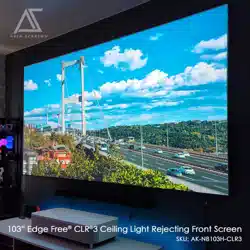
The EDGE FREE® CineGrey 3D® Series is a fixed frame projection screen that uses Akia’s EDGE
FREE® technology. The EDGE FREE® design resembles a flat panel TV display. The EDGE FREE®
CineGrey 3D® includes a micro-thin bezel trim to further enhance the frame appearance and absorb
projector overshoot. An LED kit is also included for mood lighting.
The screen material included is our ISF certified CineGrey 3D®, which is a reference quality front
projection material precisely formulated for environments with minimal control over room lighting. It was
designed to enhance picture brightness, offer accurate color fidelity, and improve contrast levels. The Polar
Star® is best for family rooms, educational facilities, conference rooms or any applications in which
incident light is a factor.
In order for the CineGrey 3D® to maintain its projection qualities and optimum performance, please refer
to the list below for proper maintenance and cleaning.
• Use a dry microfiber cloth to remove dust from the screen’s surface.
• When cleaning, use a damp microfiber cloth with warm water to remove any marks.
• Never rub or apply pressure when cleaning the surface.
• Never attempt to use any solutions, chemicals or abrasive cleaners on the screen surface.
• In order to avoid damaging the screen, avoid touching it directly with your fingers,
• pens/pencils or any other sharp or abrasive objects.
JA01042023 www.akiascreens.com U-00198 2
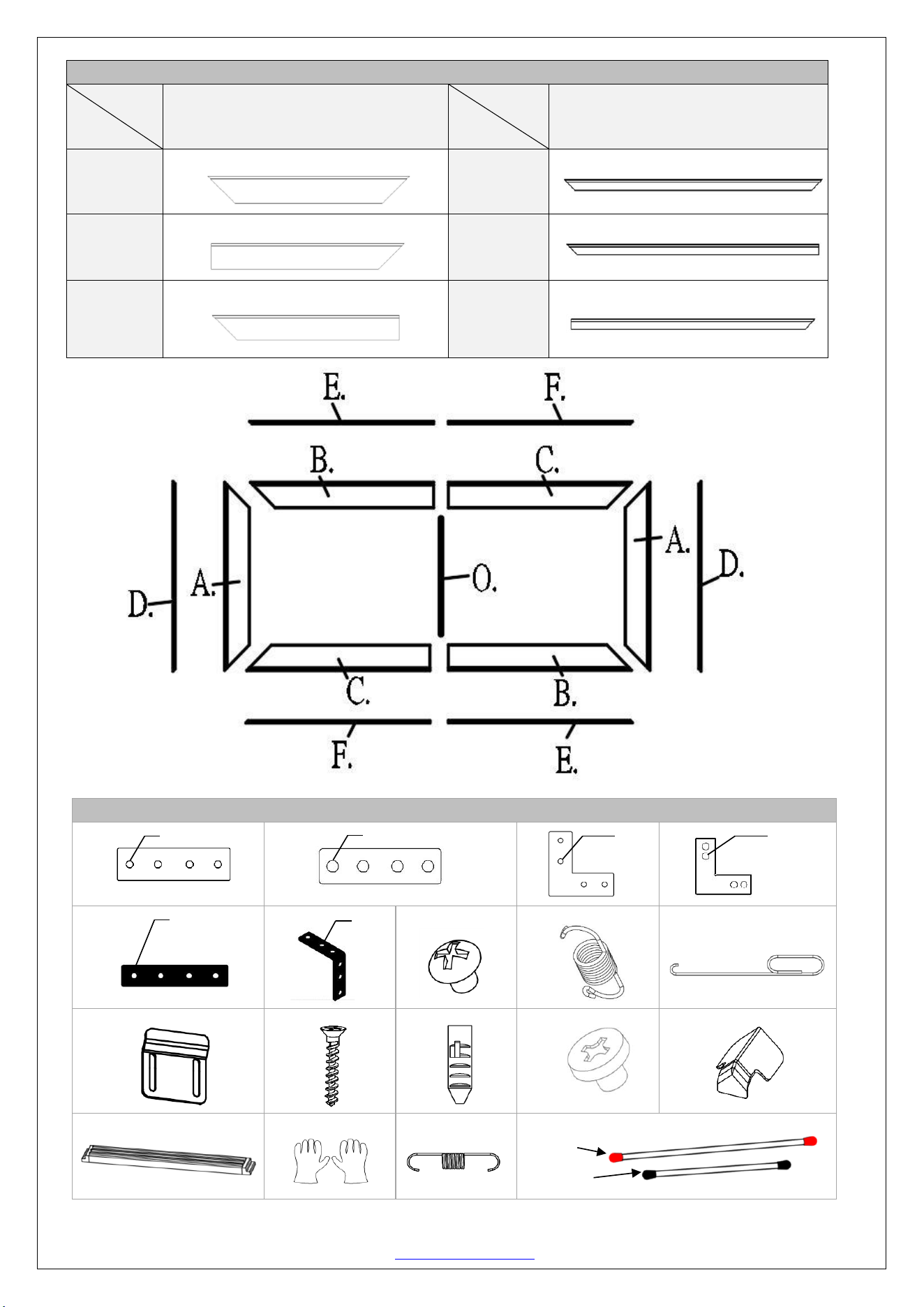
1. Frame and Edge Trim Parts List
Qty
item
2 pcs
Main Frame Parts
Qty
item
2 pcs
Edge Trim Parts
Part A.
vertical frame
Part D.
Part B.
½ horizontal frame
Part E.
Part C.
½ horizontal frame
Part F.
2. Hardware Parts List
a. M4*4
b. D5*4
c. M4*4
d. D5*4
e. M4*4
f. M4*4
g.
h.
i.
j.
k.
l.
m.
n.
o.
p.
q.
r.
Red
Black
JA01042023 www.akiascreens.com U-00198 3
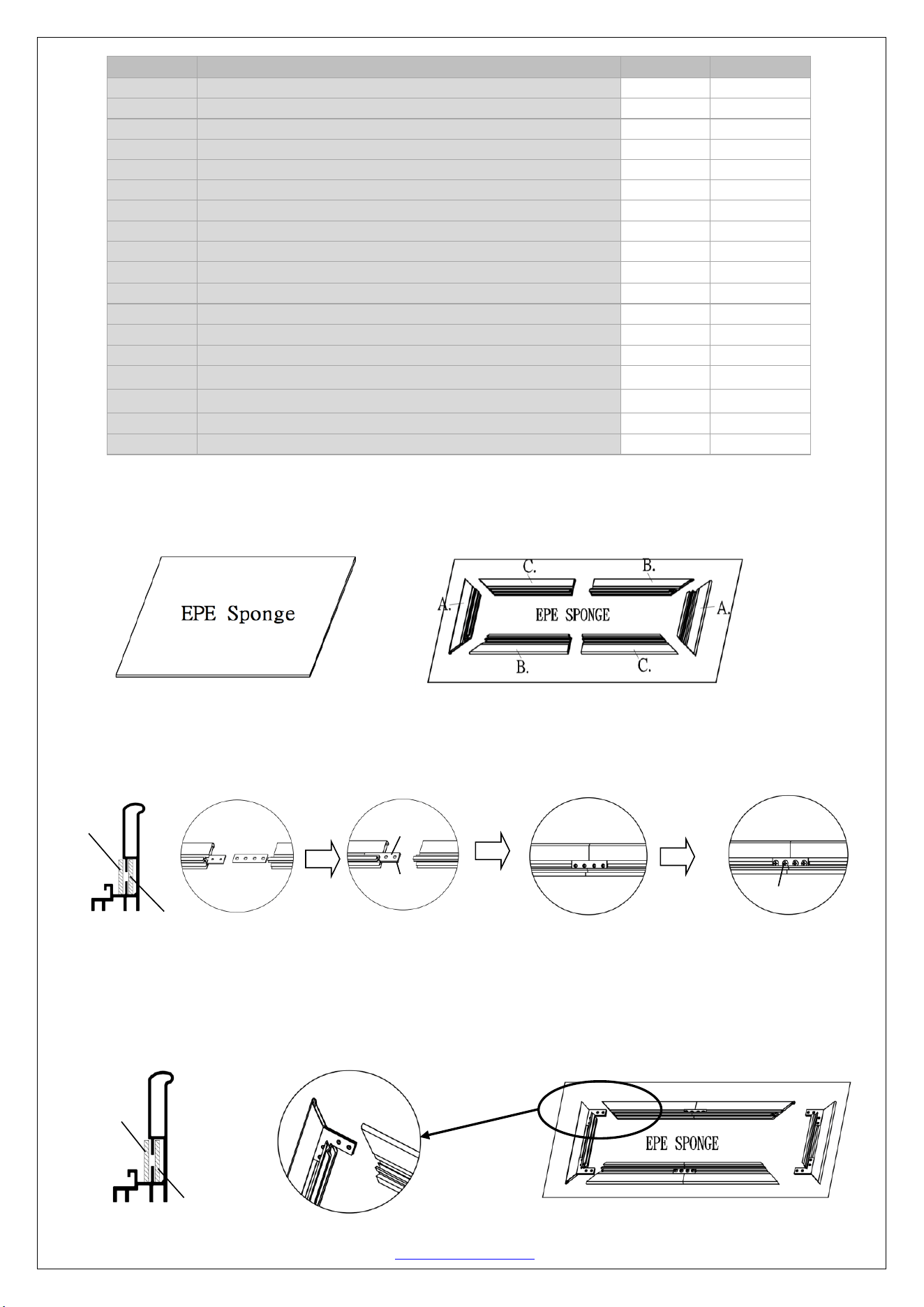
Frame Assembly
Step 1: Place the included soft padded EPE sponge sheet on a clean area where the screen will be assembled.
Step 2: Position the pieces of the frame on the EPE sponge in the arrangement shown below
Step 3: Insert center joint (a/b) connectors into one-half of the horizontal frame (B/C) and secure with the M4x7
screws (M) as shown in the illustration below.
Tip: The center joint (b) with the larger diameter holes should be on top.
Step 4: Connect the elbow joints (c/d) to the top and bottom sections of the vertical frame. Once inserted, connect
the vertical sections to the horizontal frame sections. Make sure all holes are in alignment and the frame pieces are
flush (no gaps). They should form perfect right angles.
Tip: The elbow joint (d) with the larger diameter holes should be on top.
Item
Parts List
103''
123''
a.
Center Joints- M4 (bottom position)
2
2
b.
Center Joints-D5 (top position)
2
2
c.
Elbow Joints M4 (bottom position)
4
4
d.
Elbow Joints D5 (top position)
4
4
e.
Side cover Center Joints- M4
2
2
f.
Side cover Elbow Joints M4
4
4
g.
M4x7 Screws
24
24
h.
Spring
58
68
i.
Spring Hook
2
2
j.
wall brackets
4
4
k.
Φ5x50 Wall Screws
8
8
l.
Hollow Wall anchors
8
8
m.
M4x4 Screws
24
24
n.
Angle cover
4
4
o.
Center Support Bar
1
1
p.
White gloves
2
2
q.
Spring
4
4
r.
Φ3 mm Long Iron (sides) rod / Short rod (top/bottom)
2/4
2/4
c.
d.
b.(top)
a.(down)
a.
b.
g.
…
JA01042023 www.akiascreens.com U-00198 4
c
c
c
c
c
c
c
c
c
c
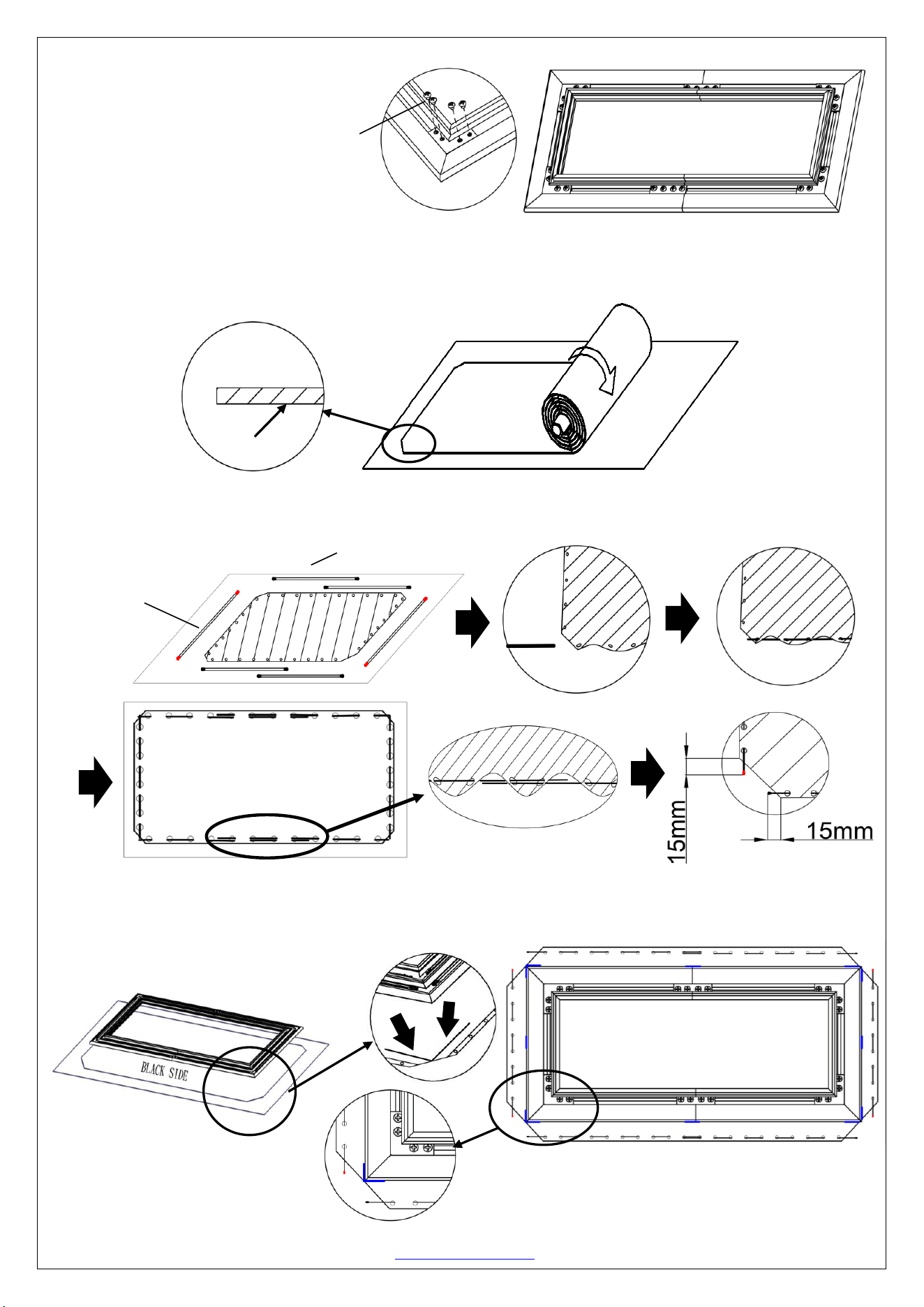
Step 5: Secure the elbow joints by
fastening them with M4x7 screws (g), 4 at
each corner.
Screen Material
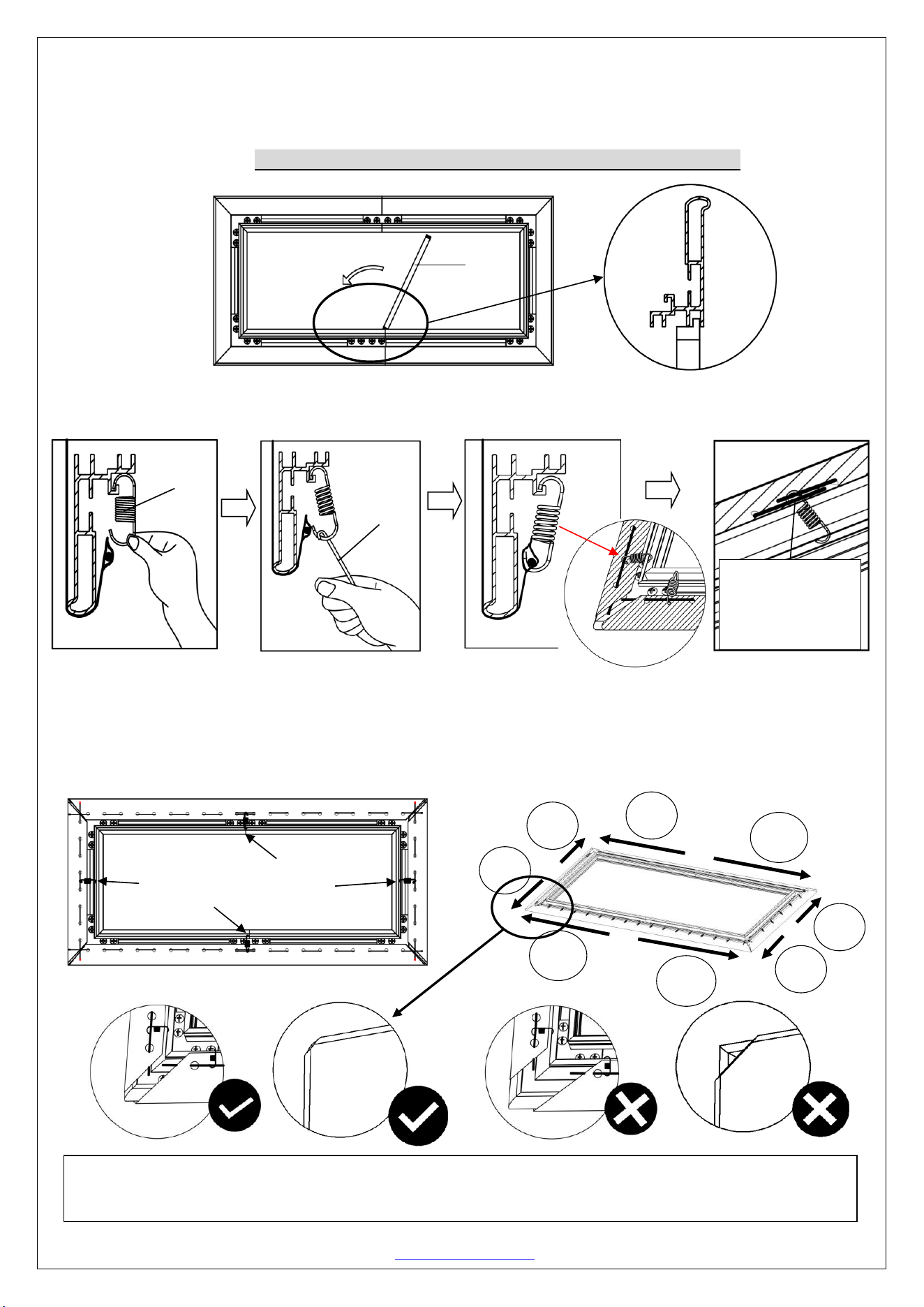
Step 6: Put on the white gloves (p) and carefully unroll the screen material on a clean surface from the roller to the
other side as shown below. The back side of the screen material should be placed upwards.
Step 7: Insert the rods (r) through the holes according to their corresponding lengths on each edge of the screen
material as shown below. The short rods (top/bottom) will overlap to secure a firm grasp in the middle areas.
Step 8: Carefully and gently place the assembled frame on top of the screen material in the marked areas as shown
below. Make sure to not allow the angle edge of the frame to come in direct contact with the screen material to avoid
puncturing it.
2. Hardware Parts List
a.
b.
c.
d.
e.
f.
g.
h.
i
j.
k.
l.
m.
Back side
Front
Back Side
Back Side
c
r. (Red tips)
c
Back Side
r. (Black tips)
Back
Side
Back
Side
c
c
c
c
c
c
c
c
c
c
*Make sure the frame corners are positioned in the
marked areas of the material.
g.
JA01042023 www.akiascreens.com U-00198 5
Center Support Bar
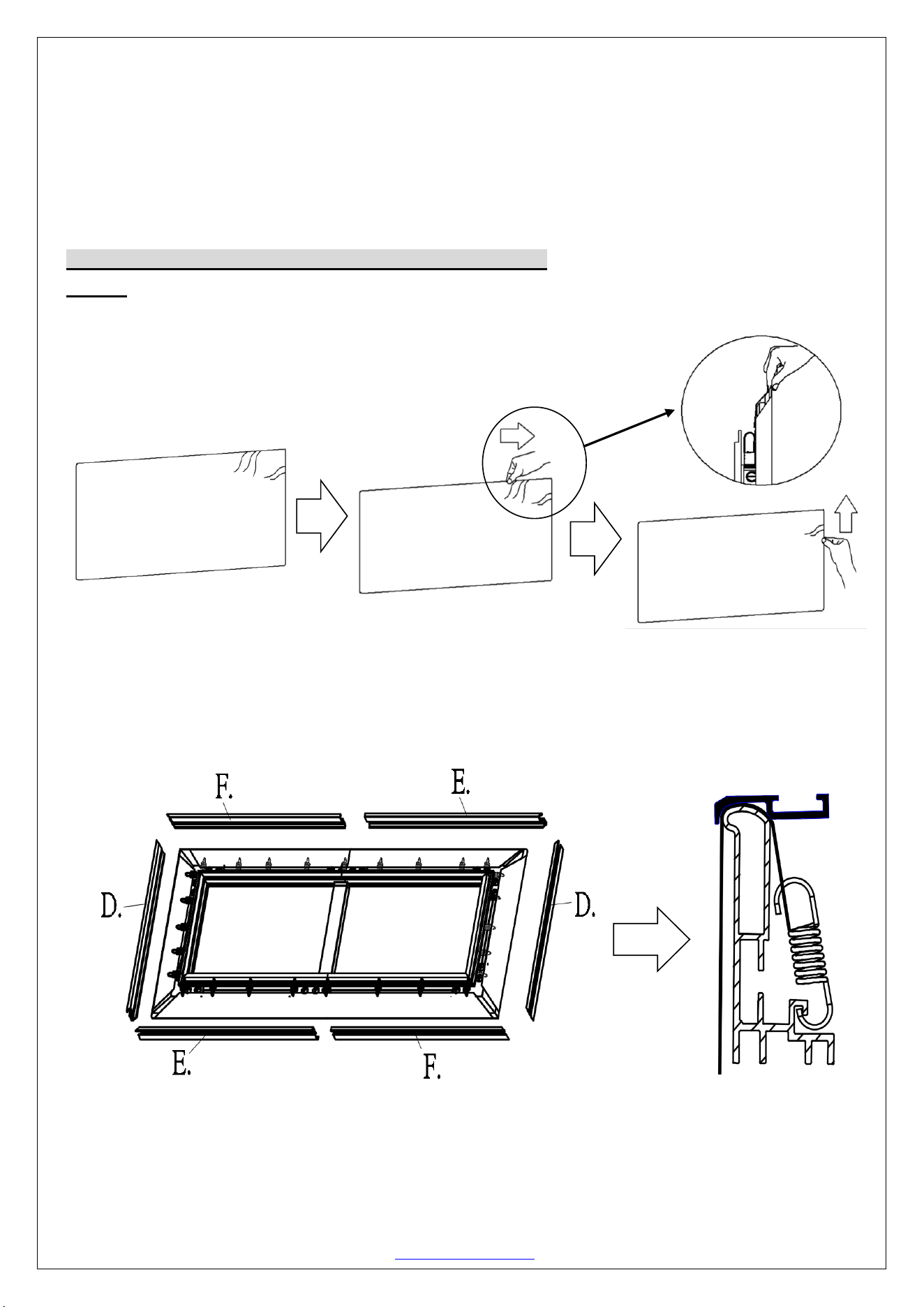
Step9: Insert the Center Support Bar (o) into the upper top groove on the back of the frame with the bottom end
near the approximate center point of the frame and rotate it in at an angle so that both ends of the bar are in alignment
with the groove.
Step 10: Hook one end of the spring and secure inside the groove of the frame, use the spring hook (h) to attach
the spring to the exposed part of the rod (r) in the following order.
Begin by first attaching the center points on both vertical (left/right) sides, steps 1-2. Then the center points on
both horizontal (top/bottom) sides, steps 3-4. Once all center points have been secured, make sure the screen
material is still within the marked areas before proceeding to attach the next springs.
Continue attaching the rest of the springs to the material in the following order in steps 5-12.
5
6
7
8
9
11
10
12
To avoid ripples forming in the material it is imperative that all of the corners are properly wrapped around the
edges as illustrated in the check mark diagrams.
3
h.
Spring must hook
both overlapping
short rods.
i.
4
1
2
o.
Diagonal Sizes of 150” and below use 1 x Center Support Bar
JA01042023 www.akiascreens.com U-00198 6
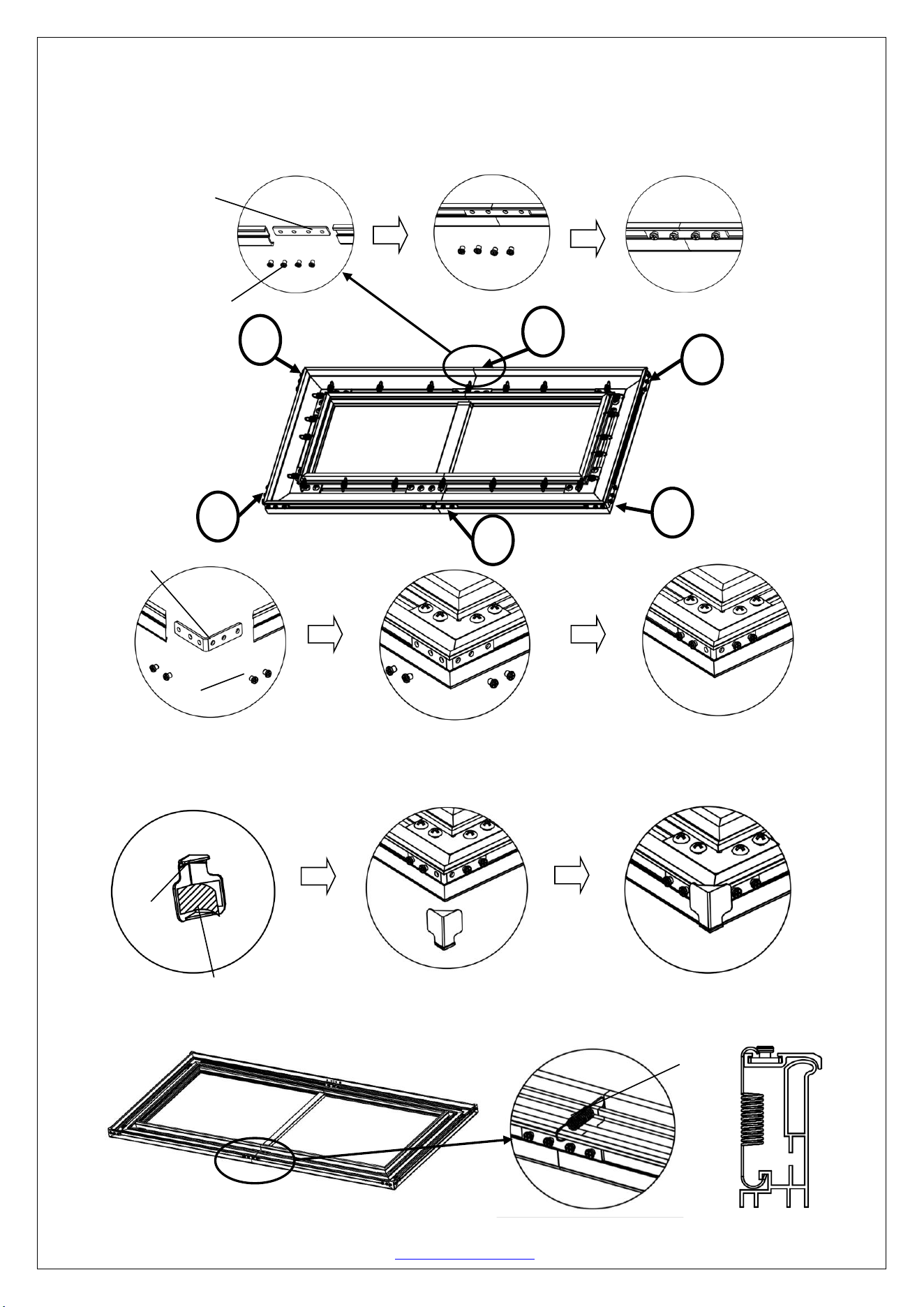
Note (after all springs have been attached):
Correct material installation –Corners of the screen material are properly wrapped around the corner edges of the
frame and material is evenly tensioned and flat, creating a nicely taut surface.
Incorrect material installation –The corners of the screen material are not properly wrapped along the edge of the
frame leaving the material with unbalanced tension and an uneven finish. To correct, detach springs from material
at the corner(s) where material does not lie flat along the edge of the frame, reposition the material so that it lies flat
and wraps along the edge of the frame, and reattach springs to the material.
How to avoid getting ripples on the screen’s material surface
Solution: Pull and smooth out the material using your hand from the center to the corners, creating a nicely taut
surface as shown below.
Edge Trim Installation
ATTENTION: THE TOP EDGE TRIM PIECE WITH THE LOGO SHOULD BE INSTALLED ON THE
TOP.
Step 11: Place the edge trim frame pieces over each end of the frame.
JA01042023 www.akiascreens.com U-00198 7
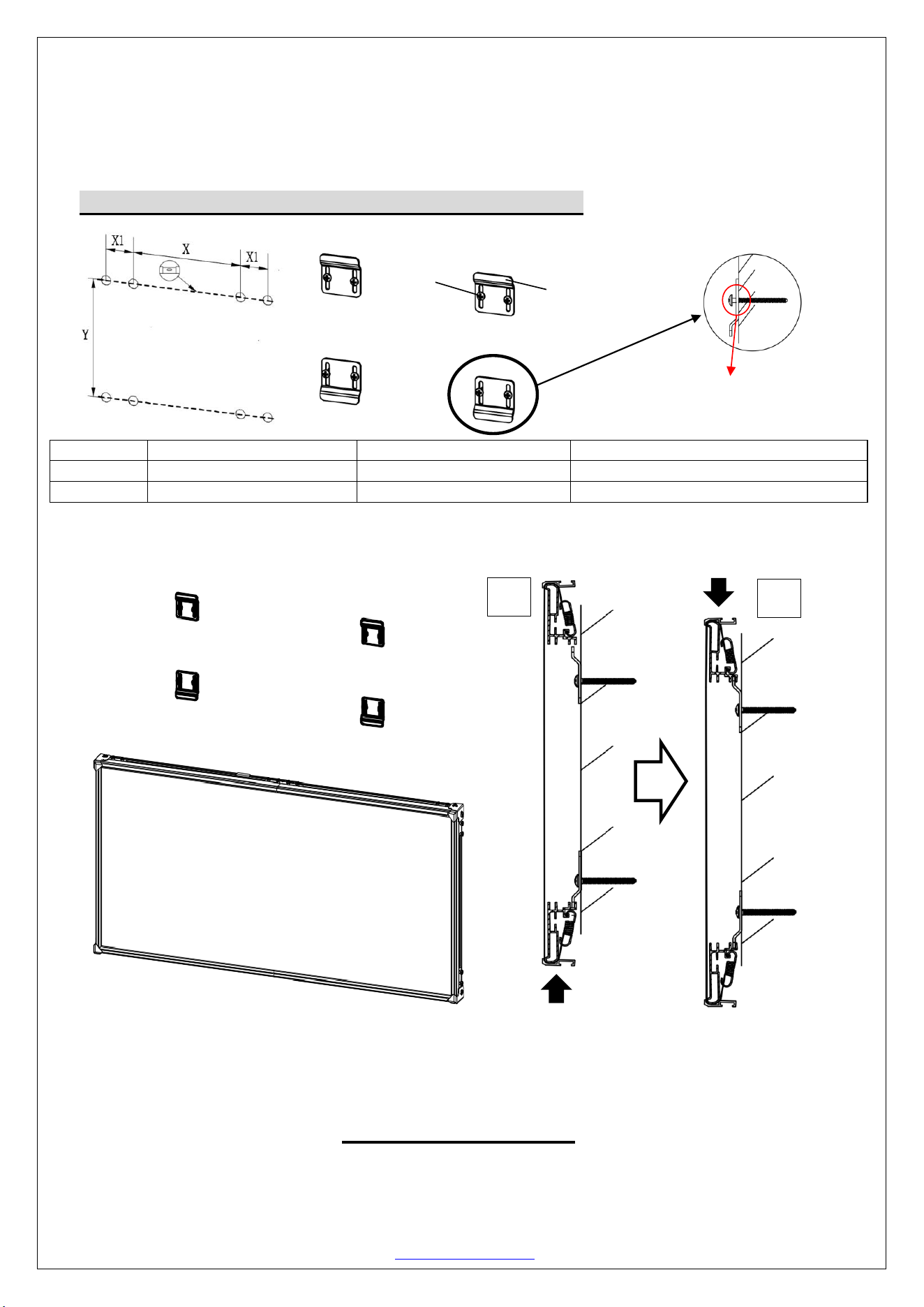
Connect edge trim frames (e/f) together using the M4 center joint (e) and secure with four of the M4x4 screws (m)
as show in Step 1. Repeat for other side.
Once both top and bottom edge trim frames have been connected, attach the vertical (left/right) sides edge trim
frames (d) using the elbow joints (f) and secure with four M4x4 screws (m) on all corners, Step 2.
Step 12: Install the angle cover (n) on each corner of the frame using the M4x4 screws (m).
Note: The angle cover screws holes align with the screw holes on the elbow joint.
Step 13: Install the springs (q) in each middle area to further support the bezel trim edge frame.
n.
Peel off the double-sided tape.
q.
e.
m
.
f.
m
1
1
2
2
2
2
JA01042023 www.akiascreens.com U-00198 8
Wall Installation
Step 14: Measure the overall length and height of the frame and drill holes for the top brackets. Line up the wall
brackets with the drilled holes on the installation location and screw them in using a Phillips screwdriver. If not
installing into a structural wood stud, use a hollow wall anchor then screw in the M5x50 wood screws with a
screwdriver. Make sure the brackets are leveled.
Step 15: Position the fixed frame screen onto the bottom wall brackets (fig. 1), lift and secure on the top
wall bracket and push down at the center of the top of the (fig. 2) frame to secure.
For Technical Support or an Akia Screens contact in your area, visit
www.akiascreens.com
Model/Size
X = Wall bracket distance
X1 = Bracket hole distance
Y = Top/Bottom Wall Bracket Height
103''
1200mm (47.24”)
30mm (1.18”)
1110mm (43.7”)
123''
1400mm (55.12”)
30mm (1.18”)
1360mm (53.54”)
Don’t tighten the screw to allow
the screen to move up and down.
j.
k.
Diagonal Sizes of 150” and below use 4 x wall brackets
1.
2.