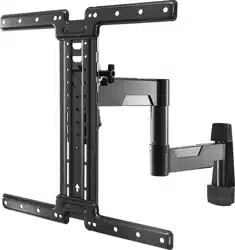
42” to 90”
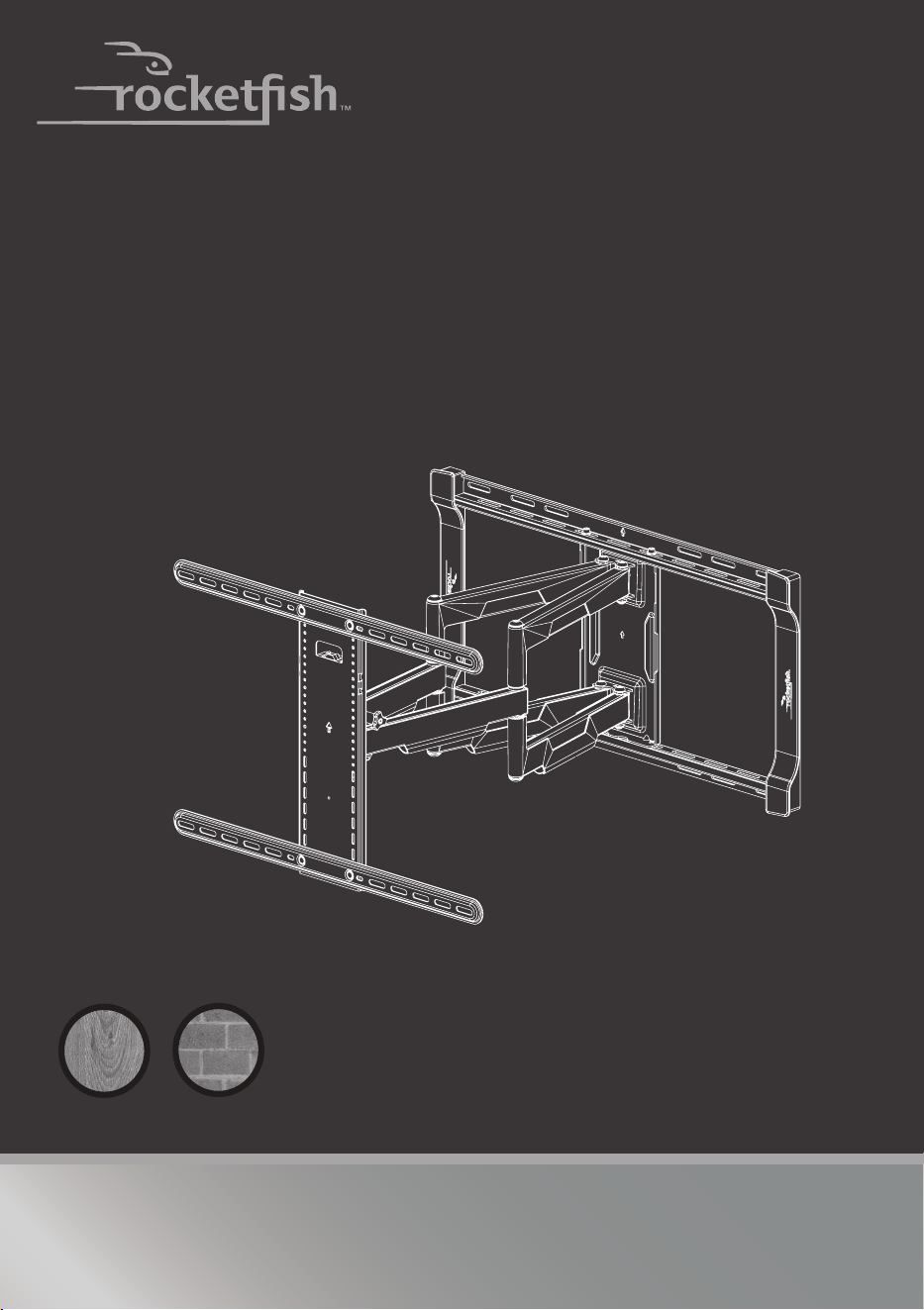
TV WALL MOUNT
RF-TVLFMA
INSTALLATION GUIDE
Safety information and specifications......................2
Tools needed......................................................................2
Package contents.............................................................3
Installation instructions .................................................5
For wood-stud and concrete
wall installations
Before using your new product, please read these instructions to prevent any damage.
2
Need help? Call 1-800-620-2790 (U.S. and Canada)
Safety information and specifications
IMPORTANT
SAFETY
INSTRUCTIONS
- SAVE THESE
INSTRUCTIONS
CAUTION: Do not use this
product for any purpose not
explicitly specified by
Rocketfish.
Improper installation may
cause property damage or
personal injury. If you do
not understand these
directions, or have doubts
about the safety of the
installation, contact Customer Service or call a qualified contractor. Rocketfish is not
responsible for damage or injury caused by incorrect installation or use.
The weight of your TV must not exceed 125 lbs. (56.6 kg). The wall must be
capable of supporting five times the weight of your TV and wall mount
combined.
This product contains small items that could be a choking hazard if
swallowed. Keep these items away from young children!
Tools needed
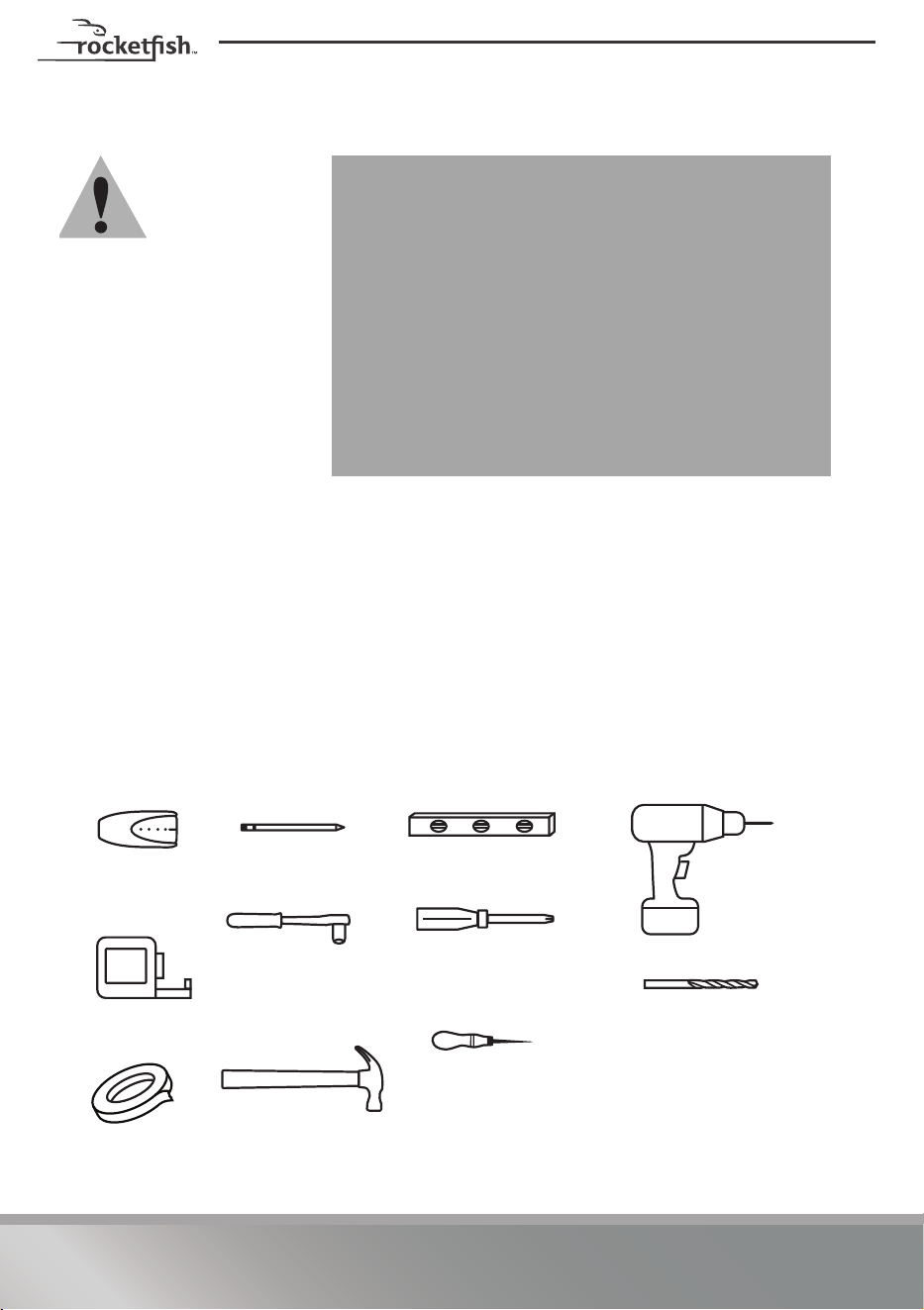
You will need the following tools to assemble your new TV wall mount:
Maximum TV weight: 125 lbs. (56.6 kg)
Screen size: 42" to 90" diagonal
Overall dimensions (H × W × D):
17.7 x 29.3 x 2.7 in. (450 x 743.8 x 69 mm)
Wall mount weight: 28 lbs. (12.7 kg)
We’re here for you
www.rocketfishproducts.com
For customer service, call:
1-800-620-2790 (U.S. and Canada)
Edge-to-edge
stud finder
Pencil
Level
Phillips screwdriver
Socket wrench with
1/2 in. (13 mm) socket
or adjustable wrench
Measuring tape
Drill
Tape
Hammer
7/32 in. (5.5 mm) wood drill
bit for wood stud wall
OR
3/8 in. (10 mm) masonry drill
bit (concrete only)
Awl
3
Need help? Call 1-800-620-2790 (U.S. and Canada)
RF-TVLFMA
Package contents
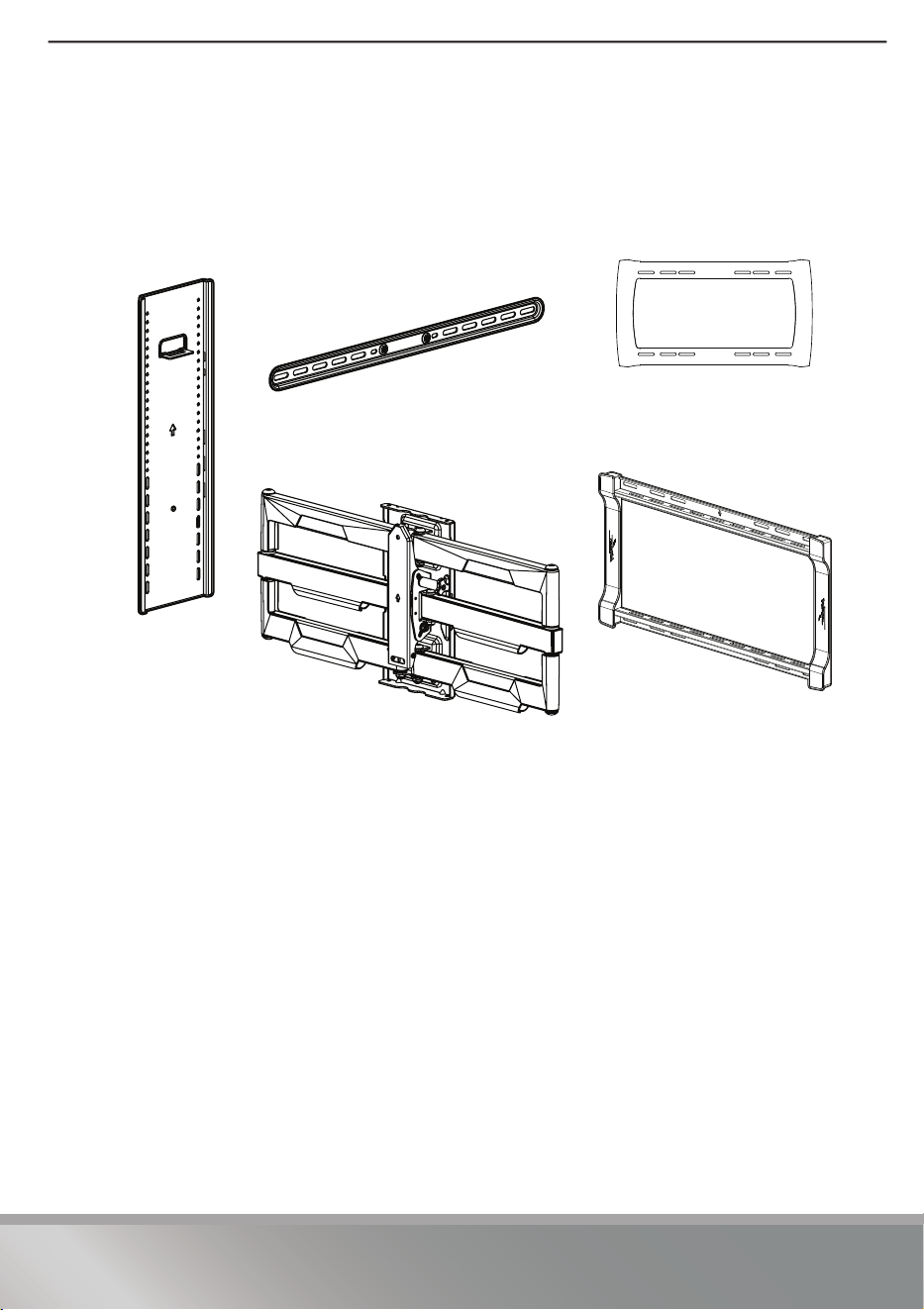
Make sure that you have all the hardware necessary to assemble your new TV wall
mount:
2 Horizontal TV
brackets (Qty. 2)
5 Wall plate (Qty. 1)
3 Template (Qty. 1)
1 Vertical TV
bracket (Qty. 1)
4 Arm assembly (Qty. 1)
4
Need help? Call 1-800-620-2790 (U.S. and Canada)
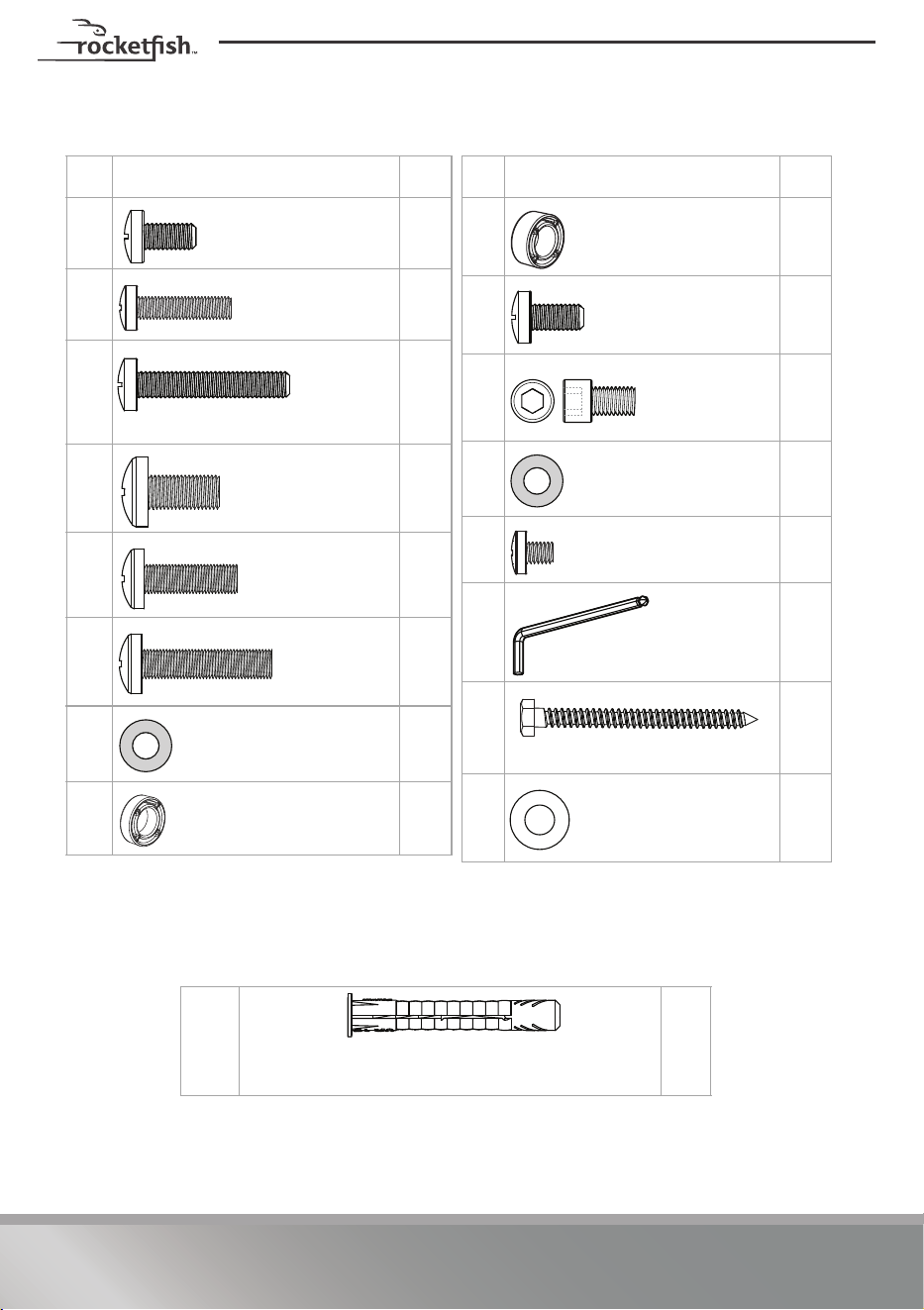
TV Hardware
# Hardware Qty.
64
74
84
94
10 4
11 4
12 4
13 4
M6 × 12 mm screw
M6 × 25 mm
screw
M6 × 35 mm screw
M8 × 16 mm
screw
M8 × 25 mm
screw
M8 × 35 mm
screw
M6/M8 washers
2.5 mm spacers
Concrete Installation Kit CMK1 (not included)
Contact customer service at 1-800-620-2790 to have these additional parts shipped directly to you.
22 4
Fischer UX10 x 60R
Concrete installation kit CMK1 (not included)
# Hardware Qty.
14 4
15 4
16 4
17 4
18 1
19 1
20 4
21 4
5 mm spacers
M5 x 10 mm TV
bracket screw
1/4-20 x 3/8
in. Wall Plate
screw
1/4 in. washer
Locking screw
3/16 in. hex key
5/16” × 3 1/2” lag screw
5/16 in. washer
5
Need help? Call 1-800-620-2790 (U.S. and Canada)
RF-TVLFMA
Installation instructions
Step 1 - Determine whether your TV has a flat back,
irregular back, or obstructed back
1 Carefully place your TV screen face-down on a cushioned, clean surface to
protect the screen from damages and scratches.
2 If your TV has a table-top stand attached, remove the stand. See the
documentation that came with your TV for instructions.
3 Temporarily lay the horizontal TV brackets (2) on the back of your TV.
4 Align the screw holes in the horizontal brackets with the mounting screw holes
on your TV.
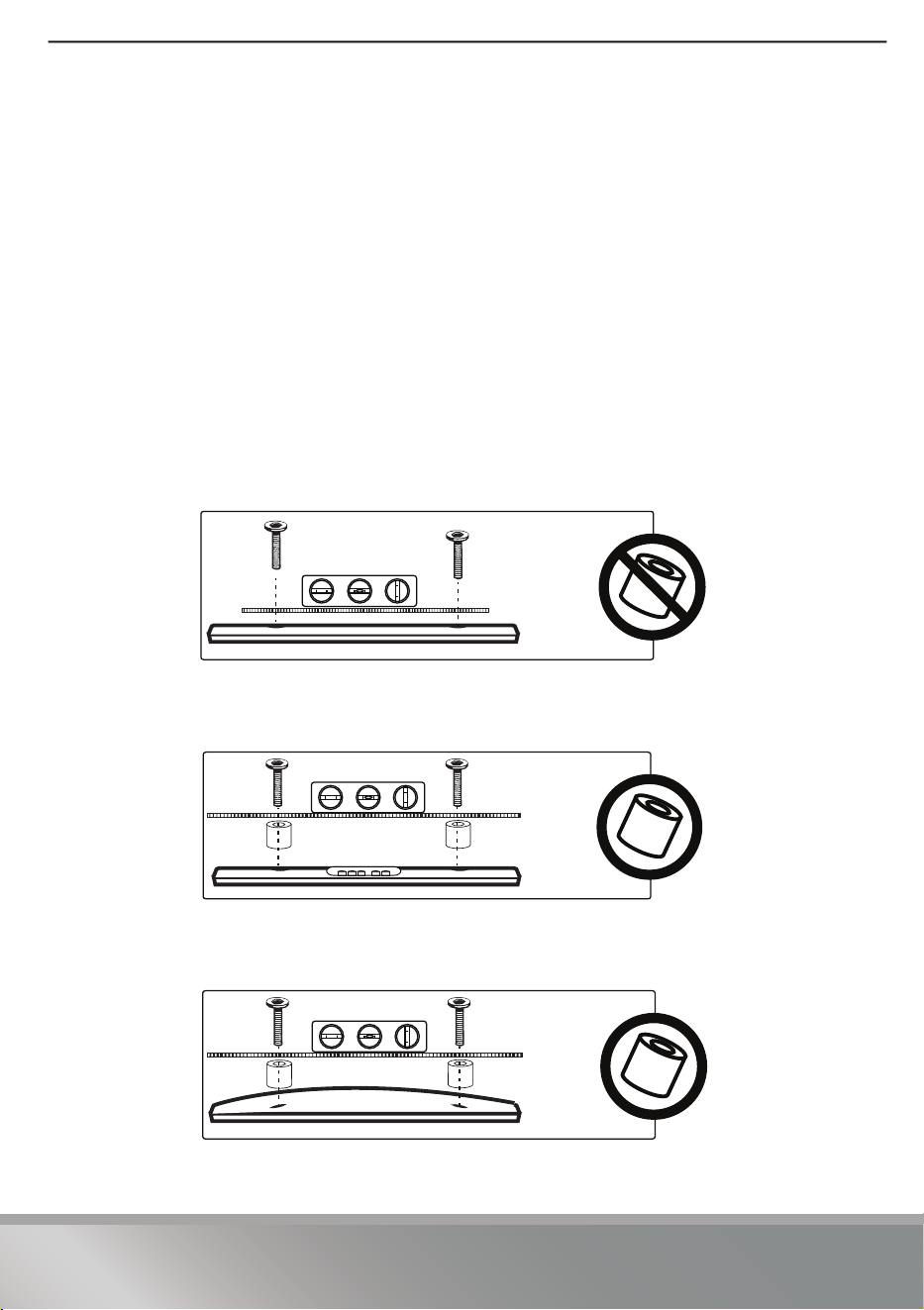
5 Identify which type of back your TV may have:
• Flat back: The brackets lay flush against the back of your TV and do not
block any jacks. You do not need spacers when assembling the wall
mount.
• Obstructed back: The brackets block any of the jacks on the back of
your TV. You will need spacers (13 or 14) when assembling the wall
mount.
• Irregularly-shaped back: There is a gap between the brackets and
some part of the back of your TV. You will need spacers (13 or 14) when
assembling the wall mount.
6 Remove the horizontal brackets.
6
Need help? Call 1-800-620-2790 (U.S. and Canada)
STEP 2 - Select screws, washers, and spacers
1 Select the hardware for your TV (screws, washers, and spacers). A limited number of
TVs come with mounting hardware included. (If there are screws that came with the
TV, they are almost always in the holes on the back of the TV.) If you don't know the
correct length of the mounting screws your TV requires, test various sizes by hand
threading the screws.
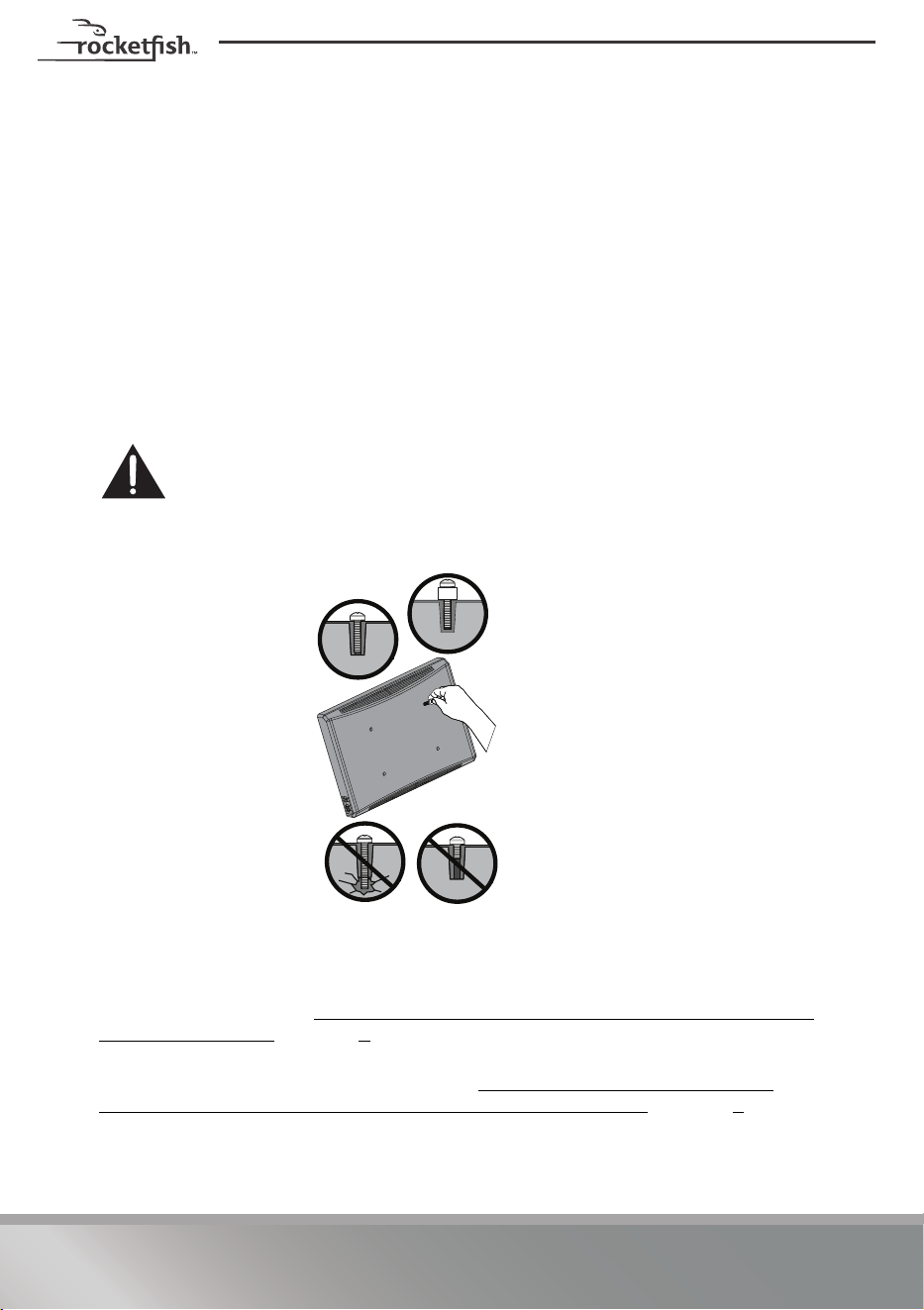
Select one of the following types of screws:
Use M6/M8 washers (12)for all screws.
For an irregular or obstructed TV back, also use the 2.5 mm (13) or 5 mm (14) spacers.
CAUTION: To avoid potential personal injuries and property damage, make sure
that there are adequate threads to secure the brackets to your TV. If you encounter
resistance, stop immediately and contact customer service. Use the shortest screw
and spacer combination to accommodate your TV. Using hardware that is too long
may damage your TV. However, using a screw that is too short may cause your TV to fall from
the mount.
2 Remove the screws.
3 For a flat back TV, go to STEP 3 -
Option 1: Attaching the horizontal brackets to
TVs with a flat back on page 7.
-OR-
For an irregular or obstructed back, go to STEP 3 - Option 2: Attaching the
horizontal brackets to TVs with irregular or obstructed backs on page 8.
M6 × 12 mm screws (6) M8 × 16 mm screws (9)
M6 × 25 mm screws (7) M8 × 25 mm screws (10)
M6 × 35 mm screws (8) M8 × 35 mm screws (11)
Screw is
too long
Screw fits
correctly
Screw is
too short
7
Need help? Call 1-800-620-2790 (U.S. and Canada)
RF-TVLFMA
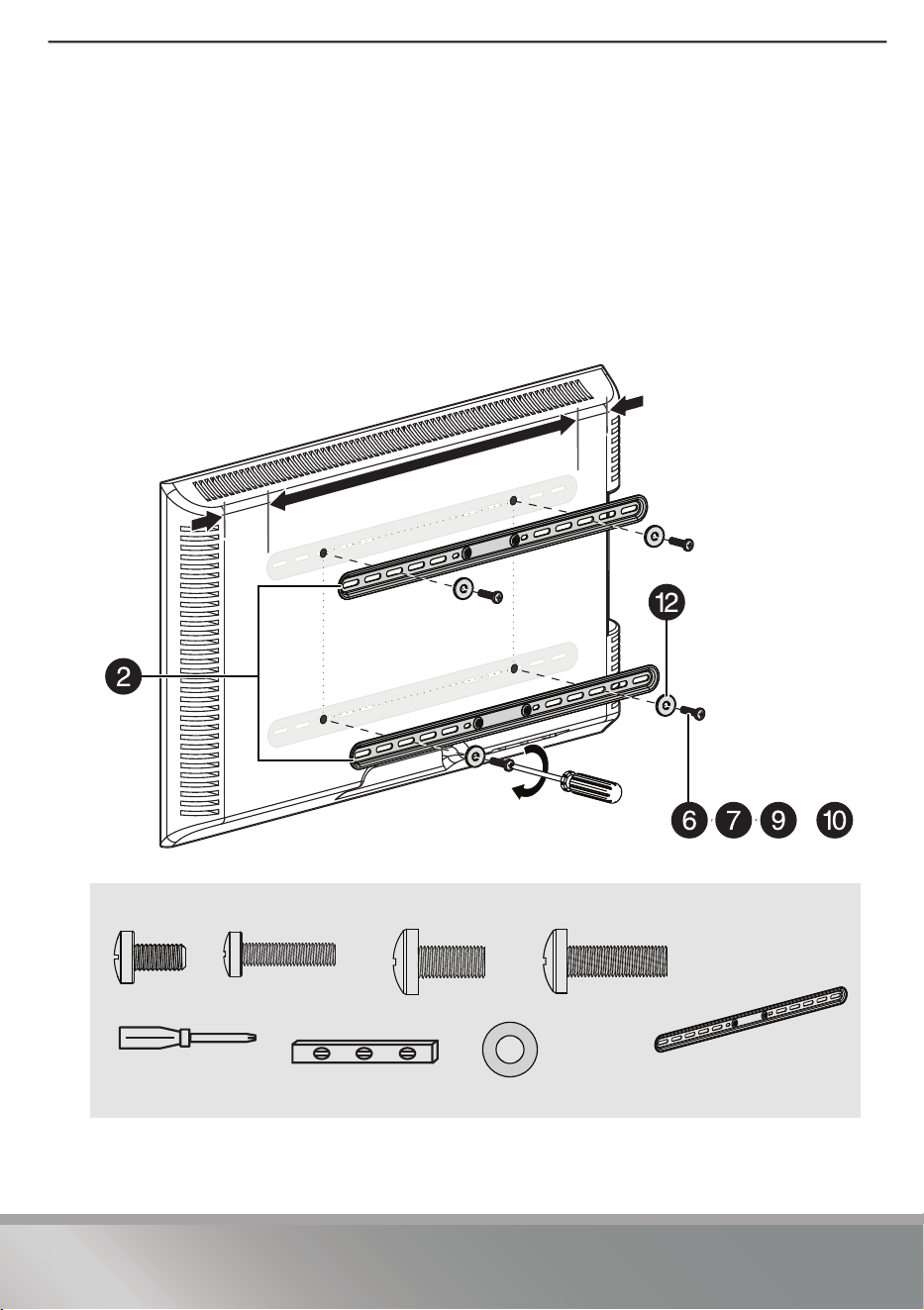
STEP 3 - Option 1: Attaching the horizontal brackets to TVs
with a flat back
1 Align the holes you noted on the horizontal brackets (2) with the screw holes on
the back of your TV. Make sure that the brackets are level.
2 Place the washers (12) over the holes in the horizontal brackets that align with
the screw holes on the back of your TV, then insert the screws (6, 7, 9, or 10)
through the washers.
3 Tighten the screws until they are snug against the horizontal brackets. Do not
over tighten.
You’ll need
OR
12 (Qty. 4)
6 (Qty. 4)
7 (Qty. 4)
Phillips screwdriver
oror
Level
2 Horizontal TV
brackets (Qty. 2)
9 (Qty. 4) 10 (Qty. 4)
or
8
Need help? Call 1-800-620-2790 (U.S. and Canada)
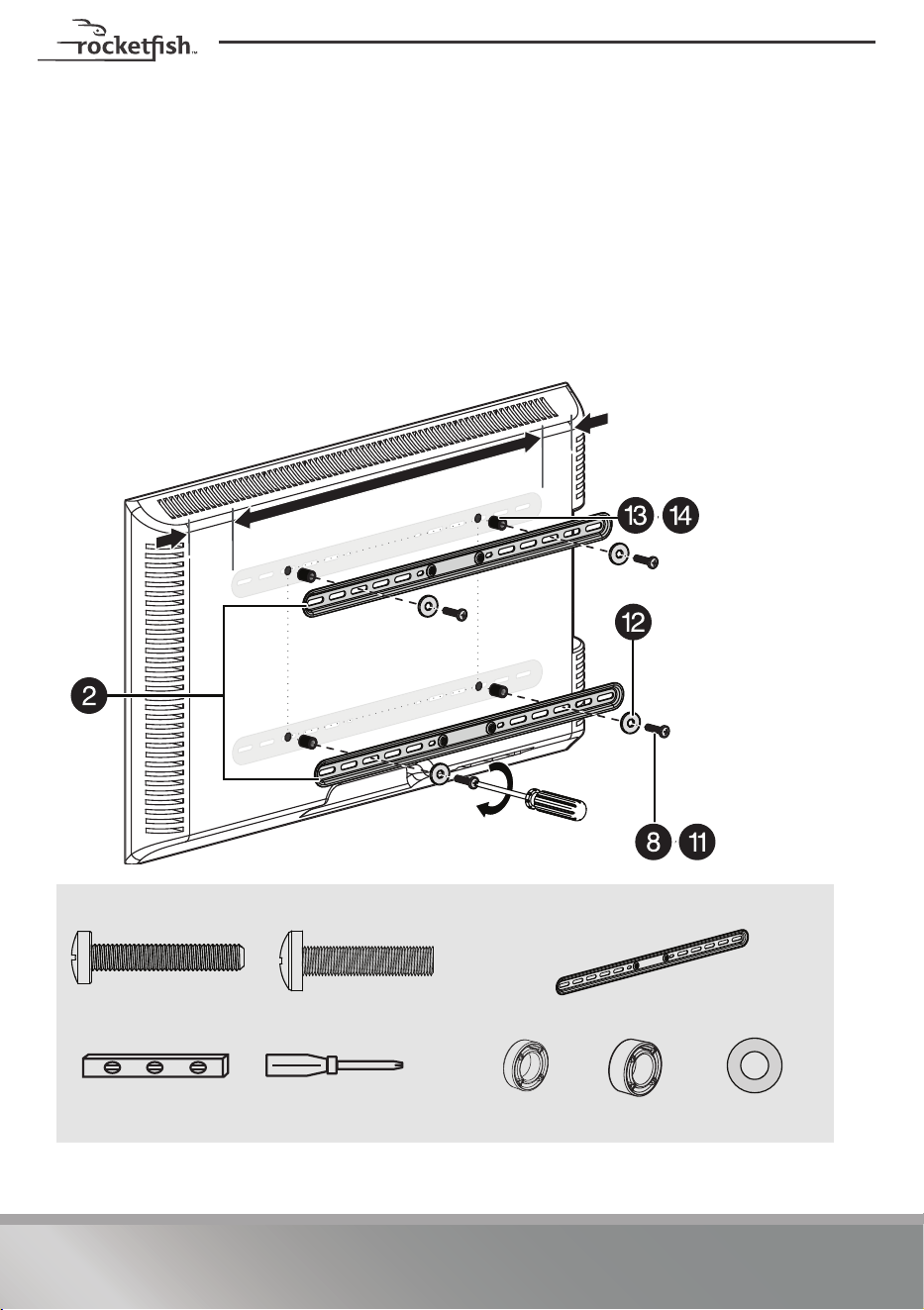
STEP 3 - Option 2: Attaching the horizontal brackets to TVs
with irregular or obstructed backs
1 Place the 2.5 mm (13) or 5 mm (14) spacers over the screw holes on the back of
the TV.
2 Align the horizontal brackets (2) over the spacers (13 or 14), then place the
washers (12) over the holes in the horizontal brackets and insert the screws (8 or
11) through the washers, horizontal brackets, and spacers. Make sure that the
brackets are level.
3 Tighten the screws until they are snug against the horizontal brackets. Do not
over tighten.
You’ll need
12 (Qty. 4)
11 (Qty. 4)
Phillips screwdriver
or
13 (Qty. 4)
Level
2 Horizontal TV brackets (Qty. 2)
8 (Qty. 4)
14 (Qty. 4)
9
Need help? Call 1-800-620-2790 (U.S. and Canada)
RF-TVLFMA
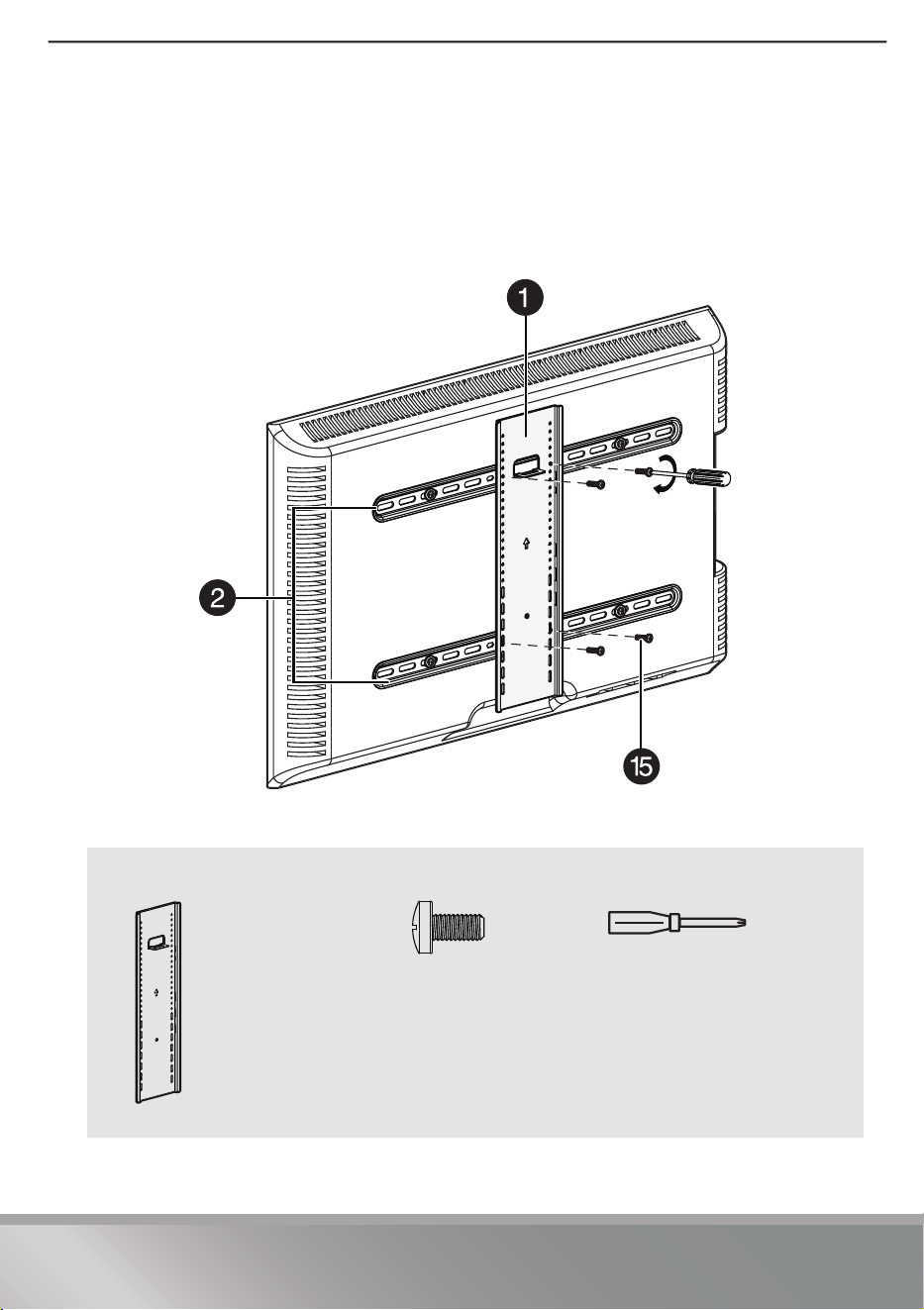
STEP 4 - Attaching the vertical bracket
1 Place the vertical TV bracket (1) on the horizontal TV brackets (2), as shown
below. Make sure that the bracket is centered and that the arrow points up.
2 Secure the vertical bracket (1) to the horizontal brackets (2) with four M5 x
10 mm TV bracket screws (15). Tighten the screws until they are snug against the
horizontal brackets. Do not over tighten.
You’ll need
15 (Qty. 4)
Phillips screwdriver
1 Vertical TV
bracket (Qty. 1)
10
Need help? Call 1-800-620-2790 (U.S. and Canada)
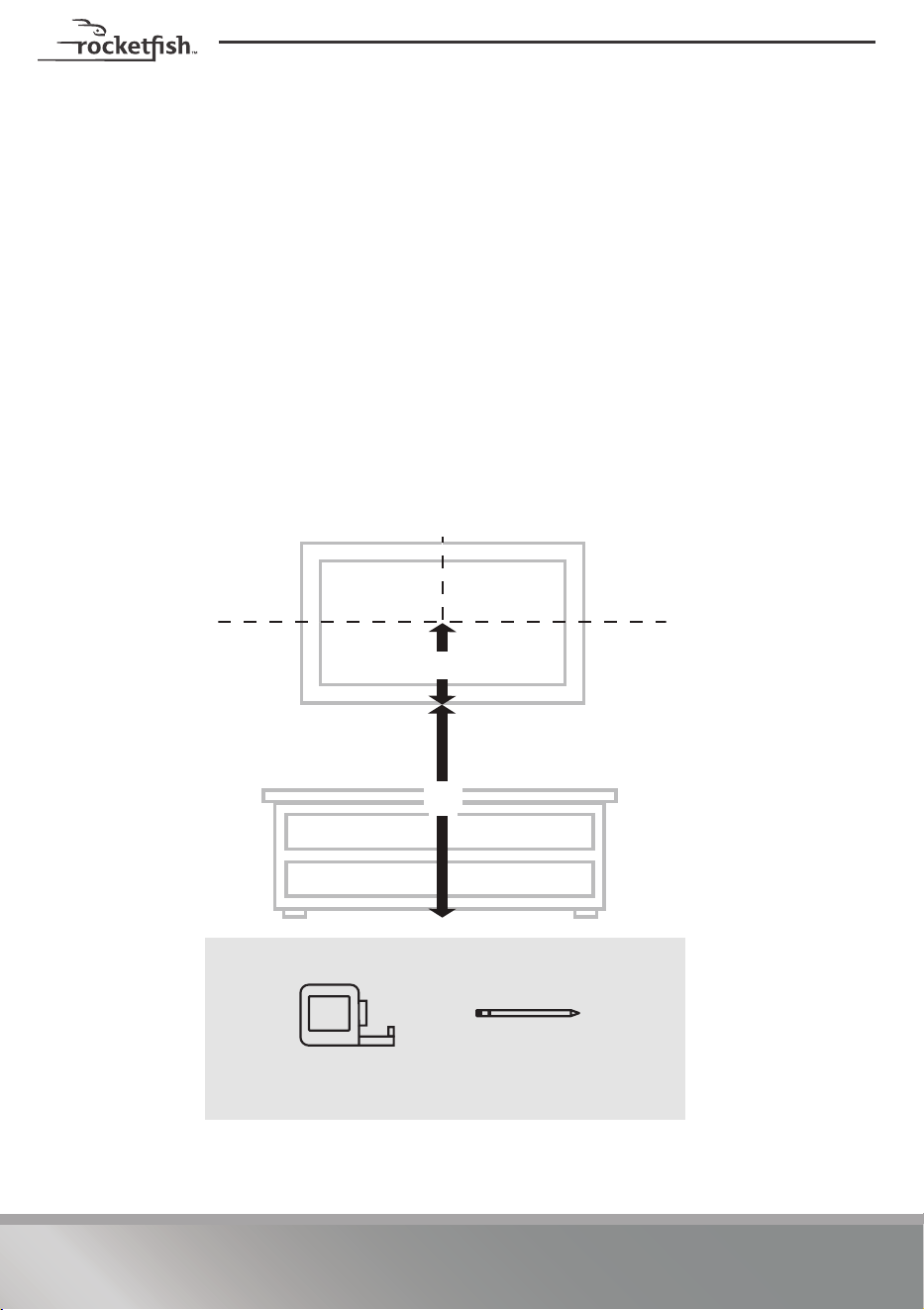
STEP 5 - Determine wall-mount location
NOTE:
• For more detailed information on determining where to drill your holes, visit our online height-finder at:
http://mf1.bestbuy.selectionassistant.com/index.php/heightfinder
• Your TV should be high enough so your eyes are level with the middle of the screen. Normally, 40 to 60
inches from the ground.
The center of your TV will match the center of the wall plate (5). Before you drill holes
in the wall:
1 Measure the distance from the bottom of your TV to the middle of the four
mounting screw holes. This is measurement a.
2 Measure the distance from the floor to where you want the bottom of the TV to
be placed on the wall. Keep in mind that the bottom of the TV should be placed
above any furniture (such as entertainment centers or TV stands). The TV should
also be above items placed on top of the furniture (like a Blu-ray player or cable
box). This is measurement b.
3 Add a + b. The total measurement is the height where you want the center of the
wall plate (5) to be on the wall.
4 Use a pencil to mark this spot on the wall.
You’ll need
A
B
a
b
Measuring tape
Pencil
11
Need help? Call 1-800-620-2790 (U.S. and Canada)
RF-TVLFMA
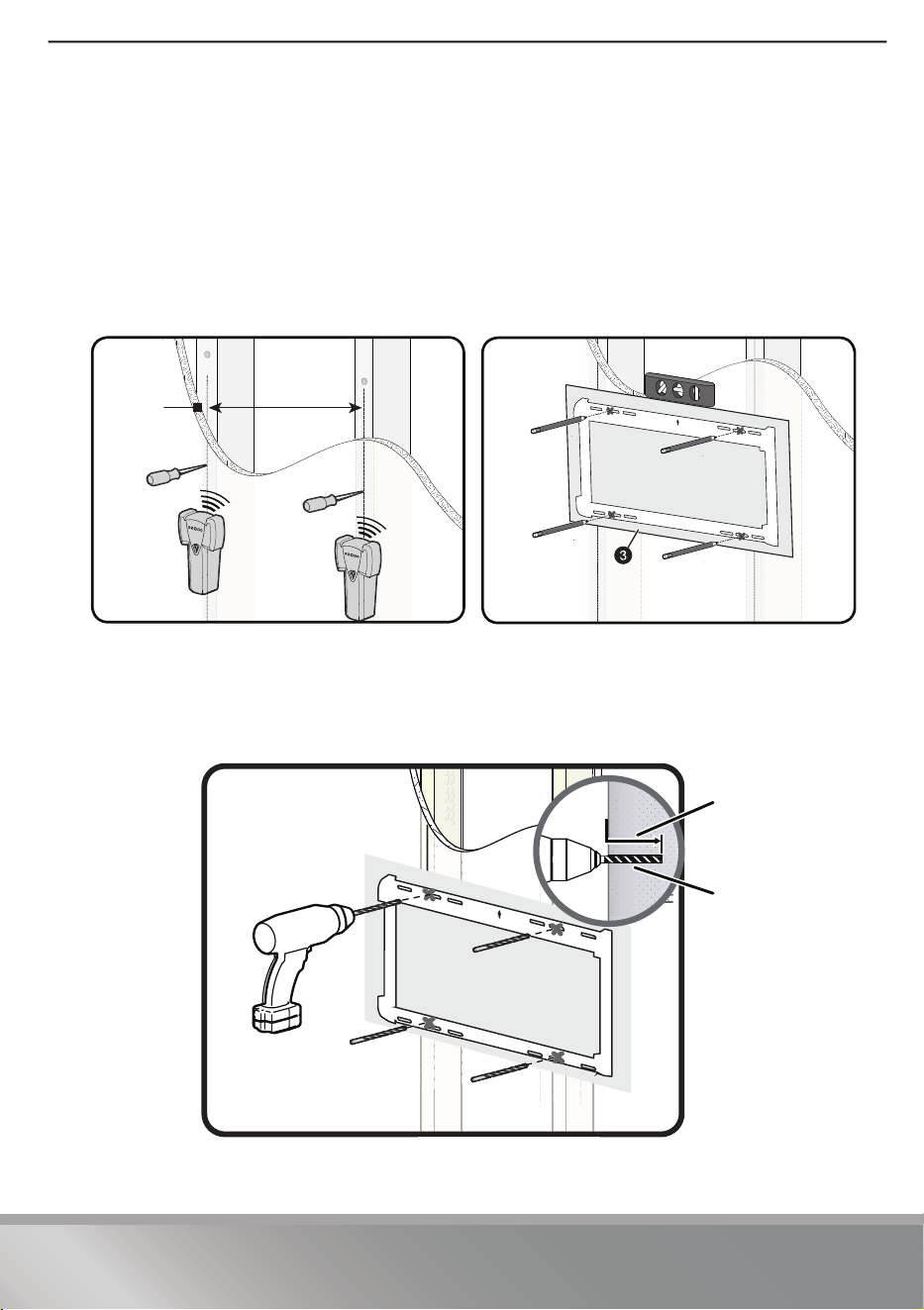
STEP 6 - Option 1: Installing on a wood stud wall
Note: Drywall covering the wall must not exceed 5/8” (16 mm).
1 Locate the stud. Verify the center of the stud with an edge-to-edge stud finder.
2 Make sure that the distance between the studs is 16 to 24 inches (40 to 61 cm).
3 Align the center of the wall plate template (3) at the height you determined in
the previous step and make sure that it is level. Tape the wall plate template to
the wall, then use a pencil to mark the four lag screw hole locations of the stud
centers. Remove the wall plate template.
4 Drill four pilot holes to a depth of 3 1/2 in. (89 mm) using a 7/32 in. (5.5 mm)
diameter drill bit.
Note: Minimum wood stud size: Common 2 x 4 in. (51 x 102 mm). Nominal 1.5 x 3.5 in. (38 x 89 mm)
16~24 in.
(40~61 cm)
3 1/2 in. (89 mm)
7/32 in. (5.5 mm)
12
Need help? Call 1-800-620-2790 (U.S. and Canada)
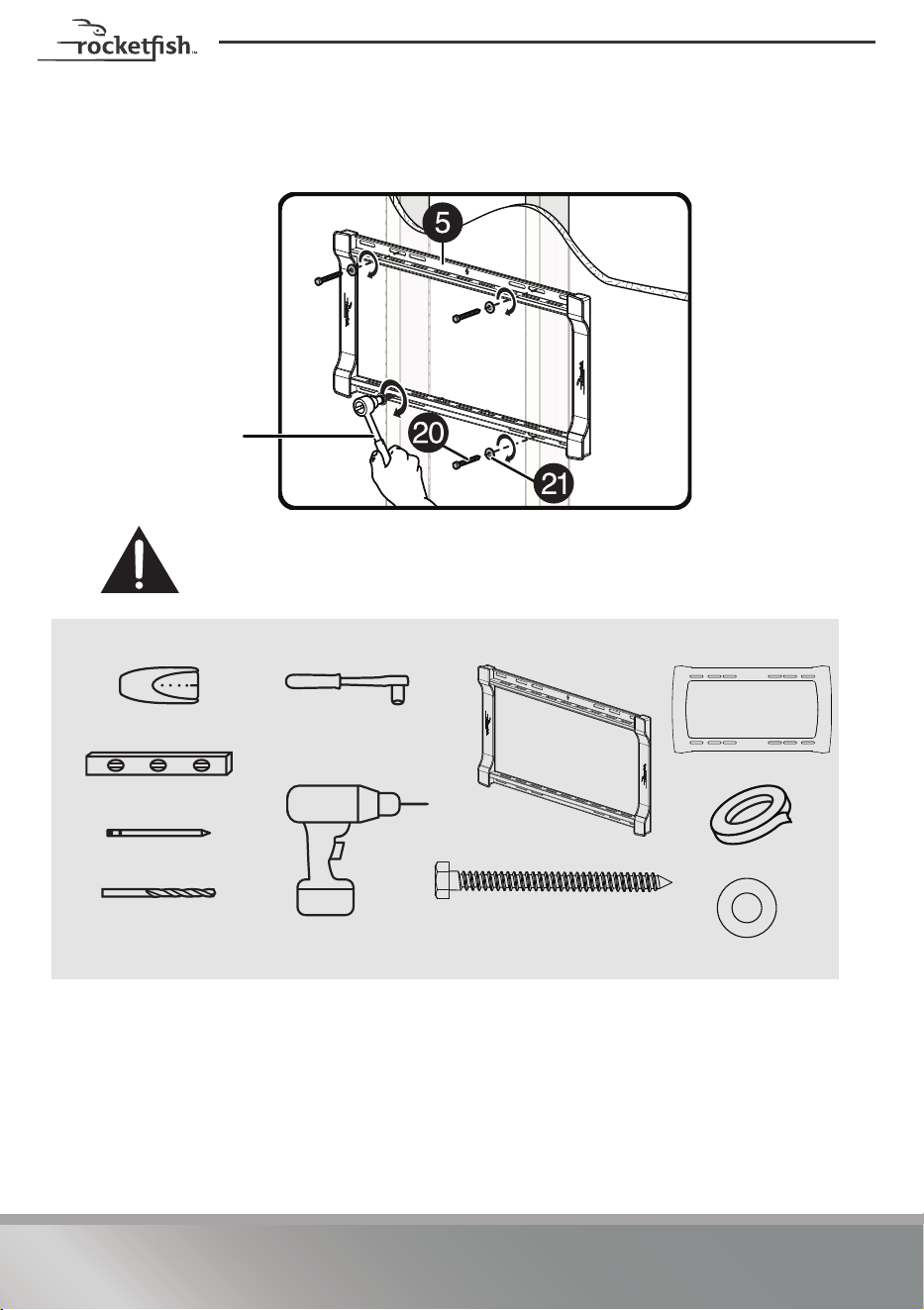
5 Align the wall plate (5) with the pilot holes, insert the lag screws (20) through the
washers (21) and the holes in the wall plate assembly, then tighten the lag
screws only until they are firm against the wall plate assembly.
CAUTION: Avoid potential injuries or property damage!
DO NOT over-tighten the lag screws (20).
You’ll need
1/2” socket wrench
Stud finder
Pencil
Drill
7/32 in. wood drill bit
1/2” socket wrench
Level
3 Template
Tape
5 Wall plate
20 Lag screw (Qty. 4)
21 5/16 in. washer (Qty. 4)
13
Need help? Call 1-800-620-2790 (U.S. and Canada)
RF-TVLFMA
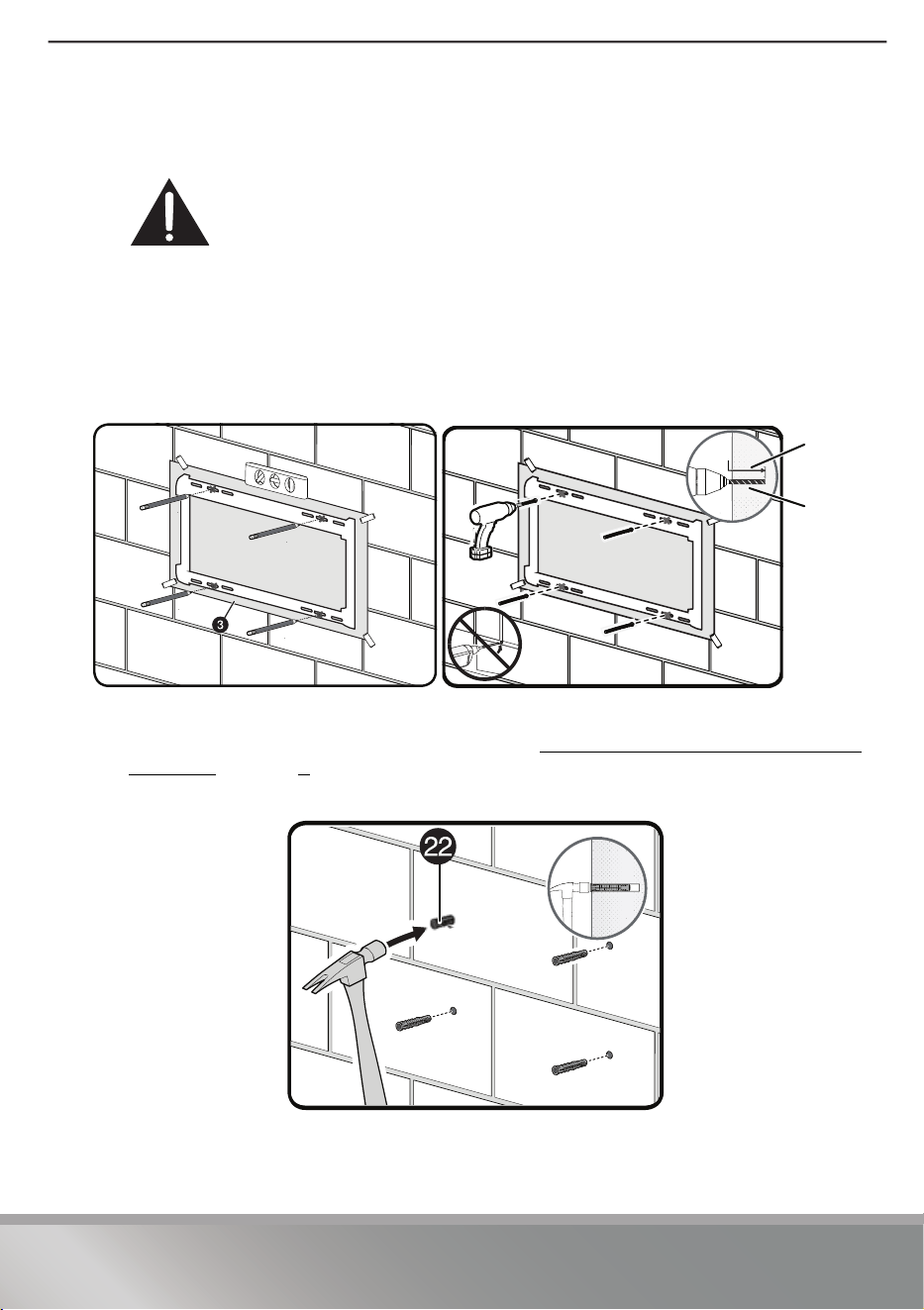
STEP 6 - Option 2: Installing on a solid concrete or concrete
block wall
CAUTION: To prevent property damage or personal injury, never drill into the
mortar between the blocks. Mount wall plate directly onto the concrete surface.
Note: Minimum solid concrete thickness: 8 in (203 mm). Minimum concrete block
size: 8 x 8 x 16 in. (203 x 203 x 406 mm).
1 Align the center of the wall plate template (3) at the height you determined in
the previous step and make sure that it is level. Tape the wall plate template to
the wall, then use a pencil to mark the four lag screw hole locations. Remove the
wall plate template.
2 Drill pilot holes to a depth of 3 3/4 in. (95 mm) using a 3/8 in. (10 mm) diameter
masonry drill bit.
3 Insert the concrete wall anchors (22) (refer to Concrete Installation Kit CMK1 (not
included) on page 4) into the pilot holes and use a hammer to make sure that the
anchors are flush with the concrete surface.
1
1
3 3/4 in.
(95 mm)
3/8 in.
(10 mm)
14
Need help? Call 1-800-620-2790 (U.S. and Canada)
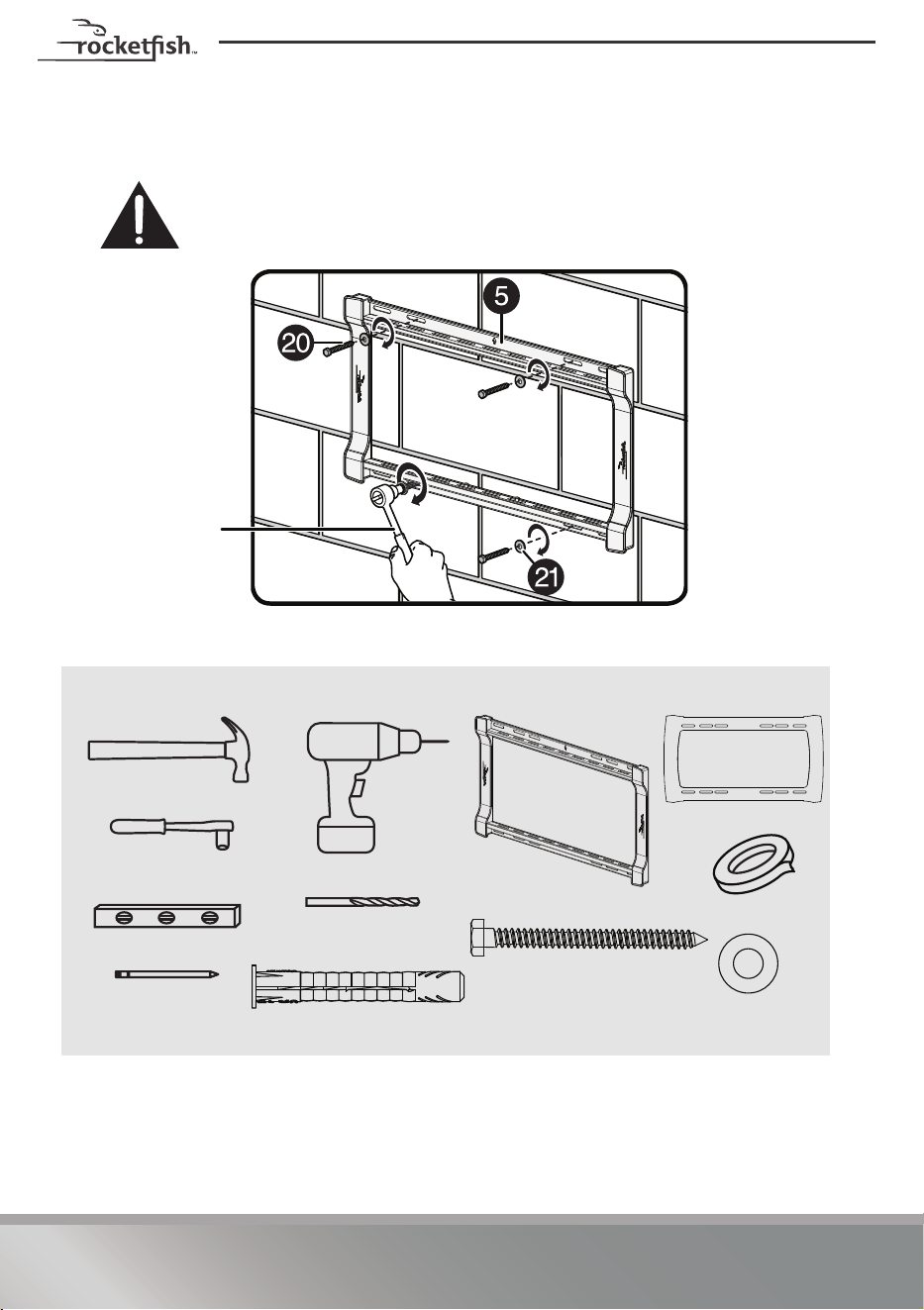
4 Align the wall plate (5) with the anchors, insert the lag screws (20) through the
washers (21) and the holes in the wall plate assembly, then tighten the lag
screws only until they are firm against the wall plate.
CAUTION: Avoid potential injuries or property damage!
DO NOT over-tighten the lag screws (20).
You’ll need
1/2” socket wrench
Pencil
Drill
3/8 in. Masonry drill bit
1/2” socket wrench
Level
3 Template
Tape
5 Wall plate
Hammer
22 Concrete anchor (Qty. 4)
20 Lag screw (Qty. 4)
21 5/16 in.
washer (Qty. 4)
15
Need help? Call 1-800-620-2790 (U.S. and Canada)
RF-TVLFMA
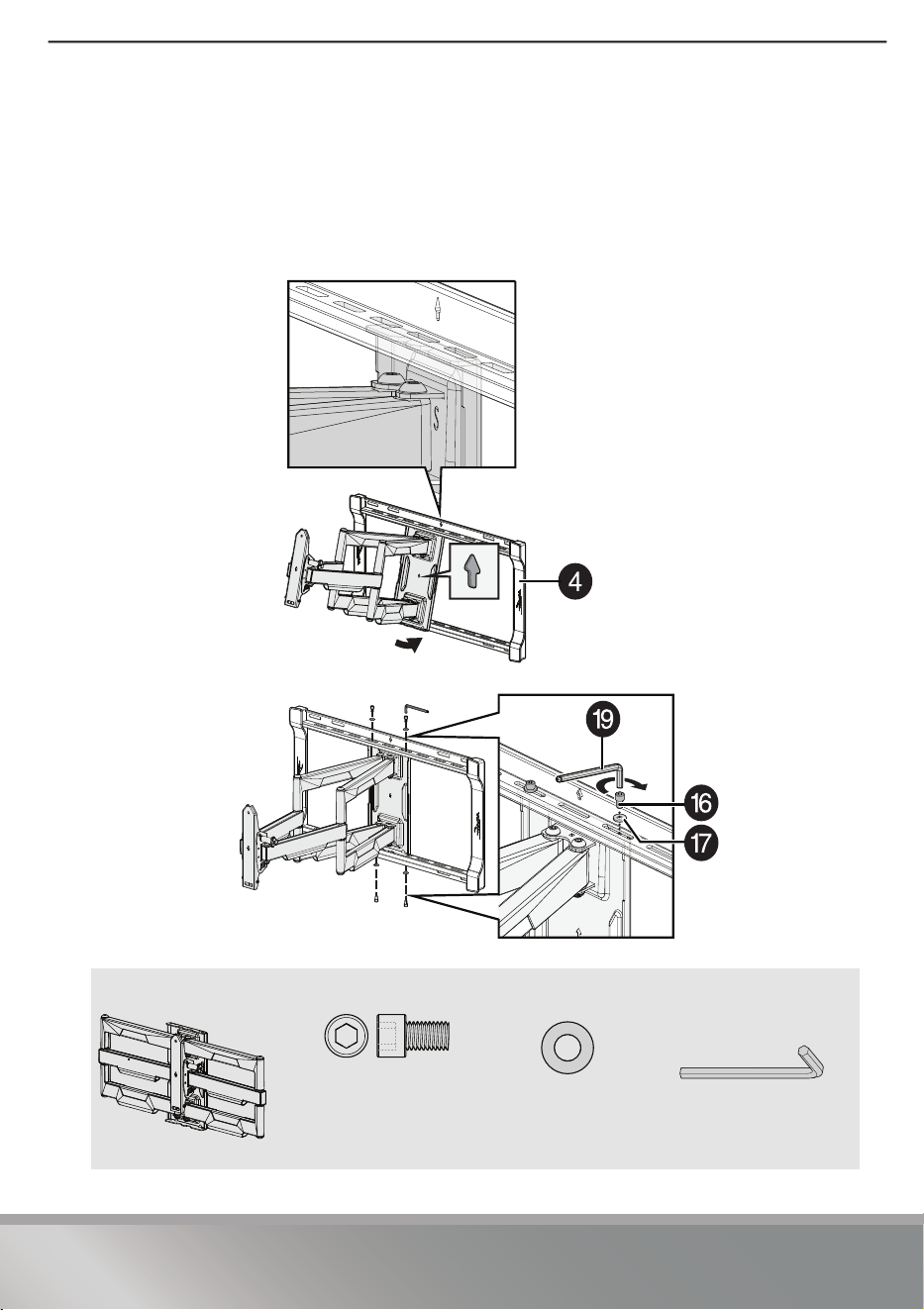
STEP 7 - Attach the arm assembly to the wall plate
1 Hang the arm assembly (4) onto the wall plate (5) by first hooking the top
support, then lowering the bottom of the arm into place.
2 Lock the arm assembly (4) to the wall plate (5) with the wall plate screws (16)
and 1/4 in. washers (17), using the hex key (19).
IMPORTANT: The wall plate screws must be installed to secure the TV onto the wall plate assembly.
You’ll need
4 Arm assembly
16 1/4-20 x 3/8 in.
Wall Plate screw
17 1/4 in. washer
19 3/16 in. hex key
16
Need help? Call 1-800-620-2790 (U.S. and Canada)
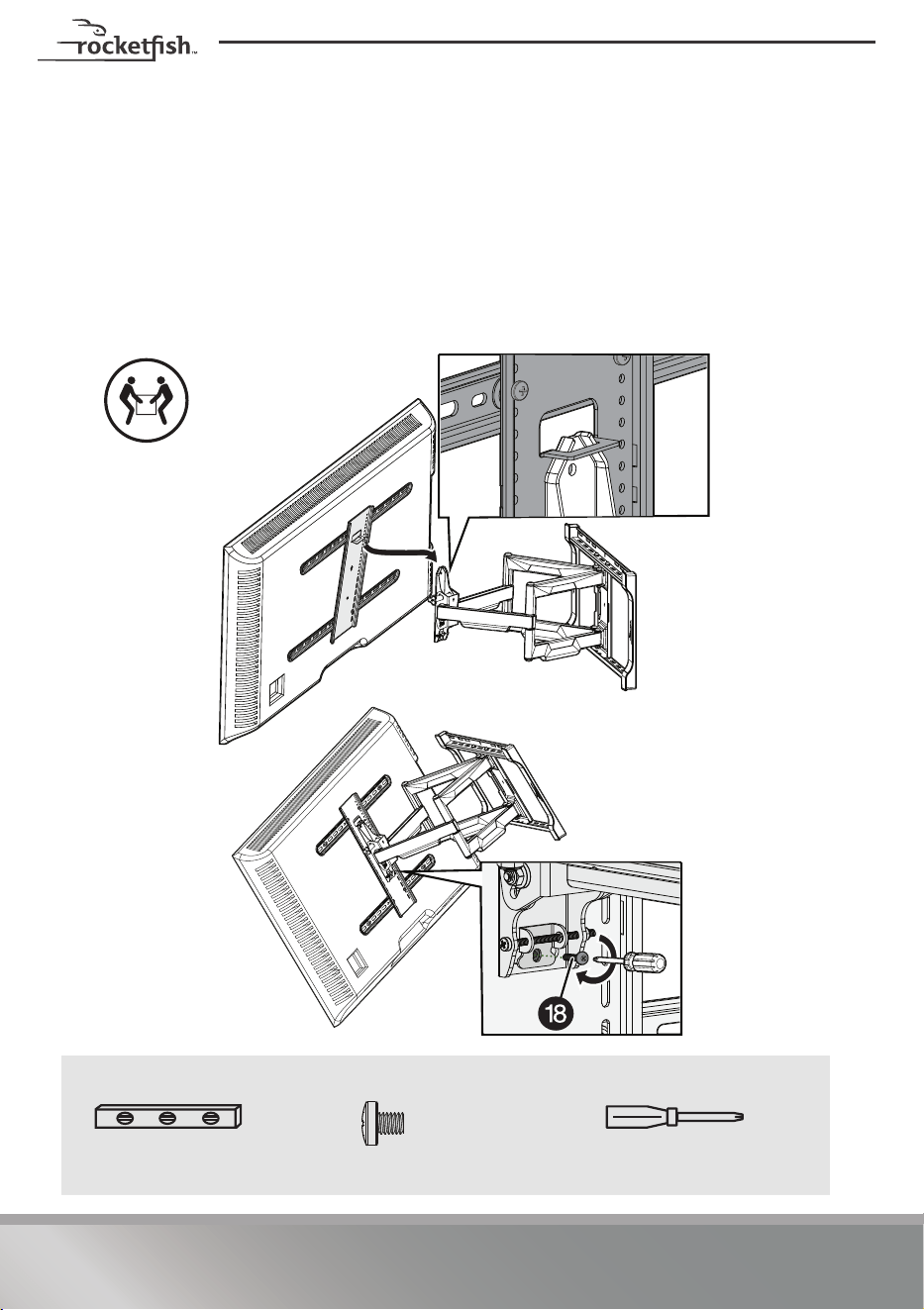
STEP 8 - Attach the TV to the arm assembly
1 To make it easier to attach your TV to the wall plate, pull the arm assembly (4)
out from the wall plate.
2 Hang the TV onto the arm assembly (4) by first hooking the top support, then
lowering the bottom of the TV into place.
3 Lock the TV to the arm assembly (4) with the locking screw (18) and tighten with
the Phillips screwdriver.
IMPORTANT: The locking screw (18) must be installed to secure the TV to the arm
assembly.
You’ll need
HEAVY! You will
need assistance
with this step.
Level
18 Locking screw
Phillips screwdriver
17
Need help? Call 1-800-620-2790 (U.S. and Canada)
RF-TVLFMA
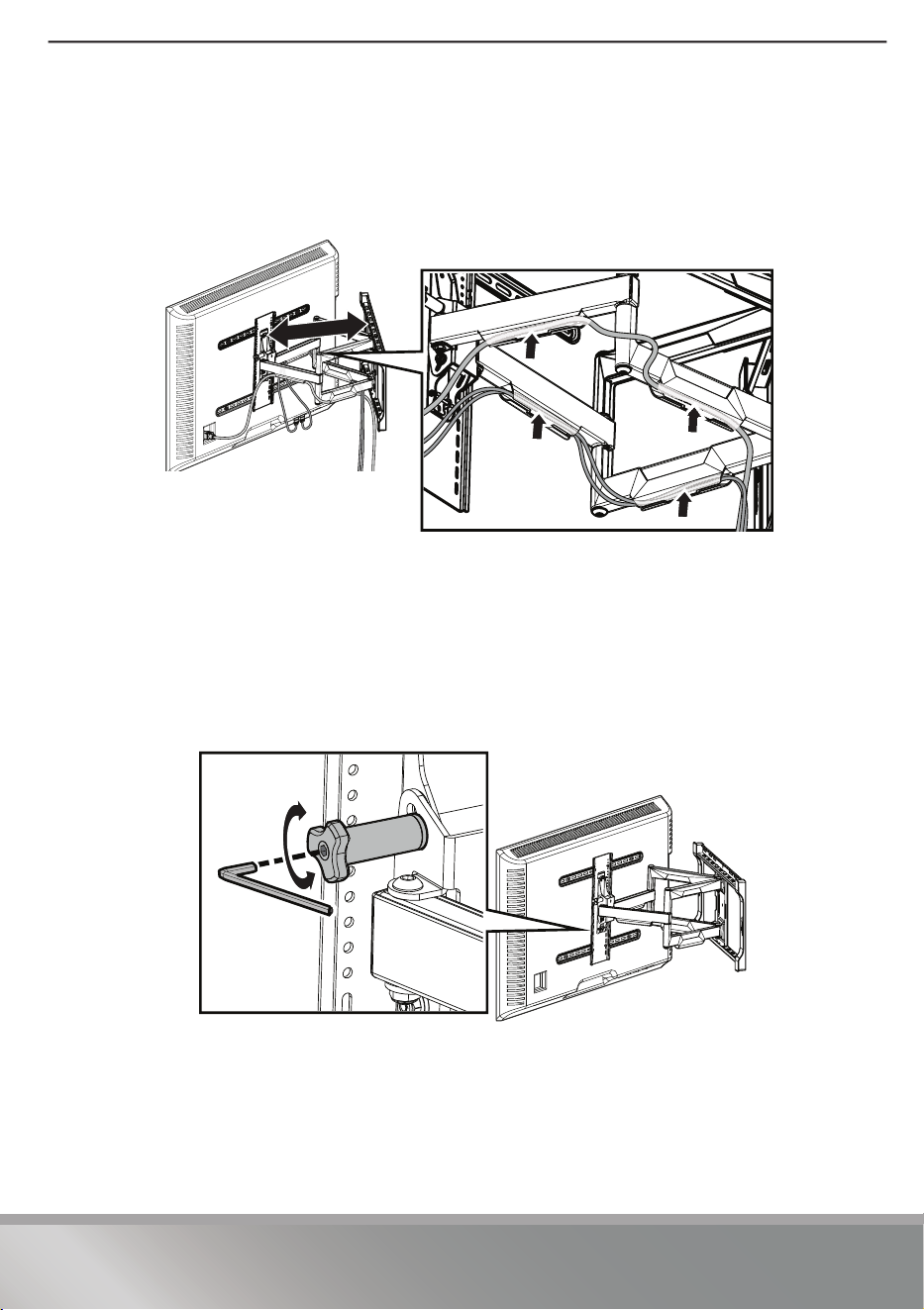
STEP 9 - Managing cables
• Manage cables by fully extending the arm assembly to provide enough
slack, then routing cables along the arms and inserting them into the
channels on the arms, providing a clean look to your installation.
STEP 10 - Tilt adjustment (front to back)
Your TV should adjust easily when moved, then stay in place. If your TV is too loose or
too tight, adjust the side tension knob by hand or use the hex key.
NOTE: Once your TV is in place, tighten the tension knob to prevent unwanted
movement. Additional tension can be applied using the 3/16 inch hex key (19).
18
Need help? Call 1-800-620-2790 (U.S. and Canada)
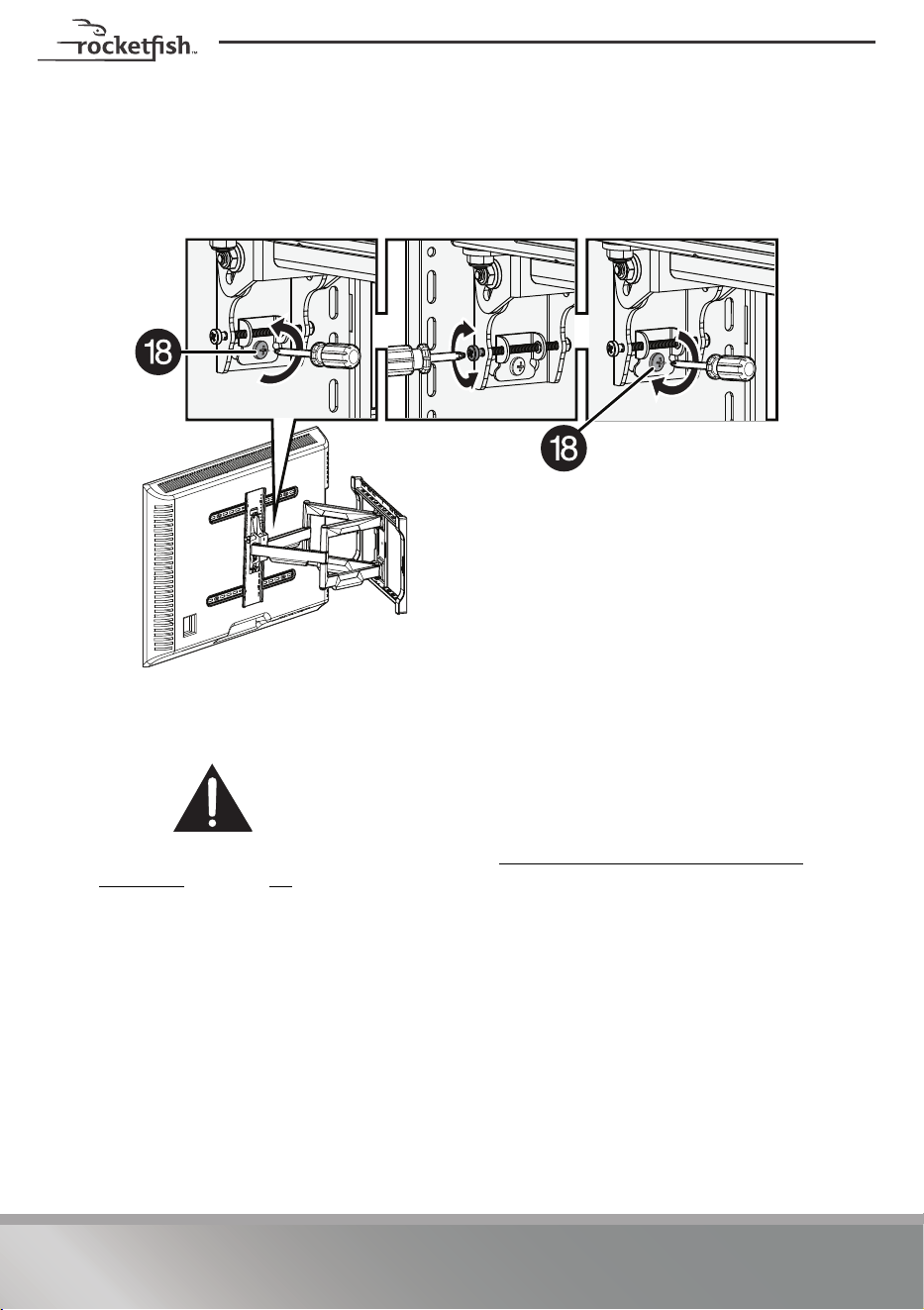
Step 11 - Level adjustment (side to side)
1 Loosen the locking screw (18).
2 Adjust the level of your TV by turning the level screw.
3 Re-tighten the locking screw (18) when your TV is level.
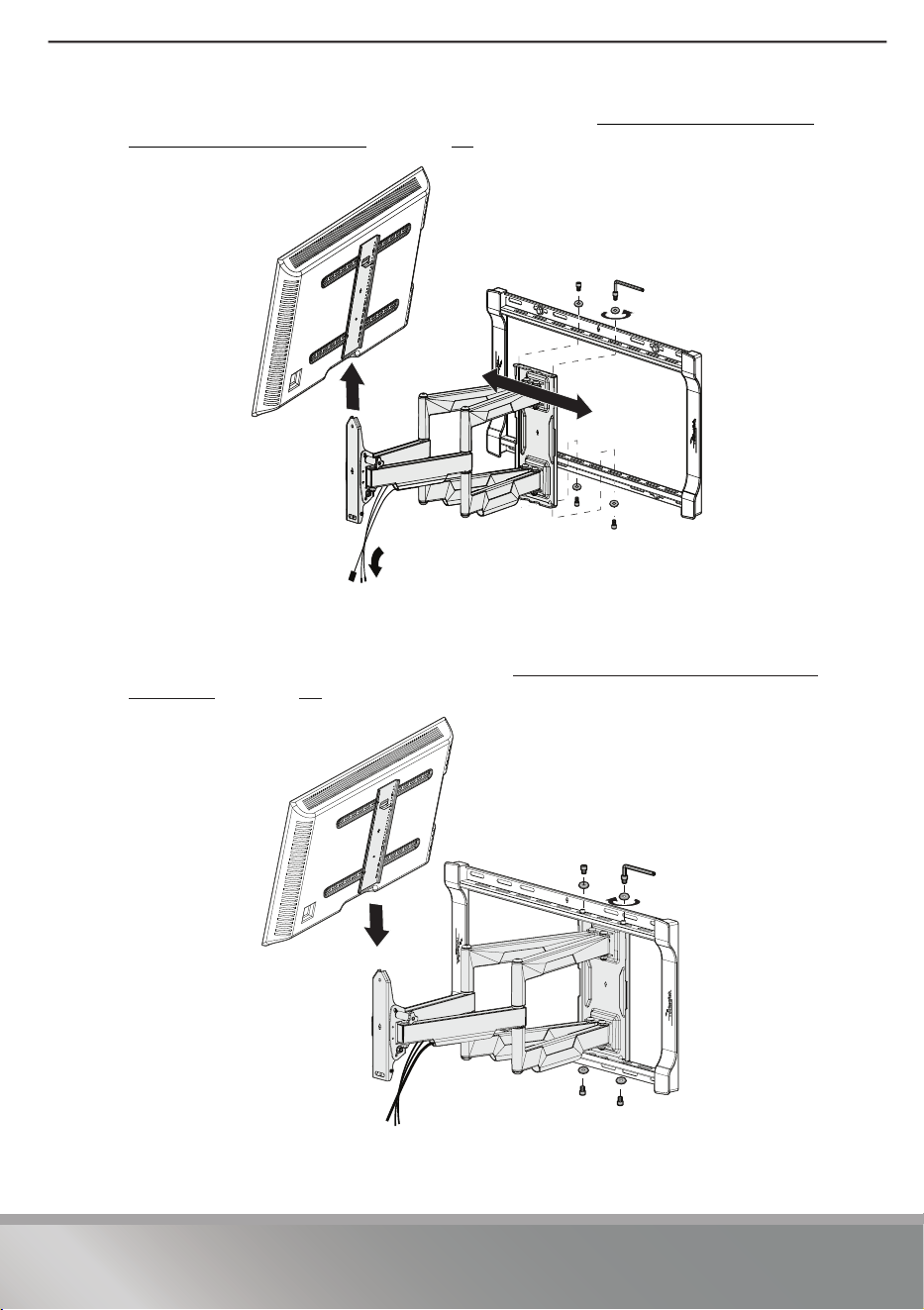
Step 12 - Lateral shift
CAUTION: Avoid potential injuries or property damage! Do
NOT adjust the arm position from the center for concrete
applications. The arm MUST remain centered in the wall plate for
all concrete applications!
1 Disconnect cables and remove your TV (see STEP 8 - Attach the TV to the arm
assembly on page 16).
2 Remove the four screws/washers and the arm from the wall plate.
19
Need help? Call 1-800-620-2790 (U.S. and Canada)
RF-TVLFMA
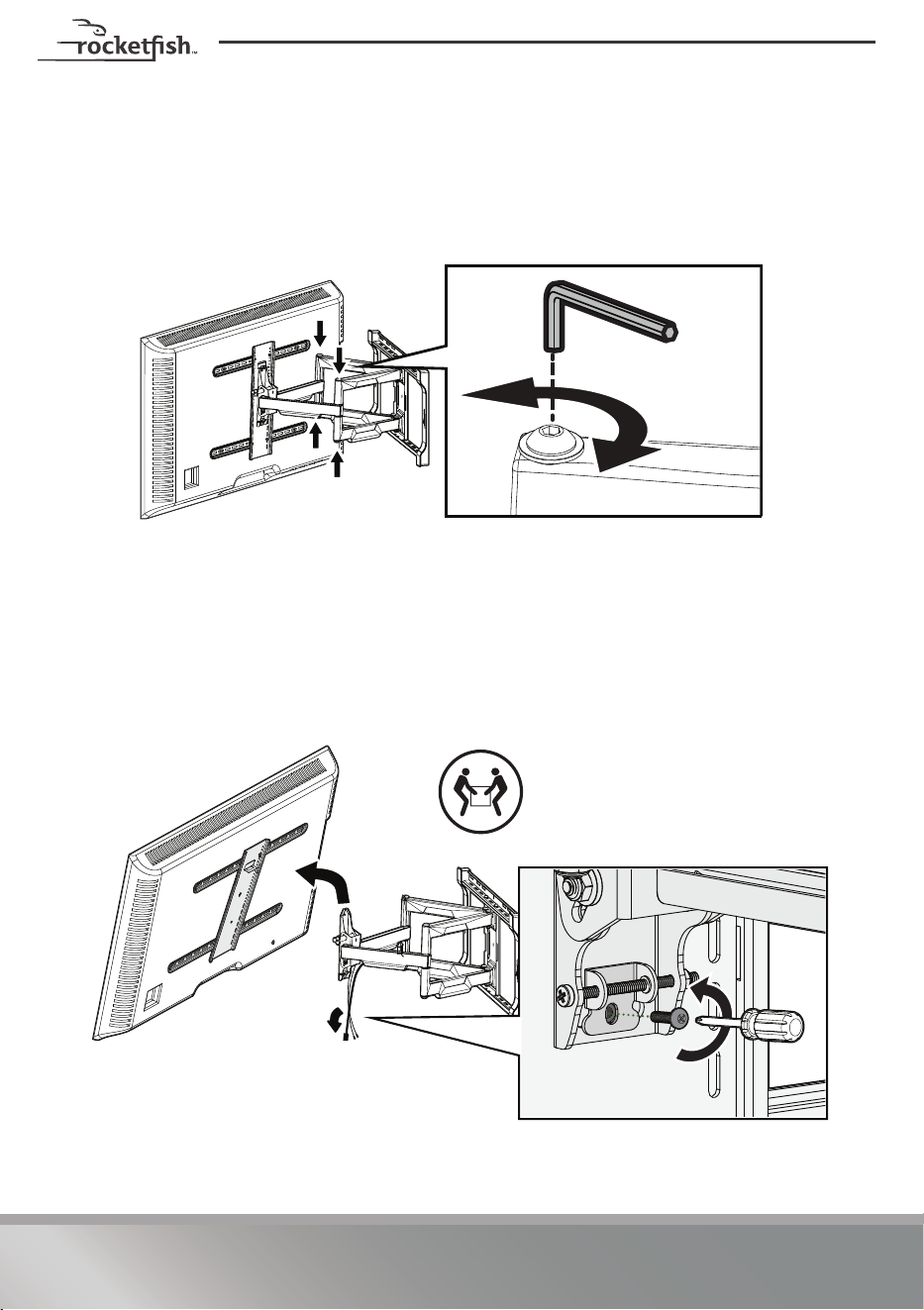
3 Reposition the arm assembly on the wall plate (see STEP 7 - Attach the arm
assembly to the wall plate on page 15).
4 Reattach the four screws/washers.
5 Hang your TV onto the arm assembly (see STEP 8 - Attach the TV to the arm
assembly on page 16.
20
Need help? Call 1-800-620-2790 (U.S. and Canada)
Step 13 - Extend or retract
Your TV should adjust easily when moved, then stay in place. If your TV is too loose or
too tight when moving, adjust the bolts using the hex key (19).
CAUTION: Avoid potential personal injury or property damage!
DO NOT remove the bolts. Only turn enough for slight adjustment.
Removing the TV from the TV mount
1 Disconnect the cables.
2 Remove the locking screw.
3 Lift the TV up and off the arm assembly.
HEAVY! You will
need assistance
with this step.

21
Need help? Call 1-800-620-2790 (U.S. and Canada)
RF-TVLFMA
Removing the TV from the wall mount
• To remove your TV from the wall plate assembly, disconnect all cables,
then reverse the procedures in STEP 8 - Attach the TV to the arm
assembly on page 16.
IMPORTANT: Your TV is heavy. You may need assistance with this step.
For customer service, call: 1-800-620-2790 (U.S. and Canada)

22
Need help? Call 1-800-620-2790 (U.S. and Canada)
LIFETIME LIMITED WARRANTY
Definitions:
The Distributor* of Rocketfish branded products warrants to you, the original
purchaser of this new Rocketfish-branded product (“Product”), that the Product shall
be free of defects in the original manufacturer of the material or workmanship for a
period of one (1) year from the date of your purchase of the Product (“Warranty
Period”).
For this warranty to apply, your Product must be purchased in the United States or
Canada from a Best Buy branded retail store or online at www.bestbuy.com or
www.bestbuy.ca and is packaged with this warranty statement.
How long does the coverage last?
The Warranty Period lasts for the useful life of the Product beginning on the date you
purchased the Product. Your purchase date is printed on the receipt you received
with the Product. In the event the Distributor ceases to sell the covered
Rocketfish-branded product, this Limited Lifetime Warranty shall terminate for that
product and there shall be no repair or replacement of the Product.
What does this warranty cover?
During the Warranty Period, if the original manufacture of the material or
workmanship of the Product is determined to be defective by an authorized
Rocketfish repair center or store personnel, Rocketfish will (at its sole option): (1)
repair the Product with new or rebuilt parts; or (2) replace the Product at no charge
with new or rebuilt comparable products or parts. Products and parts replaced under
this warranty become the property of Rocketfish and are not returned to you. If
service of Products or parts are required after the Warranty Period expires, you must
pay all labor and parts charges. This warranty lasts as long as you own your
Rocketfish Product during the Warranty Period. Warranty coverage terminates if you
sell or otherwise transfer the Product.
How to obtain warranty service?
If you purchased the Product at a Best Buy retail store location or from a Best Buy
online website (www.bestbuy.com or www.bestbuy.ca), please take your original
receipt and the Product to any Best Buy store. Make sure that you place the Product
in its original packaging or packaging that provides the same amount of protection
as the original packaging.
To obtain warranty service, in the United States call 1-888-BESTBUY or in Canada call
1-866-BESTBUY. Call agents may diagnose and correct the issue over the phone.

23
Need help? Call 1-800-620-2790 (U.S. and Canada)
RF-TVLFMA
Where is the warranty valid?
This warranty is valid only in the United States and Canada at Best Buy branded retail
stores or websites to the original purchaser of the product in the county where the
original purchase was made.
What does the warranty not cover?
This warranty does not cover:
• Customer instruction/education
•Installation
•Set up adjustments
•Cosmetic damage
• Damage due to weather, lightning, and other acts of God, such as power surges
• Accidental damage
•Misuse
•Abuse
•Negligence
• Commercial purposes/use, including but not limited to use in a place of business
or in communal areas of a multiple dwelling condominium or apartment
complex, or otherwise used in a place of other than a private home.
• Unauthorized modification of any part of the Product, including the antenna
• Display panel damaged by static (non-moving) images applied for lengthy
periods (burn-in).
• Damage due to incorrect operation or maintenance
• Connection to an incorrect voltage or power supply
• Attempted repair by any person not authorized by Rocketfish to service the
Product
• Products sold “as is” or “with all faults”
• Consumables, including but not limited to batteries (i.e. AA, AAA, C etc.)
• Products where the factory applied serial number has been altered or removed
• Loss or Theft of this product or any part of the product
• Display panels containing up to three (3) pixel failures (dots that are dark or
incorrectly illuminated) grouped in an area smaller than one tenth (1/10) of the
display size or up to five (5) pixel failures throughout the display. (Pixel based
displays may contain a limited number of pixels that may not function normally.)
• Failures or Damage caused by any contact including but not limited to liquids,
gels or pastes.
REPAIR REPLACEMENT AS PROVIDED UNDER THIS WARRANTY IS YOUR EXCLUSIVE
REMEDY FOR BREACH OF WARRANTY. ROCKETFISH SHALL NOT BE LIABLE FOR ANY
INCIDENTAL OR CONSEQUENTIAL DAMAGES FOR THE BREACH OF ANY EXPRESS OR
IMPLIED WARRANTY ON THIS PRODUCT, INCLUDING, BUT NOT LIMITED TO, LOST
DATA, LOSS OF USE OF YOUR PRODUCT, LOST BUSINESS OR LOST PROFITS.
ROCKETFISH PRODUCTS MAKES NO OTHER EXPRESS WARRANTIES WITH RESPECT TO

24
Need help? Call 1-800-620-2790 (U.S. and Canada)
THE PRODUCT, ALL EXPRESS AND IMPLIED WARRANTIES FOR THE PRODUCT,
INCLUDING BUT NOT LIMITED TO ANY IMPLIED WARRANTIES OF AND CONDITIONS
OF MERCHANTABILITY AND FITNESS FOR A PARTICULAR PURPOSE, ARE LIMITED IN
DURATION TO THE WARRANTY PERIOD SET FORTH ABOVE AND NO WARRANTIES,
WHETHER EXPRESS OR IMPLIED, WILL APPLY AFTER THE WARRANTY PERIOD. SOME
STATES, PROVINCES AND JURISDICTIONS DO NOT ALLOW LIMITATIONS ON HOW
LONG AN IMPLIED WARRANTY LASTS, SO THE ABOVE LIMITATION MAY NOT APPLY TO
YOU. THIS WARRANTY GIVES YOU SPECIFIC LEGAL RIGHTS, AND YOU MAY ALSO
HAVE OTHER RIGHTS, WHICH VARY FROM STATE TO STATE OR PROVINCE TO
PROVINCE.
Contact Rocketfish:
1-800 620-2790
www.rocketfishproducts.com
Rocketfish is a trademark of Best Buy and its affiliated companies.
*Distributed by Best Buy Purchasing, LLC
7601 Penn Ave South, Richfield, MN 55423 U.S.A.
©2024 Best Buy. All rights reserved.

V1 ENGLISH
23-0894
www.rocketfishproducts.com
1-800-620-2790 (U.S. and Canada)
ROCKETFISH is a trademark of Best Buy and its affiliated companies.
Registered in some countries. Distributed by Best Buy Purchasing, LLC
7601 Penn Ave South, Richfield, MN 55423 U.S.A.
©2024 Best Buy. All rights reserved.
Part # 6907-302062