1
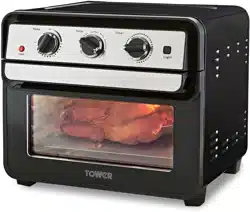
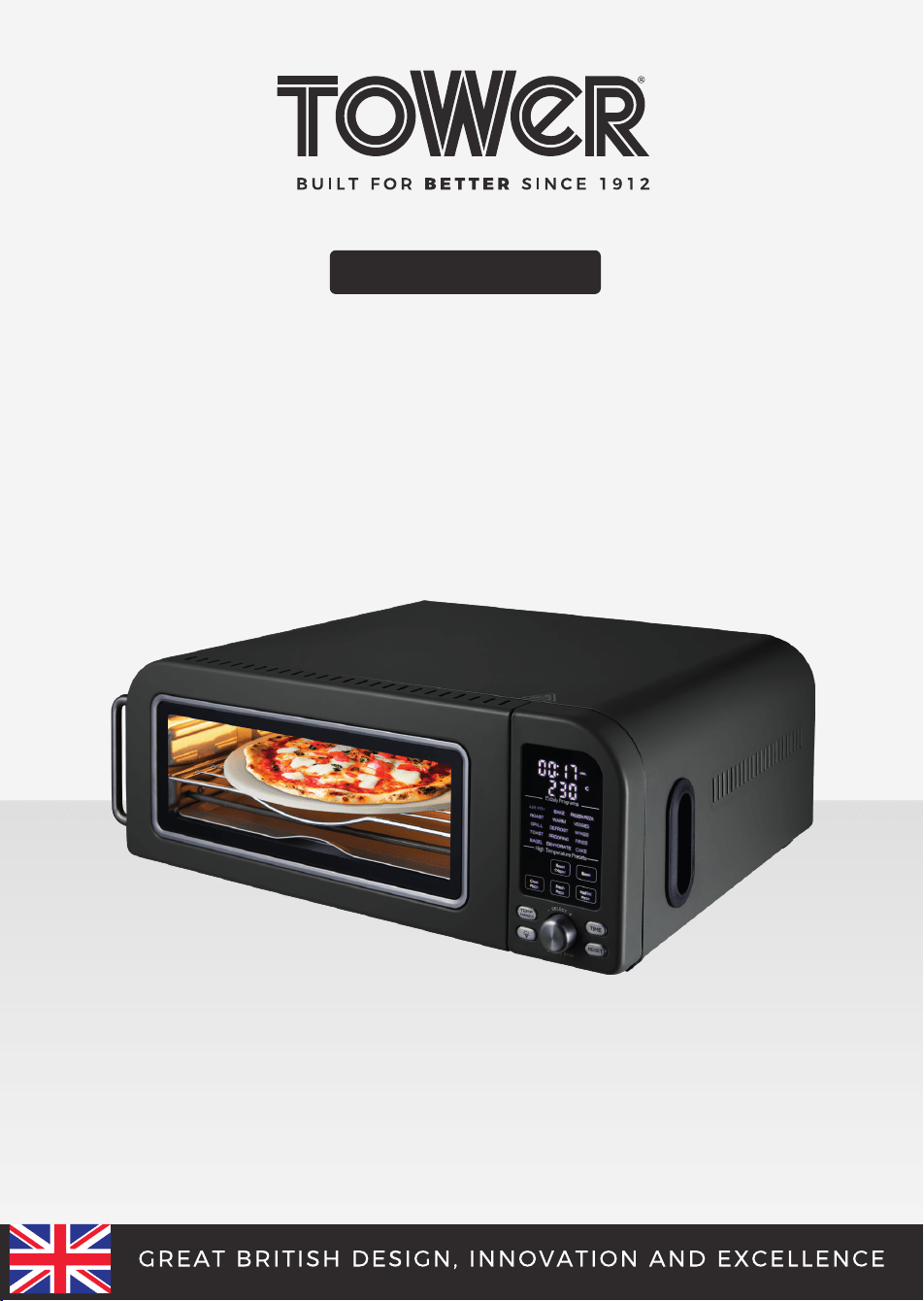
18 LITRE
PIZZA OVEN
USER MANUAL
MODEL: T17141

2
TABLE OF CONTENTS
THIS BOX CONTAINS 3
SPECIFICATIONS 3
IMPORTANT SAFETY INFORMATION 4
• Key safety points 4
• General safety 4
• Whilst cooking 5-6
• Plug and cord 6
• Wiring safety 7
GETTING TO KNOW YOUR PIZZA OVEN 8
• Control panel and display 8
STRUCTURE OF YOUR APPLIANCE 9
BEFORE FIRST USE 10
• Preparing for use 10
• Turning the appliance on 10
• Auto-off function 10
• Turning the light on and off 10
• The reset function 10
USING YOUR PIZZA OVEN 11
• Selecting a cooking mode and program 11
• The toasting and bagel programs 11
• The high temperature programs 11-12
• Setting the temperature 13
• Setting the timer 13
• Start/pause 14
SUGGESTED TIMES/TEMPS 14
ACCESSORIES / SPARE PARTS 15
TROUBLESHOOTING 16
CLEANING AND CARE 17
DISPOSAL OF THE UNIT 17
CUSTOMER SUPPORT 18
WEIGHTS & MEASURES TABLE 18
HOMEMADE DOUGH RECIPE 19
3
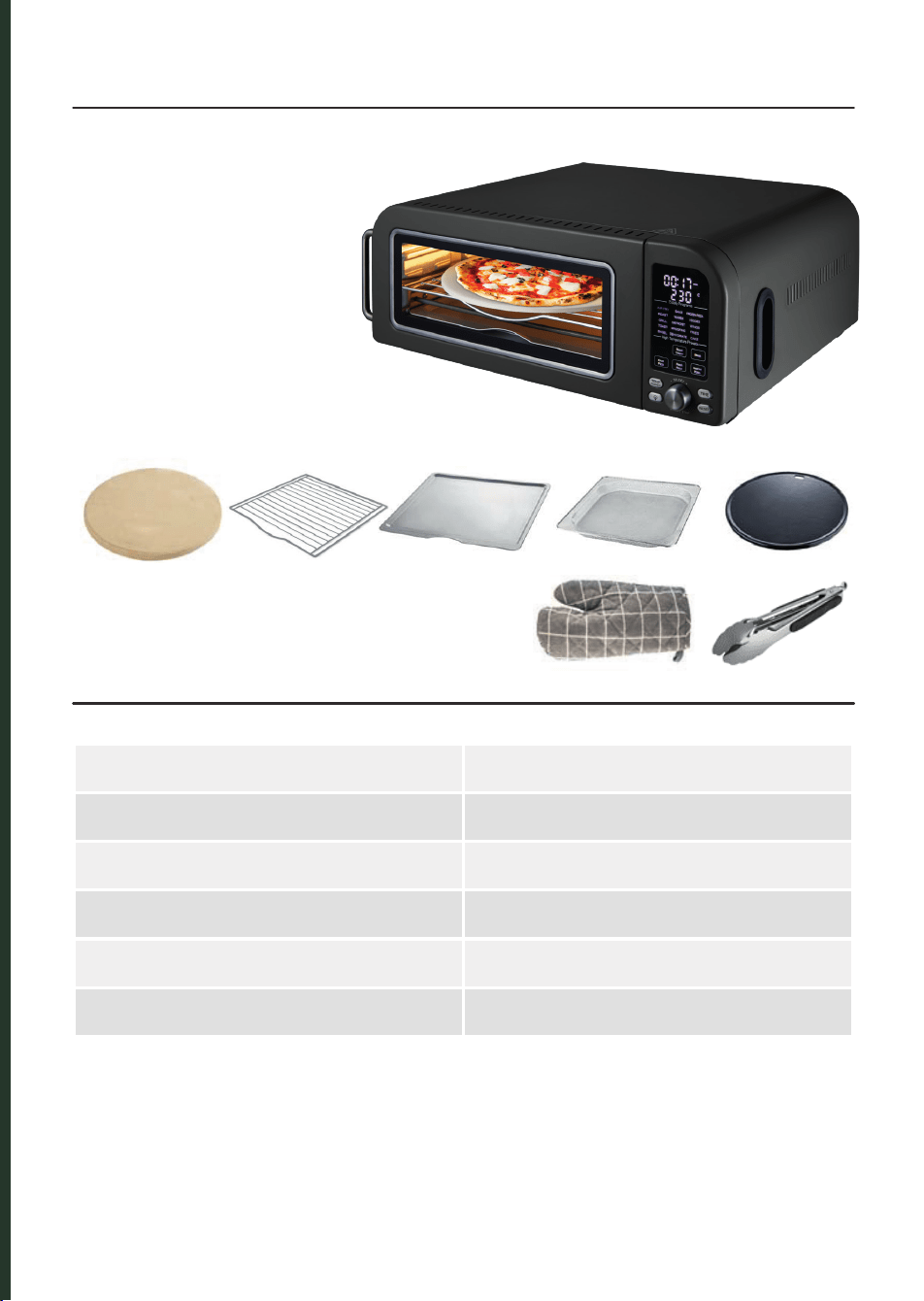
THIS BOX CONTAINS
SPECIFICATIONS
RATED VOLTAGE 220 - 240V~
FREQUENCY 50-60Hz
POWER CONSUMPTION 2000W
CAPACITY 18 Litre
TEMPERATURE RANGE 35°C - 400°C
TIME RANGE 30 seconds – 12 hours
Instruction Manual
Pizza Oven
Oven Rack
Drip Tray
Mesh Cooking Tray
Pizza Stone
Oven Glove
Oven Tongs
Enamel Cast Iron Tray

4
Please read these safety
NOTES carefully BEFORE
using your Tower appliance.
These warnings have been
provided in the interest
of safety. Basic safety
precautions should always
be followed including the
following:
KEY SAFETY POINTS
CAUTION:
During operation:
• Surfaces are hot. DO NOT
touch the hot surfaces.
• Hot steam is released
through the air outlet
openings. Keep your
hands and face at a safe
distance from the steam
and from the air outlet
openings.
• Hot steam and air
may escape when the
appliance cooking basket
is opened.
GENERAL SAFETY
• DO NOT immerse cords,
plugs or any part of the
appliance in water or any
other liquid.
• Close supervision is
necessary when any
appliance is used by or
near children.
• Children should not play
with the appliance.
• This appliance can
be used by children
aged from 8 years and
above and persons with
reduced physical, sensory
or mental capabilities or
lack of experience and
knowledge if they have
been given supervision
or instruction concerning
use of the appliance in a
safe way and understand
the hazards involved.
• Cleaning and user
maintenance should
not be undertaken
by children without
supervision.
• Take care when any
appliance is used near
pets.
• Switch off and unplug
before fitting or
removing accessories,
after use and before
cleaning.
• Allow the appliance
to cool down for
approximately 30
minutes before fitting or
removing accessories or
cleaning.
• If the supply cord or
appliance is damaged,
stop using the appliance
immediately and
seek advice from the
IMPORTANT SAFETY INFORMATION

5
manufacturer, its service
agent or a similarly
qualified person.
• The use of accessory
attachments is not
recommended by the
appliance manufacturer,
apart from those
supplied with this
product.
• DO NOT use the
appliance outdoors.
• DO NOT place the
appliance on or near a
hot stove top or heated
oven.
• Take care when moving
the appliance, or
removing accessories
and food as hot oil or
other hot liquids may be
present.
• This appliance is for
household use only.
• DO NOT place anything
on top of the appliance.
• DO NOT clean the
appliance with
metal kitchen utensils,
caustic or abrasive
cleaning agents or
scouring sponges.
• DO NOT use this
appliance for anything
other than its intended
use.
WHILST COOKING
• Please ensure that the
appliance is used on a
stable, level, and heat
resistant surface.
• DO NOT place the
appliance on or near
combustible materials
such as a tablecloth or
curtain.
• DO NOT place the
appliance against a
wall or against other
appliances.
• Leave at least 10cm
free space on the back
and sides and 10cm
free space above the
appliance.
• DO NOT place the
appliance in the
presence of explosive
and/or flammable fumes.
• DO NOT cover the air
inlet and outlet during
operation.
• Any accessories, baking
trays or oven dishes
used in the appliance
will become hot. Always
use oven gloves when
handling or removing
anything from the
appliance.

6
• DO NOT place food that
is still packed in plastic
wrap or plastic bags in
the appliance.
• DO NOT allow food to
come into contact with
the heating element of
the appliance.
• If the appliance begins
to emit smoke, unplug it
immediately.
• Only open the door once
the smoke has cleared.
Remove burnt remnants.
• DO NOT leave this
appliance unattended
whilst operating.
PLUG AND CORD
• Check that the voltage
of the main circuit
corresponds with the
rating of the appliance
before operating.
• WARNING: DO NOT
let the cord hang over
the edge of a table or
counter, serious burns
may result from the air
fryer being pulled off the
counter where it may
be grabbed by children
or become entangled
with the user.
• DO NOT let the supply
cord touch hot surfaces.
• DO NOT carry the
appliance by the power
cord.
• DO NOT use any
extension cord
with this appliance.
• The appliance is not
intended to be operated
by means of an external
timer or separate
remote-control system.
• DO NOT pull the plug out
by the cord as this may
damage the plug and/or
the cable.
• DO NOT plug and unplug
with wet hands.
It is important that this instruction
manual is retained for future
reference.
If the appliance is given to someone
else, it should always be accompanied
by these operating instructions, as
they form an integral part of the
appliance.
IMPORTANT SAFETY INFORMATION
7
In the unlikely event the appliance develops a fault, stop using it immediately
and seek advice from the Customer Support Team.
IMPORTANT
:
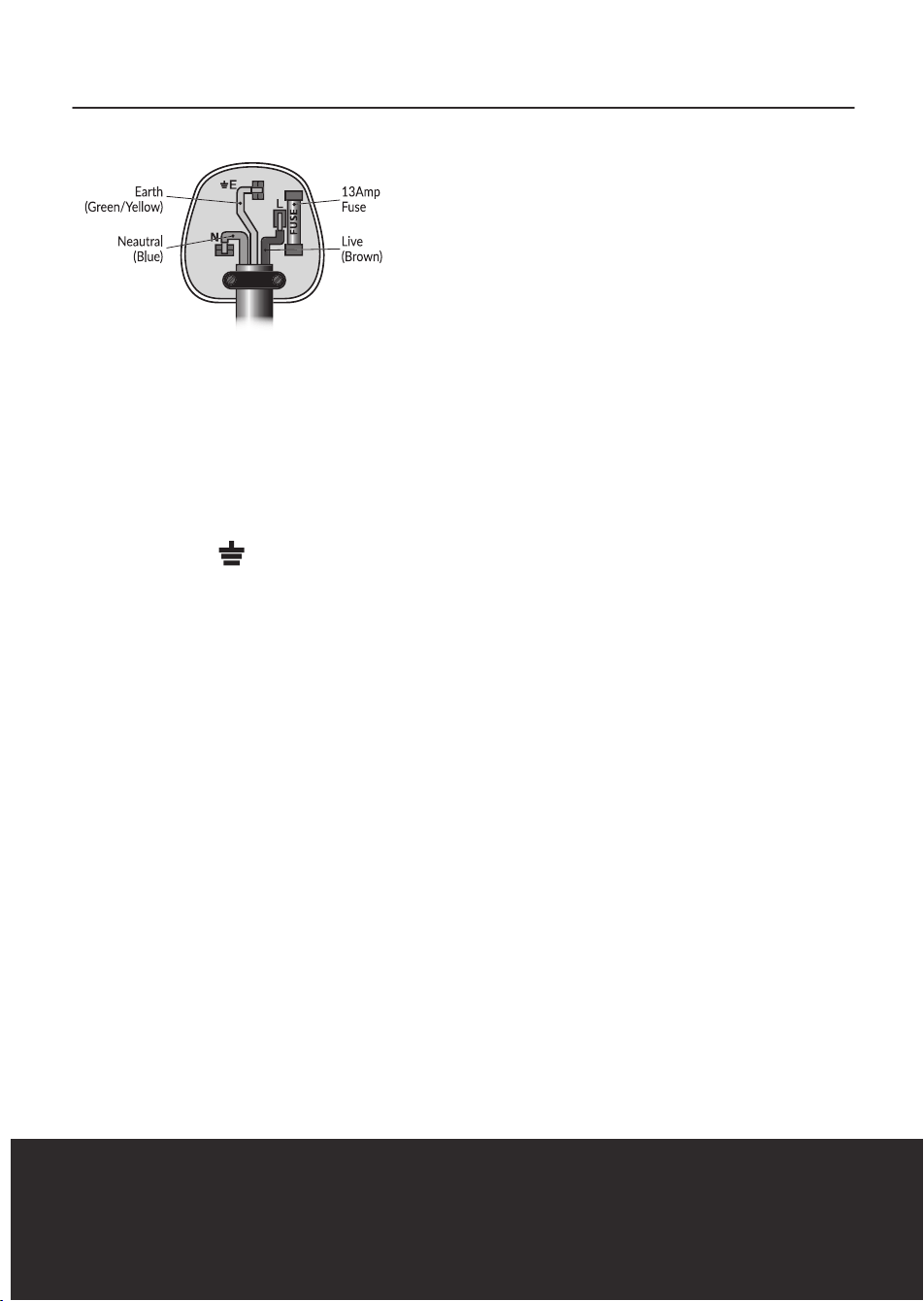
As the colours in the mains
lead of this appliance may not correspond
with the coloured markings identifying
the terminals in your plug, please proceed
as follows:
The wires in the mains lead are labelled in
accordance with the following code:
Blue neutral [N] Brown live [L] Green/
Yellow [EARTH]
PLUG FITTING DETAILS (WHERE
APPLICABLE).
• Plug Fitting Details (Where
Applicable). The wire labelled blue is
the neutral and must be connected to
the terminal marked [N].
• The wire labelled brown is the live
wire and must be connected to the
terminal marked [L].
• The wire labelled green/yellow must
be connected to the terminal marked
with the letter [E].
• On no account must either the brown
or the blue wire be connected to the
[EARTH] terminal.
• Always ensure that the cord grip is
fastened correctly.
• The plug must be fitted with a fuse
of the same rating already fitted and
conforming to BS 1362 and be ASTA
approved.
• If in doubt consult a qualified
electrician who will be pleased to do
this for you.
NON-REWIREABLE MAINS
PLUG.
If your appliance is supplied with a non-
rewireable plug fitted to the mains lead
and should the fuse need replacing,
you must use an ASTA approved one
(conforming to BS 1362 of the same rating).
If in doubt, consult a qualified electrician
who will be pleased to do this for you.
If you need to remove the plug -
disconnect it from the mains - then cut
it off of the mains lead and immediately
dispose of it in a safe manner. Never
attempt to reuse the plug or insert it into
a socket outlet as there is a danger of an
electric shock.
WIRING SAFETY FOR UK USE ONLY
8
GETTING TO KNOW YOUR PIZZA OVEN
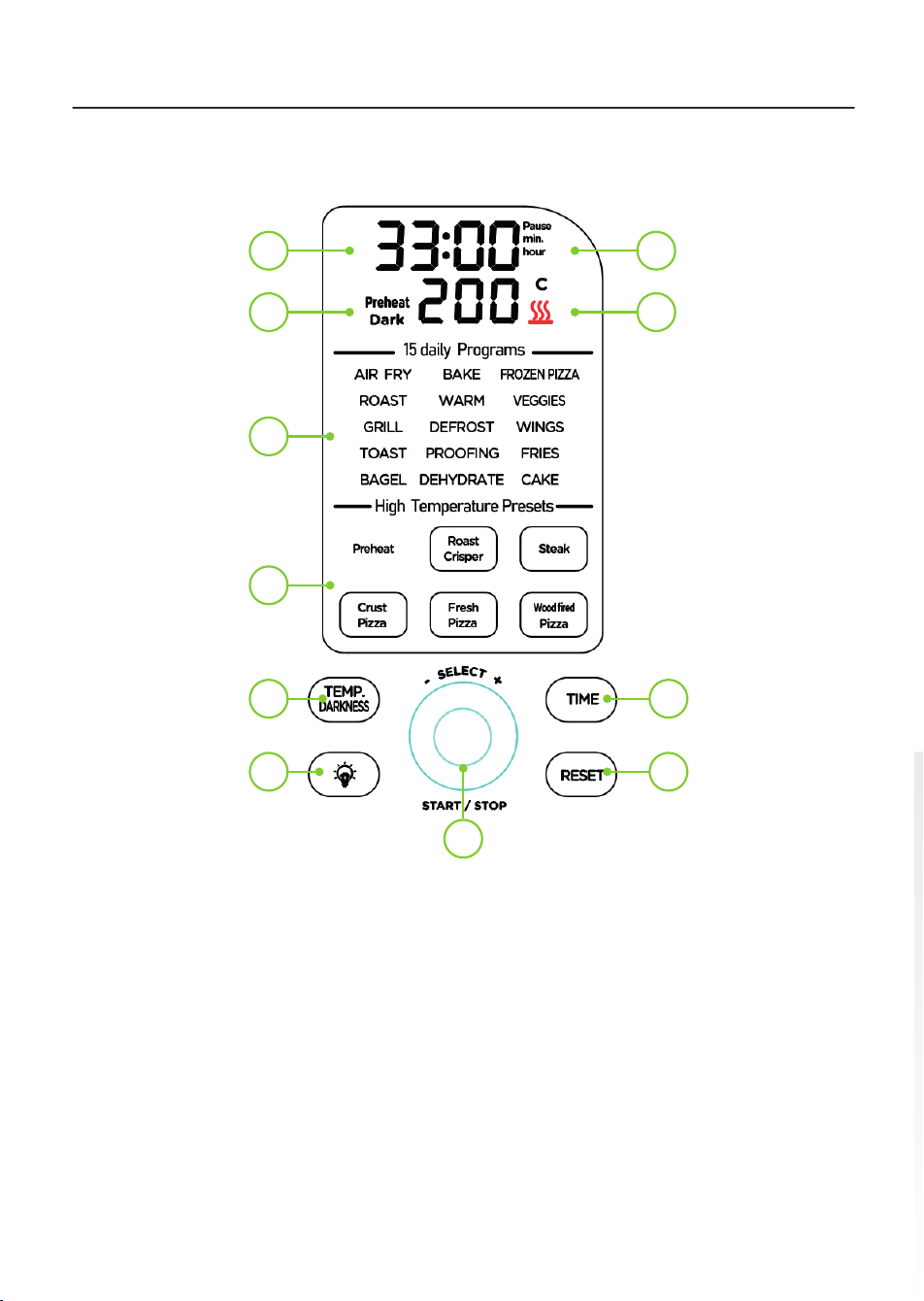
CONTROL PANEL AND DISPLAY
1. Pause indicator
2. Heat indicator
3. Time key
4. Power/Reset key
5. Start/Stop key / Selection dial
6. Light On/Off key
7. Temperature/Toasting darkness key
8. High temperature pre-set keys
(Preheat / Roast Crisper / Steak /
Crust Pizza / Fresh Pizza / Woodfired
Pizza)
9. Pre-set indicators
10. Preheat / Dark / Cook indicators
11. LED display (Time/Temperature)
11 1
210
9
8
7 3
6 4
5
Cook
9
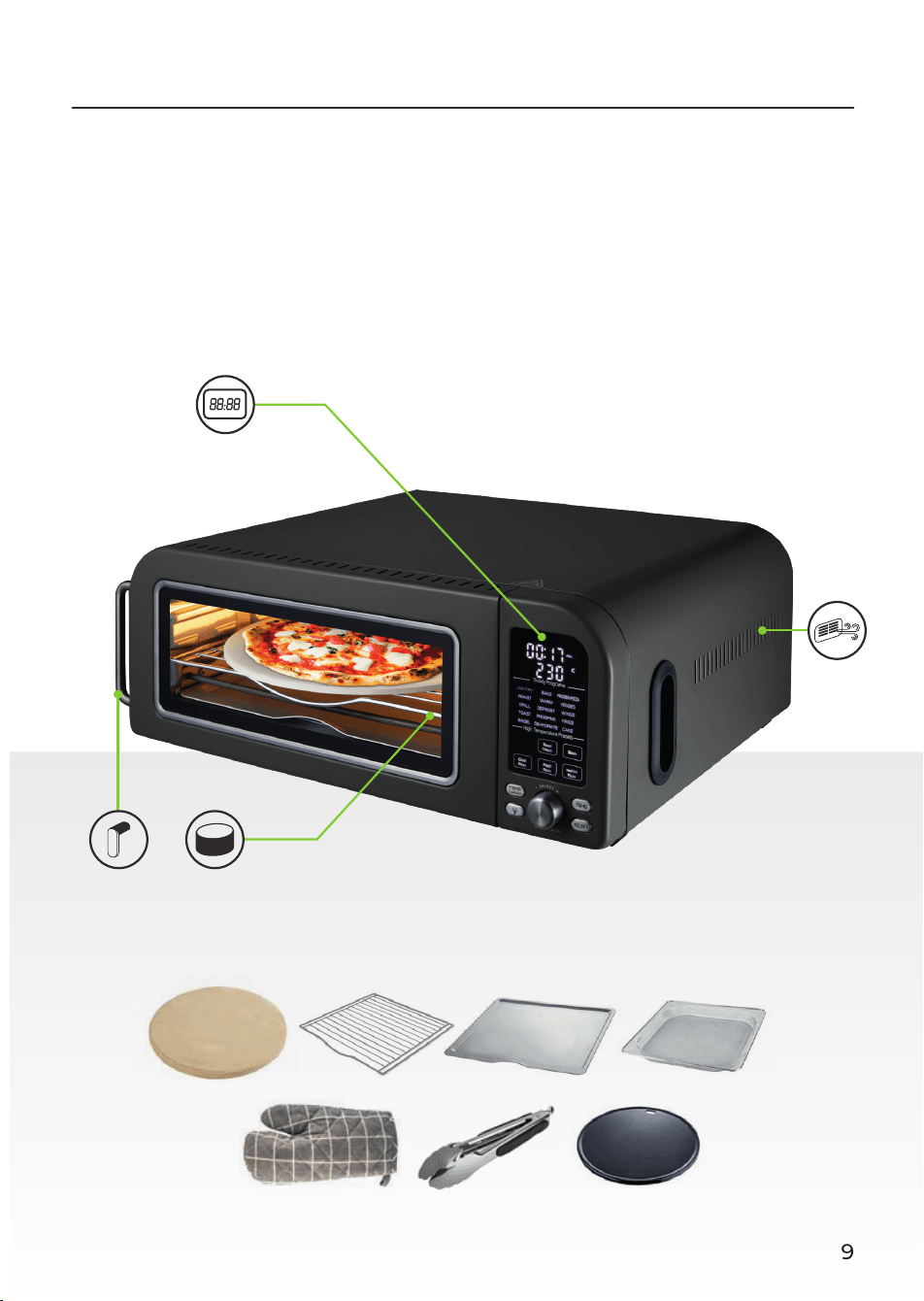
STRUCTURE OF YOUR APPLIANCE
Air outlet
Cooking
area
Door
handle
Control
Panel

10
PREPARING FOR USE
1. Remove your appliance from the
packaging.
2. Check that there is no damage to
the cord or any visible damage to the
body.
3. Check that all listed parts are present.
4. Remove any stickers or labels from
the appliance. DO NOT remove the
rating plate or any warnings.
5. Dispose of the packaging in a
responsible manner.
6. Locate the appliance on a stable,
horizontal, even and heat-resistant
surface in accordance with the
Important safety information section.
7. Thoroughly clean the accessories with
hot water, some washing up liquid
and a non-abrasive sponge.
8. Wipe the inside and outside of the
appliance with a moist cloth.
9. Place the relevant cooking
accessories in the oven.
10. DO NOT put anything on top of the
appliance, as this will disrupt the
airflow and the hot air frying will be
affected as a result.
TURNING THE APPLIANCE ON
1. Plug the unit into a mains socket.
There will be a sound prompt and
the unit will briefly scroll through the
presets on the LED display.
2. Press the Reset button again while
the unit is in operation to put it into
Standby.
AUTO-OFF FUNCTION
1. When cooking is not in progress,
the appliance will automatically go
into Standby mode if there has been
no contact with the control panel
after 5 minutes. The control panel
will go out, and the LED display will
show ‘00:00’ to show that the unit is
in Standby mode.
2. Touch the Start/Stop/Menu
Selection button while the unit is in
this state to bring it out of Standby
mode. The control panel will turn on
and show the pre-sets, with the ‘Air
Fry’ preset flashing.
TURNING THE LIGHT ON AND
OFF
This unit is equipped with a light inside
the cooking cavity, which can be turned
on or off manually.
1. Press the Light key on the unit’s
control panel to turn the cooking
light on.
2. Press this key again when the
cooking light is on to turn it off.
NOTE: The light will stay on for 30
seconds, then automatically turn itself
off again.
THE RESET FUNCTION
This unit is equipped with a reset function,
which erases any time, temperature
and program settings and automatically
cancels any cooking cycles in progress.
1. Press the Reset button on the
unit’s control panel to activate this
function. The control panel will go
out, and the LED display will show
’00:00’.
SELECTING A COOKING MODE
AND PROGRAM
1. The unit is equipped with a choice of
15 regular pre-set programs – Air Fry,
Roast, Grill, Toast, Bagel, Bake, Warm,
Defrost, Proofing, Dehydrate, Frozen
Pizza, Vegetables, Wings, Fries and
BEFORE FIRST USE

11
Cake - and six high-temperature pre-
set programs – Preheat, Roast Crisper,
Steak, Crust Pizza, Fresh Pizza and
Woodfired Pizza.
2. Turn the selection dial to cycle
through and select the available
regular pre-sets. The default time and
temperature for that pre-set will be
displayed (in the Toast and Bagel pre-
sets, the browning selection indicator
will be displayed, and in the Grill pre-
set, the text ‘Hi’ or ‘Lo’ will replace the
temperature digits.)
3. Press down on the centre of the
selection dial to select and set
the desired pre-set. The unit will
automatically begin to cook on the
default settings for that pre-set.
4. Press down on the centre of the
selection dial while a cooking cycle
is in progress to pause it. The digits
on the unit’s LED display will begin to
flash and the Pause indicator will light
up red.
5. Long-press down on the centre of
the selection dial or press the Reset
button to cancel an active cooking
cycle.
THE TOASTING AND BAGEL
PROGRAMS
1. In the toasting and bagel presets, the
time and temperature functions are
replaced by a browning selector. To
adjust the brownness level, press the
Temp/Darkness key to activate the
browning adjustment function, then
use the selection dial to increase or
decrease the browning level, from 1
to 6.
2. Press down on the centre of the
selection dial to confirm the selection
and start a cooking cycle.
THE HIGH TEMPERATURE
PROGRAMS
This unit is equipped with a choice of five
high-temperature, professional pre-set
programs, as follows:
- Roast Crisper – ideal for crisping
cooked thick cuts of protein, up to
6cm thick.
- Steak – ideal for creating juicy steaks
of up to 2cm thickness.
- Crust pizza – ideal for creating crusty
pizzas with store-bought crusts of up
to 15mm in thickness.
- Fresh pizza – ideal for creating pizzas
with homemade dough and a thin
crust, around 5mm thick.
- Woodfired pizza – ideal for creating
pizzas with homemade dough and a
thicker crust.
Press the corresponding keys on the unit’s
control panel to automatically select any
of the five high-temperature programs,
then press down on the centre of the
selection dial to start a cooking cycle.
The unit will begin to preheat, and the
corresponding indicator will display on the
unit’s LED screen.
Roast crisper: The preheating process
takes about 8 minutes when the oven
is first used from cold, then around 3
minutes for each subsequent use after the
oven is hot.
Steak: The preheating process takes
about 8 minutes when the oven is first
used from cold, then around 8 minutes for
each subsequent use after the oven is hot.
Crust pizza / fresh pizza / wood fired
pizza: The preheating process takes about
15 minutes when the oven is first used
from cold, then around 3 minutes for each
subsequent use after the oven is hot.
When the pre-heating process concludes,
the screen will display ‘Open’ and ‘Add
In’. When this occurs, open the door and
place the food into the oven.
When the food is ready, the screen will
display ‘End’ and ‘Open’.
USING YOUR PIZZA OVEN

12
USING YOUR PIZZA OVEN
NOTE: The text ‘Cooling’ on the unit’s LED
display indicates the oven is too hot to be
used straight away. When this occurs, allow
the oven to cool down before adding food
onto it.
NOTE: For high-temperature programs,
place food directly onto the enamel cast-
iron plate or pizza stone. Roast crisper /
steak use cast iron plate / crust pizza / fresh
pizza / wood fired pizza use cast iron plate
or pizza stone.
NOTE: For high temperature programs only.
Place food in the oven once the pre-heating
cycle is complete. DO NOT put food in the
oven before or during the pre-heating cycle.
NOTE: Defrost meat and fish thoroughly
before cooking. Ensure there is no residual
liquid left in the food when placing it in the
oven.
CAUTION: ALWAYS ensure the cooking
plate is clean and free of residue before
placing food in it to be cooked.
CAUTION: NEVER place baking paper
onto any food being cooked on high
temperature, as this may cause a fire.
CAUTION! Monitor the food closely, as it can
easily overcook in high temperatures.
Roast Crisper
Although it can be used to cook certain
foods from scratch, such as steak, the
crisper function is mainly used to give
previously cooked pieces of meat or other
protein a crispy skin. DO NOT attempt to
cook a cut of meat using this program.
ALWAYS ensure food is cooked through
before being placed in the oven.
CAUTION! ALWAYS remove the bone from
any chunks placed into the oven to be
crisped.
• The default time for this program is
10 minutes; however, cooking times
can be adjusted as required. Refer to
the Setting the Temperature section of
this instruction manual for guidance on
how to adjust cooking
temperatures.
• If possible, use oils with high
smoking points, like canola,
vegetable or rapeseed oil.
Steak
• In this mode, there will be a sound
prompt in the first 50 seconds after the
start of the cooking process; when this
sounds, briefly pull out the meat using
the included oven glove and tongs, and
flip it over. Take care to do this quickly,
so the steak can retain the heat from
inside the oven.
NOTE: The default cooking time for this
mode is 2 minutes, for a medium steak
(50% cooked). For a medium rare steak
(30% cooked), decrease the cooking time to
1:30 minutes, for a medium well steak (70%
cooked), increase it to 2:30 minutes and for
a well done steak (100% cooked), increase
it to 3:30 minutes. The corresponding
percentage will display in the unit’s LED
screen.
Pizza
• On any of the three pizza modes, the
cooking temperature and pizza size
will alternately flash on the unit’s LED
display before cooking begins. The
default pizza size is 7’’.
• Once the required mode has been
selected, press the Time button, then
use the selection dial to cycle through
and select the desired pizza size and
cooking time.
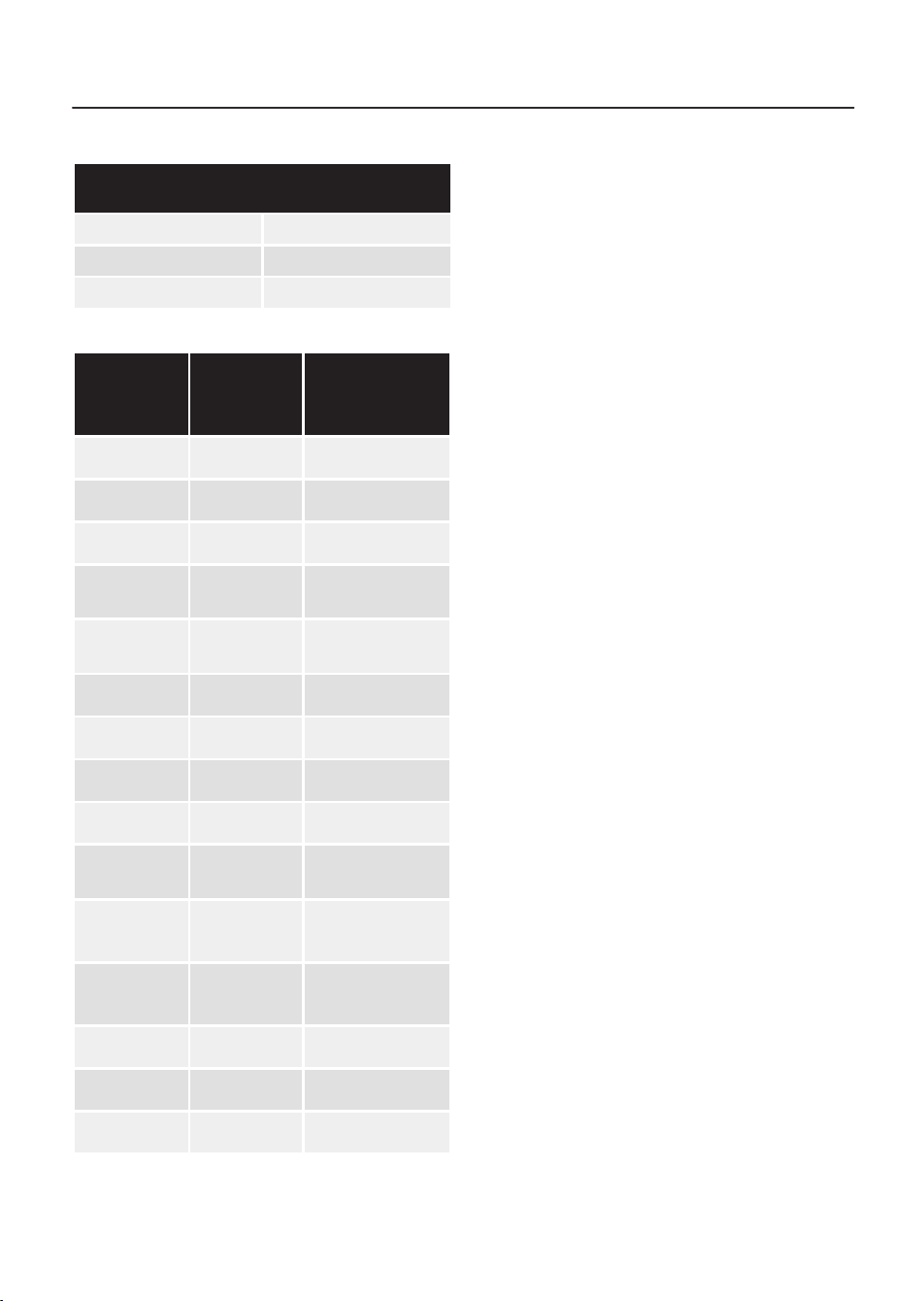
The default times for each type and size of
pizza are as follows:
CRUST PIZZA - Pre-Set Time: 7 minutes
6-7 inches 7 to 7:40 minutes
8-10 inches 7:50 to 8:20 minutes
11-12 inches 8:30 minutes or more
FRESH PIZZA - Pre-Set Time: 7:30 minutes
6-7 inches 7:30 to 8 minutes
8-10 inches 8 to 8:30 minutes
11-12 inches 8:30 minutes or more
13
USING YOUR PIZZA OVEN
WOODFIRED PIZZA - Pre-Set Time: 4
Minutes
6-7 inches 4 to 4:40 minutes
8-10 inches 4:50 to 5:40 minutes
11-12 inches 5:50 minutes or more
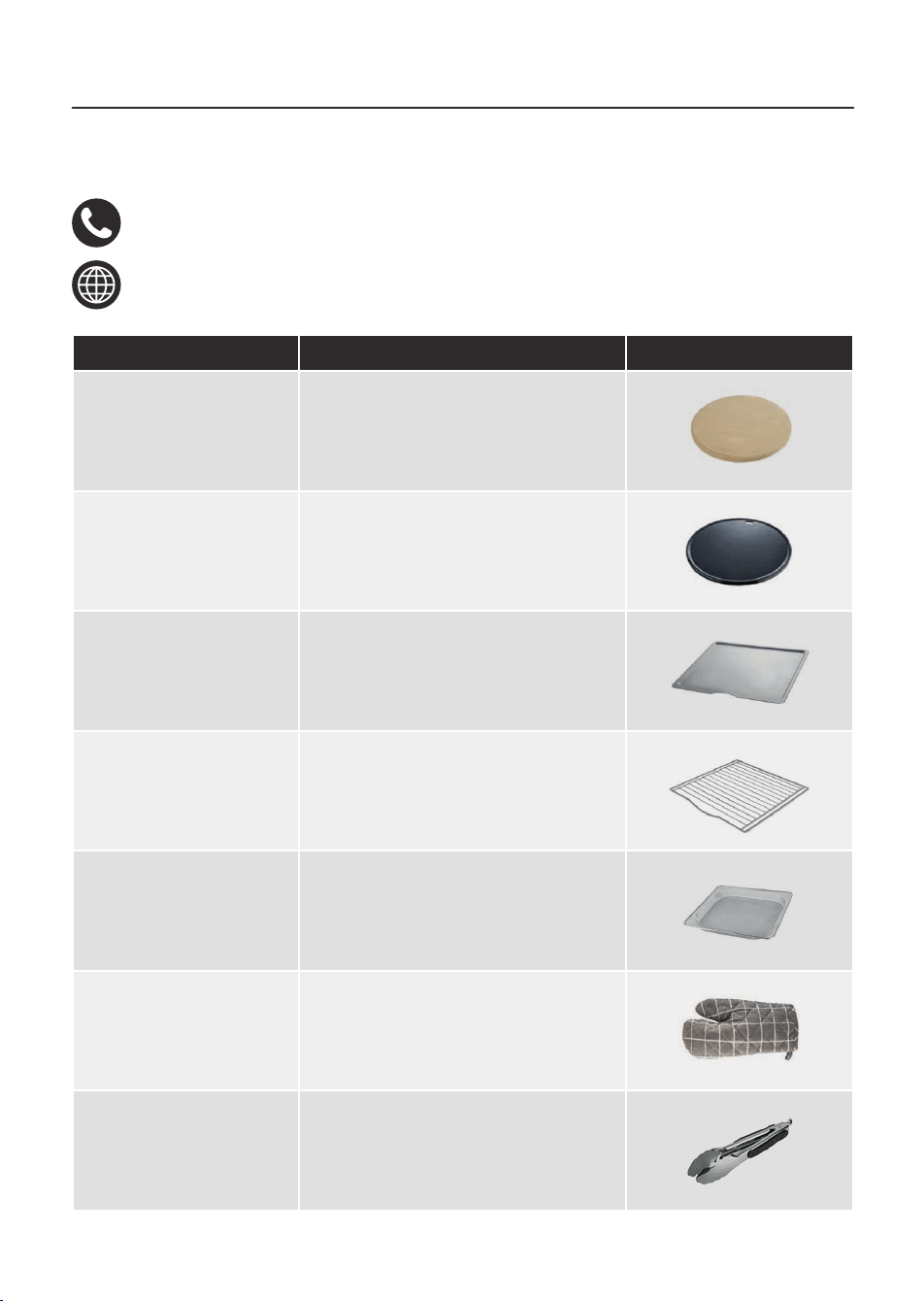
Program Default
Time
(Min.)
Default
Temperature
(ºC)
Air Fry
17 230
Roast
12 200
Grill
15 Hi
Toast
N/A
Brownness
Level 3
Bagel
N/A
Brownness
Level 3
Bake
17 180
Warm
60 (1 Hour) 80
Defrost
15 80
Proofing
40 35
Dehydrate
480 (8
hours)
70
Frozen
Pizza
18 250
Vegeta-
bles
20 220
Wings
15 240
Fries
20 200
Cake
15 170
SETTING THE TEMPERATURE
This unit is equipped with adjustable
temperature settings, from 40 to 250ºC.
NOTE: The high temperature presets are
not adjustable.
1. Press the Temp/Darkness key on the
unit’s control panel once to activate
the Temperature Selection function.
The corresponding digits will begin to
flash on the LED display to show this
function has been selected.
2. Once the Temperature function has
been activated, use the selection
dial to adjust the temperature by
increments of 5, from 40 to 250ºC.
Turn this dial clockwise to increase
the temperature, or counter-
clockwise to decrease it.
NOTE: The temperature can be changed
during operation. To do this, press down
on the center of the selection dial to
pause the cooking cycle, then press the
Temp/Darkness key and follow the steps
outlined above.
SETTING THE TIMER
This unit is equipped with an adjustable
cooking timer.
1. Press the Time key on the unit’s
control panel to activate the Time
Selection function. The corresponding
digits will begin to flash on the LED
display to show this function has been
selected.
2. Once the Timer function has been
activated, use the selection dial
to adjust the cooking time by
increments of 1, from 01 to 12 hours.
Turn this dial clockwise to increase
the time, or counter-clockwise to
decrease it.

14
USING YOUR PIZZA OVEN
NOTE: The time can be changed during
operation. To do this, press down on the
center of the selection dial to pause the
cooking cycle, then press the Time key
and follow the steps outlined above.
START/PAUSE
1. Once the appropriate mode, program,
time and temperature have been
set, press down on the centre of
the selection dial to start a cooking
cycle. All mode keys except for the
one selected will go out and the
function indicator will illuminate
on the unit’s LED display. The unit
will then begin to operate on the
selected settings. The LED display will
show the selected temperature and
the remaining cooking time for the
duration of the cooking cycle.
2. Press down on the centre of the
selection dial again while the unit is
in operation to pause the cooking
process. The key will flash and all the
function keys on the control panel
will illuminate and the unit’s fan will
stop working after a few seconds to
show the cooking process has been
interrupted.
3. Long-press down on the centre of
the selection dial or press the Reset
button to cancel an active cooking
cycle.
SUGGESTED TIMES/TEMPS
Food Temp (°C) Function
Time
(mins)
Chicken nuggets
200-230° Air fry 10-15 min
Biscuits
170-190° Bake 20-25 min
Fish
HI Grill 10-15 min
Potatoes
200-230° Air fry 20-30 min
15
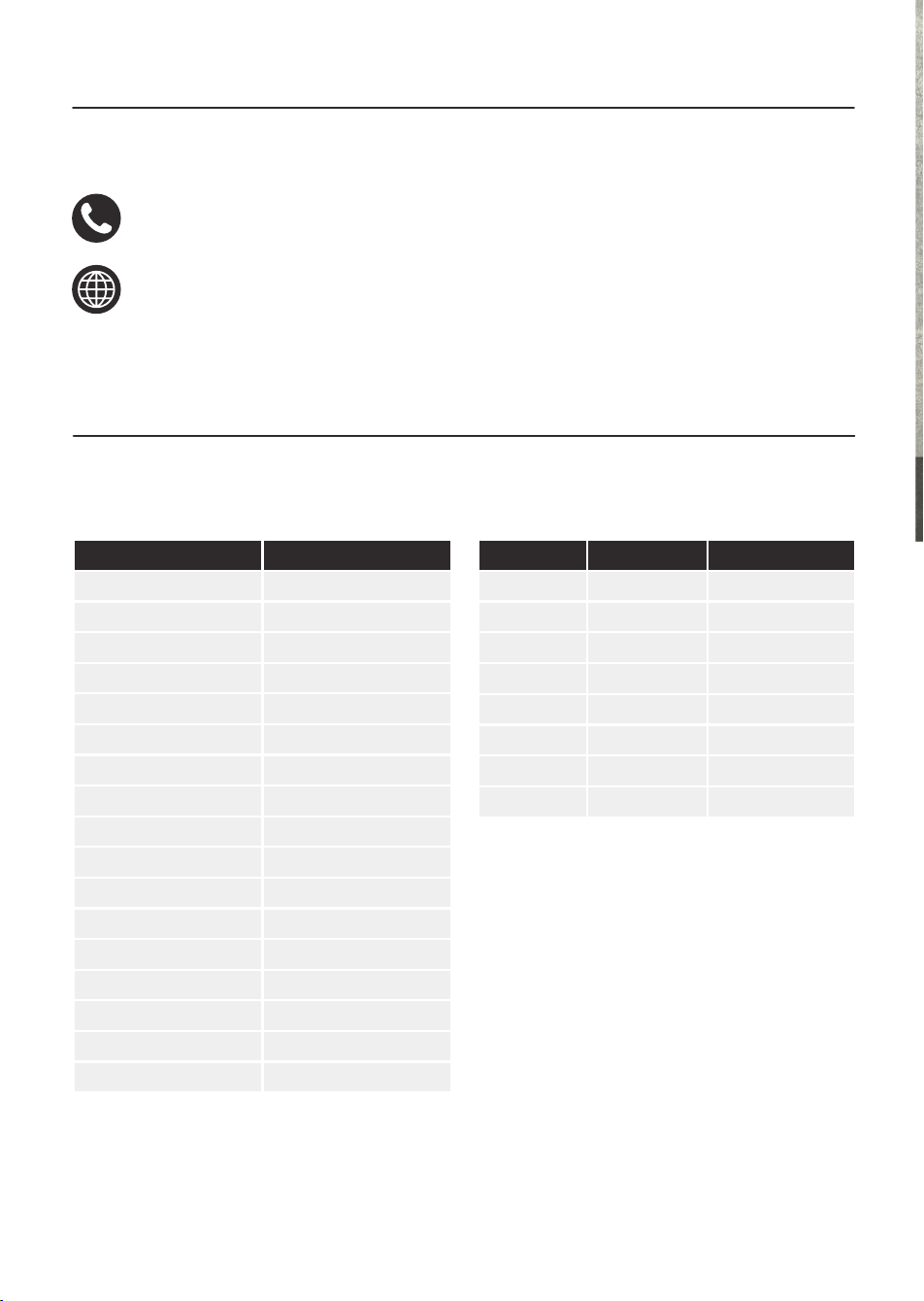
Spare part replacements and accessories are available to purchase via:
+44 (0) 333 220 6066
www.towerhousewares.co.uk
PART NO DESCRIPTION IMAGE
T1714101 Pizza stone
T1714102 Enamel cast iron tray
T1714103 Oven Rack
T1714104 Mesh Cooking Tray
T1714105 Drip Tray
T1714106 Oven Glove
T1714107 Oven Tongs
ACCESSORIES/SPARE PARTS

16
PROBLEM POSSIBLE SOLUTION POSSIBLE SOLUTION
The oven does not work.
The appliance is not plugged in. Plug the appliance into an earthed wall
socket.
The Start/Stop button has not been pressed. Press the Start/Stop button.
The door is open and the selected function
is paused.
Close the door to automatically resume the
selected function.
The oven door will not
close properly.
There is too much food in the oven. Do not over fill the oven.
Fried snacks are not
crispy when they come
out of the fryer.
Wrong type of snacks used. Use oven snacks or lightly brush some oil
onto the snacks for a crispier result.
Food stuck together or not in an even layer. Shake or turn the food periodically through
the cooking process.
The fried ingredients are
not done.
Too much food has been added to the oven. Put smaller batches of ingredients in the
oven. Smaller batches are fried more evenly.
The set temperature is too low. Set to an appropriate temperature.
The cooking time is too short. Set an appropriate cooking time.
Fresh fries are fried
unevenly in the oven.
Wrong type of potatoes used. Use fresh potatoes and make sure they stay
firm during frying.
The fries were not rinsed adequately before
frying
Rinse the potato sticks properly to remove
the starch from the outside.
Fresh fries are not crispy
when they come out of
the oven.
The crispiness of the fries depends on the
amount of oil and water in them.
Make sure you dry the fries properly before
you add the oil.
Cut the fries smaller for a crispier result.
Add slightly more oil for a crispier result.
The appliance is
smoking.
The ingredients have a high oil content. Smoking will be normal.
Follow the suggested settings or food
manufacturer’s recommendations.
Follow the suggested settings or food
manufacturer’s recommendations.
Rinse the potato sticks properly to remove
the starch from the outside.
The food is burned
The food was added in before pre- heating
was complete.
Add food to the appliance once pre-heating
is completed.
The food was cooked for too long. Check on the progress of the food
periodically through the cooking process.
The food was left in the appliance after the
cooking time had expired.
Remove the food from the appliance as soon
as the cooking time has elapsed.
The door is closed but
the oven is not working.
The magnetic switch is not working. Clean the oven door.
The door is too hot. Wait for the door and the oven to cool down
before attempting to use them again. If the
problem persists, contact the Customer
Service team.
Steam is coming out of
the oven door.
This is normal and not indicative of
malfunction.
An unpleasant smell
is emanating from the
appliance after not being
used for an extended
period of time.
The unit has not been cleaned out correctly
after the previous use.
Clean the unit properly after every use.
TROUBLESHOOTING

17
CLEANING AND CARE
WARNING! Do not immerse the appliance
in water or any other liquid.
Clean the main unit and the used
accessories after each use. DO NOT allow
food residues to dry on. Food residue
could start to burn and possibly cause
faults.
GENERAL CLEANING AND CARE
1. Switch off the appliance, remove the
mains plug from the wall socket and
let the appliance cool down.
NOTE: Keep the oven door open to let the
unit cool down more quickly.
2. DO NOT use metal kitchen utensils or
abrasive cleaning materials to clean
the oven, as this may damage the
coating.
3. Clean the cooking racks, accessories
and utensils (other than the pizza
stone) with hot water, some washing-
up liquid and a non-abrasive sponge
or brush. NEVER put any
of the accessories or racks in the
d
ishwasher.
TIP: If food residue is stuck to the bottom
of the racks, leave them to soak in hot
water and some washing-up liquid for a
few hours or overnight.
4. Wipe the outside of the appliance
with a damp cloth.
5. Wipe the inside of the appliance with
hot water and a non-abrasive sponge.
6. Clean the heating elements with a
cleaning brush to remove any food
residues.
7. Ensure all parts are thoroughly dry
before use.
STORING YOUR APPLIANCE
• Ensure that the appliance is cool,
clean and dry before storing.
• Store the appliance in a cool and dry
place.
Appliances bearing the symbol shown
here may not be disposed of in domestic
rubbish. You are required to dispose of old
electrical and electronic appliances like
this separately.
Please visit www.recycle-more.co.uk
or www.recyclenow.co.uk for access
to information about the recycling of
electrical items.
Please visit www.weeeireland.ie for
access to information about the recycling
of electrical items purchased in Ireland.
The WEEE directive, introduced in August
2006, states that all electrical items must
be recycled, rather than taken to landfill.
Please arrange to take this appliance to
your local Civic Amenity site for recycling,
once it has reached the end of its life.
DISPOSAL OF THE UNIT
18
If you have any questions or concerns about your new product,
please contact our helpful Customer Support Team:
+44 (0) 333 220 6066
www.towerhousewares.co.uk
Please have your Model No. available. This can be found on the front
cover of this instruction manual and on the appliance’s rating label.
CUSTOMER SUPPORT
WEIGHTS AND MEASURES
Check these charts for basic imperial to metric conversions of weights.
IMPERIAL Metric
1/2 oz 15g
1 oz 30g
2 oz 60g
3 oz 90g
4 oz 110g
5 oz 140g
6 oz 170g
7 oz 200g
8 oz 225g
9 oz 255g
10 oz 280g
11 oz 310g
12 oz 340g
13 oz 370g
14 oz 400g
16 oz 425g
1 lb oz 450g
METRIC IMPERIAL US CUPS
250ml 8 fl oz 1 cup
180ml 6 fl oz 3/4 cup
150ml 5 fl oz 2/3 cup
120ml 4 fl oz 1/2 cup
75ml 2 ½ fl oz 1/3 cup
60ml 2 fl oz 1/4 cup
30ml 1 fl oz 1/8 cup
15ml 1/2 fl oz 1 tablespoon
FOOD ALLERGIES
Important Note: Some of the recipes
contained in this document may contain
nuts and/or other allergens. Please be
careful when making any of our sample
recipes that you ARE NOT allergic to any of
the ingredients.
For more information on allergies, please
visit the Food Standards Agency’s website
at: www.food.gov.uk
19
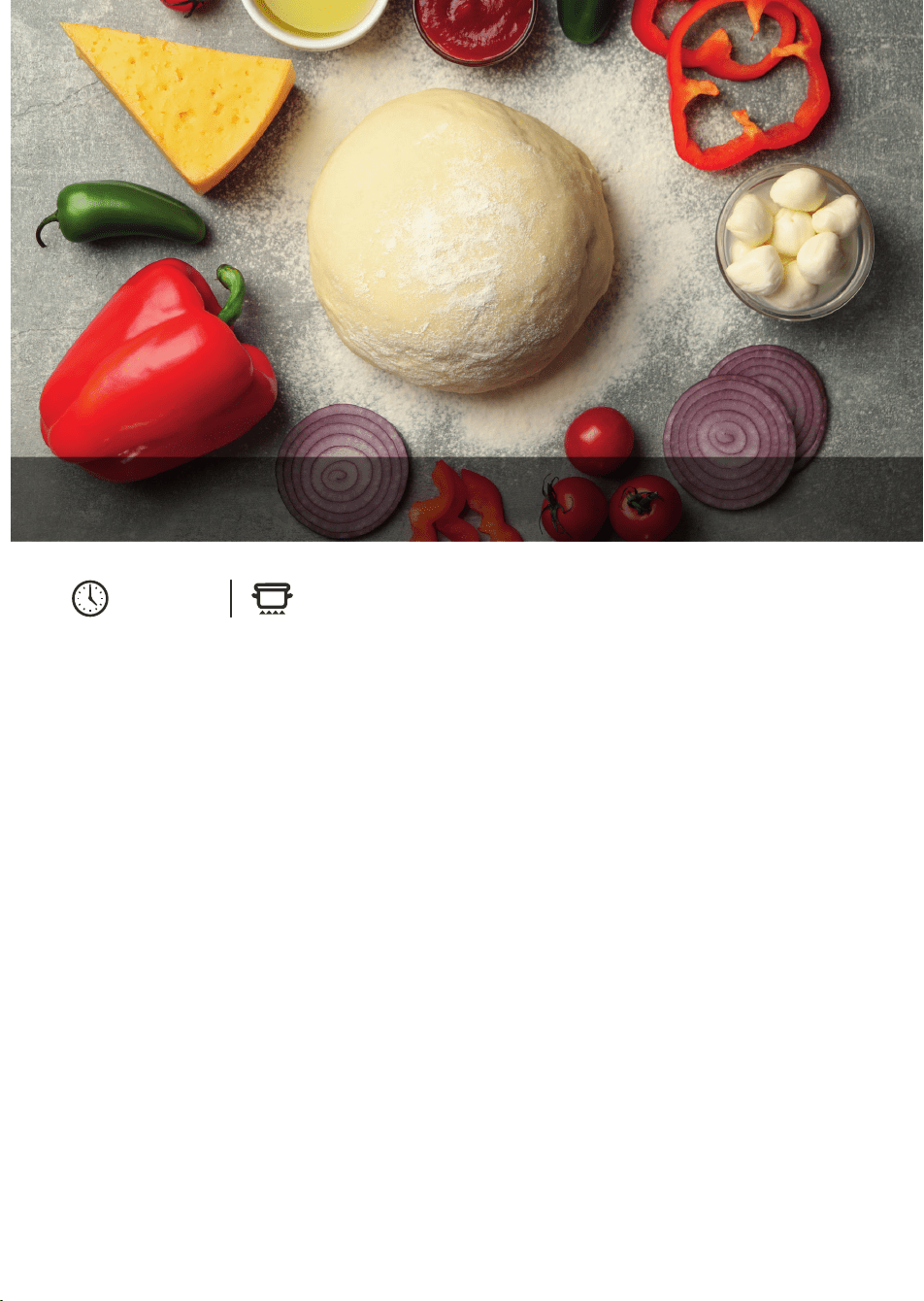
INGREDIENTS
100g of flour
65g of milk
Sugar
Salt
Butter
Yeast
METHOD
1. Beat together 100g of flour and 65g of
milk with a little sugar, salt, butter and
yeast until it forms a dough.
2. Wrap the mixture in cling film and let it
rest for 1 hour.
3. Add a little extra flour and make into a
ball shape.
4. Drizzle with a little oil, then wrap in cling
film and place in the refrigerator for at
least six hours.
5. Before using the dough, let it sit at room
temperature for at least 1 hour after
coming out of the fridge.
6. Add some flour to a working surface and
press the ball into a flat disc shape, with
the preferred thickness of crust.
7. Add the desired toppings and place
directly into the pre-heated oven.
8 HOURS
SEE PIZZA PRE-SET SECTION
HOMEMADE DOUGH FOR 10
"
PIZZA
20
This product is guaranteed for 12
months from the date of original
purchase.
If any defect arises due to faulty
materials of workmanship, the faulty
products must be returned to the place
of purchase.
Refund or replacement is at the
discretion of the retailer.
THE FOLLOWING CONDITIONS APPLY:
The product must be returned to the
retailer with proof of purchase or a
receipt.
The product must be installed and used
in accordance with the instructions
contained in this instruction guide.
It must be used only for domestic
purposes.
It does not cover wear and tear, damage,
misuse or consumable parts.
Tower has limited liability for incidental
or consequential loss or damage.
This guarantee is valid in the UK and
Eire only.
The standard one year guarantee is only
extended to the maximum available
for each particular product upon
registration of the product within 28
days of purchase. If you do not register
the product with us within the 28 day
period, your product is guaranteed for
1 year only.
To validate your extended warranty,
please visit www.towerhousewares.
co.uk and register with us online.
Please note that length of extended
warranty offered is dependent on
product type and that each qualifying
product needs to be registered
individually in order to extend its
warranty past the standard 1 year.
Extended warranty is only valid with
proof of purchase or receipt.
Your warranty becomes void should you
decide to use non Tower spare parts.
Spare parts can be purchased from
www.towerhousewares.co.uk
Or call our Customer Support Team on:
+44 (0) 333 220 6066
We hope you enjoy your appliance for many years...
YEAR
GUARANTEE
3
0224 V3