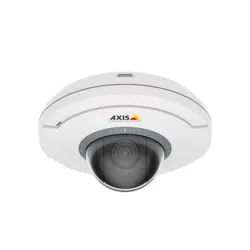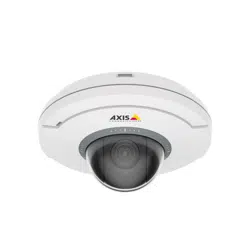


AXISM5000-GPTZCamera
TableofContents
Installation................................................3
Getstarted................................................4
Findthedeviceonthenetwork....................................4
Accessthedevice...............................................4
Webpageoverview..............................................5
Congureyourdevice........................................8
Adjusttheimage................................................8
Adjustthecameraview(PTZ)......................................11
Viewandrecordvideo............................................12
Setuprulesforevents...........................................13
Audio.........................................................17
Cleaningrecommendations...................................18
Learnmore................................................19
Capturemodes.................................................19
Privacymasks..................................................19
Overlays.......................................................20
Pan,tilt,andzoom(PTZ)..........................................20
WirelessI/O(Z-WavePlus
TM
v2)....................................20
Streamingandstorage...........................................24
Applications....................................................26
Troubleshooting............................................28
Resettofactorydefaultsettings...................................28
Firmwareoptions...............................................28
Checkthecurrentrmwareversion.................................
28
Upgradethermware............................................28
Technicalissues,clues,andsolutions................................
29
Performanceconsiderations.......................................
30
Contactsupport.................................................31
Specications..............................................32
Productoverview................................................
32
LEDindicators..................................................
32
SDcardslot....................................................
33
Buttons.......................................................
33
Connectors....................................................
33
2

AXISM5000-GPTZCamera
Installation
Installation
Towatchthisvideo,gotothewebversionofthisdocument.
www.axis.com/products/online-manual/70613#t10177892
Howtoinstalltheproduct
Towatchthisvideo,gotothewebversionofthisdocument.
www.axis.com/products/online-manual/70613#t10177892
Howtoinstalltheproductwithaceilingmount
3

AXISM5000-GPTZCamera
Getstarted
Getstarted
Findthedeviceonthenetwork
TondAxisdevicesonthenetworkandassignthemIPaddressesinWindows®,useAXISIPUtilityorAXISDeviceManager.Both
applicationsarefreeandcanbedownloadedfromaxis.com/support.
FormoreinformationabouthowtondandassignIPaddresses,gotoHowtoassignanIPaddressandaccessyourdevice.
Browsersupport
Youcanusethedevicewiththefollowingbrowsers:
Chrome
TM
Firefox
®
Edge
TM
Safari
®
Windows
®
recommended
recommended
macOS
®
recommendedrecommended
Linux
®
recommendedrecommended
Otheroperatingsystems*
*TouseAXISOSwebinterfacewithiOS15oriPadOS15,gotoSettings Settings
Settings
> >
>
Safari Safari
Safari
> >
>
Advanced Advanced
Advanced
> >
>
Experimental Experimental
Experimental
Features Features
Features
anddisable
NSURLSessionWebsocket.
Ifyouneedmoreinformationaboutrecommendedbrowsers,gotoAXISOSPortal.
Accessthedevice
1.OpenabrowserandentertheIPaddressorhostnameoftheAxisdevice.
IfyoudonotknowtheIPaddress,useAXISIPUtilityorAXISDeviceManagertondthedeviceonthenetwork.
2.Entertheusernameandpassword.Ifyouaccessthedeviceforthersttime,youmustsettherootpassword.SeeSeta
newpasswordfortherootaccountonpage4.
3.Theliveviewpageopensinyourbrowser.
Verifythatnoonehastamperedwiththermware
TomakesurethatthedevicehasitsoriginalAxisrmware,ortotakefullcontrolofthedeviceafterasecurityattack:
1.Resettofactorydefaultsettings.SeeResettofactorydefaultsettingsonpage28.
Afterthereset,securebootguaranteesthestateofthedevice.
2.Congureandinstallthedevice.
Setanewpasswordfortherootaccount
Important
Thedefaultadministratorusernameisroot.Ifthepasswordforrootislost,resetthedevicetofactorydefaultsettings.See
Resettofactorydefaultsettingsonpage28
4

AXISM5000-GPTZCamera
Getstarted
Towatchthisvideo,gotothewebversionofthisdocument.
www.axis.com/products/online-manual/70613#t10098905
Supporttip:Passwordsecurityconrmationcheck
1.Typeapassword.Followtheinstructionsaboutsecurepasswords.SeeSecurepasswordsonpage5.
2.Retypethepasswordtoconrmthespelling.
3.ClickCreatelogin.Thepasswordhasnowbeencongured.
Securepasswords
Important
Axisdevicessendtheinitiallysetpasswordincleartextoverthenetwork.Toprotectyourdeviceaftertherstlogin,set
upasecureandencryptedHTTPSconnectionandthenchangethepassword.
Thedevicepasswordistheprimaryprotectionforyourdataandservices.Axisdevicesdonotimposeapasswordpolicyasthey
maybeusedinvarioustypesofinstallations.
Toprotectyourdatawestronglyrecommendthatyou:
•Useapasswordwithatleast8characters,preferablycreatedbyapasswordgenerator.
•Don’texposethepassword.
•Changethepasswordatarecurringinterval,atleastonceayear.
5
AXISM5000-GPTZCamera
Getstarted
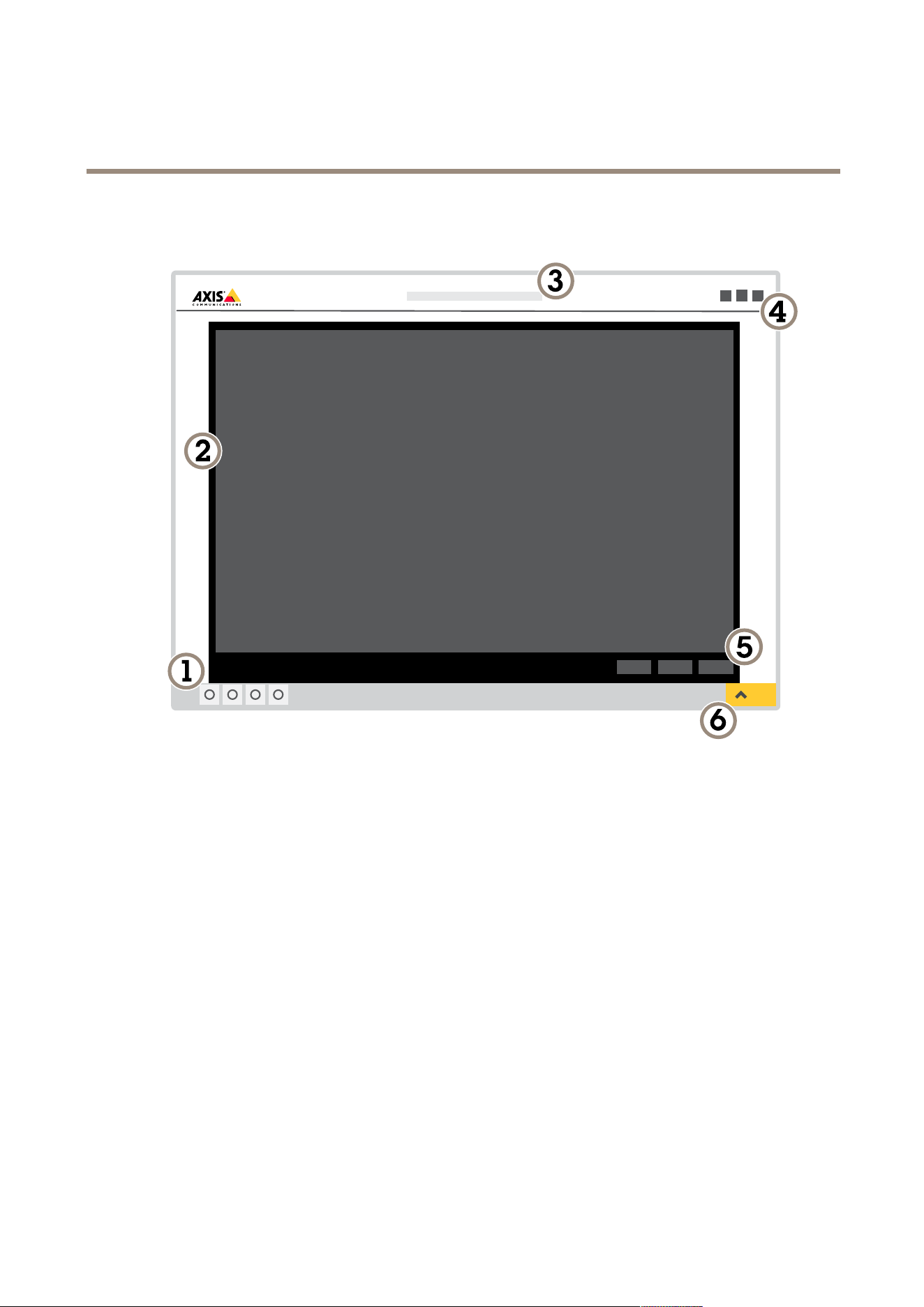
Webpageoverview
1
Liveviewcontrolbar
2
Liveview
3
Productname
4
Userinformation,colorthemes,andhelp
5
Videocontrolbar
6
Settingstoggle
6

AXISM5000-GPTZCamera
Getstarted
7
Settingstabs
7

AXISM5000-GPTZCamera
Configureyourdevice
Configureyourdevice
Adjusttheimage
Thissectionincludesinstructionsaboutconguringyourdevice.Ifyouwanttolearnmoreabouthowcertainfeatureswork,go
toLearnmoreonpage19.
Selectexposuremode
Therearedifferentexposuremodeoptionsinthecamerathatadjustsaperture,shutterspeed,andgaintoimproveimagequalityfor
specicsurveillancescenes.GotoSettings>Image>Exposureandselectbetweenthefollowingexposuremodes:
•Formostusecases,selectAutomaticexposure.
•Forenvironmentswithcertainarticiallighting,forexampleuorescentlighting,selectFlicker-free.
Selectthesamefrequencyasthepowerlinefrequency.
•Forenvironmentswithcertainarticiallightandbrightlight,forexampleoutdoorswithuorescentlightingatnightand
sunduringdaytime,selectFlicker-reduced.
Selectthesamefrequencyasthepowerlinefrequency.
•Tolockthecurrentexposuresettings,selectHoldcurrent.
BenetfromIRlightinlow-lightconditionsusingnightmode
Yourcamerausesvisiblelighttodelivercolorimagesduringtheday.Astheavailablelightdiminishes,youcansetthecamerato
automaticallyshifttonightmode,inwhichthecamerausesbothvisiblelightandnear-infraredlighttodeliverblack-and-white
images.Sincethecamerausesmoreoftheavailablelightitcandeliverbrighter,moredetailed,images.
1.GotoSettings>Image>Dayandnight,andmakesurethattheIRcutlterissettoAuto.
Reducenoiseinlow-lightconditions
Toreducenoiseinlow-lightconditions,youcanadjustoneormoreofthefollowingsettings:
•Adjustthetrade-offbetweennoiseandmotionblur.GotoSettings>Image>ExposureandmovetheBlur-noise
trade-offslidertowardLownoise.
•Settheexposuremodetoautomatic.
Note
Ahighmaxshuttervaluecanresultinmotionblur.
•Toslowdowntheshutterspeed,setmaxshuttertothehighestpossiblevalue.
•Reducesharpnessintheimage.
Note
Whenyoureducethemaxgain,theimagecanbecomedarker.
•Setthemaxgaintoalowervalue.
•Opentheaperture.
Reducemotionblurinlow-lightconditions
Toreducemotionblurinlow-lightconditions,adjustoneormoreofthefollowingsettingsinSettings>Image>Exposure:
8

AXISM5000-GPTZCamera
Configureyourdevice
•MovetheBlur-noisetrade-offslidertowardLowmotionblur.
Note
Whenyouincreasethegain,imagenoisealsoincreases.
•SetMaxshuttertoashortertime,andMaxgaintoahighervalue.
Ifyoustillhaveproblemswithmotionblur:
•Increasethelightlevelinthescene.
•Mountthecamerasothatobjectsmovetowarditorawayfromitratherthansideways.
Handlesceneswithstrongbacklight
Dynamicrangeisthedifferenceinlightlevelsinanimage.Insomecasesthedifferencebetweenthedarkestandthebrightest
areascanbesignicant.Theresultisoftenanimagewhereeitherthedarkorthebrightareasarevisible.Widedynamicrange
(WDR)makesbothdarkandbrightareasoftheimagevisible.
ImagewithoutWDR.
ImagewithWDR.
Note
•WDRcancauseartifactsintheimage.
•WDRmaynotbeavailableforallcapturemodes.
1.GotoSettings>Image>Widedynamicrange.
2.TurnonWDR.
3.UsetheLocalcontrastslidertoadjusttheamountofWDR.
4.Ifyoustillhaveproblems,gotoExposureandadjusttheExposurezonetocovertheareaofinterest.
FindoutmoreaboutWDRandhowtouseitataxis.com/web-articles/wdr.
9

AXISM5000-GPTZCamera
Configureyourdevice
Verifythepixelresolution
Toverifythatadenedpartoftheimagecontainsenoughpixelsto,forexample,recognizethefaceofaperson,youcanusethe
pixelcounter.
1.GotoSettings>System>Orientation.
2.Click
.
3.Inthecamera’sliveview,adjustthesizeandpositionoftherectanglearoundtheareaofinterest,forexamplewhere
youexpectfacestoappear.
Youcanseethenumberofpixelsforeachoftherectangle’ssides(XandY),anddecideifthevaluesareenoughfor
yourneeds.
Hidepartsoftheimagewithprivacymasks
Youcancreateoneorseveralprivacymaskstohidepartsoftheimage.
Towatchthisvideo,gotothewebversionofthisdocument.
www.axis.com/products/online-manual/70613#t10106902
Howtocreateaprivacymask
1.GotoSettings>Privacymask.
2.ClickNew.
3.Adjustthesize,color,andnameoftheprivacymaskaccordingtoyourneeds.
10

AXISM5000-GPTZCamera
Configureyourdevice
Towatchthisvideo,gotothewebversionofthisdocument.
www.axis.com/products/online-manual/70613#t10106902
Howtochangetheappearanceofthemask
Showthepanortiltpositionasatextoverlay
Youcanshowthepanortiltpositionasanoverlayintheimage.
1.GotoSettings>OverlayandclickCreateoverlay.
2.SelectTextandclickCreate.
3.Inthetexteld,type#xtoshowthepanposition.
Type#ytoshowthetiltposition.
4.Chooseappearance,textsize,andalignment.
5.Thecurrentpanandtiltpositionsshowupintheliveviewimageandintherecording.
Adjustthecameraview(PTZ)
Tolearnmoreaboutdifferentpan,tilt,andzoomsettings,seePan,tilt,andzoom(PTZ)onpage20.
Limitthepan,tilt,andzoommovements
Iftherearepartsofthescenethatyoudon’twantthecameratoreach,youcanlimitthepan,tilt,andzoommovements.For
example,youwanttoprotecttheprivacyofresidentsinanapartmentbuilding,whichislocatedclosetoaparkinglotthatyouintend
tomonitor.Tolimitthemovements,gotoSettings>PTZ>Limits.
Createaguardtourwithpresetpositions
Aguardtourdisplaysthevideostreamfromdifferentpresetpositionseitherinapredeterminedorrandomorder,andforcongurable
periodsoftime.
1.GotoSettings>PTZ>Guardtours.
2.Click
.
3.Toedittheguardtour’sproperties,click
.
4.Typeanamefortheguardtourandspecifythepauselengthinminutesbetweeneachtour.
5.Ifyouwanttheguardtourtogotothepresetpositionsinarandomorder,turnonShufe.
6.ClickDone.
7.ClickAddtoaddthepresetpositionsthatyouwantinyourguardtour.
8.ClickDonetoexittheguardtoursettings.
9.Toscheduletheguardtour,gotoSystem>Events.
11

AXISM5000-GPTZCamera
Configureyourdevice
Towatchthisvideo,gotothewebversionofthisdocument.
www.axis.com/products/online-manual/70613#t1011 1157
Viewandrecordvideo
Thissectionincludesinstructionsaboutconguringyourdevice.Tolearnmoreabouthowstreamingandstorageworks,goto
Streamingandstorageonpage24.
Reducebandwidthandstorage
Important
Ifyoureducethebandwidthitcanresultinlossofdetailsinthepicture.
1.GotoliveviewandselectH.264.
2.GotoSettings>Stream.
3.Dooneormoreofthefollowing:
-TurnontheZipstreamfunctionalityandselectthedesiredlevel.
-TurnondynamicGOPandsetahighGOPlengthvalue.
-Increasethecompression.
-TurnondynamicFPS.
Setupnetworkstorage
Tostorerecordingsonthenetwork,youneedtosetupyournetworkstorage.
1.GotoSettings>System>Storage.
2.ClickSetupunderNetworkstorage.
3.EntertheIPaddressofthehostserver.
4.Enterthenameofthesharedlocationonthehostserver.
5.Movetheswitchifthesharerequiresalogin,andenterusernameandpassword.
6.ClickConnect.
Recordandwatchvideo
Torecordvideoyoumustrstsetupnetworkstorage,seeSetupnetworkstorageonpage12,orhaveanSDcardinstalled.
Recordvideo
1.Gototheliveview.
2.Tostartarecording,clickRecord.Clickagaintostoptherecording.
Watchvideo
12

AXISM5000-GPTZCamera
Configureyourdevice
1.ClickStorage>Gotorecordings.
2.Selectyourrecordinginthelistanditwillplayautomatically.
Setuprulesforevents
Youcancreaterulestomakeyourdeviceperformanactionwhencertaineventsoccur.Aruleconsistsofconditionsandactions.
Theconditionscanbeusedtotriggertheactions.Forexample,thedevicecanstartarecordingorsendanemailwhenitdetects
motion,orshowanoverlaytextwhilethedeviceisrecording.
Tolearnmore,checkoutourguideGetstartedwithrulesforevents.
Triggeranaction
1.GotoSettings>System>Eventstosetuparule.Theruledeneswhenthedevicewillperformcertainactions.Rules
canbesetupasscheduled,recurring,orforexample,triggeredbymotiondetection.
2.SelecttheConditionthatmustbemettotriggertheaction.Ifyouspecifymorethanoneconditionfortherule,allofthe
conditionsmustbemettotriggertheaction.
3.SelectwhichActionthedeviceshouldperformwhentheconditionsaremet.
Note
Ifyoumakechangestoanactiverule,youhavetorestarttheruleforthechangestotakeeffect.
Note
Ifyouchangethedenitionofastreamprolethatisusedinarule,youhavetotorestartalltherulesthatusethat
streamprole.
Recordvideowhenthecameradetectsmotion
ThisexampleexplainshowtosetupthecameratostartrecordingtotheSDcardvesecondsbeforeitdetectsmotionandto
stoponeminuteafter.
Towatchthisvideo,gotothewebversionofthisdocument.
www.axis.com/products/online-manual/70613#t10106619
Howtorecordavideostreamwhenthecameradetectsmotion
MakesurethatAXISVideoMotionDetectionisrunning:
1.GotoSettings>Apps>AXISVideoMotionDetection.
2.Starttheapplicationifitisnotalreadyrunning.
3.Makesureyouhavesetuptheapplicationaccordingtoyourneeds.Ifyouneedhelp,seethe
usermanualforAXISVideoMotionDetection4.
Createarule:
13

AXISM5000-GPTZCamera
Configureyourdevice
1.GotoSettings>System>Eventsandaddarule.
2.Typeanamefortherule.
3.Inthelistofconditions,underApplication,selectAXISVideoMotionDetection(VMD).
4.Inthelistofactions,underRecordings,selectRecordvideowhiletheruleisactive.
5.Selectanexistingstreamproleorcreateanewone.
6.Settheprebuffertimeto5seconds.
7.Setthepostbuffertimeto60seconds.
8.Inthelistofstorageoptions,selectSDcard.
9.ClickSave.
Showatextoverlayinthevideostreamwhenthedevicedetectsmotion
Thisexampleexplainshowtodisplaythetext“Motiondetected”whenthedevicedetectsmotion.
Towatchthisvideo,gotothewebversionofthisdocument.
www.axis.com/products/online-manual/70613#t10103832
Howtoshowtextoverlaywhenthecameradetectsmotion
MakesurethatAXISVideoMotionDetectionisrunning:
1.GotoSettings>Apps>AXISVideoMotionDetection.
2.Starttheapplicationifitisnotalreadyrunning.
3.Makesureyouhavesetuptheapplicationaccordingtoyourneeds.
Addtheoverlaytext:
4.GotoSettings>Overlay.
5.Enter#Dinthetexteld.
6.Choosetextsizeandappearance.
Createarule:
7.GotoSystem>Events>Rulesandaddarule.
8.Typeanamefortherule.
9.Inthelistofconditions,selectAXISVideoMotionDetection.
10.Inthelistofactions,selectUseoverlaytext.
14

AXISM5000-GPTZCamera
Configureyourdevice
11.SelectCamera1.
12.Type“Motiondetected”.
13.Settheduration.
14.ClickSave.
DirectthecameratoapresetpositionwhenthewirelessPIRmotionsensordetectsmotion
Note
Theremaybeupto2sdelayfromwhenthemotionisdetectedtowhenthecameratriggerstherule.Considerthislatency
whendecidingthebestplacementoftheproducts.
Addapresetposition:
1.GotoSettings>PTZandsetwhereyouwantthecameratobedirectedbycreatingapresetposition.
CreatearuleforthePIRsensor:
2.GotoSettings>System>Events>Rulesandaddarule.
3.Typeanamefortherule.
4.Inthelistofconditions,selectZ-Waveinput.
5.Select<devicename>-MotionDetected.
6.Inthelistofactions,selectGotopresetposition.
7.Selectavideochannelandthepresetpositionyouwantthecameratogoto.
8.Ifyouwantthecameratoreturntoit’shomepositionwhentheruleisnolongeractive,selectHometimeout.
9.ClickSave.
Torecordvideo,addanadditionalrule:
10.GotoSettings>System>Events>Rulesandaddarule.
11.Typeanamefortherule.
12.Inthelistofconditions,selectPTZpresetpositionreached.
13.Inthelistofactions,selectRecordvideo.
14.Selectanexistingstreamproleorcreateanewone.
15.Settheprebufferto5seconds.
16.Setthepostbufferto60seconds.
17.SelectSDcardfromthelistofstorageoptions.
18.ClickSave.
Useaudiotodeterintruders
Thisexampleexplainshowtoconnectaspeakertothecameraandsetituptoplayawarningmessagewhenthecameradetects
motioninarestrictedarea.
Requiredhardware:
•Activespeakerwithbuilt-inamplierandconnectingwires
15

AXISM5000-GPTZCamera
Configureyourdevice
NO NO
NO
TICE TICE
TICE
Makesurethecameraisdisconnectedfrompowerbeforemakingtheconnections.Reconnecttopowerafterconnectingthe
wires.
Physicalconnection:
1.Connecttheaudiowiretothespeakerfromthelineoutpinoftheaudioconnector.
2.ConnectthegroundingwiretothespeakerfromtheGNDpinoftheaudioconnector.
Addaudiocliptothecamera:
1.GotoSettings>Audio>Outputandclick
.
2.ClickUploadnewclip.
3.BrowsetolocateyouraudioclipandclickDone.
Createarule:
Towatchthisvideo,gotothewebversionofthisdocument.
www.axis.com/products/online-manual/70613#t10114259
1.Openthedevicewebpageforthecamera.
2.GotoSettings>System>Events.
3.GotoRecipientsandaddarecipient.
3.1GotothedevicewebpageofthespeakerthathastheaudioclipstoredonitsSDcard.
3.2Copyalinktotheaudioclip.
3.3Returntothedevicewebpageofthecamera.
4.GotoRulesandaddanewrule:
4.1UnderCondition,selectVideomotiondetection.
4.2UnderAction,selectSendnoticationthroughHTTP.
Recordvideowhenthecameradetectsimpact
Shockdetectionallowsthecameratodetecttamperingcausedbyvibrationsorshock.Vibrationsduetotheenvironmentortoan
objectcantriggeranactiondependingontheshocksensitivityrange,whichcanbesetfrom0to100.Inthisscenario,someoneis
throwingrocksatthecameraafterhoursandyouwouldliketogetavideoclipoftheevent.
Turnonshockdetection:
1.GotoSettings>System>Detectors.
16

AXISM5000-GPTZCamera
Configureyourdevice
2.Turnonshockdetection,andsetavaluefortheshocksensitivity.
Createarule:
1.GotoSettings>System>Eventsandaddarule.
2.Typeanamefortherule.
3.Inthelistofconditions,underDevicestatus,selectShockdetected.
4.Click
toaddasecondcondition.
5.Inthelistofconditions,underScheduledandrecurring,selectScheduledevent.
6.Inthelistofschedules,selectAfterhours.
7.Inthelistofactions,underRecordings,selectRecordvideowhiletheruleisactive.
8.SelectaCamera.
9.Settheprebuffertimeto5seconds.
10.Setthepostbuffertimeto60seconds.
11.Selectwheretosavetherecordings.
12.ClickSave.
Audio
Addaudiotoyourrecording
Turnonaudio:
1.GotoSettings>AudioandturnonAllowaudio.
2.GotoInput>Typeandselectyouraudiosource.
Editthestreamprolewhichisusedfortherecording:
3.GotoSettings>StreamandclickStreamproles.
4.SelectthestreamproleandclickAudio.
5.SelectthecheckboxandselectInclude.
6.ClickSave.
7.ClickClose.
17

AXISM5000-GPTZCamera
Cleaningrecommendations
Cleaningrecommendations
NO NO
NO
TICE TICE
TICE
Neveruseharshdetergent,forexamplegasoline,benzene,oracetone.
1.Useacanofcompressedairtoremoveanydustorloosedirtfromthedevice.
2.Ifnecessary,cleanthelenswithasoftclothdampenedwithlukewarmwater.
Note
Avoidcleaningindirectsunlightoratelevatedtemperatures,asthismaycausestainswhenthewaterdropletsdry.
18
AXISM5000-GPTZCamera
Learnmore
Learnmore
Capturemodes
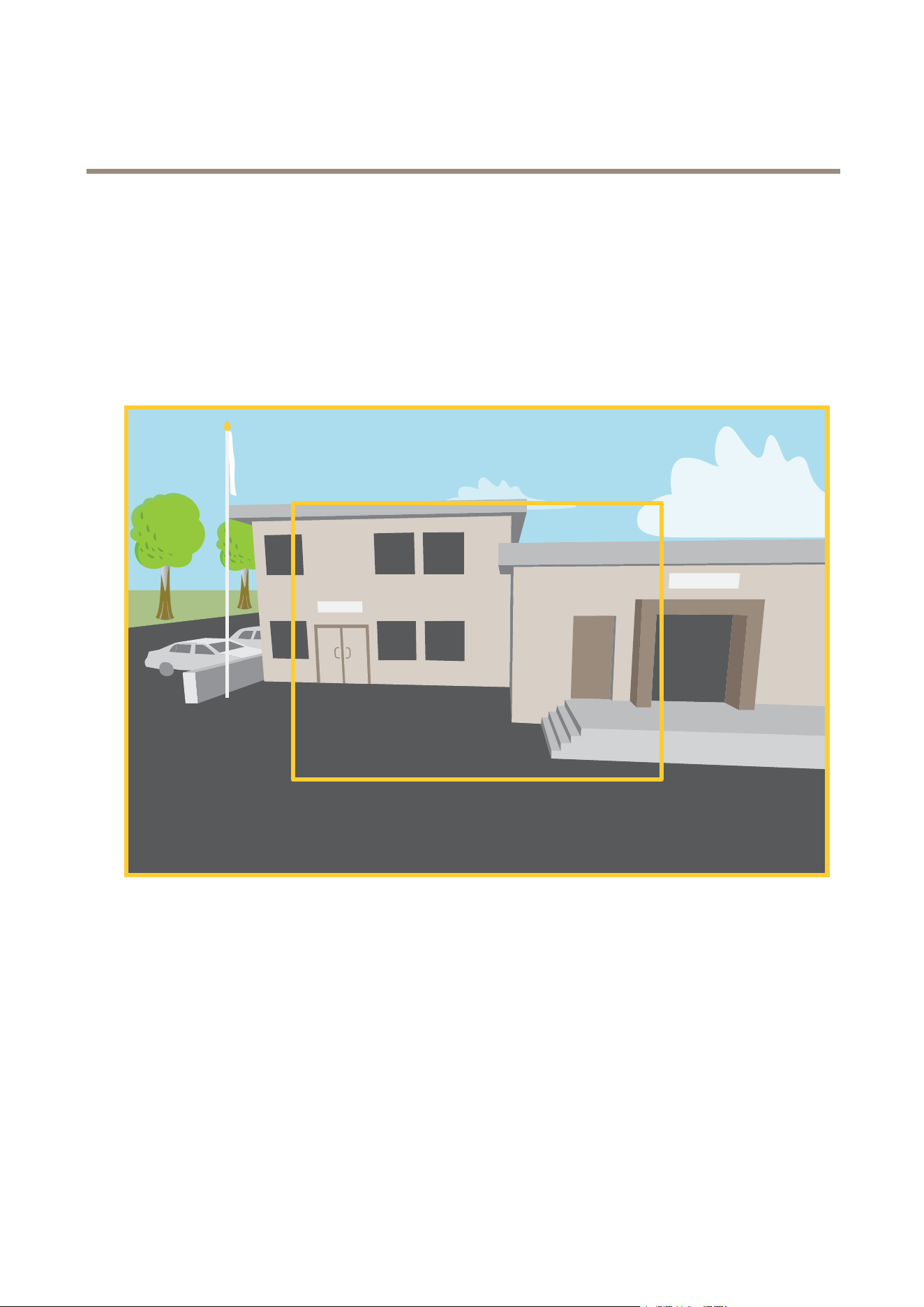
Acapturemodeisapresetcongurationthatdeneshowthecamerawillcaptureimages.Thecapturemodesettingcanaffectthe
camera’seldofviewandaspectratio.Theshutterspeedcanalsobeaffected,whichinturnwillaffectthelightsensitivity.
Thelowerresolutioncapturemodemaybesampledfromtheoriginalresolution,oritmaybecroppedoutfromtheoriginal,in
whichcasetheeldofviewmayalsobeaffected.
Theimageshowshowtheeldofviewandaspectratiocanchangebetweentwodifferentcapturemodes.
Thecapturemodetochoosedependsontherequirementsfortheframerateandresolutionforthespecicsurveillancesetup.For
specicationsaboutavailablecapturemodes,seetheproduct’sdatasheetataxis.com.
Privacymasks
Aprivacymaskisauser-denedareathatpreventsusersfromviewingapartofthemonitoredarea.Inthevideostream,privacy
masksappearasblocksofsolidcolor.
Theprivacymaskisrelativetothepan,tilt,andzoomcoordinates,soregardlessofwhereyoupointthecamera,theprivacy
maskcoversthesameplaceorobject.
You’llseetheprivacymaskonallsnapshots,recordedvideo,andlivestreams.
19

AXISM5000-GPTZCamera
Learnmore
YoucanusetheVAPIX®applicationprogramminginterface(API)toturnofftheprivacymasks.
Important
Ifyouusemultipleprivacymasksitmayaffecttheproduct’sperformance.
Overlays
Overlaysaresuperimposedoverthevideostream.Theyareusedtoprovideextrainformationduringrecordings,suchasatimestamp,
orduringproductinstallationandconguration.Youcanaddeithertextoranimage.
Pan,tilt,andzoom(PTZ)
Guardtours
Aguardtourdisplaysthevideostreamfromdifferentpresetpositionseitherinapredeterminedorrandomorder,andforcongurable
periodsoftime.Oncestarted,aguardtourcontinuestorununtilstopped,evenwhentherearenoclients(webbrowsers)viewingthe
images.
WirelessI/O(Z-WavePlus
TM
v2)
ThisisasecurityenabledZ-WavePlus
TM
v2productthatcanuseencryptedZ-WavePlusv2messagestocommunicatewithsecurity
enabledZ-WavePlusv2devices.TheproductcanbeoperatedinanyZ-Wave
®
networkwithcompatibleZ-Wavecertieddevicesfrom
othermanufacturers.Toincreasethenetworkreliability,allnon-batteryoperatedZ-Wavedevicesinthenetworkactasrepeaters
regardlessofvendor.ThisproductactsasthecontroldeviceandtheZ-Wavedevicesaddedtoitactassecondarydevices.
Considerations
BeforeusingwirelessI/OwithZ-WavePlusv2,considerthefollowing:
•YouneedtobeanadministratortodotheZ-Wavecongurations.
•WhenperformingZ-Waverelatedactionsontheproduct’swebpage,suchasadding,removingandreplacingZ-Wave
devicesorresettingtheZ-Wavenetwork,werecommendthatyoudonotreloadthepageormoveawayfromitwhenthe
actionprocessisongoing.Ifdone,theaction’sactualanddisplayedstatusesmaydiffer.Torecover,youmayneedtowait
uptoseveralminutesandthenreloadthepageagain.
•Replication,i.e.copyingnetworkinformationtoanothercontroldevice,isexecutedaspartoftheinclusionprocess.
•ThisproductignoresallcommandsintheBasicCommandClass.
•Ifthenetworkprimarycontrollerismissingorotherwiseinoperable,youneedtoresettofactorydefaultsettingsfromthe
product’swebpage.Todothis,gotoSettings>System>Maintenance>Reset,andclickDefault.
Associations
•Thisproductsupportsoneassociationgroupwithgroupidentier=1(LifeLine).
•Maximumnumberofdevicesthatcanbeaddedtotheassociationgroup=1.
•Groupidentier1isusedtosendtheDeviceResetLocallyreport.
Commandclasses
Thisproductsupportsthefollowingcommandclasses:
•COMMAND_CLASS_APPLICATION_STATUS
•COMMAND_CLASS_ASSOCIATION_V3(secured)
20

AXISM5000-GPTZCamera
Learnmore
•COMMAND_CLASS_ASSOCIATION_GRP_INFO_V3(secured)
•COMMAND_CLASS_CRC_16_ENCAP
•COMMAND_CLASS_DEVICE_RESET_LOCALLY(secured)
•COMMAND_CLASS_FIRMWARE_UPDATE_MD_V5(secured)
•COMMAND_CLASS_INCLUSION_CONTROLLER
•COMMAND_CLASS_INDICATOR_V3(secured)
•COMMAND_CLASS_MANUFACTURER_SPECIFIC_V2(secured)
•COMMAND_CLASS_MULTI_CHANNEL_ASSOCIATION_V4(secured)
•COMMAND_CLASS_MULTI_CMD
•COMMAND_CLASS_NETWORK_MANAGEMENT_BASIC_V2(secured)
•COMMAND_CLASS_NETWORK_MANAGEMENT_INCLUSION_V4(secured)
•COMMAND_CLASS_NETWORK_MANAGEMENT_INSTALLATION_MAINTENANCE_V4(secured)
•COMMAND_CLASS_NETWORK_MANAGEMENT_PROXY_V4(secured)
•COMMAND_CLASS_NODE_PROVISIONING(secured)
•COMMAND_CLASS_POWERLEVEL(secured)
•COMMAND_CLASS_SECURITY
•COMMAND_CLASS_SECURITY_2
•COMMAND_CLASS_SUPERVISION
•COMMAND_CLASS_TIME
•COMMAND_CLASS_TRANSPORT_SERVICE_V2
•COMMAND_CLASS_VERSION_V3(secured)
•COMMAND_CLASS_ZWAVEPLUS_INFO_V2(secured)
Note
TheproductsupportsCOMMAND_CLASS_INDICATOR_V3,howeverthereisnovisibleindicator.
TurnonZ-Wave
1.GotoSettings>System>Z-Wave.
2.GotoGatewaysettingswirelessI/OandturnonZ-Wave.YoumayneedtowaitforafewminutesforZ-Waveto
becomeactive.
AddaZ-Wavedevice
ThoughnotlimitedbytheZ-WavePlusv2protocol,yourproduct’seventsystemallowsyoutoaddZ-Wavedevicesatanygiventime.
Ifthemaximumnumberisreached,youneedtoremoveaZ-Wavedevicebeforeyoucanaddanewone.Seetheproduct’sdatasheet
forinformationaboutmaximumnumberofZ-Wavedevices.
1.GotoSettings>System>Z-Wave.
2.GotoDevicemanagementandclick
.TheproductstartslookingforZ-WavedevicesintheZ-Wavenetwork.
21

AXISM5000-GPTZCamera
Learnmore
3.SettheZ-Wavedevicetobeaddedintoinclusion/exclusionmodeasdescribedinitsUserManual.
4.Ifrequested,enterthePINdeliveredwiththeZ-Wavedevice,andclickOK.
5.Waituntiltheaddingprocessisnalizedasindicatedbyanoticationonthewebpage.
TheaddedZ-Wavedeviceisnowvisibleinthedevicemanagementlist.
Note
IftheZ-Wavedeviceisnotfound,theaddingprocessisterminatedautomatically.
ToseethedetailedstatusinformationoftheaddedZ-Wavedevice,expandthedeviceinformationinthedevicemanagementlist.
Note
StatusinformationforanaddedZ-Wavedevicevariesdependingonthedevicetype.Formoreinformation,seetheonline
help
.
YoucansettheproducttotriggerruleswithspeciedZ-Wavetriggerconditions.TheavailableZ-Waveconditionsandactionsvary
dependingontheaddedZ-Wavedevicetype.
AddaZ-WavedevicewithSmartStartinclusion
YoucanaddaZ-WavedevicetotheZ-WavenetworkwithSmartStartinclusion.AZ-WavedeviceaddedtotheSmartStartlistis
automaticallyaddedtothedevicemanagementlistwithin10minutesofbeingpoweredoninthenetworkvicinity.
1.GotoSettings>System>Z-Wave.
2.GotoSmartStartandclick
.
3.Typethedevicespecickeyandanyoptionalinformation.
4.ClickOK.
RemoveaZ-Wavedevicethroughinclusion/exclusionmode
Note
Thisistherecommendedremovalprocedure.
1.GotoSettings>System>Z-Wave.
2.GotoDevicemanagementandclick
.TheproductstartslookingforZ-WavedevicesintheZ-Wavenetwork.
3.SettheZ-Wavedevicetoberemovedintoinclusion/exclusionmodeasdescribedinitsUserManual.
4.Waituntiltheremovalprocessisnalizedasindicatedbyanoticationonthewebpage.
TheZ-Wavedeviceisnowremovedfromthedevicemanagementlist.
Note
Allproduct-relatedinformationintheremovedZ-Wavedeviceisdeleted.
Note
IftheZ-Wavedeviceisnotfound,theremovalprocessisterminatedautomatically.
22

AXISM5000-GPTZCamera
Learnmore
RemoveaZ-Wavedevicethroughforcedprocess
Theremaybeacommunicationfail,forexampleduetodrainedbattery,soyoumaynotbeabletoremovetheZ-Wavedeviceby
settingittoinclusion/exclusionmode.YoucanperformaforcedremovalofaZ-WavedevicethatshowsstatusDowninthe
devicemanagementlist.
1.GotoSettings>System>Z-Wave.
2.GotoDevicemanagementandexpandthedeviceinformationfortheZ-Wavedevicetoberemoved.
3.GotoNode>Statusandclick
.
4.Waituntiltheexclusionprocessisnalizedasindicatedbyanoticationonthewebpage.
TheZ-Wavedeviceisnowremovedfromthedevicemanagementlist.
Note
Allproduct-relatedinformationintheremovedZ-Wavedeviceisretained.
RemoveaZ-WavedevicefromtheSmartStartlist
Note
AZ-WavedevicewillnotberemovedfromthedevicemanagementlistifyouremoveitfromtheSmartStartlist.
1.GotoSettings>System>Z-Wave.
2.GotoSmartStart.
3.Click
nexttotheZ-WavedevicetoberemovedfromtheSmartStartlist.
ReplaceaZ-Wavedevice
Theremaybeacommunicationfail,forexampleduetoafaultyZ-Wavedevice,andyouwanttoreplacethedevicewithanotherone.
YoucanperformaforcedreplacementofaZ-WavedevicethatshowsstatusDowninthedevicemanagementlist.
1.GotoSettings>System>Z-Wave.
2.GotoDevicemanagementandexpandthedeviceinformationfortheZ-Wavedevicetobereplaced.
3.GotoNode>Statusandclick
.TheproductstartslookingforZ-WavedevicesintheZ-Wavenetwork.
4.SettheZ-Wavedevicethatistoreplacetheexistingdeviceintoinclusion/exclusionmodeasdescribedinitsUserManual.
5.Waituntilthereplacementprocessisnalizedasindicatedbyanoticationonthewebpage.
ThenewZ-Wavedevicewithsomestatusinformationisnowvisibleinthedevicemanagementlist.
Note
NodeIDandeventactioninformationishandedovertothenewZ-Wavedevice.Allotherinformationisdeleted.
Note
IftheZ-Wavedeviceisnotfound,thereplacementprocessisterminatedautomatically.
23

AXISM5000-GPTZCamera
Learnmore
ResettheZ-Wavenetwork
Important
•ThisprocedureremovesallZ-Wavedevicesfromtheproduct.
•AfterresettingtheZ-Wavenetwork,youalsoneedtoeitherremoveeachZ-Wavedeviceorresetittofactorydefault
beforeyoucanaddittoanynetworkagain.
•Usethisprocedureonlywhenthenetworkprimarycontrollerismissingorotherwiseinoperable.
1.GotoSettings>System>Z-Wave.
2.GotoDevicemanagementandclick
.
3.ClickOKtoconrmthereset.
AlladdedZ-Wavedevicesarenowremovedfromtheproduct,andthedevicemanagementlistisempty.
UseZ-WaveasI/O
Thisproductdoesn’thaveanyphysicalI/Oconnectors,butyoucanuseZ-WavefunctionsintheI/Ointerface.
YoucanassignanI/OportnumbertouptoamaximumofsixconnectedZ-Wavedevices.Toseetheportnumbers,gotoSettings>
System>I/Oports.TheI/OportnumbercanbechangedintheZ-Wavedevice’sinformationwindow.
Whenusedasadigitalinputportevent,theZ-Wavedevicecanonlyuseonefunction.Thedefaultfunctiondependsonwhattypeof
deviceitis.Tochangewhichfunctiontouse,gotothedevice’sinformationwindow.
FormoreinformationaboutusingI/Oports,seetheproduct'sbuilt-inhelp.
Streamingandstorage
Videocompressionformats
Decidewhichcompressionmethodtousebasedonyourviewingrequirements,andonthepropertiesofyournetwork.The
availableoptionsare:
MotionJPEG
MotionJPEG,orMJPEG,isadigitalvideosequencethatismadeupofaseriesofindividualJPEGimages.Theseimagesarethen
displayedandupdatedataratesufcienttocreateastreamthatshowsconstantlyupdatedmotion.Fortheviewertoperceivemotion
videotheratemustbeatleast16imageframespersecond.Fullmotionvideoisperceivedat30(NTSC)or25(PAL)framespersecond.
TheMotionJPEGstreamusesconsiderableamountsofbandwidth,butprovidesexcellentimagequalityandaccesstoeveryimage
containedinthestream.
H.264orMPEG-4Part10/AVC
Note
H.264isalicensedtechnology.TheAxisproductincludesoneH.264viewingclientlicense.Toinstalladditionalunlicensed
copiesoftheclientisprohibited.Topurchaseadditionallicenses,contactyourAxisreseller.
H.264can,withoutcompromisingimagequality,reducethesizeofadigitalvideolebymorethan80%comparedtotheMotion
JPEGformatandbyasmuchas50%comparedtoolderMPEGformats.Thismeansthatlessnetworkbandwidthandstoragespace
arerequiredforavideole.Orseenanotherway,highervideoqualitycanbeachievedforagivenbitrate.
HowdoImage,Stream,andStreamprolesettingsrelatetoeachother?
TheImagetabcontainscamerasettingsthataffectallvideostreamsfromtheproduct.Ifyouchangesomethinginthistab,it
immediatelyaffectsallvideostreamsandrecordings.
24

AXISM5000-GPTZCamera
Learnmore
TheStreamtabcontainssettingsforvideostreams.Yougetthesesettingsifyourequestavideostreamfromtheproductanddon’t
specifyforexampleresolution,orframerate.WhenyouchangethesettingsintheStreamtab,itdoesn’taffectongoingstreams,but
itwilltakeeffectwhenyoustartanewstream.
TheStreamprolessettingsoverridethesettingsfromtheStreamtab.Ifyourequestastreamwithaspecicstreamprole,the
streamcontainsthesettingsofthatprole.Ifyourequestastreamwithoutspecifyingastreamprole,orrequestastreamprole
thatdoesn'texistintheproduct,thestreamcontainsthesettingsfromtheStreamtab.
Bitratecontrol
Bitratecontrolhelpsyoutomanagethebandwidthconsumptionofyourvideostream.
Variablebitrate(VBR)
Variablebitrateallowsthebandwidthconsumptiontovarydependingonthelevelofactivityinthescene.Themoreactivity,
themorebandwidthyouneed.Withvariablebitrateyouareguaranteedconstantimagequality,butyouneedtomakesure
youhavestoragemargins.
Maximumbitrate(MBR)
Maximumbitrateletsyousetatargetbitratetohandlebitratelimitationsinyoursystem.Youmightseeadeclineinimagequalityor
framerateastheinstantaneousbitrateiskeptbelowthespeciedtargetbitrate.Youcanchoosetoprioritizeeitherimagequality
orframerate.Werecommendthatyoucongurethetargetbitratetoahighervaluethantheexpectedbitrate.Thisgivesyoua
marginincasethereisahighlevelofactivityinthescene.
1
Targetbitrate
Averagebitrate(ABR)
Withaveragebitrate,thebitrateisautomaticallyadjustedoveralongerperiodoftime.Thisissoyoucanmeetthespeciedtarget
andprovidethebestvideoqualitybasedonyouravailablestorage.Bitrateishigherinsceneswithalotofactivity,comparedtostatic
scenes.Youaremorelikelytogetbetterimagequalitywheninsceneswithalotofactivityifyouusetheaveragebitrateoption.You
25

AXISM5000-GPTZCamera
Learnmore
candenethetotalstoragerequiredtostorethevideostreamforaspeciedamountoftime(retentiontime)whenimagequalityis
adjustedtomeetthespeciedtargetbitrate.Specifytheaveragebitratesettingsinoneofthefollowingways:
•Tocalculatetheestimatedstorageneed,setthetargetbitrateandtheretentiontime.
•Tocalculatetheaveragebitrate,basedonavailablestorageandrequiredretentiontime,usethetargetbitratecalculator.
kbit/s
s
1
2
1
Targetbitrate
2
Actualaveragebitrate
Youcanalsoturnonmaximumbitrateandspecifyatargetbitratewithintheaveragebitrateoption.
kbit/s
s
1
2
1
Targetbitrate
2
Actualaveragebitrate
Applications
AXISCameraApplicationPlatform(ACAP)isanopenplatformthatenablesthirdpartiestodevelopanalyticsandotherapplications
forAxisproducts.Tondoutmoreaboutavailableapplications,downloads,trialsandlicenses,gotoaxis.com/applications.
TondtheusermanualsforAxisapplications,gotohelp.axis.com.
Note
•Severalapplicationscanrunatthesametimebutsomeapplicationsmightnotbecompatiblewitheachother.Certain
combinationsofapplicationsmightrequiretoomuchprocessingpowerormemoryresourceswhenruninparallel.Verify
thattheapplicationsworktogetherbeforedeployment.
26

AXISM5000-GPTZCamera
Learnmore
Important
AXIS3DPeopleCounterisanapplicationthatisembeddedinthedevice.Wedon’trecommendyoutorunanyother
applicationsonthisdevicesinceitcanaffecttheperformanceoftheAXIS3DPeopleCounter.
Towatchthisvideo,gotothewebversionofthisdocument.
www.axis.com/products/online-manual/70613#t10001688
Howtodownloadandinstallanapplication
Towatchthisvideo,gotothewebversionofthisdocument.
www.axis.com/products/online-manual/70613#t10001688
Howtoactivateanapplicationlicencecodeonadevice
27

AXISM5000-GPTZCamera
Troubleshooting
Troubleshooting
Resettofactorydefaultsettings
Important
IfyouhaveaZ-Wavenetwork,youmustresettheZ-Wavenetworkbeforeresettingyourdevicetofactorydefault.SeeReset
theZ-Wavenetworkonpage24.
Important
Resettofactorydefaultshouldbeusedwithcaution.Aresettofactorydefaultresetsallsettings,includingtheIPaddress,to
thefactorydefaultvalues.
Note
ThecamerahasbeenpreconguredwithAXISLicensePlateVerier.Ifyouresettofactorydefault,youneedtoreinstall
thelicensekey.See.
Toresettheproducttothefactorydefaultsettings:
1.Disconnectpowerfromtheproduct.
2.Pressandholdthecontrolbuttonwhilereconnectingpower.SeeProductoverviewonpage32.
3.Keepthecontrolbuttonpressedfor15–30secondsuntilthestatusLEDindicatorashesamber.
4.Releasethecontrolbutton.TheprocessiscompletewhenthestatusLEDindicatorturnsgreen.Theproducthasbeenreset
tothefactorydefaultsettings.IfnoDHCPserverisavailableonthenetwork,thedefaultIPaddressis192.168.0.90.
5.UsetheinstallationandmanagementsoftwaretoolstoassignanIPaddress,setthepassword,andaccessthedevice.
Theinstallationandmanagementsoftwaretoolsareavailablefromthesupportpagesonaxis.com/support.
Youcanalsoresetparameterstofactorydefaultthroughthedevice’swebpage.GotoMaintenance>Factorydefaultandclick
Default.
Firmwareoptions
Axisoffersproductrmwaremanagementaccordingtoeithertheactivetrackorthelong-termsupport(LTS)tracks.Beingonthe
activetrackmeanscontinuouslygettingaccesstoallthelatestproductfeatures,whiletheLTStracksprovideaxedplatformwith
periodicreleasesfocusedmainlyonbugxesandsecurityupdates.
Usingrmwarefromtheactivetrackisrecommendedifyouwanttoaccessthenewestfeatures,orifyouuseAxisend-to-endsystem
offerings.TheLTStracksarerecommendedifyouusethird-partyintegrations,whicharenotcontinuouslyvalidatedagainstthelatest
activetrack.WithLTS,theproductscanmaintaincybersecuritywithoutintroducinganysignicantfunctionalchangesoraffecting
anyexistingintegrations.FormoredetailedinformationaboutAxisproductrmwarestrategy,gotoaxis.com/support/rmware.
Checkthecurrentrmwareversion
Firmwareisthesoftwarethatdeterminesthefunctionalityofnetworkdevices.Whenyoutroubleshootaproblem,werecommend
youtostartbycheckingthecurrentrmwareversion.Thelatestrmwareversionmightcontainacorrectionthatxesyour
particularproblem.
Tocheckthecurrentrmware:
1.Gotothedeviceinterface>Status.
2.SeethermwareversionunderDeviceinfo.
28

AXISM5000-GPTZCamera
Troubleshooting
Upgradethermware
Important
Preconguredandcustomizedsettingsaresavedwhenyouupgradethermware(providedthatthefeaturesareavailablein
thenewrmware)althoughthisisnotguaranteedbyAxisCommunicationsAB.
Important
Makesurethedeviceremainsconnectedtothepowersourcethroughouttheupgradeprocess.
Note
Whenyouupgradethedevicewiththelatestrmwareintheactivetrack,theproductreceivesthelatestfunctionality
available.Alwaysreadtheupgradeinstructionsandreleasenotesavailablewitheachnewreleasebeforeyouupgradethe
rmware.Tondthelatestrmwareandthereleasenotes,gotoaxis.com/support/rmware.
1.Downloadthermwareletoyourcomputer,availablefreeofchargeataxis.com/support/rmware.
2.Logintothedeviceasanadministrator.
3.GotoMaintenance>FirmwareupgradeandclickUpgrade.
Whentheupgradehasnished,theproductrestartsautomatically.
YoucanuseAXISDeviceManagertoupgrademultipledevicesatthesametime.Findoutmoreat
axis.com/products/axis-device-manager.
Technicalissues,clues,andsolutions
Ifyoucan’tndwhatyou’relookingforhere,trythetroubleshootingsectionataxis.com/support.
Problemsupgradingthermware
FirmwareupgradefailureIfthermwareupgradefails,thedevicereloadsthepreviousrmware.Themostcommonreason
isthatthewrongrmwarelehasbeenuploaded.Checkthatthenameofthermwarele
correspondstoyourdeviceandtryagain.
Problemsafterrmware
upgrade
Ifyouexperienceproblemsafterarmwareupgrade,rollbacktothepreviouslyinstalledversion
fromtheMaintenancepage.
ProblemssettingtheIPaddress
Thedeviceislocatedona
differentsubnet
IftheIPaddressintendedforthedeviceandtheIPaddressofthecomputerusedtoaccessthe
devicearelocatedondifferentsubnets,youcannotsettheIPaddress.Contactyournetwork
administratortoobtainanIPaddress.
TheIPaddressisbeingused
byanotherdevice
DisconnecttheAxisdevicefromthenetwork.Runthepingcommand(inaCommand/DOSwindow,
typepingandtheIPaddressofthedevice):
•Ifyoureceive:Replyfrom<IPaddress>:bytes=32;time=10...
thismeansthattheIPaddressmayalreadybeinusebyanotherdeviceonthenetwork.
ObtainanewIPaddressfromthenetworkadministratorandreinstallthedevice.
•Ifyoureceive:Requesttimedout,thismeansthattheIPaddressisavailable
forusewiththeAxisdevice.Checkallcablingandreinstallthedevice.
PossibleIPaddressconict
withanotherdeviceonthe
samesubnet
ThestaticIPaddressintheAxisdeviceisusedbeforetheDHCPserversetsadynamicaddress.
ThismeansthatifthesamedefaultstaticIPaddressisalsousedbyanotherdevice,theremay
beproblemsaccessingthedevice.
29

AXISM5000-GPTZCamera
Troubleshooting
Thedevicecan’tbeaccessedfromabrowser
Can’tlogin
WhenHTTPSisenabled,ensurethatthecorrectprotocol(HTTPorHTTPS)isusedwhenattempting
tologin.Youmayneedtomanuallytypehttporhttpsinthebrowser’saddresseld.
Ifthepasswordfortheuserrootislost,thedevicemustberesettothefactorydefaultsettings.
SeeResettofactorydefaultsettingsonpage28.
TheIPaddresshasbeen
changedbyDHCP
IPaddressesobtainedfromaDHCPserveraredynamicandmaychange.IftheIPaddresshasbeen
changed,useAXISIPUtilityorAXISDeviceManagertolocatethedeviceonthenetwork.Identify
thedeviceusingitsmodelorserialnumber,orbytheDNSname(ifthenamehasbeencongured).
Ifrequired,astaticIPaddresscanbeassignedmanually.Forinstructions,gotoaxis.com/support.
Certicateerrorwhenusing
IEEE802.1X
Forauthenticationtoworkproperly,thedateandtimesettingsintheAxisdevicemustbe
synchronizedwithanNTPserver.GotoSystem>Dateandtime.
Thedeviceisaccessiblelocallybutnotexternally
Toaccessthedeviceexternally,werecommendyoutouseoneofthefollowingapplicationsforWindows
®
:
•AXISCompanion:freeofcharge,idealforsmallsystemswithbasicsurveillanceneeds.
•AXISCameraStation:30-daytrialversionfreeofcharge,idealforsmalltomid-sizesystems.
Forinstructionsanddownload,gotoaxis.com/vms.
Problemswithstreaming
MulticastH.264only
accessiblebylocalclients
Checkifyourroutersupportsmulticasting,orifyouneedtoconguretheroutersettingsbetween
theclientandthedevice.YoumightneedtoincreasetheTTL(TimeToLive)value.
NomulticastH.264
displayedintheclient
CheckwithyournetworkadministratorthatthemulticastaddressesusedbytheAxisdevice
arevalidforyournetwork.
Checkwithyournetworkadministratortoseeifthereisarewallthatpreventsviewing.
PoorrenderingofH.264
images
Ensurethatyourgraphicscardusesthelatestdriver.Youcanusuallydownloadthelatestdrivers
fromthemanufacturer’swebsite.
Colorsaturationisdifferent
inH.264andMotionJPEG
Modifythesettingsforyourgraphicsadapter.Gototheadapter’sdocumentationformore
information.
Lowerframeratethan
expected
•SeePerformanceconsiderationsonpage30.
•Reducethenumberofapplicationsrunningontheclientcomputer.
•Limitthenumberofsimultaneousviewers.
•Checkwiththenetworkadministratorthatthereisenoughbandwidthavailable.
•Lowertheimageresolution.
•Logintothedevice’swebpageandsetacapturemodethatprioritizesframerate.If
youchangethecapturemodetoprioritizeframerateitmightlowerthemaximum
resolution,dependingonthedeviceusedandcapturemodesavailable.
Performanceconsiderations
Whensettingupyoursystem,itisimportanttoconsiderhowvarioussettingsandsituationsaffecttheperformance.Somefactors
affecttheamountofbandwidth(thebitrate)required,otherscanaffecttheframerate,andsomeaffectboth.Iftheloadonthe
CPUreachesitsmaximum,thisalsoaffectstheframerate.
Thefollowingfactorsarethemostimportanttoconsider:
•Highimageresolutionorlowercompressionlevelsresultinimagescontainingmoredatawhichinturnaffectsthe
bandwidth.
•RotatingtheimageintheGUIwillincreasetheproduct'sCPUload.
30

AXISM5000-GPTZCamera
Troubleshooting
•AccessbylargenumbersofMotionJPEGorunicastH.264clientsaffectsthebandwidth.
•Simultaneousviewingofdifferentstreams(resolution,compression)bydifferentclientsaffectsbothframerateand
bandwidth.
Useidenticalstreamswhereverpossibletomaintainahighframerate.Streamprolescanbeusedtoensurethat
streamsareidentical.
•AccessingMotionJPEGandH.264videostreamssimultaneouslyaffectsbothframerateandbandwidth.
•Heavyusageofeventsettingsaffectstheproduct’sCPUloadwhichinturnaffectstheframerate.
•UsingHTTPSmayreduceframerate,inparticularifstreamingMotionJPEG.
•Heavynetworkutilizationduetopoorinfrastructureaffectsthebandwidth.
•Viewingonpoorlyperformingclientcomputerslowersperceivedperformanceandaffectsframerate.
•RunningmultipleAXISCameraApplicationPlatform(ACAP)applicationssimultaneouslymayaffecttheframerateand
thegeneralperformance.
Contactsupport
Contactsupportataxis.com/support.
31

AXISM5000-GPTZCamera
Specifications
Specifications
Productoverview
1
Networkconnector(PoE)
2
Powerconnector
3
Audioconnector
4
SDcardslot(SD/SDHC/SDXCcard)
5
StatusLEDindicator
6
Controlbutton
Howtoremovethedome
32

AXISM5000-GPTZCamera
Specifications
LEDindicators
StatusLED
Indication
Unlit
Connectionandnormaloperation.
GreenShowssteadygreenfor10secondsfornormaloperationafterstartupcompleted.
Amber
Steadyduringstartup.Flashesduringrmwareupgradeorresettofactorydefault.
Amber/RedFlashesamber/redifnetworkconnectionisunavailableorlost.
WirelessLEDIndication
UnlitWiredmode.
GreenSteadyforconnectiontoawirelessnetwork.Flashesfornetworkactivity.
Red
Steadyfornowirelessnetworkconnection.Flasheswhilescanningforwirelessnetworks.
Amber
Steadyorashingduringwirelessnetworkpairing.
SDcardslot
NO NO
NO
TICE TICE
TICE
•RiskofdamagetoSDcard.Donotusesharptools,metalobjects,orexcessiveforcewheninsertingorremovingthe
SDcard.Useyourngerstoinsertandremovethecard.
•Riskofdatalossandcorruptedrecordings.DonotremovetheSDcardwhiletheproductisrunning.UnmounttheSDcard
fromtheproduct’swebpagebeforeremoval.
ThisproductsupportsSD/SDHC/SDXCcards.
ForSDcardrecommendations,seeaxis.com.
SD,SDHC,andSDXCLogosaretrademarksofSD-3CLLC.SD,SDHCandSDXCaretrademarksorregistered
trademarksofSD-3C,LLCintheUnitedStates,othercountriesorboth.
Buttons
Controlbutton
Thecontrolbuttonisusedfor:
•Resettingtheproducttofactorydefaultsettings.SeeResettofactorydefaultsettingsonpage28.
•Connectingtoaone-clickcloudconnection(O3C)serviceovertheinternet.Toconnect,pressandholdthebutton
forabout3secondsuntilthestatusLEDashesgreen.
Connectors
Networkconnector
RJ45EthernetconnectorwithPoweroverEthernet(PoE).
Audioconnector
4-pinterminalblockforaudioinputandoutput.SeeProductoverviewonpage32.
33

AXISM5000-GPTZCamera
Specifications
Foraudioin,theleftchannelisusedfromastereosignal.
PinNotes
AUDIOIN
Microphoneorlinein(mono)
GNDAUDIOINGroundaudioin
AUDIOOUT
Lineaudioout
GNDAUDIOOUTGroundaudioout
Powerconnector
2-pinterminalblockforDCpowerinput.UseaSafetyExtraLowVoltage(SELV)compliantlimitedpowersource(LPS)witheither
aratedoutputpowerlimitedto≤100Woraratedoutputcurrentlimitedto≤5A.
34

UserManualVer.M3.2
AXISM5000-GPTZCamera
Date:June2022
©AxisCommunicationsAB,2021-2022
PartNo.T10169100