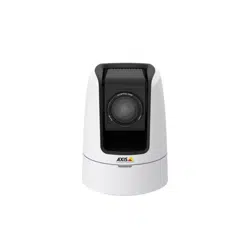

AXISV5914PTZNetworkCamera
UserManual

AboutthisDocument
ThismanualisintendedforadministratorsandusersofAXISV5914
PTZNetworkCamera,andisapplicabletormware5.75andlater.
Itincludesinstructionsforusingandmanagingtheproductonyour
network.Previousexperienceofnetworkingwillbeofusewhenusing
thisproduct.SomeknowledgeofUNIXorLinux-basedsystemsmay
alsobeusefulwhendevelopingshellscriptsandapplications.Later
versionsofthisdocumentwillbepostedatwww.axis.com.Seealsothe
product’sonlinehelp,availablethroughtheweb-basedinterface.
LegalConsiderations
Videoandaudiosurveillancecanberegulatedbylawsthatvaryfrom
countrytocountry.Checkthelawsinyourlocalregionbeforeusing
thisproductforsurveillancepurposes.
Thisproductincludesone(1)H.264decoderlicenseandone(1)AAC
decoderlicense.Topurchasefurtherlicenses,contactyourreseller.
Liability
Everycarehasbeentakeninthepreparationofthisdocument.Please
informyourlocalAxisofceofanyinaccuraciesoromissions.Axis
CommunicationsABcannotbeheldresponsibleforanytechnicalor
typographicalerrorsandreservestherighttomakechangestothe
productandmanualswithoutpriornotice.AxisCommunicationsAB
makesnowarrantyofanykindwithregardtothematerialcontained
withinthisdocument,including,butnotlimitedto,theimplied
warrantiesofmerchantabilityandtnessforaparticularpurpose.Axis
CommunicationsABshallnotbeliablenorresponsibleforincidentalor
consequentialdamagesinconnectionwiththefurnishing,performance
oruseofthismaterial.Thisproductisonlytobeusedforitsintended
purpose.
IntellectualPropertyRights
AxisABhasintellectualpropertyrightsrelatingtotechnologyembodied
intheproductdescribedinthisdocument.Inparticular,andwithout
limitation,theseintellectualpropertyrightsmayincludeoneormore
ofthepatentslistedatwww.axis.com/patent.htmandoneormore
additionalpatentsorpendingpatentapplicationsintheUSandother
countries.
Thisproductcontainslicensedthird-partysoftware.Seethemenuitem
“About”intheproduct’suserinterfaceformoreinformation.
ThisproductcontainssourcecodecopyrightAppleComputer,
Inc.,underthetermsofApplePublicSourceLicense2.0(see
www.opensource.apple.com/apsl).Thesourcecodeisavailablefrom
https://developer.apple.com/bonjour/
EquipmentModications
Thisequipmentmustbeinstalledandusedinstrictaccordancewiththe
instructionsgivenintheuserdocumentation.Thisequipmentcontains
nouser-serviceablecomponents.Unauthorizedequipmentchangesor
modicationswillinvalidateallapplicableregulatorycertications
andapprovals.
TrademarkAcknowledgments
AXISCOMMUNICATIONS,AXIS,ETRAX,ARTPECandVAPIXare
registeredtrademarksortrademarkapplicationsofAxisABinvarious
jurisdictions.Allothercompanynamesandproductsaretrademarksor
registeredtrademarksoftheirrespectivecompanies.
Apple,Boa,Apache,Bonjour,Ethernet,InternetExplorer,Linux,
Microsoft,Mozilla,Real,SMPTE,QuickTime,UNIX,Windows,Windows
VistaandWWWareregisteredtrademarksoftherespectiveholders.
JavaandallJava-basedtrademarksandlogosaretrademarksor
registeredtrademarksofOracleand/oritsafliates.UPnP
TM
isa
certicationmarkoftheUPnP
TM
ImplementersCorporation.
SD,SDHCandSDXCaretrademarksorregisteredtrademarksofSD-3C,
LLCintheUnitedStates,othercountriesorboth.Also,miniSD,microSD,
miniSDHC,microSDHC,microSDXCarealltrademarksorregistered
trademarksofSD-3C,LLCintheUnitedStates,othercountriesorboth.
ThetermsHDMIandHDMIHigh-DenitionMultimediaInterface,and
theHDMILogoaretrademarksorregisteredtrademarksofHDMI
LicensingLLCintheUnitedStatesandothercountries.
RegulatoryInformation
Europe
ThisproductcomplieswiththeapplicableCEmarkingdirectives
andharmonizedstandards:
•ElectromagneticCompatibility(EMC)Directive2004/108/EC.See
ElectromagneticCompatibility(EMC)onpage2.
•LowVoltage(LVD)Directive2006/95/EC.SeeSafetyonpage3.
•RestrictionsofHazardousSubstances(RoHS)Directive2011/65/EU.
SeeDisposalandRecyclingonpage3.
Acopyoftheoriginaldeclarationofconformitymaybeobtainedfrom
AxisCommunicationsAB.SeeContactInformationonpage3.
ElectromagneticCompatibility(EMC)
Thisequipmenthasbeendesignedandtestedtofulllapplicable
standardsfor:
•Radiofrequencyemissionwheninstalledaccordingtothe
instructionsandusedinitsintendedenvironment.
•Immunitytoelectricalandelectromagneticphenomenawhen
installedaccordingtotheinstructionsandusedinitsintended
environment.
USA
Thisequipmenthasbeentestedusinganunshieldednetworkcable
(UTP)andfoundtocomplywiththelimitsforaClassAdigitaldevice,
pursuanttopart15oftheFCCrules.Thisequipmenthasalsobeen
testedusingashieldednetworkcable(STP)andfoundtocomplywith
thelimitsforaClassAdigitaldevice,pursuanttopart15oftheFCC
rules.Theselimitsaredesignedtoprovidereasonableprotectionagainst
harmfulinterferencewhentheequipmentisoperatedinacommercial
environment.Thisequipmentgenerates,uses,andcanradiateradio
frequencyenergyand,ifnotinstalledandusedinaccordancewith
theinstructionmanual,maycauseharmfulinterferencetoradio
communications.Operationofthisequipmentinaresidentialarea
islikelytocauseharmfulinterferenceinwhichcasetheuserwillbe
requiredtocorrecttheinterferenceathisownexpense.
Canada
ThisdigitalapparatuscomplieswithCANICES-3(ClassA).Theproduct
shallbeconnectedusingashieldednetworkcable(STP)thatis
properlygrounded.Cetappareilnumériqueestconformeàlanorme
NMBICES-3(classeA).Leproduitdoitêtreconnectéàl'aided'uncâble
réseaublindé(STP)quiestcorrectementmisàlaterre.
Europe
ThisdigitalequipmentfulllstherequirementsforRFemission
accordingtotheClassAlimitofEN55022.Theproductshallbe
connectedusingashieldednetworkcable(STP)thatisproperly
grounded.Notice!ThisisaClassAproduct.Inadomesticenvironment
thisproductmaycauseRFinterference,inwhichcasetheusermaybe
requiredtotakeadequatemeasures.
Thisproductfulllstherequirementsforimmunityaccording
toEN61000-6-1residential,commercialandlight-industrial
environments.
Thisproductfulllstherequirementsforimmunityaccordingto
EN61000-6-2industrialenvironments.
Thisproductfulllstherequirementsforimmunityaccordingto
EN55024ofceandcommercialenvironments
Australia/NewZealand
ThisdigitalequipmentfulllstherequirementsforRFemission
accordingtotheClassAlimitofAS/NZSCISPR22.Theproductshall
beconnectedusingashieldednetworkcable(STP)thatisproperly
grounded.Notice!ThisisaClassAproduct.Inadomesticenvironment
thisproductmaycauseRFinterference,inwhichcasetheusermaybe
requiredtotakeadequatemeasures.
Japan
この装置は、クラスA情報技術装置です。この装置を家庭環
境で使用すると電波妨害を引き起こすことがあります。この
場合には使用者が適切な対策を講ずるよう要求されることが
あります。本製品は、シールドネットワークケーブル(STP)を
使用して接続してください。また適切に接地してください。
Korea
이기기는업무용(A급)전자파적합기기로서판매자또는사용
자는이점을주의하시기바라며,가정외의지역에서사용하는
것을목적으로합니다.적절히접지된STP(shieldedtwistedpair)
케이블을사용하여제품을연결하십시오.

Safety
ThisproductcomplieswithIEC/EN/UL60950-1,SafetyofInformation
TechnologyEquipment.Ifitsconnectingcablesareroutedoutdoors,
theproductshallbegroundedeitherthroughashieldednetworkcable
(STP)orotherappropriatemethod.
Thepowersupplyusedwiththisproductshallfullltherequirements
forSafetyExtraLowVoltage(SELV)andLimitedPowerSource(LPS)
accordingtoIEC/EN/UL60950-1.
Battery
LowbatterypoweraffectstheoperationoftheRTC,causingittoreset
ateverypower-up.Whenthebatteryneedsreplacing,alogmessage
willappearintheproduct’sserverreport.Formoreinformationabout
theserverreport,seetheproduct´ssetuppagesorcontactAxissupport.
Thebatteryshouldnotbereplacedunlessrequired,butifthebattery
doesneedreplacing,contactAxissupportatwww.axis.com/techsupfor
assistance.
WARNING
•Riskofexplosionifthebatteryisincorrectlyreplaced.
•Replaceonlywithanidenticalbatteryorabatterywhichis
recommendedbyAxis.
•Disposeofusedbatteriesaccordingtolocalregulationsor
thebatterymanufacturer'sinstructions.
DisposalandRecycling
Whenthisproducthasreachedtheendofitsusefullife,disposeof
itaccordingtolocallawsandregulations.Forinformationabout
yournearestdesignatedcollectionpoint,contactyourlocalauthority
responsibleforwastedisposal.Inaccordancewithlocallegislation,
penaltiesmaybeapplicableforincorrectdisposalofthiswaste.
Europe
Thissymbolmeansthattheproductshallnotbedisposedof
togetherwithhouseholdorcommercialwaste.Directive2012/19/EU
onwasteelectricalandelectronicequipment(WEEE)isapplicablein
theEuropeanUnionmemberstates.Topreventpotentialharmto
humanhealthandtheenvironment,theproductmustbedisposed
ofinanapprovedandenvironmentallysaferecyclingprocess.For
informationaboutyournearestdesignatedcollectionpoint,contact
yourlocalauthorityresponsibleforwastedisposal.Businessesshould
contacttheproductsupplierforinformationabouthowtodispose
ofthisproductcorrectly.
ThisproductcomplieswiththerequirementsofDirective201 1/65/EUon
therestrictionoftheuseofcertainhazardoussubstancesinelectrical
andelectronicequipment(RoHS).
China
Thisproductcomplieswiththerequirementsofthelegislative
actAdministrationontheControlofPollutionCausedbyElectronic
InformationProducts(ACPEIP).
ContactInformation
AxisCommunicationsAB
Emdalavägen14
22369Lund
Sweden
Tel:+46462721800
Fax:+4646136130
www.axis.com
Support
Shouldyourequireanytechnicalassistance,pleasecontactyourAxis
reseller.Ifyourquestionscannotbeansweredimmediately,your
resellerwillforwardyourqueriesthroughtheappropriatechannelsto
ensurearapidresponse.IfyouareconnectedtotheInternet,youcan:
•downloaduserdocumentationandsoftwareupdates
•ndanswerstoresolvedproblemsintheFAQdatabase.Search
byproduct,category,orphrase
•reportproblemstoAxissupportstaffbyloggingintoyourprivate
supportarea
•chatwithAxissupportstaff
•visitAxisSupportatwww.axis.com/techsup/
LearnMore!
VisitAxislearningcenterwww.axis.com/academy/forusefultrainings,
webinars,tutorialsandguides.

AXISV5914PTZNetworkCamera
SafetyInformation
SafetyInformation
HazardLevels
DANGER
Indicatesahazardoussituationwhich,ifnotavoided,willresultindeathorseriousinjury.
WARNING
Indicatesahazardoussituationwhich,ifnotavoided,couldresultindeathorseriousinjury.
CAUTION
Indicatesahazardoussituationwhich,ifnotavoided,couldresultinminorormoderateinjury.
NO NO
NO
TICE TICE
TICE
Indicatesasituationwhich,ifnotavoided,couldresultindamagetoproperty.
OtherMessageLevels
Important
Indicatessignicantinformationwhichisessentialfortheproducttofunctioncorrectly.
Note
Indicatesusefulinformationwhichhelpsingettingthemostoutoftheproduct.
4

AXISV5914PTZNetworkCamera
TableofContents
SafetyInformation..........................................4
HazardLevels...................................................4
OtherMessageLevels............................................4
HardwareOverview..........................................7
ConnectorsandButtons..........................................7
LEDIndicators..................................................9
AccesstheProduct..........................................10
AccessfromaBrowser...........................................10
AccessfromtheInternet..........................................10
SettheRootPassword...........................................11
TheLiveViewPage..............................................11
MediaStreams.............................................14
HowtoStreamH.264............................................14
MJPEG........................................................14
AXISMediaControl(AMC)........................................15
AlternativeMethodsofAccessingtheVideoStream....................15
AccessAudioStreams............................................16
AccessfromWindowsApplications.................................16
SetUptheProduct..........................................17
ConnecttheCameratoaHDMIDisplay..............................17
ConnecttheCameratoanSDIDevice...............................17
BasicSetup....................................................17
VideoandAudio............................................18
SetUpVideoStreams............................................18
StreamProles.................................................19
CameraSettings................................................20
Overlay........................................................21
SetUpAudio...................................................23
AudioClips....................................................25
ConguretheLiveViewPage.................................26
PTZ(PanTiltZoom).........................................28
PresetPositions.................................................28
OSDIZones....................................................28
Advanced......................................................29
ControlQueue..................................................30
Detectors..................................................31
AudioDetection................................................31
Applications...............................................32
ApplicationLicenses.............................................32
UploadApplication..............................................32
ApplicationConsiderations........................................32
Events....................................................34
ConvertEventTypestoActionRules................................34
SetUpActionRules.............................................34
AddRecipients..................................................36
CreateSchedules................................................37
SetUpRecurrences..............................................38
Recordings.................................................39
FindRecordings.................................................39
PlayRecording..................................................39
ExportVideoClip................................................40
ContinuousRecording............................................40
Languages.................................................41
SystemOptions.............................................42
Security.......................................................42
Date&Time....................................................44
Network.......................................................45
Storage.......................................................50
Ports&Devices.................................................52
Maintenance...................................................52
Support.......................................................53
5

AXISV5914PTZNetworkCamera
TableofContents
Advanced......................................................54
ResettoFactoryDefaultSettings...................................54
Troubleshooting............................................55
ChecktheFirmware.............................................55
UpgradetheFirmware...........................................55
Symptoms,PossibleCausesandRemedialActions.....................55
TechnicalSpecications......................................58
Connectors....................................................61
PerformanceConsiderations.......................................63
6
AXISV5914PTZNetworkCamera
HardwareOverview
HardwareOverview
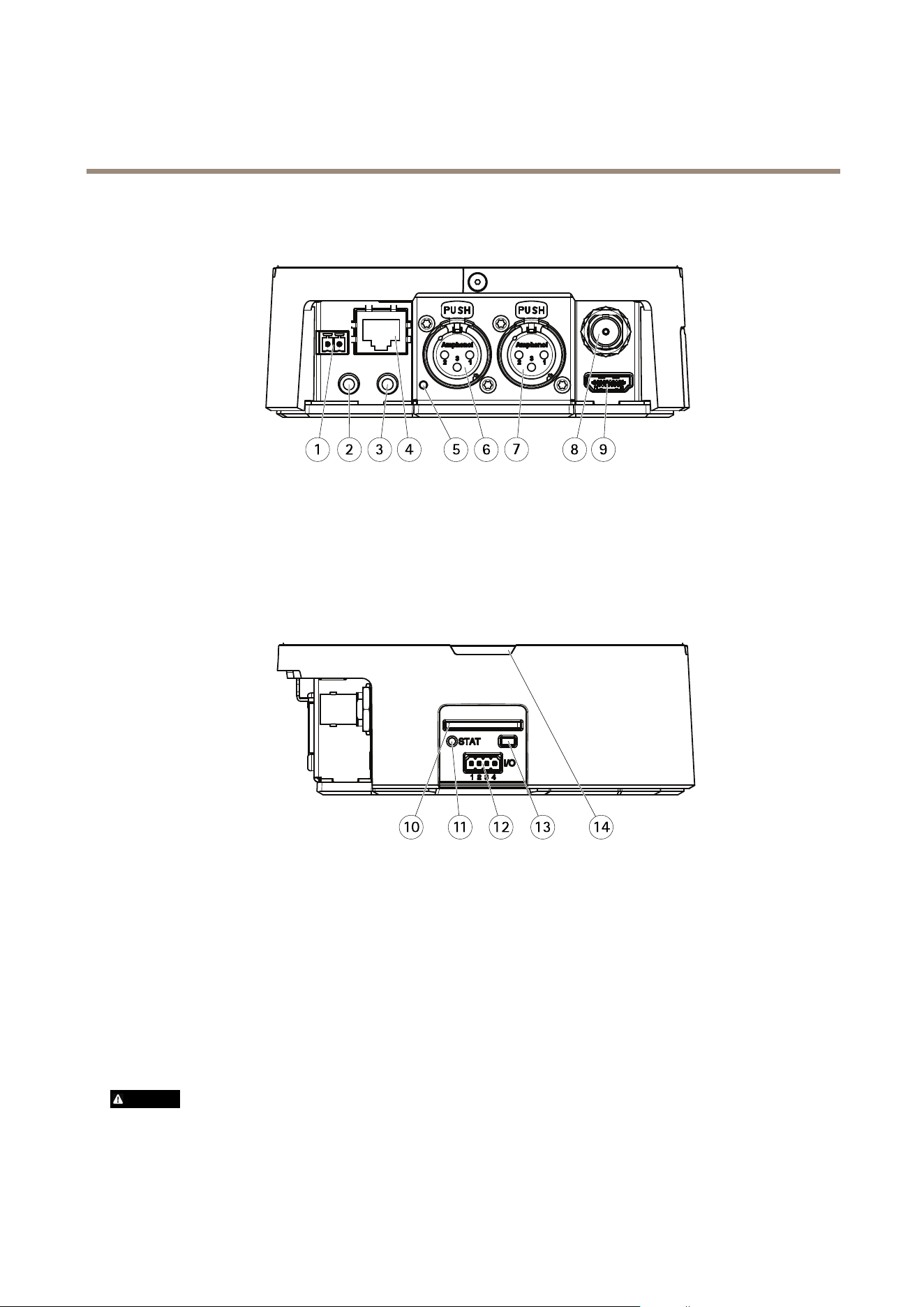
1 2 3 4
5
6
7
8 9
1
Powerconnector
2
3.5mm,unbalancedaudioin
3
3.5mm,unbalancedaudioout
4
Networkconnector
5
MicrophonepowerLED(XLR)
6
XLR,balancedaudioin(left)
7
XLR,balancedaudioin(right)
8
BNCconnector(SDI)
9
HDMIconnector
10 11 12 13 14
10
SDcardslot(SDHC)
11
StatusLEDindicator
12
I/Oconnector
13
Controlbutton
14
TallyLED(3x)
ConnectorsandButtons
Fortechnicalspecications,seepage58.
BNCConnector
TheBNCconnectorisusedforconnectingbroadcastequipmentusingSDI.Connecta75OhmcoaxialSDIcable.
CAUTION
Theconnectormaybehotduringnormaloperationinelevatedambienttemperatures.
7

AXISV5914PTZNetworkCamera
HardwareOverview
HDMIConnector
TheHDMI
TM
Connectorisusedforconnectingtoadisplayormonitor.
NetworkConnector
RJ45Ethernetconnector.
NO NO
NO
TICE TICE
TICE
Duetolocalregulationsortheenvironmentalandelectricalconditionsinwhichtheproductistobeused,ashieldednetwork
cable(STP)maybeappropriateorrequired.Allcablesconnectingtheproducttothenetworkandthatareroutedoutdoors
orindemandingelectricalenvironmentsshallbeintendedfortheirspecicuse.Makesurethatthenetworkdevices
areinstalledinaccordancewiththemanufacturer’sinstructions.Forinformationaboutregulatoryrequirements,see
ElectromagneticCompatibility(EMC)onpage2.
I/OConnector
Usewithexternaldevicesincombinationwith,forexample,tamperingalarms,motiondetection,eventtriggering,timelapserecording
andalarmnotications.Inadditiontothe0VDCreferencepointandpower(DCoutput),theI/Oconnectorprovidestheinterfaceto:
•Digitaloutput–ForconnectingexternaldevicessuchasrelaysandLEDs.Connecteddevicescanbeactivatedbythe
VAPIX®ApplicationProgrammingInterface,outputbuttonsontheLiveViewpageorbyanActionRule.Theoutputwill
showasactive(shownunderSystemOptions>Ports&Devices)ifthealarmdeviceisactivated.
•Digitalinput–Analarminputforconnectingdevicesthatcantogglebetweenanopenandclosedcircuit,forexample:
PIRs,door/windowcontacts,glassbreakdetectors,etc.Whenasignalisreceivedthestatechangesandtheinputbecomes
active(shownunderSystemOptions>Ports&Devices).
PowerConnector
2-pinterminalblockforpowerinput.UseaSafetyExtraLowVoltage(SELV)compliantlimitedpowersource(LPS)witheitherarated
outputpowerlimitedto≤100Woraratedoutputcurrentlimitedto≤5A.
AudioConnector
TheAxisproducthasthefollowingaudioconnectors:
•Audioin–3.5mminputforastereomicrophone,oraline-instereosignal.
•Audioout–3.5mmoutputforaudio(linelevel)thatcanbeconnectedtoapublicaddress(PA)systemoranactivespeaker
withabuilt-inamplier.Apairofheadphonescanalsobeattached.Astereoconnectormustbeusedforaudioout.
•Left–3-pinXLRconnectorforbalancedaudioinput.Useleftconnectorformono.
•Right–3-pinXLRconnectorforbalancedaudioinput.
SDCardSlot
NO NO
NO
TICE TICE
TICE
•RiskofdamagetoSDcard.DonotusesharptoolsorexcessiveforcewheninsertingorremovingtheSDcard.
•Riskofdataloss.Topreventdatacorruption,theSDcardshouldbeunmountedbeforeremoval.Tounmount,gotoSetup>
SystemOptions>Storage>SDCardandclickUnmount.
ThisproductsupportsSD/SDHC/SDXCcards(notincluded).
ForSDcardrecommendations,seewww.axis.com
ControlButton
Forlocationofthecontrolbutton,seeHardwareOverviewonpage7.
8

AXISV5914PTZNetworkCamera
HardwareOverview
Thecontrolbuttonisusedfor:
•Resettingtheproducttofactorydefaultsettings.Seepage54.
•ConnectingtoanAXISVideoHostingSystemservice.Seepage46.Toconnect,pressandholdthebuttonforabout3
secondsuntiltheStatusLEDashesgreen.
•ConnectingtoAXISInternetDynamicDNSService.Seepage46.Toconnect,pressandholdthebuttonforabout3seconds.
LEDIndicators
StatusLED
Indication
Unlit
Connectionandnormaloperation.
GreenShowssteadygreenfor10secondsfornormaloperationafterstartupcompleted.
Amber
Steadyduringstartup.Flashesduringrmwareupgrade.
Amber/RedFlashesamber/redifnetworkconnectionisunavailableorlost.
RedFlashesredforrmwareupgradefailure.
MicrophonepowerLEDIndication
UnlitPhantompoweroff.
BluePhantompoweron.
Note
•ThetallyLEDcanbeconguredtobelitorunlitduringnormaloperation.Tocongure,gotoSetup>SystemOptions>
Ports&Devices>LED.Seetheonlinehelpformoreinformation.
•ThetallyLEDonlyindicatesnetworktransmission.IfvideooraudioisonlytransmittedthroughHDMIorSDIthetallyLED
willbeunlit.
TallyLEDIndication
Unlit
Cameraidle.
RedActivenetworktransmissionorrecording.
9

AXISV5914PTZNetworkCamera
AccesstheProduct
AccesstheProduct
ToinstalltheAxisproduct,seetheInstallationGuidesuppliedwiththeproduct.
Theproductcanbeusedwithmostoperatingsystemsandbrowsers.Therecommendedbrowsersare
•InternetExplorer
®
withWindows
®
•Safari
®
withOSX
®
•Chrome
TM
orFirefox
®
withotheroperatingsystems.
SeeTechnicalSpecicationsonpage58.
ToviewstreamingvideoinInternetExplorer,allowinstallationofAXISMediaControl(AMC)whenprompted.
TheAxisproductincludesone(1)H.264decoderlicenseforviewingvideostreamsandone(1)AACaudiolicense.Thelicensesare
automaticallyinstalledwithAMC.Theadministratorcandisabletheinstallationofthedecoders,topreventinstallationofunlicensed
copies.
Note
•QuickTime
TM
isalsosupportedforviewingH.264streamsandforaudio.
AccessfromaBrowser
1.Startawebbrowser.
2.EntertheIPaddressorhostnameoftheAxisproductinthebrowser’sLocation/Addresseld.
ToaccesstheproductfromaMaccomputer(OSX),gotoSafari,clickonBonjourandselecttheproductfromthe
drop-downlist.
IfyoudonotknowtheIPaddress,useAXISIPUtilitytolocatetheproductonthenetwork.Forinformationabout
howtodiscoverandassignanIPaddress,seethedocumentAssignanIPAddressandAccesstheVideoStreamonAxis
Supportwebatwww.axis.com/techsup
Note
ToshowBonjourasabrowserbookmark,gotoSafari>Preferences.
3.Enteryourusernameandpassword.Ifthisisthersttimetheproductisaccessed,therootpasswordmustrstbe
congured.Forinstructions,seeSettheRootPasswordonpage1 1.
4.Theproduct’sLiveViewpageopensinyourbrowser.
Note
ThecontrolsandlayoutoftheLiveViewpagemayhavebeencustomizedtomeetspecicinstallationrequirementsand
userpreferences.Consequently,someoftheexamplesandfunctionsfeaturedheremaydifferfromthosedisplayedin
yourownLiveViewpage.
AccessfromtheInternet
Onceconnected,theAxisproductisaccessibleonyourlocalnetwork(LAN).ToaccesstheproductfromtheInternetyoumust
congureyournetworkroutertoallowincomingdatatrafctotheproduct.Todothis,enabletheNAT-traversalfeature,which
willattempttoautomaticallyconguretheroutertoallowaccesstotheproduct.ThisisenabledfromSetup>SystemOptions>
Network>TCP/IPAdvanced.
Formoreinformation,seeNATtraversal(portmapping)forIPv4onpage48.SeealsoAXISInternetDynamicDNSServiceat
www.axiscam.net
10

AXISV5914PTZNetworkCamera
AccesstheProduct
ForTechnicalnotesonthisandothertopics,visittheAxisSupportwebatwww.axis.com/techsup
SettheRootPassword
ToaccesstheAxisproduct,youmustsetthepasswordforthedefaultadministratoruserroot.ThisisdoneintheCongureRoot
Passworddialog,whichopenswhentheproductisaccessedforthersttime.
Topreventnetworkeavesdropping,therootpasswordcanbesetviaanencryptedHTTPSconnection,whichrequiresanHTTPS
certicate.HTTPS(HypertextTransferProtocoloverSSL)isaprotocolusedtoencrypttrafcbetweenwebbrowsersandservers.The
HTTPScerticateensuresencryptedexchangeofinformation.SeeHTTPSonpage43.
Thedefaultadministratorusernamerootispermanentandcannotbedeleted.Ifthepasswordforrootislost,theproductmustbe
resettothefactorydefaultsettings.SeeResettoFactoryDefaultSettingsonpage54.
TosetthepasswordviaastandardHTTPconnection,enteritdirectlyinthedialog.
TosetthepasswordviaanencryptedHTTPSconnection,followthesesteps:
1.ClickUseHTTPS.
Atemporarycerticate(validforoneyear)iscreated,enablingencryptionofalltrafctoandfromtheproduct,andthe
passwordcannowbesetsecurely.
2.Enterapasswordandthenre-enterittoconrmthespelling.
3.ClickOK.Thepasswordhasnowbeencongured.
TheLiveViewPage
ThecontrolsandlayoutoftheLiveViewpagemayhavebeencustomizedtomeetspecicinstallationrequirementsanduser
preferences.Consequently,someoftheexamplesandfunctionsfeaturedheremaydifferfromthosedisplayedinyourownLiveView
page.Thefollowingprovidesanoverviewofeachavailablecontrol.
ControlsontheLiveViewPage
ClicktheViewsizebuttonstoshowtheimageinfullsize(rightbutton)ortoscaledowntheimageto
tthebrowserwindow(leftbutton).
SelectastreamprolefortheLiveViewpagefromtheStreamProledrop-downlist.Forinformation
abouthowtocongurestreamproles,seepage19.
ClickPulsetoactivatetheproduct’soutputportforadenedperiodoftime.Forinformationabouthow
toenableandcongureoutputbuttons,seepage27.Theoutputbuttonnamemaydifferdependingon
thenameenteredintheI/OPortsconguration.
ClicktheActive/Inactivebuttonstomanuallyactivateandinactivetheproduct’soutputport.For
informationabouthowtoenableandcongureoutputbuttons,seepage27.
TheManualTriggerbuttonisusedtotriggeranactionrulefromtheLiveViewpage.Forinformation
abouthowtocongureandenablethebutton,seeManualTriggeronpage12.
11

AXISV5914PTZNetworkCamera
AccesstheProduct
ClickSnapshottosaveasnapshotofthevideoimage.Thisbuttonisprimarilyintendedforusewhen
theAXISMediaControlviewertoolbarisnotavailable.EnablethisbuttonfromLiveViewCong>
ActionButtons.
TheAudioclipdrop-downlistallowsyoutoplayanaudioclipfromtheLiveViewpage.Selectthe
audioclipandclickthePlaybutton.
ManualTrigger
TheManualTriggerisusedtotriggeranactionrulefromtheLiveViewpage.Themanualtriggercanforexamplebeusedto
validateactionsduringproductinstallationandconguration.
Tocongurethemanualtrigger:
1.GotoSetup>Events.
2.ClickAddtoaddanewactionrule.
3.FromtheTriggerdrop-downlist,selectInputSignal.
4.Fromtheseconddrop-downlist,selectManualTrigger.
5.Selectthedesiredactionandconguretheothersettingsasrequired.
Formoreinformationaboutactionrules,seeEventsonpage34.
ToshowthemanualtriggerbuttonsintheLiveViewpage:
1.GotoSetup>LiveViewCong.
2.UnderActionButtons,selectShowmanualtriggerbutton.
AXISMediaControlviewertoolbar
TheAXISMediaControlviewertoolbarisavailableinInternetExploreronly.SeeAXISMediaControl(AMC)onpage15formore
information.Thetoolbardisplaysthefollowingbuttons:
ThePlaybuttonconnectstotheAxisproductandstartsplayingamediastream.
TheStopbuttonstopsthemediastream.
TheSnapshotbuttontakesasnapshotofthevideoimage.Thelocationwheretheimageissavedcanbespecied
intheAMCControlPanel.
ClicktheViewFullScreenbuttonandthevideoimagewilllltheentirescreen.PressESC(Escape)onthecomputer
keyboardtocancelfullscreenview.
TheRecordbuttonisusedtorecordthecurrentvideostreamonyourcomputer.Thelocationwheretherecordingissaved
canbespeciedintheAMCControlPanel.EnablethisbuttonfromLiveViewCong>ViewerSettings.
AMCAudioControls
AMCaudiobuttonscontrolthespeakersandmicrophoneconnectedtotheclientcomputer.Thebuttonsareonlyvisiblewhen
audioisenabled.
Forinformationabouthowtocongureaudio,seeSetUpAudioonpage23.
12

AXISV5914PTZNetworkCamera
AccesstheProduct
Speakerbutton—Clicktoturnthespeakersonoroff.
Microphonebutton–Clicktomuteorunmutethemicrophone.InSimplex-speakeronlymode,theMicrophoneandTalk
buttonsmustbothbeactivetosendaudiototheAxisproduct.Clickeitherbuttontostopaudiotransmission.
Usetheslidertocontrolthevolumeofthespeakersandthemicrophone.
Half-duplexmode
TheTalk/Listenbuttonisusedtoswitchbetweensendingandreceivingaudio.Thebuttoncanbecongured
fromtheAudiotabintheAMCControlpanel:
•Push-To-Talkmode:Clickandholdthebuttontotalk/send.Releasethebuttontolisten.
•Togglemode:Clickoncetoswitchbetweentalkingandlistening.
Simplex–speakeronlymode
Tosendaudio,theTalkandMicrophonebuttonsmustbothbeactive.Clickeitherbuttontostopaudio
transmission.
PTZControls
TheLiveViewpagealsodisplaysPan/Tilt/Zoom(PTZ)controls.Theadministratorcanenable/disablecontrolsforspeciedusersunder
SystemOptions>Security>Users.
WiththePTZControlQueueenabledthetimeeachuserisincontrolofthePTZsettingsislimited.Clickthebuttonstorequestor
releasecontrolofthePTZcontrols.ThePTZControlQueueissetupunderPTZ>ControlQueue.
ClicktheEmulatejoystickmodebuttonandclickintheimagetomovethecameraviewinthedirectionofthe
mousepointer.
ClicktheCentermodebuttonandclickintheimagetocenterthecameraviewonthatposition.
Thecentermodebuttoncouldalsobeusedtozoominonaspecicarea.Clickintheimageanddragtodrawa
rectanglesurroundingtheareatobemagnied.Tozoomout,rotatethemousewheel.
ClicktheCtrlpanelbuttontoopenthePTZcontrolpanelwhichprovidesadditionalPTZcontrols.
User-denedbuttonscanalsoappearintheControlpanel.SeeControlsonpage29.
SelectaPTZpresetpositiontosteerthecameraviewtothesavedposition.SeePresetPositions
onpage28.
PanandTiltbars–Usethearrowstopanandtiltthecameraview,orclickonapositiononthebartosteerthecameraviewto
thatposition.
Zoombar–Usethearrowstozoominandout,orclickonapositiononthebartozoomtothatposition.
Focusbar–Usethearrowstofocusthecamera,orclickonapositiononthebartosetthefocusposition.Usingthefocusbarwill
disabletheproduct’sautofocus.Tore-enable,usethePTZcontrolpanelwhichisopenedbyclickingtheCtrlpanelbutton(seeabove).
Irisbar–Clickonapositiontosetamanualexposureleveltomaketheimagebrighterordarker.Thiswilldisableautoiris(automatic
exposure)andsetxedlevelsoniris,gainandshutterspeed.Tore-enableautoiris,usethePTZcontrolpanelwhichisopenedby
clickingtheCtrlpanelbutton(seeabove).Ifautoirisisenabled,AutoisvisiblenexttotheIrisbarbar.
Important
InanenvironmentwithvaryinglightconditionsitisrecommendedtousetheBrightnessbarinsteadoftheIrisbartoadjust
imagebrightnesssincechangingthebrightnesslevelwillnotdisableautoiris(automaticexposure).
Brightnessbar–Clickonapositiononthebrightnessbartoadjusttheimagebrightness.Thissettingwillnotbesaved.Tomakea
savedchange,gotoSetup>Video>CameraSettings>Brightnessandadjustthebrightness.
ThePTZcontrolscanbedisabledunderPTZ>Advanced>Controls,seeControlsonpage29.
13

AXISV5914PTZNetworkCamera
MediaStreams
MediaStreams
TheAxisproductprovidesseveralaudioandvideostreamformats.Yourrequirementsandthepropertiesofyournetworkwill
determinethetypeyouuse.
TheLiveViewpageintheproductprovidesaccesstoH.264andMotionJPEGvideostreams,audiostreamsandtothelistofavailable
streamproles.Otherapplicationsandclientscanaccessvideoandaudiostreamsdirectly,withoutgoingviatheLiveViewpage.
HowtoStreamH.264
H.264can,withoutcompromisingimagequality,reducethesizeofadigitalvideolebymorethan80%comparedwiththeMotion
JPEGformatandasmuchas50%morethantheMPEG-4standard.Thismeansthatmuchlessnetworkbandwidthandstoragespace
arerequiredforavideole.Orseenanotherway,muchhighervideoqualitycanbeachievedforagivenbitrate.
Decidingwhichcombinationofprotocolsandmethodstousedependsonyourviewingrequirements,andonthepropertiesof
yournetwork.TheavailableoptionsinAXISMediaControlare:
UnicastRTP
Thisunicastmethod(RTPoverUDP)isused
forliveunicastvideo,especiallywhenitis
importanttohaveanup-to-datevideostream,
evenifsomeframesaredropped.
RTPoverRTSP
Thisunicastmethod(RTPtunneledoverRTSP)
isusefulasitisrelativelysimpletocongure
rewallstoallowRTSPtrafc.
RTPoverRTSPoverHTTP
Thisunicastmethodcanbeusedtotraverse
rewalls.Firewallsarecommonlyconguredto
allowtheHTTPprotocol,thusallowingRTPto
betunneled.
Unicastingisusedforvideo-on-demand
transmissionsothatthereisnovideotrafc
onthenetworkuntilaclientconnectsand
requeststhestream.
Notethatthereareamaximumof20
simultaneousunicastconnections.
MulticastRTP
Thismethod(RTPoverUDP)shouldbeusedforlivemulticastvideo.Thevideostreamisalways
up-to-date,evenifsomeframesaredropped.
Multicastingprovidesthemostefcientusageofbandwidthwhentherearelargenumbersof
clientsviewingsimultaneously.Amulticastcannothowever,passanetworkrouterunlessthe
routerisconguredtoallowthis.ItisnotpossibletomulticastovertheInternet,forexample.
Notealsothatallmulticastviewerscountasoneunicastviewerinthemaximumtotalof20
simultaneousconnections.
AXISMediaControlnegotiateswiththeAxisproducttodeterminethetransportprotocoltouse.Theorderofpriority,listedinthe
AMCControlPanel,canbechangedandtheoptionsdisabled,tosuitspecicrequirements.
Note
H.264islicensedtechnology.TheAxisproductincludesoneH.264viewingclientlicense.Installingadditionalunlicensed
copiesoftheclientisprohibited.Topurchaseadditionallicenses,contactyourAxisreseller.
MJPEG
ThisformatusesstandardJPEGstillimagesforthevideostream.Theseimagesarethendisplayedandupdatedataratesufcient
tocreateastreamthatshowsconstantlyupdatedmotion.
TheMotionJPEGstreamusesconsiderableamountsofbandwidth,butprovidesexcellentimagequalityandaccesstoeveryimage
containedinthestream.TherecommendedmethodofaccessingMotionJPEGlivevideofromtheAxisproductistousetheAXIS
MediaControlinInternetExplorerinWindows.
Note
ToensuresupportfortheOpusaudiocodec,theMotionJPEGstreamisalwayssentoverRTP.
14
AXISV5914PTZNetworkCamera
MediaStreams
AXISMediaControl(AMC)
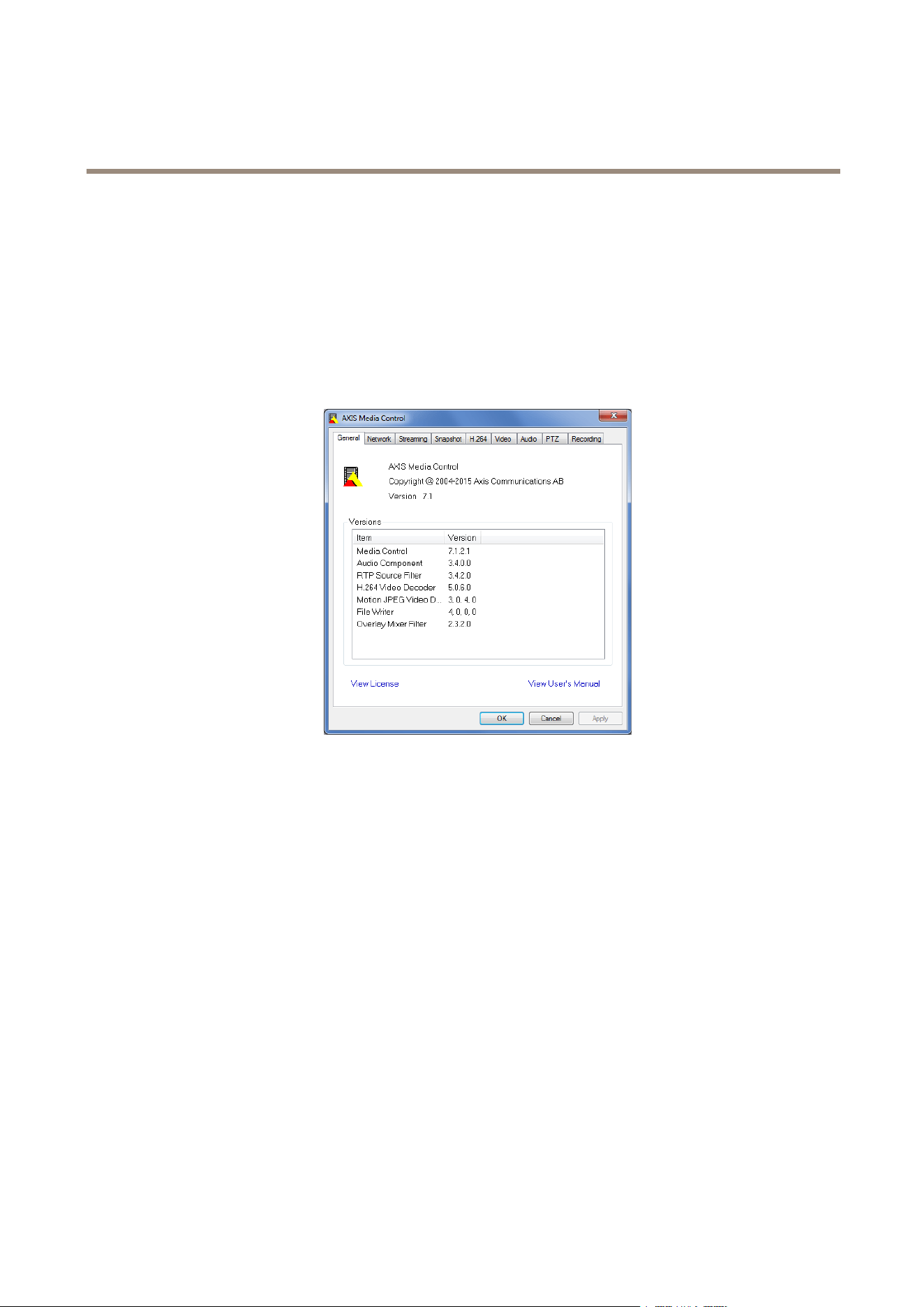
AXISMediaControl(AMC)inInternetExplorerinWindowsistherecommendedmethodofaccessinglivevideofromtheAxisproduct.
TheAMCControlPanelcanbeusedtocongurevariousvideoandaudiosettings.PleaseseetheAXISMediaControlUser’s
Manualformoreinformation.
TheAMCControlPanelisautomaticallyinstalledonrstuse,afterwhichitcanbecongured.OpentheAMCControlPanelfrom:
•WindowsControlPanel(fromtheStartscreenorStartmenu)
•Alternatively,right-clickthevideoimageinInternetExplorerandclickSettings.
AlternativeMethodsofAccessingtheVideoStream
YoucanalsoaccessvideoandimagesfromtheAxisproductinthefollowingways:
•MotionJPEGserverpush(ifsupportedbytheclient,ChromeorFirefox,forexample).ThisoptionmaintainsanopenHTTP
connectiontothebrowserandsendsdataasandwhenrequired,foraslongasrequired.
•StillJPEGimagesinabrowser.Enterthepathhttp://<ip>/axis-cgi/jpg/image.cgi
•WindowsMediaPlayer.ThisrequiresAXISMediaControlandtheH.264decodertobeinstalled.Thefollowingpaths
canbeused:
-UnicastviaRTP:axrtpu://<ip>/axis-media/media.amp
-UnicastviaRTSP:axrtsp://<ip>/axis-media/media.amp
-UnicastviaRTSP,tunneledviaHTTP:axrtsphttp://<ip>/axis-media/media.amp
-Multicast:axrtpm://<ip>/axis-media/media.amp
•QuickTime
TM
.Thefollowingpathscanbeused:
-rtsp://<ip>/axis-media/media.amp
-rtsp://<ip>/axis-media/media.3gp
15

AXISV5914PTZNetworkCamera
MediaStreams
Note
•<ip>=IPaddress
•TheAxisproductsupportsQuickTime6.5.1andlater.
•QuickTimemayaddlatencytothevideostream.
•ItmaybepossibletouseotherplayerstoviewtheH.264streamusingthepathsabove,althoughAxisdoesnotguarantee
this.
AccessAudioStreams
TheLiveViewpageprovidesaccesstoaudiothroughAXISMediaControl;inadditionaudiocanbeaccessedinthefollowingways:
•VAPIX®ApplicationProgrammingInterface(API)Formoreinformation,visitwww.axis.com/developer
•WindowsMediaPlayersupportssimplexaudio.Thefollowingpathscanbeused:
-UnicastviaRTP:axrtpu://<ip>/axis-media/media.amp
-UnicastviaRTSP:axrtsp://<ip>/axis-media/media.amp
-UnicastviaRTSP,tunneledviaHTTP:axrtsphttp://<ip>/axis-media/media.amp
-Multicast:axrtpm://<ip>/axis-media/media.amp
•QuickTime
TM
supportsG.71 1andAACaudioencoding.Thefollowingpathscanbeused:
-rtsp://<ip>/axis-media/media.amp
-rtsp://<ip>/axis-media/media.3gp
AccessfromWindowsApplications
AXISStreamingAssistantisanapplicationthatmakesvideoandaudiostreamsfromanAxiscameraaccessibleinstreaming
applicationssuchasSkypeorAdobeFlashMediaLiveEncoder.
AxisStreamingAssistantcanbedownloadedfreeofchargefromwww.axis.com/support/downloads
WhenAXISStreamingAssistantisinstalledonacomputer,itautomaticallydiscoversanyAxisproductonthenetwork.Thevideoand
audiostreamsfromthecamerascanthenbeusedinothersoftwareapplications.Mostapplicationsthatcanintegrateexternalvideo
andaudiostreamsaresupported,butaudiostreamingrequiresAdobeFlashMediaLiveEncoderorMicrosoftExpressionEncoder.
AXISStreamingAssistantsupportsstreamsfrommultiplecameras.TheH.264compressionenablesoptimizationofbandwidthby
signicantlyreducingthebitrate.WithAXISStreamingAssistantyoucaneasilysetupawiderangeofbroadcastingsolutionssuch
aslivepromotionfromahotel,videoconferencingandreal-timetrafcmonitoring.
Seetheonlinehelpformoreinformation.
16

AXISV5914PTZNetworkCamera
SetUptheProduct
SetUptheProduct
TheAxisproductcanbeconguredbyuserswithadministratororoperatorrights.Toopentheproduct’sSetuppages,clickSetupin
thetopright-handcorneroftheLiveViewpage.
•Administratorshaveunrestrictedaccesstoallsettings.
•Operatorshaverestrictedaccesstosettings,seeUsersonpage42
Seealsotheonlinehelp
.
ConnecttheCameratoaHDMIDisplay
ThecameracanbeconnectedtoaHDMIdisplayandtransmitaudioandvideotothatdisplaywithouttheneedforanetwork
connection.
Ifthedisplaysupportsthemaximumresolutionofthecamera,justconnectthedisplaywithoutadjustinganysettings.
Ifthedisplay’smaximumresolutiondoesnotmatchthatofthecamera,thecapturemodeinthecamerahastobechangedto
matchtheresolutionofthedisplay.
GotoSetup>VideoandAudio>CameraSettingsandselectacapturemodethatmatchesthedisplay.
Note
Onlycapturemodescontainingthetext(HDMI)canbeusedwiththeHDMIconnector.
ConnecttheCameratoanSDIDevice
ThecameracanbeconnectedtoanSDIdeviceandwilltransmitaudioandvideotothatdevicewithouttheneedforanetwork
connection.
GotoSetup>VideoandAudio>CameraSettingsandselectacapturemodewiththedesiredresolutionandframerate.
BasicSetup
BasicSetupprovidesshortcutstothesettingsthatshouldbemadebeforeusingtheAxisproduct:
1.Users.Seepage42.
2.TCP/IP.Seepage45.
3.Date&Time.Seepage44.
4.VideoStream.Seepage18.
5.AudioSettings.Seepage23.
TheBasicSetupmenucanbedisabledfromSystemOptions>Security>Users.
17

AXISV5914PTZNetworkCamera
VideoandAudio
VideoandAudio
Thevideoandaudiosettingscanbeusedtooptimizevideoandaudioquality.Youcancongurethefollowing:
•Videostreamsettings.Seepage18.
•Streamproles.Seepage19.
•Camerasettings.Seepage20.
•Overlayimage.Seepage21.
•Audiosettings.Seepage23.
•Audioclips.Seepage25.
SetUpVideoStreams
Tosetuptheproduct’svideostreams,gotoVideo&Audio>VideoStream.
Thevideostreamsettingsaredividedintothefollowingtabs:
•Image.Seepage18.
•Audio.Seepage23.
•H.264.Seepage19.
•MJPEG.Seepage19.
PixelCounter
Thepixelcountershowsthenumberofpixelsinanareaoftheimage.Thepixelcounterisusefulinsituationswherethereis
aspecicsizerequirement,forexampleinfacerecognition.
Thepixelcountercanbeused:
•Whensettingupavideostream,seeSetUpVideoStreamsonpage18.UnderPreview,clickOpenandselecttheShow
pixelcounteroptiontoenabletherectangleintheimage.Usethemousetomoveandresizetherectangle,orenterthe
numberofpixelsintheWidthandHeighteldsandclickApply.
•WhenaccessingtheLiveViewpageinInternetExplorerwithAXISMediaControl(AMC)inWindows.Right-clickinthe
imageandselectPixelcounter.Usethemousetomoveandresizetherectangle.
Image
ThedefaultimagesettingscanbeconguredunderVideo&Audio>VideoStream.SelecttheImagetab.
Thefollowingsettingsareavailable:
•Resolution.Selectthedefaultresolution.
•Compression.Thecompressionlevelaffectstheimagequality,bandwidthandlesizeofsavedimages;thelowerthe
compression,thehighertheimagequalitywithhigherbandwidthrequirementsandlargerlesizes.
Note
VideostreamsoverHDMIcanonlyberotated180°or0°.
18

AXISV5914PTZNetworkCamera
VideoandAudio
•Maximumframerate.Toavoidbandwidthproblems,theframerateallowedtoeachviewercanbeLimitedtoaxed
amount.Alternatively,theframeratecanbesetasUnlimited,whichmeanstheAxisproductalwaysdeliversthehighest
frameratepossibleunderthecurrentconditions.
•Overlaysettings.SeeOverlayonpage21.
ClickSavetoapplythenewsettings.
H.264
H.264,alsoknownasMPEG-4Part10/AVC,isavideocompressionstandardthatprovideshighqualityvideostreamsatlowbitrates.
AnH.264videostreamconsistsofdifferenttypesofframessuchasI-framesandP-frames.AnI-frameisacompleteimagewhereas
P-framesonlycontainthedifferencesfrompreviousframes.
TheH.264streamsettingscanbeconguredfromtheVideo&Audio>VideoStreampage.SelecttheH.264tab.Thesettings
denedinthispagewillapplytoallH.264streamsthatdonotuseastreamprole.
TheGOPlengthisthenumberofframesbetweentwoconsecutiveI-frames.IncreasingtheGOPlengthmaysaveconsiderablyon
bandwidthrequirementsinsomecases,butmayalsohaveanadverseaffectonimagequality.
TheAxisproductsupportsthefollowingH.264prole(s):
•Baseline.TheBaselineproleisrecommendedforclientsthatdon’tsupportCABACentropycoding.
•Main.TheMainproleprovideshighercompressionwithmaintainedvideoqualitycomparedtotheBaselineprolebut
requiresmoreprocessingpowertodecode.
•High.TheHighproleprovidesreducedbitrateandhighercompressionwithmaintainedvideoqualitycomparedtothe
Mainprolebutrequiresmoreprocessingpowertodecode.
ThebitratecanbesetasVariablebitrate(VBR)orMaximumbitrate(MBR).VBRadjuststhebitrateaccordingtotheimage
complexity,usingupmorebandwidthforincreasedactivityintheimage,andlessforlowerimageactivity.Whentheactivityin
thesceneincreases,thebitratewouldusuallyincreaseaswell.Ifthereisasurplusinbandwidth,thismaynotbeanissueand
selectingVariablebitrate(VBR)willbesufcient.Butifbandwidthislimited,itisrecommendedtocontrolthebitratebyselecting
Maximumbitrate(MBR).Whentheactivityinthesceneincreases,VBRadjuststhebitrateaccordingtothecomplexity,usingup
morebandwidthforincreasedactivityinthescene,andlessforlowersceneactivity.MBRallowsyoutosetatargetbitratethat
limitsthebandwidthconsumption.
TheMBRtargetbitrateworksliketheceilingofatent.Itlimitsthebitrate,whilemaintainingsomeexibility.Thebitrate
maybounceupanddownwithinthesettargetbutwhenitnearsthesettargetvalue,thelimitationkicksin.However,because
MBRwillalwaysprioritizeacontinuousvideostream,itallowstemporaryovershootsfromthetargetbitrate.Becausesettinga
targetvaluepreventsthebitratefromincreasing,framerateandimagequalityareaffectednegatively.Topartlycompensatefor
this,selectwhichvariableshallbeprioritized,framerateorimagequality.Notsettingaprioritymeansthatframerateand
imagequalityareequallyaffected.
Thecurrentbitratecanbesettoappearastextoverlay.UnderOverlaySettings,selectIncludetextandenterthemodier
#bintheeld.
Toapplythesettings,clickSave.
MJPEG
Sometimestheimagesizeislargeduetolowlightorcomplexscenery.Adjustingthemaximumframesizehelpstocontrolthe
bandwidthandstorageusedbytheMotionJPEGvideostreaminthesesituations.SettingtheframesizetotheDefaultsetting
providesconsistentlygoodimagequalityattheexpenseofincreasedbandwidthandstorageusageinlowlight.Limitingtheframe
sizeoptimizesbandwidthandstorageusage,butmaygivepoorimagequality.Topreventincreasedbandwidthandstorageusage,
themaximumframesizeshouldbesettoanoptimalvalue.
StreamProles
Astreamproleisasetofpredenedstreamsettingsincludingresolution,compression,framerateandoverlaysettings.Stream
prolescanbeused:
19

AXISV5914PTZNetworkCamera
VideoandAudio
•Whensettinguprecordingusingactionrules.SeeEventsonpage34.
•Whensettingupcontinuousrecording.SeeContinuousRecordingonpage40.
•IntheLiveViewpage–selectthestreamprolefromtheStreamproledrop-downlist.
Forquicksetup,useoneofthepredenedstreamproles.Eachpredenedprolehasadescriptivename,indicatingitspurpose.If
required,thepredenedstreamprolescanbemodiedandnewcustomizedstreamprolescanbecreated.
Tocreateanewproleormodifyanexistingprole,gotoSetup>Video&Audio>StreamProles.
ToselectadefaultstreamprolefortheLiveViewpage,gotoSetup>LiveViewCong.
CameraSettings
TheVideo&Audio>CameraSettingspageprovidesaccesstoadvancedimagesettingsfortheAxisproduct.
CaptureMode
Tochangecapturemode,followthesesteps:
1.GotoSetup>Video&Audio>CameraSettings.
2.Selectthenewcapturemode.
3.ClickSave.
Note
Whenthecapturemodeissetthecamerawillrebootwhichmeansitwillbeofineforapproximatelytwominutes.
ImageAppearance
TochangeImageAppearancegotothemenusunderSetup>Video&Audio>CameraSettings.
IncreasingtheColorlevelincreasesthecolorsaturation.Thevalue100givesmaximumcolorsaturationandthevalue0gives
minimumcolorsaturation.
TheimageBrightnesscanbeadjustedintherange0–100,whereahighervalueproducesabrighterimage.
IncreasingtheSharpnesscanincreasebandwidthusage.Asharperimagemightincreaseimagenoiseespeciallyinlowlight
conditions.Alowersettingreducesimagenoise,butthewholeimagewillappearlesssharp.
UseRotateimagetorotatetheimage180°.Thiscanbeusefulifthecameraismountedonaceilingandthevideoisupsidedown.
Therotationwillbeappliedtoallvideostreams,overnetwork,HDMIandSDI.
WhiteBalance
TochangethissettinggotoSetup>Video&Audio>CameraSettings
Whitebalanceisusedtomakecolorsintheimageappearthesameregardlessofthecolortemperatureofthelightsource.TheAxis
productcanbesettoautomaticallyidentifythelightsourceandcompensateforitscolor.Alternatively,selectthetypeoflight
sourcefromthedrop-downlist.Foradescriptionofeachavailablesetting,seetheonlinehelp.
SelectManualtodisplaytheOne-clickWhiteBalancebutton.ClickSavetoactivatethebutton.
Tosetthewhitebalance,makesurethatawhiteobjectincorrectlightingconditionsisoccupyingmorethanhalftheimage
andclickOne-clickWhiteBalance.
20

AXISV5914PTZNetworkCamera
VideoandAudio
WideDynamicRange
WideDynamicRangecanimprovetheexposurewhenthereisaconsiderablecontrastbetweenlightanddarkareasintheimage.
EnableWDRinintensebacklightconditions.DisableWDRinlowlightconditionsforoptimalexposure.
ExposureSettings
Exposurecontrol-Thesesettingsisusedtoadapttotheamountoflightused.Automaticisthedefaultsettinganditcanbe
usedinmostsituations.Theshutterspeedisautomaticallysettoproduceoptimumimagequality.UseManualifyouhavespecial
requirementsfortheexposuresettingandwishtolockit.Selectthedesiredexposuretimefromthedrop-downlist.
Allowslowshutter-SelectAllowslowshuttertoletthecameradecreasetheshutterspeedinlowlighttoimproveimagebrightness.
EnableBacklightcompensation-SelectEnableBacklightcompensationifabrightspotoflight,forexamplealightbulb,causes
otherareasintheimagetoappeartoodark.
Maxgain-Measuredindecibels(dB),gaindescribestheamountofamplicationappliedtoasignal,inthiscasethevisual
informationintheimage.Ahighlevelofamplicationmayprovideabetterimageinverylowlightsituations.Ahighgainwillalso
increasetheamountofimagenoise.
Exposurezones-Thissettingsdetermineswhichpartoftheimageisusedtocalculatetheexposure.Formostsituations,theAuto
settingcanbeused.Forparticularrequirement,selectapredenedarea.
IRcutlter-TheIRcutlterpreventsinfrared(IR)lightfromreachingtheimagesensor.Inpoorlightingconditions,forexampleat
night,orwhenusinganexternalIRlamp,settheIRcutltertoOff.Thisincreaseslightsensitivityandallowstheproductto“see”
infraredlight.TheimageisshowninblackandwhitewhentheIRcutlterisoff.SettheIRcutltertoAutotoautomatically
switchbetweenOnandOffaccordingtothelightingconditions.
ImageSettings
Important
Theautofocusbehaviorisaffectedbyfactorssuchaslightconditions,contrastsinthescene,andobjectsmovinginandout.In
theseconditionsorscenes,amanualfocuscouldbepreferabletoenhanceperformanceandallowthecameratofocusfaster.
Autofocusenabled-Autofocusenablesthecameratofocusalthoughthedistancetodifferentobjectsofinterestisconstantly
changing.Wheneverthecamera’span/tilt/zoompositionischanged,theautofocusperformsasearchtondtheidealfocuspoint.
Automaticfocusingisenabledbydefault.Ifthefocuspositionischangedmanuallyusingthefocusbar,autofocuswillbedisabled
evenifenabledinImageSettings.Inthiscase,usethePTZcontrolpaneltoenableautofocus,seepage13.Ifrequired,thefocus
controlcanbedisabledunderPTZ>Advanced>Controls.
Defog-EnablethisfeaturefromVideo&Audio>CameraSettingstocountertheeffectsoffoggyweatherandgetaclearimage.
Noisereduction-SettoOntoenablenoisereduction.Noisereductionmayincreasetheamountofmotionblur.
Stabilizer-Whenmonitoringenvironmentsthataresubjecttovibrations(e.g.trafccontrol),imagesmayappeartobeunsteady.
SelectOnorOfftoenable/disablethestabilizer.Enablingthestabilizerwillsteadytheimageandwilllimitthedigitalzoom.
Seetheonlinehelp
formoreinformation.
Overlay
Overlaysareusedtoprovideextrainformation,suchasforensicvideoanalysisorduringproductinstallationandconguration.
Overlaysaresuperimposedoverthevideostream.
Anoverlaytextcandisplaythecurrentdateandtime,oratextstring.
Whenusingatextstring,modierscanbeusedtodisplayinformationsuchasthecurrentbitrateorthecurrentframerate.
Forinformationaboutavailablemodiers,seeFileNaming&Date/TimeFormatsintheonlinehelp
.
Itisalsopossibletodisplaytextwhenanactionruleistriggered,seeUseOverlayTextinanActionRule.
21

AXISV5914PTZNetworkCamera
VideoandAudio
Note
•ImageandtextoverlaywillnotbedisplayedonvideostreamoverHDMI.
•ImageandtextoverlaywillnotbedisplayedonvideostreamoverSDI.
Toenableoverlays:
1.GotoVideo&Audio>VideoStreamandselecttheImagetab.
2.Toincludeanoverlayimage,selectIncludeoverlayimageatthecoordinates.Theoverlayimagemustrstbeuploadedto
theAxisproduct,seeOverlayImage.
4.Toincludedateandtime,selectIncludedateandIncludetime.
5.Toincludeatextstring,selectIncludetextandenterthetextintheeld.Modierscanbeused,seeFileNaming&
Date/TimeFormatsintheonlinehelp
.
6.Denetextoverlaycharacteristicsintherelevantelds.
7.ClickSave.
Tomodifythedateandtimeformat,gotoSystemOptions>Date&Time.SeeDate&Timeonpage44.
OverlayImage
Anoverlayimageisastaticimagesuperimposedoverthevideostream.Theimage,forexampleacompanylogo,isusedtoprovide
extrainformationortomaskapartoftheimage.
Sinceitisstatic,thepositionandsizeofanoverlayimagewillremainthesameregardlessofresolutionandPan/Tilt/Zoommovements.
Touseanoverlayimage,theimagemustrstbeuploadedtotheAxisproduct.TheuploadedimageshouldbeaWindows24-bitBMP
imagewithmaximum250colors.Theimagewidthandheight,inpixels,mustbeexactlydivisibleby4andcannotbelargerthanthe
maximumimageresolution.Ifcombiningtextandimageoverlays,takeintoconsiderationthatthetextoverlayoccupies16or32
pixelsinheight(dependingontheresolution)andhasthesamewidthasthevideoimage.
ToautomaticallyscaletheimagetotheresolutionusedbytheAxisproduct,selecttheoptionScalewithresolutionfromthe
TransparencySettingspagewhichisdisplayedwhenuploadingintheimage.
Touploadanoverlayimage:
1.GotoVideo&Audio>OverlayImage.
2.ClickBrowseandbrowsetothele.
3.ClickUpload.
4.TheTransparencySettingspageisnowdisplayed:
-Tomakeacolorintheoverlayimagetransparent,selectUsetransparencyandentertheRGBhexadecimalvalue
forthecolor.Example:Tomakewhitetransparent,enterFFFFFF.
Formoreexamplesofhexadecimalvalues,seetheonlinehelp
.
-Toscaletheimageautomatically,selectScalewithresolution.Theimagewillbescaleddowntotthe
resolutionusedbytheAxisproduct.
5.ClickSave.
Toselecttheimagetouseasoverlay:
1.GotoVideo&Audio>OverlayImage.
2.SelecttheimagetousefromtheUseoverlayimagelistandclickSave.
22

AXISV5914PTZNetworkCamera
VideoandAudio
Todisplaytheoverlayimage:
1.GotoVideo&Audio>VideoStreamandselecttheImagetab.
2.UnderOverlaySettings,selectIncludeoverlayimageatthecoordinates.
3.Tocontroltheimage’sposition,entertheXandYcoordinates.TheX=0andY=0positionisthetopleftcorner.Ifapartof
theimageispositionedoutsidethevideoimage,theoverlayimagewillbemovedsothatthewholeimageisvisible.
4.ClickSave.
UseOverlayTextinanActionRule
Actionrules,seepage34,candisplayanoverlaytextwhentheruleistriggered.Thetextcanbeusedtoprovideinformationfor
forensicvideoanalysis,notifysurveillanceoperatorsorvalidatetriggersandactionsduringproductinstallationandconguration.
Todisplayoverlaytextwhenanactionruleistriggered,themodier#Dshouldbeusedasdescribedbelow.Whentheruleis
triggered,#Dwillbereplacedbythetextspeciedintheactionrule.
Startbyenablingoverlaytextinthevideostream:
1.GotoVideo&Audio>VideoStreamandselecttheImagetab.
2.UnderOverlaySettings,selectIncludetext.
3.Enterthemodier#Dand,optionally,additionaltextwhichwillbedisplayedalsowhentheactionruleisnotactive.
Createtheactionrule:
1.GotoEvents>ActionRules
2.ClickAddtocreateanewrule.
3.SelectaTriggerand,optionally,aScheduleandAdditionalconditions.Seetheonlinehelpfordetails.
4.FromtheActionslist,selectOverlayText
5.EnterthetexttodisplayintheTexteld.Thisisthetextthat#Dwillbereplacedby.
6.SpecifytheDuration.Thetextcanbedisplayedwhiletheruleisactiveorforaxednumberofseconds.
SetUpAudio
Tochangetheproduct’saudiosettings,gotoVideo&Audio>AudioSettings.
Toincludetheaudiostreaminavideostream,gotoVideo&Audio>VideoStream.UndertheAudiotab,selectEnableaudio.
Eachstreamproleisaseparatevideostream.Toincludetheaudiostreaminallstreamproles,gototheaudiotabineachstream
prolesettingspageandenableaudio.Formoreinformation,seeStreamProlesonpage19.
AudioModes
TheAxisproductsupportsthefollowingaudiomodes:
•Fullduplex–Simultaneoustwo-wayaudioallowingtheAxisproducttotransmitandreceiveaudioatthesametime.
Thereisnoechocancellation;iffeedbackloopsappear,trymovingthemicrophoneorthespeaker.
•Half-duplex–AudiocanbetransmittedtoandfromtheAxisproductbutonlyinonedirectionatatime.Totransmit
audiousingtheLiveViewpage,usetheTalkandListenbuttons,seeAMCAudioControlsonpage12.
23

AXISV5914PTZNetworkCamera
VideoandAudio
•Simplex–NetworkCameraspeakeronly-AudioistransmittedfromaclienttotheAxisproductandcanbeplayedby
aspeakerconnectedtotheproduct.TotransmitaudiousingtheLiveViewpage,theTalkandMicrophoneonbuttons
mustbothbeactive,seeAMCAudioControlsonpage12.
•Simplex–NetworkCameramicrophoneonly-Audiocapturedbytheproductmicrophoneistransmittedfromthe
Axisproducttooneormoreclients.
Tosettheaudiomode,gotoVideo&Audio>AudioSettingsandselectthedesiredmodefromtheAudiomodedrop-downlist.
AudioInput
Note
IfusingunbalancedLineinamonocontactmustbeused.Signalontipandgroundonsleeve.
SelectExternalMicrophonetouseanexternalmicrophoneorLinetouseaLineindevice,e.g.anaudiomixerformultiple
microphonesoramicrophonewithabuilt-inamplier,asaudiosource.
Note
•WhenselectingLinethe3.5mmaudioinputconnectorisenabled.TousetheXLRconnectorsforlinelevelinput,select
Microphone,setMicrophonepowertoOff,anddeselect+30dBmicrophoneboost.
•WhenselectingMicrophonetheXLRaudioinputconnectorsareenabled.Tousethe3.5mmconnectorformicrophone
input,setMicrophonepowerto5.0V.
Selectthe+30dBmicrophoneboostoptiontoamplifythesignaloftheexternalmicrophoneconnectedtotheAxisproduct.
Microphoneboostoptionisusefulwhenamicrophone'svolumeistoolowandyouwanttoincreaseit.Thisoptionisnotavailable
whentheLinesourceisselected
TheMicrophonepoweroptionprovidesDCpowerforanexternalmicrophone.
Microphonepowershouldonlybeusedwithmicrophonesthathavenobattery.Thissettingshouldnotbeenabledwhenusinga
dynamicorbatterypoweredmicrophone.
UsetheInputgaintocontrolthevolumeoftheaudioinput.Ifthesoundistoolow,chooseahigherdBvalue,toamplifythe
sound.Ifthesoundistoohigh,choosealowerdBvalue.TheLevelbargivesavisualrepresentationoftheaudiosignallevelindB
relativetothefull-scaleinputlevel.
•Green—thesignalisatagoodlevel.
•Yellow—thesignalisbecomingdistorted.
•Red—thesignalisdistorted.
UsetheEncodingoptiontoselectdigitalaudioencodingformat.
•AACrequiresalicenseforbothencodinganddecoding.AACistheleastcomplicatedandmostwidelyusedcodec.If
achievingthebestpossibleaudioqualityisapriority,AACistherecommendedcodectouse.AnAAClicenseisincluded
intheAxisproduct.
•G711isanunlicensedstandardcodecthatisusefulwhenintegratingaudiointoaVoIPsystem
•G726isanunlicensedspeechcodecthatismostcommonlyusedwithinthesecurityindustry.
•Opusisanunlicensedcodecthatisusedforinteractivereal-timeaudiotransmissionovernetwork.
Note
Ifrecordingaudiotoedgestorage,suchasanSDcardornetworkshare,useAACorOpusencoding.
TheSampleratedenesthenumberoftimespersecondthesoundissampled.Ahighersampleratewillprovidebetteraudio
quality,butalsorequiresagreaterbandwidth.
24

AXISV5914PTZNetworkCamera
VideoandAudio
SettherequiredBitratedependingontheselectedencoding.Ahigherbitratewillgivebetteraudioquality.Alowerbitrate
mayhavelatencyordelay,butwillrequirelessbandwidth.
Formoreinformationaboutthesesettings,pleaseseetheonlinehelp
.
AudioOutput
ConguretheaudiooutputsettingsunderVideo&Audio>AudioSettings.
Outputgain-Controlthevolumeofthelineaudiooutput.Ifthesoundistoolow,chooseahigherdBvalue.Ifthesoundis
toohigh,choosealowerdBvalue.
AudioClips
AnaudioclipisasoundlethatcanbeplayedwheneventsoccurordirectlyfromtheLiveViewpage.Theaudioclipmustrstbe
uploadedtotheAxisproductorrecordedbyamicrophoneconnectedtotheproduct.
Toadd,download,modifyorremoveaudioclips,gotoVideo&Audio>AudioClips.Formoreinformationseetheonlinehelp
.
ToconguretheAxisproducttoplayaudioclipswhenaneventoccurs,anactionrulemustbesetup.Formoreinformation,
seeEventsonpage34.
Note
Audioclipscannotbeusediftheproduct’saudiofunctionalityisenabled.TheaudiofunctionalityisenabledontheAudio
tabunderVideo&Audio>VideoStream.
25

AXISV5914PTZNetworkCamera
ConfiguretheLiveViewPage
ConfiguretheLiveViewPage
YoucancustomizetheLiveViewpageandalterittosuityourrequirements.Itispossibletodenethefollowingfeaturesof
theLiveViewpage.
•StreamProle.Seepage19.
•DefaultViewerforBrowser.Seepage26.
•ViewerSettings.Seepage26.
•ActionButtons.ThesearethebuttonsdescribedinControlsontheLiveViewPageonpage11.
•UserDenedLinks.Seepage27.
•OutputButtons.Seepage27.
DefaultViewerforBrowsers
FromLiveViewCong>DefaultViewerselectthedefaultmethodforviewingvideoimagesinyourbrowser.Theproductattempts
toshowthevideoimagesintheselectedvideoformatandviewer.Ifthisisnotpossible,theproductoverridesthesettingsand
selectsthebestavailablecombination.
BrowserViewerDescription
AMC
RecommendedviewerinInternetExplorer(H.264/MotionJPEG).
QuickTime
H.264.
WindowsInternetExplorer
StillimageDisplaysstillimagesonly.ClicktheRefreshbuttoninyourbrowsertoviewa
newimage.
ServerPush
Recommendedviewerforotherbrowsers(MotionJPEG).
QuickTime
H.264.
Otherbrowsers
StillimageDisplaysstillimagesonly.ClicktheRefreshbuttoninyourbrowsertoviewa
newimage.
Formoreinformation,pleaseseetheonlinehelp.
ViewerSettings
Tocongureoptionsfortheviewer,gotoLiveViewCong>ViewerSettings.
•SelectShowviewertoolbartodisplaytheAXISMediaControl(AMC)ortheQuickTimeviewertoolbarunderthevideo
imageinyourbrowser.
•H.264decoderinstallation.TheadministratorcandisableinstallationoftheH.264decoderincludedwithAXISMedia
Control.Thisisusedtopreventinstallationofunlicensedcopies.Furtherdecoderlicensescanbepurchasedfromyour
Axisreseller.
•SelectShowcrosshairinPTZjoystickmodetoenableacrossthatwillindicatethecenteroftheimageinPTZjoystick
mode.
•SelectUsePTZjoystickmodeasdefaulttoenablejoystickmode.Themodecanbechangedtemporarilyfromthe
PTZcontrolpanel.
•SelectEnablerecordingbuttontoenablerecordingfromtheLiveViewpage.Thisbuttonisavailablewhenusingthe
AMCviewer.TherecordingsaresavedtothelocationspeciedintheAMCControlPanel.SeeAXISMediaControl
(AMC)onpage15.
26

AXISV5914PTZNetworkCamera
ConfiguretheLiveViewPage
UserDenedLinks
Todisplayuser-denedlinksintheLiveViewpage,selecttheShowcustomlinkoption,givethelinkanameandthenentertheURL
tolinkto.Whendeningaweblinkdonotremovethe'http://'fromtheURLaddress.Customlinkscanbeusedtorunscriptsor
activateexternaldevicesconnectedtotheproduct,ortheycanlinktoawebpage.Customlinksdenedascgilinkswillrunthe
scriptinthebackground,inahiddenframe.Deningthelinkasaweblinkwillopenthelinkinanewwindow.
OutputButtons
ExternalI/OdevicesconnectedtotheAxisproduct’soutputportscanbecontrolleddirectlyfromtheLiveViewpage.
TodisplayoutputbuttonsintheLiveViewpage:
1.GotoSetup>LiveViewCong.
2.UnderOutputButtons,selectthetypeofcontroltouse:
-Pulseactivatestheoutputforadenedperiodoftime.Thepulsetimecanbesetfrom1/100secondto60
seconds.
-Active/Inactivedisplaystwobuttons,oneoreachaction.
Toconguretheactiveandinactivestates,gotoSystemOptions>Ports&Devices>I/OPortsandsettheport’sNormalstate.
FormoreinformationaboutI/Oports,seeI/OPortsonpage52.
27

AXISV5914PTZNetworkCamera
PTZ(PanTiltZoom)
PTZ(PanTiltZoom)
PresetPositions
Apresetpositionisasavedviewthatcanbeusedtoquicklysteerthecameratoaspecicposition.Apresetpositionconsistsof
thefollowingvalues:
•Panandtiltpositions
•Zoomposition
•Focusposition(manualorautomatic)
•Irisposition(manualorautomatic)
AccessthePresetPositions
Presetpositionscanbeaccessedinseveralways:
•ByselectingthepresetfromthePresetpositionsdrop-downlistintheLiveViewPage.
•Whensettingupactionrules.Seepage34.
AddaPresetPosition
1.GotoPTZ>PresetPositions.
2.Clickintheimageorusethecontrolstosteerthecameraviewtothedesiredposition,seePresetPositions.
3.EnteradescriptivenameintheCurrentpositioneld.
4.Ifrequired,selectUsecurrentpositionasHome.
5.ClickAddtosavethepresetposition.
Toincludethepresetpositionnameintheoverlaytext,gotoVideo&Audio,selectIncludeoverlaytextandenterthemodier#Pin
theeld.Formoreinformationaboutmodiers,seeFileNaming&Date/TimeFormatsintheonlinehelp
.
SettheHomePosition
TheHomepositionisreadilyaccessiblebyclickingtheHomebuttonontheLiveViewpageandinthePresetPositionssetupwindow.
Tosetacustomizedhomeposition,selectUsecurrentpositionasHomewhenaddingapresetposition.Theuser-denedhome
positionwillhave(H)added,forexample,Entrance(H).ThedefaultHomeposition,called“Home”,willstillbeavailable.
TheproductcanbeconguredtoreturntotheHomepositionwhenthePTZfunctionalityhasbeeninactiveforaspeciedlength
oftime.EnterthelengthoftimeintheReturntohomewheninactiveeldandclickSave.Setthetimetozerotopreventthe
productfromautomaticallyreturningtotheHomeposition.
OSDIZones
On-ScreenDirectionIndicator(OSDI)zonescanbeincludedintheoverlaytext(seeOverlayonpage21)toaidtheusertonavigate
theAxisproduct.EachOSDIzoneissetupwithcoordinatesandadescriptivename.
OSDIzonesaresetupunderPTZ>OSDIZones.TheAxisproductusesthecoordinatesofthecenteroftheviewtosetthelower
leftandupperrightzoneareas.FirstnavigatetowhereyouwouldlikethelowermostleftpointoftheOSDIzonetobelocated.
ClickGettosetthecoordinates.ProceedtowheretheupperrightpointofzoneshouldbelocatedandclickGet.Givethezonea
descriptivenameandclickOK.
28
AXISV5914PTZNetworkCamera
PTZ(PanTiltZoom)
ToincludethenameoftheOSDIzoneintheoverlaytext,gotoVideo&Audio<VideoStream<OverlaySettings.Checkthe
Includetextboxandenterthemodier#Lintheeld.Formoreinformationaboutmodiers,seeFileNaming&Date/Time
Formatsintheonlinehelp
.
Advanced
Limits
Denethepan,tilt,zoomandfocuslimitsfortheAxisproduct.Movementstotheleftandright,upanddown,canberestrictedto
narrowtheareaundersurveillance.
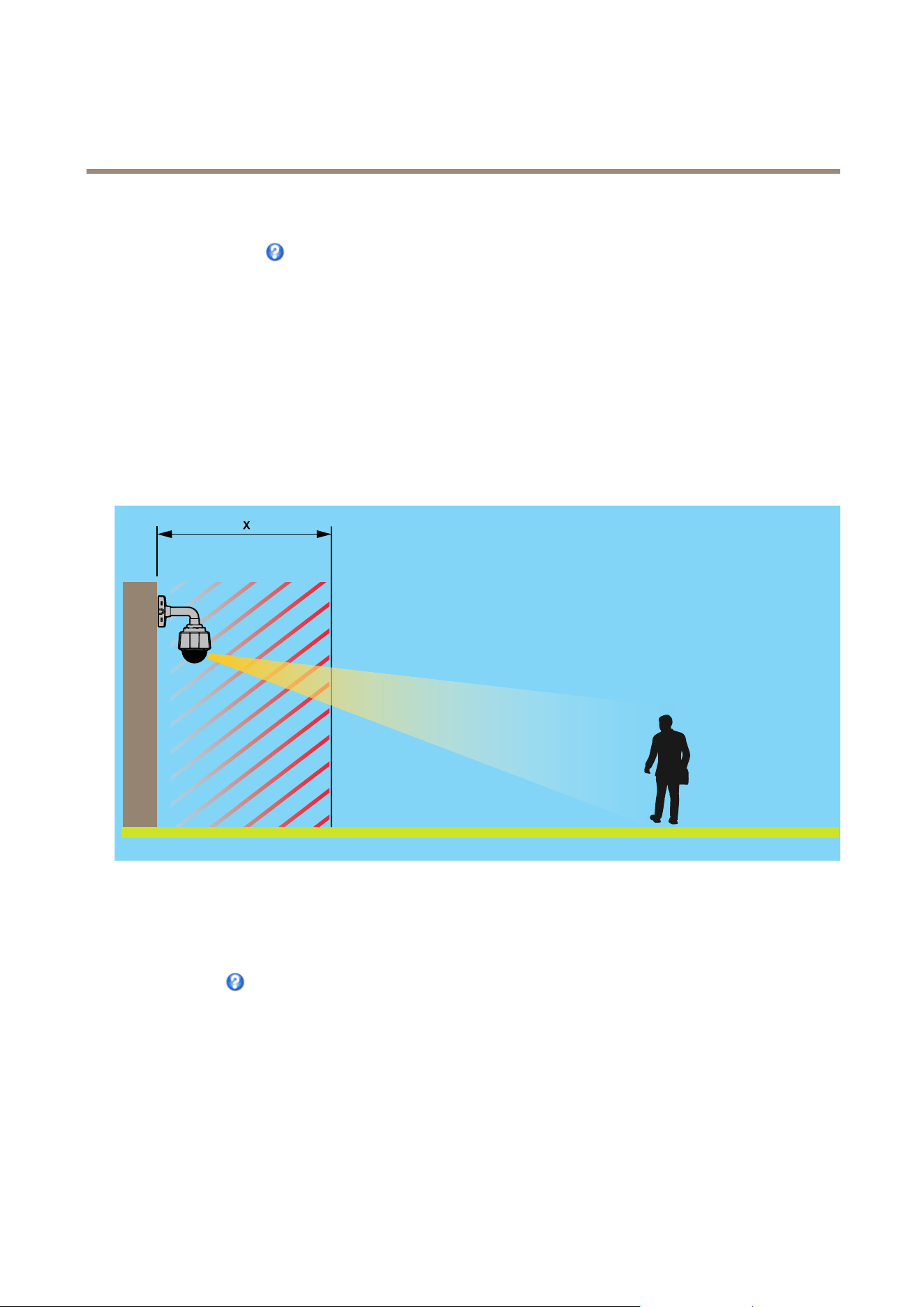
Nearfocuslimitisusedtopreventthecamerafromautofocusingonobjectsclosetothecamera.Thisway,thecameracanignore
objectssuchasoverheadwires,streetlights,orothercamerasplacedclosetothecamera.
Tomakethecamerafocusontheareasofinterest,setthenearfocuslimittoavaluethatisgreaterthanthedistanceatwhichthe
uninterestingobjectstendtoappear.Seeillustrationbelowwherexisthenearfocuslimitvalue.
x
Movespeedsetsthespeedofthecamera’spanandtiltmovements.Thedefaultsettingismaximumspeed.
Whenusingajoystick(oremulatingonewiththemouse)theEnableproportionalspeedsettingcanbeusedtoreducethemaximum
pan/tiltmovementspeed,i.e.thespeedthecameraviewmovesatwhenthejoystickispushedallthewayoutinanydirection.Thisis
usefulthentheviewiszoomedinonanobject.
Seetheonlinehelp
formoreinformation.
Controls
AdvancedPTZsettingscanbeconguredunderPTZ>Advanced>Controls.
ThePanelShortcutCommandButtonslistshowstheuser-denedbuttonsthatcanbeaccessedfromtheLiveViewpage’sCtrl
panel.ThesebuttonscanbeusedtoprovidedirectaccesstocommandsissuedusingtheVAPIX®applicationprogramminginterface.
ClickAddtoaddanewshortcutcommandbutton.
ThefollowingPTZcontrolsareenabledbydefault:
29

AXISV5914PTZNetworkCamera
PTZ(PanTiltZoom)
•Pancontrol
•Tiltcontrol
•Zoomcontrol
•Focuscontrol
•Iriscontrol
Todisablespeciccontrols,deselecttheoptionsunderEnable/Disablecontrols.
Note
DisablingPTZcontrolswillnotaffectpresetpositions.Forexample,ifthetiltcontrolisdisabled,theproductcanstillmoveto
presetpositionsthatrequireatiltmovement.
ControlQueue
Note
•TheadministratorcanenableanddisablePTZcontrolsforselectedusers.
•Toidentifydifferentusersintheviewergroup,cookiesmustbeenabledontheclient.
•TheControlqueuepolltimeismeasuredinseconds.Formoreinformationseetheonlinehelp.
TheadministratorcansetupaqueueforPTZcontrollersfromPTZ>ControlQueue.Oncesetup,thePTZControlQueuebuttons
appearintheLiveViewpageofferingoneviewerexclusivecontrolforalimitedperiodoftime.Otheruserswillbeplacedinqueue.
Auserwhobelongstoagroup(seeUsersonpage42)withahigherPTZprioritycangobeforeotherusersinthequeueandtake
controloftheproduct.Theorderofpriorityisasfollows:
1.Administrator—AnadministratortakesoverPTZcontrolregardlessofwhoisrstinqueue.Theadministratorwillbe
removedfromthequeue60secondsafterthelastPTZcontrolcommand.
2.Event—TheAxisproductcanbeconguredtogotoapresetpositionwhentriggeredbyanalarm(seeEventsonpage34).
Theeventwillimmediatelybeplacedrstinthequeueexceptwhenanadministratorisincontrol.
3.Operator—Sameasadministratorbutwithlowerpriority
4.Viewer—Multipleviewersmustwaitfortheirturn.Theviewerhas60secondsPTZcontrolbeforecontrolispassed
ontothenextviewerinqueue.
30

AXISV5914PTZNetworkCamera
Detectors
Detectors
AudioDetection
TheAxisproductcanbeconguredtogenerateanalarmwhenaudiorisesaboveorfallsbelowthethresholdvalue.Thethreshold
valuecanbesetintherange0–100where0isthemostsensitiveand100theleastsensitive.
1.GotoDetectors>AudioDetection.
2.SettheaudioalarmlevelandclickSave.
3.GotoEvents>ActionRulesandsetupanactionrule,seeSetUpActionRulesonpage34.
DetectedaudioisindicatedbycoloredpeaksintheActivityindicator.Aneventistriggeredwhendetectedaudiorisesaboveorfalls
belowthethresholdvalue,whichisrepresentedbythebar.
31

AXISV5914PTZNetworkCamera
Applications
Applications
AXISCameraApplicationPlatform(ACAP)isanopenplatformthatenablesthirdpartiestodevelopanalyticsandotherapplications
forAxisproducts.Forinformationaboutavailableapplications,downloads,trialsandlicenses,gotowww.axis.com/applications
Note
•Severalapplicationscanrunatthesametimebutsomeapplicationsmightnotbecompatiblewitheachother.Certain
combinationsofapplicationsmightrequiretoomuchprocessingpowerormemoryresourceswhenruninparallel.Verify
thattheapplicationsworktogetherbeforedeployment.
ApplicationLicenses
Someapplicationsneedalicensetorun.Licensescanbeinstalledintwoways:
•Automaticinstallation—requiresaccesstotheInternet
•Manualinstallation—obtainthelicensekeyfromtheapplicationvendoranduploadthekeytotheAxisproduct
Torequestalicense,theAxisproductserialnumber(S/N)isrequired.Theserialnumbercanbefoundontheproductlabelandunder
SystemOptions>Support>SystemOverview.
UploadApplication
Touploadandstartanapplication:
1.GotoSetup>Applications.
2.UnderUploadApplication,clickBrowse.LocatetheapplicationleandclickUploadPackage.
3.Installthelicense(ifapplicable).Forinstructions,seethedocumentationprovidedbytheapplicationvendor.
4.Starttheapplication.GotopageApplications,selecttheapplicationinthelistofinstalledapplicationsandclickStart.
5.Conguretheapplication.Forinstructions,seethedocumentationprovidedbytheapplicationvendor.
Note
•Applicationscanbeuploadedbyproductadministrators.
•ApplicationsandlicensescanbeinstalledonmultipleproductsatthesametimeusingAXISCameraManagement,version
3.10andlater.
Togeneratealoglefortheapplication,gotoApplications.SelecttheapplicationandclickLog.
ApplicationConsiderations
Ifanapplicationisupgraded,applicationsettings,includingthelicense,willberemoved.Thelicensemustbereinstalledand
theapplicationrecongured.
IftheAxisproduct’srmwareisupgraded,uploadedapplicationsandtheirsettingswillremainunchanged,althoughthisisnot
guaranteedbyAxisCommunications.Notethattheapplicationmustbesupportedbythenewrmware.Forinformationabout
rmwareupgrades,seeUpgradetheFirmware.
IftheAxisproductisrestarted,runningapplicationswillrestartautomatically.
IftheAxisproductisrestored,uploadedapplicationsremainunchangedbutmustberestarted.Tostarttheapplication,goto
Setup>Applications.SelecttheapplicationinthelistofinstalledapplicationsandclickStart.Forinformationaboutrestoring
theAxisproduct,seeMaintenance.
32


AXISV5914PTZNetworkCamera
Events
Events
TheEventpagesallowyoutoconguretheAxisproducttoperformactionswhendifferenteventsoccur.Forexample,theproduct
canstartarecordingorsendanemailnoticationwhenmotionisdetected.Thesetofconditionsthatdeneshowandwhen
theactionistriggerediscalledanactionrule.
ConvertEventTypestoActionRules
IftheAxisproductisupgradedtormwareversion5.40orlater,itisrecommendedtoconvertEventTypestoActionRules.The
legacyuserEventTypesinthecamerawillcontinuetoworkbutwillnotbevisibleintheuserinterfaceofthecamera.TheEvent
TypesneedtobeconvertedtoActionrulestobecomevisibleintheuserinterface.
ToconvertEventTypestoActionRulesgotoEvents>ActionRulesandclickConvert.
NO NO
NO
TICE TICE
TICE
ThisisnotrecommendedwhenusingaVMSbasedontheoldEventManagementSystem.
SetUpActionRules
Anactionruledenestheconditionsthatmustbemetfortheproducttoperformanaction,forexamplerecordvideoorsendan
emailnotication.Ifmultipleconditionsaredened,allofthemmustbemettotriggertheaction.
Formoreinformationaboutavailabletriggersandactions,seeTriggersonpage34andActionsonpage35.
Tousemorethanonetriggerfortheactionrule,selectAdditionalconditionsandclickAddtoaddadditionaltriggers.Whenusing
additionalconditions,allconditionsmustbemettotriggertheaction.
Topreventanactionfrombeingtriggeredrepeatedly,aWaitatleasttimecanbeset.Enterthetimeinhours,minutesandseconds,
duringwhichthetriggershouldbeignoredbeforetheactionrulecanbeactivatedagain.
TherecordingDurationofsomeactionscanbesettoincludetimeimmediatelybeforeandaftertheevent.SelectPre-triggertime
and/orPost-triggertimeandenterthenumberofseconds.WhenWhiletheruleisactiveisenabledandtheactionistriggered
againduringthepost-triggertime,therecordingtimewillbeextendedwithanotherpost-triggertimeperiod.
Formoreinformation,seetheonlinehelp
.
Triggers
Availableactionruletriggersandconditionsinclude:
•Applications–Useinstalledapplicationstotriggertherule.SeeApplicationsonpage32.
•Detectors
-AudioDetection–Triggertherulewhenaudioisdetected.SeeAudioDetectiononpage31.
-LiveStreamAccessed–Triggertherulewhenanystreamisaccessedandduringedgestorageplayback.
Thiscanforexamplebeusedtosendnotications.
•Hardware
-Network–Triggertheruleifnetworkconnectionislostorrestored.Thiscanforexamplebeusedtostart
recordingtotheSDcard.
•InputSignal
-DigitalInputPort–TriggertherulewhenanI/Oportreceivesasignalfromaconnecteddevice.SeeI/O
Portsonpage52.
34

AXISV5914PTZNetworkCamera
Events
-ManualTrigger–TriggertheruleusingtheManualTriggerbuttonintheLiveViewpage.SeeControlson
theLiveViewPageonpage11.Thiscanforexamplebeusedtovalidateactionsduringproductinstallation
andconguration.
-VirtualInputs–canbeusedbyaVMS(VideoManagementSystem)totriggeractions.Virtualinputscan,for
example,beconnectedtobuttonsintheVMSuserinterface.
•PTZ
-Error–TriggertheruleifthePTZfunctionalityisnotworkingcorrectly.Thiscanforexamplebeusedto
sendmaintenancenotications.
-Moving–TriggertherulewhenthecameraviewmovesduetoaPTZoperation.Thiscanforexamplebeused
asanadditionalconditiontopreventanactionruletriggeredbymotiondetectiontorecordvideowhilethe
cameraviewmovesduetoaPTZoperation.
-PresetReached–Triggertherulewhenthecamerastopsatapresetposition.Thiscanbeforexamplebeused
withtheSendImagesactiontouploadimagesfromthepresetposition.
-Ready–TriggertherulewhenthePTZfunctionalityisreadytobeused.Thiscanforexamplebeusedtosteer
thecameratoaspecicpresetpositionwhentheproductisstarted.
•Storage
-Disruption–Triggertheruleifstorageproblemsaredetected,forexampleifthestoragedeviceisunavailable,
removed,full,lockedorifotherreadorwriteproblemsoccur.Thiscanforexamplebeusedtosendmaintenance
notications.
-Recording–TriggerstherulewhentheAxisproductrecordstothestoragedevice.Therecordingstatustrigger
canbeusedtonotifytheoperator,forexamplebyashingLEDlights,iftheproducthasstartedorstoppedto
recordtothestoragedevice.Notethat,thistriggercanbeusedonlyforedgestoragerecordingstatus.
•System
-SystemReady–Triggertherulewhentheproducthasbeenstartedandallservicesarerunning.Thiscanfor
examplebeusedtosendanoticationwhentheproductrestarts.
•Time
-Recurrence–Triggertheruleperiodically.SeeSetUpRecurrencesonpage38.Thiscanforexamplebeusedto
uploadanimageevery5minutes.
-UseSchedule–Triggertheruleaccordingtotheselectedschedule.SeeCreateSchedulesonpage37.
Actions
Availableactionsinclude:
•Day/NightVisionMode–Setdaymode(IRcutlteron)ornightmode(IRcutlteroff).
•OutputPort–ActivateanI/Oporttocontrolanexternaldevice.
•OverlayText–Displayanoverlaytext.SeeUseOverlayTextinanActionRuleonpage23.
•PlayAudioClip–SeeAudioClipsonpage25.
•PTZControl
-PresetPosition–Gotoapresetposition.
•RecordVideo–Recordvideoandaudiotoaselectedstorage.Torecordaudio,useAACaudioencodingandmakesurethat
audioisenabledintheselectedstreamprole.
•SendImages–Sendimagestoarecipient.
35

AXISV5914PTZNetworkCamera
Events
•SendNotication–Sendanoticationmessagetoarecipient.
•SendSNMPTrap–SendanSNMPtrapmessagetotheoperator.MakesurethatSNMPisenabledandcongured
underSystemOptions>Network>SNMP.
•SendVideoClip–Sendavideocliptoarecipient.
AddRecipients
Theproductcansendmedialesandmessagestonotifyusersaboutevents.Beforetheproductcansendmedialesornotication
messages,youmustdeneoneoremorerecipients.Forinformationaboutavailableoptions,seeRecipientTypesonpage36.
Toaddarecipient:
1.GotoEvents>RecipientsandclickAdd.
2.Enteradescriptivename.
3.SelectarecipientType.
4.Entertheinformationneededfortherecipienttype.
5.ClickTesttotesttheconnectiontotherecipient.
6.ClickOK.
RecipientTypes
Thefollowingrecipientsareavailable:
RecipientUsewithactionNotes
Email
SendImages
SendNotication
SendVideoClip
Anemailrecipientcancontainmultipleemailaddresses.
FTP
SendImages
SendVideoClip
SFTPSendImages
SendVideoClip
EncryptedletransferusingSSHFileTransportProtocol
(SFTP).SFTPisamoresecuremethodthanFTPbutle
transfermightbeslower,especiallyforlargelessuchashigh
resolutionvideo.
SpecifylogininformationfortheSFTPserverandtheserver’s
publickeyMD5ngerprint(32hexadecimaldigits).
TheSFTPrecipientsupportsSFTPserversusingSSH-2with
RSAandDSAhostkeytypes.RSAisthepreferredmethod.To
useDSA,disabletheRSAkeyontheSFTPserver.
HTTP
SendImages
SendNotication
SendVideoClip
36

AXISV5914PTZNetworkCamera
Events
HTTPSSendImages
SendNotication
SendVideoClip
EncryptedletransferusingHyperTextTransferProtocol
Secure(HTTPS).
SpecifylogininformationfortheHTTPSserverandvalidate
theserver’scerticate.IfthereisaproxybetweentheAxis
productandtheHTTPSserver,alsospecifytheproxysettings.
NetworkShareSendImages
SendVideoClip
Anetworksharecanalsobeusedasastoragedevicefor
recordedvideo.GoSystemOptions>Storagetocongure
anetworksharebeforesettingupacontinuousrecordingor
anactionruletorecordvideo.Formoreinformationabout
storagedevices,seeStorageonpage50.
TCPSendNotication
SetUpEmailRecipients
Emailrecipientscanbeconguredbyselectingoneofthelistedemailproviders,orbyspecifyingtheSMTPserver,portand
authenticationusedby,forexample,acorporateemailserver.
Note
Someemailprovidershavesecurityltersthatpreventusersfromreceivingorviewinglargeamountofattachments,from
receivingscheduledemailsandsimilar.Checktheemailprovider’ssecuritypolicytoavoiddeliveryproblemsandlocked
emailaccounts.
Tosetupanemailrecipientusingoneofthelistedproviders:
1.GotoEvents>RecipientsandclickAdd.
2.EnteraNameandselectEmailfromtheTypelist.
3.EntertheemailaddressestosendemailstointheToeld.Usecommastoseparatemultipleaddresses.
4.SelecttheemailproviderfromtheProviderlist.
5.EntertheuserIDandpasswordfortheemailaccount.
6.ClickTesttosendatestemail.
Tosetupanemailrecipientusingforexampleacorporateemailserver,followtheinstructionsabovebutselectUserdenedas
Provider.EntertheemailaddresstoappearassenderintheFromeld.SelectAdvancedsettingsandspecifytheSMTPserver
address,portandauthenticationmethod.Optionally,selectUseencryptiontosendemailsoveranencryptedconnection.Theserver
certicatecanbevalidatedusingthecerticatesavailableintheAxisproduct.Forinformationonhowtouploadcerticates,
seeCerticatesonpage44.
CreateSchedules
Schedulescanbeusedasactionruletriggersorasadditionalconditions,forexampletorecordvideoifmotionisdetectedoutside
ofcehours.Useoneofthepredenedschedulesorcreateanewscheduleasdescribedbelow.
Tocreateanewschedule:
1.GotoEvents>SchedulesandclickAdd.
2.Enteradescriptivenameandtheinformationneededforadaily,weekly,monthlyoryearlyschedule.
3.ClickOK.
Tousethescheduleinanactionrule,selecttheschedulefromtheScheduledrop-downlistintheActionRuleSetuppage.
37

AXISV5914PTZNetworkCamera
Events
SetUpRecurrences
Recurrencesareusedtotriggeractionrulesrepeatedly,forexampleevery5minutesoreveryhour.
Tosetuparecurrence:
1.GotoEvents>RecurrencesandclickAdd.
2.Enteradescriptivenameandrecurrencepattern.
3.ClickOK.
Tousetherecurrenceinanactionrule,rstselectTimefromtheTriggerdrop-downlistintheActionRuleSetuppageandthen
selecttherecurrencefromtheseconddrop-downlist.
Tomodifyorremoverecurrences,selecttherecurrenceintheRecurrencesListandclickModifyorRemove.
38

AXISV5914PTZNetworkCamera
Recordings
Recordings
TheAxisproductcanbeconguredtorecordvideocontinuouslyoraccordingtoanactionrule:
•Tostartacontinuousrecording,seepage40.
•Tosetupactionrules,seepage34.
•Toaccessrecordings,seeFindRecordingsonpage39.
•Toplayrecordings,seePlayRecordingonpage39.
•Toexportarecordingasavideoclip,seeExportVideoCliponpage40.
•Tocongurecameracontrolledstorage,seeStorageonpage50.
FindRecordings
RecordingsstoredontheSDcardornetworksharecanbeaccessedfromtheRecordings>Listpage.Thepagelistsallrecordingson
thestoragedeviceandshowseachrecording’sstartdateandtime,durationandtheeventthattriggeredtherecording.
Note
Therecording’sstartdateandtimeissetaccordingtotheAxisproduct’sdateandtimesettings.IftheAxisproductis
conguredtouseatimezonedifferentfromthelocaltimezone,makesuretoconguretheRecordingtimeltersaccording
totheproduct’stimezone.DateandtimesettingsareconguredunderSystemOptions>Date&Time,seeDate&Time
onpage44.
Tondarecording,followthesesteps:
1.GotoRecordings>List.
2.Toreducethenumberofrecordingsdisplayed,selectthedesiredoptionsunderFilter:
Recordingtime–ListrecordingsthatstartedbetweentheFromandTotimes.
Event–Listrecordingsthatweretriggeredbyaspecicevent.Selectcontinuoustolistcontinuousrecordings.
Storage–Listrecordingsfromaspecicstoragedevice.
Sort–Specifyhowrecordingsshouldbesortedinthelist.
Results–Specifythemaximumnumberofrecordingstodisplay.
3.Toapplythelters,clicktheFilterbutton.Someltersmaytakealongtimetocomplete.
4.TherecordingsaredisplayedintheRecordinglist.
Toplayarecording,selecttherecordingandclickPlay.SeealsoPlayRecordingonpage39.
Toviewdetailedinformationaboutarecording,selecttherecordingandclickProperties.
Toexportarecordingorapartofarecordingasavideoclip,selecttherecordingandclickExport.SeealsoExportVideoClipon
page40.
Toremovearecordingfromthestoragedevice,selecttherecordingandclickRemove.
PlayRecording
RecordingsontheSDcardornetworksharecanbeplayeddirectlyfromtheAxisproduct’swebpages.
39

AXISV5914PTZNetworkCamera
Recordings
Toplayarecording,followthesesteps:
1.GotoRecordings>List.
2.Toreducethenumberofrecordingsdisplayed,selectthedesiredoptionsunderFilterandclicktheFilterbuttonto
applythelters.SeealsoFindRecordingsonpage39.
3.SelecttherecordingandclickPlay.Therecordingwillbeplayedinanewbrowserwindow.
ExportVideoClip
RecordingsontheSDcardornetworksharecanbeexportedasvideoclips.Itispossibletoexportacompleterecordingora
partofarecording.
Note
TheexportedrecordingisaMatroskavideole(.mkv).ToplaytherecordinginWindowsMediaPlayer,AXISMatroskaFile
Splittermustbeinstalled.AXISMatroskaFileSplittercanbedownloadedfromwww.axis.com/techsup/software
Toexportavideoclip,followthesesteps:
1.GotoRecordings>List.
2.Toreducethenumberofrecordingsdisplayed,selectthedesiredoptionsunderFilterandclicktheFilterbuttonto
applythelters.SeealsoFindRecordingsonpage39.
3.SelecttherecordingandclickExport.TheExportRecordingdialogopens.
4.Bydefault,thecompleterecordingisselected.Toexportapartoftherecording,modifythestartandstoptimes.
5.Optionally,enteralenamefortherecording.
6.ClickExport.
Note
Recordingscanalsobeexportedfromtheplaybackwindow.
ContinuousRecording
TheAxisproductcanbeconguredtocontinuouslysavevideotoastoragedevice.Forinformationaboutstoragedevices,seeStorage
onpage50.Topreventthediskfrombecomingfull,itisrecommendedtocongurethedisktoautomaticallyremoveoldrecordings.
Ifanewstreamproleisselectedwhilearecordingisongoing,therecordingwillbestoppedandsavedintherecordinglistanda
newrecordingwiththenewstreamprolewillstart.Allpreviouscontinuousrecordingswillremainintherecordinglistuntilthey
areremovedmanuallyorthroughautomaticremovalofoldrecordings.
Tostartacontinuousrecording,followthesesteps:
1.GotoRecordings>Continuous.
2.SelectEnabled.
3.SelectthetypeofstoragedevicefromtheStoragelist.
4.SelectaStreamproletouseforcontinuousrecordings.Toincludeaudiointherecording,useAACaudioencodingand
makesurethataudioisenabledintheselectedstreamprole.
5.ClickSavetosaveandstarttherecording.
40

AXISV5914PTZNetworkCamera
Languages
Languages
MultiplelanguagescanbeinstalledintheAxisproduct.Allwebpagesincludingtheonlinehelpwillbedisplayedintheselected
language.Toswitchlanguages,gotoSetup>Languagesandrstuploadthenewlanguagele.Browseandlocatetheleandclick
theUploadLanguagebutton.SelectthenewlanguagefromthelistandclickSave.
Note
•Resettingtheproducttofactorydefaultsettingswilleraseanyuploadedlanguagelesandresettheproductlanguageto
English.
•ClickingtheRestorebuttonontheMaintenancepagewillnotaffectthelanguage.
•Armwareupgradewillnotaffectthelanguageused.Howeverifyouhaveuploadedanewlanguagetotheproductand
laterupgradethermware,itmayhappenthatthetranslationnolongermatchestheproduct'swebpages.Inthiscase,
uploadanupdatedlanguagele.
•Alanguagealreadyinstalledintheproductwillbereplacedwhenacurrentoralaterversionofthelanguageleisuploaded.
41

AXISV5914PTZNetworkCamera
SystemOptions
SystemOptions
Security
Users
UseraccesscontrolisenabledbydefaultandcanbeconguredunderSystemOptions>Security>Users.Anadministratorcan
setupotherusersbygivingthemusernamesandpasswords.Itisalsopossibletoallowanonymousviewerlogin,whichmeans
thatanybodymayaccesstheLiveViewpage.
Theuserlistdisplaysauthorizedusersandusergroups(accesslevels):
•ViewershaveaccesstotheLiveViewpage
•Operatorshaveaccesstoallsettingsexcept:
-creatingandmodifyingPTZpresets
-creatingandmodifyingPTZcontrolsettings
-creatingandmodifyingprivacymasksettings
-uploadingapplicationsandlanguageles
-anyofthesettingsincludedintheSystemOptions
•Administratorshaveunrestrictedaccesstoallsettings.Theadministratorcanadd,modifyandremoveotherusers.
Note
NotethatwhentheoptionEncrypted&unencryptedisselected,thewebserverwillencryptthepassword.Thisisthedefault
optionforanewunitoraunitresettofactorydefaultsettings.
UnderHTTP/RTSPPasswordSettings,selectthetypeofpasswordtoallow.Youmayneedtoallowunencryptedpasswordsifthereare
viewingclientsthatdonotsupportencryption,orifyouupgradedthermwareandexistingclientssupportencryptionbutneed
tologinagainandbeconguredtousethisfunctionality.
UnderUserSettings,selecttheEnableanonymousviewerloginoptiontoallowanonymoususersaccesstotheLiveViewpage.
SelecttheEnableanonymousPTZcontrollogintoallowanonymoususersaccesstothePTZcontrols.
DeselecttheEnableBasicSetupoptiontohidetheBasicSetupmenu.BasicSetupprovidesquickaccesstosettingsthatshouldbe
madebeforeusingtheAxisproduct.
ONVIF
ONVIF(OpenNetworkVideoInterfaceForum)isaglobalinterfacestandardthatmakesiteasierforendusers,integrators,consultants,
andmanufacturerstotakeadvantageofthepossibilitiesofferedbynetworkvideotechnology.ONVIFenablesinteroperability
betweendifferentvendorproducts,increasedexibility,reducedcostandfuture-proofsystems.
BycreatingauseryouautomaticallyenableONVIFcommunication.UsetheusernameandpasswordwithallONVIFcommunication
withtheproduct.Formoreinformationseewww.onvif.org
IPAddressFilter
IPaddresslteringisenabledontheSystemOptions>Security>IPAddressFilterpage.Onceenabled,thelistedIPaddressare
allowedordeniedaccesstotheAxisproduct.SelectAlloworDenyfromthelistandclickApplytoenableIPaddressltering.
Theadministratorcanaddupto256IPaddressentriestothelist(asingleentrycancontainmultipleIPaddresses).
42

AXISV5914PTZNetworkCamera
SystemOptions
HTTPS
HTTPS(HyperTextTransferProtocoloverSecureSocketLayer,orHTTPoverSSL)isawebprotocolprovidingencryptedbrowsing.
HTTPScanalsobeusedbyusersandclientstoverifythatthecorrectdeviceisbeingaccessed.Thesecuritylevelprovidedby
HTTPSisconsideredadequateformostcommercialexchanges.
TheAxisproductcanbeconguredtorequireHTTPSwhenusersfromdifferentusergroups(administrator,operator,viewer)login.
TouseHTTPS,anHTTPScerticatemustrstbeinstalled.GotoSystemOptions>Security>Certicatestoinstallandmanage
certicates.SeeCerticatesonpage44.
ToenableHTTPSontheAxisproduct:
1.GotoSystemOptions>Security>HTTPS
2.SelectanHTTPScerticatefromthelistofinstalledcerticates.
3.Optionally,clickCiphersandselecttheencryptionalgorithmstouseforSSL.
4.SettheHTTPSConnectionPolicyforthedifferentusergroups.
5.ClickSavetoenablethesettings.
ToaccesstheAxisproductviathedesiredprotocol,intheaddresseldinabrowser,enterhttps://fortheHTTPSprotocol
andhttp://fortheHTTPprotocol.
TheHTTPSportcanbechangedontheSystemOptions>Network>TCP/IP>Advancedpage.
IEEE802.1X
IEEE802.1Xisastandardforport-basedNetworkAdmissionControlprovidingsecureauthenticationofwiredandwirelessnetwork
devices.IEEE802.1XisbasedonEAP(ExtensibleAuthenticationProtocol).
ToaccessanetworkprotectedbyIEEE802.1X,devicesmustbeauthenticated.Theauthenticationisperformedbyanauthentication
server,typicallyaRADIUSserver,examplesofwhichareFreeRADIUSandMicrosoftInternetAuthenticationService.
InAxisimplementation,theAxisproductandtheauthenticationserveridentifythemselveswithdigitalcerticatesusingEAP-TLS
(ExtensibleAuthenticationProtocol-TransportLayerSecurity).ThecerticatesareprovidedbyaCerticationAuthority(CA).
Youneed:
•aCAcerticatetoauthenticatetheauthenticationserver.
•aCA-signedclientcerticatetoauthenticatetheAxisproduct.
Tocreateandinstallcerticates,gotoSystemOptions>Security>Certicates.SeeCerticatesonpage44.ManyCAcerticates
arepreinstalled.
ToallowtheproducttoaccessanetworkprotectedbyIEEE802.1X:
1.GotoSystemOptions>Security>IEEE802.1X.
2.SelectaCACerticateandaClientCerticatefromthelistsofinstalledcerticates.
3.UnderSettings,selecttheEAPOLversionandprovidetheEAPidentityassociatedwiththeclientcerticate.
4.ChecktheboxtoenableIEEE802.1XandclickSave.
Note
Forauthenticationtoworkproperly,thedateandtimesettingsintheAxisproductshouldbesynchronizedwithanNTP
server.SeeDate&Timeonpage44.
43

AXISV5914PTZNetworkCamera
SystemOptions
Certicates
Certicatesareusedtoauthenticatedevicesonanetwork.Typicalapplicationsincludeencryptedwebbrowsing(HTTPS),network
protectionviaIEEE802.1Xandsecureuploadofimagesandnoticationmessagesforexampleviaemail.Twotypesofcerticates
canbeusedwiththeAxisproduct:
Server/Clientcerticates-ToauthenticatetheAxisproduct.
CAcerticates-Toauthenticatepeercerticates,forexamplethecerticateofanauthenticationserverincasetheAxisproductis
connectedtoanIEEE802.1Xprotectednetwork.
Note
Installedcerticates,exceptpreinstalledCAcerticates,willbedeletediftheproductisresettofactorydefault.Preinstalled
CAcerticatesthathavebeendeletedwillbereinstalled.
AServer/Clientcerticatecanbeself-signedorissuedbyaCerticateAuthority(CA).Aself-signedcerticateofferslimited
protectionandcanbeusedbeforeaCA-issuedcerticatehasbeenobtained.
Toinstallaself-signedcerticate:
1.GotoSetup>SystemOptions>Security>Certicates.
2.ClickCreateself-signedcerticateandprovidetherequestedinformation.
TocreateandinstallaCA-signedcerticate:
1.Createaself-signedcerticateasdescribedabove.
2.GotoSetup>SystemOptions>Security>Certicates.
3.ClickCreatecerticatesigningrequestandprovidetherequestedinformation.
4.CopythePEM-formattedrequestandsendtotheCAofyourchoice.
5.Whenthesignedcerticateisreturned,clickInstallcerticateanduploadthecerticate.
Server/ClientcerticatescanbeinstalledasCerticatefromsigningrequestorasCerticateandprivatekey.SelectCerticate
andprivatekeyiftheprivatekeyistobeuploadasaseparateleorifthecerticateisinPKCS#12format.
TheAxisproductisshippedwithseveralpreinstalledCAcerticates.Ifrequired,additionalCAcerticatescanbeinstalled:
1.GotoSetup>SystemOptions>Security>Certicates.
2.ClickInstallcerticateanduploadthecerticate.
AudioSupport
SelectEnableaudiosupporttoallowclientstoretrieveaudiostreamsfromtheAxisproduct.Forinformationonhowtocongure
audiosettings,seeSetUpAudioonpage23.
Note
DeselectingthisoptionwilldisableaudiogloballyintheAxisproduct,forconguredeventsandproleswithaudioaswell.
Date&Time
TheAxisproduct’sdateandtimesettingsareconguredunderSystemOptions>Date&Time.
CurrentServerTimedisplaysthecurrentdateandtime(24hclock).Thetimecanbedisplayedin12hclockinthetextoverlay(see
below).
Tochangethedateandtimesettings,selectthepreferredTimemodeunderNewServerTime:
44

AXISV5914PTZNetworkCamera
SystemOptions
•Synchronizewithcomputertime–Setsdateandtimeaccordingtothecomputer’sclock.Withthisoption,dateand
timearesetonceandwillnotbeupdatedautomatically.
•SynchronizewithNTPServer–ObtainsdateandtimefromanNTPserver.Withthisoption,dateandtimesettingsare
updatedcontinuously.ForinformationonNTPsettings,seeNTPCongurationonpage47.
IfusingahostnamefortheNTPserver,aDNSservermustbecongured.SeeDNSCongurationonpage47.
•Setmanually–Allowsyoutomanuallysetdateandtime.
IfusinganNTPserver,selectyourTimezonefromthedrop-downlist.Ifrequired,checkAutomaticallyadjustfordaylightsaving
timechanges.
TheDate&TimeFormatUsedinImagesisthedateandtimeformatdisplayedasatextoverlayinthevideostream.Usethe
predenedformatsorseeFileNaming&Date/TimeFormatsintheonlinehelp
forinformationonhowtocreatecustomdateand
timeformats.Toincludedateandtimeintheoverlaytext,gotoVideo&AudioandselectIncludedateandIncludetime.
Network
BasicTCP/IPSettings
TheAxisproductsupportsIPversion4andIPversion6.Bothversionscanbeenabledsimultaneously,andatleastoneversion
mustalwaysbeenabled.
IPv4AddressConguration
Bydefault,theAxisproductissettouseIPv4(IPversion4)andtoobtaintheIPaddressautomaticallyviaDHCP.TheIPv4settingsare
conguredunderSystemOptions>Network>TCP/IP>Basic.
DHCP(DynamicHostCongurationProtocol)allowsnetworkadministratorstocentrallymanageandautomatetheassignmentof
IPaddresses.DHCPshouldonlybeenabledifusingdynamicIPaddressnotication,oriftheDHCPcanupdateaDNSserver.Itis
thenpossibletoaccesstheAxisproductbyname(hostname).
IfDHCPisenabledandtheproductcannotbeaccessed,runAXISIPUtilitytosearchthenetworkforconnectedAxisproducts,orreset
theproducttothefactorydefaultsettings(seepage54)andthenperformtheinstallationagain.
TouseastaticIPaddress,checkUsethefollowingIPaddressandspecifytheIPaddress,subnetmaskanddefaultrouter.
IPv6AddressConguration
IfIPv6(IPversion6)isenabled,theAxisproductwillreceiveanIPaddressaccordingtothecongurationinthenetworkrouter.
ToenableIPv6,gotoSystemOptions>Network>TCP/IP>Basic.OthersettingsforIPv6shouldbeconguredinthenetworkrouter.
ARP/Ping
Theproduct’sIPaddresscanbeassignedusingARPandPing.Forinstructions,seeAssignIPAddressUsingARP/Pingonpage45.
TheARP/Pingserviceisenabledbydefaultbutisautomaticallydisabledtwominutesaftertheproductisstarted,orassoonasanIP
addressisassigned.Tore-assignIPaddressusingARP/Ping,theproductmustberestartedtoenableARP/Pingforanadditional
twominutes.
Todisabletheservice,gotoSystemOptions>Network>TCP/IP>BasicandcleartheoptionEnableARP/PingsettingofIPaddress.
Pingingtheproductisstillpossiblewhentheserviceisdisabled.
AssignIPAddressUsingARP/Ping
Theproduct'sIPaddresscanbeassignedusingARP/Ping.Thecommandmustbeissuedwithin2minutesofconnectingpower.
45

AXISV5914PTZNetworkCamera
SystemOptions
1.AcquireafreestaticIPaddressonthesamenetworksegmentasthecomputer.
2.Locatetheserialnumber(S/N)ontheproductlabel.
3.Openacommandpromptandenterthefollowingcommands:
Linux/Unixsyntax
arp-s<IPaddress><serialnumber>temp
ping-s408<IPaddress>
Linux/Unixexample
arp-s192.168.0.12500:40:8c:18:10:00temp
ping-s408192.168.0.125
Windowssyntax(thismayrequirethatyourunthecommandpromptasanadministrator)
arp-s<IPaddress><serialnumber>
ping-l408-t<IPaddress>
Windowsexample(thismayrequirethatyourunthecommandpromptasanadministrator)
arp-s192.168.0.12500-40-8c-18-10-00
ping-l408-t192.168.0.125
4.Checkthatthenetworkcableisconnectedandthenrestarttheproductbydisconnectingandreconnectingpower.
5.ClosethecommandpromptwhentheproductrespondswithReplyfrom192.168.0.125:...orsimilar.
6.Openabrowserandtypehttp://<IPaddress>intheLocation/Addresseld.
ForothermethodsofassigningtheIPaddress,seethedocumentAssignanIPAddressandAccesstheVideoStreamonAxisSupport
webatwww.axis.com/techsup
Note
•ToopenacommandpromptinWindows,opentheStartmenuandtypecmdintheRun/Searcheld.
•TousetheARPcommandinWindows8/Windows7/WindowsVista,right-clickthecommandprompticonandselect
Runasadministrator.
•ToopenacommandpromptinMacOSX,opentheTerminalutilityfromApplication>Utilities.
AXISVideoHostingSystem(AVHS)
AVHSusedinconjunctionwithanAVHSservice,provideseasyandsecureInternetaccesstoliveandrecordedvideoaccessiblefrom
anylocation.FormoreinformationandhelptondalocalAVHSServiceProvidergotowww.axis.com/hosting
TheAVHSsettingsareconguredunderSystemOptions>Network>TCPIP>Basic.ThepossibilitytoconnecttoanAVHSservice
isenabledbydefault.Todisable,cleartheEnableAVHSbox.
One-clickenabled-Pressandholdtheproduct’scontrolbutton(seeHardwareOverviewonpage7)forabout3secondsto
connecttoanAVHSserviceovertheInternet.Onceregistered,AlwayswillbeenabledandtheAxisproductstaysconnectedto
theAVHSservice.Iftheproductisnotregisteredwithin24hoursfromwhenthebuttonispressed,theproductwilldisconnect
fromtheAVHSservice.
Always-TheAxisproductwillconstantlyattempttoconnecttotheAVHSserviceovertheInternet.Onceregisteredtheproductwill
stayconnectedtotheservice.Thisoptioncanbeusedwhentheproductisalreadyinstalledanditisnotconvenienttousethe
one-clickinstallation.
AXISInternetDynamicDNSService
AXISInternetDynamicDNSServiceassignsahostnameforeasyaccesstotheproduct.Formoreinformation,seewww.axiscam.net
46

AXISV5914PTZNetworkCamera
SystemOptions
ToregistertheAxisproductwithAXISInternetDynamicDNSService,gotoSystemOptions>Network>TCP/IP>Basic.Under
Services,clicktheAXISInternetDynamicDNSServiceSettingsbutton(requiresaccesstotheInternet).Thedomainnamecurrently
registeredatAXISInternetDynamicDNSservicefortheproductcanatanytimeberemoved.
Note
AXISInternetDynamicDNSServicerequiresIPv4.
AdvancedTCP/IPSettings
DNSConguration
DNS(DomainNameService)providesthetranslationofhostnamestoIPaddresses.TheDNSsettingsareconguredunderSystem
Options>Network>TCP/IP>Advanced.
SelectObtainDNSserveraddressviaDHCPtousetheDNSsettingsprovidedbytheDHCPserver.
Tomakemanualsettings,selectUsethefollowingDNSserveraddressandspecifythefollowing:
Domainname-Enterthedomain(s)tosearchforthehostnameusedbytheAxisproduct.Multipledomainscanbeseparatedby
semicolons.Thehostnameisalwaystherstpartofafullyqualieddomainname,forexample,myserveristhehostnameinthe
fullyqualieddomainnamemyserver.mycompany.comwheremycompany.comisthedomainname.
Primary/SecondaryDNSserver-EntertheIPaddressesoftheprimaryandsecondaryDNSservers.ThesecondaryDNSserveris
optionalandwillbeusediftheprimaryisunavailable.
NTPConguration
NTP(NetworkTimeProtocol)isusedtosynchronizetheclocktimesofdevicesinanetwork.TheNTPsettingsareconguredunder
SystemOptions>Network>TCP/IP>Advanced.
SelectObtainNTPserveraddressviaDHCPtousetheNTPsettingsprovidedbytheDHCPserver.
Tomakemanualsettings,selectUsethefollowingNTPserveraddressandenterthehostnameorIPaddressoftheNTPserver.
HostNameConguration
TheAxisproductcanbeaccessedusingahostnameinsteadofanIPaddress.ThehostnameisusuallythesameastheassignedDNS
name.ThehostnameisconguredunderSystemOptions>Network>TCP/IP>Advanced.
SelectObtainhostnameviaIPv4DHCPtousehostnameprovidedbytheDHCPserverrunningonIPv4.
SelectUsethehostnametosetthehostnamemanually.
SelectEnabledynamicDNSupdatestodynamicallyupdatelocalDNSserverswhenevertheAxisproduct’sIPaddresschanges.
Formoreinformation,seetheonlinehelp
.
Link-LocalIPv4Address
Link-LocalAddressisenabledbydefaultandassignstheAxisproductanadditionalIPaddresswhichcanbeusedtoaccess
theproductfromotherhostsonthesamesegmentonthelocalnetwork.TheproductcanhaveaLink-LocalIPandastatic
orDHCP-suppliedIPaddressatthesametime.
ThisfunctioncanbedisabledunderSystemOptions>Network>TCP/IP>Advanced.
HTTP
TheHTTPportusedbytheAxisproductcanbechangedunderSystemOptions>Network>TCP/IP>Advanced.Inadditiontothe
defaultsetting,whichis80,anyportintherange1024–65535canbeused.
47

AXISV5914PTZNetworkCamera
SystemOptions
HTTPS
TheHTTPSportusedbytheAxisproductcanbechangedunderSystemOptions>Network>TCP/IP>Advanced.Inadditionto
thedefaultsetting,whichis443,anyportintherange1024–65535canbeused.
ToenableHTTPS,gotoSystemOptions>Security>HTTPS.Formoreinformation,seeHTTPSonpage43.
NATtraversal(portmapping)forIPv4
Anetworkrouterallowsdevicesonaprivatenetwork(LAN)toshareasingleconnectiontotheInternet.Thisisdonebyforwarding
networktrafcfromtheprivatenetworktothe“outside”,thatis,theInternet.Securityontheprivatenetwork(LAN)isincreased
sincemostroutersarepre-conguredtostopattemptstoaccesstheprivatenetwork(LAN)fromthepublicnetwork(Internet).
UseNATtraversalwhentheAxisproductislocatedonanintranet(LAN)andyouwishtomakeitavailablefromtheother(WAN)side
ofaNATrouter.WithNATtraversalproperlycongured,allHTTPtrafctoanexternalHTTPportintheNATrouterisforwardedto
theproduct.
NATtraversalisconguredunderSystemOptions>Network>TCP/IP>Advanced.
Note
•ForNATtraversaltowork,thismustbesupportedbytherouter.TheroutermustalsosupportUPnP
TM
.
•Inthiscontext,routerreferstoanynetworkroutingdevicesuchasaNATrouter,Networkrouter,InternetGateway,
Broadbandrouter,Broadbandsharingdevice,orasoftwaresuchasarewall.
Enable/Disable-Whenenabled,theAxisproductattemptstocongureportmappinginaNATrouteronyournetwork,usingUPnP
TM
.
NotethatUPnP
TM
mustbeenabledintheproduct(seeSystemOptions>Network>UPnP).
UsemanuallyselectedNATrouter-SelectthisoptiontomanuallyselectaNATrouterandentertheIPaddressfortherouterin
theeld.Ifnorouterisspecied,theproductautomaticallysearchesforNATroutersonyournetwork.Ifmorethanonerouteris
found,thedefaultrouterisselected.
AlternativeHTTPport-SelectthisoptiontomanuallydeneanexternalHTTPport.Enteraportintherange1024–65535.Ifthe
porteldisemptyorcontainsthedefaultsetting,whichis0,aportnumberisautomaticallyselectedwhenenablingNATtraversal.
Note
•AnalternativeHTTPportcanbeusedorbeactiveevenifNATtraversalisdisabled.ThisisusefulifyourNATrouterdoesnot
supportUPnPandyouneedtomanuallycongureportforwardingintheNATrouter.
•Ifyouattempttomanuallyenteraportthatisalreadyinuse,anotheravailableportisautomaticallyselected.
•Whentheportisselectedautomaticallyitisdisplayedinthiseld.Tochangethis,enteranewportnumberandclickSave.
FTP
TheFTPserverrunningintheAxisproductenablesuploadofnewrmware,userapplications,etc.TheFTPservercanbedisabled
underSystemOptions>Network>TCP/IP>Advanced.
Note
ThisFTPserverhasnothingtodowiththeproduct’sabilitytotransferimagesviaFTPtootherlocationsandservers.
RTSP
TheRTSPserverrunningintheAxisproductallowsaconnectingclienttostartanH.264stream.TheRTSPportnumbercanbe
changedunderSystemOptions>Network>TCP/IP>Advanced.Thedefaultportis554.
Note
H.264videostreamswillnotbeavailableiftheRTSPserverisdisabled.
48

AXISV5914PTZNetworkCamera
SystemOptions
SOCKS
SOCKSisanetworkingproxyprotocol.TheAxisproductcanbeconguredtouseaSOCKSservertoreachnetworksontheother
sideofarewallorproxyserver.ThisfunctionalityisusefuliftheAxisproductislocatedonalocalnetworkbehindarewall,and
notications,uploads,alarms,etcneedtobesenttoadestinationoutsidethelocalnetwork(forexampletheInternet).
SOCKSisconguredunderSystemOptions>Network>SOCKS.Formoreinformation,seetheonlinehelp
.
QoS(QualityofService)
QoS(QualityofService)guaranteesacertainlevelofaspeciedresourcetoselectedtrafconanetwork.AQoS-awarenetwork
prioritizesnetworktrafcandprovidesagreaternetworkreliabilitybycontrollingtheamountofbandwidthanapplicationmayuse.
TheQoSsettingsareconguredunderSystemOptions>Network>QoS.UsingDSCP(DifferentiatedServicesCodepoint)values,the
Axisproductcanmarkdifferenttypesoftrafc.
Note
LiveaudioDSCPwillbeequaltolivevideoDSCPifH.264overRTSPisused.
SNMP
TheSimpleNetworkManagementProtocol(SNMP)allowsremotemanagementofnetworkdevices.AnSNMPcommunityisthe
groupofdevicesandmanagementstationrunningSNMP.Communitynamesareusedtoidentifygroups.
AXISVideoMIB(ManagementInformationBase)forvideohardwarecanbeusedtomonitorAxis-specic,hardware-related
issuesthatmayneedadministrativeattention.FormoreinformationaboutAXISVideoMIBandtodownloadMIBles,goto
www.axis.com/techsup
ToenableandcongureSNMPintheAxisproduct,gototheSystemOptions>Network>SNMPpage.
Dependingonthelevelofsecurityrequired,selecttheversiononSNMPtouse.
TrapsareusedbytheAxisproducttosendmessagestoamanagementsystemonimportanteventsandstatuschanges.CheckEnable
trapsandentertheIPaddresswherethetrapmessageshouldbesentandtheTrapcommunitythatshouldreceivethemessage.
Note
IfHTTPSisenabled,SNMPv1andSNMPv2cshouldbedisabled.
TrapsforSNMPv1/v2areusedbytheAxisproducttosendmessagestoamanagementsystemonimportanteventsandstatus
changes.CheckEnabletrapsandentertheIPaddresswherethetrapmessageshouldbesentandtheTrapcommunitythat
shouldreceivethemessage.
Thefollowingtrapsareavailable:
•Coldstart
•Warmstart
•Linkup
•Authenticationfailed
Note
AllAXISVideoMIBtrapsareenabledwhenSNMPv1/v2ctrapsareenabled.Itisnotpossibletoturnonoroffspecictraps.
SNMPv3providesencryptionandsecurepasswords.TousetrapswithSNMPv3,anSNMPv3managementapplicationisrequired.
TouseSNMPv3,HTTPSmustbeenabled,seeHTTPSonpage43.ToenableSNMPv3,checktheboxandprovidetheinitialuser
password.
49

AXISV5914PTZNetworkCamera
SystemOptions
Note
Theinitialpasswordcanonlybesetonce.Ifthepasswordislost,theAxisproductmustberesettofactorydefault,see
ResettoFactoryDefaultSettingsonpage54.
UPnP
TM
TheAxisproductincludessupportforUPnP
TM
.UPnP
TM
isenabledbydefaultandtheproductisautomaticallydetectedbyoperating
systemsandclientsthatsupportthisprotocol.
UPnP
TM
canbedisabledunderSystemOptions>Network>UPnP
RTP/H.264
TheRTPportrangeandmulticastsettingsareconguredunderSystemOptions>Network>RTP.
TheRTPportrangedenestherangeofportsfromwhichthevideo/audioportsareautomaticallyselected.Formulticaststreams,
onlycertainIPaddressesandportnumbersshouldbeused.
SelectAlwaysMulticastVideoand/orAlwaysMulticastAudiotostartmulticaststreamingwithoutopeninganRTSPsession.
Bonjour
TheAxisproductincludessupportforBonjour.Bonjourisenabledbydefaultandtheproductisautomaticallydetectedbyoperating
systemsandclientsthatsupportthisprotocol.
BonjourcanbedisabledunderSystemOptions>Network>Bonjour.
Storage
SDCard
NO NO
NO
TICE TICE
TICE
Topreventdatacorruption,theSDcardshouldbeunmountedbeforeremoval.
Note
ForSDcardrecommendationsseewww.axis.com
TheAxisproductsupportsSD/SDHC/SDXCcards.
ThefollowingSDcardlesystemsaresupported:
•ext4—recommendedduetoitsresilienceagainstdatalossifthecardisejectedorifthereisabruptpowerloss.Toaccess
datastoredonthecardfromtheWindowsoperatingsystem,athird-partyext4driverorapplicationisrequired.
•vFAT—supportedbymostoperatingsystemsforpersonalcomputers.
TheSDcardismanagedontheSystemOptions>Storagepage.ClickSDCardtoopenStorageManagement.
Ifthecard’sstatusshowsasfailed,clickCheckdisktoseeiftheproblemcanbefoundandthentryRepair.Thisoptionisonly
availableforSDcardswithext4.ForSDcardswithvFAT,useacardreaderorcomputertotroubleshootthecard.
Toavoidllingthecard,itisrecommendedtoremoverecordingscontinuously.UnderGeneralSettings,selectRemoverecordings
olderthanandselectthenumberofdaysorweeks.
Tostopwritingtothecardandprotectrecordingsfrombeingremoved,selectLockunderGeneralSettings.
50

AXISV5914PTZNetworkCamera
SystemOptions
MountandUnmountSDCard
NO NO
NO
TICE TICE
TICE
Topreventcorruptionofrecordings,theSDcardshouldalwaysbeunmountedbeforeitisejected.
TheSDcardisautomaticallymountedwhenthecardisinsertedintotheAxisproductorwhentheproductisstarted.Amanual
mountisonlyrequiredifthecardhasbeenunmountedandnotejectedandre-inserted.
TounmounttheSDcard:
1.OpentheAxisproduct’swebpagesandgotoSetup>SystemOptions>Storage.
2.ClickSDCard.
3.ClickUnmount.
4.Thecardcannowberemoved.
FormatSDCard
NO NO
NO
TICE TICE
TICE
FormattingtheSDcardwillremovealldataandrecordingsstoredonthecard.
TheAxisproductcanbeconguredtoautomaticallyformatSDcardsthatareinsertedintotheproduct.Ifautoformatisenabledand
anSDcardisinserted,theproductwillcheckiftheSDcardhastheext4lesystem.Ifthecardhasadifferentlesystem,the
cardwillautomaticallybeformattedtoext4.
Important
Ifautoformatisenabled,onlyuseneworemptySDcards.Anydatastoredonthecardwillbelostwhenthecardisinserted
intotheAxisproduct.
Toenableautomaticformatting,followthesesteps:
1.OpentheAxisproduct’swebpagesandgotoSetup>SystemOptions>Storage.
2.ClickSDCard.
3.UnderGeneralSettings,selectAutoformatto.
4.ClickOKtosavesettings.
AnSDcardinsertedintotheproductcanbemanuallyformattedtooneofthesupportedlesystems.Tomanuallyformatthe
SDcard,followthesesteps:
1.InserttheSDcardintheSDcardslot.
2.OpentheAxisproduct’swebpagesandgotoSetup>SystemOptions>Storage.
3.ClickSDCard.
4.ClickFormatandselectthedesiredlesystem.
5.ClickOKtostartformattingthecard.
NetworkShare
NetworkshareallowsyoutoaddnetworkstoragesuchasaNAS(network-attachedstorage).TheNASshallbededicatedfor
recordingsanddatafromtheAxisproductsconnectedtothenetwork.ForinformationaboutreferenceNASdevices,goto
www.axis.com/se/sv/products/axis-camera-companion/support-and-documentation
51

AXISV5914PTZNetworkCamera
SystemOptions
Note
ForNASrecommendationsseewww.axis.com
Toaddanetworkshare:
1.GotoSystemOptions>Storage.
2.ClickNetworkShare.
3.EntertheIPaddress,DNSorBonjournametothehostserverintheHosteld.
4.EnterthenameoftheshareintheShareeld.Subfolderscannotbeused.
5.Ifrequired,selectThesharerequiresloginandentertheusernameandpassword.
6.ClickConnect.
ToclearallrecordingsanddatafromtheAxisproduct’sfolderonthedesignatedshare,clickClearunderStorageTools.
Toavoidllingtheshare,itisrecommendedtoremoverecordingscontinuously.UnderRecordingSettings,selectRemoverecordings
olderthanandselectthenumberofdaysorweeks.
Tostopwritingtotheshareandprotectrecordingsfrombeingremoved,selectLockunderRecordingSettings.
Ports&Devices
I/OPorts
TheAxisproductprovidestwocongurableinputandoutputportsforconnectionofexternaldevices.Forinformationabout
howtoconnectexternaldevices,seeConnectorsonpage61.
ToconguretheI/Oports,gotoSystemOptions>Ports&Devices>I/OPorts.Eachportcanfunctionasinputoroutput:
•InputasOpencircuit–Theinputbecomesactivewhenthecircuitisgroundedby,forexample,aREXdevice.Itremains
inactiveaslongasitsnormalstateequalsitscurrentstatus.
•InputasGroundedcircuit–Theinputbecomesactivewhenthecircuitisopenedbyforexampleamonitor.
•OutputasOpencircuit–Theoutputportisinanon-conductivestatewhenitscurrentstatusisopencircuit.Thecurrent
statusofanoutputportcanbechangedby,forexample,anactionrule.
•OutputasGroundedcircuit–Theoutputportisinaconductivestatewhenitscurrentstatusisgroundedcircuit.
PortStatus
ThelistontheSystemOptions>Ports&Devices>PortStatuspageshowsthestatusoftheproduct’sinputandoutputports.
Maintenance
TheAxisproductprovidesseveralmaintenancefunctions.TheseareavailableunderSystemOptions>Maintenance.
ClickRestarttoperformacorrectrestartiftheAxisproductisnotbehavingasexpected.Thiswillnotaffectanyofthecurrent
settings.
Note
ArestartclearsallentriesintheServerReport.
ClickRestoretoresetmostsettingstothefactorydefaultvalues.Thefollowingsettingsarenotaffected:
•thebootprotocol(DHCPorstatic)
52

AXISV5914PTZNetworkCamera
SystemOptions
•thestaticIPaddress
•thedefaultrouter
•thesubnetmask
•thesystemtime
•theIEEE802.1Xsettings
•uploadedapplicationsarekeptbutmustberestarted
ClickDefaulttoresetallsettings,includingtheIPaddress,tothefactorydefaultvalues.Thisbuttonshouldbeusedwithcaution.The
Axisproductcanalsoberesettofactorydefaultusingthecontrolbutton,seeResettoFactoryDefaultSettingsonpage54.
Totesttheproduct’sPTZmechanics,clickTestunderPTZStatus.
Forinformationaboutrmwareupgrade,seeUpgradetheFirmwareonpage55.
Support
SupportOverview
TheSystemOptions>Support>SupportOverviewpageprovidesinformationontroubleshootingandcontactinformation,
shouldyourequiretechnicalassistance.
SeealsoTroubleshootingonpage55.
SystemOverview
TogetanoverviewoftheAxisproduct’sstatusandsettings,gotoSystemOptions>Support>SystemOverview.Informationthat
canbefoundhereincludesrmwareversion,IPaddress,networkandsecuritysettings,eventsettings,imagesettingsandrecentlog
items.ManyofthecaptionsarelinkstotheproperSetuppage.
Logs&Reports
TheSystemOptions>Support>Logs&Reportspagegenerateslogsandreportsusefulforsystemanalysisandtroubleshooting.If
contactingAxisSupport,pleaseprovideavalidServerReportwithyourquery.
SystemLog-Providesinformationaboutsystemevents.
AccessLog-Listsallfailedattemptstoaccesstheproduct.TheAccessLogcanalsobeconguredtolistallconnectionstothe
product(seebelow).
ServerReport-Providesinformationabouttheproductstatusinapop-upwindow.TheAccessLogisautomaticallyincluded
intheServerReport.
Youcanviewordownloadtheserverreport.Downloadingtheserverreportcreatesa.ziplethatcontainsacompleteserverreport
textleinUTF–8format.SelecttheIncludesnapshotwithdefaultimagesettingsoptiontoincludeasnapshotoftheproduct’sLive
View.Theserverreport.zipleshouldalwaysbeincludedwhencontactingsupport.
ParameterList-Showstheproduct'sparametersandtheircurrentsettings.Thismayproveusefulwhentroubleshootingor
whencontactingAxisSupport.
ConnectionList-Listsallclientsthatarecurrentlyaccessingmediastreams.
CrashReport-Generatesanarchivewithdebugginginformation.Thereporttakesseveralminutestogenerate.
53

AXISV5914PTZNetworkCamera
SystemOptions
Advanced
Scripting
Scriptingallowsexperienceduserstocustomizeandusetheirownscripts.
NO NO
NO
TICE TICE
TICE
ImproperusemaycauseunexpectedbehaviorandlossofcontactwiththeAxisproduct.
Axisstronglyrecommendsthatyoudonotusethisfunctionunlessyouunderstandtheconsequences.AxisSupportdoesnotprovide
assistanceforproblemswithcustomizedscripts.
ToopentheScriptEditor,gotoSystemOptions>Advanced>Scripting.Ifascriptcausesproblems,resettheproducttoits
factorydefaultsettings,seepage54.
Formoreinformation,seewww.axis.com/developer
FileUpload
Files,forexamplewebpagesandimages,canbeuploadedtotheAxisproductandusedascustomsettings.Touploadale,go
toSystemOptions>Advanced>FileUpload.
Uploadedlesareaccessedthroughhttp://<ipaddress>/local/<user>/<filename>where<user>isthe
selectedusergroup(viewer,operatororadministrator)fortheuploadedle.
PlainCong
PlainCongisforadvanceduserswithexperienceofAxisproductconguration.Mostparameterscanbesetandmodiedfrom
thispage.
ToopenPlainCong,gotoSystemOptions>Advanced>PlainCong.AxisSupportdoesnotprovideassistance.
ResettoFactoryDefaultSettings
Important
Resettofactorydefaultshouldbeusedwithcaution.Aresettofactorydefaultwillresetallsettings,includingtheIP
address,tothefactorydefaultvalues.
Note
Theinstallationandmanagementsoftwaretoolsareavailablefromthesupportpagesonwww.axis.com/techsup
Toresettheproducttothefactorydefaultsettings:
1.Disconnectpowerfromtheproduct.
2.Pressandholdthecontrolbuttonandreconnectpower.SeeHardwareOverviewonpage7.
3.Keepthecontrolbuttonpressedfor15–30secondsuntilthestatusLEDindicatorashesamber.
4.Releasethecontrolbutton.TheprocessiscompletewhenthestatusLEDindicatorturnsgreen.Theproducthasbeenreset
tothefactorydefaultsettings.IfnoDHCPserverisavailableonthenetwork,thedefaultIPaddressis192.168.0.90
5.Usingtheinstallationandmanagementsoftwaretools,assignanIPaddress,setthepassword,andaccessthevideostream.
Itisalsopossibletoresetparameterstofactorydefaultviathewebinterface.GotoSetup>SystemOptions>Maintenance.
54

AXISV5914PTZNetworkCamera
Troubleshooting
Troubleshooting
ChecktheFirmware
Firmwareissoftwarethatdeterminesthefunctionalityofnetworkdevices.Oneofyourrstactionswhentroubleshootingaproblem
shouldbetocheckthecurrentrmwareversion.Thelatestversionmaycontainacorrectionthatxesyourparticularproblem.The
currentrmwareversionintheAxisproductisdisplayedinthepageSetup>BasicSetupandinSetup>About.
UpgradetheFirmware
Important
•Yourdealerreservestherighttochargeforanyrepairattributabletofaultyupgradebytheuser.
•Preconguredandcustomizedsettingsaresavedwhenthermwareisupgraded(providingthefeaturesareavailableinthe
newrmware)althoughthisisnotguaranteedbyAxisCommunicationsAB.
Note
•Aftertheupgradeprocesshascompleted,theproductwillrestartautomatically.Ifrestartingtheproductmanuallyafterthe
upgrade,alwayswait10minutesevenifyoususpecttheupgradehasfailed.
•WhenyouupgradetheAxisproductwiththelatestrmwarefromAxiswebsite,theproductreceivesthelatestfunctionality
available.Alwaysreadtheupgradeinstructionsandreleasenotesavailablewitheachnewreleasebeforeupgrading
thermware.
Toupgradetheproduct’srmware:
1.Savethermwareletoyourcomputer.ThelatestversionofthermwareisavailablefreeofchargefromAxiswebsite
atwww.axis.com/techsup
2.GotoSetup>SystemOptions>Maintenanceintheproduct’swebpages.
3.UnderUpgradeServer,clickBrowseandlocatetheleonyourcomputer.ClickUpgrade.
4.Waitapproximately10minuteswhiletheproductisbeingupgradedandrestarted.Thenaccesstheproduct.
AXISCameraManagementcanbeusedformultipleupgrades.Seewww.axis.comformoreinformation.
Symptoms,PossibleCausesandRemedialActions
ProblemssettingtheIPaddress
WhenusingARP/Ping
Trytheinstallationagain.TheIPaddressmustbesetwithintwominutesafterpowerhasbeen
appliedtotheproduct.EnsurethePinglengthissetto408.Forinstructions,seeAssignIPAddress
UsingARP/Pingonpage45.
Theproductislocatedona
differentsubnet
IftheIPaddressintendedfortheproductandtheIPaddressofthecomputerusedtoaccessthe
productarelocatedondifferentsubnets,youwillnotbeabletosettheIPaddress.Contactyour
networkadministratortoobtainanIPaddress.
55

AXISV5914PTZNetworkCamera
Troubleshooting
TheIPaddressisbeingused
byanotherdevice
DisconnecttheAxisproductfromthenetwork.RunthePingcommand(inaCommand/DOS
window,typepingandtheIPaddressoftheproduct):
•Ifyoureceive:Replyfrom<IPaddress>:bytes=32;time=10...
thismeansthattheIPaddressmayalreadybeinusebyanotherdeviceonthenetwork.
ObtainanewIPaddressfromthenetworkadministratorandreinstalltheproduct.
•Ifyoureceive:Requesttimedout,thismeansthattheIPaddressisavailable
forusewiththeAxisproduct.Checkallcablingandreinstalltheproduct.
PossibleIPaddressconict
withanotherdeviceonthe
samesubnet.
ThestaticIPaddressintheAxisproductisusedbeforetheDHCPserversetsadynamicaddress.
ThismeansthatifthesamedefaultstaticIPaddressisalsousedbyanotherdevice,theremay
beproblemsaccessingtheproduct.
Theproductcannotbeaccessedfromabrowser
Cannotlogin
WhenHTTPSisenabled,ensurethatthecorrectprotocol(HTTPorHTTPS)isusedwhenattempting
tologin.Youmayneedtomanuallytypehttporhttpsinthebrowser’saddresseld.
Ifthepasswordfortheuserrootislost,theproductmustberesettothefactorydefaultsettings.
SeeResettoFactoryDefaultSettingsonpage54.
TheIPaddresshasbeen
changedbyDHCP
IPaddressesobtainedfromaDHCPserveraredynamicandmaychange.IftheIPaddresshas
beenchanged,useAXISIPUtilityorAXISCameraManagementtolocatetheproductonthe
network.Identifytheproductusingitsmodelorserialnumber,orbytheDNSname(ifthename
hasbeencongured).
Ifrequired,astaticIPaddresscanbeassignedmanually.Forinstructions,seethedocumentAssign
anIPAddressandAccesstheVideoStreamonAxisSupportwebatwww.axis.com/techsup.
Certicateerrorwhenusing
IEEE802.1X
Forauthenticationtoworkproperly,thedateandtimesettingsintheAxisproductshouldbe
synchronizedwithanNTPserver.SeeDate&Timeonpage44.
Theproductisaccessiblelocallybutnotexternally
RoutercongurationTocongureyourroutertoallowincomingdatatrafctotheAxisproduct,enabletheNAT-traversal
featurewhichwillattempttoautomaticallyconguretheroutertoallowaccesstotheAxis
product,seeNATtraversal(portmapping)forIPv4onpage48.TheroutermustsupportUPnP
TM
.
Firewallprotection
ChecktheInternetrewallwithyournetworkadministrator.
Defaultroutersrequired
CheckifyouneedtoconguretheroutersettingsfromSystemOptions>Network>TCP/IP>
Basic.
ProblemswithstreamingH.264
ProblemswithAXISMedia
Control(InternetExplorer
only)
ToenabletheupdatingofvideoimagesinInternetExplorer,setthebrowsertoallowActiveX
controls.Also,makesurethatAXISMediaControlisinstalledonyourcomputer.
NoH.264displayedinthe
client
CheckthattherelevantH.264connectionmethodsandcorrectinterfaceareenabledintheAMC
ControlPanel(streamingtab).SeeAXISMediaControl(AMC)onpage15.
IntheAMCControlPanel,selecttheH.264tabandclickSettodefaultH.264decoder.
CheckthatRTSPisenabledunderSystemOptions>Network>TCP/IP>Advanced.
MulticastH.264only
accessiblebylocalclients
Checkifyourroutersupportsmulticasting,oriftheroutersettingsbetweentheclientandthe
productneedtobecongured.TheTTL(TimeToLive)valuemayneedtobeincreased.
NomulticastH.264
displayedintheclient
CheckwithyournetworkadministratorthatthemulticastaddressesusedbytheAxisproduct
arevalidforyournetwork.
Checkwithyournetworkadministratortoseeifthereisarewallpreventingviewing.
56

AXISV5914PTZNetworkCamera
Troubleshooting
PoorrenderingofH.264
images
Ensurethatyourgraphicscardisusingthelatestdriver.Thelatestdriverscanusuallybe
downloadedfromthemanufacturer’swebsite.
Colorsaturationisdifferent
inH.264andMotionJPEG
Modifythesettingsforyourgraphicsadapter.Refertotheadapter’sdocumentationformore
information.
Lowerframeratethan
expected
SeePerformanceConsiderationsonpage63.
Reducethenumberofapplicationsrunningontheclientcomputer.
Limitthenumberofsimultaneousviewers.
Checkwiththenetworkadministratorthatthereisenoughbandwidthavailable.
CheckintheAMCControlPanel(H.264tag)thatvideoprocessingisNOTsettoDecodeonly
keyframes.
Lowertheimageresolution.
Videoandimageproblems,general
Imageunsatisfactory
CheckthevideostreamandcamerasettingsunderSetup>Video&Audio>VideoStreamand
Setup>Video&Audio>CameraSettings.
Noaudio
Incorrectsetup
Checkthesoundcardinthecomputer.Ensurethatmuteisnotselectedandthatthevolume
settingsarecorrect.
CheckthatEnableaudiosupportisselectedunderSetup>SystemOptions>Security>Audio
Support.
CheckthatthecorrectAudioInputsourceisselectedunderSetup>Video&Audio>Audio
Settings.
Pooraudioquality
Stuttering
Reducethenumberoflistenersandviewers.Decreaseimageresolutionandcompression.
Unsynchronizedaudioand
videousingH.264
Synchronizetheproduct’sdateandtimesettingswithanNTPserver.GotoSetup>System
Options>Date&Time.
Distortedaudio
CheckthatthecorrectAudioInputsourceisselectedunderSetup>Video&Audio>Audio
Settings.
FeedbackloopsFeedbackloopsmightappearinfull-duplexmode.Trymovingthemicrophoneorthespeaker,or
usehalf-duplexmodeinstead.
Storageanddiskmanagementproblems
Storagedisruption
Astoragedisruptionalarmissentifastoragedeviceisunavailable,removed,full,lockedorifother
readorwriteproblemsoccur.Toidentifythesourceoftheproblem,checktheSystemLogunder
SystemOptions>Support>Logs&Reports.Dependingontheproblem,itmightbenecessaryto
re-mountthestoragedevice.
Forinformationonhowtosetupastoragedisruptionalarm,seeEventsonpage34.
Videocannotberecorded
CheckthattheSDcardisnotwriteprotected(thatis,readonly).
SDcardcannotbemountedReformattheSDcardandthenclickMount.
NO NO
NO
TICE TICE
TICE
Formattingthecardwillremoveallcontent,includingallrecordings,fromtheSDcard.
57

AXISV5914PTZNetworkCamera
TechnicalSpecifications
TechnicalSpecifications
Function/group
Item
Specications
Models
AXISV591450Hz
AXISV591460Hz
Imagesensor
1/3'‘progressivescanRGBCMOS
LensAutofocus,P-iriscontrol,4.3-129mm,F1.6-4.7
Horizontalangleofview:58.3°-2.1°
Verticalangleofview:34.5°-1.2°
Minimum
illumination
Color:0.6luxat30IREF1.6
B/W:0.03luxat30IREF1.6
Shuttertime
1/10000sto1s
Pan/Tilt/ZoomPan:±170°,0.2–100°/s
Tilt:-20°-+90°,0.2–90°/s
Accuracy:±0.2°
Resolution:0.02°
Zoom:30xOptical,12xDigital,Total360x
Camera
Pan/Tilt/Zoom
functionalities
256presetpositions,Controlqueue,On-screendirectionalindicator,Adjustablezoom
speed
Video
compression
H.264High,BaselineandMainprole(MPEG-4Part10/AVC)
MotionJPEG
Resolutions
1280x720(HDTV720p)to320x180
HDMI/SDI:UptoHDTV720p
Framerate
Upto50/60fps(50/60Hz)
Videostreaming
MultiplestreamsinH.264andMotionJPEG.
H.264andMotionJPEG:1streaminfullresolutionandframerate.Morestreamsif
identicalorlimitedinframerateorresolution.
Controllableframerateandbandwidth
VBR/MBRH.264
Video
Imagesettings120dBWDR-dynamiccapture,compression,color,brightness,sharpness,whitebalance,
exposurecontrol,exposurezones,backlightcompensation,defogging,noisereduction,
electronicimagestabilization,textandimageoverlay(overethernet)
Rotation:0°,180°
58

AXISV5914PTZNetworkCamera
TechnicalSpecifications
Function/group
Item
Specications
AudiostreamingTwo-way,stereo
Audio
compression
SDI:AES324bit,48kHz
HDMI:LPCM
Network:
AACLC8to48kHz,8to128kbit/s
G.711PCM8kHz64kbit/s
G.726ADPCM8kHz24to32kbit/s
Opus8/16/48kHz8to128kbit/s
Congurablebitrate
Audioinput
XLRbalancedmonoinput(left/right)
Balancedexternalmicrophone(mono)
Microphonephantompower48V
Balancedlinelevel(mono)
Lineinputimpedance:>7.1kΩ
Maximuminputlevel:4.4Vrms
Bandwidth:20Hz-20kHz,maybelimitedbysamplerate
THD+N:<0.03%
Signal-to-Noiseratio:>85dB@0dBgain,>78dB@30dBgain
3.5mmunbalancedstereoinput
Unbalancedexternalmicrophone(stereo)
MicrophonePower5Vvia2.2kΩ
Unbalancedline(stereo)
Lineinputimpedance:>1.7kΩ
Maximuminputlevel:2.2Vrms
THD+N:<0.03%
Signal-to-Noiseratio:>87dB@0dBgain,>83dB@30dBgain
Bandwidth:20Hz-20kHz,maybelimitedbysamplerate
Audio
Audiooutput
3.5mmunbalancedstereooutputOutput
Outputimpedance:<100Ω,shortcircuitproof
Signal-to-Noiseratio:>87dB
Bandwidth:20Hz-20kHz,maybelimitedbysamplerate
THD+N:<0.03%@10kΩload
Maximumoutputlevel:>0.707Vrms
SDI
THD+N:<0.03%
Bandwidth:20Hz-20kHz
Signal-to-Noiseratio:>87dB@0dBgain,>83dB@30dBgain
HDMI
THD+N:<0.03%
Bandwidth:20Hz-20kHz
Signal-to-Noiseratio:>87dB@0dBgain,>83dB@30dBgain
SecurityPasswordprotection,IPaddressltering,HTTPSencryption*,IEEE802.1Xnetworkaccess
control*,digestauthentication,useraccesslog,centralizedcerticatemanagement.
*ThisproductincludessoftwaredevelopedbytheOpenSSLProjectforuseintheOpen
SSLToolkit(www.openssl.org),andcryptographicsoftwarewrittenbyEricYoung
Network
Supported
protocols
IPv4/v6,HTTP,HTTPS*,SSL/TLS*,QoSLayer3DiffServ,FTP,SMTP,Bonjour,UPnP™,
SNMPv1/v2c/v3(MIB-II),DNS,DynDNS,NTP,RTSP,RTP,TCP,UDP,IGMP,RTCP,ICMP,
DHCP,ARP,SOCKS,CIFS/SMB,SSH,HDMI1.4,SDI
*ThisproductincludessoftwaredevelopedbytheOpenSSLProjectforuseintheOpen
SSLToolkit(www.openssl.org),andcryptographicsoftwarewrittenbyEricYoung
59

AXISV5914PTZNetworkCamera
TechnicalSpecifications
Function/group
Item
Specications
Application
Programming
Interface
OpenAPIforsoftwareintegration,includingVAPIX®andAXISCameraApplication
Platform;specicationsatwww.axis.com
AXISVideoHostingSystem(AVHS)withOne-ClickConnection.
ONVIFProleS;specicationatwww.onvif.org
AXISMediaControlSDK(availableatwww.axis.com),eventtriggerdatainvideostream
QualityofService(QoS)layer3,DiffServModel
EmbeddedLinuxoperatingsystem
Analytics
SupportforAXISCameraApplicationPlatformenablinginstallationofadditional
applications,seewww.axis.com/acap
EventtriggersAnalytics,edgestorageevents,externalinput
Eventactions
FileuploadviaFTP,SFTP,HTTP,HTTPS,networkshareandemail
Noticationviaemail,HTTP,HTTPSandTCP
Sendvideoclip,SendSNMPtrap
Videoandaudiorecordingtoedgestorage
Pre-andpost-alarmvideobuffering
GotoPTZpreset
Externaloutputactivation
Day/nightvisionmode
Playaudioclip
DatastreamingEventdata
Videoaccessfrom
webbrowser
Cameraliveview
Videorecordingtole(ASF)
CustomizableHTMLpages
Windows7,WindowsVista,WindowsXP,WindowsServer2008,WindowsServer2012
andWindows8
DirectX9corhigher
Forotheroperatingsystemsandbrowsers,seewww.axis.com/techsup
System
Integration
Built-in
installationaids
Pixelcounter
60

AXISV5914PTZNetworkCamera
TechnicalSpecifications
Function/group
Item
Specications
CasingASAplasticcoverblackandwhite.
Color:WhiteNCSS1002-B.
Memory
512MBFlash,1GBRAM
Batterybacked-upreal-timeclock
Power
8–28VDC(12Vpowersupplyincluded)typical12W,max.21W
Connectors
RJ4510BASE-T/100BASE-TX
Terminalblockfor2congurablealarminput/output
3.5mmjackformic/linein
3.5mmjackforlinestereooutput
XLR-3(left+right)mic/linein(with48Vphantompower)
HDMITypeA
BNCforSDI,SMPTE292–1(1.5Gbit/s)
TerminalblockforDCpower
Edgestorage
SD/SDHC/SDXCslotsupportingmemorycardupto64GB(cardnotincluded)
Supportforrecordingtodedicatednetwork-attachedstorage(NAS)
Operating
conditions
Temperature:0°Cto40°C(32°Fto104°F)
Humidity:10–85%RH(non-condensing)
Storage
conditions
Temperature:–20°Cto60°C(–4°Fto140°F)
Humidity:10–85%RH(non-condensing)
Approvals
EN55022ClassA,EN55024,EN61000-6-1,EN61000-6-2,EN61000-3-2,EN61000-3-3
FCCPart15SubpartBClassA
ICES-003ClassA
VCCIClassA
KCCKN22ClassA,KN24
C-tickAS/NZSCISPR22ClassA
IEC/EN/UL60950-1
EN50581
Dimensions
180x136x136mm(7.1x5.4x5.4in)
Weight
1.49kg(3.3lb)
Included
accessories
Powersupply,Wall/Ceilingmount,TerminalconnectorforI/O,InstallationGuide,
Windowsdecoder1-userlicense,Lenscover
Video
management
software
AXISCameraCompanion,AXISCameraStation,VideomanagementsoftwarefromAxis’
ApplicationDevelopmentPartnersavailableonwww.axis.com/techsup/software
Languages
German,French,Spanish,Italian,Russian,SimpliedChinese,Japanese,Korean,
Portuguese
General
Warranty
Axis3-yearwarrantyandAXISExtendedWarrantyoption,seewww.axis.com/warranty
Connectors
I/OConnector
4–pinterminalblock
1
2 3 4
Foranexamplediagram,see.
61
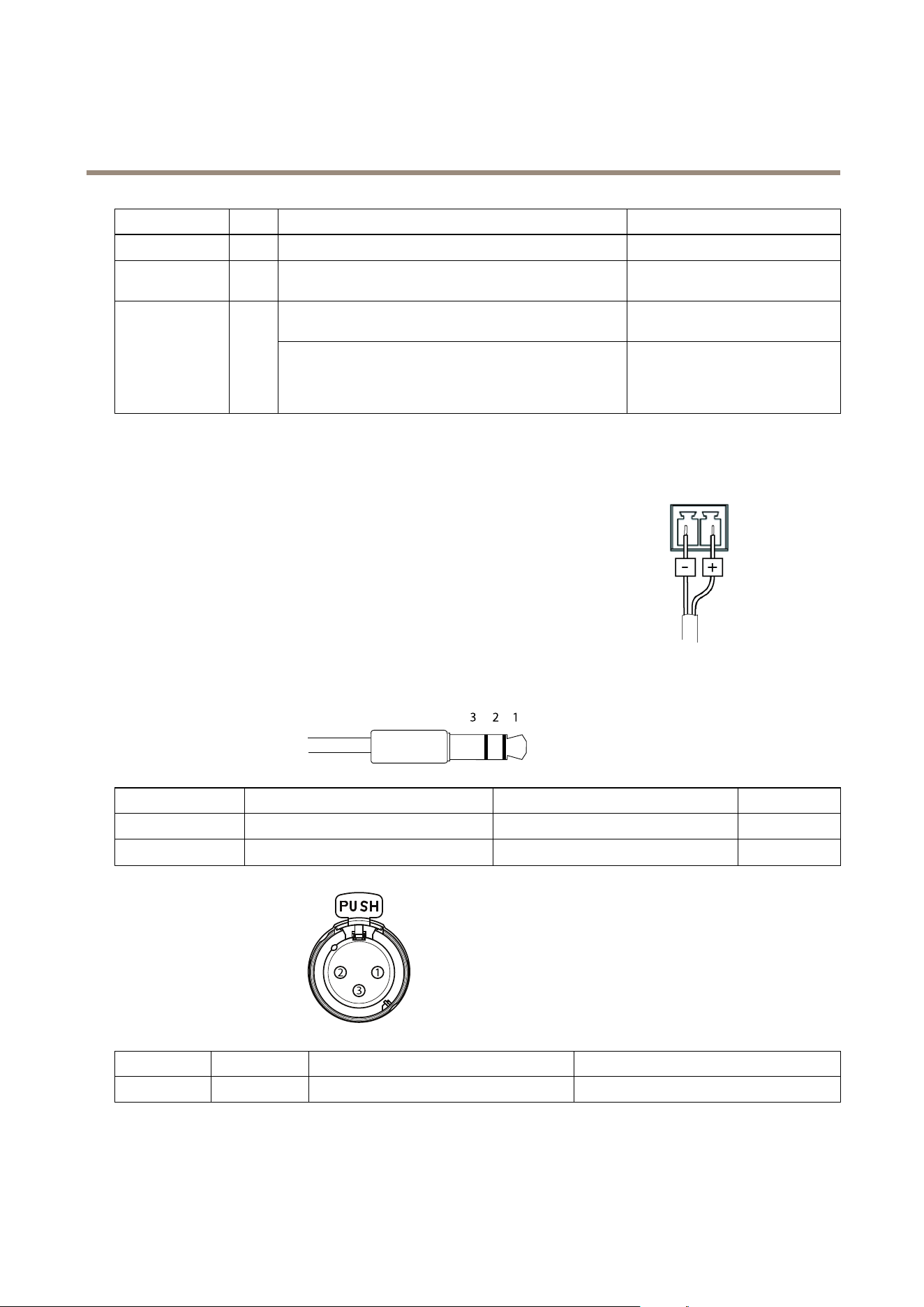
AXISV5914PTZNetworkCamera
TechnicalSpecifications
FunctionPinNotes
Specications
0VDC(-)
1
0VDC
DCoutput
2
Canbeusedtopowerauxiliaryequipment.
Note:Thispincanonlybeusedaspowerout.
12VDC
Maxload=50mA
Digitalinput–Connecttopin1toactivate,orleaveoating
(unconnected)todeactivate.
0tomax30VDC Congurable
(InputorOutput)
3–4
Digitaloutput–Connectedtopin1whenactivated,oating
(unconnected)whendeactivated.Ifusedwithaninductive
load,e.g.arelay,adiodemustbeconnectedinparallelwith
theload,forprotectionagainstvoltagetransients.
0tomax30VDC,opendrain,
100mA
PowerConnector
2-pinterminalblockforDCpowerinput.UseaSafetyExtraLowVoltage(SELV)compliant
limitedpowersource(LPS)witheitheraratedoutputpowerlimitedto≤100Woraratedoutput
currentlimitedto≤5A.
AudioConnector
3.5mmaudioconnectors
(stereo)
123
1Tip2Ring
3Sleeve
AudioInput
Microphone/Linein(left)Microphone/Linein(right)
Ground
AudioOutput
Lineout(left)Lineout(right)
Ground
3–pinXLRconnectors
(balanced)
12
3
Pin
1
23
Function
Ground
BalancedMicrophoneHot(+)InBalancedMicrophoneCold(-)In
62

AXISV5914PTZNetworkCamera
TechnicalSpecifications
PerformanceConsiderations
Whensettingupyoursystem,itisimportanttoconsiderhowvarioussettingsandsituationswillaffectperformance.Somefactors
affecttheamountofbandwidth(thebitrate)required,otherscanaffecttheframerate,andsomeaffectboth.Iftheloadonthe
CPUreachesitsmaximum,thiswillalsoaffecttheframerate.
Thefollowingfactorsareamongthemostimportanttoconsider:
•Highimageresolutionand/orlowercompressionlevelsresultinimagescontainingmoredata.Bandwidthaffected.
•AccessbylargenumbersofMotionJPEGand/orunicastH.264clients.Bandwidthaffected.
•Simultaneousviewingofdifferentstreams(resolution,compression)bydifferentclients.Effectonframerateand
bandwidth.
•AccessingMotionJPEGandH.264videostreamssimultaneously.Framerateandbandwidthaffected.
•Heavyusageofeventsettingsaffecttheproduct’sCPUload.Framerateaffected.
•UsingHTTPSmayreduceframerate,inparticularifstreamingMotionJPEG.
•Heavynetworkutilizationduetopoorinfrastructure.Bandwidthaffected.
•Viewingonpoorlyperformingclientcomputerslowersperceivedperformance.Framerateaffected.
•RunningmultipleAXISCameraApplicationPlatform(ACAP)applicationssimultaneouslymayaffecttheframerateand
thegeneralperformance.
63

UserManualVer.M2.2
AXISV5914PTZNetworkCamera
Date:July2015
©AxisCommunicationsAB,2015
PartNo.1491442