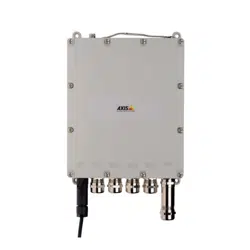



EN
FR
DE
IT
ES
JA
ZH
English
France:Français
Deutschland:Deutsch
Italia:Italiano
España:Español
日本:日本語
中文:简体中文

Readthisrst
ReadthroughthisInstallationGuidecarefullybefore
installingtheproduct.KeeptheInstallationGuidefor
futurereference.
Legalconsiderations
Videoandaudiosurveillancecanberegulatedbylawsthat
varyfromcountrytocountry.Checkthelawsinyourlocal
regionbeforeusingthisproductforsurveillancepurposes.
Liability
Everycarehasbeentakeninthepreparationofthis
document.PleaseinformyourlocalAxisofceofany
inaccuraciesoromissions.AxisCommunicationsABcannot
beheldresponsibleforanytechnicalortypographicalerrors
andreservestherighttomakechangestotheproductand
manualswithoutpriornotice.AxisCommunicationsAB
makesnowarrantyofanykindwithregardtothematerial
containedwithinthisdocument,including,butnotlimited
to,theimpliedwarrantiesofmerchantabilityandtnessfor
aparticularpurpose.AxisCommunicationsABshallnot
beliablenorresponsibleforincidentalorconsequential
damagesinconnectionwiththefurnishing,performance
oruseofthismaterial.Thisproductisonlytobeusedfor
itsintendedpurpose.
Intellectualpropertyrights
AxisABhasintellectualpropertyrightsrelatingto
technologyembodiedintheproductdescribedinthis
document.Inparticular,andwithoutlimitation,these
intellectualpropertyrightsmayincludeoneormoreof
thepatentslistedataxis.com/patent.htmandoneormore
additionalpatentsorpendingpatentapplicationsinthe
USandothercountries.
Equipmentmodications
Thisequipmentmustbeinstalledandusedin
strictaccordancewiththeinstructionsgiveninthe
userdocumentation.Thisequipmentcontainsno
user-serviceablecomponents.Unauthorizedequipment
changesormodicationswillinvalidateallapplicable
regulatorycerticationsandapprovals.
Trademarkacknowledgments
AXISCOMMUNICATIONS,AXISandVAPIXareregistered
trademarksortrademarkapplicationsofAxisABinvarious
jurisdictions.Allothercompanynamesandproductsare
trademarksorregisteredtrademarksoftheirrespective
companies.
Regulatoryinformation
Europe
ThisproductcomplieswiththeapplicableCEmarking
directivesandharmonizedstandards:
•ElectromagneticCompatibility(EMC)Directive
2014/30/EU.SeeElectromagneticcompatibility(EMC)
4.
•LowVoltage(LVD)Directive2014/35/EU.SeeSafety4.
•RestrictionsofHazardousSubstances(RoHS)Directive
2011/65/EU.SeeDisposalandrecycling4.
Acopyoftheoriginaldeclarationofconformitymaybe
obtainedfromAxisCommunicationsAB.SeeContact
information5.
Electromagneticcompatibility(EMC)
Thisequipmenthasbeendesignedandtestedtofulll
applicablestandardsfor:
•Radiofrequencyemissionwheninstalledaccordingto
theinstructionsandusedinitsintendedenvironment.
•Immunitytoelectricalandelectromagneticphenomena
wheninstalledaccordingtotheinstructionsandused
initsintendedenvironment.
USA
Thisequipmenthasbeentestedandfoundtocomplywith
thelimitsforaClassBdigitaldevice,pursuanttopart15
oftheFCCRules.Theselimitsaredesignedtoprovide
reasonableprotectionagainstharmfulinterferenceina
residentialinstallation.Thisequipmentgenerates,usesand
canradiateradiofrequencyenergyand,ifnotinstalled
andusedinaccordancewiththeinstructions,maycause
harmfulinterferencetoradiocommunications.However,
thereisnoguaranteethatinterferencewillnotoccurin
aparticularinstallation.Ifthisequipmentdoescause
harmfulinterferencetoradioortelevisionreception,which
canbedeterminedbyturningtheequipmentoffandon,
theuserisencouragedtotrytocorrecttheinterferenceby
oneormoreofthefollowingmeasures:
•Reorientorrelocatethereceivingantenna.
•Increasetheseparationbetweentheequipmentand
receiver.
•Connecttheequipmentintoanoutletonacircuit
differentfromthattowhichthereceiverisconnected.
•Consultthedealeroranexperiencedradio/TV
technicianforhelp.
Theproductshallbeproperlygrounded.
Europe
ThisdigitalequipmentfulllstherequirementsforRF
emissionaccordingtotheClassBlimitofEN55022.The
productshallbeproperlygrounded.
Thisproductfulllstherequirementsforimmunity
accordingtoEN55024ofceandcommercialenvironments
Japan
この装置は、クラスB情報技術装置です。この装
置は、家庭環境で使⽤することを⽬的としていま
すが、この装置がラジオやテレビジョン受信機に
近接して使⽤されると、受信障害を引き起こす
ことがあります。取扱説明書に従って正しい取
り扱いをして下さい。本製品は、適切に接地し
てください。
Safety
ThisproductcomplieswithIEC/EN/UL62368-1,safetyof
audio/videoandITequipment,andIEC/EN/UL60950-22,
SafetyofInformationTechnologyEquipment.Theproduct
shallbegroundedeitherthroughashieldednetworkcable
(STP)orotherappropriatemethod.
Disposalandrecycling
Whenthisproducthasreachedtheendofitsusefullife,
disposeofitaccordingtolocallawsandregulations.For
informationaboutyournearestdesignatedcollectionpoint,
contactyourlocalauthorityresponsibleforwastedisposal.
Inaccordancewithlocallegislation,penaltiesmaybe
applicableforincorrectdisposalofthiswaste.
Europe
Thissymbolmeansthattheproductshallnotbe
disposedoftogetherwithhouseholdorcommercialwaste.
Directive2012/19/EUonwasteelectricalandelectronic
equipment(WEEE)isapplicableintheEuropeanUnion
memberstates.Topreventpotentialharmtohumanhealth
andtheenvironment,theproductmustbedisposedofin
anapprovedandenvironmentallysaferecyclingprocess.
Forinformationaboutyournearestdesignatedcollection
point,contactyourlocalauthorityresponsibleforwaste
disposal.Businessesshouldcontacttheproductsupplierfor
informationabouthowtodisposeofthisproductcorrectly.
Thisproductcomplieswiththerequirementsof
Directive2011/65/EUontherestrictionoftheuseof
certainhazardoussubstancesinelectricalandelectronic
equipment(RoHS).
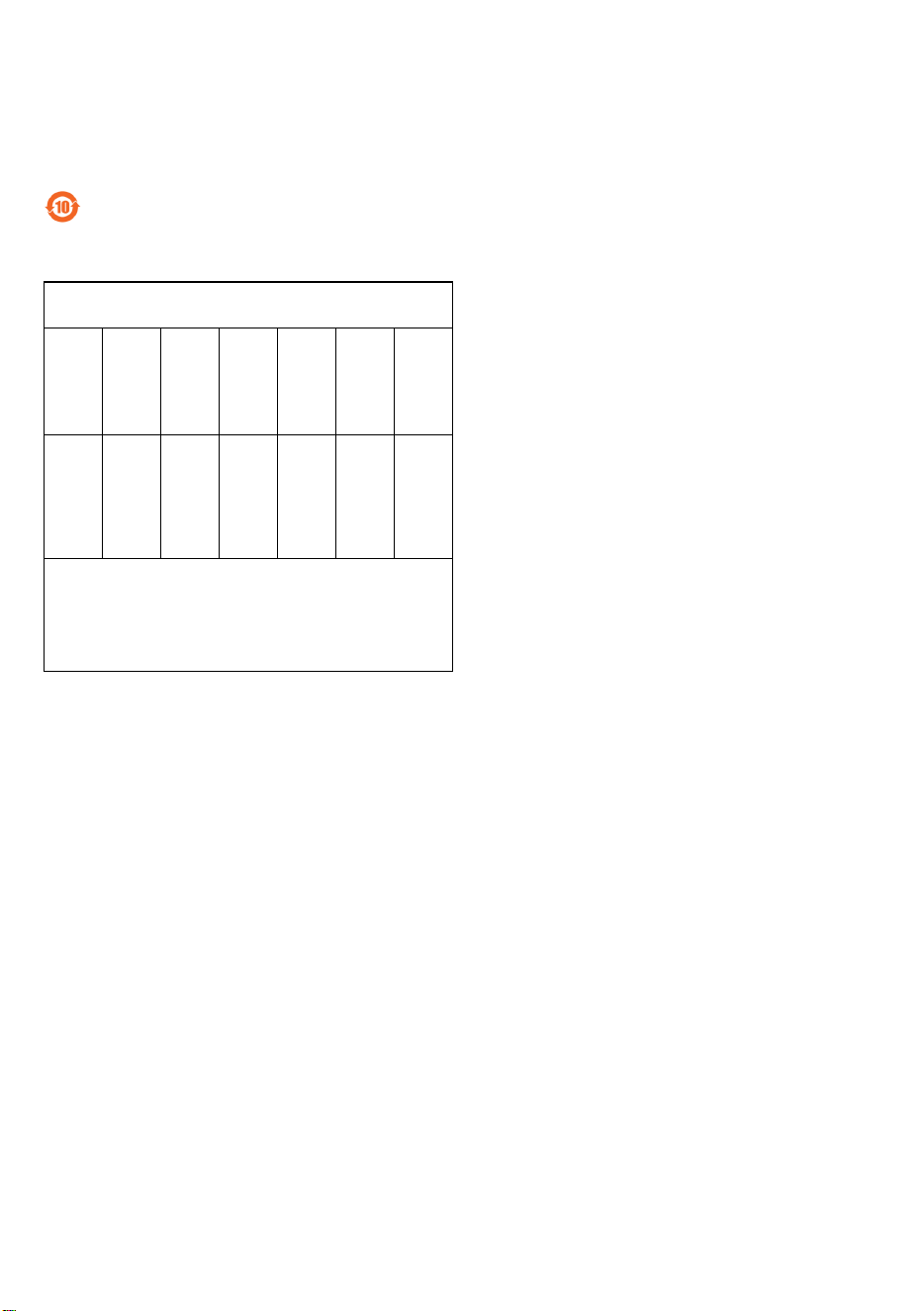
China
Thisproductcomplieswiththerequirementsof
SJ/T11364-2014,Markingfortherestrictionofhazardous
substancesinelectricalandelectronicproducts.
有毒有害物质或元素
部
件
名
称
铅
(Pb)
汞
(Hg)
镉
(Cd)
六价
铬
(Cr-
(VI))
多溴
联苯
(PB-
B)
多溴
二苯
醚
(PB-
DE)
电
气
实
装
部
分
X
00000
0:表示该有毒有害物质在该部件所有均质材料中
的含量均在GB/T26572标准规定的限量要求以下。
X:表示该有毒有害物质至少在该部件的某一均质
材料中的含量超出GB/T26572标准规定的限量要
求。
Contactinformation
AxisCommunicationsAB
Emdalavägen14
22369Lund
Sweden
Tel:+46462721800
Fax:+4646136130
axis.com
Warrantyinformation
ForinformationaboutAxis’productwarrantyandthereto
relatedinformation,gotowww.axis.com/warranty/
Support
Shouldyourequireanytechnicalassistance,pleasecontact
yourAxisreseller.Ifyourquestionscannotbeanswered
immediately,yourresellerwillforwardyourqueriesthrough
theappropriatechannelstoensurearapidresponse.Ifyou
areconnectedtotheInternet,youcan:
•downloaduserdocumentationandsoftwareupdates
•ndanswerstoresolvedproblemsintheFAQdatabase.
Searchbyproduct,category,orphrase
•reportproblemstoAxissupportstaffbylogginginto
yourprivatesupportarea
•chatwithAxissupportstaff
•visitAxisSupportataxis.com/support
Learnmore!
VisitAxislearningcenteraxis.com/academyforuseful
trainings,webinars,tutorialsandguides.


AXIST8504-EOutdoorPoESwitch
Packagecontents
•AXIST8504-EOutdoorPoESwitch
•Powerconnector
•Printedmaterials
-InstallationGuide(thisdocument)
7
EN
AXIST8504-EOutdoorPoESwitch
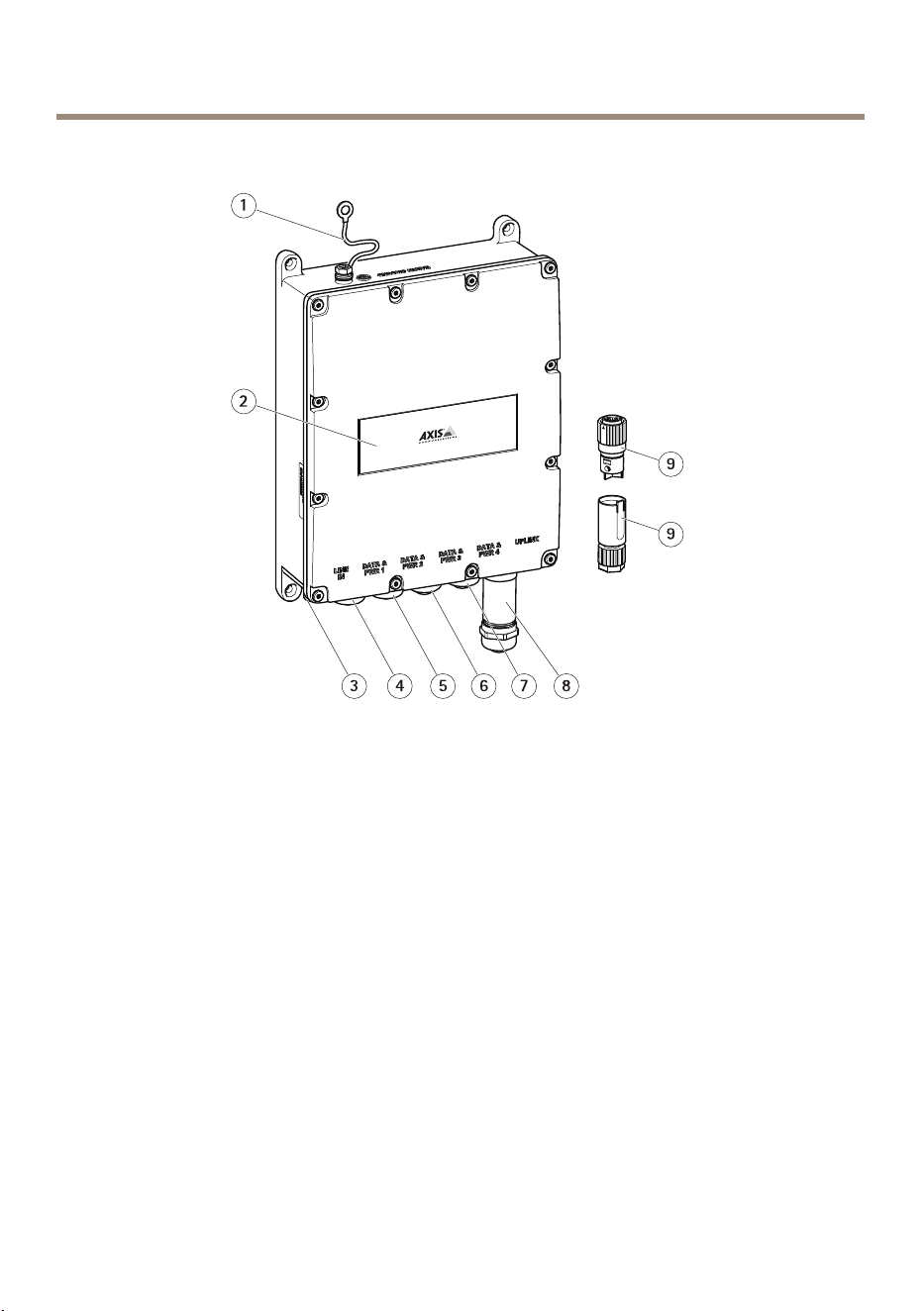
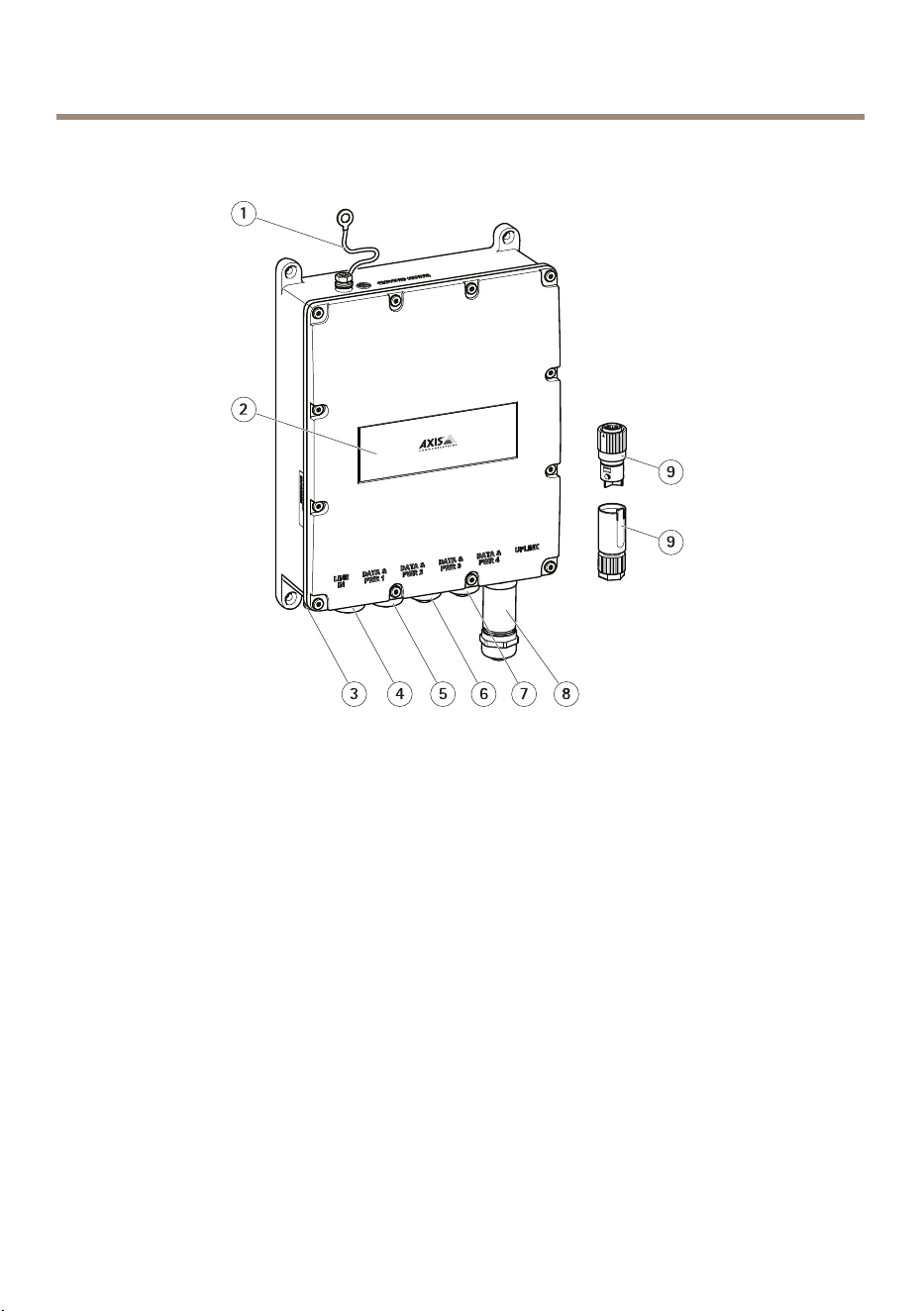
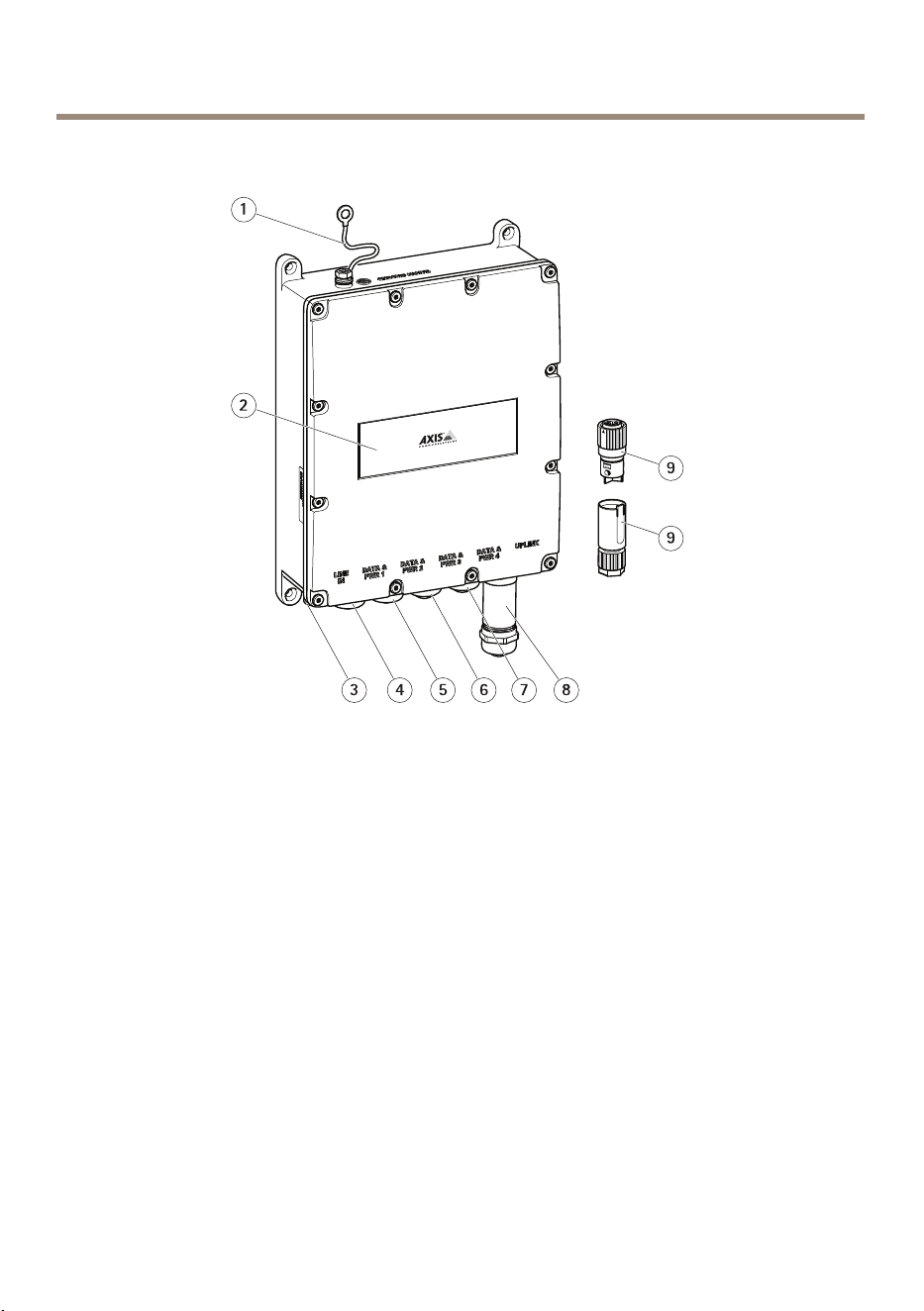
Productoverview
1
Groundingcable
2
Productlabel
3
Powerconnectorport
4
RJ45PoEport
5
RJ45PoEport
6
RJ45PoEport
7
RJ45PoEport
8
SFPslot
9
Powerconnector
8
AXIST8504-EOutdoorPoESwitch
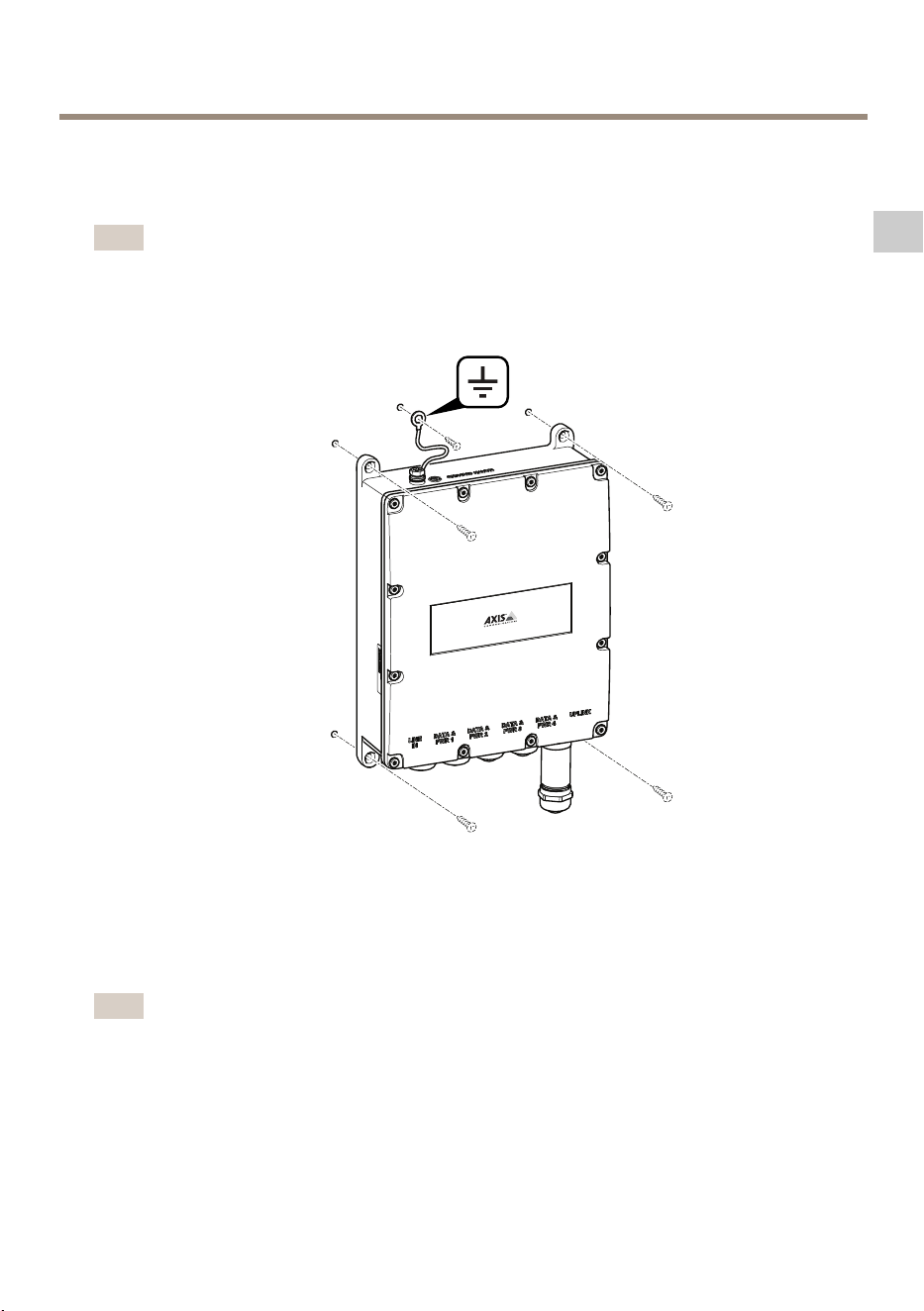
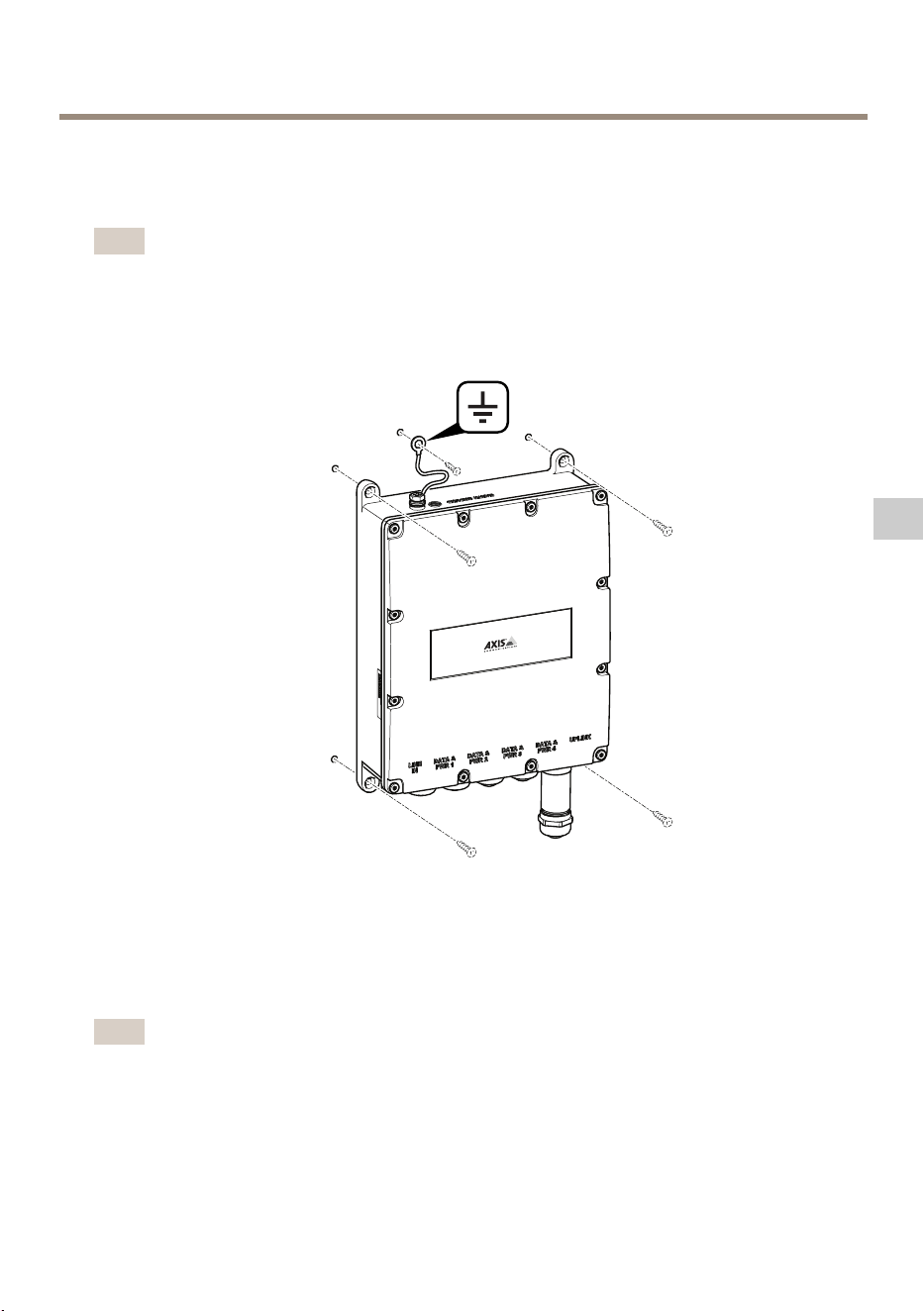
Howtoinstalltheproduct
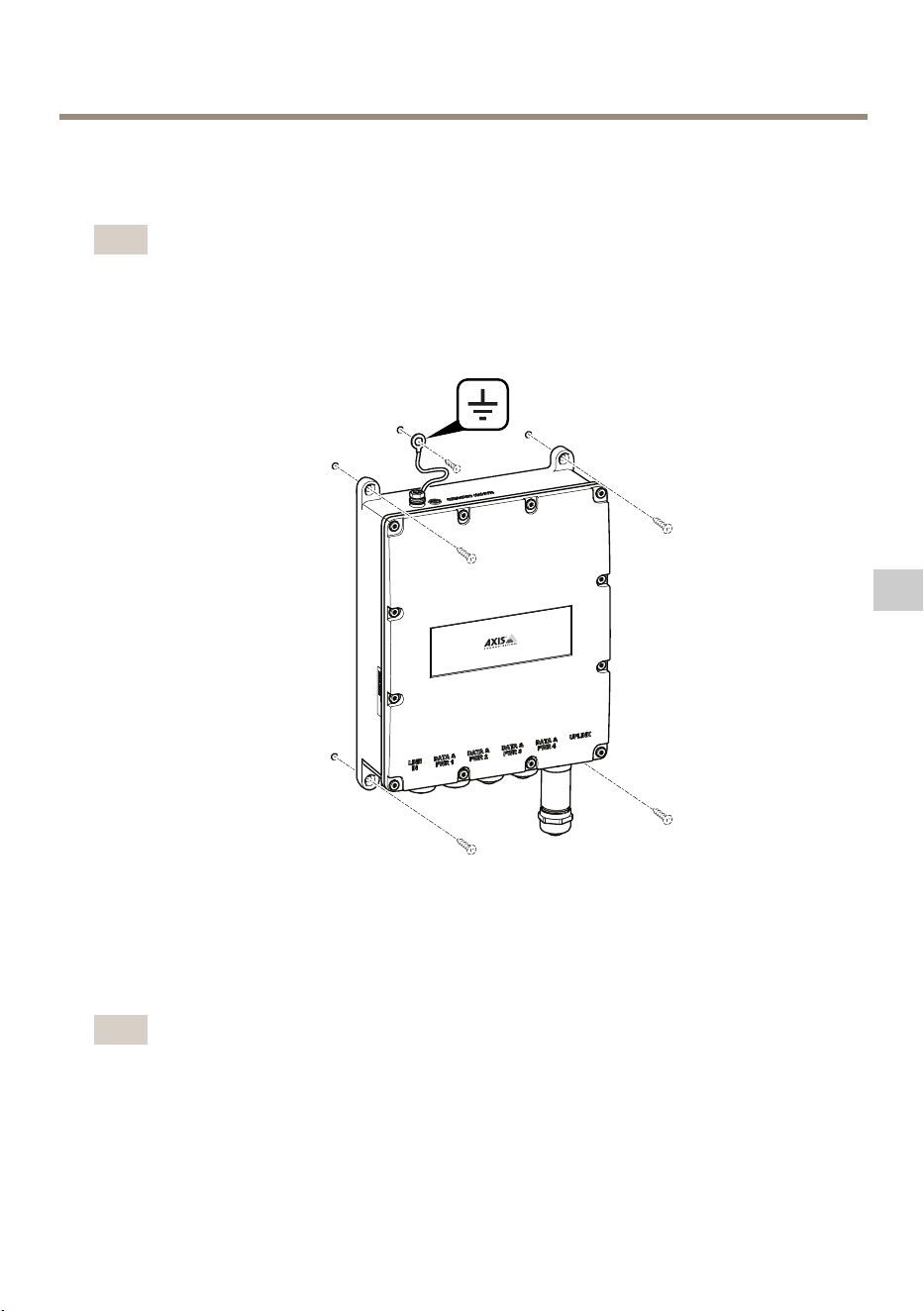
Howtomounttheproducttothewall
Note
Tomounttheproductonapoleyouneedapolemount.Foraccessories,seewww.axis.com
1.Placetheproductagainstaatsurface.
2.Fastentheproductusingfourscrews.
3.Fastenthegroundingcable.
HowtoconnectanEthernetcableoraSFPmodule
Note
Theeasiestwaytoconnectthecablesistostartfromtheleftwithconnectingtherst
EthernetcableintoData&PWR1andtoconnecttheSFPmoduleintheUplinkportaslast.
9
EN
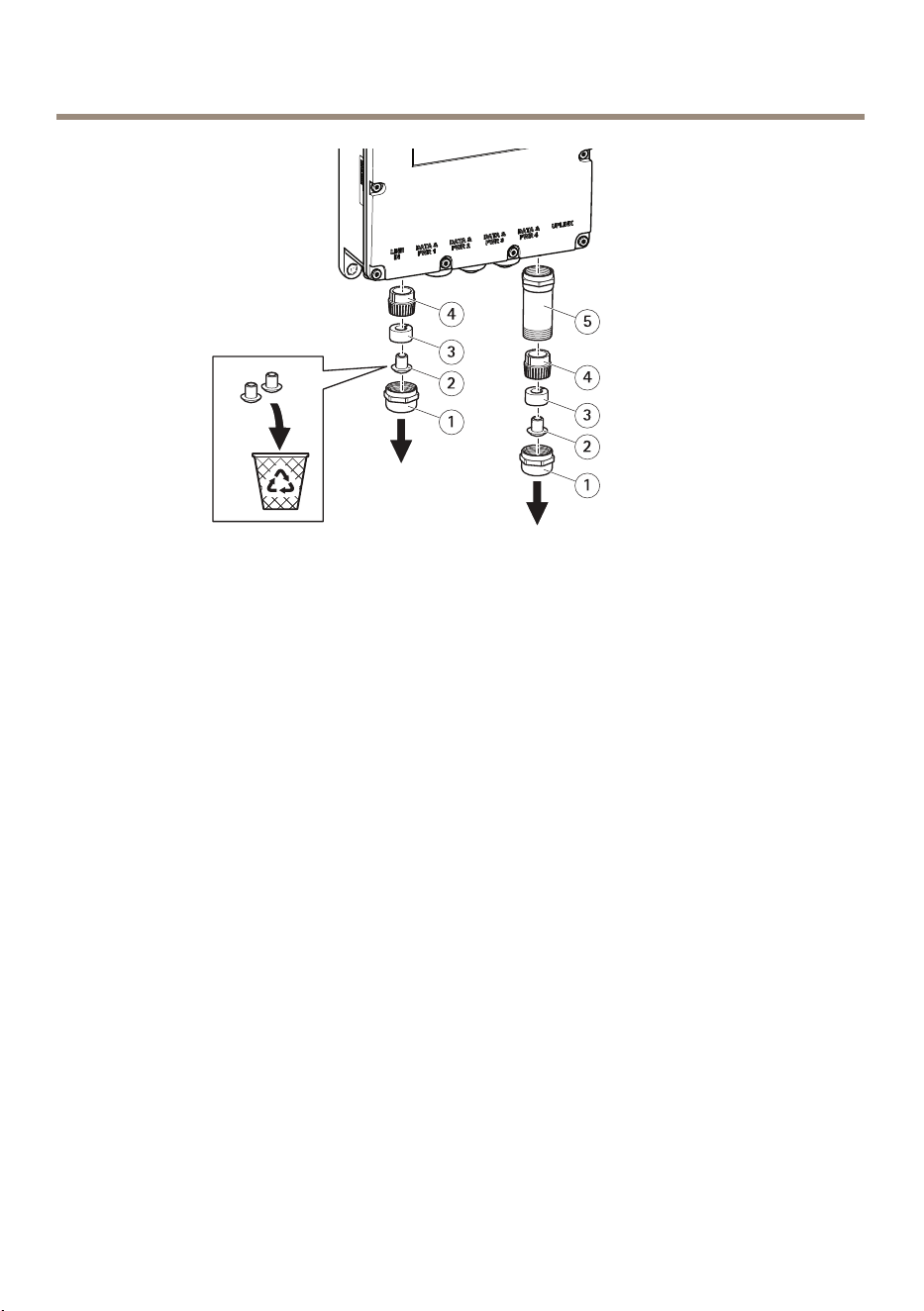
AXIST8504-EOutdoorPoESwitch
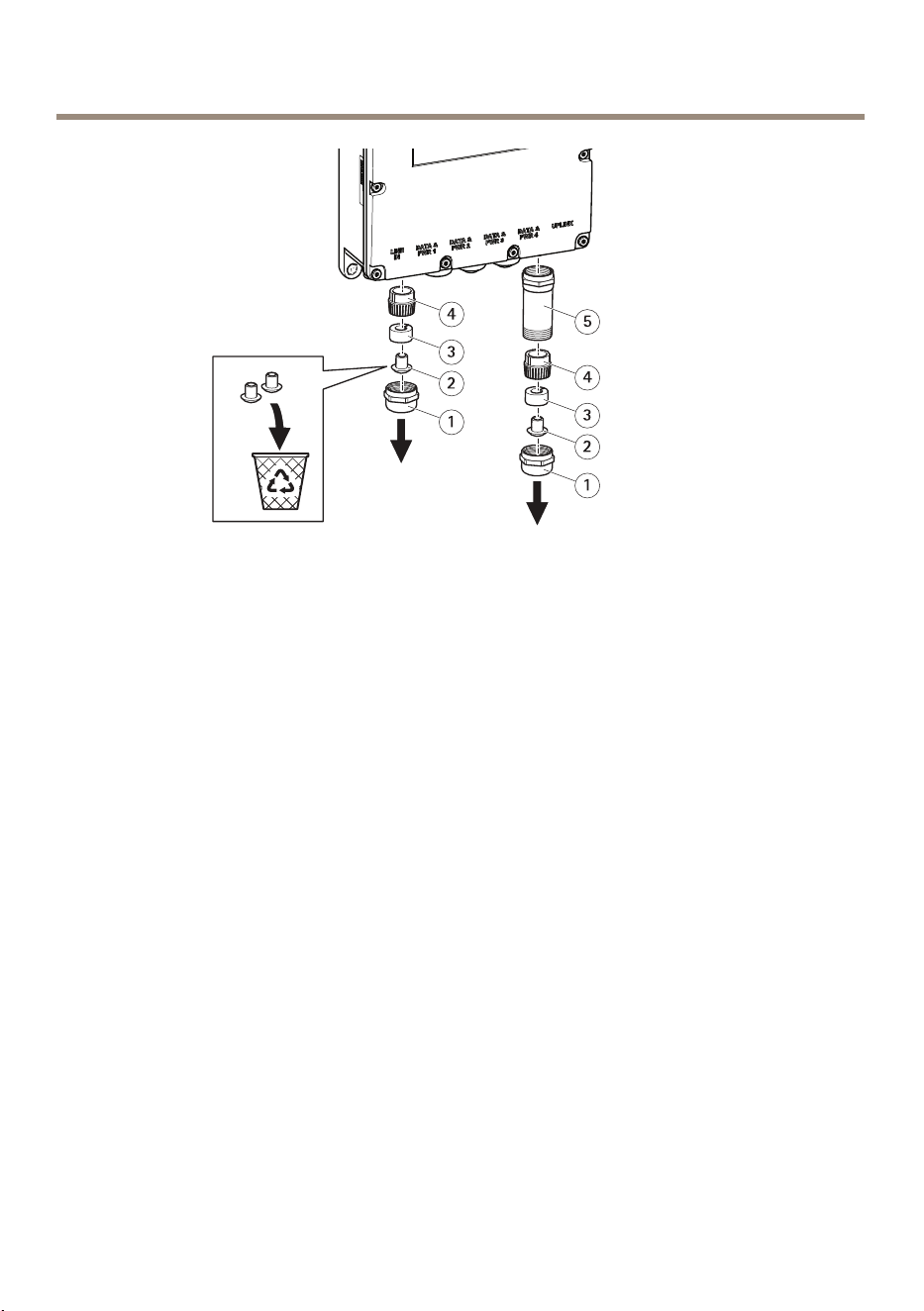
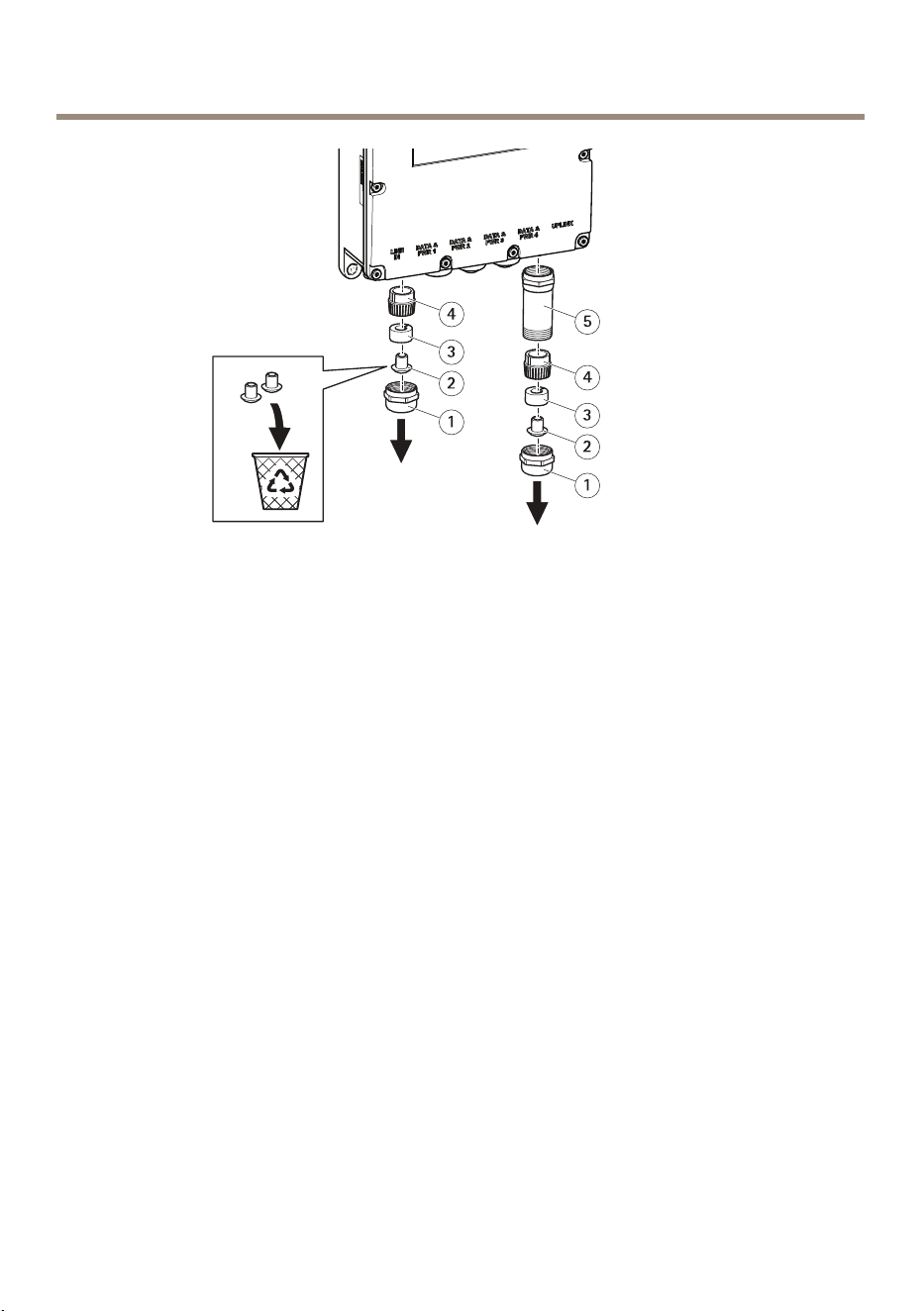
1
Metalgland
2
Dustcap
3
Rubberseal
4
Pressurengers
5
Metalprotection
1.Removethemetalglandbyturningitcounterclockwise.ToconnectaSFPmodulealso
removethemetalprotection.
2.Detachtherubbersealfromthepressurengers.
3.Throwthedustcaporkeepitforfutureuse.
10
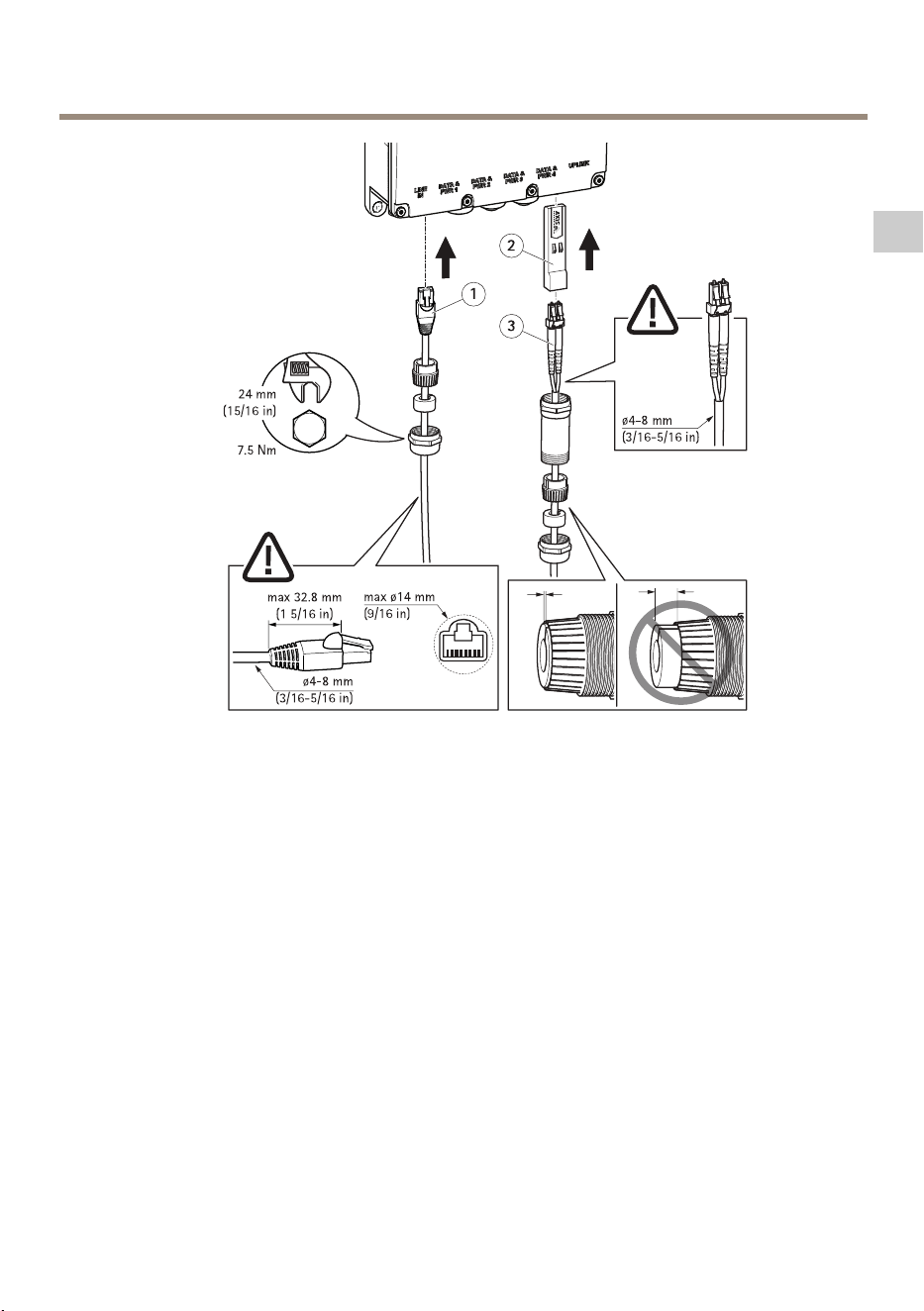
AXIST8504-EOutdoorPoESwitch
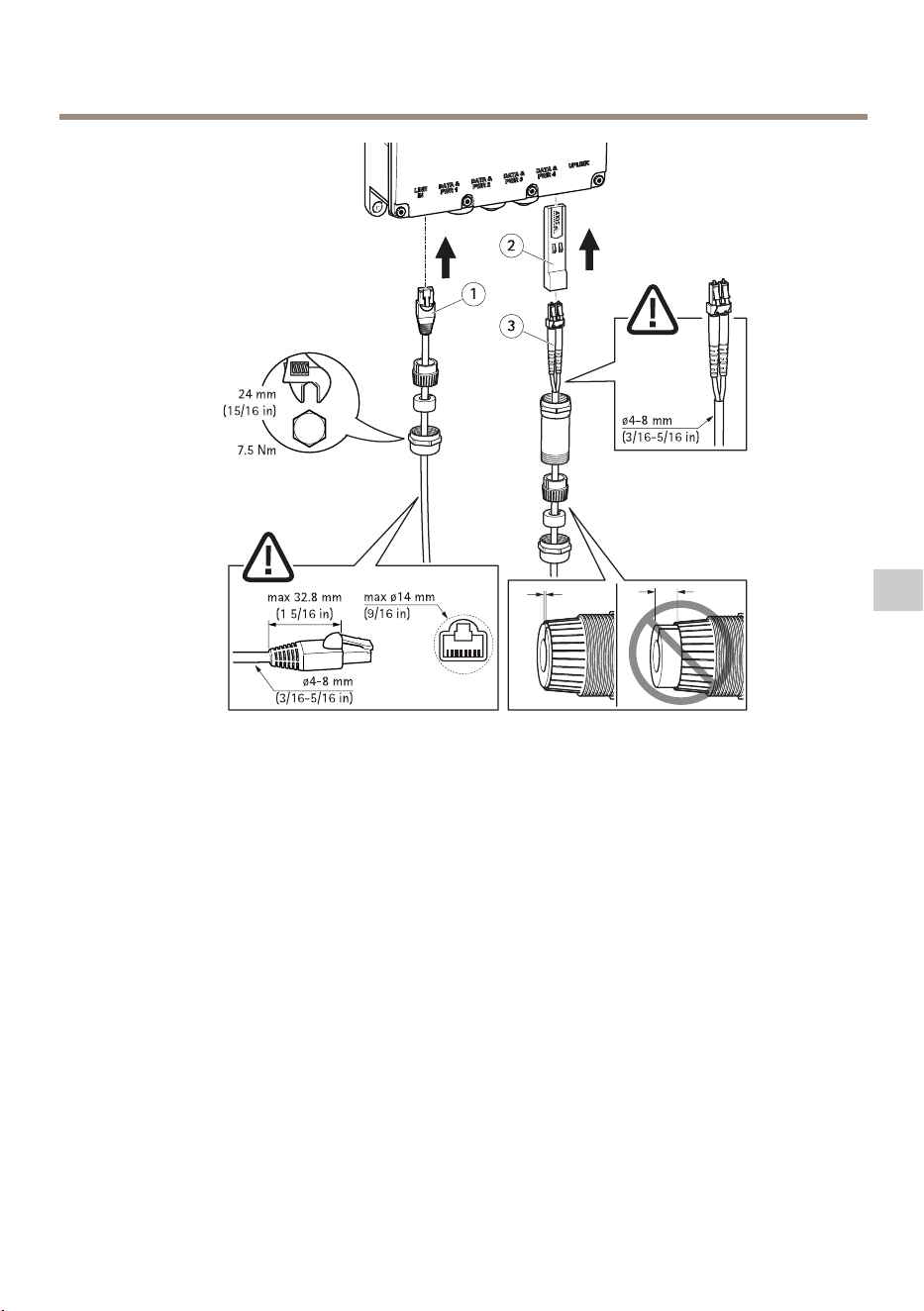
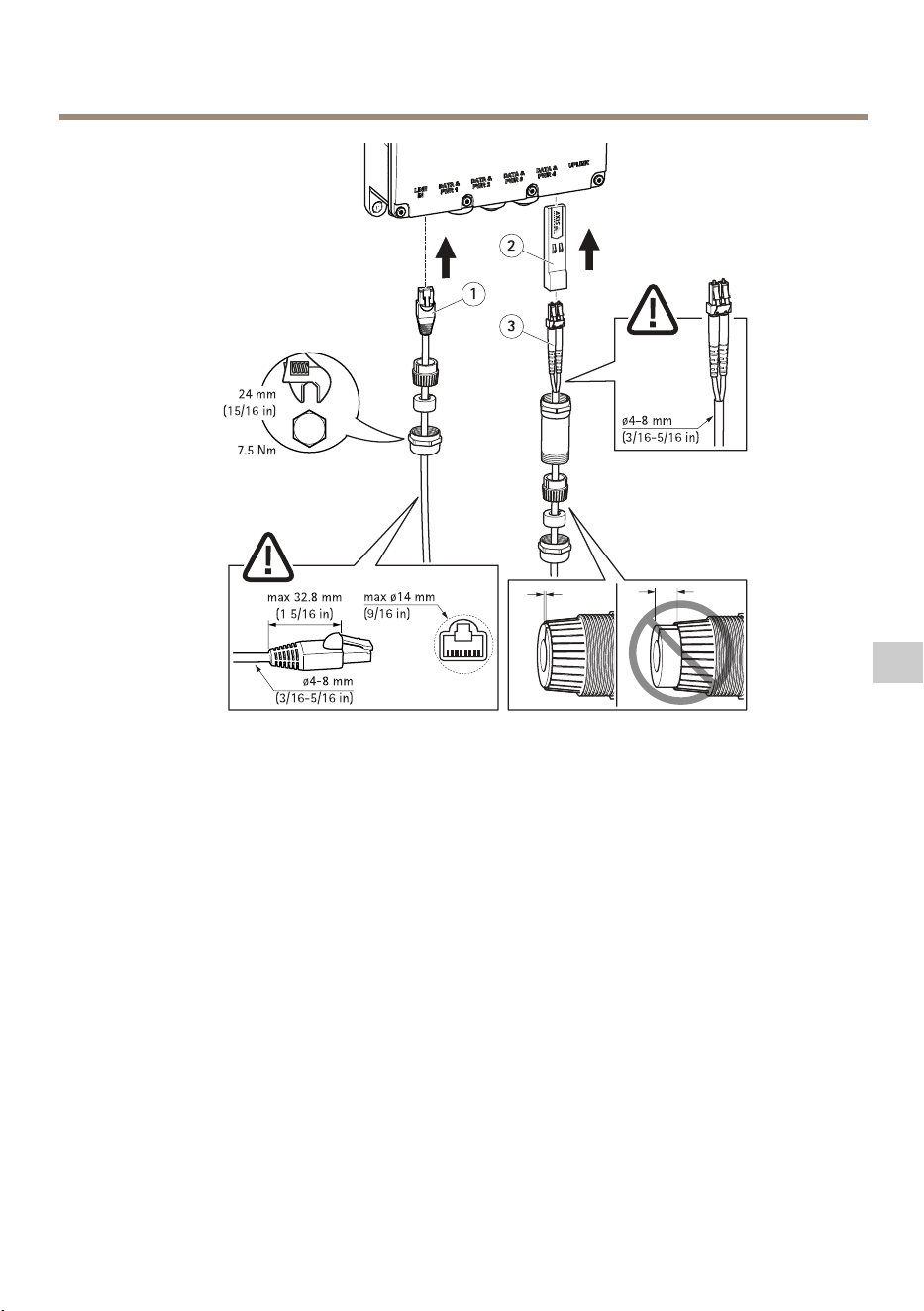
1
Ethernetcable
2
SFPmodule
3
Opticalbrecables
Howtoconnectanethernetcable:
1.Insertthemetalgland,rubbersealandpressurengerstotheEthernetcable,inthisorder.
2.Inserttherubbersealintothepressurengers.
3.Connectthecableintothesocket.
4.Attachthemetalglandtotheproductwithatorque.
HowtoconnectaSFPmodule:
1.InserttheSFPmoduleintotheproduct.
2.Insertthemetalgland,rubberseal,pressurengersandmetalprotectortotheoptical
bercable,inthisorder.
3.Connectthecableintothesocket.
4.Attachthemetalprotectortotheproductwithatorque.
5.Inserttherubbersealintothepressurengers.
11
EN
AXIST8504-EOutdoorPoESwitch
6.Attachthemetalglandtothemetalprotectorwithatorque.
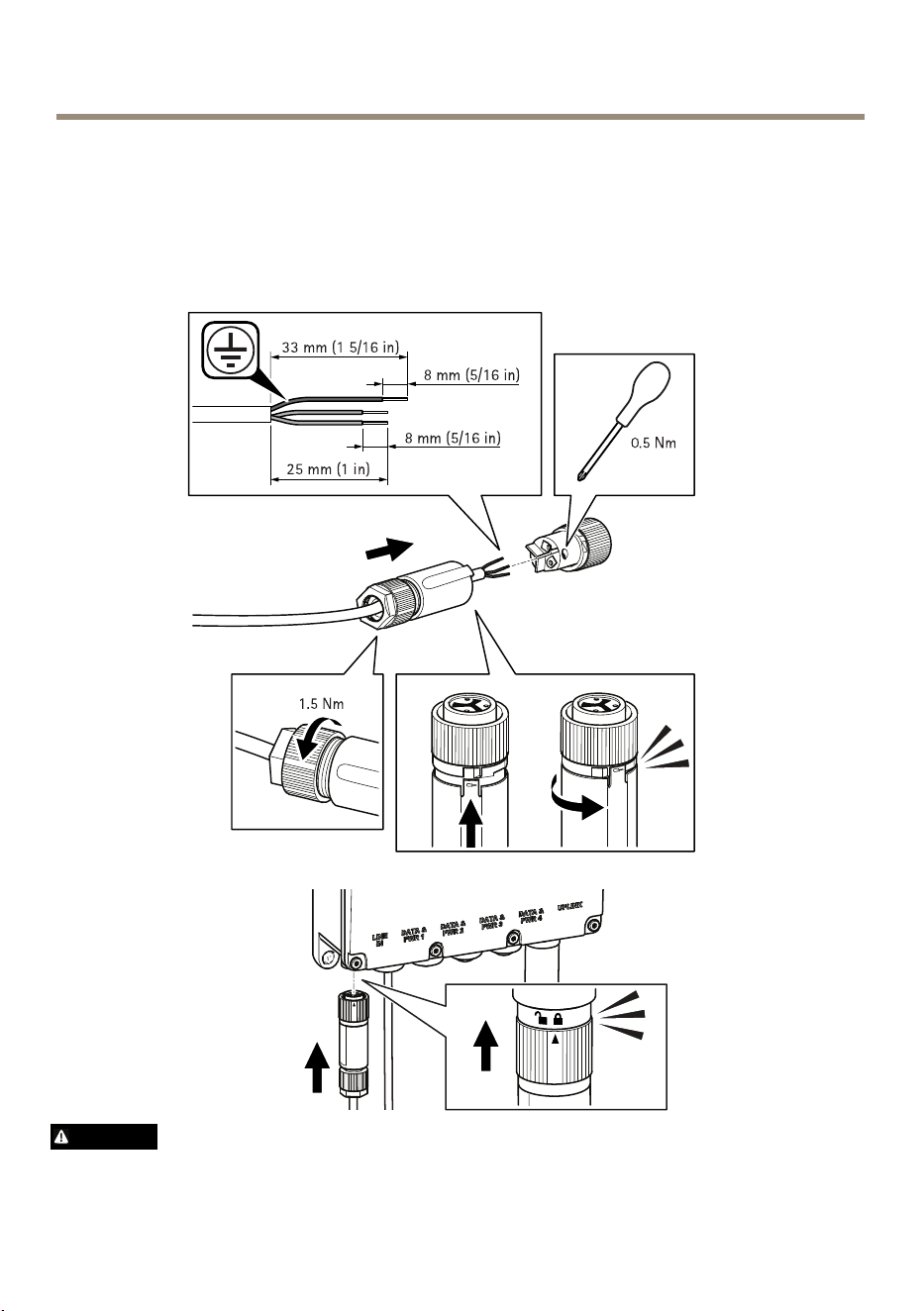
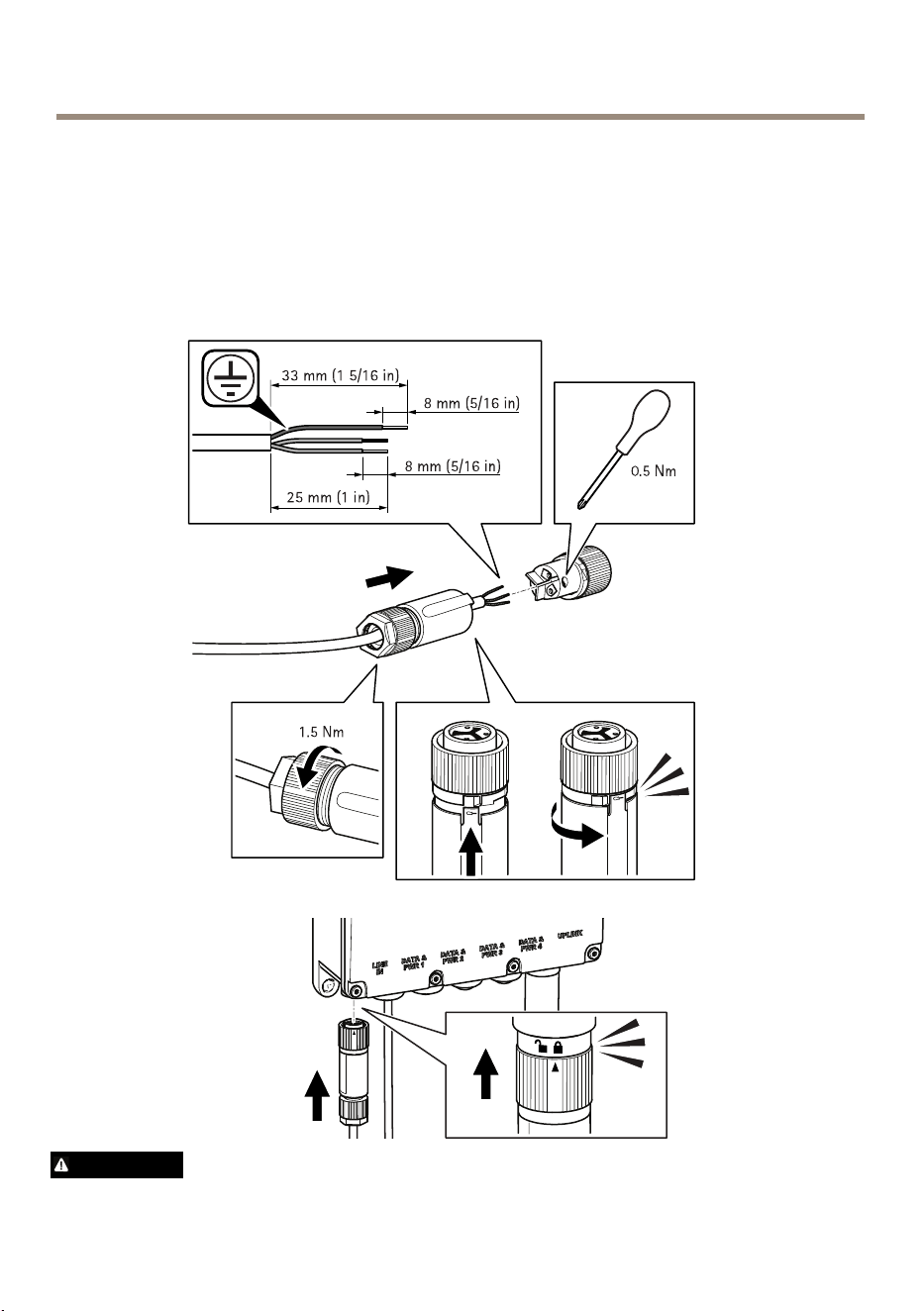
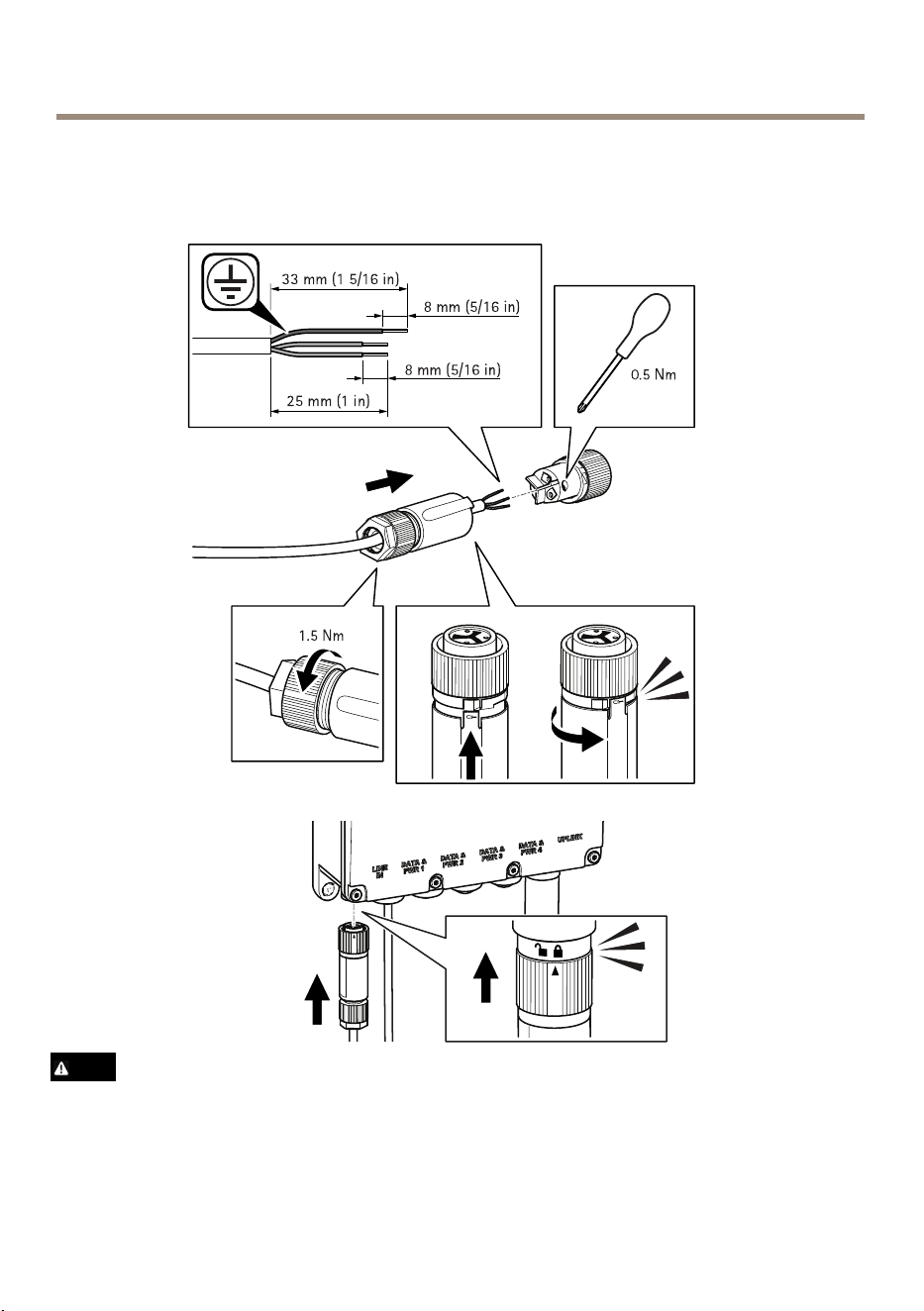
Connectthepowersupply
Seebelowimagesforhowtoconnectthepowerconnector.
WARNING
12

AXIST8504-EOutdoorPoESwitch
•WhenyouareconnectingtheACpowermakesurethatN,Landgroundareconnectedto
theproperpolarity.
•MakesurethattheACpoweriswithintheallowedrange(100–240VAC).
Howtoaccesstheproduct
AXISIPUtilityandAXISCameraManagementarerecommendedmethodsforndingAxisproducts
onthenetwork.Bothapplicationsarefreeandcanbedownloadedfromwww.axis.com/support
ThedefaultIPaddressis192.168.0.254
Defaultusernameandpassword:
Username:root
Password:pass
Important
Toprotectyourproductfromintrusionalwayschangeusernameandpasswordbeforeyou
startusingtheproduct.
Togetthemostoutofyourproductandtoprotectyourproductfromintrusionitisimportant
tologintotheproductto:
•ChangeUsernameandPassword
•AssignanewIPadress
•EnableHTTPS
•Checkthatyouhavethelatestrmware
Formoreinformationaboutusingtheproduct,seetheUserManualavailableatwww.axis.com
13
EN

AXIST8504-EOutdoorPoESwitch
Furtherinformation
•Forthelatestversionofthisdocument,seewww.axis.com
•Forusefulonlinetrainingsandwebinars,seewww.axis.com/academy
Optionalaccessories
Foracompletelistofavailableaccessoriesforthisproduct,gotowww.axis.com
14
AXIST8504-EOutdoorPoESwitch
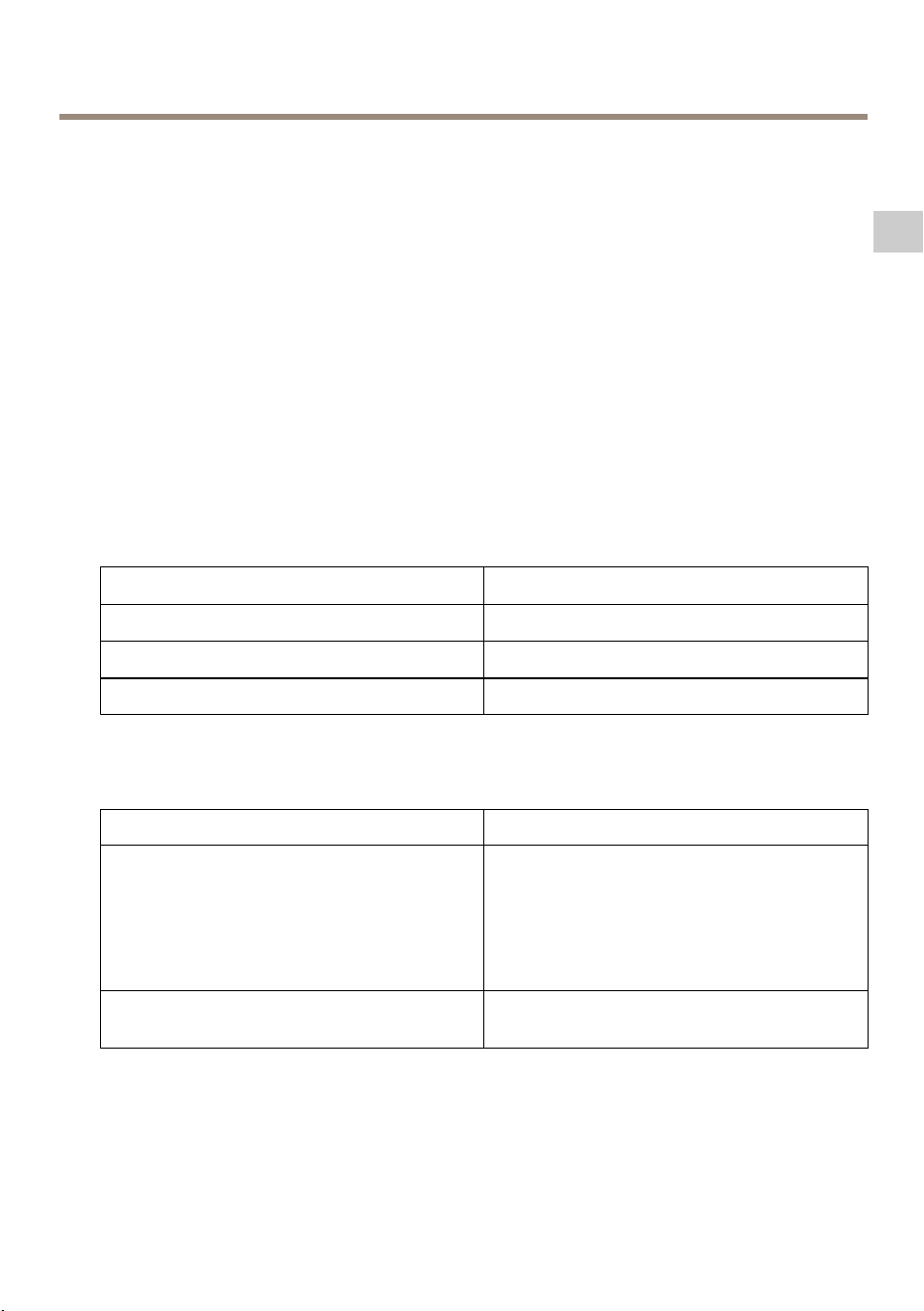
Specifications
Tondthelatestversionoftheproduct’sdatasheet,gotoaxis.com>product>Support&
Documentation.
Connectors
Networkconnector
RJ45EthernetconnectorwithPoweroverEthernet(PoE).
SFPconnector.
Powerconsumption
Table0.1.Electricalspecication
Inputvoltage
100–240VAC(50/60Hz)
InputCurrent(100–240VAC)2.5Ampere(max)
Availableoutputpower(max.)
150W
Nominaloutputvoltage
54VDC
Table0.2.Interface
Uplink
SFPCage
Output(DATAPWROUT):
Ethernet10/100/1000Base-T,plus54VDC
(RJ45femalesocket,withDCvoltage)
Upto150Wfromthefollowingavailable
options:
60Wports(Ports1&2):
Pairs1–2&3–6,7–8&4–5
30Wports(Ports3&4):
Pairs1–2&3–6
ACPowerIN3PinsACpowerin–Line,NeutralandEarth
Ground
15
EN

AXIST8504-EOutdoorPoESwitch
Operatingconditions
ProductTemperatureHumidity
AxisT8504-E
-40°Cto50°C
(-40°Fto122°F)*for150
Watts
-40°Cto60°C
(-40°Fto140°F)*for90
Watts
10to95%
(nocondensationallowed)
16

AXIST8504-EOutdoorPoESwitch
Safetyinformation
Hazardlevels
DANGER
Indicatesahazardoussituationwhich,ifnotavoided,willresultindeathorseriousinjury.
WARNING
Indicatesahazardoussituationwhich,ifnotavoided,couldresultindeathorseriousinjury.
CAUTION
Indicatesahazardoussituationwhich,ifnotavoided,couldresultinminorormoderate
injury.
NO NO
NO
TICE TICE
TICE
Indicatesasituationwhich,ifnotavoided,couldresultindamagetoproperty.
Othermessagelevels
Important
Indicatessignicantinformationwhichisessentialfortheproducttofunctioncorrectly.
Note
Indicatesusefulinformationwhichhelpsingettingthemostoutoftheproduct.
17
EN

AXIST8504-EOutdoorPoESwitch
Safetyinstructions
NO NO
NO
TICE TICE
TICE
•TheAxisproductshallbeusedincompliancewithlocallawsandregulations.
•UseonlyapplicabletoolswheninstallingtheAxisproduct.Usingexcessiveforcewith
powertoolscouldcausedamagetotheproduct.
•Donotusechemicals,causticagents,oraerosolcleaners.
•Useacleanclothdampenedwithpurewaterforcleaning.
•Useonlyaccessoriesthatcomplywiththetechnicalspecicationofyourproduct.These
canbeprovidedbyAxisorathirdparty.AxisrecommendsusingAxispowersource
equipmentcompatiblewithyourproduct.
•UseonlysparepartsprovidedbyorrecommendedbyAxis.
•Donotattempttorepairtheproductyourself.ContactAxissupportoryourAxisreseller
forservicematters.
Transportation
NO NO
NO
TICE TICE
TICE
•WhentransportingtheAxisproduct,usetheoriginalpackagingorequivalenttoprevent
damagetotheproduct.
18

AXIST8504-EOutdoorPoESwitch
Contenudel’emballage
•CommutateurPoEd'extérieurAXIST8504-E
•Connecteurd'alimentation
•Documentsimprimés
-Guided’installation(cedocument)
19
FR
AXIST8504-EOutdoorPoESwitch
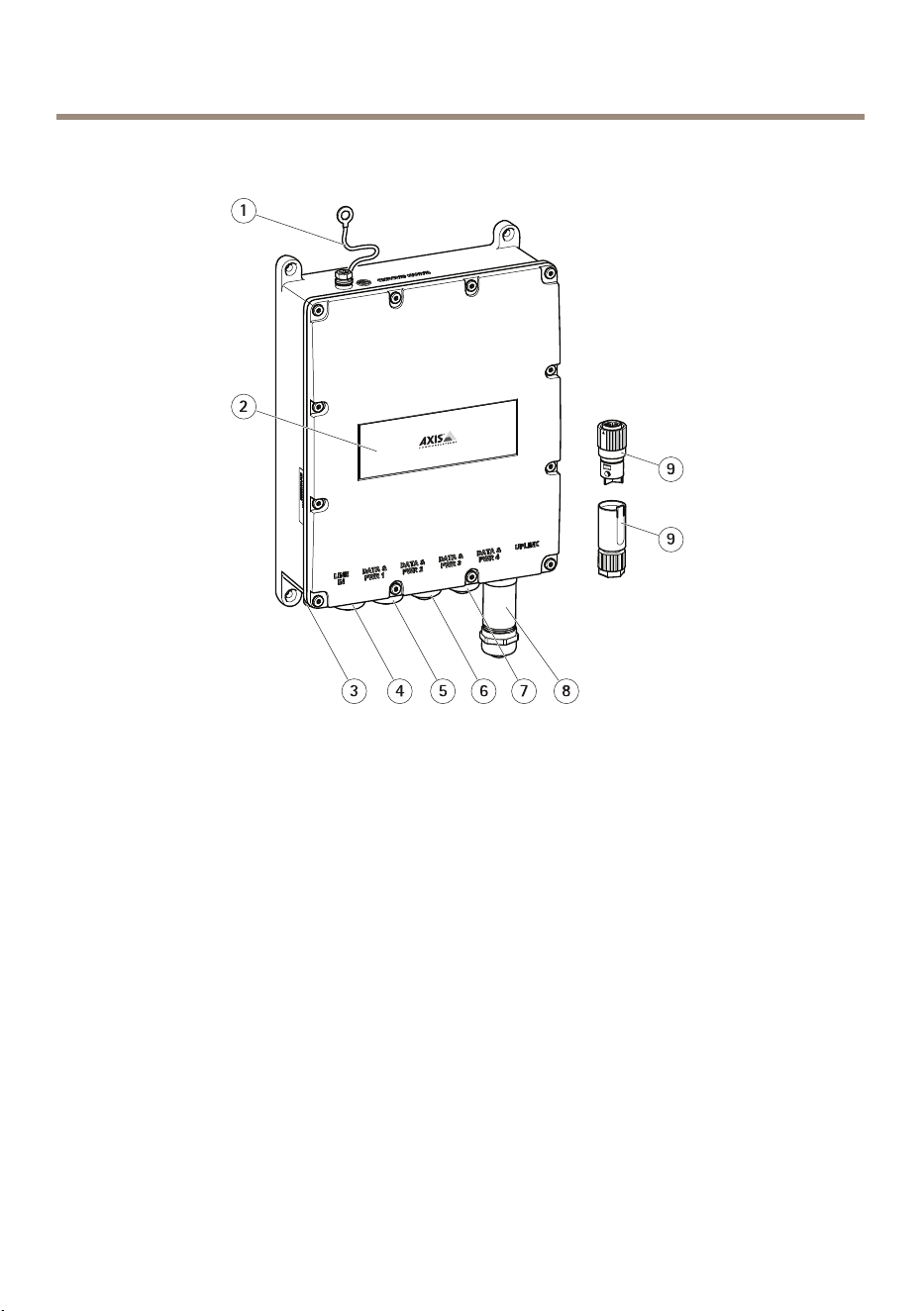
Vued'ensembleduproduit
1
Câbledemiseàlaterre
2
Étiquetteproduit
3
Portduconnecteurd’alimentation
4
PortRJ45PoE
5
PortRJ45PoE
6
PortRJ45PoE
7
PortRJ45PoE
8
EmplacementPDU
9
Connecteurd'alimentation
20
AXIST8504-EOutdoorPoESwitch
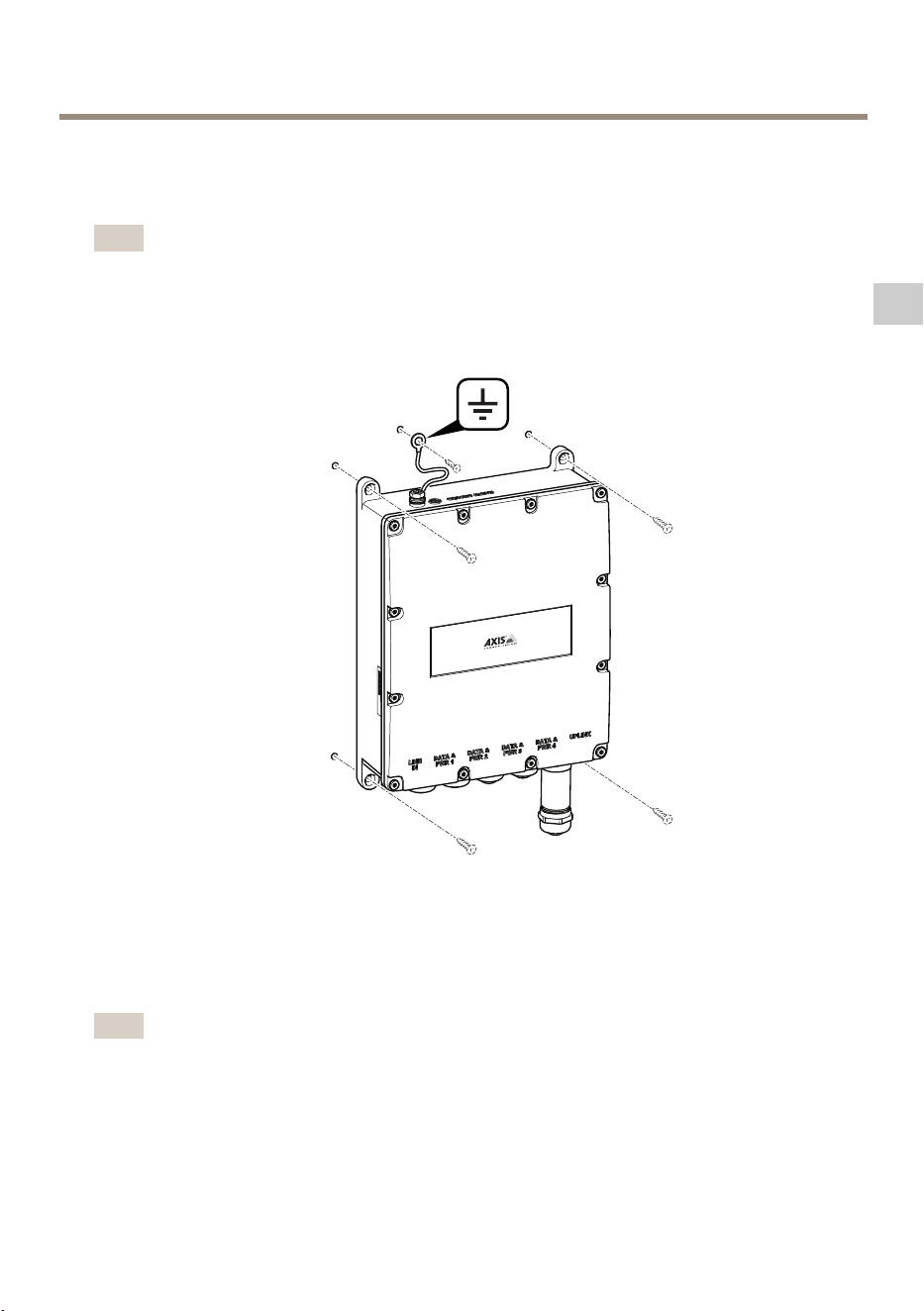
Commentinstallerleproduit
Commentxerleproduitaumur
Note
Pourmonterleproduitsurunpoteau,vousavezbesoind'unexationpourpoteau.Pourles
accessoires,visiterwww.axis.com
1.Placezleproduitcontreunesurfaceplate.
2.Fixezleproduitàl'aidedequatrevis.
3.Fixezlecâbledemiseàlaterre.
CommentraccorderuncâbleEthernetouunmoduleSFP
Note
Leplussimplepourbrancherlescâblesestdecommenceràgaucheenraccordantle
premiercâbleEthernetauportData&PWR1,puisderaccorderendernierlemodule
SFPauportàliaisonmontante.
21
FR
AXIST8504-EOutdoorPoESwitch
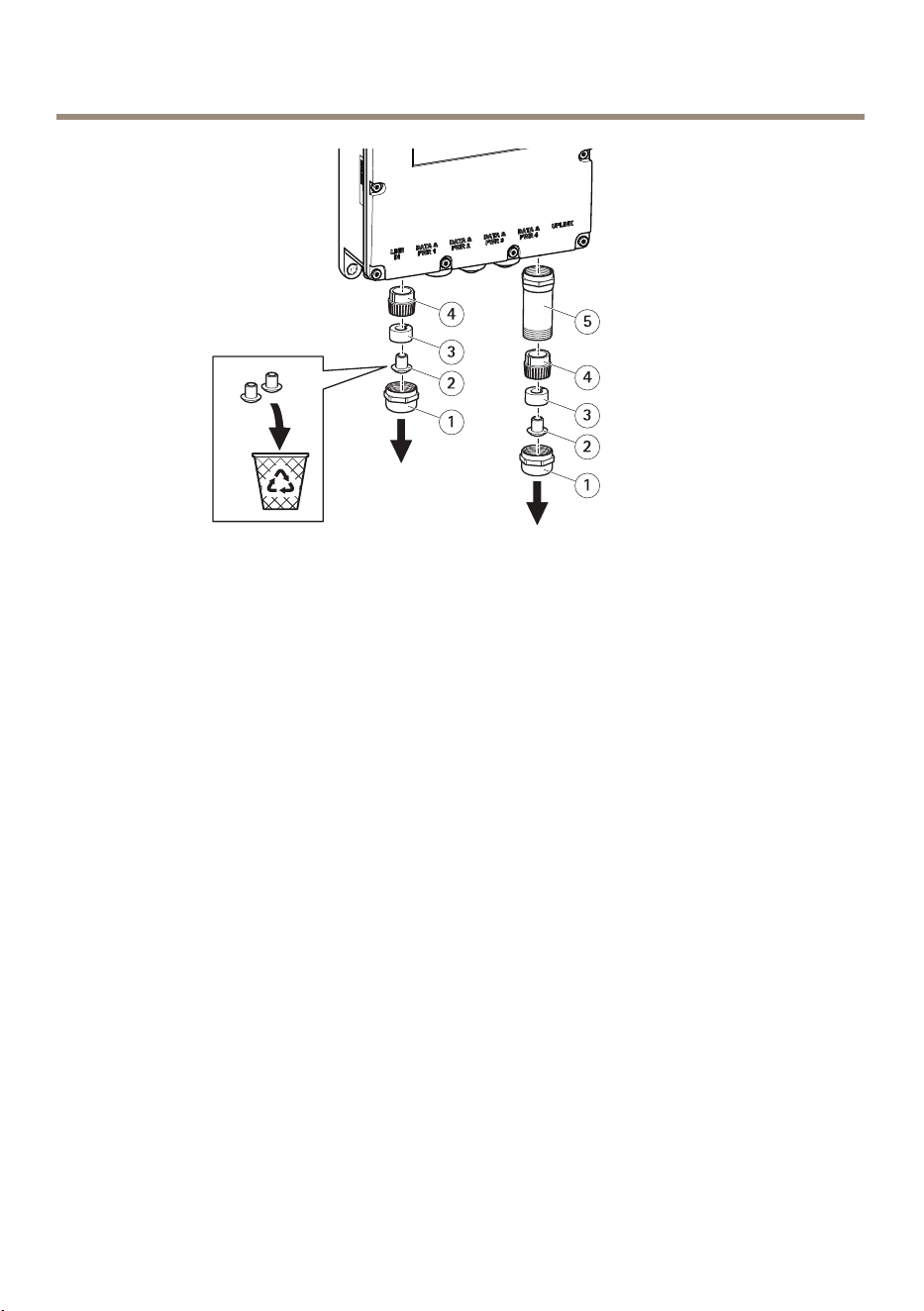
1
Presse-étoupemétallique
2
Cache-poussière
3
Jointencaoutchouc
4
Doigtspresseurs
5
Protectionmétallique
1.Retirezlepresse-étoupemétalliqueenletournantdanslesensanti-horaire.Pour
brancherunmoduleSFP,retirezégalementlaprotectionmétallique.
2.Retirezlejointencaoutchoucdesdoigtspresseurs.
3.Jetezlecache-poussièreouconservez-lepourunusageultérieur.
22
AXIST8504-EOutdoorPoESwitch
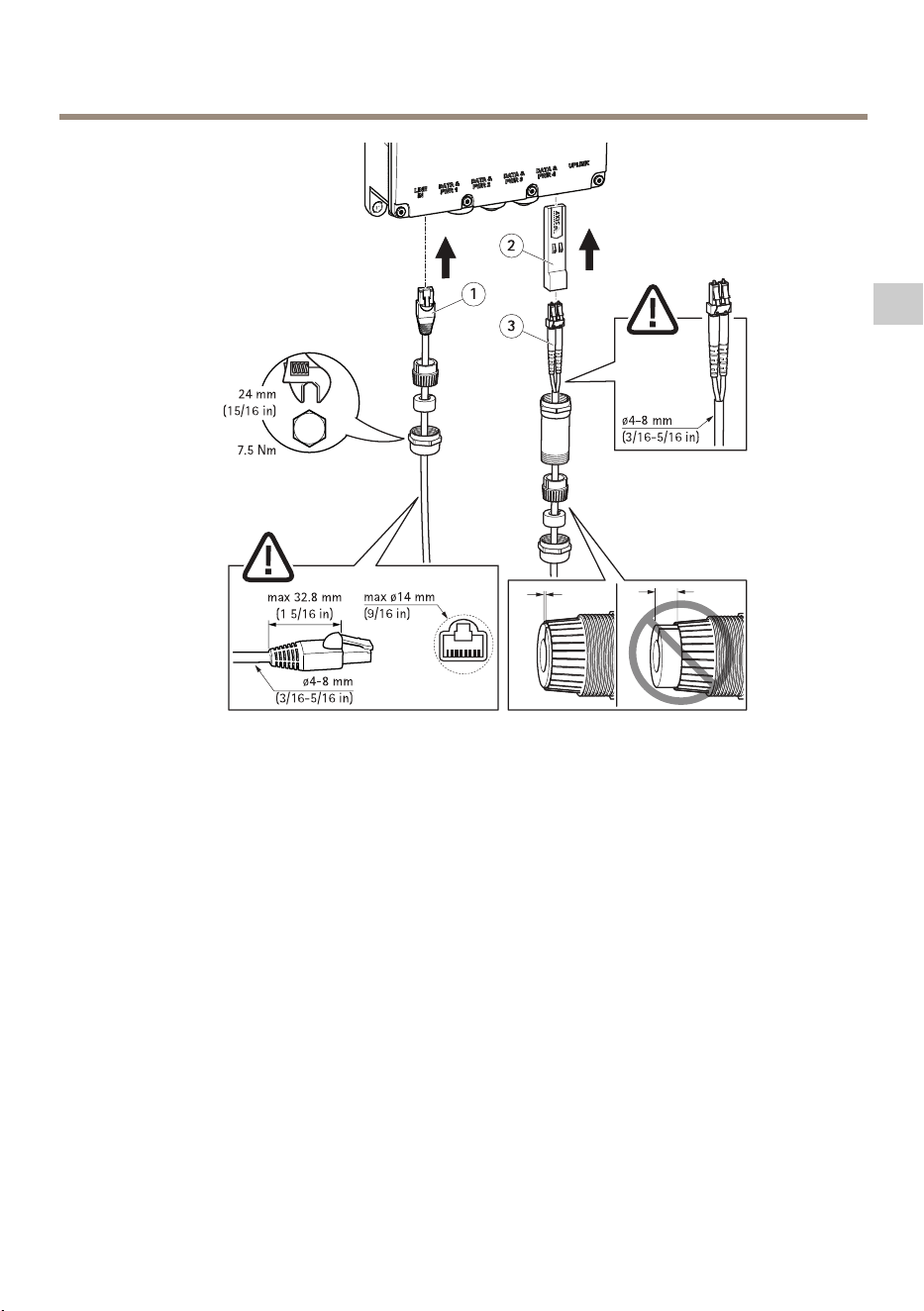
1
CâbleEthernet
2
ModuleSFP
3
Câblesàbreoptique
CommentraccorderuncâbleEthernet:
1.Insérezlepresse-étoupemétallique,lejointencaoutchoucetlesdoigtspresseursdansle
câbleEthernet,danscetordre.
2.Insérezlejointencaoutchoucdanslesdoigtspresseurs.
3.Branchezlecâbledanslaprise.
4.Fixezlepresse-étoupemétalliqueauproduitavecuneffortdeserrage.
CommentconnecterunmoduleSFP:
1.InsérezlemoduleSFPdansleproduit.
2.Insérezlepresse-étoupemétallique,lejointencaoutchouc,lesdoigtspresseursetla
protectionmétalliquedanslecâbleàbreoptique,danscetordre.
3.Branchezlecâbledanslaprise.
4.Fixezlaprotectionmétalliqueauproduitavecuneffortdeserrage.
23
FR
AXIST8504-EOutdoorPoESwitch
5.Insérezlejointencaoutchoucdanslesdoigtspresseurs.
6.Fixezlepresse-étoupemétalliqueàlaprotectionmétalliqueavecuneffortdeserrage.
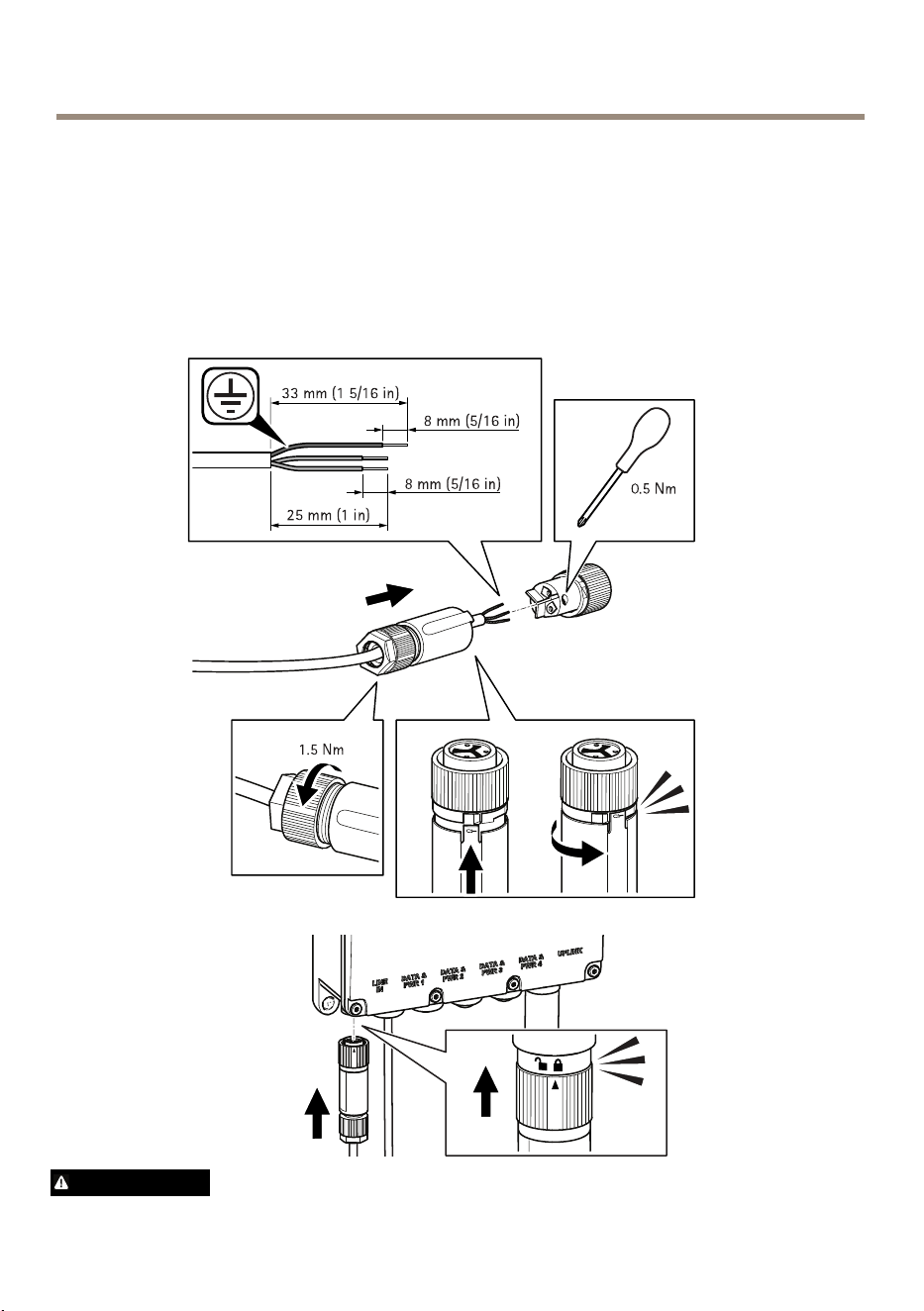
Branchementdublocd'alimentation
Reportez-vousauxillustrationsci-dessouspoursavoircommentbrancherleconnecteur
d'alimentation.
AVERTISSEMENT
24

AXIST8504-EOutdoorPoESwitch
•Lorsquevousbranchezl'alimentationsecteur,assurez-vousquelespolaritéssont
respectées(N,Letterre).
•Assurez-vousquel'alimentationsecteursetrouvedanslaplageautorisée(100à240VCA).
Commentaccéderauproduit
SivoussouhaitezrechercherdesproduitsAxissurleréseau,nousrecommandonsl’utilisationdes
applicationsAXISIPUtilityetAXISCameraManagement.Cesdeuxapplicationssontgratuiteset
peuventêtretéléchargéesdepuiswww.axis.com/support
L’adresseIPpardéfautest192.168.0.254
Nomd'utilisateuretmotdepassepardéfaut:
Nomd'utilisateur:root
Motdepasse:pass
Important
Pourprotégervotreproduitdetouteintrusion,modieztoujourslenomd'utilisateuret
lemotdepasseavantdecommenceràutiliserleproduit.
Pourbénécierpleinementdevotreproduitetleprotégercontretouteintrusion,ilestimportant
deseconnecterauproduitande:
•Modierlenomd'utilisateuretlemotdepasse
•AttribuerunenouvelleadresseIP
•ActiverleprotocoleHTTPS
•Vérierquevousdisposezdeladernièreversiondurmware
Pourplusd’informationsconcernantl’utilisationduproduit,consultezlemanueldel’utilisateur
disponiblesurlesitewww.axis.com
25
FR

AXIST8504-EOutdoorPoESwitch
Informationscomplémentaires
•Pourladernièreversiondecedocument,consultezlesitewww.axis.com
•Pourensavoirplussurlesformations,leswebinaires,lestutorielsetlesguides,visitez
lesitewww.axis.com/academy.
Accessoiresenoption
Pourobtenirlalistecomplètedesaccessoiresdisponiblespourceproduit,consultezwww.axis.com
26
AXIST8504-EOutdoorPoESwitch
Caractéristiques
Pourobtenirladernièreversiondelachetechniqueduproduit,rendez-voussuraxis.com>produit
>Assistanceetdocumentation.
Connecteurs
Connecteurréseau
ConnecteurEthernetRJ45avecl'alimentationparEthernet(PoE).
ConnecteurSFP.
Consommationélectrique
Table0.3.Caractéristiquesélectriques
Tensiond'entrée
100–240VCA(50–60Hz)
Courantd'entrée(100–240VCA)2,5Ampère(max)
Puissancedesortiedisponible(max.)
150W
Tensiondesortienominale
54VCC
Table0.4.Interface
Liaisonmontante
CageSFP
Sortie(DATAPWROUT):
Ethernet10/100/1000Base-T,plus54VCC
(PrisefemelleRJ45,avectensioncontinue)
Jusqu'à150Wpourlesoptionssuivantes
disponibles:
ports60W(Ports1et2):
Pairs1–2et3–6,7–8et4–5
ports30W(Ports3et4):
Pairs1–2et3–6
Entréed’alimentationCA3brochesentréesd'alimentationCA–Ligne,
Neutreetmiseàlaterre
27
FR

AXIST8504-EOutdoorPoESwitch
Conditionsd’utilisation
Produit
TempératureHumidité
AxisT8504-E
-40°Cà50°C
(-40°Fà122°F)*pour30
Watts
-40°Cà60°C
(-40°Fà140°F)*pour90
Watts
10à95%
(condensationnonautorisée)
28

AXIST8504-EOutdoorPoESwitch
Informationssurlasécurité
Niveauxderisques
DANGER
Indiqueunesituationdangereusequi,siellen'estpasévitée,entraîneraledécèsoudes
blessuresgraves.
AVERTISSEMENT
Indiqueunesituationdangereusequi,siellen'estpasévitée,pourraitentraînerledécès
oudesblessuresgraves.
ATTENTION
Indiqueunesituationdangereusequi,siellen'estpasévitée,pourraitentraînerdes
blessureslégèresoumodérées.
A A
A
VIS VIS
VIS
Indiqueunesituationqui,siellen'estpasévitée,pourraitendommagerl'appareil.
Autresniveauxdemessage
Important
Indiquelesinformationsimportantes,nécessairespourassurerlebonfonctionnementde
l’appareil.
Note
Indiquelesinformationsutilesquipermettrontd’obtenirlefonctionnementoptimalde
l’appareil.
29
FR

AXIST8504-EOutdoorPoESwitch
Consignesdesécurité
A A
A
VIS VIS
VIS
•LeproduitAxisdoitêtreutiliséconformémentauxloisetrèglementationslocalesen
vigueur.
•Utiliseruniquementdesoutilsrecommandéspourl'installationdel'appareilAxis.
L'applicationd'uneforceexcessivesurl'appareilavecdesoutilspuissantspourrait
l'endommager.
•Nepasutiliserdeproduitschimiques,desubstancescaustiquesoudenettoyants
pressurisés.
•Utiliserunchiffonpropreimbibéd'eaupurepourlenettoyage.
•Utiliseruniquementdesaccessoiresconformesauxcaractéristiquestechniquesdevotre
produit.IlspeuventêtrefournisparAxisouuntiers.Axisrecommanded'utiliserun
équipementd'alimentationAxiscompatibleavecvotreproduit.
•UtiliseruniquementlespiècesderechangefourniesourecommandéesparAxis.
•Nepasessayerderéparervous-mêmeceproduit.Contacterl'assistancetechniqued'Axis
ouvotrerevendeurAxispourdesproblèmesliésàl'entretien.
Transport
A A
A
VIS VIS
VIS
•LorsdutransportduproduitAxis,utilisezl'emballaged'origineouunéquivalentpour
éviterd'endommagerleproduit.
30

AXIST8504-EOutdoorPoESwitch
Lieferumfang
•AXIST8504PoE-SwitchfürdenAußenbereich
•Netzanschluss
•GedrucktesMaterial
-Installationsanleitung(diesesDokument)
31
DE
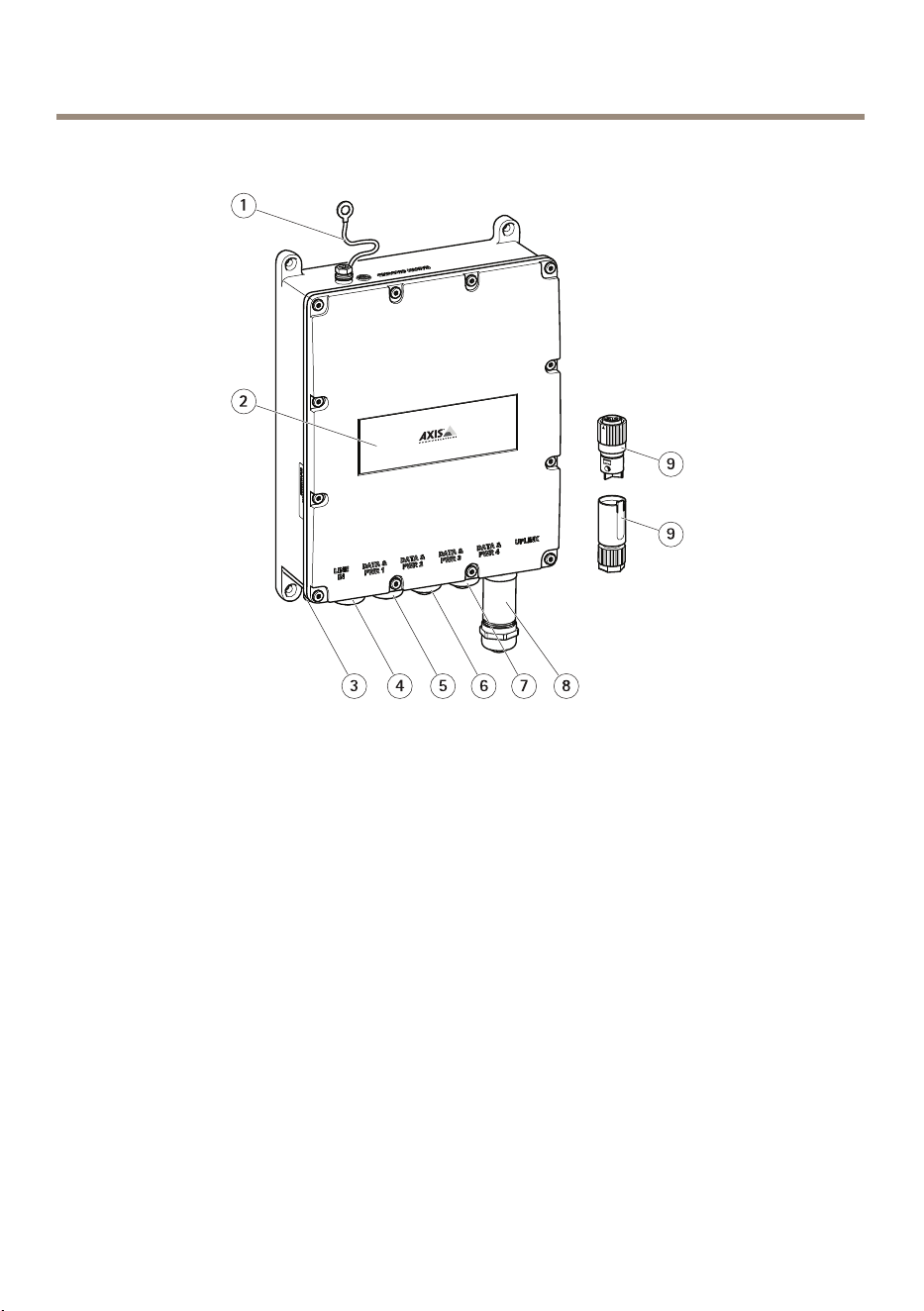
AXIST8504-EOutdoorPoESwitch
Produktübersicht
1
Erdungskabel
2
Produktaufkleber
3
Stromanschluss
4
RJ-45PoEPort
5
RJ-45PoEPort
6
RJ-45PoEPort
7
RJ-45PoEPort
8
SFP-Einschub
9
Netzanschluss
32
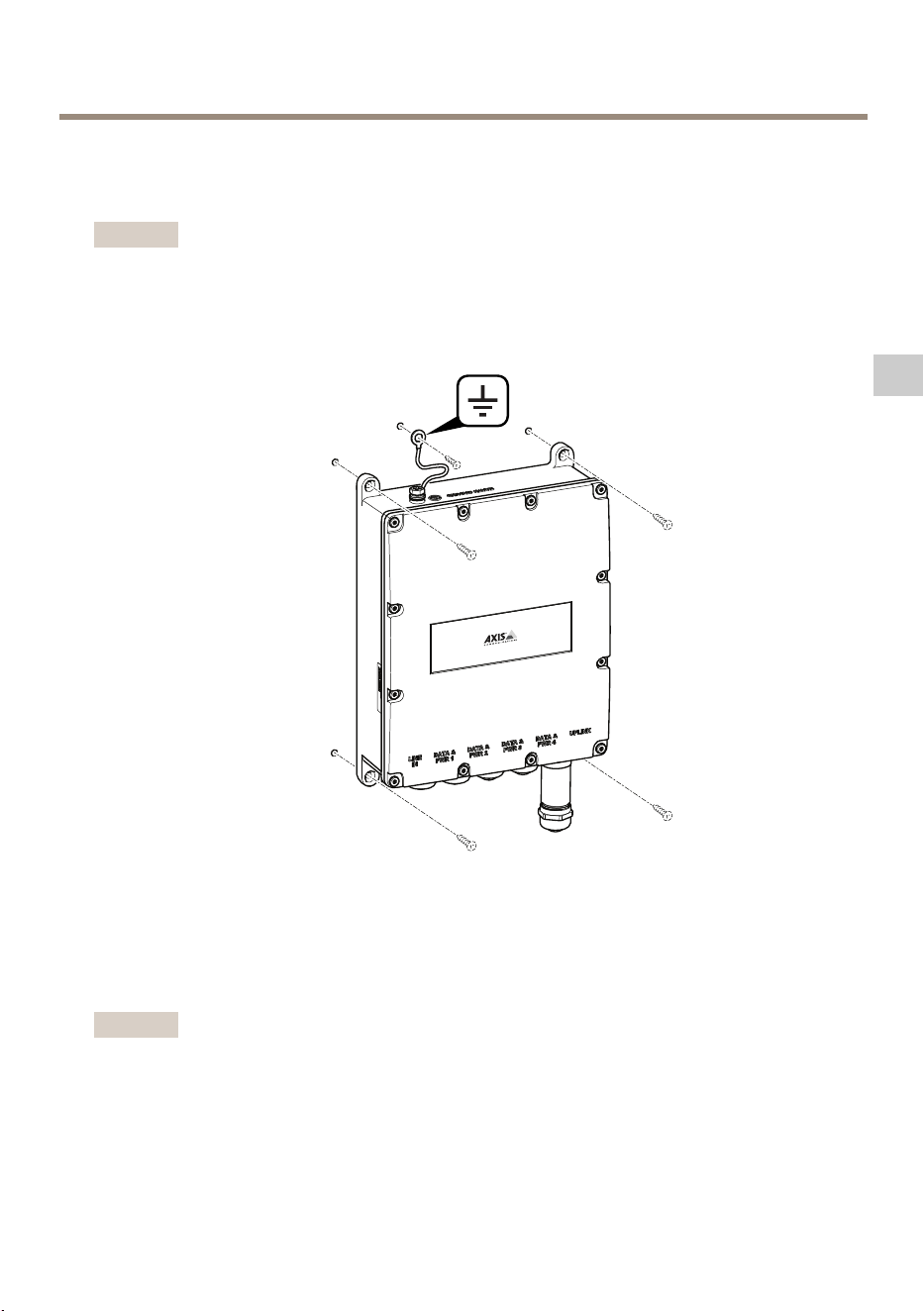
AXIST8504-EOutdoorPoESwitch
InstallierendesProdukts
DasProduktanderWandanbringen
Beachten
EineMasthalterungisterforderlich,umdasProduktaneinemMastanzubringen.Zubehör
ndenSieaufwww.axis.com.
1.DasProduktaneinerebenenFlächeanbngen.
2.DasProduktmitvierSchraubenanbringen.
3.DasErdungskabelbefestigen.
EinEthernetkabelodereinSFP-Modulanschließen.
Beachten
DieeinfachsteMethode:VonlinksbeginnendzuerstdasersteEthernetkabelmitAnschluss
DataundPWR1verbinden.ZuletztdasSFP-ModulmitdemUplink-Portverbinden.
33
DE
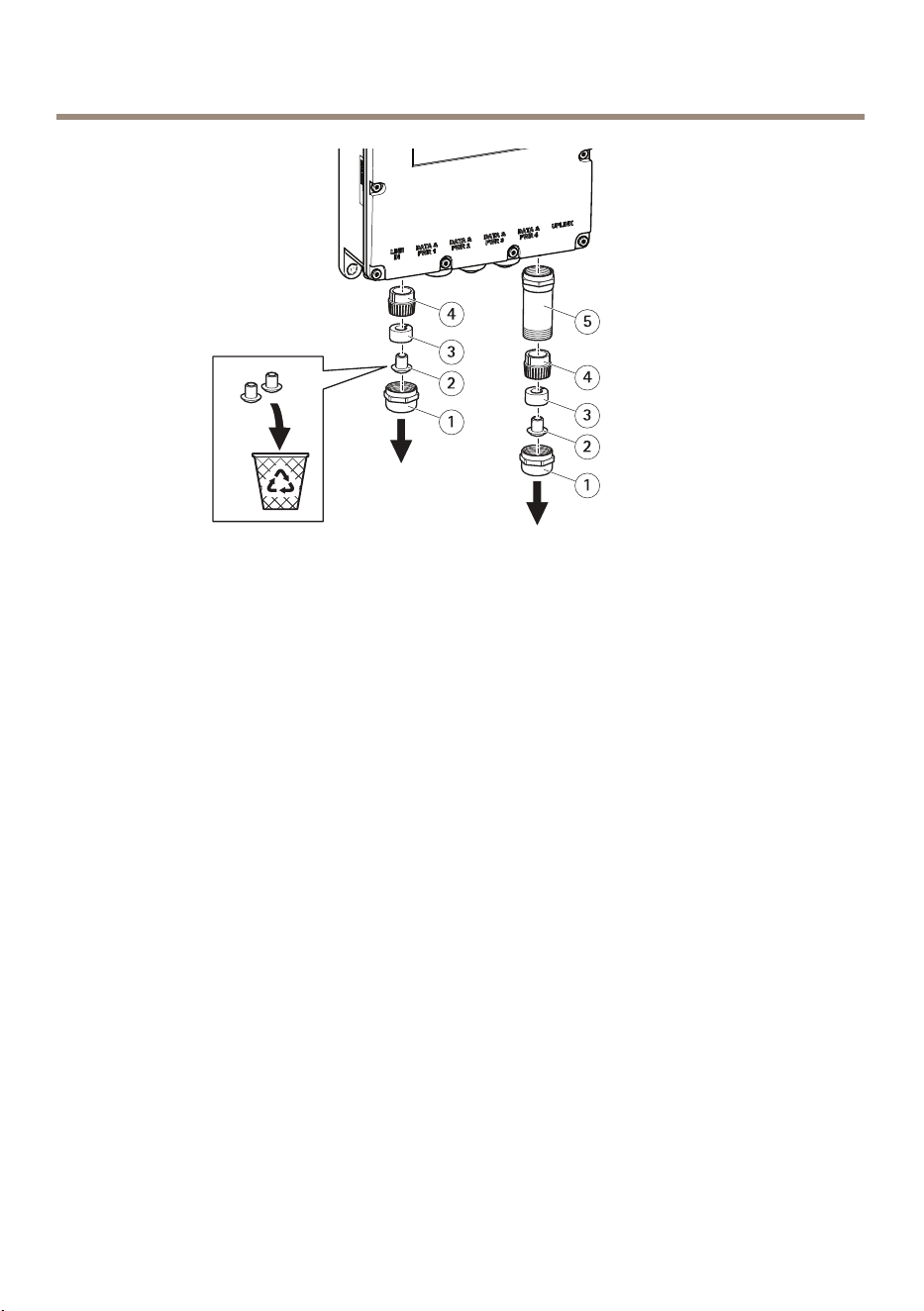
AXIST8504-EOutdoorPoESwitch
1
KabelverschraubungausMetall
2
Staubkappe
3
Gummidichtung
4
Drucknger
5
SchutzausMetall
1.DieKabelverschraubungdurchDrehengegendenUhrzeigersinnentfernen.Zum
AnschließeneinesSFP-ModulsebenfallsdenSchutzausMetallentfernen.
2.DieGummidichtungvondenDruckngernentfernen.
3.DieStaubkappeentsorgenoderzurWeiternutzungverwahren.
34
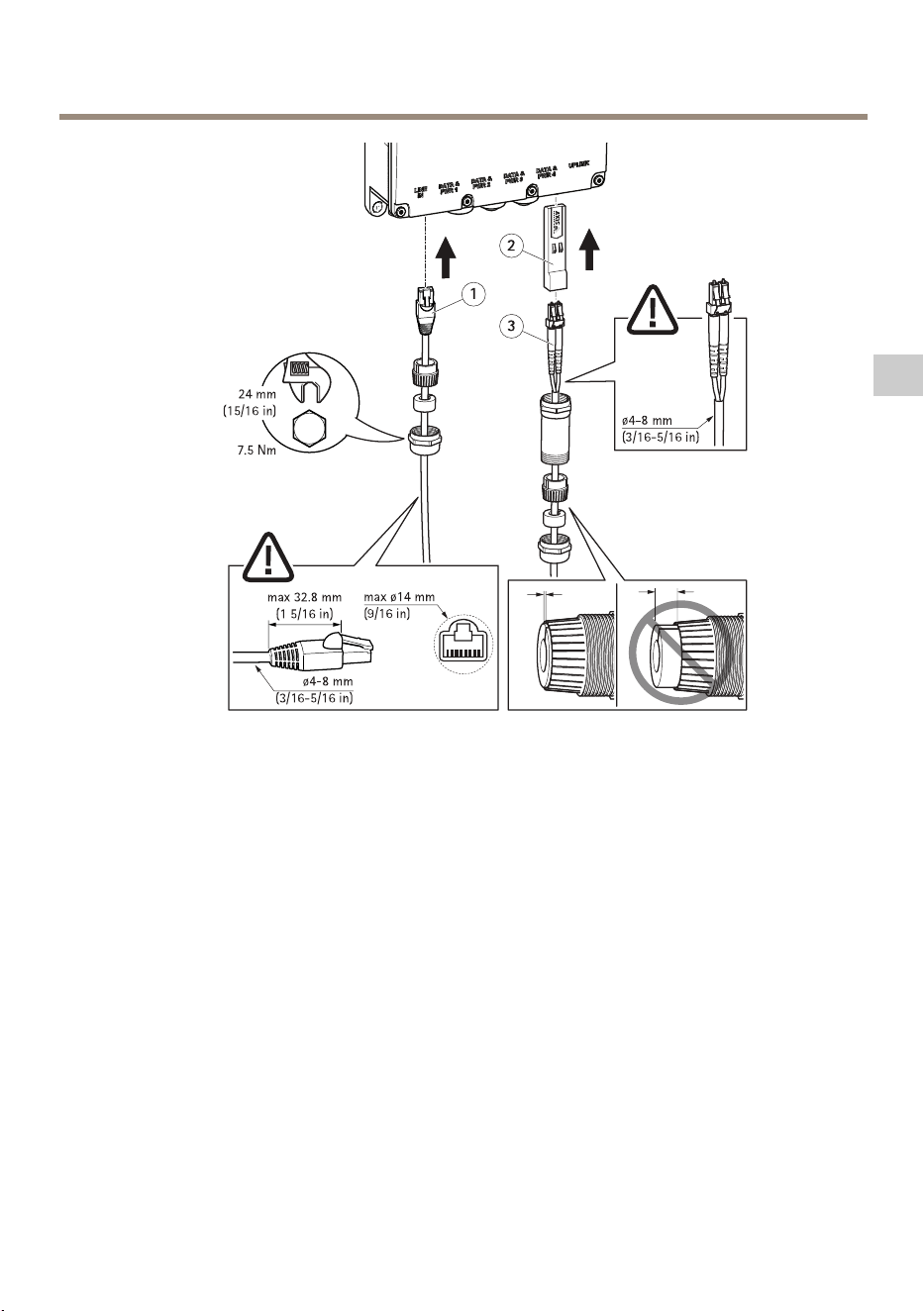
AXIST8504-EOutdoorPoESwitch
1
Ethernetkabel
2
SFP-Modul
3
Glasfaserkabel
EinEthernetkabelanschließen:
1.NacheinanderdieKabelverschraubung,dieGummidichtungunddieDruckngeram
Ethernetkabelanbringen.
2.DieGummidichtungindieDruckngereinsetzen.
3.DasKabelindieBuchseeinsetzen.
4.DieKabelverschraubungausMetallaufDrehmomentanziehen.
EinSFP-Modulanschließen:
1.DasSFP-ModulindasProdukteinsetzen.
2.NacheinanderdieKabelverschraubungausMetall,dieDruckngerunddenSchutzaus
MetallamGlasfaserkabelanbringen.
3.DasKabelindieBuchseeinsetzen.
4.DenSchutzausMetallaufDrehmomentanziehen.
35
DE
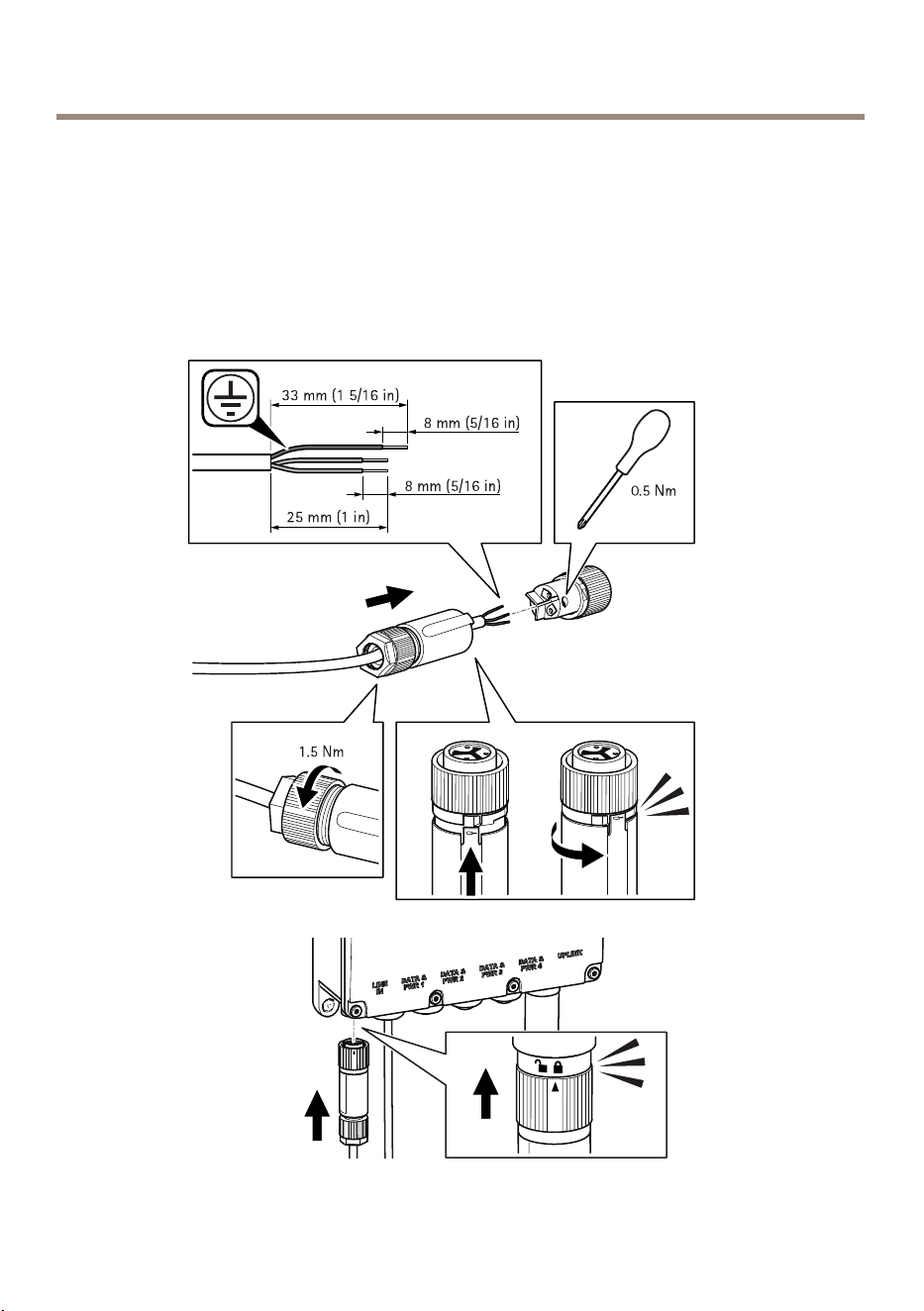
AXIST8504-EOutdoorPoESwitch
5.DieGummidichtungindieDruckngereinsetzen.
6.DieKabelverschraubungausMetallmitdemSchutzausMetallaufDrehmoment
verbinden.
DasNetzteilanschließen
DasNetzteilwieuntendargestelltanschließen.
36

AXIST8504-EOutdoorPoESwitch
WARNUNG
•BeimAnschließenandasWechselstromnetzsicherstellen,dassdiePhase(L),der
Neutralleiter(N)undderSchutzleiter(PE)korrektandieentsprechendenPole
angeschlossenwerden.
•Sicherstellen,dassdieWechselstromspannungimzulässigenBereichliegt(100bis240
Volt).
ZugriffaufdasProdukt
ZumFindenvonAxis-ProduktenimNetzwerkwerdenAXISIPUtilityundAXISCameraManagement
empfohlen.BeideAnwendungensindkostenlosundkönnenvonwww.axis.com/supportherun-
tergeladenwerden.
DieStandard-IP-Adresselautet192.168.0.254.
VorgegebenerBenutzernameundKennwort:
Benutzername:root
Kennwort:pass
Wichtig
UmdasProduktvornichtautorisiertemZugriffzuschützen,vordemStartdesProduktsden
BenutzernamenunddasKennwortändern.
FürbesteLeistungundumdasProduktvornichtautorisiertemZugriffzuschützenmüssenzuerst
folgendeOptionenbearbeitetwerden:
•BenutzernameundKennwortändern
•EineIP-Adressezuweisen
•HTTPSaktivieren
•Sicherstellen,dassFirmwareaktuellist
WeitereInformationenzurNutzungdiesesProduktsndenSieimBenutzerhandbuchauf
www.axis.com.
37
DE

AXIST8504-EOutdoorPoESwitch
WeitereInformationen
•Unterwww.axis.comndenSiedieaktuelleVersiondiesesDokuments.
•NützlicheOnlineschulungenundWebinarendenSieunterwww.axis.com/academy.
OptionalesZubehör
EinevollständigeListemitZubehörfürdiesesProduktndenSieunterwww.axis.com.
38
AXIST8504-EOutdoorPoESwitch
TechnischeDaten
DieaktuelleVersiondertechnischenDatendesProduktsndenSieaufaxis.comunterProdukt>
SupportundDokumentation.
Anschlüsse
Netzwerkanschluss
RJ45-EthernetanschlussmitPoweroverEthernet(PoE).
SFP-Anschluss.
Leistungsaufnahme
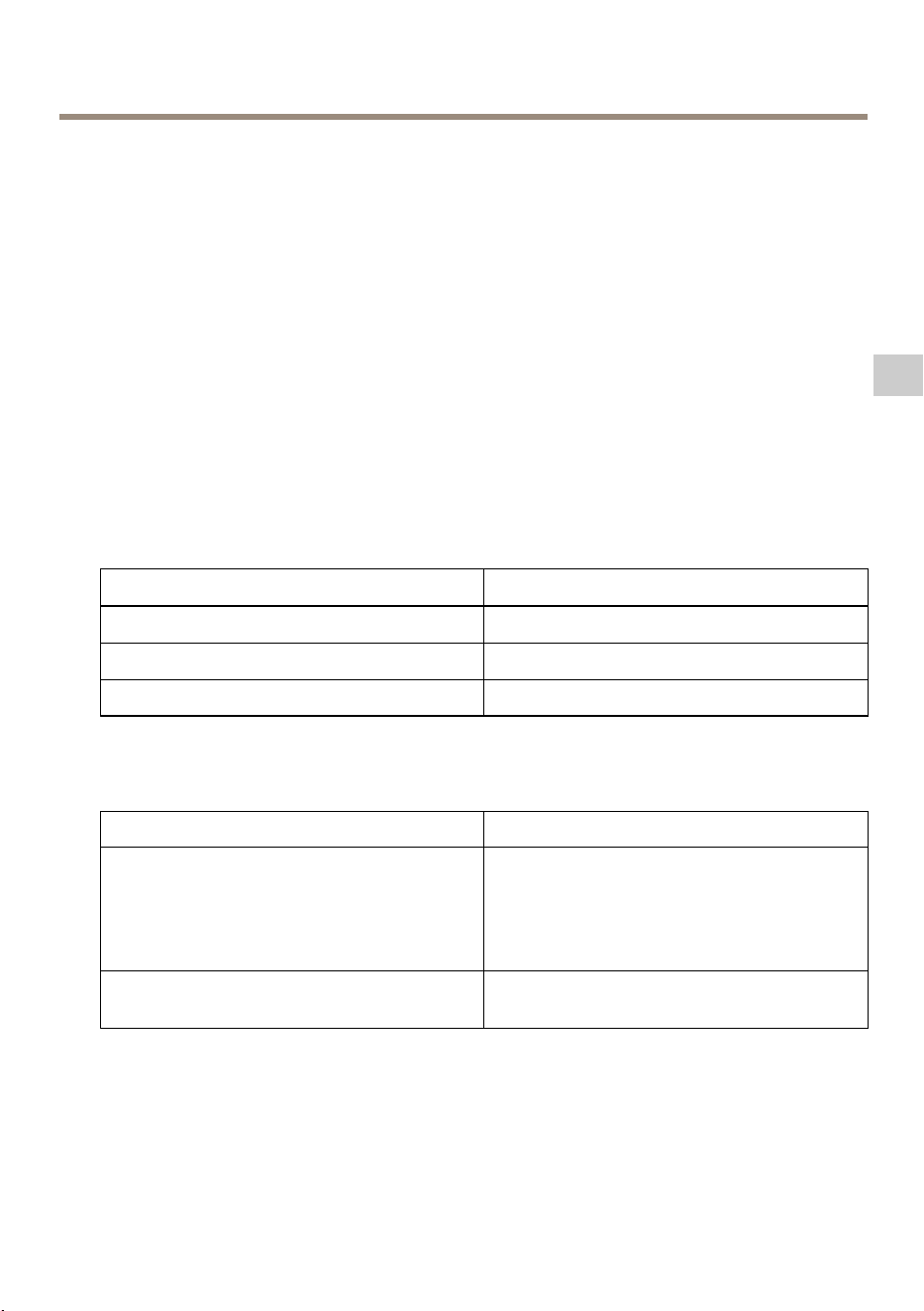
Table0.5.ElektrischeSpezikationen
Eingangsspannung
100bis240VWechselstrom(50/60Hz)
Eingangsstrom(100bis240VWechselstrom):2,5Amper(max.)
VerfügbareAusgangsleistung(max.)
150W
Ausgangsnennspannung
54VGleichstrom
Table0.6.Schnittstelle
Uplink
SFP-Einschub
Ausgang(DATAPWROUT):
Ethernet10/100/1000Base-T,plus54V
Gleichstrom
RJ-45-BuchsemitGleichstromspannung
Biszu150WbeifolgendenOptionen:
60WPorts(Ports1und2):
Paare1–2,3–6,7–8sowie4–5
30WPorts(Ports3und4):
Paare1–2und3–6
WechselstromanschlussDreipoligerWechselstromanschluss–Phase,
NeutralleiterundErdung
39
DE

AXIST8504-EOutdoorPoESwitch
Betriebsbedingungen
ProduktTemperatur
Luftfeuchtigkeit
AXIST8504-E-40°Cbis+50°C
*bei150Watt
-40°Cbis+60°C
*bei90Watt
10bisto95%
(keinKondensatzulässig)
40

AXIST8504-EOutdoorPoESwitch
Sicherheitsinformationen
Gefährdungsstufen
GEFAHR
WeistaufeinegefährlicheSituationhin,welche,fallsnichtverhindert,zuTododer
schwerenVerletzungenführenkann.
WARNUNG
WeistaufeinegefährlicheSituationhin,welche,fallsnichtverhindert,zuTododer
schwerenVerletzungenführenkann.
VORSICHT
WeistaufeinegefährlicheSituationhin,welche,fallsnichtverhindert,zugeringfügiger
odermäßigerVerletzungführenkann.
HINWEIS HINWEIS
HINWEIS
WeistaufeinegefährlicheSituationhin,welche,fallsnichtverhindert,zuSachschäden
führenkann.
AndereMeldeebenen
Wichtig
WeistaufwichtigeInformationenhin,diedenrichtigenBetriebdesProduktsgewährleisten.
Beachten
WeistaufnützlicheInformationenhin,diedieoptimaleVerwendungdesProdukts
unterstützen.
41
DE

AXIST8504-EOutdoorPoESwitch
Sicherheitsanweisungen
HINWEIS HINWEIS
HINWEIS
•DasAxisProduktmussunterBeachtungderörtlichgeltendenGesetzteundBestimmungen
benutztwerden.
•VerwendenSiebeiderInstallationdesAxisProduktsausschließlichpassendeWerkzeuge.
EinzugroßerKraftaufwandmitelektrischenWerkzeugenkanndasProduktbeschädigen.
•VerwendenSiekeinechemischen,ätzendenoderaerosolhaltigenReinigungsmittel.
•VerwendenSiezumReinigeneinsauberes,mitdestilliertemWasserangefeuchtetesTuch.
•VerwendenSienurZubehör,dasdentechnischenVorgabenIhresProduktsentspricht.
DiesesistvonAxisoderDrittanbieternerhältlich.AxisempehltdiemitIhremProdukt
kompatibleStromversorgungvonAxis.
•VerwendenSieausschließlichErsatzteiledievonAxisangebotenoderempfohlenwerden.
•VersuchenSienicht,diesesProduktselbsttätigzureparieren.WendenSiesichbezüglich
ReparaturundWartungandenAxisSupportoderIhrenAxisHändler.
Transport
HINWEIS HINWEIS
HINWEIS
•BeiBedarftransportierenSiedasAxisProduktinderOriginalverpackungodereiner
entsprechendenVerpackung,sodassSchädenvermiedenwerden.
42

AXIST8504-EOutdoorPoESwitch
Contenutodellaconfezione
•SwitchPoEperesterniAXIST8504-E
•Connettoredialimentazione
•Documentazione
-Guidaall'installazione(ilpresentedocumento)
43
IT
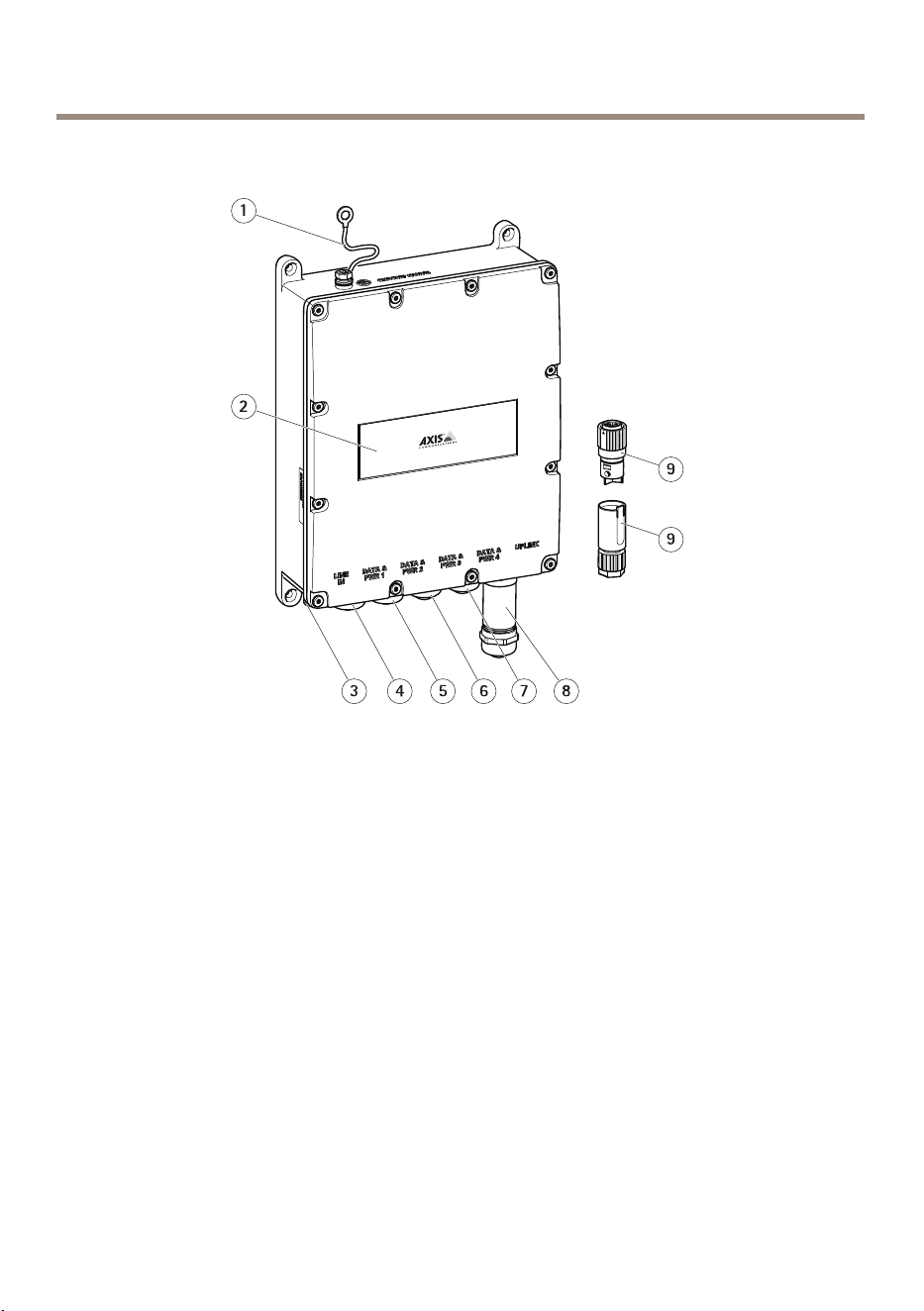
AXIST8504-EOutdoorPoESwitch
Panoramicadeldispositivo
1
Cavoditerra
2
Etichettadispositivi
3
Portaconnettoredialimentazione
4
PortaRJ45PoE
5
PortaRJ45PoE
6
PortaRJ45PoE
7
PortaRJ45PoE
8
SlotSFP
9
Connettoredialimentazione
44
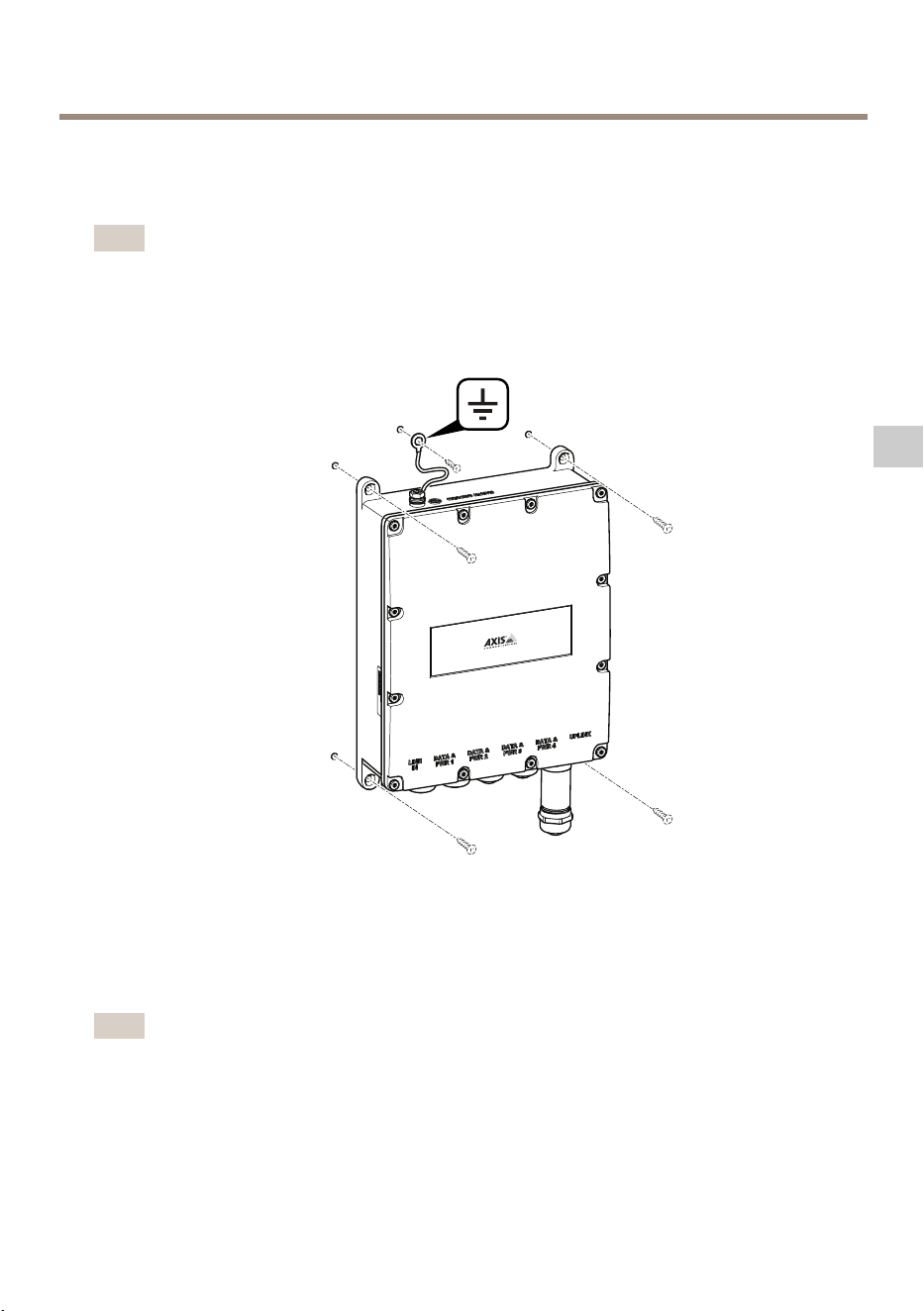
AXIST8504-EOutdoorPoESwitch
Comeinstallareildispositivo
Comemontareildispositivoallaparete
Nota
Permontareildispositivoaunpaloènecessariaunmontaggiosupalo.Pergliaccessori,
visitareilsitoWeball'indirizzo:www.axis.com
1.Posizionareildispositivosuunasuperciepiana.
2.Fissareildispositivoutilizzandoquattroviti.
3.Serrareilcavodimessaaterra.
ComecollegareuncavoEthernetounmoduloSFP
Nota
IlmodopiùsemplicepercollegareicavièdiiniziareasinistraconilprimocavoEtherneta
Data&PWR1edicollegareilmoduloSFPnellaportaUplinkallane.
45
IT
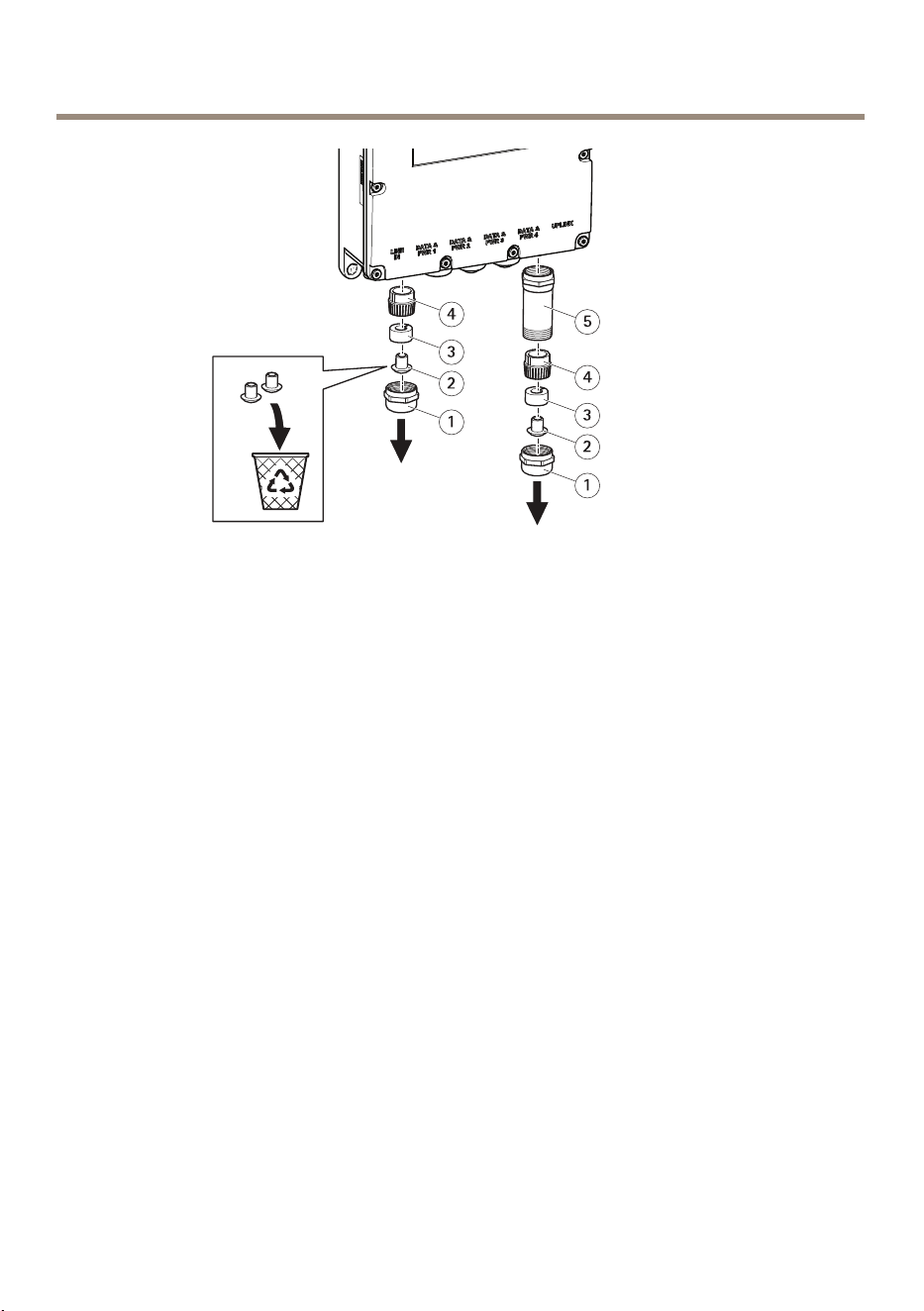
AXIST8504-EOutdoorPoESwitch
1
Pressacavoinmetallo
2
Cappuccioantipolvere
3
Tenutaingomma
4
Ditadipressione
5
Protezioneinmetallo
1.Rimuovereilpressacavoinmetalloruotandoloinsensoantiorario.Percollegareun
moduloSFPrimuovereanchelaprotezioneinmetallo.
2.Scollegarelatenutaingommadalleditadipressione.
3.Buttareilcappuccioantipolvereoconservarloperusarloinfuturo.
46
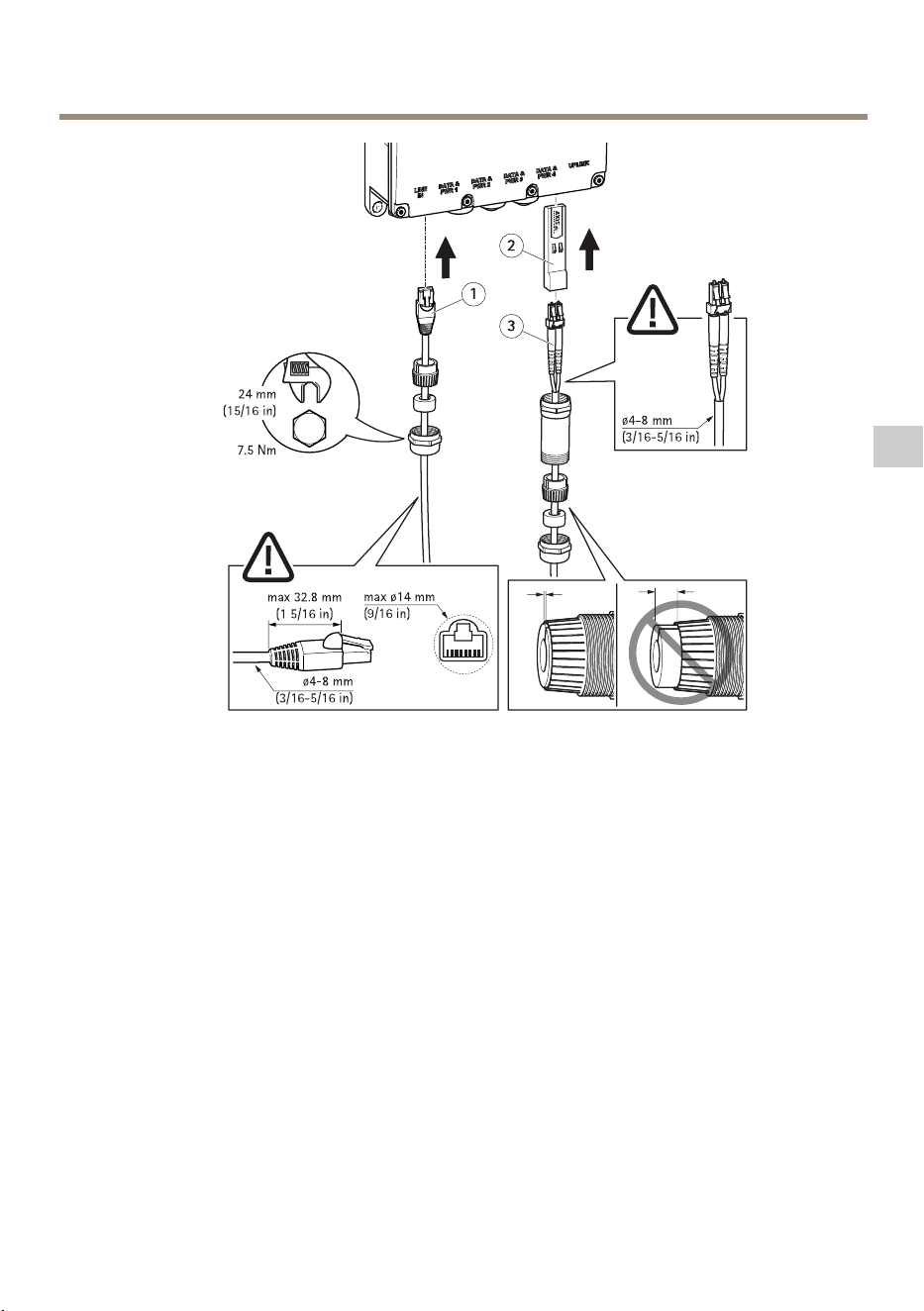
AXIST8504-EOutdoorPoESwitch
1
CavoEthernet
2
ModuloSFP
3
Caviinbraottica
ComecollegareuncavoEthernet:
1.Inserireilpressacavoinmetallo,latenutaingommaeleditadipressionenelcavo
Ethernet,nell'ordineindicato.
2.Inserirelatenutaingommanelleditadipressione.
3.Collegareilcavoallapresa.
4.Collegareilpressacavoinmetalloaldispositivoconunserraggio.
ComecollegareunmoduloSFP:
1.InserireilmoduloSFPneldispositivo.
2.Inserireilpressacavoinmetallo,latenutaingomma,leditadipressioneelaprotezione
inmetalloalcavodellabraottica,nell'ordineindicato.
3.Collegareilcavoallapresa.
4.Collegarelaprotezioneinmetalloaldispositivoconunserraggio.
47
IT
AXIST8504-EOutdoorPoESwitch
5.Inserirelatenutaingommanelleditadipressione.
6.Collegareilpressacavoinmetalloallaprotezioneinmetalloconunserraggio.
Collegarel'alimentatore
Perinformazionisucomecollegarel'alimentatore,fareriferimentoalleimmaginiseguenti.
AVVERTENZA
48

AXIST8504-EOutdoorPoESwitch
•Quandosistaeseguendolaconnessionedell'alimentatoreCAassicurarsicheN,Lela
messaaterrasianocollegatiallapolaritàcorretta.
•Assicurarsichel'alimentatoreCArientrinell'intervallospecicato(100–240VCA).
Comeaccederealdispositivo
AXISIPUtilityeAXISCameraManagementsonoimetodiconsigliatipertrovareidispositiviAxis
inrete.QuesteapplicazionisonoentrambegratuiteepossonoesserescaricatedalsitoWeb
www.axis.com/support
L'indirizzoIPpredenitoè192.168.0.254
Nomeutenteepasswordpredeniti:
Nomeutente:root
Password:pass
Importante
Perproteggereildispositivodaeventualiintrusionicambiaresempreilnomeutentee
lapasswordprimadiiniziareautilizzarlo.
Perottenereilmassimodaldispositivoeproteggerlodaintrusionièimportanteaccedereal
dispositivoper:
•Cambiareilnomeutenteelapassword
•AssegnareunnuovoindirizzoIP
•AbilitareHTTPS
•Controllaredidisporredelrmwarepiùrecente
Perulterioriinformazionisull'utilizzodeldispositivo,consultareilManualeperl'utentedisponibile
sulsitoWeball'indirizzo:www.axis.com
49
IT

AXIST8504-EOutdoorPoESwitch
UlterioriInformazioni
•Perlaversionepiùrecentediquestodocumento,visitareilsitoall'indirizzowww.axis.com
•Perservizidiformazioneutiliewebinar,visitailsitowww.axis.com/academy
Accessoriopzionali
Perunelencocompletodegliaccessoridisponibiliperquestodispositivo,andarealsito
www.axis.com
50
AXIST8504-EOutdoorPoESwitch
Specifiche
Perlaversionepiùaggiornatadellaschedatecnicadeldispositivo,visitareilsitoaxis.com>
dispositivo>Supportoedocumentazione.
Connettori
Connettoredirete
ConnettoreEthernetRJ45conPoweroverEthernet(PoE+).
ConnettoreSFP.
Consumoenergetico
Table0.7.Specicheelettriche
Tensioneiningresso
100–240VCA(50/60Hz)
Correnteiningresso(100–240VCA)2,5Ampere(max)
Potenzainuscitadisponibile(max.)
150W
Tensionenominaleinuscita
54VCC
Table0.8.Interfaccia
Uplink
GabbiaSFP
Uscita(DATAPWROUT):
Ethernet10/100/1000Base-T,più54VCC
(ConnettoreRJ45femminacontensioneCC)
Finoa150Wdalleopzioniriportatediseguito:
Porte60W(Porte1&2):
Coppie1–2&3–6,7–8&4–5
Porte30W(Porte3&4):
Coppie1–2&3–6
AlimentazioneinentrataAlimentazioneinentrataa3pin,Lineare,
NeutraleeMessaaterra
51
IT

AXIST8504-EOutdoorPoESwitch
Condizionidifunzionamento
DispositivoTemperatura
Umidità
AxisT8504-E
da-40°Ca50℃
per150Watt
da-40°Ca60℃
per90Watt
Da10a95%
senzacondensa
52

AXIST8504-EOutdoorPoESwitch
Informazionidisicurezza
Livellidipericolo
PERICOLO
Indicaunasituazionepericolosache,senonevitata,provocamorteolesionigravi.
AVVERTENZA
Indicaunasituazionepericolosache,senonevitata,potrebbeprovocarelamorteolesioni
gravi.
ATTENZIONE
Indicaunasituazionepericolosache,senonevitata,potrebbeprovocarelesionimedie
ominori.
A A
A
VVISO VVISO
VVISO
Indicaunasituazioneche,senonevitata,potrebbedanneggiarelaproprietà.
Altrilivellidimessaggio
Importante
Indicainformazioniimportanti,essenzialiperilcorrettofunzionamentodeldispositivo.
Nota
Indicainformazioniutilicheaiutanoaottenereilmassimodaldispositivo.
53
IT

AXIST8504-EOutdoorPoESwitch
Informazionidisicurezza
A A
A
VVISO VVISO
VVISO
•IldispositivoAxisdeveessereutilizzatoinconformitàalleleggiealledisposizionilocali.
•UtilizzaresolostrumentiapplicabiliquandosiinstallaildispositivoAxis.Sesiutilizzauna
forzaeccessivaconstrumentinonadattièpossibilecausaredannialdispositivo.
•Nonutilizzaresostanzechimiche,agenticausticiodetergentiaerosol.
•Utilizzareunpannopulitoinumiditoinacquapuraperlapulizia.
•Utilizzaresoloaccessoricompatibiliconlespecichetecnichedeldispositivo.Questi
possonoesserefornitidaAxisodaterzeparti.Axisconsiglial'usodell'apparecchiaturadi
alimentazioneAxiscompatibileconildispositivo.
•UtilizzaresolopartidiricambioforniteoconsigliatedaAxis.
•Nontentarediriparareildispositivodasoli.Contattarel'assistenzaoilrivenditoreAxis
perquestionirelativeallamanutenzione.
Trasporto
A A
A
VVISO VVISO
VVISO
•DuranteiltrasportodeldispositivoAxis,utilizzarel'imballaggiooriginaleoequivalente
perevitaredannialdispositivo.
54

AXIST8504-EOutdoorPoESwitch
Contenidodelpaquete
•SwitchAXIST8504-EPoEparaexterior
•Conectordealimentación
•Materialesimpresos
-Guíadeinstalación(estedocumento)
55
ES
AXIST8504-EOutdoorPoESwitch
Informacióngeneraldelproducto
1
Cabledetierra
2
Etiquetadelproducto
3
Puertodelconectordealimentación
4
PuertoRJ45PoE
5
PuertoRJ45PoE
6
PuertoRJ45PoE
7
PuertoRJ45PoE
8
RanuraSFP
9
Conectordealimentación
56
AXIST8504-EOutdoorPoESwitch
Cómoinstalarelproducto
Cómomontarelproductoenlapared
Nota
Paramontarelproductoenunposte,necesitaunmontajeenposte.Paraconocerlos
accesoriosdisponibles,consultewww.axis.com.
1.Coloqueelproductoapoyadoenunasupercieplana.
2.Asegureelproductoutilizandoloscuatrotornillos.
3.Fijeelcabledetomadetierra.
CómoconectaruncableEthernetounmóduloSFP
Nota
Lamaneramássencilladeconectarloscableses,empezandoporelladoizquierdo,
conectarelprimercableEthernetaData&PWR1yterminarconectandoelmóduloSFP
enelpuertoUplink.
57
ES
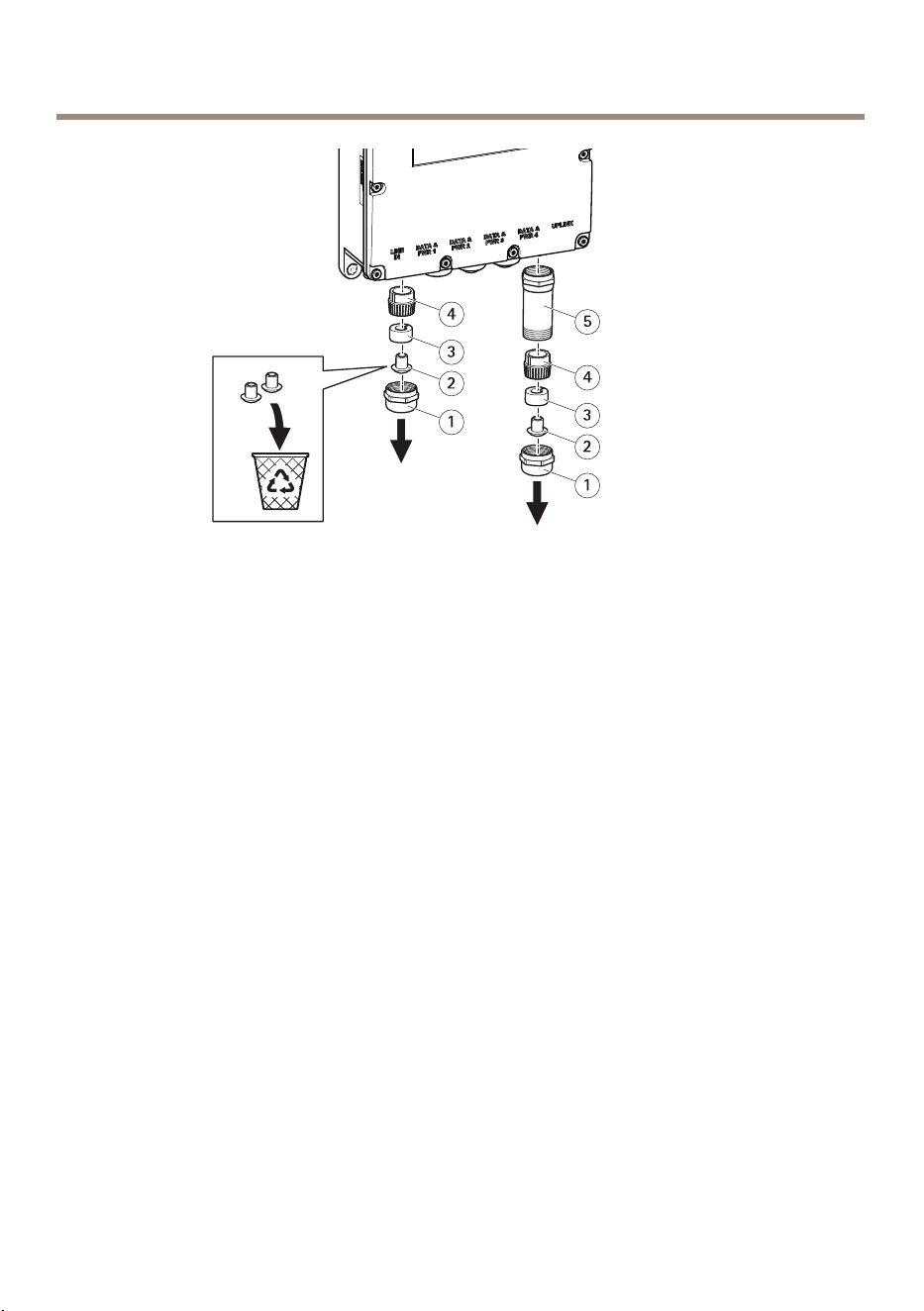
AXIST8504-EOutdoorPoESwitch
1
Prensaestopasmetálico
2
Capuchónantipolvo
3
Juntadegoma
4
Dedosdepresión
5
Protecciónmetálica
1.Retireelprensaestopasmetálicogirándoloensentidocontrarioalasagujasdelreloj.
ParaconectarunmóduloSFP,retiretambiénlaprotecciónmetálica.
2.Separelajuntadegomadelosdedosdepresión.
3.Tireelcapuchónantipolvooguárdeloparaunfuturouso.
58
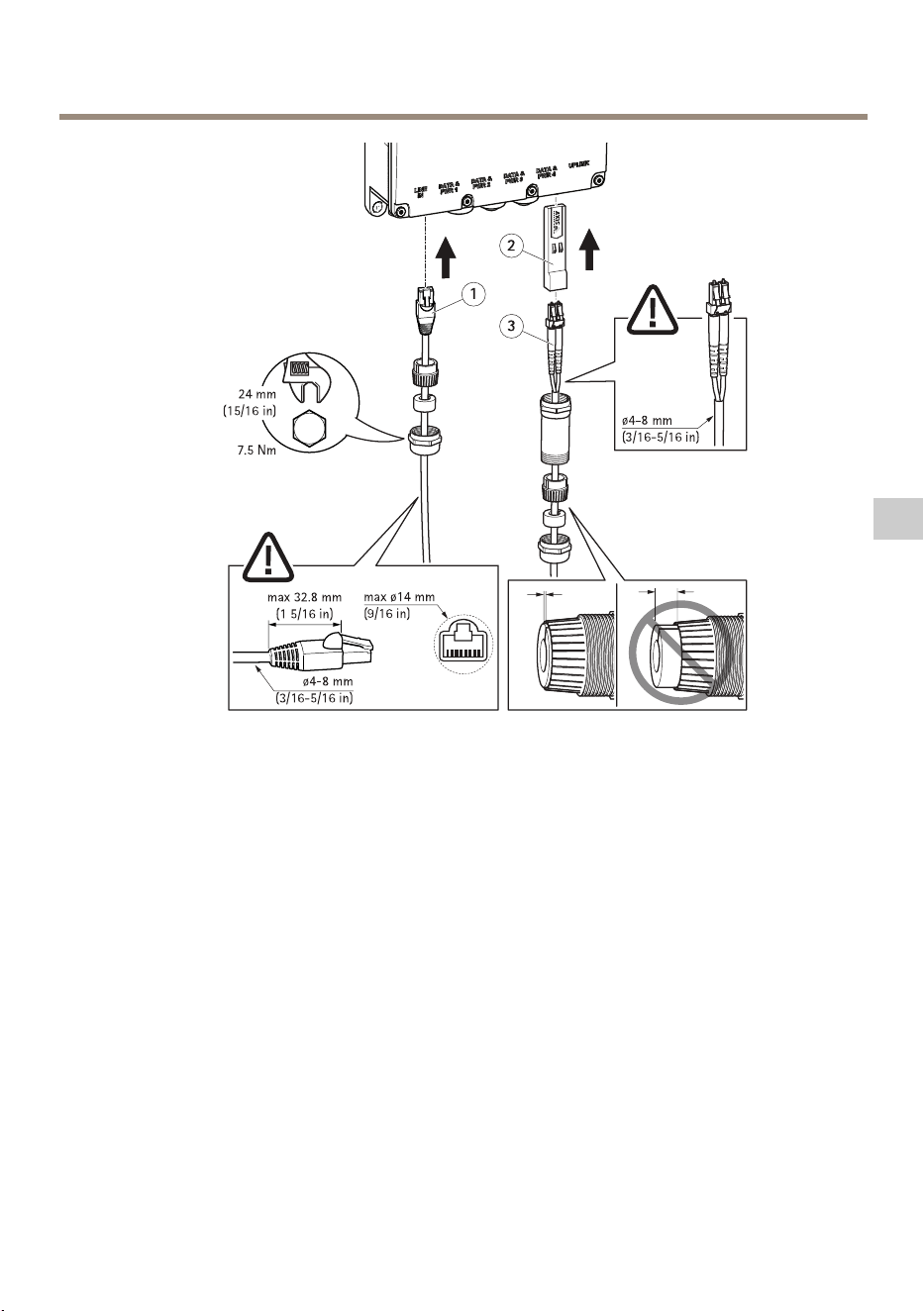
AXIST8504-EOutdoorPoESwitch
1
CableEthernet
2
MóduloSFP
3
Cablesdebraóptica
CómoconectaruncableEthernet:
1.Introduzcaelprensaestopasmetálico,lajuntadegomaylosdedosdepresiónenelcable
Ethernet,eneseorden.
2.Introduzcalajuntadegomaenlosdedosdepresión.
3.Conecteelcablealconector.
4.Fijeelprensaestopasmetálicoalproductoconunpardeapriete.
CómoconectarunmóduloSFP:
1.IntroduzcaelmóduloSFPalproducto.
2.Introduzcaelprensaestopasmetálico,lajuntadegoma,losdedosdepresiónyel
protectormetálicoenelcabledebraóptica,eneseorden.
3.Conecteelcablealconector.
4.Fijeelprotectormetálicoalproductoconunpardeapriete.
59
ES
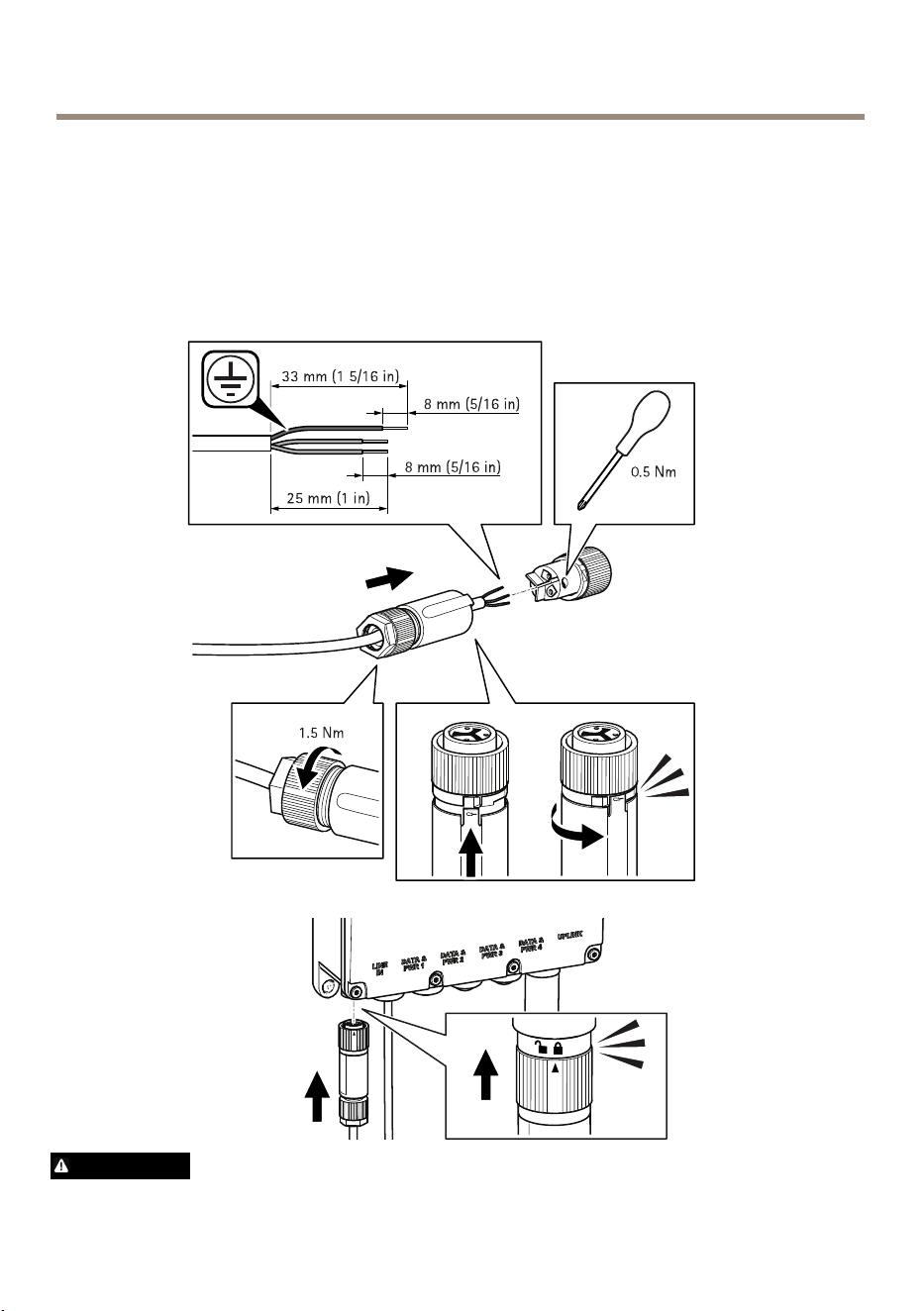
AXIST8504-EOutdoorPoESwitch
5.Introduzcalajuntadegomaenlosdedosdepresión.
6.Fijeelprensaestopasmetálicoalprotectormetálicoconunpardeapriete.
Conexióndelafuentedealimentación
Observelassiguientesimágenesparasabercómoconectarelconectordealimentación.
ADVERTENCIA
60

AXIST8504-EOutdoorPoESwitch
•CuandoconectelaalimentacióndeCA,asegúresedequeN,Lytierraesténconectados
alapolaridadadecuada.
•AsegúresedequelaalimentacióndeCAseencuentredentrodelrangopermitido
(100–240VCA).
Cómoaccederalproducto
AXISIPUtilityyAXISCameraManagementsonlosmétodosrecomendadosparabuscarlos
productosdeAxisenlared.Ambasaplicacionessongratuitasypuedendescargarsedesde
www.axis.com/support
LadirecciónIPpredeterminadaes192.168.0.254.
Nombredeusuarioycontraseñapredeterminados:
Nombredeusuario:root
Contraseña:pass
Importante
Paraprotegersuproductocontralasintrusiones,cambiesiempreelnombredeusuarioyla
contraseñaantesdeempezarautilizarelproducto.
Parasacarleelmáximopartidoalproductoyprotegerledelasintrusiones,esimportanteiniciar
sesiónenelproductoen:
•Cambiarnombredeusuarioycontraseña
•AsignarunanuevadirecciónIP
•ActivarHTTPS
•Comprobarsidisponedelaúltimaversióndermware
Paraobtenermásinformaciónsobreelusodelproducto,consulteelmanualdelusuario,disponible
enwww.axis.com.
61
ES

AXIST8504-EOutdoorPoESwitch
Másinformación
•Paraconsultarlaversiónmásrecientedeestedocumento,vayaawww.axis.com
•Paraconsultarseminarioswebycursosenlíneaquepuedenresultarleútiles,vayaa
www.axis.com/academy
Accesoriosopcionales
Paraconocerunalistacompletadelosaccesoriosdisponiblesparaesteproducto,vayaa
www.axis.com
62
AXIST8504-EOutdoorPoESwitch
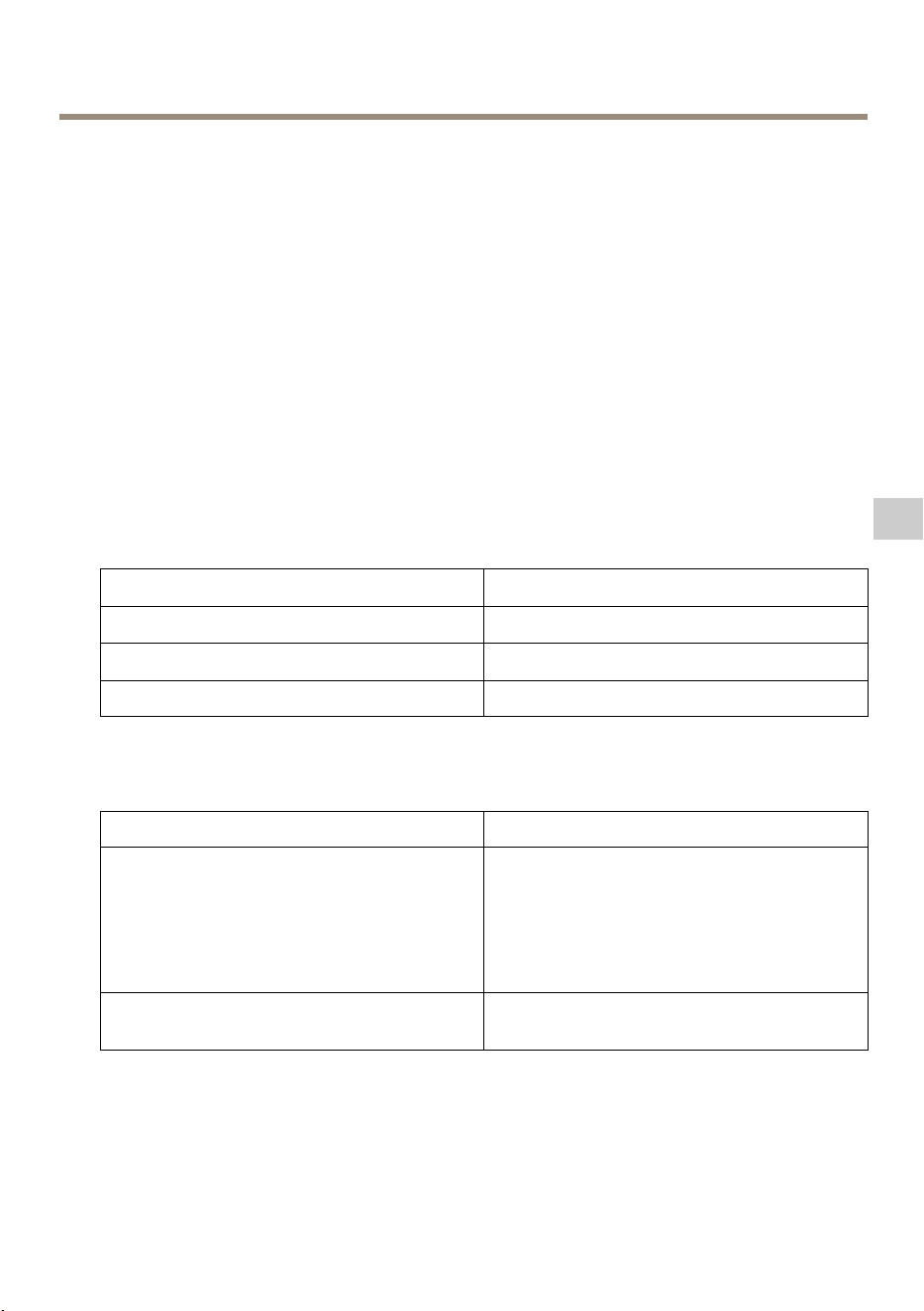
Especificaciones
Paraaccederalaversiónmásrecientedelahojadedatosdelproducto,visiteaxis.com>
Productos>Soportetécnicoydocumentación.
Conectores
Conectordered
ConectorEthernetRJ45conalimentaciónatravésdeEthernet(PoE).
ConectorSFP.
Consumodeenergía
Table0.9.Especicacioneseléctricas
Tensióndeentrada
100–240VCA(50/60Hz)
Corrientedeentrada(100–240VCA)2,5amperios(máx.)
Potenciadesalidadisponible(máx.)
150W
Tensióndesalidanominal
54VCC
Table0.10.Interfaz
Uplink
JaulaSFP
Salida(DATAPWROUT):
Ethernet10/100/1000Base-T,plus54VCC
(ConectorhembraRJ45,contensiónCC)
Hasta150Wdesdelasiguientesopciones
disponibles:
Puertosde60W(puertos1y2):
Pares1–2y3–6,7–8y4–5
Puertosde30W(puertos3y4):
Pares1–2y3–6
EntradadealimentacióndeCAEntradadealimentacióndeCAde3pines:
línea,neutroytierra
63
ES

AXIST8504-EOutdoorPoESwitch
Condicionesdefuncionamiento
ProductoTemperaturaHumedad
AxisT8504-E
De-40°Ca50°C*
para150vatios
De-40°Ca60°C*
para90vatios
Del10al95%
(nosepermitecondensación)
64

AXIST8504-EOutdoorPoESwitch
Informacióndeseguridad
Nivelesdepeligro
PELIGRO
Indicaunasituaciónpeligrosaque,sinoseevita,provocarálesionesgravesolamuerte.
ADVERTENCIA
Indicaunasituaciónpeligrosaque,sinoseevita,puedeprovocarlesionesgravesola
muerte.
ATENCIÓN
Indicaunasituaciónpeligrosaque,sinoseevita,puedeprovocarlesionesmoderadaso
leves.
A A
A
VISO VISO
VISO
Indicaunasituaciónpeligrosaque,sinoseevita,puedeprovocardañosmateriales.
Otrosnivelesdemensaje
Importante
Indicainformaciónimportantequeesfundamentalparaqueelproductofuncione
correctamente.
Nota
Indicainformaciónútilqueayudaaaprovecharelproductoalmáximo.
65
ES

AXIST8504-EOutdoorPoESwitch
Instruccionesdeseguridad
A A
A
VISO VISO
VISO
•ElproductodeAxisdebeutilizarsedeacuerdoconlasleyesynormativaslocales.
•UtilicesololasherramientascorrespondientescuandoinstaleelproductodeAxis.La
aplicacióndeunafuerzaexcesivaconherramientaseléctricaspuedeprovocardaños
enelproducto.
•Noutilicelimpiadoresenaerosol,agentescáusticosniproductosquímicos.
•Limpieconunpañolimpiohumedecidoconaguapura.
•Utilicesoloaccesoriosquecumplanconlasespecicacionestécnicasdesuproducto.
EstosaccesorioslospuedeproporcionarAxisountercero.Axisrecomiendautilizarun
equipodesuministrodealimentacióndeAxiscompatibleconsuproducto.
•UtilicesolopiezasderepuestoproporcionadasorecomendadasporAxis.
•Nointenterepararelproductoustedmismo.Póngaseencontactoconelserviciode
asistenciatécnicadeAxisoconsudistribuidordeAxisparatratarasuntosdereparación.
Transporte
A A
A
VISO VISO
VISO
•CuandotransporteelproductodeAxis,utiliceelembalajeoriginalounequivalentepara
evitardañosenelproducto.
66

AXIST8504-EOutdoorPoESwitch
パ パ
パ
ッ ッ
ッ
ケ ケ
ケ
ー ー
ー
ジ ジ
ジ
の の
の
内 内
内
容 容
容
•AXIST8504-E屋外⽤PoEスイッチ
•電源コネクタ
•印刷物
-インストールガイド(本書)
67
JA
AXIST8504-EOutdoorPoESwitch
製 製
製
品 品
品
の の
の
概 概
概
要 要
要
1
ア ー ス ケ ー ブ ル
2
製 品 ラ ベ ル
3
電 源 コ ネ ク タ ポ ー ト
4
RJ45 PoE ポ ー ト
5
RJ45 PoE ポ ー ト
6
RJ45 PoE ポ ー ト
7
RJ45 PoE ポ ー ト
8
SFP ス ロ ッ ト
9
電 源 コ ネ ク タ
68
AXIST8504-EOutdoorPoESwitch
製 製
製
品 品
品
の の
の
取 取
取
り り
り
付 付
付
け け
け
⽅ ⽅
⽅
法 法
法
製 製
製
品 品
品
を を
を
壁 壁
壁
⾯ ⾯
⾯
に に
に
取 取
取
り り
り
付 付
付
け け
け
る る
る
⽅ ⽅
⽅
法 法
法
注意
製品をポールに取り付けるには、ポール取付⾦具が必要です。アクセサリー
については、
www .axis.com
をご覧ください。
1.製品を平⾯に配置します。
2.4本のネジを使⽤して、製品を固定します。
3.アースケーブルを固定します。
イ イ
イ
ー ー
ー
サ サ
サ
ネ ネ
ネ
ッ ッ
ッ
ト ト
ト
ケ ケ
ケ
ー ー
ー
ブ ブ
ブ
ル ル
ル
ま ま
ま
た た
た
は は
は
SFP SFP
SFP
モ モ
モ
ジ ジ
ジ
ュ ュ
ュ
ー ー
ー
ル ル
ル
の の
の
接 接
接
続 続
続
⽅ ⽅
⽅
法 法
法
注意
ケーブルを接続するには、最初のイーサネットケーブルを左側のData&PWR1
に接続することから始め、最後にSFPモジュールをUplinkポートに接続する
のが最も簡単な⽅法です。
69
JA
AXIST8504-EOutdoorPoESwitch
1
⾦ 属 製 グ ラ ン ド
2
ダ ス ト キ ャ ッ プ
3
ゴ ム シ ー ル
4
プ レ ッ シ ャ ー フ ィ ン ガ ー
5
⾦ 属 製 保 護 カ バ ー
1.⾦属製グランドを反時計回りに回して外します。SFPモジュールを接続する
ときは、⾦属製保護カバーも外します。
2.ゴムシールをプレッシャーフィンガーから外します。
3.ダストキャップを捨てるか、今後の使⽤のために保管します。
70
AXIST8504-EOutdoorPoESwitch
1
イ ー サ ネ ッ ト ケ ー ブ ル
2
SFP モ ジ ュ ー ル
3
光 フ ァ イ バ ー ケ ー ブ ル
イーサネットケーブルの接続⽅法:
1.⾦属製グランド、ゴムシール、プレッシャーフィンガーの順に、イーサ
ネットケーブルに差し込みます。
2.ゴムシールをプレッシャーフィンガーの中に⼊れ込みます。
3.ケーブルをソケットに接続します。
4.トルクレンチで⾦属製グランドを製品に取り付けます。
SFPモジュールの接続⽅法:
1.製品にSFPモジュールを差し込みます。
2.⾦属製グランド、ゴムシール、プレッシャーフィンガー、⾦属製保護カ
バーの順に、光ファイバーケーブルに差し込みます。
3.ケーブルをソケットに接続します。
4.トルクレンチで⾦属製保護カバーを製品に取り付けます。
71
JA
AXIST8504-EOutdoorPoESwitch
5.ゴムシールをプレッシャーフィンガーの中に⼊れ込みます。
6.トルクレンチで⾦属製グランドを⾦属製保護カバーに取り付けます。
電 電
電
源 源
源
の の
の
接 接
接
続 続
続
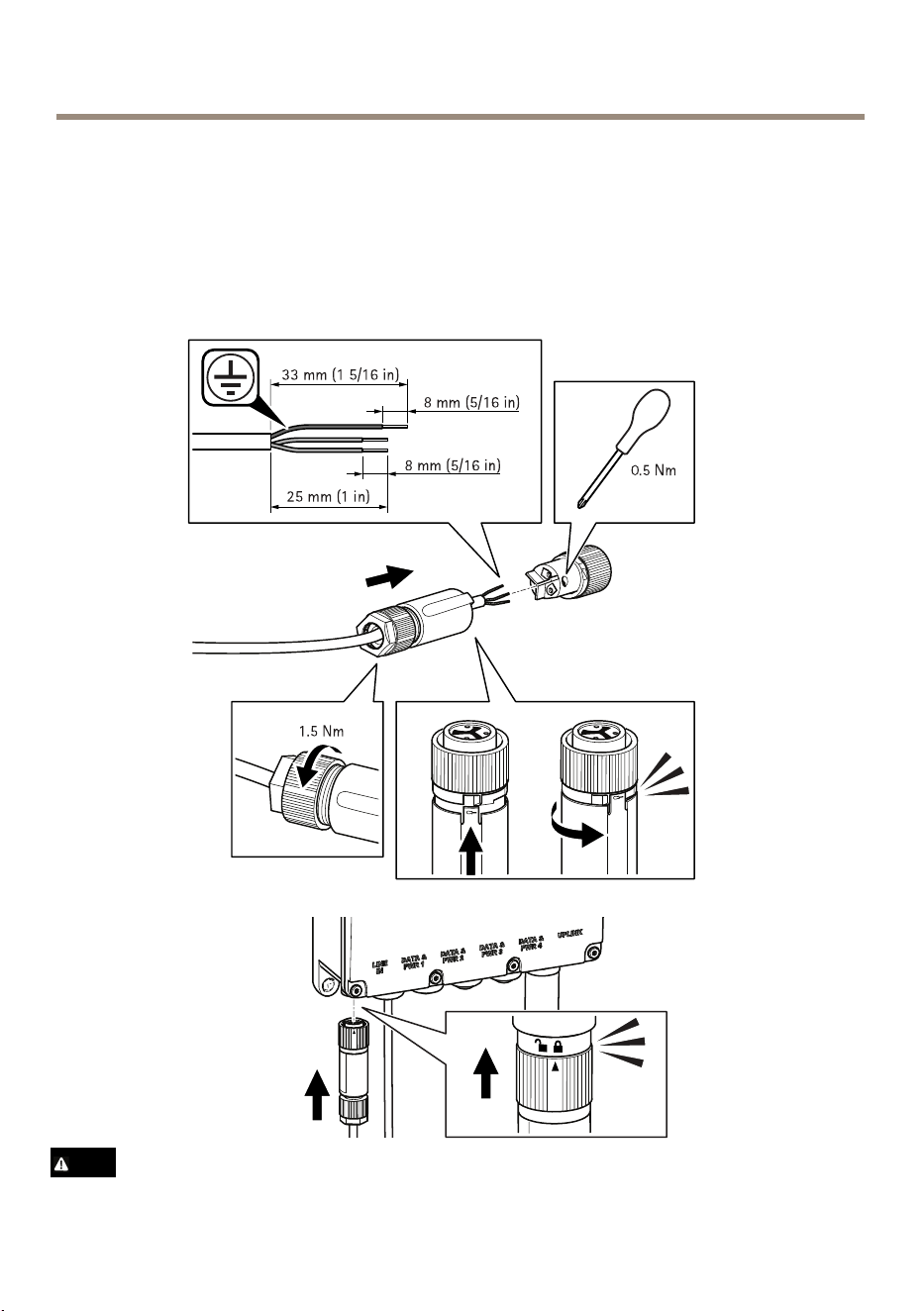
電源コネクタの接続⽅法については、下の図を参照してください。
警告
72

AXIST8504-EOutdoorPoESwitch
•AC電源に接続するときは、N、L、グランドが適切な極性に接続されている
ことを確認します。
•AC電源が許容範囲(100〜240VAC)を超えていないことを確認します。
製 製
製
品 品
品
の の
の
ア ア
ア
ク ク
ク
セ セ
セ
ス ス
ス
⽅ ⽅
⽅
法 法
法
ネットワーク上でAxis製品を検索するには、AXISIPUtilityまた
はAXISCameraManagementの使⽤をお勧めします。いずれのアプリケーションも無
料で、
www .axis.com/support
からダウンロードできます。
デフォルトのIPアドレスは192.168.0.254です。
デフォルトのユーザー名とパスワード:
ユ ユ
ユ
ー ー
ー
ザ ザ
ザ
ー ー
ー
名 名
名
: :
:
root
パ パ
パ
ス ス
ス
ワ ワ
ワ
ー ー
ー
ド ド
ド
: :
:
pass
重要
製品を侵⼊から保護するため、製品の使⽤を開始する前に、必ずユーザー名
とパスワードを変更してください。
製品を最⼤限に活⽤し、侵⼊から製品を保護するには、製品にログインして、次の
操作を⾏うことが重要です。
•ユーザー名とパスワードの変更
•新しいIPアドレスの設定
•HTTPSの有効化
•最新のファームウェアを使⽤していることの確認
製品の使⽤の詳細については、Axisのホームページ(
www .axis.com
)でユーザーズマ
ニュアルを参照してください
73
JA

AXIST8504-EOutdoorPoESwitch
関 関
関
連 連
連
情 情
情
報 報
報
•本書の最新バージョンについては、
www .axis.com
にアクセスしてください。
•役に⽴つオンライントレーニングおよびWebセミナーをご⽤意しており
ます。
www .axis.com/academy
をご覧ください。
オ オ
オ
プ プ
プ
シ シ
シ
ョ ョ
ョ
ン ン
ン
ア ア
ア
ク ク
ク
セ セ
セ
サ サ
サ
リ リ
リ
ー ー
ー
本製品で利⽤可能なすべてのアクセサリーについては、
www .axis.com
を参照して
ください
74
AXIST8504-EOutdoorPoESwitch
仕 仕
仕
様 様
様
最新バージョンの製品データシートについては、Axisのホームページaxis.com>[製
品]>[サポートとドキュメント]を参照してください。
コ コ
コ
ネ ネ
ネ
ク ク
ク
タ タ
タ
ー ー
ー
ネ ネ
ネ
ッ ッ
ッ
ト ト
ト
ワ ワ
ワ
ー ー
ー
ク ク
ク
コ コ
コ
ネ ネ
ネ
ク ク
ク
タ タ
タ
RJ45イーサネットコネクタ、PoweroverEthernet(PoE)対応。
SFPコネクタ。
消 消
消
費 費
費
電 電
電
⼒ ⼒
⼒
Table0.11.
電 気 的 仕 様
⼊⼒電圧
100〜240VAC(50/60Hz)
⼊⼒電流(100〜240VAC)2.5A(最⼤)
出⼒可能電⼒(最⼤)
150W
通常出⼒電圧
54VDC
Table0.12.
イ ン タ ー フ ェ ー ス
アップリンクSFPケージ
出⼒(DATAPWROUT):
イーサネット10/100/1000Base-T、+54
VDC
(RJ45メス型ソケット、DC電圧)
以下のオプションから、最⼤150Wま
で選択できます。
60Wポート(ポート1と2):
1‒2と3‒6のペア、7‒8と4‒5のペア
30Wポート(ポート3と4):
1‒2と3‒6のペア
AC電源⼊⼒
3ピンAC電源⼊⼒‒ライン、ニュート
ラル、アース
75
JA

AXIST8504-EOutdoorPoESwitch
動 動
動
作 作
作
条 条
条
件 件
件
製 製
製
品 品
品
温 温
温
度 度
度
湿 湿
湿
度 度
度
AXIST8504-E
-40°C〜50°C
*150ワットの場合
-40°C〜60°C
*90ワットの場合
10%〜95%
(結露不可)
76

AXIST8504-EOutdoorPoESwitch
安 安
安
全 全
全
情 情
情
報 報
報
危 危
危
険 険
険
レ レ
レ
ベ ベ
ベ
ル ル
ル
危険
回避しない場合、死亡または重傷につながる危険な状態を⽰します。
警告
回避しない場合、死亡または重傷につながるおそれのある危険な状態を
⽰します。
注意
回避しない場合、軽傷または中程度の怪我につながるおそれのある危険
な状態を⽰します。
注 記
回避しない場合、器物の破損につながるおそれのある状態を⽰します。
そ そ
そ
の の
の
他 他
他
の の
の
メ メ
メ
ッ ッ
ッ
セ セ
セ
ー ー
ー
ジ ジ
ジ
レ レ
レ
ベ ベ
ベ
ル ル
ル
重要
製品を正しく機能させるために不可⽋な重要情報を⽰します。
注意
製品を最⼤限に活⽤するために役⽴つ有⽤な情報を⽰します。
77
JA

AXIST8504-EOutdoorPoESwitch
安 安
安
全 全
全
⼿ ⼿
⼿
順 順
順
注 記
•本製品は、お使いになる地域の法律や規制に準拠して使⽤してください。
•本製品を設置する際には、適切な⼯具のみを使⽤してください。電動⼯具を
使⽤して過剰な⼒をかけると、製品が損傷することがあります。
•化学薬品、腐⾷剤、噴霧式クリーナーは使⽤しないでください。
•清掃には、きれいな⽔に浸した清潔な布を使⽤してください。
•製品の技術仕様に準拠したアクセサリーのみを使⽤してください。これらの
アクセサリーは、Axisまたはサードパーティから⼊⼿できます。Axisは、ご使
⽤の製品と互換性のあるAxis給電ネットワークスイッチの使⽤を推奨します。
•Axisが提供または推奨する交換部品のみを使⽤してください。
•製品を⾃分で修理しないでください。修理については、Axisサポートまたは
販売代理店にお問い合わせください。
輸 輸
輸
送 送
送
注 記
•本製品を運搬する際は、製品が損傷しないよう、元の梱包か同等の梱包を
使⽤してください。
78

AXIST8504-EOutdoorPoESwitch
包 包
包
装 装
装
内 内
内
容 容
容
•AXIST8504-E室外PoE交换机
•电源连接器
•印刷材料
-安装指南(本文档)
79
ZH
AXIST8504-EOutdoorPoESwitch
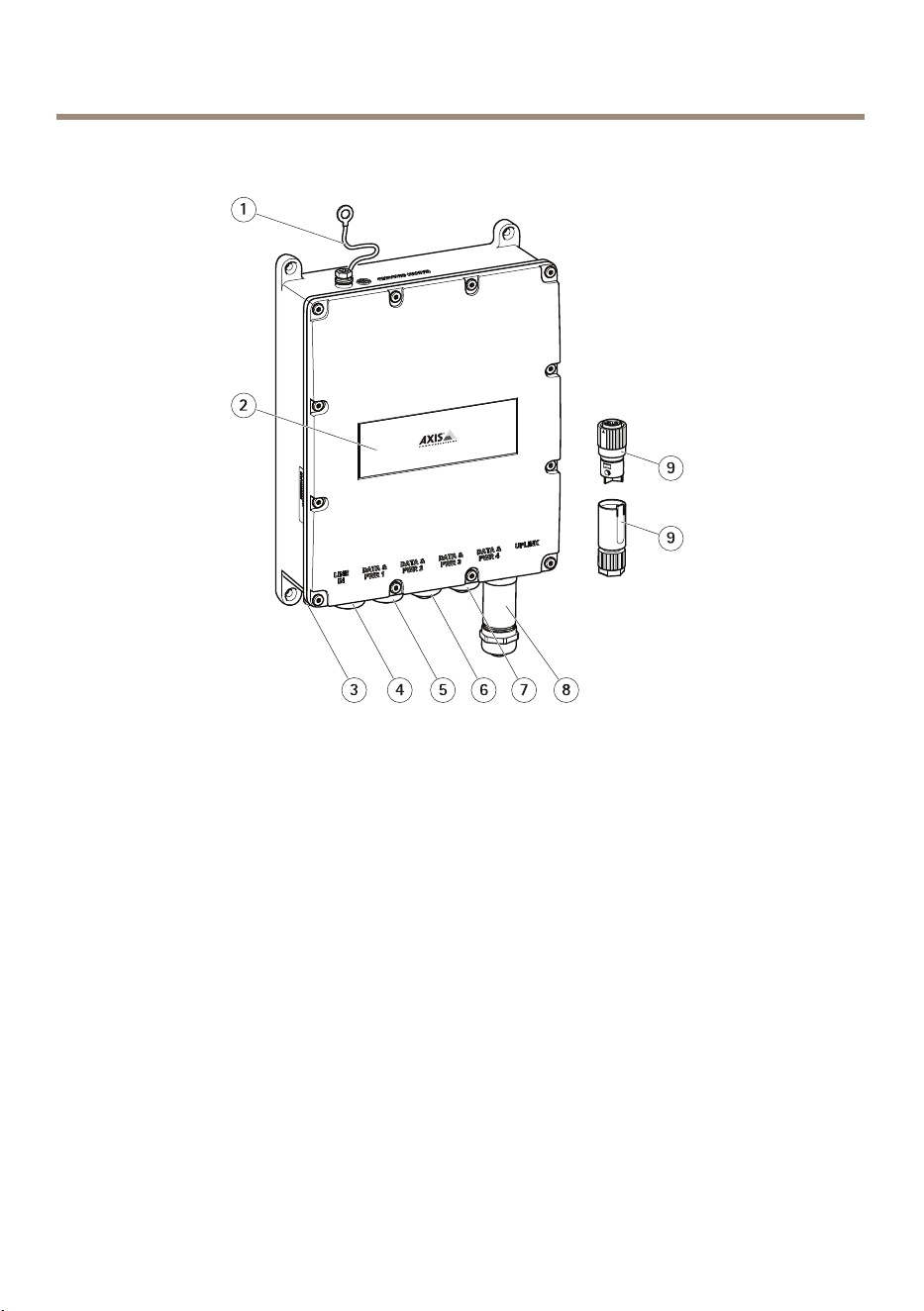
产 产
产
品 品
品
概 概
概
述 述
述
1
接 地 电 缆
2
产 品 标 签
3
电 源 连 接 器 端 口
4
RJ45 PoE 端 口
5
RJ45 PoE 端 口
6
RJ45 PoE 端 口
7
RJ45 PoE 端 口
8
SFP 插 槽
9
电 源 连 接 器
80
AXIST8504-EOutdoorPoESwitch
如 如
如
何 何
何
安 安
安
装 装
装
产 产
产
品 品
品
如 如
如
何 何
何
将 将
将
产 产
产
品 品
品
安 安
安
装 装
装
在 在
在
墙 墙
墙
壁 壁
壁
上 上
上
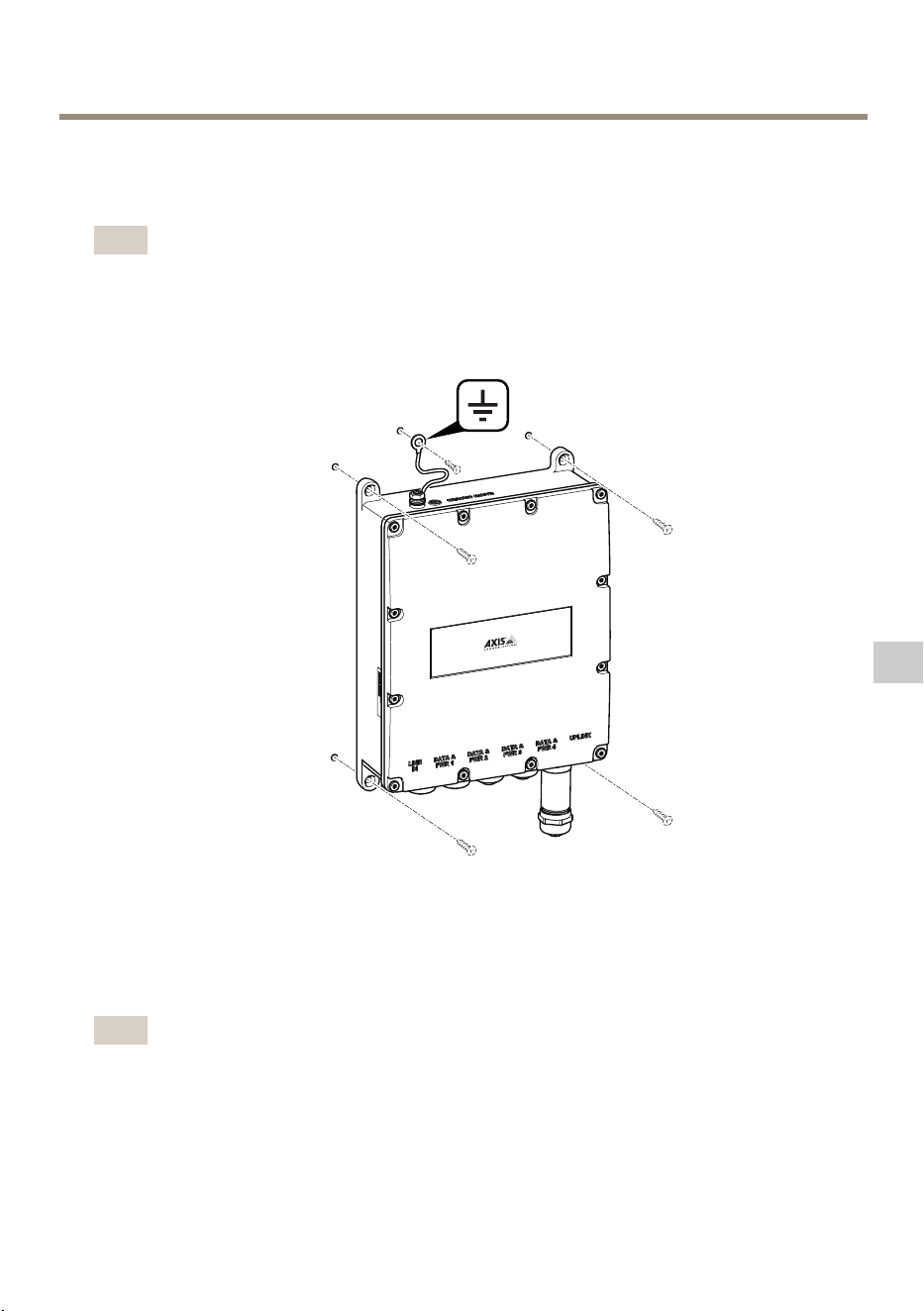
备注
要将产品安装在一根杆上,则您需要一个立杆托架。关于附件,请参见
www.axis.com
1.使产品紧靠在平滑表面上。
2.使用4个螺丝紧固产品。
3.紧固接地电缆。
如 如
如
何 何
何
连 连
连
接 接
接
以 以
以
太 太
太
网 网
网
电 电
电
缆 缆
缆
或 或
或
SFP SFP
SFP
模 模
模
块 块
块
备注
连接电缆最简便的方法是从左侧开始,先将第一根以太网电缆连接至Data&
PWR1,最后将SFP模块连接在Uplink端口。
81
ZH
AXIST8504-EOutdoorPoESwitch
1
金 属 套 管
2
防 尘 盖
3
橡 胶 密 封
4
压 指
5
金 属 防 护
1.通过逆时针转动金属套管以将其拆下。如要连接SFP模块,则还需拆下
金属防护。
2.将橡胶密封与压指分离。
3.丢弃防尘盖或将其保存以供日后使用。
82
AXIST8504-EOutdoorPoESwitch
1
以 太 网 电 缆
2
SFP 模 块
3
光 纤 电 缆
如何连接以太网电缆:
1.将金属套管、橡胶密封和压指按此顺序插入至以太网电缆。
2.将橡胶密封插入压指。
3.将电缆连接至插座。
4.施加扭矩将金属套管连接至该产品。
如何连接SFP模块:
1.将SFP模块插入该产品。
2.将金属套管、橡胶密封、压指和金属防护按此顺序插入至光纤电缆。
3.将电缆连接至插座。
4.利用扭矩将金属防护连接至该产品。
5.将橡胶密封插入压指。
6.施加扭矩将金属套管连接至金属防护。
83
ZH
AXIST8504-EOutdoorPoESwitch
连 连
连
接 接
接
电 电
电
源 源
源
查看下图了解如何连接电源连接器。
警告
•当您连接交流电源时,请确保将零线、火线和接地连接至正确极性。
•请确保交流电源电压在容许范围(100-240V交流电)内。
84

AXIST8504-EOutdoorPoESwitch
如 如
如
何 何
何
访 访
访
问 问
问
产 产
产
品 品
品
AXISIPUtility和AXISCameraManagement是用于在网络上查找安讯士产品的建议方
法。这两种应用程序都是免费的,可以从
www.axis.com/support
上进行下载
默认IP地址为192.168.0.254
默认用户名和密码:
用 用
用
户 户
户
名 名
名
: :
:
root
密 密
密
码 码
码
: :
:
pass
重要
为了保护您的产品免受入侵,在您开始使用产品前请始终更改用户名和密码。
为了充分利用您的产品并保护您的产品免受入侵,请务必登录产品以:
•更改用户名和密码
•分配一个新IP地址
•启用HTTPS
•检查您是否已安装最新固件
有关使用产品的更多信息,请参阅
www.axis.com
上提供的用户手册
85
ZH

AXIST8504-EOutdoorPoESwitch
更 更
更
多 多
多
信 信
信
息 息
息
•有关本文档的最新版本,请参见
www.axis.com
•如需有用的在线培训和在线研讨会,请参见
www.axis.com/academy
可 可
可
选 选
选
附 附
附
件 件
件
有关本产品可用附件的完整列表,请转到
www.axis.com
86
AXIST8504-EOutdoorPoESwitch
规 规
规
格 格
格
要查找最新版本的产品数据表,请转到axis.com>产品>支持和文档。
接 接
接
口 口
口
网 网
网
络 络
络
连 连
连
接 接
接
器 器
器
采用以太网供电(PoE)的RJ45以太网连接器。
SFP连接器。
功 功
功
耗 耗
耗
Table0.13.
电 气 规 格
输入电压
100–240VAC(50/60Hz)
输入电流(100–240VAC)2.5安培(最大)
可用输出功率(最大)
150W
标称输出电压
54VDC
Table0.14.
接 口
Uplink
SFP外罩
输出(DATAPWROUT):
以太网10/100/1000Base-T,增强版54
VDC
(RJ45母插座,带直流电压)
在以下可用选项中高达150W:
60W端口(端口1和2):
线对1-2和3-6、7-8和4-5
30W端口(端口3和4):
线对1-2和3-6
AC电源输入
3针脚AC电源输入–火线、零线和接地
87
ZH

AXIST8504-EOutdoorPoESwitch
工 工
工
作 作
作
条 条
条
件 件
件
产 产
产
品 品
品
温 温
温
度 度
度
湿 湿
湿
度 度
度
AxisT8504-E
-40°C到50°C
(-40°F到122°F)
*,针对150瓦产品
-40°C到60°C
(-40°F到140°F)
*,针对90瓦产品
10%到95%
(不允许存在冷凝)
88

AXIST8504-EOutdoorPoESwitch
安 安
安
全 全
全
信 信
信
息 息
息
危 危
危
险 险
险
等 等
等
级 级
级
危险
表示如果不避免则会导致死亡或严重伤害的危险情况。
警告
表示如果不避免则可能导致死亡或严重伤害的危险情况。
小心
表示如果不避免则可能导致轻微或中度伤害的危险情况。
注 意
表示如果不避免则可能导致财产损失的情况。
其 其
其
他 他
他
消 消
消
息 息
息
等 等
等
级 级
级
重要
表示产品正常工作所必需的重要信息。
备注
表示有助于充分利用产品的有用信息。
89
ZH

AXIST8504-EOutdoorPoESwitch
安 安
安
全 全
全
说 说
说
明 明
明
注 意
•使用安讯士产品时应遵守当地法律和法规。
•安装安讯士产品时,仅使用适用的工具。使用电动工具过度施力可能导致
产品损坏。
•请勿使用化学品、腐蚀剂或气雾剂。
•使用蘸纯净水的干净布进行清洁。
•仅使用符合产品技术规格的附件。这些附件可由安讯士或第三方提供。安讯
士推荐使用与产品兼容的安讯士电源设备。
•仅使用安讯士提供或推荐的备件。
•请勿尝试自行维修产品。有关服务事项,请联系安讯士支持部门或安讯
士经销商。
运 运
运
输 输
输
注 意
•安讯士产品运输途中,应使用其原包装或等效包装,以防对产品造成损坏。
90

91

InstallationGuide
Ver.M1.2
AXIST8504-EOutdoorPoESwitch
Date:July2017
©AxisCommunicationsAB,2017
PartNo.1730287
