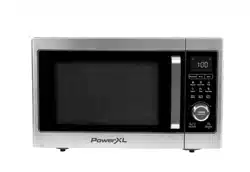
Save These Instructions – For Household Use Only
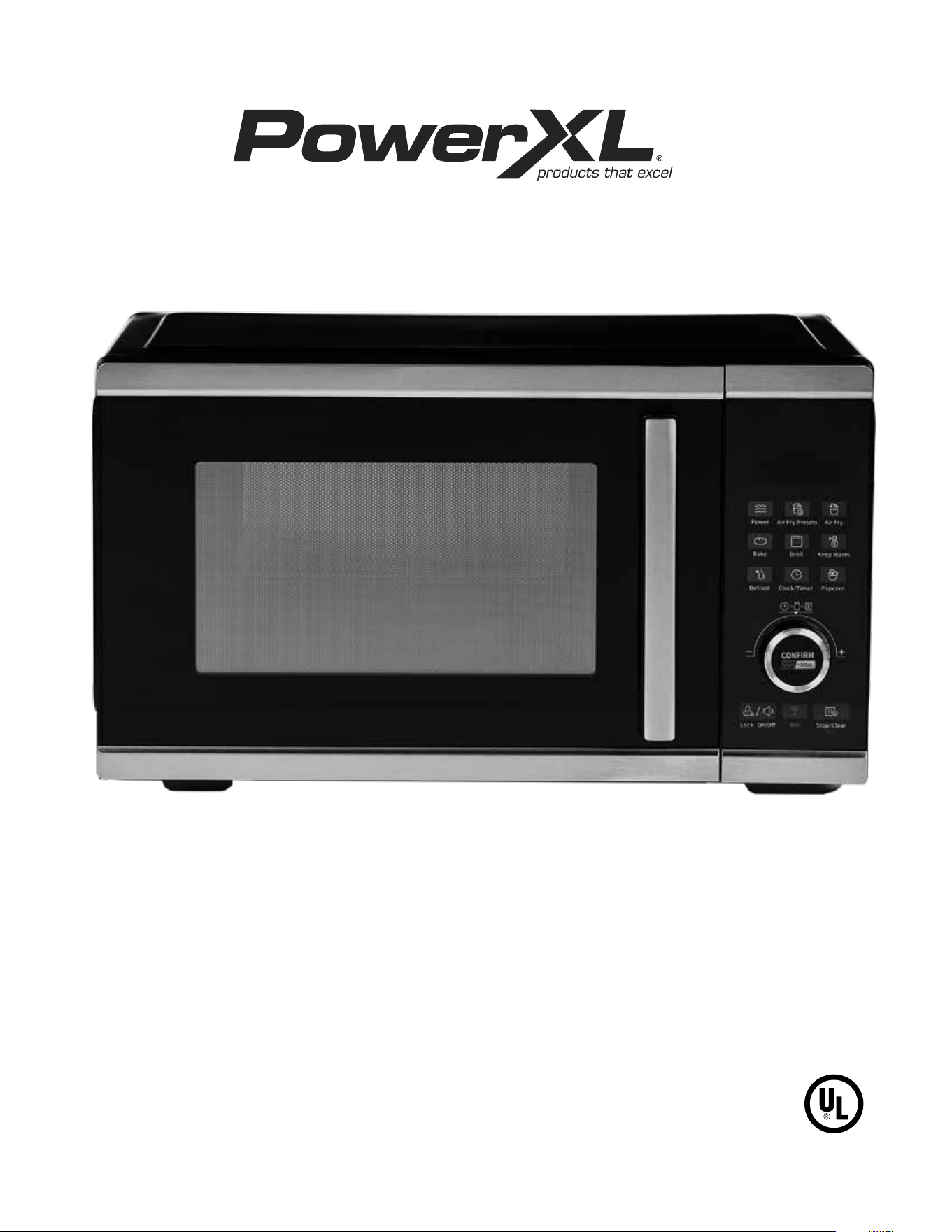
Owner’s Manual
MODEL: BDK04
When using electrical appliances, basic safety precautions should always be
followed. Do not use this appliance until you have read this manual thoroughly.
CAMERA-READY LOGOTYPE – UL MARK
These Marks are registered by Underwriters Laboratories Inc.
The minimum height of the registered trademark symbol ® shall be 3/64 of an inch. When the overall diameter of the
UL Mark is less than 3/8 of an inch, the trademark symbol may be omitted if it is not legible to the naked eye.
The font for all letter forms is Helvetica Condensed Black, except for the trademark symbol ®, which is
Helvetica Condensed Medium. No other fonts are acceptable.
200-195A 20M/11/97
SMART MICROWAVE AIR FRYER PLUS
TM
2
Table of Contents
IMPORTANT SAFEGUARDS 3
Parts & Accessories 7
The Control Panel 9
Programming
Microwave 10
Air Fry 11
Instructions for Use 12
Cooking Function Information 15
Using the Wi-Fi Features 18
Cooking Guidelines & Tips 20
Recipes 21
Troubleshooting 24
Cleaning & Storage 26
Money-Back Guarantee 27
3
IMPORTANT SAFEGUARDS
WARNING
When using electrical appliances basic
safety precautions should be followed,
including the following:
To reduce the risk of burns, electric shock,
re, injury to persons, or exposure to excessive
microwave energy:
PREVENT INJURIES! CAREFULLY READ ALL
INSTRUCTIONS BEFORE USE!
• Read all instructions before using the appliance.
• Read and follow the specic warning in the
“PRECAUTIONS TO AVOID POSSIBLE EXPOSURE TO
EXCESSIVE MICROWAVE ENERGY” section.
• This appliance must be grounded. Connect only to
properly grounded outlet (see the “GROUNDING
INSTRUCTIONS” section).
• Install or locate this appliance only in accordance with
the “Countertop Installation” section.
• Some products, such as whole eggs and sealed
containers – for example, closed glass jars – can
explode and should not be heated in this appliance.
• Use this appliance only for its intended use as
described in this manual. Do not use corrosive
chemicals or vapors in this appliance. This appliance
is specically designed to heat or cook food. It is not
designed for industrial or laboratory use.
• As with any appliance, close supervision is necessary
when it is used by children.
• Do not operate this appliance if it has a damaged cord
or plug, if it is not working properly or if it has been
damaged or dropped.
• This appliance should be serviced only by qualied
service technicians. Contact Customer Service using
the information located on the back of this manual.
• Do not cover or block any openings on the appliance.
• Do not store or use this appliance outdoors.
• Do not use this product near water, such as near a
kitchen sink, in a wet basement, near a swimming pool,
or similar locations.
• Do not immerse cord or plug in water.
• Keep cord away from heated surfaces.
• Do not let cord hang over edge of table or counter.
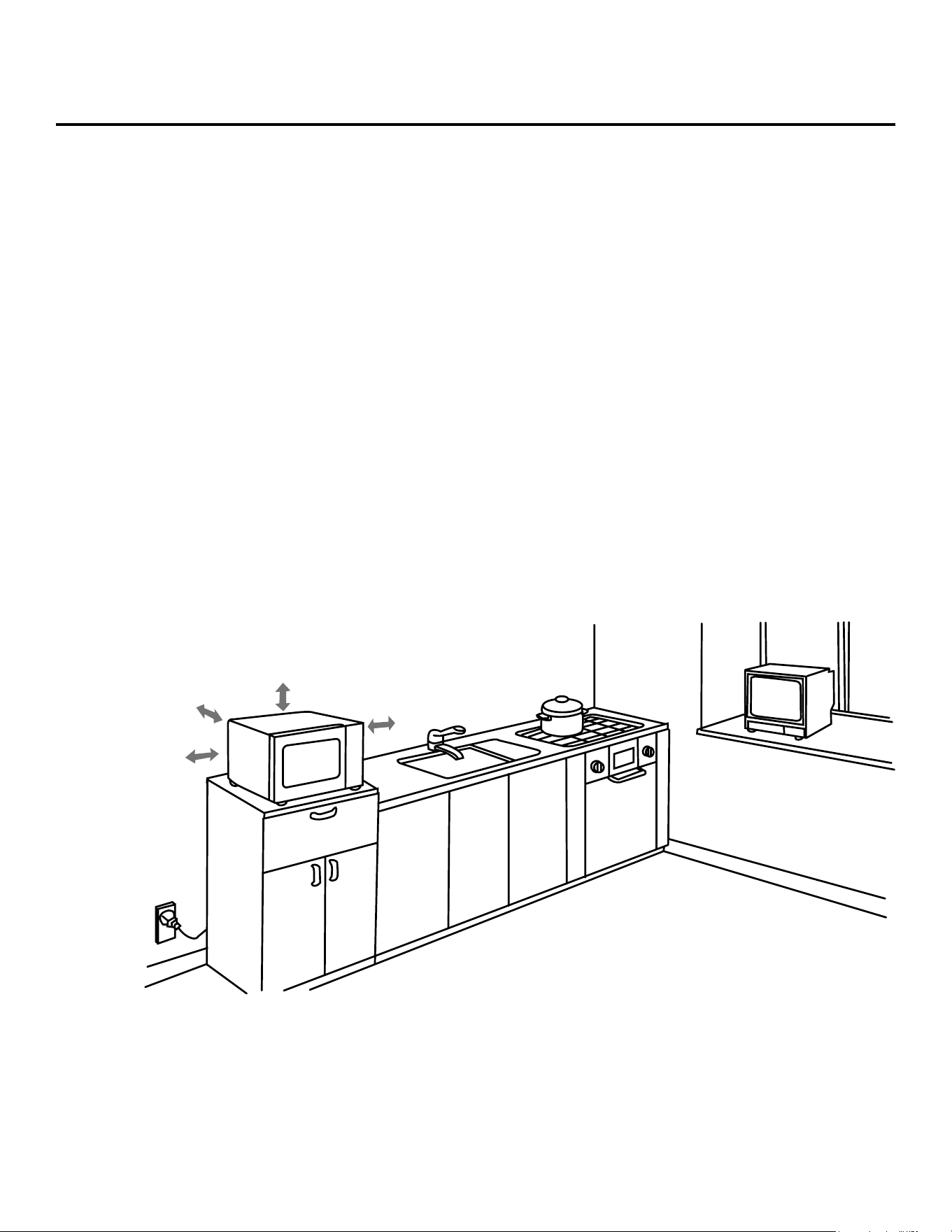
• Place the front surface of the door 3 inches or more
back from the countertop edge to avoid accidental
tipping of the appliance during normal usage.
• Recommended clearances: 3 inches on each side,
12 inches on top, and 3 inches in the rear.
• Do not mount this appliance over a sink.
• Do not store anything directly on top of the appliance’s
surface when the appliance is in use.
• Oversized food or oversized metal cookware should
not be used in this appliance because they increase
the risk of electric shock and could cause a re.
• When cleaning the surfaces of the door and the
appliance that come together on closing the door, use
only mild, nonabrasive soaps or detergents applied
with a sponge or soft cloth.
• Do not clean with metal scouring pads. Pieces can
burn off the pad and touch electrical parts, which
involves a risk of electric shock.
• Do not cover the microwave rack or any part of the
appliance with metal foil. This will cause overheating of
the appliance.
• To reduce the risk of re in the appliance interior:
a. Do not overcook food. Carefully attend appliance
when paper, plastic, or other combustible materials are
placed inside the appliance to facilitate cooking.
b. Remove wire twist-ties from paper or plastic bags
before placing bag in the appliance.
c. If materials inside the appliance ignite, keep
appliance door closed, turn appliance off, and
disconnect the power cord, or shut off power at the
fuse or circuit breaker panel.
4
IMPORTANT SAFEGUARDS
d. Do not use the interior for storage purposes. Do not
leave paper products, cooking utensils, or food in the
appliance when not in use.
e. Do not use the microwave function without food in
the appliance.
• Liquids such as water, coffee, or tea can be
overheated beyond the boiling point without
appearing to be boiling. This is called delayed eruptive
boiling. Visible bubbling or boiling when the container
is removed from the microwave appliance is not
always present. THIS COULD RESULT IN VERY
HOT LIQUIDS SUDDENLY BOILING OVER WHEN
THE CONTAINER IS DISTURBED OR A UTENSIL IS
INSERTED INTO THE LIQUID.
• To reduce the risk of injury to persons:
a. Do not use straight-sided containers with narrow
necks. Use a wide-mouth container.
b. Stir liquid both before and halfway through heating it.
c. Do not overheat liquid.
d. Use extreme care when inserting a spoon or other
utensil into the container. This may also cause delayed
eruptive boiling.
e. After heating, allow the container to stand in the
microwave appliance for a short period of time before
removing the container.
f. Be careful when opening containers of hot food.
Use potholders and direct steam away from your face
and hands.
g. Vent, pierce, or slit containers, pouches, or plastic
bags to prevent build-up of pressure.
h. Be careful when touching the turntable, door,
or walls of the appliance, which may become hot
during use.
i. Do not use paper products when the appliance is
operated in the air fryer or oven mode.
• Cook meat and poultry thoroughly – meat to at least an
internal temperature of 160° F/71° C and poultry to at
least an internal temperature of 180° F/82° C.
This product can expose you to chemicals including Di(2-ethylhexyl)
phthalate, which is known to the State of California to cause cancer
and birth defects or other reproductive harm. For more information,
go to www.P65Warnings.ca.gov.
For California Residents
WARNING:
SAVE THESE INSTRUCTIONS – FOR HOUSEHOLD USE ONLY
• Make sure all cookware used with the microwave
function in this appliance is suitable for microwaving
(see the “Materials to Avoid with the Microwave
Function” section).
• Do not store any materials, accessories, or containers
inside the appliance when not in use.
• Use of the accessories:
a. Remove the Air Frying Rack and Baking Pan from
the appliance when not in use.
b. Use potholders when handling the cooking
accessories. They may be hot.
c. Be sure that the accessories are positioned properly
inside the appliance. The Air Frying Rack and Baking
Pan must always be placed on the Glass Tray.
d. DO NOT USE THE CRISPER TRAY AND BAKING
PAN WITH THE MICROWAVE FUNCTION.
PRECAUTIONS TO AVOID POSSIBLE EXPOSURE
TO EXCESSIVE MICROWAVE ENERGY
• Do not attempt to operate this appliance with the
door open as this can result in harmful exposure to
microwave energy. It is important not to break or tamper
with the safety interlocks.
• Do not place any object between the appliance front
face and the door or allow soil or cleaner residue to
accumulate on sealing surfaces.
• Do not operate the appliance if it is damaged. It is
particularly important that the appliance door closes
properly and that there is no damage to the door (for
example, make sure that it is not bent); hinges and
latches (for example, make sure that they are not broken
or loosened); door seals and sealing surface.
5
• NEVER put anything on top of the appliance.
• NEVER cover the air vents on the top, back,
and side of the cooking appliance.
• ALWAYS use oven mitts when removing anything
hot from the appliance.
• NEVER rest anything on the door while it is open.
• DO NOT leave the door open for an extended period.
• ALWAYS ensure that nothing is protruding from the
appliance before closing the door.
• ALWAYS close the door gently; NEVER slam the door
closed. ALWAYS hold the handle of the door when
opening and closing the door.
WARNING
IMPORTANT
Before initial use, hand wash the cooking accessories. Then,
wipe the outside and inside of the appliance with a warm,
moist cloth and mild detergent. Next, preheat the appliance
for a few minutes to burn off any residue. Finally, wipe the
appliance out with a wet cloth.
CAUTION: Upon first use, the appliance may smoke or
emit a burning odor due to oils used to coat and preserve the
heating elements.
IMPORTANT SAFEGUARDS
• A short power-supply cord is provided to reduce the
risk of becoming entangled or tripping over a longer cord.
• This appliance has been designed for use with a 3-prong,
120V dedicated electrical outlet only.
• Plug into a 3-prong wall outlet with no other appliances on
the same outlet. Plugging other appliances into the outlet may
cause the circuit to overload.
Electric Power
If the electrical circuit is overloaded with other appliances,
your new appliance may not operate properly. It should be
operated on a dedicated electrical circuit.
Using the Power Cord
GROUNDING INSTRUCTIONS
This appliance must be grounded. In the event of an electrical
short circuit, grounding reduces the risk of electric shock by
providing an escape wire for the electric current. This appliance
is equipped with a cord with a grounding wire and grounding
plug. The plug must be plugged into an outlet that is properly
installed and grounded. Consult a qualied electrician or
serviceman if the grounding instructions are not completely
understood or if doubt exists as to whether the appliance
is properly grounded. If it is necessary to use an extension
cord, use only a 3-wire extension cord that has a 3-pronged
grounding plug and a 3-slot receptacle that will accept the plug
on the appliance.
1. A short power-supply cord is provided to reduce the risks
resulting from becoming entangled in or tripping over a
longer cord.
2. Longer cord sets or an extension cord should not be used
unless the following precautions are followed (see 3, below).
3. If a long cord or extension cord is used:
a. The marked electrical rating of the cord set or extension
cord should match the rating of the appliance.
b. The extension cord must be a grounding-type 3-wire cord.
c. The longer cord should be arranged so that it will not
drape over the countertop or tabletop where it can be
pulled on by children or tripped over.
Model
Number
Supply
Power
Rated Power
Capacity
Turntable
Diameter Temperature
BDK04 120V ~60Hz
Input (Microwave): 1450W
Output (Microwave): 900W
Output (Convection): 1500W
0.9 Cubic Foot 12.5 inches 150° F–450° F
Appliance Specications
6
IMPORTANT SAFEGUARDS
Remove all packing material and accessories. Examine
the oven for any damage, such as dents or a broken door.
Do not install if the appliance is damaged.
Cabinet: Remove any protective lm found on the
microwave oven cabinet surface. Do not remove the
light brown cover that is attached to the oven cavity to
protect the magnetron.
1. Select a level surface that provides enough open
space for the intake and/or outlet vents. A minimum
clearance of 3.0 inches (7.5cm) is required between
the appliance and any adjacent walls. One side must
be open.
• Leave a minimum clearance of 12 inches (30cm)
above the appliance.
• Do not remove the legs from the bottom
of the appliance.
• Blocking the intake and/or outlet openings can
damage the appliance.
• Place the appliance as far away from radios and
televisions as possible. This appliance’s operation of
microwave oven may cause interference with your
radio or TV reception.
2. Plug your appliance into a standard household outlet.
Be sure the voltage and the frequency is the same as
the voltage and the frequency on the rating label.
WARNING: Do not use this appliance over a range
cooktop or other heat-producing appliance. If used
near or over a heat source, the appliance could
damage other property, could cause personal
injuries, and could void the guarantee.
Countertop Use
3.0 in. (7.5 cm)
12 in. (30 cm)
open
3.0 in. (7.5 cm)
7
Parts & Accessories
WARNING
The metal components of this appliance will get
extremely hot during use. Great care should be
taken to avoid personal injury. Wear protective oven
mitts or gloves.
Oversized metal utensils and accessories, including
the Crisper Tray and Baking Pan, should not be used
with this appliance’s microwave function.
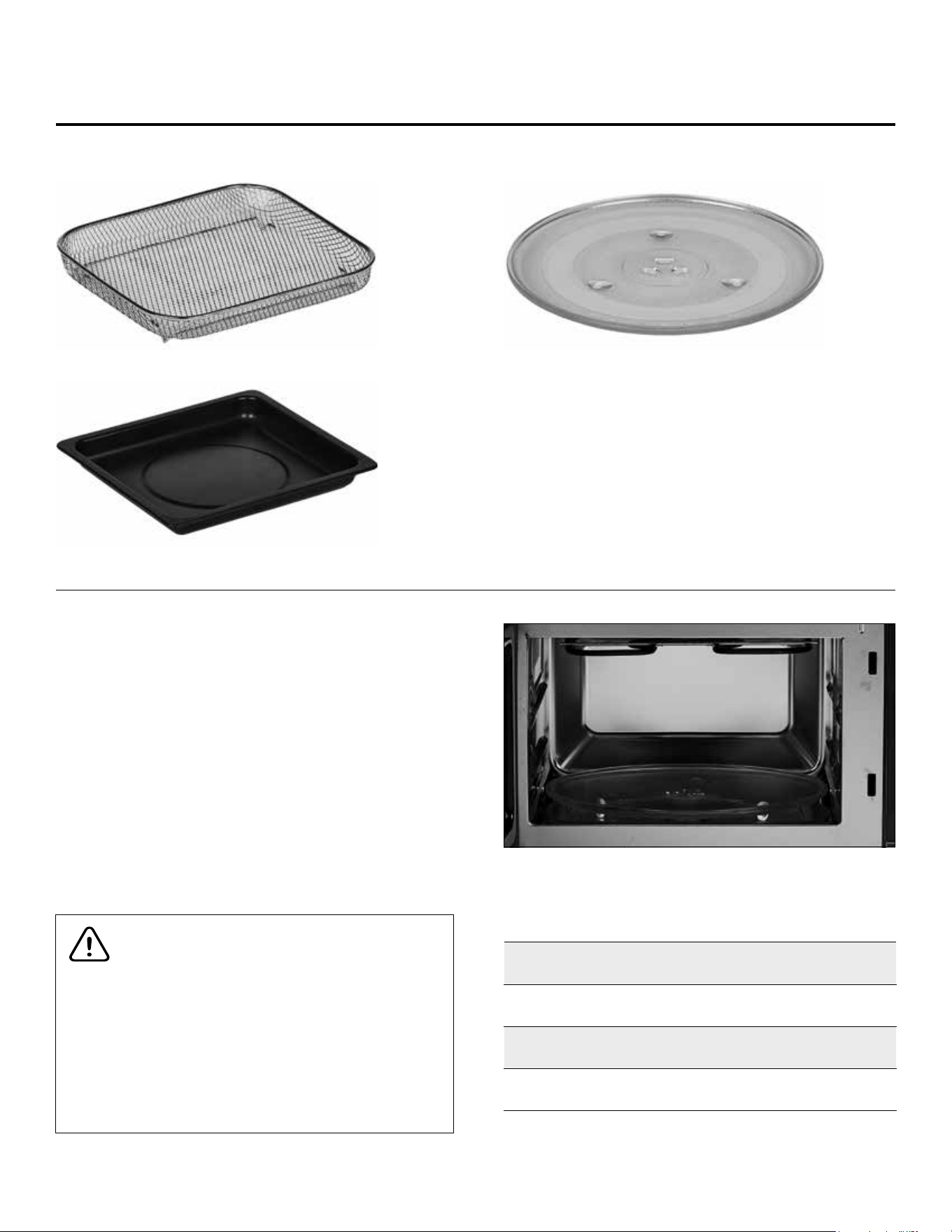
Glass Tray Installation
When microwaving in this appliance, all food and food
containers should be placed on the Glass Tray when cooked.
If the Glass Tray is damaged, contact Customer Service using
the contact information located on the back of this manual. To
use the Glass Tray, center the Glass Tray on the turntable on the
bottom of the inside of the appliance (see Fig. A).
NOTE: The turntable might need to be installed before use.
Center the turntable over the mechanism in the center of the
bottom of the interior of the appliance. The turntable can be
removed for cleaning if necessary.
Fig. A
Crisper Tray
Baking Pan
Glass Tray
Function Name Use Glass Tray?
Microwave Yes
Air Fry No
Bake No
Broil No
IMPORTANT: Do not use the Glass Tray when using functions
other than the microwave function.
8
FIG. B
FIG. C
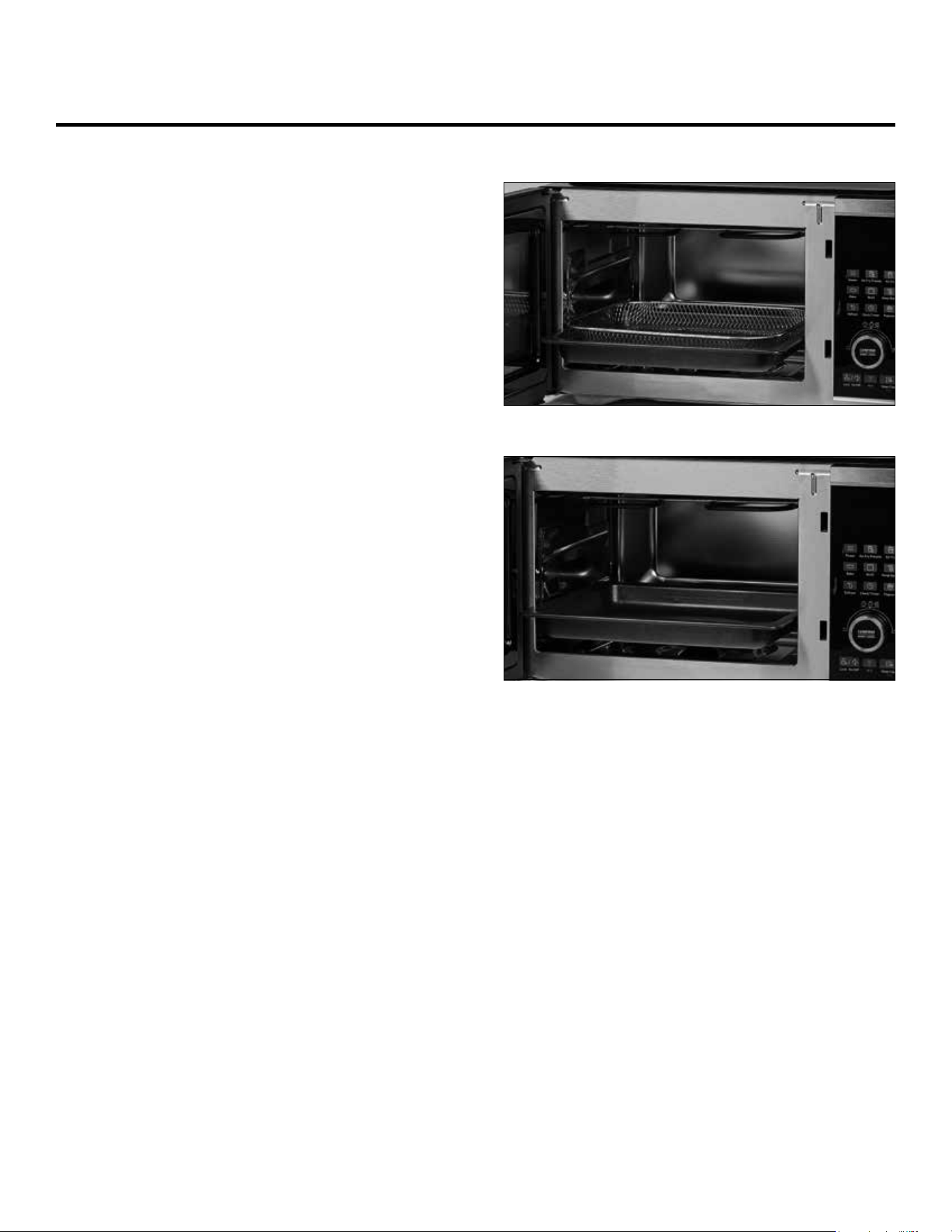
Using the Crisper Tray
1. Ensure the Glass Tray is not placed inside the
appliance.
2. Slide the Baking Pan into the appliance.
3. Place food on the Crisper Tray. Place the Crisper Tray
on the Baking Pan (see Fig. B).
4. Choose a cooking mode, time, and temperature.
Press the Control Knob to begin the cooking process.
NOTE: Do not use the Crisper Tray with the
microwave function.
Using the Baking Pan
1. Ensure the Glass Tray is not placed inside the
appliance.
2. Place food on the Baking Pan. Slide the Baking Pan
into the appliance (see Fig. C).
3. Choose a cooking mode, time, and temperature. Press
the Control Knob to begin the cooking process.
NOTE: Do not use the Baking Pan with the
microwave function.
Parts & Accessories
9
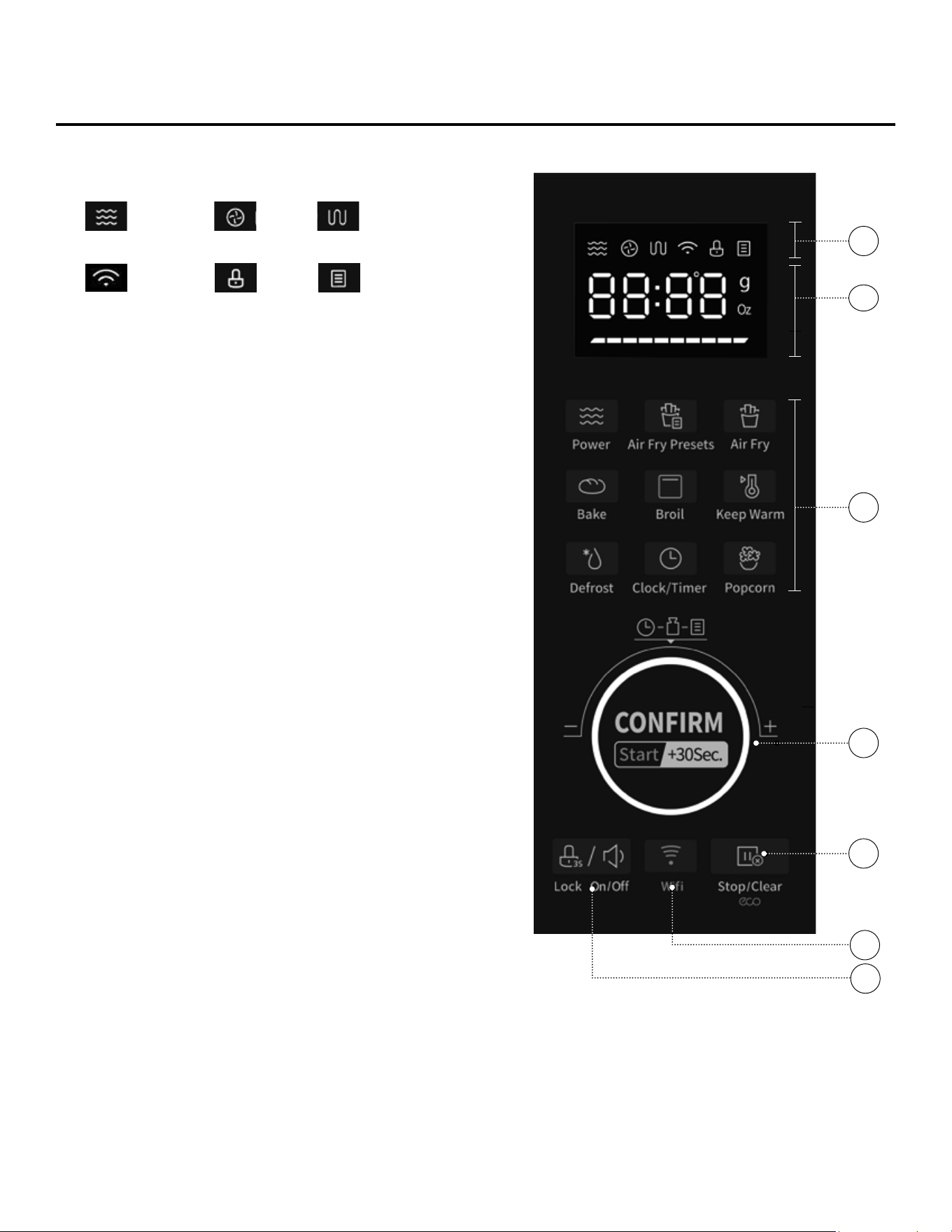
A. INDICATORS
B. LED PANEL: Displays functions, cooking times,
temperatures, and weights.
C. FUNCTION MENU BUTTONS: Use to select presets
from the preset menu (see “Preset Cooking Chart”
section) or to adjust the clock.
Power Level Button: Press and then turn the Control
Knob to adjust the microwave power level.
Air Fry Presets: Press and then turn the Control Knob
to select an Air Fry Preset.
Clock/Timer Button: Press once to set the current time
on the appliance. Press twice to set the timer on the
appliance. Use the Control Knob to adjust and conrm
the selected time.
D. CONTROL KNOB: Once a cooking mode, time,
and temperature have been set either manually or by
using the Preset Buttons, press the Control Knob to
begin the cooking process. Turning the Control Knob
counterclockwise when the appliance is in standby
mode will allow you to select a Micro Menu function.
Pressing the Control Knob when the appliance is in
standby mode will start the microwave for 30 seconds.
During the cooking process, press the Control Knob to
add 30 seconds to the cooking time. The Control Knob
can also be used to conrm settings, such as the clock/
timer on the appliance.
E. STOP/CLEAR/ECO BUTTON: Press the
Stop/Clear/Eco Button to stop the cooking process
at any time. When the cooking process is stopped,
press the Stop/Clear/Eco Button to cancel the current
cooking timer and enter standby mode.
When the appliance is in standby mode, press the
Stop/Clear/Eco Button to darken the control panel.
When the panel is darkened, press any button on the
panel to illuminate the panel.
F. WI-FI BUTTON: See the “Using the Wi-Fi
Features” section.
G. LOCK/MUTE BUTTON: Press to mute or unmute
the appliance. Hold to lock or unlock the appliance
(see “Using the Lock and Mute Functions” section).
STANDBY MODE: When no cooking program is
running, the appliance is in standby mode.
The Control Panel
May 15, 2020
Panel
May 15, 2020
Panel
May 15, 2020
Panel
May 15, 2020
Panel
May 15, 2020
Panel
Microwave
Fan Heating Element
(used with the Air Fry,
Bake, or Broil settings)
Wi-Fi
Lock Menu
A
C
D
F
E
B
G
10
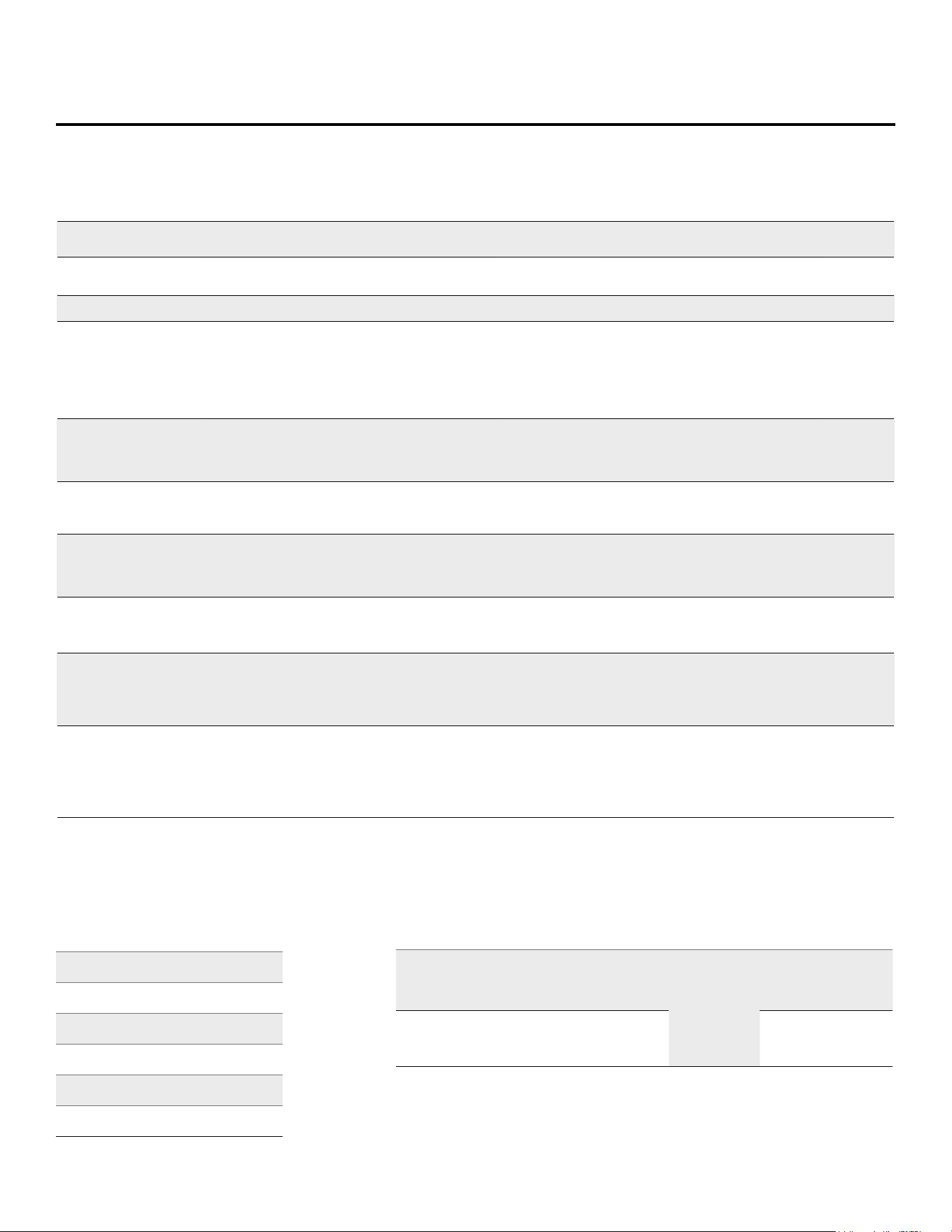
Microwave Programming
Function Preset
Default
Power
Power
Range
Weight/
Quantity
Default
Time
Time
Range
Display
Code
Microwave Power 100% 10–100% N/A N/A 5 secs.–95 mins.
Microwave Popcorn 100% 100%
3.2 oz
3.5 oz
2 mins. 5 secs. N/A
Microwave Defrost Varies (see chart) Varies (see chart) Varies (see chart) Varies (see chart) N/A dEF1–dEF6
Micro Menu* Auto-Reheat 100% 100%
5 oz
9 oz
12 oz
16 oz
21 oz
1 min. 30 secs.
2 mins. 30 secs.
3 mins. 30 secs.
4 mins. 30 secs.
6 mins.
N/A A01
Micro Menu* Soup 100% 100%
8 oz
16 oz
24 oz
2 mins. 10 secs.
4 mins.
5 mins. 40 secs.
N/A A02
Micro Menu* Potato 100% 100%
1 potato
2 potatoes
3 potatoes
5 mins. 20 secs.
8 mins. 30 secs.
11 mins. 30 secs.
N/A A03
Micro Menu* Vegetable 100% 100%
5 oz
12 oz
18 oz
3 mins.
4 mins. 30 secs.
6 mins.
N/A A04
Micro Menu* Pasta 80% 80%
1.75 oz
3.5 oz
5 oz
18 mins.
20 mins.
22 mins.
N/A A05
Micro Menu* Meat 80% 80%
5 oz
11 oz
16 oz
21 oz
3 mins.
4 mins. 40 secs.
6 mins. 30 secs.
8 mins. 30 secs.
N/A A06
Micro Menu* Fish 80% 80%
5 oz
9 oz
12 oz
16 oz
23 oz
3 mins.
4 mins. 30 secs.
5 mins. 30 secs.
6 mins. 50 secs.
9 mins. 30 secs.
N/A A07
NOTE: Press the Control Knob at any time during the cooking process to add 30 seconds to the cooking timer.
* To access the Micro Menu, when the appliance is in standby mode, turn the Control Knob counterclockwise.
Defrost
Code
Food
Weight
DEF1 Vegetable 4–32 oz
DEF2 Fruit 4–32 oz
DEF3 Chicken 4–70 oz
DEF4 Fish 4–32 oz
DEF5 Meat 4–70 oz
DEF6 Broth 4–70 oz
NOTE: Default defrost time varies by weight.
First
Stage
Second
Stage
Third
Stage
Reminder
Fourth
Stage
Fifth
Stage
Time
10% of
total time
10%
of total
time
20%
of total
time
Two beeps
reminder
to ip food
10%
of total
time
50%
of total
time
Power
90% 0% 50% 10% 20%
NOTE: This programming applies to the Defrost function’s Vegetable, Fruit,
Chicken, Fish, and Meat programs. Defrost’s Broth program uses different
power levels and does not include a reminder to ip food.
Defrost Charts
11
Air Fry Programming
Function Preset
Default
Temperature
Temperature
Options
Weight/
Quantity
Default
Time
Time
Range
Display
on Panel
Air Fry Air Fry 400° F
150° F, 250° F, 275° F, 300° F,
325° F, 350° F, 375° F, 400° F,
425° F, 450° F
N/A 20 mins. 1–95 mins.
Air Fry
Menu
Frozen French
Fries
425° F N/A 7 oz 18 mins. N/A
Air Fry
Menu
Chicken 425° F N/A 8 oz 18 mins. N/A
Air Fry
Menu
Steak 450° F N/A 8 oz 12 mins. N/A
Air Fry
Menu
Fish 425° F N/A 8 oz 12 mins. N/A
Air Fry
Menu
Chicken Wings 425° F N/A 18 oz 22 mins. N/A
Air Fry
Menu
Bacon 375° F N/A 4 slices 15 mins. N/A
Air Fry
Menu
Eggs 275° F N/A 5 eggs 18 mins. N/A
Air Fry
Menu
Vegetables 400° F N/A 11 oz 10 mins. N/A
Air Fry
Menu
Cake 325° F 300° F, 325° F, 350° F 16 oz 30 mins. N/A
Air Fry
Menu
Cookies 325° F N/A 6 oz 12 mins. N/A
Air Fry
Menu
Pizza 400° F N/A 11-inch pizza 15 mins. N/A
Air Fry
Menu
Frozen Chicken
Nuggets
425° F N/A 12 oz 15 mins. N/A
Air Fry
Menu
Frozen Fish
Sticks
425° F N/A 9 oz 20 mins. N/A
Bake Bake 350° F
150° F, 250° F, 275° F, 300° F,
325° F, 350° F, 375° F, 400° F,
425° F, 400° F
N/A N/A 1–95 mins.
Broil Broil 450° F N/A N/A 10 mins. 1–20 mins.
Keep Warm Keep Warm 150° F 150° F–160° F N/A 60 mins. 1–95 mins.
NOTE: Press the Control Knob at any time during the cooking process to add 30 seconds to the cooking timer.

12
Instructions for Use
1. Read all material, warning stickers, and labels.
2. Remove all packing materials.
3. Wash all parts and accessories used in the cooking
process with warm, soapy water. Hand-washing is
recommended.
4. Wipe the inside and outside of the cooking appliance
with a clean, moist cloth. Rinse with a warm, moist
cloth. Never wash or submerge the cooking appliance
in water.
5. Install the turntable (see the “Glass Tray
Installation” section).
6. Before cooking food, preheat the appliance for a few
minutes to allow the manufacturer’s protective coating
of oil to burn off. Wipe the appliance with warm, soapy
water and a dishcloth after this burn-in cycle.
Before First Use
Setting the Clock
1. Press the Clock/Timer Button once. The LED Panel will
show “00:00.”
2. Turn the Control Knob to adjust the hour setting from
1 to 12.
3. Press the Clock/Timer Button to conrm the hour setting.
4. Turn the Control Knob to adjust the minute setting
from 0 to 59.
5. Press the Clock/Timer Button to conrm the time
setting.
Setting the Kitchen Timer
1. Press the Clock/Timer Button twice. The LED Panel will
show “00:00.”
2. Turn the Control Knob to adjust the kitchen timer from
0 to 95 minutes.
3. Press the Clock/Timer Button to start the kitchen timer.
Using the Lock and Mute Functions
1. When the appliance is in standby mode (see “The
Control Panel” section), press the LOCK ON/OFF
Button once to mute the appliance. When muted, the
appliance’s Control Panel and timer will not sound until
the LOCK ON/OFF Button is pressed again to unmute
the appliance.
2. Hold the LOCK ON/OFF Button for 3 seconds to lock
and unlock the appliance. When locked, the Lock Icon
will appear on the Control Panel.
13
Cookware in the Microwave
Materials to Avoid in the Appliance
Material Reasons
Aluminum Tray
May cause arcing and could cause a fire in the oven. Transfer food to microwave-safe dish.
Food carton with metal handle May cause arcing and could cause a fire in the oven. Transfer food to microwave-safe dish.
Metal or metal-trimmed utensils Metal shields the food from microwave energy. Metal trim may cause arcing and could cause a fire in the oven.
Metal Twist Ties May cause arcing and could cause a fire in the oven.
Paper Bags May cause a fire when using the air fryer or oven function.
Plastic foam Plastic foam may melt or contaminate the liquid inside when exposed to high temperature.
Wood Wood will dry out when used in the microwave oven and may split or crack.
Instructions for Use
Cookware Microwave Air Fry
Heat-resistant glass, glass-ceramic
Yes Yes
Metal No Yes
Microwave-safe plastics
Note: Use only microwaveable cookware that is safe to 450° F/232° C.
Yes No
Plastic lms and wraps Yes No
Paper products Yes No
Straw, wicker, and wood No No
Aluminum foil:
Use as shielding only. Small smooth pieces may be used to cover thin parts of
poultry to prevent overcooking. Arcing can occur if foil is too close to oven walls.
The foil should be at least 1 inch (2.5cm) away from the oven walls.
No Yes
Dinnerware:
Microwave safe only. Follow manufacturer’s instructions.
Do not use cracked or chipped dishes.
Yes No
Oven cooking bags:
Follow manufacturer’s instructions. Do not close with metal tie.
Make slits to allow steam to escape.
Yes Yes
Wax paper:
Use as a cover to prevent splattering and retain moisture inside.
Yes No
It is not necessary to buy new cookware. Many pieces
already in your kitchen can be used successfully in your
new appliance. The charts below will help you decide
which cookware and coverings should be used with each
feature. Make sure the utensil does not touch the interior
walls during the cooking process.

14
Containers
CAUTION
PERSONAL INJURY HAZARD
Tightly closed containers could explode. Closed containers
should be opened and plastic pouches should be pierced
before cooking.
See the instructions in the “Materials You Can Safely Use
in a Microwave Oven” and “Materials To Be Avoided in
a Microwave Oven” sections.
There may be certain nonmetallic materials that are not
safe to use for microwaving. If in doubt, you can test the
utensil in question by following the instructions in the
“Material/Container Test” section.
Material/Container Test
1. Fill a microwave-safe container with 1 cup (250 ml)
of cold water and the container.
2. Set the appliance to microwave mode and cook
on maximum power for 1 minute. NOTE: Do not
microwave the container for more than 1 minute.
3. Carefully feel the container. If the container is warm,
do not use the container in microwave mode.
4. Do not exceed 1 minute cooking time to avoid
overheating the container.
Preventing Arcing
Arcing is sparks or electric ashes that crackle or pop.
Arcing can produce heat that is quite intense and can
damage the interior of the microwave or containers being
used in the microwave. It can also cause re.
Arcing occurs when metal containers are used in the
microwave and can also occur with the use of metal
skewers, metal clamps, or twist ties for plastic bags. To
prevent arcing, use the charts to determine which materials
are microwave safe, or follow instructions from container/
wrap manufacturer.
Plastic Cookware
Plastic cookware designed for microwave cooking is
very useful, but should be used carefully. Even
microwave-safe plastic may not be as tolerant of
overcooking conditions as glass or ceramic materials
and may soften or char if subjected to short periods of
overcooking. In longer exposures to overcooking, the
food and cookware could ignite.
Follow these guidelines:
• Use microwave-safe plastics only and use them in
strict compliance with the cookware manufacturer’s
recommendations.
• Do not microwave empty containers.
• Do not permit children to use plastic cookware
without adult supervision.
Instructions for Use
15
Popcorn Button
1. Press the Popcorn Button.
2. The LED Display will show “3.2Oz.” Turn the Control
Knob to cycle between the available preset popcorn
weights (3.2 oz. and 3.5 oz.).
3. Press the Control Knob to begin the cooking process.
4. When the cooking timer is complete, the appliance will
beep ve times and display “0:00.”
Microwave Function
1. Press the Power Level Button and then turn the
Control Knob to select a microwave power level (see
Fig. D). Press the Control Knob to select the power
level setting.
2. Turn the Control Knob again to set the microwave
time. Press the Control Knob to conrm the time and
begin microwaving.
Fast Microwave
Turning the Control Knob while the appliance is in standby
mode (see “The Control Panel” section) allows you to add
or subtract time. Pressing the Control Knob will conrm the
time and run the microwave at 100% power. Pressing the
Control Knob again will increase the cooking time in
30-second increments.
Display Level Power
P100 10 100%
P90 9 90%
P80 8 80%
P70 7 70%
P60 6 60%
P50 5 50%
P40 4 40%
P30 3 30%
P20 2 20%
P10 1 10%
Fig. D. The ten different microwave power levels.
Defrost Button
1. Press the Defrost Button.
2. The LED Display will show “dEF1.” You can scroll
though the dEF1–dEF6 settings by repeatedly
pressing the Defrost Button or by turning the Control
Knob (see the Defrost Charts in the “Microwave
Programming” section).
3. Press the Control Knob to conrm the setting.
4. Turn the Control Knob to select the defrost
weight (4–70 oz).
5. Press the Control Knob to start defrosting.
6. Turn food over when the appliance beeps twice.
7. When the timer is complete, the appliance
will beep ve times and display “0:00.”
Cooking Function Information

16
Bake Function
1. Press the Bake Button once. The LED Panel will display
“350F.”
2. Turn the Control Knob to cycle between the available
cooking temperatures (150° F, 250° F, 275° F, 300°F,
325° F, 350° F, 375° F, 400° F, 425° F, and 400° F). Press
the Control Knob to conrm the cooking temperature.
3. Turn the Control Knob to adjust the cooking time
(30-second intervals for 5–10 minutes, 1-minute
intervals for 10–30 minutes, and 5-minute intervals for
30–90 minutes). Press the Control Knob to conrm the
cooking time and start the timer.
4. When the cooking timer is complete, the appliance
will beep ve times and display “0:00.”
Using the Air Fry Menu
1. Press the Air Fry Menu Button.
2. Turn the Control Knob to cycle through the 13 preset
functions (see the “Air Fry Programming” section for
preset times and temperatures).
3. Once an air frying setting has been selected, press the
Control Knob to begin the cooking process.
4. When the cooking timer is complete, the appliance will
beep ve times and display “0:00.”
1. Turn the Control Knob counterclockwise () to
select one of the Micro Menu settings (A1–A7; see
the “Microwave Programming” section).
2. Turn the Control Knob to select the weight. Press the
Control Knob to conrm the cooking settings.
3. When the cooking timer is complete, the appliance will
beep ve times and display “0:00.”
NOTE: Pressing the Control Knob increases the cooking
time in 30-second increments.
Using the Micro Menu Function
Cooking Function Information

17
Broil Button
1. Press the Broil Button.
2. The LED Display will show “450F.” Turn the Control
Knob to adjust the cooking time. Press the Control
Knob to conrm the cooking time and start the timer.
3. When the cooking timer is complete, the appliance will
beep ve times and display “0:00.”
Keep Warm Button
1. Press the Keep Warm Button.
2. The LED Display will show “150F.” Turn the Control
Knob to adjust the cooking time.
3. Press the Control Knob to begin the cooking process.
When the cooking timer is complete, the appliance
will beep ve times and display “0:00.” Press the
Control Knob to begin the cooking timer.
Cooking Function Information
Air Fry Function
1. Press the Air Fry Button to set the appliance to air fry
mode. “400” will ash on the LED Display.
2. Turn the Control Knob to cycle between the available
cooking temperatures (150° F, 250° F, 275° F, 300°F,
325° F, 350° F, 375° F, 400° F, 425° F, and 450° F). Press
the Control Knob to conrm the cooking temperature.
3. Turn the Control Knob to adjust the cooking time.
Press the Control Knob to conrm the cooking time
and start the timer.
4. When the cooking timer is complete, the appliance
will beep ve times and display “0:00.”
NOTE: Opening the door at any time will pause the cooking process. Close the door and press the Control Knob to resume
the cooking process.
18
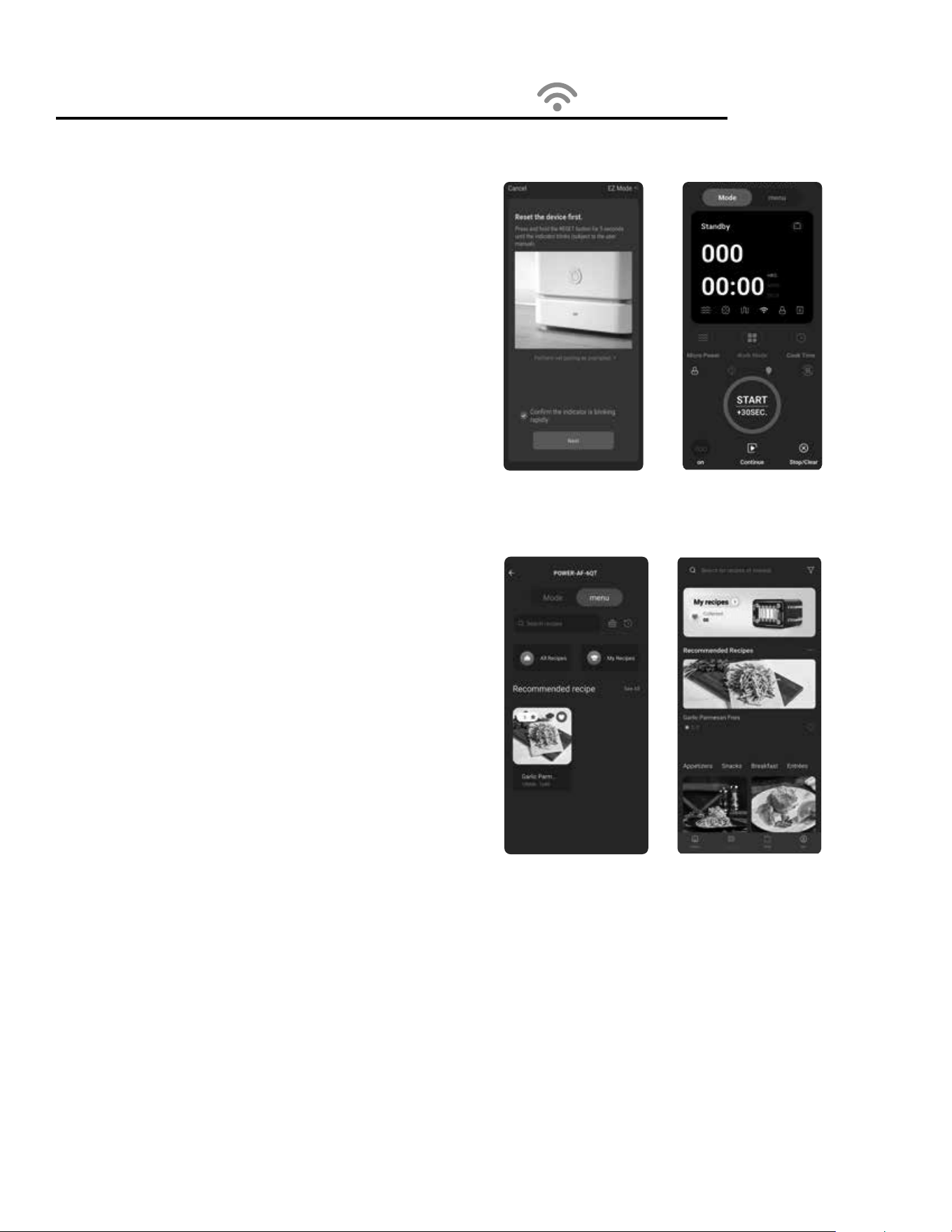
Using The Wi-Fi Features
Download the PowerXL App and
Create an Account
1. Download the PowerXL app from the Google Play store or App
Store.
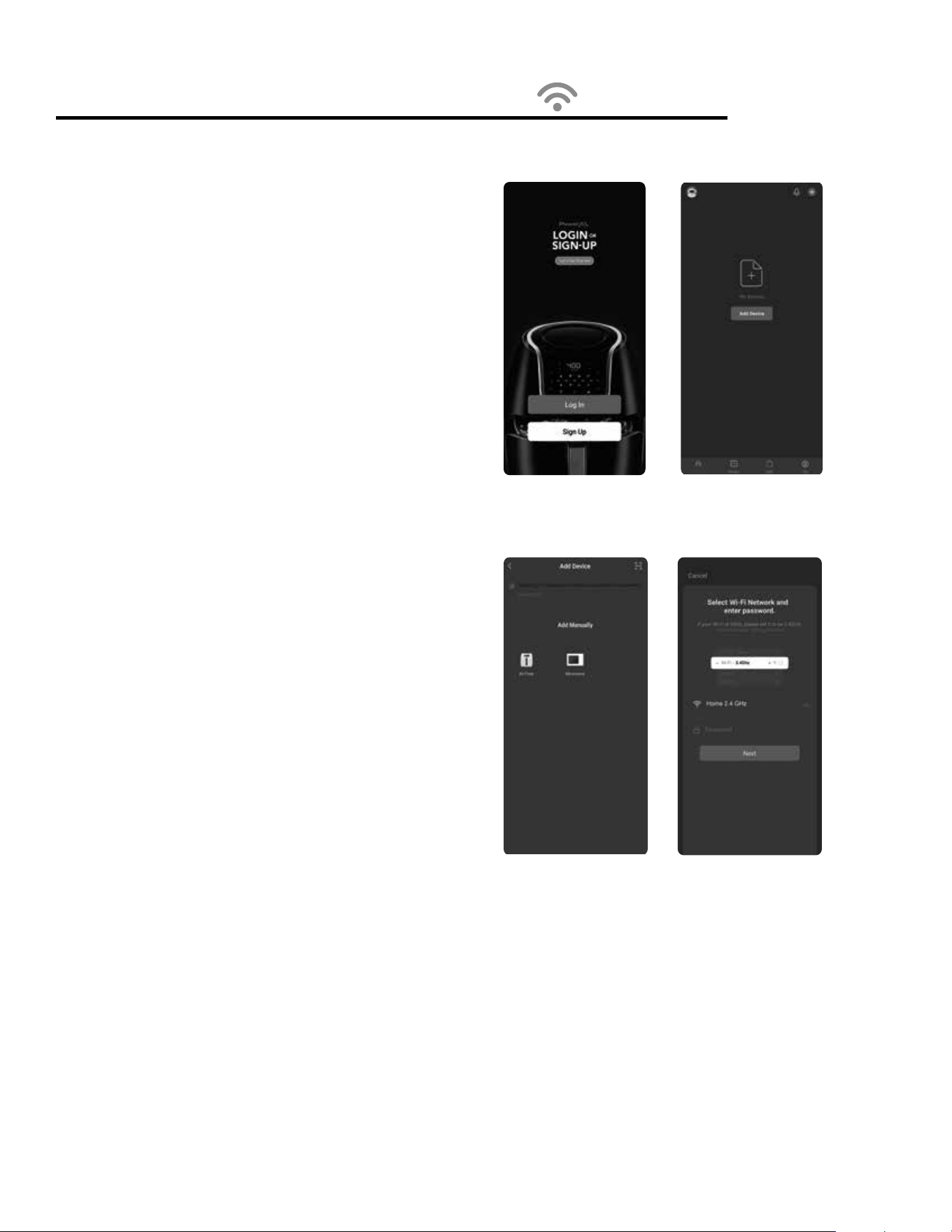
2. Select “Sign Up” and enter your email to create an account (see
Fig. D). Your email will be sent a verication code.
3. Enter the verication in the app and create apassword.
Pair Your Device
with the PowerXL App
1. Plug the appliance into an electrical outlet and press the Wi-Fi
Button to turn the appliance on. Press and hold the Wi-Fi
Button for 5 seconds. The Wi-Fi Icon on the control panel
should start ashing rapidly, indicating that the appliance has
entered pairing mode.
2. To pair automatically: In the Home tab, select “Add Device”
(see Fig. E). The appliance should be able to connect to the
app automatically via Bluetooth connection. If the appliance
does not connect automatically, you can manually pair the
appliance with your app.
3. To pair manually: After selecting “Add Device,” select your
appliance type (Microwave) under “Add Manually” (see Fig. F).
Select your 2.4 GHz wi- network and enter the password for
that network. Select “Next” (see Fig. G).
4. Select “Conrm the indicator is blinking rapidly” and then
select “Next” (see Fig. H).
5. The app will attempt to connect to the appliance. This process
might take a few minutes.
6. Your appliance should now be connected to the app. After
the app is connected, your appliance
’s control panel can be
accessed on the app
’s Home tab.
Fig. D
Fig. F
Fig. E
Fig. G
19
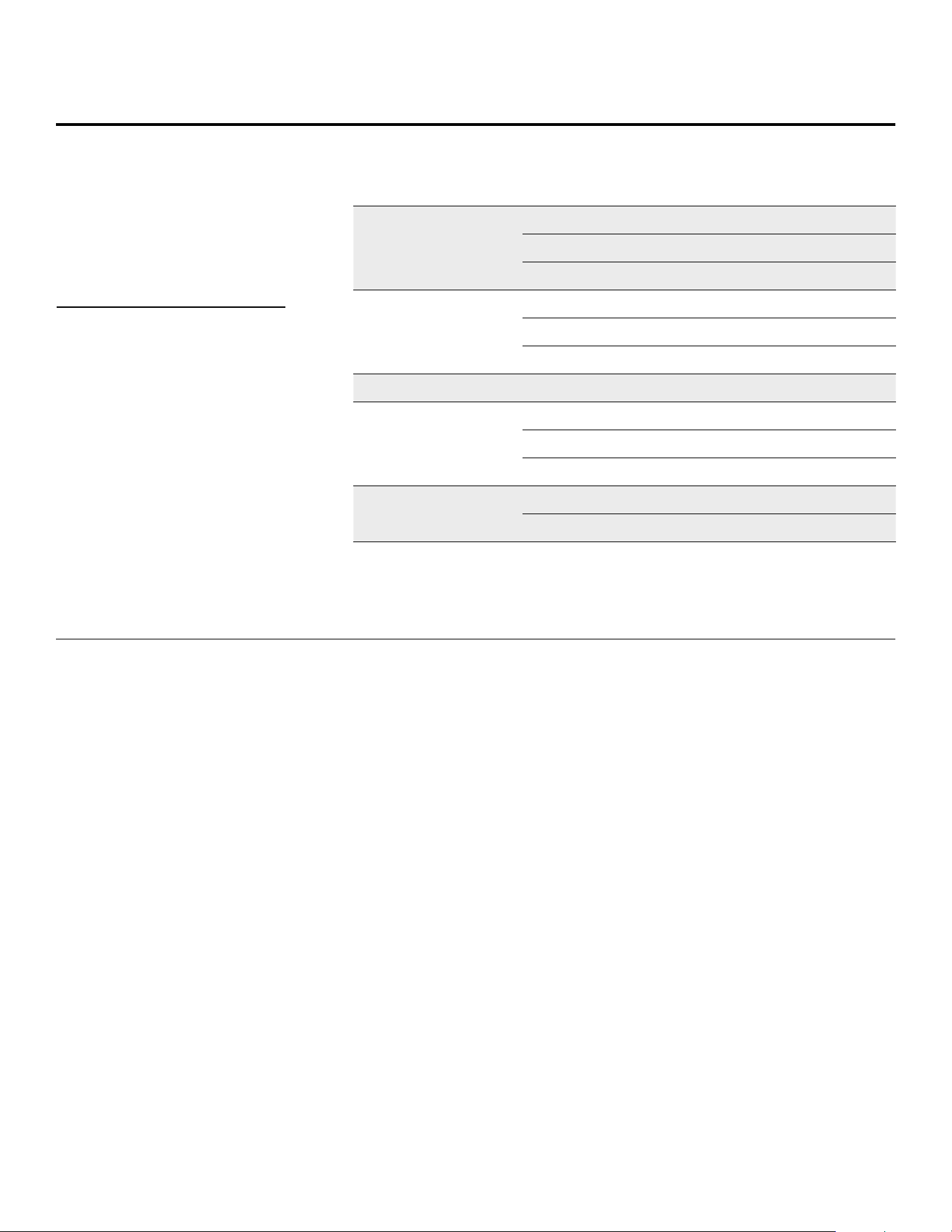
Using The Wi-Fi Features
Controlling Your Appliance
Through the App
You can use the PowerXL app to set cooking presets and set the
cooking time and temperature on your appliance (see Fig. I).
Power Button: Select to light up the appliance
’s control panel.
You must select the Power Button before selecting any other
buttons.
Preset Buttons: Press to select a cooking preset. You can
manually adjust the cooking time and temperature after selecting
a preset setting.
Time Adjustment: Manually adjust the cooking time.
Temperature Adjustment: Manually adjust the cooking
temperature.
Menu Button: Takes you to the recipe database, allowing you to
select a recipe.
NOTE: You must press the Power Button on the appliance
’s Control
Panel in order to begin any cooking process. The appliance cannot
be started remotely using the app; only the cooking time and
temperature can be set.
Using the Recipe Database
The recipe database can be accessed by selecting the Menu
button on the app
’s appliance control panel or by selecting the
Recipe tab at the bottom of the app. Here, you can search for
recipes compatible with your appliance (see Figs. J–K).
In addition to providing you with pictures, ingredients, and step-
by-step instructions for following a recipe, the recipe portion of
the app can be used to set the cooking time and temperature
associated with the recipe automatically. Scroll to the bottom of the
recipe and press the Start button. Select your appliance from the
list of appliances that appears and press “Start cooking” to
set the cooking time and temperature you will need to complete
the recipe.
Fig. H
Fig. K
Fig. I
Fig. J
20
Cooking Guidelines & Tips
Internal
Temperature
Meat Chart
Food Type Internal Temp.*
Beef & Veal
Ground 140° F
Steaks, roasts: medium 145° F
Steaks, roasts: rare 135° F
Chicken & Turkey
Breasts 165° F
Ground, stuffed 165° F
Whole bird, legs, thighs, wings 165° F
Fish & Shellsh Any type 145° F
Lamb
Ground 160° F
Steaks, roasts: medium 140° F
Steaks, roasts: rare 130° F
Pork
Chops, ground, ribs, roasts 160° F
Fully cooked ham 140° F
Use this chart and a food thermometer
to ensure that meat, poultry, seafood,
and other cooked foods reach a safe
minimum internal temperature.
*For maximum food safety, the
U.S. Department of Agriculture
recommends 165° F for all poultry;
160° F for ground beef, lamb, and
pork; and 145° F, with a 3-minute
resting period, for all other types
of beef, lamb, and pork. Also review
the USDA Food Safety Standards.
• Large sizes or quantities of food may require a
longer cooking time than smaller sizes or quantities.
• Flipping or turning food halfway through the
cooking process ensures that the food is
evenly cooked.
• Adding a bit of vegetable oil to fresh potatoes
is suggested for a crispier result. When adding oil,
do so just before cooking and add only a small
amount onto the potato.
• Snacks normally cooked in an oven can also
be cooked in the appliance.
• Use premade dough to prepare filled snacks
quickly and easily. Premade dough also requires
a shorter cooking time than homemade dough.
• A baking tin or oven dish can be placed on
the Baking Pan inside the appliance when cooking
foods such as cakes or quiches. Using a tin or dish
is also recommended when cooking fragile or
filled foods.
Tips
21
Recipes
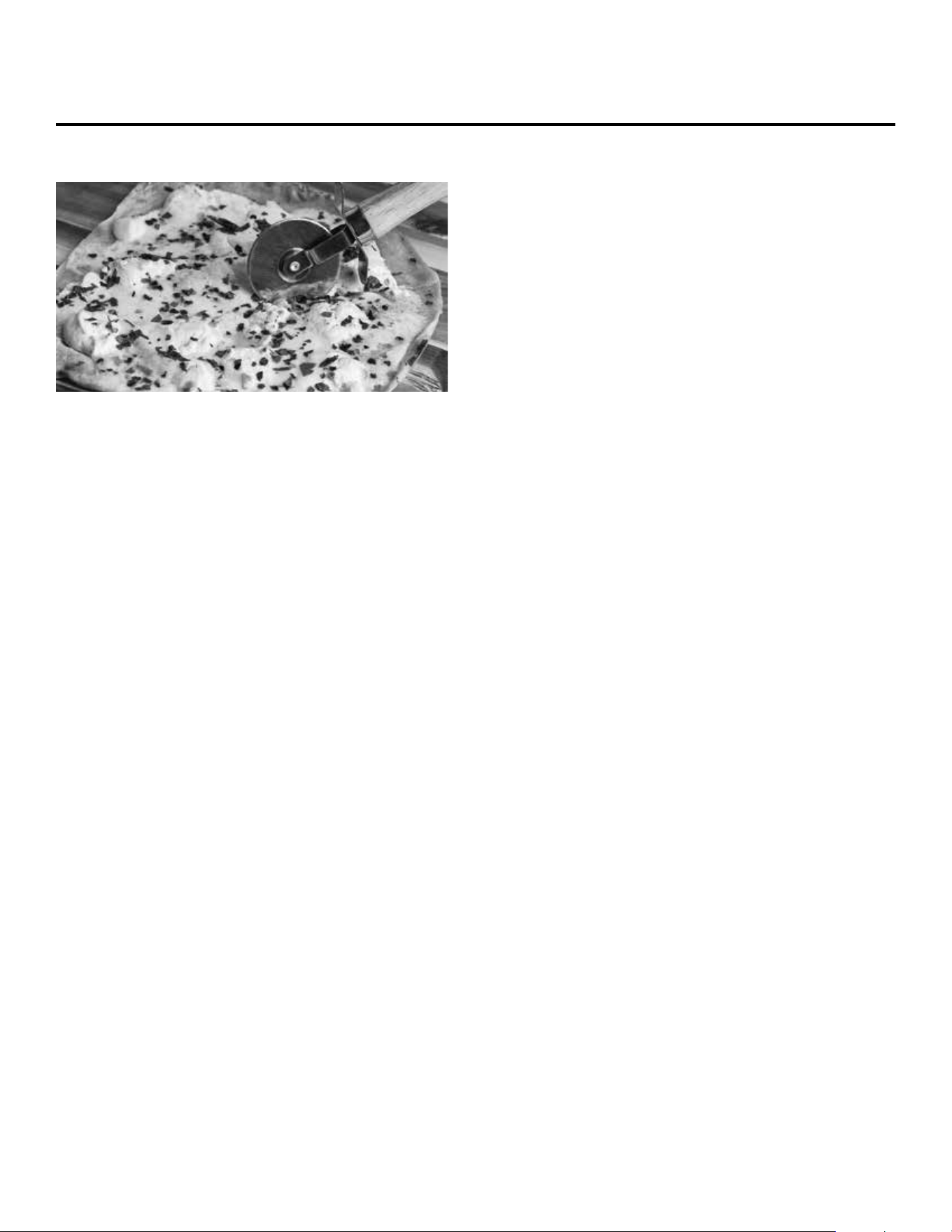
HASH BROWN CASSEROLE
1 lb frozen hash browns
3 tbsp. butter
¾ cup sour cream
¾ cup mayonnaise
1 ½ cups shredded cheddar cheese, plus more for topping
shredded Parmesan cheese, to taste
½ tsp. salt
½ tsp. garlic powder
¼ tsp. ground black pepper
1. Place the frozen hash browns in a microwave-safe
bowl. Press the Defrost Button and set the defrost time
to 10 minutes.
2. Place the defrosted hash browns in a colander to drain.
3. Place the butter in a microwave-safe bowl on the Glass
Tray. Press the Control Knob to microwave and melt
the butter for 10–15 seconds. Remove the butter and
the Glass Tray.
4. Combine all the ingredients in a bowl.
5. Pour the mixture into a greased casserole dish.
6. Sprinkle some additional cheddar over the top of
the mixture.
7. Place the dish on the Crisper Tray. Slide the Baking Pan
into the appliance and place the Crisper Tray on the
Baking Pan.
8. Press the Air Fry Button and set the temperature to
350° F and the cooking time to 20 minutes.
9. Press the Control Knob to begin the cooking cycle.
Cook until golden brown.
HONEY-ROASTED SALMON
2 4-oz salmon llets
¾ cup honey
½ cup sweet soy sauce
2 tbsp. light brown sugar
¼ cup orange juice
2 tbsp. lemon juice
2 tbsp. red wine vinegar
2 tsp. olive oil
2 cloves garlic, minced
1 scallion, chopped nely
salt, to taste
ground black pepper, to taste
1. Combine all the ingredients except the salmon, salt,
and black pepper in a saucepan over low heat. Bring
to a boil and then lower to a simmer. Reduce for
15minutes., stirring often.
2. Rub each salmon let with olive oil and season with the
salt and black pepper.
3. Place the salmon on the Baking Pan. Slide the Baking
Pan into the appliance.
4. Press the Air Fry Button and set the temperature to
375° F and the cooking time to 10 minutes. Press the
Control Knob to begin the cooking cycle.
5. Once the cooking cycle has nished, brush the salmon
with the sauce.
6. Return the salmon to the appliance. Press the Broil
Button. Press the Control Knob to begin the cooking
cycle. Remove the salmon once the glaze begins to
caramelize (3–4 minutes).
7. Serve with the sauce and chopped scallions.
22
Recipes
WHITE PIZZA
¼ cup ricotta cheese
¼ tsp. sea salt
¼ tsp. ground black pepper
½ tsp. red pepper akes
1 thin-crust pizza dough
2 cloves garlic, sliced thinly
9 slices fresh mozzarella
2 tsp. extra virgin olive oil
1. In a bowl, mix the ricotta cheese, salt, black pepper,
and red pepper akes
2. Roll the pizza dough in the Baking Pan. Slide the
Baking Pan into the appliance.
3. Press the Air Fry Button and set the cooking
temperature to 375° F and the cooking time to
10minutes. Flip the dough after 5 minutes.
4. Remove the Baking Pan.
5. Spread the ricotta mixture on the crust. Lay out the
sliced garlic and fresh mozzarella. drizzle with olive oil.
6. Return the Baking Pan to the appliance. Press the Air
Fry Button and set the cooking temperature to 375°F
and the cooking time to 8 minutes.
7. Let the pizza cool for 5 minutes before cutting.
STUFFED BAKED SWEET POTATO
2 tbsp. pecans, crushed
1 pinch cinnamon
1 pinch nutmeg
1 pinch sea salt
1 pinch ground black pepper
2 sweet potatoes
12–15 mini marshmallows
1. In a bowl, mix the pecans, cinnamon, nutmeg, salt, and
black pepper together. Reserve the mixture.
2. Use a fork to poke holes in each sweet potato several
times to allow steam to escape. Place the potatoes in a
microwave-safe dish on the Glass Tray in the appliance.
3. Press the Control Knob repeatedly to set the cooking
time to 4 minutes. After 4 minutes, use tongs to ip
over each sweet potato (an extra 1–2 minutes may be
required depending on the size of the potatoes). The
sweet potato is done when you can poke a fork into it
and there is little resistance.
4. Remove the sweet potatoes to a cutting board and
then slice the top of the sweet potato. Use a towel to
pinch the ends of each potato carefully and push in
until the top slice opens up.
5. Sprinkle the pecan mixture on top of openings of the
sweet potatoes and top with the mini marshmallows
6. Remove the Glass Tray. Place the loaded sweet
potatoes on top of the Crisper Tray. Slide the Baking
Pan into the appliance and place the Crisper Tray on the
Baking Pan.
7. Press the Broil Button and set the cooking time to
3minutes. Cook until the marshmallows begin to
brown (2–3 minutes).
Topping Alternatives
1. Top with a pat of butter, salt, and black pepper, to taste.
2. Top with shredded Jack cheese. Place on the Crisper
Tray on the Baking Pan. Press the Broil Button. Broil
until the cheese is melted (3–4 minutes). Garnish each
sweet potato with diced chives, 2 tbsp. cooked and
diced bacon, and a dollop of sour cream.
TERIYAKI GARLIC WINGS
4 oz Buffalo wing sauce
1 oz soy sauce
1 tbsp. chopped garlic
1 tbsp. chopped cilantro
1 ½ lb frozen wings
1 tsp. onion powder
½ tsp. ground black pepper
1. In a bowl, mix the wing sauce, soy sauce, garlic, and
cilantro together. Reserve the sauce.
2. Place the wings in a microwave-safe bowl on the Glass
Tray. Press the Defrost Button, turn the Control Knob
to dEF3, and press the Control Knob to conrm. Turn
23
the Control Knob to 24 oz and press the Control Knob
to conrm. Transfer the wings to a clean bowl. Toss the
wings with the onion powder and black pepper.
3. Remove the Glass Tray. Place the wings in the Baking
Pan. Slide the Baking Pan into the appliance.
4. Press the Air Fry Button and set the cooking temperature
to 425° F and the cooking time to 25 minutes.
5. When the cooking cycle is complete, toss the wings
with the sauce.
6. Return the wings to the Baking Pan. Press the Air Fry
Button and set the cooking temperature to 400° F and
the cooking time to 3–5 minutes to glaze the wings.
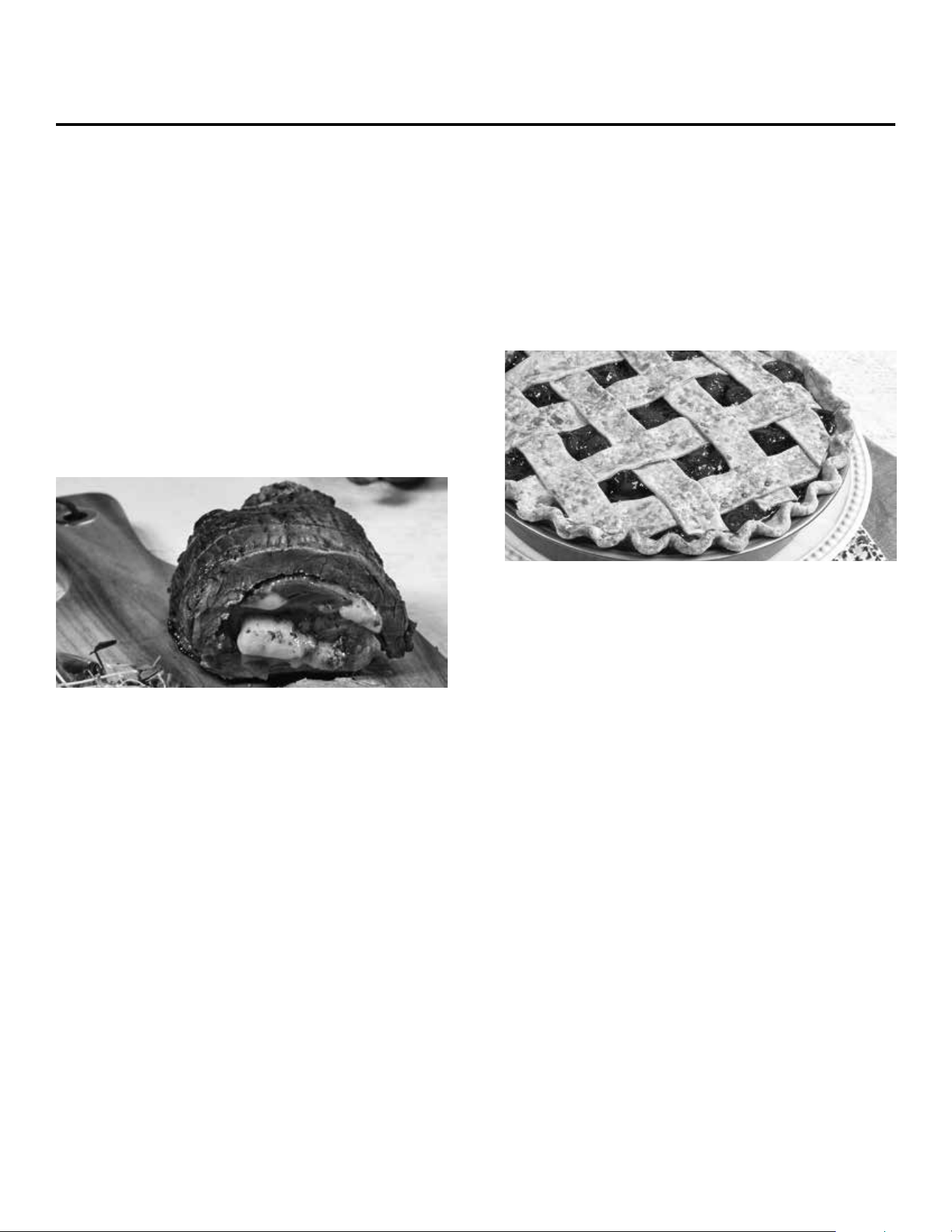
ITALIAN ROULADE OF BEEF
1 1 ½-lb ank steak, butteried
¼ cup basil pesto
½ lb provolone, sliced
3 roasted red peppers
1 tsp. sea salt
1 tsp. ground black pepper.
1. Place the steak on a cutting board and spread the
pesto all over one side of the steak.
2. Layer the cheese and roasted peppers on the steak.
3. Roll the steak up and tie it with string about ve
times from one end to the other.
4. Season the roulade with the salt and ground black
pepper.
5. Place the roulade on the Baking Pan. Slide the
Baking Pan into the appliance.
6. Press the Air Fry Button and set the cooking
temperature to 400° F and the cooking time to
15–20 minutes (depending on your desired
doneness; see step 7).
7. Cook the roulade to the desired doneness (use a meat
thermometer to measure the internal temperature):
• Rare: 125° F
• Medium rare: 135° F
• Medium: 145° F
• Well done: 165° F
8. Let the roulade rest for 10 minutes before slicing.
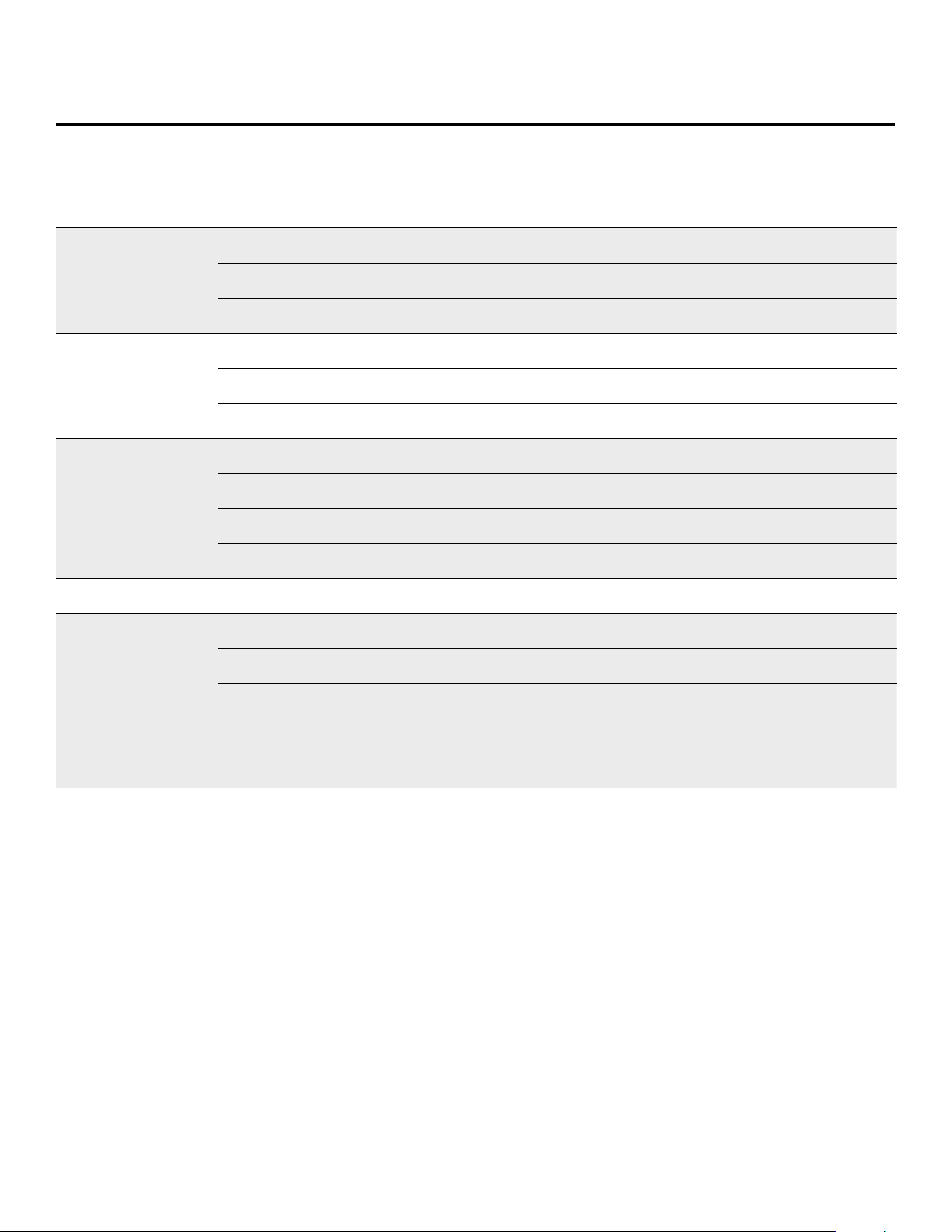
CHERRY PIE
1 store-bought pie crust
2 15-oz cans cherry pie lling
1 egg, beaten for egg wash
raw sugar, for garnish
1. Place a layer of the pie dough into a lightly greased
8-inch pie pan.
2. Trim the dough, leaving 1 inch over the side of the pan.
3. Fold the excess dough inward to create a thick crust.
4. Create a scalloped edge using your thumbs and
pointer nger.
5. Refrigerate the dough for 15 minutes.
6. Fill the shell with the cherry lling. You may have
some left over.
7. Cut the remaining pie crust into strips. Create a lattice
over the lling.
8. Brush the lattice with the egg wash and sprinkle with
the sugar.
9. Place the pie pan on the Crisper Tray. Slide the Baking
Pan into the appliance and place the Crisper Tray on
the Baking Pan.
10. Press the Air Fry Button and set the cooking
temperature to 350° F and the cooking time to
45minutes. Press the Control Knob to begin the
cooking cycle.
Recipes
24
Problem Possible Cause Solution
The appliance will not start.
The power cord is not plugged in. Plug the power cord into a dedicated electrical outlet.
The door is open. Close the door and try again.
The wrong operation is set. Check the instructions.
Arcing or sparking.
Materials that should be avoided in the microwave oven were used. Use microwave-safe cookware only.
The appliance was operated while empty. Do not operate the appliance without anything inside.
Spilled food remains in the cavity. Clean the cavity with a wet towel.
Food is cooked unevenly.
Materials that should not be used in a microwave oven were used. Use microwave-safe cookware only.
Food is not defrosted completely. Completely defrost food.
The cooking time or microwave power level is not suitable. Adjust the cooking time and microwave power level.
You are attempting to cook too much food at once. Cook smaller quantities of food in each batch.
Food is overcooked.
The cooking time or microwave power level is not suitable. Adjust the cooking time and microwave power level.
Food is undercooked.
Materials that should not be used in a microwave oven were used. Use microwave-safe cookware only.
Food is not defrosted completely. Completely defrost food.
The appliance’s ventilation ports are restricted. Check to see that the ventilation ports are not restricted.
The cooking time or microwave power level is not suitable. Adjust the cooking time and microwave power level.
You are attempting to cook too much food at once. Cook smaller quantities of food in each batch.
Food was not completely
defrosted.
Materials that should not be used in a microwave oven were used. Use microwave-safe cookware only.
The cooking time or microwave power level is not suitable. Adjust the cooking time and microwave power level.
Food was not turned or stirred during the cooking process. Turn or stir food when the appliance beeps twice.
Troubleshooting
25
Troubleshooting
Problem Possible Cause Solution
The appliance does not work.
The appliance is not plugged in. Plug the power cord into an electrical outlet.
The appliance has not been turned on by setting the preparation time
and temperature.
Set the temperature and time.
The appliance is plugged into an outlet that is shared with other devices. Plug the appliance into a dedicated electrical outlet.
Food was not cooked
completely.
The appliance is overloaded. Use smaller batches for more even cooking.
The temperature is set too low. Raise temperature and continue cooking.
Food was not fried evenly.
Some foods need to be turned during the cooking process. Check halfway through process and turn food if needed.
Foods of different sizes are being cooked together. Cook similar-sized foods together.
If using multiple racks, trays need to be rotated. Rotate trays from top to bottom and vice versa.
White smoke is
coming from the appliance.
Oil is being used. Wipe down to remove excess oil.
Accessories have excess grease residue from previous cooking.
Clean the components and appliance interior
after each use.
French fries were
not fried evenly.
The wrong type of potato being used. Use fresh, rm potatoes.
Potatoes were not blanched properly during preparation. Use cut sticks and pat dry to remove excess starch.
Too many fries are being cooked at once. Cook less than 2 ½ cups of fries at a time.
Fries are not crispy.
Raw fries have too much water.
Dry potato sticks properly before misting oil.
Cut sticks smaller. Add a bit more oil.
Operation of the microwave oven may cause interference to
your radio, television, or similar equipment. Interference can
be reduced or eliminated by taking the following measures:
1. Clean the door and sealing surface of the oven.
2. Reorient the receiving antenna of radio or television.
3. Relocate the appliance with respect to the receiver.
4. Move the appliance away from the receiver.
5. Plug the appliance into a different outlet so that
the appliance and the receiver are on different
branch circuits.
Radio Interference

26
Cleaning & Storage
Clean the appliance after each use. Remove the power
cord from the electrical outlet and be certain the
appliance is thoroughly cooled before cleaning.
1. Wipe the outside of the appliance with a warm, moist
cloth and mild detergent.
2. To clean the door, gently scrub both sides with warm,
soapy water and a damp cloth. DO NOT soak or
submerge the appliance in water or wash in the
dishwasher.
3. Clean the inside of the appliance with hot water, a
mild detergent, and a nonabrasive sponge. Do not
scrub the heating coils because they are fragile and
may break. Then, rinse the appliance thoroughly
with a clean, damp cloth. Do not leave standing
water inside the appliance.
4. If necessary, remove unwanted food residue with a
nonabrasive cleaning brush.
5. Caked-on food on accessories should be soaked
in warm, soapy water to remove the food easily.
The turntable can also be removed for cleaning if
necessary.Hand-washing is recommended.
6. If any other service needs to be performed, contact
Customer Service using the contact information on the
back of this manual.
Cleaning
1. Unplug the appliance and let it cool thoroughly.
2. Make sure all components are clean and dry.
3. Place the appliance in a clean, dry place.
Storage

27
90-Day Money-Back Guarantee
The PowerXL® Microwave Air Fryer Plus™ is covered by a 90-day money-back guarantee. If you are not 100% satised with
your product, return the product and request a replacement product or refund. Proof of purchase is required. Refunds will
include the purchase price, less processing and handling. Follow the instructions in the Return Policy below to request a
replacement or refund.
Replacement Guarantee Policy
Our products, when purchased from an authorized retailer, include a 1-year replacement guarantee if your product
or component part does not perform as expected, the guarantee extends only to the original purchaser and is not
transferable. If you experience an issue with one of our products within 1 year of purchase, return the product or the
component part for replacement with a functionally equivalent new product or part. The original proof of purchase
is required, and you are responsible to pay to return the unit to us. In the event a replacement unit is issued, the
guarantee coverage ends six (6) months following the receipt date of the replacement unit or the remainder of the
existing guarantee, whichever is later. Empower Brands, LLC reserves the right to replace the unit with one of equal or
greater value.
Return Policy
If, for any reason, you would like to replace or return the product under the money-back guarantee, your order number
can be used as the return merchandise authorization number (RMA). If the product was purchased in a retail store,
return the product to the store or use “RETAIL” as the RMA. Return your product to the address provided below for a
replacement, which will incur no additional processing and handling fees, or for the refund of your purchase price, less
processing and handling. You are responsible for the cost of returning the product. You can locate your order number
at www.customerstatus.com. You can call customer service at 973-287-5126 or email [email protected] for any
additional questions. Pack the product carefully and include in the package a note with (1) your name, (2) mailing address,
(3) phone number, (4) email address, (5) reason for return, and (6) proof of purchase or order number, and (7) specify on
the note whether you are requesting a refund or replacement. Write the RMA on the outside of the package.
Send the product to the following return address:
PowerXL Smart Microwave Air Fryer Plus
Empower Brands, LLC
500 Returns Road
Wallingford, CT 06495
If the replacement or refund request has not been acknowledged after two weeks,
please contact Customer Service at 973-287-5126.
Refund
Refunds requested within the money-back guarantee timeframe will be issued to the payment method used at purchase
if the item was purchased directly from Empower Brands, LLC. If the item was purchased from an authorized retailer, proof
of purchase is required, and a check will be issued for the item and sales tax amount. Processing and handling fees are
non-refundable.
SMART MICROWAVE AIR FRYER PLUS
TM
© 2022 Empower Brands, LLC. All rights reserved.
Distributed by:
Empower Brands, LLC
Middleton, WI 53562
Made in China
PXL_SMAFP_IB_WM_ENG_V1_220825
We are very proud of the design and quality of our
PowerXL® Smart Microwave Air Fryer Plus
TM
.
This product has been manufactured to the highest standards.
Should you have any questions, our friendly customer service staff
is here to help you.
Email us at [email protected]
or call us at 973-287-5126
CAMERA-READY LOGOTYPE – UL MARK
These Marks are registered by Underwriters Laboratories Inc.
The minimum height of the registered trademark symbol ® shall be 3/64 of an inch. When the overall diameter of the
UL Mark is less than 3/8 of an inch, the trademark symbol may be omitted if it is not legible to the naked eye.
The font for all letter forms is Helvetica Condensed Black, except for the trademark symbol ®, which is
Helvetica Condensed Medium. No other fonts are acceptable.
200-195A 20M/11/97
SMART MICROWAVE AIR FRYER PLUS
TM