Please file in Service Binder
6175 798 - 06 01/2024
Operating Instructions
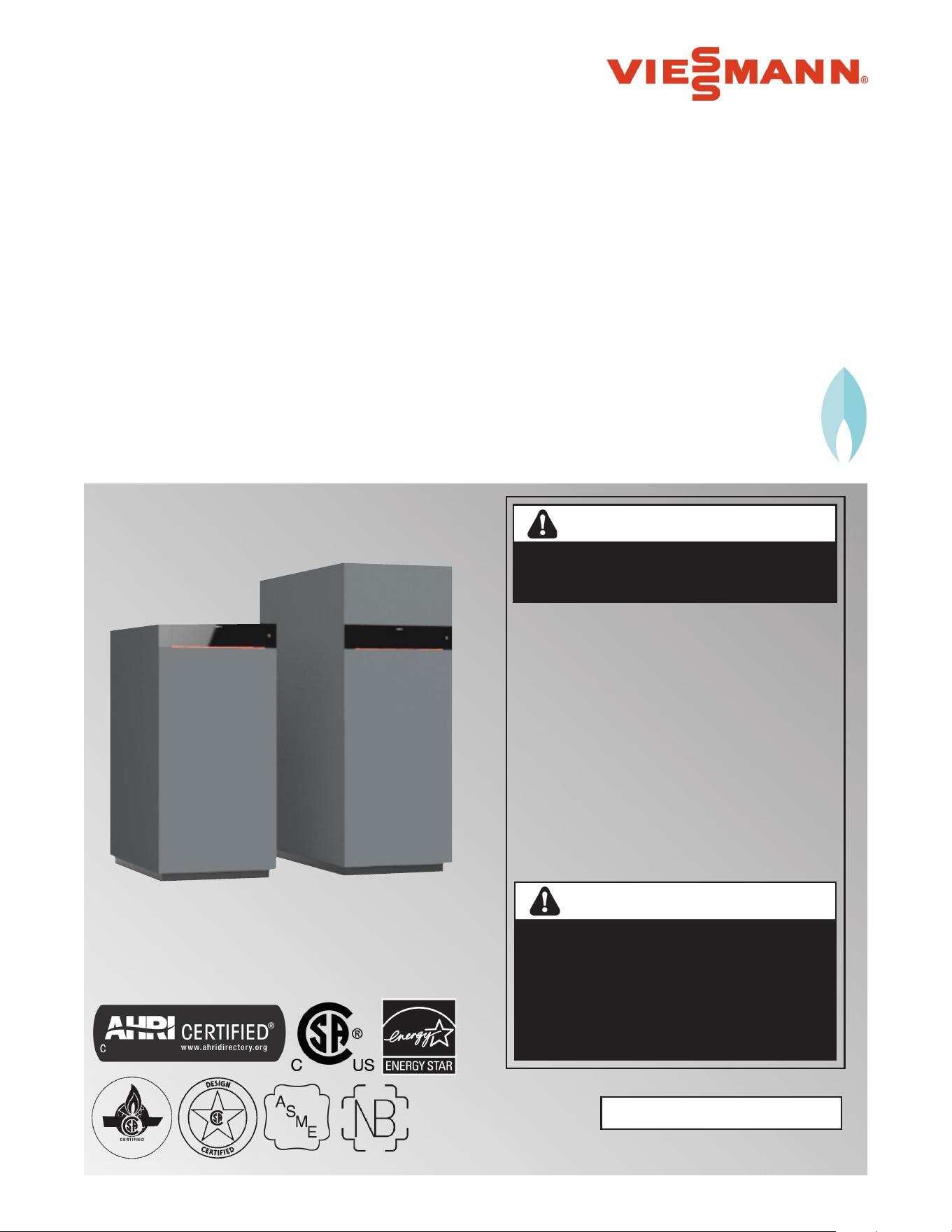
VITOCROSSAL 200 CI2
for the system user
Read and save these instructions
for future reference.
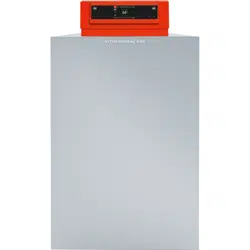
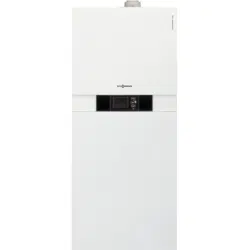
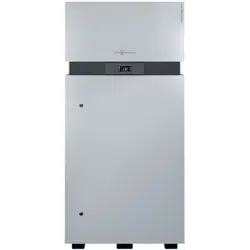
Product may not be exactly as shown
IMPORTANT
Do not store or use gasoline or other
ammable liquids in the vicinity of this
or any other boiler.
WHAT TO DO IF YOU SMELL GAS
g Do not try to light any boilers.
g Do not touch any electrical switches,
do not use any phone in your building.
g Immediately call your gas supplier
from a neighbor’s phone. Follow
the gas supplier’s instructions.
g If you cannot reach your gas supplier,
call the re department.
Installation and service must be
performed by a qualied installer,
service agency or the gas supplier.
If the information in this manual is not followed
exactly, a fire or explosion may result causing
property damage, personal injury or loss of life.
WARNING
Improper installation, adjustment, and/
or operation could cause carbon monoxide
poisoning resulting in injury or loss of life.
This product must be installed and serviced
by a professional service technician who is
experienced and qualified in hot water boiler
installation and gas combustion.
WARNING
Vitocrossal 200 CI2 Series
Gas condensing boiler with 7 inch color touchscreen
Heating Input: 399 to 2000 MBH
117 to 586 kW
H
Vitocrossal 200 CI2 Operating
6175 798 - 06
Safety
Safety, Installation and Warranty Requirements
Please ensure that these instructions are read and understood before commencing installation. Failure to comply with
the instructions listed below and details printed in this manual can cause product/property damage, severe personal
injury, and/or loss of life. Ensure all requirements below are understood and fulfilled (including detailed information
found in manual subsections).
WARNING
Installers must follow local regulations with respect to
installation of carbon monoxide detectors. Follow the
Viessmann maintenance schedule of the boiler contained
in this manual.
Product documentation
Read all applicable documentation before commencing
installation. Store documentation near boiler in a
readily accessible location for reference in the future
by service personnel.
uFor a listing of applicable literature,
please see section entitled “Important
Regulatory and Safety Requirements”.
Warranty
Information contained in this and
related product documentation must
be read and followed. Failure to do
so renders the warranty null and void.
Licensed professional heating contractor
The installation, adjustment, service and maintenance
of this equipment must be performed by a licensed
professional heating contractor.
uPlease see section entitled
“Important Regulatory and Installation
Requirements”.
Contaminated air
Air contaminated by chemicals can cause by-products
in the combustion process, which are poisonous to
inhabitants and destructive to
Viessmann equipment.
uFor a listing of chemicals which
cannot be stored in or near the
boiler room, please see subsection
entitled “Mechanical room” in the
“Installation Instructions”.
Advice to owner
Once the installation work is complete, the heating
contractor must familiarize the system operator/
ultimate owner with all equipment, as well as safety
precautions/requirements, shutdown procedure, and
the need for professional service annually before the
heating season begins.
Carbon monoxide
Improper installation, adjustment, service and/or
maintenance can cause flue products to flow into
living space. Flue products contain poisonous carbon
monoxide gas.
uFor information pertaining to the
proper installation, adjustment, service
and maintenance of this equipment to
avoid formation of carbon monoxide,
please see subsection entitled
“Mechanical room” and “Venting
requirements” in the “Installation Instructions”.
Fresh air
This equipment requires fresh air for
safe operation and must be installed
ensuring provisions for adequate
combustion and ventilation air exist.
uFor information pertaining to the
fresh air requirements of this product,
please see subsection entitled
“Mechanical room” in the “Installation
Instructions”.
Equipment venting
Never operate boiler without an installed venting
system. An improper venting system can cause
carbon monoxide poisoning.
uFor information pertaining to
venting and chimney requirements,
please see section entitled “Venting
Connection”. All products of
combustion must be safely vented
to the outdoors.
Operating and Service Documentation
It is recommended that all product documentation such
as parts lists, operating and service instructions be handed
over to the system user for storage. Documentation is to
be stored near boiler in a readily accessible location for
reference by service personnel.
WARNING
This boiler requires fresh air for safe operation and must
be installed with provisions for adequate combustion
and ventilation air (in accordance with local codes and
regulations of authorities having jurisdiction).
Do not operate this boiler in areas with contaminated
combustion air. High levels of contaminants such as
dust, lint or chemicals can be found at construction
sites, home renovations, in garages, workshops, in dry
cleaning/laundry facilities, near swimming pools and in
manufacturing facilities.
Contaminated combustion air will damage the boiler
and may lead to substantial property damage, severe
personal injury and/or loss of life. Ensure boiler/burner
is inspected and serviced by a qualified heating
contractor at least once a year in accordance with the
Service Instructions of the boiler.
2

Table of Contents
3
Page
Vitocrossal 200 CI2 Operating
6175 798 - 06
Safety
General Information
Operation
Default Displays
Time Programs
Central Heating
Safety, Installation and Warranty Requirements ............. 2
About these Instructions.............................................5
For your Safety ......................................................... 5
Operation ............................................................. 5
Working on the equipment ...................................... 5
Maintenance and cleaning ....................................... 5
Flue gas smell ....................................................... 5
Dangerous conditions ............................................. 5
Technical Information ............................................. 5
Carbon monoxide .................................................. 6
For safe operation .................................................. 6
Frozen water pipe hazard ........................................ 7
Replacement components, spare and wear parts........ 7
Installation area conditions ...................................... 7
Sources of combustion and ventilation air contaminants .. 7
Intended Use ............................................................ 8
Product Information ................................................... 8
Software Licences ..................................................... 9
Commissioning ........................................................ 9
Your System is Preset ................................................ 9
Energy Saving Tips ...................................................10
Tips for Greater Comfort ......................................... 10
Operating Principles ................................................ 11
Screen Displays ..................................................... 11
Buttons and Symbols .............................................. 12
Overview of the “Main menu” ....................................13
Operating Program ...................................................14
“Heating Circuit” or “Continuous Operation”
Default Display ........................................................15
“DHW” Default Display .............................................15
Default Display of Device Status for Single Appliance ...16
Default Display for Cascade Control ............................16
Starting One-Off DHW Heating ..................................17
Calling Up Operating Data for the Boiler ......................17
Procedure for Setting a Time Program .........................18
Heating Circuit Selection ...........................................20
Setting the Room Temperature for a Heating Circuit .....20
Switching Central Heating On or Off
(Operating program) .................................................20
Setting the Target Supply Temperature for a
Heating Zone ...........................................................21
Setting the Heating Curve .........................................21
Temporarily Adjusting the Room Temperature for
Certain Heating Circuits ............................................21
Saving Energy During Longer Absences .......................22
Checking the Status of Heating Zones ........................22

Table of Contents
4
Page
Vitocrossal 200 CI2 Operating
6175 798 - 06
DHW Heating
Additional Adjustments
Calling Up Information
Emissions Test Mode
Switching the System On and Off
What to do if...
Maintenance
Appendix
Additional Information
Setting the DHW Temperature ...................................23
Switching DHW Heating On or Off (Operating program) .23
One-Off DHW Heating Outside the Time Program .........23
Increased DHW Hygiene ............................................24
Switching DHW Scald Protection On/Off .....................24
Locking the Controls .................................................25
Setting the Display Brightness....................................25
Switching the Lightguide On and Off ..........................26
Lead Cascade Boiler Only: Switching On the Display ..... 26
Entering Names for Heating Circuits ............................26
Entering a Name for the Heating Zone ....................... 27
Setting the “Time” and “Date” ................................. 27
Automatic “Summertime/Wintertime” Changeover ....... 27
Setting the “Language” ........................................... 27
Setting “Units” ........................................................27
Entering the Contractor’s Contact Details ....................28
Setting the Home Screen...........................................28
Changing the Colorific Value or Correction Factor .......28
Switching Internet Access On or Off .........................28
Switching Off the Display Screen for Cleaning .............30
Lead Cascade Boiler Only: Dynamic Control Strategy...30
Restoring Factory Settings .........................................30
Calling Up Help Messages .........................................31
Checking Information ................................................31
Displaying the Gas Consumption ................................31
Calling Up Licences for the Programming Unit ..............31
Calling Up Licences for the Integrated Communication
Module ...................................................................32
Checking Maintenance Messages ...............................32
Checking Fault Messages ..........................................33
Checking Message Lists ............................................34
Emissions Test Mode ................................................34
Switching the System Off .........................................35
Switching the System On ..........................................35
Rooms are too Cold .................................................36
Rooms are too Hot ..................................................36
There is no Hot Water ..............................................37
The DHW is too Hot.................................................37
“Fault” is Displayed .................................................37
and “Service” are Displayed ................................37
“Panel Locked” is Displayed .......................................37
“External Hook-up” is Displayed ................................37
Cleaning .................................................................. 38
Inspection and Maintenance ......................................38
Damaged Cables / Lines ............................................38
Overview of “Main menu” .........................................39
Terminology ............................................................42
Lighting and Operating Instructions .............................45
5
6175 798 - 06
Vitocrossal 200 CI2 Operating
Safety
About these Instructions
Take note of all symbols and notations intended to draw attention to potential hazards or important product
information. These include “WARNING”, “CAUTION”, and “IMPORTANT”. See below.
u
IMPORTANT
uWarnings draw your attention to the presence of
potential hazards or important product information.
u
Cautions draw your attention to the presence of
potential hazards or important product information.
u
Helpful hints for installation, operation or maintenance
which pertain to the product.
u
This symbol indicates that additional, pertinent
information is to be found.
u
This symbol indicates that other instructions must
be referenced.
WARNING
Indicates an imminently hazardous situation which,
if not avoided, could result in loss of life, serious injury
or substantial product/property damage.
CAUTION
Indicates an imminently hazardous situation which,
if not avoided, may result in minor injury or product/
property damage.
For your Safety
Operation
Before operating the boiler, make sure you fully
understand its method of operation. Your heating
contractor should always perform the initial start-up
and explain the system. Any warranty is null and void
if these instructions are not followed.
Working on the equipment
All personnel working on the equipment or the heating
system must have the proper qualifications and hold all
necessary licenses.
Ensure main power to equipment, heating system, and
all external controls has been deactivated. Close main
gas supply valve. Take precautions in all instances to
avoid accidental activation of power during service work.
Maintenance and cleaning
Regular inspection and service by a qualified heating
contractor is important to the performance of the
Viessmann Vitocrossal 200 CI2. Neglected maintenance
impacts on warranty; regular inspection ensures clean,
environmentally friendly and efficient operation. We
recommend a maintenance contract with a qualified
heating contractor.
Flue gas smell
- Deactivate heating equipment.
- Open windows and doors.
- Inform your heating contractor.
Dangerous conditions
- Deactivate main power immediately.
- Close gas supply valve.
Technical information
Literature applicable to all aspects of the Vitocrossal 200
CI2
- Technical Data Manual
- Installation Instructions
- Service Instructions
- Operating Instructions
Additional applicable literature:
- Accessory manuals
Vitocrossal 200 CI2 Operating
6175 798 - 06
6
For your Safety (continued)
Safety
Carbon monoxide
The U.S. Consumer Product Safety Commission strongly
recommends the installation of carbon monoxide
detectors in buildings in which gas-burning equipment
is installed. Carbon monoxide (CO) is a colorless,
odorless gas, which may be produced during incomplete
combustion of fuel and/or when the flame does not
receive an adequate supply of combustion air.
Carbon monoxide can cause severe personal injury or
loss of life.
Therefore, carbon monoxide detectors that are in
compliance with a nationally recognized standard (e.g.
ANSI/UL 2034, CSA 6.19 latest edition) should be
installed and maintained in buildings that contain gas-
burning equipment.
Note: Viessmann does not test any detectors and makes
no representation regarding any brand or type of
detector.
For safe operation
We recommend that you frequently:
- Check for debris which could obstruct the flow of
flue gases. The vent or chimney must not be blocked.
A blocked or partially blocked vent or chimney can
cause flue gases to leak into the structure.
Flue gases leaking into the house can cause injury
or loss of life. Blocked or partially blocked chimneys
must have the blockage removed by a qualified
heating contractor.
- Check pressure gage for correct system (water)
pressure. Check for water on the floor from the
discharge pipe of the pressure relief valve or any
other pipe, pipe joint, valve or air vent.
- Check for moisture, water, or appearance of rust
on the flue gas pipes, their joints as well as vent
dampers, or side wall vent terminals (if so equipped).
- Ensure that nothing is obstructing the flow of
combustion and ventilation air and no chemicals,
garbage, gasoline, combustible materials, flammable
vapors and liquids are stored (not even temporarily)
in the vicinity of the boiler.
- Do not allow unsupervised children near the boiler.
Service/inspection of the boiler and the system is
recommended once a year. Maintenance, service and
cleaning are specified in the Installation Instructions.
Before the heating season begins, it is recommended that
the boiler and burner be serviced by a qualified heating
contractor. Service contracts may be established through
gas suppliers or other licensed contractors in your area.
WARNING
As there are no user-serviceable parts on the boiler,
burner or control, the end-user must not perform
service activities or adjustments of any kind on system
components. Failure to heed this warning can cause
property damage, severe personal injury, or loss of life.
CAUTION
Should overheating occur or the gas supply fail to
shut off, do not disconnect the electrical supply to the
pump. Instead, shut off the gas supply at a location
external to the boiler.
WARNING
The operator/ultimate owner is required to have the
heating boiler, burners, and controls checked, as a
minimum once per year, by the original installer or
by a competent heating contractor familiar with the
equipment. Defects must be corrected immediately.
CAUTION
Do not use this boiler if any part has been under water.
Immediately call a qualified heating contractor to
inspect the boiler and to replace any part of the control
system and any gas control which has been under
water.
WARNING
Improper installation, adjustment, service, or
maintenance can cause flue products to flow into
living space. Flue products contain poisonous carbon
monoxide gas which can cause nausea or asphyxiation
resulting in severe personal injury or loss of life.
WARNING
This product burns gas to produce heat. The appliance
must be properly installed, operated and maintained
to avoid exposure to appreciable levels of carbon
monoxide and the installer is required to confirm that
at least one carbon monoxide alarm is installed in the
living space before the appliance is put into operation.
It is important for the carbon monoxide alarms to be
installed, maintained, and replaced following the alarm
manufacturer’s instructions and applicable local codes.
7
6175 798 - 06
Vitocrossal 200 CI2 Operating
For your Safety (continued)
Safety
Frozen water pipe hazard
Your heating boiler is designed to provide a warm and
comfortable living environment. It is not designed to
ensure against freezing of water pipes.
The boiler is equipped with several safety devices that
are designed to shut down the boiler and to prevent it
from restarting in the event of various unsafe conditions.
If your boiler remains off for an extended period of time
during cold weather, water pipes may freeze and burst,
resulting in extensive water damage and conditions in
which mold could grow. Certain molds are known to
cause respiratory problems, as well as to pose other
serious health risks. In case of water damage, immediate
measures should be taken to dry out affected areas as
quickly as possible to prevent mold from developing.
If your home will be unattended for an extended period
of time during cold weather, you should...
Shut off the water supply to the building, drain the water
pipes and add an antifreeze for potable water to drain
traps and toilet tanks. Open faucets where appropriate.
or..
Have someone check the building frequently during cold
weather and call a qualified service agency if required.
or...
Install a reliable remote temperature sensor that will notify
somebody of freezing conditions within the home.
WARNING
Failure to protect against frozen pipes could result in
burst water pipes, serious property damage and/or
personal injury. Boiler may shut down. Do not leave
your home unattended for long periods of time during
freezing weather conditions without turning off the
water supply and draining water pipes or otherwise
protecting against the risk of frozen pipes.
Replacement components, spare and wear parts
Components which are not tested with the heating
system may damage the heating system or affect its
functions. Installation or replacement may only be
performed by a qualified heating contractor.
IMPORTANT
Installation area conditions
Ensure ambient temperatures are higher than 32°F (0°C)
and lower than 95°F (35°C).
Prevent the air from becoming contaminated by
halogenated hydrocarbons (e.g. as contained in
paint solvents or cleaning fluids) and excessive dust
(e.g. through grinding or polishing work).
Combustion air for the heating process, and
ventilation of the boiler room must be free of
corrosive contaminants. To that end, any boiler
must be installed in an area that has no chemical
exposure.
The list below indicates the main, currently known
sources.
Avoid continuously high levels of humidity
(e.g. through frequent drying of laundry).
Never close existing ventilation openings.
Sources of combustion and ventilation air contaminants
Areas likely to contain contaminants:
New building construction
Swimming pools
Remodelling areas, hobby rooms
Garages with workshops
Furniture refinishing areas
Dry cleaning/laundry areas and establishments
Auto body shops
Refrigeration repair shops
Metal fabrication plants
Plastic manufacturing plants
Photo processing plants
Beauty salons
Products containing contaminants:
Chlorine-type bleaches, detergents and cleaning
solvents found in household laundry rooms
Paint and varnish removers
Hydrochloric acid, muriatic acid
Chlorine-based swimming pool chemicals
Spray cans containing chlorofluorocarbons
Chlorinated waxes and cleaners
Cements and glues
Refrigerant leaks
Calcium chloride used for thawing
Sodium chloride used for water softening salt
Permanent wave solutions
Adhesives used to fasten building products and
other similar items
Antistatic fabric softeners used in clothes dryers
WARNING
Incorrect ambient conditions can lead to damage to
the heating system and put safe operation at risk.
WARNING
Fire causes a risk of burns and explosion!
j Shut down the boiler
j Close fuel shut-off valves
j Use a tested fire extinguisher, class ABC.
WARNING
If you notice fire coming from the boiler, call the fire
department immediately! Do not attempt to extinguish
the fire unless qualified to do so.
Vitocrossal 200 CI2 Operating
6175 798 - 06
8
Intended Use
General Information
Product Information
Incorrect usage or operation of the appliance (e.g. the
appliance being opened by the system user) is prohibited
and results in an exclusion of liability. Incorrect
usage also occurs if the components in the heating
system are modified from their intended use (e.g. if the
flue gas and ventilation air paths are sealed).
The temperature shown on the display is the target room
temperature.
In weather-compensated operation, the supply
temperature level is controlled according to the outside
temperature.
The lower the outside temperature, the higher the supply
temperature. This means that more heat is provided for
central heating on cold days than on warmer days.
In weather-compensated operation, 1 heating circuit
without mixing valve and up to 3 heating circuits with
mixing valve can be operated with the control unit.
The temperature shown on the display is the boiler water
temperature.
In constant operation the boiler provides heating water
with a constant supply temperature regardless of the
outside temperature.
In constant operation, 1 heating circuit without mixing
valve and up to 3 heating circuits with mixing valve can
be operated with the control unit.
Operation
The control unit is integrated into the boiler and controls
all functions of your system. The control unit is operated
via a 7 inch color touchscreen.
A communication module is integrated into the control
unit. This means the system can also be operated
remotely via the internet and an app.
In weather-compensated operation, you can set some
functions using a remote control.
The control unit is a boiler and heating circuit control
unit for the following operating modes:
Weather-compensated operation
Constant (continuous) operation
The appliance is only intended to be installed and operated
in sealed unvented heating systems with due attention
paid to the associated installation, service and operating
instructions. It is only designed for the heating of water
that is of potable water quality.
Intended use presupposes that a fixed installation in
conjunction with permissible, system-specific components
has been carried out.
Your heating contractor will configure the operating mode
during commissioning in accordance with your heating
system. These instructions describe both operating
modes.
Weather-compensated operation
Constant operation

9
6175 798 - 06
Vitocrossal 200 CI2 Operating
Software Licences
General Information
This product contains third party software, including
open source software. You are authorized to use this
third party software in compliance with the relevant
licensing terms.
Licences for the integrated communication module:
See page 32.
Licences for the programming unit: See page 31.
Commissioning
The commissioning and matching of the appliance to
local conditions and building characteristics, as well as
instructing the user in the operation of the system,
must be carried out by your contractor.
As the user of new combustion equipment, you may be
obliged to notify your local inspector of the installation
[check local regulations]. Your local inspector (where
applicable) will also provide you with information
on additional activities concerning your combustion
equipment (such as regular testing, cleaning).
Your System is Preset
DHW heating
Between 5:30 am and 10:00 pm (05:30 and 22:00),
the DHW is heated to 122°F (50°C) “Set DHW
temperature”. Any installed
DHW recirculation pump
is switched on.
Between 10:00 pm and 5:30 am (22:00 and 05:30),
the DHW tank is not reheated. Any installed DHW
recirculation pump is switched off.
Note: Any DHW heating started before 10:00 pm
(22:00) remains on until the target DHW
temperature has been reached.
Frost protection
Your boiler and DHW tank (if installed) are
protected against frost.
Wintertime/summertime changeover
This changeover is automatic.
Date and time
The date and time were set by your heating contractor.
You can change these settings at any time to suit your
individual requirements.
Power failure
All settings are saved if there is a power failure.
Your heating system is preset at the factory and is
therefore ready for operation following commissioning
by your contractor:
Note: The switching times and target temperatures are
not valid for operation with a DHW tank with
temperature switch (such as an Aquastat).
Central heating in weather-compensated operation
Between 6:00 am and 10:00 pm (06:00 h and 22:00),
rooms are heated to 68°F (20°C) “Room set
temperature” (normal room temperature).
Between 10:00 pm and 6:00 am (22:00 h and 06:00),
rooms are heated to 37°F (3°C) “Set reduced room
temperature” (reduced room temperature, frost
protection).
Central heating in constant operation
Between 6:00 am and 10:00 pm (06:00 h and 22:00),
the target supply temperature is 140°F (60°C) (“Set
supply temperature normal”)
Between 10:00 pm and 6:00 am (22:00 h and 06:00)
the target supply temperature is 122°F (50°C)
(“Set supply temperature reduced”, frost protection)

Vitocrossal 200 CI2 Operating
6175 798 - 06
10
Energy Saving Tips
General Information
Tips for Greater Comfort
Saving energy on DHW heating
At night or during regular absences, heat the DHW
to a lower temperature. To do so, adjust the time
program for DHW heating: See page 18.
Switch on DHW recirculation only for those times in
which you regularly use hot water. To do so, adjust
the time program for DHW recirculation pump:
See page 18.
For additional energy saving functions, please contact
your contractor.
Saving energy when using central heating
Do not overheat your home. Every degree of room
temperature reduction saves up to 6% on your
heating bills.
Weather-compensated operation and room
temperature-dependent operation:
Do not set your standard room temperature (“Room
set temperature”) to above 68°F (20°C): See page 20.
Heat your home to the reduced temperature at night
or during regular absences:
– Weather-compensated operation:
Reduced room temperature
– Constant operation
Reduced supply temperature
For this, adjust the settings in the time program for
central heating (“Time program, heating”): See page 18.
To switch off functions that are not required (e.g.
central heating in summer), set the operating program
to “Standby mode” for the relevant heating circuits:
See page 20.
If you are going away, select the “Holiday program”.
During the period that you are away, the room
temperature will be reduced and DHW heating
switched off.
More comfort in your home
Set your individual preferred temperature: See page 20.
Adjust the time program for your heating circuits so
that your individual preferred temperature is automatically
reached when you are present: See page 18.
Only for weather-compensated operation:
Adjust the heating curves so that your home is heated
to your individual preferred temperature all year round:
See page 21.
If you need a higher room temperature in the short term,
select the “Extended heating” function: See page 21.
Example: Late in the evening, the reduced room
temperature is set by the time program. Your guests
stay longer.
Sufficient DHW heating for your needs
Adjust the time program for DHW heating so that
there is always sufficient hot water in accordance
with your habitual routines: See page 18.
Example: You need more DHW in the morning than
in the daytime.
Adjust the time program for the DHW recirculation
pump so that hot water is available from the hot taps
immediately during times of more frequent usage:
See page 18.
If you need a higher DHW temperature for a short
while, select “One-off DHW heating outside the time
program”: See page 23.
11
6175 798 - 06
Vitocrossal 200 CI2 Operating
Operating Principles
Operation
Screen Displays
Touchscreen
You can adjust any setting on your system centrally at
the control unit.
The control unit is equipped with a touchscreen. For
settings and to call up information, tap the on-screen
buttons.
Remote control for weather-compensated operation
If remote control units are installed in your rooms, you
can also adjust the settings at the remote control units.
Remote control operating instructions
Status display with Lightguide
Depending on the type of boiler, a red illuminated strip
(Lightguide) is displayed at the lower or upper edge of the
control unit during operation.
Meaning of the display:
Lightguide pulsates slowly:
Display is in standby mode.
Lightguide is illuminated constantly:
You are operating the control unit. Every input
operation is confirmed by a brief flashing.
Lightguide flashes quickly:
There is a fault in the system.
Note: You can switch off the Lightguide. See page 26.
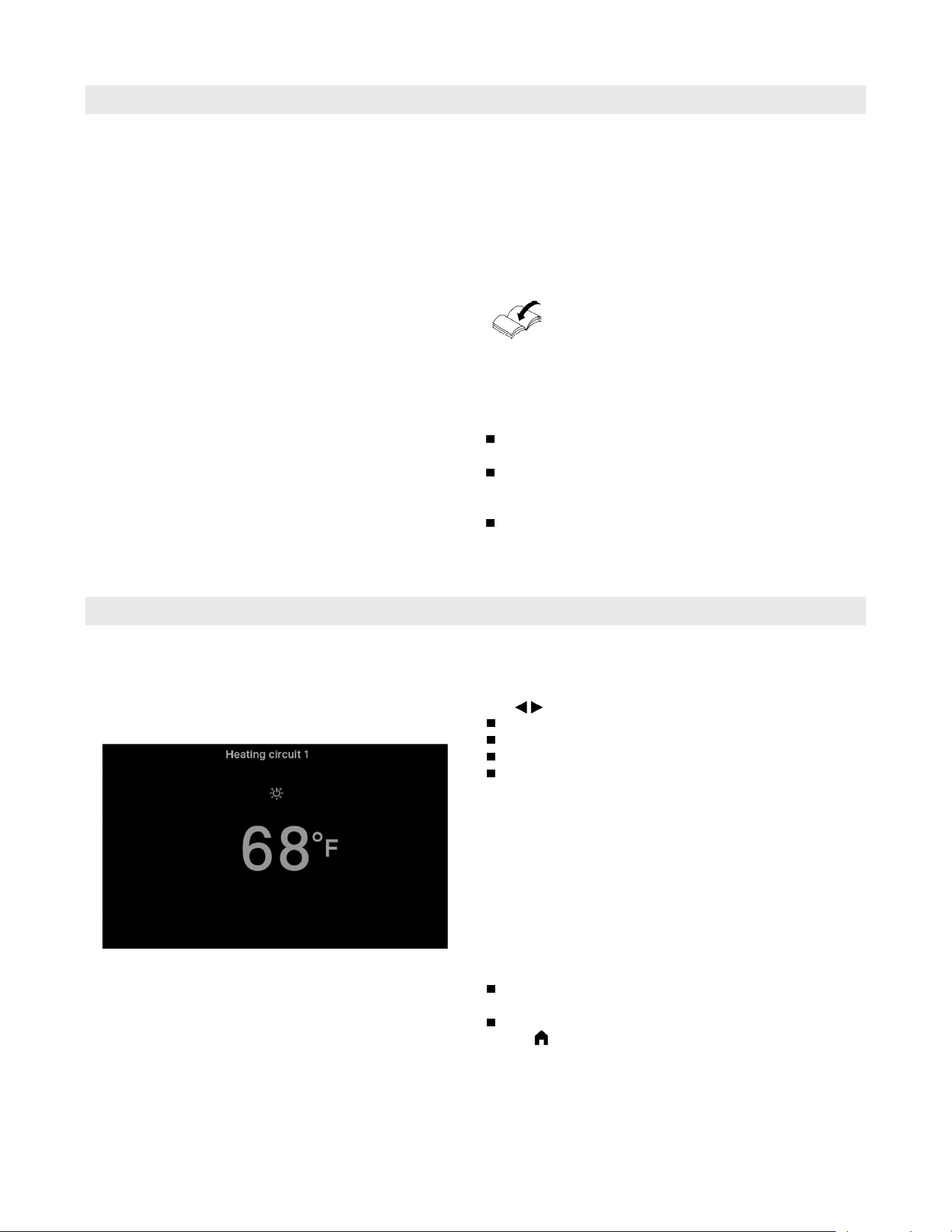
Home screen
The default displays provide access to the most important
settings and checks.
Use to choose between the following displays:
Heating circuit or Continuous operation
DHW
Dashboard
Cascade status (if available)
For further information regarding the default displays:
See page 12 onwards.
After starting or activating the control unit the home
screen is shown.
With the factory settings, the “Heating circuit” or
“Continuous operation” display is shown as the home
screen. The display depends on the operating mode
(weather-compensated operation, constant (continuous)
operation). You can specify a different display for the
home screen:
Call up the home screen as follows:
Standby display active:
Tap anywhere on the screen.
From the “Main menu”:
Tap .
Note: You can prevent operation of the home screen:
See page 25.
If you do so, you will not be able to make adjustments
on either the home screen or the main menu.
“Panel locked” is displayed.
Standby display
If the controls have not been operated for some time,
the display initially switches to the standby display.
After a few minutes, the illumination is switched off.
Vitocrossal 200 CI2 Operating
6175 798 - 06
12
Operation
Buttons and Symbols
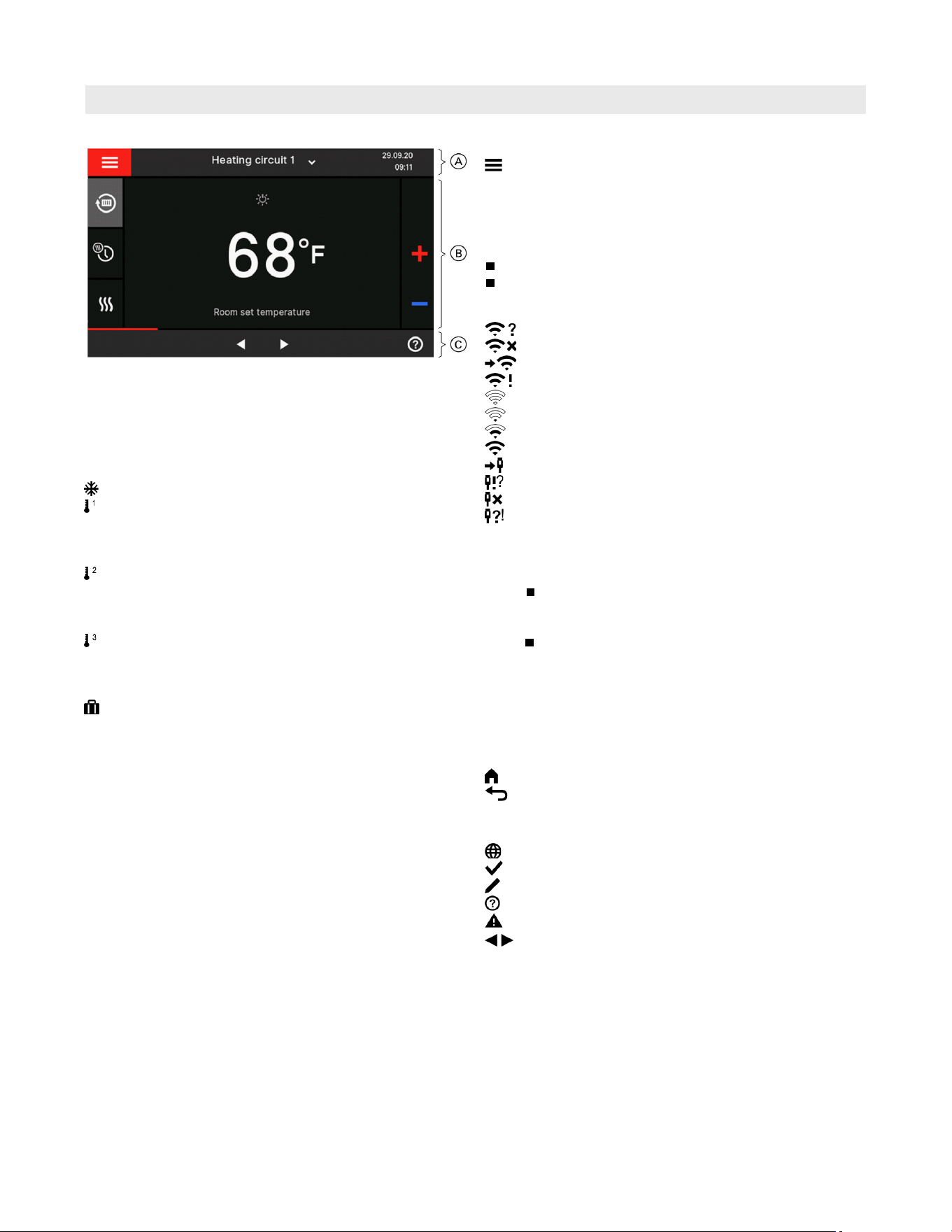
Buttons and symbols in menu bar A
Calls up the “Main menu”.
“Heating circuit ...” Selects the heating circuit.
Note: This choice is only available
if there are several heating
circuits in your system.
System data:
Date
Time
Interfaces:
No data transfer
No WiFi connection
Establishing a connection
Communication error
WiFi connection is active (very low reception quality).
WiFi connection is active (low reception quality).
WiFi connection is active (medium reception quality).
WiFi connection is active (high reception quality).
LAN connection setup
No LAN data transfer
No LAN connection
LAN communication error
Buttons and symbols in function area B
For buttons in the default displays: See page 13 onwards.
Note:
What buttons and symbols are available depends
on the operating mode: Weather-compensated
operation or constant operation.
These symbols are not always displayed, but
appear subject to the system version and the
operating status.
Buttons and symbols in navigation area C
Note: The buttons and symbols available depend on the
operating mode: Weather-compensated operation
or constant operation
Takes you back to the home screen.
Takes you one step back in the menu.
or
Terminates an adjustment in progress.
Internet connection: See page 28.
Confirms a change.
Makes changes in the menu.
Calls up the help text.
Calls up messages.
Scrolling through the menu.
or
Switches to other display areas, e.g. to “DHW”.
Note: If “DEMO” is displayed in the navigation area,
there is no central heating, no DHW heating and no
frost protection.
Legend
A Menu line
B Function area
C Navigation area
Symbols
Frost protection is active.
Central heating with reduced room temperature in
weather-compensated operation
Central heating with supply temperature in constant
operation
Central heating with standard room temperature in
weather-compensated operation
Central heating with standard supply temperature
in constant operation
Central heating with comfort room temperature in
weather-compensated operation
Central heating with comfort supply temperature in
constant operation
Holiday program is switched on.
13
6175 798 - 06
Vitocrossal 200 CI2 Operating
Operation
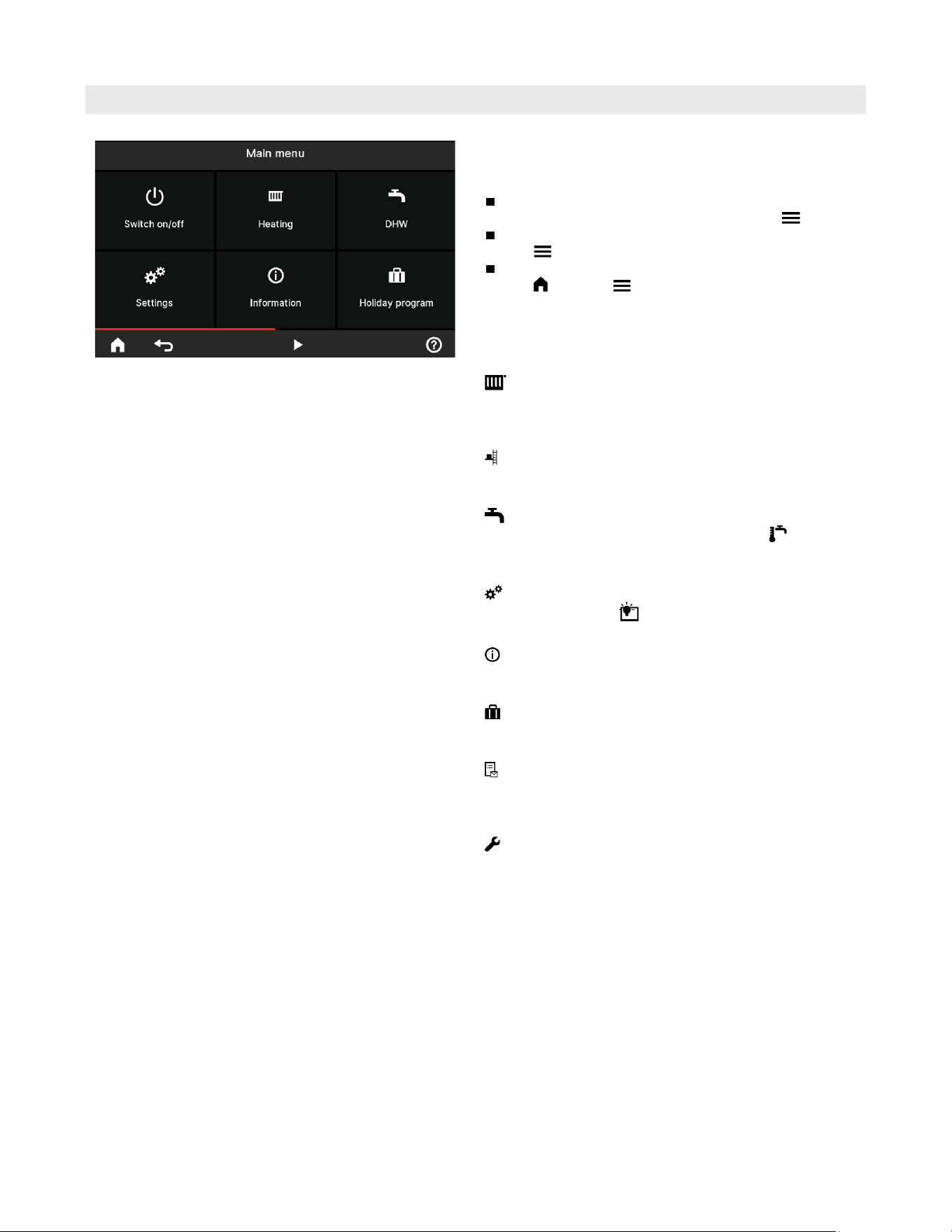
Overview of the “Main menu”
In the “Main menu”, you can check and adjust all of
the settings for the control unit’s range of functions.
Call up the “Main menu” as follows:
If the screensaver is active:
Tap anywhere on the screen and then tap .
From the home screen:
Tap .
From anywhere in the menu:
Tap and then .
Menus available in the “Main menu”
Note: What buttons and symbols are available depends
on the operating mode: Weather-compensated
operation or constant operation.
“Heating”
For more central heating settings, e.g. target
temperature values.
Further information: See page 20.
“Test mode”
For contractors only
Further information: See page 34.
“DHW”
For DHW heating settings, e.g. for the “DHW
temperature”.
Further information: See page 23.
“Settings”
For example the display setting
Further information: See page 25.
“Information”
For checking operating data
Further information: See page 31.
“Holiday program”
Energy saving function “Holiday program”
Further information: See page 22.
“Message lists”
Calls up all pending messages
For further details regarding messages:
See page 32 to 34.
“Service”
For contractors only
You can find the menu overview on page 41.
Vitocrossal 200 CI2 Operating
6175 798 - 06
14
Operating Program
Operation
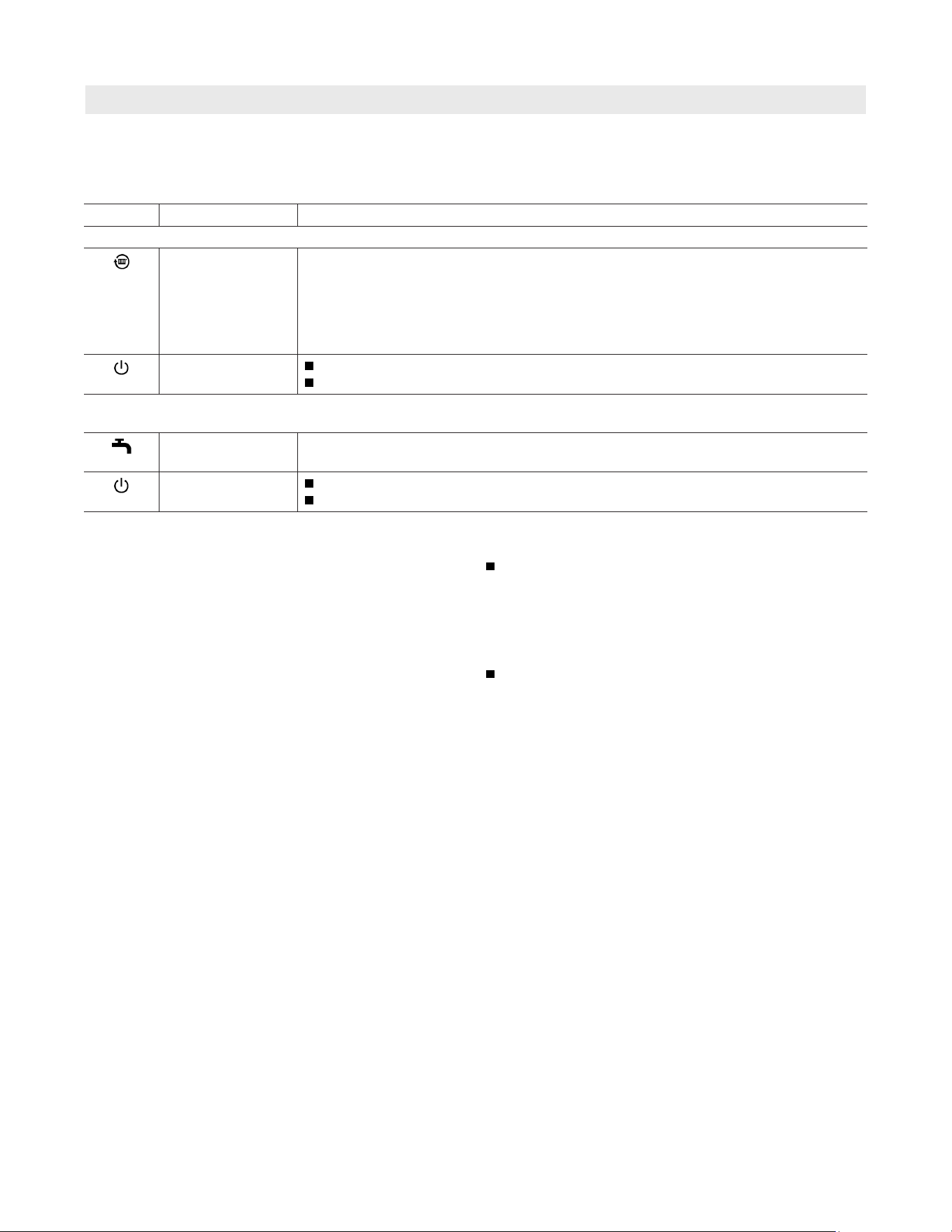
Operating programs for central heating and DHW heating
Note: The operating programs for central heating and
DHW heating can be set separately.
Symbol Operating program Function
Central heating
“Heating” The rooms of the selected heating circuit are heated in accordance with the specified
room temperature or supply temperature and the time program
(see chapter “Room heating”).
Note: In room temperature-dependent operation, a time program for central heating
can only be set at the room temperature controller: See the operating
instructions for the room temperature controller.
“Standby mode”
No central heating
Frost protection for the boiler is active.
DHW heating
Note: Not valid for systems with a DHW tank with temperature switch.
“DHW” “ON” DHW is heated in accordance with the DHW temperature and time program specified
(see chapter “DHW heating”).
“DHW” “OFF”
No DHW heating
Frost protection for the DHW tank is active.
Special operating programs and functions
“External hook-up”
The operating program set at the control unit was
changed over by an external device, e.g. an EM-EA1
extension (DIO electronics module). The operating
program cannot be changed via the control unit for
as long as the external hook-up is active.
“Holiday program”: See page 22.
Note: The special operating programs and functions are
displayed alternately with the room temperature or
the supply temperature of the boiler.
In the main menu, you can call up the set operating
program under “Information”: See page 31.
15
6175 798 - 06
Vitocrossal 200 CI2 Operating
Default Displays
“Heating Circuit” or “Continuous Operation” Default Display
Sets the “Heating” operating program for a heating circuit.
To select “Standby mode”.
To switch the “Extended heating” function on or off.
To call up the “Time program, heating” for central heating.
The temperature display represents the selected target
room temperature [e.g. 68°F (20°C)] or target supply
temperature [e.g. 140°F ( 60°C)] for the current time
phase.
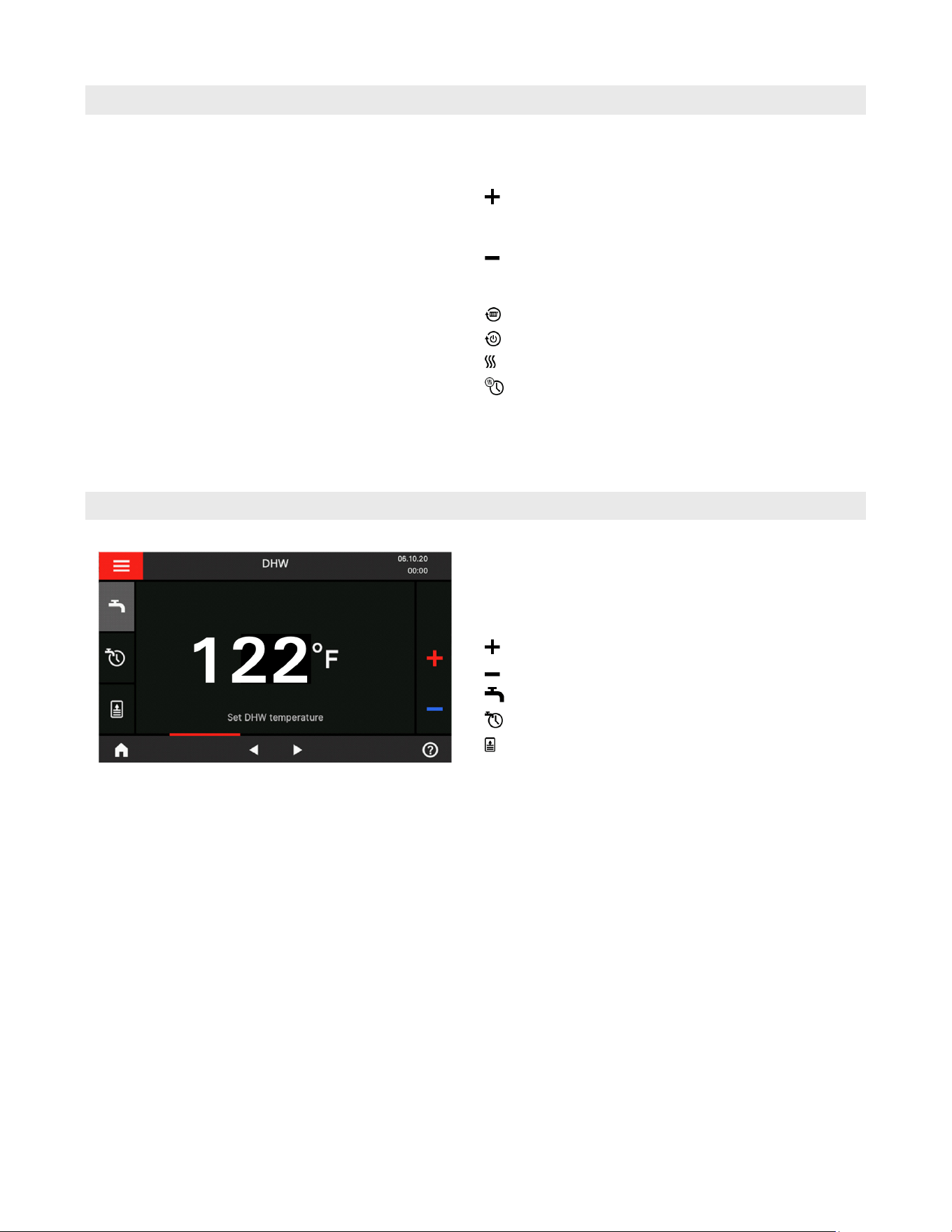
“DHW” Default Display
In the “Heating circuit” or “Continuous operation”
default display, you can adjust and check the most
frequently used settings:
Raises the room temperature value in weather-
compensated operation.
Raises the supply temperature value in constant operation.
Lowers the room temperature value in weather-
compensated operation.
Lowers the supply temperature value in constant operation.
Note: The DHW default display is not available for systems
with a storage tank with temperature switch (such as
an Aquastat).
In the “DHW” default display you can carry out the
settings and checks you use most frequently:
Raises the DHW temperature value.
Lowers the DHW temperature value.
Turns “DHW” “ON”/”DHW” “OFF”.
Calls up the “Time program, DHW”.
To switch one-off DHW heating on or off.
Vitocrossal 200 CI2 Operating
6175 798 - 06
16
Default Displays
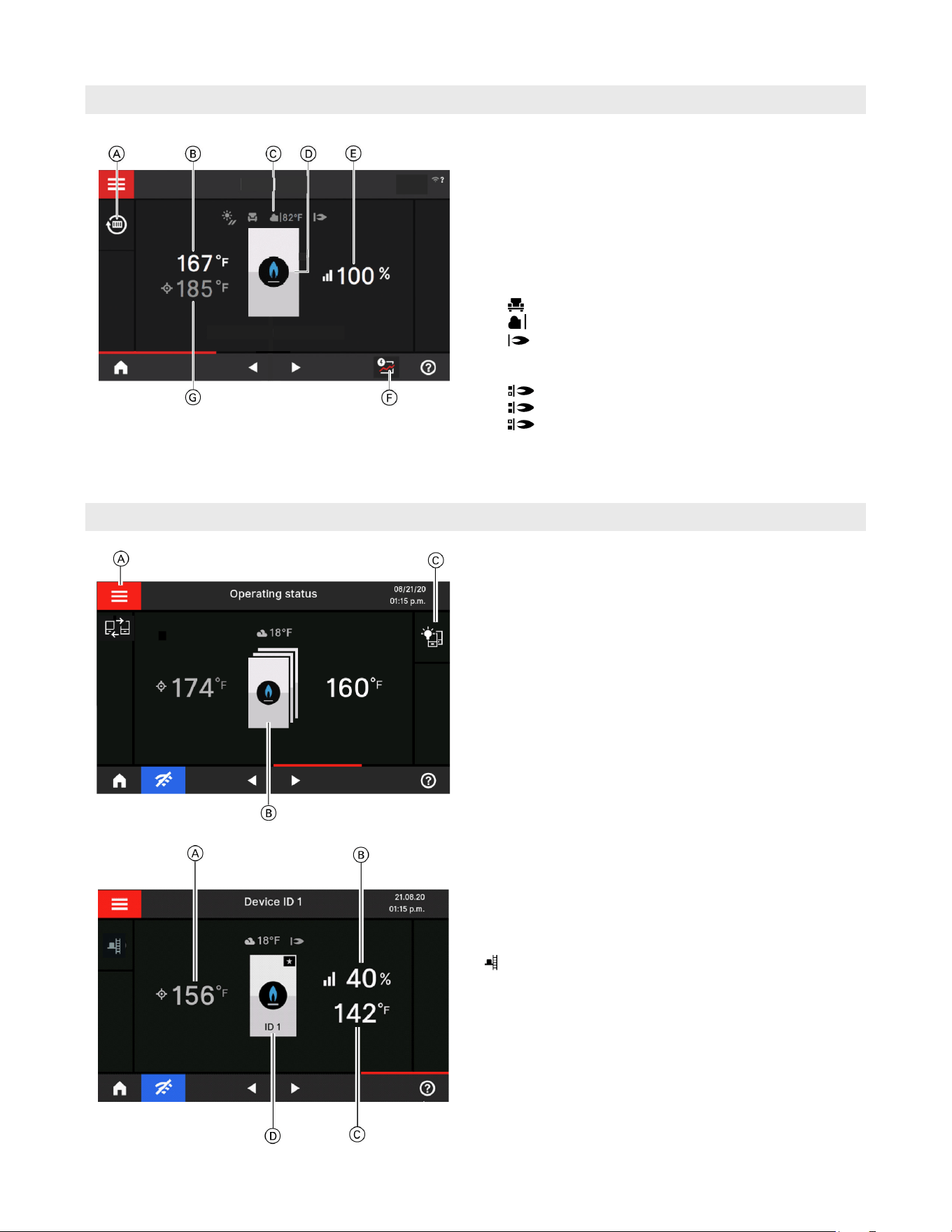
Default Display of Device Status for Single Appliance
The various components present in the system are shown
as graphics. Some information on the components is also
provided in the default display. For more information, tap
the relevant component.
What buttons and symbols are available depends on the
system version.
Legend
A Operating program
B Current supply temperature
C Holiday program active
Current outside temperature
Burner status
D Burner symbol: Call up zone status
Symbols on Vitocrossal with 2 burners
1st burner ON
Burners 1 and 2 ON
2nd burner ON
E Current modulation level
F Current supply temperature
G Target supply temperature
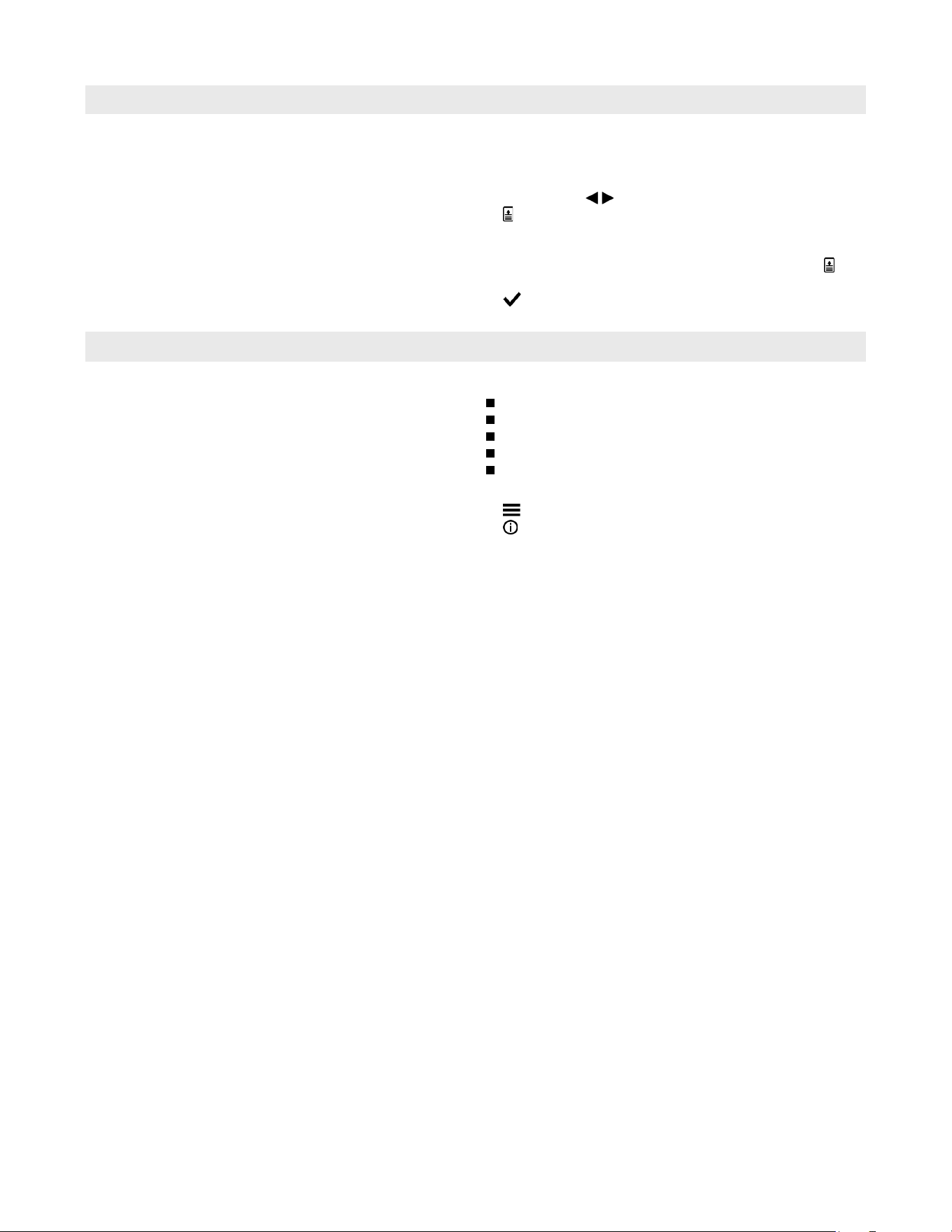
Default display of device status for cascade
This display shows the participants in the cascade as
well as the current supply temperature and the target
supply temperature.
Default display of appliance status
This display shows the participants in the cascade as
well as the current supply temperature and the target
supply temperature.
Legend
A Dynamic control strategy
For further information, see page 30.
B All cascade participants can be called up (status,
burner run hours)
C Switch on all displays of the cascade participants
(deactivated standby)
Emissions test mode (only on lag appliance)
Legend
A Target supply temperature
B Modulation level
C Current supply temperature
D Identification number of the lead or lag boiler.
This display shows the lead boiler in the cascade, it’s
current supply temperature, the target temperature, the
modulation level and the identification number.
Note: To distinguish between the lead and lag appliance,
a star is always shown next to the lead appliance.
Default Display for Cascade Control
17
6175 798 - 06
Vitocrossal 200 CI2 Operating
Default Displays
Starting One-Off DHW Heating
Calling Up Operating Data for the Boiler
Note: Not valid for systems with a DHW tank with
temperature switch (such as an Aquastat).
Tap the following buttons:
1. If applicable , for the “DHW” default display
2. to start one-off DHW heating by the boiler.
The DHW tank is heated to the selected target DHW
temperature.
If you want to terminate DHW heating early, tap
again.
3. to confirm
You can call up the following operating data:
Current output
Hours run
Burner runtime
Burner starts
And further data
Tap the following buttons:
1.
2.
“Information”
3. Select group
4. Retrieve data
Vitocrossal 200 CI2 Operating
6175 798 - 06
18
Time Programs
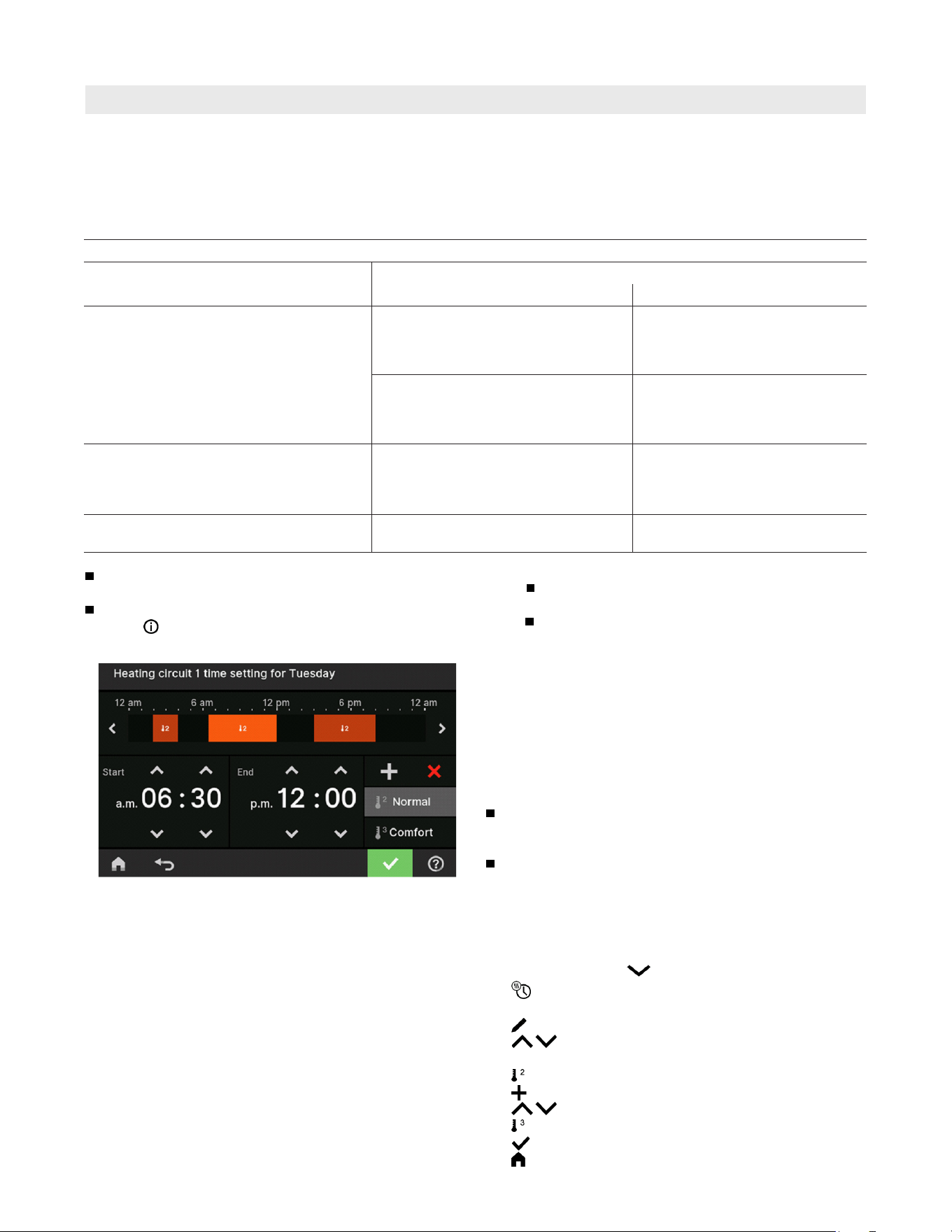
Procedure for Setting a Time Program
Time programs and time phases
In the time programs you determine what your heating
system should do at what time. To do so, divide the
day into sections. These are called time phases.
Different temperature levels are active within and outside
these time phases.
The procedure is explained using the example of central
heating for heating circuit 1 in weather-compensated
operation.
You can set up to 4 time phases in each “Time program”.
For each time phase, you define the start point “Start”
and the end point “End”.
You can set up a time program for the following functions:
Function Temperature level
Within the time phase Outside the time phase
Central heating Weather-compensated operation:
Your rooms are heated to standard
room temperature or comfort room
temperature.
Your rooms are heated to reduced
room temperature.
Constant operation:
Your rooms are heated with standard
supply temperature or comfort supply
temperature.
Your rooms are heated with
reduced supply temperature.
DHW heating
Note: Not valid for systems with a
DHW tank with temperature switch
(such as an Aquastat).
DHW heating is switched on.
The water in the DHW tank is heated
to the target DHW temperature.
DHW heating is switched off.
DHW recirculation pump The DHW recirculation pump is
switched on.
The DHW recirculation pump is
switched off.
The time programs can be set individually to be the
same, or different, for every day of the week.
In the main menu, you can check the time programs
under
“Information”: See page 31 onwards.
The bars in the time diagram are adjusted.
Example:
“Time program” for “Monday” for “Heating circuit 1”
Time phase 1:
6:30 am and 12:00 pm (06:30 to 12:00) with standard
room temperature
Time phase 2:
3:00 pm and 8:00 pm (15:00 to 20:00) with comfort
room temperature
In between these time phases the system heats to
a reduced temperature.
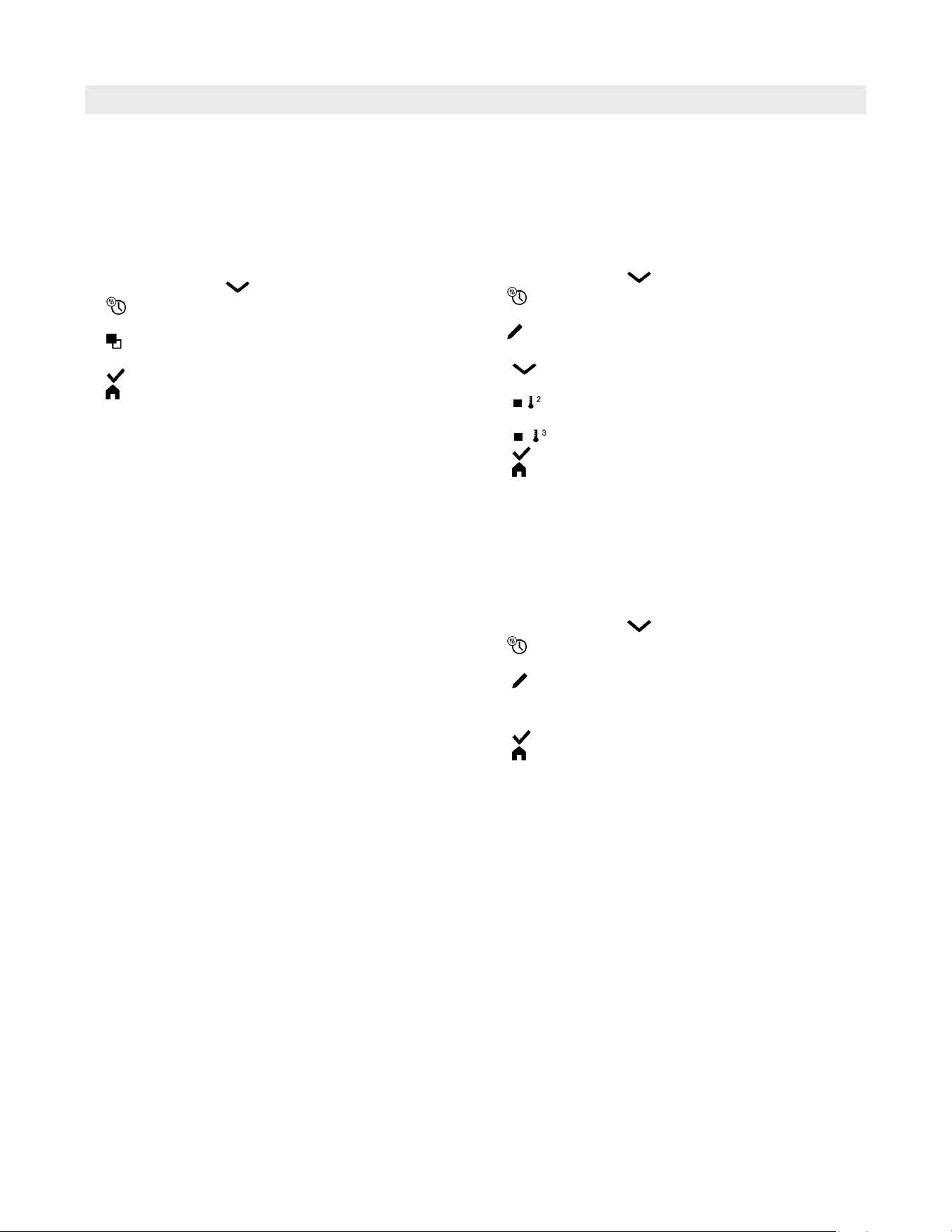
Tap the following buttons:
1. “Heating circuit 1 “ in the menu bar
2.
3. “Mo”
4.
5. for the “Start” and “End” of time phase 1.
The bar in the time diagram is adjusted.
6. “ Standard” to select standard room temperature.
7.
to add time phase 2.
8. for the “Start” and “End” of time phase 2.
9. “Comfort” to select comfort room temperature.
10.
to confirm
11. to exit the “Time program”.
Setting time phases
Note:
DHW is not heated between the time phases.
Frost protection for the DHW tank is active.
When setting time programs, bear in mind that
your system needs some time to heat the DHW
tank to the required temperature.
The following explains how to input the settings for a
time program. The specifics of the individual time
programs can be found in the relevant chapters.
19
6175 798 - 06
Vitocrossal 200 CI2 Operating
Time Programs
Procedure for Setting a Time Program (continued)
Changing time phases
The procedure is explained using the example of central
heating for heating circuit 1 in weather-compensated
operation.
Example:
For “Monday”, you want to change the start point
“Start” of time phase 2 to 2:00 pm (19:00).
Tap the following buttons:
1. “Heating circuit 1 “ in the menu bar
2.
3. “Mo”
4.
5. > for time phase 2
6. for the start point of time phase 2.
The bar in the time diagram is adjusted.
7.
“Standard” for standard room temperature
or
“Comfort” for comfort room temperature
8. to confirm
9. to quit the time program.
Deleting time phases
The procedure is explained using the example of central
heating for heating circuit 1 in weather-compensated
operation.
Example:
For Monday you want to delete time phase 2.
Tap the following buttons:
1. “Heating circuit 1 “ in the menu bar
2.
3. “Mo” to select the required day
4.
5. > for time phase 2
6. X
to delete the time phase.
7. to confirm
8. to quit the time program.
Copying the time program to other days of the week
The procedure is explained using the example of central
heating for heating circuit 1 in weather-compensated
operation.
Example:
You want to copy the “Monday” “Time program” over
to “Thursday” and “Friday”.
Tap the following buttons:
1. “Heating circuit 1 “ in the menu bar
2.
3. “Mo”
4.
5. “Th”, “Fr”
6. to confirm
7. to quit the time program.
Vitocrossal 200 CI2 Operating
6175 798 - 06
20
Central Heating
Heating Circuit Selection
Setting the Room Temperature for a Heating Circuit
Switching Central Heating On or Off (Operating Program)
The heating of your rooms can be split over several
heating circuits if necessary.
E.g., one heating circuit for your home, and one heating
circuit for your office.
In the menu bar, the heating circuits are designated at
the factory as “Heating circuit 1”, “Heating circuit 2”
etc. If names have been given to the heating circuits,
the allocated name is shown: See chapter “Entering
names for heating circuits”.
For all central heating settings for heating systems
with several heating circuits, first select the heating
circuit that you want to change from the “Heating
circuit” default display.
If you are only operating one heating circuit, this
option is not available.
Tap the following buttons:
1. If applicable, for the “Heating circuit” default display
2. “Heating circuit 1 “ in the menu bar
3. Required heating circuit
Factory settings for the temperature levels
Weather-compensated operation:
Standard room temperature: 68°F (20°C)
Reduced room temperature: 37°F (3°C)
Comfort room temperature: 68°F (20°C)
Constant operation and room temperature-dependent
operation:
Standard supply temperature: 140°F (60°C)
Reduced supply temperature: 68°F (20°C)
Comfort supply temperature: 158°F (70°C)
Setting temperature levels for central heating
Tap the following buttons:
1. If applicable, for the “Heating circuit” or
“Continuous operation” default display
2. If applicable, in the menu bar for the relevant
heating circuit
3.
for the required value of the relevant temperature
level:
“Reduced”
“Standard”
“Comfort”
4.
to confirm
For information on the operating programs, see page 14.
Tap the following buttons:
1.
2. “Turn on/off”
3. Tap the required heating circuit or heating zone to
switch it on or off.
4.
to confirm
21
6175 798 - 06
Vitocrossal 200 CI2 Operating
Central Heating
Setting the Target Supply Temperature for a Heating Zone
Tap the following buttons:
1.
2. “Heating”
3. Select “heating zone or heating circuit”.
4. Select a heating zone or heating circuit and confirm
with .
5.
to adjust the target supply temperature.
6. to confirm
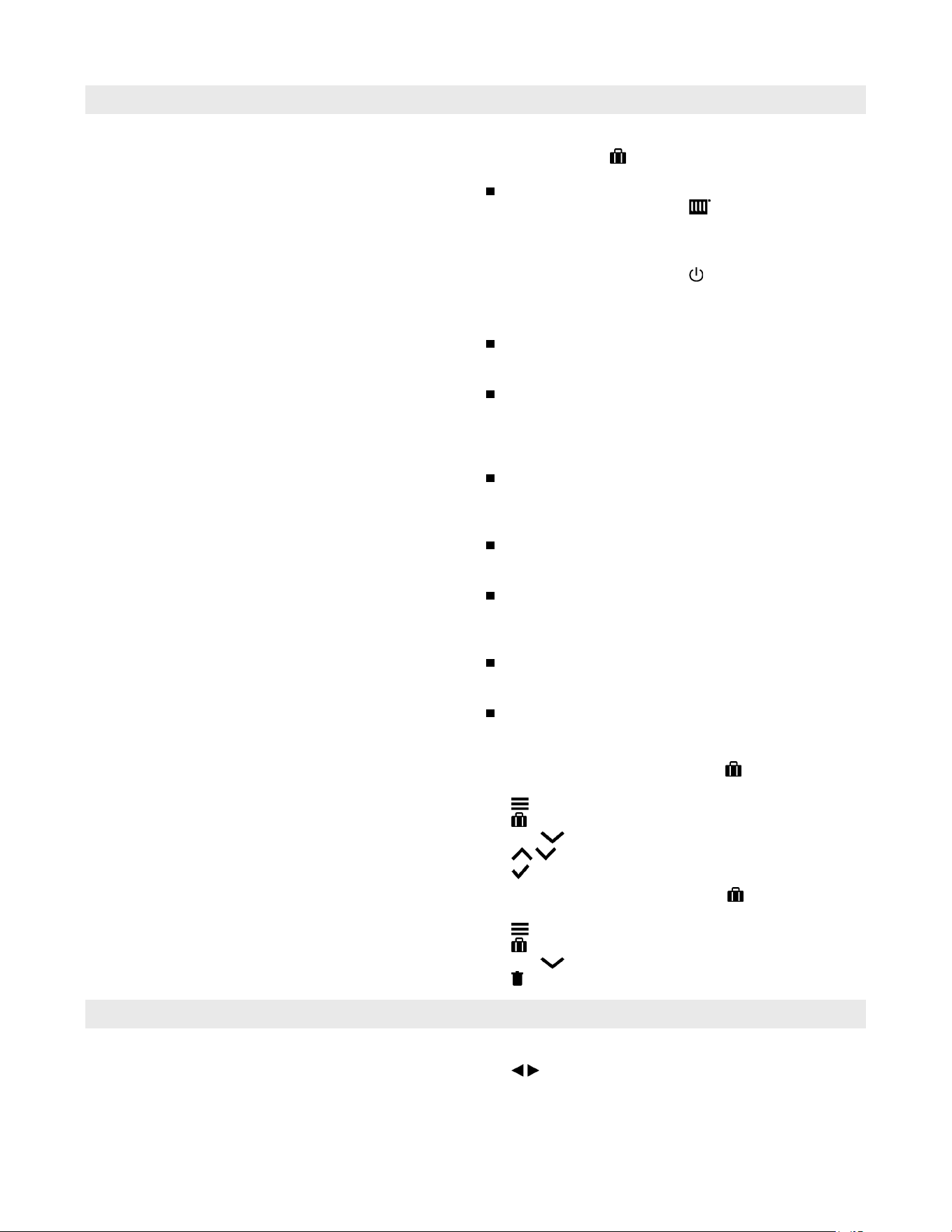
Setting the Heating Curve
Note: The heating curve can only be adjusted in weather-
compensated operation.
By setting the “Heating curve”, you influence the supply
temperature provided by the boiler.
To ensure your rooms are heated optimally at any outside
temperature, you can adjust the “Shift” and “Slope” of
the “Heating curve”.
Factory setting:
“Slope”: 1.4
“Level”: 0
Tap the following buttons:
1.
2. “Heating”
3. Select “heating zone or heating circuit”.
4. Select a heating zone or heating circuit,
5. “Heating curve”
6.
for the required value for “Slope” and “Shift”
respectively
The graph displayed clearly shows the change in the
“Heating curve” as soon as you alter the value for
the “Slope” or “Shift”.
7.
to confirm
Note: Extensive information on adjusting the “Heating
curve” can be found in chapter “Terminology”.
Temporarily Adjusting the Room Temperature for Certain Heating Circuits
Switch on the “Extended heating” function if you want
to heat your home with standard room temperature/
supply temperature or comfort room temperature/supply
temperature during a time phase with reduced room
temperature.
Your home will be heated with the temperature of the
last active time phase for standard room temperature/
supply temperature or comfort room temperature/supply
temperature.
Note: If the DHW temperature falls below the target
value, the water in the hot water tank is heated
first, before the rooms are heated.
Switching on “Extended heating”
Tap the following buttons:
1. If applicable, in the menu bar for the relevant
heating circuit
2.
The temperature of the last active time phase for
standard room temperature/supply temperature or
comfort room temperature/supply temperature will be
selected.
Switching off “Extended heating”
The function ends automatically when switching to the
next time phase for standard room temperature/supply
temperature or comfort room temperature/supply
temperature.
Tap the following on-screen buttons to terminate
“Extended heating” early:
1. If applicable, in the menu bar for the relevant
heating circuit
2.
Vitocrossal 200 CI2 Operating
6175 798 - 06
22
Central Heating
Saving Energy During Longer Absences
To save energy during long periods of absence, select
“Holiday program” .
The holiday program has the following effect:
Central heating:
– For heating circuits in the “Heating” operating
program:
The rooms are heated to the set reduced room
temperature.
– For heating circuits in the “Standby mode”
operating program:
No central heating: Frost protection for the heat
generator and the DHW tank is active.
DHW heating:
No DHW heating; frost protection for the DHW tank
is active.
The vacation program starts at 12:00 am (00:00) on
the first day
of your vacation and ends at 11:59 pm (23:59) on the
final day.
Note:
As long as the “Holiday program” function is switched
on, the selected first and last day of the holiday are
shown in the “Heating circuit” and “Holiday program”
default display.
If “Detached house” was selected by your contractor
during commissioning, the holiday program is switched
on for all heating circuits.
If “Apartment building” was selected by your
contractor during commissioning, DHW heating will
only be switched off if all heating circuits are in the
holiday program.
The “Holiday program” function is not available for
heating zones or DHW heating in systems with a
DHW tank with temperature switch (e.g. Aquastat).
If all heating circuits are in the active “Holiday
program”, DHW heating is switched off, except in
systems with a DHW tank with temperature switch.
Switching on the “Holiday program”
Tap the following buttons:
1.
2. “Holiday program”
3. Use to select the required heating circuit
4. for “First holiday” and “Last holiday”
5.
to confirm
Switching off the “Holiday program”
Tap the following buttons:
1.
2. “Holiday program”
3. Use to select the required heating circuit
4.
Checking the Status of Heating Zones
Tap the following buttons:
1. to select the device status of the lead or lag
boiler.
2. On the lead boiler tap the symbol in the middle of
the screen.
The status of the heating zones is displayed.

23
6175 798 - 06
Vitocrossal 200 CI2 Operating
Setting the DHW Temperature
DHW Heating
Note: Not valid for systems with a DHW tank with
temperature switch (such as an Aquastat).
The factory settings depend on the boiler.
Note: For reasons of good hygiene, you should not set
the DHW temperature lower than 122°F (50°C).
Tap the following buttons:
1. If applicable, for the “DHW” default display
2.
for the required value
3.
to confirm
Switching DHW Heating On or Off (Operating Program)
If you switch off DHW heating, no water can be
heated. This also applies for the function “One-off
DHW heating outside the time program”.
Tap the following buttons:
1. If applicable, for the “DHW” default display
2. Highlighted button or
3.
“ON” if you want to start DHW heating.
“OFF” if you want to stop DHW heating.
For information on the operating programs: See page 14.
One-Off DHW Heating Outside the Time Program
Note: Not valid for systems with a DHW tank with
temperature switch (such as an Aquastat).
If you require hot water outside the set time phases,
switch on “One-off DHW heating” .
The DHW tank is heated once to the set DHW
temperature.
This function has a higher priority than other functions,
such as the time program for example.
Switching on one-off DHW heating
Tap the following buttons:
1. If applicable, for the “DHW” default display
2.
3.
to confirm
Switching off one-off DHW heating
“One-off DHW heating” ends as soon as the target
DHW temperature has been reached.
Tap the following on-screen buttons to terminate
“One-off DHW heating” early:
1. If applicable, for the “DHW” default display
2.
Vitocrossal 200 CI2 Operating
6175 798 - 06
24
Increased DHW Hygiene
DHW Heating
Switching DHW Scald Protection On/Off
Note: Not valid for systems with a DHW tank with
temperature switch (e.g. Aquastat).
You can heat the water in the DHW tank to above
140°F (60°C) once a week or for an hour every day.
This function is regularly carried out at the specified time.
Switching on increased DHW hygiene
Tap the following buttons:
1.
2. “DHW”
3. “Hygiene function”
4.
for the starting time “Start”
5. Select the required day or every day.
The selection is highlighted.
6.
to confirm
Switching off increased DHW hygiene
Tap the following buttons:
1.
2. “DHW”
3. “Hygiene function”
4. Deselect the highlighted day or every day.
5.
to confirm
Note: Not valid for systems with a DHW tank with
temperature switch (such as an Aquastat).
Tap the following buttons:
1.
2. “DHW”
3. “Scald protection”
4. “On” or “Off”
5.
to confirm
Note: With scald protection switched off, a target DHW
temperature of over 140°F (60°C) can be selected,
depending on the boiler. There is an increased risk
of scalding!
WARNING
High DHW temperatures can cause scalding, e.g. if the
DHW temperature is above 140°F (60°C). Mix with cold
water at the draw-off points.
25
6175 798 - 06
Vitocrossal 200 CI2 Operating
Additional Adjustments
Setting the Display Brightness
Locking the Controls
You can lock the controls in 2 ways:
Level 1 All functions on the default displays are operable.
All other functions are disabled.
Level 2 All functions are disabled.
Tap the following buttons:
1.
2. “Settings”
3. “Lock panel”
4. “Lock everything”
or
“Only home screen operable”
5. Enter the password “viessmann”.
6.
to confirm
This password can be changed: See below.
Unlocking the controls
Tap the following buttons:
1. Any on-screen button
“Panel locked” is displayed.
2.
“Do you want to unlock the operation?” is displayed.
3.
An entry field and keyboard appear.
4. Enter the password “viessmann” or the password
you have specified.
5.
to confirm
Changing the password for the “Lock panel” function
Tap the following buttons:
1.
2. “Settings”
3. “Change password”
4. Enter the current password.
5.
to confirm
6. Enter the new password (1 to 20 characters).
Note: You will not be required to confirm the new
password.
7.
to confirm
A prompt is displayed.
8.
to confirm the prompt
Tap the following buttons:
1.
2. “Settings”
3. “Display setting”
4. “Brightness, operation”
or
“Brightness, standby”
5.
for the required value
6.
to confirm

Vitocrossal 200 CI2 Operating
6175 798 - 06
26
Additional Adjustments
Switching the Lightguide On and Off
Tap the following buttons:
1.
2. “Settings”
3. “Display setting”
4. “Lightguide on/off”
5. “ON”
or
“OFF”
6.
to confirm
Note: Faults are shown by flashing lights even if the
Lightguide is switched off.
Entering Names for Heating Circuits
You can name all heating circuits individually, e.g.
“Ground floor”.
Note: The abbreviations 1, 2, 3, 4 will be retained in the
default display.
Tap the following buttons:
1.
2. “Settings”
3. “Rename heating circuits”
4. Required heating circuit, e.g. “Heating circuit 1”
5. Type in the required name,
e.g. “Ground floor” (1 to 20 characters).
6.
to confirm
The name assigned to the relevant heating circuit is
shown in the main menu.
Depending on the type of boiler, a red illuminated strip
(Lightguide) is displayed at the lower or upper edge of the
control unit during operation.
In the delivered condition, the Lightguide is switched on.
You can switch off the Lightguide.
Meaning of the display:
Lightguide pulsates slowly:
Display is in standby mode.
Lightguide is illuminated constantly:
You are operating the control unit. Every input
operation is confirmed by a brief flashing.
Lightguide flashes quickly:
There is a fault in the system.
Lead Cascade Boiler Only: Switching on the Display
Tap the following buttons:
1.
2. “Wake up display”
3. Select and confirm the lag boiler.
27
6175 798 - 06
Vitocrossal 200 CI2 Operating
Entering a Name for the Heating Zone
Additional Adjustments
Tap the following buttons:
1.
2. “Settings”
3. “Rename heating zone”
4. Tap the required heating zone
5. Type in the required names (1 to 20 characters).
6.
to confirm
You can name all heating zones individually.
The name assigned to the relevant heating zone is shown
in the main menu.
Setting the “Time” and “Date”
Automatic “Summer/Wintertime” Changeover
Setting the “Language”
Setting “Units”
The “Time” and “Date” are set at the factory. If your
system has been shut down for a prolonged period,
you may need to reset the “Time” and “Date”.
Tap the following buttons:
1.
2. “Settings”
3. “Date and time”
4. “Date”
or
“Time”
5.
for the required value
6.
to confirm
Tap the following buttons:
1.
2. “Settings”
3. “Date and time”
4. “Time changeover”
5.
for “ON” or “OFF”
6.
to confirm
Tap the following buttons:
1.
2. “Settings”
3. “Language”
4. Required language
5.
to confirm
You can change all the available units,
e.g. for temperature, date, etc.
Tap the following buttons:
1.
2. “Settings”
3. “Units”
4. Select the required unit type, e.g.°C for the temperature.
5.
to confirm
Vitocrossal 200 CI2 Operating
6175 798 - 06
28
Entering the Contractor’s Contact Details
Additional Adjustments
Tap the following buttons:
1.
2. “Information”
3. “Contractor contact details”
4. Relevant entry field
5. Enter your contractor’s contact details into the
individual boxes.
6.
to confirm
Setting the Home Screen
Switching Internet Access On or Off
You can control your system remotely via the internet
using an app. To do this, establish an internet connection
via WiFi: See the following chapter.
The required credentials for internet access to the control
unit via app can be found on the adjacent label:
You can choose from the following default displays as
your home screen:
“Heating circuit” or “Continuous operation”
“DHW”
“Device status”
Tap the following buttons:
1.
2. “Settings”
3. “Selecting the default display”
4. Required display
5.
to confirm
Note: Tap to call up the selected home screen.
Switching WiFi or LAN on or off
Tap the following buttons:
1.
2. “Settings”
3. “Internet”
4. “WiFi” or “LAN”
5. “OFF” if you want to switch off the internet
connection.
Or
“ON” if you want to switch on the internet
connection.
6.
to confirm
Changing the Calorific Value or Correction Factor
You can enter your contractor’s contact details. These
can then be called up in the “Information” menu.
Note: Not valid for systems with a DHW tank with
temperature switch (such as an Aquastat).
Note: Which default displays are available depends
on the operating mode: Weather-compensated
operation or constant operation.
Tap the following buttons:
1.
2. “Settings”
3. “Energy cockpit”
4. Select “Calorific value” or “Correction factor”
5. Enter the value.
6.
to confirm
Note: The value has an effect on the calculated
consumption data. (consumption value not suitable
for billing purposes!)
Place WiFi label here
29
6175 798 - 06
Vitocrossal 200 CI2 Operating
Additional Adjustments
Switching Internet Access On or Off (continued)
Static IP address
Prerequisite: Your WiFi is configured so that the subscriber
addresses in the network (IP addresses) are not automatically
assigned.
Tap the following buttons:
1.
2. “Settings”
3. “Internet”
4. “WiFi”
5. Available WiFi networks are displayed.
Note: Tap to refresh the list of available WiFi
networks.
6. Select the network.
7.
8. Select network type.
9. “STATIC” for static IP address
10.
to confirm
11. Enter network data:
IP address
Subnet mask
Standard gateway
Primary DNS server
Secondary DNS server
12.
to confirm
Note: An internet connection only exists if the selected
WiFi is connected to the internet. Check your WiFi
settings if necessary.
Establishing a WiFi connection
Note: Prerequisite: WiFi is switched on.
Tap the following buttons:
1.
2. “Settings”
3. “Internet”
4. “Network selection”
Available WiFi networks are displayed.
Note: If a connection as already exists, “Connected”
is shown next to the relevant network.
If you want to use an invisible WiFi network:
Tap and enter the name of the WiFi network
(SSID) and the password.
5. Select WiFi.
Note: Use to refresh the list of available WiFi
networks.
6. to confirm
7. If your selected WiFi is not protected :
to acknowledge the connection message
or
If your selected WiFi is protected :
Enter the password (maximum 40 characters).
to confirm your password
8. to confirm the prompt about internet use
The default display shows .
Note:
If the connection was not established, an
error message is shown.
An internet connection only exists if the
selected
WiFi is connected to the internet.
Check your WiFi settings if necessary.
LAN static IP address
Tap the following buttons:
1.
2. “Settings”
3. “LAN”
Select “Network type”
4. “STATIC” for static IP address
5.
to confirm
6. Enter network data:
IP address
Subnet mask
Standard gateway
Primary DNS server
Secondary DNS server
7.
to confirm
Note: An internet connection only exists if the selected
LAN is connected to the internet. Check your LAN
settings if necessary.
CAUTION
Changes or modifications not expressly approved by
the party responsible for compliance could void the
user’s authority to operate the equipment.
This device complies with part 15 of the FCC Rules.
Operation is subject to the following two conditions:
(1) This device may not cause harmful interference, and
(2) this device must accept any interference received,
including interference that may cause undesired operation.
Vitocrossal 200 CI2 Operating
6175 798 - 06
30
Additional Adjustments
Switching Off the Display Screen for Cleaning
Restoring Factory Settings
If you want to clean the display screen, you can
deactivate it for 30 seconds. This prevents unintentional
operation.
Clean the display with a microfiber cloth.
Tap the following buttons:
1.
2. “Settings”
3. “Clean screen”
The display is deactivated. A countdown begins.
You can reset all entries and values to their factory
settings.
Note: If the heating circuits have been named, the
assigned names will be retained: See page 26.
Settings and values that are reset with all operating
modes:
Standard room temperature or standard supply
temperature
Reduced room temperature or reduced supply
temperature
Operating program
DHW temperature
Time program for DHW heating
Time program for DHW recirculation pump
Only for weather-compensated operation
Heating curve slope and level
Comfort room temperature or comfort supply
temperature
Time program for central heating
The “Extended heating” function is switched off.
“Holiday program”
Tap the following buttons:
1.
2. “Settings”
3. “Factory settings”
4.
to confirm
Lead Cascade Boiler Only: Dynamic Control Strategy
From the display, you can adjust the dynamic control
strategy and runtime optimization settings so that each
boiler in the cascade has the same runtime.
Here you can also decide which of the boilers in the
cascade should be started first or last.
31
6175 798 - 06
Vitocrossal 200 CI2 Operating
Calling Up Information
Calling Up Help Messages
You can call up help messages relating to the displays
and functions.
Tap the following buttons:
1. to call up the help messages.
2. to return to the previous screen.
Checking Information
Depending on the system equipment level and the settings
made, you can call up current system data, e.g.
temperatures.
The system data is divided into the following groups:
General
Burner
DHW
Heating circuit 1 to 4
Heating zones 1 to 4
Contractor contact details
Internet
Open source licence
Calls up the licence for the programming unit.
Cascade
Cascade boilers
Calls up the licence for the programming unit.
Note: If names have been given to the heating circuits
or heating zones, the allocated name is shown:
See page 26
Detailed options for checking the individual groups
can be found in chapter “Menu overview”.
Tap the following buttons:
1.
2. “Information”
3. Required group
Calling Up Licences for the Programming Unit
Calls up the licence for the programming unit.
Tap the following buttons:
1. Call up the home screen.
2.
3. for “Information”
4. OK to confirm
5. for “Open source licences”
6. OK to confirm
7. for approx. 4 sec, to exit the menu.
Displaying the Gas Consumption
Tap the following buttons:
1.
2. “Information”
3. OK to confirm
4. “General”
5. OK to confirm

Vitocrossal 200 CI2 Operating
6175 798 - 06
32
Calling Up Information
Calling Up Licences for the Integrated Communication Module
Checking Maintenance Messages
Switch on the “Access point” of the boiler so that you
can call up online legal information, such as open
source licences.
Switching on access point
Tap the following buttons:
1.
2. “Settings”
3. “Internet”
4. “Access point”
Select “ON” and confirm with
5. Follow the instructions in the mobile device app.
6. to confirm
Calling up open source licences
1. Call up the WiFi settings of your smartphone or PC.
2. Connect your smartphone or PC to the WiFi
“Viessmann-<xxxx>”.
You will be asked to enter a password.
3. Enter the WiFi password.
Note: The credentials can be found on the label: See
chapter “Switching internet access ON or OFF”.
4. With your connected mobile device, open http://
192.168.0.1 in your internet browser
5. Follow the link “Open Source Components Licences”.
Third party software
Overview
This product contains third party software, including
open source software. You are entitled to use this third
party software in compliance with the respective licence
conditions as provided under the link below.
A list of the third party software components used and
of licence texts can be accessed by connecting your
boiler, as explained in the instruction manual.
Acknowledgements
Linux® is the registered trademark of Linus Torvalds in
the U.S. and other countries. This product includes
software developed by the OpenSSL Project for use in
the OpenSSL Toolkit (http://www.openssl.org/). This
product includes cryptographic software written by Eric
Young ([email protected]) and software written by
Tim Hudson ([email protected]).
Disclaimer
The open source software contained in this product is
distributed WITHOUT ANY WARRANTY; without even
the implied warranty of MERCHANTABILITY or FITNESS
FOR A PARTICULAR PURPOSE. The single
licences may contain more details on a limitation of
warranty or liability.
How to obtain the source code
The software included in this product may contain
copyrighted software that is licensed under a licence
requiring us to provide the source code of that software,
such as the GPL or LGPL. To obtain the complete
corresponding source code for such copyrighted
software, please contact us via the contact information
provided in section 5 below, indicating the build number
you will find under the “Open Source Licences” link
mentioned in section 1 above. This offer is not limited
in time and is valid for anyone in receipt of this
information.
Calling up service messages
Tap the following buttons:
1. in the navigation area.
If fault messages are also present in your system,
they and any further messages can be called up
with “Faults”, “Service messages”.
2. “Service messages”
The service messages will be listed in yellow.
3. Tapping on
calls up information about the system
characteristics.
Tips on measures you can take yourself before
notifying your contractor are displayed.
4. Make a note of the service message number.
For example: P.1 “Maintenance due after interval”.
This enables the contractor to be better prepared
and may save you unnecessary travelling costs.
5. Please notify your contractor.
6.
to acknowledge the service if necessary.
Your contractor can set service intervals. When these
service intervals are exceeded, a service message is
displayed automatically: “Service” and .
If available, your heating contractor’s contact details
will be displayed.
Tap the following buttons:
flashes in the navigation area.
Note: If the service cannot be carried out until a later
date,the service message will be displayed again
the following Monday.
33
6175 798 - 06
Vitocrossal 200 CI2 Operating
Checking Fault Messages
Calling Up Information
Calling up a fault message
Tap the following buttons:
1. in the navigation area.
If service messages are also present in your system,
they and any further messages can be called
up with “Faults”, “Service messages”.
2. “Faults”
The fault messages will be listed in red.
3. Tapping on calls up information about the system
characteristics.
Tips on measures you can take yourself before
notifying your contractor are displayed.
4. Make a note of the fault number and the cause of
the fault. For example: F.160 “Communication error
CAN bus”.
This enables the contractor to be better prepared
and may save you unnecessary travelling costs.
5. Please notify your contractor.
6.
to acknowledge the fault.
If your system has developed faults, “Fault” and are
displayed. The Lightguide flashes even when switched
off: See chapter “Switching the Lightguide on and off”.
Tap the following buttons:
1.
flashes in the navigation area.
Note:
If you have connected a message facility to alert
you to fault messages (e.g. a buzzer), this is
deactivated when the fault message is
acknowledged.
If troubleshooting cannot be carried out until a
later date, the fault message will be displayed
again the following day at 7:00 am (07:00).
The message facility is switched on again.
WARNING
If faults are not rectified, they may have life threatening
consequences.
Do not reset the burner several times in quick succession.
Immediately notify your contractor if a burner fault occurs.
Your contractor will be able to analyze the cause and
rectify the fault.
Resetting the burner after a burner fault
If the burner is locked due to a fault, you can reset the
burner.
Tap the following buttons:
1.
A further prompt is displayed.
2.
“Reset”
3.
to confirm
The burner is reset and will restart.
Vitocrossal 200 CI2 Operating
6175 798 - 06
34
Checking Message Lists
Calling Up Information/Emissions Test Mode
Emissions Test Mode
Tap the following buttons:
1.
2. “Message lists”
3. If there are any corresponding messages:
“Status”
“Warnings”
“Information”
“Faults”
“Service messages”
Note: Depending on the appliance configuration, you can
only activate emissions test mode in the service
menu.
Emissions test mode for testing flue gas must only
be activated by your contractor during the
annual inspection.
If possible, have the emissions test carried out
during the heating season.
Note: The contractor can activate emissions test mode
even if the control panel is locked.
35
6175 798 - 06
Vitocrossal 200 CI2 Operating
Switching the System Off
Switching On and Off
Switching the System On
Switching off heat generation without frost protection
monitoring
No central heating
No DHW heating
Frost protection for the boiler and the DHW tank is
not active.
1. Turn off the ON/OFF switch.
2. Close the gas shut-off valve.
If necessary, contact your contractor.
Note:
As they are not being supplied with power, the
circulation pumps and diverter valves may seize
up.
If your system has been shut down for a
prolonged period, you may need to reset the
“Time” and “Date”: See page 27.
Shutting down heat generation with frost protection
monitoring (“Standby mode”)
For each heating circuit and each heating zone, select
the “Standby mode” operating program and switch off
DHW heating: See pages 14 and 23.
No central heating
No DHW heating
Frost protection for the boiler and the DHW tank is
active.
Note:
All circulation pumps connected to the control
unit are briefly started every 24 hours to prevent
them from seizing up.
The diverter valves are switched over at regular
intervals.
Ask your contractor about the following:
Required system pressure
Position of ventilation apertures in the installation
room, if applicable
1. Open gas shut-off valve.
2. Check whether the power supply to your system is
switched on, e.g. at a separate MCB/fuse or mains
isolator.
Note: The power supply to the system was switched
on by your heating contractor during
commissioning.
If possible, do not interrupt the power supply,
even when the system is in standby mode.
3. Turn ON/OFF switch A on.
After a short while, the home screen is shown on
the display.
The Lightguide is illuminated constantly.
Your system and, if installed, your remote controls
are ready for operation.
4. Check the system pressure on the manometer:
If the pressure shown is below 15 psi (1.0 bar):
Please top up with water or notify your heating
contractor.
IMPORTANT
If outside temperatures of below 37°F (3°C) are
expected, take appropriate measures to protect the
system from frost.
Vitocrossal 200 CI2 Operating
6175 798 - 06
36
What to do if...
Rooms are Too Cold
Rooms are Too Hot
Cause Remedy
Incorrect control unit settings.
The remote control (if installed) or the room
temperature controller (if installed) is set incorrectly.
Operating instructions for the remote control or
room temperature controller
Check the settings and correct if necessary:
Operating program: See page 14.
Room temperature/supply temperature: See page 20.
Time: See page 27.
Time program for central heating: See page 18.
Only for weather-compensated operation:
Heating curve: See page 21.
“Fault” is displayed. Check what type of fault it is. Make a note of the fault
message and acknowledge the fault: See page 33.
If necessary, notify your contractor.
WARNING
If faults are not rectified, they may have life threatening
consequences.
Do not reset the burner several times in quick succession.
Immediately notify your contractor if a burner fault occurs.
Your contractor will be able to analyze the cause and
rectify the fault.
Cause Remedy
The boiler is switched off.
Turn on the ON/OFF switch: See page 35.
Switch on the power supply to your system,
e.g. at a separate MCB/fuse or mains isolator.
Incorrect control unit settings.
The remote control (if installed) or room temperature
controller (if installed) is set incorrectly.
Operating instructions for the remote control or
room temperature controller
Central heating must be enabled.
Check the settings and correct if necessary:
Operating program: See page 14.
Room temperature/supply temperature: See page 20.
Time: See page 27.
Time program for central heating: See page 18.
Only for weather-compensated operation:
Heating curve: See page 21.
The DHW tank is being heated. Wait until the DHW tank has been heated up.
Reduce the DHW draw-off rate or temporarily reduce
the set DHW temperature as required.
No fuel. Open the gas shut-off valve. If necessary, check with
your gas supply utility.
“Burner fault” is displayed. Reset the burner: See page 33.
“Fault” is displayed. Check what type of fault it is. Make a note of the fault
message and acknowledge the fault: See page 33.
If necessary, notify your contractor.
37
6175 798 - 06
Vitocrossal 200 CI2 Operating
What to do if...
There is No Hot Water
The DHW is Too Hot
Cause Remedy
Incorrect control unit settings. Check and correct the set DHW temperature if necessary:
See page 23.
The hygiene function is switched on. Wait until the hygiene function has been completed.
DHW temperature for solar DHW heating is set too high. Have your contractor change the setting.
Cause Remedy
The boiler is switched off.
Turn on the ON/OFF switch: See page 35.
Switch on the power supply to your system,
e.g. at the circuit breaker
Incorrect control unit settings.
The remote control (if used) or room temperature
controller (if used) is set incorrectly.
Operating instructions for the remote control or
room temperature controller
DHW heating must be enabled.
Check the settings and correct if necessary:
Operating program: See page 14.
Room temperature/supply temperature: See page 20.
Time: See page 27.
Time program for central heating: See page 18.
No fuel. Open the gas shut-off valve. If necessary, check with
your gas supply utility.
“Fault” is displayed. Check what type of fault it is. Make a note of the fault
message and acknowledge the fault: See page 33.
If necessary, notify your contractor.
“Fault” is Displayed
Cause Remedy
System fault Proceed as described on page 33.
and “Service” are Displayed
Cause Remedy
The time for a service as specified by your contractor
has arrived.
Proceed as described on page 32.
“Panel Locked” is Displayed
Cause Remedy
The control panel is locked. Unlock it: See page 25.
“External Hook-up” is Displayed
Cause Remedy
The set operating program was changed over by
an external device, e.g. an EM-EA1 extension (DIO
electronics module): See page 14.
No action required.
Once the external changeover no longer applies, the set
operating program is switched on again.
Vitocrossal 200 CI2 Operating
6175 798 - 06
38
Cleaning
Maintenance
The boilers can be cleaned with a commercially available
domestic cleaning agent (non-scouring).
Clean the surface of the operating unit with a microfiber
cloth.
Inspection and Maintenance
Boiler
Increased contamination raises the flue gas temperature
and thereby increases energy losses. We recommend
the boiler be cleaned annually.
DHW tank
Maintenance or cleaning should be carried out no later
than 2 years after commissioning and thereafter as
required.
Only a qualified contractor should clean the inside of
the DHW tank and the DHW connections.
If any water treatment equipment (e.g. a sluice or
injection system) is installed in the cold water supply
of the DHW tank, ensure this is refilled in good time.
For this, observe the manufacturer’s instructions.
Temperature and pressure relief valve (DHW tank)
The function of the safety valve must be checked
every six months by the user or a contractor through
venting (see valve manufacturer’s instructions).
The valve seat may become soiled.
Water may drip from the safety valve during a heat-up
process. The outlet is open to the atmosphere.
Potable water filter (if installed)
To maintain high hygienic standards, proceed as follows:
Replace filter element on non-back flushing filters
every six months (visual inspection every two months).
On back flushing filters, back flush every two months.
Regular maintenance ensures trouble-free, energy
efficient, environmentally responsible and safe heating.
Your heating system must be serviced by an authorised
contractor at least every 2 years. For this, it is best to
arrange an inspection and maintenance contract with
your local heating contractor.
CAUTION
Overpressure can cause damage.
Do not close the safety valve.
Damaged Cables / Lines
If there is damage to the connecting cables or lines of
the appliance or externally installed accessories, these
must be replaced with special cables or lines. Use only
Viessmann cables/lines as replacement. For this, contact
your qualified contractor.
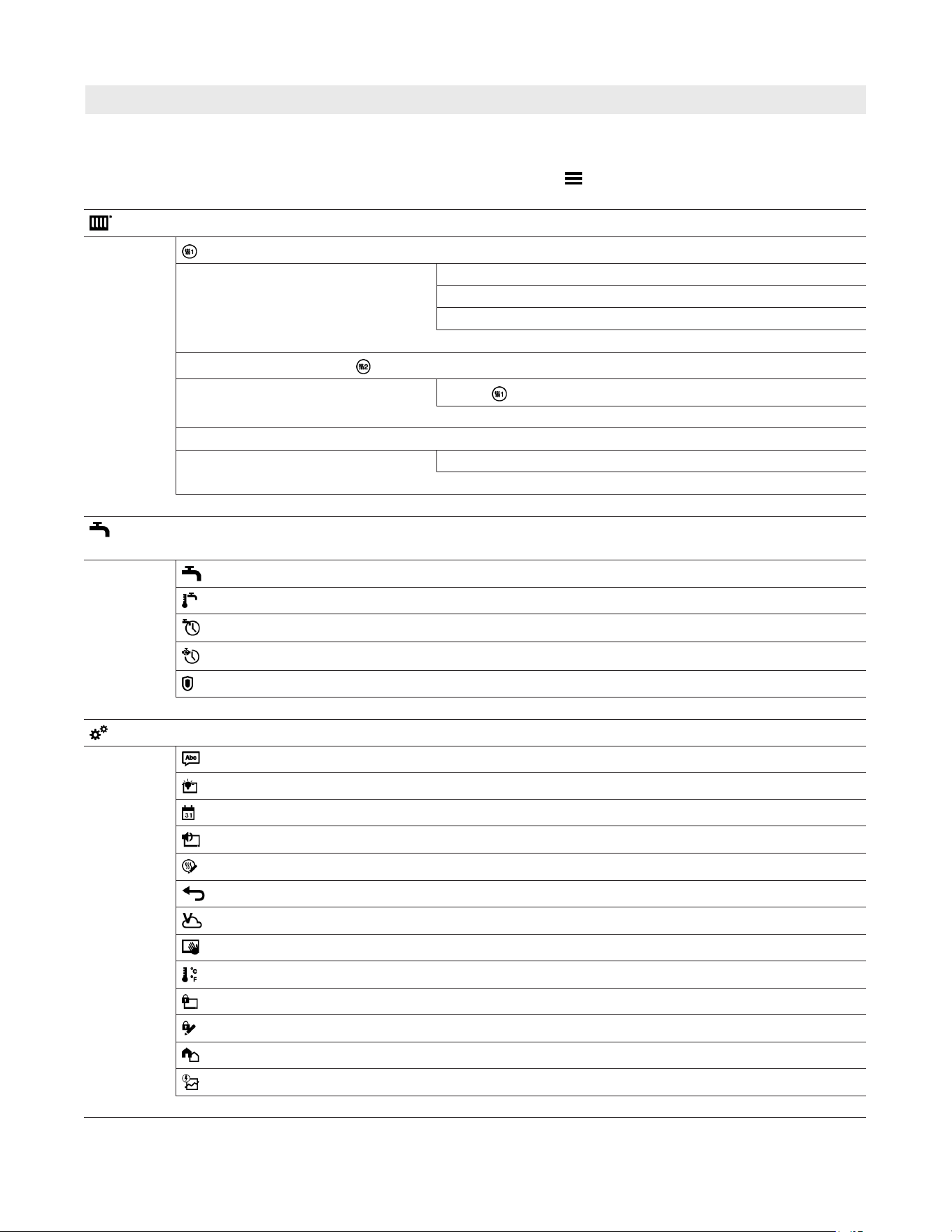
39
6175 798 - 06
Vitocrossal 200 CI2 Operating
Appendix
Overview of “Main menu”
Note: Depending on the features of your system, not all
of the displays and checks listed may be available
under .
Heating
Heating circuit 1
Set room temperatures or Set supply temperature
Time program, heating
Only for weather-compensated operation: Heating curve
Additional heating circuits
, ...
As for
Heating circuit 1
Heating zones
Supply temperature or heating curve
DHW
Note: Not valid for systems with a DHW tank with temperature switch.
DHW on/off
Set DHW temperature
Time program, DHW
Time program, DHW circulation
Hygiene function
Settings
Language
Display setting
Date and time
Buzzer
Rename heating circuits, Rename heating zones
Factory settings
Internet
Clean screen
Units
Lock panel
Change password
Selecting the default display
Energy cockpit
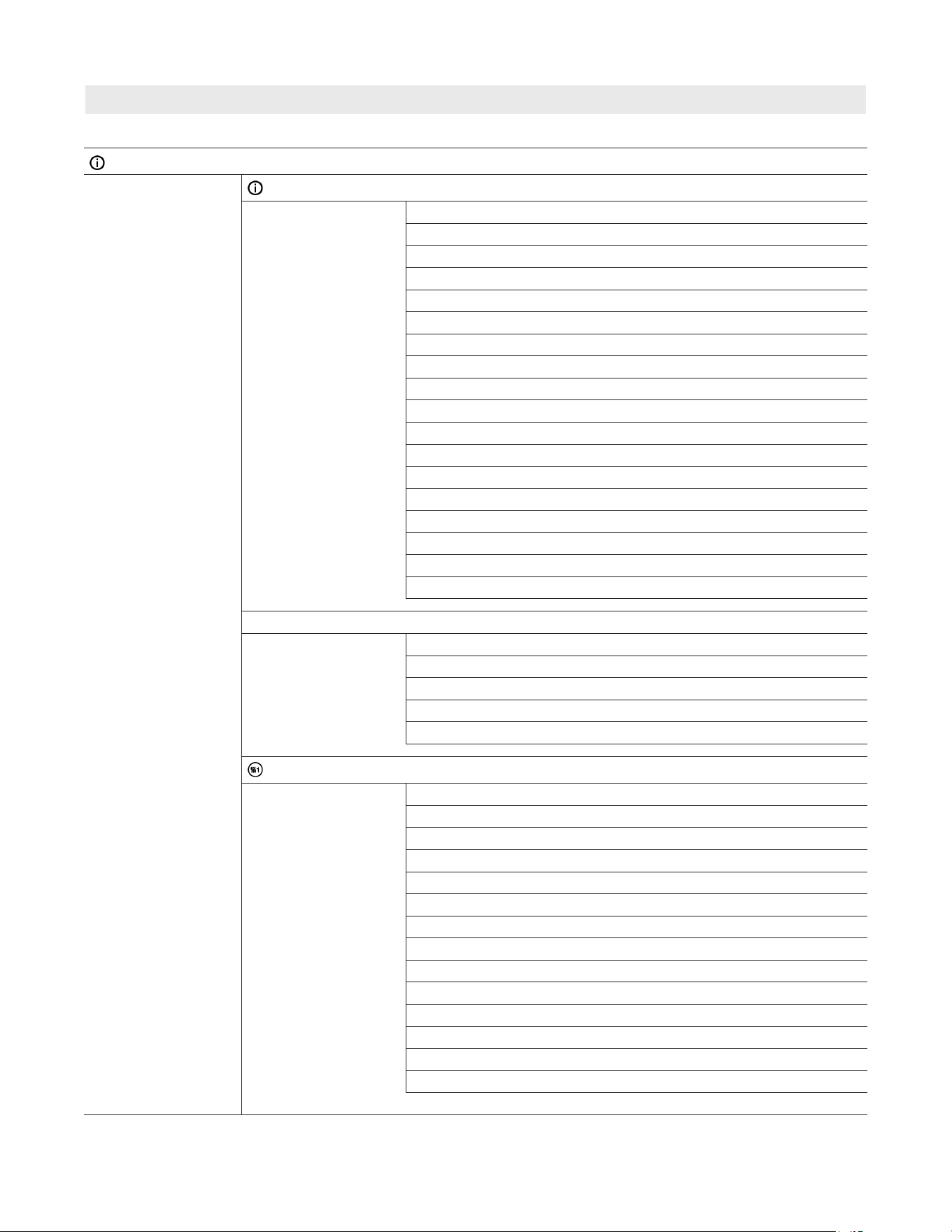
Vitocrossal 200 CI2 Operating
6175 798 - 06
40
Appendix
Overview of “Main menu” (continued)
Information
General
Only for weather-compensated operation: Outside temperature
Supply temperature
Boiler circuit pump
Temperature, low loss header
Flue gas temperature
Burner
Burner hours run
Thermal output
Central fault message
Diverter valve position
Screed function
Time
Date
Serial number boiler VIN
Serial number HMU heat management unit
OEM software number
Status of safety function, 1, 2, 3
Altitude
Heating zones 1 to 3
Status
Pump
Heating curve slope
Heating curve level
Supply temperature
Heating circuit 1
Operating program
Operating status
Only for weather-compensated or constant operation: Time program
Ext. heating circuit hookup
Status plug 96
Room temperature
Set reduced room temperature or Reduced
Set normal room temperature or Standard
Set comfort room temperature or Comfort
Only for weather-compensated operation: Heating curve slope
Heating curve level
Heating circuit pump
Supply temperature
Set supply temperature
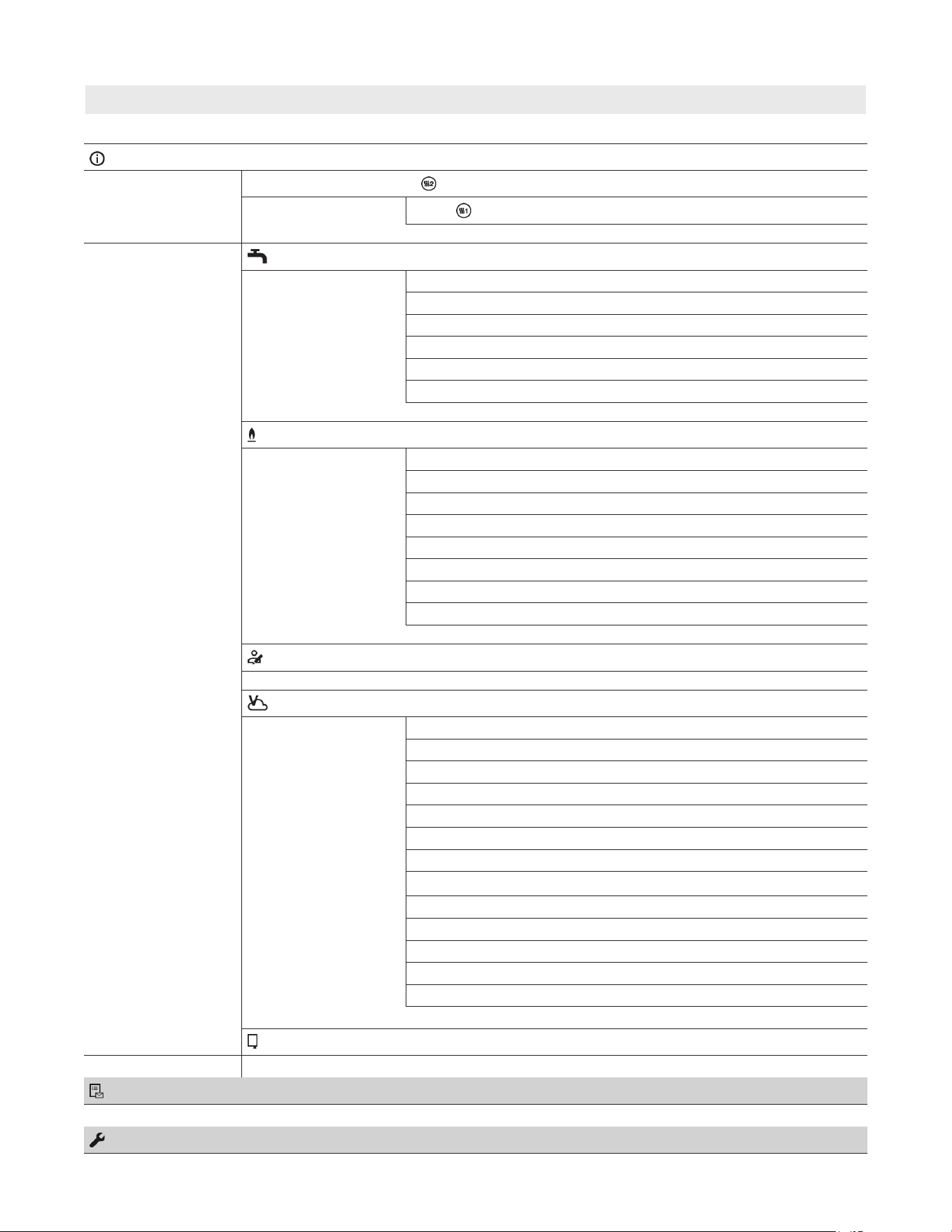
41
6175 798 - 06
Vitocrossal 200 CI2 Operating
Information (continued)
Additional heating circuits , ...
As for Heating circuit 1
DHW
Time program, DHW
Time program, DHW circulation
DHW temperature
DHW circulation pump
Tank loading pump
Status of tank with temperature switch
Burner
Burner
Burner hours run
Burner starts
Burner modulation
Supply temperature
Flue gas temperature
Flow rate in L/h
Status of external blocking
Contractor contact details
Internet
Manufacturer’s details
MAC address
Activated
Network
Signal strength
DHCP activated
Ipv4 address
Ipv4 subnet mask
Standard gateway
Primary DNS server
Secondary DNS server
Backend connection
Network connection
Open source licence
Message lists
Service
Appendix
Overview of “Main menu” (continued)

Vitocrossal 200 CI2 Operating
6175 798 - 06
42
Appendix
Terminology
Standby mode
Heat generation is switched off. Only frost protection
of boiler and DHW tank is active. No central heating,
no DHW heating
Setback mode (reduced heating operation)
See “Reduced heating operation”.
System version
The system version describes the components of your
system.
Some examples:
Boiler
Heating circuit pump
Mixing valve
Valves
Electronics module
Radiator
Every system is individually configured and adapted to
the local conditions by your heating contractor.
Operating program
The operating program enables you to define the
following, for example:
How you heat your rooms
Whether you heat DHW
Operating status
See “Time program”.
Operating mode
See “Heating operation”.
Mixing valve extension kit
Assembly (accessories) for controlling a heating circuit
with mixing valve: See “Mixing valve”.
Infloor heating
Infloor heating systems are slow, low temperature
heating systems that respond only very slowly to short
term temperature changes.
Heating with reduced room temperature at night therefore
does not result in any significant energy savings.
Heating operation
Operating modes
To heat your home, the boiler provides heat as specified
by the set supply temperature. The operating mode
determines whether the supply temperature is specified
with a fixed value or whether it is automatically
calculated and adjusted subject to several ancillary
conditions.
Your contractor can configure the following operating
modes during commissioning:
Weather-compensated operation
Constant operation
Room temperature-dependent operation
Comfort mode
For periods when you are at home during the day, heat
your home with the comfort room temperature or the
comfort supply temperature, depending on the operating
mode. Set the periods (time phases) with the “Comfort”
temperature level using the time program for central
heating.
Room temperature-dependent heating operation
In room temperature-dependent operation a room is
heated until the set room temperature has been reached.
For this, a separate temperature sensor must be installed
in the room.
The heating output is regulated independently of the
outside temperature.
With this operating mode, you can operate one heating
circuit via your control unit. You can input some of the
settings for this heating circuit at your room temperature
controller.
Reduced heating operation
For periods when you will be absent or during the night,
heat your rooms with the reduced room temperature or
the reduced supply temperature, depending on the
operating mode. Set the periods (time phases) with the
“Reduced” temperature level using the time program for
central heating.
With infloor heating systems, reduced heating operation
only yields limited energy savings (see “Infloor heating
system”).
Weather-compensated heating operation
In weather-compensated operation, the supply
temperature is controlled subject to outside temperature.
More heat is made available at lower outside temperatures
than at a higher ones.
The outside temperature is captured and transmitted to
the control unit by a sensor fitted outside the building.
With this operating mode, you can operate several
heating circuits via your control unit. If remote control
units are installed in your rooms, you can also adjust
the settings at the remote control units.
Constant operation
In constant operation the boiler provides heating water
with a constant supply temperature regardless of the
outside temperature.
With this operating mode, you can operate several
heating circuits via your control unit.
Standard heating operation
For periods when you are at home during the day, heat
your home with the standard room temperature or the
standard supply temperature, depending on the operating
mode. Set the periods (time phases) with the “Standard”
temperature level using the time program for central
heating.
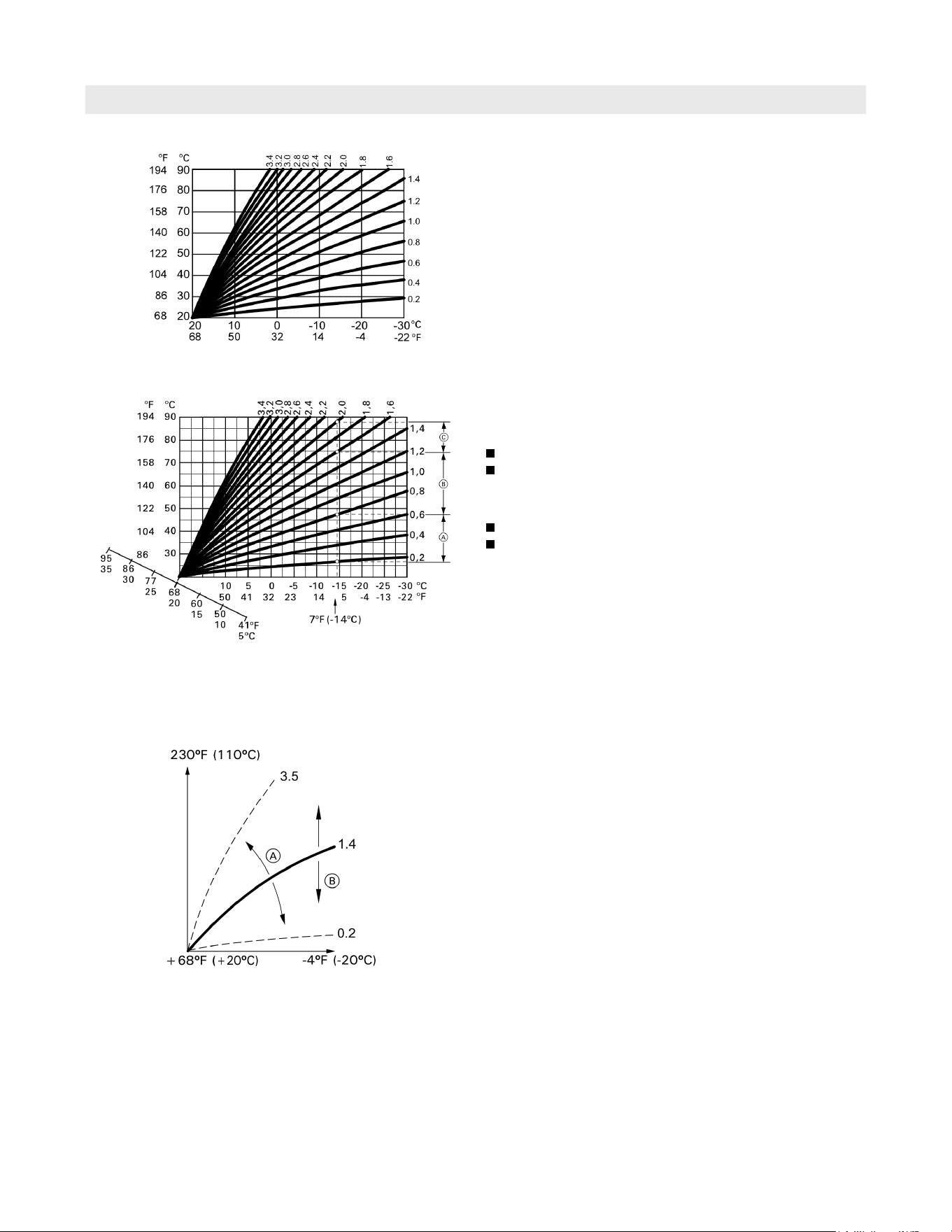
43
6175 798 - 06
Vitocrossal 200 CI2 Operating
Appendix
Terminology (continued)
Heating curve
Heating curves illustrate the relationship between the
outside temperature, the target room temperature and
the supply temperature. The lower the outside
temperature, the higher the supply temperature.
In order to guarantee sufficient heat with minimum fuel
consumption at any outside temperature, the conditions
of your building and system must be taken into
consideration. The heating curve is set by your contractor
for this purpose.
Setting the slope and shift, taking the heating curve as an
example
Factory settings:
Slope = 1.4
Level= 0
The illustrated heating curves apply with the following
settings:
Heating curve level = 0
Standard room temperature (target room temperature)
= 68°F (20°C)
Note: Setting the slope or level too high or too low will
not cause any damage to your heating system.
Both settings affect the level of the supply
temperature, which may then be too low or
unnecessarily high.For outside temperature 7°F (−14°C):
A Infloor heating system: Slope 0.2 to 0.8
B Low temperature heating system: Slope 0.8 to 1.6
C System with a supply temperature in excess of 167°F
(75°C), slope 1.6 to 2.0
A If you change the slope:
The steepness of the heating curves changes.
B If you change the level:
The heating curves are shifted in parallel in a vertical
direction.
B If you change the standard room temperature (target
room temperature):
The heating curves are offset along the “Target room
temperature” axis.
Slope
Boiler water
Set point
Outside temperature
Heating curve slope
Supply temperature
Outside temperature
Outside temperature
Supply temperature

Vitocrossal 200 CI2 Operating
6175 798 - 06
Appendix
Terminology (continued)
Heating circuit
A heating circuit is a sealed unvented circuit connecting
the boiler and the radiators, in which the heating water
circulates.
A system may comprise several heating circuits.
For example, one heating circuit for the rooms occupied
by you and one heating circuit for the rooms of a separate
apartment.
The heating circuits are designated at the factory as
“Heating circuit 1”, “Heating circuit 2”, etc.
If you or your qualified contractor have renamed the
heating circuits, e.g. as “Apartment”, that name will be
displayed instead of “Heating circuit ...”.
Heating circuit pump
Circulation pump for circulating the heating water in the
heating circuit
Mixing valve
Hot heating water from the boiler is mixed with cooled
heating water from the heating circuit. The heating water,
brought to the right temperature as required, is pumped to
the heating circuit by the heating circuit pump.
To ensure the required target room temperature is achieved,
the control unit adjusts the supply temperature via the
mixing valve to suit different conditions.
Night setback
See “Reduced heating operation”
Room dependent operation
The combustion air is drawn from the room where the
boiler is installed.
Direct vent
Combustion air is drawn from outside the building.
Room temperature
Standard room temperature or comfort room
temperature:
Set the standard room temperature or comfort room
temperature for periods when you are at home during
the day.
Reduced room temperature:
For periods when you will be absent or during the night,
set the reduced room temperature; see “Heating
operation”.
Return temperature
The return temperature is the temperature at which the
heating water leaves a system component such as a
heating circuit.
Safety valve
Safety equipment that must be installed in the cold water
pipe by your contractor. The safety valve opens
automatically to prevent excess pressure in the DHW tank.
The heating circuits are also equipped with safety valves.
Temperature target
See “Target temperature”.
Summer mode
In warmer months, you can switch off heating operation.
To do so, select “DHW” operating program “On” and
“Standby mode”.
The system remains in operation for DHW heating.
Central heating is switched off.
DHW pump
Pump for heating the DHW in the DHW tank.
Target temperature
Specified temperature that should be reached,
e.g. target DHW temperature.
Drinking water filter
A device that removes solids from potable water.
The drinking water filter is installed in the cold water
pipe upstream of the DHW tank.
Supply temperature
The supply temperature is the temperature at which the
heating water enters a system component such as a
heating circuit.
Weather-compensated operation
See “Heating operation”
Time program
In the time programs you determine what your heating
system should do at what time.
Operating status
The operating status indicates how a component of
your heating system is being operated.
For example, the operating statuses for central heating
have different temperature levels.
The times for the operating status changeover are defined
when the time program is set.
DHW recirculation pump
The DHW recirculation pump transports the DHW around
a loop line between the DHW tank and the draw-off
points (e.g. hot tap). This ensures that hot water is rapidly
available at the draw-off points.
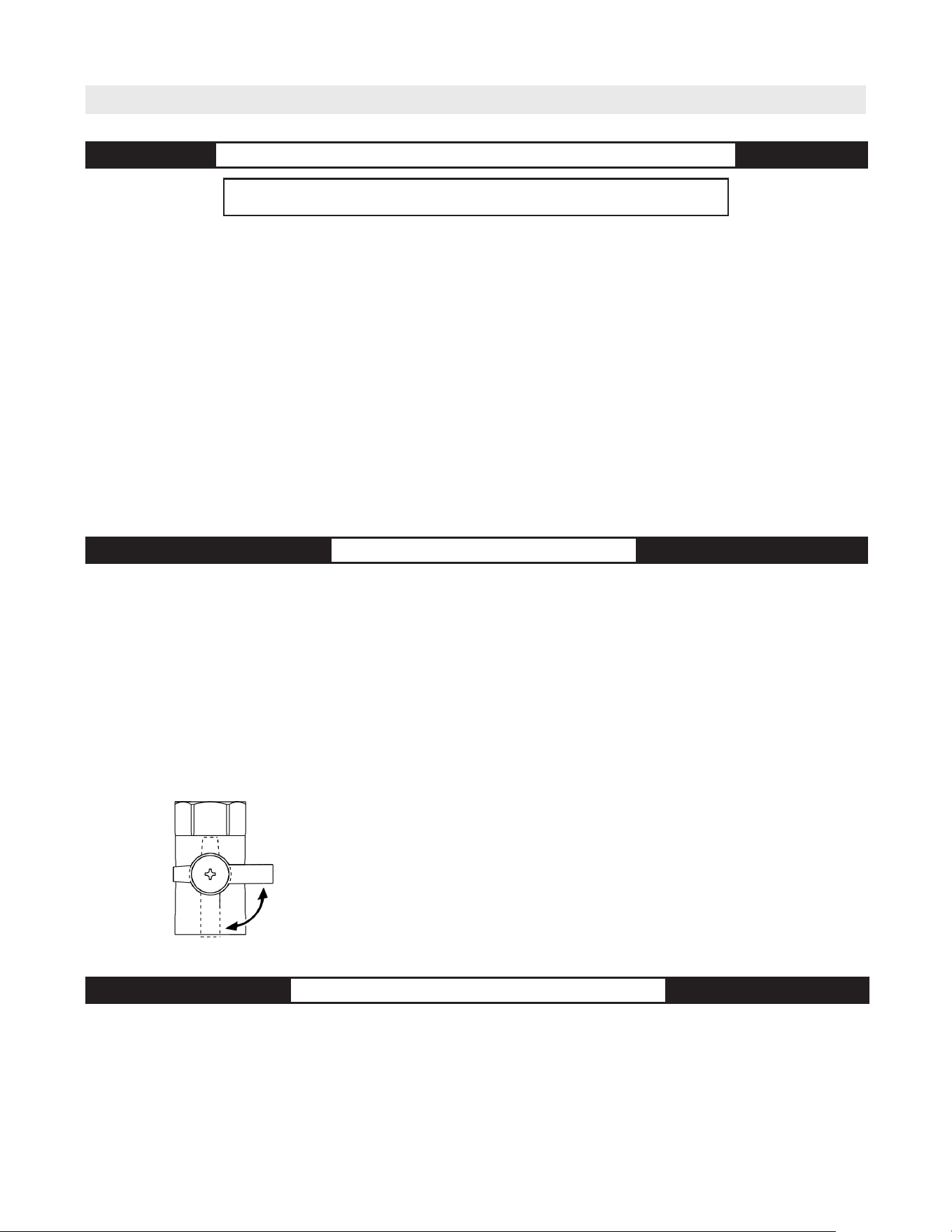
45
6175 798 - 06
Vitocrossal 200 CI2 Operating
Additional Information
Lighting and Operating Instructions
FOR YOUR SAFETY READ BEFORE OPERATING
W A R N I N G: If you do not follow these instructions exactly, a fire or
explosion may result causing property damage, personal injury or loss of life.
A. This appliance does not have a pilot. It is equipped
with an ignition device which automatically lights
the burner. Do not try to light the burner by hand.
B. BEFORE OPERATING smell all around the appliance
area for gas. Be sure to smell next to the floor
because some gas is heavier than air and will
settle on the floor.
WHAT TO DO IF YOU SMELL GAS
• Do not try to light any appliance.
• Do not touch any electric switch; do not use any
phone in your building.
• Immediately call your gas supplier from a
neighbor’s phone. Follow the gas supplier’s
instructions.
• If you cannot reach your gas supplier, call the
fire department.
C. Use only your hand to push in or turn the gas
control knob. Never use tools. If the knob will
not push in or turn by hand, don’t try to
repair it, call a qualified service technician.
Force or attempted repair may result in a fire
or explosion.
D. Do not use this appliance if any part has been
under water. Immediately call a qualified
service technician to inspect the appliance
and to replace any part of the control system
and any gas control which has been under
water.
OPERATING INSTRUCTIONS
1. STOP! Read the safety information above on
this label.
2. Set thermostat or other operating control to
lowest setting.
3. Turn off all electric power to the appliance.
4. This appliance is equipped with an ignition
device which automatically lights the burner.
Do not try to light the burner by hand.
5. Close main gas shut-off valve.
6. Wait five (5) minutes to clear out any gas.
Then smell for gas, including near the floor.
If you smell gas, STOP! Follow “B” in the
safety information above on this label. If you
don’t smell gas, go to the next step.
7. Open main gas shut-off valve.
8. Turn on all electric power to the appliance.
9. Set thermostat or other operating control to
desired setting.
10. If the appliance will not operate, follow the
instructions “To Turn Off Gas To Appliance”
and call your service technician or gas
supplier.
TO TURN OFF GAS TO APPLIANCE
1. Set thermostat or other operating control to lowest setting.
2. Turn off all electric power to the appliance if service is to be performed.
3. Close main gas shut-off valve.
Manual gas shutoff
Closed
Open

Vitocrossal 200 CI2 Operating
6175 798 - 06
46

47
6175 798 - 06
Vitocrossal 200 CI2 Operating
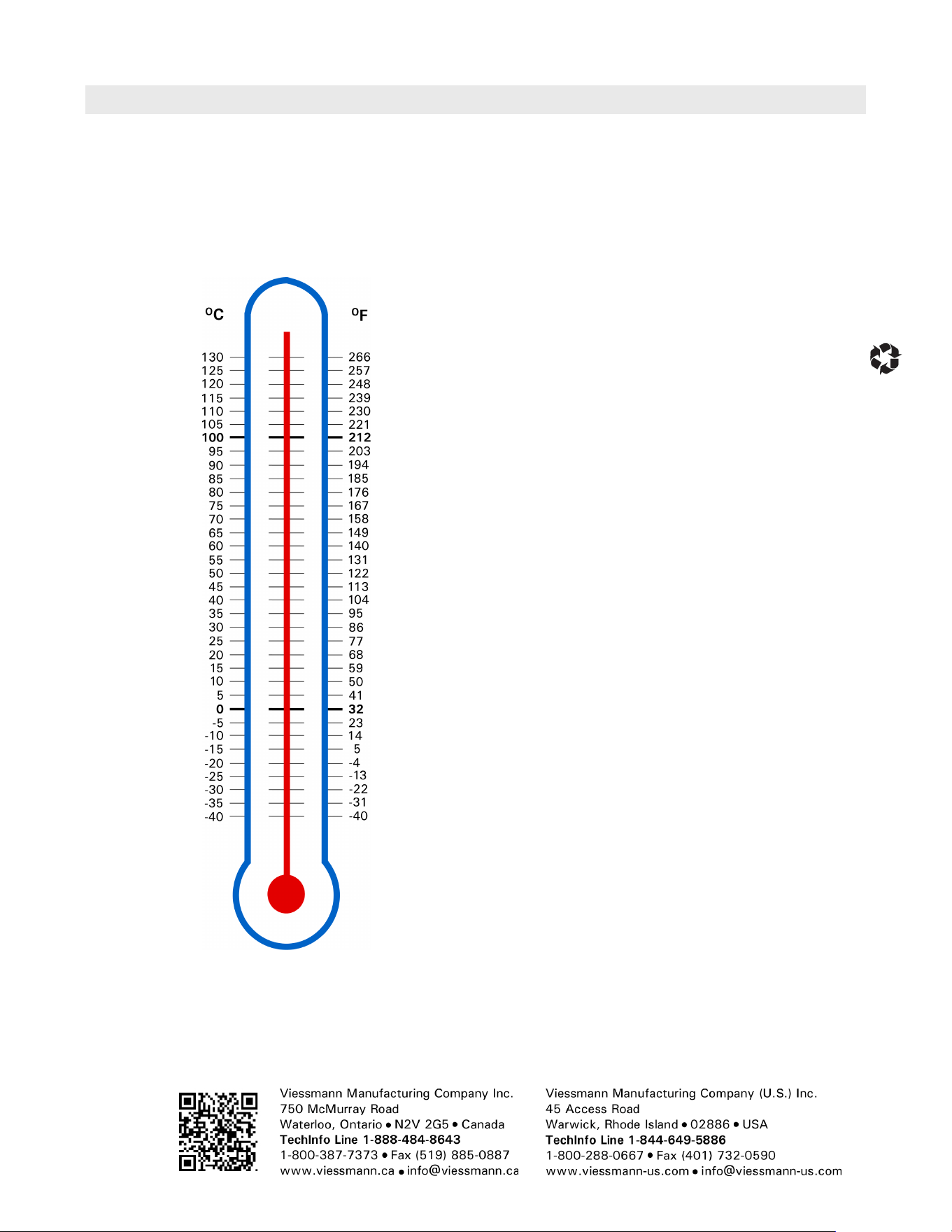
Vitocrossal 200 CI2 Operating
6175 798 - 06
Printed on environmentally friendly
(recycled and recyclable) paper.
Technical information subject to change without notice.
Scan for
digital copy
of this
document