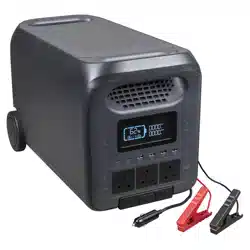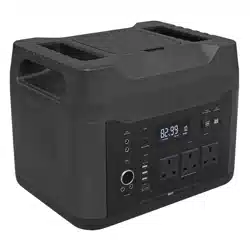
PORTABLE POWER STATION, 2200W, 230V,
1408WH
MODEL NO: SPB2200W
Thank you for purchasing a Sealey product. Manufactured to a high standard, this product will, if used according to these
instructions, and properly maintained, give you years of trouble free performance.
IMPORTANT: PLEASE READ THESE INSTRUCTIONS CAREFULLY. NOTE THE SAFE OPERATIONAL REQUIREMENTS, WARNINGS & CAUTIONS. USE
THE PRODUCT CORRECTLY AND WITH CARE FOR THE PURPOSE FOR WHICH IT IS INTENDED. FAILURE TO DO SO MAY CAUSE DAMAGE AND/OR
PERSONAL INJURY AND WILL INVALIDATE THE WARRANTY. KEEP THESE INSTRUCTIONS SAFE FOR FUTURE USE.
1. SAFETY
1.1. ELECTRICAL SAFETY FOR USE OF POWER STATION
WARNING! It is the user’s responsibility to read, understand and comply with the following electrical instructions:
You must ensure the risk of electric shock is minimised by the installation of appropriate safety devices.
An RCCB (Residual Current Circuit Breaker) should be incorporated in the main distribution board. We also recommend that an RCD
(Residual Current Device) is used with all electrical products, particularly portable equipment which is plugged into an electrical
supply not protected by an RCCB.
9 You must also read and understand the following instructions concerning electrical safety.
The Electricity At Work Act 1989 requires all portable electrical appliances, if used on business premises, to be tested by a qualied
electrician, using a Portable Appliance Tester (PAT).
9 The Health & Safety at Work Act 1974 makes owners of electrical appliances responsible for the safe condition of the appliance and
the safety of the appliance operator. If in any doubt about electrical safety, contact a qualied electrician.
You must ensure that you:
9 Inspect the power station, plugs, cables and connectors for wear and damage to ensure items are safe before connecting to the
mains power supply. If worn or damaged DO NOT use.
9 Uncoil the cable between power station and any connected equipment.
8 DO NOT pull the power station charger plug from the mains socket by the lead.
WARNING! DO NOT use any other type of power station with this product, other than the supplied mains or car power station. Failure
to observe this warning could result in injury and or re and will invalidate the warranty.
8 DO NOT try to take any of the power station and charger cables apart.
8 DO NOT use the power station charger to charge or power any other electrical item.
8 DO NOT get the power station wet, or use in wet, damp conditions (for indoor use only).
1.2. BATTERY SAFETY
WARNING! To reduce the risk of burns or re:
8 DO NOT attempt to open, disassemble, modify or service the power station.
8 DO NOT crush, puncture, short external contacts or dispose of in re or water.
8 DO NOT expose to temperatures above 60°C (140°F).
9 Recycle or dispose of used battery as stipulated by local regulation.
9 If the electrolyte in the cells gets on your skin, thoroughly wash with soap and water. If it gets in your eyes, rinse thoroughly with cool
water and seek immediate medical attention.
9 Ensure the internal battery is fully charged before initial use.
8 DO NOT move/handle/use the Power station when it is being charged.
8 DO NOT leave the unit in a discharged state, recharge battery immediately. Before storage, fully recharge the battery, subsequently
recharge the battery at least once every six months of non-use.
9 Follow these instructions and those published by the battery and vehicle manufacturers, and the maker of any equipment you intend to
use in the vicinity of the battery. Remember to review warning marks on all products and on engines.
WARNING! Modern vehicles contain extensive electronic systems.
You are required to check with the vehicle Manufacturer, for any specic instructions regarding the use of this type of
equipment on each vehicle. No liability will be accepted for damage / injury, where this product is not used in accordance
with all instructions.
Refer to
instructions
Electrical
shock
hazard
Wear eye
protection
Wear protective
gloves
Warning
corrosive
substance
Warning:
explosive
material
Keep away
from sources of
ignition
Use in well
ventilated areas
Keep in dry area
protect from rain
SPB2200W Issue 3 (2) 01/12/23
Original Language Version
© Jack Sealey Limited
1.3. PERSONAL PRECAUTIONS
9 Ensure there is another person within hearing range of your voice and close enough to come to your aid, should a problem arise when
working near a lead-acid battery.
9 Wear safety eye protection and protective clothing. Avoid touching eyes while working near battery.
9 Have fresh water and soap nearby in case battery acid contacts skin, clothing or eyes.
9 Wash immediately with soap and water if battery acid contacts skin or clothing. If acid enters eye, flush eye immediately with cool, clean
running water for at least 15 minutes and seek immediate medical attention.
9 Remove personal metallic items such as rings, bracelets, necklaces and watches. A lead-acid battery can produce a short-circuit current
which is high enough to weld a ring or the like to metal, which would cause severe burns.
9 Ensure hands, clothing (especially belts) are clear of fan blades and other moving or hot parts of engine, remove ties and contain long hair.
8 DO NOT smoke or allow a spark or flame in the vicinity of battery or engine.
1.4. GENERAL SAFETY INSTRUCTIONS
9 Familiarise yourself with the application and limitations of the Power station as well as the potential hazards.
9 Use the Power station in the upright position only and ensure it is placed on a stable surface which will adequately support its weight.
9 Keep tools and other items away from the engine and ensure you can see the battery and working parts of engine clearly.
9 Keep children and unauthorised persons away from the working area.
8 DO NOT allow power clamps to touch each other or to make contact with any metallic part of the vehicle.
8 DO NOT cross connect power leads from Power station to battery. Ensure positive (+/RED) is to positive and negative (-/BLACK) is to negative.
8 DO NOT pull the cables or clamps from the battery terminals.
8 DO NOT use the power station outdoors, or in damp, or wet locations and DO NOT operate within the vicinity of flammable liquids or gases.
8 DO NOT use for a task for which it is not designed.
9 When not in use, store carefully in a safe, dry, childproof location.
9 Only use for starting vehicles with 12V systems. DO NOT use for other vehicles such as aircraft , ships etc.
8 DO NOT use in place of a vehicle battery.
9 Use the jumper cable provided with this unit only.
8 DO NOT Jump Start more than 3 times in a row. It could damage the unit by overheating. Give two minutes between attempts.
9 Remove the product from the vehicle battery within 30 seconds of Jump Starting. If not, it could lead to damage.
8 DO NOT modify or disassemble Power Station. Only a repair technician may repair this unit.
8 DO NOT drop unit. If unit receives a sharp blow or is otherwise damaged in any way have it checked by a qualied technician.
8 DO NOT use the unit to jump start a vehicle while charging the internal battery.
NOTE: This appliance can be used by children aged from 8 years and above and persons with reduced physical, sensory or mental
capabilities or lack of experience and knowledge if they have been given supervision or instruction concerning use of the appliance
in a safe way and understand the hazards involved. Children shall not play with the appliance. Cleaning and user maintenance
shall not be made by children without supervision.
2. INTRODUCTION
LiFePO4 battery can be charged and discharged 3000 times before it starts to lose performance. The power station is capable of
charging an average phone battery over 100 times or supplying power to a car fridge for 12hrs (based on a 60W Continuous draw).
12 Dierent outlets mean you are able to connect up to 12 devices at once. Integral light with ve dierent modes: High, medium, low,
ashing and SOS. Supplied with smart jump cables so the power station can be used to jump start a vehicle. There are eight forms of
built in protection including: Over-charge, short-circuit, reverse polarity, temperature protection and more. Includes battery link cable
which allows you to expand the unit’s capacity with additional power stations. Audible alarm will sound at 10% battery power to help
make sure you never run out of battery. From a completely at battery the power station will charge to full in 8hrs. Supplied with power
lead. Built-in handles for easy transportation.
3. SPECIFICATION
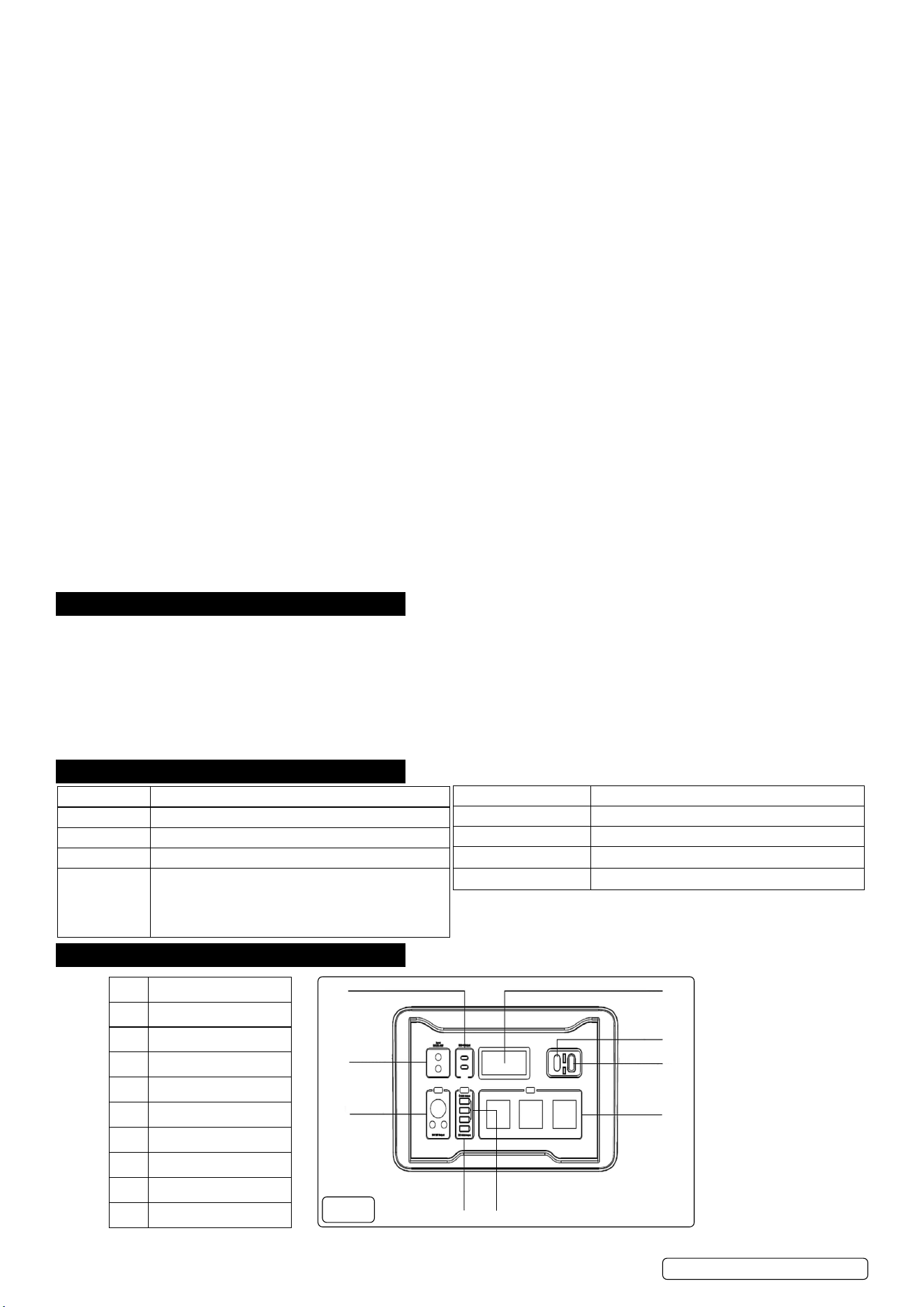
4. OPERATION
Item Description
1 USB-C Output
2 LCD
3 12V Jump Start
4 Backup Battery Port
5 Output 3 Pin 230V
6 USB 5V/2.4A Output
7 USB Quick Charge
8 12V DC Output
9 DC12-30V Input
5
1
2
3
4
67
8
9
g.1
SPB2200W Issue 3 (2) 01/12/23
Original Language Version
© Jack Sealey Limited
Battery Type: LiFePO4
Capacity: 1408Wh
Input: 12V-30V (Max. 200W)
Output 1: Car Charger + DC (x2): 12V/10A
Output 2: USB-C: PD (5V/3A, 9V/3A, 12V/3A, 15V/3A, 20V/3A,
20V/5A
USB 1 (x3): 5V/2.4A
USB 2 Quick Charge: 5V/3A, 9V/2A, 12V/1.5A (18W Max.)
Output 3: 230 ~ 50hz (x3) continuous: 2200W, Peak: 4400W
Output 4: 12V (dc) Jump Start (Cranking 500A; Peak 1000A)
Output Wave: Sine Wave
Working Temperature: -20-55°
Charger Temperature: 0-55°
4.1. Charge the unit before rst use. Connect the charge unit to a power source and insert the connector into either of the two 12v input
sockets (g 1, item 9). The LED will display current percentage charge stored and time required to charge to 100%.
4.2. OPERATION SELECTION
4.2.1. 12V DC Output (g.1, item 8): Press the black button above the panel. The LCD will illuminate and display “DC” in the lower left hand
portion of the screen. The LCD will also display current state of the power station.
4.2.2. USB 5V/2.4A Output (g.1, item 6): Press the black button above the panel. The LCD will illuminate and display symbols for both
Type C and USB connectors in the lower portion of the screen. The LCD will also display current state of the power station.
4.2.3. USB Quick Charge(g.1, item 7): Press the black button above the panel. The LCD will illuminate and display symbols for both Type C
and USB connectors in the lower portion of the screen. The LCD will also display current state of the power station.
4.2.4. USB-C Output (g.1, item 1): Press the black button below the panel. The LCD will illuminate and display symbols for both Type C and
USB connectors in the lower portion of the screen. The LCD will also display current state of the power station.
4.2.5. Output 3 Pin 230V (g.1, item 5): Press the black button above the panel. The LCD will illuminate and display “AC” in the lower right
hand portion of the screen. The LCD will also display current state of the power station.
4.2.6. Integral Light (on reverse face): The light has ve modes: high, medium, low, ashing and S.O.S. Cycle through by repeated pressing
of the button beside the light.
4.2.1. Backup Battery Port (g.1.item 4): Connect charging cable to the indicated
socket and the other end to the unit being charged.
8 DO NOT use to recharge car batteries.
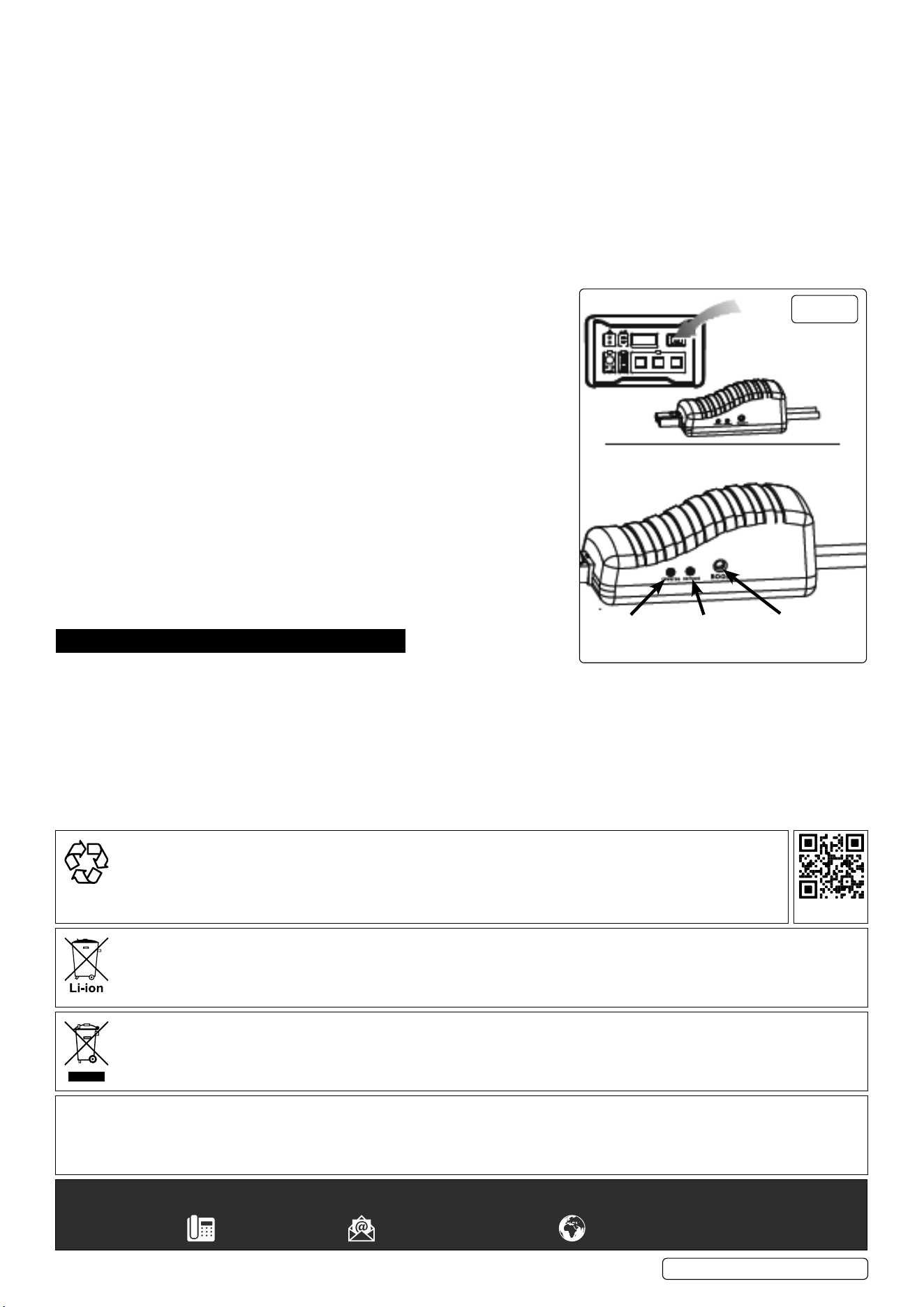
4.2.2. 12V Jump Starting (g. 1, item 3 / g.2):
4.2.2.1. Connect the Jump Start body to the Power Station (g.2 & g.1, item 3).
4.2.2.2. Connect the red clamp to the positive battery terminal.
4.2.2.3. Connect the black clamp to the negative battery terminal.
4.2.2.4. If the green LED is lit (g.2) the connection is correct, the circuit is working and
jump starting can begin.
4.2.2.5. If the green LED is blinking, it indicates that the vehicle battery is low. If so, press
the Boost Button (g.2) and hold until the green LED is solid and then turn on the
engine within 30 seconds.
4.2.2.6. If the red LED is on and the unit is making a buzzing sound it means that the
negative cable is attached to positive battery terminal and the positive cable is
attached negative battery terminal. Reconnect the cables correctly and wait for the
green LED to light before turning on the engine.
4.2.2.7. When no LED is lit and no buzzing can be heard, it indicates the vehicle battery is
damaged or the connection is incomplete. Check the connections and if correct,
press the Boost Button and hold until the green LED is solid and then turn on the
engine within 30 seconds.
5. MAINTENANCE
5.1. After each use, clean the battery charger clamps. Be sure to remove any battery
uid that will cause corrosion of the copper clamps.
5.2. Clean the outside case of the unit with a soft cloth and, if necessary, mild soap solution and damp cloth.
5.3. Keep all cables / coords etc. loosely coiled during storage to prevent damage to them.
5.4. DO NOT use the unit if cords or clamps have been damaged in any way. If any cord is damaged, it must be replaced by the
manufacturer, its service agent or qualied person in order to avoid a hazard.
5.5. Store inside, in a cool, dry place. DO NOT store the clamps on the handle, clipped together, on or around metal, or clipped to the cables.
5.6. Store the unit unplugged from the charge unit and store in an upright position.
SPB2200W Issue 3 (2) 01/12/23
Original Language Version
© Jack Sealey Limited
g.2
Green
LED
Boost
Button
Red
LED
Sealey Group, Kempson Way, Suffolk Business Park, Bury St Edmunds, Suffolk. IP32 7AR
01284 757500 sales@sealey.co.uk www.sealey.co.uk
WEEE REGULATIONS
Dispose of this product at the end of its working life in compliance with the EU Directive on Waste Electrical and Electronic Equipment
(WEEE). When the product is no longer required, it must be disposed of in an environmentally protective way. Contact your local solid
waste authority for recycling information.
Note: It is our policy to continually improve products and as such we reserve the right to alter data, specifications and component parts without prior
notice.
Important: No Liability is accepted for incorrect use of this product.
Warranty: Guarantee is 12 months from purchase date, proof of which is required for any claim.
BATTERY REMOVAL
Under the Waste Batteries and Accumulators Regulations 2009, Jack Sealey Ltd are required to inform potential purchasers of products
containing batteries (as defined within these regulations), that they are registered with Valpak’s registered compliance scheme. Jack
Sealey Ltd’s Batteries Producer Registration Number (BPRN) is BPRN00705.
ENVIRONMENT PROTECTION
Recycle unwanted materials instead of disposing of them as waste. All tools, accessories and packaging should be
sorted, taken to a recycling centre and disposed of in a manner which is compatible with the environment. When
the product becomes completely unserviceable and requires disposal, drain any uids (if applicable) into approved
containers and dispose of the product and uids according to local regulations.
REGISTER YOUR
PURCHASE HERE