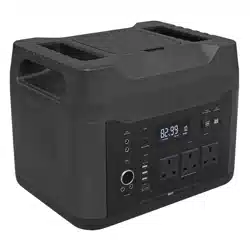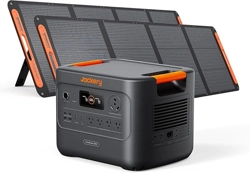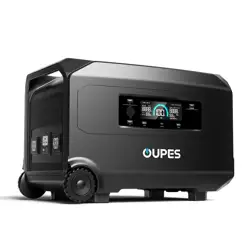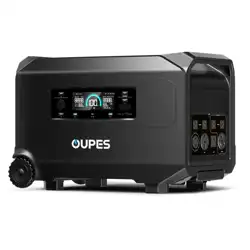
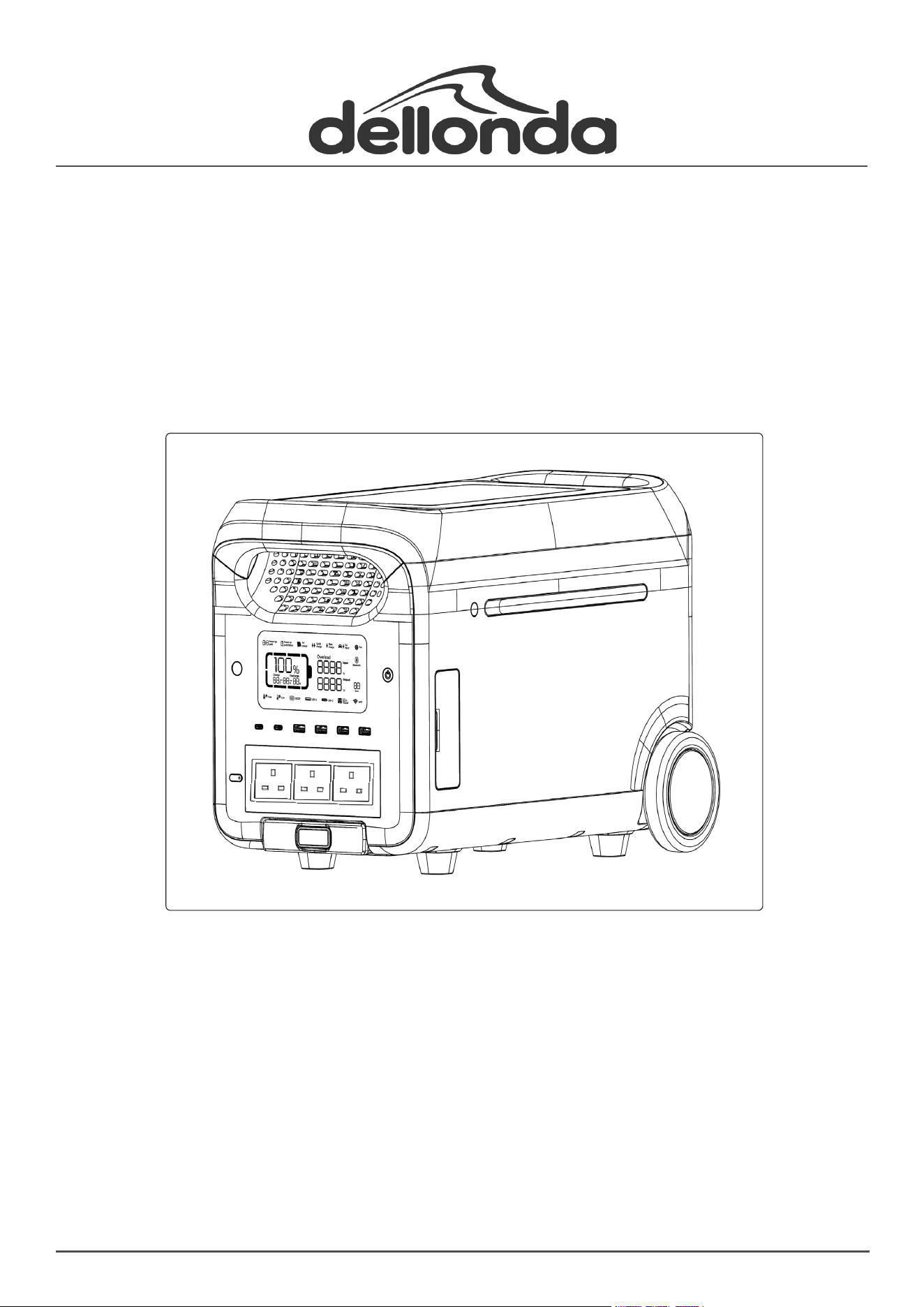
Model No. DL163
Thank you for purchasing a Dellonda product. Manufactured to a high standard, this product will,
if used according to these instructions, and properly maintained, give you years of trouble free performance.
DL163 Issue:1 30/08/24
www.dellonda.co.uk
Portable Power Station, 3000W, 2560Wh, LiFePO4 Battery,
230V, Expandable Battery
Important Information
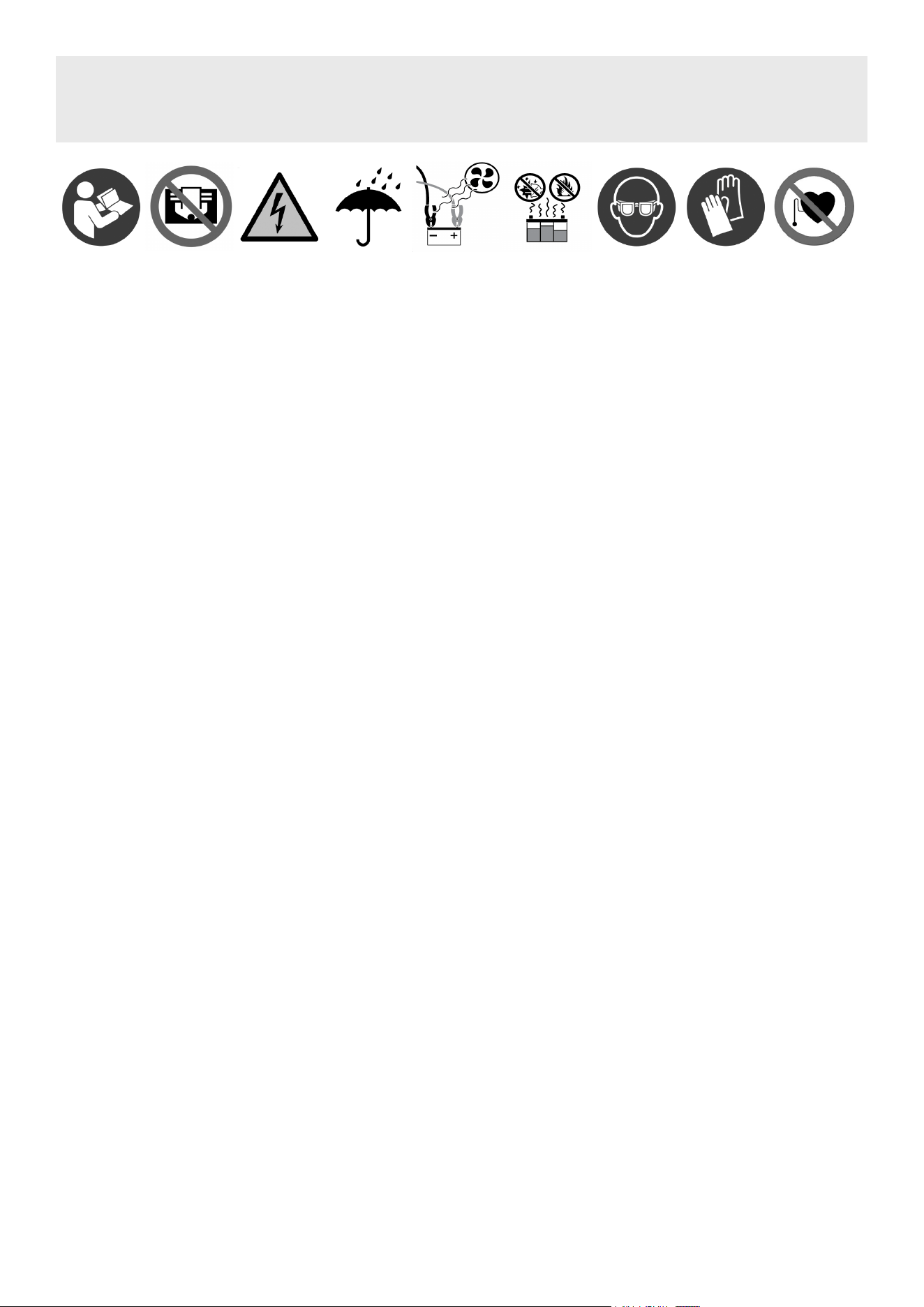
Please read these instructions carefully. Note the safe operational requirements, warnings & cautions. Use the product correctly and with care
for the purpose for which it is intended. Failure to do so may cause damage and/or personal injury and will invalidate the warranty. Keep these
instructions safe for future use.
Refer to
instruction
manual
DO NOT cover
Specication
• Electrical Class: Class II
• Capacity: 2560Wh
• Charge Time: 1.6hr
• Fuse Rating: 13A
• Input: DC 12/24V (Max. 8A), 2 x Solar Panel Input (Max. 800W DC 12A), Kettle Lead 230V~10A
• Nett Weight: 34.11kg
• Output: 3 x 3-Pin 230V~13A, 2 x USB 5V/2.4A (Max. 12W), 2 x Quick Charge USB 5V/9V/12V/1.5A (Max. 18W), 2 x Quick Charge USB-C
5V/9V/12V/15V/20V/5A (Max. 100W), 12V/10A Car Accessory Socket, 2 x DC5521 12V/3A, Anderson Connector 12V/30A
• Plug Type: 3-Pin BS
• Wattage: 3000W
• SAFETY INSTRUCTIONS
• ELECTRICAL SAFETY
• WARNING! It is the user’s responsibility to check the following:
• Check all electrical equipment and appliances to ensure that they are safe before using.
• Inspect power supply leads, plugs and all electrical connections for wear and damage.
• Ensure that the insulation on all cables and on the appliance is safe before connecting it to the power supply.
• DO NOT use worn or damaged cables, plugs or connectors.
• Ensure that any faulty item is repaired or is replaced immediately by a qualied electrician.
• If the cable or plug is damaged during use, switch off the electricity supply and remove from use. If the supply cord is damaged, it must be
replaced by the manufacturer, its service agent or similarly qualied persons in order to avoid a hazard.
• Dellonda recommend that an RCD (Residual Current Device) is used with all electrical products.
• Important: Ensure that the voltage rating on the appliance suits the power supply to be used and that the plug is tted with the correct fuse.
• DO NOT pull or carry the appliance by the power cable.
• DO NOT pull the plug from the socket by the cable.
• The power station must not be located under an electrical socket; the socket must always be accessible in order to disconnect the power station
from the electrical supply for maintenance and cleaning.
• GENERAL SAFETY
• IMPORTANT: Read all instructions and warnings carefully before starting installation. Failure to follow these instructions may result in a possible
electric shock or re hazard and will void the warranty.
• Children from age 8 years and above, persons with reduced physical, sensory, or mental capabilities those with lack of experience and knowledge
can use the appliance, if they have been given supervision or instruction concerning use of the appliance in a safe way to understand the
hazards involved.
• Children shall NOT play with the appliance.
• Cleaning and user maintenance on the appliance shall not be made by children without supervision.
• Children of less than 3 years should be kept away unless continuously supervised. Children aged from 3 years and less than 8 years shall only
switch on/off the appliance provided that it has been placed or installed in its intended normal operating position and they have been given
supervision or instruction concerning use of the appliance in a safe way and understand the hazards involved. Children aged from 3 years and
less than 8 years shall not plug in, regulate, and clean the appliance or perform user maintenance.
• The disconnection of the plug has to be such that an operator can check from any of the points to which he / she has access that the plug
remains removed.
• DO NOT attempt to repair, disassemble or modify the appliance. This unit contains no user-serviceable parts.
• Always unplug or disconnect the appliance from the mains power supply when not in use, or when moving or cleaning it.
• Keep the unit clean. DO NOT allow any object to enter or cover the ventilation openings as this may cause electric shock, re, or damage to the
power station.
• DO NOT use the appliance for anything other than its intended use.
• Avoid the use of an extension cord, as the cord may overheat and cause a risk of re.
• This appliance is designed for indoor use only and is not intended for use in bathrooms, laundry areas and similar indoor locations. Never locate
this appliance where it may become exposed to water or a damp environment. Ensure the cord is kept away from trac areas, and kept in a
position which would not present a trip hazard.
• To disconnect this appliance, turn off mains power and press and hold the On/Off button to turn off, then remove the plug from the outlet.
• DO NOT let a working power station be close to any heat source, such as a re or heater.
• DO NOT allow the power station to come into contact with any liquid.
• DO NOT use power station in a strong electrostatic or strong magnetic eld environment.
• DO NOT disassemble power station in any way or pierce it with a sharp object.
• DO NOT short the power station by wire or other metal objects.
• It is forbidden to step on, sit or climb on this product.
• DO NOT use non-genuine parts or accessories. For part or accessory replacement contact your Sealey stockist.
• When using power station, please follow the operating temperature dened in this user manual strictly. If the temperature is too high, battery may
Warning:
Electricity
Keep in dry
area. Protect
from rain.
When charging vehicle battery, use in a well ventilated area and
keep away from sources of ignition. Wear eye protection and
protective gloves.
Warning:
Electromagnetic
fields
catch re or even explode. If the temperature is too low, power station performance will be seriously impaired, even normal use will be impacted.
• Please DO NOT put other heavy objects on the power supply except the expansion battery pack. The stacking method of the expansion battery
pack has been designed and tested by structural mechanics. DO NOT stop the fan by force or expose power station in an unventilated or dusty
environment when it is working.
• Please avoid collision, dropping, and violent vibration of the power station. If an impact happens, shut down the power supply immediately.
Please x power station rmly during transportation to avoid vibration and impact.
• If power station falls into water accidentally, place it in a safe and wide area, and keep yourself away from it until it’s dry. Dried product shall not
be used again. Dispose of it properly according to local regulations and this manual.
• If power station is on re, please use re extinguishing equipment in the recommended order: water or water mist, sand, re blanket, dry powder,
carbon dioxide re extinguisher.
• If the power station is dirty or dusty, use a dry cloth to wipe it clean.
• Place power station carefully in a safe area to prevent any possible damage.
• If power station is tipped over and seriously damaged, turn off power station immediately and place the battery in a spacious ventilated place and
keep it away from ammable materials and people. Scrap it in accordance with the requirements of local laws and regulations.
• Keep power station out of the reach of children and pets.
• Keep power station in a dry and ventilated place.
• In humid environments (i.e. seaside, water, etc.), it is recommended to equip power station with moisture-proof bag.
• If water is found inside product, DO NOT use/start it again. Please take countermeasures to prevent electric shock before touching power station.
Put it in a safe and waterproof open area, and contact customer service immediately.
• It is not recommended to use power station to supply power for safety-related emergency medical equipment, including but not limited to
medical grade breathing machine (hospital version CPAP: Continuous Positive Airway Pressure), articial lung (ECMO, Extracorporeal Membrane
Oxygenation). It can be used to supply power for home version CPAP at home and does not require continuous professional monitoring. Please
follow your doctor’s advice and consult the manufacturer for any restrictions on the use of the device. For general medical equipment, please pay
attention to the power condition to ensure that power does not run out.
• Power supplies will inevitably generate electromagnetic elds when it is in use, which might affect the implantable medical device or normal
operation of personal medical device, such as pacemaker devices, cochlear implants, hearing AIDS, debrillators, etc. If any of these medical
devices are used, please consult the manufacturer about the restrictions on the use to ensure that power station is operated at a safe distance
from implanted medical devices such as pacemakers, cochlear implants, hearing AIDS, debrillators, etc.
• When the power station is connected to a refrigerator, it may automatically shut down because of the power uctuation property of the
refrigerator. When connecting the power supply to a refrigerator that stores medicine, vaccines or other valuable items, it is recommended to set
the AC output to “Never off” in the APP, so as to ensure continuous power. Users should pay attention to power consumption.
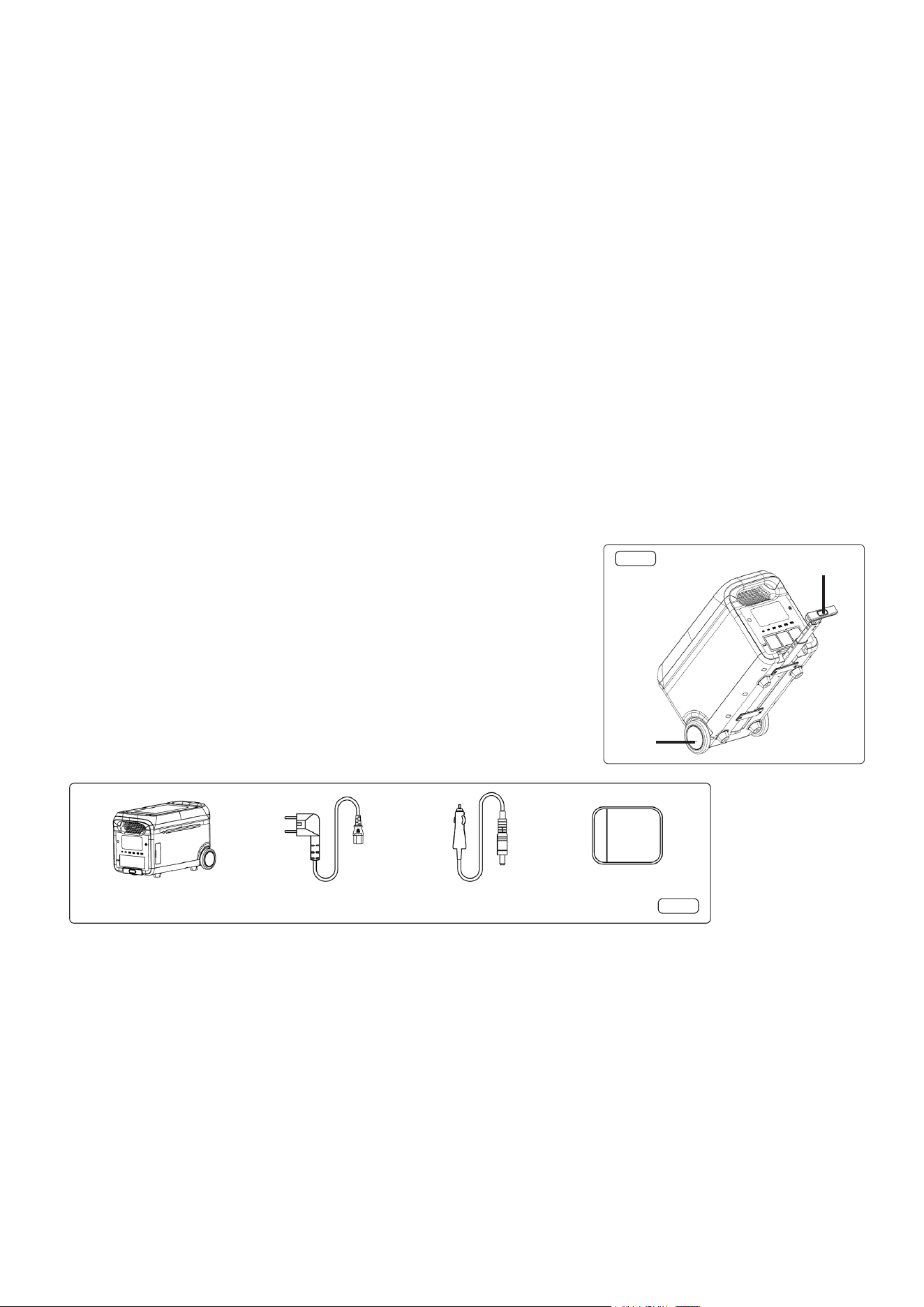
• Manual Handling (fig.1, fig.2)
• The power station must not be moved while in use. Please allow a suitable amount of time for
the unit to cool before attempting to move it.
• To use the handle, press the release button, pull out the lever to a suitable position, pull the
lever to tilt the outdoor power supply slightly, and then you can move the power station. (It
is recommended to operate with both hands.)
• DO NOT use the pull rod to lift the power station. During the process of using the pull rod, the
wheels must always be on the ground.
• It is recommended that a minimum of two people are required to lift the power station.
• Two anti-slip gloves (supplied) can be wrapped in the front and rear handles to prevent slipping.
• Contents (fig.2)
• Installation
• This product is designed to be used on a dry, clean, flat, even surface capable of securely holding its weight.
• Operation (fig.3, fig.4, fig.5)
• See App section for wifi operation.
• The bypass function causes the unit to bypass the battery when plugged into mains supply. Should the mains have an outage, the battery cuts in.
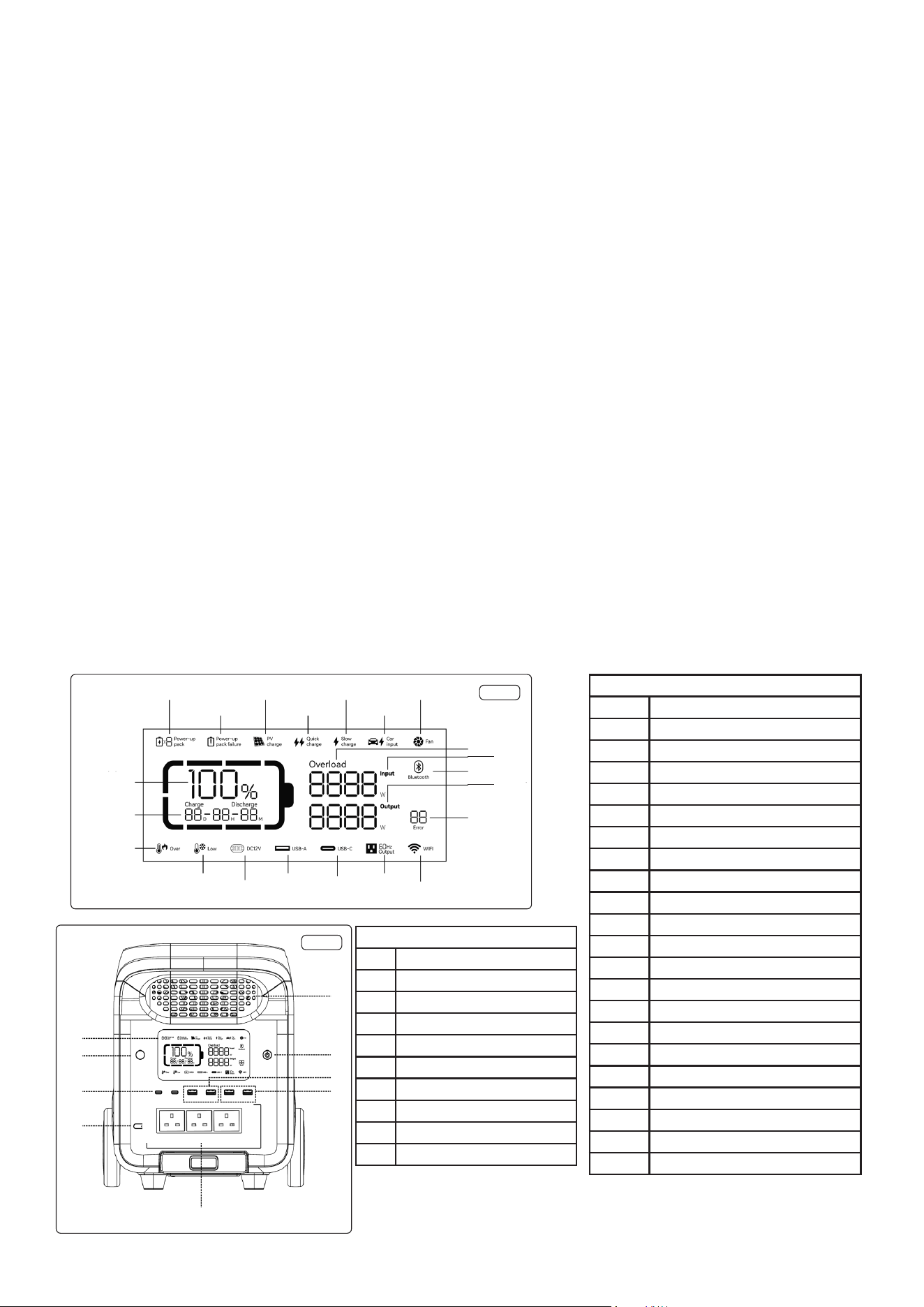
• Press the main power switch (fig.4.2) to turn on the device, then the screen will be lit and the main power indicator light will light up.
• When this product has not been interacted with for 5 minutes without any operation, the LCD display (fig.3) will be automatically extinguished.
• When this product is plugged in and unplugged from mains, pv, car charger or key operation, the LCD display will be lit up automatically. To turn
the LCD display on or off, press the display control button (fig.4.8).
• Press and hold the main power switch will turn off power station.
• In the normal mode (the power is above 5%), the default standby time of this product is 2 hours.
• When the AC output switch is not turned on, and there is no charge or discharge for 2 hours, the product will automatically shut down, and the
standby time can be set using the App.
• When the power is 5% or below, the product will be forced to enter the low power mode. In the case of no charge or discharge, the product will
adjust the standby time according to the power and automatically shut down.
• In normal mode, depress and hold the LED light button (fig.5.2) to exit the automatic shutdown setting, and the battery icon on the screen will
flash.
• Depress again to enter the automatic shutdown setting, and the battery icon does not flash. The automatic shutdown setting is to protect the
Release
Button
Wheel
fig.1
fig.2
Power Station AC Cable Car Charge Cable
Anti-slip Gloves

battery from low power, exiting this setting may damage the battery life, please use it with caution.
• It is recommended to use or store power station 20 to 30
o
C ambient temperature.
• AC OUTPUT (fig.4, fig.5)
• After ensuring that the main power is turned on, depress the AC output power switch (fig.4.6) to turn on the AC output. Depress the AC output
power switch again to turn it off.
• The default standby time of the AC output port is 1 hour. After 1 hour without any load on the AC output port of this product, the AC output power
will be automatically turned off.
• In normal mode, depress and hold the LED light button (fig.5.2), the AC output power switch can exit the automatic shutdown setting, and the
battery icon on the screen will flash. Depress and hold again and the AC output power switch enters the automatic shutdown setting, and the
battery icon does not flash.
• Depress and hold the LED light button to exit the AC automatic shutdown setting. It is applicable to AC equipment below 10W and pulse working
equipment.
• When the AC output is not in use, turn it off (fig.4.6) to save power consumption.
• DC OUTPUT (fig.5)
• After the main power switch is turned on, press the 12V DC output power switch (fig.5.6) to enable the DC output port.
• Press the 12V DC output power switch again to turn it off.
• AC CHARGING (fig.6)
• Please use the AC charging cable provided for fast charging. AC charging cable should directly plug into a 10A (or above) wall-mounted socket.
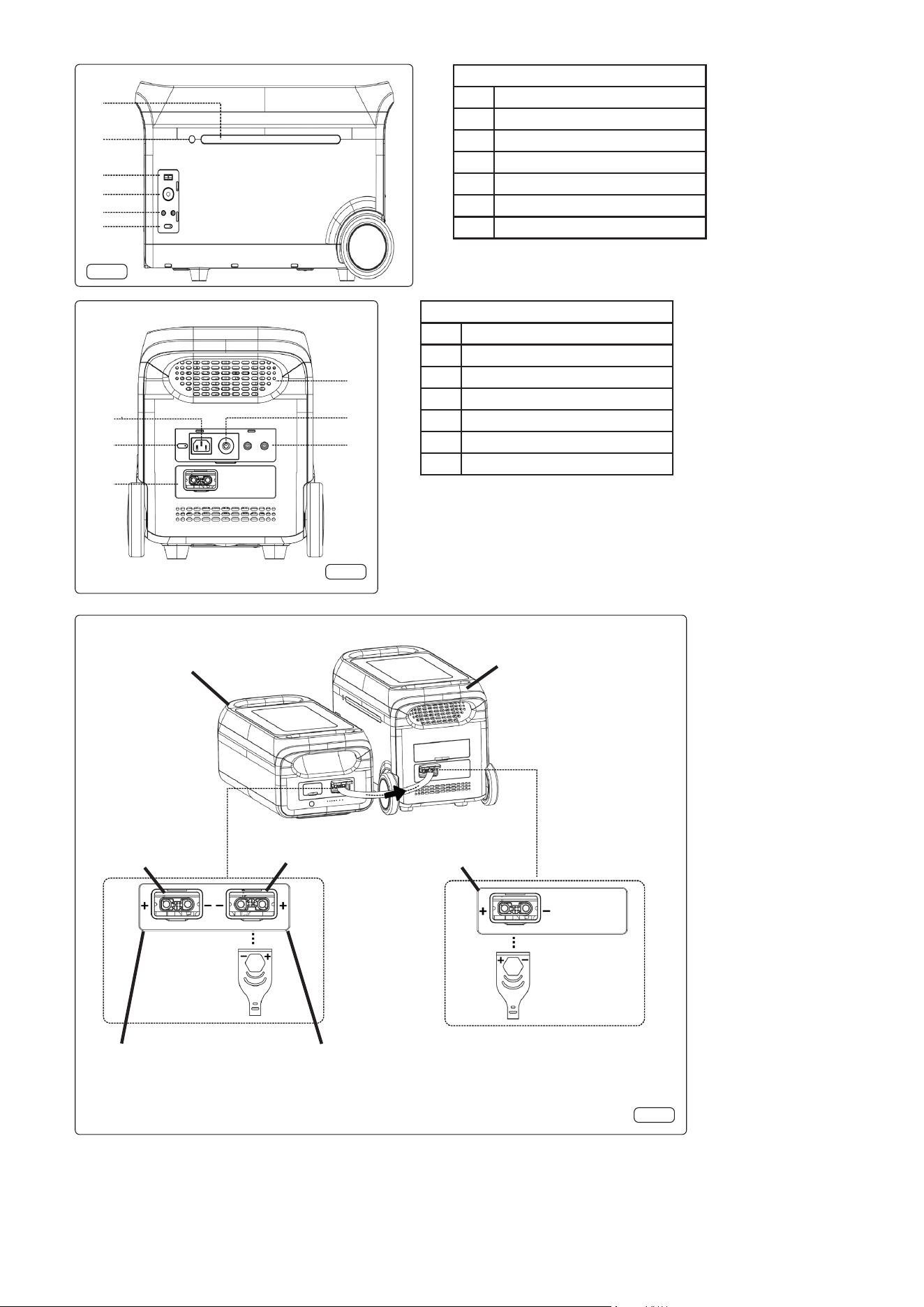
• Quick charging technology is designed for AC charging. You can control the charging power via the AC charging speed switch (fig.6.5)..
• The slow charge mode is on by default when power station is turned on, and can be switched to quick charge mode by the button (fig.6.5).
• If the current is continuously higher than 20A, the charging input port will start the self-protection function, and the charging overload protection
switch (fig.6.2) will automatically trip. Press the charge overload protection switch to restore charging after confirming no fault codes present.
• SOLAR PANEL CHARGING (fig.6)
• Please follow the Solar Panel user manual to connect the solar panels.
• Before connecting solar panels (fig.6.3), check whether panels output voltage is within power station specifications to avoid damage to power
station.
• The interface of this product is DC7909.
• CHARGING POWER STATION FROM VEHICLE (fig.6)
• Power station can be charged by the car charging port (fig.6.3) and the vehicles auxiliary power socket. It should be charged after the car is
started to avoid the car battery loss and failure to start.
• Ensure there is a good connection between the car charging port and the vehicles auxiliary power socket.
• CAR BATTERY CHARGING
• BATTERY CHARGING SAFETY INSTRUCTIONS
• Familiarise yourself with the application and limitations of the charger as well as the potential hazards. Also refer to the vehicle
manufacturer’s hand book. IF IN ANY DOUBT CONSULT A QUALIFIED ELECTRICIAN.
• Ensure the charger is disconnected from the mains supply before attaching/detaching the power clamps to/from the battery.
• Ensure the output of the charger is the same voltage as the battery.
• Ensure that during charging, the charger is placed in a location where there is sucient ventilation to prevent the build up of explosive gases from
a lead acid battery, and DO NOT cover or obstruct the charger ventilation louvres.
• If battery has caps to access the battery uid, remove the caps and check the uid level before connecting the power clamps.
• If necessary top-up the battery with distilled water by referring to the battery manufacturer’s instructions. Apply the personal safety
precautions described in part 1.3.
• If the battery terminals are corroded or dirty clean them before attaching the power clamps.
• Keep children and unauthorised persons away from the working area.
• Ensure there is effective ventilation to prevent a build-up of explosive gases, and DO NOT cover or obstruct charger ventilation louvres.
• WARNING! To prevent the risk of sparking, short circuit and possible explosion DO NOT drop metal tools in the battery area, or allow them to
touch the battery terminals.
• DO NOT try to charge a non-rechargeable battery.
• DO NOT try to charge battery if battery uid is frozen.
• DO NOT allow power clamps to touch each other or to make contact with any metallic part of the vehicle.
• DO NOT cross connect power leads from charger to battery. Ensure positive (+/RED) is to positive terminal and negative (-/BLACK) is
to negative terminal.
• DO NOT pull the cables or clamps from the battery terminals.
• DO NOT use the charger outdoors, or in damp, or wet locations and DO NOT operate within the vicinity of ammable liquids or gases.
• DO NOT use the charger for a task for which it is not designed.
• BATTERY CHARGING PROCESS (fig.5)
• Remove the battery from the vehicle and place alongside the unit within reach of the terminal clamps. Ensure the battery is in a stable position.
• Insert the clamp cable plug into the car charge output connection (fig.5.4) and connect the clamps to the battery terminals connecting the red
clamp to positive terminal and the black clamp to negative. Reverse this process when disconnecting.
• Power on the unit and switch on the DC by pressing the DC Output button (fig.5.6).
• As the battery charges, the LED displays the power station output to the battery.
• BATTERY EXPANSION
• Power station supports connection with 6 expansion battery packs at the same time for larger capacity. Please refer to the user manual of battery
pack for details.
• Before connecting the battery pack, please make sure both power station and battery pack are off.
• After the battery pack is connected, check if battery icon is shown in the displays of both power station and battery pack.
• While in charging, please DO NOT connect or remove the battery pack. If connection or need to connect or remove it, turn off power station prior
to operation.
• Please DO NOT touch the metal terminals. If there is foreign matter on the metal terminals, clean them with a dry cloth gently and carefully.
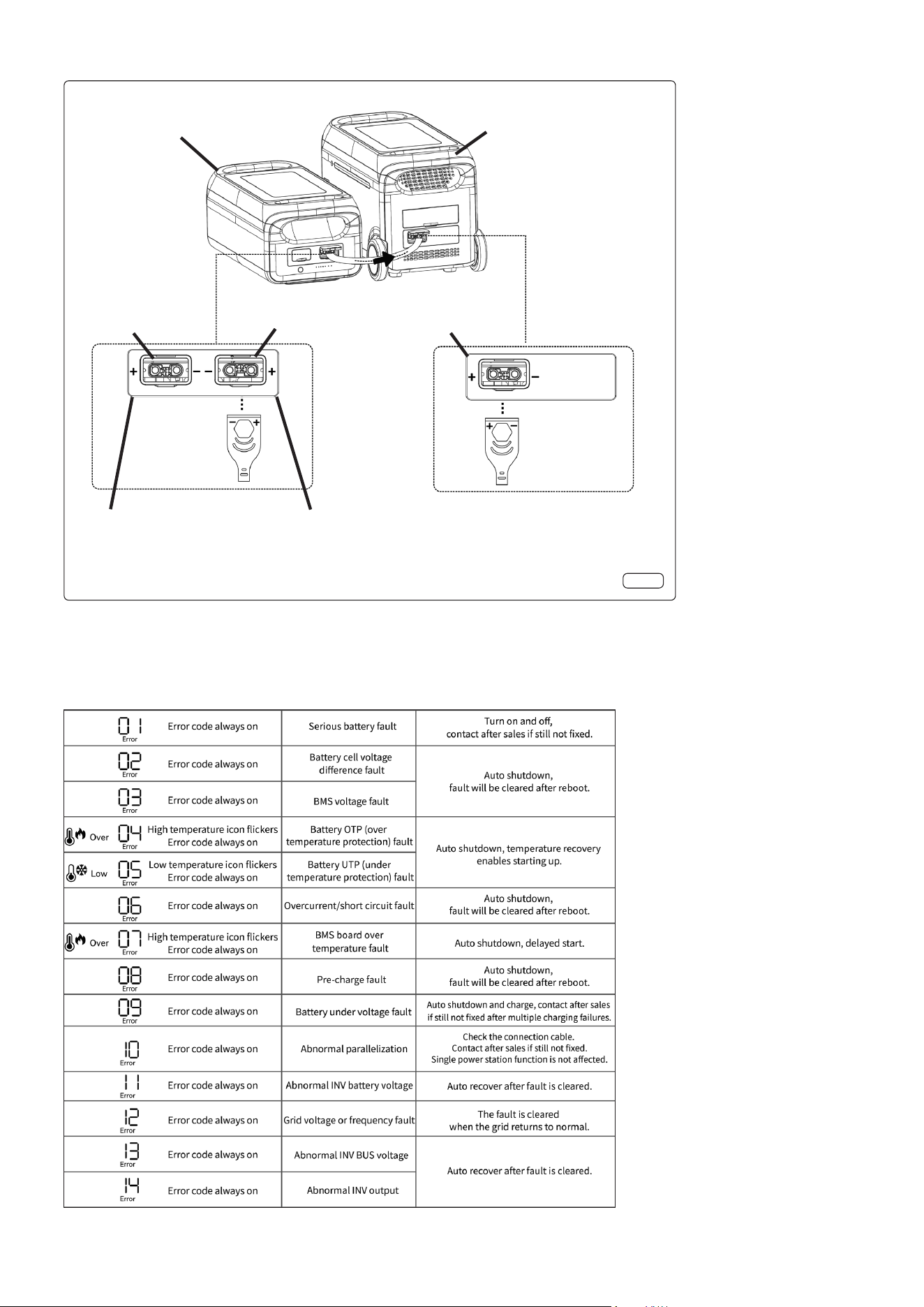
• PARALLEL MODE OF 1 POWER STATION AND 1 EXPANSION BATTERY PACK (fig.7)
• Turn off the power station and expansion battery pack.
• Plug one end of the cable to expansion port of power station, the other end to Power Output of battery pack.
• After connecting in parallel, press power button of power station to enable the power station and battery pack to show current capacity. The
power station shows the paralleled quantity, and capacity is expanded.
• Turn off the power station and expansion battery pack.
• After connecting in parallel, connect ports of the power station for charging or discharging.
• PARALLEL MODE OF 1 POWER STATION AND MULTIPLE EXPANSION BATTERY PACKS
• Turn off the power station and expansion battery packs.
• Plug one end of cable #1 to expansion port of power station, the other end to power output of battery pack #1. Plug one end of cable #2 to Power
Input of battery pack #2, the other end to Power Output of battery pack #3.
• Plug one end of cable #3 to Power Input of battery pack #2, the other end to Power Output of battery pack #3. 6 battery packs can be connected
in parallel at most.
• After connecting in parallel, press power button of the power station to enable the power station and battery packs to show current capacity.
• The power station shows the paralleled quantity, and capacity is expanded.
• After connecting in parallel, connect ports of the power station for charging or discharging.
• Maintenance
• WARNING! Before cleaning the appliance, the power supply should be disconnected and the unit should be allowed to cool.
• For long-term storage, charge and discharge every 3 months, i.e. discharge to 0% then charge to 100%.
• For safety, DO NOT store power station with temperature above 45
o
C or below -10
o
C.
• If the capacity is lower than 1%, please charge to 60%. Long-term storage with serious power shortage will cause irreversible damage to the cell
and shorten the service life of the product.
• If the capacity is seriously insufficient and idle time is too long, the product will enter deep sleep mode, and the product can only be used after
being charged.
• After charging or discharging this product, you must wait for more than 30 minutes before using it.
• Dust can be removed by lightly wiping surfaces with clean, lint free cloth or paper towel.
• CAUTION:
• DO NOT use abrasive cleaner.
• DO NOT spray liquids directly onto any surface of the unit.
• Servicing
• It is hazardous for anyone, other than a qualied service technician, to carry out any service or repair operation, which involves removal of any
components.
• Figures
1
2
3
4
5
6
7
8
9
10
11
12
17
16
15
14
13
18
21
20
19
fig.3
Figure 3 Key
Item Description
1 Battery pack connected
2 Battery pack failure
3 PV charge
4 Quick charge
5 Slow charge
6 Car charge
7 Fan status
8 Overload
9 Input power
10 Bluetooth
11 Output power
12 Error code
13 Wi-Fi connection status
14 AC output
15 USB-C output
16 USB-A output
17 DC output
18 Low temperature warning
19 Over temperature warning
20 Remaining charge / discharge time
21 Remaining battery percentage
6
7
8
1
5
9
4
3
2
Figure 4 Key
Item Description
1 Ventilation opening
2 ON/OFF button
3 USB-A quick charge output x2
4 USB-A output port x2
5 AC output sockets
6 AC output button
7 USB-C output port x2
8 LCD button
9 LCD
fig.4
•
1
2
3
4
5
6
fig.5
Figure 5 Key
Item Description
1 LED light
2 LED light button
3 Anderson connector
4 Car charge output
5 DC5521 plug x2
6 DC output ON/OFF
1
2
3
4
5
6
Figure 6 Key
Item Description
1 Ventilation opening
2 Overload protection switch
3 Solar / car charge input x2
4 Power in for battery expansion
5 Quick charge / slow charge switch
6 AC input socket
fig.6
Power Input Power Output
For External
Power Supply
Connect to Power
Input Socket or
Power Station.
Connect to
Power Output Socket
Portable Power
Station
Connect to
Power Output
Socket
Expansion Battery
Pack
fig.7
• Troubleshooting
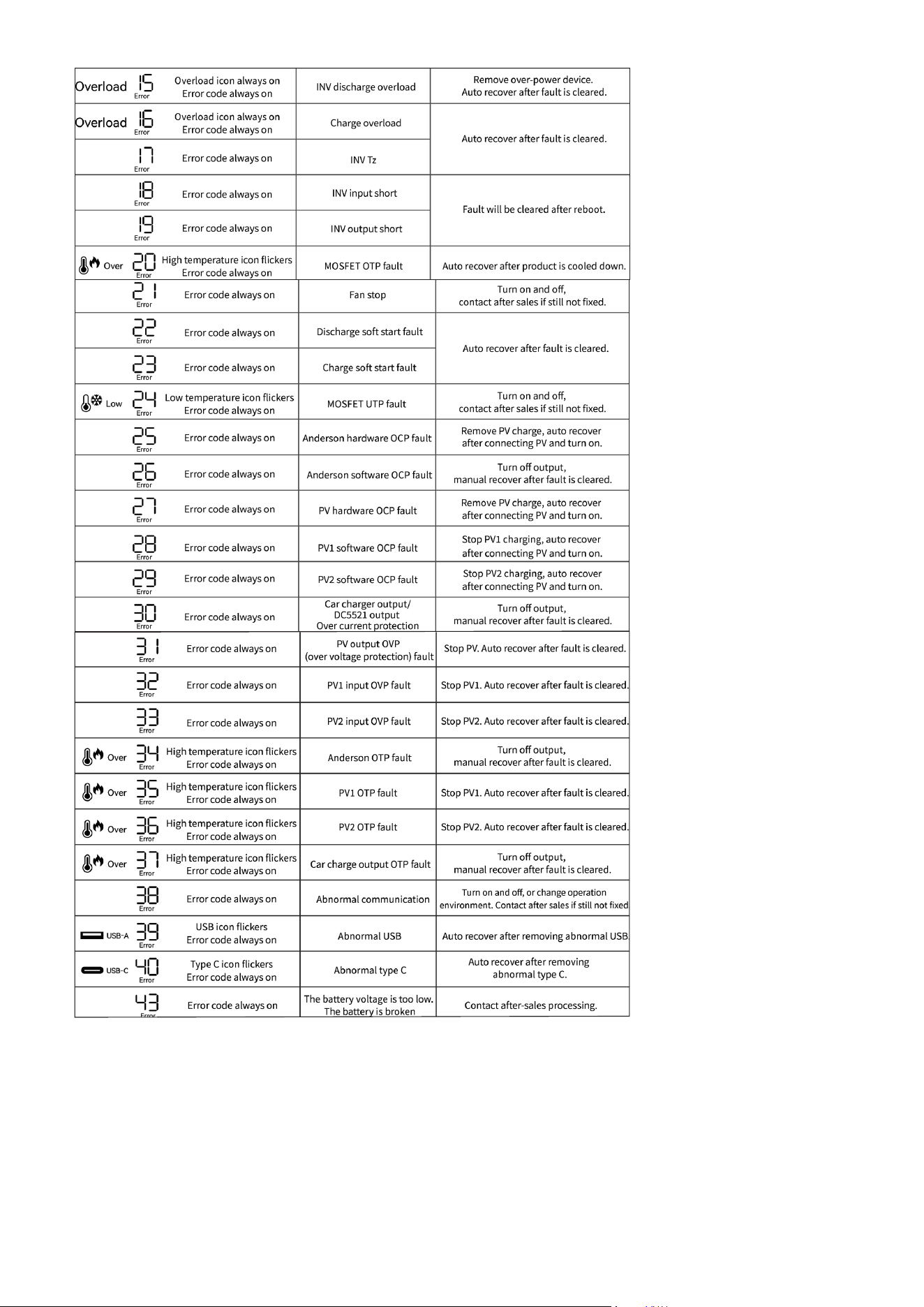
• If a warning occurs during the use of this product, and the warning icon still does not disappear after restarting the device, please stop using it
immediately and seek qualied technical advise. DO NOT try to use, charge or discharge the station in this situation.
Power Input Power Output
For External
Power Supply
Connect to Power
Input Socket or
Power Station.
Connect to
Power Output Socket
Portable Power
Station
Connect to
Power Output
Socket
Expansion Battery
Pack
fig.7

Environment Protection, Waste Electrical and Waste Electronic Equipment
Regulations (WEEE)
Recycle unwanted packaging materials. When this product is no longer required, or has reached the end of its
useful life, please dispose of in an environmentally friendly way. Drain any uids (if applicable) into approved
containers, in accordance with local waste regulations. It is our policy to continually improve products and we
reserve the right to alter data, specications and parts without prior notice. No liability is accepted for incorrect
use of this product. Guarantee is 12 months from purchase date, proof of which is required for any claim.