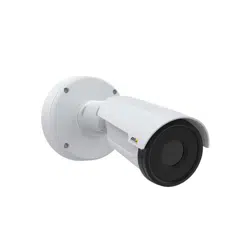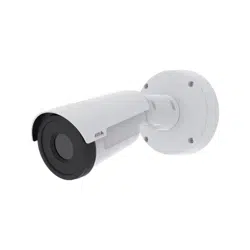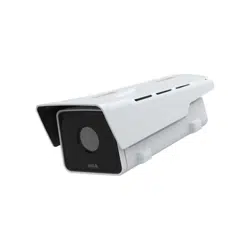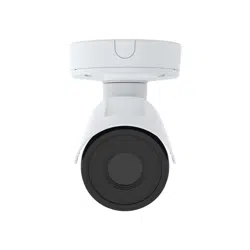

AXISQ19-EThermalCameraSeries
Solutionoverview
Solutionoverview
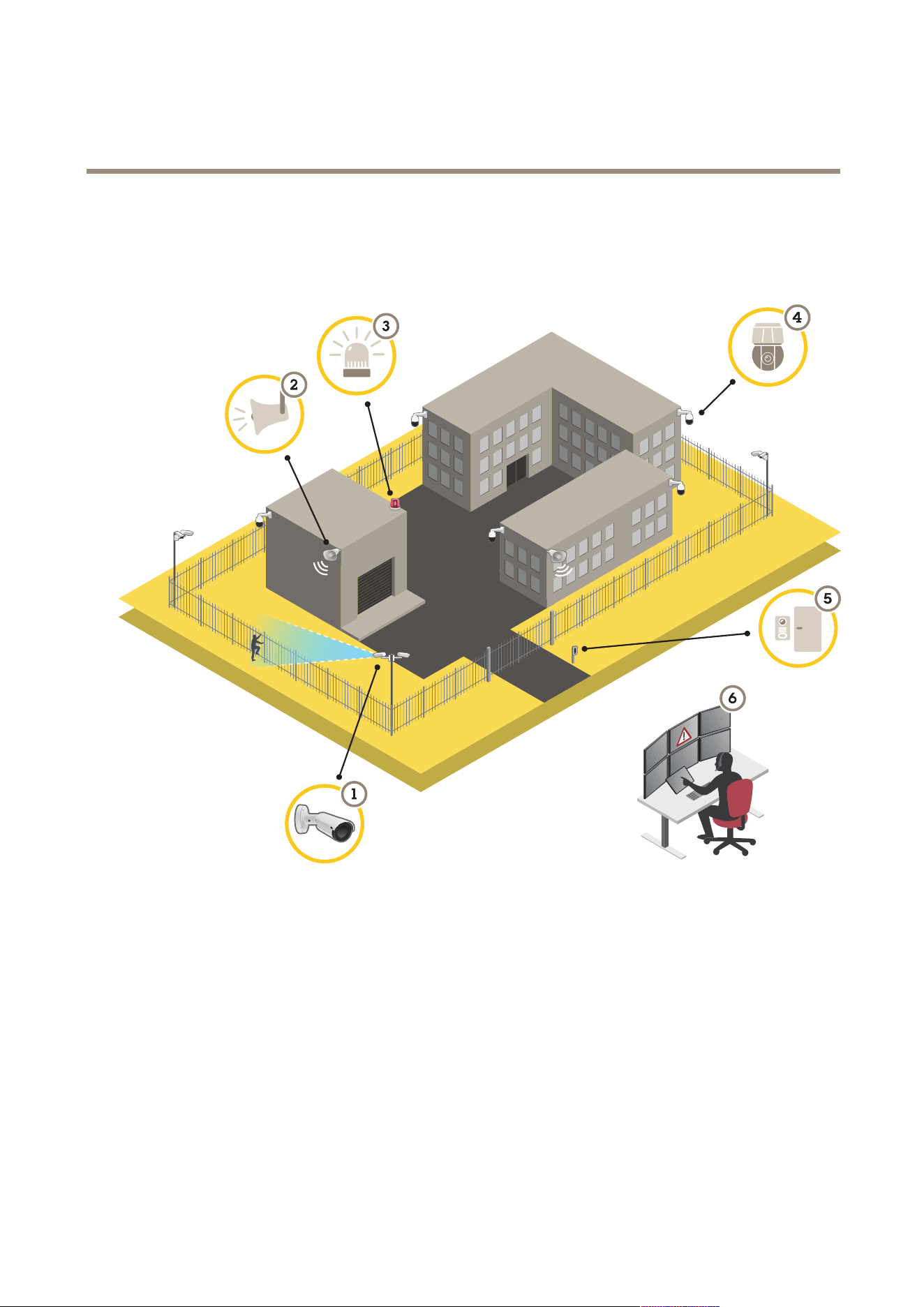
1
ThermalcamerawithAXISPerimeterDefender
2
Hornspeaker
3
Flashingbeacon
4
PTZnetworkcamera
5
Doorcontroller
6
Surveillancecenter
Perimeterprotection
Forareasinneedofintrusiondetection,youcansetupperimeterprotectionusingthermalcameraswithanalytics.Themain
objectiveforperimeterprotectionistodetectathreatoranactualintrusionattheearliestpossiblestage.
Tosetupperimeterprotection,youneedtoinstallananalyticsapplicationforperimetersurveillanceandprotectiononyourthermal
camera.AxisprovidestheAXISPerimeterDefenderapplicationforthispurpose.YoucanreadmoreaboutAXISPerimeterDefender
ataxis.com/products/axis-perimeter-defender
2


AXISQ19-EThermalCameraSeries
Getstarted
Getstarted
Findthedeviceonthenetwork
TondAxisdevicesonthenetworkandassignthemIPaddressesinWindows®,useAXISIPUtilityorAXISDeviceManager.Both
applicationsarefreeandcanbedownloadedfromaxis.com/support.
FormoreinformationabouthowtondandassignIPaddresses,gotoHowtoassignanIPaddressandaccessyourdevice.
Browsersupport
Youcanusethedevicewiththefollowingbrowsers:
Chrome
TM
Firefox
®
Edge
TM
Safari
®
Windows
®
recommended
recommended
macOS
®
recommendedrecommended
Linux
®
recommendedrecommended
Otheroperatingsystems*
*SupportediniOSandiPadOS
Ifyouneedmoreinformationaboutrecommendedbrowsers,gotoAXISOSPortal.
Accessthedevice
1.OpenabrowserandentertheIPaddressorhostnameoftheAxisdevice.
IfyoudonotknowtheIPaddress,useAXISIPUtilityorAXISDeviceManagertondthedeviceonthenetwork.
2.Entertheusernameandpassword.Ifyouaccessthedeviceforthersttime,youmustsettherootpassword.SeeSeta
newpasswordfortherootaccountonpage4.
3.Theliveviewpageopensinyourbrowser.
Verifythatnoonehastamperedwiththermware
TomakesurethatthedevicehasitsoriginalAxisrmware,ortotakefullcontrolofthedeviceafterasecurityattack:
1.Resettofactorydefaultsettings.SeeResettofactorydefaultsettingsonpage23.
Afterthereset,securebootguaranteesthestateofthedevice.
2.Congureandinstallthedevice.
Setanewpasswordfortherootaccount
Important
Thedefaultadministratorusernameisroot.Ifthepasswordforrootislost,resetthedevicetofactorydefaultsettings.See
Resettofactorydefaultsettingsonpage23
4

AXISQ19-EThermalCameraSeries
Getstarted
Towatchthisvideo,gotothewebversionofthisdocument.
www.axis.com/products/online-manual/67055#t10098905
Supporttip:Passwordsecurityconrmationcheck
1.Typeapassword.Followtheinstructionsaboutsecurepasswords.SeeSecurepasswordsonpage5.
2.Retypethepasswordtoconrmthespelling.
3.ClickCreatelogin.Thepasswordhasnowbeencongured.
Securepasswords
Important
Axisdevicessendtheinitiallysetpasswordincleartextoverthenetwork.Toprotectyourdeviceaftertherstlogin,set
upasecureandencryptedHTTPSconnectionandthenchangethepassword.
Thedevicepasswordistheprimaryprotectionforyourdataandservices.Axisdevicesdonotimposeapasswordpolicyasthey
maybeusedinvarioustypesofinstallations.
Toprotectyourdatawestronglyrecommendthatyou:
•Useapasswordwithatleast8characters,preferablycreatedbyapasswordgenerator.
•Don’texposethepassword.
•Changethepasswordatarecurringinterval,atleastonceayear.
5
AXISQ19-EThermalCameraSeries
Getstarted
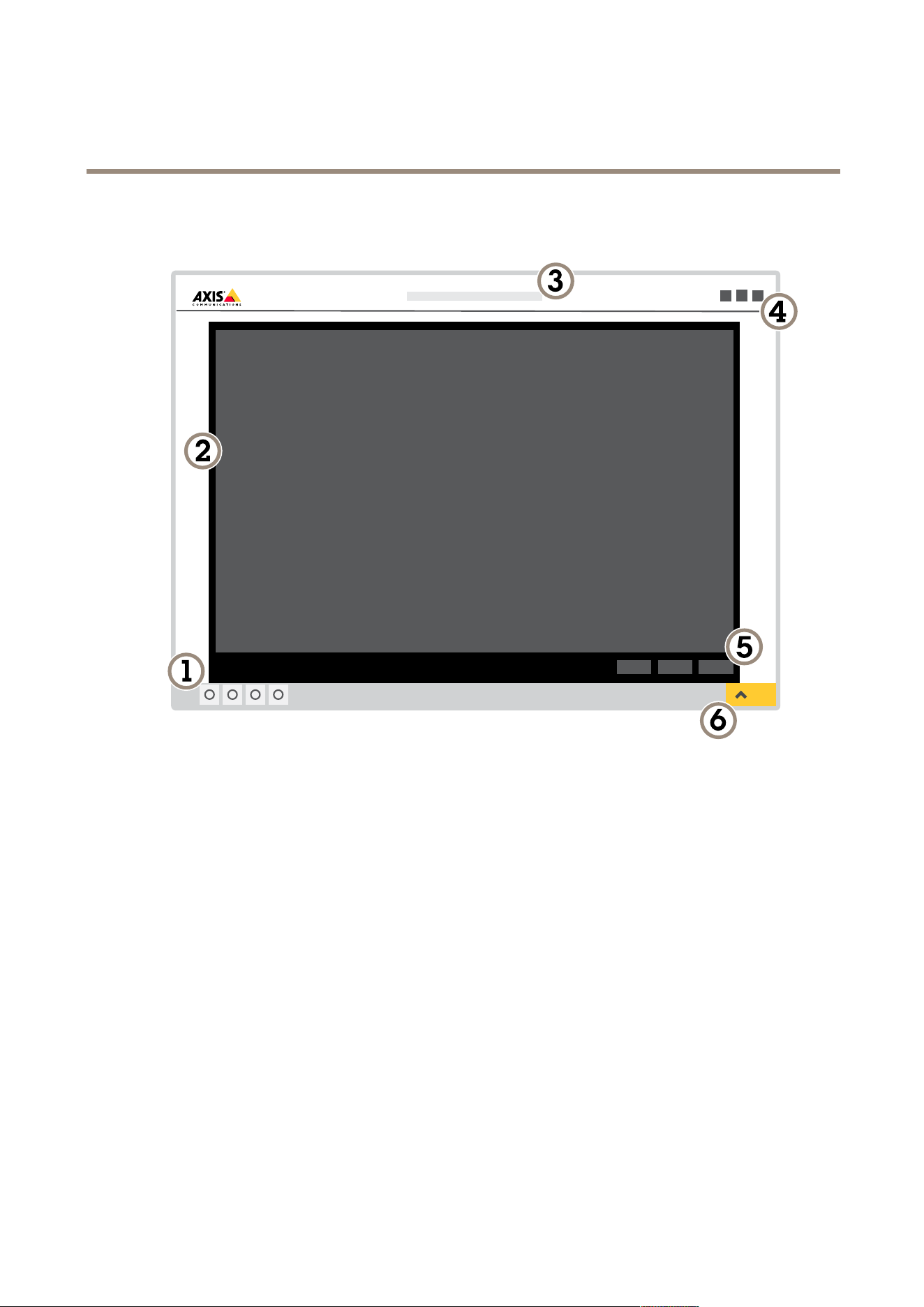
Webpageoverview
1
Liveviewcontrolbar
2
Liveview
3
Productname
4
Userinformation,colorthemes,andhelp
5
Videocontrolbar
6
Settingstoggle
6
AXISQ19-EThermalCameraSeries
Getstarted
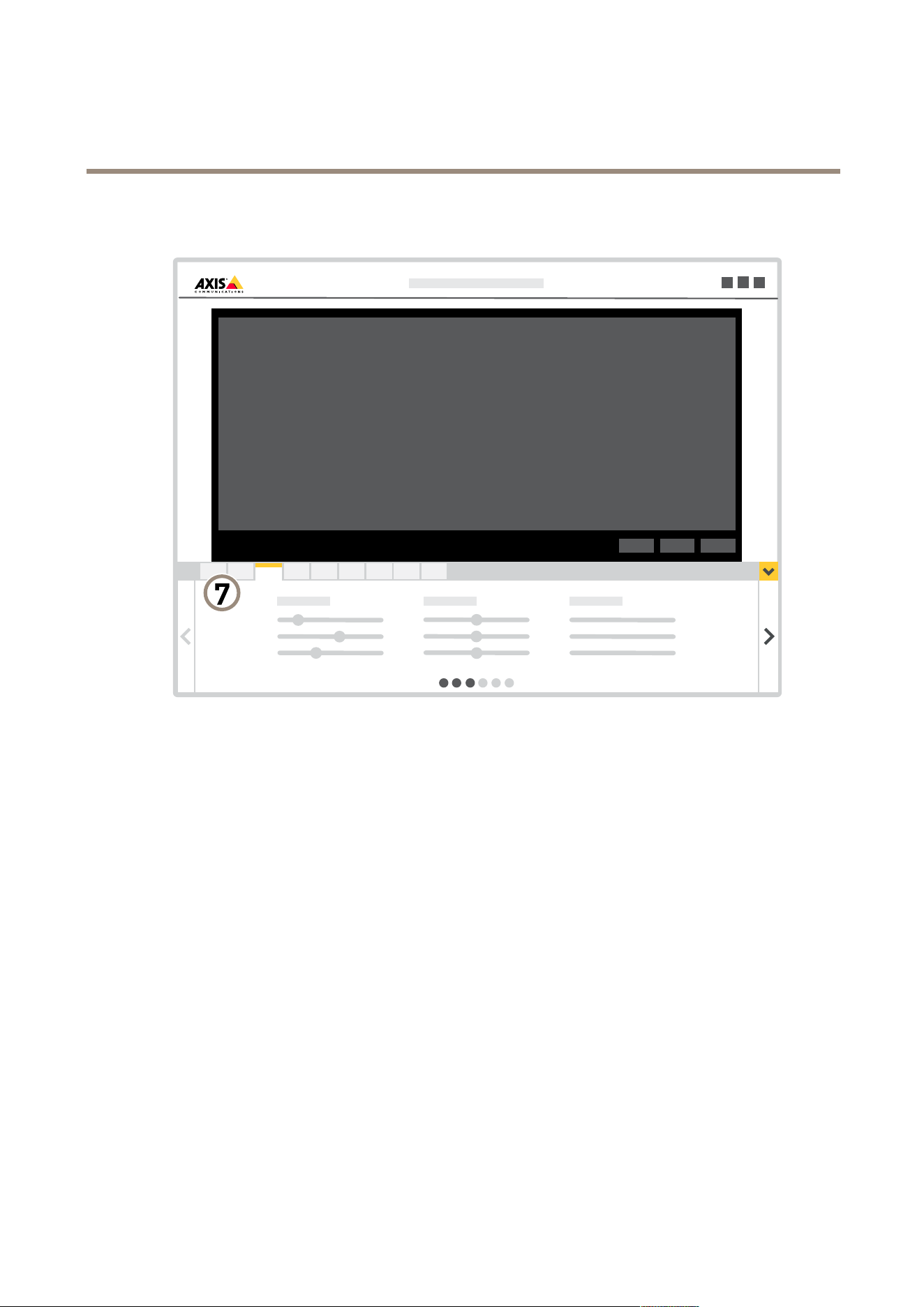
7
Settingstabs
7

AXISQ19-EThermalCameraSeries
Configureyourdevice
Configureyourdevice
Adjusttheimage
Thissectionincludesinstructionsabouthowtocongureyourdevice.Ifyouwanttolearnmoreabouthowcertainfeatures
function,gotoLearnmoreonpage17.
Hidepartsoftheimagewithprivacymasks
Youcancreateoneorseveralprivacymaskstohidepartsoftheimage.
Towatchthisvideo,gotothewebversionofthisdocument.
www.axis.com/products/online-manual/67055#t10106902
Howtocreateaprivacymask
1.GotoSettings>Privacymask.
2.ClickNew.
3.Adjustthesize,color,andnameoftheprivacymaskaccordingtoyourneeds.
Towatchthisvideo,gotothewebversionofthisdocument.
www.axis.com/products/online-manual/67055#t10106902
Howtochangetheappearanceofthemask
Showanimageoverlay
Youcanaddanimageasanoverlayinthevideostream.
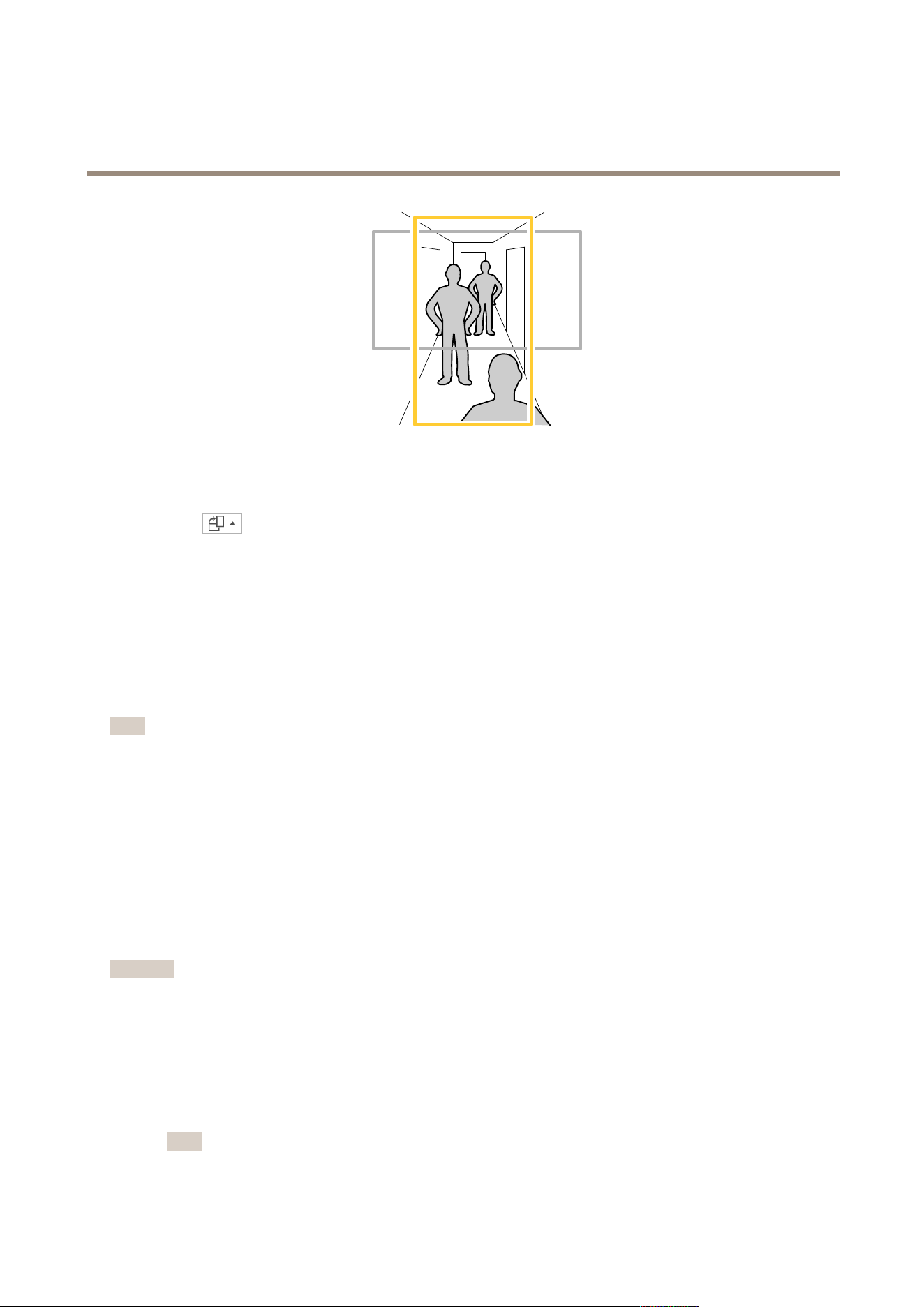
Monitorlongandnarrowareas
Usecorridorformattobetterutilizethefulleldofviewinalongandnarrowarea,forexampleastaircase,hallway,road,ortunnel.
8
AXISQ19-EThermalCameraSeries
Configureyourdevice
1.Dependingonyourdevice,turnthecameraorthe3-axislensinthecamera90°or270°.
2.Ifthedevicedoesn’thaveautomaticrotationoftheview,logintothewebpageandgotoSettings>System>Orientation.
3.Click
.
4.Rotatetheview90°or270°.
Findoutmoreataxis.com/axis-corridor-format.
StabilizeashakyimagewithElectronicImageStabilization(EIS)
ElectronicImageStabilization(EIS)canbeusedinenvironmentswheretheproductismountedinanexposedlocationandsubjectto
vibrations,forexample,windorpassingtrafc.TurnonEIStogetasmootherandsteadierimagewithoutblur.
EISalsoreducesthelesizeofthecompressedimageandlowersthebitrateofthevideostream.
Note
WhenEISisturnedontheimageiscroppedslightly,loweringthemaximumresolution.
1.GotoSettings>Image>Imagecorrection.
2.TurnonEIS.
Viewandrecordvideo
Thissectionincludesinstructionsabouthowtocongureyourdevice.Tolearnmoreabouthowstreamingandstorageworks,goto
Streamingandstorageonpage17.
Reducebandwidthandstorage
Important
Ifyoureducethebandwidthitcanresultinlossofdetailsinthepicture.
1.GotoliveviewandselectH.264.
2.GotoSettings>Stream.
3.Dooneormoreofthefollowing:
-TurnontheZipstreamfunctionalityandselectthedesiredlevel.
Note
ThezipstreamsettingsareusedforbothH.264andH.265.
9

AXISQ19-EThermalCameraSeries
Configureyourdevice
-TurnondynamicGOPandsetahighGOPlengthvalue.
-Increasethecompression.
-TurnondynamicFPS.
Note
WebbrowsersdonotsupportH.265decoding.UseavideomanagementsystemorapplicationsupportingH.265decoding.
Setupnetworkstorage
Tostorerecordingsonthenetwork,youneedtosetupyournetworkstorage.
1.GotoSettings>System>Storage.
2.ClickSetupunderNetworkstorage.
3.EntertheIPaddressofthehostserver.
4.Enterthenameofthesharedlocationonthehostserver.
5.Movetheswitchifthesharerequiresalogin,andenterusernameandpassword.
6.ClickConnect.
Recordandwatchvideo
Torecordvideoyoumustrstsetupnetworkstorage,seeSetupnetworkstorageonpage10,orhaveanSDcardinstalled.
Recordvideo
1.Gototheliveview.
2.Tostartarecording,clickRecord.Clickagaintostoptherecording.
Watchvideo
1.ClickStorage>Gotorecordings.
2.Selectyourrecordinginthelistanditwillplayautomatically.
Setuprulesandalerts
Youcancreaterulestomakeyourdeviceperformanactionwhencertaineventsoccur.Aruleconsistsofconditionsandactions.
Theconditionscanbeusedtotriggertheactions.Forexample,thedevicecanstartarecordingorsendanemailwhenitdetects
motion,orshowanoverlaytextwhilethedeviceisrecording.
Deterintruderswithaashingbeacon
Useaashingbeaconlighttoletpossibleintrudersknowthatyourperimeterisprotected.
Thisexampleexplainshowtoconnectabeaconlightandsetituptoashwheneverthethermalcameradetectsanintrusion.In
thisexample,thebeaconlightcanonlybeactivatedtoashoutsideofcehours,between18.00and08.00Monday–Friday,andit
ashesfor30secondseachtimeitisactivated.
Requiredhardware
•Connectingwires(oneblueandonered,minarea:0.25mm
2
,maxarea:0.5mm
2
)
•Flashingbeacon(12VDC,max25mA)
10

AXISQ19-EThermalCameraSeries
Configureyourdevice
Note
Themaximumlengthoftheconnectingwiresdependsonthewireareaandthepowerconsumptionoftheashingbeacon.
Connectthedevicesphysically
1.Connecttheredwiretopin2(DCoutput,12VDC)ofthecamera’sI/Oconnector.
2.Connecttheotherendoftheredwiretotheconnectormarkedwith+ontheashingbeacon.
3.Connectthebluewiretopin4(digitaloutput)ofthecamera’sI/Oconnector.
4.Connecttheotherendofthebluewiretotheconnectormarkedwith-ontheashingbeacon.
CongureI/Oports
Youneedtoconnecttheashingbeacontothecamerainthecamera’swebpage.
1.GotoSystem>I/Oports.
2.UnderPort2,enteranamefortheoutputmodule,forexample“Flashingbeacon”.
3.Tomakethebeaconstartashingwhenaneventoccurs,selectOpencircuit(NO)asnormalstate.
.
Createarule
Forthecameratosendanoticationtothebeacontostartashingwhensomethingisdetected,youneedtocreatearuleinthe
camera.
1.GotoSystem>Eventsandaddarule.
2.Enteraname,forexample“Flashingbeacon”.
3.Inthelistofconditions,underApplication,selecttheperimeterdefenderapplication.
4.SelectUsethisconditionasatrigger.
5.Click+toaddanothercondition.
6.Inthelistofconditions,underScheduledandrecurring,selectScheduledevent.
7.Inthelistofschedules,selectAfterhours.
8.Inthelistofactions,underI/O,selectOutputport.
9.Intheportlist,selectFlashingbeacon.
10.Setthedurationto30seconds.
11.ClickSave.
Deterintruderswithaudio
Useanetworkhornspeakertowarnanddeterpossibleintruders.
ThisexampleexplainshowtoconnectanAxisnetworkhornspeakerandsetituptoplayanaudioclipwheneverthethermal
cameradetectsanintrusion.Inthisexample,thehornspeakercanonlybeactivatedoutsideofcehours,between18.00and
08.00Monday-Friday.
11

AXISQ19-EThermalCameraSeries
Configureyourdevice
Connectthedevices
1.GotoSystem>Accessories.
2.UnderNetworkspeakerpairing,entertheIPaddress,username,andpasswordforthespeaker.Youneedtousean
administratororoperatoraccount.
3.ClickConnect.
Uploadaudiocliptothecamera
1.GotoAudio>Audioclipsandclick
.
2.Click+.
3.Locateandaddtheaudioclip.
4.ClickClose.
12

AXISQ19-EThermalCameraSeries
Configureyourdevice
Createarule
Forthecameratomakethespeakerplaytheaudioclipwhensomethingisdetected,youneedtocreatearuleinthecamera.
1.GotoSystem>Eventsandaddarule.
2.Enteraname,forexample"Deterwithaudio”.
3.Inthelistofconditions,underApplication,selecttheperimeterdefenderapplication.
4.SelectUsethisconditionasatrigger.
5.Click+toaddanothercondition.
6.Inthelistofconditions,underScheduledandrecurring,selectScheduledevent.
7.Inthelistofschedules,selectAfterhours.
8.Inthelistofactions,underAudioclips,selectPlayaudioclip.
9.UnderClip,selectyouruploadedaudioclip.
10.UnderAudiooutput,select1forthepairednetworkspeaker.
11.ClickSave.
Detecttamperingwithinputsignal
Thisexampleexplainshowtotriggeranalarmwhentheinputsignalhasbeencutorshort-circuited.Formoreinformationaboutthe
I/Oconnector,seepage28.
Towatchthisvideo,gotothewebversionofthisdocument.
www.axis.com/products/online-manual/67055#t101 10432
Howtosendanemailnoticationwhensomeonetamperswiththeinputsignal
1.GotoSettings>System>I/OPortsandturnonSupervisedI/O.
Createarule:
1.GotoSettings>System>Eventsandaddarule.
2.Typeanamefortherule.
3.Inthelistofconditions,selectDigitalinputandthenselectaport.
4.Inthelistofactions,selectSendnoticationtoemailandthenselectarecipientfromthelist.GotoRecipients
tocreateanewrecipient.
Tocreateanewrecipient,click
.Tocopyanexistingrecipient,click.
5.Typeasubjectandamessagefortheemail.
13

AXISQ19-EThermalCameraSeries
Configureyourdevice
6.ClickSave.
Sendanemailautomaticallyifsomeonespraypaintsthelens
Towatchthisvideo,gotothewebversionofthisdocument.
www.axis.com/products/online-manual/67055#t10106687
Howtosendanemailnoticationifsomeonespraypaintthelens
1.GotoSettings>System>Detectors.
2.TurnonTriggerondarkimages.Thiswilltriggeranalarmifthelensissprayed,covered,orrenderedseverelyoutoffocus.
3.SetadurationforTriggerafter.Thevalueindicatesthetimethatmustpassbeforeanemailissent.
Createarule:
1.GotoSettings>System>Events>Rulesandaddarule.
2.Typeanamefortherule.
3.Inthelistofconditions,selectTampering.
4.Inthelistofactions,selectSendnoticationtoemail.
5.SelectarecipientfromthelistorgotoRecipientstocreateanewrecipient.
Tocreateanewrecipient,click
.Tocopyanexistingrecipient,click.
6.Typeasubjectandamessagefortheemail.
7.ClickSave.
Audio
Addaudiotoyourrecording
Turnonaudio:
1.GotoSettings>AudioandturnonAllowaudio.
2.GotoInput>Typeandselectyouraudiosource.
Editthestreamprolewhichisusedfortherecording:
3.GotoSettings>StreamandclickStreamproles.
4.SelectthestreamproleandclickAudio.
5.SelectthecheckboxandselectInclude.
14

AXISQ19-EThermalCameraSeries
Configureyourdevice
6.ClickSave.
7.ClickClose.
15

AXISQ19-EThermalCameraSeries
Cleaningrecommendations
Cleaningrecommendations
Ifthedevicegetsgreasestainsorbecomesheavilysoiled,youcancleanitwithmild,solvent-freesoapordetergent.
NO NO
NO
TICE TICE
TICE
Neveruseharshdetergent,forexamplegasoline,benzene,oracetone.
1.Useacanofcompressedairtoremoveanydustorloosedirtfromthedevice.
2.Cleanthedevicewithasoftclothdampenedwithmilddetergentandlukewarmwater.
3.Wipecarefullywithadrycloth.
Note
Avoidcleaningindirectsunlightoratelevatedtemperatures,asthismaycausestainswhenthewaterdropletsdry.
16

AXISQ19-EThermalCameraSeries
Learnmore
Learnmore
Colorpalettes
Colorpalettesappliedtothermalimageshelpthehumaneyedistinguishimagedetails.Thecolorsinthepalettearearticially
createdpseudocolorsthatemphasizetemperaturedifferences.
Theproducthasseveralcolorpalettestochoosefrom.Ifanoperatorwatchesthevideostream,youcanchooseanyofthepalettes.If
thevideostreamisonlyusedbyapplications,selectthewhite-hotpalette.
Overlays
Overlaysaresuperimposedoverthevideostream.Theyareusedtoprovideextrainformationduringrecordings,suchasatimestamp,
orduringproductinstallationandconguration.Youcanaddeithertextoranimage.
Thevideostreamingindicatorisanothertypeofoverlay.Itshowsyouthattheliveviewvideostreamislive.
Streamingandstorage
Videocompressionformats
Decidewhichcompressionmethodtousebasedonyourviewingrequirements,andonthepropertiesofyournetwork.The
availableoptionsare:
MotionJPEG
Note
ToensuresupportfortheOpusaudiocodec,theMotionJPEGstreamisalwayssentoverRTP.
MotionJPEG,orMJPEG,isadigitalvideosequencethatismadeupofaseriesofindividualJPEGimages.Theseimagesarethen
displayedandupdatedataratesufcienttocreateastreamthatshowsconstantlyupdatedmotion.Fortheviewertoperceivemotion
videotheratemustbeatleast16imageframespersecond.Fullmotionvideoisperceivedat30(NTSC)or25(PAL)framespersecond.
TheMotionJPEGstreamusesconsiderableamountsofbandwidth,butprovidesexcellentimagequalityandaccesstoeveryimage
containedinthestream.
H.264orMPEG-4Part10/AVC
Note
H.264isalicensedtechnology.TheAxisproductincludesoneH.264viewingclientlicense.Toinstalladditionalunlicensed
copiesoftheclientisprohibited.Topurchaseadditionallicenses,contactyourAxisreseller.
H.264can,withoutcompromisingimagequality,reducethesizeofadigitalvideolebymorethan80%comparedtotheMotion
JPEGformatandbyasmuchas50%comparedtotheMPEG-4standard.Thismeansthatlessnetworkbandwidthandstoragespace
arerequiredforavideole.Orseenanotherway,highervideoqualitycanbeachievedforagivenbitrate.
H.265orMPEG-HPart2/HEVC
Note
H.265islicensedtechnology.TheAxisproductincludesoneH.265viewingclientlicense.Toinstalladditionalunlicensed
copiesoftheclientisprohibited.Topurchaseadditionallicenses,contactyourAxisreseller.
HowdoImage,Stream,andStreamprolesettingsrelatetoeachother?
TheImagetabcontainscamerasettingsthataffectallvideostreamsfromtheproduct.Ifyouchangesomethinginthistab,it
immediatelyaffectsallvideostreamsandrecordings.
17
AXISQ19-EThermalCameraSeries
Learnmore
TheStreamtabcontainssettingsforvideostreams.Yougetthesesettingsifyourequestavideostreamfromtheproductanddon’t
specifyforexampleresolution,orframerate.WhenyouchangethesettingsintheStreamtab,itdoesn’taffectongoingstreams,but
itwilltakeeffectwhenyoustartanewstream.
TheStreamprolessettingsoverridethesettingsfromtheStreamtab.Ifyourequestastreamwithaspecicstreamprole,the
streamcontainsthesettingsofthatprole.Ifyourequestastreamwithoutspecifyingastreamprole,orrequestastreamprole
thatdoesn'texistintheproduct,thestreamcontainsthesettingsfromtheStreamtab.
Bitratecontrol
Withbitratecontrol,youcanmanagethebandwidthconsumptionofyourvideostream.
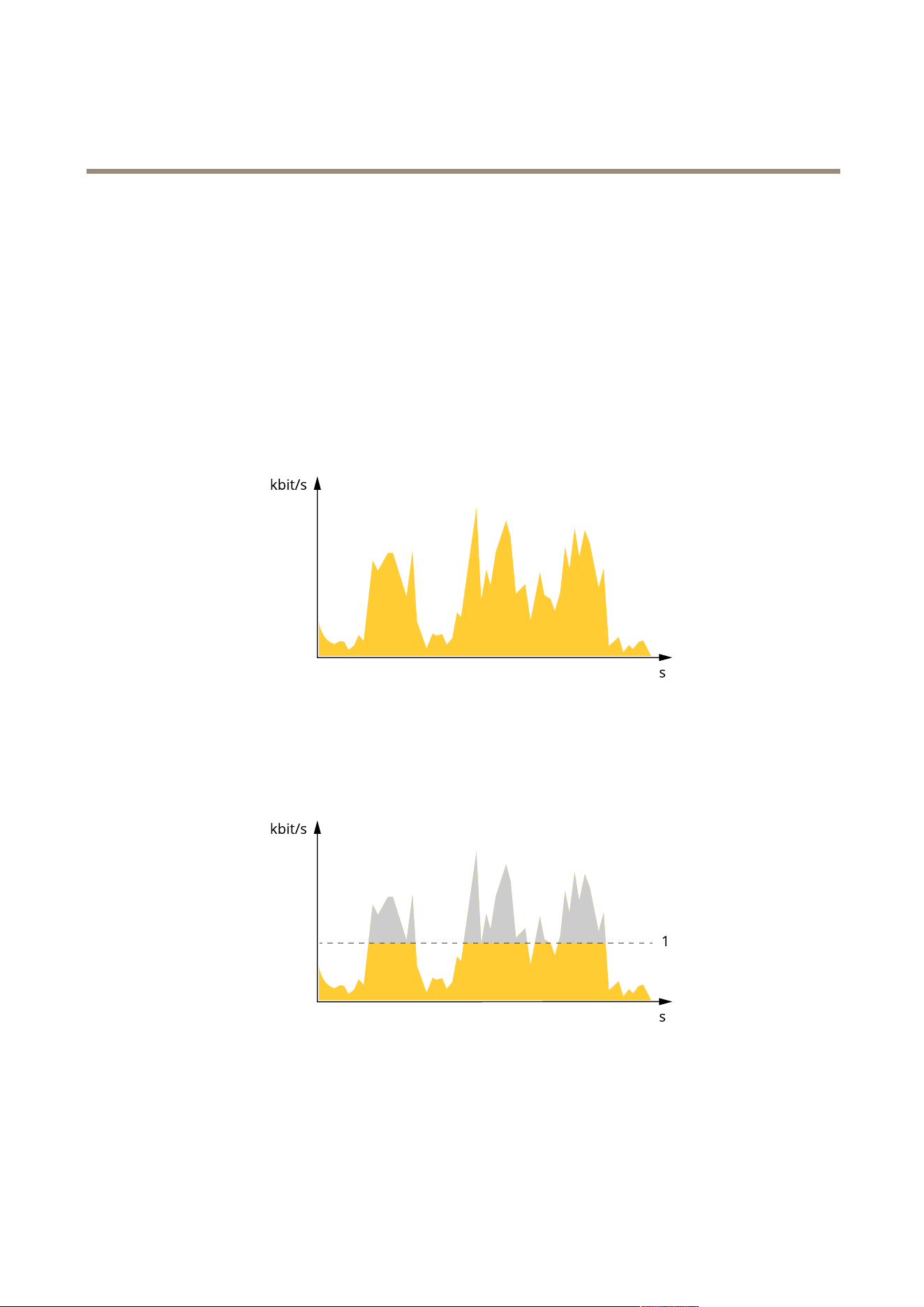
Variablebitrate(VBR)
Withvariablebitrate,thebandwidthconsumptionvariesbasedonthelevelofactivityinthescene.Themoreactivityinthescene,
themorebandwidthyouneed.Youareguaranteedconstantimagequalitybutitrequiresstoragemargins.
Maximumbitrate(MBR)
Withmaximumbitrate,youcansetatargetbitratetohandlebitratelimitationsinyoursystem.Youmayseeadeclineinimage
qualityorframeratewhentheinstantaneousbitrateiskeptbelowthespeciedtargetbitrate.Youcanchoosetoeitherprioritize
imagequalityorframerate.Werecommendthatyoucongurethetargetbitratetoahighervaluethantheexpectedbitrate.This
givesyouamarginforadditionalcomplexitythatneedstobecaptured.
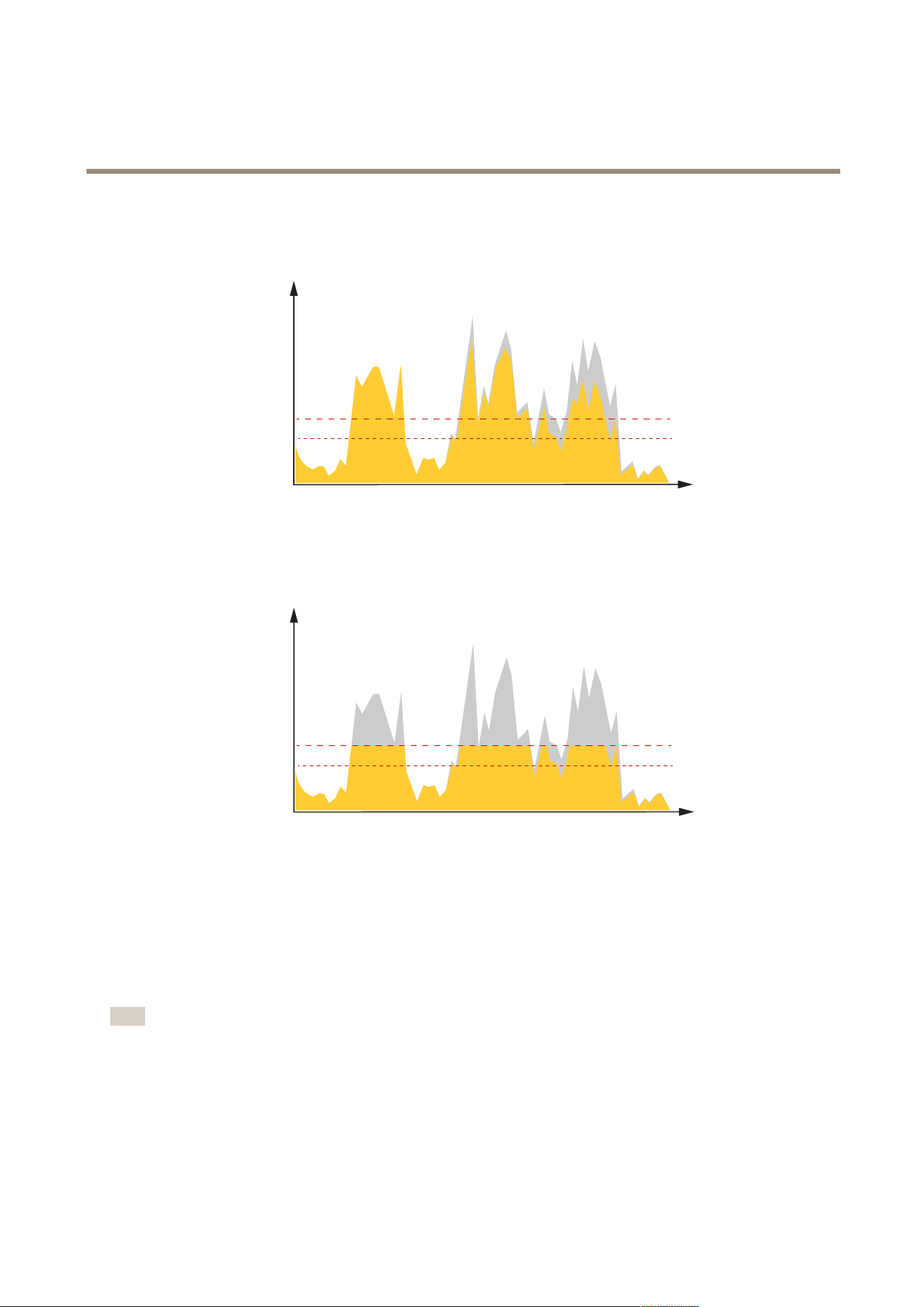
1
Targetbitrate
Averagebitrate(ABR)
Withaveragebitrate,thebitrateisautomaticallyadjustedoveralongertimescale.Thisissoyoucanmeetthespeciedtargetand
providethebestvideoqualitybasedonyouravailablestorage.Bitrateishigherinsceneswithalotofactivity,comparedtostatic
scenes.Youaremorelikelytogetbetterimagequalitywhenneededwhenusingtheaveragebitrateoption.Youcandenethetotal
storagerequiredtostorethevideostreamforaspeciedamountoftime(retentiontime)whenimagequalityisadjustedtomeetthe
speciedtargetbitrate.Specifytheaveragebitratesettingsinoneofthefollowingways:
18
AXISQ19-EThermalCameraSeries
Learnmore
•Tocalculatetheestimatedstorageneed,setthetargetbitrateandtheretentiontime.
•Tocalculatetheaveragebitrate,basedonavailablestorageandrequiredretentiontime,usethetargetbitratecalculator.
kbit/s
s
1
2
1
Targetbitrate
2
Actualaveragebitrate
Youcanalsoturnonmaximumbitrateandspecifyatargetbitratewithintheaveragebitrateoption.
kbit/s
s
1
2
1
Targetbitrate
2
Actualaveragebitrate
Applications
AXISCameraApplicationPlatform(ACAP)isanopenplatformthatenablesthirdpartiestodevelopanalyticsandotherapplications
forAxisproducts.Tondoutmoreaboutavailableapplications,downloads,trialsandlicenses,gotoaxis.com/applications.
TondtheusermanualsforAxisapplications,gotoaxis.com.
Note
•Severalapplicationscanrunatthesametimebutsomeapplicationsmightnotbecompatiblewitheachother.Certain
combinationsofapplicationsmightrequiretoomuchprocessingpowerormemoryresourceswhenruninparallel.Verify
thattheapplicationsworktogetherbeforedeployment.
19

AXISQ19-EThermalCameraSeries
Learnmore
Towatchthisvideo,gotothewebversionofthisdocument.
www.axis.com/products/online-manual/67055#t10001688
Howtodownloadandinstallanapplication
Towatchthisvideo,gotothewebversionofthisdocument.
www.axis.com/products/online-manual/67055#t10001688
Howtoactivateanapplicationlicencecodeonadevice
AXISPerimeterDefender
AXISPerimeterDefenderisanapplicationforperimetersurveillanceandprotection.Itisidealforhigh-securityperimeterprotection
wherethereisaneedtostrengthenthephysicalaccesscontrolsystemwithreliableintrusiondetection.
AXISPerimeterDefenderisprimarilydesignedforso-calledsterilezoneprotection,forexamplealongafencemarkingaboundary.
Thetermsterilezonereferstoanareawherepeoplearenotsupposedtobe.
UseAXISPerimeterDefenderinanoutdoorenvironmentto:
•Detectmovingpersons.
•Detectmovingvehicles,withoutdiscriminatingbetweenvehicletypes.
20
AXISQ19-EThermalCameraSeries
Learnmore
VMS
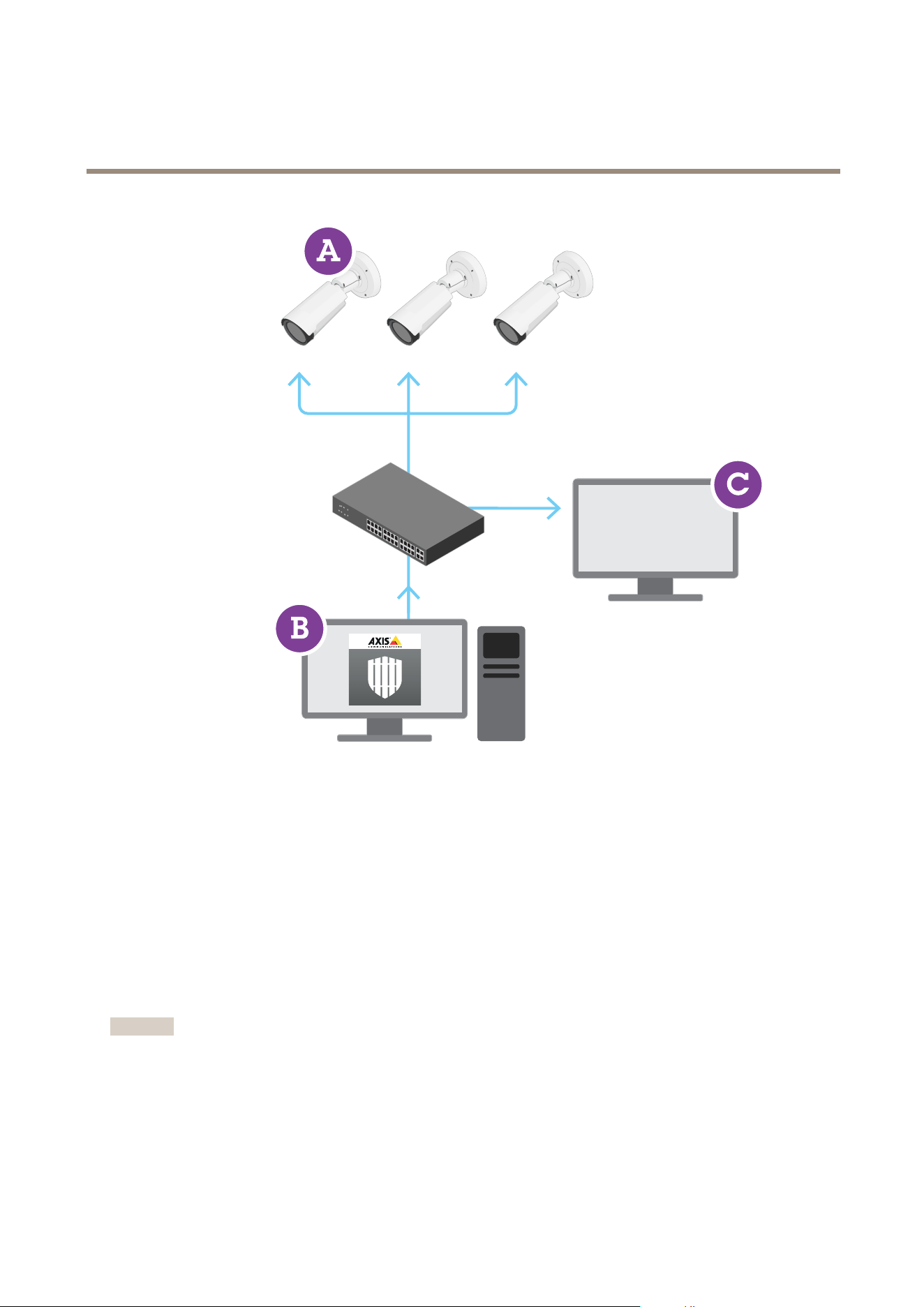
AXISQ1951-EandAXISQ1952-EThermalCamerascanruntheapplicationincalibrationmode,AImode,orbothmodesin
combination.IfyouchoosetorunitinAImodeonly,cameramountingismoreexibleandyoudon’tneedtocalibratethecameras.
AXISPerimeterDefenderconsistsofadesktopinterface(B),fromwhereyouinstallandsetuptheapplicationonthecameras(A).You
canthencongurethesystemtosendalarmstotheVideoManagementSoftware(C).
AXISPerimeterDefenderPTZAutotrackingisaplugintotheAXISPerimeterDefenderapplication,usingthesamedesktopinterface.
Withtheplugin,youpairaxedvisualorthermalcamerawithanAxisQ-linePTZcamera.Youcanthenmaintaincontinuous
detectioncoverageofascenewiththexedcamerawhilethePTZcameraautomaticallytracksandgivesyoucloserviews
ofdetectedobjects.
Important
AXISPerimeterDefenderPTZAutotrackingrequirescalibrationofbothxedandPTZcameras.
AXISPerimeterDefenderoffersthefollowingtypesofdetectionscenarios:
•Intrusion:triggersanalarmwhenapersonoravehicleentersazonedenedontheground(fromanydirection
andwithanytrajectory).
21

AXISQ19-EThermalCameraSeries
Learnmore
•Loitering:triggersanalarmwhenapersonoravehicleremainsinazonedenedonthegroundformorethan
apredenednumberofseconds.
•Zone-crossing:triggersanalarmwhenapersonoravehiclepassesthroughtwoormorezonesdenedonthegroundin
agivensequence.
•Conditional:triggersanalarmwhenapersonoravehicleentersazonedenedonthegroundwithoutrstpassing
throughanotherzoneorzonesdenedontheground.
Security
TPMmodule
TheTPM(TrustedPlatformModule)isacomponentthatprovidescryptographicfeaturestoprotectinformationfromunauthorized
access.Itisalwaysactivatedandtherearenosettingsyoucanchange.
TolearnmoreaboutTPM,gotoaxis.com/press-center/media-resources/white-papers.
22

AXISQ19-EThermalCameraSeries
Troubleshooting
Troubleshooting
Resettofactorydefaultsettings
Important
Resettofactorydefaultshouldbeusedwithcaution.Aresettofactorydefaultresetsallsettings,includingtheIPaddress,to
thefactorydefaultvalues.
Toresettheproducttothefactorydefaultsettings:
1.Disconnectpowerfromtheproduct.
2.Pressandholdthecontrolbuttonwhilereconnectingpower.SeeProductoverviewonpage27.
3.Keepthecontrolbuttonpressedfor15–30secondsuntilthestatusLEDindicatorashesamber.
4.Releasethecontrolbutton.TheprocessiscompletewhenthestatusLEDindicatorturnsgreen.Theproducthasbeenreset
tothefactorydefaultsettings.IfnoDHCPserverisavailableonthenetwork,thedefaultIPaddressis192.168.0.90.
5.UsetheinstallationandmanagementsoftwaretoolstoassignanIPaddress,setthepassword,andaccessthevideostream.
Theinstallationandmanagementsoftwaretoolsareavailablefromthesupportpagesonaxis.com/support.
Itisalsopossibletoresetparameterstofactorydefaultthroughthewebinterface.GotoSettings>System>Maintenanceand
clickDefault.
Firmwareoptions
Axisoffersproductrmwaremanagementaccordingtoeithertheactivetrackorthelong-termsupport(LTS)tracks.Beingonthe
activetrackmeanscontinuouslygettingaccesstoallthelatestproductfeatures,whiletheLTStracksprovideaxedplatformwith
periodicreleasesfocusedmainlyonbugxesandsecurityupdates.
Usingrmwarefromtheactivetrackisrecommendedifyouwanttoaccessthenewestfeatures,orifyouuseAxisend-to-endsystem
offerings.TheLTStracksarerecommendedifyouusethird-partyintegrations,whicharenotcontinuouslyvalidatedagainstthelatest
activetrack.WithLTS,theproductscanmaintaincybersecuritywithoutintroducinganysignicantfunctionalchangesoraffecting
anyexistingintegrations.FormoredetailedinformationaboutAxisproductrmwarestrategy,gotoaxis.com/support/rmware.
Checkthecurrentrmware
Firmwareisthesoftwarethatdeterminesthefunctionalityofnetworkdevices.Oneofyourrstactionswhentroubleshootinga
problemshouldbetocheckthecurrentrmwareversion.Thelatestversionmaycontainacorrectionthatxesyourparticular
problem.
Tocheckthecurrentrmware:
1.Gototheproduct’swebpage.
2.Clickthehelpmenu
.
3.ClickAbout.
Upgradethermware
Important
Preconguredandcustomizedsettingsaresavedwhenthermwareisupgraded(providedthatthefeaturesareavailablein
thenewrmware)althoughthisisnotguaranteedbyAxisCommunicationsAB.
23

AXISQ19-EThermalCameraSeries
Troubleshooting
Important
Makesuretheproductremainsconnectedtothepowersourcethroughouttheupgradeprocess.
Note
Whenyouupgradetheproductwiththelatestrmwareintheactivetrack,theproductreceivesthelatestfunctionality
available.Alwaysreadtheupgradeinstructionsandreleasenotesavailablewitheachnewreleasebeforeupgradingthe
rmware.Tondthelatestrmwareandthereleasenotes,gotoaxis.com/support/rmware.
AXISDeviceManagercanbeusedformultipleupgrades.Findoutmoreataxis.com/products/axis-device-manager.
Towatchthisvideo,gotothewebversionofthisdocument.
www.axis.com/products/online-manual/67055#t10095327
Howtoupgradethermware
1.Downloadthermwareletoyourcomputer,availablefreeofchargeataxis.com/support/rmware.
2.Logintotheproductasanadministrator.
3.GotoSettings>System>Maintenance.Followtheinstructionsonthepage.Whentheupgradehasnished,the
productrestartsautomatically.
Technicalissues,cluesandsolutions
Ifyoucan’tndwhatyou’relookingforhere,trythetroubleshootingsectionataxis.com/support.
Problemsupgradingthermware
FirmwareupgradefailureIfthermwareupgradefails,thedevicereloadsthepreviousrmware.Themostcommonreason
isthatthewrongrmwarelehasbeenuploaded.Checkthatthenameofthermwarele
correspondstoyourdeviceandtryagain.
Problemsafterrmware
upgrade
Ifyouexperienceproblemsafterarmwareupgrade,rollbacktothepreviouslyinstalledversion
fromtheMaintenancepage.
ProblemssettingtheIPaddress
Thedeviceislocatedona
differentsubnet
IftheIPaddressintendedforthedeviceandtheIPaddressofthecomputerusedtoaccessthe
devicearelocatedondifferentsubnets,youcannotsettheIPaddress.Contactyournetwork
administratortoobtainanIPaddress.
24

AXISQ19-EThermalCameraSeries
Troubleshooting
TheIPaddressisbeingused
byanotherdevice
DisconnecttheAxisdevicefromthenetwork.Runthepingcommand(inaCommand/DOSwindow,
typepingandtheIPaddressofthedevice):
•Ifyoureceive:Replyfrom<IPaddress>:bytes=32;time=10...
thismeansthattheIPaddressmayalreadybeinusebyanotherdeviceonthenetwork.
ObtainanewIPaddressfromthenetworkadministratorandreinstallthedevice.
•Ifyoureceive:Requesttimedout,thismeansthattheIPaddressisavailable
forusewiththeAxisdevice.Checkallcablingandreinstallthedevice.
PossibleIPaddressconict
withanotherdeviceonthe
samesubnet
ThestaticIPaddressintheAxisdeviceisusedbeforetheDHCPserversetsadynamicaddress.
ThismeansthatifthesamedefaultstaticIPaddressisalsousedbyanotherdevice,theremay
beproblemsaccessingthedevice.
Thedevicecannotbeaccessedfromabrowser
Cannotlogin
WhenHTTPSisenabled,ensurethatthecorrectprotocol(HTTPorHTTPS)isusedwhenattempting
tologin.Youmayneedtomanuallytypehttporhttpsinthebrowser’saddresseld.
Ifthepasswordfortheuserrootislost,thedevicemustberesettothefactorydefaultsettings.
SeeResettofactorydefaultsettingsonpage23.
TheIPaddresshasbeen
changedbyDHCP
IPaddressesobtainedfromaDHCPserveraredynamicandmaychange.IftheIPaddresshasbeen
changed,useAXISIPUtilityorAXISDeviceManagertolocatethedeviceonthenetwork.Identify
thedeviceusingitsmodelorserialnumber,orbytheDNSname(ifthenamehasbeencongured).
Ifrequired,astaticIPaddresscanbeassignedmanually.Forinstructions,gotoaxis.com/support.
Certicateerrorwhenusing
IEEE802.1X
Forauthenticationtoworkproperly,thedateandtimesettingsintheAxisdevicemustbe
synchronizedwithanNTPserver.GotoSettings>System>Dateandtime.
Thedeviceisaccessiblelocallybutnotexternally
Toaccessthedeviceexternally,werecommendusingoneofthefollowingapplicationsforWindows
®
:
•AXISCompanion:freeofcharge,idealforsmallsystemswithbasicsurveillanceneeds.
•AXISCameraStation:30-daytrialversionfreeofcharge,idealforsmalltomid-sizesystems.
Forinstructionsanddownload,gotoaxis.com/vms.
Problemswithstreaming
MulticastH.264only
accessiblebylocalclients
Checkifyourroutersupportsmulticasting,oriftheroutersettingsbetweentheclientandthe
deviceneedtobecongured.TheTTL(TimeToLive)valuemayneedtobeincreased.
NomulticastH.264
displayedintheclient
CheckwithyournetworkadministratorthatthemulticastaddressesusedbytheAxisdevice
arevalidforyournetwork.
Checkwithyournetworkadministratortoseeifthereisarewallpreventingviewing.
PoorrenderingofH.264
images
Ensurethatyourgraphicscardisusingthelatestdriver.Thelatestdriverscanusuallybe
downloadedfromthemanufacturer’swebsite.
Lowerframeratethan
expected
•SeePerformanceconsiderationsonpage26.
•Reducethenumberofapplicationsrunningontheclientcomputer.
•Limitthenumberofsimultaneousviewers.
•Checkwiththenetworkadministratorthatthereisenoughbandwidthavailable.
•Lowertheimageresolution.
•Themaximumframespersecondisdependentontheutilityfrequency(60/50Hz)
oftheAxisdevice.
Can'tselectH.265encoding
inliveview
WebbrowsersdonotsupportH.265decoding.Useavideomanagementsystemorapplication
supportingH.265decoding.
25

AXISQ19-EThermalCameraSeries
Troubleshooting
Performanceconsiderations
Whensettingupyoursystem,itisimportanttoconsiderhowvarioussettingsandsituationsaffecttheperformance.Somefactors
affecttheamountofbandwidth(thebitrate)required,otherscanaffecttheframerate,andsomeaffectboth.Iftheloadonthe
CPUreachesitsmaximum,thisalsoaffectstheframerate.
Thefollowingfactorsarethemostimportanttoconsider:
•Highimageresolutionorlowercompressionlevelsresultinimagescontainingmoredatawhichinturnaffectsthe
bandwidth.
•RotatingtheimageintheGUIwillincreasetheproduct'sCPUload.
•AccessbylargenumbersofMotionJPEGorunicastH.264clientsaffectsthebandwidth.
•Simultaneousviewingofdifferentstreams(resolution,compression)bydifferentclientsaffectsbothframerateand
bandwidth.
Useidenticalstreamswhereverpossibletomaintainahighframerate.Streamprolescanbeusedtoensurethat
streamsareidentical.
•AccessingMotionJPEGandH.264videostreamssimultaneouslyaffectsbothframerateandbandwidth.
•Heavyusageofeventsettingsaffectstheproduct’sCPUloadwhichinturnaffectstheframerate.
•UsingHTTPSmayreduceframerate,inparticularifstreamingMotionJPEG.
•Heavynetworkutilizationduetopoorinfrastructureaffectsthebandwidth.
•Viewingonpoorlyperformingclientcomputerslowersperceivedperformanceandaffectsframerate.
•RunningmultipleAXISCameraApplicationPlatform(ACAP)applicationssimultaneouslymayaffecttheframerateand
thegeneralperformance.
•Usingpalettesaffectstheproduct’sCPUloadwhichinturnaffectstheframerate.
Contactsupport
Contactsupportataxis.com/support.
26
AXISQ19-EThermalCameraSeries
Specifications
Specifications
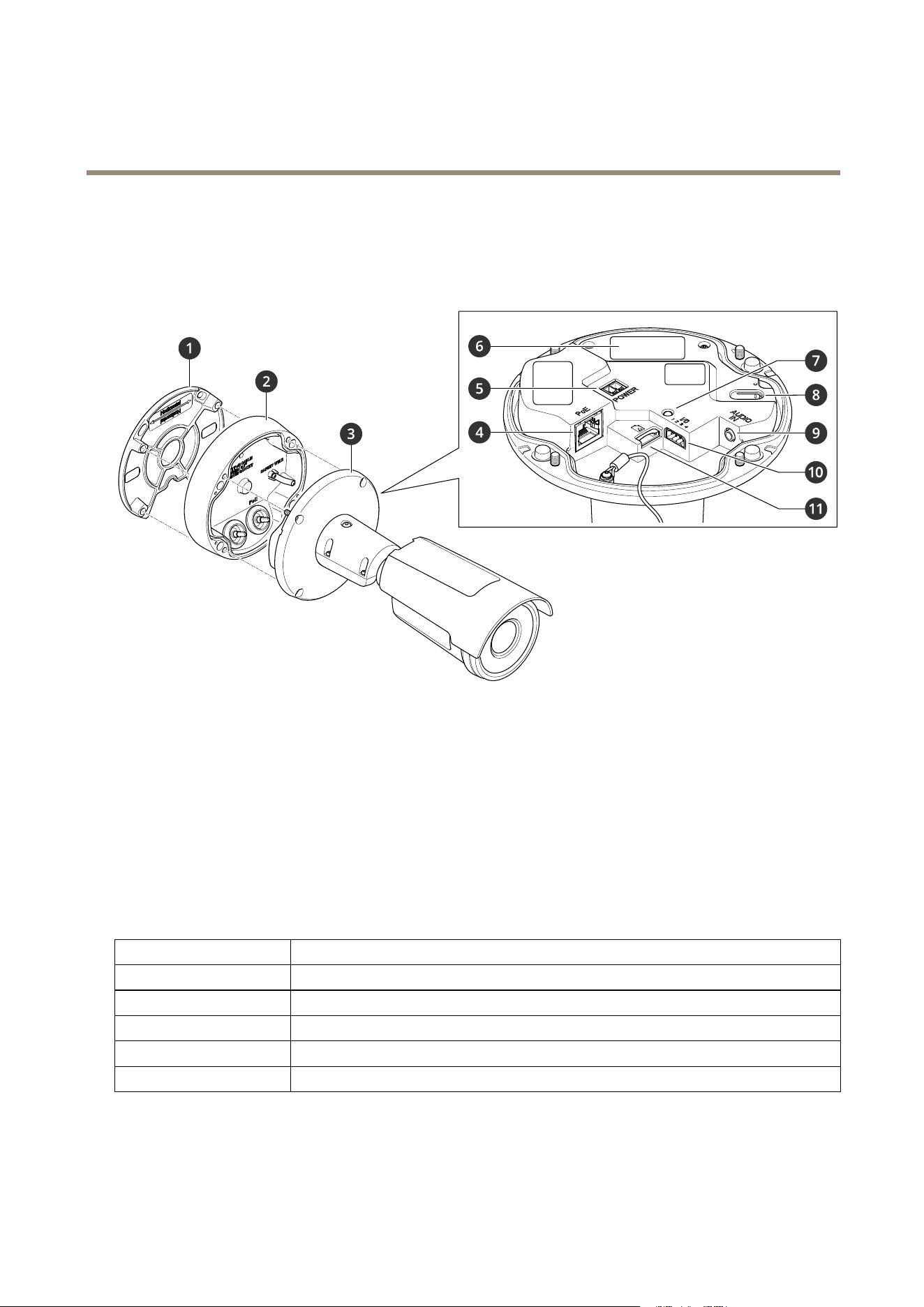
Productoverview
1
Mountingbracket
2
Connectionlid
3
Cameraunit
4
Networkconnector(PoE)
5
Powerconnector
6
Partnumber(P/N)&serialnumber(S/N)
7
StatusLEDindicator
8
Controlbutton
9
Audioconnector
10
I/Oconnector
11
SDmemorycardslot
LEDindicators
StatusLED
Indication
Unlit
Connectionandnormaloperation.
GreenConnectionandnormaloperation.
Amber
Steadyduringstartup.Flashesduringrmwareupgradeorresettofactorydefault.
Amber/RedFlashesamber/redifnetworkconnectionisunavailableorlost.
RedFirmwareupgradefailure.
27

AXISQ19-EThermalCameraSeries
Specifications
SDcardslot
NO NO
NO
TICE TICE
TICE
•RiskofdamagetoSDcard.Donotusesharptools,metalobjects,orexcessiveforcewheninsertingorremovingthe
SDcard.Useyourngerstoinsertandremovethecard.
•Riskofdatalossandcorruptedrecordings.DonotremovetheSDcardwhiletheproductisrunning.UnmounttheSDcard
fromtheproduct’swebpagebeforeremoval.
ThisproductsupportsmicroSD/microSDHC/microSDXCcards.
ForSDcardrecommendations,seeaxis.com.
microSD,microSDHC,andmicroSDXCLogosaretrademarksofSD-3CLLC.microSD,microSDHC,microSDXCare
trademarksorregisteredtrademarksofSD-3C,LLCintheUnitedStates,othercountriesorboth.
Buttons
Controlbutton
Thecontrolbuttonisusedfor:
•Resettingtheproducttofactorydefaultsettings.SeeResettofactorydefaultsettingsonpage23.
•Connectingtoaone-clickcloudconnection(O3C)serviceovertheinternet.Toconnect,pressandholdthebutton
forabout3secondsuntilthestatusLEDashesgreen.
Connectors
Networkconnector
RJ45EthernetconnectorwithPoweroverEthernet(PoE).
Audioconnector
•Audioin–3.5mminputforadigitalmicrophone,ananalogmonomicrophone,oraline-inmonosignal(leftchannelis
usedfromastereosignal).
Audioinput
1Tip2Ring
3Sleeve
Unbalancedmicrophone(withorwithoutelectret
power)orline
Electretpowerifselected
Ground
DigitalsignalRingpowerifselected
Ground
Foraudioin,theleftchannelisusedfromastereosignal.
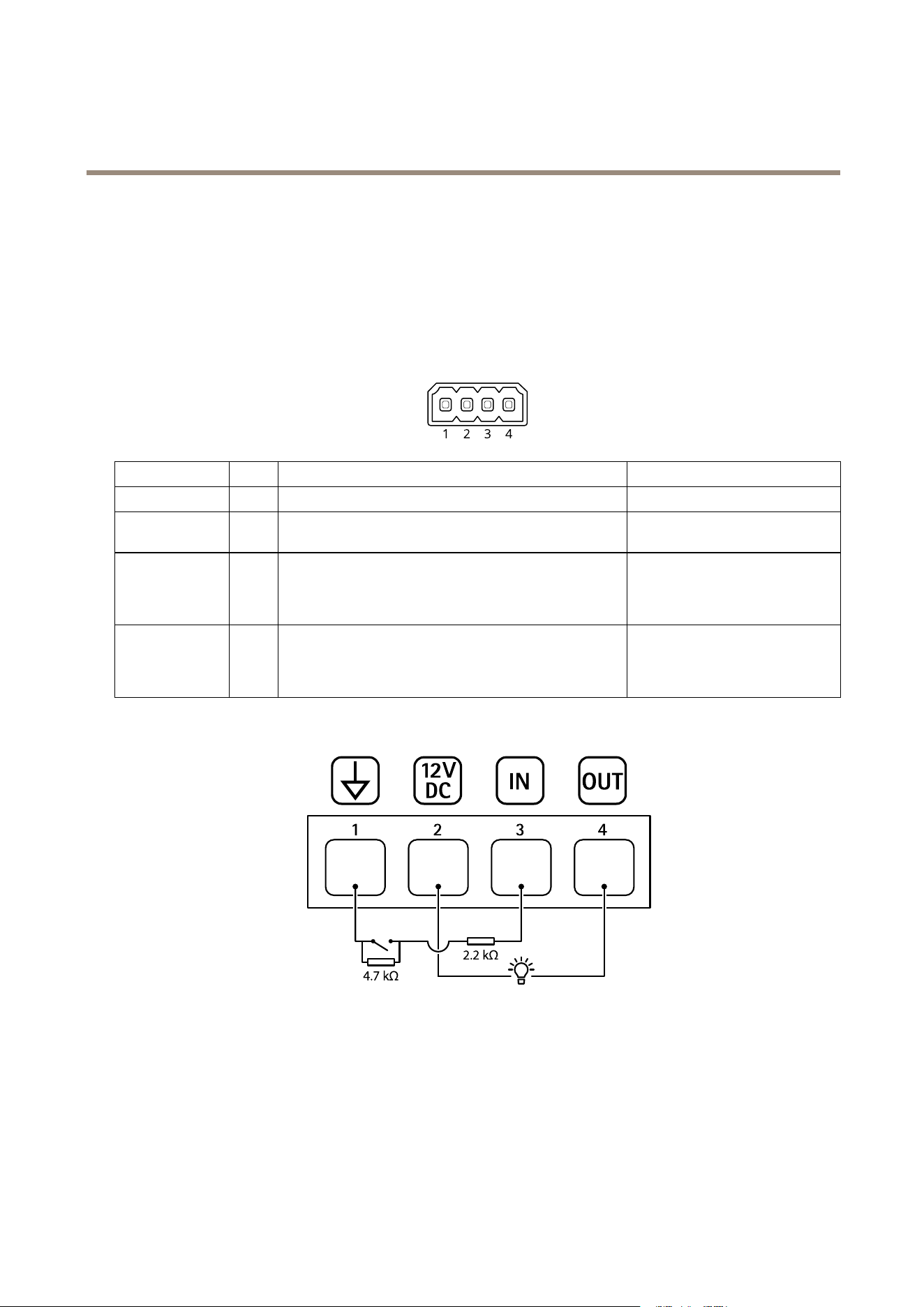
I/Oconnector
UsetheI/Oconnectorwithexternaldevicesincombinationwith,forexample,motiondetection,eventtriggering,andalarm
notications.Inadditiontothe0VDCreferencepointandpower(DCoutput),theI/Oconnectorprovidestheinterfaceto:
28
AXISQ19-EThermalCameraSeries
Specifications
Digitalinput-Forconnectingdevicesthatcantogglebetweenanopenandclosedcircuit,forexamplePIRsensors,door/window
contacts,andglassbreakdetectors.
Supervisedinput-Enablespossibilitytodetecttamperingonadigitalinput.
Digitaloutput-ForconnectingexternaldevicessuchasrelaysandLEDs.ConnecteddevicescanbeactivatedbytheVAPIX®
ApplicationProgrammingInterface,troughaneventorfromtheproduct’swebpage.
4-pinterminalblock
FunctionPinNotes
Specications
DCground
1
0VDC
DCoutput
2
Canbeusedtopowerauxiliaryequipment.
Note:Thispincanonlybeusedaspowerout.
12VDC
Maxload=25mA
DigitalInputor
SupervisedInput
3
Connecttopin1toactivate,orleaveoating(unconnected)
todeactivate.Tousesupervisedinput,installend-of-line
resistors.Seeconnectiondiagramforinformationabouthow
toconnecttheresistors.
0tomax30VDC
DigitalOutput
4
Internallyconnectedtopin1(DCground)whenactive,
andoating(unconnected)wheninactive.Ifusedwithan
inductiveload,e.g.,arelay,connectadiodeinparallelwith
theload,toprotectagainstvoltagetransients.
0tomax30VDC,opendrain,
100mA
Example
1
DCground
2
DCoutput12V,max25mA
3
Supervisedinput
4
Digitaloutput
Powerconnector
2-pinterminalblockforDCpowerinput.UseaSafetyExtraLowVoltage(SELV)compliantlimitedpowersource(LPS)witheither
aratedoutputpowerlimitedto≤100Woraratedoutputcurrentlimitedto≤5A.
29

AXISQ19-EThermalCameraSeries
Specifications
30

UserManualVer.M1.11
AXISQ19-EThermalCameraSeries
Date:May2021
©AxisCommunicationsAB,2021
PartNo.T10167107